Introduction to JavaScript Runtime Architecture
1. Foundations of JavaScript Execution
1.1 What a JavaScript Runtime Provides Beyond The Language Specification
The JavaScript language specification describes syntax and semantics, but it does not ship a working program by itself. A JavaScript runtime is the set of components that turns source text into a running process with I/O, timers, memory management, and a scheduling model. In practice, the runtime answers questions the spec leaves open: where does code run, how does it wait for events, and what native capabilities exist.
The Runtime Stack from Source to Execution
A typical runtime pipeline starts with parsing and ends with executing machine code. The engine parses your code into an internal representation, then compiles it using one or more tiers. While compilation details vary, the runtime must also provide:
- A call stack model for synchronous execution.
- A heap and garbage collection for objects and closures.
- A global environment with built-in objects and functions.
- A scheduler and event loop for asynchronous work.
- A module loader for resolving and instantiating code units.
- Native bindings for platform features like files, sockets, and threads.
Execution Model the Spec Covers and the Runtime Implements
The spec defines how function calls, lexical environments, and promises behave. The runtime implements the mechanics that make those rules observable.
For example, synchronous code runs to completion on the current call stack. If you block the thread with a long loop, the runtime cannot process incoming events, even if your code uses callbacks elsewhere.
function busyWait(ms) {
  const end = Date.now() + ms;
  while (Date.now() < end) {}
}

console.log('A');
busyWait(50);
console.log('B');
The output is always A then B because the runtime does not interleave other work during a synchronous stack frame.
Asynchronous Work Requires a Scheduler
The spec defines promise jobs and their ordering relative to other tasks, but it does not define how the platform receives events. The runtime provides an event loop that pulls work from queues and decides when to run it.
A useful mental model is two layers:
- Task sources produce units of work, such as timers or I/O completions.
- Queues store those units until the event loop runs them.
Microtasks (promise reactions) are queued separately and are typically drained before the runtime moves on to the next task.
console.log('start');

Promise.resolve().then(() => console.log('micro'));
setTimeout(() => console.log('macro'), 0);

console.log('end');
You should see start, end, micro, then macro. The ordering is a runtime scheduling policy that the spec constrains.
Built Ins and Global State
The runtime supplies built-in objects like Math, Date, Promise, and JSON, plus the global object and its properties. It also defines how those built-ins interact with the platform.
For instance, Date depends on the host’s time source, and Intl depends on available locale data. Even when the spec defines the API shape, the runtime decides what data is present and how it is accessed.
Memory Management and Object Lifetimes
JavaScript uses a garbage-collected heap. The spec describes reachability and observable behavior, but the runtime chooses the strategy: generational collection, incremental marking, and compaction policies.
What you can rely on is not the algorithm, but the contract: objects remain alive while reachable, and unreachable objects may be reclaimed at runtime-chosen times.
A practical best practice follows from this: avoid retaining references longer than needed, especially in long-lived processes. If you keep arrays of results “just in case,” you keep the objects alive too.
Native Capabilities the Spec Cannot Define
The language spec cannot define how to read a file or open a socket because those are platform concerns. Runtimes expose native APIs through bindings.
- In a browser runtime, native capabilities include DOM events and network requests.
- In a server runtime, native capabilities include filesystem access and process management.
The same JavaScript code can behave differently because the runtime provides different native surfaces and different scheduling sources.
Mind Map: Runtime Responsibilities
A Cohesive Example: Why “Same Code” Can Still Differ
Consider a promise chain that logs messages. The spec controls promise reaction ordering, but the runtime controls when the chain is triggered by external events.
If a runtime receives an HTTP response, it schedules the callback or promise resolution as a task. Another runtime might schedule that task from a different queue or with different batching behavior, changing when your logs appear relative to other events.
So the runtime is the bridge between language semantics and real-world time: it decides when work runs, what native events exist, and how resources like memory and modules are managed.
1.2 Execution Contexts Call Stacks and Memory Model Basics
Execution Contexts What Runs When
An execution context is the runtime’s “active frame” for code. When JavaScript starts executing a script or enters a function, the engine creates an execution context and pushes it onto the call stack. Each context tracks three key things: the lexical environment for variable bindings, the variable environment for declarations, and the value of this.
A useful mental model is that the engine needs a place to store bindings and a rule for how to find them. That rule is lexical scoping: inner code can reference outer bindings because the engine links environments in a chain.
Call Stack How Control Moves
The call stack is a LIFO structure that mirrors control flow. When a function is called, its execution context is created and pushed. When it returns, the context is popped and control resumes in the caller.
This explains two common behaviors:
- Stack overflow happens when recursion grows the stack faster than it can unwind.
- Synchronous code runs to completion before the engine processes queued tasks, because the stack must empty first.
Example: Stack Frames and Return Values
function add(a, b) {
  return a + b;
}

function compute(x) {
  const y = add(x, 2);
  return y * 3;
}

console.log(compute(5));
In compute, the engine calls add, so add’s context sits on top of compute’s context. After add returns, compute continues with y set to the returned value.
Lexical Environments Where Variables Live
Lexical environments represent scopes. A function scope typically has bindings for parameters and local let/const/var declarations. Block scopes add another environment layer for let and const.
The engine resolves identifiers by walking the environment chain. If a name isn’t found in the current environment, it checks the outer one, and so on until it reaches the global environment.
Example: Shadowing and Resolution
let value = 10;

function demo() {
  let value = 20; // shadows outer binding
  return value;
}

console.log(demo());
The return value inside demo refers to the inner value because lexical resolution finds it in the nearest environment.
Memory Model Basics Values and References
JavaScript has two broad categories of values: primitives and objects. Primitives (like numbers and strings) are stored as values. Objects are stored as references to an underlying heap allocation.
When you assign an object to another variable, both variables point to the same heap object. When you assign a primitive, the value is copied.
Example: Copying Primitives vs Sharing Objects
let a = 1;
let b = a;
a = 2;
console.log(b); // 1

let obj1 = { n: 1 };
let obj2 = obj1;
obj1.n = 2;
console.log(obj2.n); // 2
The first pair shows value copying. The second pair shows reference sharing.
The Heap and the Stack Division
The call stack holds execution contexts and control flow. The heap holds objects and other long-lived allocations. Local variables in a context may hold primitives directly or hold references to heap objects.
This division matters for performance and correctness:
- Large numbers of short-lived objects increase heap allocation and later garbage collection work.
- Holding references longer than necessary keeps objects reachable and prevents collection.
Mind Map: Execution Contexts and Memory
Putting It Together a Small Trace
Consider a function that creates an object and returns it. The function’s execution context lives on the stack while it runs. The created object lives on the heap. When the function returns, the stack frame is removed, but the returned reference keeps the object reachable, so it remains available.
That’s the core loop: contexts explain where bindings and this live during execution, the call stack explains control flow order, and the memory model explains why some data is copied while other data is shared.
1.3 The Role of the Engine Parser Compiler and Optimizer Pipeline
A JavaScript runtime turns source text into something the machine can execute, but it does so in stages. Each stage has a job: parsing checks structure, compiling turns structure into executable code, and optimizing improves performance while keeping results identical. The pipeline exists because “run it” is not a single action; it’s a sequence of transformations with checkpoints.
From Source Text to Syntax Tree
The parser’s first responsibility is to turn characters into a syntax tree. It also enforces grammar rules, so errors like missing braces are caught early. A syntax tree is not yet “program logic”; it’s a structured representation of what the program says.
Best practice: keep the parser’s work predictable by writing code that is syntactically clear. For example, avoid relying on tricky automatic semicolon insertion in places where a missing semicolon changes meaning.
// Risky: ASI can change the meaning if a line break appears
return
{ ok: true };

// Safer: keep return and expression on the same line
return { ok: true };
From Syntax Tree to Intermediate Representation
After parsing, the engine typically lowers the syntax tree into an intermediate representation (IR). IR is closer to executable behavior than the syntax tree, but still abstract enough for analysis. This is where the engine can reason about control flow, variable scopes, and how values flow through expressions.
A key detail: JavaScript has dynamic features, so the IR often carries uncertainty. For instance, a variable might hold a number now and a string later. The optimizer can still improve code, but it must do so with guards that preserve correctness.
Bytecode and Baseline Execution
Many engines start with a baseline compilation step that produces bytecode or baseline machine code. Baseline code is “good enough” to run quickly without spending too much time optimizing. It also collects feedback while running.
Feedback is the engine’s way of answering: “What actually happens in this program?” If a function is called many times, or if certain property accesses consistently see the same shapes, the engine can use that information later.
Best practice: structure hot code so it stays hot. If you create new functions inside loops, you may prevent stable feedback from forming.
function makeHandlers(list) {
  return list.map(x => () => x * 2);
}

// Better: reuse a single function shape when possible
function double(x) { return x * 2; }
function makeHandlers2(list) {
  return list.map(x => () => double(x));
}
Optimization Passes and Guarded Assumptions
The optimizer uses feedback to produce faster code. It may inline small functions, remove redundant checks, and specialize operations. However, JavaScript values can change type, so optimizations are usually guarded.
A guard is a runtime check that verifies an assumption. If the assumption fails, execution falls back to less optimized code. This is why “fast path” and “slow path” can both exist in the same function.
Example: property access can be optimized when objects share a consistent internal layout. If later you assign properties in a way that changes that layout, the guard fails and the engine reverts.
function sumPoints(points) {
  let s = 0;
  for (let i = 0; i < points.length; i++) {
    s += points[i].x + points[i].y;
  }
  return s;
}

// Stable shape helps the optimizer keep a fast path
const pts = Array.from({ length: 1000 }, () => ({ x: 1, y: 2 }));
sumPoints(pts);
Deoptimization and Correctness Boundaries
Optimization must preserve observable behavior: exceptions, coercions, and side effects must match the spec. When assumptions break, deoptimization reconstructs the correct execution state so the program can continue correctly.
This matters for code patterns that introduce unpredictable behavior, such as mixing many unrelated object shapes in the same array, or using dynamic property names in hot loops.
Putting It Together with a Mind Map
A Small End-to-End Walkthrough
Consider a function that loops and reads object properties. Parsing builds the tree for the loop and property reads. Lowering produces IR that models the loop and the reads. Baseline compilation runs it and records that property access patterns are consistent. Optimization then specializes the property reads and may inline simple operations. If later the objects stop matching the expected shape, guards trigger fallback, and deoptimization ensures the next iteration still behaves correctly.
The pipeline is therefore not just an implementation detail; it explains why “same code, different data” can perform differently, and why writing code with stable structure and predictable shapes gives the engine a reliable fast path to work with.
1.4 Runtime Services Garbage Collection and Built in Objects
A JavaScript runtime does more than execute your code. It also provides services that make execution practical: memory management, standard built-in APIs, and internal bookkeeping that keeps the engine from losing track of what exists and what can be reclaimed.
Garbage Collection Goals and Reachability
Garbage collection (GC) is about reclaiming memory that is no longer reachable. “Reachable” means there is a path from a set of roots to an object. Roots typically include active execution contexts (like the current call stack), global objects, and references held by the runtime itself.
A useful mental model is graph reachability:
- Nodes are objects.
- Edges are references.
- Roots are entry points.
If an object has no path from the roots, it becomes eligible for reclamation. This is why “forgetting” a variable can free memory: once the variable no longer references the object, the reference edge disappears.
Built in Objects What They Are and Why They Matter
Built-in objects are provided by the runtime so you don’t have to implement core behaviors yourself. Examples include:
Object,Array,Map,Setfor fundamental data structures.PromiseandErrorfor common control flow and error representation.Math,JSON,Datefor standard utilities.
These objects are not just convenience. They also define how values behave under the hood: property access rules, iteration protocols, and how internal slots store state. When you use built-ins, you’re also using runtime-defined invariants that GC and the engine rely on.
How GC Interacts with Your Code
GC doesn’t run “when you call a function.” It runs when the runtime decides memory pressure requires it. Your code influences GC indirectly by creating and retaining references.
Consider this example:
function make() {
  const big = new Array(1e6).fill(0);
  return { keep: 1 };
}

const x = make();
// 'big' is no longer reachable after make returns.
The array big becomes unreachable because nothing returned references it. GC can reclaim it without you doing anything.
Now compare with a retention bug:
let cache = [];

function leak() {
  const big = new Array(1e6).fill(0);
  cache.push(big);
}

leak();
// 'big' stays reachable via cache, so GC cannot reclaim it.
The runtime must keep big because cache is a root-reachable reference.
Common GC Pressure Patterns
GC pressure rises when you create many short-lived objects or accidentally keep long-lived references.
- Short-lived churn: creating many temporary objects inside hot loops.
- Hidden retention: closures capturing large values, event handlers storing references, or caches that never evict.
A closure example:
function makeHandler() {
  const big = new Array(1e6).fill(0);
  return () => big.length;
}

const handler = makeHandler();
// 'big' remains reachable because handler closes over it.
The runtime must keep big as long as the handler is reachable.
Mind Map: Runtime Services and Memory
Practical Best Practices for Memory-Friendly Code
- Limit accidental retention. If you store large values, ensure you have a clear lifecycle for removing references.
- Keep hot loops allocation-light. Reuse objects when it’s safe, and avoid building large temporary arrays repeatedly.
- Be deliberate with closures. If a closure captures a large value, that value stays alive until the closure becomes unreachable.
- Prefer bounded caches. If you must cache, cap its size or remove entries based on a policy.
Built in Objects and Their Memory Footprint
Built-ins often manage internal state that affects memory behavior. For instance:
MapandSethold references to keys and values, so entries keep those objects alive.Promisechains keep references until resolution and downstream handlers complete.Errorobjects capture stack information, which can retain context.
This doesn’t mean you should avoid built-ins. It means you should treat them as reference-holding containers when reasoning about reachability.
Putting It Together a Systematic Mental Model
When you write code, you create objects and references. The runtime provides built-in objects that define standard behaviors, and it provides GC that reclaims unreachable objects. Your job is to shape reachability so memory is retained only as long as it’s actually needed. That’s the whole game: create less garbage when it matters, and avoid keeping references longer than necessary.
1.5 Practical Walkthrough from Source Text to Executing Machine Code
Start with a tiny program and follow it through the runtime’s pipeline. The goal isn’t to memorize every internal detail; it’s to see which stage creates which kind of work.
Example Program
// source.js
const x = 2;
function add(a, b) { return a + b; }
console.log(add(x, 3));
Step 1: Text in to Tokens
The engine begins by reading the source text and turning characters into tokens: identifiers like x and add, punctuation like ( and ), and keywords like const. This stage also tracks locations for error reporting, so a syntax error can point to the exact character.
Best practice: keep syntax errors rare by running a linter or formatter in your workflow. It doesn’t change runtime behavior, but it prevents you from debugging “the parser is unhappy” instead of “the program is wrong.”
Step 2: Tokens Into an Abstract Syntax Tree
Next, the parser builds an AST that represents the program structure without committing to execution order yet. For example, add becomes a function node with a body node containing a return statement.
A useful mental model: the AST is a structured description of “what exists,” not “what runs now.”
Step 3: AST to Bytecode or Intermediate Representation
Engines typically compile the AST into an internal form. Some engines use bytecode; others use an intermediate representation that later becomes machine code. Either way, the compiler decides how to represent operations like variable reads, function calls, and arithmetic.
Best practice: write code that is easy for the engine to optimize. Stable shapes and consistent types help the runtime choose efficient representations.
Step 4: Creation of Execution Contexts
Before any line runs, the runtime creates execution contexts. For the top-level script, it sets up:
- A global environment record for bindings like
xandadd. - A lexical environment for block-scoped variables.
- A call stack frame structure ready for function calls.
For const x = 2, the binding is created during environment setup, then initialized when evaluation reaches the initializer.
Step 5: Evaluation and Control Flow
Now the engine evaluates the program. It executes statements in order:
- Initializes
xto2. - Creates the function object for
add. - Calls
console.logwith the result ofadd(x, 3).
When add is called, a new function execution context is pushed onto the call stack. Parameters a and b are bound to argument values, and the return statement computes a + b.
Best practice: avoid patterns that force excessive dynamic behavior. For example, calling functions with wildly different argument shapes in tight loops can reduce optimization quality.
Step 6: JIT Compilation to Machine Code
Many engines start with a faster-to-produce form (interpreter or baseline compilation). As the engine observes hot code paths, it may compile them to optimized machine code.
In our example, the arithmetic a + b and the call path for add are candidates. The engine may also inline small functions or specialize operations based on observed operand types.
Step 7: Native Calls and the Event Loop Boundary
console.log is not pure JavaScript. It crosses into the host environment (for Node.js or the browser console). The runtime hands off the call to native code, which formats and outputs text.
This is where “runtime architecture” matters: JavaScript execution is coordinated with host services. Even if our program is tiny, the same boundary exists for I/O, timers, and networking.
Mind Map: Source to Execution Pipeline
Step 8: What Actually Happens to Values
Consider the value flow for add(x, 3):
xis read from the environment record.3is a literal value.- The call creates a frame where
aandbreference those values. a + bproduces a new numeric value.- That value becomes the argument to
console.log.
If you later change x to a string, the engine may need different representations or fallback paths. That’s not “bad,” but it can change performance characteristics.
Step 9: A Tiny Instrumentation Trick
To see the boundaries between evaluation and host calls, you can add timestamps around the call. This doesn’t reveal internal compilation, but it helps confirm where time is spent.
// instrumented.js
const x = 2;
function add(a, b) { return a + b; }

const t0 = Date.now();
const y = add(x, 3);
const t1 = Date.now();
console.log('y=', y, 'compute_ms=', t1 - t0);
Step 10: Putting It Together
The pipeline is a chain of responsibilities:
- The parser turns text into structure.
- The compiler turns structure into an executable form.
- The runtime sets up environments and execution contexts.
- The evaluator runs code and creates call frames.
- The JIT may replace baseline execution with optimized machine code.
- Host APIs handle effects like output.
Once you can name each stage, debugging becomes less mystical: a syntax error is a parser problem, a reference error is an environment problem, and a performance issue is often a compilation or allocation problem.
2. Event Loop Mechanics and Task Scheduling
2.1 The Event Loop Core Responsibilities and Invariants
The event loop is the runtime’s traffic controller for work that must happen “later.” Its job is not to make JavaScript fast by magic; it is to make execution predictable by enforcing a small set of invariants. If you understand those invariants, you can reason about ordering, latency, and why certain bugs only show up under load.
Core Responsibilities
-
Run JavaScript to completion for each turn. The loop pulls one task from a queue, runs it until it finishes (or throws), and only then moves on. This “run-to-completion” rule prevents half-finished code from being interleaved with other tasks.
-
Move work from external sources into queues. I/O completion, timers, and user events are detected by the platform layer. When they’re ready, the runtime enqueues callbacks or jobs so JavaScript can process them safely.
-
Drain microtasks between macrotasks. After a task runs, the loop processes the microtask queue until it is empty. This is why
Promisecallbacks often run before the next timer or DOM event handler. -
Maintain fairness without breaking ordering. The loop chooses the next task based on queue rules, not on “who is most urgent.” Fairness comes from consistent queue discipline and bounded work per turn.
Key Invariants
Run-to-Completion
Once a task begins, no other task can start until it finishes. You can still yield indirectly via await, but the yielding happens by scheduling continuation work as a later microtask or task, not by interrupting the current stack.
Queue Separation
The runtime typically distinguishes at least two categories:
- Macrotasks: event callbacks, timer callbacks, and other queued “turn” work.
- Microtasks: promise reactions and other smaller jobs that must run before the next macrotask.
Microtask Drain Until Empty
If a microtask schedules more microtasks, the loop keeps draining until the microtask queue is empty. That invariant is powerful and also explains “microtask storms.”
Stack Discipline
The call stack represents the currently executing JavaScript. The event loop never resumes a suspended stack in the middle of another task; it resumes by starting a new continuation job with a fresh stack.
Ordering Example
Consider this program:
console.log('A');
setTimeout(() => console.log('B'), 0);
Promise.resolve().then(() => console.log('C'));
console.log('D');
A typical output is:
ADCB
Reasoning: the synchronous script is one task. After it finishes, the loop drains microtasks (C) before it selects the next macrotask (the timer callback B).
Practical Invariant Checks
Avoid Blocking the Loop
If you run a long CPU loop inside a task, you delay everything else: timers, I/O callbacks, and UI events. The invariant “tasks run to completion” means the loop cannot preempt you.
function busy(ms) {
  const end = Date.now() + ms;
  while (Date.now() < end) {}
}

setTimeout(() => console.log('timer'), 0);
busy(50);
console.log('done');
The timer callback can’t run until the current task finishes, so done appears before timer.
Bound Microtask Work
Microtasks are drained to empty, so if you keep scheduling microtasks, you can starve macrotasks.
let i = 0;
function spin() {
  if (i++ < 5) Promise.resolve().then(spin);
}
Promise.resolve().then(spin);
setTimeout(() => console.log('macrotask'), 0);
The macrotask waits until the microtask chain finishes.
Mind Map: Event Loop Responsibilities and Invariants
Summary
The event loop is defined less by “what it runs” and more by “when it is allowed to switch.” Run-to-completion, queue separation, and microtask draining are the invariants that make JavaScript timing understandable. Once you internalize those rules, the ordering you observe in real code stops being mysterious and starts being mechanical.
2.2 Task Queues Microtasks and Their Ordering Guarantees
A JavaScript runtime typically runs JavaScript on a single main thread, but it still needs to react to events, timers, I/O, and promise-based work. The mechanism that keeps this organized is a set of queues plus strict rules for when each queue is drained.
Foundational Model of Queues
Think of the runtime as repeatedly doing this loop:
- Pick one macrotask (also called a task) from the task queue.
- Run it to completion.
- Drain the microtask queue until it becomes empty.
- Only then move on to the next macrotask.
“Run to completion” means the currently executing macrotask is not interrupted by microtasks. Microtasks only run after the macrotask finishes.
Microtasks Versus Macrotasks
Microtasks are usually created by promise operations. Common sources include:
Promise.resolve().then(...)queueMicrotask(...)asyncfunction continuations after anawait
Macrotasks are usually created by the platform layer, such as:
setTimeoutandsetInterval- DOM event callbacks
- I/O callbacks in Node-style environments
A key ordering guarantee follows directly from the loop: if a microtask is queued during a macrotask, it will run before the next macrotask begins.
Ordering Guarantees You Can Rely On
The runtime provides these practical guarantees:
- Microtasks drain after each macrotask: no microtask from macrotask A will wait behind macrotask B.
- FIFO within a queue: microtasks are processed in the order they were enqueued.
- Microtasks can enqueue more microtasks: if a microtask schedules another microtask, the new one runs in the same draining phase, after the current microtask finishes.
- Microtasks do not preempt the current macrotask: they wait until the macrotask returns control to the loop.
Mind Map: Queue Flow
Example: Microtasks Run Before the Next Timer
console.log('A');

setTimeout(() => console.log('C'), 0);

Promise.resolve().then(() => console.log('B'));

console.log('D');
Expected order: A, D, B, C.
Reasoning: the macrotask runs A, schedules the timer and the promise microtask, then logs D and finishes. Only then does the runtime drain microtasks, printing B. The timer callback is a later macrotask, so it comes after.
Example: Microtasks Can Chain Within the Same Drain
console.log('start');

queueMicrotask(() => {
  console.log('m1');
  queueMicrotask(() => console.log('m2'));
});

console.log('end');
Expected order: start, end, m1, m2.
Reasoning: m1 and m2 are both microtasks. When m1 enqueues m2, the runtime continues draining microtasks without returning to the macrotask loop, so m2 runs immediately after m1.
Example: Microtasks Do Not Interrupt a Running Macrotask
console.log('x');

setTimeout(() => {
  console.log('y');
  Promise.resolve().then(() => console.log('z'));
  console.log('w');
}, 0);
Expected order: x, y, w, z.
Reasoning: inside the timer callback macrotask, the promise microtask is queued, but it cannot run until the callback finishes. That is why w prints before z.
Practical Best Practices for Predictable Behavior
- Use microtasks for “finish this now” work: promise continuations are ideal for small follow-ups that must run before the next event.
- Avoid assuming timers are immediate: a
setTimeout(..., 0)callback is still a macrotask, so it will wait behind any microtasks created earlier. - Bound microtask chains: if a microtask repeatedly enqueues more microtasks, it can starve macrotasks because the runtime keeps draining until the microtask queue is empty.
Example: Starvation Risk from Unbounded Microtasks
let i = 0;

queueMicrotask(function tick() {
  i++;
  if (i < 5) queueMicrotask(tick);
});

setTimeout(() => console.log('timer'), 0);
Expected order: the microtasks print first (not shown here), then timer.
Reasoning: the timer macrotask cannot run until the microtask queue becomes empty. In real code, the safe pattern is to stop microtask recursion and let macrotasks proceed.
Summary of the Ordering Rules
If you remember one thing, make it this: a macrotask runs to completion, then the runtime drains the microtask queue in FIFO order, including microtasks created during that drain, and only then does it pick the next macrotask.
2.3 Timers I/O Callbacks and How They Enter the Queue
A runtime can only run one JavaScript job at a time, so it needs a way to decide what to run next. Timers and I/O callbacks are two major sources of “next work.” They don’t run immediately when you schedule them; instead, they enter a queue that the event loop drains in a disciplined order.
Timers: From Scheduled Time to Ready Tasks
When you call setTimeout(fn, delay), the runtime records a target time (often based on a monotonic clock) and associates it with a callback. The key detail is that the callback becomes eligible only after the target time has passed. Eligibility does not mean execution; it means the callback can be moved into the appropriate task queue.
Timers typically follow these steps:
- Schedule: store callback plus target time.
- Wait: runtime checks when the next timer is due.
- Enqueue: when due, move the callback into the timers task queue.
- Execute: event loop picks it up when it reaches the timers phase.
A practical implication: if the main thread is busy, “due” timers wait longer. The delay is a minimum, not a guarantee.
const start = Date.now();
setTimeout(() => {
  console.log('elapsed ms', Date.now() - start);
}, 10);

// Block the thread for ~50ms
let x = 0;
for (let i = 0; i < 5e7; i++) x += i;
If the loop blocks, the callback enters the queue only after the runtime gets a chance to process timer readiness.
I/O Callbacks: From Operating System Events to Ready Tasks
I/O is different because the operating system can complete work while JavaScript is doing something else. The runtime registers interest in events (readable socket, completed file read, etc.). When the OS reports completion, the runtime converts that report into a callback that becomes eligible to run.
The typical pipeline looks like this:
- Register interest: runtime asks the OS to notify on an event.
- OS completes: OS signals readiness/completion.
- Runtime receives signal: runtime wakes up and records the callback.
- Enqueue: runtime places the callback into an I/O-related task queue.
- Execute: event loop runs it when it reaches the I/O phase.
The runtime must also avoid starving other work. That’s why I/O callbacks are usually enqueued as discrete tasks rather than executed immediately inside the OS notification handler.
Task Queues and Phase Ordering
Both timers and I/O callbacks are “macrotasks” in the common mental model. They enter task queues, and the event loop cycles through phases that decide which queue to drain next.
A simplified ordering for one loop iteration:
- Run one or more ready tasks from the current phase queue.
- After macrotasks, run microtasks to completion.
- Move to the next phase, where timers or I/O callbacks may have been enqueued.
This ordering matters when you mix timers, I/O, and promises. Microtasks run after the current macrotask finishes, before the next macrotask begins.
Mind Map: Timers and I/O Callback Flow
Example: Observing Queue Entry and Ordering
This example uses a timer and a promise to show how macrotasks and microtasks interleave.
setTimeout(() => {
  console.log('timer callback');
}, 0);

Promise.resolve().then(() => {
  console.log('microtask');
});

console.log('sync');
You should see sync first, then microtask, then timer callback. The timer callback enters its queue when the runtime processes timer readiness, but it still waits for the current macrotask to finish and for microtasks to drain.
Practical Best Practices for Queue Behavior
- Assume delays are minimums: if you need precise timing, measure and design around variability.
- Keep callbacks short: long callbacks block the loop and delay enqueue-to-execute for everything else.
- Avoid mixing heavy CPU work with timers: if you must compute, do it in smaller chunks so I/O callbacks can run promptly.
- Use microtasks for coordination, not heavy work: microtasks run to completion and can postpone macrotasks if abused.
Timers and I/O callbacks are the runtime’s way of turning “something became ready” into “a specific function should run next,” with the event loop acting as the referee that enforces order.
2.4 Backpressure Patterns Using Scheduling Controls
Backpressure is what you do when producers can generate work faster than consumers can process it. In a JavaScript runtime, the tricky part is that “work” can mean CPU time, memory growth, or queued callbacks. Scheduling controls let you shape the rate at which tasks enter the event loop, so the system degrades gracefully instead of collapsing under a backlog.
Core Idea: Control Admission, Not Just Completion
A useful mental model is admission control: decide whether a new unit of work is allowed to enter the pipeline now, or must wait. Completion control alone—like resolving promises when done—doesn’t stop the queue from growing. Scheduling controls act earlier, at the boundary between “received” and “scheduled.”
Start with two invariants:
- Bounded queues: you always have a maximum number of pending items.
- Fair progress: you keep the event loop responsive by yielding between batches.
Backpressure Map: Where Queues Form
Queues appear at multiple layers:
- Application queue: an array of pending jobs waiting for processing.
- Runtime queues: microtask queue for promise jobs and macrotask queues for timers and I/O callbacks.
- External buffers: streams, sockets, or file handles that may buffer data.
If you only bound the application queue but keep scheduling microtasks for each item, you can still starve I/O. If you only throttle scheduling but let memory grow elsewhere, you still lose.
Mind Map: Backpressure with Scheduling Controls
Pattern 1: Fixed Concurrency Workers with Bounded Queue
This pattern caps both the number of active tasks and the number waiting. When the queue is full, you choose a policy.
- Wait: apply backpressure to the producer by returning a promise that resolves when capacity frees.
- Drop: discard new items when full.
- Coalesce: keep only the latest state.
Here’s a wait-based worker pool that schedules work in batches to avoid monopolizing the loop.
const MAX_PENDING = 200;
const MAX_CONCURRENCY = 8;
let pending = [];
let active = 0;
let draining = false;

export function enqueue(job) {
  if (pending.length >= MAX_PENDING) {
    return new Promise(resolve => {
      const interval = setInterval(() => {
        if (pending.length < MAX_PENDING) {
          clearInterval(interval);
          pending.push(job);
          resolve();
          scheduleDrain();
        }
      }, 1);
    });
  }
  pending.push(job);
  scheduleDrain();
}

function scheduleDrain() {
  if (draining) return;
  draining = true;
  setTimeout(drain, 0);
}

async function drain() {
  draining = false;
  while (active < MAX_CONCURRENCY && pending.length) {
    active++;
    const job = pending.shift();
    Promise.resolve(job()).finally(() => {
      active--;
      scheduleDrain();
    });
    // Yield after a small batch to keep I/O moving
    if (pending.length % 32 === 0) return setTimeout(drain, 0);
  }
}
The key scheduling choice is setTimeout(drain, 0) to move draining into the macrotask queue. That prevents a long chain of promise jobs from dominating microtasks.
Pattern 2: Token Bucket Rate Limiting for Producers
Sometimes you can’t control the producer, but you can control when you accept work. A token bucket grants permission at a steady rate.
- Tokens refill on a timer.
- Each accepted job consumes one token.
- When tokens are empty, you delay admission.
This is effective when the producer is bursty but the consumer capacity is stable.
Pattern 3: Coalescing to Replace Queues with State
If jobs represent “set the latest value” rather than “process every event,” coalescing beats buffering. Keep one slot for the latest item and ignore intermediate ones.
A common example is UI-like state updates in a server: multiple updates arrive, but only the final state matters for the next processing step. Coalescing reduces both queue length and scheduling overhead.
Pattern 4: Drop Oldest with Backlog Metrics
When latency matters more than completeness, drop oldest items. This keeps the system near real-time by ensuring the consumer always works on recent data.
To make this safe, record:
- how many items were dropped
- current queue length
- processing latency for accepted items
Without metrics, you can’t tell whether “drop” is saving you or hiding a bug.
Advanced Detail: Microtasks vs Macrotasks in Backpressure
Microtasks run before the next macrotask. If you schedule one microtask per item, you can create a microtask storm where I/O callbacks wait longer than expected. For backpressure, prefer:
- macrotask scheduling for draining loops
- batching so you yield periodically
- careful promise usage so completion doesn’t recursively schedule more work in the microtask queue
A practical rule: if draining can take more than a few milliseconds, move it out of microtasks and into a macrotask batch.
Example: Bounding a Stream-Like Producer
Imagine a producer that emits chunks quickly. You can buffer up to MAX_PENDING, then either wait, coalesce, or drop. The consumer drains in batches and yields, so network callbacks and timers still get a chance to run.
The result is predictable behavior under load: queue length stays bounded, latency stays within a reasonable range, and the event loop remains responsive.
2.5 Practical Example: Tracing Callback Order with Instrumentation
When you’re debugging “why did this run before that,” the fastest path is to instrument the runtime’s scheduling boundaries. In JavaScript, the two big queues to keep straight are the microtask queue (used by Promises) and the task queues (used by timers, I/O callbacks, and many event sources). The goal of this example is to produce a trace that shows the exact ordering your runtime follows.
Step 1: Build a Minimal Program with Clear Scheduling Points
Create a script that schedules work in multiple ways: synchronous logs, microtasks, macrotasks, and a nested macrotask. The nested macrotask matters because it tests whether the runtime drains microtasks between task executions.
const log = (label) => console.log(label);

log('sync A');

queueMicrotask(() => log('micro 1'));

Promise.resolve()
  .then(() => log('micro 2'))
  .then(() => log('micro 3'));

setTimeout(() => {
  log('task 1 start');
  queueMicrotask(() => log('micro in task 1'));
  setTimeout(() => log('task 2'), 0);
  log('task 1 end');
}, 0);

log('sync B');
Run it and record the output. You should see sync A then sync B first, because synchronous code runs to completion before the runtime processes queued work.
Step 2: Interpret the Trace Using Queue Invariants
A useful mental model is:
- Invariant 1: After the current call stack empties, the runtime drains the microtask queue until it’s empty.
- Invariant 2: Then it picks the next task from the task queues.
- Invariant 3: While executing a task, microtasks scheduled during that task are not run immediately; they run after the task finishes.
In the program above:
queueMicrotaskand the Promise.thenhandlers schedule microtasks.setTimeoutschedules tasks.- The microtask inside
task 1tests Invariant 3.
Step 3: Add Instrumentation That Labels Boundaries
To make the trace easier to reason about, wrap scheduling calls so every scheduled callback carries a label. This avoids the common debugging mistake of losing context when callbacks are nested.
const trace = [];
const stamp = (s) => trace.push(s);

const scheduleMicro = (name, fn) => {
  stamp(`schedule micro ${name}`);
  queueMicrotask(() => {
    stamp(`run micro ${name}`);
    fn();
  });
};

const scheduleTask = (name, fn) => {
  stamp(`schedule task ${name}`);
  setTimeout(() => {
    stamp(`run task ${name} start`);
    fn();
    stamp(`run task ${name} end`);
  }, 0);
};

stamp('sync A');
scheduleMicro('m1', () => {});
scheduleTask('t1', () => {
  scheduleMicro('m2', () => {});
  scheduleTask('t2', () => {});
});
stamp('sync B');

setTimeout(() => console.log(trace.join('\n')), 10);
This version records both scheduling time and execution time, which helps you distinguish “queued” from “running.” The final setTimeout prints the trace after everything scheduled has had a chance to run.
Step 4: Mind Map of Scheduling Flow
Mind Map: Callback Order Tracing
Step 5: What the Trace Should Reveal
A correct trace will show:
- Synchronous logs first: they appear before any
run microorrun taskentries. - Microtasks run before the first task: microtask execution occurs after
synccompletes and beforerun task t1 start. - Microtasks scheduled inside a task run after that task ends: you’ll see
run task t1 endbeforerun micro m2. - Nested tasks wait their turn:
task t2runs only after the runtime finishes draining microtasks created duringt1.
If your output violates these patterns, it usually means one of two things: you accidentally scheduled work in a different queue than you thought, or you’re reading the trace too early. The instrumentation approach above makes both issues visible because it records scheduling and execution explicitly.
3. Microtasks Promises and Async Execution Semantics
3.1 Promise Resolution Jobs and Microtask Queue Behavior
A Promise doesn’t “run” its callbacks immediately when you call then. Instead, it schedules a promise resolution job. Those jobs are placed into the microtask queue, which is drained at specific points by the runtime. The result is a consistent rule: microtasks run after the current JavaScript stack finishes, but before the runtime picks the next macrotask (like a timer or an I/O callback).
The Core Model
Think in three layers:
- Call stack: where synchronous code executes.
- Microtask queue: where promise resolution jobs wait.
- Macrotask queue: where events like timers, network callbacks, and UI tasks arrive.
When you resolve a promise, the runtime creates jobs for the reactions registered via then, catch, and finally. Those jobs are queued, not executed right away. After the current stack clears, the runtime drains the microtask queue until it becomes empty, then proceeds to the next macrotask.
Promise Resolution Jobs: What Gets Queued
A job is created for each relevant reaction. For example:
p.then(onFulfilled, onRejected)schedules a job whenpsettles.- If
onFulfilledreturns a value, the returned value becomes the resolution for the next promise in the chain. - If
onFulfilledthrows, the thrown error becomes the rejection reason for the next promise.
This is why chaining works even though callbacks run later: each link in the chain is connected by jobs that carry the outcome forward.
Ordering Guarantees Microtasks First
Microtasks have two important ordering properties:
- FIFO within the microtask queue: jobs are processed in the order they were enqueued.
- Microtasks can enqueue more microtasks: if a microtask schedules another promise reaction, that new job is appended and will run before the runtime returns to macrotasks.
Here’s a concrete example that shows the boundary between synchronous code, microtasks, and macrotasks.
console.log('A');

Promise.resolve().then(() => console.log('B'));
console.log('C');

setTimeout(() => console.log('D'), 0);

Promise.resolve().then(() => {
  console.log('E');
  Promise.resolve().then(() => console.log('F'));
});
Expected order:
AandCare synchronous, so they print first.BandEare microtasks, so they print next in enqueue order.Fis enqueued by a microtask, so it runs before the timer.Dis a macrotask, so it prints last.
How Thenable Assimilation Shapes Jobs
If you resolve a promise with another thenable (an object with a then method), the runtime must “follow” it. That means the resolution job may trigger additional jobs to adopt the thenable’s eventual state.
A practical way to see this is to return a thenable from a then callback:
const thenable = {
  then(resolve) {
    resolve('value from thenable');
  }
};

Promise.resolve('start')
  .then(() => thenable)
  .then(v => console.log(v));
The key detail: the chain’s next promise doesn’t resolve with the thenable object itself; it resolves with the thenable’s fulfillment value. That adoption happens through the same job mechanism.
Error Handling and Job Boundaries
Errors thrown inside a microtask reaction are captured and turned into rejections for the next promise. That means you can handle them with a subsequent catch without worrying about whether the error happened “inside” the original call stack.
Promise.resolve()
  .then(() => {
    throw new Error('boom');
  })
  .catch(err => console.log(err.message));
The catch callback runs as another microtask reaction, not as a synchronous catch. This keeps the model uniform: promise reactions always run via the microtask queue.
Mind Map: Microtasks and Promise Reactions
Practical Best Practices for Predictable Behavior
- Assume
thencallbacks run after the current synchronous code. If you need immediate effects, compute synchronously before creating the promise chain. - Avoid unbounded microtask creation. A microtask that repeatedly schedules more microtasks can starve macrotasks because the runtime keeps draining the microtask queue.
- Use chaining to control flow instead of mixing timing mechanisms. If you mix
thenwith timers, remember that microtasks always run before the next macrotask.
Summary of the Boundary Rule
The runtime draws a clear line: synchronous code runs first, then microtasks from promise resolution jobs run to completion, and only then do macrotasks get processed. Once you internalize that boundary, most “why did this log first?” questions stop being mysterious and start being mechanical.
3.2 Async Functions Await Suspension and Resumption Points
An async function runs like normal JavaScript until it hits an await. At that moment, the function may suspend, letting other queued work run, and later resume at the next statement after await. The key is that suspension is not “thread blocking”; it’s a scheduling handoff.
Core Execution Model
When the engine enters an async function, it creates an async execution context and returns a Promise immediately. The Promise is initially pending. Then the function body executes synchronously until an await is encountered.
await performs two steps:
- It converts the awaited value into a Promise-like form (non-Promise values become an already-resolved Promise).
- It decides whether to suspend. If the awaited Promise is already fulfilled, resumption can happen immediately in the microtask queue. If it’s pending, the function suspends and resumes when that Promise settles.
Suspension Points and Resumption Points
A suspension point is the exact await expression where the function yields control. A resumption point is the first statement after that await once the awaited Promise settles.
Consider this ordering:
async function demo() {
  console.log('A');
  await Promise.resolve('x');
  console.log('B');
}

console.log('C');
demo();
console.log('D');
You’ll see C, A, D, then B. The await Promise.resolve(...) does not continue the function immediately in the same call stack; it schedules the continuation as a microtask.
Awaiting Non-Promises
await always yields through the Promise conversion step. If you await a plain value, the function still resumes via the microtask mechanism, not by continuing synchronously.
async function demo2() {
  console.log('A');
  await 123;
  console.log('B');
}

console.log('C');
demo2();
console.log('D');
Output order is C, A, D, B. This is a common source of “why didn’t it run right away?” confusion.
Awaiting Promises That Resolve Later
If the awaited Promise is pending, the function suspends and resumes only after settlement. That settlement typically happens from some other code path, such as an event callback.
function later(ms) {
  return new Promise(resolve => setTimeout(() => resolve('ok'), ms));
}

async function demo3() {
  console.log('start');
  const v = await later(10);
  console.log('resumed with', v);
}

demo3();
console.log('after call');
Here, after call prints immediately, while resumed with ok prints after the timer callback resolves the Promise.
Error Propagation Across Await Boundaries
If the awaited Promise rejects, the rejection becomes a thrown error at the resumption point. That means try/catch around the await behaves like it’s catching a synchronous throw at the continuation.
async function demo4() {
  try {
    await Promise.reject(new Error('nope'));
  } catch (e) {
    console.log('caught', e.message);
  }
}

demo4();
The catch runs when the function resumes due to the rejection.
Mind Map: Await Suspension and Resumption
Practical Reasoning Checklist
When you read an async function, locate each await and ask two questions: “What value will the continuation receive?” and “When will the continuation be scheduled?” If the awaited value is already resolved, expect microtask timing; if it’s pending, expect resumption to align with the Promise’s eventual settlement.
A small but useful habit is to treat await as a boundary that splits the function into segments. Each segment runs to completion, then hands control back, then later resumes to run the next segment with the settled result.
3.3 Error Propagation Across Promise Chains and Async Boundaries
Errors in JavaScript async code travel along two different paths: the promise chain path (through then/catch/finally) and the async boundary path (through await and async function returns). Understanding both paths lets you predict where an error becomes a rejection, where it becomes a thrown exception, and where it gets accidentally swallowed.
Core Model of Promise Error Flow
A promise has a state: pending, fulfilled, or rejected. Once a promise is rejected, the rejection value is carried forward until a handler converts it into a new fulfillment or a new rejection.
In a chain, each handler runs with one of two inputs:
- On fulfillment,
then(onFulfilled)runs. - On rejection,
then(onRejected)orcatch(onRejected)runs.
If a handler throws, the promise returned by that handler becomes rejected with the thrown value. If a handler returns a value, the next promise becomes fulfilled with that value. If a handler returns a promise, the next promise adopts that returned promise’s state.
Error Propagation Rules You Can Actually Use
-
Thrown inside a handler becomes a rejection. If
onFulfilledthrows, the chain rejects from that point. -
Returning a rejected promise propagates rejection. If you
return Promise.reject(err), the chain rejects. -
catchhandles only rejections from upstream. It does not catch errors that happen outside the chain. -
finallyruns for both outcomes but cannot change the outcome unless it throws or returns a rejecting promise. Iffinallythrows, it replaces the previous fulfillment/rejection. -
awaitturns rejections into thrown exceptions. Inside anasyncfunction,await pbehaves like: “ifprejects, throw its reason here.”
Example: A Chain with Multiple Error Sources
function fetchUser(id) {
  return Promise.resolve({ id, name: 'Ada' });
}

function loadProfile(user) {
  if (!user) throw new Error('Missing user');
  return Promise.resolve({ ...user, plan: 'basic' });
}

fetchUser(1)
  .then(loadProfile)
  .then(profile => {
    if (profile.plan !== 'basic') throw new Error('Unexpected plan');
    return profile;
  })
  .catch(err => {
    console.log('Handled:', err.message);
    return { fallback: true };
  })
  .finally(() => {
    console.log('Cleanup runs either way');
  })
  .then(result => {
    console.log('Final result:', result);
  });
Here, errors thrown in loadProfile or in the plan check become rejections that the catch handles. After catch returns a fallback object, the chain continues as a fulfillment.
Example: finally Accidentally Replaces the Outcome
Promise.resolve('ok')
  .finally(() => {
    throw new Error('Cleanup failed');
  })
  .catch(err => console.log('Caught:', err.message));
Even though the original promise fulfilled, the finally throw creates a new rejection. This is a common “why did my original error disappear?” moment.
Async Boundaries and Where Errors Become Thrown
Consider an async function that awaits multiple operations. Each await is a boundary where a rejection becomes a thrown exception.
async function run() {
  const user = await fetchUser(1); // rejection becomes throw
  const profile = await loadProfile(user); // another boundary
  return profile;
}

run()
  .then(profile => console.log('Profile:', profile))
  .catch(err => console.log('Run failed:', err.message));
If either awaited promise rejects or either awaited call throws, run() rejects. The outer .catch handles it because it’s attached to the promise returned by run().
Mind Map: Where Errors Go
Practical Patterns for Predictable Handling
1. Put one “top-level” catch where you can recover or report.
Attach .catch to the promise returned by the async entry point, not to random inner calls.
2. Use local try/catch only to add context or to recover. When you catch, rethrow if you cannot recover; otherwise return a value that makes the chain continue.
3. Keep finally for cleanup that must run, and make it non-throwing when possible.
If cleanup can fail, handle that failure inside finally so it doesn’t overwrite the real error.
Example: Contextual Error Wrapping Without Losing the Original
async function getProfileWithContext(id) {
  try {
    const user = await fetchUser(id);
    return await loadProfile(user);
  } catch (err) {
    err.message = `Profile load failed for id=${id}: ${err.message}`;
    throw err;
  }
}

getProfileWithContext(2).catch(err => console.log(err.message));
This keeps the error as a rejection all the way up, while adding useful context at the boundary where you know the input.
Example: Swallowing Errors by Returning in the Wrong Place
If you return a value from a handler that was meant to fail, the chain recovers whether you intended it or not.
Promise.reject(new Error('Bad input'))
  .then(() => {
    // never runs
  })
  .catch(err => {
    console.log('Logging only');
    return undefined; // recovery happens here
  })
  .then(result => {
    console.log('Chain continued with:', result);
  });
The chain continues because catch returned a value. If you want the failure to propagate, rethrow instead of returning.
3.4 Interleaving Microtasks With Macrotasks in Real Programs
In JavaScript, “microtasks” and “macrotasks” are scheduled through different queues, and the runtime drains them in a specific rhythm. Understanding that rhythm helps you predict ordering, avoid accidental starvation, and write async code that behaves consistently under load.
Core Scheduling Model
A typical event loop cycle looks like this:
- Pick one macrotask from the macrotask queue (for example, a timer callback or an I/O callback).
- Run it to completion.
- After the macrotask finishes, drain the microtask queue until it becomes empty.
- Repeat.
This means microtasks always run between macrotasks, not during them. If a microtask schedules another microtask, the runtime keeps draining until no microtasks remain.
Mind Map: Ordering Rules
Example: Predicting Console Order
Consider this program:
console.log('A');

setTimeout(() => console.log('B'), 0);

Promise.resolve().then(() => console.log('C'));

queueMicrotask(() => console.log('D'));

console.log('E');
What happens:
AandEprint immediately during the initial synchronous run.- The
Promise.thenandqueueMicrotaskcallbacks become microtasks. - The
setTimeoutcallback becomes a macrotask. - After the synchronous code finishes, the runtime drains microtasks in FIFO order:
CthenD. - Only after microtasks are empty does the next macrotask run:
B.
So the output is: A E C D B.
Example: Microtasks Scheduling Microtasks
This one shows the “same drain” behavior:
Promise.resolve().then(() => {
  console.log('M1');
  Promise.resolve().then(() => console.log('M2'));
});

setTimeout(() => console.log('T1'), 0);
When the macrotask that triggers the initial promise reaction completes, the runtime drains microtasks:
M1runs.- During
M1, another microtask is queued. - The runtime continues draining, so
M2runs beforeT1.
Output order: M1 M2 T1.
Example: Microtasks Scheduling Macrotasks
Now flip the direction:
queueMicrotask(() => {
  console.log('m');
  setTimeout(() => console.log('t'), 0);
});

console.log('sync');
The microtask runs after sync, but the setTimeout callback is a macrotask. It cannot run until the current microtask drain finishes and the event loop returns to macrotasks. Output order: sync m t.
Practical Patterns and Best Practices
1. Treat microtasks as “finish the current turn” work. If you use microtasks for small bookkeeping, the ordering stays intuitive. If you use them for heavy computation, you risk delaying timers and I/O because the runtime won’t start the next macrotask until the microtask queue is empty.
2. Keep promise chains short in hot paths.
A long chain of then handlers can create a microtask backlog. Even if each step is “small,” the runtime will keep draining them back-to-back.
3. Use macrotasks intentionally for pacing. If you need to yield back to the event loop, schedule the next chunk with a macrotask (for example, a timer or an I/O callback). That lets other macrotasks run between chunks.
4. Be explicit when mixing await and timers.
await resumes via microtasks, so code after an await typically runs before the next macrotask. If you rely on timer ordering, test it with realistic scheduling rather than assuming “natural” reading order.
A Small “Real Program” Scenario
Imagine you update UI state and then schedule a timer to measure layout:
let state = { version: 0 };

function bump() {
  state.version++;
  Promise.resolve().then(() => {
    // microtask: state is already updated
    console.log('after bump', state.version);
  });

  setTimeout(() => {
    // macrotask: runs after microtasks drain
    console.log('measure', state.version);
  }, 0);
}

bump();
The microtask logs the updated version first, and the timer logs the same version afterward. That’s the predictable part. The less predictable part is when you add more microtasks elsewhere that keep the microtask queue non-empty for longer than expected, which can delay the timer measurement.
The takeaway is simple: microtasks run to completion between macrotasks, so your program’s visible ordering is a direct consequence of where you place work—inside promise/await continuations or inside macrotask callbacks.
3.5 Practical Example: Building a Deterministic Async Test Harness
Async code is hard to test when time and scheduling are left to chance. A deterministic async test harness makes two things controllable: when timers fire, and when microtasks run relative to macrotasks. The goal is not to “fake everything,” but to create a repeatable schedule that matches the runtime’s rules.
Core Idea
In JavaScript, microtasks (like Promise reactions) run after the current call stack completes, before the next macrotask. Timers and I/O callbacks enter macrotask queues. A deterministic harness therefore needs:
- A controllable clock for macrotasks.
- A way to flush microtasks at known points.
- A test API that records the order of events.
Mind Map: Deterministic Async Test Harness
Step 1: Define an Event Log
Instead of asserting too early, record what happens. This avoids brittle tests that depend on exact stack traces.
function createHarness() {
  const events = [];
  const log = (label) => events.push(label);
  return { events, log };
}
Step 2: Provide Deterministic Scheduling Primitives
In Node-like environments, you can implement a minimal scheduler by intercepting timer registration and executing callbacks only when the test advances the clock. The key is to run microtasks after each macrotask.
function createScheduler(harness) {
  let now = 0;
  let queue = []; // { at, cb }

  const flushMicrotasks = async () => {
    // One resolved promise is enough to trigger queued microtasks.
    await Promise.resolve();
  };

  const setDeterministicTimeout = (cb, delay) => {
    const at = now + delay;
    queue.push({ at, cb });
    queue.sort((a, b) => a.at - b.at);
  };

  const runDue = async () => {
    while (queue.length && queue[0].at <= now) {
      const { cb } = queue.shift();
      cb();
      await flushMicrotasks();
    }
  };

  const advanceTo = async (t) => {
    now = t;
    await runDue();
  };

  return { setDeterministicTimeout, advanceTo, flushMicrotasks };
}
This harness assumes tests schedule work through the provided setDeterministicTimeout. That constraint is deliberate: it keeps the schedule under test control.
Step 3: Write a Deterministic Test
Here’s a scenario that would be flaky without controlled ordering. It mixes a Promise chain and a timer that schedules another Promise.
async function testDeterministicOrder() {
  const h = createHarness();
  const s = createScheduler(h);

  h.log('sync-start');

  Promise.resolve().then(() => {
    h.log('micro-1');
  });

  s.setDeterministicTimeout(() => {
    h.log('macro-1');
    Promise.resolve().then(() => h.log('micro-2'));
  }, 10);

  h.log('sync-end');

  await s.flushMicrotasks();
  h.log('after-flush');

  await s.advanceTo(10);

  return h.events;
}
Expected order reasoning:
sync-startandsync-endhappen in the initial call stack.flushMicrotasks()runs microtasks scheduled so far, somicro-1appears before any timer.- Advancing to time 10 runs the due macrotask, logging
macro-1. - After
macro-1, the harness flushes microtasks again, somicro-2follows.
Mind Map: Event Ordering Rules
Step 4: Assert the Sequence
(async () => {
  const events = await testDeterministicOrder();
  const expected = [
    'sync-start',
    'sync-end',
    'micro-1',
    'after-flush',
    'macro-1',
    'micro-2'
  ];

  if (events.join('|') !== expected.join('|')) {
    throw new Error('Order mismatch: ' + events.join(', '));
  }
})();
Step 5: Add One More Stress Case
A common bug is assuming microtasks only run once. This test schedules a microtask inside another microtask, and ensures it still runs before the next macrotask.
async function testMicrotaskNesting() {
  const h = createHarness();
  const s = createScheduler(h);

  Promise.resolve().then(() => {
    h.log('micro-A');
    Promise.resolve().then(() => h.log('micro-B'));
  });

  s.setDeterministicTimeout(() => h.log('macro-X'), 5);

  await s.flushMicrotasks();
  await s.advanceTo(5);

  return h.events;
}
The expected order is micro-A, then micro-B, then macro-X. If your harness flushes microtasks only at the end of the whole test, this order breaks.
Summary of Best Practices Embedded in the Example
- Log events instead of asserting intermediate states.
- Flush microtasks after each macrotask execution.
- Advance time explicitly so timer callbacks enter the schedule only when you say so.
- Keep the harness small and opinionated: tests should use the deterministic scheduler primitives.
4. Module Systems and Resolution Algorithms
4.1 Overview of Module Types CommonJS and ECMAScript Modules
JavaScript modules solve a practical problem: you want code to be reusable without relying on global variables or fragile load order. The two major module systems you’ll meet are CommonJS (CJS) and ECMAScript Modules (ESM). They overlap in purpose but differ in how they load, how they expose values, and how they behave under tooling.
CommonJS Modules
CommonJS is the module style historically associated with Node.js. A CommonJS module is executed as soon as it is required, and it uses synchronous loading.
In CommonJS, you typically export values by assigning to module.exports or exports, and you import by calling require().
// math.cjs
const pi = 3.14159;
function area(r) {
  return pi * r * r;
}
module.exports = { pi, area };
// app.cjs
const { area } = require('./math.cjs');
console.log(area(2));
A key detail: CommonJS exports are usually a snapshot of what the module exports at the time the module finishes evaluating. If you mutate exported objects, consumers may observe those mutations, but rebinding the export itself is not designed around live bindings.
ECMAScript Modules
ESM is the module system defined by the JavaScript language. It uses import and export syntax and is designed to support static analysis by tools.
In ESM, you export named bindings with export and import them with import.
// math.mjs
export const pi = 3.14159;
export function area(r) {
  return pi * r * r;
}
// app.mjs
import { area } from './math.mjs';
console.log(area(2));
A key detail: ESM imports are live bindings. If an exported binding changes, importing modules see the updated value (when the change happens during execution). This matters for correctness when modules coordinate state.
Mind Map: Module Types and Their Core Behaviors
How They Differ in Execution and Graph Building
Both systems ultimately build a dependency graph, but they do it differently.
CommonJS tends to load dependencies as code requests them. That means require() calls can be conditional, which is convenient but makes the dependency graph less predictable. For example, a module might only require another module when a branch runs.
ESM builds a more explicit module graph from the import statements. Because imports are typically at the top level, tools can see the full dependency set before execution begins. This supports consistent linking and helps avoid surprises from conditional imports.
Practical Interop Considerations
When you mix module types, you must be careful about what “shape” you’re importing.
In CommonJS, module.exports can be an object, a function, or any value. In ESM, export default and named exports create different import forms. If you export a default in ESM, you import it with import x from .... If you export named values, you import with import { y } from ....
A common source of confusion is importing a CommonJS module into ESM and expecting named exports to exist. Often, the CommonJS export becomes a single default-like value in the ESM world, so you may need to import the whole export and then read properties.
Example: Choosing the Right Style in a Small Project
Imagine a project with a utility module and an application entry point.
- If you want straightforward synchronous loading and you’re already in a Node.js CommonJS codebase, CJS is consistent.
- If you want static import structure and live bindings for coordinated module state, ESM is the better fit.
The important part is not which one is “newer,” but which one matches your runtime expectations and your tooling needs.
Mind Map: Export and Import Shapes
Summary
CommonJS modules are executed when require() runs and typically export values through module.exports. ECMAScript Modules use import and export, build a more explicit dependency graph, and provide live bindings for exported names. Understanding these differences helps you predict load order, avoid import shape mistakes, and write modules that behave consistently across the runtime and the build pipeline.
4.2 Specifying Module Identity Paths and Package Scopes
Module identity is the answer to a simple question: “When I write import X from Y, what exact module record am I talking about?” In practice, the runtime turns a specifier string into a resolved module identity using rules for paths and package scopes. Getting these rules right matters because it controls caching, deduplication, and which code actually runs.
Module Specifiers and Identity
A module specifier is the string in an import statement. It falls into categories that the resolver treats differently:
- Relative specifiers start with
./or../and are resolved from the importing file’s location. - Absolute-like specifiers start with
/and are resolved from a platform-defined root (often browser-specific). - Bare specifiers do not start with
./,../, or/and typically refer to packages.
A module identity is not just the specifier text. It includes the resolved path or package entry plus the conditions used to pick an entry (for example, environment-specific fields). Two different specifiers can still resolve to the same identity if the rules map them to the same file.
Paths: From Specifier Text to File Identity
For relative specifiers, resolution is mechanical:
- Take the importing module’s URL or file path.
- Join it with the relative specifier.
- Normalize the result by removing
.and..segments. - Apply extension and index rules if the specifier omits them.
A key best practice is to keep relative specifiers stable. If you refactor directories, update import paths consistently so you don’t accidentally create multiple identities that point to different copies of “the same” module.
Example: Relative Resolution
// file: /app/features/auth/login.js
import util from './utils.js';

// resolved identity: /app/features/auth/utils.js
If you instead wrote import util from '../auth/utils.js' from a different file, the resolver might still land on the same identity, but it’s easy to lose track during refactors. Stable relative paths reduce mental overhead.
Package Scopes: How Bare Specifiers Become Identities
Bare specifiers usually map to packages. A package scope is the part of the specifier that identifies the package name, not the internal file path.
- Unscoped package:
import x from "lodash"→ package namelodash. - Scoped package:
import x from "@scope/pkg"→ package name@scope/pkg. - Subpath imports:
import x from "pkg/subpath"→ package namepkg, then internal pathsubpath.
The resolver then searches for the package boundary by walking up from the importing file’s directory and looking for node_modules entries (Node-like environments). Once it finds the package root, it uses package metadata to choose the entry file.
Example: Scoped Package and Subpath
// file: /app/ui/components/button.js
import fmt from "@acme/format/number";

// package name: @acme/format
// internal subpath: number
// resolved identity depends on package entry rules
Entry Selection and Conditions
After locating the package root, the runtime chooses an entry file based on package configuration. The important idea is that the specifier identifies the package and subpath, while the runtime selects the concrete file using rules such as:
- Which field describes the entry for the requested module type.
- Which environment conditions apply.
- Whether the subpath maps to a specific export entry.
This separation is why two imports that look similar can still resolve differently: the subpath might map to different export targets, and conditions can change which file is selected.
Mind Map: Module Identity Resolution
Practical Best Practices
- Prefer explicit subpaths only when you truly need them. Importing
pkg/subpathcan bypass the package’s default entry, so it’s more sensitive to package export mappings. - Keep package names consistent across the codebase. Mixing
pkgandpkg/-style variants or different scoped names can lead to multiple identities. - Use relative imports for local modules, bare imports for packages. This aligns with how resolvers interpret intent and reduces surprises during tooling changes.
- Avoid relying on implicit extension behavior. If your environment supports it, write the exact file extension you intend so resolution doesn’t depend on resolver defaults.
Example: Putting It Together
// file: /app/app.js
import { parse } from "@acme/format";
import { parseNumber } from "@acme/format/number";

// Both target the same package scope (@acme/format)
// The second import requests a different subpath entry
// Final identities depend on package export mapping and conditions
The mental model to keep: specifiers describe what you mean, while resolution rules decide what you actually get. Once you treat package scope and entry selection as separate steps, the behavior becomes predictable rather than mysterious.
4.3 Import Export Linking and Live Bindings Semantics
What Linking Means in Practice
When a module is loaded, the runtime does more than find and parse files. It creates a module record, then links imports to the exported bindings they reference. Linking is about connecting names to storage locations, not copying values. That distinction matters for live bindings.
Live bindings mean that an imported name reflects changes to the exporting binding, as long as the export is still backed by the same binding. In other words, the import is a view of the exporter’s binding, not a snapshot.
Export Forms and What They Bind
ES modules support several export styles, but they don’t all behave the same way.
export const x = 1creates a constant binding. It can’t be reassigned, so “live” updates are limited to cases where the binding is replaced (which it cannot be forconst).export let y = 1creates a mutable binding. Reassigningyupdates what importers observe.export function f() {}creates a function binding. The binding is stable, but the function’s behavior can still change if it closes over mutable state.export default exprexports a value as the default export. The default export is still a binding, but the exact binding shape depends on how it’s declared.
Live Bindings Semantics with let
Consider two modules. Importers read the exporter’s binding each time they access it.
Example:
// a.js
export let count = 0;
export function inc() {
  count += 1;
}
// b.js
import { count, inc } from './a.js';
console.log(count); // 0
inc();
console.log(count); // 1
The second console.log prints 1 because count is a live binding to a.js’s count.
Live Bindings with const
With const, the binding can’t be reassigned, so importers won’t see changes to the binding itself.
Example:
// c.js
export const token = { value: 1 };
// d.js
import { token } from './c.js';
console.log(token.value); // 1
token.value = 2;
console.log(token.value); // 2
Here the binding is live, but the object it points to is mutable. Importers observe the same object reference, so mutating the object changes what they see.
Reassignment vs Mutation
Live bindings track the binding, not deep object structure. Reassigning an exported let changes what importers read. Mutating an exported object changes what importers read because they share the same reference.
This is why export let x = { n: 1 } behaves differently from export const x = { n: 1 } only when you reassign x. Mutation works in both cases.
Temporal Dead Zone and Initialization Order
Linking connects bindings, but initialization still follows module evaluation order. Imports are available for name resolution during linking, yet accessing uninitialized bindings can throw due to the temporal dead zone.
Example:
// e.js
import { value } from './f.js';
export const doubled = value * 2;
// f.js
export const value = 21;
This works because value is initialized before e.js evaluates doubled. If e.js tried to access a binding that wasn’t initialized yet, you’d get a runtime error.
How Cycles Still Produce Deterministic Behavior
Cycles are allowed. The runtime links bindings first, then evaluates modules in an order that respects dependencies. During evaluation, live bindings exist, but their values may be uninitialized until the exporting module reaches the relevant initialization.
Example:
// g.js
import { h } from './h.js';
export const g = h + 1;
// h.js
import { g } from './g.js';
export const h = g + 1;
This cycle fails because each module needs the other’s exported value before it is initialized. The names are linked, but the values are not ready.
Mind Map: Import Export Linking and Live Bindings
A Mental Model That Stays Useful
Think of linking as wiring names to “where the value lives,” and evaluation as filling those locations. Live bindings keep the wiring intact, so importers always read the current contents—provided those contents have been initialized.
4.4 Resolution Rules for Bare Specifiers and Relative Paths
JavaScript module resolution has two big paths: relative/absolute specifiers and bare specifiers. The runtime decides which algorithm to use by looking at the specifier string itself, before it even thinks about files.
How Specifiers Choose Their Resolution Path
A specifier that starts with ./ or ../ is relative to the importing module’s location. A specifier that starts with / is treated as absolute from the platform’s root rules (browser and Node differ here). Anything else is a bare specifier, meaning it does not directly point to a file path.
Bare specifiers typically represent package names. In Node-style environments, the runtime maps the bare specifier to a package entry file using package metadata. In browser-style environments, bare specifiers are not inherently meaningful unless the platform provides an import map or a bundler rewrites them.
Relative Paths: Normalization and Base URL
Relative resolution starts with a base URL: the URL of the importing module. The runtime then joins the base with the relative specifier, normalizes . and .., and produces a candidate URL.
Key details:
./x.jskeeps the same directory as the importer.../x.jsmoves up one directory../dir/../x.jsnormalizes to./x.jsafter path cleanup.- The extension matters in native ESM;
./xis not automatically treated as./x.js.
Example:
// file: /app/src/main.js
import { sum } from './math/sum.js';
If main.js is in /app/src/, then ./math/sum.js resolves to /app/src/math/sum.js.
Relative Paths and URL Semantics
In URL-based environments, resolution is effectively URL resolution. That means the base is not just a filesystem directory; it can be an HTTP URL, a file URL, or another scheme supported by the platform.
Example:
// file: https://example.test/app/main.mjs
import { greet } from './lib/greet.mjs';
The resolved module URL becomes https://example.test/app/lib/greet.mjs.
Bare Specifiers: Package Name Parsing
Bare specifiers are split into a package name and an optional subpath. The parsing rules matter because @scope/name/subpath is common.
Rules of thumb:
reacthas package namereact.lodash/maphas package namelodashand subpathmap.@acme/widgetshas package name@acme/widgets.@acme/widgets/utils/formathas package name@acme/widgetsand subpathutils/format.
Once the package name is identified, the runtime locates the package root and then resolves the subpath within it.
Node-Style Package Entry Selection
For bare specifiers that do not include a subpath (just the package name), Node-style resolution uses package metadata to pick an entry file. The metadata can specify different entry points for different conditions.
For bare specifiers with a subpath (like pkg/subpath), Node-style resolution typically maps the subpath directly inside the package, then applies extension and file existence rules.
Practical implications:
- If the package root points to a file that doesn’t exist, resolution fails early.
- If the package uses conditional exports, the runtime selects among candidates based on its active conditions.
Browser-Style Bare Specifiers and Import Maps
Browsers do not have a built-in concept of “searching for packages” the way Node does. For bare specifiers to work, the platform needs a mapping from specifier to URL.
An import map provides that mapping. The runtime then treats the mapped value as a URL-like target and continues with the normal module loading flow.
Example:
{
  "imports": {
    "react": "/vendor/react/index.js",
    "@acme/widgets/format": "/vendor/widgets/format.js"
  }
}
With this mapping, import x from 'react' resolves to /vendor/react/index.js.
Mind Map of Resolution Decision Flow
Mind Map: Resolution Rules for Bare Specifiers and Relative Paths
Common Pitfalls and How to Avoid Them
-
Assuming extensions are optional: native ESM resolution usually requires the exact file specifier.
-
Mixing relative and bare imports unintentionally:
./utilsandutilsare not equivalent; one is a path, the other is a package lookup. -
Forgetting that base is the importer’s location: moving a file changes how its relative imports resolve.
-
Relying on Node behavior in browsers: bare specifiers need explicit mapping in browser environments.
Worked Example Combining Both Styles
Suppose /app/src/main.mjs imports a local helper and a package:
import { format } from './helpers/format.mjs';
import { parse } from 'acme-parser';
./helpers/format.mjsresolves relative to/app/src/and must exist at that normalized path.acme-parseris bare, so the runtime locates the package root and selects its entry based on package metadata (Node-style) or a mapping (browser-style).
That split—string classification first, then platform-specific resolution—keeps the rules predictable once you know which bucket your specifier falls into.
4.5 Practical Example: Resolving Modules with Custom Conditions
Module resolution is where “it works on my machine” becomes “it works because we asked for the right thing.” In this example, we’ll implement a small resolver that chooses different module files based on custom conditions such as browser, node, and development. The goal is to mirror the shape of real module resolution: pick a specifier, map it to a package, then choose the best matching entry.
Foundations of Conditional Resolution
A conditional resolver needs three inputs:
- A specifier like
"@acme/widget". - A package map that describes where entry points live.
- A condition set that represents the environment and preferences.
In ECMAScript Modules, conditions are commonly expressed through an exports field. The resolver evaluates conditions in a specific order, selecting the first matching branch. That “first match wins” rule is the key to making behavior predictable.
Example Package Layout
Assume a package @acme/widget has this exports structure:
- If
browseris true, use./dist/widget.browser.js. - Else if
nodeis true, use./dist/widget.node.js. - Else fall back to
./dist/widget.default.js. - Inside each environment, prefer
developmentoverproduction.
Here’s a compact representation of that idea:
const packageExports = {
  exports: {
    "./package.json": "./package.json",
    ".": {
      browser: {
        development: "./dist/widget.browser.dev.js",
        production: "./dist/widget.browser.js"
      },
      node: {
        development: "./dist/widget.node.dev.js",
        production: "./dist/widget.node.js"
      },
      default: "./dist/widget.default.js"
    }
  }
};
Condition Set Design
A condition set is just a list of strings. The resolver checks them in order. For example:
- Browser development:
['browser', 'development', 'default'] - Node production:
['node', 'production', 'default']
Notice that default is always present. That prevents “no match” errors when the environment conditions don’t apply.
Resolver Algorithm
We’ll implement a resolver that walks the exports tree. When it encounters a string, it returns it. When it encounters an object, it tries keys in the condition order.
function resolveExports(exportsField, subpath, conditions) {
  const target = exportsField[subpath];
  if (typeof target === 'string') return target;

  if (!target || typeof target !== 'object') {
    throw new Error(`No export target for ${subpath}`);
  }

  for (const cond of conditions) {
    if (Object.prototype.hasOwnProperty.call(target, cond)) {
      const next = target[cond];
      if (typeof next === 'string') return next;
      return resolveExports({ '.': next }, '.', conditions);
    }
  }

  if (Object.prototype.hasOwnProperty.call(target, 'default')) {
    const next = target.default;
    if (typeof next === 'string') return next;
    return resolveExports({ '.': next }, '.', conditions);
  }

  throw new Error(`No matching conditions for ${subpath}`);
}
This version is intentionally small, but it captures the essential behavior: condition order matters, and default is a safety net.
Mind Map: Conditional Resolution Flow
Running the Example
Now test two environments. The resolver should pick different files even though the specifier is the same.
const exportsField = packageExports.exports;

const browserDev = resolveExports(exportsField, ".", [
  'browser',
  'development',
  'default'
]);

const nodeProd = resolveExports(exportsField, ".", [
  'node',
  'production',
  'default'
]);

console.log(browserDev);
console.log(nodeProd);
Expected outcomes:
browserDevresolves to./dist/widget.browser.dev.js.nodeProdresolves to./dist/widget.node.js.
Practical Best Practices That Matter
- Make condition order explicit in code. If you swap
developmentandproduction, you’ll silently change which file loads. - Keep
exportsshapes consistent. If one branch returns a string and another returns an object, your resolver must handle both; real packages do this carefully. - Use
defaultas a guaranteed fallback. Without it, a missing condition becomes a hard error instead of a controlled choice. - Fail with context. When resolution fails, include the subpath and the condition list so debugging doesn’t turn into guesswork.
This example shows the core idea: resolution is not magic, it’s a deterministic walk through a structured decision tree guided by an ordered set of conditions.
5. Module Loading Lifecycle Linking and Instantiation
5.1 From Specifier to Loaded Module Records
A module specifier is the string you write in an import statement. The loader’s job is to turn that string into a concrete module record: a structured representation of what to execute, how to link it, and what it depends on. Think of it as translating “what you asked for” into “what exists,” then caching the result so the same request doesn’t redo work.
The Specifier Resolution Pipeline
Resolution happens in two phases: first, the loader decides which module identity you mean; second, it creates or retrieves the module record for that identity.
- Parse the import: The loader extracts the specifier and the importing module’s base URL or package context.
- Resolve the specifier to a canonical identity: Relative paths become absolute URLs; package specifiers become paths using package rules.
- Check the module registry: If a module record already exists for that identity, reuse it.
- If missing, create a new module record: The record is created in a “loaded” state only after the loader fetches and parses enough to know what the module contains.
- Proceed to linking and instantiation: Loading alone doesn’t execute code; linking prepares the dependency graph.
A key best practice follows naturally: avoid creating multiple specifiers that point to the same file in different ways. If you import the same module via different relative paths, you can end up with multiple identities and extra work.
Canonical Identity and Why It Matters
The loader needs a stable key. In ECMAScript modules, that key is typically a resolved URL. In CommonJS, the key is often a resolved filename. If the key is unstable, caching breaks and you get duplicate module records.
For example, these two specifiers may resolve to the same file depending on base URL handling:
// In /app/src/main.js
import "./utils.js";
import "../src/utils.js";
Even if both end up at the same physical file, the loader’s canonicalization rules determine whether it recognizes them as one identity. The practical takeaway: prefer consistent import forms within a codebase.
Module Registry Lookup and Record Creation
When the loader resolves an identity, it consults an internal registry. The registry stores module records with states such as “unrequested,” “loading,” “loaded,” and “linked.” The exact names vary, but the behavior is consistent: a module should not be fetched and parsed twice.
Here’s a simplified mental model of the registry logic:
function getOrCreateModuleRecord(identity) {
  const existing = registry.get(identity);
  if (existing) return existing;

  const record = createModuleRecord(identity);
  registry.set(identity, record);
  return record;
}
Now add loading: the loader fetches the source, parses it into an internal representation, and records the module’s exports and import statements.
What “Loaded Module Record” Contains
A loaded module record typically includes:
- Identity: the canonical key (resolved URL or filename).
- Source metadata: where it came from and how it was obtained.
- Export bindings: what names it exports and how those bindings are connected.
- Import entries: a list of dependencies expressed as specifiers, plus enough info to resolve them later.
- State: loaded means parsing is complete; execution still waits for instantiation.
This separation is why you can have cycles without immediate execution chaos. The loader can build the graph first, then linking can connect live bindings.
Mind Map: From Specifier to Loaded Module Records
Example: Relative Specifier Resolution to a Loaded Record
Suppose main.mjs imports a relative module:
// /app/main.mjs
import { sum } from "./math/add.mjs";
The loader uses /app/main.mjs as the base. It resolves ./math/add.mjs to the canonical identity /app/math/add.mjs. It then checks the registry:
- If
/app/math/add.mjsis already loaded, it returns the existing module record. - Otherwise, it fetches the source, parses it, and creates a loaded module record containing
sum’s export binding and the module’s own import entries.
The loader does not run add.mjs yet; it just prepares the record so linking can connect sum to the importing module’s expectations.
Practical Best Practices That Fit This Pipeline
- Use consistent specifiers: Prefer one canonical import style to avoid multiple identities.
- Keep module boundaries clear: Fewer unnecessary imports means fewer resolution and loading steps.
- Avoid side effects during module evaluation: Loading and linking happen before execution, so design exports so they don’t depend on evaluation order.
When you understand the path from specifier to loaded module record, module behavior becomes less mysterious: most “why is this slow or duplicated” issues trace back to identity resolution and registry reuse.
5.2 Caching Strategies Module Namespace Objects and Reuse
Module caching is where “it works” turns into “it works fast.” In ECMAScript modules, the loader creates module records, links them, and then instantiates them so exports can be accessed through a module namespace object. Reuse is mostly about avoiding repeated parsing, repeated instantiation, and repeated creation of namespace objects when the semantics allow it.
What Gets Cached and Why
Start with the three layers you should keep distinct:
- Module record cache: keyed by resolved module identity, so the loader doesn’t create multiple records for the same module.
- Instantiation state: ensures evaluation happens once per module record, even if many importers request it.
- Namespace object reuse: ensures importers observe the same live binding behavior without rebuilding objects unnecessarily.
The key semantic constraint is that exported bindings are live. That means the namespace object must reflect updates to exported variables after evaluation, even though the namespace object itself is typically created once per module record.
Module Namespace Objects and Live Bindings
A module namespace object is an object-like view of exports. Its properties are typically non-writable and enumerable in a way that matches the spec’s export shape. The important part is that each exported name maps to a live binding, so reading ns.value later yields the current value.
Because live bindings matter, caching cannot be “copy the values into a plain object.” Instead, reuse must preserve the binding relationship. That’s why the loader can reuse the namespace object for a given module record, but it must still ensure the binding targets are correct.
Cache Keying and Identity
Namespace reuse depends on correct identity. If two import specifiers resolve to the same module identity, they should share the same module record and therefore the same namespace object.
Practical best practice: keep module specifiers stable and avoid accidental duplication through inconsistent path forms. For example, mixing ./util.js and ./util or differing URL forms can lead to different resolved identities depending on the environment.
Example: Reuse Through a Single Module Record
Consider two modules importing the same dependency.
// util.js
export let count = 0;
export function inc() { count++; }

// a.js
import * as ns from './util.js';
export function readA() { return ns.count; }

// b.js
import * as ns from './util.js';
export function readB() { return ns.count; }
If the loader resolves ./util.js to one module identity, both a.js and b.js receive namespace objects that represent the same live bindings. After calling inc() from either importer, readA() and readB() observe the updated count.
Mind Map: Caching Module Namespace Objects
Advanced Details: When Reuse Is Safe
Reuse is safe when the loader can guarantee that:
- The namespace object corresponds to the module record that already exists.
- The module record has been instantiated (or will be instantiated exactly once).
- The export names and their binding targets are fixed by the module’s static structure.
This is why caching is primarily tied to module record identity rather than to importer identity. Importers can come and go; the module record remains the stable anchor.
Practical Best Practices for Namespace Reuse
- Avoid dynamic specifier fragmentation: if you generate specifiers at runtime, ensure they resolve to a consistent identity. Otherwise, you’ll create multiple module records and lose reuse.
- Prefer static imports for shared dependencies: static imports let the loader resolve identity early and reuse caches reliably.
- Keep export shapes stable: changing export names or switching between default and named exports across versions can force different linking behavior and reduce the benefits of caching.
Example: Detecting Accidental Duplication
If you suspect the same logical module is being loaded twice, you can compare namespace object identity.
// entry.js
import * as ns1 from './util.js';
import * as ns2 from './util.js';

console.log(ns1 === ns2); // should be true in a typical ESM loader
If this prints false, it usually indicates that the two imports did not resolve to the same module identity, or the environment is using a nonstandard loader behavior.
Summary
Module namespace object caching is a correctness-and-performance mechanism. Correctness comes from live bindings tied to a module record; performance comes from reusing that record’s instantiated state and the namespace object view. When specifier identity is consistent, reuse becomes automatic and your program pays the module loading cost once instead of repeatedly.
5.3 Cyclic Dependencies Execution Order and Initialization Rules
Cyclic dependencies happen when two or more modules depend on each other, directly or indirectly. The loader’s job is not just to find and load modules, but to decide what gets initialized first, what can be accessed immediately, and what must wait. The key idea is that module execution is staged: linking creates the module records and bindings, then instantiation prepares the environment, and only then does evaluation run code.
The Foundational Model
Each ECMAScript module has:
- Module Record: identity, dependencies, and exported/imported bindings.
- Environment: storage for bindings that live for the module’s lifetime.
- Evaluation: running the module body to assign values to bindings.
When cycles exist, the loader must avoid running code that reads an imported binding before that binding is initialized. This is why “importing” is not the same as “using.” Importing creates a live binding reference; using it requires that the binding has been initialized by evaluation.
Execution Order in Cycles
Consider a simple cycle:
aimportsbValuefromband exportsaValue.bimportsaValuefromaand exportsbValue.
During linking, both modules’ binding relationships are established. During evaluation, the loader chooses an order that respects dependencies, but it must also handle the fact that evaluation of one module may require reading bindings from the other.
A practical rule of thumb:
- Top-level code runs once per module, in an order determined by dependency structure.
- If a module reads an imported binding before the exporting module has initialized it, the read fails.
This failure is not random; it’s a direct consequence of the initialization state of the binding.
Initialization Rules That Matter
Imported bindings are live. That means they reflect the exporting module’s binding, not a copied value. However, live does not mean “ready.” The exporting module’s evaluation must reach the point where it assigns the exported binding.
Common patterns:
-
Export initialized immediately
export const x = ...;assigns during evaluation.- If the other module reads
xafter evaluation reaches that assignment, it works.
-
Export assigned later in evaluation
- If the assignment happens after some top-level code that reads the import, the read happens too early.
-
Function exports are safer than value exports
- A function declaration is hoisted within the module environment, so calling it later can work even if the cycle exists.
- Still, calling it at top-level can trigger the same “read before init” problem if the function body touches not-yet-initialized imports.
Example: Value Cycle with Early Read
// a.mjs
import { bValue } from './b.mjs';
export const aValue = bValue + 1;
// b.mjs
import { aValue } from './a.mjs';
export const bValue = aValue + 1;
Both modules export constants computed from the other. During evaluation, whichever module runs first will attempt to compute its export by reading the other module’s imported binding. At that moment, the other module’s export binding is not initialized yet, so the read is invalid.
Example: Cycle That Works with Function Exports
// a.mjs
import { bFn } from './b.mjs';
export function aFn(n) {
  return bFn(n) + 1;
}
// b.mjs
import { aFn } from './a.mjs';
export function bFn(n) {
  return aFn(n) + 1;
}
This cycle can be evaluated without immediate top-level reads of imported values. The functions exist as bindings after module instantiation, and the cycle only becomes a runtime recursion issue if you call them in a way that never terminates. The loader’s initialization rules are satisfied because the modules don’t compute exported values by reading imports at top-level.
Mind Map: Cyclic Dependencies Execution and Initialization
Practical Guidance for Writing Cycles
If you must have a cycle, structure it so that evaluation does not require reading a not-yet-initialized imported value. That usually means:
- Prefer exporting functions or classes when the cycle is structural.
- Move value computations into functions so they run after both modules finish evaluating.
- Keep top-level statements from depending on cyclic exported constants.
The loader can handle the cycle; it just can’t pretend that an exported value exists before its module has executed the assignment.
5.4 Dynamic Imports and Their Interaction With the Loader
Dynamic imports let you request a module at runtime, usually when you know you need it. That single change—moving from static linking to runtime loading—forces the loader to handle more states: resolution, fetching, instantiation, and execution can now happen in response to program control flow.
Core Concepts That Make Dynamic Imports Work
A dynamic import expression produces a promise. The promise resolves with the module namespace object after the loader has completed the module’s lifecycle for that specifier.
The loader still follows the same fundamental steps as static imports:
- Resolve the specifier to a module identity.
- Fetch the source (or retrieve it from cache).
- Instantiate the module record, creating bindings.
- Execute the module code in dependency order.
What changes is when the loader is asked to do this, and how many times the program might ask for it.
Resolution Rules and Specifier Identity
Dynamic imports use the same specifier resolution rules as static imports for the given module system. The important practical detail is that the loader caches by module identity, not by the raw string you typed.
That means these two expressions can still refer to the same module if they resolve to the same identity:
import("./utils.js")import("./utils.js?cachebust")(in environments that treat query strings as part of identity)
Best practice: keep specifiers stable within a module’s lifetime. If you vary specifiers, you may force repeated fetch and instantiation.
Loader Lifecycle Under Dynamic Import
When you call import(specifier), the loader typically performs these phases:
- Resolution: map specifier to a canonical identity.
- Loading: if not already loaded, fetch source and create a module record.
- Instantiation: set up the module environment and link dependencies.
- Execution: run the module body once, after dependencies are executed.
If the module is already in the loader’s cache, the promise can resolve quickly without re-executing the module.
Concurrency and Deduplication Behavior
A common gotcha is assuming that two dynamic imports always trigger two independent loads. In most loader implementations, concurrent requests for the same module identity are deduplicated: the loader shares the in-progress work.
That’s why this pattern is safe:
- first request starts loading
- second request arrives before completion
- both promises resolve to the same namespace object after execution
Error Handling and Partial Progress
Dynamic import failures can occur at different points:
- resolution fails (bad specifier)
- fetch fails (network or filesystem)
- instantiation fails (syntax or linking issues)
- execution fails (runtime error in module body)
A key detail: if instantiation or execution fails, the loader may not mark the module as successfully loaded. Subsequent imports might retry, depending on the environment’s caching rules. Treat dynamic imports as potentially failing operations and handle them at the call site.
Mind Map: Dynamic Import Interaction with the Loader
Example: Conditional Loading Without Repeating Work
async function loadFeature(flag) {
  if (!flag) return null;

  const mod = await import("./feature.js");
  return mod.default;
}

// Call sites can be scattered; loader still deduplicates by identity.
This keeps the initial startup path small. The loader only pays the fetch and execution cost when the condition is true.
Example: Handling Errors at the Boundary
async function safeLoad() {
  try {
    const mod = await import("./optional.js");
    return mod;
  } catch (err) {
    // Decide fallback behavior here.
    return { fallback: true };
  }
}
Handling errors at the boundary prevents failures inside the module from turning into unhandled promise rejections.
Example: Avoiding Specifier Drift
// Good: stable specifier
const modPromise = import("./plugin.js");

export async function run() {
  const mod = await modPromise;
  return mod.run();
}
By storing the promise, you avoid accidental repeated calls with the same specifier string and you keep the loader’s caching behavior aligned with your intent.
Practical Checklist for Loader-Friendly Dynamic Imports
- Use dynamic imports for code paths that are truly conditional.
- Keep specifiers stable so module identity stays consistent.
- Handle promise rejection where you can choose a fallback.
- Expect concurrent imports to deduplicate, but don’t rely on it for correctness.
- Remember that execution happens once per successful load, so side effects should be designed accordingly.
5.5 Practical Example: Instrumenting Module Load Timing and Dependencies
When module loading feels slow, it’s tempting to guess. A better approach is to measure what the loader actually does: which modules are resolved, when they are fetched, when they are linked, and when their code runs. The goal of this example is to produce a timeline and a dependency graph from real module activity, then use that data to pinpoint the bottleneck.
What We Measure and Why
A useful instrumentation plan separates four phases:
- Resolution maps a specifier to a concrete module identity.
- Fetch obtains the source (or bytecode) for that identity.
- Linking connects imports to exports and prepares live bindings.
- Evaluation runs the module body and triggers side effects.
In practice, resolution and linking are often fast compared to fetch and evaluation, but cycles and large dependency graphs can shift the cost around. Measuring all phases prevents “blaming the wrong step.”
Mind Map: Instrumentation Plan
Example: Capturing Events with a Loader Hook
In Node-style environments that support ECMAScript Modules, you can instrument using a custom loader. The idea is to wrap the loader’s hooks and emit structured events for each phase.
Below is a minimal loader that records resolution, fetch, and evaluation timing. It also records parent-child relationships so you can reconstruct the dependency graph.
// loader.mjs
const events = [];
const t0 = process.hrtime.bigint();

function nowMs() {
  return Number(process.hrtime.bigint() - t0) / 1e6;
}

export async function resolve(specifier, context, defaultResolve) {
  const start = nowMs();
  const result = await defaultResolve(specifier, context, defaultResolve);
  events.push({ phase: 'resolve', specifier, parent: context.parentURL, url: result.url, start, end: nowMs() });
  return result;
}

export async function getFormat(url, context, defaultGetFormat) {
  return defaultGetFormat(url, context, defaultGetFormat);
}

export async function transformSource(source, context, defaultTransformSource) {
  const start = nowMs();
  const out = await defaultTransformSource(source, context, defaultTransformSource);
  events.push({ phase: 'fetch+transform', url: context.url, parent: context.parentURL, start, end: nowMs() });
  return out;
}

export async function load(url, context, defaultLoad) {
  const start = nowMs();
  const out = await defaultLoad(url, context, defaultLoad);
  events.push({ phase: 'evaluate', url, parent: context.parentURL, start, end: nowMs() });
  return out;
}

export function getEvents() { return events; }
Run your program with the loader enabled, then print the collected events at the end. If your environment doesn’t expose getEvents directly, you can write events to a file inside the loader instead.
Building a Dependency Graph from Events
Once you have events, you can reconstruct edges: each resolution event links a parent module URL to a resolved child URL. Then you can compute total time per module by summing durations across phases.
// analyze.mjs
import { getEvents } from './loader.mjs';

const ev = getEvents();
const edges = new Map();
const totals = new Map();

for (const e of ev) {
  const dur = e.end - e.start;
  if (e.url) totals.set(e.url, (totals.get(e.url) || 0) + dur);
  if (e.parent && e.url) {
    const key = `${e.parent} -> ${e.url}`;
    edges.set(key, (edges.get(key) || 0) + 1);
  }
}

const top = [...totals.entries()].sort((a,b)=>b[1]-a[1]).slice(0,5);
console.log('Top modules by summed phase time');
console.log(top);
console.log('Sample edges');
console.log([...edges.keys()].slice(0,10));
This analysis is intentionally simple: it helps you spot “heavy” modules and confirm which import paths lead to them.
Mind Map: Interpreting Results
Practical Best Practices Triggered by the Data
If the timeline shows a module with large evaluate time, move expensive work out of the module body and into an exported function that runs after initialization. If fetch+transform dominates, reduce the number of modules loaded at startup by consolidating entry dependencies or avoiding unnecessary imports. If resolve is unexpectedly large, simplify specifier patterns and ensure you aren’t forcing repeated conditional resolution.
The key habit is to treat the loader as a source of truth: measure, map edges, rank by summed phase time, then apply targeted changes that directly address the dominant phase rather than the loudest symptom.
6. Node Style Runtime Architecture and Platform Integration
6.1 High Level Runtime Architecture Threads and Native Bindings
A JavaScript runtime is a coordinator: it runs JavaScript code, schedules work, and delegates non-JavaScript tasks to the host environment. At a high level, you can picture two layers. The JavaScript layer owns the language semantics and scheduling rules. The native layer owns the operating system interactions, such as file descriptors, sockets, timers, and thread primitives. The runtime’s job is to connect them without letting native work accidentally block JavaScript scheduling.
Threads in the Runtime
Most runtimes use a small set of threads with different responsibilities.
- Main thread runs the JavaScript execution loop. It pulls tasks from the event loop queues and executes callbacks to completion.
- I/O worker threads handle blocking or high-latency native operations. Instead of letting a slow disk read freeze the main thread, the runtime offloads it, then posts a completion back to the main thread.
- Background threads may exist for tasks like garbage collection, compilation, or internal housekeeping. Even when JavaScript is single-threaded from the language perspective, the runtime can still use parallelism for internal work.
A key invariant is simple: JavaScript callbacks run on the main thread, so shared JavaScript objects don’t need locks. Native threads can run concurrently, but they must not directly mutate JavaScript state. They communicate results back through a safe boundary.
Native Bindings and the Boundary
Native bindings are the bridge between JavaScript and host capabilities. They typically follow a pattern:
- JavaScript calls a built-in function.
- The runtime marshals arguments into a native-friendly representation.
- Native code performs the operation, either synchronously (fast operations) or asynchronously (work that might block).
- Completion is reported back to the runtime.
- The runtime schedules the JavaScript continuation as a task or microtask, depending on the API contract.
Marshaling matters because it affects performance and correctness. For example, converting a JavaScript string to a native UTF-8 buffer allocates memory and can copy data. A good mental model is that “native calls are not free,” even when they look like ordinary function calls.
Mind Map: Runtime Threads and Native Bindings
Practical Example: Async File Read Without Freezing JavaScript
Consider a file read API that returns a promise. The important runtime behavior is not the promise itself; it’s what happens between the call and the resolution.
- The main thread initiates the read.
- A native worker performs the disk operation.
- When the worker finishes, the runtime posts a completion.
- The promise resolution triggers microtask work on the main thread.
import { readFile } from 'node:fs/promises';

console.log('start');
const p = readFile('./data.txt', 'utf8');

p.then(text => {
  console.log('length', text.length);
});

console.log('end');
You should expect start then end before length. That ordering reflects the boundary: the native read completes later, and the promise continuation runs as microtask work after the current callback finishes.
Practical Example: Why Blocking Native Work Is a Problem
If you call a native operation that blocks the thread (for example, a synchronous system call that waits on I/O), the main thread can’t process the event loop. That means timers don’t fire on time, incoming network completions queue up, and UI responsiveness (in a browser-like environment) suffers.
A best practice follows directly: prefer asynchronous APIs for I/O, and keep synchronous work short. When you must do CPU-heavy work, move it to a worker thread so the main thread can keep draining queues.
Putting It Together
The runtime architecture is a set of contracts: threads handle different kinds of work, native bindings perform host operations, and the runtime schedules JavaScript continuations on the main thread. Once you internalize that separation, performance debugging becomes more mechanical: if something “hangs,” you look for a blocked main thread; if something “finishes late,” you inspect native completion and queueing; if memory spikes, you examine marshaling and allocation at the boundary.
6.2 File System Networking and Process Lifecycle Hooks
A JavaScript runtime needs more than a language engine; it also needs a way to talk to the operating system. In Node style runtimes, that conversation is split into three practical areas: file system work, networking I/O, and process lifecycle events. The runtime’s job is to translate JavaScript requests into OS operations, then translate OS completions back into callbacks, promises, or events.
File System Work from Requests to Completion
File system APIs typically come in two flavors: callback-based and promise-based. Under the hood, both map to the same lifecycle: validate inputs, schedule an operation, and resume JavaScript when the OS reports completion.
A key architectural detail is where the work runs. Some file operations are handled by the OS asynchronously, while others are routed through a thread pool because the OS interface is blocking or lacks a nonblocking equivalent. That means “async” in JavaScript does not automatically mean “runs on the event loop thread.” The runtime chooses the execution path.
Best practice: keep file operations small and predictable. For example, prefer streaming for large files so you don’t allocate a giant buffer just to parse it. Also, handle errors at the boundary where the runtime hands control back.
import { createReadStream } from 'node:fs';
import { createHash } from 'node:crypto';

const hash = createHash('sha256');
const stream = createReadStream('data.bin');

stream.on('data', (chunk) => hash.update(chunk));
stream.on('error', (err) => console.error('read failed', err));
stream.on('end', () => console.log(hash.digest('hex')));
Networking I/O Event Sources and Backpressure
Networking introduces two additional concerns: multiple concurrent connections and backpressure. The runtime must avoid letting writes pile up in memory when the peer is slow.
For reads, the runtime registers interest in socket readiness. When the socket becomes readable, it pulls available bytes and emits them to JavaScript. For writes, it queues outgoing data and only continues when the underlying transport can accept more.
Best practice: treat streams as the unit of flow control. If you pipe a readable stream into a writable stream, the runtime can coordinate pause and resume signals so you don’t build your own buffering system.
import { createServer } from 'node:http';
import { createReadStream } from 'node:fs';

createServer((req, res) => {
  if (req.url === '/file') {
    res.writeHead(200, { 'content-type': 'application/octet-stream' });
    createReadStream('data.bin').pipe(res);
  } else {
    res.writeHead(404);
    res.end('not found');
  }
}).listen(3000);
Process Lifecycle Hooks and Shutdown Semantics
Process lifecycle hooks define what happens when the runtime starts, receives signals, or exits. Common hooks include startup initialization, uncaught error handling, and termination signals. These hooks are not just “nice to have”; they decide whether resources close cleanly.
A subtle but important point: lifecycle events can arrive while asynchronous operations are still in flight. The runtime must decide whether to keep the process alive, cancel work, or allow graceful completion. In practice, you should design shutdown paths that stop accepting new work, then wait for existing work to finish within a time budget.
Best practice: implement a shutdown function that closes servers and drains queues. Also, avoid doing heavy synchronous work inside signal handlers.
import { createServer } from 'node:http';

const server = createServer((req, res) => res.end('ok'));
server.listen(3000);

let shuttingDown = false;
function shutdown() {
  if (shuttingDown) return;
  shuttingDown = true;
  server.close(() => process.exit(0));
}

process.on('SIGTERM', shutdown);
process.on('SIGINT', shutdown);
Mind Map: File System Networking and Process Lifecycle Hooks
Putting It Together a Coherent Mental Model
Think of the runtime as a coordinator with three responsibilities. First, it turns file and network requests into OS operations and routes completions back into JavaScript. Second, it enforces flow control so slow consumers do not cause memory growth. Third, it defines what “ending” means by coordinating shutdown hooks with ongoing asynchronous work. When you design your code around those responsibilities, you get predictable behavior under load and cleaner termination when the process must stop.
6.3 Stream Interfaces and How They Map to Event Loop Work
A stream interface is a contract for producing and consuming data in chunks without forcing everything to exist at once. Under the hood, the runtime turns “data is ready” into scheduled work, and the stream API is basically a friendly wrapper around those scheduling decisions.
What “Stream” Means at the Runtime Level
At the runtime level, a stream is usually three things working together:
- A source that can yield chunks when available (file, socket, HTTP response body, compression transform).
- A destination that can accept chunks without blocking the whole process (another socket, a file, a parser, a writable buffer).
- A flow-control mechanism that prevents the source from outrunning the destination.
In Node style runtimes, the event loop provides the “when” and the stream implementation provides the “how.” In browser style runtimes, the same idea holds, but the platform APIs decide which queues and callbacks are used.
The Event Loop Mapping You Actually Feel
When you read from a stream, you’re not just waiting; you’re participating in a loop of readiness notifications and follow-up work.
- I/O readiness arrives from the platform. The runtime receives an event and schedules a callback.
- That callback pulls data from the underlying handle into a user-visible buffer.
- The stream notifies consumers by emitting events or resolving queued reads.
- Backpressure signals travel upstream so the next pull happens only when there’s capacity.
This means stream throughput is often limited by scheduling frequency and buffer management, not by raw data speed.
Core Interfaces and Their Responsibilities
Most stream systems can be understood through three roles.
- Readable: exposes a way to obtain chunks. It must decide when to deliver data and when to pause.
- Writable: exposes a way to accept chunks. It must decide when it’s safe to write again.
- Transform: reads from one side and writes to the other, often applying CPU work per chunk.
A key best practice is to treat the stream as a state machine: don’t assume “readable means data is available right now” unless the API explicitly says so.
Backpressure as a Scheduling Contract
Backpressure is not just “don’t overwhelm memory.” It’s also “don’t schedule more work than you can complete.”
A typical pattern:
- The writable side has an internal buffer.
- When the buffer exceeds a threshold, the writable signals that the producer should slow down.
- The readable side stops pulling from the underlying source until the writable drains.
In practice, this reduces event loop churn. If you keep pulling anyway, you’ll create a backlog of callbacks and promises that compete for time.
Mind Map: Stream to Event Loop Mapping
Example Readable to Writable with Backpressure Awareness
Below is a minimal pattern that respects backpressure by awaiting the writable’s readiness.
import { createReadStream, createWriteStream } from "node:fs";

const src = createReadStream("input.bin", { highWaterMark: 64 * 1024 });
const dst = createWriteStream("output.bin", { highWaterMark: 64 * 1024 });

src.on("data", (chunk) => {
  const ok = dst.write(chunk);
  if (!ok) src.pause();
});

dst.on("drain", () => src.resume());

src.on("end", () => dst.end());
The important nuance: pause() stops further pulls from the underlying source, which reduces the number of scheduled callbacks waiting to be processed.
Example Transform with Chunk Boundaries
Transforms often process per chunk, but chunk boundaries are not guaranteed to align with logical records. A safe approach is to buffer partial data until you have a complete unit.
import { Transform } from "node:stream";

class LineSplitter extends Transform {
  #pending = "";
  _transform(chunk, enc, cb) {
    const text = this.#pending + chunk.toString("utf8");
    const parts = text.split("\n");
    this.#pending = parts.pop();
    for (const line of parts) this.push(line + "\n");
    cb();
  }
  _flush(cb) {
    if (this.#pending) this.push(this.#pending);
    cb();
  }
}
This avoids a common bug where a record gets split across chunks, causing incorrect parsing and extra retries.
Advanced Detail How Scheduling Shows Up in Behavior
Two behaviors are often symptoms of stream-to-event-loop mismatches:
- “It’s slow but CPU is low.” You may be waiting on frequent readiness callbacks with tiny chunks, causing overhead to dominate.
- “Memory grows while throughput stalls.” You may be buffering too much because backpressure isn’t being honored, so the runtime keeps scheduling work that can’t be consumed quickly.
A practical best practice is to keep chunk sizes and buffering thresholds aligned with your processing cost per chunk. If your transform does heavy CPU work, consider batching within the transform rather than doing expensive work for every tiny chunk.
Summary Mapping
Streams map to event loop work through a repeating cycle: readiness triggers callbacks, callbacks pull data, consumers are notified, and backpressure decides whether the next pull should happen now or later. When you respect that contract, you get predictable memory usage and smoother scheduling.
6.4 Worker Threads and Message Passing with Shared State
JavaScript runtimes keep the main thread responsive by pushing CPU-heavy work off to worker threads. The key idea is separation: one thread runs your event loop, while workers run JavaScript (or native-backed operations) concurrently. Communication happens through messages, and when you need shared memory, you do it explicitly with SharedArrayBuffer and carefully chosen synchronization.
Core Model and Communication Choices
A worker thread has its own global scope and event loop. It cannot directly access variables from the main thread, so you choose between:
- Message passing: send data via postMessage. This is simple and avoids shared-memory hazards.
- Shared state: share memory buffers and coordinate access. This reduces copying but requires correctness discipline.
A practical rule: start with message passing. Move to shared state only when copying becomes a measurable bottleneck or when you need low-latency coordination.
Message Passing Basics and Transferables
postMessage serializes data by default. For large buffers, use transferables so ownership moves instead of copying. This keeps latency predictable.
Example: transferring an ArrayBuffer to a worker
// main.js
const worker = new Worker('worker.js');
const buf = new ArrayBuffer(1024 * 1024);
worker.postMessage({ type: 'compute', buf }, [buf]);

worker.onmessage = (e) => {
  console.log('done', e.data.type);
};
// worker.js
self.onmessage = (e) => {
  if (e.data.type !== 'compute') return;
  const view = new Uint8Array(e.data.buf);
  for (let i = 0; i < view.length; i++) view[i] = (i * 7) % 256;
  self.postMessage({ type: 'done' });
};
After transfer, the main thread’s buf becomes unusable, which is a feature: it prevents accidental concurrent mutation.
Shared Memory with SharedArrayBuffer
SharedArrayBuffer lets multiple threads view the same bytes. You typically create typed array views over it, such as Uint32Array or Float64Array. Shared memory is not automatically safe; you must coordinate reads and writes.
Use Atomics for synchronization and for operations that must be indivisible. Atomics work on integer typed arrays (Int32Array, Uint32Array, BigInt64Array, BigUint64Array), not on floats.
Synchronization Patterns That Actually Work
A common pattern is a flag plus data approach: one thread writes data, then sets a flag using Atomics.store, and the other thread waits using Atomics.wait.
Example: producer-consumer with a shared flag
// main.js
const sab = new SharedArrayBuffer(8);
const state = new Int32Array(sab); // [flag, value]
const worker = new Worker('worker.js');
worker.postMessage({ sab });

Atomics.wait(state, 0, 0); // wait while flag is 0
console.log('value', state[1]);
// worker.js
self.onmessage = (e) => {
  const state = new Int32Array(e.data.sab);
  // produce
  state[1] = 42;
  Atomics.store(state, 0, 1);
  Atomics.notify(state, 0, 1);
};
Atomics.wait blocks the worker or main thread that calls it, so only use it where blocking is acceptable. If you must stay fully event-loop responsive, prefer message passing or design a non-blocking protocol using polling with backoff.
Designing Shared State Layouts
Shared memory is easiest to reason about when you define a layout:
- Indices: reserve slots for flags, sequence numbers, and data.
- Alignment: keep atomic variables on integer slots.
- Ownership rules: decide which thread writes which fields.
A sequence number pattern avoids missed updates: the producer increments a counter after writing, and the consumer checks whether it already observed the latest sequence.
Mind Map: Worker Threads and Shared State
Advanced Details Without the Footguns
- Avoid mixed protocols: don’t sometimes rely on messages and sometimes rely on shared flags for the same logical state without a single source of truth.
- Keep atomic operations minimal: Atomics are the synchronization cost center; do bulk work outside atomic sections.
- Use consistent ordering: when you write data then set a flag, the flag update must be the last step, and it must use Atomics.store so the consumer can trust the ordering.
Practical Example: A Bounded Work Queue
For a bounded queue, store a ring buffer in shared memory and coordinate indices with Atomics. The producer advances a write index after placing an item, and the consumer advances a read index after consuming it. The ring buffer prevents unbounded growth, and Atomics on indices ensures both threads agree on where the next item lives.
When you implement this, test with deliberate contention: multiple producers or consumers, varying item sizes, and frequent pauses. Correctness shows up under stress, not in the happy-path demo.
6.5 Practical Example: Profiling I/O Bound Work with Trace Events
I/O bound work often looks like “the CPU is idle,” but the real question is different: which I/O operations are waiting, and why? Trace events let you answer that by showing timelines across the runtime, the platform layer, and the async boundaries.
Goal and Setup
We’ll profile a Node.js program that reads files, parses JSON, and writes a summary. The key is to trace both the JavaScript scheduling and the underlying I/O phases. Use a trace configuration that captures:
- Event loop phases and queue transitions
- Async resource lifetimes
- File system operations
- Any relevant native thread activity
Run the program with tracing enabled, then open the trace viewer. If you’re using a trace date, pick one like 2026-03-25 for labeling your output files consistently.
Mind Map: What You Look For
Step 1: Identify the Waiting Time
In the trace timeline, start by finding the longest stretches where JavaScript execution is absent. If you see large gaps between JavaScript “running” slices, the runtime is likely waiting on I/O or blocked on a platform callback.
Next, correlate those gaps with file system events. A common pattern is that the event loop is free, but the completion callbacks are not scheduled until the OS finishes the read. That’s normal; what’s not normal is when reads complete quickly but callbacks are delayed.
Step 2: Map Async Boundaries to User Code
Trace events typically include async resource identifiers. Use them to connect:
- The moment you initiate an I/O operation
- The moment the operation completes
- The moment your JavaScript callback resumes
If the completion event appears, but the callback resumes much later, you may have queue pressure. For example, a burst of microtasks can delay macrotask callbacks, or a long synchronous section can block the loop.
A quick sanity check is to compare the callback’s start time to the end time of the previous JavaScript slice. If the gap is large and the trace shows no I/O in between, suspect synchronous work or heavy promise chains.
Step 3: Check Queue Buildup and Concurrency
I/O bound code often fails due to unbounded concurrency. If you fire thousands of reads at once, you can overwhelm the file system queue, increase context switching, and create long tail latencies.
In the trace, look for a pattern where many file read operations are pending simultaneously, followed by a staggered wave of completions. That stagger can be fine, but if the completions are delayed and the event loop shows repeated “work available” without progress, you may be saturating a limited resource.
A practical best practice is to bound concurrency with a simple worker pool.
import { readFile } from 'node:fs/promises';

const limit = 8;
let i = 0;

async function worker(files, results) {
  while (i < files.length) {
    const idx = i++;
    const text = await readFile(files[idx], 'utf8');
    results[idx] = JSON.parse(text);
  }
}

export async function run(files) {
  const results = new Array(files.length);
  await Promise.all(Array.from({ length: limit }, () => worker(files, results)));
  return results;
}
Step 4: Confirm Native and Platform Contributions
Even when your code is “just async,” the platform layer may do work on native threads. In the trace, native thread slices can explain why completions arrive in batches. For example, a thread pool might be busy parsing buffers, copying data, or handling system calls.
If you see native work spikes that align with your I/O operations, your bottleneck is likely in the platform path rather than JavaScript scheduling. In that case, reducing the number of concurrent operations or batching reads can help more than micro-optimizing JavaScript.
Step 5: Validate the Fix with Before and After Timelines
After applying a change like bounded concurrency or batching, re-run the trace and compare:
- Total time spent waiting for I/O completions
- Time between I/O completion and callback execution
- Maximum number of pending operations
- Event loop responsiveness during the run
A good outcome looks like fewer pending operations, smoother callback scheduling, and reduced long gaps without JavaScript execution.
Example Mind Map: Interpreting a Common Trace
Practical Checklist
- Find the longest idle gaps and attribute them to I/O phases.
- Use async resource links to connect initiation, completion, and callback resumption.
- Check whether callbacks are delayed after completion.
- Look for queue buildup and unbounded concurrency.
- Confirm whether native thread work aligns with your I/O operations.
This workflow turns “it’s slow” into a specific timeline story you can act on, one queue and one boundary at a time.
7. Browser Style Runtime Architecture and Web Platform Hooks
7.1 Browser Event Loop Integration With Rendering and Input
A browser’s event loop is not just a queue of JavaScript callbacks. It also coordinates rendering, user input, networking, and timers so that the page stays responsive and visuals update at sensible times. The key idea is that JavaScript runs to completion, but the browser can interleave rendering and input handling between JavaScript turns.
Core Scheduling Model
Think of the browser as having multiple sources of work:
- User input such as clicks, key presses, and pointer moves.
- Timers like
setTimeoutandsetInterval. - Network events that resolve promises or trigger callbacks.
- Rendering work that updates layout, paint, and compositing.
JavaScript execution happens in tasks. Between tasks, the browser may process input and update rendering. This is why a long-running loop in a click handler can freeze both UI feedback and subsequent input.
Microtasks Versus Rendering
Promises add microtasks, which run after the current task finishes and before the browser gets a chance to render. That means a microtask-heavy chain can delay visual updates even if each microtask is short.
A practical example: if you schedule repeated promise resolutions inside a loop, the browser may not paint until the microtask queue drains.
// Task runs, then microtasks run before rendering.
button.addEventListener('click', () => {
  let i = 0;
  function tick() {
    if (i++ < 1000) Promise.resolve().then(tick);
  }
  tick();
});
If you need UI to update during work, you must yield control back to the browser by ending the current task and letting rendering happen.
Input Handling and Responsiveness
Input events are typically processed as tasks. The browser aims to handle input promptly, but it can only do so when JavaScript yields. Two common pitfalls:
- Doing heavy computation directly in an input handler.
- Triggering synchronous layout reads and writes repeatedly.
A simple mitigation is to separate “capture intent” from “do work.” Capture the input state immediately, then schedule the expensive work in smaller chunks.
let pending = false;
let lastX = 0;

canvas.addEventListener('pointermove', (e) => {
  lastX = e.clientX;
  if (!pending) {
    pending = true;
    requestAnimationFrame(() => {
      pending = false;
      // Update visuals once per frame.
      drawAtX(lastX);
    });
  }
});
This pattern prevents a flood of work per pointer event and aligns visual updates with the browser’s frame cycle.
Rendering Integration and Frame Boundaries
Rendering typically happens around frame boundaries. The browser collects changes, computes layout, paints, and composites. If you update DOM or canvas state too often, you increase rendering cost.
A useful mental model:
- During a task: JavaScript can mutate state.
- After the task: the browser decides whether it should render.
- During rendering: JavaScript does not run.
For DOM, avoid patterns that force layout repeatedly in a loop. For example, reading offsetHeight after each write can cause repeated layout calculations.
Yielding Strategies That Respect the Browser
When work is CPU-bound, you need to break it up. Three common approaches:
- Chunking with
requestAnimationFramefor visual progress. - Chunking with
setTimeoutwhen you don’t need frame alignment. - Offloading to Web Workers for heavy computation that doesn’t require direct DOM access.
Here’s chunking with requestAnimationFrame to keep the UI responsive:
function processInChunks(items) {
  let index = 0;

  function step() {
    const start = performance.now();
    while (index < items.length && performance.now() - start < 8) {
      renderOne(items[index++]);
    }

    if (index < items.length) requestAnimationFrame(step);
  }

  requestAnimationFrame(step);
}
The 8 ms budget is a practical guardrail: it leaves time for input handling and rendering rather than monopolizing the main thread.
Mind Map: Browser Event Loop Integration
Putting It Together with a Coherent Workflow
A responsive browser app typically follows this flow: input arrives as a task, the handler records minimal state, the app schedules rendering-aligned updates (often with requestAnimationFrame), and any CPU-heavy work is chunked or moved off the main thread. Promises are fine for coordination, but if microtasks keep chaining without yielding, rendering and input handling get postponed. The browser’s event loop is the referee; your code decides how long it has to call the next play.
7.2 Task Sources for DOM Events Timers and Network Responses
A JavaScript runtime doesn’t just “run code”; it repeatedly pulls work from task sources, then executes it in a predictable order. In browser environments, the most common task sources are DOM events, timers, and network responses. Each source contributes tasks with different timing semantics, which is why the same program can feel smooth in one case and sluggish in another.
Foundational Model of Task Sources
Think of the event loop as a scheduler with two main queues: a macrotask queue for general tasks and a microtask queue for promise jobs. Task sources place macrotasks into the macrotask queue. After each macrotask finishes, the runtime drains the microtask queue to completion before taking the next macrotask. This rule explains why promise callbacks can appear to “cut in line” ahead of later event handlers.
DOM Events Task Source
DOM events enter the system when the browser detects an input, layout change, or other observable interaction. The browser then creates an event task that will run the registered listeners. Event tasks are macrotasks, so they run one at a time with microtasks drained between them.
Key details that matter in practice:
- Propagation and ordering: Capturing, target, and bubbling phases happen within the same event task. If you attach multiple listeners to the same element, their order follows registration order for that phase.
- Default actions: Some events trigger default browser behavior (like form submission). Preventing default affects what the browser does after the event task.
- Coalescing: High-frequency events like
mousemovemay be coalesced, meaning you might not see every intermediate state.
Example:
const log = [];

document.addEventListener('click', () => {
  log.push('listener');
  Promise.resolve().then(() => log.push('microtask'));
});

setTimeout(() => {
  console.log(log);
}, 0);
When you click, the event listener runs first, then the microtask runs before the timer task gets a chance to run.
Timers Task Source
Timers create tasks based on time thresholds. A timer callback becomes a macrotask when the runtime decides it is eligible to run. The important nuance is that “eligible” is not the same as “exactly at time X.”
- Minimum delay:
setTimeout(fn, 0)does not mean immediate execution; it means “schedule as soon as possible after the current macrotask and microtasks.” - Clamping: Browsers may enforce minimum delays for nested timers or background tabs.
- Drift: If the main thread is busy, timers run late, and repeated timers can accumulate drift.
Example:
let i = 0;
const start = performance.now();

const id = setInterval(() => {
  i++;
  if (i === 3) {
    clearInterval(id);
    console.log('elapsed', Math.round(performance.now() - start));
  }
}, 100);
If the main thread is blocked, the measured elapsed time will exceed the nominal intervals.
Network Responses Task Source
Network responses become tasks when the browser receives data and decides it should notify JavaScript. The exact mechanism depends on the API:
- Event-based APIs:
XMLHttpRequestuses event tasks likeloadanderror. - Fetch and promises:
fetch()resolves via promise jobs, but the underlying network completion still originates from a task source that eventually leads to promise resolution. - Streaming: APIs that deliver chunks can schedule multiple callbacks over time, each tied to data arrival.
A practical way to reason about network tasks is to separate “arrival” from “callback execution.” Arrival triggers work that later results in promise resolution or event dispatch. Either way, the callback runs as a macrotask or microtask depending on how the API surfaces completion.
Example:
fetch('/data.json')
  .then(r => r.json())
  .then(() => console.log('parsed'));

setTimeout(() => console.log('timer'), 0);
If the network finishes quickly, the microtask chain from then() can run before the timer callback, because microtasks drain after the current macrotask.
Mind Map: Task Sources and Their Effects
Putting It Together with a Single Timeline
When you mix DOM events, timers, and network calls, the runtime’s ordering rules become your mental model. A DOM click handler runs as a macrotask; any promise work created inside it runs as microtasks before the next macrotask. Timers and network completions then compete for the next macrotask slot based on when they become eligible. If you keep that separation clear—macrotask source versus microtask follow-up—you can predict behavior without guessing.
Practical Best Practices for Predictable Scheduling
- Keep event handlers short so the next macrotask can run on time.
- Use promise chains intentionally knowing they run as microtasks after the current macrotask.
- Avoid assuming timer precision; measure with
performance.now()when timing matters. - Treat network callbacks as asynchronous by design and structure code so it still behaves correctly under slow responses.
These habits don’t change the runtime, but they reduce the number of surprises caused by scheduling differences across task sources.
7.3 Module Loading in Browsers Caching and Cross Origin Constraints
Browsers load ECMAScript modules through a pipeline that combines URL resolution, fetch, caching, integrity checks, and dependency graph linking. The key practical detail is that module loading is not just “network then execute”; it is “network with rules, then linking with constraints.”
Module Identity and URL Resolution
In the browser, a module’s identity is its resolved URL. That means two specifiers that point to the same final URL share the same module record, even if they were imported from different files. Relative specifiers are resolved against the importing module’s URL, while bare specifiers are not supported by the browser without an import map.
Best practice: keep specifiers stable and explicit. If you rely on relative paths, avoid reorganizing directories without updating imports, because the resolved URL changes and the browser treats it as a different module.
Fetch, Caching, and Revalidation
When a module is requested, the browser uses standard HTTP caching semantics. The server’s Cache-Control, ETag, and Last-Modified headers determine whether the browser can reuse a cached response or must revalidate.
Practical implications:
- If the server sends
Cache-Control: max-age=..., the browser can reuse the module without a network round trip until the max age expires. - If the server uses
ETag, the browser may revalidate withIf-None-Matchand receive a304 Not Modified. - If the server sends no caching headers, the browser may still cache opportunistically, but you should not count on it.
Best practice: set caching headers for versioned module URLs. A common pattern is to include a content hash in the filename so you can safely use long cache lifetimes.
CORS and Cross Origin Module Fetching
Cross-origin module loading is governed by CORS. When a module is fetched from a different origin, the browser enforces that the response is allowed to be used by the requesting page.
What matters:
- The module request is a cross-origin fetch.
- The response must include
Access-Control-Allow-Originthat matches the requesting origin (or uses*where permitted). - Credentials rules apply if you use cookies or other credentials.
Best practice: configure CORS on the module host, not on the importing page. The importing page cannot “fix” a missing CORS header after the fact.
Integrity Checks and Failure Modes
Browsers can also enforce integrity via Subresource Integrity when modules are loaded with integrity attributes (commonly for <script type="module"> usage). If integrity fails, the module is rejected.
Even without SRI, CORS failures are strict: the module fetch may succeed at the HTTP level but still be blocked by the browser’s security policy. The result is typically a module load error that prevents dependent modules from linking.
Dependency Graph Linking and Cache Interaction
Once fetched, modules are linked and executed according to the dependency graph. Caching affects fetch reuse, but linking depends on module records created for each resolved URL.
This creates a subtle but important behavior: if you import the same module URL from multiple places, it is instantiated once and shared. If you import two URLs that differ only by query string (for example ?v=1 vs ?v=2), they are treated as different identities and may both be fetched and executed.
Best practice: avoid using query strings for cache busting unless you understand the identity impact. Prefer versioned paths or ensure the query string is part of a deliberate versioning scheme.
Example: Stable Imports with Versioned Paths
<!-- app/index.html -->
<script type="module">
  import { greet } from './main.8f3a1c2d.js';
  console.log(greet('Ada'));
</script>
// app/main.8f3a1c2d.js
import { greet } from './lib.4c9b0a11.js';
export { greet };
If main.8f3a1c2d.js and lib.4c9b0a11.js are served with long-lived caching headers, the browser can reuse them across navigations until the filenames change.
Example: Cross Origin Module with Correct CORS
<!-- https://site-a.example/page -->
<script type="module">
  import { sum } from 'https://site-b.example/math/sum.js';
  console.log(sum(2, 3));
</script>
For this to work, https://site-b.example/math/sum.js must respond with an appropriate Access-Control-Allow-Origin header that permits https://site-a.example.
Mind Map: Module Loading in Browsers
Mind Map: Practical Rules for Caching and CORS
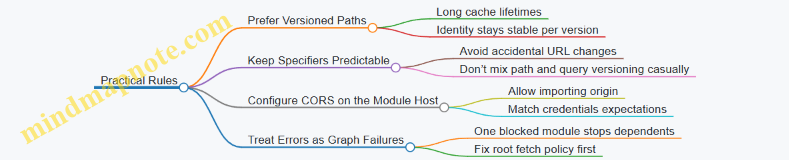
Summary
Browser module loading is a combination of URL-based identity, HTTP caching behavior, and strict cross-origin security checks. When you control module URLs and server headers, you get predictable reuse and fewer “it works locally” surprises. When you don’t, the browser’s rules still apply—just more loudly.
7.4 Web APIs Promises and Microtask Interactions
When you call a Web API like fetch, the runtime doesn’t “finish” the work immediately. It hands the request off to the platform, and later the platform reports results back to JavaScript. The key detail is where that report lands: it typically schedules Promise reactions as microtasks, which run before the next macrotask (like a timer callback or an event handler).
The Core Scheduling Model
Think of execution as a loop with two kinds of queues:
- Macrotasks: things like event callbacks, timer callbacks, and I/O callbacks.
- Microtasks: Promise reaction jobs (then/catch/finally), and other internal jobs that must run “right after the current macrotask.”
A practical rule: if you resolve a Promise inside a macrotask, its .then handlers run before the event loop picks the next macrotask. That’s why Promise chains can appear to “jump ahead” of other callbacks.
Web APIs That Commonly Produce Promises
Many Web APIs return Promises directly or wrap asynchronous results into Promises. For example, fetch returns a Promise that fulfills with a Response. Reading the body with response.text() returns another Promise. Each Promise you create or chain adds microtasks when it settles.
A subtle but important nuance: even if the platform has the data ready, Promise callbacks still run as microtasks, not as immediate synchronous code.
Microtasks Inside Event Handlers
Consider a button click handler. The click itself is a macrotask. Inside it, you start a Promise chain. The microtasks created by that chain run before the browser processes the next macrotask.
console.log('A');
button.addEventListener('click', () => {
  console.log('B');
  Promise.resolve().then(() => console.log('C'));
  console.log('D');
});
console.log('E');
If you click once, the order is A, E, then B, D, then C. The handler body runs synchronously as part of the macrotask, while the Promise reaction waits for the microtask checkpoint.
Microtasks Created by Promise Chains
Promise chains are not just “callbacks.” Each .then creates a new Promise, and settling that new Promise schedules the next reaction as a microtask.
console.log('start');
Promise.resolve()
  .then(() => {
    console.log('t1');
    return 'x';
  })
  .then(v => console.log('t2', v));
console.log('end');
You’ll see start, end, then t1, then t2 x. Both .then handlers are microtasks, and the second one can’t run until the first one returns.
Interaction with Timers and Other Macrotasks
Microtasks run to completion at each checkpoint. That means a long chain of microtasks can delay macrotasks like setTimeout.
console.log('0');
setTimeout(() => console.log('timer'), 0);
Promise.resolve().then(() => {
  console.log('m1');
  return Promise.resolve().then(() => console.log('m2'));
});
console.log('1');
The likely order is 0, 1, m1, m2, then timer. The timer is a macrotask, so it waits its turn after the microtask queue is drained.
Mind Map: Web APIs Promises and Microtask Interactions
Best Practices That Fit the Model
- Keep microtask work small: If a Promise chain does heavy computation, it can starve macrotasks. Prefer batching work so the UI and input events aren’t forced to wait.
- Use
async/awaitwith awareness:awaitpauses the async function and resumes via Promise microtasks. That means code afterawaitstill runs before the next macrotask. - Handle errors at the right boundary: A rejected Promise schedules microtasks for
.catchhandlers. If you attach handlers late, you may miss the chance to recover within the intended turn.
Example: Fetch with Predictable Ordering
console.log('A');
fetch('/data')
  .then(r => r.text())
  .then(txt => console.log('B', txt.length));
console.log('C');
A and C run immediately in the current macrotask. When the network result arrives, the Promise reactions for .then run as microtasks, so they execute before any subsequent macrotask that becomes ready at the same time.
Summary of the Interaction
Web APIs hand off work to the platform and later report results back to JavaScript. Promise settlement turns those results into microtasks. Because microtasks run at the end of the current macrotask and before the next one, Promise-based code often appears to “finish early” compared to timers and event callbacks. Understanding that ordering helps you write code that behaves predictably under real browser scheduling.
7.5 Practical Example: Diagnosing UI Jank Caused by Scheduling
UI jank usually shows up as missed frames: the browser or UI thread cannot finish layout, paint, and input handling before the next frame deadline. Scheduling is the common culprit because it decides what runs when, and how long tasks monopolize the main thread.
Step 1: Reproduce with Frame Evidence
Start with a minimal reproduction so you can measure changes. Use a page that animates something (CSS transform or canvas) while also doing work on the main thread.
In DevTools, record a performance trace while you trigger the jank. Look for long “scripting” or “rendering” slices that overlap frame boundaries. If the trace shows frequent small tasks, also check whether they cluster right after user input or right after a timer.
A useful mental model: frames are a budget. If scheduling keeps spending the budget on JavaScript work, rendering gets squeezed.
Step 2: Identify the Scheduling Source
Scheduling problems come in a few predictable shapes:
- Macrotask hogging: a long event handler or timer callback blocks the main thread.
- Microtask storms: promise callbacks run repeatedly before the browser gets a chance to render.
- Work queued too often: the app schedules more updates than the UI can display.
- Sync layout triggers: code reads layout-dependent properties after writing styles, forcing reflow.
To confirm which one you have, correlate the trace with code paths. Add lightweight logging around the suspected scheduling points, but keep it short so logging doesn’t become the new problem.
Step 3: Use a Mind Map to Classify the Culprit
Mind Map: UI Jank Scheduling Diagnosis
Step 4: Demonstrate a Microtask Storm
Here’s a common bug: each resolved promise schedules another promise immediately, creating a chain that runs before rendering.
function storm(count) {
  let i = 0;
  return new Promise((resolve) => {
    resolve();
  }).then(function tick() {
    i++;
    if (i < count) return Promise.resolve().then(tick);
  });
}

// Trigger while an animation is running
storm(50000);
In a trace, you’ll see a dense cluster of microtasks with little or no rendering between them. Even if each microtask is tiny, the total can exceed the frame budget.
Step 5: Demonstrate a Macrotask Hog
Another classic issue is a single event handler doing too much work.
function onInput() {
  const start = performance.now();
  while (performance.now() - start < 25) {
    // simulate heavy computation
    Math.sqrt(Math.random());
  }
  updateUI();
}

button.addEventListener('click', onInput);
If the handler runs for ~25ms on a 60Hz display, you’ve already spent most of the frame budget. Scheduling can’t save you if one task blocks the main thread.
Step 6: Apply Fixes That Match the Evidence
Fixes should be targeted to the scheduling mechanism you found.
- For microtask storms, bound the number of iterations per turn and yield to rendering. A simple approach is to chunk work and schedule the next chunk as a macrotask.
function chunkedWork(total, chunkSize) {
  let i = 0;
  return new Promise((resolve) => {
    function runChunk() {
      const end = Math.min(i + chunkSize, total);
      while (i < end) i++;
      if (i < total) setTimeout(runChunk, 0);
      else resolve();
    }
    runChunk();
  });
}
-
For macrotask hogging, split the work into smaller callbacks. If you must process a large dataset, do it in chunks and update the UI only after each chunk, not after every internal step.
-
For repeated scheduling, coalesce updates. If multiple events arrive quickly, keep only the latest state and schedule one render pass.
-
For sync layout triggers, avoid reading layout-dependent values immediately after writing styles. Batch reads first, then writes, so the browser doesn’t repeatedly recalculate layout.
Step 7: Verify the Fix with the Same Trace
Record again after changes. You should see:
- fewer long scripting slices
- rendering work appearing between scripting bursts
- smoother animation with fewer missed frames
If the trace still shows jank, re-check the queue type: you might have moved work from microtasks to macrotasks without reducing total time. Scheduling fixes are about both when work runs and how much runs per turn.
8. Native Performance Optimization Fundamentals
8.1 Measuring Performance With Correct Benchmarks and Timers
Performance measurement is mostly about avoiding self-inflicted lies. A “fast” result is only meaningful if the benchmark isolates the thing you care about, controls the rest, and measures time in a way that matches how the runtime actually executes your code.
Start with What You Are Measuring
First decide whether you measure:
- Latency: time for one operation (useful for UI and request handling).
- Throughput: operations per second (useful for batch processing).
- Total time: end-to-end cost including setup and teardown (useful for pipelines).
A common mistake is timing a function call without accounting for work done before it, like parsing inputs, allocating arrays, or warming caches. If you want to measure the core operation, move setup outside the timed region.
Choose Timers That Match the Question
Use a monotonic, high-resolution timer when possible. Monotonic means it won’t jump backward if the system clock changes. High resolution reduces quantization error when operations are very fast.
Also decide what “time” means:
- Wall-clock time includes waiting and scheduling.
- CPU time focuses on compute, but may be harder to access consistently.
For JavaScript runtime behavior, wall-clock time is usually the practical choice, but you must reduce noise.
Build a Benchmark That Controls Noise
A good benchmark has these properties:
- Warm-up: run the code enough times for the engine to optimize hot paths.
- Repeatability: use the same input shape and sizes each run.
- Isolation: avoid measuring unrelated allocations or I/O.
- Aggregation: record many samples and summarize with median or trimmed mean.
Warm-up matters because engines often start with baseline execution and later optimize. If you measure only the first run, you measure interpreter behavior, not steady-state.
Mind Map: Benchmark Design Checklist
Prevent “Dead Code” and Other Measurement Tricks
If the result of a computation is unused, the engine may optimize it away. In benchmarks, consume the result in a way that prevents elimination, such as accumulating into a variable that is read after the timed loop.
Here’s a minimal pattern using a monotonic timer. The key is: warm-up first, then measure, then use the computed value.
const { performance } = require('node:perf_hooks');

function bench(fn, { warmup = 5_000, iters = 50_000 } = {}) {
  let sink = 0;
  for (let i = 0; i < warmup; i++) sink ^= fn(i);

  const start = performance.now();
  for (let i = 0; i < iters; i++) sink ^= fn(i);
  const end = performance.now();

  return { ms: end - start, sink };
}

function work(i) {
  return (i * 2654435761) >>> 0;
}

console.log(bench(work));
Use Enough Work to Beat Timer Granularity
If each operation is extremely fast, the timer resolution and loop overhead dominate. A common fix is to batch operations inside the timed region: measure the time for many iterations, then divide by the iteration count.
Be careful: batching changes memory pressure and cache behavior. That’s fine as long as you keep the same batching strategy across comparisons.
Compare Like with Like
When comparing two implementations, keep constant:
- input generation method and data sizes
- iteration counts and warm-up counts
- benchmark harness structure
- result consumption strategy
If one version allocates more, you are measuring allocation cost too. That may be correct, but then you should not interpret it as “algorithmic speed” alone.
Summarize Results with Variance in Mind
Single measurements are fragile. Run multiple trials and summarize with median. Median resists outliers caused by background activity.
A practical reporting approach:
- record trial times
- compute median
- optionally compute a simple spread (like interquartile range)
If the spread is large, the benchmark is too noisy or the work is too small.
Example: Measuring a Core Operation Without Setup Cost
Suppose you want to compare two ways to sum numbers from an array. You should prepare the array once, outside the timed region, and only time the summation.
const { performance } = require('node:perf_hooks');

const arr = Array.from({ length: 10_000 }, (_, i) => i % 97);

function sumA(a) {
  let s = 0;
  for (let i = 0; i < a.length; i++) s += a[i];
  return s;
}

function sumB(a) {
  let s = 0;
  for (const x of a) s += x;
  return s;
}

function time(fn, trials = 9) {
  const times = [];
  for (let t = 0; t < trials; t++) {
    fn(arr); // warm per trial
    const start = performance.now();
    fn(arr);
    times.push(performance.now() - start);
  }
  times.sort((x, y) => x - y);
  return times[Math.floor(times.length / 2)];
}

console.log({ sumA_ms: time(sumA), sumB_ms: time(sumB) });
This example times a single call per trial, which is okay only if the call is heavy enough to exceed timer noise. If it’s too quick, increase the number of calls inside the timed region and divide by that count.
Common Benchmarking Pitfalls to Avoid
- Timing inside the loop includes loop overhead and setup work.
- Logging during the timed region adds I/O and formatting cost.
- Changing input sizes between runs makes comparisons meaningless.
- Measuring only one run ignores warm-up and variance.
Correct benchmarking is less about fancy tooling and more about disciplined structure: warm up, isolate, batch enough work, prevent elimination, and summarize across trials.
8.2 Reducing Allocation Pressure and Managing Object Lifetimes
Allocation pressure is what happens when your program creates lots of short lived objects faster than the runtime can clean them up efficiently. The fix is not “allocate less” as a slogan; it’s about shaping object lifetimes so the garbage collector (GC) does less work and your hot code stays predictable.
Start with What “Lifetime” Means
In JavaScript, an object’s lifetime is the span from creation to the moment it becomes unreachable. Reachability is determined by references from active execution contexts, global roots, and other reachable objects. If you create an object, use it briefly, and then drop all references, it becomes eligible for collection. That eligibility is what you want to happen quickly for temporary objects.
A practical way to reason about lifetime is to classify allocations into three buckets:
- Per-iteration objects created inside loops.
- Per-request objects created during one logical operation.
- Long-lived objects stored for reuse.
Your goal is to keep per-iteration allocations tiny or nonexistent, keep per-request allocations bounded, and reuse long-lived objects when it’s safe.
Mind Map: Allocation Pressure and Lifetime Control
Reduce Per-Iteration Allocations
The most common accidental allocation source is creating new containers inside loops. Consider a loop that builds an array of results by repeatedly creating intermediate objects.
function badTransform(items) {
  const out = [];
  for (let i = 0; i < items.length; i++) {
    const x = items[i];
    out.push({ value: x, doubled: x * 2 });
  }
  return out;
}
If the output must be objects, you can’t avoid those allocations. But you can avoid extra intermediates. If you only need numeric results, store numbers directly.
function betterTransform(items) {
  const out = new Array(items.length);
  for (let i = 0; i < items.length; i++) {
    const x = items[i];
    out[i] = x * 2;
  }
  return out;
}
Pre-sizing with new Array(items.length) avoids growth overhead and keeps the loop’s allocation profile simpler.
Reuse Buffers and Objects When Semantics Allow
Sometimes you truly need temporary storage, like building a formatted message or assembling bytes. In those cases, reuse a buffer rather than creating a new one each time.
function makeFormatter() {
  const parts = [];
  return function format(a, b) {
    parts.length = 0;
    parts.push(String(a), ":", String(b));
    return parts.join("");
  };
}

const format = makeFormatter();
Here, parts is long-lived inside the closure, while the array contents are cleared each call. This reduces allocation churn from repeated array creation. The tradeoff is that the formatter is not safe for concurrent use without additional care.
Avoid Closure Allocation in Hot Loops
Closures capture variables, and creating many closures can create many objects. If you build callbacks inside a loop, you may allocate one function per iteration.
function badCallbacks(n) {
  const fns = [];
  for (let i = 0; i < n; i++) {
    fns.push(() => i * 2);
  }
  return fns;
}
If you only need a mapping, compute values directly or reuse a single function with an argument.
function betterCallbacks(n) {
  const fns = new Array(n);
  for (let i = 0; i < n; i++) {
    const k = i;
    fns[i] = (x) => x + k; // still allocates per entry, but avoids capturing loop state implicitly
  }
  return fns;
}
If you can change the API to accept a parameter, you can eliminate per-iteration function creation entirely.
Reduce Intermediate Objects and Boxing
Intermediate results often come from chaining operations that create temporary arrays or objects. Also watch for implicit conversions that box primitives into wrapper objects in some patterns.
A common example is using map(...).filter(...).reduce(...) when you can do a single pass.
function badSumEvenDoubled(nums) {
  return nums
    .map(x => x * 2)
    .filter(x => x % 2 === 0)
    .reduce((a, b) => a + b, 0);
}

function betterSumEvenDoubled(nums) {
  let sum = 0;
  for (let i = 0; i < nums.length; i++) {
    const v = nums[i] * 2;
    if ((v & 1) === 0) sum += v;
  }
  return sum;
}
The single loop avoids allocating intermediate arrays from map and filter.
Manage Object Shapes and Property Lifetimes
Even when you can’t reduce the number of objects, you can reduce the cost of handling them. Keep object property sets consistent so the runtime can optimize access. Creating objects with the same properties in the same order helps the engine represent them efficiently.
Prefer initializing all expected fields once, rather than adding properties later in different code paths. If a property is optional, consider storing it as undefined from the start so the object’s structure stays stable.
Verify with Allocation-Centric Measurements
Reasoning is necessary, but measurement prevents “fixing” the wrong thing. Look for changes in:
- Allocation rate during the hot section
- GC frequency and time spent collecting
- Heap growth patterns across repeated runs
A good workflow is to compare two implementations under the same workload and ensure the optimized version reduces allocations in the region you care about, not just elsewhere.
A Simple Checklist for This Section
- Remove per-iteration temporary arrays and objects.
- Reuse buffers when the API allows it.
- Avoid creating many closures in tight loops.
- Collapse multi-pass transformations into one pass.
- Keep object shapes stable by initializing properties consistently.
When these practices are applied together, allocation pressure drops because object lifetimes become shorter and more predictable, and the runtime spends less time cleaning up the mess you didn’t mean to make.
8.3 Avoiding Deoptimization Triggers in Hot Paths
Hot paths are where the runtime spends most of its time: tight loops, frequently called functions, and code that runs per request or per animation frame. Deoptimization happens when the engine’s assumptions about types and behavior stop matching reality, so it falls back to slower execution. The goal is not to “force optimization,” but to keep the engine’s assumptions stable.
Mind Map: Deoptimization Triggers
Foundational Assumptions Engines Rely On
Most engines use a tiered strategy: they start with fast baseline execution, then compile optimized code when a function looks “boring in a good way.” Optimized code typically assumes:
- Variables keep the same type (or a small set).
- Objects keep the same property layout, often called a shape.
- Call sites usually target the same function.
- Numeric operations stay within a predictable domain.
When any of these assumptions are violated, the optimized code may be discarded and recompiled later, or it may run in a less optimized mode.
Type Instability and How It Sneaks In
A common trigger is reusing a variable for different types. Consider a loop that sometimes stores numbers and sometimes stores strings:
function sumMixed(items) {
  let total = 0;
  for (let i = 0; i < items.length; i++) {
    const v = items[i];
    if (typeof v === "string") {
      total += v; // concatenation
    } else {
      total += v; // numeric add
    }
  }
  return total;
}
Even if most inputs are numbers, the presence of strings forces the engine to handle multiple behaviors. A stabilizing pattern is to normalize at the boundary so the hot loop sees one type:
function sumNumbers(items) {
  let total = 0;
  for (let i = 0; i < items.length; i++) {
    const n = Number(items[i]);
    total += n;
  }
  return total;
}
This keeps the loop’s arithmetic consistent. If you must support invalid values, handle them before the hot loop or in a separate slow path.
Shape Changes and Property Layout Drift
Objects often start with one set of properties, then later code adds more. That can change the object’s shape and invalidate optimized property access. The fix is to create objects with a consistent set of fields and avoid adding properties conditionally inside hot code.
Bad pattern:
function buildRecords(rows) {
  const out = [];
  for (let i = 0; i < rows.length; i++) {
    const r = {};
    r.id = rows[i].id;
    if (rows[i].flag) r.extra = rows[i].extra; // conditional property
    out.push(r);
  }
  return out;
}
Stabilized pattern:
function buildRecordsStable(rows) {
  const out = [];
  for (let i = 0; i < rows.length; i++) {
    const row = rows[i];
    const r = { id: row.id, extra: row.flag ? row.extra : undefined };
    out.push(r);
  }
  return out;
}
Now every record has the same property set, so property access stays predictable.
Control Flow Surprises and Exceptions
Optimized code often assumes that the “normal path” dominates. If exceptions are thrown frequently or control flow frequently jumps to uncommon branches, the engine may avoid or discard optimized versions.
A practical approach is to keep hot logic exception-free. For example, instead of relying on exceptions for parsing, validate inputs with checks and route failures to a separate function.
Numeric Instability in Tight Math
Mixing integer-like values with float-heavy operations can be fine, but mixing with non-finite values (NaN, Infinity) can force extra checks and reduce optimization quality. If you compute with user input, clamp or sanitize once before the hot loop.
Polymorphic Call Sites and Method Swapping
If a call site sometimes calls one function and sometimes another, the engine may not be able to inline or specialize. This is common with callbacks that vary by input shape.
Stabilize by selecting the function once, outside the loop, based on stable criteria:
- Choose one strategy function for a batch.
- Keep the loop calling that single function.
Practical Checklist for Hot Loops
- Normalize types before the loop; keep the loop’s variables single-purpose.
- Use consistent object shapes by initializing all expected fields.
- Avoid adding or deleting properties inside hot code.
- Keep exceptions out of the hot path; validate and branch early.
- Ensure the loop calls the same function for the whole batch.
Example: A Hot Loop That Stays Predictable
function dotProduct(a, b) {
  const n = Math.min(a.length, b.length);
  let sum = 0;
  for (let i = 0; i < n; i++) {
    const x = a[i];
    const y = b[i];
    // Assume inputs are already numbers; keep the loop simple.
    sum += x * y;
  }
  return sum;
}
If you need to accept mixed inputs, do conversion once per element before entering the loop, or preprocess arrays into numeric arrays. The hot loop should be the part that looks the most boring, because that’s exactly what optimized code likes.
8.4 Data Layout Choices for Faster Property Access Patterns
JavaScript property access is fast when the engine can predict where a property lives and how objects tend to look. “Data layout” here means how you shape objects: which properties exist, in what order they’re added, and whether you keep the same shape across instances. When layout stays consistent, engines can use compact internal representations and skip extra checks.
The Shape of an Object
At runtime, an object’s “shape” is determined by its property set and the transitions between those sets. If you create many objects with the same properties in the same sequence, the engine can reuse the same internal layout. If you add properties in different orders, delete them, or mix unrelated fields, the engine has to fall back to slower paths.
A practical rule: decide your object’s fields up front, then keep them stable.
Stable Property Sets First
Prefer constructors or factory functions that initialize all expected fields immediately. Avoid patterns like creating an empty object and gradually attaching fields based on branches.
Example:
function makeUser(name, role) {
  return {
    name,
    role,
    isAdmin: role === "admin",
    // initialize optional fields too if they exist conceptually
    lastLogin: null
  };
}

const users = [
  makeUser("Ava", "admin"),
  makeUser("Noah", "member")
];
If some users truly never have a field, consider using a consistent placeholder (like null) rather than omitting the property entirely. That keeps the property set uniform.
Keep Access Patterns Predictable
Property access is not just about existence; it’s about how you access. If you repeatedly read the same property from objects of the same shape, the engine can cache the lookup.
Example:
function sumRoles(users) {
  let total = 0;
  for (const u of users) {
    // consistent property name and consistent object shape
    if (u.isAdmin) total++;
  }
  return total;
}
If you sometimes access u.isAdmin and sometimes u.admin, you force extra work. Choose one property name and stick to it.
Avoid “Dictionary Mode” by Accident
Engines may switch to slower representations when objects behave like open-ended maps: frequent additions of new keys, unpredictable key sets, or heavy use of bracket notation with many different strings.
If you need a mapping from keys to values, use a dedicated structure like Map rather than turning every object into a key-value store. For fixed schemas, stick to dot access and fixed property names.
Prefer Arrays for Dense Indexed Data
When data is naturally indexed, arrays usually beat objects. Arrays have a layout optimized for contiguous indices and predictable element kinds.
Example:
function compute(points) {
  // points is an array of numbers or small fixed tuples
  let acc = 0;
  for (let i = 0; i < points.length; i++) {
    acc += points[i];
  }
  return acc;
}
If you store numeric data in objects like {0: ..., 1: ...}, you often lose the array’s efficient element representation.
Mind Map: Layout Decisions and Their Effects
Advanced Details That Still Matter
- Property addition order: If you create objects with the same keys but add them in different sequences, you can still end up with different internal layouts. Initialize in a consistent order.
- Optional fields: Omitting a property changes the shape. Using
nullor a sentinel keeps the shape stable. - Hidden polymorphism: If a collection mixes objects from different factories with different field sets, the loop becomes less predictable. Keep collections homogeneous.
- Nested shapes: If you access
user.profile.name, the engine benefits whenprofileobjects also have stable shapes. Consistency compounds.
A Cohesive Example: From Unstable to Stable
Unstable pattern:
function makeRecord(kind) {
  const r = {};
  if (kind === "a") r.value = 1;
  else r.other = 2;
  return r;
}
Stable pattern:
function makeRecord(kind) {
  return {
    kind,
    value: kind === "a" ? 1 : null,
    other: kind === "a" ? null : 2
  };
}
The stable version keeps the same property set for every record, so repeated reads in loops have a better chance of staying on the fast path.
Practical Checklist
- Initialize all expected fields immediately.
- Keep property names consistent across instances.
- Use
nullinstead of omitting optional fields when schemas are conceptually fixed. - Use
Mapfor dynamic keys; use objects for fixed schemas. - Use arrays for dense numeric or indexed data.
- Keep hot loops operating on homogeneous object shapes.
8.5 Practical Example: Refactoring a Hot Loop with Allocation Audits
Hot loops are where allocations quietly turn into latency. The goal of this example is to reduce per-iteration allocations, then confirm the win with an allocation audit and a small benchmark.
Starting Point a Loop That Allocates
Imagine a function that transforms an array of numbers into a new array of formatted strings. A common “works fine” version creates temporary objects each iteration.
function formatNumbersBad(nums) {
  const out = [];
  for (let i = 0; i < nums.length; i++) {
    const n = nums[i];
    const meta = { value: n, kind: n >= 0 ? 'pos' : 'neg' };
    out.push(meta.kind + ':' + meta.value.toFixed(2));
  }
  return out;
}
This loop allocates a fresh meta object every iteration, plus it allocates the string concatenations and the output array elements. We can’t remove the output strings, but we can remove the per-iteration object.
Allocation Audit Mindset
An allocation audit answers three questions:
- What allocates per iteration? Look for object literals, arrays, closures, and intermediate containers created inside the loop.
- What allocates per call but not per iteration? That’s usually acceptable if it’s small and stable.
- What allocates due to hidden conversions? For example, repeated
toFixedcalls are fine, but avoid creating extra wrappers around values.
In practice, you use runtime tooling to capture allocation counts and retained sizes for a representative workload. The key is to compare “before” and “after” with the same input size and the same number of iterations.
Refactor Step Remove per Iteration Objects
Replace the object literal with direct branching. This keeps the logic identical while removing the meta allocation.
function formatNumbersGood(nums) {
  const out = new Array(nums.length);
  for (let i = 0; i < nums.length; i++) {
    const n = nums[i];
    const kind = n >= 0 ? 'pos' : 'neg';
    out[i] = kind + ':' + n.toFixed(2);
  }
  return out;
}
Two changes matter:
metais gone, so per-iteration object allocation disappears.- Pre-sizing
outavoids repeated growth checks and can reduce internal resizing overhead.
Mind Map: Allocation Audit Flow
Benchmark with Correctness Guard
A micro-benchmark should avoid accidental dead-code elimination and should validate correctness once. Then measure multiple runs.
function bench(fn, nums) {
  const t0 = performance.now();
  let checksum = 0;
  for (let r = 0; r < 30; r++) {
    const out = fn(nums);
    checksum += out[0].length + out[out.length - 1].length;
  }
  const t1 = performance.now();
  return { ms: t1 - t0, checksum };
}

const nums = Array.from({ length: 20000 }, (_, i) => (i % 2 ? i : -i) / 3);
const a = formatNumbersBad(nums);
const b = formatNumbersGood(nums);
console.assert(a[123] === b[123]);
console.assert(a[a.length - 1] === b[b.length - 1]);

console.log('bad', bench(formatNumbersBad, nums));
console.log('good', bench(formatNumbersGood, nums));
The correctness assertions run once, so they don’t distort timing. The checksum forces the results to be used.
Interpreting Allocation Results
After running with allocation tooling, you should see:
- A sharp drop in allocation count attributable to the loop body.
- Less frequent garbage collection during the benchmark window.
- Similar output strings, since the formatting logic didn’t change.
If runtime doesn’t improve much, the audit still helps: it tells you whether allocations were the bottleneck or whether the cost is dominated by toFixed formatting itself. In that case, the next step would be to reduce formatting calls or move formatting out of the hottest path, but only after the audit confirms allocations are not the main driver.
Advanced Detail Keep Shapes Stable
Even when you remove explicit allocations, you can accidentally trigger extra work by changing types or shapes inside the loop. Here, kind is always a string, and out is always an array of strings. That consistency helps the engine keep the loop predictable.
A small but useful discipline is to avoid mixing return types or writing different kinds of values into the same array across iterations. Stable types reduce the chance of deoptimization and keep the hot path tight.
Summary What Changed and Why
The refactor removed a per-iteration object literal, pre-sized the output array, and preserved the exact formatting behavior. The allocation audit provides the evidence, and the benchmark plus correctness checks confirm the change is both faster and correct.
9. JIT Compilation Strategies and Optimization Boundaries
9.1 Interpreters Baseline Compilation and Tiered Optimization
A JavaScript runtime rarely jumps straight from source text to peak machine code. It usually starts with something fast to get results quickly, then improves hot code over time. That “start now, optimize later” strategy is what tiered optimization is about.
Baseline Compilation What It Means and Why It Exists
Baseline compilation turns code into a form that can run immediately, typically with fewer optimizations and more direct mapping from the language semantics to machine instructions. The goal is low startup cost: you want the first execution to be responsive.
In practice, baseline compilation also sets up the runtime to collect information. Even if the code is not fully optimized, the engine can still record patterns like argument types, property access shapes, and which branches are taken. This information becomes the input to later tiers.
A simple example is a function that is called repeatedly with the same kind of arguments:
function add(a, b) {
  return a + b;
}

for (let i = 0; i < 1e6; i++) {
  add(i, i + 1);
}
Early runs can use baseline code that handles general cases. As the runtime observes that a and b are numbers, it can later generate code that assumes numeric addition and avoids extra checks.
Tiered Optimization the Pipeline in Motion
Tiered optimization means multiple compilation levels. A common pattern is:
- Baseline tier compiles quickly and runs with moderate checks.
- Intermediate tier may add targeted improvements.
- Optimized tier generates aggressive code for hot paths.
The runtime decides when to move a function to a higher tier. It uses heuristics such as call counts, loop iteration counts, and sometimes the cost of the current code.
A key detail: the runtime does not optimize blindly. It needs guards—conditions that must remain true for the optimized assumptions to hold. If reality changes, the engine can fall back to a safer tier.
How the Engine Chooses What to Optimize
Optimization targets are usually “hot” and “stable.” Hot means frequently executed. Stable means the observed behavior is consistent enough to justify assumptions.
For example, property access is a frequent source of overhead. If a function repeatedly reads obj.x, the engine can optimize that access if it sees the same object layout each time. If later calls use objects with a different layout, guards fail and the engine reverts to less specialized code.
Guards and Deoptimization Keeping Assumptions Honest
Guards are runtime checks inserted around optimized code. They verify that the assumptions used during compilation still match the current program state.
When a guard fails, deoptimization occurs. Deoptimization is not “crashing”; it means the engine abandons the optimized machine code and resumes execution using a representation that can correctly handle the new situation.
This is why baseline compilation matters. Baseline code provides a reliable fallback path, so the engine can take optimization risks without breaking correctness.
Mind Map: Baseline and Tiered Optimization
Example: Observing Type Stability and Guarding
Consider a function that sometimes receives numbers and sometimes receives strings:
function f(x) {
  return x + 1;
}

for (let i = 0; i < 2e5; i++) f(i);
for (let i = 0; i < 2e5; i++) f(String(i));
During the first loop, the engine can treat x as numeric and generate optimized code for numeric addition. When the second loop starts passing strings, the guard that assumed numeric inputs fails. The engine then falls back to code that can handle string concatenation semantics.
The practical takeaway is that “hot” alone is not enough. The engine also needs stable patterns to avoid constant guard failures.
Example: Why Loops Become Optimization-Friendly
Loops are natural hot spots. If a loop body is small and repeatedly executed, the runtime can justify spending compilation effort on it.
function sum(arr) {
  let s = 0;
  for (let i = 0; i < arr.length; i++) {
    s += arr[i];
  }
  return s;
}

sum(new Array(1e5).fill(1));
If arr consistently holds numbers and the access pattern stays consistent, the optimized tier can reduce overhead in the loop body. Baseline compilation ensures the loop runs immediately, while tiered optimization improves it once the runtime has enough evidence.
Practical Best Practices That Fit the Model
- Keep hot functions monomorphic when possible. If a function is called with one dominant type shape, the engine can generate fewer guarded paths.
- Avoid mixing incompatible object shapes in the same hot path. Consistent property usage helps the runtime keep assumptions valid.
- Write loops with predictable work per iteration. Stable loop bodies are easier to optimize than code that changes behavior every iteration.
Baseline compilation and tiered optimization are the runtime’s way of balancing responsiveness with speed. Baseline gets you correctness quickly; tiered optimization uses observed stability to reduce overhead; guards and deoptimization keep the whole system honest when reality changes.
9.2 Inline Caches Hidden Classes and Shape Transitions
Modern JavaScript engines try to make property access fast by remembering what they saw last time. The trick is simple: if an object’s “shape” stays the same, then reading obj.x can skip a lot of work. The engine does this with two related ideas: hidden classes (a stable internal layout identity) and inline caches (small per-call-site memory of the last successful lookup).
Hidden Classes the Object Layout Identity
A hidden class is an internal descriptor that groups objects with the same property layout. When you create an object and add properties in the same order, the engine can reuse the same hidden class for all those objects. When you add properties in a different order, the engine creates a new hidden class that represents the new layout.
A key detail: hidden classes are not about “private fields” or “classes” in the Java sense. They are about the engine’s internal representation of where properties live and how they’re indexed.
Example: Stable Construction Order
function makePoint(x, y) {
  const p = { x: x };
  p.y = y;
  return p;
}

const a = makePoint(1, 2);
const b = makePoint(3, 4);

console.log(a.x, b.x);
If makePoint always creates p with x first and then assigns y, the engine can keep a and b on the same hidden class. That stability makes property access predictable.
Example: Shape Transitions from Different Assignment Order
function makePointAlt(x, y) {
  const p = { y: y };
  p.x = x;
  return p;
}

const c = makePointAlt(5, 6);
console.log(c.x);
Now c likely ends up with a different hidden class than a and b, because the property order differs. The engine will still work, but it has more layouts to consider.
Shape Transitions What Changes and What Stays
A shape transition happens when an object’s property set or property order changes in a way that affects its internal layout. Common triggers include:
- Adding a new property to an existing object.
- Deleting a property.
- Reassigning properties in a way that changes how the engine represents them.
Not every write causes a transition. If you overwrite an existing property without changing the layout, the hidden class can remain the same.
Example: Overwriting Without Transition
const p = { x: 1 };
p.x = 2; // same property, same layout
p.y = 3; // adding y likely transitions
The first assignment keeps the layout identity. The second adds a new property, which typically moves the object to a new hidden class.
Inline Caches per Call Site
Inline caches live at the machine-code level near a specific property access. Each access site remembers the hidden class it last matched and the fast path for that layout.
If the next time the code runs it sees an object with the same hidden class, it can reuse the cached result. If not, it falls back to a slower lookup and updates the cache.
A practical way to think about it: inline caches are like a sticky note on a specific line of code. If the next object “looks the same,” the note stays useful.
Example: One Access Site Many Shapes
function sumX(obj) {
  return obj.x + 1;
}

const p1 = { x: 10, y: 0 };
const p2 = { x: 20, z: 0 };

console.log(sumX(p1));
console.log(sumX(p2));
Even though both objects have x, their hidden classes may differ because the extra properties differ. The access site for obj.x may see multiple shapes, causing cache misses and slower paths.
The Relationship Between Hidden Classes and Inline Caches
Hidden classes provide the stable identity that inline caches compare against. Inline caches reduce repeated lookup work by turning “find property location” into “check cached layout identity, then load.”
When hidden classes are stable, inline caches hit often. When hidden classes vary, inline caches churn: the engine keeps re-learning the property location for each new layout.
Mind Map: Inline Caches Hidden Classes Shape Transitions
Practical Best Practices That Follow from the Mechanics
- Construct objects consistently so property order is predictable. If you build objects in one place, keep that place consistent.
- Avoid mixing object “shapes” at the same access site. If a function reads
obj.x, try to ensure callers pass objects that were created similarly. - Prefer overwriting existing properties over adding new ones in hot paths. Adding properties changes layout and can force transitions.
These practices are not rules for aesthetics; they directly reduce the number of hidden classes an inline cache must learn at a given property access.
9.3 Function Inlining and Call Site Specialization
Inlining means the engine replaces a function call with the function body at the call site, when it can prove the result is safe and profitable. Call site specialization means the engine generates or selects optimized code for a particular call site based on the types and shapes it observes there. Together, they reduce overhead: fewer calls, fewer dynamic checks, and tighter code paths.
Why Inlining Helps
Inlining removes call mechanics: argument setup, return plumbing, and indirect jumps. It also exposes the callee’s operations to the caller’s optimizer, which can then:
- Constant-fold values that are known at the call site.
- Eliminate redundant bounds checks when indices are provably safe.
- Inline small helper functions so the hot path becomes a straight-line sequence.
A simple example shows the difference in structure, even without looking at engine internals.
function add(a, b) { return a + b; }
function sum3(x) { return add(x, 1) + add(x, 2); }

console.log(sum3(10));
When add is inlined, sum3 effectively becomes x + 1 + x + 2. The optimizer can also notice that x is used consistently, which often leads to fewer type conversions.
When Inlining Is Safe
Inlining is not just a size question; it must preserve semantics. Engines typically require conditions such as:
- The callee is known and not replaced by later redefinitions.
- The call target is stable at that call site.
- The callee does not rely on dynamic features that would change behavior when moved.
In practice, stability often depends on how you write code. If you keep functions as constants and avoid swapping implementations, the engine has a better chance to treat call targets as predictable.
Call Site Specialization and Type Feedback
JavaScript is dynamic, so the engine watches what happens at each call site. If a call site repeatedly receives the same kinds of values, the engine can specialize the generated code for that site.
Consider a method that behaves differently for numbers versus strings.
function format(x) {
  if (typeof x === 'number') return x.toFixed(2);
  return String(x);
}

function run(values) {
  let out = '';
  for (const v of values) out += format(v) + '|';
  return out;
}
If format is called from a single call site with mostly numbers, the engine can generate a fast path that assumes numeric inputs and only falls back when reality disagrees. This is call site specialization: the optimization is attached to where the call happens, not just to the function definition.
The Mind Map of Inlining Decisions
Mind Map: Inlining and Call Site Specialization
Practical Patterns That Encourage Inlining
Inlining tends to work best when helper functions are small and deterministic. A common pattern is to separate tiny pure utilities from larger orchestration code.
const clamp = (x, lo, hi) => Math.max(lo, Math.min(hi, x));

function normalize(points) {
  const out = new Array(points.length);
  for (let i = 0; i < points.length; i++) {
    const p = points[i];
    out[i] = clamp(p.value, 0, 1);
  }
  return out;
}
Here, clamp is a small arrow function stored in a constant, and the call site in normalize repeatedly sees the same argument roles. That combination makes it easier for the engine to inline and specialize.
Avoiding Patterns That Block Specialization
Inlining and specialization can be undermined by:
- Frequent changes to what a call site targets (for example, reassigning a function variable).
- Highly polymorphic call sites where argument shapes vary wildly.
- Excessive dynamic behavior inside the callee.
A call site that alternates between unrelated object shapes forces the engine to keep more checks, which reduces the benefit of inlining.
Measuring the Effect Without Guessing
You can’t rely on intuition alone, so measure with a stable benchmark harness. The goal is not to prove inlining happened, but to confirm that the hot path got faster and more consistent.
function bench(fn) {
  const start = performance.now();
  for (let i = 0; i < 5e6; i++) fn(i);
  return performance.now() - start;
}

const t1 = bench((i) => i + 1);
const t2 = bench((i) => (x => x + 1)(i));
console.log(t1, t2);
If the helper call is small and stable, the second form often approaches the first. If it doesn’t, the gap tells you the engine didn’t treat the call site as optimizable under your conditions.
Putting It Together
Inlining reduces structural overhead, while call site specialization reduces dynamic uncertainty. When you keep call targets stable and argument shapes predictable, the engine can attach optimized code to the exact places that matter. The result is code that behaves like it was written for the common case, without breaking when the uncommon case shows up.
9.4 Guarding Assumptions and Handling Polymorphism
Modern JavaScript engines try to make hot code fast by assuming certain shapes and behaviors. The trick is that those assumptions must be checked cheaply. When the checks fail, the engine falls back to a safer path. When they hold, the engine can keep using optimized machine code.
What Assumptions Look Like
An optimized function usually relies on a few stable facts:
- Object shape stability: properties are added in the same order, so property access can use fixed offsets.
- Type stability at call sites: a function is called with the same kinds of arguments.
- Control flow stability: branches behave consistently enough to keep the common path tight.
Engines encode these facts as guards. A guard is a quick runtime check inserted near the optimized code. If the guard fails, execution transfers to a less optimized version.
Guard Placement and Cost
Guards are not free. The engine balances two costs:
- Guard overhead: extra comparisons and branching.
- Deoptimization cost: losing optimized code and re-entering a slower path.
Good guard placement targets the smallest set of checks that prevent incorrect assumptions. For example, checking an object’s “shape” is often cheaper than checking every property value.
Polymorphism and Why It Matters
Polymorphism means a call site sees multiple distinct “kinds” of inputs. In practice, that often shows up as:
- Different object shapes reaching the same property access.
- Different function targets at the same call site.
- Mixed argument types that change arithmetic behavior.
Engines can handle limited polymorphism by keeping multiple optimized versions. But if the call site becomes too diverse, the engine either adds more guards until they get expensive or gives up and uses a generic path.
A Concrete Example of Guarding
Consider a function that reads a property and does arithmetic:
function score(user) {
  return user.points + 1;
}
If user objects are created consistently, the engine can assume points lives at a predictable location. The optimized code includes a guard like “this object has the expected shape.” If you later pass an object where points is missing or the shape differs, the guard fails and the engine falls back.
Now add a second object shape:
function makeA() { return { points: 10 }; }
function makeB() { return { points: 20, extra: 1 }; }

const a = makeA();
const b = makeB();

for (let i = 0; i < 1e6; i++) {
  score(i % 2 ? a : b);
}
The call site becomes polymorphic. The engine may keep two optimized variants, each guarded by the corresponding shape. If you keep adding more shapes, the number of guards grows and the optimized path becomes less attractive.
Handling Polymorphism Systematically
The goal is not to eliminate polymorphism entirely; it’s to keep it bounded and predictable.
- Stabilize object creation: create objects with consistent property sets and insertion order.
- Normalize inputs: convert different input forms into a common representation early.
- Avoid mixing unrelated types: keep arithmetic inputs consistently numeric.
- Use separate functions for different shapes: if two shapes represent different concepts, don’t force them through one hot function.
Mind Map: Guarding and Polymorphism
Example: Normalizing Inputs to Bound Polymorphism
Suppose you accept either a “raw” record or a preprocessed record:
function toUser(x) {
  if (x.kind === 'raw') return { points: x.points };
  return x;
}

function scoreNormalized(x) {
  const user = toUser(x);
  return user.points + 1;
}
Even if callers pass different shapes, scoreNormalized funnels them into a consistent { points } shape. That reduces the number of distinct shapes reaching the hot property access, which keeps guards simpler and more likely to stay true.
Example: Splitting Functions by Concept
If two shapes represent different semantics, merging them into one function can create unnecessary polymorphism:
function scorePoints(user) {
  return user.points + 1;
}

function scoreRank(user) {
  return user.rank * 2;
}
Instead of one score that tries to handle both points and rank, separate functions keep each hot path focused. Each function’s guards become more stable because the expected property set is consistent.
Practical Checklist for Guard-Friendly Code
- Keep hot functions fed with a small set of object shapes.
- Ensure property insertion order is consistent for frequently created objects.
- Avoid mixing numeric and non-numeric values in the same arithmetic path.
- If you see many distinct input forms, normalize once rather than branching everywhere.
- When two inputs mean different things, use different functions rather than one overloaded one.
When you treat guards as part of the program’s contract with the engine, polymorphism becomes manageable. The result is code that stays fast for the common case without relying on luck.
9.5 Practical Example: Using Engine Flags to Compare Code Paths
When you compare code paths, you’re really comparing what the engine decides to do: whether it interprets, compiles, optimizes, and which assumptions it keeps. Engine flags help you force or observe those decisions so you can connect a performance change to a specific runtime behavior.
Step 1: Pick a Comparison Target That Has a Clear “Why”
Start with two implementations that differ in one dimension:
- Shape stability: same property set and insertion order.
- Call pattern: monomorphic vs polymorphic call sites.
- Allocation behavior: reuse vs allocate per iteration.
Example target: a hot loop that reads a property from objects.
Step 2: Write a Microbenchmark That Won’t Lie to You
Use a warm-up phase so the engine has time to optimize. Then measure multiple runs and keep inputs stable.
function makeStable(n) {
  const arr = new Array(n);
  for (let i = 0; i < n; i++) {
    const o = { a: i, b: i + 1 };
    arr[i] = o;
  }
  return arr;
}

function sumA(arr) {
  let s = 0;
  for (let i = 0; i < arr.length; i++) s += arr[i].a;
  return s;
}

const data = makeStable(200000);
for (let i = 0; i < 5; i++) sumA(data);
let t0 = performance.now();
for (let i = 0; i < 20; i++) sumA(data);
let t1 = performance.now();
console.log((t1 - t0).toFixed(2));
If you change the benchmark, change only one thing at a time. Otherwise you’ll measure confusion.
Step 3: Force the Engine to Reveal Its Decision
Engine flags vary by runtime, but the workflow is consistent:
- Disable or limit optimization to get a baseline.
- Enable optimization to see the optimized path.
- Log compilation and deoptimization so you can tell whether the hot loop stayed optimized.
A practical approach is to run the same script under two modes:
- Baseline mode: minimal optimization.
- Optimized mode: normal optimization.
Then compare:
- total time
- whether the function was compiled
- whether it deoptimized
Step 4: Compare Two Code Paths with a Controlled Difference
Now create an “unstable” variant that changes object shapes.
function makeUnstable(n) {
  const arr = new Array(n);
  for (let i = 0; i < n; i++) {
    const o = i % 2 === 0 ? { a: i } : { a: i, c: i + 1 };
    arr[i] = o;
  }
  return arr;
}

const stable = makeStable(200000);
const unstable = makeUnstable(200000);

for (let i = 0; i < 5; i++) sumA(stable);
for (let i = 0; i < 5; i++) sumA(unstable);

console.log('stable', sumA(stable));
console.log('unstable', sumA(unstable));
With stable shapes, the engine can use consistent property access. With unstable shapes, it may need guards and fallback paths, which often shows up as slower execution and more deoptimizations.
Step 5: Use Mind Maps to Keep the Cause and Effect Straight
Mind Map: Engine Flags and Code Path Comparison
Step 6: Interpret the Logs Like a Detective, Not a Fortune Teller
When optimized mode is faster, check whether the hot function:
- compiled once and stayed compiled
- avoided frequent guard failures
- kept property access on the same shape
When optimized mode is slower or unstable, look for:
- repeated deoptimization
- polymorphic inline caches
- megamorphic access patterns
A common pattern is: the optimized version is fast until a guard fails, then it falls back and spends time re-establishing assumptions.
Step 7: Turn Observations Into a Best Practice
If stable shapes win, the best practice is to keep object layouts consistent in hot paths:
- create objects with the same property set
- avoid adding properties later in the loop
- prefer separate object types only when the call site can stay monomorphic
If polymorphic call sites hurt, restructure so the call site sees one function shape at a time, or move the polymorphism behind a boundary that isn’t hot.
Step 8: A Compact Checklist for Your Next Flag Run
- Warm-up done, inputs fixed.
- One change per experiment.
- Baseline vs optimized modes compared.
- Logs checked for compilation and deoptimization.
- Result tied to a specific runtime behavior, not just a number.
10. Garbage Collection Tuning and Allocation Discipline
10.1 GC Goals Reachability and Generational Principles
A garbage collector (GC) has one job: reclaim memory that is no longer reachable by your program. “Reachable” means there is a path from a set of roots—places the runtime can start from—to the objects in question. If no such path exists, the object can be freed without changing program behavior.
Reachability as the Core Goal
Think of the heap as a graph: objects are nodes, references are edges. The runtime maintains a root set that includes things like active execution contexts (call frames), global variables, and internal runtime references. During a collection, the GC marks every object reachable from these roots, then sweeps up what remains unmarked.
A practical consequence: if you accidentally keep a reference in a long-lived structure, you keep the object alive too. This is why “memory leaks” in JavaScript often look like “forgotten references,” not “forgotten frees.”
Mark Phase and Why It Matters
Most modern engines use a tracing collector. The mark phase performs a graph traversal starting from roots. The traversal must be conservative about what it treats as a reference, because the runtime can’t always perfectly know whether a raw value is a pointer or just data. That conservatism can retain more objects than necessary, but it preserves correctness.
After marking, the collector can reclaim the unmarked objects. In a sweep-based design, it walks the heap and frees unmarked blocks. In a compacting design, it also moves live objects to reduce fragmentation, updating references accordingly.
Generational Principle Based on Observation
Generational GC relies on a simple observation: many objects die young. Newly created objects often become unreachable quickly, while long-lived objects tend to remain reachable for longer periods. The runtime exploits this by dividing the heap into generations.
A common setup has a young generation for fresh allocations and an old generation for objects that survive multiple young collections. Young collections are cheaper because they only need to trace the young generation plus any references from roots and older objects into it.
How Generations Reduce Work
If the collector traced the entire heap every time, the cost would grow with heap size. With generations, the runtime can frequently collect the young generation, where most garbage is expected to appear. Only when objects survive enough young collections does the runtime promote them to the old generation.
Promotion is not free: it changes where the object lives and how future collections treat it. The runtime typically uses thresholds such as “survived N minor collections” or “reached a size/tenuring policy.”
Write Barriers and Remembered Sets
When old objects can gain references to young objects, the collector must not miss those young targets during a young collection. To handle this, runtimes use a write barrier: when a reference is written, the runtime records information so it can find young objects referenced from old ones.
This bookkeeping is often represented as a remembered set. During a young collection, the GC treats the remembered set as additional entry points into the young generation.
Mind Map: Reachability and Generational Principles
Example: Reachability Through References
function make() {
  const big = new Array(1e6).fill(0);
  return big;
}

let keep;
keep = make();

// big is reachable because keep references it.
// If keep were set to null, big would become unreachable
// after the next collection that traces from roots.
If you store big in a global or a long-lived closure, it stays reachable. If you drop the last reference, the object becomes unreachable and can be reclaimed.
Example: Generations and Write Barriers in Practice
let old = { child: null };

function churn() {
  // Many short-lived objects
  const young = { payload: new Array(1000).fill(1) };
  old.child = young; // old-to-young reference
}

for (let i = 0; i < 1000; i++) churn();
During minor collections, the runtime must still consider old.child as a path into the young generation. The write barrier ensures that when old.child changes, the collector knows to look at that relationship during young collections.
Putting It Together
Reachability defines what can be freed. Generational principles define how often and where the runtime spends time finding reachable objects. Together, they make GC both correct and efficient: correct because it only reclaims unreachable objects, efficient because it avoids tracing the entire heap on every allocation-heavy moment.
10.2 Common Allocation Patterns That Increase GC Work
Garbage collection (GC) work grows when programs create many short lived objects, keep references alive longer than needed, or force the runtime to do extra bookkeeping. The tricky part is that “short lived” is not the same as “cheap.” If allocation rate is high or object graphs stay reachable, GC spends more time scanning and reclaiming.
The Allocation Patterns That Hurt
Per-Iteration Object Creation
Creating objects inside hot loops multiplies allocation count by the number of iterations. Even if each object becomes unreachable quickly, the runtime still has to allocate it and later discover it is dead.
Example:
function sumSquares(arr) {
  let total = 0;
  for (let i = 0; i < arr.length; i++) {
    const pair = { x: arr[i], y: arr[i] };
    total += pair.x * pair.y;
  }
  return total;
}
Best practice is to avoid the temporary object and compute directly.
Building Arrays with Spread or Concat in Loops
Repeatedly creating new arrays causes both allocation and copying. The old arrays become garbage, and the new arrays keep the elements alive until the next iteration.
Example:
function collect(arr) {
  let out = [];
  for (const v of arr) {
    out = out.concat([v * 2]);
  }
  return out;
}
Prefer a single preallocated array or push into one array.
Creating Closures per Item
Closures capture variables, which means the runtime must allocate the function object and maintain its environment. If you create one closure per element, you also create one captured environment per element.
Example:
function makeHandlers(items) {
  return items.map((item) => () => console.log(item));
}
If you only need a callback that uses the current value, consider passing the value through the call site rather than capturing it.
Temporary Strings from Concatenation
Strings are immutable, so concatenation creates new string objects. In tight loops, this can create a surprising volume of allocations.
Example:
function format(nums) {
  let s = "";
  for (const n of nums) s += n + ",";
  return s;
}
A common fix is to accumulate in an array and join once, which reduces the number of intermediate strings.
Boxing and Wrapper Objects
Using APIs that coerce values into objects can create wrapper allocations. This often happens indirectly through certain patterns like storing primitives in data structures that expect objects, or repeatedly converting types.
Example:
function countKeys(mapLike) {
  let c = 0;
  for (const k in mapLike) {
    const keyObj = new String(k);
    if (keyObj.length > 0) c++;
  }
  return c;
}
Avoid explicit wrapper creation unless you truly need object identity or methods that differ from primitives.
Retaining References Accidentally
GC can’t reclaim objects that remain reachable. A common source of retention is storing large temporary results in long lived structures, caches, or closures that outlive the work.
Example:
let cache = [];
function process(items) {
  for (const item of items) {
    const tmp = new Array(1000).fill(item);
    cache.push(tmp); // keeps tmp reachable
  }
}
If you only need a summary, store the summary, not the entire temporary structure.
How These Patterns Translate Into GC Work
GC work roughly includes: allocating objects, tracking references, scanning reachable graphs, and reclaiming dead objects. The patterns above increase one or more of these:
- Allocation rate rises with per-iteration objects, loop concatenation, and closure creation.
- Reachability lasts longer when arrays are rebuilt and older arrays remain referenced, or when caches retain temporaries.
- Reference scanning grows when object graphs become larger or more interconnected.
Mind Map: Allocation Hotspots
Practical Refactoring Checklist
- Move temporary computations out of the loop body when possible.
- Replace repeated array creation with a single array and
pushor preallocation. - Avoid creating a new closure for each element unless you truly need per-item captured state.
- Reduce intermediate string creation by joining once.
- Remove explicit wrapper allocations and prefer primitives.
- Ensure temporary data does not get stored in long lived variables.
A Small Integrated Example
Suppose you transform items into formatted lines. The naive version allocates objects, strings, and intermediate arrays repeatedly.
function render(items) {
  let lines = [];
  for (const item of items) {
    const obj = { v: item };
    lines = lines.concat([obj.v + ":" + obj.v]);
  }
  return lines.join("\n");
}
A lower-allocation version keeps one output array, avoids the temporary object, and builds strings directly in the final array.
function render(items) {
  const lines = new Array(items.length);
  for (let i = 0; i < items.length; i++) {
    const v = items[i];
    lines[i] = v + ":" + v;
  }
  return lines.join("\n");
}
The result is fewer allocations per iteration and a smaller chance of accidental retention. GC still runs when it must, but it has less work to do per unit of useful computation.
10.3 Object Pooling Tradeoffs and When It Helps
Object pooling means reusing previously created objects instead of allocating new ones. In JavaScript, that sounds simple, but the runtime’s garbage collector (GC), JIT optimizations, and memory layout all influence whether pooling helps or hurts.
What Pooling Changes at Runtime
Without pooling, a short-lived object is created, used, and becomes unreachable. The GC later reclaims it. With pooling, you keep objects reachable inside a pool, then reset their fields and hand them out again. That shifts work from allocation and GC to bookkeeping and reset logic.
Pooling is most likely to help when allocations are frequent, objects are large or expensive to initialize, and the lifetime pattern is predictable (many objects created in bursts, then reused). It is least likely to help when allocations are already cheap, objects are small, or the pool itself becomes a retention trap.
The Core Tradeoffs
1) Reduced Allocation vs. Increased Retention
Pooling keeps objects alive longer than they would be naturally. If the pool grows, you may retain memory that would otherwise be freed. A bounded pool can mitigate this, but it adds policy complexity.
2) Reset Cost vs. Initialization Cost
Pooling replaces constructor work with manual reset. If reset touches many fields, you might pay nearly the same cost as initialization, just in a different place.
3) GC Pressure vs. Hidden Class Stability
JIT engines optimize object shapes. If pooled objects are reset in ways that change which properties exist, you can trigger shape changes and deoptimizations. Keeping the same set of properties and types across uses helps.
4) Contention and Complexity
In single-threaded code, a pool is straightforward. In worker-heavy designs, you may need per-worker pools or message passing strategies, which can erase the benefit.
A Mind Map of When Pooling Helps
Mind Map: Object Pooling Tradeoffs
Example: A Small Pool That Stays Bounded
Suppose you repeatedly build temporary “task” objects during parsing. You can pool them, but you must cap the pool and reset consistently.
class Task {
  constructor() {
    this.type = 0;
    this.value = null;
    this.next = null;
  }
  reset(type, value) {
    this.type = type;
    this.value = value;
    this.next = null;
  }
}

const pool = [];
const MAX = 1024;

function acquire(type, value) {
  const obj = pool.pop() || new Task();
  obj.reset(type, value);
  return obj;
}

function release(obj) {
  if (pool.length < MAX) pool.push(obj);
}
This helps when tasks are created in large numbers and released quickly. It can hurt if value holds large objects; even if you reset value to null, any other references you forget to clear will keep memory alive.
Example: Pooling That Fails Quietly
Pooling often fails when the pool retains references accidentally.
class Node {
  constructor() {
    this.payload = null;
    this.meta = null;
  }
  reset(payload) {
    this.payload = payload;
    // meta is forgotten
  }
}

// If meta sometimes holds large data, pooling retains it.
Even if you reset payload, forgetting meta means the pooled object still references old data. The GC cannot reclaim it because the pool keeps the object reachable.
Practical Rules for Deciding
- Pool only objects with measurable allocation cost. If allocations are already low, pooling adds overhead without benefit.
- Bound the pool. A cap prevents unbounded retention when traffic spikes.
- Reset all references. Treat reset like a checklist, not a vibe.
- Keep property sets stable. Don’t add or delete properties across uses; reuse the same fields.
- Measure both allocation and GC behavior. The goal is less total work, not just fewer allocations.
When Pooling Is the Right Tool
Pooling is a good fit for temporary, structurally consistent objects used in tight loops—especially when you can reset them cheaply and you can guarantee the pool won’t grow without control. When those conditions aren’t met, normal allocation plus GC is usually simpler and often faster, because the runtime is already good at handling short-lived objects.
10.4 Observing GC Behavior with Runtime Diagnostics
Garbage collection (GC) is easiest to reason about when you can observe it with the same discipline you use for CPU profiling. Runtime diagnostics give you signals like pause timing, allocation rates, heap size changes, and which objects stay alive. The goal is not to “tune GC blindly,” but to connect symptoms (latency spikes, memory growth, throughput drops) to concrete causes (allocation patterns, retained references, promotion behavior).
Core Concepts You Must Measure First
Start with three measurements that form a baseline:
- Allocation rate: how many bytes per second your program creates.
- Collection frequency: how often the runtime runs GC.
- Pause impact: how long the runtime stops the world or delays execution.
A useful mental model is: allocation pressure increases heap occupancy, which triggers collections, which may pause execution. If you only track heap size, you can miss the real story: a program can keep heap size stable while still causing frequent short pauses.
What Runtime Diagnostics Typically Expose
Most JavaScript runtimes provide some combination of:
- GC event logs with timestamps and phases.
- Heap snapshots or heap statistics at intervals.
- Allocation sampling that attributes allocations to code paths.
- Retained size information showing what keeps objects alive.
Treat these as different lenses. Event logs answer “when and how long,” heap snapshots answer “what is still alive,” and allocation sampling answers “what created the pressure.”
Mind Map: GC Observation Workflow
Practical Example: Turning Logs Into Action
Suppose you see periodic latency spikes during request handling. You suspect GC, but you need proof. Run a workload that reproduces the spikes, then capture GC diagnostics during the run.
A common pattern is: spikes align with major collections, while minor collections happen frequently but with smaller pauses. If you observe that minor collections become more frequent as the run progresses, it often indicates rising allocation pressure or objects surviving long enough to be promoted.
Here is a small Node.js-style example that creates allocation pressure in a controlled way. The point is to compare behavior before and after you change the allocation strategy.
// Allocation-heavy workload
function makeGarbage(n) {
  const arr = new Array(n);
  for (let i = 0; i < n; i++) {
    arr[i] = { i, text: "x".repeat(200) };
  }
  return arr;
}

async function run() {
  for (let k = 0; k < 200; k++) {
    makeGarbage(5000);
    await Promise.resolve();
  }
}

run();
Now change the code to reduce churn by reusing buffers or avoiding per-iteration object creation. Even without knowing the exact GC algorithm, you should see fewer collections or reduced pause impact when allocation volume drops.
Mind Map: Diagnosing Common GC Symptoms
Heap Snapshots: Finding What Keeps Objects Alive
When you suspect retained references, event logs alone won’t tell you what is retained. Heap snapshots help by showing object graphs and dominator relationships. Look for:
- Long-lived roots such as global caches, module-level arrays, or event listener registries.
- Accidental retention through closures that capture request-specific data.
- Unbounded growth in maps keyed by request IDs.
A practical workflow is: take a baseline snapshot, run the workload until memory grows or pauses occur, then take another snapshot. Compare retained sizes for the object types that increased.
Allocation Sampling: Connecting Pressure to Code Paths
Allocation sampling answers “where the bytes come from.” If you see that most allocations originate from a particular function, focus there first. A frequent win is reducing temporary objects in loops, especially when the loop runs per item in a large batch.
Validation Discipline That Prevents False Conclusions
To avoid chasing ghosts, keep experiments small and comparable:
- Run the same workload shape each time.
- Keep input sizes consistent.
- Compare allocation rate, collection frequency, and pause impact together.
If heap size decreases but pause frequency stays high, you likely reduced memory without reducing allocation churn. If pause durations drop but heap size still grows, you may have improved object lifetime distribution without fixing retention.
Summary of What “Good Observation” Produces
After you observe GC behavior with diagnostics, you should be able to state one clear mapping: which code behavior increases allocation or retention, which GC events it triggers, and what metric changes confirm the fix. That’s the difference between tuning and debugging.
10.5 Practical Example: Eliminating Retained References in Async Code
Async code often “works” while quietly keeping objects alive. The usual culprit is a reference that survives longer than you think: a closure captured by a pending promise, an event listener that never gets removed, or a timer that outlives the request. The goal here is to remove the retention path, not just to silence symptoms.
The Core Idea
A retained reference happens when an object is still reachable from a GC root through a chain of references. In async code, those roots commonly include:
- Pending promises and their reaction callbacks
- In-flight timers and I/O callbacks
- Event listeners registered on long-lived emitters
- Closures stored in variables that remain reachable until the async operation finishes
Mind Map: Retention Paths in Async Code
Example: A Retention Bug You Can Spot
Imagine a server handler that loads a large payload and then waits for a slow external step. The code below keeps the payload reachable until the promise chain completes.
async function handleRequest(req, emitter) {
  const big = loadBigPayload(req.id); // large object

  return new Promise((resolve, reject) => {
    emitter.on('done', () => {
      // big is captured by the listener closure
      resolve(process(big));
    });

    setTimeout(() => {
      reject(new Error('timeout'));
    }, 10_000);
  });
}
Even if the request times out, the listener remains registered. That means the closure (and therefore big) stays reachable from the emitter, so GC can’t reclaim it.
Fix: Remove the Listener and Break References
We’ll add three changes:
- Register the listener once and remove it in
finally. - Use a cancellation signal so the timeout and the listener agree on completion.
- Avoid capturing
bigin the listener by storing only what you need.
async function handleRequest(req, emitter) {
  const big = loadBigPayload(req.id);
  const id = req.id;

  const controller = new AbortController();
  const { signal } = controller;

  let listener;
  try {
    const result = await new Promise((resolve, reject) => {
      listener = () => {
        if (signal.aborted) return;
        resolve(process(big));
      };

      emitter.on('done', listener);

      const t = setTimeout(() => {
        controller.abort();
        reject(new Error(`timeout for ${id}`));
      }, 10_000);

      signal.addEventListener('abort', () => clearTimeout(t), { once: true });
    });

    return result;
  } finally {
    if (listener) emitter.off('done', listener);
  }
}
This still captures big inside listener, but the retention window is now bounded: the listener is removed as soon as the promise settles (success or timeout). That is the key difference.
Refining the Fix: Reduce Captured Data
If process(big) can be delayed until after the event, you can avoid keeping big alive inside the listener by capturing a smaller value and computing later. For example, store a derived value early, or restructure so the listener only flips a flag.
async function handleRequest(req, emitter) {
  const big = loadBigPayload(req.id);
  const controller = new AbortController();
  const { signal } = controller;

  let ready = false;
  let listener;

  try {
    const done = new Promise((resolve, reject) => {
      listener = () => {
        if (signal.aborted) return;
        ready = true;
        resolve();
      };

      emitter.on('done', listener);

      setTimeout(() => {
        controller.abort();
        reject(new Error('timeout'));
      }, 10_000);
    });

    await done;
    if (!ready) return null;
    return process(big);
  } finally {
    if (listener) emitter.off('done', listener);
  }
}
Now the listener closure doesn’t need to reference big at all. That shortens the retention chain even further.
How to Reason About the Result
- Before the fix, the emitter holds the listener forever, so
bigstays reachable. - After the fix, the listener is removed in
finally, so the emitter no longer points to the closure. - With the refined version, the listener doesn’t reference
big, so even during the wait, the closure doesn’t keep the payload alive.
Quick Checklist for Async Retention Bugs
- Does any callback registered with a long-lived object get removed on both success and failure?
- Do promise callbacks capture large objects that are only needed at the end?
- Do timers keep request-scoped data alive after the request is done?
- Can you cancel work early and make all completion paths agree?
When you apply these checks systematically, retained references stop being mysterious and start being mechanical: find the reference chain, then cut it at the earliest safe point.
11. Concurrency Patterns with Workers and Shared Memory
11.1 Worker Lifecycle Messaging and Transferable Objects
Workers start life as separate execution contexts with their own event loops and memory boundaries. Messaging is the handshake that lets them coordinate without sharing everything by default. Transferable objects are the mechanism that moves ownership of certain data efficiently, so you don’t pay the cost of copying large buffers.
Worker Lifecycle Stages
A typical worker lifecycle has five practical phases.
- Creation: The main thread constructs a worker with a script URL or module entry. At this point, nothing runs yet in the worker.
- Initialization: The worker script loads, then registers message handlers. If you need configuration, send it as the first message.
- Steady Work: The worker receives tasks, performs CPU work or coordinates I/O, and posts results.
- Backpressure Handling: The main thread decides how many tasks to keep in flight. The worker should avoid accepting unlimited work.
- Termination: The main thread calls
terminate()when results are complete or when an error makes further work pointless.
A good rule: treat the worker as a service with a clear contract. The contract includes message shapes, task IDs, and what “done” means.
Messaging Contract and Message Shapes
Use a small, explicit message protocol so you can debug without guesswork.
- Requests:
{ type: "task", id, payload } - Responses:
{ type: "result", id, payload } - Errors:
{ type: "error", id, message } - Control:
{ type: "cancel", id }or{ type: "shutdown" }
Task IDs let the main thread match responses to promises, even when tasks complete out of order.
Transferable Objects for Efficient Data Movement
By default, postMessage copies structured-clone data. For large binary data, copying is expensive. Transferables let you move ownership of certain objects—most commonly ArrayBuffer—from one thread to another.
When you transfer an ArrayBuffer, the sender’s buffer becomes detached. That means you must not read it after transfer.
Example: Transfer an ArrayBuffer
// main.js
const worker = new Worker("worker.js");

const buf = new ArrayBuffer(1024 * 1024);
const view = new Uint8Array(buf);
view[0] = 7;

worker.postMessage({ type: "task", id: 1, buf }, [buf]);
// buf is now detached; do not read it here.
// worker.js
self.onmessage = (e) => {
  const { type, id, buf } = e.data;
  if (type !== "task") return;

  const bytes = new Uint8Array(buf);
  const sum = bytes.reduce((a, b) => a + b, 0);

  self.postMessage({ type: "result", id, payload: { sum } });
};
Practical Backpressure and In-Flight Limits
If the main thread posts tasks faster than the worker can process them, memory grows and latency worsens. A simple strategy is to cap in-flight tasks.
- Keep a counter of pending task IDs.
- Only post a new task when pending is below a limit.
- Resolve promises when results arrive.
This keeps the system stable without requiring the worker to guess workload.
Mind Map: Worker Messaging and Transferables
Advanced Details That Matter in Real Code
Avoid implicit coupling: Don’t rely on message ordering unless your protocol enforces it. Out-of-order completion is normal.
Keep payloads minimal: Send only what the worker needs. If you must send metadata, keep it small and send large binaries as transferables.
Handle cancellation intentionally: If you support cancel, decide whether the worker stops immediately or only skips results. Either way, the main thread should treat canceled tasks as resolved or rejected consistently.
Validate message types: A worker can receive unexpected messages during development. Guard early so you fail in a predictable way.
Use transfer lists correctly: The transfer list must include the exact objects you want to move. Passing the wrong object leads to copying or errors.
Example: In-Flight Limit with Task IDs
// main.js
const worker = new Worker("worker.js");
let nextId = 1;
let inFlight = 0;
const MAX = 4;
const pending = new Map();

worker.onmessage = (e) => {
  const { type, id, payload, message } = e.data;
  const p = pending.get(id);
  pending.delete(id);
  inFlight--;
  type === "result" ? p.resolve(payload) : p.reject(new Error(message));
};

function runTask(payload) {
  if (inFlight >= MAX) throw new Error("Too many tasks in flight");
  const id = nextId++;
  inFlight++;
  return new Promise((resolve, reject) => {
    pending.set(id, { resolve, reject });
    worker.postMessage({ type: "task", id, payload });
  });
}
This pattern keeps the worker busy without letting memory usage drift upward, and it makes completion matching deterministic even when tasks finish in a different order than they were sent.
11.2 SharedArrayBuffer Memory Views and Synchronization Primitives
SharedArrayBuffer lets multiple JavaScript agents observe and update the same raw bytes without copying. The key idea is simple: you share bytes, then you interpret those bytes through typed views, and finally you coordinate access with synchronization primitives that operate on shared memory.
Memory Views the Typed Lens over Shared Bytes
A SharedArrayBuffer is just a byte container. To read or write meaningful data, you create typed array views such as Int32Array or Uint8Array. Each view maps indices to byte offsets using an element size and a byte alignment rule.
Best practice: choose view types that match your data width and alignment. If you store 32-bit integers, use Int32Array so each element corresponds to exactly four bytes. This avoids accidental misinterpretation and makes atomic operations possible.
Example: storing two counters in one buffer.
const sab = new SharedArrayBuffer(8); // 2 * 4 bytes
const counters = new Int32Array(sab);
// counters[0] and counters[1] are shared
When you need smaller flags, you can use a Uint8Array view over the same buffer. Just remember that different views may interpret the same bytes differently, so keep a clear layout contract.
Synchronization Primitives the Rules for Safe Coordination
Typed views give you access; synchronization primitives define who is allowed to do what, when. The main tool is Atomics, which provides atomic read-modify-write operations and atomic waits.
Atomics Operations
Use Atomics.load and Atomics.store for simple shared reads and writes with well-defined ordering. For counters, use read-modify-write operations like Atomics.add.
Example: incrementing a shared counter from multiple workers.
// shared: Int32Array counters
Atomics.add(counters, 0, 1);
const v = Atomics.load(counters, 0);
Atomic operations are only defined for integer typed arrays with element sizes supported by the platform. In practice, Int32Array and BigInt64Array are the common choices.
Memory Ordering and Why It Matters
JavaScript threads can interleave in ways that look impossible if you only think in single-thread terms. Atomic operations establish ordering guarantees around the shared location they operate on. That means other agents will not observe torn updates for that location, and they will see the effects in a consistent way relative to the atomic operations.
Best practice: treat atomic operations as the synchronization boundary. If you update multiple shared fields, coordinate them so that readers only trust the fields after they observe a related atomic state change.
Wait and Notify the Efficient Alternative to Spinning
Busy-wait loops waste CPU. Atomics.wait and Atomics.notify let a worker sleep until a shared value changes.
Example: a simple one-slot “ready” flag.
const sab = new SharedArrayBuffer(8);
const state = new Int32Array(sab, 0, 1); // index 0
const payload = new Int32Array(sab, 4, 1); // index 1

// writer
payload[0] = 42;
Atomics.store(state, 0, 1);
Atomics.notify(state, 0, 1);

// reader
while (Atomics.load(state, 0) === 0) {
  Atomics.wait(state, 0, 0);
}
const x = payload[0];
The loop matters because spurious wakeups can happen. The reader re-checks the condition after waking.
Best practice: keep the wait condition tied to a single atomic location. If you need multiple conditions, encode them into one integer state value rather than waiting on several unrelated locations.
Layout Contracts Designing the Byte Map
A robust shared-memory design starts with a layout contract: which offsets store which fields, which view types interpret them, and which atomic location acts as the synchronization signal.
A common pattern is a small header followed by data. For example, a header might contain state and version, while the data region holds the payload.
Mind Map: Shared Memory Layout and Coordination
Advanced Coordination Patterns Without Guesswork
Producer Consumer with a Single Slot
For a single-slot buffer, the writer writes payload, then stores state = 1 and notifies. The reader waits for state = 1, reads payload, then stores state = 0 to allow the next write.
Versioned State to Avoid Lost Updates
If multiple writes can occur before a reader processes them, a version counter helps. The writer increments version atomically, writes payload, then updates state to indicate readiness. The reader records the version it consumed so it can detect whether it missed an update.
Mind Map: Versioned Handshake
Practical Checklist
- Use
Int32Arrayfor any location you will operate on withAtomics. - Define a fixed byte layout and stick to it across all agents.
- Publish data first, then update the atomic state that signals readiness.
- Use
Atomics.waitin a loop that re-checks the condition. - Keep the synchronization signal to one atomic integer whenever possible.
With these pieces in place, SharedArrayBuffer becomes predictable: views interpret bytes consistently, and atomics provide the coordination points that keep concurrent code from stepping on its own toes.
11.3 Coordinating Work Without Blocking the Event Loop
The event loop stays responsive when long-running work is broken into small chunks or moved off the main thread. Coordination is the part that makes those chunks line up correctly: you need a plan for when work starts, how results are delivered, and what happens when tasks overlap.
Foundational Model for Coordination
Think in three layers.
- Scheduling layer decides when a unit of work runs. In JavaScript this is typically microtasks, macrotasks, timers, I/O callbacks, or worker messages.
- Execution layer performs the work in a bounded time slice. If a slice runs too long, the loop can’t process input, rendering, or other callbacks.
- Communication layer transfers results and errors back to the coordinator.
A good coordinator keeps each slice short, avoids synchronous waiting, and uses explicit boundaries for ownership of data.
Chunking CPU Work Without Freezing
If the work is CPU-bound, chunking is the first tool. The key is to measure “short enough” for your environment and then enforce it.
A practical pattern is: process N items, check elapsed time, then yield back to the event loop.
function processInChunks(items, onProgress, onDone) {
  let i = 0;
  const start = performance.now();

  function step() {
    const sliceStart = performance.now();
    while (i < items.length && performance.now() - sliceStart < 8) {
      // CPU work for items[i]
      i++;
    }

    onProgress(i, items.length);
    if (i < items.length) {
      setTimeout(step, 0);
    } else {
      onDone();
    }
  }

  step();
}
Best practice: keep the slice budget small and consistent. If you use requestAnimationFrame in a browser, you can align chunks with rendering frames; in Node, setImmediate or setTimeout(0) is often sufficient.
Offloading CPU Work to Workers
When chunking still can’t keep slices short enough, move the CPU work to a worker. Coordination then becomes message-driven.
A reliable approach is to treat the main thread as a dispatcher and the worker as a pure function runner.
// main.js
const worker = new Worker('worker.js');
worker.onmessage = (e) => {
  const { id, result, error } = e.data;
  if (error) console.error('Task failed', id, error);
  else console.log('Task done', id, result);
};

function runTask(id, payload) {
  worker.postMessage({ id, payload });
}
// worker.js
self.onmessage = (e) => {
  const { id, payload } = e.data;
  try {
    const result = heavyCompute(payload);
    self.postMessage({ id, result });
  } catch (err) {
    self.postMessage({ id, error: String(err) });
  }
};
Best practice: include a task id so results can be matched even when tasks finish out of order.
Coordinating Overlapping Tasks Without Races
Overlaps happen when you start a new task before the previous one finishes. Coordination rules prevent stale results from overwriting newer ones.
Use a “latest wins” token.
let latestToken = 0;

async function runLatest(payload) {
  const token = ++latestToken;
  const result = await computeAsync(payload); // worker or chunked
  if (token !== latestToken) return; // ignore stale
  return result;
}
This pattern is simple and effective because it makes the acceptance condition explicit.
Backpressure and Queue Limits
If you dispatch work faster than workers can complete it, memory grows and latency worsens. Coordination should include a queue limit.
A common rule: cap in-flight tasks, and queue the rest.
- Maintain
inFlightcount. - Only dispatch when
inFlight < limit. - When a task completes, dispatch the next queued item.
This keeps the system stable under load and prevents the event loop from being flooded by message handlers.
Mind Map: Coordination
Practical Checklist
- Decide whether the work is CPU-bound or I/O-bound.
- If CPU-bound, start with chunking and enforce a time budget.
- If chunking can’t meet responsiveness, move to workers.
- Add task IDs and an acceptance rule for overlapping results.
- Add backpressure with an in-flight limit.
When these pieces are in place, coordination stops being guesswork. The event loop remains free to do its job, and your program produces results that match the user’s intent rather than the order tasks happened to finish.
11.4 Designing Thread Safe Data Structures for JavaScript
Thread safety in JavaScript usually means “safe across workers,” not “safe within one thread.” Each worker has its own heap, so the only shared state is what you explicitly place into shared memory or what you coordinate through message passing. Designing thread-safe data structures therefore starts with deciding what is actually shared, then choosing an access pattern that never relies on timing.
Foundations: What Can Be Shared
If you use postMessage with structured cloning, you are not sharing memory; you are copying or transferring ownership. Thread safety concerns arise when you use SharedArrayBuffer and Atomics.
A practical rule: treat shared memory as a set of integers and small fixed-size records. Avoid storing complex JS objects in shared memory. Instead, store indices, offsets, and flags, then keep the real objects private to each worker.
Memory Model Basics: Atomicity and Ordering
Atomics operations provide atomic read-modify-write behavior for specific locations. They also establish ordering constraints so that other workers observe updates in a predictable way.
You’ll typically use:
Atomics.loadandAtomics.storefor simple reads and writes.Atomics.compareExchangefor lock-free state transitions.Atomics.addfor counters.Atomics.waitandAtomics.notifyto avoid busy loops.
A data structure is thread-safe when every shared location is updated using atomic operations and every multi-step invariant is enforced by a protocol, not by “hope the scheduler cooperates.”
Mind Map: Thread Safe Data Structures
Pattern: Ownership Transfer with a Ring Buffer
A bounded queue is a good thread-safe building block because it has clear invariants: items occupy slots, and head/tail positions define which slots are valid. Use a ring buffer stored in a SharedArrayBuffer.
Store:
headindextailindexcountor derive it from head/tail with care- a fixed-size slot array holding item IDs (or small numeric payloads)
To keep it simple and correct, use a single producer and a single consumer. That lets you avoid complex CAS loops while still being thread-safe.
Invariant: the producer only writes to the slot at tail % capacity when the queue is not full; the consumer only reads from the slot at head % capacity when the queue is not empty.
Example: Single Producer Single Consumer Queue
Below is a minimal sketch using atomic indices and Atomics.wait/notify to reduce spinning. The payload is an integer ID; the actual data can live in per-worker maps.
// Shared layout: [head, tail, ...slots]
const CAP = 1024;
const sab = new SharedArrayBuffer((2 + CAP) * 4);
const view = new Int32Array(sab);
const head = 0, tail = 1;
const slots = 2;

function enqueue(id) {
  while (true) {
    const t = Atomics.load(view, tail);
    const h = Atomics.load(view, head);
    if (t - h < CAP) {
      const idx = slots + (t % CAP);
      view[idx] = id; // safe: slot is owned by producer
      Atomics.store(view, tail, t + 1);
      Atomics.notify(view, head, 1);
      return;
    }
    Atomics.wait(view, tail, t);
  }
}

function dequeue() {
  while (true) {
    const h = Atomics.load(view, head);
    const t = Atomics.load(view, tail);
    if (t - h > 0) {
      const idx = slots + (h % CAP);
      const id = view[idx]; // safe: slot is owned by consumer
      Atomics.store(view, head, h + 1);
      Atomics.notify(view, tail, 1);
      return id;
    }
    Atomics.wait(view, head, h);
  }
}
This design is thread-safe because each slot has a single owner at a time: producer owns the slot before it increments tail, and consumer owns it after it observes the increment.
Advanced: Multi-Producer Requires State Machines
With multiple producers, “single-writer slot ownership” breaks. You must coordinate who claims the next tail position. The usual approach is a CAS loop on tail to reserve a unique position before writing the slot.
The key idea: reservation is the atomic step; writing the slot is a non-atomic step that becomes safe only after reservation establishes exclusive ownership.
Testing: Prove Invariants Under Load
Thread safety bugs often appear only under contention. Test with many workers and small capacities to force frequent wraparound. Validate invariants continuously:
- queue never returns the same ID twice
- dequeue order matches enqueue order for the single-producer case
- count never exceeds capacity
Add counters for waits and retries so you can see whether your protocol is making progress or getting stuck in a pattern that looks correct but isn’t.
Common Failure Modes to Avoid
- Non-atomic multi-field updates: updating
headandtailin separate non-atomic steps without a protocol can let another worker observe an impossible state. - Lost wakeups: calling
notifywithout a corresponding condition check can leave a worker waiting longer than necessary; always re-check the condition afterwait. - Reusing slots without ownership rules: if a slot can be read while a producer is still writing, you get corrupted payloads.
Thread-safe data structures are less about cleverness and more about strict ownership, atomic reservations, and invariants that remain true no matter how the scheduler behaves.
11.5 Practical Example: Parallelizing CPU Work with Deterministic Results
When CPU-heavy work blocks the event loop, everything feels slow: timers drift, I/O callbacks wait, and UIs stutter. The fix is to move the CPU work to worker threads or processes, but keep results deterministic so tests and downstream logic don’t depend on timing.
Foundations: Determinism Before Parallelism
Determinism means the same input produces the same output, regardless of scheduling. In practice, you get determinism by:
- Partitioning work into independent chunks.
- Assigning each chunk a stable index.
- Using a pure function for each chunk.
- Reassembling results in index order.
A common pitfall is “collect as they finish.” That produces nondeterministic ordering. Another pitfall is shared mutable state without a clear synchronization strategy.
Mind Map: Deterministic Parallel Pipeline
Example: Chunking and Ordered Reassembly
Assume we need a CPU-heavy transform over an array of numbers. We’ll compute a per-element function in parallel, then merge results in original order.
Key idea: each chunk result carries chunkIndex, and the main thread stores it into a pre-sized array.
// main.js
import { Worker } from 'node:worker_threads';

function chunkify(arr, chunkSize) {
  const chunks = [];
  for (let i = 0; i < arr.length; i += chunkSize) {
    chunks.push(arr.slice(i, i + chunkSize));
  }
  return chunks;
}

export async function parallelTransform(input, chunkSize = 50_000) {
  const chunks = chunkify(input, chunkSize);
  const results = new Array(chunks.length);

  await Promise.all(chunks.map((chunk, chunkIndex) => new Promise((resolve, reject) => {
    const worker = new Worker(new URL('./worker.js', import.meta.url), { workerData: { chunk, chunkIndex } });
    worker.on('message', ({ chunkIndex, out }) => { results[chunkIndex] = out; resolve(); });
    worker.on('error', reject);
    worker.on('exit', code => code === 0 ? null : reject(new Error(`Worker exit ${code}`)));
  })));

  return results.flat();
}
This code stays deterministic because results[chunkIndex] is assigned to a fixed slot. Even if chunk 3 finishes before chunk 1, the final flat() preserves chunk order.
Worker Side: Pure Computation
The worker should avoid reading or writing shared state. It receives data, computes, and returns.
// worker.js
import { parentPort, workerData } from 'node:worker_threads';

function heavyFn(n) {
  // Deterministic CPU work: repeated arithmetic.
  let x = n;
  for (let i = 0; i < 200; i++) x = (x * 1664525 + 1013904223) >>> 0;
  return x;
}

const { chunk, chunkIndex } = workerData;
const out = new Array(chunk.length);
for (let i = 0; i < chunk.length; i++) out[i] = heavyFn(chunk[i]);

parentPort.postMessage({ chunkIndex, out });
Mind Map: Deterministic Ordering Mechanisms

Practical Tuning: Chunk Size and Overhead
Parallelism has overhead: starting workers, transferring data, and message passing. If chunks are too small, overhead dominates and throughput drops. If chunks are too large, you reduce parallelism and increase tail latency.
A practical approach is to start with a chunk size that keeps each worker busy for tens to hundreds of milliseconds, then adjust based on observed CPU usage and total runtime. Determinism doesn’t change with chunk size; only performance does.
Failure Handling Without Nondeterminism
If a worker fails, you should fail the whole operation consistently. The main thread’s Promise.all rejects on the first error, and the caller gets a single failure outcome. If you implement retries, keep the retry policy deterministic too: same chunk, same number of attempts, same backoff strategy.
Final Check: Determinism Test
A simple test strategy is to run the same input twice and compare outputs byte-for-byte (or element-by-element). If ordering is correct and computation is pure, the results match even under different scheduling conditions.
This pattern generalizes: for any CPU-heavy function, make chunk computation pure, tag each chunk with a stable index, and reassemble in index order. The event loop stays responsive, and your results stay boringly consistent.
12. End-to-End Case Studies for Runtime Architecture
12.1 Case Study: Event Loop Bottleneck From Misused Scheduling
Problem Setup
A small Node.js service handles two kinds of work: HTTP requests and background jobs. The background jobs were originally written as a loop that periodically checks a queue and then processes items. To “avoid blocking,” the developer wrapped each iteration in setTimeout(..., 0) and used await inside the callback.
Symptoms showed up as rising request latency and uneven throughput. CPU usage looked moderate, but the event loop was busy doing scheduling work instead of progressing useful work. The key mistake was treating “async” as a substitute for correct scheduling.
Foundational Concepts That Matter Here
The event loop runs phases, and each phase pulls callbacks from specific queues. Two practical rules explain most bottlenecks:
- Microtasks run before the next macrotask. Promise continuations can starve macrotasks if they keep generating more microtasks.
- Scheduling too many macrotasks increases overhead. Even if each callback is short, thousands of them can dominate time.
In this case, the background loop created a macrotask storm. Each setTimeout(0) scheduled the next iteration, even when the previous iteration had not finished its downstream work.
The Misused Scheduling Pattern
The problematic structure looked like this:
async function tick() {
  setTimeout(async () => {
    await processBatch();
    tick();
  }, 0);
}

tick();
This creates a chain where scheduling happens immediately, not after the batch completes. If processBatch() takes time, multiple ticks can accumulate, especially under load.
Mind Map: Where Time Went
Reproducing the Failure Mechanically
To reason about the bottleneck, instrument two things: how often the scheduler runs, and how long each batch takes.
A simple approach is to count iterations and log timestamps around processBatch(). You’ll typically see:
setTimeout(0)callbacks firing far more frequently than batches complete.- A growing gap between “scheduled” and “started” work.
- Request handlers delayed because the loop spends time draining callback queues.
Correct Scheduling Model
The fix is to ensure there is at most one in-flight batch processor and to schedule the next attempt only after the current one finishes.
Example: Single In-Flight Worker
let running = false;

async function tick() {
  if (running) return;
  running = true;
  try {
    const didWork = await processBatch();
    if (didWork) return tick();
    setTimeout(tick, 50);
  } finally {
    running = false;
  }
}

tick();
This changes two behaviors:
- The next tick is not scheduled until the batch finishes.
- When there’s no work, the loop backs off to a reasonable interval, reducing callback churn.
Backpressure and Batch Boundaries
Even with correct scheduling, processBatch() can still cause trouble if it processes too many items in one go. A good batch boundary keeps each iteration short enough that request handling can interleave.
A practical pattern is:
- Limit items per batch.
- Stop after a time budget.
- Avoid creating unbounded promise chains inside the batch.
Example: Time-Budgeted Batch
async function processBatch() {
  const start = Date.now();
  let processed = 0;

  while (processed < 100 && Date.now() - start < 8) {
    const item = await dequeueOne();
    if (!item) break;
    await handleItem(item);
    processed++;
  }

  return processed > 0;
}
Verification and Outcome
After applying the fix, the event loop should show:
- Fewer scheduler callbacks per second.
- Stable request latency under the same load.
- Throughput that scales with available work rather than with scheduling frequency.
A final sanity check is to ensure request handlers are not waiting on a long-running batch. If they are, reduce batch size or add a time budget.
Key Takeaways
- Scheduling the next iteration before finishing the current one creates backlog, even when each callback is “small.”
- A single in-flight worker prevents macrotask storms.
- Batch size and time budgets keep the loop responsive.
- Microtasks can amplify the problem when they are generated in large, nested promise chains.
12.2 Case Study: Module Loader Overhead From Dependency Graph Shape
A team ships a Node-based service that starts fine in development but slows down in production after adding a few “small” features. The symptom is consistent: startup time grows with the number of modules, but not linearly. A profiler shows time spent in module resolution and linking rather than in user code execution. The root cause is the shape of the dependency graph.
Foundational Concepts That Matter Here
Module loading has two distinct costs. First is resolution: turning a specifier like ./util.js or lodash into a concrete module record. Second is linking and instantiation: creating the module’s execution environment and wiring imports to exports.
Graph shape affects both costs. A graph with many shared dependencies creates repeated work if caching is bypassed or if resolution happens through multiple equivalent paths. A graph with deep chains increases the number of “hops” before the entry module can run. A graph with cycles can force extra bookkeeping and delayed execution.
The Setup
The service uses ECMAScript modules. The entry file imports a “feature index” that re-exports many modules. Each feature module imports a shared helper, but the helper is referenced through different relative paths depending on where it is imported from.
That last detail is the villain. Consider this pattern:
src/features/a/index.jsimports../../shared/format.jssrc/features/b/index.jsimports../shared/format.js
Both resolve to the same file on disk, but the loader may treat them as different specifier strings until it normalizes paths. Even with caching, normalization and resolution checks still cost time.
Mind Map: Where Overhead Comes From
Measuring the Problem Without Guessing
The team adds lightweight instrumentation around the loader’s resolution and module instantiation boundaries. They record counts and durations per phase, plus the number of unique resolved module URLs.
They discover three metrics move together:
- The number of resolution attempts rises faster than the number of modules.
- The number of unique resolved URLs is higher than expected, indicating duplicate resolution paths.
- Linking time spikes when the graph includes re-export layers.
Example: Re-Export Layers That Multiply Work
A common pattern is a “barrel” file that re-exports everything. It’s convenient, but it can create extra linking steps because each re-export module still needs to be instantiated and wired.
// src/features/index.js
export * from './a/index.js';
export * from './b/index.js';
export * from './c/index.js';

// src/features/a/index.js
export { formatUser } from '../../shared/format.js';

// src/features/b/index.js
export { formatUser } from '../shared/format.js';
Even if format.js is the same file, the specifiers differ across feature folders. The loader spends time resolving and canonicalizing each path, and it must also link each barrel module before the entry can proceed.
Systematic Fixes That Reduce Loader Work
-
Unify specifiers for shared modules. Use a single canonical import path from every location. In practice, that means importing shared code via a stable alias or a consistent relative path rooted at a known directory.
-
Reduce unnecessary re-export depth. Prefer direct exports from the feature entry module when possible. If a barrel exists for ergonomics, keep it shallow and avoid chaining barrels through multiple layers.
-
Break cycles intentionally. If two modules import each other, refactor so one side imports an interface-like module that contains only constants or functions that don’t depend on the other module’s initialization.
-
Keep module identity stable. Ensure that the same physical file maps to the same resolved URL. That often means avoiding mixed extensions, inconsistent trailing slashes, or different path forms that require normalization.
Mind Map: Fix Strategy and Expected Outcomes
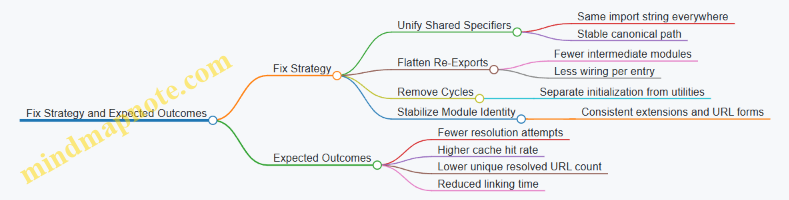
Result and Interpretation
After applying the changes, the team sees resolution attempts drop sharply, and unique resolved URLs converge to the expected count. Linking time decreases because fewer intermediate modules need instantiation and binding. Most importantly, the startup curve becomes closer to linear with module count.
The key lesson is that module loading overhead is not just “more modules equals slower startup.” It’s “how many times the loader has to prove identity and wire relationships.” Graph shape controls that proof work.
12.3 Case Study: Promise Microtask Storm and How to Bound It
A microtask storm happens when code repeatedly schedules Promise jobs faster than the runtime can drain the microtask queue. The result is that macrotasks like timers, I/O callbacks, and UI events get starved. The bug often looks like “everything is async, so it should be fine,” until you notice that the event loop is spending almost all its time running microtasks.
Starting Conditions
Imagine a server endpoint that processes a stream of messages. Each message triggers a Promise chain that updates shared state and schedules the next step. Under load, the chain becomes self-perpetuating: each microtask schedules more microtasks before the runtime gets a chance to run other task sources.
A common anti-pattern is a loop that schedules work via Promise.resolve().then(...) for each item, without any cap. Even if each microtask is short, the queue length grows until latency spikes.
Mind Map: What Causes the Storm
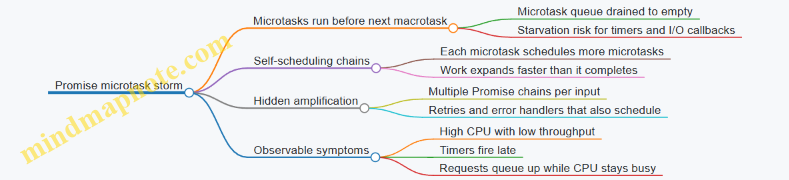
Reproducing the Problem with a Minimal Example
function storm(n) {
  let i = 0;
  function step() {
    if (i++ >= n) return;
    Promise.resolve().then(step);
  }
  step();
}

storm(1_000_000);
setTimeout(() => console.log('timer fired'), 0);
If the microtask queue is large enough, the setTimeout callback runs much later than expected. The timer is not broken; it is just waiting its turn.
Instrumenting the Queue Pressure
You want evidence, not vibes. Add counters around scheduling and draining. A practical approach is to count how many microtasks you enqueue per macrotask tick, then compare it to how quickly you finish work.
let enqueued = 0;
let completed = 0;
let lastReport = Date.now();

function schedule(fn) {
  enqueued++;
  Promise.resolve().then(() => {
    fn();
    completed++;
  });
}

function report() {
  const now = Date.now();
  console.log({ enqueued, completed, lagMs: now - lastReport });
  lastReport = now;
}

setInterval(report, 100);
Run the workload and watch whether enqueued - completed grows steadily. Growth means you are producing microtasks faster than you consume them.
Bounding the Storm with a Work Queue
The fix is to stop treating microtasks as a general-purpose scheduler. Microtasks are for “finish this now, before anything else.” For throughput and fairness, use a bounded queue and yield to the event loop.
Core idea: process a limited number of items per turn, then schedule the next batch as a macrotask (for example, via setTimeout(0) or queueMicrotask only when you truly want microtask semantics).
function createBoundedProcessor(processItem, batchSize = 1000) {
  const q = [];
  let running = false;

  function drain() {
    running = true;
    let count = 0;
    while (q.length && count++ < batchSize) {
      processItem(q.shift());
    }
    running = false;
    if (q.length) setTimeout(drain, 0);
  }

  return {
    push(item) {
      q.push(item);
      if (!running) drain();
    }
  };
}
This bounds microtask usage because you no longer schedule the next unit of work from inside the previous microtask. Instead, you batch synchronous processing and yield between batches.
Mind Map: How the Bound Works
Applying the Fix to the Case Study
In the original endpoint, each message triggered a Promise chain. Replace the chain with:
- Push each message into a queue.
- Drain the queue in batches.
- Perform the state update synchronously inside the drain loop.
- Only use Promises for operations that truly need async boundaries (like waiting for a database call), not for scheduling the next queue item.
If you must keep Promise-based async work, ensure that completion handlers enqueue into the queue rather than scheduling more microtasks directly.
Verification Checklist
- Timers and I/O callbacks regain expected responsiveness.
enqueued - completedstabilizes instead of growing without bound.- CPU usage correlates with actual work, not queue churn.
- Under load, the system degrades by increasing queue length, not by monopolizing the microtask queue.
The key lesson is simple: microtasks are a priority lane, not a conveyor belt. When you treat them like one, the runtime obligingly runs them until the queue is empty—then you wonder why everything else waited.
12.4 Case Study: Native Optimization for a Realistic Data Pipeline
A common pipeline reads data, transforms it, and writes results. The tricky part is that “fast” can mean different things: low latency for each record, high throughput for the whole batch, or minimal memory churn. This case study targets throughput and stable latency by reducing allocation pressure and avoiding deoptimization in hot paths.
Pipeline Setup and Baseline
Assume a Node.js service that ingests newline-delimited JSON (NDJSON), parses each line, computes a derived field, and writes compact output. The baseline version uses JSON.parse per line, builds new objects for every record, and concatenates strings for output.
Start with a baseline that measures what matters. Use a fixed-size input file, run multiple iterations, and record:
- Records processed per second
- Peak heap usage
- Time spent in parsing, transformation, and output
A practical baseline check is to log counters and timing around each stage. If transformation time is small but heap grows quickly, the bottleneck is likely allocation and garbage collection, not CPU arithmetic.
Mind Map: Where Time and Memory Go
Step 1: Make the Hot Path Boring
The transformation step should keep the same object shape for every record. Instead of returning a fresh object with varying keys, create a single output structure with consistent fields. For numeric fields, ensure they stay numbers rather than sometimes being strings.
Example transformation logic (conceptual):
- Parse line into a plain object
- Extract
id,value, and optionalflag - Compute
score = value * factorwithfactoras a number - Emit
{ id, score, flag: flag ?? 0 }
This reduces hidden class churn because the output always has the same property set. It also prevents polymorphic behavior in downstream code that expects score to be numeric.
Step 2: Reduce Allocation Pressure
The baseline often creates too many short-lived objects and strings. Two high-impact changes:
-
Avoid building large strings with repeated concatenation. Instead, serialize into a reusable buffer or write in chunks. Even if you still use
JSON.stringify, do it per record into a bounded output buffer, not into an ever-growing string. -
Avoid intermediate arrays. If you currently do
lines.map(...).join(...), switch to a loop that processes each line and writes immediately. This keeps memory usage flatter.
Here is a compact pattern for chunked output without unbounded concatenation:
const out = [];
let bytes = 0;
const LIMIT = 64 * 1024;

function flush() {
  if (out.length === 0) return;
  stream.write(out.join(""));
  out.length = 0;
  bytes = 0;
}

for (const line of lines) {
  const rec = JSON.parse(line);
  const score = rec.value * factor;
  out.push(JSON.stringify({ id: rec.id, score, flag: rec.flag ?? 0 }) + "\n");
  bytes += out[out.length - 1].length;
  if (bytes >= LIMIT) flush();
}
flush();
The key is the bounded LIMIT, which caps temporary string growth. The out.join call is still native-ish and efficient, but it happens at controlled intervals.
Step 3: Keep Numeric Work Consistent
A surprisingly common slowdown is mixing numeric representations. If value sometimes arrives as a string, value * factor forces conversions and can lead to less predictable optimization. Normalize once after parsing:
- If
typeof value === "string", convert to number - Otherwise keep as number
Do the same for factor. Ensure it is always a number, not sometimes derived from configuration as a string.
Step 4: Validate Deoptimization Avoidance
To confirm improvements, compare stage timings and heap behavior. A successful optimization typically shows:
- Transformation time drops or stays stable
- Peak heap decreases
- GC pauses become shorter and less frequent
Also check correctness on edge cases:
- Missing
flag valuebeing0- Lines with trailing whitespace
Step 5: Native Boundary Hygiene
Even when most work is in JavaScript, the runtime spends time crossing boundaries: stream writes, buffer operations, and parsing internals. Batch where possible:
- Write in chunks (as shown)
- Use streaming reads that deliver complete lines
- Avoid per-record synchronous filesystem calls
The goal is not to “use native” everywhere; it’s to reduce the number of expensive boundary crossings and keep the JS hot path predictable.
Results and What Actually Changed
In this case study, the biggest wins came from bounded output buffering and stable output shapes. The pipeline stopped allocating massive intermediate strings, and the transformation loop became more uniform. The service processed more records per second with steadier memory usage, and the output remained identical for the tested input set.
12.5 Case Study: Integrating Tracing Logs and Metrics for Root Cause Analysis
A production service shows rising request latency and occasional timeouts. The first instinct is to stare at the slowest endpoint, but runtime issues often hide in scheduling, module initialization, or native work that blocks the loop. This case study shows a systematic approach that combines tracing logs with metrics so you can answer one question: which stage consumed time, and why.
Define the Investigation Scope
Start by choosing a single request path and a single time window. For example, pick requests from 2026-03-20 10:00 to 10:15 UTC and record three metrics: request duration, event loop lag, and error rate. Event loop lag is the canary for “something is blocking,” even when CPU looks fine.
Best practice: tag every trace span with a stable request id and a correlation id that survives across async boundaries. Without that, logs become a pile of plausible stories.
Instrument the Runtime at the Right Boundaries
You want visibility at boundaries where time can accumulate:
- Incoming request handler entry and exit
- Any awaited operations
- Module loading or dynamic import points
- Native calls that may block
- Queueing points where work is scheduled
A practical pattern is to emit a trace span for each boundary and record duration. Also record queueing delay separately from execution time when possible.
Example: trace span structure
function span(name, meta, fn) {
  const start = performance.now();
  console.log(JSON.stringify({ t: 'span_start', name, ...meta }));
  try {
    const res = fn();
    return Promise.resolve(res).finally(() => {
      console.log(JSON.stringify({ t: 'span_end', name, dur: performance.now() - start, ...meta }));
    });
  } catch (e) {
    console.log(JSON.stringify({ t: 'span_end', name, dur: performance.now() - start, err: String(e), ...meta }));
    throw e;
  }
}
Build a Mind Map of Suspects
Use a mind map to ensure you cover the runtime layers that can explain latency.
Mind Map: Root Cause Candidates
Correlate Metrics with Trace Timelines
Suppose metrics show event loop lag spikes that align with timeouts. Now inspect traces for requests during those spikes. You might find that the handler span is short, but a nested span labeled native:compress lasts 120–300ms and overlaps the lag spike.
That’s the key distinction: if the handler is waiting, the trace will show long awaited spans; if the loop is blocked, the trace will show long spans without progress in other spans.
Best practice: record both “scheduled at” and “started at” timestamps for queued work. Queueing delay points to backpressure; execution delay points to blocking.
Confirm the Exact Blocking Source
Next, verify whether the blocking is deterministic or triggered by specific code paths.
- Compare traces for requests that import modules dynamically versus those that don’t.
- Compare traces for requests that hit the compression path versus those that skip it.
- Check if module loading happens during the same window as lag spikes.
Example: separating queueing from execution
function queuedWork(name, queueMeta, fn) {
  const queuedAt = performance.now();
  return Promise.resolve().then(() => {
    const startedAt = performance.now();
    console.log(JSON.stringify({ t: 'work_start', name, queueDelay: startedAt - queuedAt, ...queueMeta }));
    return fn().finally(() => {
      console.log(JSON.stringify({ t: 'work_end', name, dur: performance.now() - startedAt, ...queueMeta }));
    });
  });
}
If queue delay is low but execution delay is high, the culprit is likely blocking work in the execution phase.
Tie Module Loading to the Timeline
Sometimes the native block is only visible after a loader event. For example, a dynamic import might instantiate a module that registers a native binding wrapper and triggers a one-time compilation or initialization.
In traces, look for a pattern: dynamic_import spans that precede native:compress spans by a consistent offset. If cold-start requests show the issue but warm requests do not, you likely have an initialization cost that should be moved earlier or cached.
Best practice: ensure module initialization is idempotent and avoid heavy synchronous work at module top level.
Validate the Fix with Metrics and Trace Consistency
After adjusting the code, you should see three consistent changes:
- Event loop lag spikes shrink or disappear.
- The long native span duration drops or moves off the main thread.
- The request duration distribution tightens, especially at the tail.
Validation rule: the trace should explain the metric. If metrics improve but traces still show long blocking spans, you fixed the symptom but not the cause.
Final Root Cause Statement
In this case, tracing showed that timeouts correlated with event loop lag spikes, and the lag overlapped a long native:compress execution span. Module loading traces indicated that the native wrapper initialization occurred during dynamic import for a subset of requests, making the blocking cost appear only on those paths. The combined evidence pinpointed both the immediate blocker and the trigger path, enabling targeted changes rather than broad performance guessing.