Medical System Basics Patient Care and Clinical Workflows
1. Introduction to Medical Systems and Patient Care
1.1 Understanding the Healthcare Ecosystem: Roles and Responsibilities
Healthcare is a complex ecosystem where multiple professionals collaborate to provide patient-centered care. Understanding the roles and responsibilities within this system is crucial for new healthcare workers and medical assistants to function effectively and support clinical workflows.
The Healthcare Ecosystem Mind Map
Key Roles Explained with Examples
Medical Assistants
- Role: Serve as the frontline support in clinical settings, bridging administrative and clinical tasks.
- Example: When a patient arrives, the medical assistant collects vital signs, updates medical history, and prepares the patient for the physician’s exam.
Physicians
- Role: Diagnose illnesses, develop treatment plans, and oversee patient care.
- Example: After reviewing the patient’s symptoms and test results, the physician prescribes medication and advises on follow-up care.
Nurses
- Role: Provide continuous patient care, administer medications, and educate patients.
- Example: A nurse monitors a patient’s recovery after surgery, adjusting care plans as needed.
Administrative Staff
- Role: Manage scheduling, patient records, and billing processes.
- Example: The receptionist confirms patient appointments and collects insurance information during check-in.
Best Practices for Understanding and Navigating Roles
- Clear Communication: Always clarify your responsibilities and ask questions when uncertain.
- Collaboration: Work closely with all team members to ensure seamless patient care.
- Respect Boundaries: Know the limits of your role to avoid errors and maintain professionalism.
Example Scenario: Coordinated Patient Care
Scenario: A patient arrives for a routine check-up.
- The receptionist verifies the appointment and updates insurance details.
- The medical assistant collects vital signs and documents symptoms.
- The physician reviews the information, performs the exam, and prescribes medication.
- The nurse provides education on medication use and schedules follow-up.
- The billing specialist processes the visit for insurance reimbursement.
This example highlights how each role contributes to efficient, patient-centered care.
Understanding the healthcare ecosystem and your place within it empowers you to deliver better care, improve workflows, and foster a collaborative environment.
1.2 Overview of Patient Care: From Admission to Discharge
Patient care is a comprehensive process that spans from the moment a patient enters a healthcare facility until they are safely discharged. Understanding each phase ensures medical assistants and new healthcare workers can provide seamless, compassionate, and efficient care.
Mind Map: Patient Care Journey
Admission Phase
Key Steps:
- Patient registration capturing demographics and medical history
- Initial health assessment including vital signs
- Obtaining informed consent and explaining privacy policies (HIPAA)
Best Practice Example: When a patient arrives, greet them warmly and verify their identity using two identifiers (e.g., name and date of birth). Use an electronic health record (EHR) system to enter their information accurately. For instance, if a patient forgets their ID, confirm identity by asking for personal details and cross-checking with existing records.
Diagnosis and Treatment Phase
Key Steps:
- Assisting with physical exams
- Preparing and collecting specimens
- Administering medications as per physician orders
Best Practice Example: During a physical exam, prepare the room and equipment beforehand to avoid delays. For example, if a physician requests a blood pressure reading, ensure the cuff is the correct size and calibrated. Document findings immediately in the EHR to maintain accuracy.
Monitoring and Support Phase
Key Steps:
- Regular monitoring of vital signs and symptoms
- Providing patient education on their condition and care plan
- Offering emotional support and addressing patient concerns
Best Practice Example: A diabetic patient may need education on insulin administration. Use simple language and visual aids to demonstrate injection techniques. Follow up by asking the patient to repeat instructions to confirm understanding.
Discharge Phase
Key Steps:
- Planning discharge with clear instructions
- Scheduling follow-up appointments
- Completing all necessary documentation
Best Practice Example: Before discharge, review medication schedules and dietary restrictions with the patient. Provide printed instructions and confirm they understand when to seek medical help. Document the discharge summary in the EHR promptly.
Additional Mind Map: Discharge Planning
Summary
From admission to discharge, patient care involves multiple coordinated steps that require attention to detail, empathy, and effective communication. By following best practices and using tools like EHRs and patient education materials, healthcare workers can ensure high-quality care and positive patient outcomes.
1.3 Importance of Clinical Workflows in Healthcare Delivery
Clinical workflows refer to the structured sequence of processes and tasks that healthcare professionals follow to deliver patient care efficiently and safely. These workflows are essential in ensuring that every step, from patient intake to discharge, is coordinated, timely, and standardized.
Why Clinical Workflows Matter
- Enhance Patient Safety: By following standardized steps, medical errors are minimized.
- Improve Efficiency: Streamlined workflows reduce wait times and optimize resource use.
- Ensure Consistency: Patients receive uniform care regardless of the provider or time.
- Facilitate Communication: Clear workflows help team members understand their roles and responsibilities.
- Support Compliance: Adherence to legal and regulatory requirements is easier with documented workflows.
Mind Map: Key Benefits of Clinical Workflows
Example: Streamlining Patient Admission
Imagine a busy clinic where patient admission is chaotic — patients wait long, paperwork is duplicated, and vital information is missed. Introducing a clinical workflow that includes:
- Pre-registration: Patients fill out forms online before arrival.
- Verification: Staff verify insurance and demographics upon arrival.
- Triage: Nurse assesses urgency and directs patient accordingly.
- Documentation: Medical assistant inputs data into EHR immediately.
This workflow reduces wait times, improves data accuracy, and enhances patient satisfaction.
Mind Map: Clinical Workflow for Patient Admission
Impact on Healthcare Delivery
Clinical workflows create a foundation for quality care. For example, in medication administration, a clear workflow ensures the “Five Rights” (right patient, right drug, right dose, right route, right time) are checked systematically, reducing adverse drug events.
Similarly, workflows in specimen collection ensure samples are labeled and transported correctly, preventing diagnostic errors.
Mind Map: Clinical Workflow Impact Areas
Summary
Clinical workflows are the backbone of effective healthcare delivery. They help medical assistants and new healthcare workers understand their roles clearly, reduce errors, improve patient experiences, and support the entire healthcare team in providing coordinated, high-quality care.
1.4 Best Practices: Effective Communication with Patients and Team Members
Effective communication is the cornerstone of quality patient care and smooth clinical workflows. For medical assistants and new healthcare workers, mastering communication skills enhances patient satisfaction, reduces errors, and fosters teamwork.
Key Principles of Effective Communication
- Clarity: Use simple, clear language avoiding medical jargon when speaking with patients.
- Active Listening: Pay full attention, acknowledge patient concerns, and confirm understanding.
- Empathy: Show understanding and compassion to build trust.
- Nonverbal Cues: Maintain eye contact, use appropriate facial expressions, and body language.
- Feedback: Encourage questions and provide clear answers.
- Confidentiality: Respect patient privacy in all communications.
Mind Map: Effective Communication with Patients
Mind Map: Effective Communication with Team Members
Best Practices with Examples
-
Using Layman’s Terms with Patients
- Example: Instead of saying “You have hypertension,” say “You have high blood pressure, which means your heart is working harder than normal.”
-
Active Listening to Patient Concerns
- Example: A patient expresses anxiety about a procedure. The medical assistant listens attentively, repeats back the concern, and reassures the patient by explaining the steps involved.
-
Applying SBAR for Team Communication
- SBAR stands for Situation, Background, Assessment, Recommendation.
- Example: When handing off a patient, a medical assistant says:
- Situation: “Mr. Smith is experiencing shortness of breath.”
- Background: “He has a history of asthma.”
- Assessment: “His oxygen saturation dropped to 88%.”
- Recommendation: “Please evaluate and consider nebulizer treatment.”
-
Nonverbal Communication to Build Rapport
- Example: Smiling gently, maintaining eye contact, and nodding while a patient describes symptoms helps them feel heard and comfortable.
-
Encouraging Patient Questions
- Example: After explaining medication instructions, ask, “Do you have any questions about how to take this medicine?”
-
Maintaining Confidentiality
- Example: Discuss sensitive patient information in private rooms or behind curtains, never in public areas.
-
Timely and Clear Team Updates
- Example: After assisting with a patient’s vital signs, promptly updating the nurse via the EHR notes or verbally to ensure continuity.
-
Resolving Team Conflicts Professionally
- Example: If a scheduling conflict arises, address it calmly with the involved staff, focusing on finding a solution rather than assigning blame.
Summary
Effective communication with patients and team members involves clarity, empathy, active listening, and respect. Using structured tools like SBAR for team communication and simplifying language for patients ensures information is understood and acted upon correctly. Nonverbal cues and confidentiality further enhance trust and professionalism. Practicing these skills daily improves patient outcomes and workplace harmony.
1.5 Example: A Day in the Life of a Medical Assistant
Being a medical assistant involves juggling multiple tasks efficiently while maintaining compassionate patient care. Let’s walk through a typical day, highlighting key responsibilities, best practices, and examples.
Morning Preparation
- Arrive early to prepare the clinic: Check supplies, ensure exam rooms are clean and stocked.
- Review the day’s schedule: Note any special patient needs or procedures.
Example: Before the first patient arrives, Sarah, a medical assistant, verifies that all blood pressure cuffs are calibrated and that the exam rooms have fresh linens. She also prints out patient charts and flags those with allergies.
Patient Intake and Registration
- Greet patients warmly: Establish rapport to ease anxiety.
- Verify patient information: Confirm demographics, insurance, and medical history.
- Collect vital signs: Temperature, pulse, respiration, blood pressure.
Example: When Mr. Johnson arrives, Sarah confirms his address and phone number, asks about any recent health changes, and measures his blood pressure carefully, noting it in the electronic health record.
Assisting During Examination
- Prepare the patient: Help them get comfortable and explain procedures.
- Assist the physician: Hand instruments, take notes, or prepare specimens.
- Maintain patient privacy and comfort: Use drapes, close doors, and communicate clearly.
Example: During a physical exam, Sarah gently helps a patient onto the exam table, explains what the doctor will do next, and labels blood samples correctly for lab testing.
Medication and Treatment Support
- Prepare medications as ordered: Verify dosages and patient allergies.
- Administer medications or injections: Follow safety protocols.
- Document administration and observe for reactions.
Example: Sarah double-checks a prescription before administering a flu shot, explains possible side effects to the patient, and records the injection in the patient’s chart.
Managing Documentation and EHR
- Update patient records promptly: Include vital signs, exam notes, medications.
- Ensure accuracy and completeness: Avoid errors that could affect care.
- Communicate updates to the healthcare team.
Example: After each patient visit, Sarah inputs all collected data into the EHR system, ensuring that the physician has the latest information for diagnosis and treatment.
End of Day Wrap-Up
- Clean and restock exam rooms.
- Prepare for next day: Review schedule, order supplies if needed.
- Reflect on workflow: Identify any bottlenecks or challenges.
Example: Sarah notices that patient wait times increased mid-morning and suggests a slight adjustment in appointment spacing to her supervisor.
Summary Mind Map: A Day in the Life of a Medical Assistant
This example illustrates how medical assistants play a vital role in ensuring smooth clinical workflows and quality patient care by balancing technical skills with compassionate communication.
2. Patient Intake and Registration Processes
2.1 Collecting Patient Demographics and Medical History
Collecting accurate patient demographics and medical history is a foundational step in providing quality healthcare. This information helps healthcare providers understand the patient’s background, identify potential health risks, and tailor care plans effectively.
What Are Patient Demographics?
Patient demographics include basic identifying information about the patient. This typically covers:
- Full name
- Date of birth
- Gender
- Contact information (phone number, address, email)
- Emergency contact details
- Insurance information
What Is Medical History?
Medical history refers to the patient’s past and current health conditions, treatments, allergies, medications, family health background, and lifestyle factors.
Mind Map: Patient Demographics
Mind Map: Medical History
Best Practices for Collecting Patient Demographics and Medical History
-
Use Clear and Simple Language: Avoid medical jargon when asking patients questions to ensure they understand.
-
Verify Information: Double-check spelling of names, dates, and contact details to avoid errors.
-
Maintain Privacy: Collect information in a confidential setting and explain how data will be used and protected.
-
Be Patient and Empathetic: Some patients may feel uncomfortable sharing personal information; build trust through respectful communication.
-
Use Structured Forms: Utilize standardized intake forms or electronic health record (EHR) templates to ensure completeness.
-
Update Regularly: Patient information can change; always confirm and update demographics and history at each visit.
Example Scenario: Collecting Patient Demographics and Medical History
Situation: A new patient arrives at a clinic for their first appointment.
Step 1: Greeting and Introduction “Hello, my name is Sarah, and I will be assisting you today. To provide the best care, I need to collect some basic information about you. This will be kept confidential.”
Step 2: Collecting Demographics
- “Can you please confirm your full name and date of birth?”
- “What is the best phone number and address to reach you?”
- “Do you have an emergency contact person we can reach if needed?”
- “Do you have health insurance? If yes, can you provide the provider and policy number?”
Step 3: Collecting Medical History
- “Have you had any major illnesses or surgeries in the past?”
- “Are you currently taking any medications, including vitamins or supplements?”
- “Do you have any allergies to medications, foods, or other substances?”
- “Does anyone in your family have chronic health conditions like diabetes or heart disease?”
- “Do you smoke, drink alcohol, or have any other lifestyle habits we should know about?”
Step 4: Documentation All information is carefully entered into the EHR system, with attention to spelling and accuracy.
Tips for Medical Assistants and New Healthcare Workers
- Always introduce yourself and explain why you are collecting information.
- Use open-ended questions when appropriate to encourage detailed responses.
- Be mindful of cultural sensitivities and language barriers; use interpreters if needed.
- Confirm unclear or incomplete answers by gently asking follow-up questions.
- Keep patient comfort in mind; ensure privacy during the intake process.
By mastering the collection of patient demographics and medical history, medical assistants and new healthcare workers lay the groundwork for safe, effective, and personalized patient care.
2.2 Best Practices for Accurate Data Entry and Verification
Accurate data entry and verification are critical in healthcare settings to ensure patient safety, proper treatment, and efficient clinical workflows. Errors in patient data can lead to misdiagnosis, incorrect medication administration, and billing issues. This section outlines best practices to maintain high data quality, supported by clear examples and mind maps to visualize key concepts.
Key Principles for Accurate Data Entry
- Attention to Detail: Carefully review all patient information before entering.
- Double-Checking: Verify data against original documents or patient-provided information.
- Standardized Formats: Use consistent formats for dates, phone numbers, and other fields.
- Use of Technology: Leverage EHR validation tools and dropdown menus to minimize errors.
- Clear Communication: Confirm unclear information with patients or healthcare providers.
Mind Map: Best Practices for Accurate Data Entry
Step-by-Step Example: Patient Registration Data Entry
Scenario: A new patient arrives to register at the clinic.
-
Collect Information: The medical assistant asks the patient to provide their full name, date of birth, address, phone number, and insurance details.
-
Verify Information: The assistant repeats the information back to the patient to confirm accuracy.
-
Enter Data: The assistant inputs the data into the EHR system, using dropdowns for state and insurance provider to avoid typos.
-
Double-Check: After entry, the assistant reviews each field against the patient’s ID and insurance card.
-
Finalize: The assistant saves the record and informs the patient that their registration is complete.
Best Practice Highlight: Repeating information aloud and using system dropdowns significantly reduce errors.
Mind Map: Verification Process
Common Data Entry Errors and How to Avoid Them
| Error Type | Cause | Prevention Strategy | Example |
|---|---|---|---|
| Typographical Errors | Manual typing mistakes | Slow down, use spell-check, dropdown menus | Entering “Jhon” instead of “John” |
| Transposition Errors | Switching digits or letters | Double-check numbers, especially DOB | Typing 12/09/1985 instead of 09/12/1985 |
| Missing Data | Skipping fields | Use mandatory fields in EHR | Forgetting to enter emergency contact info |
| Inconsistent Formats | Different date or phone formats | Standardize input formats | Entering phone as 1234567890 vs (123)456-7890 |
Example: Using Technology to Improve Accuracy
Many EHR systems have built-in validation features:
- Dropdown Menus: Limit options to predefined lists (e.g., insurance providers).
- Auto-Formatting: Automatically format phone numbers or dates.
- Error Alerts: Notify users of missing or inconsistent data before saving.
Example: When entering a phone number, the system auto-formats it to (XXX) XXX-XXXX and alerts if fewer than 10 digits are entered.
Tips for Medical Assistants and New Healthcare Workers
- Always verify patient identity with at least two identifiers (e.g., name and DOB).
- When in doubt, ask the patient or consult supervising staff rather than guessing.
- Keep patient data confidential and secure during entry.
- Document any corrections clearly with date, time, and reason.
By following these best practices, healthcare workers can significantly reduce data entry errors, improve patient safety, and contribute to smoother clinical workflows.
2.3 Handling Patient Consent and Privacy Regulations (HIPAA Basics)
Patient consent and privacy are foundational elements in healthcare, ensuring that patients’ rights and personal health information (PHI) are protected. Understanding how to properly handle consent and comply with privacy regulations like HIPAA (Health Insurance Portability and Accountability Act) is essential for medical assistants and new healthcare workers.
What is Patient Consent?
Patient consent is the process by which a patient voluntarily agrees to a proposed medical treatment or procedure after being informed of its risks, benefits, and alternatives.
- Types of Consent:
- Express Consent: Explicitly given, either verbally or in writing.
- Implied Consent: Assumed by the patient’s actions (e.g., rolling up a sleeve for a blood draw).
Why is Patient Consent Important?
- Respects patient autonomy.
- Protects healthcare providers legally.
- Builds trust between patient and provider.
HIPAA Basics: Protecting Patient Privacy
HIPAA is a federal law that sets standards for protecting sensitive patient health information.
- Key Components:
- Privacy Rule: Regulates use and disclosure of PHI.
- Security Rule: Sets standards for electronic PHI protection.
- Breach Notification Rule: Requires notification of breaches.
PHI Includes:
- Names, addresses, birthdates
- Medical records and history
- Social security numbers
- Billing information
Best Practices for Handling Patient Consent and Privacy
Example 1: Obtaining Express Consent
Scenario: A medical assistant needs to draw blood from a patient.
Best Practice:
- Explain the procedure clearly.
- Inform the patient about risks and benefits.
- Ask for verbal or written consent.
- Document the consent in the patient’s record.
Example Dialogue:
“We need to take a small blood sample to run some tests. The procedure is quick and safe, but you might feel a slight pinch. Do you agree to proceed?”
Example 2: Protecting Patient Privacy in EHR
Scenario: Accessing patient records on a shared computer.
Best Practice:
- Log in with unique credentials.
- Never share passwords.
- Log out immediately after use.
- Ensure screen is not visible to unauthorized persons.
Mind Map: Steps to Ensure HIPAA Compliance in Daily Workflow
Example 3: Handling a Privacy Breach
Scenario: A medical assistant accidentally sends patient information to the wrong email.
Best Practice:
- Immediately report the breach to the supervisor.
- Follow facility’s breach notification protocol.
- Notify the affected patient if required.
- Document the incident and corrective actions.
Summary
Handling patient consent and privacy requires clear communication, diligent documentation, and strict adherence to HIPAA regulations. By following best practices and understanding the legal framework, medical assistants can protect patients’ rights and maintain trust.
For further reading, consider reviewing your facility’s specific consent forms and HIPAA training materials regularly.
2.4 Example: Streamlining Patient Check-In with Electronic Health Records (EHR)
Efficient patient check-in is a critical step in clinical workflows that directly impacts patient satisfaction and overall clinic productivity. Leveraging Electronic Health Records (EHR) can significantly streamline this process, reduce errors, and improve data accuracy.
Why Streamline Patient Check-In?
- Reduces wait times
- Minimizes paperwork errors
- Enhances data accuracy
- Improves patient experience
- Frees up staff time for clinical tasks
Step-by-Step Streamlined Check-In Process Using EHR
-
Pre-Appointment Electronic Registration
- Patients receive a secure link or portal access to enter/update personal and insurance information before arrival.
- Example: A patient receives an email 48 hours before their appointment prompting them to update their medical history and insurance details online.
-
Automated Identity Verification
- Upon arrival, patients scan a QR code or provide a unique ID to quickly retrieve their record.
- Example: A patient scans a QR code at a kiosk, instantly pulling up their EHR for verification.
-
Digital Consent and Forms
- Patients electronically sign consent forms and complete any required questionnaires on tablets or kiosks.
- Example: A touchscreen tablet prompts the patient to review and sign the privacy policy before proceeding.
-
Real-Time Data Syncing
- All information entered is instantly updated in the EHR system, accessible to clinical staff.
- Example: The medical assistant sees updated allergy information immediately before the exam.
-
Check-In Confirmation and Direction
- The system confirms check-in and provides instructions or waiting area details.
- Example: A confirmation screen thanks the patient and directs them to the waiting room.
Mind Map: Streamlined Patient Check-In Workflow
Practical Example Scenario:
Clinic Setting: A busy outpatient clinic implementing EHR-based check-in.
- Before EHR Implementation: Patients filled out paper forms, causing delays and frequent data entry errors.
- After EHR Implementation: Patients complete forms online before arrival; at the clinic, they use kiosks to confirm identity and sign digital consents.
Outcome:
- Average check-in time reduced from 15 minutes to 5 minutes.
- Data entry errors dropped by 80%.
- Staff reallocated from paperwork to direct patient support.
Tips for Medical Assistants and New Healthcare Workers:
- Familiarize yourself with the EHR check-in interface to assist patients efficiently.
- Encourage patients to use pre-appointment online forms to save time.
- Verify patient identity carefully to avoid record mismatches.
- Ensure digital devices (kiosks/tablets) are sanitized and functioning.
- Communicate clearly with patients about the check-in steps to reduce confusion.
By integrating these best practices and leveraging EHR technology, medical assistants and healthcare workers can enhance the patient check-in experience, reduce administrative burden, and contribute to smoother clinical workflows.
2.5 Managing Patient Identification and Avoiding Errors
Accurate patient identification is a cornerstone of safe and effective healthcare delivery. Errors in patient identification can lead to serious consequences such as wrong treatments, medication errors, or incorrect diagnostic procedures. This section explores best practices and practical examples to help medical assistants and new healthcare workers manage patient identification effectively and avoid common errors.
Why Patient Identification Matters
- Ensures the right patient receives the right care.
- Prevents medical errors and adverse events.
- Complies with legal and regulatory standards.
Best Practices for Managing Patient Identification
Use Multiple Identifiers
Always use at least two patient identifiers before any clinical interaction or procedure. Common identifiers include:
- Full name
- Date of birth
- Medical record number
- Phone number
Verify Patient Identity Verbally
Ask the patient to state their full name and date of birth rather than relying solely on wristbands or paperwork.
Check Identification Wristbands
Confirm that the wristband matches the patient’s information in the medical record.
Use Barcoding Systems
When available, scan patient wristbands and medication barcodes to reduce human error.
Maintain Updated Records
Ensure patient information is current and correct in the Electronic Health Record (EHR) system.
Educate Patients
Encourage patients to participate in verifying their identity and understanding their care plan.
Mind Map: Patient Identification Best Practices
Common Errors and How to Avoid Them
| Error Type | Description | Prevention Strategy | Example Scenario |
|---|---|---|---|
| Misidentification | Confusing patients with similar names | Use two identifiers; verify verbally | Two patients named “John Smith” admitted same day; verify DOB before treatment. |
| Data Entry Errors | Typing wrong info into EHR | Double-check entries; use drop-down menus | Entering wrong birthdate for patient; cross-check with wristband. |
| Wristband Mix-up | Patient wears wrong wristband | Confirm wristband info before procedures | Patient transferred to wrong room with another’s wristband; re-check before meds. |
| Failure to Update Records | Outdated patient info in system | Regularly update records; confirm at each visit | Patient changes last name after marriage; update EHR accordingly. |
Example 1: Verbal Confirmation in a Busy Clinic
Scenario: A medical assistant is preparing to take vital signs for a patient named Maria Gonzalez. There are several patients in the waiting room with similar names.
Best Practice: Before proceeding, the assistant asks Maria to state her full name and date of birth. Maria confirms her name and DOB, which matches the wristband and EHR. This simple step prevents confusion and ensures the correct patient is being cared for.
Example 2: Barcode Scanning to Prevent Medication Errors
Scenario: Administering medication to Mr. Robert Lee.
Best Practice: The medical assistant scans the barcode on Mr. Lee’s wristband and the medication package. The system confirms a match before administration, preventing a potential error where medication intended for another patient could have been given.
Mind Map: Steps to Avoid Patient Identification Errors
Summary
Managing patient identification requires vigilance, clear communication, and the use of multiple verification methods. By combining best practices such as verbal confirmation, wristband checks, and technology like barcode scanning, healthcare workers can significantly reduce errors. Engaging patients in the process further strengthens safety and trust.
Remember: Always double-check, never assume, and keep patient safety as the top priority.
3. Vital Signs Measurement and Documentation
3.1 Understanding Vital Signs: What and Why
Vital signs are fundamental indicators of a patient’s health status. They provide critical information about the body’s basic functions and help healthcare professionals detect medical problems early, monitor treatment progress, and make informed clinical decisions.
What Are Vital Signs?
Vital signs typically include the following measurements:
- Body Temperature: Indicates the body’s ability to generate and get rid of heat.
- Pulse (Heart Rate): Measures the number of heartbeats per minute.
- Respiration Rate: Counts the number of breaths a person takes per minute.
- Blood Pressure: Measures the force of blood pushing against the walls of arteries.
Why Are Vital Signs Important?
- Early Detection of Illness: Changes in vital signs can signal the onset of illness or deterioration.
- Monitoring Chronic Conditions: Helps track diseases like hypertension or respiratory disorders.
- Guiding Treatment Decisions: Vital signs influence medication dosages and other interventions.
- Assessing Response to Treatment: Improvement or worsening can be gauged through vital sign trends.
Mind Map: Overview of Vital Signs
Example: Why Vital Signs Matter in Practice
Scenario: A 45-year-old patient arrives at the clinic complaining of dizziness and fatigue.
- Temperature: 37.0°C (normal)
- Pulse: 110 bpm (elevated)
- Respiration: 22 breaths per minute (slightly elevated)
- Blood Pressure: 90/60 mmHg (low)
Interpretation: The elevated pulse and respiration combined with low blood pressure suggest possible dehydration or early shock. Immediate intervention and further assessment are needed.
Mind Map: How Vital Signs Guide Patient Care
Best Practice Tip:
Always measure vital signs in a calm environment, ensure the patient is resting for at least 5 minutes before measurement, and use properly calibrated equipment. Document findings immediately and report any abnormal values promptly.
Additional Example: Pediatric Vital Signs
Children have different normal ranges. For example, a newborn’s normal heart rate can be 120-160 bpm, which is much higher than adults. Understanding these differences is crucial for accurate assessment.
By mastering the understanding of vital signs, medical assistants and new healthcare workers can play a pivotal role in early detection and effective patient care.
3.2 Best Practices for Accurate Measurement of Temperature, Pulse, Respiration, and Blood Pressure
Accurate measurement of vital signs is a foundational skill for medical assistants and new healthcare workers. These measurements provide critical information about a patient’s health status and help guide clinical decisions. Below are best practices for measuring temperature, pulse, respiration, and blood pressure, along with practical examples and mind maps to visualize the process.
Temperature Measurement
Best Practices:
- Choose the appropriate method: Oral, tympanic (ear), temporal artery, axillary (underarm), or rectal (rarely used except in infants or unconscious patients).
- Prepare the patient: Ensure the patient has not consumed hot or cold drinks, smoked, or exercised within 15 minutes before oral temperature measurement.
- Use clean, calibrated equipment: Disposable covers for thermometers reduce infection risk.
- Position the thermometer correctly: For oral, place under the tongue; for tympanic, gently insert into the ear canal; for temporal, sweep across the forehead.
- Wait the recommended time: Follow manufacturer instructions for digital thermometers.
Example: Maria, a medical assistant, prepares to take a patient’s oral temperature. She asks the patient if they have eaten or drank anything hot or cold recently. After confirming no, she places the digital thermometer under the patient’s tongue, instructing them to close their mouth gently. After the beep, she records 98.6°F in the EHR.
Mind Map: Temperature Measurement
Pulse Measurement
Best Practices:
- Select the correct site: Radial pulse (wrist) is most common; carotid pulse (neck) used in emergencies.
- Use fingertips, not thumb: Thumb has its own pulse which can interfere.
- Patient position: Patient should be relaxed and seated or lying down.
- Count for full 60 seconds: Especially if pulse is irregular; otherwise, 30 seconds multiplied by 2 may be acceptable.
- Note rhythm and strength: Regularity and amplitude provide additional clinical information.
Example: John checks Mrs. Lee’s radial pulse by placing his index and middle fingers on her wrist. He counts the beats for 60 seconds because Mrs. Lee reports feeling palpitations. He notes a regular rhythm with a rate of 78 bpm and documents it.
Mind Map: Pulse Measurement
Respiration Measurement
Best Practices:
- Observe discreetly: Patient should not be aware to avoid altered breathing.
- Count breaths for 30 or 60 seconds: One respiration equals one inhale and one exhale.
- Note rhythm and effort: Regularity, depth, and any signs of distress.
- Patient position: Comfortable and relaxed.
Example: While pretending to check the pulse, Sarah observes Mr. Gomez’s chest rise and fall. She counts 16 respirations in 30 seconds and doubles it to 32 breaths per minute, which is slightly elevated. She notes this and alerts the nurse.
Mind Map: Respiration Measurement
Blood Pressure Measurement
Best Practices:
- Use the correct cuff size: Too small or too large cuffs give inaccurate readings.
- Patient preparation: Patient should be seated quietly for 5 minutes, feet flat on floor, arm supported at heart level.
- Avoid caffeine, exercise, or smoking 30 minutes prior.
- Position cuff properly: Wrap snugly around upper arm, with the lower edge about 1 inch above the elbow crease.
- Use stethoscope placement (if manual): Place over brachial artery.
- Inflate cuff 20-30 mmHg above expected systolic pressure.
- Deflate slowly (2-3 mmHg per second) and listen for Korotkoff sounds: First sound = systolic, disappearance = diastolic.
- Repeat measurement if needed: Wait 1-2 minutes between readings.
Example: David prepares to take a patient’s blood pressure. He selects a medium cuff, ensures the patient is seated comfortably with arm supported, and wraps the cuff snugly. He inflates the cuff to 160 mmHg, then slowly deflates while listening. He records a blood pressure of 120/80 mmHg and enters it into the chart.
Mind Map: Blood Pressure Measurement
Summary Table of Best Practices and Examples
| Vital Sign | Best Practice Highlights | Example Scenario |
|---|---|---|
| Temperature | Choose method, prepare patient, use clean equipment | Oral temp after confirming no recent hot drinks |
| Pulse | Use fingertips, count full 60 sec if irregular, note rhythm | Radial pulse counted for 60 sec due to palpitations |
| Respiration | Observe discreetly, count breaths, note effort and rhythm | Counting respirations while pretending to check pulse |
| Blood Pressure | Correct cuff size, patient rest, slow deflation, proper cuff placement | BP taken with medium cuff after 5 min rest |
By following these best practices, medical assistants and new healthcare workers can ensure vital signs are measured accurately and consistently, providing reliable data to support patient care and clinical decisions.
3.3 Using Medical Devices: Tips for Calibration and Maintenance
Medical devices are essential tools in patient care, providing accurate measurements that guide diagnosis and treatment. Proper calibration and maintenance ensure these devices function reliably and safely.
Why Calibration and Maintenance Matter
- Ensures accuracy and reliability of measurements
- Prevents misdiagnosis or incorrect treatment
- Extends device lifespan
- Complies with healthcare regulations and standards
Common Medical Devices Requiring Calibration and Maintenance
- Blood pressure monitors
- Thermometers
- Pulse oximeters
- Glucometers
- ECG machines
Mind Map: Key Steps for Calibration and Maintenance
Best Practices for Calibration
-
Follow Manufacturer Guidelines: Always adhere to the calibration schedule and procedures provided in the device manual.
-
Use Certified Reference Standards: Calibrate devices against certified instruments or standards to ensure accuracy.
-
Document Every Calibration: Keep detailed records including date, person performing calibration, and results.
-
Calibrate After Repairs or Software Updates: Any change to the device can affect accuracy.
-
Schedule Regular Calibration: Even if the device appears to function well, regular calibration prevents drift in measurements.
Best Practices for Maintenance
-
Daily Cleaning: Clean devices after each patient use to prevent cross-contamination.
-
Inspect for Damage: Check cables, sensors, and screens regularly for wear and tear.
-
Battery Checks: Replace batteries as recommended to avoid device failure.
-
Software Updates: Keep device software up to date to improve functionality and security.
-
Proper Storage: Store devices in a clean, dry environment to prevent damage.
Example 1: Calibrating a Digital Blood Pressure Monitor
- Step 1: Gather a mercury sphygmomanometer (gold standard) and the digital monitor.
- Step 2: Inflate the cuff on both devices simultaneously on a test arm.
- Step 3: Compare readings at multiple pressure points (e.g., systolic and diastolic).
- Step 4: Adjust the digital monitor settings if discrepancies exceed manufacturer tolerances.
- Step 5: Record calibration results and date.
Example 2: Maintaining a Pulse Oximeter
- Daily: Wipe sensor and device with approved disinfectant wipes after each use.
- Weekly: Inspect sensor clip for cracks or loose parts.
- Monthly: Check battery level and replace if below 20%.
- Quarterly: Verify accuracy by comparing readings with a reference device on a healthy volunteer.
- Documentation: Log all maintenance activities.
Troubleshooting Tips
- Inconsistent Readings: Check sensor placement and patient movement; recalibrate if necessary.
- Device Not Powering On: Replace batteries or check power connections.
- Error Messages: Refer to device manual; perform reset or contact technical support.
Summary
Proper calibration and maintenance of medical devices are critical for accurate patient assessment and safety. By following manufacturer guidelines, scheduling regular checks, and documenting all activities, healthcare workers ensure devices perform optimally, supporting high-quality patient care.
3.4 Example: Documenting Vital Signs in a Busy Clinic Setting
In a busy clinic, medical assistants often need to document vital signs quickly and accurately while managing multiple patients. Proper documentation ensures continuity of care, accurate diagnosis, and effective treatment planning.
Step-by-Step Process for Documenting Vital Signs
- Prepare Equipment
- Ensure the blood pressure cuff, thermometer, pulse oximeter, and stopwatch are clean and functioning.
- Verify Patient Identity
- Confirm the patient’s full name and date of birth before measurement.
- Measure Vital Signs
- Temperature, pulse, respiration rate, blood pressure, and oxygen saturation.
- Record Measurements Immediately
- Use the Electronic Health Record (EHR) system or paper chart.
- Double-Check Entries
- Verify that values are entered correctly to avoid errors.
- Report Abnormal Findings
- Alert the nurse or physician promptly if any vital signs are outside normal ranges.
Mind Map: Vital Signs Documentation Workflow
Example Scenario
Situation: A medical assistant, Sarah, is working in a busy family clinic. She has five patients waiting for vital signs measurement before their physician visits.
Approach:
- Sarah organizes her workspace with all equipment ready.
- She calls the first patient, confirms their identity, and measures vital signs.
- Immediately after measurement, she enters the data into the EHR system.
- She notices the second patient has a blood pressure reading of 150/95 mmHg, which is higher than normal.
- Sarah flags this abnormal value in the system and informs the nurse on duty.
- She continues with the remaining patients, maintaining the same workflow.
Outcome:
- All vital signs are documented accurately and promptly.
- The care team is alerted to the abnormal blood pressure reading, allowing timely intervention.
Tips for Efficiency and Accuracy
- Use Checklists: Keep a checklist for equipment and steps to avoid missing any vital sign.
- Batch Documentation: Document each patient’s vital signs immediately after measurement to reduce errors.
- Stay Organized: Arrange equipment logically to minimize movement.
- Communicate Clearly: Use standard terminology when reporting abnormal findings.
Mind Map: Best Practices for Busy Clinic Documentation
By following these steps and best practices, medical assistants can ensure vital signs are documented efficiently and accurately, even in the most demanding clinical environments.
3.5 Troubleshooting Common Measurement Challenges
Accurate measurement of vital signs is crucial for patient assessment and care planning. However, various challenges can arise during the measurement process that may affect the accuracy and reliability of the data collected. This section will explore common issues encountered when measuring vital signs and provide practical troubleshooting tips, supported by mind maps and real-world examples.
Common Challenges and Solutions Mind Map
Detailed Troubleshooting Examples
Example 1: Inconsistent Temperature Readings
Scenario: A medical assistant notices that a patient’s oral temperature readings vary significantly within a short time.
Troubleshooting Steps:
- Confirm the thermometer is calibrated and functioning properly.
- Check if the patient recently consumed hot or cold beverages; if yes, wait 15 minutes before retaking.
- Ensure the thermometer probe is placed correctly under the tongue, not touching teeth.
Best Practice: Always ask patients about recent activities that may affect temperature and use consistent measurement sites.
Example 2: Difficulty Finding the Radial Pulse
Scenario: The pulse feels weak and irregular, making it hard to count.
Troubleshooting Steps:
- Try alternative pulse sites such as the carotid artery.
- Count the pulse for a full 60 seconds to account for irregularities.
- Ensure the patient is relaxed and the limb is supported.
Best Practice: When irregular pulse is detected, notify the supervising nurse or physician for further evaluation.
Example 3: Patient Alters Breathing When Aware
Scenario: A patient notices the assistant counting respirations and starts breathing irregularly.
Troubleshooting Steps:
- Observe respirations discreetly while pretending to check the pulse or perform another task.
- Count breaths for a full minute to get an accurate rate.
Best Practice: Explain to patients that you will be monitoring breathing but avoid making it obvious during measurement.
Example 4: Blood Pressure Measurement Errors
Scenario: Blood pressure readings are consistently higher than expected.
Troubleshooting Steps:
- Verify cuff size matches the patient’s arm circumference (too small cuff causes high readings).
- Ensure the patient is seated comfortably with back supported and arm at heart level.
- Instruct the patient to avoid talking or moving during measurement.
- Check that the arm is free of clothing and the cuff is placed correctly.
Best Practice: Repeat measurements after 1-2 minutes and average readings for accuracy.
Summary Mind Map: Troubleshooting Workflow
By understanding these common challenges and applying the troubleshooting strategies outlined above, medical assistants and new healthcare workers can ensure more accurate vital sign measurements, leading to better patient care and clinical decision-making.
4. Clinical Workflow: Patient Examination and Support
4.1 Preparing the Examination Room and Equipment
Preparing the examination room and equipment is a foundational step in ensuring smooth clinical workflows and delivering quality patient care. A well-prepared room not only promotes efficiency but also enhances patient comfort and safety.
Key Objectives When Preparing the Examination Room:
- Ensure cleanliness and sanitation
- Arrange equipment and supplies for easy access
- Maintain patient privacy and comfort
- Verify functionality of medical devices
Mind Map: Preparing the Examination Room
Step-by-Step Best Practices with Examples:
-
Sanitize the Room
- Wipe down examination table, chairs, countertops, and equipment with approved disinfectants.
- Example: After each patient, a medical assistant uses hospital-grade disinfectant wipes to clean the exam table and replaces the disposable paper cover.
-
Arrange Equipment and Supplies
- Place frequently used tools within arm’s reach.
- Example: Blood pressure cuff and thermometer are placed on a side table next to the exam bed for quick access.
-
Check Equipment Functionality
- Test devices like otoscopes and pulse oximeters before patient arrival.
- Example: The medical assistant verifies the otoscope light is working and batteries are charged.
-
Ensure Patient Privacy
- Close doors or draw curtains; provide gowns.
- Example: Before the patient enters, the assistant closes the door and places a gown on the exam table.
-
Prepare Documentation Tools
- Have patient charts or tablets ready for note-taking.
- Example: The assistant opens the patient’s electronic health record on the clinic’s tablet.
-
Maintain a Calm Environment
- Adjust lighting and temperature to comfortable levels.
- Example: Dim overhead lights slightly and adjust thermostat to a moderate temperature.
Additional Mind Map: Equipment Checklist Before Patient Arrival
Example Scenario:
Maria, a new medical assistant, is preparing the examination room for the next patient. She starts by wiping down the exam table and replacing the paper cover. She checks the blood pressure cuff to ensure it’s the correct size for adults and tests the otoscope light. Maria arranges the stethoscope and pulse oximeter on the side table for quick access. She closes the door to maintain privacy and places a patient gown on the exam table. Finally, she opens the patient’s electronic record on the clinic tablet and ensures the room temperature is comfortable. By following these steps, Maria creates a welcoming and efficient environment for the patient and healthcare provider.
Summary:
Proper preparation of the examination room and equipment is critical to clinical efficiency, patient safety, and comfort. By following organized steps and maintaining a checklist, medical assistants and healthcare workers can ensure a seamless workflow and positive patient experience.
4.2 Assisting Physicians During Physical Exams
Assisting physicians during physical exams is a critical responsibility for medical assistants and new healthcare workers. Your role ensures that the exam runs smoothly, efficiently, and comfortably for the patient while providing the physician with the necessary support to perform an accurate assessment.
Key Responsibilities When Assisting Physicians:
- Preparing the examination room and equipment
- Greeting and positioning the patient
- Handing instruments and supplies to the physician
- Observing and documenting findings as directed
- Maintaining patient comfort and privacy
Mind Map: Assisting Physicians During Physical Exams
Best Practices with Examples
Preparation is Key
Before the physician enters, ensure the exam room is clean, well-stocked, and organized. For example, if the physician plans to check reflexes, have the reflex hammer ready on the tray.
Clear Communication with the Patient
Explain to the patient what to expect to reduce anxiety. For instance, “The doctor will be checking your heart and lungs now, and I’ll be here to help you if you need anything.”
Efficient Instrument Handling
Anticipate the physician’s needs. If the doctor asks for a stethoscope, have it ready immediately rather than searching for it. This keeps the exam flowing smoothly.
Maintaining Patient Comfort and Privacy
Use drapes appropriately and ensure the patient feels secure. For example, when the physician examines the abdomen, cover other areas with a sheet to maintain dignity.
Documentation Support
If the physician requests, note vital signs or specific observations during the exam. For example, recording the presence of swelling or skin changes as the physician points them out.
Example Scenario: Assisting During a Routine Physical Exam
Step 1: Prepare the room with gloves, stethoscope, blood pressure cuff, otoscope, and thermometer.
Step 2: Greet the patient, explain the exam, and help them onto the exam table.
Step 3: As the physician examines the patient’s ears with the otoscope, hand the light source and hold the patient’s head steady if needed.
Step 4: When the physician listens to the heart and lungs, hand over the stethoscope promptly and ensure the patient is comfortable.
Step 5: If the physician requests a blood pressure reading, take it accurately and report it immediately.
Step 6: After the exam, assist the patient in dressing and prepare the room for the next patient.
Troubleshooting Tips
- If unsure about an instrument, ask the physician beforehand to avoid delays.
- If the patient appears uncomfortable, discreetly check in and adjust positioning or draping.
- Keep a checklist of exam room supplies to avoid missing essential items.
By mastering these skills and following best practices, medical assistants can significantly enhance the efficiency and quality of physical exams, contributing to better patient outcomes and smoother clinical workflows.
4.3 Best Practices for Maintaining Patient Comfort and Privacy
Maintaining patient comfort and privacy during clinical workflows is essential for building trust, ensuring compliance with legal standards, and improving overall patient outcomes. Medical assistants and healthcare workers play a pivotal role in creating a safe, respectful, and comfortable environment for patients.
Key Principles for Patient Comfort and Privacy
- Respect and Dignity: Treat every patient with respect regardless of their background or condition.
- Clear Communication: Explain procedures and what to expect to reduce anxiety.
- Physical Comfort: Attend to patients’ physical needs such as positioning, temperature, and pain management.
- Privacy Protection: Ensure confidentiality and limit exposure during examinations.
Mind Map: Patient Comfort and Privacy Best Practices
Examples of Best Practices in Action
Example 1: Using Curtains and Screens
In a busy clinic with multiple examination rooms separated only by curtains, a medical assistant ensures that curtains are fully closed before the physician enters. They also knock before entering and explain to the patient what will happen next. This simple step preserves patient privacy and helps the patient feel more secure.
Example 2: Explaining Procedures Clearly
Before taking vital signs, the medical assistant explains to the patient what will happen, e.g., “I am going to take your blood pressure now. You might feel the cuff tighten around your arm for a few seconds.” This reduces patient anxiety and improves cooperation.
Example 3: Adjusting Physical Comfort
A patient complains of feeling cold during an examination. The medical assistant offers a blanket and adjusts the room thermostat if possible. They also help the patient into a comfortable position on the examination table, ensuring proper support.
Example 4: Maintaining Confidentiality
When discussing sensitive information, the medical assistant ensures the conversation takes place in a private room or area, away from other patients and staff. They also verify that electronic health records are accessed only by authorized personnel.
Additional Tips for Enhancing Comfort and Privacy
- Use Nonverbal Cues: Smile, nod, and maintain an open posture to convey empathy.
- Limit Exposure: Only uncover the part of the body being examined.
- Offer a Chaperone: Some patients may feel more comfortable with a chaperone present during exams.
- Cultural Competence: Be aware of cultural or religious preferences that affect patient comfort.
By integrating these best practices into daily clinical workflows, medical assistants and new healthcare workers can significantly improve patient experiences, foster trust, and uphold the highest standards of care.
4.4 Example: Efficient Workflow for Multiple Patient Exams
Managing multiple patient exams efficiently is a critical skill for medical assistants and new healthcare workers. It ensures timely care, reduces patient wait times, and maintains high-quality service. Below is a detailed example of an efficient workflow, supported by mind maps and practical tips.
Step-by-Step Workflow for Multiple Patient Exams
-
Preparation Before Patient Arrival
- Review the day’s schedule and patient charts.
- Prepare examination rooms with necessary supplies and equipment.
- Ensure all devices (BP cuffs, thermometers, stethoscopes) are calibrated and ready.
-
Patient Check-In and Initial Assessment
- Greet patients promptly and verify their identity.
- Collect or confirm updated medical history and reason for visit.
- Measure and document vital signs efficiently.
-
Rooming Patients
- Assign patients to available exam rooms based on appointment times.
- Provide clear instructions about what to expect next.
-
Assisting During Exams
- Prepare the physician’s tools and documentation materials.
- Assist with positioning, specimen collection, or equipment handling.
- Maintain patient comfort and privacy throughout.
-
Post-Exam Documentation and Room Turnover
- Document exam findings and update EHR promptly.
- Clean and sanitize exam rooms quickly and thoroughly.
- Restock supplies for the next patient.
-
Managing Overlaps and Delays
- Communicate proactively with patients about wait times.
- Coordinate with physicians and staff to adjust schedules if needed.
Mind Map: Efficient Workflow for Multiple Patient Exams
Practical Example Scenario
Clinic Setting: A busy primary care clinic with 4 exam rooms and 8 patients scheduled in the morning.
- 8:00 AM: Medical assistant reviews patient charts and prepares rooms with gloves, gowns, and instruments.
- 8:10 AM: First patient arrives; assistant verifies identity, updates history, and takes vitals within 5 minutes.
- 8:15 AM: Patient is roomed; assistant prepares physician’s tools.
- 8:20 AM: Physician begins exam; assistant assists with specimen collection.
- 8:30 AM: While physician completes exam, assistant cleans the previous room and prepares for next patient.
- 8:35 AM: Next patient is checked in and vitals are taken, overlapping with physician’s exam in another room.
Key Tips:
- Use a timer or checklist to keep track of tasks.
- Prepare next patient’s room while physician is with current patient.
- Communicate clearly with patients about process to reduce anxiety.
Additional Mind Map: Time Management During Multiple Exams
By following this structured workflow and applying best practices, medical assistants can handle multiple patient exams smoothly, ensuring both efficiency and patient satisfaction.
4.5 Handling Specimen Collection and Labeling
Proper specimen collection and labeling are critical steps in clinical workflows to ensure accurate diagnostic results and patient safety. Medical assistants play a vital role in this process by following standardized protocols and best practices.
Key Steps in Specimen Collection
- Preparation
- Verify the test order and patient identity
- Gather necessary supplies (tubes, swabs, labels, gloves)
- Explain the procedure to the patient to gain cooperation
- Collection
- Follow the specific collection method (blood draw, urine, swab, etc.)
- Use aseptic technique to avoid contamination
- Collect adequate specimen volume as per guidelines
- Labeling
- Label specimen immediately after collection at the bedside
- Include patient name, date of birth, date/time of collection, collector’s initials
- Use waterproof labels and permanent ink
- Transport and Storage
- Place specimen in appropriate containers
- Follow temperature and handling requirements
- Deliver promptly to the laboratory
Best Practices for Specimen Collection and Labeling
- Always double-check patient identification using two identifiers (e.g., name and DOB).
- Never pre-label containers before collection to avoid mix-ups.
- Use barcoded labels when available to reduce human error.
- Maintain chain of custody for sensitive specimens.
- Document any difficulties or deviations in the collection process.
Mind Map: Specimen Collection Workflow
Mind Map: Labeling Essentials
Example 1: Blood Draw Specimen Collection
Scenario: A medical assistant is tasked with collecting a blood sample for CBC and glucose tests.
- Confirm the patient’s identity using their wristband and ask for full name and DOB.
- Explain the procedure and obtain consent.
- Assemble supplies: vacutainer tubes (lavender for CBC, gray for glucose), needles, alcohol swabs, gloves.
- Perform venipuncture using aseptic technique.
- Fill tubes in correct order to avoid cross-contamination.
- Immediately label tubes with patient’s full name, DOB, date/time, and initials.
- Place tubes in biohazard transport bag and send to lab.
Example 2: Urine Specimen Collection
Scenario: A patient needs to provide a clean-catch midstream urine sample.
- Provide patient with sterile container and clear instructions.
- Instruct patient to clean genital area before collection.
- Patient collects midstream urine sample.
- Medical assistant labels container immediately with patient info and collection time.
- Store specimen in refrigerator if delay before transport.
Troubleshooting Tips
- If patient is confused or unable to provide information, verify identity with accompanying family or staff.
- If specimen volume is insufficient, politely request an additional sample.
- If label falls off, re-label specimen immediately and notify supervisor.
- Report any contamination or compromised specimens to the lab.
By adhering to these guidelines and integrating best practices into daily routines, medical assistants can significantly reduce errors and improve patient outcomes during specimen collection and labeling.
5. Medication Administration and Documentation
5.1 Understanding Medication Orders and Prescriptions
Medication orders and prescriptions are critical components in patient care, ensuring that patients receive the correct medications in the right dosages and at appropriate times. For medical assistants and new healthcare workers, understanding how to read, interpret, and manage these orders is essential for safe and effective clinical workflows.
What is a Medication Order?
A medication order is a directive from a licensed healthcare provider (such as a physician, nurse practitioner, or physician assistant) that authorizes the administration of a specific medication to a patient. It can be written, verbal (in emergencies), or electronic.
What is a Prescription?
A prescription is a written or electronic instruction from a healthcare provider to a pharmacist to dispense a particular medication to a patient. It includes detailed information about the medication, dosage, route, frequency, and duration.
Key Components of a Medication Order or Prescription
Mind Map: Understanding Medication Orders
Best Practices for Reading Medication Orders
-
Verify Patient Identity: Always confirm the patient’s full name and date of birth before administering medication.
-
Check Medication Name Carefully: Be aware of look-alike or sound-alike drugs to avoid errors.
-
Confirm Dosage and Units: Dosage must be clear and appropriate for the patient’s age, weight, and condition.
-
Understand the Route: Different routes affect how the medication works and how it should be administered.
-
Note Frequency and Duration: Ensure the timing matches the provider’s instructions.
-
Clarify Ambiguities: If any part of the order is unclear, verify with the prescriber before proceeding.
-
Document Thoroughly: Record administration details accurately in the patient’s chart or EHR.
Example 1: Reading a Written Medication Order
Order:
- Patient: John Smith, DOB 03/15/1980
- Medication: Amoxicillin 500 mg
- Route: Oral
- Frequency: Three times daily
- Duration: 7 days
- Prescriber: Dr. Jane Doe, MD
Interpretation: John Smith should take 500 mg of Amoxicillin by mouth three times a day for one week.
Action: Confirm patient identity, prepare the medication, educate the patient on taking the antibiotic with food to reduce stomach upset, and document administration.
Example 2: Electronic Prescription Review
E-Prescription Details:
- Patient: Maria Gonzalez, DOB 11/22/1975
- Medication: Metformin 850 mg
- Route: Oral
- Frequency: Twice daily
- Duration: Ongoing
- Refill: 3 times
- Prescriber: Dr. Alan Chen, NP
Best Practice: Verify the e-prescription in the EHR system, ensure no allergies or contraindications, and confirm refill instructions with pharmacy.
Mind Map: Common Medication Routes
Tips for Medical Assistants
- Always double-check medication orders before administration.
- Use available resources such as drug reference guides or EHR alerts.
- Communicate clearly with patients about their medications.
- Report any discrepancies or adverse reactions immediately.
Understanding medication orders and prescriptions is foundational for safe patient care. By mastering these basics, medical assistants and new healthcare workers can contribute significantly to effective clinical workflows and positive patient outcomes.
5.2 Best Practices for Safe Medication Administration
Safe medication administration is a critical responsibility for medical assistants and new healthcare workers. Ensuring that patients receive the correct medication, in the right dose, at the right time, and via the correct route minimizes risks and improves patient outcomes. Below is a comprehensive guide with best practices, mind maps, and practical examples.
Key Principles of Safe Medication Administration
- The Five Rights: Right Patient, Right Medication, Right Dose, Right Route, Right Time
- Verification: Double-checking orders and patient identity
- Documentation: Accurate recording of medication administration
- Communication: Clear interaction with patients and healthcare team
- Monitoring: Observing for adverse reactions or side effects
Mind Map: The Five Rights of Medication Administration
Best Practices Explained with Examples
Verify Patient Identity
Practice: Always use two patient identifiers before administering medication.
Example: Before giving a patient their oral antibiotic, scan the patient’s wristband and ask, “Can you please tell me your full name and birth date?” This confirms you are administering medication to the correct individual.
Confirm Medication and Dosage
Practice: Cross-check the medication label with the physician’s order and dosage instructions.
Example: A patient is prescribed 500 mg of acetaminophen. You check the bottle label carefully to ensure it contains 500 mg tablets, not 250 mg, and count the correct number of tablets.
Prepare Medication Safely
Practice: Use clean hands and sterile equipment when preparing medications, especially injectables.
Example: When drawing up insulin, use a new syringe and needle, wipe the vial top with alcohol, and avoid touching the needle to any surface.
Administer Medication via Correct Route
Practice: Confirm the prescribed route (oral, IM, IV, topical) and prepare accordingly.
Example: For an intramuscular injection, select the appropriate needle length and injection site, such as the deltoid muscle.
Administer at the Correct Time
Practice: Follow the prescribed schedule and consider timing related to meals or other medications.
Example: If a medication must be given 30 minutes before meals, ensure you administer it accordingly and document the time.
Document Immediately
Practice: Record medication administration details immediately after giving the medication.
Example: After administering a pain medication, document the drug name, dose, route, time, and any patient reactions in the EHR.
Monitor for Adverse Effects
Practice: Observe the patient for any side effects or allergic reactions post-administration.
Example: After giving a penicillin injection, monitor the patient for 15 minutes for signs of rash, swelling, or difficulty breathing.
Mind Map: Steps in Safe Medication Administration Workflow
Additional Tips
- Avoid distractions: Focus solely on medication tasks to prevent errors.
- Use barcode scanning: When available, use technology to verify medications.
- Educate patients: Explain what medication they are receiving and possible side effects.
- Report errors: If a mistake occurs, report immediately according to facility protocol.
Example Scenario: Administering Oral Medication in a Busy Clinic
You are preparing to give a patient their blood pressure medication. You first review the order in the EHR, confirming the drug name and dose. You wash your hands and gather the medication bottle.
At the bedside, you scan the patient’s wristband and ask for their full name and birth date. You confirm the medication label matches the order and check the expiration date. You explain to the patient what the medication is for and ask if they have any allergies.
You administer the medication with a glass of water, then immediately document the administration time and dose in the EHR. You remind the patient to report any dizziness or unusual symptoms.
By following these best practices and using the outlined workflow, medical assistants and new healthcare workers can contribute significantly to patient safety and effective medication management.
5.3 Documentation and Reporting Adverse Reactions
Proper documentation and reporting of adverse reactions are critical components of patient safety and quality care. Medical assistants and new healthcare workers play a vital role in recognizing, documenting, and communicating these events to ensure timely intervention and prevent future occurrences.
What is an Adverse Reaction?
An adverse reaction is any unintended, harmful response to a medication or treatment that occurs at normal doses used for prophylaxis, diagnosis, or therapy.
Why is Documentation Important?
- Ensures continuity of care
- Provides legal protection
- Facilitates quality improvement
- Enables regulatory reporting and monitoring
Best Practices for Documentation and Reporting
- Be Timely: Document adverse reactions as soon as they are observed or reported.
- Be Accurate: Record detailed information including symptoms, onset time, medication involved, dosage, route, and any interventions taken.
- Use Objective Language: Avoid assumptions or subjective opinions; stick to facts.
- Follow Facility Protocols: Use designated forms or electronic health record (EHR) templates.
- Report to Appropriate Personnel: Notify the supervising nurse, physician, or pharmacist immediately.
- Ensure Confidentiality: Maintain patient privacy according to HIPAA guidelines.
Mind Map: Steps to Document and Report Adverse Reactions
Example 1: Documenting a Mild Allergic Reaction
Scenario: A patient develops a mild rash and itching 30 minutes after receiving an antibiotic.
Documentation Sample:
- Patient Name: Jane Doe
- Date/Time: 2024-06-15 14:30
- Medication: Amoxicillin 500mg orally
- Reaction: Erythematous rash with pruritus on arms and chest
- Onset: 30 minutes post administration
- Intervention: Administered diphenhydramine 25mg orally as per physician order
- Notification: Reported to Dr. Smith at 14:35
- Patient advised to avoid this medication in future
Reporting: Completed an incident report in the EHR and notified pharmacy for medication alert.
Example 2: Reporting a Severe Adverse Reaction (Anaphylaxis)
Scenario: Patient experiences difficulty breathing, swelling of lips, and hypotension after penicillin injection.
Documentation Sample:
- Patient Name: John Lee
- Date/Time: 2024-06-15 09:15
- Medication: Penicillin G 1 million units IM
- Reaction: Dyspnea, lip swelling, hypotension (BP 85/50)
- Onset: Within 5 minutes of injection
- Intervention: Administered epinephrine 0.3 mg IM immediately; called emergency response team
- Notification: Alerted attending physician and activated emergency protocol
- Patient transferred to emergency department
Reporting: Filed urgent incident report and completed FDA MedWatch form for severe adverse drug reaction.
Tips for Effective Documentation
- Use clear, concise language
- Avoid abbreviations unless facility-approved
- Include patient quotes when relevant
- Document patient’s response to interventions
- Review documentation for completeness before submission
Summary
Accurate documentation and prompt reporting of adverse reactions safeguard patient health and support clinical decision-making. By following best practices and using structured approaches, healthcare workers contribute to safer medical environments and improved patient outcomes.
5.4 Example: Administering Oral and Injectable Medications
Administering medications safely and accurately is a critical responsibility for medical assistants and new healthcare workers. This section provides detailed examples and best practices for administering both oral and injectable medications, complemented by mind maps to visualize the process.
Oral Medication Administration
Step-by-Step Process:
- Verify the Medication Order
- Check the physician’s prescription for drug name, dosage, route, and timing.
- Prepare the Medication
- Use the “Five Rights” of medication administration: Right Patient, Right Drug, Right Dose, Right Route, Right Time.
- Confirm the medication label matches the order.
- Identify the Patient
- Use two patient identifiers (e.g., name and date of birth).
- Explain the Medication to the Patient
- Inform the patient about the medication purpose and possible side effects.
- Administer the Medication
- Provide water if needed.
- Observe the patient swallowing the medication.
- Document the Administration
- Record the medication, dose, time, and any patient reactions.
Example Scenario:
Mrs. Johnson, a 65-year-old patient, is prescribed 500 mg of acetaminophen orally every 6 hours for pain management.
- Verify the order in the EHR.
- Gather the medication from the supply.
- Confirm Mrs. Johnson’s identity using her wristband and ask her to state her full name.
- Explain that the medication will help reduce her pain.
- Give the tablet with a glass of water.
- Document the administration and note that Mrs. Johnson tolerated the medication well.
Injectable Medication Administration
Step-by-Step Process:
- Verify the Medication Order
- Confirm drug name, dose, route (IM, SC, IV), and timing.
- Prepare the Medication and Equipment
- Use aseptic technique.
- Select appropriate syringe and needle size.
- Check expiration date and inspect the medication for clarity or particles.
- Identify the Patient
- Use two patient identifiers.
- Explain the Procedure to the Patient
- Describe the injection site and possible sensations.
- Prepare the Injection Site
- Clean the area with an alcohol swab.
- Administer the Injection
- Follow correct injection technique depending on route.
- Dispose of needle safely in sharps container.
- Observe the Patient
- Monitor for any immediate adverse reactions.
- Document the Administration
- Record medication, dose, route, site, time, and patient response.
Example Scenario:
Mr. Lee requires a 0.5 mL intramuscular injection of influenza vaccine in the deltoid muscle.
- Verify the order and vaccine vial.
- Wash hands and prepare syringe with 0.5 mL dose.
- Confirm Mr. Lee’s identity.
- Explain the injection process and possible mild discomfort.
- Clean the deltoid area with an alcohol swab.
- Administer the injection at a 90-degree angle.
- Dispose of needle safely.
- Observe Mr. Lee for 15 minutes for any allergic reaction.
- Document the vaccine administration details.
Mind Maps
Mind Map 1: Oral Medication Administration Process
Mind Map 2: Injectable Medication Administration Process
Additional Tips and Best Practices
- Always double-check allergies before medication administration.
- Never leave medication unattended once prepared.
- Use gloves when administering injectable medications.
- For injections, rotate sites to prevent tissue damage.
- Report and document any adverse reactions immediately.
By following these detailed steps and visualizing the workflow through mind maps, medical assistants and new healthcare workers can confidently and safely administer oral and injectable medications, ensuring patient safety and quality care.
5.5 Coordinating with Pharmacy and Managing Inventory
Effective coordination with the pharmacy and diligent management of medical inventory are critical components of safe and efficient medication administration. Medical assistants play a vital role in ensuring that medications are available, properly stored, and accurately dispensed to patients. This section covers best practices, practical examples, and mind maps to help you master these tasks.
Key Responsibilities in Pharmacy Coordination and Inventory Management
- Communicating medication orders clearly to the pharmacy
- Verifying medication availability and expected delivery times
- Monitoring inventory levels regularly
- Proper storage and handling of medications
- Documenting medication receipt and usage
- Reporting discrepancies or shortages promptly
Best Practices for Coordinating with Pharmacy
- Clear Communication: Always double-check medication names, dosages, and quantities when placing orders or requests with the pharmacy to avoid errors.
- Timely Ordering: Monitor stock levels and reorder medications before supplies run low to prevent delays in patient care.
- Verification: Confirm receipt of medication deliveries against orders and inspect packaging for damage or expiration dates.
- Collaboration: Establish a good working relationship with pharmacy staff to facilitate quick resolution of issues such as backorders or substitutions.
Best Practices for Managing Inventory
- Regular Audits: Conduct weekly or monthly inventory checks to track medication usage and identify discrepancies.
- Organized Storage: Arrange medications systematically (e.g., alphabetically or by drug class) to facilitate quick retrieval.
- Expiration Monitoring: Use a first-expire, first-out (FEFO) system to minimize waste due to expired drugs.
- Secure Storage: Ensure controlled substances and sensitive medications are stored according to regulatory requirements.
- Documentation: Maintain accurate logs of medication dispensed, returned, or wasted.
Mind Map: Coordinating with Pharmacy
Mind Map: Managing Inventory
Example 1: Handling a Medication Shortage
Scenario: The clinic is running low on a commonly prescribed antibiotic.
Steps:
- Medical assistant notices inventory is below the reorder threshold during weekly audit.
- Contacts the pharmacy to check current stock and expected delivery dates.
- Places an urgent order to replenish the antibiotic supply.
- Notifies the healthcare team about the shortage and expected arrival.
- Documents the shortage and order details in the inventory log.
Outcome: The medication is restocked before running out, preventing treatment delays.
Example 2: Coordinating Medication Delivery for a Patient
Scenario: A patient requires a new prescription that needs to be filled before their next appointment.
Steps:
- Physician writes the prescription and informs the medical assistant.
- Medical assistant contacts the pharmacy to confirm medication availability.
- Coordinates with the pharmacy to have the medication ready for patient pickup.
- Updates the patient on when and where to collect the medication.
- Records the coordination details in the patient’s chart.
Outcome: The patient receives their medication on time, improving adherence and satisfaction.
Tips for Success
- Use inventory management software if available to automate tracking and alerts.
- Always double-check medication labels and expiration dates before dispensing.
- Keep a backup supply of essential medications when possible.
- Engage in regular training on medication safety and inventory protocols.
By mastering coordination with the pharmacy and managing inventory effectively, medical assistants ensure smooth clinical operations and contribute to high-quality patient care.
6. Electronic Health Records (EHR) Management
6.1 Introduction to EHR Systems and Their Benefits
Electronic Health Records (EHR) systems are digital versions of patients’ paper charts. They provide real-time, patient-centered records that make information available instantly and securely to authorized users. EHRs are designed to go beyond standard clinical data collected in a provider’s office and can include a broader view of a patient’s care.
What is an EHR System?
- A comprehensive digital record of a patient’s medical history.
- Includes demographics, medical history, medications, allergies, immunizations, lab results, radiology images, and billing information.
- Accessible by authorized healthcare providers across different healthcare settings.
Benefits of EHR Systems
- Improved Patient Care: Quick access to patient records helps providers make informed decisions.
- Enhanced Coordination: Facilitates communication among different healthcare providers.
- Increased Efficiency: Reduces paperwork and duplication of tests.
- Better Patient Participation: Patients can access their own records and engage in their care.
- Improved Diagnostics and Patient Outcomes: Helps track data over time and identify patients due for preventive visits.
- Regulatory Compliance: Supports documentation needed for billing and legal requirements.
Mind Map: Overview of EHR Systems
Example: How EHR Improves Patient Care
Imagine a patient, Mrs. Smith, who visits a new clinic. With EHR, the medical assistant quickly accesses her complete medical history, including allergies and current medications, preventing potential adverse drug interactions. The physician can review recent lab results and previous diagnoses, allowing for a more accurate and timely treatment plan.
Mind Map: Benefits in Clinical Workflow
Best Practices for Medical Assistants Using EHR
- Always verify patient identity before accessing records.
- Keep login credentials secure to protect patient privacy.
- Document patient interactions promptly and accurately.
- Use standardized templates within the EHR to ensure consistency.
- Regularly update patient information to maintain accuracy.
Example: Navigating an EHR System
A medical assistant receives a patient for a routine visit. They log into the EHR system, search the patient by name or ID, verify the patient’s information, and review recent notes and lab results. After the physician examines the patient, the assistant documents vital signs and updates medication lists directly into the EHR, ensuring the record is complete and accessible for future visits.
EHR systems are foundational tools in modern healthcare, streamlining workflows and enhancing the quality of patient care. Understanding their components and benefits is essential for new healthcare workers and medical assistants to effectively support clinical operations.
6.2 Best Practices for Accurate and Timely Data Entry
Accurate and timely data entry in Electronic Health Records (EHR) is critical for ensuring quality patient care, effective communication among healthcare providers, and compliance with legal and regulatory standards. Medical assistants and new healthcare workers play a vital role in maintaining the integrity of patient data.
Key Best Practices for Accurate and Timely Data Entry
-
Verify Patient Identity Before Entry
- Always confirm patient details (name, date of birth, ID number) before entering data.
- Use two patient identifiers to reduce errors.
-
Enter Data Promptly
- Document information as soon as possible after collection to avoid memory lapses.
- Real-time entry reduces risk of missing or inaccurate data.
-
Use Standardized Terminology and Codes
- Utilize approved medical vocabularies (e.g., ICD-10, CPT codes).
- Avoid abbreviations that are not universally recognized.
-
Double-Check Entries for Accuracy
- Review data for typos, transposed numbers, or incorrect units.
- Cross-verify with source documents (lab reports, physician notes).
-
Maintain Consistency in Data Format
- Follow facility guidelines for date formats, measurement units, and capitalization.
-
Protect Patient Privacy During Entry
- Ensure screens are not visible to unauthorized persons.
- Log out of systems when not in use.
-
Report and Correct Errors Immediately
- Use proper amendment procedures in the EHR.
- Notify supervisors if unsure about corrections.
Mind Map: Best Practices for Accurate and Timely Data Entry
Example 1: Verifying Patient Identity Before Data Entry
Scenario: A medical assistant receives a new patient for a routine checkup.
Best Practice in Action:
- The assistant asks the patient to state their full name and date of birth.
- They cross-check this information with the patient’s ID card and the appointment schedule.
- Only after confirming the identity do they proceed to enter vital signs and medical history into the EHR.
Outcome: This prevents mixing up records with another patient who has a similar name.
Example 2: Prompt Data Entry to Avoid Errors
Scenario: After measuring blood pressure and temperature, a medical assistant waits until the end of the day to enter the data.
Issue: The assistant forgets the exact temperature reading.
Best Practice: Enter vital signs immediately after measurement.
Outcome: Timely entry ensures all data is accurate and available for the physician’s review during the patient visit.
Example 3: Using Standardized Terminology
Scenario: A physician orders a lab test for “blood sugar.”
Incorrect Practice: Entering “blood sugar” as free text.
Best Practice: Use the standardized code or term, such as “Fasting Blood Glucose Test (CPT 82947).”
Outcome: This ensures clarity for billing, lab processing, and future reference.
Example 4: Double-Checking Entries
Scenario: Entering medication dosages into the EHR.
Best Practice: After entering “Metformin 500 mg twice daily,” the assistant reviews the order against the physician’s prescription.
Outcome: Prevents medication errors and ensures patient safety.
Additional Tips
- Use templates and drop-down menus in the EHR to minimize free-text errors.
- Attend regular training sessions on EHR updates and data entry protocols.
- Communicate with the healthcare team if any data seems inconsistent or unclear.
By following these best practices, medical assistants and new healthcare workers can contribute significantly to the accuracy, efficiency, and safety of patient care documentation.
6.3 Ensuring Data Security and Patient Confidentiality
Protecting patient data is a cornerstone of modern healthcare. Medical assistants and new healthcare workers play a critical role in maintaining data security and patient confidentiality to comply with legal regulations such as HIPAA and to build patient trust.
Key Concepts in Data Security and Patient Confidentiality
- Data Security: Measures and protocols to protect electronic health information from unauthorized access, alteration, or destruction.
- Patient Confidentiality: Ethical and legal obligation to keep patient information private and only share it with authorized personnel.
Mind Map: Core Elements of Data Security and Confidentiality
Best Practices for Ensuring Data Security and Patient Confidentiality
-
Use Strong Authentication Methods
- Always log in with your unique user ID.
- Create strong passwords with a mix of letters, numbers, and symbols.
- Change passwords regularly and never share them.
-
Limit Access Based on Role
- Access only the patient information necessary for your job.
- Avoid accessing records of patients you are not directly involved with.
-
Secure Physical Workspaces
- Lock computer screens when stepping away.
- Store paper records in locked cabinets.
- Ensure that only authorized personnel enter sensitive areas.
-
Encrypt Sensitive Data
- Use systems that encrypt patient data both when stored and transmitted.
- Avoid sending patient information through unsecured channels like regular email.
-
Complete Regular Training
- Participate in mandatory HIPAA and data security training.
- Stay informed about new threats such as phishing scams.
-
Report Security Incidents Immediately
- If you suspect a data breach or unauthorized access, report it to your supervisor or compliance officer immediately.
Example 1: Preventing Unauthorized Access
Scenario: A medical assistant notices a colleague has left their workstation unlocked and logged in.
Best Practice: The assistant politely reminds the colleague to lock their computer when away to prevent unauthorized access. They also report repeated incidents to the supervisor to ensure compliance.
Example 2: Handling Patient Information Over the Phone
Scenario: A patient calls to inquire about their lab results.
Best Practice: Before sharing any information, verify the patient’s identity by asking for multiple identifiers (e.g., date of birth, address). If unsure, direct the patient to schedule an appointment or speak with the physician.
Mind Map: Steps to Respond to a Data Breach
Summary
Ensuring data security and patient confidentiality requires vigilance, adherence to protocols, and ongoing education. By following best practices and understanding the importance of protecting patient information, medical assistants and healthcare workers contribute to safer, more trustworthy healthcare environments.
6.4 Example: Navigating EHR to Retrieve Patient Information Quickly
Efficient navigation of Electronic Health Records (EHR) is essential for medical assistants and new healthcare workers to provide timely and accurate patient care. This section provides practical examples and mind maps to help you quickly locate critical patient information within an EHR system.
Key Areas to Access in EHR
Mind Map: Key EHR Sections for Patient Information Retrieval
Step-by-Step Example: Retrieving Patient Allergy Information Quickly
-
Login and Access Patient Search: Use the EHR dashboard to enter the patient’s full name or medical record number (MRN).
-
Open Patient Summary: Once the patient record appears, open the summary or overview tab.
-
Locate Allergy Section: Navigate to the allergy tab or section, often found in the sidebar or under the patient overview.
-
Review Allergy Details: Read through the list of allergies, noting severity and reaction types.
-
Document or Communicate: Use this information to inform clinical decisions or communicate with the care team.
Mind Map: Quick Allergy Information Retrieval Workflow
Example Scenario: Retrieving Recent Lab Results for a Patient
-
Situation: A physician requests the latest blood glucose levels for a diabetic patient.
-
Action Steps:
- Search patient by MRN.
- Open the ‘Lab Results’ tab.
- Filter results by date to find the most recent test.
- Locate blood glucose test and note the value.
- Print or electronically share results with the physician.
Mind Map: Lab Results Retrieval Process
Tips for Efficient EHR Navigation
- Use Keyboard Shortcuts: Many EHR systems support shortcuts to jump between sections.
- Customize Favorites: Pin frequently accessed tabs like allergies or medications.
- Utilize Search Bars: Search within patient records for keywords.
- Stay Organized: Keep notes and flags on important patient information.
Summary
Mastering quick retrieval of patient information in EHR systems enhances workflow efficiency and patient safety. By understanding key sections, following structured workflows, and using system features like filters and shortcuts, medical assistants can support clinical teams effectively.
For practice, try navigating a demo EHR system or use screenshots provided by your healthcare facility to familiarize yourself with the layout and functions.
6.5 Troubleshooting Common EHR Challenges
Electronic Health Records (EHR) systems are essential tools in modern healthcare, but they can present challenges that impact workflow and patient care. Understanding common issues and how to troubleshoot them helps medical assistants and new healthcare workers maintain efficiency and accuracy.
Common EHR Challenges and Solutions
Detailed Troubleshooting with Examples
Login and Access Issues
Problem: A medical assistant cannot log in because the account is locked after multiple failed password attempts.
Solution:
- Contact IT support to unlock the account.
- Use the ‘Forgot Password’ feature if available.
- Ensure the user has appropriate permissions for their role.
Example:
Sarah, a new medical assistant, tried logging in three times with the wrong password. The system locked her account. She immediately contacted the IT helpdesk, who verified her identity and unlocked her account. Sarah then reset her password using the system’s password reset tool.
Login Issue Mind Map
Data Entry Errors
Problem: Duplicate patient records cause confusion during patient visits.
Solution:
- Use the EHR’s built-in duplicate detection tools.
- Merge duplicate records following facility protocols.
- Verify patient identifiers carefully during registration.
Example:
During patient check-in, John noticed two records for the same patient with slight variations in the spelling of the last name. He alerted the supervisor, who merged the records to maintain a single, accurate patient file.
Data Entry Errors Mind Map
System Performance Problems
Problem: The EHR system is slow during peak hours, causing delays.
Solution:
- Report performance issues to IT for investigation.
- Close unnecessary applications to free system resources.
- Schedule heavy data entry tasks during off-peak hours.
Example:
The clinic noticed slow EHR response times between 9 am and 11 am. The IT team optimized the server load and advised staff to avoid running large reports during peak hours.
System Performance Mind Map
Documentation and Workflow Interruptions
Problem: Difficulty finding the correct template for patient notes.
Solution:
- Use EHR search features to locate templates.
- Customize templates for common visits.
- Request training on EHR navigation.
Example:
Maria struggled to find the diabetes follow-up template. After attending a refresher training, she learned how to bookmark frequently used templates, improving her workflow.
Documentation Workflow Mind Map
Data Security and Privacy Concerns
Problem: Alert for unauthorized access detected.
Solution:
- Immediately report suspicious activity.
- Change passwords and review access logs.
- Follow facility protocols for data breach response.
Example:
An alert showed that a user accessed patient records outside their department. The security team investigated and reinforced access controls.
Data Security Mind Map
Integration and Interoperability Issues
Problem: Lab results are not syncing correctly with the EHR.
Solution:
- Verify connection settings between systems.
- Contact vendors for troubleshooting.
- Manually enter critical lab results if needed.
Example:
When lab results failed to appear, the medical assistant contacted IT and the lab vendor. Meanwhile, urgent results were manually entered to avoid delays.
Integration Issues Mind Map
Reporting and Analytics Challenges
Problem: Reports generated are missing recent patient visits.
Solution:
- Confirm report parameters and date ranges.
- Ensure all data is entered and saved.
- Consult EHR support for report configuration.
Example:
A monthly patient visit report excluded last week’s data. After adjusting the date range, the report reflected all visits accurately.
Reporting Challenges Mind Map
Summary
Troubleshooting EHR challenges requires a combination of technical knowledge, communication with IT support, and adherence to facility protocols. Medical assistants and new healthcare workers should familiarize themselves with common issues and solutions to maintain smooth clinical workflows and ensure high-quality patient care.
7. Scheduling and Appointment Management
7.1 Coordinating Patient Appointments and Follow-Ups
Coordinating patient appointments and follow-ups is a critical task for medical assistants and new healthcare workers. Efficient scheduling ensures smooth clinical workflows, reduces patient wait times, and improves overall patient satisfaction. This section covers best practices, common challenges, and practical examples to help you master appointment coordination.
Key Components of Appointment Coordination
- Understanding patient needs and urgency
- Managing provider availability
- Utilizing scheduling tools effectively
- Communicating clearly with patients
- Documenting appointments and follow-ups accurately
Best Practices for Coordinating Appointments
-
Gather Complete Patient Information:
- Confirm patient demographics, insurance, and reason for visit.
- Ask about preferred days/times and any special requirements.
-
Prioritize Appointments Based on Urgency:
- Use triage protocols to identify urgent cases.
- Schedule routine check-ups and follow-ups accordingly.
-
Use Scheduling Software Efficiently:
- Block off provider breaks and unavailable times.
- Set reminders and alerts for upcoming appointments.
-
Confirm Appointments with Patients:
- Call, text, or email reminders 24-48 hours in advance.
- Provide clear instructions on arrival time and paperwork.
-
Document Follow-Up Needs:
- Note any tests, referrals, or future visits required.
- Schedule follow-ups before patient leaves when possible.
Mind Map: Coordinating Patient Appointments
Mind Map: Follow-Up Appointment Workflow
Example 1: Scheduling a Routine Check-Up
Scenario: A patient calls to schedule an annual physical.
Steps:
- Verify patient information and insurance.
- Check provider’s calendar for available slots within the next two weeks.
- Offer two appointment options to the patient.
- Confirm the chosen time and send a reminder via text.
- Document the appointment and note that the patient should fast before the visit.
Example 2: Coordinating a Follow-Up After Lab Tests
Scenario: A patient needs a follow-up visit to discuss blood test results.
Steps:
- Review the provider’s schedule for openings within 5 days after lab results are expected.
- Contact the patient to schedule the follow-up, explaining the purpose.
- Send appointment confirmation and instructions on bringing previous reports.
- Update the EHR with the follow-up appointment details.
Tips for Effective Appointment Coordination
- Always double-check appointment details before confirming.
- Keep a buffer time between appointments to accommodate delays.
- Use color-coding or flags in scheduling software to mark urgent or special cases.
- Encourage patients to notify the clinic in advance if they need to reschedule.
By following these guidelines and utilizing the mind maps as visual aids, medical assistants and new healthcare workers can efficiently coordinate patient appointments and follow-ups, contributing to a well-organized clinical environment and enhanced patient care.
7.2 Best Practices for Managing Overbooking and Cancellations
Managing overbooking and cancellations effectively is crucial to maintaining smooth clinical workflows, optimizing patient care, and minimizing lost revenue. Medical assistants and new healthcare workers play a vital role in balancing appointment schedules while ensuring patient satisfaction.
Understanding Overbooking and Cancellations
- Overbooking: Scheduling more patients than the available appointment slots to compensate for no-shows or last-minute cancellations.
- Cancellations: When patients cancel their appointments ahead of time.
- No-shows: Patients who do not show up without prior notice.
Best Practices for Managing Overbooking and Cancellations
Implement a Clear Appointment Policy
- Communicate cancellation and no-show policies clearly during scheduling.
- Set expectations for patients about fees or rescheduling procedures.
Use Scheduling Software with Automated Reminders
- Utilize software that sends SMS, email, or phone call reminders.
- Include options for patients to confirm, cancel, or reschedule easily.
Monitor Historical Data
- Analyze past appointment trends to identify peak no-show times.
- Adjust overbooking levels accordingly to minimize gaps.
Maintain a Waitlist System
- Keep a list of patients willing to come in on short notice.
- Call waitlisted patients to fill cancellations promptly.
Prioritize Patient Communication
- Contact patients who miss appointments to reschedule.
- Use empathetic communication to understand reasons for cancellations.
Balance Overbooking Carefully
- Avoid excessive overbooking that can lead to long wait times and patient dissatisfaction.
- Train staff to manage patient flow efficiently during busy periods.
Document and Track Cancellations and No-Shows
- Keep records to identify frequent offenders.
- Consider follow-up actions such as reminders or policy enforcement.
Mind Map: Managing Overbooking and Cancellations
Example 1: Using Automated Reminders to Reduce No-Shows
Scenario: A busy outpatient clinic noticed a 15% no-show rate causing lost time and revenue.
Action: The medical assistant team implemented an automated SMS reminder system that sent messages 48 hours and 24 hours before appointments, including a link to confirm or cancel.
Result: No-show rates dropped to 5%, and cancellations were rescheduled promptly, improving patient flow.
Example 2: Managing Overbooking with a Waitlist
Scenario: A primary care office experiences frequent last-minute cancellations.
Action: The office created a waitlist of patients willing to come in on short notice. When a cancellation occurred, the medical assistant called the first patient on the waitlist.
Result: Appointment slots were filled quickly, reducing idle time and improving access for patients.
Example 3: Balancing Overbooking to Avoid Long Wait Times
Scenario: A specialist clinic overbooked aggressively to compensate for no-shows but faced patient complaints about long wait times.
Action: The scheduling team analyzed historical data and reduced overbooking to a manageable level. They also trained staff to streamline patient flow.
Result: Patient satisfaction improved, wait times decreased, and the clinic maintained efficient utilization.
Summary
Effective management of overbooking and cancellations requires a combination of clear policies, technology use, data-driven decisions, and proactive communication. Medical assistants and healthcare workers who master these practices contribute significantly to optimized clinical workflows and enhanced patient experiences.
7.3 Using Scheduling Software Effectively
Efficient appointment scheduling is crucial in healthcare settings to ensure smooth patient flow, reduce wait times, and optimize staff workload. Scheduling software is a powerful tool that helps medical assistants and healthcare workers manage appointments, resources, and patient communications effectively.
Key Features of Scheduling Software
- Calendar Views: Daily, weekly, and monthly views to visualize appointments.
- Automated Reminders: SMS, email, or phone call reminders to reduce no-shows.
- Patient Profiles: Quick access to patient history and preferences.
- Resource Allocation: Manage rooms, equipment, and staff availability.
- Waitlist Management: Fill cancellations quickly with patients on waitlists.
- Reporting Tools: Track appointment trends and staff productivity.
Best Practices for Using Scheduling Software
- Keep Patient Information Updated: Ensure all patient contact details and preferences are current to facilitate communication.
- Block Time for Different Appointment Types: Allocate specific time slots for new patients, follow-ups, procedures, or telehealth visits.
- Set Buffer Times: Include buffer periods between appointments to accommodate delays or preparation.
- Use Automated Reminders: Activate reminders to minimize no-shows and late arrivals.
- Train Staff Thoroughly: Ensure all team members know how to use the software features effectively.
- Regularly Review and Optimize Schedules: Analyze scheduling data to identify bottlenecks and improve workflow.
Mind Map: Effective Use of Scheduling Software
Example: Managing Overlapping Appointments
Scenario: A busy clinic has multiple providers and limited exam rooms. Two patients request appointments at the same time.
Solution:
- Use the scheduling software’s resource allocation feature to check room availability.
- If rooms are limited, offer alternative time slots or providers.
- Use waitlist functionality to fill any cancellations promptly.
- Set buffer times to avoid overlap and ensure smooth transitions.
Outcome: Patients are scheduled efficiently without double-booking rooms or providers, reducing wait times and improving satisfaction.
Mind Map: Handling Overbooking and Cancellations
Example: Using Automated Reminders
Scenario: Patients frequently forget their appointments, causing disruptions.
Solution:
- Enable automated SMS and email reminders 24 and 48 hours before appointments.
- Include instructions for rescheduling or cancellation.
Outcome: The clinic experiences a significant drop in no-shows, allowing better planning and resource use.
Tips for New Healthcare Workers
- Familiarize yourself with all scheduling software features through tutorials or training sessions.
- Double-check appointment details before confirming with patients.
- Communicate clearly with patients about appointment times and any preparation needed.
- Use reporting tools to understand peak times and adjust scheduling accordingly.
By mastering scheduling software, medical assistants and healthcare workers can greatly enhance clinical workflow efficiency, improve patient satisfaction, and contribute to a well-organized healthcare environment.
7.4 Example: Handling Emergency Walk-Ins Without Disrupting Workflow
In busy healthcare settings, emergency walk-ins can occur unexpectedly. Managing these situations efficiently is crucial to ensure urgent patient needs are met without disrupting the overall clinical workflow. Below is a detailed guide with examples and mind maps to help medical assistants and new healthcare workers handle emergency walk-ins effectively.
Key Principles for Handling Emergency Walk-Ins
- Triage Quickly and Accurately: Identify the severity of the emergency to prioritize care.
- Communicate Clearly: Inform the healthcare team about the emergency.
- Maintain Workflow Balance: Adjust schedules without causing major delays.
- Document Thoroughly: Record all actions and patient information promptly.
Step-by-Step Approach
-
Initial Assessment at Reception
- Greet the patient calmly.
- Ask brief but targeted questions to assess urgency (e.g., chest pain, difficulty breathing).
- Use a triage checklist to categorize urgency.
-
Notify Clinical Staff Immediately
- Alert the nurse or physician about the emergency.
- Provide patient details and symptoms.
-
Prepare for Immediate Care
- Clear or prepare an examination room.
- Gather necessary equipment.
-
Reschedule Non-Urgent Appointments if Needed
- Politely inform waiting patients about possible delays.
- Offer alternative appointment times.
-
Document the Incident
- Record time of arrival, symptoms, triage category, and actions taken.
Mind Map: Emergency Walk-In Handling Workflow
Example Scenario
Situation: A patient walks into a primary care clinic complaining of severe shortness of breath.
How to Handle:
- Reception: The medical assistant calmly asks, “Are you experiencing chest pain or difficulty breathing?” The patient confirms difficulty breathing.
- Triage: Using the checklist, the assistant categorizes this as a high-priority emergency.
- Communication: The assistant immediately informs the nurse and physician.
- Preparation: An examination room is cleared quickly, and oxygen equipment is prepared.
- Scheduling: The assistant contacts patients waiting for non-urgent appointments, explaining the delay and offering rescheduling.
- Documentation: All details are logged in the EHR.
Outcome: The patient receives timely care without causing chaos or confusion in the clinic.
Tips for Maintaining Workflow During Emergencies
- Stay Calm: Your demeanor sets the tone for patients and staff.
- Use Checklists: Standardized triage tools speed decision-making.
- Delegate Tasks: Assign roles to team members (e.g., one handles patient intake, another manages scheduling).
- Communicate Transparently: Keep waiting patients informed to reduce frustration.
Additional Mind Map: Communication Flow During Emergency Walk-In
By integrating these best practices and workflows, medical assistants and healthcare workers can effectively manage emergency walk-ins, ensuring patient safety and maintaining clinic efficiency.
7.5 Communicating Appointment Reminders and Instructions
Effective communication of appointment reminders and instructions is essential to ensure patients attend their scheduled visits prepared and on time. This reduces no-shows, improves clinic workflow, and enhances patient satisfaction.
Key Components of Appointment Reminders
- Timing: When to send reminders (e.g., 48 hours before, 24 hours before)
- Medium: Phone calls, SMS/text messages, emails, patient portals
- Content: Date, time, location, provider name, preparation instructions
- Confirmation: Requesting patient confirmation or rescheduling options
- Follow-up: Sending a second reminder if no confirmation is received
Best Practices for Communicating Appointment Reminders and Instructions
- Use clear, simple language tailored to the patient’s comprehension level.
- Include all necessary details such as appointment date/time, location, and any special instructions (e.g., fasting requirements).
- Provide contact information for questions or rescheduling.
- Respect patient privacy and comply with HIPAA regulations.
- Use multiple channels to increase reach but avoid overwhelming the patient.
- Personalize messages when possible to build rapport.
Mind Map: Appointment Reminder Communication Strategy
Example 1: SMS Appointment Reminder with Instructions
“Hello Jane, this is a reminder of your appointment with Dr. Smith on Tuesday, July 12 at 10:00 AM at Main Clinic, Room 204. Please arrive 15 minutes early and bring your insurance card. If you need to reschedule, call us at (555) 123-4567. Reply YES to confirm or NO to reschedule.”
Mind Map: SMS Reminder Example Breakdown
Example 2: Phone Call Reminder Script
“Good morning, this is Alex calling from City Health Clinic to remind you of your appointment with Nurse Johnson on Friday, July 15 at 2:30 PM. Please remember to fast for 8 hours before your blood test. Do you have any questions or need to reschedule?”
Mind Map: Phone Call Reminder Script Elements
Tips for Medical Assistants and New Healthcare Workers
- Always verify patient contact information during intake to ensure reminders reach the correct destination.
- Document when and how reminders were sent in the patient’s record.
- Be empathetic and patient when communicating, especially if patients express concerns or need to reschedule.
- Use reminder systems integrated with Electronic Health Records (EHR) to automate and track communications.
Summary
Communicating appointment reminders and instructions effectively helps reduce missed appointments, prepares patients adequately, and supports smooth clinical workflows. By combining clear messaging, appropriate timing, and patient engagement, healthcare workers can enhance patient experience and operational efficiency.
8. Infection Control and Safety Protocols
8.1 Understanding Standard Precautions and PPE Usage
Introduction
Standard precautions are the minimum infection prevention practices that apply to all patient care, regardless of suspected or confirmed infection status of the patient, in any setting where healthcare is delivered. These precautions are designed to protect healthcare workers and patients from transmission of infectious agents.
Personal Protective Equipment (PPE) is a critical component of standard precautions. PPE includes items such as gloves, gowns, masks, and eye protection that create a barrier between infectious materials and the healthcare worker.
Mind Map: Standard Precautions Overview
Key Components of Standard Precautions
-
Hand Hygiene
- Perform hand hygiene before and after patient contact, after contact with potentially infectious material, and before donning and after removing PPE.
- Example: A medical assistant washes hands with soap and water for at least 20 seconds after removing gloves following a wound dressing.
-
Use of PPE
- Select PPE based on the anticipated exposure.
- Example: Wearing gloves and gown when assisting with a procedure that may involve contact with blood or bodily fluids.
-
Respiratory Hygiene and Cough Etiquette
- Encourage patients and staff to cover coughs and sneezes and perform hand hygiene.
- Example: Providing masks to patients with respiratory symptoms upon arrival.
-
Safe Injection Practices
- Use aseptic technique and single-use needles.
- Example: Discarding needles immediately after use in sharps containers.
-
Environmental Cleaning
- Regularly clean and disinfect surfaces and equipment.
- Example: Wiping examination tables with approved disinfectant between patients.
-
Handling of Patient Care Equipment
- Properly clean, disinfect, or sterilize reusable equipment.
- Example: Sterilizing stethoscopes between patients.
Mind Map: PPE Types and Usage
Best Practices for PPE Usage
-
Donning PPE (Putting On)
- Perform hand hygiene.
- Put on gown, ensuring full coverage.
- Put on mask or respirator.
- Put on goggles or face shield.
- Put on gloves, covering gown cuffs.
-
Doffing PPE (Taking Off)
- Remove gloves carefully to avoid contamination.
- Remove goggles or face shield.
- Remove gown without touching outside.
- Remove mask or respirator.
- Perform hand hygiene immediately after removal.
Example Scenario: PPE Usage in a Clinic Setting
Situation: A medical assistant is preparing to assist a physician with a wound dressing on a patient with a draining wound.
Steps:
- The assistant performs hand hygiene.
- Puts on gloves and a disposable gown to prevent contact with wound exudate.
- Uses a mask and eye protection to prevent splashes to the face.
- After the procedure, carefully removes gloves and gown, disposes of them properly.
- Removes eye protection and mask.
- Performs hand hygiene again.
This process minimizes the risk of infection transmission both to the healthcare worker and other patients.
Common Mistakes and How to Avoid Them
- Skipping Hand Hygiene: Always perform hand hygiene before and after PPE use.
- Incorrect Removal of PPE: Follow the correct sequence to avoid contamination.
- Reusing Disposable PPE: Dispose of single-use items after each patient.
- Using PPE Incorrectly: Select appropriate PPE based on exposure risk.
Summary
Understanding and correctly applying standard precautions and PPE usage is essential for safe patient care and protecting healthcare workers. Consistent adherence to these practices reduces the risk of healthcare-associated infections and promotes a safe clinical environment.
8.2 Best Practices for Hand Hygiene and Environmental Cleaning
Hand hygiene and environmental cleaning are fundamental practices in healthcare settings to prevent the spread of infections and ensure patient safety. Medical assistants and new healthcare workers play a crucial role in maintaining these standards consistently.
Hand Hygiene Best Practices
Proper hand hygiene is the single most effective way to reduce healthcare-associated infections (HAIs). It involves using soap and water or alcohol-based hand sanitizers at key moments during patient care.
Key Moments for Hand Hygiene
- Before touching a patient
- Before performing aseptic tasks (e.g., injections, wound care)
- After exposure to body fluids
- After touching a patient
- After touching patient surroundings
Steps for Effective Handwashing with Soap and Water
- Wet hands with clean, running water.
- Apply enough soap to cover all hand surfaces.
- Rub hands palm to palm.
- Rub the back of each hand with the palm of the other hand with fingers interlaced.
- Rub palm to palm with fingers interlaced.
- Rub backs of fingers on opposing palms with fingers interlocked.
- Rub each thumb clasped in opposite hand using rotational movement.
- Rub tips of fingers in opposite palm in a circular motion.
- Rinse hands thoroughly under running water.
- Dry hands with a clean towel or air dry.
Using Alcohol-Based Hand Sanitizer
- Apply a palmful of sanitizer to cover all surfaces of the hands.
- Rub hands together until dry (about 20 seconds).
Mind Map: Hand Hygiene Process
Example: Hand Hygiene in a Busy Clinic
Maria, a medical assistant, is assisting with patient intake. Before measuring vital signs, she uses an alcohol-based hand sanitizer. After helping a patient with wound dressing, she washes her hands with soap and water to remove any contaminants. By following these steps consistently, Maria helps reduce infection risks.
Environmental Cleaning Best Practices
Maintaining a clean clinical environment reduces the risk of pathogen transmission. Cleaning protocols should focus on high-touch surfaces and patient care areas.
Key Areas to Clean Regularly
- Examination tables
- Bed rails
- Doorknobs and handles
- Light switches
- Medical equipment (stethoscopes, blood pressure cuffs)
- Computer keyboards and mice
Cleaning vs. Disinfection
- Cleaning: Removal of visible dirt and organic matter using detergent and water.
- Disinfection: Use of chemical agents to kill most pathogens on surfaces.
Recommended Cleaning Procedure
- Wear appropriate personal protective equipment (PPE).
- Remove visible soil with detergent and water.
- Apply EPA-registered disinfectant according to manufacturer instructions.
- Allow proper contact time for disinfectant to be effective.
- Let surfaces air dry or dry with a clean cloth.
Mind Map: Environmental Cleaning Workflow
Example: Cleaning Between Patients
After a patient leaves the exam room, John, a new healthcare worker, dons gloves and wipes down the examination table, blood pressure cuff, and chair armrests with disinfectant wipes. He ensures the disinfectant stays wet on surfaces for the recommended time before wiping them dry. This practice minimizes the risk of cross-contamination for the next patient.
Integrating Hand Hygiene and Environmental Cleaning
Both practices are complementary and essential for infection control.
Combined Mind Map: Infection Prevention Practices
Summary
- Always perform hand hygiene at key moments using proper techniques.
- Use soap and water when hands are visibly soiled; otherwise, alcohol-based sanitizers are effective.
- Clean and disinfect high-touch surfaces regularly, especially between patients.
- Follow manufacturer guidelines for disinfectants and allow appropriate contact time.
- Wear PPE during cleaning to protect yourself and prevent contamination.
By adhering to these best practices, medical assistants and healthcare workers contribute significantly to a safer clinical environment and improved patient outcomes.
8.3 Managing Exposure Incidents and Reporting
Exposure incidents in healthcare settings refer to situations where healthcare workers come into contact with potentially infectious materials, such as blood, bodily fluids, or contaminated sharps. Proper management and reporting of these incidents are critical to ensure the safety of both healthcare workers and patients.
Key Steps in Managing Exposure Incidents
Managing Exposure Incidents Mind Map
Detailed Explanation and Best Practices
-
Identify the Type of Exposure
- Recognize whether the exposure involved a needlestick, splash, or contact with broken skin.
- Example: A medical assistant accidentally pricks their finger with a used needle while preparing an injection.
-
Immediate Actions
- Wash the exposed area with soap and water immediately. For mucous membrane exposures (eyes, mouth), flush with plenty of water or saline.
- Report the incident to your supervisor or designated infection control officer without delay.
- Example: After a splash of blood into the eye, the healthcare worker immediately uses an eye wash station and informs the nurse manager.
-
Medical Evaluation
- Seek prompt medical evaluation to assess the risk and determine if post-exposure prophylaxis (PEP) is needed.
- Baseline blood tests for HIV, Hepatitis B, and Hepatitis C may be performed.
- Example: Following a sharps injury, the exposed worker is evaluated by occupational health and started on PEP within 2 hours.
-
Reporting and Documentation
- Complete all required incident report forms accurately and thoroughly.
- Notify infection control and occupational health departments as per facility protocols.
- Example: The medical assistant fills out an exposure report form detailing the circumstances, time, and type of exposure.
-
Follow-up Care
- Attend all scheduled follow-up appointments and testing.
- Monitor for any signs or symptoms of infection.
- Seek psychological support if needed, as exposure incidents can be stressful.
- Example: The worker returns for 6-week and 3-month follow-up blood tests and receives counseling.
Example Scenario
Scenario: While disposing of a used lancet, a new healthcare worker accidentally pricks their finger.
- Immediate Response: The worker washes the area with soap and water and notifies their supervisor.
- Medical Evaluation: They are sent to occupational health for assessment and baseline blood work.
- Documentation: An incident report is completed and submitted.
- Follow-up: The worker attends follow-up appointments and receives counseling.
This example illustrates the importance of quick action, proper reporting, and follow-up to minimize health risks.
Additional Mind Map: Reporting Workflow
Summary of Best Practices
- Always treat every exposure as potentially infectious.
- Act immediately to reduce risk.
- Report every exposure incident promptly and accurately.
- Follow institutional protocols for medical evaluation and documentation.
- Participate in follow-up care and counseling.
By adhering to these steps, healthcare workers protect themselves and contribute to a safer clinical environment.
8.4 Example: Implementing Infection Control in a Multi-Patient Room
Infection control in a multi-patient room is critical to prevent the spread of pathogens and protect both patients and healthcare workers. This example will walk you through best practices and practical steps to implement effective infection control measures.
Step 1: Understand the Risks
- Multiple patients in one room increase the risk of cross-contamination.
- Shared equipment and close proximity require heightened vigilance.
Step 2: Prepare the Environment
- Ensure adequate spacing between beds (ideally at least 6 feet).
- Use physical barriers like curtains between patients.
- Keep hand sanitizer dispensers accessible at each bedside and room entrance.
Step 3: Personal Protective Equipment (PPE) Usage
- Wear gloves and gowns when interacting with each patient.
- Change gloves and perform hand hygiene between patients.
- Use masks and eye protection if there is a risk of splashes or airborne pathogens.
Step 4: Hand Hygiene
- Perform hand hygiene before and after patient contact.
- Use alcohol-based hand rubs or wash hands with soap and water if visibly soiled.
Step 5: Cleaning and Disinfection
- Regularly disinfect high-touch surfaces (bed rails, call buttons, bedside tables).
- Use EPA-approved disinfectants effective against common healthcare pathogens.
- Clean shared equipment (e.g., blood pressure cuffs) between uses.
Step 6: Waste Disposal and Linen Handling
- Dispose of contaminated waste in designated biohazard containers.
- Handle soiled linens carefully to avoid dispersing pathogens.
Step 7: Patient and Staff Education
- Educate patients on cough etiquette and hand hygiene.
- Train staff on infection control protocols and updates.
Mind Map: Infection Control in Multi-Patient Rooms
Practical Example Scenario
Situation: You are a medical assistant assigned to a multi-patient room with four patients.
Actions:
- Before entering, you perform hand hygiene and don gloves and a gown.
- You approach Patient A, check vital signs, and use a dedicated blood pressure cuff.
- After finishing with Patient A, you remove gloves, perform hand hygiene, and put on a new pair of gloves before moving to Patient B.
- You ensure the curtain between Patient A and B is drawn to maintain privacy.
- You disinfect the blood pressure cuff before using it on Patient B.
- You remind patients to cover their coughs and use hand sanitizer.
- At the end of your rounds, you wipe down all high-touch surfaces.
Additional Mind Map: Hand Hygiene Protocol
Summary
Implementing infection control in a multi-patient room requires a systematic approach combining environmental controls, proper PPE use, rigorous hand hygiene, thorough cleaning, and ongoing education. By following these best practices, healthcare workers can significantly reduce the risk of healthcare-associated infections and ensure a safer environment for everyone.
8.5 Ensuring Safety During Clinical Procedures
Ensuring safety during clinical procedures is paramount to protect both patients and healthcare workers. Adhering to established protocols minimizes risks of infection, injury, and errors. This section covers key safety principles, practical steps, and real-world examples to help medical assistants and new healthcare workers maintain a safe clinical environment.
Key Safety Principles During Clinical Procedures
- Standard Precautions: Treat all blood and bodily fluids as potentially infectious.
- Proper Use of Personal Protective Equipment (PPE): Gloves, masks, gowns, and eye protection as appropriate.
- Sterile Technique: Maintain asepsis to prevent contamination.
- Patient Identification: Confirm patient identity before any procedure.
- Equipment Safety: Use and maintain medical devices correctly.
- Clear Communication: Ensure all team members understand the procedure and patient status.
Mind Map: Safety Components in Clinical Procedures
Step-by-Step Best Practices with Examples
-
Patient Verification and Preparation
- Always ask the patient to state their full name and date of birth.
- Example: Before drawing blood, a medical assistant confirms the patient’s identity verbally and checks the wristband.
-
Hand Hygiene and PPE
- Perform handwashing or use alcohol-based sanitizer before and after procedures.
- Wear gloves and other PPE as required.
- Example: When assisting with wound dressing, gloves and a mask are worn to prevent contamination.
-
Maintaining Aseptic Technique
- Use sterile gloves and instruments.
- Avoid touching non-sterile surfaces.
- Example: During catheter insertion, the assistant ensures the sterile field is maintained and does not touch the catheter tip.
-
Safe Use of Equipment
- Inspect devices for damage before use.
- Follow manufacturer instructions.
- Example: Checking the expiration date and integrity of a syringe before administering an injection.
-
Sharps and Waste Disposal
- Immediately dispose of needles and scalpels in designated sharps containers.
- Example: After giving an injection, the needle is not recapped but safely discarded to prevent needle-stick injuries.
-
Patient Monitoring and Communication
- Observe patient for adverse reactions.
- Keep the patient informed throughout the procedure.
- Example: Explaining each step during a blood draw to reduce patient anxiety and monitoring for dizziness.
-
Documentation
- Record procedure details, patient response, and any incidents.
- Example: Documenting the time, medication administered, and patient tolerance after an injection.
Mind Map: Common Hazards and Prevention Strategies
Real-World Example: Ensuring Safety During a Venipuncture Procedure
Scenario: A medical assistant is preparing to draw blood from a patient.
- Step 1: The assistant verifies the patient’s identity by asking for full name and birth date.
- Step 2: Performs hand hygiene and dons gloves.
- Step 3: Prepares all equipment on a clean surface, checking expiration dates.
- Step 4: Explains the procedure to the patient to gain cooperation and reduce anxiety.
- Step 5: Uses an alcohol swab to clean the puncture site, allowing it to dry.
- Step 6: Uses a safety needle device to perform the venipuncture, avoiding recapping.
- Step 7: Immediately disposes of the needle in a sharps container.
- Step 8: Labels the blood tubes accurately and documents the procedure.
- Step 9: Observes the patient for any immediate adverse reactions before discharge.
This example highlights the integration of safety steps with patient-centered care.
Summary
Ensuring safety during clinical procedures requires vigilance, adherence to protocols, and clear communication. By following best practices such as proper hand hygiene, PPE use, aseptic technique, and safe equipment handling, healthcare workers can minimize risks and provide high-quality care. Regular training and mindfulness of potential hazards further enhance safety for everyone involved.
9. Patient Education and Support
9.1 Communicating Medical Information in Layman’s Terms
Effective communication is a cornerstone of quality patient care. Medical assistants and new healthcare workers often serve as the bridge between complex medical jargon and patients’ understanding. Explaining medical information in layman’s terms helps patients feel informed, reduces anxiety, and encourages adherence to treatment plans.
Why Use Layman’s Terms?
- Enhances patient comprehension
- Builds trust and rapport
- Improves patient outcomes
- Reduces miscommunication and errors
Key Principles for Communicating Medical Information
- Know Your Audience: Tailor explanations based on the patient’s age, education, and cultural background.
- Use Simple Language: Avoid medical jargon; use common words.
- Use Analogies and Examples: Relate medical concepts to everyday experiences.
- Check for Understanding: Ask patients to repeat information in their own words.
- Be Patient and Empathetic: Allow time for questions and address concerns.
Mind Map: Communicating Medical Information in Layman’s Terms
Examples of Translating Medical Terms into Layman’s Terms
| Medical Term | Layman’s Explanation | Example Analogy |
|---|---|---|
| Hypertension | High blood pressure, meaning your heart is working harder than normal | Like water flowing through a narrow hose |
| Diabetes Mellitus | A condition where your body has trouble using sugar properly | Like a car that can’t use fuel efficiently |
| Myocardial Infarction | A heart attack, when blood flow to the heart is blocked | Like a traffic jam stopping delivery trucks |
| Antibiotics | Medicines that kill germs causing infections | Like a cleaning crew removing dirt |
| Inflammation | Swelling and redness when your body fights infection | Like a neighborhood alarm system going off |
Example Scenario: Explaining a Blood Test Result
Medical Assistant: “Your blood test shows your cholesterol is a bit high. Cholesterol is a type of fat in your blood. Think of it like grease in a pipe — too much can clog your blood vessels and make it harder for your heart to pump. To keep your pipes clean, we recommend eating more fruits and vegetables, exercising, and sometimes taking medicine. Do you have any questions about this?”
Patient: “So, if I eat better and exercise, my heart will be healthier?”
Medical Assistant: “Exactly! Those changes can help lower your cholesterol and protect your heart.”
Tips for Using Visual Aids
- Use diagrams or pictures to illustrate anatomy or procedures.
- Use charts or simple graphs to show progress or results.
- Employ models (like heart or lung models) to demonstrate.
Mind Map: Teach-Back Method to Confirm Understanding
By integrating these communication strategies, medical assistants and healthcare workers can ensure patients leave with a clear understanding of their health, empowering them to take an active role in their care.
9.2 Best Practices for Providing Discharge Instructions and Follow-Up Care
Providing clear, comprehensive discharge instructions and follow-up care guidance is critical to ensuring patient safety, promoting recovery, and reducing readmissions. Medical assistants and new healthcare workers play a vital role in communicating this information effectively.
Key Principles for Effective Discharge Instructions
- Clarity: Use simple, non-medical language.
- Completeness: Cover all aspects of care including medications, activity restrictions, diet, wound care, and signs of complications.
- Verification: Confirm patient understanding through teach-back methods.
- Documentation: Record instructions given and patient questions.
- Accessibility: Provide written instructions and, if possible, digital copies.
Mind Map: Components of Discharge Instructions
Best Practices Explained with Examples
Use Simple Language and Avoid Jargon
Example: Instead of saying “Administer 500 mg of amoxicillin twice daily,” say “Take one pill in the morning and one pill in the evening with food.”
Employ the Teach-Back Method
Ask the patient to repeat the instructions in their own words to confirm understanding.
Example: “Can you tell me how you will take your medication when you get home?”
Provide Written and Visual Aids
Hand out printed instructions and use diagrams or pictures when possible.
Example: For wound care, provide a step-by-step illustrated guide on how to change the dressing.
Highlight Warning Signs Clearly
Explain symptoms that require immediate medical attention.
Example: “If you notice redness, swelling, or pus around your wound, or if you have a fever above 101°F, please contact us immediately.”
Schedule and Confirm Follow-Up Appointments
Ensure the patient knows when and where to go for follow-up care.
Example: “Your next appointment is on July 15th at 10 a.m. at the Main Clinic. We will call you a day before to remind you.”
Mind Map: Follow-Up Care Essentials
Example Scenario: Discharge Instructions for a Post-Surgical Patient
Patient: Mrs. Smith, post-appendectomy
Instructions Given:
- Medications: Take prescribed pain medication every 6 hours as needed. Avoid aspirin.
- Activity: Rest for 3 days, avoid heavy lifting for 2 weeks.
- Wound Care: Keep incision dry. Change dressing daily using the provided kit.
- Diet: Start with clear liquids, advance to regular diet as tolerated.
- Warning Signs: Call if you have fever over 100.4°F, increased redness, or swelling.
- Follow-Up: Appointment scheduled in 7 days at surgical clinic.
Verification: Mrs. Smith was asked to explain how she will care for her wound and take her medications. She demonstrated understanding.
Documentation: Instructions and patient responses were documented in the EHR.
Tips for Medical Assistants
- Always allocate enough time for discharge teaching.
- Use culturally sensitive communication.
- Encourage patients to bring a family member or caregiver to the discharge session.
- Utilize interpreter services when language barriers exist.
By integrating these best practices into your daily workflow, you help ensure patients leave the healthcare setting well-informed, confident, and prepared for their recovery journey.
9.3 Using Visual Aids and Technology for Patient Education
Patient education is a critical component of effective healthcare delivery. Using visual aids and technology can greatly enhance understanding, retention, and engagement, especially for patients with varying levels of health literacy. This section explores best practices and examples to help medical assistants and new healthcare workers leverage these tools effectively.
Why Use Visual Aids and Technology?
- Simplify complex medical information
- Cater to different learning styles (visual, auditory, kinesthetic)
- Improve patient recall and adherence to treatment plans
- Foster better communication and trust
Types of Visual Aids and Technology
| Type | Description | Example Use Case |
|---|---|---|
| Printed Materials | Brochures, pamphlets, posters | Diabetes diet guidelines handed out during visits |
| Anatomical Models | 3D models of organs or body parts | Demonstrating inhaler use with lung models |
| Infographics | Simplified charts or diagrams | Explaining blood pressure ranges |
| Videos | Short educational clips | Showing wound care techniques |
| Mobile Apps | Interactive health apps | Tracking medication schedules |
| Telehealth Platforms | Video calls with screen sharing | Remote consultation with visual explanations |
| Interactive Whiteboards | Digital boards for live demonstrations | Teaching insulin injection steps |
Best Practices for Using Visual Aids and Technology
- Know Your Audience: Tailor aids to patient age, language, and cultural background.
- Keep It Simple: Use clear, jargon-free language and uncluttered visuals.
- Engage Patients Actively: Encourage questions and hands-on interaction.
- Use Multimodal Approaches: Combine verbal explanations with visuals and demonstrations.
- Check for Understanding: Ask patients to explain back or demonstrate what they learned.
- Ensure Accessibility: Provide materials in multiple languages or formats (e.g., large print).
- Leverage Technology Wisely: Use apps or videos that are evidence-based and easy to navigate.
Example 1: Educating a Patient on Diabetes Management Using Visual Aids
Scenario: A newly diagnosed diabetic patient needs to understand blood sugar monitoring and diet.
- Use a colorful infographic showing normal vs. high blood sugar levels.
- Provide a printed meal plan brochure with pictures of recommended foods.
- Demonstrate how to use a glucometer with a 3D hand model.
- Show a short video on foot care to prevent complications.
- Recommend a mobile app for tracking glucose and medication reminders.
Mind Map:
Example 2: Teaching Proper Inhaler Technique
Scenario: A patient with asthma struggles to use their inhaler correctly.
- Use an anatomical lung model to show how medication reaches the airways.
- Provide a step-by-step illustrated pamphlet.
- Demonstrate inhaler use in front of the patient.
- Use a video tutorial on a tablet for reinforcement.
- Have the patient practice and provide feedback.
Mind Map:
Example 3: Using Telehealth to Educate Patients Remotely
Scenario: A patient in a rural area needs post-operative wound care instructions.
- Schedule a video call using a secure telehealth platform.
- Share your screen to show wound care diagrams.
- Use a digital whiteboard to draw and label steps.
- Send follow-up educational videos via email or app.
- Answer patient questions in real-time, ensuring clarity.
Mind Map:
Summary
Using visual aids and technology enhances patient education by making information more accessible and engaging. Medical assistants and healthcare workers should integrate these tools thoughtfully, adapting to each patient’s unique needs to improve health outcomes and patient satisfaction.
9.4 Example: Educating a Diabetic Patient on Self-Care
Educating a diabetic patient on self-care is a critical part of patient support that helps improve health outcomes and quality of life. As a medical assistant or new healthcare worker, your role includes clear communication, providing practical advice, and ensuring the patient understands their responsibilities.
Key Topics to Cover in Diabetes Self-Care Education:
Diabetes Self-Care Mind Map
Step-by-Step Example of Patient Education Session:
-
Assess Patient Knowledge and Needs
- “Can you tell me what you know about managing your diabetes?”
- Identify gaps or misconceptions.
-
Explain Blood Glucose Monitoring
- Show how to use a glucometer.
- Emphasize importance of regular checks.
- Example: “Checking your blood sugar before meals helps you understand how food affects your levels.”
-
Discuss Medication Adherence
- Review prescribed medications.
- Demonstrate insulin injection technique if applicable.
- Example: “Taking your medication as prescribed helps keep your blood sugar stable and prevents complications.”
-
Provide Dietary Guidance
- Use simple language and visuals.
- Example: “Try to fill half your plate with vegetables, a quarter with protein, and a quarter with whole grains.”
-
Encourage Physical Activity
- Suggest activities the patient enjoys.
- Example: “Walking 30 minutes a day can help control your blood sugar.”
-
Teach Foot Care Basics
- Show how to inspect feet daily.
- Example: “Look for cuts, blisters, or redness and report any issues immediately.”
-
Explain Symptom Recognition
- Describe signs of low and high blood sugar.
- Example: “If you feel shaky or dizzy, check your blood sugar and eat a quick source of sugar if it’s low.”
-
Stress Management and Support
- Discuss relaxation methods.
- Encourage joining support groups.
-
Provide Written Materials and Resources
- Hand out brochures or links.
- Schedule follow-up for questions.
Additional Mind Map: Blood Glucose Monitoring Details
Blood Glucose Monitoring Mind Map
Practical Example Dialogue:
Patient: “I’m not sure how often I should check my blood sugar.”
Medical Assistant: “Great question! Typically, checking before meals and at bedtime is recommended. This helps you and your doctor see how your blood sugar changes throughout the day. Would you like me to show you how to use the glucometer?”
Patient: “Yes, please.”
Medical Assistant: “Here’s the device. First, wash your hands to keep it clean. Then, use this lancet to prick the side of your fingertip, and gently squeeze a drop of blood onto the test strip. The meter will display your blood sugar level in seconds.”
Summary
Effective patient education on diabetes self-care involves breaking down complex information into manageable parts, using visual aids like mind maps, and providing hands-on demonstrations. Encouraging questions and providing supportive resources empower patients to take control of their health.
Remember: Patient education is an ongoing process. Regularly check in with patients to reinforce learning and adapt advice as needed.
9.5 Addressing Patient Questions and Concerns Effectively
Addressing patient questions and concerns effectively is a cornerstone of quality patient care. It builds trust, improves patient satisfaction, and can positively impact health outcomes. Medical assistants and new healthcare workers play a vital role in this communication process by listening attentively, providing clear information, and ensuring patients feel heard and supported.
Key Strategies for Addressing Patient Questions and Concerns
- Active Listening: Give full attention, avoid interrupting, and acknowledge feelings.
- Clear Communication: Use simple language, avoid medical jargon.
- Empathy and Reassurance: Show understanding and provide comfort.
- Confirm Understanding: Ask patients to repeat information or summarize.
- Follow-Up: Ensure questions are answered or escalate to appropriate staff.
Mind Map: Effective Patient Communication
Example 1: Handling a Patient Concern About Medication Side Effects
Scenario: A patient expresses worry about a new medication causing dizziness.
Best Practice Approach:
- Listen Actively: “I understand you’re concerned about feeling dizzy after starting this medication.”
- Provide Clear Information: “Some patients do experience dizziness at first, but it often improves after a few days.”
- Empathize: “It’s completely normal to feel worried when starting something new.”
- Confirm Understanding: “Does that explanation help ease your concern?”
- Follow-Up: “If the dizziness worsens or doesn’t go away, please let us know immediately.”
Mind Map: Responding to Medication Concerns
Example 2: Answering Questions About Upcoming Procedures
Scenario: A patient is anxious about an upcoming blood draw.
Best Practice Approach:
- Listen: “I see you’re feeling nervous about the blood draw.”
- Explain Simply: “The procedure is quick and usually causes only a small pinch.”
- Reassure: “Many patients feel nervous at first, but it’s over before you know it.”
- Confirm Understanding: “Do you have any specific questions or concerns I can help with?”
- Provide Support: “I’ll be here with you throughout the process.”
Mind Map: Managing Procedure Anxiety
Additional Tips
- Use Visual Aids: Diagrams or pamphlets can help clarify complex information.
- Be Patient: Some patients may need information repeated or explained differently.
- Maintain Privacy: Ensure conversations happen in a confidential setting.
- Document Concerns: Record patient questions and your responses in the medical record.
By integrating these best practices and examples into daily interactions, medical assistants and healthcare workers can effectively address patient questions and concerns, fostering a positive care environment and enhancing overall patient experience.
10. Documentation and Legal Considerations
10.1 Importance of Accurate Clinical Documentation
Accurate clinical documentation is a cornerstone of effective patient care and a critical responsibility for medical assistants and healthcare workers. It ensures clear communication among healthcare providers, supports legal and regulatory compliance, and enhances patient safety and treatment outcomes.
Why Accurate Documentation Matters
- Continuity of Care: Precise records allow all members of the healthcare team to understand a patient’s history, current condition, and treatment plan, reducing errors and duplication.
- Legal Protection: Documentation serves as a legal record of the care provided, protecting both patients and providers in case of disputes.
- Billing and Reimbursement: Accurate notes justify the services billed to insurance companies, preventing claim denials.
- Quality Improvement: Data from documentation helps identify trends, improve protocols, and enhance overall healthcare quality.
- Research and Education: Well-kept records contribute to medical research and training future healthcare professionals.
Mind Map: Key Benefits of Accurate Clinical Documentation
Best Practices for Accurate Documentation
- Timeliness: Document patient information as soon as possible after the encounter to ensure accuracy.
- Clarity and Legibility: Use clear, concise language; avoid ambiguous terms.
- Objectivity: Record facts and observations, not assumptions or opinions.
- Completeness: Include all relevant information such as symptoms, vital signs, medications, and any patient concerns.
- Use Standardized Terminology: Employ medical abbreviations and terms accepted by your facility.
- Double-Check Entries: Verify spelling, numbers, and patient identifiers.
Example 1: Accurate vs. Inaccurate Documentation
| Aspect | Accurate Documentation Example | Inaccurate Documentation Example |
|---|---|---|
| Patient Symptom | “Patient reports sharp chest pain lasting 10 minutes.” | “Patient feels bad.” |
| Vital Signs | “BP: 130/85 mmHg, HR: 78 bpm, Temp: 98.6°F.” | “Vitals normal.” |
| Medication Administered | “Administered 500 mg acetaminophen orally at 10:00 AM.” | “Gave meds.” |
Mind Map: Best Practices for Documentation
Example 2: Real-Life Scenario
During a busy clinic day, a medical assistant named Sarah carefully documents a patient’s allergy to penicillin in the EHR immediately after intake. Later, the physician prescribes an antibiotic, and thanks to Sarah’s accurate documentation, the allergy alert prevents a potentially dangerous medication error.
This example highlights how accurate documentation directly impacts patient safety.
Summary
Accurate clinical documentation is essential for delivering safe, effective, and legally compliant patient care. By following best practices and understanding its importance, medical assistants and new healthcare workers can contribute significantly to positive patient outcomes and the smooth operation of clinical workflows.
10.2 Best Practices for Charting and Record Keeping
Accurate and thorough charting and record keeping are essential components of quality patient care and legal compliance in healthcare. Medical assistants and new healthcare workers must understand and implement best practices to ensure that patient records are complete, clear, and reliable.
Key Principles of Effective Charting
- Accuracy: Record exactly what is observed or communicated, avoiding assumptions.
- Timeliness: Document information as soon as possible after the event.
- Clarity: Use clear, concise language and avoid ambiguous terms.
- Objectivity: Document facts, not opinions or personal judgments.
- Legibility: If handwritten, ensure writing is readable; electronic records should be free of errors.
- Confidentiality: Protect patient information according to HIPAA and facility policies.
Mind Map: Core Elements of Charting
Detailed Best Practices
Use Standardized Terminology and Approved Abbreviations
- Always use medical terms recognized by your facility.
- Avoid slang or non-standard abbreviations that could cause confusion.
Example: Instead of writing “Pt feels bad,” write “Patient reports nausea and dizziness.”
Document Patient Statements Using Quotation Marks
- When recording subjective information, use the patient’s exact words.
Example: Patient states, “I have had a headache since yesterday evening.”
Include Date, Time, and Your Identification
- Every entry should have a timestamp and your initials or signature.
Example: 06/15/2024 14:30 - J.S. - Vital signs recorded.
Avoid Charting in Advance or Backdating
- Document only what has occurred, and do so promptly.
Example: Do not write “Patient will receive medication at 3 PM” before administration.
Correct Errors Properly
- Draw a single line through the error, write “error,” initial, and enter the correct information.
Example:
Blood pressure 120/80 mmHg (error - recorded 110/70 mmHg)
Corrected to 120/80 mmHg - J.S.
Maintain Confidentiality and Secure Records
- Log out of EHR systems when not in use.
- Store paper charts in locked cabinets.
Mind Map: Common Charting Errors to Avoid
Example Scenario: Proper Charting in a Clinical Setting
Situation: A patient arrives complaining of chest pain.
Step-by-step charting:
- Initial Assessment:
- Document time of arrival: “06/15/2024 09:00 - Patient arrived complaining of chest pain.”
- Patient Statement:
- Use quotes: “Patient states, ‘I have a sharp pain in my chest lasting 15 minutes.’”
- Vital Signs:
- Record measurements: “BP 140/90 mmHg, HR 88 bpm, RR 18 breaths/min, Temp 98.6°F.”
- Interventions:
- Document actions: “Oxygen administered at 2 L/min via nasal cannula at 09:10.”
- Communication:
- Note physician notification: “Dr. Smith notified at 09:15; orders received for ECG.”
- Follow-Up:
- Document results and patient response.
Tips for New Healthcare Workers
- Always double-check entries before saving.
- Use EHR templates and prompts to ensure completeness.
- Attend training sessions on documentation standards.
- Ask supervisors or experienced colleagues for feedback.
By following these best practices, medical assistants and new healthcare workers can contribute to safer, more effective patient care and maintain compliance with legal and ethical standards.
10.3 Understanding Legal Implications and Compliance
In healthcare, legal implications and compliance are critical to ensure patient safety, protect healthcare workers, and maintain the integrity of medical records and processes. Medical assistants and new healthcare workers must be well-versed in these areas to avoid legal pitfalls and provide care within the boundaries of the law.
Key Legal Concepts in Healthcare
- HIPAA (Health Insurance Portability and Accountability Act): Protects patient privacy and secures health information.
- Informed Consent: Patients must be informed about procedures and treatments and voluntarily agree.
- Scope of Practice: Defines what tasks healthcare workers are legally allowed to perform.
- Mandatory Reporting: Certain conditions or incidents must be reported by law (e.g., abuse, infectious diseases).
- Documentation Standards: Accurate, timely, and complete records are legal documents.
Mind Map: Legal Implications in Healthcare
Compliance Requirements
- Protect Patient Privacy: Always secure patient information, whether digital or paper.
- Obtain Proper Consent: Before any procedure, confirm that consent is documented.
- Work Within Your Scope: Never perform tasks beyond your training or legal allowance.
- Report Appropriately: Know what incidents or conditions require reporting and follow protocols.
- Maintain Accurate Documentation: Record all patient interactions, treatments, and observations precisely.
Example 1: Handling Patient Information to Ensure HIPAA Compliance
Scenario: A medical assistant receives a phone call asking for a patient’s test results.
Best Practice: Verify the caller’s identity and authorization before sharing any information. If unsure, direct the caller to the physician or follow the clinic’s privacy policy.
Explanation: Sharing patient information without proper authorization violates HIPAA and can result in legal penalties.
Mind Map: Steps to Ensure HIPAA Compliance
Example 2: Informed Consent Documentation
Scenario: Before a blood draw, a medical assistant explains the procedure to the patient.
Best Practice: Provide clear, simple explanations and answer questions. Obtain the patient’s verbal or written consent and document it in the medical record.
Explanation: Proper informed consent protects both patient rights and healthcare workers from legal claims.
Mind Map: Informed Consent Process
Example 3: Working Within Scope of Practice
Scenario: A new healthcare worker is asked to administer an injection but has not been trained or authorized.
Best Practice: Politely decline and notify a qualified staff member. Seek training if injections are part of your role.
Explanation: Performing unauthorized procedures can lead to patient harm and legal consequences.
Mind Map: Scope of Practice Considerations
Summary
Understanding legal implications and compliance is essential for safe and ethical patient care. By following best practices such as protecting patient privacy, obtaining informed consent, working within your scope, reporting appropriately, and maintaining accurate documentation, medical assistants and healthcare workers can minimize legal risks and contribute to a trustworthy healthcare environment.
10.4 Example: Correcting Documentation Errors Properly
Accurate clinical documentation is critical for patient safety, legal compliance, and effective communication among healthcare providers. However, errors can occur, and knowing how to correct them properly is essential.
Why Correct Documentation Errors Properly?
- Maintains the integrity of the medical record
- Ensures legal compliance and protects against liability
- Supports continuity of care and accurate clinical decisions
Best Practices for Correcting Documentation Errors:
- Do Not Erase or Use White-Out: Never obliterate the original entry.
- Single Line Strike-Through: Draw a single line through the error so the original text remains legible.
- Date and Time the Correction: Add the date and time of the correction.
- Initial the Correction: Sign or initial the correction to indicate who made it.
- Add a Reason or Explanation: Briefly note why the correction was made if necessary.
- Use Addendums for Extensive Changes: If a large correction is needed, add an addendum rather than altering the original note.
Mind Map: Correcting Documentation Errors
Example 1: Minor Typographical Error
Original Entry: “Patient reports no alergies.”
Correction: “Patient reports no alergies. [strike-through on ‘alergies’] allergies [date/time] J.D. Corrected spelling.”
Example 2: Incorrect Medication Dose Documented
Original Entry: “Administered 50mg of Medication X at 10:00 AM.”
Correction: “Administered 50mg of Medication X at 10:00 AM. [strike-through on ‘50mg’] 25mg [date/time] J.D. Correction: Actual dose administered was 25mg.”
Example 3: Missing Important Information
If a critical piece of information was omitted, add an addendum:
Addendum: “Patient reported dizziness after medication administration. Not documented in original note. [date/time] J.D.”
Mind Map: Types of Documentation Corrections
Tips for New Healthcare Workers:
- Always review notes before finalizing.
- When in doubt, consult your supervisor or facility policy.
- Document corrections promptly to maintain accuracy.
- Use electronic health record (EHR) correction tools if available, following the same principles.
By following these guidelines and examples, medical assistants and new healthcare workers can ensure that documentation remains clear, accurate, and legally sound, ultimately supporting high-quality patient care.
10.5 Handling Confidentiality Breaches and Reporting
Maintaining patient confidentiality is a cornerstone of medical ethics and legal compliance. However, breaches can occur due to human error, system failures, or malicious intent. Knowing how to handle confidentiality breaches promptly and effectively is essential for medical assistants and new healthcare workers.
Understanding Confidentiality Breaches
A confidentiality breach occurs when protected health information (PHI) is accessed, used, or disclosed without proper authorization. This can include:
- Unauthorized sharing of patient information
- Loss or theft of devices containing PHI
- Improper disposal of records
- Accidental exposure (e.g., discussing patient info in public areas)
Mind Map: Types of Confidentiality Breaches
Immediate Steps When a Breach is Suspected or Identified
-
Contain the Breach
- Stop the unauthorized access immediately if possible.
- Secure physical or electronic devices involved.
-
Assess the Breach
- Determine what information was compromised.
- Identify how the breach occurred.
-
Report the Breach
- Notify your supervisor or the designated privacy officer.
- Follow your organization’s reporting protocols.
-
Document the Incident
- Record details: date, time, nature of breach, individuals involved.
-
Mitigate Harm
- Inform affected patients if required.
- Take steps to prevent further unauthorized use.
Mind Map: Steps to Handle a Confidentiality Breach
Example Scenario 1: Accidental Email Disclosure
Situation: A medical assistant accidentally sends a patient’s lab results to the wrong email address.
Best Practices Applied:
- Immediately notify the supervisor and IT department.
- Attempt to recall the email if possible.
- Document the incident with details.
- Inform the patient about the breach and steps taken.
- Review email procedures and provide staff training to prevent recurrence.
Example Scenario 2: Lost USB Drive Containing PHI
Situation: A USB drive with patient information is misplaced during a clinic visit.
Best Practices Applied:
- Report the loss immediately to the privacy officer.
- Attempt to track or recover the device.
- Assess the risk based on the data stored (e.g., encrypted or not).
- Notify affected patients if the breach poses a significant risk.
- Implement stricter device management policies.
Reporting Protocols
- Follow your facility’s specific breach reporting procedures.
- Reporting may involve internal forms and possibly external notifications (e.g., to the Department of Health).
- Timeliness is critical; many regulations require reporting within a specific timeframe (e.g., 60 days under HIPAA).
Mind Map: Reporting Confidentiality Breaches
Preventive Best Practices
- Always verify recipient information before sending PHI.
- Use encryption and secure passwords on devices.
- Shred physical documents properly.
- Avoid discussing patient information in public or unsecured areas.
- Participate in regular training on privacy and security.
Summary
Handling confidentiality breaches requires swift action, clear communication, and thorough documentation. By understanding the types of breaches, following established protocols, and learning from examples, healthcare workers can protect patient privacy and uphold trust in the medical system.
11. Team Collaboration and Interprofessional Communication
11.1 Roles of Different Healthcare Professionals in Patient Care
In the complex environment of healthcare, patient care is a collaborative effort involving multiple professionals, each bringing specialized skills and knowledge. Understanding these roles helps medical assistants and new healthcare workers appreciate the workflow, communicate effectively, and contribute to better patient outcomes.
Key Healthcare Professionals and Their Roles
Healthcare Team Roles Mind Map
Detailed Role Descriptions with Examples
Physicians
- Primary responsibility is diagnosing and treating illnesses.
- Example: A physician evaluates a patient with chest pain, orders an ECG, and prescribes medication.
Nurses
- Act as the frontline caregivers, continuously monitoring patients.
- Example: A nurse checks a post-operative patient’s vital signs every hour and reports abnormalities.
Medical Assistants
- Bridge clinical and administrative duties.
- Example: A medical assistant prepares the patient for the physician’s exam by taking blood pressure and updating medical history.
Pharmacists
- Ensure safe medication use.
- Example: A pharmacist reviews a patient’s prescriptions for potential drug interactions before dispensing.
Laboratory Technicians
- Provide critical diagnostic data.
- Example: A lab technician collects a blood sample and performs a complete blood count (CBC).
Radiologic Technologists
- Perform diagnostic imaging.
- Example: A technologist conducts a chest X-ray to assist in diagnosing pneumonia.
Physical Therapists
- Help patients regain mobility.
- Example: A therapist guides a stroke patient through exercises to improve motor skills.
Social Workers
- Address emotional and social aspects.
- Example: A social worker arranges home care services for an elderly patient discharged from the hospital.
Mind Map: Patient Care Collaboration
Patient Care Collaboration Mind Map
Example Scenario: Coordinated Care for a Diabetic Patient
- Medical Assistant: Takes vital signs, measures blood glucose, and updates patient history.
- Nurse: Educates the patient on insulin administration and monitors for hypoglycemia.
- Physician: Adjusts medication based on lab results and clinical assessment.
- Pharmacist: Reviews prescriptions and advises on medication timing.
- Social Worker: Assesses patient’s access to healthy food and support systems.
This example highlights how each professional contributes uniquely but collaboratively to comprehensive patient care.
Best Practices for Interprofessional Collaboration
- Communicate clearly and respectfully across roles.
- Understand each professional’s scope to avoid duplication or gaps.
- Participate actively in team meetings and handoffs.
- Document and share relevant patient information promptly.
By appreciating the diverse roles within the healthcare team, medical assistants and new healthcare workers can better support patient care and contribute to a cohesive clinical workflow.
11.2 Best Practices for Effective Team Communication
Effective communication within healthcare teams is critical to delivering safe, efficient, and high-quality patient care. Medical assistants and new healthcare workers play a vital role in facilitating clear, timely, and respectful exchanges of information among team members.
Key Principles of Effective Team Communication
- Clarity: Use simple, direct language to avoid misunderstandings.
- Active Listening: Pay full attention and confirm understanding.
- Respect: Value each team member’s input and perspective.
- Timeliness: Share information promptly to support decision-making.
- Consistency: Use standardized communication tools and protocols.
Mind Map: Foundations of Effective Team Communication
Best Practices Explained with Examples
Use Standardized Communication Tools (e.g., SBAR)
SBAR stands for Situation, Background, Assessment, Recommendation. It provides a structured way to communicate critical information.
Example:
- Situation: “Mr. Smith is experiencing shortness of breath.”
- Background: “He has a history of asthma and was admitted for pneumonia.”
- Assessment: “Oxygen saturation dropped to 88% on room air.”
- Recommendation: “Requesting immediate physician evaluation and possible oxygen therapy adjustment.”
This method ensures all relevant information is conveyed succinctly and clearly.
Practice Active Listening
When a nurse reports a patient’s status, listen attentively without interrupting. Confirm understanding by paraphrasing.
Example:
- Nurse: “The patient’s blood pressure has been steadily rising over the last hour.”
- Medical Assistant: “So, you’re saying the blood pressure is increasing gradually. Have you noticed any other symptoms?”
This approach reduces errors and fosters trust.
Encourage Open and Respectful Dialogue
Create an environment where all team members feel comfortable sharing concerns or suggestions.
Example:
During a team huddle, a new medical assistant notices a potential medication error and respectfully raises the concern, leading to correction before administration.
Use Clear and Concise Language
Avoid medical jargon when communicating with team members less familiar with certain terms.
Example:
Instead of saying “The patient is exhibiting tachypnea,” say “The patient is breathing faster than normal.”
Confirm and Document Important Information
After verbal communication, confirm instructions and document them accurately in the patient’s record.
Example:
After receiving a medication order, repeat it back to the nurse and enter it into the EHR promptly.
Mind Map: Communication Barriers and Solutions
Example Scenario: Effective Communication in a Shift Change Handoff
During shift change, the outgoing medical assistant uses a checklist and SBAR format to brief the incoming assistant:
- Situation: “Patient Jane Doe is post-op day 2 after appendectomy.”
- Background: “No complications so far, vital signs stable.”
- Assessment: “Pain is controlled with oral meds; wound dressing changed this morning.”
- Recommendation: “Monitor for signs of infection and ensure pain meds are given on schedule.”
The incoming assistant asks clarifying questions, ensuring a smooth transition and continuity of care.
Summary
Effective team communication in healthcare requires intentional practices that promote clarity, respect, and accuracy. By adopting standardized tools like SBAR, practicing active listening, encouraging open dialogue, and confirming information, medical assistants and new healthcare workers can significantly enhance patient safety and team efficiency.
11.3 Using Handoffs and Shift Reports to Ensure Continuity
Effective handoffs and shift reports are critical components in maintaining continuity of care in healthcare settings. They ensure that essential patient information is accurately communicated between healthcare workers during shift changes or when transferring patient responsibility.
What is a Handoff?
A handoff is the transfer of responsibility and information about a patient from one healthcare provider to another. This process is vital to avoid errors, omissions, and to maintain patient safety.
What is a Shift Report?
A shift report is a structured communication method used at the end of a healthcare worker’s shift to update the incoming staff about patient status, care plans, and any concerns.
Best Practices for Effective Handoffs and Shift Reports
- Use a Standardized Format: Employ tools like SBAR (Situation, Background, Assessment, Recommendation) to structure communication.
- Be Clear and Concise: Focus on relevant patient information, avoiding unnecessary details.
- Verify Information: Confirm key data such as medications, allergies, and pending tests.
- Encourage Questions: Allow incoming staff to ask clarifying questions to ensure understanding.
- Document the Handoff: Record the handoff details in the patient’s chart or electronic health record (EHR).
Mind Map: Components of an Effective Handoff
Mind Map: SBAR Framework
Example 1: Face-to-Face Shift Report Using SBAR
Scenario: A medical assistant is handing over care for a diabetic patient to the incoming shift.
- Situation: “Mr. Smith is a 58-year-old diabetic patient admitted for foot ulcer management.”
- Background: “He has a history of type 2 diabetes for 15 years, hypertension, and was started on IV antibiotics yesterday.”
- Assessment: “His blood sugar levels have been stable between 110-140 mg/dL, vital signs are within normal limits, and the wound dressing was changed two hours ago without complications.”
- Recommendation: “Continue monitoring blood sugar every 4 hours, observe the wound for signs of infection, and remind the nurse to review antibiotic therapy tomorrow morning.”
The incoming medical assistant asks questions about the patient’s pain level and mobility, which the outgoing assistant addresses before completing the handoff.
Example 2: Written Shift Report in EHR
Scenario: A medical assistant documents a shift report for a patient with asthma.
- Situation: Patient admitted for asthma exacerbation.
- Background: History of asthma since childhood, recent upper respiratory infection.
- Assessment: Respiratory rate 20/min, oxygen saturation 95% on room air, using nebulizer treatments every 4 hours.
- Recommendation: Continue nebulizer treatments, monitor respiratory status, and notify physician if wheezing worsens.
The written report is concise, follows SBAR, and is accessible to all team members.
Tips for New Healthcare Workers
- Practice using SBAR in daily communications.
- Always prepare before the handoff by reviewing patient charts.
- Use checklists to ensure no information is missed.
- Maintain professionalism and confidentiality during reports.
By mastering handoffs and shift reports, medical assistants and new healthcare workers can significantly contribute to patient safety and seamless clinical workflows.
11.4 Example: Coordinating Care for a Complex Patient Case
Coordinating care for a complex patient case requires effective communication, detailed planning, and collaboration among multiple healthcare professionals. This example illustrates how a medical assistant can play a crucial role in ensuring seamless care delivery.
Case Overview:
Patient: Mrs. Johnson, 68 years old Medical History: Type 2 Diabetes, Hypertension, Chronic Kidney Disease Stage 3, Recent Stroke Current Situation: Admitted for worsening leg ulcers and signs of infection
Step 1: Initial Assessment and Information Gathering
- Collect detailed patient history and current symptoms
- Verify medication list and allergies
- Note recent lab results and imaging
Best Practice: Use a standardized checklist to ensure no critical information is missed.
Step 2: Interprofessional Communication
- Notify the primary care physician (PCP), wound care nurse, nephrologist, and pharmacist
- Schedule a multidisciplinary team meeting to discuss the care plan
Best Practice: Use SBAR (Situation, Background, Assessment, Recommendation) format for clear communication.
Example SBAR Communication:
- Situation: Mrs. Johnson admitted with infected leg ulcers.
- Background: History of diabetes, hypertension, CKD, recent stroke.
- Assessment: Ulcers worsening, elevated WBC count.
- Recommendation: Initiate wound care protocol, review medications, monitor kidney function.
Step 3: Coordinating Clinical Workflow
- Assist in scheduling diagnostic tests (e.g., wound culture, kidney function tests)
- Prepare patient for examinations and procedures
- Document all findings and updates in the EHR promptly
Best Practice: Maintain a timeline tracker to avoid delays.
Step 4: Patient Education and Support
- Explain the care plan in simple terms
- Provide instructions on wound care and medication adherence
- Address patient and family questions
Best Practice: Use visual aids and written materials tailored to patient literacy levels.
Example: Using a diagram of the leg ulcer to show cleaning steps and dressing changes.
Step 5: Follow-Up and Monitoring
- Schedule follow-up appointments with relevant specialists
- Monitor patient progress through phone calls or telehealth
- Report any changes or concerns to the care team immediately
Best Practice: Use reminder systems and checklists to ensure continuity.
Summary Mind Map: Coordinating Care for Complex Patient
Final Notes:
- Effective coordination reduces errors and improves patient outcomes.
- Medical assistants act as the communication hub, facilitating smooth transitions and information flow.
- Documenting every step and maintaining clear communication channels are key to success.
This example demonstrates how integrating best practices with clear communication and teamwork can optimize care for complex patients like Mrs. Johnson.
11.5 Conflict Resolution and Maintaining Professionalism
Conflict is an inevitable part of any workplace, including healthcare settings where stress levels can be high and stakes are critical. For medical assistants and new healthcare workers, mastering conflict resolution while maintaining professionalism is essential to ensure a positive work environment and optimal patient care.
Understanding Conflict in Healthcare
Conflicts can arise from various sources:
- Differences in communication styles
- Workload pressures
- Role misunderstandings
- Personality clashes
- Ethical disagreements
Recognizing the root cause is the first step toward resolution.
Best Practices for Conflict Resolution
-
Stay Calm and Listen Actively
- Take a deep breath and avoid reacting impulsively.
- Listen to the other person’s perspective without interrupting.
-
Communicate Clearly and Respectfully
- Use “I” statements to express feelings without blaming (e.g., “I feel concerned when…”).
- Avoid accusatory or inflammatory language.
-
Seek Common Ground
- Identify shared goals, such as patient well-being or team success.
-
Collaborate on Solutions
- Brainstorm together to find mutually acceptable outcomes.
-
Know When to Escalate
- If conflict persists or escalates, involve a supervisor or mediator.
-
Reflect and Learn
- After resolution, reflect on what worked and how to prevent similar conflicts.
Maintaining Professionalism
- Respect Confidentiality: Never discuss conflicts or colleagues negatively with patients or outside the workplace.
- Keep Emotions in Check: Manage stress through deep breathing or short breaks.
- Demonstrate Empathy: Understand others’ viewpoints even if you disagree.
- Adhere to Workplace Policies: Follow organizational guidelines for conduct and conflict management.
Mind Map: Conflict Resolution Process
Mind Map: Maintaining Professionalism
Example 1: Resolving a Scheduling Conflict
Scenario: Two medical assistants are assigned overlapping tasks, causing tension.
Resolution Steps:
- Both parties calmly discuss their concerns during a break.
- They listen to each other’s workload and constraints.
- They agree to divide tasks based on priority and availability.
- They inform their supervisor to adjust the schedule accordingly.
Outcome: The conflict is resolved without escalation, and teamwork improves.
Example 2: Handling a Disagreement with a Physician
Scenario: A medical assistant feels a physician is dismissive when asking questions.
Resolution Steps:
- The assistant chooses a private moment to express feelings using “I” statements: “I feel uncertain when I don’t get clear instructions. Can we clarify the process?”
- The physician acknowledges and explains their perspective.
- They agree on a communication approach that works for both.
Outcome: Professional relationship strengthens, improving patient care.
Tips for New Healthcare Workers
- Practice active listening daily.
- Role-play conflict scenarios during training.
- Keep a journal to reflect on difficult interactions.
- Seek mentorship for guidance on professional behavior.
By integrating these conflict resolution strategies and professionalism principles, medical assistants and new healthcare workers can foster a collaborative, respectful, and efficient clinical environment.
12. Quality Improvement and Workflow Optimization
12.1 Identifying Bottlenecks and Inefficiencies in Clinical Workflows
In any healthcare setting, clinical workflows are the backbone of efficient patient care delivery. However, bottlenecks and inefficiencies can arise, leading to delays, increased workload, and potential risks to patient safety. Identifying these issues early is essential for improving quality, reducing wait times, and enhancing staff satisfaction.
What Are Bottlenecks and Inefficiencies?
- Bottlenecks: Points in the workflow where the process slows down or stops due to limited resources, unclear procedures, or high demand.
- Inefficiencies: Activities or steps that consume more time, effort, or resources than necessary, often resulting from redundant tasks, poor communication, or outdated systems.
Common Signs of Bottlenecks and Inefficiencies
- Long patient wait times
- Frequent patient complaints about delays
- Staff overtime or burnout
- Repeated errors or missing information
- Underutilized or overburdened equipment
Mind Map: Identifying Bottlenecks and Inefficiencies
Step-by-Step Approach to Identifying Bottlenecks
-
Observe the Workflow: Spend time in the clinical area observing patient flow and staff activities. Note where delays or confusion occur.
-
Collect Data: Use metrics such as average patient wait times, appointment durations, and staff task completion times.
-
Interview Staff: Talk to medical assistants, nurses, physicians, and administrative staff to gather insights on pain points.
-
Map the Workflow: Create a visual flowchart or mind map of the current process to identify overlapping or redundant steps.
-
Analyze Technology Use: Review how electronic health records (EHR) and other tools are used and identify any slowdowns or errors.
-
Prioritize Issues: Rank bottlenecks by their impact on patient care and staff efficiency.
Example: Identifying a Bottleneck in Patient Check-In
Scenario: A busy outpatient clinic notices patients frequently waiting over 30 minutes before being seen.
- Observation reveals that the check-in desk has only one staff member handling registrations and insurance verifications.
- Data shows peak patient arrivals between 8:00 AM and 9:30 AM.
- Staff interviews indicate that manual insurance verification takes 10 minutes per patient.
Outcome: The bottleneck is the single-person check-in process combined with time-consuming manual insurance checks.
Solution: Implement a dual check-in desk during peak hours and introduce an electronic insurance verification system to speed up the process.
Mind Map: Example Bottleneck in Patient Check-In
Additional Examples of Inefficiencies
-
Redundant Documentation: Medical assistants entering the same patient data multiple times into different systems, causing delays and increasing error risk.
-
Poor Communication: Lack of standardized handoff protocols leading to missed information between shifts.
-
Equipment Shortage: Insufficient number of blood pressure cuffs causing exam delays.
Tips for Medical Assistants and New Healthcare Workers
- Stay observant and document recurring delays or frustrations.
- Communicate openly with your team about workflow challenges.
- Suggest small changes that could improve efficiency, such as reorganizing supplies or updating templates.
- Participate in workflow mapping and quality improvement initiatives.
By proactively identifying bottlenecks and inefficiencies, healthcare teams can create smoother clinical workflows that improve patient experiences and support staff effectiveness.
12.2 Best Practices for Continuous Quality Improvement (CQI)
Continuous Quality Improvement (CQI) is a systematic, data-driven approach to enhancing healthcare processes and outcomes. It involves ongoing efforts to identify inefficiencies, implement changes, and monitor results to ensure patient care is safe, effective, and patient-centered.
Key Principles of CQI
- Patient-Centered Focus: Prioritize patient safety, satisfaction, and outcomes.
- Data-Driven Decisions: Use measurable data to identify problems and track improvements.
- Team Involvement: Engage all members of the healthcare team in improvement efforts.
- Systematic Approach: Follow structured methodologies for problem-solving.
- Continuous Process: CQI is an ongoing cycle, not a one-time fix.
CQI Process Mind Map
Best Practices for Implementing CQI
-
Engage the Entire Team:
- Encourage open communication and input from medical assistants, nurses, physicians, and administrative staff.
- Example: In a clinic, hold monthly CQI meetings where all staff can suggest workflow improvements.
-
Use Clear, Measurable Goals:
- Define what success looks like with specific metrics.
- Example: Reduce patient wait times by 15% within 3 months.
-
Collect Reliable Data:
- Use electronic health records (EHR) and patient surveys to gather accurate information.
- Example: Track average wait times before and after workflow changes.
-
Apply Structured Improvement Tools:
- Utilize tools like Plan-Do-Check-Act (PDCA) cycles, root cause analysis, and flowcharts.
- Example: Use a flowchart to map patient check-in steps and identify bottlenecks.
-
Train and Support Staff:
- Provide education on CQI principles and any new procedures.
- Example: Conduct a workshop on proper documentation techniques to reduce errors.
-
Communicate Progress Regularly:
- Share results and celebrate successes to maintain motivation.
- Example: Post monthly CQI progress reports in staff break rooms.
-
Standardize Successful Changes:
- Update protocols and policies to reflect improvements.
- Example: Revise the patient intake checklist after streamlining the process.
Example: Reducing Patient Wait Times in a Busy Clinic
- Identify: Staff noticed patients were waiting over 30 minutes to see a provider.
- Plan: Set a goal to reduce wait times to under 20 minutes within 2 months.
- Do: Implemented a new triage protocol where medical assistants pre-assess patients during check-in.
- Check: Monitored wait times weekly using EHR timestamps.
- Act: Found a 25% reduction in wait times; standardized the triage protocol and trained all staff.
CQI Tools Mind Map
Example: Using Root Cause Analysis to Address Medication Errors
- Problem: Increased medication administration errors reported.
- Root Cause Analysis:
- Used Fishbone Diagram to explore causes: communication gaps, labeling issues, staff fatigue.
- Applied 5 Whys to drill down on labeling errors.
- Solution: Introduced double-check system and color-coded labels.
- Outcome: Medication errors decreased by 40% within 3 months.
Summary
Implementing CQI in clinical workflows empowers healthcare teams to continuously enhance patient care quality. By engaging staff, using data-driven methods, and applying structured tools, medical assistants and healthcare workers can contribute significantly to safer, more efficient, and patient-centered services.
12.3 Using Data and Feedback to Enhance Patient Care
In modern healthcare, data and feedback are invaluable tools for improving patient care quality and clinical workflows. By systematically collecting, analyzing, and acting on data and patient/staff feedback, healthcare teams can identify areas for improvement, implement targeted interventions, and monitor outcomes effectively.
Why Use Data and Feedback?
- Identify Trends: Spot recurring issues or successes in patient care.
- Measure Performance: Quantify how well clinical workflows and patient outcomes are performing.
- Enhance Communication: Foster open dialogue between patients, medical assistants, and healthcare providers.
- Drive Continuous Improvement: Use evidence-based insights to refine processes.
Types of Data and Feedback in Patient Care
Best Practices for Using Data and Feedback
-
Collect Data Consistently and Accurately
- Use standardized forms and digital tools.
- Example: Using EHR templates to ensure all vital signs are recorded uniformly.
-
Engage Patients and Staff in Feedback
- Encourage honest and constructive input.
- Example: Distributing simple post-visit surveys to patients to rate their experience.
-
Analyze Data to Identify Improvement Areas
- Use charts, graphs, and dashboards.
- Example: Tracking medication administration errors monthly to identify patterns.
-
Implement Changes Based on Insights
- Develop action plans with measurable goals.
- Example: If appointment wait times are high, adjust scheduling protocols.
-
Monitor Outcomes and Adjust
- Continuously review data post-intervention.
- Example: After introducing a new patient check-in process, monitor patient satisfaction scores.
Example: Improving Patient Wait Times Using Data and Feedback
Scenario: A clinic noticed patient complaints about long wait times. By collecting timestamp data and patient feedback, the team identified that mornings were busiest and check-in was slow due to manual paperwork. They introduced digital check-in kiosks and reallocated staff to morning shifts. Subsequent data showed a 30% reduction in wait times and improved patient satisfaction scores.
Example: Using Staff Feedback to Reduce Medication Errors
- Situation: Medical assistants reported confusion about medication labeling.
- Data: Incident reports showed a spike in near-miss medication errors.
- Feedback: Staff suggested clearer labeling and double-check protocols.
- Action: The clinic implemented color-coded labels and mandatory double verification.
- Result: Medication errors decreased by 40% within three months.
Summary Mindmap: Data & Feedback Cycle for Patient Care Enhancement
By embracing data and feedback as core components of clinical workflows, medical assistants and healthcare teams can proactively enhance patient care quality, safety, and satisfaction. Regularly revisiting this cycle ensures that improvements are sustained and adapted to evolving patient needs.
12.4 Example: Implementing a New Workflow to Reduce Patient Wait Times
Reducing patient wait times is a critical goal in healthcare settings, as it directly impacts patient satisfaction, clinic efficiency, and overall quality of care. This example illustrates how a medical assistant team implemented a new workflow to streamline patient flow and minimize delays.
Step 1: Identifying the Problem
The clinic noticed patients were waiting an average of 45 minutes past their scheduled appointment times. Causes included inefficient check-in processes, delayed room assignments, and bottlenecks during vital signs collection.
Step 2: Mapping the Current Workflow
Current Workflow Mind Map
Step 3: Designing the New Workflow
The team proposed a new workflow focusing on digitization, parallel processing, and proactive communication.
New Workflow Mind Map
Step 4: Implementing Best Practices
- Pre-Visit Digital Forms: Patients receive appointment reminders with links to complete medical history and consent forms online before arrival.
- Self Check-In Kiosks: Reduces front desk bottlenecks and speeds up registration.
- Real-Time Communication: Staff use secure messaging apps to notify each other when rooms are ready or when patients are waiting.
- Parallel Processing: While the patient completes check-in digitally, the medical assistant prepares the exam room and reviews patient history.
- EHR Integration: Vital signs and notes are entered directly into the EHR, accessible instantly by physicians.
Step 5: Example Scenario
Before: Patient John arrives at 9:00 AM but waits 20 minutes to check in manually, then 15 minutes waiting for a room, and another 10 minutes before vitals are taken.
After: John completes digital check-in at home, arrives and uses a kiosk to confirm arrival, is immediately directed to an exam room prepared by the medical assistant who has already reviewed his history. Vitals are taken promptly and documented in the EHR, reducing total wait time to under 10 minutes.
Step 6: Measuring Success
- Average patient wait time reduced from 45 minutes to 12 minutes.
- Increased patient satisfaction scores.
- Staff report smoother workflows and less stress.
Additional Mind Map: Workflow Optimization Focus Areas
Workflow Optimization Mind Map
Summary
Implementing a new workflow to reduce patient wait times involves understanding existing bottlenecks, leveraging technology, improving communication, and redesigning processes for efficiency. Medical assistants play a vital role in this transformation by embracing digital tools, coordinating care, and ensuring smooth patient experiences.
12.5 Encouraging Staff Engagement and Training
Engaging healthcare staff and providing continuous training are critical components to maintaining high-quality patient care and optimizing clinical workflows. Motivated and well-trained staff contribute to a positive work environment, reduce errors, and improve patient outcomes.
Why Staff Engagement and Training Matter
- Improved Patient Care: Engaged staff are more attentive and proactive.
- Reduced Turnover: Training and engagement increase job satisfaction.
- Enhanced Teamwork: Continuous learning fosters collaboration.
- Adaptability: Keeps staff updated on new protocols and technologies.
Best Practices for Encouraging Staff Engagement and Training
- Create a Culture of Learning: Encourage curiosity and reward knowledge sharing.
- Offer Regular Training Sessions: Use a mix of in-person workshops, e-learning, and simulations.
- Provide Clear Career Pathways: Show staff how training can lead to advancement.
- Solicit Feedback: Regularly ask staff what training they need or want.
- Recognize and Reward Participation: Celebrate achievements publicly.
- Use Peer Mentoring: Experienced staff support newer colleagues.
Example: Implementing a Monthly Training and Engagement Program
Scenario: A clinic noticed workflow delays due to inconsistent knowledge of new EHR features among medical assistants.
Action Steps:
- Survey Staff: Identify knowledge gaps and preferred learning styles.
- Schedule Monthly Workshops: Hands-on sessions focusing on one EHR feature each month.
- Incorporate Mind Maps: Visual aids to simplify complex workflows.
- Peer Sharing: Encourage staff to share tips and tricks.
- Recognition: Certificates and small rewards for active participants.
Outcome: Improved EHR proficiency, faster patient check-ins, and higher staff morale.
Mind Maps to Facilitate Engagement and Training
Mind Map 1: Components of Staff Engagement
Mind Map 2: Designing an Effective Training Program
Mind Map 3: Peer Mentoring Structure
Additional Examples
-
Example 1: Using gamification in training to boost participation. For instance, awarding points for completing modules and creating friendly competitions among staff.
-
Example 2: Hosting “Lunch and Learn” sessions where staff can eat together while learning about new clinical protocols or technologies.
-
Example 3: Implementing a suggestion box (physical or digital) where staff can propose topics for future training or workflow improvements.
Summary
Encouraging staff engagement and training requires intentional strategies that foster a supportive learning environment. By combining structured programs, peer support, and recognition, healthcare organizations can empower their medical assistants and new healthcare workers to excel in patient care and clinical workflows.
13. Emergency Procedures and Response
13.1 Recognizing Medical Emergencies and Initial Response
Medical emergencies can occur unexpectedly in any healthcare setting, and recognizing them promptly is critical to saving lives and minimizing harm. As a medical assistant or new healthcare worker, understanding the signs of common emergencies and knowing the initial steps to take can make a significant difference.
What is a Medical Emergency?
A medical emergency is a sudden illness or injury that poses an immediate risk to a patient’s life or long-term health. These situations require swift assessment and intervention.
Common Types of Medical Emergencies
- Cardiac Arrest
- Stroke
- Respiratory Distress
- Severe Allergic Reaction (Anaphylaxis)
- Seizures
- Trauma (e.g., severe bleeding, fractures)
- Diabetic Emergencies (hypoglycemia or hyperglycemia)
Mind Map: Recognizing Medical Emergencies
Initial Response Steps
- Assess the Scene for Safety: Ensure the environment is safe for both the patient and yourself.
- Check Responsiveness: Gently tap and shout to see if the patient responds.
- Call for Help: Activate emergency response by calling 911 or the facility’s emergency number.
- Check Airway, Breathing, and Circulation (ABCs):
- Open airway
- Look, listen, and feel for breathing
- Check pulse
- Provide Basic Life Support (BLS) if trained:
- Start CPR if no pulse and no breathing
- Use an Automated External Defibrillator (AED) if available
- Control Bleeding: Apply pressure to wounds if severe bleeding is present.
- Monitor Patient: Continuously observe vital signs and consciousness until help arrives.
Mind Map: Initial Response to Medical Emergencies
Example Scenario 1: Recognizing Cardiac Arrest
Situation: A patient suddenly collapses in the waiting room and is unresponsive.
Recognition: No pulse, not breathing.
Response: Immediately call for emergency help, start CPR, and use an AED if available.
Best Practice: Stay calm, follow the ABCs, and continue until EMS arrives.
Example Scenario 2: Identifying Stroke Using FAST
FAST is a quick assessment tool:
- Face drooping
- Arm weakness
- Speech difficulty
- Time to call emergency services
Situation: A patient reports sudden weakness in one arm and slurred speech.
Response: Recognize signs, call emergency services immediately, keep patient calm and seated.
Example Scenario 3: Responding to Anaphylaxis
Situation: Patient develops swelling around the mouth and difficulty breathing after eating.
Recognition: Rapid onset of symptoms including hives and respiratory distress.
Response: Call for emergency help, administer epinephrine if trained and authorized, monitor airway.
Tips for Medical Assistants and New Healthcare Workers
- Always stay alert to changes in patient condition.
- Know the location of emergency equipment (e.g., AED, oxygen, first aid kits).
- Participate in regular emergency response training.
- Document the event accurately after the emergency is managed.
Summary
Recognizing medical emergencies quickly and responding appropriately is a vital skill. By understanding common emergency signs, following initial response protocols, and practicing regularly, healthcare workers can improve patient outcomes and save lives.
13.2 Best Practices for CPR and Basic Life Support
Cardiopulmonary resuscitation (CPR) and Basic Life Support (BLS) are critical skills for medical assistants and new healthcare workers. These lifesaving techniques can significantly improve patient outcomes during cardiac arrest or respiratory failure emergencies.
Understanding CPR and BLS
- CPR: A procedure combining chest compressions and rescue breaths to maintain circulatory flow and oxygenation during cardiac arrest.
- BLS: A broader set of emergency procedures including CPR, airway management, and use of an Automated External Defibrillator (AED).
Best Practices for CPR and BLS
Early Recognition and Activation
- Quickly identify cardiac arrest signs: unresponsiveness, no normal breathing.
- Immediately call for emergency help (e.g., activate EMS).
High-Quality Chest Compressions
- Rate: 100 to 120 compressions per minute.
- Depth: At least 2 inches (5 cm) for adults, allowing full chest recoil.
- Minimize interruptions: Limit pauses between compressions.
Proper Ventilation
- Provide 2 rescue breaths after every 30 compressions.
- Ensure chest rises visibly with each breath.
Use of AED
- Turn on AED as soon as it arrives.
- Follow voice prompts carefully.
- Ensure no one is touching the patient during shock delivery.
Team Coordination
- Assign roles clearly (compressor, ventilator, AED operator).
- Communicate effectively and switch compressors every 2 minutes to avoid fatigue.
Safety and Infection Control
- Use barrier devices (face shields or masks) for rescue breaths.
- Follow standard precautions to minimize infection risk.
Mind Map: CPR and BLS Best Practices
Example Scenario: Performing CPR in a Clinic Setting
Situation: A patient suddenly collapses in the waiting area.
Step-by-step response:
- Assess responsiveness: Tap and shout; patient is unresponsive.
- Call for help: Direct a coworker to call EMS and bring the AED.
- Check breathing: No normal breathing detected.
- Start chest compressions: Begin compressions at 100-120/min, pushing at least 2 inches deep.
- Provide rescue breaths: After 30 compressions, give 2 breaths using a face shield.
- Use AED: Once AED arrives, turn it on and follow prompts.
- Continue CPR: Until EMS arrives or patient shows signs of life.
This example highlights the importance of quick action, teamwork, and adherence to best practices.
Additional Tips
- Regularly refresh CPR and BLS certification.
- Practice on mannequins to maintain skill proficiency.
- Stay calm and focused during emergencies.
Mastering CPR and BLS is essential for medical assistants and new healthcare workers to save lives and provide confident, effective emergency care.
13.3 Coordinating with Emergency Medical Services (EMS)
Effective coordination with Emergency Medical Services (EMS) is a critical component of emergency response in healthcare settings. Medical assistants and new healthcare workers must understand how to communicate clearly, provide accurate information, and assist EMS personnel to ensure the patient receives timely and appropriate care.
Key Steps in Coordinating with EMS
Mind Map: EMS Coordination Workflow
Best Practices
- Stay Calm and Clear: Speak slowly and clearly when calling EMS to avoid misunderstandings.
- Use Standardized Communication Tools: Utilize SBAR (Situation, Background, Assessment, Recommendation) when handing off the patient.
- Ensure Safety: Keep the area safe for EMS personnel and the patient.
- Prepare Documentation: Have patient charts, medication lists, and allergy information ready.
- Assign Roles: Designate a team member to communicate with EMS while others continue patient care.
Example Scenario
Situation: A patient suddenly collapses in the clinic waiting area.
- Recognize Emergency: Medical assistant notices the patient is unresponsive and not breathing.
- Call EMS: Dial 911 and provide:
- “We have a 55-year-old male, unresponsive, no pulse, not breathing, at Main Clinic, 123 Health St.”
- Prepare for EMS: Clear the area, retrieve the patient’s medical record, and assign a nurse to meet EMS at the entrance.
- Perform CPR: Begin chest compressions and use an AED if available.
- Handoff: When EMS arrives, report:
- “Patient was found unresponsive, CPR started 2 minutes ago, AED used with no shock advised, no known allergies, history of hypertension.”
- Post-Event: Document the timeline and actions taken, then participate in a team debrief to improve future responses.
Mind Map: Example Scenario Breakdown
By following these guidelines and understanding the workflow, medical assistants and new healthcare workers can effectively coordinate with EMS, improving patient outcomes during emergencies.
13.4 Example: Managing a Patient Collapse in the Clinic
When a patient collapses in a clinical setting, immediate and organized response is critical to ensure patient safety and improve outcomes. This section provides a detailed example of managing such an emergency, integrating best practices and clear workflows.
Step-by-Step Response to a Patient Collapse
-
Recognize the Emergency
- Patient suddenly loses consciousness or falls.
- Assess responsiveness by gently shaking the patient and shouting.
-
Call for Help
- Alert nearby staff immediately.
- Activate the emergency response system (e.g., code blue).
-
Assess Airway, Breathing, and Circulation (ABCs)
- Check if the airway is open.
- Look, listen, and feel for breathing.
- Check for a pulse.
-
Begin CPR if Necessary
- If no pulse and no breathing, start chest compressions immediately.
- Follow the clinic’s CPR protocol.
-
Use Automated External Defibrillator (AED)
- Retrieve and apply AED as soon as possible.
- Follow AED voice prompts.
-
Continue Care Until EMS Arrives
- Maintain CPR and monitor patient.
- Prepare for handoff to emergency medical services.
-
Document the Event
- Record time, actions taken, patient response.
- Report to supervising physician and complete incident report.
Mind Map: Managing a Patient Collapse
Example Scenario
Situation: A 55-year-old male patient suddenly collapses while waiting for his appointment.
Response:
- The medical assistant notices the collapse and immediately checks responsiveness.
- Finding the patient unresponsive and not breathing, the assistant calls for help and activates the emergency response.
- The assistant begins CPR, performing chest compressions at the recommended rate and depth.
- A nearby staff member brings the AED, which is applied promptly.
- The AED advises a shock; it is delivered following safety protocols.
- CPR is resumed until EMS arrives and takes over.
- The assistant documents the entire event, noting times and interventions.
Best Practices Highlighted
- Quick Recognition: Early identification of collapse improves survival chances.
- Clear Communication: Calling for help and coordinating with team members ensures timely response.
- Adherence to Protocols: Following CPR and AED guidelines maintains quality care.
- Documentation: Accurate records support legal compliance and quality improvement.
Additional Mind Map: Communication Flow During Emergency
By integrating these steps and examples into your clinical workflow, medical assistants and new healthcare workers can confidently manage patient collapses, ensuring patient safety and effective emergency response.
13.5 Post-Emergency Documentation and Debriefing
After an emergency event in a clinical setting, thorough documentation and debriefing are critical steps to ensure patient safety, legal compliance, and continuous improvement of clinical workflows. This section covers best practices, examples, and mind maps to help medical assistants and new healthcare workers effectively manage post-emergency procedures.
Importance of Post-Emergency Documentation
- Provides an accurate record of the event for legal and medical review.
- Helps identify what went well and what could be improved.
- Ensures continuity of care by informing other healthcare providers.
- Supports quality improvement initiatives.
Best Practices for Post-Emergency Documentation
- Document immediately after the emergency while details are fresh.
- Include the time, location, and nature of the emergency.
- Record all interventions performed, including medications, CPR, and use of emergency equipment.
- Note the patient’s response to interventions and vital signs.
- Identify all personnel involved and their roles.
- Report any equipment malfunctions or resource shortages.
- Maintain objectivity; avoid subjective opinions or assumptions.
- Ensure confidentiality and secure storage of documentation.
Example: Post-Emergency Documentation Entry
Date/Time: 2024-06-15 14:35
Location: Clinic Room 3
Event: Patient collapse during routine check-up

Interventions:
- Immediate assessment: unresponsive, no pulse detected
- Initiated CPR at 14:36
- Called emergency response team at 14:37
- Administered oxygen via mask
- Automated External Defibrillator (AED) applied at 14:40; shock delivered
- Pulse restored at 14:42; patient regained consciousness at 14:45

Personnel Involved:
- Medical Assistant: Jane Doe (CPR, AED operation)
- Physician: Dr. Smith (oversaw resuscitation)
- Nurse: John Lee (vital signs monitoring)

Patient Outcome:
- Stabilized and transferred to emergency department

Notes:
- AED functioned properly
- No equipment issues noted

Documentation completed by Jane Doe at 15:00
Debriefing: Purpose and Process
- Debriefing is a structured discussion held after an emergency to review the event.
- It promotes team learning, emotional support, and workflow improvements.
Steps in an Effective Debriefing Session:
- Set the tone: Encourage open, non-judgmental communication.
- Review the facts: What happened, timeline, interventions.
- Discuss what went well: Identify strengths and successful actions.
- Identify challenges: Explore what could be improved.
- Develop action plans: Suggest workflow or training improvements.
- Provide emotional support: Address stress or trauma experienced.
Example Debriefing Questions:
- What was your role during the emergency?
- Were there any communication barriers?
- Did you have all the necessary equipment?
- How did the team coordinate?
- What can we do differently next time?
Mind Maps in Format
Mind Map 1: Post-Emergency Documentation Components
Mind Map 2: Debriefing Process
Mind Map 3: Benefits of Post-Emergency Documentation and Debriefing
Practical Tips
- Use standardized forms or electronic templates to ensure completeness.
- Encourage participation from all team members during debriefing.
- Schedule debriefings promptly but allow time for initial patient stabilization.
- Keep documentation factual and avoid assigning blame.
- Use insights from debriefings to update emergency protocols.
By integrating detailed documentation and structured debriefing into your clinical workflow, you contribute to safer patient care, stronger team dynamics, and continuous professional development.
14. Technology Integration in Clinical Workflows
14.1 Overview of Telehealth and Remote Patient Monitoring
Telehealth and remote patient monitoring (RPM) have revolutionized the way healthcare services are delivered, especially for medical assistants and new healthcare workers who play a crucial role in facilitating these technologies. This section provides a comprehensive overview of telehealth and RPM, highlighting their benefits, components, and practical examples to help you integrate these tools into your clinical workflows effectively.
What is Telehealth?
Telehealth refers to the use of digital information and communication technologies, such as computers and mobile devices, to access healthcare services remotely and manage healthcare delivery.
Key Components of Telehealth:
- Teleconsultations
- Video calls
- Phone calls
- Telemonitoring
- Mobile health apps
- Store-and-forward technologies
What is Remote Patient Monitoring (RPM)?
RPM is a subset of telehealth that uses digital technologies to collect medical and health data from individuals in one location and electronically transmit that information securely to healthcare providers in a different location for assessment and recommendations.
Common RPM Devices:
- Blood pressure monitors
- Glucose meters
- Pulse oximeters
- Weight scales
- Wearable activity trackers
Mind Map: Telehealth Overview
Mind Map: Remote Patient Monitoring Workflow
Best Practices for Medical Assistants in Telehealth and RPM
- Patient Preparation: Ensure patients understand how to use telehealth platforms and RPM devices. Provide simple, step-by-step instructions.
- Technology Checks: Verify that the patient’s device and internet connection are working before appointments.
- Data Accuracy: Confirm that patients are using devices correctly to avoid inaccurate readings.
- Privacy Assurance: Explain privacy policies and ensure secure communication channels.
- Documentation: Accurately document telehealth visits and RPM data in the EHR.
Examples
Example 1: Conducting a Telehealth Visit
Maria, a medical assistant, schedules a video consultation for a patient with hypertension. Before the appointment, she calls the patient to confirm the appointment time and helps troubleshoot any technical issues with the video platform. During the visit, Maria assists the physician by documenting vital signs the patient reports from their home blood pressure monitor. After the visit, she updates the patient’s EHR with the telehealth notes and schedules a follow-up RPM program.
Example 2: Remote Monitoring of a Diabetic Patient
John, a new healthcare worker, enrolls a diabetic patient in an RPM program. He provides the patient with a glucose meter that automatically transmits readings to the clinic. John monitors the incoming data daily and flags any abnormal glucose levels for the nurse practitioner. He contacts the patient to provide education on diet and medication adherence based on the data trends, improving the patient’s glycemic control.
Summary
Telehealth and remote patient monitoring are powerful tools that extend healthcare beyond traditional settings. By understanding their components, workflows, and best practices, medical assistants and new healthcare workers can enhance patient care, improve outcomes, and streamline clinical operations.
References:
- American Telemedicine Association (ATA)
- Centers for Medicare & Medicaid Services (CMS) Telehealth Guidelines
- HealthIT.gov: Telehealth and Remote Patient Monitoring Resources
14.2 Best Practices for Using Mobile Devices and Apps in Patient Care
Mobile devices and healthcare apps have become indispensable tools for medical assistants and new healthcare workers. When used correctly, they can enhance patient care, improve communication, and streamline clinical workflows. However, improper use can lead to privacy breaches, errors, and inefficiencies. This section outlines best practices for using mobile devices and apps effectively and safely in patient care.
Key Best Practices for Mobile Device Use in Patient Care
Security and Privacy
- Use Strong Passwords and Biometric Authentication: Always protect devices with complex passwords or biometric locks (fingerprint, face recognition) to prevent unauthorized access.
- Regular Software Updates: Keep operating systems and apps up to date to patch security vulnerabilities.
- Avoid Public Wi-Fi: Never access or transmit patient data over unsecured public networks.
- Encrypted Communication: Use apps that provide end-to-end encryption when sharing sensitive information.
Example: A medical assistant uses a hospital-approved messaging app with encryption to communicate patient updates to the physician, ensuring confidentiality.
Device Management and Hygiene
- Sanitize Devices Regularly: Mobile devices can harbor germs; clean them with appropriate disinfectants, especially before and after patient contact.
- Physical Protection: Use cases and screen protectors to prevent damage that could compromise device functionality.
- Data Backup: Regularly back up data to secure servers to prevent loss.
Example: Before starting rounds, a medical assistant wipes down their tablet with disinfectant wipes and confirms the latest patient data is synced.
App Selection and Usage
- Use Approved Apps Only: Hospitals and clinics typically have a list of vetted apps that comply with healthcare regulations.
- Check for Updates and Reviews: Ensure apps are current and have positive feedback regarding security and usability.
- Verify Compliance: Confirm apps meet HIPAA and other relevant standards.
Example: A medical assistant downloads a medication administration app approved by their facility, which includes barcode scanning to reduce errors.
Workflow Integration
- Scheduling and Reminders: Use calendar and reminder apps to track appointments, medication times, and follow-ups.
- Real-Time Documentation: Enter patient data immediately after collection to reduce errors and omissions.
- Barcode Scanning: Use apps to scan medication barcodes, matching them to patient records to ensure correct administration.
Example: During medication rounds, a medical assistant scans each medication’s barcode with an app linked to the EHR, confirming the right drug and dose for the patient.
Patient Interaction and Education
- Explain App Use: Inform patients when using devices during care to maintain transparency and trust.
- Obtain Consent: When apps collect or display sensitive information, ensure patient consent is documented.
- Use Apps for Education: Leverage visual aids, videos, or interactive tools on mobile devices to help patients understand their conditions and treatments.
Example: A medical assistant uses a diabetes management app to show a patient how to monitor blood sugar levels and explains the app’s features.
Mind Map: Workflow Example Using Mobile Apps
Summary
Using mobile devices and apps in patient care enhances efficiency, accuracy, and patient engagement when best practices are followed. Prioritizing security, privacy, device hygiene, and workflow integration ensures these tools support high-quality care without compromising safety or compliance.
Additional Example Scenario
Scenario: A new healthcare worker is tasked with assisting in a busy outpatient clinic. They use a hospital-approved mobile app to:
- Check patients in by scanning QR codes on appointment slips.
- Record vital signs using Bluetooth-enabled devices that sync automatically.
- Administer medications by scanning barcodes and confirming patient identity.
- Educate patients with interactive diagrams on their mobile device.
- Schedule follow-up appointments and send reminders via the app.
This integrated use of mobile technology streamlines their workflow, reduces errors, and improves patient satisfaction.
14.3 Ensuring Data Privacy in Digital Communications
In today’s healthcare environment, digital communication tools such as emails, messaging apps, telehealth platforms, and electronic health records (EHR) systems are widely used. While these technologies improve efficiency and patient care, they also introduce risks related to data privacy and security. Ensuring data privacy in digital communications is critical to protect sensitive patient information and comply with regulations like HIPAA.
Key Principles of Data Privacy in Digital Communications
- Confidentiality: Ensuring that patient information is accessible only to authorized individuals.
- Integrity: Maintaining the accuracy and completeness of data during transmission and storage.
- Availability: Ensuring authorized users can access data when needed.
Mind Map: Core Components of Data Privacy in Digital Communications
Best Practices for Ensuring Data Privacy
Use Encrypted Communication Tools
- Always use platforms that provide end-to-end encryption for messaging and video calls.
- Example: Using a HIPAA-compliant telehealth platform that encrypts patient data during transmission.
Implement Strong Access Controls
- Use multi-factor authentication (MFA) to verify user identities.
- Assign role-based access to limit data exposure only to necessary personnel.
- Example: A medical assistant can view patient schedules but cannot access billing information.
Secure Devices and Networks
- Use Virtual Private Networks (VPNs) when accessing patient data remotely.
- Ensure devices have updated antivirus and firewall protections.
- Example: Accessing EHRs from a clinic laptop connected to a secured VPN rather than public Wi-Fi.
Educate Staff on Privacy Policies
- Conduct regular training sessions on recognizing phishing attempts and handling sensitive information.
- Example: A monthly workshop on spotting suspicious emails pretending to be from hospital IT.
Maintain Audit Trails and Monitor Access
- Keep detailed logs of who accessed patient data and when.
- Investigate any unauthorized access or anomalies promptly.
- Example: Reviewing access logs after noticing unusual login times for a user account.
Mind Map: Common Risks and Mitigation Strategies
Examples of Ensuring Data Privacy in Practice
Example 1: Secure Messaging for Patient Follow-Up
- A medical assistant uses a HIPAA-compliant messaging app to send appointment reminders and lab results to patients.
- The app encrypts messages, requires user authentication, and does not store messages on unsecured servers.
Example 2: Telehealth Session Privacy
- Before a telehealth visit, the medical assistant confirms the patient is in a private location.
- The telehealth platform uses end-to-end encryption.
- The assistant ensures no unauthorized persons are present during the session.
Example 3: Emailing Patient Information
- Instead of sending patient details via regular email, the assistant uses a secure email portal.
- The email is password-protected and the password is shared via phone.
Summary
Ensuring data privacy in digital communications requires a combination of technology, policies, and staff awareness. By adopting encrypted tools, enforcing access controls, securing devices, educating staff, and monitoring system use, healthcare workers can protect sensitive patient information and maintain trust.
For medical assistants and new healthcare workers, understanding these privacy principles and applying them daily is essential for safe and effective patient care.
14.4 Example: Conducting a Telehealth Visit as a Medical Assistant
Telehealth visits have become an essential part of modern healthcare, allowing patients to receive care remotely. As a Medical Assistant, your role in facilitating these visits is crucial for ensuring smooth communication, accurate data collection, and patient comfort.
Step-by-Step Guide to Conducting a Telehealth Visit
-
Preparation Before the Visit
- Confirm the appointment time with the patient and provide instructions on how to join the telehealth platform.
- Ensure all necessary technology (computer, webcam, microphone, internet connection) is working properly.
- Prepare the patient’s electronic health record (EHR) for easy access during the visit.
-
Patient Check-In and Verification
- Greet the patient as they join the virtual session.
- Verify patient identity by asking for full name and date of birth.
- Confirm patient location and emergency contact information in case urgent help is needed.
-
Collecting Patient Information
- Take vital signs if the patient has home monitoring devices (e.g., blood pressure cuff, thermometer).
- Ask about current symptoms, medication adherence, and any changes since the last visit.
- Document all information accurately in the EHR.
-
Assisting the Provider
- Share collected data with the provider.
- Help facilitate communication by managing technical issues or clarifying patient responses.
-
Post-Visit Tasks
- Schedule follow-up appointments or lab tests as directed.
- Provide patient with educational materials or instructions via email or patient portal.
- Document the visit summary and any orders in the EHR.
Mind Map: Telehealth Visit Workflow
Example Scenario
Patient: Mrs. Smith, a 58-year-old with hypertension and diabetes.
Telehealth Visit Objective: Routine follow-up to monitor blood pressure and blood sugar control.
Process:
- Before the visit, you call Mrs. Smith to remind her of the appointment and guide her on connecting to the telehealth platform.
- At the start of the session, you verify her identity and confirm she has her home blood pressure monitor and glucometer ready.
- Mrs. Smith reports her blood pressure readings over the past week and recent blood sugar levels.
- You document these readings in the EHR and relay the information to the provider.
- The provider discusses medication adjustments and lifestyle recommendations with Mrs. Smith.
- You assist by sending educational materials on diet and exercise through the patient portal.
- After the visit, you schedule a follow-up telehealth appointment in three months and note it in the system.
Tips for Medical Assistants During Telehealth Visits
- Maintain Professionalism: Dress appropriately and ensure a quiet, well-lit environment.
- Be Patient and Supportive: Some patients may be unfamiliar with technology; offer clear, simple instructions.
- Ensure Privacy: Use headphones if necessary and confirm the patient is in a private space.
- Document Thoroughly: Accurate records are vital for continuity of care.
Additional Mind Map: Telehealth Patient Support

By mastering these steps and best practices, Medical Assistants can significantly enhance the efficiency and quality of telehealth visits, ensuring patients receive comprehensive care even from a distance.
14.5 Future Trends: AI and Automation in Healthcare Support
As healthcare continues to evolve, Artificial Intelligence (AI) and automation are playing increasingly pivotal roles in transforming clinical workflows and patient care. For medical assistants and new healthcare workers, understanding these emerging technologies is essential to adapting and thriving in modern healthcare environments.
What is AI and Automation in Healthcare?
- Artificial Intelligence (AI): Computer systems designed to perform tasks that typically require human intelligence, such as learning, reasoning, and problem-solving.
- Automation: Use of technology to perform repetitive or routine tasks without human intervention.
Mind Map: AI and Automation in Healthcare Support
Examples of AI and Automation in Healthcare Support
-
Automated Appointment Scheduling Systems
- Example: AI-powered scheduling software can analyze patient history, provider availability, and urgency to automatically book or reschedule appointments, reducing no-shows and optimizing clinic flow.
-
Voice Recognition for Clinical Documentation
- Example: Medical assistants use voice-to-text AI tools to transcribe patient encounters in real-time, improving documentation speed and accuracy while allowing more patient interaction.
-
Remote Patient Monitoring with Predictive Analytics
- Example: Wearable devices collect vital signs continuously; AI algorithms analyze trends to alert healthcare teams about potential deteriorations before symptoms worsen.
-
Automated Billing and Coding
- Example: AI systems review clinical notes and assign appropriate billing codes, minimizing errors and speeding up reimbursement processes.
-
AI-driven Medication Interaction Alerts
- Example: When entering medication orders, AI flags potential drug interactions or allergies, enhancing patient safety.
Mind Map: Benefits and Challenges of AI and Automation
Best Practices for Medical Assistants Adapting to AI and Automation
- Stay Informed: Regularly update knowledge about new technologies and tools.
- Embrace Training: Participate in workshops and e-learning modules on AI applications.
- Maintain Patient-Centered Care: Use technology to enhance, not replace, personal interactions.
- Collaborate with IT Teams: Provide feedback on system usability and workflow integration.
- Ensure Data Security: Follow protocols to protect patient information when using digital tools.
Example Scenario: Using AI to Improve Clinical Workflow
Maria, a medical assistant, uses an AI-powered voice recognition system during patient intake. As the patient describes symptoms, the system transcribes notes and suggests possible preliminary diagnoses for the physician to consider. Meanwhile, an automated scheduling assistant adjusts upcoming appointments based on urgency flagged by the AI triage system. This integration allows Maria to focus more on patient comfort and less on administrative tasks, improving overall clinic efficiency.
Looking Ahead
AI and automation will continue to reshape healthcare support roles by automating routine tasks and providing intelligent assistance. Medical assistants who proactively engage with these technologies will enhance their effectiveness and contribute to higher-quality patient care.
15. Professional Development and Career Growth
15.1 Continuing Education and Certification Opportunities
Continuing education and certification are essential components for medical assistants and new healthcare workers to maintain competence, stay updated with the latest healthcare practices, and advance their careers. This section explores the various opportunities available, how to choose the right path, and practical examples to guide you.
Why Continuing Education Matters
- Keeps knowledge current with evolving medical standards
- Enhances patient care quality and safety
- Opens doors for career advancement and specialization
- Meets licensing or employer requirements
Popular Certification Programs for Medical Assistants
- Certified Medical Assistant (CMA) by AAMA
- Registered Medical Assistant (RMA) by AMT
- Certified Clinical Medical Assistant (CCMA) by NHA
- National Certified Medical Assistant (NCMA) by NCCT
Each certification has different eligibility criteria, exam formats, and renewal requirements.
Continuing Education Options
- Online Courses and Webinars: Flexible learning on topics like EHR management, infection control, and patient communication.
- Workshops and Seminars: Hands-on training sessions often hosted by hospitals or professional associations.
- College or Community College Classes: Formal courses for advanced skills or specialty areas.
- Conferences: Opportunities to learn from experts and network with peers.
Mind Map: Continuing Education Pathways
How to Choose the Right Continuing Education Opportunity
- Assess Your Career Goals: Are you looking to specialize, advance, or maintain certification?
- Check Eligibility and Requirements: Some certifications require prior experience or education.
- Consider Learning Style and Schedule: Online vs. in-person, full-time vs. part-time.
- Verify Accreditation: Ensure courses and programs are recognized by relevant bodies.
- Budget and Financial Aid: Look for affordable options or scholarships.
Example 1: Pursuing the CMA Certification
Maria is a new medical assistant aiming to become certified. She enrolls in an accredited online CMA review course that offers video lectures, practice exams, and live Q&A sessions. After completing the course and gaining the required work experience, Maria schedules her CMA exam. Passing the exam boosts her confidence and job prospects.
Example 2: Attending a Workshop on Infection Control
John works in a busy clinic and wants to improve his infection control practices. He attends a weekend workshop hosted by a local hospital, which includes hands-on demonstrations of PPE usage and sanitation protocols. John applies these best practices immediately, reducing infection risks for patients and staff.
Mind Map: Benefits of Certification and Continuing Education
Tips for Successful Continuing Education
- Set clear goals and timelines
- Stay organized with a learning schedule
- Engage actively in courses and workshops
- Apply new knowledge in daily work
- Keep documentation for certification renewals
Continuing education and certification are ongoing journeys that empower medical assistants and healthcare workers to deliver excellent patient care and grow professionally. Embrace learning as a lifelong commitment to your career and the patients you serve.
15.2 Best Practices for Time Management and Stress Reduction
Effective time management and stress reduction are essential skills for medical assistants and new healthcare workers to maintain productivity, provide quality patient care, and preserve personal well-being. This section explores practical strategies, supported by clear examples and mind maps, to help you manage your workload efficiently and reduce stress in clinical environments.
Time Management Best Practices
Prioritize Tasks Using the Eisenhower Matrix
The Eisenhower Matrix helps you categorize tasks by urgency and importance, allowing you to focus on what truly matters.
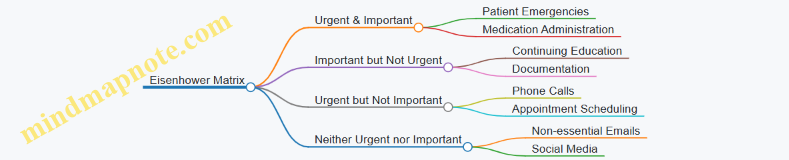
Example: A medical assistant receives multiple requests during a shift. By quickly assessing tasks, they prioritize administering medications (urgent & important) before returning non-urgent phone calls.
Use Time Blocking
Allocate specific time slots for different activities to minimize distractions and improve focus.
Example: Schedule 30 minutes after morning rounds for documentation, 15 minutes for patient follow-up calls, and dedicated breaks to recharge.
Implement the Two-Minute Rule
If a task takes less than two minutes, do it immediately to prevent backlog.
Example: Responding to a quick patient query or tidying up the workstation right after use.
Delegate When Appropriate
Recognize tasks that can be delegated to other team members to optimize workflow.
Example: Assigning inventory restocking to a colleague while focusing on patient care.
Stress Reduction Best Practices
Practice Mindful Breathing
Taking short, focused breaths can reduce anxiety and improve concentration.
Example: Before entering a busy exam room, a medical assistant takes 5 deep breaths to center themselves.
Take Regular Breaks
Short breaks during shifts help prevent burnout and maintain energy.
Example: Using a 5-minute break every 2 hours to stretch or walk around.
Maintain a Healthy Work-Life Balance
Engage in hobbies, exercise, and social activities outside work to recharge mentally and physically.
Example: A healthcare worker schedules yoga classes twice a week and spends weekends with family.
Use Positive Self-Talk and Visualization
Encourage yourself with affirmations and visualize successful task completion.
Example: Before a challenging procedure, remind yourself: “I am prepared and capable,” and imagine a smooth workflow.
Integrated Example: Managing a Busy Clinic Shift
Scenario: A medical assistant faces a packed schedule with patient check-ins, vital signs collection, medication administration, and documentation.
Application:
- Uses the Eisenhower Matrix to prioritize urgent patient needs.
- Blocks time for documentation after morning rounds.
- Delegates inventory checks to a colleague.
- Practices mindful breathing between patient visits.
- Takes short breaks to stretch and hydrate.
This integrated approach helps maintain efficiency and reduces stress throughout the shift.
Summary Mind Map
By adopting these best practices, medical assistants and new healthcare workers can navigate demanding clinical environments more effectively, ensuring both professional success and personal well-being.
15.3 Building Strong Patient and Professional Relationships
Building strong relationships with patients and healthcare professionals is fundamental for delivering high-quality care and fostering a positive work environment. This section explores key strategies, practical examples, and mind maps to help new healthcare workers and medical assistants develop these essential connections.
Key Elements of Strong Relationships
Building Trust with Patients
Trust is the cornerstone of patient relationships. Patients who trust their healthcare providers are more likely to follow treatment plans and share important health information.
- Active Listening: Pay close attention to patient concerns without interrupting.
- Empathy: Acknowledge patient feelings and show understanding.
- Consistency: Be reliable in your actions and follow through on promises.
Example:
During a routine check-up, a patient expresses anxiety about a new medication. The medical assistant listens attentively, acknowledges the patient’s concerns by saying, “I understand this can feel overwhelming,” and reassures them by explaining the medication’s benefits clearly. This approach builds trust and eases patient anxiety.
Effective Communication Techniques
Clear and compassionate communication helps prevent misunderstandings and improves patient outcomes.
- Use simple, jargon-free language.
- Pay attention to non-verbal cues such as body language and eye contact.
- Encourage patients to ask questions and provide feedback.
Example:
When explaining post-visit care, a medical assistant uses plain language and visual aids to ensure the patient understands medication schedules. They ask the patient to repeat instructions back to confirm comprehension.
Maintaining Professionalism
Professionalism fosters respect and confidence among patients and colleagues.
- Respect patient privacy and confidentiality (e.g., HIPAA compliance).
- Be punctual and prepared.
- Admit mistakes honestly and take responsibility.
Example:
A medical assistant notices a documentation error and promptly informs the supervising nurse, correcting the record according to protocol. This transparency reinforces trust within the team and with patients.
Collaborating with Healthcare Team Members
Strong interprofessional relationships improve care coordination and patient safety.
- Communicate clearly during handoffs and shift changes.
- Share relevant patient information timely.
- Address conflicts professionally and seek solutions.
Example:
During a busy clinic day, a medical assistant notices a scheduling conflict that could delay a patient’s treatment. They communicate promptly with the nurse and physician to adjust the schedule, ensuring smooth workflow and patient satisfaction.
Summary Mind Map: Building Strong Patient and Professional Relationships
By integrating these best practices into daily routines, medical assistants and new healthcare workers can create meaningful connections that enhance patient experiences and foster a collaborative, supportive workplace.
15.4 Example: Setting Goals for Advancement in Healthcare Support Roles
Setting clear, actionable goals is essential for career growth in healthcare support roles such as Medical Assistants and new healthcare workers. This example will guide you through the process of defining professional goals, creating a plan, and tracking progress using mind maps and practical examples.
Step 1: Self-Assessment and Identifying Strengths & Areas for Improvement
Before setting goals, reflect on your current skills, experiences, and areas where you want to grow.
Self-Assessment Mind Map
Example: Jane, a Medical Assistant, realizes she excels in patient communication but wants to improve her skills in medication administration and hopes to become a lead assistant in her clinic.
Step 2: Define SMART Goals
Goals should be Specific, Measurable, Achievable, Relevant, and Time-bound.
SMART Goals Mind Map
Example: Jane sets a goal: “Enroll in a phlebotomy certification course within the next month and obtain certification within 6 months to expand clinical skills.”
Step 3: Create an Action Plan
Break down the goal into smaller, manageable tasks.
Action Plan Mind Map
Example: Jane schedules time each week for study, asks her supervisor for opportunities to observe phlebotomy procedures, and tracks her progress.
Step 4: Track Progress and Adjust Goals
Regularly review your progress and make adjustments as needed.
Progress Tracking Mind Map

Example: Jane notices she struggles with scheduling study time due to work shifts. She adjusts by waking up earlier and uses weekends for extra study.
Step 5: Long-Term Career Advancement Goals
After achieving short-term goals, plan for future growth.
Long-Term Goals Mind Map
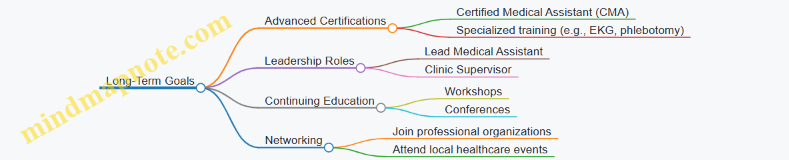
Example: After certification, Jane aims to pursue CMA credentials within 2 years and eventually take on a leadership role.
Summary Example: Jane’s Goal-Setting Journey
| Step | Action Taken | Outcome |
|---|---|---|
| Self-Assessment | Identified strengths and areas for improvement | Clear focus on clinical skill enhancement |
| SMART Goal | Set goal to complete phlebotomy certification | Specific and time-bound goal established |
| Action Plan | Enrolled in course, scheduled study time | Structured approach to learning |
| Progress Tracking | Weekly reviews and adjusted schedule | Maintained steady progress despite challenges |
| Long-Term Planning | Planned CMA certification and leadership aspirations | Clear roadmap for continued career growth |
Tips for Effective Goal Setting in Healthcare Support Roles
- Be realistic: Set goals that fit your current workload and personal life.
- Seek mentorship: Find experienced colleagues to guide you.
- Use technology: Utilize apps or planners to track goals.
- Celebrate milestones: Acknowledge progress to stay motivated.
By following this structured approach, healthcare support workers can confidently set and achieve goals that lead to meaningful career advancement.
15.5 Networking and Mentorship in the Medical Field
Networking and mentorship are crucial components for career growth and professional development in the healthcare industry, especially for Medical Assistants and new healthcare workers. Building strong connections and finding experienced mentors can open doors to new opportunities, provide guidance, and enhance clinical skills.
Why Networking Matters in Healthcare
- Access to Opportunities: Job openings, internships, and training programs are often shared through professional networks.
- Knowledge Sharing: Learn about best practices, new technologies, and clinical workflows.
- Support System: Emotional and professional support during challenging situations.
Why Mentorship is Valuable
- Guidance: Experienced mentors help navigate career paths and clinical challenges.
- Skill Development: Mentors provide feedback and teach practical skills.
- Confidence Building: Encouragement and advice boost self-assurance in clinical roles.
Mind Map: Networking in the Medical Field
Mind Map: Mentorship in Healthcare
Practical Examples
Example 1: Networking at a Healthcare Conference
Maria, a new medical assistant, attends a regional healthcare conference. She joins a workshop on electronic health records and strikes up a conversation with a speaker who works at a hospital she aspires to join. By exchanging contact information and following up with a thank-you email, Maria builds a professional connection that later helps her secure an interview.
Example 2: Finding a Mentor in the Clinic
John, a newly hired medical assistant, approaches a senior colleague who has been working in the clinic for over 10 years. He asks if she would be willing to mentor him. They set up weekly meetings where John can ask questions about clinical procedures and discuss career goals. This mentorship helps John improve his skills and gain confidence.
Example 3: Using Online Platforms for Networking
Samantha joins LinkedIn groups focused on medical assisting and healthcare support. She participates in discussions, shares articles about patient care best practices, and connects with professionals nationwide. This online presence leads to invitations to webinars and job referrals.
Tips for Effective Networking and Mentorship
- Be Genuine: Build relationships based on trust and mutual respect.
- Prepare Your Introduction: Have a clear, concise way to introduce yourself and your goals.
- Follow Up: Send thank-you notes or messages after meetings or events.
- Be Proactive: Don’t wait for mentors to find you; reach out respectfully.
- Set Goals: Define what you want to achieve from mentorship.
- Give Back: As you grow, support others entering the field.
Summary
Networking and mentorship are powerful tools that can significantly impact your career trajectory in healthcare. By actively engaging in professional communities, seeking guidance from experienced colleagues, and nurturing these relationships, medical assistants and new healthcare workers can enhance their skills, confidence, and career opportunities.