Monte Carlo Forecasting for Corporate Financial Planning and Analysis
Chapter 1: Introduction to Monte Carlo Simulation in FP&A
1.1 Understanding Monte Carlo Simulation: Concepts and Terminology
Monte Carlo simulation is a method for understanding the impact of uncertainty in mathematical models. It uses random sampling to generate a range of possible outcomes, rather than a single fixed result. This approach helps financial planners and analysts see not just what might happen, but how likely different results are.
At its core, Monte Carlo simulation involves three key components:
- Inputs: Variables with uncertain values, often represented by probability distributions.
- Model: A formula or set of calculations that link inputs to outputs.
- Outputs: The results generated by running the model many times with different input values.
Key Terms
- Random Variable: A variable whose value is subject to randomness. For example, sales volume next quarter.
- Probability Distribution: A function that describes the likelihood of different values for a random variable. Common types include normal, uniform, and triangular distributions.
- Iteration: One complete run of the simulation, using a set of randomly sampled inputs.
- Simulation Run: The total number of iterations executed to build a distribution of outcomes.
- Outcome Distribution: The collection of results from all iterations, showing the range and likelihood of possible outcomes.
Mind Map: Core Concepts of Monte Carlo Simulation
How It Works: Step-by-Step
- Define uncertain inputs: For example, forecasted sales growth might be uncertain and modeled as a normal distribution with a mean of 5% and a standard deviation of 2%.
- Build the model: Use these inputs in your financial formula, such as projecting revenue by multiplying last year’s revenue by (1 + sales growth).
- Run iterations: Randomly sample values for sales growth according to its distribution and calculate revenue. Repeat this hundreds or thousands of times.
- Analyze outputs: Collect all revenue results to see the range of possible revenues and their probabilities.
Example: Forecasting Quarterly Revenue
Imagine you want to forecast revenue for the next quarter. You know last quarter’s revenue was $1 million. Sales growth is uncertain but expected to be around 5%, with some variability.
- Model sales growth as a normal distribution: mean = 5%, standard deviation = 2%.
- For each iteration, randomly pick a sales growth value from this distribution.
- Calculate revenue = $1,000,000 * (1 + sales growth).
- Repeat 1,000 times.
After running the simulation, you get a distribution of possible revenues. You might find that:
- 80% of outcomes fall between $1.03 million and $1.07 million.
- There’s a 5% chance revenue is below $1 million.
- The average simulated revenue is $1.05 million.
This information gives a clearer picture of risk and opportunity than a single point estimate.
Mind Map: Example Workflow for Revenue Forecasting
Why Use Monte Carlo Simulation?
Traditional forecasting often relies on single-point estimates, which can hide the range of possible outcomes and their likelihoods. Monte Carlo simulation exposes this uncertainty, allowing decision-makers to:
- Understand the probability of hitting targets.
- Identify risks and opportunities.
- Make informed decisions based on a spectrum of possible futures.
In financial planning, this means budgets and forecasts can better reflect real-world variability.
Summary
Monte Carlo simulation is a structured way to incorporate uncertainty into financial models. By defining inputs as probability distributions, running many iterations, and analyzing the resulting output distribution, FP&A professionals gain insight into the range and likelihood of financial outcomes. This approach supports more nuanced risk assessment and planning.
1.2 The Role of Probabilistic Forecasting in Corporate Financial Planning
Probabilistic forecasting introduces a way to represent uncertainty explicitly in financial planning. Unlike traditional point forecasts that provide a single expected value, probabilistic forecasts present a range of possible outcomes along with their likelihoods. This approach helps FP&A professionals understand not just what might happen, but how likely different scenarios are.
Why Probabilistic Forecasting Matters
Financial planning always involves uncertainty. Market conditions, customer behavior, supply chain disruptions, and regulatory changes all influence outcomes. Traditional forecasts often mask this uncertainty by focusing on a single “best guess.” This can lead to overconfidence and insufficient preparation for less likely but impactful events.
Probabilistic forecasting acknowledges uncertainty by modeling it directly. Instead of saying “Revenue will be $100 million,” a probabilistic forecast might say “Revenue has a 70% chance of falling between $95 million and $105 million, with a 10% chance it could be below $90 million.”
This richer information supports better decision-making, risk management, and communication with stakeholders.
Mind Map: Key Aspects of Probabilistic Forecasting in FP&A
Practical Example: Sales Forecasting with Probabilistic Approach
Imagine a company forecasting quarterly sales. A traditional forecast might predict $50 million in sales. However, sales depend on factors like customer demand, competitor actions, and economic conditions, all uncertain.
Using probabilistic forecasting, the FP&A team models these uncertainties as input variables with probability distributions. For example:
- Customer demand: Normally distributed with mean 100,000 units and standard deviation 10,000 units.
- Price per unit: Uniform distribution between $480 and $520.
Running simulations generates a distribution of possible sales outcomes rather than a single number. The team might find:
- 80% chance sales exceed $48 million.
- 10% chance sales fall below $45 million.
This insight helps management prepare contingency plans for lower sales scenarios and allocate marketing resources more effectively.
Mind Map: Differences Between Deterministic and Probabilistic Forecasting
How Probabilistic Forecasting Fits into Corporate Financial Planning
-
Budgeting: Probabilistic forecasts provide ranges for revenue, expenses, and cash flows, enabling flexible budgets that account for uncertainty.
-
Capital Allocation: Understanding the probability of different returns helps prioritize investments and manage risk.
-
Risk Management: Identifying the likelihood of adverse outcomes supports risk mitigation strategies.
-
Performance Monitoring: Comparing actual results against probabilistic forecasts highlights whether outcomes fall within expected ranges.
-
Communication: Presenting forecasts as distributions encourages realistic expectations among executives and investors.
Example: Cash Flow Forecasting with Probabilistic Inputs
A company forecasts monthly cash flow to ensure liquidity. Instead of assuming fixed payment timings and amounts, the FP&A team models:
- Customer payment delays as a probability distribution.
- Variability in supplier payment terms.
- Fluctuations in operating expenses.
Simulations reveal the probability of cash shortfalls in each month. This allows the treasury team to plan credit lines or delay discretionary spending proactively.
In summary, probabilistic forecasting shifts financial planning from a single-point estimate to a spectrum of possibilities. This approach equips FP&A teams to better understand risks, communicate uncertainty, and make decisions grounded in a fuller picture of potential outcomes.
1.3 Key Benefits of Monte Carlo Methods for FP&A Teams
Monte Carlo methods offer several clear advantages for FP&A teams aiming to improve financial forecasting and risk analysis. At their core, these methods provide a structured way to incorporate uncertainty into financial models, moving beyond single-point estimates to a range of possible outcomes. This shift helps teams understand not just what might happen, but how likely different scenarios are.
Key Benefits of Monte Carlo Methods for FP&A Teams
Quantifying Uncertainty
Monte Carlo simulation transforms uncertain inputs—like sales growth rates, cost fluctuations, or interest rates—into probability distributions. Instead of guessing a single number, the model runs thousands of simulations, each time sampling from these distributions. This process produces a spectrum of possible results, allowing FP&A professionals to see the likelihood of various financial outcomes.
Quantifying Uncertainty Mind Map
Example: Suppose a company estimates annual revenue growth at 5%, but actual growth can vary between 2% and 8%. Monte Carlo simulation models this range, showing the probability that revenue will fall below or exceed certain thresholds.
Improving Risk Assessment
Monte Carlo methods help identify the probability and impact of adverse financial events. This probabilistic approach allows FP&A teams to measure risks quantitatively, such as the chance of cash flow shortfalls or budget overruns. It also supports stress testing by simulating extreme but plausible scenarios.
Risk Assessment Mind Map
Example: An FP&A team can simulate the impact of a sudden 10% increase in raw material costs on operating margins, estimating the probability that margins fall below a critical level.
Enhancing Decision-Making with Probabilistic Insights
By providing a range of outcomes with associated probabilities, Monte Carlo simulation equips decision-makers with a clearer picture of risks and opportunities. This helps prioritize initiatives, allocate resources more effectively, and set realistic targets.
Decision-Making Mind Map
Example: When evaluating two investment projects, Monte Carlo simulation can reveal which project has a higher probability of meeting financial goals, rather than relying on average expected returns alone.
Supporting Sensitivity Analysis
Monte Carlo simulation naturally integrates sensitivity analysis by showing how changes in input assumptions affect output variability. This helps FP&A teams identify which variables drive the most uncertainty and deserve closer attention.
Sensitivity Analysis Mind Map
Example: A simulation may reveal that profit forecasts are highly sensitive to customer churn rates, prompting the team to focus on improving customer retention strategies.
Facilitating Communication and Transparency
Presenting financial forecasts as probability distributions rather than single numbers encourages more nuanced discussions with stakeholders. Monte Carlo outputs can be visualized with histograms, cumulative distribution functions, or tornado charts, making complex uncertainty easier to grasp.
Communication Mind Map
Example: Instead of stating “expected profit is $10 million,” the FP&A team can show there is a 70% chance profit will be between $8 million and $12 million, helping executives understand risk levels.
Flexibility Across Financial Planning Areas
Monte Carlo methods are adaptable to various FP&A tasks, including budgeting, forecasting, capital planning, and risk management. This versatility makes them a valuable tool for comprehensive financial analysis.
Application Areas Mind Map
Example: An FP&A team can use Monte Carlo simulation to forecast cash flows, analyze capital expenditure risks, and evaluate the impact of different economic scenarios on overall financial health.
In summary, Monte Carlo methods provide FP&A teams with a practical way to incorporate uncertainty into financial models, quantify risks, and communicate findings clearly. These benefits help organizations make better-informed decisions grounded in a realistic understanding of potential outcomes.
1.4 Overview of Financial Planning and Analysis Processes
Financial Planning and Analysis (FP&A) is the backbone of corporate decision-making, providing the data-driven insights that guide budgeting, forecasting, and strategic planning. At its core, FP&A involves collecting financial data, analyzing it, and using the results to support management in making informed business decisions. The process is cyclical and iterative, often involving multiple departments and stakeholders.
Core FP&A Processes
FP&A can be broken down into several key processes, each with distinct goals and activities:
- Budgeting: Setting financial targets and allocating resources for a specific period, usually annually.
- Forecasting: Updating financial expectations based on actual performance and changing conditions.
- Variance Analysis: Comparing actual results against budgets or forecasts to understand deviations.
- Financial Reporting: Preparing reports that summarize financial performance for internal and external audiences.
- Scenario and Sensitivity Analysis: Exploring how changes in assumptions impact financial outcomes.
- Strategic Planning Support: Providing financial insights to support long-term business strategies.
Mind Map: FP&A Core Processes
Budgeting
Budgeting is the process of translating strategic goals into quantifiable financial targets. It typically involves departments submitting planned expenses and revenue estimates, which are then consolidated into a company-wide budget. The budget acts as a financial roadmap for the upcoming period.
Example: A manufacturing company sets a budget for raw material costs based on expected production volumes and negotiated supplier prices. If the budget allocates $2 million for materials, this figure guides purchasing decisions and cost controls.
Forecasting
Forecasting updates the budget based on actual performance and new information. Unlike the fixed nature of budgets, forecasts are dynamic and often revised monthly or quarterly.
Example: Midway through the fiscal year, the same manufacturer notices a 10% increase in raw material prices. The FP&A team revises the forecast to reflect higher costs, adjusting profit expectations accordingly.
Variance Analysis
Variance analysis identifies differences between actual results and budgets or forecasts. It helps pinpoint where performance deviated and why.
Example: If the manufacturer spent $2.2 million on materials instead of the budgeted $2 million, variance analysis investigates whether higher prices, increased usage, or inefficiencies caused the overrun.
Financial Reporting
FP&A prepares reports that summarize financial results for management, investors, and regulatory bodies. These reports must be accurate, timely, and tailored to the audience.
Example: A monthly management report might include revenue, expenses, and profitability by product line, highlighting areas needing attention.
Scenario and Sensitivity Analysis
These analyses test how changes in key assumptions affect financial outcomes. Scenario analysis looks at distinct possible futures, while sensitivity analysis examines the impact of varying one factor at a time.
Example: The FP&A team models the impact on net income if sales volumes drop by 15% or if raw material prices rise by 20%, helping management prepare contingency plans.
Strategic Planning Support
FP&A supports long-term planning by building financial models that incorporate capital expenditures, financing options, and market conditions.
Example: Before launching a new product line, FP&A models the expected cash flows, break-even point, and return on investment to advise the executive team.
Mind Map: FP&A Workflow Example
Example: Monthly FP&A Cycle
- Data Collection: Gather actual financial results and operational metrics.
- Data Validation: Check for anomalies or errors.
- Forecast Update: Adjust forecasts based on new data.
- Variance Analysis: Identify and explain deviations.
- Reporting: Prepare management reports.
- Review Meeting: Discuss results and implications.
- Action Planning: Adjust plans or strategies as needed.
This cycle repeats monthly, ensuring the company stays aligned with financial goals and can respond quickly to changes.
In summary, FP&A processes form a structured approach to managing a company’s financial health. Each step builds on the previous one, creating a feedback loop that supports better decision-making. Monte Carlo simulation fits into this framework by enhancing forecasting and risk analysis, which will be explored in later chapters.
1.5 Common Challenges in Traditional Financial Forecasting
Traditional financial forecasting often relies on deterministic models that produce a single-point estimate, which can mask the inherent uncertainty in financial variables. This approach faces several common challenges that can limit the accuracy and usefulness of forecasts.
Challenge 1: Overreliance on Single-Point Estimates
Forecasts typically provide one expected value, such as a revenue figure or expense total, without indicating the range of possible outcomes. This can lead to overconfidence in the forecast and insufficient preparation for variability.
Example: A company forecasts $10 million in sales for the next quarter but does not account for the possibility that sales could be $8 million or $12 million. Decision-makers may treat the $10 million as a guaranteed figure, leading to tight budgets or missed opportunities.
Challenge 2: Ignoring Uncertainty and Variability
Financial inputs such as market demand, costs, and interest rates fluctuate. Traditional models often treat these inputs as fixed or use simple adjustments, failing to capture their probabilistic nature.
Example: A forecast assumes a fixed raw material cost of $50 per unit, ignoring historical price swings. If prices spike unexpectedly, the forecasted profit margins will be misleading.
Challenge 3: Inadequate Handling of Correlations
Variables in financial models are often interdependent. For example, sales volume and price discounts might be correlated. Traditional forecasting methods may overlook these relationships or treat variables independently.
Example: A forecast assumes sales volume increases independently of discount rates. In reality, higher discounts drive volume, so ignoring this correlation can distort revenue projections.
Challenge 4: Static Assumptions and Lack of Flexibility
Traditional forecasts often rely on fixed assumptions that are not updated dynamically as new information arrives. This rigidity can cause forecasts to become outdated quickly.
Example: A budget assumes a 3% inflation rate for the year, but mid-year inflation rises to 6%. The forecast does not adjust, leading to underestimated costs.
Challenge 5: Limited Scenario Analysis and Stress Testing
While some traditional models include scenario analysis, these are often limited to a few discrete cases rather than a continuous range of possibilities. This restricts understanding of risk exposure.
Example: A forecast includes a “best case” and “worst case” scenario but does not quantify the likelihood of each. Decision-makers cannot gauge how probable extreme outcomes are.
Challenge 6: Data Quality and Input Bias
Traditional forecasting depends heavily on historical data, which may be incomplete, outdated, or biased. Without mechanisms to account for data uncertainty, forecasts inherit these flaws.
Example: Sales data from a period affected by an unusual event (e.g., supply chain disruption) is used unadjusted, skewing forecasts.
Challenge 7: Difficulty Communicating Uncertainty
Traditional forecasts often present a single number without context, making it hard for stakeholders to understand the risks and variability involved.
Example: A CFO receives a revenue forecast of $100 million but no indication of the confidence level or potential downside, leading to overly optimistic planning.
Summary Mind Map
Addressing these challenges requires moving beyond deterministic forecasts to approaches that explicitly model uncertainty and variability, such as Monte Carlo simulation. This shift helps FP&A teams produce more informative forecasts that better support decision-making under uncertainty.
1.6 Integrating Monte Carlo Simulation into Existing FP&A Frameworks
Integrating Monte Carlo simulation into existing FP&A frameworks involves carefully embedding probabilistic methods alongside traditional financial planning processes. The goal is to enhance forecasting accuracy and risk assessment without disrupting established workflows. This section outlines practical steps, considerations, and examples to help FP&A professionals make this integration smooth and effective.
Understanding the Current FP&A Framework
Before adding Monte Carlo simulation, it’s important to map out the existing planning cycle. Typical FP&A frameworks include:
- Data collection and cleansing
- Assumption setting
- Forecast model building (often deterministic)
- Scenario and sensitivity analysis
- Budget consolidation
- Reporting and communication
Monte Carlo simulation fits primarily into the forecasting and risk analysis phases but can influence assumptions and reporting.
Key Integration Points
Step 1: Align Input Data and Assumptions
Monte Carlo simulation requires defining probability distributions for uncertain inputs instead of single-point estimates. Start by reviewing your current assumptions:
- Identify which inputs are uncertain and can be modeled probabilistically (e.g., sales growth, cost inflation, FX rates).
- Gather historical data to estimate distribution parameters or use expert judgment when data is sparse.
- Document assumptions clearly to maintain transparency.
Example: Instead of assuming a fixed 5% sales growth, model it as a normal distribution with a mean of 5% and a standard deviation of 2%. This reflects real-world variability.
Step 2: Adapt Forecast Models to Accept Probabilistic Inputs
Most existing models are deterministic spreadsheets or software models. To integrate Monte Carlo:
- Modify formulas to accept random input samples rather than fixed values.
- Incorporate correlation structures where variables are interdependent.
- Use add-ins or scripting (e.g., Excel with @RISK, Python scripts) to automate repeated sampling and calculation.
Example: In a cash flow model, link revenue and cost drivers to their distributions and run thousands of iterations to generate a distribution of net cash flow outcomes.
Step 3: Run Simulations and Analyze Outputs
Set the number of iterations (commonly 5,000 to 10,000) to balance accuracy and computation time. Analyze outputs by:
- Examining output distributions (mean, median, percentiles).
- Identifying probabilities of meeting or missing targets.
- Performing sensitivity analysis to see which inputs drive output variability.
Example: A profit forecast might show a 70% chance of exceeding the target, helping management understand risk levels rather than relying on a single number.
Step 4: Integrate Results into Reporting and Decision-Making
Monte Carlo outputs should feed into regular FP&A reports:
- Present probabilistic forecasts alongside traditional numbers.
- Use charts like histograms, cumulative distribution functions, and tornado diagrams to communicate uncertainty and key drivers.
- Frame insights in terms of probabilities and risk, not just point estimates.
Example: Instead of reporting “Projected EBITDA: $10M,” report “Projected EBITDA ranges from $7M to $13M with a 90% confidence interval, and a 15% chance of falling below $8M.”
Step 5: Embed into Planning Cycles and Governance
To make Monte Carlo simulation a routine part of FP&A:
- Define clear roles and responsibilities for model maintenance and updates.
- Establish version control and documentation standards.
- Train team members on interpreting probabilistic results.
- Schedule simulation runs aligned with budgeting and forecasting timelines.
Practical Example: Integrating Monte Carlo into a Sales Forecast
Imagine a company forecasting quarterly sales. The traditional approach uses a single growth rate per quarter. To integrate Monte Carlo:
- Gather historical quarterly sales data and calculate variability.
- Define a probability distribution for quarterly growth rates (e.g., triangular distribution with minimum, most likely, and maximum values).
- Model correlations between quarters to reflect seasonality.
- Run 10,000 simulations generating a range of sales outcomes.
- Analyze the distribution to identify the probability of hitting sales targets.
- Present results in the quarterly forecast report with confidence intervals and risk commentary.
This approach provides a richer view of potential outcomes and helps sales and finance teams plan contingencies.
Summary
Integrating Monte Carlo simulation into existing FP&A frameworks is a stepwise process that respects current workflows while enhancing forecasting with probabilistic insights. By aligning data inputs, adapting models, analyzing outputs thoughtfully, and embedding results into reporting and governance, FP&A teams can improve decision-making without overhauling their entire process.
1.7 Practical Example: Comparing Deterministic vs. Monte Carlo Forecasts
When forecasting corporate financials, the choice between deterministic and Monte Carlo methods can significantly influence decision-making. This section walks through a clear example comparing the two approaches, highlighting their differences, strengths, and limitations.
Scenario: Forecasting Next Quarter’s Revenue for a Retail Company
The company expects revenue driven primarily by three factors:
- Number of customers
- Average purchase value
- Conversion rate (percentage of visitors who buy)
Each factor has some uncertainty, but traditional deterministic forecasting often uses single-point estimates.
Deterministic Forecast
Step 1: Define inputs as fixed values
| Factor | Estimate |
|---|---|
| Number of customers | 10,000 |
| Average purchase | $50 |
| Conversion rate | 20% (0.20) |
Step 2: Calculate revenue
Revenue = Number of customers × Conversion rate × Average purchase
= 10,000 × 0.20 × $50 = $100,000
Interpretation: The forecast is a single number: $100,000. This is straightforward but ignores variability.
Monte Carlo Forecast
Step 1: Define input distributions
Instead of fixed values, assign probability distributions reflecting uncertainty:
- Number of customers: Normal distribution, mean = 10,000, standard deviation = 1,000
- Average purchase: Triangular distribution, min = $45, mode = $50, max = $60
- Conversion rate: Beta distribution, alpha = 20, beta = 80 (mean = 0.20)
Step 2: Run simulations
For each iteration (e.g., 10,000 runs), randomly sample values from each distribution and calculate revenue.
Step 3: Analyze output
The simulation produces a distribution of possible revenues, not a single number.
Mind Map: Deterministic vs. Monte Carlo Forecast
Results Comparison
| Metric | Deterministic | Monte Carlo (Example Output) |
|---|---|---|
| Revenue Forecast | $100,000 | Mean: $99,500 |
| Median: $99,800 | ||
| 5th percentile: $85,000 | ||
| 95th percentile: $115,000 | ||
| Interpretation | Single value | Range with probabilities |
What Does This Mean?
- The deterministic forecast gives a clear target but no insight into risk or variability.
- The Monte Carlo forecast shows a range of plausible outcomes, allowing risk assessment.
- For example, there is a 5% chance revenue could be below $85,000, which deterministic ignores.
Mind Map: Benefits and Limitations
Practical Example: Sensitivity Analysis
Using the Monte Carlo output, we can identify which input contributes most to revenue variability.
- By correlating input samples with revenue outcomes, suppose we find:
- Number of customers explains 60% of variance
- Conversion rate explains 30%
- Average purchase explains 10%
This insight helps prioritize efforts to reduce uncertainty.
Summary
- Deterministic forecasts are straightforward but blind to uncertainty.
- Monte Carlo forecasts provide a fuller picture, showing a distribution of outcomes.
- Monte Carlo requires more input data and computational effort but supports better risk management.
- Incorporating Monte Carlo simulation into FP&A helps teams understand the range of possible financial futures rather than betting on a single point.
This example illustrates why Monte Carlo methods are valuable in financial planning and analysis, especially when uncertainty matters.
Chapter 2: Foundations of Probability and Statistics for Monte Carlo Simulation
2.1 Basic Probability Concepts Relevant to Financial Forecasting
Probability is the backbone of Monte Carlo simulation. It quantifies uncertainty by assigning numbers to the likelihood of events. In financial forecasting, understanding probability helps us model outcomes that are not fixed but vary due to inherent risks and unknowns.
What is Probability?
Probability measures how likely an event is to occur, expressed as a number between 0 and 1. A probability of 0 means the event cannot happen; 1 means it is certain.
- Example: The probability that a company will meet its quarterly sales target might be 0.75, meaning there is a 75% chance of success.
Key Terms
- Experiment: A process with uncertain outcomes (e.g., forecasting next quarter’s revenue).
- Outcome: A possible result of an experiment (e.g., revenue is $1M, $1.2M, etc.).
- Event: One or more outcomes grouped together (e.g., revenue exceeding $1M).
Types of Probability
- Theoretical Probability: Based on known possibilities (e.g., rolling a fair die).
- Empirical Probability: Based on observed data (e.g., historical sales performance).
- Subjective Probability: Based on judgment or expert opinion (e.g., assessing risk of a new product launch).
Probability Rules
- Sum Rule: The total probability of all possible outcomes equals 1.
- Complement Rule: Probability of an event not occurring is 1 minus the probability it does.
Mind Map: Basic Probability Concepts
Probability Distributions
A probability distribution describes how probabilities are assigned to different outcomes.
- Discrete distributions: Outcomes are countable (e.g., number of sales calls made).
- Continuous distributions: Outcomes can take any value in a range (e.g., revenue amount).
Example: Modeling Sales Outcomes
Suppose a company expects the number of new clients next month to be 0, 1, or 2 with probabilities 0.2, 0.5, and 0.3 respectively. This is a discrete probability distribution.
Calculating Probabilities
If you want to know the chance of getting at least one new client, calculate:
P(at least 1) = P(1) + P(2) = 0.5 + 0.3 = 0.8
Mind Map: Probability Distributions
Conditional Probability
This is the probability of an event given another event has occurred.
-
Notation: P(A|B) means probability of A given B.
-
Example: Probability that sales exceed $1M given that marketing spend was above budget.
Independence
Two events are independent if the occurrence of one does not affect the probability of the other.
- Example: The chance of winning a contract is independent of the weather.
Mind Map: Conditional Probability and Independence
Practical Example: Forecasting Revenue with Probability
Imagine forecasting next quarter’s revenue with three possible outcomes:
| Revenue ($M) | Probability |
|---|---|
| 10 | 0.3 |
| 12 | 0.5 |
| 15 | 0.2 |
The expected revenue (mean) is:
E(Revenue) = 100.3 + 120.5 + 15*0.2 = 3 + 6 + 3 = 12 million
This expected value is a weighted average, reflecting the probabilities.
Summary
Probability concepts help translate uncertainty into numbers. They form the foundation for building models that reflect real-world variability in financial outcomes. Understanding these basics ensures that Monte Carlo simulations produce meaningful and actionable forecasts.
2.2 Probability Distributions: Types and Applications in FP&A
Probability distributions describe how the values of a random variable are spread or distributed. In financial planning and analysis (FP&A), understanding these distributions helps model uncertainties in revenue, costs, cash flows, and other financial metrics. Choosing the right distribution for each variable is crucial to generating realistic Monte Carlo simulations.
Common Types of Probability Distributions in FP&A
Below is a mind map summarizing key distributions and their typical applications:
Discrete Distributions
Binomial Distribution models the number of successes in a fixed number of independent trials, each with the same probability of success. For example, if an FP&A team wants to estimate how many out of 10 planned projects will get approved, assuming a 60% approval rate, the binomial distribution fits well.
Poisson Distribution is used to model the number of events occurring in a fixed interval of time or space when these events happen independently. For instance, estimating the number of warranty claims in a month can be modeled with a Poisson distribution.
Continuous Distributions
Normal Distribution is the classic bell curve. Many financial variables approximate this distribution when influenced by many small, independent factors. For example, forecast errors or deviations in monthly sales often fit a normal distribution. Its symmetry means values equally spread around the mean.
Lognormal Distribution applies when the variable cannot be negative and tends to be right-skewed. Revenue or stock prices often follow this pattern because growth compounds multiplicatively. If you model revenue growth rates as lognormal, you avoid unrealistic negative values.
Uniform Distribution assumes every value within a specified range is equally likely. This is useful when you have limited information but know the minimum and maximum possible values. For example, if a supplier quotes a cost range between $100,000 and $120,000 with no further detail, a uniform distribution can represent that uncertainty.
Triangular Distribution is a simple, intuitive distribution defined by minimum, most likely, and maximum values. It’s often used in early-stage estimates where data is scarce. For example, estimating project duration with a minimum of 3 months, most likely 5 months, and maximum 8 months.
Beta Distribution is flexible and bounded between 0 and 1, making it suitable for modeling probabilities or percentages. For example, modeling the probability of customer churn or the expected utilization rate of a resource.
Examples of Applying Distributions in FP&A
-
Revenue Forecasting with Lognormal Distribution
- Suppose historical monthly revenue growth rates show a right-skewed pattern with occasional high spikes. Modeling revenue growth as lognormal captures this skewness and prevents negative revenue forecasts.
-
Cost Estimation Using Triangular Distribution
- For a new product launch, the marketing team estimates the campaign cost as $50,000 minimum, $70,000 most likely, and $100,000 maximum. Using a triangular distribution in the simulation reflects this uncertainty without requiring detailed historical data.
-
Probability of Project Success with Binomial Distribution
- If the company historically approves 70% of submitted projects, and 5 projects are under review, the binomial distribution can estimate the probability of exactly 3 projects getting approved.
-
Modeling Forecast Errors with Normal Distribution
- Forecast errors in sales volume often cluster around zero with some variability. Assuming a normal distribution with mean zero and standard deviation derived from historical errors allows realistic simulation of forecast deviations.
Visualizing Distributions
Here’s a simple mind map to visualize how an FP&A professional might select distributions based on data characteristics:
Summary
In FP&A, selecting the right probability distribution is about matching the nature of the financial variable and the available data. Discrete distributions handle count and binary events, while continuous distributions model quantities with uncertainty. Using these distributions in Monte Carlo simulations allows FP&A teams to capture realistic variability and risk, leading to better-informed financial decisions.
2.3 Descriptive Statistics and Their Role in Data Analysis
Descriptive statistics summarize and organize data to make it easier to understand. In financial planning and analysis (FP&A), these statistics provide a snapshot of historical data and help frame assumptions for Monte Carlo simulations. They do not predict future outcomes but describe the characteristics of data sets, which is essential before applying probabilistic models.
Key Descriptive Statistics
-
Measures of Central Tendency: These describe the center point of a data set.
- Mean: The arithmetic average. For example, if quarterly sales were $100k, $120k, $110k, and $130k, the mean sales would be $(100 + 120 + 110 + 130) / 4 = 115k$.
- Median: The middle value when data is ordered. If sales were $100k, $110k, $115k, $130k, the median is the average of $110k$ and $115k$, which is $112.5k$.
- Mode: The most frequent value. If monthly expenses are $50k, $50k, $55k, $60k, the mode is $50k$.
-
Measures of Dispersion: These describe the spread or variability in data.
- Range: Difference between the maximum and minimum values. If profits ranged from $20k to $80k, the range is $60k$.
- Variance: Average of squared differences from the mean. It quantifies variability but is in squared units.
- Standard Deviation (SD): Square root of variance, expressed in the same units as data. A higher SD means more variability.
-
Shape of Distribution:
- Skewness: Measures asymmetry. Positive skew means a longer tail on the right; negative skew means a longer tail on the left.
- Kurtosis: Measures the “tailedness” or how heavy the tails are compared to a normal distribution.
Why Descriptive Statistics Matter in FP&A
- Data Quality Check: Identifying outliers or unusual values that could distort forecasts.
- Input Distribution Selection: Understanding the shape and spread helps choose appropriate probability distributions for simulation inputs.
- Baseline Understanding: Knowing average performance and variability sets realistic expectations.
- Communication: Summarized statistics provide clear, concise information for stakeholders.
Mind Map: Descriptive Statistics Overview
Example: Analyzing Monthly Revenue Data
Suppose an FP&A analyst has 12 months of revenue data (in $000s):
120, 130, 125, 140, 135, 150, 145, 155, 160, 158, 162, 170
-
Mean: Sum all values and divide by 12.
- Total = 1705
- Mean = 1705 / 12 ≈ 142.08
-
Median: Order data (already sorted), middle values are 135 and 140.
- Median = (135 + 140) / 2 = 137.5
-
Mode: No repeated values, so no mode.
-
Range: 170 - 120 = 50
-
Variance and SD:
- Calculate squared differences from mean, average them for variance.
- SD is square root of variance.
-
Skewness: Data is slightly right-skewed due to higher values at the end.
This analysis shows revenue is generally increasing with moderate variability. The positive skew suggests occasional higher revenues, which should be considered when modeling.
Mind Map: Applying Descriptive Statistics in FP&A
Practical Example: Using Descriptive Statistics to Choose a Distribution
Imagine you want to model monthly sales volume for a product. Historical data shows:
- Mean = 500 units
- SD = 50 units
- Skewness = 0 (approximately symmetric)
Given this, a normal distribution might be appropriate for simulation inputs. However, if skewness were positive, a lognormal or gamma distribution might better capture the data’s characteristics.
Summary
Descriptive statistics are the foundation for understanding financial data before applying Monte Carlo simulations. They help identify the central tendencies and variability, guide distribution selection, and ensure the data used in models reflects reality. Clear, concise descriptive summaries also improve communication within FP&A teams and with stakeholders.
2.4 Understanding Random Variables and Stochastic Processes
In financial planning and analysis, grasping the concepts of random variables and stochastic processes is essential for building reliable Monte Carlo simulations. These ideas help us model uncertainty and variability in financial outcomes.
Random Variables
A random variable is a numerical outcome of a random phenomenon. It assigns a number to each possible outcome of an experiment or event. For example, the future sales revenue of a product next quarter can be considered a random variable because it varies due to market conditions, customer demand, and other factors.
Random variables come in two types:
- Discrete random variables: These take on countable values, like the number of new customers acquired in a month (0, 1, 2, …).
- Continuous random variables: These can take any value within a range, such as the percentage growth rate of revenue, which might be 3.2%, 3.25%, or any number within an interval.
Mind Map: Random Variables
The expected value (or mean) of a random variable gives the average outcome if the experiment were repeated many times. The variance measures how spread out the outcomes are around the mean.
Example: Suppose the number of new customers next month is a discrete random variable with probabilities:
| Customers | Probability |
|---|---|
| 0 | 0.1 |
| 1 | 0.3 |
| 2 | 0.4 |
| 3 | 0.2 |
The expected number of new customers is:
E[X] = 00.1 + 10.3 + 20.4 + 30.2 = 0 + 0.3 + 0.8 + 0.6 = 1.7 customers.
Stochastic Processes
A stochastic process is a collection of random variables indexed by time or another parameter. It models how a system evolves over time under uncertainty. In FP&A, stochastic processes can represent how revenue, costs, or cash flows change month to month.
Think of a stochastic process as a random variable that changes its value at different points in time.
Mind Map: Stochastic Processes
Example: Discrete-Time Stochastic Process
Imagine quarterly revenue as a stochastic process \( {R_t} \), where \( t = 1, 2, 3, … \) represents quarters. Each \( R_t \) is a random variable representing revenue in quarter \( t \).
If revenue depends only on the previous quarter’s revenue plus some random shock, this process has the Markov property (future depends only on the present, not the past).
Example: Simple Revenue Model
\[ R_{t} = R_{t-1} + \epsilon_t \]
where \( \epsilon_t \) is a random variable representing unexpected changes (positive or negative).
This model captures the idea that revenue evolves over time with some randomness.
Why These Concepts Matter in Monte Carlo Forecasting
Monte Carlo simulation relies on sampling from random variables to generate many possible outcomes. When forecasting over multiple periods, stochastic processes help model how variables evolve, capturing temporal dependencies.
Understanding the difference between a single random variable and a stochastic process clarifies how to structure simulations:
- Use random variables to model uncertainty at a single point in time.
- Use stochastic processes to model sequences of uncertain outcomes over time.
Summary
- A random variable assigns numerical values to uncertain outcomes.
- Random variables can be discrete or continuous.
- The expected value and variance describe the average and variability.
- A stochastic process is a sequence of random variables indexed by time.
- Stochastic processes model how financial metrics evolve with uncertainty.
These concepts form the backbone of probabilistic financial forecasting and risk analysis.
2.5 Correlation and Dependency Structures in Financial Data
In financial forecasting, understanding how variables relate to each other is crucial. Correlation and dependency structures describe these relationships. They influence how risks and outcomes propagate through a model, affecting the accuracy and realism of Monte Carlo simulations.
What is Correlation?
Correlation measures the strength and direction of a linear relationship between two variables. It ranges from -1 to +1:
- +1 means perfect positive correlation (variables move together).
- 0 means no linear correlation.
- -1 means perfect negative correlation (variables move inversely).
Correlation is a simple but powerful tool to capture dependencies, especially in financial data where variables rarely move independently.
Why Correlation Matters in Monte Carlo Simulation
If you ignore correlation and treat inputs as independent, your simulation might underestimate risk or overstate diversification benefits. For example, sales in two related product lines might rise or fall together due to market conditions. Modeling them as independent could produce unrealistic combined outcomes.
Types of Dependency Structures
Correlation is one way to describe dependency, but it only captures linear relationships. Other structures include:
- Rank Correlation (Spearman’s rho, Kendall’s tau): Measures monotonic relationships, not just linear.
- Copulas: Functions that link multiple marginal distributions to form a joint distribution, capturing complex dependencies beyond correlation.
Mind Map: Understanding Dependency Structures
Calculating Correlation: A Simple Example
Suppose you have monthly revenue data for two product lines over a year:
| Month | Product A Revenue | Product B Revenue |
|---|---|---|
| Jan | 100 | 80 |
| Feb | 110 | 85 |
| Mar | 105 | 90 |
| Apr | 115 | 95 |
| May | 120 | 100 |
| Jun | 125 | 105 |
| Jul | 130 | 110 |
| Aug | 135 | 115 |
| Sep | 140 | 120 |
| Oct | 145 | 125 |
| Nov | 150 | 130 |
| Dec | 155 | 135 |
Calculating Pearson’s correlation coefficient for these two series would show a strong positive correlation close to 1, indicating that revenues move together.
Incorporating Correlation into Monte Carlo Models
To simulate correlated variables, you can use methods such as:
- Cholesky Decomposition: Transforms independent random variables into correlated ones using a correlation matrix.
- Copulas: Allows modeling of dependencies with different marginal distributions.
Mind Map: Incorporating Correlation in Simulation
Example: Using Cholesky Decomposition
Imagine you want to simulate two correlated variables: sales growth and marketing spend. Assume their correlation is 0.7.
- Define the correlation matrix:
| 1.0  0.7 |
| 0.7  1.0 |
- Generate two independent standard normal variables.
- Apply Cholesky decomposition to the correlation matrix.
- Multiply the independent variables by the Cholesky matrix to get correlated variables.
This process ensures that the simulated sales growth and marketing spend reflect the real-world correlation.
Dependency Beyond Correlation: Copulas
Correlation alone can miss tail dependencies—how variables behave during extreme events. Copulas help capture these nuances.
For example, during a market downturn, multiple financial metrics might simultaneously drop more than correlation suggests. Using a copula like the Clayton copula can model this stronger lower-tail dependence.
Mind Map: Copula Types and Uses
Practical Example: Correlation in Revenue and Cost Forecasting
Suppose a company forecasts revenue and cost for a product. Revenue and cost are positively correlated because higher sales volumes usually increase costs.
Ignoring this correlation might produce scenarios where revenue is high but costs remain low, which is unrealistic.
By including a positive correlation (say 0.6) in the simulation inputs, the model generates more plausible joint outcomes, improving forecast reliability.
Summary
- Correlation quantifies linear relationships and is essential for realistic simulations.
- Dependency structures can be more complex than correlation; copulas offer advanced modeling.
- Incorporating correlation prevents underestimation of risk and unrealistic scenario generation.
- Tools like Cholesky decomposition help generate correlated random variables for simulations.
Understanding and correctly modeling dependencies in financial data is a foundational step toward accurate Monte Carlo forecasting.
2.6 Sampling Techniques and Their Importance in Simulation
Sampling is the process of selecting representative values from a probability distribution to use as inputs in a Monte Carlo simulation. Since Monte Carlo forecasting relies on repeated random sampling to estimate outcomes, the quality and method of sampling directly affect the accuracy and reliability of the simulation results.
Why Sampling Matters
Imagine you want to forecast sales revenue, but your input variable—customer demand—is uncertain and described by a probability distribution. To simulate possible outcomes, you need to draw values from this distribution. If your samples don’t represent the distribution well, your forecast will be biased or misleading.
Sampling techniques help ensure that the values drawn reflect the true characteristics of the underlying distribution, such as its shape, spread, and any dependencies with other variables.
Common Sampling Techniques
Here is a mind map summarizing key sampling methods used in Monte Carlo simulations:
Simple Random Sampling
This is the most straightforward approach. Each sample is drawn independently and randomly from the entire distribution. It’s easy to implement but can require a large number of samples to cover the distribution evenly.
Example: If you want to simulate monthly sales, you generate random values from the sales distribution for each month independently.
Stratified Sampling
The distribution is divided into distinct strata or segments, and samples are drawn from each stratum proportionally. This ensures that all parts of the distribution are represented.
Example: Suppose customer demand varies by region. You could stratify the demand distribution by region and sample from each, ensuring regional variability is captured.
Latin Hypercube Sampling (LHS)
LHS divides the cumulative distribution into equal probability intervals and samples once from each interval. It ensures better coverage of the input space with fewer samples compared to simple random sampling.
Example: For a forecast of product price sensitivity, LHS ensures that low, medium, and high price points are all sampled, preventing clustering of samples in one region.
Importance Sampling
This technique focuses sampling on the most critical parts of the distribution that have the greatest impact on the outcome, often the tails.
Example: When assessing risk of extreme losses, importance sampling draws more samples from the tail of the loss distribution to better estimate rare but impactful events.
Systematic Sampling
Samples are drawn at regular intervals from an ordered list of possible values. It’s simpler than random sampling and can be effective if the data is well-ordered.
Example: If you have a sorted list of historical sales figures, you might pick every 10th value to represent the distribution.
Quasi-Random Sampling
Also called low-discrepancy sequences, this method generates samples that are more evenly spaced than purely random samples, improving convergence speed.
Example: Using Sobol sequences to sample input variables in a financial model to reduce variance in simulation results.
Visualizing Sampling Methods
Here’s a mind map illustrating how different sampling methods cover a distribution:
Practical Example: Sampling for Revenue Forecast
Suppose you model monthly revenue with a triangular distribution: minimum $80k, most likely $100k, maximum $130k.
- Using simple random sampling, you might get many samples near $100k but few near the extremes.
- With stratified sampling, you ensure samples from low, medium, and high revenue ranges.
- Latin Hypercube Sampling guarantees that each segment of the distribution is sampled, improving the reliability of your forecast.
Running 1,000 iterations with LHS often yields a more stable estimate of expected revenue and risk than 1,000 simple random samples.
Correlated Sampling
When input variables are correlated, sampling must preserve these relationships. Ignoring correlation can produce unrealistic scenarios.
Example: If sales volume and price are negatively correlated, sampling them independently might generate unlikely combinations (high price and high volume). Techniques like copula functions or Cholesky decomposition help generate correlated samples.
Summary
Sampling techniques are the foundation of Monte Carlo simulation. Choosing the right method can improve simulation efficiency, accuracy, and insight. Simple random sampling is easy but may require many iterations. Stratified and Latin Hypercube Sampling improve coverage with fewer samples. Importance sampling targets critical regions. Correlated sampling preserves relationships between variables. Understanding these techniques helps FP&A professionals build robust financial models that better reflect uncertainty.
2.7 Practical Example: Defining Input Distributions for Revenue Forecasting
When building a Monte Carlo simulation for revenue forecasting, one of the first and most critical steps is defining the input distributions for the uncertain variables. These inputs represent the range and likelihood of possible values that key revenue drivers can take. Getting this right ensures the simulation produces meaningful and actionable results.
Step 1: Identify Key Revenue Drivers
Before assigning distributions, list the main factors influencing revenue. Common drivers include:
- Sales volume (units sold)
- Price per unit
- Market growth rate
- Customer churn or retention rates
- Seasonal effects
Each of these drivers can vary, and their uncertainty must be captured.
Step 2: Choose Appropriate Probability Distributions
Not all distributions fit every variable. The choice depends on the nature of the data and business context. Here’s a quick mind map to organize common distributions and their typical uses:
Step 3: Gather Data and Expert Input
Historical data helps estimate parameters like mean and standard deviation. When data is sparse, expert judgment can fill gaps, especially for minimum, most likely, and maximum values used in triangular distributions.
Step 4: Define Distributions for Each Driver
Let’s consider a simplified revenue model:
- Sales Volume: Historical data shows sales vary between 900 and 1,100 units monthly, with a most likely value around 1,000. A triangular distribution fits well here.
- Price per Unit: Prices fluctuate slightly around $50, with a standard deviation of $2. A normal distribution is appropriate.
- Market Growth Rate: Uncertain but expected between -2% and 5%, with no strong reason to favor any value. A uniform distribution suits this.
Step 5: Visualize the Distributions
Visualizing helps confirm the chosen distributions reflect reality.
-
Sales Volume (Triangular)
- Min: 900
- Mode: 1000
- Max: 1100
-
Price per Unit (Normal)
- Mean: 50
- Std Dev: 2
-
Market Growth Rate (Uniform)
- Min: -0.02
- Max: 0.05
Step 6: Mind Map of Revenue Forecast Inputs
Step 7: Example Calculation Setup
The revenue for a given month can be modeled as:
Revenue = Sales Volume × Price per Unit × (1 + Market Growth Rate)
Each variable is sampled from its distribution during simulation iterations.
Step 8: Checking Correlations
If sales volume and price per unit are correlated (e.g., higher sales when prices are lower), this dependency should be modeled. Ignoring correlations can distort results. For this example, assume independence for simplicity.
Step 9: Summary
Defining input distributions involves:
- Understanding the business context and drivers
- Selecting distributions that match data characteristics
- Using historical data or expert estimates to set parameters
- Visualizing and validating assumptions
This foundation allows the Monte Carlo simulation to produce a realistic range of revenue outcomes, supporting better financial planning and risk assessment.
Chapter 3: Building Monte Carlo Models for Financial Forecasting
3.1 Defining Model Objectives and Scope in FP&A Context
When starting a Monte Carlo simulation project for financial planning and analysis (FP&A), the first step is to clearly define what the model is supposed to achieve and the boundaries within which it will operate. This clarity helps avoid wasted effort and ensures the simulation delivers actionable insights.
Why Define Objectives and Scope?
Without a well-defined objective, a model can become a vague exercise in number crunching. The objective guides the selection of variables, the design of input distributions, and the interpretation of results. Scope limits the model’s complexity and keeps it manageable, ensuring it aligns with business needs.
Key Questions to Define Objectives
- What specific financial question or decision is the simulation intended to support?
- Which financial metrics or KPIs are most relevant?
- What time horizon does the forecast cover?
- What level of detail is required (e.g., company-wide, business unit, product line)?
- What uncertainties or risks need to be captured?
Example Objective Statements
- “Estimate the probability distribution of next year’s operating cash flow to support liquidity planning.”
- “Assess the range of possible EBITDA outcomes for a new product launch over 18 months.”
- “Quantify the risk of budget overruns in the capital expenditure plan for the upcoming fiscal year.”
Defining Scope
Scope involves setting boundaries on what is included in the model and what is left out. This might mean focusing on certain revenue streams, excluding minor cost categories, or limiting the forecast to a single business unit.
A well-scoped model balances detail with usability. Too broad, and it becomes unwieldy; too narrow, and it may miss critical factors.
Mind Map: Defining Model Objectives and Scope
Practical Example: Cash Flow Forecasting Model
Objective: Forecast the distribution of monthly cash flow over the next 12 months to identify the probability of cash shortfalls.
Scope: Include major cash inflows (sales receipts, financing) and outflows (operating expenses, debt service). Exclude minor one-time expenses and non-cash items.
This objective and scope focus the model on the cash flow drivers that matter most for liquidity management, avoiding unnecessary complexity.
Steps to Define Objectives and Scope
- Engage Stakeholders: Understand what decisions the model should inform.
- List Financial Metrics: Identify which KPIs or financial statements are relevant.
- Determine Time Frame: Choose a forecast horizon that matches planning cycles.
- Identify Key Drivers and Risks: Pinpoint variables with significant uncertainty.
- Set Boundaries: Decide what to include or exclude based on impact and data availability.
- Document Assumptions: Clearly record what the model covers and what it does not.
Example Mind Map: Stakeholder Engagement for Objective Setting
Why This Matters
A clear objective and scope prevent the model from becoming a black box. They help focus data collection, simplify communication, and ensure the simulation results are relevant and trusted. Without this foundation, even a technically sound Monte Carlo simulation may fail to influence decisions.
In summary, defining model objectives and scope is the blueprint stage of Monte Carlo forecasting in FP&A. It sets the direction, limits complexity, and aligns expectations. Taking time here pays off in clarity and usefulness down the line.
3.2 Identifying Key Financial Drivers and Uncertainties
Identifying key financial drivers and uncertainties is a critical step in building a Monte Carlo simulation model for financial forecasting. These elements form the foundation of your model’s inputs and directly influence the accuracy and usefulness of your simulation outcomes.
What Are Financial Drivers?
Financial drivers are the variables that have a direct impact on your financial results. They can be internal factors like sales volume, pricing, or cost of goods sold, or external factors such as market demand, interest rates, or exchange rates. Pinpointing the right drivers means focusing on those variables that significantly affect your financial statements.
What Are Uncertainties?
Uncertainties represent the range of possible values that a financial driver can take. Unlike fixed assumptions, uncertainties acknowledge that real-world outcomes vary. For example, sales growth might be uncertain due to market competition or economic conditions.
Why Is This Important?
Monte Carlo simulation thrives on variability. Without identifying key drivers and their uncertainties, your model risks being either too simplistic or too complex, leading to misleading results or unnecessary complications.
Steps to Identify Key Financial Drivers and Uncertainties
-
Map the Business Model and Financial Statements Start by understanding how money flows through the business. Break down revenue streams, cost structures, capital expenditures, and financing.
-
List Potential Drivers Brainstorm all variables that could influence your financial outcomes. Include both controllable factors (like marketing spend) and uncontrollable ones (like commodity prices).
-
Prioritize Drivers by Impact Use historical data, expert judgment, or preliminary analysis to rank drivers by their influence on key metrics such as EBITDA, cash flow, or net income.
-
Define Uncertainty Ranges For each key driver, determine the plausible range of outcomes. This can be based on historical volatility, market research, or scenario analysis.
-
Consider Correlations Identify relationships between drivers. For example, sales volume and marketing spend might be positively correlated.
Mind Map: Identifying Key Financial Drivers
Mind Map: Uncertainties Associated with Drivers
Example 1: Identifying Drivers for a Retail Company
- Revenue Drivers: Number of stores, average transaction value, customer footfall.
- Cost Drivers: Cost of goods sold (COGS), rent per store, staffing costs.
- Uncertainties: Seasonal fluctuations in footfall, supplier price changes, rent increases.
In this case, the Monte Carlo model might simulate footfall as a random variable with a seasonal pattern, while COGS could be modeled with a distribution reflecting supplier price volatility.
Example 2: Identifying Drivers for a Manufacturing Firm
- Revenue Drivers: Production volume, unit selling price.
- Cost Drivers: Raw material costs, labor hours, machine maintenance.
- Uncertainties: Raw material price swings due to commodity markets, machine downtime variability.
Here, raw material costs might be modeled using historical price distributions, while production volume could be linked to demand forecasts with uncertainty.
Tips for Effective Identification
- Use historical data to quantify variability where possible.
- Engage cross-functional teams to capture diverse perspectives on what drives financial outcomes.
- Keep the model manageable by focusing on drivers that materially affect results.
- Document assumptions clearly to support model transparency.
Identifying the right financial drivers and their uncertainties is less about guessing and more about structured analysis. This clarity sets the stage for building a Monte Carlo model that reflects the true range of possible financial futures.
3.3 Selecting Appropriate Probability Distributions for Inputs
Selecting appropriate probability distributions for inputs is a crucial step in building a Monte Carlo simulation model for financial forecasting. The choice of distribution affects how uncertainty is represented and ultimately influences the reliability of your forecasts. This section explains common distributions, how to select them, and provides practical examples to clarify the concepts.
Understanding the Role of Distributions
In Monte Carlo simulation, each uncertain input is modeled as a random variable with a probability distribution. This distribution captures the range of possible values and their likelihood. For example, sales growth might vary between -5% and +15%, but some values are more probable than others. Assigning a distribution allows the simulation to generate realistic scenarios reflecting that uncertainty.
Common Probability Distributions in FP&A
Here is a mind map summarizing common distributions and their typical applications:
How to Choose the Right Distribution
-
Understand the nature of the variable: Is it continuous or discrete? Does it have natural bounds? For example, probabilities must lie between 0 and 1, so beta distribution fits well.
-
Consider data availability: If you have historical data, analyze its distribution shape. If data is limited, use expert judgment to define plausible ranges.
-
Match distribution properties to the variable: For symmetric variables fluctuating around a mean, normal distribution often works. For skewed data, lognormal or beta might be better.
-
Keep it simple when possible: Triangular and uniform distributions are easy to understand and implement, especially when data is scarce.
-
Validate your choice: Run sensitivity tests to see how different distributions affect results.
Practical Examples
Example 1: Modeling Sales Growth
Suppose historical sales growth rates are roughly symmetric around 5%, with occasional dips and spikes. The data shows a mean of 5%, standard deviation of 3%. Here, a normal distribution fits well.
- Mean (μ): 5%
- Standard deviation (σ): 3%
This allows the simulation to generate growth rates mostly between -4% and 14%, capturing typical variability.
Example 2: Estimating Project Costs
A project manager estimates costs with a minimum of $90,000, most likely $100,000, and maximum $130,000. No detailed data exists.
A triangular distribution suits this scenario:
- Minimum: $90,000
- Mode (most likely): $100,000
- Maximum: $130,000
This reflects the manager’s judgment and bounds the cost realistically.
Example 3: Forecasting Market Share
Market share is a percentage between 0 and 100%. Historical data shows it fluctuates between 20% and 40%, with a tendency to cluster near 30%.
A beta distribution can model this well. By scaling beta to the 0.2–0.4 range and adjusting shape parameters, you capture the skew and bounds.
Visualizing Distributions
Here’s a mind map to help visualize the decision process:
Summary
Choosing the right probability distribution is about matching the mathematical properties of the distribution to the real-world behavior of the variable. Use data when available, rely on expert judgment when not, and prefer simple models unless complexity is justified. This approach ensures your Monte Carlo simulation produces meaningful and actionable forecasts.
3.4 Constructing the Simulation Model: Step-by-Step Approach
Constructing a Monte Carlo simulation model involves a clear, methodical approach that turns financial uncertainties into quantifiable outcomes. This section breaks down the process into manageable steps, illustrated with mind maps and practical examples to keep things grounded.
Step 1: Define the Objective and Scope
Start by clarifying what you want to achieve with the simulation. Are you forecasting revenue, cash flow, or assessing risk exposure? Defining the scope helps focus the model and avoid unnecessary complexity.
Example: Suppose your goal is to forecast next year’s operating cash flow for a mid-sized manufacturing company, focusing on sales volume, price variability, and cost fluctuations.
Step 2: Identify Key Variables and Uncertainties
List all the financial drivers that influence your forecast. Separate deterministic inputs (fixed values) from uncertain variables that will be modeled probabilistically.
Example: Sales volume fluctuates seasonally, prices may vary due to market conditions, and raw material costs can be volatile.
Step 3: Choose Probability Distributions for Inputs
Assign appropriate probability distributions to each uncertain variable based on historical data, expert judgment, or industry benchmarks.
Example: Sales volume might follow a normal distribution centered around the average monthly sales with a standard deviation reflecting past variability. Price could use a triangular distribution with minimum, most likely, and maximum values.
Step 4: Establish Relationships and Formulas
Define how variables interact. This includes formulas linking inputs to outputs, such as revenue = sales volume × price, and profit = revenue - costs.
Example: If sales volume increases, revenue rises, but variable costs also increase proportionally.
Step 5: Incorporate Correlations Between Variables
Some variables move together. Ignoring correlations can distort results. Use correlation matrices or copulas to model dependencies.
Example: If raw material costs rise, prices might increase to maintain margins, indicating a positive correlation.
Step 6: Build the Simulation Logic
Translate the relationships and distributions into a computational model. This often involves setting up random sampling for each input and calculating outputs per iteration.
Example: For each iteration, randomly sample sales volume, price, and costs, then compute profit.
Step 7: Validate the Model
Check that the model behaves as expected. Test with known inputs, verify output ranges, and ensure correlations are preserved.
Example: Run the model with fixed inputs to confirm deterministic results, then with distributions to check output variability.
Step 8: Document Assumptions and Limitations
Clear documentation ensures transparency and helps users understand the model’s boundaries.
Example: Note that the model assumes stable economic conditions and does not account for sudden market shocks.
Practical Example: Constructing a Simple Cash Flow Model
- Objective: Forecast monthly operating cash flow for 12 months.
- Variables: Sales volume (uncertain), price per unit (uncertain), variable costs (uncertain), fixed costs (deterministic).
- Distributions: Sales volume ~ Normal(1000, 150), Price ~ Triangular(9, 10, 11), Variable costs ~ Lognormal(2, 0.3), Fixed costs = $50,000.
- Formulas:
- Revenue = Sales volume × Price
- Total costs = Variable costs × Sales volume + Fixed costs
- Cash flow = Revenue - Total costs
- Correlations: Assume sales volume and price are slightly negatively correlated (-0.2).
- Simulation: Run 10,000 iterations sampling inputs and calculating cash flow each time.
- Validation: Check that cash flow distribution aligns with expectations and that correlation is reflected.
- Documentation: Record assumptions about distributions, correlation, and fixed costs.
This step-by-step approach ensures the model is transparent, grounded in data, and useful for decision-making.
3.5 Incorporating Correlations and Dependencies Between Variables
In Monte Carlo simulation for financial forecasting, treating input variables as independent often oversimplifies reality. Many financial drivers move together, influenced by common factors or direct relationships. Ignoring these dependencies can lead to misleading results, either underestimating or overestimating risk and uncertainty.
Why Correlations Matter
Consider two variables: sales volume and marketing spend. If marketing spend increases, sales volume often rises too. If you simulate these variables independently, you might generate scenarios where marketing spend is high but sales volume is low, which is unlikely. Capturing the correlation ensures the simulation reflects realistic joint behavior.
Dependencies can be positive (variables move in the same direction) or negative (one increases while the other decreases). Some relationships are nonlinear or more complex, but linear correlation is a common starting point.
Mind Map: Understanding Variable Dependencies
Measuring Correlation
The Pearson correlation coefficient (ranging from -1 to 1) quantifies linear relationships. For example, an r of 0.8 between sales and marketing spend indicates a strong positive linear relationship. Zero means no linear correlation, but variables could still be related nonlinearly.
In practice, historical data helps estimate correlations. If data is limited, expert judgment or industry benchmarks may guide assumptions.
Incorporating Correlations: Techniques
Correlation Matrix
A correlation matrix lists pairwise correlations between all input variables. For example:
| Variable | Sales Volume | Marketing Spend | Price |
|---|---|---|---|
| Sales Volume | 1.0 | 0.75 | -0.3 |
| Marketing Spend | 0.75 | 1.0 | 0.0 |
| Price | -0.3 | 0.0 | 1.0 |
This matrix guides the simulation to generate correlated random samples.
Cholesky Decomposition
This mathematical method transforms independent random variables into correlated ones based on the correlation matrix. It’s widely used because it’s straightforward and efficient.
Copulas
Copulas model dependencies beyond linear correlation, capturing tail dependencies and nonlinear relationships. They are more complex but useful when variables exhibit such behavior.
Practical Example: Simulating Correlated Variables Using Cholesky Decomposition
Imagine you want to simulate sales volume and marketing spend, which have a correlation of 0.7. Both variables are normally distributed with means and standard deviations estimated from historical data.
Step 1: Define means and standard deviations.
- Sales Volume: mean = 1000 units, std dev = 100 units
- Marketing Spend: mean = $50,000, std dev = $5,000
Step 2: Define correlation matrix:
[ [1.0, 0.7],
  [0.7, 1.0] ]
Step 3: Generate two independent standard normal random variables.
Step 4: Apply Cholesky decomposition to the correlation matrix to get matrix L.
Step 5: Multiply L by the vector of independent variables to get correlated standard normal variables.
Step 6: Scale and shift these to the original means and standard deviations.
Result: Simulated pairs of sales volume and marketing spend that reflect the 0.7 correlation.
This process ensures that when marketing spend is high in a simulation run, sales volume tends to be high as well.
Mind Map: Steps to Incorporate Correlations in Monte Carlo Simulation
Example: Impact of Ignoring Correlation
Suppose you simulate profit as revenue minus costs, where revenue and costs are correlated (e.g., higher sales lead to higher variable costs). If you simulate revenue and costs independently, you might get unrealistic scenarios with high revenue and low costs or vice versa.
This can inflate the variance of profit artificially. Including correlation aligns simulated scenarios with business logic, producing more reliable risk assessments.
Validating Correlations in Simulation Output
After running simulations with correlated inputs, check that the simulated variables maintain the intended correlation. Calculate the sample correlation of simulated outputs and compare to the input matrix. Large deviations may indicate errors in implementation.
Summary
Incorporating correlations between variables in Monte Carlo simulation is essential for realistic financial forecasting. The correlation matrix and Cholesky decomposition offer practical tools to achieve this. Properly modeling dependencies reduces the risk of misleading conclusions and supports better decision-making.
3.6 Validating Model Assumptions and Data Inputs
Validating model assumptions and data inputs is a critical step in building a reliable Monte Carlo simulation for financial forecasting. Without proper validation, the model risks producing misleading results that can lead to poor decision-making. This section breaks down the key validation tasks and illustrates them with practical examples and mind maps to clarify the process.
Why Validate?
Every Monte Carlo model is built on assumptions about the behavior of variables and the quality of input data. Validation ensures these assumptions are reasonable and the data is accurate, consistent, and representative of the real-world situation. It helps avoid garbage-in-garbage-out scenarios.
Key Areas of Validation
- Input Data Quality
- Distributional Assumptions
- Parameter Estimation
- Correlation and Dependency Structures
- Model Logic and Structure
Mind Map: Validation Components
Input Data Quality
Start by examining the raw data feeding your model. Check for missing values, outliers, and inconsistencies. For example, if you are modeling sales volume, ensure the historical sales data is complete and reflects the same product lines and regions as your forecast.
Example: Suppose your sales data for Q2 is missing a few weeks due to reporting delays. Using this incomplete data without adjustment will bias your model. You might fill gaps with averages or flag the data as incomplete and adjust your confidence in the forecast accordingly.
Distributional Assumptions
Monte Carlo simulations require you to assign probability distributions to uncertain inputs. Validating these assumptions means checking whether the chosen distributions match historical behavior.
Example: If you assume revenue growth follows a normal distribution but historical data shows a skewed pattern with occasional large jumps, a lognormal or beta distribution might fit better.
Mind Map: Distribution Validation
Plotting histograms and Q-Q plots helps visualize fit. Statistical tests quantify the goodness of fit but should be used alongside visual inspection.
Parameter Estimation
Parameters like mean, variance, skewness, and kurtosis define your distributions. Estimating them from data requires care, especially with limited samples.
Example: If your historical profit margins have a mean of 15% but a wide variance, your model should reflect this uncertainty. Using a single point estimate without variance ignores risk.
Calculate confidence intervals for parameters to understand estimation uncertainty. This can be incorporated into the simulation by treating parameters as random variables themselves.
Correlation and Dependency Structures
Financial variables rarely move independently. Ignoring correlations can underestimate risk or overstate diversification benefits.
Example: Sales volume and price discounts might be negatively correlated—higher discounts increase volume but reduce price per unit.
Validate correlations by calculating correlation coefficients from historical data and testing their stability over time. For complex dependencies, consider copulas to model non-linear relationships.
Mind Map: Correlation Validation
Model Logic and Structure
Beyond inputs, verify the internal logic of the model. Check formulas, ensure boundary conditions make sense, and test scenarios for plausibility.
Example: If your model predicts negative cash flow for a profitable business under normal conditions, investigate the logic or input assumptions causing this.
Run test cases with known inputs and expected outputs to confirm model behavior.
Practical Example: Validating a Cash Flow Forecast Model
- Step 1: Review historical cash flow data for completeness and outliers.
- Step 2: Choose input distributions for sales, costs, and working capital changes based on historical patterns.
- Step 3: Use Q-Q plots to check if sales growth fits a normal distribution or if another distribution is better.
- Step 4: Estimate parameters with confidence intervals and incorporate parameter uncertainty.
- Step 5: Calculate correlations between sales and costs; validate with scatterplots.
- Step 6: Test model logic by inputting fixed values and comparing outputs to manual calculations.
This structured validation reduces the risk of errors and improves confidence in simulation results.
Summary
Validating model assumptions and data inputs is not a one-time task but an iterative process. It requires a combination of statistical checks, visual inspections, and logical testing. The goal is to build a model that reflects reality as closely as possible without overcomplicating or oversimplifying. The payoff is a Monte Carlo simulation that provides meaningful insights for financial planning and risk analysis.
3.7 Practical Example: Building a Monte Carlo Model for Cash Flow Forecasting
Cash flow forecasting is a cornerstone of corporate financial planning. It helps businesses anticipate liquidity needs, plan investments, and manage risks. Using Monte Carlo simulation adds a probabilistic layer, allowing us to capture uncertainty rather than relying on single-point estimates.
Step 1: Define the Objective and Scope
Our goal is to forecast monthly cash flow over the next 12 months for a mid-sized company. We want to understand the range of possible outcomes and the likelihood of cash shortfalls.
Step 2: Identify Key Cash Flow Drivers
Cash inflows and outflows are the primary components. Key drivers include:
- Revenue: Sales receipts, which can fluctuate due to market demand.
- Operating Expenses: Fixed and variable costs.
- Capital Expenditures: Planned investments.
- Working Capital Changes: Inventory, receivables, payables.
Step 3: Collect Historical Data and Define Distributions
We analyze historical monthly data for each driver to estimate their behavior. For example:
- Revenue growth rate historically varies between -5% and +10% monthly.
- Operating expenses are relatively stable but can vary ±3%.
We assign probability distributions to each input. Common choices:
- Revenue growth: Triangular distribution (min: -5%, mode: 3%, max: 10%)
- Operating expenses variation: Normal distribution (mean: 0%, std dev: 2%)
- Capital expenditures: Fixed planned amounts (deterministic)
Step 4: Model Structure
The cash flow for each month is calculated as:
Cash Flow = Starting Cash + Revenue - Operating Expenses - Capital Expenditures + Working Capital Adjustments
Each component except starting cash is treated as a random variable with its own distribution.
Step 5: Incorporate Correlations
Some variables move together. For example, higher revenue often means higher operating expenses. We model this dependency using a correlation matrix.
Mind Map: Cash Flow Model Components
Step 6: Run the Simulation
We simulate 10,000 iterations, each representing a possible 12-month cash flow path. For each iteration:
- Sample random values for revenue growth and expense variation.
- Calculate monthly cash flows.
- Track cumulative cash position.
Step 7: Analyze Results
The output is a distribution of cash balances for each month. Key insights include:
- Probability of cash balance falling below zero (liquidity risk).
- Expected cash balance and confidence intervals.
- Months with highest volatility.
Mind Map: Simulation Output Analysis
Concrete Example
Suppose in month 6, the simulation shows a 15% chance that cash balance dips below zero. This signals a potential liquidity risk requiring attention.
Step 8: Sensitivity and Scenario Analysis
We test how changes in assumptions affect outcomes. For example, what if revenue growth is more volatile? Or capital expenditures increase?
This helps prioritize which variables to monitor closely.
Step 9: Communicate Findings
Present results with clear visuals:
- Histograms of cash balance distributions.
- Probability curves.
- Tables summarizing key percentiles.
Use plain language to explain what the probabilities mean for decision-making.
This example shows how to build a Monte Carlo model for cash flow forecasting by combining historical data, probability distributions, correlations, and simulation. The process turns uncertainty into actionable insights, helping FP&A teams manage risk and plan more effectively.
Chapter 4: Running Simulations and Interpreting Results
4.1 Setting Up Simulation Parameters: Iterations and Convergence
When running a Monte Carlo simulation, two fundamental parameters demand careful attention: the number of iterations and the convergence criteria. These parameters directly influence the accuracy, reliability, and computational efficiency of your financial forecast.
Understanding Iterations
Iterations refer to the number of times the simulation randomly samples input variables to generate possible outcomes. Each iteration represents a single trial or scenario.
- More iterations generally improve the stability and precision of the output distribution.
- Fewer iterations speed up computation but increase the risk of noisy or unreliable results.
Mind Map: Iterations
Example: Iterations in Revenue Forecasting
Imagine forecasting monthly revenue with uncertain demand and pricing. Running 1,000 iterations might give a rough estimate of revenue distribution, but increasing to 10,000 iterations smooths the probability curve and reduces random fluctuations. If you stop at 100 iterations, the forecast may jump around wildly each time you run it.
Convergence: When Is Enough Enough?
Convergence means the simulation results have stabilized and additional iterations produce minimal changes in key statistics (mean, variance, percentiles).
- Without convergence, your forecast might be misleading or inconsistent.
- Convergence is not a fixed number but depends on model complexity and required precision.
Mind Map: Convergence
Example: Checking Convergence in Cash Flow Simulation
Suppose you simulate cash flow with 5,000 iterations and calculate the average net cash flow. Then, you run 10,000 iterations and compare the average. If the average changes by less than 1%, you might consider the simulation converged. If it swings by 5% or more, more iterations are needed.
Balancing Iterations and Convergence
Finding the right balance is key:
- Start with a moderate number of iterations (e.g., 5,000).
- Monitor convergence by tracking key statistics as iterations increase.
- Increase iterations until changes in statistics fall below a pre-defined threshold.
Mind Map: Balancing Iterations and Convergence
Practical Tips for Setting Parameters
- Define precision needs upfront: If your decision depends on tight confidence intervals, plan for more iterations.
- Use incremental runs: Run simulations in batches (e.g., 1,000 iterations at a time) and check convergence after each batch.
- Visualize convergence: Plot cumulative means or percentiles against iteration count to see stabilization.
- Be mindful of runtime: Complex models with many variables may require compromises between iteration count and practical runtime.
Example: Incremental Approach in Budget Variance Analysis
An FP&A analyst simulates budget variance with uncertain cost drivers. They run 1,000 iterations and record the mean variance. After 2,000 more iterations, they check if the mean variance changes significantly. When the change falls below 0.5%, they conclude the simulation is stable enough for decision-making.
Summary
Setting simulation parameters is a balancing act between accuracy and efficiency. Iterations determine how many scenarios you test; convergence tells you when your results are stable enough to trust. By monitoring key statistics and adjusting iterations accordingly, you ensure your Monte Carlo simulation provides meaningful, reliable insights without unnecessary computation.
4.2 Executing Monte Carlo Simulations Using Popular Tools
Executing Monte Carlo simulations requires selecting the right tool for your needs, understanding how to set up the simulation, and interpreting the output correctly. This section covers popular tools used in FP&A, how to run simulations in each, and practical examples to clarify the process.
Popular Tools for Monte Carlo Simulation
- Excel with Add-ins: Widely accessible, Excel can run Monte Carlo simulations using add-ins like @RISK or built-in features such as Data Tables and VBA macros.
- Python: Offers flexibility and scalability with libraries like NumPy, pandas, and specialized packages such as
simpyorscipy.stats. - R: Known for statistical analysis and visualization, R uses packages like
mc2dandrjagsfor simulation.
Mind Map: Executing Monte Carlo Simulations
Running Monte Carlo Simulations in Excel
Excel is often the starting point for FP&A professionals. Using add-ins like @RISK simplifies the process by providing built-in distribution functions and simulation controls.
Steps:
- Define input variables in cells.
- Assign probability distributions using add-in functions (e.g.,
RiskNormal(mean, stddev)). - Set up the model formula referencing these inputs.
- Configure the number of iterations (e.g., 10,000).
- Run the simulation through the add-in interface.
- Review output distributions and summary statistics.
Example: Suppose you want to forecast quarterly revenue where sales volume follows a normal distribution (mean 10,000 units, stddev 1,000) and price per unit is triangular (min $9, mode $10, max $11).
- Cell A1: Sales Volume =
RiskNormal(10000, 1000) - Cell A2: Price per Unit =
RiskTriang(9, 10, 11) - Cell A3: Revenue =
=A1 * A2
Running 10,000 iterations generates a distribution of possible revenues. You can then analyze percentiles, mean, and standard deviation.
Running Monte Carlo Simulations in Python
Python offers more control and automation, especially for complex models or large datasets.
Basic Workflow:
- Import necessary libraries (
numpy,pandas,matplotlib). - Define input distributions using functions like
numpy.random.normalornumpy.random.triangular. - Run a loop or vectorized operation to generate simulation samples.
- Calculate output metrics for each iteration.
- Store results in a DataFrame.
- Use visualization libraries to analyze results.
Example:
import numpy as np
import pandas as pd
import matplotlib.pyplot as plt

iterations = 10000

# Define inputs
sales_volume = np.random.normal(10000, 1000, iterations)
price_per_unit = np.random.triangular(9, 10, 11, iterations)

# Calculate revenue
revenue = sales_volume * price_per_unit

# Summarize
print(f"Mean Revenue: {np.mean(revenue):,.2f}")
print(f"Revenue Std Dev: {np.std(revenue):,.2f}")

# Plot histogram
plt.hist(revenue, bins=50, color='skyblue', edgecolor='black')
plt.title('Revenue Distribution')
plt.xlabel('Revenue')
plt.ylabel('Frequency')
plt.show()
This script runs 10,000 iterations and plots the revenue distribution, providing a clear picture of possible outcomes.
Running Monte Carlo Simulations in R
R is well-suited for statistical modeling and visualization.
Basic Workflow:
- Load necessary packages (
mc2d,ggplot2). - Define input distributions using base R functions like
rnormorrtriangle(from additional packages). - Generate simulation samples.
- Calculate outputs.
- Visualize results.
Example:
library(mc2d)
library(ggplot2)

iterations <- 10000

# Define inputs
sales_volume <- rnorm(iterations, mean=10000, sd=1000)
price_per_unit <- rtriangle(iterations, a=9, b=11, c=10)

# Calculate revenue
revenue <- sales_volume * price_per_unit

# Summary
cat("Mean Revenue:", mean(revenue), "\n")
cat("Revenue Std Dev:", sd(revenue), "\n")

# Plot
qplot(revenue, bins=50, fill=I("lightblue"), color=I("black"),
      main="Revenue Distribution", xlab="Revenue", ylab="Frequency")
Key Considerations When Executing Simulations
- Number of Iterations: More iterations improve accuracy but increase computation time. A common range is 5,000 to 50,000.
- Random Seed: Setting a seed ensures reproducibility.
- Input Validation: Confirm distributions and parameters reflect realistic assumptions.
- Performance: For large models, Python or R may be preferable over Excel.
Mind Map: Tool-Specific Execution Steps
In summary, executing Monte Carlo simulations involves choosing a tool that fits your team’s skills and model complexity, carefully defining inputs and distributions, running enough iterations to capture variability, and analyzing output distributions to inform financial decisions. Each tool has its strengths: Excel for accessibility, Python for flexibility, and R for statistical depth. Practical examples help demystify the process and show how to translate theory into actionable forecasts.
4.3 Analyzing Output Distributions and Key Metrics
Once you run a Monte Carlo simulation, the output is not a single number but a distribution of possible outcomes. Understanding this distribution is crucial to making informed decisions. This section explains how to analyze these outputs and extract meaningful metrics.
Understanding Output Distributions
The simulation output typically consists of thousands of iterations, each representing a possible scenario for the financial variable of interest (e.g., revenue, cash flow, profit). Plotting these results as a histogram or probability density function (PDF) helps visualize the range and likelihood of outcomes.
Key features to observe in output distributions:
- Central tendency: Where do most outcomes cluster? Mean, median, and mode are useful here.
- Spread: How wide is the range of outcomes? Standard deviation and interquartile range (IQR) measure this.
- Shape: Is the distribution symmetric, skewed, or multi-modal? Skewness and kurtosis quantify this.
- Outliers: Are there extreme values that might indicate tail risks?
Mind Map: Components of Output Distribution Analysis
Key Metrics to Extract
-
Mean (Expected Value): The average outcome across all simulations. It represents the most likely long-term average but can be misleading if the distribution is skewed.
-
Median: The middle value when outcomes are sorted. It is less sensitive to extreme values and often a better measure of the “typical” outcome.
-
Percentiles: Values below which a certain percentage of outcomes fall. For example, the 5th percentile represents a pessimistic scenario, while the 95th percentile shows an optimistic case.
-
Standard Deviation: Measures the variability of outcomes. A higher standard deviation means more uncertainty.
-
Probability of Meeting Targets: Calculate the proportion of iterations where the outcome meets or exceeds a specific threshold (e.g., profit > $1M).
-
Value at Risk (VaR): The maximum expected loss at a given confidence level (commonly 5%).
Mind Map: Key Metrics from Monte Carlo Outputs
Example: Analyzing Revenue Forecast Distribution
Imagine a company runs a Monte Carlo simulation to forecast next quarter’s revenue. The simulation produces 10,000 iterations with the following summary:
- Mean revenue: $50 million
- Median revenue: $48 million
- Standard deviation: $8 million
- 5th percentile: $38 million
- 95th percentile: $65 million
Interpretation:
- The average expected revenue is $50 million, but half the outcomes fall below $48 million, indicating a slight left skew.
- The spread of $8 million standard deviation shows moderate variability.
- There’s a 5% chance revenue could be as low as $38 million or less, highlighting downside risk.
- Similarly, there’s a 5% chance revenue could exceed $65 million, showing upside potential.
If the company’s target revenue is $45 million, the simulation shows that approximately 70% of the outcomes meet or exceed this target. This probability helps management assess the risk of missing targets.
Visualizing Output Distributions
Visual tools help make sense of the numbers:
- Histogram: Shows frequency of outcomes in bins.
- Cumulative Distribution Function (CDF): Displays the probability that the outcome is less than or equal to a certain value.
- Box Plot: Summarizes median, quartiles, and outliers.
Mind Map: Visualization Techniques
Practical Tips
- Always check if the distribution shape matches expectations based on input assumptions.
- Use percentiles to communicate risk rather than just averages.
- Combine metrics: mean alone doesn’t tell the full story.
- Tail risks (extreme low or high outcomes) often have outsized business impact.
- When presenting results, use clear visuals alongside key metrics.
Example: Probability of Meeting Profit Targets
A simulation for quarterly profit yields:
- 60% of iterations above $2 million profit
- 30% between $1 million and $2 million
- 10% below $1 million
Management can use this to understand the likelihood of achieving their profit goals and plan contingencies accordingly.
In summary, analyzing Monte Carlo output distributions involves looking beyond single-point estimates to understand the range, likelihood, and risk of outcomes. Extracting and communicating key metrics with supporting visuals helps FP&A teams make better-informed financial decisions.
4.4 Understanding Confidence Intervals and Prediction Intervals
When working with Monte Carlo simulations in financial forecasting, two types of intervals often come up: confidence intervals and prediction intervals. Both help quantify uncertainty, but they serve different purposes and answer different questions.
What is a Confidence Interval?
A confidence interval (CI) estimates the range within which a population parameter, such as the mean forecasted revenue, is likely to fall. It reflects the precision of the estimate based on the simulation results.
- Purpose: To express the uncertainty around an estimated parameter (e.g., average profit).
- Interpretation: A 95% confidence interval means that if you repeated the simulation many times, 95% of those intervals would contain the true mean.
Example: Suppose your Monte Carlo simulation estimates average annual sales to be $10 million with a 95% confidence interval of $9.5 million to $10.5 million. This means you can be reasonably sure the true average sales lie within that range.
What is a Prediction Interval?
A prediction interval (PI) estimates the range within which a single future observation or outcome is likely to fall. It accounts for both the uncertainty in the parameter estimate and the natural variability of the data.
- Purpose: To predict where an individual future result might land.
- Interpretation: A 95% prediction interval means there’s a 95% chance that the next observed value will fall within this range.
Example: Using the same sales forecast, a 95% prediction interval might be $7 million to $13 million. This wider range reflects the variability in actual sales from year to year, not just the uncertainty in the average.
Mind Map: Confidence Interval vs Prediction Interval
Why the Difference Matters in FP&A
- Confidence intervals help you understand how precise your forecasted averages are. This is useful when setting budgets or targets.
- Prediction intervals help you prepare for actual outcomes, which can be more volatile. This is crucial for cash flow management and risk planning.
Ignoring the difference can lead to overconfidence or under-preparedness. For instance, treating a confidence interval as a prediction interval might make you underestimate the range of possible actual results.
Calculating Confidence and Prediction Intervals in Monte Carlo
Monte Carlo simulations generate many possible outcomes by sampling from input distributions. From these outcomes, you can calculate:
-
Confidence Interval: Calculate the mean of all simulation runs and then find the interval around this mean that contains a specified percentage (e.g., 95%) of the means from repeated simulations or use the percentile method on the distribution of means.
-
Prediction Interval: Use the percentiles of the entire distribution of simulated outcomes to find the range that contains a specified percentage (e.g., 95%) of all possible future outcomes.
Practical Example: Forecasting Operating Income
Imagine you simulate operating income for next year 10,000 times. The results form a distribution:
- Mean operating income: $5 million
- 95% confidence interval for mean: $4.8 million to $5.2 million
- 95% prediction interval for a single future outcome: $3 million to $7 million
Interpretation:
- You can be confident the average operating income is close to $5 million.
- However, any single year’s operating income could be as low as $3 million or as high as $7 million, reflecting real-world volatility.
Mind Map: Steps to Interpret Intervals in Monte Carlo Output
Summary
Confidence intervals tell you how well you know the average forecast; prediction intervals tell you how much actual results might vary. Both are essential in financial planning: confidence intervals guide strategic decisions, while prediction intervals prepare you for operational realities. Understanding and communicating these distinctions clearly improves forecasting accuracy and risk awareness.
4.5 Sensitivity Analysis: Identifying Key Risk Drivers
Sensitivity analysis is a technique used to determine how different input variables impact the output of a Monte Carlo simulation. In the context of financial forecasting, it helps identify which uncertainties have the greatest influence on key financial metrics, such as net income, cash flow, or EBITDA. This insight allows FP&A professionals to focus their attention on the most critical risks and opportunities.
Why Sensitivity Analysis Matters
Monte Carlo simulations generate a range of possible outcomes by varying inputs according to their probability distributions. However, not all inputs affect the results equally. Sensitivity analysis quantifies the degree to which changes in each input variable affect the output. This is essential for:
- Prioritizing risk management efforts
- Improving model transparency
- Guiding data collection and refinement
- Supporting decision-making under uncertainty
Common Methods of Sensitivity Analysis
There are several approaches to sensitivity analysis in Monte Carlo forecasting. The most common include:
- Correlation Analysis: Measures the statistical relationship between each input and the output.
- Tornado Diagrams: Visualize the relative impact of inputs on the output by varying one input at a time.
- Regression Analysis: Uses regression coefficients to estimate sensitivity.
- Variance-Based Methods: Decompose output variance to attribute portions to each input.
Each method has strengths and weaknesses, but correlation and tornado diagrams are widely used for their simplicity and interpretability.
Mind Map: Sensitivity Analysis Overview
Step-by-Step Example: Sensitivity Analysis on Revenue Forecast
Imagine a company forecasting next year’s revenue using Monte Carlo simulation. The model includes three uncertain inputs:
- Market Growth Rate (normal distribution, mean 5%, std dev 2%)
- Price per Unit (triangular distribution, min $90, mode $100, max $110)
- Units Sold (normal distribution, mean 10,000, std dev 1,000)
After running 10,000 simulations, the output is a distribution of total revenue.
Step 1: Calculate Correlation Coefficients
Calculate the Pearson correlation between each input and the revenue output:
- Market Growth Rate: 0.65
- Price per Unit: 0.80
- Units Sold: 0.90
This suggests units sold has the strongest influence on revenue, followed by price and market growth.
Step 2: Create a Tornado Diagram
Vary each input individually within its range while holding others constant at their mean, then observe the change in revenue. The resulting tornado diagram ranks inputs by impact:
- Units Sold
- Revenue swings by ±$1,000,000
- Price per Unit
- Revenue swings by ±$800,000
- Market Growth Rate
- Revenue swings by ±$600,000
This visual confirms the correlation findings and helps communicate which factors matter most.
Mind Map: Sensitivity Analysis Example
Practical Tips for Conducting Sensitivity Analysis
- Use consistent units: Ensure inputs and outputs are measured consistently to avoid confusion.
- Check for non-linear relationships: Correlation assumes linearity; if relationships are non-linear, consider rank correlation or other measures.
- Account for input dependencies: If inputs are correlated, sensitivity results may be misleading unless dependencies are modeled.
- Combine methods: Use correlation analysis for a quick overview and tornado diagrams for detailed insights.
- Interpret results in context: High sensitivity does not always mean high risk; consider the likelihood and controllability of inputs.
Example: Sensitivity Analysis in Expense Forecasting
A company forecasts operating expenses with uncertain inputs:
- Labor Costs (normal distribution)
- Raw Material Prices (triangular distribution)
- Overhead Allocation (fixed)
After simulation, sensitivity analysis shows labor costs have the highest correlation with total expenses (0.85), raw materials moderate (0.50), and overhead negligible (0.05). This directs the FP&A team to focus on labor cost drivers for risk mitigation.
Mind Map: Expense Forecast Sensitivity
Sensitivity analysis is a straightforward yet powerful tool in Monte Carlo forecasting. It helps FP&A professionals understand which variables drive uncertainty and where to focus efforts. By combining quantitative methods with clear visuals, sensitivity analysis makes complex simulations more actionable and transparent.
4.6 Scenario Analysis and Stress Testing within Monte Carlo Framework
Scenario analysis and stress testing are essential tools in financial planning and risk management. When combined with Monte Carlo simulation, they provide a powerful way to explore a wide range of possible outcomes and understand how extreme or adverse conditions might impact financial forecasts.
What is Scenario Analysis?
Scenario analysis involves creating distinct sets of assumptions or conditions to examine how different situations affect financial outcomes. Unlike a single-point forecast, scenario analysis tests multiple plausible futures.
What is Stress Testing?
Stress testing focuses on extreme but plausible adverse conditions. It helps identify vulnerabilities by pushing the model beyond normal operating ranges.
Why Combine These with Monte Carlo Simulation?
Monte Carlo simulation already accounts for randomness and uncertainty by running thousands of trials with varied inputs. Integrating scenario analysis and stress testing allows you to:
- Focus on specific conditions or shocks within the probabilistic framework.
- Compare baseline probabilistic forecasts against defined scenarios.
- Understand tail risks and the impact of extreme events.
Mind Map: Scenario Analysis and Stress Testing in Monte Carlo Simulation
How to Implement Scenario Analysis in Monte Carlo Simulation
-
Define Scenarios: Identify key variables and set their values to represent different futures. For example, revenue growth could be 5% (base), 8% (optimistic), or 2% (pessimistic).
-
Adjust Input Distributions: Modify the probability distributions of inputs to reflect scenario assumptions. For instance, under a pessimistic scenario, increase the variance or shift the mean downward.
-
Run Simulations: Perform separate Monte Carlo runs for each scenario.
-
Compare Results: Analyze differences in output distributions, such as expected cash flow, profit, or risk metrics.
-
Interpret Findings: Use insights to inform decision-making and contingency planning.
How to Conduct Stress Testing in Monte Carlo Simulation
-
Identify Stress Events: Choose extreme but plausible events relevant to your business, like a sudden interest rate hike or a supply chain failure.
-
Set Input Constraints: Force input variables to reflect the stress event, e.g., set commodity prices to spike by 30%.
-
Run Simulations: Run Monte Carlo simulations with these constrained inputs.
-
Evaluate Impact: Focus on tail outcomes, such as the worst 5% of results.
-
Plan Responses: Use results to develop risk mitigation strategies.
Mind Map: Steps in Scenario and Stress Testing
Practical Example: Revenue Forecasting with Scenario Analysis and Stress Testing
Context: A retail company wants to forecast next year’s revenue under different market conditions.
- Base Case: Revenue growth follows a normal distribution with mean 6%, standard deviation 2%.
- Optimistic Scenario: Mean growth 9%, std dev 1.5%.
- Pessimistic Scenario: Mean growth 3%, std dev 3%.
- Stress Test: Simulate a sudden 20% drop in sales due to a supply chain disruption.
Process:
- For each scenario, adjust the input distribution accordingly.
- Run 10,000 Monte Carlo iterations per scenario.
- Collect output revenue distributions.
Results:
- The optimistic scenario shows a tighter distribution skewed toward higher revenue.
- The pessimistic scenario has a wider spread and a significant probability of revenue below break-even.
- The stress test reveals a heavy left tail, with up to 15% chance of revenue dropping 25% or more.
Interpretation:
- The company can quantify the likelihood of adverse revenue outcomes.
- Stress testing highlights the need for contingency plans in supply chain management.
Mind Map: Example Breakdown
Key Takeaways
- Scenario analysis and stress testing add structured layers to Monte Carlo simulation.
- They help isolate the impact of specific assumptions or shocks.
- Running separate simulations per scenario clarifies how risks and opportunities shift.
- Results support better-informed financial planning and risk management.
By weaving scenario analysis and stress testing into Monte Carlo workflows, FP&A teams gain a richer understanding of uncertainty and can prepare more effectively for a range of possible futures.
4.7 Practical Example: Interpreting Simulation Results for Budget Variance Analysis
Budget variance analysis compares actual financial outcomes to budgeted figures, highlighting where performance deviated and why. Monte Carlo simulation adds depth by showing the range and likelihood of possible outcomes rather than a single point estimate. This section walks through interpreting simulation results to understand budget variances better.
Step 1: Setting the Stage – The Simulation Output
Imagine a company forecasting quarterly sales revenue. The Monte Carlo simulation runs 10,000 iterations, each sampling from probability distributions of key drivers like market demand, pricing, and competitor actions. The output is a distribution of possible sales revenues.
The simulation yields:
- Mean forecast: $5 million
- Median forecast: $4.9 million
- 5th percentile: $3.8 million
- 95th percentile: $6.2 million
The actual sales revenue reported was $4.2 million.
Step 2: Visualizing the Distribution
A histogram or density plot of the simulation results helps visualize the range of outcomes. Here’s a simple mind map outlining key elements to consider when interpreting this distribution:
In this example, the actual $4.2 million falls between the 5th percentile ($3.8M) and the median ($4.9M), suggesting it’s on the lower side but not an extreme outlier.
Step 3: Quantifying Variance in Probabilistic Terms
Instead of just stating the variance as $5M - $4.2M = $0.8M unfavorable, Monte Carlo lets us express the likelihood of such an outcome. For instance:
- What is the probability sales are below $4.2 million?
- From the simulation, suppose 25% of iterations produced sales below $4.2 million.
This means the actual sales are within the lower quartile of expected outcomes—not ideal, but within the modeled uncertainty.
Step 4: Sensitivity Analysis to Understand Drivers
Monte Carlo outputs often include sensitivity charts showing which input variables most influence the forecast variance. Here’s a mind map for interpreting sensitivity results:
If market demand is the top driver and actual demand was lower than expected, this explains the unfavorable variance.
Step 5: Scenario Contextualization
Monte Carlo results can be sliced into scenarios to understand different outcomes. For example:
- Scenario A: High demand, low competitor impact
- Scenario B: Low demand, high competitor impact
If actual results align with Scenario B, the variance is consistent with that scenario’s assumptions.
Step 6: Communicating Findings
When presenting to stakeholders, focus on:
- The range of expected outcomes, emphasizing that actual results fall within a plausible range.
- The probability of outcomes worse or better than actual.
- Key drivers behind the variance, supported by sensitivity analysis.
A simple summary might be:
“Our actual sales of $4.2 million are below the average forecast but within the lower 25% of simulated outcomes, largely driven by weaker market demand than expected.”
Example Summary Mind Map
Final Note
Monte Carlo simulation reframes budget variance analysis from a binary hit-or-miss to a nuanced understanding of risk and uncertainty. By interpreting results probabilistically, FP&A professionals can provide richer insights and better guide decision-making.
Chapter 5: Integrating Monte Carlo Simulation into Corporate Financial Planning
5.1 Aligning Simulation Outputs with Strategic Financial Goals
Aligning simulation outputs with strategic financial goals is essential to ensure that Monte Carlo forecasting delivers actionable insights rather than just numbers. The simulation results must connect directly to the company’s priorities, helping decision-makers understand risks and opportunities in the context of their strategic objectives.
Understanding the Link Between Simulation and Strategy
Monte Carlo simulations produce probability distributions of financial outcomes, not single-point forecasts. This probabilistic output needs interpretation through the lens of strategic goals such as revenue growth, cost control, capital efficiency, or risk tolerance.
A clear mapping between simulation outputs and strategic goals helps avoid confusion. For example, if the strategic goal is to maintain a minimum cash reserve, the simulation should focus on the probability of cash balances falling below that threshold rather than just average cash flow.
Mind Map: Aligning Simulation Outputs with Strategic Goals
Translating Strategic Goals into Simulation Metrics
Start by breaking down strategic goals into quantifiable metrics. For example, a goal to improve profitability by 10% can translate into a target range for net income. The simulation can then estimate the probability of meeting or exceeding that target.
If the goal is to reduce the risk of liquidity shortfall, the simulation should produce the likelihood that cash flow dips below a critical level during the forecast horizon. This helps the FP&A team assess whether current plans align with risk tolerance.
Practical Example: Cash Reserve Goal
Suppose a company wants to maintain a minimum cash reserve of $5 million with 95% confidence over the next 12 months. The Monte Carlo simulation models cash inflows and outflows with their uncertainties. The output is a distribution of ending cash balances each month.
By analyzing the simulation, the FP&A team finds that there is a 7% chance the cash reserve falls below $5 million in at least one month. This insight triggers a review of contingency plans or adjustments in spending to reduce risk.
Mind Map: Example of Cash Reserve Alignment
Integrating Risk Appetite and Tolerance
Strategic goals often include risk appetite statements, such as maximum acceptable loss or volatility. Monte Carlo outputs can quantify these risks, enabling FP&A to compare different scenarios against risk limits.
For example, if the company’s risk tolerance caps potential EBITDA loss at 15%, the simulation can estimate the probability that EBITDA falls below this level. If the probability is too high, the plan may require revision.
Practical Example: Profit Margin Target
A business aims for a profit margin above 12% with at least 90% probability. The Monte Carlo simulation incorporates uncertainties in sales volume, pricing, and costs. The output shows a 75% chance of meeting the margin target.
This gap signals the need to revisit assumptions or implement cost controls. The FP&A team can run alternative simulations adjusting variables to find scenarios that meet the target probability.
Mind Map: Profit Margin Target Alignment
Communicating Aligned Outputs
Presenting simulation results in the context of strategic goals improves stakeholder understanding. Visualizations like probability curves, heat maps, or risk dashboards should highlight how likely the company is to achieve its financial objectives.
For instance, a dashboard might show the probability of hitting revenue targets alongside the risk of cash shortfalls. This integrated view helps executives make informed decisions.
Summary
Aligning Monte Carlo simulation outputs with strategic financial goals requires:
- Translating broad goals into measurable financial metrics
- Mapping simulation results to these metrics
- Using probability and risk measures relevant to the company’s risk appetite
- Presenting findings clearly to support decision-making
This approach ensures that simulations are not just technical exercises but practical tools that guide corporate financial planning.
5.2 Incorporating Monte Carlo Forecasts into Budgeting Processes
Incorporating Monte Carlo forecasts into budgeting processes means shifting from fixed, single-point estimates to a range of possible outcomes with associated probabilities. This approach provides a richer picture of uncertainty and risk, helping budget owners and decision-makers prepare for variability rather than just hoping for the best.
Why Use Monte Carlo in Budgeting?
Traditional budgeting often relies on deterministic numbers—single values for revenues, costs, and expenses. These numbers can be misleading because they ignore the inherent uncertainty in business drivers. Monte Carlo simulation introduces probability distributions for key inputs, allowing the budget to reflect a spectrum of possible scenarios.
Step 1: Identify Key Budget Drivers and Their Uncertainties
Start by listing the major components of your budget that have variability. Examples include sales volume, price per unit, raw material costs, labor rates, and overhead expenses. For each, define a probability distribution based on historical data, expert judgment, or market analysis.
Mind Map: Key Budget Drivers and Uncertainty
Step 2: Build the Monte Carlo Budget Model
Using a spreadsheet or simulation software, link your input distributions to the budget formulas. For instance, total revenue = sales volume × price per unit, where both inputs are random variables. Run thousands of iterations to generate a distribution of possible budget outcomes.
Step 3: Analyze the Output Distributions
The simulation produces a range of budget results, not just one number. Key metrics to extract include:
- Mean (expected budget value)
- Percentiles (e.g., 10th, 50th, 90th) to understand the spread
- Probability of meeting or exceeding targets
Mind Map: Budget Output Analysis
Step 4: Use Monte Carlo Results to Inform Budget Decisions
Instead of a single budget number, present a range with associated probabilities. This helps:
- Set contingency reserves based on risk exposure
- Prioritize initiatives with higher expected returns and manageable risk
- Communicate uncertainty transparently to stakeholders
Example: Incorporating Monte Carlo in a Sales Budget
A company forecasts sales volume with a normal distribution (mean 10,000 units, std 1,000 units) and price per unit with a triangular distribution ($9 min, $10 mode, $11 max). Running 10,000 simulations yields a revenue distribution with a mean of $100,000, a 10th percentile of $85,000, and a 90th percentile of $115,000.
The finance team sets the budget at the 50th percentile ($100,000) but allocates a contingency fund to cover the 10th percentile shortfall ($15,000). This approach acknowledges uncertainty and prepares the company for downside risks.
Step 5: Integrate Monte Carlo Outputs into Budgeting Cycles
Monte Carlo forecasts can be updated regularly as new data arrives, keeping the budget dynamic. They can also feed into rolling forecasts, scenario planning, and variance analysis.
Mind Map: Integration into Budgeting Cycle
Tips for Effective Incorporation
- Keep input distributions realistic and grounded in data.
- Avoid overcomplicating the model; focus on key drivers.
- Use clear visualizations (histograms, cumulative distribution functions) to communicate results.
- Train budget owners on interpreting probabilistic forecasts.
In summary, incorporating Monte Carlo forecasts into budgeting transforms the process from a fixed target exercise into a risk-aware, flexible planning tool. It equips FP&A teams to better anticipate variability, allocate resources wisely, and engage stakeholders with a transparent view of financial uncertainty.
5.3 Enhancing Forecast Accuracy through Continuous Model Refinement
Enhancing forecast accuracy through continuous model refinement is a crucial practice in Monte Carlo forecasting for FP&A. Models are not static; they evolve as new data, insights, and business conditions emerge. This section outlines practical steps and mind maps to guide ongoing improvements, supported by examples that clarify the process.
Why Continuous Refinement Matters
Forecast models start with assumptions and input distributions based on historical data and expert judgment. Over time, these assumptions may become outdated or incomplete. Regular refinement helps capture changes in market dynamics, operational performance, or risk factors, reducing forecast errors and improving decision confidence.
Key Areas for Model Refinement
Continuous Model Refinement Mind Map
Step 1: Regular Data Updates and Cleaning
Financial data inputs such as sales volumes, cost drivers, or market indicators should be refreshed frequently. This includes removing anomalies or correcting errors. For example, if a sudden spike in sales was due to a one-time event, adjusting the input distribution to reflect typical performance avoids skewed forecasts.
Example: A retail company noticed that their sales data included a holiday promotion that inflated numbers. By excluding this event from the input distribution, the Monte Carlo simulation produced more realistic revenue forecasts.
Step 2: Reassessing Input Distributions
Initial input distributions might be based on limited data or assumptions. As more data accumulates, it’s important to revisit these distributions. For instance, switching from a normal distribution to a lognormal distribution might better capture skewed sales data.
Example: A manufacturing firm initially modeled production delays with a uniform distribution. After collecting delay data over six months, they updated the model to use a beta distribution, which better reflected the observed variability and improved forecast accuracy.
Step 3: Adjusting Correlations and Dependencies
Variables in financial models often influence each other. Ignoring or misestimating correlations can distort simulation results. Continuous refinement involves recalculating correlations using recent data and adjusting the model accordingly.
Example: An FP&A team found that raw material costs and product prices were more tightly correlated than initially assumed. Updating the correlation matrix in the Monte Carlo model led to more accurate profit margin forecasts.
Step 4: Model Structure Enhancements
As business processes evolve, the model structure may need changes. This could mean adding new variables, removing irrelevant ones, or refining relationships between variables.
Example: A tech company introduced a new subscription product line. The FP&A team added this revenue stream as a separate variable in the model, with its own input distributions and correlations, improving overall forecast precision.
Step 5: Validation Through Backtesting and Sensitivity Analysis
Backtesting compares model forecasts against actual outcomes to identify biases or inaccuracies. Sensitivity analysis reveals which inputs most affect forecast variability, guiding refinement priorities.
Validation and Testing Mind Map
Example: A company backtested its cash flow forecasts over the previous year and found consistent underestimation during peak seasons. They adjusted input distributions and seasonal factors accordingly.
Step 6: Incorporating Stakeholder Feedback
FP&A models serve decision-makers. Regular feedback from finance leaders, sales teams, and operations can highlight overlooked factors or changing priorities.
Example: After presenting simulation results, the sales team pointed out emerging market risks not captured in the model. The FP&A team incorporated these risks as new variables, refining the forecast.
Step 7: Documentation and Version Control
Maintaining detailed records of model changes, assumptions, and data sources ensures transparency and facilitates future refinements.
Example: An FP&A group used version control software to track Monte Carlo model updates, enabling quick rollback when a refinement introduced unexpected results.
Summary Example: Continuous Refinement in Practice
A mid-sized manufacturing company used Monte Carlo simulation for quarterly revenue forecasting. Initially, the model assumed independent input variables and normal distributions. Over four quarters, the FP&A team:
- Updated input data monthly, removing outliers related to supply chain disruptions.
- Switched to skewed distributions for sales volumes based on new data.
- Incorporated correlations between raw material costs and product pricing.
- Added a new variable for a recently launched product line.
- Conducted backtesting, identifying seasonal biases.
- Adjusted the model based on feedback from sales and operations.
These refinements reduced forecast error by 15% and increased stakeholder confidence in the projections.
Continuous model refinement is not a one-time task but an ongoing discipline. By systematically updating data, revisiting assumptions, validating outputs, and engaging stakeholders, FP&A teams can keep Monte Carlo forecasts aligned with reality and improve their usefulness for financial planning and risk analysis.
5.4 Communicating Probabilistic Forecasts to Stakeholders
Communicating probabilistic forecasts to stakeholders requires clarity, context, and a focus on actionable insights. Unlike deterministic forecasts that offer a single number, probabilistic forecasts present a range of possible outcomes with associated likelihoods. This can be unfamiliar or even unsettling to some stakeholders, so the communication strategy must bridge that gap effectively.
Key Principles for Communication
- Simplicity without Oversimplification: Use straightforward language but avoid stripping away essential nuances.
- Visual Aids: Graphs, charts, and mind maps help translate complex probability data into digestible formats.
- Contextualization: Explain what the probabilities mean in practical terms for decision-making.
- Focus on Decisions: Highlight how the forecast informs choices rather than just presenting numbers.
Mind Map: Communicating Probabilistic Forecasts
Visual Tools and Their Use
-
Probability Distribution Graphs: Show the full range of outcomes and their likelihoods. For example, a bell curve for net income forecasts can illustrate the most probable results and the tails representing less likely extremes.
-
Cumulative Distribution Functions (CDFs): Useful to answer questions like “What is the probability that revenue will exceed $X?” This directly ties probabilities to specific business thresholds.
-
Box Plots: Summarize key statistics (median, quartiles) and highlight variability without overwhelming detail.
-
Tornado Diagrams: Show sensitivity of outcomes to different inputs, helping stakeholders see which variables drive uncertainty.
Example: Explaining a Revenue Forecast
Imagine you present a Monte Carlo simulation forecasting next quarter’s revenue. Instead of saying “We expect $10 million,” you say:
“Our simulation shows a 70% chance that revenue will be between $9 million and $11 million. There’s a 15% chance revenue could fall below $9 million, and a 15% chance it could exceed $11 million. This range reflects uncertainties in market demand and pricing.”
Accompany this with a probability distribution chart showing the revenue spread and a CDF answering “What is the chance revenue exceeds $10.5 million?”
Mind Map: Visualizing Revenue Forecast Example
Handling Stakeholder Questions
Stakeholders may ask:
-
“Why not just give a single number?”
- Explain that a single number ignores uncertainty and can mislead.
-
“How confident can we be in these probabilities?”
- Discuss data quality, model assumptions, and validation steps.
-
“What should we do if outcomes fall in the tails?”
- Emphasize contingency plans and risk management.
Practical Tips
- Start presentations with a brief primer on probabilistic forecasting.
- Use analogies, like weather forecasts (e.g., “30% chance of rain”), to make probabilities relatable.
- Avoid jargon; replace terms like “stochastic” with “random variation” or “uncertainty”.
- Provide summaries that highlight key takeaways before diving into technical details.
- Use consistent formats and visuals across reports to build familiarity.
Summary
Effective communication of probabilistic forecasts hinges on making uncertainty understandable and relevant. Visual aids, clear language, and linking probabilities to business decisions help stakeholders grasp the value of Monte Carlo simulations. The goal is not to overwhelm with data but to empower informed choices.
5.5 Best Practices for Documentation and Model Governance
Effective documentation and governance are essential for maintaining the integrity, transparency, and usability of Monte Carlo simulation models in FP&A. Without clear records and controls, models can become black boxes, difficult to audit, update, or trust. This section outlines practical steps and examples to ensure your Monte Carlo models remain reliable tools for decision-making.
Why Documentation and Governance Matter
- Traceability: Knowing where inputs come from, how assumptions were made, and how calculations proceed helps identify errors and justify results.
- Reproducibility: Well-documented models allow others to replicate results, which is critical for review and validation.
- Change Management: Tracking changes prevents accidental overwrites and helps understand the evolution of the model.
- Compliance: Many organizations require audit trails for financial models, especially when used for reporting or regulatory purposes.
Core Elements of Model Documentation
-
Model Purpose and Scope
- Define what the model forecasts and its boundaries.
- Example: “This Monte Carlo model forecasts quarterly cash flow for the next fiscal year, incorporating revenue uncertainty and cost variability.”
-
Input Data Description
- List all data sources, their dates, and any transformations applied.
- Example: “Revenue inputs are based on historical sales data from 2018-2023, adjusted for seasonality using a 12-month moving average.”
-
Assumptions and Distributions
- Document the choice of probability distributions and parameters.
- Example: “Sales growth rate modeled as a normal distribution with mean 3% and standard deviation 1.5%, based on historical volatility.”
-
Model Structure and Logic
- Explain calculation steps, formulas, and dependencies.
- Example: “Cash flow is calculated as revenue minus operating expenses, with expenses modeled as a triangular distribution reflecting minimum, most likely, and maximum values.”
-
Simulation Settings
- Number of iterations, random seed usage, and convergence criteria.
- Example: “Simulation runs 10,000 iterations with a fixed random seed to ensure reproducibility.”
-
Output Interpretation
- Define key metrics, confidence intervals, and how results should be read.
- Example: “The 90% confidence interval for net cash flow ranges between $1.2M and $2.8M.”
-
Limitations and Known Issues
- Be upfront about model constraints or simplifications.
- Example: “Model does not account for macroeconomic shocks beyond historical volatility.”
Model Governance Framework
A governance framework formalizes how models are developed, reviewed, approved, and maintained. Here’s a mind map outlining key governance components:
Practical Governance Steps
-
Assign Clear Roles: Define who builds, reviews, approves, and updates the model. For example, the FP&A analyst builds the model, a senior analyst reviews it, and the FP&A manager approves it.
-
Use Version Control: Maintain versions with clear labels (e.g., v1.0, v1.1) and keep a change log detailing what was modified and why.
-
Peer Review: Have at least one colleague review the model for logic errors, assumptions, and documentation completeness.
-
Independent Validation: When possible, involve a separate team or individual to validate the model’s outputs against historical data or alternative methods.
-
Approval Process: Formalize sign-off steps before the model is used for critical decisions.
-
Scheduled Updates: Set regular intervals to revisit assumptions, input data, and model structure to keep the model relevant.
-
Issue Tracking: Log any problems discovered during use or review, along with corrective actions taken.
Example: Documentation and Governance in Action
Imagine an FP&A team building a Monte Carlo model to forecast annual operating expenses.
-
Documentation: They create a document covering the model’s purpose, input sources (historical expense reports), assumptions (expenses follow a lognormal distribution), simulation settings (5,000 iterations), and output interpretation (mean, median, and 95% confidence intervals).
-
Governance: The analyst shares the model and documentation with a peer for review. Feedback leads to clarifying the rationale for the lognormal assumption. After revisions, the FP&A manager approves the model. The team logs the version as v1.0 and schedules a review in six months.
-
Change Management: When new expense data arrives, the analyst updates the inputs, notes changes in the log, increments the version to v1.1, and informs stakeholders.
Mind Map: Documentation Checklist
In summary, thorough documentation paired with disciplined governance transforms Monte Carlo models from isolated spreadsheets into trusted, auditable assets. This approach reduces risk, improves collaboration, and supports better financial decisions.
5.6 Practical Example: Using Monte Carlo Results to Support Capital Allocation Decisions
Capital allocation is a critical task for FP&A teams. It involves deciding how to distribute limited funds across competing projects or investments. Monte Carlo simulation can help by quantifying uncertainty and providing a probabilistic view of potential outcomes, rather than a single-point estimate.
Scenario Setup
Imagine a company evaluating three potential projects: Project A, Project B, and Project C. Each project requires an initial investment and promises uncertain future cash flows. The goal is to decide how to allocate a fixed capital budget of $10 million among these projects to maximize expected returns while managing risk.
Step 1: Define Inputs and Uncertainties
Each project’s future cash flows are uncertain. We model these uncertainties with probability distributions based on historical data and expert judgment.
- Project A: Expected NPV (Net Present Value) with a normal distribution, mean $4M, standard deviation $1M.
- Project B: Expected NPV with a triangular distribution, minimum $2M, mode $3.5M, maximum $5M.
- Project C: Expected NPV with a lognormal distribution, median $3M, shape parameter 0.4.
The initial investments are fixed: $4M for A, $3M for B, and $5M for C.
Step 2: Model Capital Constraints and Allocation Options
Since the total budget is $10M, the company cannot fund all projects fully. Possible allocation strategies include:
- Fully fund Projects A and B ($4M + $3M = $7M), leaving $3M unused or partially funding Project C.
- Fully fund Project C and partially fund Project A or B.
- Split funds proportionally across all three projects.
Each allocation choice affects the portfolio’s overall risk and return.
Step 3: Build the Monte Carlo Simulation Model
The simulation runs thousands of iterations. For each iteration:
- Sample NPVs for each project from their respective distributions.
- Calculate the total portfolio NPV based on the chosen allocation.
- Record the portfolio NPV.
Repeat for different allocation strategies to compare outcomes.
Step 4: Analyze Simulation Outputs
Key metrics to extract:
- Expected portfolio NPV
- Probability of negative returns (risk measure)
- Value at Risk (VaR) at a chosen confidence level
- Distribution shape and skewness
Mind Map: Capital Allocation Using Monte Carlo Simulation
Step 5: Example Results and Interpretation
Suppose the simulation yields the following for three allocation strategies:
| Allocation Strategy | Expected Portfolio NPV | Probability of Loss | 5% VaR |
|---|---|---|---|
| Fund A and B fully | $6.2M | 12% | -$0.5M |
| Fund C fully + partial A | $6.5M | 18% | -$1.0M |
| Split funds evenly across all | $6.0M | 10% | -$0.4M |
- Funding Projects A and B fully offers a solid expected return with moderate risk.
- Funding Project C fully with partial A has a slightly higher expected return but increased risk.
- Splitting funds evenly reduces risk but slightly lowers expected returns.
Mind Map: Interpreting Simulation Results
Step 6: Using Results to Support Decisions
The FP&A team can present these probabilistic outcomes to decision-makers, highlighting:
- The range of possible outcomes, not just averages.
- The likelihood of losses under each allocation.
- How diversification affects risk and return.
This approach shifts the conversation from “Which project has the highest expected return?” to “Which portfolio allocation aligns best with our risk tolerance and strategic goals?”
Step 7: Best Practices Embedded in the Example
- Use appropriate distributions: Different projects have different risk profiles; selecting suitable distributions reflects reality better.
- Incorporate budget constraints explicitly: Ensures simulation results are actionable.
- Run multiple allocation scenarios: Provides a comparative view rather than a single recommendation.
- Focus on risk-return trade-offs: Helps stakeholders understand implications beyond point estimates.
- Visualize results: Probability distributions and risk metrics clarify complex data.
Additional Example: Visualizing Portfolio NPV Distribution
A histogram of simulated portfolio NPVs can illustrate the spread and skewness of outcomes, helping stakeholders grasp the uncertainty involved.
Summary
Using Monte Carlo simulation in capital allocation allows FP&A teams to quantify uncertainty and make informed decisions that balance expected returns with risk. It moves capital planning beyond guesswork to a structured, data-driven process that reflects the complexity of real-world financial decisions.
Chapter 6: Risk Analysis and Management with Monte Carlo Simulation
6.1 Identifying and Quantifying Financial Risks Using Simulation
Financial risks come in many shapes and sizes: market fluctuations, credit defaults, operational hiccups, or unexpected changes in demand. Monte Carlo simulation offers a structured way to quantify these risks by modeling uncertainty explicitly rather than relying on single-point estimates.
Step 1: Identifying Financial Risks
Start by listing potential risk factors that affect your financial forecasts. These can be internal (e.g., production costs, sales volume) or external (e.g., interest rates, commodity prices). The key is to focus on variables with uncertainty and significant impact.
Here’s a simple mind map to organize risk identification:
This categorization helps ensure comprehensive coverage and clarifies which variables to model probabilistically.
Step 2: Defining Risk Variables and Distributions
Once risks are identified, assign probability distributions to each uncertain variable. For example, sales volume might follow a normal distribution centered on the expected sales, with a standard deviation reflecting historical variability.
Example:
- Sales Volume: Normal distribution, mean = 10,000 units, standard deviation = 1,500 units
- Raw Material Cost: Triangular distribution with minimum = $50/unit, mode = $55/unit, maximum = $65/unit
Choosing the right distribution depends on data availability and the nature of the variable. Historical data can guide distribution selection, but expert judgment is often necessary when data is sparse.
Step 3: Modeling Dependencies
Financial risks rarely act in isolation. For instance, a rise in commodity prices may correlate with inflation, affecting multiple cost components simultaneously. Ignoring these dependencies can lead to misleading results.
Mind map for dependencies:
In Monte Carlo simulation, you can model these relationships using correlation matrices or copulas to maintain realistic joint behaviors.
Step 4: Running the Simulation
With variables and dependencies defined, run thousands of iterations where each input is randomly sampled from its distribution. Each iteration produces a possible financial outcome, such as net profit or cash flow.
This generates a distribution of outcomes rather than a single forecast, allowing you to see the range and likelihood of different results.
Step 5: Quantifying Risk Metrics
From the simulation output, extract metrics that quantify risk:
- Probability of Loss: Percentage of iterations where profit falls below zero.
- Value at Risk (VaR): The loss level not exceeded with a given confidence (e.g., 95%).
- Expected Shortfall: Average loss in the worst-case percentile.
Example:
If 7% of iterations show a net loss, the probability of loss is 7%. If the 5th percentile loss is $1 million, then with 95% confidence, losses won’t exceed $1 million.
Practical Example: Sales Forecast Risk
Suppose a company forecasts quarterly sales revenue. Key uncertainties include sales volume and price per unit.
- Sales Volume: Normal distribution (mean 20,000, std dev 3,000)
- Price per Unit: Triangular distribution ($45 min, $50 mode, $55 max)
Monte Carlo simulation runs 10,000 iterations, sampling volume and price each time, calculating revenue = volume × price.
Output shows:
- Mean revenue: $1,000,000
- 10th percentile revenue: $850,000
- 90th percentile revenue: $1,150,000
This range quantifies risk: there’s a 10% chance revenue falls below $850,000.
Summary Mind Map
Using Monte Carlo simulation in this way turns abstract uncertainties into measurable risks, enabling better-informed financial decisions.
6.2 Measuring Value at Risk (VaR) and Conditional VaR
Value at Risk (VaR) and Conditional Value at Risk (CVaR) are two fundamental metrics used in financial risk management to quantify potential losses. Both metrics provide a probabilistic estimate of the worst expected losses over a given time horizon and confidence level, but they differ in how they treat the tail of the loss distribution.
What is Value at Risk (VaR)?
VaR answers the question: “What is the maximum loss we can expect over a certain period with a given confidence level?” For example, a 1-day VaR at 95% confidence of $1 million means that there is a 95% chance that losses will not exceed $1 million in one day.
VaR is typically expressed as:
- Time horizon: The period over which the risk is measured (e.g., 1 day, 1 month).
- Confidence level: The probability threshold (e.g., 95%, 99%).
- Loss amount: The dollar value or percentage loss not expected to be exceeded.
Mind Map: Components of VaR
Calculating VaR with Monte Carlo Simulation
Monte Carlo simulation estimates VaR by generating a large number of possible outcomes based on the probability distributions of input variables. After running the simulations, the loss outcomes are sorted, and the VaR is identified as the loss at the chosen percentile.
Example: Suppose a company simulates 10,000 possible profit and loss outcomes for the next month. To calculate the 95% VaR, the company sorts the losses from worst to best and selects the 5th percentile loss value. If this value is -$2 million, the 95% VaR is $2 million.
Limitations of VaR
VaR does not provide information about losses beyond the confidence level threshold. It tells you the cutoff but not how bad losses can get if that cutoff is breached.
What is Conditional Value at Risk (CVaR)?
CVaR, also known as Expected Shortfall, addresses this limitation by calculating the expected loss given that the loss exceeds the VaR threshold. It provides an average of the worst losses beyond the VaR point.
Mind Map: Relationship Between VaR and CVaR
Calculating CVaR with Monte Carlo Simulation
Using the same simulation data, CVaR is calculated by averaging all losses that are worse than the VaR loss.
Example: Continuing the previous example, if the 5th percentile loss is -$2 million, CVaR would be the average loss of all outcomes worse than -$2 million. If those average to -$3 million, then the CVaR is $3 million.
Why Use CVaR?
CVaR provides a more conservative and informative risk measure, especially when the loss distribution has fat tails or extreme outliers. It helps decision-makers understand potential losses in worst-case scenarios more clearly.
Mind Map: Comparing VaR and CVaR
Practical Example: Applying VaR and CVaR in Corporate FP&A
Imagine an FP&A team forecasting monthly cash flow for a project. They model uncertain revenue and cost drivers using probability distributions and run 20,000 Monte Carlo simulations.
- At 95% confidence, the VaR is calculated as a $1.5 million loss, meaning there is a 5% chance losses exceed this amount.
- The CVaR is $2.2 million, showing that if losses do exceed $1.5 million, the average loss is $2.2 million.
This information helps the team prepare for potential downside scenarios and decide on risk mitigation strategies.
Summary
- VaR provides a threshold loss value at a specified confidence level.
- CVaR provides the expected loss beyond that threshold.
- Monte Carlo simulation is a practical way to estimate both metrics by generating distributions of possible outcomes.
- CVaR offers a fuller picture of tail risk, which is critical for robust financial planning and risk management.
6.3 Stress Testing and Reverse Stress Testing Techniques
Stress testing and reverse stress testing are essential tools within Monte Carlo simulation frameworks to evaluate how financial plans hold up under extreme or adverse conditions. They help FP&A professionals understand vulnerabilities and prepare for unlikely but impactful scenarios.
Stress Testing
Stress testing involves applying specific shocks or extreme scenarios to a financial model to observe the impact on key outputs. Unlike standard Monte Carlo simulations that explore a broad range of probable outcomes, stress tests focus on particular adverse conditions.
Key Steps in Stress Testing:
- Identify Stress Scenarios: Choose scenarios that reflect plausible but severe risks, such as sudden revenue drops, cost spikes, or market shocks.
- Apply Shocks to Inputs: Adjust input variables in the Monte Carlo model to reflect the stress conditions.
- Run Simulations: Execute the model with these stressed inputs.
- Analyze Outputs: Assess how key financial metrics (e.g., cash flow, EBITDA, liquidity ratios) respond.
Mind Map: Stress Testing Process
Example: Revenue Shock Stress Test
A retail company forecasts annual revenue with a Monte Carlo model. To stress test, the FP&A team simulates a 25% sudden drop in sales due to a competitor’s aggressive pricing. They fix the revenue input at 75% of the base case and rerun the simulation. The results show a 40% chance of negative cash flow within six months, highlighting the need for contingency plans.
Reverse Stress Testing
Reverse stress testing flips the approach. Instead of starting with a shock and seeing the impact, it begins with a predefined failure or adverse outcome and works backward to identify what conditions could cause it.
Key Steps in Reverse Stress Testing:
- Define Failure Condition: Specify a financial outcome considered unacceptable, such as breaching a debt covenant or running out of cash.
- Identify Input Combinations: Use Monte Carlo simulation to find input scenarios that lead to the failure.
- Analyze Root Causes: Understand which variables and combinations drive the failure.
Mind Map: Reverse Stress Testing Process
Example: Cash Flow Breach Reverse Stress Test
A manufacturing firm sets a failure condition: cash reserves falling below $1 million. Running a Monte Carlo simulation, the FP&A team filters out scenarios where cash dips below this threshold. They find that a combination of a 15% drop in sales, a 10% increase in raw material costs, and delayed receivables triggers the breach. This insight directs focus on managing receivables and supplier contracts.
Integrating Stress Testing with Monte Carlo Simulation
Stress testing can be embedded within Monte Carlo runs by constraining input variables or adjusting their distributions to reflect stress conditions. Reverse stress testing uses Monte Carlo outputs to isolate failure scenarios.
Mind Map: Integration Overview
Practical Tips
- When designing stress tests, choose scenarios relevant to your business context.
- Reverse stress testing can reveal hidden risks not obvious in standard analyses.
- Document assumptions clearly to maintain transparency.
- Use visualizations like tornado charts to highlight key risk drivers identified in stress tests.
Stress testing and reverse stress testing complement Monte Carlo forecasting by focusing on extreme conditions and failure points. Together, they provide a fuller picture of financial resilience.
6.4 Incorporating Monte Carlo Simulation into Enterprise Risk Management
Incorporating Monte Carlo simulation into Enterprise Risk Management (ERM) enhances the ability to quantify and manage risks with a probabilistic approach. ERM aims to identify, assess, and prepare for risks that could impact an organization’s objectives. Monte Carlo simulation fits naturally here by providing a way to model uncertainty and variability across multiple risk factors simultaneously.
Why Use Monte Carlo in ERM?
Traditional risk assessments often rely on single-point estimates or simple scenario analysis. These methods can miss the full range of possible outcomes and their probabilities. Monte Carlo simulation generates thousands of possible outcomes by sampling from probability distributions of input variables. This approach captures the combined effect of multiple risks and their interactions, offering a richer picture of potential impacts.
Key Steps to Incorporate Monte Carlo into ERM
- Identify Risks and Variables: List the relevant risk factors affecting the enterprise, such as market risk, credit risk, operational risk, and liquidity risk.
- Assign Probability Distributions: For each risk factor, define an appropriate probability distribution based on historical data, expert judgment, or a combination.
- Model Dependencies: Recognize correlations between risks (e.g., market and credit risks) and incorporate them using correlation matrices or copulas.
- Run Simulations: Perform Monte Carlo simulations to generate a distribution of possible outcomes for key risk metrics.
- Analyze Results: Use output distributions to calculate risk measures like Value at Risk (VaR), Conditional VaR, or expected shortfall.
- Integrate with Decision-Making: Feed simulation results into risk appetite frameworks, capital allocation, and contingency planning.
Mind Map: Monte Carlo Simulation in ERM
Practical Example: Assessing Enterprise Credit and Market Risk
Imagine a company exposed to both credit risk from its customer base and market risk from commodity price fluctuations. Each risk is uncertain and can affect cash flows.
-
Step 1: Define input variables:
- Probability of default (PD) for key customers, modeled as a Beta distribution based on historical default rates.
- Commodity price changes, modeled as a lognormal distribution reflecting market volatility.
-
Step 2: Recognize that economic downturns can increase both default rates and commodity price volatility, so model a positive correlation (e.g., 0.6) between these variables.
-
Step 3: Run 10,000 Monte Carlo iterations, sampling PD and commodity prices simultaneously, applying their correlation.
-
Step 4: Calculate the resulting distribution of net cash flows.
-
Step 5: Determine the 5% worst-case cash flow (VaR) to understand potential downside risk.
This approach provides a probabilistic view of combined risks rather than treating them independently or as fixed worst-case scenarios.
Mind Map: Example Workflow
Best Practices
- Data Quality: Use reliable historical data to define distributions; where data is sparse, combine with expert input.
- Correlation Accuracy: Avoid assuming independence; model dependencies explicitly to prevent underestimating risk.
- Model Transparency: Document assumptions, inputs, and methods clearly for auditability and stakeholder trust.
- Iterative Refinement: Update models regularly as new data or insights become available.
- Communication: Present results in accessible formats, using visuals like histograms or cumulative distribution functions to aid understanding.
Integrating Monte Carlo simulation into ERM shifts risk management from static, point-based estimates to dynamic, probability-based insights. This enables more informed decision-making and better preparation for a range of possible futures.
6.5 Using Simulation to Evaluate Risk Mitigation Strategies
Using Simulation to Evaluate Risk Mitigation Strategies
Risk mitigation strategies aim to reduce the impact or likelihood of adverse financial events. Monte Carlo simulation offers a practical way to test these strategies by modeling how uncertainties and risks behave under different conditions. This section explains how to use simulation to evaluate risk mitigation, supported by clear examples and mind maps.
Why Use Simulation for Risk Mitigation?
Traditional risk assessment often relies on static assumptions or single-point estimates. Monte Carlo simulation, by contrast, captures a range of possible outcomes and their probabilities. This allows decision-makers to see not only the average effect of a mitigation strategy but also its impact on the distribution of risks.
Steps to Evaluate Risk Mitigation Strategies with Simulation
- Identify the Risk and Its Drivers: Understand what causes the risk and how it affects financial outcomes.
- Model the Current Risk Profile: Build a baseline Monte Carlo model reflecting the current situation without mitigation.
- Define Mitigation Strategies: Specify how each strategy changes input variables or risk parameters.
- Simulate Each Scenario: Run simulations for the baseline and each mitigation strategy.
- Compare Results: Analyze changes in key metrics like expected loss, variance, Value at Risk (VaR), or probability of breaching thresholds.
- Make Informed Decisions: Use insights to select or refine mitigation approaches.
Mind Map: Evaluating Risk Mitigation Strategies
Example: Evaluating Credit Risk Mitigation
A company faces credit risk from a portfolio of customers. The baseline model assumes a default probability of 5% per customer, with losses following a certain distribution. Two mitigation strategies are considered:
- Strategy A: Implement stricter credit checks, reducing default probability to 3%.
- Strategy B: Purchase credit insurance that covers 50% of losses.
Step 1: Baseline Simulation
- Model defaults as Bernoulli trials with 5% probability.
- Loss given default follows a lognormal distribution.
- Run 10,000 iterations to get the loss distribution.
Step 2: Strategy A Simulation
- Adjust default probability to 3%.
- Keep loss given default the same.
- Run simulation.
Step 3: Strategy B Simulation
- Keep default probability at 5%.
- Adjust loss given default by halving losses due to insurance.
- Run simulation.
Step 4: Compare Results
| Metric | Baseline | Strategy A | Strategy B |
|---|---|---|---|
| Expected Loss | $1,000K | $600K | $500K |
| Standard Deviation | $400K | $300K | $350K |
| 95% VaR | $1,800K | $1,200K | $1,400K |
| Probability Loss > $1.5M | 10% | 5% | 7% |
Interpretation:
- Strategy A reduces default risk, lowering expected loss and tail risk.
- Strategy B reduces loss severity but not default frequency.
- Strategy A is more effective in reducing extreme losses, but Strategy B provides a safety net.
Mind Map: Credit Risk Mitigation Example
Practical Tips
- When modeling mitigation, explicitly adjust the input parameters that the strategy affects.
- Run enough iterations to stabilize tail risk estimates.
- Use multiple metrics to capture different aspects of risk.
- Consider combining strategies in the simulation to evaluate cumulative effects.
- Document assumptions clearly to maintain transparency.
Summary
Monte Carlo simulation turns risk mitigation from guesswork into a quantifiable exercise. By modeling how strategies alter risk drivers and running simulations, FP&A professionals gain a clearer picture of potential outcomes. This approach supports better-informed decisions and more resilient financial planning.
6.6 Practical Example: Assessing Credit Risk Impact on Financial Forecasts
Credit risk is the possibility that a borrower will fail to meet their obligations, causing financial loss. For FP&A professionals, understanding how credit risk affects forecasts is crucial, especially when projecting cash flows, revenues, or provisioning for bad debts. Monte Carlo simulation offers a way to quantify this uncertainty by modeling the probability of default and its financial impact.
Step 1: Define the Problem
Suppose a company extends credit to multiple customers. The goal is to forecast the expected cash inflows over the next quarter, accounting for the risk that some customers may default or delay payments. The key variables are:
- Customer payment amounts
- Probability of default (PD) per customer
- Loss given default (LGD)
- Exposure at default (EAD)
We want to simulate the range of possible cash inflows, not just a single estimate.
Step 2: Model Inputs and Assumptions
- Customer portfolio: 5 customers with varying credit profiles.
- Payment amounts: Fixed expected payments for each customer.
- PD: Estimated from historical data or credit ratings.
- LGD: Percentage of exposure lost if default occurs.
- EAD: Amount outstanding at risk.
| Customer | Payment Amount | PD | LGD | EAD |
|---|---|---|---|---|
| A | $100,000 | 2% | 60% | $100K |
| B | $80,000 | 5% | 50% | $80K |
| C | $50,000 | 10% | 70% | $50K |
| D | $120,000 | 1% | 40% | $120K |
| E | $30,000 | 15% | 80% | $30K |
Step 3: Construct the Simulation Model
Each simulation iteration involves:
- For each customer, generate a random number between 0 and 1.
- Compare this number to the customer’s PD.
- If the random number is less than PD, the customer defaults.
- Calculate the loss as LGD × EAD for defaulted customers.
- Calculate total cash inflow as sum of payments minus total losses.
Repeat this process for a large number of iterations (e.g., 10,000) to build a distribution of possible cash inflows.
Mind Map: Credit Risk Monte Carlo Simulation Workflow
Step 4: Run the Simulation and Analyze Results
After running 10,000 iterations, the output is a distribution of net cash inflows. Key metrics to extract include:
- Expected Cash Inflow: The average across all iterations.
- Value at Risk (VaR): The cash inflow level below which losses occur with a certain probability (e.g., 5%).
- Probability of Cash Shortfall: Chance that cash inflow falls below a critical threshold.
Example output summary:
| Metric | Value |
|---|---|
| Expected Cash Inflow | $360,000 |
| 5% VaR | $310,000 |
| Probability < $320,000 | 12% |
Step 5: Sensitivity Analysis
To understand which customers contribute most to risk, vary PD or LGD for each and observe changes in forecast distribution.
Mind Map: Sensitivity Analysis Focus Areas
Example: Increasing Customer C’s PD from 10% to 15% lowers expected cash inflow by $3,000 and increases VaR by $5,000.
Step 6: Interpret and Communicate Findings
Monte Carlo simulation reveals the range and likelihood of cash inflows considering credit risk. Instead of a single forecast, FP&A teams get a probabilistic view that highlights potential downside scenarios. This helps in:
- Setting realistic cash flow targets
- Planning for contingencies
- Prioritizing credit risk management efforts
Summary
Monte Carlo simulation transforms credit risk from a vague concern into quantifiable impacts on financial forecasts. By simulating defaults across a customer portfolio, FP&A professionals gain insight into the variability of cash inflows and can better manage uncertainty.
This example demonstrates how to build a simple yet effective Monte Carlo model for credit risk impact, including defining inputs, running simulations, analyzing outputs, and performing sensitivity checks. The approach scales to larger portfolios and more complex dependencies as needed.
Chapter 7: Advanced Modeling Techniques and Enhancements
7.1 Multi-Period Monte Carlo Simulation for Long-Term Forecasting
Multi-period Monte Carlo simulation extends the basic Monte Carlo approach by simulating multiple time periods sequentially, capturing how uncertainties evolve over time. This method is particularly useful for long-term financial forecasting where outcomes in one period affect the next, such as cash flow projections, capital budgeting, or multi-year profit forecasts.
Why Multi-Period Simulation?
Traditional single-period Monte Carlo models generate distributions for a single future point, often ignoring the path dependency of financial variables. Multi-period simulation models the dynamic nature of financial variables, allowing for compounding effects, reinvestment decisions, or cumulative risks.
Core Concepts
- Time Steps: The forecast horizon is divided into discrete periods (months, quarters, years).
- State Variables: Financial metrics (e.g., revenue, expenses, cash balance) updated each period based on simulated inputs.
- Transition Rules: Define how variables evolve from one period to the next, often incorporating stochastic processes.
- Path Dependency: Each simulation run produces a trajectory over time rather than a single outcome.
Mind Map: Components of Multi-Period Monte Carlo Simulation
Modeling Approach
- Define the Forecast Horizon: Choose the number of periods and granularity.
- Identify Variables and Distributions: For each period, define uncertain inputs (e.g., sales growth as a normal distribution with mean and standard deviation).
- Establish Dependencies: Specify correlations between variables within and across periods.
- Simulate Period-by-Period: For each iteration, sample inputs for period 1, calculate outputs, then use those outputs as inputs or starting points for period 2, and so on.
- Aggregate Results: After many iterations, analyze distributions of outcomes at each period and over the entire horizon.
Example: Multi-Year Cash Flow Forecast
Suppose a company wants to forecast cash flow over 5 years. Key uncertainties include revenue growth, operating costs, and capital expenditures.
- Step 1: Revenue growth rate for each year is modeled as a normal distribution with mean 5% and standard deviation 3%.
- Step 2: Operating costs are modeled as a percentage of revenue, with some variability.
- Step 3: Capital expenditures occur in years 2 and 4, modeled as fixed amounts with some uncertainty.
- Step 4: Cash balance at the end of each year is calculated as the previous year’s cash plus net cash flow.
Each simulation run produces a 5-year cash flow path. Running 10,000 iterations yields a distribution of possible cash balances at each year.
Mind Map: Example Cash Flow Model Structure
Interpreting Results
- Yearly Distributions: Understand the range and likelihood of cash balances each year.
- Probability of Negative Cash: Identify years with risk of cash shortfall.
- Cumulative Metrics: Calculate probabilities of meeting financial targets over the horizon.
Practical Tips
- Keep the number of periods manageable to balance model complexity and computational time.
- Use correlation matrices to realistically model dependencies between variables across periods.
- Validate assumptions by comparing simulated outputs with historical trends.
- Document transition rules clearly to maintain transparency.
Mini Example: Revenue Growth with Autocorrelation
Instead of independent growth rates each year, assume growth rates are correlated over time (e.g., a good year increases the chance of another good year). This can be modeled using an autoregressive process:
- Growth Rate_t = α + β * Growth Rate_(t-1) + ε_t
where ε_t is a random shock.
This adds realism by reflecting momentum or cyclicality.
Mind Map: Autoregressive Growth Model
Using this in a multi-period Monte Carlo simulation provides a more nuanced forecast path.
Multi-period Monte Carlo simulation is a powerful tool for long-term financial planning. It captures the evolution of uncertainty over time and helps FP&A professionals understand not just possible outcomes but the paths leading to them. This approach supports better decision-making by revealing risks and opportunities embedded in the forecast horizon.
7.2 Incorporating Monte Carlo Simulation with Scenario Planning
Scenario planning and Monte Carlo simulation are two powerful tools in financial forecasting. When combined, they provide a richer, more nuanced view of potential outcomes by blending structured qualitative scenarios with quantitative probabilistic analysis.
What is Scenario Planning?
Scenario planning involves creating distinct, plausible narratives about how the future might unfold. These narratives focus on key uncertainties and drivers, such as market conditions, regulatory changes, or technological shifts. Each scenario represents a coherent set of assumptions about these drivers.
Why Combine Scenario Planning with Monte Carlo Simulation?
Scenario planning alone often produces a handful of discrete outcomes, which can be limiting. Monte Carlo simulation, on the other hand, generates a continuous distribution of outcomes based on probability distributions for inputs. Combining the two allows you to:
- Capture broad strategic uncertainties through scenarios.
- Quantify variability and risk within each scenario using Monte Carlo.
- Compare the probabilistic outcomes across different strategic contexts.
This approach helps FP&A teams avoid the trap of relying on a single “base case” forecast and instead understand the range and likelihood of outcomes under different assumptions.
How to Integrate Monte Carlo Simulation into Scenario Planning
-
Define Scenarios Clearly: Identify 3–5 distinct scenarios reflecting major uncertainties. For example, a company might define:
- Scenario A: Strong economic growth
- Scenario B: Moderate growth with inflation
- Scenario C: Economic downturn
-
Adjust Input Distributions per Scenario: For each scenario, adjust the probability distributions of key inputs to reflect the scenario’s assumptions. For instance, revenue growth rates might have a higher mean and lower variance in the strong growth scenario.
-
Run Monte Carlo Simulations Within Each Scenario: Perform separate Monte Carlo simulations for each scenario using the adjusted input distributions.
-
Analyze and Compare Results: Examine the output distributions to understand the range of outcomes and risk profiles under each scenario.
-
Synthesize Insights: Use the combined insights to inform decision-making, risk management, and strategic planning.
Mind Map: Integrating Monte Carlo with Scenario Planning
Example: Revenue Forecasting with Combined Approach
A retail company wants to forecast revenue for the next fiscal year. They define three scenarios:
- Scenario 1: Optimistic — Consumer spending increases due to tax cuts.
- Scenario 2: Base Case — Steady economic conditions.
- Scenario 3: Pessimistic — Economic slowdown and higher unemployment.
For each scenario, the FP&A team adjusts the revenue growth rate distribution:
| Scenario | Mean Growth Rate | Standard Deviation |
|---|---|---|
| Optimistic | 8% | 3% |
| Base Case | 4% | 2% |
| Pessimistic | -2% | 4% |
They run 10,000 Monte Carlo iterations per scenario, sampling growth rates from these distributions and calculating revenue accordingly.
Results:
- Optimistic scenario shows a 90% chance revenue grows between 3% and 13%.
- Base case shows a tighter range, 1% to 7% growth with 90% confidence.
- Pessimistic scenario shows a 25% chance of revenue decline exceeding 5%.
This combined approach reveals not only the expected revenue under each scenario but also the variability and risk, helping leadership prepare for multiple futures.
Mind Map: Example Workflow for Revenue Forecasting
Tips for Effective Integration
- Keep Scenarios Mutually Exclusive: Ensure scenarios represent distinct futures to avoid overlap.
- Use Realistic Input Distributions: Base distributions on historical data, expert judgment, or market research.
- Document Assumptions Clearly: Transparency helps stakeholders understand the rationale behind each scenario.
- Leverage Visualization: Use charts to compare distributions and highlight differences.
- Iterate and Refine: Update scenarios and distributions as new information emerges.
Combining Monte Carlo simulation with scenario planning enriches financial forecasting by blending qualitative foresight with quantitative rigor. This approach equips FP&A professionals to present a fuller picture of uncertainty and risk, supporting more informed corporate decisions.
7.3 Using Copulas to Model Complex Dependencies
In financial forecasting, understanding how variables move together is crucial. Simple correlation coefficients often fall short because they capture only linear relationships and assume normality. Copulas offer a way to model dependencies between variables more flexibly, especially when those dependencies are nonlinear or asymmetric.
What is a Copula?
A copula is a mathematical function that links univariate marginal distribution functions to form a multivariate distribution. In simpler terms, it allows you to model the joint behavior of multiple variables by combining their individual distributions with a dependency structure.
This separation of marginals and dependency is powerful because it lets you choose the best distribution for each variable and then specify how they interact.
Why Use Copulas in FP&A?
- Capture Tail Dependencies: Copulas can model extreme co-movements, such as simultaneous downturns in revenue and cash flow.
- Flexibility: They allow different types of dependencies beyond linear correlation.
- Improved Risk Assessment: Better modeling of joint risks leads to more accurate scenario analysis.
Common Types of Copulas
- Gaussian Copula: Assumes a multivariate normal dependency structure; good for symmetric dependencies but limited in tail dependence.
- t-Copula: Similar to Gaussian but with heavier tails, capturing extreme co-movements better.
- Archimedean Copulas (e.g., Clayton, Gumbel): Useful for modeling asymmetric dependencies, such as stronger lower-tail dependence.
Mind Map: Copula Components and Types
How Copulas Work: Step-by-Step
- Identify Marginal Distributions: Determine the distribution for each financial variable (e.g., revenue, cost, cash flow). These could be normal, lognormal, beta, etc.
- Convert Marginals to Uniform Scale: Transform each variable’s values into uniform [0,1] using their cumulative distribution functions (CDFs).
- Apply Copula Function: Use the copula to join these uniform variables, capturing the dependency structure.
- Simulate Joint Outcomes: Generate correlated random samples from the copula.
- Transform Back to Original Scale: Convert the uniform samples back to the original variable scales using the inverse CDFs.
Practical Example: Modeling Revenue and Operating Costs
Suppose you want to forecast revenue and operating costs for a business unit. Both have different distributions:
- Revenue: Lognormal distribution (skewed right)
- Operating Costs: Normal distribution
You suspect that when revenue is low, costs tend to be relatively high due to fixed expenses, indicating asymmetric dependency.
Step 1: Fit the marginal distributions to historical data.
Step 2: Transform revenue and cost data to uniform scale using their CDFs.
Step 3: Choose a Clayton copula to capture the stronger lower-tail dependence (costs high when revenue is low).
Step 4: Simulate joint outcomes using the copula.
Step 5: Transform simulated uniform variables back to revenue and cost values.
This approach allows you to generate realistic joint scenarios reflecting the dependency structure, improving risk assessment.
Mind Map: Copula Modeling Workflow
Interpreting Copula Parameters
Each copula has parameters that control the strength and nature of dependencies.
- For Gaussian and t-copulas, the correlation matrix defines dependencies.
- For Archimedean copulas, a single parameter often controls the dependency strength.
Estimating these parameters typically involves fitting the copula to historical data using methods like maximum likelihood.
Limitations and Considerations
- Data Requirements: Estimating copulas requires sufficient joint data.
- Model Complexity: More complex copulas can be harder to estimate and interpret.
- Computational Effort: Simulation with copulas can be computationally intensive.
Despite these, copulas provide a structured way to model dependencies beyond simple correlation, which is valuable in FP&A.
Summary
Copulas let FP&A professionals model complex dependencies between financial variables more accurately. By separating marginals from dependency structures, they offer flexibility and improved risk insights. Using copulas like Gaussian, t, or Archimedean types, you can capture tail dependencies and asymmetric relationships that traditional correlation misses. This leads to better joint scenario generation and more informed financial planning.
7.4 Monte Carlo Simulation Combined with Optimization Techniques
Monte Carlo simulation and optimization are two powerful tools in financial planning and analysis. When combined, they allow decision-makers to identify not only the range of possible outcomes but also the best course of action under uncertainty. This section explores how these methods work together, practical ways to implement them, and examples to clarify their application.
What Happens When You Combine Monte Carlo Simulation with Optimization?
Monte Carlo simulation generates a distribution of possible outcomes by repeatedly sampling input variables based on their probability distributions. Optimization, on the other hand, seeks to find the best solution according to a defined objective function, often subject to constraints.
When combined, the process looks like this:
- Use Monte Carlo simulation to model uncertainty in inputs.
- For each simulation iteration, evaluate the objective function.
- Use optimization algorithms to identify input values or decisions that maximize or minimize the objective, considering the uncertainty.
This approach is sometimes called stochastic optimization or simulation-based optimization.
Why Combine Them?
- Risk-aware decision-making: Optimization alone assumes fixed inputs; simulation adds the uncertainty dimension.
- Robust solutions: Helps find decisions that perform well across a range of possible scenarios.
- Better resource allocation: Identifies strategies that balance expected returns and risks.
Mind Map: Core Components of Monte Carlo + Optimization
Common Optimization Techniques Used with Monte Carlo
- Linear and Nonlinear Programming: Useful when the objective and constraints can be expressed mathematically.
- Genetic Algorithms: Good for complex, non-convex problems with multiple local optima.
- Simulated Annealing: A probabilistic technique that explores the solution space to avoid local minima.
- Gradient-Based Methods: Efficient when derivatives are available and the problem is smooth.
Practical Example: Portfolio Allocation Under Uncertainty
Imagine a company wants to allocate funds across several projects, each with uncertain returns. The goal is to maximize expected return while keeping the probability of losses below a threshold.
Step 1: Define Inputs and Distributions
- Project returns modeled as normal distributions with estimated means and standard deviations.
- Correlations between projects accounted for.
Step 2: Set Objective and Constraints
- Objective: Maximize expected portfolio return.
- Constraint: Probability of portfolio loss exceeding 5% must be less than 10%.
Step 3: Run Monte Carlo Simulation
- Simulate thousands of portfolio return scenarios based on allocation weights.
Step 4: Optimization Loop
- Adjust allocation weights using an optimization algorithm.
- For each candidate allocation, run Monte Carlo simulation to estimate risk and return.
- Select allocation that meets constraints and maximizes expected return.
This approach balances risk and reward, providing a data-driven allocation strategy.
Mind Map: Portfolio Optimization with Monte Carlo
Example: Capital Budgeting with Uncertain Cash Flows
A company evaluates multiple capital projects with uncertain cash flows. The goal is to select projects that maximize net present value (NPV) while respecting a budget limit.
- Monte Carlo Simulation: Model cash flow uncertainty for each project.
- Optimization: Select projects to maximize expected NPV subject to total investment cost ≤ budget.
The simulation provides distributions of NPVs for each project. The optimization uses these distributions to choose a portfolio of projects that offers the best expected value without exceeding the budget.
Tips for Implementation
- Computational Demand: Combining simulation and optimization can be resource-intensive. Use efficient algorithms and consider parallel processing.
- Model Simplification: Simplify input distributions or reduce variables where possible to speed up calculations.
- Validation: Verify that the combined model behaves as expected by testing with known scenarios.
- Sensitivity Analysis: Use sensitivity analysis to understand which inputs most affect the optimized solution.
Mind Map: Implementation Considerations
Summary
Combining Monte Carlo simulation with optimization techniques allows FP&A professionals to make informed decisions under uncertainty. By simulating a range of possible outcomes and searching for the best decision within that range, organizations can develop strategies that are both ambitious and resilient. Practical applications include portfolio allocation, capital budgeting, and resource planning, all benefiting from a structured approach to uncertainty and optimization.
7.5 Leveraging Machine Learning to Enhance Input Distributions
Monte Carlo simulation relies heavily on the quality of input distributions. Traditionally, these distributions are chosen based on historical data, expert judgment, or simple assumptions like normal or uniform distributions. However, machine learning (ML) offers tools to refine these inputs by uncovering patterns and relationships in data that might not be obvious. This section explains how ML can improve the estimation of input distributions, making simulations more accurate and reflective of real-world complexities.
Why Use Machine Learning for Input Distributions?
- Data-driven distribution fitting: ML algorithms can identify the best-fitting distribution or even generate empirical distributions directly from data.
- Capturing nonlinear relationships: ML models can reveal dependencies and nonlinearities between variables that affect input behavior.
- Handling large, complex datasets: When input variables come from multiple sources or have many features, ML can process and summarize this information effectively.
Key Approaches to Enhance Input Distributions with ML
-
Density Estimation:
- Kernel Density Estimation (KDE) and Gaussian Mixture Models (GMM) can model complex, multimodal distributions.
- ML algorithms can select bandwidth or mixture components automatically.
-
Regression Models for Conditional Distributions:
- Use regression (linear, tree-based, or neural networks) to predict input variables based on other factors.
- This helps create conditional distributions that reflect dependencies.
-
Clustering to Identify Regimes:
- Clustering algorithms (e.g., K-means, DBSCAN) segment data into regimes or states.
- Different input distributions can be assigned per cluster, capturing structural breaks or market regimes.
-
Time Series Models with ML:
- Models like Random Forests or Gradient Boosting can forecast input variables and their uncertainty.
- Residuals from these models can be analyzed to derive input distributions.
Mind Map: Enhancing Input Distributions with Machine Learning
Example 1: Using Gaussian Mixture Models to Model Revenue Variability
A company wants to simulate quarterly revenue, which historically shows two distinct modes: one during regular sales periods and another during promotional campaigns. Instead of assuming a single normal distribution, a Gaussian Mixture Model (GMM) is trained on historical revenue data. The GMM identifies two components with different means and variances.
When running the Monte Carlo simulation, revenue inputs are drawn from this mixture distribution, better reflecting the real variability. This approach captures the bimodal nature of revenue, improving the accuracy of risk estimates.
Example 2: Regression-Based Conditional Distributions for Cost Forecasting
Suppose a firm wants to simulate raw material costs, which depend on commodity prices and supplier location. A random forest regression model is trained to predict costs based on these features. The residuals from the model (actual minus predicted costs) are analyzed to estimate the distribution of unexplained variability.
For simulation, the predicted cost is treated as the mean, and residuals define the noise distribution. This conditional approach allows the simulation to reflect how costs vary with external factors rather than assuming a fixed distribution.
Mind Map: Regression-Based Conditional Distribution Workflow
Example 3: Clustering to Capture Market Regimes in Forecasting
A financial planning team notices that sales volumes behave differently during economic expansions and recessions. Using historical sales and macroeconomic indicators, they apply K-means clustering to segment data into two clusters representing these regimes.
Separate input distributions are then estimated for each cluster. During simulation, the model first randomly selects a regime based on observed frequencies, then samples sales volume from the corresponding distribution. This method captures regime-dependent risk and variability.
Practical Considerations
- Data Quality: ML models require sufficient and relevant data. Poor data leads to unreliable input distributions.
- Overfitting: Complex models may fit noise rather than signal. Cross-validation and regularization help prevent this.
- Interpretability: Some ML models are black boxes. For FP&A, transparent models often build more trust.
- Computational Resources: ML-enhanced input modeling can increase computational demands.
In summary, machine learning offers a toolkit to refine input distributions beyond simple assumptions. By fitting more accurate, conditional, or regime-specific distributions, ML helps Monte Carlo simulations better reflect the realities of corporate financial variables. This leads to improved risk assessment and more informed decision-making.
7.6 Practical Example: Advanced Simulation for Multi-Divisional Profit Forecasting
In this example, we build a Monte Carlo simulation model to forecast profits across multiple divisions within a corporation. Each division has distinct revenue streams, cost structures, and risk profiles. The goal is to capture the combined profit distribution at the corporate level, accounting for inter-divisional dependencies and uncertainties.
Step 1: Define the Problem and Scope
We have three divisions: Division A (Manufacturing), Division B (Services), and Division C (Retail). Each division’s profit is calculated as:
Profit = Revenue - Variable Costs - Fixed Costs
Revenue and variable costs are uncertain and modeled probabilistically. Fixed costs are assumed deterministic for simplicity.
Step 2: Identify Key Inputs and Their Distributions
-
Division A:
- Revenue: Normally distributed, mean = $50M, std dev = $5M
- Variable Costs: Normally distributed, mean = $30M, std dev = $3M
- Fixed Costs: $10M (fixed)
-
Division B:
- Revenue: Triangular distribution (min $20M, mode $25M, max $30M)
- Variable Costs: Triangular distribution (min $10M, mode $12M, max $15M)
- Fixed Costs: $5M (fixed)
-
Division C:
- Revenue: Lognormal distribution with mean $40M and sigma 0.2
- Variable Costs: Lognormal distribution with mean $25M and sigma 0.15
- Fixed Costs: $8M (fixed)
Step 3: Model Correlations
Revenue streams of Divisions A and C are somewhat correlated due to shared market factors. We estimate a correlation coefficient of 0.6 between their revenues. Variable costs are assumed independent across divisions.
Step 4: Construct the Monte Carlo Model
We simulate 10,000 iterations. For each iteration:
- Generate correlated random samples for Division A and C revenues.
- Generate independent samples for variable costs and Division B revenue.
- Calculate profits per division.
- Sum profits to get total corporate profit.
Mind Map: Model Structure
Step 5: Running the Simulation
Using Python or Excel with appropriate add-ins, we generate the random variables respecting the correlation matrix. For example, in Python, we use a Cholesky decomposition to induce correlation between Division A and C revenues.
Step 6: Analyze Simulation Outputs
-
Individual Division Profit Distributions:
- Division A: Mean profit around $10M with some spread.
- Division B: Slightly lower mean profit but narrower distribution.
- Division C: Higher variability due to lognormal inputs.
-
Corporate Profit Distribution:
- Mean total profit approximately $25M.
- 5th percentile (worst case) around $15M.
- 95th percentile (best case) around $35M.
-
Sensitivity Analysis:
- Revenue of Division A and C are primary drivers of total profit variability.
- Variable costs have less impact but still notable.
Mind Map: Output Analysis
Step 7: Interpretation and Use
The probabilistic forecast provides a range of possible profit outcomes rather than a single point estimate. This helps FP&A teams:
- Understand risk exposure across divisions.
- Identify which divisions contribute most to profit uncertainty.
- Inform resource allocation and risk mitigation strategies.
For example, if Division C’s revenue volatility is a major risk, management might consider hedging strategies or cost controls there.
Concrete Example: Sample Iteration Calculation
| Division | Revenue (M) | Variable Costs (M) | Fixed Costs (M) | Profit (M) |
|---|---|---|---|---|
| A | 52 | 31 | 10 | 11 |
| B | 24 | 12 | 5 | 7 |
| C | 38 | 27 | 8 | 3 |
| Total | 21 |
This iteration shows a total profit of $21M, which is one possible outcome among thousands.
This example demonstrates how to combine multiple probabilistic inputs, account for correlations, and aggregate results to produce a comprehensive profit forecast for a multi-divisional corporation.
Chapter 8: Tools and Technologies for Monte Carlo Simulation in FP&A
8.1 Overview of Software Options: Excel, Python, R, and Commercial Tools
Monte Carlo simulation can be implemented using a variety of software options, each with its own strengths and limitations. Choosing the right tool depends on factors like the complexity of your model, your team’s technical skills, integration needs, and budget. Below is a clear breakdown of the main software categories used in FP&A for Monte Carlo forecasting.
Excel
Excel is the most widely used tool in corporate finance due to its accessibility and familiarity. It supports Monte Carlo simulation primarily through add-ins or VBA macros.
-
Strengths:
- Easy to set up simple simulations without programming.
- Integrates well with existing financial models.
- Visual outputs like charts and tables are straightforward.
- Many FP&A professionals already know Excel.
-
Limitations:
- Performance slows down with large numbers of iterations or complex models.
- Limited statistical functions compared to specialized tools.
- Manual setup can lead to errors if not carefully managed.
Example: Using the @RISK add-in, you can assign probability distributions to input variables like sales growth and run thousands of iterations to generate a distribution of net income forecasts.
Mind Map:
Python
Python is a general-purpose programming language with extensive libraries for statistics, data manipulation, and visualization. It is increasingly popular for Monte Carlo simulation in FP&A.
-
Strengths:
- Handles large datasets and complex models efficiently.
- Libraries like NumPy, SciPy, and pandas simplify statistical calculations.
- Visualization tools (Matplotlib, Seaborn) help interpret results.
- Open-source and free.
-
Limitations:
- Requires programming knowledge.
- Initial setup and debugging can be time-consuming.
- Less intuitive for users unfamiliar with coding.
Example: Using NumPy, you can simulate thousands of random draws from a normal distribution representing cost variability, then aggregate results to forecast total expenses.
Mind Map:
R
R is a statistical programming language designed for data analysis and visualization. It is well-suited for Monte Carlo simulations that require advanced statistical techniques.
-
Strengths:
- Extensive statistical packages tailored for simulation.
- Powerful graphics capabilities.
- Strong community support for statistical modeling.
-
Limitations:
- Programming required, with syntax different from Python.
- Less common in corporate finance teams compared to Excel or Python.
- Integration with other enterprise systems can be limited.
Example: Using the mc2d package, you can model uncertainty in multiple input variables simultaneously and generate probabilistic forecasts of EBITDA.
Mind Map:
Commercial Tools
There are dedicated commercial software packages designed specifically for Monte Carlo simulation and risk analysis. Examples include @RISK, Crystal Ball, and Palisade’s DecisionTools Suite.
-
Strengths:
- User-friendly interfaces with drag-and-drop features.
- Built-in libraries of probability distributions and risk metrics.
- Integration with Excel and other enterprise systems.
- Support and training from vendors.
-
Limitations:
- Licensing costs can be significant.
- May have limitations in customization compared to programming languages.
- Dependence on vendor updates and support.
Example: Crystal Ball allows FP&A analysts to create probabilistic models of project costs and timelines, generating risk-adjusted forecasts with minimal coding.
Mind Map:
Summary Mind Map
Selecting the right software depends on your team’s skills, model complexity, and organizational needs. Excel is a good starting point for simpler models and teams comfortable with spreadsheets. Python and R offer more power and flexibility for complex simulations but require programming skills. Commercial tools provide ease of use and support but come at a cost. Understanding these trade-offs helps FP&A professionals make informed decisions about implementing Monte Carlo forecasting.
8.2 Implementing Monte Carlo Simulation in Excel with Add-ins
Monte Carlo simulation in Excel is a practical way to bring probabilistic forecasting into financial planning without leaving a familiar environment. While Excel alone can handle basic random number generation and simple simulations, add-ins expand its capabilities, making complex simulations more manageable and less error-prone.
Why Use Add-ins for Monte Carlo Simulation?
Excel’s native functions like RAND() and RANDBETWEEN() generate random numbers, but managing multiple correlated variables, running thousands of iterations, and summarizing results can be cumbersome. Add-ins automate these tasks, provide user-friendly interfaces, and often include built-in functions for common probability distributions.
Common Features of Monte Carlo Add-ins
- Random Number Generation: Support for various distributions (normal, uniform, triangular, etc.)
- Iteration Control: Easily set the number of simulation runs
- Output Aggregation: Automatic calculation of statistics like mean, variance, percentiles
- Sensitivity Analysis: Tools to identify which inputs drive output variability
- Correlation Handling: Ability to model dependencies between variables
Setting Up a Monte Carlo Simulation in Excel Using an Add-in
- Define the Model Inputs: Identify uncertain variables and assign probability distributions.
- Build the Financial Model: Create formulas that calculate outputs based on inputs.
- Configure the Simulation: Use the add-in to link input cells to distributions and set iteration count.
- Run the Simulation: Execute the simulation to generate a range of possible outcomes.
- Analyze Results: Review summary statistics, histograms, and sensitivity charts.
Mind Map: Monte Carlo Simulation Setup in Excel
Example: Forecasting Sales Revenue with Uncertainty
Suppose you want to forecast quarterly sales revenue. Key uncertain inputs are:
- Units Sold: Triangular distribution (min: 900, mode: 1000, max: 1100)
- Price per Unit: Normal distribution (mean: $50, std dev: $5)
- Discount Rate: Uniform distribution (3% to 7%)
You build a simple model:
Revenue = Units Sold × Price per Unit × (1 - Discount Rate)
Using an add-in, assign these distributions to the input cells. Set the simulation to 10,000 iterations. After running, the add-in provides:
- Mean revenue
- Standard deviation
- Probability revenue exceeds a target
- Histogram of revenue outcomes
Mind Map: Example Model Components
Tips for Effective Use of Excel Add-ins
- Keep the Model Transparent: Use clear cell references and document assumptions.
- Validate Distributions: Base input distributions on historical data or expert judgment.
- Check Correlations: If inputs are related, use add-in features to model dependencies.
- Manage Performance: Large simulations can slow Excel; limit iterations or simplify models if needed.
- Interpret Results Carefully: Look beyond averages; focus on ranges and probabilities.
Practical Example: Sensitivity Analysis
After running the simulation, use the add-in’s sensitivity tools to rank inputs by their impact on revenue variability. You might find that units sold contribute 60% of variability, price 30%, and discount rate 10%. This insight helps prioritize data collection or risk mitigation efforts.
Mind Map: Sensitivity Analysis Workflow
In summary, Excel add-ins transform Monte Carlo simulation from a manual, error-prone process into a structured, repeatable workflow. They enable FP&A teams to quantify uncertainty, explore risk, and communicate probabilistic forecasts with confidence—all within the familiar Excel environment.
8.3 Using Python for Scalable and Customizable Simulations
Python has become a go-to language for Monte Carlo simulation in financial planning and analysis due to its balance of simplicity, flexibility, and power. Unlike spreadsheet-based tools, Python scales well with larger datasets and complex models, allowing FP&A professionals to customize simulations beyond standard templates.
Why Python?
- Scalability: Python handles large numbers of iterations and complex calculations efficiently.
- Customizability: You can tailor models exactly to your business logic.
- Integration: Python easily connects with databases, APIs, and visualization libraries.
Core Python Libraries for Monte Carlo Simulation
numpy: For numerical operations and random number generation.pandas: For data manipulation and storage.matplotlib/seaborn: For visualization.scipy.stats: For probability distributions.
Mind Map: Python Monte Carlo Simulation Workflow
Example 1: Simple Revenue Forecast Simulation
import numpy as np
import matplotlib.pyplot as plt

# Define uncertain inputs
mean_revenue = 100_000
std_dev_revenue = 15_000

# Number of simulation runs
iterations = 10_000

# Generate random revenue samples assuming normal distribution
revenue_samples = np.random.normal(mean_revenue, std_dev_revenue, iterations)

# Clip negative values to zero (revenue can't be negative)
revenue_samples = np.clip(revenue_samples, 0, None)

# Plot histogram of simulated revenues
plt.hist(revenue_samples, bins=50, color='skyblue', edgecolor='black')
plt.title('Simulated Revenue Distribution')
plt.xlabel('Revenue')
plt.ylabel('Frequency')
plt.show()

# Calculate key statistics
mean_sim = np.mean(revenue_samples)
median_sim = np.median(revenue_samples)
percentile_5 = np.percentile(revenue_samples, 5)
percentile_95 = np.percentile(revenue_samples, 95)

print(f"Mean Revenue: ${mean_sim:,.2f}")
print(f"Median Revenue: ${median_sim:,.2f}")
print(f"5th Percentile: ${percentile_5:,.2f}")
print(f"95th Percentile: ${percentile_95:,.2f}")
This example simulates revenue assuming a normal distribution with a mean of $100,000 and a standard deviation of $15,000. The histogram visualizes the range of possible outcomes, and the percentiles provide insight into risk levels.
Mind Map: Key Python Concepts for Monte Carlo
Example 2: Incorporating Multiple Variables with Correlation
import numpy as np
import matplotlib.pyplot as plt

# Mean and standard deviations for two variables
mean = [100_000, 50_000]  # Revenue, Cost
std_dev = [15_000, 10_000]

# Correlation coefficient between revenue and cost
correlation = 0.6

# Covariance matrix
cov_matrix = [
    [std_dev[0]**2, correlation * std_dev[0] * std_dev[1]],
    [correlation * std_dev[0] * std_dev[1], std_dev[1]**2]
]

# Generate correlated samples
iterations = 10_000
samples = np.random.multivariate_normal(mean, cov_matrix, iterations)

revenue_samples = samples[:, 0]
cost_samples = samples[:, 1]

# Calculate profit per iteration
profit_samples = revenue_samples - cost_samples

# Plot profit distribution
plt.hist(profit_samples, bins=50, color='lightgreen', edgecolor='black')
plt.title('Simulated Profit Distribution')
plt.xlabel('Profit')
plt.ylabel('Frequency')
plt.show()

# Summary statistics
print(f"Mean Profit: ${np.mean(profit_samples):,.2f}")
print(f"Profit 5th Percentile: ${np.percentile(profit_samples, 5):,.2f}")
print(f"Profit 95th Percentile: ${np.percentile(profit_samples, 95):,.2f}")
This example models revenue and cost as correlated variables. Using a multivariate normal distribution, it simulates joint outcomes and calculates profit. This approach captures dependencies often seen in financial data.
Tips for Writing Monte Carlo Simulations in Python
- Use vectorized operations (
numpyarrays) instead of loops for speed. - Validate input distributions with historical data.
- Start simple, then add complexity (e.g., correlations, non-normal distributions).
- Document assumptions clearly in code comments.
- Use visualization to communicate results effectively.
Python offers a flexible environment to build Monte Carlo simulations tailored to your company’s financial planning needs. Its libraries and ecosystem support everything from simple single-variable models to complex multi-factor simulations with dependencies. This makes it a practical choice for FP&A teams aiming for both scalability and customization.
8.4 Leveraging R for Statistical Analysis and Visualization
R is a powerful tool for statistical analysis and visualization, widely used in finance and FP&A due to its flexibility and extensive package ecosystem. When applying Monte Carlo simulation, R helps not only in running simulations but also in analyzing and communicating results clearly.
Why Use R in FP&A Monte Carlo Simulation?
- Statistical Rigor: R has built-in functions and packages for probability distributions, hypothesis testing, and regression analysis.
- Visualization: It offers versatile plotting libraries to create insightful charts, histograms, density plots, and more.
- Reproducibility: Scripts can be saved and shared, ensuring consistent results and audit trails.
- Customization: You can tailor models and visualizations to specific corporate needs.
Core Components for Monte Carlo in R
- Generating random variables from distributions
- Running simulations over multiple iterations
- Summarizing and visualizing output distributions
Mind Map: Using R for Monte Carlo Simulation in FP&A
Example 1: Generating Random Variables and Running a Simple Simulation
Suppose you want to simulate monthly sales revenue where sales follow a normal distribution with a mean of $100,000 and a standard deviation of $15,000. You want to simulate 1,000 months to understand the range of possible outcomes.
# Set seed for reproducibility
set.seed(123)

# Parameters
mean_sales <- 100000
sd_sales <- 15000
iterations <- 1000

# Generate random sales data
sales_sim <- rnorm(iterations, mean = mean_sales, sd = sd_sales)

# Summary statistics
summary(sales_sim)

# Basic histogram
hist(sales_sim, breaks = 30, main = "Simulated Monthly Sales Distribution", xlab = "Sales ($)", col = "lightblue")
This code generates 1,000 simulated sales figures and plots their distribution. The histogram helps visualize the probability spread, showing the likelihood of different sales levels.
Mind Map: Visualization Types for Monte Carlo Output
Example 2: Visualizing Simulation Results with ggplot2
The ggplot2 package offers elegant and customizable visualizations. Here’s how to create a density plot and boxplot for the simulated sales data.
library(ggplot2)

# Convert to data frame
sales_df <- data.frame(sales = sales_sim)

# Density plot
ggplot(sales_df, aes(x = sales)) +
  geom_density(fill = "skyblue", alpha = 0.5) +
  labs(title = "Density of Simulated Monthly Sales", x = "Sales ($)", y = "Density")

# Boxplot
ggplot(sales_df, aes(y = sales)) +
  geom_boxplot(fill = "lightgreen") +
  labs(title = "Boxplot of Simulated Monthly Sales", y = "Sales ($)")
These plots provide different perspectives: the density plot shows the smooth probability distribution, while the boxplot highlights median, quartiles, and potential outliers.
Example 3: Sensitivity Analysis Using Correlation
Monte Carlo simulations often involve multiple variables. Suppose you simulate revenue and costs, then calculate profit. You want to see which input has more influence on profit.
set.seed(456)
iterations <- 1000

# Simulate revenue and costs
revenue <- rnorm(iterations, mean = 200000, sd = 30000)
costs <- rnorm(iterations, mean = 120000, sd = 20000)

# Calculate profit
profit <- revenue - costs

# Create data frame
sim_data <- data.frame(revenue, costs, profit)

# Calculate correlations
cor(sim_data)
The correlation matrix shows how profit relates to revenue and costs. A higher absolute correlation indicates greater sensitivity.
Example 4: Visualizing Correlations with corrplot
Using the corrplot package, you can create a visual correlation matrix.
library(corrplot)
corr_matrix <- cor(sim_data)
corrplot(corr_matrix, method = "circle", type = "upper", tl.col = "black", tl.srt = 45)
This plot quickly communicates which variables are strongly linked, helping prioritize focus areas in financial planning.
Practical Tips
- Always set a seed (
set.seed()) for reproducibility. - Use vectorized operations instead of loops for better performance.
- Validate input distributions with historical data before simulation.
- Combine multiple plots to tell a comprehensive story.
- Document your code and assumptions clearly.
R’s combination of statistical functions and visualization tools makes it an excellent choice for Monte Carlo forecasting in FP&A. It supports both the technical rigor and the communication needs of financial analysts.
8.5 Integration with Enterprise Financial Systems and Data Sources
Integrating Monte Carlo simulation models with enterprise financial systems and data sources is essential for ensuring accuracy, efficiency, and scalability in FP&A workflows. Without seamless integration, simulations risk relying on outdated or incomplete data, which undermines their value. This section covers the practical steps and considerations for connecting Monte Carlo forecasting tools to core financial systems and data repositories.
Why Integration Matters
Financial planning depends heavily on data quality and timeliness. Enterprise systems like ERP (Enterprise Resource Planning), CRM (Customer Relationship Management), and data warehouses hold the operational and transactional data that feed forecasting models. Monte Carlo simulations require input distributions derived from historical data, assumptions, and scenario parameters. Manual data entry or disconnected spreadsheets increase the chance of errors and slow down the update cycle.
Integration enables:
- Automated data refreshes to keep simulations current.
- Consistency between financial reports and simulation outputs.
- Scalability when models grow in complexity or scope.
- Traceability and auditability of inputs and assumptions.
Common Enterprise Financial Systems
- ERP Systems: SAP, Oracle Financials, Microsoft Dynamics. These systems manage general ledger, accounts payable/receivable, fixed assets, and other core financial data.
- Data Warehouses: Centralized repositories aggregating data from multiple sources, often structured for reporting and analysis.
- CRM Systems: Salesforce, Microsoft Dynamics CRM, which provide customer and sales data relevant for revenue forecasting.
- Business Intelligence (BI) Tools: Tableau, Power BI, Qlik, which may serve as visualization layers but also as data sources.
Integration Approaches
-
Direct Database Connections
- Monte Carlo models can connect directly to enterprise databases via SQL queries.
- This approach requires secure credentials and read-only access to prevent data corruption.
- Example: Pulling historical sales data from a data warehouse to define revenue input distributions.
-
APIs (Application Programming Interfaces)
- Many modern financial systems expose APIs for data extraction.
- APIs allow programmatic, real-time access to data.
- Example: Using an API to fetch the latest budget figures from an ERP system before running simulations.
-
ETL (Extract, Transform, Load) Processes
- Data is extracted from source systems, transformed into usable formats, and loaded into a staging area or data mart.
- Monte Carlo models then consume this cleaned and structured data.
- Example: A nightly ETL job aggregates cost data from multiple subsidiaries into a unified dataset.
-
File-Based Integration
- Exporting data as CSV, Excel, or XML files from enterprise systems.
- Monte Carlo tools import these files as inputs.
- This method is less automated but often used when direct connections are unavailable.
Key Considerations for Integration
- Data Quality and Consistency: Ensure data definitions and formats align across systems to avoid mismatches.
- Security and Access Controls: Maintain compliance with data governance policies when connecting to sensitive financial data.
- Latency and Update Frequency: Decide how often data should refresh to balance model accuracy and computational cost.
- Error Handling: Implement checks to detect missing or corrupted data before simulations run.
- Documentation: Maintain clear records of data sources, extraction methods, and transformation logic.
Mind Map: Integration Components
Example: Automating Revenue Forecast Inputs
A multinational company uses SAP ERP for financial transactions and a data warehouse for consolidated reporting. The FP&A team builds a Monte Carlo model to forecast revenue, requiring historical sales data segmented by region and product.
- The team sets up a direct SQL connection from their Python-based simulation tool to the data warehouse.
- A query extracts monthly sales figures for the past five years.
- Data is cleaned and aggregated to define probability distributions for each segment.
- The model refreshes inputs weekly, reflecting the latest sales trends.
This integration eliminates manual data exports, reduces errors, and accelerates the forecasting cycle.
Example: Using APIs to Update Budget Assumptions
An FP&A group uses Oracle Financials for budgeting and planning. They develop a Monte Carlo simulation in Excel enhanced with VBA macros.
- Oracle exposes RESTful APIs to retrieve budget line items and assumptions.
- The Excel model calls these APIs to pull current budget data before running simulations.
- This setup ensures the simulation always uses the latest approved budget figures.
The API-based integration supports real-time updates without manual intervention.
Mind Map: Data Flow in Integrated Monte Carlo Forecasting
Final Notes
Integration is not a one-time task but an ongoing process. As enterprise systems evolve, data structures change, and business needs shift, FP&A teams must maintain and adapt their integration pipelines. The goal is to keep Monte Carlo simulations tightly coupled with reliable, current data to produce forecasts that reflect the company’s financial reality accurately.
8.6 Practical Example: Building a Monte Carlo Simulation Model in Excel
In this section, we will build a simple Monte Carlo simulation model in Excel to forecast quarterly sales revenue. The goal is to understand how uncertainty in key inputs affects the forecast and to generate a distribution of possible outcomes.
Step 1: Define the Problem and Inputs
We want to forecast sales revenue for the next quarter. The revenue depends on two uncertain factors:
- Unit Sales Volume: Expected to be around 10,000 units but can vary.
- Price per Unit: Expected price is $50, but it can fluctuate.
We will model both as random variables with defined probability distributions.
Step 2: Choose Probability Distributions
For simplicity, assume:
- Unit Sales Volume follows a Normal distribution with mean 10,000 and standard deviation 1,000.
- Price per Unit follows a Triangular distribution with minimum $45, most likely $50, and maximum $55.
These choices reflect typical uncertainty: sales volume tends to cluster around a mean with some variability, while price is constrained within a range but most likely near the expected value.
Step 3: Set Up Excel Sheet Structure
| Cell | Description |
|---|---|
| B2 | Mean Unit Sales (10,000) |
| B3 | Std Dev Unit Sales (1,000) |
| B4 | Price Min ($45) |
| B5 | Price Mode ($50) |
| B6 | Price Max ($55) |
| B8 | Random Unit Sales (formula) |
| B9 | Random Price (formula) |
| B10 | Revenue = Unit Sales * Price |
Step 4: Generate Random Variables
Random Unit Sales (Normal Distribution):
Use Excel’s NORM.INV function combined with RAND():
=NORM.INV(RAND(), $B$2, $B$3)
This generates a random sales volume each time the sheet recalculates.
Random Price (Triangular Distribution):
Excel doesn’t have a built-in triangular distribution function, so we create one using inverse transform sampling:
=IF(RAND() < (($B$5 - $B$4)/($B$6 - $B$4)),
    $B$4 + SQRT(RAND() * ($B$5 - $B$4) * ($B$6 - $B$4)),
    $B$6 - SQRT((1 - RAND()) * ($B$6 - $B$5) * ($B$6 - $B$4)))
This formula uses two RAND() calls; to keep it consistent, assign one RAND() to a helper cell or use a single RAND() and adjust accordingly.
Step 5: Calculate Revenue
Multiply the random sales volume by the random price:
=B8 * B9
This gives one simulated revenue outcome.
Step 6: Run Multiple Simulations
Monte Carlo simulation requires many iterations to build a distribution. Since Excel recalculates formulas on each change, we need a way to generate multiple samples.
Method 1: Manual Copy-Paste
Copy the random variable formulas down a column (e.g., rows 8 to 1007 for 1,000 simulations). Each row will represent one simulation.
Method 2: Use VBA Macro
A simple macro can automate recalculations and store results. For now, we focus on the manual method.
Step 7: Analyze Simulation Results
After generating 1,000 revenue samples, calculate:
- Mean Revenue:
=AVERAGE(range) - Standard Deviation:
=STDEV.P(range) - Percentiles: Use
=PERCENTILE.EXC(range, 0.05)for 5th percentile, etc.
These statistics describe the distribution and help quantify risk.
Mind Map: Monte Carlo Simulation Workflow in Excel
Step 8: Visualize Results
Create a histogram of the simulated revenue values:
- Use Excel’s
Data Analysistoolpak orFREQUENCYfunction to bin data. - Insert a column chart to display the frequency distribution.
This visualization shows the range and likelihood of different revenue outcomes.
Additional Tips
- Seed Control: Excel’s
RAND()is not seedable, so results differ on each recalculation. - Performance: Large numbers of simulations can slow Excel; 1,000 to 10,000 runs are typical.
- Correlations: This example assumes independence; correlated inputs require more complex formulas or VBA.
Summary
This example demonstrates how to build a basic Monte Carlo simulation in Excel using standard functions. By defining uncertain inputs with probability distributions, generating random samples, and calculating outcomes repeatedly, you can quantify the range of possible financial results. This approach helps FP&A professionals move beyond single-point forecasts to a richer understanding of uncertainty and risk.
Chapter 9: Case Studies and Real-World Applications
9.1 Case Study 1: Monte Carlo Simulation for Revenue Forecasting in a Manufacturing Firm
Background
A mid-sized manufacturing firm producing industrial equipment wanted to improve its revenue forecasting. Traditional forecasting methods relied on point estimates and historical averages, which often failed to capture the variability in demand, pricing, and supply chain disruptions. The FP&A team decided to apply Monte Carlo simulation to create a probabilistic revenue forecast that better reflected the uncertainties inherent in their business.
Step 1: Defining the Problem and Objectives
The goal was to forecast quarterly revenue for the next fiscal year, incorporating uncertainty in key drivers such as:
- Unit sales volume
- Average selling price per unit
- Production costs affecting discounts and returns
The team aimed to generate a distribution of possible revenue outcomes rather than a single number, enabling better risk assessment and decision-making.
Step 2: Identifying Key Variables and Their Distributions
The team gathered historical data and expert input to characterize the uncertainty around each variable:
-
Unit Sales Volume: Historical quarterly sales showed seasonal patterns and variability. The team modeled this using a normal distribution with a mean equal to the average quarterly sales and a standard deviation derived from historical fluctuations.
-
Average Selling Price: Prices varied due to market conditions and contract negotiations. A triangular distribution was chosen, with minimum, most likely, and maximum prices based on recent sales data.
-
Production Costs Impact: Discounts and returns were linked to production costs and quality issues. The team modeled this as a uniform distribution within a plausible range.
Mind Map: Key Variables and Distributions
Step 3: Building the Monte Carlo Model
The revenue for each quarter was calculated as:
Revenue = Unit Sales Volume × Average Selling Price × (1 - Discount Rate)
where Discount Rate was derived from production costs impact.
The team implemented the model in Excel using a Monte Carlo add-in, running 10,000 iterations per quarter to generate a distribution of revenue outcomes.
Mind Map: Monte Carlo Model Structure
Step 4: Running Simulations and Analyzing Results
The simulation produced a range of revenue outcomes for each quarter. Key insights included:
- Median revenue was close to the historical average but with a noticeable spread.
- The 10th percentile revenue was significantly lower, highlighting downside risk.
- Sensitivity analysis showed that unit sales volume had the largest impact on revenue variability, followed by average selling price.
Example: Interpretation of Q2 Revenue Simulation
- Median: $12 million
- 10th Percentile: $9 million
- 90th Percentile: $15 million
This range helped management understand potential shortfalls and opportunities.
Step 5: Using the Results for Decision-Making
The FP&A team presented the probabilistic forecast to leadership, emphasizing the range of possible outcomes rather than a single figure. This approach:
- Supported more informed budgeting with contingency plans for lower revenue scenarios.
- Highlighted the importance of sales volume management and pricing strategies.
- Provided a basis for setting realistic performance targets.
Practical Example: Simple Excel Formula for One Iteration
= NORM.INV(RAND(), Mean_Sales, StdDev_Sales) * TRIANG.INV(RAND(), Min_Price, Mode_Price, Max_Price) * (1 - UNIFORM.INV(RAND(), Min_Discount, Max_Discount))
(Note: TRIANG.INV and UNIFORM.INV represent inverse distribution functions implemented via add-ins or custom formulas.)
Summary
This case study shows how Monte Carlo simulation can transform revenue forecasting by explicitly modeling uncertainty. By combining historical data with probabilistic inputs, the manufacturing firm gained a clearer picture of potential revenue outcomes, improving risk awareness and strategic planning.
9.2 Case Study 2: Risk Analysis for a Corporate Investment Portfolio
Overview
This case study examines how Monte Carlo simulation can be applied to analyze risk within a corporate investment portfolio. The goal is to quantify potential losses and gains under uncertainty, helping FP&A teams make informed decisions about risk tolerance and capital allocation.
Portfolio Description
The portfolio consists of three asset classes:
- Equities: 50% allocation, expected annual return 8%, volatility 15%
- Corporate Bonds: 30% allocation, expected annual return 4%, volatility 5%
- Cash and Equivalents: 20% allocation, expected annual return 1%, volatility 1%
The portfolio manager wants to understand the distribution of possible portfolio returns over one year, focusing on downside risk and probability of losses exceeding certain thresholds.
Step 1: Define Input Variables and Distributions
Each asset class return is modeled as a random variable with a normal distribution, defined by its expected return (mean) and volatility (standard deviation).
- Equities: N(8%, 15%)
- Bonds: N(4%, 5%)
- Cash: N(1%, 1%)
Correlations between asset classes are considered:
- Equities and Bonds: 0.3
- Equities and Cash: 0.1
- Bonds and Cash: 0.2
This correlation structure affects joint outcomes and risk aggregation.
Step 2: Construct the Simulation Model
The portfolio return for each simulation iteration is calculated as:
Portfolio Return = 0.5 * Equity Return + 0.3 * Bond Return + 0.2 * Cash Return
Random samples for each asset return are generated respecting the correlation matrix using a Cholesky decomposition method.
Step 3: Run Monte Carlo Simulation
- Number of iterations: 10,000
- For each iteration, generate correlated asset returns
- Calculate portfolio return
Step 4: Analyze Simulation Output
The output is a distribution of 10,000 portfolio returns. Key metrics include:
- Mean portfolio return: Average of simulated returns
- Standard deviation: Measure of portfolio volatility
- Value at Risk (VaR) at 95% confidence: The loss threshold not exceeded in 95% of cases
- Conditional VaR (CVaR): Average loss beyond the VaR threshold
Mind Map: Monte Carlo Risk Analysis Workflow
Step 5: Sensitivity Analysis
Identify which asset class contributes most to portfolio risk by varying input volatilities and correlations. For example, increasing equity volatility from 15% to 20% shows a significant increase in portfolio VaR, highlighting equities as the main risk driver.
Practical Example: Calculating 95% VaR
From the simulated portfolio returns, sort the results ascendingly. The 5th percentile value represents the 95% VaR. Suppose this value is -7%. This means there is a 5% chance the portfolio could lose more than 7% in one year.
Step 6: Communicating Results
Present results using:
- Histograms of portfolio returns
- Summary statistics table
- Risk metrics with clear interpretation
Example summary:
| Metric | Value |
|---|---|
| Mean Return | 5.5% |
| Standard Deviation | 8.2% |
| 95% VaR | -7.0% |
| 95% CVaR | -10.5% |
Explain that while the expected return is positive, there is a quantifiable risk of losses exceeding 7% in 5% of cases.
Mind Map: Key Risk Metrics Explained
Step 7: Using Insights for Decision Making
The FP&A team can use these insights to:
- Adjust asset allocations to reduce risk
- Set risk limits aligned with corporate risk appetite
- Prepare for potential downside scenarios in financial planning
For example, reducing equity allocation from 50% to 40% and increasing bonds to 40% lowers the 95% VaR to -5%, indicating less downside risk.
Summary
Monte Carlo simulation provides a structured way to quantify portfolio risk, incorporating uncertainty and correlations. This case study shows how FP&A teams can move beyond point estimates to probabilistic forecasts, enabling more nuanced risk management and financial planning.
9.3 Case Study 3: Cash Flow Forecasting and Liquidity Management
Cash flow forecasting is a cornerstone of effective liquidity management. It helps companies anticipate cash shortages or surpluses, plan financing needs, and optimize working capital. Traditional cash flow forecasts often rely on fixed assumptions, which can miss the variability and uncertainty inherent in business operations. Monte Carlo simulation introduces probabilistic elements, allowing FP&A teams to quantify risk and better prepare for a range of possible outcomes.
Scenario Overview
Imagine a mid-sized manufacturing company, “Acme Components,” that faces fluctuating customer payments, variable raw material costs, and uncertain production schedules. The FP&A team wants to improve their monthly cash flow forecast to manage liquidity more effectively and reduce the risk of unexpected shortfalls.
Step 1: Identifying Key Cash Flow Drivers
The team starts by listing the main components affecting cash inflows and outflows:
- Cash Inflows: Customer payments, asset sales, financing proceeds
- Cash Outflows: Supplier payments, payroll, capital expenditures, taxes, interest payments
Each of these components has uncertainty. For example, customer payments depend on sales volume and collection timing, which vary month to month.
Step 2: Defining Input Distributions
Instead of single-point estimates, the team assigns probability distributions to each driver based on historical data and expert judgment:
- Customer payments: Modeled as a normal distribution with a mean equal to expected sales collections and a standard deviation reflecting payment delays.
- Raw material costs: Modeled with a triangular distribution, capturing minimum, most likely, and maximum prices.
- Payroll: Treated as a fixed cost with minimal variability.
Step 3: Building the Monte Carlo Model
The model simulates monthly cash inflows and outflows over a 12-month horizon. Each simulation run randomly samples from the defined distributions to generate a possible cash flow outcome. Running 10,000 iterations produces a distribution of ending cash balances for each month.
Step 4: Analyzing Simulation Results
The output includes:
- Probability distributions of monthly ending cash balances
- Probability of cash shortfall (negative balance) in each month
- Identification of months with highest liquidity risk
For example, the simulation might show a 15% chance that cash falls below zero in month 5, signaling a potential liquidity gap.
Step 5: Sensitivity Analysis
The team performs sensitivity analysis to identify which variables most influence cash flow variability. They find that delays in customer payments have the largest impact, followed by raw material cost fluctuations.
Step 6: Decision Making and Action
Armed with this insight, Acme Components can:
- Negotiate better payment terms with customers to reduce delays
- Build a contingency cash buffer for high-risk months
- Explore short-term financing options proactively
Mind Map: Monte Carlo Cash Flow Forecasting Process
Example: Simplified Monte Carlo Simulation for Monthly Cash Balance
Suppose Acme Components expects $1,000,000 in customer payments each month, but payments vary with a standard deviation of $150,000. Supplier payments are $700,000 monthly, relatively fixed. Payroll is $200,000, fixed. Capital expenditures are $50,000 but can range between $40,000 and $60,000.
- Model customer payments as Normal(1,000,000; 150,000)
- Supplier payments fixed at $700,000
- Payroll fixed at $200,000
- CapEx as Triangular(40,000; 50,000; 60,000)
Running 10,000 simulations for month 1, the model produces a distribution of net cash flow (inflows minus outflows). The team observes:
- Mean net cash flow: $50,000
- 10th percentile net cash flow: -$120,000 (indicating a 10% chance of negative cash flow)
This quantifies risk and informs the need for a cash reserve or credit line.
Mind Map: Sensitivity Analysis on Cash Flow Drivers
Summary
This case study shows how Monte Carlo simulation adds depth to cash flow forecasting by capturing uncertainty and variability. It helps FP&A teams quantify liquidity risk, prioritize risk drivers, and make informed decisions about cash management. The approach moves beyond static forecasts to a probabilistic view that better reflects real-world complexity.
9.4 Case Study 4: Budgeting and Variance Analysis in a Retail Corporation
Background
A mid-sized retail corporation with multiple store locations faced challenges in its annual budgeting process. The company relied on deterministic forecasts that often failed to capture the variability in sales, costs, and market conditions. This led to frequent budget variances and reactive management decisions.
The FP&A team decided to implement Monte Carlo simulation to improve the accuracy and insightfulness of their budgeting and variance analysis.
Step 1: Defining the Budget Model
The team identified key budget line items that contributed most to overall financial performance:
- Sales Revenue
- Cost of Goods Sold (COGS)
- Operating Expenses (OPEX)
- Marketing Spend
- Inventory Costs
Each of these items was subject to uncertainty due to factors like customer demand fluctuations, supplier price changes, and promotional effectiveness.
Step 2: Assigning Probability Distributions
Instead of single-point estimates, the team assigned probability distributions to each key input based on historical data and expert judgment.
- Sales Revenue: Modeled as a normal distribution with mean equal to last year’s sales adjusted for growth, and standard deviation derived from monthly sales volatility.
- COGS: Modeled as a triangular distribution reflecting minimum, most likely, and maximum supplier prices.
- OPEX: Modeled as a uniform distribution within a reasonable range to account for unexpected expenses.
- Marketing Spend: Modeled as a discrete distribution reflecting planned campaigns with varying costs.
- Inventory Costs: Modeled as a lognormal distribution to capture skewness due to bulk purchase discounts or stockouts.
Step 3: Building the Monte Carlo Model
The model linked these input distributions to calculate the total budgeted profit for the year. Each simulation iteration sampled values from the input distributions and computed resulting profit.
Mind Map: Budget Model Structure
Step 4: Running Simulations and Analyzing Outputs
The team ran 10,000 iterations to ensure stable results. The output was a distribution of possible profit outcomes rather than a single figure.
Key statistics from the simulation included:
- Mean profit: $5.2 million
- Median profit: $5.1 million
- 10th percentile profit: $3.0 million (worst-case scenario)
- 90th percentile profit: $7.5 million (best-case scenario)
This range gave management a clearer picture of potential outcomes.
Mind Map: Output Analysis
Step 5: Sensitivity and Variance Analysis
The team performed sensitivity analysis to identify which inputs drove the most variance in profit.
- Sales revenue variability accounted for 60% of profit variance.
- COGS variability contributed 25%.
- Marketing spend and other costs had smaller impacts.
This insight helped prioritize efforts to improve forecasting accuracy for sales and supplier costs.
Step 6: Comparing Monte Carlo Results with Traditional Budget
The traditional budget forecasted a profit of $5.5 million with no range or confidence intervals. The Monte Carlo simulation showed that this figure was optimistic and that there was a significant chance profits could be lower.
Management used the simulation results to set more realistic targets and contingency plans.
Step 7: Using Monte Carlo for Variance Analysis
At the end of the quarter, actual results were compared against the probabilistic forecast.
- Actual profit: $4.8 million
- This fell within the 25th percentile of the simulated distribution.
The team could explain the variance as a combination of lower-than-expected sales and higher supplier costs, both within modeled uncertainty.
This probabilistic context reduced surprise and supported better decision-making.
Practical Example: Calculating Profit in One Simulation Iteration
Suppose in one iteration:
- Sales Revenue sampled at $120 million
- COGS sampled at $70 million
- OPEX sampled at $15 million
- Marketing Spend sampled at $5 million
- Inventory Costs sampled at $2 million
Profit = $120M - ($70M + $15M + $5M + $2M) = $28 million
Repeating this process thousands of times builds the profit distribution.
Summary
Using Monte Carlo simulation, the retail corporation transformed its budgeting process from a fixed-point estimate to a probabilistic forecast. This approach improved understanding of risk and variability, allowed for more informed variance analysis, and supported better financial planning decisions.
The case illustrates how integrating probabilistic methods into budgeting can provide clarity and flexibility in managing financial uncertainty.
9.5 Case Study 5: Capital Expenditure Planning Using Probabilistic Models
Capital expenditure (CapEx) planning often involves significant uncertainty. Projects can run over budget, timelines can shift, and economic conditions can change. Monte Carlo simulation provides a structured way to incorporate these uncertainties into the planning process, allowing decision-makers to see a range of possible outcomes rather than a single deterministic forecast.
Context and Objective
A mid-sized manufacturing company plans to invest in a new production line. The initial cost estimate is $10 million, but historical data shows that similar projects have experienced cost overruns ranging from 5% to 30%. The company also expects variable delays, which can increase indirect costs. The goal is to forecast the total CapEx budget with a probabilistic model to better understand the risk of overruns and to set appropriate contingency reserves.
Step 1: Identify Key Variables and Uncertainties
- Base Cost Estimate: $10 million (deterministic starting point)
- Cost Overrun Percentage: Historical range 5% to 30%
- Project Delay: 0 to 6 months
- Monthly Indirect Costs: $100,000
These variables are the inputs for the Monte Carlo simulation.
Step 2: Define Input Distributions
- Cost Overrun: Modeled as a triangular distribution with minimum 5%, most likely 15%, and maximum 30%. This reflects the company’s experience that small overruns are common, but large overruns are possible.
- Project Delay: Modeled as a uniform distribution between 0 and 6 months, assuming equal likelihood of any delay length within this range.
Step 3: Model Construction
The total CapEx cost is calculated as:
Total CapEx = Base Cost * (1 + Cost Overrun %) + (Project Delay in months * Monthly Indirect Costs)
This formula captures both direct cost overruns and indirect costs due to delays.
Step 4: Running the Simulation
Using 10,000 iterations, the Monte Carlo simulation randomly samples values for cost overrun and project delay according to their distributions, calculating total CapEx each time.
Step 5: Analyzing Results
The simulation output provides a distribution of possible total CapEx outcomes:
- Mean Total CapEx: Approximately $12.5 million
- Median: $12.3 million
- 5th Percentile: $11.2 million
- 95th Percentile: $14.8 million
This means there is a 90% chance the total CapEx will fall between $11.2 million and $14.8 million.
Step 6: Sensitivity Analysis
A tornado chart reveals that cost overruns contribute more to total cost variability than project delays. This insight suggests focusing risk mitigation efforts on controlling direct costs.
Mind Map: Capital Expenditure Planning Using Monte Carlo Simulation
Example: Applying the Model
Suppose the company wants to set a contingency budget that covers 90% of possible outcomes. From the simulation, the 90th percentile total cost is about $14.3 million. The initial estimate was $10 million, so the contingency reserve should be approximately $4.3 million.
If the company only budgets $2 million contingency, the simulation suggests a roughly 30% chance of exceeding the total budget, which might be unacceptable.
Additional Considerations
- Correlations: If delays and cost overruns tend to occur together, incorporating correlation into the model would be necessary. For this case, they are assumed independent.
- Updating Inputs: As the project progresses, actual data can refine input distributions, improving forecast accuracy.
- Communication: Presenting probabilistic forecasts to stakeholders helps set realistic expectations and supports informed decision-making.
This case study shows how Monte Carlo simulation transforms CapEx planning from a single-point estimate into a richer, risk-aware process. It helps quantify uncertainty, prioritize risks, and allocate contingency budgets more effectively.
9.6 Lessons Learned and Best Practices from Case Studies
Lessons Learned and Best Practices from Case Studies
The case studies presented earlier offer a range of insights into how Monte Carlo simulation can be effectively applied in corporate financial planning and analysis. Here, we summarize key lessons and best practices distilled from those real-world examples, supported by mind maps and concrete examples.
Define Clear Objectives Before Modeling
A common thread across cases was the importance of setting clear, specific goals for the simulation. Whether forecasting revenue, assessing risk, or budgeting capital expenditures, knowing what you want to achieve guides model design and data selection.
- Example: In the manufacturing revenue forecast, the team focused on quantifying the probability of meeting quarterly targets rather than just producing a single-point estimate.
Objective Definition Mind Map
Invest Time in Data Quality and Input Distribution Selection
Garbage in, garbage out is especially true for Monte Carlo models. The case studies showed that careful analysis of historical data and thoughtful selection of input distributions improved model reliability.
- Example: The retail budgeting case used a mix of normal and triangular distributions to better capture seasonality and promotional effects on sales.
Data and Input Selection Mind Map
Model Dependencies Explicitly
Ignoring correlations between variables can lead to misleading results. Several cases emphasized modeling dependencies, either through correlation matrices or copulas.
- Example: The investment portfolio risk analysis incorporated correlations between asset returns to avoid underestimating portfolio risk.
Dependency Modeling Mind Map
Validate and Test Models Thoroughly
Validation was a recurring theme. Comparing simulation outputs with historical outcomes or alternative methods helped build confidence.
- Example: The cash flow forecasting model was back-tested against actual cash flows over the previous year, revealing areas for refinement.
Model Validation Mind Map
Use Sensitivity and Scenario Analysis to Understand Risks
Monte Carlo outputs are richer when combined with sensitivity and scenario analyses. This helps identify which variables most influence outcomes and how extreme conditions affect forecasts.
- Example: The capital expenditure planning case used tornado charts to highlight that raw material prices and project timelines were the biggest risk drivers.
Risk Understanding Mind Map
Communicate Results Clearly and Visually
Presenting probabilistic results in an accessible way was essential. Visual tools like histograms, cumulative distribution functions (CDFs), and probability tables helped stakeholders grasp uncertainty.
- Example: The manufacturing firm used a dashboard showing probability bands for revenue targets, making it easier for executives to understand risk levels.
Communication Mind Map
Integrate Simulation into Decision-Making Processes
Monte Carlo models are most valuable when embedded into regular planning cycles and decision frameworks rather than treated as one-off exercises.
- Example: The global FP&A team incorporated Monte Carlo outputs into quarterly forecasting reviews, adjusting budgets based on probabilistic insights.
Integration Mind Map
Balance Model Complexity and Usability
Several cases highlighted the trade-off between detailed models and ease of use. Overly complex models can be hard to maintain and explain, while overly simple ones may miss important nuances.
- Example: The retail corporation opted for a modular model structure, allowing detailed sub-models for key drivers but keeping the overall framework manageable.
Model Complexity Mind Map
Summary
These lessons emphasize that Monte Carlo simulation is not just a technical exercise but a process involving clear objectives, quality data, thoughtful modeling, validation, communication, and integration. Applying these principles helps FP&A teams produce forecasts that better reflect uncertainty and support informed decisions.
By focusing on these practical aspects, organizations can avoid common pitfalls and realize the full potential of probabilistic simulation in financial planning.
Chapter 10: Implementing Monte Carlo Simulation in FP&A Teams
10.1 Building Organizational Capability and Skills in Probabilistic Forecasting
Building organizational capability and skills in probabilistic forecasting is a practical challenge that requires a clear plan and steady execution. It starts with understanding what probabilistic forecasting means for your team and why it matters. Unlike traditional point estimates, probabilistic forecasting embraces uncertainty by providing a range of possible outcomes and their likelihoods. This shift requires new skills, new ways of thinking, and new processes.
Core Competencies to Develop
Before training or hiring, identify the core competencies your FP&A team needs:
- Statistical literacy: Basic understanding of probability, distributions, and statistical measures.
- Modeling skills: Ability to build and interpret Monte Carlo simulations.
- Data handling: Comfort with data cleaning, validation, and preparation.
- Software proficiency: Familiarity with tools like Excel (with add-ins), Python, or R.
- Communication: Ability to explain probabilistic results clearly to non-technical stakeholders.
Mind Map: Building Skills in Probabilistic Forecasting
Practical Steps to Build Capability
-
Assess current skill levels: Use surveys or interviews to understand where your team stands on the competencies above.
-
Design targeted training: Tailor sessions to address gaps. For example, a workshop on probability distributions for those unfamiliar with the concept, or hands-on Monte Carlo modeling exercises for intermediate users.
-
Use real data and examples: Training is more effective when it’s grounded in your company’s actual financial data or scenarios. For instance, simulate the uncertainty in sales forecasts for an upcoming quarter.
-
Encourage peer learning: Create forums or regular meetings where team members share insights, challenges, and tips related to probabilistic forecasting.
-
Integrate learning into daily work: Assign projects that require Monte Carlo simulation or probabilistic analysis, so skills develop through practice.
-
Provide access to tools: Ensure everyone has the software and resources needed to build and run simulations.
-
Promote clear communication: Train the team on how to present probabilistic results effectively, emphasizing clarity over complexity.
Example: Training Module on Probability Distributions
A simple training session might start with explaining common distributions used in FP&A:
- Normal distribution: Useful for variables like demand or costs with natural variability.
- Triangular distribution: Handy when you know minimum, most likely, and maximum values.
- Uniform distribution: When all outcomes within a range are equally likely.
Participants then practice assigning these distributions to input variables in a Monte Carlo model forecasting quarterly revenue. They observe how different assumptions affect the output distribution.
Mind Map: Communication Skills for Probabilistic Forecasting
Example: Explaining Results to Stakeholders
Imagine presenting a Monte Carlo simulation of cash flow to a CFO. Instead of saying “We expect $10 million,” you say, “There is a 75% chance cash flow will be between $9 million and $11 million next quarter.” You then show a simple histogram and a cumulative probability chart. This approach helps the CFO understand risks and make informed decisions.
Summary
Building organizational capability in probabilistic forecasting is about layering knowledge, practice, and communication. It requires patience and persistence but pays off by enabling more nuanced and realistic financial planning. Start small, use concrete examples, and keep the focus on practical application.
10.2 Training and Development for FP&A Professionals
Training and development for FP&A professionals aiming to use Monte Carlo simulation effectively requires a structured approach that balances theory, practical skills, and ongoing practice. The goal is to build confidence in probabilistic thinking and technical proficiency while ensuring the concepts are relatable to everyday financial planning tasks.
Core Training Areas
- Fundamentals of Probability and Statistics: Understanding distributions, random variables, and statistical measures is essential before applying Monte Carlo methods.
- Monte Carlo Simulation Principles: Grasping how simulations work, including the role of iterations, input assumptions, and output interpretation.
- Model Building and Validation: Learning to construct simulation models, define inputs, and validate outputs for reliability.
- Software and Tools: Gaining hands-on experience with Excel add-ins, Python scripts, or other simulation platforms.
- Communication of Results: Developing skills to explain probabilistic forecasts and risk insights clearly to non-technical stakeholders.
Mind Map: Training Components for FP&A Monte Carlo Skills
Practical Examples in Training
Example 1: Defining Input Distributions A common stumbling block is choosing the right distribution for uncertain inputs. In training, professionals might work with sales volume data that historically fluctuates. They could start by fitting a normal distribution based on mean and standard deviation, then test a triangular distribution reflecting minimum, most likely, and maximum sales. This hands-on exercise clarifies how assumptions affect simulation outcomes.
Example 2: Running a Simple Monte Carlo Simulation in Excel Participants build a basic cash flow forecast model with uncertain revenue and cost inputs. Using an Excel add-in, they run 10,000 iterations and observe the range of possible net cash flows. This exercise reinforces the link between input uncertainty and forecast variability.
Example 3: Sensitivity Analysis After running simulations, trainees identify which variables most influence forecast outcomes. For instance, they might find that sales price variability impacts profit forecasts more than cost fluctuations. This insight helps prioritize data collection and risk management efforts.
Mind Map: Example Workflow for Hands-On Training
Tips for Effective Training
- Use relatable financial scenarios to ground abstract concepts.
- Encourage iterative learning: build simple models first, then add complexity.
- Foster a culture where questions about uncertainty and assumptions are welcomed.
- Combine group discussions with individual exercises to reinforce learning.
- Provide immediate feedback on exercises to correct misunderstandings early.
Training FP&A professionals in Monte Carlo simulation is not just about teaching a technique; it’s about shifting the mindset from deterministic to probabilistic thinking. This shift improves decision-making by highlighting risks and opportunities that traditional forecasting might overlook.
10.3 Establishing Processes and Workflows for Simulation-Based Forecasting
Establishing processes and workflows for simulation-based forecasting is essential to ensure that Monte Carlo methods are applied consistently, efficiently, and with clear accountability within FP&A teams. This section outlines practical steps and structures to embed simulation into regular forecasting cycles, supported by examples and mind maps to clarify the flow.
Key Components of Simulation-Based Forecasting Workflow
Step 1: Define Objectives and Scope
Start by clarifying what the simulation is intended to achieve. Is it to forecast revenue variability, assess cash flow risk, or evaluate capital expenditure outcomes? Clear objectives guide model complexity and data needs.
Example: A retail FP&A team wants to understand the range of possible quarterly sales outcomes given uncertain customer demand and promotional effectiveness. The objective is to quantify the probability of meeting sales targets.
Step 2: Data Preparation and Input Definition
Gather historical data relevant to the forecast. Clean the data to remove outliers or errors. Define probability distributions for uncertain variables based on data patterns or expert judgment.
Example: For sales volume, the team fits a normal distribution based on past quarterly sales, adjusting for seasonality. For promotional uplift, they use a triangular distribution reflecting minimum, most likely, and maximum uplift values.
Step 3: Model Development
Construct the simulation model reflecting the financial relationships and uncertainties. Include correlations where variables influence each other.
Example: Sales volume and promotional uplift are correlated; higher promotions tend to increase sales but also increase costs. The model incorporates this dependency to avoid unrealistic scenarios.
Step 4: Simulation Execution
Decide on the number of iterations (e.g., 10,000) to ensure stable results. Run the simulation and monitor for convergence—when additional runs no longer significantly change output distributions.
Example: The team runs 10,000 iterations and observes that the mean and variance of sales forecasts stabilize after 7,000 runs, confirming sufficient sampling.
Step 5: Results Analysis and Reporting
Analyze output distributions to understand probabilities of different outcomes. Perform sensitivity analysis to identify which inputs most affect results. Prepare clear reports for stakeholders.
Example: The simulation shows a 70% chance of meeting sales targets. Sensitivity analysis reveals promotional effectiveness as the key driver of forecast variability.
Step 6: Integration into Decision-Making
Use simulation outputs to inform budgeting, risk management, and strategic decisions. Establish a feedback loop to update models as new data arrives or assumptions change.
Example: The FP&A team adjusts the budget to include contingency funds for scenarios where sales fall below targets. They schedule quarterly model reviews to incorporate actual sales data.
Mind Map: Detailed Workflow with Roles and Deliverables
Example Workflow in Practice
A mid-sized manufacturing company implements this workflow for its quarterly forecasting:
- The FP&A lead defines the objective: forecast EBITDA variability.
- The data analyst gathers historical sales, cost, and market data, fitting distributions.
- The modeler builds a Monte Carlo model in Excel with @RISK add-in, including correlations between raw material costs and sales prices.
- After running 15,000 iterations, the analyst reviews output, identifying raw material cost volatility as the biggest risk.
- The FP&A lead presents findings to management, recommending hedging strategies.
- The process repeats each quarter, refining inputs based on actual outcomes.
Tips for Smooth Workflow Implementation
- Documentation: Maintain clear records of assumptions, data sources, and model versions.
- Automation: Use scripts or add-ins to automate repetitive tasks like data loading and simulation runs.
- Collaboration: Encourage cross-functional input, especially from data owners and business units.
- Review Cycles: Schedule regular model validation and updates to maintain relevance.
Establishing these processes helps FP&A teams move beyond ad hoc simulations to a disciplined, repeatable approach that supports better financial decisions.
10.4 Change Management and Overcoming Resistance
Change Management and Overcoming Resistance
Introducing Monte Carlo simulation into an FP&A team’s workflow is as much about managing people as it is about managing models. Resistance to change is natural, especially when new methods challenge established routines or require learning new skills. Understanding the sources of resistance and addressing them methodically can smooth the transition.
Sources of Resistance
Resistance often stems from a few common concerns:
- Fear of the unknown: Uncertainty about how Monte Carlo simulation works and what it means for existing processes.
- Loss of control: Worries that probabilistic forecasts reduce the clarity or authority of traditional deterministic numbers.
- Skill gaps: Anxiety about needing new technical skills or software proficiency.
- Increased complexity: Perception that Monte Carlo adds unnecessary complication.
- Time constraints: Concern that learning and running simulations will slow down reporting cycles.
Strategies to Address Resistance
-
Education and Transparency
- Explain the rationale behind Monte Carlo simulation clearly.
- Use simple, relatable examples to show how it improves forecasting accuracy and risk insight.
- Share early wins and tangible benefits.
-
Involve Stakeholders Early
- Engage FP&A team members in model design and testing.
- Encourage questions and feedback to build ownership.
-
Provide Training and Support
- Offer hands-on workshops tailored to different skill levels.
- Create quick-reference guides and templates.
-
Integrate Gradually
- Start with pilot projects or specific use cases.
- Allow time for adjustment before full-scale adoption.
-
Maintain Clear Communication
- Regularly update the team on progress and challenges.
- Address misconceptions promptly.
-
Highlight Complementarity
- Emphasize that Monte Carlo simulation complements rather than replaces existing tools.
- Show how it adds value without discarding familiar methods.
Mind Map: Overcoming Resistance to Monte Carlo Simulation
Practical Example: Addressing Resistance in a Mid-Sized FP&A Team
The FP&A team at a mid-sized manufacturing company was hesitant to adopt Monte Carlo simulation. Their forecasts had always been deterministic, and the team lead worried that introducing probabilistic methods would confuse stakeholders and slow down the budgeting process.
Step 1: Education A short workshop was held using a simple example: forecasting quarterly sales with Monte Carlo simulation versus a single-point estimate. The team saw how the simulation captured variability and provided a range of outcomes, which helped identify potential risks.
Step 2: Pilot Project The team ran a Monte Carlo simulation on a single product line’s revenue forecast. Results were shared in a follow-up meeting, highlighting how the probabilistic forecast helped identify downside risks that deterministic models missed.
Step 3: Training and Support Hands-on sessions were organized to teach basic simulation setup in Excel, supplemented by cheat sheets.
Step 4: Communication Regular updates were sent to the broader finance department, explaining progress and addressing questions.
Outcome: Within two quarters, the team incorporated Monte Carlo simulation into their standard forecasting toolkit for select projects. Resistance decreased as team members recognized the method’s value and felt more confident using it.
Mind Map: Practical Steps in Change Management
Final Thoughts
Overcoming resistance is about respect for people’s concerns and clear, patient communication. Monte Carlo simulation brings complexity, but with thoughtful change management, FP&A teams can adopt it without disruption. The key is to show that this is a tool to enhance their work, not replace it, and to support them every step of the way.
10.5 Measuring the Impact of Monte Carlo Simulation on Financial Planning Outcomes
Measuring the impact of Monte Carlo simulation on financial planning outcomes involves assessing how probabilistic forecasting changes decision-making, forecast accuracy, and risk management compared to traditional methods. This assessment is both quantitative and qualitative, focusing on tangible improvements and shifts in organizational behavior.
Key Areas to Measure
- Forecast Accuracy: Does the simulation reduce forecast errors or better capture variability?
- Decision Quality: Are decisions more informed, with clearer risk-reward understanding?
- Risk Identification: Has the team uncovered risks previously overlooked?
- Communication Effectiveness: Are probabilistic results communicated clearly to stakeholders?
- Process Efficiency: Has the forecasting cycle become more streamlined or iterative?
Mind Map: Measuring Impact of Monte Carlo Simulation
Forecast Accuracy
One straightforward way to measure impact is by comparing forecast errors before and after implementing Monte Carlo simulation. For example, an FP&A team forecasting quarterly revenue can calculate Mean Absolute Error (MAE) or Root Mean Squared Error (RMSE) for deterministic forecasts and compare these to the probabilistic forecast’s median or mean predictions. Beyond point estimates, Monte Carlo provides a distribution, so checking if actual outcomes fall within predicted confidence intervals is critical.
Example: A retail company applied Monte Carlo simulation to sales forecasting. Over four quarters, 85% of actual sales fell within the 90% confidence interval predicted by the simulation, compared to 60% coverage with previous deterministic models. This indicated better uncertainty capture.
Decision Quality
Monte Carlo simulation helps decision-makers understand the range of possible outcomes and their probabilities. Measuring impact here means evaluating whether decisions incorporate this richer information.
Example: A manufacturing firm used Monte Carlo outputs to assess capital expenditure projects. By quantifying the probability of different ROI outcomes, the finance team prioritized projects with favorable risk-return profiles. Post-implementation, project success rates improved by 12%, showing better decision alignment with risk appetite.
Risk Identification
Monte Carlo simulation can reveal risks hidden in deterministic forecasts. Measuring impact involves tracking newly identified risks and how they influence planning.
Example: An energy company discovered through simulation that fuel price volatility posed a higher risk to cash flow than previously estimated. This insight led to hedging strategies that reduced earnings volatility.
Communication Effectiveness
Probabilistic forecasts can be challenging to communicate. Measuring impact includes assessing stakeholder comprehension and confidence.
Example: After introducing Monte Carlo simulation, an FP&A team surveyed executives and found a 30% increase in confidence when reviewing forecast presentations that included probability distributions and risk scenarios versus point forecasts alone.
Process Efficiency
Monte Carlo simulation may initially add complexity but can streamline iterative forecasting by highlighting key uncertainties early.
Example: A technology firm reduced its forecasting cycle from three weeks to two by using simulation to focus data collection and scenario analysis on high-impact variables, cutting unnecessary iterations.
Mind Map: Example Metrics and Methods
Putting It All Together: A Practical Example
Consider a mid-sized consumer goods company that introduced Monte Carlo simulation to forecast annual operating cash flow. Before simulation, forecasts were single-point estimates based on best guesses and historical trends. After six months, the FP&A team evaluated impact:
- Forecast Accuracy: The simulation’s 80% confidence interval contained actual cash flow 90% of the time, compared to 65% previously.
- Decision Quality: Capital budgeting decisions incorporated risk profiles, leading to a 15% reduction in budget overruns.
- Risk Identification: Sensitivity analysis revealed supplier cost variability as a major risk, prompting renegotiation of contracts.
- Communication: Presentations included probability charts, improving executive understanding and reducing follow-up questions by 25%.
- Process Efficiency: Forecast updates became more focused, reducing preparation time by 20%.
This example shows how measuring impact requires a combination of data analysis, stakeholder feedback, and process observation. Each dimension offers insights into how Monte Carlo simulation changes financial planning outcomes in meaningful ways.
10.6 Practical Example: Rolling Out Monte Carlo Simulation Across a Global FP&A Team
Rolling out Monte Carlo simulation across a global FP&A team requires a structured approach that balances technical training, process alignment, and cultural adaptation. This example outlines a step-by-step process, highlighting key considerations and practical actions.
Step 1: Assess Current Capabilities and Needs
Begin by evaluating the existing skills, tools, and forecasting methods used by regional FP&A teams. Identify gaps in probabilistic modeling knowledge and software proficiency.
Step 2: Define Clear Objectives and Scope
Set realistic goals for the rollout. Decide which financial processes will incorporate Monte Carlo simulation first (e.g., revenue forecasting, cash flow analysis). Establish success criteria such as improved forecast accuracy or better risk identification.
Step 3: Develop Standardized Models and Templates
Create baseline Monte Carlo models tailored to common FP&A tasks. These should be modular, allowing regional teams to customize inputs while maintaining consistent methodology.
Example: A cash flow forecasting template that includes input distributions for sales growth, cost variability, and working capital changes.
Step 4: Conduct Training and Workshops
Organize hands-on sessions to teach Monte Carlo concepts and model usage. Use simple, relatable examples like forecasting monthly sales with uncertain demand.
Step 5: Pilot Projects in Select Regions
Choose a few regional teams to implement the models on real forecasting cycles. Collect feedback on usability, data challenges, and interpretation of results.
Example: The Asia-Pacific FP&A team applies Monte Carlo simulation to forecast quarterly revenues, adjusting input assumptions based on local market volatility.
Step 6: Refine Models and Processes
Incorporate feedback to improve model flexibility and documentation. Address issues such as data availability or computational speed.
Step 7: Roll Out Globally with Support Structure
Deploy the refined models and processes to all FP&A teams. Establish a support system including a central Monte Carlo expert group to assist with questions and troubleshooting.
Step 8: Monitor Adoption and Impact
Track usage metrics and forecast performance. Use periodic reviews to identify areas for further training or model enhancement.
Practical Example: Rolling Out Monte Carlo Simulation for Global Revenue Forecasting
Context: A multinational company wants to improve its revenue forecasting by introducing Monte Carlo simulation across its FP&A teams in North America, Europe, and Asia.
Process:
- Initial assessment revealed uneven Excel skills and limited experience with probabilistic models.
- Objectives focused on enhancing forecast transparency and quantifying uncertainty.
- A standardized revenue forecasting template was developed with input distributions for market growth, pricing, and volume variability.
- Training workshops used a simplified example forecasting monthly sales with uncertain demand, helping teams grasp core concepts.
- Asia-Pacific team piloted the model, adjusting input assumptions to reflect local economic conditions.
- Feedback led to adding a correlation matrix feature to better capture dependencies between price and volume.
- The model was rolled out globally with a dedicated support channel.
- After three quarters, forecast error variance decreased by 15%, and teams reported greater confidence in scenario planning.
This example shows that a successful rollout combines technical preparation, clear communication, and iterative improvement. Mind maps help visualize the process and keep teams aligned on goals and tasks.
Chapter 11: Troubleshooting and Common Pitfalls
11.1 Identifying and Correcting Model Bias and Errors
Monte Carlo simulation models are only as good as the assumptions and data that feed them. Bias and errors can creep in at various stages, skewing results and leading to poor decisions. This section focuses on recognizing common sources of bias and error in Monte Carlo models and practical ways to correct them.
Common Sources of Bias and Errors
- Input Data Bias: Using historical data that is not representative of future conditions or selectively choosing data points.
- Distribution Mis-specification: Assigning incorrect probability distributions to input variables.
- Correlation Misrepresentation: Ignoring or misestimating dependencies between variables.
- Model Structure Errors: Oversimplifying or overcomplicating relationships in the model.
- Sampling Errors: Running too few iterations or using poor random number generation.
- Human Bias: Confirmation bias or anchoring when setting assumptions.
Mind Map: Sources of Bias and Errors
Identifying Bias and Errors
-
Visual Inspection of Input Data: Plot histograms and time series to check for anomalies or trends that might not fit assumptions.
-
Goodness-of-Fit Tests: Use statistical tests (e.g., Kolmogorov-Smirnov, Anderson-Darling) to verify if chosen distributions fit the data.
-
Correlation Analysis: Calculate correlation matrices and scatterplots to confirm dependencies.
-
Sensitivity Analysis: Identify which inputs have the largest impact on outputs; unexpected sensitivities may indicate model issues.
-
Backtesting: Compare simulation outputs against historical outcomes to detect systematic deviations.
-
Peer Review: Have colleagues review assumptions and model structure to catch overlooked biases.
Mind Map: Identifying Bias and Errors
Correcting Bias and Errors
-
Adjust Input Data: Update datasets to reflect current and relevant conditions; remove outliers only if justified.
-
Refine Distributions: Choose distributions that better match data characteristics; consider mixture models if needed.
-
Model Correlations Properly: Use copulas or rank correlation methods to capture dependencies accurately.
-
Improve Model Structure: Simplify overly complex models or add missing relationships based on domain knowledge.
-
Increase Simulation Runs: Ensure enough iterations to stabilize output distributions.
-
Document Assumptions Transparently: Clear documentation helps identify and challenge biases.
-
Iterate and Validate: Regularly update and test the model as new data or insights become available.
Mind Map: Correcting Bias and Errors
Practical Example: Correcting Bias in Revenue Forecast Model
Scenario: A company uses Monte Carlo simulation to forecast quarterly revenue. The model assumes revenue growth follows a normal distribution based on past 5 years’ data. After backtesting, the model consistently underestimates revenue in high-growth quarters.
Identification: Visualizing the historical revenue growth reveals a skewed distribution with occasional spikes, not symmetric as the normal distribution assumes. Correlation analysis shows revenue growth correlates with marketing spend, which the model ignores.
Correction Steps:
- Replace the normal distribution with a lognormal distribution to capture skewness.
- Incorporate marketing spend as a correlated input variable using a copula to model dependency.
- Increase simulation runs from 1,000 to 10,000 to reduce sampling error.
- Document changes and assumptions clearly.
Outcome: The revised model produces forecasts that better capture the probability of high-growth quarters, improving decision confidence.
Summary
Identifying and correcting bias and errors in Monte Carlo models requires a systematic approach: scrutinize data and assumptions, validate distributions and correlations, and test model outputs against reality. Regular iteration and transparent documentation keep models honest and useful. A model that acknowledges its uncertainties and limitations is more valuable than one that pretends to be perfect.
11.2 Avoiding Overfitting and Misinterpretation of Results
Overfitting is a common trap in Monte Carlo simulation and financial modeling. It happens when your model captures noise or random fluctuations in historical data rather than the underlying patterns. This leads to overly optimistic forecasts that perform poorly on new data. Misinterpretation of results often follows, as decision-makers may place too much confidence in precise-looking outputs without understanding their limitations.
What is Overfitting in Monte Carlo Simulation?
Overfitting occurs when the model is too tightly tailored to the specific dataset used to build it. For example, if you fit input distributions or correlations based on a small sample or a very specific period, your simulation might reflect quirks of that data rather than general financial behavior.
Mind map: Causes of Overfitting
Why Overfitting Matters
When a model overfits, it tends to underestimate uncertainty. The simulation outputs may show narrow confidence intervals or unlikely precise forecasts. This can mislead FP&A teams into underestimating risk or overcommitting resources.
How to Avoid Overfitting
-
Use Appropriate Model Complexity
- Keep the number of input variables manageable.
- Avoid fitting overly complex distributions when simpler ones suffice.
-
Validate with Out-of-Sample Data
- Test your model on data not used in model building.
- Compare forecast performance on different time periods or business cycles.
-
Regularize Input Distributions
- Use smoothing techniques or parametric distributions rather than raw empirical data.
- Avoid fitting distributions to every minor fluctuation.
-
Incorporate Expert Judgment
- Combine quantitative data with qualitative insights.
- Question if certain correlations or parameters make practical sense.
-
Limit Calibration to Stable Periods
- Avoid calibrating your model solely on unusual or volatile periods.
-
Run Sensitivity Analysis
- Check how sensitive results are to changes in input assumptions.
- If small changes cause large swings, reconsider model robustness.
Mind map: Strategies to Avoid Overfitting
Misinterpretation of Monte Carlo Results
Misinterpretation happens when users mistake probabilistic outputs for precise predictions. Monte Carlo results show ranges and likelihoods, not certainties.
Common misinterpretations include:
- Treating the mean or median forecast as a guaranteed outcome.
- Ignoring the spread and tails of the distribution.
- Overlooking the assumptions behind input distributions.
- Confusing correlation with causation.
Example: Revenue Forecasting
Suppose an FP&A team runs a Monte Carlo simulation on quarterly revenue, using historical monthly sales data to define input distributions. They fit a complex distribution that perfectly matches every spike and dip in the past year.
Because the model is overfitted, the simulation output shows a narrow revenue range with a tight confidence interval. The team interprets this as low risk and sets aggressive targets.
In reality, the model has captured noise from an unusually stable period. When market conditions change, actual revenue varies widely, causing missed targets and poor decisions.
How to Interpret Results Correctly
- Focus on the full distribution, not just averages.
- Pay attention to percentiles (e.g., 10th and 90th) to understand risk.
- Question if the input assumptions reflect realistic uncertainty.
- Use sensitivity analysis to identify which inputs drive variability.
Mind map: Interpreting Monte Carlo Results
Summary
Avoiding overfitting and misinterpretation requires discipline in model building and result analysis. Keep models as simple as possible, validate with fresh data, and always interpret outputs as probabilistic ranges rather than fixed predictions. This approach helps FP&A teams make better-informed decisions and manage financial risks more effectively.
11.3 Managing Data Quality Issues in Simulation Inputs
Data quality is the foundation of any Monte Carlo simulation. Garbage in, garbage out applies here as strictly as in any data-driven process. When your input data is flawed, incomplete, or inconsistent, the simulation results become unreliable, misleading, or outright wrong. This section focuses on identifying, diagnosing, and addressing common data quality issues encountered when preparing inputs for Monte Carlo models in FP&A.
Common Data Quality Issues in Simulation Inputs
- Incomplete Data: Missing values or gaps in historical financial data or assumptions.
- Inaccurate Data: Errors in data entry, outdated information, or incorrect source data.
- Inconsistent Data: Conflicting data points from different sources or periods.
- Non-Representative Data: Historical data that does not reflect current or future conditions.
- Biased Data: Data skewed by outliers, seasonality, or structural breaks.
Mind Map: Data Quality Issues and Their Impact
Diagnosing Data Quality Problems
- Visual Inspection: Plot historical data to spot gaps, spikes, or anomalies.
- Statistical Checks: Use descriptive statistics (mean, median, standard deviation) to detect outliers or unexpected shifts.
- Cross-Verification: Compare data from multiple sources to identify inconsistencies.
- Data Completeness Reports: Generate summaries showing missing data points or periods.
Handling Missing or Incomplete Data
- Imputation: Fill missing values using methods like mean substitution, linear interpolation, or more advanced techniques such as regression imputation.
- Data Augmentation: Supplement missing data with external or proxy data where appropriate.
- Sensitivity Analysis: Test how imputations affect simulation outcomes to understand their impact.
Example: A company’s monthly sales data has missing values for two months due to system outages. Instead of ignoring these months, linear interpolation between adjacent months is applied to estimate sales figures. Running sensitivity checks confirms that these estimates do not significantly alter the forecast distribution.
Correcting Inaccurate or Outdated Data
- Data Cleansing: Identify and correct obvious errors, such as misplaced decimal points or swapped digits.
- Update Data Sources: Replace outdated assumptions with current market or internal data.
- Version Control: Maintain records of data versions to track changes and ensure transparency.
Example: An input variable representing supplier costs was based on last year’s prices. Updating to the latest contract prices improved the accuracy of cost forecasts and reduced variance in simulation outputs.
Resolving Inconsistencies
- Standardization: Convert data to consistent units, formats, and time periods.
- Reconciliation: Align conflicting data points by investigating source discrepancies and choosing the most reliable data.
Example: Revenue data from two systems showed different figures for the same period due to currency conversion differences. Standardizing all figures to a single currency and reconciling exchange rates resolved the inconsistency.
Addressing Non-Representative and Biased Data
- Segment Data: Separate historical data into relevant periods or categories to isolate structural changes.
- Adjust for Seasonality: Use seasonal adjustment techniques to remove predictable fluctuations.
- Outlier Treatment: Identify outliers and decide whether to exclude, cap, or model them separately.
Example: A retailer’s sales data included a one-time promotional spike. Removing this outlier from the input distribution prevented overestimation of future sales volatility.
Mind Map: Steps to Manage Data Quality in Monte Carlo Inputs
Validating Input Data After Cleaning
Once data issues are addressed, validate inputs by:
- Backtesting: Compare simulation inputs and outputs against historical outcomes to check realism.
- Expert Review: Have subject matter experts assess the reasonableness of input assumptions.
- Documentation: Record all data cleaning steps and rationale to maintain transparency.
Practical Example: Managing Data Quality for a Revenue Forecast Simulation
A company wants to simulate next year’s monthly revenue. The historical data has missing values, an outlier due to a one-time contract, and inconsistent currency reporting.
- Missing months are filled using linear interpolation.
- The outlier month is excluded from the input distribution to avoid skewing.
- All revenue figures are converted to a single currency using the average exchange rate for each month.
- Seasonal patterns are adjusted by decomposing the time series.
- The cleaned data is reviewed by the finance team for plausibility.
The resulting input distributions produce a simulation output that aligns well with management expectations and past performance.
Managing data quality in Monte Carlo simulation inputs requires a systematic approach to identify, correct, and validate data issues. Clear documentation and collaboration with domain experts ensure that the simulation rests on a solid data foundation, leading to more reliable and actionable financial forecasts.
11.4 Handling Computational Challenges and Performance Optimization
Monte Carlo simulations can be computationally intensive, especially when dealing with complex financial models or large datasets. Efficient computation is crucial to ensure timely results and maintain usability within FP&A workflows. This section covers common computational challenges and practical strategies to optimize performance.
Common Computational Challenges
- High iteration counts: Monte Carlo methods rely on repeated random sampling, often requiring thousands or millions of iterations to achieve stable results.
- Complex model structures: Models with many interdependent variables or nonlinear relationships increase calculation time.
- Large input datasets: Handling extensive historical data or multiple correlated variables can slow down simulations.
- Software limitations: Some tools, especially spreadsheets, have inherent performance constraints.
Strategies for Performance Optimization
Efficient Sampling Techniques
Using smarter sampling can reduce the number of iterations needed without sacrificing accuracy.
- Latin Hypercube Sampling (LHS): Divides the input distribution into intervals and samples systematically, ensuring better coverage than simple random sampling.
- Quasi-random sequences: Use low-discrepancy sequences like Sobol or Halton to generate more evenly distributed samples.
Simplify Model Complexity
- Focus on key drivers: Limit the number of uncertain variables to those with the greatest impact.
- Use approximations: Replace complex formulas with simpler proxies where possible.
- Modularize: Break the model into smaller components and simulate only the parts that require uncertainty analysis.
Optimize Code and Formulas
- Vectorize calculations: In programming languages like Python or R, avoid loops by using vectorized operations.
- Avoid volatile functions: In Excel, functions like INDIRECT or OFFSET recalculate frequently and slow down performance.
- Pre-calculate static values: Compute constants or deterministic parts outside the simulation loop.
Parallel Processing
- Multi-threading: Use software or programming environments that support parallel execution to run multiple simulation batches simultaneously.
- Distributed computing: For very large models, distribute tasks across multiple machines if infrastructure allows.
Manage Data Efficiently
- Reduce data size: Use aggregated or sampled data rather than full datasets when appropriate.
- Use efficient data structures: In programming, prefer arrays or data frames optimized for speed.
Limit Output Storage
- Store summary statistics: Instead of saving every iteration’s full output, keep only necessary aggregates like means, variances, or percentiles.
- Selective logging: Record detailed results only for specific scenarios or iterations.
Mind Map: Computational Challenges and Optimization Strategies
Practical Example: Optimizing a Cash Flow Monte Carlo Model in Excel
Scenario: A financial analyst builds a Monte Carlo simulation in Excel to forecast monthly cash flows over a year. The model includes 10 uncertain inputs and runs 100,000 iterations. The simulation takes over 30 minutes to complete, which is too slow for iterative analysis.
Optimization Steps:
-
Reduce iterations: The analyst tests convergence and finds that 20,000 iterations provide stable results, cutting runtime significantly.
-
Simplify inputs: Two inputs with minimal impact are fixed at their expected values, reducing complexity.
-
Avoid volatile functions: The model replaces OFFSET and INDIRECT with direct cell references.
-
Pre-calculate constants: Deterministic calculations outside the simulation loop are moved to separate cells.
-
Use Excel add-ins: The analyst uses a Monte Carlo add-in optimized for performance, which supports multi-threading.
Outcome: Runtime drops from 30 minutes to under 5 minutes, enabling faster scenario testing.
Mind Map: Excel Model Optimization Example
Practical Example: Python Simulation with Vectorization and Parallelization
Scenario: An FP&A team uses Python to simulate profit forecasts with 15 uncertain variables and 1 million iterations.
Challenges: Initial code uses loops and runs sequentially, taking hours.
Optimization Steps:
-
Vectorize calculations: Replace loops with NumPy array operations, which process data in bulk.
-
Parallelize simulations: Use multiprocessing to split iterations across CPU cores.
-
Limit output: Store only summary statistics instead of full iteration results.
Outcome: Simulation time reduces from hours to under 20 minutes.
Mind Map: Python Performance Optimization
Handling computational challenges in Monte Carlo simulations is about balancing accuracy, complexity, and speed. Thoughtful model design, efficient coding, and leveraging available computational resources can make probabilistic forecasting practical and responsive for FP&A teams.
11.5 Ensuring Transparency and Auditability of Simulation Models
Ensuring transparency and auditability in Monte Carlo simulation models is essential for building trust and enabling effective decision-making in corporate financial planning and analysis. Transparency means that anyone reviewing the model can understand how it works, what assumptions are made, and how inputs translate into outputs. Auditability means that the model’s logic, data, and results can be traced, verified, and reproduced consistently.
Why Transparency and Auditability Matter
Without transparency, stakeholders may question the validity of the forecasts or risk assessments. Without auditability, errors or biases can go unnoticed, and regulatory or internal compliance requirements may not be met. Clear documentation, structured model design, and accessible data are key pillars.
Key Elements to Ensure Transparency and Auditability
Transparency and Auditability Mind Map
Model Structure and Documentation
A well-structured model separates inputs, calculations, and outputs clearly. For example, in Excel, keep input assumptions on dedicated sheets with clear labels and comments. Use named ranges so formulas reference meaningful names instead of cell addresses. This makes formulas easier to follow and audit.
Example: Instead of =NORMINV(RAND(), 100, 15), define a named range SalesMean = 100 and SalesStdDev = 15, then write =NORMINV(RAND(), SalesMean, SalesStdDev). This clarifies what the numbers represent.
Document every assumption: why a particular distribution was chosen, the source of input data, and any transformations applied. For instance, if revenue growth is modeled as a triangular distribution, explain why (e.g., historical data suggests a most likely growth of 5%, with minimum 2% and maximum 8%).
Version Control and Change Tracking
Keep a change log within the model or as a separate document. Each entry should record what changed, who made the change, and when. This helps track the evolution of the model and identify when and why assumptions or formulas were altered.
Example:
| Date | Author | Change Description |
|---|---|---|
| 2024-05-10 | J. Smith | Updated sales growth distribution inputs |
| 2024-05-15 | A. Lee | Added correlation between cost and sales |
Use version numbers (e.g., v1.0, v1.1) and save backups systematically.
Output Traceability
Outputs should be traceable back to inputs and intermediate calculations. Avoid “black box” outputs that cannot be explained. Provide summary statistics (mean, median, percentiles) and visualizations like histograms or cumulative distribution functions.
Example: If the model forecasts net income, show how changes in key inputs like sales volume or cost of goods sold affect the distribution of net income through sensitivity tables or tornado charts.
Validation and Testing
Regularly test the model for logical consistency and robustness. Run sensitivity analyses to see which inputs most influence outputs. Conduct stress tests by applying extreme but plausible input values.
Peer reviews are invaluable. Having a colleague walk through the model can uncover hidden assumptions or errors.
Example: If increasing the cost input beyond historical maximums causes unrealistic negative cash flows, check if the model handles such scenarios gracefully or if additional constraints are needed.
Accessibility and User Guidance
Provide clear instructions for users on how to operate the model, update inputs, and interpret outputs. Include error messages or warnings when inputs are outside expected ranges.
Example: A simple input validation rule in Excel can flag if a probability distribution parameter is negative, which is invalid.
Summary Mind Map
By following these practices, Monte Carlo simulation models become more reliable, easier to review, and better suited for supporting financial decisions. Transparency and auditability are not just compliance checkboxes—they are tools that improve model quality and stakeholder confidence.
11.6 Practical Example: Diagnosing and Fixing a Faulty Monte Carlo Model
When a Monte Carlo model produces results that don’t align with expectations, the first step is to systematically diagnose where the problem lies. This example walks through a common scenario in corporate financial planning: a cash flow forecast model that consistently underestimates variability and produces overly optimistic outcomes.
Step 1: Identify Symptoms of a Faulty Model
- Forecast outputs show unusually narrow distributions.
- Key risk drivers appear to have little impact on results.
- Simulation results contradict historical data or business intuition.
Step 2: Map the Model Components and Data Flow
Mind Map: Monte Carlo Model Components
This map helps isolate where issues might arise: input distributions, correlations, simulation setup, or output interpretation.
Step 3: Examine Input Distributions
Common mistakes:
- Using fixed values instead of distributions.
- Selecting inappropriate distribution types.
- Incorrect parameterization (e.g., mean and standard deviation swapped).
Example:
- Revenue growth was set as a fixed 5% instead of a normal distribution with mean 5% and standard deviation 2%.
Fix: Replace fixed inputs with well-defined distributions reflecting historical volatility.
Step 4: Check Correlations Between Inputs
Ignoring correlations can underestimate risk.
Example:
- Revenue growth and COGS were treated as independent, but historically they move together.
Mind Map: Correlation Impact
Fix: Incorporate correlation matrices or copulas to model dependencies.
Step 5: Review Simulation Parameters
- Number of iterations too low can produce unstable results.
- Random seed not set or reset improperly can cause reproducibility issues.
Example:
- Model ran only 500 iterations; increasing to 10,000 stabilized output.
Fix: Increase iterations and ensure random seed management.
Step 6: Validate Against Historical Data
Compare simulated outputs with historical cash flow variability.
Example:
- Historical cash flow variance was 15%, but simulation showed 5%.
Fix: Adjust input distributions and correlations until simulated variance matches historical data.
Step 7: Conduct Sensitivity Analysis
Identify if key drivers influence outputs as expected.
Mind Map: Sensitivity Analysis Workflow
Example:
- Operating expenses variation had no effect due to a coding error where it was excluded from calculations.
Fix: Correct the model formula to include all relevant inputs.
Step 8: Check for Coding or Formula Errors
- Verify formulas and logic in spreadsheets or code.
- Look for hardcoded values overriding random inputs.
Example:
- A formula used a fixed cost value instead of the simulated variable cost.
Fix: Replace hardcoded values with dynamic references to simulation outputs.
Step 9: Re-run and Compare Results
After fixes, run the simulation again and compare output distributions to previous runs and historical data.
Expected Outcome:
- Wider, more realistic output distributions.
- Key inputs show expected influence on results.
- Simulation results align with business understanding.
Summary Mind Map: Diagnosing and Fixing a Faulty Monte Carlo Model
This example highlights the importance of a structured approach to troubleshooting Monte Carlo models. Each step narrows down potential issues, ensuring the final model provides useful and trustworthy insights for financial planning.
Chapter 12: Summary and Practical Guidelines for Monte Carlo Forecasting
12.1 Recap of Key Concepts and Techniques
Monte Carlo simulation is a method that uses random sampling to estimate the behavior of complex financial systems. At its core, it transforms uncertainty into a range of possible outcomes, rather than a single point estimate. This approach helps FP&A professionals understand not just what might happen, but how likely different scenarios are.
Core Concepts
-
Random Variables: Inputs to the model that can take on different values according to a probability distribution. For example, sales growth might be modeled as a normal distribution with a mean and standard deviation.
-
Probability Distributions: These describe how likely different values of a random variable are. Common distributions include normal, uniform, triangular, and beta. Choosing the right distribution is essential for realistic modeling.
-
Correlation: Variables often move together. For instance, cost of goods sold and sales revenue are usually correlated. Ignoring correlations can lead to misleading results.
-
Iterations: The number of times the simulation runs, each time sampling new values for the random variables. More iterations generally improve accuracy but require more computing power.
-
Output Distributions: The results of the simulation form a distribution of possible outcomes, from which metrics like mean, median, percentiles, and confidence intervals can be derived.
Key Techniques
-
Model Building: Define the problem, identify uncertain inputs, assign distributions, and establish relationships among variables.
-
Sampling: Use random or quasi-random sampling methods to generate input values for each iteration.
-
Sensitivity Analysis: Determine which inputs have the most influence on the output, guiding focus and data collection efforts.
-
Scenario and Stress Testing: Test how the model behaves under extreme but plausible conditions.
-
Validation: Check that the model behaves logically and aligns with historical data or expert judgment.
Mind Map: Monte Carlo Simulation Essentials
Example: Revenue Forecasting
Imagine forecasting next year’s revenue. Instead of assuming a fixed growth rate of 5%, you model growth as a triangular distribution with a minimum of 2%, most likely 5%, and maximum 8%. Running 10,000 simulations, you get a distribution of possible revenues rather than a single number. This shows the chance of revenue falling below a critical threshold or exceeding targets.
Mind Map: Revenue Forecasting Model
Practical Takeaways
- Always define your uncertain inputs clearly and justify the chosen distributions.
- Include correlations where they exist to avoid unrealistic combinations.
- Use enough iterations to stabilize results; often 5,000 to 10,000 is sufficient.
- Interpret results in terms of probabilities, not certainties.
- Use sensitivity analysis to prioritize data gathering and refine assumptions.
- Validate your model by comparing outputs with historical outcomes or expert expectations.
This recap highlights the building blocks and workflow of Monte Carlo simulation in FP&A. By consistently applying these concepts and techniques, financial planners can move beyond single-point forecasts and better quantify uncertainty and risk.
12.2 Step-by-Step Framework for Implementing Monte Carlo Simulation in FP&A
Implementing Monte Carlo simulation in FP&A requires a structured approach to ensure the model is both useful and reliable. This step-by-step framework guides you through the process, from defining objectives to deploying the simulation results effectively.
Step 1: Define the Objective and Scope
Start by clarifying what you want to achieve with the simulation. Are you forecasting revenue, assessing cash flow risk, or evaluating capital expenditure scenarios? Define the time horizon and the financial metrics you want to analyze.

Example: Your company wants to forecast quarterly cash flow variability over the next year to prepare for potential liquidity shortfalls.
Step 2: Identify Key Drivers and Uncertainties
List the main variables that influence your forecast. These could be sales volume, price, cost inputs, or macroeconomic factors. Determine which variables have inherent uncertainty and need probabilistic treatment.
Example: For cash flow forecasting, sales volume and raw material costs are uncertain, while fixed overheads are relatively stable.
Step 3: Collect and Analyze Data
Gather historical data for each uncertain input. Analyze the data to understand its distribution, variability, and any correlations with other variables.
Example: You find that sales volume follows a normal distribution with a mean of 10,000 units and a standard deviation of 1,500 units; raw material costs are right-skewed and better modeled with a lognormal distribution.
Step 4: Select Probability Distributions
Based on your analysis, assign appropriate probability distributions to each uncertain input. Choose distributions that reflect the data characteristics and business context.
Example: You assign a triangular distribution to exchange rates, with minimum, most likely, and maximum values derived from market forecasts.
Step 5: Model Relationships and Correlations
Incorporate dependencies between variables. Ignoring correlations can lead to misleading results. Use correlation matrices or copulas to model these relationships.
Example: Sales volume and price have a slight negative correlation, reflecting discounting behavior when volumes increase.
Step 6: Build the Simulation Model
Translate the relationships and distributions into a computational model. Use spreadsheet formulas, scripting languages, or specialized software to set up the simulation.
Example: In Excel, you use RAND() and NORM.INV() functions to generate random sales volumes and calculate cash flow for each iteration.
Step 7: Run Simulations and Validate
Run a sufficient number of iterations (typically thousands) to stabilize output distributions. Validate the model by checking if outputs align with historical patterns and business logic.
Example: After 10,000 runs, the average cash flow matches historical averages, and the variability aligns with observed fluctuations.
Step 8: Analyze Results and Perform Sensitivity Analysis
Interpret the output distributions to understand risks and probabilities. Identify which inputs drive the most variability.
Example: Sensitivity analysis reveals that raw material cost variability contributes 60% to cash flow uncertainty.
Step 9: Communicate Findings
Present results in a clear, concise manner. Use visual aids like histograms, cumulative distribution functions, and scenario summaries to help stakeholders grasp probabilistic outcomes.
Example: You show that there is a 15% chance cash flow will fall below a critical threshold next quarter, prompting contingency planning.
Step 10: Integrate and Update
Embed the Monte Carlo simulation into regular FP&A cycles. Update inputs and assumptions as new data arrives to keep forecasts relevant.
Example: After each quarter, you update sales data and rerun simulations to refine forecasts.
This framework ensures Monte Carlo simulation is applied thoughtfully, balancing complexity with clarity. Each step builds on the previous, creating a model that reflects real-world uncertainty and supports better financial decisions.
12.3 Checklist for Model Development, Validation, and Deployment
Creating a Monte Carlo simulation model for FP&A is a process that benefits from a structured checklist. This ensures the model is reliable, transparent, and useful for decision-making. Below is a detailed checklist, broken down into three phases: Development, Validation, and Deployment. Each phase includes key points and practical examples, accompanied by mind maps in format to visualize the workflow.
Model Development
- Define Clear Objectives: What financial question is the model answering? For example, forecasting next quarter’s cash flow under uncertainty.
- Identify Key Variables: List all inputs that influence the outcome, such as sales volume, unit price, cost of goods sold, and operating expenses.
- Choose Probability Distributions: Assign distributions to uncertain inputs based on historical data or expert judgment. For instance, sales growth might follow a normal distribution with mean 5% and standard deviation 2%.
- Establish Correlations: Determine dependencies between variables, like sales volume and marketing spend.
- Build the Model Logic: Translate financial relationships into formulas and code that can be simulated.
- Set Simulation Parameters: Decide on the number of iterations (e.g., 10,000) to balance accuracy and computational time.
- Document Assumptions: Clearly note all assumptions about inputs, distributions, and relationships.
Development Mind Map
Example
Imagine you are forecasting revenue for a new product. You identify price and units sold as key variables. Price is uncertain due to market conditions, modeled as a triangular distribution (min $90, mode $100, max $110). Units sold follow a normal distribution with mean 1,000 and SD 200. You note that price and units sold are negatively correlated (higher price may reduce units sold). This setup forms the foundation for your simulation.
Model Validation
- Check Input Data Quality: Verify historical data accuracy and relevance.
- Test Distribution Fit: Use statistical tests or visual checks (histograms, Q-Q plots) to confirm chosen distributions match data.
- Validate Correlations: Confirm that correlations used are supported by data or sound reasoning.
- Run Sensitivity Analysis: Identify which inputs most affect outputs to focus validation efforts.
- Perform Backtesting: Compare model outputs against known historical outcomes to assess accuracy.
- Review Model Logic: Walk through formulas and code to catch errors or inconsistencies.
- Peer Review: Have colleagues or experts review assumptions, logic, and results.
- Stress Test: Simulate extreme scenarios to check model robustness.
Validation Mind Map

Example
Suppose your model predicts monthly sales volume. You compare simulated sales with actual sales for the past year. If the model consistently overestimates sales, you revisit your input distributions or correlations. Sensitivity analysis reveals that sales volume is highly sensitive to marketing spend assumptions, prompting a closer look at that input.
Model Deployment
- Prepare User Documentation: Include model purpose, assumptions, instructions, and limitations.
- Ensure Transparency: Make formulas and input sources accessible and understandable.
- Set Update Procedures: Define how and when inputs and assumptions will be reviewed and updated.
- Train Users: Provide training sessions or materials for FP&A team members.
- Integrate with Reporting: Link simulation outputs to dashboards or reports used in decision-making.
- Monitor Performance: Track model accuracy over time and gather user feedback.
- Maintain Version Control: Keep records of model versions and changes.
- Plan for Contingencies: Have a fallback plan if the model produces unexpected results.
Deployment Mind Map

Example
After finalizing a Monte Carlo model for cash flow forecasting, you create a user guide explaining how to input new data and interpret outputs. The model is linked to the monthly FP&A report, showing probability ranges for cash balances. The team schedules quarterly reviews to update assumptions and assess model performance.
This checklist helps keep Monte Carlo model development on track, ensures the model is trustworthy, and supports effective use in corporate financial planning and analysis.
12.4 Best Practices for Continuous Improvement and Model Maintenance
Maintaining a Monte Carlo simulation model is not a one-and-done task. It requires ongoing attention to keep the model relevant, accurate, and useful. Continuous improvement means regularly reviewing assumptions, updating data, and refining the model structure. Here are key practices to ensure your Monte Carlo forecasting remains a reliable tool in FP&A.
Regular Data Updates
Monte Carlo models depend heavily on input data quality. As business conditions change, so do the distributions and parameters feeding your model.
- Schedule periodic data refreshes: Set a calendar reminder to update input data monthly, quarterly, or as appropriate.
- Validate new data: Check for anomalies or outliers before integrating.
- Example: If your sales volume distribution was based on last year’s data, update it with the latest quarter’s figures to capture recent trends or seasonality.
Reassess Assumptions and Distributions
Assumptions about input variables can become outdated or inaccurate over time.
- Review distribution types: Are you still using the right probability distribution? For instance, a triangular distribution might have been a quick estimate initially but could be replaced with a normal or lognormal distribution after more data collection.
- Check parameter values: Mean, variance, and other parameters should reflect current realities.
- Example: If your cost inputs assumed fixed variability, but recent data shows increased volatility, adjust the standard deviation accordingly.
Monitor Model Performance and Output Stability
Tracking how the model’s outputs behave over time helps detect drift or errors.
- Compare forecasts to actuals: Use back-testing to see how well the model predicted outcomes.
- Track key metrics: Mean forecast, confidence intervals, and variance should be monitored for unexpected shifts.
- Example: If the predicted cash flow distribution consistently overestimates actual cash inflows, investigate input assumptions or structural issues.
Document Changes and Version Control
Clear documentation prevents confusion and supports transparency.
- Keep a change log: Record what was updated, why, and when.
- Use version control: Whether in Excel, Python scripts, or other tools, maintain versions to track evolution and revert if needed.
- Example: Document that on March 1, 2024, the revenue growth rate distribution was updated from triangular to normal based on new market data.
Incorporate Feedback from Stakeholders
FP&A models serve multiple users. Their input can highlight blind spots or new requirements.
- Regular review meetings: Present model outputs and assumptions to finance teams and business units.
- Gather feedback: Adjust the model to address valid concerns or new insights.
- Example: Sales teams might report that promotional campaigns cause spikes not captured by the current model, prompting inclusion of a new variable.
Automate Where Possible
Automation reduces manual errors and speeds up updates.
- Link models to live data sources: Connect your simulation inputs to ERP or CRM systems.
- Use scripts for repetitive tasks: Automate data cleaning, distribution fitting, and report generation.
- Example: A Python script that pulls monthly expense data, fits distributions, runs simulations, and outputs summary reports.
Perform Sensitivity and Scenario Analysis Regularly
These analyses reveal which inputs most influence outputs and how changes affect forecasts.
- Sensitivity analysis: Identify variables with the highest impact to prioritize data quality efforts.
- Scenario analysis: Test how extreme but plausible changes affect financial outcomes.
- Example: Running a scenario where raw material costs spike 20% to see the effect on profit margins.
Validate Model Logic and Calculations
Errors can creep in during updates or expansions.
- Peer reviews: Have another analyst check formulas, code, and logic.
- Automated testing: Use unit tests in code-based models to verify calculations.
- Example: A colleague confirms that the correlation matrix between input variables is correctly applied in the simulation.
Mind Map: Continuous Improvement Workflow
Example: Updating a Monte Carlo Model for Expense Forecasting
Imagine your model forecasts operating expenses using a normal distribution based on historical monthly costs. Recently, the company introduced a new subscription service with variable marketing expenses.
- Step 1: Collect recent expense data including the new service.
- Step 2: Notice the distribution is now skewed; switch to a lognormal distribution.
- Step 3: Update the model inputs and run simulations.
- Step 4: Compare new forecasts to actual expenses over the next quarter.
- Step 5: Document changes and share results with finance leadership.
This process keeps your model aligned with reality and improves forecast reliability.
In summary, continuous improvement and maintenance of Monte Carlo models require discipline and structured processes. Regular data updates, assumption checks, performance monitoring, documentation, stakeholder engagement, automation, sensitivity testing, and validation form the backbone of a robust maintenance strategy. These practices ensure your simulation remains a valuable decision-support tool rather than a forgotten spreadsheet.
12.5 Final Practical Example: End-to-End Monte Carlo Forecasting Project
This section walks through a complete Monte Carlo forecasting project for a fictional mid-sized manufacturing company, “Acme Widgets Inc.”, focusing on their annual revenue forecast. The goal is to demonstrate how to apply Monte Carlo simulation from start to finish, including model setup, running simulations, interpreting results, and communicating findings.
Step 1: Define the Objective and Scope
Acme wants to forecast its annual revenue for the next fiscal year, accounting for uncertainties in sales volume, price per unit, and market conditions. The forecast will support budgeting and risk assessment.
Key questions:
- What is the likely range of annual revenue?
- What is the probability of meeting or exceeding the budget target?
- Which factors contribute most to revenue variability?
Step 2: Identify Key Input Variables and Collect Data
The team identifies three main uncertain inputs:
- Sales Volume: Historical data shows monthly sales fluctuate due to seasonality and market demand.
- Price per Unit: Prices vary with raw material costs and competitive pressures.
- Market Growth Rate: External economic factors influence overall demand.
They gather historical data and expert estimates to define distributions.
Step 3: Define Probability Distributions for Inputs
Based on data and expert judgment, the team assigns:
- Sales Volume: Modeled as a normal distribution with mean 10,000 units/month and standard deviation 1,200 units.
- Price per Unit: Triangular distribution with minimum $9.50, most likely $10.00, and maximum $10.50.
- Market Growth Rate: Uniform distribution between -2% and +4%.
These choices reflect observed variability and uncertainty.
Step 4: Build the Model Structure
The annual revenue formula:
Annual Revenue = (Monthly Sales Volume × 12) × Price per Unit × (1 + Market Growth Rate)
This formula incorporates the three uncertain inputs.
Step 5: Incorporate Correlations
Sales volume and price per unit are slightly negatively correlated (-0.3), as higher prices may reduce sales. The team models this dependency using a correlation matrix and copula method.
Step 6: Set Up the Simulation
The team decides on 10,000 iterations to balance accuracy and computation time. They use Excel with a Monte Carlo add-in.
Step 7: Run the Simulation
The simulation generates 10,000 revenue outcomes by sampling from the input distributions and applying the formula.
Step 8: Analyze the Results
Key output statistics:
- Mean annual revenue: $1,176,000
- Median annual revenue: $1,175,000
- 10th percentile: $980,000
- 90th percentile: $1,370,000
The distribution is roughly symmetric but with a slight left tail due to negative market growth scenarios.
Step 9: Sensitivity Analysis
Using tornado charts, the team finds:
- Sales volume variability has the largest impact on revenue.
- Price per unit has moderate impact.
- Market growth rate has the least impact but still notable.
Step 10: Scenario and Risk Assessment
They calculate the probability of exceeding the budget target of $1.2 million:
- Approximately 42% chance to meet or exceed the target.
They also identify a 10% chance revenue falls below $980,000, signaling a risk to cash flow.
Step 11: Communicate Findings
The team prepares a report with:
- Summary statistics and probability ranges.
- Visualizations: histogram of revenue outcomes, cumulative probability curve, and tornado chart.
- Clear explanations of assumptions and limitations.
Mind Maps
Monte Carlo Forecasting Project Mind Map
Sensitivity Analysis Mind Map
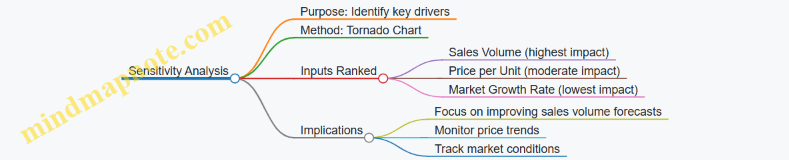
Additional Examples
Example: Adjusting Input Distributions
If new data shows sales volume is skewed right, the team might switch from normal to lognormal distribution to better capture the shape. This adjustment would affect the simulation outcomes and risk estimates.
Example: Incorporating Seasonality
Instead of a single monthly sales volume distribution, the team could model each month separately to reflect seasonal patterns, then aggregate for annual revenue.
Example: Communicating Uncertainty
Instead of a single revenue number, the team presents a range with probabilities, helping executives understand the likelihood of different outcomes.
This example illustrates how Monte Carlo simulation can be applied in a practical, structured way to improve financial forecasting and risk understanding. The process involves clear steps, data-driven assumptions, and transparent communication, all essential for effective FP&A work.
12.6 Resources and References for Further Learning
This section gathers practical tools, frameworks, and conceptual maps to support your continued use of Monte Carlo simulation in FP&A. The goal is to provide clear, structured guidance that you can refer to when building or refining your models.
Mind Map: Core Concepts of Monte Carlo Simulation
This map helps visualize the building blocks of Monte Carlo simulation, showing how input distributions feed into the simulation process and lead to output interpretation.
Mind Map: Steps to Build a Monte Carlo Model for FP&A
This sequence outlines a practical workflow, emphasizing the importance of validation and documentation alongside model construction.
Mind Map: Sensitivity Analysis in Monte Carlo Simulation
Understanding which inputs most affect your forecast helps focus attention and resources where they matter most.
Example: Defining Input Distributions for Revenue Forecasting
Imagine you forecast quarterly revenue for a product line. Historical data shows seasonal variation and occasional spikes due to promotions.
- Step 1: Analyze past revenue data to identify mean, variance, and seasonality.
- Step 2: Choose a base distribution, such as a normal distribution, for stable quarters.
- Step 3: For promotional quarters, use a triangular distribution to reflect uncertainty skewed towards higher revenue.
- Step 4: Combine these distributions in your model, assigning probabilities to each quarter type.
This approach captures both typical performance and exceptional events realistically.
Example: Interpreting Simulation Output for Budget Variance
After running 10,000 iterations of a budget forecast, you get a distribution of possible outcomes.
- The median forecast is $5 million.
- The 10th percentile is $4.2 million.
- The 90th percentile is $5.8 million.
This means there is an 80% chance the budget will fall between $4.2 million and $5.8 million. If your risk tolerance is low, you might plan for the lower bound to avoid surprises. Sensitivity analysis shows that raw material cost variability drives most of the forecast uncertainty.
Example: Documenting Model Assumptions
Good documentation includes:
- The rationale for chosen distributions.
- Data sources and time periods.
- Correlation assumptions and how they were estimated.
- Number of iterations and convergence criteria.
- Known limitations, such as ignored external factors.
Clear documentation ensures transparency and helps others understand or audit your model.
These mind maps and examples form a practical toolkit. They clarify the Monte Carlo simulation process, highlight key considerations, and illustrate how to apply best practices in FP&A contexts. Keeping these references handy can improve model quality and communication within your team.