Slow Commerce and Expectation Design
1. Defining Slow Commerce and Expectation Design
1.1 What Slow Commerce Means in Practice
Slow commerce is a way of selling where the product’s creation and delivery take real time, and the customer is treated like a participant in that timeline rather than a passenger waiting in silence. It’s not just “shipping later.” It’s about designing the whole experience so that waiting has a purpose, expectations are explicit, and the customer can make informed choices.
The Core Idea: Time Is Part of the Product
In fast commerce, speed is the product feature. In slow commerce, time is the product feature. That means the customer understands what happens during the gap between purchase and receipt.
A simple example: a ceramic mug made in small batches. If the page says “ships in 2–3 days,” the customer expects a finished item. If the page says “made after you order,” the customer is buying a process. The difference changes what “good service” looks like. Good service becomes: clear milestones, consistent updates, and a delivery outcome that matches the promised range.
What Slow Commerce Is Not
Slow commerce is not:
- A cover for poor operations. If the timeline is vague and the updates are generic, the customer experiences it as delay, not process.
- A reason to hide behind “artisan” language. Craft needs specifics: what steps take time, what can vary, and what stays consistent.
- A permission slip to be inconsistent. The timeline can be slower, but it should be reliable in how it communicates.
The Customer’s Mental Model
Customers form a model of three things:
- When they will receive the item.
- What will happen during the wait.
- How the business will handle changes.
Slow commerce improves the model by making the timeline usable. “Sometime in May” is not usable. “Earliest ship date May 10, latest May 24, with a milestone update every Friday” is usable.
Practical Components of Slow Commerce
Slow commerce works when these components are designed together.
A Realistic Timeline with Meaning
The timeline should reflect operational reality, not wishful thinking. Meaning comes from structure: milestones, ranges, and rules.
Example: a made-to-order jacket.
- Milestone 1: pattern cut within 2 business days.
- Milestone 2: first fitting scheduled after cutting.
- Milestone 3: finishing and quality check before shipping.
Even if the customer never sees the workshop, they see the plan.
Capacity Constraints Stated Clearly
Customers don’t need internal spreadsheets, but they do need the logic behind limits.
Example: a subscription that produces 200 units per week.
- If demand exceeds capacity, orders enter the next production window.
- The customer is told which window they’re in and what that implies for delivery.
This turns “out of stock” into “allocated time.”
Updates That Add Information
Updates should answer one of these questions: “What changed?” “What’s next?” or “What should I do?”
Example: instead of “We’re working on it,” use:
- “Dye batch approved; stitching begins Monday.”
- “We’re waiting on hardware delivery; expected completion is within the original range.”
The customer learns something concrete.
A Consistent Recovery Path
Delays happen. Slow commerce anticipates them with a defined response.
Example: if a component arrives late, the business doesn’t just apologize. It explains the impact: whether the order moves within the promised range, what the new milestone will be, and how the customer can choose to continue or adjust.
Mind Map: What Slow Commerce Means in Practice
A Mini Example Walkthrough
Consider a small-batch candle maker.
- Purchase: the product page states “made after order” and shows a delivery range.
- Confirmation: the email includes the first milestone date and a short explanation of what happens next.
- Update: on the milestone day, the customer receives a note about pouring and curing time.
- If a batch fails quality checks: the customer is told the reason at a level they can understand and whether the order stays within the original range.
The customer still waits, but the wait is structured, informative, and fair.
Why This Matters for Loyalty
Slow commerce builds loyalty by reducing the mental tax of uncertainty. When expectations are specific and communication is informative, customers feel respected even when the timeline is longer. The business earns trust by treating time as a promise that can be managed, not a mystery that must be endured.
1.2 What Expectation Design Means in Practice
Expectation design is the practice of shaping what customers think will happen, then making sure the business can actually follow through. It’s not about being vague in a “trust us” way; it’s about being specific enough that customers can plan, decide, and feel fairly treated when reality differs.
Start with the Promise You’re Actually Making
A promise has three parts: timing, quality, and effort. Timing is when something will arrive or be available. Quality is what “done” looks like. Effort is what the customer must provide or tolerate (time, choices, constraints, or information).
Example: A made-to-order leather wallet.
- Timing promise: “Ships in 3–5 weeks.”
- Quality promise: “Hand-finished edges; includes a care card.”
- Effort promise: “Choose color and stitching before the cut-off; no rush option.” If you only communicate timing, customers will still guess about quality and effort. Expectation design makes those guesses explicit.
Translate Internal Reality into Customer Language
Teams often know their constraints: capacity, supplier lead times, inspection steps, and rework risk. Expectation design converts that internal workflow into customer-facing statements that are understandable and actionable.
A practical rule: every expectation should answer one of these questions.
- What will happen next?
- When will it happen?
- What will I need to do?
- What will you do if something changes?
Example: Instead of “We’re working on it,” use “Your order is in the cutting queue. Next update will be after stitching is complete.” That single sentence tells customers where the work is and what triggers the next message.
Use Milestones Instead of Vague Status
Customers don’t experience “status”; they experience progress. Milestones are checkpoints that correspond to real work stages.
Example milestone set for a small-batch candle:
- “Wax poured” (materials ready)
- “Cure started” (process begins)
- “Cure complete” (quality check window)
- “Packed and labeled” (ready to ship) Each milestone can have a date range and a short explanation of what’s happening. If a milestone slips, the message can say which stage is affected, not just that “there’s a delay.”
Design for the Moment Expectations Form
Expectations are created at specific touchpoints: product page, checkout, confirmation email, account page, shipping notice, and support interactions. If one touchpoint contradicts another, customers don’t just notice—they reinterpret everything.
Example: The product page says “Ships in 2–3 days,” but the confirmation email says “Ships in 1–2 weeks.” Even if the later message is correct, the contradiction makes customers assume the business is inconsistent.
Expectation design therefore includes a consistency check: the same timeline logic should appear everywhere, with the same units (days vs. weeks) and the same meaning (processing vs. transit).
Make Tradeoffs Legible
Customers accept constraints when they understand the tradeoff. Expectation design doesn’t hide the cost of speed; it shows what speed would break.
Example: “We don’t offer same-week delivery because each piece is finished after order confirmation. If we rush, we skip the final inspection step.”
This is not a threat; it’s a clear mapping between a customer choice and an operational consequence.
Handle Uncertainty Without Creating Anxiety
Uncertainty is unavoidable when production depends on materials, drying times, or capacity. The goal is to communicate uncertainty in a way that helps customers plan.
A useful pattern is range plus rule.
- Range: “Estimated ship window: May 10–May 17.”
- Rule: “If we miss the window, you’ll receive an update within 24 hours and we’ll offer a cancellation or a new window.” This turns uncertainty into a known process.
Mind Map: Expectation Design in Practice
Example: One Order, Three Different Expectation Designs
- Weak expectation design: “We’ll email you soon.”
- Customer can’t plan; “soon” becomes a personal interpretation.
- Better expectation design: “We’ll email after cutting is complete. Estimated: May 10–May 12.”
- Customer knows the trigger and the likely timing.
- Strong expectation design: “After cutting is complete, we’ll send a photo of the stitched sample. If cutting slips beyond May 12, we’ll update within 24 hours and offer cancellation.”
- Customer gets a concrete artifact, a clear contingency, and a fair option.
Expectation design is essentially good bookkeeping for feelings: it records what you intend to do, communicates it in a way customers can use, and keeps the record aligned with reality.
1.3 The Loyalty Mechanisms Behind Waiting and Preparation
Waiting can feel like a tax, but it often becomes a trade: customers give up immediacy in exchange for clarity, care, and a better outcome. Preparation turns that trade into something customers can understand and verify. Loyalty grows when the customer’s mental model stays consistent from promise to delivery.
The Core Mechanism: Expectation Accuracy
Preparation starts with matching what you say to what you can do. When customers receive a timeline, they build a forecast. If the forecast is accurate, they experience relief rather than frustration. That relief matters because it reduces the mental load of “Did I mess up?” or “Will this go sideways?”
A simple example: a small-batch coffee roaster offers subscriptions with a stated roast window of 3–5 days after order. If the customer receives an email on day 2 with a roast confirmation and shipping notice on day 4, the customer’s forecast is validated. They don’t just get coffee; they get evidence that the process is real.
The Second Mechanism: Progress Signals
People tolerate waiting better when they can see movement. Progress signals don’t need to be frequent; they need to be meaningful. A good signal answers one question: “What stage are we in, and what happens next?”
Consider a made-to-order leather wallet. Instead of “Order update: processing,” use stage-based updates: “Pattern cut complete,” “Stitching in progress,” “Finishing and quality check,” and “Ready to ship.” Each message reduces uncertainty and gives the customer a concrete reference point. The customer can mentally track the work, which makes the wait feel shorter even when it isn’t.
The Third Mechanism: Perceived Fairness
Fairness is not only about price; it’s about how rules are applied. Preparation includes setting constraints upfront: capacity limits, selection windows, and what happens if demand exceeds production.
Example: a studio offers 30 custom portraits per month. The product page states that requests are accepted until the quota is reached, and the confirmation email includes the month of completion. If the studio later pauses new requests because the quota is filled, customers interpret it as rule-following rather than arbitrary behavior. That interpretation supports repeat purchases because the customer trusts the system.
The Fourth Mechanism: Effort Investment and Value Attribution
Customers often infer quality from the amount of work they believe is involved. Waiting becomes easier when the customer can connect time to effort. Preparation helps by showing the “why” behind the timeline.
Example: a bakery that makes sourdough loaves from a starter that must be fed and rested can explain the sequence briefly: “Starter refresh overnight, bulk fermentation, shaping, final proof.” The customer doesn’t need a chemistry lecture; they need a reason the loaf can’t be rushed. When the customer later tastes the result, the earlier explanation becomes a consistent story.
The Fifth Mechanism: Control Through Choice
Loyalty increases when customers feel they have options, even if those options are limited. Preparation can include choices that respect the customer’s preferences: delivery window selection, communication frequency, or substitute handling.
Example: a craft candle maker offers two update modes: “Milestones only” and “Milestones plus weekly progress.” A customer who chooses milestones only experiences less noise and more control. Another customer who wants more detail can opt in. The wait is the same, but the experience is tailored.
The Sixth Mechanism: Recovery When Things Slip
Even well-prepared processes encounter delays. Loyalty depends on how you handle exceptions. Preparation includes defining what “slip” means and what you will do when it happens.
Example: if a batch of ceramic mugs fails glaze testing, the studio communicates immediately with a revised date range and an explanation focused on the fix: “Re-glazing and re-firing to meet the finish standard.” If the customer can choose to keep the order, switch to a different color, or cancel without penalty, the customer experiences fairness under stress.
Mind Map: Loyalty Path from Waiting to Trust
Putting It Together in One Integrated Example
Imagine a small furniture maker taking orders for a dining bench. The customer sees a stated build window and a milestone schedule: “wood selection,” “joinery,” “finish,” “drying,” “final inspection,” and “shipping.” The maker also states capacity limits and what happens if the queue shifts. During the build, the customer receives stage updates that explain the next step in plain language. If finishing takes longer due to humidity, the maker revises the range and offers a choice: proceed with the new date or switch to a different finish option. The customer waits, but they also understand the process, see progress, and trust the rules—so loyalty becomes a rational outcome rather than a hope.
1.4 Where Slow Commerce Fits in Different Business Models
Slow commerce is not a single business type. It’s a way of aligning production, communication, and customer expectations so that waiting feels informed rather than mysterious. The fit depends on how work is created, how inventory behaves, and how much variation exists between orders.
Mind Map: Business Model Fit
Made to Order
Made to order is the cleanest match because the customer’s order is part of the production plan. Slow commerce works when you break the timeline into milestones that correspond to real work: design confirmation, materials procurement, build, finishing, and dispatch. For example, a leather goods maker can say, “Materials confirmed by May 12, stitching completed by May 26, shipping window May 27–June 3.” The customer isn’t just waiting; they’re watching the same steps the shop uses internally.
Best practice: define what “done” means at each milestone. If “materials confirmed” actually means “supplier accepted the order,” say that. If it means “materials arrived and passed inspection,” say that too. Precision prevents the most common expectation mismatch: customers interpret milestones as guarantees.
Small Batch
Small batch businesses often have inventory, but it’s limited and production is cyclical. Slow commerce fits by treating each batch like a mini project with a known start, a known finish, and a known allocation method. Example: a ceramic studio releases 60 mugs per colorway. The product page can include a batch timeline and a rule: “If your colorway sells out, you’ll be placed in the next batch queue with the same update cadence.”
Best practice: make the allocation rule visible before checkout. When customers understand how scarcity is handled, they judge fairness more than speed.
Preorder
Preorder is where slow commerce earns its keep, because customers commit before the product exists. The expectation design challenge is not the delay itself; it’s uncertainty. Slow commerce fits when you communicate uncertainty as ranges tied to operational realities. Example: a board game publisher can state, “Estimated delivery window August 10–August 24, depending on freight clearance.” Then it should update at milestone triggers such as “printed and packed,” “in transit,” and “arrived at fulfillment.”
Best practice: avoid pretending the range is a promise. Use the same milestone language across email, order pages, and support replies so customers don’t have to translate your meaning.
Subscription
Subscriptions can be slow commerce without being slow in every moment. The key is the fulfillment window. Example: a coffee subscription ships weekly, but roasting happens in batches. The expectation design can say, “Roast day is Tuesday; shipping occurs within 24 hours of roast.” Customers learn the rhythm, so delays become exceptions rather than surprises.
Best practice: keep the customer-facing schedule stable even if internal operations change. If you must adjust, explain what changed in operational terms and what stays consistent, such as the next roast day.
Inventory Ready
Inventory ready businesses can still use slow commerce, but the “slow” part usually belongs to service, customization, or packaging rather than core fulfillment. Example: a skincare brand keeps stock on hand but offers personalized labeling that takes two extra days. Slow commerce fits by setting expectations for that specific step: “We apply your label within 48 hours of order; shipping follows immediately after.”
Best practice: don’t stretch the timeline to look intentional. Use slow commerce only where there is a real, explainable step that benefits from time.
A Simple Fit Checklist
Use this quick test: can you name the work that happens during the waiting period, can you map it to milestones, and can you update customers when those milestones change? If yes, slow commerce fits. If not, the problem is usually not the business model; it’s missing operational clarity.
1.5 Boundaries and Guardrails for Ethical Use
Slow commerce and expectation design work best when they respect the customer’s right to make an informed choice. The goal is not to make waiting feel mysterious; it’s to make it feel legible. Ethical boundaries start with three questions: Are we telling the truth about timing and constraints? Are we giving customers enough control to opt in knowingly? Are we using scarcity and delays to clarify tradeoffs rather than to pressure compliance?
Define What You Can Promise
Begin with operational reality, not copywriting. If your production capacity is variable, promise ranges and explain what drives them. For example, a studio that hand-finishes leather can say, “Finishing takes 10–14 business days after your order is queued,” and then list the two common reasons it might land at the longer end: dye batch timing and drying conditions. If you cannot reliably meet a range, you do not publish it. You either tighten the process or switch to a different offer type, such as made-to-order with a confirmed start date.
A practical guardrail is the “promise ladder.”
- Level 1: Facts you can measure daily (queue position, scheduled start week).
- Level 2: Timelines you can estimate with historical variance (delivery windows).
- Level 3: Outcomes you cannot guarantee (exact arrival day, weather-proof shipping).
Only Levels 1 and 2 should appear as customer-facing commitments. Level 3 belongs in conditional language that does not pretend certainty.
Separate Explanation from Manipulation
Scarcity narratives cross the line when they hide the real reason and substitute urgency. Ethical scarcity answers two questions plainly: why the limit exists and what the customer can do with that information.
Good example: “We can produce 200 units this month because our finishing capacity is limited to two shifts. If you order now, your unit will be scheduled for the first finishing run.”
Manipulative example: “Only hours left” with no operational basis and no meaningful difference between ordering now and later.
A simple rule: if the message would still be accurate when a customer reads it a week later, it’s probably explanation. If it depends on a countdown to create compliance, it’s probably manipulation.
Give Customers Real Choice
Expectation design becomes ethical when customers can decide without being trapped. That means offering clear options when timing changes.
Example: A customer orders a custom item with a stated window. If the queue slips, the update email should include at least one actionable choice: keep the order with a revised window, switch to a different configuration, or cancel with a straightforward refund policy. “We’ll try our best” is not a choice; it’s a hope.
Guardrail: every delayed-fulfillment communication should include a decision point, not just information.
Keep Status Updates Specific and Useful
Generic updates erode trust because they sound like filler. Ethical updates do three things: they confirm what happened, they state what changes, and they tell the customer what to expect next.
Example sequence:
- “Your order moved from queued to production on 2026-02-20.”
- “Finishing is scheduled for 2026-02-27 because your batch is drying overnight.”
- “We’ll send a shipping notice within 24 hours of finishing sign-off.”
Notice the pattern: each message reduces uncertainty in a new way.
Prevent Overpromising Through Internal Checks
Before publishing any timeline or scarcity claim, run a consistency check across the site, checkout, emails, and support scripts. A mismatch is not just a mistake; it creates a fairness gap.
Use an internal checklist:
- The timeline shown on the product page matches checkout.
- The email cadence matches what operations can actually do.
- Support can explain the “why” behind delays without improvising.
- Refund and cancellation rules are visible before purchase.
If any item fails, fix the system, not the wording.
Mind Map: Ethical Boundaries for Waiting and Scarcity
Example: A Boundary-Respecting Preorder
A preorder for a small-batch product can be ethical if it includes: a production start window, a finishing window, a shipping notification rule, and a cancellation option if the start date slips beyond a defined threshold.
Example implementation (plain language): “We start production in the week of March 10. Finishing takes 10–14 business days. If production hasn’t started by March 24, you can cancel for a full refund or keep your order with an updated window.”
This structure makes the waiting meaningful without forcing belief. Customers know what you can do, what might change, and what they can do about it.
2. Customer Psychology of Waiting and Meaning
2.1 How Anticipation Changes Perceived Value
Anticipation changes perceived value because it shifts the customer from “What do I get?” to “How does this fit into my plans?” When a purchase has a timeline, the customer can mentally schedule it, compare it to alternatives, and feel progress toward a concrete outcome. That mental work often increases perceived value even when the product itself is unchanged.
The Core Mechanism: Time Turns Information into Meaning
A product description is static. A timeline is dynamic. When customers expect a future moment, they start interpreting every detail as part of a sequence: preparation, milestones, and arrival. This sequence reduces the feeling of randomness. Instead of “I bought something,” the customer experiences “I’m participating in a process.”
Perceived value rises through three linked effects:
- Cognitive framing: The customer places the purchase inside a story with beginning and end.
- Effort alignment: The customer invests attention, which makes the outcome feel more “earned.”
- Uncertainty management: Clear expectations reduce the mental cost of waiting.
A simple example: two customers buy the same handmade mug. One receives it in two days with a generic shipping email. The other sees a milestone plan—glaze curing, final inspection, packing—and gets a short update at each step. The second customer often reports higher satisfaction because the waiting feels structured, not stalled.
What Customers Actually Anticipate
Anticipation is not just impatience with a nicer outfit. It is usually specific. Customers anticipate:
- Outcome certainty: “It will be ready for the date I care about.”
- Process visibility: “They’re doing the steps that make this worth it.”
- Personal relevance: “This matches my use case, not just their catalog.”
If you want anticipation to help, you must support the exact kind of anticipation you’re creating. A timeline without meaning becomes noise.
The Role of Progress Signals
Progress signals work because they convert time into measurable movement. Customers don’t need constant updates; they need updates that correspond to real internal states.
Use three levels of progress clarity:
- Stage labels: “Cutting,” “Sewing,” “Finishing,” “Packing.”
- Milestone dates: “Expected by May 18” or “Ships after May 10 inspection.”
- Evidence cues: “Photos after final inspection” or “Batch number on the packing slip.”
Example: a made-to-order skincare set. Instead of “Order update: in progress,” send: “Batch 7 is mixed and labeled. Next step is 48-hour settling, then bottling.” The customer can predict what comes next, which reduces mental load.
Managing Uncertainty Without Overpromising
Anticipation increases value when uncertainty is controlled. The customer tolerates waiting better when they understand what could change and what won’t.
A practical rule: communicate ranges and triggers.
- Range answers “When?”
- Trigger answers “What will cause a change?”
Example: “Estimated delivery between April 20 and April 27. If inspection fails, we’ll extend the timeline by up to 3 days and send a photo of the corrected batch.” This is not comforting because it’s perfect; it’s comforting because it’s specific.
Mind Map: How Anticipation Changes Value
Example: Same Product, Different Expectation Design
Consider a custom desk. Both customers pay the same price and receive the same final desk.
- Customer A gets a confirmation email and a single shipping notice.
- Customer B gets a timeline with three milestones: wood selection, joinery completion, and finish cure. Each milestone includes one sentence of what was done and one sentence of what happens next.
Customer B is more likely to describe the purchase as “worth it” because the waiting period becomes part of the product’s meaning. Customer A experiences the same time as a gap.
Advanced Detail: Why Timing Alone Isn’t Enough
Anticipation can backfire when it becomes a blank space. If updates don’t correspond to real steps, customers infer that the process is opaque. That inference lowers perceived value because it replaces “process” with “guesswork.”
To avoid that, tie anticipation to operational reality:
- If you can’t name the stage, don’t name it.
- If you can’t commit to a range, don’t commit to a date.
- If you can’t show evidence, explain what you can verify internally.
When anticipation is grounded in truthful structure, customers treat the wait as part of the product rather than a detour.
2.2 The Role of Effort and Investment in Valuation
Valuation is not only about the item’s features. It’s also about what the customer believes they are putting in—time, attention, and patience—and what the business is putting in—craft, coordination, and care. When those investments are visible and consistent, customers treat the wait as part of the product rather than an inconvenience.
Effort as a Signal of Quality
Effort can be physical (hand finishing, testing, assembly), cognitive (designing options, writing clear instructions), or procedural (staging, batching, quality checks). Customers often use effort as a shortcut when they cannot inspect the final outcome immediately.
A simple example: two makers sell similar ceramic mugs. One ships in two days with minimal detail. The other ships in three weeks and includes a timeline: glazing, firing, and inspection. The second mug’s delay is not the point; the visible sequence is. It tells the buyer that the mug passed through steps that cost time and attention.
The key is that effort must be specific enough to be believed. “We work carefully” is vague. “We fire twice and check for pinholes before packing” is concrete.
Investment as a Shared Contract
Investment is not only what the business does. It’s also what the customer chooses to do when they accept a slower process. That choice creates a small contract: the customer gives up speed, and the business gives up shortcuts.
Consider a made-to-order jacket. The customer selects fabric and fit notes, then waits. If the business responds with a clear milestone plan—pattern confirmation, first fitting, final finishing—the customer’s investment feels acknowledged. If the business instead sends generic “processing” messages, the customer’s investment feels wasted, and loyalty drops even if the jacket arrives correctly.
A practical rule: every time you ask the customer to invest effort, you should reduce their uncertainty with matching clarity.
How Waiting Changes Perceived Value
Waiting can increase perceived value when it reduces the sense of randomness. Customers interpret a delay as either:
- Unplanned: “Something went wrong.”
- Planned: “This is how the work happens.”
Planned delays feel fair because they follow a structure. Unplanned delays feel unfair because they break the structure.
Example: a small-batch coffee subscription. If the shipment date changes daily with no explanation, customers assume poor control. If the business states that each batch is roasted on a fixed day and packed the next day, customers can mentally schedule their expectations. The wait becomes predictable, and predictability supports valuation.
Visible Effort Without Overexplaining
There’s a balance between transparency and noise. Too much detail can overwhelm customers and make them doubt the process (“Why so many steps?”). Too little detail makes the wait feel like a black box.
A good middle approach is to show effort at the level of decisions and checkpoints.
- Decision points: “We confirm sizing before cutting.”
- Checkpoint outcomes: “We reject batches that fail the thickness tolerance.”
- Customer-facing effects: “This is why your delivery window is two to four weeks.”
You don’t need to list every micro-task. You need to show the parts that matter to quality and timing.
Advanced Mechanics for Expectation Accuracy
Effort and investment valuation depends on three mechanics.
-
Consistency between promise and process If you promise a timeline, your internal workflow must produce updates that match it. Otherwise, customers learn that your timeline is decorative.
-
Effort that is legible Customers can’t measure your craft directly, so you translate it into legible signals: milestones, inspection criteria, and what happens next.
-
Effort that is proportionate The customer’s patience should match the scale of the work. A two-week wait for a minor accessory needs a stronger justification than a two-week wait for a fully customized build.
Mind Map: Effort and Investment in Valuation
Example: Two Timelines, Same Product
A subscription skincare brand offers a “slow batch” formulation.
- Version A: “Your order is being prepared.” Delivery varies by two weeks.
- Version B: “We formulate on Mondays, rest for 48 hours, then test and pack.” Delivery varies by a few days within a stated window.
Both versions may produce the same final product. Version B increases valuation because the customer can connect the wait to a process with checkpoints. The customer’s investment feels rational, not accidental.
When effort and investment are made legible, customers treat the timeline as part of the value. They don’t just buy the outcome; they buy the work that leads to it.
2.3 Managing Uncertainty Without Creating Anxiety
Uncertainty is not the enemy; surprise is. Customers can tolerate “I don’t know yet” if you make “I will know, and here’s how” feel reliable. The goal is to reduce ambiguity while keeping the honest parts of a slow process visible.
Start with the Right Kind of Uncertainty
Not all uncertainty is equal. Some is informational (you haven’t shared details yet). Some is operational (the work is inherently variable). Some is emotional (the customer fears you’ll disappear).
A useful rule: if the uncertainty is operational, you can still communicate it precisely. If it is informational, you should fix it by sharing what you already know.
Example: A studio making handmade ceramics can’t promise identical glaze outcomes, but it can promise a milestone cadence—sketch approval, first firing, glaze test, final firing—so customers know what “normal variation” looks like.
Separate What You Control from What You Don’t
Customers feel anxious when they assume you’re hiding the ball. Reduce that by explicitly classifying signals.
- Controlled: order acceptance, production start date, milestone schedule, update frequency, quality checks.
- Partly controlled: throughput within a range, material availability, rework likelihood.
- Not controlled: shipping carrier delays, weather impacts on pickup, rare supplier shortages.
Then communicate the boundary in plain language.
Example: “We start within 2 business days of your approval. If materials arrive late, we’ll notify you within 24 hours of the issue and propose the next available slot.”
Use Ranges with Rules, Not Vague Promises
A date range helps, but only if it comes with rules that explain how the range will be used.
Instead of: “Ships sometime in May.”
Use: “Estimated ship window is May 6–May 12. If it hasn’t shipped by May 12, you’ll receive a new window and an option to cancel.”
This turns uncertainty into a contract. The customer can plan, and you’ve defined what happens when reality deviates.
Replace Status Updates with Milestones
Generic status (“processing”) creates a vacuum where the customer imagines the worst. Milestones fill the vacuum with observable progress.
A milestone should be:
- Specific enough to recognize
- Tied to a real production step
- Communicated with a predictable cadence
Example: For made-to-order apparel, updates can be “pattern finalized,” “cutting complete,” “first fitting,” “stitching complete,” “quality check,” “packed for shipment.” Each update answers: “What happened?” and “What’s next?”
Make Uncertainty Feel Bounded
Anxiety grows when the customer can’t tell whether a delay is temporary or permanent. Bound it with time limits and decision points.
Decision points are moments where the customer can choose:
- Continue with the next slot
- Adjust the order (size, color, configuration)
- Cancel with a clear refund timeline
Example: “If your item isn’t ready by June 3, we’ll offer either an expedited rework path (if available) or a cancellation with refund by June 7.”
Communicate with “If-Then” Clarity
If-then statements reduce mental load because they map scenarios to actions.
Example message structure:
- If: “We detect a material shortage.”
- Then: “We’ll email you within 24 hours with two alternatives and a choice.”
- Also: “We’ll keep your place in the queue for the original option if you prefer.”
This avoids the trap of listing problems without solutions.
Mind Map: Uncertainty Management
Example: A Full Update Sequence That Stays Calm
-
Pre-start confirmation: “We received your order and will begin production by April 18.”
-
First milestone: “Pattern approval is complete. Cutting starts April 19.”
-
Range with rule: “Estimated completion is April 28–May 2. If it isn’t complete by May 2, you can choose a new slot or cancel.”
-
Operational variability note: “We hit a rework checkpoint because the first batch of stitching didn’t meet our tolerance. We’ll share a new milestone date within 24 hours.”
-
Completion and handoff: “Quality check passed. Packing is scheduled for May 1; shipment follows carrier pickup.”
Each message adds one concrete fact and one next step. None of them asks the customer to guess.
Common Failure Modes to Avoid
- Overpromising precision: “Ready on Friday” when the process is variable.
- Underexplaining ranges: giving a window without what happens at the edges.
- Too many updates, too little meaning: frequent messages that don’t correspond to real steps.
- Silence after a problem: delays without a stated response time.
A slow process can be steady. The trick is to treat uncertainty as a design input, not a reason to go quiet.
2.4 How Progress Signals Reduce Friction
Waiting feels longer when customers can’t tell whether anything is happening. Progress signals reduce that friction by answering three questions at the moment of doubt: What stage are we in? What happens next? When will I hear from you again? The goal isn’t to promise speed; it’s to make the process legible.
The Foundational Idea: Uncertainty Costs More Than Time
Perceived friction comes from uncertainty, not from the calendar. If a customer sees “Processing” for a week, they have no usable information. If they see “Cutting fabric for order #1842” and “Next update in 2 days,” they can update their own expectations. Even when the timeline is unchanged, the mind spends less effort guessing.
A useful rule of thumb: every progress signal should reduce one kind of uncertainty. Generic status reduces none.
What Counts as a Progress Signal
A progress signal is any message that changes the customer’s mental model of the order. It typically includes:
- Stage clarity: the order is in a named step (not just a vague state).
- Next action: what will happen before the next update.
- Update cadence: when they should expect the next message.
- Evidence: a concrete artifact, such as a photo, a tracking number, or a milestone timestamp.
For example, “Order received” is a receipt. “Order received, materials allocated, production begins Friday” is a progress signal.
Designing Signals That Don’t Create New Confusion
Progress signals can backfire when they are too detailed to be true or too frequent to be meaningful. The fix is to align message granularity with operational reality.
Start with a simple stage map that your team can actually follow. If your internal workflow has 12 steps but you can only reliably confirm 4, then design signals for those 4. Customers don’t need your org chart; they need a stable sequence.
Also, avoid false precision. If you can’t guarantee a date, use ranges and explain what triggers the next step. “Next update after quality check” is often more honest than “Ships on Tuesday.”
Mind Map: Progress Signals That Reduce Friction
Progress Signals Mind Map
Signal Types with Practical Examples
Milestone updates
- Bad: “Processing your order.”
- Better: “We’ve confirmed your size and allocated materials. Next: stitching and final inspection. You’ll get an update on Thursday.”
Artifact evidence
- Bad: “Quality check in progress.”
- Better: “Inspection complete for panel A. Here’s a photo of the finished seam. Next: packaging.”
Timeline reminders
- Bad: silence until shipping.
- Better: “Production is on schedule. Next update will include tracking once the carrier scans the package.”
Exception notices
- Bad: a delayed email with no explanation.
- Better: “Inspection took longer due to a color mismatch. We’re reworking the affected section and will update you after the second check. No action needed from you.”
Notice the pattern: each message either advances the stage, provides evidence, or sets a clear expectation for the next communication.
The Mechanics: Turning Internal Events into Customer Meaning
Progress signals work best when they are tied to real system events. Examples include “payment confirmed,” “materials allocated,” “production started,” “quality check passed,” and “carrier pickup.” When those events fire, the customer message can be consistent and fast.
If your system can’t trigger messages automatically, you can still use the same stage map manually. The key is consistency: customers learn the sequence. A stable sequence beats a clever one.
Handling Edge Cases Without Breaking Trust
Two edge cases matter: partial progress and rework.
For partial progress, say what’s done and what’s next. “We’ve completed the first item; the second item is in dyeing. Next update after dyeing finishes” is clearer than “Some items are delayed.”
For rework, explain the cause in plain terms and keep the next step specific. “We noticed a defect during inspection, so we’re redoing that component. Next update after the second inspection” avoids blame while still being concrete.
A Simple Checklist for Every Progress Message
Before sending, confirm:
- The customer can identify the current stage.
- The next step is stated in customer language.
- The next update timing is included or tied to an event.
- The message doesn’t promise what you can’t verify.
When these conditions hold, waiting becomes a sequence of understandable steps rather than a mystery with a tracking number attached.
2.5 Practical Examples of Waiting Experiences That Work
Waiting becomes tolerable—and sometimes even satisfying—when customers can predict what will happen, understand why it takes time, and see progress that matches reality. The examples below move from simple to more complex setups, each showing the expectation design choices that make the wait feel fair.
Mind Map: Waiting Experience Building Blocks
Example: Preorder with Milestone Updates That Match Production
A small ceramics studio offers a preorder for a limited glaze run. Instead of saying “ships soon,” it publishes a range: “Ships between May 10 and May 24.” Then it breaks the work into three milestones: “Clay finished,” “Glazing complete,” and “Packed for shipment.”
What makes this work:
- The milestones are visible before the customer needs them. Customers learn the production steps early, so later updates feel like confirmation rather than surprises.
- Each update includes one concrete artifact. “Glazing complete” is paired with a photo of the batch on drying racks. “Packed for shipment” includes a packing slip preview with the order number.
- The studio sets an update cadence: “You’ll get an email after each milestone.” That removes the mental load of checking.
A practical detail: the studio also states what happens if the timeline slips. For example, “If glazing takes longer, you’ll receive an update within 48 hours of the expected milestone date.” This turns a delay into a managed event.
Example: Made to Order with Capacity Limits and Clear Rules
A custom furniture maker accepts orders for a single workshop schedule. It limits intake to what can be completed in the current build window, then communicates the rule: “We only start new orders when we have capacity for the next two weeks of work.”
The waiting experience improves because the customer can infer fairness. The maker’s page shows a “Start by” date range and a “Next available start” date. After purchase, the customer receives a short message that confirms the start window and the first milestone: “Materials received and cut.”
What to copy:
- Use capacity language that explains the constraint without blaming the customer.
- Provide a “what you can do now” action. For instance, the customer can choose finish options immediately, and the confirmation email lists the chosen finish and the expected check-in date.
- When changes are needed, offer a simple decision. “If you want to switch finish, we can do it until the cutting milestone. After that, we’ll keep your original selection.”
This reduces anxiety because the customer knows the exact moment when choices become locked.
Example: Backorder with Progress Signals and Fast Resolution Paths
A specialty coffee roaster sells a seasonal blend that sells out quickly. It offers backorders with a progress signal that is not just “we’re working on it.” The roaster uses a two-stage timeline: “Roast batch scheduled” and “Quality check passed.”
Customers receive updates tied to internal events:
- When the roast batch is scheduled, the email includes the batch date and a short note about what’s being prepared (for example, “We’re roasting to hit a specific development window for this blend”).
- When the quality check passes, the email includes a simple result statement: “Batch passed cupping for aroma and body.”
The resolution path matters as much as the updates. The roaster includes a link in every backorder email: “Change delivery preference.” Options might include “Ship when ready” or “Hold for next combined shipment.” If a customer requests cancellation, the roaster confirms the outcome immediately and states the refund timing rule.
This example works because it treats waiting as a sequence of events with decision points, not as a single unresolved gap.
Example: Service Appointments with Expectation Anchors
A small clinic schedules follow-up appointments that sometimes require additional review. Instead of only giving a date, it anchors expectations with what will happen at the appointment: “We’ll review your results, confirm next steps, and update your plan.”
The clinic also communicates the uncertainty source. “Your appointment depends on lab turnaround. If results arrive later than expected, we’ll reschedule within two business days.”
A simple but effective practice: the clinic sends a “48-hour check” message that confirms whether the appointment is on track. If not, the message includes two alternative time windows. That turns waiting into a controlled process with a clear checkpoint.
Example: Subscription Fulfillment with Window-Based Delivery
A skincare subscription ships in controlled batches. The company avoids “will ship soon” by using a delivery window: “Ships during the week of May 6.” It then provides a milestone update: “Formulation complete” and “Batch packed.”
To keep the wait from feeling like limbo, the subscription includes a “use-by” expectation. For example, “If you need the product by May 20, choose the expedited add-on at checkout.” Even if the customer doesn’t buy it, the option clarifies that timing is a real constraint, not a vague promise.
Mind Map: What to Include in Every Waiting Message
These examples share a pattern: customers wait better when the business communicates events, not intentions. The wait becomes a series of understandable steps with visible progress and clear decision points, so the customer’s attention has somewhere useful to go.
3. Designing Artisan Timelines That Customers Trust
3.1 Choosing Timeline Granularity That Customers Can Use
Timeline granularity is the level of detail you give customers about when things happen. Too coarse, and people feel you’re hiding the ball. Too fine, and you create a new job for your support team every time reality deviates from the plan. The goal is simple: give customers enough structure to make decisions and enough honesty to stay calm when the schedule shifts.
Start with Customer Decisions, Not Your Internal Schedule
Granularity should match the decisions customers must make. If a customer is deciding whether to buy, they need an expected window and what triggers it. If they’re planning around the delivery, they need a date range and the latest “safe” moment to schedule. If they’re choosing between options, they need the tradeoff between faster and more customized.
A useful rule: each timeline detail you publish should answer a question a customer is likely to ask. If it doesn’t, it’s probably internal noise.
Use Three Levels of Detail
Most effective timelines can be expressed in three layers.
- The commitment layer answers “When will I get it?” Use a window, not a single point, unless you truly control the process.
- The progress layer answers “What happens next?” Use milestones that are meaningful to the customer, like “materials confirmed” or “crafting started.”
- The explanation layer answers “Why might it move?” Use a short, factual reason tied to operational reality, not a vague apology.
Customers can act on the first layer immediately. The second layer reduces uncertainty. The third layer prevents confusion from turning into distrust.
Pick Milestones That Are Observable and Stable
Milestones should be events you can verify without guessing. “Design complete” is better than “working on it.” “Quality check passed” is better than “almost done.”
Stable milestones also reduce the temptation to update too often. If you can only confirm a milestone once per week, publish it once per week. If you can confirm it daily, you still don’t need daily updates unless customers are actively coordinating around it.
Choose Windows That Reflect Variability
A timeline window is a promise with a buffer. The width should reflect the variability you actually experience.
- If your process is consistent, use narrower windows.
- If you rely on external inputs, widen the window and communicate the dependency.
- If you have multiple product variants, publish a range by variant rather than one generic number.
Example: A small-batch candle maker might say “Ships in 2–4 weeks” for standard scents, but “Ships in 3–6 weeks” for custom labels because label approvals and drying time vary.
Avoid False Precision and “Status Theater”
False precision happens when you publish a date you can’t defend. Status theater happens when updates are frequent but not informative, like “We’re still working on it.”
Instead, update with either (a) a milestone change or (b) a clear reason plus a revised window. Customers don’t need every step; they need the next step.
Mind Map: Timeline Granularity That Customers Can Use
Timeline Granularity Mind Map
Example: Three Granularities for the Same Product
Consider a made-to-order leather wallet.
- Coarse (low granularity): “Ships in about a month.”
- Works for casual buyers, but planning is hard.
- Balanced (recommended): “Ships in 3–5 weeks. Next milestone: materials cut by week 1. If delays occur, we’ll explain whether it’s due to hardware or finishing.”
- Customers know what to expect and what to watch.
- Overly fine (high granularity): “Cut on Tuesday, stitch on Wednesday, finish on Thursday, ship Friday, unless the thread color batch arrives late.”
- Creates avoidable anxiety and support tickets.
Balanced granularity keeps the plan useful without pretending you can control every variable.
Practical Checklist for Choosing Granularity
- What decision does the customer need to make at each stage?
- What is the smallest set of milestones that are verifiable?
- What window width matches your real variability?
- Would a customer understand every milestone name without internal jargon?
- If something slips, what exact message will you send: milestone update, revised window, or both?
When you get granularity right, customers feel informed rather than managed. They can plan, they see progress, and they trust the process because the details are tied to what you can actually deliver.
3.2 Setting Start Dates and Milestones Customers Understand
Start dates and milestones do two jobs at once: they reduce uncertainty and they create a shared timeline for everyone involved. The trick is to make the dates specific enough to be useful, but not so precise that they become a trap when production reality changes.
Start Dates That Mean Something
A start date should describe when work actually begins, not when the customer places the order. If you use “order date” as the start, customers will assume the product is already in motion. Instead, define your start date as one of these operational moments:
- Production start: the day materials are allocated and the first build step begins.
- Queue start: the day the order enters the active production queue.
- Craft start: the day the artisan begins the first hands-on step.
To keep this consistent, create a single internal rule for what “start” means and use it everywhere: checkout, confirmation email, and milestone updates. A simple internal checklist helps teams avoid accidental drift.
Example: A ceramic studio offers made-to-order mugs. The customer sees “Production starts on May 12, 2026.” Internally, May 12 is when clay is pulled and the first wheel session begins. The order confirmation also states that shipping depends on drying and glazing, so the customer expects a longer timeline without feeling misled.
Milestones That Map to Customer Questions
Milestones should answer the questions customers naturally ask when waiting:
- “Is my order being worked on yet?”
- “What happens next?”
- “When will I see progress I can verify?”
- “What could change, and how will I know?”
Use milestones that are observable either by process evidence or by clear system events. Good milestones are tied to real steps, not vague status labels.
A practical milestone set for many slow-commerce products looks like this:
- Allocated: materials or capacity reserved.
- In Production: first craft step started.
- Quality Check: inspection completed against a defined standard.
- Ready to Ship: packed and handed to the carrier or fulfillment team.
Each milestone should include a date or a date range, plus a short “what this means” sentence.
Example: For a leather belt made in small batches, the email sequence includes:
- “Allocated for your order on May 12” with a note: “We’ve reserved hide and hardware.”
- “In production starting May 15” with a note: “Stitching begins after cutting.”
- “Quality check completed by May 28” with a note: “We inspect edge finishing and buckle alignment.”
- “Ready to ship by June 1” with a note: “Packing and label creation happen after inspection.”
Choosing Date Ranges Without Creating Confusion
If you can’t guarantee a single day, use a range, but make it operationally honest. A range works best when you also specify the rule for how it will be updated.
Use this structure:
- Start date: a single day when work begins, or a narrow range if allocation itself varies.
- Milestone windows: ranges that reflect the step’s typical duration.
- Update cadence: when you will send the next message if the window shifts.
Example: A small-batch candle maker uses “In production May 10–May 14.” They also state: “If we miss the window, you’ll receive an update within 24 hours of the last day in the window.” That sentence prevents the customer from wondering whether silence means trouble.
Making Milestones Understandable in Plain Language
Customers don’t need internal jargon. They need a translation from your workflow into their mental model.
Apply three rules:
- Name the step: “Quality check” beats “QC pass.”
- Explain the customer impact: “Ready to ship” means “tracking will appear soon.”
- Avoid mixing promises: don’t say “ships on May 28” if “ready to ship” is the milestone and shipping depends on carrier pickup.
A helpful pattern is to pair each milestone with a single consequence.
Example: “Quality check completed by May 28. If it passes, we pack the same day.” This turns a milestone into a predictable chain.
Mind Map: Start Dates and Milestones Customers Understand
A Simple Template You Can Reuse
Use one consistent line format for every milestone update:
- Milestone name + date or window + what it means + what happens next.
Example line: “Quality check completed by May 28. We inspect edge finishing and buckle alignment; packing starts the same day.”
When start dates and milestones follow these rules, customers can plan around the wait without guessing. Your timeline becomes a shared reference, not a mystery with dates stapled to it.
3.3 Communicating Capacity Constraints Without Blame
Capacity constraints are real, but “your order is delayed because we’re disorganized” is not a great customer experience. The goal is to explain what limits exist, what customers can expect, and what you will do to keep the promise—without assigning fault to the customer or sounding like you’re apologizing for existing.
Start with the Constraint, Not the Culprit
Begin by naming the constraint in plain language. Customers don’t need a production org chart; they need a reason that maps to reality. Examples of constraints that are easy to understand include limited workshop hours, a finishing step that can’t be parallelized, or a supplier batch that arrives on a fixed schedule.
Then connect the constraint to the timeline mechanism. If you can’t ship immediately, say what happens instead: “We start after the batch arrives,” “We schedule finishing in order of confirmed payment,” or “We reserve capacity per size run.” This turns a vague delay into a predictable process.
Use a Customer Facing Promise Structure
A helpful pattern is: what you know now, what you will do next, and what you will tell them later.
- What you know now: the earliest realistic ship or delivery window.
- What you will do next: the next milestone you control.
- What you will tell them later: the update cadence and the triggers for changes.
This structure prevents the common failure mode where customers hear only “we’re busy” and then spend the waiting period guessing.
Mind Map: Capacity Messaging Components
Choose Language That Signals Control
Customers tolerate delays better when they believe the business is steering. Use verbs that describe actions you will take: “schedule,” “allocate,” “finish,” “inspect,” “pack,” “dispatch.” Avoid verbs that imply helplessness: “waiting on,” “stuck with,” “can’t do anything about.”
If you must mention external factors, keep the sentence anchored to your response. For instance: “The supplier delivers on Tuesdays; we start assembly the same day and ship from our dock within two business days after inspection.” The customer sees a chain, not a dead end.
Provide a Timeline Range with Rules
A single date invites disappointment. A range is more honest, but only if you attach rules that explain why the range exists.
Good rules include:
- “We ship within X business days after the milestone is completed.”
- “Orders are processed in order of confirmation until the capacity cap is reached.”
- “If a quality check fails, the item returns to finishing and the update will reflect that.”
These rules reduce the need for customers to interpret your silence.
Offer Options That Respect Agency
Without options, capacity messaging can feel like a one-way announcement. Provide choices that are easy to understand:
- Keep the order and receive milestone updates.
- Switch to a different variant with a faster timeline.
- Cancel under a clear policy.
Even if most customers keep the order, the availability of choices signals fairness.
Example: Preorder Capacity Constraint Email
Subject: Updated timeline for your preorder
Hi Jordan,
Thanks for your preorder. We’re currently operating at a limited finishing capacity, which affects the time between assembly and final inspection.
Here’s what we know now:
- Earliest ship date: May 12
- Latest ship date: May 18
What happens next:
- Your item will enter finishing as soon as the current batch completes inspection.
Updates:
- We’ll send a confirmation when finishing starts.
- If anything changes, we’ll update you within 24 hours of the next milestone.
Options:
- Keep your preorder with the timeline above.
- Switch to the standard size that is available sooner.
- Cancel for a full refund.
If you want to switch or cancel, reply to this email and we’ll handle it.
—Customer Care
Example: Product Page Capacity Block
Capacity note
We make this item in small runs. Orders placed today enter the next production batch, with shipping scheduled between May 12 and May 18. You’ll receive an update when finishing starts, and another when your order is packed.
If you need it sooner, choose the in stock variant.
Advanced Detail: Update Triggers That Prevent Surprise
Define triggers so updates happen because of events, not because someone remembered. Common triggers include:
- milestone started (finishing begins)
- milestone completed (inspection passed)
- exception occurred (rework required)
- carrier pickup (dispatch confirmed)
When support and operations share the same trigger list, customers get consistent answers, and agents don’t improvise under pressure.
Quick Checklist for No-Blame Messaging
- The constraint is specific and tied to a workflow step.
- The promise includes a range plus rules.
- The message states what happens next and when updates occur.
- Customer options are clear and easy to act on.
- Language stays factual and action oriented.
Capacity constraints become tolerable when customers can predict the next step and trust that the business is running the process, not blaming the calendar.
3.4 Handling Variability With Clear Ranges and Rules
Customers accept delays more easily when variability is framed as a known system, not an unpredictable mood. The goal is to communicate a range that is honest, then attach rules that explain what happens inside that range.
Start with two foundational decisions: (1) what varies, and (2) what does not. For artisan timelines, variability often comes from inputs like drying time, curing, sourcing, or batch finishing. What usually should not vary is the customer-facing promise structure: the cadence of updates, the milestone definitions, and the escalation path if the work slips.
Define the Variability You Actually Have
Write down the top three drivers of timeline variance. Then label each driver as either schedule-flexible or schedule-locked.
- Schedule-flexible drivers: steps that can move within a window without breaking downstream work (for example, finishing after a batch is ready).
- Schedule-locked drivers: steps that must happen before the next stage (for example, a component that must arrive before assembly).
This distinction determines how wide your customer-facing range should be. If most variance is schedule-flexible, you can offer a narrower range with more confidence. If variance is schedule-locked, you need wider ranges or more frequent milestone updates.
Choose a Range That Matches Operational Reality
A range is not a guess; it’s a summary of your internal distribution. Use historical data if you have it, or run a short calibration period if you don’t. The key is to set the range so that most orders land inside it without constant exceptions.
A practical rule: publish a range that covers the majority of outcomes, then define what triggers an exception message. For example, if your typical completion time is 10–14 business days, you might publish “10–14 business days” and treat anything beyond 14 as an exception requiring a specific update within 24 hours.
Attach Rules So the Range Means Something
Customers need to know what the range implies. Rules should answer four questions: when updates happen, what counts as progress, what happens if you miss the upper bound, and what the customer can do if they need certainty.
- Update cadence rule: “You’ll get a milestone update every 3 business days, plus one immediately after each milestone completes.”
- Progress definition rule: “Milestone A means materials are confirmed and queued; milestone B means the item enters finishing; milestone C means it ships.”
- Upper-bound rule: “If we expect to exceed the upper end of the range, we’ll send a delay notice within 24 hours of detecting the risk, with a revised date range.”
- Customer choice rule: “If the revised range conflicts with your needs, you can request a cancellation or substitute option before work enters the schedule-locked stage.”
These rules reduce the mental load for customers. They also reduce internal chaos, because every team member knows what “good communication” looks like.
Use Milestones to Convert Waiting into Measurable Steps
A range without milestones feels like a shrug. Milestones turn variability into a sequence of observable events. Keep milestones few and concrete.
Example milestones for a made-to-order product:
- Milestone 1: Materials Confirmed
- Milestone 2: Crafting In Progress
- Milestone 3: Quality Check Passed
- Milestone 4: Shipped
Each milestone should have a clear internal trigger and a customer-visible update template.
Mind Map: Variability with Clear Ranges and Rules
Example: Range with Rules in a Confirmation Email
“Your order is scheduled for completion in 10–14 business days. We’ll send updates every 3 business days and whenever each milestone completes. Milestone 1 is materials confirmed, milestone 2 is crafting in progress, milestone 3 is quality check passed, and milestone 4 is shipped. If we detect a risk of exceeding 14 business days, we’ll notify you within 24 hours with a revised range. If the revised range conflicts with your needs, you can request a cancellation before milestone 2 begins.”
Notice what’s missing: no vague “we’ll do our best.” The message states cadence, definitions, and actions.
Example: Handling a Schedule-Locked Delay
Suppose a component arrives late, which is schedule-locked. Your internal system should detect the risk early enough to trigger the upper-bound rule. The customer update should include three pieces:
- what changed (component arrival)
- what milestone is affected (crafting start)
- what the new range is (for example, “12–18 business days from today”)
If you can’t provide a precise new range yet, provide a narrower “known window” plus a follow-up date for the next update. The rule matters more than the exact number.
Example: When Variability Is Schedule-Flexible
If the variance is schedule-flexible, you can keep the published range stable and simply update milestones when they complete. For example, if finishing time varies by batch, you can say “10–14 business days” and then send milestone updates as soon as each batch step completes. The customer experiences the process as steady even if the internal steps shift slightly.
Practical Checklist for Publishing Ranges
- The range matches your majority outcomes.
- The upper bound has a defined exception trigger.
- Update cadence is fixed and written down.
- Milestones are few, concrete, and tied to internal triggers.
- Customer choices exist before schedule-locked stages.
- Every message template includes the same structure.
When these pieces are in place, variability becomes a controlled input. Customers still wait, but they wait with a map, not a mystery.
3.5 Building a Timeline Template for Common Product Types
A timeline template is a reusable structure for turning production reality into customer-facing expectations. The goal is consistency: every product type gets the same kinds of information, just with different numbers and milestones. Start with a single “timeline contract” that includes (1) what happens, (2) when it happens, (3) what the customer can do during the wait, and (4) what triggers the next update.
The Timeline Contract
Use the same five fields for every product type:
- Customer promise: one sentence that states the delivery window and the basis for it (made to order, small batch, scheduled drop).
- Milestone list: 3–6 steps that reflect real internal work, not vague statuses.
- Update cadence: how often customers hear from you, plus what events cause immediate updates.
- Decision points: what requires customer input (size confirmation, address check, personalization approval).
- Exception rules: what you do when something slips, including the maximum delay you’ll communicate and how you’ll explain it.
A practical rule: if a milestone cannot be observed internally, it will become a guessing game externally.
Mind Map: Timeline Template Components
Timeline Template Mind Map
Product Type Templates
Below are four common product types. Each one uses the same contract fields, but the milestones and decision points change.
Made to Order Apparel
Customer promise: “Your order is scheduled for production after we confirm sizing and payment; delivery is expected between [date range].”
Milestones:
- Order confirmed and sizing checked
- Cutting and assembly
- Quality check and final measurements
- Packaging and label creation
- Shipping handover
Update cadence: one update after sizing confirmation, then one update at quality check, then shipping confirmation.
Decision points: if sizing is ambiguous, pause production until the customer confirms. Make the pause explicit: “We’ll hold your spot while we wait for confirmation.”
Exception rules: if fabric arrives late, communicate the revised window and offer a choice: keep the order or switch to an alternative fabric option.
Small Batch Home Goods
Customer promise: “This batch is produced in limited quantities; your item will ship after the batch completes quality checks, expected between [date range].”
Milestones:
- Batch allocation (your order is reserved)
- Production run
- Batch quality inspection
- Individual finishing
- Packaging and shipping handover
Update cadence: scheduled batch updates (for example, twice during the run) plus an immediate update when the batch passes inspection.
Decision points: optional personalization approvals should be handled before the production run begins. If personalization is added later, customers must see that it changes the timeline.
Exception rules: if a batch fails inspection, communicate whether you will rework the batch or hold orders for a second run.
Preorder Electronics or Accessories
Customer promise: “Preorders are fulfilled in the first production wave that passes final testing; delivery is expected between [date range].”
Milestones:
- Preorder intake and allocation
- Component procurement confirmation
- Assembly
- Final testing
- Packaging and shipping handover
Update cadence: one update after component procurement confirmation, one after assembly completion, and one after final testing.
Decision points: address verification should happen early. If customers change addresses after labels are created, you need a clear policy (for example, “changes may not be possible once labels are printed”).
Exception rules: if testing fails, communicate the nature of the delay and whether affected units are reworked or replaced.
Subscription with Controlled Fulfillment Windows
Customer promise: “Your next shipment is prepared during the [window] fulfillment cycle; delivery is expected between [date range].”
Milestones:
- Cycle start and order capture
- Item selection or customization
- Packing
- Shipping handover
Update cadence: one update at cycle start, one at packing completion, and one at shipping.
Decision points: preference changes must have a cutoff time. State it plainly: “Changes after the cutoff apply to the following cycle.”
Exception rules: if an item is unavailable, offer a substitution rule or a hold option, and communicate which one you’re using.
Advanced Details That Prevent Confusion
- Use ranges consistently: if you say “between May 10 and May 17,” do not later switch to “about a week.” Pick one style and stick to it.
- Tie milestones to customer-visible outcomes: “Quality check” should correspond to a tangible event like “we confirm the item meets your spec.”
- Separate production time from shipping time: customers often treat them as one. Your template should label them separately so delays don’t feel like a surprise.
- Standardize the wording of uncertainty: “We’ll update you if the window changes” is clearer than “We’ll do our best.”
Example: Timeline Template Filled In
Product Type: Made to Order Apparel
Customer Promise: Production starts after sizing confirmation; delivery expected between May 12 and May 19.
Milestones:
- May 2: Order confirmed and sizing checked
- May 5: Cutting and assembly complete
- May 8: Quality check passed
- May 9: Packaged and label created
- May 10: Shipping handover
Update Cadence: after sizing check, after quality check, and at shipping.
Decision Points: sizing confirmation required by May 3 or production pauses.
Exception Rules: if fabric delivery slips, we communicate a revised window and offer keep or switch options.
This filled example shows the template in action: the structure stays constant, while the milestones and rules adapt to the product’s real constraints.
4. Crafting Scarcity Narratives Without Manipulation
4.1 Distinguishing Real Scarcity from Artificial Scarcity
Scarcity is only useful when it maps to a real constraint. Customers can usually tell the difference between a limitation that affects delivery and a story that mainly affects urgency. The goal is simple: make the constraint verifiable, explainable, and consistent with what your operations can actually do.
Foundational Distinction
Real scarcity comes from a bottleneck you can name and measure. It might be limited production capacity, a finite batch size, a seasonal ingredient, or a contractual allocation. Artificial scarcity is created by withholding access without a corresponding operational constraint, such as resetting timers, hiding inventory that is still available, or using “only X left” counts that do not reflect fulfillment reality.
A practical test: if a customer asks, “What exactly is limiting this?” can you answer with a concrete mechanism that your team can point to internally? If the answer is vague or changes depending on the channel, you’re likely in artificial territory.
The Scarcity Mechanism Checklist
Use this checklist to classify each scarcity claim.
-
Constraint Type
- Real: capacity, time, materials, approvals, shipping slots, or allocation.
- Artificial: attention scarcity, countdown scarcity, or access scarcity with no operational basis.
-
Measurability
- Real: you can track remaining capacity, batch count, or production stages.
- Artificial: the “remaining” number is not tied to any system of record.
-
Consistency Across Touchpoints
- Real: the same constraint appears in product pages, checkout, and customer updates.
- Artificial: the story shifts after purchase, or the constraint disappears when demand is lower.
-
Customer Impact
- Real: the constraint changes delivery timing, allocation, or availability.
- Artificial: the customer still receives the item immediately, or the “limited” item is restocked without explanation.
-
Recovery Behavior
- Real: when the constraint changes, you update expectations and communicate the new plan.
- Artificial: you keep the original claim even when fulfillment can’t match it.
Mind Map: Scarcity Classification
Scarcity Classification Mind Map
Concrete Examples with Reasoning
Example: Limited batch of handmade mugs
- Claim: “This glaze batch can produce 120 mugs. Orders close when the batch is allocated.”
- Why it’s real: the number is tied to a production run, and allocation rules determine who gets what. If demand spikes, delivery dates shift, not the truth of the constraint.
Example: “Only 3 left” on an item that ships tomorrow
- Claim: “Only 3 left—order now.”
- Why it’s artificial: if the item is routinely available for immediate shipment, the “3 left” count likely isn’t connected to fulfillment capacity. The claim may be trying to create urgency without changing delivery reality.
Example: Countdown timer on a preorder
- Claim: “Preorder ends in 2 hours.”
- When it can be real: if the cutoff aligns with a production planning deadline, and you can explain what changes after the cutoff (e.g., the next batch starts later).
- When it becomes artificial: if the timer is purely cosmetic and orders still get accepted with no operational difference.
How to Write Scarcity That Stays Honest
Real scarcity usually benefits from three elements: a named constraint, a clear effect, and a stable rule.
- Named constraint: “We can produce 200 units per week.”
- Clear effect: “Orders after the cutoff ship in the next weekly run.”
- Stable rule: “The cutoff is every Friday at 5:00 PM local time.”
If you can’t state the effect without hand-waving, the scarcity is probably not real. If the rule changes frequently without explanation, customers will treat it as a tactic rather than a constraint.
Quick Diagnostic Table
| Scarcity Signal | Real Scarcity Looks Like | Artificial Scarcity Looks Like |
|---|---|---|
| “Left” count | Tied to allocation system | Random or not reflected in checkout |
| Timer | Matches a planning deadline | Resets or has no operational impact |
| Restocks | Explained as next batch | Appears without acknowledging the earlier limit |
| Customer updates | Same constraint, updated timeline | Contradictory messages after purchase |
Practical Team Workflow
Before publishing scarcity, require one internal answer: “What system or process enforces this limit?” Then require one customer-facing answer: “What changes for the buyer if they order now versus later?” When both answers point to the same constraint, you’re in real scarcity territory. When they don’t, you’re manufacturing urgency and risking trust.
4.2 Writing Scarcity Messages That Explain The Why
Scarcity works best when it answers the customer’s first question: “Why can’t I get this whenever I want?” If the message only says “limited,” it reads like a speed bump. If it explains the constraint in plain terms, it becomes a useful expectation, not a trap.
Start with the Constraint, Not the Countdown
A scarcity message should name the limiting factor and describe it at the level of cause and effect.
- Capacity constraint: “We can only produce 120 units per month because each item is hand-finished.”
- Time constraint: “We only accept orders during the studio window because materials are scheduled in batches.”
- Supply constraint: “This fabric is available in a single dye lot; once it’s gone, the color match won’t be identical.”
Example: “Only 60 seats are available for the workshop because we cap class size at 15 per session to keep feedback detailed.”
Notice what’s missing: no threats, no guilt, no “act now” language. The “why” does the work.
Use a Simple Logic Chain
Write scarcity as a short chain that a customer can verify.
- What is limited (seats, batches, dye lots, production slots)
- Why it is limited (capacity, scheduling, sourcing)
- What the customer can expect (timeline, next opportunity, what happens after the limit)
Example: “We’re taking 40 custom orders this month. Each piece requires two fitting sessions, and our studio schedule only supports 40. Orders close on May 12, and completed pieces ship in the order they’re finished.”
This structure prevents the common failure mode: customers feel surprised by the limit rather than informed by it.
Choose the Right Level of Specificity
Too vague: “We don’t have many.”
Too technical: “Our bottleneck is constrained by kiln throughput and curing cycles.”
Aim for operational specificity without exposing internal complexity.
- Good: “Each batch needs a 10-day curing period.”
- Better: “We start curing on Tuesdays, so orders placed after Tuesday roll into the next batch.”
If you can’t state the reason clearly, you probably don’t have a real constraint worth communicating.
Explain Tradeoffs Without Making Customers Feel Responsible
Customers should not carry the burden of your constraint. The message should frame the tradeoff as a design choice.
Example: “We keep turnaround slower on purpose. We only run two finishing shifts per week to maintain consistent quality checks. If you need it sooner, we offer a standard version with a different finish schedule.”
This approach turns scarcity into a quality promise with boundaries, rather than a punishment for wanting speed.
Add “What Happens Next” To Reduce Uncertainty
Scarcity messages often fail because they stop at the limit. Add the next step so customers can plan.
- “If we reach the cap, we’ll reopen the next window on June 3.”
- “If your order misses this batch, it will be scheduled for the following production run.”
- “If you join the waitlist, you’ll get an email when the next allocation is confirmed.”
Use dates sparingly but clearly. If you need one, pick a specific day like May 12 rather than “soon.”
Mind Map: Scarcity Message Components
Example: Product Page Scarcity Block
Before “Only a few left. Order now.”
After “Only 25 units of this color are available this run because the dye lot is limited. We’ll close orders on May 12. Orders placed after that date will be scheduled for the next dye lot when it’s confirmed, and you’ll receive an email with the production window.”
The “after” version tells customers what’s limited, why, and what they should do next.
Example: Email Scarcity with a Clear Reason
“Seats are limited for the workshop because we cap groups at 15 to provide written feedback on each project. Registration closes on May 12. If you miss this session, we’ll offer the next one with the same curriculum.”
This keeps the message grounded in a measurable rule.
Common Mistakes to Avoid
- Mystery scarcity: “Limited” with no constraint.
- Reasonless urgency: “Only hours left” without a production or supply explanation.
- Unclear outcomes: customers don’t know whether late orders are canceled, delayed, or waitlisted.
- Overpromising: stating a close date while ignoring operational reality.
When the “why” is specific and the next step is clear, scarcity becomes a helpful boundary. Customers can decide confidently, and loyalty follows because expectations match reality.
4.3 Using Limits That Match Operational Reality
Limits are not just numbers. They are a promise about how the business behaves when demand rises, production slows, or materials run short. When the limit matches operational reality, customers feel the system is fair and predictable. When it doesn’t, customers experience “surprise friction,” which is the fastest route to distrust.
Start with What You Can Actually Do
Operational reality comes from constraints you can measure: production capacity per day, supplier lead times, quality control throughput, and support staffing. Write these constraints down as plain statements before you write any customer-facing copy.
Example: A studio makes handmade candles. The studio can pour 120 candles per week, but only 80 meet the “gift-ready” standard after trimming and labeling. The operational limit is 80 gift-ready units, not 120 poured units.
A useful rule: if you can’t explain the limit in one sentence to a new teammate, you probably can’t explain it to customers either.
Choose the Right Type of Limit
Different limits solve different problems. Pick one that aligns with the operational constraint.
-
Capacity Limits control how many units can be produced in a window.
- Example: “We can craft 60 sets per month. Orders close when the monthly batch is filled.”
-
Allocation Limits control how many units are reserved for a specific channel.
- Example: “Retail partners receive 20 sets per batch; direct orders receive the remaining 40.”
-
Time Limits control how long a customer can expect a response or update.
- Example: “You’ll receive a milestone update within 48 hours of each production step.”
-
Quality Limits control how many units pass your standard.
- Example: “We only ship items that pass the final inspection; if a batch underperforms, we pause sales rather than ship borderline work.”
Using the wrong limit type creates confusion. If you use a capacity limit to describe quality variability, customers will notice the mismatch when they see frequent pauses or inconsistent delivery.
Translate Constraints into Customer-Friendly Rules
Operational constraints become customer rules through three steps: define the trigger, define the cutoff, and define the consequence.
- Trigger: what condition activates the limit.
- Cutoff: what action stops new demand.
- Consequence: what happens to orders already placed.
Example: A bakery offers “limited weekly boxes.” The trigger is “batches reach oven capacity and cooling space.” The cutoff is “orders close at 5:00 PM when the batch is scheduled.” The consequence is “orders placed before cutoff ship the following Wednesday; orders placed after cutoff ship the next week.”
Customers don’t need your internal workflow. They need a stable cause-and-effect chain.
Use Ranges Only When You Can Keep Them Honest
Ranges are helpful when variability is real, but they must be grounded in data. A good range is built from worst-case and typical-case outcomes you’ve already experienced.
Example: A leather shop sees that cutting and stitching usually take 10–14 days, but finishing and curing can extend to 18 days. If the shop has never exceeded 18 days for completed orders, it can say “10–18 days.” If it has exceeded 18 days, the range must change or the promise must become conditional.
To keep ranges honest, define what “day count” means. Is it calendar days or business days? Does day one start at payment, at confirmation, or at material arrival? Clarity here prevents most expectation disputes.
Build a Limit Matrix for Common Scenarios
A limit matrix prevents ad hoc decisions that break the customer experience.
- Rows: product types or service tiers.
- Columns: capacity, quality pass rate, lead time, and support coverage.
- Output: the customer-facing limit and the update cadence.
When a scenario changes, you update the matrix, not the story.
Mind Map: Limits That Match Operational Reality
Example: A Limit That Holds Up Under Pressure
A subscription box company wants to avoid “we’ll ship soon” messages. It sets a capacity limit based on packing line throughput and a quality limit based on inspection results.
- Capacity limit: 500 boxes per packing day.
- Quality limit: 470 boxes pass inspection after rework.
- Trigger: “inspection queue exceeds rework capacity.”
- Cutoff: “new subscriptions pause when the next batch is fully reserved for existing orders.”
- Consequence: “paused subscriptions resume at the next batch start; existing subscriptions keep their scheduled packing window.”
The customer sees a stable rule. Internally, the company has a clear reason for pausing that doesn’t require improvisation.
Example: When Limits Don’t Match Reality
A product page claims “ships in 3–5 business days” with no mention of inspection or supplier delays. The business later discovers that 20% of orders require extra finishing time, pushing shipments to 7–10 days.
The fix is not to add more persuasive wording. The fix is to change the limit: either adjust the shipping window to reflect the real distribution, add a conditional promise tied to inspection completion, or introduce a milestone update that explains where the order is in the process.
Limits that match operational reality are boring in the best way: they reduce the number of times customers have to guess what’s happening behind the scenes.
4.4 Avoiding Deceptive Language and False Urgency
Deceptive language and false urgency break the core promise of slow commerce: customers wait because they understand what they’re waiting for. When copy hides the real constraints or pressures people with fake deadlines, loyalty drops because trust drops. The fix is not “be less persuasive.” It’s to be precise about what is true, what is uncertain, and what will happen next.
Foundational Rule: Match Words to Operational Reality
Start by listing every claim your messaging makes about timing, availability, and scarcity. Then check each claim against the operational system that produces it.
- If you say “ships in 48 hours,” your fulfillment workflow must actually produce that outcome for the majority of orders.
- If you say “limited,” you need a limit that exists in inventory, capacity, or allocation rules—not just a feeling.
- If you say “last chance,” you must define what “last” means (end of batch, end of preorder window, or end of allocation).
A useful internal test: if a customer support agent asked, “What exact rule makes this true?” you should be able to answer with a concrete process, not a vibe.
What Counts as Deceptive Language
Deception usually comes from one of four gaps.
- Timing gaps: using optimistic dates while knowing delays are likely.
- Capacity gaps: implying you can take orders beyond what you can produce.
- Availability gaps: describing stock as if it’s ready when it’s actually reserved for a later run.
- Reason gaps: giving a cause that doesn’t explain the constraint (for example, blaming “high demand” when the real issue is production capacity).
Even if the message is technically “not a lie,” it can still mislead by omission. If you omit the key constraint, the customer fills it in with their own assumptions.
False Urgency Patterns and Why They Fail
False urgency is pressure that doesn’t correspond to a real change in the customer’s decision environment.
- Countdowns without cutoff rules: a timer that ends but nothing changes except the message.
- Generic “selling out soon”: scarcity language that doesn’t connect to a measurable limit.
- Moving goalposts: “final batch” that becomes “final batch again.”
These patterns fail because customers notice the mismatch between the message and the business behavior. The result is not just skepticism; it’s a feeling of being managed rather than informed.
Replace Pressure with Specificity
You can keep urgency’s usefulness—helping customers decide—without manufacturing fear. The method is to replace vague deadlines with decision-relevant details.
- Instead of “Order now before it’s gone,” say what “gone” means: “Preorders close when the batch allocation is filled.”
- Instead of “Ships soon,” say what “soon” means: “Estimated dispatch is 10–14 business days after preorder closes.”
- Instead of “Only a few left,” say what “few” refers to: “We can produce 120 units in this run; remaining allocation updates daily.”
This approach also reduces support load because customers can answer their own questions.
Use Uncertainty Correctly
Slow commerce often involves ranges. The ethical move is to communicate ranges as ranges, not as disguised promises.
- Provide a range and explain what drives it: “Timeline varies with dye batches and drying time.”
- Avoid presenting the best-case date as the default.
- If you must update, update with a reason and a new estimate, not a vague “things happen.”
A practical standard: every estimate should be tied to a measurable step in your process (production start, QC pass, packing, carrier handoff).
Mind Map: Deceptive Language and False Urgency Controls
Examples: Before and After
Example:
- Before: “Last chance—order today or you’ll miss it.”
- After: “Preorders close on May 1, 2026 when the batch allocation is filled. Dispatch is estimated for May 12–May 20.”
Example:
- Before: “Only 3 left, once it’s gone it’s gone.”
- After: “This run is capped at 120 units. We currently have 27 units allocated for new orders; allocation updates daily.”
Example:
- Before: “Ships in 48 hours.”
- After: “Dispatch is typically 2–4 business days after payment. Custom options may extend dispatch by 1–2 days.”
Example:
- Before: “Backorder ends soon.”
- After: “Backorder closes when the next production batch passes QC. You’ll receive an email when the batch is scheduled and when it ships.”
Practical Checklist for Copy Review
Before publishing, run a quick review on each line that mentions time or scarcity.
- Does the claim point to a rule, not a feeling?
- If a customer asks “how do you know,” can you name the data source?
- If the estimate changes, do you have a defined update trigger?
- Does the message avoid implying certainty you can’t deliver?
When these checks are consistent, your waiting experience stays honest. Customers may still be impatient, but they won’t feel tricked, and that difference matters.
4.5 Practical Scarcity Copy Patterns for Product Pages and Emails
Scarcity copy works when it explains a real constraint and helps customers decide without confusion. The goal is not to pressure; it’s to reduce guesswork. Below are practical patterns you can reuse, each with a simple example and a checklist for what to include.
Mind Map: Scarcity Copy Patterns
Pattern 1: Capacity-Limited Production
Use this when you control how many units you can make. State the constraint plainly, then connect it to delivery.
Product page example: “Each batch is limited to 120 units. Orders placed after the batch fills are queued for the next run, typically shipping in 3–4 weeks.”
Email example: “Batch 7 is open for 120 units. When it fills, we’ll move your order to Batch 8 and send a confirmation with the new ship window.”
Checklist: include the limit, the effect on fulfillment, and what customers should expect next.
Pattern 2: Allocation and Order Windows
Use this when you reserve inventory or production slots for a time period. Customers should know when the window closes and when the next one starts.
Product page example: “We allocate 60 seats for this week’s production window. Orders close Friday at 5:00 PM. The next window opens Monday.”
Email example: “Your order is part of this week’s allocation. If you order today, we’ll confirm your slot within 24 hours.”
Checklist: specify the window, the confirmation timing, and the reset point.
Pattern 3: Limited Editions with Traceable Details
Use this when each run is distinct. Traceable details prevent the “this is just marketing” reaction.
Product page example: “Edition 12 is limited to 200 pieces. Each unit includes a run label and the materials list used for this edition.”
Email example: “Edition 12 closes when 200 units are allocated. If you miss it, the next edition will use a different material mix.”
Checklist: include edition identity and what changes between editions.
Pattern 4: Inventory Thresholds with Honest Language
Use this when you can track stock accurately. Avoid vague “only a few left” unless you can back it up.
Product page example: “Low stock: 18 remaining. When it sells out, new orders start shipping from the next replenishment on May 18.”
Email example: “18 units remain in this size. If your order is placed after the last unit is allocated, we’ll switch you to the May 18 replenishment queue.”
Checklist: give a number or threshold, and state the exact consequence of selling out.
Pattern 5: Time-Limited Offers That Don’t Break Promises
Use this for discounts or perks tied to a deadline, not for product availability unless it’s truly time-bound.
Product page example: “Free engraving is available until May 2. After that, engraving remains available for a fee.”
Email example: “Today’s perk ends May 2 at 11:59 PM. Your order will still ship on the standard timeline.”
Checklist: separate the offer deadline from shipping promises.
Pattern 6: Bundle Scarcity Through Component Limits
Use this when the bundle is limited because one component is limited. Customers care about the “why,” not just the “no.”
Product page example: “This kit uses a fabric run limited to 150 yards. Once it’s gone, we’ll retire the kit rather than substitute the fabric.”
Email example: “Only 40 kits remain because the fabric run is almost allocated. We won’t swap the fabric for a different batch.”
Checklist: name the limiting component and state substitution rules.
Pattern 7: Waitlist Scarcity with Clear Next Steps
Use this when you can’t fulfill immediately but can manage expectations. Make the waitlist operational, not mysterious.
Product page example: “Join the waitlist for the next batch. We invite 50 customers per week by email in the order they join.”
Email example: “Waitlist invites go out weekly. If you join today, you’ll be in the next invite group and we’ll confirm your ship window when selected.”
Checklist: include invite cadence, selection order, and what the customer receives.
A Simple Scarcity Copy Formula
- Name the constraint (capacity, window, edition, stock, component, or offer). 2) Quantify it when possible. 3) Explain the customer impact in one sentence. 4) State the next step clearly (queue, replenish date, invite cadence, or offer end).
Common Failure Modes to Avoid
- Vague limits with no consequence (“limited” without what happens next).
- Deadlines that conflict with shipping reality.
- Scarcity language that doesn’t match your operations (numbers that change without explanation).
- “Only today” messages that don’t specify what ends.
When your scarcity copy follows the constraint-to-impact-to-next-step sequence, customers can evaluate the offer quickly and feel treated like adults—rarely dramatic, usually effective.
5. Expectation Design Across the Customer Journey
5.1 Mapping Touchpoints Where Expectations Form
Expectations don’t appear only at checkout. They form whenever a customer learns what will happen next, how long it will take, what tradeoffs exist, and what “good” looks like. In slow commerce, those signals matter because the product journey is longer and more variable. The goal of mapping is simple: identify every moment where you set a belief, then make sure the belief matches your actual capacity.
Start with the Expectation Model
Use a basic model with four expectation types:
- Timing: when something starts, progresses, and arrives.
- Quality: what standards you will meet and how you’ll verify them.
- Effort: what the customer must do, choose, or wait for.
- Certainty: how confident you are, and how you communicate uncertainty.
Now map touchpoints to these types. A single touchpoint can set multiple expectations, but it should not set contradictory ones. If your product page implies “ships in 3–5 days” while your email implies “made after purchase,” you’ve created a belief conflict that customers will resolve by assuming the worst.
Build a Touchpoint Inventory
Create a list of touchpoints in chronological order. For each one, capture:
- Trigger: what causes the customer to see it.
- Message: the exact promise or implication.
- Expectation Type: Timing, Quality, Effort, or Certainty.
- Customer Interpretation Risk: what a reasonable person might misunderstand.
- Operational Reality: what your team can actually do.
A practical example: a customer sees a banner reading “Limited batch drops.” That sets Effort (they may need to act fast) and Certainty (they may assume inventory is fixed). If your operations are actually capacity-limited but flexible by a few days, you should reflect that flexibility in the same place the banner creates urgency.
Mind Map: Touchpoints and Expectation Types
Identify Where Expectations First Lock In
Some touchpoints are “first impression” moments. They often determine what customers believe for the rest of the journey.
- Discovery: what customers learn about process and timing before they commit.
- Decision: what makes them feel safe enough to purchase.
- Commitment: what happens immediately after payment.
- Waiting: what they receive while the product is in motion.
- Fulfillment: what they see at shipment or handoff.
- Aftercare: what support and service signals say about future reliability.
A common failure pattern is strong discovery messaging paired with weak waiting updates. For example, a brand might explain that items are made in small batches, but then send only one “order received” email and nothing else until shipping. Customers will fill the silence with their own assumptions, usually the least flattering ones.
Map the “Belief Chain” For Each Touchpoint
For each touchpoint, write a short belief chain:
- What the customer thinks will happen.
- What evidence they expect to receive.
- What would count as a problem.
Example: a made-to-order product page says “Ships in 3–4 weeks.”
- Customer thinks: it will ship within that window.
- Evidence expected: milestone emails or a clear progress update.
- Problem definition: if it passes week four without explanation.
Once you have the belief chain, you can design updates that match it. If you can’t guarantee exact timing, you can still guarantee clarity: ranges, milestone triggers, and what you’ll do if the range shifts.
Add a Consistency Check Across Channels
Expectations often form from multiple channels, not one. Run a consistency pass:
- Same timeline language everywhere (page, checkout, confirmation, account).
- Same definitions for terms like “processing,” “made,” and “shipped.”
- Same escalation policy for exceptions (who updates the customer and when).
If your website says “processing starts immediately,” but your fulfillment system only begins work after a manual review, you need to either change the wording or change the workflow so the promise is true.
Output: A Touchpoint Map That Guides Design
Your final deliverable should be a table-like artifact (even if you keep it in a spreadsheet) where each touchpoint is tied to expectation types and operational reality. When the map is complete, you can move to designing the next section’s milestone and update patterns with fewer surprises and fewer “we thought you meant…” conversations.
5.2 Aligning Prepurchase Promises With Fulfillment Reality
Prepurchase promises are the contract your customer mentally signs before they ever see the finished product. Alignment means the promise is specific enough to guide expectations, and honest enough to match what operations can actually deliver. When these two match, customers feel treated fairly; when they don’t, they feel surprised, even if the outcome is technically “on time.”
The Promise Fulfillment Gap
Start by naming the gap you’re trying to close. It usually shows up in four places:
- Timing: the promised delivery window differs from the real one.
- Quality: the promised finish, materials, or performance level doesn’t match the delivered result.
- Scope: the promised features or options aren’t available for every order.
- Process: the promised steps and communication cadence don’t happen as described.
A useful rule: if a promise can’t be measured internally, it can’t be reliably fulfilled externally. “Handmade with care” is hard to operationalize; “assembled in batches of 30 with a two-step inspection” is measurable.
Translate Marketing Claims into Operational Facts
Alignment requires a translation layer between what sales says and what fulfillment can do.
- List each promise customers see before purchase: delivery range, customization options, warranty terms, and update frequency.
- Map each promise to a system input: production capacity, supplier lead times, quality checks, and support staffing.
- Define the fulfillment truth: what happens for the typical order and what happens for the edge cases.
- Write the customer-facing version using the same boundaries.
Example: If your production team can reliably complete 80% of orders within 21–28 days, then “ships in 3 weeks” is misaligned. A better promise is “estimated completion in 21–28 days for most orders, with an update at each milestone.”
Use Ranges with Rules, Not Vibes
Ranges reduce false precision, but only if you attach rules that explain how the range is used.
A strong pattern looks like this:
- Range: “21–28 days.”
- Trigger: “Day 0 is when your order is confirmed and materials are allocated.”
- Update cadence: “You’ll get a progress note at day 7 and day 14.”
- Exception handling: “If we expect to exceed day 28, we’ll notify you by day 21 with options.”
This turns a range into a predictable system. Customers stop guessing and start tracking.
Align Customization Promises with Capacity Reality
Customization is where scope promises often drift.
Operationally, customization creates branching paths: different materials, different assembly steps, and different inspection requirements. To align promises, you need a “customization matrix” that ties each option to a capacity impact.
Example: A small-batch bakery offers “gluten-free” and “no-sugar-added.” If gluten-free requires separate prep time and no-sugar-added changes packaging, then the promise should reflect that. Instead of “ready in 48 hours,” use “ready in 2–3 business days for standard orders; 3–4 business days for gluten-free or no-sugar-added; 4–5 business days for both.”
Quality Promises Must Specify What “Good” Means
Quality claims should describe observable standards, not feelings.
Convert vague statements into criteria:
- Finish: “matte, no visible streaks under 45° light”
- Fit: “tolerance within 2 mm at measured points”
- Performance: “meets target spec in our test run”
Then align the promise with the inspection step. If you promise “two-step inspection,” customers should see updates that reference that process, such as “quality check completed” rather than “it’s on the way.”
Communication Cadence Should Match the Work Rhythm
Even accurate timing promises can fail if updates don’t correspond to real milestones.
A practical approach is to define milestones that map to work states:
- Materials allocated
- Production started
- First quality check
- Final assembly
- Packed and handed off
Then promise updates at those states. If you can’t update at a state reliably, don’t promise it. Customers don’t need more messages; they need messages that mean something.
Mind Map: Aligning Prepurchase Promises with Fulfillment Reality
Example: Fixing a Misaligned Delivery Promise
Original promise: “Ships in 3 weeks.”
Why it fails: it ignores allocation timing, supplier variability, and the fact that “shipping” happens after final inspection.
Aligned promise: “Estimated completion in 21–28 days after materials are allocated. You’ll receive updates after production starts and after the first quality check. If we expect to exceed day 28, we’ll notify you by day 21 with options.”
The customer now knows what day 0 means, what progress looks like, and when you will surface problems—so the fulfillment reality and the prepurchase promise stop arguing with each other.
5.3 Designing Postpurchase Updates That Reduce Uncertainty
Postpurchase updates do two jobs at once: they confirm that the order is real and they reduce the number of unknowns the customer has to carry. Uncertainty is expensive because it turns every silence into a guess. The goal is not to send more messages; it’s to send the right information at the right time, in a format customers can act on.
Start with the Uncertainty Map
Before writing copy, list what customers typically worry about after checkout. Common categories include whether the order was received, when production or processing will happen, whether anything is missing, and what happens if something goes wrong. Then decide which updates answer which worries.
A simple rule: every update should either (1) confirm a fact, (2) explain a process step, or (3) offer a next action. If a message does none of these, it usually becomes noise.
Use a Predictable Cadence with Clear Triggers
Cadence is the rhythm of updates. Triggers are the events that cause an update. Together they prevent the “we’ll email when we feel like it” feeling.
A practical cadence for slow commerce:
- Order received: immediately, with order number and what happens next.
- Production started: when work begins, not when the customer asks.
- Milestone updates: at 2–4 meaningful steps, each with a short description.
- Shipping or handoff: when the package leaves, with tracking or pickup instructions.
- Delivery confirmation: when delivery is expected to complete, plus what to do if it doesn’t.
Triggers should be tied to operational reality: “production started” should only be sent when the workflow actually enters that state.
Make Each Update Answer Three Questions
Customers scan for three things:
- What is happening now? Use plain language and a single status.
- What changes for me? Tell them whether they need to do anything.
- What should I expect next? Provide the next milestone or the next window.
Example: “We’ve started assembling your order. No action is needed. Next update will be when quality checks are complete, expected around May 18.”
Show Progress Without Overpromising
Progress signals reduce uncertainty, but they must match how work actually moves. If you can’t guarantee a precise date, use ranges and explain why the range exists in one sentence.
Good pattern: “We’re within the normal range for this step because materials arrive in batches.”
Bad pattern: “It’s taking longer than expected” with no reason and no next step.
When you do use dates, keep them consistent across channels. If the email says “expected May 18,” the dashboard should not say “in 5–7 days” unless those statements align.
Design the Update Content as a Mini-Receipt
A postpurchase update should feel like a receipt for time and effort. Include:
- Order identifier and item summary
- Current step name (the same wording across updates)
- What’s next and when that next step will be communicated
- Any customer action, with a deadline if one exists
- A single support path if something is off
This structure prevents customers from hunting through threads for the one detail that matters.
Handle Exceptions with Calm, Specific Recovery
Exceptions are inevitable: missing parts, rework, address issues, or carrier delays. The update should acknowledge the issue, state what caused it at a high level, and provide a recovery plan.
Example: “We found a mismatch in the shipping address line. We’ve paused shipment and sent a confirmation request. Reply by May 10 so we can resume processing.”
If you must delay, avoid vague apologies. Replace them with a concrete next checkpoint: “Next update will be sent when the replacement part passes inspection.”
Mind Map: Postpurchase Update System
Example: Integrated Update Sequence for a Made-To-Order Item
Email 1: Order Received Subject: “Order confirmed, next update when production starts” Body: Order number, item summary, and what happens next. “We’ll begin production after we confirm materials availability.” No dates yet.
Email 2: Production Started Body: “Your order is in assembly.” Add the next milestone: “Next update at quality check completion, expected around May 18.” Include “No action needed.”
Email 3: Quality Check Body: “Quality check is complete.” If anything needs adjustment, state it and the impact: “We’re correcting the finish on one component; shipment will move by 2–3 business days.”
Email 4: Shipping Body: Tracking link or pickup instructions, plus what to do if tracking doesn’t update within 24 hours.
Email 5: Delivery Confirmation Body: “Delivered on May 22” if known, or “Delivery expected May 22” if not. Include a simple checklist: inspect, report issues within a stated window, and how to start a return if needed.
Keep Updates Consistent Across Channels
If you use email plus an order page, both must speak the same language. The order page should show the same step names and the same next expectation as the email. Consistency reduces the mental work of reconciling conflicting information.
When you treat postpurchase updates as a structured system rather than a series of messages, customers feel informed without being managed. They know what’s happening, what they need to do, and when they’ll hear again—exactly the kind of clarity that makes waiting feel reasonable.
5.4 Handling Returns Exchanges and Service Expectations
Returns and exchanges are where expectation design either holds up or quietly collapses. Customers don’t just ask, “Can I return this?” They ask, “Will the process feel fair, predictable, and worth the effort?” In slow commerce, the answer must be consistent with the same principles used for timelines and scarcity: clear rules, visible progress, and honest tradeoffs.
Foundations for Returns and Exchanges
Start by separating three concepts that customers often blend together: returns, exchanges, and service issues. A return is undoing a purchase; an exchange is swapping for a different variant; service issues are about fixing or replacing when something fails. Each category needs its own policy language, because each creates different expectations about time, evidence, and outcomes.
Next, define the “decision window.” For example, a shop might accept returns within 14 days of delivery, but require service reports within 48 hours of noticing a defect. The customer should see these windows before purchase, not discover them after a label is printed.
Finally, decide what “condition” means. “Unused” can be interpreted as “still in the box” or “no wear.” Use plain criteria: packaging intact, tags attached, and no visible use. If you sell handmade items, specify what counts as normal handling versus damage.
Mind Map: Returns, Exchanges, and Service Expectations
Designing the Process Customers Can Follow
A good returns flow answers five questions in order: what qualifies, what to do next, what you need from them, what happens after you receive the item, and when they will see results.
For example, a customer buys a made-to-order leather wallet. They receive it on 2026-02-20. If they want a return, the policy might say: “Return requests within 14 days of delivery. Items must be unused and include original packaging.” The email confirmation should restate the delivery date and the deadline, then list the exact steps: submit photos of the item and packaging, then wait for a return authorization number.
For exchanges, avoid the common trap of “we’ll see what we can do.” Instead, reserve the replacement path. If the replacement requires a new production slot, say so. A practical approach is to offer two options: (1) exchange to an in-stock color with immediate shipment, or (2) exchange to the requested variant with a new production timeline.
For service issues, customers need a clear evidence standard. Ask for photos or a short video showing the problem, plus order number. Then provide a decision range: “We’ll confirm next steps within 2 business days.” This is not a promise of instant resolution; it’s a promise of prompt assessment.
Handling Delays Without Breaking Trust
Slow commerce often involves variability. Returns and service should reflect that reality without turning into a guessing game. Use milestone updates that match operational reality.
Example milestone sequence for a service replacement:
- Day 0: Customer submits photos and description.
- Day 2: You confirm whether it’s eligible for repair or replacement.
- Day 5: You ship the replacement or request additional information.
- Day 7 to Day 10: Customer receives the item.
If something slips, communicate the reason category, not a novel. “Awaiting parts” and “rework required” are enough. The key is to update the customer with a new next step, not just a status line.
Practical Examples That Fit Different Scenarios
Example: Return for a Standard Item A customer returns an unused candle set. The process requires original packaging and a return authorization number. Refund timing is stated as “within 5 business days after inspection.” The confirmation email includes the inspection trigger and the refund method.
Example: Exchange for a Variant With Capacity Limits A customer wants a different size of a small-batch ceramic mug. The policy explains that exchanges depend on available production slots. If the requested size is not ready, the customer can choose between waiting for the next batch or switching to an in-stock size.
Example: Service Issue for a Defective Component A customer reports a zipper failure on a handcrafted bag. The policy asks for photos within 48 hours of noticing the issue. After review, the shop offers repair or replacement. Turnaround is given as a range, and the customer receives a milestone update when the repair is completed.
Escalation and Exceptions Without Chaos
Define an escalation path with a simple rule: if the customer hasn’t received a decision by the stated decision window, they can contact support with their authorization number. Exceptions should be documented and consistent. If you sometimes waive return shipping, specify when and why, such as “damaged on arrival” or “wrong item sent.”
The goal is not to make returns painless. It’s to make them legible. When customers understand the rules and see progress markers, they spend less energy worrying and more energy deciding what to do next.
5.5 Creating a Journey Checklist for Consistent Messaging
A journey checklist is a simple artifact: one page of “what we say, when we say it, and what we mean by it.” It prevents the common failure mode where marketing promises one thing, operations delivers another, and support has to improvise. The goal is not to script every sentence; it’s to keep the intent consistent across channels.
Start with the Promise You Can Actually Keep
Before listing messages, write the fulfillment promise in plain language. Example: “Made to order, ships in 3–5 weeks. You’ll get milestone updates every week and a tracking link when it ships.” Then define what counts as a milestone (production started, mid-build inspection, finishing, quality check, packed). If you can’t name the milestones, you can’t reliably message them.
Define the Journey Stages and Their Job-To-Be-Done
Break the customer journey into stages where the customer has a specific question. Each stage gets a “job” and a “message rule.”
- Prepurchase: “Should I buy this now?” Rule: explain timeline range and what affects it.
- Order Confirmation: “What happens next?” Rule: confirm the promise and list the first milestone date.
- Production Updates: “Is my order on track?” Rule: report progress using the milestone set, not vague status.
- Shipping: “Where is it?” Rule: provide tracking and expected delivery window.
- Postpurchase Support: “What if something changes?” Rule: explain the process for delays, changes, and returns.
Use a Checklist That Separates Facts from Tone
A consistent message has two layers. Facts are the same everywhere; tone can vary by channel.
- Facts checklist: timeline range, milestone name, next action, next date, and any constraints (capacity, batch size, inspection time).
- Tone checklist: clarity first, no blame, no guilt, and no “we’re working on it” without a milestone.
A helpful rule: if a message could be misunderstood as a commitment, it must be backed by a milestone or a defined process.
Mind Map: Journey Checklist Components
Journey Checklist Mind Map
Build the Checklist as a Table You Can Audit
Use a table to ensure every stage has the same core fields. Keep it short enough to use during launches.
| Stage | Customer Question | Required Facts | Allowed Tone | Common Mistake | Fix |
|---|---|---|---|---|---|
| Prepurchase | “How long?” | Range, what affects it | Calm, direct | Hiding constraints | State capacity or inspection steps |
| Order Confirmation | “What next?” | First milestone, next date | Reassuring | “We’ll email soon” | Replace with milestone date |
| Production Update | “On track?” | Milestone status, next milestone | Neutral | “In progress” | Use milestone labels |
| Shipping | “Where is it?” | Tracking, delivery window | Practical | Missing tracking | Send tracking immediately |
| Support | “What if delayed?” | Process, revised range | Respectful | Blaming carrier | Explain internal steps |
Example: A Production Update That Stays Consistent
Customer receives an email and sees the same status in their account.
- Milestone: “Mid-build inspection completed.”
- Next date: “Quality check scheduled for Tuesday, 2026-02-20.”
- What it means: “We’re moving from inspection to finishing.”
- What it does not mean: “We’re not promising delivery yet; shipping starts after finishing and packing.”
If the quality check slips, the exception message follows the same structure: milestone name, what changed, revised next date, and the updated range for shipping.
Governance: Assign Ownership and Exception Rules
Consistency fails when no one owns the message. Assign a stage owner (operations for production, fulfillment for shipping, support lead for exceptions). Then define exception rules:
- If a milestone slips by less than a threshold, update the next date and keep the same milestone sequence.
- If the sequence changes, explain the new order of steps and what the customer can expect next.
- If you must change the timeline range, state the revised range and the reason in one sentence.
Quality Checks That Catch Problems Early
Run a “customer comprehension test” before launch: pick three messages and ask someone unfamiliar with the process to answer, “What happens next and when?” If they can’t answer, the message is missing a required fact.
Finally, audit cross-channel consistency: the email, account page, and support reply should agree on milestone names and dates. Tone can differ; meaning should not.
6. Messaging Systems for Delayed Gratification
6.1 Tone and Clarity for Waiting Communications
Waiting messages fail for two predictable reasons: they either sound like a shrug (“we’ll update you soon”), or they sound like a lecture (“this takes time”). Tone and clarity work together to prevent both. Tone sets the emotional temperature; clarity sets the operational temperature.
Core Principle: Respect the Customer’s Time and Attention
A waiting update should answer three questions in plain language: What is happening, what happens next, and what you need from the customer. If any of those are missing, the customer fills the gap with assumptions, and assumptions are where frustration grows.
A useful rule of thumb: every message should contain at least one concrete detail (a milestone, a date range, a reason category, or a specific action). “In progress” is not a detail; it’s a status label.
Clarity Framework: The Minimum Viable Update
Use a consistent structure so customers learn what to expect.
- Current state: one sentence describing where the work is.
- Next step: one sentence describing what will happen next.
- Timing: a date or a range, plus the basis for that range.
- Customer impact: whether anything changes for them (nothing, or a specific change).
- Contact path: one clear way to ask questions, without making support feel like a punishment.
Example: “We finished the first production batch and are starting finishing. Next update will be after quality checks on 2026-02-20 to 2026-02-22. Your order is still scheduled for the same delivery window, and no action is needed.”
Tone Guidelines That Reduce Friction
Tone is not about being friendly; it’s about being predictable.
-
Use calm certainty where you can If you know the next milestone date range, say so. If you don’t, say what you do know: the stage, the gating step, and the reason you can’t be more precise.
-
Avoid blame language Replace “due to delays” with “because the finishing step is gated by drying time.” The customer doesn’t need a villain; they need a mechanism.
-
Match the customer’s level of involvement Prepurchase messages should reduce uncertainty. Postpurchase messages should reduce workload. The same tone can work in both, but the emphasis changes.
-
Keep apologies proportional A short apology is fine when you miss a promise. A repeated apology in every message trains customers to expect failure.
-
Use short sentences for operational facts Long sentences are fine for philosophy; waiting updates are not philosophy. Break up timing and actions so they’re easy to scan.
Mind Map: Tone and Clarity Components
Practical Examples That Show the Difference
Example: Weak update “Thanks for your patience. Your order is in progress and we’ll update you soon.”
Why it fails: it provides no stage, no next step, no timing, and no customer impact.
Example: Better update “Your order is in the finishing stage. Next, we’ll complete quality checks and packaging. We expect the next update on 2026-02-20 to 2026-02-22. No action is needed from you.”
Why it works: it names the stage, describes the next step, gives a range, and removes guesswork.
Example: When timing is uncertain “We’re waiting for the final drying step to complete before we can start engraving. The drying window is affected by humidity, so we can’t lock an exact day yet. We’ll send an update within 48 hours of finishing the drying step.”
Why it works: it explains the gating factor and replaces a vague promise with a conditional rule.
Advanced Detail: Consistency Across Channels
Customers often see the same update in email, SMS, and the order page. Tone and clarity should remain consistent, but the formatting can change.
- Email can carry the full minimum viable update.
- SMS should carry the current state plus next step and timing, with a link or keyword for details.
- The order page should show the stage and the last update timestamp, so customers don’t wonder whether they missed something.
Consistency prevents “message whiplash,” where one channel sounds confident and another sounds uncertain.
Quick Checklist Before You Send
- Did you include at least one concrete detail?
- Did you state what happens next?
- Did you provide timing as a date or a range?
- Did you say whether the customer must do anything?
- Did your tone avoid blame and avoid repeated apologies?
If you can answer these in under a minute, your waiting communications will feel less like waiting and more like a plan.
6.2 Using Milestone Based Updates Instead of Generic Status
Generic status updates tell customers that you are still working. Milestone based updates tell them what changed, why it matters, and what comes next. That difference is small in effort and big in trust.
The Core Idea
A milestone update has three parts:
- What happened since the last message.
- What it means for the customer’s timeline or experience.
- What happens next with a specific next step.
Instead of “Order processing,” you say “Materials approved; next step is stitching, expected by May 18.” The customer can mentally track progress without guessing.
Why Milestones Beat Status
Status messages are often true but unhelpful. They answer “Are you doing something?” but not “Where are we now?” Milestones answer both. They also reduce support load because customers stop asking the same question in different words.
A useful rule: if a customer could not act on your update, it is probably just status.
Designing Milestones That Customers Can Use
Start with milestones that are:
- Visible in your workflow (not internal chores).
- Meaningful to the customer (not “we checked the system”).
- Verifiable (you can confirm completion).
- Sequenced (each milestone leads to the next).
For example, a handmade product might use:
- Design locked
- Materials sourced
- Build started
- Quality check passed
- Packed and labeled
A software order might use:
- Requirements confirmed
- Prototype ready
- Beta access granted
- Final build deployed
- Handoff completed
Milestone Granularity
Too coarse and customers feel stuck. Too fine and messages become noise.
A practical approach is 3–6 milestones for most orders. If your process has more steps, group them into phases and use one milestone per phase. Customers don’t need to know every tool you used; they need to know the order is moving.
Building a Message Template
Use the same structure every time so customers learn the pattern.
Template
- Milestone: Completed / In progress
- Evidence: One concrete detail
- Impact: What this changes for delivery or experience
- Next step: What you’ll do next
- Timing: A date or a range, plus what would change it
Example wording for a craft order:
- “Materials sourced and cut. The fabric batch matches the swatch we approved. This means we can start stitching today. Next: quality check after stitching, expected by May 18.”
Mind Map: Milestone Update System
Example Sequences
Example: Preorder with Milestones
- Update 1: “Design locked; we’ve confirmed the final spec sheet. Next: materials sourcing, expected by May 6.”
- Update 2: “Materials sourced and inspected. Next: build start, expected by May 10.”
- Update 3: “Quality check passed. Next: packing and label creation, expected by May 18.”
Notice how each message changes the customer’s mental model from “waiting” to “moving through stages.”
Example: Made to Order with Capacity Limits
When capacity is constrained, milestones also explain fairness.
- “Batch 2 stitching started for your order. This means your place in the queue is confirmed. Next: quality check after stitching, with updates every milestone.”
If you cannot promise a date, promise a milestone cadence instead of a vague timeline.
Handling Exceptions Without Breaking Trust
Milestones work best when you can keep them. When you can’t, update the milestone itself.
Instead of “Delay due to issues,” use:
- “Quality check failed on one component. We’re reworking it to match the approved standard. Impact: shipment shifts by 3–5 days. Next: recheck on May 12, then packing.”
This keeps the customer informed about the nature of the change and the new point at which you will be able to verify progress.
A Simple Checklist Before You Send
- Did you name the milestone in plain language?
- Did you include one concrete detail?
- Did you state what changes for the customer?
- Did you specify the next step and timing?
- Would a customer understand what to expect without asking?
Milestone updates are not longer because they are dramatic; they are longer because they replace guessing with specifics. That’s the whole trick.
6.3 Explaining Tradeoffs Between Speed and Craft
Customers often assume “faster” means “better.” Your job is to replace that assumption with a usable mental model: speed and craft are different constraints, and you’re choosing which constraint matters for this product.
Start with a simple distinction. Speed is about how quickly you can move from order to delivery. Craft is about how many steps you can do well, how carefully you can inspect, and how consistently you can repeat the process. When you increase craft, you usually add steps, checks, or waiting time. When you increase speed, you usually reduce steps, relax checks, or standardize inputs.
Next, explain the tradeoff in customer language, not internal language. Instead of “we batch production,” say what the customer gets: fewer rushed handoffs, more consistent finishing, and a predictable quality bar. Instead of “capacity is limited,” say what that means for them: a clear delivery window and milestone updates that match the actual work.
A practical structure works well in emails, product pages, and checkout messaging:
- Name the choice: “This item is made in small batches, so delivery takes longer.”
- State the reason: “We do finishing and quality checks after each batch.”
- Describe the benefit: “You get consistent fit and finish, not a rushed pass.”
- Set the expectation: “You’ll receive updates at each milestone, and we’ll confirm shipment when the final check is complete.”
- Offer the alternative: “If you need it sooner, here’s the ready-to-ship option.”
This structure prevents a common failure mode: customers hear “longer” but don’t hear what changes in the outcome. The benefit and the expectation steps close that gap.
Mind Map: Speed Craft Tradeoffs Explained
Example: Product Page Copy That Doesn’t Fight Reality
Imagine a handmade leather wallet with a two-week build time. A clear tradeoff message could read:
“We make this wallet in small batches. After cutting and stitching, each piece goes through a final edge and hardware check before it ships. That extra step is why delivery takes about two weeks. If you need a wallet sooner, choose the ready-to-ship version at checkout.”
Notice what’s doing the work: the copy names the time, ties it to a specific step, and offers a direct alternative. It doesn’t ask customers to admire the process; it tells them what changes.
Example: Checkout Confirmation That Reduces Uncertainty
At checkout, customers are deciding whether to wait. A confirmation message should restate the tradeoff and add operational clarity:
“Your order will enter the next production batch on 2026-02-26. You’ll get an update when stitching is complete and another when the final inspection passes. If anything changes, we’ll notify you before the shipment date.”
The key nuance is the “before” promise. It turns tradeoff communication into a reliability contract.
Example: Support Script for When Customers Ask “Why So Long?”
Support conversations often drift into defensiveness. A better script is calm and specific:
“Good question. This item takes longer because we do a finishing and inspection step after the main build. That’s what keeps the edges and hardware consistent. If you need it sooner, I can switch you to the ready-to-ship option, or we can keep this order and follow the milestone updates.”
This script gives a reason, a benefit, and a choice. It also avoids arguing about whether waiting is “worth it.”
Advanced Details That Keep Tradeoffs Credible
Once the basics are in place, credibility depends on consistency between what you say and what you do. If you claim milestone updates, the milestones must reflect real work stages. If you say “final inspection,” you need a real inspection step with a pass/fail outcome. If you offer a faster alternative, it must be genuinely available at the promised time.
Also watch for mismatched language. “Careful” without specifics sounds like a dodge. “Quality” without a measurable standard sounds like a slogan. Replace adjectives with observable actions: “edge finishing,” “hardware check,” “batch inspection,” “stitching completion.”
Finally, keep the tradeoff message short enough to be used. A customer should be able to repeat it back in one sentence. If they can’t, the message is probably doing too much work at once.
Mind Map: Credibility Checks for Tradeoff Messaging
When speed and craft are treated as explicit constraints, customers stop guessing and start choosing. That’s the whole point: the tradeoff explanation should reduce uncertainty while preserving the quality you’re trying to deliver.
6.4 Building a Message Library for Common Scenarios
A message library is a set of reusable templates plus the rules that govern when each one should be used. The goal is not to write “pretty” notes; it’s to keep expectations accurate, reduce customer effort, and make your team consistent when production gets messy.
Start with a Scenario Map
Before writing copy, list the moments where customers need clarity. In slow commerce, the moments are usually predictable: confirmation, timeline, milestone, delay, change request, and resolution. Build a scenario map that ties each moment to a customer question.
Mind Map: Scenario Map For Message Library
Define Message Rules That Prevent Confusion
Templates fail when the rules are missing. Write a short “house style” that every template follows.
- One promise per message. If you mention a new date, don’t also introduce a new policy.
- Use ranges only when you can explain them. “Ships between May 10–14” is fine if you also say what drives the range.
- State what the customer can do. Even if the answer is “nothing,” say it.
- Separate facts from interpretation. Facts: what you did and what you observed. Interpretation: what it means for timing.
- Keep the same terminology. If you call it “milestone updates,” don’t later call it “progress checks.”
Write Templates with Placeholders
Use placeholders that your systems can fill: order number, product name, milestone name, expected window, and next action. Keep placeholders consistent so support can search and edit quickly.
Mind Map: Template Components

Build Scenario Templates with Examples
Below are integrated examples you can adapt. Each one is designed to answer the customer’s next question without adding extra work.
Example: Purchase Confirmation With Timeline Promise
“Thanks for your order, {{OrderNumber}}. We’ve started {{ProductName}} on {{StartDate}}. Your next milestone is {{MilestoneName}} on {{MilestoneDate}}. After that, we’ll send a shipping notice with a {{ShipWindowStart}}–{{ShipWindowEnd}} window. If you need to change the address, reply to this email before {{AddressCutoffDate}}.”
Example: Milestone Update That Shows Progress
“Milestone update for {{OrderNumber}}: {{MilestoneName}} is complete. We’re moving into {{NextStage}} now. Your expected next update is {{NextMilestoneDate}}. If anything affects timing, we’ll explain what changed and provide a new window.”
Example: Delay Notice With A Clear Reason And A New Window
“Update for {{OrderNumber}}: {{ProductName}} is delayed due to {{Reason}}. The new expected shipping window is {{ShipWindowStart}}–{{ShipWindowEnd}}. We’re prioritizing your order within the {{CapacityRule}} constraint. No action is needed from you; we’ll send the shipping notice when it leaves our facility.”
Example: Change Request That Preserves Trust
“You asked to {{ChangeType}} for {{OrderNumber}}. We can apply this change if we receive it by {{ChangeCutoffDate}}; after that, it may affect the {{MilestoneName}} timeline. Reply ‘Yes, apply the change’ to confirm, or reply ‘No change’ to keep the current plan.”
Example: Shipping Notice That Avoids Surprise
“Your order {{OrderNumber}} shipped. Carrier tracking will appear within 24 hours. Delivery estimate is {{DeliveryEstimate}}. If tracking doesn’t update by {{TrackingCheckDate}}, reply and we’ll investigate.”
Example: Post-Delivery Issue With Next Steps
“We received your message about {{IssueType}} for {{OrderNumber}}. First, please share a photo of {{WhatToShow}}. Once we have that, we’ll either {{ResolutionOptionA}} or {{ResolutionOptionB}} within {{ResolutionWindow}}. If you prefer not to send photos, tell us and we’ll offer an alternative.”
Add a Support-Ready Index
A library is only useful if people can find the right template fast. Create an index that maps scenario triggers to template IDs and required fields.
Mind Map: Support Index For Quick Retrieval
Keep Templates Short Enough to Be True
A good template is easy to complete under pressure. If a template requires five unknowns, it will either be skipped or filled with guesses. When you notice that, split the template into two: one for what you know now, and one for what you’ll confirm after the next internal checkpoint.
6.5 Example Sequences for Launch Preorder and Backorder
A good sequence does two things at once: it reduces uncertainty and it keeps the customer oriented. The trick is to treat every message as a small contract. It should say what changed, what happens next, and what the customer can do if something goes wrong.
Mind Map: Launch Preorder Sequence
Launch Preorder Sequence Example
Assumption: A small-batch product with production starting on 2026-02-26 and shipping expected in two waves.
Message 1: Order Confirmation with a Timeline Snapshot
- Subject: “We received your preorder—here’s what happens next”
- Body: Thank the customer, restate the item and quantity, and include a simple timeline: “Production starts 2026-02-26. First shipping wave is expected 2026-03-15 to 2026-03-22.”
- Add one operational detail: “We’ll email milestone updates when assembly begins and when quality checks start.”
- End with a clear action: “If your shipping address changes, reply to this email by 2026-03-10.”
Why this works: it sets expectations with dates and gives a single, time-bound way to prevent avoidable issues.
Message 2: Milestone Update Before Production Starts
- Subject: “Production is starting soon for your preorder”
- Body: Confirm the order is in the current production batch. Share what “starting soon” means: “Materials are staged and assembly begins on 2026-02-26.”
- Include a measurable next event: “Quality checks begin 2026-03-05.”
- Include a reassurance that doesn’t overpromise: “If we need to adjust dates, we’ll explain the reason and the new range.”
Why this works: it replaces anxiety with a concrete sequence of events.
Message 3: Milestone Update on Quality Checks
- Subject: “Quality checks started—here’s the status”
- Body: State the milestone is complete or in progress. If in progress, say what “in progress” means: “We’re testing fit and finish and running a final inspection checklist.”
- Provide a next window: “Shipping wave 1 is expected 2026-03-15 to 2026-03-22.”
- Offer a low-friction contact path: “Reply with any delivery constraints (gate codes, preferred drop-off time).”
Why this works: it gives the customer something to picture and a reason to stay engaged.
Message 4: Shipping Confirmation with What Changes
- Subject: “Your preorder is on the way”
- Body: Confirm the carrier and provide tracking. Explain what changed operationally: “Your order moved from production to fulfillment.”
- Include what to expect: “Tracking may update within 24 hours.”
- Add a contingency: “If tracking doesn’t appear by 2026-03-18, reply and we’ll investigate.”
Why this works: it anticipates the most common “is it shipped yet?” moment.
Message 5: Exception Notice Template
- Subject: “Update on your preorder timeline”
- Body: State the reason plainly: “A component supplier delayed a batch by X days.”
- Provide a new range and the next milestone date: “Quality checks now begin 2026-03-08; shipping wave 1 is expected 2026-03-18 to 2026-03-25.”
- Offer a choice if appropriate: “If the new range doesn’t work, reply by 2026-03-12 and we’ll discuss options.”
Why this works: it treats delays as information, not a surprise.
Mind Map: Backorder Sequence
Backorder Sequence Example
Assumption: The item is out of stock; replenishment is expected in a single delivery window.
Message 1: Backorder Receipt with Allocation Clarity
- Subject: “Your backorder is confirmed—here’s when we’ll update you”
- Body: Confirm the order and state the mechanism: “This is a backorder. We allocate stock when the replenishment arrives.”
- Provide a range: “Replenishment is expected 2026-03-02 to 2026-03-06.”
- Set the next update date: “We’ll email you on 2026-03-06 with the allocation status.”
Why this works: it prevents the customer from assuming the order is already “in the queue.”
Message 2: Pre-Replenishment Update
- Subject: “Replenishment is in transit—status for your backorder”
- Body: Confirm the supplier shipment status if available, otherwise state what you know: “We expect the shipment to arrive within the stated window.”
- Restate the allocation rule: “Once it arrives, we allocate to backorders in order of purchase.”
- Provide a next step: “If you need to change the shipping address, reply by 2026-03-01.”
Why this works: it gives the customer a task that actually matters.
Message 3: Allocation Update on Arrival Day
- Subject: “Allocation update for your backorder”
- Body: Say whether the order was allocated. If yes, confirm the shipping window. If no, explain the reason without blame: “The replenishment arrived short by X units; your order is queued for the next allocation.”
- Provide the next update date: “Next update on 2026-03-10.”
Why this works: it keeps the customer from wondering whether the order is lost.
Message 4: Shipping Confirmation or Partial Shipment Notice
- If allocated: “Your backorder has shipped” with tracking and what to expect.
- If partial: “Part of your order shipped” and list what remains, with a new range and update date.
Why this works: it respects reality and avoids the “all or nothing” trap.
Message 5: Delay Explanation with Recovery Options
- Subject: “Update on replenishment timing”
- Body: Provide the new range and the operational reason. If you can offer options, present them as choices tied to dates: “If you’d like to cancel, reply by 2026-03-12.”
Why this works: it turns a delay into a decision point rather than a waiting loop.
Practical Checklist for Both Sequences
- Every email includes: what changed, what happens next, and when the customer will hear again.
- Ranges are consistent and tied to milestones, not vibes.
- Preorder messages focus on production milestones; backorder messages focus on allocation and replenishment.
- Exception notices include a reason, a new range, and a next step the customer can take.
When these pieces are in place, the sequence feels orderly even when the timeline isn’t perfect. Customers don’t need certainty; they need a system.
7. Pricing Packaging and Offer Design for Slow Commerce
7.1 Pricing Structures That Support Longer Timelines
Longer timelines work best when pricing and payment terms reflect the work customers are actually buying: planning, capacity, and careful production. If you charge like everything ships tomorrow, customers will measure you like everything ships tomorrow. Pricing that supports slow commerce makes the “wait” feel like part of the product, not a detour.
Start with the Core Constraint
A timeline promise is a capacity promise. Before changing prices, identify the limiting resource: maker hours, materials, machine time, or quality review bandwidth. Then choose a pricing structure that lets you recover that constraint without surprising customers.
Example: A small studio can complete 30 custom lamps per month because of finishing time. If you price each lamp as if it’s always in stock, you’ll either overbook or delay without warning. If you price with a capacity-aware structure, you can keep promises.
Use Payment Terms That Match Production Reality
Payment timing can reduce customer anxiety while protecting cash flow.
- Deposit then production: Charge a deposit at order to reserve capacity. The remaining balance is due before shipping.
- Example: 30% deposit reserves a slot; the remaining 70% is due when the lamp is ready for final finishing.
- Staged payments tied to milestones: Split payment across clear checkpoints.
- Example: 25% for design approval, 25% for materials cut, 50% for final inspection.
- Full payment with transparent lead time: Works when the timeline is stable and the refund policy is clear.
- Example: Made-to-order ceramics ship in 4–6 weeks; full payment is collected, and cancellations are allowed up to the start of glazing.
These structures don’t just manage money. They also signal that the customer is participating in a process, not waiting for a mystery.
Price for Variability with Clear Rules
Long timelines often include variability. Pricing should absorb it in a way customers can understand.
- Base price plus options: Keep the base stable and price variability through options.
- Example: A watch repair has a base fee for inspection and a separate fee for “rush polishing” if the customer chooses a shorter queue.
- Range pricing with defined inclusions: If you must quote a range, specify what changes.
- Example: “$180–$240 depending on material availability” is acceptable only if the customer sees the material tiers and what each tier includes.
- Capacity-limited tiers: Offer a standard tier and a limited tier.
- Example: Standard batch ships in 6–8 weeks; limited “early batch” ships in 3–4 weeks with a higher price.
The goal is to make the price differences map to operational differences, not to vague “priority.”
Choose Pricing Models That Reduce Friction
Different businesses benefit from different models.
- Preorder pricing: Lock the price at purchase, then fulfill within a stated window.
- Example: “Ships between May 10 and May 24” with a fixed unit price.
- Subscription with controlled fulfillment windows: Customers pay for access to a production run.
- Example: Monthly membership includes one item from the next batch; shipments occur on the same week each month.
- Membership or studio fee plus per-item cost: Separates “access to craft” from “materials and labor per piece.”
- Example: A $60 studio fee covers design consult and queue placement; the item price covers materials and build.
These models work because they separate what is reserved from what is consumed.
Mind Map: Pricing Structures for Longer Timelines
Concrete Example: Three Ways to Price the Same Product
A custom leather tote takes 5–7 weeks.
- Deposit model: $40 deposit reserves a slot; remaining $160 due at completion.
- Tiered model: $190 standard (ships in 6–8 weeks) and $240 early (ships in 3–4 weeks) with limited quantity.
- Milestone model: $50 for design approval, $70 for materials confirmation, $80 at final inspection.
All three support the timeline, but they communicate different things. Deposit emphasizes reservation. Tiers emphasize speed tradeoffs. Milestones emphasize process participation.
Guardrails That Keep Pricing Ethical and Trustworthy
- Refund and cancellation rules must match the payment structure. If you take a deposit, explain what happens if the customer cancels after work begins.
- Avoid “mystery fees.” If a later charge is possible, name the trigger up front.
- Keep the timeline window consistent with the price promise. A tighter window usually requires a higher price or stricter capacity limits.
When pricing and timeline are designed together, customers don’t just tolerate the wait. They understand what they’re paying for, and that understanding is the foundation of loyalty.
7.2 Bundling and Staging to Match Production Reality
Bundling and staging are two ways to make a slower production process feel orderly to customers. Bundling groups what can be made together without creating hidden bottlenecks. Staging splits what must be delivered in phases so each phase is achievable with the capacity you actually have.
Foundational Principle: Match Offer Structure to Workflow
Start with a simple inventory of your constraints: materials lead times, craft time, quality checks, packaging, and shipping cutoffs. If your workflow has three distinct stages—say, build, finish, and pack—then your offer should reflect those stages. When the offer structure ignores the workflow, customers experience “mystery delays,” even if you’re working hard.
A practical rule: every promise in the offer should map to a step you can perform repeatedly. If you can’t explain how you’ll deliver a bundle in under five minutes, the bundle is probably too complex for your current production reality.
Bundling: Group What Can Be Produced Together
Bundling works best when the items share the same limiting resource. Common limiting resources include:
- A single artisan’s time
- A specific dye or finishing batch
- A limited component that arrives in waves
- A quality inspection slot that must be scheduled
Example: Shared Finishing Batch A small leather shop offers belts and wallets. Both require the same edge-finishing process that can only be run in batches of 30. Instead of selling belts and wallets as independent items with separate timelines, bundle them into “Batch Sets” where the customer chooses a belt size and a wallet style, but the set is produced in the same finishing run.
Customer-facing result: one coherent timeline for the set, fewer partial shipments, and fewer support questions like “Why is the belt ready but not the wallet?”
Example: Shared Component Lead Time A ceramics studio sells mugs and bowls. Both use the same glaze that arrives every six weeks. The studio bundles “Glaze-Ready Tableware” so customers know the set will ship after the glaze batch is applied and cured. The bundle doesn’t hide the lead time; it packages it into a single, understandable commitment.
Staging: Split Delivery into Achievable Phases
Staging is useful when you can’t deliver everything at once without breaking your schedule. The goal is not to delay for effect; it’s to avoid overpromising.
A clean staging model has three parts:
- Phase 1 deliverable that can be completed reliably
- Phase 2 deliverable that depends on Phase 1 outcomes
- A clear update cadence that tells customers what changed
Example: Made-to-Order With Approval Checkpoint A custom print shop produces posters. First, it drafts the layout and sends a proof. After approval, it prints and ships.
Offer staging:
- Phase 1: “Proof sent within 3 business days”
- Phase 2: “Print and ship within 10 business days after approval”
This reduces uncertainty because the customer’s decision point is explicit. It also prevents the shop from treating customer feedback as an unpredictable variable.
Bundling and Staging Together Without Confusion
When you combine both, keep the customer’s mental model simple: “I’m buying a set with phases.” Avoid mixing unrelated items into one staged promise.
Example: Subscription With Controlled Windows A coffee roaster offers a monthly tasting kit. The roaster can roast only on specific days, and packaging happens the next day. The offer is bundled as a “Monthly Kit,” staged as:
- Phase 1: “Roast day confirmation”
- Phase 2: “Ship day estimate after packaging”
The customer gets two meaningful signals instead of one vague status line.
Mind Map: Bundling and Staging Mechanics
Operational Checklist for Better Bundles
Use these checks before publishing an offer:
- Dependency clarity: For each item, list what it depends on.
- Batch alignment: Ensure bundled items share the same batch or limiting step.
- Phase boundaries: Define what “done” means at each phase.
- Update triggers: Tie updates to events you can reliably detect.
- Exception handling: Decide what happens if Phase 1 slips by a day or two.
Example: Exception Handling That Doesn’t Create New Problems If Phase 1 slips, update the customer with the reason category (materials, queue, rework) and the revised Phase 2 window. Don’t rewrite the entire story; adjust the next promise.
A Concrete Offer Template
A bundle-and-stage offer can be written as:
- What the customer receives as a set
- Phase 1 deliverable and timing
- Phase 2 deliverable and timing
- What triggers each update
- What the customer must do, if anything
Example wording (neutral, specific): “Your set includes A and B. We send a proof for A within 3 business days. After approval, we produce A and B and ship within 10 business days. You’ll receive an update when the proof is sent and another when the set is ready to ship.”
This structure keeps the offer honest and the timeline usable, which is the whole point of matching production reality.
7.3 Offer Framing That Emphasizes Quality and Process
Offer framing is the part where you decide what the customer is actually buying. If the offer is framed as “a product that ships fast,” then delays feel like a failure. If it’s framed as “a crafted outcome delivered through a defined process,” then waiting becomes part of the value. The goal is not to hide timing; it’s to make timing legible.
Start with the Customer’s Real Job
A customer usually has a job-to-be-done that includes constraints: time, budget, taste, and risk tolerance. Your framing should match the job. For example, a buyer of a made-to-order leather bag often wants durability and fit more than immediate possession. If you lead with “hand-finished to your measurements,” you’re aligning the offer with what they care about.
A practical way to do this is to write two sentences:
- “You’re buying X because it solves Y.”
- “You’ll receive X through steps A, B, and C.” If you can’t name the steps, you’re probably selling a vague promise.
Translate Process into Tangible Proof
Process becomes persuasive when it’s specific enough to be checked. “Quality” is a feeling; “quality” needs evidence. Turn process into observable artifacts:
- Inputs: materials, sourcing rules, sizing method
- Work: what happens first, what happens next
- Checks: how you verify, what you reject
- Output: what the customer receives and when
Example: Instead of “crafted with care,” say “pattern drafted from your measurements, stitched in two passes, then inspected for seam alignment before finishing.” The customer may not inspect the seams themselves, but they can understand what “care” means.
Frame Tradeoffs Without Blame
Slow commerce creates tradeoffs: speed vs. craft, flexibility vs. capacity, customization vs. standardization. Offer framing should state the tradeoff plainly and connect it to a reason.
A helpful pattern is:
- What you will do
- What you won’t do
- Why that choice protects the outcome
Example: “We don’t rush rush-order this item. Your slot is scheduled to keep finishing consistent across the batch.” The customer learns the rule and can decide whether it fits.
Use Structure That Guides Decision Making
Customers choose faster when the offer is organized into clear options. Create tiers that differ by process, not just price.
- Standard: limited customization, fixed timeline, fewer revisions
- Custom: measurement-based build, longer timeline, defined revision rounds
- Express: only for cases where the process already has capacity (for example, pre-cut components)
Even if you never offer “express,” you can still use the structure to clarify what affects timing. The key is that each option must map to a real operational difference.
Make Waiting Feel Like Progress, Not Uncertainty
Offer framing should include the customer’s “mental model” of time. Replace a single delivery date with a sequence of milestones that reflect the process.
Example timeline framing:
- Step 1: measurement confirmation within 2 business days
- Step 2: pattern and cutting within the first week of your slot
- Step 3: stitching and finishing during the second week
- Step 4: dispatch after final inspection
If you need a reference date, use one like “March 1” rather than the present. The point is consistency: customers can anchor expectations to a stable schedule.
Integrated Example Offer Copy
Offer framing for a made-to-order product
- “You’re buying a custom-built item designed around your measurements.”
- “Your slot includes pattern drafting, cutting, stitching, finishing, and a final inspection before dispatch.”
- “We schedule builds to keep finishing consistent across the batch, so orders are not rushed.”
- “You’ll receive updates at measurement confirmation, mid-build completion, and dispatch after inspection.”
This framing does four things at once: it defines the purchase, names the steps, explains the tradeoff, and ties updates to real process gates.
Quick Checklist for Better Framing
- Can a customer explain the steps after reading the offer?
- Are the tradeoffs stated as rules, not apologies?
- Do your options map to operational differences?
- Do your milestones correspond to actual completion points?
- Does “quality” show up as checks and criteria, not adjectives?
When these are true, delayed gratification stops being a negotiation and becomes a shared understanding of how the product is made.
7.4 Managing Shipping and Handling Expectations
Shipping and handling expectations are where “we’ll take care of it” either becomes trust or becomes a support ticket factory. The goal is simple: make the customer’s next action obvious, reduce surprises, and explain what happens when reality deviates from the plan.
Foundational Principles for Clear Shipping Promises
Start with three promises you can actually keep.
- When the order will ship: Use a date range tied to your operational capacity, not a best-case fantasy. Example: “Ships in 3–5 business days” is better than “Ships soon.”
- What happens after it ships: Separate “shipped” from “delivered.” Carriers often have their own timelines, so you should communicate the handoff clearly.
- What the customer should do if something goes wrong: Provide a simple escalation path, such as “If tracking doesn’t update within 48 hours, contact us.”
Then add two guardrails.
- One source of truth: Tracking status should match the system of record. If your email says “label created” but the tracking page says “in transit,” customers will assume you’re guessing.
- Consistent business-day logic: Define whether your timeline counts business days, calendar days, or processing days. If you use business days, say so once and keep it consistent.
Designing the Shipping Timeline Customer Can Use
A useful shipping timeline has three layers: processing, carrier transit, and delivery certainty.
- Processing window: The time you control. Example: “Processing: 2–4 business days.”
- Transit window: The time the carrier controls. Example: “Transit: 3–7 business days after pickup.”
- Delivery expectation: A realistic statement that avoids false precision. Example: “Most orders arrive within 5–11 business days from purchase.”
If you sell multiple product types, avoid one-size-fits-all promises. Instead, map each product category to a processing class.
Handling Variability Without Creating Anxiety
Variability is normal, but customers need rules. Use structured updates that explain what changed and what remains the same.
- If processing slips: Send an update that includes the new ship window and the reason in plain language. Example: “We’re waiting on a component; your order will ship by Tuesday.”
- If carrier delays occur: Don’t rewrite history. Example: “The carrier scan is delayed. We’ll keep monitoring and will notify you if the package misses the expected window.”
A small but powerful practice is to set update triggers. Example triggers:
- Tracking created
- Tracking first scan
- 48 hours with no tracking movement
- Delivery marked “attempted”
Communicating Handling Details That Matter
Handling is not just “packaging.” It includes how you protect the product, how you label it, and how you manage special cases.
Include handling specifics when they affect outcomes.
- Fragile or temperature-sensitive items: State packaging and handling steps at a high level. Example: “Packed with protective inserts; shipped with insulation where required.”
- Large items or bulky shipments: Explain whether delivery requires appointment or has limited access. Example: “Delivery is curbside for freight shipments.”
- Gift orders: Clarify whether invoices are included and whether the package shows branding. Example: “No pricing documents inside the box.”
These details reduce the “I didn’t know” category of complaints.
Mind Map: Shipping and Handling Expectations
Shipping and Handling Expectations Mind Map
Example: A Complete Shipping Expectation Block
Use a single block on product pages and checkout that mirrors your operational reality.
- Processing: Ships in 2–4 business days.
- Transit: After pickup, delivery typically takes 3–7 business days.
- Total expectation: Most orders arrive within 5–11 business days from purchase.
- Tracking: Tracking is emailed when the label is created.
- If tracking stalls: If there’s no tracking update for 48 hours after label creation, contact support.
- Special cases: Large items may ship via freight and arrive curbside.
This block works because it answers the customer’s questions in the order they usually think them.
Example: Exception Messaging That Stays Grounded
When something changes, keep the structure stable.
- Subject: “Update on your shipment timeline”
- Body:
- “Your order is still in processing.”
- “We now expect it to ship by April 12.”
- “We’ll email tracking when the label is created.”
- “If you need to change the address, reply within 24 hours.”
Using a specific date (for example, April 12) is helpful only when you can commit to it. If you can’t, use a revised window and keep it consistent with your processing class.
Advanced Detail: Aligning Support with Shipping Promises
Support should never improvise. Give agents a small decision tree.
- If tracking shows movement: reassure and set a monitoring window.
- If label created but no scan after 48 hours: initiate carrier inquiry.
- If ship window missed: confirm new ship window and offer the next step.
- If delivered but not received: follow your standard investigation steps.
This prevents “I’m not sure” responses, which customers experience as broken expectations even when the package is fine.
7.5 Practical Offer Examples for Different Price Points
A slow commerce offer works best when the price point matches the amount of time, attention, and operational certainty you can actually deliver. The trick is to design each offer so customers can predict what they’re buying, what they’ll receive, and when they’ll receive it—without forcing you to promise miracles.
Mind Map: Offer Design Across Price Points
Entry Offer Example: The “Ready Soon” Bundle
Price point: $39–$69
What it includes: a standard product with one optional personalization (e.g., color choice, monogram, or size). Keep the customization narrow so your production plan stays stable.
Timeline promise: “Ships in 7–14 days” with a milestone update at day 3: “Order confirmed and queued for production.”
Why it fits slow commerce: you’re not asking customers to wait for a fully custom build; you’re teaching them what “waiting” looks like. The expectation is short, so the loyalty mechanism is mostly about clarity and follow-through.
Easy-to-understand example copy:
- “You’ll get a confirmation email today. On day 3, we’ll send a production milestone. Shipping happens after final inspection.”
Scarcity rule: “We accept up to 50 orders per week for this bundle.” This is capacity-based and measurable.
Mid Offer Example: Made-to-Order with Stage Updates
Price point: $120–$220
What it includes: a product that requires real work (e.g., custom dimensions, material selection, or assembly steps). Offer 2–3 options, not 20.
Timeline promise: “Estimated completion: 4–6 weeks.” Then define what happens inside that window.
Milestone structure:
- Week 1: materials selected and production started
- Week 3: first quality checkpoint
- Week 5: final assembly and inspection
- Week 6: shipping
Why it fits slow commerce: customers can map the wait to visible stages. If something changes, you can explain it as a stage adjustment rather than a vague delay.
Operational guardrail: if you can’t reliably hit Week 3 checkpoint, shorten the promise or reduce customization options.
Easy-to-understand example copy:
- “Your order enters production in week 1. You’ll receive a photo update at the Week 3 checkpoint. If we need an approval, we’ll pause the build until you respond.”
Scarcity rule: “This offer runs in batches of 30. Orders are allocated to the next batch when placed.”
Premium Offer Example: High-Touch with Approval Gates
Price point: $300–$700+
What it includes: deeper customization plus a human review step (e.g., design approval, fit confirmation, or material approval). Premium should mean more checkpoints, not more uncertainty.
Timeline promise: “Estimated completion: 8–12 weeks,” but break it into approval-gated segments.
Approval gates:
- Gate 1: concept confirmation within 10 business days
- Gate 2: prototype or draft review within 3–4 weeks
- Gate 3: final approval before finishing
Why it fits slow commerce: the customer isn’t just waiting; they’re participating at defined moments. That reduces the feeling of being trapped in a black box.
Easy-to-understand example copy:
- “We’ll request Gate 1 confirmation by email. If we don’t hear back within 5 business days, we’ll send a reminder and pause the timeline.”
Scarcity rule: “We accept 10 premium builds per month.” Pair it with a clear allocation policy: “If we reach capacity, we start the next month’s queue.”
Add-On Example: Separate Timelines for Separate Work
Add-ons should not quietly extend the base timeline. Treat them as separate components with their own expectations.
Example add-ons:
- Gift wrap: adds 1–2 days after production
- Rush review: moves Gate 1 by up to 5 business days (only if capacity allows)
- Extended warranty: activates at shipment, no extra wait
Why it matters: customers compare offers by price, but they experience offers through timing. Separate timelines prevent “surprise waiting.”
Mind Map: Offer Components and Customer Clarity
Practical Checklist for Choosing the Right Example
- Match price to scope: higher price should correspond to more stages or more human attention.
- Make milestones stage-based, not status-based: “materials selected” beats “we’re working on it.”
- Use scarcity rules you can measure: caps, batches, and allocations.
- Keep add-ons from extending the base timeline without telling the customer.
These examples give you a reusable pattern: each price point defines a specific scope, a specific waiting experience, and a specific rule for capacity—so loyalty comes from predictability, not persuasion.
8. Operations and Fulfillment Practices That Make Promises Hold
8.1 Translating Timeline Promises into Production Workflows
A timeline promise is only as good as the workflow behind it. Customers don’t experience your Gantt chart; they experience whether each milestone is real, repeatable, and communicated with the same level of care every time. Translating promises into production workflows means turning dates and milestones into operational rules, handoffs, and checkpoints.
Start with the Promise, Not the Process
Write the customer-facing promise in operationally testable terms. For example, “Ships in 3–5 weeks” is vague for production, but “Cut and assemble by Day 10, QC by Day 14, pack by Day 16” is actionable. If your promise includes ranges, decide what the range represents: variability in raw materials, batching, or inspection time. Then define which parts of the range are controllable versus external.
A simple rule: every customer milestone must map to a production state that can be observed without guessing. If you can’t check it in the warehouse or in the production system, it’s not a milestone yet.
Define Production States That Match Customer Milestones
Create a small set of production states that mirror the customer journey. Keep the number of states low enough that teams can use them consistently.
Example production states
- Received and queued
- Materials allocated
- In production
- Pre-QC complete
- QC passed
- Packed
- Shipped
- Exception handled
Now assign each customer milestone to one state transition. If your promise says “Crafting begins on May 12,” then “Materials allocated” should occur on or before May 12 for that order batch. If your promise says “You’ll get a progress update at the halfway point,” then “Pre-QC complete” is the halfway signal.
Build a Workflow Map from Inputs to Outputs
Use a workflow map to ensure nothing important is missing: inputs, processing steps, decision points, and outputs. The goal is to prevent the common failure mode where the timeline exists, but the workflow has no place to record progress.
Assign Ownership and Entry Criteria
Every state needs an owner and a definition of “done.” Without entry criteria, teams start work early or late, and the timeline promise becomes a negotiation.
Example entry criteria
- Materials allocated: required components are reserved and verified for spec.
- In production: work order is released and the first step is scheduled.
- Pre-QC complete: assembly is finished and ready for inspection.
Example ownership
- Materials allocated: procurement or production planning
- QC passed: quality team
- Packed: fulfillment team
If one person owns multiple states, that’s fine, but then the handoff risk is lower and the workflow should reflect that with fewer transitions.
Convert Dates into Capacity and Queue Rules
A date promise is often a capacity promise in disguise. Translate it into queue rules that prevent hidden backlog.
Example queue rules
- Orders enter “In production” only if the next two production slots are available.
- If materials allocation slips by more than 2 business days, the order moves to “Exception handled” and triggers a customer update.
- QC is scheduled in batches of 10 to reduce inspection variability, but each order must still pass QC before packing.
These rules keep the workflow honest. They also make it easier to explain delays without inventing reasons.
Add Checkpoints That Catch Drift Early
Drift happens when small delays compound. Insert checkpoints where you can measure progress against the promised state transition.
Checkpoint examples
- After materials allocation: confirm the reservation date matches the promised start window.
- After pre-QC: verify rework rate stays within a defined threshold.
- Before packing: ensure labeling and documentation are complete to avoid last-minute holds.
A practical approach is to define “drift thresholds.” If drift exceeds the threshold, you don’t wait for the end of the timeline; you correct the workflow immediately.
Make Exceptions a First-Class Path
Customers don’t need perfection; they need clarity. Your workflow should treat exceptions as a structured path, not an afterthought.
Example exception path
- Exception detected (materials missing, rework required)
- Internal triage within 24 hours
- Decide: substitute allowed, rework scope, or timeline adjustment
- Update customer with the new milestone state and what will happen next
This keeps the timeline promise aligned with reality, even when reality is messy.
Use a Worked Example Order
Assume a customer promise: “Crafting begins May 12, QC by May 26, ships by June 2.”
- May 10–11: Materials allocated for the order batch (meets “crafting begins” rule).
- May 12: State changes to “In production.”
- May 24: Assembly complete; move to “Pre-QC complete.”
- May 26: QC passed or exception handled.
- May 27–June 1: Pack and stage for shipping.
- June 2: State changes to “Shipped.”
If QC fails on May 26, the workflow routes the order to “Exception handled” with a defined rework window and a customer update trigger tied to that state transition.
Summary of the Translation Method
Translate timeline promises into workflows by mapping milestones to observable production states, defining entry and exit criteria, assigning ownership, converting dates into capacity and queue rules, adding drift checkpoints, and treating exceptions as a structured path. When these pieces are in place, your timeline stops being a promise you hope is true and becomes a system that makes it true.
8.2 Inventory and Allocation Rules for Limited Runs
Limited runs fail for predictable reasons: the business promises a quantity it cannot reliably fulfill, customers receive different answers from different channels, or the rules for who gets what are unclear. Inventory and allocation rules fix this by turning “limited” into a repeatable system.
Foundational Concepts That Make Allocation Work
Start with three definitions that should match across your store, fulfillment, and support tools.
- Available inventory is what can be shipped today or within the stated production window.
- Reserved inventory is what you’ve committed to specific orders and should not sell again.
- Committed inventory is reserved plus any items already staged for packing.
A simple rule: only available can be sold. Everything else is either already promised or not yet real.
Next, decide what “limited run” means operationally. Some businesses have a fixed batch size (e.g., 300 units). Others have capacity constraints (e.g., 20 units per week). Your allocation rules should reflect the constraint type, not just the marketing label.
Allocation Models and When to Use Them
Use one primary model per product line to avoid customer confusion.
-
First Come, First Served (FCFS)
- Best for fixed batch sizes.
- Allocation rule: reserve inventory at checkout confirmation, then release reservations if payment fails within a short window.
- Example: A studio releases 120 prints. Orders are confirmed and reserved immediately; if a payment times out after 15 minutes, the unit returns to available.
-
Batch Allocation by Time Window
- Best for capacity-constrained production.
- Allocation rule: collect orders during a window, then allocate to production slots.
- Example: A maker can finish 40 mugs per week. Orders placed between Monday 9:00 and Tuesday 9:00 are allocated to the next week’s production run.
-
Tiered Allocation by Customer Choice
- Best when you offer options with different fulfillment speeds or production priorities.
- Allocation rule: each tier has its own reserved pool.
- Example: “Standard” ships in 4–6 weeks and “Express” ships in 2–3 weeks. Express draws from a smaller, separately reserved pool.
The Core Rules You Should Write Down
Your allocation rules should be short enough to fit in an internal document, but precise enough that two people would make the same decision.
- When reservation happens: at payment authorization, at payment capture, or at order placement.
- How long reservations last: payment timeout, manual holds, or staging windows.
- What happens when inventory runs out: stop selling, switch to waitlist, or convert to backorder with clear limits.
- How partial fulfillment works: whether you ship what’s ready, split shipments, or delay until complete.
- How cancellations are handled: whether released inventory returns to available immediately or after QC.
A practical example: if you ship only after QC, then inventory should not return to available until QC passes. Otherwise, you’ll sell items that later fail inspection and create avoidable support tickets.
Mind Map: Allocation Rules for Limited Runs
Guardrails That Prevent “Two Truths”
Most allocation bugs come from mismatched systems. Your store might show “in stock,” while your fulfillment system is already reserving units for packing. To prevent this, pick a single source of truth for inventory state transitions.
A workable approach:
- The store reads available from the inventory system.
- The inventory system moves units from available → reserved when an order is confirmed.
- Fulfillment moves reserved → committed only after QC and staging.
If you cannot fully automate these transitions, at least define a manual checklist with the same state names. Support should be able to answer, “Is this unit available, reserved, or committed?” without guessing.
Examples of Edge Cases and Correct Handling
Edge case 1: Payment succeeds after inventory is exhausted.
- Correct handling: if reservation happens at payment capture, you must re-check available at that moment. If none is available, place the order into a waitlist or backorder state with a defined limit.
Edge case 2: A customer orders multiple units when only some remain.
- Correct handling: either block checkout when the full quantity cannot be reserved, or allow partial reservation with an explicit policy for the remainder.
- Example: If 10 units remain and a customer orders 3, reserve 3. If they order 12, reject the order or reserve 10 and require confirmation for the remaining 2.
Edge case 3: QC fails on a staged unit.
- Correct handling: treat QC failure as a state rollback. Release the reserved/committed unit and reallocate from available only if you have a defined buffer or rework capacity.
A Simple Allocation Checklist
Before you launch a limited run, verify these items are true for the product:
- Reservation timing is defined and consistent.
- Reservation duration is defined.
- Sell-stop behavior is defined.
- Partial fulfillment policy is defined.
- QC gate is defined for returning to available.
- Support scripts match the inventory states.
When these rules are explicit, “limited” stops being a vibe and becomes a system customers can trust.
8.3 Quality Control Checkpoints and Customer Visible Standards
Quality control in slow commerce is less about catching mistakes at the last second and more about making the work predictable. Customers wait longer when they can see what “good” looks like, how it will be checked, and what happens if something slips.
Quality Control Starts with Customer Visible Standards
Begin by writing customer visible standards in plain language. These are not internal tolerances; they are the outcomes customers care about. For example, a handmade leather wallet might have standards like “edges are smooth to the touch,” “stitching is even across the face,” and “hardware is aligned and secure.” Each standard should map to a measurable internal check.
A practical rule: every customer visible standard must have (1) a pass condition, (2) a failure description, and (3) a remedy path. “Smooth edges” becomes “no sharp edges detectable by a gentle finger sweep along the perimeter; if sharpness is found, the edge is burnished again and rechecked.” This turns quality from a vibe into a procedure.
Build a Checkpoint Map from Inputs to Handover
Use checkpoints that mirror the production flow. If you only inspect at the end, you pay for rework with time, not just materials. A simple structure is four checkpoints: incoming materials, in-process milestones, pre-handover verification, and post-handover confirmation.
Incoming materials checks prevent “garbage in” problems. In-process checks prevent small defects from compounding. Pre-handover checks protect the customer’s first impression. Post-handover confirmation closes the loop by verifying that what left your hands matches what the customer received.
Mind Map: Quality Control Checkpoints and Standards
Example: Leather Wallet Checkpoints with Visible Standards
Customer visible standard: “Stitching is even and secure.”
- Incoming materials: verify thread thickness and color match before cutting.
- In-process milestone: after stitching the main panels, check stitch spacing consistency across the full length.
- Pre-handover verification: tug test at the corners and inspect alignment along the face.
- Remedy path: if spacing varies beyond your threshold, unpick to the last acceptable section, restitch, and recheck.
Customer visible standard: “Edges feel smooth.”
- In-process milestone: after edge finishing, run a consistent finger sweep along the perimeter.
- Pre-handover verification: repeat after final assembly to catch edge damage caused by handling.
- Remedy path: burnish again, then recheck.
This approach keeps the customer’s expectations tied to repeatable checks, not subjective “looks good.”
Evidence That Customers Can Understand
Customers don’t need every measurement, but they do need evidence that checks happened. A lightweight method is a checklist plus a small set of photos at key milestones. For instance, one photo showing the stitched face, one showing edge finishing, and one showing the final packaged item. Add a short caption that references the standard, such as “Stitching check completed: even spacing across the face.”
If you use dates, keep them consistent and non-intrusive. For example, “Checked on 2026-02-26” can appear in internal logs and in customer-facing updates when a milestone is completed.
Pre-Handover Verification Should Include Packaging Standards
Packaging is part of quality, especially when customers wait. A “perfect product” delivered in a damaged box creates a mismatch between expectation and reality. Pre-handover verification should include:
- correct insert and documentation placement
- protective wrapping integrity
- label accuracy
- damage prevention checks (for example, no loose parts that can rattle)
This is also where you prevent common shipping surprises that trigger support tickets.
Exceptions Need a Clear Decision Rule
Quality control fails when exceptions are handled ad hoc. Define a decision rule for when to pause, when to rework, and when to escalate. A simple example: if a defect affects a customer visible standard, rework is mandatory; if it affects only a non-visible internal tolerance, you may proceed with documented acceptance criteria.
When you communicate exceptions, stick to the standard. “Stitching evenness did not meet the standard; rework completed and rechecked” is more useful than “we’re fixing it.”
Mind Map: Evidence and Escalation Flow
Operationalizing the Standards Without Slowing Everything Down
The goal is not more paperwork; it’s fewer surprises. Keep checklists short and tied to the standards that matter. If a team member can’t tell what “pass” looks like from the checklist, the checklist needs clearer language or a photo example. When standards are stable, the process becomes faster over time because fewer decisions are made under pressure.
Quality control in slow commerce is the bridge between waiting and trust: customers wait because the work is careful, and the checkpoints prove that care is real.
8.4 Exception Handling for Delays and Rework
Slow commerce only works when exceptions are handled with the same care as the plan. Delays and rework are not failures; they are signals that reality is doing its job. The goal is to reduce surprise, protect trust, and keep customers informed in a way that helps them decide what to do next.
Foundations for Exception Handling
Start with three definitions your team can agree on.
- Delay means the timeline slips but the work stays on the same path.
- Rework means the work changes direction because something needs fixing, remaking, or rechecking.
- Impact is the customer-facing consequence, such as delivery date, product quality, or service scope.
Then define a simple rule: every exception message must include what changed, why it changed, what you will do, and what happens next. If you omit one of those, customers fill the gap with their own assumptions, and those assumptions are rarely gentle.
The Exception Triage Loop
When an issue appears, the first step is to classify it quickly so you can choose the right communication level.
- Detect: QA, production checkpoints, supplier updates, or customer feedback.
- Assess: estimate the new completion window and identify whether rework is required.
- Contain: prevent the issue from spreading, for example by pausing a batch or isolating affected components.
- Decide: choose the customer option set, such as continue as-is, switch to a different variant, or cancel with a clear refund path.
- Communicate: send the message within a defined SLA, even if details are still forming.
A practical SLA is “first update within 24 hours of confirmation,” not “within 24 hours of discovering.” Confirmation avoids sending half-truths.
Communication Levels That Match Customer Needs
Use three levels so messages stay consistent.
- Level 1: Heads-up for early signals. Example: “We found a supplier shipment delay that may affect your build window. We will confirm by tomorrow.”
- Level 2: Confirmed change for delays or rework that will affect delivery. Example: “Your order is now scheduled for May 12–16 instead of May 5–9 due to a rework cycle on the finishing step.”
- Level 3: Decision required when the customer must choose. Example: “We can either continue with the current finish option by May 16, or switch to the alternate finish available sooner. Reply by Thursday to choose.”
Note the pattern: Level 2 includes a new window, not just a vague “soon.” Level 3 includes an explicit deadline and a concrete choice.
Mind Map: Delay and Rework Handling
Example Message Templates
Delay confirmed (Level 2)
“Update for your order: the build window is now May 12–16 instead of May 5–9. The finishing step is taking longer because the current batch needs an extra curing cycle to meet our standard. We will send a milestone update when finishing starts, and your tracking will be issued immediately after final inspection.”
Rework required (Level 2)
“Update for your order: we need to redo the assembly step due to a fitment issue found during QA. This changes the delivery window to May 12–16. The rework will include an additional measurement check before packaging. If you prefer not to wait, you can cancel for a full refund; tell us by Thursday.”
Decision required (Level 3)
“Action needed: we can continue with the current finish option by May 16, or switch to the alternate finish available by May 9. Both meet our quality checks. Reply by Thursday to choose, or we will continue with the current option.”
Advanced Details That Prevent Repeat Problems
Exception handling improves when you separate customer communication from process correction.
- Customer communication answers “what do I need to know and do now?”
- Process correction answers “what will stop this from happening again?”
For process correction, capture a short internal note after closure: the trigger, the root cause category (supplier, production step, design spec, QC threshold), and the prevention action. Keep it brief enough that people actually fill it out.
Finally, verify rework completion with a checkpoint that is visible to the customer. Even a simple statement like “final inspection passed on May 10” is more useful than “we fixed it.”
Operational Guardrails
- Never promise a single date when you only have a range.
- Never hide rework behind euphemisms; name the category and keep it factual.
- Always include the next update moment, even if it is “we will confirm by tomorrow.”
When these guardrails are consistent, exceptions stop feeling like surprises and start feeling like a managed part of the process. Customers may not love waiting, but they do appreciate being treated like adults with good information.
8.5 Building an Internal Playbook for Customer Communication
A customer communication playbook is the team’s shared “how we talk when things get real.” It reduces improvisation, keeps promises consistent, and helps support, sales, and operations speak with one voice. The goal is not to sound identical; it’s to make sure the meaning is identical.
Start with Promise Truths
Before writing templates, list the promises your business can reliably keep. For slow commerce, the promises usually fall into four buckets: timing, quality, capacity, and exceptions.
- Timing: what “ships by” means, how ranges work, and what counts as a delay.
- Quality: what customers can expect to see or receive, including inspection steps.
- Capacity: how limited runs are allocated, and how you handle demand spikes.
- Exceptions: what happens when materials fail, rework is needed, or a milestone slips.
Example: If your timeline is “2–3 weeks,” define whether the range is production time, transit time, or the full end-to-end window. Then every team member can answer without guessing.
Define Roles and Decision Rights
A playbook fails when everyone can change the story. Assign who can approve each type of message.
- Support: can send status updates and request customer confirmations.
- Operations: can approve timeline adjustments and quality explanations.
- Sales: can confirm availability and clarify tradeoffs before purchase.
- Leadership: approves policy changes and any compensation beyond a defined threshold.
Example: If a milestone slips by two days, support can send the update using an approved template, but operations must approve the new date range.
Build a Message Map from Triggers
Create a trigger-to-message map. A trigger is a specific event, not a vague feeling.
Common triggers:
- Order placed and production starts
- Milestone reached
- Milestone missed
- Shipping label created
- Shipping delayed in transit
- Quality issue discovered before fulfillment
- Customer requests change or cancellation
Example: “Milestone missed” should not reuse the “milestone reached” template with a different date. The structure must acknowledge the miss, explain the cause category, and restate the next step.
Standardize the Core Message Blocks
Every customer message should be assembled from consistent blocks. This keeps tone steady and prevents accidental contradictions.
- What happened in one sentence
- Why it happened in plain language
- What you will do next in a concrete action
- What the customer should expect and when
- What you need from the customer, if anything
- A closing line that offers a clear next contact path
Example: Instead of “We’re working on it,” use “We completed the first inspection and found a finish defect, so we’re repeating that step. Next update will be sent on Thursday with the revised completion window.”
Create Templates with Guardrails
Templates should be editable, but constrained. Add guardrails for what must never be promised.
Guardrails:
- No exact dates when you only have ranges
- No blame language about the customer
- No quality claims you cannot verify
- No compensation promises without approval rules
Example template skeleton for “Milestone Missed”:
- “We didn’t hit the expected milestone.”
- “The cause is in category X (capacity, rework, materials).”
- “Next action is Y.”
- “Revised window is Z.”
- “Next update will be sent on [day].”
Include Escalation Paths and Recovery Scripts
A playbook needs a calm route for when the message goes wrong.
Escalation triggers:
- Customer threatens chargeback
- Repeated delays across multiple milestones
- Quality issue after shipment
- Missing package reports
Recovery scripts should include:
- Acknowledgment of impact
- A specific corrective action
- A clear timeline for resolution
- A compensation decision path if applicable
Example: For a post-shipment quality issue, the script should state whether you offer replacement, repair, or refund, and what evidence you need (photos, batch number, inspection notes).
Train the Team Using Real Scenarios
Training should be scenario-based, not slide-based. Use short role-play prompts that force teams to choose the correct trigger, blocks, and escalation.
Scenario examples:
- A customer asks for a refund after receiving a “production started” message.
- A customer asks why the range changed after a milestone slip.
- A VIP order is allocated but production capacity drops.
Mind Map for the Playbook Structure
Internal Customer Communication Playbook Mind Map
Operationalize the Playbook
A playbook must be used, not admired. Add a lightweight workflow: where templates live, how updates are approved, and how teams learn changes.
Example workflow:
- Templates are stored in one place with version labels.
- Operations approves any template that changes timeline language.
- Support reviews monthly for clarity and edge cases.
- Every template update includes a short “what changed” note for the team.
Quick Reference Checklist for Every Message
Before sending, check:
- Did we use the correct trigger?
- Did we state the next action and the next update timing?
- Did we avoid promising exact dates when we only have ranges?
- Did we include what the customer needs to do, if anything?
- Did we route escalation if the situation matches a recovery script?
When these checks become routine, customers experience fewer contradictions and more predictable follow-through. That’s the real point of a playbook: not to control language, but to control meaning.
9. Measurement and Feedback Loops for Expectation Design
9.1 Defining Success Metrics for Loyalty and Satisfaction
Success metrics for slow commerce and expectation design should answer two questions: Did customers feel informed and respected, and did the experience make them want to come back? Loyalty is not a single number; it’s the outcome of many small expectation wins.
Start with the Outcomes You Actually Want
Define a primary outcome and supporting outcomes.
- Primary outcome: Loyalty behavior
- Examples: repeat purchase rate, subscription retention, referral rate, or “second order within X days.”
- Supporting outcomes: Satisfaction and trust
- Examples: postpurchase satisfaction score, support resolution quality, and expectation accuracy.
A practical rule: if you can’t explain how a metric could move because of your timeline, messaging, or scarcity rules, it’s probably not a success metric.
Choose Metrics That Match the Customer’s Timeline
Slow commerce changes when customers evaluate you. Measure at the moments that matter.
- Before purchase: clarity and fit
- Metric: expectation clarity score from a short survey (“Did the timeline match what you expected?”).
- Metric: prepurchase question rate and topic categories (shipping, capacity, rework, returns).
- During production or waiting: perceived progress and fairness
- Metric: milestone engagement rate (opens, clicks, or “viewed milestone update”).
- Metric: “update usefulness” rating (“Did this reduce uncertainty?”).
- At delivery: outcome quality and promise accuracy
- Metric: on-time or within-range delivery rate.
- Metric: promise accuracy score (“Did it arrive when you were told it would, within the stated range?”).
- After delivery: satisfaction and loyalty intent
- Metric: satisfaction score plus a behavioral follow-up (repeat purchase, renewal, or NPS-like intent).
Build a Metric Tree from Leading to Lagging Signals
Use a metric tree so teams don’t chase only lagging results.
- Leading signals (early indicators)
- expectation clarity
- update usefulness
- support contact rate per order
- complaint categories related to timing
- Lagging signals (outcomes)
- repeat purchase rate
- refund/return rate
- churn or cancellation rate
- average satisfaction score
Leading signals help you fix problems while the experience is still in progress. Lagging signals confirm whether the fixes worked.
Define Each Metric with a Clear Formula
Ambiguous metrics create ambiguous behavior. For each metric, specify numerator, denominator, and time window.
- Expectation Accuracy Rate
- Numerator: orders where delivery date falls within the promised range.
- Denominator: completed orders with a stated range.
- Support Friction Index
- Numerator: weighted support contacts for timing-related topics.
- Denominator: total orders in the same cohort.
- Weight example: “where is it” counts more than “how to care for it.”
- Update Effectiveness Score
- Numerator: % of customers rating updates as “useful” or “very useful.”
- Denominator: customers who received the update and answered the survey.
Mind Map: Loyalty and Satisfaction Metrics
Example Metric Set for a Made-To-Order Product
Assume you promise a production window of 4–6 weeks and send milestone updates at week 1 and week 3.
- Expectation Clarity Score: target 4.3/5 from a postpurchase micro-survey.
- Promise Accuracy Rate: target 85% within the stated range.
- Support Friction Index: target a 20% reduction in timing-related contacts versus the prior quarter.
- Update Effectiveness Score: target 70% “useful” ratings for milestone updates.
- Repeat Purchase Rate: track cohort repeat within 90 days of delivery.
Notice the mix: clarity and update usefulness are measured early, promise accuracy is measured at delivery, and loyalty is measured later.
How to Prevent Metric Gaming
If a metric can be “won” without improving the experience, it will be gamed. Add guardrails.
- If you optimize for “on-time within range,” also track rework rate and customer-reported quality issues.
- If you optimize for “fewer support contacts,” also track unresolved tickets and time-to-resolution.
- If you optimize for “high satisfaction,” also track refund rate to ensure satisfaction isn’t masking problems.
Use Cohorts So Comparisons Mean Something
Segment by factors that change expectations: product type, timeline length, and whether the customer saw the full milestone sequence. Compare like with like, or you’ll end up congratulating yourself for differences you didn’t cause.
A solid success metric system is boring in the best way: it tells you what to fix, when to fix it, and whether the fix improved loyalty rather than just the score.
9.2 Measuring Expectation Accuracy and Perceived Fairness
Expectation accuracy is whether what you promised matches what customers experienced. Perceived fairness is whether customers feel the mismatch, if any, was handled with respect and reasonable tradeoffs. Measuring both matters because a perfectly accurate promise can still feel unfair if the communication style is sloppy, while a small delay can feel acceptable if the explanation is clear and the recovery is consistent.
Foundational Definitions That Make Metrics Usable
Start by separating three ideas that often get mixed together:
- Promise accuracy: the gap between the stated timeline, conditions, and outcomes versus what happened.
- Outcome quality: whether the delivered product or service met the promised standard.
- Fairness perception: whether the customer believes the process was handled responsibly, even when reality changed.
A practical rule: measure accuracy with numbers, measure fairness with structured feedback and behavioral signals.
Measuring Expectation Accuracy with Concrete Signals
Timeline Accuracy
Measure accuracy at the level customers care about: the milestone they were waiting for.
- Milestone On-Time Rate: percentage of orders that hit each promised milestone date (e.g., “ships by,” “ready by,” “delivered by”).
- Days From Promise: average and median difference between promised and actual dates.
- Range Breach Rate: if you promise a range, track how often reality falls outside it.
Example: If you say “Ships between May 12–May 18” and an order ships May 20, that’s a range breach. Track it separately from “late but still within the same week,” because customers interpret those differently.
Condition Accuracy
Promises often include conditions that are easy to state and easy to forget.
Track accuracy for:
- Capacity constraints: whether limited-run rules were honored.
- Eligibility rules: whether customers received what they qualified for.
- Specification promises: whether materials, sizes, or features matched the description.
Example: A made-to-order product page says “hand-finished edges.” If 8% of delivered items show machine finishing, that’s a condition accuracy issue, not a timeline issue.
Communication Accuracy
Customers also evaluate whether updates matched reality.
Measure:
- Update Timeliness: how quickly you send the next milestone message after a status change.
- Update Specificity Score: whether updates include what changed, what’s next, and what the customer should expect.
Example: “We’re still working on it” is vague. “We found a defect in batch 3, rework adds 3–5 days, and we’ll update again on May 28” is specific. Score specificity using a simple rubric so the metric is consistent.
Measuring Perceived Fairness Without Guesswork
Fairness is not “did you deliver.” It’s “did you treat me like a partner in the process.” Measure it with a mix of survey items and operational checks.
Fairness Survey Items
Use short, specific questions after the customer reaches a decision point (delivery, resolution, or cancellation). Keep the wording stable so you can compare over time.
- Promise Respect: “The updates matched what was actually happening.”
- Explanation Quality: “The reason for changes was understandable.”
- Recovery Reasonableness: “The new plan felt fair given the situation.”
- Control and Choice: “I had clear options if I needed them.”
Example: If a delay occurs, customers judge fairness by whether they were offered a choice like “keep the order with a new date” versus “cancel with a straightforward refund,” not by whether the delay was zero.
Behavioral Fairness Signals
Use lightweight signals that correlate with fairness perceptions:
- Support Contact Rate After Update: if customers contact support right after an update, the update likely failed to reduce uncertainty.
- Escalation Rate: count cases that require intervention beyond standard workflows.
- Refund or Cancellation Rate With Explanation: compare cancellations where the customer received a clear rationale versus those without.
Mind Map: Accuracy and Fairness Measurement
Turning Metrics into Actionable Reviews
Create a weekly review that separates issues by category so teams don’t fix the wrong thing.
- If timeline accuracy is low: audit milestone promises, capacity assumptions, and production bottlenecks.
- If condition accuracy is low: audit specs, quality checks, and packaging or finishing steps.
- If communication accuracy is low: audit update triggers and message templates.
- If fairness scores are low but accuracy is acceptable: audit explanation clarity, option availability, and how exceptions are handled.
Example: Suppose timeline accuracy is 95% on-time, but fairness scores drop. That pattern often points to communication style: customers may be receiving correct dates but not being told what changed, or they may not understand why a small deviation happened.
Example Scorecard for a Single Milestone
Use one milestone (e.g., “Ready for pickup by”) to keep the measurement grounded.
- Promised date: 2026-02-20
- Actual ready date: 2026-02-23
- Days from promise: +3
- Range breach: no (if range was 19–22, then yes; define this upfront)
- Update specificity: 4/5 (includes reason, next step, and a concrete date)
- Fairness survey: Promise Respect 4/5, Explanation Quality 3/5, Recovery Reasonableness 4/5
The point is not to punish variance. It’s to identify whether the variance was explained well, whether the recovery plan was reasonable, and whether customers felt they had enough control to make sense of the situation.
9.3 Tracking Communication Performance and Readiness
Good expectation design lives or dies on two things: whether you send the right message, and whether your team can send it on time. Tracking communication performance and readiness turns “we think it went well” into evidence you can act on.
Foundational Metrics That Tell You What’s Happening
Start with metrics that map directly to customer experience.
- Delivery reliability: Did the message arrive when promised? Track send success rate and delivery latency by channel (email, SMS, in-app).
- Message comprehension: Did customers understand the next step? Use short post-message surveys or link clicks on “What happens next” pages.
- Expectation accuracy: Did the message match the actual timeline? Compare promised milestone dates to real milestone completion dates.
- Support load: Did messages reduce avoidable tickets? Segment tickets by topic and measure change in volume for “Where is my order?” and “What’s the timeline?”
- Customer trust signals: Track reply rates, escalation rates, and refund/chargeback rates for delayed orders.
A practical rule: if a metric can’t be tied to a specific message type, it’s probably too vague to guide improvements.
Readiness Signals That Tell You Whether You Can Keep Promises
Communication readiness is operational. You’re measuring whether the system can produce accurate updates without heroics.
- Data freshness: How quickly does production status update propagate to the messaging system? Track time from internal status change to customer-visible update.
- Milestone coverage: For each product type, do you have a defined milestone set with owners and triggers? Measure percentage of orders that can be updated at each milestone.
- Template completeness: Are templates available for common scenarios, including exceptions? Track missing-template incidents.
- Approval latency: How long does it take to approve non-standard messages? Measure median and worst-case approval times.
- Fallback readiness: When data is missing, do you have a safe message that avoids guessing? Track how often fallbacks are used and whether customers still understand what to expect.
Readiness is not a feeling. It’s a checklist with numbers.
Mind Map: What to Track and Why
Measurement Design That Avoids False Confidence
Use a consistent time window around milestones. For example, measure comprehension and ticket volume for the 48 hours after each milestone message.
Segment by product type and fulfillment mode. A made-to-order item with artisan variability should be evaluated differently than a standard item with predictable shipping.
Tag tickets by intent rather than wording. “Where is my order?” and “Has it shipped yet?” are the same intent. This prevents your dashboard from being fooled by synonyms.
Example: Tracking a Milestone Update
Imagine a preorder where customers receive an update at “Materials confirmed.”
- Promised: Materials confirmed by May 10.
- Actual: Materials confirmed on May 13.
- Customer message: Sent on May 13 with a new date and a short explanation.
Track:
- Delivery latency: message sent within 5 minutes of internal confirmation.
- Expectation accuracy: promised date drift of +3 days.
- Comprehension: 62% of recipients clicked “What happens next.”
- Support impact: tickets about “materials” dropped 18% compared to the previous preorder cycle.
If delivery latency is fine but comprehension is low, the issue is the message content, not the pipeline.
Example: Readiness Failure and the Fix
Suppose your system lacks a template for “Rework required.” The team improvises, and customers receive inconsistent wording.
Track:
- Missing-template incidents: 7% of affected orders.
- Approval latency: median 2.5 hours.
- Ticket intent: “Why is it delayed?” spikes 30%.
Fix:
- Add a fallback template that states what changed, what remains the same, and the next milestone date range.
- Define an approval rule: if rework is within a known band, auto-send the template.
Then re-measure the same window after rollout.
Operational Cadence for Continuous Improvement
Run two review loops.
- Weekly: delivery reliability, missing templates, and approval latency. These are leading indicators.
- Monthly: expectation accuracy, comprehension, and support load. These are lagging indicators.
Keep a single “message performance register” that lists each message type, its metrics, and the last change date. When numbers move, you can trace the cause without guessing.
Mind Map: The Action Loop
Practical Readiness Checklist for Teams
Before you trust a communication workflow, confirm these items are true for every product type:
- Every milestone has a trigger and an owner.
- Every milestone message has a template and a fallback.
- Data freshness meets your target for customer visibility.
- Ticket tagging exists for the top three expectation-related intents.
- The register shows what changed and when.
When these are in place, tracking becomes useful. You stop measuring to report and start measuring to correct.
9.4 Using Customer Feedback to Improve Timelines and Copy
Customer feedback is most useful when it connects three things: what customers expected, what they experienced, and what they needed to feel confident. The goal is not to collect opinions; it is to reduce expectation errors.
Start with Expectation Error Types
Begin by tagging feedback into a small set of error types. This keeps your team from treating every complaint as a unique snowflake.
- Timeline mismatch: “I thought it would ship sooner.”
- Uncertainty overload: “I didn’t know what was happening.”
- Milestone confusion: “The update didn’t tell me anything new.”
- Capacity misunderstanding: “Why did my order get delayed?”
- Copy clarity gaps: “I read it, but I still didn’t get it.”
For each tag, capture the exact quote, the page or email it came from, and the customer’s order stage. If you cannot locate the touchpoint, the feedback is harder to act on.
Build a Feedback Map to Timeline Stages
Next, connect feedback to the customer journey stages where expectations form. Use this map to decide whether you need timeline changes, communication changes, or both.
Mind Map: What to Collect and How to Use It
Turn Feedback into Measurable Edits
Once you have tags and touchpoints, convert feedback into specific edits. Use a simple promise format: Promise → Evidence → Next step.
- Promise: what will happen and when, in plain terms.
- Evidence: what you know now, such as “materials are in production” or “quality check is complete.”
- Next step: what the customer should expect next, including the type of update they will receive.
Example: If customers say “the update was vague,” rewrite the milestone email to include evidence and a next step.
Before: “We’re working on your order.”
After: “Your order is in finishing. Next update will confirm packaging within 3 business days.”
This change is small, but it reduces uncertainty because it tells customers what stage they are in and what will happen next.
Use Actual Timing to Improve Timeline Copy
Feedback often reveals that customers interpret ranges differently. Collect the promised range and the actual duration for each order. Then look for systematic drift.
Example workflow:
- Pull 50 recent orders with the same timeline promise.
- Compare promised window start and end to actual milestones.
- Identify whether delays cluster at one stage, such as “materials” or “quality check.”
- Adjust copy to match reality, not optimism.
If delays cluster at quality checks, you can keep the overall promise but change the messaging to explain that the final step is the variable one. Customers accept variability when it is explained in a way that helps them plan.
Improve Copy by Testing for Understanding
Not every rewrite needs an A/B test. Many can be validated with lightweight comprehension checks.
- Ask a customer support agent to read the copy and summarize it in one sentence.
- Ask a colleague outside fulfillment to do the same.
- If their summaries differ from the intended meaning, the copy is doing extra work.
Example: If your update says “production is underway,” some customers may assume shipping is imminent. Replace with “production is underway; packaging starts after quality check.”
Close the Loop with Customers Without Overpromising
When you change timelines or copy, acknowledge the feedback in a way that does not create new promises. Use a neutral closure message.
Example response to a ticket:
“Thanks for flagging the confusion. We updated the milestone email to include the current production stage and the next update timing. Your order will follow the same milestone schedule.”
This works because it ties the fix to the specific confusion and confirms the operational reality.
Mind Map: From Feedback to Specific Deliverables
Practical Checklist for the Next Iteration
Before you ship improvements, verify that each change is traceable to feedback evidence, and that it reduces one specific expectation error type. If a change cannot be linked to a tag, quote, or touchpoint, it is probably just a rewrite for its own sake.
9.5 Practical Dashboards and Reporting Templates
A good dashboard answers three questions fast: Are we meeting expectations, are customers feeling treated fairly, and are we learning enough to improve? For slow commerce, the tricky part is separating “we shipped later” from “we communicated poorly.” The templates below keep that distinction explicit.
What to Measure First
Start with a small set of metrics that map to customer perception.
- Expectation Accuracy: How often the promised timeline matches the actual timeline.
- Communication Usefulness: Whether updates reduce uncertainty rather than just filling inboxes.
- Perceived Fairness: Whether customers feel the delay was handled responsibly.
- Outcome Quality: Whether the product arrived in the condition promised.
A practical rule: if a metric can’t be explained to a customer support agent in one sentence, it’s probably too abstract.
Mind Map: Metrics to Dashboards
Dashboard 1: Expectation Accuracy
This dashboard is the backbone. It should be viewable by operations and customer support without translation.
Core tiles
- On-Time Promise Rate: % of orders where actual ship date falls within the promised range.
- Milestone Compliance: % of orders that receive each milestone update by its target window.
- Promise Drift: Average difference between promised and actual days.
Example: If you promise “ships in 10–14 business days” and the order ships on day 16, it counts as out of range. Promise drift should be tracked separately from communication timing so you can tell whether the issue is planning or messaging.
Dashboard 2: Communication Usefulness
This dashboard prevents the common failure mode: sending updates that don’t change anything.
Core tiles
- Update Coverage: % of orders that received all required updates.
- Ticket Rate After Update: Tickets created within 48 hours after an update, per 1,000 updates.
- Clarity Score: A simple internal score from CS notes (1–5) based on whether the customer understood what happens next.
Example: Two customers both get an update. One asks “When will it ship?” and the other asks “Can I change the address?” The second is usually a sign the update reduced uncertainty.
Dashboard 3: Perceived Fairness
Fairness is not a vibe; it’s a set of observable behaviors.
Core tiles
- Delay Reason Completeness: % of cases with a reason that includes what happened and what changes next.
- Resolution Satisfaction: CSAT or a short post-resolution question about feeling treated responsibly.
- Compensation Appropriateness: % of eligible cases where the offered remedy matches policy.
Example: If your policy says “automatic credit for delays beyond the upper bound,” then compensation appropriateness should be near 100%. If it’s low, customers may experience fairness as inconsistency.
Dashboard 4: Outcome Quality
Slow commerce still has to deliver quality.
Core tiles
- Defect Rate: % of orders with defects requiring replacement or refund.
- Time To Resolution: Median time from first complaint to resolution.
- Rework Rate: % of production batches requiring rework due to avoidable issues.
Example: A timeline dashboard can look fine while outcome quality is poor. If defects spike, loyalty will erode even when expectations were managed.
Reporting Template: Weekly Expectation Review
Use a one-page report for each week.
Sections
- Top Metrics Summary: the four dashboards’ headline tiles.
- Variance Notes: what changed since last week, limited to three bullets per dashboard.
- Root Cause Table: one row per major issue.
- Action Items: owner, due date, and what metric it should improve.
Root Cause Table Columns
- Issue Tag
- Where It Appeared (promise, update, fulfillment, quality)
- Orders Affected
- Likely Cause
- Fix Implemented
- Metric To Watch
Mind Map: Root Cause to Action
Example Weekly Report Snippet
- Expectation Accuracy: On-Time Promise Rate 86% (down from 90%); Promise Drift +1.2 days.
- Communication Usefulness: Ticket Rate After Update 14 per 1,000 (up from 9); clarity score average 3.4.
- Perceived Fairness: Delay Reason Completeness 72% (down from 81%); compensation appropriateness 64%.
- Outcome Quality: Defect Rate 2.1% (flat); time to resolution 3.6 days (up from 2.9).
Action Items
- Ops: tighten promise range rules for the affected product line; watch promise drift next week.
- Support Ops: update the delay reason template to include “what changes next”; watch clarity score.
- CX Ops: enforce compensation policy via workflow; watch compensation appropriateness.
Reporting Cadence That Works
Weekly is for learning and fixing. Monthly is for calibration: checking whether your promise ranges still match reality and whether your update requirements still reduce tickets. Keep the weekly report short enough that someone will actually read it; if it’s too long, it becomes decorative.
10. Case Study Patterns for Slow Commerce Implementation
10.1 Case Study Pattern for Preorder with Milestone Updates
A preorder can feel like a promise with a stopwatch attached. The pattern below turns that stopwatch into a set of understandable milestones, so customers know what’s happening, what’s next, and what could change.
Case Setup
A small studio sells a handcrafted desk lamp. They offer preorders because production happens in batches. The studio’s problem is not demand; it’s expectation drift. Customers receive a single “we’re working on it” email, then wonder whether their order is still in the same queue.
They choose a preorder window of 21 days and commit to shipping in two waves. The key decision is to define milestones that reflect real internal work, not vague marketing stages.
Foundational Principles
- Milestones must map to work. If the studio cannot point to a completed step, the milestone is just a label.
- Updates must be actionable. Each message should answer at least one of these: what changed, what’s next, or what the customer should do.
- Uncertainty needs a format. Instead of hiding variability, they publish ranges and rules for what triggers an update.
Mind Map: Milestone Update System
Timeline and Milestone Design
They publish a simple timeline with six milestones. Each milestone includes a short description, an estimated date range, and a “what you can expect” line.
Milestone examples (what the studio actually does):
- Materials reserved: the supplier confirms the batch of metal and wiring.
- Assembly started: the first units enter the workshop queue.
- Quality check passed: each lamp completes a standardized inspection.
- Packaging complete: units are boxed and labeled for the shipping wave.
To keep the system honest, the studio uses ranges based on historical variance. For example, “Quality check passed” is estimated as “between May 10 and May 17,” not “by May 12.” If the range shifts, the next update explains why.
Update Sequence with Concrete Text
The studio uses the same structure for every email: Milestone name, one-sentence status, what changed, what’s next, and customer action.
Email 1: Order confirmed
- Milestone: Order confirmed
- Status: “Your preorder is included in Batch A.”
- What changed: “We’ve captured your order details and reserved the production slot.”
- What’s next: “Materials reservation typically completes within 3–5 business days.”
- Customer action: “No action required.”
Email 2: Materials reserved
- Milestone: Materials reserved
- Status: “The components for Batch A are confirmed.”
- What changed: “Supplier confirmation arrived and we started pulling parts.”
- What’s next: “Assembly begins as soon as the last component lot clears inspection.”
- Customer action: “If your shipping address changed, reply within 24 hours.”
Email 3: Assembly started
- Milestone: Assembly started
- Status: “Batch A is in the workshop queue.”
- What changed: “We’ve started wiring and housing assembly for the first units.”
- What’s next: “Quality checks run after assembly for each unit, not at the end of the batch.”
- Customer action: “None.”
Email 4: Quality check passed
- Milestone: Quality check passed
- Status: “First units passed inspection.”
- What changed: “We completed the first inspection cycle and moved units into packaging.”
- What’s next: “Packaging completes for Wave 1 by the end of the week.”
- Customer action: “None.”
Email 5: Shipping wave dispatched
- Milestone: Shipping wave dispatched
- Status: “Wave 1 has been handed to the carrier.”
- What changed: “Tracking numbers are now available in your order page.”
- What’s next: “Wave 2 dispatches after the remaining units pass inspection.”
- Customer action: “Check tracking when it appears.”
Handling Delays Without Losing Trust
They define a delay threshold: if a milestone slips beyond the upper bound of its range, they send an update within 48 hours. That update includes a single reason category (supplier lead time, rework, capacity) and a revised range.
Operational Requirements That Make It Work
- A shared “milestone truth” field in the order system.
- A checklist for support: every agent can answer “Which milestone are we on?” and “What triggers the next update?”
- A status page that mirrors the email sequence, so customers don’t have to interpret scattered messages.
Measurement and Feedback Loop
After the preorder closes, they compare:
- Support tickets mentioning “when” or “status.”
- Cancellation reasons tied to timing.
- Customer replies that ask for clarification despite receiving milestone updates.
The studio then adjusts milestone granularity. If customers still ask about a step, that step becomes its own milestone next time. If customers stop asking after a milestone, the studio keeps it as-is.
Mind Map: What to Include in Each Milestone Update
Example: A One-Page Status View
A customer sees a list of milestones with checkmarks and date ranges. When “Quality check passed” completes, the page updates immediately and the email follows. This keeps the system consistent: the page is the source of truth, and the email is the notification.
10.2 Case Study Pattern For Made to Order With Capacity Limits
Made-to-order with capacity limits works when you treat “waiting” as a planned part of the product, not an accident. The case study below shows a complete pattern you can reuse: start with the operational constraint, translate it into customer-facing promises, then close the loop with measurement.
Foundation: Define the Capacity Constraint
Begin by naming the bottleneck in plain terms. For example, a small studio makes leather wallets. The limiting factor is hand-stitching time per wallet, not raw leather availability.
- Constraint: 6 hours of stitching per day across 2 artisans.
- Output: 12 wallets per day maximum.
- Batch rule: each wallet needs 2.5 hours including finishing, so the practical daily cap is 4 wallets.
This turns “capacity limits” from a vague idea into a number you can defend.
Offer Design: Convert Capacity into a Customer Promise
Next, decide what the customer is actually buying: a finished wallet delivered by a specific window, plus a clear process.
A simple promise structure:
- Order confirmation date: when the studio receives payment and reserves a slot.
- Production window: a range like “Ships between May 10 and May 18.”
- Milestone updates: two or three points that correspond to real work.
Example promise (using a date from about two months ago):
- “Orders placed by April 12 are slotted for production starting April 15. Shipping is expected between May 10 and May 18.”
The key is that the window is derived from workflow reality, not optimism.
Customer Experience: Make the Waiting Legible
Customers tolerate delays when they can predict what happens next. Use milestone updates that map to internal stages.
Milestone set for the wallet example:
- Slot confirmed: “Your wallet is queued for stitching. Materials are checked.”
- Work started: “Stitching is in progress. Quality checks begin after finishing.”
- Ready to ship: “Final inspection passed. Packing is scheduled for pickup.”
Each message should include one actionable detail. For instance, “If you need to change the color, reply within 24 hours; after stitching starts, changes aren’t possible.” That single rule reduces support tickets.
Capacity Limits: Choose a Slotting Method
Capacity limits fail when they’re applied inconsistently. Pick one slotting method and document it.
Common slotting methods:
- First-come reservation: customers get slots in order of purchase.
- Batch cutoff: orders before a cutoff are produced in the next run.
- Tiered capacity: standard options have tighter caps than custom options.
For the studio, a batch cutoff is often easiest:
- “April 12 cutoff for the May run.”
- If demand exceeds the cap, late orders roll into the next run with a new window.
Handling Overages: Define the Roll-Over Rule
A roll-over rule prevents silent disappointment. State the rule at checkout and repeat it in confirmation.
Example roll-over copy:
- “If we reach the April 12 capacity, your order will move to the next production run. You’ll receive a new shipping window within 48 hours.”
Operationally, you need a trigger: when the cap is reached, the system tags orders for the next run and pauses any promises tied to the current run.
Mind Map: Made to Order with Capacity Limits
Advanced Details: Rework and Exceptions Without Breaking Trust
Even well-run production has rework. The pattern is to treat exceptions as a separate workflow with its own communication.
Example exception rule:
- If a wallet fails inspection twice, it is remade and the shipping window shifts by 5–7 business days.
- Customers receive an update with the reason category (“rework due to stitching tolerance”) and a revised window.
Avoid vague language like “processing issues.” Instead, use a short category that matches what your team can actually explain.
Integrated Example: A Complete Run
Here’s a cohesive run for the studio:
- April 12: cutoff for the May run.
- April 15: production starts for slotted orders.
- April 15 message: “Slot confirmed; materials checked.”
- April 18 message: “Stitching started; color changes close tonight.”
- May 8 message: “Final inspection passed; packing scheduled.”
- May 10–May 18: shipping window.
If capacity is reached on April 12:
- Late orders receive a new window within 48 hours.
- They get the same milestone sequence, but tied to the next run’s start date.
Measurement: Verify the Pattern, Not Just the Outcome
Track three things after each run:
- Promise accuracy: how often shipping falls inside the stated window.
- Update usefulness: whether customers ask fewer “where is it” questions.
- Variance drivers: whether delays come from rework, staffing, or material lead times.
When you improve, improve the constraint-to-promise translation first. If the window is accurate but customers still complain, the issue is usually message timing or missing rules for changes.
This case study pattern turns capacity limits into a predictable system: define the bottleneck, promise a range tied to real work, communicate milestones that correspond to stages, and handle roll-overs and exceptions with explicit rules.
10.3 Case Study Pattern for Small Batch Drops With Transparent Scarcity
Small batch drops work when scarcity is explainable, not mysterious. The pattern below shows how to run a drop that customers understand, can plan around, and still feel good about even if they miss it.
Foundations: Define the Drop in Plain Terms
Start by writing a one-paragraph “drop contract” for internal use. It should answer: what is being sold, how many units exist, when production starts, when shipping happens, and what happens if demand exceeds capacity.
Example: A studio sells 180 hand-finished mugs. Production begins on 2026-02-20. Orders close on 2026-03-01 or when 180 units are allocated. Shipping starts 2026-03-10 and completes by 2026-03-25. If demand is higher, customers can join a waitlist for the next batch.
This contract becomes the source of truth for every page, email, and support reply.
Mind Map: Drop Components and Their Responsibilities
Step 1: Choose Scarcity Type and Make It Verifiable
Small batch drops usually rely on one of two scarcity types:
- Capacity scarcity: limited production time, limited materials, or limited labor hours.
- Allocation scarcity: limited units reserved for the drop window.
Transparent scarcity means customers can infer the constraint from the story and the numbers. Avoid “limited edition” language that doesn’t connect to a real constraint.
Example: Instead of “Only 50 left,” use “We can finish 50 units in this production week because the glaze curing schedule requires a fixed batch size.”
Step 2: Design the Drop Page as a Decision Tool
A drop page should help a customer decide quickly without guessing. Include:
- Batch size in plain numbers.
- Order window rule: “Closes on date X or when allocated units are claimed.”
- Timeline: start date for production and shipping window.
- Update cadence: what they will receive and when.
- Sold-out behavior: waitlist, next batch date range, or refund policy.
Example layout:
- “Batch size: 180 mugs”
- “Order window: 2026-03-01 or allocation complete”
- “Shipping: 2026-03-10 to 2026-03-25”
- “Updates: confirmation, production start, ship notice”
- “Sold out: waitlist opens immediately; next batch is not guaranteed”
Step 3: Implement an Allocation Rule That Matches Reality
The allocation rule prevents the classic failure mode: selling more than you can fulfill. Use a single system rule that all channels follow.
Example rule:
- When the batch reaches 180 allocated units, the checkout button changes to “Join waitlist.”
- Waitlist entries do not reserve inventory.
- Support can verify allocation status from the order management system.
This rule should be documented in one page for customer support and sales.
Step 4: Run the Drop with Milestone Updates, Not Vague Status
During the drop, customers need fewer messages but more specific ones.
A practical update sequence:
- Order confirmation: includes shipping window and the sold-out policy.
- Production start: “We began finishing your batch on 2026-02-20.”
- Quality checkpoint: “First QC pass complete; packing begins 2026-03-08.”
- Ship notice: includes carrier and tracking.
Example email snippet for production start:
“Your order is in the finishing queue. We started the batch on 2026-02-20. Next update will be your ship notice, expected between 2026-03-10 and 2026-03-25.”
Step 5: Handle Sold-Out Without Blame or Confusion
Sold-out is where trust is either reinforced or damaged. The key is to keep the customer’s options clear.
Example sold-out page behavior:
- Show “Batch allocated” and the batch size.
- Offer waitlist with a short explanation of what it means.
- Offer a “next batch interest” form that does not imply a guaranteed date.
Support script principle: acknowledge the constraint, restate the policy, and provide the next concrete step.
Step 6: Measure the Pattern by Accuracy, Not Just Sales
Track three operational metrics:
- Allocation accuracy: orders fulfilled within the promised batch.
- Expectation accuracy: percentage of customers who received the timeline they were told.
- Support clarity: number of tickets asking “When will it ship?” or “Did you oversell?”
If support tickets spike, the issue is usually not production—it’s mismatched wording between the drop page, confirmation email, and shipping notifications.
Mind Map: Common Failure Modes and Fixes
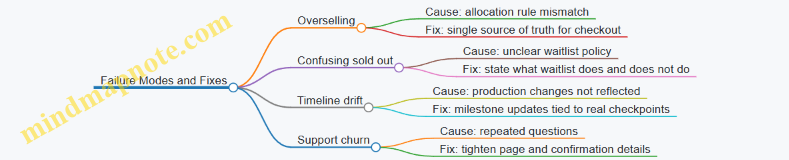
Mini Case Walkthrough: A Complete Drop in One Batch
A studio runs a drop for 180 mugs. The drop page states the batch size and shipping window. Checkout allocates exactly 180 units; the rest go to a waitlist. Customers receive confirmation, then a production start update on 2026-02-20, then ship notices during 2026-03-10 to 2026-03-25. When the batch sells out, the sold-out page immediately explains waitlist behavior. The result is not just fewer complaints; it’s fewer misunderstandings, because the constraint was visible from the start.
10.4 Case Study Pattern For Backorder With Progress Signals
Backorder is the moment where “we’ll send it later” becomes “we’ll send it later, and you’ll know what’s happening.” The goal of this pattern is simple: reduce uncertainty while keeping operational reality intact. You do that by pairing a truthful promise with a progress signal that customers can interpret without needing internal access.
Foundational Setup
Start by defining what “backorder” means in your system. For example, a small maker might treat backorder as “materials are allocated, production is scheduled, and shipping will occur after finishing and inspection.” If you cannot say that, you do not have a backorder process; you have a vague delay.
Next, decide the progress model. Use a small number of stages that map to real work. A common five-stage model looks like: Confirmed, In Production, Quality Check, Packed, Shipped. Each stage must have a measurable trigger in your workflow, such as “work order started,” “inspection completed,” or “label created.”
Finally, set the customer-facing expectation window. Instead of one date, use a range that matches your capacity. For instance, if typical production time is 10–14 business days and inspection adds 2–3, you might communicate “ships in 12–17 business days” while still updating stages as they occur.
Mind Map: Backorder Progress Signals
Backorder with Progress Signals Mind Map
Case Study Pattern: A Concrete Walkthrough
Consider a backorder for handmade ceramic mugs. On 2026-02-20, a customer places an order for 2 mugs. The site shows “Backordered” and a shipping range of “12–17 business days.” The confirmation email includes two things: the stage list and what the next stage will be called.
Stage 1: Confirmed The order is allocated to a work order. The progress signal changes from “Confirmed” to “In Production” when the potter starts the batch. The customer does not need to know the kiln schedule; they only need to know that production has started.
Stage 2: In Production When the work order is marked started, the customer receives an update: “Your mugs are on the production schedule. Next stage is Quality Check.” If production takes longer than usual, the update does not invent a reason. It simply states the stage is still active and repeats the range logic: “We’ll ship within the communicated window.”
Stage 3: Quality Check Quality check is a distinct trigger. The update says what changes at this stage: “We’re inspecting glaze consistency and fit. Next stage is Packed.” This is where customers often relax, because the work becomes concrete.
Stage 4: Packed Packing completion triggers a message that includes a practical detail: “Your order is packed and ready for pickup.” If you can provide a tracking number, include it here; if not, say when tracking will appear.
Stage 5: Shipped The final update is straightforward: “Shipped.” The progress signal locks into completion, and the order page remains accessible for reference.
Progress Signal Rules That Prevent Confusion
- Update on stage transitions, not on time alone. A weekly “still working” message teaches customers to ignore you.
- Never claim a stage is complete unless it is. If inspection is pending, keep the stage as Quality Check.
- Use consistent stage names across channels. The order page and emails should match exactly.
- When exceptions happen, explain the impact, not the blame. If a supplier glaze shipment is late, the update should say the stage is delayed and whether the shipping range changes.
Example: Customer-Facing Copy Snippets
- Confirmed: “Order allocated to production. Next update when production starts.”
- In Production: “Mugs are being made. Next stage is Quality Check.”
- Quality Check: “Inspection in progress. Next stage is Packed.”
- Packed: “Packed and ready for carrier pickup. Tracking will appear shortly.”
- Shipped: “Shipped. Your tracking number is active.”
Mind Map: Exception Handling for Backorders
Exception Handling Mind Map
What Makes This Pattern Work
The pattern succeeds because it treats progress signals as a reflection of operational events, not as a storytelling device. Customers get a stable mental model: stages mean something, updates happen when meaning changes, and the shipping range is tied to capacity rather than optimism.
10.5 Case Study Pattern for Subscription With Controlled Fulfillment Windows
A subscription can still feel “slow” without being confusing. The core pattern is simple: you promise a bounded fulfillment window, you update customers with milestone clarity, and you make the rules for changes and exceptions predictable. The result is fewer surprise emails, more patience that feels earned, and loyalty that doesn’t require constant discounts.
Foundational Setup
Start by defining what “controlled” means in your operation. Pick a fulfillment cadence you can actually run: for example, weekly batching, biweekly production, or monthly assembly. Then define a fulfillment window customers can understand, such as “ships between May 10 and May 17” or “fulfillment starts on May 12; delivery typically follows 3–5 business days.” Use a fixed anchor date for each cycle so customers can mentally track progress.
Example: A small skincare brand runs a “batch-and-bottle” workflow every Monday. Subscribers receive a window like “This cycle ships May 6–May 10.” The brand also states what happens if a batch is delayed: customers get a new window within 24 hours, not a vague “soon.”
Subscription Offer Design
Controlled windows work best when the subscription is structured around cycles rather than continuous fulfillment. Offer a “cycle-based” subscription: customers choose a start cycle, and each cycle has a clear cutoff for changes.
Include three explicit rules:
- Change cutoff: “Edits to address or preferences must be made by 5:00 PM local time on cycle day -2.”
- What is included: “Each cycle includes one refill kit; add-ons are separate.”
- What is not guaranteed: “We do not guarantee same-day shipping for add-ons.”
These rules reduce the number of support tickets that are really about expectation mismatch.
Customer Journey with Milestones
Design the journey as a sequence of expectation updates. Each update should answer one question customers are likely to ask.
- Signup confirmation: “You’re in the May 6 cycle. Your first fulfillment window is May 6–May 10.”
- Pre-cutoff reminder: “Your preferences lock on May 4 at 5:00 PM. After that, we can’t swap items for this cycle.”
- Production milestone: “Bottling started May 6. Next update when packing begins.”
- Packing milestone: “Packing started May 8. Shipping window remains May 6–May 10.”
- Dispatch confirmation: “Shipped May 9. Tracking is live.”
Example: A coffee roaster uses milestone updates tied to roasting and packing. Customers stop asking “is it coming?” because the updates show where the order is in the process.
Mind Map: Subscription Fulfillment Window Pattern
Advanced Details That Prevent Breakage
1) Window accuracy without overprecision Choose windows that reflect your actual variance. If you know shipments can land anywhere within a 3-day range, don’t promise a 1-day window. Customers interpret tighter windows as a promise to control randomness.
2) Exception handling that is rule-based Define what triggers a window update. For instance: if packing hasn’t started by cycle day +1, send a new window within 24 hours. If an item is out of spec, offer a substitution only if it’s within your stated substitution policy; otherwise, pause fulfillment for that cycle.
3) Allocation rules for limited capacity If you cap subscribers per cycle, publish the cutoff logic internally and reflect it externally. Example: “If a cycle reaches capacity, new subscribers start next cycle.” This avoids the “you’re subscribed but you’re waiting” confusion.
Example: A Complete Cycle Script
Use consistent language across email, app, and support.
- Signup: “You’re scheduled for the May 6 cycle. Your fulfillment window is May 6–May 10.”
- Reminder: “Preferences lock May 4 at 5:00 PM. Changes after that apply to the next cycle.”
- Production: “Bottling started May 6. Next update when packing begins.”
- Packing: “Packing started May 8. Shipping is expected within May 6–May 10.”
- Dispatch: “Shipped May 9. Tracking is available.”
Diagram: Milestone-to-Message Mapping
    flowchart TD
  A[Cycle Start Anchor] --> B[Signup Confirmation]
  B --> C[Pre-Cutoff Reminder]
  C --> D[Production Milestone]
  D --> E[Packing Milestone]
  E --> F[Dispatch Confirmation]
  D --> G{Exception Trigger?}
  G -->|No| E
  G -->|Yes| H[Send Updated Window Within 24h]
  H --> E
Measurement and Iteration
Track three numbers per cycle: (1) how often the promised window matches the actual ship date, (2) support tickets per 100 subscribers asking about “status,” and (3) the rate of address-change failures due to cutoff timing. When these improve, it’s not because customers suddenly became more patient; it’s because the system stopped creating avoidable uncertainty.
This pattern scales because it treats time as a product feature. Customers don’t just receive goods; they receive a schedule they can rely on, with updates that match the real state of work.
11. Risk Management and Ethical Standards for Waiting and Scarcity
11.1 Identifying Failure Modes in Timeline and Messaging
Slow commerce and expectation design fail in predictable ways: the timeline is unclear, the message is inconsistent, or the operation can’t match the promise. The goal of this section is to help you spot those failure modes early, then design checks that catch them before customers do.
Core Failure Modes
Start with two foundations: (1) customers interpret timelines as commitments, and (2) messages are part of the product experience. When either foundation breaks, loyalty takes a hit.
-
Ambiguous timelines
- Symptom: “Ships soon,” “In a few weeks,” or “We’re working on it.”
- Why it fails: customers convert vague language into personal schedules, then feel misled when reality differs.
- Easy example: a preorder page says “early June,” but the email says “mid June.” The customer now has two competing anchors.
-
Overpromising with no recovery path
- Symptom: a single date is stated, but internal capacity is variable.
- Why it fails: delays become a trust issue rather than a logistics issue.
- Easy example: “Guaranteed delivery by June 10” with no mention of what happens if production runs long.
-
Milestones that don’t map to work
- Symptom: updates reference steps that aren’t real or aren’t visible internally.
- Why it fails: customers notice when updates repeat or stall.
- Easy example: “Crafting in progress” every week, but no milestone changes for a month.
-
Inconsistent messaging across channels
- Symptom: website says one thing, email says another, support says a third.
- Why it fails: customers treat inconsistency as evidence that nobody owns the truth.
- Easy example: tracking email says “label created,” while support claims “packed and ready.”
-
Silent failure during exceptions
- Symptom: delays happen, but customers only hear about them after they ask.
- Why it fails: silence removes the customer’s ability to plan and increases perceived unfairness.
- Easy example: a batch is held for quality, but the customer hears nothing until the ship date passes.
-
Scarcity language that contradicts capacity
- Symptom: “limited spots” while orders keep stacking with no clear rules.
- Why it fails: scarcity becomes a story with no operational backing.
- Easy example: “Only 50 made” while the order system keeps accepting new customers without a cutoff explanation.
A Systematic Triage Method
Use a simple workflow: detect, classify, trace, and fix.
-
Detect
- Review the customer-facing timeline text, every automated email, and support macros.
- Pull a sample of orders where delivery slipped and list every message the customer received.
-
Classify
- For each failure, tag it as one of the core modes above.
- Add a second tag: is the problem primarily communication (what was said) or execution (what was possible)? Most failures are a mix, but one dominates.
-
Trace
- Identify the source of truth: production schedule, fulfillment system, or manual spreadsheet.
- If multiple sources exist, note where they diverge. Divergence is often the real failure mode.
-
Fix
- Communication fixes: replace vague phrases with ranges, align milestone names to real steps, and ensure every channel uses the same timeline logic.
- Execution fixes: adjust capacity rules, add quality checkpoints that trigger proactive updates, and define when you switch from “expected” to “revised.”
Mind Map: Timeline and Messaging Failure Modes
Concrete Example: One Week of Confusion
Imagine a made-to-order product with a promised “June 12 shipment.” On June 5, the customer receives an email: “We’re finishing your piece this week.” On June 12, the tracking email says “label created,” but the support script still references “shipping by June 12.” On June 18, a new email says “shipping soon,” with no revised range.
Classify the failures: ambiguous recovery (overpromising without a path), milestone mismatch (finishing doesn’t translate to a measurable step), and inconsistent messaging (support and tracking disagree). The fix is not just a better apology; it’s a timeline policy: define a measurable milestone like “ready for packing,” update the customer when that milestone is reached, and when it isn’t, send a revised range with a clear reason category such as “quality hold” or “rework.”
Practical Checks Before Launch
- Single Source of Timeline Logic: one rule set generates the date range and milestone labels.
- Milestone Definitions: every milestone has a measurable internal trigger.
- Exception Playbook: for each delay category, specify the next message timing and the exact wording pattern.
- Channel Consistency Test: verify website, email, and support scripts using the same order state inputs.
These checks turn failure modes into testable conditions. When something goes wrong, you’re not improvising; you’re following a plan that already accounts for reality.
11.2 Preventing Overpromising and Underinforming
Overpromising happens when the business promise is tighter than the operational reality. Underinforming happens when the customer receives enough information to buy, but not enough information to feel safe during the wait. Together, they create a predictable outcome: customers either feel misled or feel abandoned. The goal is simple—make promises that you can keep, and communicate in a way that helps customers understand what “kept” will look like.
The Promise Reality Check
Start by separating three layers that often get blended into one sentence.
- What you can do: capacity, lead times, staffing, supplier reliability, and quality checks.
- What you will do: the specific commitments you intend to meet for each order.
- What you say you will do: the customer-facing wording, dates, and expectations.
A common failure mode is treating layer 3 as a marketing decision rather than a translation of layers 1 and 2. If your production process has variability, your customer-facing promise must reflect it. For example, if “ready in 10 business days” depends on a supplier that sometimes slips by 3 days, then “10 business days” is not a promise—it’s a gamble.
Overpromising: How It Shows Up
Overpromising usually appears in four places.
- Tight dates: “Ships by Friday” when you don’t control all upstream steps.
- Unbounded scope: “We’ll customize it” without stating what customization means or what can’t be done.
- Missing constraints: “Limited edition” without clarifying allocation rules or what happens when demand exceeds capacity.
- Quality guarantees without process: “Perfect every time” when rework is part of your workflow.
A practical rule: if a promise depends on a variable you cannot measure weekly, you should not present it as a fixed point in time. Present it as a range with milestones, or present the milestone itself (for example, “pattern approved” or “first coat complete”) rather than the final ship date.
Underinforming: What Customers Actually Need
Customers don’t need every internal detail. They need three kinds of clarity.
- Timing clarity: when they should expect progress and what “progress” means.
- Decision clarity: what choices they have if something changes (refund, swap, pause, or accept a revised date).
- Responsibility clarity: who does what, and what triggers communication.
Underinforming often happens when teams send only generic status updates like “processing” or “in production.” Those words don’t answer the customer’s real question: “Is my order still on track, and if not, what happens next?”
The Communication Contract
Treat customer messaging as a contract with explicit terms. The contract should include:
- A baseline promise: the best-case and the standard timeline, stated consistently.
- A progress cadence: how often you update, and what each update will contain.
- A change threshold: the point at which you proactively notify customers (for example, when a delay exceeds a defined number of business days).
- A resolution menu: the options you offer when reality diverges from the baseline.
This contract prevents both failure modes. Overpromising is reduced because the baseline is derived from operations. Underinforming is reduced because the cadence and thresholds ensure customers hear from you before uncertainty turns into suspicion.
Mind Map: Failure Modes and Fixes
Example: A Timeline Promise That Doesn’t Lie
Bad promise: “Your item will ship in 10 days.”
Better promise: “We expect your item to ship in 10–14 business days. You’ll receive updates at three milestones: materials confirmed, first production stage complete, and final inspection. If we expect a delay beyond 14 business days, we’ll notify you and offer a revised ship date or a refund.”
Notice what changed. The promise now matches operational variability. The customer also gets a progress cadence and a decision path, so the wait feels structured rather than mysterious.
Example: Handling a Customization Request
If a customer asks for a customization that your team can do only sometimes, don’t hide that uncertainty behind a “yes” that later becomes a “we can’t.” Instead, respond with a bounded commitment.
- Good: “We can add engraving up to 20 characters. Longer text requires a different layout and may extend production by 2–3 business days.”
- Bad: “Sure, we’ll do it,” followed by silence until the customer asks again.
This approach prevents overpromising by defining the boundary, and prevents underinforming by stating the impact on timing.
Operational Guardrails That Make Promises Hold
To keep the contract real, align internal workflows with customer messaging.
- Single source of truth: one timeline system that customer support can reference.
- Milestone definitions: each milestone must correspond to an actual workflow step.
- Escalation triggers: delays beyond the change threshold automatically queue a proactive message.
- Training on “what to say when”: support scripts should include the resolution menu, not just apologies.
When these guardrails exist, teams spend less time improvising and more time communicating accurately. Customers get fewer surprises, and the business gets fewer disputes that start with the same sentence: “I didn’t know.”
11.3 Consent and Clarity for Customer Choices and Tradeoffs
Consent and clarity are what turn “waiting” into a fair deal. Customers tolerate delays when they understand what they’re choosing, what they’re giving up, and how the company will behave if reality changes. The goal is not to make every choice feel comfortable; it’s to make every choice feel informed.
Foundational Principle: Make Tradeoffs Explicit
A tradeoff is a pair of truths: one benefit and one cost. In slow commerce, the benefit is often craft quality or limited capacity. The cost is time, uncertainty, or both. If the cost is hidden, the customer experiences the delay as a surprise rather than a decision.
Example: A made-to-order mug page says, “Ships in 2–3 weeks.” That’s a promise without context. A clearer version states, “Ships in 2–3 weeks because each mug is glazed after you order. If your order needs rework, we’ll notify you within 24 hours of discovering the issue.” The second version tells the customer why the timeline exists and what the company will do when it doesn’t.
Consent Mechanism: Offer Choices, Not Just Conditions
Consent improves when customers can choose between options that differ in timeline, price, or certainty. Even if you only offer two paths, the customer should be able to pick the one that matches their constraints.
Example: At checkout, show two options:
- Standard craft: “Estimated 3–5 weeks. Updates at each milestone.”
- Priority slot: “Estimated 2–3 weeks. Limited availability.”
If you cannot offer multiple options, you can still earn consent by making the single option’s tradeoff understandable and by confirming it at a key step.
Example: After the customer selects a product variant, display a short confirmation: “This variant is hand-finished and may take up to 5 weeks. You’ll receive milestone updates and a final ship notification.” Then require a checkbox: “I understand the timeline tradeoff.”
Clarity Mechanism: Use Plain Language with Concrete Triggers
Clarity fails when it relies on vague phrases like “as soon as possible.” Replace them with triggers tied to observable events.
Use triggers like these:
- “When your order enters production.”
- “When quality checks pass.”
- “When your shipment label is created.”
- “When we detect a rework need.”
Example: Instead of “We’ll keep you posted,” write: “You’ll get an email when your order is cast, another when it passes inspection, and a final email when the label is created.” Each message has a job.
Mind Map: Consent and Clarity for Customer Choices and Tradeoffs
Consent and Clarity Mind Map
Advanced Details: Handling Exceptions Without Breaking Consent
Consent is tested when something goes wrong. If you only communicate during smooth operations, customers will treat delays as negligence. Instead, define exception behavior in advance.
Example: Publish a “Delay behavior” block in the order summary:
- “If we miss a milestone by more than 48 hours, we’ll send an update explaining the cause category: materials, capacity, or rework.”
- “If rework is required, we’ll share the revised ship estimate and offer a cancellation window before finishing.”
This does two things: it reduces mystery and it gives the customer a meaningful action.
Advanced Details: Make Cancellation and Changes Feel Real
Customers need to know whether they can change their mind. If cancellation is possible, state the timing and what happens to payments. If it’s not possible, explain why in a short, factual way.
Example: “Cancellation is available until production starts. After that, we can only cancel if the item hasn’t entered finishing.” That’s not a legal lecture; it’s a boundary.
Integrated Example: A Complete Choice Flow
A customer selects a hand-finished product.
- Product page states the benefit and cost: “Hand-finished for each order; ships in 3–5 weeks.”
- Checkout offers two options: standard and priority.
- Order summary confirms triggers: “Milestone emails at start, inspection, and label creation.”
- Exception block explains behavior: “If inspection is delayed beyond 48 hours, we’ll categorize the cause and provide a revised estimate.”
- Support script mirrors the same language so the customer hears consistent answers.
When these pieces align, consent doesn’t feel like a checkbox. It feels like the company is respecting the customer’s time and decision-making.
11.4 Compliance Considerations for Claims and Disclosures
Slow commerce and expectation design work only if customers can trust what you say. Compliance is the boring part that keeps the interesting part from turning into a support ticket. This section focuses on claims and disclosures tied to timelines, scarcity, and fulfillment.
Foundational Rule: Claims Must Be Testable
A “claim” is any statement a customer could reasonably rely on. In practice, that includes delivery dates, production time ranges, capacity limits, “limited edition” language, and any explanation of why an order is delayed. If you cannot substantiate it with internal records (capacity planning, production schedules, supplier lead times, or historical performance), treat it as a risk.
Start with a simple inventory of your public statements:
- Timeline promises: ship-by dates, delivery windows, and milestone schedules.
- Scarcity statements: limited quantities, one-time drops, waitlists, and “only X available.”
- Process statements: made-to-order, handcrafted, or “each item is produced after you order.”
- Exception handling: what happens if production runs behind.
Then map each statement to a source of truth. If the source is a spreadsheet updated weekly, that’s fine; if it’s a guess, it’s not.
Disclosure Design: Make the Important Parts Hard to Miss
Disclosures are not just legal footnotes. They are the difference between “we explained” and “we misled.” Use plain language and place disclosures where the decision happens.
Key disclosure targets:
- What the timeline means. For example, “production begins after payment clears” is more useful than “processing may take time.”
- What can change. If you provide a range, disclose the reason for variability (e.g., material curing time, batch finishing).
- What the customer can do. If cancellation is allowed until a milestone, say so.
A practical test: if a customer asks support “Is this the earliest possible date or the latest?” your current page likely needs a clearer disclosure.
Scarcity Claims: Avoid Artificial Limits
Scarcity narratives often include numbers. Numbers create expectations and scrutiny. If you say “50 available,” you need a rule for how those 50 are allocated and what happens when demand exceeds capacity.
Use scarcity language that matches operational reality:
- If you can cap orders, disclose the cap and allocation method.
- If you cannot guarantee a fixed count, avoid precise numbers and use ranges with clear rules.
- If you use waitlists, disclose whether waitlist positions are guaranteed or subject to capacity.
Also watch for “limited” paired with ongoing sales. “Limited” implies a finite event; “limited” plus “we restock regularly” can confuse customers and create a compliance problem.
Timeline Claims: Ranges Need Boundaries
Expectation design often uses ranges like “ships in 3–5 weeks.” Ranges are acceptable, but they must be meaningful. A range that is too wide or too optimistic undermines both trust and compliance.
Set boundaries using internal constraints:
- Define the start point (order confirmation, payment, design approval).
- Define the end point (label created, shipped, delivered).
- Define the variability driver (batch size, curing, inspection).
If you provide milestone updates, ensure each milestone corresponds to a real production step. “We’re working on it” is not a milestone; “pattern cutting completed” is.
Example: Compliant Timeline and Scarcity Copy
Example: Product Page Timeline
- “Production starts after payment clears. Typical ship time is 3–5 weeks. If we miss the 5-week window, we will email you with the updated date and offer cancellation before shipment.”
Example: Scarcity Allocation
- “This drop is limited to 120 units. Orders are allocated on a first-come basis. If capacity is reached, additional orders are placed on a waitlist with an estimated fulfillment window of 6–8 weeks.”
These examples avoid vague promises and specify what the customer can expect and what you will do when reality shifts.
Mind Map: Claims and Disclosures Compliance
Operational Controls: Keep Marketing, Support, and Ops Aligned
Compliance fails when different teams tell different stories. To prevent that, align your public copy with internal workflows.
Minimum controls that reduce risk:
- A single “timeline definition” document that states start and end points.
- A “scarcity allocation” rule that support can explain without improvising.
- A review checklist before publishing: confirm numbers, confirm dates/ranges, confirm cancellation terms.
Finally, ensure customer support scripts match the page. If the page says “typical,” support should not promise “guaranteed.” If the page says “range,” support should not quote a single date.
Example: Support Response That Stays Compliant
If a customer asks, “When will it arrive?” your response should:
- Restate the defined timeline range.
- Reference the milestone status you can verify.
- Offer the documented option if the window is missed.
That keeps the conversation factual, consistent, and grounded in what you already disclosed.
11.5 Recovery Procedures for Broken Expectations
Broken expectations happen when reality diverges from what customers were told. Recovery procedures are the system that turns that divergence into a clear, fair outcome. The goal is not to “make it up” with extra perks; it is to restore trust by correcting the facts, reducing uncertainty, and offering a choice that matches the customer’s original intent.
Foundations of Recovery
Start with three principles. First, acknowledge the gap between the promised timeline and the actual state. Second, provide a concrete next step with an estimated time window that you can defend internally. Third, offer an option that respects the customer’s decision point, such as waiting, switching, or receiving a refund.
A practical way to operationalize this is to define “expectation states.” For example: on track, at risk, delayed, and blocked. Each state has a required message template and a required action. When teams use the same state language, customers receive consistent updates even when different people handle the case.
Mind Map: Recovery Workflow
Step by Step Recovery Playbook
Detect and Classify the Break
Use internal signals before customers complain. A missed milestone in your production system is a trigger; a “delivered” status that later proves false is also a trigger. Classify the break by expectation type: timeline, quantity, quality, or service. Then classify severity by customer impact, not by how inconvenient it is for your team.
Example: A made-to-order item was promised to ship by May 12, but the batch is stuck at a quality checkpoint. This is a timeline break with a quality-adjacent cause, so the recovery message should include both the corrected timeline and what quality gate is being re-run.
Send the First Recovery Message Within One Business Day
The first message should be short and specific. It should include what changed, what you are doing next, and the time window for the next milestone. If you do not know the exact date, say so and provide a range tied to a process step.
Example message structure:
- “We said it would ship by X. It will ship after Y because the finishing step needs rework.”
- “Next update: when the item passes the finishing checkpoint, expected between A and B.”
- “Your options: wait for the next milestone, switch to a different variant, or request a refund.”
Offer Choices That Match the Original Intent
Customers usually buy for a reason: a gift date, a project deadline, or a personal preference. Your options should map to those reasons.
Common option set:
- Wait with scheduled milestone updates.
- Switch to an in-stock or alternate variant.
- Receive a refund if the delay breaks the customer’s use case.
- Receive a credit when you can’t refund but can reduce future cost.
Example: If a customer ordered a custom color for a wedding on June 3, a credit may not solve the problem. A refund or a swap to a ready-to-ship option is more aligned with their intent.
Fix the Root Cause Internally, Not Just the Message
Recovery fails when teams communicate well but do not correct the operational issue. Assign an owner to the case and a separate owner to the process fix. The process fix might be updating capacity allocation rules, tightening quality checks, or correcting a dependency that repeatedly causes late rework.
Example: If delays repeatedly come from a supplier lead time that was underestimated, adjust your timeline ranges and update the rules that generate customer-facing dates.
Close the Loop with Confirmation
After resolution, confirm the outcome in writing: what will happen next, when it will happen, and what the customer should expect. Closure also includes recording the root cause category so future cases can be handled faster.
Advanced Details That Prevent Repeat Breaks
Use “Time Windows” With Process Anchors
A time window is only trustworthy when it is tied to a process step. “Between June 10 and June 14 after finishing passes” is more defensible than “sometime next week.”
Keep a Fairness Rule for Compensation
Define compensation rules based on severity and expectation type. For example, a minor slip might trigger an apology and a credit, while a quality nonconformance might trigger a refund or replacement. The rule should be consistent so customers do not feel like they are negotiating.
Document the Customer’s Decision
When a customer chooses to wait, record that choice and schedule the next update automatically. When they choose a refund or swap, confirm the action and the timeline for completion.
Example Recovery Scenario
On April 18, a customer ordered a small-batch product with a promised ship date of April 30. On April 29, the production system flags a failed batch at the final inspection.
- Triage: timeline break, quality checkpoint failure.
- First message: sent April 29, acknowledging the missed ship date, stating the re-inspection window of May 1 to May 3, and offering wait, swap, or refund.
- Resolution: customer requests a swap to an in-stock variant on April 30.
- Closure: confirmation sent May 1 with tracking details and a note that the original batch will be reworked for future orders.
This approach keeps the customer informed, gives real options, and ensures the operational cause is addressed so the same break does not repeat.
12. Implementation Toolkit for Teams and Templates
12.1 Building a Slow Commerce Requirements Checklist
A slow commerce requirements checklist is a practical tool for turning “we make things carefully” into specific, testable commitments. The goal is simple: customers should know what to expect, teams should know what to do, and both should have a shared definition of “on time.”
Step 1: Define the Promise You Are Actually Making
Start by writing the promise in one sentence that includes three elements: what the customer receives, when they can expect it, and what might change.
Example promise draft: “Your custom candle ships in 3–5 weeks after we confirm your scent selection; if we need a material substitution, we’ll ask before we proceed.”
Checklist items:
- Product scope: which SKUs, variants, and add-ons are covered
- Timeline scope: processing time vs shipping time
- Change scope: what events can alter the timeline
- Customer action: what the customer must do to start the clock
Step 2: Map Timeline Logic into Customer Language
Slow commerce fails when internal logic is hidden behind vague status updates. Convert your internal steps into customer-visible milestones.
Checklist items:
- Milestone list: confirmation, production start, mid-check, completion, handoff
- Milestone frequency: how often updates occur and what triggers an update
- Timeline format: ranges customers can interpret (for example, “3–5 weeks”)
- Cutoff rules: what happens if a customer changes details
Example milestone copy rules:
- Use “after” language for dependencies: “After your selection is confirmed, we begin production.”
- Avoid “in progress” without context: replace with “We’re at the wax curing stage.”
Step 3: Specify Capacity, Limits, and Allocation Rules
If you can’t explain your capacity, you can’t explain your scarcity. The checklist should include the operational math behind the promise.
Checklist items:
- Capacity unit: per week, per batch, per maker, or per workshop
- Allocation method: first-come, reservation slots, or priority tiers
- Limit definition: what “limited” means numerically
- Overbooking policy: whether you cap orders or queue them
Example allocation rule:
- “We accept 40 orders per batch. Orders above the cap are queued for the next batch and receive a new timeline at checkout.”
Step 4: Build Communication Requirements for Every State
Customers experience your process as states. Your checklist should define the required message for each state.
Checklist items:
- State list: awaiting selection, production, awaiting materials, quality review, shipped, delayed
- Message requirements: what must be included (timeline, next step, expected effort from customer)
- Tone constraints: clear, factual, no blame language
- Escalation path: who approves exceptions and how fast
Example state message template:
- “We’re waiting on a material delivery. We expect to resume production on May 18, and we’ll send an update within 24 hours of receipt.”
Step 5: Define Quality Checkpoints and What “Done” Means
A timeline without a quality definition turns “slow” into “uncertain.” Specify the acceptance criteria that determine completion.
Checklist items:
- Quality checkpoints: before finishing, before packaging, before handoff
- Evidence standard: what you verify (dimensions, burn time, finish consistency)
- Rework rule: when you remake vs repair
- Customer-visible outcome: what they receive when rework happens
Example done definition:
- “A candle is ‘done’ when the label is applied, the burn test passes internal criteria, and packaging is sealed.”
Step 6: Add Ethical Guardrails for Scarcity Narratives
Scarcity should describe constraints, not create false urgency. Your checklist should prevent accidental manipulation.
Checklist items:
- Scarcity source: capacity limit, batch size, or material availability
- Prohibited claims: anything implying guaranteed scarcity without a real constraint
- Transparency rule: what you disclose when constraints change
- Refund or cancellation clarity: how customers can opt out
Step 7: Create a Test Plan That Proves the Checklist Works
A checklist is only useful if it can be tested. Define scenarios and acceptance criteria.
Checklist items:
- Scenario set: normal flow, delayed materials, customer changes selection, capacity cap reached
- Acceptance criteria: update sent within X hours, timeline updated within Y days, support script matches reality
- Owner assignment: who checks each requirement
Mind Map: Slow Commerce Requirements Checklist
Example: Checklist Output for a Made-To-Order Product
- Promise: ships in 3–5 weeks after selection confirmation
- Milestones: confirmation, production start, mid-check, completion, handoff
- Capacity: 30 units per batch; orders above cap queue for next batch
- States: awaiting selection, production, awaiting materials, quality review, shipped, delayed
- Quality: completion requires final inspection and sealed packaging
- Scarcity: “limited” means batch size; no claims about future availability beyond the batch
- Tests: run normal flow, materials delay, selection change, and cap reached scenarios
This checklist structure keeps the promise consistent from checkout to support, so customers experience clarity rather than guesswork.
12.2 Timeline and Milestone Copy Templates for Teams
Teams usually fail at timeline copy for one of three reasons: they promise something they can’t operationalize, they update too late to be useful, or they write messages that sound like they were generated from a single generic status label. This section gives a practical template system that keeps promises consistent, makes progress visible, and reduces support load.
Core Principles for Timeline Copy
Start with three rules that apply to every product type.
- Promise the next concrete thing. A timeline message should answer: “What happens next, and when will you hear about it?”
- Use ranges, not fake precision. If you can’t guarantee a day, say a window and explain what determines movement.
- Separate progress from blame. Even when something slips, the message should describe the cause category (capacity, rework, supplier) without assigning fault to the customer.
A simple internal test: if a customer could screenshot the message and still understand what to expect, you’re doing it right.
Timeline Copy Template Set
Use the same template structure across email, SMS, and account notifications so customers learn the pattern.
Template 1: Order Confirmation with Timeline Snapshot
Subject/Title: Your timeline for [Product Name]
Body:
- What you ordered: [Product Name] and key options
- When you’ll start: [Start Window]
- What “in progress” means: [Milestone definition]
- First update trigger: “We’ll message you when [Milestone 1] is complete.”
- One expectation boundary: “If we need rework, we’ll explain what changed and share the updated window.”
Example: “Your [Product Name] starts production between May 20 and May 27. ‘In progress’ means we’re finishing materials and beginning assembly. We’ll send your next update when your first quality check is complete. If rework is needed, we’ll explain the reason category and share a revised window.”
Template 2: Milestone Update with Proof of Work
Subject/Title: Milestone reached for [Product Name]
Body:
- Milestone achieved: [Milestone 1] (what it includes)
- What’s next: [Milestone 2] and its start window
- What you can do now: “No action needed.” or “Confirm engraving text by [date window].”
- When the next message arrives: [Next update trigger]
Example: “Milestone reached: your [Product Name] passed the first quality check, including fit and finish review. Next we’ll move into final assembly starting between May 30 and June 3. No action is needed. We’ll message you when final assembly is complete and packing begins.”
Template 3: Capacity or Supplier Delay Notice
Subject/Title: Timeline update for [Product Name]
Body:
- Acknowledge the change without overexplaining
- What changed in category terms: capacity, supplier lead time, or rework
- The updated window and what determines it
- The customer choice, if you offer one: “Keep the order” or “Request a change”
- Next update trigger
Example: “We’re updating your timeline because we’re waiting on a supplier component. Your new window for final assembly is June 8 to June 14. This window depends on the component arriving and passing our incoming inspection. We’ll send another update when it clears inspection.”
Template 4: Shipping Readiness and Dispatch
Subject/Title: Ready to ship [Product Name]
Body:
- Confirm readiness: “Packed and labeled”
- Shipping method and typical transit range
- What tracking means: “Tracking may take 24 hours to activate.”
- Support boundary: “If delivery is delayed beyond [range], contact us.”
Example: “Your [Product Name] is packed and labeled. Tracking will activate within 24 hours. Transit is typically 3 to 6 business days depending on carrier scans. If it hasn’t moved after 2 business days, message us and we’ll check the carrier status.”
Mind Map: Timeline Copy System
Team Workflow for Using Templates
- Define milestones in operational language. “First quality check” should map to a real step with a checklist.
- Assign triggers. Each template should fire when a workflow state changes, not when someone remembers.
- Maintain a vocabulary sheet. If you call it “final assembly” in one channel, don’t call it “finishing” in another.
- Prewrite exception categories. Delay notices should choose from a small set of causes so the message stays accurate.
Example: One Product, Three Milestones
Assume a made-to-order item with these milestones: Materials ready, First quality check, Final assembly complete.
- Confirmation Snapshot: start window + definition of “in progress” + next trigger at First quality check.
- Milestone Update: Materials ready complete + next trigger at First quality check.
- Delay Notice: supplier component category + updated window + next trigger at incoming inspection.
This structure keeps every message tied to a real state change, so customers get useful information instead of a status label.
12.3 Scarcity Narrative Templates for Product and Email
Scarcity narratives work when they explain a real constraint and give customers a clear, fair choice. The goal is not to pressure; it’s to reduce confusion about why delivery takes time and why quantities are limited.
Foundations for Scarcity Copy
Start with three facts you can defend internally: (1) what is limited, (2) why it’s limited, and (3) what the customer can do next. If any of those are fuzzy, the copy will feel like a trick even when you mean well.
Use a simple structure for every scarcity message:
- Constraint: “We make this in small batches.”
- Reason: “Each batch requires X hours of production and QC.”
- Customer impact: “Orders are accepted until the batch is allocated.”
- Next step: “Choose delivery option A or join the waitlist for option B.”
Keep the language concrete. “Limited” is vague; “allocated per batch” is specific.
Mind Map: Scarcity Narrative Components
Product Page Template
Use this block on the product page near price and purchase controls.
Template
- Scarcity line: “This item is produced in small batches.”
- Why: “We pause production between batches to complete finishing and quality checks.”
- Allocation rule: “Orders are accepted until the current batch is allocated.”
- What happens next: “After allocation closes, new orders move to the next batch window.”
- Customer choice: “If you need it sooner, select the in-stock option or choose a different variant.”
Example:
“This item is produced in small batches. Each batch includes hand finishing and a full QC pass, so we pause between runs to keep the standard consistent. Orders are accepted until the current batch is allocated. After allocation closes, new orders move to the next batch window. If you need delivery sooner, choose the in-stock variant.”
Email Templates by Lifecycle
1) Prepurchase Reminder Email
Template
- Subject: “Batch allocation is closing soon”
- Body: Constraint + reason + cutoff + action
Example:
“Hi {{first_name}}, this is a reminder that the current batch allocation closes soon. We produce in small runs to complete finishing and quality checks without shortcuts. If you want this batch, place your order by {{cutoff_time}}. After that, orders move to the next batch window.”
2) Confirmation Email After Purchase
Template
- Thank you line
- What you bought and which batch
- Timeline range and what updates you’ll receive
Example:
“Thanks for your order, {{first_name}}. You’re confirmed for the {{batch_name}} batch. We expect dispatch between {{start_date}} and {{end_date}}. We’ll send one update when production finishes and one when your shipment is on the way.”
3) Sold-Out Email with a Real Alternative
Template
- Acknowledge sold out
- Explain why it sold out (allocation, not magic)
- Offer waitlist or next batch window
- Set expectations for response time
Example:
“Hi {{first_name}}, this batch is fully allocated and sold out. We stop accepting orders once the run is allocated because we complete finishing and QC in batches. You can join the waitlist for the next batch window, or choose an in-stock alternative if timing matters. If you join the waitlist, we’ll email you when the next allocation opens.”
Advanced Details That Prevent Confusion
- Define the cutoff behavior: “Orders accepted until allocation closes” is clearer than “while supplies last.”
- State what the customer can trust: “We’ll send two updates” beats “we’ll keep you posted.”
- Avoid mixed signals: Don’t say “limited” and also show unlimited quantity in the UI.
- Use one reason per message: If you list five constraints, customers can’t tell which one affects them.
Copy Blocks You Can Reuse
- Constraint block: “Produced in small batches with finishing and QC between runs.”
- Allocation block: “Orders are accepted until the current batch is allocated.”
- Timeline block: “Dispatch is expected between {{start_date}} and {{end_date}}.”
- Update block: “You’ll receive updates when production finishes and when your shipment leaves.”
- Alternative block: “If you need sooner delivery, choose the in-stock variant or a different option.”
Practical Mind Map: Fairness Checks
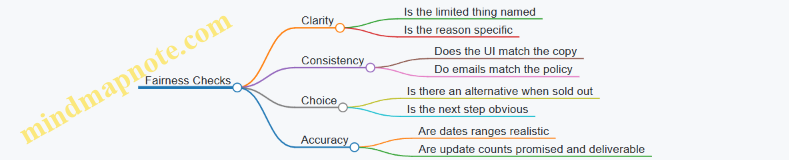
Use these templates as starting points, then swap in your real constraints and your actual fulfillment rules. Scarcity narratives should read like a policy written for a human, not a riddle written for a spreadsheet.
12.4 Training Scripts for Customer Support and Sales
Purpose and Operating Rules
Support and sales are where expectation design becomes real. The goal of training is simple: every conversation should (1) confirm the customer’s understanding, (2) match promises to operational reality, and (3) offer next steps that reduce uncertainty.
Operating rules to teach first:
- Say the timeline in customer terms. Use milestone language, not internal status.
- Explain the tradeoff. If craft takes time, say what quality step benefits.
- Offer a choice with consequences. “Wait for the next batch” vs “Choose an alternative available sooner.”
- Never hide uncertainty. Replace vague “soon” with a range and a rule.
- Close with confirmation. Ask the customer to repeat the plan in their own words.
Mind Map: Conversation Flow for Slow Commerce
Foundational Script Library
Train reps to use short modules they can mix and match. Below are scripts with placeholders.
Opening and Expectation Setup
Sales opening: “Thanks for reaching out. I can help you pick the right option and be clear about timing. Are you aiming for delivery by a specific date, or is the exact date flexible?”
Expectation setup for a preorder: “For this preorder, we start production on [start window] and ship after [milestone]. Most orders arrive within [range]. You’ll get an update when we hit the milestone, not just a generic status message.”
Tradeoff Explanation Without Blame
Support response to “Why so long?” “Time here is used for [quality step]. If we shortened that step, the result would be less consistent. I can also show an alternative that’s available sooner if you need it by [date].”
Choice with Consequences
When the customer has a deadline: “I can offer two paths: (1) wait for the next batch with an estimated arrival of [range], or (2) choose [alternative item] that ships in [time]. Which matters more—getting the exact item, or receiving it by [deadline]?”
Advanced Scenarios That Require Precision
Handling Uncertainty With Rules
Backorder explanation: “For backorders, the timeline depends on [supplier capacity / production slot]. We use a rule: when we receive [trigger], we ship within [processing time]. If the trigger slips, we’ll update you within [communication window] with the new range.”
Recovery When Promises Break
Teach a consistent three-part recovery: acknowledge, update, compensate-or-offer.
Delay recovery script: “I’m sorry—your order is later than the plan we shared. The reason is [brief cause], and the updated shipping window is [new range]. If you’d like, we can [compensation rule] or switch you to [available alternative]. Which option do you prefer?”
Role-Play Exercises with Grading Criteria
Run scenarios where reps must hit specific checkpoints.
Exercise 1: Gift deadline pressure
- Customer asks for delivery by two months ago + 10 days.
- Rep must offer either wait-with-range or alternative-with-sooner-ship.
- Rep must confirm the customer’s priority.
Exercise 2: Confusion about status
- Customer says “It still says processing.”
- Rep must translate internal status into milestone language and provide next update timing.
Exercise 3: Scarcity question
- Customer asks if scarcity is “real.”
- Rep must state capacity truthfully and explain the limit as an operational constraint, not a threat.
Grading criteria:
- Timeline includes a range and a rule.
- Milestones are named and tied to updates.
- The rep offers a choice when deadlines exist.
- The rep confirms understanding before ending.
Sales-to-Support Handover Script
Train reps to document in a consistent format so support can continue without re-asking.
Handover template: “Customer priority: [exact item / deadline / budget]. Order type: [preorder/made-to-order/backorder]. Promised timeline: [range] with milestone updates at [milestones]. Customer choice: [wait/alternative/cancel]. Any risk notes: [gift date, accessibility needs].”
12.5 Launch Readiness Review for Consistent Customer Experience
A launch is consistent when customers experience the same logic at every step: what they were promised, what they actually get, and what happens when reality changes. This review turns that logic into a checklist your team can run without improvising.
Foundation: Define the Promise in One Page
Start by writing a single “promise statement” that includes four items: delivery timeline type (preorder, made to order, small batch, backorder), the latest acceptable delivery date, the update cadence, and the decision rules for exceptions. Example: “Orders ship in 4–6 weeks. Latest ship date is June 28. You’ll get updates every 7 days. If production slips, we’ll either reallocate capacity or offer a refund before the latest ship date.”
Then list the customer-visible artifacts that must match the promise statement: product page copy, checkout estimates, confirmation email, account page status, shipping email, and support macros. If any artifact uses different wording for the same concept, customers will treat it as a new promise.
Mind Map: Launch Readiness Review Flow
Launch Readiness Review Mind Map
Step 1: Verify Timeline Logic End to End
Run a “timeline trace” for three order scenarios: a normal order, an order that hits the low end of the range, and an order that hits the high end. For each scenario, confirm that every system output matches the promise statement.
Concrete checks:
- Checkout estimate matches the timeline type and range.
- Confirmation email includes the same latest acceptable date.
- Account status uses the same milestones and dates.
- Support macros reference the same exception rules.
If your systems can’t produce the latest acceptable date, don’t guess in copy. Fix the data path first.
Step 2: Validate Milestones and Update Cadence
Milestones should be observable and meaningful, not just “processing.” Use a small set of milestones that map to real work: “materials received,” “production started,” “quality check,” “packed,” “label created.”
Example update sequence for a made-to-order item:
- Day 0 confirmation: “Materials scheduled for receipt on May 12.”
- Day 7: “Materials received; production started.”
- Day 14: “Quality check in progress; expected completion May 24.”
- Day 21: “Packed; label created May 26.”
If a milestone can’t be updated reliably, remove it from the customer view. Consistency beats completeness.
Step 3: Test Exception Handling Before It Happens
Create two exception scripts and test them with a real order record.
- Minor slip: production moves by a few days but remains within the latest acceptable date. The message should state the new expected milestone date and confirm the latest acceptable date is unchanged.
- Capacity shortfall: production cannot meet the latest acceptable date. The message must offer the customer a choice aligned with your exception rules, such as refund or reallocation to a later batch.
A good rule: customers should never learn about a policy change from a support agent who has to “interpret” it.
Step 4: Run a Customer Journey Consistency Audit
Use a single test account and complete the journey from product page to postpurchase. Confirm that:
- The product page explains the timeline type and what “scarcity” means operationally (limited capacity, not hidden tricks).
- The confirmation email doesn’t contradict the product page.
- The account status page doesn’t use different milestone names than the email.
- Support macros don’t mention dates that differ from the account status.
Step 5: Define Go/No-Go Criteria and Owners
Set pass criteria that are measurable, not vibes:
- 0 mismatches between promise statement and customer-visible copy.
- Update cadence compliance for at least one full simulated cycle.
- Exception scripts reviewed by operations and support.
- Data fields for latest acceptable date present in every required template.
Assign owners for each category: copy owner, systems owner, operations owner, and support owner. During launch week, one person should be responsible for the risk register updates.
Mind Map: Go/No-Go Decision Inputs
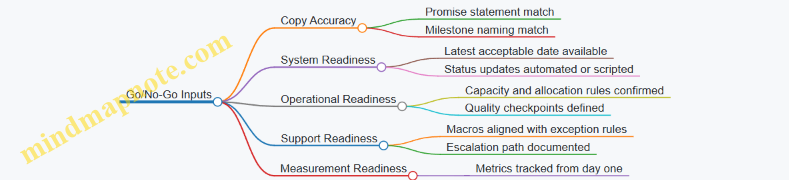
Step 6: Execute the Launch Readiness Review Meeting
Run the meeting with a fixed order: promise statement review, timeline trace results, milestone/update test results, exception script test results, then journey audit findings. End with a single decision: pass, pass with conditions, or no-go.
If you choose “pass with conditions,” list the exact conditions and the date they must be resolved, using a concrete deadline like “by May 15.” Consistency is a system property, not a hope.