Agricultural Drone Systems for Precision Farming
1. Introduction to Agricultural Drone Systems
1.1 Overview of Precision Farming and Its Importance
Precision farming, also known as precision agriculture, refers to the practice of managing crops and farmland by using detailed, site-specific information to optimize inputs such as water, fertilizers, and pesticides. The goal is to increase efficiency, reduce waste, and improve crop yields by tailoring farming practices to the variability within a field rather than applying uniform treatments.
At its core, precision farming recognizes that no two parts of a field are exactly alike. Soil composition, moisture levels, nutrient availability, pest pressure, and crop health can vary significantly even within a few meters. By capturing and analyzing this variability, farmers can make informed decisions that address the specific needs of each area.
Mind Map: Core Elements of Precision Farming
Why Precision Farming Matters
-
Resource Efficiency: Applying inputs only where needed reduces waste and lowers costs. For example, instead of spreading fertilizer evenly across a 100-acre field, a farmer can apply more fertilizer to nutrient-poor zones and less where the soil is already rich.
-
Environmental Impact: Over-application of chemicals can lead to runoff and pollution. Precision farming minimizes this by targeting treatments, reducing the risk to surrounding ecosystems.
-
Yield Improvement: By addressing specific crop stressors and nutrient deficiencies, farmers can improve overall productivity. For instance, identifying areas with pest infestations early allows for targeted treatment before significant damage occurs.
-
Data-Driven Decisions: Instead of relying on intuition or uniform practices, farmers use data to guide their actions, making farming more predictable and manageable.
Example: Variable Rate Fertilizer Application
A corn farmer notices that the western part of his field has sandy soil with low nitrogen content, while the eastern part has clay soil with higher nitrogen levels. Using soil sensors and GPS mapping, he creates a nutrient map of the field. The fertilizer spreader is then programmed to apply 30% more nitrogen in the sandy areas and 20% less in the clay areas. This targeted approach saves money, reduces environmental impact, and results in a more uniform crop growth.
Mind Map: Benefits of Precision Farming
Example: Using Remote Sensing for Crop Health Monitoring
A vegetable grower uses drone imagery equipped with multispectral cameras to monitor crop health. The images reveal a section of the field showing signs of water stress not visible to the naked eye. By adjusting irrigation in that specific area, the grower prevents potential yield loss.
In summary, precision farming is about making farming smarter by using detailed information to manage variability within fields. It helps farmers use resources more efficiently, reduce environmental impact, and improve crop performance. The integration of technologies like drones, sensors, and GPS-guided equipment plays a key role in enabling these practices.
1.2 Role of Drones in Modern Agriculture
Drones have become practical tools in modern agriculture by offering a new vantage point for observing and managing farmland. Their ability to fly over large areas quickly and capture detailed data helps farmers make informed decisions about crop health, irrigation, and pest control.
At the core, drones serve three main roles in agriculture: data collection, targeted intervention, and operational efficiency. Each role supports precision farming by reducing guesswork and focusing resources where they are needed most.
Mind Map: Roles of Drones in Modern Agriculture
Data Collection is the most common use of drones. Equipped with cameras and sensors, drones capture images and data that reveal crop conditions invisible to the naked eye. For example, multispectral cameras can detect variations in plant health by measuring light reflectance, helping identify stressed areas before symptoms appear. This early detection allows farmers to address problems promptly, potentially saving yield.
An example is a wheat farmer using drone imagery to spot nitrogen deficiencies. The drone flies over the field, capturing multispectral images that highlight areas where the crop is underperforming. The farmer then applies fertilizer only where needed, saving costs and reducing environmental impact.
Targeted Intervention involves using drones to apply treatments precisely. Instead of blanket spraying entire fields, drones can deliver pesticides, herbicides, or fertilizers to specific spots identified as problematic. This reduces chemical use and limits exposure to non-target areas.
For instance, a vineyard manager might use a drone to spray fungicide only on sections showing early signs of disease, as detected through thermal imaging. This focused approach minimizes chemical use and preserves beneficial insects.
Operational Efficiency covers tasks that streamline farm management. Drones can create accurate field maps, helping with planning and resource allocation. They also assist in planting by dropping seeds in hard-to-reach areas or monitoring livestock movement and health.
A practical example is a large-scale corn farm using drone-generated maps to plan irrigation zones. The maps reveal elevation changes and soil variability, allowing the farmer to optimize water distribution and reduce waste.
Mind Map: Examples of Drone Applications
In summary, drones provide farmers with detailed, timely information and the ability to act precisely. This combination supports better crop management, reduces input costs, and improves environmental stewardship. The technology fits well into the broader goals of precision farming by making data actionable and interventions more efficient.
1.3 Types of Agricultural Drones and Their Capabilities
Agricultural drones come in various types, each designed to meet specific needs in precision farming. Understanding these types and their capabilities helps farmers and agronomists choose the right tool for the task.
Fixed-Wing Drones
Fixed-wing drones resemble small airplanes with rigid wings. They are known for longer flight times and greater coverage areas compared to other drone types. Their design allows them to glide efficiently, making them suitable for surveying large fields.
-
Capabilities:
- Flight times typically range from 30 minutes to over an hour.
- Can cover several hundred hectares in a single flight.
- Higher speeds enable quick data collection.
- Require a runway or catapult for takeoff and landing.
-
Example: A wheat farm spanning 200 hectares uses a fixed-wing drone to map crop health every two weeks. The drone covers the entire field in one flight, providing multispectral images that help identify stressed areas.
Multirotor Drones
Multirotor drones have multiple rotors (usually 4, 6, or 8) and can hover in place. They are more maneuverable and easier to operate in confined spaces but have shorter flight times than fixed-wing drones.
-
Capabilities:
- Flight times typically between 15 to 30 minutes.
- Excellent for detailed inspections and low-altitude flights.
- Vertical takeoff and landing (VTOL) allow operation without runways.
- Can carry various sensors, including RGB, multispectral, and thermal cameras.
-
Example: A vineyard uses a quadcopter to inspect individual vine rows for disease symptoms. The drone hovers over specific spots, capturing high-resolution images that guide targeted treatment.
Hybrid VTOL Drones
Hybrid drones combine fixed-wing efficiency with multirotor vertical takeoff and landing. They take off and land vertically but transition to fixed-wing flight for longer endurance.
-
Capabilities:
- Flight times between 45 minutes and 90 minutes.
- Cover larger areas than multirotors with the ability to hover when needed.
- More complex mechanically and often more expensive.
-
Example: A large vegetable farm uses a hybrid drone to perform both broad field surveys and close-up inspections of problem areas without changing equipment.
Single-Rotor Helicopter Drones
These drones have one large rotor and a tail rotor, similar to traditional helicopters. They generally have longer flight times and can carry heavier payloads than multirotors.
-
Capabilities:
- Flight times can exceed 30 minutes.
- Capable of carrying heavier sensors or spraying equipment.
- More complex to pilot and maintain.
-
Example: A farm uses a single-rotor drone equipped with a spraying system to apply pesticides precisely over infested zones, reducing chemical use.
Spray Drones
Spray drones are specialized multirotor or single-rotor drones equipped with tanks and nozzles for applying fertilizers, pesticides, or herbicides.
-
Capabilities:
- Payload capacities vary but typically range from 5 to 20 liters.
- Can perform variable rate applications based on drone-collected data.
- Useful for spot treatments and areas difficult to reach with ground equipment.
-
Example: A rice paddy uses a spray drone to apply fungicides only where disease is detected, minimizing chemical runoff.
Sensor Payloads and Their Impact on Capabilities
The type of sensor a drone carries influences its function:
- RGB Cameras: Capture visible light images for general crop monitoring.
- Multispectral Cameras: Capture specific bands like near-infrared to assess plant health.
- Thermal Cameras: Detect temperature variations, useful for irrigation management.
- LiDAR Sensors: Generate detailed 3D maps of terrain and crop structure.
Mind Map: Types of Agricultural Drones and Their Capabilities
Summary
Choosing the right agricultural drone depends on the farm size, crop type, and specific monitoring or application needs. Fixed-wing drones excel in covering large areas quickly, while multirotors provide detailed, close-up data. Hybrid drones offer a balance of both. Spray drones add the capability of precise chemical application. Sensor choice further tailors the drone’s usefulness, making it essential to match drone type and payload to the farming task at hand.
1.4 Regulatory Framework and Compliance for Agricultural Drones
Operating drones in agriculture is not just about flying and collecting data; it requires understanding and following a set of rules designed to ensure safety, privacy, and responsible use. These regulations vary by country but share common themes. Ignoring them can lead to fines, grounded equipment, or worse—accidents.
Key Regulatory Areas
-
Registration and Certification: Most countries require drones above a certain weight to be registered with aviation authorities. Operators may also need certification or licenses to fly, especially for commercial purposes like farming.
-
Flight Restrictions: Regulations often specify where and how high drones can fly. For example, flying near airports, over crowds, or beyond the visual line of sight (BVLOS) typically requires special permissions.
-
Privacy and Data Protection: Capturing images or data over private property can raise privacy concerns. Operators must respect local laws about data collection and sharing.
-
Safety and Operational Limits: Rules may cover maximum altitude, speed, and weather conditions under which drones can operate safely.
-
Insurance and Liability: Some jurisdictions require drone operators to have insurance to cover potential damages.
Mind Map: Regulatory Framework Overview
Registration and Certification
For example, in the United States, drones weighing more than 0.55 pounds (250 grams) must be registered with the FAA. Operators conducting commercial flights, including agricultural monitoring, need a Remote Pilot Certificate under Part 107. This involves passing a knowledge test covering airspace rules, weather, and drone operation.
In practice, a farmer intending to use a drone to monitor crop health must first register the drone and ensure the pilot (whether themselves or a hired operator) holds the appropriate certification. This step prevents legal issues and ensures the operator understands the airspace and safety requirements.
Flight Restrictions
Most countries restrict drone flights near airports, military bases, and densely populated areas. For agriculture, this often means planning flight paths carefully to avoid restricted zones.
For instance, a vineyard located near a small regional airport must file for authorization or adjust flight plans to stay outside controlled airspace. Flying beyond visual line of sight (BVLOS) is generally prohibited without special waivers, which affects how large farms plan drone missions.
Privacy and Data Protection
Capturing images over farmland can inadvertently include neighboring properties or individuals. Operators must be aware of privacy laws that may require obtaining consent before collecting or sharing data.
An example: a drone survey over a mixed-use farm might capture adjacent residential areas. The operator should either crop or anonymize data or secure permission to avoid privacy violations.
Safety and Operational Limits
Regulations often specify maximum altitudes (commonly 400 feet or 120 meters) to prevent conflicts with manned aircraft. Weather conditions such as high winds or poor visibility may restrict flights.
Example: A drone operator planning a flight on a windy day must check local regulations and weather forecasts. If conditions exceed limits, the flight should be postponed to avoid accidents or data loss.
Insurance and Liability
Some regions require drone operators to carry insurance covering potential damage to property or people. This protects both the operator and others in case of accidents.
For example, a commercial drone operator working on a large farm may need liability insurance to cover any damage caused by drone malfunctions or crashes.
Mind Map: Compliance Checklist for Agricultural Drone Operations
Practical Example: Compliance in Action
A mid-sized farm in a country with strict drone laws wants to monitor crop health weekly. The operator registers the drone, obtains certification, and plans flights within allowed altitudes and away from nearby airport zones. They also inform neighboring landowners about data collection to respect privacy. Before each flight, weather conditions are checked, and the drone is inspected for maintenance. Insurance is maintained to cover any incidents. This approach ensures smooth operations without legal or safety issues.
Understanding and following the regulatory framework is as important as the technology itself. It ensures that agricultural drone operations are safe, legal, and respectful of privacy, enabling farmers to benefit from aerial sensing without unintended consequences.
1.5 Best Practices: Selecting the Right Drone for Specific Farming Needs with Case Examples
Selecting the right drone for specific farming needs is a critical step in ensuring that precision agriculture efforts are both effective and efficient. The choice depends on several factors including the type of crops, field size, data requirements, budget, and operator skill level. This section breaks down these considerations with practical examples and mind maps to guide decision-making.
Key Factors in Drone Selection
- Crop Type and Monitoring Goals: Different crops have varying monitoring needs. For example, vineyards require detailed canopy analysis, while cereal crops benefit from broad coverage and multispectral imaging.
- Field Size and Terrain: Larger fields may require drones with longer flight times and higher payload capacities. Hilly or uneven terrain might necessitate drones with advanced stabilization and obstacle avoidance.
- Data Requirements: The type of sensors needed (RGB, multispectral, thermal) depends on the specific data farmers want to collect.
- Budget Constraints: Balancing cost with capabilities is essential; more expensive drones offer advanced features but may not be necessary for all farms.
- Operator Experience: Some drones are more user-friendly and better suited for beginners, while others require advanced piloting skills.
Mind Map: Factors Influencing Drone Selection
Example 1: Small Vineyard Monitoring
Scenario: A 5-hectare vineyard owner wants to monitor vine health and detect early signs of disease.
Considerations:
- Requires multispectral imaging to assess plant vigor.
- Small field size means flight time demands are moderate.
- Operator has intermediate drone experience.
- Budget is moderate.
Recommended Drone Features:
- Multispectral sensor compatibility.
- Flight time of at least 20 minutes.
- Easy-to-use flight planning software.
Example Choice: A quadcopter with integrated multispectral camera, GPS, and user-friendly interface fits well. This allows detailed canopy mapping without excessive complexity or cost.
Example 2: Large Cereal Crop Farm
Scenario: A 200-hectare wheat farm needs rapid coverage for crop health assessment during the growing season.
Considerations:
- Large area requires long flight times or multiple batteries.
- RGB and multispectral imaging needed for NDVI calculations.
- Operator is experienced.
- Budget allows for higher-end equipment.
Recommended Drone Features:
- Fixed-wing or hybrid drone for extended flight duration.
- Payload capacity to carry multispectral sensors.
- Automated flight planning with waypoint navigation.
Example Choice: A fixed-wing drone with interchangeable sensor payloads provides efficient coverage and detailed data collection, reducing the number of flights needed.
Example 3: Smallholder Vegetable Farm
Scenario: A 2-hectare vegetable farm wants to monitor irrigation efficiency and detect pest infestations.
Considerations:
- Thermal imaging for irrigation monitoring.
- RGB camera for pest detection.
- Limited budget.
- Operator is a beginner.
Recommended Drone Features:
- Lightweight quadcopter with modular sensor options.
- Simple controls and pre-set flight paths.
- Affordable price point.
Example Choice: A consumer-grade quadcopter with add-on thermal camera module suits the needs, balancing cost and functionality.
Mind Map: Matching Drone Features to Farming Needs
Practical Tips for Selection
- Start with Objectives: Define what you want to monitor and why. This narrows down sensor and drone type choices.
- Consider Flight Duration vs. Field Size: Longer flights reduce the number of takeoffs and landings, saving time.
- Balance Sensor Quality and Cost: High-end sensors provide better data but may not be necessary for all applications.
- Factor in Maintenance and Support: Choose drones with accessible customer support and spare parts.
- Test Before Buying: Whenever possible, trial a drone to ensure it fits operational needs.
Selecting the right drone is about matching technology to farming realities. By focusing on specific needs and constraints, farmers can avoid overspending and maximize the value of their aerial monitoring efforts.
2. Core Components of Agricultural Drone Systems
2.1 Drone Hardware: Frames, Motors, and Propulsion Systems
Agricultural drones rely on a solid hardware foundation to perform their tasks effectively. The main physical components that determine a drone’s flight characteristics and payload capacity include the frame, motors, and propulsion system. Understanding these components helps in selecting or customizing drones suited for specific farming needs.
Drone Frames
The frame is the structural skeleton of the drone. It holds all other components together and influences durability, weight, and stability.
- Materials: Frames are typically made from carbon fiber, aluminum, or plastic composites. Carbon fiber is lightweight and strong, making it ideal for drones that need to carry heavy sensors or fly longer.
- Designs: Common frame designs include quadcopters (four arms), hexacopters (six arms), and octocopters (eight arms). More arms generally mean better stability and payload capacity but also increased weight and power consumption.
Example: A farmer using a quadcopter frame for quick scouting of small fields benefits from its agility and lower cost. In contrast, a hexacopter frame supports heavier multispectral cameras for detailed crop analysis over larger areas.
Motors
Motors convert electrical energy into mechanical motion, spinning the propellers to generate lift.
- Types: Brushless DC motors are standard in agricultural drones due to their efficiency, reliability, and low maintenance.
- KV Rating: This indicates motor speed per volt. Lower KV motors spin slower but provide more torque, useful for lifting heavy payloads.
- Power and Efficiency: Motors must balance power output with battery life. Overpowered motors drain batteries quickly, while underpowered ones struggle with heavy sensors.
Example: A drone carrying a thermal camera for irrigation monitoring needs motors with sufficient torque to maintain stable flight at a moderate speed, ensuring clear thermal images.
Propulsion Systems
The propulsion system consists of propellers paired with motors to generate thrust.
- Propeller Size and Pitch: Larger propellers move more air and provide greater lift but require more power. Pitch refers to the angle of the blades; higher pitch means more thrust but can reduce efficiency.
- Material: Propellers are usually made from plastic or carbon fiber. Carbon fiber propellers are stiffer and more durable but costlier.
- Number of Propellers: More propellers improve stability and payload capacity but increase complexity and power needs.
Example: For a drone used in pest detection flying at low altitude, smaller propellers with moderate pitch allow for nimble maneuvering and quieter operation, reducing disturbance to wildlife.
Integrated Example
Consider a drone designed for multispectral crop monitoring over medium-sized fields:
- Frame: Hexacopter carbon fiber frame for stability and payload capacity.
- Motors: Brushless DC motors with low KV rating to provide torque for heavier sensors.
- Propellers: Medium-sized carbon fiber propellers with moderate pitch to balance lift and efficiency.
This combination allows the drone to carry multispectral cameras, fly steadily in varying wind conditions, and maintain reasonable flight times.
Summary
Choosing the right frame, motors, and propulsion system depends on the mission requirements: payload weight, flight duration, maneuverability, and environmental conditions. Each component influences the others, so a balanced approach ensures reliable and efficient drone operation in agricultural settings.
2.2 Sensors and Imaging Technologies: RGB, Multispectral, Hyperspectral, and Thermal Cameras
Agricultural drones rely heavily on sensors to collect data that helps farmers make informed decisions. Understanding the types of sensors and imaging technologies available is essential for selecting the right tool for specific farming needs. This section breaks down the four main categories: RGB, multispectral, hyperspectral, and thermal cameras.
RGB Cameras
RGB cameras capture images in the red, green, and blue visible light spectrum—essentially what the human eye sees. These cameras are the most common and affordable option.
- Use Cases: Basic crop scouting, field mapping, and visual inspection.
- Advantages: High resolution, easy to interpret images, and widely supported by software.
- Limitations: Cannot detect subtle plant health issues invisible to the naked eye.
Example: A farmer uses an RGB camera to survey a cornfield after a storm to check for lodged plants or visible damage. The images help identify areas needing manual inspection.
Mind Map: RGB Camera Applications
Multispectral Cameras
Multispectral sensors capture data across several specific bands of light, including visible and near-infrared (NIR). These bands are chosen because plants reflect and absorb light differently depending on their health.
- Use Cases: Vegetation indices calculation (e.g., NDVI), crop health monitoring, detecting water stress.
- Advantages: Provides quantitative data on plant vigor and stress.
- Limitations: More expensive than RGB, requires specialized software for analysis.
Example: A vineyard manager uses a multispectral camera to generate NDVI maps that highlight areas of vine stress, allowing targeted irrigation and fertilization.
Mind Map: Multispectral Camera Features
Hyperspectral Cameras
Hyperspectral sensors capture data in dozens to hundreds of narrow spectral bands, far beyond the visible and NIR ranges. This detailed spectral information allows for precise identification of plant species, diseases, and nutrient deficiencies.
- Use Cases: Disease detection, nutrient analysis, soil composition mapping.
- Advantages: High spectral resolution enables detailed analysis.
- Limitations: High cost, large data volume, complex processing requirements.
Example: A research farm employs a hyperspectral camera to differentiate between healthy and diseased wheat plants by analyzing subtle spectral differences invisible to multispectral sensors.
Mind Map: Hyperspectral Camera Characteristics
Thermal Cameras
Thermal sensors detect infrared radiation emitted by objects, measuring temperature differences. In agriculture, thermal imaging helps monitor plant water stress, irrigation efficiency, and soil moisture.
- Use Cases: Irrigation management, drought stress detection, livestock monitoring.
- Advantages: Provides temperature data not visible in other spectra.
- Limitations: Lower spatial resolution compared to RGB, influenced by environmental conditions.
Example: A vegetable grower uses thermal imaging to identify uneven irrigation zones in a greenhouse, adjusting water delivery to reduce waste and improve crop uniformity.
Mind Map: Thermal Camera Uses
Summary Table of Sensor Types
| Sensor Type | Spectral Range | Primary Use Cases | Advantages | Limitations |
|---|---|---|---|---|
| RGB | Visible (Red, Green, Blue) | Visual inspection, mapping | Affordable, high resolution | Limited plant health detection |
| Multispectral | Visible + Near-Infrared | Vegetation indices, stress detection | Quantitative plant health data | Costlier, needs analysis tools |
| Hyperspectral | Many narrow bands | Disease, nutrient, soil analysis | Detailed spectral info | Expensive, complex data |
| Thermal | Infrared (temperature) | Water stress, irrigation, livestock | Temperature data | Lower resolution, weather sensitive |
Understanding these sensor types helps tailor drone missions to the specific needs of a farm, balancing cost, data detail, and application. Each sensor brings unique insights, and sometimes combining them yields the best results.
2.3 Flight Controllers and Navigation Systems
Flight controllers and navigation systems form the backbone of agricultural drone operations, ensuring stable flight, precise positioning, and reliable data collection. These components coordinate the drone’s movements, interpret sensor inputs, and execute flight plans autonomously or under pilot control.
Flight Controllers: The Drone’s Brain
A flight controller is an onboard computer that manages the drone’s motors, sensors, and communication systems. It processes data from gyroscopes, accelerometers, magnetometers, barometers, and GPS modules to maintain stability and control.
Key functions of flight controllers include:
- Stabilizing the drone during flight by adjusting motor speeds.
- Interpreting pilot commands or autonomous mission plans.
- Managing sensor data for navigation and obstacle avoidance.
Common flight controller architectures use microcontrollers or embedded processors running real-time operating systems. Popular examples include Pixhawk, DJI A3, and Cube Orange.
Example: Pixhawk in Crop Monitoring
A farmer uses a Pixhawk-based drone to fly over a cornfield. The flight controller stabilizes the drone in windy conditions, ensuring the multispectral camera captures clear images without blur. The controller follows a pre-programmed flight path, maintaining altitude and speed for consistent data quality.
Navigation Systems: Finding the Way
Navigation systems provide the drone with positional awareness and guidance. They typically combine:
- Global Navigation Satellite Systems (GNSS): GPS, GLONASS, Galileo, or BeiDou for global positioning.
- Inertial Measurement Units (IMUs): Measure acceleration and rotation to estimate movement between GPS fixes.
- Barometers: Measure altitude based on atmospheric pressure.
- Magnetometers: Provide heading information relative to Earth’s magnetic field.
In precision farming, accurate navigation is crucial to cover fields systematically and avoid missing areas or overlapping excessively.
Real-Time Kinematic (RTK) and Post-Processed Kinematic (PPK) Systems
RTK and PPK enhance GPS accuracy from a few meters to centimeters by using correction signals from a base station.
- RTK: Provides real-time corrections during flight.
- PPK: Applies corrections after flight during data processing.
Example: RTK for Vineyard Mapping
A drone equipped with RTK flies over a vineyard, capturing georeferenced images with centimeter-level accuracy. This precision allows the farmer to identify individual vines needing attention without ground markers.
Mind Map: Flight Controller Components
Mind Map: Navigation System Elements
Integration of Flight Controllers and Navigation Systems
The flight controller continuously fuses data from navigation sensors to maintain stable flight and follow mission plans. Sensor fusion algorithms, such as Kalman filters, combine noisy inputs into reliable estimates of position, velocity, and orientation.
Example: Autonomous Flight in a Wheat Field
A drone uses GPS and IMU data processed by the flight controller to fly a grid pattern over a wheat field. The controller adjusts motor speeds to counteract wind gusts and maintain altitude, ensuring even coverage for crop health analysis.
Practical Considerations
- Redundancy: Some agricultural drones include dual GPS modules or backup sensors to improve reliability.
- Calibration: Magnetometers and IMUs require regular calibration to avoid drift and errors.
- Latency: Flight controllers must process sensor data quickly to respond to environmental changes.
Mind Map: Flight Controller Functions
Summary
Flight controllers and navigation systems work together to keep agricultural drones stable, on course, and efficient. Understanding their components and how they interact helps operators choose the right equipment and optimize drone flights for precision farming tasks.
2.4 Data Transmission and Storage Solutions
In agricultural drone systems, the data collected during flight—images, sensor readings, GPS coordinates—must be reliably transmitted and stored for later analysis. This section covers the common methods and technologies used to move data from the drone to storage systems, as well as best practices to ensure data integrity and accessibility.
Data Transmission Methods
Data transmission can happen in real-time during flight or post-flight after the drone lands. The choice depends on the mission requirements, data volume, and available infrastructure.
-
Real-Time Transmission (Telemetry and Streaming):
- Uses radio frequency (RF) links, Wi-Fi, or cellular networks.
- Enables immediate monitoring of drone status and sometimes live video feeds.
- Limited by range and bandwidth; large datasets like multispectral images often exceed real-time capabilities.
-
Post-Flight Data Transfer:
- Data is stored onboard during flight, then transferred via USB, SD card, or wireless connection after landing.
- Allows for high-resolution data without transmission bottlenecks.
- Requires physical access or short-range wireless transfer.
Mind Map: Data Transmission Methods
Communication Technologies
-
Radio Frequency (RF) Links:
- Most common for telemetry.
- Frequencies like 2.4 GHz and 5.8 GHz are typical.
- Pros: Low latency, reliable for control signals.
- Cons: Limited bandwidth for large data.
-
Wi-Fi:
- Used for short-range, high-bandwidth transfers.
- Convenient for transferring data when drone is near a base station.
- Can be affected by interference and range limitations.
-
Cellular Networks (4G/5G):
- Useful for real-time data transmission over long distances.
- Depends on network coverage in rural or remote farmland.
- Data costs and latency can be factors.
Example:
A vineyard drone equipped with multispectral sensors collects large image files. During flight, telemetry data is sent via RF to the operator. After landing, the operator connects the drone via USB to download the full dataset for detailed analysis.
Data Storage Options
-
Onboard Storage:
- Typically SD cards or solid-state drives (SSD).
- Must be high-capacity and fast to handle large image files.
- Important to use industrial-grade cards to withstand vibration and temperature.
-
Local Storage:
- Data transferred to laptops or field computers.
- Enables immediate backup and preliminary analysis.
-
Cloud Storage:
- Data uploaded to remote servers for long-term storage and sharing.
- Requires reliable internet connection.
- Facilitates collaboration and integration with farm management software.
Mind Map: Data Storage Solutions
Best Practices for Data Transmission and Storage
-
Redundancy: Always keep multiple copies of data. For example, after transferring data from the drone’s SD card to a laptop, back it up to an external drive or cloud storage.
-
Data Integrity Checks: Use checksums or hash functions to verify data has not been corrupted during transfer.
-
Organized File Naming: Implement a consistent naming convention that includes date, field ID, and sensor type to avoid confusion.
-
Secure Transmission: When using wireless or cellular networks, encrypt data to protect sensitive farm information.
-
Capacity Planning: Match storage capacity with expected data volume. Multispectral and hyperspectral imaging generate large files; plan accordingly.
Example:
A vegetable farm drone operator labels each flight’s data folder with the date and field section (e.g., “2024-05-10_FieldA_Multispectral”). After flight, data is copied to a laptop and then uploaded to a cloud platform with encryption enabled. A checksum is run to confirm data integrity.
Summary Mind Map: Data Transmission and Storage
This section highlights the importance of selecting the right transmission and storage methods based on the drone mission and data type. Reliable data handling ensures that the valuable information collected by agricultural drones can be effectively used to improve farming decisions.
2.5 Best Practices: Integrating Sensors for Optimal Crop Monitoring with Practical Examples
Integrating sensors effectively is key to getting reliable, actionable data from agricultural drones. Different sensors capture different aspects of crop health and field conditions, so combining them thoughtfully can provide a fuller picture. Here’s how to approach sensor integration for optimal crop monitoring, with practical examples and mind maps to clarify the process.
Understanding Sensor Roles
Before integration, it helps to categorize sensors by their function:
- Visual Sensors (RGB cameras): Capture true-color images, useful for general crop inspection and mapping.
- Multispectral Sensors: Capture specific bands beyond visible light, like near-infrared, to assess plant health.
- Thermal Sensors: Detect temperature variations, useful for irrigation management and stress detection.
- LiDAR Sensors: Provide 3D structural data, helping with terrain mapping and biomass estimation.
Mind Map: Sensor Types and Their Uses
Step 1: Define Monitoring Goals
Choose sensors based on what you want to monitor. For example, if the goal is to detect water stress, thermal sensors combined with multispectral imaging work well. For weed detection, high-resolution RGB combined with multispectral can differentiate crops from weeds.
Step 2: Consider Sensor Compatibility
Not all sensors fit every drone or mission. Weight, power consumption, and data output formats matter. For instance, a heavy LiDAR unit might reduce flight time, so balance sensor benefits against operational constraints.
Step 3: Synchronize Data Collection
Sensors should capture data simultaneously or in a way that allows easy alignment during processing. For example, mounting multispectral and RGB cameras on the same drone ensures images cover the same area, simplifying analysis.
Mind Map: Integration Workflow
Practical Example 1: Monitoring Corn Crop Health
A farm wants to monitor corn for early signs of nitrogen deficiency. The drone is equipped with a multispectral sensor capturing near-infrared and red bands to calculate NDVI (Normalized Difference Vegetation Index), which correlates with chlorophyll content.
- The RGB camera captures high-resolution images for visual confirmation.
- Flights are planned weekly during the growing season.
- Data from both sensors are aligned using GPS timestamps.
- NDVI maps highlight areas with low vegetation vigor.
- The RGB images help agronomists verify if low NDVI spots correspond to visible symptoms or other issues like pest damage.
Practical Example 2: Vineyard Water Stress Detection
In a vineyard, thermal sensors are integrated with multispectral cameras to detect water stress.
- Thermal images reveal canopy temperature variations indicating water stress.
- Multispectral data confirm plant health status.
- Flights are scheduled during midday when temperature differences are most pronounced.
- Combining data helps the vineyard manager decide where to adjust irrigation.
Practical Example 3: Weed Detection in Vegetable Fields
A vegetable farm uses a combination of RGB and multispectral sensors.
- RGB images provide detailed visuals to spot weeds.
- Multispectral data help differentiate weeds from crops based on spectral signatures.
- Data fusion allows creation of weed maps for targeted herbicide application.
Tips for Effective Sensor Integration
- Calibration: Regularly calibrate sensors to maintain data accuracy.
- Data Storage: Plan for large data volumes, especially when using multiple sensors.
- Flight Parameters: Adjust altitude and speed to optimize sensor data quality.
- Environmental Conditions: Avoid flights in poor lighting or extreme weather to reduce noise in sensor data.
Mind Map: Best Practices Summary
Integrating sensors is not just about stacking hardware. It requires matching sensor capabilities to specific agricultural questions, ensuring data can be combined meaningfully, and adapting flight and processing workflows accordingly. The examples above show how thoughtful integration leads to actionable insights that support better crop management.
3. Planning and Preparing for Drone Missions in Agriculture
3.1 Defining Objectives: Crop Type, Field Size, and Monitoring Goals
Before launching a drone mission for precision farming, it’s essential to clearly define what you want to achieve. This starts with understanding the crop type, the size and layout of the field, and the specific monitoring goals. Each of these factors influences the choice of drone, sensors, flight parameters, and data analysis methods.
Crop Type
Different crops have unique characteristics that affect how drones should be used for monitoring. For example, a wheat field requires different imaging techniques than a vineyard or a vegetable patch. Crop height, canopy density, and growth stages all influence sensor selection and flight altitude.
- Cereal Crops (e.g., wheat, corn, rice): These usually cover large areas with relatively uniform canopy. Multispectral imaging helps assess overall health and detect nutrient deficiencies.
- Vineyards and Orchards: These have distinct rows and gaps, requiring higher resolution imaging and possibly 3D modeling to assess individual plants.
- Vegetables and Specialty Crops: Often grown in smaller plots with diverse species; detailed imaging and frequent monitoring can detect early stress.
Mind Map: Crop Type Considerations
Field Size
The size of the field affects flight time, battery requirements, and data volume. Small fields may be covered in a single flight, while large farms require multiple flights or drones with longer endurance.
- Small Fields (<10 hectares): Easier to manage, can use smaller drones with less flight time.
- Medium Fields (10–100 hectares): May require multiple flights or drones with extended battery life.
- Large Fields (>100 hectares): Often need careful flight planning, possibly multiple drones, and efficient data processing pipelines.
Mind Map: Field Size Impact
Monitoring Goals
Defining what you want to monitor guides sensor choice and data collection frequency. Common goals include crop health assessment, pest and disease detection, irrigation management, and yield estimation.
- Crop Health: Detect nutrient deficiencies, stress, or growth irregularities.
- Pest and Disease: Identify infestations early to target treatments.
- Irrigation Management: Monitor soil moisture and plant water stress.
- Weed Detection: Map weed distribution for targeted herbicide application.
- Yield Estimation: Predict harvest size based on growth patterns.
Mind Map: Monitoring Goals
Example 1: Corn Farm Monitoring
A 50-hectare corn farm wants to monitor crop health and irrigation efficiency. The farmer chooses a drone equipped with multispectral and thermal cameras. Flights are planned biweekly at 100 meters altitude to balance resolution and coverage. The data helps identify areas needing fertilizer and irrigation adjustments.
Example 2: Vineyard Disease Surveillance
A 15-hectare vineyard requires early detection of fungal diseases. The operator uses a drone with high-resolution RGB and multispectral sensors, flying at 30 meters to capture detailed images of individual vines. Flights occur weekly during the growing season to catch early signs of infection.
Example 3: Small Vegetable Farm Weed Mapping
A 5-hectare vegetable farm aims to map weed patches for targeted herbicide use. A lightweight drone with RGB imaging flies at 50 meters altitude. Frequent flights every 10 days help track weed growth and optimize spraying schedules.
By clearly defining these objectives, drone operations become more focused, efficient, and effective. The next step is to translate these goals into flight plans and sensor configurations tailored to the specific agricultural context.
3.2 Flight Path Planning and Altitude Settings
Flight path planning and altitude settings are fundamental to effective drone operations in precision farming. They determine the quality of data collected, the efficiency of the mission, and the safety of the drone. This section covers how to design flight paths and select altitudes that balance coverage, resolution, and operational constraints.
Flight Path Planning
Flight path planning involves mapping out the route the drone will follow over the farmland. The goal is to cover the entire area of interest with sufficient overlap between images to enable accurate stitching and analysis.
Key considerations include:
- Area Shape and Size: Irregularly shaped fields require more complex paths than rectangular ones.
- Overlap Percentage: Typically, 70-80% front overlap and 60-70% side overlap are recommended to ensure seamless mosaics.
- Flight Speed: Must be balanced with camera shutter speed and lighting conditions to avoid motion blur.
- Battery Life: Flight paths should be segmented if the area exceeds the drone’s endurance.
- No-Fly Zones and Obstacles: Paths must avoid restricted airspace and physical obstacles like trees or power lines.
Mind Map: Flight Path Planning
Example 1: Rectangular Cornfield
A 50-hectare rectangular cornfield can be covered with parallel flight lines spaced to achieve 70% side overlap. The drone flies at 5 m/s with a camera shutter speed of 1/1000 s, ensuring sharp images. The flight path is planned in a grid pattern, starting at the southwest corner and moving eastward, then shifting north for the next pass.
Example 2: Irregular Vineyard
An irregularly shaped vineyard requires a custom polygon flight path. The drone’s software is used to draw the field boundary, and the flight lines are adjusted to follow the contours, maintaining overlap. The path avoids nearby power lines by setting no-fly buffers.
Altitude Settings
Altitude affects image resolution, coverage area per image, and the ability to detect crop details.
- Lower Altitudes: Provide higher resolution images, useful for detecting small-scale issues like pest damage or nutrient deficiencies. However, they cover less ground per image, requiring more flight lines.
- Higher Altitudes: Cover larger areas per image, reducing flight time but lowering resolution.
- Regulatory Limits: Maximum allowed altitude may be restricted by local aviation authorities.
Mind Map: Altitude Settings
Example 3: Thermal Imaging for Irrigation
Thermal cameras require a certain altitude to capture temperature variations effectively. Flying at 60 meters provides a good balance between resolution and coverage, allowing identification of irrigation leaks without excessive flight time.
Example 4: Pest Detection in Vegetables
To detect early pest infestations, a drone flies at 20 meters altitude, capturing high-resolution multispectral images. The smaller coverage per image is offset by the critical need for detailed data.
Combining Flight Path and Altitude
Optimizing both parameters together is essential. For instance, a large field may be flown at higher altitude with wider flight lines to reduce time, then problem areas can be re-flown at lower altitudes for detailed inspection.
Mind Map: Combined Planning
Example 5: Two-Stage Survey
A farmer first commissions a drone survey at 80 meters altitude to map overall crop health. After analysis, the drone is sent back to fly at 25 meters over stressed zones to collect detailed data for targeted treatment.
Summary
Effective flight path planning and altitude selection require understanding the trade-offs between coverage, resolution, and operational constraints. Using software tools to design paths with appropriate overlaps and selecting altitudes based on sensor capabilities and mission goals ensures quality data collection. Adjusting these parameters based on the crop type, field size, and specific monitoring objectives leads to more efficient and actionable precision farming.
3.3 Weather Considerations and Safety Protocols
Operating agricultural drones requires careful attention to weather conditions and safety measures. Weather directly affects flight stability, data quality, and equipment longevity. Ignoring these factors can lead to poor data, damaged drones, or unsafe situations.
Weather Factors Affecting Drone Flights
-
Wind Speed and Direction: Strong winds reduce flight stability and battery efficiency. Most agricultural drones perform best under wind speeds below 10-15 mph (16-24 km/h). Gusty or shifting winds increase the risk of loss of control.
-
Temperature: Extreme cold can reduce battery performance and cause brittle components. High temperatures may cause overheating. Ideal operating temperatures usually range between 0°C and 40°C (32°F to 104°F).
-
Precipitation: Rain, snow, or heavy dew can damage drone electronics and sensors. Most drones are not waterproof. Flying in wet conditions is generally unsafe and should be avoided.
-
Humidity: High humidity can cause condensation inside drone components, risking short circuits. It also affects sensor accuracy, especially for multispectral and thermal cameras.
-
Visibility: Fog, dust, or smoke reduce visibility, complicating manual control and obstacle avoidance. Poor visibility also degrades image quality.
-
Sunlight and Shadows: Bright sunlight improves image clarity but can cause glare. Low-angle sunlight during early morning or late afternoon creates shadows that may affect image interpretation.
Safety Protocols for Weather-Related Risks
-
Pre-Flight Weather Check: Always check local weather forecasts and real-time conditions before flight. Use apps or websites that provide wind speed, temperature, precipitation, and visibility data.
-
On-Site Assessment: Confirm weather conditions on location. Observe wind patterns, cloud cover, and ground moisture.
-
Flight Cancellation Criteria: Establish clear thresholds for canceling or postponing flights, such as wind speeds above 15 mph, rain, or visibility under 1 km.
-
Battery Management: Cold weather reduces battery capacity. Plan shorter flights or carry extra batteries. Avoid charging batteries in extreme temperatures.
-
Protective Gear: Use drone covers or cases to protect equipment during transport. Consider sensor lens hoods to reduce glare.
-
Emergency Procedures: Prepare for sudden weather changes by having safe landing zones and manual override readiness.
-
Operator Training: Ensure operators understand weather impacts and safety protocols. Regular drills on weather-related emergencies improve response.
Mind Map: Weather Considerations for Agricultural Drone Flights
Mind Map: Safety Protocols Related to Weather
Examples
-
Example 1: Wind Impact on Flight Stability A cornfield drone mission was planned on a day with forecasted 20 mph winds. The operator noticed gusts exceeding 18 mph on-site. The flight was postponed because the drone struggled to maintain stable altitude, leading to blurred images and rapid battery drain. Rescheduling for a calmer day improved data quality and battery life.
-
Example 2: Temperature Effects on Battery Life During a winter vineyard survey, the drone’s battery life was significantly shorter than expected. The operator had not accounted for the 0°C ambient temperature, which reduced battery capacity by nearly 30%. Carrying pre-warmed spare batteries and limiting flight duration helped complete the mission safely.
-
Example 3: Avoiding Rain Damage A vegetable farm drone flight was scheduled in the afternoon, but unexpected light rain began shortly before takeoff. The operator canceled the flight to prevent water damage to the drone’s electronics and sensors. The flight was successfully conducted the next day under dry conditions.
-
Example 4: Visibility and Image Quality A drone survey over a wheat field was conducted during heavy fog. The resulting images were low contrast and difficult to analyze. The operator learned to avoid flights in low visibility conditions to ensure usable data.
-
Example 5: Sunlight and Shadows in Vineyard Imaging A drone flight was planned for early morning to capture vineyard health. However, long shadows from the low sun angle obscured parts of the vines. Adjusting the flight time to mid-morning reduced shadow effects and improved image consistency.
In summary, understanding and respecting weather conditions is essential for safe, efficient, and effective agricultural drone operations. Combining careful planning, real-time assessment, and clear safety protocols reduces risks and improves the quality of crop monitoring data.
3.4 Pre-Flight Checks and Calibration Procedures
Before launching a drone for agricultural monitoring, a thorough pre-flight check and calibration routine is essential. These steps ensure the drone operates safely, collects accurate data, and avoids mid-flight failures that could compromise the mission.
Pre-Flight Checks
Pre-flight checks cover the physical condition of the drone, battery status, sensor readiness, and environmental factors. Here’s a mind map outlining the key areas:
Example: Checking Propellers
Imagine you spot a small crack on one propeller blade. Flying with this could cause vibration, reducing image quality and risking motor damage. Replace the propeller before flight.
Example: Battery Health
A battery showing swelling or reduced flight time signals degradation. Using it risks sudden power loss. Always use batteries within manufacturer guidelines.
Calibration Procedures
Calibration aligns the drone’s sensors and systems to ensure accurate flight and data collection. Key calibrations include:
Example: Compass Calibration
Flying near power lines or metal structures without calibrating the compass can cause erratic flight paths. Performing compass calibration in an open field helps avoid magnetic interference.
Example: IMU Calibration
If the drone drifts or tilts unexpectedly during hover, the IMU may be miscalibrated. Recalibrating the IMU on a level surface often resolves this.
Combined Pre-Flight and Calibration Checklist
- Inspect drone frame and propellers for damage
- Check battery charge and health; secure connections
- Clean camera lenses and verify sensor status
- Update firmware and load mission plan
- Check weather and GPS signal strength
- Calibrate compass in open area
- Calibrate IMU on flat surface
- Confirm camera settings and sensor alignment
- Verify communication links and emergency protocols
- Conduct a short test hover to confirm stability
Example: Test Hover
Before starting a full mission, perform a brief hover at low altitude. This confirms that all systems respond correctly and the drone is stable.
Summary
Pre-flight checks and calibrations are not just formalities; they directly impact flight safety and data quality. Skipping or rushing these steps can lead to mission failure or equipment damage. A consistent routine, supported by checklists and mindful inspection, makes drone operations smoother and more reliable.
3.5 Best Practices: Designing Efficient Flight Plans to Maximize Data Quality with Step-by-Step Examples
Designing efficient flight plans is a cornerstone of obtaining high-quality data from agricultural drones. A well-crafted flight plan balances coverage, resolution, and operational constraints to ensure the data collected is both useful and manageable. This section breaks down the process into clear steps, illustrated with examples and mind maps to clarify the relationships between key factors.
Step 1: Define the Survey Objectives
Before setting waypoints or altitudes, clarify what you want to achieve. Are you mapping crop health, detecting pests, or assessing soil moisture? The objective influences sensor choice, flight altitude, and data resolution.
Example: For detecting early signs of disease in a wheat field, multispectral imaging at a lower altitude to increase resolution might be necessary.
Step 2: Understand the Field Characteristics
Gather information about the field size, shape, topography, and obstacles. Irregularly shaped fields or those with trees and power lines require more complex flight paths.
Example: A rectangular cornfield 100 hectares in size allows for straightforward grid patterns, while a vineyard with terraces demands adaptive flight lines.
Step 3: Choose Flight Altitude and Speed
Altitude affects image resolution and coverage area per flight. Flying lower increases resolution but reduces coverage per battery cycle. Speed impacts image sharpness and overlap.
- Lower altitude (e.g., 30m) for detailed crop stress detection.
- Higher altitude (e.g., 100m) for general field overview.
Example: Flying at 50m altitude with a speed of 5 m/s balances resolution and battery life for a 50-hectare vegetable farm.
Step 4: Determine Image Overlap
Overlap ensures complete coverage and aids in stitching images into orthomosaics. Typical frontlap (along flight path) is 75%, and sidelap (between flight lines) is 65%.
Adjust overlap based on sensor type and terrain complexity.
Example: For a hilly orchard, increase overlap to 80% frontlap and 75% sidelap to compensate for elevation changes.
Step 5: Plan Flight Path Patterns
Common patterns include lawnmower (back-and-forth) and double grid (two perpendicular passes). The choice depends on sensor requirements and field shape.
Example: A rectangular field uses a lawnmower pattern, while a vineyard might benefit from a double grid to capture canopy structure from multiple angles.
Step 6: Schedule Flight Timing
Time of day affects lighting conditions and shadows. Mid-morning to early afternoon is usually best for consistent lighting. Avoid windy or rainy conditions.
Example: Scheduling flights between 10 AM and 2 PM reduces shadow length and improves image clarity.
Step 7: Account for Battery Life and Logistics
Break large fields into manageable sections if necessary. Plan for battery swaps and data offloading.
Example: For a 150-hectare field, divide the area into three 50-hectare zones to fit within battery constraints.
Step 8: Pre-Flight Simulation and Validation
Use flight planning software to simulate the mission. Check for no-fly zones, obstacles, and ensure full field coverage.
Example: Simulating a flight over a field with nearby power lines allows adjusting altitude or path to avoid hazards.
Mind Map: Key Factors in Flight Plan Design
Example Scenario: Designing a Flight Plan for a 60-Hectare Cornfield
- Objective: Monitor crop health using multispectral imaging.
- Field: Rectangular, flat terrain, no major obstacles.
- Altitude: 60 meters to balance resolution and coverage.
- Speed: 4 m/s to avoid motion blur.
- Overlap: 75% frontlap, 65% sidelap.
- Pattern: Lawnmower for efficient coverage.
- Timing: Flight scheduled at 11 AM on a clear day.
- Battery: Two batteries available; field divided into two zones.
This plan ensures detailed data capture with minimal flight time and manageable data volume.
Example Scenario: Flight Plan for a Hilly Vineyard
- Objective: Detect disease stress using thermal and multispectral sensors.
- Field: Irregular shape with terraces and trees.
- Altitude: Variable, averaging 40 meters to follow terrain.
- Speed: 3 m/s to maintain image quality.
- Overlap: Increased to 80% frontlap and 75% sidelap.
- Pattern: Double grid to capture canopy from multiple angles.
- Timing: Early afternoon to minimize shadows.
- Battery: Multiple flights planned with breaks for battery swaps.
This approach addresses terrain complexity and sensor needs for accurate disease detection.
Summary
Efficient flight planning is about balancing multiple factors: your goals, the field’s nature, drone capabilities, and environmental conditions. By systematically addressing each element and validating your plan before takeoff, you maximize data quality and operational efficiency. The examples and mind map here provide a practical framework to build your own flight plans tailored to specific agricultural needs.
4. Autonomous Flight Operations and Control
4.1 Autonomous vs. Manual Flight Modes
Agricultural drones operate primarily in two flight modes: manual and autonomous. Understanding the differences between these modes is essential for effective drone deployment in precision farming.
Manual Flight Mode
In manual mode, the operator controls the drone directly using a remote controller or ground station interface. This mode requires continuous input for navigation, altitude, speed, and camera operation.
Advantages:
- Immediate control over the drone’s movements.
- Flexibility to respond to unexpected obstacles or changes in the environment.
- Useful for small-scale inspections or when precise maneuvering is needed.
Disadvantages:
- Operator fatigue can affect flight quality.
- Requires skilled pilots to maintain steady and safe flight.
- Less efficient for covering large areas due to human limitations.
Example: A farmer manually pilots a drone to inspect a suspicious patch of crops showing signs of disease. The operator can hover, zoom in, and adjust angles to get detailed views.
Autonomous Flight Mode
Autonomous mode uses pre-programmed flight plans and onboard navigation systems to fly the drone without continuous manual input. The drone follows GPS waypoints, altitude settings, and camera triggers automatically.
Advantages:
- Consistent, repeatable flight paths ideal for monitoring changes over time.
- Efficient coverage of large fields with minimal operator intervention.
- Reduces pilot workload and human error.
Disadvantages:
- Less flexible in reacting to sudden obstacles or weather changes.
- Requires careful mission planning and reliable GPS signals.
- Initial setup and programming can be time-consuming.
Example: A drone is programmed to fly a 100-acre cornfield at 50 meters altitude, capturing multispectral images along a grid pattern. The flight plan ensures full coverage with consistent overlap for image stitching.
Mind Map: Flight Modes Overview
Mind Map: Manual Flight Key Points
Mind Map: Autonomous Flight Key Points
Combining Both Modes
Many agricultural drone systems allow switching between manual and autonomous modes during a flight. This hybrid approach offers flexibility: the drone can follow a planned route but be manually overridden to inspect anomalies or avoid obstacles.
Example: During an autonomous survey, the operator notices an unexpected waterlogged area. They switch to manual mode to fly closer and capture detailed images before resuming the autonomous mission.
Summary
Choosing between manual and autonomous flight modes depends on the task, field size, operator skill, and desired data quality. Manual mode suits detailed, small-area inspections, while autonomous mode excels at systematic, large-scale monitoring. Combining both modes can provide the best of both worlds, balancing control and efficiency.
4.2 GPS and RTK Positioning for Precision Navigation
Agricultural drones rely heavily on accurate positioning to perform precise tasks such as mapping, spraying, and monitoring crops. Two key technologies enable this precision: GPS (Global Positioning System) and RTK (Real-Time Kinematic) positioning. Understanding how they work and how to apply them in farming contexts is essential for effective drone operation.
Basics of GPS Positioning
GPS uses a network of satellites orbiting the Earth to provide location data. A GPS receiver on the drone calculates its position by measuring the time it takes for signals from multiple satellites to reach it. This process typically yields an accuracy of about 2 to 5 meters, which is sufficient for general navigation but not always precise enough for detailed agricultural tasks.
What is RTK Positioning?
RTK is an enhancement to standard GPS that improves positioning accuracy to the centimeter level. It works by using a fixed base station on the ground that knows its exact location. This base station sends correction signals to the drone’s GPS receiver, compensating for errors caused by atmospheric conditions, satellite orbit errors, and other factors.
Why RTK Matters in Precision Farming
In precision agriculture, small positional errors can lead to significant inefficiencies. For example, when applying fertilizers or pesticides, a few meters off can mean missing parts of a field or overlapping treatments, wasting resources and potentially harming crops. RTK reduces these errors, enabling:
- Accurate field boundary mapping
- Precise variable rate applications
- Reliable repeatable flight paths
Mind Map: GPS vs RTK Positioning
Setting Up RTK for Agricultural Drones
To use RTK, you need:
- Base Station: Placed at a known fixed point on the farm.
- RTK-enabled Drone Receiver: Capable of receiving correction signals.
- Communication Link: Usually radio or cellular to transmit corrections from base to drone.
The base station continuously calculates its position and sends corrections to the drone during flight. This setup requires initial calibration and careful placement of the base station to avoid signal interference.
Example: Mapping a Cornfield with RTK
A drone operator wants to create a detailed orthomosaic map of a 50-hectare cornfield. Using standard GPS, the positional accuracy might cause slight misalignments in the stitched images, leading to blurred or duplicated areas. With RTK, the drone’s position is accurate to a few centimeters, resulting in a sharp, reliable map that can be used to identify crop stress or irrigation issues precisely.
Mind Map: RTK Setup Components
Limitations and Considerations
- Signal Range: RTK base stations typically have a limited range (up to a few kilometers). For very large farms, multiple base stations or mobile solutions may be necessary.
- Obstructions: Trees, buildings, or terrain can block signals, reducing accuracy.
- Setup Complexity: RTK requires more setup time and technical knowledge compared to standard GPS.
Practical Tips for Using RTK in the Field
- Place the base station on stable ground with a clear view of the sky.
- Perform a calibration check before each flight.
- Monitor signal strength during flight to avoid data loss.
- Use RTK corrections consistently for repeatable flight paths.
Example: Autonomous Spraying with RTK
A vineyard uses a drone equipped with RTK to apply pesticides. The centimeter-level accuracy ensures the drone follows precise rows without overlap or gaps. This precision reduces chemical use and prevents damage to the vines.
Summary
GPS provides a solid foundation for drone navigation, but RTK elevates positioning accuracy to meet the demands of precision farming. By integrating RTK systems, operators can improve the quality of data collection and the effectiveness of interventions, making drone operations more efficient and reliable.
4.3 Obstacle Detection and Avoidance Systems
Obstacle detection and avoidance systems are crucial for agricultural drones operating autonomously over farmland. These systems help drones navigate safely around trees, power lines, poles, uneven terrain, and even unexpected objects like farm equipment or animals. Without them, drones risk collisions that can damage expensive hardware and interrupt data collection.
How Obstacle Detection Works
Obstacle detection relies on sensors that perceive the drone’s surroundings. Common sensor types include:
- Ultrasonic sensors: Emit sound waves and measure the echo time to detect nearby objects. Effective at short range but limited in complex environments.
- LiDAR (Light Detection and Ranging): Uses laser pulses to create detailed 3D maps of the environment. Offers high accuracy but can be costly.
- Stereo cameras: Use two cameras to generate depth perception similar to human vision. Useful for visual obstacle recognition.
- Infrared sensors: Detect heat signatures, helpful in low-light conditions but less common for obstacle avoidance.
These sensors feed data into the drone’s flight controller, which processes the information to identify obstacles and calculate avoidance maneuvers.
Avoidance Strategies
Once an obstacle is detected, the system can respond in several ways:
- Stop and hover: The drone pauses to reassess or wait for a clear path.
- Reroute: The flight path is adjusted to fly around the obstacle.
- Altitude change: The drone ascends or descends to avoid the object vertically.
The choice depends on the drone’s programming, sensor capabilities, and the environment.
Mind Map: Obstacle Detection and Avoidance Components
Example 1: Avoiding Trees in an Orchard
A drone surveying an orchard uses stereo cameras combined with ultrasonic sensors. As it flies, the stereo cameras detect the branches and trunks, while ultrasonic sensors confirm proximity. When the drone approaches a tree, the system calculates a new flight path that curves around the tree canopy. The drone also adjusts altitude slightly to avoid low-hanging branches. This combination prevents collisions and maintains data collection efficiency.
Example 2: Navigating Near Power Lines
Power lines are thin and difficult to detect with some sensors. A drone equipped with LiDAR can generate a 3D point cloud of the environment, clearly identifying the wires. The flight controller then programs a buffer zone around the lines. If the drone’s path intersects this zone, it automatically reroutes to maintain a safe distance, even if it means temporarily ascending or descending.
Challenges in Farmland Environments
- Vegetation Movement: Wind can cause leaves and branches to move unpredictably, which may confuse sensors.
- Reflective Surfaces: Water puddles or wet leaves can reflect sensor signals, causing false positives.
- Low-Contrast Obstacles: Thin wires or poles may blend into the background, requiring high-resolution sensors.
Best Practices
- Use a combination of sensors to cover the limitations of each.
- Regularly calibrate sensors to maintain accuracy.
- Program conservative buffer zones around known obstacles.
- Test obstacle avoidance in the actual environment before full deployment.
Mind Map: Best Practices for Obstacle Avoidance
Obstacle detection and avoidance systems are not just safety features; they enable drones to operate reliably and gather consistent data without human intervention. Understanding the sensors, processing methods, and practical challenges helps in selecting and configuring drones suited for specific agricultural environments.
4.4 Real-Time Monitoring and Control Interfaces
Real-time monitoring and control interfaces are the command centers for agricultural drone operations. They allow operators to track drone status, view live sensor data, and adjust flight parameters on the fly. This immediate feedback loop is essential for precision farming, where conditions can change quickly and decisions need to be timely.
Core Functions of Real-Time Monitoring and Control Interfaces
- Live Video Feed: Displays the drone’s camera view, enabling visual inspection of crops during flight.
- Telemetry Data: Shows flight parameters such as altitude, speed, battery level, GPS coordinates, and signal strength.
- Sensor Data Visualization: Presents real-time readings from multispectral, thermal, or other onboard sensors.
- Flight Path Adjustment: Allows operators to modify waypoints, altitude, or speed mid-flight.
- Alerts and Notifications: Warns about low battery, signal loss, or obstacle proximity.
Mind Map: Components of Real-Time Monitoring Interface
Example: Using Live Video Feed for Spot Inspection
Imagine a drone surveying a cornfield. The operator notices a patch that looks discolored on the live RGB feed. They zoom in to confirm the issue and switch to thermal imaging to check for heat stress. This immediate access to multiple data streams helps decide whether to send a ground team for closer inspection or adjust irrigation remotely.
Mind Map: Control Interface Workflow
Example: Adjusting Flight Path Mid-Mission
During a routine scan, the operator detects unexpected cloud cover affecting image quality. Using the control interface, they raise the drone’s altitude to avoid shadows and extend the flight path to cover additional areas. This flexibility ensures data quality without aborting the mission.
User Interface Design Considerations
A good interface balances information density with clarity. Overloading the screen with data can overwhelm operators, while too little information risks missing critical issues. Common design elements include:
- Dashboard Layout: Group related data (e.g., telemetry, video, sensor readings) in distinct panels.
- Customizable Views: Allow operators to prioritize data relevant to the current task.
- Interactive Maps: Show real-time drone location overlaid on field maps with flight paths.
- Touchscreen Compatibility: Support for tablets or smartphones used in the field.
Example: Interactive Map for Flight Tracking
An operator monitors the drone’s progress on a map showing GPS coordinates and planned waypoints. The interface highlights completed segments and upcoming areas. If the drone drifts off course, the operator receives an alert and can manually correct the path.
Integration with Ground Control Stations (GCS)
Most agricultural drones connect to a GCS software that consolidates monitoring and control functions. These systems often support:
- Multi-Drone Management: Control several drones simultaneously for large farms.
- Data Logging: Automatic recording of flight and sensor data for post-processing.
- Remote Access: Operators can monitor flights from a distance via cellular or satellite links.
Example: Multi-Drone Operation
A large farm deploys three drones to cover different fields. The GCS interface displays each drone’s status side-by-side, allowing the operator to switch views and issue commands individually or collectively. This setup improves efficiency and reduces downtime.
Summary
Real-time monitoring and control interfaces are vital tools that turn raw drone data into actionable insights during flight. They provide situational awareness, enable quick responses to unexpected conditions, and help maintain safe operations. Effective interfaces combine live video, telemetry, sensor data, and control options into a coherent, user-friendly system tailored to the needs of precision farming.
4.5 Best Practices: Conducting Safe and Reliable Autonomous Flights with Illustrated Case Studies
Conducting safe and reliable autonomous flights is essential for effective agricultural drone operations. This section outlines best practices that focus on preparation, execution, and post-flight procedures, illustrated with practical case studies to ground the concepts.
Pre-Flight Preparation
Before launching an autonomous flight, thorough preparation reduces risks and improves data quality.
- Flight Plan Verification: Confirm the flight path covers the intended area without overlap or gaps. Adjust altitude and speed according to crop height and sensor requirements.
- Weather Assessment: Check wind speed, precipitation, and temperature. Avoid flights in strong winds or rain to prevent loss of control or sensor interference.
- Battery and Equipment Check: Ensure batteries are fully charged and hardware components are intact. Calibrate sensors and GPS modules.
- Regulatory Compliance: Verify permissions and airspace restrictions for the flight location.
Mind Map: Pre-Flight Preparation
Flight Execution
During the flight, monitoring and control protocols help maintain safety and data integrity.
- Real-Time Monitoring: Use ground control software to track drone position, battery status, and sensor outputs.
- Fail-Safe Settings: Program automatic return-to-home triggers for low battery, loss of signal, or system errors.
- Obstacle Avoidance: Enable sensors that detect and avoid trees, power lines, or unexpected objects.
- Data Logging: Record flight telemetry and sensor data for post-flight analysis.
Mind Map: Flight Execution
Post-Flight Procedures
After landing, proper steps ensure data usability and drone readiness for future flights.
- Data Backup: Immediately transfer and back up collected data to prevent loss.
- Equipment Inspection: Check for physical damage or wear, especially on propellers and sensors.
- Battery Maintenance: Store batteries properly and note charge cycles.
- Flight Report: Document flight conditions, anomalies, and observations.
Mind Map: Post-Flight Procedures
Case Study 1: Vineyard Monitoring in Hilly Terrain
A vineyard manager used autonomous drones to monitor vine health across uneven terrain. The flight plan was designed with variable altitude to maintain consistent sensor distance from the canopy. Pre-flight checks included verifying GPS accuracy due to known signal interference from nearby hills. During the flight, the drone’s obstacle avoidance system successfully detected and navigated around tall poles and trellises. Post-flight, data was immediately backed up and cross-referenced with ground observations, confirming early signs of water stress.
Key Takeaways:
- Adjust flight parameters to terrain.
- Confirm GPS reliability in challenging environments.
- Use obstacle avoidance to prevent collisions.
Case Study 2: Cornfield Pest Detection
In a large cornfield, an autonomous drone was deployed to identify pest infestations. The flight was scheduled early morning to minimize wind effects. Real-time monitoring allowed the operator to notice a sudden battery drop, triggering the drone’s return-to-home function safely. Data collected showed clear multispectral signatures indicating pest hotspots.
Key Takeaways:
- Schedule flights during calm weather.
- Monitor battery status closely.
- Program fail-safe responses.
Summary
Safe and reliable autonomous flights depend on meticulous planning, vigilant execution, and thorough follow-up. Using the outlined best practices and learning from real-world examples helps operators minimize risks and maximize the value of aerial data in precision farming.
5. Data Acquisition Techniques for Crop Monitoring
5.1 Capturing High-Resolution Imagery and Video
Capturing high-resolution imagery and video is a fundamental task in agricultural drone operations. The quality of the data collected directly impacts the accuracy of crop monitoring, health assessment, and decision-making. This section outlines the key factors, techniques, and practical examples to ensure effective image and video capture.
Key Factors in High-Resolution Image and Video Capture
- Camera Resolution: Higher megapixels generally mean more detail, but sensor quality and lens optics also matter.
- Flight Altitude: Flying lower increases ground sample distance (GSD) resolution but reduces coverage area.
- Overlap and Sidelap: Ensuring 70-80% front overlap and 60-70% side overlap helps create seamless orthomosaics.
- Lighting Conditions: Midday sun reduces shadows; overcast skies provide diffused light, both affecting image clarity.
- Stability and Vibration: Gimbal stabilization and drone flight smoothness reduce motion blur.
Mind Map: Factors Affecting Image Quality
Camera Resolution and Sensor Types
Most agricultural drones use cameras ranging from 12MP to 48MP. A 20MP camera at 100 meters altitude can produce images with a GSD of about 2.5 cm/pixel, sufficient for identifying crop stress and pest damage. Multispectral and thermal cameras often have lower resolution but provide valuable spectral data.
Example: A cornfield monitored with a 20MP RGB camera at 80 meters yielded sharp images that clearly showed leaf discoloration patterns, enabling early intervention.
Flight Altitude and Coverage
Flying lower improves image detail but requires more flight time to cover the same area. For detailed crop inspection, flying at 30-50 meters is common. For general field mapping, 80-120 meters balances resolution and efficiency.
Example: A vineyard was surveyed at 40 meters altitude to capture detailed canopy structure, while a wheat field was mapped at 100 meters for overall health assessment.
Overlap and Sidelap
Overlap is critical for stitching images into orthomosaics. Without sufficient overlap, gaps or distortions appear in the final map. Front overlap (images along the flight path) should be 75%, and side overlap (between flight lines) about 65%.
Example: A vegetable farm used 80% front and 70% side overlap, resulting in a seamless orthomosaic that helped identify weed patches.
Lighting Conditions
Strong shadows can hide crop features, while too little light reduces contrast. Mid-morning to early afternoon with clear skies is ideal. Overcast days provide even lighting but may reduce image sharpness.
Example: A drone flight over a soybean field was scheduled at 10 AM to minimize shadows and maximize detail visibility.
Stability and Vibration Control
A 3-axis gimbal stabilizes the camera, preventing motion blur during flight. Smooth drone control and low wind conditions also help maintain image clarity.
Example: Using a drone with a high-quality gimbal, a farmer captured sharp images despite moderate wind, enabling reliable disease detection.
Mind Map: Workflow for Capturing High-Resolution Imagery
Practical Tips
- Use manual camera settings to fix exposure and focus for consistent images.
- Avoid flying during high winds or rain to prevent blurry images and drone damage.
- Calibrate the camera and gimbal before flights.
- Conduct test flights to verify image quality before full missions.
Example Scenario
A farmer wants to monitor a 50-hectare wheat field for early signs of disease. They choose a drone with a 20MP RGB camera, plan flights at 100 meters altitude with 75% front and 65% side overlap, and schedule the flight at 9:30 AM on a clear day. The drone uses a 3-axis gimbal to stabilize the camera. After the flight, the farmer reviews images on-site, confirming sharpness and coverage before proceeding to data processing.
This approach balances resolution, coverage, and operational efficiency, providing actionable data for crop management.
5.2 Multispectral and Thermal Data Collection Methods
Multispectral and thermal imaging are two key technologies in agricultural drone systems that provide insights beyond what the naked eye can see. They help farmers monitor crop health, detect stress, and manage resources more efficiently.
Multispectral Imaging
Multispectral sensors capture data at specific wavelengths across the electromagnetic spectrum, typically including visible light bands (red, green, blue) and non-visible bands like near-infrared (NIR) and red-edge. These bands are selected because they reveal different aspects of plant health and soil conditions.
How Multispectral Imaging Works:
- Plants reflect and absorb light differently depending on their health and species.
- Healthy vegetation strongly reflects NIR light but absorbs red light for photosynthesis.
- By comparing reflectance in these bands, indices such as NDVI (Normalized Difference Vegetation Index) can be calculated to assess plant vigor.
Example: A wheat farmer uses a drone equipped with a multispectral camera to survey fields. The drone captures images in red, green, blue, and NIR bands. The NDVI map generated from these images highlights areas where crops are under stress due to nutrient deficiency or disease, allowing targeted intervention.
Thermal Imaging
Thermal cameras detect infrared radiation emitted by objects, translating temperature differences into images. In agriculture, thermal imaging helps monitor plant water stress and soil moisture by detecting temperature variations.
How Thermal Imaging Works:
- Plants under water stress close their stomata, reducing transpiration and causing leaf temperature to rise.
- Dry soil heats up faster than moist soil, creating temperature contrasts visible in thermal images.
Example: A vegetable grower flies a drone with a thermal sensor over a field during a hot afternoon. The thermal map reveals patches where plants are warmer, indicating insufficient irrigation. This allows the grower to adjust watering schedules precisely.
Combining Multispectral and Thermal Data
Using both multispectral and thermal data together provides a fuller picture of crop health. Multispectral data identifies physiological stress, while thermal data confirms water-related issues.
Mind Map: Multispectral Imaging Components
Mind Map: Thermal Imaging Components
Best Practices for Data Collection
-
Flight Timing: Conduct multispectral flights during consistent lighting conditions, preferably mid-morning to avoid shadows and dew. Thermal flights are best done during the warmest part of the day to maximize temperature contrasts.
-
Flight Altitude and Overlap: Maintain a flight altitude that balances spatial resolution and coverage. Typically, 60-120 meters is common. Ensure 70-80% image overlap for reliable stitching and analysis.
-
Calibration: Use reflectance panels for multispectral sensors to calibrate images and correct for lighting variations. For thermal sensors, perform sensor calibration before flights to ensure temperature accuracy.
-
Weather Conditions: Avoid flights during cloudy or windy conditions as they affect data quality. Thermal imaging requires clear skies for reliable temperature readings.
Example Scenario: Vineyard Monitoring
A vineyard manager schedules a drone flight with a multispectral camera to detect early signs of disease. The drone captures red-edge and NIR bands, revealing subtle changes in leaf reflectance. Two days later, a thermal flight identifies areas with elevated canopy temperatures, indicating water stress. Combining these datasets, the manager pinpoints sections needing both disease treatment and irrigation adjustments.
Summary
Multispectral and thermal imaging provide complementary data streams essential for precision farming. Understanding their principles, proper data collection methods, and practical applications helps farmers make informed decisions. The key is to plan flights carefully, calibrate sensors, and interpret data within the context of specific crop and environmental conditions.
5.3 Temporal Data Collection: Scheduling and Frequency
Temporal data collection refers to the timing and repetition of drone flights over farmland to capture crop and soil conditions at intervals that provide meaningful insights. The goal is to balance data richness with operational efficiency, ensuring that the frequency of flights matches the pace of crop development and environmental changes.
Why Scheduling and Frequency Matter
Crops grow and change continuously, but not all changes are equally important or detectable at every moment. Flying drones too often can waste resources and generate redundant data, while flying too infrequently risks missing critical events like pest outbreaks or water stress.
Factors Influencing Flight Scheduling and Frequency
- Crop Growth Stage: Early growth stages may require less frequent monitoring, while flowering or fruiting stages often need closer observation.
- Crop Type: Fast-growing vegetables might need more frequent flights than slow-growing grains.
- Environmental Conditions: Weather events such as drought or heavy rain can trigger the need for additional flights.
- Farm Size and Complexity: Larger or more heterogeneous fields might require more frequent or targeted flights.
- Operational Constraints: Battery life, drone availability, and labor resources also influence scheduling.
Typical Scheduling Strategies
- Fixed Interval Scheduling: Flights occur at regular intervals (e.g., weekly or biweekly). This is simple but may miss sudden changes.
- Event-Triggered Scheduling: Flights are planned around specific events like irrigation, fertilization, or weather changes.
- Adaptive Scheduling: Flight frequency adjusts based on previous data indicating crop stress or anomalies.
Example: Corn Crop Monitoring
- Emergence to Vegetative Stage: One flight every 10-14 days to track early growth.
- Tasseling and Pollination: Increase to one flight every 5-7 days to monitor stress and nutrient status.
- Grain Filling: Weekly flights to detect diseases or water stress.
- Pre-Harvest: One or two flights to assess maturity and yield estimates.
Example: Vineyard Surveillance
- Dormant Season: Minimal flights, perhaps once a month for general field condition.
- Bud Break to Flowering: Biweekly flights to monitor canopy development.
- Fruit Set to Harvest: Weekly flights focusing on disease detection and irrigation needs.
Mind Map: Scheduling and Frequency Factors
Mind Map: Scheduling Strategies with Examples
Practical Tips for Scheduling
- Start with a baseline schedule based on crop type and growth stage.
- Use historical data or local agronomic advice to adjust frequency.
- Incorporate flexibility to add flights after unusual weather or observed crop stress.
- Coordinate flights with other farm activities to avoid interference.
- Keep flight logs to evaluate if the frequency is yielding actionable data.
Example Scenario: Vegetable Farm
A small vegetable farm grows lettuce and tomatoes. Lettuce grows quickly and is sensitive to water stress, while tomatoes have a longer growth cycle.
- Lettuce: Flights every 5 days during early growth to monitor uniformity and detect water stress.
- Tomatoes: Flights every 10 days during vegetative growth, increasing to weekly during flowering and fruit set.
- After a heavy rain, an additional flight is scheduled to check for waterlogging or disease risk.
This approach ensures timely interventions without overburdening the operation.
Summary
Effective temporal data collection requires matching flight schedules to the biological rhythms of crops and the practical realities of farming. By considering growth stages, environmental triggers, and operational limits, drone flights can provide timely, actionable insights without unnecessary repetition.
5.4 Data Quality Assurance and Validation
Ensuring the quality and reliability of data collected by agricultural drones is crucial for making accurate decisions in precision farming. Poor data quality can lead to incorrect assessments of crop health, inefficient resource use, and ultimately, reduced yields. This section covers key steps and practical examples to maintain high data standards.
Key Elements of Data Quality Assurance
-
Calibration of Sensors: Before every flight, sensors such as multispectral or thermal cameras must be calibrated. Calibration corrects sensor biases and ensures consistent readings across flights.
-
Consistent Flight Parameters: Maintaining consistent altitude, speed, and overlap between images helps produce uniform data sets that are easier to process and compare.
-
Environmental Conditions: Flying under stable weather conditions—clear skies, low wind, and consistent lighting—reduces noise and artifacts in the data.
-
Data Redundancy: Collecting overlapping images and multiple passes over the same area allows cross-validation and helps identify anomalies.
-
Metadata Recording: Accurate recording of flight parameters, sensor settings, and environmental conditions is essential for later analysis and troubleshooting.
Mind Map: Data Quality Assurance Components
Practical Example: Calibrating a Multispectral Camera
A farmer uses a drone equipped with a multispectral camera to monitor nitrogen levels in a cornfield. Before the flight, the operator places a calibrated reflectance panel on the ground. The drone captures images of the panel to adjust sensor readings for ambient light conditions. This step ensures that vegetation indices calculated later reflect actual plant health rather than lighting variations.
Validation Techniques
-
Ground Truthing: Comparing drone data with measurements taken directly in the field, such as leaf chlorophyll content or soil moisture, confirms the accuracy of aerial observations.
-
Cross-Referencing Data Sets: Using different sensor types (e.g., RGB and thermal) to observe the same area helps verify findings and detect inconsistencies.
-
Statistical Analysis: Applying statistical methods to identify outliers or unusual patterns in the data set.
-
Software-Based Quality Checks: Many processing tools offer built-in functions to flag data gaps, misalignments, or corrupted files.
Mind Map: Data Validation Methods
Practical Example: Ground Truthing for Disease Detection
In a vineyard, drone images suggest a patch of vines showing stress. The agronomist visits the site, collects leaf samples, and confirms the presence of a fungal infection. This ground truthing validates the drone’s thermal imaging data and supports targeted treatment.
Tips for Maintaining Data Quality
- Schedule flights during mid-morning or late afternoon to avoid harsh shadows.
- Use consistent flight paths and settings for repeat monitoring.
- Regularly update and maintain drone firmware and sensor software.
- Store raw data securely and maintain backups.
- Document every flight and data processing step in a logbook.
Practical Example: Consistent Flight Parameters
A vegetable farm conducts weekly drone surveys to monitor crop growth. By using the same flight altitude (50 meters), speed (5 m/s), and 80% image overlap, the farm manager ensures that each data set is comparable, making it easier to spot subtle changes over time.
In summary, data quality assurance and validation are ongoing processes that require attention before, during, and after drone flights. Combining careful preparation, consistent procedures, and validation against ground data helps produce reliable information that supports effective precision farming decisions.
5.5 Best Practices: Collecting Consistent and Accurate Data with Practical Field Examples
Collecting consistent and accurate data is the backbone of effective agricultural drone use. Without reliable data, decisions based on drone imagery risk being flawed or misleading. This section outlines best practices for achieving dependable data collection, supported by practical examples and mind maps to clarify the process.
Key Factors for Consistent and Accurate Data Collection
Define Clear Objectives
Start by specifying what you want to monitor: crop health, pest infestation, soil moisture, or growth stages. This clarity guides sensor choice, flight altitude, and timing. For example, thermal cameras are better for irrigation monitoring, while multispectral sensors suit vegetation health.
Example: A corn farm aiming to detect nitrogen deficiency schedules drone flights during the vegetative growth stage using multispectral sensors to capture relevant spectral bands.
Select the Right Sensors and Settings
Match sensors to objectives. RGB cameras are good for general imagery but lack spectral data needed for detailed analysis. Multispectral or hyperspectral sensors provide more insight but require careful calibration.
Example: A vineyard uses multispectral imaging to detect early signs of disease, adjusting sensor settings to capture near-infrared bands critical for vegetation indices.
Schedule Flights Consistently
Fly drones at the same time of day and under similar weather conditions to reduce variability caused by shadows, sun angle, or wind. Early morning or late afternoon flights often provide stable lighting.
Example: A vegetable farm sets weekly flights at 9 AM to maintain consistent lighting and minimize wind interference.
Calibrate Sensors Before Each Flight
Sensor calibration ensures data accuracy. Use calibration panels or reference targets on-site to adjust for lighting and sensor drift.
Example: Before flying over a wheat field, operators place a white and gray calibration panel in the field of view to normalize reflectance values.
Conduct Thorough Pre-Flight Checks
Verify drone battery levels, sensor functionality, GPS signal strength, and flight plan accuracy. This reduces the risk of mid-flight failures affecting data quality.
Example: A farm technician runs a checklist including motor tests, sensor diagnostics, and GPS lock confirmation before takeoff.
Maintain Consistent Flight Parameters
Keep altitude, speed, and overlap consistent across flights. Overlap of 70-80% frontlap and 60-70% sidelap is standard for stitching images accurately.
Example: For a 50-hectare field, the drone flies at 120 meters altitude with 75% frontlap and 65% sidelap to ensure complete coverage.
Monitor Real-Time Data During Flight
Use ground control stations or mobile apps to watch live telemetry and imagery. Spotting issues early allows for immediate corrective action.
Example: During a flight over a soybean field, the operator notices sensor malfunction and aborts the mission to prevent poor data collection.
Ensure Complete Coverage and Overlap
Incomplete coverage leads to gaps in data. Plan flight paths carefully to avoid missing areas, especially around field edges or irregular shapes.
Example: A drone mission over an irregularly shaped orchard includes extra flight lines around edges to capture boundary zones.
Backup and Preliminary Data Quality Check
Immediately after the flight, back up raw data to multiple storage devices. Conduct a quick review to confirm image clarity, coverage, and sensor readings.
Example: After a flight, the operator reviews thumbnails on a laptop to verify no images are blurred or missing.
Practical Field Example: Monitoring a Potato Crop
- Objective: Detect early signs of water stress.
- Sensors: Multispectral camera capturing NIR and red bands.
- Flight Plan: Weekly flights at 8:30 AM, 100 m altitude, 75% frontlap, 70% sidelap.
- Calibration: Use of a gray calibration panel placed in the field before each flight.
- Pre-Flight: Battery check, GPS signal confirmation, sensor calibration.
- Execution: Real-time monitoring via tablet; flight path adjusted slightly to cover a newly planted section.
- Post-Flight: Data backed up on-site; initial review confirms consistent image quality.
This routine ensures data consistency across time, enabling accurate detection of stress patterns.
Summary Mind Map of Practical Steps
Adhering to these best practices reduces variability and errors in drone-collected data. The examples show how thoughtful planning and execution translate into reliable datasets, which are essential for making informed precision farming decisions.
6. Data Processing and Analysis for Precision Farming
6.1 Image Stitching and Orthomosaic Generation
Image stitching and orthomosaic generation are fundamental steps in processing drone-acquired imagery for precision farming. These processes transform multiple overlapping photos into a single, georeferenced image that accurately represents the farmland. This unified image allows farmers and agronomists to analyze crop health, detect anomalies, and make informed decisions.
What is Image Stitching?
Image stitching is the process of combining multiple images with overlapping fields of view to create a seamless panorama or map. In agricultural drone imagery, this means taking dozens or hundreds of photos captured during a flight and merging them into one continuous image.
The stitching process involves:
- Feature Detection: Identifying common points or features in overlapping images.
- Image Alignment: Matching these features to align images correctly.
- Blending: Smoothing the transitions between images to avoid visible seams.
What is an Orthomosaic?
An orthomosaic is a geometrically corrected image where distortions caused by camera tilt, terrain relief, and perspective have been removed. This correction ensures that the scale is uniform across the image, allowing accurate measurements of distances and areas.
Orthomosaics are essential in agriculture because they provide a true-to-scale map of the field, which is critical for tasks like calculating crop coverage or planning irrigation.
Mind Map: Image Stitching and Orthomosaic Generation Process
Practical Example: Stitching Drone Images of a Cornfield
Imagine a drone flying over a 50-acre cornfield capturing 300 images with 75% overlap. Each image covers a small section of the field. The stitching software detects common features like plant rows, soil patches, and irrigation lines across overlapping images. It aligns these images based on these features and blends the edges to create a single, large image without visible seams.
Next, the orthorectification process corrects for the drone’s slight tilts and the uneven terrain of the field. The result is an orthomosaic where distances and areas can be measured accurately, enabling the farmer to identify sections with poor growth or irrigation issues.
Key Considerations for Effective Stitching and Orthomosaic Generation
- Image Overlap: High overlap (70-80%) ensures enough common features for stitching. Too little overlap can cause gaps or misalignments.
- Consistent Flight Altitude: Maintaining a steady altitude helps keep image scale uniform, simplifying stitching and orthorectification.
- Camera Calibration: Knowing the camera’s parameters (focal length, sensor size) improves geometric corrections.
- Ground Control Points (GCPs): Marked points on the ground with known coordinates can be used to enhance georeferencing accuracy.
Mind Map: Best Practices for Image Stitching and Orthomosaic
Example: Using Ground Control Points (GCPs) to Improve Accuracy
A farmer wants to map a vineyard precisely. The drone images are stitched, but the initial orthomosaic shows slight distortions near the edges. By placing GCPs—marked targets with GPS coordinates—around the vineyard before the flight, the stitching software can reference these points to correct distortions. This results in an orthomosaic that aligns perfectly with the actual vineyard layout, allowing precise measurement of vine spacing and health.
Summary
Image stitching and orthomosaic generation turn raw drone photos into actionable maps. They require careful planning during flight and attention during processing. Overlap, altitude consistency, camera calibration, and the use of GCPs all contribute to quality outputs. These maps form the basis for many precision farming decisions, from spotting stressed crops to planning treatments.
6.2 Vegetation Indices Calculation: NDVI, EVI, and Others
Vegetation indices are numerical indicators derived from remote sensing measurements, primarily used to assess plant health, biomass, and vigor. They simplify complex spectral data into manageable values that reflect vegetation conditions. Among these, the Normalized Difference Vegetation Index (NDVI) and the Enhanced Vegetation Index (EVI) are the most commonly used in agricultural drone applications.
What Are Vegetation Indices?
Vegetation indices combine reflectance values from different spectral bands, usually red and near-infrared (NIR), to highlight vegetation characteristics. Healthy plants absorb most visible light (especially red) for photosynthesis and reflect a large portion of NIR light. Indices exploit this contrast.
Mind Map: Vegetation Indices Overview
NDVI (Normalized Difference Vegetation Index)
NDVI is calculated as:
\[ NDVI = \frac{NIR - Red}{NIR + Red} \]
Values range from -1 to +1. Higher values indicate denser and healthier vegetation. Bare soil and water bodies generally have values near zero or negative.
Example: A wheat field scanned by a drone shows NDVI values around 0.75 in healthy areas and 0.3 in stressed patches. This difference helps farmers identify zones needing attention.
Mind Map: NDVI Calculation and Interpretation
EVI (Enhanced Vegetation Index)
EVI improves sensitivity in high biomass regions and corrects for atmospheric and soil background influences. It uses blue light in addition to red and NIR:
\[ EVI = G \times \frac{NIR - Red}{NIR + C_1 \times Red - C_2 \times Blue + L} \]
Where:
- G = 2.5 (gain factor)
- C1 = 6, C2 = 7.5 (coefficients for aerosol resistance)
- L = 1 (canopy background adjustment)
Example: In a dense cornfield, NDVI values saturate near 0.9, making it hard to distinguish subtle differences. EVI values, however, range more widely (e.g., 0.3 to 0.8), providing better differentiation of crop health.
Mind Map: EVI Components and Benefits
Other Vegetation Indices
-
SAVI (Soil Adjusted Vegetation Index): Adjusts NDVI to minimize soil brightness influence, useful in sparse vegetation.
\[ SAVI = \frac{(NIR - Red) \times (1 + L)}{NIR + Red + L} \]
Where L is a soil brightness correction factor, typically 0.5.
-
GNDVI (Green Normalized Difference Vegetation Index): Uses green instead of red band, sensitive to chlorophyll content.
\[ GNDVI = \frac{NIR - Green}{NIR + Green} \]
Example: In early growth stages of vegetables, SAVI can better differentiate plants from soil compared to NDVI, helping farmers decide on replanting or fertilization.
Practical Example: Calculating NDVI from Drone Data
- A drone captures multispectral images over a soybean field, including red and NIR bands.
- Each pixel’s NDVI is computed using the formula.
- The resulting NDVI map highlights areas with values below 0.4, indicating potential stress.
- The farmer uses this map to target irrigation and nutrient application.
Mind Map: Workflow for Vegetation Index Calculation
Vegetation indices turn raw spectral data into actionable insights. Understanding their calculation and interpretation helps farmers monitor crop health efficiently. Using the right index for the crop type and growth stage ensures better decision-making and resource use.
6.3 Crop Health Assessment and Stress Detection
Crop health assessment and stress detection using drones is a practical approach to identifying issues early and managing crops more effectively. The goal is to spot signs of stress—whether from pests, diseases, water shortage, or nutrient deficiencies—before they visibly affect yield. Drones equipped with multispectral and thermal sensors provide data that reveal subtle changes in plant physiology invisible to the naked eye.
Understanding Crop Stress Indicators
Plants under stress often show changes in leaf color, temperature, and reflectance of light at specific wavelengths. Healthy vegetation reflects near-infrared light strongly and absorbs visible red light for photosynthesis. Stress reduces this reflectance pattern, which drones can detect.
Mind Map: Crop Health Assessment and Stress Detection
Vegetation Indices and Their Role
NDVI is the most common index used. It compares near-infrared and red light reflectance to indicate plant vigor. Values close to 1 suggest healthy, dense vegetation; values near zero or negative indicate sparse or stressed plants. Other indices like EVI (Enhanced Vegetation Index) and SAVI (Soil Adjusted Vegetation Index) adjust for atmospheric conditions or soil background.
Example: Detecting Water Stress in Corn
A drone flies over a cornfield during a dry spell, capturing multispectral images. The NDVI map shows patches with lower values, indicating stressed plants. Thermal images confirm these areas have higher canopy temperatures, a sign of reduced transpiration due to water shortage. Farmers can then target irrigation to these zones rather than watering the entire field.
Mind Map: Stress Detection Workflow
Practical Considerations
- Timing matters: Conduct flights during consistent lighting conditions to reduce variability.
- Ground truthing: Validate drone data with on-the-ground observations to confirm stress causes.
- Multi-temporal analysis: Repeated flights help track stress progression or recovery.
Example: Early Disease Detection in Vineyards
A vineyard manager uses drones to monitor for powdery mildew. Multispectral images reveal subtle reflectance changes before visible symptoms appear. Early detection allows for spot treatments, reducing chemical use and preventing spread.
Interpreting Thermal Data
Thermal cameras detect canopy temperature differences. Stressed plants often have higher temperatures due to stomatal closure limiting transpiration cooling. This method is particularly useful for detecting drought stress.
Example: Nutrient Deficiency in Wheat
A drone survey identifies areas with lower NDVI values. Soil tests confirm nitrogen deficiency in those zones. Applying fertilizer only where needed saves costs and reduces environmental impact.
Summary
Crop health assessment and stress detection with drones combine spectral and thermal data to provide a detailed picture of plant condition. Using vegetation indices and temperature maps, farmers can identify problems early, apply precise interventions, and monitor results over time. This approach supports more efficient and sustainable crop management.
6.4 Soil and Moisture Mapping Using Drone Data
Soil and moisture mapping with drones provides farmers a detailed view of field conditions that traditional methods struggle to capture efficiently. Drones equipped with specialized sensors can quickly gather data over large areas, revealing variations in soil properties and moisture levels that influence crop health and yield.
Understanding Soil and Moisture Mapping
Soil and moisture mapping involves collecting spatial data on soil texture, composition, moisture content, and related factors. This data helps identify areas prone to drought stress, waterlogging, or nutrient deficiencies. Drones typically use multispectral, thermal, or hyperspectral sensors to detect these variations.
Sensors and Technologies Used
- Multispectral Cameras: Capture reflectance in specific bands useful for estimating soil organic matter and moisture.
- Thermal Cameras: Detect temperature differences that correlate with soil moisture; drier soil tends to be warmer.
- Hyperspectral Sensors: Provide detailed spectral information that can differentiate soil types and moisture levels more precisely.
Workflow for Soil and Moisture Mapping
- Flight Planning: Define the area, altitude, and sensor settings to optimize resolution and coverage.
- Data Acquisition: Conduct flights under consistent weather conditions to avoid data variability.
- Data Processing: Use software to stitch images, calibrate reflectance, and generate maps.
- Analysis: Interpret maps to identify moisture gradients, soil texture zones, and potential problem areas.
Mind Map: Soil and Moisture Mapping Components
Practical Example: Mapping Soil Moisture in a Cornfield
A farmer wants to optimize irrigation on a 50-hectare cornfield. A drone equipped with a thermal camera flies over the field early in the morning when temperature differences between wet and dry soil are most pronounced. The thermal images reveal patches where soil temperature is higher, indicating lower moisture content. By overlaying these maps with soil type data, the farmer identifies sandy areas that dry out faster. Using this information, irrigation schedules are adjusted to apply more water to dry zones, conserving water and improving crop health.
Mind Map: Example Workflow for Moisture Mapping
Best Practices for Soil and Moisture Mapping
- Consistent Timing: Conduct flights at similar times of day to reduce variability caused by sunlight and temperature changes.
- Calibration: Use ground truth measurements (soil moisture probes) to calibrate drone sensor data for accuracy.
- Weather Monitoring: Avoid flights during or immediately after rain to prevent misleading moisture readings.
- Data Integration: Combine drone data with existing soil maps and weather data for a comprehensive understanding.
Example: Soil Texture Mapping Using Multispectral Data
In a vineyard, a drone with a multispectral camera collects reflectance data across the field. Analysis of the red and near-infrared bands reveals differences in soil organic matter and texture. Areas with higher clay content show distinct spectral signatures compared to sandy patches. This information helps the vineyard manager adjust fertilization and drainage strategies tailored to soil conditions.
Mind Map: Soil Texture Mapping Process
Summary
Soil and moisture mapping using drones offers a practical way to gather detailed spatial information critical for precision farming. By selecting appropriate sensors, planning flights carefully, and integrating drone data with ground measurements, farmers can make informed decisions about irrigation, soil management, and crop care. The examples provided illustrate how these techniques translate into actionable insights on the farm.
6.5 Best Practices: Utilizing Open-Source and Commercial Software Tools with Hands-On Examples
In agricultural drone operations, processing and analyzing collected data efficiently is as important as capturing it. Both open-source and commercial software tools offer a range of functions from image stitching to advanced crop health analysis. Understanding their capabilities and limitations helps farmers and agronomists make informed decisions.
Mind Map: Software Tools for Agricultural Drone Data Processing
Choosing Between Open-Source and Commercial Software
Open-source software is generally free and flexible, allowing customization and integration with other tools. However, it may require more technical skill and manual setup. Commercial software often offers user-friendly interfaces, customer support, and streamlined workflows but comes with licensing costs.
Example 1: Using QGIS for Vegetation Index Calculation
QGIS is a powerful open-source GIS platform. After importing multispectral drone images, users can calculate indices like NDVI (Normalized Difference Vegetation Index) to assess crop health.
Step-by-step:
- Load the red and near-infrared (NIR) bands as raster layers.
- Use the Raster Calculator to compute NDVI with the formula: (NIR - Red) / (NIR + Red).
- Visualize the NDVI layer with a color ramp to highlight healthy and stressed vegetation.
This process helps identify areas needing attention without expensive software.
Example 2: Orthomosaic Generation with OpenDroneMap
OpenDroneMap processes raw drone images into georeferenced orthomosaics.
Steps:
- Upload raw images to the OpenDroneMap interface.
- Configure processing parameters such as coordinate reference system.
- Run the processing to generate orthomosaic, digital surface model (DSM), and point clouds.
The output can be imported into GIS software for further analysis.
Example 3: Crop Health Analysis Using Pix4D
Pix4D offers an integrated workflow from image processing to crop health reports.
Workflow:
- Upload images captured by drone.
- Pix4D automatically generates orthomosaics and calculates vegetation indices.
- Use the built-in tools to create prescription maps for variable rate applications.
This commercial tool simplifies complex processing steps and provides ready-to-use outputs.
Mind Map: Workflow Integration
Tips for Effective Use
- Always verify georeferencing accuracy by comparing with ground control points.
- Use batch processing features to handle large datasets efficiently.
- Combine multiple software tools when needed; for example, generate orthomosaics with OpenDroneMap and analyze them in QGIS.
- Regularly update software to access bug fixes and new features.
- Maintain organized data folders with clear naming conventions to avoid confusion.
Example 4: Combining SNAP and QGIS for Multispectral Analysis
Sentinel Application Platform (SNAP) specializes in processing multispectral data. After atmospheric correction and calibration in SNAP, export the processed images to QGIS for spatial analysis and visualization.
Process:
- Import raw multispectral images into SNAP.
- Apply radiometric and atmospheric corrections.
- Export corrected bands.
- Load bands into QGIS for index calculations and mapping.
This approach leverages the strengths of both tools.
Summary
Selecting the right software depends on project complexity, budget, and user expertise. Open-source tools offer flexibility and cost savings but may require more manual effort. Commercial software provides streamlined workflows and support but at a cost. Combining tools can maximize benefits. Hands-on practice with real datasets is the best way to build confidence and efficiency in agricultural drone data processing.
7. Integrating Drone Data with Farm Management Systems
7.1 Data Formats and Interoperability Standards
In agricultural drone systems, data formats and interoperability standards are the backbone that allows diverse hardware and software components to work together smoothly. Without common formats and standards, integrating drone data into farm management systems or GIS platforms becomes a frustrating puzzle.
Common Data Formats in Agricultural Drone Systems
-
Raster Formats
- GeoTIFF: A georeferenced TIFF image widely used for orthomosaics and multispectral images. It stores spatial information alongside pixel data, making it easy to overlay on maps.
- JPEG/PNG: Standard image formats used for quick previews or RGB images without geospatial metadata.
- IMG: Often used for satellite or aerial imagery, including some drone data outputs.
-
Vector Formats
- Shapefile (.shp): A popular format for representing boundaries, field outlines, or zones derived from drone data.
- GeoJSON: A lightweight format for encoding geographic data structures, useful for web applications.
-
Point Cloud Formats
- LAS/LAZ: Standard formats for storing 3D point cloud data from LiDAR or photogrammetry.
-
Tabular Data Formats
- CSV: Common for exporting attribute data such as vegetation indices or soil moisture readings linked to GPS coordinates.
-
Proprietary Formats
- Many drone manufacturers and software providers use their own formats, which can complicate interoperability.
Why Formats Matter
Imagine you have multispectral data in GeoTIFF format but your farm management software only accepts shapefiles or CSV inputs. Without conversion, the data is stuck. Similarly, if your drone outputs a proprietary file, you may need specific software to read or convert it.
Interoperability Standards
Interoperability standards define how data should be structured and exchanged to ensure compatibility across systems.
-
OGC Standards (Open Geospatial Consortium)
- WMS (Web Map Service): Allows sharing of map images over the internet.
- WFS (Web Feature Service): Shares vector features like field boundaries.
- WCS (Web Coverage Service): Shares raster data such as satellite or drone imagery.
-
ISO 19115
- Metadata standard describing geographic information and services, important for documenting drone data provenance.
-
SensorML
- Describes sensor systems and processes, useful for documenting drone sensor configurations.
Mind Map: Data Formats and Standards Overview
Practical Example: Integrating Drone Data into a Farm Management System
Suppose a drone collects multispectral images of a cornfield and outputs GeoTIFF files. The farm management system accepts GeoTIFF and shapefiles but not proprietary formats. The workflow could be:
- Use drone software to export orthomosaic GeoTIFFs.
- Process images to generate NDVI maps.
- Export NDVI data as GeoTIFF.
- Digitize zones of concern and export as shapefiles.
- Import both GeoTIFF and shapefiles into the farm management platform.
This workflow relies on standard formats to avoid data loss or incompatibility.
Mind Map: Example Workflow for Data Integration
Converting Between Formats
Sometimes, data conversion is necessary. Tools like QGIS or specialized software can convert between raster and vector formats or from proprietary to open formats. However, conversion can introduce errors or data loss, so it’s best to use compatible formats from the start.
Best Practice Tip
Always check the data format requirements of your analysis and management tools before flight planning. This avoids unnecessary conversion steps and ensures seamless data flow.
Summary
Understanding common data formats and interoperability standards is essential for making agricultural drone data useful. GeoTIFF and shapefiles remain staples for imagery and vector data. Adhering to OGC standards and metadata protocols improves data sharing and integration. Keeping formats compatible saves time and preserves data quality.
7.2 Linking Drone Data to GIS and Precision Agriculture Platforms
Linking drone data to Geographic Information Systems (GIS) and precision agriculture platforms is a critical step in turning raw aerial images and sensor readings into actionable insights for farm management. This process involves converting drone-collected data into formats compatible with GIS software, integrating it with existing farm data layers, and using specialized tools to analyze and visualize crop and soil conditions.
Understanding the Data Flow
Drone data typically includes high-resolution images, multispectral or thermal sensor outputs, and GPS coordinates. These datasets must be georeferenced, meaning each pixel or data point is tied to a specific location on the earth’s surface. Once georeferenced, the data can be imported into GIS platforms for layering with other spatial data such as soil maps, irrigation layouts, and historical yield data.
Key Steps in Linking Drone Data to GIS
-
Data Preprocessing: Raw drone images often require stitching into orthomosaics and correction for lens distortion and lighting variations. Software tools generate georeferenced orthophotos and digital surface models (DSMs).
-
Format Conversion: GIS platforms commonly use formats like GeoTIFF for raster data and shapefiles or GeoJSON for vector data. Drone data must be exported or converted into these formats.
-
Importing into GIS: Once in the correct format, data layers are imported into GIS software such as QGIS, ArcGIS, or specialized precision agriculture platforms.
-
Layer Integration: Drone data layers are combined with existing farm data to provide a comprehensive spatial overview.
-
Analysis and Visualization: Tools within GIS allow calculation of vegetation indices, identification of stress zones, and creation of prescription maps for variable rate applications.
Mind Map: Linking Drone Data to GIS and Precision Agriculture Platforms
Practical Example: NDVI Mapping for Crop Health
A farmer uses a drone equipped with a multispectral camera to capture images of a cornfield. After flight, the images are stitched into an orthomosaic and georeferenced. The data is exported as a GeoTIFF and imported into a GIS platform. The farmer overlays this data with soil nutrient maps and irrigation zones. Using GIS tools, the farmer calculates the Normalized Difference Vegetation Index (NDVI) to highlight areas of low plant vigor. This integrated view helps identify zones needing fertilizer or irrigation adjustments.
Mind Map: NDVI Mapping Workflow
Integration with Precision Agriculture Platforms
Many precision agriculture platforms support direct import of drone data and offer tools to automate analysis and generate prescription maps. These platforms often accept drone data in standard GIS formats and can integrate with farm machinery for variable rate applications. For example, a prescription map generated from drone data can be uploaded to a tractor’s control system to apply fertilizers only where needed.
Example: Prescription Map for Variable Rate Fertilizer Application
After analyzing drone data in a precision ag platform, a farmer creates a prescription map that delineates zones with different fertilizer requirements. The map is exported in a compatible format and uploaded to the fertilizer spreader. During application, the equipment adjusts fertilizer rates on-the-fly based on the map, optimizing input use and reducing waste.
Mind Map: Prescription Map Integration
Tips for Effective Integration
- Ensure accurate georeferencing during data preprocessing to align drone data precisely with other spatial layers.
- Use consistent coordinate reference systems across datasets to avoid misalignment.
- Regularly update GIS layers with new drone data to track changes over time.
- Validate drone data with ground truthing to confirm accuracy.
- Choose precision agriculture platforms that support your drone data formats and farm equipment.
Linking drone data to GIS and precision agriculture platforms transforms aerial sensing into practical farm management tools. By combining spatial data layers and leveraging analysis tools, farmers can make informed decisions that improve crop health and resource efficiency.
7.3 Decision Support Systems for Crop Management
Decision Support Systems (DSS) for crop management are tools that help farmers and agronomists make informed choices by analyzing data collected from various sources, including drones. These systems process raw data into actionable insights, enabling precise interventions that optimize crop health and yield.
At their core, DSS integrate drone-derived data—such as multispectral imagery, thermal maps, and vegetation indices—with other farm information like soil conditions, weather data, and historical yields. This integration allows for comprehensive analysis tailored to specific crop needs and field conditions.
Key Functions of Decision Support Systems in Crop Management
- Data Integration: Combining drone data with ground sensors, weather stations, and farm records.
- Analysis and Modeling: Applying algorithms to detect crop stress, predict disease outbreaks, or estimate yield.
- Visualization: Presenting data in maps, charts, or dashboards for easy interpretation.
- Recommendation Generation: Suggesting precise actions such as irrigation adjustments, fertilization, or pest control.
Mind Map: Components of a Crop Management DSS
Example: Using DSS to Manage Irrigation
A farmer uses drone thermal imagery to identify areas of a field showing higher canopy temperatures, which often indicate water stress. The DSS overlays this data with soil moisture sensor readings and recent weather patterns. It then recommends increasing irrigation in specific zones while reducing it in others to conserve water and avoid overwatering.
Mind Map: Irrigation Management Workflow
Example: Pest Detection and Response
Drone multispectral images reveal unusual patterns in crop reflectance that the DSS flags as potential pest infestation. The system cross-references this with historical pest outbreak data and current weather conditions favorable to pest proliferation. It then alerts the farmer with a map highlighting affected areas and suggests targeted pesticide application, minimizing chemical use.
Mind Map: Pest Management via DSS
Visualization and User Interaction
DSS platforms often include user-friendly dashboards that display maps with color-coded zones indicating crop health status. Interactive layers allow users to toggle between data types, zoom into specific field sections, and generate reports. This visual approach helps users quickly grasp complex data and make timely decisions.
Example: Nutrient Management
By analyzing drone-derived NDVI maps alongside soil nutrient data, the DSS identifies nutrient-deficient areas. It generates a prescription map for variable-rate fertilizer application, ensuring nutrients are applied only where needed, reducing waste and environmental impact.
Mind Map: Nutrient Management Process
In summary, Decision Support Systems translate complex drone data into clear, actionable advice. They reduce guesswork, help allocate resources efficiently, and support sustainable farming practices by tailoring interventions to actual crop and field conditions.
7.4 Automating Variable Rate Applications Based on Drone Insights
Automating variable rate applications (VRA) based on drone insights is a practical way to optimize input use, reduce waste, and improve crop performance. This process involves using drone-collected data to adjust the amount of seeds, fertilizers, pesticides, or water applied to specific zones within a field, rather than treating the entire area uniformly.
Understanding Variable Rate Applications
Variable rate application tailors inputs to the spatial variability of the field. Instead of a one-size-fits-all approach, it recognizes that different parts of a field may need different treatment levels. Drones provide high-resolution data that reveal this variability clearly.
How Drone Data Drives Automation
Drones equipped with multispectral or hyperspectral sensors capture detailed images that can be processed into maps showing plant health, nutrient deficiencies, pest infestations, or moisture levels. These maps become the basis for prescription maps that guide machinery to apply inputs at varying rates.
Key Steps in Automating VRA Using Drone Data
- Data Collection: Fly the drone over the field to capture multispectral or thermal images.
- Data Processing: Generate vegetation indices like NDVI (Normalized Difference Vegetation Index) to highlight crop vigor.
- Prescription Map Creation: Translate processed data into zones requiring different input levels.
- Integration with Application Equipment: Upload prescription maps to variable rate applicators equipped with GPS and control systems.
- Automated Application: Machinery adjusts input rates in real-time as it moves through the field.
Mind Map: Automating Variable Rate Applications
Example 1: Fertilizer Application in a Corn Field
A farmer uses a drone to survey a 100-hectare cornfield. The drone captures multispectral images that reveal nitrogen deficiencies in certain patches. After processing, a prescription map is created with three zones: high, medium, and low nitrogen requirements. This map is uploaded to the fertilizer spreader, which automatically adjusts the rate while moving through the field. The result is a more efficient fertilizer use, reducing costs and environmental impact.
Example 2: Targeted Herbicide Application
In a vegetable farm, drone imagery identifies weed-infested areas. The prescription map marks these zones for herbicide application, leaving weed-free areas untreated. The sprayer uses GPS and variable rate technology to apply herbicide only where needed, minimizing chemical use and protecting crop health.
Mind Map: Example Workflow for Fertilizer VRA
Practical Considerations
- Accuracy of Data: The precision of VRA depends on the quality of drone data and processing. Poor image quality or outdated maps can lead to incorrect application rates.
- Equipment Compatibility: Not all application machinery supports variable rate control. Ensuring compatibility is essential.
- Timing: Prescription maps should be current to reflect the crop’s status at the time of application.
- Calibration: Equipment must be calibrated to respond correctly to prescription maps.
Best Practice Example: Combining Drone Data with Soil Tests
A grower combines drone-derived vegetation maps with soil nutrient tests. This dual approach refines prescription maps by confirming drone-detected deficiencies with ground truth. The result is a more reliable VRA plan that balances aerial insights with soil chemistry.
Mind Map: Integrating Drone Data with Soil Testing for VRA
Automating variable rate applications using drone insights is a practical step toward smarter farming. It reduces input waste, targets problem areas precisely, and supports sustainable crop management. The key is to maintain data quality, ensure equipment readiness, and integrate multiple data sources when possible.
7.5 Best Practices: Streamlining Data Integration for Actionable Farming Decisions with Real-World Examples
Effective integration of drone data into farm management systems is crucial for turning raw aerial information into practical decisions. This section outlines best practices for streamlining this process, supported by real-world examples and mind maps to clarify workflows.
Understanding the Data Flow
Before integrating, it’s important to map out how data moves from drone capture to actionable insights. Here’s a simplified mind map:
Best Practices
1. Use Standardized Data Formats
Drone data comes in many forms. Converting outputs into widely accepted formats like GeoTIFF for images or shapefiles for vector data ensures compatibility with most farm management software. For example, a corn farm in Iowa used GeoTIFF outputs from their multispectral drone to seamlessly import NDVI maps into their existing GIS platform, enabling quick identification of stressed zones.
2. Automate Data Processing Pipelines
Manual processing slows down decision-making. Setting up automated workflows that stitch images, calculate indices, and export results reduces lag. A vegetable grower in California implemented a script-based pipeline that processes drone images overnight and uploads results to their management system by morning, allowing same-day intervention.
3. Maintain Metadata Integrity
Preserving GPS coordinates, timestamps, and sensor details during processing is essential. This metadata links drone data to specific field locations and times, enabling precise tracking. For instance, a vineyard in France tracked disease progression by comparing timestamped thermal images with ground observations, improving treatment timing.
4. Ensure Interoperability Between Systems
Farmers often use multiple software tools. Choosing platforms that support common data exchange standards (e.g., WMS, WFS, or APIs) facilitates smooth data flow. A large grain operation in Kansas integrated drone data with their irrigation control system via API, enabling automated water adjustments based on crop stress detected from aerial thermal maps.
5. Visualize Data Effectively
Raw data is hard to interpret. Use layered maps, heatmaps, and time-series graphs to highlight trends and anomalies. A dairy farm in New Zealand overlaid pasture biomass maps from drone data onto their grazing schedules, optimizing feed allocation.
6. Link Data to Decision Support Tools
Integrate drone outputs with decision models that suggest actions, such as fertilizer application rates or pest control measures. A rice farm in Thailand combined drone-derived nitrogen deficiency maps with agronomic models to fine-tune fertilizer distribution, reducing costs and environmental impact.
7. Train Users on Data Interpretation
Even the best data is useless if misunderstood. Conduct training sessions for farm managers and workers to interpret drone data visuals and reports. A vegetable cooperative in Spain held workshops that improved members’ confidence in using drone data for daily decisions.
Real-World Example: Streamlining Data Integration on a Mid-Sized Corn Farm
- Scenario: A 500-acre corn farm uses drones to monitor crop health weekly.
- Challenge: Data from drones was processed manually, causing delays.
- Solution: They implemented an automated pipeline that:
- Uploads raw images to cloud processing software overnight.
- Automatically generates NDVI maps and exports GeoTIFF files.
- Imports processed maps into their farm management system via API.
- Visualizes stress zones on interactive maps.
- Generates alerts for field managers.
- Outcome: Intervention time reduced from days to hours, improving yield consistency.
Mind Map: Automated Data Integration Workflow
Real-World Example: Integrating Pest Detection Data in an Orchard
- Scenario: An apple orchard uses drones equipped with multispectral cameras to detect early pest infestations.
- Challenge: Pest maps were difficult to correlate with ground treatments.
- Solution: They:
- Exported pest detection layers as shapefiles.
- Imported these into their GIS-based farm management platform.
- Linked pest hotspots to GPS-guided sprayers.
- Scheduled targeted pesticide applications.
- Outcome: Reduced pesticide use by 20% and improved pest control efficiency.
Mind Map: Pest Data Integration for Targeted Treatment
Summary
Streamlining drone data integration involves clear workflows, standardized formats, automation, and effective visualization. Real-world examples show that these practices reduce delays, improve decision accuracy, and optimize resource use. Training users to understand and act on data completes the cycle, turning aerial sensing into tangible farming benefits.
8. Crop-Specific Applications of Agricultural Drones
8.1 Monitoring Cereal Crops: Wheat, Corn, and Rice
Agricultural drones have become practical tools for monitoring cereal crops like wheat, corn, and rice. These crops cover vast areas and have specific growth stages and stress indicators that drones can detect efficiently. The goal is to gather timely, accurate data to inform decisions on irrigation, fertilization, pest control, and harvest timing.
Key Monitoring Objectives for Cereal Crops
- Assessing plant health and vigor
- Detecting water stress or nutrient deficiencies
- Identifying pest and disease outbreaks early
- Estimating biomass and yield potential
- Mapping field variability for targeted interventions
Mind Map: Monitoring Cereal Crops with Drones
Wheat Monitoring Example
A wheat farmer uses a drone equipped with a multispectral camera during the stem elongation phase. The drone flies a pre-planned grid over the field capturing NDVI (Normalized Difference Vegetation Index) data. The resulting NDVI map reveals areas with lower vegetation vigor, indicating nitrogen deficiency. The farmer applies fertilizer only to these zones, reducing input costs and avoiding over-fertilization.
This approach contrasts with blanket fertilizer application, which can waste resources and harm the environment. The drone data also helps identify early signs of fungal disease by spotting irregular patches of yellowing leaves, allowing targeted fungicide application.
Corn Monitoring Example
During the tasseling stage, a cornfield is surveyed using a drone with RGB and multispectral sensors. The RGB images provide detailed views of leaf condition, while multispectral data highlights areas with water stress through changes in reflectance patterns.
The farmer notices leaf curling in specific zones on the RGB images and confirms water stress with thermal imaging showing elevated canopy temperatures. Using this information, irrigation is adjusted locally rather than uniformly, conserving water and maintaining yield.
Additionally, 3D canopy models generated from drone imagery estimate plant height and biomass, giving an early yield prediction.
Rice Monitoring Example
Rice fields, often flooded, present unique challenges. A drone equipped with multispectral and thermal cameras flies over the field during the panicle initiation stage. The multispectral data detects areas with poor growth, while thermal imaging identifies spots with abnormal temperature, possibly indicating water management issues.
Elevation maps created from drone data help assess field leveling, critical for uniform water distribution. The farmer uses this information to adjust irrigation channels and correct uneven flooding, improving crop uniformity.
Leaf spotting detected in multispectral images prompts a closer ground inspection, confirming a fungal infection. Early detection enables timely fungicide application, reducing crop loss.
Best Practices for Monitoring Cereal Crops
-
Schedule Flights According to Growth Stages: Different growth phases reveal different stress signals. For example, NDVI is most informative during vegetative stages, while thermal imaging is useful during water-sensitive stages.
-
Use Appropriate Sensors: Multispectral cameras are essential for detecting nutrient deficiencies and disease, while thermal cameras excel at identifying water stress.
-
Plan Flight Altitude and Overlap Carefully: Flying at 60-120 meters with 70-80% image overlap balances resolution and coverage.
-
Combine Drone Data with Ground Truthing: Validate drone findings with field inspections to improve accuracy.
-
Leverage Data for Targeted Interventions: Use maps to apply fertilizers, pesticides, or water only where needed.
-
Maintain Consistent Flight Conditions: Fly under similar lighting and weather conditions for comparable data over time.
Mind Map: Best Practices for Cereal Crop Monitoring
In summary, drones provide a practical way to monitor wheat, corn, and rice fields with precision. By capturing detailed spectral and spatial data, farmers can detect issues early, apply inputs more efficiently, and improve overall crop management. The key is matching drone capabilities to crop-specific needs and integrating drone data with traditional farming practices.
8.2 Vineyard and Orchard Management Using Drones
Vineyard and orchard management benefits from drone technology through precise monitoring and targeted interventions. Drones equipped with multispectral and RGB cameras provide detailed aerial views that help growers assess plant health, detect stress, and optimize resource use.
Monitoring Plant Health
Drones capture images that reveal variations in leaf color and canopy density, which indicate vine or tree vigor. For example, a multispectral camera can calculate the Normalized Difference Vegetation Index (NDVI) to highlight areas with poor chlorophyll content. This helps identify sections suffering from nutrient deficiencies or disease before symptoms are visible at ground level.
Mapping and Canopy Analysis
High-resolution orthomosaic maps created from drone images allow precise measurement of canopy size and density. This data supports pruning decisions and helps estimate yield potential. In orchards, canopy volume measurements can identify overcrowded trees needing thinning.
Irrigation Management
Thermal imaging from drones detects temperature differences across the vineyard or orchard. Hot spots often correspond to water stress, guiding irrigation adjustments. For instance, if a section of a vineyard shows elevated canopy temperature, it signals insufficient water, prompting targeted irrigation rather than uniform watering.
Pest and Disease Detection
Early detection of pests like grapevine moths or diseases such as powdery mildew is possible through spectral signatures captured by drones. Changes in reflectance patterns can indicate infestation or infection, enabling timely treatment.
Example: Vineyard NDVI Mapping
A vineyard manager flies a drone equipped with a multispectral sensor over a 50-hectare site. The resulting NDVI map highlights three zones with reduced vegetation vigor. Ground inspection confirms nutrient deficiency in one zone, fungal infection in another, and water stress in the third. Targeted fertilization, fungicide application, and irrigation adjustments follow, improving overall crop health.
Example: Orchard Canopy Volume Assessment
In a 20-hectare apple orchard, drone imagery is processed to create 3D canopy models. The grower identifies trees with excessive canopy overlap, which can reduce fruit quality due to shading. Pruning plans are adjusted accordingly, improving light penetration and air circulation.
Mind Map: Vineyard and Orchard Drone Applications
Best Practices
- Schedule drone flights during consistent weather conditions, preferably mid-morning to avoid shadows that can distort imagery.
- Calibrate sensors regularly to maintain data accuracy.
- Combine drone data with ground truthing to validate findings.
- Use flight paths that ensure sufficient overlap for accurate image stitching.
- Integrate drone data with farm management software to streamline decision-making.
By applying these practices, vineyard and orchard managers can make informed decisions that improve crop health, optimize inputs, and ultimately support better yields.
8.3 Vegetable and Specialty Crop Surveillance
Vegetable and specialty crop surveillance using agricultural drones involves tailored approaches to meet the unique needs of these often high-value, diverse crops. Unlike large-scale cereal fields, vegetable plots and specialty crops—such as herbs, flowers, and berries—require more detailed monitoring due to their smaller scale, varied planting patterns, and sensitivity to environmental factors.
Key Surveillance Objectives
- Assessing plant health and vigor
- Detecting pest and disease outbreaks early
- Monitoring irrigation effectiveness
- Mapping crop growth stages and uniformity
Sensor Selection and Deployment
Vegetable and specialty crops benefit from high-resolution RGB and multispectral imaging. RGB cameras capture detailed visual information, useful for spotting physical damage or color changes. Multispectral sensors provide data on plant health by measuring reflectance in specific wavelengths, helping identify stress before it becomes visible.
Thermal cameras can be used to monitor water stress, which is critical for crops like lettuce or tomatoes that are sensitive to moisture fluctuations.
Flight Planning Considerations
Because these crops are often planted in smaller plots or irregular patterns, flight plans must be precise. Flying at lower altitudes (20–40 meters) improves image resolution, allowing for detailed analysis of individual plants or rows. Overlapping images ensure complete coverage and facilitate accurate stitching for orthomosaic maps.
Example: Tomato Crop Monitoring
A tomato grower uses drones equipped with multispectral and thermal cameras to monitor a 5-hectare field. Weekly flights capture data to assess plant health and detect irrigation issues. Early detection of water stress through thermal imaging allows targeted irrigation adjustments, preventing yield loss.
Example: Herb Farm Pest Detection
On a 2-hectare herb farm, drones capture high-resolution RGB images to identify areas affected by aphids. By comparing images over time, the farmer pinpoints infestation hotspots and applies localized treatments, reducing pesticide use.
Data Analysis and Interpretation
Vegetable crops often show variability due to soil conditions, planting density, and microclimates. Drone data helps map this variability, enabling site-specific management. Vegetation indices such as NDVI (Normalized Difference Vegetation Index) highlight areas of poor growth or stress.
Mind Map: Vegetable and Specialty Crop Surveillance
Best Practices
- Tailor sensor choice to crop type and surveillance goals.
- Fly at altitudes that balance coverage and resolution.
- Schedule flights consistently to track changes over time.
- Combine drone data with ground truthing for accurate interpretation.
Example: Flower Nursery Growth Uniformity
A flower nursery uses drones to monitor uniformity in growth across multiple greenhouses. RGB imagery highlights uneven growth patterns, prompting adjustments in lighting and watering schedules.
Summary
Vegetable and specialty crop surveillance with drones requires attention to detail and flexibility. The smaller scale and diversity of these crops demand high-resolution data and careful flight planning. When done right, drone monitoring supports precise interventions, improving crop health and resource use efficiency.
8.4 Pasture and Livestock Monitoring
Agricultural drones have become practical tools for monitoring pastures and livestock, offering farmers timely information to manage grazing, animal health, and land conditions. This section covers how drones support these tasks, with examples and mind maps to clarify the key points.
Monitoring Pasture Conditions
Drones equipped with multispectral and RGB cameras can assess pasture health by capturing images that reveal vegetation density, species composition, and signs of overgrazing or soil degradation. This data helps farmers decide when and where to rotate livestock to maintain pasture productivity.
Example: A rancher uses drone imagery to identify patches of bare soil and sparse grass. By comparing images over time, they adjust grazing schedules to allow recovery in vulnerable areas, preventing long-term damage.
Livestock Tracking and Health Assessment
Thermal cameras on drones detect heat signatures, enabling identification of animals in dense vegetation or large pastures. This is useful for counting livestock, locating missing animals, and spotting those with abnormal body temperatures that might indicate illness.
Example: A sheep farmer flies a drone with a thermal sensor early in the morning. The drone locates a lamb separated from the flock and spots another with elevated temperature, prompting timely intervention.
Fence and Infrastructure Inspection
Drones provide quick visual inspections of fences, water troughs, and shelters. Detecting broken fences or malfunctioning water systems early prevents livestock escape or dehydration.
Example: After a storm, a cattle rancher uses a drone to survey miles of fencing. The drone identifies a downed fence section, which the rancher repairs before any cattle wander off.
Mind Map: Pasture and Livestock Monitoring with Drones
Practical Considerations
- Flight Timing: Early morning or late afternoon flights reduce shadows and heat distortion, improving image quality.
- Altitude: Flying at 50-100 meters balances coverage area and image resolution.
- Data Frequency: Weekly flights can track pasture growth and livestock movement effectively.
Example Workflow
- Plan flight path covering pasture zones and infrastructure.
- Use multispectral camera to capture vegetation data.
- Switch to thermal camera for livestock count and health check.
- Review images for signs of stress or damage.
- Adjust grazing plans and maintenance schedules based on findings.
By integrating these drone capabilities, farmers gain a clearer picture of pasture conditions and livestock status, enabling more informed management decisions without the need for constant physical inspection.
8.5 Best Practices: Tailoring Drone Operations to Crop Types with Detailed Use Cases
Tailoring drone operations to specific crop types is essential for maximizing the value of aerial data and ensuring actionable insights. Different crops have unique growth patterns, canopy structures, and stress indicators, which means drone flight parameters, sensor choices, and data analysis methods must be adjusted accordingly. This section outlines best practices for customizing drone use across various crop types, supported by detailed use cases and mind maps to clarify the decision-making process.
Key Factors to Consider When Tailoring Drone Operations
- Crop Phenology: Growth stages affect what data is most relevant.
- Canopy Structure: Dense or sparse canopies influence sensor choice and flight altitude.
- Field Size and Layout: Larger fields may require longer flights or multiple sorties.
- Stress Indicators: Different crops show stress through distinct spectral signatures.
- Management Objectives: Yield estimation, disease detection, irrigation monitoring, etc.
Mind Map: Tailoring Drone Operations by Crop Type
Use Case 1: Wheat Monitoring for Biomass and Disease
Scenario: A 100-hectare wheat farm requires regular monitoring to estimate biomass and detect early signs of fungal disease.
Tailored Approach:
- Flight Altitude: 100 meters to cover large area efficiently while maintaining resolution.
- Sensors: Multispectral camera capturing NIR and red bands for NDVI calculation.
- Flight Frequency: Every 10 days during critical growth stages.
- Data Use: NDVI maps highlight areas with reduced vigor; these zones are targeted for ground inspection.
Example: On one flight, NDVI maps revealed patches with lower values. Ground checks confirmed early rust infection, allowing timely fungicide application, preventing yield loss.
Use Case 2: Vineyard Canopy Temperature Monitoring
Scenario: A vineyard manager wants to identify water stress and disease-prone areas.
Tailored Approach:
- Flight Altitude: 40 meters for detailed canopy imaging.
- Sensors: Thermal camera combined with multispectral sensor.
- Flight Timing: Mid-afternoon when temperature differences are most pronounced.
- Data Use: Thermal maps identify heat-stressed vines; multispectral data supports vigor assessment.
Example: Thermal imaging detected clusters of vines with elevated canopy temperatures. These areas were irrigated more frequently, improving grape quality.
Use Case 3: Vegetable Crop Pest Detection
Scenario: A farm growing lettuce needs early detection of pest infestations to reduce pesticide use.
Tailored Approach:
- Flight Altitude: 30 meters to capture fine details.
- Sensors: High-resolution RGB and hyperspectral cameras.
- Flight Frequency: Weekly during growing season.
- Data Use: Hyperspectral data identifies spectral changes caused by pest damage before visible symptoms.
Example: Hyperspectral analysis flagged sections with subtle spectral shifts. Targeted scouting confirmed aphid presence, enabling spot treatments rather than blanket spraying.
Use Case 4: Pasture Quality and Livestock Monitoring
Scenario: A rancher wants to assess forage quality and track livestock location.
Tailored Approach:
- Flight Altitude: 80 meters to cover large grazing areas.
- Sensors: RGB for livestock detection, multispectral for forage quality.
- Flight Timing: Early morning when animals are active.
- Data Use: Forage maps guide rotational grazing; RGB images help locate animals.
Example: Forage maps indicated uneven grass growth. The rancher adjusted grazing patterns to prevent overgrazing and maintain pasture health.
Practical Tips for Tailoring Operations
- Adjust Flight Altitude to Crop Height: Taller crops require higher altitudes to capture full canopy; shorter crops benefit from lower flights for detail.
- Select Sensors Based on Crop Stress Indicators: Thermal sensors are useful for water stress; multispectral for chlorophyll content; hyperspectral for subtle biochemical changes.
- Schedule Flights According to Crop Growth Stages: Early vegetative stages may need more frequent monitoring; mature stages focus on yield estimation.
- Consider Field Size and Complexity: Large, uniform fields can be flown at higher altitudes; heterogeneous fields may require lower altitude and more detailed imaging.
- Incorporate Ground Truthing: Always validate drone data with field observations to improve interpretation accuracy.
By customizing drone operations to the specific needs of each crop, farmers and agronomists can obtain more relevant data, make better-informed decisions, and optimize resource use. These examples demonstrate how thoughtful adjustments in flight parameters, sensor selection, and data analysis translate into practical benefits on the ground.
9. Pest, Disease, and Weed Detection Using Drone Technologies
9.1 Identifying Pest Infestations Through Aerial Imaging
Identifying pest infestations through aerial imaging is a practical application of agricultural drones that helps farmers detect problems early and respond efficiently. The process relies on capturing images that reveal signs of pest damage or pest presence across large fields, which would be difficult and time-consuming to spot from the ground.
How Aerial Imaging Detects Pest Infestations
Pests affect plants in ways that alter their appearance, often before visible damage is obvious to the naked eye. These changes include discoloration, defoliation, wilting, or irregular growth patterns. Drones equipped with cameras—especially multispectral or hyperspectral sensors—can detect these subtle variations by capturing data beyond the visible spectrum.
Aerial images are analyzed to identify patterns that indicate pest activity. For example, a cluster of yellowing leaves in a section of a crop might signal aphid infestation. Thermal imaging can also highlight areas where plant stress causes temperature differences.
Mind Map: Key Elements of Pest Infestation Detection via Aerial Imaging
Practical Example: Aphid Infestation in Wheat
A farmer notices a drop in wheat yield but no obvious signs of pests from ground inspection. A drone flight with a multispectral camera reveals patches with lower NDVI values, indicating stressed vegetation. Upon closer examination, these patches correspond to aphid colonies causing nutrient depletion. Early detection allows targeted pesticide application only where needed, reducing chemical use and cost.
Steps to Identify Pest Infestations Using Drones
-
Select Appropriate Sensors: RGB cameras provide general images, but multispectral sensors capture near-infrared light that highlights plant health variations more clearly.
-
Plan Flight Parameters: Fly at consistent altitudes and times of day to minimize shadows and lighting variability. Repeat flights periodically to monitor changes.
-
Capture High-Quality Images: Ensure overlap between images for stitching and accurate mapping.
-
Process Images: Use software to generate orthomosaics and calculate vegetation indices like NDVI (Normalized Difference Vegetation Index), which helps differentiate healthy from stressed plants.
-
Analyze Patterns: Identify irregular patches or gradients that might indicate pest damage.
-
Validate On Ground: Confirm drone findings by inspecting suspicious areas physically.
Mind Map: Workflow for Pest Detection
Example: Detecting Fall Armyworm in Maize
Fall armyworm larvae feed on maize leaves, causing irregular holes and ragged edges. These feeding patterns reduce photosynthesis and cause stress visible in multispectral images as lower NDVI values. A drone survey identifies affected zones early, enabling spot treatments rather than field-wide pesticide application.
Common Challenges and Solutions
- Variability in Lighting: Conduct flights during consistent lighting conditions (e.g., mid-morning) to reduce shadows.
- Similar Symptoms from Different Causes: Combine aerial data with ground truthing to distinguish pests from diseases or nutrient deficiencies.
- Data Volume: Use automated image processing tools to handle large datasets efficiently.
Best Practice Example: Scheduled Monitoring
A vegetable farm schedules weekly drone flights during the growing season. Early in the season, images show uniform crop health. Mid-season flights detect small patches of discoloration. Ground checks confirm early pest presence, allowing timely intervention. This routine helps maintain crop health and reduces losses.
In summary, aerial imaging for pest detection combines the right sensors, careful flight planning, and thorough data analysis. It provides a scalable way to monitor crop health and identify pest infestations before they spread widely, supporting more precise and sustainable pest management.
9.2 Early Disease Detection Using Spectral Signatures
Early disease detection using spectral signatures is a practical approach in precision farming that leverages the unique ways plants reflect and absorb light. When a crop is healthy, it reflects and absorbs light in predictable patterns across different wavelengths. Disease disrupts these patterns, often before visible symptoms appear. By capturing and analyzing this spectral data with drones equipped with multispectral or hyperspectral sensors, farmers can identify affected areas early and respond promptly.
Understanding Spectral Signatures in Plant Disease
Plants interact with sunlight across a range of wavelengths, from visible light (400-700 nm) to near-infrared (700-1100 nm) and beyond. Healthy vegetation strongly absorbs visible red light for photosynthesis but reflects near-infrared light due to leaf cellular structure. Diseases alter chlorophyll content, water status, and leaf structure, changing these reflectance patterns.
For example, a fungal infection might reduce chlorophyll, increasing reflectance in the visible red spectrum and decreasing near-infrared reflectance. These changes create distinct spectral signatures that can be detected remotely.
Key Spectral Indices for Disease Detection
Several vegetation indices help quantify these spectral changes:
- Normalized Difference Vegetation Index (NDVI): Uses red and near-infrared bands to indicate plant health.
- Photochemical Reflectance Index (PRI): Sensitive to changes in photosynthetic efficiency.
- Disease Water Stress Index (DSWI): Combines thermal and spectral data to detect water stress linked to disease.
Mind Map: Spectral Signature Components for Disease Detection
Practical Example: Detecting Early Blight in Tomato Crops
A tomato farm uses a drone with a multispectral sensor to monitor fields weekly. Early blight causes chlorophyll degradation before visible spots appear. The drone captures images in red and near-infrared bands. By calculating NDVI, the farmer notices patches with lower NDVI values compared to healthy areas. These patches correspond to early infection zones.
The farmer targets these zones for fungicide application, reducing spread and saving costs compared to treating the entire field.
Mind Map: Workflow for Early Disease Detection
Example: Wheat Rust Detection Using Hyperspectral Imaging
Wheat rust affects leaf pigments and water content. A drone equipped with a hyperspectral sensor captures reflectance data across dozens of narrow bands. Advanced analysis identifies subtle spectral changes in the visible and shortwave infrared regions.
By mapping these changes, farmers can pinpoint infection hotspots early. This allows for selective fungicide application, reducing chemical use and environmental impact.
Tips for Effective Spectral Disease Detection
- Sensor Selection: Multispectral sensors with bands in red, red-edge, and near-infrared are often sufficient; hyperspectral sensors provide finer detail but at higher cost and complexity.
- Timing: Regular flights timed to capture critical growth stages improve detection chances.
- Calibration: Consistent sensor calibration and atmospheric correction ensure data reliability.
- Ground Truthing: Field sampling validates spectral data and refines detection algorithms.
Mind Map: Best Practices in Early Disease Detection
In summary, early disease detection using spectral signatures is a methodical process that combines drone technology, sensor data, and analytical techniques. It provides actionable insights that help farmers intervene before diseases cause significant damage, improving crop health and farm productivity.
9.3 Weed Mapping and Targeted Herbicide Application
Weed mapping and targeted herbicide application are key practices in precision farming that help reduce chemical use, lower costs, and minimize environmental impact. Agricultural drones equipped with multispectral or RGB cameras can identify weed patches by capturing detailed images of the field. These images are processed to distinguish weeds from crops based on differences in color, texture, and growth patterns.
Understanding Weed Mapping
Weed mapping involves creating spatial representations of weed infestations in a field. This process typically follows these steps:
- Data Acquisition: Drones fly over the field capturing high-resolution images.
- Image Processing: Software analyzes images to detect weed presence.
- Weed Distribution Map: A map is generated showing weed locations and densities.
This map guides targeted herbicide application, focusing treatment only where needed.
Mind Map: Weed Mapping Process
Targeted Herbicide Application
Traditional herbicide application often involves blanket spraying, which wastes chemicals and can harm non-target plants. Targeted application uses weed maps to apply herbicides only where weeds are detected. This approach requires:
- Variable Rate Technology (VRT): Equipment capable of adjusting spray rates on the go.
- Prescription Maps: Digital files that instruct sprayers on where and how much herbicide to apply.
Mind Map: Targeted Herbicide Application Workflow
Example: Small Cornfield Weed Management
A 50-acre cornfield shows patchy weed growth. A drone equipped with an RGB camera flies at 60 meters altitude, capturing images every 5 seconds. After flight, images are stitched into an orthomosaic and analyzed using color-based segmentation to identify green patches inconsistent with corn rows. The resulting weed map highlights three main infestation zones.
Using this map, a sprayer with VRT capability applies herbicide only in those zones, reducing chemical use by 40% compared to full-field spraying. Follow-up drone flights confirm weed reduction and help decide if additional treatment is necessary.
Example: Vineyard Weed Control
In a vineyard, weeds growing between rows can compete with vines for nutrients. A drone with multispectral sensors captures images highlighting vegetation differences. By analyzing the normalized difference vegetation index (NDVI), the system distinguishes weeds from grapevines based on spectral signatures.
The weed map guides a targeted application of herbicide using a tractor-mounted sprayer with GPS guidance. This precision reduces herbicide drift onto vines and lowers overall chemical consumption.
Practical Considerations
- Sensor Choice: Multispectral sensors provide better differentiation between weeds and crops but are more expensive than RGB cameras.
- Flight Timing: Early-season flights catch weeds before they grow large, making control easier.
- Image Resolution: Higher resolution improves detection but increases data processing time.
- Algorithm Accuracy: Machine learning models trained on local weed species improve detection reliability.
Mind Map: Factors Affecting Weed Mapping Accuracy
Summary
Weed mapping combined with targeted herbicide application allows farmers to apply chemicals more efficiently and responsibly. Drones provide timely, detailed data that traditional scouting cannot match. By integrating drone data with variable rate sprayers, farmers can reduce input costs and environmental impact while maintaining crop health.
9.4 Integrating Drone Data with Ground Truthing Techniques
Integrating drone data with ground truthing techniques is essential for ensuring the accuracy and reliability of crop monitoring and precision farming decisions. Drone imagery and sensor data provide a broad aerial perspective, but without on-the-ground verification, the interpretation of this data can be misleading or incomplete. Ground truthing involves collecting field-level observations and measurements to validate and calibrate the remote sensing data gathered by drones.
Why Integrate Drone Data with Ground Truthing?
- Accuracy Check: Drone sensors can misinterpret signals due to factors like soil reflectance, shadows, or sensor noise. Ground truthing confirms what the drone ‘sees.’
- Calibration: Ground measurements help calibrate indices like NDVI (Normalized Difference Vegetation Index) to reflect actual crop health conditions.
- Contextual Understanding: Some crop stress symptoms or pest damage may look similar from above but differ on the ground.
Steps to Integrate Drone Data with Ground Truthing
-
Plan Ground Truthing Locations: Use drone data to identify areas of interest (e.g., zones showing stress or anomalies). Select representative samples across different conditions.
-
Collect Field Data: Measure parameters such as plant height, leaf color, pest presence, soil moisture, or disease symptoms.
-
Match Data with Drone Imagery: Geotag ground data points to align precisely with drone images.
-
Analyze and Correlate: Compare ground observations with drone-derived indices or imagery features to validate or adjust interpretations.
-
Refine Drone Data Processing: Use insights from ground truthing to improve data processing algorithms or sensor calibration.
Mind Map: Integrating Drone Data with Ground Truthing
Example 1: Validating NDVI with Leaf Chlorophyll Measurements
A farmer uses a drone to capture multispectral images of a cornfield. The NDVI map shows patches of low vegetation vigor. To confirm, agronomists visit these patches and measure leaf chlorophyll content using a handheld chlorophyll meter. The ground data matches the NDVI values, confirming nutrient deficiency. This validation allows the farmer to apply fertilizer precisely where needed.
Example 2: Detecting Pest Infestation Zones
Drone thermal imagery indicates hotspots in a vineyard, suggesting possible pest activity. Ground truthing involves inspecting vines in these hotspots for signs of pest damage or presence. The field team finds early-stage infestation, which was not visible from the drone data alone. This combined approach enables targeted pest control.
Mind Map: Ground Truthing Data Types
Tips for Effective Integration
- Use GPS-Enabled Devices: Accurate geolocation is critical for matching ground data with drone imagery.
- Time Synchronization: Conduct ground truthing as close as possible to drone flights to minimize temporal discrepancies.
- Representative Sampling: Avoid bias by sampling multiple points across different zones identified in drone data.
- Documentation: Record all observations systematically, including photos and notes.
Common Challenges
- Spatial Resolution Differences: Drone imagery covers large areas at high resolution, while ground data is point-based. Bridging this scale gap requires careful sampling.
- Temporal Gaps: Crop conditions can change quickly. Delays between drone flights and ground truthing reduce data relevance.
- Human Error: Subjective assessments on the ground can introduce inconsistencies.
In summary, integrating drone data with ground truthing techniques strengthens the reliability of precision farming decisions. The aerial view guides where to look, and the ground truth confirms what is actually happening. Together, they form a feedback loop that improves monitoring accuracy and helps farmers respond effectively to crop needs.
9.5 Best Practices: Implementing Effective Pest and Disease Monitoring Programs with Sample Scenarios
Implementing effective pest and disease monitoring programs using agricultural drones requires a structured approach that combines technology, agronomy knowledge, and practical workflows. This section outlines best practices supported by sample scenarios and mind maps to clarify key steps.
Understanding the Monitoring Objectives
Start by defining what pests or diseases you want to monitor. Different pests and diseases manifest in various ways—some cause visible discoloration, others affect plant structure or temperature. Knowing your target helps select the right sensors and flight parameters.
Mind Map: Pest and Disease Monitoring Workflow
Sensor Selection and Deployment
RGB cameras capture visible symptoms like leaf spots or discoloration. Multispectral cameras detect subtle changes in plant health by measuring reflectance in specific wavelengths, useful for early disease detection. Thermal cameras identify temperature variations caused by water stress or infection.
Example: In a vineyard, early powdery mildew infection causes subtle changes in leaf reflectance. Using multispectral imaging, the drone detects these changes before visible symptoms appear, allowing targeted fungicide application.
Flight Planning Best Practices
Fly at altitudes that balance coverage and resolution—typically 30 to 120 meters depending on sensor capability. Ensure sufficient image overlap (70% forward, 60% side) for accurate stitching. Schedule flights during consistent lighting conditions, preferably mid-morning to avoid shadows and dew.
Example: For monitoring soybean rust, weekly flights at 50 meters with multispectral sensors provide timely data to track disease progression.
Data Processing and Analysis
Use stitching software to create orthomosaics. Calculate vegetation indices such as NDVI (Normalized Difference Vegetation Index) to highlight stressed areas. Compare current data with baseline images to detect anomalies.
Example: A cornfield shows patches with lower NDVI values. Ground inspection confirms these areas have early signs of leaf blight. Targeted fungicide application is then planned.
Ground Truthing
Drone data alone can misinterpret some anomalies. Always validate suspicious areas by field visits and sample collection. This step refines data interpretation and improves future monitoring accuracy.
Sample Scenario: Monitoring Aphid Infestation in Wheat
- Objective: Detect aphid hotspots early to prevent spread.
- Sensors: RGB and multispectral cameras.
- Flight Plan: Weekly flights at 60 meters, 75% overlap.
- Data Analysis: NDVI maps reveal stressed zones.
- Ground Truthing: Inspect low NDVI areas; confirm aphid presence.
- Action: Apply localized insecticide treatments.
- Follow-up: Monitor treated zones for recovery.
Mind Map: Scenario Workflow
Data Management and Record Keeping
Maintain organized records of flight logs, sensor data, analysis results, and ground truth findings. This history supports trend analysis and regulatory compliance.
Communication and Decision Support
Present findings in clear maps and reports to farm managers. Highlight priority areas and recommended actions. Use drone data to guide variable-rate applications, reducing chemical use and cost.
Summary of Best Practices
- Define clear monitoring goals aligned with crop and pest/disease specifics.
- Choose sensors that best detect target symptoms.
- Plan flights for consistent, high-quality data capture.
- Process data to identify anomalies using vegetation indices.
- Validate drone findings with ground truthing.
- Use data to guide precise interventions.
- Keep detailed records for ongoing management.
By following these steps, drone-based pest and disease monitoring becomes a practical tool that supports timely, informed decisions, improving crop health and farm efficiency.
10. Environmental and Soil Health Monitoring
10.1 Assessing Soil Erosion and Compaction
Soil erosion and compaction are two critical factors that affect farmland productivity and sustainability. Both reduce soil quality but in different ways. Erosion removes the topsoil layer, which holds most nutrients and organic matter, while compaction reduces pore space, limiting root growth and water infiltration.
Agricultural drones offer a practical way to monitor these issues across large areas quickly and with high resolution. Using aerial imagery combined with sensor data, farmers can identify erosion patterns and compacted zones, enabling targeted interventions.
Understanding Soil Erosion
Soil erosion typically appears as visible rills, gullies, or bare patches where vegetation has been stripped away. Drones equipped with RGB cameras can capture detailed images that reveal these features. When flown repeatedly over time, drones help track erosion progression.
Mind Map: Soil Erosion Assessment
Example: Detecting Gullies in a Cornfield
A drone flies over a 50-hectare cornfield after heavy rains. High-resolution images reveal several narrow gullies forming along the slope. By comparing images from previous months, the farmer confirms these gullies are recent. This information guides the installation of grassed waterways to slow runoff and prevent further erosion.
Understanding Soil Compaction
Compaction is less visible but can be inferred from changes in soil surface texture and crop stress patterns. Multispectral or thermal sensors on drones can detect areas where plants show signs of stress due to poor root development caused by compacted soil.
Mind Map: Soil Compaction Assessment
Example: Mapping Compaction in a Vegetable Farm
A drone survey using multispectral imaging highlights patches of low NDVI values in a tomato field. Thermal images show these areas retain more heat, suggesting poor water infiltration. Ground checks confirm compacted soil layers. The farmer schedules deep ripping in these zones and adjusts machinery routes to avoid further compaction.
Combining Erosion and Compaction Data
Overlaying erosion and compaction maps helps prioritize management actions. For instance, an eroded slope with compacted soil at its base may require both structural erosion controls and soil loosening techniques.
Mind Map: Integrated Soil Health Assessment
Example: Prioritizing Soil Management on a Mixed Crop Farm
On a mixed crop farm, drone data reveals severe erosion on the north-facing slopes and compaction in the low-lying fields. The farmer prioritizes contour planting and cover crops on slopes and schedules subsoiling in compacted areas. Subsequent drone flights confirm improvements in soil and crop conditions.
Practical Tips for Drone-Based Soil Assessment
- Fly drones after rainfall events to better visualize erosion features.
- Use consistent flight altitudes and overlap for accurate image stitching.
- Combine RGB imagery with multispectral or thermal data for a fuller picture.
- Validate drone data with ground truthing to ensure accuracy.
- Document changes over time to evaluate the effectiveness of interventions.
In summary, drones provide a scalable, detailed view of soil erosion and compaction, helping farmers make informed decisions. By integrating multiple sensor types and repeated surveys, drone systems become a valuable tool in maintaining soil health and optimizing crop production.
10.2 Monitoring Soil Moisture and Nutrient Levels
Soil moisture and nutrient levels are critical factors that influence crop health and yield. Agricultural drones offer a practical way to gather spatially detailed data across large fields, enabling farmers to make informed decisions about irrigation and fertilization.
Soil Moisture Monitoring
Soil moisture affects plant growth by controlling water availability to roots. Traditional methods like manual sampling or stationary sensors provide point data but lack spatial coverage. Drones equipped with thermal cameras or multispectral sensors can estimate soil moisture by detecting temperature differences and vegetation stress patterns.
How it works:
- Dry soil heats up faster and cools down quicker than moist soil, creating temperature contrasts detectable by thermal imaging.
- Vegetation under water stress reflects and absorbs light differently, which multispectral sensors can capture.
Example: A farmer flying a drone with a thermal sensor over a cornfield during midday can identify patches where soil moisture is low because those areas appear warmer. This allows targeted irrigation rather than watering the entire field.
Nutrient Level Monitoring
Nutrient deficiencies often manifest as changes in plant color and vigor before visible symptoms appear. Multispectral and hyperspectral cameras on drones capture reflectance data across various wavelengths, which can be processed to infer nutrient status.
Key vegetation indices:
- NDVI (Normalized Difference Vegetation Index) correlates with plant health and chlorophyll content.
- Other indices like the Red Edge Position can be sensitive to nitrogen levels.
Example: In a vineyard, drone flights capturing multispectral images reveal areas with lower NDVI values. Ground sampling confirms nitrogen deficiency, prompting variable-rate fertilizer application only where needed.
Mind Map: Soil Moisture Monitoring
Mind Map: Nutrient Level Monitoring
Practical Considerations
- Flight Timing: Thermal imaging is most effective during times when soil temperature contrasts are pronounced, typically midday. Multispectral flights can be done under consistent lighting to reduce variability.
- Calibration: Drone data should be calibrated with ground truth measurements, such as soil probes or leaf tissue analysis, to improve accuracy.
- Data Integration: Combining soil moisture and nutrient data helps prioritize interventions. For example, an area with low moisture and nutrient deficiency may require different management than one with only nutrient issues.
Example Scenario
A vegetable farm uses a drone equipped with multispectral and thermal sensors. After a dry spell, the drone survey reveals warmer soil patches with reduced NDVI values in the northeast corner of the field. Ground checks confirm low moisture and nitrogen deficiency. The farmer applies irrigation and nitrogen fertilizer only to that section, saving water and inputs while maintaining crop health.
In summary, drones provide a scalable way to monitor soil moisture and nutrient levels with spatial detail. This supports precise management, reduces waste, and can improve crop performance when combined with ground validation and thoughtful analysis.
10.3 Evaluating Irrigation Efficiency with Thermal Imaging
Thermal imaging offers a practical way to assess irrigation efficiency by visualizing temperature differences across a field. Since water cools the soil and plants, areas receiving adequate irrigation appear cooler in thermal images, while dry or under-irrigated zones show warmer temperatures. This temperature contrast helps farmers identify uneven watering, leaks, or areas where irrigation scheduling needs adjustment.
How Thermal Imaging Works in Irrigation Monitoring
Thermal cameras detect infrared radiation emitted by surfaces, translating it into temperature maps. In agricultural fields, these maps reveal spatial temperature variations influenced by soil moisture and plant transpiration. Moist soil and healthy plants typically have lower surface temperatures due to evaporative cooling.
Key Factors Affecting Thermal Imaging for Irrigation
- Time of Day: Early morning or late afternoon flights reduce solar heating effects, providing clearer moisture contrasts.
- Weather Conditions: Cloud cover and wind can influence temperature readings and should be considered when planning flights.
- Crop Type and Canopy Cover: Dense canopies may mask soil temperature, so interpretation varies by crop.
Mind Map: Thermal Imaging Workflow for Irrigation Efficiency
Practical Example 1: Spotting Uneven Irrigation in a Cornfield
A farmer uses a drone equipped with a thermal camera to survey a 50-acre cornfield mid-morning. The thermal map reveals several warm patches scattered across the field. Upon inspection, these correspond to clogged sprinkler heads and sections where water pressure is low. After fixing the sprinklers and adjusting pressure, a follow-up flight shows a more uniform temperature distribution, indicating improved irrigation efficiency.
Practical Example 2: Detecting Leaks in Drip Irrigation Systems
In a vineyard, thermal imaging highlights a linear warm area along one row of vines. This pattern suggests a malfunctioning drip line leaking water away from the root zone. By pinpointing the leak, the vineyard manager repairs the system, conserving water and preventing waterlogging.
Mind Map: Interpreting Thermal Images for Irrigation
Steps to Implement Thermal Imaging for Irrigation Assessment
- Plan Flight Timing: Choose early morning or late afternoon to minimize solar heating.
- Calibrate Sensors: Ensure thermal cameras are properly calibrated for accurate temperature readings.
- Conduct Systematic Flights: Cover the entire field at consistent altitude and speed.
- Process Data: Stitch images into orthomosaics and generate temperature maps.
- Analyze Patterns: Identify temperature anomalies indicating irrigation issues.
- Take Action: Adjust irrigation schedules, repair equipment, or modify water application.
Example 3: Scheduling Irrigation Based on Thermal Data
A vegetable grower monitors soil moisture with thermal imaging weekly. When thermal maps show increasing warm spots, irrigation is scheduled promptly to prevent crop stress. This proactive approach reduces water waste and maintains crop health.
Thermal imaging provides a non-invasive, efficient method to evaluate irrigation performance. By translating temperature differences into actionable insights, farmers can optimize water use, reduce costs, and support sustainable farming practices.
10.4 Detecting Environmental Stress Factors
Detecting environmental stress factors in crops using agricultural drones involves identifying conditions that negatively affect plant growth and yield. These stressors can include drought, heat, nutrient deficiencies, salinity, and pollution. Drones equipped with multispectral and thermal sensors provide data that reveal subtle changes in plant physiology before visible symptoms appear.
Key Environmental Stress Factors Detectable by Drones
- Water Stress (Drought): Reduced water availability causes stomatal closure, lowering transpiration and leading to higher canopy temperatures.
- Heat Stress: Excessive temperatures disrupt photosynthesis and enzyme activity, often resulting in elevated leaf temperatures.
- Nutrient Deficiency: Lack of essential nutrients like nitrogen or potassium alters leaf color and reflectance patterns.
- Soil Salinity: High salt concentration affects water uptake, causing leaf burn and reduced growth.
- Pollution and Contaminants: Chemical exposure can damage plant tissues, altering spectral signatures.
How Drones Detect These Stressors
- Thermal Imaging: Measures canopy temperature. Plants under water or heat stress exhibit higher temperatures due to reduced transpiration cooling.
- Multispectral Imaging: Captures reflectance in specific bands (e.g., near-infrared, red edge) sensitive to chlorophyll content and plant health.
- Vegetation Indices: Calculated from multispectral data, indices like NDVI (Normalized Difference Vegetation Index) highlight areas of reduced vigor.
Mind Map: Environmental Stress Detection Workflow
Example 1: Detecting Drought Stress in Corn
A farm in a semi-arid region used drones to monitor a cornfield during a dry spell. Thermal images showed patches with canopy temperatures 4°C higher than surrounding areas. NDVI maps confirmed lower vegetation vigor in those zones. Ground checks revealed soil moisture was significantly lower there. The farmer adjusted irrigation schedules to prioritize these zones, preventing yield loss.
Example 2: Identifying Nutrient Deficiency in Wheat
Multispectral drone flights over a wheat field revealed areas with reduced near-infrared reflectance and lower NDVI values. These correlated with yellowing leaves observed on the ground, indicating nitrogen deficiency. The farmer applied targeted fertilizer only to affected zones, optimizing input use and costs.
Mind Map: Stress Factor Indicators and Drone Data
Practical Considerations
- Flight Timing: Midday flights maximize thermal contrast but may introduce shadows; early morning flights reduce heat stress signals.
- Calibration: Regular sensor calibration ensures accurate temperature and reflectance readings.
- Ground Truthing: Drone data should be validated with field observations to confirm stress causes.
Example 3: Monitoring Salinity Effects in a Tomato Field
A coastal farm used drones to map salinity stress. Multispectral images showed irregular patterns of reduced NDVI near irrigation points. Soil tests confirmed salt accumulation. The farmer adjusted irrigation methods to flush salts and planted salt-tolerant varieties in affected zones.
Summary
Detecting environmental stress factors with drones combines thermal and multispectral imaging to reveal plant responses invisible to the naked eye. By interpreting temperature anomalies and spectral changes, farmers can identify stress early and apply precise interventions. This approach saves resources and supports healthier crops.
10.5 Best Practices: Conducting Comprehensive Soil and Environmental Assessments with Practical Examples
Conducting comprehensive soil and environmental assessments using agricultural drones requires a structured approach that combines appropriate sensor selection, flight planning, data processing, and interpretation. This section outlines best practices with practical examples and mind maps to clarify the process.
Step 1: Define Assessment Goals and Parameters
Start by clearly identifying what you want to assess. Soil texture, moisture, nutrient levels, erosion, compaction, or environmental stress factors such as heat or drought can be targeted. Each goal influences sensor choice and flight parameters.
Step 2: Choose Suitable Sensors and Equipment
- Multispectral cameras capture reflectance in specific bands useful for vegetation and soil analysis.
- Thermal cameras detect temperature variations indicating moisture stress or irrigation issues.
- LiDAR sensors map terrain and detect erosion or compaction.
Example: For soil moisture mapping, combining thermal imaging with multispectral data provides a clearer picture than either alone.
Step 3: Plan Flight Missions with Precision
Set flight altitude and overlap to balance resolution and coverage. Lower altitudes yield higher resolution but cover less area per flight. Ensure flights occur under consistent weather conditions to avoid data variability.
Example: A 120-meter altitude flight with 75% front and side overlap is common for detailed soil and vegetation mapping.
Step 4: Data Acquisition and Quality Control
Conduct pre-flight checks on sensors and calibrate cameras using reflectance panels. Collect data during optimal daylight hours to minimize shadows and temperature fluctuations.
Example: Calibrating multispectral cameras before each flight ensures that reflectance values are comparable across dates.
Step 5: Data Processing and Analysis
Use software to stitch images into orthomosaics, then apply indices like NDVI (Normalized Difference Vegetation Index) or NDWI (Normalized Difference Water Index) to assess vegetation health and moisture.
Example: NDWI values below a threshold can indicate dry soil areas needing irrigation.
Step 6: Interpretation and Ground Truthing
Validate drone data with soil samples or moisture probes to confirm accuracy. This step improves confidence in drone-based assessments.
Example: Soil samples from areas flagged by drone data as low in nutrients can confirm if fertilization is needed.
Mind Map: Soil and Environmental Assessment Workflow
Practical Example 1: Detecting Soil Moisture Variability
A farm uses a drone equipped with a thermal camera and multispectral sensor to map soil moisture. Flights are scheduled mid-morning to avoid temperature extremes. Thermal images highlight cooler, wetter areas, while multispectral data identifies stressed vegetation. Combining these datasets, the farmer identifies zones needing irrigation adjustments.
Practical Example 2: Assessing Soil Erosion
Using a drone with LiDAR, a vineyard maps terrain elevation changes after heavy rain. Comparing current data with previous flights reveals erosion hotspots. The farmer uses this information to install erosion control measures like contour barriers.
Practical Example 3: Evaluating Irrigation Efficiency
Thermal imaging during peak heat reveals uneven soil moisture distribution in a vegetable field. Areas with higher temperatures correspond to under-irrigated zones. Adjusting irrigation schedules based on these insights improves water use efficiency.
Tips for Reliable Assessments
- Conduct flights under similar environmental conditions to ensure data comparability.
- Regularly calibrate sensors to maintain data accuracy.
- Combine multiple sensor data types for a fuller understanding.
- Always validate drone data with ground measurements.
Mind Map: Tips for Reliable Soil and Environmental Assessments
By following these best practices, drone-based soil and environmental assessments become actionable tools for precision farming, enabling targeted interventions that optimize resource use and crop health.
11. Maintenance, Troubleshooting, and Safety of Agricultural Drone Systems
11.1 Routine Maintenance Procedures for Longevity
Routine maintenance is essential to keep agricultural drones operating reliably and extending their service life. Neglecting maintenance can lead to unexpected failures, costly repairs, and downtime during critical farming periods. This section breaks down key maintenance tasks, organized by drone components, with practical examples and a mind map to visualize the process.
Routine Maintenance Procedures for Longevity
Pre-Flight Inspection
Before each flight, conduct a thorough check of the drone to identify any visible issues.
- Frame and Propellers: Look for cracks, chips, or warping. Even small cracks can worsen under stress. Replace damaged propellers immediately.
- Motors: Spin each motor by hand to check for smooth rotation and absence of unusual noise or resistance.
- Battery: Inspect for swelling, corrosion on terminals, or physical damage. Ensure the battery is fully charged and properly seated.
- Sensors and Cameras: Clean lenses and sensor surfaces with a microfiber cloth to avoid smudges or dirt affecting data quality.
- Connections and Wiring: Check for loose or frayed wires, especially around moving parts.
Example: A farmer noticed inconsistent flight stability traced back to a slightly bent propeller blade. Replacing it restored smooth flight.
Post-Flight Checks
After landing, perform tasks to catch wear or damage caused during the flight.
- Clean the Drone: Remove dust, dirt, and crop residue using compressed air or a soft brush.
- Inspect for Damage: Look for new cracks or dents on the frame and propellers.
- Battery Care: Allow batteries to cool before charging. Check charge cycles and store them at recommended charge levels to preserve lifespan.
Example: After a flight over a dusty field, a technician cleaned the motor vents to prevent overheating during the next mission.
Scheduled Deep Maintenance
At regular intervals (e.g., every 50 flight hours or monthly), perform more detailed maintenance.
- Motor Maintenance: Remove motors to clean bearings and lubricate if applicable.
- Firmware Updates: Check and apply updates to flight controllers and sensors to maintain performance and fix bugs.
- Calibration: Recalibrate compass, IMU (Inertial Measurement Unit), and GPS modules to ensure accurate navigation.
- Propeller Balancing: Use a balancing tool to prevent vibrations that reduce flight efficiency and sensor accuracy.
Example: Balancing propellers reduced vibration-induced image blur in multispectral data collection.
Battery Management
Batteries are often the most vulnerable component.
- Storage: Store batteries in a cool, dry place at about 40-60% charge.
- Charging: Use manufacturer-recommended chargers and avoid overcharging.
- Cycle Tracking: Keep a log of charge cycles to anticipate replacement before failure.
Example: A farm drone operator replaced batteries after 300 cycles, preventing mid-flight power loss.
Software and Data Checks
- Data Backup: Regularly back up flight logs and sensor data to avoid loss.
- System Diagnostics: Run built-in diagnostics to detect sensor drift or hardware faults.
Mind Map: Routine Maintenance for Agricultural Drones
Summary
Routine maintenance is a mix of quick checks before and after flights, periodic deep servicing, and careful battery and software management. Each step helps avoid small issues becoming big problems. For example, a bent propeller or uncalibrated sensor can degrade data quality, which defeats the purpose of precision farming. Keeping a maintenance log and following a checklist ensures consistency and helps track drone health over time.
11.2 Troubleshooting Common Hardware and Software Issues
Agricultural drones combine complex hardware and software systems. When something goes wrong, pinpointing the cause quickly saves time and prevents crop monitoring delays. This section covers typical problems and practical steps to fix them, illustrated with examples and mind maps to organize your troubleshooting process.
Hardware Issues
Drone Fails to Power On
- Check battery charge and connections: A drained or improperly connected battery is the most common cause.
- Inspect power button and wiring: Physical damage or loose wires can interrupt power flow.
- Example: A farmer’s drone wouldn’t start before a flight. The battery was fully charged but the connectors were dirty. Cleaning the contacts restored power.
Motors Not Spinning or Spinning Erratically
- Examine motor connections: Loose or damaged wires can cause intermittent motor function.
- Check for debris or damage: Dirt, crop residue, or physical damage can block motor rotation.
- Calibrate ESCs (Electronic Speed Controllers): Incorrect calibration can cause uneven motor speeds.
- Example: A drone showed unstable hovering. The pilot found one motor’s ESC was miscalibrated after a firmware update. Recalibrating fixed the issue.
GPS Signal Loss or Poor Accuracy
- Confirm GPS module connection: Loose cables or connectors can cause signal loss.
- Check for interference: Metal structures or dense foliage can block signals.
- Update GPS firmware: Outdated firmware may reduce performance.
- Example: A drone repeatedly lost GPS lock near a barn. Moving the takeoff point 50 meters away solved the problem.
Camera or Sensor Malfunction
- Inspect lens and sensor cleanliness: Dirt or moisture can degrade image quality.
- Verify sensor connections: Loose cables may cause intermittent data.
- Test sensor calibration: Miscalibrated sensors give inaccurate readings.
- Example: Thermal images were blurry. Cleaning the lens and recalibrating the sensor restored clarity.
Software Issues
Flight Controller Software Crashes or Freezes
- Check for firmware updates: Bugs fixed in newer versions.
- Reset to factory settings: Sometimes corrupted settings cause instability.
- Review flight logs: Identify patterns leading to crashes.
- Example: A drone froze mid-flight after a recent update. Rolling back to the previous stable firmware resolved the issue.
Mission Planning Software Errors
- Validate flight paths: Overlapping or conflicting waypoints can cause errors.
- Ensure compatibility: Software versions must match drone hardware.
- Clear cache and reinstall software: Corrupted files may cause crashes.
- Example: A flight plan failed to upload due to an unsupported file format. Converting the file fixed the problem.
Data Transmission Failures
- Check communication link status: Interference or range issues can disrupt data.
- Verify software settings: Incorrect baud rates or ports cause connection failures.
- Restart devices: Sometimes a simple reboot resets communication.
- Example: Real-time video feed dropped frequently. Changing the transmission channel to a less congested frequency improved stability.
Image Processing Software Produces Errors
- Confirm input data integrity: Corrupted or incomplete images cause failures.
- Update software: Bug fixes improve processing.
- Adjust processing parameters: Incorrect settings can lead to poor results.
- Example: Orthomosaic stitching failed due to missing GPS metadata. Reprocessing with complete data succeeded.
Mind Maps for Troubleshooting
Mind Map 1: Hardware Troubleshooting
Mind Map 2: Software Troubleshooting
Practical Example: Diagnosing a Drone That Won’t Complete Its Flight Mission
- Symptom: Drone takes off but aborts mission mid-flight.
- Step 1: Check battery voltage and connections — all good.
- Step 2: Review flight controller logs — shows GPS signal loss.
- Step 3: Inspect GPS module and antenna — antenna cable loose.
- Step 4: Secure antenna connection and retest flight.
- Result: Drone completes mission successfully.
This example shows how separating hardware and software checks and using logs can speed up troubleshooting.
In summary, troubleshooting agricultural drones involves systematic checks of power, motors, sensors, and software components. Keeping firmware updated, maintaining hardware cleanliness, and reviewing logs are essential. Using mind maps helps organize the process and avoid missing steps. When in doubt, start with the simplest checks—battery and connections—before moving to complex diagnostics.
11.3 Battery Management and Flight Time Optimization
Battery management is a critical factor in agricultural drone operations. Efficient use of battery power directly affects flight duration, data quality, and overall mission success. Understanding how to manage batteries and optimize flight time can save costs and reduce downtime.
Understanding Battery Basics
Most agricultural drones use lithium polymer (LiPo) batteries due to their high energy density and lightweight properties. However, these batteries require careful handling:
- Capacity (mAh): Determines how much charge the battery can hold. Higher capacity means longer flight time but often more weight.
- Voltage (V): Indicates the power output; drones usually specify compatible voltage ranges.
- Discharge Rate (C-rating): Shows how quickly the battery can safely release energy.
Key Factors Affecting Flight Time
- Payload Weight: Additional sensors or equipment increase power consumption.
- Flight Speed and Maneuvers: Aggressive flying drains batteries faster.
- Environmental Conditions: Wind, temperature, and humidity impact battery efficiency.
- Battery Age and Health: Older batteries hold less charge and have reduced performance.
Battery Management Best Practices
- Regular Charging Cycles: Avoid overcharging or deep discharging. Charge batteries to about 80-90% for storage.
- Temperature Control: Store and operate batteries within recommended temperature ranges (usually 20-25°C).
- Balancing Cells: Use balance chargers to ensure all battery cells charge evenly.
- Routine Inspections: Check for swelling, leaks, or damage before each flight.
Flight Time Optimization Strategies
- Mission Planning: Design flight paths that minimize unnecessary movements and hover time.
- Payload Minimization: Use only essential sensors to reduce weight.
- Battery Swapping: Prepare multiple charged batteries to swap quickly between flights.
- Power Saving Modes: Utilize drone settings that reduce power consumption when possible.
Example: Efficient Flight Plan for a 50-Acre Field
A drone with a 30-minute flight time is tasked to survey a 50-acre cornfield. By planning parallel flight lines at an optimal altitude and speed, the operator reduces overlap and hover time. Using a lightweight multispectral camera instead of a heavier hyperspectral system further extends flight duration. Two fully charged batteries are prepared, allowing continuous operation with minimal downtime.
Mind Map: Battery Management Essentials
Mind Map: Flight Time Optimization
Example: Battery Health Monitoring
A farmer notices decreasing flight times over several weeks. By measuring battery voltage and internal resistance with a battery analyzer, the operator identifies one battery cell degrading faster than others. Removing the faulty battery from rotation prevents mid-flight failures and maintains operational safety.
Summary
Effective battery management and flight time optimization require a combination of technical knowledge and practical habits. Regular maintenance, thoughtful mission design, and awareness of environmental factors help maximize drone uptime and data collection efficiency.
11.4 Safety Protocols for Operators and Bystanders
Operating agricultural drones requires a clear focus on safety, not just for the pilot but also for anyone nearby. Drones can cause injury or damage if mishandled, so understanding and following safety protocols is essential.
Key Safety Areas
- Pre-Flight Safety Checks
- Operator Awareness and Training
- Bystander Safety Measures
- Emergency Procedures
- Environmental Considerations
Mind Map: Safety Protocols Overview
Pre-Flight Safety Checks
Before every flight, inspect the drone thoroughly. Check propellers for cracks or chips, ensure batteries are fully charged and undamaged, and verify that firmware is up to date. For example, a cracked propeller can cause imbalance, leading to loss of control. Confirm that the GPS and sensors are functioning correctly to avoid navigation errors.
Operator Awareness and Training
Operators should be trained and certified according to local regulations. Training includes understanding drone controls, emergency procedures, and airspace rules. For instance, practicing manual override during autonomous flights prepares the operator to react swiftly if the drone behaves unexpectedly.
Bystander Safety Measures
Establish a clear perimeter around the flight area to keep bystanders at a safe distance. Use visible markers or signs to indicate no-entry zones. Communicate with workers or visitors before flying. For example, in a vineyard, marking off the drone’s operational area with cones and informing workers reduces the risk of accidental injury.
Emergency Procedures
Have a plan for unexpected events such as loss of signal, battery failure, or sudden weather changes. Operators should know how to initiate a safe landing or return-to-home function. If a drone malfunctions mid-flight, quickly moving away from the area and alerting others minimizes risk. Documenting any incidents helps improve future safety.
Environmental Considerations
Check weather conditions before flying. High winds, rain, or fog can impair drone stability and sensor accuracy. Be mindful of wildlife, especially birds that may perceive drones as threats. Avoid flying near power lines, tall trees, or uneven terrain that could cause crashes.
Mind Map: Emergency Procedures
Example Scenario: Safe Flight in a Cornfield
Before flying over a 50-acre cornfield, the operator conducts a pre-flight check, confirming propellers and battery health. The flight area is marked with flags, and field workers are informed to stay clear. The operator monitors wind speed and notices gusts above the safe threshold, postponing the flight. When conditions improve, the drone is launched with the return-to-home function enabled. Mid-flight, a sudden battery warning triggers an immediate return, and the drone lands safely without incident.
Example Scenario: Handling a Malfunction Near Bystanders
During a routine inspection of an orchard, the drone experiences a GPS failure. The operator immediately switches to manual control and guides the drone to a safe landing spot away from workers. The area is evacuated until the drone is secured. This quick response prevents injury and damage.
Following these protocols consistently reduces risks and ensures that agricultural drone operations are safe for everyone involved.
11.5 Best Practices: Establishing a Maintenance and Safety Checklist with Illustrative Examples
Establishing a maintenance and safety checklist for agricultural drone systems is essential to ensure reliable operation, extend equipment lifespan, and protect operators and bystanders. A well-structured checklist helps prevent common failures and accidents by guiding users through routine inspections and safety protocols. Below is a detailed breakdown of best practices, supported by illustrative examples and mind maps to organize key points.
Maintenance and Safety Checklist Mind Map
Pre-Flight Checks
Before each flight, inspect the drone thoroughly. Start with the battery: verify its charge level and check for swelling or damage. For example, a farmer noticed reduced flight times and found a swollen battery cell during inspection, preventing a mid-flight failure. Next, examine propellers for cracks or chips. Even a small nick can cause vibration, reducing image quality and risking motor strain.
Sensors require calibration to ensure accurate data. For instance, a multispectral camera miscalibrated before a vineyard survey produced misleading crop health maps. Firmware and software should be up to date to fix bugs and improve performance. Check the drone’s frame and landing gear for cracks or loose parts, especially after rough landings.
Flight Safety
Check weather conditions carefully. Wind speeds above the drone’s limit can cause instability. One example involved a drone losing control in unexpected gusts because the operator skipped the weather check. Confirm airspace clearance and any local restrictions. Review emergency procedures, such as return-to-home functions and manual override controls.
Ensure communication devices like remote controllers and telemetry links are functioning. A breakdown in communication can lead to loss of control. For example, a drone operator tested the controller’s battery before flight and avoided a mid-mission shutdown.
Post-Flight Checks
After landing, download and back up all collected data immediately to prevent loss. Inspect the drone for any damage sustained during flight or landing. Clean sensors and camera lenses gently to avoid scratches; dust or smudges can degrade image quality. Proper battery storage is critical—store batteries at recommended temperatures and charge levels to prolong life.
Routine Maintenance
Schedule regular replacement of motors and propellers based on flight hours or visible wear. For example, a farm drone used daily replaced propellers every 50 flight hours to maintain efficiency. Keep firmware updated and recalibrate sensors periodically, even if no issues are apparent. Store drones in a dry, temperature-controlled environment to prevent corrosion and battery degradation.
Documentation
Maintain detailed flight logs including date, flight duration, weather, and any anomalies. Record maintenance activities and any incidents to track drone health and operator performance. This documentation helps identify recurring issues and supports compliance with regulations.
Illustrative Example: Maintenance Checklist in Use
- Pre-Flight: Operator Jane checks the battery voltage (fully charged, no swelling), inspects propellers (minor chip replaced), calibrates the multispectral sensor, confirms firmware is current, and inspects the frame for cracks.
- Flight Safety: She reviews weather (clear, low wind), confirms airspace clearance, tests controller battery, and reviews emergency return-to-home procedure.
- Post-Flight: Jane downloads data, inspects the drone (no damage), cleans camera lenses with a microfiber cloth, and stores batteries in a cool, dry place.
- Routine: Every 40 flight hours, Jane replaces propellers and recalibrates sensors. She logs all activities in a maintenance journal.
Mind Map: Example of Post-Flight Procedure
By following a structured maintenance and safety checklist, operators reduce the risk of in-flight failures, improve data quality, and extend the drone’s operational life. The checklist also supports consistent, repeatable workflows that benefit precision farming outcomes.
12. Case Studies: Real-World Implementations of Agricultural Drone Systems
12.1 Large-Scale Grain Farm Monitoring and Yield Optimization
Large-scale grain farms face unique challenges in monitoring crop health and optimizing yield due to their extensive acreage and variability in soil and microclimate conditions. Agricultural drones offer a practical solution by providing timely, high-resolution data that can be used to make informed management decisions. This section outlines how drones are applied in grain farm monitoring and yield optimization, supported by examples and mind maps to clarify the workflow.
Overview of Drone Use in Large-Scale Grain Farms
Drones equipped with multispectral and RGB cameras fly over vast fields to collect data on crop vigor, detect stress areas, and monitor growth stages. This data helps identify zones needing attention, such as irrigation adjustment or pest control, allowing targeted interventions rather than blanket treatments.
Step 1: Planning the Drone Mission
- Define the objective: e.g., early detection of nitrogen deficiency.
- Map the field boundaries using GPS.
- Plan flight paths ensuring full coverage with sufficient overlap for image stitching.
- Schedule flights at key growth stages (e.g., tillering, heading).
Step 2: Data Acquisition
- Use multispectral sensors to capture reflectance in red, green, blue, near-infrared, and red-edge bands.
- Collect thermal images to assess water stress.
- Maintain consistent flight altitude and speed for uniform data quality.
Step 3: Data Processing
- Stitch images into orthomosaics.
- Calculate vegetation indices such as NDVI (Normalized Difference Vegetation Index) to assess plant health.
- Generate maps highlighting variability within the field.
Step 4: Decision Making and Action
- Identify low NDVI zones indicating poor crop health.
- Correlate with soil maps or previous yield data.
- Apply variable rate fertilization or targeted irrigation.
Example: Nitrogen Deficiency Detection in Wheat
A 500-hectare wheat farm used drones to monitor nitrogen levels. Early-season flights revealed patches with low NDVI values. Ground truthing confirmed nitrogen deficiency. The farmer applied variable rate nitrogen fertilizer only to affected zones, reducing fertilizer use by 20% and increasing yield by 5% compared to uniform application.
Mind Map: Workflow for Grain Farm Monitoring and Yield Optimization
Example: Yield Prediction Using Drone Data
On a corn farm spanning 300 hectares, drone flights during the grain filling stage captured multispectral data. By analyzing NDVI trends over time, agronomists predicted yield variability across the field. This information guided harvest planning and storage allocation, improving logistics and reducing post-harvest losses.
Mind Map: Yield Optimization Process
Practical Considerations
- Battery life limits flight time; large farms may require multiple flights or drone swaps.
- Weather conditions affect data quality; flights are best conducted under clear skies and low wind.
- Data processing requires software capable of handling large datasets efficiently.
Summary
Using drones for large-scale grain farm monitoring enables precise identification of crop stress and supports data-driven decisions that optimize input use and improve yields. The combination of well-planned missions, reliable data acquisition, and thorough analysis forms the backbone of effective precision farming in grain production.
12.2 Vineyard Disease Management Using Multispectral Drones
Vineyard Disease Management Using Multispectral Drones
Vineyards face a variety of diseases that can reduce yield and affect grape quality. Common diseases include powdery mildew, downy mildew, botrytis bunch rot, and leafroll virus. Early detection and targeted treatment are essential to minimize damage and reduce chemical use. Multispectral drones provide a practical way to monitor large vineyard areas efficiently and with precision.
How Multispectral Drones Help
Multispectral sensors capture light beyond the visible spectrum, including near-infrared (NIR) and red-edge bands. These bands reveal plant health indicators invisible to the naked eye. For example, healthy grapevine leaves reflect more NIR light, while diseased or stressed leaves reflect less. By analyzing these differences, drones can detect disease symptoms before they become visible.
Key Steps in Vineyard Disease Monitoring
-
Flight Planning: Define the vineyard boundaries and plan flight paths to cover all rows evenly. Flying at consistent altitude (usually 30-50 meters) ensures uniform image resolution.
-
Data Collection: Use multispectral cameras to capture images in multiple bands. Collect data during clear weather to avoid shadows and reflections.
-
Image Processing: Stitch images into orthomosaics and calculate vegetation indices such as NDVI (Normalized Difference Vegetation Index) and NDRE (Normalized Difference Red Edge). These indices highlight areas of stress.
-
Disease Identification: Compare index values against healthy baselines to identify suspicious zones. Combine multispectral data with ground truthing to confirm disease presence.
-
Targeted Intervention: Use maps generated from drone data to apply fungicides or other treatments only where needed.
Example: Detecting Powdery Mildew
Powdery mildew reduces chlorophyll and alters leaf structure, affecting reflectance. Multispectral images show lower NDVI values in infected areas. A vineyard manager flying a drone weekly during the growing season can spot early infections and treat them promptly, avoiding widespread outbreaks.
Example: Mapping Downy Mildew Spread
Downy mildew causes yellowish lesions and leaf drop. Using NDRE, which is sensitive to chlorophyll changes, drones can map affected zones. In one case, a vineyard used drone data to isolate infection hotspots, reducing fungicide use by 30%.
Mind Map: Vineyard Disease Management Workflow
Mind Map: Vegetation Indices and Their Role
Practical Tips
- Schedule flights consistently, ideally weekly during critical growth phases.
- Calibrate sensors before each flight to maintain data accuracy.
- Combine drone data with manual inspections to validate findings.
- Use software that supports multispectral data and vegetation index calculations.
- Document interventions and monitor changes over time to evaluate treatment effectiveness.
By integrating multispectral drone data into vineyard management, growers can detect diseases earlier, apply treatments more precisely, and ultimately maintain healthier crops with fewer inputs.
12.3 Smallholder Farm Crop Health Surveillance in Developing Regions
Smallholder farms in developing regions often face unique challenges that make crop health surveillance both vital and complex. These farms typically cover small plots of land, rely heavily on manual labor, and have limited access to advanced agricultural inputs. Agricultural drones offer a practical way to monitor crop health efficiently, even with limited resources.
Understanding the Context
Smallholder farmers usually manage diverse crops on fragmented plots. This diversity can complicate traditional monitoring methods, which are often time-consuming and less precise. Drones equipped with multispectral or RGB cameras can quickly capture detailed images of these plots, enabling farmers to identify stressed areas, pest infestations, or water shortages early.
Practical Example: Maize Monitoring in East Africa
In a maize farm spanning 2 hectares, a drone flight lasting 15 minutes can capture high-resolution images covering the entire field. By analyzing vegetation indices like NDVI (Normalized Difference Vegetation Index), farmers can spot areas where plants show signs of nutrient deficiency or disease before visible symptoms appear. This early detection allows targeted interventions, saving time and reducing input costs.
Mind Map: Key Components for Smallholder Crop Surveillance
Best Practices in This Setting
-
Choose cost-effective drones: Models with sufficient battery life and payload capacity but without unnecessary complexity work best. For example, a drone with a 20-minute flight time and a multispectral camera can cover small plots effectively.
-
Simplify data analysis: Using software that automatically processes images and generates easy-to-understand maps helps farmers who may not have technical backgrounds. Visual color-coded maps showing healthy versus stressed areas are particularly helpful.
-
Schedule regular flights: Consistent monitoring, such as weekly or biweekly flights, helps track crop development and detect problems early. This routine also builds farmer familiarity with the technology.
-
Combine drone data with ground checks: While drones provide a broad view, ground truthing confirms findings. For example, if a drone highlights a stressed patch, farmers can inspect that area to identify pests or nutrient issues.
Example: Tomato Farm Pest Detection
A smallholder tomato farm in South Asia used drone imagery to detect early signs of pest infestation. Thermal images revealed temperature anomalies in certain areas, indicating plant stress. The farmer then inspected those spots and found early aphid presence. Targeted pesticide application in those zones prevented widespread damage.
Mind Map: Workflow for Crop Health Surveillance on Smallholder Farms
Challenges and Solutions
- Limited technical skills: Training sessions focusing on basic drone operation and data interpretation can empower farmers.
- Battery and maintenance constraints: Using drones with swappable batteries and simple maintenance routines helps maintain operational readiness.
- Data connectivity issues: Offline-capable software allows data processing without constant internet access.
Summary
Using drones for crop health surveillance on smallholder farms in developing regions is feasible and beneficial when tailored to local conditions. Selecting appropriate hardware, simplifying data workflows, and engaging farmers in the process are key. Concrete examples from maize and tomato farms illustrate how drones can detect issues early and guide precise interventions, ultimately supporting better crop management.
12.4 Precision Irrigation Management in Vegetable Farming
Precision irrigation management in vegetable farming is a practical application of agricultural drone systems that focuses on optimizing water use by targeting irrigation where and when it is needed. Vegetables, with their diverse water requirements and sensitivity to over- or under-watering, benefit significantly from this approach. Drones equipped with thermal and multispectral sensors provide detailed data to identify moisture variability and plant stress across fields.
Understanding the Role of Drones in Precision Irrigation
Drones fly over vegetable fields capturing thermal images that reveal temperature differences caused by water stress. Cooler areas typically indicate well-watered zones, while warmer patches suggest dry soil or stressed plants. Multispectral sensors complement this by measuring vegetation indices such as NDVI (Normalized Difference Vegetation Index), which correlate with plant health and indirectly with water status.
Key Steps in Using Drones for Irrigation Management
- Pre-Flight Planning: Define the field boundaries and select flight parameters to ensure full coverage at appropriate resolution.
- Data Collection: Conduct drone flights during mid-morning or late afternoon to avoid extreme heat that can distort thermal readings.
- Data Processing: Generate orthomosaic maps and thermal overlays to visualize moisture patterns.
- Analysis: Identify zones with water stress or excess moisture.
- Action: Adjust irrigation schedules or apply variable rate irrigation based on the drone data.
Example: Variable Rate Irrigation in a Tomato Field
A 10-hectare tomato farm used drone thermal imaging to map soil moisture variability. The drone flights revealed that the south-west corner consistently showed higher temperatures, indicating drier soil. The farm adjusted irrigation valves to increase water flow in this zone while reducing it in areas with cooler soil. Over the growing season, this led to uniform crop growth and a 15% reduction in water usage.
Mind Map: Precision Irrigation Management Workflow
Practical Considerations
- Timing of Flights: Conducting flights under consistent weather conditions improves data reliability.
- Sensor Calibration: Regular calibration ensures accurate temperature and reflectance readings.
- Integration with Irrigation Systems: Compatibility between drone data outputs and irrigation controllers is essential for automation.
Example: Early Detection of Water Stress in Leafy Greens
In a lettuce farm, drones detected subtle temperature increases in certain rows before visible wilting occurred. This early warning allowed the farmer to irrigate those sections promptly, preventing yield loss. The multispectral data also helped confirm that the stress was due to water deficiency rather than disease.
Mind Map: Sensor Data Types and Their Uses in Irrigation
Example: Detecting Irrigation System Malfunction
A vegetable farm experienced uneven crop growth. Drone RGB imaging revealed dry patches corresponding to a broken irrigation line. Early detection through drone surveillance allowed quick repairs, minimizing crop damage.
Summary
Using drones for precision irrigation in vegetable farming involves capturing detailed spatial data on soil moisture and plant health, analyzing this data to identify irrigation needs, and adjusting water application accordingly. This approach saves water, improves crop uniformity, and can catch irrigation issues early. The combination of thermal and multispectral sensors provides a comprehensive view of water status, making drones a valuable tool for managing irrigation efficiently.
12.5 Best Practices: Lessons Learned and Success Factors from Diverse Agricultural Settings
Agricultural drone systems have been applied across a variety of farm types and scales, each presenting unique challenges and opportunities. The following best practices summarize key lessons from real-world implementations, highlighting what works and what to avoid.
Mind Map: Core Success Factors for Agricultural Drone Deployment
Define Clear Objectives Before Deployment
A common pitfall is launching drone flights without a specific goal. Whether the aim is crop health monitoring, pest detection, or irrigation assessment, clarity guides sensor choice, flight frequency, and data analysis methods. For example, a vineyard manager focusing on disease detection prioritized multispectral imaging and weekly flights during the growing season, which allowed early intervention and reduced crop loss.
Match Drone and Sensor Capabilities to Crop and Terrain
Flat, large-scale grain farms benefit from fixed-wing drones with longer flight times, while smaller, irregular orchards do better with multirotor drones offering maneuverability. In a rice paddy setting, a multirotor equipped with thermal sensors helped identify water stress zones effectively. Conversely, a large wheat farm used a fixed-wing drone with RGB and multispectral cameras to cover extensive acreage efficiently.
Prioritize Data Quality and Consistency
Consistent flight altitude, speed, and sensor calibration are crucial. One vegetable farm found that varying flight altitudes led to inconsistent NDVI values, complicating crop health assessment. Establishing standard operating procedures for flight parameters improved data reliability and decision-making.
Integrate Drone Data with Existing Farm Management Systems
Drone data alone is less useful without integration. A dairy farm combined drone pasture imagery with GPS collar data from cattle, enabling targeted grazing management. This integration required compatible data formats and software, emphasizing the need to plan for interoperability early.
Train Operators Thoroughly and Maintain Equipment Regularly
Operator skill impacts flight safety and data quality. A smallholder farm that invested in operator training saw fewer flight interruptions and better data capture. Regular maintenance, such as cleaning sensors and checking batteries, prevented unexpected failures during critical monitoring periods.
Use Feedback Loops to Refine Operations
Drone deployment is not a set-and-forget process. A corn farm adjusted flight paths after initial data revealed shadowing effects from trees, improving image clarity. Regular feedback from farm managers helped tailor drone missions to evolving needs.
Mind Map: Common Challenges and Solutions
Adapt to Local Conditions and Farmer Practices
In a smallholder setting in a developing region, drones were initially underutilized because flight schedules clashed with local farming activities. Adjusting flight times to early mornings minimized disruption and improved acceptance. Understanding local context is as important as technology.
Manage Expectations and Communicate Results Clearly
Drone data can be complex. A vegetable cooperative found that presenting processed maps with clear color codes and actionable recommendations helped farmers trust and use the information. Avoiding technical jargon and focusing on practical outcomes fosters adoption.
Example: Vineyard Disease Management
- Objective: Early detection of powdery mildew
- Approach: Weekly multispectral flights during spring
- Key Success Factors:
- Precise flight planning to cover all blocks
- Sensor calibration before each flight
- Rapid data processing within 24 hours
- Integration with spray schedules
- Outcome: Reduced fungicide use by 15%, improved yield quality
Example: Large-Scale Grain Farm Yield Optimization
- Objective: Identify nitrogen deficiency zones
- Approach: Fixed-wing drone with multispectral camera flown monthly
- Key Success Factors:
- High flight altitude for coverage
- Consistent flight parameters
- Data integrated with variable rate fertilizer applicators
- Outcome: Fertilizer use optimized, cost savings of 10%, yield increase of 5%
In summary, success with agricultural drones depends on thoughtful planning, matching technology to context, maintaining data quality, integrating insights into farm management, and ongoing adaptation. These lessons, drawn from diverse settings, provide a practical framework for effective drone use in precision farming.
13. Legal, Ethical, and Privacy Considerations in Agricultural Drone Use
13.1 Understanding Airspace Regulations and Permissions
Operating drones in agricultural settings requires a solid grasp of airspace regulations to ensure legal compliance and safe flights. These regulations vary by country but share common principles designed to manage the shared use of airspace.
Basic Airspace Categories
Airspace is typically divided into classes that define where and how drones can operate. For agricultural drones, the most relevant airspace is usually uncontrolled or low-altitude controlled airspace near the ground.
Airspace Categories Mind Map
Permissions and Authorization
Before flying, operators must determine if the intended flight area falls within controlled or restricted airspace. In controlled airspace, prior authorization from aviation authorities is often mandatory.
For example, in the United States, the FAA requires drone operators to obtain authorization through the Low Altitude Authorization and Notification Capability (LAANC) system when flying near airports. In other countries, similar systems or manual applications exist.
Altitude Limits
Most regulations set maximum altitude limits for drone flights, commonly around 400 feet (120 meters) above ground level. This limit helps avoid conflicts with manned aircraft.
Line of Sight and Visual Observers
Many regulations require drones to be flown within the visual line of sight (VLOS) of the operator or a designated visual observer. This rule ensures the operator can maintain situational awareness and avoid obstacles or other aircraft.
Example: Flying a Drone on a Farm Near an Airport
Imagine a farmer wants to use a drone to monitor crops on a 200-acre farm located 3 miles from a small regional airport. The operator must:
- Check if the farm lies within controlled airspace (likely Class D or E).
- Use the appropriate authorization system (e.g., LAANC) to request permission.
- Plan flights below the altitude limit (400 feet).
- Maintain VLOS during operations.
Failing to obtain authorization could lead to fines or grounding of the drone.
Temporary Flight Restrictions (TFRs)
Sometimes, temporary restrictions are imposed over certain areas for events, emergencies, or security reasons. Operators must verify that no TFRs affect their flight area on the planned date.
Mind Map: Permissions and Restrictions
Permissions and Restrictions Mind Map
Registration and Identification
Many countries require drones above a certain weight to be registered with aviation authorities. Registration often involves marking the drone with an ID number.
Example: Registering a Drone
A farmer operating a drone weighing 3 kilograms must register it with the national aviation authority. The registration number is then displayed on the drone body. This process helps authorities identify the drone if necessary.
Summary
Understanding airspace regulations is essential for safe and legal drone operations in agriculture. Operators must identify the airspace class, obtain necessary permissions, respect altitude and line-of-sight rules, and stay aware of temporary restrictions. Proper registration and adherence to local laws prevent legal issues and contribute to safe skies for all users.
13.2 Data Privacy and Farmer Consent
When drones collect data over farmland, the question of who owns that data and how it is used becomes crucial. Farmers have a right to understand and control what happens to information gathered from their land. Respecting data privacy and obtaining clear consent are foundational to maintaining trust and legal compliance.
Understanding Data Privacy in Agricultural Drone Use
Data privacy in this context means protecting the farmer’s information from unauthorized access, misuse, or sharing without permission. This includes raw images, processed analytics, and any metadata such as GPS coordinates or timestamps.
Privacy concerns can arise when data is shared beyond the farmer or the immediate service provider, especially if it reveals sensitive details like crop health, soil conditions, or farm management practices. Such data could affect market competitiveness or personal privacy.
Elements of Farmer Consent
Consent is not just a checkbox; it is an informed agreement. Farmers should know:
- What data will be collected.
- How it will be stored and secured.
- Who will have access to the data.
- How the data will be used, including any sharing with third parties.
- The duration for which data will be retained.
- Their rights to request data deletion or corrections.
Consent should be documented clearly, ideally in writing, and revisited if the data use changes.
Mind Map: Key Components of Data Privacy and Consent
Example 1: Clear Consent in a Contract
A drone service provider working with a mid-sized farm includes a section in their contract specifying that all aerial imagery and derived data belong to the farmer. The contract states that the provider will not share data with any third party without explicit written permission. The farmer signs the contract after a detailed explanation of data handling policies.
Example 2: Data Sharing with Permission
A cooperative of small farms agrees to share drone data with an agricultural research institute. Each farmer signs a consent form specifying the scope of data shared and the purpose. The institute commits to anonymizing data to protect individual farm identities.
Mind Map: Steps to Obtain and Manage Farmer Consent
Best Practices Summary
- Always explain data collection and use in simple terms.
- Use written agreements to document consent.
- Limit data access to authorized personnel.
- Provide farmers with options to review and control their data.
- Regularly update farmers if data use policies change.
- Respect requests to delete or restrict data use promptly.
By focusing on transparency and respect, drone operators can build strong partnerships with farmers, ensuring data privacy and consent are not afterthoughts but integral parts of precision farming.
13.3 Ethical Use of Drone-Collected Data
Using drones in agriculture generates a wealth of data about crops, soil, and land conditions. While this data can improve farming efficiency and sustainability, it also raises ethical questions about how it is collected, stored, shared, and used. Ethical use means respecting the rights and interests of all stakeholders involved, including farmers, neighboring landowners, workers, and the broader community.
Key Ethical Considerations
-
Consent and Transparency: Farmers and landowners should know what data is being collected, how it will be used, and who will have access. Transparency builds trust and avoids misunderstandings.
-
Privacy Protection: Drone data can inadvertently capture images or information beyond the intended farmland, such as neighboring properties or individuals. Respecting privacy means limiting data collection to necessary areas and anonymizing or excluding sensitive information.
-
Data Ownership and Control: Clarifying who owns the data is essential. Typically, the farmer or landowner should retain ownership, but agreements may vary when third-party service providers are involved.
-
Purpose Limitation: Data collected for crop monitoring should not be repurposed without consent. For example, using drone data for unrelated commercial activities or surveillance breaches ethical boundaries.
-
Security and Data Protection: Proper safeguards must protect drone data from unauthorized access, alteration, or loss. This includes secure storage, encryption, and controlled access.
-
Fair Use and Non-Discrimination: Data should not be used to discriminate against farmers or workers, such as unfairly penalizing a farmer based on crop health data without context.
Mind Map: Ethical Use of Drone-Collected Data
Examples
-
Consent and Transparency: A drone service provider working with a cooperative clearly outlines in the contract that data will be used solely for crop health analysis. They provide regular reports and allow farmers to review raw data. This openness prevents disputes and encourages cooperation.
-
Privacy Protection: During a drone flight over a farm near residential areas, the operator programs the drone to avoid capturing images beyond the farm boundary. Any incidental images of neighboring properties are deleted before data analysis.
-
Data Ownership and Control: A farmer hires a drone company to collect data but retains ownership of all collected data. The company is contractually prohibited from sharing data with third parties without farmer approval.
-
Purpose Limitation: A farm’s drone data collected for irrigation planning is not shared with insurance companies or used to adjust premiums without explicit consent.
-
Security and Data Protection: A farm stores drone data on encrypted drives and restricts access to authorized personnel only, reducing the risk of data breaches.
-
Fair Use and Non-Discrimination: A farm manager uses drone data to identify stressed areas but combines it with soil tests and farmer input before making decisions, avoiding unfair conclusions based solely on aerial images.
Mind Map: Practical Steps for Ethical Data Use
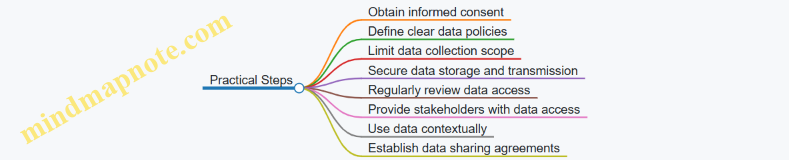
Ethical use of drone-collected data is not just about following rules; it’s about respecting the people behind the fields and the land itself. Clear communication, careful data handling, and thoughtful policies help ensure that drone technology supports farming without compromising trust or privacy.
13.4 Liability and Insurance for Agricultural Drone Operations
Operating drones in agriculture involves more than just flying and data collection; it also requires understanding the legal responsibilities and financial protections related to liability and insurance. This section breaks down the key points to consider, illustrated with practical examples and mind maps to clarify complex relationships.
Understanding Liability in Agricultural Drone Use
Liability refers to the legal responsibility for damages or injuries caused by drone operations. In agriculture, this can include damage to property, injury to people, or harm to crops and livestock. Liability arises from several sources:
- Operator Negligence: Failing to follow safety protocols or regulations.
- Equipment Failure: Malfunctions leading to accidents.
- Third-Party Damage: Drones causing harm beyond the farm boundary.
For example, if a drone crashes into a neighbor’s greenhouse, the operator could be held liable for repair costs.
Types of Liability Relevant to Agricultural Drones
- Personal Liability: Covers bodily injury or property damage caused to others.
- Product Liability: If the drone manufacturer’s defect causes damage.
- Professional Liability: Errors in data interpretation leading to crop loss.
Insurance Options for Agricultural Drone Operations
Insurance helps manage financial risks associated with liability. Common types include:
- Hull Insurance: Covers damage to the drone itself.
- Liability Insurance: Protects against claims from third-party injury or property damage.
- Payload Insurance: Covers sensors or equipment carried by the drone.
Mind Map: Liability and Insurance Components
Practical Examples
-
Case: Drone Crash on Neighbor’s Property
- Situation: A drone loses signal and crashes into a neighbor’s fence.
- Liability: Operator is responsible for property damage.
- Insurance: Liability insurance covers repair costs, avoiding out-of-pocket expenses.
-
Case: Sensor Malfunction Leads to Poor Crop Data
- Situation: Faulty multispectral sensor causes incorrect irrigation recommendations.
- Liability: Potential professional liability if recommendations cause crop loss.
- Insurance: Some policies may cover errors and omissions; otherwise, risk is borne by operator.
-
Case: Drone Damage During Transport
- Situation: Drone is damaged while being transported to the field.
- Liability: No third-party damage; operator bears cost.
- Insurance: Hull insurance can cover repair or replacement.
Managing Liability Risks
- Training: Proper operator training reduces negligence.
- Maintenance: Regular checks prevent equipment failure.
- Compliance: Following regulations minimizes legal exposure.
- Documentation: Keeping flight logs and maintenance records supports defense in claims.
Mind Map: Risk Management Strategies
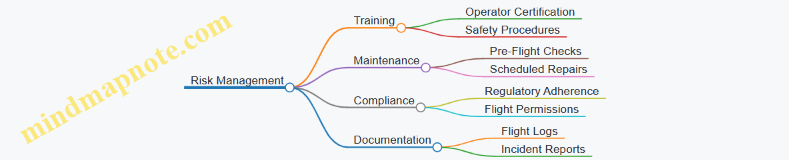
Summary
Liability and insurance are essential parts of agricultural drone operations. Understanding where responsibility lies and securing appropriate insurance coverage protects operators from unexpected costs. Combining solid risk management practices with insurance creates a balanced approach to managing the financial and legal risks of drone use in farming.
13.5 Best Practices: Navigating Legal and Ethical Challenges with Practical Guidelines
Navigating legal and ethical challenges in agricultural drone use requires a clear understanding of the rules and responsibilities that come with operating these technologies. This section outlines practical guidelines to help farmers, operators, and managers stay compliant and respectful of privacy while maximizing drone benefits.
Understanding Airspace Regulations
Before flying, confirm the airspace classification over your farmland. Different countries have specific rules about where and how drones can operate. For example, some zones may require special permits or restrict flight altitudes. Always check local aviation authority guidelines.
Example: A farmer in a region near an airport must file a flight plan and obtain clearance before flying drones to avoid interfering with manned aircraft.
Privacy and Data Protection
Drones collect detailed images and data that may inadvertently include neighboring properties or individuals. Respecting privacy means limiting data collection to the intended farmland and securing the data against unauthorized access.
Example: When monitoring a field adjacent to a residential area, operators should adjust flight paths and camera angles to avoid capturing images of private homes or people.
Ethical Use of Drone Data
Data should be used solely for the agreed agricultural purposes. Sharing or selling data without consent breaches ethical standards and may violate laws.
Example: A cooperative sharing drone data among members must ensure that data about one farmer’s crops is not disclosed to others without permission.
Liability and Insurance
Operators should understand their liability in case of accidents or damage caused by drones. Insurance coverage tailored to agricultural drone operations can mitigate financial risks.
Example: A drone crashing into irrigation equipment may cause costly damage; having insurance helps cover repair costs and reduces disputes.
Best Practices Mind Map
Practical Guidelines Summary
- Know Your Airspace: Always verify flight permissions and restrictions before operating.
- Plan Flight Paths Carefully: Design routes that avoid private property and sensitive areas.
- Inform and Obtain Consent: Communicate with neighbors or stakeholders when data collection might affect them.
- Secure Data Storage: Use encryption and access controls to protect collected information.
- Maintain Records: Keep logs of flights, permissions, and data usage to demonstrate compliance.
- Invest in Insurance: Protect your operation against accidents and liabilities.
Example Scenario
A vineyard owner uses drones to monitor vine health. Before flights, the operator checks for any nearby residential zones and adjusts flight altitude to minimize privacy intrusion. They notify neighbors about scheduled flights and ensure that images do not capture private property. Data is stored on encrypted drives accessible only to authorized staff. The vineyard maintains flight logs and holds insurance covering drone operations. This approach reduces legal risks and builds trust with the community.
By following these guidelines, agricultural drone users can operate responsibly, respecting legal boundaries and ethical considerations while benefiting from aerial sensing technologies.
14. Training and Capacity Building for Effective Drone Deployment
14.1 Operator Certification and Skill Development
Operator Certification and Skill Development
Operating agricultural drones requires a mix of technical knowledge, practical skills, and an understanding of agricultural contexts. Certification is often a formal way to ensure operators meet minimum standards for safety, legal compliance, and operational competence. Skill development, on the other hand, is an ongoing process that sharpens an operator’s ability to handle the drone effectively and interpret the data it collects.
Why Certification Matters
Certification confirms that an operator understands the rules governing drone flights, including airspace restrictions, privacy laws, and safety protocols. It also ensures familiarity with the drone’s hardware and software, reducing the risk of accidents or data errors.
Core Competencies for Certification
- Regulatory Knowledge: Understanding local and national drone regulations.
- Flight Skills: Manual and autonomous flight control, emergency procedures.
- Technical Understanding: Drone components, sensor operation, battery management.
- Data Handling: Capturing, storing, and transferring agricultural data securely.
- Safety Protocols: Pre-flight checks, risk assessment, and incident management.
Skill Development Areas
Skill development goes beyond passing a certification test. It involves practical experience and continuous learning in areas such as:
- Flight Planning: Designing efficient routes that cover the farmland comprehensively.
- Sensor Calibration: Ensuring cameras and sensors are properly set for accurate data.
- Data Interpretation: Recognizing patterns in imagery that indicate crop health or issues.
- Maintenance: Routine checks and troubleshooting to keep drones operational.
Example: Certification Process for a New Operator
- Theoretical Training: Study drone regulations and operational principles.
- Simulator Practice: Use flight simulators to build basic control skills.
- Hands-On Flight: Conduct supervised flights focusing on takeoff, landing, and navigation.
- Data Capture Exercises: Practice capturing imagery under different conditions.
- Written and Practical Exams: Demonstrate knowledge and skills for certification.
Example: Skill Development in Practice
A farmer hires a drone operator who initially struggles with battery management, leading to shortened flight times. Through targeted training, the operator learns to calculate flight duration based on battery capacity and environmental factors, improving mission efficiency.
Mind Map: Operator Certification and Skill Development
Mind Map: Flight Skills Breakdown
Mind Map: Data Handling Essentials
In summary, operator certification ensures a baseline of knowledge and safety, while skill development hones the practical abilities needed for effective drone use in agriculture. Both are essential for maximizing the benefits of drone technology in precision farming.
14.2 Farmer Education and Engagement Strategies
Farmer education and engagement are essential for the successful adoption of agricultural drone technologies. Without clear understanding and active participation, even the best drone systems can fail to deliver meaningful benefits. This section focuses on practical strategies to educate farmers and keep them involved throughout the drone deployment process.
Understanding Farmer Needs and Concerns
Farmers have varied levels of familiarity with technology, and their primary concerns often revolve around cost, ease of use, and tangible benefits. Start by listening carefully to their questions and reservations. This builds trust and ensures the education addresses real issues.
Clear Communication of Benefits and Limitations
Explain what drones can and cannot do in straightforward terms. For example, drones can quickly identify crop stress but cannot replace soil testing entirely. Use simple language and avoid jargon. Concrete examples, such as showing how drone imagery helped detect a pest outbreak early in a nearby farm, make the benefits relatable.
Hands-On Demonstrations
Farmers learn best by doing. Organize field demonstrations where farmers can see drones in action, control flight paths, and observe the data collected. For instance, a demonstration might involve flying a drone over a test plot and immediately reviewing the images to spot areas needing attention.
Collaborative Workshops
Workshops that encourage questions and group problem-solving help farmers feel involved. Use real farm data during sessions to analyze and interpret results together. This approach reinforces learning and builds confidence.
Developing Simple User Guides
Create concise, illustrated guides tailored to the local context. Include step-by-step instructions for operating drones, basic troubleshooting, and interpreting common data outputs. For example, a guide might show how to recognize signs of water stress in thermal images.
Establishing Peer Learning Networks
Farmers often trust fellow farmers more than external experts. Facilitate the formation of local groups where experienced users share tips and lessons learned. This peer support can accelerate adoption and reduce resistance.
Incentivizing Engagement
Small incentives, such as free drone flight trials or data analysis sessions, encourage farmers to participate. Highlighting early successes within the community can motivate others to join.
Continuous Feedback Loops
Set up channels for farmers to provide feedback on drone use and data relevance. Regularly review this input to adjust training and operations. For example, if farmers find certain data formats confusing, simplify or customize them.
Mind Map: Farmer Education and Engagement Strategies
Example: Introducing Drones to a Smallholder Community
In a village with small-scale farms, a local extension agent organized a demonstration day. Farmers watched a drone fly over a maize field and then gathered to examine the multispectral images highlighting areas of nutrient deficiency. The agent provided a simple pamphlet showing how to interpret these images and invited farmers to try flying the drone themselves. A peer group formed afterward, meeting monthly to discuss drone data and share tips. This hands-on, community-driven approach led to steady adoption and improved crop management.
Example: Workshop on Pest Detection
A workshop was held during the early growing season where farmers brought their own drone images. Together with agronomists, they identified early signs of pest damage and discussed targeted interventions. The session included a printed checklist for drone flight preparation and data collection. Farmers left with practical skills and a clearer understanding of how drones could fit into their pest management routines.
Summary
Effective farmer education and engagement require listening, clear communication, practical experience, and ongoing support. Combining these elements creates an environment where farmers feel confident using drone technology and motivated to integrate it into their farming practices.
14.3 Building In-House Drone Teams vs. Outsourcing
When deciding between building an in-house drone team or outsourcing drone services for agricultural operations, several factors come into play. This section breaks down the considerations, advantages, and challenges of each approach, supported by practical examples and mind maps to clarify decision points.
Building In-House Drone Teams
Creating an internal drone team means hiring or training staff to operate drones, manage data collection, and perform analysis. This approach offers control and flexibility but requires investment in equipment, training, and ongoing maintenance.
Key Components:
- Personnel: Operators, data analysts, and maintenance technicians.
- Equipment: Drones, sensors, software licenses.
- Training: Certification, safety protocols, data processing skills.
- Maintenance: Regular hardware checks, software updates.
Advantages:
- Immediate access to drone services tailored to specific farm needs.
- Faster turnaround on data collection and analysis.
- Greater control over data privacy and security.
- Ability to customize flight plans and data workflows.
Challenges:
- Upfront costs for equipment and training.
- Time investment to build expertise.
- Managing regulatory compliance internally.
- Risk of downtime if key personnel are unavailable.
Example:
A mid-sized vegetable farm hires two drone operators and invests in a multispectral drone system. They schedule weekly flights to monitor crop health and adjust irrigation. Having the team onsite allows quick response to emerging issues but requires dedicating staff time and budget to drone operations.
Outsourcing Drone Services
Outsourcing involves contracting specialized drone service providers to handle flights, data collection, and sometimes analysis. This model shifts responsibility for equipment and expertise to the vendor.
Key Components:
- Service Provider: Drone operators, data analysts, and customer support.
- Contract Terms: Frequency of flights, data delivery timelines, service scope.
- Data Handling: Agreements on data ownership, privacy, and usage.
Advantages:
- Lower upfront investment.
- Access to experienced operators and advanced equipment.
- Reduced management burden.
- Flexibility to scale services up or down.
Challenges:
- Less control over scheduling and data collection specifics.
- Possible delays in data delivery.
- Dependence on vendor reliability and quality.
- Data privacy concerns if sensitive information is shared externally.
Example:
A large grain farm contracts a drone service company for monthly crop scouting. The provider delivers processed NDVI maps and reports. This arrangement minimizes the farm’s operational load but requires planning around the provider’s schedule and trusting their data quality.
Mind Map: Decision Factors for In-House vs. Outsourcing
Mind Map: Building In-House Team Workflow
Mind Map: Outsourcing Workflow
Practical Considerations
- Scale of Operation: Small farms may find outsourcing more cost-effective, while larger farms with frequent data needs might benefit from an in-house team.
- Technical Capacity: Farms with existing technical staff can integrate drone operations more easily.
- Budget Constraints: Outsourcing reduces capital expenditure but may incur higher long-term costs.
- Data Sensitivity: Farms handling proprietary or sensitive data might prefer in-house control.
- Frequency and Flexibility: In-house teams allow rapid deployment, whereas outsourcing may involve scheduling delays.
Summary
Choosing between building an in-house drone team and outsourcing depends on balancing control, cost, expertise, and operational needs. Both approaches have valid use cases, and some farms may even adopt a hybrid model, maintaining a small internal team for routine tasks while outsourcing specialized or peak-demand operations.
14.4 Developing Standard Operating Procedures (SOPs)
Developing Standard Operating Procedures (SOPs) for agricultural drone operations is essential to ensure consistency, safety, and efficiency. SOPs act as a roadmap for operators, guiding them through each step of drone deployment, data collection, and post-flight processes. They reduce errors, improve communication, and provide a reference point for training and troubleshooting.
Why SOPs Matter in Agricultural Drone Use
Without clear SOPs, drone missions can become inconsistent, leading to poor data quality or safety incidents. SOPs help standardize tasks such as pre-flight checks, flight planning, sensor calibration, and data handling. They also clarify roles and responsibilities, which is particularly important when multiple team members or contractors are involved.
Key Elements of an Agricultural Drone SOP
An effective SOP should cover the following components:
- Objective: Define the purpose of the procedure (e.g., crop health monitoring).
- Scope: Specify which drone models, sensors, and fields the SOP applies to.
- Responsibilities: Identify who performs each task.
- Materials and Equipment: List required hardware, software, and safety gear.
- Step-by-Step Instructions: Detailed, sequential actions.
- Safety Considerations: Highlight potential hazards and mitigation steps.
- Documentation and Reporting: Explain how to record and report results.
Example SOP Outline for a Routine Crop Monitoring Flight
SOP: Routine Crop Monitoring Flight
Objective
Conduct a drone flight to capture multispectral imagery for crop health assessment.
Scope
Applies to DJI Matrice 300 RTK drones equipped with MicaSense RedEdge-MX sensors.
Responsibilities
- Pilot: Flight execution and safety.
- Data Analyst: Data download and preliminary processing.
Materials and Equipment
- Drone and controller
- Fully charged batteries
- Calibration panel
- Weather monitoring app
- Flight planning software
Procedure
- Pre-Flight Preparation
- Check weather conditions (wind < 10 mph, no rain).
- Inspect drone hardware for damage.
- Charge batteries fully.
- Calibrate sensors using the calibration panel.
- Flight Planning
- Define flight area and altitude (e.g., 120m AGL).
- Set flight path with 75% image overlap.
- Upload mission to drone controller.
- Flight Execution
- Conduct a pre-flight safety briefing.
- Perform compass and GPS calibration.
- Launch drone and monitor flight.
- Abort mission if any anomalies occur.
- Post-Flight
- Land drone safely.
- Download imagery to secure storage.
- Log flight details (time, weather, issues).
Safety Considerations
- Maintain visual line of sight.
- Avoid flying near people or animals.
- Follow local regulations.
Documentation
- Complete flight log form.
- Upload data to farm management system.
Mind Map: Components of an Agricultural Drone SOP
Mind Map: Pre-Flight Checklist
Mind Map: Post-Flight Procedures
Practical Example: SOP Adaptation for Different Crop Types
For a vineyard, the SOP might emphasize lower altitude flights to capture detailed canopy structure, while for large cereal fields, higher altitude and wider flight paths optimize coverage. The SOP should specify these variations clearly to avoid confusion.
Tips for Writing Effective SOPs
- Use clear, concise language.
- Include visuals like diagrams or photos where helpful.
- Test the SOP in the field and revise based on feedback.
- Keep the document accessible and easy to update.
In summary, well-crafted SOPs provide a foundation for reliable agricultural drone operations. They help teams work efficiently, maintain safety, and produce consistent data that farmers can trust.
14.5 Best Practices: Designing Training Programs with Real-Life Training Modules
Designing effective training programs for agricultural drone operations requires a structured approach that balances technical knowledge, hands-on practice, and contextual understanding of farming environments. The goal is to equip operators and farm managers with the skills needed to confidently plan, execute, and analyze drone missions tailored to precision farming.
Core Elements of a Training Program
A well-rounded training program should cover the following areas:
- Drone Operation Basics: Understanding drone hardware, controls, and safety.
- Flight Planning and Execution: Creating flight paths, setting parameters, and managing autonomous flights.
- Sensor and Data Handling: Operating multispectral, thermal, and RGB sensors; data collection protocols.
- Data Processing and Interpretation: Using software tools to analyze imagery and generate actionable insights.
- Maintenance and Troubleshooting: Routine checks, battery care, and resolving common issues.
- Regulatory Compliance and Safety: Airspace rules, privacy concerns, and on-field safety.
Mind Map: Training Program Structure
Real-Life Training Modules
-
Module 1: Introduction and Safety Briefing
- Objective: Familiarize trainees with drone components and safety protocols.
- Activity: Hands-on inspection of drones, identifying parts, and discussing safety checklists.
- Example: Trainees perform a pre-flight checklist on a DJI Agras drone, noting battery levels, propeller condition, and GPS signal strength.
-
Module 2: Flight Planning Workshop
- Objective: Teach how to design efficient flight paths based on crop type and field size.
- Activity: Using flight planning software to create a mission for a 50-acre cornfield.
- Example: Trainees set altitude to optimize image resolution while ensuring battery life covers the entire field.
-
Module 3: Sensor Operation and Data Collection
- Objective: Operate multispectral and thermal cameras during flight.
- Activity: Conduct a drone flight capturing NDVI data for a vineyard.
- Example: Trainees adjust sensor settings to capture images under varying light conditions, noting the impact on data quality.
-
Module 4: Data Processing and Interpretation
- Objective: Process raw images into orthomosaics and calculate vegetation indices.
- Activity: Use Pix4D or similar software to stitch images and generate NDVI maps.
- Example: Trainees identify stressed areas in a soybean field and discuss potential causes.
-
Module 5: Maintenance and Troubleshooting
- Objective: Perform routine maintenance and resolve common issues.
- Activity: Replace a damaged propeller and recalibrate sensors.
- Example: Trainees troubleshoot GPS signal loss during a simulated flight.
-
Module 6: Regulatory and Ethical Considerations
- Objective: Understand legal requirements and ethical data use.
- Activity: Review local drone regulations and draft a privacy policy for farm data.
- Example: Trainees role-play scenarios involving neighbor privacy concerns.
Mind Map: Example Module Breakdown
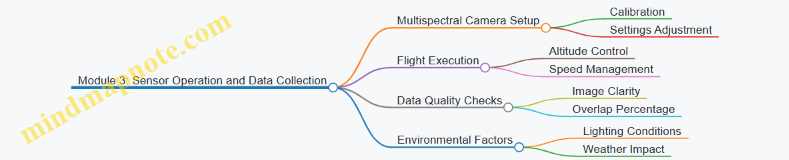
Practical Example: Training Session on Flight Planning
In a training session, participants are given a 30-acre vegetable farm to survey. They must:
- Choose appropriate flight altitude balancing image resolution and coverage.
- Plan a flight path ensuring at least 75% image overlap.
- Account for obstacles like trees and irrigation equipment.
- Schedule the flight considering weather forecasts.
After planning, the group conducts the flight, collects data, and discusses adjustments for future missions. This hands-on approach reinforces theoretical knowledge with real-world application.
Tips for Effective Training Program Design
- Use Local Context: Tailor examples and scenarios to the specific crops and conditions trainees will encounter.
- Balance Theory and Practice: Combine classroom instruction with field exercises.
- Encourage Collaboration: Group activities foster problem-solving and knowledge sharing.
- Incorporate Feedback Loops: Regularly assess trainee understanding and adjust content accordingly.
- Document Procedures: Provide clear, step-by-step guides and checklists.
By structuring training around these principles and modules, agricultural drone programs can build operator confidence and competence, ultimately supporting more effective precision farming.
15. Summary and Practical Implementation Guide
15.1 Recap of Key Concepts and Technologies
Agricultural drone systems bring together several technologies and practices to support precision farming. At the core, these systems combine hardware, software, and data analysis to provide actionable insights about crops and farmland. Here’s a clear summary of the main concepts and technologies covered in this book, organized into mind maps and illustrated with examples.
Mind Map 1: Agricultural Drone System Components
Example: A medium-sized farm uses a quadcopter equipped with a multispectral camera and RTK GPS. The RTK system improves location accuracy to within a few centimeters, allowing precise mapping of crop health.
Mind Map 2: Flight Planning and Operations
Example: Before flying over a wheat field, the operator plans a flight path at 120 meters altitude with 75% image overlap to ensure complete coverage. They check wind speed and avoid flying during midday heat to reduce image distortion.
Mind Map 3: Data Acquisition and Processing
Example: A farmer schedules weekly drone flights during the growing season to monitor crop stress. The images are stitched into an orthomosaic, and NDVI maps highlight areas needing irrigation.
Mind Map 4: Applications and Integration
Example: Drone data showing weed infestation is integrated into the farm’s management system. This enables targeted herbicide application, reducing chemical use and cost.
Summary of Key Technologies
-
Drone Hardware: The physical drone must be suited to the task. Fixed-wing drones cover large areas efficiently, while multirotors offer maneuverability for detailed inspections.
-
Sensors: RGB cameras capture visible light images, useful for general monitoring. Multispectral sensors detect specific wavelengths to assess plant health. Thermal cameras reveal temperature differences, useful for irrigation management.
-
Navigation Systems: GPS provides location data, but RTK enhances accuracy, critical for precise mapping and repeatable flights.
-
Flight Planning: Proper flight planning ensures data quality. Overlap between images is necessary for stitching, and altitude affects resolution and coverage.
-
Data Processing: Raw images require stitching into orthomosaics. Vegetation indices like NDVI quantify plant vigor by comparing reflectance in red and near-infrared bands.
-
Integration: Drone data gains value when combined with GIS and farm management software, enabling informed decisions and automated actions.
Concrete Example Recap
Consider a vineyard monitoring scenario: A drone equipped with a multispectral camera flies over the vineyard at 50 meters altitude. The flight plan includes 80% image overlap to ensure detailed coverage. The data is processed to generate NDVI maps, revealing areas of vine stress. This information is fed into the vineyard’s management system, guiding targeted irrigation and fertilization. The result is optimized resource use and improved grape quality.
This example ties hardware choice, flight planning, data acquisition, processing, and integration into a single workflow, illustrating how the components work together.
In conclusion, agricultural drone systems rely on a combination of well-chosen hardware, careful mission planning, precise data capture, and effective analysis. Each step builds on the previous one, and best practices ensure the system delivers reliable, actionable insights. Understanding these fundamentals is essential for successful deployment in precision farming.
15.2 Step-by-Step Guide to Deploying Agricultural Drone Systems
Deploying an agricultural drone system involves a series of clear, manageable steps. Each step builds on the previous one to ensure the system works efficiently and delivers actionable data. Below is a detailed guide, supported by mind maps and examples, to help you navigate this process.
Step 1: Define Your Objectives and Requirements
Start by identifying what you want to achieve with the drone system. Are you monitoring crop health, assessing soil moisture, or mapping pest infestations? Your goals will influence the choice of drone, sensors, and data processing tools.
Example: A wheat farmer wants to detect early signs of fungal disease. The objective is to capture multispectral images weekly during the growing season.
Step 2: Select Appropriate Drone Hardware and Sensors
Choose drones and sensors that fit your objectives. Multispectral cameras are great for vegetation indices; thermal cameras help with irrigation assessment; RGB cameras are useful for general imaging.
Example: For the wheat farmer, a quadcopter with a multispectral camera and GPS with RTK for precise positioning is selected.
Step 3: Plan Flight Missions
Design flight paths that cover the entire field efficiently. Consider altitude, overlap between images, and flight speed. Weather conditions and local regulations also affect planning.
Example: The wheat farmer plans flights at 120 meters altitude with 75% image overlap, flying early morning to avoid wind.
Step 4: Prepare for Flight
Perform pre-flight checks including battery levels, sensor calibration, and software updates. Verify weather conditions and ensure safety protocols are in place.
Example: Before each flight, the farmer calibrates the multispectral camera and checks battery health. A checklist is used to confirm all systems are ready.
Step 5: Conduct the Flight and Data Acquisition
Execute the flight plan, monitor the drone in real-time, and ensure data is being recorded correctly. Be ready to intervene if conditions change.
Example: The drone flies autonomously, capturing multispectral images. The operator monitors battery life and signal strength.
Step 6: Data Download and Initial Quality Check
After landing, download the data and perform a quick quality check. Look for missing images, blurriness, or sensor errors.
Example: The farmer reviews the images for clarity and confirms coverage of the entire field.
Step 7: Process Data and Generate Outputs
Use software to stitch images into orthomosaics, calculate vegetation indices, and generate maps. Choose tools that match your technical skill and budget.
Example: The farmer uses a commercial software to create NDVI maps highlighting stressed areas.
Step 8: Interpret Results and Make Decisions
Analyze processed data to identify crop stress, irrigation needs, or pest outbreaks. Use this information to plan interventions.
Example: NDVI maps reveal patches with low vegetation health, prompting targeted fungicide application.
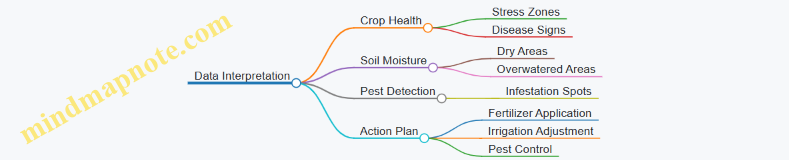
Step 9: Integrate Data into Farm Management Systems
Upload processed data to farm management platforms for record keeping and ongoing monitoring.
Example: The farmer uploads maps to a precision agriculture platform that schedules variable rate spraying.
Step 10: Review and Refine the Process
After several cycles, evaluate the effectiveness of the drone system and adjust flight plans, sensors, or analysis methods as needed.
Example: The farmer notices better disease detection at lower altitudes and adjusts flight plans accordingly.
This step-by-step approach ensures that agricultural drone deployment is systematic, efficient, and tailored to specific farming needs. Each step includes practical considerations and examples to help you avoid common pitfalls and maximize the value of your drone system.
15.3 Checklist for Successful Precision Farming with Drones
Precision farming with drones requires careful planning, execution, and follow-up. This checklist breaks down key steps and considerations to help ensure your drone operations deliver reliable, actionable data.
Pre-Flight Preparation
-
Define Objectives Clearly
- What crop or field area are you monitoring?
- What specific data do you need? (e.g., crop health, moisture, pest detection)
-
Select Appropriate Drone and Sensors
- Match drone payload capacity with sensor type (RGB, multispectral, thermal).
- Confirm battery life suits planned flight duration.
-
Check Weather Conditions
- Avoid strong winds, rain, or fog.
- Schedule flights during consistent lighting (e.g., mid-morning to avoid shadows).
-
Plan Flight Path
- Use software to design efficient, overlapping flight lines.
- Set altitude to balance resolution and coverage.
-
Perform Pre-Flight Checks
- Inspect drone hardware for damage.
- Calibrate sensors and GPS.
- Ensure firmware and software are up to date.
Flight Execution
-
Follow Safety Protocols
- Maintain visual line of sight.
- Keep clear of people, animals, and obstacles.
- Have emergency procedures ready.
-
Monitor Flight Progress
- Watch telemetry for battery and signal strength.
- Adjust flight if unexpected conditions arise.
-
Capture Data Consistently
- Maintain steady speed and altitude.
- Ensure sensor settings match data objectives.
Post-Flight Actions
-
Data Download and Backup
- Transfer data promptly to secure storage.
- Create backups before processing.
-
Data Quality Check
- Review images for clarity and coverage.
- Identify any gaps or anomalies.
-
Process Data Using Suitable Software
- Stitch images into orthomosaics.
- Calculate vegetation indices or thermal maps.
-
Interpret Results in Context
- Compare with ground observations.
- Integrate with other farm data (soil tests, weather).
-
Plan Follow-Up Actions
- Adjust irrigation, fertilization, or pest control based on findings.
- Schedule next drone flights accordingly.
Maintenance and Documentation
-
Routine Drone Maintenance
- Clean sensors and drone components.
- Check battery health and replace if needed.
- Update software regularly.
-
Record Keeping
- Log flight details: date, time, weather, objectives.
- Document any issues and resolutions.
Mind Maps
Mind Map 1: Pre-Flight Preparation
Mind Map 2: Flight Execution
Mind Map 3: Post-Flight Actions
Mind Map 4: Maintenance and Documentation
Examples
Example 1: Planning a Flight for Corn Crop Health Monitoring
A farmer wants to monitor a 50-acre cornfield for early signs of drought stress. The checklist guides them to select a drone with multispectral sensors, plan flights during mid-morning to avoid shadows, and set flight altitude at 120 meters for optimal resolution. Pre-flight checks ensure sensor calibration. After the flight, data is processed to generate NDVI maps highlighting stressed areas, which informs targeted irrigation.
Example 2: Post-Flight Data Quality Check in a Vineyard
After flying over a vineyard, the operator reviews images and notices a section with blurry photos due to sudden wind gusts. The checklist prompts a re-flight of that section to ensure complete data coverage. This prevents misinterpretation of crop health caused by poor image quality.
Example 3: Maintenance Routine Preventing Flight Failure
An operator follows the checklist’s maintenance section and discovers a cracked propeller during routine inspection. Replacing it before the next flight avoids potential crash and data loss.
This checklist aims to keep drone operations systematic and reliable. Following it reduces errors, improves data quality, and ultimately supports better farming decisions.
15.4 Troubleshooting Common Challenges in Implementation
Troubleshooting common challenges in agricultural drone implementation often boils down to understanding the root causes and applying practical fixes. Below, we break down frequent issues into categories, supported by mind maps to visualize problem-solving paths, and concrete examples to clarify each point.
Drone Hardware Issues
Common Problems:
- Motor failure or unusual vibrations
- Battery not holding charge
- Sensor malfunctions
Mind Map:
Example: A farmer noticed his drone wobbled mid-flight. Inspection revealed a cracked propeller causing imbalance. Replacing the propeller resolved the issue immediately.
Flight Planning and Navigation Errors
Common Problems:
- Drone deviates from planned path
- GPS signal loss
- Inaccurate altitude control
Mind Map:
Example: During a crop survey, a drone drifted off course near a wooded area. The pilot switched to manual control and planned future flights to avoid GPS interference zones.
Data Quality and Processing Challenges
Common Problems:
- Blurry or incomplete images
- Poor stitching of orthomosaics
- Incorrect vegetation index calculations
Mind Map:
Example: A multispectral survey produced patchy NDVI maps. Investigation showed inconsistent flight speed and insufficient image overlap. Adjusting flight parameters improved data consistency.
Software and Firmware Problems
Common Problems:
- Crashes or freezes during flight
- Incompatibility between drone and analysis software
- Firmware update failures
Mind Map:
Example: After a firmware update, a drone failed to arm. Rolling back to the previous version restored functionality while the update was reviewed.
Environmental and Operational Constraints
Common Problems:
- Weather interference (wind, rain, fog)
- Unexpected obstacles
- Limited battery life affecting coverage
Mind Map:
Example: A drone mission was cut short due to sudden gusts. The operator had pre-planned battery swaps, allowing continuation after a quick battery change.
Regulatory and Compliance Issues
Common Problems:
- Unauthorized flight zones
- Missing permits
- Privacy concerns
Mind Map:
Example: A drone operator was stopped mid-flight for flying near a restricted area. Pre-flight checks were updated to include regulatory maps to avoid future issues.
Summary Table of Troubleshooting Steps
| Issue Category | Key Checks | Practical Fixes | Example Scenario |
|---|---|---|---|
| Hardware | Propellers, batteries, sensors | Replace parts, calibrate, clean | Cracked propeller replaced to fix wobble |
| Flight Planning | GPS, waypoints, altitude | Adjust routes, manual override | Avoided GPS interference near woods |
| Data Quality | Flight speed, overlap, weather | Consistent speed, proper overlap | Improved NDVI maps after flight adjustment |
| Software/Firmware | Updates, compatibility | Roll back, test updates | Firmware rollback restored drone arming |
| Environment/Operations | Weather, obstacles, battery life | Plan flights, spare batteries | Battery swap enabled mission continuation |
| Regulatory | Permissions, privacy | Obtain permits, notify neighbors | Updated pre-flight checks to avoid restricted zones |
Troubleshooting is about methodical checks and learning from each flight. Keeping logs of issues and resolutions helps build a smoother operation over time.
15.5 Best Practices: Consolidated Action Plans with Example Timelines
Implementing agricultural drone systems effectively requires a clear, stepwise plan that balances technical setup, operational training, data management, and continuous evaluation. Below is a consolidated action plan structured over a typical 12-week timeline, accompanied by mind maps to visualize key tasks and dependencies.
Mind Map: Overall Implementation Workflow
Week 1-2: Planning and Setup
- Define Objectives: Identify what you want to monitor—crop health, irrigation, pest detection.
- Field Assessment: Measure field size and note crop types to determine drone flight time and sensor needs.
- Drone and Sensor Selection: Choose drones with appropriate flight endurance and sensors (RGB, multispectral, thermal) based on objectives.
- Regulatory Check: Confirm local drone regulations and obtain necessary permissions.
Example: A wheat farm aiming to monitor nitrogen levels selects a drone equipped with multispectral sensors and plans flights every two weeks during the growing season.
Week 3-4: Training and Flight Planning
- Operator Training: Train pilots on drone operation, safety protocols, and emergency procedures.
- Flight Path Design: Use software to create efficient flight paths covering the entire field with sufficient overlap for image stitching.
- Calibration: Calibrate sensors and conduct test flights to verify data quality.
Example: A vineyard operator practices autonomous flights and adjusts altitude to optimize image resolution for canopy analysis.
Week 5-8: Data Acquisition and Initial Analysis
- Regular Flights: Conduct scheduled flights according to crop growth stages.
- Data Transfer: Download and organize data immediately after flights.
- Processing: Generate orthomosaics and calculate vegetation indices like NDVI.
- Preliminary Assessment: Identify areas of stress or anomalies.
Example: A vegetable farm performs weekly flights, quickly identifying water stress zones and adjusting irrigation accordingly.
Week 9-10: Integration and Decision Making
- Data Integration: Import processed data into farm management software.
- Action Plans: Develop targeted interventions such as variable rate fertilization or pest control.
- Documentation: Record decisions and outcomes for future reference.
Example: A corn farm integrates drone data with GIS to apply fertilizers only where needed, reducing input costs.
Week 11-12: Review and Maintenance
- Evaluate Outcomes: Compare crop performance before and after drone-guided interventions.
- Adjust Plans: Modify flight schedules or sensor configurations based on findings.
- Equipment Maintenance: Perform routine checks on drone hardware and update software.
Example: After a season, a mixed-crop farm updates its flight plans to increase frequency during critical growth phases.
Mind Map: Weekly Breakdown
Additional Tips
- Start Small: Begin with a pilot area to refine processes before scaling.
- Keep Records: Maintain logs of flights, weather conditions, and data quality.
- Iterate: Use each cycle to improve flight plans and data interpretation.
- Safety First: Always prioritize safety checks and respect privacy regulations.
By following this structured approach, farmers and operators can systematically deploy drone systems, ensuring data collected is actionable and operations run smoothly.