3D Food Printing for Beginners
1. What 3D Food Printing Means for Home Cooks
1.1 Defining 3D Food Printing and How It Differs from Baking and Decorating
3D food printing is the controlled deposition of edible material in a programmed pattern, usually layer by layer. Instead of relying on heat to transform dough or batter, the process relies on the material’s ability to hold shape after it leaves the nozzle. That single difference—shape control through material behavior rather than oven transformation—drives most of the practical choices you’ll make.
What Makes It “3D”
“3D” here means you’re building volume, not just drawing on a surface. A typical workflow starts with a digital model, then converts it into a set of layers. Each layer is placed with a specific line width, spacing, and height, so the final object has structure you can slice, stack, or assemble.
A helpful mental model is “edible construction.” Baking is more like “edible chemistry,” where heat triggers setting and browning. Decorating is more like “edible painting,” where you add surface details without expecting the material to become load-bearing structure.
How It Works in Practice
Most beginner-friendly home setups use extrusion: a syringe, cartridge, or pump pushes a paste or gel through a nozzle. The printer’s job is to move the nozzle precisely while you manage the material’s readiness.
Material readiness has three practical checkpoints:
- Flow: the paste must extrude without clogging.
- Stability: once deposited, it must resist slumping.
- Setting: it must become firm enough to survive the next layer.
If any checkpoint fails, the print shows it quickly—gaps from under-extrusion, puddles from low stability, or cracks from setting too fast.
Baking Versus Printing
Baking uses heat to set structure. Flour proteins and starches gelatinize, fats melt, and water evaporates. The oven provides a uniform transformation, so the “shape” you start with matters less than the final set.
Printing flips that logic. You start with a shape you want, and the material must behave correctly before any “setting” step. Even when you use a fridge or gentle drying after printing, the object’s geometry is created mechanically during deposition.
A concrete example: a printed lattice made from a gel must hold its thin strands while the nozzle moves away. A baked lattice can rely on oven heat to set the structure after the fact, so it can tolerate more initial sag.
Decorating Versus Printing
Decorating usually targets the surface: piping frosting, drizzling chocolate, or adding sprinkles. The material is expected to sit on top and be visually pleasing, not necessarily to support weight or maintain tight internal tolerances.
Printing expects the deposited lines to become the object. That means you often choose different consistencies than you would for piping. Piping buttercream can be soft and still look fine on a cake. A printed buttercream-like paste typically needs higher stability so it doesn’t spread into a blob.
Another example: a decorative swirl on a cupcake can be forgiving. A printed “step” shape with sharp corners needs enough yield stress to keep edges defined until the next layer arrives.
Core Differences Summarized
- Primary driver of structure: printing uses material behavior during deposition; baking uses heat-driven setting.
- Tolerance for slumping: printing has low tolerance because geometry is the goal.
- Role of the nozzle path: printing depends on path planning for walls, infill, and overhangs.
- Typical failure mode: printing fails by shape collapse or layer separation; baking fails by underbake, overbake, or uneven rise.
Mind Map: Printing, Baking, Decorating
A Quick Example Comparison
Imagine you want a small edible “mini wall” with a window cutout.
- Decorating: you pipe frosting on a cookie and add a window by removing a bit of frosting. It’s mostly surface work.
- Baking: you bake a cookie shaped like a wall with a window. The oven sets the final form.
- Printing: you print the wall as stacked layers, then remove or bridge the window opening based on how your paste holds thin spans.
In printing, the window edges are created while the material is still in its working state, so the paste’s stability and setting timing matter as much as the design.
The Beginner Takeaway
If you remember one idea, make it this: baking and decorating can be forgiving about shape during the process, but 3D food printing is strict. Your material must behave like a temporary scaffold—extrude cleanly, hold its form, and then set enough to support the next move.
1.2 Common Printing Approaches for Edible Materials
Home 3D food printing usually means extruding edible material through a nozzle while controlling shape with motion and time. The “approach” is mostly about how the material is delivered and how the printer supports it during and after extrusion. Once you understand that, choosing a method becomes less about brand names and more about matching material behavior to the job.
Syringe Extrusion for Controlled Lines
Syringe-based printing is the most beginner-friendly approach because it naturally limits flow. You load a syringe with paste or gel, then push it through a nozzle using a motor or manual plunger. The key advantage is predictable start and stop: you can pause extrusion to avoid blobs at corners, then resume cleanly.
A practical example: print a simple lattice cookie topper using a thick sugar paste. Start with a nozzle that produces a line slightly wider than your intended wall thickness. Use short segments and stop extrusion at the end of each segment. If the line looks “stringy,” reduce nozzle diameter or slow the travel speed; if it looks “starved,” increase pressure or warm the paste slightly so it flows without turning runny.
Best fit materials: cookie-like doughs, frosting pastes, chocolate-inspired mixes, and many hydrocolloid gels.
Paste Deposition with Screw or Pressure Feed
Some printers use a screw auger, peristaltic pump, or regulated pressure to push material. This can handle thicker mixes and longer runs, but it changes how you tune quality. Instead of only adjusting speed, you also manage pressure stability and the time lag between changing settings and seeing results.
A practical example: print a savory shell using a vegetable puree thickened with a stabilizer. Begin with a “test strip” on the build surface. Watch for a delay: if the first part of the strip is faint and later parts are too heavy, your pressure ramp is too slow. Fix it by increasing the initial pressure briefly or by adding a short pre-extrusion step before the first move.
Best fit materials: thicker purees, stabilized fillings, and multi-color pastes where consistent flow matters.
Vat or Tray Printing with Gel Setting
Vat-style approaches rely on a material that can be deposited and then quickly set, often by cooling, gelling, or evaporation. Instead of building purely by mechanical support, the material “locks in” after placement. This can reduce the need for supports, but it demands careful timing.
A practical example: print a layered fruit gel panel. Deposit thin layers and allow each layer to set before the next. If layers slump, the gel is not setting fast enough; if layers crack, the gel may be setting too aggressively or the layer is too thick. Keep layer height modest and maintain a consistent ambient temperature so the setting behavior stays repeatable.
Best fit materials: agar-based gels, gelatin blends, and starch- or pectin-set gels.
Powder or Granular Approaches with Binding
Some systems print edible powders or granules and then bind them using a binder liquid or heat. For beginners, this is less common at home because it introduces extra steps and more variables: binder amount, penetration depth, and drying time.
A practical example: print a crumbly “sand” structure by depositing a fine sugar or cookie crumb and then lightly binding it with a sugar syrup. The structure will be fragile until fully dried. To improve stability, use a binder that soaks in quickly and keep the printed walls thicker than you think you need.
Best fit materials: fine powders with a reliable binder, where the final texture can tolerate drying.
Hybrid Methods for Multi-Material Foods
Many home projects combine approaches: for example, using syringe extrusion for the outer shell and a different method for fillings. The goal is to let each material do what it does best. Shell materials need shape retention; fillings need smooth flow or controlled set.
A practical example: print a chocolate shell with a thick extrudable paste, then pipe a softer filling into the cavity. If the filling leaks through, the shell walls are too thin or not fully set. If the shell collapses, the shell paste is too wet or the print speed is too fast for the setting time.
Mind Map: Common Printing Approaches
Choosing an Approach by Material Behavior
A simple way to decide is to ask three questions. First, does your material hold shape immediately after extrusion, or does it need time to set? Second, does it flow smoothly under pressure, or does it resist and then suddenly surge? Third, will it tolerate drying or cooling during the build?
If your material holds shape right away, syringe extrusion or controlled paste deposition is usually the easiest path. If it needs setting, vat or tray printing becomes more forgiving. If you want a crumbly or granular look, powder plus binding can work, but plan for extra drying time and thicker walls.
A Consistency Workflow That Works Across Approaches
No matter the approach, you’ll get better results by standardizing three steps. Mix to a consistent viscosity, load the material without trapping air, and run a short “calibration line” before committing to a full print. That line tells you whether the nozzle size, flow rate, and travel speed agree with your material. Once they do, your prints stop being a guessing game and start behaving like a recipe with geometry.
1.3 Understanding Print Paths Layers and Nozzle Behavior
A 3D food print is easiest to understand as a choreography of three things: the print path, the layer, and the nozzle’s way of pushing material. Once you can predict how these interact, most “mystery failures” turn into solvable mechanics.
Print Paths the Route the Nozzle Takes
A print path is the planned route the nozzle follows while extruding. In practice, it’s usually made of segments: straight lines, curves, and corners. The nozzle doesn’t “think” about the final shape; it just deposits material along the path at a controlled rate.
Two path details matter most for beginners:
- Corners and direction changes. When the nozzle turns, it may briefly slow down or overshoot depending on your settings. That affects how thick the deposited line becomes at the corner.
- Start and stop points. Every time extrusion begins or ends, the first and last millimeters of a line behave differently. If you place these points on visible edges, you’ll notice them.
A practical example: imagine printing a square frame. If your path starts at the top-left corner, the “start blob” will land there. If you instead start on the underside, the same blob becomes harmless.
Layers How the Model Becomes Stacked Food
A layer is a thin slice of the final object, printed one on top of another. The layer height is the thickness of each slice, and it strongly influences both appearance and strength.
Think of each layer as a set of lines that must do two jobs:
- Adhere to the layer below. The material must be wet enough, or gelled enough, to bond.
- Support the layer above. The material must hold its shape long enough for the next pass.
If the layer height is too large, the nozzle may push material aside instead of laying it down cleanly. If it’s too small, you can end up with a “wet carpet” effect where layers merge and lose crisp edges.
A simple rule of thumb for learning: choose a layer height that is comfortably smaller than your nozzle opening, so each pass forms a distinct line rather than a smeared sheet.
Nozzle Behavior How Material Actually Exits
The nozzle is not just a hole; it’s a pressure chamber and a shaping tool. How material exits depends on viscosity, temperature, and the nozzle’s geometry.
Key behaviors you’ll see:
- Extrusion lag. When you start, pressure takes a moment to build, so the first part of a line can be thin. When you stop, material may continue for a short distance, creating a tail.
- Shear thinning. Many edible pastes flow more easily under stress. That means the line can look thicker in slow sections and thinner in fast sections.
- Surface tension and wetting. Some gels round off at the edges; others hold sharp boundaries. This changes how “square” your printed walls look.
A concrete example: printing a lattice with a gel that rounds easily. Even if your path is perfect, the deposited strands may merge at intersections, turning a crisp grid into a solid patch.
The Path Layer Nozzle Triangle
These three elements interact like a triangle: change one and the others respond.
- Path speed affects extrusion. Faster movement often reduces line thickness, especially if your material can’t replenish flow quickly.
- Layer height affects adhesion time. Higher layers mean more time before the next pass, which can help or hurt depending on how quickly your material sets.
- Nozzle size affects line width. A larger nozzle spreads more material, which can improve strength but reduce fine detail.
To debug systematically, change only one variable at a time. If you adjust speed and layer height together, you won’t know which one caused the improvement or the failure.
Mind Map: Print Mechanics
Example a Simple Cylinder Walkthrough
Let’s predict what happens when printing a cylinder.
- Path: The nozzle follows a circular path for each layer. If the path has many small segments, you’ll see slight “faceting” where segments meet.
- Layering: Each circular ring must bond to the one below. If the material sets too quickly, rings may separate at the seam.
- Nozzle exit: At the seam where the path closes, start/stop behavior can create a thicker spot. If you want a smooth cylinder, place the seam on the underside or use a path that minimizes visible start points.
Once you can make these predictions, you’re no longer guessing. You’re reading the print like a logbook written in edible physics.
1.4 Safety Food Handling and Clean Workflow Basics
3D food printing is still food handling, just with more steps between “ingredients” and “served.” Safety comes from controlling two things: what touches the food and how long it stays in the danger zone. A clean workflow is the practical way to do both.
Foundational Principles That Keep Food Safe
Start with the basics you already know from cooking: keep raw and ready-to-eat items separate, control time and temperature, and prevent cross-contamination. In printing, the “touch points” multiply: bowls, spatulas, syringes, nozzles, build surfaces, gloves, and even the printer frame if paste drips.
A useful mental model is “clean zones.” Treat your workspace as three zones: a clean zone for tools that will touch finished food, a food-prep zone for mixing and loading, and a dirty zone for used utensils and waste. When you move items, move them from dirty to clean, not the other way around.
Personal Hygiene and Handling Rules
Wash hands before you start, after you touch anything non-food (phone, door handle, keyboard), and after handling raw ingredients. Wear gloves if you prefer, but remember gloves are not magic: if you touch a dirty surface with gloves, you still need to change them.
Tie hair back, keep nails short, and avoid printing when you have cuts or irritation you can’t cover. If you use a mask, it should cover your nose and mouth; it’s mainly about reducing accidental droplets.
Temperature Control and Timing
Many edible pastes are water-based, so they behave like other perishable foods. Plan your workflow so the printer is the last step. Mix and load, print, then move printed items into the appropriate temperature condition.
Use a simple timing rule: if your paste needs refrigeration, keep it there until you’re ready to load it. If you’re printing at room temperature, keep the session short and consistent. For gels that set quickly, you can print in batches, but don’t leave mixed material sitting while you troubleshoot.
Cross-Contamination Prevention in a Printing Workflow
Cross-contamination usually happens during “small” actions: wiping a nozzle with a towel, setting a syringe on the counter, or using the same spatula for multiple colors. Make these actions deliberate.
Use separate utensils for raw and ready-to-eat components. If you print with dairy, eggs, or meat-adjacent ingredients, treat every contact surface as potentially contaminated until cleaned. For multi-color printing, either use dedicated syringes per color or fully clean between colors.
Cleaning Steps That Match Real Materials
Cleaning depends on what the paste is made from. Sugar-heavy mixtures can become sticky films; protein-based mixes can dry into stubborn residues.
A reliable sequence is: remove residue first, wash with warm soapy water, rinse, then sanitize. For sanitizing, use an appropriate food-safe sanitizer and follow the label instructions for contact time. Let parts air-dry on a clean surface.
If your nozzle is removable, remove it before it dries. Dried paste is harder to clean and increases the chance of leftover flavors or textures.
Mind Map: Clean Workflow and Safety Checks
Example: A Safe Sweet Paste Session
- Set up three zones on your counter. Put a clean tray in the clean zone for finished prints.
- Wash hands, then assemble syringes and nozzles in the clean zone.
- Mix the paste in the food-prep zone. If it contains dairy, keep it chilled until you load.
- Load syringes without touching the nozzle tip to the counter. If you must set a syringe down, place it in the dirty zone.
- Print. When the batch finishes, move pieces to the clean tray immediately.
- After printing, remove nozzles while paste is still fresh. Rinse and wash right away, then sanitize.
Example: Switching from Savory to Sweet
If you print savory first (for example, cheese-based), treat the printer as contaminated until cleaned. Don’t rely on “it smells fine.” Clean nozzles, syringes, and the build surface using the full sequence. Only then start sweet printing, and keep sweet tools in the clean zone so you don’t accidentally reintroduce savory residue.
Practical Checklist Before You Start
- Hands washed and gloves changed if needed
- Paste kept at the right temperature until loading
- Tools that touch food are in the clean zone
- Raw and ready-to-eat items are separated
- A plan exists for immediate cleaning after the session
A clean workflow isn’t about being perfect; it’s about making the safe choice the easiest choice. When you can point to where each item goes and what happens next, safety stops being a vague idea and becomes a routine.
1.5 What You Will Build in This Book from Simple Shapes to Multi Part Foods
You will build a sequence of edible prints that gradually teach the same core skills in different disguises: controlling flow, keeping layers stable, and assembling parts without turning your kitchen into a science experiment. Each build is small enough to finish in one session, but structured so you can reuse the same workflow.
Build 1: Single Line Tests That Teach Flow
Start with a “warm-up” print: a flat strip or a simple grid of lines. The goal is not beauty; it is consistency. You will learn to spot under extrusion as gaps, over extrusion as bulging, and inconsistent flow as wavy edges. A practical example is printing a 5 cm by 5 cm square filled with parallel lines, then checking whether the lines touch cleanly.
Workflow you will practice each time:
- Load material and confirm it reaches the nozzle smoothly.
- Print one small area before committing to the full design.
- Compare the first layer to the rest of the object; most problems show up early.
Build 2: Flat Tiles That Teach Layer Adhesion
Next you will print flat tiles—think of them as edible “test cards.” Use a consistent thickness and print several tiles with slightly different settings. This teaches how layer height and pause timing affect bonding. Example: print three tiles labeled A, B, and C using the same paste, but adjust speed or pressure for each. After setting, you will gently lift a corner to see which tile holds together.
Build 3: Simple 3D Shapes That Teach Support and Edges
Now you move from flat to basic volume: cylinders, boxes, and stepped ramps. These shapes reveal two key issues: edge stability and the need for supports. Example: print a small cylinder with a flat top. If the top sags, you will adjust flow or add a short rest before continuing.
You will also practice “edge discipline,” meaning you learn to keep walls straight by tuning nozzle distance and extrusion rate. A good beginner target is a hollow square frame with a small internal gap.
Build 4: Multi Color Patterns That Teach Clean Switching
Before you assemble parts, you will print multi color surfaces. Example: a checkerboard tile where each color is a separate pass. You will learn to pause between colors, wipe the nozzle area safely, and prevent smears from previous material. The success metric is sharp boundaries without dragging.
Build 5: Multi Part Foods That Teach Assembly and Timing
Finally, you will build a multi part food where each component has a job. Example: a “printed sandwich kit” with three parts—bottom base, filling lattice, and top cap. The base must be sturdy enough to hold the filling, the lattice must support itself without collapsing, and the cap must land cleanly.
You will practice assembly timing by using a setting window. If the filling is too wet, it spreads; if it is too firm, it won’t bond. A simple method is to print the base, wait until it is tacky rather than runny, then place the lattice and cap.
Build 6: A Complete Mini Project That Combines Everything
Your last build in this section is a small finished object that combines: a stable base, controlled walls, a decorative top, and a clean final surface. Example: a two layer “edible coaster” with a raised border and a smooth inner panel. You will evaluate it by three checks: structural integrity, surface cleanliness, and whether parts stay aligned.
Mind Map: Skills and Builds
Mind Map: Decision Points During Each Build
Example: A Simple Progression You Can Follow
Print a strip (Build 1), then a tile (Build 2), then a small box (Build 3). Add a two color border (Build 4). Assemble the sandwich kit (Build 5). Finish with the coaster (Build 6). This order keeps the learning curve steady because each step reuses the same core checks while raising the difficulty in one controlled way.
2. Equipment You Need and How to Choose It
2.1 Printer Types for Food Including Syringe Extrusion and Paste Deposition
When people say “3D food printing,” they usually mean a controlled way to push edible material into a shape, one line and layer at a time. The printer type matters because it determines how the material flows, how it holds its form, and how easily you can clean up afterward. In this section, you’ll compare the main home friendly approaches, then focus on syringe extrusion and paste deposition as the most common starting points.
Core Printer Categories and What They’re Good At
Most food printers fall into two practical families: extrusion-based and deposition-based.
- Syringe extrusion uses a plunger to force paste through a nozzle. It’s great for thick, slow-flowing mixtures that need steady pressure.
- Paste deposition often uses a similar nozzle, but the system may be geared toward smoother continuous flow, sometimes with different drive mechanisms or pressure control.
- Sheet or film methods spread a layer like frosting or dough and then cut or stack it. They can be simpler for flat shapes but are less forgiving for tall structures.
- Powder or granular methods are less common for beginners because they require careful binding and can be messy.
For beginners, syringe extrusion and paste deposition are usually the sweet spot: they let you print with familiar kitchen textures and they provide clear cause-and-effect when something goes wrong.
Syringe Extrusion: The Beginner Friendly Workhorse
Syringe extrusion is straightforward: load material into a syringe, attach a nozzle, then drive the plunger while the printer moves in X and Y. The key variable is pressure consistency. If pressure fluctuates, you’ll see inconsistent line thickness, gaps, or bulges.
A practical way to think about it is like squeezing icing, except the printer repeats the motion exactly. Thick materials behave like “stubborn toothpaste,” while thinner materials behave like “runny batter.” Your goal is to keep the material in the middle: flow enough to exit the nozzle, but not so much that it spreads.
Example: Print a simple 2 cm square frame using a gelled fruit paste. Start with a nozzle that matches your paste thickness, then run a short test line. If the line looks like a rope with a flat top, you’re likely under-extruding or moving too fast. If it looks like a puddle, you’re probably over-extruding or the paste is too watery.
Paste Deposition: Smoother Control for Structured Pastes
Paste deposition refers to pushing or dispensing paste in a controlled manner, often with more emphasis on consistent flow and repeatable motion. Depending on the setup, deposition may use pressure regulation, geared drives, or interchangeable cartridges.
This approach is useful when you want cleaner edges on patterns like lattice walls or when you’re printing multiple colors and need predictable start-stop behavior. Start-stop matters because many pastes “string” when the nozzle lingers, and they “blob” when flow resumes too abruptly.
Example: Print two concentric rings using a neutral starch gel. Pause briefly at the end of the outer ring before moving inward. If the inner ring starts with a droplet, reduce the pause or lower the extrusion rate so the first contact line forms without a hanging bead.
How Motion and Material Interact
Printer type is only half the story. The other half is the interaction between motion speed, nozzle diameter, and material viscosity.
- Faster motion reduces the time the nozzle spends depositing, which can cause thin lines or gaps.
- Larger nozzles deposit more material per unit distance, which can improve stability for thick pastes but may reduce detail.
- More viscous pastes require higher force to extrude, which can lead to sudden surges if the drive system isn’t smooth.
A good beginner workflow is to change one variable at a time: adjust speed first, then nozzle size, then extrusion rate. That way, you learn what your specific material is doing rather than guessing.
Mind Map: Printer Types for Food
Quick Selection Guide for Your First Printer Setup
Choose syringe extrusion if your first goal is learning repeatable lines and you’re comfortable with thick, gelled mixtures. Choose paste deposition if you want cleaner start-stop behavior and you plan to print more detailed patterns with multiple runs.
Either way, your first success metric is simple: can you print a straight line that stays the same thickness from start to finish? Once that’s reliable, you can move on to corners, layers, and more complex shapes without the printer fighting your material.
2.2 Nozzles and Tips Selecting Diameters and Shapes for Edible Pastes
Nozzles are the part of your printer that turns “a thick food mixture” into “a controlled line.” Selecting the right diameter and tip shape is mostly about matching three things: the paste’s flow behavior, the detail you want, and the way the material behaves right after it leaves the nozzle.
Start with What Your Paste Can Do
Begin by thinking in terms of how the paste moves under pressure. A paste that flows easily will print cleanly through smaller openings, but it may spread after extrusion. A paste that resists flow needs a larger opening or more pressure, or it will under-extrude and leave gaps.
A practical way to judge this is to do a short “string test” on parchment: extrude a 2–3 cm line, stop, and watch what happens. If the paste snaps off cleanly, you can usually go smaller. If it stretches into a thread, you likely need a larger diameter, a different tip shape, or a rest period so the material relaxes.
Diameter Selection for Line Width and Stability
A good rule is to aim for a nozzle diameter that produces a line width close to what you want your walls to be. If your nozzle is too small for the paste, you’ll see thin, inconsistent lines and frequent starvation. If it’s too large, you’ll get thick lines that slump, making overhangs collapse.
For beginners, these ranges work well as starting points:
- Fine detail: smaller diameters for thin lines, but only if the paste is stable and not too runny.
- General structures: medium diameters for reliable extrusion and manageable pressure.
- Chunky or high-fiber pastes: larger diameters to reduce clogging and to handle suspended bits.
When you change diameter, you also change the “pressure story.” Smaller openings require more pressure to push the same volume, which can increase heat transfer from the nozzle area and can make gels set faster than expected.
Tip Shape Choices That Affect Edges and Stringing
Tip shape changes how the paste exits and how it behaves at the moment of stopping.
- Straight round tips: simplest and most forgiving. They’re good for consistent lines and basic shapes.
- Conical or tapered tips: can help with smoother starts and reduced blobs, especially when the paste is slightly thick.
- Flat or slit tips: useful for ribbon-like layers and broader surfaces, but they demand more careful leveling and consistent paste viscosity.
- Star or textured tips: create decorative ridges, but they are less forgiving with clogs and require pastes with fewer large particles.
If you see a “blob” at the end of each line, the paste is likely sticking to the tip or stretching before it breaks. A tapered tip or a slightly larger diameter often fixes this without changing your entire recipe.
Matching Nozzle to Paste Particle Size
Edible pastes often contain starch granules, cocoa particles, or fruit fiber. If particles are close to the nozzle opening, they act like tiny stoppers.
A simple check is to look at your paste after mixing: if you can see obvious bits, strain or blend more thoroughly, or switch to a larger diameter. For textured tips, keep particle size smaller than the smallest constriction area.
Practical Calibration Workflow
Use a repeatable sequence so you can compare nozzle choices fairly.
- Pick one nozzle diameter and print a single-layer square outline.
- Adjust extrusion pressure or flow rate until the line thickness matches your target.
- Test start and stop behavior by printing short segments with clear gaps.
- Check adhesion by printing two layers and seeing whether the second layer spreads or holds its shape.
- Record settings for that nozzle so you can switch back quickly.
If the first layer looks good but later layers fail, the paste may be setting too quickly or drying on the nozzle. In that case, you may need a rest time before printing, a different tip shape that reduces sticking, or a slightly larger diameter.
Mind Map: Nozzle and Tip Selection Logic
Example: Choosing Between Two Nozzles
You want to print a small lattice pattern on a cookie-like base. Your paste is thick enough to hold shape, but it sometimes stretches into a thread when you stop.
- If you choose a smaller straight round nozzle, you’ll likely get crisp lines, but the thread behavior may cause thin strings that bridge gaps.
- If you choose a slightly larger diameter or a tapered tip, the paste will break more cleanly, reducing unwanted bridges. The lattice may look a bit chunkier, but it will be structurally cleaner.
After printing a short test pattern, pick the nozzle that minimizes stringing while keeping line width close to your intended wall thickness.
Example: Preventing Clogs with Particle-Rich Pastes
You’re printing a vegetable puree with visible fiber. A fine nozzle clogs after a few minutes.
Switch to a larger diameter and keep the extrusion pressure moderate. If you also want ridges, avoid textured tips until you strain or blend the puree more smoothly. This approach fixes the immediate clog problem without forcing you to redesign the entire recipe.
2.3 Build Surfaces Trays Mats and Release Methods
A build surface is the “ground truth” for every printed layer. If it grips too hard, you’ll tear food. If it grips too weakly, parts will slide, warp, or detach mid-print. The goal is predictable adhesion during printing and clean release afterward.
Build Surface Foundations
Start with a simple rule: match the surface to the material’s moisture behavior. Pastes that stay wet benefit from surfaces that control sticking through a thin barrier. Gels that set quickly can often print directly on a smooth, food-safe base.
For home setups, three surface categories cover most cases:
- Rigid plates for stability and repeatable leveling.
- Flexible mats for easier removal of delicate shapes.
- Trays and inserts for batch printing and faster cleanup.
Rigid plates are best when you want consistent first-layer contact. Flexible mats are best when you want gentle release without scraping. Trays and inserts are best when you want to move prints without touching them.
Rigid Plates and Their Use
Choose a rigid plate that is food-safe and easy to wipe. Stainless steel is common because it’s durable and resists staining. Glass is smooth and easy to clean, but it can be unforgiving if your first layer is too wet.
A practical approach is to keep one plate dedicated to sweet prints and another to savory prints. Even if you clean well, flavors can linger in micro-residue, and that can subtly change taste.
First-Layer Contact
Your first layer should look slightly “settled,” not flooded. If the line spreads into a puddle, the material is too fluid for the current surface and temperature. If the line sits like a dry sticker that peels away, your material may be too stiff or your surface may be too slick.
Flexible Mats and Their Use
Flexible mats help when you’re printing thin walls, lattice structures, or anything that would be damaged by lifting. Silicone mats are popular because they flex without cracking.
Use mats when:
- You expect to remove the entire print by peeling.
- Your design has undercuts or fragile edges.
- Your material is prone to tearing on rigid surfaces.
Avoid mats that shed particles or have strong odors. Food-safe silicone should be clean and dry before printing.
Trays and Inserts for Workflow
Trays reduce handling. Instead of moving a hot, fragile print across a counter, you print on an insert that can be lifted as a unit.
A simple workflow:
- Place a removable insert on your build platform.
- Print the object.
- Transfer the insert to a drying or setting area.
- Swap inserts for the next batch.
This keeps your leveling consistent and reduces the number of times you touch the printed food.
Release Methods That Don’t Fight Your Food
Release methods are about controlling adhesion, not coating everything in mystery goo. Pick one method and standardize it.
Barrier Films
Barrier films create a thin separation layer. Options include food-safe parchment or a very light, even barrier where appropriate. The barrier should not wrinkle, because wrinkles become texture defects.
Use barrier films when:
- Your material is sticky and wet.
- You need clean edges.
- You’re printing flat bases or shallow relief.
Direct Release on Smooth Surfaces
Some materials release well on smooth rigid plates if the surface is clean and the material is at the right temperature. If you can lift a corner without tearing, you’re in the sweet spot.
Controlled Release with Light Greasing
If you use a grease-like release, apply it sparingly and evenly. Too much creates slippery zones that can distort the first layer. Too little leads to tearing. Think “thin and uniform,” not “coated.”
Mind Map: Build Surfaces and Release Logic
Example: Choosing a Surface for a Gel Cookie Panel
You’re printing a gel-based cookie panel with crisp edges. The gel sets relatively quickly, but it’s still tacky during the first few minutes.
- Surface choice: flexible silicone mat.
- Why: peeling helps preserve crisp edges without scraping.
- Release method: none at first; if corners stick, add a barrier film only under the first layer area.
- Check: after printing, lift a corner slowly. If it stretches, increase separation (barrier). If it lifts cleanly, keep the same setup.
Example: Printing a Sticky Savory Paste Base
You’re printing a savory paste base that stays wet longer and tends to cling.
- Surface choice: rigid stainless plate with a barrier film.
- Why: rigid stability prevents first-layer drift while the barrier controls sticking.
- Release method: barrier film placed flat and smoothed before printing.
- Check: if the print detaches too early and slides, your barrier is too slick or your first layer is too thin; adjust material stiffness or first-layer thickness.
Practical Setup Checklist
Before you print, confirm these basics:
- Surface is clean, dry, and free of residue.
- Build platform is level so the first layer thickness is consistent.
- Release method is chosen based on moisture behavior, not habit.
- You can remove a test line without tearing.
A good build surface feels boring in use. That’s the point: it should behave the same every time, so your food prints behave the same too.
2.4 Measuring Tools for Consistency Scales, Thermometers, and pH Strips
Consistency in 3D food printing is mostly a measurement problem. If your paste thickness, temperature, and acidity drift, the print path changes even when your design stays the same. This section focuses on three tools that catch most problems early: a scale, a thermometer, and pH strips.
Why Measurement Beats Guessing
Start by separating “recipe correctness” from “print readiness.” A recipe can be accurate by weight yet still print poorly if the mixture is too warm, too cool, or slightly off in pH. Measuring these three variables lets you reproduce results across batches.
Scales for Mass Accuracy
A kitchen scale is not just for portioning; it’s for controlling viscosity indirectly. Many edible pastes rely on hydrocolloids and starches that hydrate differently depending on concentration.
Use these best practices:
- Weigh ingredients by mass, not volume. A cup of puree is not a constant.
- Tare often. Weigh into a container, tare, then add the next ingredient.
- Record the final mass of the batch. If you later need to scale up, you can scale from what you actually made.
Example: If a base paste calls for 50 g water and 30 g gel powder, but you accidentally add 32 g powder, the mixture may become stringier. You’ll see it as thinner lines with more gaps, because the material may set faster and resist flow.
Thermometers for Temperature Control
Temperature affects viscosity, gelation timing, and how quickly a printed layer holds its shape. Even small differences matter when you’re extruding through a narrow nozzle.
Choose a thermometer you can read quickly and reliably:
- Instant-read probe for checking mixture temperature during mixing.
- Infrared thermometer for surface checks on build trays or molds.
Best practices:
- Measure mixture temperature after mixing, before loading. Waiting changes temperature.
- Keep a target range for each material. For example, a gel that prints cleanly at a warm-but-not-hot temperature may smear if it cools.
- Avoid measuring near hot spots. Stirring creates uniform temperature; measuring without stirring can mislead you.
Example: A chocolate-inspired paste might feel “about right” but print with inconsistent bead thickness if it’s warmer than usual. The nozzle output can become too fluid, causing wider lines and slight bulging.
pH Strips for Gel Behavior and Flavor Stability
pH influences how some gelling systems behave and how flavors taste over time. In practice, pH strips help you catch two common issues: unexpected acidity from ingredients and inconsistent batch outcomes.
How to use pH strips correctly:
- Mix thoroughly before testing. Strips read the liquid phase.
- Use a consistent sample volume. Too little liquid can distort the color comparison.
- Read within the strip’s recommended window. Waiting longer can shift the color.
What to measure:
- Your main liquid component (water, puree base, dairy, or juice).
- The final paste after adding thickeners and any acids.
Example: If you’re printing a fruit-based gel and one batch uses a slightly more acidic puree, the gel may set faster. You might notice sharper edges but also reduced layer adhesion if the material stiffens before bonding.
Mind Map: Measuring Consistency Inputs
Integrated Workflow for Each Batch
- Weigh all ingredients by mass and record the final batch mass.
- Mix until uniform, then measure temperature.
- Test pH on the final paste or key liquid component, depending on your process.
- Load and print only when values match your usual targets.
- Log results: if a print fails, you’ll know whether the cause is concentration, temperature, or acidity.
Case Example: Diagnosing a Print That Won’t Hold Shape
You print a simple wall structure and it slumps after a few minutes.
- If your scale log shows the same mass as usual, concentration is likely fine.
- If your thermometer shows the mixture was warmer than normal, the material may have stayed too fluid during early layer bonding.
- If your pH strip shows a notable shift, the gel network may be forming differently, changing how quickly the structure gains strength.
In practice, you fix one variable at a time: adjust temperature first, then pH, then concentration. That order prevents chasing symptoms.
2.5 Setup Checklist for a Clean Repeatable Home Printing Station
A clean, repeatable station is less about spotless perfection and more about controlling variables. When you can reproduce the same paste, the same temperature, and the same contact surfaces, your prints stop feeling like a coin toss.
1) Define Your Food-Safe Zones
Start by separating “food contact” from “tool handling.” Use a dedicated tray or mat for materials that touch the printer’s wetted parts. Keep hands, gloves, and utensils consistent with that boundary.
Quick rule: if something touches printed food, it should be cleaned like food-contact equipment.
Example: Keep a small silicone mat under the build plate. When a print fails, you lift the mat and wipe the printer bed area without spreading residue across the whole counter.
2) Gather Tools Before You Mix Anything
Lay out what you’ll need so you don’t pause mid-print. Have a scale, thermometer, mixing bowls, spatulas, and a timer ready. For printing, keep spare syringes or cartridges, paper towels, and a small container for waste.
Example: If your gel needs a rest period, start mixing, set the timer, and only then load the printer. This prevents rushed loading that can change viscosity.
3) Prepare the Build Surface for Consistent First-Layer Adhesion
Clean the build surface and confirm it is dry where your paste needs grip. If you use a release film or mat, ensure it is flat and centered.
Checklist items:
- Remove crumbs and dried paste from corners.
- Wipe with a food-safe method appropriate for your materials.
- Dry fully before printing.
- Confirm the surface is level.
Example: If your first layer spreads, it’s often not “bad luck.” It’s usually a slightly wet surface, a too-low nozzle, or paste that is warmer than expected.
4) Calibrate the Printer in Small, Repeatable Steps
Calibration should be boring. Do it the same way every time.
Core steps:
- Set nozzle height using a consistent method (paper drag or a fixed spacer).
- Verify axis movement by running a short test path.
- Confirm the build plate doesn’t wobble.
Example: If your nozzle height drifts after cleaning, mark the adjustment position with a small piece of tape. You’re not guessing next time.
5) Control Temperature and Timing
Many edible pastes behave like they have moods. Temperature changes viscosity and setting speed.
Checklist items:
- Measure paste temperature after mixing.
- Keep the printer area away from drafts.
- Use a timer for rest and for post-print setting.
Example: If you print chocolate-like mixes, warm paste may extrude too easily and slump. Cool paste may clog. Record your target temperature range in your print log.
6) Establish a Clean Loading Workflow
Loading should minimize air and contamination.
Checklist items:
- Strain or mix until lumps are gone.
- Fill syringes without trapping bubbles.
- Wipe the nozzle exterior before the first line.
- Purge a small amount onto a waste pad before starting the model.
Example: Purging prevents a “first blob” from ruining the first layer. It also gives you a quick visual check of flow.
7) Protect the Printer from Cross-Contamination
If you print sweet and savory, treat them as separate sessions.
Checklist items:
- Use dedicated syringes for each flavor family.
- Clean wetted parts immediately after printing.
- Store syringes sealed and labeled.
Example: A tiny amount of savory residue in a sweet paste can cause off flavors even if the print looks fine.
8) Use a Simple Post-Print Reset Routine
A repeatable station resets the same way every time.
Checklist items:
- Remove the build surface or mat carefully.
- Wipe residue before it dries.
- Flush or clean nozzle and tubing according to your material type.
- Record what you changed and what worked.
Example: If you always wipe right after printing, you avoid the “mystery crust” that later changes flow.
9) Keep a One-Page Print Log
A log turns troubleshooting into pattern recognition.
Include: paste name, batch size, paste temperature, nozzle diameter, print speed/pressure settings, rest time, and the outcome.
Example: If layer lines look rough only when paste is above your usual temperature, you’ll see it in two or three sessions.
Mind Map: Clean Repeatable Home Printing Station
Example: One Clean Session from Start to Finish
- Clear the counter and set a food-contact mat under the printer.
- Mix paste to your usual recipe, then measure temperature and start a rest timer.
- Level the build surface and confirm nozzle height with your standard spacer.
- Load paste into a syringe, purge onto a waste pad, and wipe the nozzle exterior.
- Print the model, then remove the mat and wipe residue immediately.
- Clean wetted parts, log temperature and settings, and note any first-layer issues.
Example: When Prints Fail Early
If the first layer fails, don’t jump to complex causes.
- No adhesion: surface too wet or nozzle too high.
- Spreading: nozzle too low or paste too warm.
- Gaps: paste too thick, bubbles in the syringe, or purge skipped.
Fix one variable, rerun a short test path, and record the result.
3. Edible Materials and Their Printability
3.1 Rheology in Plain Language Viscosity Yield Stress and Flow Control
Rheology is how a material behaves when you push, pull, or squeeze it. For 3D food printing, rheology matters because your paste must hold its shape after extrusion, yet still flow smoothly through the nozzle. Think of it as a tug-of-war between “staying put” and “letting go.”
Viscosity in Plain Language
Viscosity is a material’s resistance to flowing. If two pastes have the same thickness, the one with higher viscosity usually extrudes more slowly and needs more pressure. In practice, viscosity is not a single fixed number; it changes with shear rate, meaning how fast the material is being forced to move.
Easy example: Compare honey and pancake syrup. Honey resists motion more strongly, so it needs more effort to spread. If you print with honey-like paste, you’ll often see thicker lines but higher risk of under-extrusion if your pressure or feed rate is too low.
Printing implication: When the nozzle forces paste through a small opening, shear rate rises. Many food pastes become easier to push under that stress (shear-thinning), which can help extrusion. But if your paste is too runny at rest, layers may slump.
Yield Stress and Why “Nothing Happens” Then Suddenly It Does
Yield stress is the minimum stress needed before the material starts to flow. Below that threshold, the paste behaves more like a soft solid: it resists deformation. Once you exceed it, it flows.
Easy example: Cookie dough. If you try to spread it with a spoon, it resists until you apply enough force. After it yields, it spreads more readily.
Printing implication: Yield stress is why many printable gels can hold a shape. During extrusion, the nozzle pressure exceeds yield stress, so material moves. After deposition, the stress drops, and the paste regains structure, helping layers stack.
Flow Control Through Pressure Speed and Nozzle Geometry
Flow rate depends on pressure, speed, and nozzle size. Pressure is the “push,” speed is how fast you move the nozzle, and nozzle diameter sets how much material can pass.
Rule of thumb: If you increase nozzle speed without changing pressure, you often get thinner lines or gaps because the material can’t keep up. If you increase pressure without changing speed, you often get bulging or smeared edges because material arrives faster than the nozzle can place it.
Nozzle geometry also changes behavior. A smaller nozzle increases resistance and can raise the stress at the entrance, which may help overcome yield stress but also increases the chance of clogging if your paste is not well hydrated.
How Viscosity and Yield Stress Work Together
A paste can have high viscosity but low yield stress, or the reverse. For printing, you typically want enough yield stress to prevent slumping, plus manageable viscosity so extrusion is stable.
Practical pairing:
- High yield stress + moderate viscosity: Often good for crisp edges and stable layers.
- Low yield stress + low viscosity: Often good for smooth flow, but layers may spread.
- High yield stress + high viscosity: Can print, but may require careful pressure tuning and may show inconsistent extrusion if the paste is slightly under-mixed.
Mind Map: Rheology Concepts for Food Printing
Example: Diagnosing a Print Using Simple Observations
-
Gaps or broken lines: Likely under-extrusion. Try slightly increasing pressure or reducing nozzle speed. If the paste feels grainy or lumpy, remix and allow a short rest so hydration evens out.
-
Bulging or smeared edges: Likely over-extrusion or too-low structural recovery. Reduce pressure or increase nozzle speed slightly. Also check whether the paste is too warm; warmth can lower viscosity and reduce structure.
-
Layers slump after printing: Often yield stress is too low or the paste is too watery. Adjust formulation by increasing gelling/thickening components, and ensure proper setting time before moving the print.
-
Clogs or intermittent flow: Often viscosity is too high for the current pressure, or hydration is uneven. Mix thoroughly, rest briefly, and consider a slightly larger nozzle if your setup allows.
A Simple Tuning Workflow That Connects Everything
Start with a baseline recipe and a consistent nozzle. Then tune one variable at a time:
- Set nozzle speed first so the line placement is predictable.
- Adjust pressure until extrusion is continuous without excessive spreading.
- If edges are soft, revisit yield stress by adjusting gel strength or thickener level.
- If extrusion is rough or inconsistent, revisit viscosity by checking hydration, temperature, and mixing quality.
When you think in terms of viscosity (how easily it flows) and yield stress (when it starts flowing), the tuning becomes less guesswork and more cause-and-effect. Your printer is just the delivery system; rheology is the behavior you’re actually controlling.
3.2 Water Activity Gel Strength and Why They Affect Layer Stability
Water Activity and Gel Strength
Water activity, written as a_w, is a measure of how much water is available to participate in reactions and to move around inside food. It is not the same as “how wet it looks.” Two gels can have the same moisture percentage but different a_w, which changes how firmly the gel holds together and how stable printed layers remain.
In printing, layer stability means the shape survives the time between deposition and the moment the structure can support itself. That survival depends on gel strength, but gel strength depends on how water behaves during and after extrusion.
Why Water Activity Controls Gel Behavior
Most printable gels rely on a network that forms when ingredients interact—starch gelatinization, pectin gelation, gelatin setting, or protein network formation. Water activity affects those networks in three practical ways:
-
Network formation and rearrangement: When a_w is high, water can keep molecules mobile, slowing or weakening the formation of a tight network. When a_w is lower, the network can form more readily, but too low can cause brittleness or shrinkage.
-
Water mobility after printing: Even after a gel “sets,” water can migrate. If water activity is high, water tends to redistribute more easily, which can soften edges and blur fine features.
-
Microstructure stability: Many gels hold shape because the network traps water. If a_w shifts, the trapped water can be released or reabsorbed, changing firmness and causing layers to slump or crack.
A simple way to think about it: a_w is the “permission slip” for water to move. Printing needs water to behave long enough for the structure to lock in.
Gel Strength in Plain Language
Gel strength is how much force the gel can resist before it deforms. In practice, you feel it as resistance to a spoon, but in printing it shows up as:
- Edge definition: Stronger gels keep corners sharp instead of rounding.
- Interlayer bonding: The deposited bead must fuse with the previous layer without collapsing.
- Dimensional stability: The printed object should not sag while it cools or dries.
Water activity influences gel strength by changing how tightly the network binds water and how quickly the gel relaxes after extrusion.
The Layer Stability Timeline
Layer stability is not a single moment; it is a sequence.
- During extrusion: The material is under shear in the nozzle. High a_w can make the gel too fluid after shear, increasing spreading.
- Immediately after deposition: The bead must regain structure. If water activity is too high, the network may not recover fast enough, leading to slumping.
- During set and rest: Water redistribution continues. If a_w is high, edges can soften and layers can merge unintentionally.
- After handling: If a_w is low enough to firm the gel, the structure may hold, but excessive drying can cause cracking.
Mind Map: Water Activity and Layer Stability
Example: Two Gel Batches with Different a_w
Imagine you print a pectin gel using the same recipe and same nozzle. Batch A is freshly prepared and stays relatively moist. Batch B is prepared the same way but includes a small amount of sugar or a controlled drying step that lowers a_w.
- Batch A (higher a_w): The first layer may adhere, but the second layer can spread outward because the bead relaxes before it fully firms. Fine ridges flatten, and the top surface looks slightly smeared.
- Batch B \( lower a_w \): The bead holds its diameter better. Corners stay sharper, and the object resists sagging during the rest period. If the reduction is too aggressive, you may see surface cracking after drying because the network shrinks as water leaves.
The key is not “lower is always better.” The goal is to place a_w in a range where the gel network forms and stays stable long enough for printing.
Practical Checks Without Fancy Instruments
If you do not measure a_w directly, you can still infer its effect through controlled observations:
- Edge retention test: Print a short wall with a sharp corner. After a fixed rest time, compare corner sharpness between batches.
- Sag test: Print a small cantilever. Measure how much it droops after the same cooling or resting period.
- Drying sensitivity: If the gel firms quickly but cracks soon after, you likely pushed a_w too low or dried too fast.
These checks connect the invisible variable (a_w) to visible outcomes (shape retention and failure modes).
Summary: The Cause and Effect Chain
Water activity affects layer stability by controlling how easily water moves and how reliably the gel network holds that water. In printing, that translates into whether deposited beads recover structure quickly enough and whether the network stays intact during the rest period. When you adjust ingredients or handling to shift a_w, you are changing the gel’s ability to keep its shape—so tune it to the timeline your print needs.
3.3 Food Grade Additives Thickeners Gelling Agents and Stabilizers
3D food printing lives and dies by flow behavior. Additives are the tools that let a paste hold its shape after extrusion while still moving smoothly through a nozzle. In practice, you’re balancing three things: how easily the material flows during printing, how strongly it holds layers afterward, and how stable it stays over time.
The Three Roles Additives Play
Thickeners increase viscosity so the extrudate doesn’t run or spread. They mainly affect what happens during extrusion and right after deposition.
Gelling agents create a network that sets into a semi-solid structure. They mainly affect how layers “lock” together as the gel forms.
Stabilizers reduce changes over time, like separation, syneresis (water weeping), or texture drift. They mainly affect storage and consistency across batches.
A useful beginner rule: if your paste is too runny, start with a thickener; if it won’t hold edges, add or strengthen gel formation; if it holds today but weeps tomorrow, add a stabilizer.
Thickeners in Plain Language
Thickeners work by increasing resistance to flow. Many are water-loving, so they hydrate and swell before they thicken. That means mixing order and rest time matter.
Example: printing a simple fruit gel line
- Start with a fruit puree base.
- Add a thickener that hydrates in water.
- Mix until uniform, then rest 10–20 minutes so hydration finishes.
- Print a single-layer bead and check whether it keeps its width.
If the bead spreads, increase thickener slightly or extend rest time. If the bead comes out lumpy or jerky, you likely underhydrated or didn’t mix thoroughly.
Gelling Agents That Set After Extrusion
Gelling agents form a structure that resists deformation. Some gels set with cooling, some with heat, and some with ions. Your printing workflow should match the gel chemistry.
Example: crisp edges for a layered panel
- Use a gelling agent that sets as it cools.
- Print at a temperature where the material is still extrudable.
- Allow the printed layer to cool before adding the next layer.
If you stack too quickly, the lower layer may still be soft, causing slumping. If you wait too long, the upper layer may not bond well. The fix is usually timing plus a small adjustment to gel strength.
Stabilizers for Layer Integrity over Time
Even when a material prints well, it can change during storage. Stabilizers help keep water and solids from separating, and they reduce texture collapse.
Example: preventing weeping in a creamy savory paste
- Print a small lattice structure.
- Let it sit in the fridge for a few hours.
- If you see liquid pooling, your gel or thickener isn’t holding water tightly enough.
A stabilizer can improve water retention and reduce syneresis. Often the best approach is not “more additive,” but the right combination: a thickener for immediate shape, a gelling agent for structure, and a stabilizer for long-term holding.
How to Choose Additives Without Guessing Forever
Start with a target behavior and work backward.
- During extrusion: Can it flow through the nozzle without tearing?
- After deposition: Does it hold width and corners?
- After resting: Does it stay stable without weeping or collapsing?
If you can answer those three questions from a quick test print, you can choose the additive class that addresses the failing step.
Mind Map: Additive Selection Logic
Practical Example Recipes as Building Blocks
Example: sweet paste that holds a raised pattern
- Use a thickener to prevent immediate spreading.
- Add a gelling agent that sets on cooling for edge definition.
- If the pattern looks fine but later weeps, include a stabilizer to hold water.
Example: savory paste for a lattice garnish
- Choose a thickener that tolerates the base’s salt level.
- Use a gelling agent that sets reliably at your printing temperature.
- Add a stabilizer if the lattice releases liquid during refrigeration.
Common Failure Modes and What Additives Fix
- Stringy extrusion: often too low viscosity or inconsistent hydration; thickeners help.
- Bulging or rounded corners: often too much flow or too weak structure; increase thickener or gel strength.
- Delamination between layers: often gel setting timing mismatch; adjust cooling/rest or strengthen gel.
- Weeping after storage: often insufficient water retention; add stabilizer or rebalance gel/thickener.
A Simple Testing Routine That Saves Ingredients
Print three small samples from the same base: one with only thickener, one with thickener plus gelling agent, and one with thickener plus gelling agent plus stabilizer. Evaluate each at two times: right after printing and after a short rest. The winner tells you which role you actually needed, and it prevents you from paying for additives you didn’t require.
3.4 Color Flavor and Texture Considerations During Extrusion
Color, flavor, and texture are not separate knobs on a printer. They share the same plumbing: your paste’s flow behavior, your nozzle’s shear, and your drying or setting timeline. If you treat them as one system, you’ll get prints that look right and taste right without turning every run into a science fair.
Color Basics That Affect Flow
Colorants change viscosity and surface tension, even when they seem “just color.” Powdered pigments can thicken a paste by absorbing water, while oil-based colors can thin it or cause uneven spreading. Start by deciding whether your color will be water-based, fat-based, or powder-based.
A practical rule: add color in small increments and mix until the paste looks uniform, then wait the same rest time you use for printing. Many pastes relax after mixing; if you judge color and texture immediately, you’ll be off by the time the material reaches the nozzle.
For consistent results, keep the nozzle temperature and extrusion speed steady while you adjust color. If the color change also changes flow, you’ll see it as line width drift, gaps, or ragged edges.
Flavor Additions Without Breaking Printability
Flavor ingredients fall into three groups: water-soluble (like extracts), fat-soluble (like cocoa butter or some oils), and solids (like crushed spices or zest). Water-soluble flavorings usually behave well, but they can still shift viscosity if they add significant liquid. Fat-soluble ingredients can lubricate the paste and reduce shape retention.
Solids are the most likely to cause nozzle clogging or speckled surfaces. If you want visible flecks, use finely ground ingredients and sieve them. If you want smooth prints, keep solids minimal and pre-mix them into a small portion of base paste so they hydrate evenly.
A simple workflow: prepare a “print test strip” for each new flavor batch. Print a short wall and a small lattice. If the wall slumps or the lattice collapses, adjust thickness or rest time before you commit to a full model.
Texture Targets and How Extrusion Changes Them
Texture is shaped by three stages: mixing, extrusion, and post-print setting. Mixing determines whether you trap air or create lumps. Extrusion applies shear, which can temporarily thin the paste and then thicken it as it relaxes. Post-print setting depends on water loss, gelation, or both.
To aim for a specific bite, decide what should happen after printing. For crisp edges, you want faster surface setting and enough internal structure to resist collapse. For soft, sliceable pieces, you want slower setting and a gel network that holds shape without cracking.
If your prints are too soft, you may need a stronger gel or less free water. If they crack, you may be drying too quickly or using a paste that sets hard before it can relax.
Managing Moisture and Color Together
Color can “move” during drying. Water-based dyes may migrate slightly as moisture evaporates, causing gradients or darker rims. Powders can also concentrate at edges as water leaves.
To reduce edge darkening, keep your environment consistent: draft-free air, similar room temperature, and the same time between printing and handling. If your recipe allows it, print thicker walls for color stability, because thin lines dry faster and show more variation.
Mind Map: Color Flavor and Texture During Extrusion
Example: One Base Paste, Three Outcomes
Use the same base paste and change only one variable at a time.
- Water-based color for clean lines
- Add dye dropwise, mix thoroughly, rest, then print a thin wall.
- Expect: good line definition if viscosity stays stable.
- Watch for: darker edges if drying is too fast.
- Fat-based flavor for softer bite
- Add a small amount of cocoa butter or flavored oil.
- Expect: smoother extrusion but slower structure formation.
- Watch for: slumping if the paste loses too much yield stress.
- Powdered spice for speckled texture
- Sieve the powder, pre-hydrate it in a small portion of paste, then combine.
- Expect: visible specks and slightly thicker flow.
- Watch for: nozzle drag and uneven extrusion if particles are too large.
Example: Troubleshooting by Symptom
- Ragged edges after extrusion: color or flavor addition likely changed viscosity or surface tension; reduce additive amount and re-test with the same rest time.
- Specks or streaks: solids may be clumping; sieve and pre-mix solids into a portion of the base.
- Cracking during drying: setting may be too fast or the paste too rigid; slow drying by reducing airflow and adjust gel strength.
- Edge darkening: moisture loss is concentrating color; keep handling time consistent and consider slightly thicker walls.
Color, flavor, and texture are easiest to control when you treat them as changes to flow and setting, not just changes to taste and appearance. Make one adjustment, print a small test, observe both shape and surface, then scale up.
3.5 Ingredient Compatibility and Common Failure Modes
Ingredient compatibility is mostly about three things: how an ingredient changes flow during extrusion, how it sets after printing, and whether it interacts with other ingredients in ways you can’t see until the print fails. A good way to think about it is to treat every recipe like a small system with inputs (water, fats, sugars, proteins, starches, hydrocolloids) and outputs (viscosity, shape retention, adhesion, and taste).
Start with a simple rule: if two ingredients push the paste in opposite directions, you’ll often get a “works in the bowl, fails on the printer” situation. For example, adding extra sugar can make a paste more fluid at mixing temperatures, but it can also increase stickiness as it cools, which may cause stringing. Adding a gelling agent can stabilize shape, but if the gel needs a specific pH or temperature window, you may get partial setting and weak layer bonding.
Mind Map: Ingredient Compatibility Checks
Water Availability and the “Free Water” Problem
Many failures trace back to water being either too available or not available enough. If your paste has excess free water, layers can spread before they set, and the nozzle may leave a wet trail that later collapses. If water is insufficient, the paste may extrude as thick blobs with gaps because the material can’t flow smoothly through the nozzle.
Example: A fruit puree base often looks thick in a bowl, but it may be mostly water plus suspended solids. If you print it without a stabilizer, the first layer can look fine, then the second layer slides. Fix by adding a hydrocolloid or starch that binds water, and by letting the mixture rest so hydration completes before printing.
Fat, Emulsions, and Nozzle Coating
Fats can help with mouthfeel, but they can also interfere with adhesion. If fat separates, it can create a slippery film between layers, leading to delamination. Fat can also coat the nozzle interior, changing extrusion behavior mid-print.
Example: A chocolate-like paste that includes cocoa butter may become glossy and fluid when warm, then firm unevenly as it cools. If you print too slowly, the nozzle may partially solidify material and cause intermittent flow. Fix by printing within a consistent temperature window and by using a stabilizer that supports structure even as fats firm.
Proteins, Heat, and Shear
Proteins can thicken or thin depending on temperature and how much they’re denatured. Some protein-based mixes become more workable after gentle heating, while others break down if overheated or overmixed.
Example: A dairy-based paste may thicken during heating, but if it’s held too long, it can thin and become grainy. On the printer, graininess increases friction, which can cause under extrusion and rough surfaces. Fix by controlling heating time, then rest the mixture so it reaches a uniform temperature before loading.
Starches, Gums, and Compatibility Effects
Starches and gums don’t just “add thickness.” They change how water is held and how the paste responds to shear. Some thickeners work well together because one provides immediate viscosity while another improves gel strength. Others compete for water or create an unstable structure.
Example: If you combine a starch that needs full gelatinization with a gum that sets quickly, the starch may not fully hydrate before the gum locks the structure. The result is weak bonding and occasional cracking. Fix by ensuring the starch is properly cooked or hydrated according to its behavior, then add the gum in a way that matches the timing of your process.
Acids and Salts That Shift Setting
Acids and salts can change gel strength and viscosity. Even small changes can move a paste from “holds shape” to “soft and smeary.”
Example: A citrus-flavored gel may print cleanly at first, but after a short rest it can lose firmness because the acid alters the setting behavior of your gelling system. Fix by adjusting the acid level gradually and re-testing with a small calibration print.
Common Failure Modes and What They Usually Mean
- Under Extrusion Gaps: Often hydration is incomplete, viscosity is too low for the chosen speed, or the nozzle is partially blocked. Try resting longer, reducing print speed, and checking nozzle cleanliness.
- Over Extrusion Bulging: Usually flow is too high or the paste is too warm, so walls spread outward. Reduce feed rate or lower temperature before printing.
- Layer Delamination: Often adhesion is insufficient due to fat separation, too little surface tack, or setting timing mismatch. Improve rest time, adjust stabilizer level, and keep layer temperatures consistent.
- Cracking and Warping: Common when drying happens faster than the structure can relax, or when the gel sets too quickly. Use controlled drying time and avoid aggressive temperature swings.
- Smearing and Stringing: Typically caused by excessive stickiness, too much free water, or slow travel moves. Thicken slightly, reduce moisture, and tune travel speed.
Example: A One-Variable Compatibility Test
When a new ingredient enters the recipe, test it like a scientist with a kitchen timer. Make a small batch of your base paste, then change only one factor—such as adding 1% of a stabilizer, or reducing water by a measured amount. Print a simple two-layer wall and a short bridge. If the wall holds but the bridge sags, you likely need more structural strength rather than more viscosity. If both fail, start by correcting hydration and temperature consistency.
Quick Workflow for Fixing Compatibility Issues
- Note the symptom: gaps, bulges, delamination, cracking, or smearing.
- Check hydration and rest time first, because many “mystery” failures are just incomplete mixing.
- Verify temperature consistency, since viscosity and setting timing shift quickly.
- Adjust one variable at a time, then re-test with a small print to confirm the cause.
Ingredient compatibility isn’t about memorizing a list of “safe” combinations. It’s about predicting how each ingredient changes water holding, flow under shear, and setting behavior—then using small calibration prints to confirm your assumptions before you commit to a full design.
4. Core Recipes for Print Ready Pastes and Gels
4.1 Base Paste Formulas for Sweet and Neutral Applications
Base pastes are your “default ink.” They should extrude smoothly, hold their shape after printing, and taste good enough that you don’t feel like you’re eating printer parts. In this section, you’ll build two reliable starting points—one sweet, one neutral—then learn how to tune them without breaking print performance.
What “Base Paste” Means in Practice
A base paste is a printable mixture with three jobs:
- Flow through the nozzle without clogging.
- Set after deposition so layers don’t slump.
- Stay stable during handling so you can move the print without turning it into modern art.
To do that, you balance water, structure, and smoothing agents. Structure comes from hydrocolloids (like starches, pectins, or gums). Smoothing comes from ingredients that reduce graininess and help the paste relax after extrusion.
Mind Map: Sweet and Neutral Base Paste Building Blocks
Sweet Base Paste Formula
Use this when you want printed shapes that taste like dessert and can be assembled into layered treats.
Sweet Base Paste (makes ~500 g)
- Water: 300 g
- Sugar: 120 g
- Cornstarch: 50 g
- Gelatin powder: 10 g
- Neutral oil: 5 g
- Salt: 1 g
- Vanilla extract: 5 g (add after heating)
Method
- Whisk cornstarch and sugar into the water until smooth.
- Heat while stirring until the mixture turns glossy and thick (about 1–3 minutes once it starts to thicken).
- Remove from heat and bloom gelatin by stirring in the gelatin powder while the mixture is still hot.
- Stir in oil and salt.
- Cool to warm-printing temperature (it should be thick but still extrudable). Add vanilla once it’s no longer hot.
Why it works
- Cornstarch provides body and helps the paste “grab” after deposition.
- Gelatin adds elasticity so layers don’t crumble when you lift them.
- Sugar raises the solids content and improves sweetness without needing extra flavoring.
Easy tuning
- If it slumps, reduce water by 10–20 g next batch.
- If it clogs, add 10 g water and mix thoroughly.
- If it tastes flat, add a tiny pinch more salt rather than more sugar.
Neutral Base Paste Formula
Use this for savory prints, plain garnishes, or when you want the flavor to come from fillings and toppings.
Neutral Base Paste (makes ~500 g)
- Water: 320 g
- Cornstarch: 70 g
- Milk powder or oat milk powder: 30 g
- Gelatin powder: 8 g
- Neutral oil: 4 g
- Salt: 2 g
Method
- Whisk cornstarch, milk powder, and salt into water until lump-free.
- Heat while stirring until thick and glossy.
- Stir in gelatin while hot until fully dissolved.
- Mix in oil.
- Cool to warm-printing temperature.
Why it works
- Milk powder contributes solids for a smoother extrusion and better mouthfeel.
- Gelatin improves layer cohesion so you can stack components.
- Salt sharpens the taste even when you plan to add toppings.
Print Readiness Checks That Save Time
Before you print a full design, do a quick “two-minute test.”
- Ribbon test: Extrude a short line. It should keep its width for a few seconds, not instantly spread.
- Layer test: Print two stacked lines. If the second line sinks deeply, you need more structure (less water or slightly more starch next batch).
- Lift test: Let it set briefly, then gently lift one corner. If it tears, it needs more elasticity (slightly more gelatin next batch).
Example: Turning Sweet Base into a Chocolate-Like Paste
If you want a darker, cocoa-forward paste, keep the base structure and swap part of the sugar.
Chocolate-Like Adjustment
- Replace 30–50 g of sugar with 25–35 g cocoa powder.
- Add cocoa during the heating step so it hydrates.
- If the paste becomes too thick, add 5–10 g water.
This keeps the paste printable while changing flavor and color in a controlled way.
Example: Neutral Base for Crispier Edges
To get cleaner edges, you can reduce set softness slightly.
- Reduce gelatin by 1–2 g and increase cornstarch by 5–10 g.
- Print slightly faster so the deposited lines don’t over-relax.
The goal is not “harder for the sake of hard,” but a paste that holds its outline long enough for supports and fine details.
Summary You Can Actually Use
Start with one sweet and one neutral base. Tune by adjusting water for flow, starch for body, and gelatin for elasticity. If you fix one variable at a time, your results become predictable instead of mysterious—like a recipe that behaves itself.
4.2 Gel Formulas for Crisp Edges and Clean Layering
Crisp edges and clean layering come down to one practical goal: the gel must hold its shape immediately after extrusion, then set enough to resist the next layer’s weight. That means you’re balancing three things—structure, water behavior, and timing. If the gel is too soft, layers slump. If it sets too fast, the nozzle drags and leaves ridges.
What “Crisp Edges” Means in Gel Printing
Crisp edges are straight, well-defined boundaries where the material stops spreading. In gels, spreading usually happens when the gel surface stays fluid longer than the print needs. Clean layering means the next pass bonds without dissolving the previous one. A good gel therefore has a short “working window”: it flows through the nozzle, then quickly transitions into a shape-stable state.
Gel Building Blocks and Their Roles
Most beginner-friendly gel systems use one primary gelling agent plus a supporting structure tool.
- Gelling agent provides the network that traps water.
- Water level controls viscosity and how long the gel stays workable.
- Acid or salt can change gel strength and setting speed.
- Sugar and polyols reduce free water and can slow or soften gels depending on the system.
A useful rule: if you want sharper edges, increase network strength or reduce free water. If you want smoother extrusion, slightly increase water or reduce gel strength so the nozzle can move without tearing.
Mind Map: Gel Formula Design
Gel Formula Design Mind Map
Core Gel Formula 1: Neutral Crisp Gel for Structure
This is a baseline gel for savory or neutral prints where you want edges that stay put.
Ingredients (by weight):
- Water: 85%
- Gelatin (bloomed or hydrated): 10%
- Cornstarch: 3%
- Neutral flavoring: 2% (optional)
Method:
- Hydrate gelatin in part of the water, then warm gently until fully dissolved.
- Mix cornstarch with the remaining water to avoid lumps.
- Combine and heat while stirring until the mixture thickens and turns glossy.
- Cool to a printable temperature where it still extrudes smoothly.
Why it works: gelatin forms a flexible network, while cornstarch adds immediate thickening that supports crisp boundaries. The cornstarch also helps the gel resist the next layer’s pressure.
Core Gel Formula 2: Faster Setting Crisp Gel for Clean Stacking
If you’re seeing layers merge too much, you need a gel that sets sooner.
Ingredients (by weight):
- Water: 80%
- Agar agar: 2%
- Cornstarch: 5%
- Sugar: 8%
- Salt: 0.5%
- Optional flavor: 4.5%
Method:
- Whisk agar into water and bring to a gentle boil, then simmer briefly.
- Stir in cornstarch slurry and sugar until smooth.
- Cool to printing temperature.
Why it works: agar gels as it cools, giving you a more predictable set. Sugar reduces water mobility, which can improve edge definition. Cornstarch contributes extra body so the nozzle doesn’t leave a wake.
Timing and Temperature: The Hidden Half of the Recipe
Gel printing is less about the ingredient list and more about when you print.
- Warm enough to extrude: if the gel is too cool, it behaves like a paste and tears.
- Cool enough to hold shape: if it’s too warm, it flows outward after deposition.
A practical approach is to print a small test line, wait 30–60 seconds, and check whether the line keeps its width. If it spreads, cool the batch slightly or increase gelling agent. If it breaks or drags, warm slightly or reduce gelling agent.
Example: Crisp Edge Test for a Two-Layer Wall
Goal: a vertical wall with a sharp top edge.
- Print a single-layer rectangle outline.
- Wait until the outline stops looking glossy.
- Print a second layer directly on top.
Expected result: the second layer should sit with minimal sink-in, and the top edge should remain straight. If the top edge rounds over, the gel is staying fluid too long; increase gelling agent concentration by 1–2% or reduce water by 2–3%.
Troubleshooting by Symptom
- Edges slump immediately: increase gelling agent or reduce water; also consider printing slightly cooler.
- Nozzle drags and leaves ridges: gel is too stiff or too cool; warm the batch and reduce gelling agent.
- Layers separate at the interface: the bottom layer may be fully set before the top arrives; shorten the wait time or print at a slightly warmer temperature.
- Cracks after setting: the gel may be drying too fast; reduce air exposure time or slightly increase water.
Mind Map: Crisp Layering Workflow
Crisp Layering Workflow Mind Map
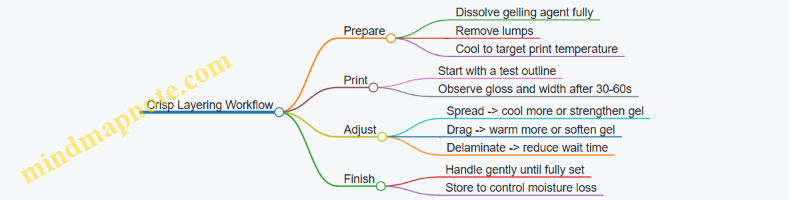
Practical Batch Notes for Consistency
Write down three numbers every time: gelling agent percentage, water percentage, and the temperature at which you start printing. Even small changes shift the working window. With gels, consistency beats creativity—until you’ve nailed crisp edges, then you can safely tweak flavors and colors without breaking the structure.
4.3 Thickening Strategies Using Starches Pectins and Hydrocolloids
Thickening is the difference between a paste that prints clean lines and one that slumps, strings, or forms weak layers. In 3D food printing, you’re not just aiming for “thick.” You’re aiming for the right flow during extrusion and the right shape stability after deposition. The same ingredient can behave differently depending on water content, temperature, and how fast the material cools or sets.
Foundational Concepts for Print Stability
Start with three practical properties.
-
Viscosity at extrusion: higher viscosity usually reduces spreading, but too much viscosity can clog nozzles.
-
Setting or gel formation: some thickeners thicken by cooling, others by ionic interactions, and others by hydration over time.
-
Structure recovery: after shear from extrusion, the material should regain enough structure to hold walls.
A simple way to think about it: starches often build structure as they gelatinize and then cool; pectins build structure through gel networks that depend on sugar and acidity; hydrocolloids can thicken and stabilize through hydration and, in some cases, weak gel behavior.
Starches for Controlled Gelatinization
Starches thicken when heated in water. Granules absorb water, swell, and leach amylose, creating a network that traps water. For printing, this matters because the material’s viscosity can change rapidly with temperature.
Practical example: Make a neutral starch paste for test prints.
- Heat water to a gentle simmer.
- Whisk in starch gradually to avoid lumps.
- Hold at a consistent temperature long enough for full gelatinization.
- Cool to a target extrusion temperature before loading.
What to watch: starch gels can become less stable if they’re too dilute, and they can thin if overheated or held too long. If your printed walls slump after a few minutes, your starch level may be low, or the paste may be too warm when you print.
Pectins for Sugar and Acidity Dependent Gels
Pectin gels form when pectin chains link into a network. The rules depend on pectin type, but in general you need the right balance of sugar and acidity.
Practical example: Print a glossy fruit-like gel.
- Choose a pectin type suited for low or high sugar.
- Dissolve sugar and pectin together in warm water.
- Add acid at the right stage so the gel forms after mixing, not during heating.
- Cool to printing temperature and test a small bead for shape retention.
What to watch: if the gel is too firm, it may clog or tear during extrusion; if it’s too soft, it will spread. Also, pectin gels can be sensitive to dilution, so keep water additions consistent.
Hydrocolloids for Hydration Based Thickening
Hydrocolloids include gums and similar agents that thicken by hydrating and increasing the viscosity of the continuous phase. Many are effective at relatively low percentages, which helps keep flavors and textures predictable.
Practical example: Use a gum blend for smooth extrusion.
- Hydrate the hydrocolloid in cold or room temperature water, depending on the specific gum.
- Let the mixture rest so hydration completes.
- Print after the viscosity stabilizes.
What to watch: some hydrocolloids hydrate slowly, so “it looked fine after mixing” can turn into “it printed poorly” after rest. If you see graininess, you likely didn’t hydrate fully or you added the powder too quickly.
Mind Map: Choosing the Right Thickener
Integrated Strategy for Real Recipes
A reliable approach is to match thickener behavior to your printing workflow.
- If your process involves heating anyway, starches can be convenient because you can gelatinize, then cool to a known extrusion temperature.
- If you want gel setting tied to formulation, pectins let you tune firmness using sugar and acidity, which also helps flavor consistency.
- If you need stable viscosity without heavy heating, hydrocolloids are often easier to manage because they rely on hydration and rest.
Example workflow: Suppose you’re printing a layered dessert component.
- Use a starch based base for a neutral, sliceable layer.
- Use a pectin gel for a thin top layer that sets quickly and holds a clean edge.
- Use a hydrocolloid thickener in the connecting layer so it bonds without excessive spreading.
This works because each layer’s thickening mechanism supports its job: starch provides bulk structure, pectin provides a defined gel surface, and hydrocolloid helps control interlayer flow.
Advanced Details Without the Guesswork
-
Dispersion matters: starch and pectin can form lumps if added too fast; hydrocolloids can clump if not dispersed before full hydration.
-
Water activity and dilution: adding extra water to “make it easier to print” often reduces structural recovery, so adjust thickener level rather than relying on dilution.
-
Rest time is part of the recipe: many thickeners continue changing after mixing. Treat rest time like an ingredient, not a suggestion.
-
Temperature at extrusion is a tuning knob: starch viscosity is temperature sensitive, and pectin solutions can gel faster than expected if they cool too quickly.
Case Study: Diagnosing a Slumping Paste
A printed wall spreads outward after 2–3 minutes.
- If the paste was warm during printing, starch may not have cooled enough to build structure.
- If the paste is pectin based, check sugar and acidity balance; under-sugared or under-acidified mixes often fail to gel firmly.
- If the paste is hydrocolloid based, verify hydration completion; under-hydrated gum mixtures can look fine at first but lose viscosity under shear.
Fixes should be targeted: adjust temperature first for starch, adjust formulation balance for pectin, and adjust hydration and rest time for hydrocolloids. Then repeat with a small test print before scaling up.
4.4 Flavoring and Coloring Without Breaking Print Performance
Flavor and color are not just “add-ins.” In 3D food printing, they change viscosity, gel strength, surface tension, and sometimes even how quickly layers set. The goal is to make your paste taste right and look right while keeping it printable from the first line to the last.
Foundational Principle: Treat Flavor and Color as Material Properties
Start by separating what you want from what the printer needs. Taste and appearance come from ingredients, but print performance depends on flow behavior and setting behavior.
- Flow behavior: If flavoring thins your paste too much, lines spread and lose shape.
- Setting behavior: If colorants or sweeteners slow gelation, layers may slump.
- Surface behavior: Some colorants change how the extrudate wets the previous layer, affecting adhesion.
A practical rule: change one variable at a time. If you alter both flavor and color in a single batch, you won’t know which change caused the failure.
Flavoring Strategy That Keeps Structure
Flavoring usually enters as acids, sugars, salts, extracts, or powders. Each category affects printability differently.
-
Use concentrated flavor bases
- Example: Mix vanilla extract into a small amount of warm water or syrup, then add it gradually. This prevents sudden viscosity drops.
-
Control water activity and hydration
- Example: If your base paste uses starch or hydrocolloids, add powdered flavor components slowly and let the mixture rest. Rest time allows hydration so the paste doesn’t extrude watery.
-
Mind acids and salts
- Acids can shift gel behavior and protein interactions. Salts can change how thick a dairy-based paste feels.
- Example: For a cheese-like extrudable, add lemon juice in tiny increments and print a small test strip after each addition.
-
Sweeteners can thin or crystallize
- Sugars often increase viscosity at high concentrations, but they also attract water and can change setting.
- Example: For a chocolate-inspired paste, use cocoa first, then add sugar gradually while checking line thickness and edge sharpness.
Coloring Strategy That Preserves Flow and Adhesion
Coloring can be done with powders, gels, or oil-soluble colorants. The main risk is that colorants introduce extra liquid or disrupt the gel network.
-
Powder colorants: Usually easiest to integrate, but they can thicken or create grit if not fully dispersed.
- Example: Sift cocoa or powdered dye into the base, mix thoroughly, then rest 10–15 minutes before printing.
-
Gel colorants: Convenient, but they add water or syrup-like components.
- Example: Add gel color a drop at a time, then compensate by slightly reducing added water in the base paste.
-
Oil-soluble colorants: Often stable in flavor, but they can separate from water-based gels.
- Example: If you use oil-soluble color, pre-mix it into a small portion of fat or syrup so it disperses evenly.
Stepwise Workflow for Reliable Results
Use a repeatable process so your “pretty” doesn’t become “crumbly.”
-
Print a small calibration sample
- Make a 2–3 layer wall or a simple grid. Evaluate edge sharpness and whether layers fuse.
-
Add flavor or color in small increments
- Keep a note of the amount added and the time you rest the mixture.
-
Rest, then re-test
- Many pastes need time for hydration and partial setting. Printing immediately after mixing can mislead you.
-
Adjust with targeted corrections
- If lines spread: reduce added liquid or increase thickener slightly.
- If lines sit but don’t bond: check whether the previous layer has dried too much; consider a shorter wait time or a slightly more adhesive base.
Mind Map: Flavor and Color Variables That Affect Printing
Example: Two Colorways of the Same Base
Use the same base paste and only change flavor/color inputs.
-
Colorway A: Cocoa Brown with Vanilla
- Add cocoa powder first, mix until uniform, rest, then add vanilla extract pre-mixed with a teaspoon of warm water.
- Print a small grid. If edges soften, reduce the warm water portion next time.
-
Colorway B: Berry Pink with Lemon
- Add berry powder or a water-based color gel gradually. Add lemon juice last, dropwise.
- Print a wall. If layers don’t bond, shorten the time between layers or slightly increase gel strength in the base.
Quick Checklist Before You Commit to a Full Print
- Your mixture looks uniform with no visible streaks.
- You rested after adding powders or gels.
- You printed a small test and confirmed edge shape and layer fusion.
- Flavor additions were incremental, not dumped in.
When flavor and color are treated like part of the material, your prints stay stable—and your finished food tastes like you meant it.
4.5 Batch Scaling and Keeping Print Consistency Across Runs
Scaling a recipe is not just multiplying ingredients. For 3D food printing, consistency depends on how the paste behaves under pressure, how it holds shape after extrusion, and how it sets during the waiting time between layers. The goal is to keep the material’s flow and structure in the same “operating window” from batch to batch.
Start with What Must Stay Constant
Treat these as invariants when scaling:
- Target viscosity or flow behavior at printing temperature. If your paste flows too easily, lines spread; if it’s too stiff, extrusion underfills.
- Gel strength or set timing after deposition. If it sets too fast, you get clogged nozzles; too slow, and layers slump.
- Water activity and hydration level that affect stability and surface drying.
- Color and flavor concentration so the printed piece tastes the same, not just looks similar.
A practical way to think about it: scaling should preserve the ratio between “solids that build structure” and “water that enables flow.”
Use Scaling Ratios, Not Guessing
For most beginner recipes, scale by mass rather than volume. If your base recipe uses grams for each ingredient, multiply each ingredient by the same factor (for example, 1.5× for a 150 g batch). Then adjust only the parts that are known to be sensitive.
Some ingredients behave differently when scaled because they hydrate at different rates. Starches, pectins, and hydrocolloids often need a consistent hydration process, not just consistent totals.
Keep the Hydration Process Identical
If your original batch includes a rest period, keep the same rest time and temperature. If you stir for 2 minutes, stir for 2 minutes. If you add thickener gradually, do the same.
Example: Suppose your 100 g paste uses 60 g water, 30 g base solids, and 10 g thickener, mixed in two stages with a 10 minute rest. For a 200 g batch, use 120 g water, 60 g base solids, and 20 g thickener, and keep the same two-stage mixing and 10 minute rest. If you skip the rest on the larger batch, the thickener may not reach the same flow behavior.
Calibrate Once, Then Verify Each Batch
Calibration is not a one-time event. What changes between batches is usually temperature, ingredient freshness, and hydration completion.
Use a simple verification routine:
- Print a 2–3 minute test pattern on the same surface.
- Check line width, surface smoothness, and edge definition.
- If the pattern looks off, adjust in small steps and record what you changed.
Keep a log with: batch size, ingredient weights, mixing time, rest time, printing temperature, nozzle size, and the observed defect.
Adjust in the Right Order
When a batch prints differently, change one variable at a time in a sensible sequence:
- Temperature first: small temperature changes can shift viscosity noticeably.
- Flow control second: tweak feed rate or extrusion pressure slightly.
- Material composition last: adjust water or thickener only after the process is confirmed.
Example failure and fix:
- Symptom: gaps between lines, weak walls.
- Likely causes: under-extrusion from too low pressure/feed rate, or thickening not fully hydrated.
- Fix order: verify rest time and temperature, then increase feed rate slightly, then consider adding a tiny amount of water only if the paste is clearly too stiff.
Plan for Nozzle and Batch Volume Effects
Larger batches can be mixed more aggressively or unevenly, especially if you’re using a bowl that doesn’t distribute heat and shear evenly. If you notice the first part of the batch prints differently than the last part, it’s often a mixing uniformity issue.
A simple control: mix until the paste looks uniform, then stir gently before loading each time you refill.
Mind Map: Batch Consistency Workflow
Example: Scaling a Simple Gel Paste
Start with a baseline batch that prints clean walls at your chosen nozzle.
- Baseline: 100 g total mass
- Target: 250 g batch
Scale each ingredient by 2.5×. Keep the same mixing steps and the same rest time. Before printing the full job, run a short test pattern. If edges are too sharp and the paste is underfilling, raise printing temperature slightly or increase feed rate a small amount. If edges are rounded and walls slump, reduce temperature slightly or lower feed rate. Only if both process and settings are confirmed should you adjust water or thickener for the next batch.
Consistency comes from treating each batch like a controlled experiment: preserve the recipe math, preserve the process, verify quickly, and adjust in a disciplined order.
5. Preparing Your Material for Printing
5.1 Mixing Methods to Prevent Lumps and Air Bubbles
Lumps and air bubbles usually come from the same root problem: you’re mixing ingredients that don’t yet share the same “flow behavior.” A smooth paste forms when water (or another liquid phase) is distributed evenly and thickening agents hydrate without clumping. Air shows up when you trap gas during vigorous stirring or when the mixture foams before it thickens.
Start with a Plan for Hydration
Before you touch the bowl, decide what kind of mixture you’re making: a paste that thickens as it cools, a gel that sets as it hydrates, or a neutral base that stays stable. Then choose a liquid-first or powder-first approach.
- Liquid-first works well for many starch and hydrocolloid systems because it gives thickening agents a chance to disperse before they start grabbing water.
- Powder-first can work for some dry blends, but it’s riskier for lumps because dry particles clump when they meet liquid all at once.
A practical rule: if your recipe includes a thickener that tends to “grab,” use liquid-first.
Mind Map: Mixing Workflow for Smooth, Bubble-Free Pastes
Liquid-First Method That Usually Works
- Measure liquids accurately. Thickening is sensitive to water ratio, so “close enough” can turn into lumps.
- Add a small portion of liquid to a bowl first if you’re using multiple powders. This creates a slurry that wets particles quickly.
- Sift powders into the liquid in a thin stream. If you dump a mound, the outside hydrates while the inside stays dry, forming lumps.
- Whisk for 20–40 seconds to break up any early clumps. Switch to a slower stir once the mixture looks uniform.
Example: For a neutral sweet paste using starch, start with half the water, whisk in the starch slowly, then add the remaining water. You’ll often see fewer “snowball” lumps than if you add all water at once.
Powder-First Method When You Must
If your recipe requires powder-first, reduce lump risk by controlling contact.
- Pre-mix dry ingredients thoroughly so thickener and flavoring are evenly distributed.
- Add liquid in stages rather than all at once. Start with enough liquid to make a thick slurry.
- Use a whisk at the beginning, then move to a spatula or low-speed stir once the mixture thickens.
Example: If you’re combining cocoa powder with a gelling agent, powder-first can work if you add liquid gradually and whisk until the mixture stops looking grainy.
Dispersion Technique for Stubborn Powders
Some ingredients clump because they’re dry, light, or slightly hydrophobic.
- Sifting: Pass powders through a fine sieve to break up agglomerates.
- Slurry pre-wet: Mix thickener with a small amount of liquid until smooth, then expand to the full batch.
- Corner scraping: Stop every 30–60 seconds to scrape the bowl bottom and sides. Dry streaks hide there and later become lumps.
Resting to Let Hydration Finish
Mixing isn’t only about combining; it’s also about giving time for water to move into thickener particles.
- Rest 5–15 minutes after the initial mix. Many pastes improve noticeably during this window.
- Re-mix gently after the rest. You’re restoring uniformity, not whipping air into the mixture.
Example: A gel that seems too thin right after mixing often thickens after rest. If you print immediately, you may compensate with extra thickener and end up with a paste that’s lumpy or overly stiff.
Preventing Air Bubbles Without Overthinking
Air management is mostly about mixing speed and technique.
- Avoid high-speed blending once the mixture starts thickening. Thick mixtures trap bubbles more easily.
- Use a whisk for wetting, then slow stirring for uniformity. Whisking is for dispersion, not for long mixing.
- Pour gently into the printer container. A fast pour can aerate the top layer.
If bubbles are already present:
- Let the mixture sit briefly so bubbles rise.
- Tap the container lightly against the counter to encourage bubbles to move upward.
- Stir only enough to re-level the surface—think “smoothing,” not “aerating.”
Quick Quality Checks Before Loading
- Visual check: No dry streaks, no visible grains, and no “fisheye” spots.
- Spoon test: Lift a spoonful; it should flow off in a continuous sheet rather than in clumps.
- Surface check: The surface should look mostly calm, with only a few small bubbles.
If you fail any check, fix it before printing. A short rest plus gentle re-mix solves many issues, while adding more powder too early often makes lumps worse.
5.2 Hydration Timing and Rest Periods for Stable Extrusion
Hydration timing is the quiet difference between “it prints” and “it prints reliably.” When you mix a paste or gel, water doesn’t instantly become uniform flow. Starches swell, proteins hydrate, gums disperse, and trapped air redistributes. A rest period gives the material time to reach a consistent viscosity and structure, so your extrusion rate stops drifting mid-print.
Foundational Concepts That Control Rest Behavior
Start with three practical ideas.
-
Hydration is a process, not a moment. After mixing, the mixture often looks smooth but still contains partially hydrated particles. During rest, viscosity rises or stabilizes as hydration completes.
-
Temperature changes the speed of hydration. Warmer mixtures hydrate faster, which can shorten your rest window. Cooler mixtures slow down thickening, which can make the same formula feel “thin” for longer.
-
Rest can also reduce air and improve flow. Many home batches trap microbubbles. Resting helps bubbles rise and lets the mixture relax, which reduces spitting and uneven line thickness.
A Systematic Rest Workflow for Beginners
Use a repeatable sequence so you can compare batches.
Step 1: Mix to a consistent endpoint. Stop mixing when the mixture is visually uniform and lump-free. Overmixing can shear some gels and change texture, so aim for “fully mixed,” not “as long as possible.”
Step 2: Rest briefly before loading. Let the batch sit 5–10 minutes at your working temperature. This is the “settle and hydrate” window for many beginner-friendly pastes.
Step 3: Load and do a short test line. Extrude a 2–3 cm line on your build surface. Measure whether the line spreads, holds shape, or breaks. If it’s unstable, you’ll adjust rest time rather than changing everything at once.
Step 4: Rest again only if needed. If the test line looks watery or stringy, rest 5–15 minutes more. If it looks too stiff or clumpy, you likely over-rested or your mixture is too cool; reduce rest next time or warm slightly.
How to Choose Rest Time Without Guessing
Rest time depends on the thickener system and the water-to-dry ratio.
- Starch-based mixes often need longer rest because granules swell gradually. Expect a noticeable viscosity change after 10–20 minutes.
- Gum and pectin systems can thicken quickly but still benefit from a short rest to fully disperse.
- Gelatin-like systems may set as they cool, so rest time and temperature must be coordinated.
A simple rule: if your extrusion rate changes during the first few minutes of printing, your material is still catching up. Add rest next batch; keep your mixing and temperature consistent.
Mind Map: Hydration Timing and Rest Periods
Example: One Batch, Three Rest Windows
Assume you’re printing a neutral paste with a moderate thickener level.
- Rest 5 minutes: The first lines look slightly glossy and spread at the edges. Mid-print, the material becomes thicker, so line width increases.
- Rest 15 minutes: The test line holds shape with clean edges. During printing, line width stays consistent and the surface looks smoother.
- Rest 30 minutes: The paste becomes resistant to extrusion. You may see intermittent flow or a rough surface texture.
From this, you learn that your “stable window” is around 10–20 minutes for that formula at your working temperature.
Example: Temperature Coordination for Gel Setting
If your material thickens as it cools, rest time can be misleading unless temperature is controlled. For instance, you might rest 15 minutes and then load into a cooler syringe, causing the paste to thicken faster than expected. Keep your working area at a steady temperature, and avoid leaving loaded syringes sitting for long periods before printing.
Practical Notes for Consistency
- Record your rest time and room temperature for each batch. Consistency beats memory.
- Avoid changing multiple variables at once. If extrusion is unstable, adjust rest time first, then revisit formula if needed.
- If you must pause mid-print, stir gently only if the material tolerates it; otherwise, pause can change hydration and structure unevenly.
A stable rest period turns extrusion from a moving target into a repeatable process. Once you find the window for your formula, your prints become less about luck and more about timing.
5.3 Temperature Control for Viscosity and Gel Setting
Temperature is the steering wheel for edible printing pastes and gels. It changes how easily material flows through the nozzle (viscosity) and how quickly it firms up after extrusion (gel setting). If you treat temperature as a single number, you’ll miss the real story: different parts of the workflow experience different temperatures, and those differences show up as print defects.
Foundational Concepts You Can Measure
Viscosity is how resistant a material is to flow. For many food pastes, warmer material flows more easily, which can increase line width and reduce the chance of under-extrusion. Cooler material tends to hold shape better but may require more pressure or slower travel.
Gel setting is the process where a gel network forms and the material gains structural strength. Some gels set as they cool; others set when heated and then cooled; some rely on time plus temperature. In practice, your printed line is “halfway” between these states while it’s being laid down, so timing matters.
Print temperature gradients are normal. The material in the syringe may be at one temperature, the nozzle tip may be slightly different, and the first layer on the build surface may cool faster than layers printed later. Those gradients create uneven adhesion and inconsistent layer height.
A Simple Temperature Map for Your Workflow
Use this mental model: temperature affects flow during extrusion, then temperature affects strength after extrusion.
- Before printing: material temperature sets baseline viscosity.
- During printing: nozzle and shear can warm or cool the paste slightly, changing flow moment to moment.
- After printing: build surface temperature and ambient air determine how fast the line sets.
If your first layer looks good but later layers slump, your “after printing” temperature conditions are likely too warm or setting is too slow.
Mind Map: Temperature Effects and Controls
Practical Control Methods with Clear Targets
Start by choosing a target temperature range for your specific material. You don’t need lab precision; you need repeatability.
-
Stabilize the material temperature
- If your paste is too thick, warm it gently in short intervals (for example, a bowl of warm water) and mix thoroughly.
- If it’s too runny, chill it briefly and mix again to avoid temperature pockets.
- Example: A neutral gel that prints best at “cool room” may suddenly become glossy and wider when warmed; that’s viscosity dropping.
-
Stabilize the build surface
- A warmer surface can keep the first layer tacky longer, improving adhesion but increasing spreading.
- A cooler surface can freeze edges quickly, improving crispness but sometimes reducing bonding.
- Example: When printing a lattice, if the intersections collapse, the surface is likely too warm for the gel to set before the next pass.
-
Control timing between layers
- Even with the same temperatures, setting speed changes with time. Resting between layers lets the previous layer gain strength.
- Example: For multi-layer walls, add a short pause after completing each layer outline. If you see the wall “wobble” when the next layer starts, your rest time is too short.
-
Adjust print speed and pressure as temperature changes
- Warmer material often needs less pressure and may require a slightly faster travel to prevent over-width.
- Cooler material may need more pressure and slower travel to maintain consistent extrusion.
- Example: If you warm a chocolate-like paste and it starts producing thick blobs at corners, reduce pressure or increase speed slightly so the nozzle doesn’t over-deposit while the material is extra fluid.
Example: One Material, Three Temperature Scenarios
Consider a simple gel paste used for crisp edges.
-
Scenario A: Too warm
- Lines look smooth and continuous, but edges soften.
- Overhangs sag because the gel hasn’t set enough during the build.
- Fix: chill the material slightly, cool the build surface, or increase rest time.
-
Scenario B: Too cool
- Extrusion becomes hesitant; you may see gaps or a grainy surface.
- Layers may not bond well because the material sets before it can fuse.
- Fix: warm the material slightly, increase pressure modestly, or slow down so the nozzle deposits with better contact.
-
Scenario C: Balanced
- Lines maintain width, edges stay crisp, and stacked layers hold without wobble.
- Fix: keep the same temperature conditions and only change one print parameter at a time if you need refinement.
Advanced Details Without the Guesswork
Shear and nozzle effects: extrusion forces can change how the material behaves. If you change temperature and see a sudden shift in line quality, confirm whether it’s viscosity (flow) or setting (strength). A quick test is to print a short straight line and watch it for 30–60 seconds: if it spreads, setting is too slow; if it won’t fuse, setting is too fast.
Consistency checks: measure material temperature after mixing, not just after heating or chilling. Mixing equalizes temperature; without it, you’ll get alternating thick and thin sections.
Layer strategy: for tall prints, treat temperature and rest time as structural supports. A slightly cooler material with a short rest can outperform a warmer material with no rest, because early strength reduces deformation later.
Temperature control isn’t about chasing a perfect number. It’s about making flow predictable during extrusion and making strength predictable after extrusion—so your prints behave the same way every time.
5.4 Loading Syringes Pouches and Cartridges Without Contamination
Contamination in food printing usually comes from two places: what touches the material, and what touches the nozzle. The goal is simple—keep the paste or gel isolated from anything that isn’t food-grade and clean, while also preventing dried residue from becoming a surprise ingredient.
Foundational Setup Before You Load
Start with a clean, dry workspace. Lay out a “clean zone” for unopened ingredients and a “handling zone” for tools you will touch repeatedly. Wash hands, then put on gloves if your workflow includes frequent contact with food surfaces. If you use gloves, change them when you switch from handling packaging to handling the material.
Choose a loading method that matches your material’s behavior. Thick gels often need slower loading to avoid trapping air. Thin pastes can be loaded faster, but they still benefit from steady pressure so you don’t whip bubbles into the mix.
Syringes Loading Without Introducing Air or Residue
- Inspect and pre-condition the syringe and tip. Make sure the syringe barrel and plunger are clean and dry. If your nozzle tip has any dried bits from a previous run, remove them before loading.
- Load from the container, not from the nozzle. Scoop or pour material into the syringe barrel. Avoid dragging the nozzle across the container rim.
- Minimize air pockets. Fill slowly, then tap the syringe gently to bring bubbles upward. If you see a large bubble near the tip, push it back into the container and reload.
- Wipe the exterior, not the interior. If material smears on the outside, wipe the outside with a food-safe wipe. Don’t wipe inside the tip where residue can smear into the print path.
- Prime carefully. Before printing, extrude a small amount onto a clean scrap surface. This removes any material that may have been exposed to air or residue during loading.
A practical example: if you’re printing a strawberry gel, load at a slow pace, tap twice, then prime until the extrudate looks uniform in color. If the first line is streaky, don’t “use it anyway”—that streak often indicates trapped air or partial gel separation.
Pouches Loading with Controlled Flow
Pouches are convenient, but they can trap contaminants in folds. Use a pouch that is food-safe and compatible with your extrusion system.
- Pre-fill and straighten. Before attaching the nozzle, squeeze the pouch gently to move material away from the sealed edges.
- Avoid overfilling. Leave headspace so you can control the first squeeze without blasting material out of the nozzle.
- Attach nozzle after the pouch is filled. This reduces the chance that the nozzle tip contacts the container rim.
- Prime on a scrap surface. Extrude until flow is steady and the color or texture matches the rest of the batch.
Example: for a neutral base paste, if the first squeeze comes out watery while later flow is thicker, your pouch likely has a separation layer. Mix the batch again, then reload rather than trying to “average it out” during printing.
Cartridges Loading with Clean Interfaces
Cartridges often connect to a feeder or print head via a coupling. The interface is where contamination likes to hide.
- Clean the coupling surfaces. Wipe the mating surfaces so no dried paste remains. Dried bits can flake into the nozzle.
- Load with a funnel or measured transfer. Use a funnel if your cartridge opening is narrow. Avoid pouring directly from a bowl where drips can reach the coupling.
- Seat the cartridge correctly. Misalignment can cause leaks that smear material onto areas that should stay clean.
- Check for leaks before printing. Run a short, controlled extrusion while watching the coupling.
Example: if you’re printing a cheese-like paste, leaks can create a thin film around the coupling. That film can later mix with a different color paste, causing faint speckling even when your material is otherwise consistent.
Mind Map: Loading Without Contamination
Quick Checklist You Can Actually Use
- Tools are clean and dry before loading.
- Material never contacts the nozzle tip during loading.
- First extrusion is primed onto scrap, not into the print.
- No leaks or smears appear at couplings.
- Any streaks or separation are corrected by remixing and reloading.
If you follow these steps, you’ll spend less time cleaning nozzles mid-session and more time printing parts that look consistent from the first layer to the last.
5.5 Troubleshooting Material Readiness with Simple Tests
Before you print, you want to know whether your material is ready to flow, hold shape, and bond to the previous layer. The goal of these tests is not to “pass or fail” but to pinpoint what needs adjusting: hydration, temperature, mixing, or additives.
Start with a quick checklist. Your workspace should be clean and dry where food contacts equipment. Your material should be mixed thoroughly and rested if the recipe calls for it. Then run the tests below in order. Each test tells you what to change next, so you don’t end up tweaking everything at once.
1) The Ribbon Test for Flow and Viscosity
Scoop a small amount and lift it slowly. Let it fall back onto the bowl in a ribbon.
- If it breaks into crumbs quickly, it’s likely too thick or under-hydrated.
- If it pours like thin batter and spreads flat, it’s too thin or too warm.
- If it forms a steady ribbon that lands with a slight mound, it’s usually in the right zone. Example: A berry gel that ribbons too easily will spread during printing, making walls look rounded. Add a small amount of thickener or cool it slightly, then retest.
2) The Peak and Collapse Test for Yield Stress
Place a small dollop on a plate or spoon. Make a peak by lifting the tool, then watch what happens over 10–30 seconds.
- A peak that holds with minimal slump suggests good yield stress for vertical walls.
- A peak that collapses immediately suggests the material won’t support layers.
- A peak that holds but feels grainy suggests incomplete hydration or uneven mixing. Example: If chocolate-inspired paste holds peaks but looks sandy, the issue is often mixing time or hydration of cocoa/starch components, not the nozzle size.
3) The Smear Test for Surface Behavior
Spread a thin layer on a flat surface and observe after 30–60 seconds.
- If it smears and stays glossy, it may be too wet or not setting yet.
- If it skins over quickly but cracks, it may be too cool or too concentrated.
- If it spreads slightly then stops, it’s likely close to print-ready. Example: A vegetable puree that skins too fast can clog or create rough edges. Warm it a little and ensure stabilizers are fully hydrated.
4) The Threading Test for Stringing and Nozzle Compatibility
Extrude a short line onto a scrap surface. Lift away and watch for strings.
- No strings and clean separation means good nozzle match and appropriate viscosity.
- Thin strings indicate the material is too elastic or too warm.
- Gaps with no line indicate under-extrusion or too low flow. Example: If you see long threads, reduce temperature slightly or lower flow rate. If you see gaps, increase pressure/feed rate carefully or check for air bubbles.
5) The Layer Bond Test for Adhesion
Print two small stacked lines or a tiny two-layer wall on your actual build surface. Wait the same time you expect between layers.
- If the top layer peels off easily, adhesion is weak.
- If it fuses but the shape collapses, the material is too fluid or not setting.
- If it holds shape but the top layer slides, the surface may be too slick or the first layer too dry. Example: If adhesion fails on silicone mats, lightly adjust release method or ensure the first layer is placed consistently without gaps.
6) The Temperature Window Test
Take two samples: one at your current working temperature and one slightly cooler (about 2–5°C). Run the ribbon and peak tests on both.
- If the cooler sample holds peaks better, you likely need a temperature adjustment rather than recipe changes.
- If both behave poorly, the issue is probably hydration, mixing, or additive balance. Example: Many gels print better when kept steady rather than repeatedly warmed and cooled.
Mind Map: Material Readiness Tests and What They Mean
Example: A Systematic Fix Path for a Failing Print
If your walls slump, don’t jump straight to more thickener. First run the peak and collapse test. If it collapses immediately, cool the material slightly and retest. If it still collapses, check hydration and mixing, then run the layer bond test. If adhesion is weak, focus on first-layer placement and setting time rather than only changing viscosity.
If your print looks stringy, run the threading test. If strings appear, reduce temperature a bit and lower flow rate. If strings persist while the ribbon test still looks steady, check for air bubbles and ensure the nozzle tip is clean and dry where appropriate.
These tests keep changes targeted. You’ll spend less time guessing and more time printing, which is the whole point of doing “simple tests” in the first place.
6. From Design to Print Settings
6.1 Choosing Simple Models and Converting Them into Printable Forms
Start with the goal: a printable food object must have a clear “inside” and “outside,” and it must survive the realities of extrusion—thickness limits, gravity, and time to set. Simple models are not a compromise; they reduce the number of failure points you have to debug.
Foundational Model Rules That Prevent Most Headaches
A model is easiest to print when it is one continuous piece with predictable surfaces. Aim for:
- Single material, single height logic: If your paste sets slowly, avoid designs that require thin walls at many angles.
- No paper-thin features: If a wall is thinner than your nozzle can reliably lay down, it will smear, tear, or disappear.
- No floating islands: Overhangs and bridges can work, but beginners should start with shapes that either grow upward from the base or have gentle slopes.
- Watertight geometry: For most slicers, the model must represent a solid volume, not just a surface shell.
A practical rule: if you can’t imagine how you’d scoop it onto a plate in one pass, the model likely needs simplification.
From “Idea Shape” To Printable Volume
Begin with basic primitives: cylinders, boxes, spheres, and rounded blocks. These map cleanly to layer-by-layer deposition.
- Pick a target footprint: Decide the maximum width and height that fit your build surface and your material’s setting time.
- Choose a thickness budget: Set a minimum wall thickness and minimum feature size based on your nozzle diameter and paste behavior.
- Convert surfaces into solids: Many design tools export surfaces that look fine visually but are not “solid” to a slicer.
- Check for self-intersections: Overlapping faces can create holes or non-manifold edges that slicers interpret unpredictably.
Mind Map: Model Choices and Conversion Steps
Example: Turning a Sketch into a Print-Ready Shape
Imagine you want a small “food coaster” that looks like a shallow disk with a raised rim.
- Sketch stage: Draw two circles—an outer diameter and an inner diameter—then decide the rim height.
- Model stage: Create a cylinder for the base, then add a second cylinder for the rim. Subtracting shapes is fine, but keep it simple: one subtraction usually beats five.
- Conversion stage: Ensure the model is a single solid. If your design tool leaves separate shells, merge them.
- Slicing stage: In the layer preview, confirm that the rim is not thinner than your nozzle can lay down. If it is, increase rim thickness or reduce nozzle sensitivity by using a larger feature.
If the rim looks crisp in 3D but becomes a faint smear in the slicer preview, trust the slicer preview. It’s telling you the geometry is too fine for your process.
Example: Simplifying a Decorative Shape Without Losing Function
Suppose you designed a lattice heart. Lattices look great on screen, but they often create tiny gaps and fragile bridges.
A beginner-friendly simplification keeps the silhouette while reducing internal complexity:
- Replace the lattice with a single solid heart.
- If you want texture, use shallow embossing on the surface rather than through-holes.
- Keep emboss depth within a range your paste can reproduce without collapsing.
This approach preserves the “read” of the shape while avoiding the print’s most common failure: thin struts that don’t have enough material to hold their form.
Advanced Details That Matter Once Basics Work
When simple shapes print reliably, you can refine conversion quality:
- Scale correctness: A model exported at the wrong scale can produce impossible layer heights. Always verify dimensions before slicing.
- Smoothing vs. preserving edges: Over-smoothing can round corners that you intended to be crisp, changing how layers stack.
- Feature alignment: If you plan to assemble parts, design mating surfaces as flat or gently curved so they align without forcing paste into gaps.
Mind Map: Quick Checklist Before You Slice
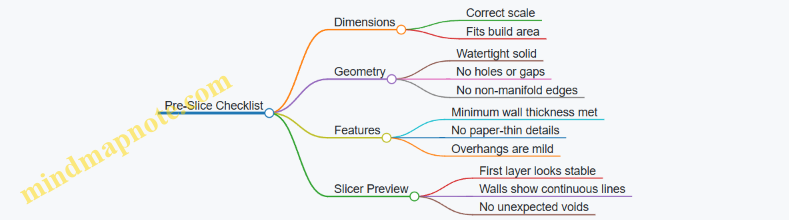
A good workflow is boring in the best way: start with primitives, convert to a watertight solid, verify minimum thickness in the slicer preview, then only add complexity after you can print the simple version without surprises.
6.2 Understanding Layer Height Infill and Wall Thickness for Food
Layer height, infill, and wall thickness are the three knobs that most directly control how a printed food object looks, holds together, and tastes when you bite it. Think of them as a simple trade: more material usually means more strength and smoother surfaces, but it also means more time, more drying risk, and sometimes a heavier mouthfeel.
Layer Height for Food
Layer height is the thickness of each deposited slice. In food printing, it also affects how well layers fuse. If layers are too thin, you may get fragile stacking because each layer has less bulk to grip the one below. If layers are too thick, the nozzle can smear or leave ridges, and the top surface may not set evenly.
A practical starting rule is to match layer height to your nozzle diameter and paste behavior. For example, with a 1.0 mm nozzle and a paste that holds shape quickly, a layer height around 0.6–0.8 mm often produces clean edges. With a slower-setting gel, you may need a slightly smaller layer height so each new layer lands on a surface that has already firmed.
Food-specific nuance: layer height changes drying time per layer. Thinner layers dry faster overall, which can improve stability for crisp structures, but it can also cause premature skinning that blocks bonding. If you notice weak layer adhesion, try reducing layer height slightly or slowing the print so the previous layer stays workable.
Wall Thickness for Food
Wall thickness is the number of perimeter lines that form the outer shell. Walls do two jobs: they protect the interior from crumbling and they define the visible texture. For food, walls also influence how flavors and moisture distribute after printing.
If your walls are too thin, the object may look fine at first but collapse when you lift it. If walls are too thick, you waste material and can create a chewy or gummy exterior that overpowers the intended bite.
A simple approach is to choose wall thickness as a multiple of your nozzle width. For instance, with a 1.0 mm nozzle, two to three perimeter lines often give a wall thickness around 2–3 mm. For delicate shapes like lattice cookies, aim for the minimum that survives handling. For load-bearing parts like a printed base for a dessert tower, increase to three or four lines.
Food-specific nuance: walls can dry differently than infill. If your shell is drying while the interior is still soft, you can get warping or cracks. Keeping wall thickness moderate helps the whole object set more uniformly.
Infill for Food
Infill is the internal material pattern. It controls bulk, stiffness, and how much the object resists bending. Infill also affects how much the interior retains moisture, which matters for both texture and shelf life.
Common infill patterns behave differently in food:
- Grid infill spreads material evenly and is good for general-purpose shapes.
- Lines infill is simple and can be easier to print cleanly, but it may create directional weakness.
- Honeycomb infill can be strong for its weight, though it may require careful tuning to avoid gaps.
In food printing, infill density is often less about maximum strength and more about preventing collapse. For a crisp shell with a light interior, low to medium infill can work. For a thick, cake-like paste that needs support, higher infill density reduces sagging.
A concrete example: suppose you print a small savory “crouton” cube. If you use thick walls but very low infill, the cube may hold its shape but crumble when bitten because the interior lacks a continuous support network. Increasing infill density slightly, while keeping walls the same, often fixes the bite without making the exterior too heavy.
How They Work Together
Layer height, wall thickness, and infill density interact like a three-part system. Changing one knob can mask or worsen issues caused by another.
- Thicker walls with larger layer height can hide poor bonding because the exterior carries most of the load.
- Thin walls with high infill can still fail if the shell dries faster and cracks.
- Low infill with small layer height may look neat but can be weak because the interior lacks bulk.
When troubleshooting, change one variable at a time. For example, if a printed part delaminates between layers, adjust layer height and print speed first. If it holds together but feels hollow and fragile, adjust infill density next. If it looks right but breaks at the edges, increase wall thickness.
Mind Map: Layer Height Infill and Wall Thickness
Example: Tuning Settings for Three Food Objects
1) Crisp cookie panel
- Layer height: moderate to slightly smaller for clean edges
- Wall thickness: 2–3 perimeter lines
- Infill: low to medium so it stays light and snaps
2) Savory cube crouton
- Layer height: matched to nozzle for consistent stacking
- Wall thickness: 3 perimeter lines for edge survival
- Infill: medium so the bite doesn’t crumble
3) Soft mousse-like dome
- Layer height: smaller to reduce smearing
- Wall thickness: thicker to prevent collapse
- Infill: medium to higher to support the shape while it sets
Quick Checklist Before You Print
Choose layer height first based on nozzle size and paste setting speed. Then set wall thickness to the minimum that survives lifting and handling. Finally, pick infill density based on whether you need stiffness, lightness, or a specific bite. If the object fails, identify whether it’s a bonding problem, an edge protection problem, or an interior support problem, and adjust the matching knob.
6.3 Feed Rate Pressure and Speed Tuning for Edible Pastes
Feed rate is the practical link between your printer’s motion and your paste’s behavior. If the nozzle moves faster than the material can flow, you get gaps and weak lines. If it moves slower than the material can support, you get bulging, smearing, and overfilled beads. The goal is to match three things: extrusion pressure, travel speed, and paste readiness.
The Core Relationship Between Speed and Extrusion
Start with a simple mental model: extrusion pressure controls how much paste leaves the nozzle per unit time, while speed controls how much time the nozzle spends depositing each millimeter. When you increase speed without changing pressure, the deposited amount per millimeter drops. When you increase pressure without changing speed, the deposited amount per millimeter rises.
A useful rule of thumb for tuning is to change one variable at a time and observe the line thickness and surface. For example, print a single straight line at constant height. If the line looks thinner than expected and the top surface shows tiny breaks, you are underfeeding. If the line looks wider, glossy, or spreads at the edges, you are overfeeding.
Pressure Tuning for Consistent Flow
Pressure tuning is about finding the lowest pressure that still produces a continuous bead. Lower pressure reduces squeezing, which can help prevent stringing and surface tearing. Higher pressure can improve continuity but may also push paste into unwanted spreading, especially with softer gels.
Practical approach:
- Pick a nozzle and paste batch you already know is mixed and hydrated correctly.
- Print three short lines at the same speed, using increasing pressure steps.
- Choose the first pressure that yields a continuous bead from start to finish.
Example: With a cocoa-based paste, you might see that at low pressure the bead starts fine but thins near the end of the line. That often means the paste is flowing but not sustaining under the nozzle’s changing backpressure. A small pressure increase can stabilize the flow without forcing excessive width.
Speed Tuning for Line Shape and Layer Support
Speed tuning determines how the deposited bead relaxes before the next pass. With edible pastes, relaxation is not just a physics detail; it affects whether the next layer bonds cleanly.
If you print too slowly, the bead has more time to sag or spread before it is covered. If you print too quickly, the bead may not have time to settle into a stable shape, leading to uneven height and weak interlayer contact.
Practical approach:
- Keep pressure fixed at your chosen “continuous bead” value.
- Print the same straight line at three speeds.
- Select the speed that gives a bead width close to your target and a top surface that stays smooth without collapsing.
Example: A vegetable puree with added stabilizer may hold shape well, but it can still spread if you go too slow. You may notice the line edges feathering. Moving slightly faster can reduce that edge feathering because the bead is covered sooner.
Feed Rate as a Combined Setting
Many printers expose feed rate as a single number, but internally it still reflects speed and extrusion behavior. Treat feed rate as a convenience, not a guarantee. If your system uses pressure control, feed rate changes may not scale linearly with deposited mass.
To avoid surprises, verify with a simple measurement:
- Print a short wall or rectangle.
- Compare its actual dimensions to the intended ones.
- Adjust speed first if the bead is too thin or too thick, then adjust pressure if continuity is failing.
A Systematic Tuning Workflow
Use this order to reduce confusion:
- Confirm paste readiness by doing a small test bead at a moderate pressure.
- Tune pressure for continuity at a moderate speed.
- Tune speed for bead shape at the selected pressure.
- Recheck continuity at the final speed, because some pastes behave differently once the bead cools or sets.
Mind Map: Feed Rate Pressure and Speed Tuning
Mini Case Study: Two Pastes, Two Outcomes
Case Study: Gel with Crisp Edges
- Symptom: At your current settings, the line edges look sharp but the bead height is inconsistent.
- Likely cause: Speed is too high for the paste to settle.
- Fix: Reduce speed slightly while keeping pressure constant, then confirm the bead height stabilizes.
Case Study: Soft Paste with Glossy Spread
- Symptom: Lines are continuous but too wide and slightly glossy, with edges that smear.
- Likely cause: Pressure is too high or speed is too slow.
- Fix: Lower pressure in small steps first. If width remains excessive, increase speed modestly.
Practical Tuning Targets
Aim for repeatable line width and predictable layer bonding rather than chasing a single “perfect” number. When you change paste batch, temperature, or nozzle, re-run the short two-step test: pressure for continuity, then speed for shape. That keeps your prints stable and your troubleshooting focused, which is a lot more fun than guessing.
6.4 Support Strategies for Overhangs and Bridges
Overhangs and bridges are the two places where home 3D food printing most often turns into a sticky puzzle. The core idea is simple: when a new layer has nothing underneath, you either (1) temporarily hold it up, (2) change the geometry so it doesn’t need support, or (3) adjust the material so it can hold itself long enough to set.
Foundational Concepts for Support Decisions
Start by classifying the problem.
- Overhang: a layer extends outward from the previous layer. The farther it extends, the more it sags.
- Bridge: a gap spans between two supported ends. The longer the gap, the more the material droops.
Then decide what “support” means for your edible material. Some pastes set quickly (gels, starch-thickened mixtures), while others stay fluid longer (cheese-like pastes, chocolate-inspired blends). If your material needs time to firm up, supports must either be temporary or designed to be removed without tearing the print.
Support Types That Actually Work
Geometry Supports
The easiest support is the one you don’t need. Use geometry to reduce unsupported length.
- Chamfer edges: instead of a sharp ledge, use a small slope. The slope shortens the unsupported span.
- Add fillets: rounded transitions distribute stress and reduce sudden droop.
- Use “stepped” walls: break a long overhang into shorter steps.
Example: If you’re printing a decorative panel with a lip, replace a flat 90° lip with a 45° chamfer. You’ll often get a clean underside without any extra material.
Temporary Supports
Temporary supports are structures that hold the print while the material sets, then get removed.
- Support pillars: vertical posts under the risky regions. They’re simple and predictable.
- Support rafts: a thin base under the entire overhang area. They help with adhesion and reduce sag.
- Support “fences”: thin walls under a bridge line. They guide the material and limit sideways spreading.
Practical rule: keep supports thicker than your nozzle line width, but not so thick that removal damages the surface. If your nozzle deposits a 2 mm line, aim for support features around 2–4 mm wide.
Material-Driven Supports
Sometimes you can support with the material itself.
- Increase gel strength: slightly higher thickener or gelling agent can reduce sag.
- Shorten open time: print at a temperature that helps the paste firm sooner.
- Use staged deposition: pause briefly after laying a long line so it sets before continuing.
Example: For a bridge between two towers, print the first half, wait until the line holds its shape, then print the second half. This reduces the moment when the center is unsupported.
Mind Map: Overhang and Bridge Support Strategy
Systematic Workflow for Designing Supports
- Measure the unsupported distance: estimate the overhang length or bridge span in millimeters.
- Match support type to material behavior: if your paste stays soft, prefer temporary supports or geometry changes; if it sets quickly, geometry alone may suffice.
- Start conservative: add supports for the first test print, then remove them one region at a time.
- Plan removal: supports should be removable without prying. If you can’t remove them cleanly, you’ll end up damaging the underside.
- Tune in small increments: adjust one variable at a time—support spacing, pause duration, or gel strength.
Example: A Two-Tower Bridge
Imagine printing a simple arch: two vertical columns with a gap between them.
- Geometry option: give the arch a slight curve upward. The center becomes less stressed because the material is already “aimed” toward the ends.
- Temporary support option: add a thin fence under the centerline for the first layer of the bridge. Remove it after the material firms.
- Material option: print the bridge in two passes with a short pause in the middle.
If the bridge droops, don’t immediately blame the printer. Check whether the extrusion is consistent, whether the paste has enough structure, and whether the pause is long enough for the center to hold.
Example: Overhang Lip on a Dessert Base
For a dessert tray with a decorative lip that extends outward:
- Use a chamfered lip so each layer has partial support.
- If you still see sag, add support pillars only under the longest extension, not under the entire lip.
- Keep support contact areas small to preserve the underside texture.
A good sign is when the underside looks slightly matte and uniform rather than stretched or glossy. Gloss often means the material was still flowing when it should have been setting.
Practical Limits and What to Do When You Hit Them
When supports fail, the failure mode usually points to the fix:
- Supports tear the print: supports are too aggressive or removal is too forceful. Reduce support width or increase the number of smaller supports.
- Print sags despite supports: supports are too far apart, too thin, or the material is too slow to set. Tighten spacing or increase gel strength slightly.
- Bridges crack after printing: the material may be drying too fast or too thick. Adjust hydration and deposition timing so the bridge sets without pulling apart.
Support strategies aren’t about making everything “supported.” They’re about giving the material the right amount of help for the right amount of time, then getting out of the way.
6.5 Calibration for Scale and Alignment on Your Build Surface
Calibration is the part where your printer stops guessing and starts behaving. For food printing, that matters because a small alignment error can turn a clean edge into a lumpy seam, and a scale error can make a “simple” shape too thin to hold its own weight.
Foundational Concepts You Must Get Right First
Start with two ideas: scale and alignment.
- Scale means the printed dimensions match your design. If your model says a 20 mm square, the finished food should land near 20 mm on the build surface.
- Alignment means the printer’s coordinate system matches the physical build area. The model’s origin should correspond to the same physical corner every time.
Before you touch settings, verify your build surface is stable and level. A wobble in the surface can mimic a calibration problem even when everything else is correct.
Step 1: Establish a Repeatable Reference Corner
Pick one physical point on the build surface as your origin reference. Many people use the front-left corner, but the key is consistency.
- Mark the reference corner with food-safe tape or a removable marker on the tray rim (not on the printing area).
- Home the printer and confirm the nozzle is at the expected origin location.
- If your system uses a “center” origin, still choose a consistent physical reference and map it to the software origin.
A quick sanity check: print a small crosshair pattern at the software origin and measure where it lands. If the crosshair is offset, you’ll correct alignment before worrying about scale.
Step 2: Calibrate First Layer Height for Adhesion
Scale and alignment won’t save you if the first layer floats or smears.
- If the nozzle is too high, the paste won’t bond and lines separate.
- If it’s too low, you’ll drag material, widen lines, and distort dimensions.
Use a test strip: print a straight line and a short rectangle. Measure line width and edge sharpness. Adjust Z height until the rectangle edges look crisp and the line width matches your expected extrusion behavior.
Step 3: Calibrate Scale Using a Measurable Test Object
Now measure the printer’s real-world output.
Print a simple calibration shape that has clear edges: a square frame or a rectangle with internal dimensions. For example, design a 30 mm by 30 mm outer square and include a 10 mm inner gap.
After printing:
- Measure the outer dimensions with calipers or a ruler with millimeter marks.
- Measure the inner gap.
- Compare measured values to design values.
If the outer square prints at 29.4 mm instead of 30 mm, your scale factor is 30 / 29.4 = 1.0204. Apply this correction in your printer’s steps-per-mm or scaling setting, then repeat the test once more.
Step 4: Correct Alignment with a Two-Direction Offset Test
Scale can be correct while alignment is off. To detect that, print two small squares: one near the origin and one near the opposite corner of the usable build area.
- If both squares are the right size but shifted, you have an origin offset.
- If the near-origin square is correct but the far one is consistently skewed, you may have a coordinate mapping issue or a surface tilt.
Use the measured offsets to adjust X and Y origin values. Then reprint the two-square test to confirm the correction holds across the build area.
Mind Map: Calibration Workflow for Scale and Alignment
Example: Fixing a 5 mm Placement Error
Suppose your design places a small “handle” at (10 mm, 10 mm), but it lands 5 mm to the right.
- Print a two-square test where one square is at the origin and the other is at (10 mm, 10 mm).
- Measure the shift: if the (10,10) square is 5 mm right while the origin square is correct, you likely have a coordinate mapping or software offset issue rather than a global origin error.
- Apply the X offset correction so that the (10,10) square returns to its intended position.
- Reprint the two-square test to confirm both points align.
This approach avoids random tweaking. You measure, compute the correction, apply it, and verify with a test that isolates the problem.
Verification Checklist Before You Print Food
- First layer test shows crisp edges and consistent line width.
- Scale test matches outer and inner dimensions within your acceptable tolerance.
- Two-corner placement test shows correct position near origin and across the build area.
- You can repeat the same placement after a pause or reload without the pattern drifting.
Once these checks pass, your designs become predictable. That predictability is what lets you focus on recipes and textures instead of chasing geometry.
7. Printing Techniques for Clean Layers and Strong Structures
7.1 Bed Leveling and First Layer Adhesion for Food Materials
A food printer’s first layer is where “design” meets “reality.” If the bed is too high, the nozzle drags and smears. If it’s too low, the material can’t flow smoothly and may tear or form gaps. Leveling is not just about distance; it’s also about matching the bed surface to the material’s behavior.
Foundational Concepts for Leveling
Bed leveling means making the nozzle-to-bed gap consistent across the build area. For food, consistency matters because edible pastes often have a narrow window where they both extrude and hold shape.
First layer adhesion means the printed line stays put without being crushed. Adhesion comes from a mix of mechanical contact (the paste touching the surface) and gentle setting (gelation, starch thickening, or drying, depending on your formulation).
A practical way to think about it: you want the first layer to be slightly “pressed in,” but not flattened into a thin film.
Bed Surface Preparation
Start with a clean, food-safe bed. Residue from prior prints can create slick patches that cause sliding even when the gap is correct.
Choose a release approach that matches your material:
- Direct print on a stable surface works for many gels and thick pastes that set quickly.
- A thin, food-safe barrier (like a mat designed for food contact) can improve repeatability when your paste tends to stick too strongly.
If you use a barrier, treat it as part of the leveling system. A mat that sits a few millimeters higher changes the effective gap.
Leveling Workflow That Actually Works
- Warm up to your printing temperature. Viscosity changes with temperature, and so does how the paste behaves at the nozzle.
- Set a consistent nozzle height reference. Use the same method every time, such as a fixed calibration routine in your printer software or a repeatable physical gauge.
- Check multiple points across the bed. Food prints are sensitive to corners and edges where mechanical tolerances show up.
- Adjust in small steps. After each adjustment, print a short test line and observe the result.
A good test line should look like a continuous ribbon with defined edges. It should not look like a stretched smear, and it should not break into separate beads.
First Layer Tuning for Food Pastes
First layer tuning is a three-variable conversation: gap, flow, and speed.
- Gap too large: lines sit on top, spread sideways, and may detach when you lift the print.
- Gap too small: lines look overly flattened, extrusion may stall, and the nozzle can drag through the paste.
- Flow too high: the layer pools and loses shape; you’ll see a glossy, flooded look.
- Flow too low: you get gaps and a “ropey” texture.
- Speed too fast: the paste doesn’t have time to settle and can curl at the edges.
Use one change at a time. If you adjust gap and flow together, you won’t know which fix helped.
Adhesion Checks You Can Do Immediately
After printing the first layer (or a small test patch), do quick, low-risk checks:
- Edge integrity: edges should stay crisp rather than lifting.
- Lift test: gently nudge the corner with a clean utensil. It should resist movement.
- Surface sheen: a slightly matte look often indicates the paste is setting rather than sliding.
If adhesion is weak, don’t jump straight to stronger “stickiness.” Often the issue is simply that the paste isn’t contacting the surface enough.
Mind Map: Bed Leveling and First Layer Adhesion
Example: Two Common Failure Modes
Example: Lines detach after printing. You notice the first layer looks fine while printing, but later it peels up in sheets. Start by checking the gap: if the nozzle is too high, the paste touches lightly and doesn’t form enough contact. Then verify your surface is clean and not overly slick from prior residue.
Example: Nozzle drags and leaves gouges. The paste smears and the nozzle seems to “dig” into the bed. This usually means the gap is too small for the paste’s viscosity at that moment. Raise the nozzle slightly, then re-test with the same flow and speed so you can confirm the fix.
Quick Practical Checklist
Before committing to a full print, confirm: bed is clean, temperature is stable, leveling is consistent across points, test line is continuous with crisp edges, and a gentle nudge doesn’t shift the first layer. Once those are true, the rest of the print has a much better chance of behaving like the model.
7.2 Extrusion Consistency and Line Quality Control
Extrusion consistency is what turns “it sort of comes out” into repeatable lines that stack cleanly. Line quality control is the habit of checking the output while you print, not only after you notice a problem. Together, they help you avoid gaps, blobs, and weak layers.
Foundational Idea: Flow Is a Moving Target
Food pastes behave like non-Newtonian materials: their resistance to flow changes with shear and time. That means the same pressure can produce different results if the paste warms, rests, or gets aerated. Your job is to keep three things stable: material readiness, nozzle conditions, and motion settings.
What “Consistent Extrusion” Looks Like
A good line has a predictable width, smooth edges, and a steady height relative to your layer height. If you see periodic thickening, it often means pressure is oscillating or the paste is intermittently sticking to the nozzle. If the line is thin and breaks, you likely have under-extrusion from low pressure, too much speed, or material that is too stiff.
Quick Preflight Checks Before You Print
- Prime the nozzle: extrude a short test bead until the color and texture look uniform. Stop if you see streaks or foam.
- Confirm nozzle cleanliness: a partially clogged tip creates a “narrow throat” effect where the first part of a line looks fine and later parts starve.
- Match temperature to your recipe: if your paste is near the edge of its workable range, small temperature drift can change viscosity enough to ruin line width.
During-Print Line Quality Control Loop
Treat each minute of printing like a mini inspection.
- Watch the bead in real time: compare the current line width to the first few centimeters of the print.
- Listen with your eyes: if the line surface goes from glossy to matte suddenly, the paste may be drying or losing moisture at the nozzle.
- Check layer-to-layer continuity: the line should merge with the previous one without leaving a visible seam.
Pressure, Speed, and Feed Rate: The Triangle
Extrusion depends on the relationship between pressure (or syringe plunger force), nozzle size, and travel speed.
- If lines are too wide and rounded, reduce pressure or slow down less.
- If lines are too narrow or broken, increase pressure slightly or reduce speed.
- If lines are correct width but weak, you may be printing too fast for the paste to relax and bond.
Use small adjustments. A practical approach is to change one variable at a time and print a short calibration strip.
Nozzle Behavior and Line Shape
Nozzle geometry affects how paste spreads.
- Smaller nozzle increases shear and can improve detail, but it is less forgiving if the paste is slightly too stiff.
- Larger nozzle tolerates thicker pastes, but it can exaggerate bulging if pressure is high.
- Tip wetting matters: if the paste doesn’t wet the nozzle well, you get stringing and inconsistent start/stop extrusion.
Start, Stop, and Corners
Most defects happen at transitions.
- Start: if the first millimeters are thin, you need more priming or a slightly higher initial pressure.
- Stop: if you get a blob at the end of a segment, reduce stop pressure or add a short retraction strategy that fits food paste behavior.
- Corners: turning slows the head, which can over-extrude. Compensate by tuning corner speed or using consistent motion settings.
Mind Map: Extrusion Consistency and Line Quality Control
Example: Diagnosing a Line-Width Problem
You print a simple rectangular wall and notice the first half looks correct, then the line gradually narrows.
- Likely cause: partial clog or paste thickening as it warms and rests unevenly.
- Fix: stop, extrude a short prime to clear the tip, then remix gently to restore uniformity. If the paste is warming in the syringe, reduce dwell time between batches.
Example: Diagnosing Gaps Between Lines
You see thin gaps where the new line should merge with the previous one.
- Likely cause: under-extrusion or too much speed for bonding.
- Fix: increase pressure slightly or reduce travel speed. Also confirm layer height is not too high for the paste’s ability to relax and fuse.
Example: Diagnosing Blobs at Segment Ends
Every segment ends with a small mound.
- Likely cause: excess pressure at stop or retraction that is too weak.
- Fix: lower stop pressure and shorten the stop dwell. If you use retraction, test a small reduction and re-run the calibration strip.
Practical Checklist You Can Reuse
- Prime until uniform.
- Print a short strip and measure line width.
- Adjust one variable at a time.
- Watch starts, stops, and corners closely.
- Confirm layer bonding by checking seams after the first few layers.
When extrusion and line quality are controlled this way, your prints stop being a guessing game and start behaving like a recipe: consistent inputs, consistent outputs, and fewer surprises.
7.3 Managing Stringing Smearing and Under Extrusion
Stringing, smearing, and under extrusion are three ways your printer can “misplace” edible material. They often share causes, so treat them as symptoms of a few underlying variables: flow rate, nozzle temperature, material readiness, and motion timing.
Foundational Checks Before You Change Settings
Start with the simplest observations. If you see thin threads between lines, that’s usually stringing. If you see dragged streaks or a glossy smear on the surface, that’s smearing. If you see gaps, faint lines, or walls that look too thin, that’s under extrusion.
Now verify the basics that affect all three:
- Material readiness: If the paste is too thick, it may not extrude consistently. If it’s too thin or aerated, it may ooze and smear.
- Nozzle condition: A partially clogged nozzle can cause under extrusion, while residue can cause intermittent bursts that look like stringing.
- First layer behavior: If the first layer is weak, later layers may not anchor, making smearing worse and gaps more likely.
Mind Map: Symptoms Causes Fixes
Stringing: Stop the Threads
Stringing usually happens when material keeps flowing during travel moves. Think of it as “ooze with ambition.”
Common causes and what to try:
- Nozzle too warm for the paste. Lower nozzle temperature slightly and re-test with a short print.
- Material too fluid or under-set. Let gels rest after mixing so they regain structure before printing.
- Travel moves too slow or too close. Increase travel speed and ensure the nozzle clears the surface. If your printer supports it, use a modest travel lift.
- Pressure too high. Reduce extrusion pressure or feed rate so the flow matches the commanded line.
Easy example: Print a small rectangular frame with an internal cross. If you see threads crossing the empty center, run the same model again but only change one variable: reduce nozzle temperature by a small step, then keep everything else identical. You should see fewer threads without losing line thickness.
Smearing: Keep the Nozzle from Dragging
Smearing is often a contact problem: the nozzle (or the extruded bead) is staying too wet or too close to the surface.
Common causes and what to try:
- Travel speed too low. Faster travel reduces the time material has to stick and drag.
- Nozzle too close to the bed. If the nozzle scrapes, you’ll get streaks. Re-check Z offset.
- Paste stickiness or low gel strength. Increase gel strength by adjusting thickener levels or allow a short set time before printing.
- Over-extrusion on corners. When the path changes direction, pressure can spike. Reduce flow slightly or slow down only at corners.
Easy example: Print two identical single-layer lines separated by a gap. If the gap fills with a glossy smear, your nozzle is likely too close or the paste is too soft. Raise the nozzle slightly (small Z adjustment) and increase travel speed; then reprint.
Under Extrusion: Restore Consistent Flow
Under extrusion shows up as gaps, weak walls, or “stair-step” texture where lines should be continuous.
Common causes and what to try:
- Extruder slipping. Check drive engagement and ensure the syringe or cartridge is seated firmly.
- Clog or partial blockage. If stringing is intermittent and under extrusion appears together, clean the nozzle and reload material.
- Material too thick. Warm the material slightly within safe food-printing limits, or adjust hydration and rest time.
- Flow settings too low. Increase feed rate or extrusion pressure in small increments.
- Inconsistent calibration. If line width varies across the print, re-check calibration for your nozzle diameter and extrusion multiplier.
Easy example: Print a short “ladder” of 10 evenly spaced rungs. If early rungs look fine but later ones thin out, you may have pressure drop, clogging, or material settling. Mix again, rest, and re-test; then adjust flow only after the material behavior is stable.
A Practical Tuning Sequence That Works
Use a short test model and change one thing at a time:
- Print a single-layer grid to judge stringing and smearing.
- Print a two-layer wall to judge under extrusion and adhesion.
- Adjust in this order: travel speed/lift → nozzle temperature → Z offset → flow/pressure → material rest and hydration.
If you fix stringing but under extrusion appears, you likely reduced flow too far. Bring flow back to match line width, then re-check travel behavior.
Quick Decision Guide
- Threads during travel: reduce ooze by lowering temperature, improving rest, and speeding travel.
- Dragged streaks on the surface: lift or speed up travel, raise Z slightly, and strengthen the gel.
- Gaps and thin lines: check nozzle blockage, extruder drive, then increase flow in small steps.
7.4 Building Multi Layer Objects with Timing and Rest Steps
Multi-layer prints succeed when each layer gets the right amount of time to “behave” before the next layer arrives. Think of timing as a handshake between your material and gravity. If you move too fast, the new layer pushes the old one sideways or melts it into a puddle. If you wait too long, the surface may skin over and weaken bonding.
The Core Idea of Rest Steps
A rest step is a deliberate pause between actions: after depositing a layer, after switching colors, or after changing nozzle speed. The goal is consistent interlayer adhesion without losing shape. For beginners, the simplest approach is to rest after every layer, then reduce or adjust the rest once you see stable results.
Start with a predictable sequence:
- Print one layer.
- Wait a short rest.
- Print the next layer.
- Repeat until the object reaches its target height.
Your rest duration depends on three practical factors: material water content, gel strength or thickener behavior, and ambient conditions (especially airflow and temperature). You do not need lab measurements; you need repeatable observation.
A Simple Timing Model You Can Use Immediately
Use a “two-stage” rest: a short set for shape, then a slightly longer set for bonding.
- Set Rest: enough time for the deposited lines to stop flowing.
- Bond Rest: enough time for the surface to accept the next layer without tearing.
If your material is a gel that firms as it cools, the set rest may be short and the bond rest may be longer. If your material is a paste that dries, both rests may be driven by surface moisture loss.
Mind Map: Timing and Rest Steps
Timing and Rest Steps Mind Map
Example: Printing a Two-Layer “Wall and Cap” Shape
Goal: build a flat base and a raised cap without the cap sliding.
Step 1: Base layer
- Print a single layer of uniform thickness.
- Use a moderate extrusion rate so lines merge without flooding.
- Set Rest: wait until the surface stops looking glossy.
Step 2: Cap layer
- Start the cap only after the base surface is tacky, not wet.
- Bond Rest: if the cap edges curl or the base smears, increase the bond rest by 10–20 seconds.
Step 3: Final stabilization
- After the last layer, pause longer than your between-layer rests.
- This prevents the object from relaxing while you remove it from the build surface.
If you want a quick diagnostic, print the cap in two halves: pause, then continue. If the second half bonds well but the first half slumps, your set rest is too short.
Example: Timing for a Three-Layer “Stacked Disc” with Color
Color changes are a timing trap because you often slow down while swapping materials. That slowdown can either help (more rest) or hurt (surface skins before bonding).
Use this workflow:
- Print disc layer 1.
- Rest for your set rest.
- Print disc layer 2.
- Rest for bond rest.
- Swap color quickly, then print disc layer 3.
If the third layer shows a faint separation line, shorten the time spent between the swap and the next deposition, or increase bond rest slightly so the surface remains receptive.
Advanced Detail: Rest Steps for Tall Builds and Overhangs
For taller objects, the lower layers may still be “active” while you print higher ones. That can cause gradual leaning.
Two adjustments help:
- Increase bond rest after every N layers: for example, after layers 1–2, then after layer 3–4. This gives the structure time to lock in.
- Use micro-pauses at transitions: when you finish a perimeter and start infill, pause briefly so the perimeter doesn’t get dragged.
Overhangs add another constraint: the underside needs time to support itself. If your underside droops, reduce the overhang length per layer or add a longer rest after the overhang layer before continuing.
A Practical Checklist Before You Start
- Your rest plan is written down as set rest and bond rest.
- You know what “good” looks like: crisp edges, no sinking, no delamination line.
- You will change only one variable at a time: rest duration first, then speed or pressure.
Timing and rest steps are not a mysterious art. They are controlled pauses that let your material do what it already wants to do—flow, set, or dry—just at the right moment.
7.5 Post Print Handling Drying and Setting Without Collapse
Once your print finishes, the job is not “done,” it’s “paused.” Many edible prints fail after extrusion because the structure is still soft, water is still moving, or the gel network hasn’t finished setting. Post print handling is mainly about controlling three things: support, moisture, and time.
Foundational Idea: What Is Still Happening After the Last Layer
Most printable foods rely on one of these mechanisms to hold shape:
- Gel setting: a network forms as temperature drops or as a gelling agent hydrates.
- Thickening by evaporation: water loss increases viscosity and stiffness.
- Fat or sugar stabilization: cooling or crystallization locks in structure.
In all cases, the printed object is fragile until the mechanism completes. That means you should treat the first minutes like a “construction zone,” not a finished product.
Step 1: Let the Print Rest in Place
Keep the object on the build surface for a short rest period before moving it. This reduces shear stress from handling.
- For gel-like prints (many fruit gels, pectin-based structures), rest until the surface stops looking glossy.
- For paste prints (thicker extrudables), rest until the lines look matte and the top layer no longer spreads when gently touched with a clean fingertip.
A practical rule: if you can press lightly and see a dent that stays for more than a few seconds, it’s not ready to lift.
Step 2: Control Airflow and Temperature Without Shocking the Print
Drying is helpful, but too much airflow too soon can cause cracking or edge curl.
- Use gentle, indirect airflow rather than a fan blasting straight at the object.
- Avoid large temperature swings. If your kitchen is cool, don’t move prints from a warm printer enclosure to a cold countertop.
For many home setups, a good compromise is: rest at room temperature for a short window, then move to a controlled drying spot.
Step 3: Choose a Drying Method Based on the Material
Different materials need different “finishing” conditions.
- Water-rich gels: aim for slow moisture loss. Place on a rack or mat that allows air contact on at least one side.
- Starch-thickened pastes: they often benefit from slightly longer drying to prevent a gummy interior.
- Chocolate-like or fat-based prints: focus on cooling and solidification rather than aggressive drying.
If you’re unsure, start with the gentlest method and increase drying time rather than intensity.
Step 4: Lift and Transfer Using Support, Not Force
Collapse usually happens during transfer. Use these handling principles:
- Support the underside with a thin spatula, parchment strip, or flexible mat.
- Avoid twisting. Twisting turns small soft spots into cracks.
- Move in one motion. Pause midair and the object can sag.
If the print is tall or hollow, transfer in stages: first move to a nearby surface, then to the final tray.
Step 5: Finish Setting with a Predictable Timeline
Use a simple timeline so you don’t guess.
- 0–10 minutes: rest on the build surface.
- 10–30 minutes: gentle drying or cooling depending on material.
- 30–90 minutes: final set check before packaging or stacking.
A set check is concrete: the print should hold its shape when lifted at one edge and should not leave wet residue on a clean glove or paper.
Mind Map: Post Print Handling Decisions
Example: Two Prints, Two Different Finishing Routines
Example 1: Pectin fruit gel lattice
- After printing, rest on the build surface until the top looks less glossy.
- Move to a rack with airflow from the side, not directly from above.
- Transfer only after the lattice springs back when gently tapped.
Example 2: Chocolate-like paste relief
- Rest briefly to let the structure stabilize.
- Cool in a steady environment rather than drying with strong airflow.
- Lift with a flexible support sheet to avoid edge bending.
Common Failure Points and Fixes
- Collapse after transfer: you lifted too early. Rest longer and use underside support.
- Cracks along edges: drying was too aggressive. Reduce airflow and extend rest time.
- Gummy interior: surface dried but core didn’t. Increase total drying time and ensure air contact.
Good post print handling is mostly patience with a plan: observe the surface, control moisture gently, and move the object only when it can carry its own weight.
8. Practical Sweet Food Prints from Dough to Dessert
8.1 Printing Chocolate Inspired Pastes and Cocoa Based Mixes
Chocolate prints are mostly about controlling two things: flow while extruding, and shape stability after the material lands. Cocoa based mixes add an extra twist because cocoa particles can thicken, abrade nozzles, and change how fast the surface sets. The goal is to start with a paste that behaves predictably, then tune it with small, measurable adjustments.
Foundational Concepts for Cocoa Based Printing
What Makes Chocolate Inspired Pastes Printable
A printable chocolate paste usually has a thick enough body to hold a line, but not so thick that the nozzle stalls. In practice, you want a material that extrudes smoothly at a steady pressure and then firms up quickly enough to prevent slumping.
A simple way to think about it:
- Extrusion behavior depends on viscosity and particle size.
- Post print behavior depends on gel strength, fat setting, and moisture movement.
Why Cocoa Changes Everything
Cocoa powder is not just “brown.” It brings fine solids that absorb some water and can increase yield stress. If your mix is too dry, it may feel thick but still fail by cracking or leaving gaps. If it’s too wet, it may look smooth but spread after deposition.
Base Recipe: Cocoa Paste That Prints Clean Lines
Use this as a starting point for small shapes like tiles, ridges, and simple relief patterns.
Ingredients
- 60 g cocoa powder (unsweetened)
- 120 g powdered sugar
- 90 g softened butter or cocoa butter
- 30 g honey or glucose syrup
- 20 g water or milk (start with less, add gradually)
- 1 g salt
Method
- Warm butter slightly so it mixes without lumps.
- Mix cocoa powder, powdered sugar, and salt.
- Add honey and butter; stir until glossy.
- Add water in small increments until the paste extrudes in a continuous bead.
- Rest 10 minutes so hydration and fat distribution settle.
Print test: extrude a 5 cm line on a scrap surface. If it breaks mid-line, increase water by 2–3 g. If it spreads wider than the nozzle path, reduce water by 2–3 g or add 5–10 g cocoa powder.
Mind Map: Chocolate Inspired Paste Workflow
Nozzle, Speed, and Layer Strategy
For chocolate inspired pastes, start with a nozzle that matches your desired detail. A smaller nozzle gives crisp edges but increases the chance of clogging with cocoa particles. A slightly larger nozzle is often more forgiving for beginners.
Layering rule of thumb: build relief in thin passes rather than one thick deposit. Thick deposits trap moisture and can slump before the fat sets.
A practical starting point:
- First layer: slow and deliberate for adhesion.
- Subsequent layers: moderate speed to keep line consistency.
- Pause between layers: 30–60 seconds for the surface to firm.
Example: Printing a Cocoa Relief Tile
Design: a 4 cm square with a raised border and a shallow center pattern.
Steps
- Print a thin border line first. Keep it continuous so the border acts like a frame.
- Fill the center with a low relief pattern using short strokes.
- If the center edges blur, slow down and reduce the deposit thickness.
- After printing, wait until the surface looks matte rather than glossy.
- Lift carefully from the mat; if it bends, it needs more set time.
Common failure and fix
- Gaps between lines: paste too stiff or nozzle flow too low. Add 2–3 g water and re-test.
- Bulging edges: paste too wet or deposits too thick. Reduce water and use thinner layers.
- Rough texture: cocoa particles too prominent. Sift cocoa before mixing and keep rest time consistent.
Advanced Tuning for Better Texture
Controlling Stringing
Stringing happens when the paste stretches before it breaks. Reduce it by:
- using a slightly faster travel move between segments,
- wiping the nozzle tip gently between prints,
- and ensuring the paste has rested long enough to thicken evenly.
Managing Surface Set
If your prints look stable but later soften, moisture migration is the culprit. Store finished pieces in a container that limits humidity swings, and avoid stacking while warm.
Mind Map: Troubleshooting Cocoa Prints
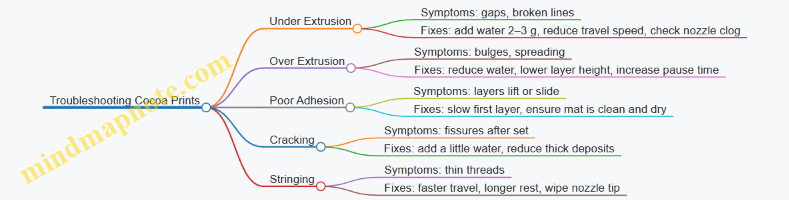
Quick Practical Checklist Before You Print
- Paste is smooth and extrudes as a continuous bead.
- Rest time is consistent across batches.
- First layer is slow enough to bond.
- Relief is built with thin deposits and short pauses.
- You wait for a matte surface before lifting or stacking.
8.2 Printing Cookie Like Structures with Edible Gels
Cookie-like prints are a great first “structure” project because you can aim for crisp edges, predictable thickness, and a surface that holds detail. The key is treating your edible gel like a material with two jobs: it must extrude smoothly, then it must set fast enough to stop spreading.
What Makes a Gel Cookie-Like
A cookie print needs three properties working together. First, shape retention: the walls should stay upright after deposition. Second, edge definition: the nozzle should leave a clean boundary without smearing. Third, bite behavior: the interior should not turn into a paste puddle.
In practice, you get these by balancing gel strength, moisture, and extrusion behavior. If your gel is too weak, layers slump. If it’s too strong, it won’t flow consistently and you’ll see gaps or rough ridges.
Choosing a Gel Base and Target Texture
Start with a gel base designed for extrusion, not just for spoonable set. For cookie-like results, aim for a gel that can be piped in lines and then firms up within minutes.
A practical target is a gel that behaves like this during printing: it holds its outline immediately after the nozzle lifts, and it doesn’t noticeably relax over the next 30–60 seconds. If it relaxes, increase gel strength or reduce water content.
Mind Map: Gel Cookie Structure Workflow
Design a First Cookie Shape That Teaches You Something
Begin with a flat cookie cutter silhouette: a circle, a star, or a simple rectangle with rounded corners. Keep the first attempt at one to two layers and moderate thickness. This reduces the number of variables and makes defects easier to diagnose.
Use a perimeter-first approach. Print an outer ring, then fill the interior. This mirrors how real cookies hold their shape: the boundary sets the geometry, and the center follows.
Print Settings That Usually Work
Use a nozzle size that matches your gel’s graininess and your desired detail. Smaller nozzles give sharper features but demand more consistent viscosity.
A good starting point is to keep layer height close to the nozzle’s effective line width. If your layer height is much smaller, you risk weak bonding between layers. If it’s much larger, the gel can bulge and lose edge crispness.
Speed matters because it controls how long the gel spends in a “still wet” state. If you move too fast, the gel may not bond. If you move too slowly, it can spread.
Execution Steps with Integrated Best Practices
- Prepare the gel for extrusion: Mix until smooth, then let it rest briefly so bubbles rise and viscosity stabilizes. A short rest often improves line quality more than changing settings.
- Level and prime for consistent first contact: The first line determines everything that follows. If the first perimeter is uneven, later layers will look like they’re “trying to correct” themselves.
- Print the perimeter in one continuous loop: Lift the nozzle cleanly at the end. If you drag, you’ll create a tail that ruins the cookie edge.
- Fill with a controlled pattern: Use parallel lines or a grid. Avoid overfilling; leave a tiny margin so the fill doesn’t push the perimeter outward.
- Add a rest between layers if you stack: For two-layer cookies, wait until the first layer firms enough to support the second. If you print the second layer immediately, the gel can deform like soft dough.
Example: A Simple Star Cookie with Clean Edges
- Design: Star outline with a filled interior.
- Material goal: Firm perimeter, stable interior.
- Process: Print one perimeter loop, then fill using evenly spaced strokes.
- Check: After lifting the nozzle, the edge should stop moving quickly. If the star points round off, your gel is relaxing too much.
If your star points blur, adjust one factor at a time. Most often, the fix is either a slightly stronger gel (less free water) or a slightly faster perimeter pass so the gel sets sooner.
Mind Map: Troubleshooting Cookie-Like Gel Prints
Post-Print Handling for the Cookie Bite
Cookie-like gels usually need a short set period before you move them. Handle by the edges, not the center, and avoid stacking until the surface feels firm enough to resist finger pressure.
Drying is not just about removing moisture; it’s about achieving uniform firmness. If you dry too aggressively, the surface can skin over while the interior is still soft, which leads to cracking or tearing.
Quick Quality Checklist
- Perimeter holds its outline
- Interior fill doesn’t push outward
- Edges feel firm, not rubbery
- No visible separation between layers
- The print releases cleanly from the surface
When these checks pass, you’ve built the foundation for more complex cookie patterns like lattice cutouts, raised borders, and multi-color inlays.
8.3 Layered Candy Panels and Decorative Relief Patterns
Layered candy panels are a practical way to learn how edible materials behave across multiple passes: each layer must stick to the previous one, hold its shape while cooling or setting, and support the next layer’s weight. Decorative relief patterns add another constraint: the material must reproduce fine details without tearing or smearing.
Foundational Idea: Panels as Stacked Adhesion
A panel is simply a flat print with thickness built from layers. For candy, the “adhesion” problem is usually solved by choosing a material that remains slightly tacky during the next deposition, or by using a thin interlayer that bonds well. A good beginner target is a two-layer panel: a base layer for stability, then a top layer that carries the relief.
Quick Example: Two-Layer Candy Panel
- Base layer: a thicker, slower-setting candy paste (think “holds a shape” rather than “melts smooth”).
- Top layer: a slightly more fluid version of the same candy so it can flow into relief grooves.
- Timing: print the top layer soon after the base layer is laid, while the base surface is still receptive.
Material Choices That Make Relief Easier
Relief patterns fail for predictable reasons: too much flow blurs edges, too little flow leaves gaps, and uneven cooling causes warping.
Texture Targets
- For crisp ridges: aim for a paste that supports its own walls for at least a few minutes after extrusion.
- For clean grooves: keep the material consistent so the nozzle leaves a uniform strand.
- For fine detail: reduce nozzle diameter and slow down movement over the pattern.
Integrated Best Practice
Use the same base recipe for both layers, then adjust only one variable at a time (usually thickness or temperature). If you change multiple variables, you won’t know whether the relief failed because of viscosity, setting time, or nozzle pressure.
Designing Relief Patterns Without Overcomplicating
Relief patterns are easiest when you treat them like shallow terrain rather than deep sculpture. Start with repeating motifs: dots, lines, small chevrons, or a simple grid.
Pattern Depth and Spacing
- Shallow relief: reduces the chance of collapse and makes layer alignment less critical.
- Adequate spacing: prevents neighboring ridges from merging when the material relaxes.
Practical Example: Chevron Panel
Design a top layer with:
- a shallow chevron ridge height (small enough to avoid sagging),
- consistent ridge width,
- and a border frame so the panel stays flat.
Print Settings That Support Layered Relief
Relief printing is mostly about controlling flow and timing.
Layer Height and Wall Behavior
- Use a layer height that matches your material’s ability to hold a new surface.
- If ridges look rounded, reduce flow rate or slow down.
- If ridges look broken, increase flow rate slightly or warm the material.
Speed and Pause Strategy
When the nozzle travels over a pattern, speed affects strand thickness. For beginners, use a simple rule: move slower over relief paths than over empty space. If your printer supports it, add a short pause after finishing the base layer so the surface becomes tacky rather than wet.
Mind Map: Panel Workflow and Failure Points
Step-by-Step Example: Decorative Relief Panel
- Create a panel outline with a border frame. The frame gives you a reference for alignment and reduces edge curling.
- Print the base layer at a thickness that feels sturdy when gently lifted.
- Wait until the base surface is tacky. A simple check is to touch lightly with a clean utensil tip; it should grab slightly, not smear.
- Print the relief top layer using a slower speed over ridges and grooves. Keep the nozzle close enough to avoid stringing, but not so close that it drags.
- Cool evenly. If one side cools faster, the panel can curl and distort the relief.
- Unmold and inspect under steady light. Look for blurred edges (flow issue), missing lines (flow or temperature issue), and separation at the border (timing issue).
Troubleshooting Through Cause and Effect
- Ridges look rounded: reduce flow rate or slow the nozzle over the relief.
- Grooves show gaps: slightly increase temperature or flow, and ensure the material is fully mixed.
- Top layer peels at the border: shorten the wait between base and top, or use a thinner bonding interlayer.
- Panel warps after cooling: reduce thickness differences across the panel and cool on a flat surface.
Mini Checklist for Your Next Panel
- Same recipe for both layers, change only one variable.
- Shallow relief depth with repeating motifs.
- Slower motion over relief paths.
- Base layer tackiness before depositing the top.
- Even cooling and careful unmolding.
8.4 Assembling Printed Components into Finished Desserts
Printed parts rarely become a dessert by themselves. Assembly is where you turn “edible geometry” into something that holds together, tastes intentional, and survives the journey from print bed to plate.
Foundational Assembly Principles
Start by sorting your printed components into three functional groups: structure, surface, and flavor delivery. Structure parts carry weight and resist collapse. Surface parts define the look and provide a clean bite. Flavor delivery parts—like a smear, dot, or insert—carry sweetness, acidity, or aroma.
A simple rule keeps assembly predictable: match the component’s moisture behavior to its job. If a part is made from a gel that sets firmly but softens with moisture, place it where it won’t be soaked. If a part is more stable, you can use it as a base.
Before you assemble, do a “dry run” with no adhesives. Place parts in the intended order and check three things: contact points, wobble, and whether any edge will trap air. If you see a gap, plan a filling step rather than hoping the adhesive will bridge everything.
Choosing Adhesives and Connectors
For food printing, adhesives are usually edible gels, creams, or thin pastes that behave like a controlled “glue.” The best adhesive is one that is thick enough to stay where you put it and soft enough to wet the contact surfaces.
Use these practical guidelines:
- For crisp printed shells: use a thin gel or glaze that sets quickly. Apply a small bead at the contact line.
- For soft printed layers: use a cream or mousse that matches the layer’s softness so the joint doesn’t become a hard ridge.
- For multi-part stacks: use “connectors” such as a dab of gel plus a short insert (like a small printed peg or a thin wafer strip) to prevent sliding.
Example: If you printed two chocolate-like panels and one is slightly fragile, apply adhesive only at the edges and corners. Center contact can be left dry so the panel doesn’t warp from excess moisture.
Step-by-Step Assembly Workflow
- Stage your parts. Keep components separated by function. Label them if you have multiple colors or sizes.
- Prepare a joint plan. Decide where adhesive goes and how much. A good target is “enough to fill micro-gaps,” not enough to squeeze out.
- Stabilize the base. Place the bottom component on a plate or tray with a non-slip layer such as a thin sheet of parchment or a stable cookie crumb.
- Join in order of load. Attach the structural pieces first, then add surface details last.
- Add flavor delivery. Pipe or spread fillings into planned cavities, then cap with a surface piece.
- Set and rest. Give joints time to firm up. If your dessert includes a crisp element, rest it briefly so the joint sets without soaking the crisp part.
Mind Map: Assembly Decisions
Example: Layered Dessert with Crisp Panels
Imagine you printed three components: a firm base disk, two crisp side panels, and a top dome. The base disk is your structure. The side panels are surface and structure. The dome is surface.
- Place the base disk on the serving tray.
- Apply a thin gel bead along the base disk’s outer rim.
- Position each side panel and press only at the bottom edge.
- Pipe a small filling ring inside the rim where the dome will sit. Keep it below the dome’s contact line.
- Lower the dome gently. If it rocks, add a tiny connector dot at one corner rather than adding more gel everywhere.
This approach prevents adhesive squeeze-out from turning crisp edges into soft edges.
Example: Cup Dessert with Insert and Cap
For a cup dessert, use a stable printed “cup liner” and a separate insert such as a fruit gel or flavored cream.
- Put the liner in the cup first.
- Add the insert as a centered mound.
- Cap with a printed lid that has a slightly larger footprint than the insert.
If the insert is wetter than the liner, keep the insert height low so it doesn’t climb into the liner and weaken it.
Quality Checks Before Serving
Do a final inspection with two questions: Does it hold its shape when touched lightly? and Will the first bite include the intended flavors? If the joint looks glossy and wet, you likely used too much adhesive. If flavors are uneven, adjust where you place the filling rather than changing the printed parts.
Assembly is mostly about controlling contact: where materials touch, how much they touch, and how long they’re allowed to set. Once you treat joints like design elements, the finished dessert becomes consistent instead of accidental.
8.5 Storage and Serving Guidelines for Sweet Printed Foods
Sweet printed foods behave like a small engineering project: they’re built from layers, then they’re asked to survive handling, humidity, and time. Storage and serving rules mainly control three things—water movement, texture setting, and color stability.
Foundational Principles for Storage
Start by identifying what your print is made of. A sugar gel or starch paste usually sets as water redistributes and the matrix firms up. A chocolate-like paste often needs fat to stay stable and avoid surface bloom. A doughy or cookie-like print is more sensitive to moisture exchange because it can soften when it absorbs humidity.
Use a simple decision rule: if your print contains a lot of free water (looser gels, fruit purees, thin layers), treat it like a moist dessert and store it more carefully. If it’s mostly low-moisture (cocoa solids, sugar-rich structures, crisp gels), you can store it more like a cookie—still protected from humidity.
Storage Conditions That Actually Matter
Temperature:
- Refrigeration slows microbial growth, but it can also change texture. Many gels become firmer when cold, then soften after returning to room temperature.
- For prints with delicate crispness, consider short refrigeration only when needed, then serve after a controlled warm-up.
Humidity:
- The enemy is moisture migration. Crisp edges can soften, and glossy surfaces can turn sticky.
- Keep prints in airtight containers with a barrier to humidity. Parchment or silicone sheets between layers prevent sticking and reduce surface transfer.
Light and Color:
- Bright colors can fade with time and light exposure.
- Store in opaque containers when possible, especially for prints that include natural colorants.
Packaging and Layering Practices
Layering is where most “it was perfect yesterday” moments happen. Use these practices:
- Single-layer storage for fragile prints. If the print has thin walls or overhangs, store flat.
- Interleaving for stacked prints. Place parchment sheets between layers so edges don’t weld together.
- Portioning before storage. If you plan to serve later, pre-portion components to avoid repeated opening and temperature swings.
A practical example: if you printed a multi-layer candy panel, let it fully set first, then stack it with parchment interleaves. If you skip interleaving, the top piece often pulls moisture from the bottom and becomes tacky.
Timing for Best Serving Quality
Serving quality depends on when the print reaches its “texture window.” For many sweet prints, that window is after the material finishes setting and before it absorbs too much moisture.
A useful workflow:
- Print and allow a short rest to stabilize extrusion lines.
- Let the finished piece set according to its material type.
- Store in the chosen condition.
- Serve after a brief acclimation period so the surface texture matches what you intended.
Example: a gel-based lattice often looks crisp right after setting, then gradually softens if stored uncovered or in a humid fridge. Serving it soon after proper setting keeps the lattice from collapsing.
Handling and Serving Without Breaking the Structure
Treat printed sweets like assembled items, not like loose candy.
- Use a flat spatula or wide lifter to move pieces.
- Avoid stacking during transport; support from underneath.
- For plated servings, place the print last so it doesn’t sit exposed to room humidity.
If your print includes multiple components, assemble close to serving time. Components with different moisture levels can cause uneven softening when they sit together for long periods.
Mind Map: Storage and Serving Decision Flow
Quick Examples by Print Type
Gel lattice: Store airtight, interleaved, and serve after a short acclimation so the surface isn’t cold and brittle.
Chocolate-inspired shapes: Store cool but not overly humid; keep them sealed to reduce surface dulling and sticking.
Cookie-like structures: Store airtight to prevent moisture gain; if they soften, crisping is not guaranteed because the printed structure may not re-form cleanly.
Practical Checklist Before You Serve
- Is the print fully set and firm enough to lift?
- Are pieces protected from humidity with airtight packaging?
- Are stacked items separated with parchment?
- Will you assemble multi-part desserts close to serving?
- Do you need a brief acclimation period for the texture you designed?
Follow these steps and your printed sweets will keep their intended shape, edge definition, and mouthfeel long enough to be enjoyable rather than merely impressive.
9. Practical Savory Food Prints for Meals and Snacks
9.1 Printing Cheese Like Pastes and Dairy Based Extrudables
Cheese prints work best when you treat them like a controlled food gel: the paste must hold its shape during extrusion, then set enough to survive handling. Dairy materials are trickier than many sweets because they can separate, thin out, or soften with temperature. The goal is simple: consistent flow out of the nozzle, stable layers on the bed, and a texture that still tastes like cheese.
Foundational Concepts for Dairy Extrudables
Start with three properties that decide whether your print looks clean or turns into a sad smear.
- Viscosity at extrusion: If it’s too thin, lines spread and merge. If it’s too thick, you’ll get gaps and jerky flow.
- Yield stress: This is the “minimum push” needed for the paste to move. Cheese like pastes usually need enough yield stress to stop sagging between layers.
- Setting behavior: Many dairy mixes set as they cool or as proteins and fats reorganize. That means your timing matters as much as your recipe.
A practical rule: keep the paste warm enough to extrude smoothly, but not so warm that it loses structure before the first layer bonds.
Choosing a Cheese Paste Base
You have two broad paths: protein-forward mixes (more structure) and fat-forward mixes (more richness, often softer).
- Protein-forward approach: Use a dairy base that forms a cohesive gel when chilled. This tends to print with sharper edges.
- Fat-forward approach: Use melted or softened cheese with stabilizers. This can print well, but it needs careful temperature control and faster handling.
For beginners, a reliable strategy is to start with a paste that already behaves like a spread or thick sauce, then adjust printability with small changes to thickness and setting.
Mind Map: Cheese Like Paste Workflow
Recipe Logic Without Guesswork
Think of your cheese paste as a system: dairy provides flavor and proteins, while a stabilizer controls structure. Salt and acidity influence protein behavior, so small changes can shift both taste and print performance.
A beginner-friendly approach is to keep the dairy base constant and adjust only one variable at a time. For example, if your prints spread, increase thickness slightly. If they crack, you likely set too fast or extruded too stiff.
Printer Settings That Match Dairy Behavior
Nozzle size: Use a larger nozzle for first attempts. Cheese pastes often contain tiny particles, and small nozzles clog or create inconsistent flow.
Layer height: Start with a conservative layer height so each layer has enough contact area to bond.
Speed and dwell: Dairy pastes benefit from moderate speed. If you move too fast, the paste may not relax into a stable shape. If you move too slowly, it can warm up and slump.
Bed surface: Choose a surface that supports adhesion without tearing. Many people use a thin barrier layer so the print releases cleanly after setting.
Example: Printing a Simple Cheese Coil
- Prepare the paste: Mix until smooth, then rest briefly so thickener hydrates and air bubbles rise.
- Load and prime: Extrude a short line onto a scrap area to confirm steady flow.
- Print the coil: Use a single continuous path with consistent spacing. Keep the first layer slightly wider than later layers to improve adhesion.
- Set: Let the coil cool until it holds its shape when gently lifted.
- Check texture: If it feels greasy and collapses, it was too warm or too fat-heavy. If it feels dry and crumbly, it may have set too quickly or lacked enough cohesive structure.
This coil is a great diagnostic because it exaggerates problems: spreading shows up as merged loops, while gaps show up as broken continuity.
Troubleshooting Dairy Prints with Clear Signals
- Spreading after extrusion: Reduce temperature, slow down slightly, or increase thickness.
- Gaps and rough edges: Increase extrusion pressure or reduce paste stiffness by warming slightly.
- Delamination between layers: Improve first layer adhesion, lower layer height, and ensure the previous layer is set enough to support the next.
- Grainy texture: Overmixing can break structure, and overheating can cause fat separation. Mix gently and keep temperatures controlled.
Mind Map: Quick Fix Decision Tree
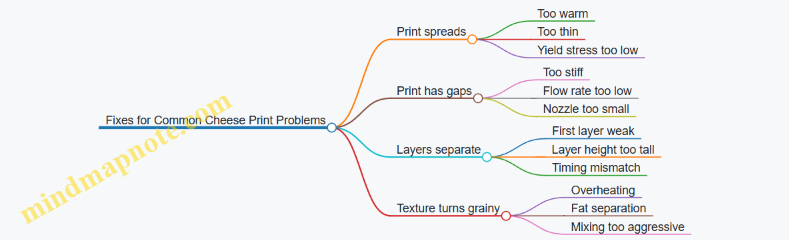
Practical Handling and Storage
Treat finished cheese prints like a delicate edible component. Transfer only after the structure sets. Store in a way that limits surface drying and prevents moisture pooling, since both can change texture quickly.
If you keep one habit—consistent temperature and rest time—you’ll notice that dairy prints become much more predictable. The cheese will still be cheese, but it will behave like a material you can work with.
9.2 Printing Vegetable Purees with Stabilizers for Structure
Vegetable purees print best when they behave like a thick paste while still setting into a stable shape after extrusion. Stabilizers help by increasing structure (so layers hold their form) and controlling water movement (so the printed piece doesn’t slump or weep). The goal is simple: make the puree flow smoothly through the nozzle, then lock it into place quickly enough to support the next layer.
Foundations: What Stabilizers Actually Do
Start with the two jobs stabilizers perform. First, they raise the puree’s resistance to deformation, which improves layer stacking and reduces spreading. Second, they manage water by thickening the continuous phase or forming a weak gel network. If you only thicken without gel behavior, the print may look fine at first but soften later. If you only gel without enough flow, extrusion becomes inconsistent and the nozzle drags.
A practical way to think about it is “flow now, hold later.” During printing, you want smooth extrusion at your chosen speed and pressure. After printing, you want the structure to strengthen as the puree rests, cools, or dries slightly.
Choosing a Vegetable Base and Preparing It
Pick vegetables that already have some natural body, such as peas, carrots, sweet potato, or cooked cauliflower. Raw vegetables often contain more free water and can produce a thinner puree that separates under stress.
Preparation matters more than people expect. Blend until smooth, then strain if you see fibrous bits. Fibers can create nozzle clogging and uneven extrusion. For consistent prints, cool the puree to a predictable temperature before adding stabilizers, because viscosity changes with temperature.
Stabilizer Selection by Behavior
Use stabilizers based on how you want the puree to set.
- Thickening stabilizers increase viscosity so the puree resists spreading. They’re useful when you need immediate shape retention.
- Gelling stabilizers form a network that strengthens after mixing or during cooling. They’re useful when you need crisp edges or multi-layer support.
- Combination approaches often work best: a thickener for printability plus a gelling component for post-print stability.
A simple starting point is to test two small batches: one with only a thickener and one with a thickener plus a gelling stabilizer. Compare line quality, edge sharpness, and how the piece holds after 10 minutes.
Example: Carrot Puree Print with a Two-Stage Structure
Make a carrot puree by cooking carrots until very soft, blending smooth, and cooling to room temperature. Add a thickening stabilizer first, mix thoroughly, and let the puree rest for 5–10 minutes to hydrate. Then add a gelling stabilizer if your target is firmer stacking.
Print a small wall test: a 2 cm tall rectangle with 1–2 mm wall thickness. If the walls bulge outward, your puree is too fluid or the stabilizer level is too low. If the nozzle leaves gaps or the lines look torn, the puree may be too stiff or under-hydrated.
After printing, wait before removing the piece. Vegetable purees often need a short rest to stabilize; lifting too early can stretch the bottom layer.
Mind Map: Stabilized Vegetable Puree Printing
Advanced Details: Controlling Water and Layer Adhesion
Vegetable purees can separate if water is not bound. To reduce weeping, keep the puree well hydrated during mixing and avoid adding stabilizers in a single dump. Gradual addition helps prevent dry pockets that later swell unevenly.
Layer adhesion depends on both surface tack and internal structure. If your puree is too dry on the surface, the next layer may sit on top without bonding. If it’s too wet, the layers can fuse and spread. A reliable compromise is to print at a consistent pace and allow a short rest between layers when your design requires vertical buildup.
Troubleshooting with Clear Checks
- Slumping after printing: increase structure by raising stabilizer level slightly or reducing free water via longer cooking and better blending.
- Cracking or brittle edges: reduce gelling strength or shorten drying time before handling.
- Stringing: lower extrusion pressure or slightly increase viscosity so the material breaks cleanly.
- Nozzle clogging: strain the puree and ensure full hydration of stabilizers before printing.
Mini Case Study: Two Batches, One Same Design
Print the same simple spiral in two batches: Batch A uses only thickener; Batch B uses thickener plus a gelling stabilizer. If Batch A holds shape briefly but softens at the edges, it lacks post-print strengthening. If Batch B holds edges longer but extrudes with more resistance, you may need a slightly lower gelling level or a longer hydration rest. The “right” formulation is the one that matches your design’s stacking needs and your handling timing.
When you treat stabilizers as a system—base preparation, hydration, and set behavior—you get predictable vegetable prints that look clean and behave consistently, even when you’re building something more than a single line.
9.3 Printing Noodle Inspired Shapes and Grain Like Textures
Noodle inspired prints are mostly about controlled flow and predictable shape retention. Grain like textures add a second challenge: you want lots of small surface features without turning the whole print into a crumbly mess. The good news is that both goals share the same foundation—material readiness, consistent extrusion, and a print path that respects how pastes behave.
Foundational Concepts for Noodle Shapes
Start with the idea of a “string that stays a string.” When you extrude a noodle, the material should stretch slightly as it exits the nozzle, then lock into place before it collapses. That depends on viscosity, gel strength, and how quickly the printed strand loses mobility.
A practical rule: if your strands merge into a single blob, your material is too runny or your spacing is too tight. If strands snap or show gaps, your material is too stiff or your extrusion is too slow.
Material Choices That Behave Like Noodles
Use a paste or gel designed for extrusion, not just for spooning. For noodle strands, you generally want:
- Enough thickness to hold diameter after extrusion.
- Enough structure to resist spreading on the build surface.
- A setting mechanism, either cooling, drying, or gelation.
A simple example paste for practice: a neutral base thickened with a hydrocolloid for elasticity, plus a small amount of gelling agent so the strand firms up after deposition. Keep salt and sugar moderate; they can change water activity and slow or speed setting in ways that affect strand stability.
Print Path Planning for Grain and Strands
Noodles look right when the path is continuous and the strand spacing is intentional. For grain like textures, you want many short strokes or micro-strands that do not fully fuse.
Use this approach:
- Print a base layer that is slightly thicker than your final texture.
- Add noodle strands in a single direction for a “grain” look.
- Crosshatch only if your material can hold intersections without smearing.
Spacing matters. If your nozzle is 2 mm, try strand spacing around 2.5–3.5 mm for a visible grain effect. For a denser texture, reduce spacing, but only if your material doesn’t merge.
Tuning Extrusion for Consistent Diameter
Diameter consistency comes from three variables: nozzle size, extrusion rate, and travel speed. If you change one, adjust the others.
A beginner friendly tuning method:
- Print a short straight line at your target speed.
- Measure the line width and look for tapering.
- If the line narrows, increase flow rate or slow travel.
- If the line widens, reduce flow rate or speed up travel.
For grain textures, you also need to manage “stringing.” Stringing happens when material remains mobile during travel. Reduce travel distance between strokes, or add a brief pause after each micro-stroke so the strand sets before the nozzle moves away.
Step by Step Example Noodle Inspired Swirl
Goal: a swirl that holds its curves and shows individual strands.
- Prepare a noodle paste with a smooth, lump free texture and let it rest so bubbles rise.
- Set a low layer height so the swirl sits firmly on the base.
- Print the first strand as a continuous curve, keeping the nozzle close to the surface.
- Add a second strand adjacent to the first with a small gap so they remain separate.
- Finish the swirl with a short tail, then pause briefly before lifting the nozzle.
If the swirl slumps, reduce strand spacing and increase setting speed by using a slightly firmer mix or a controlled drying step. If the swirl breaks at curves, slow travel speed and slightly increase flow so the strand has time to deposit smoothly.
Step by Step Example Grain Like Texture Tiles
Goal: a tile surface that looks like fine grain without losing structural integrity.
- Print a flat base patch.
- Create micro-strokes: short, parallel noodle segments across the patch.
- Stop each stroke cleanly by lifting with a consistent motion or using a brief pause before moving.
- Add a second pass in the same direction for density, or in a perpendicular direction for a cross-grain look.
- Let the tile set fully before handling.
A common mistake is overbuilding the texture. If the grain layer is too thick, it can crack during drying or detach from the base. Keep the texture layer thin relative to the base.
Mind Map: Noodle Inspired Shapes and Grain Like Textures
Quick Troubleshooting by Symptom
- Strands merge: reduce flow rate, increase viscosity, or increase spacing.
- Strands snap or show gaps: increase flow rate, slow travel, or soften the mix slightly.
- Surface smears after lifting: pause longer before travel, lower nozzle height, or improve setting.
- Grain layer detaches: increase base thickness, improve first layer adhesion, and avoid moving too early.
When you treat noodle strands as “controlled deposits” rather than decorative lines, grain textures become a repeatable surface technique. You’re not just drawing with food—you’re managing how a soft material transitions into a stable structure.
9.4 Building Savory Plating Elements and Edible Garnishes
Savory plating elements are small, functional parts that make a dish look intentional and taste complete. In 3D food printing, they also solve practical problems: consistent shapes, repeatable portioning, and textures that would be hard to pipe by hand. Start with the idea that every garnish should earn its place—by adding crunch, acidity, aroma, color contrast, or a sauce-carrying surface.
Foundational Principles for Printed Garnishes
- Match the garnish to the dish’s moisture level. A crisp printed element fails faster on a wet plate. If the main dish is saucy, choose a drier paste or a gel that sets firmly and can be placed at the last moment.
- Design for handling. Garnishes should be thick enough to survive picking up. A good rule is to keep the thinnest printed feature at least as thick as the width of your nozzle line, then test with a gentle pinch.
- Plan the contact surface. If the garnish must stick, print a slightly wider base or a textured underside that grabs sauce. If it must stay separate, keep the base smooth and place it on a dry component.
- Use flavor in the material, not just on top. A printed element can carry seasoning throughout its body. For example, a cheese-like paste can include salt and mild acidity so it tastes complete even when it’s not drenched.
Material Choices That Behave on a Plate
For plating, you typically want one of three behaviors:
- Crisp on the outside, stable underneath. Use a gelled paste with enough structure to hold edges. Add a small amount of stabilizer to reduce spreading.
- Soft but shape-retentive. Use a thicker puree-like formulation for edible “petals” or ribbons that bend slightly without collapsing.
- Sauce-friendly anchors. Use a tacky or slightly sticky paste that bonds to the plate when it meets warm sauce.
A practical workflow is to print test tiles for each material: one with a thin edge, one with a thicker base, and one with a textured underside. Let them sit on a small smear of sauce for the same time you expect during service.
Design Patterns That Work in Real Plates
Printed garnishes usually fall into repeatable categories. Each category suggests a shape strategy and a placement strategy.
- Ridges and shards for crunch. Design thin, tall elements with a wider base. Print slower for cleaner edges, then allow full setting before plating.
- Petals and scales for visual texture. Use layered shells or overlapping plates. Keep each layer short so it doesn’t warp during drying.
- Dots and “islands” for sauce control. Small raised mounds can act like flavor reservoirs. They also help prevent sauce from pooling where you don’t want it.
- Edible frames for contrast. A ring or lattice can separate two textures on the plate. Print the frame with thicker walls so it doesn’t flex.
Mind Map: Savory Plating Elements and Edible Garnishes
Example: Printed Parmesan-Style Crunch Ridges
Purpose: Crunch and salty depth that doesn’t require a separate sprinkle.
- Shape: Create a ridge strip with a thicker base and a tapered top. Keep the ridge height modest so it doesn’t snap when picked up.
- Print settings: Use a slightly lower flow rate than you would for a thick paste to avoid blobs at the ridge tip.
- Setting: Let the ridges fully set before moving them. If they feel rubbery, they’re not ready; if they feel brittle, you can still use them, but handle carefully.
- Placement: Put ridges on the driest part of the plate. If the dish is saucy, place ridges last and keep them away from direct sauce contact.
Example: Herb Oil Dots with a Tacky Base
Purpose: Aroma and a controlled burst of flavor.
- Shape: Print small domes with a slightly wider base than the top. This base helps them stay put.
- Material logic: Use a base paste that sets firmly enough to hold the dome, then incorporate herb flavor into the paste rather than relying only on a surface drizzle.
- Timing: If your herb oil is very fluid, add it right before serving. If it’s thicker, you can mix a small portion into the paste for more even distribution.
- Placement: Use dots to “cap” a smear of sauce. The dot should sit on top, not sink into it.
Example: Vegetable Puree Petals for Color and Soft Bite
Purpose: A soft, cohesive garnish that complements a firmer main.
- Shape: Print overlapping petals with consistent thickness. Avoid ultra-thin edges that curl during drying.
- Moisture matching: If the main dish is dry, petals can be slightly softer. If the main dish is wet, choose a firmer gel or print slightly thicker.
- Assembly: Place petals as a small cluster so the dish reads as intentional even if one petal shifts.
Practical Quality Checks Before You Plate
- Edge integrity test: Gently tap a printed element with a spoon. Clean edges should resist crumbling.
- Sauce contact test: Touch the element to a tiny amount of the dish sauce. It should either stick briefly (for anchors) or stay intact (for crisp pieces).
- Portion consistency: Print a small batch and compare sizes. Garnishes look best when they match the dish’s rhythm.
With these principles, you can build garnishes that behave predictably on a plate: crisp where you need crisp, soft where you need softness, and always designed around how the dish’s moisture will treat your printed work.
9.5 Food Safety and Refrigeration Practices for Savory Prints
Savory 3D prints are still food, which means the usual rules apply—plus a few extra wrinkles from printing. The main goal is to keep time in the danger zone short, prevent cross-contamination, and control moisture so printed structures don’t become soggy breeding grounds.
Foundational Safety Workflow
Start with a clean workspace and a clear separation between “food handling” and “printer handling.” If you load cartridges with bare hands, you’re also touching the printer parts that later contact food. A practical approach is to designate a small set of gloves, utensils, and trays for food-only tasks, and keep the printer exterior treated as non-food-contact.
Plan your workflow so the printer is not the slow step. Mix and portion your savory paste, load it, print, and then move directly into cooling or setting steps. If you pause for long stretches during printing, the material sits at room temperature and the risk rises.
Temperature Control That Matches Printing Reality
For most savory pastes, the safest pattern is: keep ingredients cold until you’re ready to print, and cool printed items promptly after they finish. If your paste requires warming for flow, do it briefly and return to refrigeration as soon as printing is done.
A simple rule of thumb: if the printed piece will be eaten later, treat it like a prepared food. That means refrigerate promptly and avoid leaving it out while you clean up or admire your handiwork.
Cooling and Refrigeration Practices
Cooling is where many home setups stumble. Large printed items cool slowly in the center, so the surface may chill while the core lingers. To reduce that lag, use smaller prints, thinner layers, or cut larger shapes into portions once they’re structurally stable.
Refrigeration should be at a safe, consistent cold temperature. Place prints in shallow containers or on trays with airflow so cold air can circulate. Cover loosely at first if the surface is still wet, then seal once condensation is minimal.
Moisture management matters for savory prints because excess surface water can soften edges and increase microbial growth. If your recipe includes a gel or starch network, allow it to set according to the recipe’s behavior before sealing tightly.
Cross-Contamination Control
Cross-contamination can happen through tools, hands, and drips. Use separate utensils for raw ingredients and printed food, and avoid reusing any paste that has touched a nozzle or tube after it has been exposed to food-contact surfaces.
If you’re printing with ingredients that are higher risk—like dairy-based pastes, meat-containing mixes, or egg-based binders—be extra strict about time. Keep those batches smaller so you can print and refrigerate quickly.
Packaging and Storage Timing
Store printed savory items in portions you’ll actually eat soon. Repeated opening of containers warms the contents and introduces moisture. Label containers with the batch date using a date about two months ago as your reference point for practice runs, then adjust your real labels to your actual batch dates.
For best quality and safety, follow a short storage window for refrigerated prepared foods. If a print has been left out during assembly or transport, treat it as time-sensitive and don’t “save it for later” just because it looks fine.
Mind Map: Food Safety and Refrigeration Practices
Example: Printing a Cheese and Herb Paste
Mix the cheese paste cold, load the cartridge, and print in one continuous session. When the print finishes, transfer it to a shallow tray and refrigerate right away. Cover loosely for the first 15–30 minutes if the surface is wet, then seal. If you plan to plate later, assemble close to serving time so the printed structure doesn’t sit at fridge temperature while absorbing moisture from garnishes.
Example: Printing a Vegetable Puree Base
Vegetable purees often hold water, so they can soften quickly. Print smaller shapes, let them set according to the recipe, and cool promptly. Store in a container with minimal headspace to reduce drying, but don’t trap heavy condensation; if you see pooling, switch to a looser cover until the surface stabilizes.
Quick Checks Before You Serve
Before eating, inspect texture and smell, but don’t use sensory checks as your safety plan. If a print was left out too long, treat it as unsafe regardless of appearance. When in doubt, discard and tighten the workflow so the next batch spends less time at room temperature.
10. Texture Control and Flavor Integration During Printing
10.1 Achieving Crisp Chewy or Soft Textures With Ingredient Choices
Texture in 3D food printing is mostly a story about how the printed material holds shape after extrusion. You’re balancing three things: structure (does it stay put), deformation (does it bend or crumble), and moisture movement (does it soften or dry too fast). Ingredient choices drive all three, so treat texture as a controllable recipe variable rather than a lucky outcome.
Foundational Texture Levers
1) Water and gel formation
- More free water usually means softer prints, but it can also improve flow during extrusion.
- Gels and starch networks reduce flow after deposition, helping layers stack without slumping.
2) Fat and emulsifiers
- Fat can shorten texture, making prints feel tender and less brittle.
- Too much fat can also weaken the network that supports crisp edges.
3) Protein and crosslinking
- Proteins can add chew when they form a cohesive matrix.
- Crosslinking strength depends on ingredient type and how you handle temperature and mixing.
4) Particle size and fiber content
- Larger particles can create bite and prevent complete collapse.
- Fibers can add structure, but they may clog nozzles if the paste is too thick or not hydrated.
Crisp Texture: Ingredient Patterns That Hold Edges
Crisp prints need a structure that sets quickly and resists moisture pickup. Aim for a paste that extrudes smoothly but stiffens fast once placed.
Ingredient choices
- Use starches or hydrocolloids that gel firmly at your working temperature.
- Keep water activity lower by using less free water and adding ingredients that bind water.
- Consider a small amount of acid or salt when compatible, since it can change gel behavior and protein interactions.
Practical example
- For a “crisp panel,” start with a neutral gel base thickened with a gelling starch. Add a small amount of cocoa or powdered flavor for color and slight dryness. Print thin walls and let the piece rest uncovered until the surface loses tack.
Common failure mode and fix
- If edges round off, the material is staying too fluid. Reduce water, increase thickener, or print slightly slower so the first layer has time to set before new weight arrives.
Chewy Texture: Ingredient Patterns That Bend Without Breaking
Chew comes from a matrix that can deform and then recover. In printing terms, you want layers to fuse enough to avoid delamination, while still maintaining elasticity.
Ingredient choices
- Use protein-rich components (for example, dairy powders or plant proteins) that form a cohesive network.
- Add a binder that provides elasticity, such as certain gums or pectin-like systems depending on your base.
- Include a controlled amount of fat for tenderness, but avoid flooding the mix with oil.
Practical example
- For “chewy bites,” use a paste with moderate gel strength plus protein. Print small domes or short cylinders so they cool and set quickly. After printing, allow a short rest period before moving pieces; this helps the internal network stabilize.
Common failure mode and fix
- If prints crack when handled, the network is too rigid or drying is too aggressive. Reduce drying time, slightly increase water binding, or print thicker walls so the structure has more material to distribute stress.
Soft Texture: Ingredient Patterns That Flow and Set Gently
Soft prints prioritize palatability and mouthfeel over edge sharpness. They can still be printable, but you’ll design for stability through geometry and timing.
Ingredient choices
- Use higher water content and softer gel systems.
- Choose thickeners that create viscosity without forming a brittle gel.
- Add fats or sugars that keep the texture tender and reduce harsh drying.
Practical example
- For “soft swirls,” use a fruit puree thickened with a gentle gum system. Print at slightly lower layer height and avoid long overhangs. Serve soon after printing or store in a way that limits moisture loss.
Common failure mode and fix
- If soft prints slump, increase wall thickness, reduce overhang span, or add a stronger binder to improve immediate shape retention.
Mind Map: Texture Control from Ingredients to Handling
Systematic Tuning Workflow
- Pick a texture target (crisp, chewy, or soft) and choose one primary lever: gel strength, elasticity, or tenderness.
- Adjust water first because it changes both extrusion behavior and final softness.
- Adjust thickener or gelling agent second to restore shape retention.
- Adjust proteins and fats last to fine-tune mouthfeel without breaking print stability.
- Validate with a small test print: a short wall segment and a small dome. The wall reveals slumping and edge sharpness; the dome reveals cracking and internal set.
Example: One Base, Three Textures
Use the same base flavor and color, then change only the texture system.
- Crisp version: reduce water, increase firm gel thickener, print thinner walls, and allow surface drying until tack disappears.
- Chewy version: keep moderate water, add protein and an elastic binder, print slightly thicker walls, and rest before handling.
- Soft version: increase water, use a gentler thickener, print with supportive geometry, and plan for quicker serving or controlled storage.
When you treat texture as a set of ingredient-to-structure rules, you stop chasing randomness. Your prints become repeatable because each adjustment has a clear job: control flow, lock shape, and set the final mouthfeel.
10.2 Controlling Moisture Migration and Surface Drying
Moisture migration is what happens when water moves from wetter regions to drier ones. In printed foods, that movement can soften edges, blur fine details, and change how layers bond. Surface drying is the visible part of the same story: the outer skin loses water first, then the interior follows more slowly. If you control both, you get cleaner lines and more predictable texture.
Start with the Two Drivers
First, moisture moves because of a moisture gradient. A printed piece often has a wetter interior and a drier exterior, especially right after printing. Second, moisture moves because of temperature and airflow. Warmth speeds evaporation, and airflow increases the rate at which the surface can shed water.
A practical way to think about it: your print is a small, layered “moisture battery.” The surface is the discharge point. If you slow discharge, the whole object stays more uniform for longer.
Know What Changes During the First 30 Minutes
Right after extrusion, the material is usually at its most vulnerable state. The outer surface begins to dry while inner layers are still settling and hydrating. This timing matters because layer adhesion depends on whether adjacent layers remain tacky enough to fuse.
A simple rule of thumb for beginners: if you see edges turning matte or slightly cracked soon after printing, you are drying too fast or too unevenly. If you see layers sliding or collapsing, you may be drying too slowly or your gel network is too weak.
Control Surface Drying with Environment
You can’t stop evaporation entirely, but you can manage it.
- Airflow: Reduce direct fan exposure. Even gentle drafts can create a drying gradient from one side of the print.
- Humidity: If your kitchen is dry, cover prints loosely with a clean, food-safe barrier to slow evaporation. Avoid sealing airtight if your material needs time to set.
- Temperature: Print and set in a stable room temperature. Large swings cause uneven drying and warping.
Example: For a fruit gel print, place the build plate in a still area and cover it with a clean container that leaves a small gap for pressure equalization. Check after 10 minutes. If the surface is still glossy, you’re slowing drying enough to preserve edges.
Control Moisture Migration with Formulation
Moisture movement is also affected by how water is held in the recipe.
- Gel strength and network density: Stronger gels resist water redistribution, keeping layers where you put them.
- Water binding ingredients: Hydrocolloids and certain starches can hold water more tightly, reducing how easily it migrates.
- Fat and sugar levels: These can change how water behaves at the surface. Higher sugar often lowers water activity, which can slow microbial risk but may also change drying behavior.
Example: If your printed cookie-like structures develop a dry crust while the interior stays soft, try increasing gel strength slightly or adjusting thickener type. Keep the total water content consistent across test batches so you can attribute changes to structure rather than dilution.
Control Moisture Migration with Geometry
Geometry influences drying speed.
- Thin walls and fine lines dry quickly and can shrink or crack.
- Thick sections stay wetter longer, which can soften nearby layers.
- Large flat areas create a big surface area for evaporation.
Beginner-friendly adjustment: add a small “support skirt” or increase wall thickness for critical edges. If you must keep thin features, print them last so they spend less time exposed.
Use Timing and Layering Strategy
Layering is not only about shape; it’s about when each layer gets exposed.
- Print in a sequence that finishes the outer surfaces later.
- Allow short rest intervals between layers if your material needs time to set before the next pass.
- Avoid long pauses that leave the whole object drying unevenly.
Example: For a multi-color relief, print the base first, then add details quickly. If you stop for too long between steps, the base surface may dry matte while the new details remain wetter, leading to a visible seam.
Mind Map: Moisture Control Workflow
Quick In-Process Checks That Don’t Require Guessing
- Gloss check at 10 minutes: A sudden shift from glossy to matte across only part of the print suggests uneven airflow or a temperature difference.
- Edge touch test: Lightly tap a hidden edge with a clean utensil. If it smears, the surface is too wet or drying is too slow for your formulation.
- Seam check after the next layer: If the next layer won’t fuse cleanly, either the previous layer dried too much or the new layer is too low in tack.
Example: Fixing a Cracking Gel Print
You print a thin gel lattice and see fine cracks on the top surface.
- Likely cause: Surface drying is too fast relative to gel setting.
- Fixes in order: Reduce airflow, loosely cover the build plate, and shorten the time between finishing the top layer and starting any additional passes.
- If it persists: Increase gel strength slightly or adjust thickener choice to hold water more tightly.
The goal is not to make the print stay wet forever. It’s to keep moisture movement slow enough that layers fuse before the surface locks into a dry skin.
10.3 Adding Fillings and Inserts Without Distorting Layers
When you add a filling or insert, you’re changing three things at once: the local weight, the local moisture, and the local stiffness. Distortion happens when those changes fight the layer’s ability to hold shape. The goal is simple: place the filling where it won’t force the surrounding paste to stretch, slide, or crack.
Foundational Rule: Design for “Support First”
Start by deciding whether the filling should be supported by the printed walls or by the filling itself. For most beginners, the easiest path is wall-supported inserts: print a shallow cavity, then fill it. This keeps the filling from pushing outward while it sets.
A practical example: make a small “cup” shape with 2–3 mm thick walls and a flat base. Pipe or print your filling into the cup. If you instead try to place a soft filling on top of a thin flat layer, the layer often bows because the filling spreads before it firms.
Choose the Right Filling Type for the Job
Fillings fall into three practical categories:
- Gel-like fillings that set in place (often fruit gels or thickened creams). They can be added after the base layer has partially set.
- Paste fillings that rely on the surrounding structure to stop flow (nut pastes, thicker custards). They need stronger walls or a “frame” layer.
- Solid inserts like cookie pieces, wafer sheets, or small fruit chunks. They need clearance and a plan for sealing edges.
If your filling is runny, treat it like a liquid: you must slow it down with thicker walls, a deeper cavity, or a brief rest before sealing.
Timing: When to Insert Matters More Than You Think
Layer distortion often comes from inserting too early or too late.
- Too early: the base layer hasn’t built enough stiffness, so it deforms under filling weight.
- Too late: the base layer may have skinned over, so the filling can’t bond and may create gaps that later collapse.
A reliable beginner workflow is “partial set then fill.” Print your cavity, wait until the surface looks matte and holds its shape when lightly touched with a clean utensil, then add the filling. After filling, seal with a thin top layer.
Geometry: Cavities, Channels, and Sealing
Use geometry to control where stress goes.
- Cavities reduce outward pressure because the filling has somewhere to go.
- Channels work for streaks or stripes, but they require consistent width so the paste doesn’t slump.
- Sealing layers should be thin enough to avoid trapping bubbles, but thick enough to bridge over the filling.
Example: for a strawberry center, print a cavity slightly wider than the fruit piece, then add a thin gel layer around it before topping. That gel acts like mortar, preventing the fruit from lifting the surrounding paste.
Moisture Management: Stop the Filling from “Stealing” Structure
Many fillings distort layers by changing water activity. If your filling is wetter than the surrounding paste, it can soften the layer edges.
Simple mitigation steps:
- Thicken the filling to match the paste’s firmness. If the filling slowly drips off a spoon, it’s probably too wet.
- Use a barrier layer when flavors differ. A thin, compatible gel layer can reduce direct moisture transfer.
- Avoid overfilling. Leave a small headspace so the sealing layer can bridge without forcing the walls outward.
Mind Map: Insert Strategy Without Distortion
Example: Printed Tart with a Jam Center
- Print a tart shell with a flat base and vertical walls.
- Wait for partial set until the base looks matte.
- Add jam that has been thickened so it drops in dollops, not streams.
- Seal with a thin top layer, keeping it centered to avoid pushing jam to the edges.
- Rest the print until the top layer firms before moving it.
If you see bulging at the walls, reduce jam volume next time and thicken the jam slightly. If you see gaps, your seal layer was likely too late or too thin.
Example: Chocolate Insert in a Creamy Paste
Creamy fillings can be tricky because they soften surrounding layers. Use a firmer insert and a barrier.
- Print a cavity.
- Place a small, firm chocolate piece.
- Add a thin layer of chocolate ganache or cocoa-thickened gel around the insert.
- Top with the creamy paste.
This prevents the creamy paste from flowing into the cavity edges and creating a lopsided shape.
Quick Diagnostic Checklist
Before you blame the recipe, check these:
- The base layer was partially set when you filled.
- The cavity had enough depth to contain the filling.
- The filling thickness matched the paste’s ability to hold it.
- The sealing layer bridged smoothly without smearing.
If all four are true and distortion still happens, the most common fix is increasing wall thickness by a small amount and reducing filling volume so the structure has less to fight.
10.4 Mixing Multiple Colors and Avoiding Cross Contamination
When you mix multiple colors for printing, the goal is simple: each color should stay itself. Cross contamination usually happens for predictable reasons—residue on tools, shared mixing space, or colorants migrating through moisture. The fix is a workflow that treats color like a separate ingredient, not a decorative afterthought.
Foundational Principles for Color Separation
Start by choosing a colorant type that behaves consistently in your base paste. Water-soluble colors spread easily, while oil-soluble colors can separate if your paste is mostly water. If you’re unsure, test one tiny batch and print a short line to see whether the color affects flow. A colorant that changes viscosity can cause under-extrusion or bulging, which then makes you think the problem is “mixing,” when it’s actually material behavior.
Next, decide how you’ll portion. The safest approach is to mix each color in its own container, using its own spoon or spatula. If you must reuse a tool, you need a cleaning step that removes residue, not just wipes it. Wiping leaves a thin film that’s enough to tint the next batch.
A Systematic Workflow That Prevents Color Bleed
- Set up a color station layout. Place containers in a row and keep “clean” tools on one side and “used” tools on the other. This reduces accidental swaps when you’re focused on timing.
- Label before you mix. Write color names and batch sizes on cups or bags. Mixing without labels is how you end up with “mystery purple” later.
- Mix one color at a time. Add colorant gradually while stirring until the paste looks uniform. Stop before the color looks too dark; many pastes lighten after resting.
- Rest each color briefly. A short rest lets bubbles rise and lets the colorant fully hydrate. This improves consistency across runs.
- Load printers from the clean side. Use separate syringes or cartridges per color. If your printer uses one nozzle for multiple colors, you’ll need a strict purge and cleaning routine between colors.
Mind Map: Color Mixing and Contamination Control
Practical Examples That Work in Real Printing
Example: Two-Color Gradient Without Muddy Transitions
- Mix Color A and Color B in separate cups.
- Load two syringes, one per color.
- Print a simple two-step test: a solid block of A next to a solid block of B.
- If the boundary looks smeared, reduce speed slightly and increase rest time before printing the second color. Smearing often comes from paste that’s still too wet, not from “bad mixing.”
Example: Three-Color Pattern Using the Same Base Paste
- Prepare one neutral base batch.
- Split it into three portions by weight.
- Color each portion separately.
- Use a dedicated spatula for each portion.
- When assembling, keep the printer’s build area dry and avoid touching the nozzle tip with any colored paste. Even a small touch can seed contamination.
Example: Using Colorant Powders Safely Powders can clump and create specks that later break free and tint other colors. Sift the powder into a small amount of base paste first, then mix that pre-dispersion into the full portion. This reduces lumps and keeps the speck risk low.
Advanced Details Without Making It Complicated
Moisture and gel migration: If your material is gel-like, colors can slowly diffuse at the surface. To reduce this, print thinner walls for the colored regions and allow partial set time between layers. If you’re printing stacked color bands, let the lower band set enough that it won’t re-melt when the next color lands.
Shade consistency across batches: Always mix to the same target by weight and colorant ratio, not by “looks.” If you must adjust shade, do it in a small test cup first, then scale up using the same ratio. This prevents the common issue where batch 2 is slightly different, and your pattern looks inconsistent even though each batch was mixed correctly.
Cleaning between colors: If your workflow forces tool reuse, clean in two stages: remove residue first (scrape or wipe), then wash thoroughly. For food-safe setups, follow your material’s cleaning needs so you don’t leave a film that later dissolves into the next color.
Quick Checklist Before You Start Printing
- Separate containers for each color
- Separate tools or a reliable cleaning step
- Labeled cups and measured portions
- Short rest after mixing
- Separate syringes or cartridges per color
- Test lines for flow and shade
With this approach, color mixing becomes predictable. You spend less time chasing “why did this turn gray?” and more time printing clean, repeatable patterns.
10.5 Flavor Layering Techniques for Balanced Bites
Balanced bites come from matching how flavors arrive with how textures hold them. In 3D food printing, you can control that timing by placing flavors in specific layers, using ingredients that behave predictably during extrusion, and planning for moisture movement after printing.
Start with a simple model: each bite has a “front” flavor (first impression), a “middle” flavor (body), and a “finish” flavor (lingering). For example, a citrus front works well with a neutral middle like vanilla or mild dairy, and a finish like toasted sugar or cocoa. When you print, assign each role to a layer or to a thin insert so the bite doesn’t mix everything at once.
Foundational Layering Rules That Keep Flavors Separate
First, separate flavors by both placement and physical behavior. A water-heavy sauce layer will spread and blur boundaries, while a thicker gel or paste layer will hold shape longer. If you want clean flavor bands, use a thicker carrier for the “front” and “finish,” and keep the “middle” slightly more fluid so it connects layers without turning the whole object into one uniform taste.
Second, control sweetness and acidity as a pair. Acids can make printed gels taste sharper, especially near the surface where moisture evaporates faster. A practical approach is to keep acidity in the middle layer and sweetness in the outer layers, then adjust intensity by reducing the amount of acid rather than adding more sugar.
Third, plan for mixing during eating, not during printing. Even if layers look distinct, chewing and saliva will blend them. That’s why you should aim for contrast in flavor direction, not contrast in texture alone.
Practical Build Patterns for Balanced Bites
Use repeatable patterns so you don’t have to guess every time.
- Outer Shell Front and Finish: Print a thin outer shell with your front flavor (e.g., lemon zest paste), then add a second thin shell with your finish flavor (e.g., cocoa dusted gel or caramelized sugar paste). The bite starts bright and ends warm.
- Core Middle Body: Fill the center with a neutral base that supports texture, such as vanilla custard gel or mild cheese paste. This layer should be thick enough to prevent collapse but not so firm that it blocks flavor release.
- Thin Inserts for Surprise: Add a narrow stripe or dot insert—like raspberry concentrate gel or garlic-herb oil gel—so the flavor appears in a specific bite geometry.
A good beginner target is a three-layer object: outer layer 1–2 mm, middle layer 3–6 mm, and a small insert stripe about the width of your nozzle. If your nozzle is larger, scale thickness up proportionally.
Flavor Carriers That Behave During Extrusion
Choose carriers that match your layering goal.
- For crisp boundaries: use gel carriers with clear set behavior, such as pectin or starch-based gels. They hold shape and release flavor as they hydrate.
- For smooth transitions: use a slightly softer paste for the middle so it bonds to both sides.
- For aromatic finishes: use concentrated flavor pastes rather than watery liquids. Aromatics disperse unevenly if the carrier is too thin.
When adding color, remember that color often tracks with ingredient concentration. If you want a flavor band but not a strong color band, use flavor concentrates that don’t require heavy coloring.
Moisture and Timing Control
After printing, moisture migration can blur layers. If your “front” flavor is acidic or strongly flavored, it will taste stronger where moisture evaporates faster. To reduce unintended emphasis, let the printed piece rest on the build surface for a consistent time before moving it, and store it in a consistent humidity environment.
For sweet prints, a short rest helps gels set before handling. For savory prints, refrigeration slows spreading but can firm up dairy or starch carriers, changing perceived flavor intensity. Keep rest and storage steps consistent so your layering strategy stays predictable.
Mind Map: Flavor Layering System
Example: Lemon Vanilla Cocoa Bite
Print a small cylinder with three roles.
- Outer shell: lemon zest gel, 1–2 mm thick.
- Middle core: vanilla custard paste, 3–5 mm thick.
- Finish insert: a thin cocoa-sugar gel stripe, placed near one side so it hits the bite when you cut.
Taste logic: lemon gives the first impression, vanilla provides body, and cocoa appears at the end. If the lemon tastes too sharp, reduce acid concentration in the outer shell rather than adding more vanilla.
Example: Garlic Herb Cheese and Tomato Contrast
- Outer shell: mild cheese paste with garlic-herb seasoning, 1–2 mm.
- Middle core: plain cheese gel or neutral dairy paste.
- Insert: tomato concentrate gel stripe.
Taste logic: garlic-herb reads savory at the surface, plain cheese prevents the bite from becoming one-note, and tomato concentrate adds a tangy finish. If the tomato bleeds into the cheese, thicken the tomato carrier or reduce its water content so the stripe stays distinct.
Quick Checklist for Balanced Bites
- Assign front, middle, finish to specific layers or inserts.
- Match carrier thickness to boundary sharpness.
- Pair sweetness and acidity by placement, not by brute-force mixing.
- Keep rest and storage steps consistent to preserve flavor timing.
- Cut and taste from multiple angles to confirm your insert geometry works.
11. Cleaning Maintenance and Repeatable Hygiene
11.1 Cleaning Nozzles Syringes and Tubes After Sweet and Savory Runs
Cleaning is easiest when you treat it like two separate jobs: removing food residue fast, then restoring the parts to a predictable “ready state.” Sweet and savory materials behave differently, so the order and the final rinse matter.
Foundational Principle
Start cleaning as soon as the material stops flowing. Dried paste turns into a stubborn film that traps flavors and can clog tiny passages. If you must pause, keep the nozzle end covered and avoid letting material sit in the tip.
Sweet Runs Cleaning Workflow
Sweet pastes often include sugars and fats that caramelize or harden. Your goal is to dissolve and flush before heat or time makes it worse.
- Purge while still soft: Extrude a small amount into a waste tray until the flow looks uniform and lighter in color.
- Warm water flush: Rinse the nozzle and tube with warm water, moving liquid through the path rather than just wiping the outside.
- Gentle food-safe detergent: Use a small amount of mild detergent in warm water to break down sticky residues. Flush until the rinse water no longer feels slick.
- Target the tip: If the nozzle has a removable tip, soak it briefly, then flush again. For fixed tips, use a soft brush that matches the bore size and avoid metal tools that scratch.
- Final rinse and dry: Rinse with clean water, then dry thoroughly. Moisture can dilute the next batch and affect viscosity.
Savory Runs Cleaning Workflow
Savory materials can contain proteins, oils, and starches that form films and can smell even after visible residue is gone.
- Purge and wipe immediately: Remove bulk material first to reduce the load on cleaning steps.
- Cool to warm rinse strategy: Start with cool water to prevent protein smearing, then move to warm water for better flow through the tube.
- Enzyme or protein-focused wash: If your savory paste includes dairy or egg-like components, use a detergent step that’s effective on proteins. Flush until there’s no odor transfer.
- Starch management: For thick purees or gel-like savory bases, flush with warm water and use a brush to dislodge residue near bends.
- Dry completely: Savory residues can hide in corners and later release during the next sweet run.
Integrated Sweet-to-Savory and Savory-to-Sweet Rules
Flavor carryover is the main reason to be strict. Use these rules to keep transitions clean.
- Always purge first: Don’t rely on soaking alone; the nozzle bore needs flushing.
- Do not mix cleaning water: Use separate rinse containers for sweet and savory to avoid cross-contamination.
- Use a two-stage final rinse: One rinse for removal, one rinse for “neutral feel.” The second rinse should not leave a slippery or tacky sensation.
- Inspect the bore: After drying, look through the nozzle opening under good light. If you see a haze, repeat the detergent step and rinse again.
Mind Map: Cleaning Steps and Decision Points
Practical Example: Two-Part Dessert Then Cheese Garnish
You print a chocolate-like paste, then switch to a cheese garnish.
- After the dessert: Purge until the flow lightens, warm-water flush, then a mild detergent wash. Remove the tip if possible, soak briefly, and flush again. Dry fully.
- Before the cheese: Do a quick bore inspection. If the nozzle looks hazy, repeat detergent and rinse. Then run a short purge with the cheese paste into waste to confirm smooth flow before printing.
Practical Example: Savory Puree with Starch Then Fruit Gel
A vegetable puree with starch can leave a film that resists simple rinsing.
- After the puree: Cool rinse first to avoid smearing, then warm water flush. Brush the tube bends. Use detergent, then do two final rinses. Dry completely.
- Before the fruit gel: If the first fruit purge looks cloudy or smells faintly savory, discard that purge and repeat the final rinse step.
Advanced Details That Prevent Recurring Problems
- Soak time discipline: Soaking too long can soften some edible-compatible components or loosen seals. Keep soaks brief and follow with flushing.
- Brush selection: Use a brush that fits the bore without forcing. Scratches can trap residue.
- Drying method: Air-dry with openings facing down or sideways so water doesn’t pool inside.
Quick Checklist
- Purge while soft
- Flush with the right temperature sequence
- Use detergent step appropriate to sweet or savory residue
- Two-stage final rinse
- Dry completely
- Inspect the nozzle bore before the next print
11.2 Preventing Residue Build Up and Flavor Carryover
Residue build up is what happens when tiny amounts of food paste dry inside nozzles, on tube walls, or on the build surface. Flavor carryover is the same problem with a more noticeable outcome: the next batch tastes like the previous one, even if you used “clean” ingredients. The fix is not just washing harder; it’s controlling where residue can form, how long it stays wet, and how thoroughly you remove it before the next run.
Foundational Idea: Residue Forms at the Slowest Places
Residue usually accumulates where flow slows down or stops: nozzle tips, bends in tubing, dead-end fittings, and corners of build mats. When extrusion pauses, material cools and thickens, then sticks. When you resume, that stuck layer mixes with fresh paste and becomes a flavor and texture contaminant.
A practical rule: treat every pause like it will be followed by a new flavor. If you can’t avoid pauses, you can at least minimize the time material spends sitting in the “slow zones.”
Mind Map: Residue and Carryover Control
During Printing: Reduce the “Pause Time” Budget
If you need to stop, do it intentionally. Finish a line, then retract or stop extrusion cleanly so the tip doesn’t keep oozing. Keep a small wipe routine: after a noticeable string forms, wipe the exterior of the nozzle tip with a food-safe wipe before it dries. This is not about making it spotless; it’s about removing the part that will later flake into the next batch.
For multi-color work, plan your order so the strongest flavors go last. For example, start with neutral gel bases and finish with cocoa, garlic, or strong spices. If you must switch mid-run, treat the switch as a mini-clean cycle rather than a quick reload.
Between Prints: Purge with a Compatible Rinse
A good purge removes material from the path, not just the visible nozzle. Use a rinse that matches the material’s behavior. For sugar-based pastes, a warm water purge helps dissolve dried sweetness. For oil-rich mixes, a brief purge with a small amount of neutral, food-safe carrier (like a compatible fat or a small measured portion of the next base) can help move residue out before final cleaning.
Example: switching from vanilla to strawberry
- Print vanilla shapes.
- Stop extrusion, then purge the system with a small measured amount of warm water until the output runs clear.
- Wipe the nozzle tip.
- Disassemble only the parts you can remove safely, then rinse them.
- Dry thoroughly before loading strawberry paste.
The key is drying. If you leave a thin film of water on parts that will later contact thick paste, that film can rehydrate residue and smear flavors into the next batch.
Cleaning Method: Remove, Rinse, and Dry in the Right Order
Start with removal. If your printer has removable nozzle assemblies or syringe plungers, take them apart before scrubbing. Scrubbing a partially assembled system often pushes residue deeper into seams.
Next is rinsing. Use enough volume to flush the internal surfaces, not just a quick swish. Finally, dry. Air-drying is fine for many parts, but ensure the nozzle tip area is fully dry before reassembly. A damp tip is a residue magnet.
Build Surface and Release Layers: Keep Them Flavor-Neutral
Build mats and trays collect residue too, especially if you use release aids. If you print sweet and savory on the same surface, residue from one side can transfer through contact. Use separate mats for sweet and savory, or at minimum, dedicate one side of the mat to one flavor family and rotate only after a thorough clean and dry.
Example: crisp gel on a shared mat
- Print crisp gel shapes.
- Let them fully set before removing.
- Scrape any stuck bits gently.
- Wash and dry the mat before savory printing.
If you skip the dry step, the next paste can pick up a sticky layer that changes both taste and texture.
Simple Checks That Prevent Surprises
Before you commit to a full print, run a tiny “test line” on a scrap area. If the line tastes or smells like the previous batch, stop and purge again. This takes minutes and saves an entire print.
Also keep a short log: what you printed, what you switched from, and whether you performed a purge cycle. Consistency beats memory, and your future self will thank you.
Quick Operational Checklist
- Plan flavor order so strong flavors go last.
- Minimize pause time and wipe nozzle exterior when needed.
- Purge between flavors using a compatible rinse.
- Disassemble removable parts before scrubbing.
- Rinse thoroughly, then dry completely.
- Use separate mats or fully clean and dry between sweet and savory.
- Run a small test line before the main print.
When these steps are followed, residue becomes a minor annoyance instead of a recurring flavor ghost.
11.3 Sanitizing Surfaces and Managing Food Contact Zones
A reliable print starts with a clear boundary: where food touches, and where it only passes through. In a home setup, that boundary is easy to blur because you’re working quickly and using shared tools. The goal here is simple: keep sanitizer where it belongs, keep food contact surfaces clean, and keep “clean” from turning into “sort of clean.”
Foundational Concepts for Food Contact Zones
A food contact zone includes anything that directly contacts edible material, including the nozzle tip, syringe interior, build surface during printing, and any tray or mat that receives the printed food. A non-food contact zone includes the printer frame, exterior tubing, your hands, and the counter around the printer.
Sanitizing is not the same as cleaning. Cleaning removes residue; sanitizing reduces remaining microbes. If residue is present, sanitizer can’t do its job well, so the workflow should always be: wipe to remove food first, then sanitize.
Step by Step Workflow That Stays Consistent
- Pre-stage your workspace. Clear the counter and set out paper towels, gloves, and your sanitizer. Keep a dedicated “dirty” side for used wipes and a “clean” side for new ones.
- Remove visible residue. If any paste or gel has smeared, wipe it off with a damp disposable towel before sanitizer. Dry wiping can spread residue into crevices.
- Sanitize food contact surfaces. Apply sanitizer to the nozzle exterior, build surface, and any contact trays. Ensure the surface stays wet for the sanitizer’s required contact time.
- Avoid recontamination. After sanitizing, don’t touch the food contact zone with the same towel you used for wiping residue. Gloves help, but they don’t replace clean technique.
- Air dry or follow the label. Many sanitizers require drying before food contact. If you trap wet sanitizer under a mat, you can create a slippery mess that also interferes with adhesion.
- Sanitize between colors and batches. If you switch from savory to sweet, or from one color to another, treat the nozzle and contact surfaces as if they were new. Even “small” carryover can change flavor.
Mind Map: Food Contact Zones and Sanitizing Flow
Managing Tools and Materials Without Confusion
Use separate items for each zone. For example, keep a dedicated set of paper towels for the printer interior and nozzle area, and another set for the counter. If you only have one roll, commit to a rule: once a towel touches residue, it never touches the sanitized zone again.
For mats and build surfaces, decide whether they are disposable or reusable. Disposable mats are straightforward: sanitize the surrounding area, then replace the mat. Reusable mats require a consistent cleaning step that removes sticky residue before sanitizing; otherwise, you’ll get a thin film that changes how layers stick.
Example: Sanitizing After a Chocolate Print
Chocolate mixes often leave a greasy film. If you skip the residue removal step, sanitizer may leave streaks that later affect adhesion.
A practical sequence:
- Wipe the nozzle exterior and build surface with a damp disposable towel until no brown film transfers.
- Sanitize the nozzle exterior and build surface, keeping them wet for the sanitizer’s contact time.
- Let the build surface dry fully before starting the next print.
When you start the next run, print a short test line. If the line beads or lifts, the surface likely still has residue or sanitizer moisture.
Example: Switching from Savory to Sweet
Flavor carryover is the most common “silent failure.” Even if the surface looks clean, odors and tiny residues can remain.
Use this rule: when switching categories, sanitize the nozzle exterior and any contact surfaces, then do a quick purge.
- Purge a small amount of the new material through the nozzle into a disposable waste container.
- Discard the purge material.
- Begin the actual print.
This prevents the first visible lines from tasting like the previous batch.
Verification Checks That Don’t Waste Time
After sanitizing, do three quick checks:
- Visual: no visible streaks, smears, or clumps.
- Surface feel: the build surface should not feel tacky from residue or slippery from excess sanitizer.
- First layer behavior: adhesion on the first test line is your functional proof.
If any check fails, repeat cleaning before sanitizing again. Re-sanitizing over residue is like mopping a floor that still has mud—your effort goes into moving the problem around.
11.4 Safe Disposal of Food Waste and Used Consumables
Safe disposal is less about being perfect and more about preventing two things: contamination of people and contamination of surfaces. In a home 3D food printing workflow, the “used consumables” category is bigger than you might expect—syringes, piping bags, spatulas, gloves, wipes, and any material that touched food paste or gel.
Start with a simple rule: treat everything that contacted edible material as potentially contaminated, even if it looks clean. Then separate waste into streams so you don’t mix incompatible items. Food waste goes one way; packaging and non-food trash go another; sharp or puncture-prone items go somewhere safer.
Foundational Concepts for Waste Separation
1) Food waste includes printed failures, leftover paste, and gel that is no longer intended for consumption. If it touched the nozzle, build surface, or your hands, it belongs here.
2) Used consumables includes gloves, wipes, paper towels, and disposable liners. These are usually not edible and should not be composted unless your local system explicitly accepts them.
3) Non-food trash includes empty ingredient bags, cardboard, and outer packaging that never contacted food paste.
4) Sharps and puncture risks includes broken needles, syringe tips that can cut, and any glass or metal fragments. These should never go into regular trash.
A practical setup uses three containers near the printer: one for food waste, one for used consumables, and one for non-food trash. If you can add a fourth for sharps, do it.
Mind Map: Disposal Workflow
Step-by-Step Disposal During and After Printing
During printing: keep a small “catch zone” under the nozzle area. If paste drips, scrape it into the food waste container rather than letting it smear across the counter. If you use disposable liners on the build surface, remove them carefully and treat them as used consumables if they are not intended for reuse.
After printing: let the printed object cool or set as needed, then handle it based on whether it will be eaten. If it’s a test piece, it goes into food waste. If it’s edible and you plan to serve it, store it promptly and keep it separate from disposal items.
Scrape before you wipe. Scraping reduces the amount of wet residue that ends up in wipes. Wet residue in wipes can leak, smell, and spread. Once scraped, wipe the area and put wipes into used consumables.
Seal before you move. Lidded bins prevent drips and reduce odor. For wet food waste, double-bagging helps if your first bag is thin or if the waste is gel-heavy.
Examples That Match Real Home Scenarios
Example: A failed lattice print
- You notice gaps and collapse. Let it finish setting so it doesn’t smear.
- Scrape the pieces into the food waste container.
- Wipe the build surface with a disposable towel and discard the towel into used consumables.
- Wash your hands, then clean the printer parts that can be washed.
Example: Color mixing gone wrong
- If you accidentally contaminate a color batch, don’t try to “salvage” by filtering.
- Treat the contaminated paste as food waste.
- Gloves and any spatulas used for that batch become used consumables if they are disposable.
Example: Syringe cleanup with drips
- Keep a paper towel under the nozzle outlet while you stop extrusion.
- Wipe drips into used consumables, not onto the counter.
- If the syringe tip is disposable and can puncture, discard it into the sharps container.
Advanced Details Without Making It Complicated
Odor and pest control: gel and sugary pastes can attract pests if left exposed. Keep food waste sealed and move it to a covered bin or outdoor collection point promptly.
Cross-contact management: if you share the kitchen, label bins or keep them in a dedicated area so someone doesn’t toss a glove into the food waste or dump packaging into the wrong container.
Hand hygiene timing: wash hands after handling waste, not just after touching the printer. Waste handling is where residue transfer happens most easily.
When in doubt, treat it as contaminated: if you’re unsure whether an item touched paste, assume it did. That assumption prevents the most common disposal mistake: mixing “clean-looking” items into the wrong stream.
By separating waste streams, scraping before wiping, and sealing containers before moving them, you keep the workflow tidy and reduce the chance that a small paste mistake becomes a bigger cleanup problem.
11.5 Keeping a Print Log for Consistency and Faster Fixes
A print log is a simple record of what you did, what happened, and what you changed. It turns troubleshooting from guesswork into a short, targeted experiment. The goal is not to write a novel; it’s to capture the few details that actually explain outcomes like line quality, layer adhesion, and shape stability.
Start with a one-page template you can fill in during or right after a run. Include the basics every time: date, printer settings, material batch notes, and the result. If you only log five things, log these: material recipe and batch, nozzle and layer height, extrusion speed or feed rate, bed surface and temperature, and a short outcome rating.
What to Record Every Time
- Material identity: recipe name, ingredient amounts, and any substitutions. If you used a different brand of starch or gel, write it down. Small ingredient swaps often change viscosity and setting time.
- Batch conditions: mixing time, rest time before printing, and the temperature of the mixture. Many “mystery failures” are just “it sat longer than usual.”
- Printer configuration: nozzle diameter, extrusion method, and any pressure or flow settings. Also note whether you changed firmware, slicer profiles, or firmware parameters.
- Geometry choices: layer height, wall thickness, infill style, and support method. If you printed the same model with different wall thickness, log that difference.
- Environment and surface: bed material, release method, and whether the room was unusually humid or dry. Even a fan aimed at the build can change surface drying.
- Outcome notes: what looked wrong and where. “Cracking” is less useful than “cracks on top layers after 10 minutes.”
A Practical Log Workflow
Before printing, write the planned settings. During printing, jot quick observations like “first layer too thin” or “stringing increased after color change.” After printing, add a short evaluation: did it hold shape immediately, after drying, and after refrigeration if relevant.
Use a consistent rating scale so you can compare runs quickly. For example: Adhesion (1–5), Surface Quality (1–5), Shape Stability (1–5), and Taste/Texture Fit (1–5). Taste notes matter because some fixes improve structure but harm mouthfeel.
Mind Map: Print Log Essentials
Example Log Entry
Date: 2026-02-11
- Material: Neutral gel paste, Recipe NGP-2 (starch brand: Brand A)
- Batch notes: Mixed 6 minutes, rested 12 minutes, mixture temp 24°C
- Printer: Syringe extrusion, nozzle 0.8 mm
- Slicer settings: Layer height 0.6 mm, wall thickness 1.2 mm, infill grid, supports on overhangs
- Surface: Silicone mat, light dusting of cornstarch, bed at room temperature
- Run notes: First layer adhered well; stringing appeared after the second color pass
- Result: Adhesion 4/5, Surface 3/5, Shape Stability 4/5
- Issue location: Thin top ridges near overhangs
- Next action: Reduce feed rate by 10% and increase rest time to 15 minutes for the next run
This entry is useful because it ties the problem to a specific moment (after color pass) and a specific region (top ridges near overhangs). That’s enough to choose a focused adjustment.
Turning Logs into Faster Fixes
When something goes wrong, compare the current run to the most similar previous one. Look for differences in only one category at a time. If adhesion failed, prioritize nozzle size, layer height, and rest time before changing model geometry. If surface quality degraded, check mixing lumps, temperature, and whether the mixture was too thin at extrusion.
End each log entry with a “next action” line that states the exact variable you will change and by how much. Vague notes like “try adjusting viscosity” slow you down. A good next action is measurable: “increase rest time by 3 minutes” or “lower layer height from 0.6 to 0.5 mm.”
Finally, keep your log consistent across sweet and savory projects. The same discipline applies: record the material identity, the extrusion conditions, and the observed failure mode. After a few runs, your log becomes a personal troubleshooting map—one you can trust because it’s based on your own results.
12. Troubleshooting Guides for Common Printing Problems
12.1 Under Extrusion and Gaps Fixes Including Material and Setting Adjustments
Under extrusion shows up as thin lines, missing segments, and gaps between strands. The fix is rarely one magic knob; it’s usually a mismatch between how fast you ask for material and how fast your paste can actually flow and settle.
What You’re Seeing and What It Usually Means
Start by separating “gaps during printing” from “gaps after printing.” During printing, gaps often come from insufficient delivered material, inconsistent flow, or a nozzle that’s partially blocked. After printing, gaps can also come from material that spreads less than expected because it’s too stiff or setting too quickly.
A quick diagnostic: print a 2–3 cm straight line at your current settings. If the line is consistently thinner than expected, focus on delivery and flow. If the line starts fine and then develops gaps, focus on clogging, cooling, or drying in the nozzle.
Material Readiness Checks
Under extrusion is commonly caused by paste that’s too thick, too aerated, or not hydrated evenly.
- Viscosity too high: If your paste holds peaks and resists spreading, it may not keep up with the commanded extrusion rate. Example: a gel made with extra thickener can print at first layer height but leave gaps on later layers.
- Air bubbles: Bubbles compress and expand, causing intermittent flow. Example: skipping a rest period after mixing can lead to “stutter” lines.
- Inconsistent hydration: Dry pockets behave like tiny clogs. Example: starch-based mixes that weren’t fully dispersed can create periodic gaps.
Practical readiness test: load a small amount into the nozzle and extrude into a bowl. A good paste forms a continuous ribbon that relaxes slightly. If it breaks into blobs, adjust material first before touching settings.
Setting Adjustments That Usually Help
Think of extrusion as three linked rates: commanded flow from the printer, actual flow through the nozzle, and the time available before the material sets.
1. Increase extrusion amount carefully
- Raise extrusion multiplier or flow rate in small steps (for example, 5–10% at a time).
- Reprint the short straight line after each change.
2. Reduce print speed to match flow
- If you’re moving too fast, the nozzle can’t deliver enough material per unit length.
- Lower speed by 10–20% and retest. This often fixes gaps without changing the recipe.
3. Adjust layer height and line width
- If layer height is too aggressive for the paste, the nozzle may “skim” and underfill.
- Increase line width slightly or reduce layer height so the strand has enough cross-sectional area.
4. Manage nozzle temperature and setting time
- For warm-set gels, cooling can cause rapid thickening at the nozzle tip.
- If your system allows it, keep material within a stable temperature range and avoid long pauses.
Nozzle and Feed Path Fixes
Even with perfect material, a partially blocked nozzle can mimic under extrusion.
- Check for residue: After a run, dried paste can form a plug. Clean the nozzle and flush with a small amount of fresh material if your workflow allows.
- Inspect nozzle diameter and tip condition: A worn or misaligned tip can change flow behavior.
- Prime the nozzle: If the first seconds are inconsistent, prime until extrusion is steady before starting the model.
Systematic Troubleshooting Mind Map
Mind Map: Under Extrusion and Gaps Fixes
Integrated Example Workflow
Example: You print a lattice pattern and see gaps in every other strand.
- Run a 2–3 cm straight line test. The line is thin from the start, suggesting delivery is low rather than a late clog.
- Adjust settings first: increase flow by 7% and reduce speed by 15%. Reprint the line.
- If gaps persist, check material readiness. Mix again more thoroughly, then rest 5–10 minutes to let bubbles rise. Reprint.
- If the line now looks continuous but the lattice still has gaps, reduce layer height slightly so the nozzle doesn’t underfill the intended cross-section.
When to Stop and Rebuild the Batch
If you see gaps plus visible lumps, or the paste breaks into blobs during priming, don’t keep turning knobs. Fix the batch: disperse lumps, ensure hydration is even, and remove bubbles with a proper rest. Settings can compensate for small flow differences, but they can’t correct a paste that isn’t behaving consistently.
12.2 Over Extrusion and Bulging Fixes Including Flow Rate and Viscosity Changes
Over extrusion happens when more material leaves the nozzle than the model expects. The result is usually thick walls, rounded corners, and bulging seams where layers stack too high. The fix is systematic: first confirm the symptom, then adjust flow rate, then adjust viscosity, and finally re-check adhesion and timing.
Start with What You See
Bulging typically shows up in three places:
- Vertical seams: a ridge forms where lines overlap. This often points to too much flow rate or too much overlap.
- Top surfaces: the top layer looks swollen or glossy compared to neighboring prints. This often points to excessive deposition per layer.
- Corners and edges: sharp corners become pillows. This often points to viscosity that is too low, letting material spread.
A quick sanity check: if the print looks “overfed” everywhere, suspect flow rate. If it looks overfed mainly where the path slows down (corners, small features), suspect both flow rate and speed settings.
Mind Map: Over Extrusion to Fix Path
Fix Flow Rate Without Guessing
Flow rate is the “how much comes out” knob. In most home setups, it’s controlled by a combination of extrusion multiplier, pump/syringe speed, and nozzle pressure (if your system uses it).
Example: seam ridges on a simple cube
- Print a small cube with one wall and a modest infill.
- If you see a ridge along the seam, reduce flow rate by a small step (for instance, 5–15% depending on how sensitive your material is).
- Reprint only the top half to save time.
If the ridge remains but the walls become thinner, you likely reduced flow too little or your speed is too low. In that case, increase print speed slightly while keeping flow reduction. The goal is to keep the deposited volume per unit path length consistent.
Adjust Speed and Overlap Together
Even with correct flow rate, slow motion can cause bulging because the printer spends more time depositing at corners and short segments.
Example: bulging at corners on a star shape
- Keep flow rate reduction from the previous test.
- Increase speed for outer walls and reduce overlap if your slicer uses it.
- If you cannot change overlap, reduce wall count or layer height slightly so each layer has less time to spread.
A useful rule of thumb: if bulging correlates with path complexity, speed and overlap matter more than viscosity.
Raise Viscosity When Material Spreads
Viscosity affects whether the extruded strand holds its shape. Too low viscosity leads to lateral spreading, which creates rounded corners and swollen tops even when flow rate is correct.
Example: glossy, pillow-like edges in a gel paste
- Lower the nozzle temperature if your system allows it.
- Let the material rest briefly to allow partial thickening, then remix gently.
- If you’re formulating, increase thickener slightly (small increments) and re-test.
Be careful with “more thickener” as a universal fix. If you overshoot, you’ll switch from bulging to under extrusion and gaps. Adjust in small steps and keep the rest of the recipe constant.
Use Temperature and Setting Time as a Lever
Temperature changes viscosity and also affects how quickly the gel sets. Higher temperature often makes material flow more easily, increasing bulging risk.
Example: bulging that appears only after the first few minutes
- If the first layer looks fine but later layers bulge, your material may be warming up in the syringe or cartridge.
- Reduce dwell time between moves, or cool the material storage area.
- Consider shorter print sessions or smaller batches so the material doesn’t drift in properties.
Re-check Layer Height and First Layer Adhesion
Over extrusion can be amplified by incorrect layer height. If the layer height is too large for the material’s ability to support itself, the strand spreads and stacks into a bulge.
Example: swollen top layer on a two-layer wall
- Reduce layer height so each pass deposits less height.
- Confirm first layer adhesion is not too strong. If the first layer is overly wet or too hot, it can “pool,” making later layers bulge.
Verification Checklist After Each Change
After adjusting flow rate or viscosity, verify these outcomes:
- Wall thickness matches the design expectation.
- Seams flatten instead of forming ridges.
- Corners keep crisp edges without spreading.
- Top surfaces look level rather than swollen.
If you fix bulging by reducing flow rate but the print becomes fragile, you may have reduced structural material too far. In that case, return flow toward the previous value and instead correct viscosity or temperature so the material holds shape with less spreading.
12.3 Layer Delamination and Poor Adhesion Fixes
Layer delamination happens when the printed layers don’t bond strongly enough. Poor adhesion can show up as peeling edges, internal seams, or a “stack of pancakes” look where each layer acts like its own snack. The fixes are mostly about three things: material readiness, print conditions, and surface contact.
What Adhesion Needs to Happen
For two layers to bond, the earlier layer must still be receptive when the next layer arrives. That receptiveness depends on temperature, moisture, and how fast the material sets. If the first layer has already gelled or dried too much, the new extrusion lands on a surface that’s effectively sealed. If the material is too wet or too hot, it may spread instead of fusing, leaving a weak interface.
A simple way to reason about it: adhesion is a handshake between “flowing enough to merge” and “setting fast enough to hold shape.” Most failures occur when one side of that handshake is missing.
Mind Map: Causes and Fixes
Step 1: Confirm the Failure Pattern
Start by identifying where the bond fails. If the first layer peels from the bed, focus on bed leveling and first-layer squish. If the part holds together at the bottom but separates between mid layers, focus on the material’s setting window and the time gap between passes.
A quick peel test helps. Let the print cool to the same stage you normally serve or handle it. Then gently lift a corner. If the fracture follows the layer line cleanly, adhesion is weak at the interface. If it tears through the material, the bond is strong and the issue is more about shape support or cracking.
Step 2: Fix Material Readiness
If the material is too thick: the nozzle may extrude, but the bead can’t merge with the previous layer. You’ll often see tiny gaps or a “stitched” seam.
Example fix for a gel paste: increase hydration slightly and add a short rest (often 5–10 minutes) so starch or hydrocolloids fully hydrate. Then reduce print speed a touch so the bead has time to wet and fuse.
If the material is too thin: layers may spread and then set before they form a strong interface, especially on vertical walls.
Example fix: increase gel strength by adjusting your thickener amount in small increments next batch, and lower the extrusion temperature if your process uses gentle warming. Also check that your nozzle isn’t over-pressurized, which can create a thin, watery filament.
Step 3: Tune Print Conditions
Temperature mismatch is a common silent culprit. If the first layer cools or dries faster than the next layer can arrive, you get a skin that blocks fusion.
Example fix: slow the print speed for the first few layers, or add a brief pause between layers only when you observe consistent timing issues. If your setup allows it, warm the build surface slightly so the first layer stays receptive longer.
Extrusion inconsistency causes intermittent bonding. A partially clogged nozzle can still extrude, but the bead becomes uneven and adhesion drops.
Example fix: run a short calibration line and inspect it. You want a continuous bead with consistent width. If you see thinning or breaks, clean the nozzle and verify pressure/feed settings before printing the full part.
Step 4: Improve Surface Contact and Geometry
Thin walls and sharp corners increase the chance that a new bead lands on a surface that’s already set. That’s especially true when the toolpath makes the nozzle lift and re-contact frequently.
Example fix: increase wall thickness by one nozzle diameter, and add small fillets at corners so the bead has a larger contact area. For overhangs, reduce the overhang angle or print in smaller segments that allow better fusion.
Step 5: Use a Practical Diagnostic Checklist
- Are the first layers bonding to the bed? If not, fix leveling and first-layer squish.
- Does delamination occur between specific heights? If yes, compare time between those layers to your material’s setting behavior.
- Is the bead continuous? If not, address nozzle flow consistency.
- Does the material look glossy and cohesive right after extrusion? If it immediately looks dry or chalky, adjust hydration and rest time.
When you apply fixes, change one variable at a time. That keeps your results interpretable, and it prevents the classic “we improved something, but we don’t know what” problem.
12.4 Cracking Spreading and Warping Fixes During and After Printing
Cracking, spreading, and warping usually come from the same trio of causes: the material is drying or setting unevenly, the structure is being asked to hold shape before it has enough strength, or the printed geometry creates stress concentrations. The fixes are easiest when you treat the problem as a system: material behavior, print timing, and post-print handling.
Foundational Checks Before Changing Recipes
Start with three quick observations from your last print. First, note when the defect appears: during extrusion, right after deposition, or hours later. Second, check where it happens: only on top layers, only on edges, only on tall parts, or across the whole object. Third, compare the defect to geometry: thin walls crack more than thick ribs, sharp corners crack more than rounded ones, and long flat spans spread more than short ones.
A practical rule: if cracking shows up immediately, it’s often a flow or adhesion mismatch; if it shows up after drying or refrigeration, it’s often moisture loss or shrinkage. If warping happens mainly at the base or corners, think about uneven setting and differential contraction.
Cracking Fixes During Printing
Cracking during or right after deposition typically means the strand is losing water or heat too fast, or it’s being stretched by movement. Reduce the chance of “skin forming” on the strand before the next layer bonds.
- Slow down the drying moment: keep the build area slightly more humid or cover prints loosely with a clean, food-safe barrier to reduce surface drying. Even a simple tent can help.
- Improve layer bonding: increase the time between layers only if your material needs a brief rest to gain strength; otherwise, reduce the gap so the next layer lands while the previous one is still tacky.
- Soften stress points: redesign sharp inside corners into fillets. Corners concentrate strain, and food gels and pastes are not fans of concentrated stress.
Example: If a printed lattice cracks at every junction, try increasing wall thickness by one nozzle diameter and add a short rest between layers so the junctions set before the structure is loaded by subsequent passes.
Spreading Fixes During Printing
Spreading is the material flowing outward more than expected, usually because the paste is too fluid, the nozzle is too close, or the surface is too slick or too dry.
- Raise effective viscosity: adjust thickener level slightly, but do it in small increments and test with a short line print.
- Tune nozzle distance: if the nozzle is too high, the strand lands with less support; if it’s too low, it can smear. Aim for consistent contact that produces clean edges.
- Control build surface: use a release method that matches your material. A surface that is too dry can pull moisture and change flow; a surface that is too wet can cause sliding.
Example: If cookie-like prints spread into puddles, reduce print speed slightly and lower nozzle height by a small step while keeping extrusion pressure consistent. Then test a single 5 cm line before committing to a full object.
Warping Fixes During Printing
Warping is uneven shrinkage or sagging, commonly caused by tall parts, large flat bases, or temperature gradients.
- Reduce unsupported height: print in stages, allowing partial structure to set before adding more height.
- Add geometry support: use thicker bases, ribs, or sacrificial brims. A brim also helps anchor the first layer.
- Stabilize the environment: avoid drafts and keep the print area consistent. Temperature swings can change viscosity and setting rate.
Example: If a tall cylinder leans after several layers, switch to a slower perimeter pass and add a thicker base ring. The goal is to let the base gain strength before the cylinder’s own weight and extrusion forces start bending it.
Post-Print Cracking, Spreading, and Warping Fixes
After printing, defects often come from moisture migration and shrinkage. Many edible pastes behave like “set then dry,” meaning the first structural strength is not the final dimensional stability.
- Use a controlled setting window: let prints rest undisturbed for the material’s intended set time before moving them.
- Handle gently during the weak phase: support the object from underneath. Lifting by edges can create new cracks.
- Dry evenly: if you dry too fast on one side, you create a moisture gradient that warps the part. Rotate or use gentle, even airflow if your process allows.
Example: If a printed plaque looks fine immediately but cracks after refrigeration, shorten the time between printing and cooling, or cool more gradually. Also check whether your formulation relies on a gel network that tightens too aggressively when chilled.
Mind Map: Cracking Spreading and Warping Fixes
Case-Style Troubleshooting Workflow
- Identify timing: immediate vs delayed.
- Identify location: edges, corners, tall sections, or everywhere.
- Match to cause: flow/adhesion for immediate issues; moisture/shrinkage for delayed issues.
- Apply one change at a time: adjust nozzle height or speed first for immediate defects; adjust drying/handling for delayed defects.
- Validate with a small test: print a short section that matches the failing geometry.
Quick Reference Examples
- Cracks at junctions: add fillets, increase junction thickness, reduce layer gap.
- Spreads into blobs: increase viscosity slightly, tune nozzle distance, verify surface release.
- Base corners lift: add brim, slow perimeter, reduce drafts, strengthen the base ring.
A good print is less about “perfect settings” and more about matching the material’s setting behavior to the job you’re asking it to do, from the first line to the final rest.
12.5 Smearing Stringing and Surface Defects Fixes with Practical Checks
Smearing and stringing usually come from one thing: material is still flowing when it should be stopping. Surface defects add a second variable: the material is either drying or setting at the wrong pace, or it’s being disturbed after it lands. The practical goal is to separate these causes with quick checks, then adjust one lever at a time.
Foundational Checks Before You Change Anything
Start with a “no surprises” baseline. Print a small 2–3 layer test rectangle and observe three moments: the start of extrusion, the middle of a line, and the end of a line.
- Start behavior: If the first centimeters look thin, streaky, or uneven, you likely have a priming or pressure ramp issue.
- Middle behavior: If lines look glossy and wet, your material may be too fluid or too warm.
- End behavior: If you see threads stretching as the nozzle lifts, you have stringing from slow retraction or low yield stress.
Then check the build surface. A surface that’s too slick causes smearing; a surface that’s too dry can cause poor adhesion and rough edges. If you use a release layer, apply it consistently and avoid over-wiping.
Mind Map: Smearing Stringing and Surface Defects
Systematic Fixes for Stringing
Stringing shows up most during travel moves. Fix it by reducing how long the nozzle is “leaking” and by increasing how quickly the material stops flowing.
- Increase travel speed slightly. If you move slowly between features, the nozzle has time to ooze. A small speed bump often helps without changing layer quality.
- Add or strengthen retraction. If your setup supports it, retraction should pull material back during travel. If you don’t have retraction, you can mimic it by pausing less at the end of each line and lifting the nozzle cleanly.
- Raise yield stress with rest. Many edible pastes thicken as they hydrate and equilibrate. If your material has been mixed but not rested, try a short rest period before printing.
- Lower temperature if applicable. Warmer material flows longer, which makes threads more likely.
Practical check: After each change, print a single-layer “comb” with frequent direction changes. Count visible threads between teeth. Fewer threads means you’re winning.
Systematic Fixes for Smearing
Smearing means the deposited strand spreads before it sets. That can be caused by nozzle height, material softness, or surface conditions.
- Tune nozzle height. Too close can drag material and smear; too far can reduce adhesion and cause uneven spreading. Use a consistent gap reference and re-check after any nozzle change.
- Reduce extrusion pressure or flow. If the strand is too thick, it has more mass to spread. Lowering flow slightly can improve edge definition.
- Shorten dwell time. If your printer pauses on a line, heat and time can keep the strand fluid. Reduce pauses between segments.
- Adjust surface prep. If the surface is overly wet, strands slide. If it’s overly dry, they may not bond and can still look messy. Aim for consistent tackiness.
Practical check: Print two identical lines on the same surface: one with a short travel before it, one with a long travel. If the long-travel line smears more, your material is staying fluid too long or your surface is warming/softening.
Systematic Fixes for Surface Defects
Surface defects come in patterns.
- Rough tops and bumps: Often caused by tiny air bubbles or inconsistent extrusion. Mix thoroughly, then let the paste rest briefly so bubbles rise. If you see bubbles right before loading, remix and strain if your recipe allows.
- Cratering or pits: Usually indicates trapped gas or moisture boiling off during setting. Reduce water content slightly or ensure the paste is fully hydrated before printing.
- Layer ripples: Often comes from inconsistent flow or nozzle dragging. Verify nozzle height and ensure the material is not too thin.
Practical check: Use a “single-variable” test. Change only one factor—speed, height, or rest time—then print the same small shape. If the defect type changes, you’ve identified the controlling variable.
Quick Decision Checklist
When you see stringing, prioritize travel behavior, retraction, and rest/temperature. When you see smearing, prioritize nozzle height, flow, and surface tack. When you see pits or roughness, prioritize mixing quality and bubble control. If nothing improves, stop and re-check the basics: nozzle cleanliness, consistent surface prep, and whether the material batch matches the last successful one.