AI for Small Creative Businesses: A Hands-On Playbook
1. Introduction to AI in Small Creative Businesses
1.1 Understanding AI: What It Means for Creatives
Artificial Intelligence (AI) is transforming the creative landscape by offering new tools and possibilities that empower independent artists, designers, creative studios, and solopreneurs. But what exactly is AI, and how does it relate to creative work? This section breaks down AI in simple terms and explores its relevance for creatives.
What is AI?
AI refers to computer systems or software that can perform tasks typically requiring human intelligence. These include learning from data, recognizing patterns, generating content, and making decisions.
In the creative context, AI can assist with tasks like image generation, text creation, music composition, and even project management.
Mind Map: Core Concepts of AI for Creatives
How AI Impacts Creative Workflows
AI is not here to replace creativity but to augment it. It can:
- Speed up repetitive tasks: For example, automatically resizing images or generating multiple logo variations.
- Inspire new ideas: AI can generate mood boards or suggest color palettes based on trends.
- Enhance content creation: From drafting blog posts to composing music snippets.
- Improve decision-making: Using data analytics to understand audience preferences.
Example 1: AI-Assisted Logo Design
An independent graphic designer uses an AI-powered design tool to generate dozens of logo concepts within minutes. Instead of starting from scratch, the designer selects promising options and customizes them, saving hours of initial brainstorming.
Mind Map: AI Benefits for Creatives
Example 2: AI in Writing and Content Creation
A solopreneur running a creative blog uses an AI writing assistant to draft article outlines and generate social media captions. This helps maintain a consistent posting schedule without sacrificing quality.
Common Misunderstandings About AI
- AI replaces artists: In reality, AI is a tool that requires human creativity and judgment.
- AI is too complex: Many AI tools are designed with user-friendly interfaces requiring no coding skills.
- AI produces perfect results: AI outputs often need human refinement and context.
Summary
Understanding AI means recognizing it as a powerful collaborator that can enhance your creative process, increase productivity, and open new avenues for innovation. By embracing AI thoughtfully, creatives can maintain their unique voice while leveraging technology to work smarter.
For the next sections, we will explore how to identify the best AI tools tailored to your creative business and practical ways to integrate them into your workflow.
1.2 The AI Landscape: Tools and Technologies Relevant to Small Creative Businesses
Artificial Intelligence (AI) is no longer a futuristic concept reserved for large corporations or tech giants. Today, small creative businesses—including independent artists, designers, creative studios, and solopreneurs—have access to a wide array of AI tools and technologies that can streamline workflows, enhance creativity, and improve business operations. Understanding the AI landscape is the first step toward harnessing its power effectively.
Overview Mind Map: AI Landscape for Small Creative Businesses
Creative Production Tools
These tools help automate and enhance the creative process, allowing artists and designers to focus more on ideation and less on repetitive tasks.
-
AI Design Assistants: Platforms like Canva’s Magic Resize or Adobe Sensei use AI to automate tasks such as resizing images, suggesting layouts, or color matching.
Example: A freelance graphic designer uses Canva’s AI-powered Magic Resize to quickly adapt a poster design into social media posts without manually adjusting each element.
-
Image & Video Editing AI: Tools like Luminar AI and Runway ML offer AI-driven enhancements such as automatic background removal, style transfer, or video editing assistance.
Example: An independent photographer uses Luminar AI to enhance portrait photos by automatically adjusting lighting and removing imperfections in minutes.
-
Generative Art Platforms: AI models like DALL·E, Midjourney, or Stable Diffusion generate unique images from text prompts, inspiring new creative directions.
Example: A creative studio experiments with Midjourney to generate concept art for a client’s branding project, saving time on initial sketches.
Content Creation Tools
AI can assist in writing, brainstorming, and refining content, which is essential for marketing, blogs, and social media.
-
AI Copywriting: Tools such as Jasper, Copy.ai, or Writesonic generate marketing copy, product descriptions, or email drafts.
Example: A solopreneur uses Jasper to draft engaging product descriptions for their online store, then personalizes the text to match their brand voice.
-
Social Media Content Generators: Platforms like Lately.ai analyze existing content and generate social media posts optimized for engagement.
Example: An independent artist uses Lately.ai to automatically create a month’s worth of Instagram captions based on their recent blog posts.
-
Blogging Assistants: AI tools like Grammarly and Hemingway Editor help improve readability and grammar, while AI writing assistants help brainstorm topics.
Example: A designer uses AI to brainstorm blog topics related to design trends and then refines drafts with Grammarly.
Marketing & Customer Engagement
AI helps small businesses reach and engage customers more effectively.
-
AI Chatbots: Tools like ManyChat or Chatfuel automate customer interactions on websites and social media.
Example: A creative studio implements ManyChat on their website to answer common client questions instantly, freeing up time for the team.
-
Social Media Automation: Platforms such as Buffer or Hootsuite integrate AI to schedule posts at optimal times and analyze engagement.
Example: An independent artist schedules posts using Buffer’s AI recommendations to maximize reach.
-
Customer Segmentation Tools: AI-driven CRM tools like HubSpot or Zoho CRM analyze customer data to create targeted marketing campaigns.
Example: A solopreneur uses HubSpot’s AI to segment customers by purchase behavior and tailor email campaigns accordingly.
Business Operations
AI can automate routine tasks, improving efficiency and reducing errors.
-
Automated Scheduling: Tools like Calendly use AI to coordinate meetings without back-and-forth emails.
Example: A freelance illustrator uses Calendly to let clients book consultation calls directly based on their availability.
-
Invoicing & Accounting AI: Platforms like QuickBooks and FreshBooks automate invoicing, expense tracking, and financial reporting.
Example: A small creative studio uses QuickBooks AI features to automatically categorize expenses and send reminders for unpaid invoices.
-
Project Management AI: Tools such as Trello with AI power-ups or Monday.com help predict project timelines and resource allocation.
Example: A design team uses Monday.com’s AI to forecast project completion dates and allocate tasks efficiently.
Financial Management
AI-powered financial tools help creatives manage budgets and forecast growth.
-
Budgeting & Forecasting AI: Tools like Fathom or Float integrate with accounting software to provide AI-driven financial insights.
Example: An independent artist uses Float to visualize cash flow trends and plan upcoming expenses.
-
Expense Tracking Tools: Apps like Expensify use AI to scan receipts and categorize expenses automatically.
Example: A solopreneur uses Expensify to snap photos of receipts during events, reducing manual entry.
Learning & Development
Staying updated with AI advancements is crucial.
-
AI Training Platforms: Websites like Coursera, Udemy, and LinkedIn Learning offer courses tailored to creatives on AI tools.
-
Community & Support Networks: Joining forums such as AI Artists Discord, Creative AI Facebook groups, or Subreddits like r/ArtificialInteligence helps share knowledge and troubleshoot.
Summary Mind Map: AI Tools by Business Function
By familiarizing yourself with these tools and technologies, you can identify the ones that best fit your unique creative business needs and start integrating AI into your workflows with confidence and clarity.
1.3 Benefits of AI Adoption for Independent Artists and Studios
Artificial Intelligence (AI) is transforming the creative landscape, offering independent artists and small studios powerful tools to enhance productivity, creativity, and business growth. Below, we explore the key benefits of AI adoption, supported by practical examples and mind maps to visualize these advantages.
Increased Efficiency and Time Savings
AI automates repetitive and time-consuming tasks, freeing artists and studios to focus on higher-value creative work.
- Example: An independent illustrator uses AI-powered background removal tools to quickly isolate characters from complex scenes, reducing editing time from hours to minutes.
- Example: A small design studio employs AI-driven layout generators to produce multiple design variations rapidly, accelerating client review cycles.
Enhanced Creativity and Idea Generation
AI tools can inspire new creative directions by generating concepts, styles, or variations that artists might not have considered.
- Example: A graphic designer uses an AI-based mood board generator that suggests color palettes and imagery based on keywords, sparking fresh ideas for branding projects.
- Example: An independent musician leverages AI composition software to create unique melodies, which they then customize and refine.
Cost-Effective Access to Advanced Tools
AI democratizes access to sophisticated creative tools that were previously expensive or required specialized skills.
- Example: A solo animator uses AI-driven animation software that automates in-between frames, reducing the need for costly manual frame-by-frame work.
- Example: A freelance copywriter employs AI text generators to draft marketing copy, enabling faster turnaround without hiring additional writers.
Improved Personalization and Client Engagement
AI enables tailored creative outputs and more responsive client communication.
- Example: A small creative studio uses AI chatbots to answer client queries instantly, improving responsiveness and client satisfaction.
- Example: An independent artist leverages AI-driven data analysis to understand client preferences and customize artwork accordingly.
Data-Driven Decision Making
AI tools provide insights from data that help creatives make informed business and artistic decisions.
- Example: A design studio analyzes social media engagement metrics with AI to identify which visual styles resonate most with their audience.
- Example: An independent artist uses AI analytics to track sales trends and optimize pricing strategies.
Scalability and Growth Opportunities
By automating routine tasks and enhancing creativity, AI empowers small creative businesses to scale operations and take on more clients.
- Example: A one-person design studio uses AI project management tools to juggle multiple client projects efficiently, enabling business growth without hiring immediately.
- Example: An independent photographer employs AI image tagging and sorting to manage large photo libraries, speeding up delivery times.
Summary Mind Map: Benefits of AI Adoption for Independent Artists and Studios
By embracing AI, independent artists and small studios can unlock new creative possibilities, optimize their workflows, and build sustainable businesses in an increasingly competitive market.
1.4 Common Misconceptions and Fears about AI in Creative Work
Artificial Intelligence (AI) is transforming the creative landscape, but with this transformation come several misconceptions and fears that can hold back independent artists, designers, and creative studios from fully embracing its potential. Understanding and addressing these concerns is crucial for leveraging AI effectively.
Mind Map: Common Misconceptions and Fears about AI in Creative Work
Misconception 1: AI Will Replace Human Creativity
Explanation: Many creatives fear that AI will make their skills obsolete by fully automating creative processes.
Reality: AI is a tool designed to augment human creativity, not replace it. It can handle repetitive or time-consuming tasks, freeing artists to focus on higher-level creative decisions.
Example: An independent illustrator uses AI-powered color palette generators to explore new combinations quickly, but the final artistic choices and storytelling remain their own.
Misconception 2: AI Is Only for Tech Experts
Explanation: Some believe AI tools require advanced technical knowledge or coding skills.
Reality: Many AI platforms today are user-friendly, designed with creatives in mind, featuring intuitive interfaces and requiring no coding.
Example: A solopreneur graphic designer uses an AI-driven logo maker with drag-and-drop features to create client concepts without any programming.
Misconception 3: AI Produces Generic or Low-Quality Work
Explanation: There is a perception that AI-generated content lacks originality or artistic depth.
Reality: While AI can generate base content, the quality depends heavily on human input, guidance, and refinement.
Example: A creative studio uses AI to generate initial video storyboards, which the team then customizes extensively to fit their unique style and client needs.
Misconception 4: AI Is Too Expensive for Small Businesses
Explanation: Small creative businesses often assume AI tools are costly and out of reach.
Reality: Many AI solutions offer affordable subscription models, free tiers, or pay-as-you-go options tailored for small businesses.
Example: An independent photographer uses a free AI photo enhancement app to improve image quality without investing in expensive software.
Misconception 5: AI Lacks Emotional Intelligence
Explanation: Some creatives worry AI cannot understand or replicate human emotions, which are central to art.
Reality: AI can analyze emotional cues and generate content aligned with emotional tones, but human empathy and interpretation remain essential.
Example: A copywriter uses AI to draft emotionally resonant social media posts, then edits them to ensure authentic voice and emotional impact.
Fear 1: Job Loss or Reduced Demand for Creatives
Explanation: The fear that AI will reduce opportunities for artists and designers.
Reality: AI often creates new roles and opportunities by enabling creatives to offer more services, increase productivity, and explore new mediums.
Example: A freelance animator expands their offerings by incorporating AI-assisted animation tools, attracting more clients with faster turnaround times.
Fear 2: Loss of Artistic Authenticity
Explanation: Concern that AI involvement dilutes the originality or soul of creative work.
Reality: Authenticity comes from the creator’s vision and intention; AI is a collaborator that can inspire and enhance, not replace, that vision.
Example: An independent musician uses AI to generate background harmonies but composes the main melody and lyrics themselves, preserving their unique style.
Fear 3: Data Privacy and Security Concerns
Explanation: Worries about sensitive creative assets or client information being compromised when using AI tools.
Reality: Choosing reputable AI providers with strong data protection policies and understanding terms of service can mitigate risks.
Example: A creative studio reviews AI platform privacy policies before uploading client branding materials, ensuring compliance with data security standards.
Fear 4: Dependence on AI Leading to Skill Degradation
Explanation: Anxiety that over-reliance on AI might cause creatives to lose or underdevelop their core skills.
Reality: AI should be used as a complement to skills, not a replacement; continuous learning and practice remain vital.
Example: A graphic designer uses AI for layout suggestions but regularly practices hand-drawing and typography to maintain foundational skills.
Fear 5: Ethical Concerns About AI-Generated Content
Explanation: Questions about originality, copyright, and the ethical use of AI in creative production.
Reality: Ethical AI use involves transparency, respecting copyrights, and proper attribution when applicable.
Example: A creative studio clearly discloses when AI tools contributed to a project and ensures all AI-generated elements are licensed appropriately.
Summary
Understanding these misconceptions and fears helps small creative businesses approach AI with confidence and clarity. AI is a powerful ally that, when used thoughtfully, can enhance creativity, streamline workflows, and open new opportunities without compromising artistic integrity.
1.5 Setting Realistic Expectations: What AI Can and Cannot Do
When integrating AI into your small creative business, it’s crucial to understand both the capabilities and limitations of AI. Setting realistic expectations helps you leverage AI effectively without frustration or disappointment.
What AI Can Do for Small Creative Businesses
- Automate Repetitive Tasks: AI excels at handling routine, time-consuming tasks such as resizing images, organizing files, or generating multiple design variations.
- Enhance Creativity: AI tools can generate ideas, suggest color palettes, or create initial drafts that spark inspiration.
- Improve Efficiency: AI-powered scheduling, invoicing, and client communication tools save time and reduce administrative burdens.
- Analyze Data: AI can identify trends in customer behavior, social media engagement, or sales patterns to inform marketing strategies.
- Assist in Content Creation: From writing marketing copy to generating social media posts, AI can provide drafts and suggestions.
Example:
A freelance illustrator uses an AI tool to generate mood boards based on keywords, speeding up the brainstorming phase and allowing more time for refining concepts.
What AI Cannot Do (Yet) for Small Creative Businesses
- Replace Human Creativity and Judgment: AI can assist but cannot replicate the nuanced creativity, emotional intelligence, and personal touch that artists and designers bring.
- Understand Context Fully: AI may misinterpret subtle cultural references, humor, or client-specific nuances.
- Guarantee Perfect Output: AI-generated content often requires human editing and refinement to meet quality and brand standards.
- Make Ethical Decisions: AI lacks moral reasoning and can inadvertently produce biased or inappropriate content if not monitored.
- Solve Complex Business Problems Alone: AI is a tool, not a strategist; human insight is essential for decision-making.
Example:
An AI-generated logo draft might look visually appealing but miss the brand’s core message or values, requiring the designer’s intervention.
Mind Map: AI Capabilities vs. Limitations
Best Practices for Setting Expectations
- Start Small: Begin by using AI for simple, well-defined tasks to see tangible benefits.
- Use AI as a Partner, Not a Replacement: Treat AI-generated outputs as drafts or suggestions.
- Maintain Human Oversight: Always review and refine AI outputs to ensure quality and alignment with your brand.
- Educate Your Team and Clients: Communicate clearly about AI’s role and limitations to manage expectations.
- Stay Updated: AI technology evolves rapidly; keep learning to understand new capabilities and constraints.
Example Scenario: Managing Client Expectations
An independent graphic designer uses AI to speed up initial concept creation for a client’s branding project. The designer explains to the client that AI-generated drafts are starting points and that the final design will be carefully crafted with human creativity and client feedback. This transparency helps the client appreciate the process and reduces misunderstandings about AI’s role.
Summary
Setting realistic expectations about AI helps small creative businesses harness its strengths while mitigating risks. By understanding what AI can and cannot do, you position yourself to use AI as a powerful tool that complements your unique creative skills and business acumen.
2. Getting Started with AI: Practical Foundations
2.1 Identifying Your Business Needs and AI Opportunities
Understanding where AI can add value to your small creative business starts with a clear assessment of your current workflows, challenges, and goals. This section guides you through identifying your unique business needs and spotting AI opportunities that align with your creative practice.
Step 1: Map Your Current Workflow and Pain Points
Begin by outlining your typical business processes, from client onboarding to project delivery and marketing. Identify repetitive, time-consuming, or error-prone tasks where AI could help.
Mind Map: Workflow and Pain Points
Example:
Sophie, a freelance illustrator, spends hours manually scheduling client meetings and sending follow-up emails. She also struggles to keep her social media posts consistent, which affects her visibility.
Step 2: Define Your Business Goals
Clarify what you want to achieve with AI integration. Goals could be efficiency, creativity enhancement, better customer engagement, or improved financial management.
Mind Map: Business Goals
Example:
A small design studio wants to reduce the time spent on client revisions and improve turnaround without compromising quality.
Step 3: Identify AI Opportunities Based on Needs and Goals
Match your pain points and goals with AI capabilities that can address them. Focus on practical, accessible AI tools suitable for small creative businesses.
Mind Map: AI Opportunities
Example:
Sophie discovers an AI scheduling assistant that syncs with her calendar and automatically proposes meeting times to clients, saving her hours each week.
Step 4: Prioritize AI Opportunities
Not all AI tools will be equally beneficial or easy to implement. Prioritize based on impact, ease of use, cost, and alignment with your workflow.
Mind Map: Prioritization Criteria
Example:
The design studio opts first to implement an AI-powered concept generator because it directly reduces creative block and speeds up ideation, which is a major bottleneck.
Step 5: Create an Action Plan
Outline the steps to test and adopt selected AI tools, including timelines, training needs, and evaluation metrics.
Example Action Plan:
- Week 1: Research and select AI scheduling assistant
- Week 2: Set up and integrate with calendar
- Week 3: Train on tool usage and inform clients
- Week 4: Evaluate time saved and client feedback
Summary
By systematically mapping your workflows, pain points, and goals, you can uncover AI opportunities tailored to your creative business. Prioritizing and planning your AI adoption ensures a smooth transition and maximizes benefits.
Remember: AI is a tool to augment your creativity and efficiency — start small, experiment, and iterate based on what works best for you.
2.2 Choosing the Right AI Tools for Your Creative Workflow
Selecting the right AI tools is a critical step for small creative businesses, independent artists, designers, and solopreneurs. The goal is to enhance your workflow without overwhelming your process or budget. This section will guide you through practical considerations and examples to help you make informed choices.
Understanding Your Workflow Needs
Before diving into specific tools, map out your current creative workflow. Identify repetitive tasks, bottlenecks, or areas where AI could add value. For example, do you spend a lot of time editing images, writing copy, managing social media, or handling client communications?
Mind Map: Identifying AI Tool Categories Based on Workflow Needs
Key Criteria for Choosing AI Tools
- Ease of Use: Choose tools with intuitive interfaces and minimal learning curves.
- Integration: Ensure the tool works well with your existing software (e.g., Adobe Creative Suite, Google Workspace).
- Customization: Look for tools that allow you to tailor outputs to your style and brand.
- Cost: Consider subscription fees, pay-per-use pricing, or free tiers.
- Support & Community: Access to tutorials, customer support, and user communities can accelerate your learning.
Mind Map: Criteria for Selecting AI Tools
Examples of AI Tools by Category
Design & Visual Content
- Canva Pro with Magic Resize & AI Background Remover: Great for quick social media graphics and presentations.
- Runway ML: AI-powered video editing and effects for creative studios.
- DALL·E 2 or Midjourney: Generate unique images or concept art from text prompts.
Example: A freelance designer uses DALL·E 2 to generate concept sketches based on client briefs, speeding up the ideation phase.
Content Creation
- ChatGPT or Jasper AI: Generate blog posts, marketing copy, or social media captions.
- Grammarly: AI-powered grammar and style suggestions.
Example: An independent artist uses ChatGPT to draft engaging Instagram captions, then refines them with Grammarly for tone and clarity.
Marketing & Customer Engagement
- Buffer or Hootsuite: Automate social media scheduling and analytics.
- ManyChat: AI chatbots for Facebook Messenger to handle customer inquiries.
Example: A creative studio sets up ManyChat to answer FAQs instantly, freeing up time for project work.
Business Operations
- Trello with Butler Automation: AI-driven task automation for project management.
- QuickBooks with AI features: Automates invoicing and expense tracking.
Example: A solopreneur automates client onboarding emails using Trello’s Butler, reducing manual follow-ups.
Financial Management
- Fathom Analytics: AI-powered financial insights and forecasting.
- Wave Accounting: Free accounting software with AI features for small businesses.
Example: An independent illustrator uses Fathom to forecast cash flow and plan for seasonal slowdowns.
Mind Map: Sample AI Tools by Workflow Category
Practical Tips for Tool Selection
- Start Small: Begin with one or two AI tools that address your most time-consuming tasks.
- Trial Periods: Use free trials to test usability and fit.
- Seek Recommendations: Join creative communities or forums to learn what peers use.
- Evaluate ROI: Track time saved or quality improvements to justify costs.
Real-World Example: Choosing AI Tools for a Creative Studio
Studio XYZ is a small creative studio specializing in branding and digital content. They identified their bottlenecks as repetitive image resizing, client communication, and social media management.
- They adopted Canva Pro for quick graphic resizing and template creation.
- Implemented ManyChat to automate client FAQs and booking.
- Used Buffer to schedule posts and analyze engagement.
This combination reduced manual tasks by 40%, allowing the team to focus more on creative strategy.
Summary
Choosing the right AI tools means aligning them with your unique creative workflow, budget, and goals. By mapping your needs, applying selection criteria, and testing tools with real examples, you can build an AI-enhanced workflow that boosts productivity and creativity without sacrificing your artistic vision.
2.3 Setting Up Your Workspace for AI Integration
Integrating AI into your creative workspace is a crucial step to ensure smooth workflows, maximize productivity, and leverage AI tools effectively. This section will guide you through practical steps, examples, and mind maps to help you set up an AI-friendly workspace tailored for small creative businesses.
Why Setting Up Your Workspace Matters
A well-organized workspace optimized for AI integration helps you:
- Seamlessly incorporate AI tools into daily tasks
- Avoid technical bottlenecks
- Maintain data security and privacy
- Foster creativity alongside automation
Key Components of an AI-Ready Workspace
Step 1: Assess Your Current Hardware and Connectivity
AI applications, especially those involving image processing, video editing, or real-time collaboration, can be resource-intensive.
Example:
- An independent graphic designer upgraded from a basic laptop to a workstation with a dedicated GPU to run AI-powered design software smoothly.
Best Practices:
- Ensure your computer meets the recommended specs of your chosen AI tools.
- Invest in a stable, high-speed internet connection for cloud-based AI services.
- Use peripherals that enhance your creative process, such as a high-resolution monitor or a pressure-sensitive stylus.
Step 2: Choose and Install Essential AI Software
Select AI tools that align with your business needs and integrate well with your existing software.
Example:
- A solopreneur illustrator uses an AI-based color palette generator plugin within their favorite design software to speed up the creative process.
Best Practices:
- Start with AI tools offering free trials to test compatibility.
- Use software that supports API integrations to connect with other apps.
- Keep software updated to access the latest features and security patches.
Step 3: Design Your AI-Enhanced Workflow
Integrate AI tools into your daily tasks to automate repetitive work without disrupting creativity.
Example:
- A creative studio uses AI to generate initial design concepts, then refines them manually, reducing concept development time by 40%.
Best Practices:
- Map out your current workflow and identify repetitive or time-consuming tasks.
- Pilot AI tools on small projects before full integration.
- Maintain a balance between AI automation and human creativity.
Step 4: Establish Secure Data Management Practices
AI tools often require access to your project files and client data. Protecting this information is essential.
Example:
- An independent artist uses encrypted cloud storage with two-factor authentication to store AI-generated drafts and client assets.
Best Practices:
- Use reputable cloud services with strong security measures.
- Regularly back up your data locally and on the cloud.
- Understand the privacy policies of AI tools, especially those processing sensitive data.
Step 5: Create a Learning and Support Environment
Stay updated and troubleshoot effectively by building a support system around AI tools.
Example:
- A creative studio schedules monthly team sessions to explore new AI features and share tips.
Best Practices:
- Bookmark official tutorials and forums for your AI tools.
- Join online communities focused on AI for creatives.
- Allocate time for regular training and experimentation.
Summary Mind Map: Complete AI Workspace Setup
By thoughtfully setting up your workspace with these components and practices, you position your small creative business to harness AI’s full potential effectively and securely. Remember, the goal is to enhance your creativity and business operations, not to replace the unique human touch that defines your work.
2.4 Basic AI Literacy: Understanding Key Concepts Through Simple Examples
Artificial Intelligence (AI) might sound complex, but at its core, it’s about machines performing tasks that typically require human intelligence. For small creative businesses, understanding some foundational AI concepts can empower you to choose and use AI tools effectively.
Key AI Concepts Explained with Simple Examples
Machine Learning (ML)
Machine Learning is a subset of AI where computers learn from data to make decisions or predictions without being explicitly programmed.
Example: Imagine teaching an AI to recognize your art style. You feed it dozens of your paintings, and over time, it learns patterns like color palettes or brush strokes. Then, it can suggest new designs or help automate parts of your creative process.
Mind Map: Machine Learning
Natural Language Processing (NLP)
NLP enables machines to understand, interpret, and generate human language.
Example: Using AI copywriting tools to draft social media posts or product descriptions. The AI understands your input and generates coherent, creative text.
Mind Map: Natural Language Processing
Computer Vision
This area allows AI to interpret and analyze visual information from images or videos.
Example: AI tools that automatically enhance photos, remove backgrounds, or suggest color corrections.
Mind Map: Computer Vision
Generative AI
Generative AI creates new content — images, text, music — based on learned patterns.
Example: Using AI to generate a variety of logo concepts from a simple text prompt.
Mind Map: Generative AI
Practical Example: Understanding AI Through a Simple Project
Scenario: You want to create a series of social media posts promoting your art.
- Step 1: Use an NLP-powered AI tool to generate catchy captions based on your input keywords (e.g., “vibrant, abstract, summer collection”).
- Step 2: Use a generative AI image tool to create complementary visuals or variations of your artwork.
- Step 3: Apply computer vision-based filters to enhance images automatically.
This workflow shows how different AI concepts work together to streamline creative tasks.
Summary Table of AI Concepts and Small Business Applications
| AI Concept | What It Does | Example Use Case for Creatives |
|---|---|---|
| Machine Learning | Learns from data to make decisions | Style recognition for automated design suggestions |
| Natural Language Processing | Understands and generates text | Drafting marketing copy or blog posts |
| Computer Vision | Analyzes and enhances images | Auto photo editing, background removal |
| Generative AI | Creates new content | Generating logos, artwork, or music |
By grasping these basic AI concepts with simple examples, you’ll be better equipped to explore AI tools tailored for your creative business and confidently integrate them into your workflow.
2.5 Case Study: How a Freelance Designer Streamlined Client Revisions with AI
Overview
This case study explores how Maya, a freelance graphic designer, used AI tools to streamline her client revision process, saving time and improving client satisfaction. Maya often faced challenges with multiple rounds of revisions, unclear feedback, and time-consuming back-and-forth communication. By integrating AI-powered tools into her workflow, she was able to reduce revision cycles and deliver polished designs faster.
Step 1: Identifying the Problem
- Challenge: Frequent and unclear revision requests from clients leading to extended project timelines.
- Goal: Simplify and speed up the revision process while maintaining design quality.
Step 2: Selecting AI Tools
Maya chose the following AI tools to assist her:
- AI-Powered Design Feedback Tool: Automatically analyzes design drafts and suggests improvements.
- AI-Driven Collaborative Platform: Enables clients to leave annotated feedback directly on designs.
- AI Text Summarizer: Converts lengthy client emails or messages into concise actionable points.
Step 3: Implementing the Workflow
Mind Map: Streamlined Client Revision Workflow
Step 4: Example in Practice
Original Scenario:
Client sends a long email:
“I like the colors but feel the logo is a bit too bold. Maybe soften the edges? Also, the font seems off, can we try something more modern? The background feels a little empty, maybe add some subtle texture?”
AI Text Summarizer Output:
- Soften logo edges
- Try a more modern font
- Add subtle background texture
Designer Action:
- Uses AI design tool to test softened edges and modern fonts quickly.
- Applies subtle texture from AI-generated texture library.
Client Feedback via Collaborative Platform:
- Client highlights the softened edges and comments “Better!”
- Annotates font area with suggestion “Try sans-serif style”
- Marks background texture as “Perfect”
AI tool prioritizes font change as last revision.
Step 5: Results and Benefits
- Time Saved: Revision cycles reduced by 40%.
- Improved Clarity: Summarized feedback eliminated confusion.
- Better Client Communication: Direct annotations reduced email chains.
- Higher Client Satisfaction: Faster turnaround and clearer updates.
Best Practices Learned
- Use AI to distill complex client feedback into clear, actionable items.
- Employ collaborative AI platforms to centralize feedback and reduce miscommunication.
- Combine AI suggestions with personal creative judgment for best results.
Additional Mind Map: AI Tools Integration for Freelance Designers
Conclusion
By thoughtfully integrating AI tools into her revision process, Maya transformed a traditionally cumbersome and time-intensive task into an efficient, transparent, and client-friendly workflow. This approach can be adapted by other freelance designers and small creative businesses seeking to enhance productivity and client relationships.
3. AI-Powered Design and Creative Production
3.1 Automating Repetitive Design Tasks: Best Practices
In small creative businesses, time is one of the most valuable resources. Automating repetitive design tasks not only saves time but also reduces human error and allows creatives to focus on higher-value, innovative work. This section explores best practices for automating these tasks with practical examples and mind maps to help you visualize and implement automation effectively.
Why Automate Repetitive Design Tasks?
- Increase Efficiency: Free up hours spent on mundane tasks like resizing images or exporting files.
- Consistency: Maintain uniformity across multiple design assets.
- Reduce Errors: Automation minimizes manual mistakes.
- Focus on Creativity: Spend more time on ideation and less on execution.
Common Repetitive Design Tasks to Automate
- Image resizing and format conversion
- Batch exporting assets
- Color correction and adjustments
- File organization and naming conventions
- Template creation and application
Best Practices for Automation
-
Identify Repetitive Tasks Clearly
- Audit your workflow to spot tasks repeated frequently.
- Example: A designer spends 30 minutes daily resizing images for different social platforms.
-
Choose the Right Tools
- Use AI-powered design tools or plugins that support automation.
- Example tools: Adobe Photoshop Actions, Canva’s Magic Resize, Figma Plugins like “Batch Styler”.
-
Start Small and Scale
- Automate simple tasks first to build confidence.
- Gradually incorporate more complex automations.
-
Create and Use Templates
- Develop reusable templates for common projects.
- Example: A freelance artist creates social media post templates with placeholders.
-
Leverage Scripting and Macros
- For advanced users, scripts can automate complex sequences.
- Example: Photoshop scripts to apply a series of filters and export.
-
Test and Refine Automation Workflows
- Regularly review automated processes to ensure quality.
- Adjust parameters or tools as needed.
-
Document Your Automation Processes
- Keep notes or guides for yourself and team members.
- Helps maintain consistency and onboarding.
Mind Map: Automating Repetitive Design Tasks
Example 1: Automating Image Resizing for Social Media
Scenario: An independent artist needs to post the same artwork on Instagram, Facebook, and Twitter, each requiring different image dimensions.
Manual Process: Exporting and resizing the image three times manually.
Automated Solution: Using Canva’s Magic Resize feature:
- Upload the original artwork.
- Click “Magic Resize” and select the desired social media formats.
- Canva automatically generates all versions.
Result: Saves 15-20 minutes per post, ensures consistent quality and dimensions.
Example 2: Batch Exporting Assets in Adobe Photoshop
Scenario: A designer working on a website needs to export multiple icons in PNG format at different sizes.
Manual Process: Export each icon individually, adjusting size and format.
Automated Solution: Create an Action in Photoshop:
- Record resizing and exporting steps once.
- Apply the Action to a batch of icon files using “File > Automate > Batch.”
Result: Reduces export time from hours to minutes.
Example 3: Using Figma Plugins for Style Consistency
Scenario: A creative studio wants to ensure consistent typography and color styles across multiple design files.
Manual Process: Manually checking and updating styles in each file.
Automated Solution: Use the “Batch Styler” plugin to apply consistent styles across files.
Result: Maintains brand consistency effortlessly and speeds up review cycles.
Tips for Successful Automation
- Backup your files before running batch processes.
- Keep human oversight for quality control.
- Stay updated on new AI tools and plugins.
- Combine automation with creativity, not replace it.
By integrating these best practices and leveraging automation tools, small creative businesses can dramatically improve productivity and focus more on what truly matters — crafting unique and compelling creative work.
3.2 Using AI for Concept Generation and Mood Boards
In the creative process, concept generation and mood boards are essential tools that help artists, designers, and studios visualize ideas and set the tone for projects. AI can significantly enhance these steps by accelerating ideation, offering fresh perspectives, and organizing inspiration efficiently.
What is Concept Generation?
Concept generation is the phase where initial ideas and themes are brainstormed. It involves exploring styles, colors, compositions, and narratives that will guide the creative output.
What is a Mood Board?
A mood board is a collage or collection of images, textures, color palettes, typography, and other visual elements that convey the desired mood or style of a project.
How AI Supports Concept Generation and Mood Boards
- Idea Expansion: AI tools can suggest variations or related concepts based on initial keywords or sketches.
- Visual Inspiration: AI-powered image search and generation tools can provide curated visuals aligned with your theme.
- Organization: AI can help cluster and categorize images or ideas, making mood boards more coherent.
- Speed: Automates the tedious parts of gathering and sorting inspiration.
Best Practices for Using AI in Concept Generation and Mood Boards
- Start with Clear Inputs: Provide AI tools with keywords, sketches, or reference images to guide output relevance.
- Iterate and Refine: Use AI-generated suggestions as a springboard, not a final answer. Combine multiple AI outputs.
- Curate Thoughtfully: Select and arrange AI-generated content to maintain your unique creative voice.
- Combine Tools: Use AI alongside traditional methods and human collaboration.
Example 1: Using an AI Image Generator for Concept Exploration
An independent illustrator wants to create a fantasy book cover but is unsure about the style. Using an AI image generator (like DALL·E or Midjourney), they input prompts such as “mystical forest, ethereal light, fantasy art style”. The AI produces multiple concept images, which the illustrator reviews to identify appealing elements.
They then extract color schemes and motifs from these images to build a mood board, combining AI-generated visuals with photos and textures they find inspiring.
Example 2: AI-Powered Mood Board Creation Tool
A creative studio uses an AI-powered mood board app that automatically pulls images from various sources based on a theme, e.g., “modern minimalism”. The AI clusters images by color, style, and texture, helping the team quickly identify dominant trends and gaps.
The tool also suggests complementary fonts and color palettes, which the designers integrate into their presentation.
Mind Maps for Concept Generation and Mood Boards
Mind Map 1: AI-Enhanced Concept Generation Workflow
Mind Map 2: Components of an AI-Assisted Mood Board
Mind Map 3: Benefits and Challenges of Using AI for Mood Boards
Tips to Maximize AI Use for Concept Generation and Mood Boards
- Combine AI-generated images with your own sketches to maintain originality.
- Use AI tools that allow customization of style and parameters.
- Regularly update your AI inputs to reflect evolving project goals.
- Use AI to explore styles outside your usual comfort zone for innovation.
Summary
AI can be a powerful collaborator in concept generation and mood board creation, providing rapid inspiration and organization. By blending AI capabilities with human creativity and curation, small creative businesses can enhance their ideation process, save time, and produce richer, more cohesive visual narratives.
3.3 Enhancing Visual Content with AI-Based Image Editing Tools
AI-based image editing tools have revolutionized how small creative businesses enhance their visual content. These tools leverage machine learning algorithms to automate complex editing tasks, improve image quality, and enable creative experimentation with minimal manual effort.
Why Use AI-Based Image Editing Tools?
- Efficiency: Automate repetitive tasks like background removal, color correction, and retouching.
- Quality Enhancement: Improve resolution, reduce noise, and sharpen images with AI-powered upscaling and denoising.
- Creative Exploration: Generate artistic effects, style transfers, and unique filters that inspire new design directions.
Key Features of AI Image Editors
Popular AI Image Editing Tools for Small Creative Businesses
| Tool Name | Key Features | Example Use Case |
|---|---|---|
| Adobe Photoshop (Neural Filters) | AI-powered portrait retouching, style transfer | Quickly enhance client portraits with natural skin smoothing |
| Remove.bg | Automatic background removal | Creating transparent product images for online shops |
| Topaz Gigapixel AI | AI upscaling and noise reduction | Enlarging low-res artwork for print without losing detail |
| Luminar AI | AI sky replacement, color grading | Transforming dull photos with vibrant skies and mood |
| Canva (AI Effects) | AI filters and background remover | Social media post creation with stylized images |
Best Practices for Enhancing Visual Content with AI
- Start with High-Quality Originals: AI tools perform best when the input image is clear and well-composed.
- Use AI to Complement, Not Replace, Your Skills: Treat AI as a powerful assistant that speeds up workflows but requires your artistic judgment.
- Experiment with Multiple Tools: Different AI tools excel at different tasks; combining them can produce superior results.
- Maintain Consistency: When editing a series of images, apply similar AI effects to keep a cohesive visual style.
- Review and Refine: Always review AI edits carefully and make manual adjustments if needed to preserve authenticity.
Example 1: Enhancing a Product Photo for an Online Store
Scenario: An independent artist wants to create clean, professional product photos for their online portfolio.
Workflow:
- Use Remove.bg to automatically remove the background.
- Import the cutout into Luminar AI to replace the background with a soft gradient and adjust lighting.
- Apply Topaz Gigapixel AI to upscale the image for high-resolution display.
- Final touch-ups in Adobe Photoshop using Neural Filters for subtle color correction.
Outcome: Crisp, vibrant product images that attract customers and save hours of manual editing.
Example 2: Creating Artistic Social Media Content
Scenario: A solopreneur designer wants to create eye-catching Instagram posts with unique artistic styles.
Workflow:
- Start with a photo or digital artwork.
- Use Adobe Photoshop’s Style Transfer Neural Filters to apply a Van Gogh or watercolor effect.
- Adjust colors and contrast in Canva using AI-powered filters.
- Add text overlays and branding elements.
Outcome: Visually striking posts that stand out in feeds and reinforce brand identity.
Mind Map: AI Image Editing Workflow Example
Tips for Integrating AI Image Editing into Your Workflow
- Batch Process When Possible: Use AI tools that support batch editing to save time on multiple images.
- Keep Source Files: Always save original images before applying AI edits to allow for re-edits.
- Stay Updated: AI tools evolve rapidly; keep your software updated to access new features.
- Leverage Cloud Solutions: Cloud-based AI editors enable access from multiple devices and easy collaboration.
By incorporating AI-based image editing tools thoughtfully, small creative businesses can elevate their visual content quality, reduce turnaround times, and explore new creative possibilities without needing extensive technical expertise.
3.4 Practical Example: Creating a Logo Using AI-Assisted Design Platforms
Creating a logo is a foundational step for any small creative business or solopreneur aiming to establish a strong brand identity. AI-assisted design platforms can simplify this process by generating multiple logo concepts quickly, allowing you to focus on refining and customizing the best options. This section walks you through a hands-on example, illustrating best practices and showcasing how AI can be a creative partner.
Step 1: Define Your Brand Identity and Logo Requirements
Before diving into AI tools, it’s essential to clarify your brand’s personality, values, and target audience. This helps the AI generate relevant and meaningful logo concepts.
Mind Map: Defining Logo Requirements
Example: An independent graphic designer wants a minimalist, modern logo that conveys creativity and professionalism, targeting tech-savvy clients aged 25-40.
Step 2: Choose an AI-Assisted Logo Design Platform
Popular AI logo generators include:
- Looka: Offers brand kits and customization.
- Tailor Brands: Focuses on simplicity and branding.
- Hatchful by Shopify: Free and user-friendly.
- LogoMakr: Allows manual editing with AI suggestions.
For this example, we’ll use Looka.
Step 3: Input Your Brand Details and Preferences
On Looka, enter your business name, tagline (optional), industry, and select your preferred styles, colors, and icons.
Example Inputs:
- Business Name: “CreativePulse”
- Industry: Design Studio
- Style: Modern, Minimalist
- Colors: Blue, White, Orange Accent
- Icons: Abstract shapes, geometric elements
Step 4: Review AI-Generated Logo Concepts
The AI generates dozens of logo options based on your inputs. Review these with a critical eye, considering:
- Does the logo reflect your brand personality?
- Is it versatile for different media?
- Is it legible at various sizes?
Mind Map: Evaluating AI Logo Concepts
Example: Among the generated options, a geometric “CP” monogram with a blue and orange color scheme stands out for its modern, clean look.
Step 5: Customize and Refine the Selected Logo
Use the platform’s editing tools to tweak fonts, colors, spacing, and icon placement. This step ensures the logo feels uniquely yours.
Best Practices:
- Keep it simple: Avoid overcomplicating the design.
- Test in black and white: Ensures logo works without color.
- Check scalability: Make sure it looks good on business cards and billboards.
Example Customizations:
- Adjusted the orange accent to a softer shade for better contrast.
- Changed font weight to medium for improved readability.
- Increased spacing between letters for clarity.
Step 6: Export and Implement Your Logo
Once satisfied, export your logo in multiple formats (PNG, SVG, JPEG) and resolutions for various uses.
Example Usage:
- Website header
- Social media profile pictures
- Business cards and stationery
Summary Mind Map: AI-Assisted Logo Creation Workflow
Final Tips:
- Treat AI as a creative assistant, not a replacement for your judgment.
- Use AI-generated logos as inspiration or starting points.
- Combine AI outputs with your unique artistic touch to create authentic branding.
By following this hands-on approach, small creative businesses can efficiently harness AI to create compelling logos that resonate with their brand and audience.
3.5 Integrating AI in Video and Animation Production: Tips and Tools
AI is revolutionizing video and animation production by automating complex tasks, enhancing creativity, and speeding up workflows. For small creative businesses, independent artists, and solopreneurs, leveraging AI tools can significantly improve output quality while saving time and resources.
Key Benefits of AI in Video and Animation
- Automates repetitive tasks like rotoscoping and color correction
- Generates realistic animations from simple inputs
- Enhances storytelling with AI-powered editing suggestions
- Enables faster rendering and post-production
Mind Map: AI Integration in Video and Animation Production
Practical Tips for Integrating AI Tools
-
Start Small: Begin by automating one part of your workflow, such as color grading or background removal, to get comfortable with AI tools.
-
Choose User-Friendly Tools: Many AI video tools offer intuitive interfaces designed for creatives without deep technical knowledge.
-
Combine Human Creativity with AI Efficiency: Use AI to handle repetitive or technical tasks while you focus on storytelling and artistic direction.
-
Experiment and Iterate: AI tools often improve with feedback. Experiment with different settings and provide corrections to get better results.
-
Maintain Quality Control: Always review AI-generated content carefully to ensure it aligns with your creative vision.
Example 1: Automating Character Animation with DeepMotion
- Scenario: An independent animator wants to create realistic character movements without expensive motion capture equipment.
- AI Tool: DeepMotion uses AI to convert 2D video footage into 3D animations.
- Process: The animator records simple video of themselves performing actions, uploads it to DeepMotion, and receives a 3D animated character with natural motion.
- Outcome: Saves time and cost, enabling faster production of high-quality animations.
Example 2: AI-Powered Video Editing with Adobe Sensei
- Scenario: A creative studio needs to edit multiple client videos quickly.
- AI Tool: Adobe Sensei offers AI features integrated into Premiere Pro, such as auto reframing, scene edit detection, and color matching.
- Process: Editors upload raw footage, use auto reframing to adapt videos for different social media formats, and apply AI color correction.
- Outcome: Streamlined editing process with consistent quality across projects.
Example 3: Creating Marketing Videos with Lumen5
- Scenario: A solopreneur wants to create engaging promotional videos without hiring a video editor.
- AI Tool: Lumen5 transforms blog posts or text content into animated videos using AI.
- Process: The solopreneur inputs a blog URL, the AI extracts key points, matches them with stock footage and animations, and generates a video.
- Outcome: Quick production of professional-looking marketing videos with minimal effort.
Additional Resources and Tools
| Tool | Functionality | Best For |
|---|---|---|
| Runway ML | Real-time video editing & effects | Experimental creatives |
| NVIDIA Omniverse | Collaborative 3D animation & VFX | Studios & teams |
| DeepMotion | AI-driven motion capture | Animators & game developers |
| Adobe Sensei | AI features in Adobe Creative Cloud | Video editors & designers |
| Lumen5 | AI video creation from text | Marketers & solopreneurs |
By thoughtfully integrating AI into your video and animation production, you can enhance your creative output, reduce manual workload, and deliver projects faster — all while maintaining artistic control and quality.
4. AI for Content Creation and Copywriting
4.1 Leveraging AI to Generate Creative Writing and Marketing Copy
Artificial Intelligence has revolutionized the way small creative businesses approach writing tasks, especially in generating creative writing and marketing copy. By leveraging AI-powered writing tools, independent artists, designers, and solopreneurs can save time, spark new ideas, and produce compelling content that resonates with their audience.
Why Use AI for Creative Writing and Marketing Copy?
- Efficiency: AI can generate drafts quickly, reducing the time spent on first drafts.
- Idea Generation: AI can help overcome writer’s block by suggesting fresh angles and phrasing.
- Consistency: Ensures tone and style consistency across multiple pieces of content.
- Personalization: AI can tailor marketing copy to different audience segments.
How AI Writing Tools Work
Most AI writing tools use large language models trained on vast datasets to predict and generate text based on prompts. Users input a brief or keywords, and the AI produces paragraphs, headlines, or full articles.
Mind Map: Leveraging AI for Creative Writing and Marketing Copy
Best Practices for Using AI in Creative Writing and Marketing Copy
-
Start with a Clear Prompt: Provide the AI with specific instructions or context to get relevant output.
-
Use AI as a Drafting Partner: Treat AI-generated text as a first draft that you refine and personalize.
-
Maintain Your Unique Voice: Edit AI output to ensure it aligns with your brand’s tone and style.
-
Avoid Overreliance: Use AI to augment creativity, not replace human insight.
-
Check for Accuracy and Originality: Verify facts and ensure content is plagiarism-free.
Example 1: Generating a Social Media Post for an Independent Artist
Prompt to AI: “Write a friendly Instagram caption promoting a new abstract painting titled ‘Ethereal Dreams’ that evokes calm and creativity.”
AI Output:
“Dive into a world of calm and creativity with my latest abstract piece, ‘Ethereal Dreams.’ Let the colors inspire your imagination and bring peace to your day. Available now in my online gallery! 🎨✨ #AbstractArt #EtherealDreams #CreativeVibes”
How to Use: The artist can use this as-is or tweak it to add personal touches or hashtags.
Example 2: Crafting a Product Description for a Design Studio
Prompt to AI: “Write a compelling product description for a custom logo design service targeting small businesses.”
AI Output:
“Elevate your brand with a custom logo designed to capture your unique story. Our tailored logo design service blends creativity and strategy to help your small business stand out and make a lasting impression. Let’s create a visual identity that speaks volumes.”
How to Use: The studio can integrate this description on their website or marketing materials, adjusting tone as needed.
Mind Map: AI Writing Workflow Example
Tips for Crafting Effective AI Prompts
- Be specific about the content type (e.g., blog intro, product description).
- Mention the desired tone (e.g., friendly, professional, humorous).
- Include keywords or phrases to be incorporated.
- Specify length or format if needed.
Summary
Leveraging AI for creative writing and marketing copy empowers small creative businesses to produce engaging content efficiently. By combining AI’s generative capabilities with human creativity and editing, solopreneurs and studios can maintain authenticity while scaling their content output.
Tools to Explore
- ChatGPT: Versatile conversational AI for drafting and brainstorming.
- Jasper AI: Specialized in marketing copy and creative content.
- Copy.ai: Focused on quick generation of marketing materials.
Embrace AI as a collaborative partner in your writing process to unlock new creative possibilities and grow your business.
4.2 Best Practices for Editing and Refining AI-Generated Text
AI-generated text can be a powerful starting point for content creation, but it often requires thoughtful editing and refinement to ensure clarity, authenticity, and alignment with your brand voice. Below, we explore best practices to polish AI-generated drafts, supported by practical examples and mind maps to guide your editing process.
Why Editing AI-Generated Text Matters
- Maintain Authenticity: AI can produce generic or overly formal language. Personalizing the text keeps your unique voice.
- Ensure Accuracy: AI may generate factual inaccuracies or outdated information.
- Improve Readability: AI output can be verbose or disorganized; editing enhances flow and engagement.
- Align with Brand Tone: Tailoring style and tone ensures consistency across all communications.
Best Practices Mind Map
Step-by-Step Editing Workflow
- Initial Read-Through: Read the AI-generated text fully without editing to understand its overall message.
- Fact-Checking: Verify any factual claims or data points. For example, if the AI states “AI adoption grew 50% in 2023,” confirm this with credible sources.
- Structural Editing: Reorganize paragraphs or sections for logical flow. For instance, move the call-to-action closer to the conclusion.
- Tone Adjustment: Modify language to reflect your brand’s personality. If your brand is casual, replace formal phrases like “utilize” with “use.”
- Clarity and Conciseness: Shorten long sentences and remove filler words. Example: Change “Due to the fact that” to “Because.”
- Grammar and Style Check: Use tools like Grammarly or Hemingway Editor to catch errors and improve readability.
- Add Personal Touches: Insert anecdotes, examples, or humor to make the content relatable.
- Final Proofread: Read aloud or have someone else review the text.
Example: Editing AI-Generated Marketing Copy
AI-Generated Draft:
“Our innovative design services utilize cutting-edge technology to deliver unparalleled results that meet the diverse needs of our clients in a timely manner. We strive to ensure customer satisfaction through comprehensive solutions.”
Edited Version:
“We use the latest design technology to create results that fit your unique needs—quickly and efficiently. Our goal is simple: your satisfaction through tailored solutions.”
Explanation:
- Simplified language for clarity.
- Shortened sentences for better flow.
- Added a conversational tone.
Mind Map: Tone Personalization
Tips for Maintaining Efficiency
- Use AI-generated text as a draft, not a final product.
- Develop a checklist based on the mind maps to streamline editing.
- Save frequently used phrases or brand-specific terms to insert during editing.
- Combine AI tools with human creativity for best results.
By following these best practices, independent artists, designers, and creative studios can harness AI-generated text effectively—transforming raw drafts into polished, engaging content that resonates with their audience and strengthens their brand presence.
4.3 Using AI to Brainstorm Blog Topics and Social Media Content
AI-powered tools have revolutionized the way small creative businesses generate ideas for blog posts and social media content. Instead of spending hours stuck on what to write or post, AI can provide fresh, relevant, and engaging topic suggestions tailored to your niche and audience.
Why Use AI for Brainstorming?
- Speed: AI can generate dozens of ideas in seconds.
- Relevance: AI analyzes current trends, keywords, and audience interests.
- Creativity Boost: AI can suggest angles or topics you might not have considered.
How to Use AI for Brainstorming Blog Topics and Social Media Content
- Input Your Niche or Keywords: Start by feeding the AI tool with your business niche, target audience, or specific keywords.
- Generate Topic Ideas: Use AI content generators or topic suggestion tools to produce a list of potential blog titles or social media themes.
- Refine and Customize: Review the AI-generated ideas, tweak them to fit your brand voice and goals.
- Plan Your Content Calendar: Organize the selected topics into a publishing schedule.
Mind Map 1: AI Brainstorming Process for Blog Topics
Mind Map 2: Social Media Content Brainstorming with AI
Example 1: Brainstorming Blog Topics for an Independent Graphic Designer
Step 1: Input keywords: “graphic design trends, branding, freelance tips”
Step 2: AI tool generates topics:
- “Top 5 Graphic Design Trends to Watch in 2024”
- “How to Build a Strong Brand Identity as a Freelancer”
- “Essential Tools Every Freelance Designer Should Use”
- “Balancing Creativity and Client Expectations: A Designer’s Guide”
Step 3: Designer selects and customizes:
- “Top 5 Graphic Design Trends to Watch in 2024: What You Need to Know”
Step 4: Adds to content calendar for monthly blog post.
Example 2: Generating Social Media Content Ideas for a Creative Studio
Step 1: Input business goals: “Increase engagement, showcase portfolio”
Step 2: AI suggests:
- Behind-the-scenes video snippets
- Client testimonial quotes
- Quick design tips
- Polls about design preferences
Step 3: Studio refines ideas:
- Post weekly “Design Tip Tuesday” videos
- Share monthly client success stories
Step 4: Schedule posts using AI-powered social media scheduler.
Best Practices
- Use AI suggestions as a starting point, not the final output.
- Combine AI ideas with your personal insights and brand personality.
- Regularly update your input data to keep ideas fresh and relevant.
- Experiment with different AI tools to find the best fit for your style.
By integrating AI into your brainstorming process, you save time and unlock new creative possibilities that keep your content engaging and aligned with your audience’s interests.
4.4 Example Workflow: From AI Draft to Polished Newsletter
Creating a compelling newsletter can be time-consuming, especially for small creative businesses juggling multiple roles. Leveraging AI tools for drafting content can save time and spark ideas, but the key to success lies in refining that AI-generated draft into a polished, engaging newsletter that resonates with your audience.
Step 1: Define Your Newsletter Goal and Audience
Before engaging AI, clarify the purpose of your newsletter and who you’re writing for. This helps guide the tone, style, and content.
Mind Map: Defining Newsletter Goal and Audience
Example: A solopreneur designer wants to announce a new custom illustration service to existing clients and encourage bookings.
Step 2: Generate an AI Draft
Use an AI writing assistant (e.g., ChatGPT, Jasper) to create a first draft based on your goal and audience.
Prompt example: “Write a friendly and engaging newsletter announcing a new custom illustration service for small business owners, highlighting benefits and including a call to action to book a consultation.”
Sample AI Draft:
“Hello friends! I’m excited to introduce my brand-new custom illustration service designed especially for small business owners who want to stand out. Whether you need unique logos, social media graphics, or website art, I’m here to bring your vision to life. Ready to make your brand unforgettable? Book a free consultation today!”
Step 3: Review and Edit for Voice and Clarity
AI drafts often need human refinement to match your unique voice and ensure clarity.
Mind Map: Editing AI Draft
Example Edits:
- Change “Hello friends!” to “Dear valued clients,” for a more professional tone.
- Add a bullet list of illustration types offered.
- Expand call to action with a booking link and deadline.
Step 4: Incorporate Visual Elements
Enhance the newsletter with images, graphics, or AI-generated visuals to increase engagement.
Example: Use an AI image generator (like DALL·E or Midjourney) to create a sample illustration showcasing your style.
Mind Map: Visual Enhancements
Step 5: Proofread and Optimize for Deliverability
Check spelling, grammar, and formatting. Also, optimize subject lines and preview text for higher open rates.
Example Subject Lines:
- “Bring Your Brand to Life with Custom Illustrations”
- “New Service Alert: Unique Art for Your Business”
Step 6: Test and Send
Send test emails to yourself and a small group to gather feedback and check rendering across devices.
Full Workflow Mind Map
Summary Example: Final Polished Newsletter Snippet
Subject: Bring Your Brand to Life with Custom Illustrations
Dear valued clients,
I’m thrilled to announce my new custom illustration service tailored for small business owners looking to make a memorable impression. From logos and social media graphics to website art, I’ll help bring your unique vision to life.
What I offer:
- Custom logos
- Social media visuals
- Website illustrations
Ready to stand out? Book your free consultation by [Date] here: [Booking Link]
Looking forward to creating together!
Best,
[Your Name]
By following this hands-on workflow, small creative businesses can efficiently transform AI-generated drafts into authentic, polished newsletters that engage and convert their audience.
4.5 Avoiding Common Pitfalls in AI-Generated Content
AI-generated content offers incredible speed and creativity boosts, but it also comes with pitfalls that can undermine your brand’s voice, credibility, and engagement. This section explores common challenges and practical strategies to avoid them, ensuring your AI-assisted content remains authentic, accurate, and effective.
Common Pitfalls in AI-Generated Content
Repetitive or Generic Output
Problem: AI models sometimes produce content that feels repetitive, bland, or overly generic, lacking the unique flair that resonates with your audience.
Best Practice:
- Use AI as a starting point rather than the final product.
- Customize prompts with specific instructions and context.
- Combine AI-generated ideas with your personal insights.
Example: A solopreneur using an AI tool to generate social media captions noticed many captions sounded similar. By adding detailed context about their brand’s tone and target audience in the prompt, the AI produced more varied and engaging captions.
Inaccurate or Misleading Information
Problem: AI can confidently generate incorrect facts or outdated information.
Best Practice:
- Always fact-check AI-generated content.
- Cross-reference with reputable sources.
- Use AI outputs as drafts, not final authoritative statements.
Example: An independent artist created an AI-generated blog post about art history but found some dates and artist names were incorrect. After manual verification and corrections, the post maintained credibility.
Lack of Brand Voice Consistency
Problem: AI-generated text may not consistently reflect your brand’s unique voice or style.
Best Practice:
- Train or fine-tune AI tools with samples of your existing content.
- Develop a style guide and incorporate it into AI prompts.
- Edit AI outputs to align with your tone and messaging.
Example: A creative studio used AI to draft client proposals but found the tone too formal. By adding style notes like “conversational and friendly” in prompts and editing drafts, they preserved their approachable brand voice.
Overreliance on AI Without Human Editing
Problem: Publishing AI-generated content without review can lead to errors, awkward phrasing, or irrelevant information.
Best Practice:
- Always review and edit AI content before publishing.
- Use AI-generated drafts as inspiration or outlines.
- Combine AI efficiency with human creativity and judgment.
Example: A solopreneur initially published AI-generated newsletters as-is but received mixed feedback. After instituting a review process, engagement improved significantly.
Ethical and Copyright Concerns
Problem: AI tools sometimes generate content that unintentionally plagiarizes or uses copyrighted material.
Best Practice:
- Use AI tools that guarantee original content generation.
- Run plagiarism checks on AI outputs.
- Attribute sources when necessary.
Example: An independent designer using AI to generate product descriptions ran plagiarism scans to ensure originality, avoiding potential legal issues.
SEO and Keyword Stuffing Issues
Problem: AI-generated content may overuse keywords or produce unnatural phrasing, harming SEO rankings.
Best Practice:
- Guide AI to write naturally with balanced keyword usage.
- Edit content for readability and SEO best practices.
- Use SEO tools to analyze and optimize AI content.
Example: A creative studio used AI to draft blog posts but found keyword stuffing reduced readability. After manual editing, the posts ranked better and engaged readers more effectively.
Ignoring Audience Engagement and Feedback
Problem: Relying solely on AI-generated content without monitoring audience response can miss opportunities for improvement.
Best Practice:
- Track engagement metrics (comments, shares, time on page).
- Solicit audience feedback on content style and topics.
- Iterate AI prompts and editing based on feedback.
Example: A freelance artist used AI to generate Instagram captions but noticed lower engagement. By experimenting with different prompt styles and incorporating follower feedback, engagement increased.
Summary Mind Map: Best Practices to Avoid Pitfalls
Final Tips
- Treat AI as a collaborative assistant, not a replacement.
- Maintain your unique creative voice by blending AI output with your expertise.
- Regularly update your knowledge of AI tools and best practices.
- Keep transparency with your audience about AI use when appropriate.
By proactively addressing these pitfalls, small creative businesses can harness AI’s power to amplify their content creation without sacrificing quality or authenticity.
5. AI-Driven Marketing and Customer Engagement
5.1 Personalizing Customer Interactions with AI Chatbots
AI chatbots have revolutionized how small creative businesses engage with their customers by providing personalized, instant, and scalable communication. For independent artists, designers, and creative studios, chatbots can handle inquiries, provide recommendations, and even assist in sales — all while maintaining a personal touch that customers appreciate.
What is an AI Chatbot?
An AI chatbot is a software application that uses artificial intelligence to simulate human-like conversations with users. Unlike traditional scripted bots, AI chatbots understand context, learn from interactions, and can personalize responses.
Why Personalize Customer Interactions?
- Builds stronger relationships
- Increases customer satisfaction
- Improves conversion rates
- Saves time by automating routine queries
Mind Map: Key Components of Personalizing Customer Interactions with AI Chatbots
How to Personalize Customer Interactions Using AI Chatbots: Best Practices
-
Collect Relevant User Data Respectfully
- Ask for preferences during initial conversations.
- Use opt-in forms to gather information like favorite styles or project types.
-
Leverage Contextual Understanding
- Use chatbots that remember past interactions to avoid repetitive questions.
- Example: If a client previously asked about logo design packages, the chatbot can proactively offer updates or promotions related to that.
-
Use Dynamic and Friendly Language
- Avoid robotic replies; incorporate natural language processing (NLP) that adapts tone.
- Example: Greeting returning customers by name and referencing past projects.
-
Integrate Chatbots Across Platforms
- Ensure chatbot presence on your website, Instagram DMs, or Facebook Messenger to meet customers where they are.
-
Provide Personalized Recommendations
- Suggest design templates, art prints, or service packages based on user preferences.
-
Gather Feedback and Continuously Improve
- Use chatbot surveys or quick rating prompts after interactions.
- Analyze conversation logs to identify common issues or areas for enhancement.
Example 1: Freelance Illustrator Using a Chatbot to Personalize Commissions
- Scenario: A freelance illustrator uses an AI chatbot on their website.
- Functionality: The chatbot asks visitors about their project type (e.g., book illustration, portrait, logo), preferred style (cartoonish, realistic), and budget.
- Personalization: Based on answers, it provides tailored pricing packages and estimated timelines.
- Outcome: The artist saves hours answering repetitive questions and increases commission requests by 30% due to instant, personalized responses.
Example 2: Creative Studio Enhancing Customer Support with Chatbots
- Scenario: A small design studio integrates a chatbot into their Facebook page.
- Functionality: The chatbot greets visitors by name (if known), answers FAQs about services, and schedules consultation calls.
- Personalization: It remembers returning clients and offers exclusive discounts.
- Outcome: Customer engagement rises, and the studio reduces support response time from hours to minutes.
Mind Map: Sample Chatbot Conversation Flow for a Creative Business
Tools to Get Started with AI Chatbots
- ManyChat: Great for social media chatbot automation.
- Tidio: Easy integration with websites, supports live chat and AI.
- Chatfuel: No-code platform ideal for Facebook Messenger bots.
- Dialogflow: Google’s NLP platform for more advanced chatbot creation.
Tips for Success
- Start simple: Begin with answering FAQs and gradually add personalization.
- Test chatbot conversations regularly to ensure natural flow.
- Always provide an option to connect with a human.
- Respect privacy: Clearly communicate data usage and obtain consent.
By thoughtfully implementing AI chatbots tailored to your creative business, you can deliver personalized customer experiences that feel genuine and efficient, freeing you to focus more on your craft while growing your client base.
5.2 Automating Social Media Scheduling and Analytics
In the fast-paced world of small creative businesses, maintaining a consistent and engaging social media presence is crucial for growth and customer engagement. However, manually managing posts, tracking performance, and analyzing data can be time-consuming and overwhelming. This is where AI-powered automation tools come into play, helping you schedule posts efficiently and gain actionable insights through analytics.
Why Automate Social Media Scheduling?
- Consistency: Regular posting keeps your audience engaged and improves algorithmic visibility.
- Time-saving: Automate repetitive tasks to focus on creative work.
- Optimal Timing: AI tools analyze when your audience is most active to schedule posts for maximum impact.
Why Use AI for Analytics?
- Data-driven decisions: Understand what content resonates best.
- Trend spotting: Identify emerging trends and adapt your strategy.
- Performance tracking: Monitor KPIs like engagement, reach, and conversions effortlessly.
Mind Map: Automating Social Media Scheduling and Analytics
Practical Examples
Example 1: Using Buffer to Schedule Instagram Posts
Scenario: An independent artist wants to maintain a steady Instagram presence without daily manual posting.
Steps:
- Create a content calendar for the month.
- Use Buffer’s bulk upload feature to upload images and captions.
- Buffer’s AI suggests optimal posting times based on follower activity.
- Posts are automatically published at scheduled times.
- Buffer analytics dashboard tracks likes, comments, and shares.
Outcome: The artist saves hours weekly and notices increased engagement due to consistent posting at peak times.
Example 2: Leveraging Sprout Social Analytics for a Creative Studio
Scenario: A small creative studio wants to understand which types of posts generate the most client inquiries.
Steps:
- Connect all social media accounts to Sprout Social.
- Define KPIs: engagement rate, click-through rate, and conversion to inquiries.
- Use Sprout’s sentiment analysis to gauge audience reactions.
- Identify that behind-the-scenes videos have higher engagement and inquiries.
- Adjust content strategy to include more video content.
Outcome: The studio improves client acquisition by focusing on content formats that resonate best.
Best Practices for Automating Social Media Scheduling and Analytics
- Plan Ahead: Develop a monthly or quarterly content calendar to maintain consistency.
- Leverage AI Suggestions: Use AI-driven optimal timing and content recommendations but review them to fit your brand voice.
- Monitor and Adapt: Regularly check analytics to understand what works and pivot your strategy accordingly.
- Balance Automation with Authenticity: Automated posts should still feel personal and engaging.
- Integrate Platforms: Use tools that support multiple social channels to streamline management.
Summary
Automating social media scheduling and analytics with AI tools empowers small creative businesses to maintain a strong online presence efficiently. By combining smart scheduling with insightful analytics, you can focus more on your creative work while ensuring your content reaches and resonates with your audience effectively.
5.3 Using AI to Identify and Target Ideal Customer Segments
In the competitive landscape of small creative businesses, identifying and targeting the right customer segments is crucial for maximizing marketing efforts and ensuring business growth. AI offers powerful tools and techniques to analyze data, uncover patterns, and help you focus your resources on the most promising audience groups.
Why Use AI for Customer Segmentation?
- Data-Driven Insights: AI analyzes large datasets quickly, revealing hidden trends and behaviors.
- Precision Targeting: Helps tailor marketing messages to specific groups, increasing engagement.
- Efficiency: Automates segmentation processes, saving time and reducing guesswork.
How AI Identifies Customer Segments
AI uses machine learning algorithms to cluster customers based on various attributes such as demographics, purchasing behavior, engagement patterns, and preferences. This process is often called unsupervised learning or clustering.
Mind Map: AI-Driven Customer Segmentation Process
Practical Example: Using AI to Segment Customers for a Creative Studio
Scenario: A small creative studio wants to promote a new line of digital art prints but has limited marketing budget.
Step 1: Data Gathering
- Collect customer data from past sales, website visits, and social media engagement.
Step 2: AI Analysis
- Use an AI tool like Google Analytics with AI features or a platform like HubSpot’s AI-powered CRM to analyze the data.
- The AI clusters customers into segments such as “Young Art Enthusiasts,” “Corporate Buyers,” and “Gift Shoppers.”
Step 3: Tailored Campaigns
- For “Young Art Enthusiasts,” focus on social media ads showcasing trendy, vibrant prints.
- For “Corporate Buyers,” highlight bulk discounts and office decor solutions.
- For “Gift Shoppers,” promote seasonal offers and customizable prints.
Outcome: The studio sees a 30% increase in engagement and a 20% boost in sales from targeted campaigns.
Mind Map: Example Customer Segments for a Creative Business
Best Practices for Using AI in Customer Segmentation
- Start with Quality Data: Ensure your customer data is accurate and comprehensive.
- Use Multiple Data Sources: Combine sales data, website analytics, and social media insights for richer segmentation.
- Choose the Right Tools: Platforms like Salesforce Einstein, HubSpot, or even open-source tools like Python’s scikit-learn can be used depending on your technical comfort.
- Test and Refine Segments: Continuously monitor campaign performance and adjust segments as needed.
- Respect Privacy: Always comply with data protection regulations like GDPR and be transparent with customers about data usage.
Additional Example: AI-Powered Social Listening for Segment Discovery
A solopreneur designer uses AI-powered social listening tools (e.g., Brandwatch, Mention) to monitor conversations about art styles and trends. The AI identifies emerging interest clusters such as “eco-conscious buyers” and “minimalist design fans.” The designer then creates targeted content and products for these segments, resulting in increased follower engagement and sales.
Summary
Using AI to identify and target ideal customer segments empowers small creative businesses to market smarter, not harder. By leveraging data-driven insights, you can personalize your outreach, optimize your marketing budget, and ultimately build stronger connections with your audience.
For hands-on beginners, start with AI features embedded in your existing marketing platforms and gradually explore more advanced tools as you grow comfortable with the process.
5.4 Case Study: How a Creative Studio Increased Engagement Using AI Tools
Background
BrightWave Creative, a mid-sized creative studio specializing in branding and digital content, faced challenges in maintaining consistent client engagement across social media platforms. Their manual scheduling and content creation processes were time-consuming and often led to irregular posting and limited audience interaction.
Objective
To leverage AI tools to automate and optimize social media marketing efforts, increase audience engagement, and free up creative resources for higher-value tasks.
Step 1: Identifying Pain Points and Opportunities
- Manual content scheduling caused inconsistent posting.
- Limited insights into audience preferences and peak engagement times.
- Difficulty in personalizing content for different client segments.
Step 2: AI Tools Implemented
| Tool Type | Specific Tool Example | Purpose |
|---|---|---|
| Social Media Scheduler | Buffer with AI suggestions | Automate posting and optimize timing |
| Content Generation | Jasper AI | Generate captions and post ideas |
| Analytics & Insights | Hootsuite Analytics | Track engagement metrics and audience data |
| Chatbots | ManyChat | Automate customer interaction on Facebook |
Step 3: Workflow Integration
Step 4: Implementation Details and Best Practices
- Automated Scheduling: Using Buffer’s AI feature, BrightWave scheduled posts during peak engagement hours identified by the tool, leading to higher visibility.
- AI Content Generation: Jasper AI helped create engaging captions tailored to each platform’s audience tone, reducing creative fatigue.
- Chatbot Integration: ManyChat was deployed on Facebook pages to answer FAQs instantly, improving response times and customer satisfaction.
- Analytics Monitoring: Hootsuite Analytics provided real-time feedback on post performance, enabling quick adjustments to content strategy.
Step 5: Results and Metrics
| Metric | Before AI Implementation | After AI Implementation | Improvement |
|---|---|---|---|
| Average Engagement Rate | 2.1% | 4.8% | +128% |
| Posting Consistency (posts/week) | 3 | 7 | +133% |
| Response Time to Customer Queries | 24 hours | <1 hour | -95.8% |
| Follower Growth Rate | 5% monthly | 12% monthly | +140% |
Step 6: Lessons Learned
- Balance Automation with Human Touch: While AI handled routine tasks, creative strategists focused on high-level content planning.
- Iterative Optimization: Regularly reviewing analytics helped refine AI-generated content and posting schedules.
- Training and Adoption: Team training ensured smooth integration and maximized tool benefits.
Additional Mind Map: Engagement Growth Factors
Example: AI-Generated Social Media Post
Original Brief: Promote a new eco-friendly packaging design for a client.
Jasper AI Output: “🌿 Exciting news! Our latest eco-friendly packaging design not only protects your products but also protects the planet. Join us in making sustainability stylish. #EcoFriendly #SustainableDesign #BrightWaveGreen”
Result: This caption was posted during peak hours and received 3x the usual engagement.
Summary
By strategically integrating AI tools for scheduling, content creation, customer interaction, and analytics, BrightWave Creative significantly boosted their social media engagement, improved operational efficiency, and enhanced client satisfaction. This case exemplifies how small creative businesses can harness AI to amplify their marketing impact without sacrificing creativity or authenticity.
5.5 Best Practices for Balancing Automation and Human Touch
In the realm of small creative businesses, leveraging AI-driven automation can significantly boost efficiency, but maintaining the human touch is essential to preserve authenticity, build trust, and foster meaningful relationships with clients and audiences. Striking the right balance ensures that automation enhances rather than replaces the personal connection your business thrives on.
Why Balance Matters
- Automation excels at handling repetitive, time-consuming tasks.
- Human interaction brings empathy, creativity, and nuanced understanding.
- Over-automation risks alienating clients and diluting brand personality.
Best Practices Overview
Use Automation for Routine Tasks, Reserve Human Effort for Relationship Building
Example:
- Automate social media scheduling to maintain consistent posting.
- Personally respond to comments and messages to foster engagement.
Mind Map:
Personalize Automated Communications
- Use AI tools that allow dynamic insertion of client names, preferences, and history.
- Avoid generic, robotic messages by customizing templates.
Example: A solopreneur uses an AI email marketing tool that inserts client-specific project updates and personalized greetings, making automated emails feel bespoke.
Maintain Transparency About Automation
- Inform clients when they are interacting with AI (e.g., chatbots).
- Provide easy access to human support when needed.
Example: A creative studio’s website chatbot clearly states it’s an AI assistant and offers an option to connect with a human representative.
Implement Feedback Loops to Continuously Improve
- Collect client feedback on automated interactions.
- Use insights to refine AI workflows and human involvement.
Example: After an automated project update, a designer sends a quick personal follow-up asking for feedback on communication quality.
Use AI to Augment Human Creativity, Not Replace It
- Employ AI tools to generate ideas or drafts.
- Always review and infuse personal style and judgment before finalizing.
Example: An independent artist uses AI to generate initial concept sketches but customizes and refines them to match their unique style.
Set Boundaries for Automation
- Define which processes are fully automated and which require human oversight.
- Avoid automating sensitive or complex client interactions.
Mind Map:
Summary Table: Balancing Automation and Human Touch
| Aspect | Automation Role | Human Role |
|---|---|---|
| Communication | Send scheduled updates, FAQs via chatbots | Personalized responses, empathy, problem-solving |
| Creative Work | Generate drafts, suggest ideas | Final design, creative decisions, style |
| Customer Support | Handle common queries, booking | Complex issues, relationship building |
| Marketing | Data analysis, targeted campaigns | Brand voice, storytelling, engagement |
Final Thought
Automation is a powerful ally for small creative businesses, but the human touch remains the heart of authentic client relationships and creative excellence. Thoughtful integration of AI-driven automation with personalized human interaction will empower your business to scale efficiently while staying true to your unique voice and values.
6. Streamlining Business Operations with AI
6.1 Automating Administrative Tasks: Invoicing, Scheduling, and More
Managing administrative tasks can be time-consuming and often distracts small creative business owners from focusing on their core creative work. Fortunately, AI-powered automation tools can streamline these routine processes, saving time, reducing errors, and improving overall efficiency.
Why Automate Administrative Tasks?
- Save Time: Automate repetitive tasks like invoicing and scheduling to free up hours.
- Reduce Errors: AI tools minimize human mistakes in data entry and calculations.
- Improve Professionalism: Automated reminders and polished invoices enhance client experience.
- Better Organization: Centralized management of appointments, payments, and communications.
Key Administrative Tasks to Automate
AI Tools and Examples
Invoicing Automation
- Tool Example: QuickBooks, FreshBooks, or Zoho Invoice
- How AI Helps: Automatically generate professional invoices based on project data, send payment reminders, and reconcile payments.
Example: Sarah, an independent illustrator, uses FreshBooks to automatically create invoices once she marks a project milestone complete. The system emails the invoice to her client and sends a polite reminder if payment is overdue, saving Sarah hours each month.
Scheduling Automation
- Tool Example: Calendly, Acuity Scheduling, or Microsoft Bookings
- How AI Helps: Clients can book appointments directly based on Sarah’s availability, with automatic calendar syncing and reminder emails.
Example: John, a freelance graphic designer, uses Calendly to let clients book consultation calls without back-and-forth emails. The AI-powered system syncs with his Google Calendar and sends reminders to both John and his clients.
Expense and Receipt Management
- Tool Example: Expensify, Receipt Bank
- How AI Helps: Automatically scans and categorizes receipts, tracks expenses, and integrates with accounting software.
Example: Maya, running a small creative studio, snaps photos of her receipts with Expensify. The AI extracts data and categorizes expenses, making tax season less stressful.
Best Practices for Automating Administrative Tasks
- Start Small: Begin by automating one or two tasks to avoid overwhelm.
- Choose User-Friendly Tools: Pick tools with intuitive interfaces and good customer support.
- Customize Templates: Use branded invoice templates and personalized scheduling messages.
- Test and Adjust: Monitor automated workflows and tweak settings as needed.
- Maintain Human Oversight: Always review automated communications to ensure professionalism.
Sample Workflow: Automating Client Invoicing and Scheduling
Summary
Automating administrative tasks like invoicing and scheduling using AI tools empowers small creative businesses to focus more on their creative output and less on paperwork. By integrating these tools thoughtfully and maintaining a balance between automation and personal touch, independent artists, designers, and solopreneurs can enhance productivity and client satisfaction simultaneously.
6.2 AI for Project Management and Collaboration
Managing projects and collaborating effectively are critical for small creative businesses, where resources are often limited and timelines tight. AI-powered tools can streamline these processes, reduce manual workload, and enhance team communication. This section explores how AI can transform project management and collaboration, with practical examples and mind maps to illustrate key concepts.
How AI Enhances Project Management
AI can automate routine tasks, predict project risks, optimize resource allocation, and provide real-time insights. Here are some core areas where AI adds value:
- Task Automation: Automatically assigning tasks based on team members’ skills and availability.
- Timeline Prediction: AI analyzes past project data to forecast realistic deadlines.
- Risk Management: Identifying potential bottlenecks or delays early.
- Resource Optimization: Suggesting the best use of budget, time, and personnel.
- Progress Tracking: Real-time dashboards powered by AI to monitor milestones.
AI-Driven Collaboration Features
Collaboration tools enhanced with AI capabilities help teams communicate better and work more cohesively:
- Smart Scheduling: AI suggests optimal meeting times considering all participants’ calendars.
- Automated Meeting Summaries: Transcribing and summarizing discussions.
- Intelligent Notifications: Prioritizing alerts based on urgency and relevance.
- Language Translation: Breaking down language barriers in global teams.
Mind Map: AI in Project Management and Collaboration
Practical Example 1: Using AI to Automate Task Assignment
Imagine a small creative studio with a team of 5 designers and 2 project managers. They use an AI-powered project management tool like ClickUp or Monday.com with AI features.
- When a new project is created, the AI analyzes each team member’s current workload, skill set, and past performance.
- It automatically assigns tasks to the most suitable designers, balancing workload evenly.
- The project manager receives suggestions for deadline adjustments based on team availability.
Benefit: Saves hours of manual planning and reduces human bias in task distribution.
Practical Example 2: AI-Powered Meeting Summaries and Action Items
A solopreneur working with multiple freelance collaborators uses an AI tool like Otter.ai or Fireflies.ai during virtual meetings.
- The AI transcribes the meeting in real-time.
- After the meeting, it generates a concise summary highlighting key decisions and action items.
- The summary is automatically shared with all participants.
Benefit: Ensures everyone stays aligned without spending extra time on note-taking.
Mind Map: AI-Enhanced Collaboration Workflow
Best Practices for Implementing AI in Project Management and Collaboration
- Start Small: Integrate AI features gradually, such as automated scheduling or task assignment.
- Train Your Team: Ensure everyone understands how to use AI tools effectively.
- Maintain Human Oversight: Use AI recommendations as guidance, not absolute decisions.
- Customize AI Settings: Tailor AI behavior to fit your team’s workflow and culture.
- Regularly Review: Monitor AI performance and adjust to improve accuracy and usefulness.
Summary
AI-powered project management and collaboration tools offer small creative businesses the ability to optimize workflows, improve communication, and reduce administrative overhead. By automating routine tasks and providing intelligent insights, these tools free up creative professionals to focus on what they do best: creating.
Embracing AI in this area is not about replacing human interaction but enhancing it — making teamwork smoother, more transparent, and more productive.
6.3 Using AI to Optimize Pricing and Sales Strategies
Optimizing pricing and sales strategies is crucial for small creative businesses to maximize revenue without alienating customers. AI offers powerful tools to analyze market trends, customer behavior, and competitor pricing to help you make data-driven decisions.
Why Use AI for Pricing and Sales?
- Dynamic Pricing: AI can adjust prices in real-time based on demand, seasonality, or inventory.
- Customer Segmentation: Identify different buyer personas and tailor pricing or offers accordingly.
- Sales Forecasting: Predict future sales trends to optimize inventory and marketing spend.
- Competitor Analysis: Monitor competitor pricing and promotions automatically.
Mind Map: AI-Driven Pricing and Sales Optimization
Step-by-Step Example: Using AI to Optimize Pricing for a Freelance Graphic Designer
Scenario: A freelance graphic designer offers logo design packages at fixed prices but wants to optimize pricing to increase sales and revenue.
-
Data Gathering: The designer collects data on past sales, including package types sold, client industries, seasonal demand, and competitor pricing.
-
Customer Segmentation: Using AI clustering algorithms, the designer identifies three main client groups:
- Startups with limited budgets
- Established small businesses seeking premium designs
- Non-profits with seasonal demand
-
Dynamic Pricing Model: The designer uses a regression model to predict the optimal price point for each segment based on historical sales and competitor prices.
-
Implementation: The designer adjusts prices dynamically:
- Startups: Offers a discounted starter package during off-peak months.
- Established businesses: Premium pricing with added value services.
- Non-profits: Seasonal discounts aligned with fundraising cycles.
-
Results: Over three months, the designer sees a 20% increase in sales volume and a 15% increase in average revenue per client.
Mind Map: Pricing Optimization Workflow
Practical Tips and Best Practices
- Start Small: Begin with one product or service to test AI-driven pricing before scaling.
- Use Accessible Tools: Platforms like Price Intelligently, Quicklizard, or even Excel with AI plugins can help.
- Combine AI Insights with Human Judgment: AI provides data-driven recommendations, but consider your brand and customer relationships.
- Monitor Competitors Regularly: Use AI-powered web scrapers or pricing intelligence tools to stay updated.
- Be Transparent: If using dynamic pricing, communicate clearly with clients to maintain trust.
Additional Example: AI for Sales Forecasting in a Creative Studio
A small creative studio uses AI-powered sales forecasting tools to predict demand for seasonal campaigns. By analyzing past project bookings, client inquiries, and market trends, the AI model helps the studio:
- Allocate resources efficiently
- Plan marketing campaigns ahead of peak seasons
- Offer early-bird discounts to boost sales during slow periods
This proactive approach resulted in a 25% reduction in idle time and a 30% increase in project bookings during key periods.
Summary
Using AI to optimize pricing and sales strategies empowers small creative businesses to make smarter decisions, increase revenue, and stay competitive. By leveraging data, predictive models, and customer insights, you can tailor your pricing dynamically and forecast sales more accurately, all while maintaining a personal touch with your clients.
6.4 Example: A Solopreneur’s Journey to Automate Client Onboarding
In this section, we explore how Maya, a freelance graphic designer and solopreneur, transformed her client onboarding process by integrating AI-powered automation tools. This example highlights practical steps, challenges, and benefits, providing a clear roadmap for small creative businesses aiming to streamline operations.
Background
Maya used to spend hours manually managing client onboarding — sending emails, collecting project briefs, scheduling meetings, and setting expectations. This repetitive process slowed down her ability to take on new clients and impacted her creative time.
Her goal was to automate as much of the onboarding process as possible without sacrificing the personalized touch that her clients valued.
Step 1: Mapping the Existing Onboarding Workflow
Mind Map: Existing Client Onboarding Workflow
This manual workflow involved multiple tools (email, calendar, invoicing software) and required Maya’s constant attention.
Step 2: Identifying Automation Opportunities
Maya identified repetitive, time-consuming tasks suitable for automation:
- Responding to initial inquiries with templated information
- Collecting project briefs via online forms
- Sending contracts and invoices automatically
- Scheduling meetings using AI-powered calendar assistants
Step 3: Selecting AI Tools
Maya chose the following tools:
- AI Email Assistant: To auto-respond to inquiries and send follow-up emails.
- Online Form Builder with AI Analytics: To collect and analyze project briefs.
- E-signature and Invoicing Platform: To automate contract signing and payment requests.
- AI Scheduling Assistant: To coordinate meeting times based on availability.
Step 4: Designing the Automated Workflow
Mind Map: Automated Client Onboarding Workflow
Step 5: Implementation and Examples
-
AI Email Assistant Example: Maya used a tool like Lavender or Reply.io to craft personalized auto-responses that included a link to a detailed project brief form hosted on Typeform.
-
Project Brief Form: The form included conditional logic to tailor questions based on client responses, ensuring relevant information was collected efficiently.
-
AI Analytics: The form platform’s AI flagged incomplete submissions, triggering automated reminder emails.
-
Contract & Invoice Automation: Using HelloSign integrated with QuickBooks, contracts were sent immediately after brief submission, and invoices were generated automatically upon contract acceptance.
-
AI Scheduling Assistant: Tools like Calendly with AI features handled time zone differences and client preferences, reducing back-and-forth emails.
Step 6: Results and Benefits
- Time Saved: Maya reduced onboarding time from several hours to under 30 minutes per client.
- Improved Client Experience: Clients appreciated the smooth, professional onboarding process.
- Increased Capacity: Maya could onboard more clients without sacrificing creative work time.
- Data Insights: AI analytics helped Maya identify common client needs and tailor her service offerings.
Step 7: Best Practices and Tips
- Maintain Personalization: Use AI to assist, not replace, personal touches — Maya still sends a personalized welcome video after onboarding.
- Test and Iterate: Maya continuously reviews AI-generated emails and form questions to improve clarity and engagement.
- Ensure Data Privacy: She uses GDPR-compliant tools and informs clients about data handling.
Summary Mind Map
Mind Map: Solopreneur Client Onboarding Automation Summary
This example demonstrates how small creative businesses and solopreneurs can harness AI to automate complex workflows like client onboarding, freeing up valuable time to focus on creativity and growth.
6.5 Ensuring Data Privacy and Security When Using AI Tools
As small creative businesses increasingly adopt AI tools to streamline operations, enhance creativity, and engage customers, safeguarding data privacy and security becomes paramount. AI tools often require access to sensitive information—client details, creative assets, financial records—and mishandling this data can lead to breaches, legal issues, and loss of trust.
This section provides practical best practices, examples, and mind maps to help you protect your business and clients when using AI.
Why Data Privacy and Security Matter for Small Creative Businesses
- Client Trust: Clients entrust you with personal and project information.
- Legal Compliance: Regulations like GDPR, CCPA, and others apply even to small businesses.
- Business Reputation: Data breaches can damage your brand and future opportunities.
- Operational Continuity: Security incidents can disrupt your workflow and cause financial loss.
Best Practices for Ensuring Data Privacy and Security
Understand What Data Your AI Tools Access
- Review privacy policies and terms of service.
- Identify what data is collected, stored, and shared.
- Example: A freelance graphic designer using an AI image enhancement tool checks if client images are stored or shared externally.
Choose Reputable AI Providers
- Opt for providers with strong security certifications (e.g., ISO 27001).
- Look for transparent data handling and encryption practices.
- Example: A creative studio selects an AI-powered project management tool that uses end-to-end encryption.
Use Data Minimization Principles
- Share only the necessary data with AI tools.
- Avoid uploading sensitive client information unless essential.
- Example: When using AI chatbots for customer support, limit the chatbot’s access to personal data.
Implement Strong Access Controls
- Use strong passwords and two-factor authentication (2FA).
- Limit AI tool access to authorized team members.
- Example: A solopreneur enables 2FA on all AI platforms and regularly updates passwords.
Regularly Update and Patch Software
- Keep AI tools and connected systems updated to fix vulnerabilities.
- Example: A design studio schedules monthly reviews to update AI plugins and software.
Backup Data Securely
- Maintain encrypted backups of creative assets and client data.
- Example: An independent artist backs up AI-generated drafts on a secure cloud service with encryption.
Educate Your Team and Clients
- Train your team on data privacy best practices.
- Inform clients about how their data is used when AI tools are involved.
- Example: A creative agency includes a data privacy section in client onboarding materials.
Monitor and Audit AI Tool Usage
- Regularly review logs and data access reports.
- Detect unusual activity early.
- Example: A solopreneur reviews monthly AI tool activity reports to ensure no unauthorized data access.
Mind Maps
Mind Map 1: Data Privacy and Security Framework for AI Tools
Mind Map 2: Practical Steps for Small Creative Businesses
Real-World Example: Protecting Client Data While Using AI Design Tools
Scenario: An independent illustrator uses an AI-powered design assistant to speed up concept sketches for clients.
Challenge: The AI tool requires uploading sketches and client references, raising concerns about data privacy.
Solution:
- The illustrator reviews the AI tool’s privacy policy and confirms it does not store or share uploaded images beyond the session.
- They anonymize client names and sensitive details before uploading.
- They use a secure VPN connection to upload data.
- They enable 2FA on their AI tool account.
- They inform clients about the use of AI tools and obtain consent.
Outcome: The illustrator maintains client trust, complies with privacy standards, and benefits from AI efficiency without compromising security.
Summary
Ensuring data privacy and security when using AI tools is not just a technical necessity but a fundamental part of maintaining trust and professionalism in your creative business. By understanding data flows, choosing trustworthy tools, minimizing data exposure, enforcing strong security measures, and educating all stakeholders, you can confidently integrate AI into your workflows while protecting your valuable data.
Remember: Security is an ongoing process, not a one-time setup. Regularly revisit and update your practices as your business and AI technologies evolve.
7. Financial Management and AI Insights
7.1 Using AI for Budgeting and Expense Tracking
Managing finances is a critical aspect of running a small creative business. AI-powered tools can simplify budgeting and expense tracking by automating data entry, categorizing expenses, forecasting cash flow, and providing actionable insights. This section explores how independent artists, designers, and solopreneurs can leverage AI to maintain financial health efficiently.
Why Use AI for Budgeting and Expense Tracking?
- Automation: AI reduces manual data entry, minimizing errors and saving time.
- Real-time Insights: Instant updates on spending patterns and budget adherence.
- Forecasting: Predict future expenses and revenue trends to plan better.
- Personalization: AI learns your spending habits and tailors recommendations.
Mind Map: AI in Budgeting and Expense Tracking
Practical Examples
Example 1: Automating Expense Tracking with AI-Powered Apps
Scenario: Sarah, a freelance illustrator, struggles to keep track of her receipts and categorize expenses accurately.
Solution: She uses an AI-driven app like Expensify or QuickBooks Self-Employed.
- The app scans photos of receipts and automatically extracts relevant data (vendor, amount, date).
- It categorizes expenses into predefined buckets like “Materials,” “Software Subscriptions,” and “Travel.”
- Sarah receives weekly summaries and alerts if she approaches her budget limits.
Outcome: Sarah saves hours each week on bookkeeping and gains clearer insight into where her money goes.
Example 2: Budget Forecasting for a Creative Studio
Scenario: A small design studio wants to forecast monthly expenses and revenue to avoid cash flow problems.
Solution: They adopt an AI-enabled financial platform such as Fathom or Float.
- The AI analyzes past income and expense data.
- It predicts upcoming costs, including recurring subscriptions and seasonal project fluctuations.
- The studio receives alerts about potential shortfalls and suggestions to adjust spending.
Outcome: The studio makes informed decisions about hiring and marketing investments, maintaining steady growth.
Best Practices for Using AI in Budgeting and Expense Tracking
- Integrate with Existing Tools: Connect AI apps with your bank accounts and accounting software for seamless data flow.
- Regularly Review AI Suggestions: AI can make mistakes; always verify categorizations and forecasts.
- Customize Categories: Tailor expense categories to fit your unique creative business needs.
- Set Realistic Budgets: Use AI insights to create achievable budgets that reflect your actual spending patterns.
- Maintain Data Security: Choose AI tools with strong encryption and privacy policies to protect sensitive financial information.
Mind Map: Step-by-Step AI Budgeting Workflow
Summary
Using AI for budgeting and expense tracking empowers small creative businesses to automate tedious tasks, gain real-time financial insights, and forecast future cash flow with confidence. By adopting AI tools thoughtfully and combining them with regular human oversight, independent artists and studios can maintain financial discipline and focus more on their creative work.
7.2 Predictive Analytics to Forecast Revenue and Manage Cash Flow
Predictive analytics leverages historical data, statistical algorithms, and machine learning techniques to forecast future outcomes. For small creative businesses, especially independent artists, designers, and solopreneurs, understanding and managing cash flow is crucial for sustainability and growth. Predictive analytics can help anticipate revenue fluctuations, optimize budgeting, and prevent cash shortages.
What is Predictive Analytics?
Predictive analytics uses your past financial and sales data to identify patterns and predict future revenue and expenses. This allows you to make informed decisions rather than relying on gut feelings.
Why It Matters for Small Creative Businesses
- Irregular Income: Freelancers and creatives often experience fluctuating income streams.
- Project-Based Payments: Payments may come in bursts after project completion.
- Seasonal Demand: Some creative services have seasonal trends.
Predictive analytics helps smooth out these uncertainties by forecasting when and how much revenue to expect.
Key Components of Predictive Analytics for Revenue & Cash Flow
- Historical Sales Data: Past invoices, payment dates, and amounts.
- Client Payment Behavior: Average payment delays or early payments.
- Project Pipeline: Upcoming projects and expected payment dates.
- Seasonality: Trends based on months, holidays, or events.
Mind Map: Predictive Analytics Workflow for Small Creative Businesses
Practical Example: Forecasting Revenue for a Freelance Graphic Designer
Scenario: Sarah, a freelance graphic designer, wants to forecast her revenue for the next 6 months to plan her expenses and investments.
-
Data Collection: Sarah gathers her invoice data from the past 2 years, noting amounts, payment dates, and client types.
-
Identifying Patterns: She notices that most payments come 30 days after invoice date, and she has higher sales in Q4 due to holiday campaigns.
-
Using a Simple Time Series Model: Sarah uses a spreadsheet with moving averages and seasonal adjustments to forecast monthly revenue.
-
Result: The forecast shows a dip in Q2 and a peak in Q4, helping Sarah plan to save during low-income months.
-
Action: She decides to take on a small retainer client during Q2 to stabilize cash flow.
Mind Map: Revenue Forecasting Example for Sarah
Tools and Techniques
- Spreadsheet Models: Excel or Google Sheets with formulas like moving averages, linear regression.
- Dedicated Software: QuickBooks with forecasting modules, Fathom, Float.
- AI-Powered Platforms: Tools like Futrli or Pulse that use machine learning to predict cash flow.
Best Practices
- Keep Data Updated: Regularly input invoices, payments, and project updates.
- Use Multiple Data Points: Combine sales data with client payment behaviors and market trends.
- Validate Predictions: Compare forecasts with actual results and adjust models.
- Plan for Contingencies: Use forecasts to build cash reserves for unexpected expenses.
Example: Managing Cash Flow Using Predictive Analytics
Case: A small creative studio uses AI-powered software to predict a cash shortfall two months ahead due to a slow project pipeline.
- The studio proactively negotiates a bridge loan.
- They launch a marketing campaign targeting quick-turnaround projects.
- They adjust expenses by postponing non-essential purchases.
This proactive approach prevents a cash crisis and keeps the business stable.
Mind Map: Cash Flow Management Using Predictive Analytics
Summary
Predictive analytics empowers small creative businesses to anticipate revenue trends and manage cash flow effectively. By leveraging historical data, understanding client behaviors, and applying forecasting models, creatives can make smarter financial decisions, reduce stress, and focus more on their craft.
Quick Tips
- Start simple: even basic spreadsheet forecasting can add value.
- Combine AI tools with your personal knowledge of your business.
- Regularly review and update your forecasts.
- Use forecasts to guide budgeting, hiring, and investment decisions.
Embracing predictive analytics is a strategic step toward financial resilience and growth for your creative business.
7.3 Best Practices for Integrating AI with Accounting Software
Integrating AI with accounting software can revolutionize how small creative businesses manage their finances, enabling automation, accuracy, and insightful forecasting. To make the most of this integration, it’s essential to follow best practices that ensure smooth adoption and maximize benefits.
Choose AI-Enabled Accounting Software or Compatible AI Tools
- Opt for accounting software that has built-in AI capabilities (e.g., QuickBooks with AI features, Xero with AI add-ons).
- Alternatively, select AI tools that can seamlessly integrate via APIs or plugins with your existing accounting software.
Example: An independent designer uses QuickBooks Online, which offers AI-powered expense categorization and invoice scanning, reducing manual data entry.
Automate Routine Data Entry and Expense Categorization
- Use AI to automatically scan receipts, invoices, and bank statements.
- AI can categorize expenses based on historical data and vendor information.
Example: A creative studio uses an AI tool that scans photographed receipts and automatically matches them to vendor categories, saving hours weekly.
Set Up Clear Rules and Review AI Suggestions Regularly
- Train the AI by confirming or correcting categorizations to improve accuracy over time.
- Regularly review AI-generated reports and flagged anomalies to avoid errors.
Example: A solopreneur reviews AI-suggested expense categories weekly, correcting any misclassifications to ensure tax compliance.
Leverage AI for Predictive Analytics and Cash Flow Forecasting
- Use AI-driven forecasting to predict upcoming expenses, revenues, and cash flow trends.
- Plan budgets and investments based on AI insights.
Example: An independent artist uses AI forecasting to anticipate seasonal dips in income and plans marketing campaigns accordingly.
Ensure Data Security and Privacy Compliance
- Choose AI tools that comply with data protection regulations (e.g., GDPR).
- Use encrypted connections and secure authentication methods.
Example: A creative studio selects AI accounting software with two-factor authentication and encrypted cloud storage to protect sensitive financial data.
Integrate AI Accounting Tools with Other Business Systems
- Connect AI accounting software with CRM, project management, and invoicing tools for seamless data flow.
Example: A solopreneur integrates AI-powered accounting software with their project management app, automatically linking project expenses to client invoices.
Train Yourself and Your Team on AI Features
- Invest time in learning how AI features work within your accounting software.
- Encourage team members to understand AI-generated insights and reports.
Example: A small creative agency holds monthly training sessions to keep the team updated on new AI functionalities in their accounting platform.
Mind Map: Best Practices for Integrating AI with Accounting Software
Example Workflow: AI Integration for a Freelance Graphic Designer
- Setup: The designer selects an AI-enabled accounting software like QuickBooks Online.
- Automation: They connect their bank account and enable AI-powered receipt scanning.
- Review: Weekly, the designer reviews AI-categorized expenses, correcting any errors.
- Forecasting: Monthly, they check AI-generated cash flow forecasts to plan upcoming project bids.
- Security: They enable two-factor authentication and back up data regularly.
- Integration: The accounting software is linked with their invoicing app, automating client billing.
- Learning: The designer follows online tutorials to optimize AI usage.
By following these best practices, small creative businesses can harness AI’s power to simplify financial management, reduce errors, and gain actionable insights, freeing up more time to focus on creativity and growth.
7.4 Example: How an Independent Artist Used AI to Improve Profit Margins
Independent artists often face the challenge of balancing creative work with the business side of their practice. This example illustrates how Maya, a freelance illustrator, leveraged AI tools to improve her profit margins by optimizing pricing, reducing time spent on administrative tasks, and enhancing client communication.
Step 1: Understanding the Problem
Maya noticed that despite a steady stream of commissions, her profit margins were thin due to time-consuming tasks and inconsistent pricing strategies. She decided to explore AI solutions to address these issues.
Step 2: Using AI for Pricing Optimization
Maya used an AI-powered pricing tool designed for creatives. This tool analyzed market trends, her past project data, and client budgets to suggest optimal pricing tiers.
- Example:
- The AI suggested increasing prices for complex illustrations by 15% based on demand and competitor pricing.
- It recommended offering bundled packages for multiple commissions, increasing average order value.
Step 3: Automating Administrative Tasks
Maya integrated an AI-driven invoicing and scheduling assistant:
- Automatically generated and sent invoices based on project milestones.
- Scheduled client meetings and sent reminders, reducing no-shows.
This automation freed up approximately 5 hours per week.
Step 4: Enhancing Client Communication with AI Chatbots
To handle initial inquiries and FAQs, Maya deployed a simple AI chatbot on her website:
- Provided instant responses about pricing, project timelines, and portfolio highlights.
- Collected client requirements before Maya’s personal involvement.
This improved lead qualification and reduced back-and-forth emails.
Step 5: Results and Impact on Profit Margins
- Time Saved: 5+ hours weekly, redirected to creative work.
- Pricing: Increased average project price by 12% without losing clients.
- Client Engagement: Faster responses led to a 20% increase in conversion rate.
Overall, Maya improved her profit margins by approximately 25% within three months.
Mind Maps
Mind Map 1: AI Applications for Profit Margin Improvement
Mind Map 2: Maya’s AI-Driven Workflow
Additional Examples
- Example 1: Using AI analytics to identify the most profitable art styles and focusing marketing efforts accordingly.
- Example 2: Employing AI-driven social media scheduling tools to maintain consistent online presence, attracting more clients without extra effort.
Best Practices Highlighted
- Start small: Maya implemented AI tools incrementally to avoid overwhelm.
- Use AI to augment, not replace, personal client relationships.
- Regularly review AI recommendations and adjust based on personal experience.
This example demonstrates that independent artists can significantly improve their profit margins by thoughtfully integrating AI tools into their business processes, freeing up more time for creativity while making smarter financial decisions.
7.5 Avoiding Overreliance on AI Financial Predictions
AI-powered financial prediction tools have become invaluable for small creative businesses, offering insights into budgeting, cash flow forecasting, and revenue projections. However, relying too heavily on these predictions without critical evaluation can lead to misguided decisions. This section explores best practices to balance AI insights with human judgment, ensuring your financial strategy remains robust and adaptable.
Understanding the Limits of AI Financial Predictions
AI models analyze historical data and trends to forecast future financial outcomes. While powerful, they have limitations:
- Data Quality Dependency: Predictions are only as good as the data fed into the system. Incomplete or biased data can skew results.
- Unpredictable Market Factors: Sudden changes like economic downturns, client cancellations, or new competitors are difficult for AI to anticipate.
- Model Assumptions: AI models rely on assumptions that may not hold true in dynamic creative markets.
Mind Map: Factors to Consider When Using AI Financial Predictions
Best Practices to Avoid Overreliance
-
Regularly Validate AI Predictions Against Real Data
- Example: A solopreneur designer uses AI to forecast monthly income but cross-checks predictions with actual invoices and client payments every month. When discrepancies arise, they investigate causes rather than blindly trusting AI.
-
Incorporate Human Judgment and Contextual Knowledge
- Example: An independent artist knows a major exhibition is coming up next quarter, which AI models may not account for. They adjust financial plans accordingly.
-
Use AI as a Decision Support Tool, Not a Decision Maker
- Example: A creative studio uses AI to suggest pricing strategies but combines these with team discussions and competitor analysis before finalizing prices.
-
Scenario Planning and Stress Testing
- Example: Before launching a new product line, a designer runs multiple financial scenarios (best case, worst case, expected) alongside AI predictions to prepare for uncertainties.
-
Maintain Financial Buffers and Flexibility
- Example: A solopreneur allocates a portion of revenue to an emergency fund, recognizing that AI forecasts can’t predict all risks.
-
Continuous Learning and Model Updates
- Example: A creative studio periodically updates its AI tools with fresh financial data and adjusts parameters to improve accuracy.
Example Workflow: Balancing AI Predictions with Human Oversight
- Gather Data: Collect sales, expenses, and client payment history.
- Run AI Prediction: Use an AI tool to forecast next quarter’s revenue.
- Review Prediction: Compare with recent trends and upcoming projects.
- Adjust for Context: Factor in known events like seasonal demand or marketing campaigns.
- Plan Financial Actions: Set budgets, reserve funds, and pricing strategies.
- Monitor Outcomes: Track actual financial performance monthly.
- Refine Models: Update AI inputs based on new data and insights.
Mind Map: Workflow for Balanced Financial Forecasting
Final Thoughts
AI financial predictions offer tremendous value but should complement—not replace—your expertise and intuition. By understanding AI’s limitations, validating predictions, and maintaining flexibility, small creative businesses can harness AI to make smarter, more resilient financial decisions.
Additional Resources
- Understanding AI in Financial Forecasting (Article)
- Financial Planning for Creatives (Guide)
- Scenario Planning Templates (Download)
8. Enhancing Creativity and Innovation with AI
8.1 Using AI as a Creative Partner: Collaborative Techniques
In today’s creative landscape, AI is no longer just a tool but a collaborative partner that can inspire, enhance, and accelerate the creative process. For small creative businesses, independent artists, designers, and solopreneurs, learning how to effectively collaborate with AI can unlock new levels of innovation and productivity.
What Does It Mean to Collaborate with AI?
Collaborating with AI means engaging with AI-powered tools not just as assistants but as co-creators. This involves an iterative process where the human creative guides, critiques, and refines AI-generated outputs, and the AI provides suggestions, variations, or entirely new ideas.
Collaborative Techniques Overview
Mind Map: Collaborative Techniques with AI
Iterative Feedback Loops
Description: Treat AI outputs as drafts rather than final products. Provide feedback by refining prompts or editing outputs, then re-run the AI to improve results.
Example: An independent illustrator uses an AI image generator to create concept sketches. After reviewing the first batch, they specify changes like “more vibrant colors” or “softer shadows” in the prompt, iterating until the sketches match their vision.
Prompt Engineering
Description: The quality of AI collaboration depends heavily on how you communicate with the AI. Learning to craft clear, detailed, and creative prompts is key.
Example: A solopreneur designer wants fresh branding ideas. Instead of a vague prompt like “create logo ideas,” they use: “Generate five minimalist logo concepts for a sustainable fashion brand using earth tones and geometric shapes.”
This specificity guides the AI to produce more relevant and inspiring results.
Style Transfer and Adaptation
Description: Use AI to apply or blend different artistic styles onto your work, creating hybrid aesthetics.
Example: A creative studio uses AI style transfer to apply Van Gogh’s brushstroke style to their digital illustrations, then manually adjusts details to keep brand consistency.
Mind Map: Style Transfer Workflow
Co-Creation Sessions
Description: Use AI tools in brainstorming sessions to generate ideas that spark new directions.
Example: During a team meeting, a creative studio uses an AI text generator to produce story concepts for a client campaign. The team reviews AI-generated ideas, picks promising ones, and builds upon them collaboratively.
Mixed Media Integration
Description: Leverage AI-generated content in one medium to inspire or create in another.
Example: An independent artist uses AI to generate poetic text prompts, then creates paintings inspired by those texts, blending literary and visual arts.
AI-Assisted Experimentation
Description: Use AI to rapidly prototype variations and explore unconventional concepts without heavy resource investment.
Example: A solopreneur graphic designer experiments with AI to generate dozens of poster layouts overnight, selecting and refining the best ones instead of starting from scratch.
Summary Mind Map: AI as a Creative Partner
Final Tips:
- Always view AI as a partner, not a replacement.
- Embrace the exploratory nature of AI collaboration.
- Document your iterative process to learn what prompts and techniques work best.
- Share your AI collaboration experiences with peers to grow your skillset.
By integrating these collaborative techniques, small creative businesses can harness AI’s power to elevate their work, innovate faster, and deliver unique creative solutions.
8.2 Experimenting with AI-Generated Art and Design
Artificial Intelligence has opened exciting new frontiers for creatives by enabling experimentation with AI-generated art and design. This section explores practical ways independent artists, designers, and creative studios can leverage AI tools to push creative boundaries, generate fresh ideas, and enhance their workflows.
Why Experiment with AI-Generated Art?
- Expand creative possibilities: AI can generate unexpected styles, patterns, and concepts that inspire new directions.
- Speed up ideation: Quickly produce multiple variations to explore ideas without starting from scratch.
- Collaborate with technology: Treat AI as a creative partner that offers suggestions and alternatives.
Popular AI Art and Design Tools
- DALL·E / Midjourney / Stable Diffusion: Text-to-image generation for concept art and mood boards.
- RunwayML: Video and image editing with AI-powered effects.
- Deep Dream Generator: Surreal and abstract image transformations.
- Artbreeder: Genetic blending of images to create unique portraits or landscapes.
Mind Map: Approaches to Experimenting with AI-Generated Art
Practical Examples
Example 1: Creating Unique Concept Art Using Text-to-Image AI
Scenario: A freelance illustrator needs fresh concept art for a fantasy book cover.
Process:
- Write descriptive prompts such as “mystical forest with glowing plants and a floating castle at dusk”.
- Use an AI tool like Midjourney to generate multiple image variations.
- Select promising outputs and refine prompts to focus on preferred elements.
- Import AI-generated images into Photoshop for final touch-ups and integration.
Best Practice: Use AI outputs as inspiration or base layers rather than final products to maintain originality.
Example 2: Exploring Style Transfer for Branding
Scenario: A small creative studio wants to develop a unique visual identity for a client.
Process:
- Select the client’s existing logo or images.
- Choose artistic styles (e.g., Van Gogh’s brush strokes, Bauhaus geometric shapes).
- Apply AI style transfer tools to generate multiple stylized versions.
- Present options to the client and iterate based on feedback.
Best Practice: Keep client goals and brand personality central when experimenting with AI styles.
Mind Map: Workflow for AI-Generated Art Experimentation
Tips for Effective Experimentation
- Start with clear prompts: The quality of AI-generated art depends heavily on how well you craft your input.
- Iterate often: Generate multiple versions and tweak prompts or parameters.
- Combine AI with manual edits: Use AI as a starting point, then add your personal touch.
- Document your process: Keep track of prompts and settings for reproducibility.
- Explore cross-modal creativity: Combine AI-generated visuals with music, text, or motion.
Ethical Considerations
- Always disclose when AI tools have been used in your creative process.
- Respect copyright and avoid using AI to replicate protected works.
- Maintain transparency with clients about AI-generated elements.
Experimenting with AI-generated art and design is a dynamic way to enhance creativity and productivity. By thoughtfully integrating AI tools into your workflow, you can unlock new artistic possibilities while preserving your unique creative voice.
8.3 Best Practices for Maintaining Authenticity in AI-Enhanced Work
Maintaining authenticity in AI-enhanced creative work is essential for independent artists, designers, and creative studios who want to preserve their unique voice and style while leveraging AI tools. Authenticity ensures that your audience connects with your work on a personal level, recognizing the human touch behind the AI assistance.
Why Authenticity Matters
- Builds trust and loyalty with your audience
- Differentiates your work in a crowded market
- Preserves your creative identity and vision
Best Practices for Maintaining Authenticity
Use AI as a Tool, Not a Crutch
- Treat AI-generated content as a starting point or assistant rather than the final product.
- Always add your personal touch, edits, or reinterpretations.
Example: A freelance illustrator uses AI to generate initial concept sketches but refines and colors each piece manually to ensure the style matches their signature aesthetic.
Maintain Your Creative Voice
- Keep your unique style consistent by training AI tools on your own work or datasets that reflect your vision.
- Avoid over-reliance on generic AI presets or templates.
Example: A graphic designer customizes an AI-based typography tool by feeding it samples of their hand-lettering to generate fonts that feel authentic.
Transparently Communicate AI Usage
- Be open with clients and audiences about how AI was used in your creative process.
- This transparency builds credibility and educates others about AI’s role.
Example: A creative studio includes a brief note in project descriptions explaining which parts were AI-assisted and which were handcrafted.
Curate and Edit AI Outputs Thoughtfully
- Review AI-generated content critically and select only elements that align with your vision.
- Edit or discard outputs that feel generic or off-brand.
Example: A solopreneur writer uses AI to draft blog post ideas but rewrites and personalizes the content to reflect their voice and expertise.
Blend Human Intuition with AI Suggestions
- Use AI to inspire or augment creativity but rely on your intuition to make final creative decisions.
Example: An animator uses AI to generate background scenes but adjusts lighting and composition manually to evoke the desired mood.
Continuously Refine Your AI Workflow
- Regularly assess how AI tools impact your authenticity and adjust usage accordingly.
- Experiment with different AI features to find the right balance.
Example: A photographer experiments with AI-based photo enhancement but limits filters to maintain natural aesthetics.
Mind Maps
Mind Map 1: Balancing AI Assistance and Authenticity
Mind Map 2: Workflow for Authentic AI-Enhanced Creativity
Additional Examples
-
Example 1: A solopreneur musician uses AI to generate background beats but composes melodies and lyrics themselves, ensuring the final song reflects their personal story.
-
Example 2: A creative studio employs AI to generate multiple logo concepts quickly but involves their design team to choose and refine the best options, preserving brand uniqueness.
-
Example 3: An independent writer uses AI to overcome writer’s block by generating prompts but crafts all narratives personally, maintaining their authentic storytelling style.
Summary
Maintaining authenticity in AI-enhanced work is about balance. Use AI to augment your creativity, not replace it. Always infuse your unique style, voice, and intuition into the final product. Transparent communication and critical curation ensure your audience recognizes the genuine human creativity behind the AI assistance.
By following these best practices, small creative businesses can confidently integrate AI into their workflows while preserving the authenticity that makes their work truly special.
8.4 Case Study: A Designer’s Experience with AI-Driven Style Exploration
Introduction
In this case study, we explore how Maya, an independent graphic designer specializing in branding and visual identity, leveraged AI-driven style exploration tools to expand her creative horizons, streamline her workflow, and deliver innovative designs to her clients. Maya’s journey highlights practical applications, challenges, and best practices for integrating AI into the creative process.
Background
Maya had been working traditionally with Adobe Creative Suite and manual mood board creation. She often found herself stuck in creative ruts or limited by time constraints when exploring new styles for client projects. Seeking inspiration and efficiency, she decided to experiment with AI-powered style exploration tools such as RunwayML, Artbreeder, and Adobe Firefly.
Step 1: Defining the Creative Brief
Maya started with a client project requiring a fresh, modern logo inspired by Art Deco and minimalism. She input keywords and style references into AI tools to generate initial visual concepts.
Mind Map: Defining Creative Brief and Inputs
Step 2: Generating AI-Driven Style Variations
Using Artbreeder, Maya combined various style genes to create unique logo concepts. She experimented with adjusting parameters like symmetry, color saturation, and line thickness.
Example:
- Original input: geometric shapes + gold and black palette
- AI-generated variations:
- Variation A: Strong symmetry, bold lines, metallic gold gradient
- Variation B: Simplified shapes, matte black with gold accents
- Variation C: Abstract Art Deco patterns with minimalist layout
Mind Map: AI Style Exploration Process
Step 3: Refining and Customizing AI Outputs
Maya imported AI-generated concepts into Adobe Illustrator to refine shapes, tweak typography, and ensure brand alignment. She used AI as a creative partner rather than a final solution.
Best Practice: Always treat AI outputs as starting points, not finished products.
Example:
- Adjusted line weights for better scalability
- Customized typography to match client’s tone
- Balanced color contrast for accessibility
Step 4: Client Presentation and Feedback
Maya presented three AI-inspired logo options to the client, explaining how AI helped explore styles quickly. The client appreciated the variety and innovative approach.
Outcome:
- Client selected Variation B with minor tweaks
- Project completed ahead of schedule
Step 5: Reflection and Lessons Learned
Maya reflected on her experience and identified key takeaways:
- AI accelerates style exploration and idea generation
- Combining AI with traditional design tools yields best results
- Maintaining creative control is essential to preserve authenticity
- Experimentation with parameters expands creative boundaries
Mind Map: Lessons Learned
Additional Examples of AI-Driven Style Exploration
-
Mood Board Creation: Maya used AI to generate mood boards by uploading keywords and images, which helped her visualize cohesive color schemes and textures.
-
Pattern Generation: Using RunwayML, she created unique background patterns inspired by Art Deco motifs, which she incorporated into brand collateral.
-
Typography Suggestions: AI tools suggested font pairings that complemented the AI-generated logo styles, speeding up font selection.
Conclusion
Maya’s case study demonstrates how AI-driven style exploration can empower small creative businesses to innovate and deliver high-quality design work efficiently. By integrating AI thoughtfully and maintaining creative oversight, designers can unlock new creative possibilities while honoring their unique artistic voice.
8.5 Ethical Considerations When Using AI in Creative Processes
As AI becomes an integral part of creative workflows, understanding and addressing ethical considerations is essential to maintain integrity, respect, and trust in your work. This section explores key ethical issues, practical guidelines, and real-world examples to help small creative businesses navigate AI responsibly.
Key Ethical Considerations Mind Map
Intellectual Property and Ownership
Example: An independent illustrator uses an AI tool trained on millions of images to generate concept art. Questions arise:
- Who owns the rights to the AI-generated images?
- Can the artist claim full copyright?
Best Practice: Review the terms of service of AI tools carefully. Some platforms grant users full ownership, while others retain rights or restrict commercial use. When possible, use AI models trained on licensed or public domain data to avoid copyright infringement.
Transparency and Disclosure
Example: A creative studio delivers marketing materials partially generated by AI copywriting tools but does not disclose this to the client.
Best Practice: Be transparent with clients and audiences about AI’s role in the creative process. This builds trust and sets realistic expectations.
Bias and Fairness
AI models can reflect biases present in their training data, leading to outputs that unintentionally reinforce stereotypes or exclude certain groups.
Example: An AI tool generates character designs that predominantly reflect Western beauty standards.
Best Practice: Actively evaluate AI outputs for bias. Supplement AI-generated content with diverse perspectives and human judgment to ensure inclusivity.
Authenticity and Creative Voice
Example: A solopreneur relies heavily on AI-generated music loops, resulting in generic-sounding tracks.
Best Practice: Use AI as a creative partner rather than a replacement. Infuse your unique style and ideas to maintain authenticity.
Privacy Considerations
Example: A designer uses client photos to train a custom AI model without explicit consent.
Best Practice: Always obtain permission before using personal or sensitive data. Follow data protection regulations like GDPR where applicable.
Accountability
Example: An AI-generated campaign inadvertently includes offensive language.
Best Practice: Maintain human oversight over AI outputs. Assign clear responsibility for reviewing and approving AI-generated content before publication.
Environmental Impact
AI training and usage can consume significant energy.
Example: A studio runs large-scale AI rendering jobs on cloud servers.
Best Practice: Optimize AI usage for efficiency, choose providers committed to renewable energy, and balance AI benefits against environmental costs.
Ethical Use Cases
- Avoid creating deepfakes or deceptive content that can harm reputations.
- Respect cultural symbols and avoid appropriation in AI-generated art.
Example: Before generating artwork inspired by indigenous cultures, consult with community representatives.
Summary Mind Map
By thoughtfully integrating these ethical considerations, small creative businesses can leverage AI to enhance their work while upholding values that foster trust, respect, and long-term success.
9. Building Your AI Skillset and Staying Updated
9.1 Resources for Learning AI Tools and Concepts
Learning AI can seem daunting at first, but with the right resources and structured approach, independent artists, designers, and creative studios can quickly build practical skills to integrate AI into their workflows. This section provides a curated list of accessible resources, along with mind maps to help you organize your learning journey.
Understanding AI Basics
Before diving into tools, it’s important to grasp fundamental AI concepts. Here are some beginner-friendly resources:
- Coursera: AI For Everyone by Andrew Ng – A non-technical introduction to AI concepts and their business applications.
- Elements of AI (University of Helsinki) – Free online course designed for all backgrounds.
- YouTube Channels: 3Blue1Brown (for intuitive math explanations), Two Minute Papers (AI research simplified).
Mind Map: Core AI Concepts for Creatives
Learning AI Tools for Creative Workflows
Here are some popular AI tools tailored for creatives, along with resources to learn them:
-
Design & Image Generation:
- DALL·E 2 (OpenAI) – AI image generation from text prompts.
- Canva’s AI features – Design suggestions and background removal.
- RunwayML – Creative AI tools for video and image editing.
-
Writing & Content Creation:
- ChatGPT – AI-powered text generation and brainstorming.
- Jasper.ai – AI copywriting assistant.
-
Workflow Automation:
- Zapier – Automate repetitive tasks by connecting apps.
- IFTTT – Simple automation for creative tools.
Mind Map: AI Tools for Small Creative Businesses
Practical Examples of Learning AI Tools
-
Example 1: Learning DALL·E 2 for Logo Creation
- Start with OpenAI’s official documentation and tutorials.
- Join communities like Reddit’s r/ArtificialInteligence or Discord groups focused on AI art.
- Experiment by generating logos from simple text prompts, e.g., “minimalist mountain logo with blue and white colors.”
-
Example 2: Using ChatGPT for Content Brainstorming
- Access ChatGPT via OpenAI’s platform or integrated apps.
- Practice by asking ChatGPT to generate blog post ideas, social media captions, or product descriptions.
- Refine outputs by iterating prompts and editing results.
Additional Learning Platforms
- Udemy: Offers affordable courses on AI tools and practical applications.
- LinkedIn Learning: AI courses tailored for business and creative professionals.
- Medium & Towards Data Science: Articles and tutorials on AI trends and tools.
Mind Map: Structured Learning Path for AI in Creative Business
Tips for Effective Learning
- Start small: Focus on one tool or concept at a time.
- Practice regularly: Apply what you learn in real projects.
- Connect with peers: Share experiences and solutions.
- Keep notes: Use mind maps or journals to track progress.
By leveraging these resources and structured approaches, small creative businesses can confidently adopt AI technologies to enhance creativity, productivity, and business growth.
9.2 Joining Communities and Networks for AI in Creative Fields
Connecting with like-minded creatives and AI enthusiasts is crucial for staying updated, gaining support, and accelerating your AI adoption journey. This section explores how to find, join, and actively participate in communities and networks tailored to AI for creatives.
Why Join AI Communities?
- Knowledge Sharing: Learn from others’ experiences, tips, and tutorials.
- Collaboration Opportunities: Partner on projects or get feedback.
- Access to Resources: Early access to tools, beta programs, and workshops.
- Support System: Troubleshoot challenges and celebrate successes.
Types of Communities and Networks
Examples of Popular Communities
- r/ArtificialInteligence: A broad community discussing AI advancements, including creative applications.
- r/CreativeAI: Focused on AI-generated art, design, and creative tools.
Discord Servers
- AI Artists Hub: A vibrant server where artists share AI-generated work, exchange prompts, and discuss tools.
- Creative Tech Collective: Focuses on integrating AI into design workflows with channels for tutorials and collaboration.
LinkedIn Groups
- AI for Creatives: Professionals share insights, job postings, and events.
- Creative AI Network: A group dedicated to exploring AI’s impact on creative industries.
Meetup Groups
- Search for local or virtual meetups like “AI for Designers” or “Creative Tech Workshops” to network and learn hands-on.
How to Get the Most Out of These Communities
Real-World Example
Case: Sarah, an independent illustrator, joined the “AI Artists Hub” Discord server. She started by sharing her AI-assisted sketches and asking for prompt suggestions. Through active participation, she discovered new AI tools, collaborated on a joint art project, and even landed a client referral through networking.
Tips for Finding the Right Community
- Identify your primary interests (e.g., AI art, marketing automation, AI design tools).
- Look for communities with active moderation and engaged members.
- Prefer groups that match your skill level (beginner, intermediate, advanced).
- Check if the community offers regular events or learning sessions.
Summary
Joining AI communities and networks empowers you to learn faster, stay inspired, and build meaningful connections. Whether through online forums, social media groups, or local meetups, these networks are invaluable for small creative businesses embracing AI.
Next Step: Explore some of the communities listed above and introduce yourself today!
9.3 Continuous Improvement: Testing and Adapting AI Workflows
Incorporating AI into your creative business is not a one-time setup but an ongoing journey. Continuous improvement ensures your AI workflows remain efficient, relevant, and aligned with your evolving business goals. This section explores practical strategies for testing, refining, and adapting AI workflows, supported by clear examples and mind maps to visualize the process.
Why Continuous Improvement Matters
- AI tools and algorithms evolve rapidly.
- Your creative needs and client expectations change over time.
- Regular testing helps identify bottlenecks and opportunities.
- Adaptation prevents stagnation and maximizes ROI on AI investments.
Step 1: Establish Clear Metrics for Success
- Define what success looks like for each AI workflow.
- Examples of metrics:
- Time saved on repetitive tasks
- Quality improvement in design outputs
- Increased client engagement
- Reduction in revision cycles
Step 2: Implement a Testing Cycle
- Schedule regular intervals to review AI tool performance.
- Use A/B testing to compare AI-generated outputs vs. manual or previous versions.
- Collect feedback from team members and clients.
Step 3: Analyze and Interpret Data
- Use analytics dashboards provided by AI tools.
- Identify patterns, errors, or unexpected results.
- Prioritize issues based on impact and ease of resolution.
Step 4: Adapt and Iterate
- Adjust AI settings, prompts, or workflows based on insights.
- Experiment with new AI features or alternative tools.
- Document changes and outcomes for future reference.
Example: Freelance Illustrator Improving AI-Assisted Concept Generation
Initial Workflow:
- Uses an AI tool to generate mood boards and concept sketches.
- Finds some outputs irrelevant or stylistically inconsistent.
Testing:
- Tracks which AI prompts yield the best concepts.
- Collects client feedback on AI-generated drafts.
Adaptation:
- Refines prompt language to be more specific.
- Integrates a manual review step before client presentation.
- Switches to a different AI tool offering better style customization.
Result:
- 30% reduction in concept revision rounds.
- Higher client satisfaction scores.
Mind Map: Continuous Improvement Cycle for AI Workflows
Mind Map: Example AI Workflow Adaptation for Content Creation
Best Practices for Continuous Improvement
- Keep a Change Log: Document every modification to AI workflows and their outcomes.
- Engage Your Team: Encourage feedback from all users interacting with AI tools.
- Stay Informed: Follow updates from AI tool providers and industry trends.
- Be Patient: Some improvements take time to manifest.
- Balance Automation and Creativity: Use AI to augment, not replace, your unique creative input.
By embedding continuous improvement into your AI workflows, your small creative business can stay agile, deliver higher-quality work, and maintain a competitive edge in an evolving market.
9.4 Example: How a Creative Studio Implements Regular AI Training
In the rapidly evolving landscape of AI tools for creatives, staying updated and proficient is crucial. Let’s explore how a mid-sized creative studio, “BrightCanvas Studio,” integrates regular AI training into their workflow to maintain a competitive edge and foster innovation.
Overview of BrightCanvas Studio’s AI Training Approach
BrightCanvas Studio specializes in branding, digital design, and multimedia content creation. Recognizing AI’s growing role, they established a structured AI training program that empowers their team to leverage AI tools effectively.
Objectives of the AI Training Program
- Enhance team members’ AI literacy and confidence
- Integrate AI tools seamlessly into daily workflows
- Encourage experimentation and innovation with AI
- Maintain awareness of emerging AI technologies
Training Structure Mind Map
Monthly Workshops: Hands-On Learning
Each month, BrightCanvas dedicates a half-day workshop focused on a specific AI tool or technique relevant to their projects. For example:
- Workshop Topic: AI-Powered Image Enhancement with Topaz Labs
- Format: Presentation + Live Demo + Practice Session
- Outcome: Team members practice enhancing client images using AI and share results.
Best Practice: Encourage team members to bring real project files to apply learning immediately.
Weekly AI Tips & Tricks Sessions
These are short 30-minute meetings where team members share new AI discoveries or quick hacks. For example:
- Using ChatGPT for brainstorming creative slogans
- Automating repetitive tasks in Adobe Photoshop with AI plugins
Example: A designer shares how an AI plugin reduced background removal time by 70%, sparking interest and adoption.
Quarterly Deep-Dive Seminars
BrightCanvas invites AI experts or industry leaders to conduct in-depth seminars on emerging AI trends, ethical considerations, or advanced techniques.
Example Seminar Topics:
- “Ethics of AI in Creative Industries”
- “Leveraging Generative AI for Storyboarding”
These seminars also include Q&A sessions to address team concerns.
Hands-On Practice and Experimentation
To foster creativity, BrightCanvas sets aside “AI Experimentation Fridays,” where team members dedicate time to explore new AI tools or create AI-assisted projects without client constraints.
Example: A designer experiments with AI-generated textures and incorporates them into a client’s branding package.
Tracking Progress and Feedback Mind Map
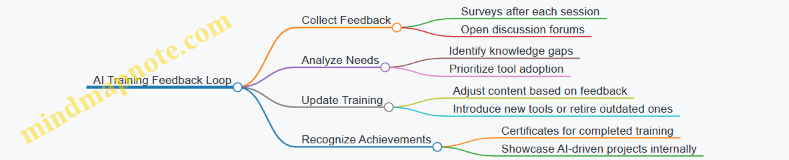
Example: AI Training Impact on a Project
Project: Rebranding for a local coffee shop
- Challenge: Tight deadline and need for creative concept variations
- AI Tools Used: AI-powered mood board generators, ChatGPT for tagline ideas, AI image upscaling
- Outcome: The team rapidly produced multiple creative directions, impressing the client and reducing revision cycles by 40%.
This success was attributed to the team’s confidence and skill gained through regular AI training.
Key Takeaways for Small Creative Businesses
- Schedule consistent, manageable training sessions to build AI skills gradually.
- Encourage knowledge sharing among team members to foster a collaborative learning environment.
- Combine theoretical knowledge with hands-on practice for effective learning.
- Use feedback loops to tailor training to your team’s evolving needs.
- Dedicate time for experimentation to unlock AI’s creative potential.
By adopting a structured and inclusive AI training program like BrightCanvas Studio’s, small creative businesses can empower their teams to harness AI effectively, driving innovation and efficiency in their creative processes.
9.5 Future Trends: Preparing Your Business for Emerging AI Technologies
As AI continues to evolve at a rapid pace, small creative businesses must stay ahead by understanding and preparing for emerging AI technologies. This section explores key future trends, practical preparation strategies, and illustrative examples to help you future-proof your creative business.
Key Emerging AI Trends for Creative Businesses
Preparing Your Business for These Trends
Embrace Continuous Learning and Experimentation
- Stay updated with AI research and tools through newsletters, webinars, and courses.
- Example: A solopreneur subscribes to AI newsletters like “The Batch” by deeplearning.ai and experiments monthly with new generative AI tools to create unique client assets.
Invest in Flexible and Scalable AI Tools
- Choose AI platforms that support multimodal content (text, image, audio, video) and allow integration with other software.
- Example: A creative studio adopts an AI platform that generates both copy and visuals, enabling seamless campaign creation.
Prioritize Ethical AI Use and Transparency
- Develop clear policies on AI-generated content ownership and disclose AI involvement to clients.
- Example: An independent artist includes a note in their portfolio explaining which pieces were AI-assisted, fostering trust.
Explore AR/VR to Enhance Client Engagement
- Experiment with AI-powered AR tools to showcase designs in immersive environments.
- Example: A design studio creates virtual showrooms where clients can interact with 3D models of products before production.
Build Partnerships and Collaborations
- Connect with AI developers, creative technologists, and other creatives to co-develop innovative solutions.
- Example: A small creative agency partners with a local AI startup to integrate explainable AI features into their design recommendation engine.
Mind Map: Preparing Your Business for Emerging AI
Example Scenario: Future-Proofing a Creative Studio
Background: A small creative studio specializing in branding wants to stay competitive by integrating emerging AI technologies.
Steps Taken:
- The team dedicates time weekly to explore AI tools that generate both visual and textual branding assets.
- They experiment with AI-powered AR apps to create immersive brand experiences for clients.
- The studio establishes an ethical guideline document clarifying AI usage and content rights.
- They partner with a university AI lab to pilot explainable AI algorithms that help clients understand design decisions.
- The studio attends AI-focused creative conferences to network and learn about upcoming trends.
Outcome: The studio enhances its service offerings, attracts tech-savvy clients, and builds a reputation as an innovative, trustworthy creative partner.
Final Tips
- Stay Curious: AI is a fast-moving field; curiosity is your best asset.
- Test Small, Scale Fast: Pilot new AI tools on small projects before full adoption.
- Document Learnings: Keep a log of AI experiments and outcomes to refine your approach.
- Engage Your Clients: Educate clients on AI benefits and limitations to build confidence.
By proactively embracing emerging AI technologies and integrating them thoughtfully, your small creative business can unlock new creative possibilities, improve efficiency, and build lasting client relationships in an AI-augmented future.
10. Troubleshooting and Overcoming Challenges
10.1 Common Technical Issues and How to Resolve Them
When integrating AI tools into your small creative business, encountering technical issues is inevitable. Understanding common problems and having practical solutions at hand will keep your workflow smooth and efficient. This section breaks down frequent technical challenges and offers easy-to-follow fixes, supported by mind maps and real-world examples.
Common Technical Issues Mind Map
Installation & Setup Issues
Problem: AI software fails to install or crashes on startup.
Example: An independent graphic designer tries to install an AI-powered image enhancer but the program crashes immediately.
Resolution:
- Check system requirements carefully before installation.
- Ensure all dependencies (e.g., Python versions, GPU drivers) are installed and updated.
- Run the installer as an administrator.
- Consult official documentation or community forums for known issues.
Example Fix: The designer updated their GPU drivers and installed the required CUDA toolkit, resolving the crash.
Performance Issues
Problem: AI tools respond slowly or freeze during use.
Example: A solopreneur using an AI text generator experiences lag when generating long-form content.
Resolution:
- Close unnecessary background applications to free up RAM.
- Use cloud-based AI tools if local hardware is limited.
- Break large tasks into smaller chunks.
- Check for software updates that optimize performance.
Example Fix: The solopreneur switched to a cloud AI platform and segmented their content generation into sections, improving speed.
Data & File Problems
Problem: AI tool cannot open or export files correctly.
Example: A creative studio tries to import client images into an AI-driven design tool but receives format errors.
Resolution:
- Verify supported file formats in the AI tool documentation.
- Convert files to compatible formats using free converters.
- Backup original files before processing.
Example Fix: The studio converted TIFF images to PNG format, which the AI tool accepted without errors.
Integration Challenges
Problem: AI plugins or APIs fail to connect or cause conflicts.
Example: An independent artist uses an AI plugin inside their design software, but it crashes when activated.
Resolution:
- Ensure plugin and host software versions are compatible.
- Disable other plugins to identify conflicts.
- Reinstall the plugin.
- Reach out to plugin support for updates or patches.
Example Fix: The artist updated their design software to the latest version and reinstalled the plugin, resolving the crash.
User Errors
Problem: Incorrect inputs or misconfigurations cause unexpected AI behavior.
Example: A creative studio receives irrelevant AI-generated marketing copy due to poorly defined prompts.
Resolution:
- Provide clear, specific instructions to AI tools.
- Use tutorials and training resources to understand tool capabilities.
- Test with sample inputs before full deployment.
Example Fix: The studio refined their prompt to include target audience details, resulting in more relevant copy.
Summary Mind Map: Troubleshooting Workflow
By anticipating these common technical issues and applying the practical solutions outlined above, small creative businesses can minimize downtime and maximize the benefits of AI integration. Remember, patience and systematic troubleshooting are key to mastering AI tools in your creative workflow.
10.2 Managing Resistance to AI Adoption Within Your Team or Clients
Adopting AI technologies in small creative businesses can sometimes be met with resistance from team members or clients. This resistance often stems from fear of change, misunderstanding of AI capabilities, or concerns about job security and creative control. Effectively managing this resistance is crucial to ensuring a smooth integration of AI tools and maximizing their benefits.
Understanding the Root Causes of Resistance
Before addressing resistance, it’s important to identify its underlying causes. Here’s a mind map to visualize common sources of resistance:
Example: A freelance graphic designer’s client was hesitant to approve AI-generated concepts, fearing the designs would lack originality. Understanding this concern helped the designer explain how AI was used as a tool to augment creativity, not replace it.
Strategies to Manage and Overcome Resistance
Educate and Communicate Transparently
- Explain what AI can and cannot do.
- Share examples of AI augmenting creative work rather than replacing it.
- Use simple, relatable language to demystify AI.
Example: A creative studio held a live demo showing how AI tools helped speed up repetitive tasks, freeing designers to focus on higher-level creative decisions.
Involve Stakeholders Early
- Engage team members and clients in the AI selection process.
- Collect feedback and address concerns before full implementation.
Example: A solopreneur designer invited a trusted client to test an AI-powered copywriting tool together, which helped build client confidence.
Highlight Benefits and Quick Wins
- Showcase time saved, improved quality, or cost reductions.
- Celebrate small successes to build momentum.
Example: After automating image resizing with AI, a design team reported a 30% reduction in project turnaround time, which was shared in a team meeting to boost morale.
Provide Training and Support
- Offer hands-on training sessions.
- Create easy-to-follow guides and resources.
- Ensure ongoing support for troubleshooting.
Example: A creative studio developed a simple step-by-step guide for using AI-driven social media scheduling tools, reducing anxiety about the new process.
Address Emotional and Cultural Concerns
- Acknowledge fears openly.
- Emphasize AI as a collaborative partner.
- Foster a culture of experimentation and learning.
Example: A design team leader held a roundtable discussion to let team members voice their concerns, which helped build trust and acceptance.
Mind Map: Managing Resistance Workflow
Real-World Example: Overcoming Resistance in a Creative Studio
Scenario: A small creative studio wanted to implement an AI tool for automating client feedback analysis. Some senior designers feared it would reduce their creative input.
Approach:
- The studio organized a workshop explaining how the AI tool would handle repetitive feedback categorization, freeing designers to focus on creative solutions.
- They ran a pilot project involving the skeptical designers, allowing them to experience the tool firsthand.
- Early success stories were shared, highlighting time saved and improved client satisfaction.
- Ongoing support and open forums were established for continuous feedback.
Outcome: Resistance decreased significantly, and the team embraced the AI tool as a valuable assistant rather than a threat.
Summary
Managing resistance to AI adoption requires empathy, clear communication, and inclusive practices. By understanding concerns, educating stakeholders, involving them early, and providing support, small creative businesses can foster a positive environment where AI enhances creativity and productivity rather than causing fear or division.
10.3 Balancing Creativity and Automation Without Losing Control
Incorporating AI and automation into your creative workflow can dramatically increase efficiency and open new avenues for innovation. However, it’s crucial to maintain a healthy balance to ensure that automation enhances rather than stifles your creative control and originality. This section explores strategies, practical examples, and mind maps to help you strike that balance.
Why Balance Matters
- Preserving Artistic Vision: Automation can handle repetitive or technical tasks, but your unique creative voice must remain central.
- Avoiding Over-Automation: Relying too heavily on AI-generated outputs can lead to generic or uninspired results.
- Maintaining Flexibility: Automation should support experimentation, not constrain it.
Mind Map: Balancing Creativity and Automation
Strategy 1: Selective Automation
Automate repetitive, time-consuming tasks while reserving creative decisions for yourself.
Example:
- Use AI tools to generate multiple layout options for a brochure.
- Manually select, tweak, and combine elements to match your artistic vision.
Strategy 2: Human-in-the-Loop Approach
Keep yourself actively involved in reviewing and refining AI outputs.
Example:
- When using AI copywriting tools, generate drafts but always edit tone, style, and messaging to fit your brand.
Mind Map: Human-in-the-Loop Workflow
Strategy 3: Iterative Feedback and Customization
Use AI as a collaborator by iteratively refining outputs based on your feedback.
Example:
- In AI-driven image generation, provide initial prompts, review results, and adjust prompts or parameters to better align with your creative goals.
Strategy 4: Maintain Creative Flexibility
Avoid rigid workflows that force you to conform to AI tool limitations.
Example:
- Combine AI-generated assets with hand-drawn elements or custom typography to create unique designs.
Practical Example: A Freelance Illustrator’s Workflow
- Sketching: Starts with hand-drawn sketches to capture original ideas.
- AI Enhancement: Uses AI tools to colorize or add textures automatically.
- Manual Refinement: Adjusts colors, shadows, and details manually to ensure the artwork matches their style.
- Client Review: Shares drafts with clients, incorporating feedback.
This workflow leverages automation for efficiency but keeps creative control firmly in the artist’s hands.
Tips to Avoid Losing Control
- Always review AI outputs critically.
- Customize AI settings to reflect your style.
- Use AI as a tool, not a replacement.
- Document your creative decisions for consistency.
By thoughtfully integrating automation with your creative process, you can unlock new efficiencies and ideas without sacrificing the originality and personal touch that define your work.
10.4 Case Study: Turning AI Failures into Learning Opportunities
AI integration in small creative businesses is a journey filled with experimentation, trial, and sometimes failure. However, these setbacks are invaluable learning moments that can lead to stronger workflows and better outcomes. This case study explores how a small creative studio transformed AI failures into stepping stones for growth.
Background
“BrightCanvas” is a boutique creative studio specializing in branding and digital art. They recently adopted an AI-powered design assistant to speed up logo creation and client revisions.
The Challenge
Initially, the AI tool generated logo concepts that were too generic and lacked the unique flair BrightCanvas prided itself on. Client feedback was lukewarm, and the team felt the AI was more of a hindrance than a help.
Failure Points Identified
- Over-reliance on AI defaults: The team used out-of-the-box AI settings without customization.
- Lack of human-AI collaboration: Designers treated AI output as final rather than a draft.
- Insufficient training: The team had limited understanding of how to optimize prompts and parameters.
Turning Failure into Opportunity: Step-by-Step Mind Map
Practical Examples
-
Prompt Engineering: BrightCanvas learned that by refining their prompts — specifying style, color palettes, and mood — the AI produced more tailored logo concepts. For instance, instead of “create a modern logo,” they used “create a modern logo with minimalist geometric shapes and a blue-green color scheme.”
-
Human-AI Collaboration: Designers started treating AI outputs as rough drafts. They used AI-generated concepts as inspiration, then applied their artistic skills to customize and enhance the designs, preserving the studio’s unique style.
-
Tool Customization: The team explored advanced settings in their AI tool, such as adjusting creativity levels and filtering outputs, which helped reduce generic results.
-
Feedback Integration: After each client presentation, feedback was systematically logged and used to tweak AI inputs and human edits, creating a continuous improvement cycle.
Mind Map: Example Workflow After Learning from Failures
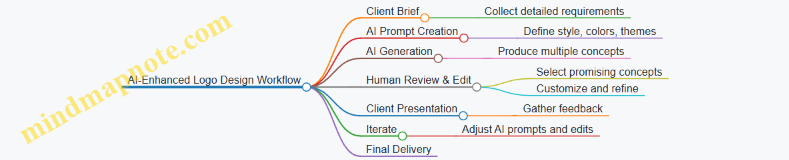
Key Takeaways
- Failure is an integral part of adopting AI; it reveals gaps in knowledge and process.
- Investing time in understanding AI tools and prompt engineering dramatically improves outcomes.
- Combining AI efficiency with human creativity yields the best results.
- Systematic feedback and iteration transform AI from a black box into a collaborative partner.
By embracing failures as learning opportunities, BrightCanvas not only improved their AI integration but also enhanced their creative process, leading to higher client satisfaction and more innovative designs.
10.5 When to Seek Professional Help or AI Consulting
As a small creative business or solopreneur, leveraging AI can be transformative but also complex. While many AI tools are designed to be user-friendly, there are moments when professional help or AI consulting can save you time, money, and frustration. This section explores key indicators for when to seek expert assistance, what types of consultants exist, and how to maximize the value of their expertise.
When to Consider Professional AI Help
- Complex Integration Needs: When you want to integrate AI tools deeply into your existing workflows or systems (e.g., CRM, project management, design software) and the out-of-the-box solutions don’t suffice.
- Custom AI Solutions: If your business requires AI models tailored specifically to your unique creative style, client base, or operational needs.
- Scaling Challenges: When your business is growing and you need to automate larger volumes of work or manage multiple AI tools cohesively.
- Data Privacy and Compliance: If you handle sensitive client data and need expert guidance on AI tools that comply with privacy laws and ethical standards.
- Troubleshooting Persistent Issues: When recurring technical problems or inefficiencies arise that you cannot resolve with standard support.
- Strategic AI Roadmapping: If you want a clear, long-term AI adoption strategy aligned with your business goals.
Types of AI Professionals and Consultants
- AI Strategy Consultants: Help define how AI fits into your business model and roadmap.
- AI Integration Specialists: Focus on connecting AI tools with your existing software and workflows.
- Data Scientists / Machine Learning Engineers: Build custom AI models or fine-tune existing ones.
- Creative AI Coaches: Guide artists and designers on best practices for using AI creatively and ethically.
- Technical Support Experts: Provide troubleshooting and maintenance for AI software.
Mind Map: Deciding When to Seek AI Consulting
Example 1: Freelance Illustrator Needing Custom AI Style Transfer
Scenario: Jane, a freelance illustrator, wants to use AI to apply her signature watercolor style to digital sketches automatically. Off-the-shelf AI tools produce generic results that don’t capture her nuances.
Solution: Jane hires an AI consultant specializing in creative AI to develop a custom style-transfer model trained on her portfolio. The consultant also integrates the model into her digital art software, allowing seamless application.
Outcome: Jane saves hours on manual editing and maintains her unique artistic voice.
Example 2: Small Creative Studio Facing Workflow Bottlenecks
Scenario: A small design studio uses multiple AI tools for image editing, copywriting, and project management. However, the tools don’t communicate well, causing duplicated effort and missed deadlines.
Solution: The studio engages an AI integration specialist who audits their workflows and connects their AI tools via APIs, automating data flow and task assignments.
Outcome: The studio improves efficiency by 30%, reduces errors, and frees up creative time.
How to Maximize Value from AI Consultants
- Prepare Clear Objectives: Define what you want to achieve with AI before consulting.
- Share Your Workflow Details: Provide consultants with a transparent view of your current processes.
- Set Realistic Budgets and Timelines: Understand that custom AI solutions may require investment.
- Request Training and Documentation: Ensure you and your team can maintain and adapt AI tools post-consultation.
- Maintain Ongoing Communication: AI adoption is iterative; stay engaged for continuous improvement.
Mind Map: Maximizing AI Consulting Benefits
Final Thoughts
Seeking professional AI help is not a sign of weakness but a strategic move to empower your creative business. By knowing when and how to engage experts, you can unlock AI’s full potential while focusing on what you do best — creating inspiring work.
Remember, the right consultant acts as a partner, helping you navigate AI’s complexities so you can innovate confidently and sustainably.
11. Conclusion and Next Steps
11.1 Recap of Key Best Practices and Examples
As we conclude this playbook, it’s essential to revisit the core best practices and examples that empower small creative businesses to harness AI effectively. This recap consolidates the practical insights shared throughout the chapters, helping you internalize and apply them confidently.
Mind Map: Key AI Best Practices for Small Creative Businesses
Best Practices and Examples Summary
Understanding & Adoption
- Best Practice: Start by identifying specific pain points or opportunities in your creative business where AI can add value.
- Example: A freelance designer used AI-powered client feedback analysis to reduce revision cycles by 30%, improving turnaround time.
Creative Production
- Best Practice: Automate repetitive design tasks like resizing images or generating mood boards to free up time for higher-value creative work.
- Example: An independent artist leveraged AI tools to generate multiple logo concepts rapidly, selecting and refining the best with minimal manual effort.
Content Creation
- Best Practice: Use AI to draft marketing copy or blog ideas but always review and personalize the output to maintain your unique voice.
- Example: A solopreneur created weekly newsletters by generating AI drafts and then adding personal anecdotes, resulting in higher engagement.
Marketing & Engagement
- Best Practice: Employ AI chatbots for initial customer interactions and automate social media scheduling to maintain consistent presence.
- Example: A creative studio increased social media engagement by 25% after implementing AI-driven content scheduling and personalized chatbot responses.
Business Operations
- Best Practice: Automate invoicing, scheduling, and project management to reduce administrative overhead.
- Example: A small design studio used AI-powered project management tools to streamline client onboarding, cutting setup time in half.
Financial Management
- Best Practice: Use AI for budgeting and predictive analytics but combine insights with your intuition and market knowledge.
- Example: An independent artist improved profit margins by analyzing sales trends with AI and adjusting pricing strategies accordingly.
Creativity & Innovation
- Best Practice: Treat AI as a creative partner to explore new styles and ideas while maintaining your authentic artistic voice.
- Example: A designer experimented with AI-generated style variations, discovering fresh aesthetics that inspired new client projects.
Skill Building & Updates
- Best Practice: Continuously learn about new AI tools and participate in creative AI communities to stay ahead.
- Example: A creative studio scheduled monthly AI tool training sessions, ensuring the team remained proficient and innovative.
Troubleshooting
- Best Practice: Address technical issues promptly and manage team or client concerns about AI adoption through transparent communication.
- Example: When initial AI-generated content missed the mark, a solopreneur used the experience to refine prompts and improve results.
Mind Map: Example Workflows Highlighted
Final Thoughts
The integration of AI into small creative businesses is a journey of experimentation, learning, and adaptation. By following these best practices and learning from real-world examples, you can unlock AI’s potential to enhance creativity, streamline operations, and grow your business sustainably. Remember, AI is a tool to augment your unique talents—not replace them.
Keep this recap as a reference as you continue to evolve your AI-powered creative business!
11.2 Creating an AI Adoption Roadmap for Your Business
Adopting AI in your small creative business can feel overwhelming without a clear plan. Creating a structured AI adoption roadmap helps you integrate AI tools effectively, maximize benefits, and minimize disruptions. This section guides you through building a step-by-step roadmap tailored to your unique business needs, with practical examples and mind maps to visualize the process.
Step 1: Assess Your Current Business Landscape
Before introducing AI, understand your existing workflows, pain points, and opportunities.
- Identify repetitive or time-consuming tasks.
- Pinpoint areas where creativity could be enhanced or accelerated.
- Evaluate current tools and software.
Example: A freelance illustrator notices that client feedback management and invoicing take up significant time, limiting creative output.
Mind Map: Assessing Business Landscape
Step 2: Define Clear AI Goals and Objectives
Set specific, measurable goals for AI adoption aligned with your business priorities.
- Increase productivity by automating repetitive tasks.
- Enhance creative ideation with AI-generated suggestions.
- Improve client engagement through personalized communication.
Example: The illustrator decides to reduce invoicing time by 50% and generate initial concept sketches faster using AI.
Mind Map: Defining AI Goals
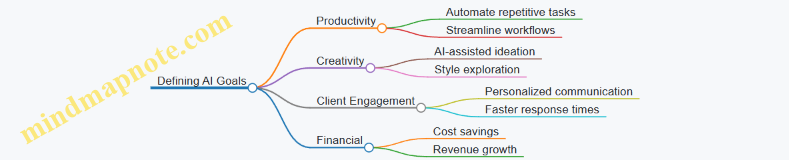
Step 3: Research and Select AI Tools
Explore AI tools that fit your goals, budget, and technical comfort.
- Use trial versions to test usability.
- Prioritize tools with strong community support and tutorials.
- Consider integration with existing software.
Example: The illustrator tries AI invoicing software like QuickBooks with AI features and AI-powered sketch generators like DALL·E or Midjourney.
Mind Map: Researching AI Tools
Step 4: Plan Implementation Phases
Break down AI adoption into manageable phases to reduce risk and allow learning.
- Phase 1: Automate simple administrative tasks.
- Phase 2: Integrate AI into creative workflows.
- Phase 3: Expand AI use for marketing and customer engagement.
Example: The illustrator first automates invoicing, then experiments with AI-generated concepts, and finally uses AI tools for social media scheduling.
Mind Map: Implementation Phases
Step 5: Train Yourself and Your Team
Invest time in learning how to use AI tools effectively.
- Attend webinars and tutorials.
- Join AI-focused creative communities.
- Encourage experimentation and feedback.
Example: The illustrator dedicates an hour weekly to AI tool tutorials and joins an online group of artists using AI.
Mind Map: Training & Learning
Step 6: Monitor, Evaluate, and Iterate
Regularly assess AI’s impact on your business and adjust your roadmap accordingly.
- Track KPIs like time saved, client satisfaction, and revenue changes.
- Collect feedback from clients and collaborators.
- Update tools and processes based on results.
Example: After 3 months, the illustrator measures a 40% reduction in invoicing time and positive client feedback on faster responses.
Mind Map: Monitoring & Iteration
Step 7: Scale and Innovate
Once comfortable, explore advanced AI applications to further grow your business.
- Experiment with AI-driven market analysis.
- Use AI for personalized customer experiences.
- Collaborate with AI for innovative creative projects.
Example: The illustrator starts using AI to analyze social media trends and tailor artwork styles accordingly.
Mind Map: Scaling & Innovation
Summary Example: AI Adoption Roadmap for a Small Creative Studio
By following this roadmap, small creative businesses can confidently integrate AI tools to enhance productivity, creativity, and customer engagement while maintaining control and authenticity in their work.
11.3 Encouraging a Culture of Innovation and Experimentation
Fostering a culture of innovation and experimentation is essential for small creative businesses aiming to thrive with AI integration. This mindset not only helps you stay competitive but also empowers your team and yourself to explore new creative horizons and business opportunities.
Why Encourage Innovation and Experimentation?
- Adaptability: AI technologies evolve rapidly; an innovative culture helps your business adapt quickly.
- Creative Growth: Experimentation sparks new ideas and creative breakthroughs.
- Problem Solving: Innovative approaches often lead to better solutions for client needs and operational challenges.
- Employee Engagement: Encouraging experimentation boosts morale and ownership.
Key Strategies to Foster Innovation and Experimentation
Practical Examples
Example 1: Weekly AI Exploration Hour
- A solopreneur designer dedicates one hour every Friday to experiment with a new AI tool or feature.
- They document results in a shared journal or blog.
- Outcome: Discovering an AI-powered color palette generator that enhances their design workflow.
Example 2: Collaborative AI Brainstorming Sessions in a Creative Studio
- The studio holds bi-weekly meetings where team members present AI tools or ideas they want to try.
- They vote on one idea to prototype each month.
- Outcome: Implementing an AI chatbot for client FAQs, reducing repetitive inquiries.
Example 3: Celebrating ‘Happy Failures’
- An independent artist shares a story about an AI-generated artwork that didn’t meet expectations but sparked a new style direction.
- The artist posts this on social media, engaging their audience with the creative process.
Mind Map: Steps to Build an Innovation Culture
Tips for Sustaining Innovation
- Document Learnings: Keep a shared knowledge base of AI experiments and outcomes.
- Iterate Quickly: Use agile methods to test and refine AI applications.
- Encourage Cross-Discipline Collaboration: Combine design, marketing, and tech perspectives.
- Stay Curious: Regularly explore AI trends and emerging tools.
By embedding these practices and mindsets into your small creative business, you create a fertile ground where AI becomes a catalyst for continuous innovation and creative excellence.
11.4 Final Thoughts: Embracing AI as a Tool, Not a Replacement
As small creative businesses navigate the evolving landscape of AI, it’s crucial to remember that AI is designed to augment human creativity and productivity, not to replace the unique value that independent artists, designers, and solopreneurs bring to the table. This mindset shift can unlock new opportunities and reduce fears about AI adoption.
Why Embrace AI as a Tool?
- Amplification of Creativity: AI can generate ideas, automate mundane tasks, and provide inspiration, freeing you to focus on higher-level creative decisions.
- Efficiency Gains: By handling repetitive or data-heavy tasks, AI allows you to deliver projects faster without sacrificing quality.
- New Possibilities: AI opens doors to creative techniques and workflows that were previously inaccessible or too time-consuming.
Mind Map: Embracing AI as a Creative Tool
Practical Examples
Example 1: Independent Illustrator Using AI for Concept Sketches
Maria, an independent illustrator, uses an AI sketch generator to quickly explore multiple composition ideas for a client project. Instead of replacing her hand-drawn style, the AI-generated sketches serve as a springboard, helping her break creative blocks and speed up the initial phase. She then refines and personalizes the concepts, ensuring the final artwork reflects her unique voice.
Example 2: Creative Studio Automating Client Feedback Collection
A small design studio integrates an AI chatbot on their website to collect client feedback and project requirements. This automation reduces administrative overhead and ensures no detail is missed. The team uses the collected data to tailor their creative approach but remains fully responsible for the artistic decisions and client communication.
Example 3: Solopreneur Using AI to Draft Marketing Copy
James, a solopreneur selling handmade crafts, leverages AI copywriting tools to draft social media posts and newsletters. He treats the AI output as a first draft, editing and injecting his brand personality before publishing. This approach saves time while preserving authenticity and connection with his audience.
Mind Map: Human + AI Synergy in Creative Businesses
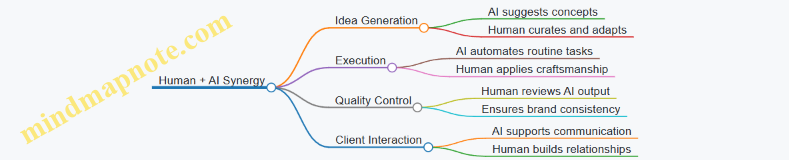
Key Takeaways
- AI is a collaborator, not a competitor: View AI as a partner that enhances your creative process rather than a threat to your role.
- Maintain your unique voice: Always add your personal touch to AI-generated outputs to keep your work authentic and differentiated.
- Balance automation with human insight: Use AI to handle repetitive or data-driven tasks but rely on your expertise for strategic and creative decisions.
- Stay curious and experiment: The AI landscape evolves rapidly—embracing a growth mindset will help you adapt and thrive.
By embracing AI as a tool, small creative businesses can harness its power to innovate, grow, and deliver exceptional work without compromising the human essence that defines creativity.
11.5 Additional Resources and Tools for Continued Growth
As you continue your journey integrating AI into your small creative business, having access to the right resources and tools is essential for sustained growth and innovation. This section provides a curated list of educational platforms, communities, AI tools, and practical examples to help you deepen your AI knowledge and expand your creative capabilities.
Educational Platforms & Courses
- Coursera & edX: Offer beginner to advanced AI courses tailored for creatives and business owners.
- Example: “AI For Everyone” by Andrew Ng on Coursera introduces AI concepts in an accessible way.
- LinkedIn Learning: Practical tutorials on AI tools like Adobe Sensei, Canva AI, and AI-driven marketing.
- Creative AI Workshops: Platforms like Domestika and Skillshare provide creative-focused AI workshops.
AI Tools for Creatives
| Category | Tool Name | Description & Example Usage |
|---|---|---|
| Design & Visual Content | Canva AI | AI-powered design suggestions and background remover. Example: Quickly generate social media posts with AI templates. |
| RunwayML | AI video editing and generation platform. Example: Create AI-generated animations for client projects. | |
| Copywriting | Jasper AI | AI writing assistant for marketing copy. Example: Draft blog posts or product descriptions efficiently. |
| Copy.ai | Generate creative content ideas and social media captions. | |
| Marketing Automation | HubSpot AI | Automate email marketing and customer segmentation. |
| Buffer | AI-driven social media scheduling and analytics. | |
| Project Management | Trello + Butler AI | Automate task assignments and reminders. |
| ClickUp | AI features for workload forecasting and document generation. |
Communities & Networks
- AI for Creatives Slack Groups: Join channels dedicated to AI tools and creative workflows.
- Reddit - r/ArtificialInteligence & r/CreativeAI: Engage in discussions, share projects, and get feedback.
- Meetup.com: Find local or virtual AI and creative tech meetups.
Mind Maps for Continued Growth
Mind Map 1: Learning Path for AI in Creative Business
Mind Map 2: AI Tool Selection Criteria
Mind Map 3: Building an AI-Driven Creative Workflow
Practical Examples
- Example 1: Using Jasper AI for Blog Content
- An independent artist uses Jasper AI to draft weekly blog posts about their creative process, saving 3 hours per week.
- Example 2: Automating Social Media with Buffer
- A small design studio schedules posts across platforms using Buffer’s AI recommendations for optimal timing, increasing engagement by 25%.
- Example 3: Collaborative AI Design with Canva
- A solopreneur leverages Canva AI to quickly generate multiple logo concepts to present to clients, speeding up the approval process.
Final Tips
- Regularly revisit and update your AI toolset to leverage new features.
- Participate actively in communities to stay inspired and troubleshoot challenges.
- Balance AI automation with your unique creative touch to maintain authenticity.
By leveraging these resources, mind maps, and examples, you can confidently grow your AI capabilities and keep your small creative business competitive and innovative.