Car Customization and Performance Tuning Techniques
1. Planning a Build and Defining Performance Goals
1.1 Setting Budget Priorities and Performance Targets
A good build starts with two numbers you can defend: how much you can spend, and what “better” means in measurable terms. If you skip either, you end up buying parts that look impressive in photos but don’t fix the problem you actually have—slow acceleration, weak braking, heat soak, traction limits, or unreliable drivability.
Start with Your Constraints
Begin by listing constraints in plain language:
- Time: How many weekends can you realistically spend on install, tuning, and troubleshooting?
- Budget: Include consumables like fluids, filters, gaskets, and replacement hardware.
- Vehicle use: Daily commuting, weekend drives, track days, towing, or mixed use.
- Risk tolerance: How much downtime or “learning through mistakes” you can handle.
Example: If you drive daily, you may prioritize cooling, fuel system reliability, and mild tuning over maximum power. If you only drive on weekends, you can accept more frequent maintenance and more aggressive calibration.
Define Performance Targets That Match Reality
Performance targets should be specific and tied to the way you drive. Use categories that map to real limits:
- Acceleration: 0–60 mph, quarter mile, or roll-on from 30–70 mph.
- Braking: 60–0 stopping distance, pedal feel consistency, or fade resistance.
- Handling: Lap time is useful, but so are corner entry stability and tire wear.
- Thermal control: Intake air temperature, coolant temperature, oil temperature.
- Reliability: Oil consumption rate, repeatable starting behavior, no limp modes.
A practical rule: pick one primary target and one secondary target. Primary might be “repeatable 30–70 mph pulls without heat issues.” Secondary might be “braking that doesn’t fade after repeated stops.”
Allocate Budget by Leverage
Budget allocation works best when you treat the car like a system. Power is not just horsepower; it’s airflow, fuel, spark, cooling, drivetrain strength, and traction. Spend in the order that prevents you from wasting money.
Priority Order That Usually Makes Sense
- Safety and baseline health: tires, brakes condition, fluid health, vacuum leaks, worn sensors.
- Cooling and fueling stability: prevents heat and fuel starvation from limiting everything else.
- Airflow and exhaust path: intake/exhaust changes that match engine management.
- Engine management and tuning: calibration that turns parts into results.
- Drivetrain and traction: clutch, differential, tires, and suspension that keep power usable.
- Comfort and refinement: mounts, bushings, noise reduction once the car performs correctly.
Example: If you buy a bigger turbo but your cooling system is marginal, you may hit a temperature ceiling that forces conservative tuning. The “cheap” cooling fix often protects the expensive hardware.
Use a Simple Budget Split
A starting point for many builds is a split like this (adjust to your constraints):
- 40% foundation and reliability (maintenance, cooling, brakes, tires)
- 35% performance hardware (intake/exhaust, fueling, forced induction if applicable)
- 20% tuning and validation (data logging, dyno or road testing, replacement parts)
- 5% contingency (unexpected fasteners, sensors, gaskets)
If your car is already sorted mechanically, you can shift more toward performance hardware. If your car is unknown-condition, increase the foundation portion.
Build Targets into a Measurable Plan
Turn targets into a checklist of what you must measure before and after:
- Baseline: record current temperatures, fuel trims if available, and at least one repeatable driving test.
- After each major change: verify nothing got worse in the areas you care about.
- Stop criteria: define when you’re “done” for this phase, such as “no more than X degrees oil temp rise on repeated pulls.”
Example: Suppose your goal is stronger roll-on. You can measure time from 30–70 mph before changes, then after intake and exhaust, then after fueling and tuning. If the gains stop after one phase, you know where the bottleneck is.
Mind Map: Budget Priorities and Performance Targets
Example Scenarios
Example: Daily Driver with Mild Power Goal
Primary target: smoother, stronger 40–70 mph acceleration. Secondary target: stable coolant and oil temps. Budget priorities: tires and brakes condition first, then cooling checks, then fueling and intake/exhaust matched to calibration, then tuning with conservative knock margins.
Example: Weekend Car with Track Braking Goal
Primary target: consistent braking after repeated hard stops. Secondary target: reduced heat soak. Budget priorities: pads/rotors and brake fluid, then brake cooling and ducting, then suspension alignment for tire contact, then power upgrades only after braking stability is proven.
When you set budget priorities and performance targets this way, every purchase has a job. The car becomes easier to diagnose, easier to tune, and less likely to turn your weekends into a scavenger hunt for the next limiting factor.
1.2 Selecting a Platform Based on Engine Layout Drivetrain and Use Case
Choosing the right platform is less about chasing the biggest numbers and more about matching the car’s mechanical “personality” to how you’ll actually drive it. Engine layout and drivetrain determine packaging, cooling behavior, service access, and how power reaches the tires. Use case determines which compromises you’ll tolerate.
Foundational Concepts That Drive the Decision
Start with three questions: What do you want the car to do most often, how often will you work on it, and what failures are you willing to risk? A platform that’s easy to tune but annoying to maintain can feel great for a month and frustrating for years.
Engine layout matters because it changes weight distribution, how heat travels, and where you can route intake, exhaust, and intercooler plumbing. Drivetrain matters because it changes traction limits and how drivetrain stress shows up under acceleration.
Engine Layout Options and What They Imply
Front Engine Rear Wheel Drive
This layout typically offers straightforward service access and a balanced feel when the car is set up well. It also tends to make it easier to build a predictable traction strategy: you can tune torque delivery to reduce wheel hop and manage oversteer with tires and alignment.
Example: If you want a street car that you can tune gradually, a front-engine rear-wheel-drive platform often lets you swap intake, exhaust, and clutch components without major disassembly.
Front Engine Front Wheel Drive
Front-wheel-drive platforms package the engine and transmission together, which can reduce overall length but increases complexity around torque steer and heat management. Power upgrades can work well, but you’ll spend more time addressing traction and driveline vibration.
Example: For a daily driver that sees stop-and-go traffic, front-wheel drive can be practical. When tuning, you’ll usually focus on smooth torque ramps and careful clutch calibration to keep driveline stress from turning into chatter.
Mid Engine Rear Wheel Drive
Mid-engine cars often feel responsive because the mass sits closer to the rear axle. The tradeoff is packaging: intercoolers, exhaust routing, and service access can be tighter, which affects how quickly you can iterate on parts.
Example: If your use case is track days with frequent inspection, you may value the handling balance, but plan for more time when swapping components.
Rear Engine Rear Wheel Drive
This layout can be excellent for traction at the driven wheels, but cooling and airflow paths are critical. Exhaust and intake routing can also be less conventional, which affects how you plan upgrades.
Example: If you’re building a car for consistent acceleration runs, you’ll prioritize cooling ducting and airflow management early so the engine doesn’t heat-soak after a few pulls.
Drivetrain Choices That Affect Power Delivery
Manual Transmission
Manuals give direct control over torque application and can be easier to tune for drivability because you can manage slip with the clutch. The downside is that clutch wear becomes part of your performance budget.
Example: If you’re aiming for moderate power and want smooth launches, choose a clutch that matches your typical driving style rather than the maximum torque rating.
Automatic Transmission
Automatics can handle power smoothly when tuned correctly, but they introduce additional variables like shift strategy, converter behavior, and thermal management.
Example: If you want consistent performance in traffic and occasional spirited driving, you’ll likely spend time on transmission health monitoring and temperature targets.
All Wheel Drive
All wheel drive can improve traction and reduce wheel spin, but it adds complexity: torque distribution, driveline windup, and additional heat sources.
Example: If your use case includes wet roads and uneven traction, AWD can help you use more of your power without relying solely on tire grip.
Use Case Mapping from Driving Reality to Platform Fit
Match the platform to your most common conditions.
- Daily commuting: prioritize ease of maintenance, predictable drivability, and cooling stability. A platform with good access to service points reduces downtime.
- Weekend spirited driving: prioritize response and repeatable traction. You’ll benefit from a drivetrain that supports controlled torque delivery.
- Track-focused use: prioritize thermal capacity, brake and tire compatibility, and the ability to service wear items quickly.
- Drag-focused use: prioritize launch consistency and driveline durability. You’ll care about clutch/torque converter behavior and traction management.
Mind Map: Platform Selection
Practical Example: Choosing Between Two Candidates
Candidate A is front-engine rear-wheel drive with a manual. Candidate B is front-engine front-wheel drive with an automatic.
If your priority is straightforward maintenance and you enjoy controlling launches, Candidate A fits better because clutch and torque delivery are direct and service access is usually simpler. If your priority is smooth daily driving in traffic and you want reduced driver workload, Candidate B can fit well, but you’ll plan for traction management and driveline heat monitoring as part of the build.
Quick Checklist Before You Commit
- Can you access the parts you’ll change most often without major disassembly?
- Does the platform’s heat path match your use case conditions?
- Will your drivetrain choice support the torque style you want to run?
- Are the common failure points compatible with your maintenance habits?
A good platform selection reduces the number of “surprises” you encounter during tuning. The goal is not to eliminate challenges, but to ensure the challenges are the ones you can solve with your time and budget.
1.3 Establishing a Build Order for Reliability and Performance Gains
A build order is not a shopping list. It’s a sequence that prevents rework: you install what you must measure first, then what you must fit second, and finally what you can safely calibrate once the mechanical pieces behave predictably.
Start with the principle: reliability comes from eliminating variables early. Performance comes from tuning what remains. If you tune before the engine bay is mechanically stable, you end up chasing symptoms—like adjusting fuel trims to compensate for a vacuum leak you haven’t found yet.
Mind Map: Build Order Logic
Step 1: Lock the Baseline Before You Change Anything
Begin by confirming the vehicle is healthy enough to measure. Compression and leak-down aren’t mandatory for every build, but you do need a clear picture of what’s already wrong. If the cooling system is marginal, a later tuning session will be limited by temperature rather than by calibration quality.
Example: If your coolant runs hot during a short idle, fix the thermostat, radiator condition, fan operation, and airflow path before you touch ignition timing. Otherwise, you’ll interpret heat-related knock behavior as an engine management problem.
Step 2: Install the “Systems That Control Inputs” First
Your build order should prioritize components that affect air, fuel, spark, and temperature—because those determine what the ECU sees.
- Cooling and lubrication: install the radiator, fans, thermostat, oil cooler, and any lines before you route exhaust or intake tubing that might block airflow.
- Fuel delivery: upgrade the pump, regulator, lines, and filters early, then verify pressure stability under load.
- Intake and exhaust routing: fit the intake tract and exhaust path next, ensuring there’s no rubbing, no kinks, and no heat-soaked sensor wiring.
Example: When adding a turbo, route oil feed and return lines with proper slope and secure clamps before you install the downpipe. It’s much easier to correct line geometry before the exhaust is in place.
Step 3: Make Fitment Boring and Repeatable
Reliability is often won with mundane checks: torque specs, clearances, and leak prevention.
- Torque verification: after each major component install, re-check critical fasteners.
- Clearance checks: confirm hose and harness routing won’t contact moving parts or hot surfaces.
- Leak checks: pressure test where applicable, then do vacuum/boost leak checks after plumbing is complete.
Example: A small boost leak can cause unstable fueling and confusing log patterns. If you smoke-test the charge piping immediately after assembly, you avoid tuning around a problem that should have been mechanical.
Step 4: Prepare the ECU Inputs Before Calibration
Before any meaningful tuning, ensure sensors and wiring reflect reality.
- Confirm sensor connectors are seated and grounds are clean.
- Verify vacuum and boost reference lines are correct and not swapped.
- Check that O2 sensors are installed in the intended locations and that exhaust leaks are sealed.
Example: If an O2 sensor is upstream of where you think it is, your air-fuel targets may look “wrong” even though the engine is behaving consistently.
Step 5: Tune in Stages with Mechanical Stability
Use a staged approach: start with conservative settings that allow safe operation, then refine.
- Stage A: baseline runs with minimal changes to confirm drivability and temperature control.
- Stage B: calibration iterations focused on one variable at a time, such as fuel targets under steady load.
- Stage C: ignition refinement once knock behavior is understood and repeatable.
Example: If you change intake, exhaust, and boost control all at once, you can’t tell whether a drivability issue came from airflow changes, control strategy, or a plumbing mistake.
Mind Map: What to Do First vs Last
Step 6: Close the Loop with Rechecks and Documentation
After tuning, recheck fasteners and inspect for new issues created by heat cycles and vibration. Record what changed and what the logs showed so the next adjustment is grounded in evidence.
Example: If a clamp was disturbed during a downpipe install, it might seal during the first run but loosen after heat. A quick post-tune inspection prevents a “mystery” problem later.
1.4 Documenting Baselines With Measurements and Vehicle Condition Checks
A baseline is your “before” snapshot. It turns tuning and upgrades into measurable cause-and-effect instead of guesswork. The goal is not to collect every possible number; it’s to capture the few that explain how the car behaves today.
Mind Map: Baseline Documentation Workflow
Foundational Principles for Reliable Baselines
Start with consistency. If tire pressure, fuel level, or ambient temperature changes, your “before” and “after” comparisons get fuzzy. A practical rule: keep the same tire pressures, use similar fuel, and run the same type of test (for example, a steady pull in the same gear range).
Next, separate condition from performance. Condition checks tell you whether the car is healthy enough to interpret performance data. Performance measurements tell you what the car is doing right now.
Finally, record context. Two cars can show the same acceleration time while one is heat-soaked and the other is fresh. Your notes should capture the difference.
Vehicle Condition Checks Before You Measure
Begin with safety and obvious mechanical issues. Verify tire condition and tread depth, check for brake drag, and confirm there are no active warning lights. If a check engine light is on, treat it as a baseline contaminant until resolved.
Then move to the systems that most often skew results:
- Fluids and leaks: Confirm oil level and look for fresh leaks around valve covers, oil pan seams, coolant hoses, and the intercooler or radiator connections.
- Cooling health: Inspect coolant level and hose condition. If the car overheats during a baseline run, all tuning numbers become less meaningful.
- Intake and vacuum integrity: Look for cracked hoses, loose clamps, and damaged intercooler piping. A small vacuum leak can change idle quality and part-throttle fueling.
- Exhaust leaks: Check around manifolds, gaskets, and O2 sensor bungs. Exhaust leaks can skew sensor readings and create misleading tuning corrections.
- Battery and charging: Measure battery voltage at rest and during cranking if possible. Voltage drops can cause sensor glitches and unstable fueling.
Example: Quick Condition Checklist
Use a one-page checklist you can complete in 20–30 minutes:
- No warning lights
- Tires inflated to target pressure
- No visible leaks under hood and undercarriage
- Coolant level correct
- Intake clamps tight, hoses intact
- Exhaust joints dry and sealed
- Battery terminals clean and tight
If any item fails, fix it before you collect baseline performance data.
Measurements That Actually Help You Compare
Choose measurements that reflect the car’s limiting factors. For most builds, the most useful baseline set includes:
- Tire and traction context: Tire pressures and tire type. Note if traction control is enabled.
- Fuel and air context: Fuel type, approximate octane, and fuel level. Record ambient temperature and humidity if you can.
- Engine health proxies: Idle quality, cold-start behavior, and any misfire counts.
- Thermal stability: Intake air temperature trend during a run. If IAT climbs rapidly, power changes may be thermal rather than mechanical.
- Electrical stability: Log battery voltage or alternator-related signals if available.
- Drivetrain behavior: Note clutch engagement feel, shift quality, and any driveline vibration.
Example: Baseline Run Template
Run the same test twice. If the second run differs dramatically, note why. A simple template:
- Preheat: 5–10 minutes of normal driving
- Tire pressure: set before both runs
- Test: steady pull from a consistent speed range in the same gear
- Logging: start recording before the pull and stop after
- Notes: any knock, hesitation, boost fluctuation, or traction intervention
Recording Standards That Prevent “Data Drift”
Write down the settings that affect results:
- Logging configuration: sample rate, channels enabled, and whether filters or smoothing were applied.
- Vehicle state: fuel level range, whether the car was parked overnight, and whether it was washed or recently serviced.
- Route description: a short note like “same highway on-ramp, same direction, similar traffic.” You don’t need GPS coordinates; you need repeatability.
Example: Baseline Summary Table
| Item | Baseline Value | Notes |
|---|---|---|
| Tire Pressure Front/Rear | 32/34 psi | Same for both runs |
| Fuel | 91 octane | ~1/2 tank |
| Ambient Temp | 68°F | Logged |
| IAT Behavior | Rises then stabilizes | No rapid runaway |
| Warning Lights | None | Verified before test |
| Idle Quality | Stable | No hunting |
Mind Map: What to Photograph and Why
Baseline Recheck Triggers
Recheck and update the baseline after anything that changes sensor behavior, airflow, or friction. That includes replacing a sensor, repairing an exhaust leak, changing tire sizes, or correcting a cooling issue. Even a small fix can shift the car’s “normal,” so your baseline report should reflect the current reality.
Example: A Clean Baseline Entry
On 2026-02-08, you might record: “No warning lights. Oil level correct. Intake hoses intact. Exhaust joints dry. Battery terminals clean. Tire pressures set to 32/34 psi. Two steady pulls logged with identical gear and start speed. IAT rose moderately and stabilized; no misfire counts observed.”
That single paragraph gives future-you enough detail to interpret changes without guessing.
1.5 Choosing Tools Consumables and Safety Equipment for Ongoing Work
A good build starts with a workbench that doesn’t fight you. Tools and safety gear aren’t “extra”; they prevent rounding bolts, reduce rework, and keep you from turning a simple job into a medical incident. The goal is a kit that supports your most common tasks repeatedly, with enough margin for the awkward ones.
Mind Map: Core Kit for Ongoing Work
Safety First That Matches the Job
Start by matching protection to the hazard, not the mood. Eye protection is non-negotiable for grinding, drilling, and even “just loosening” rusty hardware—chips travel farther than you expect. Hearing protection matters when you’re using an impact wrench, air tools, or running a compressor; hearing damage is quiet and cumulative.
Gloves should be task-specific. Nitrile gloves help with fuel, coolant, and sensor cleaning, while cut-resistant gloves help with sharp sheet metal and underbody work. Avoid thick gloves when precision matters, because they reduce feel and increase the chance of cross-threading.
Respiratory protection depends on what you’re breathing. Brake dust and some solvents deserve a proper respirator, not a cloth mask. Fire safety is practical: keep a class-rated extinguisher accessible, and don’t store fuel-soaked rags in a way that lets them smolder.
Hand Tools That Prevent Rework
A socket set with a quality ratchet covers most engine bay and drivetrain work. Choose a drive size that fits your typical fasteners, and include extensions and universal joints so you can reach without forcing. Wrenches are still useful for tight spaces and for holding fittings while you break torque.
A torque wrench is where “good enough” becomes “repeatable.” Use it for critical fasteners like wheel lugs, suspension components, and engine mounts. If you only buy one precision tool, make it torque control.
Screwdrivers, picks, and small pry tools prevent damage to clips, connectors, and trim. Soft-faced tools help when you need persuasion without gouging aluminum or painted surfaces.
Specialty Tools That Pay Off Quickly
An OBD scanner with live data is a tuning and troubleshooting multiplier. It helps you confirm what the engine is doing before you change anything, which reduces guesswork. For mechanical health, a compression gauge and a leak-down tester help you separate “tune issue” from “engine condition” early.
For fuel system work, a fuel pressure gauge prevents accidental over- or under-pressure assumptions. For cooling system tasks, having the right caps, drain tools, and hose pliers reduces coolant spills and broken fittings.
Consumables That Keep Threads and Surfaces Happy
Fluids are not one-size-fits-all. Use the correct oil, coolant type, brake fluid spec, and gear oil grade for your vehicle. Mixing coolant types can create sludge; mixing brake fluid types can create performance issues.
Thread sealants and thread lockers are for specific jobs. Use thread locker where fasteners are designed to be secured, and use thread sealant only where sealing is required, such as certain fittings. Overusing sealant can contaminate sensors or create messy residue during future service.
Cleaning supplies matter because grime hides problems. Electrical contact cleaner helps with connectors and grounds, while brushes and shop towels keep surfaces ready for gasket seating. Keep a dedicated bin for used rags and a separate one for clean towels to avoid spreading grit.
Organization and Workflow That Saves Time
Labeling prevents “mystery parts” and wrong-fluid mistakes. Store fasteners by size and thread pitch, and keep a small assortment of common bolts and washers for brackets and heat shields. Keep a torque spec reference where you work, not in a distant drawer.
Tool storage also affects reliability. A socket that rolls off a bench can chip, and a damaged ratchet can skip under load. Inspect tools periodically, especially torque wrenches and adapters.
Example: Building a Practical Starter Kit
If you’re doing recurring maintenance plus basic performance work, aim for this baseline:
- Safety: safety glasses, hearing protection, nitrile gloves, cut-resistant gloves, fire extinguisher, and a first aid kit.
- Hand tools: socket set with ratchet, extensions, universal joint, torque wrench, quality screwdrivers, picks, and soft pry tools.
- Specialty: OBD scanner, compression gauge, fuel pressure gauge.
- Consumables: correct fluids, thread locker/sealant for the right applications, electrical contact cleaner, shop towels, brushes.
When you can complete a job without improvising, you’re already doing performance work the right way: fewer errors, cleaner results, and less time undoing what you just did.
2. Vehicle Inspection and Baseline Diagnostics Before Modifications
2.1 Performing Mechanical Inspections for Wear and Hidden Failures
Mechanical inspection is the part of a build that pays you back later. The goal is simple: find wear and damage that will either limit performance, cause tuning problems, or turn a “small fix” into a weekend-long scavenger hunt.
What You’re Looking For
Start by separating issues into three buckets:
- Wear: predictable degradation like worn bearings, tired bushings, and brake pad thinning.
- Hidden failures: problems that don’t show up in a quick glance, such as internal leaks, cracked mounts, or failing seals.
- Fitment and condition mismatches: parts that are technically present but not functioning as intended, like a misaligned belt path or uneven tire wear.
A practical rule: if a component can move, it can wear; if it can leak, it can contaminate; if it can heat cycle, it can crack.
Mind Map: the Inspection Flow
Mechanical Inspection Mind Map
Step-by-Step Inspection Method
1) Set the Baseline with a Quick, Structured Walkaround
Before tools come out, look for patterns. Fresh wetness around the oil pan, valve cover, or filter area matters more than a single oily spot. Check for coolant staining near hose connections and the radiator end tanks. Look for exhaust soot at joints; it often indicates a leak that can skew tuning and introduce noise.
Example: If you see oily residue around the intake boot seam, don’t assume it’s “just grime.” A small vacuum leak can cause lean readings, unstable idle, and confusing fuel trims.
2) Verify Fluid Health and Service Reality
Check fluid levels and condition, not just quantity.
- Engine oil: look for metal glitter, burnt smell, or milky appearance.
- Coolant: confirm it’s not rusty or full of sediment.
- Transmission and differential (if applicable): note color and smell; burnt fluid often means overheating or delayed service.
Example: Dark, gritty coolant suggests corrosion and scale. Even if the engine runs fine today, cooling system restrictions can show up during a performance test.
3) Inspect Belts, Pulleys, and Mounts for “Silent” Problems
Belts should have even wear across the width. Cracks on the back side are common and easy to miss. Spin pulleys by hand where safe and listen for roughness. Engine and transmission mounts should not show tearing, separation, or collapsed rubber.
Why it matters: worn mounts can create drivetrain lash that makes throttle response feel inconsistent, and it can complicate diagnosis when tuning changes don’t behave as expected.
Example: A torn right-side engine mount can cause a noticeable clunk during gear changes. You might later blame the clutch or shifter, but the root cause is movement under load.
4) Check Rotating Components for Play and Seal Integrity
Use a methodical approach:
- Wheels and hubs: check for looseness and listen for grinding.
- Driveshaft and axle joints: look for torn boots and grease sling.
- Brake rotors: note scoring, heavy lip, and uneven discoloration.
Example: A torn CV boot may still be “mostly intact.” Grease loss can lead to joint wear that accelerates quickly once you add power.
5) Suspension and Steering Inspection Using Tire Wear Clues
Tire wear patterns often reveal alignment or suspension issues before you measure anything.
- Inner edge wear: common with worn camber control or strut issues.
- Feathering: points toward tie rod or bushing play.
- Cupping: can indicate worn shocks or uneven damping.
Then confirm with physical checks: ball joints should not have excessive play, and bushings should not be cracked or deformed.
Example: If you install performance tires on a car with worn tie rods, the tires will show the problem immediately—scrubbing, noise, and inconsistent grip.
6) Cooling and Braking Checks That Prevent Tuning Headaches
Cooling: inspect hoses for soft spots, swelling, or cracking. Confirm clamps are secure and not corroded. Brakes: measure pad thickness, check for rotor scoring, and verify caliper slide movement if you’re comfortable doing so.
Example: A sticky caliper can cause a brake drag condition that heats the drivetrain during testing. You’ll interpret the resulting power loss as an engine issue when it’s actually brake heat.
Documentation That Makes Later Diagnosis Easier
Take photos of any residue, cracks, torn boots, and uneven wear. Record measurements you can repeat: tire tread depth, pad thickness, and any visible play. When you later change parts or tune, you’ll know whether a symptom is new or simply revealed.
Example: If you note a slight exhaust leak at a flange now, and later you see a fuel trim shift after installing an intake, you can separate “new leak” from “tuning effect.”
2.2 Reading Diagnostic Trouble Codes and Interpreting Live Data
A modern scan tool can show two kinds of clues: stored Diagnostic Trouble Codes (DTCs) and live sensor data. DTCs tell you what the vehicle noticed; live data tells you what it is noticing right now. Treat them like a detective duo—codes point to suspects, live data shows who is actually acting suspicious.
Mind Map: How Codes and Live Data Work Together
Understanding DTC Structure and Meaning
Most DTCs follow a pattern like P0301. The first letter indicates the system family: P for powertrain, C for chassis, B for body, and U for network communication. The next digit often narrows the category, and the remaining digits identify the specific fault definition used by the manufacturer.
A code alone is not a diagnosis. For example, a misfire code can be caused by ignition issues, fuel delivery problems, low compression, vacuum leaks, or even a failing crank sensor that makes the engine control unit “lose track” of timing. The key is to use the code’s definition plus the freeze frame data to narrow the likely scenario.
Freeze frame data is a snapshot taken when the fault was detected. It commonly includes engine speed, load, coolant temperature, vehicle speed, and sometimes short-term fuel trims. If a code was stored during cold start, you prioritize cold-start-related causes like fuel pressure regulation, injector performance, and sensor accuracy at low temperatures.
Pending vs Confirmed Codes
Many systems store a “pending” code when a fault is detected but the criteria for a confirmed code are not fully met. Pending codes can be useful for intermittent issues, but they can also appear during brief disturbances like a momentary voltage dip. Confirmed codes indicate the fault met the criteria strongly enough to be retained.
A practical example: you see a pending P0171 (system too lean) but no confirmed code. Live data may show fuel trims that swing briefly during throttle transitions. That points toward a transient fueling or air leak rather than a constant lean condition.
Reading Live Data Like a Control System
Live data includes raw sensor values and calculated control outputs. Raw values might be coolant temperature, manifold absolute pressure, throttle position, oxygen sensor voltage, and mass air flow. Calculated values might be fuel trims, commanded vs actual boost, or ignition timing.
The most useful habit is to watch relationships. If manifold pressure is high but airflow is low, you suspect a sensor mismatch or a vacuum/boost control issue. If oxygen sensor readings indicate lean while fuel trims are already maxed positive, the control unit is struggling to correct a real fueling problem.
Mind Map: Common Live Data Relationships

Systematic Workflow for Interpreting Codes and Data
- Capture baseline: Record all DTCs, their freeze frame, and current live data before clearing anything.
- Identify the “most actionable” code: Start with codes that match the symptom. If the car runs rough, prioritize misfire, fuel, and ignition-related codes over network codes.
- Check sensor plausibility: Compare related sensors. For instance, throttle position should generally correlate with airflow and manifold pressure changes.
- Reproduce the condition: If the symptom happens at idle, monitor idle-specific parameters. If it happens under acceleration, monitor during load changes.
- Use control outputs to infer the problem: Fuel trims show what the controller is trying to correct. Timing retard shows what the controller is protecting against.
- Confirm with a targeted test: If live data suggests a vacuum leak, verify with a smoke test or controlled checks rather than guessing.
Example: Lean Condition with a Misfire Code
You scan the car and find P0171 (system too lean) and P0302 (cylinder 2 misfire). Freeze frame shows the fault occurred at steady cruise with moderate engine load.
Live data shows long-term fuel trim is strongly positive, and short-term trim oscillates during throttle changes. Oxygen sensor voltage indicates lean. Misfire counters show cylinder 2 is the primary contributor.
A coherent interpretation is that cylinder 2 is being affected by the same root cause that drives the lean condition. That could be an intake leak near that runner, an injector issue on cylinder 2, or an ignition problem that causes incomplete combustion and makes the mixture appear lean. The next step is to test cylinder 2 specifically—such as swapping injector components if applicable, checking spark and coil behavior, and inspecting intake sealing at that cylinder.
Example: Boost Control Code with Sensor Mismatch
You see a code for underboost and live data shows commanded boost is high while actual boost lags. Fuel trims remain near normal, and oxygen sensors do not indicate a major fueling issue. That pattern points toward boost control hardware or leaks rather than a fuel system problem.
If actual boost is erratic while MAP readings fluctuate wildly, you also consider sensor wiring or a sensor that is not reading correctly. The goal is to separate “the engine is not making boost” from “the sensor is not reporting boost accurately.”
Practical Notes That Prevent Common Mistakes
Clear codes too early and you lose freeze frame clues. Rely on a single live reading and you miss trends. Ignore relationships between sensors and you end up treating symptoms instead of causes. When you combine DTC definitions, freeze frame context, and live data relationships, the diagnosis becomes a set of testable statements rather than a list of guesses.
2.3 Verifying Fuel Air and Ignition Health With Practical Tests
A healthy engine is less about “more power” and more about correct mixtures, correct timing, and stable delivery. This section uses practical tests that start with fundamentals you can observe, then move to measurements that explain why the engine behaves the way it does.
Mind Map: Fuel Air and Ignition Verification
Foundational Checks Before You Measure Anything
Start with what you can confirm without tools: look for obvious fuel or vacuum leaks, loose intake clamps, cracked hoses, and damaged wiring to sensors and coils. Then note the symptom pattern. A stumble only at cold start suggests different causes than a misfire that appears at steady highway load. Finally, record a baseline: engine temperature, fuel level, and whether the problem happens during idling, light throttle, or wide-open throttle.
Practical Fuel Delivery Tests
Fuel pressure is the first “physics” check. If pressure is low, the engine compensates by adding injector duration, which often shows up as fuel trims moving positive. If pressure is high, trims may go negative.
Test 1: Fuel Pressure Under Load
- Warm the engine to operating temperature.
- Measure fuel pressure at idle, then again during a controlled load increase (for example, a steady pull in a safe gear range).
- Compare behavior: a healthy system holds pressure reasonably steady; a failing regulator, clogged filter, or weak pump often causes pressure to sag under demand.
Example: If pressure drops 10–15 psi during a pull and fuel trims climb, suspect pump capacity, filter restriction, or a regulator issue before you blame the injectors.
Test 2: Injector Pulse Consistency
- Use live data to watch injector pulse width (or duty cycle) across cylinders if your scan tool supports it.
- Look for one cylinder consistently higher than the rest during the same operating condition.
Example: One cylinder with a pulse width 20–30% higher while others match often indicates an injector flow issue, wiring resistance, or a cylinder-specific airflow problem.
Test 3: Fuel Trims as a Clue, Not a Verdict
- Short-term trims react quickly; long-term trims reflect learned correction.
- Large positive trims at idle can indicate unmetered air, weak fuel pressure, or sensor bias.
- Large negative trims can indicate excess fuel pressure, leaking injector, or an airflow sensor reading too low.
Practical Air Intake and Metering Tests
Air problems often show up as “the engine can’t decide what it wants.” The goal is to find whether the engine is receiving the air it thinks it is.
Test 1: Vacuum Leak Check With Controlled Inputs
- Inspect intake boots, PCV hoses, brake booster lines, and gasket edges.
- If safe and appropriate for the vehicle, use a method that temporarily changes airflow near suspected leak points while watching idle quality and trims.
Example: If idle speed rises and trims shift when you disturb a specific hose, you’ve found a path for unmetered air.
Test 2: MAF or MAP Plausibility
- Compare sensor readings to expected engine load.
- At steady throttle, MAF should correlate smoothly with airflow; MAP should rise predictably with load.
Example: A MAF that spikes erratically during steady driving can cause mixture swings and hesitation, even if fuel pressure is correct.
Test 3: Throttle Response and Idle Stability
- Note whether the engine hunts at idle, surges after throttle blips, or stalls when returning to idle.
- These behaviors can point to idle air control issues, throttle body cleanliness, or airflow sensor contamination.
Practical Ignition System Tests
Ignition issues are often cylinder-specific and show up as misfires, roughness, or hesitation under load.
Test 1: Spark Plug and Coil Inspection
- Remove plugs and inspect for uniform wear, heavy deposits, oil fouling, and electrode condition.
- Swap coils between cylinders if the vehicle design allows and your diagnostic approach supports it.
Example: If a misfire code follows the coil to a new cylinder after swapping, the coil is the likely culprit.
Test 2: Misfire Pattern and Load Correlation
- Check whether misfires occur at high load, during decel, or at specific RPM bands.
- Misfires that appear mainly under acceleration often involve spark energy under cylinder pressure or fuel atomization issues.
Test 3: Timing Advance and Knock Behavior
- Use live data to observe commanded versus actual timing if available.
- If the engine consistently pulls timing, it may be detecting knock due to mixture issues, carbon buildup, incorrect fuel, or sensor problems.
Example: If fuel trims are already correcting lean and timing is being retarded, the combined picture can point to insufficient fuel delivery or airflow measurement error rather than “mystery knock.”
Combining Results into a Coherent Diagnosis
Use a simple logic chain: fuel pressure and trims tell you whether the mixture is being corrected; airflow sensor plausibility and vacuum integrity tell you whether the engine is measuring air correctly; spark inspection and misfire patterns tell you whether combustion is happening reliably.
Example Workflow:
- Fuel pressure sags under load.
- Fuel trims go strongly positive during the same pull.
- Misfires increase only when pressure drops.
That sequence supports a fuel delivery limitation as the primary cause, with ignition acting as the “symptom amplifier” under lean conditions.
Validation Runs That Actually Prove Something
After repairs or adjustments, repeat the same test conditions. Confirm that fuel pressure behavior matches the baseline expectation, trims return toward normal ranges, and misfire counts stabilize. If the symptom changes but the measurements don’t, you may have fixed a symptom path while the original fault remains.
2.4 Checking Cooling Lubrication and Exhaust Condition
A healthy cooling system, correct lubrication, and a sound exhaust path work together to keep temperatures controlled, friction low, and combustion stable. This section gives you a systematic checklist that starts with what you can see, then moves to what you can measure, and ends with how to interpret what you find.
Cooling System Foundations
Begin with the basics: coolant level, coolant condition, and signs of leaks. With the engine cold, check the coolant reservoir or radiator cap area. Low coolant often points to a leak, a failed cap seal, or overheating history that pushed coolant out through pressure relief.
Next, inspect hoses and clamps. Look for wet spots, crusty residue, bulging hoses, and soft or cracked rubber. A hose that looks fine can still be failing internally, so pay attention to dampness around the ends and clamp bands.
Then check the radiator and fan operation. A radiator with clogged fins restricts airflow, and a fan that never cycles can turn a mild drive into a heat soak. If your car has a temperature gauge, note whether it climbs quickly during idle or stops-and-go.
Mind Map: Cooling Checks
Lubrication System Foundations
Oil condition tells you how well the engine has been protected. Check the dipstick first: oil level should be between marks, and the oil should look like oil, not like chocolate milk. Milky oil suggests coolant intrusion, often from a leaking head gasket or cracked component.
Now inspect oil color and texture. Dark oil is normal after use, but thick sludge, metal flakes, or a gritty feel indicates poor maintenance or internal wear. If you recently changed oil, confirm the correct viscosity and that the filter was installed properly.
Finally, verify lubrication delivery. Listen for unusual ticking on cold start, and watch for oil pressure warnings. A clogged oil filter can starve the engine, while a failing oil pump can show up as low pressure under load.
Mind Map: Lubrication Checks

Exhaust Condition Foundations
A compromised exhaust can reduce performance and increase heat in the wrong places. Start with a visual inspection: look for missing gaskets, soot around joints, cracked manifolds, and loose hangers. Soot at a flange usually means an exhaust leak, and leaks can affect oxygen sensor readings and fuel trims.
Check for rattles and abnormal sounds at idle and during light throttle. A broken heat shield often rattles, but a cracked manifold can also create a ticking sound that changes with engine load.
Then inspect the catalytic converter area and oxygen sensor wiring. A converter that is physically damaged or excessively sooted can indicate overheating. Damaged sensor connectors can cause intermittent readings that make tuning corrections chase ghosts.
Mind Map: Exhaust Checks
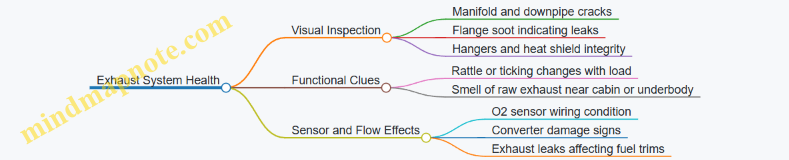
Integrated Interpretation and Practical Examples
Use a simple cause-and-effect mindset: temperature control, friction control, and exhaust sealing each leave distinct evidence.
Example 1: Low Coolant With No Oil Milky Color If coolant is low but oil looks normal, prioritize leak detection. Check hose connections and the radiator end tanks. A common easy win is a loose clamp or a cracked reservoir neck that only leaks when hot.
Example 2: Milky Oil and Rising Coolant Level Milky oil points to coolant mixing with oil. If coolant level also rises or fluctuates, suspect a head gasket or internal coolant passage issue. Do not proceed with performance tuning until the root cause is resolved, because you cannot tune around a failing sealing surface.
Example 3: Exhaust Leak Soot and Unstable Fuel Trims If you see soot at a flange and the engine runs rough or fuel trims swing, the leak can skew oxygen sensor readings. Fixing the exhaust seal often stabilizes trims and improves drivability without touching the tune.
Quick Field Checklist
- Engine cold: verify coolant level and inspect hoses, clamps, and radiator area.
- Oil dipstick: confirm level and look for milky contamination or sludge.
- Underbody: check for exhaust leaks at joints and inspect heat shields and hangers.
- Start-up: note cold start noise and watch for oil pressure warnings.
- Idle behavior: confirm fan operation and monitor temperature gauge stability.
When these three systems are in good shape, later tuning and upgrades have a solid baseline. When they are not, the car may still run, but it will be running on borrowed time and misleading data.
2.5 Measuring Alignment Tire Condition and Brake Baseline Performance
Alignment and baseline checks are the “before” photos of your build. If you measure tire wear and braking performance first, you can tell whether later changes improved the car or just moved the problem to a different place.
Foundational Concepts You Need Before Measuring
Alignment is mainly about how the wheels point relative to the road and each other. The key angles are:
- Camber: tilt of the wheel inward or outward. Too negative or too positive can scrub the tire.
- Toe: whether the fronts point toward or away from each other. Toe errors often show up as feathered wear.
- Caster: steering axis tilt. It affects steering stability and return-to-center more than tire wear.
Tire condition matters because worn tires can mask alignment issues and distort brake tests. Brake baseline performance matters because brake problems can mimic handling problems during road testing.
Mind Map: Alignment Tire Condition and Brake Baseline
Step 1: Tire Condition Assessment That Actually Helps
Start with clean, dry tires and consistent tire pressure. Measure tread depth at three points per tire: inside edge, center, and outside edge. Record the numbers, not just impressions.
Then inspect wear patterns:
- Inner edge worn more than center and outer: often excessive negative camber or worn suspension components.
- Outer edge worn more than center and inner: often excessive positive camber or suspension geometry issues.
- Center worn more than edges: can indicate overinflation, hard driving with high load, or worn tires that have been running hot.
- Feathered wear on tread blocks: commonly toe out or toe in. You can feel it by running a finger across the tread direction; the edge will catch.
Check for cupping (small dips around the tread), which usually points to worn suspension bushings, uneven tire construction, or brake-related issues like rotor thickness variation.
Example: If the left front shows inner-edge wear and the right front looks normal, don’t assume “alignment is fine.” It may be a side-specific suspension wear item, or the car may have been driven with a bent component.
Step 2: Alignment Measurement Without Guessing
If you have access to an alignment rack, verify the shop’s process: the car should be set at ride height, and the steering wheel should be centered before readings are taken.
If you’re doing a preliminary check without a rack, you can still catch major issues:
- Straight-line tracking: drive on a smooth road and note whether the car pulls consistently.
- Steering wheel off-center: if the wheel is not centered when the car tracks straight, toe or steering linkage may be off.
Example: A car that pulls right while the steering wheel is slightly left can still have toe issues that won’t show up as obvious tire wear yet.
Step 3: Brake Baseline Performance You Can Repeat
Before any stop test, do a quick brake inspection:
- Confirm pad thickness is similar side-to-side.
- Look for uneven pad wear and rotor scoring.
- Check for brake drag by rolling the car forward and feeling for resistance after a short drive.
Then perform straight-line stops from a consistent speed on a safe, level surface. Use the same braking technique each time: steady pedal pressure, no pumping. Measure:
- Stopping distance from the same starting point.
- Pedal consistency: does the pedal sink, pulse, or feel spongy?
- Steering behavior: does the car pull during braking?
A simple baseline method is to do three stops and average the results. If the first stop is much worse than the next two, you may be dealing with cold pads, rotor surface condition, or inconsistent tire grip.
Example: If stopping distance is similar but the steering pulls left during braking, that points toward left-right friction differences, uneven pad transfer, or rotor thickness variation rather than a general brake power issue.
Step 4: Record Everything So Later Changes Make Sense
Create a baseline sheet with:
- Tire pressures and tread depths per tire.
- Photos of each tire tread and sidewall.
- Brake pad thickness and rotor condition notes.
- Stop test results and observations.
Repeatability is the whole game. If you change tires, pressures, or brake components, update the baseline before you compare.
Common Pitfalls That Skew Results
- Low tire pressure: it can create misleading wear and reduce braking grip.
- Mismatched tires: different tread patterns can change both handling and stopping.
- Brake drag: a dragging caliper can overheat one side and create uneven wear that looks like alignment.
- Uneven road surface: it can cause pull and inconsistent stopping distances.
Measure alignment, tire condition, and brake baseline as one system. When you do, later tuning choices become decisions instead of guesses.
3. Engine Upgrades from Intake to Exhaust
3.1 Intake System Selection for Airflow and Driveability
Choosing an intake system is mostly about matching airflow to how the engine actually breathes across the RPM range. A part that looks great on a flow bench can still feel lazy if it changes throttle response, intake air temperature, or pressure losses at the wrong times.
Core Principles for Airflow and Driveability
Start with three measurable realities: pressure drop, air temperature, and airflow stability.
- Pressure drop matters because the engine needs a certain manifold pressure to make power. Every restriction—filter media, tubing bends, throttle body inlet shape—adds loss. The goal is not “maximum flow,” but “enough flow with minimal loss where you drive.”
- Air temperature matters because hot air is less dense. A cooler intake charge can improve torque and reduce knock risk on many setups. The practical win is often consistency, not peak numbers.
- Airflow stability matters because the engine dislikes sudden turbulence and uneven distribution. Smooth, properly sized ducting helps the cylinders get what the ECU expects.
A simple way to think about it: the intake system is a pipeline with a filter at the front and a throttle at the end. Your job is to keep the pipeline from wasting pressure and from heating the air unnecessarily.
Intake Types and Where They Fit
Stock Replacement and Drop-In Filters
A stock-style replacement filter keeps the factory airbox and ducting. It’s usually the best choice when you want minimal changes to driveability. Example: if your car already has good throttle response and you mostly want sound reduction or slightly improved filtration, a drop-in filter maintains the original airflow path.
Cold-Air Intakes
Cold-air designs aim to pull air from a cooler location and route it through larger or smoother tubing. The key is the source location and heat management. Example: a cold-air intake that draws from the engine bay on a hot day may perform worse than stock because it increases intake air temperature and pressure drop.
Short Ram Intakes
Short ram intakes often use shorter tubing and can improve response at certain RPM ranges. They may also raise intake air temperature during steady driving. Example: on a car that sees frequent short bursts, a short ram can feel sharper, while a long highway drive may show higher intake temps and less consistent performance.
Ducted Airbox Designs
Some systems keep the airbox concept but improve sealing, ducting, and filter area. This often preserves driveability because it controls airflow and reduces under-hood heat soak. Example: if you’re chasing consistent throttle response without chasing peak gains, an airbox-style intake with good sealing is a strong match.
Sizing the Intake for the Engine’s Needs
Intake diameter and filter area should be chosen to avoid two problems: restriction at higher flow and overly large volumes that slow response.
- If the tubing is too small, pressure drop rises and the engine runs out of breathing room.
- If the tubing is too large or the system has excessive volume, the throttle-to-manifold response can feel delayed.
A practical method: compare the intake’s internal diameter to the factory path and keep bends gentle. If you can, choose a system that uses smooth transitions rather than abrupt steps.
Heat Management and Air Source Selection
Heat soak is the silent driveability killer. Look for:
- Sealed ducting so the intake draws from outside air rather than engine bay air.
- Thermal isolation on tubing where it passes near hot components.
- Routing that avoids hot exhaust and turbo housings.
Example: two intakes with the same filter can feel different. The one that routes tubing away from the exhaust and uses a sealed inlet will usually maintain lower intake air temperatures during repeated pulls.
Filter Media and Maintenance Reality
Filter media affects both flow and how quickly the system clogs.
- Dry, washable filters can be great when maintained correctly, but over-oiling or under-cleaning can increase restriction.
- Oiled filters require consistent oiling technique; too much oil can trap more dirt and raise pressure drop.
Example: if you notice reduced throttle response after a few months, check whether the filter is overdue and whether it was cleaned and re-oiled to the manufacturer’s method.
Compatibility with Sensors and ECU Behavior
Many modern engines rely on the mass airflow sensor (MAF) or manifold pressure strategy. Intake changes can alter the signal quality.
- If your car uses a MAF sensor, avoid designs that introduce turbulence right at the sensor. A smooth straight section and proper placement matter.
- If your car uses MAP-based fueling, the intake still changes how quickly manifold pressure responds to throttle changes.
Example: a poorly designed intake that causes MAF turbulence can lead to unstable fueling, hesitation, or a “surging” feel even if the engine makes good peak airflow.
Mind Map: Intake System Selection
Intake System Selection Mind Map
Example Decision Path
If your priority is daily driveability and you want predictable behavior, start with a stock-style replacement or a ducted airbox design. If your priority is cooler intake temps during spirited driving, verify that the system pulls from a genuinely cooler location and keeps tubing away from heat. If your priority is instant response for short pulls, a short ram can work, but confirm that intake temperatures and pressure drop don’t climb quickly.
Finally, treat installation as part of the system. Loose clamps, unsealed inlets, or tubing that collapses under vacuum can turn a good design into a mediocre one—usually with symptoms you’ll feel before you can measure them.
3.2 Throttle Body and Intake Manifold Considerations
A throttle body and intake manifold decide how air moves from the filter to the cylinders, and that movement shapes both power and drivability. The throttle body controls the immediate restriction, while the intake manifold shapes airflow distribution, runner tuning, and how smoothly the engine transitions between load levels. A good setup feels “obvious” in daily driving: the engine responds predictably, idles steadily, and doesn’t stumble when you roll into the throttle.
Mind Map: Throttle Body and Intake Manifold
Throttle Body Fundamentals That Actually Matter
Start with bore size. A larger throttle body reduces restriction at higher airflow, but it also reduces the pressure signal the engine uses to meter air at low load. In practice, that can make the car feel like it needs more pedal travel before anything happens. A simple way to think about it: if your engine spends most of its time below midrange airflow, you want a throttle body that keeps the signal strong enough for smooth metering.
Next, consider throttle plate and shaft condition. Wear or uneven blade seating can create tiny air leaks around the edges, which show up as unstable idle or “mystery” fuel trims. When you install a new throttle body, clean the mating surfaces and verify the plate closes fully without binding. If your vehicle uses an electronic throttle, the calibration depends on the throttle position sensor readings, so any mismatch between parts and software can cause erratic idle control.
Finally, pay attention to the throttle body’s connection points. Vacuum ports, breather fittings, and any adapter plates must seal properly. A vacuum leak near the throttle body gasket can bypass the metering effect, leading to lean conditions at idle and off-idle transitions. The fix is usually straightforward: replace gaskets, torque fasteners evenly, and confirm that hoses are routed without kinks.
Intake Manifold Design and How It Shapes the Torque Curve
Intake manifolds are not just plumbing; they’re airflow timing devices. Runner length and cross-sectional area influence how pressure waves help cylinder filling. Longer runners tend to favor low-to-mid torque, while shorter runners support higher-rpm breathing. Plenum volume affects how the manifold “stores” air and how quickly cylinder demand draws from it.
Port shape and alignment are where many builds lose efficiency without anyone noticing. If the manifold ports don’t match the cylinder head ports, you create steps that disturb flow and reduce effective area. Even a small mismatch can matter when you’re chasing consistent throttle response, because uneven flow distribution can cause cylinder-to-cylinder differences that the ECU compensates for with trims.
Heat management also matters. Intake air density drops as manifold temperature rises, and heat soak can make the car feel slower after a short drive. Practical steps include ensuring proper coolant routing where applicable, insulating or shielding intake components from exhaust heat, and keeping the air path free of obstructions.
Integration Details That Prevent “It Runs, But…”
Throttle body and manifold must work as one system. If you change the throttle body, the idle airflow control strategy and throttle mapping may need to be revisited so the ECU can hit stable idle targets. If you change the manifold, the airflow distribution and pressure dynamics change, which can shift how quickly the engine reaches commanded load.
A common integration pitfall is ignoring vacuum and PCV routing. The manifold provides vacuum reference points used by brake boosters, PCV systems, and sometimes fuel pressure regulators. If you relocate ports or use adapters that change hose lengths or restrictions, you can alter vacuum behavior at idle and during transitions.
Example: Choosing Between Two Throttle Bodies
Imagine you have a naturally aspirated engine that spends most of its time cruising and occasional spirited pulls. Option A is a throttle body that’s noticeably larger than stock. Option B is a throttle body closer to stock size. On paper, Option A can support more peak airflow, but in real driving it may feel less responsive at low pedal angles because the pressure drop across the throttle plate becomes smaller. Option B often gives better tip-in because the ECU sees a more usable relationship between throttle angle, manifold pressure, and airflow.
Example: Manifold Swap with Port Mismatch
You install a manifold that bolts up cleanly but has slightly different port shapes than the head. The engine starts and idles, yet it feels flat above midrange and shows inconsistent fuel trims. The root cause is often the mismatch creating flow separation at the step. Correcting it means matching the port geometry carefully and ensuring gaskets don’t protrude into the flow path.
Quick Checklist for Installation and Setup
- Verify throttle plate closure and sensor readings match the ECU expectations.
- Use new gaskets and torque fasteners evenly to prevent vacuum leaks.
- Confirm port alignment between manifold and cylinder head.
- Route vacuum and PCV hoses exactly as designed, without kinks or unintended restrictions.
- After installation, confirm stable idle and smooth tip-in before chasing power numbers.
When throttle body and intake manifold are chosen and installed with these details in mind, the engine’s response becomes predictable: the car doesn’t just make power, it makes power in the places you actually use.
3.3 Fuel System Upgrades for Flow and Consistent Pressure
A fuel system upgrade is mostly about two things: delivering enough fuel for the engine’s demand and keeping pressure stable so the engine control system can meter fuel predictably. When either part fails, you get lean conditions, inconsistent throttle response, and tuning that feels like it’s chasing its own tail.
Start with the baseline reality check. Measure current fuel pressure at idle and under load, then note how it changes when you open the throttle. If pressure drops significantly during acceleration, the restriction is usually upstream of the injectors: the pump can’t keep up, the filter is too restrictive, the lines are undersized, or the regulator strategy isn’t matching the engine’s design. If pressure is stable but mixture still goes off, the issue may be injector flow, fuel pressure reference, or sensor accuracy.
Mind Map: Fuel System Flow and Pressure
Calculating Flow Needs Without Guessing
Fuel flow demand depends on engine airflow and injector duty cycle. A practical approach is to estimate peak fuel mass needed for your target power, then convert that into injector flow and pump capacity with headroom. As a rule of thumb, plan for injectors to operate comfortably below their maximum duty cycle during the conditions you care about most, such as wide-open throttle in the midrange.
Example: Suppose your engine is expected to need roughly 60 lb/hr of fuel at peak. If you use 4 injectors, that’s 15 lb/hr per injector at peak. If your injectors are rated at 20 lb/hr, you’re at 75% duty cycle at peak, leaving less margin for real-world variations like fuel temperature and voltage drop. If you instead choose 24 lb/hr injectors, peak duty becomes about 62.5%, which usually makes tuning and drivability easier.
Pump Upgrades for Volume and Voltage Drop
A pump upgrade is not just about “bigger is better.” Pumps are affected by voltage, fuel temperature, and how the pump is controlled. If you have a factory pump with a controller that can’t supply enough current, the pump may hit its limit even if the pump itself is theoretically capable.
Example: On a long pull, you might see fuel pressure sag as battery voltage drops. Upgrading to a pump designed for the required flow at the expected voltage, plus ensuring wiring and grounds are solid, often fixes the sag more reliably than swapping only injectors.
If you use an aftermarket pump controller, confirm it matches the pump’s operating range and that the controller’s wiring is correct. A controller set up incorrectly can cause pressure oscillations that show up as AFR swings.
Filters, Strainers, and the Hidden Restriction
Filters are necessary, but they can become the bottleneck when flow requirements rise. A common mistake is installing a high-flow pump while keeping a restrictive filter or a clogged in-tank strainer. The pump then works harder and still can’t deliver pressure under load.
Example: After upgrading the pump, you still see pressure drop during acceleration. Inspect the in-tank pickup and replace the strainer and filter with parts rated for the flow you need. Then re-test pressure under the same load condition.
Fuel Lines and Fittings for Pressure Stability
Fuel lines affect pressure through restriction and heat transfer. Undersized lines increase pressure drop, especially at higher flow rates. Even when the pump is capable, small diameter tubing and restrictive fittings can prevent stable rail pressure.
Example: If you route a new line with tight bends and reuse old fittings that have smaller internal passages, you may get a pressure drop only at higher RPM. Replacing the line with the correct diameter and using fittings with appropriate internal flow area can smooth out the pressure curve.
Regulators and Pressure Reference
Regulators control pressure, but they must reference the correct signal. If your system uses manifold pressure reference, the regulator needs to “see” the same pressure the engine uses for fuel metering logic. A mismatch can cause the engine to run rich or lean across load transitions.
Example: After installing a regulator, you notice the AFR is fine at idle but goes lean during boost. That pattern often indicates the regulator reference line is missing, disconnected, or routed incorrectly, or the regulator type doesn’t match the engine’s fuel strategy.
For return-style systems, ensure the return path is unobstructed. For returnless systems, ensure the control strategy maintains pressure without oscillation.
Injectors and Consistent Metering
Injectors must match the fuel system’s pressure and the engine’s calibration expectations. If you upgrade injectors without ensuring fuel pressure stability, you can end up with correct peak AFR but poor transient response. Conversely, stable pressure with mismatched injector flow can cause duty cycle issues.
Example: You install larger injectors and see the car start and idle normally, but throttle response is delayed. That can happen when the injector flow curve doesn’t match the tune’s assumptions or when fuel pressure is not stable during rapid demand changes.
Verification with Pressure and AFR Together
After parts installation, verify with both fuel pressure data and mixture data. Pressure tells you whether the system can supply fuel; AFR tells you whether the engine is actually receiving and using it correctly. Repeat the same test runs so you can compare results without changing variables.
A good end state is a pressure curve that stays within a predictable range during acceleration and a mixture response that returns to target quickly after throttle changes. If pressure is stable but AFR still drifts, the next suspect is injector calibration, sensor accuracy, or exhaust leaks. If AFR is stable but pressure is unstable, the next suspect is restriction, regulator reference, or pump control behavior.
3.4 Exhaust Manifolds Downpipes and Cat Back Systems
An exhaust upgrade is really three jobs working together: get exhaust gases out of the engine efficiently, keep the flow smooth through the mid-pipe, and manage sound and backpressure at the rear. The manifold, downpipe, and cat-back sections each affect different parts of that chain, so it helps to treat them as a system rather than a pile of shiny parts.
Foundational Concepts That Drive Fitment and Performance
Exhaust manifold design controls how quickly gases leave each cylinder and how evenly they reach the next section. Unequal runner lengths can change where torque feels strongest, especially on naturally aspirated engines.
Downpipe design controls the transition from the engine bay to the rest of the exhaust. This is where restrictions and leaks show up quickly because heat and pressure are highest.
Cat-back design controls the final flow path after the catalytic converter. It mainly influences sound, drone, and how much restriction remains once the emissions hardware is already in place.
A practical way to think about it: if the manifold and downpipe are restrictive or leak, the cat-back can’t “fix” the problem. If the cat-back is too restrictive, the engine will feel strangled even with a perfect downpipe.
Exhaust Manifolds: Runner Shape, Materials, and Real-World Tradeoffs
Most performance manifolds use either equal-length or unequal-length runner designs. Equal-length runners tend to improve scavenging consistency, which can sharpen throttle response and midrange. Unequal-length designs can be easier to package and may favor low-end torque depending on the engine’s firing order and exhaust pulse timing.
Material choice matters for durability and heat behavior. Cast iron handles thermal cycling well and is often quiet, but it can be heavier. Stainless steel headers resist corrosion and are common in aftermarket builds, though weld quality and flange flatness are critical. A warped flange creates leaks that you’ll hear as ticking or smell as exhaust odor near the engine.
Easy example: If you install a header and notice a faint ticking that changes with engine load, check the flange with a straightedge and verify the gasket type matches the manifold surface finish. A “good enough” gasket can still leak under heat cycling.
Downpipes: Where Restrictions and Leaks Become Obvious
A downpipe connects the manifold to the catalytic converter section (or to the rest of the exhaust if the cat is integrated). Key variables include diameter, bend radius, and how the turbo or wastegate area is packaged.
For turbo engines, downpipe flow affects spool behavior and exhaust gas temperature. A too-small diameter increases backpressure, which can raise EGT and reduce efficiency. A too-large diameter can reduce gas velocity, which may hurt low-load scavenging and can make the system louder without meaningful gains.
Easy example: On a street turbo build, if you switch from a 2.25-inch to a 3-inch downpipe and the car feels lazier below midrange while sounding louder, you likely lost velocity. Returning to a diameter that matches the rest of the system often restores the earlier feel.
Bends are another common culprit. Tight bends create turbulence and pressure loss. Mandrel-bent tubing generally keeps the cross-section smoother through bends.
Cat-Back Systems: Sound Control and Backpressure Management
A cat-back typically includes the catalytic converter outlet section, resonator (if equipped), muffler(s), and tailpipe. Since the catalytic converter is already doing the emissions work, the cat-back’s job is to manage flow and noise.
Resonators reduce specific frequency ranges that cause drone. Mufflers reduce overall sound level but can introduce restriction depending on internal design.
When choosing a cat-back, match it to your driving pattern. A system that’s perfect on a wide-open-throttle pull can be annoying on the commute because drone is tied to cruising RPM and exhaust pulse timing.
Easy example: If your car drones at 2,200–2,800 rpm, try adding or changing a resonator rather than immediately swapping mufflers. Drone often correlates with where the exhaust system’s resonant frequencies line up with engine speed.
System Mind Map
Exhaust Manifolds, Downpipes, and Cat-Back Mind Map
Integrated Selection Workflow with Examples
- Start at the manifold. Confirm flange condition and gasket compatibility. If you’re building for a specific torque band, choose runner design accordingly.
- Match the downpipe to the engine’s pressure needs. For turbo cars, keep diameter and bends consistent with the rest of the exhaust. For naturally aspirated cars, focus on smooth transitions and avoiding sharp bends.
- Finish with cat-back tuning for your ears and your commute. Choose muffler and resonator options that reduce drone at your typical cruising RPM.
- Verify after installation. Look for soot at joints, listen for ticking, and confirm heat shielding doesn’t contact the exhaust under suspension movement.
Case example: A turbo sedan owner installs a stainless header and a larger downpipe, then adds a straight-through cat-back. The car is louder and feels fine at full throttle, but it drones on the highway. The fix is usually not “more muffler,” but adding a resonator section or selecting a muffler with internal baffling that targets the drone frequency while keeping the system’s overall restriction reasonable.
3.5 Intercooling and Charge Air Cooling for Thermal Control
When you add boost, you also add heat. Hot intake charge reduces air density, increases the chance of knock, and can push intake components toward heat soak. Intercooling is the practical way to trade a bit of pressure drop for better charge density and safer combustion.
Mind Map: Intercooling System Goals and Tradeoffs
Foundational Concepts: Temperature, Density, and Knock
Boost compresses air, raising temperature. Cooler charge air increases density, so the engine gets more oxygen molecules per unit volume. That can support either more power at the same fueling strategy or safer timing at the same power target.
Lower charge temperature also reduces the likelihood of knock because end-gas conditions are less aggressive. In practice, you’ll see knock sensitivity change with both ambient conditions and how effectively the intercooler rejects heat during a pull.
Intercooler Types and Where Each Fits
Air-to-Air Intercoolers
An air-to-air intercooler uses vehicle airflow to remove heat. Front-mount setups are common because they can access steady pressure from the grille area. Core design matters: thicker cores can transfer more heat, but they also increase pressure drop and may require more airflow to stay effective.
A simple example: two intercoolers with the same frontal area can behave differently if one has higher fin density. Higher fin density can improve heat transfer at low airflow, but it can also increase restriction at higher flow. The best choice depends on your vehicle’s airflow at the speeds where you actually make boost.
Air-to-Water Intercoolers
An air-to-water system moves heat into a liquid loop and then rejects it through a separate heat exchanger. This can be effective in tight engine bays or when airflow to the core is limited. The tradeoff is added complexity: pump performance, coolant routing, and heat exchanger capacity all influence results.
A practical example: if the heat exchanger is undersized, the system may cool the charge well during the first pull but then lose effectiveness as coolant temperatures rise. You’ll often notice intake temperatures creeping upward over repeated runs.
Design Variables That Actually Move the Needle
Pressure Drop and Boost Response
Intercoolers create restriction. If pressure drop is high, the turbo may need to work harder to reach target manifold pressure, and spool characteristics can feel slower. The goal is not “coldest possible,” but “best net result” for your engine and calibration.
A useful rule of thumb during setup: compare boost target vs. achieved boost in logs. If you see consistent shortfall at the same wastegate duty or boost control settings, restriction may be too high or plumbing may be too restrictive.
Hose Routing and Volume
Long, sharply bent charge pipes add volume and can delay temperature stabilization. They also increase the chance of leaks. Keep routing smooth, minimize unnecessary bends, and use quality couplers with proper clamp placement.
Example: if you replace a factory hard pipe with a longer aftermarket section, you might gain clearance but lose throttle response because the system takes longer to fill and stabilize after each change in boost.
Airflow Management
For air-to-air systems, ducting and sealing matter. Gaps around the intercooler can let air bypass the core, reducing heat transfer. Even small improvements like sealing the edges to prevent bypass flow can lower charge temperatures without changing the core.
Advanced Details: Thermal Control in Real Driving
Measuring Intake Temperatures Correctly
To evaluate performance, measure both pre-core and post-core temperatures when possible. Post-core temperature is what the engine “feels,” but pre-core helps you understand whether the turbo and compression stage are the limiting factor.
In logs, correlate intake temperature with boost level and ignition timing. If timing is pulled due to knock or conservative correction, you’ll often see it track with charge temperature spikes.
Managing Heat Soak
Heat soak happens when the intercooler core and surrounding components absorb heat between pulls. Larger cores, better airflow, and reduced under-hood heat exposure help. For air-to-water systems, coolant flow rate and heat exchanger capacity determine how quickly the system can recover.
Example: on a hot day, a front-mount air-to-air intercooler may perform well on a single pull but show higher post-core temperatures after idling and short rest periods. That pattern points to recovery time as the limiting factor.
Common Problems and Fixes
- Boost leaks at couplers: symptoms include unstable boost and higher charge temperatures. Fix by re-seating couplers, checking clamp torque, and inspecting for cracks.
- Restricted airflow: symptoms include high post-core temperatures at speed. Fix by improving ducting, removing obstructions, and verifying the intercooler is not blocked by trim.
- Insufficient core capacity: symptoms include rising post-core temperatures over repeated pulls. Fix by increasing core size, improving airflow, or upgrading heat exchanger capacity for water systems.
Example Setup: Choosing Between Air-to-Air and Air-to-Water
If your car has a clear front area and you can seal ducting, an air-to-air intercooler is often straightforward and effective. If packaging limits front airflow or you want consistent cooling during low-speed operation, air-to-water can be a better match, provided the heat exchanger and coolant loop are sized and maintained correctly.
Either way, the best results come from matching hardware choices to your actual driving pattern: single pulls vs. repeated runs, highway airflow vs. stop-and-go, and how much time you spend at high boost.
4. Forced Induction and Engine Management Fundamentals
4.1 Turbocharger and Supercharger Selection Criteria
Choosing between a turbocharger and a supercharger is mostly about how you want the car to behave across the RPM range, plus what the engine and supporting systems can tolerate. Start with the driving goal, then match hardware to airflow, packaging, and control strategy.
Mind Map: Core Selection Logic
Step 1: Define the RPM Behavior You Want
A turbocharger typically trades early response for stronger efficiency and higher potential at sustained load. A supercharger usually provides earlier boost because it is mechanically driven, but it consumes engine power to spin the compressor.
Example: If you want a street car that feels strong from 2,000–3,500 RPM, a small turbo can work, but it may still feel laggy compared with a centrifugal supercharger. If you want consistent pull during repeated high-load pulls, a turbo with appropriate intercooling and wastegate control often makes more sense.
Step 2: Match Compressor and Turbine Sizing to Airflow
Forced induction sizing is not just about peak boost pressure. It’s about how much air the system can move at the RPM where you spend time.
For a turbo, turbine size influences spool and how quickly boost builds. Smaller turbines spool earlier but can choke at higher flow, raising exhaust backpressure and limiting power. Larger turbines support higher flow but may delay boost.
For a supercharger, compressor sizing and drive ratio determine how quickly boost rises and how much boost it can sustain without pushing the compressor into inefficient regions.
Practical method: Choose a target power range, then estimate the required airflow and ensure the compressor can supply it without operating far from efficient flow. If you already know your engine’s baseline airflow at the RPM you care about, add the expected boost-related increase and compare it to compressor capability.
Step 3: Consider Engine Compression and Knock Margin
Higher compression increases the likelihood of knock under boost, especially when boost rises quickly. Turbo setups often run more conservative timing early in the boost ramp to protect the engine, while superchargers can create a faster boost rise that also demands careful ignition and fueling.
Example: Two engines with the same displacement and fuel can behave differently because one has tighter quench or better combustion chamber shape. When selecting hardware, assume you will need a conservative boost ramp and strong knock control, then verify with logs.
Step 4: Evaluate Heat and Cooling Capacity
Both systems raise intake charge temperature, but they do it differently. Turbo systems add heat from exhaust energy and compressor work, and they also create heat soak in the engine bay. Superchargers add heat directly through compressor discharge and can keep temperatures elevated during long pulls.
Selection criterion: Ensure you have enough intercooling and airflow to keep charge temperatures stable enough for your ignition strategy. If your cooling system is marginal, the “best” turbo or supercharger will still feel inconsistent because knock control will pull timing.
Step 5: Plan the Control Strategy Before You Buy Parts
A turbo needs wastegate or boost control hardware and a control plan for how boost ramps with throttle and RPM. A supercharger needs pulley ratio planning and, depending on design, possibly a bypass or clutch strategy.
Example: If you want boost to come in smoothly, you may prefer a turbo with a turbine/wastegate combination that naturally ramps, then fine-tune with boost control. If you want immediate response, a supercharger with a suitable pulley ratio can deliver it, but you must ensure fueling and ignition can handle the rapid load increase.
Step 6: Check Supporting Systems and Packaging
Forced induction selection fails most often due to “supporting cast” problems.
- Fuel system: confirm injector flow and pump capacity for the target air mass, not just peak boost.
- Intake and exhaust routing: avoid sharp bends and restrictive piping that can increase pressure losses.
- Oil and coolant lines: verify routing and service access, especially on turbo center sections.
- Exhaust backpressure: turbo systems can become power-limited if the exhaust path is restrictive.
Mind Map: Turbo vs Supercharger Tradeoffs
Example: Choosing Hardware for a Daily Street Car
Goal: strong midrange, manageable heat, and predictable behavior.
A common approach is a turbo sized to spool near the RPM where you want torque, paired with a wastegate strategy that ramps boost smoothly. You then size the intercooler and piping to keep charge temps stable, and you confirm fueling headroom with logs at full load. If you instead choose a supercharger, you prioritize pulley ratio and intercooling capacity, then tune for a controlled boost ramp so the engine doesn’t hit knock during the fastest load transitions.
Selection Checklist
- Desired torque curve shape across RPM
- Compressor/turbine sizing for airflow where you drive
- Knock margin based on compression and fuel
- Cooling capacity for stable charge temperatures
- Control strategy for boost ramp and throttle response
- Fuel, ignition, and plumbing capacity for the target air mass
- Packaging for routing, heat shielding, and service access
4.2 Boost Control Hardware and Wastegate or Bypass Setup
Boost control is mostly about managing how quickly exhaust energy reaches the turbine and how consistently the wastegate or bypass path reacts. The hardware you choose determines whether boost rises smoothly, holds steady, and stays safe when conditions change.
Mind Map: Boost Control Hardware
Foundational Concepts That Drive Hardware Choice
A wastegate is a controlled bypass for exhaust energy. When it opens, some exhaust avoids the turbine wheel, reducing turbine speed and therefore boost. A bypass valve, by contrast, manages pressure between compressor stages or at the compressor outlet during throttle changes. Mixing these roles up is a common mistake: wastegate control affects steady boost under load, while bypass/blow-off control affects compressor pressure behavior during transients.
Start with the wastegate’s baseline behavior. Most external wastegates use a spring that cracks at a certain pressure. That spring preload sets the “natural” boost level before any electronic or vacuum control. If you skip this baseline and jump straight to solenoid tuning, you’ll chase inconsistent results because the system already has a built-in threshold.
Wastegate Setup: Internal vs External
Internal Wastegate
Internal wastegates are packaged within the turbine housing. They typically require less plumbing, which reduces leak points and makes initial setup straightforward. The tradeoff is that adjustment range can be more limited, and response can be influenced by how the turbine housing design routes exhaust.
Example: If your internal wastegate boost spikes early in a pull, the issue is often not the solenoid at all. It can be a weak signal reference, a sticky actuator, or a baseline spring preload that’s too high for your target. Fixing the reference line quality and actuator movement can reduce spike without touching duty cycle.
External Wastegate
External wastegates separate the control valve from the turbine housing. This usually gives more consistent control and better adjustability at higher exhaust flow. The actuator sees a dedicated pressure signal, and the wastegate valve can be tuned more precisely.
Example: With an external gate, if boost holds steady at midrange but falls off at high rpm, the wastegate may be flowing more exhaust than expected due to a misadjusted rod length or insufficient actuator travel. Measuring actuator stroke and verifying rod preload can prevent “mystery” boost drop.
Actuation Hardware: Vacuum vs Electronic Solenoid
Vacuum control uses manifold vacuum to create a pressure differential that moves the wastegate actuator. It can work well on mild setups, but it depends on stable vacuum availability and consistent line routing. Under heavy load, manifold vacuum can be low, and the control signal becomes less predictable.
Electronic boost control solenoids use a controlled pressure bleed or restriction to shape the pressure sent to the actuator. They are more repeatable because the control strategy can compensate for changing conditions.
Example: If you see boost oscillation around target, a vacuum system may be “hunting” because the vacuum signal changes with throttle and airflow. An electronic solenoid with a properly chosen reference source can reduce oscillation by maintaining a steadier actuator command.
Plumbing and Reference: Where Most Problems Hide
The actuator needs a pressure signal that reflects what you intend to control. Common reference choices include manifold pressure, compressor pressure, or a dedicated port. The key is consistency: the solenoid’s job is to modulate the actuator signal, not to compensate for a mismatched reference.
Signal line restriction matters. A small-diameter or long line can slow actuator response, causing delayed boost control and overshoot. Check valves can prevent backflow that would otherwise distort the pressure differential.
Example: If boost rises too quickly and then settles lower, the actuator may be responding late to the solenoid’s bleed command. Shortening the signal line, using the correct hose diameter, and adding a check valve in the correct direction can improve the timing.
Advanced Details: Spring Preload, Duty Behavior, and Safety
Spring preload sets the starting point. Too much preload forces the solenoid to work harder to open the gate, which can increase overshoot and make tuning less stable. Too little preload can cause the gate to open too early, limiting peak boost.
Duty cycle behavior should match your hardware. If duty is near zero but boost is still high, the wastegate may be sticking closed or the actuator rod may be too tight. If duty is high but boost is low, the wastegate may be opening too early, the actuator may be weak, or there may be exhaust leaks upstream of the turbine.
Safety limits should be treated as hardware behavior, not just software. A mechanical wastegate spring and actuator integrity are your first line of defense. If the solenoid fails, the system should default to a safe wastegate position rather than a runaway boost state.
Practical Setup Workflow
- Set baseline: adjust actuator rod length so the wastegate valve has correct preload and free movement.
- Verify plumbing: confirm reference source, hose routing, and check valve direction.
- Establish a conservative control baseline: start with low solenoid influence and confirm boost behavior in a controlled pull.
- Tune for stability: adjust control parameters to reduce overshoot and oscillation, not just to hit a peak number.
- Validate with logs: compare target vs actual boost and watch for duty behavior that contradicts expected hardware action.
Example: Diagnosing a Boost Spike
You command a target boost, but actual boost spikes early and then drops.
- If duty is low during the spike, the wastegate may be sticking closed or preload too high.
- If duty is high during the spike, the reference signal may be delayed or restricted, causing late actuator response.
- If the spike correlates with temperature changes or repeated pulls, check for actuator binding and exhaust leaks that alter turbine drive.
The goal is to make the wastegate’s motion match the control signal. Once that relationship is consistent, tuning becomes a matter of fine adjustment rather than troubleshooting the plumbing every session.
4.3 Engine Management Tuning Concepts and Sensor Inputs
Engine management tuning is mostly about translating what the engine is doing into numbers the ECU can act on. Sensors provide those numbers, and tuning decides how the ECU should respond when the numbers change. A good mental model is: sensors measure reality, the ECU filters and interprets it, and calibration tables decide what happens next.
From Sensor Signals to ECU Decisions
Most ECUs read sensors as voltage or frequency, then convert them into physical units like kPa, °C, rpm, and air mass. Before any table lookup, the ECU typically applies filtering to reduce noise and prevent sudden corrections from tiny signal glitches. That filtering matters: if you tune fuel or ignition based on a signal that is heavily filtered, you may see a delayed response during transient events like throttle blips.
Next, the ECU uses sensor inputs to estimate key quantities. For example, many speed-density systems estimate airflow from manifold pressure and engine speed, then correct with air temperature. Mass-airflow systems measure airflow directly, but still use temperature and pressure to correct density. In both cases, the ECU blends multiple inputs to decide the commanded fuel and spark.
Core Sensor Inputs and What They Control
Air and charge inputs usually drive the biggest tuning levers.
- Manifold Pressure or MAP: Used to infer load. If MAP is biased high, the ECU thinks the engine is under more load than it really is, often leading to richer fueling and more conservative spark.
- Mass Airflow or MAF: Used directly for load and fueling. A dirty MAF can cause under- or over-fueling across a range, and the symptoms often look like “it runs fine at idle but not under steady throttle.”
- Intake Air Temperature: Affects air density and fuel calculations. If IAT reads too hot, the ECU may reduce fueling and shift ignition behavior.
- Throttle Position: Helps detect driver intent and transient conditions. Even when steady-state tables are correct, bad throttle mapping can cause hesitation because the ECU misjudges how quickly load should change.
Fueling and combustion inputs keep the engine stable.
- Oxygen Sensors: Provide feedback for closed-loop fueling. They don’t directly “set power,” but they can fight your open-loop calibration if the ECU transitions into closed-loop earlier than expected.
- Coolant Temperature: Controls warm-up enrichment and fan behavior. A thermostat stuck open can keep the ECU in a richer state longer, changing how your tuning behaves.
- Knock Sensor: In many ECUs, it doesn’t add timing; it subtracts timing when knock is detected. If knock detection is too sensitive, you’ll see timing pulled even on a healthy engine.
Finally, engine speed and position determine timing accuracy.
- Crank and Cam Position Sensors: Provide rpm and phase. If sync is unstable, you may get misfires, erratic fueling, or limp behavior.
Sensor Quality Checks Before Tuning
Tuning is easier when sensor signals are trustworthy. Start with sanity checks: verify sensor readings at key conditions like engine off, idle, and a controlled steady pull. Look for impossible values, sudden jumps, or values that don’t track expected changes.
A practical example: if your wideband shows correct air-fuel ratio at cruise but the ECU’s commanded fuel is off, suspect a load calculation mismatch—often MAP/MAF scaling, IAT correction, or a vacuum leak affecting MAP.
Another example: if timing looks fine in logs but power feels weak under load, check knock activity and ignition corrections. A knock sensor can be “working” while still pulling timing because the ECU is reacting to real or perceived knock.
Mind Map: Engine Management Inputs
Advanced Details That Affect Calibration Behavior
Two details often explain “why the same tune feels different on another day.”
-
Sensor filtering and transient response: If throttle changes quickly, the ECU may still be using older filtered MAP/MAF values. That can cause a lean or rich spike. You can often reduce the issue by ensuring the transient fueling model matches how your sensors respond, rather than only changing steady-state tables.
-
Closed-loop boundaries: Many ECUs enter closed-loop based on coolant temp, rpm, load, and time since start. If your calibration targets are correct but the ECU is still in closed-loop, the oxygen feedback can override your commanded mixture. The fix is usually to adjust the conditions for closed-loop entry or to correct the underlying sensor scaling so feedback behaves predictably.
Example Log Interpretation Workflow
- Step 1: Confirm rpm and sync stability. If rpm is smooth but timing is erratic, focus on crank/cam signals and ignition control.
- Step 2: Compare load estimate to reality. If MAP/MAF values don’t match expected changes during a steady pull, correct scaling or address leaks.
- Step 3: Check fueling path. If wideband AFR matches target but power is low, look at ignition corrections and misfire counters.
- Step 4: Inspect corrections. If fuel trims are large, the ECU is compensating for a mismatch. If knock correction is frequent, address octane, combustion conditions, or ignition base calibration.
When sensor inputs are coherent, tuning becomes a matter of adjusting cause-and-effect relationships rather than chasing symptoms. That’s the difference between “it runs” and “it runs consistently.”
4.4 Fueling Strategies for Naturally Aspirated and Boosted Builds
Fueling is the part of the build that quietly decides whether your engine feels smooth or starts acting like it’s guessing. The goal is simple: deliver the right fuel mass for the air mass, at the right time, with stable pressure and predictable atomization.
Mind Map: Fueling Strategy for Naturally Aspirated and Boosted Builds
Foundational Concepts That Drive Every Fueling Plan
Start with how the ECU estimates air. Many systems use a MAF sensor for direct airflow measurement; others use MAP plus engine speed and volumetric efficiency modeling. Either way, fueling is ultimately calculated from air estimate, commanded air-fuel ratio, and injector characteristics.
Injector flow is not just “bigger is better.” What matters is whether the injector can deliver the required fuel mass without running out of time. That’s why injector duty cycle becomes a practical limit: if the injector is commanded open too long, the ECU can’t physically add more fuel.
Fuel pressure stability is the other half of the equation. A regulator that can’t maintain pressure during high demand will cause the commanded fuel to miss the target, even if the tune looks correct on paper.
Naturally Aspirated Fueling Strategies
Naturally aspirated builds usually change fueling demand by altering volumetric efficiency across the RPM range. A freer-flowing intake or exhaust can increase airflow at certain speeds, but it often does so unevenly. That means you should expect the fueling corrections to be RPM-specific rather than uniform.
A practical approach is to size injectors based on peak airflow at the RPM where you see the highest load and longest injector pulse widths. For example, if your current setup runs injector duty cycle near 80% at peak power, you want headroom for temperature changes and tuning adjustments. A common street-friendly target is to keep peak duty cycle comfortably below the point where it starts to feel like the ECU is out of room.
Warm-up and transient fueling deserve attention too. A mild cam or intake change can shift how quickly the engine reaches stable airflow after throttle changes. If you only tune steady-state wide-open throttle, you may still get lean hesitation during quick tip-ins because the transient fuel model no longer matches reality.
Boosted Fueling Strategies
Boosted builds increase the air mass dramatically, so fueling must scale with manifold pressure and charge density. Intercooling changes charge temperature, which changes air density. That means the same boost gauge reading can correspond to different airflow, so the fueling strategy must rely on the system’s actual air measurement method.
Injector sizing becomes more critical because boosted engines often run higher duty cycles at the same RPM. A simple example: if your naturally aspirated peak injector pulse width is already near the limit, adding boost without increasing injector capacity can force the ECU into a corner where it can’t add fuel fast enough during load spikes.
Fuel pressure under boost is another common trap. If you use a vacuum-referenced regulator, pressure rises or falls with manifold pressure depending on design. If the regulator or pump setup can’t maintain the intended differential pressure, the injector flow rate changes, and the ECU’s fueling calculation becomes wrong.
Enrichment strategy also changes. Under boost, you typically command richer mixtures than stoichiometric to control combustion temperature and reduce knock risk. The exact target depends on engine design and calibration goals, but the logic is consistent: more load means more heat, and more heat means you need more fuel to keep combustion under control.
Sensors and Calibration Inputs That Matter Most
Fueling accuracy depends on the sensors feeding the air and temperature models. MAF scaling errors show up as consistent AFR offsets across load, while MAP-related errors can create load-dependent issues that look like “it’s fine until it isn’t.” Wideband O2 data is essential for verifying what the engine is actually doing, especially during transitions.
Engine coolant temperature and intake air temperature affect fuel density and correction factors. If those sensors are off, the ECU may compensate in the wrong direction, leading to rich or lean behavior that seems inconsistent across seasons.
Systematic Tuning Workflow with Examples
- Verify baseline health: Confirm no fuel leaks, stable fuel pressure, and correct sensor readings. Example: if fuel pressure drops by 5 psi during a pull, you can chase AFR targets all day and still miss.
- Log steady-state pulls: Identify where AFR deviates most. Example: if AFR goes lean only at high RPM, injector capacity or flow characterization is likely the limiting factor.
- Check injector duty cycle: If duty cycle climbs toward the ceiling at peak load, increase injector size or reduce fueling demand via calibration changes. Example: a boosted car that hits target AFR at 15 psi but goes lean at 18 psi often runs out of injector time.
- Refine transient fueling: Use throttle-tip-in logs to see if AFR dips lean before stabilizing. Example: after an intake change, the first second of throttle can be off even when wide-open throttle looks correct.
- Validate repeatability: Repeat the same pull conditions. Example: if AFR swings widely between runs, fuel pressure stability or sensor noise may be the culprit.
Common Failure Modes to Watch For
Lean spikes on throttle transitions often point to transient fueling model mismatch or delayed air estimation. High injector duty cycle points to insufficient injector flow capacity. Fuel pressure drop under load points to pump/regulator limitations or clogged filters. Sensor scaling errors point to consistent offsets that correlate with load or airflow method.
The best fueling strategy is the one that matches how your ECU measures air, how your hardware delivers fuel under pressure, and how your engine changes airflow across RPM and load. When those three align, the tune stops being a guessing game and starts behaving like math.
4.5 Ignition Timing and Knock Avoidance Techniques
Ignition timing controls when the spark occurs relative to piston position. Advancing timing usually increases torque, but it also raises the risk of knock, where end-gas auto-ignites before the flame front finishes its job. Knock avoidance is therefore a balancing act: you want as much advance as the engine can safely tolerate under the current load, temperature, and fuel quality.
Foundations of Spark Advance
Start with the idea of timing as a map. Most engines use a base advance table indexed by load (often manifold pressure or throttle position) and engine speed. The ECU then applies corrections for coolant temperature, intake air temperature, battery voltage, and sensor feedback. A practical example: at steady highway cruising, load is moderate and temperatures are stable, so timing can sit near its “happy” region. During a hard pull, load jumps, intake air temperature rises, and the ECU must be more conservative until it confirms knock is not occurring.
Advance is not “more is better.” If you advance too far, peak cylinder pressure arrives earlier than the engine design expects. That can increase stress and reduce efficiency even before knock becomes audible. Knock is the more obvious failure mode, but pressure shape is the quieter one.
What Knock Actually Means
Knock is typically detected indirectly through knock sensors and signal processing. The sensor listens for high-frequency vibration patterns associated with abnormal combustion. The ECU then reduces timing in that cylinder or operating region, then slowly tries to add timing back if knock stops.
A helpful mental model: knock is not just a fuel problem. It’s a combustion timing problem plus conditions that make end-gas more likely to auto-ignite. Those conditions include high cylinder pressure, high intake air temperature, high compression ratio, and certain combustion chamber and fuel characteristics.
Building a Safe Timing Strategy
A safe strategy uses three layers: conservative base timing, real-time corrections, and feedback-based learning.
-
Choose a conservative baseline. If you’re running a different intake, exhaust, or turbo setup, start with timing that matches the new airflow and temperature reality. Example: after installing a freer-flowing intake, the engine may ingest cooler air at the same load, but it may also change airflow distribution. Don’t assume timing can be identical to the old setup.
-
Use temperature-aware corrections. Intake air temperature and coolant temperature change knock tendency. Example: on a hot day, the same boost level can knock where it was fine in the morning. The ECU’s correction logic should pull timing when temperatures rise.
-
Rely on knock feedback with restraint. Feedback should reduce timing quickly when knock is detected, then recover gradually. If recovery is too aggressive, you’ll keep oscillating between knock and correction, which can feel like inconsistent throttle response.
Knock Avoidance Techniques That Work in Practice
Fuel Quality and Mixture Control
Fuel quality sets the ceiling for safe advance. Higher octane generally allows more timing before knock, but mixture also matters. Too lean increases combustion temperatures and knock risk. Too rich can slow burn and increase exhaust gas temperatures, which can also promote knock under some conditions.
Example: during a wide-open-throttle pull, if you see knock only at higher rpm, it can be a sign that mixture is drifting lean at the top end or that charge temperatures are rising faster than the ECU expects.
Combustion Chamber and Compression Effects
Compression ratio and combustion chamber shape influence end-gas behavior. Even without changing hardware, carbon deposits can raise effective compression and hot spots. Example: two identical cars can behave differently after one has accumulated deposits; the one with more buildup often needs less advance to stay knock-free.
Boost Control and Charge Temperature Management
On forced induction, boost level is a major driver of cylinder pressure. But boost control also affects how quickly pressure rises. Rapid pressure ramps can increase knock risk even if peak boost is the same.
Example: if a wastegate setup overshoots boost during spool-up, timing may need to be reduced in the transient region, not just at peak load.
Timing Limits and Cylinder Protection
Many ECUs implement knock thresholds and timing ceilings. A good tuning approach respects these limits rather than trying to “force” timing higher. Example: if knock occurs only in one cylinder, that cylinder may have a sensor issue, a fueling imbalance, or a mechanical difference. Reducing timing globally can mask the symptom while leaving the cause.
Mind Map: Ignition Timing and Knock Avoidance
Example Workflow for a Real Tuning Session
Begin with a baseline run at the target load range where you expect the engine to be most sensitive, such as mid-to-high load under sustained pull. Watch for knock events and note the rpm and load where they occur. If knock appears only at high rpm, check mixture behavior across the pull and confirm that intake air temperature is not climbing faster than expected. If knock appears during spool-up, focus on boost ramp behavior and transient fueling, then apply timing reductions in the affected region.
Once knock is eliminated, add timing carefully in small steps while monitoring for the earliest signs of knock. The goal is not to maximize timing everywhere; it’s to find the safe boundary for each operating region so the engine can deliver consistent torque without repeatedly triggering knock control.
5. Performance Tuning with Calibration and Data Logging
5.1 Preparing a Safe Tuning Environment and Baseline Runs
A safe tuning session starts before the laptop does. Your goal is simple: create repeatable conditions, capture clean baseline data, and remove variables that can lie to your tuning changes.
Mind Map: Safe Tuning Environment and Baseline Runs
Build the Safety Checklist That Actually Prevents Problems
Start with the boring stuff: verify coolant level, oil level, and that there are no fuel smells around the engine bay. If you’re using a wideband, confirm the sensor is installed correctly and the gauge is reading plausible values at key-on. Chock the wheels, set the parking brake, and use stands only where they’re rated and stable.
Before any tuning changes, check battery voltage. A weak battery can cause sensor dropouts and unstable idle, which makes logs look like tuning problems. If you’re on a dyno, confirm the straps and restraints are secure and that the drivetrain can’t bind during pulls.
Keep a fire extinguisher within reach and ensure ventilation is adequate. You’re not trying to be dramatic; you’re trying to avoid turning a routine session into a lesson.
Choose Baseline Conditions You Can Repeat
Baseline runs only matter if they’re comparable. Use the same fuel you’ll tune with, and note whether it’s fresh or has been sitting. If you can, keep ambient conditions within a narrow range; even a 10–15°F swing can shift intake air density and change how the engine behaves.
Pick a warm-up target and stick to it. For example, run until coolant temperature stabilizes and the radiator fan behavior is consistent. Oil temperature matters too, especially for turbo and high-load tuning, because viscosity affects spool and transient response.
Confirm Your Logging Setup Before You Touch Calibration
A baseline log should include enough channels to explain what the engine is doing, not just what it’s producing. At minimum, capture RPM, load (or manifold pressure), throttle position, AFR (or lambda), ignition timing, fuel trims, and knock indicators. For boosted setups, include boost target vs actual, wastegate duty (if available), and intake air temperature.
Also watch for sensor sanity. If IAT reads 200°F at key-on, or AFR jumps to impossible values during steady cruise, fix the measurement problem before interpreting it.
Run a Structured Baseline Sequence
Use a repeatable sequence rather than “whatever happens.” A practical approach is:
- Key-on and idle sanity: Log for 60–120 seconds at idle. Confirm stable AFR, stable trims, and no knock events.
- Throttle sweep: Do a controlled sweep (for example, 20–60% throttle) without full load. This checks throttle mapping, transient fueling, and sensor response.
- Load pull: Perform a consistent pull in a gear that keeps RPM in your target range. For many street cars, 3rd gear works well; on dynos, use the dyno’s standard mode.
Example baseline target: capture three pulls that look similar in peak boost (or peak load), peak AFR, and timing behavior. If pull #2 is noticeably different, treat it as an outlier and figure out why.
Pass Criteria for “Good Enough” Baselines
A baseline is usable when:
- Coolant and oil temps are within your chosen window.
- AFR readings are stable and believable during steady sections.
- No major sensor dropouts occur (flatlines, missing values, or sudden jumps).
- Knock indicators remain consistent with the engine’s expected behavior.
If any of these fail, don’t force interpretation. Fix the cause, then rerun the baseline sequence.
Example Mind Map: What to Look for in Baseline Logs
A Concrete Baseline Example from a Naturally Aspirated Build
On an NA engine, you might see AFR slightly lean at mid-load if the intake is modified but the tune is still stock. Your baseline idle log shows trims near zero, but the throttle sweep reveals a consistent AFR offset at 40–60% throttle. That pattern tells you the issue is likely in the mid-load fueling or airflow model, not idle control. You’d then tune the relevant region using the baseline’s measured behavior as your reference, rather than guessing.
Baseline runs aren’t a formality. They’re your reference point, and safety is part of the reference—because a clean measurement is only useful when the session itself is controlled.
5.2 Using Data Logging to Identify Limiting Factors
Data logging is how you stop guessing and start ranking what’s actually holding your car back. The goal isn’t to collect more numbers; it’s to connect specific signals to specific constraints, then verify the fix with another clean run.
Foundational Concepts for Meaningful Logs
Start with three ideas: repeatability, correlation, and context.
- Repeatability: Log during runs that match the same gear, throttle position strategy, and road or dyno conditions. If you change the run style, the data stops being comparable.
- Correlation: Look for cause-and-effect patterns, not just “high” or “low” values. For example, a drop in boost that matches a rise in intake air temperature is more informative than either value alone.
- Context: Record what the car is doing. Gear, vehicle speed, engine load, and throttle angle help you interpret why a sensor changed.
A practical baseline is a log that includes at least: RPM, throttle position, manifold pressure or load, fuel trims or commanded vs actual fuel, ignition timing, knock correction or knock counts, air-fuel ratio (or lambda), coolant temperature, intake air temperature, and a target like boost duty cycle or wastegate position if forced induction is involved.
Mind Map: Turning Logs into Constraints
Stepwise Method to Find the Limiter
1) Confirm the Log Is “Clean”
Before chasing numbers, check for sensor dropouts, missing channels, and obvious mistakes like logging in the wrong gear. A good sign is that RPM and load rise smoothly through the pull.
Example: If AFR suddenly becomes flat at a single value while injector duty spikes, that can be a sensor range issue or a logging configuration problem. Fix the logging first, then interpret.
2) Find the First Constraint Marker
During a pull, the earliest point where the car stops responding normally is often the true limiter.
- Fuel limit marker: AFR trends leaner while injector duty cycle climbs and fuel trims approach their limits. On many ECUs, commanded fueling may stop increasing even though load rises.
- Ignition limit marker: Ignition timing stops advancing and knock correction increases. The engine may still make power, but it’s doing so with less timing than it could.
- Airflow limit marker: Load or manifold pressure stops increasing with RPM even though throttle stays steady. This can happen when the intake/exhaust path can’t support the airflow demand.
- Boost control limit marker: Actual boost lags target, and boost control duty (or wastegate command) approaches a ceiling.
- Thermal limit marker: Intake air temperature rises and power falls while AFR and timing behavior look stable. The engine is protecting itself through temperature rather than mixture or spark.
Example: On a turbo car, if boost target is met early but actual boost falls later while duty cycle remains high, the limiter is often thermal or airflow-related (intercooling, exhaust restriction, or compressor efficiency), not simply “tune it richer.”
3) Use “Paired Signals” To Avoid False Conclusions
Single signals mislead. Pair them.
- AFR + injector duty: Lean AFR with low duty can mean measurement error or a control strategy issue; lean AFR with high duty points to fuel delivery capacity.
- Boost target + boost duty: If actual boost is low and duty is high, the system is trying hard but can’t achieve the target.
- IAT + power trend: If IAT climbs and power drops while AFR stays on target, the engine is likely heat-soaked and losing density.
4) Quantify the Limiter with a Simple Comparison
Pick two windows: an early window where the car responds well, and a later window where performance degrades. Compare the constraint markers between windows.
Example: Early window shows stable AFR and minimal knock correction; later window shows increasing knock correction and timing pull. That points to an ignition-related limiter that becomes active as conditions worsen.
Advanced Details That Make Logs Actionable
- Look at rates, not just values: A rapid rise in knock correction or IAT slope is more diagnostic than a single peak number.
- Watch control loop behavior: If commanded boost changes but actual boost doesn’t follow, the limiter is upstream of the ECU’s ability to correct.
- Separate steady-state from transient: Spikes during throttle transitions can be normal. Focus on the sustained portion of the pull.
Example Workflow for a Typical Pull
- Run in the same gear with consistent throttle behavior.
- Confirm warm-up and stable coolant temp.
- Identify the first window where AFR trends lean, timing pulls, boost lags, or IAT rises sharply.
- Pair signals to confirm the constraint type.
- Apply one change at a time, then repeat the same run and verify the limiter marker moves in the right direction.
When you do this consistently, data logging becomes less like collecting evidence and more like running a structured diagnostic. The car tells you what it can’t do yet, and your job is to fix the specific thing it’s failing at.
5.3 Adjusting Fuel Tables and Correcting Air Fuel Targets
Fuel tuning is the part of calibration where “close enough” can still be wrong. The goal is simple: command the engine to run at the air fuel ratio (AFR) you intend across load and speed, while keeping fuel delivery consistent as conditions change. You do this by adjusting fuel tables and then correcting the result using feedback from sensors and learned trims.
Foundational Concepts That Make AFR Changes Make Sense
Start with how the ECU turns your request into injector pulse width. Most calibrations use a base fuel model (often based on load and RPM) plus corrections. The base table might be something like injector pulse width vs. manifold pressure and RPM, or a target AFR vs. load with a conversion to fuel mass. Either way, the ECU needs a consistent relationship between measured air (or inferred air) and delivered fuel.
AFR targets are not one-size-fits-all. At light load, you may target a slightly richer mixture for smoothness and emissions control. Under higher load, you typically target richer AFR to control combustion temperature and reduce knock risk. If you change fuel tables without respecting the target strategy, you can end up with a car that feels fine at one throttle position and falls apart at another.
Mind Map: Fuel Tables and AFR Correction
Step-by-Step Workflow from Base Tables to Corrected AFR
Confirm the AFR Measurement You Will Trust
Before touching tables, verify that the AFR signal is meaningful. If you’re using a wideband, confirm it’s calibrated and that the exhaust is not leaking near the sensor. An exhaust leak can make AFR readings lie by pulling in fresh oxygen, which then causes the ECU to “correct” in the wrong direction.
Choose the Region to Tune First
Tune where the ECU is most predictable. Closed-loop areas are useful for learning, but they can mask problems because the ECU actively corrects AFR. For table work, prefer steady-state regions where the ECU is either open-loop or where closed-loop behavior is stable and well understood.
A practical approach is to start with a narrow band: one RPM row and a few load points that represent idle-to-cruise conditions. If those points are off, you’ll chase your tail in high-load areas.
Adjust Fuel Tables Using the Error, Not the Guess
When you log, compare commanded AFR (or commanded fuel) to measured AFR. If measured AFR is leaner than target, you need more fuel in that region; if it’s richer, you need less.
Use small changes and keep the direction consistent. For example, if at 2500 RPM and moderate load the measured AFR is 0.5 AFR units leaner than target, reduce the effective fuel error by increasing fuel in that cell or nearby cells depending on your interpolation strategy. After the change, repeat the same load point so you can attribute the result to the edit.
Correct Air Fuel Targets for Transitions and Stability
Targets themselves may need refinement even if the fuel table is correct. Transitions—like stepping from 30% to 60% throttle—often involve transient enrichment and wall wetting. If the car stumbles, you may see AFR go lean briefly during the transition. In that case, the base table might be fine, but the transient fuel strategy or target behavior during the transition needs adjustment.
A concrete example: during a throttle ramp, the log shows AFR overshooting lean for 0.3–0.6 seconds, then recovering. If steady-state at the end of the ramp matches target, focus on transient enrichment or target smoothing rather than changing the entire load cell region.
Manage Closed-Loop Learning So It Helps Instead of Hides
If your ECU uses short-term and long-term trims, you must control learning. If trims are allowed to run wild, they can compensate for a bad base table, making it harder to know what to fix.
A good practice is to tune the base fuel so trims stay near zero in the areas you care about. If trims are consistently positive (adding fuel), the base is likely too lean there. If trims are consistently negative, the base is likely too rich.
Validate with Repeatable Sweeps
After edits, run a repeatable sweep: same RPM, same load steps, same ambient conditions as much as possible. You’re looking for two things: AFR accuracy at the points you tuned, and AFR stability across neighboring cells. If AFR oscillates around target, you may be dealing with sensor response, control strategy, or overly aggressive correction.
Common Mistakes and How to Spot Them Quickly
- Changing too many cells at once: you lose the ability to attribute improvements or regressions.
- Ignoring fuel pressure or injector scaling: a correct table won’t save you if the ECU’s conversion from commanded fuel to actual fuel is wrong.
- Tuning on unstable logs: if throttle position or load is drifting during the run, the ECU may move between cells or control modes.
Mini Example: Fixing a Lean Mid-Load Condition
You log at 3000 RPM, mid load, open-loop. Target AFR is 12.5, measured AFR averages 13.2. You increase fuel in the 3000 RPM row around that load by a modest amount, then repeat the same run. After the change, measured AFR averages 12.6. Trims in the adjacent closed-loop region now hover closer to zero. The car feels smoother under steady throttle, and the transition no longer dips lean as much because the end-of-ramp region is now correctly fueled.
Quick Reference Mind Map for Your Next Log
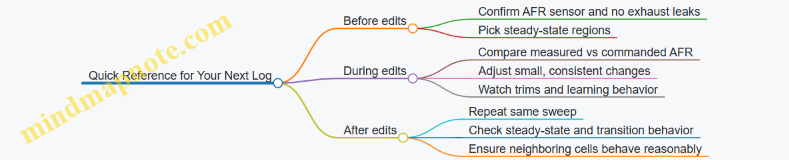
5.4 Tuning Ignition Timing and Managing Knock Thresholds
Ignition timing is the moment the spark happens relative to piston position. Advancing timing usually increases torque, but too much advance can cause knock, which is rapid, damaging end-gas combustion. The goal is to run as much safe advance as the engine allows under the current load, fuel, and temperature.
Foundations: How Timing, Load, and Knock Interact
Start with the basics of what the ECU is doing. Under light load, the engine can tolerate more advance because cylinder pressure is lower. Under heavy load, cylinder pressure rises, and the end-gas becomes more likely to auto-ignite. Knock risk also changes with:
- Air-fuel ratio: Leaner mixtures can increase combustion temperatures and knock tendency; richer mixtures can reduce knock but may hurt efficiency and increase exhaust heat.
- Intake air temperature: Hotter charge air shortens the time available before end-gas auto-ignition.
- Engine speed: Higher RPM increases pressure rise rate and reduces the margin for safe timing.
- Fuel quality: Higher octane increases resistance to knock, effectively raising the knock threshold.
A practical way to think about tuning is to treat ignition timing as a lever and knock as a safety limit. You move the lever until the safety limit starts to matter, then back off to a margin you can repeat.
Mind Map: Timing and Knock Control
Knock Detection and What “Knock” Means in Logs
Most ECUs use a knock sensor and signal processing to estimate knock events. In logs, you’ll typically see knock correction (often in degrees) and sometimes a knock count or knock intensity. Knock correction is the ECU pulling timing to protect the engine. If you see correction increasing as load rises, your current timing is too aggressive for that condition.
A key nuance: knock correction can lag behind the actual event. That’s why you should tune with small timing changes and use logs that include RPM, load, intake temperature, and correction values. If correction is already active at the start of a pull, you’re not just “near the edge”—you’re over it.
Building a Safe Timing Strategy
1) Start with Stable Fuel and Load
Ignition timing tuning assumes the mixture is behaving. If fuel trims are unstable or you’re chasing air-fuel targets, timing changes will be harder to interpret. A simple example: if your commanded lambda is constant but actual lambda swings during a pull, the ECU may be compensating for transient fueling, and knock behavior may follow those swings rather than your timing table.
2) Use Incremental Timing Steps
Advance timing in small increments—think “a few degrees at a time” rather than large jumps. After each change, run the same style of pull so you can compare logs apples-to-apples. If you add timing and immediately see knock correction spike, revert and reduce advance in the affected load/RPM cells.
3) Respect Temperature and Humidity Effects
Even without changing parts, intake temperature can shift knock margin. If you tune on a cool morning and then repeat on a warmer day, the same timing may trigger more correction. The practical approach is to tune using logs that capture intake temperature and to avoid making major timing changes when the engine is far from the conditions you tuned under.
Managing Knock Thresholds with Timing and Mixture
Knock threshold is not a single number; it’s a moving boundary shaped by mixture, temperature, and combustion quality. When knock appears, you have three main levers:
- Reduce ignition advance in the relevant load/RPM region.
- Adjust mixture toward a safer target under high load. For many street setups, slightly richer mixtures can reduce knock, but you must watch exhaust gas temperature and drivability.
- Improve charge cooling and reduce heat soak. Even a well-tuned timing map can struggle if intake temps climb during repeated pulls.
A concrete example: suppose your logs show knock correction mainly at high load around 3500–4500 RPM. If you reduce timing only in that band, you may keep good torque elsewhere. If you instead reduce timing globally, you’ll likely lose performance where knock wasn’t occurring.
Advanced Details: Timing Corrections and Edge Cases
Knock Retard Behavior
Some ECUs apply knock retard dynamically. That means your base timing may look fine, but the effective timing during knock is lower. When tuning, focus on effective timing (base plus corrections) and the trend of correction across the pull.
Sensor and Detection Reliability
If knock correction is erratic—appearing at low load where knock shouldn’t happen—consider sensor mounting, wiring noise, or signal filtering issues. A stable tuning process depends on stable detection.
Avoiding “False Confidence”
If you only log peak RPM and peak load, you can miss where knock starts. Log the full pull window and include the transition into high load. Knock often begins before peak torque, and the first few seconds are where your timing decisions matter most.
Validation: Repeatability over Hero Runs
After each tuning adjustment, validate with repeatable pulls: same gear, similar throttle position, and consistent engine temperature. Success looks like this: knock correction stays near zero or at a minimal, consistent level, and it doesn’t trend upward as the pull continues. If correction grows with time, you’re likely running out of thermal margin, not just timing margin.
When you manage ignition timing this way—small steps, careful logging, and targeted changes—you end up with a map that behaves predictably instead of one that only works on a single perfect pull.
5.5 Validating Results with Repeatable Test Procedures
Validation is where “it feels faster” becomes “it is faster, and we can prove it.” The goal is repeatability: the same procedure, the same conditions, and the same success metrics—so you can attribute changes to the parts and calibration you actually touched.
Foundations of Repeatable Testing
Start by defining three things before any new run: baseline metrics, acceptance thresholds, and a test sequence. Baseline metrics should include at least one performance measure (for example, quarter-mile time or 0–60 mph) and one limiting factor measure (for example, intake air temperature, knock counts, or fuel trims). Acceptance thresholds are practical ranges, not fantasies; for instance, “ET improves by at least 0.2 s” and “no increase in knock events during the same load points.” The test sequence prevents accidental bias, such as always doing the best run last.
A repeatable test also requires controlled variables. Use the same route or dyno load profile, keep tire pressures consistent, and record ambient temperature and humidity. If you cannot control them, you at least measure them and keep them within a narrow band for each comparison set.
Mind Map: Validation Workflow
Standardizing the Procedure
Use a warm-up routine that brings the engine and drivetrain to the same operating state each time. For example, drive a fixed loop for 15 minutes, then perform three short pulls that do not exceed your target boost or throttle load. This reduces variability from cold oil, cold tires, and unstable fueling.
Then run a consistent test sequence. On a street route, that might mean: same starting point, same gear selection, same throttle application style, and the same braking method before each run. On a dyno, it means the same pull duration, same ramp rate, and the same correction settings.
Data capture should be synchronized with the run. Log at a rate that captures transient events, and ensure key channels exist: throttle position, manifold pressure or boost, engine speed, commanded and actual AFR (or lambda), ignition timing, knock counts, fuel system corrections, coolant temperature, and intake air temperature.
Repeatability Checks That Actually Matter
Before comparing baseline to modified results, verify that your baseline itself is repeatable. If three baseline runs disagree wildly, you do not have a tuning problem—you have a procedure problem.
A simple method is to compute the spread of your primary metric across baseline runs. If your 0–60 mph times vary by 0.3 s or more, tighten the procedure: adjust tire pressure consistency, improve launch technique, or reduce driver variability by using the same person for all runs.
Also check that limiting factors behave consistently. If knock activity spikes in one baseline run but not the others, treat that run as an outlier and investigate why (for example, higher IAT, different fuel quality, or a slightly different load point).
Example Validation Plan for an ECU Tune
Assume you installed a calibration change that targets improved midrange torque while maintaining knock safety.
- Baseline set: Perform three pulls in the same gear from 2,000 to 4,500 rpm at the same throttle target. Record peak torque, average torque in the midrange window, and knock counts.
- Change set: Apply the tune and repeat the exact same three pulls.
- Compare deltas: Look for improvement in the midrange torque window and confirm that peak knock counts do not increase.
- Regression check: Review AFR behavior during the same rpm/load points. If AFR corrections increase or commanded AFR shifts leaner than intended, you may have gained torque by cutting safety margin.
- Confirm with repeat runs: If the first comparison looks good, do one additional pull from each set to confirm the result holds.
A practical acceptance rule might be: midrange torque increases by at least 3% while knock counts remain at or below baseline and intake air temperature rise is not higher than baseline by more than a small, measured amount.
Interpreting Results Without Fooling Yourself
When results improve, verify the “why” using the logs. If torque rises but manifold pressure and ignition timing do not change meaningfully, the improvement might be from better fueling stability or reduced correction behavior. If torque rises because boost is higher, confirm that the boost control strategy is not overshooting and that exhaust gas temperatures are not trending beyond what your baseline showed.
When results do not improve, check for mismatched conditions. A common issue is that the vehicle is not in the same thermal state or the tires are not in the same grip window. Another is that the test window does not match the tuning target; a tune aimed at 2,500–3,500 rpm will not show much on a 4,000–5,500 rpm pull.
Mind Map: Data Review
A Simple Validation Checklist
- Same route or dyno profile
- Same warm-up routine
- Same tire pressures and fuel level range
- Same run sequence order
- Three baseline runs and three post-change runs
- Primary metric spread within a tight band
- Limiting factors not worse than baseline
- One confirmation pull if the first comparison looks promising
Validation is not about being perfect; it is about being consistent enough that the difference you see is the difference you made.
6. Drivetrain Upgrades for Power Delivery and Durability
6.1 Clutch Selection for Torque Capacity and Engagement Feel
Choosing a clutch is mostly about matching torque capacity to the engine and matching engagement feel to how you drive. Those two goals overlap, but they are not the same problem: a clutch can survive high torque and still feel jerky, or feel smooth while slipping under load.
Foundational Concepts That Drive the Choice
Start with three numbers: engine torque at the crank, the drivetrain’s torque multiplication at the wheels, and the clutch’s rated capacity. For a simple street manual, torque at the crank is the baseline. Then account for how hard you load the clutch: a low gear launch multiplies wheel torque, and repeated launches heat the friction material.
Engagement feel comes from how quickly the clutch transitions from “no torque transfer” to “full torque transfer.” That transition is influenced by friction material behavior, pressure plate clamp force, disc geometry, and the hydraulic or cable system’s travel and stiffness.
Mind Map: Clutch Selection
Clutch Selection Mind Map
Torque Capacity Without Guesswork
A clutch rating is not a guarantee; it’s a starting point. The practical question is whether the clutch can hold torque at the temperatures you create. Heat comes from slip time and slip amount. If you do mostly gentle starts, you can often run closer to the torque rating. If you do frequent hard launches, you need more margin because slip time increases.
A useful way to think about it: torque capacity is about friction coefficient under heat, not just static clamp force. Two clutches with the same nominal rating can behave differently because their friction materials maintain grip differently as temperature rises.
Example: Suppose your engine makes 320 lb-ft at the crank. In 2nd gear, the drivetrain ratio might multiply wheel torque enough that the clutch sees a high load during a fast launch. If you choose a clutch rated only slightly above 320 lb-ft, it may hold on smooth starts but slip during repeated launches, especially if you keep the pedal in the friction zone longer than you intended.
Engagement Feel from Disc and Pressure Plate Behavior
Engagement feel is largely about the slope of the torque transfer curve as the disc starts to bite. Softer, more progressive friction materials tend to spread the engagement over more pedal travel. More aggressive friction materials can create a sharper bite, which can be great for quick launches but harder for smooth street driving.
Pressure plate design matters too. Higher clamp force can reduce slip, but it can also increase pedal effort and reduce the “forgiveness” of the engagement zone. If the pedal becomes heavy and the bite point moves too close to the floor, you’ll likely compensate with more pedal modulation, which can increase slip heat.
Example: A street driver swaps to a clutch with a very high clamp force. On paper it has plenty of torque capacity. In practice, the pedal effort rises and the bite point drops. The driver starts slipping the clutch slightly more often during normal traffic starts, and the friction material wears faster than expected.
Flywheel Inertia and Pedal Dynamics
Flywheel mass affects how quickly engine speed changes when you depress the clutch. A heavier flywheel smooths transitions and can make the car easier to drive smoothly. A lighter flywheel can make the engine respond quickly, but it also changes how the clutch engagement feels because the engine speed drops faster when the clutch is disengaged.
Example: With a light flywheel, you may need less pedal time to complete engagement, but if your timing is off, the engine speed mismatch can make the car jerkier. With a heavier flywheel, the same driving inputs often feel more forgiving.
Release System and Installation Quality
Even the best clutch can feel wrong if the release system geometry is off. Hydraulic systems can develop air or leaks; cable systems can stretch or bind. Pedal travel and bite point location should match the vehicle’s design intent.
Installation details also affect feel and durability. Disc alignment matters for smooth engagement and to avoid premature wear. Fastener torque and flywheel mounting cleanliness affect clamp consistency.
Example: A clutch installed with slight misalignment can cause uneven contact. The driver feels a “grabby” spot near the bite point, and the disc wears in a pattern that shortens its life.
Practical Selection Checklist
- Match torque capacity to your use: choose margin based on how often you load the clutch hard.
- Choose friction behavior for your driving: smooth street starts usually prefer a more progressive engagement.
- Consider flywheel impact: lighter setups change how quickly the engine speed falls.
- Verify pedal and release feel: confirm travel, bite point, and absence of binding.
- Plan for correct installation: alignment, cleanliness, and torque specs are not optional.
Quick Decision Example
If you drive a daily car with occasional spirited pulls, you typically want a clutch that holds your peak torque with moderate margin and keeps engagement progressive enough for traffic. If you do frequent hard launches, you prioritize thermal and torque margin, accepting that the bite may be sharper and pedal modulation will matter more.
In both cases, the “right” clutch is the one that holds torque when hot and still lets you drive without constantly living in the friction zone.
6.2 Flywheel and Pressure Plate Options for Street Use
A street clutch setup lives in the messy middle: you want smooth takeoff, predictable engagement, and enough torque capacity to handle upgrades without turning every stoplight into a leg workout. The flywheel and pressure plate choices shape that experience because they control rotational inertia, clamp force, and how the clutch “feels” when it meets the drivetrain.
Foundational Concepts That Drive Feel
A flywheel stores rotational energy. A heavier flywheel smooths engine speed changes, which makes the car easier to drive at low speed and reduces how much the engine speed drops when you press the clutch. A lighter flywheel responds faster, but it also makes the engine speed more sensitive to clutch engagement, so the pedal can feel more abrupt if the rest of the system isn’t matched.
A pressure plate determines how much clamp force the clutch can apply. More clamp force helps prevent slip under higher torque, but it can also increase pedal effort and reduce smoothness if the diaphragm spring and friction material aren’t tuned for street use.
Mind Map: Street-Friendly Choices
Flywheel Options for Street Use
Stock or near-stock weight is the baseline for smoothness. If your goal is a mild power increase and you want the car to behave like a normal car in traffic, staying close to OEM inertia is usually the least complicated path. Example: a naturally aspirated build with a freer-flowing intake and exhaust often benefits more from a well-matched clutch than from a lighter flywheel.
Lightweight flywheels reduce inertia, which can make rev-matching feel more immediate. The tradeoff is that the engine speed changes more quickly during engagement, so you may notice a narrower “sweet spot” where the car moves without jerking. Example: if you install a light flywheel with a high-clamp pressure plate, the clutch may engage quickly and feel like it grabs earlier than you expect, especially in first gear.
Dual-mass flywheels (where applicable) can preserve smoothness by isolating torsional vibration. They’re often used when comfort matters and the drivetrain is sensitive to chatter. Example: if your car already has a history of rattle or driveline vibration, a dual-mass approach can reduce the “buzz” that sometimes appears after swapping to a rigid single-mass setup.
Pressure Plate Options for Street Use
Single-disc street pressure plates are the default for daily driving because they balance clamp force and engagement behavior. Look for designs that emphasize consistent clamp under heat rather than maximum clamp at all costs. Example: a street pressure plate paired with an organic or semi-metallic friction disc can hold moderate torque while keeping engagement progressive.
Diaphragm spring pressure plates are common because they provide a predictable relationship between pedal movement and clamp load. If you’ve ever felt a clutch that gets heavy suddenly near the floor, that’s often a spring geometry mismatch. A street-oriented diaphragm design tends to keep pedal effort linear.
High-clamp setups can prevent slip, but they can also raise pedal effort and make the clutch less forgiving. The practical rule is to match clamp capacity to the torque you actually see at the wheels, not the peak number from a dyno sheet. Example: if your tune increases torque by 20–30% but you drive gently, you may not need the most aggressive clamp option; you need enough capacity to avoid slip during normal launches.
Friction Material and Engagement Quality
Friction material choice affects how the clutch transitions from slipping to locked. Organic and many semi-metallic materials generally feel smoother and more tolerant of everyday driving mistakes. More aggressive materials can handle heat better, but they often engage more abruptly.
Example: if you frequently creep in traffic, a smoother friction pairing reduces chatter and makes it easier to modulate the pedal. If you do occasional spirited pulls, the key is to prevent repeated slip; once the clutch is slipping, heat becomes the enemy regardless of material.
Matching Components to Your Driving
Start with your driving pattern: frequent stop-and-go favors smooth engagement and manageable pedal effort. If you do mostly highway driving with occasional launches, you can prioritize torque capacity more aggressively.
A simple matching workflow helps: choose the flywheel inertia based on how sensitive you want the car to feel at low speed, then choose a pressure plate that provides enough clamp to prevent slip at your typical torque, and finally select friction material that supports that engagement style.
Setup Details That Make or Break Street Feel
Even the best parts can feel wrong if installation details are off. Clutch alignment matters for smooth engagement; a misaligned disc can cause chatter. A worn release bearing can add noise and inconsistent pedal return. Pedal free play affects how quickly the clutch starts engaging; too little can cause drag, too much can make engagement late and jerky.
Example: after a clutch swap, if the car creeps when you think it shouldn’t, check for insufficient free play or a hydraulic issue. If it chatters during takeoff, inspect alignment and the condition of the flywheel surface and disc.
Quick Decision Guide
- Want maximum smoothness in traffic: prioritize near-stock flywheel inertia and a street-oriented pressure plate with moderate clamp.
- Want sharper response but still streetable: choose a mild lightweight flywheel and ensure the pressure plate and disc friction material keep engagement progressive.
- Need higher torque holding: increase clamp capacity, but keep friction material and pedal effort in a range you can modulate comfortably.
6.3 Transmission Service and Gear Ratio Considerations
A transmission is a system of moving parts that depends on clean fluid, correct clearances, and the right gear ratios for the job. Service keeps the system healthy; ratio choices keep it useful. Do both, and the car feels consistent instead of “sometimes good, sometimes weird.”
Mind Map: Transmission Service and Gear Ratio Considerations
Transmission Service Fundamentals That Prevent Ratio Problems
Start with the basics because ratios can’t compensate for contaminated fluid. If a transmission is slipping, delayed, or overheating, the “wrong ratio” diagnosis is often just a fluid problem wearing a different hat.
Fluid type and level. Use the manufacturer-specified fluid and confirm level with the correct procedure. Many transmissions require a warm check at idle or in a specific gear; checking cold can lie to you. Example: if the level is low, you may see delayed engagement and higher heat, which can mimic a ratio mismatch because the engine stays at higher RPM longer.
Pan and filter service. When you drop the pan, inspect debris. Fine gray paste can be normal clutch wear; shiny metal flakes are not. Replace the filter if the service interval calls for it or if the fluid is clearly degraded. Use a new gasket and torque fasteners evenly to avoid leaks that later become pressure problems.
Cooling system integrity. Verify the cooler lines and heat exchanger are not restricted. A partially blocked cooler can cause high fluid temperature under load, leading to shift quality changes. Example: a car that shifts fine in town but gets harsher on highway climbs often has cooling or fluid circulation issues, not a ratio issue.
Gear Ratio Considerations That Shape Real-World Feel
Gear ratios determine how engine speed relates to vehicle speed and how torque is multiplied. The same engine can feel lazy or responsive depending on where it lands in the power band.
Understand the ratio stack. Overall behavior comes from the combination of transmission gear ratios and the final drive ratio. Tire diameter matters too because it sets how far the car moves per revolution. Example: if you change tires from 225/40R18 to 245/40R18, the taller tire reduces RPM at a given speed, which can make the car feel less eager even with identical gearing.
Pick ratios based on load, not just peak power. For street driving, you usually want the engine to operate near its efficient torque region during typical throttle inputs. If you gear too tall, the engine may lug and require more throttle, which can increase heat and reduce shift smoothness. If you gear too short, the engine may run high RPM at cruise, increasing noise and wear.
Match shift behavior to the ratios. After ratio changes, the transmission may need different shift calibration or at least a careful check of how it locks the converter or selects gears. If the car “hunts” between gears at steady throttle, the ratio spacing may be too tight for the engine’s torque curve, or the calibration may not be aligned with the new load.
Practical Workflow for Service and Ratio Decisions
- Record baseline numbers. Note current tire size, final drive ratio, and transmission gear ratios. Measure RPM at a steady speed (for example, 60 mph or 100 km/h) in the highest normal cruising gear.
- Service the transmission first. Confirm fluid condition, level, and cooling function. Fix leaks and replace filters as required.
- Define target RPM ranges. Choose a cruise RPM you can live with and a lower-RPM operating point where the engine still produces usable torque without lugging.
- Plan ratio changes as a system. If you change final drive, consider how it affects every gear. If you change gearsets, consider spacing between gears and how it impacts shift frequency.
- Validate with repeatable tests. Use the same route and throttle style to compare before and after. If the car feels better but runs hotter, you may have solved drivability while creating a thermal mismatch.
Troubleshooting with a Ratio-First vs Service-First Mindset
If you experience harsh shifts, slipping, or overheating, treat service as the first suspect. If the transmission is healthy but the car feels underpowered at certain speeds, treat ratios as the next suspect.
Symptom to check.
- Delayed engagement after warm-up: fluid level, valve body cleanliness, filter condition.
- Harsh shifts under load: cooling restriction, fluid breakdown, pressure regulation issues.
- Gear hunting at steady throttle: ratio spacing and calibration alignment, plus engine torque response.
- High cruise RPM: final drive or tire diameter mismatch.
A good transmission service makes ratio changes meaningful. A good ratio plan makes service work feel like it actually fixed something.
6.4 Differential Upgrades and Limited Slip Setup
A differential decides how torque splits between the left and right wheels. In an open differential, the wheel with less traction gets more of the torque, which is great for smooth cornering on dry pavement and frustrating when one tire loses grip. Upgrading the differential and setting up a limited-slip (or locking) strategy changes that behavior so both tires contribute when traction is uneven.
Core Concepts and What Changes
Start with the baseline: an open differential uses internal gears to keep both axle shafts rotating at the same speed when traction allows. When one wheel slips, the torque transmitted to the other wheel drops because the differential can only deliver torque up to the traction limit of the slipping side.
A limited-slip differential (LSD) adds a mechanism that resists speed difference between sides. That resistance can be created by friction clutches, a viscous coupling, or a gear-based design. The practical result is that when one wheel starts to spin, the LSD transfers some torque to the wheel that still has grip.
Mind the trade: the more the LSD resists wheel-speed difference, the more it can affect steering feel, tire wear, and driveline stress—especially during tight turns at low speed.
Mind Map: Differential Upgrades and Limited Slip Setup
Choosing the Right LSD Style
Clutch-type LSDs are common because they’re adjustable and predictable. They use friction plates that clamp when the differential sees relative motion between sides. A typical street-friendly setup uses moderate preload so the car doesn’t feel like it’s fighting you in parking-lot turns.
Gear-type LSDs use ramp angles and side gears. They can lock strongly under acceleration, which helps traction when you apply throttle mid-corner. The downside is that deceleration behavior can feel different, sometimes causing a noticeable change in rotation when you lift.
Viscous LSDs can be smooth, but they rely on heat and fluid shear. If you run hard sessions and the unit gets hot, the locking behavior can change as the fluid properties shift.
Preload, Ramp Angles, and Oil Compatibility
Preload is the starting clamp force between clutch plates. Too little preload and the LSD behaves like an open diff until slip is significant. Too much preload and you get binding in tight turns, increased driveline noise, and faster wear.
Ramp angles describe how aggressively the LSD locks under acceleration versus deceleration. A common street goal is balanced behavior so the car doesn’t feel like it has two personalities: one on throttle and another on lift.
Oil choice matters because clutch materials and friction modifiers must match. Using the wrong oil can reduce locking or cause chatter. For example, if a clutch-type LSD is designed for a specific friction-modified oil, switching to a generic gear oil can make the plates slip more than intended.
Installation and Setup Workflow
Begin with inspection and cleanliness. Differential rebuilds are unforgiving: worn bearings, damaged seals, or contaminated parts can ruin performance even if the LSD itself is correct.
- Verify ring-and-pinion condition and backlash. If the gear set is already noisy or worn, the LSD won’t fix that.
- Replace consumables: bearings, seals, and any crush-related hardware as specified.
- Set preload and any adjustable clutch pack parameters according to the manufacturer’s procedure.
- Use the specified lubricant and verify the correct fill level.
- Perform a careful break-in if the LSD requires it.
A simple example: if your car chatters during slow-speed maneuvers, reduce preload (if adjustable) or confirm oil compatibility before changing anything else. Chatter is often a friction mismatch or insufficient break-in rather than a “bad” LSD.
Testing with Clear Pass/Fail Checks
Use repeatable tests that isolate behavior.
- Tight-turn test: In a parking lot, make slow figure-eights. The car should turn without binding or hopping. Mild resistance is normal; harsh binding suggests excessive preload or incorrect oil.
- Traction test: On a low-grip surface, apply steady throttle and observe whether the inside wheel spins freely. With a properly set LSD, the car should pull more evenly, and wheelspin should be reduced.
- Lift-off test: Enter a gentle corner, accelerate, then lift. The car should rotate consistently without sudden, unsettling changes. If decel locking feels too strong, ramp settings or clutch behavior may need adjustment.
Common Mistakes and How to Avoid Them
A frequent mistake is treating the LSD as a standalone upgrade. Tire choice and alignment affect how much slip the LSD sees. If your tires are mismatched side-to-side or alignment is off, the LSD will work harder than expected and can wear faster.
Another mistake is skipping driveline checks. Worn axle splines, loose mounts, or failing bearings can introduce noise that looks like differential behavior. Fix the mechanical baseline first, then tune the LSD.
Finally, don’t ignore heat. If you run hard and the oil is overheated or degraded, friction characteristics change. Consistent oil condition is part of consistent locking.
Example Setup for a Street-Driven Car
A practical street setup aims for early engagement without binding. Choose a clutch-type LSD with moderate preload, use the manufacturer-specified friction-compatible oil, and verify behavior in tight turns before doing any aggressive traction testing. If you feel chatter, confirm oil compatibility and allow break-in time rather than immediately increasing preload.
When the car is stable in parking-lot turns and pulls more evenly on uneven grip, you’ve achieved the main goal: both wheels contribute without turning the differential into a steering problem.
6.5 Driveshaft Axles and Mounts for Vibration Control
A driveshaft is a rotating assembly that must transmit torque while tolerating suspension movement and alignment changes. Vibration usually shows up when the shaft’s balance, the angles at the universal joints, or the mount compliance don’t match the vehicle’s operating conditions. The goal is simple: keep rotational speed smooth and keep joint angles within what the driveline can handle.
Foundations of Driveshaft Vibration
Start with the two main vibration sources. First is imbalance, where the shaft assembly has uneven mass distribution. Second is driveline angle behavior, where universal joints create speed variations as they rotate. Even a perfectly balanced shaft can shake if the operating angles are wrong.
A practical way to think about it: imbalance tends to be steady at a specific RPM, while angle-related vibration often changes with throttle load, vehicle speed, or suspension position. For example, a car that shakes at 60 mph in neutral and again at 60 mph under load likely has an imbalance or resonance issue. A car that shakes only when accelerating or only when the suspension is loaded points more toward joint angles or mount movement.
Driveshaft Basics and What Changes Under Load
Most modern vehicles use a two-piece driveshaft with a center support bearing and rubber or hydraulic mounts. When torque is applied, the engine and transmission twist slightly, and the rear axle moves through its travel. That means the driveshaft sees changing angles and sometimes small fore-aft shifts.
A common mistake is to treat the driveshaft as a rigid line. In reality, the center bearing and mounts define where the shaft “lives” in space. If the mount is worn, the bearing can drift, and the universal joints will run at angles they weren’t designed for.
Universal Joint Angles and Operating Range
Universal joints are happiest when their operating angles are small and matched. If one joint runs at a larger angle than the other, the speed fluctuations don’t cancel. The result is a vibration that can feel like it’s coming from the floor or seat.
Example: Suppose the front joint angle is 3° and the rear joint angle is 1°. Under rotation, the front joint generates larger speed variation, and the cancellation effect weakens. The vibration may be most noticeable at a certain speed where the driveline resonance aligns with the joint frequency.
To reduce angle issues, you typically adjust the driveline geometry by correcting worn mounts, restoring ride height, or using proper-length shafts and correct yoke engagement. Avoid “fixing” angles by forcing the suspension into an extreme position; that can trade one problem for another.
Center Support Bearing and Mount Selection
The center support bearing controls shaft position and damping. A worn rubber mount can allow the bearing to move, which changes joint angles and can also introduce a new imbalance if the bearing isn’t concentric.
When choosing a replacement, match the original design intent. If the factory used a compliant mount, switching to a much stiffer setup can transmit more vibration into the body. Conversely, if the factory mount is already failing, replacing it with the correct stiffness often reduces shake without changing other geometry.
Example: A truck that develops a low-frequency hum at steady highway speed after a lift kit may have a center bearing mount that’s now operating outside its normal range. Restoring correct driveshaft length and ensuring the bearing mount is in good condition usually improves both smoothness and driveline longevity.
Axle and Yoke Condition Checks
Before replacing parts, inspect the components that create vibration indirectly. Check yoke splines for looseness and signs of fretting. If the slip yoke has excessive play, it can cause cyclic movement that feels like imbalance.
Also inspect the universal joints for binding. A joint that feels “smooth” by hand can still have play under load. Look for grease leakage, torn seals, or rust that suggests the joint has been running dry.
Example: After a driveshaft service, a vehicle may shake more than before if the yokes weren’t reinstalled in the same orientation. Many shafts are marked for a reason: keeping the original phasing reduces the chance of introducing new imbalance.
Balancing, Phasing, and Installation Discipline
Balancing is not just about the shaft tube. The complete assembly—tube, yokes, and any attached hardware—must be balanced as a unit. If you swap yokes or change hardware without rebalancing, you can undo the work.
Phasing matters for two-joint drivelines. The yokes must be aligned so that the joint speed variations cancel. If phasing is wrong, vibration can appear at a narrow speed band.
Installation discipline is where many DIY efforts stumble. Use correct torque on flange bolts, ensure the slip yoke has proper engagement, and verify that the shaft doesn’t contact exhaust, floor, or heat shields through suspension travel.
Troubleshooting Workflow That Doesn’t Waste Time
- Confirm the symptom pattern: steady at one RPM, speed-only, or load/suspension dependent.
- Inspect mounts and bearing: look for cracked rubber, looseness, and bearing play.
- Check joint angles and ride height: verify the vehicle isn’t sitting too high or low after other work.
- Inspect joints and yokes: binding, grease loss, spline wear, and yoke play.
- Verify phasing and fastener condition: marks aligned, bolts torqued, no missing hardware.
- Balance verification: if parts were swapped, confirm the assembly was balanced and built as a unit.
Mind Map: Driveshaft Axles and Mounts for Vibration Control
Example Scenarios That Tie It Together
Scenario A: Vibration at highway speed after a mount replacement If the vibration started right after service, suspect phasing, fastener torque, or a swapped yoke orientation. Confirm marks and ensure the shaft was balanced as installed.
Scenario B: Vibration only when accelerating This often points to joint angle changes under torque or a mount that shifts under load. Inspect the center support bearing and mounts for movement, not just visible cracks.
Scenario C: Vibration changes with suspension position If the shake worsens on bumps or when the vehicle is loaded, the mount compliance and joint angles are likely out of range. Correct geometry and replace worn mounts before chasing balance.
7. Suspension and Handling Modifications for Performance
7.1 Choosing Springs Shocks Struts and Dampers for Your Goals
A suspension upgrade is really three systems working together: the spring stores energy, the damper controls how quickly that energy is released, and the strut or shock assembly packages everything into a stable, repeatable motion. If you pick parts that fight each other, the car may feel “stiffer” but not necessarily faster, safer, or more comfortable.
Start with Your Goal and Driving Conditions
Begin by translating “performance” into observable behavior. For example, if your goal is flatter cornering on a weekend drive, you care about roll control and tire contact. If your goal is sharper response on rough roads, you care about controlling wheel motion without turning every bump into a jolt.
A practical way to set priorities is to list your top three annoyances in the current setup. “Bottoming out over speed bumps” points toward spring rate and bump travel. “Too much body roll” points toward roll stiffness and damping balance. “Wandering after braking” can involve bushings, alignment, and rear damping, not just spring choice.
Understand Spring Rate and Ride Height Together
Spring rate determines how much the car resists compressing under load. Higher rate reduces suspension travel under the same cornering or braking forces, which can improve tire contact consistency. The tradeoff is reduced compliance on uneven pavement.
Ride height is not just aesthetics. Lowering changes suspension geometry and available bump and droop travel. If you lower the car without matching spring and damper stroke, you can run out of travel and hit bump stops sooner. A simple check: after installing new springs, measure how much suspension travel remains at full compression and full droop using the bump-stop clearance and jack-down method.
Example: If you currently bottom out at the rear over driveway entrances, a modest spring rate increase plus a damper tuned for that higher load is usually more effective than a large rate jump that makes the ride harsh but still allows the car to run out of travel.
Match Dampers to Spring Rate and Vehicle Motion
Dampers control the speed of spring compression and rebound. Two cars can have the same spring rate but feel very different because the damping curves differ.
- Too little rebound damping can let the suspension “pack down,” reducing ride height and grip after repeated bumps.
- Too much rebound damping can make the ride feel bouncy or cause the tire to lose contact over fast oscillations.
- Too little compression damping can allow excessive dive/squat and bottoming.
- Too much compression damping can make the car skip over bumps and reduce traction.
A good baseline approach is to choose a damper designed for the same spring rate range and intended ride height change. If you use adjustable dampers, start with a middle setting and tune based on measured behavior rather than seat-of-the-pants guesses.
Choose Between Shocks and Struts by System Design
Shocks are typically used with separate springs and control arms, while struts combine the damper and spring location in one assembly. The key is not which is “better,” but how the assembly affects alignment stability and how it packages travel.
If your vehicle uses struts, pay attention to top mount condition and bearing quality. Worn mounts can create steering feel issues that mimic bad damping. If your vehicle uses shocks, check that the spring seats and mounting hardware are correct so the spring doesn’t shift under load.
Mind Map: Selecting the Right Setup
Concrete Examples That Tie Parts to Feel
Example 1: Street Car With Occasional Aggressive Turns
- Choose a spring rate that reduces roll without eliminating bump travel.
- Use dampers with a compression/rebound balance that prevents the car from settling too quickly after a bump.
- After installation, do a repeated-bump test on a safe road segment. If the car rides lower after the sequence, rebound is likely too soft.
Example 2: Car That Bottoms Out Over Rough Entrances
- Increase spring rate only enough to reduce bottoming, not to make the ride harsh.
- Prioritize damper compression control so the suspension slows before it reaches bump stops.
- Confirm bump-stop clearance with the car loaded as you normally drive.
Example 3: Track-Style Driving With Heat and Consistency Needs
- Use springs that keep ride height stable under sustained cornering loads.
- Select dampers with damping curves that stay consistent across repeated cycles.
- Tune rebound first for tire contact after corner exit bumps, then compression for braking stability.
Final Selection Checklist
Before buying, verify these basics: intended ride height change, available travel, spring rate compatibility with the damper’s design range, and the condition of mounts and bushings. After installation, re-check alignment and confirm that the car does not hit bump stops during normal driving. When springs and dampers are matched to your goal, the car feels controlled without turning every road imperfection into a suspension lesson.
7.2 Sway Bars Bushings and Chassis Bracing Effects
Sway bars reduce body roll by transferring load from one side of the suspension to the other. Bushings and chassis bracing decide whether that transfer happens smoothly or turns into friction, looseness, and unpredictable geometry. Think of the sway bar as a torsion spring: the bar can only do its job if it is held firmly, aligned correctly, and allowed to twist without binding.
Foundational Concepts: What Bushings Actually Control
Sway bar bushings sit between the bar and the chassis. Their job is simple: locate the bar, control its movement, and provide a controlled amount of compliance. In practice, three effects matter most.
First, friction. Softer or worn bushings let the bar move with less resistance, but they can also allow extra play. Too much play means the bar “waits” before it starts working, so roll reduction arrives late in the suspension travel. Too much friction means the bar resists twisting, so the car feels stiff in transitions and may understeer because the outside suspension doesn’t get the expected load transfer.
Second, alignment. If the bushing centers are offset from the bar’s natural path, the bar is forced to bend as it twists. That creates binding and can change effective bar rate across the travel range.
Third, load path stiffness. The bushing is part of the system that connects bar torque to the chassis. If the chassis flexes, the bar’s torque doesn’t translate cleanly into roll control.
Sway Bar Bushings: Materials, Fit, and Installation
Polyurethane bushings are common because they resist wear, but they can be harsher if installed dry or if the bar is forced into misalignment. Rubber bushings tend to be more forgiving of minor alignment issues. Grease choice matters: use the manufacturer-recommended lubricant so the bushing doesn’t swell or degrade.
A practical example: if you replace worn rubber bushings with polyurethane and the car suddenly feels “twitchier” over uneven pavement, the likely cause is increased friction plus a slightly tighter fit. The fix is usually not to abandon polyurethane, but to verify bar alignment, confirm correct bushing size, and ensure the bar is not preloaded by uneven mounting.
Installation details that prevent headaches:
- Torque evenly: tighten mounting brackets in a cross pattern so the bar isn’t pulled off-center.
- Set ride height before final tightening: if you tighten at full droop or full compression, you can preload the bar and create a permanent twist.
- Check bracket condition: bent or cracked brackets reduce stiffness and can let the bar shift.
Chassis Bracing Effects: Where Stiffness Shows Up
Chassis bracing reduces unwanted flex in the mounting points and nearby structure. The sway bar’s torque reaction needs a solid anchor; otherwise, the bar twists the chassis instead of controlling roll.
The most noticeable improvements usually come from:
- More consistent roll behavior: the bar engages at the same point in travel from left to right.
- Less steering change under load: when the chassis flexes, suspension geometry can shift slightly, altering toe and camber effects.
- Better repeatability: after a few hard cornering cycles, the car returns to the same feel instead of gradually changing as mounts settle.
A concrete scenario: two cars with identical sway bars and bushings can feel different if one has loose rear sway bar mounts. Under braking and cornering, the rear can “steer” more than expected because the mount flex changes how the bar couples to the chassis. Bracing that ties the mount area to a stronger structure restores the intended load transfer.
Mind Map: System Interactions
Advanced Details: Diagnosing Common Problems
If the car rolls less but feels less stable in quick direction changes, check for binding first. Binding often comes from misalignment or preloading the bar during installation. Look for uneven bushing wear or a bar that doesn’t sit naturally in the brackets.
If the car rolls about the same as before, suspect play. Worn bushings, loose bracket bolts, or cracked mounting points can let the bar move before it starts twisting. A quick test is to inspect for movement at the bar relative to the brackets with the car safely supported; any visible clunk or gap suggests the bar isn’t being located properly.
Finally, if you add bracing and the improvement is subtle, that doesn’t mean it failed. Bracing often shows up as reduced variation: the car feels the same lap after lap, and the steering response doesn’t drift as the suspension heats and mounts settle.
Practical Setup Example
A street car with mild roll and occasional steering vagueness can benefit from a straightforward approach: replace bushings with the correct size, install at ride height, and torque brackets evenly. Then inspect sway bar mount brackets for looseness and add bracing only where the mount area needs support. The goal is not maximum stiffness everywhere; it’s restoring a clean, consistent load path so the sway bar does its job at the right time in suspension travel.
7.3 Alignment Settings for Street and Track Driving
Alignment is the quiet part of performance: it shapes how the car uses tire grip, how it steers, and how quickly the tread wears. The goal is not one magic number, but a set of angles that match your tires, power delivery, and driving style—then stays consistent as the suspension settles and loads change.
Foundations: What Alignment Angles Actually Do
Camber
Camber is the tilt of the wheel relative to vertical. Negative camber (top of tire in) helps when the car rolls in corners because the tire’s contact patch stays flatter. Too much negative camber on the street can wear the inside edge quickly, especially if you drive mostly straight.
Street example: If your car feels “twitchy” and your inside tread wears faster than the outside, reduce negative camber slightly or confirm tire pressures and ride height are correct.
Toe
Toe is the direction the wheels point relative to each other. Toe-in or toe-out affects scrub and rolling resistance, so it can change steering feel and tire life dramatically.
Street example: A small amount of toe-in often improves straight-line stability. If the steering wheel is off-center or the car pulls, check toe first before chasing camber.
Caster
Caster is the fore-aft tilt of the steering axis. More positive caster generally improves straight-line stability and steering return, but it can also increase steering effort if the rest of the setup is off.
Street example: If the car doesn’t self-center after a turn, caster may be too low or uneven side-to-side.
Ride Height and Compliance
Alignment numbers are only meaningful at a specific ride height. Springs, bushings, and tire sidewall stiffness all affect where the suspension sits under load. That’s why “set it and forget it” rarely survives real roads.
Street Setup: Balance and Tire Life
A street alignment usually prioritizes even tire wear, predictable steering, and reduced tramlining on grooved roads.
Typical street targets to consider:
- Camber: Mild negative camber to keep the tire working during everyday cornering.
- Toe: Slight toe-in for stability and reduced wandering.
- Caster: As much positive caster as the chassis allows without causing excessive steering weight.
Practical street workflow:
- Set tire pressures to your normal driving level.
- Confirm ride height matches your baseline (measure from a consistent reference point).
- Align toe first, then camber, then caster.
- Drive a short loop and re-check for steering wheel centering and pull.
Common street pitfall: Lowering the car without re-aligning often increases negative camber and changes toe. The result can be a car that feels fine at first, then eats tires on the inside edges.
Track Setup: Grip Under Load and Consistent Turn-In
Track driving adds sustained lateral load and repeated heat cycles. The tire contact patch changes as the suspension compresses and the body rolls, so camber and toe must support that behavior.
Track-focused principles:
- Use camber to keep the contact patch flatter during cornering.
- Use toe to stabilize the car under braking and corner entry.
- Keep left-right symmetry tight to avoid steering corrections lap after lap.
Track example: If the car pushes wide in mid-corner, you may need more front camber (or less toe-out) depending on tire wear and steering response. If it feels unstable on entry, toe is a prime suspect.
Advanced Details: Measuring, Adjusting, and Verifying
Cross-Checks That Prevent Misleading Numbers
- Tire condition: Uneven wear can be a clue, but it can also be the result of alignment. Don’t assume.
- Wheel balance and bent components: A bent rim can mimic alignment problems.
- Bushing play: Slop in control arms can make alignment specs “correct” on the rack but wrong on the road.
Temperature and Load Effects
Alignment is measured at static conditions. On track, tire temperature and suspension load shift the effective camber and toe. That’s why you should verify with consistent driving runs and then adjust based on observed behavior and wear.
Wear Patterns as Feedback
- Inside edge wear: Often too much negative camber or too much toe-in/out depending on direction.
- Outer edge wear: Often too little negative camber.
- Feathering across tread blocks: Usually toe issues.
Mind Map: Alignment Strategy for Street and Track
Alignment Strategy Mind Map
Example: Two-Stage Alignment Plan
Stage 1: Street baseline
- Set ride height and tire pressures.
- Target mild negative camber, slight toe-in, and maximum practical positive caster.
- Confirm no pull and even wear after normal driving.
Stage 2: Track adjustment
- Increase front negative camber for roll support.
- Adjust toe toward stability under braking and turn-in.
- Re-check symmetry and steering feel after the first session.
The best alignment is the one that matches your tires and your use. If you change tires, ride height, or driving style, treat alignment as a living setup, not a one-time measurement.
7.4 Wheel Tire Selection and Tire Pressure Management
Choosing wheels and tires is mostly about matching the tire’s job to the car’s reality. The tire has to fit the wheel and suspension, survive the loads you’ll actually apply, and deliver predictable grip across temperature and road conditions. Pressure management then turns that grip from “sometimes” into “repeatable.”
Wheel and Tire Fitment Foundations
Start with fitment constraints before performance talk. Confirm wheel diameter, width, and offset so the tire clears the strut, control arms, fenders, and inner liners at full lock and full suspension travel. Then check tire size compatibility: the overall diameter affects speedometer accuracy and gearing feel, while sidewall height influences compliance and steering response.
A practical example: if you move from a 225/45R17 to a 235/40R18, the width increases and the sidewall gets shorter. That usually sharpens turn-in but can make the ride harsher and reduce the tire’s ability to absorb sharp impacts. If your suspension already runs close to the fender, the wider tire may also require careful clearance checks.
Tire Construction and Intended Use
Tires come in different constructions that change how they behave under load. All-season tires prioritize broad usability and tread life, while performance summer tires generally offer stronger grip when warm. Track-focused tires often trade comfort and longevity for consistent behavior at higher temperatures.
Example: on a street car that sees rain and cold mornings, a summer tire may feel fine after a few miles but can be less predictable when the tread is cold. That matters for pressure targets too, because cold tires start with less grip and different pressure readings.
Selecting Tire Size and Load Capacity
Tire size is not just a number; it’s a load and stiffness package. Ensure the tire’s load index meets or exceeds the vehicle’s requirements, and verify the speed rating matches your driving conditions. Under-rated tires can overheat and deform more than intended, which shows up as vague steering and faster wear.
A simple check: if you carry passengers or luggage often, don’t assume “it’s fine empty.” Use the vehicle’s door-jamb placard as the baseline and adjust from there based on your actual load.
Mind Map: Tire Selection and Pressure Logic
Tire Pressure: What You’re Actually Controlling
Tire pressure affects the contact patch shape. Too low, and the sidewalls flex more, generating extra heat and often causing the shoulders to wear faster. Too high, and the center of the tread carries more load, which can lead to center wear and reduced grip over bumps.
Pressure also changes with temperature. A tire that reads 32 psi in the morning may read higher after spirited driving, not because you “added” air, but because the tire warmed up and the air expanded.
Measuring Pressure Correctly
Always measure when tires are cold for consistency. “Cold” means the car has been parked long enough that the tire temperature matches ambient conditions. If you must measure after driving, note that the reading is temperature-influenced and won’t match your cold baseline.
Example workflow: set pressures in the morning, drive a short loop to confirm no warning lights, then re-check after a longer drive only to understand how much heat you’re building. The goal is not to chase a single hot number; it’s to keep the behavior consistent.
Pressure Targets for Different Driving Conditions
For everyday street driving, follow the placard as your starting point. If you run a wider tire or different sidewall height, you may need small adjustments to restore the intended contact patch behavior.
For performance driving, the target often shifts slightly upward or downward depending on tire construction and how quickly the tire heats. The key is to use wear and feel as feedback, not guesswork.
Reading Wear Patterns Like a Map
Wear patterns tell you whether pressure and alignment are working together.
- Center wear: often indicates too much pressure, or excessive camber that loads the center.
- Shoulder wear: can indicate too low pressure, or camber that loads the outer or inner shoulder.
- Feathering or patchy wear: points more toward alignment or toe issues than pressure alone.
Example: if you see inner shoulder wear on both front tires, lowering pressure won’t fix it. That pattern usually points to camber or toe geometry, and pressure changes may only mask the symptom.
Mind Map: Pressure Feedback Loop
Common Mistakes and How to Avoid Them
One common mistake is adjusting pressure based on a single hot measurement. Hot readings vary with ambient temperature, driving style, and how long you sat before measuring. Another mistake is ignoring valve stems and leaks; a slow leak can keep pressure low enough to change handling without triggering a dramatic warning.
A final practical note: if you change wheel/tire size, re-check clearances and re-establish your pressure baseline. The car’s behavior depends on the tire’s sidewall shape and stiffness, and pressure is the dial that sets how that shape loads the road.
7.5 Brake Bias and Brake Feel Improvements Through Setup
Brake bias is the split of braking force between front and rear. Brake feel is what you notice through the pedal: how quickly braking builds, how linear it feels, and whether the car stays composed when you increase pressure. Setup ties both together because the same hardware choices that change balance also change pedal response.
Foundational Concepts That Control Balance
Start with the basics: weight transfer and tire grip. When you brake, load shifts forward, increasing front normal force and reducing rear normal force. That means the front axle can usually generate more braking force before it reaches tire grip limits. A good starting bias accounts for this so the rear doesn’t reach its limit first.
Next, understand how hydraulic pressure becomes tire force. Brake calipers clamp pads, pads create friction at the rotor, and the tire converts that friction into deceleration. If any link in that chain is inconsistent—unequal pad material thickness, uneven rotor condition, or air in the system—pedal feel will vary and bias behavior will look “mysterious.”
Finally, recognize the role of ABS. ABS can mask bias issues during hard stops by modulating pressure, but it also changes pedal feedback. If your goal is consistent feel, you still tune bias, then verify how ABS interventions behave.
Mind Map: What to Adjust and Why
Step 1: Make the System Consistent Before Changing Bias
Before touching bias, ensure the brakes are mechanically equal side-to-side and axle-to-axle. Bleed with fresh fluid and confirm there’s no sponginess. Check pad thickness and rotor surface condition; a glazed rotor can make the pedal feel dull even if bias is correct. Verify caliper slide pins move freely and that both sides of an axle clamp evenly.
A simple example: if the left front pad is thinner than the right, the left rotor may run hotter and the pedal can feel like it “pushes back” unevenly. You might then adjust bias to fix a symptom, when the real issue is uneven clamping.
Step 2: Choose a Baseline Bias That Matches Your Tires and Use
Use a baseline that reflects your tire grip and typical braking style. Street tires with modest grip usually benefit from a front-leaning bias to prevent early rear lock. Track tires can tolerate more rear contribution, but only if the rear brakes are in good condition and the suspension is set up to keep the rear planted.
If you have an adjustable proportioning valve or bias bar, start at a conservative setting. Then perform controlled tests: several medium stops from the same speed, same pedal pressure, and same lane position. You’re looking for repeatability, not maximum deceleration.
Step 3: Tune for Pedal Feel Using Modulation Clues
Pedal feel often points to bias problems. If the pedal is firm but the car feels like it wants to rotate or the rear feels “eager,” you may be too rear-biased or the rear is grabbing due to pad/rotor condition. If the pedal travels a lot and braking builds slowly, you may have air, uneven pad contact, or a mismatch in pad compounds that delays rear engagement.
Example: Suppose you install a more aggressive rear pad compound and keep the front the same. The rear may bite earlier, making the pedal feel sharper at the start of braking. That can be good for modulation, but it can also increase the chance of rear lock on wet pavement. The fix is not always “less rear pressure”; it can also be matching pad friction behavior and re-bedding.
Step 4: Use a Simple Diagnostic Test Sequence
- Dry straight-line medium stops: Note pedal firmness and whether deceleration is smooth.
- Hard stops without ABS intervention if possible: Watch for rear lock signs like instability or early rear chirp.
- Repeatability check: Do three runs with the same technique; inconsistent behavior suggests mechanical inconsistency.
- Wet or low-grip confirmation: If rear lock appears sooner than expected, bias is too aggressive for the available grip.
A practical rule: change only one variable at a time. If you adjust bias and swap pads in the same session, you won’t know which change caused the improved feel—or the new problem.
Advanced Details That Improve Consistency
Pad bedding and transfer: Uneven pad deposits can change friction coefficient over the first few stops. If you feel the pedal “improving” after repeated braking, that’s often bedding or rotor surface stabilization.
Suspension influence on effective bias: Even with perfect hydraulic balance, a suspension that allows excessive rear squat or front dive can shift the load distribution away from what your bias setting assumes. That’s why alignment and spring/damper settings matter for brake behavior.
Master cylinder and pedal ratio: A worn master cylinder or incorrect pedal ratio can change how quickly pressure rises. Two cars with the same bias setting can feel different because the pressure curve is different.
Mind Map: Interpreting Symptoms to Adjust
Example Setup Workflow for a Typical Street-To-Track Car
- Inspect rotors, pads, calipers, and fluid condition.
- Bleed thoroughly and confirm pedal firmness.
- Bed pads consistently.
- Set an initial front-leaning bias.
- Run medium stops and adjust bias in small steps based on rear stability and pedal modulation.
- Re-check after a few sessions because pad deposits and rotor temperatures can shift how the system feels.
The goal is not to chase the most aggressive deceleration; it’s to get a predictable pedal response and a stable balance that matches the tires and the way you brake.
8. Braking Systems Upgrades and Heat Management
8.1 Brake Pad Compounds and Rotor Material Selection
Brake pads and rotors work as a matched system: the pad material controls friction behavior and wear, while the rotor material controls heat handling, stiffness, and how the surface evolves over time. Pick them together, or you’ll spend your time chasing symptoms like squeal, uneven wear, or fade.
Mind Map: Brake Pad Compounds and Rotor Material Selection
Foundational Concepts That Actually Matter
A pad compound is mostly about how friction changes with temperature and pressure. Many compounds behave well when warm, but some lose consistency when they’re cold or when they overheat. That’s why a compound that feels great on a short drive can fade during repeated hard stops.
Rotors aren’t just “the thing the pads clamp.” Their material and surface finish affect heat transfer and how evenly the pad contacts. If the rotor surface is uneven or contaminated, the pad can’t create a stable friction film, and you’ll see noise, uneven wear, or pedal pulsation.
Pad Compound Types and What They Tend to Do
Organic and semi-organic pads usually offer smooth bite and gentle noise characteristics. They often generate more dust, and their heat tolerance is typically limited compared with performance-focused compounds. Example: on a daily commuter that sees occasional spirited braking, an organic-style pad can deliver predictable feel without turning your wheels into a permanent art project.
Ceramic pads are designed for quieter operation and reduced dust. They generally maintain friction more steadily in normal street temperature ranges. Example: if you park outside and care about wheel cleanliness, ceramic pads can reduce the frequency of brake dust scrubbing while still offering strong everyday stopping.
Semi-metallic and metallic pads often handle higher temperatures better and can provide a firmer bite. The trade-offs are commonly more noise and more dust, especially when the compound is cold or when the rotor surface isn’t ideal. Example: for a vehicle that frequently carries weight or sees frequent highway braking, a semi-metallic pad may resist fade longer than a purely street-oriented compound.
Track or racing pads are built for sustained heat and consistent friction under repeated high-energy stops. They can be less forgiving on the street because they may not reach their best operating temperature quickly, and they can accelerate rotor wear if the rotor material and surface aren’t compatible. Example: if you install a track pad on a car that only does short trips, you may get squeal and poor modulation because the pad never fully “settles in.”
Rotor Material Selection and Surface Compatibility
Most rotors are cast iron or steel-based, chosen for heat capacity and predictable friction behavior. Cast iron is common because it balances cost, thermal stability, and friction consistency.
Surface condition matters as much as material. A rotor that’s been overheated, has heavy corrosion pits, or has uneven machining marks can cause the pad to contact inconsistently. That inconsistency can lead to glazing, which then shows up as squeal and reduced bite.
Matching Rules That Prevent the Usual Headaches
- Match temperature range to your use. If you do repeated hard stops, choose a pad whose stable friction range covers those temperatures. If you mostly do gentle commuting, a high-temperature pad can be overkill and may feel less refined.
- Ensure pad-to-rotor compatibility. Some pad chemistries work best with certain rotor surface finishes. If you mix incompatible combinations, you can get uneven wear or noise even when everything is installed correctly.
- Start with clean, correct rotor surfaces. Wipe rotors with brake cleaner before install, and avoid touching the friction face with bare hands.
- Bedding is part of the selection. A pad that’s “right on paper” can still perform poorly if it isn’t bedded to form a stable friction layer.
Example Selection Scenarios
Scenario A: Daily driver with mild hills
- Goal: quiet operation, low dust, consistent cold-to-warm feel.
- Likely choice: ceramic or semi-organic pads on standard cast iron rotors.
- Rotor note: keep the surface clean and avoid reusing rotors with deep grooves.
Scenario B: Frequent highway braking with heavier loads
- Goal: resist fade and maintain pedal feel.
- Likely choice: semi-metallic pads on rotors with good thermal capacity.
- Rotor note: ensure rotors are true and not heat-spotted; uneven surfaces amplify wear.
Scenario C: Track days with repeated high-energy stops
- Goal: stable friction under sustained heat.
- Likely choice: track-focused pads paired with rotors intended for that use.
- Rotor note: plan for more frequent inspection because rotor wear can increase with aggressive compounds.
Quick Mindful Checklist Before You Buy
- What temperatures do your brakes actually see during your typical drive?
- Are you prioritizing noise and dust, or heat resistance and repeated-stop consistency?
- Are the rotors in good condition with a smooth, even friction surface?
- Do you have a bedding plan that matches the pad type?
When pad compound and rotor material are chosen as a pair, the system behaves predictably: the pedal feel stays consistent, wear patterns make sense, and the brakes stop doing surprise things like squealing at the worst possible moment.
8.2 Caliper Upgrades and Hardware Compatibility Checks
Upgrading calipers is mostly a geometry and fitment problem, not a horsepower problem. Before you buy anything, confirm that the new caliper can physically mount, clear the wheel, and work with the rotor and brake lines you already have. Then verify that the hydraulic path matches the master cylinder and proportioning setup so pedal feel stays predictable.
Mind Map: Compatibility Checks
Physical Fit Checks That Prevent Most Headaches
Start with the mounting interface. Calipers attach either directly to the knuckle or to a bracket that bolts to the knuckle. Compare the bolt pattern and the caliper’s mounting ear spacing to your knuckle. A mismatch usually means you need a specific bracket kit, not “a little drilling.”
Next, confirm caliper-to-rotor alignment. The pad must sit squarely on the rotor’s swept face. If the caliper is offset too far inward or outward, you’ll get uneven pad wear and reduced braking force. A practical method is a dry fit: install the rotor, mount the caliper with pads removed, and check that the caliper body clears the rotor edges without contacting the rotor hat.
Wheel clearance is the silent deal-breaker. Measure the distance from the wheel inner barrel to the caliper at the closest point, usually around the spoke and at the caliper bridge. If you can, test-fit with the wheel on before final assembly. A common example: a caliper that clears with 17-inch wheels may still rub with 16-inch wheels because spoke geometry changes the minimum clearance location.
Finally, check hose routing. The hose must reach the caliper without stretching, kinking, or rubbing the tire or suspension arm through full steering lock and suspension travel. A simple example: if the hose angle forces a tight bend near the caliper inlet, you may need a different hose length or a fitting orientation change.
Rotor Compatibility and Pad Geometry
Calipers are designed around a specific rotor thickness and pad swept area. Verify rotor diameter, rotor thickness, and pad shape. If the rotor thickness differs from what the caliper expects, piston travel and pad contact can be off, which changes pedal feel and can cause incomplete pad contact.
Also confirm rotor hat offset and mounting. Many rotor swaps are not just “bigger discs.” The rotor’s hat height and offset affect where the friction surface lands relative to the caliper. If the friction surface is too far inboard, the pad may miss the rotor edge; too far outboard, and you risk pad overhang and uneven wear.
If your vehicle uses a parking brake integrated into the rotor or caliper, compatibility becomes more than fitment. Ensure the parking mechanism type matches: drum-in-hat, internal caliper mechanism, or separate components. A mismatch can leave you with a nonfunctional parking brake or a caliper that cannot be assembled correctly.
Hydraulic Compatibility for Consistent Pedal Feel
Hydraulics is where “it bolts up” stops being enough. The master cylinder bore size influences pedal travel and line pressure. If you move to a caliper with significantly larger piston area, the pedal may feel longer and softer unless the master cylinder is matched. Conversely, smaller piston area can make the pedal overly firm with less modulation.
Brake line fittings must match. Some calipers use different thread standards or require specific banjo bolt sizes and sealing washers. A concrete example: if your current line uses a flare fitting and the new caliper expects a banjo, you’ll need the correct adapter or hose assembly designed for brake pressure and sealing.
ABS compatibility matters too. Most modern systems tolerate caliper upgrades, but the tone ring and sensor clearance must remain correct. During installation, verify that the sensor reads the ring without interference and that wiring routing doesn’t pull the sensor harness.
Bleeding strategy is also part of compatibility. Multi-piston calipers and different hose routing can trap air. Plan to bleed in the correct sequence for your vehicle and caliper configuration, and re-check fluid level after the first short test drive.
Hardware Compatibility and Assembly Details
Pad retention hardware must match the caliper. Slide pins, boots, and pad clips are not interchangeable across designs. Use the correct shims and anti-rattle hardware so the pad can move slightly without binding.
Fasteners deserve attention. Caliper bracket bolts and slide pins should be torqued to the specified values, and thread condition matters. If threads are contaminated or damaged, the torque reading becomes meaningless.
Verification Steps That Confirm the Upgrade Works
Do a dry fit before final tightening: rotate the wheel by hand to confirm no rotor-to-caliper contact and no hose interference at full lock. After assembly, check for leaks at every connection. Then perform a controlled bedding process for the new pads and verify pedal feel during several moderate stops.
A final practical checklist: confirm mounting pattern, rotor friction surface location, wheel clearance, hose routing, pad shape, master cylinder compatibility, ABS sensor clearance, and correct bleeding. If any one of those fails, the rest of the upgrade can still be “installed” while the braking system quietly underperforms.
8.3 Brake Fluid Selection and Bleeding Procedures
Brake fluid is the hydraulic system’s “working language.” It must resist boiling under hard stops, stay stable over time, and remain compatible with seals. Choosing the wrong fluid or bleeding poorly can create spongy pedal feel, internal corrosion, and inconsistent braking—often without any obvious external leaks.
Mind Map: Brake Fluid Selection and Bleeding Procedures
Brake Fluid Basics
Most brake fluids are classified by DOT rating. The rating is not just a number for bragging rights; it reflects performance limits and chemistry. Two boiling points matter: the dry boiling point (new fluid) and the wet boiling point (after absorbing water). Because brake fluid absorbs moisture from the air, the wet boiling point is the one that predicts fade risk during repeated hard braking.
Viscosity also matters. In cold weather, thicker fluid can slow hydraulic response and make pedal feel less immediate. In heat, the fluid must still flow and transmit pressure without turning into a steam problem. Finally, fluid chemistry must match the seals used in the master cylinder and calipers; mismatched fluids can swell seals, leading to leaks and degraded braking.
Choosing the Right Fluid
Start with the vehicle’s requirement. The manual’s DOT specification is the compatibility contract. If the car has ABS, the specified fluid must be compatible with ABS hydraulic components; using the wrong type can cause internal issues and complicate bleeding.
Then match the fluid to your driving pattern. For everyday street use, a correct DOT fluid that meets the vehicle requirement is usually sufficient. For frequent hard stops or track-style sessions, prioritize a fluid with a stronger wet boiling performance so the system stays consistent when heat soaks into lines and calipers.
Treat the container like a component. Use a sealed bottle, and avoid topping off with fluid that has been sitting open for a long time. Brake fluid is hygroscopic, so an open container can absorb moisture faster than you expect.
Bleeding Fundamentals
Bleeding removes air from the hydraulic circuit. Air compresses, so pedal travel increases and braking force becomes inconsistent. Bleeding also replaces old fluid, which helps restore corrosion protection and boiling performance.
Bleeding order is usually “furthest from the master cylinder first.” The exact sequence depends on the vehicle layout, but the principle is consistent: air trapped in the farthest line must be cleared before working toward the master.
Methods differ. Gravity bleeding is simple but slow and can miss stubborn air pockets. Vacuum bleeding can be effective if the vacuum source is stable and the bleeder seals well. Pressure bleeding can be fast, but it must be done carefully to avoid overfilling or forcing fluid past seals.
Step-by-Step Bleeding Procedure
- Prepare the area. Clean the reservoir exterior so dirt doesn’t fall in. Brake fluid damages paint, so protect nearby surfaces and keep rags ready.
- Set the correct fluid. Use the DOT spec required by the vehicle. Fill the reservoir to the recommended level.
- Open the bleeder carefully. Crack the bleeder screw with the correct tool to avoid rounding. Attach a clear hose into a catch container so you can see bubbles.
- Maintain reservoir level. Never let the reservoir run low. If it does, you can pull air into the master cylinder and undo your progress.
- Bleed in order. Pumping or actuating the pedal (for manual methods) should be controlled. For each wheel, continue until the outflow is free of bubbles and looks like clean fluid.
- Close and move on. Tighten the bleeder securely before switching wheels. Recheck the reservoir level before the next bleeder.
- Verify pedal feel. After the final wheel, pump the pedal a few times and then hold firm pressure. The pedal should feel consistent and not slowly sink.
- Final checks. Inspect all bleeders and connections for wetness. Confirm the reservoir level is within spec.
Example: A Clean Bleed That Actually Stays Clean
Suppose you’re bleeding a car with a spongy pedal after a caliper replacement. You refill the reservoir, bleed the furthest wheel first, and watch the clear hose. At first you see small bubbles mixed with darker old fluid. After several pedal strokes, the flow turns uniform in color and bubble-free. You close that bleeder, move to the next wheel, and repeat.
If the pedal still feels soft after finishing all wheels, the issue is often not “not enough bleeding,” but trapped air in an ABS module or a missed bleeder. Recheck the bleeding order against the vehicle’s layout and confirm every bleeder was opened and closed properly.
Troubleshooting Common Issues
Persistent spongy pedal: Reconfirm you bled every wheel in the correct order and kept the reservoir from running low. If the vehicle has ABS and the pedal remains inconsistent, air can be trapped in the ABS hydraulic unit, and the standard wheel-by-wheel bleed may not fully clear it.
Fluid looks dirty or mixed: If the reservoir was topped up with old fluid or the reservoir wasn’t kept clean, you may be circulating contaminated fluid. Start over with fresh fluid and clean the reservoir opening before continuing.
Uneven pedal feel: If one corner was bled more thoroughly than another, the pedal can feel odd under initial application. Unequal bleeding often shows up as inconsistent stopping behavior rather than a simple “too much air” symptom.
Practical Mindset for Quality Control
Good bleeding is less about speed and more about control: correct fluid, correct order, stable reservoir level, and visual confirmation of bubble-free flow. When those four are handled, pedal firmness and braking consistency usually follow without surprises.
8.4 Brake Cooling Ducts and Thermal Management Practices
Brake performance is mostly a heat-management problem. Pads and rotors convert kinetic energy into heat, and once temperatures rise, friction can change, fluid can boil, and seals can harden. Cooling ducts help by moving heat away from the rotor and pad area, but they must be designed around airflow paths, not just “more air.”
Foundations of Brake Heat and Cooling
Start with what you’re trying to control: rotor surface temperature, pad temperature, and brake fluid temperature. Rotor temperature drives friction stability; pad temperature influences fade and wear; fluid temperature affects pedal consistency. Cooling works when it increases convective heat transfer at the rotor face and reduces heat soak into nearby components.
A practical mental model is a heat triangle: heat in from braking, heat out through convection and radiation, and heat stored in the rotor mass. Ducts mainly increase the “heat out” side. If your ducting increases airflow but the air can’t reach the rotor face, you’ll get noise and little benefit.
Airflow Pathways and Duct Placement
Airflow has to enter, pass the rotor, and exit without creating excessive drag or turbulence that starves the rotor area. For most street setups, the best results come from directing air at the rotor’s outer face and letting it exit through the wheel well.
Placement guidelines:
- Aim the duct outlet so the stream intersects the rotor face during wheel rotation. A duct that points at the hub area often cools the wrong surfaces.
- Keep the duct outlet close enough to matter. If the outlet is too far, the air spreads and loses velocity.
- Avoid ducting that blocks suspension travel or tire sidewall clearance.
Example: On a front-wheel-drive car with 17-inch wheels, a common improvement is adding a duct from the bumper or fog-light opening to a backing-plate opening that sits behind the rotor. The duct should be sized to maintain velocity, not just volume.
Duct Design Choices That Actually Matter
Ducts come in several forms, and each has tradeoffs.
-
Backing-plate mounted ducts
These route air to the rotor face using a plate or bracket behind the rotor. They’re effective because they reduce the “air misses the rotor” problem. -
Wheel-well mounted ducts
These rely on wheel-well airflow and can be simpler to install, but they’re more sensitive to wheel design and vehicle speed. -
Rotor-specific cooling channels
Some rotors include vanes and channels that help internal heat transfer. Ducting complements this by lowering the external surface temperature.
Sizing rule of thumb: match duct cross-sectional area to the available pressure difference. If you use a duct that’s much larger than the inlet, the flow can slow down and become less effective at the rotor face.
Thermal Management Beyond Ducts
Cooling ducts are only one part of the system. Brake fluid, seals, and hardware all respond to temperature.
- Brake fluid: Use a fluid with an appropriate boiling point for your use. If you’re repeatedly braking hard, fluid temperature can rise even when the rotor looks “fine.” Bleed intervals matter because moisture lowers boiling performance.
- Pad material: Pads with better high-temperature stability reduce fade and can tolerate higher rotor temperatures. Pairing ducting with the right pad compound prevents you from cooling a system that still can’t hold friction.
- Rotor selection: Larger rotors increase thermal mass and surface area. Cooling ducts then help the system shed heat faster.
Example: If you install ducts but keep old, moisture-laden fluid, you may still see a spongy pedal after repeated stops. The duct reduces rotor temperature, but the fluid can still reach its boiling threshold.
Installation Practices and Quality Control
Good ducting is mostly about fitment and sealing.
- Seal the duct path where it meets the bumper or backing plate. Gaps leak air away from the rotor.
- Secure fasteners so they don’t loosen under vibration. Use thread locking where appropriate and verify torque.
- Check for rubbing at full lock and full suspension compression.
- Confirm wheel clearance with the wheel installed. A duct that clears the tire at rest can still contact the wheel at travel.
Example: After installing front ducts, perform a slow drive test and re-check fasteners. A small shift can misalign the outlet, turning a targeted stream into a general wheel-well breeze.
Mind Map: Brake Cooling and Thermal Management
Example Workflow for Building a Cooling Plan
- Identify your braking pattern: repeated hard stops, track-style sessions, or occasional spirited driving.
- Measure or observe symptoms: longer pedal travel, fade after a few laps, or uneven pad wear.
- Choose the first lever: ducts if rotor/pad heat is the limiting factor; fluid and pads if pedal consistency or fade points to thermal breakdown.
- Install ducts with sealed interfaces and verified clearance.
- Re-test with the same driving pattern and compare pedal feel and fade onset.
This approach keeps ducting grounded in cause and effect. Cooling ducts help when they deliver airflow to the rotor face and when the rest of the brake system can handle the temperatures you’re trying to reach.
8.5 Testing Stopping Performance and Addressing Fade
Stopping performance is a system: tires grip, brakes convert kinetic energy into heat, and the driver’s inputs stay consistent. Testing turns “it feels worse” into measurable facts, and fade diagnosis tells you whether the problem is heat, fluid, pad material, or technique.
Foundations of What You Are Measuring
Start with repeatable conditions. Use the same route, same tire pressures, and the same starting speed. Warm the brakes with a few moderate stops so pad and rotor temperatures are not wildly different between runs.
Measure three things during each test run:
- Stopping distance from a defined marker to the point of full stop.
- Pedal behavior such as firmness, travel, and any delay before deceleration.
- Deceleration consistency by watching speed drop rate if your vehicle has a data display, or by using a phone app with a consistent mounting location.
A simple baseline method is a set of 3 stops from the same speed with a fixed cooldown time between them. If the first stop is strong but later stops lengthen, you are seeing fade.
Mind Map: Fade Testing and Diagnosis
A Systematic Test Procedure
Use a controlled sequence that separates “normal variation” from “real fade.”
- Warm-up stops: 3 to 5 moderate stops from a medium speed. Keep braking force steady, not panic-level.
- Baseline stops: 3 hard stops from your chosen speed. Record stopping distance and note pedal feel.
- Fade challenge: 5 to 8 hard stops with short, consistent cooldown intervals. The goal is to raise brake temperatures quickly.
- Recovery check: 1 hard stop after a longer cooldown. If performance returns, the issue is likely temperature-related rather than mechanical.
If you only do one hard stop, you learn about maximum grip once, not about endurance.
Recognizing Fade Types by Pedal and Behavior
Heat-related fade often shows a pattern. For example:
- Pad fade: Pedal may stay firm, but deceleration drops and stopping distance grows. The brake may feel less “bitey” even though the pedal is not sinking.
- Fluid fade: Pedal travel increases or the pedal feels spongier, sometimes with a delay before full braking force. This points toward fluid boiling or vapor formation.
- Uneven contact: One side may heat more, leading to pulling or inconsistent deceleration. Pedal feel can be normal while the car tracks oddly.
A quick sanity check is to compare left and right temperatures after the fade challenge using an infrared thermometer. If one rotor is much hotter, you likely have a caliper slide issue, pad contamination, or uneven pad thickness.
Addressing Fade with Targeted Fixes
Once you identify the likely category, fix the simplest, most common causes first.
1. Brake fluid service Moisture in fluid lowers boiling point. If pedal travel increases during repeated stops, bleed and replace with fresh fluid of the correct specification for your system. After bleeding, repeat the baseline stops to confirm pedal firmness returns.
2. Pad and rotor bedding New pads and rotors need a proper bed-in so the friction layer forms consistently. If you test immediately after installation, you may mistake incomplete bedding for fade. A practical approach is to follow a conservative bed-in routine, then run the baseline test again.
3. Caliper slide and piston movement Sticking hardware can create uneven pad contact and localized overheating. Inspect slide pins, check for corrosion, and ensure the pads move freely in the brackets. After service, retest with the same procedure to confirm both sides behave similarly.
4. Rotor condition and thickness variation Rotors with deposits, glazing, or uneven thickness can reduce effective contact and increase heat concentration. If you see persistent uneven temperatures or repeated pulling, measure rotor thickness and inspect surface condition before blaming the pad compound.
Concrete Example Test Outcome
Imagine a street car with new pads installed. The first hard stop from 60 mph is excellent, but after several hard stops the stopping distance increases by about 20% while the pedal remains firm. After a proper bed-in routine and a fluid refresh, the same fade challenge shows only a small change in stopping distance and no increase in pedal travel. The pattern points to pad surface readiness and heat management rather than fluid boiling.
Final Verification
After any fix, repeat the baseline stops and one fade challenge run. If stopping distance stabilizes and pedal feel stays consistent across repeated stops, you have addressed the fade mechanism rather than just improving the first impression.
9. Wheels Tires and Aerodynamic Enhancements
9.1 Wheel Fitment Offsets and Clearance Verification
Wheel fitment is mostly math plus careful checking. The goal is simple: the tire must clear the suspension, fenders, and brakes through the full range of motion, without rubbing under compression, steering, or bumps. The tricky part is that “it fits” at ride height can still fail at full lock or full bump.
Core Concepts That Drive Fitment
Offset (ET) is the distance between the wheel’s mounting face and its centerline. A lower or more negative ET pushes the wheel outward; a higher ET pulls it inward. Backspacing is the distance from the mounting face to the inner wheel lip; it’s often easier to compare against suspension clearance.
A quick mental model: if you change offset and also change wheel width, the inner and outer clearance shift by different amounts. That’s why you verify both sides.
Mind Map: Fitment Inputs and Clearance Checks
Converting Offset into Clearance Changes
When you move from a stock wheel to a new one, treat the wheel as a lever around its centerline. For a given tire, the inner and outer positions change roughly with wheel width and offset.
A practical approach:
- Write down stock wheel width and ET.
- Write down target wheel width and ET.
- Compute how far the mounting face moves relative to the wheel centerline.
- Estimate inner and outer movement by comparing widths.
Example: Stock wheel is 7.0 in wide with ET +45. Target wheel is 8.0 in wide with ET +35. The wheel is 1.0 in wider, so each side grows by about 0.5 in. The offset change from +45 to +35 is 10 mm toward the outside, which is about 0.39 in. Net effect: the inner side moves inward by about (0.5 in − 0.39 in) ≈ 0.11 in, while the outer side moves outward by about (0.5 in + 0.39 in) ≈ 0.89 in. You still verify with measurements because tire shape and tread blocks don’t behave like perfect circles.
Clearance Verification Workflow That Doesn’t Skip Steps
Measure What You Have
Start with the current setup. Measure clearance from the tire to:
- Strut body and spring perch area
- Upper and lower control arms
- Tie rods
- Sway bar end links
- Brake caliper and dust shield
Use a straightedge across the wheel face and measure to fixed suspension points. Record the smallest gaps you find; those are your limiting clearances.
Check Both Inner and Outer Limits
Inner clearance is usually the first problem because suspension components sit close to the wheel. Outer clearance matters too, especially with wider wheels or lower offsets. A tire can look fine at the top of the sidewall and still rub the fender liner when the tread squishes under load.
Verify Through Motion
Static checks are necessary but not sufficient.
- Full steering lock: Turn the wheel lock-to-lock and inspect the closest points. Inner tie rod and strut clearance often changes with steering angle.
- Full compression: If you can’t fully compress safely, simulate with a jack and remove load carefully, watching the tire relative to suspension.
- Bump simulation: Bounce the suspension and observe whether the tire contacts liners or the fender lip.
Use Marking to Find Real Contact
Apply a thin layer of grease or use removable marker on likely contact areas (liner edges, caliper corners, inner control arm surfaces). After a careful test fit, inspect where the marker transfers. This turns “maybe it rubs” into a specific location.
Example Fitment Scenarios
Example: Inner Rub at Full Lock
A driver installs a wider wheel with a lower ET. The tire clears at ride height but rubs the tie rod at full lock. The fix is usually to increase inner clearance by raising ET, reducing wheel width, or choosing a tire with narrower section width. Sometimes a small spacer change works, but only after re-checking caliper and hub-centric fit.
Example: Outer Rub on Compression
A wheel looks good inside, but the tire kisses the fender lip during bumps. The tire’s outer shoulder reaches the liner or lip when the suspension compresses. Solutions include rolling the fender lip, trimming the liner where appropriate, or selecting a tire with a different sidewall profile.
Practical Mindset for Offset Decisions
Treat offset as a shift in the wheel’s position relative to both suspension and bodywork. Your verification should always include the smallest clearance point, not the average. If you only measure one side or only check at ride height, you’re relying on luck, and luck is not a torque spec.
9.2 Tire Construction Choices for Grip and Longevity
Tire performance is built into its structure: rubber compounds handle chemistry, but the carcass handles physics. Grip comes from how the tread contacts the road under load, and longevity comes from how the tire resists heat, wear, and damage while keeping its shape.
Mind Map: Tire Construction
Tread Compound and Pattern
Start with the tread compound because it controls friction at the contact patch. A softer compound usually produces better grip, especially when the tire is warm, but it also wears faster. A harder compound lasts longer but can feel less eager when the tire is cool or when the surface is slick.
Pattern matters too. Deeper grooves and more void area help evacuate water, but they can reduce dry contact area. Sipes—small cuts in the tread blocks—create extra edges that improve traction on wet surfaces and during light snow conditions, but they can also accelerate wear if the compound is already on the soft side.
Example: If you drive mostly short trips and the tires rarely reach full operating temperature, a very soft compound may wear unevenly because the tread never spends enough time in its best friction range.
Carcass Design and Sidewall Behavior
The carcass is the tire’s skeleton. It determines how the tread stays flat and stable under cornering forces. A stiffer sidewall reduces squirm, which improves steering response and helps the tread maintain consistent contact. The downside is more impact harshness and a higher chance of damage from potholes because the tire has less ability to absorb sharp hits.
Sidewall flex also affects heat. More flex means more internal friction, which raises temperature and can shorten tire life. That’s why tire pressure is not just a comfort setting; it changes how the carcass works.
Example: Two drivers can run the same tire model but different pressures. The one running slightly low pressure often gets better initial comfort, then pays for it with faster shoulder wear because the tread spends more time bending than staying supported.
Belt Package and Ply Layout
Most modern passenger tires use radial construction, where the belt package and ply angles work together to control shape. Steel belts provide belt stiffness and help the tread remain uniform across the road. Additional layers—often polyester or nylon—manage impact resistance and help the tire recover its shape after load.
The overlap and belt angles influence how the tire deforms during braking and cornering. Better shape control improves both grip consistency and wear uniformity. If the tire deforms too much, the tread can scrub, leading to faster wear and a less predictable feel.
Example: A tire with strong belt control tends to show more even wear across the tread blocks when alignment is correct. If alignment is off, belt control can’t fix the problem, but it can reduce how quickly the tire “tells on” the misalignment.
Construction Type and Its Practical Effects
Bias-ply tires have plies laid at angles that flex more, which can be useful in certain load-carrying applications. Radial-ply tires dominate passenger use because they generally provide better tread stability and efficiency.
Run-flat designs reduce the consequences of pressure loss by using reinforced sidewalls. That reinforcement increases stiffness, which can improve immediate handling after a puncture but often reduces ride comfort and can change how the tire wears if pressures aren’t managed carefully.
Example: If your vehicle sees rough roads and you value comfort, a run-flat may feel harsher and can wear differently because the sidewall does more work.
Load and Speed Ratings as Construction Constraints
Load index and speed rating are not paperwork; they define how the tire’s structure is expected to behave. Exceeding load rating increases carcass stress and heat. Exceeding speed rating can change how the tire’s internal structure manages deformation.
Pressure sensitivity ties directly to construction. A tire built with a stiffer carcass may tolerate small pressure changes better in terms of wear, but it still needs to be within the manufacturer’s recommended range.
Example: If you frequently carry heavy loads, choosing a tire with an appropriate load index and maintaining correct pressure often improves longevity more than chasing a slightly softer compound.
Putting It Together for Grip and Longevity
For grip, prioritize tread compound and pattern that match your typical temperatures and surfaces. For longevity, prioritize carcass stability, correct pressure, and a load rating that matches your use. When you choose a tire, think in systems: compound affects friction, carcass affects heat and contact stability, and ratings affect structural stress.
A simple decision rule: if your main issue is uneven wear, start with alignment and pressure, then consider whether the tire’s sidewall stiffness and compound softness are mismatched to your driving conditions.
9.3 Traction Control Interaction with Tire and Power Changes
Traction control (TCS) exists because tires are the real limiters. When you add power or change grip, the driven tires approach slip, and the control system reacts to keep slip within a target range. The key is that TCS does not “make traction”; it manages how quickly you reach the traction limit and how hard you stay there.
Foundational Inputs That Trigger TCS
Most systems use wheel-speed sensors to estimate slip. If the driven wheel accelerates faster than the others, the controller interprets that as impending traction loss. It also uses throttle position, engine torque requests, gear selection, and sometimes yaw or lateral acceleration to decide how aggressively to intervene.
A practical example: on a wet on-ramp, you floor the throttle at 2,500 rpm. The driven wheels spin up slightly, wheel-speed difference grows, and TCS begins reducing torque. If you lift and reapply smoothly, the wheel-speed difference stays smaller, so TCS intervention is shorter and less noticeable.
How Tire Changes Alter the Control Job
Tire grip changes the “shape” of the slip curve. A tire with more grip can transmit more torque before slip begins, so TCS may allow higher torque for the same wheel-speed behavior. A tire with less grip reaches the slip threshold sooner, so TCS intervenes earlier.
Example: switch from all-season tires to a softer compound summer tire. On the same road, you may feel TCS engage later because the tire can handle more torque before slip. Switch to a worn tire with reduced tread depth, and TCS engages sooner even at modest throttle.
Tire pressure also matters. Overinflation reduces the contact patch under load, often causing earlier slip. Underinflation can overheat the tire and change the effective grip during repeated pulls, which can make TCS behavior inconsistent across runs.
How Power Changes Affect Slip Detection
Power changes include not only horsepower upgrades, but also calibration changes that alter torque delivery. A tune that increases torque at low rpm can cause the driven wheels to reach the slip threshold faster, especially in lower gears where torque multiplication is high.
Example: after installing a performance tune, you notice TCS flashing more often during hard launches. The engine may be requesting torque that the tires can’t support at that moment. The fix is not always “turn TCS off.” Often it’s adjusting launch technique (less throttle, more rpm control) or revisiting torque delivery strategy so the controller isn’t constantly chasing wheel slip.
Intervention Methods and Their Side Effects
TCS typically reduces torque by one or more methods: closing the throttle, retarding ignition timing, cutting fuel, or limiting boost. Each method changes how the engine responds.
Example: if your system primarily cuts fuel, you may feel a choppy torque reduction during slip. If it retards ignition, the engine may feel smoother but slower to build speed. If it limits boost on a turbo car, you might see boost tapering during TCS events.
These differences matter because they affect stability. Sudden torque cuts can shift weight and change traction distribution, which can create a brief instability even if wheel slip is controlled.
Mind Map: Traction Control Interaction with Tire and Power Changes
Systematic Setup and Testing Approach
-
Establish a baseline: note when TCS activates (rpm, throttle angle, gear, road surface). If it activates only during aggressive throttle application, the system is doing its job.
-
Change one variable at a time: if you changed tires and tune together, you can’t tell whether the earlier TCS activation is grip-related or torque-delivery-related.
-
Match torque delivery to traction: if TCS engages immediately after a tune, reduce the torque request at the rpm and gear where slip begins. Even small changes to torque ramp rate can reduce how often the controller intervenes.
-
Use consistent test conditions: tire temperature and road wetness change grip quickly. Repeat runs with the same throttle pattern so you’re comparing like with like.
Example Scenarios That Tie It Together
-
Wet road + higher torque tune: TCS engages sooner because the tire reaches slip threshold faster. The controller reduces torque, but the engine may still feel “busy” because torque is being requested aggressively.
-
New tires + stock tune: TCS may engage less often because the tires can transmit more torque before slip. If TCS still activates frequently, the issue may be tire pressure, alignment, or a mismatch between drivetrain torque and traction.
-
Lower tire pressure + moderate tune: contact patch changes can cause earlier slip even without major horsepower changes. TCS activation becomes a symptom of grip reduction, not necessarily an engine problem.
The practical takeaway is simple: TCS is a feedback system reacting to tire slip. When you change tires or torque delivery, you change when slip begins and how the controller chooses to reduce torque, which is why the “same throttle” can feel very different after upgrades.
9.4 Aerodynamic Components for Stability and Cooling
Aerodynamic parts do two jobs at once: they manage airflow around the car and they help the cooling system do its work. The key is to treat them as part of a system, not as add-ons. A front splitter that improves front-end stability can also change how much air reaches the radiator and intercooler; a rear wing that reduces lift can also alter underbody pressure and affect brake cooling.
Foundational Principles That Guide Component Choice
Start with what the airflow is doing at speed. When air meets the front of the car, it tends to rise and spread outward. If the body shape and front openings don’t control that flow, the radiator and charge cooler can get “starved” air, even if the car has the correct cooling hardware.
Downforce and stability come from pressure differences. A properly designed front splitter can create higher pressure above the front and lower pressure below it, encouraging the front to stay planted. A rear wing or diffuser can do the same at the back, but the details matter: too much rear downforce without matching front balance can make the car push wide in corners.
Cooling depends on mass flow and pressure. More airflow through a radiator is not only about opening size; it’s about pressure at the inlet, pressure at the outlet, and how much air bypasses the core. Aerodynamic components influence both pressures.
Mind Map: Aerodynamic Components and Their Effects
Front Components for Stability and Cooling
Splitters and Ground Control
A front splitter is most effective when it controls the air under the car. The practical goal is to reduce the amount of high-pressure air that leaks under the bumper area and to keep the underbody flow more consistent. On a street car, the simplest improvement is often adding side plates or small end supports that reduce leakage at the splitter edges.
Example: If you install a splitter but leave large gaps at the sides, the car may gain some front feel but the radiator temps can rise because air that should go through the core instead finds an easier path around it. Closing those gaps with properly shaped end plates can restore cooling while keeping the stability benefit.
Canards and Small Front Wings
Small canards can guide airflow toward the splitter and reduce separation near the front corners. They also influence where air goes around the tires. If your car runs wider tires, canards can help keep airflow attached longer, which can reduce the “messy” wake that affects both drag and cooling.
Example: On a car with a front-mounted intercooler, adding canards that encourage smoother flow toward the intercooler inlet can lower charge air temps during repeated pulls, even if the intercooler core size stays the same.
Rear Components for Stability and Cooling
Wings and Decklid Interaction
A rear wing generates downforce by redirecting airflow. The most common mistake is mounting a wing without considering how the car’s rear bodywork feeds air into it. If the wing sits in turbulent or low-energy air, it produces less downforce than expected and can increase drag.
Example: If you add a wing to a car with a stock trunk lid that creates a strong separation bubble, the wing may “work,” but the car can feel inconsistent across speeds. Smoothing the path to the wing plane, such as by using a properly sized endplate and ensuring the wing is aligned with the airflow direction, often improves both stability and repeatability.
Diffusers and Underbody Pressure
A diffuser helps create low pressure under the rear of the car, which increases downforce. It also affects cooling because it changes the pressure gradient that can pull air through front heat exchangers and ducting.
Example: If you fit a diffuser but don’t address underbody sealing, you may gain rear stability yet see higher front temps. The diffuser can increase underbody suction, but if the front inlets are not ducted and sealed, the pressure changes can encourage bypass flow rather than core flow.
Cooling Integration Details That Matter
Ducting and Inlet/Outlet Pressure
Cooling performance improves when air is guided to the core and allowed to exit efficiently. Ducting should reduce sharp turns and avoid blocking the core with poorly aligned brackets. Outlet paths matter too: if hot air can’t leave the engine bay area, the inlet pressure drops and the core sees less effective airflow.
Example: A common fix is adding simple ducting from the grille opening to the intercooler face and ensuring the duct doesn’t collapse under vibration. If the duct blocks the path for the radiator fan or creates a dead-air pocket, temps can worsen.
Seals and Bypass Control
Seals reduce the fraction of air that slips around the core. Even small gaps around the radiator support or undertray can create bypass routes.
Example: If you notice that radiator temps spike only when the car is moving fast, it can indicate that high-speed pressure is finding a bypass. Adding foam or rubber edge seals where appropriate can improve core flow without changing the core itself.
Practical Setup and Verification
After installing aerodynamic components, verify both handling and cooling with repeatable checks. Measure coolant temperature, charge air temperature, and oil temperature under the same driving pattern. Also note whether the car’s balance changes: front grip loss or rear push often points to mismatched downforce distribution.
A simple workflow is: install one change at a time, test at the same speeds, and record temperatures and subjective handling notes. If cooling improves but stability worsens, you likely changed airflow distribution rather than only pressure. If stability improves but temps rise, you probably reduced core airflow through bypass or outlet restriction.
Example Mind Map for a Typical Front-Mount Cooling Setup
Summary of What to Build into Your Design
Choose aerodynamic components based on how they shape pressure and airflow paths, then confirm the results with temperature and balance checks. Stability parts and cooling parts are connected by the same airflow, so the best outcomes come from integration: sealing where air should go, guiding where it must go, and verifying that the car still behaves the way you expect.
9.5 Underbody Treatments and Practical Fitment Considerations
Underbody work is where “bolt-on” ideas meet real-world geometry. The goal is to protect vulnerable areas, manage airflow, and keep heat and moisture under control—without creating new rattles, leaks, or clearance problems. Start by treating the underbody like a system: you’re balancing protection, drainage, airflow paths, and service access.
Foundational Principles for Underbody Work
Begin with three checks before choosing any treatment. First, identify the lowest points on your car so you don’t trap water or road salt. A simple example: if you add a flat splash panel where the factory has a drain channel, you may turn a quick rinse into a slow corrosion party.
Second, map heat sources. Exhaust components radiate heat and also warm nearby wiring and rubber. If you install a heat shield or undertray, leave a small air gap where the factory design expects one, and avoid direct contact between fasteners and exhaust surfaces.
Third, consider serviceability. Anything that blocks access to oil drains, brake lines, or sensor connectors will eventually be removed. Plan for that now: choose fasteners that can be serviced without destroying clips, and keep panels modular.
Mind Map: Underbody Treatments and Fitment
Treatment Types and What They Actually Do
Splash guards and mud flaps reduce direct impact on rocker panels and wheel wells. A practical approach is to keep them close to the tire path but not so close that they contact during compression. If your car has adjustable suspension, verify clearance at the lowest ride height you use.
Undertrays manage airflow under the engine bay. They can improve cooling consistency by guiding air toward heat exchangers and reducing turbulence. The key detail is sealing edges: gaps can create new airflow vortices that don’t help cooling. For example, if you install an undertray but leave a large open gap near the front subframe, you may get more noise and less benefit than expected.
Heat shields protect wiring, brake hoses, and underbody plastics. Use the same mindset as with undertrays: avoid hard contact with exhaust. If you’re adding a shield, confirm it won’t vibrate against the exhaust during bumps. A small rubber isolator where appropriate can prevent annoying high-frequency rattles.
Coatings and liners can reduce corrosion and abrasion, but they must be compatible with existing surfaces and temperatures. If you coat over areas that already trap moisture, you can worsen the problem by sealing in water. Focus on cleaning and surface prep first, then apply treatments where the factory would have used protection.
Fitment Workflow That Prevents Regrets
Start with measurements at ride height, then repeat at full bump and full droop. You can do this without special tools by using jack stands and carefully cycling suspension travel, but be consistent. Measure the smallest clearance between the treatment and moving parts like control arms, steering components, and the tire.
Next, verify tire and wheel articulation clearance. A common mistake is checking only static clearance. Tires move in an arc, and a panel that looks fine at rest can contact during steering plus compression. Example: a front undertray corner may clear the tire straight ahead but rub when the wheel is turned.
Then check exhaust and brake line spacing. Brake lines should never be the “touch point” for a panel. If you need to reroute lines or add clips, do it so the line has slack where it needs it and is secured where it shouldn’t move.
Finally, do a controlled noise and contact test. Drive slowly over speed bumps and uneven pavement, then inspect contact marks. If you find shiny rub spots, don’t assume it’s harmless—those spots are where vibration will eventually wear through.
Practical Example Scenarios
Example: Installing a front undertray on a car with aftermarket lower control arms. The arms may sit lower than stock at full bump, so the undertray’s rear edge becomes the interference point. Fix by trimming the undertray and adding a new mounting bracket location that maintains the original airflow path.
Example: Adding a rear diffuser-style panel. If the panel sits too low, it becomes a debris collector. Keep it high enough to avoid scraping, and ensure it doesn’t block drainage from the rear floor.
Example: Heat shielding near a downpipe. If the shield is mounted with a fastener that touches the exhaust, it can transmit heat and vibration. Use standoffs or revised mounting points so the shield stays separated.
Quality Control Checklist
After installation, verify fastener torque, check for any new leaks around underbody penetrations, and confirm that wiring and hoses are not under tension. Re-check after the first short drive, because clips and panels often settle. If you keep the process systematic, underbody treatments become practical protection rather than another source of rattles and maintenance.
10. Electrical Upgrades and Reliability Under Load
10.1 Battery Charging System Checks and Upgrades
A healthy charging system keeps voltage stable, prevents slow battery death, and avoids weird electrical behavior like dim lights, hard starts, or random resets. The goal is simple: confirm the system can produce the right voltage under load, then upgrade only what’s actually limiting performance.
Mind Map: Battery Charging System Checks and Upgrades
Foundational Concepts and Baseline Checks
Start with the battery, because a charging system can be perfect and still fail if the battery is worn out. Measure resting voltage with the engine off after the vehicle has sat for at least a short period (commonly 30 minutes). Typical targets: about 12.6 V for a fully charged lead-acid battery, around 12.2 V for roughly half-charged, and closer to 12.0 V or below for a deeply discharged battery.
If resting voltage is low, charge the battery first. A battery that won’t hold charge will make every later test look worse than it is.
Next, measure charging voltage at the battery terminals with the engine running. At idle, many systems land around 13.8–14.7 V depending on temperature and battery chemistry. If you see 12.5–13.2 V, the alternator isn’t keeping up. If you see consistently above about 15 V, suspect regulation issues.
Systematic Measurements That Catch Real Problems
1) Charging Voltage Under Load
A reading at idle can lie. Turn on electrical loads: headlights, rear defogger, blower fan, and if equipped, heated seats. Re-check voltage. A healthy system usually maintains voltage without dropping sharply. If voltage sags when loads engage, the alternator output or wiring path is limited.
Example: A car shows 14.2 V at idle with no loads, but drops to 13.2 V when headlights and blower are on. That often points to belt slip, weak alternator output, or resistance in cables/grounds.
2) Voltage Drop Across Power and Ground Paths
Voltage drop tests reveal resistance without guessing. With the engine running and loads on, measure voltage drop between the alternator output and the battery positive, then between the battery negative and the engine block/alternator ground point. Keep drops low; a practical target is under about 0.2 V on each path. Higher drops indicate corrosion, loose terminals, damaged cables, or poor grounds.
Example: You measure 0.45 V drop on the positive side. Cleaning and tightening the battery clamp and replacing a corroded cable end often restores charging stability.
3) Belt and Mechanical Checks
Alternators rely on belt grip. Inspect belt condition, tension, and alignment. Look for glazing, cracking, or shiny slip marks. A belt that looks “fine” can still slip under load, especially when the engine is hot.
Example: After replacing a worn belt, charging voltage under load improves from 13.3 V to 14.1 V, and starting becomes consistent.
Upgrade Decisions That Stay Practical
Upgrades should follow measurements, not wish lists.
Clean Connections and Replace What’s Actually Failing
Many charging problems are connection problems. Remove corrosion from battery terminals, inspect cable ends for looseness, and verify grounds are tight and free of paint or rust at the contact points.
If you find pitting, heat discoloration, or brittle cable insulation near terminals, replace the affected cable section rather than “hoping it holds.”
Battery Matching and Chemistry Awareness
If you upgrade battery type, match the charging behavior. A battery management system or smart charger may be needed for certain chemistries. Using the wrong charging profile can cause undercharging or excessive charging.
Example: Switching to an AGM battery while leaving a system that was effectively undercharging can still improve reliability, but you must confirm charging voltage stays within the battery’s acceptable range.
Alternator and Regulator Service
If voltage drop tests are low and the belt is healthy, but output is still weak, service the alternator. Replace the regulator if applicable, or replace the alternator if internal components are worn.
For vehicles with added electrical loads—like upgraded audio, auxiliary lighting, or frequent track use—consider a higher-output alternator only after verifying the stock system’s limitations with load tests.
Verification Loop and Final Acceptance
After any change, repeat the same measurements: resting voltage (if relevant), charging voltage at idle, charging voltage under load, and voltage drop across power and ground. A correct repair shows consistent voltage stability and low voltage drop under load.
A simple acceptance checklist:
- Charging voltage stays within the expected range at idle and under load.
- Voltage drop across power and ground paths remains low.
- No sudden sag when multiple loads turn on.
- Battery terminals and grounds remain clean and tight after the test.
If all four are true, the charging system is doing its job—boringly, reliably, and that’s the point.
10.2 Wiring Harness Planning for Sensors and Power Accessories
A wiring harness is easiest to get right when you plan it like a system, not a pile of wires. Start by listing every sensor and power accessory you intend to add, then map each one to its signal type, power requirement, and failure mode. A good plan prevents the classic problems: sensors that read wrong because of grounding, accessories that brown out because of voltage drop, and intermittent faults caused by routing near heat or ignition noise.
Foundational Inventory and Requirements
Create a single table for each new item: connector type, wire count, signal type (analog, digital, switched, PWM), current draw, and whether it needs a dedicated ground. For example, an air-fuel ratio sensor typically needs a stable reference and a clean ground path, while a wideband controller may also require a switched power feed and a serial or CAN connection depending on the kit.
For power accessories, note whether they draw steady current (cooling fan relay coil, fuel pump controller) or high inrush current (headlights, some compressors). Inrush matters because a harness that “meets the average” can still trip fuses or cause voltage sag during the first second.
Signal Integrity and Noise Control
Sensors are sensitive to two things: reference quality and electromagnetic interference. Treat ground as a signal return, not a dumping ground. Plan grounding by grouping: sensor grounds together, high-current grounds together, and keep them connected at a controlled point (often the battery negative or a main chassis ground stud).
Route sensor signal wires away from ignition coils, spark plug leads, and alternator output wiring. If you must cross them, cross at roughly 90 degrees and avoid parallel runs for long distances. Shielded cable helps for long runs, but only if the shield is terminated correctly—usually at the controller end—so you don’t create a shield-as-antenna situation.
Power Distribution and Protection
Plan power like you would plan plumbing: size the lines, protect them, and place the shutoff where you can reach it. Use fuses close to the power source for each branch, especially for accessories that can fail short. A typical layout is battery → main fuse or link → distribution block → individual fuses → accessory.
Voltage drop is the silent killer of “it works on the bench” installs. If a controller or sensor needs 12 V and the harness drops 1.5 V under load, the controller may behave oddly. Keep runs short, use appropriate wire gauge, and avoid daisy-chaining multiple high-current devices through a single connector.
Harness Routing and Serviceability
Routing is where good plans become real. Use existing grommets and loom paths when possible, and add new grommets where you must pass through sheet metal. Every pass-through needs strain relief and abrasion protection. Leave slack for engine movement and service access: a harness that is taut at idle will eventually rub through.
Label both ends of every connector and every branch at the distribution point. If you ever need to troubleshoot a sensor, you want to trace by label, not by guesswork and flashlight gymnastics.
Mind Map: Planning Workflow
Integrated Example: Adding a Wideband Controller and Cooling Fan
Assume you add a wideband controller and an electric cooling fan. The wideband controller needs switched power and a clean ground, plus a sensor signal wire to the sensor bung. The fan needs a relay-fed power path with a fuse.
- Power: Run battery power to a distribution block with a main fuse. From there, feed the fan relay through a dedicated branch fuse sized for the fan circuit. Feed the wideband controller through a switched branch so it powers down with the ignition.
- Grounding: Connect wideband ground to the sensor ground group on the controller harness. Connect the fan ground to the high-current group near the battery or chassis ground stud.
- Routing: Keep the wideband signal wire away from the fan relay wiring and away from ignition sources. Route the fan power and relay wires in a separate loom.
- Validation: With the engine off, verify continuity and correct polarity at every connector. With the engine running, command the fan on and confirm the wideband controller remains stable (no resets, no obvious signal drop).
Validation Checklist That Prevents Repeat Problems
Before you button everything up, do three checks: continuity for each wire to its destination, insulation resistance or at least a careful visual inspection for pinched sections, and a load test that turns on the highest-current accessory while monitoring controller behavior. If something is wrong, fix the wiring first; tuning can’t compensate for a harness that’s feeding the wrong voltage or a noisy ground.
Case Study: When a Sensor Reads Wrong After Installation
A common scenario is a sensor that reports values that are consistently offset or jumpy. The first suspect is grounding. If the sensor ground shares a path with high-current returns, the voltage drop can modulate the sensor reference. The fix is to re-route the sensor ground to the sensor ground group and ensure the high-current ground returns do not share the same thin wire or connector pin. After the change, re-check continuity and confirm the signal wire routing stays away from ignition noise.
10.3 Grounding Strategies and Noise Reduction for Tuning
Good tuning depends on clean, believable sensor signals. Grounding is the boring part that quietly decides whether your logs look like physics or like a haunted house. The goal is simple: give every electrical circuit a low-resistance, low-noise path back to the battery, and prevent current from taking shortcuts through sensor grounds.
Foundations of Vehicle Grounding
A vehicle has multiple “ground” points, but they are not equal. A ground wire that carries starter current should not share the same path as a sensor ground. When high current flows through a shared section of metal or wire, it creates a voltage drop. That drop shows up as noise or offset in sensor readings, which then misleads your calibration.
Start with these principles:
- Use the factory ground locations as reference points. They’re chosen to minimize noise coupling.
- Keep high-current returns separate from signal returns. Starter, alternator, fans, and ignition coils should not share the same ground path as ECU sensor grounds.
- Prefer short, thick ground straps. Resistance and inductance both matter, especially during load changes.
- Ensure metal-to-metal contact quality. Paint, corrosion, and loose fasteners add resistance and intermittent behavior.
Mind Map: Grounding Concepts
Practical Ground Layout for Common Systems
Most tuning problems trace back to one of three areas: ECU grounds, sensor grounds, or power/charging grounds.
ECU Ground Strategy
ECU ground pins are designed to be the reference for sensor voltages and internal calculations. If you add aftermarket components, avoid tying them into ECU ground circuits unless the wiring diagram explicitly supports it.
Example: You install an electric fan controller and run its ground to a nearby chassis bolt. If that bolt is also part of the ECU ground path, fan switching can inject voltage spikes into sensor readings. Fix by running the fan controller ground directly to the battery negative or to the factory high-current ground point, then keep ECU grounds untouched.
Sensor Ground Strategy
Many sensors use a shared ground reference. If you extend sensor wiring, route it away from ignition coil wires and injector harnesses. Twisting signal and return wires helps reduce pickup, but the real win is physical separation and correct shielding.
Example: Your wideband controller ground is connected to a random body bolt. When you crank the engine, the wideband ground momentarily rises, and the AFR reading spikes. Move the wideband ground to the controller’s specified ground point and verify the connection is clean and tight.
Charging System Ground Strategy
Alternator output and battery negative connection must be solid. A weak battery negative strap can create a “floating” reference during alternator load changes.
Example: Logs show stable idle but noisy readings when headlights or the alternator load increases. Inspect the battery negative cable and the engine-to-chassis ground strap. Replace corroded straps and clean mating surfaces before adding any electronic fixes.
Noise Reduction Techniques That Actually Help
Noise is not only about grounding. It’s also about how signals are routed and how loads are controlled.
Wiring Separation and Routing
- Route sensor and signal wires away from coil packs, plug wires, and injector power leads.
- Avoid long parallel runs with power cables.
- Use loom and grommets to prevent chafing, which can create intermittent shorts to ground.
Example: A knock sensor harness zip-tied to the alternator harness picks up alternator ripple. Reroute the knock harness with proper clearance and secure it so it doesn’t move against sharp edges.
Shielding and Grounding of Shields
Shielded wire is useful, but only if the shield is grounded correctly. In many systems, the shield should connect at one end to prevent ground loops. If you ground the shield at both ends, you can create a loop that behaves like an antenna.
Example: You extend a crank sensor cable using shielded wire and tie the shield to chassis at both ends. The ECU sees extra noise and timing corrections become unstable. Rework so the shield is grounded only at the ECU end, matching the controller’s grounding intent.
Load Management for Aftermarket Electronics
Relays and controllers can generate switching noise. Use proper relay wiring, correct fuse placement, and keep the controller’s power and ground wiring consistent with the manufacturer’s diagram.
Example: A boost controller solenoid is wired with power from a random interior circuit and ground to a nearby sensor ground. The solenoid switching causes MAP noise. Rewire the solenoid power through a dedicated fused feed and ground it to the correct chassis or battery point, leaving sensor grounds alone.
Verification and Troubleshooting Workflow
Treat grounding like a measurement problem.
- Inspect first: look for corrosion, loose fasteners, and paint under ground lugs.
- Check continuity: confirm ground straps and added grounds are actually connected.
- Check voltage drop under load: measure between ECU ground reference and battery negative while running fans, lights, and at idle.
- Correlate with logs: identify whether noise spikes align with electrical events.
- Change one thing at a time: recheck after each wiring correction.
Mind Map: Troubleshooting Steps
Quick Reference Grounding Checklist
- Battery negative to chassis and engine straps are clean, tight, and low resistance.
- ECU grounds remain on their intended paths.
- High-current grounds do not share a return path with sensor grounds.
- Signal wires are routed away from ignition and injector power.
- Shielded wires are grounded correctly to avoid loops.
- After each change, verify with logs and voltage drop measurements.
When grounding is right, tuning becomes calmer: sensor traces stop “moving on their own,” and your calibration changes start producing predictable results.
10.4 Lighting Upgrades and Electrical Load Management
Upgrading lighting is mostly an electrical project disguised as a visual one. The goal is simple: provide the right voltage and current to the lamps with minimal voltage drop, predictable heat, and safe wiring. The “performance” part shows up when you avoid dimming at idle, flicker under load, and melted connectors that look fine until they don’t.
Foundations of Electrical Load
Start by treating every lamp as a load with a current draw. A typical halogen headlamp might be 55 W per bulb, while many LED conversions advertise lower wattage but still draw meaningful current through drivers. Use the relationship P = V × I to estimate current at 12.6 V (engine off) or roughly 13.8–14.4 V (engine running). If you add up loads and they exceed what the alternator and wiring can handle, the system will compensate by dropping voltage where it hurts—usually at the lamp.
Example: If you add two 55 W halogen bulbs (110 W total), the current is about 110/13.8 ≈ 8 A. Add fog lamps at 35 W each (70 W), and you’re at roughly 180 W total, or 180/13.8 ≈ 13 A. That’s not automatically “too much,” but it changes how you should wire and fuse.
System Health Checks Before You Change Anything
Before installing new lighting, confirm the baseline. Measure battery voltage at rest, then measure charging voltage with the engine running. If charging voltage is low, upgrades will expose the weakness by making flicker and dimming more obvious. Inspect grounds and battery terminals for corrosion and looseness; a bad ground can cause voltage drop that looks like “weak bulbs.”
A quick practical check: turn on the headlights and watch for voltage sag at the battery while revving slightly. If voltage changes a lot, wiring or alternator output may be the limiting factor.
Wiring, Voltage Drop, and Why It Matters
Voltage drop is the silent killer of lighting upgrades. Even if the alternator can supply enough current, thin wires, long runs, and corroded connectors can reduce voltage at the lamp. Lower voltage means lower light output and more heat in the driver or filament.
Best practice: use a dedicated relay harness for high-current lamps. The factory switch then controls a relay coil (small current), while the relay feeds the lamps directly from the battery through appropriately sized wire and fuses.
Relays, Fuses, and Switch Control
Relays prevent the headlight switch and factory wiring from carrying the full lamp current. Fuses protect the wire, not the device, so place them close to the battery feed. Choose fuse ratings that match the wire capacity and the expected load, with headroom for startup behavior.
Example: If your combined lamp draw is around 13 A, a fuse in the same neighborhood as the circuit current is typical, but the exact choice should align with the wire gauge and manufacturer guidance for the harness. The key is consistency: wire size, fuse rating, and load current should agree.
Grounding Strategy and Connector Quality
Grounds should be low-resistance and mechanically secure. Use clean metal contact points or dedicated ground studs, and avoid stacking multiple ring terminals on a rusty surface. Crimp quality matters: a poor crimp can heat up under load and increase resistance over time.
Practical tip: after installation, gently tug each connector and route wires away from sharp edges and moving parts. Heat-shrink or quality boots help keep moisture out of splices.
Managing Electrical Noise and Driver Behavior
LED drivers and some HID ballasts can introduce electrical noise that shows up as flicker, radio interference, or odd behavior in sensitive modules. If your vehicle has CAN-based lighting control or smart alternator management, the system may also react to load changes.
Best practice: keep the harness wiring tidy, separate high-current runs from sensor wiring, and ensure the driver ground is solid. If the conversion includes load resistors or error-cancel modules, install them as specified so the vehicle’s monitoring sees a stable load.
Heat Management and Serviceability
Electrical upgrades create heat in two places: at the lamp/driver and in the wiring connections. Mount drivers where airflow and heat sinking are reasonable, and avoid burying them behind panels without clearance. Use grommets where wires pass through body openings.
Serviceability matters: label fuses, keep relay locations accessible, and route wires so you can trace them without removing half the front end.
Mind Map: Lighting Upgrades and Electrical Load Management
Example Workflow for a Clean Installation
- Measure charging voltage with the engine running and confirm it’s within a healthy range.
- Calculate approximate total lamp current and compare it to alternator capability and wiring limits.
- Install a relay harness with correctly sized wire and fuses placed near the battery.
- Use solid grounding points and high-quality crimped connectors.
- Route wires away from heat sources and moving parts, then secure them.
- Test: turn on lights at idle, then rev slightly and confirm stable brightness with no flicker.
Validation Checklist That Actually Finds Problems
After installation, verify three things: lamp brightness stability, no abnormal flicker, and no excessive heat at connectors after a short drive. If brightness changes with engine speed, revisit voltage drop and charging health. If you see flicker only in certain conditions, check grounds, driver mounting, and any load-cancel components for correct installation.
10.5 Monitoring Systems for Temperatures Pressures and Voltage
Monitoring turns “it feels fine” into “it is fine,” and it does so with fewer surprises. The goal is simple: watch the right signals, at the right sampling rate, and interpret them in context of load, throttle position, coolant temperature, and ambient conditions.
Foundational Concepts for What to Monitor
Start with three categories: temperature, pressure, and electrical voltage. Temperature tells you about heat generation and heat removal. Pressure tells you about flow restrictions and system health. Voltage tells you whether the electrical system can keep sensors, injectors, coils, and the ECU within their expected operating range.
A practical approach is to define “normal behavior” for your specific setup. For example, a turbocharged car will show higher charge-air temperatures after repeated pulls, while a naturally aspirated car may show slower coolant temperature rise. Baseline behavior is not a guess; it comes from a short set of controlled runs.
Temperature Monitoring That Actually Helps
Common temperature sensors include coolant temperature, intake air temperature (IAT), oil temperature, and exhaust gas temperature (EGT) when equipped. Each has a job.
- Coolant temperature reflects engine heat balance. If it climbs quickly during steady driving, suspect airflow through the radiator, a stuck thermostat, low coolant level, or a fan control issue.
- Oil temperature reflects lubrication capability. If oil temperature rises faster than coolant, consider oil cooling capacity, viscosity mismatch, or restricted oil flow.
- IAT reflects charge-air heating. After a pull, IAT should fall as the intercooler recovers; if it stays high, check intercooler plumbing leaks, blocked fins, or heat soak.
- EGT is useful for spotting fueling or ignition issues. A single cylinder EGT that runs hotter can indicate injector imbalance, exhaust restriction, or a misfire pattern.
Example: During a third gear pull, coolant rises from 90°C to 105°C and stabilizes. That’s normal. If it keeps climbing past 115°C while speed stays constant, you likely have reduced cooling airflow or a thermostat/fan control problem.
Pressure Monitoring for Flow and Restriction
Pressure sensors often include manifold absolute pressure (MAP), boost pressure, fuel pressure, oil pressure, and sometimes brake line pressure or transmission pressure.
- Boost pressure should match commanded targets within a reasonable tolerance. If boost overshoots, check wastegate control, boost leaks, or sensor calibration.
- Fuel pressure should remain stable under load. If it drops during acceleration, suspect a weak pump, clogged filter, or wiring voltage drop to the pump.
- Oil pressure should not collapse at hot idle or during sustained load. A slow decline can indicate wear or oil viscosity issues.
Example: If fuel pressure dips by 10 psi during a pull while AFR goes lean, the ECU may compensate until it can’t. The fix is often mechanical (pump/filter/lines) rather than “more fuel in the tune.”
Voltage Monitoring for Electrical Stability
Voltage monitoring matters because many “sensor problems” are actually power problems. Track battery voltage at rest, charging voltage at idle and higher RPM, and voltage at the ECU or sensor reference points if your system supports it.
A typical healthy charging system holds around 13.8–14.7 V depending on load and temperature. If voltage drops below about 12.5 V during a pull, you may see unstable sensor readings, misfires, or fuel control drift.
Example: Headlights on, cooling fans running, and voltage falls sharply when you hit boost. That points to alternator output limits, a failing battery, loose grounds, or high resistance in power feeds.
Mind Map: Monitoring Strategy
Monitoring Systems Mind Map
Logging Setup and Data Quality
Monitoring fails when the data is noisy or misaligned. Use consistent sampling settings and ensure the log includes RPM, throttle position, gear (or vehicle speed), and at least one load proxy. If your system supports it, log commanded values alongside measured values, such as commanded boost vs actual boost.
Keep an eye on sensor scaling. A coolant sensor reading that is consistently 10°C high can still “look stable” while hiding an overheating problem. Validate by comparing readings to a known reference method during a cool start.
Turning Signals into Decisions
Use a simple decision ladder.
- Is the signal plausible? If coolant reads 40°C after a long drive, treat it as a sensor or wiring issue.
- Is the trend consistent with the event? If oil temperature rises but oil pressure stays healthy, you may be heat-soaking rather than losing lubrication.
- Do related signals agree? If boost is low and IAT is high, suspect airflow restriction or intercooler recovery issues.
- Is the fix mechanical or calibration? If fuel pressure drops, don’t start by changing injector timing or AFR targets.
Example: During repeated pulls, EGT rises steadily while fuel pressure stays flat and AFR remains consistent. That pattern points to heat accumulation and airflow management rather than a sudden fueling fault.
Practical Checklist for Every Monitoring Session
Before the run, confirm sensor connections and that the gauge/log is powered correctly. During the run, watch for abrupt changes rather than single-point values. After the run, review the full trace and note the conditions where the problem appears, such as “only during sustained third gear” or “only when fans cycle.”
11. Exhaust Tuning and Emissions Compliance Practices
11.1 Exhaust Backpressure Effects on Performance and Sound
Exhaust backpressure is the resistance the exhaust gas meets as it leaves the engine. In practice, it’s not a single number; it’s the combined effect of exhaust manifold design, pipe diameter and length, bends, catalytic converters, mufflers, and even how well the system seals. When backpressure rises, the engine has to work harder to push gases out, which can reduce power and change how the engine sounds under load.
How Backpressure Forms in Real Exhaust Systems
Backpressure is created when flow becomes restricted or turbulent. A small restriction can matter more than you’d expect because exhaust flow is pulsed: each cylinder sends a wave of gas, and restrictions can interfere with those waves. If the exhaust system doesn’t let those pulses expand and exit efficiently, pressure builds behind the restriction.
A useful mental model is “pressure vs. flow.” If you increase restriction, pressure rises for the same flow. If you increase engine output, flow rises and pressure can rise faster than expected, especially at higher RPM where pulses are closer together.
Performance Effects Across Engine Speed
At low RPM, a moderate restriction can sometimes help cylinder scavenging by keeping exhaust velocity higher. Higher velocity can improve how quickly the cylinder clears, which can feel like better throttle response. However, as RPM climbs, the same restriction can become a bottleneck. The engine spends more time fighting exhaust pressure, so volumetric efficiency drops and peak power can suffer.
A concrete example: imagine two cat-back systems on the same car. The “more restrictive” one might feel slightly stronger during short, low-RPM pulls because the exhaust gas stays moving fast. On a wide-open-throttle pull, the less restrictive system often holds power better near redline because it reduces the pressure the engine must overcome.
Sound Effects and Why They’re Not Just “Louder”
Sound is shaped by pressure waves and flow turbulence, not only by overall restriction. A system with higher backpressure often produces a deeper, more “loaded” tone at certain RPM because the exhaust pulses are less able to expand freely. That same restriction can also increase drone if the resonant frequencies line up with the cabin’s response.
Two systems can have similar peak sound levels but different character. For example, a muffler that creates strong internal reflections may produce a sharper tone at cruise, while a system with smoother flow may sound calmer even if it’s not quiet.
Where Backpressure Shows Up Most
The biggest contributors are usually:
- Catalytic converters: substrate density and internal volume affect restriction.
- Mufflers: chamber design and baffle geometry can add noticeable resistance.
- Pipe diameter and bends: undersized piping increases velocity and restriction; tight bends can add turbulence.
- Leaks: exhaust leaks can reduce measured “backpressure” at the leak point while still hurting performance through poor scavenging and sensor confusion.
A practical check: if you hear a ticking or smell exhaust near a joint, treat it as a performance issue first. Leaks can make the car sound “free” while actually reducing power and increasing heat where it shouldn’t be.
Balancing Backpressure with Exhaust Velocity
The goal isn’t “zero backpressure.” The goal is to reduce unnecessary restriction while maintaining exhaust velocity where it helps scavenging. That’s why matching components matters. A large-diameter pipe after a restrictive converter can still leave the converter as the bottleneck.
Example workflow for a naturally aspirated build:
- Keep the exhaust path smooth and avoid sudden diameter changes.
- Choose a converter and muffler that match the engine’s intended RPM range.
- Confirm results with consistent pulls, not just sound clips.
Mind Map: Backpressure Effects
Practical Examples You Can Feel on the Road
- Undersized piping: The car may feel fine at part throttle but becomes reluctant during sustained acceleration, especially near the top of the rev range.
- Overly restrictive muffler: You might get a pleasant idle and mild cruise sound, then notice the engine “runs out of breath” during longer pulls.
- Well-matched system: The car pulls more evenly across RPM, and the sound tends to change smoothly rather than jumping into a drone zone at one specific speed.
How to Diagnose Without Guessing
If you’re trying to connect sound to performance, focus on patterns. Listen for changes that correlate with RPM and load, then compare before-and-after with the same route and throttle style. If the car gains power but becomes louder, that’s not automatically bad; if it becomes louder and loses pull, the system likely increased restriction or introduced leaks.
Backpressure affects both power and sound because it changes how exhaust pulses move through the system. The best setups reduce restriction that doesn’t help scavenging, while keeping the exhaust path smooth enough that the engine can breathe without turning the cabin into a resonator.
11.2 Catalytic Converter Selection and Fitment Requirements
A catalytic converter is more than a noise and emissions part. It’s a heat-managed chemical reactor, and the “right” one depends on what your engine can feed it and what your exhaust system can physically support. Choosing correctly means matching emissions hardware to the vehicle’s engine management strategy, exhaust routing, and sensor layout.
What the Converter Must Match
Start with the vehicle’s emissions configuration. The engine control unit expects specific oxygen sensor behavior upstream and downstream of the catalyst. If you install a converter with the wrong internal design or the wrong sensor bungs, the downstream sensor may report values that don’t match the calibration’s expectations, triggering readiness failures or check-engine lights.
Next, match the converter’s physical envelope. Clearance matters because converters sit near heat shields, subframes, and steering components. A converter that is “close enough” can still rub under engine movement, especially during hard acceleration or pothole impacts.
Finally, match flow and backpressure characteristics to your exhaust layout. A converter that is too restrictive can raise exhaust gas temperatures upstream, which can reduce catalyst efficiency and increase the chance of melting nearby components.
Mind Map: Selection and Fitment
Internal Design Choices That Affect Real-World Fit
Most modern vehicles use a three-way catalytic converter for gasoline engines. It relies on a narrow air-fuel ratio window, so the upstream oxygen sensor must be reading correctly. If you replace the converter with one that has a different substrate volume or cell density than the original, the ECU may still run, but the downstream sensor response can shift, affecting catalyst monitoring.
For diesel applications, the hardware is different because the chemistry targets soot and nitrogen oxides. Even within diesel systems, the converter’s inlet/outlet geometry and mounting points must match the exhaust system’s routing, or you’ll end up fighting alignment and leaks.
Fitment Requirements That Prevent Headaches
Flange and pipe diameter: Confirm the converter’s inlet and outlet sizes match your existing exhaust. If you’re adapting from one diameter to another, do it with a proper reducer and verify that the reducer doesn’t force the converter to sit at an angle.
Mounting points: Use the correct hangers and brackets. A converter that hangs from the wrong points will stress the exhaust joints and can cause leaks at the flanges.
Sensor bung placement: Upstream and downstream sensors are not interchangeable. The downstream sensor must sit in the correct location relative to the catalyst. If the bung is clocked incorrectly or placed too far from the catalyst face, you can get inaccurate readings.
Heat shield clearance: Heat shields are there for a reason. Ensure the converter doesn’t contact shields, wiring, or brake lines. A simple clearance check with the engine cold and then after a short warm-up helps catch contact that only happens when parts expand.
Example: Matching a Replacement to Your Exhaust
Suppose your car has a factory converter with two oxygen sensors and a single mid-pipe section. You find a replacement listing that matches the engine code but shows different sensor bung spacing. Even if the part “fits” physically, the downstream sensor may end up too close or too far from the catalyst. In that case, the correct approach is to choose a converter explicitly specified for your sensor configuration and exhaust layout, not just the engine model.
Example: When Physical Fit Looks Fine but Isn’t
A converter may bolt up and clear the floor, yet still cause a check-engine light after installation. One common cause is an exhaust leak at a flange. Leaks can pull in fresh air, confusing oxygen sensor readings. Another cause is a converter that’s slightly misaligned, which can stress the gasket and open a tiny gap under vibration.
Installation Checks That Confirm the Fit
- Dry fit first: Assemble flanges and hangers without tightening fully, then verify sensor clearance and heat shield spacing.
- Use correct gaskets: Install new gaskets where required. Avoid reusing old gaskets that have already taken a compression set.
- Torque and alignment: Tighten bolts evenly to avoid warping the flange faces.
- Leak test: After warming the engine, inspect joints for soot marks or audible leaks.
- Sensor orientation: Ensure connectors route away from the exhaust and that sensor wiring has slack for engine movement.
Fitment Requirements Summary
Choose a catalytic converter that matches your vehicle’s sensor layout and emissions configuration, then verify flange sizes, mounting points, and clearance. Most problems come from mismatched sensor placement or small exhaust leaks, so treat fitment as a system: physical alignment, sealing, and sensor positioning all have to agree.
11.3 O2 Sensor Placement and Exhaust Leak Prevention
O2 sensors measure oxygen in the exhaust stream so the engine control unit can adjust fuel delivery. Their readings only make sense if the sensor is sampling exhaust gas, not ambient air sneaking in through leaks. That’s why sensor placement and exhaust leak prevention belong together: a “perfect” sensor location can still produce wrong data if the exhaust path is compromised.
Foundational Concepts That Drive Placement
An O2 sensor has a sensing element designed to reach exhaust temperature quickly and to see a representative mixture of exhaust gases. If the sensor sits too far from the exhaust port, the gas can cool and the sensor may respond slowly or inconsistently. If it sits in a spot where exhaust flow is turbulent or diluted by air, the sensor can report lean or rich conditions that don’t match combustion.
Most modern engines use either narrowband sensors for stoichiometric control or wideband sensors for more direct air-fuel ratio measurement. Regardless of type, the control strategy assumes the sensor is exposed to exhaust gas that has passed through the combustion chamber and exhaust manifold without being altered by leaks.
Mind Map: Sensor Placement and Leak Pathways
Where O2 Sensors Should Live
Upstream Sensors
Upstream sensors typically sit before the catalytic converter. Their job is to inform fuel trims based on oxygen content after combustion. Placement is usually specified by the manufacturer, but the practical rule is simple: mount the sensor where exhaust is hot and representative, not where it can be diluted by air leaks.
A common mistake is installing an upstream sensor too close to a flange where a small leak can draw in air. Even a pinhole can create a measurable oxygen shift. If you’re working with a custom downpipe, keep the sensor in the designed boss location or as close as the exhaust design allows while maintaining safe clearance from heat shields and moving parts.
Downstream Sensors
Downstream sensors monitor catalyst performance by comparing oxygen behavior before and after the converter. If an exhaust leak exists between the upstream and downstream sensors, the downstream sensor may see extra oxygen that never passed through the catalyst. The result is misleading catalyst efficiency readings and fuel control behavior that can feel “mysteriously off.”
Downstream sensors also need stable exhaust flow. If the sensor bung is placed in a region with poor flow distribution, the reading can oscillate more than expected. That oscillation can trigger diagnostic trouble codes even when the engine is otherwise healthy.
Orientation, Clearance, and Wiring Reality
Sensor orientation matters because exhaust condensate and oil mist can collect in pockets. Many sensors are designed to be installed at a specific angle so the sensing element stays exposed to flow. If you clock the bung incorrectly, you can create a low spot that traps moisture and slows sensor response.
Wiring should be routed to avoid heat soak and mechanical stress. A sensor harness that rubs against the downpipe or exhaust shield can fail internally, producing erratic readings that look like mixture problems. Secure the harness with proper clips and keep it away from sharp edges.
Exhaust Leak Prevention That Actually Works
Identify the Usual Suspects
Exhaust leaks commonly appear at:
- Exhaust manifold gaskets and mating surfaces
- Downpipe flanges and gasket stacks
- Cracked manifolds or warped flanges
- Slip joints that loosen with heat cycles
- Weld seams that didn’t fully fuse
A leak between the manifold and the upstream sensor is especially harmful because it introduces oxygen directly into the sensor’s sampling zone.
Prevent Leaks During Installation
Start with clean, flat mating surfaces. Old gasket material and carbon buildup can prevent full sealing even when bolts are tightened “as hard as you can.” Use the correct gasket type for the joint and torque fasteners to the specified pattern and value. Uneven tightening can distort flanges and create micro-gaps.
For slip joints, ensure the joint has the intended overlap and that clamps are positioned where they can maintain contact under thermal expansion. If you’re using band clamps, verify that the clamp design matches the pipe diameter and that the joint can’t shift under vibration.
Verify After Everything Is Tight
Visual inspection finds obvious issues, but small leaks can hide. A smoke test or controlled pressure check can reveal leaks at flanges and welds. If you don’t have test equipment, you can still use scan data as a clue: upstream O2 sensors that show lean behavior during steady operation, especially after a recent exhaust work, often point to air ingestion.
Example: The “Lean” Sensor That Wasn’t Lean
A vehicle receives a new downpipe and an upstream O2 sensor. After installation, fuel trims trend lean and the check engine light appears. The sensor is in the correct bung, but the flange between the manifold and downpipe has a slight gap from uneven gasket seating. Ambient air enters the exhaust stream before the sensor, raising oxygen content. Fixing the flange seal resolves the fuel trims and the diagnostic code without changing any tuning.
Example: Downstream Catalyst Monitoring Confused by a Mid-Pipe Leak
A downstream O2 sensor reports poor catalyst efficiency. The upstream sensor looks normal. Inspection reveals a small leak between the upstream and downstream sensor locations, likely at a weld seam. The leak adds oxygen after the catalyst inlet, so the downstream sensor interprets the catalyst as less effective than it is. Repairing the leak restores stable downstream behavior.
Practical Checklist for This Section
- Install O2 sensors in the specified bungs and keep them in hot, representative exhaust flow.
- Confirm sensor orientation matches the sensor design and avoids pooling condensate.
- Use correct gaskets, clean mating surfaces, and torque in the proper pattern.
- Prevent harness heat damage and mechanical rubbing.
- Verify joints with a leak test when possible, and use scan data to confirm sensor behavior matches expectations.
11.4 Emissions Related Checks and Drive Cycle Readiness
Emissions systems are picky because they’re designed to meet specific conditions, not just “work sometimes.” Drive cycle readiness is the state where the vehicle’s monitors have completed enough checks to report accurate results. If readiness is incomplete, an emissions test can fail even when the car feels fine.
Mind Map: Emissions Checks and Readiness Flow
Foundational Concepts That Control Readiness
OBD-II readiness is tracked per monitor. Some monitors run continuously while the engine is operating, such as misfire detection and certain sensor plausibility checks. Others require specific conditions like steady speed, stable load, and a particular engine temperature window. That’s why a short trip around the block often leaves readiness incomplete.
Drive cycle readiness also depends on whether the vehicle has been recently reset. Clearing codes, disconnecting the battery, or flashing certain modules can reset monitor history. When that happens, the car must re-learn and re-run tests before it can report “ready.”
Prerequisites Before You Start Checking
Start with the basics that prevent false failures.
- Fuel level: Many systems require a minimum fuel level to run EVAP and related checks. Example: if the tank is near empty, the EVAP monitor may not run, leaving readiness incomplete.
- Battery voltage: Low voltage can interrupt monitor completion. Example: if you recently used a weak battery or left accessories on, the car may skip tests until voltage stabilizes.
- Engine temperature: Several monitors require the engine to reach a defined warm range. Example: a cold start followed by immediate shutdown can stop the catalyst and oxygen sensor checks from completing.
- Active DTCs: If there are current trouble codes, readiness may be blocked. Example: a pending misfire code can keep the misfire monitor from reporting ready.
Systematic Emissions Checks You Can Do in Order
-
Scan for codes and monitor status Check for current codes, pending codes, and readiness flags. Example: a pending EVAP code might not illuminate the check engine light yet, but it can still prevent readiness.
-
Inspect for exhaust leaks Leaks before the oxygen sensors can skew readings and trigger sensor rationality faults. Example: a cracked manifold gasket can cause oxygen sensor behavior that looks like a fuel control issue, even when fuel trims seem “close.”
-
Check for EVAP sealing problems EVAP readiness often fails due to small leaks or a faulty purge/vent path. Example: a loose fuel cap can create a slow leak that only shows up during EVAP monitor conditions.
-
Evaluate misfire and fuel control health Misfires can block catalyst and oxygen sensor monitor completion. Example: worn spark plugs may cause intermittent misfire only under certain loads, leaving readiness incomplete after a short drive.
-
Confirm oxygen sensor and catalyst behavior Oxygen sensor response and catalyst efficiency checks require stable operating conditions. Example: a sluggish upstream sensor can prevent the catalyst monitor from completing even if the engine runs smoothly.
Drive Cycle Readiness Without Guesswork
A readiness-friendly drive aims to satisfy monitor conditions rather than “drive fast.” Use a scan tool to see which monitors are not ready, then choose a route that matches typical requirements.
- If EVAP is not ready: ensure the vehicle has enough fuel, then perform a warm drive with periods of steady speed. Avoid repeated short trips.
- If catalyst is not ready: the car usually needs a fully warmed engine and steady load. Example: a 15–25 minute drive with moderate acceleration followed by steady cruising helps.
- If Oxygen sensor or misfire monitors are not ready: smooth operation matters. Example: avoid aggressive throttle changes and long idling right after a cold start.
How to Confirm Readiness Before the Test
Use the scan tool to verify each monitor’s status rather than relying on the check engine light. Example: the light may be off, but the readiness flags can still show “not ready” for EVAP or catalyst.
Also review freeze frame data for clues. Example: if a pending code occurred during a cold start, you may need to repeat a warm-up and steady-state segment to allow the monitor to run again.
Practical Examples of Common Failure Patterns
- Pattern: Not ready after code clearing Cause: monitors reset. Fix: complete a full warm drive and recheck readiness flags.
- Pattern: EVAP not ready despite a new fuel cap Cause: purge/vent control or a small leak elsewhere. Fix: inspect hoses and connections around the EVAP components and recheck.
- Pattern: Catalyst not ready with stable idle Cause: catalyst efficiency monitor conditions not met or sensor response issues. Fix: perform steady-load driving after full warm-up and verify sensor behavior.
Mind Map: What to Check When Readiness Is Not Ready
When you treat readiness like a checklist tied to specific conditions, emissions testing becomes less of a mystery and more of a controlled process. The goal isn’t to “pass by luck,” but to make sure the car has actually completed the tests it’s supposed to report.
11.5 Legal Documentation and Maintenance Records for Compliance
Legal compliance for car modifications is less about memorizing rules and more about proving what you did, when you did it, and why it’s safe and road-legal. The goal of documentation is simple: if something is questioned, your records should let a reasonable person verify the vehicle’s condition and the modification’s compliance without guessing.
Start with a compliance mindset: keep records that connect parts, labor, and results. A receipt alone rarely tells the full story, and a logbook entry without supporting details can look like wishful thinking. The best records form a chain: baseline condition → modification plan → installation evidence → inspection or test evidence → ongoing maintenance.
Mind Map: Compliance Records System
What to Document Before You Modify
Begin with a baseline snapshot. Record the vehicle’s make, model, VIN, current mileage, and the condition of emissions and safety systems before any work. If you have a diagnostic printout or scan report, include it. For example, write down that the check engine light is off, the readiness monitors are set, and there are no active fault codes. This matters because later you’ll need to show the modification didn’t introduce unrelated issues.
Create a “modification plan” page that lists intended changes and the compliance-relevant parts. If you’re upgrading an exhaust, note the catalytic converter type and part number you plan to use. If you’re changing engine management, note the calibration approach and what sensors and emissions controls remain stock.
Parts Receipts and Installation Evidence
For each modification, keep receipts that show the exact part identifiers: brand, model, and part number. If a part is not labeled clearly, photograph the label before installation. Installation evidence should include torque verification where applicable, routing photos for wiring and vacuum lines, and a short checklist confirming that emissions components were reconnected correctly.
A practical example: you install a cat-back system. Your folder should include (1) the exhaust receipt with part number, (2) a photo of the catalytic converter before it’s covered, (3) a photo showing the hangers and clearance to heat shields, and (4) a note confirming that oxygen sensor connectors were not stretched and that no exhaust leaks were detected.
Tuning and Calibration Records
If your modification involves engine management, document the calibration process in a way that ties to measurable outcomes. Include the software version, the date, the vehicle mileage, and the key settings that affect emissions and drivability. Also record the data you used to validate the tune, such as wideband readings, fuel trims, and knock behavior.
Example log entry:
- Date: 2026-02-08
- Mileage: 74,200
- Calibration: ECU reflash with emissions controls retained
- Validation: no active codes, stable idle AFR targets, no abnormal knock events during test drive
Keep the original baseline calibration file if your workflow allows it. If you later need to troubleshoot, having the starting point prevents “mystery tuning” from becoming a recurring problem.
Inspection, Emissions, and Noise Proof
When inspections are required, keep the results and any pass/fail notes. If your region uses emissions testing, store the test report and the vehicle condition details around the test date. For noise-related requirements, keep any measurement notes you have, including where the microphone was placed and what speed/load was used.
If you’re not required to test, you can still document internal checks. For instance, after exhaust work, record a cold-start verification that includes sound level observations and a visual check for leaks at joints.
Maintenance Records That Support Compliance
Compliance isn’t a one-time event. Maintenance records show that emissions and safety systems continue to function as intended. Track oil changes, spark plug condition, air filter service, and any replacement of oxygen sensors or related components. When you replace a wear item, note the mileage and include the receipt.
A simple rule helps: every maintenance entry should answer three questions—what was done, how much mileage it covered, and what changed in the vehicle’s condition.
Communication and Approvals
If you obtain approvals from an inspection station, a shop, or a compliance authority, keep the correspondence. Save emails, work orders, and signed forms. These documents reduce disputes because they show that the modification was reviewed using the same information you provided.
Audit-Ready Organization
Make retrieval easy. Use one folder per vehicle with an index page listing each document and its date. Keep a one-page summary at the front: baseline condition, modifications by date, and the latest inspection results. When someone asks a question, you should be able to answer it by pointing to a specific page, not by telling a story.
12. Installation Workflow Quality Control and Troubleshooting
12.1 Step by Step Installation Planning and Torque Verification
A good installation plan prevents two common problems: parts that don’t fit and fasteners that do. The goal is to move from “what goes where” to “what’s tight enough” with minimal rework.
Step 1: Confirm Parts, Compatibility, and Condition
Start by matching the part numbers to the exact vehicle build. Then inspect every mating surface: threads should be clean, flanges should be flat, and gaskets should be the correct type and thickness. A simple example is installing an exhaust section: if the old gasket is crushed or the flange is warped, torque won’t fix a leak.
Create a checklist that includes:
- Hardware type and quantity (bolts, studs, washers, nuts)
- Required consumables (gasket sealant where specified, threadlocker where specified)
- Fastener condition (new vs reused, damaged threads, corrosion)
- Clearance constraints (hoses, wiring, brake lines)
Step 2: Gather Tools and Set Up a Repeatable Workspace
Torque verification depends on consistent tool use. Use the correct torque wrench range for the expected values, and verify the wrench is in good working order. Keep a small tray for hardware so nothing gets mixed between sides of the car.
A practical setup for suspension work:
- Jack stands placed before any removal
- A torque wrench, breaker bar, and socket set
- Marker for alignment marks
- Gloves and a wire brush for thread cleaning
Step 3: Plan the Install Sequence and Access
Work in an order that avoids blocking fasteners. For example, when installing an intake manifold, you typically position the manifold first, then connect sensors and hoses, then tighten fasteners in a pattern. If you tighten one side fully before the other is seated, you can create stress that shows up later as vacuum leaks or misalignment.
Use this rule of thumb:
- Dry-fit and confirm alignment before final tightening
- Tighten in stages, not in one pass
Step 4: Understand Torque Specs and Fastener Behavior
Torque specs assume a specific condition: clean threads, correct lubrication state, and the right fastener type. If the manual specifies dry threads, don’t add oil. If it specifies a lubricant, use the specified type and apply it consistently.
Also note that torque is not the same as “tight enough.” Many joints require a tightening sequence that pulls parts evenly. Exhaust flanges and cylinder head components are classic examples where uneven tightening can warp surfaces.
Step 5: Execute Tightening in Stages with the Correct Pattern
Stage tightening means you bring fasteners close to final torque in multiple passes. A common approach is:
- Snug all fasteners to seat parts
- Apply a first torque value (often around 30–50% of final)
- Apply the second torque value (often around 70–90% of final)
- Apply final torque in the correct order
For a manifold or bracket with multiple bolts, use a crisscross or spiral pattern so the load spreads evenly.
Step 6: Verify Torque and Record Evidence
Torque verification is more than “I tightened it.” It includes confirming the wrench setting, the number of passes, and that each fastener reached the target.
Use a simple recording method:
- Write the torque value and pattern order
- Mark each fastener as completed
- Note any deviations, such as replacing a damaged bolt
Example: installing a wheel hub assembly. After tightening lug nuts in a star pattern, re-check torque once the vehicle is safely supported and the wheel is seated. If you find a fastener that didn’t reach torque due to a socket slip, correct it immediately rather than continuing.
Step 7: Post-Install Checks for Seating and Clearance
After torque, check for:
- Proper gasket seating (no visible gaps where it shouldn’t be)
- Clearance to moving parts (steering, suspension travel)
- Hose routing and clamp orientation
- Electrical connector security and harness slack
A useful example is brake line routing: if a line is routed too close to a moving arm, it may look fine at rest but rub under load. Clearance checks prevent that.
Mind Map: Installation Planning and Torque Verification
Example Workflow: Exhaust Section Installation
- Verify gasket type and flange condition.
- Dry-fit the section and confirm bolt holes align without forcing.
- Seat the joint with snug torque on all fasteners.
- Tighten in a crisscross pattern in stages to the final spec.
- After installation, check clearance to heat shields and nearby wiring.
Example Workflow: Suspension Component Installation
- Confirm bushing orientation and hardware type.
- Clean threads and ensure correct lubrication state.
- Tighten fasteners in the specified order, using staged torque.
- Re-check torque after the component is loaded to ride height if the manual requires it.
- Verify alignment marks and check for interference during full travel.
When planning and torque verification are treated as a single system—parts, sequence, torque conditions, pattern, and checks—installations become predictable. Predictable work is the kind that stays quiet after the first drive.
12.2 Common Fitment Issues and How to Resolve Them
Fitment problems usually come from one of three places: parts that were designed for a slightly different vehicle, parts that were designed for the same vehicle but with different tolerances, or parts that were installed with a step skipped. The goal is to catch the issue early, identify the cause, and fix it without creating a new problem elsewhere.
Mind Map: Fitment Failure Points
Step 1: Confirm the Parts Match the Vehicle
Start with the boring checks: verify the exact model year, engine code, drivetrain, and brake package. A common example is an exhaust system sold for “2.0T” that still differs between models with different downpipe oxygen sensor bungs. If you install it anyway, you may end up forcing the system into place, which can later cause exhaust leaks or melted wiring.
A practical workflow: do a dry fit before tightening anything. Lay the exhaust sections on the car, confirm hanger locations, and check that the O2 sensor harness reaches without tension. If you cannot reach the sensor plug comfortably, stop and correct the routing or bracket placement before you tighten.
Step 2: Diagnose Clearance Problems by Location
Clearance issues are easier to solve when you name the contact point. Use a simple method: mark suspected contact areas with masking tape, then rotate the wheel by hand or cycle suspension travel (jack the corner and compress carefully). Remove the part and inspect the tape marks.
Wheel and Tire to Fender or Liner If the tire rubs the inner liner, the cause is often wheel offset, tire width, or suspension geometry changes from lowering springs. Resolution options include selecting a different wheel offset, using a narrower tire, trimming only the liner where it is designed to be trimmed, or adding a small spacer if the hub-centric fit is correct and the brake clearance supports it.
Example: a 10 mm spacer may fix rubbing at full lock, but it can also change brake caliper clearance. Measure caliper-to-wheel clearance before installing. If you see less than a few millimeters of margin, don’t “hope” it will be fine.
Tire to Strut or Control Arm Rubbing here often indicates incorrect alignment or a tire with a different sidewall profile than expected. Check alignment basics first: toe and camber. Then verify that the suspension components are seated correctly and that any aftermarket control arms are installed with the correct bushing orientation.
Example: if a lower control arm bushing is installed rotated, the arm can sit slightly off, changing where the tire travels during bump.
Exhaust to Floor, Heat Shield, or Wiring Exhaust contact is frequently caused by missing hangers or incorrect hanger height. Heat shields are not decorative; they prevent radiant heat from cooking nearby wiring.
Resolution: confirm all hangers are installed, ensure the exhaust is centered in its intended path, and verify that heat shields have clearance. If a heat shield is touching the exhaust, adjust the shield position or replace missing clips rather than bending the shield aggressively.
Step 3: Fix Hardware Compatibility Without Forcing
Forcing parts is how small fitment issues become expensive ones. If mounting holes don’t line up, check for missing adapters, incorrect bracket versions, or fasteners of the wrong length.
Example: a brake line bracket that uses a different bolt length can sit slightly off, pulling the line toward the tire. The line may still “work” initially, but it can chafe under steering or suspension movement. Replace the fastener with the correct length and confirm the line routing stays clear through full steering lock.
Step 4: Validate Function After Every Fix
Once the part is mounted, perform targeted checks that match the system.
- Steering Interference Check: Turn lock-to-lock and confirm nothing contacts the tire, control arm, or inner fender.
- Brake and Pedal Travel Check: Ensure hoses and lines are not taut and that the pedal feel is normal.
- Heat and Shielding Check: Confirm heat shields are secure and not touching the exhaust.
- Fastener Recheck: After the first drive, recheck accessible fasteners that are known to settle, especially on suspension and exhaust hangers.
Mind Map: Resolution Actions
Common Scenarios and Direct Fixes
- Exhaust won’t sit centered: Re-check hanger placement and verify the downpipe and midpipe flanges are aligned before tightening.
- Wheel rubs only at full lock: Check wheel offset and alignment toe; then confirm tire sidewall clearance to the strut.
- Rubbing after lowering: Inspect camber and control arm seating; lowering changes tire path more than people expect.
- Brake line near tire: Confirm bracket version and fastener length; verify routing through full suspension travel.
The pattern is consistent: identify the contact or mismatch, correct the root cause, and then re-verify movement and clearance under the conditions that originally triggered the problem.
12.3 Post Install Checks for Leaks Clearances and Fasteners
A good install is more than parts bolted on. After the work, you want proof: no leaks, no rubbing, and no fasteners that loosen themselves out of spite. This section gives a systematic checklist that starts with the easiest wins and ends with the checks that catch the “it seemed fine” problems.
Mind Map: Post Install Verification
Leak Checks That Don’t Require Guessing
Start with the fluids you can smell or see quickly.
Fuel system: Wipe every connection dry, then cycle the ignition to prime the system. If you have a fuel pressure gauge, hold pressure for the manufacturer’s specified time. For a practical example, after installing a fuel filter and new fittings, mark each joint with a paint pen. If any mark turns wet after priming, you’ve found the leak without playing detective.
Oil system: Confirm the drain plug torque and that the oil filter gasket is seated and not stuck to the old housing. After the first start, watch for seepage around the filter seam and any oil cooler fittings. A simple technique: use a bright light and a clean paper towel pressed lightly against suspected areas; oil will transfer faster than you can spot it visually.
Cooling system: After hose and thermostat work, fill the system to spec and bleed according to the vehicle procedure. Look for wetness at hose clamps and at the thermostat housing seam. If the system uses a bleed screw, crack it only as directed; over-bleeding can introduce air pockets that show up later as overheating.
Exhaust: With the engine idling, inspect around manifold-to-head joints and any new gasket surfaces. A small exhaust leak can be hard to hear but obvious as soot. For example, after installing a downpipe, check the flange faces and the O2 sensor bung area; soot trails usually point to the exact gasket that needs attention.
Clearance Checks That Prevent “Quiet” Damage
Clearance problems often appear only under movement or heat.
Mechanical clearance: Turn the steering lock-to-lock while watching for tire-to-liner or hose-to-control-arm contact. Then compress the suspension by hand if safe and feasible, or simulate it with jack stands. A practical example: after lowering springs, verify that brake lines and ABS wiring don’t stretch at full droop; the contact point is often near the inner fender.
Thermal clearance: Ensure heat shields are installed and not bent into wiring or hoses. Confirm that exhaust components don’t sit close to fuel lines, brake lines, or the wiring harness. If you routed a harness near the transmission tunnel, check it again after the first heat cycle; heat can soften clips and let wires sag.
Electrical clearance: Push connectors fully home and confirm grounds are clean and tight. Look for harnesses that are zip-tied too tightly against sharp metal edges. Even if nothing rubs today, vibration can wear through insulation over time.
Fastener Checks That Stop Loosening Before It Starts
Torque verification: Use the specified torque values and tighten in the correct sequence. If a component uses staged tightening, follow the stages; “tight enough” is not a torque strategy. After installation, re-check critical fasteners after the first heat cycle and cool down, especially exhaust-related hardware and mounts.
Thread health: Clean threads before assembly when the procedure calls for it. Use the correct washers and spacers; missing a washer can change clamp load and lead to leaks or misalignment. Threadlocker is not universal—use it only where the manufacturer specifies or where the design requires it.
Vibration points: Check exhaust hangers, bracket bolts, and any fasteners that connect components with relative motion. A downpipe or cat-back system can settle after the first drive; re-check flange bolts once the system cools.
Verification Run and Re-Check Routine
Perform checks in three phases.
- Static: With the engine off, inspect all joints, confirm fasteners are present, and verify clearances at rest.
- Low load: Start the engine and watch for leaks at idle. Then do a short drive while listening for new rattles or exhaust ticking.
- Medium load: Perform a controlled test that includes gentle acceleration, steady cruising, and a few brake applications.
After the test, let everything cool and repeat the most sensitive checks: exhaust flange area, fluid seep points, and any fasteners you touched during installation. If you find a leak, fix it before chasing performance symptoms; a small air or fuel leak can masquerade as a tuning issue.
Quick Example Workflow for a Typical Install
For a common scenario—intake and downpipe installation—wipe and mark all fuel and exhaust joints, verify wiring clearance near the turbo and downpipe, torque all clamps and flange bolts, start at idle to confirm no soot growth, then re-check after cool down. This sequence catches the majority of “it ran fine for five minutes” problems without turning the garage into a guessing game.
12.4 Troubleshooting Performance Issues After Tuning Changes
After a tuning change, performance problems usually fall into a few repeatable categories: the engine is running differently than expected, the calibration is fighting a mechanical limitation, or the data you’re using to judge results is misleading. The fastest way to get unstuck is to treat the problem like a controlled experiment: confirm what changed, reproduce the symptom, then narrow causes using the logs you already trust.
Start with Symptom Classification
Begin by writing down what you feel and when it happens. Separate issues by timing and behavior:
- Low-RPM hesitation often points to airflow measurement, throttle response, or transient fueling.
- Midrange bog under load commonly traces to fuel delivery limits, ignition knock control pulling timing, or boost control instability.
- Top-end power loss frequently relates to heat soak, exhaust restriction, or fuel system capacity.
- Surging or hunting can indicate unstable boost targets, sensor noise, or incorrect control logic.
A simple example: after raising boost, the car feels fine at part throttle but falls flat during full-throttle pulls. That pattern suggests a load-dependent control limit rather than a general drivability issue.
Verify the Change Actually Took Effect
Even good tuners can be undone by small mistakes. Confirm:
- The ECU is flashed correctly and you’re driving the intended map.
- Any supporting changes (MAF scaling, injector data, boost control hardware) were applied consistently.
- Battery voltage and grounds are stable during the flash and first drive.
Practical check: if you swapped from Map A to Map B and the issue appears immediately, compare the log channels for boost target vs. boost actual and fuel trims vs. commanded targets. If the ECU isn’t following the new commands, the problem is control or configuration, not “tuning philosophy.”
Build a Mind Map for Root Cause Hunting
Use this map to move from symptom to likely systems, then to specific checks.
Use Logs Like a Checklist, Not a Mystery Novel
Logs should answer three questions: Are commanded targets being met? Is the ECU protecting the engine? Are sensors believable?
-
Targets vs Actual
- For boost: compare boost target to boost actual. If actual lags, suspect wastegate control, leaks, or airflow restriction. If actual overshoots, suspect control logic or a stuck actuator.
- For fueling: compare commanded AFR or lambda to measured AFR. If measured runs lean during load, fuel delivery is likely insufficient.
-
Protection Behavior
- Watch ignition timing and knock retard. If timing consistently drops more than expected, the calibration may be too aggressive for the current conditions, or the engine may be experiencing real knock due to carbon buildup, intake temperature, or fuel quality.
-
Sensor Plausibility
- If MAF or MAP readings jump oddly during steady throttle, you may have a wiring or scaling issue. A sensor that “works” at idle can still be wrong under load.
Example: you see boost actual tracking target, but AFR goes lean and fuel pressure dips at the same time. That points to fuel system capacity or pressure regulation, not to ignition timing.
Separate ECU Problems from Mechanical Problems
A tuning change can expose a mechanical weakness that was previously masked. Common mechanical culprits include:
- Intake or vacuum leaks causing unstable fueling and boost control.
- Exhaust leaks near manifolds or gaskets affecting O2 readings and scavenging.
- Clutch slip that looks like a power loss during pulls.
- Cooling limits where IAT rises quickly and the ECU reduces timing or boost.
Quick test example: if the car “loses power” only in higher gears, clutch slip becomes more likely. If it happens in every gear at the same load, fuel or ignition control is more likely.
Apply a Systematic Fix Order
When you have evidence, fix in the order that reduces uncertainty:
- Correct configuration and wiring if targets aren’t being followed.
- Address fueling limits if AFR deviates under load or fuel pressure drops.
- Stabilize boost control if actual boost oscillates or misses targets.
- Tune ignition and knock control if timing is being pulled due to knock.
- Re-check mechanical constraints if logs look normal but performance still feels wrong.
Example workflow: after a tune, the car surges during acceleration. Logs show boost actual oscillating around target while throttle position is steady. The fix order is boost control hardware and leak checks first, not immediate AFR table changes.
Confirm the Fix with Repeatable Validation
After each adjustment, repeat the same test conditions: similar route, same gear, similar throttle application, and consistent ambient conditions. A good validation run shows the symptom gone and the relevant targets behaving as expected. If the symptom returns only when conditions change, the issue is likely sensitivity to temperature, fuel quality, or load—not a single broken setting.
12.5 Maintenance Schedules for Sustained Performance Gains
A performance build stays fast when the basics stay consistent. Maintenance schedules are less about doing everything and more about doing the right checks at the right time, so your tuning and upgrades keep working the way they were measured.
Start with a simple cadence: daily or weekly quick checks, monthly functional checks, and seasonal deeper inspections. Then add event-based checks after anything that can change airflow, fuel delivery, cooling, or drivetrain load—like long trips, hard launches, or major weather changes.
Foundational Rhythm
Weekly quick checks focus on “is anything obviously wrong?”
- Tire pressures and visible tire wear. Example: if pressures are low by 5–8 psi, grip drops and your traction control may intervene more often, changing how the car accelerates.
- Fluid levels you can check without tools: coolant reservoir level, brake fluid reservoir, and windshield washer. Example: a slow coolant loss often points to a small leak or cap issue before it becomes overheating.
- Listen for new noises: squeaks from belts, ticking from exhaust leaks, or vibration under load.
Monthly functional checks confirm “everything still behaves normally.”
- Scan for stored and pending diagnostic trouble codes. Example: a single misfire code can be caused by a coil, but it can also be triggered by a vacuum leak that changes fueling.
- Inspect air filter condition and intake tract connections. Example: a loose clamp after service can create a small unmetered air path that makes tuning drift.
- Check brake pad thickness and rotor surface condition. Example: uneven pad wear can indicate a sticking caliper or misalignment.
Seasonal deeper inspections protect the parts that don’t complain until they fail.
- Cooling system health: hoses, clamps, radiator fins, and fan operation.
- Exhaust and heat management: manifold-to-downpipe seals, oxygen sensor wiring, and any melted insulation.
- Drivetrain service items: fluid condition checks and inspection of mounts and bushings.
Maintenance Mind Map
Integrated Schedule Template
Use this as a starting point and adjust based on mileage and how hard the car is driven.
Every 1,000–2,000 miles or monthly
- Check tire pressures and tread wear pattern.
- Inspect engine bay for leaks around valve cover, oil filter area, coolant hoses, and power steering lines.
- Verify battery terminals are tight and corrosion-free.
Every 3,000–5,000 miles or 3–4 months
- Inspect air filter and replace if it’s visibly dirty or airflow is restricted.
- Inspect spark plugs if your engine uses them as a maintenance interval item for your build.
- Brake inspection: look for pad wear and rotor scoring.
Every 6–12 months
- Scan for codes and review live data during a short drive. Example: if intake air temperature spikes higher than usual, check for blocked airflow to the radiator or intercooler.
- Inspect belts, hoses, and clamps. Example: a belt that looks fine can still be glazed and slip under load.
Every 12–24 months
- Coolant service based on your coolant type and local conditions.
- Exhaust system inspection for leaks at gaskets and welds.
- Transmission and differential fluid inspection if your build sees frequent heat or towing-like loads.
Examples That Tie Maintenance to Performance
Example: Intake and tuning stability If you notice fuel trims creeping over time, don’t jump straight to “re-tune.” First check the intake tract for loose clamps, cracked hoses, or a filter that’s overdue. A small vacuum leak can mimic tuning problems, and fixing it restores the calibration without touching the map.
Example: Cooling and repeatable runs Before a performance test day, confirm fan operation and check coolant level and hose condition. During the run, note whether temperatures rise faster than before. If they do, you’ll often see power fall off due to heat soak, and your results won’t be comparable.
Example: Brakes and drivetrain feel After installing higher-performance pads, keep an eye on rotor condition and brake fluid level. If the pedal starts to feel different, it can be air in the system or fluid that’s absorbing moisture. That affects stopping distance and can change how you approach launches and corner entries.
Record Keeping That Actually Helps
Maintain one page of notes per month: mileage, what you checked, any codes, and any changes in how the car feels. When you find a pattern—like codes appearing after a specific type of drive—you can narrow the cause to a system rather than guessing. The goal is not paperwork; it’s making your next decision faster and more accurate.