Certified Payroll Professional Exam Prep
1. CPP Exam Framework and Study Workflow
1.1 Understanding the CPP Exam Domains and Task Types
The CPP exam tests whether you can apply payroll compliance rules to real payroll work, not whether you can recite definitions. That means the exam is organized around domains (big skill areas) and task types (the kinds of actions you must perform with the information). If you treat both as a map, you stop studying in circles and start practicing the exact thinking the exam expects.
Domains and What They Measure
A domain is a cluster of related knowledge and judgment. In payroll, “knowledge” is rarely enough; you also need to decide what rule applies and how to compute or document the result. The CPP domains generally cover:
- Payroll Compliance And Governance: policies, controls, recordkeeping, and audit readiness.
- Wage And Pay Components: what counts as wages, how pay periods work, and how earnings are treated.
- Taxation: federal, state, and payroll tax concepts including withholding and reporting.
- Payroll Systems And Calculations: how payroll systems configure taxability, deductions, and outputs.
- Special Situations: garnishments, benefits, adjustments, and corrections.
A useful way to study domains is to ask, for each one: “If I were the payroll processor, what would I do first, what would I calculate next, and what would I document last?” That sequence mirrors how exam questions are written.
Task Types and How Questions Behave
Task types describe the action you must take. Many questions look similar on the surface, but the required action differs. Common task types include:
- Identify The Correct Rule: choose the best legal or policy rule for a scenario.
- Compute A Payroll Amount: calculate withholding, tax amounts, or deduction results.
- Select The Correct Treatment: decide how an item is classified for tax or reporting.
- Apply Priority Or Timing: follow ordering rules like garnishment priority or deposit timing.
- Reconcile Or Validate Outputs: confirm totals, detect mismatches, or choose the best correction.
A practical trick: before reading answer choices, predict the “shape” of the work. For example, if the question mentions “disposable earnings,” you should expect an exemption and priority calculation, not a general definition.
Mind Map: Domains and Task Types
How to Read a Question Like a Processor
Most exam questions include three ingredients: a scenario, a constraint, and an output. The scenario tells you what happened. The constraint tells you what rule or timing detail matters. The output tells you what you must produce or choose.
Example: “An employee starts mid-month and submits a new withholding form. What should the payroll processor do next?”
- Scenario: new employee and form submission.
- Constraint: timing of withholding updates.
- Output: the correct next action.
If you jump straight to calculations, you may miss that the first step is often validation and setup, not math.
Example: Matching Task Type to Domain
Example: A question describes a wage garnishment and asks which amount is subject to the garnishment.
- Domain: Special Situations.
- Task type: Compute amount with priority and exemptions.
- Expected thinking: determine disposable earnings base, apply exemptions, then apply the garnishment order.
Example: A question asks what records must be retained for a payroll audit.
- Domain: Compliance And Governance.
- Task type: Identify the correct rule.
- Expected thinking: focus on retention requirements and what documentation proves compliance.
A Simple Workflow for Practice
When you practice, use a consistent checklist:
- Tag the Domain: which skill area is being tested?
- Tag the Task Type: rule, compute, treatment, priority/timing, or reconciliation.
- Find the Base: what numbers or categories the calculation depends on.
- Check the Output: what the question wants you to choose or compute.
- Verify With a Sanity Check: does the result align with the direction implied by the scenario?
This workflow keeps you from treating every question as a generic “payroll math” problem. The CPP exam is about correct decisions under constraints, and that starts with recognizing what kind of task you’re being asked to perform.
1.2 Building a Compliance Focused Study Plan with Time Blocking
A compliance-focused study plan treats every topic like it has two jobs: (1) explain the rule, and (2) show how to apply it correctly under exam-style constraints. Time blocking makes that practical by forcing you to practice the “apply” part, not just read.
Start with a Compliance Map of Your Weak Spots
Before scheduling, list the compliance tasks you expect to see on the exam: wage and deduction treatment, withholding logic, taxability classification, reporting timing, and audit-ready documentation. Then rank each task by confidence from 1 to 5.
Use this rule of thumb: if you can explain the rule but hesitate on the numbers, you need calculation blocks. If you can calculate but mix up definitions, you need concept blocks. If you can do both but still miss edge cases, you need scenario blocks.
Time Blocking That Matches How Payroll Work Actually Happens
Payroll compliance is sequential: inputs become calculations, calculations become outputs, and outputs become records. Your study blocks should mirror that flow.
Block types
- Concept blocks (20–30 minutes): define the rule and the “when it applies” conditions.
- Calculation blocks (30–45 minutes): run step-by-step problems with a written method.
- Scenario blocks (30–60 minutes): handle mixed facts like multiple jobs, corrections, or garnishment timing.
- Review blocks (15–25 minutes): redo missed steps without looking at your notes.
A simple weekly pattern works well: two concept blocks, three calculation blocks, two scenario blocks, and one review block. Adjust the counts, not the structure.
Build a Two-Week Cycle with Clear Deliverables
Use a two-week loop so you practice repeatedly without burning time. For each topic, you produce three artifacts: a one-page rule summary, a worked example, and a short “error log.”
Two-week cycle
- Week 1: learn and practice core rules.
- Week 2: stress test with edge cases and corrections.
Example deliverables for “Federal Income Tax Withholding”
- Rule summary: identify what changes withholding (filing status, allowances or exemptions method used, wage frequency, and special situations).
- Worked example: calculate withholding for a biweekly paycheck using the provided inputs.
- Error log: note the top two mistakes, such as using annualized wages incorrectly or forgetting to update withholding when a new form is received.
Mind Map: Compliance Study Plan Flow
Compliance Focused Study Plan Mind Map
Time Blocking Template You Can Reuse
Pick a start date of two months ago and assign blocks to specific days. Consistency beats intensity.
Template (example week)
- Monday: Concept block on wage classification; Calculation block on basic withholding.
- Tuesday: Scenario block on multiple pay components; Review block for Monday mistakes.
- Wednesday: Concept block on deductions and taxability; Calculation block on a garnishment-free example.
- Thursday: Scenario block on corrections; Calculation block on reconciliation totals.
- Friday: Concept block on reporting timing; Scenario block on a reporting mismatch.
- Weekend: One longer scenario block plus a short error-log cleanup.
Example: Turning a Miss into a Better Block
Suppose you miss a question where a reimbursement is treated incorrectly. Your error log entry should be specific: “I treated reimbursement as taxable because I focused on the word ‘expense’ instead of the substantiation and plan rules.”
Next, schedule a scenario block that includes three reimbursements: one substantiated, one partially substantiated, and one that fails requirements. Your deliverable is a written decision path: eligibility → documentation status → tax treatment → reporting impact.
Quality Checks That Prevent “Studied but Not Ready”
At the end of each block, do a two-minute check:
- Rule check: Can you state the applicability condition in one sentence?
- Method check: Can you list the calculation steps in order?
- Output check: Can you name what the exam expects as the final answer type (withholding amount, taxable wages, deposit amount, or reporting line)?
If any check fails, the next block should target that gap, not the next chapter.
Mind Map: Error Log Driven Scheduling
Error Log Driven Scheduling Mind Map
A compliance-focused plan is not just a schedule; it’s a feedback system. Time blocking gives you the structure, and the rule summary plus error log give you the steering wheel.
1.3 Using Practice Questions to Diagnose Knowledge Gaps
Practice questions are most useful when you treat them like a diagnostic tool, not a scoreboard. The goal is to identify which rule, calculation step, or system behavior you consistently miss, then target that specific weakness. A good workflow turns each question into a small, repeatable investigation.
Step 1: Classify the Question Before You Answer
Start by labeling what the question is really testing. Many misses happen because the learner applies the right idea to the wrong task type.
- Rule identification: You must recognize which compliance rule applies.
- Calculation: You must compute a number using the correct base and method.
- Timing: You must apply deadlines, pay period boundaries, or deposit schedules.
- System mapping: You must know how payroll systems translate inputs into taxable wages and reports.
- Exception handling: You must apply special-case logic like multiple jobs, adjustments, or garnishment priority.
Example: If a question asks for “disposable earnings” for a garnishment, it’s not a general withholding question. Your label should be exception handling + calculation, which changes what you check first.
Step 2: Answer, Then Capture the Reason You Chose
After selecting an answer, write a one-sentence justification that explains the decision path. If you can’t explain it, you probably guessed, even if the answer is correct.
Use this quick template:
- Rule: The specific rule you used.
- Inputs: The facts you relied on.
- Step: The calculation or decision step that produced the result.
Example: “I used the garnishment priority rule because the order type was wage garnishment, then applied disposable earnings after excluding exempt amounts.” That sentence tells you what to review.
Step 3: Score with a Two-Layer Rubric
Don’t just mark right or wrong. Mark whether you were correct for the right reason.
- Layer A: Outcome
- Correct
- Incorrect
- Layer B: Method
- Correct method
- Wrong method
- Method unclear
This matters because a “correct” answer with the wrong method is a future failure waiting for a similar question.
Step 4: Convert Mistakes into Knowledge-Gap Categories
Turn each wrong or unclear method into a category. Keep categories consistent so patterns emerge.
- Concept gap: You don’t know the rule.
- Input gap: You misread facts like pay frequency, filing status, or wage type.
- Process gap: You know the rule but skip a step, like proration or jurisdiction selection.
- Boundary gap: You confuse limits, thresholds, or effective dates.
- System gap: You misunderstand how payroll outputs map to reporting.
Example: If you miscalculate federal withholding because you used the wrong wage base, that’s a process gap. If you used the wrong employee status, that’s an input gap.
Step 5: Use Targeted Follow-Up Questions
Once you label the gap, choose follow-up questions that isolate the missing piece. The follow-up should change only one variable.
Example set:
- Same employee facts, but change the pay frequency to see if you handle weekly vs biweekly boundaries.
- Same pay frequency, but change the withholding form status to test whether you apply the correct inputs.
- Same inputs, but change the wage type to test taxability mapping.
This “one change at a time” approach prevents you from studying a blur of unrelated issues.
Mind Map: Practice Question Diagnostics
Step 6: Build a Personal Checklist from Patterns
After several questions, you’ll notice repeated failure points. Turn them into a short checklist you can apply before answering.
Example checklist items:
- “Identify the wage base first, then apply the rule.”
- “Confirm pay period boundaries before calculating totals.”
- “For garnishments, compute disposable earnings before applying priority.”
The checklist should be specific enough that you can verify it while reading the question.
Mini Case Example: One Question, Three Diagnoses
Suppose you miss a question about state withholding.
- You chose the wrong answer because you used federal logic: concept gap.
- You used the correct state rule but applied it to the wrong wage type: process gap.
- You applied the right method but misread the employee’s filing status: input gap.
Each diagnosis leads to a different follow-up question. That’s the point: practice questions become a map of where your understanding breaks, not just a list of what you got wrong.
1.4 Mastering Terminology for Payroll Compliance and Taxation
Payroll compliance is mostly vocabulary plus correct application. If you can name the rule, you can usually apply it. If you can’t, you’ll guess—and payroll systems are very good at turning guesses into audit findings.
Core Vocabulary You Must Use Correctly
Wages are the amounts paid for services, but “wages” can mean different things depending on the context: tax withholding, payroll tax reporting, and benefit taxation may use different definitions. In practice, exam questions often test whether you can separate “what the employee receives” from “what the law treats as taxable wages.”
Pay Period is the time window for earning and payroll processing. Payment Date is when money is actually paid. Confusing these can cause errors in reporting timing, especially when a check is dated one day and issued another.
Withholding is the amount taken from an employee’s pay for income tax. Taxability is whether a specific item is included in wages for a given tax type. A common exam trap is treating “taxable for income tax” as the same as “taxable for Social Security and Medicare.”
Earnings are the gross amounts credited to the employee. Deductions reduce net pay. Some deductions are pre-tax (reducing taxable income), while others are after-tax (reducing net pay only). The terminology matters because payroll systems store these items in different buckets.
Gross Pay is before deductions; Net Pay is after deductions. Disposable Earnings is a special term used for garnishments, where not everything paid to the employee is treated as available for collection.
Tax Terms That Prevent Costly Confusion
Federal Income Tax Withholding uses employee elections and withholding allowances or exemptions as applicable under the form rules. Withholding Rate is the percentage or method used to compute the amount withheld.
Social Security Wages and Medicare Wages are defined differently. Social Security has an annual wage base limit; Medicare generally does not. Additional Medicare Tax applies when wages exceed a threshold, and it is computed with its own trigger logic.
Employer Taxes are the employer’s share of payroll taxes. Employee Taxes are withheld from the employee. Exams often ask you to identify who pays what, not just how to calculate it.
Deposit refers to remitting payroll tax liabilities to the government by required deadlines. Liability is the total tax due for a period, which then drives the deposit amount.
Compliance Terms That Show Up in Scenarios
Recordkeeping is the obligation to retain payroll data for required periods. Audit Trail is the ability to trace how a number was produced, including approvals and system logs.
Reconciliation is the process of matching payroll outputs to accounting records. If your payroll report totals don’t tie to the general ledger, you don’t just have a “reporting issue”—you have a compliance issue.
Correction is a change made after an error is discovered. Adjustment is the mechanism used to update prior amounts. Exams frequently test whether you should reverse and reprocess versus make a targeted adjustment.
A Mind Map of Payroll Compliance Language
Mind Map: Payroll Compliance and Taxation Terminology
Example: Naming the Item Before You Calculate
Assume an employee earns $2,000 in gross wages for a biweekly pay period. They also receive a $100 reimbursement for a qualifying expense.
- Classify the item: The $2,000 is earnings and likely part of wages for withholding and payroll taxes, depending on the tax type. The $100 reimbursement is not automatically “taxable wages”; it depends on whether it qualifies under the reimbursement rules.
- Apply the correct term: If the reimbursement is excluded from income tax, it reduces taxable wages but may still appear in gross pay. That’s why payroll systems separate “gross” from “taxable.”
- Compute withholding using the right bucket: Federal withholding is computed on taxable wages, not on every dollar of gross pay.
If you skip step 1 and treat reimbursement as wages, you’ll over-withhold and then need corrections. Corrections are not just paperwork; they affect employee trust and reporting accuracy.
Example: Timing Terms in a Pay Cycle
An employee’s pay period ends on April 30, and the check is issued May 2. In many payroll workflows, the pay period determines what earnings belong to the period, while the payment date can affect when the cash leaves the employer and how certain systems report transactions. Exams test whether you can keep those concepts separate.
Quick Terminology Checklist for Exam Questions
- Can I identify what the item is (earnings, deduction, reimbursement, benefit)?
- Can I identify which tax definition applies (income tax withholding vs Social Security vs Medicare)?
- Can I identify when it belongs (pay period vs payment date)?
- Can I identify who bears the cost (employee vs employer)?
- Can I identify whether the scenario involves recordkeeping, reconciliation, or correction?
Mastering these terms turns most exam questions from “math plus guessing” into “math plus correct classification.”
1.5 Creating a Review System for Calculations and Rules
A good review system does two things at once: it keeps you from forgetting rules, and it prevents you from re-learning the same mistake. For the CPP exam, that means organizing your practice around calculation paths, not just topics.
Start with a Rule-to-Result Map
Begin by writing a one-page “rule chain” for each major calculation type you expect on the exam. A rule chain is a short sequence: inputs → rule checks → calculation steps → outputs → common failure points.
Example rule chain for federal withholding (simplified):
- Inputs: filing status, allowances or W-4 method, wages, pay frequency, additional withholding.
- Rule checks: correct pay period conversion, correct wage base, correct method selection.
- Steps: compute taxable wages for the period, apply withholding formula, add additional withholding.
- Output: federal income tax withheld for the pay period.
- Failure points: using annual wages directly, mixing pay frequencies, forgetting additional withholding.
When you review, you don’t re-read everything. You trace the chain and verify each link.
Build a Calculation Checklist You Can Actually Use
Create a checklist that you can run in under two minutes before you trust an answer. Keep it consistent across problems.
Calculation checklist
- Confirm pay period and wage base (weekly vs biweekly vs semi-monthly).
- Confirm which wages are included or excluded for the specific tax.
- Confirm the correct rate or formula method.
- Apply rounding rules exactly as the problem expects.
- Re-check units: dollars vs percentages, annual vs period.
- Sanity check: does the result fit the magnitude implied by the inputs?
A quick example: if a problem says biweekly wages are $2,000 and you compute a withholding of $200,000, the checklist catches the unit error before you waste time arguing with the answer key.
Use Spaced Review with Error Buckets
Instead of reviewing everything equally, sort your missed questions into “error buckets.” Each bucket should map to a specific fix.
Error buckets
- Pay frequency mismatch
- Wrong wage base
- Incorrect taxability classification
- Deduction or withholding priority error
- Rounding or timing mistake
- Form or reporting field confusion
After each practice set, tag each miss with one bucket. Then schedule review sessions that target the buckets you keep hitting. If you miss three questions due to pay frequency mismatch, your next session should include only pay-frequency-heavy problems plus one fresh rule chain.
Create a Two-Layer Notes System
Layer one is “rules in plain language.” Layer two is “calculation receipts,” meaning the exact steps you used.
- Plain language notes: one or two sentences per rule, written as a decision.
- Example: “If the problem changes pay frequency, convert the wage base to the pay period before applying the formula.”
- Calculation receipts: a short, numbered list of steps from a problem you missed.
- Example: “Step 1: convert annual rate to period. Step 2: compute taxable wages for the period. Step 3: apply formula. Step 4: round to required precision.”
This prevents the common trap of “I understand the rule” while still making the same step-order mistake.
Practice Retrieval Under Time Pressure
Review works best when you force recall. For each missed problem, do a “closed-book redo” the next day:
- Read only the inputs.
- Decide which rule chain applies.
- Perform the calculation using your checklist.
- Compare to the correct answer and identify the exact failing link.
If you can redo it without looking, you’ve moved the skill from recognition to production.
Mind Map: Review System for Calculations and Rules
Example: Turning a Miss into a Repeatable Fix
Suppose you missed a problem where biweekly wages were used but you applied a weekly conversion. Your error bucket is “Pay frequency mismatch.” Your fix is not “study pay frequency.” It’s a specific rule chain update:
- Add a line to your rule chain: “Before any formula, confirm pay frequency and convert wages to the pay period.”
- Add a checklist item: “Write the pay frequency at the top of the scratch work.”
- Add one new practice question to your next session that includes pay frequency changes.
After two targeted sessions, the same mistake should stop showing up, because the system forces you to check the failing link every time.
Keep a Simple Review Log
Maintain a log with three fields: date, error bucket, and failing link. Use a consistent cadence, such as reviewing the same bucket after 2 days, 7 days, and 21 days. If you need a reference date for your first setup, use 2026-02-13.
A log is useful because it turns “I feel rusty” into measurable patterns. When you see the same bucket repeatedly, you know exactly what to fix: the decision step, the unit conversion, or the ordering of deductions.
2. Payroll Governance, Recordkeeping, and Audit Readiness
2.1 Establishing Payroll Policies, Controls, and Approval Workflows
Payroll policies answer three practical questions: who does what, what “correct” means, and what happens when something goes wrong. Controls are the guardrails that make the answers reliable, even when schedules are tight and people are busy. Approval workflows connect the two by defining when a change is allowed to move forward.
Core Policy Foundations
Start with a short policy set that covers the essentials without trying to write a novel. A good baseline includes:
- Pay period and pay date rules: define cutoffs for time entry, payroll processing, and payment release. For example, if the cutoff is 5:00 PM Friday, time submitted at 5:01 PM belongs to the next period.
- Earnings and deduction definitions: specify which items are taxable, which are pre-tax, and how they appear on statements. If the policy says “mileage reimbursement is non-taxable when substantiated,” the system must enforce that condition.
- Eligibility and authorization: define who can approve hires, rate changes, and deduction requests. “Anyone can request” is not the same as “anyone can approve.”
- Exception handling: document what to do when an employee’s information is missing or incorrect, such as a missing withholding form.
A policy is only useful if it is testable. If you cannot point to a rule and say, “This scenario follows rule X,” the policy is too vague.
Control Design That Prevents Errors
Controls should reduce both the chance of mistakes and the impact when mistakes slip through.
-
Input controls: validate data at entry.
- Example: when entering an hourly rate, the system rejects negative values and flags rates outside a configured range for review.
-
Processing controls: verify calculations and rule application.
- Example: after payroll runs, compare total hours by department to timekeeping totals. If department A shows 1,200 hours in timekeeping but 0 hours in payroll, you investigate before checks are released.
-
Output controls: review results before payment.
- Example: require a second-person review of payroll registers for large changes, such as a new garnishment or a termination with final pay.
-
Reconciliation controls: tie payroll to accounting.
- Example: ensure gross wages, employer taxes, and net pay totals reconcile to the general ledger posting amounts.
Controls are not just “extra steps.” They are specific checks with clear pass/fail criteria.
Approval Workflow Structure
A workflow should be predictable: request, review, approve, execute, and document. Keep approvals aligned to risk.
- Low-risk changes: routine updates that follow existing rules, such as correcting a typo in an address, may require only system validation.
- Medium-risk changes: changes affecting pay amounts, like overtime eligibility or pay rate updates, should require manager approval and payroll specialist review.
- High-risk changes: garnishments, retroactive pay, and tax-related adjustments require a documented approval path and an audit trail.
Use role separation so the person who initiates the change is not the person who approves it.
Example Workflow with Concrete Steps
Scenario: An employee requests a new wage rate effective for the current pay period.
- Request: Manager submits a rate change with effective date and reason.
- Validation: HR confirms the employee is eligible for the change and that the effective date falls within the payroll cutoff window.
- Payroll review: Payroll specialist checks whether the change triggers different withholding treatment or earnings classification.
- Approval: A second approver confirms the rate and effective date.
- Execution: System applies the rate only to eligible pay periods.
- Documentation: Payroll retains the approval record and notes any exceptions.
If the effective date is after the cutoff, the policy should state that the change applies next period, not “whenever we remember.” Consistency reduces disputes.
Mind Map: Policies, Controls, and Approvals
Practical Approval Criteria
To keep approvals from becoming rubber stamps, define criteria such as:
- Completeness: required fields present (effective date, reason, supporting documentation).
- Policy alignment: change matches the documented rule set.
- Timing compliance: effective date is within cutoff rules.
- Impact awareness: approval confirms the change affects net pay, taxes, or statements.
A simple checklist beats a long meeting. When the checklist is consistent, approvals become faster and more defensible.
Control Documentation That Stays Useful
Document controls in a way that someone can follow during a busy payroll cycle. For each control, record:
- what is checked,
- where the evidence appears (report name or system screen),
- who performs the check,
- when it happens,
- what “pass” looks like.
For example, “Payroll register review” should specify that the reviewer confirms total gross wages, total deductions, and any flagged exceptions before release.
When policies, controls, and approvals work together, payroll becomes less about heroics and more about repeatable correctness.
2.2 Maintaining Required Payroll Records and Retention Requirements
Payroll records are the paper trail that proves you paid correctly, withheld correctly, and reported correctly. In exam terms, the key is not memorizing every form name; it’s understanding what must be kept, why it must be kept, and how long it must be kept so you can answer “what record” and “how long” questions under pressure.
Foundational Record Categories
Start with three buckets: employee identity data, pay and tax computation data, and compliance actions.
-
Employee identity data includes names, addresses, Social Security numbers, and employment dates. If an employee’s withholding changes, you also need the withholding election information that drove the calculation.
-
Pay and tax computation data includes time records, pay rate or salary basis, earnings breakdowns by pay period, and the resulting gross pay, taxable wages, and tax withholdings. If you use a payroll system, the system output matters because it shows the computed results.
-
Compliance actions includes notices received, garnishment orders, corrections made, and approvals or sign-offs tied to payroll processing.
A practical way to remember this: if you can’t reconstruct the “why” behind a number, you don’t have enough records.
What “Required” Means in Practice
“Required” records are those that support statutory obligations. For example, if you withheld federal income tax, you need records that show the withholding basis and the calculation inputs. If you processed a garnishment, you need the order details and the disposable earnings calculation basis.
Here’s a simple scenario: an employee claims they were underpaid for overtime. Your defense is not “we think it’s correct.” It’s the time records, the overtime rule applied, the pay period boundaries, and the resulting earnings line items.
Retention Logic and Common Timeframes
Retention periods vary by record type and by the risk of needing the record later. The exam-friendly approach is to treat retention as a rule set:
- Tax-related records are typically kept for multiple years because tax audits and disputes can arise after filing.
- Wage and hour records are kept long enough to cover claims tied to pay practices.
- Employment and payroll history is kept long enough to support corrections, reissues, and verification.
Instead of trying to memorize every number at once, map retention to the purpose of the record. If the record supports a tax filing, it generally stays in the “tax retention” bucket. If it supports wage calculations and pay practices, it stays in the “wage retention” bucket.
Mind Map: Payroll Records and Retention
Systematic Recordkeeping Workflow
A strong workflow reduces retention headaches because it prevents “orphan data” that can’t be matched later.
-
Capture at the source: time entries, withholding elections, and garnishment order details should enter the system as close to the source as possible.
-
Lock pay period outputs: once payroll is processed, store the pay period results that show earnings and deductions.
-
Track changes: if you correct a withholding amount or reissue a check, keep the correction record that explains what changed and why.
-
Index for retrieval: retention is only useful if you can retrieve by employee and pay period. A record stored in a folder named “misc” is like a receipt stored in a sock drawer.
Example: Reconstructing a Dispute
Assume an employee disputes their final paycheck for a termination date of 2024-06-15. You need:
- The termination date record.
- The final pay period time records or salary basis evidence.
- The earnings breakdown for the final pay period.
- The withholding elections in effect at the time.
- Any adjustments or corrections made after initial processing.
If you can produce those items, you can explain the numbers and show the calculation basis. If you can’t, you’ll struggle even if the payroll was correct.
Example: Garnishment Record Completeness
For a garnishment, keep the order details and the payroll calculations that determine the amount withheld. If the order changes, store the new order and the effective date. When the payroll system produces the garnishment deduction line, retain the output tied to the pay period so you can show what was withheld and when.
Practical Checklist for Retention Readiness
- Can you retrieve records by employee and pay period?
- Do you have both inputs (time, elections, orders) and outputs (earnings and withholdings)?
- Do corrections include an explanation and a link to the affected pay period?
- Are records stored in a way that supports audit review without guesswork?
When these are true, retention stops being a compliance chore and becomes a reliable way to prove payroll accuracy.
2.3 Preparing for State and Federal Payroll Audits
An audit is usually less about catching you and more about verifying that your payroll records match the rules. Preparation means you can explain what you did, show where it’s documented, and reconcile totals without hand-waving.
Foundations That Make Audits Go Smoothly
Start with three audit-ready building blocks: scope, evidence, and reconciliation.
Scope tells you what the auditor will test. Common targets include wage definitions, taxability of earnings, withholding accuracy, deposit timing, and reporting totals.
Evidence is the paper trail: payroll registers, general ledger postings, tax filings, employee earnings and deductions detail, and any correction documentation.
Reconciliation is the “same numbers, different views” check. Payroll totals should tie to the general ledger, and tax totals should tie to filings.
Mind Map: Audit Preparation Workflow
Evidence Checklist with Practical Examples
Think in categories, not documents.
- Payroll by Pay Date
- Example: For a biweekly payroll on 2026-02-15, keep the payroll register showing gross pay, each earning component, each deduction, and net pay.
- Why it matters: auditors often sample by pay date, not by employee.
- Employee-Level Detail
- Example: If an employee received a taxable bonus, you should be able to show the earning code, the taxability setting, and the resulting withholding.
- Why it matters: it proves the system’s configuration matches the rule you intended.
- Tax Filings and Deposit Proof
- Example: Keep confirmation records for federal and state filings and deposit transactions for the same period.
- Why it matters: filings are the “official totals,” while deposits show payment timing.
- Corrections and Adjustments
- Example: If you corrected federal withholding for a prior pay date, document the reason, the effective correction date, and the method used to update totals.
- Why it matters: auditors want to see that corrections were intentional and traceable.
Reconciliation: The Part That Prevents Awkward Questions
Reconciliation should be repeatable. Use a simple structure: Payroll totals → Tax liability → Deposits → Filing totals.
Example Reconciliation Logic
Suppose your payroll register for a month shows:
- Federal income tax withheld: $12,400
- Social Security withheld: $8,900
- Medicare withheld: $2,080
Your general ledger should reflect these withheld amounts in the liability accounts. Then your federal filing totals for the same month should match the liability totals (not necessarily the deposit dates). If deposits were made in a different month due to deposit schedule timing, the difference should be explainable and documented.
Validating Calculations Without Getting Lost
Auditors test whether your payroll system applied the correct rules. You can pre-check the most common “gotchas.”
- Rate changes and effective dates: Example: If a new withholding rate took effect mid-quarter, confirm the system used the correct effective date and that the employee’s withholding changed only after that date.
- Taxability of earnings: Example: If you treat a reimbursement as non-taxable, ensure the reimbursement meets the criteria you claim and that the earning code is configured accordingly.
- Garnishments: Example: For a wage garnishment, verify disposable earnings calculations and that the order’s priority rules were applied consistently.
Handling Auditor Requests Efficiently
When the auditor asks for a report, provide it with context.
Include the pay date range, the jurisdiction, and the purpose of the extract.
Example response approach:
- “Here are payroll registers for 2026-02-01 through 2026-02-28, including earnings and withholding detail, used to support federal income tax and FICA calculations for the sampled employees.”
Keep a log of questions and answers. If you correct an issue during preparation, document what changed, when it changed, and how it affects totals.
Quick Internal Readiness Test
Before the audit begins, run a final check:
- Can you produce payroll registers and employee detail for the requested period?
- Do payroll totals tie to the general ledger?
- Do tax liability totals tie to the filing totals?
- Can you explain any differences with documented corrections?
If you can answer “yes” to all four, you’re not just prepared—you’re ready to explain your work clearly, which is what auditors actually want.
2.4 Handling Corrections, Adjustments, and Reconciliations
Corrections, adjustments, and reconciliations are the “plumbing” of payroll compliance. They exist because real life includes retroactive changes, missed entries, and employee-reported issues. The exam expects you to treat each fix as a controlled process: identify the cause, determine the tax and wage impact, correct the payroll data, and document the outcome.
Core Concepts for Fixing Payroll
Start with three questions:
- What changed? Examples include a corrected withholding status, an earnings rate update, or a missed deduction.
- When should it have been correct? If the change affects a prior pay period, you may need a retroactive adjustment.
- What is the impact scope? Determine whether the fix affects gross wages, taxable wages, withholding amounts, employer taxes, or reporting totals.
A helpful mental model is to separate data correction from payment correction. Data correction updates payroll records and outputs. Payment correction ensures the employee receives the right net pay and the employer remits the right taxes.
Correction Types and When They Matter
Prospective correction fixes the issue in the current pay period. Use it when the original error has no prior-period reporting impact or when the system can safely apply the change going forward.
Retroactive correction applies to a prior pay period. Use it when the error affects wages or withholding that were already processed and potentially reported.
Reversal and reissue is a stronger move used when payroll output must be undone and re-created, often because the error is large, the system cannot adjust cleanly, or the reporting output must match exactly.
Mind Map: Correction Workflow
Example: Retroactive Withholding Status Change
An employee submits a corrected W-4 on 2026-02-15. Payroll for the affected period was already processed on 2026-02-28.
- Identify impact: Federal income tax withholding changes for the prior pay period.
- Determine method: Use a retroactive adjustment because withholding was already calculated.
- Calculate difference: Compute the withholding that should have been withheld under the corrected status, then subtract the amount already withheld.
- Apply adjustment: Add or subtract the difference to the employee’s current net pay so the employee ends up correct.
- Reconcile totals: Ensure the corrected withholding totals tie to the payroll system’s updated reporting figures.
A common mistake is adjusting only the employee’s net pay without ensuring the tax totals and reporting outputs reflect the corrected withholding.
Example: Missed Deduction in a Prior Period
Suppose a voluntary deduction (after-tax) was not deducted for one pay period due to an eligibility flag error.
- If the deduction is still valid for the employee: Apply a retroactive adjustment by deducting the missed amount in the next payroll, following the plan rules and any employee authorization terms.
- If the deduction should have ended: Reverse the missed deduction and document why the deduction should not be collected.
In both cases, reconcile the deduction totals and confirm that the deduction’s tax treatment remains consistent with its original classification.
Reconciliation: Making Numbers Agree
Reconciliation is the final quality check that prevents “it looks right” from becoming “it is wrong.” Use a structured approach:
- Payroll-to-payroll reconciliation: Compare the original and corrected payroll runs for the same pay period.
- Payroll-to-ledger reconciliation: Tie corrected payroll totals to general ledger accounts, including wages, employer taxes, and liability accounts.
- Employee-level reconciliation: For each affected employee, verify gross, taxable wages, withholding, deductions, and net pay changes.
- Reporting reconciliation: Confirm that corrected values align with what will be reported on required forms.
Documentation and Audit Trail
Document at least:
- The reason for the correction (what happened)
- The effective date and pay period(s) affected
- The method used (prospective, retroactive, reversal)
- The calculation basis for differences
- Approvals and who performed the change
This documentation is not busywork; it’s what allows an auditor—or an exam grader—to see that the correction was intentional, consistent, and traceable.
Quick Checklist for the Exam
- Identify whether the error affects current or prior periods.
- Determine the taxability and wage base impact of the corrected item.
- Choose the correction method that matches the system’s reporting reality.
- Recalculate affected components, not just net pay.
- Reconcile payroll totals to ledger and verify reporting alignment.
- Keep a clear audit trail with approvals and calculation logic.
2.5 Documenting Compliance Decisions for Exam and Workplace Use
Compliance work often feels like math plus paperwork. The math is the calculation; the paperwork is the proof that you calculated the right thing for the right reason. Documentation is how you show that your decision was grounded in rules, supported by data, and applied consistently. It also helps you pass the exam, because many questions reward the “why,” not just the “what.”
Core Purpose of Documentation
Start with three goals:
- Traceability: Someone else can follow your logic from input facts to the final treatment.
- Consistency: The same facts lead to the same treatment across pay periods and employees.
- Correctability: If a rule changes or an error is found, you can quickly identify what to redo.
A good documentation habit prevents the classic payroll problem: “We did it this way last time,” which is not a compliance argument.
What to Record Every Time
Use a repeatable structure so you don’t rely on memory.
- Decision statement: One sentence that names the treatment.
- Example: “Treat the $120 reimbursement as non-taxable because it meets accountable plan requirements.”
- Trigger facts: The specific facts that made the decision necessary.
- Example facts: employee submitted receipts, reimbursement matched expenses, and excess amounts were returned.
- Rule basis: The rule category you applied.
- Example: “Accountable plan criteria for reimbursements.”
- Calculation or processing notes: What you did in payroll terms.
- Example: “Entered reimbursement as non-taxable earnings code; no federal withholding applied.”
- Verification step: How you checked the output.
- Example: “Reviewed pay stub totals and confirmed the reimbursement did not appear in taxable wages.”
- Exception handling: What you did when facts were incomplete.
- Example: “If receipts were missing, treated as taxable wages and withheld accordingly.”
A Systematic Workflow from Facts to Proof
- Collect facts: Gather the source documents or system fields that define the situation.
- Example: W-4 status, pay rate, work location, garnishment order details, or benefit enrollment.
- Identify the decision point: Determine what classification or action is being chosen.
- Example: taxable vs. non-taxable, priority order for deductions, or deposit schedule.
- Apply the rule: Choose the rule that matches the decision point and the facts.
- Document the reasoning: Write the decision statement and rule basis in plain language.
- Validate the payroll output: Confirm the system produced the expected tax and reporting results.
- Archive the evidence: Store the notes with the relevant payroll period reference.
For workplace use, include a payroll period reference such as “Pay period ending 2026-02-14.” That date format keeps your notes searchable and reduces confusion during audits.
Exam-Style Documentation That Scores Points
Many exam questions describe a scenario and ask what treatment is correct. Your documentation approach helps you answer by forcing you to separate facts from assumptions.
Example: A new hire submits a W-4 claiming single with two allowances, but the form is missing the signature.
- Decision statement: “Use default withholding until a valid W-4 is received.”
- Trigger facts: missing signature.
- Rule basis: withholding form validity requirements.
- Processing notes: “Set withholding profile to default; confirm withholding amounts on the first pay stub.”
- Verification step: “Check that taxable wages and withholding reflect default settings.”
Even if the question doesn’t ask you to write notes, practicing this structure trains your brain to pick the correct rule basis.
Mind Map: Compliance Documentation Essentials
Workplace Example with Integrated Notes
Scenario: An employee requests a correction because a reimbursement was treated as taxable.
- Decision statement: “Reclassify the reimbursement as non-taxable after confirming accountable plan criteria.”
- Trigger facts: receipts submitted within the required timeframe; no excess amount retained.
- Rule basis: accountable plan reimbursement criteria.
- Processing notes: “Reverse prior taxable entry; re-enter reimbursement as non-taxable; run adjustment payroll for the affected period.”
- Verification step: “Confirm federal withholding and taxable wage totals changed appropriately; review adjustment report.”
- Exception handling: “If receipts were incomplete, keep taxable treatment and document why.”
This approach makes the correction defensible and prevents the “fix it and hope” method.
Common Documentation Mistakes
- Writing only the outcome: “It was taxable.” Without facts and rule basis, it’s not compliance documentation.
- Mixing assumptions with facts: “They likely returned excess amounts.” If it’s not documented, it didn’t happen.
- Skipping verification: If the system output doesn’t match the decision, the documentation should say how you confirmed it.
Good documentation is not extra work; it’s the fastest way to prove your payroll decisions are correct, repeatable, and explainable.
3. Wage Concepts, Pay Components, and Deduction Rules
3.1 Defining Wages, Compensation, and Pay Period Boundaries
Payroll questions often start with a simple phrase—“Is this amount a wage?”—and end with a surprisingly detailed answer. This section builds the foundation you need to classify earnings correctly and to assign them to the right pay period.
Core Concepts: Wages vs Compensation
Wages are amounts paid for services and are treated as taxable and reportable under payroll rules. In many exam scenarios, “wages” is the practical label for earnings that flow into tax calculations and wage reporting.
Compensation is broader. It can include wages plus other forms of value paid to an employee, such as certain reimbursements, benefits, or employer-paid items. Not every form of compensation is treated the same way for tax and reporting.
A useful way to stay organized is to separate three questions:
- What is it paid for? (services, reimbursement, benefit, or adjustment)
- Is it taxable? (federal income tax, Social Security, Medicare)
- How is it reported and when? (wage reporting and pay period assignment)
Pay Period Boundaries: When Earnings Belong
A pay period is the time span covered by a payroll run. Boundaries matter because payroll systems and compliance rules typically require earnings to be assigned to the correct period based on the timing rules used by the employer.
Common boundary drivers include:
- Work performed date for earnings tied to hours or days worked.
- Payment date for certain items that are treated based on when paid.
- Accrual or adjustment date for corrections, retro pay, or true-ups.
In practice, payroll teams follow a documented method. The exam expects you to apply the method consistently and to recognize when an item is a regular earning versus an adjustment.
Mind Map: Wage Classification and Pay Period Logic
Example: Hourly Pay and the “Work Performed” Rule
An hourly employee works 40 hours from Monday through Friday. The employer runs payroll every Friday for the week just completed.
- Earnings amount: regular wages for 40 hours
- Pay period assignment: the week worked (Monday–Friday)
- Why it matters: the wage totals for that pay period should reflect the hours worked, not the date the check is issued.
If the check is issued on the following Monday, the pay period boundary still points to the work week. The payment date is relevant for cash flow, but the payroll classification logic ties the earnings to the covered period.
Example: Bonus Paid Later Than the Work
Suppose a sales bonus is earned based on performance during March but is paid in April.
- Classification: the bonus is compensation and is often treated as wages for payroll tax purposes, depending on the plan and how it is paid.
- Pay period assignment: exam questions typically test whether the employer assigns the bonus to the period when it is paid or when it is earned, based on the scenario’s stated method.
If the scenario says the employer pays bonuses in the month they are processed, then the April payroll run includes the bonus even though the performance occurred in March.
Example: Reimbursement That Is Not Treated Like Wages
An employee submits a receipt for a business meal that qualifies under the employer’s reimbursement policy. The employer reimburses the exact amount.
- Classification: reimbursement may be compensation, but it is not automatically treated like wages.
- Tax treatment: qualified reimbursements are often excluded from wage treatment.
- Pay period assignment: the reimbursement is assigned to the pay period when it is processed under the employer’s method.
This is where many exam mistakes happen: people assume “paid to the employee” always equals “wages.” The correct approach is to identify the item type and apply the scenario’s tax treatment rules.
Advanced Details: Adjustments and Retro Pay
Adjustments include corrections to prior payrolls, retroactive rate changes, and missed earnings. The exam typically expects you to treat adjustments as separate from regular earnings.
A practical rule of thumb:
- Regular earnings follow the normal boundary driver (often work performed).
- Adjustments follow the boundary driver described for corrections (often the period processed, unless the scenario specifies an allocation method).
If a payroll system retroactively changes an employee’s pay rate for a prior period, the exam may require you to recognize that the additional amount is an adjustment and must be handled in a way that keeps reporting consistent.
Quick Check: How to Answer “Is It Wages?”
When you see a payroll item, answer in order:
- Is it paid for services?
- Is it a reimbursement or benefit with special tax treatment?
- Is it a regular earning or an adjustment?
- Which boundary driver does the scenario specify for pay period assignment?
Do that, and the classification stops feeling like a guessing game and starts behaving like a checklist.
3.2 Classifying Earnings Types for Tax and Reporting Purposes
Classifying earnings correctly is the difference between “the numbers add up” and “the numbers add up in the way the forms expect.” In payroll, classification means deciding how each payment is treated for federal income tax withholding, Social Security and Medicare taxes, and reporting statements.
Start with the foundation: earnings are not “whatever you pay.” They are categories defined by taxability rules and reporting requirements. Your job is to map each pay item to the right category, then apply the correct withholding and reporting logic consistently across pay periods.
Step 1: Identify the Payment’s Purpose
Ask what the payment is meant to compensate. Common purposes include:
- Work performed (regular wages, overtime)
- Time not worked (vacation pay, sick pay)
- Reimbursement (business expenses)
- Supplemental compensation (bonuses, commissions)
- Benefits (employer-provided insurance, retirement contributions)
- Adjustments (retro pay, corrections)
Example: An employee receives a $300 bonus for meeting sales goals. The purpose is performance compensation, so you treat it as supplemental earnings rather than expense reimbursement.
Step 2: Determine Taxability for Each Tax Bucket
Classification is multi-dimensional. A payment can be taxable for income tax withholding but treated differently for Social Security and Medicare, or vice versa.
Use a simple three-bucket checklist:
- Federal income tax withholding: Is the payment generally subject to withholding based on wage rules?
- Social Security and Medicare taxes: Is it included in wages for FICA purposes?
- Reporting: Does it appear in the wage boxes on the employee statement and the employer forms?
Example: Employer-paid health insurance premiums are generally not treated as taxable income for federal income tax in many common scenarios, but they still affect reporting in specific ways. The key is not guessing; it’s applying the correct category.
Step 3: Separate Reimbursements from Payments
Reimbursements are where payroll mistakes love to hide. A reimbursement is typically treated differently from a wage payment when it meets accountable-plan requirements.
Example: The employee submits receipts for a $120 office supply purchase and is reimbursed exactly $120. If the plan is accountable and the documentation is handled correctly, the reimbursement is usually not treated as taxable wages. If the employee receives a flat allowance without substantiation, the payroll system may treat it as taxable.
Step 4: Handle Timing and Retroactive Adjustments
Retro pay is still earnings, but timing affects how you apply withholding and reporting. The classification determines whether you treat the adjustment as wages for the period it relates to or as wages in the current period, following the rules your payroll process uses.
Example: An employee’s hourly rate changes retroactively for three weeks. The retroactive difference is still compensation for work performed, so it is classified as wages, then processed using the payroll system’s retro logic and withholding method.
Step 5: Apply Consistent Mapping in the Payroll System
Once you classify, you must ensure the payroll system uses the same mapping every time. That means the earnings code should carry the correct taxability settings and reporting destinations.
Example: If “Overtime” is configured as FICA taxable and income tax withholding eligible, but “Shift Differential” is misconfigured as non-taxable, the employee statement will show mismatched wage totals. Consistency is not optional; it’s the whole point.
Mind Map: Earnings Classification Logic
Example: Classify Three Common Pay Items
-
Regular hourly wages
- Purpose: work performed
- Tax buckets: generally subject to income tax withholding and FICA
- Reporting: included in wage totals for employee statements
-
Reimbursed travel with receipts under an accountable plan
- Purpose: business expense reimbursement
- Tax buckets: typically not treated as taxable wages when substantiation and return-of-excess rules are met
- Reporting: handled as non-wage reimbursement per system configuration
-
Cash bonus paid for performance
- Purpose: supplemental compensation
- Tax buckets: generally subject to income tax withholding and FICA
- Reporting: included in wage totals, often with supplemental withholding logic
Quick Decision Checklist
- What is the payment’s purpose?
- Is it a wage, a benefit, or a reimbursement?
- For each tax bucket, is it taxable under the applicable wage rules?
- Does the payroll system earnings code map to the correct reporting destinations?
- Are retroactive adjustments processed using the correct wage classification logic?
When you can answer those five questions for every pay item, classification stops being a memorization contest and becomes a repeatable process. The exam loves repeatable processes, and so do audits.
3.3 Understanding Allowances, Reimbursements, and Fringe Benefits
Payroll compliance gets easier when you separate three ideas: what the employee receives, why they receive it, and how the payment is treated for tax and reporting. Allowances are typically fixed amounts paid for a purpose. Reimbursements are payments that restore an employee for an expense they already paid. Fringe benefits are non-cash (or cash-like) perks provided because of employment. The exam loves this distinction because it drives whether amounts are taxable wages.
Foundations: Purpose, Timing, and Documentation
Start with the “why” and “how.” If an amount is paid to cover business expenses, the key question is whether the employee must substantiate the expense and whether the employer requires return of excess amounts. If the employer pays without a substantiation requirement, the amount is more likely to be treated as taxable wages.
Timing matters too. Reimbursements generally follow the expense, while allowances may be paid on a schedule even if the employee has not yet incurred the expense. Documentation matters because the employer’s records often determine whether the reimbursement qualifies for favorable treatment.
Allowances: Fixed Payments with Rules
An allowance is usually a set amount per pay period or per mile. The exam often tests whether an allowance is accountable (tied to substantiation and return of excess) or nonaccountable (not tied to those requirements).
Example: An employee receives a $150 monthly car allowance. If the employer requires mileage logs, reviews them, and requires repayment of any excess over the allowable amount, the allowance may be treated as an accountable plan reimbursement. If the employer pays $150 regardless of business use and does not require substantiation or repayment, the $150 is generally taxable wages.
A practical payroll best practice is to mirror the plan rules in the payroll system: set up allowance earnings codes that reflect whether the plan is accountable, and ensure the payroll tax treatment matches the plan design.
Reimbursements: Restoring Expenses Paid by the Employee
Reimbursements are easiest to classify when the employer follows an accountable plan structure: (1) business connection, (2) substantiation, and (3) return of excess. Substantiation can be receipts, mileage logs, or other acceptable records. Return of excess means if the employee is paid more than the expense, the employee must return the difference.
Example: An employee pays $220 for office supplies and submits receipts. The employer reimburses $220 after review. Because the expense is business-related and supported by receipts, the reimbursement is typically not taxable wages.
If the employer reimburses $300 but the receipts show only $220, and the employee keeps the extra $80, that excess portion is generally taxable.
A payroll workflow tip: require submission deadlines and a review step before reimbursement is processed. That review step is where compliance lives, not in the employee’s good intentions.
Fringe Benefits: Perks with Tax Outcomes
Fringe benefits are often taxable unless a specific exclusion applies. The exam expects you to recognize common categories and the general rule: if it’s provided because of employment and not excluded, it’s wages.
Example: Employer-paid parking for commuting is often taxable unless it qualifies for an exclusion based on how it is provided and where the parking is located. Employer-provided meals during a qualifying business event may be treated differently than a meal allowance paid to the employee.
Because fringe benefits can be non-cash, payroll systems must convert them into reportable amounts when taxable. That means the system needs valuation rules and the ability to include the benefit in the correct wage base for federal and state reporting.
Integrated Mind Map
Mind Map: Allowances, Reimbursements, and Fringe Benefits
Putting It Together with a Single Scenario
Example: A sales employee receives (1) a $200 monthly travel allowance, (2) reimbursement for a $95 hotel receipt, and (3) employer-provided parking.
- If the $200 allowance is paid without substantiation and excess return, it is taxable wages.
- If the $95 hotel reimbursement is supported with receipts and follows accountable plan rules, it is typically not taxable wages.
- Parking is taxable or excluded based on the specific facts of how it is provided; payroll must apply the correct rule and include taxable value in wages.
The exam question is rarely just “is it taxable?” It’s “which rule applies based on plan structure, documentation, and the nature of the benefit.” When you answer that in order, the calculations and reporting follow naturally.
3.4 Applying Legal Deduction Rules for Garnishments and Withholding
Garnishments are court-ordered deductions from an employee’s wages. Payroll withholding is different: it’s based on tax or benefit rules, not a court order. In practice, payroll systems must handle both, and the order of operations matters because the “amount available” for garnishment is usually reduced by certain required deductions.
Foundational Concepts That Drive Correct Calculations
Start with four inputs: (1) the employee’s gross pay for the pay period, (2) the pay period timing and type of earnings, (3) the garnishment order details, and (4) the deduction priority rules. A common mistake is treating every dollar of gross as available. Many rules instead use “disposable earnings,” which is gross earnings minus specific deductions allowed by law.
Disposable earnings are typically computed after subtracting legally required deductions such as federal, state, and local taxes (and sometimes other required items depending on the jurisdiction and order). Voluntary deductions usually do not reduce disposable earnings. If your payroll system has a “garnishment base” setting, verify it matches the legal definition used in your training and your jurisdiction.
Garnishment Types and What They Change
Different garnishment orders can require different handling. The most exam-relevant distinctions are:
- Wage garnishment for debts: Often limited by a disposable-earnings cap.
- Child support: Usually has different priority and may have higher limits.
- Federal tax levies: Not always treated like typical wage garnishments; systems may separate “levy” from “garnishment.”
Even when the calculation method is similar, priority rules determine which order gets paid first when multiple orders exist.
Priority Rules When Multiple Orders Exist
When more than one order applies, you generally pay in priority order. A payroll-friendly way to remember this is: “support first, then other court orders, then levies,” but the exact hierarchy depends on the order type and the governing law. For exam purposes, focus on the idea that you cannot simply add all required amounts and deduct them all; you must allocate based on priority and available disposable earnings.
Disposable Earnings Caps and the “Available Amount” Logic
Most wage garnishments use a cap based on disposable earnings. The cap is commonly expressed as the lesser of two thresholds, such as:
- a fixed percentage of disposable earnings, and
- a percentage of disposable earnings above a minimum amount.
Your exam problems usually provide the disposable earnings and the cap thresholds directly, or they provide enough information to compute disposable earnings. The key is to apply the cap to the disposable earnings, not to gross pay.
Step-by-Step Payroll Workflow
- Confirm the pay period and earnings included: Some earnings may be excluded from garnishment calculations depending on the order and jurisdiction.
- Compute disposable earnings: Subtract legally required deductions from gross earnings for the pay period.
- Identify the garnishment type and priority: Determine which order is paid first.
- Apply the garnishment cap: Calculate the maximum allowed garnishment for that order using the disposable-earnings thresholds.
- Compare to the order amount: If the order specifies a specific periodic amount, deduct the lesser of (order amount) and (cap maximum).
- Allocate remaining disposable earnings: If multiple orders exist, repeat the process in priority order.
- Record and report: Maintain audit-ready documentation showing the calculation basis and amounts.
Mind Map: Garnishment Deduction Rules
Example: Single Garnishment with a Cap
Assume an employee’s gross pay for the pay period is $1,000. Legally required deductions for the pay period total $200. Disposable earnings are $800.
The garnishment cap rules for this exam scenario state the maximum garnishment is the lesser of:
- 25% of disposable earnings, or
- 15% of disposable earnings above a $300 minimum.
Compute:
- 25% of $800 = $200
- Disposable earnings above $300 = $500; 15% of $500 = $75
Cap maximum is $75. If the garnishment order requests $120 for the period, payroll deducts the lesser of $120 and $75, so the garnishment deduction is $75.
Example: Two Orders with Priority
Use the same disposable earnings of $800. Suppose Order A is higher priority and has an order amount of $200. Order B is lower priority with an order amount of $150.
Apply the cap to Order A first. If the cap maximum for this type is $75, deduct $75 for Order A. Remaining disposable earnings for allocation is $800 - $75 = $725.
Now apply the cap again for Order B using the remaining disposable earnings if your exam scenario treats the cap as re-evaluated on remaining disposable earnings. If the cap maximum for Order B is $60, deduct the lesser of $150 and $60, so Order B deduction is $60.
Total garnishment deductions for the pay period are $75 + $60 = $135.
Example: Withholding Versus Garnishment in the Same Paycheck
An employee has federal withholding and a garnishment order. Federal withholding is computed first using tax rules and the employee’s withholding elections. Then disposable earnings are computed by subtracting legally required deductions (including federal withholding) from gross.
Only after disposable earnings are determined do you apply the garnishment cap. This prevents the common error of calculating garnishment on gross pay and then also withholding taxes, which would over-deduct.
Practical Exam Checks That Prevent Errors
- If the question gives disposable earnings, do not recompute from gross unless instructed.
- If the question gives a cap maximum, deduct the lesser of cap maximum and order amount.
- If multiple orders exist, apply priority before allocating remaining disposable earnings.
- If the question distinguishes withholding from garnishment, treat withholding as part of the legally required deductions used to reach disposable earnings.
When you follow the workflow consistently, the calculations become mechanical rather than mysterious. The law sets the boundaries; payroll applies them in the correct order, with the system configured so the “garnishment base” matches the definition used in your problems.
3.5 Managing Voluntary Deductions and Pre Tax Benefits
Voluntary deductions are amounts an employee chooses to have withheld from pay, usually to cover benefits or obligations that are not required by law. Pre-tax benefits are a specific category of voluntary deductions that reduce taxable wages under the Internal Revenue Code rules. The exam expects you to separate these ideas: voluntary means “chosen,” pre-tax means “taxable wage impact.”
Foundational Concepts You Must Keep Straight
Start with three buckets:
- Gross pay: earnings before any deductions.
- Pre-tax deductions: withheld amounts that reduce federal taxable wages (and sometimes state taxable wages, depending on the plan).
- Post-tax deductions: withheld amounts that do not reduce taxable wages.
A common exam trap is assuming every “benefit” is pre-tax. For example, a Roth retirement contribution is voluntary but generally post-tax, while a traditional 401(k) deferral is typically pre-tax for federal purposes.
Pre Tax Benefits: How They Affect Taxable Wages
Pre-tax benefits reduce the employee’s taxable income by lowering the wages used for federal income tax withholding. Payroll systems implement this by maintaining separate wage bases for different taxes.
Consider a simple paycheck:
- Gross pay: $2,000
- Pre-tax 401(k) deferral: $150
- Post-tax union dues: $25
If the employee’s federal withholding is calculated using taxable wages, the taxable wages for federal income tax would be $2,000 − $150 = $1,850. The $25 union dues do not reduce taxable wages, so they reduce net pay only.
Now add a second nuance: Social Security and Medicare taxes usually use different wage bases than federal income tax. Many pre-tax benefits reduce federal taxable wages but do not reduce Social Security and Medicare wages. That’s why payroll systems often show multiple “taxable wage” fields.
Voluntary Deductions: Common Types and Their Treatment
Voluntary deductions often fall into these groups:
- Retirement plan contributions: traditional 401(k) deferrals are commonly pre-tax; Roth contributions are typically post-tax.
- Health and dental premiums: employer-sponsored plans are often pre-tax through a cafeteria plan.
- Flexible spending accounts: health FSA and dependent care FSA can be pre-tax, but dependent care has special rules.
- Employee-paid insurance: may be pre-tax if structured through a qualifying plan.
- Other voluntary items: union dues, charitable contributions, or repayment plans are usually post-tax unless specifically structured.
The exam-friendly mindset is: “What does the plan say, and what wage base does the system use?” Your job is to apply the correct wage base, not just label the deduction.
System Setup Logic for Payroll Processing
Payroll systems typically require three configuration decisions:
- Deduction type: voluntary vs required.
- Tax treatment: pre-tax or post-tax for each tax category.
- Limits and eligibility: plan caps, waiting periods, and employee elections.
When an employee changes elections mid-year, the system must apply the change effective on the correct pay period. If the election starts on the 15th and the pay period spans the 1st–30th, you need to know whether the plan uses a per-pay-period election or a prorated approach. Many systems treat it as per-pay-period unless the plan document requires proration.
Mind Map: Voluntary Deductions and Pre Tax Benefits
Example: Election Change Mid Pay Period
Assume an employee elects a pre-tax health premium deduction effective the pay period that includes March 1, 2026. Gross pay for that pay period is $1,600.
- Pre-tax health premium: $80 per pay period
- Post-tax parking deduction: $40 per pay period
If the election is effective for the entire pay period, taxable wages for federal income tax are reduced by $80, so taxable wages become $1,520. Net pay is reduced by both $80 and $40.
If the system instead prorates based on an effective date, you would calculate the portion of the pay period that qualifies. The exam question will usually tell you whether proration applies; if it doesn’t, assume the election applies to the pay period.
Example: Multiple Deductions and Correct Wage Base Use
Gross pay: $3,000
- Pre-tax 401(k): $200
- Pre-tax health premium: $150
- Post-tax union dues: $30
Federal taxable wages: $3,000 − $200 − $150 = $2,650.
Net pay reduction: $200 + $150 + $30 = $380.
The key reasoning step is that the system may reduce federal taxable wages by the pre-tax amounts while still calculating Social Security and Medicare taxes using the appropriate wage base that may not be reduced by those same deductions.
Quick Checklist for Exam-Style Accuracy
- Confirm whether the deduction is voluntary and whether it is pre-tax.
- Apply pre-tax reductions to the correct taxable wage base.
- Treat post-tax deductions as net pay only.
- Use the correct effective date and pay period logic.
- Remember that different taxes can use different wage bases, even when the deduction is pre-tax.
4. Federal Income Tax Withholding and Reporting
4.1 Completing and Validating Employee Withholding Forms
Employee withholding forms are where payroll compliance starts: before any calculation, you need the inputs to be correct, current, and consistent with the employee’s situation. The goal is simple—get the right filing status, allowances or exemptions (as applicable), and withholding method so the payroll system can compute withholding without guesswork.
Core Inputs You Must Capture
Start with the employee’s identity and employment facts. Confirm name spelling, address, Social Security number, and whether the employee is a new hire or has a change in circumstances. Then focus on the withholding-specific fields:
- Federal filing status (single, married, head of household, etc.)
- Withholding elections (the form’s method for calculating withholding)
- Any special withholding instructions (for example, if the employee indicates a different withholding approach)
A practical habit: treat each field as a “data contract.” If the employee provides something inconsistent—like a filing status that doesn’t match their marital situation—you don’t correct it for them. You flag it for review and document the discrepancy.
Step-by-Step Completion Workflow
-
Verify the employee’s identifying information
- Example: The employee’s W-2 name is “Jordan Lee,” but the form shows “Jordyn Lee.” Payroll systems may treat these as different people. Resolve the mismatch before processing.
-
Confirm the withholding elections are complete
- Example: If the employee leaves the filing status blank, your system may default to an incorrect status. Instead, require completion before submission.
-
Check for effective dates and timing
- Example: If an employee submits a change dated March 1, and your payroll cutoff is March 3, you apply it to the next pay run after the cutoff rules allow. If the form arrives after the cutoff, you may need to delay the change to avoid retroactive recalculation.
-
Validate consistency across forms and records
- Example: The employee indicates “married” on the federal form but claims a different status on a state form. You don’t assume which one is right; you reconcile the discrepancy with the employee.
-
Record the form in your payroll system
- Example: If your system stores a “withholding profile,” ensure the profile updates match the form fields. A common error is updating the profile but leaving the old effective date.
Validation Rules That Prevent Exam-Style Mistakes
Validation is not just “did they fill it out.” It’s “can the payroll system compute correctly from it.” Use these checks:
- Blank or ambiguous fields: If a required field is missing, withholding calculations can’t be trusted.
- Conflicting entries: If two fields contradict each other, flag for correction.
- Outdated elections: If the employee submits an older version or a prior election, ensure you store the newest valid submission.
- System mapping accuracy: Confirm that each form field maps to the correct payroll input.
A quick example: Suppose the employee selects a withholding method that implies a different calculation basis. If your system mapping mistakenly treats it as the default method, the computed withholding will be consistently off for every pay period until corrected.
Mind Map: Withholding Form Completion and Validation
Example Scenarios with Clear Outcomes
Example 1: Missing Filing Status
- Input: Employee submits the form with filing status left blank.
- Validation result: Reject for completion.
- Payroll outcome: Do not process withholding based on a default status.
Example 2: Correct Form, Wrong Effective Date
- Input: Form is dated March 1, but the payroll system effective date is entered as March 10.
- Validation result: Flag the mismatch.
- Payroll outcome: Withholding change applies later than intended, potentially requiring a correction.
Example 3: Conflicting Federal and State Status
- Input: Federal indicates “married,” state indicates “single.”
- Validation result: Reconcile with the employee.
- Payroll outcome: Apply each form’s correct election once confirmed, avoiding inconsistent withholding.
Documentation That Holds Up Under Scrutiny
When you validate, keep a record of what you checked and what you resolved. Even a simple internal note—“Filed status blank corrected on March 2 submission; effective date set per cutoff”—helps explain why withholding changed when it did. This is the difference between “we fixed it” and “we can show how we fixed it.”
4.2 Calculating Federal Income Tax Withholding Using Payroll Methods
Federal income tax withholding is computed from an employee’s taxable wages for the pay period, the withholding status and allowances (or equivalent election fields), and the IRS withholding tables or percentage method. Payroll systems typically automate the mechanics, but the exam expects you to understand the inputs and the logic so you can spot wrong outputs.
Core Inputs You Must Identify
- Pay period wages: Start with gross pay for the period, then apply any pre-tax deductions that reduce taxable wages for federal withholding (for example, certain retirement contributions). The key is that “taxable wages for withholding” are not always the same as gross wages.
- Withholding elections: Employees provide a W-4 that includes filing status and withholding adjustments. Payroll systems store these fields and apply them consistently.
- Method selection: Systems use either withholding tables or a percentage method depending on the wage range and the IRS guidance embedded in the software.
- Special cases: Multiple jobs, new employees, and mid-year changes can alter the withholding inputs. The exam often tests whether you apply the change starting with the correct pay date.
Step-by-Step Payroll Method Workflow
Step 1: Determine taxable wages for the pay period. Example: An employee earns $1,200 gross biweekly. They contribute $100 pre-tax to a qualified retirement plan. Taxable wages for federal withholding are $1,100.
Step 2: Confirm the W-4 election in effect for this pay date. Example: The employee submits a new W-4 effective for the first payroll after receipt. If payroll processes on March 1 and the W-4 is received on February 20, the new election applies to the March 1 pay date.
Step 3: Use the correct withholding table or percentage method. Example: Suppose the employee’s withholding status corresponds to “single” with the selected allowances (or equivalent). The payroll system looks up the taxable wages $1,100 in the appropriate table for the pay frequency (biweekly) and returns the federal withholding amount.
Step 4: Apply additional rules for special situations. Example: If the employee has multiple jobs, the W-4 may require a higher withholding calculation to avoid under-withholding. Payroll systems often compute this by using a separate “multiple jobs” adjustment field.
Step 5: Validate the result with reasonableness checks. Example: If taxable wages increase from $1,100 to $1,300, federal withholding should generally not decrease. Minor differences can occur due to table thresholds, but a large reversal is a red flag.
Mind Map: Federal Withholding Calculation Flow
Example: Table Method with Biweekly Pay
Assume a biweekly pay period.
- Taxable wages: $1,100
- W-4 election: Single, standard withholding election
- Payroll system uses the biweekly withholding table.
If the table entry for $1,100 taxable wages returns $138, then federal income tax withheld for the pay period is $138. The payroll journal records the employee withholding as a liability and reduces net pay by the same amount.
Example: Percentage Method with Higher Wages
Some wage ranges are handled via a percentage method.
- Taxable wages: $6,000 for the pay period
- W-4 election: Married filing jointly, standard election
- Payroll system applies the percentage method for the wage range.
If the method formula embedded in the system is effectively: withholding = (taxable wages × rate) − base, the system computes the withholding amount using the rate and base for that pay frequency and election. The exam angle is to recognize that the output comes from a structured formula, not a random lookup.
Common Exam Traps and How to Avoid Them
- Using gross pay instead of taxable wages: Pre-tax deductions matter for withholding.
- Applying a W-4 change too early: The effective date is tied to receipt and payroll processing timing.
- Mismatching pay frequency: A biweekly table entry is not the same as a semimonthly one.
- Ignoring multiple jobs adjustments: The W-4 election can require a different withholding approach.
Quick Check: What You Should Be Able to Explain
Given taxable wages, pay frequency, and a W-4 election, you should be able to describe why the payroll system chooses a table or percentage method, how it uses the wage range, and what special rules could change the inputs. If you can explain that chain without guessing, you’re doing the exam’s job: turning payroll settings into correct withholding.
4.3 Handling Multiple Jobs, New Employees, and Rate Changes
Payroll withholding depends on what you know about the employee and when you learn it. The exam expects you to treat each situation as a controlled data problem: correct inputs, correct timing, correct calculations, and correct documentation.
Foundational Rules for Withholding Inputs
Start with three inputs that drive federal withholding: (1) filing status and allowances or other election fields from the withholding form, (2) the employee’s wages and pay frequency, and (3) whether the employee has multiple jobs or changes in pay rates. If any input is missing or inconsistent, you don’t guess forever—you use the form you have, apply the correct method, and document what you did.
For multiple jobs, the key idea is that the employee’s total income is split across employers. The IRS method for withholding is designed to avoid under-withholding when the employee claims allowances on more than one job. For new employees, the key idea is that you start with the form they submit and the pay period you are currently processing. For rate changes, the key idea is that withholding should reflect the new rate starting with the effective date.
Multiple Jobs: How to Prevent Under Withholding
When an employee works for two employers, each employer withholds as if that employer is the only job unless the employee provides guidance that accounts for the other job. The most common exam scenario is an employee who checks the “multiple jobs” guidance on the withholding form and provides a worksheet or election that tells the employer to adjust withholding.
Example: Jordan has two jobs. At Job A, Jordan earns $1,200 per biweekly pay period. At Job B, Jordan earns $900 per biweekly pay period. Jordan submits a withholding form to Job B indicating multiple jobs and uses the appropriate method so Job B withholds more to cover total tax.
At Job A, you still calculate withholding using Job A’s wages and the withholding form values you received. At Job B, you calculate withholding using the adjusted multiple-jobs method. The exam question often asks what happens if Job B receives the form late: you withhold using the best available information for the current pay period, then correct in a later pay period once the updated form is on file.
Practical control: Keep a “withholding basis” note in the employee record: pay frequency, filing status, and whether multiple-jobs guidance was applied. If the employee later changes elections, you update the basis effective with the next payroll after you receive the new form.
New Employees: Timing, Forms, and First Pay Period Logic
A new employee’s first payroll is where timing mistakes happen. You should treat the withholding form as the authoritative source for the employee’s elections, but you must also respect payroll processing timing.
Example: Priya starts on 2026-02-15 and is paid weekly. She submits her withholding form on her first day, and it lists single filing status and the elected allowances. For the first payroll covering 2026-02-15 through 2026-02-21, you calculate withholding based on Priya’s gross wages for that week and the pay frequency (weekly) reflected in your payroll system.
If Priya submits the form after the first payroll is processed, you typically use the default withholding method your payroll policy requires until the form is received, then apply the new elections starting with the next payroll. The exam expects you to distinguish between “what you should have used” and “what you can change after processing.”
Practical control: Run a quick pre-payroll checklist: form received date, pay period start date, and whether the system is set to use the correct withholding basis for that pay period.
Rate Changes: Effective Dates and Pay Period Boundaries
Rate changes include hourly rate changes, salary changes, and changes in overtime eligibility that affect gross wages. Withholding should change when the new rate becomes effective for the earnings you are paying.
Example: Miguel’s hourly rate increases from $20 to $24 effective 2026-02-01. He is paid biweekly for pay periods that run 2026-01-29 through 2026-02-11. For the portion of earnings before 2026-02-01, withholding is calculated using the $20 rate wages. For the portion on or after 2026-02-01, withholding is calculated using the $24 rate wages.
In practice, payroll systems either (a) calculate withholding on the total wages for the pay period using the blended gross, or (b) split earnings into earning lines with different rates and apply withholding accordingly. The exam usually tests whether you understand that the effective date governs the earnings, not the paycheck date.
Practical control: When a rate change is effective mid-pay-period, verify that your system prorates earnings correctly and that withholding is recalculated using the correct gross amounts for the pay period.
Mind Map: Multiple Jobs, New Employees, and Rate Changes
Integrated Scenario: One Employee, Three Events
Example: Sam starts a new job and also has a second job. Sam submits his withholding form on 2026-02-10 for a biweekly pay period that began 2026-02-05. Then, on 2026-02-20, Sam’s hourly rate increases.
For the first pay period, you apply the withholding basis you have at processing time. If the form was received before processing, you use Sam’s elections for the entire pay period’s gross wages. If the form was received after processing, you use the default method for that pay period and apply Sam’s elections starting the next payroll. For the rate increase, you ensure earnings reflect the effective date, and withholding reflects the gross wages tied to each rate portion. This keeps the logic consistent: correct inputs, correct timing, and correct calculation boundaries.
4.4 Correcting Withholding Errors and Documenting Adjustments
Withholding errors usually fall into two buckets: the amount withheld is wrong, or the withholding is applied to the wrong employee, pay period, or tax category. Either way, the fix needs to be accurate, timely, and well documented so the payroll record matches what you actually did.
Foundational Concepts for Corrections
Start by separating three ideas: (1) the employee’s gross pay, (2) the taxability and wage base rules, and (3) the withholding calculation inputs. A correction should target the specific layer that caused the mismatch.
A practical way to think about it: if gross pay is correct but withholding is wrong, you likely have a withholding input problem (W-4 data, filing status, allowances/exemptions, additional withholding, or pay frequency). If withholding is correct for the inputs but the inputs were wrong, you need to correct the employee’s withholding elections and then adjust the amounts.
Identify the Error Precisely
Before changing anything, confirm what is wrong and where it shows up.
- Wrong employee or pay period: The pay record ties to the wrong person or date range. Fix the assignment first.
- Wrong calculation method: For example, using biweekly logic on a semi-monthly pay schedule.
- Wrong withholding inputs: Filing status, marital status, dependents, or additional withholding changed but the system didn’t update.
- Wrong effective date: The W-4 change was received mid-cycle, but the payroll used it too early or too late.
Example: An employee submits a new W-4 effective 2026-02-10, but payroll processed the change starting 2026-02-03. The gross pay is fine; the withholding inputs were applied to the wrong pay period. The correction should reverse the incorrect withholding for the affected pay period(s) and apply the correct withholding for the correct period.
Choose the Correction Approach
Most corrections follow one of these patterns:
- Prospective correction: Apply the corrected withholding inputs going forward. Use this when the error is small, discovered quickly, and the prior period withholding can’t be cleanly reversed without creating confusion.
- Retroactive correction: Recalculate withholding for the affected pay period(s) and adjust the difference.
- Combination approach: Retroactively correct the withholding amount, but also ensure future payroll uses the corrected W-4 effective date.
A good rule: retroactive correction is best when the error is material and the affected pay period is still within your control window for clean adjustments.
Calculate the Adjustment Amount
Compute the difference between what was withheld and what should have been withheld using the same payroll method that would have applied.
- Recreate the withholding calculation for the affected pay period using the correct W-4 inputs and pay frequency.
- Determine the delta:
Correct withholding - Actual withholding. - Apply the delta to the next payroll as an adjustment line item (or as a separate correction entry, depending on your system).
Example: For a biweekly pay period, actual federal withholding was $120. Correct withholding should have been $145. The delta is +$25. On the next check, add an adjustment of $25 to federal withholding so the employee’s year-to-date totals move toward the correct figure.
Post the Correction Without Creating New Errors
When you enter adjustments, keep these guardrails:
- Do not alter gross pay unless the gross itself was wrong.
- Use dedicated adjustment codes so reports can distinguish normal wages from correction activity.
- Reconcile year-to-date totals after posting, not before.
- Verify net pay impact matches the withholding delta and any related deductions.
If the system supports it, run a reconciliation report that shows: original withholding, corrected withholding, adjustment posted, and resulting year-to-date totals.
Document the Adjustment Like You’ll Need It Later
Documentation should be factual and traceable. Include:
- Reason for correction: e.g., W-4 effective date applied incorrectly.
- Source of truth: the employee’s W-4 submission date and effective date.
- Affected pay period(s): start and end dates.
- Calculation basis: the correct inputs used and the method (pay frequency, filing status).
- Delta and posting details: actual vs correct withholding, adjustment amount, and where it was posted.
- Approver and timestamp: who approved the correction and when.
Example documentation entry: “Federal withholding correction for pay period 2026-02-03 to 2026-02-16. W-4 received 2026-02-10 with effective date 2026-02-10. Payroll applied inputs starting 2026-02-03. Recalculated federal withholding using biweekly frequency and corrected filing status. Delta +$25 posted to next check as federal withholding adjustment code FCORR.”
Mind Map: Withholding Correction Workflow
Quick Example: Two Errors, Two Fixes
Scenario: An employee’s W-4 filing status changed, and payroll also used the wrong pay frequency for that employee.
- First, correct the pay frequency issue for the affected period so the withholding method matches the schedule.
- Then, recalculate withholding using the updated filing status effective date.
- Post a single net delta adjustment if your system supports it, or separate adjustments if it requires distinct audit trails.
The key is sequencing: fix the method and inputs first, then compute the delta, then post and reconcile.
Final Checks Before You Call It Done
Before closing the correction, confirm:
- The employee’s year-to-date withholding totals align with the corrected calculations.
- The adjustment lines are clearly labeled and tied to the affected pay period(s).
- The documentation supports the “why” and the “how,” not just the “what.”
That’s the difference between a correction that merely changes numbers and one that stands up to review.
4.5 Reporting Federal Withholding on Required Returns and Statements
Federal income tax withholding reporting is where payroll accuracy meets paperwork discipline. The goal is simple: the amounts withheld from employees’ wages must be reported to the IRS on the correct forms, and employees must receive statements that match what was reported. If the numbers don’t line up, the exam will call it out—and so will the IRS.
Foundational Flow from Payroll Run to IRS Submission
Start with the payroll run totals for federal income tax withholding. For each pay period, your system should produce a withholding total for the period and a year-to-date withholding total for each employee. Those totals feed two reporting tracks:
- Employee statements that show what was withheld during the year.
- Employer returns that summarize what was withheld and when deposits were made.
A practical habit: reconcile year-to-date federal withholding totals from payroll reports to the totals you plan to report on employer forms before you file. This catches mis-posted adjustments, retroactive pay, or incorrect taxability settings.
Mind Map: Federal Withholding Reporting
Employee Statements: Form W-2 Box 2
Employees receive Form W-2 to report wages and withholding for the calendar year. The federal income tax withheld amount is reported in Box 2. Your payroll system should ensure Box 2 equals the sum of each employee’s federal withholding across all pay periods in the year.
Example:
- Employee A has federal withholding of $120.00 per biweekly paycheck.
- If there are 26 paychecks in the year, Box 2 should be $120.00 × 26 = $3,120.00.
If you processed a retroactive correction that changed withholding, the W-2 must reflect the corrected totals. The exam often tests whether you understand that W-2 is based on final year totals, not the original run.
Employer Returns: Form 941 and Quarterly Reporting
Employers report federal income tax withholding to the IRS on Form 941 for each quarter. The form includes a line for the total federal income tax withheld during the quarter. The key is that Form 941 is a summary of what you withheld, not a list of paychecks.
Example:
- Q1 federal income tax withheld totals from payroll: $18,450.
- Your Form 941 for that quarter should report $18,450 for the federal income tax withheld line.
If you deposited payroll taxes during the quarter, the deposit amounts are reported separately through the deposit reporting structure on the return. The exam expects you to understand the relationship: deposits are cash movements; withholding totals are tax amounts calculated from wages.
Deposit Timing Versus Withholding Amounts
A common confusion is mixing withholding totals with deposit timing. Withholding is computed from wages earned. Deposits are made according to IRS deposit rules. Your reconciliation should therefore compare:
- What you withheld (from payroll totals)
- What you deposited (from deposit records)
- What the return reports (quarterly summary and deposit reporting)
Example:
- Payroll withholding for a quarter is $10,000.
- Deposits made during the quarter total $9,600.
- The remaining $400 may be deposited after quarter end but still relates to wages withheld in that quarter, depending on deposit timing rules and the specific facts.
The exam questions typically reward the student who keeps these concepts separate and reconciles them systematically.
Reconciliation Checklist for Exam-Style Accuracy
Before filing, confirm these items in order:
- Employee totals: Each employee’s W-2 Box 2 equals payroll year-to-date federal withholding.
- Quarterly totals: Form 941 federal income tax withheld equals the sum of payroll withholding for the quarter.
- Adjustments: Any retro pay or corrected withholding is reflected in the final totals used for W-2 and 941.
- Consistency: Totals used for W-2 and 941 should align when aggregated across the year.
Correction Logic When Numbers Don’t Match
If you discover a mismatch, the correction path depends on what is wrong:
- If employee withholding amounts are incorrect, you correct the W-2 data and ensure the corrected totals match payroll records.
- If the employer quarterly summary is incorrect, you correct the Form 941 data and confirm the corrected amounts align with the underlying payroll totals.
Example:
- You posted a payroll adjustment to wages but not to withholding.
- Result: W-2 Box 2 is too low and the quarterly 941 withholding is too low.
- Fix: correct withholding in payroll, then regenerate the totals used for both W-2 and 941.
The practical takeaway: reporting is only as good as the totals feeding it, so reconciliation is not optional—it’s the bridge between payroll calculations and IRS reporting.
5. Social Security and Medicare Taxes
5.1 Determining Social Security Wages and Applicable Limits
Social Security wages are the portion of an employee’s earnings that count toward Social Security tax. The key idea is simple: not every dollar paid is treated the same, and there is an annual wage base limit. If you can separate “what counts” from “when the limit stops,” you can handle most exam questions and real payroll issues.
Foundational Concepts That Drive the Calculation
Social Security tax applies to wages paid to employees, generally excluding certain items that are not considered Social Security wages. The Social Security wage base is capped each calendar year. Once an employee’s Social Security wages reach the wage base, additional earnings for the year are not subject to Social Security tax, though they may still be subject to Medicare tax.
A practical way to think about it:
- First, decide whether a specific payment is Social Security wage.
- Second, track cumulative Social Security wages for the calendar year.
- Third, apply the wage base limit to determine the taxable portion.
What Counts as Social Security Wages
Most regular cash compensation is included. Examples include hourly wages, salary, bonuses, and commissions paid as compensation for services.
Some payments are excluded or treated differently. Common exam-style exclusions include:
- Certain reimbursements of employee expenses when properly substantiated and handled under an accountable plan.
- Some fringe benefits that are excluded from Social Security wages under specific rules.
- Employer-provided benefits that qualify for exclusion under the Social Security wage rules.
When you see a question that lists a payment type, treat it like a classification problem: identify the payment category, then apply the rule for whether it is included in Social Security wages.
The Annual Wage Base Limit
The wage base limit is the maximum amount of earnings subject to Social Security tax for the calendar year. The payroll system typically tracks this by employee and year.
Example: Wage Base Tracking
- Wage base limit: $160,200 (calendar year)
- Employee earns $8,000 per biweekly pay period
- After 10 pay periods, cumulative earnings are $80,000
- After 20 pay periods, cumulative earnings are $160,000
- On the next pay period, the employee earns $8,000, but only $200 of that pay period is subject to Social Security tax because the wage base is reached.
That “only the remaining amount counts” logic is the heart of the limit.
Step by Step Method for Exam Problems
Use this workflow every time:
- Identify the payment(s) in the scenario.
- Determine which payments are Social Security wages.
- Compute the employee’s cumulative Social Security wages for the calendar year before the current pay date.
- Compare cumulative wages to the wage base.
- Taxable Social Security wages equal the lesser of:
- current pay’s Social Security wages, or
- wage base minus prior cumulative Social Security wages.
- If the prior cumulative already equals or exceeds the wage base, taxable Social Security wages are $0.
Mind Map: Social Security Wages and Limits
Example: Mixed Payments in One Pay Period
Scenario:
- Wage base limit: $160,200
- Prior cumulative Social Security wages: $159,500
- Current pay includes:
- Regular wages: $1,200 (included)
- Reimbursement of a substantiated expense under an accountable plan: $300 (excluded)
Step 1: Social Security wages in current pay = $1,200.
Step 2: Remaining wage base = $160,200 − $159,500 = $700.
Step 3: Taxable Social Security wages = min($1,200, $700) = $700.
The excluded reimbursement reduces the amount that can push the employee over the wage base. This is why classification matters before applying the limit.
Example: Wage Base Already Reached
Scenario:
- Wage base limit: $160,200
- Prior cumulative Social Security wages: $160,200
- Current pay includes $900 of regular wages (included)
Remaining wage base = $0, so taxable Social Security wages = $0. The employee may still have Medicare wages from this pay, but Social Security tax is not calculated.
Common Exam Traps to Avoid
- Mixing “included in Social Security wages” with “subject to Social Security tax.” Inclusion is about wage classification; subject-to-tax is about the wage base cap.
- Using year-to-date totals incorrectly. The limit is calendar-year based, not pay-period based.
- Forgetting that excluded items can prevent reaching the wage base sooner than expected.
If you consistently classify first, then apply the wage base using cumulative totals, the problem becomes mechanical rather than mysterious. And yes, payroll math is allowed to be mechanical—especially on exam day.
5.2 Determining Medicare Wages and Additional Medicare Tax Triggers
Medicare taxes start with a simple idea: not every dollar an employee earns becomes “Medicare wages” in the same way. For exam purposes, you mainly need to separate (1) what counts as Medicare wages and (2) when the Additional Medicare Tax (AMT) begins.
Medicare Wages Foundations
Medicare wages generally follow the same broad concept as wages for FICA, but the key exam move is to treat “Medicare wages” as the wage base used to compute Medicare tax. In practice, payroll systems compute Medicare wages from earnings that are subject to FICA, then apply the Medicare tax rate.
A common trap is mixing up Medicare wages with income tax withholding wages. Income tax withholding uses IRS withholding rules and employee elections, while Medicare wages are about FICA taxability. If your payroll output shows Medicare wages, you use those numbers for both regular Medicare tax and AMT.
Additional Medicare Tax Triggers
AMT is triggered when an employee’s Medicare wages exceed a threshold. The threshold is based on the employee’s total Medicare wages across all employers, not just the wages from your company.
The AMT threshold is:
- $200,000 for employees filing status as “single” or “married filing separately”
- $250,000 for “married filing jointly”
- $125,000 for “married filing separately”
Payroll systems typically apply AMT using the employee’s W-4 filing status information and the Medicare wages year-to-date (YTD) amount.
Step-by-Step Trigger Logic
- Identify the employee’s Medicare wages YTD.
- Compare YTD Medicare wages to the applicable AMT threshold.
- If YTD is at or below the threshold before the current paycheck, compute the portion of the current paycheck that pushes wages over the threshold.
- Apply AMT only to that over-threshold portion.
- Continue applying AMT to all subsequent paychecks for the remainder of the year.
Here’s the “portion” logic in plain terms: if the employee crosses the threshold mid-year, AMT applies to the dollars above the threshold, not to the entire year’s Medicare wages.
Mind Map: Medicare Wages and AMT Triggers
Example: Crossing the Threshold Mid-Year
Assume an employee has Medicare wages YTD of $195,000 before a paycheck. Their AMT threshold is $200,000. The current paycheck has $12,000 of Medicare wages.
- Over-threshold amount = $195,000 + $12,000 − $200,000 = $7,000
- AMT applies to $7,000
- Regular Medicare tax applies to the full $12,000
So on that paycheck, you’ll see two Medicare-related computations: regular Medicare tax on all Medicare wages, and AMT on only the $7,000 portion.
Example: Married Filing Jointly Threshold
Now consider a married employee filing jointly with an AMT threshold of $250,000. Their Medicare wages YTD before the paycheck are $248,500. The paycheck has $6,000 Medicare wages.
- Over-threshold amount = $248,500 + $6,000 − $250,000 = $4,500
- AMT applies to $4,500
- Regular Medicare tax applies to $6,000
The exam-style takeaway is that the threshold changes the crossing point, but the “over-threshold portion” method stays the same.
Example: Multiple Employers Reality Check
AMT is based on total Medicare wages across all employers. Your payroll system can’t see wages from other employers, so it typically applies AMT based on the employee’s Medicare wages YTD within your company.
If the employee already exceeded the threshold elsewhere, AMT may still be calculated again on your payroll until your system reaches its own threshold point. The exam question usually tests whether you understand the trigger is based on total Medicare wages, even if your payroll calculation uses your YTD.
Common Exam Mistakes to Avoid
- Using income tax withholding wages instead of Medicare wages.
- Applying AMT to the entire paycheck when only the portion above the threshold should be taxed.
- Forgetting that once the employee crosses the threshold, AMT continues for the rest of the year.
- Treating the threshold as per-pay-period rather than a year-to-date comparison.
Quick Verification Checklist
Before you mark an answer, confirm:
- The wage base is Medicare wages.
- The threshold matches the employee’s filing status.
- AMT is computed only on the over-threshold portion.
- The logic uses Medicare wages YTD.
That’s the core reasoning chain: Medicare wages define the base, the threshold defines the trigger point, and the over-threshold portion defines the AMT amount.
5.3 Employer and Employee Tax Responsibilities and Rates
Payroll taxes split into two jobs: the employee’s share is withheld from pay, and the employer’s share is added on top. The exam loves this distinction because it drives both the math and the compliance steps.
Core Responsibilities
Employee Responsibilities
Employees generally have their federal income tax withholding handled through Form W-4, but this section focuses on payroll taxes: Social Security and Medicare. For most employees, the employee portion is withheld from each paycheck based on wages that meet the tax definitions.
A practical way to remember it: if the tax is “withheld,” it reduces the employee’s net pay. If it is “employer-paid,” it increases the employer’s total payroll tax cost.
Employer Responsibilities
Employers must:
- Determine which wages are subject to Social Security and Medicare.
- Withhold the employee portion from wages.
- Pay the employer portion in addition to withholding.
- Deposit the combined amounts on the required schedule.
- Report totals on the correct returns and reconcile them to payroll records.
A common exam trap is mixing up withholding and payment timing. Withholding happens during payroll processing; deposits happen later according to deposit rules.
Rates and How They Apply
Social Security Rate and Wage Base
Social Security has a rate applied to wages up to an annual wage base limit. Once an employee’s Social Security wages reach that limit for the year, additional wages are not subject to Social Security tax for that employee.
Example: If an employee earns $160,000 in a year and the Social Security wage base is $168,600, then only the first $168,600 are subject to Social Security. If the employee earns $180,000, the portion above the wage base is not taxed for Social Security, but Medicare still applies.
Medicare Rate and Additional Medicare Tax
Medicare generally applies to all Medicare wages with no annual wage base limit. There is also an additional Medicare tax that applies when an employee’s wages exceed certain thresholds.
Example: If an employee’s Medicare wages reach the threshold mid-year, Medicare withholding continues at the regular rate, and the additional Medicare tax begins on the wages that exceed the threshold.
Employer vs Employee Rates
For both Social Security and Medicare, the employer and employee each pay their respective share at the applicable rates. The employer’s total payroll tax liability equals the employer share plus the withheld employee share.
A quick numerical example helps cement the structure:
- Suppose an employee earns $2,000 of Social Security wages in a pay period.
- If the combined Social Security rate is split evenly between employee and employer, each side would be responsible for half of the applicable Social Security tax on that $2,000 (until the wage base is reached).
The exam typically tests whether you can compute the employee withholding and employer liability separately, then combine them for deposit reporting.
Mind Map: Employer and Employee Tax Responsibilities and Rates
Systematic Application Steps
- Identify wages subject to Social Security and Medicare. Not every payment is treated the same; the exam expects you to know the wage concept used for payroll taxes.
- Apply Social Security wage base logic. Track year-to-date Social Security wages and stop Social Security tax when the base is reached.
- Apply Medicare logic. Continue Medicare tax on all Medicare wages, then layer in additional Medicare tax when thresholds are exceeded.
- Compute employee withholding and employer liability separately. This is where many errors happen: mixing the two sides before combining for deposits.
- Prepare for deposit and reporting. Deposits are based on the total payroll tax liability for the period, not just the employee withholding.
Example: One Pay Period with Both Taxes
Assume a pay period where an employee has $3,000 of Social Security wages and $3,000 of Medicare wages, and the employee has not yet hit the Social Security wage base. The payroll system calculates:
- Employee withholding for Social Security and Medicare based on the applicable rates.
- Employer liability for the same taxes based on the employer rates.
If the employee also crosses an additional Medicare threshold during the year, the system withholds the additional Medicare tax on the excess Medicare wages for that pay period.
The key exam takeaway: the employee’s paycheck reflects only the withheld portions, while the employer’s deposit amount reflects both withheld employee taxes and the employer’s matching taxes.
5.4 Applying Tax Rules to Special Earnings and Adjustments
Special earnings and adjustments are where payroll calculations stop being “plug and play” and start being “read the rule, then apply it consistently.” This section builds a practical path: identify the item, determine its wage status, apply the correct withholding and payroll tax treatment, then document the adjustment so the numbers reconcile.
Foundational Workflow for Special Items
- Identify the item type: bonus, overtime premium, reimbursement, allowance, fringe benefit, retro pay, correction, or one-time adjustment.
- Determine wage status: whether it counts as wages for federal income tax withholding, Social Security/Medicare, and state income tax withholding.
- Check timing: current pay period vs retroactive adjustment vs final pay.
- Apply the right calculation method: percentage-based withholding, supplemental wage rules, or exclusion rules for reimbursements.
- Reconcile and document: ensure totals tie to payroll registers and audit trails.
A useful mental model is a three-question checklist: Is it compensation? Is it taxable? Is it treated as current or retro? If you can answer those, the rest is mechanics.
Special Earnings That Often Change Withholding
Bonuses and Supplemental Wages
Bonuses are commonly treated as wages, but the withholding method can differ. If a bonus is paid separately from regular wages, it may be treated as a supplemental wage for federal withholding purposes.
Example: An employee earns $2,000 regular wages this pay period. The employer also pays a $500 bonus as a separate check. The payroll system should apply the supplemental wage withholding method to the $500 (while regular wages use the normal method). If the bonus is included with regular wages in the same check, many systems still treat it as supplemental, but the withholding approach may vary by configuration.
Key exam habit: don’t just compute; state the method selection rule based on how the payroll is processed.
Overtime Premiums
Overtime premiums are generally wages and subject to withholding and payroll taxes. The “special” part is not whether they’re taxable, but how they’re calculated.
Example: Hourly rate is $20. Regular hours are 40 at $20 = $800. Overtime is 10 hours at time-and-a-half: $30 × 10 = $300. Total gross is $1,100. Both regular and overtime portions are wages, so withholding and FICA/Medicare apply to the full $1,100.
Retroactive Pay Adjustments
Retro pay is common when correcting hours, rate changes, or prior period errors. The tax treatment depends on the nature of the adjustment and how it’s processed.
Example: In March, an employee was underpaid by $300 due to an incorrect rate. In April, payroll issues a retro adjustment of $300. The system should treat the retro amount as wages for the period it’s paid, unless the specific rule or system method requires a different approach. For exam questions, focus on whether the retro is handled as current wages in the pay period of payment.
Reimbursements, Allowances, and Fringe Benefits
Not every payment that looks like “money” is treated like “wages.” The distinction is whether the payment is for business expenses and whether it meets substantiation requirements.
Reimbursements with Proper Substantiation
If an employee is reimbursed for eligible business expenses with adequate documentation, the reimbursement may be excluded from federal income tax and may also be excluded from Social Security and Medicare.
Example: An employee buys office supplies for a client trip for $120 and submits receipts. Payroll reimburses $120 with documentation. The reimbursement is excluded from federal income tax withholding and generally excluded from FICA/Medicare, assuming the plan and substantiation requirements are met.
Allowances and Nonaccountable Payments
Allowances that are not substantiated or are paid as a flat amount for expenses often become taxable.
Example: The employer pays a $75 monthly “travel allowance” without requiring receipts. Payroll treats the $75 as taxable wages. It increases gross pay and is subject to federal withholding and payroll taxes.
Fringe Benefits and Imputed Income
Some employer-provided benefits are taxable unless an exclusion applies. The exam angle is to recognize common taxable vs excluded categories.
Example: Employer provides a taxable cash-equivalent benefit of $200 in the pay period. Payroll includes $200 in gross wages for withholding and FICA/Medicare. If instead the benefit qualifies for an exclusion, the amount would be handled differently.
Mind Map: Tax Treatment Decision Path
Mind Map: Common Pitfalls to Avoid

Integrated Example: One Pay Period with Multiple Special Items
Assume a pay period has:
- $2,000 regular wages
- $400 bonus processed as supplemental
- $150 reimbursed business expense with receipts
- $60 taxable allowance without receipts
Step 1: Build gross wages. Regular wages ($2,000) + supplemental bonus ($400) + taxable allowance ($60) = $2,460 gross wages. The reimbursed $150 is excluded from wages if properly substantiated.
Step 2: Apply withholding and payroll taxes. Federal income tax withholding applies to $2,460 using the system’s supplemental method for the bonus portion. Social Security and Medicare apply to $2,460 as wages. State income tax withholding generally follows the state’s wage definition, but exam problems typically mirror federal wage status unless stated otherwise.
Step 3: Document the adjustment logic. Record that $150 was excluded due to receipts and that $60 was included because it was an allowance without substantiation. This is the difference between “the numbers look right” and “the numbers can be defended.”
Quick Check for Exam-Style Questions
When you see a special item, answer in order: What is it? Is it wages? Is it excluded? How is it processed in the pay period? Then compute taxes on the correct wage base and keep the reasoning consistent with the payroll system’s classification rules.
5.5 Reconciling Payroll Tax Totals with General Ledger Entries
Reconciling payroll tax totals with the general ledger (GL) is the step where “the payroll system says so” becomes “the accounting records agree.” The goal is simple: every tax liability and every tax expense recognized by payroll must match the GL balances by account, period, and timing.
Start with a foundational rule: payroll systems typically produce totals by tax type (federal income tax, Social Security, Medicare, state income tax, unemployment, and so on). The GL, however, stores balances by chart of accounts. Reconciliation is the mapping between those two worlds, plus the check that the timing matches the accounting period.
Core Concepts and Reconciliation Inputs
Use three inputs consistently:
- Payroll tax liability totals by pay period from the payroll register or payroll summary.
- GL trial balance or account detail for the same period.
- Journal entries created from payroll posting, including any clearing accounts used for deposits.
A common pattern is: payroll creates liabilities (credit tax payable accounts), then deposits reduce those liabilities (debit tax payable, credit cash or clearing). If your process uses a clearing account, reconciliation must include it, or you’ll chase your tail.
Mind Map: What Must Match
Step-by-Step Reconciliation Workflow
- Pick the reconciliation scope. Choose one pay period and one GL period. If payroll is processed late, confirm whether the GL period is the same or the next period.
- Break totals into employee vs employer portions. Federal and state income taxes are employee withheld only. Social Security and Medicare have both employee and employer components, and they often post to different GL accounts.
- Match payroll totals to the payroll posting journal. Before comparing to the GL, compare payroll totals to the journal entry lines created by payroll posting. If they don’t match, the issue is upstream.
- Compare journal entry totals to GL balances. For the period, the sum of posted debits and credits should align with the GL movement for those accounts.
- Account for deposits and timing. If deposits were made in the same period, liabilities should decrease. If deposits occur after period end, liabilities should remain on the GL as of the cutoff.
- Investigate variances systematically. Variances usually fall into a few buckets: wrong taxability mapping, missing employees, incorrect pay period assignment, reversal timing, or manual adjustments.
Example: Matching One Pay Period
Assume a payroll run for the period ends March 1, posted to the GL in the same month. Payroll totals show:
- Federal income tax withheld: $12,000
- Social Security employee withheld: $8,000
- Social Security employer: $8,000
- Medicare employee withheld: $2,000
- Medicare employer: $2,000
A typical posting creates credits to liability accounts for withheld amounts and credits to expense accounts for employer portions, with corresponding debits to wages expense or payroll expense accounts depending on your accounting design.
If your GL shows tax payable accounts increasing by $12,000 + $8,000 + $2,000 for the period, and employer tax expense accounts increasing by $8,000 + $2,000, you’re aligned. If the GL tax payable increased by only $21,000 instead of $22,000, you likely have a missing component—often a specific tax line not mapped correctly or a reversal that didn’t fully net.
Handling Adjustments Without Creating New Problems
Adjustments happen: corrected withholding, retro pay, or voided checks. The reconciliation should reflect the net effect for the period.
A practical approach is to reconcile using net payroll tax totals for the period, not gross. If your payroll system produces both original and adjustment entries, ensure the GL reflects the net posting. When a void occurs after deposits, you may see liabilities increase even though cash already moved; that’s normal as long as the clearing and liability accounts net correctly.
Common Variance Checks
- Employee vs employer mix: Income tax should never appear in employer expense accounts.
- Deposit timing: If liabilities are zero but payroll shows unpaid taxes, deposits were posted to the wrong period or wrong account.
- Jurisdiction mapping: State and local taxes often use separate payable accounts; mismatched jurisdiction codes create “mystery” differences.
- Cutoff and proration: If pay dates cross period boundaries, confirm the payroll system’s assignment rules.
Reconciliation Output That Auditors Like
Document the reconciliation with a simple structure: tax type, payroll total, GL account, journal entry amount, GL movement, variance, and explanation. Keep explanations factual: “Variance due to retroactive correction posted to next GL period” is better than “timing issue.”
When the numbers tie out, you’ve done more than balance accounts. You’ve confirmed that payroll calculations, tax rules, and accounting posting logic are speaking the same language—at least for this period, which is the only period that matters for reconciliation.
6. State Income Tax Withholding and Local Requirements
6.1 Understanding State Withholding Registration and Filing Obligations
State income tax withholding is a two-part job: (1) register so the state knows you’re withholding, and (2) file and pay on time so the state can reconcile what you withheld with what employees report. The exam usually tests whether you can connect the registration step to the filing cadence, and whether you can apply the right rule when facts change.
Core Concepts You Must Keep Straight
Withholding registration means you obtain a state account (often called a withholding account or employer tax account). Without it, you generally cannot legally withhold or remit state income tax.
Filing obligations are the recurring reports and payments you submit. Many states require both a periodic return (showing wages and withholding) and a payment (remitting the withheld amount). Some states also require annual reconciliation or end-of-year statements.
Filing frequency is typically based on your expected or historical tax liability. Common patterns include monthly, semiweekly, quarterly, or annual filings. The exam often expects you to identify the correct frequency from a given liability threshold.
Employee residency and sourcing affect whether state withholding applies. Even when an employee lives in State A, the work location and state rules may require withholding to State B. Some states have reciprocity agreements, but you still must follow each state’s registration and reporting requirements.
Mind Map: State Withholding Registration and Filing
Registration Workflow with an Example
Start with the facts: where the employer is located, where the employee works, and which states require withholding for that work. Then register for each state where you must withhold.
Example: Your company is headquartered in Illinois and hires an employee who works remotely from Wisconsin. During onboarding, you determine that Wisconsin requires withholding based on work location. You register for Wisconsin withholding, receive a withholding account number, and set up the payroll system to calculate Wisconsin withholding for that employee.
A common exam trap is assuming that “headquarters state” automatically determines withholding. Registration is state-specific, so you register for each state where withholding is required.
Filing Cadence and What the State Expects
Once registered, you file returns and remit payments according to the state’s schedule. The schedule can change if your liability changes, so you must watch for updates to your filing frequency.
Example: Suppose your state account requires monthly filings. In March, you withhold $12,400. Your March return is due by the state’s monthly deadline, and you must remit the withheld amount by that same due date or earlier if the state uses separate payment deadlines.
If the state uses a liability-based schedule, the exam may give you a prior period liability and ask which schedule applies now. The logic is: determine the schedule from the state’s rules, then apply it to the current period.
Handling Corrections Without Creating a Mess
Corrections happen when you discover an error after filing. States typically require you to file an amended return or submit an adjustment on the next return, depending on the error type and timing.
Example: You filed a quarterly return showing Wisconsin withholding of $8,000. After payroll review, you find that $300 should have been withheld due to a late rate change. You correct the amount by following Wisconsin’s correction method: either an amended return or an adjustment on the next filing, ensuring the totals reconcile to the corrected payroll.
The exam likes the “reconciliation mindset”: your payroll system totals, your return totals, and your payment confirmations should line up.
Due Dates and Audit-Ready Documentation
States expect you to keep records that support your filings: payroll registers, withholding calculations, and proof of payment. If you’re asked to choose what to retain, prioritize documents that show the “why” behind the numbers.
Example: If you discover a mismatch during an internal review, you should be able to trace the mismatch to a specific payroll run, a specific jurisdiction mapping, and the resulting withholding calculation.
If a date is needed for an exam scenario, use the given date in the prompt. For example, if the scenario states a filing due date of April 15, 2026, treat it as the controlling deadline for that fact pattern.
Quick Checklist for Exam-Style Questions
- Identify whether withholding is required for the state based on work location and state rules.
- Confirm registration is in place for that state before withholding is calculated.
- Determine filing frequency from the state’s schedule rules or the prompt’s liability facts.
- Match payroll withholding totals to the return totals and payment confirmations.
- Apply the correct correction method when errors are found.
When you can explain the chain from “employee facts” to “state account” to “return and payment,” you’re doing exactly what the exam is testing.
6.2 Calculating State Income Tax Withholding for Common Scenarios
State income tax withholding follows a similar rhythm to federal withholding: you start with taxable wages for the pay period, apply the employee’s withholding settings, then adjust for special situations like multiple jobs, new hires, and local rules. The main difference is that each state has its own wage definitions, withholding formulas, and filing requirements—so the “same” paycheck can produce different withholding depending on where the employee works.
Core Inputs You Need Before You Calculate
- Work location and state registration: Withholding is based on the state where the employee performs services. If your payroll system uses tax jurisdictions, confirm the correct state and any local jurisdiction mapping.
- Pay period earnings: Use the earnings that the state treats as taxable for withholding. Some states exclude certain reimbursements or treat fringe benefits differently.
- Employee withholding elections: Most states rely on the employee’s completed withholding form (often a W-4 equivalent) and any allowances, exemptions, or filing status indicators.
- Filing status and additional withholding: Many states let employees request extra withholding, which should be added after the base calculation.
- Special flags: New employee status, multiple jobs, and changes in pay rate can affect how the state expects you to compute withholding.
Mind Map: State Withholding Calculation Flow
Common Scenario 1: Single Job, Standard Pay, No Special Adjustments
Assume an employee works in State A, is paid biweekly, and has withholding settings indicating single filing status with no extra withholding. For the pay period, taxable wages are $2,000.
- Your payroll system computes state taxable wages for the pay period. If the state excludes certain items (for example, some reimbursements), they are removed before withholding.
- Apply State A’s withholding method. Many states use a bracket or percentage approach based on filing status and pay frequency.
- Round according to the state’s required rounding rules.
Example result: if State A’s biweekly withholding table yields $85 for $2,000 taxable wages under the employee’s settings, then state income tax withheld = $85.
A practical best practice: keep a “why” note in your calculation log—e.g., “State A table, biweekly, single, no extra withholding”—so corrections later don’t require detective work.
Common Scenario 2: Multiple Jobs
When an employee has more than one job, the employee’s withholding form often includes guidance to prevent under-withholding. Your payroll system may use a “multiple jobs” indicator to adjust withholding.
Example: The employee works Job 1 and Job 2 in the same state, both biweekly. Job 1 withholding is already computed using the employee’s settings. For Job 2, you apply the multiple-jobs adjustment.
If Job 2 taxable wages are $1,600 and the state’s multiple-jobs adjustment increases withholding by the equivalent of an extra $25 per pay period, then:
- Base withholding from the table: $60
- Multiple-jobs adjustment: +$25
- Total withholding: $85
Key control: ensure the multiple-jobs indicator is consistent across jobs. If one job is missing the indicator, the employee may end up under-withheld.
Common Scenario 3: New Hire Mid-Year
New hires often start with withholding settings that assume a full year of earnings. Some states compute withholding using year-to-date figures; others rely more heavily on the current pay period.
Example: A new hire begins on 2026-02-15 (two months ago). The employee’s settings indicate single filing status with no extra withholding. In the first pay period, taxable wages are $1,200.
If State A uses a year-to-date method, the payroll system may incorporate prior year-to-date withholding as zero and compute withholding accordingly. If the table expects annualized wages, the first few pay periods can look “higher than expected” until year-to-date catches up.
Best practice: verify that your system is using the correct effective date for the withholding settings and that the employee’s year-to-date state wages and withholding start at the correct baseline.
Common Scenario 4: Employee Changes Withholding Settings
When an employee submits a new withholding form, you apply it effective on the state’s required processing date. The calculation should reflect the new settings only for pay periods on or after that effective date.
Example: The employee changes from single to married filing status effective the next pay period. For a pay period with taxable wages of $2,000:
- With old settings, withholding would have been $85
- With new settings, withholding becomes $60
So the state income tax withheld for that pay period is $60, not a blend.
Scenario Checks That Prevent Costly Mistakes
- Jurisdiction mapping: Confirm the state is correct for the work location, not the employee’s home address.
- Taxable wage definition: Reimbursements and certain benefits may be treated differently by state rules.
- Rounding and cents handling: Use the payroll system’s configured rounding method so totals reconcile.
- Corrections: If you discover an error, correct the withholding using the same effective-date logic the state expects, then reconcile year-to-date totals.
Example Mini-Worksheet
Use this quick structure for any state calculation:
- Identify state and pay frequency.
- Determine state taxable wages for the pay period.
- Select the employee’s withholding settings.
- Apply the state’s method to compute base withholding.
- Add any additional withholding.
- Round and record.
If you can fill those six boxes without guessing, you’re already doing the exam-style thinking that keeps real payroll from turning into a surprise hobby.
6.3 Handling Reciprocity, Credits, and Multi State Employment
Core Concepts Before Calculations
Reciprocity is an agreement between two states that can reduce or eliminate one state’s income tax withholding when an employee works in the other state. Credits are the mechanism that prevents double taxation when both states tax the same wages. Multi state employment is the practical reality: different work locations and different tax rules can apply to the same employee across pay periods.
Start by separating three questions:
- Which state is taxing the wages? (work state vs. resident state)
- Is there reciprocity? (resident state may credit or waive work state withholding)
- How do credits work on the tax return? (you reconcile what was withheld vs. what should have been paid)
Mind Map: Reciprocity, Credits, and Multi State Employment
Reciprocity: Eligibility and Payroll Setup
Reciprocity is not a blanket “no withholding” switch. It depends on whether the employee is a qualifying resident and whether the work state participates.
Example: An employee lives in State A and works in State B. State A and State B have reciprocity. The employee completes the required withholding form indicating reciprocity eligibility. In payroll, you withhold State A income tax and generally do not withhold State B income tax.
What to document:
- Employee’s resident state and work state facts
- The reciprocity election form date and acceptance
- The payroll system setting that suppresses work state withholding
Common pitfall: If the employee’s work location changes mid-year and the forms are not updated, payroll may keep suppressing withholding incorrectly. That creates a credit problem later, and the exam loves those.
Credits: Preventing Double Taxation Without Guesswork
When reciprocity does not apply, or when the work state still withholds, credits help the employee avoid paying tax twice on the same wages.
Example: Same scenario as above, but reciprocity is not available between State A and State B. Payroll withholds both State B income tax (because the work occurred there) and State A income tax (because the employee is a resident). On the resident return, State A typically allows a credit for taxes paid to State B.
Payroll takeaway: Credits are usually handled on the tax return, not by payroll. Payroll’s job is to withhold correctly based on sourcing rules and jurisdiction mapping. Your job in the exam is to identify whether the question is about withholding (payroll) or crediting (returns).
Multi State Employment: Sourcing Wages to the Right Jurisdiction
Multi state employment requires mapping earnings to the correct tax jurisdiction based on where the work is performed. Many payroll systems support jurisdiction rules by earnings lines, time reporting, or work location fields.
Example: An employee works 3 days in State B and 2 days in State C during the same pay period. The employer uses a timekeeping system that records work location by day. Payroll prorates wages and withholds accordingly:
- Wages tied to State B days are sourced to State B
- Wages tied to State C days are sourced to State C
If the employee is also a resident of State A, you then apply resident-state rules for withholding and credits. The key is that sourcing determines which work-state withholding applies; residency determines which resident-state withholding applies.
Practical Decision Flow for Exam Style Questions
When you see a scenario, use this sequence:
- Identify resident state and work state(s).
- Determine whether reciprocity applies between the resident and each work state.
- If reciprocity applies, expect reduced or eliminated work-state withholding and resident-state withholding.
- If reciprocity does not apply, expect work-state withholding based on sourcing, and resident-state withholding based on residency.
- Recognize that credits are typically resolved on the return, not by payroll.
Mini case: Resident State A, works in State B and State C. Reciprocity exists only with State B. Payroll suppresses State B withholding but still withholds State C tax. On the resident return, the employee may claim credits for State C taxes paid.
Controls That Keep You Out of Trouble
- Update work location promptly when assignments change.
- Verify the correct withholding form is on file for reciprocity.
- Ensure the payroll system maps earnings to jurisdictions at the right level (pay line, time entry, or proration method).
- Reconcile totals at pay period and year end so withholding matches the sourced wages.
That’s the integrated logic: reciprocity changes withholding behavior, credits prevent double taxation on returns, and multi state employment determines which jurisdictions get a claim on the wages.
6.4 Managing Local Taxes, City Requirements, and Special Jurisdictions
Local taxes can be the payroll department’s version of “where’s Waldo”: the rules are there, but they’re scattered across city ordinances, county practices, and special jurisdiction boundaries. The goal is to treat local requirements as a controlled add-on to your federal and state workflow, not as a separate universe.
Foundations of Local Tax Withholding
Start with three inputs: (1) the employee’s work location, (2) the employee’s tax profile, and (3) the payroll system’s mapping of earnings to taxability. Local withholding is typically driven by where the work is performed, not where the employee lives. That means you need a reliable method to capture work location at the time you set up the employee and when assignments change.
A practical example: Jordan lives in City A but works at a client site in City B. If City B requires wage withholding, Jordan’s pay should be withheld for City B even though Jordan’s address is in City A. Your system should store both residence and work location so you can explain the “why” during reconciliation.
Building a Jurisdiction Map That Matches Reality
Local rules often hinge on boundaries that don’t align neatly with zip codes. Create a jurisdiction map process that ties together:
- Work location source (timekeeping location, HR assignment, or manager-entered site)
- Jurisdiction determination method (city limits list, county-to-city mapping, or system-provided tax engine)
- Effective dates for rule changes
Example: A company opens a new office on March 1, 2026. The city’s withholding requirement applies only to wages earned within city limits. If your payroll system uses the office address as the work location, you must ensure the effective date is set so wages paid before March 1 aren’t incorrectly withheld.
Handling Common City Requirements
City requirements usually fall into predictable buckets: registration, withholding calculation, filing frequency, and reconciliation. Even when the calculation method resembles state withholding, the filing cadence may differ.
Example workflow for a monthly city:
- Register the employer account with the city.
- Configure the city withholding tax in the payroll system.
- Run payroll and confirm city withholding totals by jurisdiction.
- Reconcile totals to the general ledger.
- File the city return and pay the amount due.
If the city return expects separate reporting for multiple jurisdictions, your payroll system must produce jurisdiction-level totals, not just a combined local number.
Special Jurisdictions and Edge Cases
Special jurisdictions include areas with unique withholding rules, such as downtown districts, transit-related assessments, or limited-purpose local taxes. These can behave differently from standard city withholding.
Example: City C has a general wage tax, but a specific district within City C requires an additional amount for employees who work in that district. If your system only supports one local tax per city, you may need a workaround such as separate earnings codes or a second local tax component tied to the district work location.
Edge cases to control with clear rules:
- Multiple work locations in one pay period
- Temporary assignments that change the work location mid-period
- Remote work days where the “work location” is the employee’s home
- Employees who move residences but keep the same work site
A simple example: Taylor works in City D for 3 days and in City E for 2 days during the same week. If your payroll system supports proration by workdays, you can allocate earnings accordingly. If it doesn’t, you need a documented policy for how to allocate wages so the exam scenario and your real payroll match.
Mind Map: Local Taxes and Jurisdiction Control
Example: Integrated City Withholding Scenario
Assume a biweekly payroll. Employee Sam works in City F for the first week and City G for the second week. Your system is configured to determine local jurisdiction by work location entered in timekeeping.
- Week 1 earnings are mapped to City F withholding.
- Week 2 earnings are mapped to City G withholding.
- The payroll run produces two city withholding totals.
- During reconciliation, you compare the sum of City F and City G withheld amounts to the general ledger posting for local taxes.
If the timekeeping entry for City G is missing for one day, the payroll run may under-withhold for City G. The fix is not just recalculating withholding; it’s correcting the work location data, rerunning payroll for the affected pay period, and documenting the reason for the adjustment.
Practical Control Checklist
Use a short checklist every time local jurisdiction rules are involved:
- Work location is captured and updated when assignments change.
- Jurisdiction codes match the payroll system’s configuration.
- Effective dates are set for city rule changes.
- Payroll outputs include jurisdiction-level totals.
- Reconciliation ties local withholding totals to the ledger.
- Adjustments are documented with the underlying data correction.
Local taxes are manageable when you treat jurisdiction determination as a data problem and withholding as a calculation problem. Once those two are controlled, the filing and reconciliation steps become routine rather than mysterious.
6.5 Correcting State Withholding Errors and Updating Records
State withholding errors usually fall into two buckets: the amount is wrong, or the basis for the amount is wrong. The fix is easier when you treat the problem like a mini audit: identify what was used, compare it to what should have been used, then update payroll records so future runs stop repeating the mistake.
Start with Error Identification
Begin by collecting the evidence for the affected pay periods: the employee’s state withholding profile, the state tax form data (such as filing status and allowances or equivalent fields), the pay rate and hours, and the system’s calculated state withholding amount. Then compare the system inputs to what the employee actually provided.
A practical check: if the employee submitted a new state withholding form effective 2024-02-15, but payroll applied it starting 2024-02-01, you have a timing error. If the effective date is correct but the withholding still looks off, you likely have a calculation basis error (wrong filing status, wrong locality, or wrong taxability mapping).
Classify the Root Cause
Use a simple classification so you don’t “correct” the wrong thing.
- Wrong inputs: filing status, exemptions/allowances, address or locality, or taxability of earnings.
- Wrong rule selection: the system used the wrong state or local jurisdiction for the employee.
- Wrong timing: effective date applied too early or too late.
- Wrong calculation method: incorrect handling of special earnings, bonuses, or adjustments.
Each category points to a different correction approach. For example, wrong timing means you should reverse the incorrect withholding for the affected period and re-run using the correct effective date.
Determine the Correct Amount
Once you know what should have been used, compute the correct state withholding for each affected pay period. Keep the calculation traceable: list the taxable wages used by the system, the withholding method, and the resulting withholding.
Example: An employee’s state filing status was updated from Single to Married effective 2024-02-15. For the pay period ending 2024-02-16, payroll withheld using Single. The correct withholding for that period must be recalculated using Married. The difference becomes the correction amount.
Choose the Correction Mechanism
Most payroll systems support one or more of these mechanisms:
- Retroactive adjustment: apply a correction to past payroll results.
- Current-period catch-up: adjust withholding in the next payroll run.
- Off-cycle payroll: run a special payroll to correct withholding and produce clean records.
A good rule: if the correction affects only one or two pay periods and the employee’s profile is now correct, a current-period catch-up is often simplest. If the correction spans multiple periods or affects reporting totals, retroactive adjustments or off-cycle payroll usually produce cleaner audit trails.
Update Records So Future Runs Stay Correct
Correcting the withholding amount without updating the underlying profile is how errors reproduce. Update the employee’s state withholding profile fields and ensure the system’s effective dating matches the employee’s documentation.
Minimum record updates typically include:
- Effective date and the corrected withholding form data
- State and locality selection tied to the employee’s work location rules
- Any earnings mapping that affects state taxable wages
Also update internal logs: record the reason code, the periods corrected, and the calculation basis used for the difference.
Communicate and Reconcile
Employees need clarity on what changed and why. Provide a plain-language summary: “State withholding was recalculated based on your updated filing information effective 2024-02-15.” Then reconcile totals: confirm that the corrected withholding aligns with the updated payroll register and that the employer’s state tax liability totals match the general ledger posting.
Finally, verify that year-to-date figures reflect the correction so the system’s reporting outputs won’t carry forward the wrong totals.
Mind Map: State Withholding Error Correction Workflow
Example: Timing Error with Effective Date
An employee submits a state withholding form effective 2024-02-15. Payroll mistakenly applies it starting 2024-02-01.
- Identify affected pay periods: 2024-02-01 to 2024-02-14.
- Recalculate withholding for those periods using the old form data.
- Recalculate withholding for periods on or after 2024-02-15 using the new form data.
- Apply corrections using retroactive adjustment if the periods already posted to reporting totals; otherwise use current-period catch-up with a clear adjustment line.
- Update the employee profile effective date to 2024-02-15 and confirm the system’s effective-dating logic is correct.
Example: Wrong Locality Selection
Payroll uses the employee’s home address locality, but the employee works in a different locality governed by work location rules.
- Confirm the correct locality rule and the employee’s work location for the pay period.
- Update the employee’s state/locality selection fields in the profile.
- Recalculate state withholding for the affected periods using the correct locality.
- Apply the difference via retroactive adjustment or catch-up depending on whether reporting totals were already finalized.
- Document the locality rule used so the same mistake doesn’t happen again.
Quick Quality Checks Before You Finalize
Before closing the correction, verify three things: the employee profile effective date is correct, the corrected state/locality selection matches the governing rule, and the corrected withholding totals reconcile to the payroll register and year-to-date figures. If any one of these doesn’t match, the correction is incomplete—even if the pay stub looks reasonable.
7. Employment Tax Deposits, Filing Schedules, and Payment Methods
7.1 Determining Deposit Schedules and Payment Deadlines
Deposit schedules tell you when payroll tax liabilities must be paid to the government. Payment deadlines tell you when the money must be in the government’s hands, not merely when you click “submit.” In the Cpp exam context, the key is to connect three ideas: (1) your lookback period tax liability, (2) the resulting schedule type, and (3) the “trigger” date for each payroll.
Core Concepts That Drive the Schedule
-
Lookback period: A prior-year measurement used to decide your deposit schedule for the current year. In practice, you total certain payroll tax liabilities from the lookback window and compare them to a threshold.
-
Schedule type: Most employers fall into one of two patterns:
- Monthly schedule: deposits are due monthly.
- Semiweekly schedule: deposits are due based on employee pay dates during the week.
- Tax liability trigger: Your deposit timing is tied to when the payroll tax liability is incurred, which is generally tied to the pay date for wages.
Mind Map: Deposit Schedule Logic
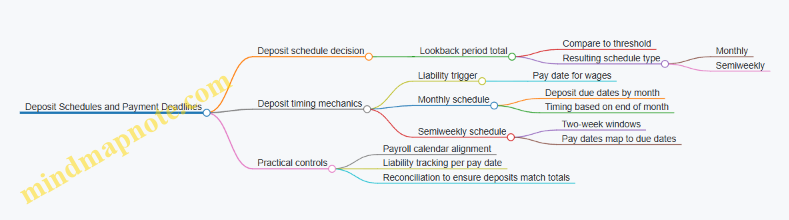
Monthly Schedule Deadlines
If you are on a monthly schedule, you typically deposit by the 15th day of the following month for liabilities incurred during the prior month. The exam-friendly way to remember it is: “Monthly means you pay mid-next-month.”
Example:
- Payroll pay date: May 10
- Tax liability incurred for May
- Deposit due: June 15
If you have multiple payrolls in May, you still aggregate them into one monthly deposit (unless your rules require separate handling for special cases). The exam question usually expects you to sum liabilities for the month, then apply the single due date.
Semiweekly Schedule Deadlines
If you are on a semiweekly schedule, you deposit based on the pay date falling into one of two groups:
- Wednesday–Thursday pay dates: deposit due the following Friday
- Friday–Tuesday pay dates: deposit due the following Wednesday
This is easier to apply when you treat each pay date as belonging to a “deposit batch.”
Example 1:
- Pay date: Wednesday, May 8
- Deposit due: Friday, May 10
Example 2:
- Pay date: Monday, May 13
- Deposit due: Wednesday, May 15
Example 3:
- Pay date: Friday, May 10
- Deposit due: Wednesday, May 15
Notice how Friday can land in either batch depending on the surrounding days. In exam problems, you’re given the pay date and asked for the due date, so you should map the pay date to the correct batch rather than trying to reason from “how many days later.”
The “Small Amount” Rule That Changes Behavior
Many exam questions include a twist: if your liability is below a certain threshold, you may not need to deposit immediately. Instead, you might carry it forward to the next required deposit period.
Example:
- Semiweekly schedule
- Pay date: Thursday, May 9
- Liability for that batch is small enough to defer
- Result: you do not deposit on the immediate Friday due date; you include it in the next deposit period as allowed by the rules
The exam expects you to apply the threshold rule before computing the due date. If the question doesn’t mention the threshold, assume you must deposit on the standard schedule timing.
Systematic Workflow for Exam Questions
- Identify the employer’s schedule type (monthly vs semiweekly) from the scenario’s lookback information.
- Identify the pay date for the wages that created the tax liability.
- Apply the schedule mapping to find the due date.
- Check whether the problem states the liability is under the “no immediate deposit” threshold; if yes, carry forward.
- Confirm the final due date is a deposit deadline, not a “submission” date.
Quick Reference Mind Map: Pay Date to Due Date

Integrated Practice Mini-Set
Scenario A: Monthly schedule. Pay date is June 3. Liability is not stated as below the threshold. Deposit due is July 15.
Scenario B: Semiweekly schedule. Pay date is Tuesday, May 14. Deposit due is Wednesday, May 15.
Scenario C: Semiweekly schedule. Pay date is Thursday, May 9. Liability is stated as below the threshold. Deposit is deferred to the next required deposit period instead of due on Friday, May 10.
When you can consistently map pay dates to due dates and apply the threshold rule only when the question tells you to, you’ve essentially done the whole job the exam is asking for—minus the paperwork, which is where real life starts to get interesting.
7.2 Calculating Deposit Amounts from Payroll Tax Liability
Deposit amounts come from a simple idea: you first compute the total payroll tax liability for the deposit period, then you split it into what must be deposited now versus what can be carried forward. The exam expects you to think in “liability first, deposit second,” and to keep the timing rules straight.
Foundational Concepts You Must Keep Straight
- Tax liability is the total amount you owe for the period. This includes the employee portion and the employer portion for the taxes that are subject to deposits.
- Deposits are payments you make during the year. They reduce your liability balance.
- Any prior deposits already made reduce what you still owe. So the deposit amount for a period is not “the liability,” it’s “liability minus deposits already credited.”
- Deposit periods are not the same as pay periods. A pay period might be weekly, but deposits follow IRS schedules.
A quick mental model: if your liability ledger says you owe $12,000 for the period and you already deposited $7,000 for that same liability, your next deposit is $5,000. If you deposited more than the liability, you have a credit balance that must be handled through adjustments, not by “overpaying again.”
Step by Step Calculation Workflow
Step 1: Identify Which Taxes Create Deposit Liability
Not every payroll-related amount becomes a deposit. For the exam, focus on the core deposit taxes typically tested:
- Federal income tax withholding
- Social Security and Medicare taxes (employee and employer portions)
- Additional Medicare tax when applicable
Then confirm whether any items are excluded from deposit calculations in your scenario. In practice, the system usually flags depositable taxes, but the exam wants you to apply the rule conceptually.
Step 2: Compute Total Liability for the Deposit Period
Add up depositable tax amounts across all pay dates that fall within the deposit period. Use a consistent basis:
- Employee withholding amounts from each paycheck
- Employer tax amounts calculated for the same pay dates
- Additional Medicare tax when employee wages exceed the threshold
Example: Assume a semiweekly deposit schedule and these two pay dates in the same deposit period:
- Pay date A: Federal withholding $3,200; Social Security $2,000; Medicare $500; employer matches Social Security $2,000 and Medicare $500
- Pay date B: Federal withholding $1,800; Social Security $1,200; Medicare $300; employer matches Social Security $1,200 and Medicare $300
Total liability for the period:
- Federal withholding: $3,200 + $1,800 = $5,000
- Social Security (employee + employer): (2,000 + 2,000) + (1,200 + 1,200) = $6,400
- Medicare (employee + employer): (500 + 500) + (300 + 300) = $1,600
Total deposit liability: $5,000 + $6,400 + $1,600 = $13,000
Step 3: Subtract Deposits Already Credited
If the employer already made a deposit for this liability period, subtract it.
Example continuation: Suppose a prior deposit of $8,000 was made for the same deposit period liability. Then:
Deposit amount due now = $13,000 − $8,000 = $5,000
If the result is zero, no additional deposit is required for that period.
Step 4: Apply the Deposit Threshold Rule When Tested
Some schedules use a threshold concept (commonly tested as “if liability is below the threshold, you may not deposit yet”). When the exam includes a threshold, the logic is:
- If liability is below the threshold, you generally carry it forward to the next deposit period.
- If liability meets or exceeds the threshold, you deposit according to the schedule timing.
Example: If the liability for the first deposit period is $4,900 and the threshold is $5,000, you typically carry it forward. If the next period adds $600, the combined liability becomes $5,500, and you deposit based on the rule for when the threshold is reached.
Mind Map: Deposit Amount Logic
Integrated Mini Case for Exam Style
Assume a deposit period contains two pay dates. Total depositable liability computed from those pay dates is $9,600. The employer already deposited $3,200 for that same liability period. The remaining liability is $6,400, so the deposit amount due is $6,400.
Now add a threshold twist: if the exam states the liability was below the threshold earlier and only later reached it, you still compute the same way, but you treat earlier amounts as carried forward until the threshold condition triggers a required deposit. The arithmetic stays consistent; the timing decision changes.
Quick Check Questions
- What is the deposit amount: total liability or remaining liability?
- Which taxes are depositable in the scenario?
- Are you summing across pay dates within the deposit period?
- Did you subtract prior deposits credited to that liability period?
- If a threshold is given, did you apply carry forward correctly?
Answering these in order keeps the calculation clean and exam-ready.
7.3 Using Electronic Filing and Payment Systems Correctly
Electronic filing and payment systems reduce manual errors, but only if you use them with a consistent workflow. The goal is simple: submit the right data, for the right period, to the right jurisdiction, and keep proof that matches what you submitted.
Foundations First: What Systems Expect
Most payroll tax systems follow the same logic: they need a tax period, a tax type, a responsible party identifier, and payment amounts that reconcile to your payroll totals. Before you touch the keyboard, confirm three inputs:
- Tax period matches the payroll period end date rules for that system.
- Tax type matches the form or payment category you are filing.
- Identifiers are correct for the employer and, when required, the reporting entity.
A common mistake is filing for the correct tax type but the wrong period. If your payroll ended on May 31, the filing period might still be June depending on the system’s definition. Treat the system’s period selector as the source of truth, and document how you map payroll dates to system periods.
Step-by-Step Workflow That Prevents Errors
Use a repeatable sequence every time:
- Prepare totals from payroll: federal income tax withheld, Social Security, Medicare, and any state/local withholding.
- Compute employer and employee portions where applicable, then sum to the liability totals the system expects.
- Reconcile to your general ledger or internal control totals before submission. If the numbers do not tie, fix the payroll run or the mapping, not the filing.
- Enter data in the system using the system’s required fields, not your own labels.
- Review the submission summary the system generates. Look for mismatched period, missing amounts, or unexpected zeros.
- Submit and save confirmation immediately. Store confirmation with the period and tax type in a predictable folder name.
A slightly playful rule: if you can’t explain the numbers in one sentence, you’re not ready to file them.
Payment Entry Accuracy and Timing
Electronic payment systems typically accept payments by amount and date. Your job is to ensure the payment date aligns with the system’s cutoff rules for that deposit schedule.
When entering payments, double-check:
- Payment amount equals the liability you computed for that deposit.
- Payment date is the date the system records as the effective date.
- Payment method is the one you intended, especially if the system offers multiple options.
If you must correct a payment, use the system’s correction or adjustment path rather than submitting a second payment that creates confusion in your records.
Filing Data Quality Checks
Electronic filing often includes validation rules that catch obvious issues, but it won’t catch every logic error. Add your own checks:
- Consistency check: totals in the filing match the totals from your payroll report.
- Jurisdiction check: state and local entries match the employee work locations used in payroll.
- Employee count check: if the system shows an employee count, confirm it matches your payroll run.
For example, if you have 25 employees in the payroll run but the filing summary shows 24, stop. That mismatch usually means a missing record mapping or an excluded earning/deduction category.
Mind Map: Electronic Filing and Payment Correctness
Example: One Clean Submission for One Period
Assume an employer runs payroll for the pay period ending April 30 and prepares liabilities for the corresponding filing period in the electronic system. The workflow looks like this:
- Payroll report totals show: federal income tax withheld, Social Security wages and tax, Medicare wages and tax.
- Employer portion is calculated and added to employee withholding where required by the system’s payment categories.
- The employer selects the system’s tax period for the filing window that corresponds to the payroll end date mapping.
- The employer enters the payment amounts exactly as computed, then reviews the summary screen.
- After submission, the employer saves the confirmation with a filename like
2026-04-Federal-Deposit-Period-<period code>.
If the system flags a validation warning, do not ignore it. Resolve the cause, then re-run the reconciliation so the final numbers match what you submit.
Example: Fixing a Mistyped Amount Without Creating New Confusion
Suppose you entered a payment amount that is $120 too low because a decimal was misplaced. The correct approach is:
- Identify the period and tax type from the confirmation.
- Compare the submitted amount to the reconciled liability.
- Use the system’s adjustment or correction function for that period.
- Save the new confirmation and note the reason in your internal log.
This keeps your records aligned: one period, one set of reconciled liabilities, and clear proof for both the original submission and the correction.
7.4 Completing Required Federal and State Filing Forms
Federal and state payroll filings turn your payroll calculations into official records. The exam expects you to treat forms as a chain: correct inputs produce consistent totals, and consistent totals produce fewer questions from auditors and agencies. Start with the foundational idea: every filing form has (1) a reporting period, (2) a taxpayer identity section, (3) a summary totals section, and (4) a reconciliation or certification section.
Foundational Workflow for Form Completion
First, confirm you’re using the right form for the right tax type. Federal income tax withholding reports differ from Social Security and Medicare reporting, and state income tax withholding reports differ again. Then verify the reporting period matches your payroll calendar. A common mistake is filing for the wrong quarter because the deposit schedule and the filing period don’t always align neatly with pay dates.
Next, validate identity fields. Employer name, address, and EIN must match what the agency has on file. For employees, name and Social Security number must match their W-2 records. If you discover a mismatch, fix it before totals are finalized; correcting one employee can change totals and trigger rework.
Finally, reconcile totals. Your payroll system should produce totals for wages, withholding, and tax components. Those totals must tie to the amounts you deposited (or owe) and to the amounts reported on the forms. If the numbers don’t tie, don’t “average” your way out. Find the source: missing payroll runs, retroactive adjustments, or misclassified earnings.
Federal Forms You’ll Commonly See
For federal payroll taxes, the most exam-relevant forms are the quarterly employment tax return and the annual wage statement.
- Quarterly employment tax return: This summarizes Social Security/Medicare taxes and federal income tax withholding for the quarter. It also reports the employer’s portion of Social Security and Medicare and compares it to deposits made.
- Annual wage statement: This reports each employee’s wages and withholding for the year. The employer also files a transmittal summary for the set of employee statements.
A practical example: Suppose in Q1 you processed three payrolls. Your system totals show $120,000 in taxable wages for Social Security, $120,000 for Medicare wages, and $18,000 in federal income tax withheld. If your quarterly form shows different totals, the issue is usually one of these: a payroll run was excluded from the tax calculation, a retro pay adjustment posted to the wrong quarter, or an earnings code was mapped incorrectly.
State Forms and Their Logic
State income tax withholding forms follow the same logic but vary by state. Most states require a periodic summary of withholding and a reconciliation against deposits. Some states also require additional reporting for local jurisdictions.
Example scenario: Your state requires quarterly withholding reporting. Your payroll system produces $9,600 state withholding for the quarter. If your deposits totaled $9,200, the filing should reflect an amount due of $400, assuming no credits or adjustments. If the filing shows $0 due, you likely entered deposits incorrectly or selected the wrong filing period.
Mind Map: Federal and State Filing Form Completion
Advanced Details That Prevent Costly Errors
1) Timing and period boundaries. Payroll taxes are generally tied to when wages are paid, not when they’re calculated. If you process a retroactive adjustment, the form treatment depends on how the agency expects the correction to be reported. The exam angle: you must know that retro pay can change prior period totals and may require amended filings.
2) Rounding and formatting. Forms often require specific rounding rules. If your system rounds differently than the form expects, totals can drift by small amounts. Those small drifts can still trigger notices.
3) Consistency between employee statements and totals. Annual wage statements must match the summary totals on the transmittal. If one employee’s withholding was corrected after you generated the statements, you must regenerate both the employee statements and the summary totals.
Example: Tie-Out Checklist for a Quarterly Filing
Use a simple tie-out sequence:
- Start with payroll system totals for the quarter: taxable wages and each withholding/tax component.
- Confirm deposits made during the quarter for the same tax components.
- Enter totals on the quarterly return.
- Check the return’s computed “liability minus deposits” result.
- If the result doesn’t match your expectation, stop and trace back to the payroll run list.
Example: Your system shows $30,000 federal income tax withheld for the quarter. Deposits for federal income tax withheld equal $28,000. The filing should show an additional $2,000 due (or a credit if your state or federal rules treat overpayments differently). If the filing shows a different due amount, the problem is usually a deposit entry error or a period selection mismatch.
Example: Correcting a Wrong Employee Identifier
If an employee’s SSN is entered incorrectly on the annual wage statement, the agency may reject the filing or flag it for correction. The fix is not just changing the employee statement; you must ensure the transmittal summary reflects the corrected data and that the totals remain consistent with the corrected employee record.
Mind Map: Common Failure Points
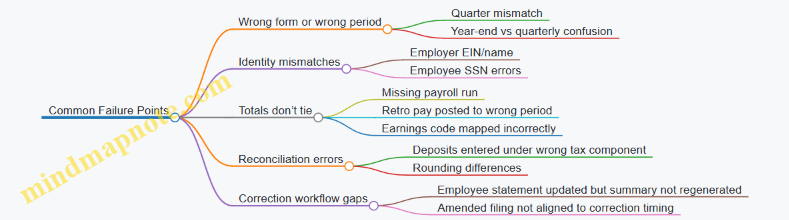
Completing federal and state filing forms is mostly disciplined bookkeeping: choose the correct form, ensure the period is right, verify identities, and tie totals to payroll and deposits. When you treat the filing as a reconciliation artifact rather than a standalone document, the exam-style problems become straightforward arithmetic with a paper trail.
7.5 Handling Late Payments, Penalties, and Administrative Corrections
Late payroll tax payments and filing errors are common exam traps because they mix timing rules, calculation accuracy, and documentation discipline. The key idea is simple: you don’t just “fix the math,” you fix the record trail so the agency can see what happened and when.
Foundations of Timing and Liability
Start by separating three dates that often get confused:
- Tax liability date: when the wages are paid and the tax becomes due.
- Deposit date: when the employer submits the payment to the government.
- Filing date: when the employer submits returns and statements.
Penalties usually attach to deposit timing, not filing timing. Filing late can trigger separate penalties, but deposit lateness is the one that most directly tests your understanding of payroll compliance.
Deposit Schedules and What “Late” Means
Employers follow a deposit schedule based on prior-year tax liability. For exam purposes, treat the schedule as a rule that converts liability into a deadline.
A practical way to reason through it:
- Identify the pay date (when wages are paid).
- Determine the deposit deadline for that liability.
- Compare the actual deposit date to the deadline.
- Apply the penalty logic for “paid after deadline.”
Example: An employer pays wages on April 15. If that liability’s deposit deadline is April 17 and the deposit posts on April 20, the payment is late even if the employer files the return on time.
Penalties: How They Are Triggered and Calculated
Penalties generally fall into categories:
- Failure to deposit on time: assessed when deposits miss deadlines.
- Failure to file on time: assessed when returns are late.
- Interest: accrues on unpaid tax from the due date until paid.
Exam questions often test whether you can distinguish a penalty that is tied to deposit timing versus one tied to filing timing. When in doubt, anchor your reasoning to the liability and the deposit deadline.
Administrative Corrections Without Making It Worse
Corrections come in two flavors: before the agency notices and after it notices. The exam mindset is to choose the correction method that matches the error type and timing.
Common correction targets:
- Incorrect withholding amounts remitted.
- Payroll tax totals reported incorrectly.
- Missing deposits or partial deposits.
- Form errors that require reissue or amended reporting.
A disciplined correction workflow:
- Reconstruct the payroll: confirm pay period, wages, and taxability.
- Recalculate: compute correct employee and employer portions.
- Compare: match correct totals to what was deposited and reported.
- Decide the correction path: adjust deposits, then amend reporting if needed.
- Document: keep a correction memo with dates, amounts, and the reason.
Example: Late Deposit and Correction Sequence
Scenario: A payroll run pays wages on May 3. The employer’s deposit deadline is May 5. The employer deposits on May 8. Later, the employer discovers the deposit was short by $600 due to an earnings code mapping issue.
Systematic correction:
- First, address the late deposit by ensuring the remaining tax is deposited as soon as the error is found.
- Second, correct the shortfall by depositing the missing $600 plus any applicable interest considerations.
- Third, update reporting so the return reflects the corrected tax totals.
The exam point: you don’t wait for year-end to fix a deposit shortfall. You correct the deposit and then align the reporting.
Example: Filing Late but Deposits on Time
Scenario: Deposits were made on time for all payrolls, but the employer files a quarterly return late.
Reasoning: deposit penalties may not apply because deposit deadlines were met. The penalty focus shifts to late filing and any related interest on amounts that were already paid. Your answer should explicitly separate “deposits were timely” from “filing was late.”
Mind Map: Late Payments, Penalties, and Corrections
Administrative Documentation That Holds Up
Documentation is not busywork; it’s how you prove the correction is tied to the correct payroll facts. A strong correction record includes:
- The payroll period and pay date.
- The deposit deadline and actual deposit date.
- The incorrect and corrected tax amounts.
- The reason for the error (for example, mapping or data entry).
- The dates and amounts of corrective deposits.
- The date the amended or corrected return was submitted.
If you can state those items in a short, factual sequence, you’re doing the same thing the exam expects: clear causality from error to correction to updated reporting.
8. Garnishments, Levies, and Court Ordered Deductions
8.1 Identifying Garnishment Types and Priority Rules
Garnishment is a court-ordered process that directs an employer to withhold part of an employee’s wages and send it to a creditor or agency. The Cpp exam expects you to recognize two things quickly: (1) what kind of order you received, and (2) which order gets paid first when multiple orders exist. The “type” matters because the rules for priority, exemptions, and disposable earnings calculations differ.
Core Garnishment Categories
Most payroll garnishment questions fall into these buckets:
- Wage garnishments from creditors: Commonly tied to civil judgments. These orders usually require you to compute withholding based on disposable earnings and applicable limits.
- Child support and spousal support orders: Often handled under special priority rules. In many cases, support orders can outrank other garnishments.
- Federal tax levies and certain federal debts: These are not always treated like standard wage garnishments. They can have distinct priority and procedural requirements.
- Bankruptcy-related payment orders: These can affect what you must withhold and when. Payroll must follow the controlling order.
A practical way to identify the type is to look for the issuing authority and the purpose stated in the order. If the order references support obligations, treat it as support. If it references a tax authority or levy, treat it as federal debt. If it references a judgment creditor, treat it as creditor garnishment.
Priority Rules When Multiple Orders Exist
Priority rules answer: “Which withholding gets taken first when the employee has more than one order?” The exam typically tests the idea that support orders generally have higher priority than creditor garnishments, and that federal obligations may have their own ordering.
A systematic approach for payroll processing:
- List all active orders received for the employee.
- Classify each order into a category (support, creditor, federal debt, bankruptcy-related).
- Apply priority ordering to determine the sequence of withholding.
- Compute disposable earnings limits and apply them in the correct order.
- Document the order of operations so corrections are explainable.
Here’s the key reasoning pattern: you don’t just “add up” percentages. You compute withholding for the highest-priority order first, then apply remaining disposable earnings to the next order, and so on, until the disposable earnings limit is reached.
Disposable Earnings Limits and Why Priority Matters
Disposable earnings are generally the portion of wages left after required deductions. The exact definition depends on the order type and the governing rules, but the exam logic is consistent: priority determines which order consumes the limited disposable earnings first.
Example: An employee has disposable earnings of $500 for the pay period. If a support order requires $220 withholding under the applicable calculation, you withhold $220 first. If a creditor garnishment is next and the remaining disposable earnings is $280, you compute the creditor amount using that remaining capacity and the applicable limit. If the creditor order would exceed what’s left, you withhold only what remains under the limit.
Mind Map: Garnishment Types and Priority Workflow
Example: Two Orders with Different Priority
Assume an employee receives:
- Order A: child support garnishment
- Order B: creditor garnishment
Payroll receives both orders before the same pay date. The correct workflow is to classify both, then withhold for Order A first. Only after Order A is satisfied (within the disposable earnings limit) do you compute withholding for Order B. If the disposable earnings limit is reached by Order A, Order B may receive a reduced amount or none for that pay period.
Example: Misclassification Leads to Wrong Withholding
If payroll mistakenly treats a support order as a creditor garnishment, it may apply the wrong priority sequence. That can cause the creditor to receive withholding that should have been reserved for support, and it can also create downstream correction work. The exam often rewards the habit of classification before calculation.
Quick Checklist for the Exam
- Identify the order’s issuing authority and stated purpose.
- Classify as support, creditor, federal debt, or bankruptcy-related.
- Apply priority sequence before calculating amounts.
- Compute disposable earnings and apply limits in order.
- Document the sequence so corrections are traceable.
8.2 Applying Disposable Earnings Calculations and Exemptions
Disposable earnings are the portion of an employee’s wages that remains after legally required deductions. Garnishment rules use this number to ensure the employee keeps enough money to live on. The exam question pattern is usually consistent: identify the wages, subtract required deductions, apply exemption or priority rules, then compute the garnishment amount.
Core Definitions That Drive the Math
Disposable earnings are wages minus deductions that are required by law. “Wages” for garnishment purposes generally include periodic compensation for personal services, such as hourly pay, salary, and certain bonuses paid as part of regular pay. Voluntary deductions do not reduce disposable earnings; they reduce take-home pay, but garnishment calculations ignore them.
Required deductions typically include federal, state, and local income tax withholding, Social Security and Medicare taxes, and other mandatory items required by statute. Health insurance premiums are often voluntary, but if a plan is required by law or mandated by a collective bargaining agreement, the classification can change. The exam expects you to follow the rule: only deductions required by law reduce disposable earnings.
Step by Step Calculation Workflow
- Identify the pay period and gross wages subject to garnishment. Use the amount actually paid for the pay period, not annual totals.
- Subtract required deductions to get disposable earnings. Keep the calculation explicit; exam graders love visible steps.
- Determine the garnishment type and applicable limits. Disposable earnings limits differ by whether the order is for child support, federal tax levy, or other debts.
- Apply exemptions and priority rules. Some earnings may be exempt, and some orders take priority over others.
- Compute the garnishment amount and confirm it does not exceed the allowed maximum. If the allowed maximum is zero, no garnishment is taken.
Mind Map: Disposable Earnings and Exemptions
Disposable Earnings and Exemptions Mind Map
Example: Simple Disposable Earnings Calculation
Assume an employee is paid weekly with gross wages of $1,000. Required deductions for the week are $150 federal income tax, $60 Social Security, and $40 Medicare. The employee also has a $100 voluntary 401(k) contribution.
- Disposable earnings = $1,000 − ($150 + $60 + $40) = $750
- The voluntary 401(k) does not reduce disposable earnings for garnishment purposes.
If the garnishment limit for the order type is 25% of disposable earnings, the maximum garnishment is:
- $750 × 0.25 = $187.50
Payroll would withhold up to $187.50 (or the amount ordered, if the order is smaller).
Example: Exemption Changes the Base
Now assume the same employee has an additional payment of $200 that is exempt from garnishment under the applicable rule set for that payment type. The gross wages for the pay period are still $1,000, but the exempt portion is treated as not subject to garnishment.
A common exam approach is to compute disposable earnings using only garnishment-subject wages:
- Garnishment-subject wages = $1,000 − $200 = $800
- Required deductions are still subtracted from the garnishment-subject wages base. If required deductions for the pay period total $250, then:
- Disposable earnings (subject) = $800 − $250 = $550
With a 25% limit:
- Maximum garnishment = $550 × 0.25 = $137.50
The key reasoning step is that exemptions can reduce the wage base before the disposable earnings limit is applied.
Common Exam Traps and How to Avoid Them
- Subtracting voluntary deductions. If you subtract the 401(k) or union dues, you’ll understate disposable earnings and likely under-withhold.
- Using the wrong pay period. Disposable earnings must match the pay period covered by the order.
- Mixing exemption and limit logic. Exemptions affect what wages are subject; limits affect how much of disposable earnings can be taken.
- Forgetting the “required by law” test. If you can’t justify a deduction as legally required, treat it as non-reducing for disposable earnings.
Quick Reference Calculation Template
Use this structure in practice problems:
- Gross wages for pay period: _______
- Less exempt wages if applicable: _______
- Garnishment-subject wages: _______
- Less deductions required by law: _______
- Disposable earnings: _______
- Apply garnishment limit for order type: _______
- Maximum garnishment: _______
When you can write the template quickly and correctly, the rest of the problem becomes arithmetic with guardrails.
8.3 Processing Wage Garnishments with Payroll Timing Rules
Wage garnishment processing is mostly about timing: when you receive the order, when you calculate “disposable earnings,” and when you remit payments. The exam usually tests whether you can follow the order’s instructions while still running payroll on schedule.
Core Timing Concepts
Start with three dates you must keep straight.
- Order receipt date: the day your payroll team receives the garnishment notice. This matters because you generally begin withholding based on the order’s effective instructions.
- Pay period end date: the period you’re paying for. Garnishment calculations use the earnings for that pay period.
- Pay date and remittance date: the day employees receive wages and the day you send garnishment payments to the appropriate agency or creditor.
A common exam trap is mixing these up. If the order arrives mid-month, you don’t retroactively “rebuild” prior payroll unless the order explicitly requires it. Instead, you apply the withholding to the pay periods covered by the order’s effective timing.
Step-by-Step Workflow
Follow a consistent workflow each pay cycle.
-
Log the order immediately Record the employer name, employee identifier, court or agency reference, effective date, and any special instructions. Treat this as the source of truth for the payroll system.
-
Verify the order’s withholding basis Confirm whether the order specifies a fixed amount, a percentage, or a formula. Also check for priority instructions if multiple garnishments exist.
-
Compute disposable earnings for the pay period Disposable earnings are generally wages remaining after subtracting legally required deductions (think taxes and certain mandatory items). Voluntary deductions usually do not reduce disposable earnings for garnishment purposes.
-
Apply the garnishment limit Use the order’s calculation method and any statutory caps. If the order says “withhold up to X,” you withhold the lesser of the calculated amount and the cap.
-
Create the garnishment withholding entry The payroll system should separate the garnishment deduction from other deductions so reporting and remittance are accurate.
-
Remit on the required schedule Remittance timing is often tied to when the wages are paid. If your payroll pays on Friday, you typically remit the garnishment amount after that pay date according to the order and applicable rules.
-
Maintain proof and reconciliation Keep the order, payroll register details, and remittance confirmation so you can show the “what, when, and how.”
Mind Map: Payroll Timing Rules
Wage Garnishment Timing Mind Map
Example: Order Arrives Mid-Pay Period
Assume an employee is paid biweekly. The pay period runs March 1–14, and the pay date is March 15. The employer receives a garnishment order on March 10.
- The order’s effective instruction says withholding begins for the pay period in which the order is received.
- For the March 1–14 pay period, you calculate disposable earnings based on wages earned during that period.
- You withhold the garnishment amount from the March 15 paycheck.
- You do not change the prior pay period (February 15 paycheck), because that payroll is already complete and the order did not apply to it.
If the order instead specified a start date of March 16, you would withhold beginning with the next pay period, even though the order arrived earlier. The exam answer depends on reading the order’s timing instructions carefully.
Example: Multiple Garnishments and Priority
Suppose the employee has two garnishments. Garnishment A is a higher-priority order with a percentage limit. Garnishment B is a later-priority order with a fixed amount “up to” a cap.
For the pay period:
- Compute disposable earnings once.
- Apply Garnishment A first, using its cap.
- Reduce the remaining disposable earnings by the amount withheld for A.
- Apply Garnishment B to the remaining amount, again using its “up to” limit.
This ordering prevents over-withholding and ensures each order receives the correct share of disposable earnings.
Quick Check for Exam-Style Questions
When you see a scenario, identify:
- What is the effective start stated in the order?
- Which pay period earnings are used for the calculation?
- Are the deductions subtracted for disposable earnings legally required or voluntary?
- Is the withholding amount the lesser of the computed amount and the cap?
- Does the question ask about withholding (on the paycheck) or remittance (to the agency)?
If you can answer those five items, you can usually pick the correct option without getting lost in payroll calendar trivia.
8.4 Responding to Notices, Orders, and Employee Disputes
Payroll garnishments and withholding notices are the kind of paperwork that shows up when you least want it. The good news is that most responses follow a predictable sequence: verify the document, confirm the employee identity and payroll impact, apply the required action on the correct timing, and keep a clean audit trail. This section walks through that sequence from foundational checks to dispute handling.
Core Response Workflow
Start with a document triage step. Identify what type of notice or order you received (garnishment, levy, wage assignment, administrative withholding, or correction notice). Then confirm the issuing authority and the effective date. If the order includes a case number or docket reference, record it in your payroll case log so later questions have a single source of truth.
Next, verify the employee. Use at least two identifiers such as employee ID and legal name, and cross-check the address or last four digits of an identifier if your policy allows. If the order targets an employee who is no longer active, you still need to follow the order’s instructions for final wages and any continuing obligations.
Then determine the payroll mechanics. For garnishments, you must confirm the calculation basis (often disposable earnings), the priority rules, and the exemption or protected amounts described in the order. For withholding notices, confirm the tax type and whether the notice changes withholding rates, filing status, or additional withholding.
Finally, implement and document. Apply the action in the correct pay cycle, not “as soon as possible.” If the order arrives after a payroll run, follow your internal cutoffs and document why the next cycle is the earliest compliant cycle.
Mind Map: Notices, Orders, and Disputes
Example: Garnishment Order Arrives After Payroll Cutoff
Assume payroll runs on Friday for a biweekly pay period ending Friday, with a cutoff at Wednesday noon for changes. On Thursday, you receive a garnishment order effective immediately. You verify the employee using employee ID and legal name, confirm the employee is active, and review the order for the calculation basis and priority.
Because the cutoff has passed, you do not retroactively change the already-issued paycheck unless your policy and the order explicitly require it. Instead, you schedule the garnishment for the next eligible pay cycle. In your case log, record: the service date, the cutoff rule, the scheduled first deduction date, and the calculation basis you will use.
When you run the next payroll, you calculate disposable earnings using the order’s definition, apply exemptions or protected amounts as stated, and compute the garnishment amount. Store the calculation worksheet with the case reference so an auditor can trace the numbers back to the order.
Example: Employee Disputes the Amount with a Pay Stub
An employee contacts payroll saying the garnishment amount is “too high” and points to a pay stub. First, confirm whether the dispute is about identity, priority, or calculation. If the employee claims they are not the person named in the order, re-check identifiers and employment status. If the employee claims the calculation is wrong, compare the pay stub components to the disposable earnings calculation used for the garnishment.
A practical approach is to provide a line-item explanation: which earnings were included, which deductions reduced disposable earnings, and how the protected amount was applied. If your system supports it, attach a simplified calculation summary rather than a full internal worksheet.
If the order itself is being challenged (for example, the employee claims the order is invalid), you should not treat that as a payroll calculation issue. Acknowledge the dispute, document the request, and escalate according to your internal process for legal review. Meanwhile, continue to comply with the order as written unless you receive an official modification or release.
Advanced Details That Prevent Common Errors
Priority mistakes are the most frequent compliance failure. When multiple deductions exist, confirm the order of operations described in the order and your policy. Also watch for timing mismatches: the order may specify an effective date that differs from the service date, and your implementation should follow the order’s instructions while respecting payroll cutoffs.
Another frequent issue is incomplete documentation. If you only store the final amount and not the calculation basis, you create a gap that slows audits and dispute resolution. Keep a consistent case log entry format: document received, employee verification result, payroll cycle scheduled, calculation basis, and communications.
Case Handling Checklist
- Record the notice or order type, authority, reference number, and dates.
- Verify employee identity using at least two identifiers.
- Determine the payroll impact and calculation basis from the document.
- Apply changes on the next eligible pay cycle per cutoff rules.
- Document calculations, approvals, and employee communications.
- For disputes, distinguish calculation issues from validity challenges and escalate when required.
This approach keeps payroll compliant, makes disputes easier to resolve, and turns “paper chaos” into a traceable process—without requiring anyone to guess what the order meant.
8.5 Reporting Garnishment Payments and Maintaining Proof
What “Reporting” Means in Garnishment Work
Reporting garnishment payments is the set of actions that prove money was withheld and remitted correctly, and that the payroll system’s totals match what the receiving party expects. In practice, you report in two directions: to the court or agency (remittance reporting) and to your own records (audit proof). If you can’t reconcile those two, the exam question is usually testing whether you understand the difference between “withheld” and “paid.”
Core Workflow from Payroll Run to Proof
- Calculate disposable earnings and withholding amount per the garnishment order.
- Withhold during the correct pay period and ensure the deduction posts to the employee’s pay stub.
- Remit on the required schedule using the method specified by the order or applicable rules.
- Record proof that ties together the employee, pay period, amount, and remittance details.
- Report totals to the appropriate receiving entity using their required format.
Mind Map: Reporting and Proof
Maintaining Proof That Holds Up Under Questions
Proof is not one document; it’s a chain. A clean chain usually includes:
- The garnishment order and any amendments or updated limits.
- A payroll report showing the deduction amount for each employee and pay period.
- A remittance record showing the amount, payment date, and reference number.
- A reconciliation worksheet (or system reconciliation report) tying payroll totals to remittance totals.
- A copy of the reporting submission (form, confirmation screen, or generated report).
A practical habit: keep the proof organized by receiving entity → pay period → employee. When someone asks, you can answer in minutes instead of hours.
Example: Matching Withheld and Remitted Amounts
Assume an employee has a garnishment withholding of $120.00 for the pay period ending May 31. Payroll posts the deduction on the check dated June 5. The remittance is sent to the receiving entity on June 10.
Your proof set should show:
- Payroll deduction report: Employee A, pay period ending May 31, garnishment withheld $120.00.
- Remittance confirmation: Payment date June 10, amount $120.00, reference number ABC123.
- Reconciliation: Total withheld for that pay period equals total remitted for that pay period.
If the remittance confirmation shows $118.00, you don’t guess. You investigate whether:
- a partial payment was authorized,
- a bank fee was deducted,
- an adjustment occurred after payroll posting,
- or the wrong pay period was included.
Example: Reporting When Multiple Employees Are Involved
If you remit a single check covering multiple employees, your internal record must still break out amounts per employee. For example:
- Employee A: $120.00
- Employee B: $75.00
- Total remitted: $195.00
Your reporting submission should list each employee’s amount, even if the payment instrument is one total. That prevents the classic mismatch where the receiving entity can reconcile the total but cannot reconcile the individual lines.
Common Reporting Mistakes to Avoid
- Pay period drift: reporting the check date instead of the pay period covered.
- Wrong receiving entity: remitting to the correct court but the wrong unit or address.
- Missing amendments: using old limits after an updated order is received.
- No reconciliation: having documents but no bridge between withheld and remitted totals.
Mini Checklist for the Exam and the Real World
- Did the payroll report show the garnishment deduction for the correct pay period?
- Does the remittance record show the same amount remitted?
- Does your reconciliation tie totals together without unexplained gaps?
- Are the order and any amendments retained with the proof?
- Can you identify the employee and pay period from the remittance reference?
Case-Style Scenario with a Clean Resolution
You receive a garnishment order. During the first payroll run, the system withholds $200.00. The remittance is processed, but the reporting form you submit lists $190.00 because someone copied the amount from an earlier draft. The receiving entity flags the discrepancy.
Resolution steps:
- Pull the payroll deduction report for the pay period.
- Confirm the remittance confirmation amount.
- Correct the reporting submission to match the payroll and remittance totals.
- Document the correction and retain the corrected submission with the original proof set.
That’s the whole point of maintaining proof: it lets you correct errors quickly and show that the final numbers align with the actual payroll withholding and the actual remittance.
9. Benefits, Imputed Income, and Special Payroll Situations
9.1 Tax Treatment of Common Fringe Benefits and Imputed Income
Fringe benefits are noncash compensation or special perks provided by an employer. For payroll and tax reporting, the key question is whether the benefit is taxable to the employee and, if so, how it should be treated for federal income tax withholding and payroll taxes. Imputed income is a related concept: the employer may provide a benefit that is treated as if the employee received cash, even when no cash changes hands.
Foundational Rules for Taxability
Start with two practical tests.
- Is the benefit a form of compensation? If the benefit is provided because of employment, it is more likely taxable.
- Is there a specific exclusion? Many benefits are taxable unless they fit a narrow exception. In exams, exclusions are usually the exception, not the rule.
A useful mental model is to separate benefits into three buckets: cash-like, personal-use, and work-related. Cash-like benefits are typically taxable. Personal-use benefits are often taxable unless an exclusion applies. Work-related benefits may be excludable when they are tied to business needs and not primarily for the employee’s convenience.
Common Fringe Benefits and How They Are Treated
Employer-Provided Health Coverage
Employer-sponsored health insurance is commonly excludable from the employee’s federal income for the portion paid by the employer, assuming it meets plan requirements. However, the employee’s share of premiums is usually handled through payroll deductions, which affects net pay but not the employer’s exclusion logic.
Example: An employer pays $400 per month toward an employee’s health premium. The employee’s taxable wages generally do not include that employer-paid amount for federal income tax purposes. If the employee chooses a higher-cost plan and pays the extra difference through payroll deductions, that employee-paid portion is typically not added back into taxable wages.
Employer-Provided Meals
Meals can be taxable or excludable depending on facts. If meals are provided for the employer’s convenience and on the employer’s premises, and the employee must accept them as a condition of employment, they may be excludable. If meals are essentially a perk or available for personal convenience, they are more likely taxable.
Example: A shift worker is required to eat at the company cafeteria during a mandatory training shift. The employer provides meals on-site. This fact pattern supports potential exclusion. If the same meals are offered as a general benefit for any employee to take home, the exclusion is less likely.
Transportation and Parking
Transportation benefits often hinge on whether they are for commuting and whether they qualify for specific exclusions. Parking is frequently taxable unless it meets an exclusion or is structured under a qualifying plan.
Example: The employer provides free parking at the employee’s assigned spot near the office. If no qualifying exclusion applies, the value may be treated as taxable compensation and included in wages.
De Minimis Benefits
Small, irregular perks may be excludable as de minimis if they are too minor to account for and are not provided systematically.
Example: The employer occasionally gives employees a small gift card during a rare event, and the amounts are modest and infrequent. If the benefit is truly irregular and administratively impractical to track, it may qualify as de minimis.
Imputed Income and Why It Appears on Payroll
Imputed income is used when the employer provides a benefit that the tax system treats as compensation even though the employee did not receive cash. A classic exam area is certain employer-provided loans.
Example: An employer makes a below-market loan to an employee. The tax rules may require the employee to report imputed interest income based on the difference between the market rate and the actual interest charged. Payroll may need to reflect that imputed amount in the employee’s taxable income, depending on how the employer administers the reporting.
Mind Map: Tax Treatment Logic for Fringe Benefits
Payroll Implementation and Exam-Style Reasoning
When you see a benefit description in an exam question, do not jump straight to “taxable” or “excludable.” Instead, identify the benefit type, then match the fact pattern to the exclusion conditions.
Example: An employer provides a parking space for daily commuting. The question asks whether it is taxable. Your reasoning path: parking is typically personal-use commuting support, and unless the scenario includes a qualifying exclusion, you treat it as taxable wages. That conclusion then drives withholding and payroll tax inclusion.
Quick Checklist for This Topic
- Identify the benefit type and whether it is personal-use or work-related.
- Check for a specific exclusion (health coverage, qualified meals, de minimis, or other narrow rules).
- If no exclusion applies, treat the value as taxable compensation.
- For imputed income, recognize that the tax system may require reporting even without cash.
- Use the facts given; small changes in conditions can flip the outcome.
9.2 Handling Health Insurance Premiums and Employer Contributions
Health insurance is one of the most common payroll “extras,” and it’s also one of the easiest places to make a tax reporting mistake. The key is to separate three ideas: who pays, what the payment covers, and how the benefit is treated for tax purposes.
Core Concepts That Drive Tax Treatment
Start with the employee’s paycheck impact. If the employee pays part of the premium through payroll deductions, that amount is typically withheld from wages. If the employer pays part of the premium, that employer-paid portion may be excluded from the employee’s taxable wages under common rules for employer-sponsored coverage.
Next, confirm the plan structure. Employer-sponsored group health plans often qualify for favorable treatment when the plan meets basic requirements and the coverage is provided under the employer’s plan. If the arrangement is not a qualifying plan, the employer contribution can become taxable to the employee.
Finally, track the timing. Payroll systems need the premium amount allocated to the correct pay period, especially when coverage changes mid-month or when an employee starts or terminates coverage on a nonstandard date.
Mind Map: Premium Flow and Tax Outcomes
Employer Contributions in Payroll Systems
In payroll configuration, employer contributions usually appear as an employer-paid cost rather than a deduction from the employee. Many systems represent this as an employer-paid “benefit” element that can be excluded from the employee’s taxable wage base when the plan qualifies.
A practical way to think about it: the employee’s W-2 wages should reflect only the taxable portion. If the employer contribution is excludable, it should not increase the employee’s taxable wages, even though it is a real expense to the employer.
Example: Monthly Premium Proration Across Pay Periods
Assume an employee has employer-sponsored medical coverage costing $600 per month. The employee pays $150 per month via payroll deduction, and the employer pays the remaining $450.
Pay periods are biweekly. Coverage starts on 2026-02-10 and the first paycheck covers 2026-02-10 through 2026-02-23.
- Determine the number of covered days in the month segment for the first pay period.
- Prorate the monthly premium to the pay period.
- Apply the employee portion as a deduction for that pay period.
- Record the employer portion as employer-paid benefit cost for that pay period.
If the proration for the first pay period results in $300 of total premium, then:
- Employee deduction = $300 × ($150 / $600) = $75
- Employer contribution = $300 × ($450 / $600) = $225
The payroll system should ensure the employee deduction reduces net pay, while the employer contribution is treated according to the plan’s taxability rules.
Example: Mid-Cycle Coverage Change
Suppose the employee increases coverage effective the next pay period. The payroll process should not “carry over” the old premium rate. Instead, update the employee’s election effective date, then calculate each pay period using the correct premium rate.
If the employee’s premium increases from $600 to $700 per month and the employee share changes from $150 to $175 per month, the system should reflect both changes at the correct effective date. Otherwise, the employee may see an unexpected paycheck difference, and the employer may misstate taxable wage bases.
Employee Elections and Payroll Deductions
Employee elections determine the employee-paid portion. Payroll should store the election amount and ensure deductions are consistent with the plan’s election rules. When an employee changes elections, the effective date matters more than the request date.
A common operational check is to reconcile the sum of employee deductions for the month to the plan’s expected employee share. If the totals don’t match, the issue is usually proration, effective dating, or a missed payroll run.
Reconciling Employer Contributions with Reporting
Even when employer contributions are excluded from taxable wages, payroll still needs accurate totals for internal records and reporting outputs. Reconciliation typically compares:
- Total employee premium deductions collected
- Total employer premium contributions for the same period
- Taxable wage base impacts (which should not include excludable employer contributions)
If your payroll system provides separate fields for benefit amounts and taxable wage impacts, use them. If it only provides one combined number, you’ll need careful mapping to ensure the taxable wage base is correct.
Practical Checklist for Exam-Style Accuracy
- Confirm the plan is employer-sponsored and eligible for the exclusion.
- Prorate premiums for coverage start and end dates.
- Apply employee elections to payroll deductions with correct effective dates.
- Ensure employer contributions are excluded from employee taxable wages when applicable.
- Reconcile monthly totals to expected plan amounts.
When these pieces line up, the paycheck math feels straightforward—and the exam questions stop being “gotchas” and start being consistent logic.
9.3 Processing Retirement Plan Contributions and Tax Implications
Retirement plan contributions affect payroll in two ways at the same time: they change what the employee receives on the paycheck, and they change what gets counted for income tax and payroll tax purposes. The exam expects you to keep those two effects separate while still processing them in one workflow.
Foundational Concepts for Payroll Processing
Start with the plan type and the contribution source.
- Pre-tax salary deferrals reduce the employee’s taxable wages for federal income tax purposes (and often for state income tax, depending on state rules). They generally do not reduce Social Security and Medicare wages.
- Roth contributions are after-tax for federal income tax purposes, so they typically do not reduce federal income tax withholding wages. They still reduce the employee’s take-home pay because the contribution is withheld from gross pay.
- Employer contributions may be taxable or non-taxable depending on the plan design and the specific contribution type. In many common employer matches, the employer contribution is not included in the employee’s gross income when made.
A practical way to stay organized is to track three buckets for each payroll run: gross pay, taxable wages for income tax, and taxable wages for Social Security and Medicare. Contributions can change bucket one and bucket two differently.
Contribution Limits and Payroll System Behavior
Payroll systems usually enforce limits using year-to-date totals. Your job is to understand what the system is doing and why.
- Deferral limits: Employees can only defer up to an annual maximum. When the employee reaches the limit, the system should stop further deferrals for the remainder of the year.
- Catch-up contributions: Older employees may be allowed additional deferrals. The system needs the employee’s eligibility status and the correct plan configuration.
Example: An employee defers $250 per pay period under a pre-tax plan. If the year-to-date deferrals hit the annual limit mid-year, the next payroll should show $0 deferral withheld, while the employee still receives the full gross pay minus any other deductions.
Tax Implications for Federal Income Tax Withholding
For pre-tax deferrals, the payroll system reduces the employee’s federal income tax withholding wages. That means federal withholding is lower than it would be without the deferral.
For Roth deferrals, the payroll system does not reduce federal income tax withholding wages. Federal withholding is calculated as if the deferral were not pre-tax.
Example: Assume an employee has $2,000 gross pay in a pay period.
- Pre-tax deferral: $200. Federal income tax withholding wages become $1,800.
- Roth deferral: $200. Federal income tax withholding wages remain $2,000.
In both cases, the paycheck shows the $200 contribution withheld, but only the pre-tax case reduces federal withholding.
Social Security and Medicare Treatment
Most retirement plan deferrals do not reduce Social Security and Medicare wages. That means the employee’s FICA withholding usually stays based on gross wages (subject to other rules like wage caps for Social Security).
Example: If the employee’s Social Security wage base has not been reached, the $200 pre-tax deferral still counts toward Social Security and Medicare wages. The employee’s FICA withholding therefore does not drop just because the deferral is pre-tax.
Employer Contributions and Reporting Effects
Employer contributions often require careful mapping in the payroll system so the correct amounts appear in the right reports.
- Employer match: Commonly treated as a non-taxable employer contribution at the time of payroll, but it still needs to be tracked for plan reporting.
- Non-elective employer contributions: Similar tracking requirements apply.
Even when employer contributions are not included in employee income, they still affect payroll records and plan reporting totals. The exam angle is usually: “What changes on the employee’s paycheck and what changes on the tax reporting fields?”
Integrated Payroll Workflow Example
Assume a biweekly payroll dated 2026-02-15.
- Gross pay: $3,000
- Pre-tax deferral: $300
- Roth deferral: $0
- Employer match: $150
- Other deductions: $100
Processing steps:
- Subtract employee deferrals and other deductions to compute net pay.
- Reduce federal income tax withholding wages by the pre-tax deferral amount.
- Keep Social Security and Medicare wages based on gross wages (subject to wage caps).
- Record employer match totals for plan reporting fields even if it does not change employee income tax withholding.
Mind Map: Retirement Contributions and Tax Buckets
Common Exam Traps and How to Avoid Them
- Confusing paycheck deduction with tax treatment: A pre-tax deferral reduces withholding wages, but the employee still sees the deduction on the paycheck.
- Assuming pre-tax means no FICA: Pre-tax deferrals typically do not reduce Social Security and Medicare wages.
- Forgetting limits: When the annual limit is reached, the deferral should stop even if the employee’s election remains unchanged.
Quick Check for Correctness
Before you finalize a payroll run, verify three numbers for the employee: the deferral amount withheld, the federal income tax withholding wage base after pre-tax deferrals, and the Social Security and Medicare wage base that generally remains tied to gross wages.
9.4 Managing Noncash Compensation and Reimbursements
Noncash compensation and reimbursements both involve money-like value, but they behave differently in payroll. Noncash compensation is part of pay and is generally taxable unless a specific rule says otherwise. Reimbursements are payments back to the employee for business expenses and are usually taxable only when the reimbursement fails the “accountable plan” requirements.
Noncash Compensation Foundations
Start by identifying what the employee received. Common examples include employer-provided meals, use of a company vehicle, gift cards, and certain awards. The payroll system needs two decisions: whether the item is compensation and whether it is taxable.
A practical way to reason is to ask: “Would the employee have received this value if they were not employed here?” If the answer is yes, it is often compensation. If the value is tied to a business expense and the employee must substantiate it, it is more likely a reimbursement.
Taxability Logic for Noncash Items
Taxability depends on the type of benefit and how it is valued. For many items, the employer must include a taxable amount in wages and withhold applicable taxes. For example, if an employer gives a $200 gift card for performance, the payroll should treat it as taxable wages and withhold federal income tax, Social Security, and Medicare (subject to the specific payroll rules for the item).
Valuation matters. If the employer provides a benefit at a known cost, that cost may be the starting point for the taxable amount. If the benefit is based on usage, the payroll process must capture the usage basis and apply the correct valuation method.
Reimbursements Under Accountable Plans
Reimbursements are typically handled through an accountable plan, which requires three things: business connection, substantiation, and timely return of excess amounts. If any of these fail, the reimbursement becomes taxable wages.
Example: An employee submits a receipt for a client lunch and requests $85 reimbursement within the plan’s timeframe. The reimbursement is not treated as taxable wages if the plan requirements are met.
Now change one detail: the employee submits no receipt and still requests $85. If the plan does not accept that as substantiation, the $85 becomes taxable wages. Payroll then withholds taxes as if it were additional compensation.
Timing and Payroll Processing
Payroll timing affects how amounts land in the pay period. Noncash compensation is usually included in the period when it is provided or when the taxable amount is determined. Reimbursements are included in the period when the reimbursement is paid, unless your process ties it to a different documented rule.
Example: A company provides a parking benefit on March 15 but processes payroll on March 31. The taxable amount should be included in the March payroll if that is when the benefit is treated as provided under the employer’s documented method.
System Configuration and Data Capture
A payroll system should separate earnings codes for noncash compensation from reimbursement codes. Each code should carry taxability settings and reporting flags. The system also needs fields for valuation basis (cost, usage, or flat amount) and for reimbursement substantiation status.
If your workflow uses an expense management tool, ensure the payroll interface captures whether the reimbursement is accountable-plan compliant. Otherwise, payroll may withhold incorrectly, creating avoidable corrections.
Integrated Example Workflow
Consider an employee who receives two items in the same pay period: a $150 employer-paid training meal and a $60 mileage reimbursement request.
- The training meal is noncash compensation. Payroll includes $150 in taxable wages and withholds taxes.
- The mileage reimbursement is a reimbursement. If the employee submits the business purpose and required details and returns any excess, payroll treats the $60 as non-taxable.
- If the employee fails substantiation for the mileage, payroll treats the $60 as taxable wages and withholds taxes.
This workflow works because each item follows a consistent classification path: compensation classification first, then taxability rules, then withholding and reporting.
Mind Map: Noncash Compensation and Reimbursements
Common Pitfalls and How to Avoid Them
A frequent mistake is treating all employer-paid items as reimbursements. Meals, gift cards, and similar items are often compensation and require wage inclusion. Another mistake is assuming that “employee submitted something” automatically means accountable-plan compliance; payroll needs a clear substantiation status and a documented rule for what counts.
Finally, corrections are easier when the payroll record shows the classification and taxability basis. If you can point to the earnings code category and the accountable-plan status, you can fix the withholding and reporting without guessing.
9.5 Payroll Treatment for Leaves, Terminations, and Final Pay
Leaves and terminations are where payroll compliance meets real life: time off happens, employment ends, and the payroll system still has to produce correct wages, deductions, and tax reporting. This section walks through the logic from foundational definitions to the practical steps you’ll see in exam scenarios.
Foundational Concepts for Leave and Final Pay
Start by separating three ideas: (1) the reason time is not worked, (2) whether the employer pays for that time, and (3) how the pay is treated for tax and reporting.
- Leave types usually fall into paid leave, unpaid leave, and partially paid leave. The payroll system needs the leave status to decide whether earnings are generated.
- Final pay is the last paycheck or pay cycle that includes wages earned through the termination date, plus any additional amounts required by policy or law.
- Tax treatment depends on whether the payment is compensation for services (wages) versus a different category such as certain reimbursements or specific benefits. In most exam contexts, paid leave and regular wages are treated as wages.
Mind Map: Leave, Termination, and Final Pay Flow
Paid Leave vs Unpaid Leave
For paid leave, the payroll system typically creates earnings for the paid hours or days. The key is that the earnings must align with the employee’s pay rate and the leave duration.
For unpaid leave, the system should not generate wage earnings for the unpaid time. However, you still need to manage deductions and benefits carefully. For example, if an employee is on unpaid leave for two weeks, you usually stop payroll deductions that require active pay, while still tracking the employee’s status for benefits administration.
Termination Timing and Proration Logic
Termination introduces a common exam trap: mixing up the termination effective date with the last day worked. Use the termination effective date to determine what portion of the pay period is eligible for wages.
- Hourly employees: wages are based on hours worked through the termination effective date.
- Salaried employees: wages are often prorated by days or hours in the pay period up to the termination effective date, depending on the employer’s method.
Example: A salaried employee has a biweekly pay period of 10 workdays. They are terminated effective on the 7th workday. If the salary is $2,000 for the full pay period, the prorated wages are $2,000 × (7/10) = $1,400, assuming the employer uses day-based proration.
Final Pay Components
Final pay commonly includes:
- Wages earned through the termination date (regular wages).
- Paid leave payout if the employer pays out accrued paid time off or provides a required payout under policy or law.
- Adjustments for prior payroll errors, such as missed hours or corrected rates.
A practical rule for exam-style problems: treat paid leave payout and regular wages as wages for withholding unless the scenario explicitly states a different treatment.
Deductions and Benefits During Leave and Final Pay
Deductions should follow the payroll system’s eligibility rules:
- During paid leave: many employers continue benefit deductions because the employee is still receiving wage earnings.
- During unpaid leave: deductions that require earnings typically stop.
- At termination: stop deductions effective with the termination date, but confirm whether any deductions are taken from final pay.
Example: If health insurance premiums are deducted per pay period and the employee receives a final paycheck that includes prorated wages, you generally deduct the premium for that pay period if the employee is eligible through the termination date.
Withholding and Reporting for Final Pay
Final pay is still a wage payment in the pay period it is processed. That means federal, state, and local withholding calculations apply to the wage earnings included in the final paycheck.
If the final paycheck includes a large adjustment or payout, the payroll system may treat it as supplemental wages depending on the scenario’s facts. In exam questions, the safest approach is to follow the system’s described withholding method and the classification provided.
Integrated Example: Leave Then Termination
An employee is on paid leave for 3 days in the current pay period and then is terminated effective on the 6th workday. The pay period has 10 workdays.
- Regular wages for worked time: 3 workdays (days 4–6) at the employee’s daily rate.
- Paid leave wages: 3 days at the same daily rate.
- Total paid days: 6 out of 10.
If the full pay period salary is $2,500, prorated wages are $2,500 × (6/10) = $1,500. The payroll system then applies withholding to the $1,500 wage amount and stops any ongoing deductions effective with termination, while ensuring the final paycheck reflects the correct benefit eligibility.
Controls That Prevent Common Errors
Use three checks:
- Date alignment: leave dates and termination effective date must map to the correct pay period.
- Earnings eligibility: paid leave generates wages; unpaid leave does not.
- Deduction eligibility: benefits and other deductions follow whether the employee has eligible earnings for the period.
When these checks are consistent, the final paycheck and the year-to-date wage totals come out clean, and the exam questions stop feeling like they’re trying to trick you. They usually are, but at least the logic is solid.
10. Payroll Systems Configuration and Compliance Controls
10.1 Mapping Earnings and Deductions to Taxability Rules
Payroll systems don’t “know” taxability by magic. They follow a mapping: each earning or deduction is tagged to a tax treatment rule, and the rule determines what gets included in taxable wages for federal income tax, Social Security, Medicare, and state income tax. The exam expects you to reason from the pay component to the tax base, then to the reporting output.
Foundational Concepts You Must Keep Straight
Start with three building blocks.
-
Tax base: the wage or compensation amount used to compute a specific tax. Federal income tax withholding uses one base; Social Security uses another; Medicare uses yet another.
-
Taxability: whether a component is included in that base. “Taxable for income tax” is not the same as “taxable for Social Security.”
-
Timing and reporting: even when a component is taxable, the system must place it in the correct pay period and the correct year-end boxes.
A practical way to avoid mistakes is to treat each pay component as a row in your mental spreadsheet: component → taxability flags → tax base totals → withholding and reporting fields.
Taxability Mapping Workflow
Use this systematic workflow for any component.
-
Identify the component type: earning, pre-tax deduction, after-tax deduction, employer-paid benefit, reimbursement, or court-ordered deduction.
-
Check the taxability flags for each tax program: federal income tax, Social Security, Medicare, and state income tax.
-
Apply special rules: limits (like Social Security wage caps), thresholds (like Additional Medicare Tax), and conditional inclusion (like certain reimbursements).
-
Confirm system placement: the component must post to the correct wage totals and the correct deduction totals so reconciliation matches.
Mind Map: Taxability Mapping Logic
Example: Mapping a Regular Pay Earning
Assume an employee earns $2,000 in regular wages for the pay period.
- Federal income tax: regular wages are included in FIT withholding wages.
- Social Security: included in Social Security wages (until the annual cap is reached).
- Medicare: included in Medicare wages.
- State income tax: included in state withholding wages if the state taxes wages.
In a payroll system, this means the component posts to all relevant wage totals. If the system instead posts regular wages only to “gross pay” but not to the wage totals used for withholding, the exam answer would be “withholding is wrong,” even if the gross looks correct.
Example: Mapping a Pre-Tax Deduction
Now assume the employee has a $150 pre-tax health plan deduction.
- Federal income tax: typically excluded from FIT wages when it qualifies as a pre-tax benefit.
- Social Security and Medicare: treatment can differ by benefit type; many employer-sponsored health deductions reduce income tax wages but may not reduce payroll tax wages.
- State income tax: may follow federal treatment or may differ depending on state rules.
The key mapping lesson: you cannot assume “pre-tax” means “not subject to everything.” Your mapping must use separate flags for each tax program.
Example: Mapping a Reimbursement
Assume the employee submits a $200 qualified business expense reimbursement under an accountable plan.
- Federal income tax: generally excluded from income.
- Social Security and Medicare: generally excluded as well when properly substantiated.
- State income tax: often follows federal exclusion, but the mapping should still be state-aware.
If the reimbursement is not substantiated or not under an accountable plan, the mapping changes: it may become taxable wages. In exam scenarios, the wording about substantiation and plan type is the clue that flips the taxability flags.
Example: Mapping a Garnishment Deduction
Assume a wage garnishment requires a $120 deduction.
- Garnishments are usually treated as a deduction from net pay, but the mapping must still respect the disposable earnings calculation rules.
- The garnishment amount typically does not become “taxable wages” for income tax purposes; instead, it affects what the employee receives.
So the mapping for garnishments is less about wage taxability and more about correct netting and compliance with priority and timing rules.
Advanced Details That Prevent Common Exam Errors
-
Separate wage totals from gross pay: gross pay is the sum of earnings; wage totals are the subset used for each tax.
-
Use limits and thresholds after mapping: you map inclusion first, then apply caps and thresholds to the mapped wage totals.
-
State mapping is not a copy-paste of federal: even when the component is taxable the same way, the state may require different wage buckets.
-
Reversals and corrections require re-mapping: if a component is corrected, the system must adjust the same wage totals and reporting fields, not just the current paycheck.
When you can look at a component and immediately state which wage totals it feeds, you’ve essentially done the mapping the exam is testing.
10.2 Configuring Pay Calendars, Pay Periods, and Proration
A pay calendar answers one question: when does pay happen? A pay period answers a second question: which dates belong to that pay? Proration answers the third: what portion of pay applies when the employee’s time doesn’t line up neatly with the pay period.
Core Building Blocks
Start with the pay calendar configuration.
- Pay frequency determines how often payroll runs (weekly, biweekly, semimonthly, monthly). Example: a biweekly calendar repeats every 14 days, so pay dates land on a predictable rhythm.
- Pay date is the check or direct deposit date. Example: if your policy says pay date is every other Friday, the pay period dates must be set so the system can consistently compute earnings for the correct window.
- Pay period start and end dates define the time window included in the payroll run. Example: for a weekly period, start is Monday 00:00 and end is Sunday 23:59, or the system’s equivalent boundary.
Then define how the system maps time to earnings.
- Time entry dates (or clock timestamps) must fall inside a pay period to be included. Example: if an employee clocks in on Monday but the pay period starts Tuesday due to a misconfiguration, the hours will land in the wrong payroll.
- Cutoff rules handle edge cases like late submissions. Example: if you allow time edits until noon on pay date, the system still needs a clear rule for which pay period the edits belong to.
Pay Period Types and Their Practical Consequences
Different pay frequencies create different proration behaviors.
- Weekly and biweekly: proration often depends on days in the pay period. Example: a salaried employee starts mid-week; you prorate the salary by the number of days worked in that week.
- Semimonthly: pay periods are anchored to specific dates (like the 1st–15th and 16th–end). Example: if someone starts on the 10th, only 6 days of the 1st–15th period are worked.
- Monthly: proration uses the month’s day count. Example: starting on the 20th means you prorate across the remaining days of that month.
A common mistake is assuming “days worked” always means calendar days. Many systems use either calendar days or scheduled workdays depending on the pay type and proration method.
Proration Logic That Stays Consistent
Proration should be deterministic: the same inputs produce the same outputs.
- Proration basis: choose whether to prorate by calendar days, scheduled days, or hours. Example: if an employee works a 4-day schedule, scheduled-day proration avoids paying for days they were not scheduled to work.
- Eligibility timing: decide when proration starts and stops. Example: if an employee’s employment begins on 2026-02-15, proration should start on that date, not on the first day of the pay period.
- Rounding rules: define how the system rounds partial amounts. Example: rounding to the nearest cent prevents small discrepancies from accumulating across multiple payroll runs.
Proration also interacts with earnings types.
- Salary proration: typically applies to base salary earnings.
- Hourly proration: usually comes from actual hours worked, so proration is less about partial salary and more about ensuring time is assigned to the correct pay period.
- Accruals and allowances: some systems prorate benefits or accruals based on employment status within the pay period. Example: a monthly allowance might be prorated if the employee is active for only part of the period.
Mind Map: Pay Calendars, Pay Periods, and Proration
Example: Salary Proration in a Semimonthly Setup
Assume a semimonthly calendar with periods 1st–15th and 16th–end. A salaried employee starts on 2026-02-10.
- The relevant pay period is 1st–15th.
- If proration uses calendar days, the period has 15 days.
- Days worked in the period: 10th–15th inclusive = 6 days.
- Prorated salary = Annual salary ÷ 24 ÷ 15 × 6.
Now add a schedule twist: if the system uses scheduled days and the employee is scheduled for 4 days between the 10th and 15th, the prorated amount changes accordingly. That’s why the proration basis must be explicit in configuration.
Example: Preventing Misassigned Hours
Suppose the pay period for a weekly payroll is Monday–Sunday. An employee clocks in at 11:30 PM on Sunday.
- If the system treats the end boundary as exclusive (end at Monday 00:00), the Sunday 11:30 PM entry is included.
- If the end boundary is mis-set to Sunday 23:00, the last hour might be excluded, causing a short paycheck and a reconciliation headache.
A good configuration includes clear boundary definitions and consistent time zone handling so the same clock event lands in the same pay period every time.
Configuration Checklist for Exam-Ready Accuracy
- Confirm pay frequency matches the organization’s payroll policy.
- Verify pay period start and end boundaries are consistent and documented.
- Ensure time entries map to the intended pay period.
- Set proration basis and rounding rules for each relevant pay type.
- Test at least one hire-in-period and one termination-in-period scenario using the same dates the system will see in production.
10.3 Setting Up Tax Jurisdictions and Withholding Profiles
Tax jurisdictions tell your payroll system which rules apply to each employee and each pay event. Withholding profiles tell the system how to apply those rules consistently. If you set either one incorrectly, the system will calculate correctly—just not correctly for the employee.
Foundational Concepts for Jurisdiction Setup
A tax jurisdiction is a geographic or administrative boundary that can impose tax. Common examples include state income tax, local income tax, and special district taxes. Jurisdictions are usually determined from one or more of these inputs:
- Employee home address (often used for local taxes)
- Work location or work state (often used for state and some local rules)
- Tax residency status and exemptions
- Filing status and withholding allowances or equivalents
Withholding profiles are rule bundles that map employee attributes to calculation settings. A profile typically includes:
- Which jurisdictions to apply
- Which withholding method to use
- Whether to use employee-provided exemptions and filing status
- Any employer-specific settings, such as wage base handling
A useful mental model is: jurisdiction selection decides what taxes exist; withholding profile decides how to compute them.
Building a Jurisdiction Map in the Payroll System
Start by defining jurisdiction records in the system. Each record should have a stable identifier, a name, and the rules needed for calculation. Then connect jurisdiction records to address logic.
Example: Local tax based on home address
- Employee lives in City A.
- City A has a local income tax rate and a filing requirement.
- Your system should map City A to a jurisdiction record.
If the employee later moves to City B, the system should re-evaluate jurisdiction selection at the next payroll run using the updated address effective date.
Example: State tax based on work state
- Employee works in State X but lives in State Y.
- Your system should apply State X withholding for wages earned while working in State X.
- If the employee changes work location mid-year, you need an effective date strategy so the system can split wages by period.
Creating Withholding Profiles That Stay Consistent
A withholding profile should be designed to minimize manual edits. Use profiles to standardize common combinations, such as:
- Single state withholding with standard employee filing data
- Multi-jurisdiction withholding with local tax based on home address
- Special handling for employees with exemptions or nonresident status
When you create a profile, ensure it references the correct jurisdiction records and specifies the correct calculation method. Then test it with a small set of employees before rolling it out.
Example: Profile for a typical employee in one state
- Jurisdiction: State X
- Method: Standard state withholding using employee W-4 style data
- Inputs required: filing status, allowances or equivalent, additional withholding amount
If an employee has an additional withholding amount, the profile should apply it after the base calculation so the result matches the employee’s request.
Address Effective Dates and Change Handling
Jurisdiction selection depends on when an address becomes effective. Use a clear rule:
- If an employee provides a new address effective 2026-02-15, apply it to pay periods that include that effective date.
- If the system supports mid-period proration, configure it so wages are split only when required.
Example: Mid-period move
- Pay period: 2026-02-01 to 2026-02-15
- Move effective: 2026-02-10
- Local jurisdiction changes from City A to City B
Your system should either split the wages by effective date or apply a defined cutoff rule. The key is consistency: the same scenario should produce the same approach every time.
Mind Map: Jurisdictions and Profiles
Validation Checklist Using Integrated Examples
Use a validation run that mirrors real payroll behavior:
- Pick employees representing each jurisdiction input path.
- One uses home address for local tax.
- One uses work state for state tax.
- One changes address mid-period.
- Confirm the system selects the correct jurisdictions.
- Compare jurisdiction IDs used in the calculation.
- Confirm the withholding profile applies the correct method.
- Verify base withholding and any additional withholding.
- Reconcile totals to ensure the system’s outputs match expected logic.
- Local tax should move when the address effective date changes.
Example: Quick validation scenario
- Employee A: Home in City A, standard profile.
- Employee B: Works in State X, lives in State Y.
- Employee C: Moves from City A to City B effective 2026-02-10.
After running payroll for the pay period containing 2026-02-10, Employee C’s local tax should reflect the jurisdiction change according to your configured effective date rule, while Employee B’s state withholding should remain tied to work location.
When jurisdiction selection and withholding profiles are configured this way, the system becomes predictable: it applies the right rules to the right people at the right time, without relying on last-minute manual fixes.
10.4 Running Payroll, Validating Outputs, and Preventing Errors
Running payroll is where theory meets spreadsheets, and spreadsheets meet reality. The goal is simple: produce correct pay, correct taxes, correct deductions, and correct records—consistently. This section walks from foundational checks to advanced validation patterns, using examples that mirror what you’ll see in payroll systems.
Core Workflow Before You Press Run
Start with inputs, not outputs. A payroll run is only as accurate as the data it uses.
- Confirm pay calendar and pay period boundaries. If the pay period is wrong, everything downstream is wrong. Example: A biweekly employee should be paid for 1/1–1/14, but the system is set to 1/15–1/28. Even perfect tax logic will calculate on the wrong earnings dates.
- Verify employee status and eligibility. Ensure the employee is active for the pay date and that termination dates don’t accidentally exclude final pay.
- Review time and earnings inputs. Check hours, rates, overtime flags, and any earnings overrides. Example: A salaried employee receives an hourly overtime earning code due to a mis-mapped rule; the system will dutifully compute overtime tax treatment even if the business intent was different.
- Validate deductions setup. Confirm garnishment orders are active, voluntary deductions are authorized, and benefit deductions match the current plan election.
Output Validation Layers
Validation should happen in layers so you catch both obvious and subtle issues.
Layer 1: Totals That Must Balance
Run-level totals should reconcile across the system’s internal views.
- Gross pay totals should match the sum of earnings lines.
- Total deductions should match the sum of deduction lines.
- Net pay totals should equal gross minus deductions.
Example: If gross is $10,000 and deductions are $2,500, net must be $7,500. If the system shows net as $7,600, you likely have a rounding rule, a missing deduction line, or an adjustment that didn’t flow into net.
Layer 2: Taxability and Tax Buckets
Tax calculations depend on whether each earning is taxable for federal, Social Security, Medicare, and state.
- Confirm each earning code’s taxability mapping.
- Confirm deduction tax treatment where applicable.
Example: A reimbursement is entered as a taxable earning code. The system will increase federal withholding and payroll taxes, and your year-to-date totals will drift. The fix is not “adjust withholding”; the fix is correcting the earning classification so the tax buckets are right.
Layer 3: Jurisdiction and Withholding Consistency
State and local withholding require correct jurisdiction assignment.
- Confirm employee tax profiles match the current work location and filing status.
- Ensure the system uses the correct withholding method for the pay date.
Example: An employee moved cities mid-year. If the local tax profile wasn’t updated, the run will withhold the old city rate. The output may look plausible, but the reconciliation to expected local totals will fail.
Layer 4: Special Items and Timing Rules
Some items are sensitive to timing.
- Garnishments: disposable earnings calculations and priority rules must be applied correctly.
- Adjustments: retro pay and corrections must post to the correct tax periods.
Example: A retro adjustment is entered with the current pay period date but should be treated as a prior-period correction. The system may allocate taxes to the wrong reporting period, creating a mismatch between payroll registers and year-to-date reporting.
Mind Map: Validation Mindset
Practical Example: Catching a Real Error Pattern
Suppose an employee has: 80 regular hours, 10 overtime hours, a pre-tax benefit deduction, and a voluntary after-tax deduction.
- Check totals: gross = (80×rate) + (10×overtime rate). If gross doesn’t match the sum of earnings lines, stop and fix the earnings input.
- Check net math: net = gross − (taxable deductions + after-tax deductions + garnishments). If net is off by a small amount, inspect rounding settings and whether the system applies rounding per line or at the total level.
- Check taxability: pre-tax benefit should reduce taxable wages for income tax and payroll tax only if the plan is configured that way. If it reduces only one tax type, the mapping is inconsistent.
- Check jurisdiction: confirm state and local withholding profiles. If withholding looks “reasonable” but doesn’t match expected rates, the profile is likely stale.
Preventing Errors with Control Points
Prevention is mostly about forcing the right checks at the right time.
- Use pre-run validation reports to flag missing tax profiles, inactive deductions, and unmapped earnings codes.
- Require approvals for changes to tax profiles, garnishment orders, and retro adjustments.
- Lock critical configuration during a payroll cycle so a late change can’t silently alter results.
- Maintain an audit trail by documenting why overrides were applied.
Diagram: Validation Flow
    flowchart TD
  A[Start Payroll Run] --> B[Verify Pay Period and Calendar]
  B --> C[Validate Employee Eligibility]
  C --> D[Check Earnings and Time Inputs]
  D --> E[Confirm Deductions and Benefits]
  E --> F[Run Payroll]
  F --> G[Layer 1 Totals Balance]
  G --> H[Layer 2 Taxability Buckets]
  H --> I[Layer 3 Jurisdiction Consistency]
  I --> J[Layer 4 Special Items Timing]
  J --> K[Reconcile Run Totals to Register and GL]
  K --> L{All Checks Pass?}
  L -- Yes --> M[Approve and Post]
  L -- No --> N[Correct Inputs or Configuration]
  N --> F
Final Output Standards
A payroll run is “done” only when three things agree: employee-level results, run-level totals, and accounting outputs. If any layer disagrees, treat it as a signal to find the source of truth mismatch, not as a reason to manually patch numbers. That approach keeps compliance and reporting aligned, and it makes the next run easier instead of more confusing.
10.5 Using Reports for Reconciliation, Audit Trails, and Sign Offs
Payroll reports are where “the numbers look right” becomes “the numbers can be proven.” The goal is to reconcile totals across systems, preserve an audit trail of who changed what and why, and produce sign-offs that a reviewer can verify without guessing.
Core Reconciliation Mindset
Start with a simple rule: every payroll run produces totals that must match across at least three places—payroll system, general ledger, and tax reporting outputs. If they don’t match, you need a report trail that explains the mismatch.
A practical workflow uses a three-layer check:
- Run totals: gross pay, taxable wages, deductions, employer taxes.
- Accounting mapping: how those totals post to GL accounts.
- Reporting outputs: what the system will later report on tax forms and employee statements.
Mind Map: Report Types and Their Purposes
Building the Evidence Pack
An evidence pack is a consistent set of reports and identifiers. Use the payroll system’s run ID and pay period as the anchor, then include:
- Payroll Register for the run totals.
- Earnings and Deductions Detail to verify classification.
- Tax Liability Report to confirm employer and employee tax totals.
- GL Posting Summary showing journal entry totals by account.
- Adjustments and Voids Report listing reversals, off-cycle checks, and manual corrections.
Example: A payroll run shows $120,000 gross pay. The Payroll Register confirms $120,000. The GL Posting Summary shows debits and credits that net to the same totals, but one deduction account is off by $200. The Earnings and Deductions Detail reveals that $200 was reclassified from a pre-tax deduction bucket to an after-tax bucket due to a benefit election change approved mid-cycle. The audit trail shows the approver and timestamp, so the reviewer can accept the difference.
Audit Trails That Actually Help
Audit trails should answer three questions quickly: what changed, why it changed, and whether it was authorized.
To make that happen, ensure your process captures:
- Manual adjustments: amount, affected employee, earning/deduction code, and reason.
- Rate changes: effective date and pay period impact.
- Tax profile changes: withholding allowances or jurisdiction updates.
- Approval records: who approved the change and when.
Example: An employee’s federal withholding increases after a new W-4 is entered. The report set should show the W-4 effective date, the withholding recalculation, and the change log entry. If the system supports it, include a Withholding Recalculation Report or an equivalent change summary.
Sign-Offs with Clear Boundaries
Sign-offs should be tied to specific checks, not vague approvals. A reviewer can sign with confidence when the sign-off checklist matches the report evidence.
Use a sign-off checklist aligned to the reconciliation layers:
- Pre-run: verify pay calendar, pay period dates, and eligibility inputs (for example, new hires and terminations).
- Post-run: reconcile run totals to GL posting totals.
- Exception review: confirm every void, reversal, and off-cycle item has an approved reason.
Example sign-off note: “Run ID 10492, Pay Period 2026-02-01 to 2026-02-15. Payroll Register totals match GL Posting Summary within $0.00. One reclassification adjustment of $200 approved on 2026-02-10; audit trail present in Adjustments and Voids Report.”
Advanced Details Without the Headaches
When totals don’t match, avoid random troubleshooting. Instead, use targeted reports to isolate the cause:
- If gross pay matches but taxable wages differ, focus on earnings taxability rules and classification detail.
- If tax totals match but GL differs, focus on account mapping and posting configuration.
- If employee statements differ from run totals, focus on off-cycle items and statement generation timing.
Finally, keep sign-offs consistent across runs. A reviewer should be able to pick any payroll run and reproduce your logic using the same report set, the same identifiers, and the same checklist structure.
11. Year End Reporting and Employee Statements
11.1 Preparing for Year End With Data Quality Checks
Year-end reporting is mostly a data quality exercise with a paperwork finish. The goal is simple: ensure the numbers that feed your forms and statements match the payroll activity, and that the underlying employee and tax settings are consistent. Start with the basics, then move toward reconciliation and exception handling.
Define the Year-End Scope and Freeze the Inputs
Before you touch calculations, decide what “year-end” means for your process. For example, if you run payroll on 12/31 and the check is dated 01/02, confirm which pay date your system uses for tax reporting. Then freeze key inputs so you don’t chase moving targets.
Example: Your payroll run on 12/30 produces a check dated 01/02. If your system assigns tax reporting to the check date, the wages belong to the new year. Your data quality checklist should capture this rule so you don’t accidentally include those wages in the prior year.
Validate Employee Master Data Completeness
Year-end forms depend on employee identity and status fields. Check that each employee has the required identifiers, correct employment dates, and consistent tax settings.
Example: An employee’s address is missing a ZIP code. The payroll system may still produce pay, but the year-end statement can fail validation or print incorrectly. Fixing this after totals are finalized is painful because you’ll need to re-run outputs.
Focus on:
- Employee type and eligibility for benefits and tax handling
- Pay frequency and pay calendar alignment
- Addresses and state/jurisdiction settings
- Withholding elections and exemption status
Reconcile Earnings and Deductions to Pay History
Next, confirm that the totals your system reports for the year match the underlying pay history. This is where many errors hide: a retro adjustment posted to the wrong period, an earnings code mapped to the wrong taxability category, or a deduction that stopped mid-year.
Example: A retro pay event is entered as a separate earning line. If the earning code is mapped as non-taxable for federal purposes, your year-end totals will be off even though the gross pay looks correct.
Use a three-way match:
- Pay register totals for the year
- Earnings and deduction totals by code
- Taxable wage bases used by reporting
Verify Taxability Mapping and Jurisdiction Rules
Tax reporting is only as accurate as your taxability mapping. Confirm that each earnings type is categorized correctly for federal, Social Security, Medicare, and state rules. Also verify that state and local jurisdiction assignments are correct for each employee.
Example: An allowance is configured as taxable for Social Security but not for federal income tax. If the mapping is wrong, you’ll see mismatched wage bases across forms.
Check Withholding Calculations and Rounding Behavior
Withholding errors often come from edge cases: multiple jobs, rate changes mid-year, and special withholding elections. Confirm that the system’s rounding behavior matches your expectations.
Example: Federal withholding is calculated per pay period and rounded each time. If you compare annual totals to a “recalculate from scratch” approach, you may find small differences that are actually normal. Your checklist should record what “normal” looks like so you don’t waste time.
Review Adjustments, Corrections, and Retroactive Entries
Year-end data quality includes knowing what changed. Identify retro adjustments and corrections and ensure they land in the correct reporting year and correct wage bases.
Example: A correction entered in January for a December payroll might reverse wages in the prior year and re-post them in the new year depending on system settings. Your checklist should capture the system’s correction posting logic.
Run Exception Reports and Resolve Them Systematically
Exception reports are your best friend because they surface issues you can’t easily spot by totals alone. Typical exceptions include missing identifiers, zeroed tax fields, negative wages, and out-of-range values.
Example: An employee shows Medicare wages but zero Medicare withholding. That might be correct if the employee is below thresholds, or it might indicate a configuration issue. Treat exceptions as a queue with documented resolution.
Perform Final Reconciliation Before Producing Outputs
Before generating year-end statements and forms, reconcile totals at the employer level.
Example: Employer totals for federal withholding should reconcile to the sum of employee withholdings across all pay periods. If they don’t, stop and trace the difference to a specific pay period or earnings code.
Document Decisions and Keep an Audit Trail
Data quality work should be traceable. Record what you checked, what you changed, and why. This reduces rework when someone asks, “Why is this number different?”
Example: You change an employee’s state withholding setting after discovering a wrong residency code. Document the effective date and the reason so the correction is defensible.
Mind Map: Year-End Data Quality Checks
A Practical Checklist Flow You Can Follow
Use a repeatable order so you don’t fix symptoms while the root cause remains.
Example flow:
- Confirm reporting year rules for late-dated checks
- Validate employee identifiers and addresses
- Reconcile pay history totals to earnings/deduction totals
- Validate taxability mappings and jurisdiction assignments
- Review withholding calculations and rounding expectations
- Process retro adjustments and confirm correct year placement
- Resolve exception report items with documented outcomes
- Perform employer-level reconciliation and stop on any mismatch
- Generate outputs only after tie-outs pass
If you follow that sequence, you’ll catch the common problems early—before they become “mysterious” differences on year-end statements.
11.2 Completing Form Requirements for Federal Reporting
Federal reporting is where payroll accuracy meets paperwork discipline. The goal is simple: the totals you withheld and paid must match what you report, and the employee-facing statements must reflect the same wage and withholding logic used during payroll.
Foundational Concepts Before You Touch Forms
Start by separating three buckets of information:
- Employee wages by type: what counts as wages for federal income tax, Social Security, and Medicare.
- Withholding amounts: federal income tax withheld, plus the payroll tax components that are reported separately.
- Employer tax payments and adjustments: deposits made, any true-ups, and corrections.
A practical habit is to reconcile at the same “grain size” each time: totals per pay period roll up to quarterly totals, and quarterly totals roll up to year-end reporting. If you reconcile only at year end, you’ll discover errors too late to fix them cleanly.
Mind Map: Federal Reporting Form Flow
Core Federal Forms and What They Must Agree With
Form W-2 reports employee wages and withholding for the year. It also reports Social Security wages and Medicare wages, which may differ from federal income tax wage totals because the rules for what counts as wages can vary by tax type.
Form W-3 summarizes the W-2 totals for the employer. Think of it as the employer’s “roll-up” that must match the sum of all W-2s.
Form 941 is the quarterly return that captures federal income tax withheld and the employer and employee portions of Social Security and Medicare taxes. Year-end W-2 totals should align with the underlying payroll tax logic used to complete 941.
Form 940 reports FUTA tax. It is separate from income tax withholding and from FICA reporting, so don’t mix the wage bases.
Systematic Workflow for Completing W-2 and W-3
- Lock the wage and withholding basis: confirm earnings codes are mapped to the correct taxability buckets. A common mistake is treating a reimbursement as taxable when it should be excluded, which then cascades into incorrect W-2 boxes.
- Validate employee identifiers: names and tax IDs must be consistent with payroll records. If an employee’s tax ID is missing or formatted incorrectly, the form can be rejected or require correction.
- Compute wage totals by tax type:
- Example: An employee earns $2,400 in taxable wages during a quarter and has $300 federal income tax withheld.
- If the employee also has $200 of qualified reimbursements that are excluded from federal income tax, then federal income tax wages reflect $2,200, while Social Security and Medicare wages may still reflect $2,400 depending on the reimbursement treatment.
- Sum W-2 totals into W-3: W-3 totals must equal the sum of the employer’s W-2s for the same year.
- Reconcile to 941: federal income tax withheld on W-2 should match the federal income tax withheld reported on 941 across all quarters, after accounting for any corrections you already filed.
Example: Catching a Mismatch Early
Suppose your payroll system shows total federal income tax withheld for the year as $9,600. Your completed 941 filings total $9,600 as well. When you generate W-2s, you notice the sum of Box 2 (federal income tax withheld) equals $9,450.
A clean troubleshooting path:
- Check for one employee with a corrected withholding amount that was updated in payroll but not reflected in the W-2 run.
- Verify whether any negative adjustments or reversals were applied to withholding during payroll but not included in the W-2 wage/withholding totals.
- Confirm that the W-2 run includes all employees paid during the year, including those terminated mid-year.
Fixing the root cause before filing prevents the “two sets of numbers” problem that creates rework and employee confusion.
Correction Discipline Without Chaos
If you must correct after filing, treat it like a controlled change:
- Correct the underlying payroll data first.
- Re-run the affected forms so the corrected W-2 totals align with the corrected employer totals.
- Ensure the correction logic doesn’t create a new mismatch with the quarterly totals already reported.
A good rule is to document what changed and why, using internal notes tied to the specific employee and tax boxes affected. That way, the next reconciliation is faster and less guessy.
11.3 Handling State Year End Reporting and Filing Workflows
State year end reporting is where payroll compliance stops being a “run payroll and move on” activity and becomes a controlled workflow. The goal is simple: produce accurate state wage and withholding totals, submit required forms on time, and keep a clean audit trail showing how you got there.
Foundational Workflow: From Data Freeze to Submission
Start by defining a data freeze date for the year. For example, if your year ends December 31, you might lock payroll adjustments through February 15, 2026, so reporting totals are stable. Then:
- Confirm jurisdiction coverage: verify every employee’s state and local tax setup for the year, including employees who moved or changed tax profiles mid-year.
- Reconcile payroll totals: compare state taxable wages and state withholding totals from payroll runs to the amounts in your payroll tax reports.
- Validate employee-level totals: spot-check a sample of employees across common scenarios—new hires, terminations, multiple pay frequencies, and employees with adjustments.
- Prepare state forms: generate required filings from the payroll system or reporting module.
- Review and sign off: use a checklist that ties each form total to the reconciliation worksheet.
- File and confirm acceptance: submit electronically where required and store confirmation receipts.
- Handle corrections: if you discover an error after filing, document the cause and file an amended return following the state’s rules.
Mind Map: State Year End Reporting and Filing
Example: Reconciling State Totals Without Getting Tricked
Assume your payroll system reports for State A:
- State taxable wages: $120,000
- State withholding: $7,200
Your reconciliation worksheet shows:
- Total state wages from payroll reports: $120,000
- Total state withholding from payroll reports: $7,200
- Total state wages posted to the general ledger: $119,950
The mismatch is small, but it matters. The next step is to trace the difference to timing or mapping. A common cause is that certain items are taxable for state reporting but posted differently in the ledger (for example, reimbursements treated as taxable in one context). You resolve it by aligning the reconciliation method to the state reporting definition, not by forcing the ledger to match the payroll report.
Example: Employee-Level Validation That Catches Real Errors
Pick three employees:
- Employee 1: hired mid-year, paid biweekly
- Employee 2: terminated in November
- Employee 3: had a retroactive adjustment in December
For each employee, confirm:
- The state tax profile used during each pay period
- The state taxable wage amount included in the year-end totals
- The state withholding amount reported
If Employee 3 has a retroactive adjustment, ensure the system applied it to the correct taxability period. A frequent exam-style pitfall is assuming retro pay always lands in the current period. In many systems, retro adjustments are allocated back to the original pay period for tax reporting purposes, which changes year-end totals.
Advanced Details: Handling Corrections and Amendments
When an error is found after filing, you need more than “fix the number.” You need a workflow:
- Classify the error: wrong state jurisdiction, wrong taxability, missing pay, or incorrect withholding calculation.
- Quantify impact: determine which totals change and whether the change affects multiple employees.
- Check amendment rules: some states require amended filings only for certain error types or thresholds.
- Document the correction: record what changed, why it changed, and which payroll runs were affected.
- Resubmit and archive: store the amended filing confirmation and keep the original submission record.
A good habit is to keep a correction log with fields for error description, affected employees, original totals, corrected totals, and filing reference numbers. It turns a stressful correction into a traceable process—exactly what an auditor wants and what an exam question is testing.
11.4 Correcting Year End Forms and Managing Reissues
Year-end corrections usually start with one of three triggers: a payroll run that used the wrong taxability setting, a late employee status change that affects withholding, or a data entry slip that shows up when totals are reconciled. The goal is to fix the underlying cause, then correct the forms in a way that matches how the IRS and states expect the numbers to be reported.
Foundational Checks Before You Touch Forms
Start with reconciliation, not paperwork. Compare these totals for the tax year:
- Gross wages by employee versus payroll system totals for the same pay period range.
- Federal income tax withheld totals versus the sum of what was deposited.
- Social Security and Medicare wages and taxes versus what the system calculated and what was deposited.
- State withholding totals versus state deposits and state wage bases.
If you find a mismatch, identify whether it’s a calculation issue (taxability, rates, limits) or a reporting issue (wrong employee record, wrong filing status, wrong jurisdiction). Fixing the wrong layer leads to rework and, occasionally, reissues that could have been avoided.
Correction Decision Tree
Use a consistent decision process for each employee and each form type.
- If the employee’s wages or withholding were wrong for the year, you generally need a corrected form.
- If the employee’s information was wrong but the wages and taxes were correct, you may still need a corrected form because the recipient copy must match the IRS/state record.
- If you discover the error before filing, correct the source data and regenerate the forms.
- If you already filed, you typically issue a corrected form and follow the correction workflow required by the form type.
A practical rule: correct the payroll data first, then regenerate forms from the corrected payroll. Editing forms manually without updating payroll totals is how errors multiply.
What to Fix in Payroll Systems
Most year-end errors trace back to a small set of settings. Common culprits include:
- Earnings classification mapped incorrectly to taxability rules.
- Pay period dates that caused an amount to land in the wrong tax year.
- Withholding settings that didn’t update after a new W-4 or a rate change.
- Employer and employee tax flags that were overridden during a special payroll.
Example: An employee received a one-time bonus in December, but the earnings code was set to exclude federal withholding. The payroll run calculated the bonus as wages but withheld $0 federal income tax. The correction is to update the earnings code taxability mapping, re-run the affected payroll period, and then regenerate the year-end forms.
Managing Reissues Without Losing Track
Reissues are easier when you treat them like controlled releases. Maintain a log with:
- Employee identifier and the form type being corrected.
- What changed in payroll (earnings code, taxability, dates, withholding settings).
- The old totals and the new totals.
- The reason for correction in plain language.
- The date you regenerated forms and the date you sent corrected copies.
For example, if you regenerated corrected forms on 2026-02-15 after discovering a taxability mapping error, the log should show the exact payroll periods affected and the before/after totals for each tax category.
Mind Map: Year End Corrections Workflow
Example: Correcting a Withholding Error After Filing
Assume you filed year-end forms and later found that an employee’s federal withholding was understated because their W-4 effective date was entered incorrectly. The steps are:
- Correct the W-4 effective date in the employee record.
- Re-run the payroll for the affected pay periods so the system recalculates federal withholding.
- Confirm the corrected federal income tax withheld total matches the corrected payroll totals.
- Generate corrected year-end forms from the corrected payroll.
- Issue corrected recipient copies and follow the correction filing workflow for the form type.
The key detail is that the corrected form should reflect the corrected payroll totals, not a patch applied at the form level.
Common Pitfalls and How to Avoid Them
- Correcting only one tax category while leaving wage totals unchanged. If wages change, withholding and employment taxes often change too.
- Regenerating forms from the wrong payroll cut. Always confirm the pay period range and tax year boundaries.
- Sending corrected copies without a version trail. If an employee asks which copy is correct, you need a clear record.
Final Validation Checklist
Before you consider the reissue complete, verify:
- Each corrected form’s totals match the corrected payroll totals.
- Federal and state withholding totals reconcile to deposits.
- Social Security and Medicare wages align with wage base rules.
- The correction log is complete for every employee corrected.
When these checks are done, the paperwork stops being the main event and becomes what it should be: a faithful report of what the payroll system already calculated.
11.5 Communicating With Employees About Statements and Discrepancies
Employees don’t experience payroll as a set of forms and calculations; they experience it as a paycheck, a statement, and whether the numbers make sense. Good communication reduces errors, prevents repeat questions, and keeps the payroll record defensible.
Foundational Principles for Clear Employee Communication
Start with the goal: help employees understand what they were paid, what was withheld, and why. Use consistent language across pay statements and follow-ups. When you explain a discrepancy, separate three ideas: the amount paid, the tax or deduction treatment, and the timing of when it appears.
A practical rule: if the employee can point to a specific line on the statement, your response should reference that same line. If they can’t, begin by confirming the pay period and the pay date shown on the statement.
What Employees Should Expect on Their Statements
Most statement questions fall into predictable categories:
- Gross pay components: regular earnings, overtime, bonuses, and other earnings.
- Withholding and taxes: federal income tax, Social Security, Medicare, and any state or local withholding.
- Deductions: benefits, garnishments, voluntary deductions, and other reductions.
- Net pay: the final amount after all applicable items.
When you communicate, mirror this structure. For example, if an employee asks why net pay is lower than expected, guide them to compare gross pay first, then deductions and withholding, then net pay.
A Systematic Discrepancy Triage Workflow
Use a repeatable sequence so you don’t miss the boring-but-important causes.
- Confirm identity and pay period: verify the employee and the exact pay period on the statement.
- Verify inputs: check time worked, pay rate, benefit elections, and withholding settings.
- Recalculate the affected lines: focus on the specific earnings or deduction that changed.
- Check timing effects: some items post in a later cycle (for example, corrections or retroactive adjustments).
- Determine whether it is a statement issue or a payroll processing issue: a statement can be correct while the employee’s expectation is based on a different pay period.
- Document the resolution: record what changed, why it changed, and how it was communicated.
Mind Map: Employee Statement Questions and Responses
Example: Withholding Looks Wrong but Timing Explains It
An employee says, “My federal withholding jumped this paycheck.” You confirm the pay period and notice they started a new job mid-month. Their statement shows regular earnings plus a prorated rate change, and the withholding settings were updated after the first payroll of the month.
Your response should:
- Point to the federal withholding line.
- Explain that withholding is calculated per pay period and can change when rates or settings change.
- Clarify that the earlier portion of the month may have been withheld differently.
A clear message might be: “Your federal withholding is higher on this statement because your pay rate and withholding settings were updated during the month. The calculation is based on the current pay period, so the amount withheld can differ from the prior check even when your annual situation hasn’t changed.”
Example: Deduction Discrepancy Due to Benefit Election Change
An employee reports that their health premium deduction is missing. In the system, their benefit election was updated effective the next pay period, not the current one. The statement shows no deduction for this pay period, but the next statement will include it.
Communicate with precision:
- Confirm the benefit name and deduction line.
- State the effective date logic.
- Provide the expected appearance on the next paycheck.
Example: Correction Needed and How to Explain It
If you discover an error—say overtime hours were underreported—recalculate the affected earnings and withholding. Then communicate what changed and when the corrected amounts will appear.
A good correction message includes three elements:
- What was wrong: “Overtime hours were entered incorrectly for the pay period.”
- What changed: “The corrected overtime amount updates gross pay and related withholding.”
- What the employee will see: “The adjustment will appear on your next paycheck as a separate earnings line and corresponding withholding difference.”
Practical Communication Templates You Can Reuse
Use short, structured responses. Keep them consistent so employees know what to expect.
- When no correction is needed: confirm the pay period, explain the calculation driver, and point to the exact statement line.
- When correction is needed: state the error category, describe the adjustment impact, and specify the timing of the corrected amounts.
- When information is missing: ask for the minimum needed detail, such as the pay period and the line item they’re questioning.
Mind Map: Message Content Checklist
Closing the Loop Without Creating New Questions
After the explanation, ask a single confirmation question: “Does this match what you expected for that pay period?” If the employee still disagrees, re-check the pay period and the specific line item again before escalating. That keeps the conversation grounded and prevents the classic payroll problem: arguing about the wrong paycheck.
12. Practical Payroll Calculations and Exam Style Problem Solving
12.1 Step by Step Withholding and Tax Calculation Practice
Mind Map: Withholding Workflow from Inputs to Outputs
Foundational Inputs You Must Get Right First
Start with the employee’s W-4 selections and the pay frequency, because withholding is method-driven. Then separate earnings into what is taxable for federal income tax and what is not. A common exam trap is treating every dollar of gross pay as “withholding wages.” Pre-tax benefits reduce taxable wages for income tax purposes, but they do not always reduce FICA wages the same way.
Example: An employee is paid biweekly. Gross pay is $2,000. They contribute $150 pre-tax to a 401(k) plan. For federal income tax withholding, assume the $150 is excluded from taxable wages, so federal income tax wages are $1,850. For FICA, assume the 401(k) contribution is still included in wages (many plans are treated that way for FICA). You will compute FICA on the $2,000 base, not the $1,850 base.
Step 1: Determine Federal Income Tax Withholding Wages
- Compute gross earnings for the pay period.
- Subtract applicable pre-tax deductions that reduce federal income tax wages.
- Confirm the result is the “wages subject to federal income tax withholding.”
Example: Gross $2,000 minus pre-tax $150 equals $1,850 federal income tax wages.
Step 2: Apply the Federal Withholding Method
Use the employee’s W-4 filing status and selections to determine the withholding method. In practice, payroll systems apply the IRS percentage or wage bracket approach based on the pay frequency and W-4 inputs. For exam practice, focus on the logic: the method converts taxable wages into a withholding amount.
Example: Assume the W-4 results in a withholding calculation that yields $220 federal income tax for this biweekly period on $1,850 taxable wages. If the employee has multiple jobs, the W-4 may require an additional withholding adjustment; in that case, the system increases withholding to reduce under-withholding risk.
Step 3: Compute Social Security and Medicare Taxes
FICA has two parts with different wage bases and limits.
Social Security:
- Compute Social Security wages for the pay period.
- Apply the Social Security wage limit using year-to-date totals.
Medicare:
- Compute Medicare wages for the pay period.
- Apply the additional Medicare tax if the employee crosses the threshold (based on year-to-date).
Example: Social Security wages for the period are $2,000. Assume year-to-date Social Security wages are $45,000 and the limit is not reached. If the Social Security employee rate is 6.2%, employee Social Security tax is $2,000 × 0.062 = $124.
For Medicare, assume the employee rate is 1.45% and no additional Medicare tax applies. Employee Medicare tax is $2,000 × 0.0145 = $29.
Step 4: Separate Employee Deductions from Employer Tax Liabilities
Your pay stub shows employee-side amounts deducted from net pay. Employer-side taxes are liabilities that do not reduce the employee’s paycheck, but they must be tracked for deposits and reporting.
Example: Employee deductions for this period are:
- Federal income tax: $220
- Social Security: $124
- Medicare: $29 Total employee tax deductions: $373.
Employer taxes (for exam totals) mirror the employee rates for Social Security and Medicare, but you compute them separately for liability tracking.
Step 5: Compute Net Pay with Clear Ordering
Net pay is typically:
- Taxable and non-taxable deductions (like health insurance, if employee-paid)
- Plus or minus any adjustments
- Minus employee taxes
Example: Start with gross $2,000. Subtract employee pre-tax 401(k) $150 (already reflected in taxable wages, but it still reduces net pay). Subtract employee taxes $373. If there are no other deductions, net pay is $2,000 − $150 − $373 = $1,477.
Step 6: Validate with Reasonableness Checks
Before you call it done, run three checks.
- Taxable base check: confirm federal income tax used $1,850, while FICA used $2,000.
- Rounding check: ensure the system rounds consistently at each step or at the final step, depending on the method.
- Trend check: compare this period’s withholding to the prior period if earnings and W-4 inputs did not change.
Example: If earnings stayed at $2,000 and the W-4 did not change, federal income tax should not suddenly jump from $220 to $420 without a taxable wage or W-4 change.
Example: Full Integrated Calculation Summary
Inputs:
- Pay frequency: biweekly
- Gross earnings: $2,000
- Pre-tax 401(k): $150
- Federal income tax wages: $1,850
- Federal income tax withholding result: $220
- Social Security wages: $2,000, no limit reached
- Medicare wages: $2,000, no additional Medicare
Employee taxes:
- Social Security: $124
- Medicare: $29
- Total FICA: $153
Net pay:
- Gross $2,000
- Minus 401(k) $150
- Minus federal $220
- Minus FICA $153
- Net pay $1,477
That’s the exam-style rhythm: define the taxable bases, apply the correct method to each tax, then reconcile to net pay and the totals your reports require.
12.2 Earnings Classification and Deduction Application Exercises
Core Idea First
Earnings classification answers one question: “What kind of pay is this, and how does it behave for taxes and reporting?” Deduction application answers a second question: “Given this earnings type, what deductions apply, in what order, and using which rules?” In practice, you do both at once: classify the earnings, then apply deductions that are allowed against that earnings.
Mind Map: Earnings Classification and Deduction Application
Exercise 1: Classify the Earnings Before You Touch Deductions
Scenario: An employee earns $1,200 regular wages and $300 overtime in the same pay period. They also receive a $50 cash reimbursement for a meal while traveling.
Step 1: Classify earnings.
- Regular wages: wage earnings.
- Overtime: wage earnings, typically treated as wages for tax purposes.
- Cash reimbursement: treat as taxable or non-taxable based on whether it qualifies under an accountable plan. For this exercise, assume it is not substantiated under an accountable plan, so it is taxable wages.
Step 2: Apply deduction eligibility.
- If the employee has a pre-tax benefit (like a health plan deduction), it generally reduces taxable wages for income tax purposes only if the plan is properly set up as pre-tax.
- Garnishments are applied after determining disposable earnings; they do not care whether the overtime is “special,” they care about the earnings available after required deductions.
Quick check: If your system shows the $50 reimbursement on the taxable wages line, your deduction calculations should reflect that increased taxable base.
Exercise 2: Pre-Tax vs After-Tax Deductions with a Simple Pay Stub
Scenario: Gross pay is $2,000. The employee has:
- $120 pre-tax health insurance deduction
- $60 after-tax retirement contribution deduction
- $80 voluntary after-tax deduction
Step 1: Compute taxable income bases.
- For income tax withholding, pre-tax deductions typically reduce the wages subject to federal income tax.
- After-tax deductions do not reduce income tax withholding wages.
Step 2: Apply deductions in order.
- Pre-tax deductions reduce the income tax withholding base.
- After-tax deductions reduce net pay but not the income tax withholding base.
Example calculation (conceptual):
- Income tax withholding base starts at $2,000, then subtracts $120 pre-tax → $1,880.
- After-tax deductions ($60 + $80) reduce net pay after withholding is computed.
Validation: If your withholding calculation used $2,000 instead of $1,880, your net pay will be off even if the deduction amounts themselves are correct.
Exercise 3: Garnishment Application with Disposable Earnings
Scenario: Weekly pay is $900. Required deductions before garnishment include federal and state income tax withholding and FICA withholding. The employee also has a court-ordered garnishment.
Step 1: Determine disposable earnings. Disposable earnings are generally earnings remaining after certain required withholdings. For this exercise, assume disposable earnings equal:
- Gross $900
- Minus required tax withholdings (assume $220 total) → $680 disposable earnings
Step 2: Apply garnishment limits. Garnishments use statutory limits and exemptions. For this exercise, assume the applicable limit allows 15% of disposable earnings.
- Garnishment amount = 15% × $680 = $102
Step 3: Confirm net pay. Net pay should equal:
- Gross minus all withholdings minus garnishment minus any other voluntary deductions that are allowed after garnishment.
Validation: If your system subtracts garnishment before computing required taxes, you’ll likely violate the disposable earnings concept and produce inconsistent results.
Exercise 4: Mixed Earnings Types and Deduction Interactions
Scenario: In one pay period, the employee has:
- $1,000 regular wages
- $200 taxable reimbursement (non-accountable plan)
- $150 employer-paid fringe benefit that is taxable They also have a pre-tax deduction of $100 and a voluntary after-tax deduction of $50.
Step 1: Build the taxable wage base.
- Regular wages $1,000
- Taxable reimbursement $200
- Taxable fringe benefit $150 Total taxable earnings = $1,350
Step 2: Apply pre-tax deduction to the income tax base.
- Income tax withholding base = $1,350 − $100 = $1,250
Step 3: Apply after-tax deduction to net pay.
- Voluntary after-tax $50 reduces net pay after withholding.
Validation: Your pay statement should show the taxable earnings lines increasing by the reimbursement and fringe benefit, while only the pre-tax deduction changes the income tax withholding base.
Exercise 5: System-Style Reasoning Checklist
Use this checklist each time you classify and apply deductions:
- Identify each earnings component and whether it is taxable.
- Determine which tax bases it feeds: income tax, Social Security, Medicare.
- Apply pre-tax deductions to the correct withholding bases.
- Compute required taxes before garnishment.
- Apply garnishment using disposable earnings and statutory limits.
- Apply voluntary after-tax deductions last.
- Reconcile net pay and tax totals to ensure internal consistency.
If you can walk through these steps without changing assumptions midstream, you’re doing the same thing the exam expects—just with fewer surprises and more spreadsheets.
12.3 Deposit and Filing Amount Calculation Scenarios
Deposit and filing questions on the CPP exam usually test one core skill: converting payroll tax liability into the correct deposit amount and then mapping that liability to the right filing totals. The trick is staying consistent about timing, tax type, and jurisdiction.
Foundational Rules You Must Apply Every Time
- Compute the tax liability for the period: Federal income tax withholding, Social Security, Medicare, and any additional Medicare tax are separate components. You add them only when the question asks for a combined liability.
- Determine the deposit schedule: The exam may describe a schedule (monthly or semiweekly) or provide enough facts to infer it. Your deposit amount is based on the liability that triggers deposits under that schedule.
- Use the correct “deposit amount” vs “withheld/earned” distinction: Withholding and employer taxes are both liabilities, but deposit timing rules control when you pay them.
- Apply thresholds if given: Some scenarios include a “small balance” rule for monthly schedules. If the question gives a threshold, you must use it; if it doesn’t, assume the standard schedule behavior described.
Mind Map: Deposit and Filing Logic
Scenario 1: Monthly Schedule with a Threshold
Assume a monthly schedule. The question states: “If the total federal employment tax liability for the month is under the threshold, it is not deposited until the next month.” Use the facts exactly as written.
Facts
- Month: March
- Federal income tax withholding: $18,400
- Social Security tax: $6,120
- Medicare tax: $1,430
- Additional Medicare tax: $220
- Total liability for March: $18,400 + $6,120 + $1,430 + $220 = $26,170
- Threshold given: $50,000
Deposit Decision
- Since $26,170 is below $50,000, no deposit is made for March.
- The liability carries forward to the next month’s deposit calculation.
Filing Mapping
- For the quarter filing, March’s liability still counts in the quarter totals even if deposits were deferred.
- Your filing summary will show liability totals by quarter and deposit totals by quarter; the difference becomes the balance due.
Scenario 2: Semiweekly Schedule with Two Deposit Windows
Semiweekly questions often provide pay dates and ask which deposit window each liability belongs to.
Facts
- Pay date: Wednesday, April 10
- Pay date: Friday, April 12
- Federal employment tax liability for each pay date:
- For April 10: $9,800
- For April 12: $12,450
- Semiweekly deposit windows:
- Window A covers pay dates from Wednesday through Friday
- Window B covers pay dates from Saturday through Tuesday
Deposit Amounts
- April 10 falls in Window A.
- April 12 also falls in Window A.
- Deposit for Window A = $9,800 + $12,450 = $22,250.
Filing Mapping
- In the quarter filing, both liabilities are included in the quarter’s total liability.
- The deposit made for Window A is included in the quarter’s deposit total.
- If the question asks for “balance due,” compute: quarter liability total − quarter deposits total.
Scenario 3: Rounding and Component Separation
Some exam items try to catch you by mixing components and rounding.
Facts
- For a pay period, the scenario provides:
- Federal income tax withholding: $3,333.33
- Social Security tax: $1,234.56
- Medicare tax: $288.90
- Additional Medicare tax: $45.67
- The question states: “Round each component to the nearest dollar before totaling for the deposit.”
Rounded Components
- Income tax: $3,333
- Social Security: $1,235
- Medicare: $289
- Additional Medicare: $46
Deposit Total
- $3,333 + $1,235 + $289 + $46 = $4,903.
Filing Mapping
- The filing totals should reflect the same rounding approach the scenario specifies. If the scenario doesn’t specify rounding, follow the exam’s implied method from the question text.
Scenario 4: Filing Amounts from Deposits and Liabilities
Facts
- Quarter liability total: $120,000
- Total deposits made during the quarter: $118,500
- The question asks for the “balance due.”
Balance Due
- $120,000 − $118,500 = $1,500.
Common Mistake Check
- Don’t subtract deposits from each component unless the question asks for component-level reconciliation. Most CPP-style filing questions want the quarter-level balance.
Quick Checklist for Exam-Style Work
- Identify the tax components first.
- Compute liability totals for the period or pay date.
- Apply the deposit schedule and trigger/threshold exactly as stated.
- Sum liabilities into the correct deposit window.
- Map quarter liability totals and quarter deposit totals to get balance due.
12.4 Garnishment Calculation and Priority Exercises
Garnishments turn payroll into a math problem with rules attached. The exam expects you to apply the right order of operations: identify the garnishment type, compute disposable earnings, apply priority rules, then reduce the employee’s pay in the correct sequence. A good workflow keeps you from doing the right math for the wrong order.
Foundational Terms You Must Use Correctly
Disposable earnings are the amount left after mandatory deductions. In most payroll contexts, mandatory deductions include federal, state, and local taxes and legally required retirement contributions, but they exclude voluntary deductions like health insurance premiums unless the law treats them as mandatory. For exam questions, treat “mandatory” as the deductions explicitly listed in the scenario.
Disposable earnings are then reduced by garnishments. The scenario will often provide a pay period amount and a disposable earnings figure, but you should be able to compute disposable earnings when it’s not given.
Priority Rules Mind Map
Mind maps help you remember that priority is not a vibe; it’s a sequence.
Core Calculation Workflow
- Compute gross pay for the pay period.
- Subtract mandatory deductions to get disposable earnings.
- Compute the maximum garnishment allowed using the scenario’s cap rules.
- Apply priority: reduce disposable earnings for the highest-priority order first.
- Allocate remaining disposable earnings to the next order(s).
- Document the result: the exam often checks whether you reduced the right base and in the right order.
Example 1: Single Garnishment with a Disposable Earnings Cap
Scenario: An employee earns $1,200 gross biweekly. Mandatory deductions are $300 federal/state taxes. A judgment garnishment order allows up to 25% of disposable earnings.
- Disposable earnings = $1,200 − $300 = $900
- Garnishment amount = 25% × $900 = $225
- Net after garnishment = $900 − $225 = $675
Key reasoning: you do not take 25% of gross. You take 25% of disposable earnings, which already removed mandatory deductions.
Example 2: Two Garnishments with Priority
Scenario: Same employee and pay period. Disposable earnings are $900. Two orders arrive:
- Order A: child support (higher priority) with a stated amount of $400 per pay period.
- Order B: judgment garnishment with a cap of 25% of disposable earnings.
Step 1: Apply Order A first.
- Order A takes $400.
- Remaining disposable earnings = $900 − $400 = $500
Step 2: Apply Order B using the cap on remaining disposable earnings.
- Order B cap = 25% × $500 = $125
- Order B takes $125
Final reductions:
- Total garnishments = $400 + $125 = $525
- Net after garnishments = $900 − $525 = $375
Key reasoning: the second garnishment does not get to calculate its cap using the original disposable earnings once the higher-priority order has already reduced it.
Example 3: Multiple Orders of the Same Priority
Scenario: Disposable earnings are $900. Two judgment garnishments (same priority) each request $300. The cap is 25% of disposable earnings.
- Total cap = 25% × $900 = $225
- Requested total = $300 + $300 = $600
Allocation method in typical exam scenarios: share the available cap proportionally to requested amounts.
- Each requested amount is equal, so each gets half of $225
- Order 1 receives $112.50
- Order 2 receives $112.50
Key reasoning: when multiple orders share the same priority, you don’t pay both in full if the cap is smaller than the combined request.
Advanced Detail: Handling Exempt Amounts in the Scenario
Some problems state that a portion of pay is exempt from garnishment. Treat exempt amounts as reducing what counts toward disposable earnings for the garnishment calculation. If the scenario provides “exempt earnings” directly, subtract them before applying caps.
Example: Disposable earnings after mandatory deductions are $900, but $200 is exempt. Garnishment base becomes $900 − $200 = $700. If the cap is 25%, garnishment = 25% × $700 = $175.
Quick Check Exercises
- If disposable earnings are $800 and a cap is 15%, what is the maximum garnishment? (Answer: $120.)
- If a higher-priority order takes $250 from $900 disposable earnings, what is the remaining disposable earnings for the next order? (Answer: $650.)
- If two same-priority orders request $100 and $300 with a total cap of $200, how much does each receive under proportional allocation? (Answer: $50 and $150.)
These exercises mirror the exam’s pattern: compute the correct base, apply priority in order, then enforce caps and allocation rules without mixing them up.
12.5 Integrated Case Workflows From Input To Reporting Output
A good exam answer mirrors a real payroll workflow: start with inputs, apply rules in the right order, validate outputs, then document what changed and why. Below is a single integrated case that moves from employee setup through withholding, deposits, and year-end style reporting.
Case Setup
Assume a payroll run dated 2026-02-15 with a biweekly pay period ending that date. The company has one employee, Jordan Lee, paid $2,400 gross for the period. Jordan has:
- Federal Form W-4 status: Single, no additional withholding.
- State: one state with income tax withholding.
- Deductions: $150 pre-tax health insurance and a $60 post-tax union dues deduction.
- Garnishment: a wage garnishment order requiring $120 for the period, after applying disposable earnings rules.
Key idea: payroll systems typically store earnings and deductions, then compute taxable wages, then compute withholding, then compute net pay. If you compute withholding before you finalize taxable wages, you’ll chase errors.
Mind Map: End to End Payroll Calculation Flow
Step 1: Build Taxable Wage Bases
Start with gross pay: $2,400.
Pre-tax health insurance reduces taxable wages for federal and state income tax purposes (in many common setups). Post-tax union dues does not reduce income tax wages.
- Federal/state income tax wages: $2,400 − $150 = $2,250
Disposable earnings for garnishment are usually based on gross less certain required deductions. In many exam problems, the simplest approach is: disposable earnings = gross − pre-tax deductions that reduce take-home before garnishment. Use the order’s rules, but keep the workflow consistent.
- Disposable earnings estimate: $2,400 − $150 = $2,250
Step 2: Compute Federal Income Tax Withholding
Using the W-4 method for a biweekly payroll, compute federal withholding on $2,250. For an exam-style walkthrough, assume the computed federal withholding is $210.
Validation checkpoint: federal withholding should not exceed taxable wages in a way that would make net pay negative after normal deductions. If it does, you likely used gross instead of taxable wages, or used the wrong pay frequency.
Step 3: Compute State Income Tax Withholding
Assume the state withholding method also uses $2,250 as the state income tax wage base and produces $95 for the period.
Validation checkpoint: if your system uses different wage bases for state (some states treat benefits differently), you must adjust the wage base before withholding. The workflow stays the same; only the wage base changes.
Step 4: Apply Garnishment with Disposable Earnings Rules
The garnishment order requires $120 for the period, but you must ensure it does not exceed what’s allowed from disposable earnings after required withholding. A common exam simplification is:
- Disposable earnings available = disposable earnings − certain taxes (often include federal and state income tax withholding in the disposable earnings calculation).
Using the assumed withholdings:
- Available for garnishment = $2,250 − $210 − $95 = $1,945
Since $120 is less than $1,945, the garnishment amount for the period is $120.
If the available amount were smaller than the ordered amount, you would reduce the garnishment and document the reason in the payroll notes.
Step 5: Compute Net Pay
Now assemble net pay:
- Gross: $2,400
- Less pre-tax health: $150
- Less post-tax union dues: $60
- Less federal withholding: $210
- Less state withholding: $95
- Less garnishment: $120
Net pay = $2,400 − 150 − 60 − 210 − 95 − 120 = $1,765.
Outputs and Reconciliation
A payroll run produces multiple outputs that must agree with each other.
Pay statement totals should match the employee-level calculations: gross, each deduction line, each withholding line, and net.
Deposit amounts for the period should be based on payroll tax liabilities (not income tax withholding alone). In an exam workflow, you typically show that income tax withholding is withheld for remittance, while employer taxes are separate liabilities.
Reporting totals should roll up from the same wage bases used in withholding:
- Income tax wages year-to-date include the taxable wage base used each period.
- Garnishment totals track the amount remitted per order.
Example: One-Page Case Summary Table
| Item | Amount |
|---|---|
| Gross Pay | 2,400 |
| Pre-Tax Health Insurance | (150) |
| Taxable Income Tax Wages | 2,250 |
| Federal Income Tax Withholding | (210) |
| State Income Tax Withholding | (95) |
| Post-Tax Union Dues | (60) |
| Garnishment | (120) |
| Net Pay | 1,765 |
The exam trick is not memorizing numbers; it’s keeping the sequence stable: determine wage bases, compute withholdings, apply garnishment within disposable earnings constraints, then reconcile totals so every output can be traced back to an input and a rule.