English Writing Practice for Professional Emails
1. Foundations of Professional Email Writing
1.1 Understanding the Purpose and Audience of Professional Emails
Professional emails serve as a primary communication tool in the workplace. Their purpose varies depending on the situation, but the core goal is always to convey information clearly and efficiently. Before writing an email, it’s essential to identify why you are writing and who will read it. This understanding shapes the tone, structure, and content.
Purpose of Professional Emails
Emails can serve multiple purposes, including:
- Informing: Sharing updates, announcements, or important data.
- Requesting: Asking for information, action, or approval.
- Confirming: Verifying details or agreements.
- Inviting: Scheduling meetings or events.
- Apologizing: Addressing mistakes or misunderstandings.
- Thanking: Expressing gratitude for assistance or collaboration.
Each purpose requires a slightly different approach. For example, a request email should be polite and clear about the desired action, while an informative email should prioritize clarity and completeness.
Audience Considerations
Knowing your audience influences word choice, tone, and formality. Common audience types include:
- Supervisors or Managers: Often expect concise, respectful, and formal communication.
- Colleagues: Depending on the relationship, emails can be more casual but still professional.
- Clients or Customers: Require polite, clear, and customer-focused language.
- External Partners: Usually formal and precise to maintain professionalism.
Adjusting your email to the recipient’s expectations helps avoid misunderstandings and builds rapport.
Mind Map: Purpose of Professional Emails
Mind Map: Audience Types and Considerations
Examples
Example 1: Informing a Manager
Subject: Project Status Update – Q2 Deliverables
Dear Ms. Lee,
I am writing to provide an update on the Q2 deliverables for the marketing project. As of today, the content calendar is complete, and the design team has started work on the promotional materials. We expect to meet the deadline of June 15.
Please let me know if you need further details.
Best regards,
James
Purpose: Informing Audience: Manager
Example 2: Requesting Information from a Colleague
Subject: Data for Sales Report
Hi Maria,
Could you please send me the latest sales figures for April? I need them to finalize the monthly report by Friday.
Thanks in advance!
Cheers,
Alex
Purpose: Requesting Audience: Colleague
Example 3: Inviting a Client to a Meeting
Subject: Invitation to Discuss Contract Renewal
Dear Mr. Patel,
I hope this message finds you well. I would like to schedule a meeting next week to discuss the upcoming contract renewal. Please let me know your availability.
Looking forward to your reply.
Kind regards,
Samantha
Purpose: Inviting Audience: Client
Summary
Understanding the purpose and audience before writing an email helps tailor the message for maximum clarity and effectiveness. Identifying whether you are informing, requesting, or inviting, and knowing who will read the email, guides your tone, structure, and word choice. This approach reduces confusion and improves workplace communication.
1.2 Key Components of a Professional Email: Subject, Greeting, Body, Closing
Professional emails have a clear structure that helps the reader understand the message quickly and respond appropriately. The four main components are the Subject, Greeting, Body, and Closing. Each serves a distinct purpose and follows certain conventions.
Subject
The subject line is the first thing your recipient sees. It acts like a headline, summarizing the email’s purpose in a few words. A good subject line is concise, specific, and relevant.
- Purpose: To inform the recipient what the email is about before opening it.
- Best Practices:
- Keep it brief (ideally under 50 characters).
- Avoid vague phrases like “Hello” or “Question”.
- Use keywords related to the content (e.g., “Meeting reschedule request” or “Q2 Sales Report attached”).
- Avoid all caps or excessive punctuation.
Example Subject Lines:
- “Request for Budget Approval by Friday”
- “Follow-up on Client Meeting Notes”
- “Invitation: Team Building Event on May 10”
Greeting
The greeting sets the tone and establishes your relationship with the recipient. It should be appropriate to the formality of the situation and your familiarity with the person.
-
Common Greetings:
- Formal: “Dear Mr. Smith,” “Dear Dr. Lee,” “To Whom It May Concern,”
- Semi-formal: “Hello Jane,” “Hi John,”
- Informal (use cautiously in professional settings): “Hi there,” “Hello!”
-
Tips:
- Use the recipient’s name if known.
- Match the greeting to the culture and company norms.
- Avoid overly casual greetings in first-time or formal communications.
Example Greetings:
- “Dear Ms. Patel,”
- “Hello Michael,”
- “Hi Team,”
Body
The body is the core of your email where you communicate your message. It should be clear, organized, and focused.
-
Structure:
- Opening: State the purpose clearly in the first sentence or two.
- Details: Provide necessary information, explanations, or context.
- Action: Specify any requests, deadlines, or next steps.
- Closing sentence: Summarize or offer assistance if appropriate.
-
Style:
- Use short paragraphs.
- Bullet points or numbered lists help readability.
- Avoid jargon or complex language.
- Be polite but direct.
Example Body:
I am writing to request your approval for the Q3 marketing budget. The proposed budget includes increased spending on digital ads and event sponsorships, which we believe will drive higher engagement.
Please find the detailed breakdown attached. Could you please review and provide your feedback by next Wednesday, March 15?
Let me know if you need any additional information.
Closing
The closing wraps up your email politely and professionally. It often includes a sign-off phrase and your name or signature.
-
Common Closings:
- Formal: “Sincerely,” “Best regards,” “Yours faithfully,”
- Semi-formal: “Best,” “Kind regards,” “Thank you,”
- Informal: “Thanks!” “Cheers,”
-
Additional Elements:
- Include your full name.
- Add your job title and contact information if appropriate.
- Avoid overly casual or humorous closings unless you know the recipient well.
Example Closings:
Best regards,
Anna Lee
Marketing Manager
[email protected]
Summary Mind Map
Each component plays a role in making your email clear and professional. Paying attention to these parts helps your message get read and acted upon without confusion.
1.3 Tone and Formality: Matching Style to Workplace Context
When writing professional emails, tone and formality are your tools for clear communication and relationship building. The right tone helps your message land as intended, while the wrong one can confuse or even offend. Tone refers to the attitude or feeling behind your words, while formality relates to how polite or official your language is.
Understanding Tone and Formality
Tone can be warm, neutral, direct, or cautious. Formality ranges from very formal (think official announcements) to informal (quick notes to close colleagues). The key is to match both to the context, audience, and purpose.
Consider this mind map to visualize tone and formality choices:
Tone and Formality Mind Map
Factors Influencing Tone and Formality
-
Audience Relationship
- New client or senior executive? Formal tone.
- Close coworker or team member? More informal and warm.
-
Purpose of Email
- Delivering bad news or complaints? Cautious and formal.
- Quick updates or casual check-ins? Neutral or informal.
-
Company Culture
- Conservative industries (law, finance) favor formal language.
- Startups or creative fields often accept informal tone.
-
Urgency and Importance
- Urgent requests may require direct but polite tone.
- Routine information can be more relaxed.
Examples Demonstrating Tone and Formality
Scenario: Requesting a Meeting
-
Very Formal:
Dear Dr. Smith,
I hope this message finds you well. I would like to request a meeting at your earliest convenience to discuss the upcoming project deliverables.
Kindly let me know your availability.
Best regards,
Jane Doe -
Semi-Formal:
Hi Dr. Smith,
I’m reaching out to see if we can schedule a meeting to go over the project deliverables. Please let me know when you’re available.
Thanks,
Jane -
Informal:
Hi John,
Can we catch up sometime this week to talk about the project? Let me know what works for you.
Cheers,
Jane
Notice how the greeting, phrasing, and closing change to fit the relationship and context.
Mind Map: Tone and Formality by Email Purpose
Tips for Adjusting Tone and Formality
- Use titles and last names for formal emails; first names for informal ones.
- Avoid contractions (e.g., “do not” vs. “don’t”) in formal writing.
- Choose vocabulary carefully: “assist” instead of “help” for formal tone.
- Keep sentences shorter and simpler in informal emails.
- Use polite phrases like “please,” “would you mind,” and “thank you” to soften requests.
Practice Example
Rewrite this informal email into a formal version:
Hey Mike,
Can you send me the report by tomorrow? Need it for the meeting.
Thanks!
Formal version:
Dear Michael,
Could you please send me the report by tomorrow? I require it for the upcoming meeting.
Thank you in advance.
This adjustment respects the recipient and the workplace context.
Summary
Matching tone and formality to your workplace context ensures your emails communicate clearly and respectfully. Consider who you’re writing to, why, and the company culture. Use the mind maps above to guide your choices, and practice adapting your language to fit different situations.
1.4 Common Email Writing Mistakes and How to Avoid Them
Professional emails are meant to communicate clearly and efficiently. However, certain common mistakes can undermine your message or create confusion. This section highlights frequent pitfalls and offers straightforward ways to avoid them.
Mind Map: Common Email Writing Mistakes
Subject Line Issues
Vague or Missing Subject: The subject line is the first thing recipients see. A missing or unclear subject can cause your email to be ignored or misunderstood.
Example:
- Poor: “Question”
- Better: “Request for Q2 Sales Report by Friday”
Too Long or Overly Detailed: Subject lines should be concise but informative. Avoid cramming too much detail.
Example:
- Poor: “Regarding the upcoming meeting scheduled for next Thursday at 3 PM in the main conference room”
- Better: “Meeting Reminder: Thursday 3 PM, Conference Room”
Greeting and Closing Errors
Too Formal or Too Casual: Match your greeting and closing to the relationship and context. “Dear Sir/Madam” can feel stiff in many workplaces, while “Hey” might be too informal.
Example:
- Too formal: “Dear Mr. Smith,” when you usually address him by first name.
- Too casual: “Hey John,” in a first email to a new client.
Missing or Incorrect Names: Always double-check spellings and titles.
Example:
- Incorrect: “Dear Jonh,”
- Correct: “Dear John,”
Body Content Problems
Wordiness or Lack of Clarity: Long-winded sentences dilute the message. Keep sentences short and focused.
Example:
- Wordy: “I am writing to you to ask if it would be possible for you to send me the updated version of the report that we discussed last week.”
- Clear: “Could you please send me the updated report we discussed last week?”
Poor Organization: Jumping between topics confuses readers. Use paragraphs or bullet points to separate ideas.
Ambiguous Requests: Be specific about what you want and when.
Example:
- Ambiguous: “Please send the files soon.”
- Specific: “Please send the files by 3 PM tomorrow.”
Tone and Politeness
Too Direct or Abrupt: Commands can sound rude. Use polite language.
Example:
- Abrupt: “Send me the report.”
- Polite: “Could you please send me the report?”
Overly Apologetic or Hesitant: Excessive apologies or hedging weaken your message.
Example:
- Over-apologetic: “Sorry to bother you, but I was wondering if maybe you could possibly send the report.”
- Confident: “Please send the report by Friday.”
Grammar and Punctuation
Typos and Spelling Errors: These reduce professionalism and can cause misunderstandings.
Incorrect Use of Commas and Capitalization: Misplaced commas can change meaning.
Example:
- Incorrect: “Let’s eat grandma.”
- Correct: “Let’s eat, grandma.”
Formatting and Presentation
Large Blocks of Text: Walls of text discourage reading. Break text into paragraphs.
Inconsistent Font or Style: Stick to one font and size for readability.
Attachment and Link Mistakes
Forgetting Attachments: Mention attachments in the email and double-check they are included.
Example:
- “Please find the report attached.”
Broken or Missing Links: Test links before sending.
Practice Exercise
Review this sample email and identify the mistakes:
Subject: Meeting
Email:
Hey,
I need you to send me the report we talked about last week. Also, can you please confirm if the meeting is still on for next Thursday? Let me know asap.
Thanks,
Sam
Mistakes to spot:
- Subject is vague.
- Greeting is too casual.
- Requests are combined and unclear.
- “asap” is informal.
Improved version:
Subject: Confirmation and Report Request for Next Week’s Meeting
Dear [Name],
Could you please send me the report we discussed last week? Also, kindly confirm if the meeting is still scheduled for next Thursday.
Thank you,
Sam
By paying attention to these common mistakes and applying simple fixes, your professional emails will be clearer, more polite, and better received.
1.5 Practice Exercise: Analyzing Sample Emails for Structure and Tone
In this exercise, you will examine two sample professional emails. The goal is to identify their structure and tone, understand what works well, and spot areas for improvement. This will help you recognize the elements that make an email clear, polite, and effective.
Sample Email 1
Subject: Meeting Follow-up and Next Steps
Dear Ms. Johnson,
Thank you for meeting with me yesterday to discuss the upcoming project timeline. I appreciate your insights and suggestions.
As discussed, I will prepare the draft schedule by Friday and share it with the team for feedback. Please let me know if there are any additional points you would like me to include.
Best regards,
Alex Martin
Sample Email 2
Subject: URGENT: Project Deadline Missed
Hi,
You missed the deadline for the project report. This is unacceptable. Fix it ASAP.
Thanks.
Step 1: Identify the Structure
Let’s break down the key parts of each email using a mind map.
Email 1 Structure Mind Map
Email 2 Structure Mind Map
Step 2: Analyze Tone
Tone affects how the message is received. Consider the tone of each email:
- Email 1: Polite, professional, appreciative, collaborative.
- Email 2: Abrupt, accusatory, demanding.
Step 3: Evaluate Effectiveness
| Aspect | Email 1 | Email 2 |
|---|---|---|
| Clarity | Clear purpose and next steps | Clear issue but no guidance |
| Politeness | Courteous and respectful | Harsh and unfriendly |
| Structure | Well-organized with all key components | Missing closing and proper greeting |
| Call to Action | Specific and polite request for feedback | Vague command without explanation |
Step 4: Suggested Improvements for Email 2
- Add a proper greeting addressing the recipient by name.
- Soften the tone to maintain professionalism.
- Provide context or reasons for urgency.
- Suggest next steps clearly.
Example revised version:
Subject: Follow-up on Project Report Deadline
Dear [Recipient’s Name],
I noticed that the project report was not submitted by the agreed deadline. Please let me know if you need any assistance to complete it as soon as possible.
Thank you,
[Your Name]
Step 5: Practice Activity
Using the mind maps above, analyze the following email:
Subject: Request for Budget Approval
Hi team,
We need to get the budget approved for the new marketing campaign. Please send me your feedback by Wednesday.
Thanks.
- Identify its structure.
- Describe the tone.
- Suggest one way to improve clarity or politeness.
This exercise helps you see how structure and tone combine to make an email effective or problematic. By practicing with real examples, you build a sharper eye for writing emails that communicate clearly and respectfully.
2. Crafting Clear and Effective Subject Lines
2.1 Importance of Subject Lines in Professional Communication
The subject line is the first thing a recipient sees when an email arrives. It acts like a headline, setting expectations and influencing whether the email gets opened promptly, ignored, or even deleted. In professional communication, the subject line serves as a concise summary of the email’s purpose, helping busy readers prioritize their responses.
A clear subject line saves time for both sender and receiver. It reduces the chance of misunderstandings by signaling the email’s content upfront. Without a relevant subject, emails risk being overlooked or misunderstood, which can delay decisions or actions.
Here is a mind map illustrating the key reasons why subject lines matter:
A well-crafted subject line also reflects professionalism. It shows respect for the recipient’s time and helps maintain clear communication channels. For example, compare these two subject lines for the same email:
- Weak: “Meeting”
- Strong: “Project X: Schedule Confirmation for April 15 Meeting”
The second subject line immediately tells the recipient what the email is about and when the meeting is scheduled, reducing the need to open the email just to find out basic details.
Subject lines can also indicate the email’s urgency or required action. For instance:
- “Action Required: Submit Q2 Report by Friday”
- “FYI: Updated Company Policy on Remote Work”
The first signals a deadline and an expected response, while the second is informational, suggesting no immediate action.
Another mind map breaks down effective subject line qualities:
Here are examples illustrating these qualities:
- Clear and concise: “Invoice #12345 Payment Reminder”
- Too vague: “Important Info”
- Too long: “Just a Quick Note to Let You Know About the Upcoming Changes in Our Department’s Schedule”
In summary, the subject line is a small but powerful tool in professional emails. It guides the reader, improves communication efficiency, and reflects the sender’s attention to detail. Taking a moment to craft a precise subject line can prevent confusion and speed up workplace interactions.
2.2 Characteristics of Effective Subject Lines
An effective subject line is the gateway to your email. It sets the tone and signals the email’s purpose before the recipient even opens the message. Here are the key characteristics that make subject lines work well in professional settings.
Clarity
A subject line should clearly communicate the email’s main point. Avoid vague or overly clever phrases that leave the reader guessing. The goal is to make the recipient understand what the email is about at a glance.
Example:
- Clear: “Meeting rescheduled to Thursday, 3 PM”
- Vague: “About our chat”
Brevity
Keep subject lines concise. Most email clients display only 40-60 characters, so front-load important information. Short subject lines are easier to scan and less likely to be cut off.
Example:
- Concise: “Project update: Q2 milestones”
- Long: “Here is the detailed update on the project milestones for the second quarter”
Specificity
Specific subject lines help recipients prioritize and respond appropriately. Including dates, names, or clear actions can make the email more actionable.
Example:
- Specific: “Feedback requested on draft report by Friday”
- General: “Report feedback”
Relevance
Tailor the subject line to the recipient’s interests or responsibilities. Avoid generic lines that don’t connect to the reader’s role or current tasks.
Example:
- Relevant: “Budget approval needed from Finance Team”
- Irrelevant: “Budget update”
Tone
Match the tone of the subject line to the relationship and context. Formal workplaces may require straightforward, polite language, while more casual environments can allow friendly or creative phrasing.
Example:
- Formal: “Request for your approval on contract”
- Casual: “Quick thumbs-up on the contract?”
Action-Oriented Language
Use verbs that encourage the recipient to act or pay attention. Words like “Review,” “Confirm,” “Update,” or “Schedule” clarify what is expected.
Example:
- Action-oriented: “Please review the attached proposal”
- Passive: “Proposal attached”
Avoiding Spam Triggers
Avoid all caps, excessive punctuation, or words that might trigger spam filters (e.g., “Free,” “Urgent!!!”). These can reduce the chance your email is seen promptly.
Example:
- Safe: “Invoice for March 2024”
- Spammy: “URGENT!!! FREE INVOICE INSIDE!!!”
Mind Map: Effective Subject Line Characteristics
Mind Map: Examples of Subject Lines
Summary
An effective subject line is clear, concise, specific, relevant, and appropriately toned. It uses action words and avoids spam-like features. Crafting subject lines with these traits increases the chances your email will be opened and acted upon promptly.
2.3 Subject lines are the first thing a recipient sees, and they determine whether an email gets opened promptly, ignored, or lost in the inbox abyss. A strong subject line communicates purpose clearly and concisely, while a weak one leaves the reader guessing or uninterested. Here, we compare examples of strong and weak subject lines, explaining what makes each effective or problematic.
Mind Map: Characteristics of Strong vs Weak Subject Lines
Examples and Analysis
Example 1
- Weak: “Update”
- Strong: “Project Alpha: Status Update for April 10”
Why the strong one works: The weak subject “Update” is too vague. It doesn’t say what the update is about or why it matters. The strong subject specifies the project and date, helping the recipient prioritize and locate the email later.
Example 2
- Weak: “Meeting”
- Strong: “Meeting Request: Budget Review on May 5 at 2 PM”
Why the strong one works: The weak subject lacks detail. The strong one includes the purpose, date, and time, allowing the recipient to understand the email’s importance and schedule accordingly.
Example 3
- Weak: “Question”
- Strong: “Question About Q2 Sales Report Data”
Why the strong one works: The weak subject is too generic and could relate to anything. The strong subject identifies the topic, so the recipient knows what to expect and who the email concerns.
Example 4
- Weak: “Thanks”
- Strong: “Thank You for Your Support During the Audit”
Why the strong one works: The weak subject is brief but unclear about the context. The strong subject clarifies the reason for thanks, making the email feel more personal and meaningful.
Example 5
- Weak: “Reminder”
- Strong: “Reminder: Submit Expense Reports by Friday, April 14”
Why the strong one works: The weak subject doesn’t specify what the reminder is about or the deadline. The strong subject provides both, prompting timely action.
Mind Map: Common Pitfalls in Weak Subject Lines
Tips for Writing Strong Subject Lines
- Include the main topic or project name.
- Add dates or deadlines when relevant.
- Use action words like “Request,” “Reminder,” or “Invitation.”
- Keep it concise but informative.
- Avoid generic words that don’t add value.
By focusing on clarity and relevance, your subject lines will guide recipients effectively and increase the chances your emails get the attention they deserve.
2.4 Practice Exercise: Writing Subject Lines for Different Email Types
Subject lines are the first thing your recipient sees, and they set the tone for the entire email. A clear, relevant subject line helps your message get noticed and understood quickly. This exercise focuses on crafting subject lines tailored to various professional email types.
Mind Map: Key Elements of Effective Subject Lines
Mind Map: Subject Lines by Email Type
Examples and Practice
-
Request Email
- Poor: “Meeting?”
- Better: “Meeting Request: Discuss Q3 Marketing Plan”
- Why better? The improved subject is clear about the purpose and topic.
-
Response Email
- Poor: “Re: Info”
- Better: “Re: Details on New Software Features”
- Why better? It specifies what the response concerns, helping the recipient prioritize.
-
Complaint Email
- Poor: “Problem”
- Better: “Issue with Order #45678 Delivery Date”
- Why better? It identifies the problem and references the order, making it easier to address.
-
Meeting Invitation
- Poor: “Meeting Invitation”
- Better: “Invitation: Budget Review Meeting on April 15”
- Why better? It provides the meeting topic and date, helping recipients decide quickly.
-
Thank You Email
- Poor: “Thanks”
- Better: “Thank You for Your Help with the Report”
- Why better? It clarifies what the thanks are for, making the message more personal.
-
Apology Email
- Poor: “Sorry”
- Better: “Apology for Missing Yesterday’s Deadline”
- Why better? It states the reason for the apology, setting expectations for the email content.
Practice Task
Write subject lines for the following scenarios. Aim for clarity, relevance, and appropriate tone.
- You need to ask a colleague for data to complete a report.
- You are confirming a meeting time with a client.
- You want to thank a team member for their extra effort on a project.
- You need to apologize for sending incorrect information.
- You are inviting your department to a training session.
Sample Answers
- “Request: Sales Data Needed for Monthly Report”
- “Confirmation: Meeting with Client Smith on June 3”
- “Thank You for Your Dedication on the XYZ Project”
- “Apology: Correction to Last Week’s Budget Figures”
- “Invitation: Mandatory Training Session on Cybersecurity”
This exercise helps you practice tailoring subject lines to fit the purpose and audience of your emails. Clear subject lines improve communication efficiency and increase the chance your emails get timely attention.
3. Writing Professional Greetings and Closings
3.1 Appropriate Greetings for Various Workplace Relationships
In professional emails, the greeting sets the tone for the entire message. Choosing the right greeting depends on your relationship with the recipient, the formality of the context, and sometimes cultural norms. Using an inappropriate greeting can create distance or confusion, while a well-chosen one builds rapport and clarity.
Greeting Categories Mind Map
Formal Greetings
Use formal greetings when writing to someone you don’t know well, higher-ranking individuals, or in official communications. They convey respect and professionalism.
- Dear Mr. Smith,
- Dear Dr. Johnson,
- Dear Ms. Lee,
- Dear Jane Doe, (when unsure of title or to be neutral)
- To Whom It May Concern, (when recipient is unknown)
Example:
Dear Ms. Patel,
I am writing to inquire about the upcoming conference schedule.
Formal greetings work best in initial contact, job applications, or when addressing clients or executives.
Semi-Formal Greetings
These are suitable when you have some familiarity but still want to maintain professionalism. They strike a balance between warmth and respect.
- Hello John,
- Hi Sarah,
- Greetings, (neutral and polite)
Example:
Hello Mark,
Thanks for your input on the project timeline.
Semi-formal greetings are common in internal communications or when you have an ongoing working relationship.
Informal Greetings
Informal greetings are appropriate for close colleagues, team members, or when the workplace culture is casual. Use them only if you are confident the tone is acceptable.
- Hi!
- Hey Lisa,
- Hello!
Example:
Hey Tom,
Just a quick reminder about the meeting tomorrow.
Avoid informal greetings in emails to clients, supervisors, or unfamiliar contacts.
Group Greetings
When addressing multiple recipients, use greetings that acknowledge the group collectively.
- Dear Team,
- Hello Everyone,
- Hi All,
- Good Morning Team,
Example:
Dear Team,
Please find attached the minutes from yesterday’s meeting.
Group greetings help avoid awkwardness when recipients have different roles or levels.
Mind Map: Choosing a Greeting Based on Relationship
Tips for Selecting Greetings
- When in doubt, err on the side of formality.
- Match the greeting to the tone of previous emails if part of an ongoing conversation.
- Use the recipient’s preferred name or title if known.
- Avoid overly casual greetings in first-time or official communications.
- For group emails, use inclusive greetings that respect all recipients.
Examples in Context
- First email to a new client:
Dear Mr. Thompson,
I hope this message finds you well. I am reaching out to discuss our upcoming collaboration.
- Email to a colleague you know well:
Hi Emma,
Can you send me the latest sales report?
- Email to a project team:
Hello Team,
Please review the attached draft and share your feedback by Friday.
- Email to a manager:
Dear Dr. Nguyen,
I would like to schedule a meeting to discuss the quarterly results.
- Email to a group of external partners:
Dear Partners,
Thank you for your continued support on this project.
Choosing the right greeting is a small but important step in professional email writing. It shows respect, sets expectations, and helps your message land as intended.
3.2 Formal vs Informal Closings: When to Use Each
The closing of an email is your final impression. It signals the tone and level of professionalism you want to convey. Choosing the right closing depends on your relationship with the recipient, the context of the message, and the culture of your workplace.
Understanding Formal Closings
Formal closings are appropriate when communicating with clients, superiors, unfamiliar colleagues, or in situations requiring respect and professionalism. They maintain a respectful distance and reinforce a businesslike tone.
Common formal closings include:
- Sincerely
- Best regards
- Kind regards
- Yours faithfully (mostly British English, when the recipient is unknown)
- Yours sincerely (British English, when the recipient is known)
- Respectfully
When to use formal closings:
- First contact with a client or external partner
- Official or legal correspondence
- Job application or interview follow-up
- Emails to senior management
Understanding Informal Closings
Informal closings suit emails to colleagues you know well, team members, or when the company culture is casual. They create a friendly, approachable tone.
Common informal closings include:
- Best
- Thanks or Thanks so much
- Cheers (more common in British or Australian English)
- Take care
- Talk soon
- All the best
When to use informal closings:
- Internal emails to familiar colleagues
- Quick follow-ups or casual requests
- Friendly reminders or check-ins
Mind Map: Choosing Your Email Closing
Nuances in Formal and Informal Closings
- Best regards is a safe middle ground: polite but not stiff.
- Thanks can be formal if the email is a request but informal if it’s a quick note.
- Avoid overly casual closings like Later or Peace in professional settings.
Examples
Formal Email Closing Example:
Dear Mr. Thompson,
Thank you for considering our proposal. Please let me know if you have any questions.
Best regards,
Jane Smith
Informal Email Closing Example:
Hi Mike,
Just checking if you got the files I sent yesterday. Let me know if you need anything else.
Thanks,
Sarah
Practice Tip
When in doubt, lean toward a more formal closing. You can always adjust to a more informal tone once you know the recipient better or if the company culture supports it.
Mind Map: Matching Closing to Context
Choosing the right closing is a small step that shapes how your message is received. It’s worth a moment of thought to pick one that fits the situation and your relationship with the reader.
3.3 Cultural Considerations in Greetings and Closings
When writing professional emails, understanding cultural differences in greetings and closings is essential. What works in one culture might seem too formal, too casual, or even rude in another. This section highlights key cultural nuances and provides examples to help you adapt your email openings and endings appropriately.
Mind Map: Cultural Factors Influencing Greetings and Closings
Formality Level
In some cultures, a formal tone is expected in professional emails regardless of familiarity. For example, in Japan and Germany, it is common to use formal greetings such as “Dear Mr. Tanaka” or “Sehr geehrte Frau Müller” and formal closings like “Yours sincerely” or “Mit freundlichen Grüßen.” Using first names without permission can be seen as disrespectful.
In contrast, countries like the United States or the United Kingdom often allow a more relaxed approach, especially once a relationship is established. “Hi John,” or “Hello Sarah,” are common, and closings like “Best regards” or simply “Best” are widely accepted.
Australia and the Netherlands tend to favor even more casual greetings and closings, sometimes starting emails with “Hi there” or “Hello,” and ending with “Cheers” or “Thanks.”
Hierarchy and Titles
In cultures with strong hierarchical structures, addressing someone by their title and last name is a sign of respect. For example, in South Korea, using honorifics like “Director Kim” or “Professor Lee” is standard. Omitting titles can be perceived as rude.
In more egalitarian cultures, such as Sweden or the Netherlands, first names are often used even in initial communications. However, it’s still polite to confirm preferences if unsure.
Relationship Distance
The closeness of your relationship with the recipient affects your choice of greeting and closing. For new contacts or clients, a formal greeting like “Dear Ms. Johnson” is safer. For colleagues you work with regularly, “Hi Emily” is usually fine.
In some cultures, mixing social and business relationships is common, which can influence tone. For example, in Latin American countries, warm and personal greetings such as “Querido Carlos” (Dear Carlos) are common even in business emails.
Language and Translation
Directly translating greetings and closings from one language to another can cause awkwardness or unintended tone. For example, “Yours faithfully” is common in British English but rarely used in American English.
Localized expressions may carry nuances that don’t translate well. For instance, the French closing “Veuillez agréer, Madame, Monsieur, l’expression de mes salutations distinguées” is a formal phrase with no exact English equivalent but roughly means “Please accept, Madam/Sir, the expression of my distinguished salutations.”
Time Sensitivity
Some cultures include time or seasonal references in greetings or closings. For example, in Germany, it’s common to add “Ich wünsche Ihnen einen schönen Tag” (I wish you a nice day) at the end of an email.
In English-speaking countries, such phrases are less common but can be used to add warmth, such as “Hope you have a great weekend.” Use these sparingly and only when appropriate.
Examples
| Culture | Greeting Example | Closing Example | Notes |
|---|---|---|---|
| Japan | Dear Mr. Saito, | Sincerely yours, | Formal, use of last name and respectful tone |
| USA | Hi Jennifer, | Best regards, | Moderate formality, first name acceptable |
| Germany | Sehr geehrte Frau Schmidt, | Mit freundlichen Grüßen, | Formal, use of titles and last names |
| Australia | Hello Tom, | Cheers, | Casual, first name, informal closing |
| South Korea | Director Park, | Respectfully, | Honorifics important, formal tone |
| Latin America | Querido Sr. Martínez, | Saludos cordiales, | Warm and personal even in business |
Practice Exercise
Write two versions of an email greeting and closing for the same message: one for a formal German client and one for a casual Australian colleague. Compare how the tone and word choice differ.
Understanding these cultural differences helps avoid misunderstandings and shows respect for your recipient’s background. When in doubt, err on the side of formality and observe how others in your workplace communicate.
3.4 Practice Exercise: Matching Greetings and Closings to Email Contexts
In professional emails, the choice of greeting and closing sets the tone and signals your relationship with the recipient. Using the right combination helps your message land smoothly and shows respect for workplace norms. This exercise will guide you through common email contexts and help you match appropriate greetings and closings.
Mind Map: Greetings and Closings by Email Context
Examples and Explanation
-
Initial Contact with a New Client or Superior
- Greeting: “Dear Mr. Anderson,”
- Closing: “Sincerely,”
This combination is respectful and formal, appropriate when you don’t know the person well or when the relationship requires professionalism.
-
Follow-up with a Colleague You Know Well
- Greeting: “Hi Maria,”
- Closing: “Best,”
This strikes a balance between friendliness and professionalism, suitable for ongoing work relationships.
-
Requesting Information from a Department Head
- Greeting: “Hello Dr. Patel,”
- Closing: “Thank you,”
This greeting is polite but slightly less formal than “Dear,” while the closing expresses appreciation.
-
Responding to a Customer Complaint
- Greeting: “Dear Ms. Thompson,”
- Closing: “Respectfully,”
Formality here conveys seriousness and respect, important when addressing sensitive issues.
-
Internal Team Update Email
- Greeting: “Hello team,”
- Closing: “Regards,”
This is neutral and inclusive, fitting for group communications.
-
Casual Check-in with a Close Colleague
- Greeting: “Hi Jake,”
- Closing: “Cheers,”
Informal and friendly, this suits casual workplace relationships.
Practice Activity
Below are several email scenarios. Choose the most appropriate greeting and closing from the lists provided.
Scenario 1: You are emailing a potential client for the first time to introduce your services.
-
Greetings:
- A) Hi John,
- B) Dear Mr. Smith,
- C) Hello John,
-
Closings:
-
- Cheers,
-
- Sincerely,
-
- Best,
-
Scenario 2: You are following up on a project update with a teammate you work with daily.
-
Greetings:
- A) Dear Sarah,
- B) Hi Sarah,
- C) To Whom It May Concern,
-
Closings:
-
- Regards,
-
- Yours faithfully,
-
- Thanks,
-
Scenario 3: You are replying to a complaint from a customer.
-
Greetings:
- A) Dear Mr. Johnson,
- B) Hello Mike,
- C) Hi,
-
Closings:
-
- Best,
-
- Respectfully,
-
- Cheers,
-
Scenario 4: You are sending an internal announcement to your department.
-
Greetings:
- A) Hello team,
- B) Dear Mr. Brown,
- C) Hi everyone,
-
Closings:
-
- Regards,
-
- Sincerely,
-
- All the best,
-
Answers and Rationale
-
Scenario 1: Greeting B) “Dear Mr. Smith,” and Closing 2) “Sincerely,”. This is a formal introduction to a new client.
-
Scenario 2: Greeting B) “Hi Sarah,” and Closing 3) “Thanks,”. Friendly and efficient for a teammate.
-
Scenario 3: Greeting A) “Dear Mr. Johnson,” and Closing 2) “Respectfully,”. Formal and respectful tone for a complaint.
-
Scenario 4: Greeting A) “Hello team,” and Closing 1) “Regards,”. Neutral and inclusive for internal communication.
This exercise helps you think critically about the tone and relationship behind your emails. Matching greetings and closings correctly improves clarity and professionalism without sounding stiff or distant.
4. Structuring the Email Body for Clarity and Impact
4.1 Organizing information logically and concisely is essential for professional emails. Clear structure helps the reader quickly understand your message and respond appropriately. When the content is well-organized, it reduces confusion and saves time for both sender and recipient.
Why Logical Organization Matters
Logical organization means arranging your points in a sequence that makes sense. This could be chronological, by priority, or by topic. A reader should not have to guess the order or purpose of your information.
Key Principles for Organizing Email Content
- Start with the main point: Place your purpose or request near the beginning.
- Group related information: Keep similar ideas together to avoid jumping around.
- Use a clear progression: Move from general to specific, or from problem to solution.
- Keep paragraphs focused: Each paragraph should cover one idea.
Mind Map: Logical Organization of Email Content
Conciseness: Saying More with Less
Conciseness means using the fewest words necessary without losing clarity. Avoid filler words, redundant phrases, and unnecessary details. Every sentence should serve a purpose.
Tips for Concise Writing
- Use active voice instead of passive.
- Replace long phrases with shorter equivalents (e.g., “due to the fact that” → “because”).
- Remove redundant words (e.g., “each and every” → “each” or “every”).
- Avoid unnecessary qualifiers (e.g., “very”, “actually”).
Mind Map: Concise Writing Techniques
Example 1: Unorganized and Wordy Email Body
“I am writing this email to inform you that the meeting which was scheduled for next Tuesday has been postponed because several team members have conflicts with the original date. We will need to find a new date that works for everyone involved. Please let me know your availability as soon as possible so that we can reschedule.”
Example 1: Revised for Logical Flow and Conciseness
“The meeting scheduled for next Tuesday is postponed due to scheduling conflicts. Please share your availability so we can reschedule.”
Explanation
The revised version leads with the main point (meeting postponed), groups related information (reason and action), and uses fewer words without losing meaning.
Example 2: Using Bullet Points for Clarity
When you have multiple related points, bullets help organize information clearly.
Original:
“We need to discuss the project timeline, budget adjustments, and resource allocation in the upcoming meeting. It is important that everyone prepares their updates on these topics.”
Revised:
"Please prepare updates on the following for the upcoming meeting:
- Project timeline
- Budget adjustments
- Resource allocation"
Mind Map: Organizing Multiple Points
Summary
Organizing information logically means placing your main message first, grouping related ideas, and guiding the reader through your points in a clear order. Conciseness ensures your message is direct and easy to understand by cutting unnecessary words. Together, these practices improve the effectiveness of your professional emails.
4.2 Using Paragraphs and Bullet Points Effectively
When writing professional emails, how you organize your information matters as much as what you say. Paragraphs and bullet points are your primary tools for making your message clear and easy to follow.
Paragraphs: Building Blocks of Clarity
Each paragraph should focus on a single idea or related set of points. This helps readers process information step-by-step without feeling overwhelmed.
- Start with a clear topic sentence. This sets the expectation for what the paragraph will cover.
- Keep paragraphs short. Aim for 3-5 sentences. Long blocks of text can discourage reading.
- Use transitions between paragraphs. Words like “Additionally,” “However,” or “For example,” guide the reader through your logic.
Example:
Dear Ms. Lee,
Thank you for your interest in our software solutions. We offer a range of products tailored to different business needs.
Our flagship product, StreamlinePro, is designed for companies seeking to improve workflow efficiency. It integrates easily with existing systems and offers real-time analytics.
Please let me know if you would like a demo or additional information.
Best regards,
John Smith
Here, each paragraph has a clear purpose: greeting and thanks, product introduction, specific product details, and a closing call to action.
Bullet Points: Highlighting and Simplifying
Bullet points break down complex information into digestible pieces. They are especially useful when listing features, steps, or options.
- Use bullet points for lists of related items. Avoid mixing unrelated points in one list.
- Keep bullet points parallel in structure. Start each with the same part of speech (e.g., verbs or nouns).
- Limit bullet points to 5-7 items. Longer lists can lose impact.
- Introduce the list with a clear sentence. This prepares the reader for what follows.
Example:
To complete the registration, please provide the following documents:
- A copy of your government-issued ID
- Proof of address dated within the last three months
- Completed application form
- Payment confirmation receipt
This list is clear, concise, and easy to scan.
Mind Map: Organizing Paragraphs and Bullet Points
When to Use Paragraphs vs. Bullet Points
| Purpose | Use Paragraphs | Use Bullet Points |
|---|---|---|
| Explaining a concept | Yes | No |
| Listing features or requirements | No | Yes |
| Providing detailed examples | Yes | Sometimes (if brief) |
| Outlining steps or instructions | Sometimes (if complex) | Yes |
Tips for Effective Use
- Avoid mixing bullet points and paragraphs in the same section without a clear reason.
- Use bullet points to break up dense paragraphs.
- When bullet points have multiple sentences, keep them concise and consider indenting for readability.
- Use consistent punctuation in bullet points: either all end with periods or none.
Example: Combining Paragraphs and Bullet Points
Dear Team,
As we prepare for the product launch next month, please review the key tasks below to ensure we stay on schedule:
- Finalize marketing materials by May 10
- Confirm venue and catering for launch event
- Complete product testing and quality checks
- Schedule training sessions for sales staff
If you have any questions or need assistance, feel free to reach out.
Best,
Alex
This email uses paragraphs to introduce and close the message, with bullet points to clearly list tasks.
Using paragraphs and bullet points thoughtfully improves readability and helps your message land as intended.
4.3 Writing Clear Requests and Calls to Action
When writing professional emails, clarity in your requests and calls to action (CTAs) is essential. A clear request helps the recipient understand exactly what you want them to do, by when, and why. Without this clarity, emails can cause confusion, delays, or ignored tasks.
Key Elements of Clear Requests and Calls to Action
- Specificity: State exactly what you need.
- Actionable Language: Use verbs that clearly indicate the desired action.
- Deadline or Timeframe: Specify when you need the action completed.
- Reason or Context: Briefly explain why the request matters.
- Politeness: Maintain a professional and courteous tone.
Mind Map: Components of a Clear Request
Mind Map: Common Verbs for Calls to Action
Examples of Clear Requests and CTAs
Example 1: Requesting a Document
Subject: Request for Q2 Sales Report by Friday
Dear Maria,
Could you please send me the Q2 sales report by this Friday, March 10? We need it to finalize the budget review meeting scheduled next week.
Thank you for your help.
Best,
John
Why this works: The request is specific (Q2 sales report), includes a clear deadline (by Friday, March 10), and explains the reason (budget review meeting).
Example 2: Asking for Feedback
Subject: Feedback Needed on Project Proposal Draft
Hi Alex,
Could you kindly review the attached project proposal draft and share your feedback by Wednesday? Your input will help us improve the final version before submission.
Thanks in advance.
Best regards,
Samantha
Why this works: It uses polite language, specifies the action (review and share feedback), and sets a deadline.
Example 3: Scheduling a Meeting
Subject: Scheduling a Meeting to Discuss Marketing Strategy
Hello Team,
Please confirm your availability for a meeting next Tuesday, March 14, at 2 PM to discuss the new marketing strategy. Let me know if this time works or suggest alternatives.
Looking forward to your replies.
Regards,
David
Why this works: It clearly states the purpose, proposes a date and time, and invites alternatives.
Tips for Writing Clear Requests and CTAs
- Start with a polite opener: “Could you please,” “Would you mind,” or “Please” soften the request.
- Use direct verbs: Avoid vague phrases like “I was wondering if you could…” Instead, say “Please send…”
- Be concise but complete: Include all necessary details without overloading the message.
- Highlight deadlines: Use bold or italics sparingly to emphasize due dates.
- Explain the purpose briefly: This helps the recipient prioritize your request.
- Close with appreciation: A simple “Thank you” encourages cooperation.
Practice Exercise
Rewrite the following vague request into a clear and professional email request:
“Can you get me the report soon? We need it for the meeting.”
Sample improved version:
Subject: Request for Monthly Report by Thursday
Hi Jamie,
Could you please send me the monthly report by Thursday, March 9? We need it to prepare for the client meeting on Friday.
Thanks for your help.
Best,
Taylor
Clear requests and calls to action reduce back-and-forth emails and help maintain smooth workplace communication. Keep your language direct, polite, and complete to get the best results.
4.4 Practice Exercise: Rewriting Wordy or Confusing Email Bodies
Professional emails should be clear and concise. Wordy or confusing email bodies can cause misunderstandings, delay responses, or frustrate readers. This exercise focuses on identifying unnecessary words, redundant phrases, and unclear sentences, then rewriting them for clarity and brevity.
Step 1: Identify the Core Message
Before rewriting, find the main point the sender wants to communicate. Strip away extra details that don’t support this point.
Step 2: Remove Redundancies and Wordiness
Look for repeated ideas or phrases that add no new information.
Step 3: Simplify Complex Sentences
Break long sentences into shorter ones. Use active voice where possible.
Step 4: Organize Information Logically
Group related ideas and use bullet points if appropriate.
Mind Map: Rewriting Email Bodies
Example 1: Wordy Email Body
Original:
“I am writing this email to inform you that, due to unforeseen circumstances beyond our control, the scheduled meeting that was planned to take place on Thursday, the 15th of this month, will unfortunately have to be postponed to a later date which will be communicated to you as soon as it has been decided upon.”
Issues:
- Overly long sentence
- Redundant phrases like “I am writing this email to inform you”
- Passive and vague language
Rewritten:
“The meeting scheduled for Thursday, the 15th, has been postponed due to unforeseen circumstances. We will notify you once a new date is set.”
Example 2: Confusing Email Body
Original:
“Regarding the project update, I wanted to let you know that the team, which has been working hard on the deliverables, might be facing some challenges that could potentially delay the timeline, but we are still assessing the situation and will keep you posted.”
Issues:
- Mixed ideas in one sentence
- Unclear status and next steps
Rewritten:
“The team is currently facing challenges that may delay the project timeline. We are assessing the situation and will update you soon.”
Practice Exercise
Rewrite the following email body to improve clarity and conciseness:
Original:
“I hope this message finds you well. I am reaching out to you today to discuss the possibility of scheduling a meeting sometime next week, if that works for you, so that we can go over the details of the upcoming project and address any questions or concerns you might have, as it is important that we are all on the same page moving forward.”
Suggested Approach
- Identify the main purpose: scheduling a meeting to discuss the project details.
- Remove unnecessary greetings and filler phrases.
- Use clear, direct language.
Sample Rewrite
“Could we schedule a meeting next week to discuss the upcoming project and address any questions? It’s important to ensure we are aligned moving forward.”
Summary
Clear, concise email bodies make it easier for recipients to understand your message and respond appropriately. Focus on the core message, eliminate unnecessary words, simplify sentences, and organize information logically. Practice rewriting wordy or confusing emails to develop this skill.
5. Politeness and Professional Etiquette in Emails
5.1 Using Polite Language and Modal Verbs
Politeness in professional emails is essential to maintain respect and build good working relationships. One of the most effective ways to sound polite is by using modal verbs. These verbs soften requests, suggestions, and statements, making them less direct and more courteous.
What Are Modal Verbs?
Modal verbs are auxiliary verbs that express necessity, possibility, permission, or ability. Common modal verbs include: can, could, may, might, must, shall, should, will, would.
Why Use Modal Verbs in Emails?
Using modal verbs helps avoid sounding too demanding or blunt. Instead of ordering or commanding, modal verbs allow you to ask or suggest in a way that respects the recipient’s autonomy.
Mind Map: Polite Language with Modal Verbs
Examples of Modal Verbs in Polite Requests
| Direct Statement | Polite Version Using Modal Verb |
|---|---|
| Send me the report by Friday. | Could you send me the report by Friday? |
| I need you to approve this. | Would you be able to approve this? |
| Give me access to the files. | May I have access to the files? |
Using Modal Verbs for Offers and Suggestions
- Can I help you with that? (Offering assistance)
- Would you like me to schedule the meeting? (Offering help politely)
- You should check the latest figures before the presentation. (Giving advice)
Mind Map: Modal Verbs by Function
Politeness Through Softening Phrases
Modal verbs often pair with softening phrases to increase politeness:
- “Would you mind sending the updated file?”
- “I was wondering if you could review this document.”
- “If possible, could you provide feedback by Tuesday?”
These phrases reduce pressure and show respect for the recipient’s time and choice.
When Not to Use Modal Verbs
While modal verbs generally add politeness, overusing them can make emails sound uncertain or weak. For example, in urgent situations, a clear but still polite directive is better:
- Instead of: “Could you possibly send the report now?”
- Use: “Please send the report by 3 PM today.”
Balance is key: be polite but clear.
Practice Examples
-
Transform this direct request into a polite one using modal verbs:
- “Send me the meeting agenda.”
Polite: “Could you please send me the meeting agenda?”
-
Offer help politely:
- “I will help you with the presentation.”
Polite: “Would you like me to help with the presentation?”
-
Suggest a change politely:
- “Change the deadline to next week.”
Polite: “You might want to consider changing the deadline to next week.”
Using modal verbs thoughtfully can make your emails sound respectful and professional without losing clarity. They help you navigate requests, offers, and suggestions with ease and tact.
5.2 Expressing Gratitude and Apologies Appropriately
Expressing gratitude and apologies in professional emails is about clarity, sincerity, and context. Both serve to maintain good relationships and smooth communication. Here’s how to approach each with examples and a mind map to organize your thoughts.
Expressing Gratitude
Gratitude in emails shows appreciation for help, time, or information. It strengthens rapport and encourages positive responses. The key is to be specific and genuine without overdoing it.
Mind Map: Expressing Gratitude
Examples:
- “Thank you for sending the report ahead of schedule.”
- “I appreciate your insights during yesterday’s meeting.”
- “Many thanks for your help in resolving this issue.”
When expressing gratitude, avoid vague phrases like “Thanks a lot” in formal emails. Instead, tailor your thanks to the situation.
Expressing Apologies
Apologies in emails acknowledge mistakes, delays, or misunderstandings. The goal is to take responsibility, explain briefly if needed, and offer a solution or next step.
Mind Map: Expressing Apologies
Examples:
- “I apologize for missing the deadline and am working to complete the task by Friday.”
- “Sorry for any inconvenience caused by the scheduling change.”
- “Please accept my apologies for the oversight; I have corrected the document attached.”
Avoid vague or defensive apologies like “If you were offended” or “I’m sorry but…” These can sound insincere or shift blame.
Combining Gratitude and Apologies
Sometimes emails require both. For example, thanking someone for their patience while apologizing for a delay.
Example:
“Thank you for your patience while we resolved the issue. I apologize for any inconvenience this may have caused.”
Practice Exercise
Write an email response to a colleague who helped you with a report but you submitted it late. Include both gratitude and apology.
Expressing gratitude and apologies well means choosing words that fit the situation, keeping the tone professional yet approachable, and being clear about your message. This balance helps maintain respect and good communication in the workplace.
5.3 Handling Difficult or Sensitive Topics with Tact
When writing emails about difficult or sensitive topics, the goal is to communicate clearly while maintaining professionalism and respect. Sensitive topics can include delivering bad news, addressing mistakes, discussing conflicts, or providing critical feedback. The way you phrase your message can influence how it is received and whether it leads to a constructive outcome.
Key Principles for Tactful Communication
- Be Clear but Gentle: Avoid ambiguity but soften harsh statements.
- Use Neutral Language: Steer clear of emotionally charged words.
- Focus on Facts and Solutions: Keep the message objective and forward-looking.
- Show Empathy: Acknowledge feelings or difficulties without overdoing it.
- Maintain Professionalism: Keep the tone respectful and avoid blame.
Mind Map: Elements of a Tactful Email on Sensitive Topics
Mind Map: Language Techniques for Tact
Example 1: Addressing a Missed Deadline
Direct but tactful:
Subject: Follow-up on Project Timeline
Hi Alex,
I hope you’re doing well. I noticed the report was not submitted by the agreed deadline yesterday. I understand that unexpected issues can arise. Could you please update me on the status and let me know if you need any support to complete it? This will help us keep the project on track.
Thanks for your attention to this.
Best,
Jamie
Explanation: This email avoids blame by using passive voice and expresses understanding. It asks for an update rather than accusing.
Example 2: Delivering Negative Feedback
Balanced and constructive:
Subject: Feedback on Recent Presentation
Dear Maria,
Thank you for your effort in preparing the presentation last week. I noticed that some key data points were missing, which made it harder for the team to fully grasp the project scope. It might help to include those details in future presentations to provide a clearer picture. Please let me know if you’d like to discuss this further or need assistance.
Best regards,
Sam
Explanation: The email starts with appreciation, points out the issue without harsh language, and offers help.
Example 3: Addressing a Conflict or Misunderstanding
Calm and open:
Subject: Clarification on Recent Email Exchange
Hi Jordan,
I wanted to clarify some points from our last email conversation to ensure we’re on the same page. It seems there may have been some misunderstanding regarding the project deadlines. Could we set up a time to discuss and align our expectations? I believe this will help us avoid confusion moving forward.
Looking forward to your thoughts.
Regards,
Taylor
Explanation: The writer avoids assigning fault, focuses on clarification, and invites dialogue.
Practice Tips
- Before sending, read your email aloud to check tone.
- Replace any words that sound accusatory with neutral alternatives.
- Use bullet points if multiple issues need addressing to keep clarity.
- When possible, offer solutions or next steps rather than just stating problems.
- Remember that email lacks vocal tone; what reads as neutral to you may seem harsh to others.
Handling sensitive topics in emails requires balancing honesty with kindness. Using clear, neutral language and focusing on solutions helps maintain professionalism and positive relationships even when the message is difficult.
5.4 Practice Exercise: Transforming Direct Statements into Polite Requests
In professional emails, how you ask matters as much as what you ask. Direct statements can come off as abrupt or even rude, especially when the reader expects a certain level of courtesy. This exercise focuses on turning straightforward commands or demands into polite requests that maintain professionalism and encourage cooperation.
Understanding the Shift: From Direct to Polite
Direct statements often use imperative verbs or blunt phrasing. Polite requests soften the tone by adding modal verbs, conditional phrasing, or expressions of appreciation.
Here’s a simple mind map to visualize the transformation:
Common Techniques to Soften Requests
- Use Modal Verbs: “Could you send the report?” instead of “Send the report.”
- Add ‘Please’: A simple “please” can make a big difference.
- Include a Reason: “Could you send the report by Friday to prepare for the meeting?”
- Use Conditional Phrases: “Would you mind sending the report?”
- Express Gratitude in Advance: “Thank you for your help with this.”
Examples
| Direct Statement | Polite Request |
|---|---|
| Send me the updated file. | Could you please send me the updated file? |
| Finish the presentation today. | Would you be able to finish the presentation today? |
| Schedule a meeting with the client. | Please schedule a meeting with the client when you have a moment. |
| Approve the budget now. | I would appreciate it if you could approve the budget at your earliest convenience. |
| Reply to the email immediately. | Could you kindly reply to the email when you get a chance? |
Mind Map: Polite Request Components
Practice Activity
Below are direct statements. Rewrite each as a polite request suitable for a professional email.
- Send me the sales figures by noon.
- Update the project plan.
- Call the supplier today.
- Submit your timesheet now.
- Review the attached document.
Sample Solutions
- Could you please send me the sales figures by noon?
- Would you mind updating the project plan when you have a moment?
- Please call the supplier today if possible.
- I would appreciate it if you could submit your timesheet at your earliest convenience.
- Could you kindly review the attached document?
This exercise helps build awareness of tone and encourages thoughtful phrasing. Politeness in requests is not about being overly formal but about respecting the reader’s time and effort. Practice these transformations to make your emails clearer and more collaborative.
6. Writing Different Types of Professional Emails
6.1 Request Emails: Templates and Sample Messages
Request emails are a staple of professional communication. Whether you need information, approval, resources, or assistance, writing a clear and polite request increases the chance of a positive response. This section covers the structure, tone, and language that make request emails effective, along with templates and sample messages.
Key Elements of a Request Email
- Subject Line: Clear and specific to catch attention.
- Greeting: Appropriate to the relationship and formality.
- Opening: Brief context or reason for the request.
- Request Statement: Clearly state what you need.
- Justification: Explain why the request is important or how it benefits the recipient or project.
- Closing: Polite sign-off with an offer to provide more information if needed.
Mind Map: Anatomy of a Request Email
Mind Map: Tone and Language Considerations
Template 1: Formal Request for Information
Subject: Request for Project Timeline Details
Dear [Recipient’s Name],
I hope this message finds you well. I am writing to request the updated timeline for the [Project Name] so that we can align our team’s schedule accordingly.
Could you please provide the latest version of the timeline at your earliest convenience? Having this information will help us coordinate our tasks more effectively.
Thank you in advance for your assistance. Please let me know if you need any additional details from my side.
Best regards,
[Your Name]
Template 2: Informal Request for Assistance
Subject: Quick Help Needed with Report Formatting
Hi [Recipient’s Name],
I’m working on the quarterly report and could use your expertise with the formatting section. Would you mind taking a look at the draft I’ve attached?
Your input would be really helpful to ensure everything looks professional.
Thanks a lot!
Cheers,
[Your Name]
Sample Message 1: Requesting Approval
Subject: Approval Request for Budget Increase
Dear [Manager’s Name],
Following our recent discussions, I would like to formally request approval for a budget increase of $5,000 for the marketing campaign. This additional funding will allow us to expand our reach and improve overall engagement.
Please let me know if you require any further details or a breakdown of the proposed expenses.
Thank you for considering this request.
Sincerely,
[Your Name]
Sample Message 2: Requesting Meeting Time
Subject: Scheduling a Meeting to Discuss Q2 Goals
Hello [Recipient’s Name],
I would like to schedule a meeting to review our goals for the second quarter. Could you please let me know your availability next week?
Looking forward to your response.
Best,
[Your Name]
Practice Tips for Writing Request Emails
- Use “please” to soften requests without weakening clarity.
- Avoid vague phrases like “I was wondering if”; be direct but polite.
- Keep the email focused on one main request per message.
- When appropriate, explain why the request matters to encourage cooperation.
- End with an offer to provide more information or answer questions.
Practice Exercise
Write a request email asking a colleague for feedback on a draft presentation. Use the template below as a guide:
- Subject: Request for Feedback on Presentation Draft
- Greeting: Choose formal or informal based on your relationship
- Opening: Briefly state the purpose
- Request: Ask specifically for feedback
- Justification: Explain why their feedback is valuable
- Closing: Thank them and offer to discuss further
Try to keep the email under 150 words and maintain a polite, clear tone.
6.2 Response Emails: Acknowledgements and Follow-ups
Response emails are a crucial part of professional communication. They keep conversations moving, confirm receipt of information, and clarify next steps. This section focuses on two common types: acknowledgements and follow-ups.
Acknowledgement Emails
Acknowledgement emails confirm that you have received a message, document, or request. They reassure the sender that their communication has reached you and often set expectations for what happens next.
Key Elements of an Acknowledgement Email
- Clear confirmation that the message or item was received.
- Brief mention of any immediate action or timeline.
- Polite tone to maintain professionalism.
Mind Map: Acknowledgement Email Structure
Example 1: Simple Acknowledgement
Subject: Receipt of Your Report
Dear Ms. Lee,
Thank you for sending the quarterly sales report. I have received it and will review the data by Friday.
Best regards,
James
Example 2: Acknowledgement with Next Steps
Subject: Application Received
Hello Mr. Patel,
I confirm that we have received your application for the marketing coordinator position. Our team will review your materials and contact you within two weeks regarding the next steps.
Thank you for your interest.
Sincerely,
Anna
Follow-up Emails
Follow-up emails are sent to check on the status of a previous request or to remind the recipient about an outstanding matter. They help maintain momentum and clarify any delays.
Key Elements of a Follow-up Email
- Reference to the original message or request.
- Polite inquiry or reminder.
- Clear call to action or question.
- Friendly but professional tone.
Mind Map: Follow-up Email Structure
Example 3: Polite Follow-up on a Request
Subject: Follow-up on Meeting Agenda
Hi Sarah,
I wanted to check if you had a chance to finalize the agenda for next week’s meeting. Please let me know if you need any input from my side.
Thanks,
Mark
Example 4: Follow-up After No Response
Subject: Reminder: Budget Proposal Submission
Dear Mr. Gomez,
I’m following up on my email sent last Tuesday regarding the budget proposal. Please let me know if you require any additional information to proceed.
Best,
Lena
Tips for Writing Effective Response Emails
- Be timely. Respond promptly to acknowledge receipt or follow up.
- Keep it concise. Avoid unnecessary details; focus on the main message.
- Use clear subject lines. For follow-ups, include “Follow-up” or “Reminder” to signal the email’s purpose.
- Maintain professionalism. Even when following up multiple times, stay courteous.
- Personalize when possible. Use the recipient’s name and reference specific details.
Practice Exercise
Write an acknowledgement email confirming receipt of a project proposal and include an estimated timeline for review. Then, draft a follow-up email to the same recipient if you have not received a response after one week.
This section integrates best practices and examples to help you write clear, polite, and effective response emails that keep workplace communication smooth and professional.
6.3 Complaint and Resolution Emails: Best Practices and Examples
Complaint and resolution emails are a common part of professional communication. They require a balance between addressing the issue clearly and maintaining a constructive tone. The goal is to communicate the problem effectively while paving the way for a solution.
Key Elements of Complaint and Resolution Emails
- Clear Identification of the Issue: State the problem precisely without ambiguity.
- Objective Tone: Avoid emotional language; focus on facts.
- Impact Explanation: Briefly describe how the issue affects work or outcomes.
- Request for Resolution: Specify what you want to happen next.
- Polite and Professional Language: Maintain respect even when dissatisfied.
- Closing with Openness: Invite further communication or clarification.
Mind Map: Structure of a Complaint and Resolution Email
Writing Tips
- Use neutral language: Replace “You failed to deliver” with “The delivery was delayed.”
- Avoid blame: Focus on the issue, not the person.
- Be concise: Stick to relevant facts.
- Use bullet points if multiple issues exist.
- Offer cooperation: Show willingness to work toward a solution.
Example 1: Complaint Email to a Vendor
Subject: Delay in Delivery of Office Supplies Order #4578
Dear Mr. Smith,
I am writing to inform you that the delivery of our recent order (#4578), scheduled for March 10, has not yet arrived. This delay has impacted our inventory management and caused some disruption to daily operations.
Could you please provide an update on the expected delivery date? We would appreciate your assistance in expediting the shipment if possible.
Thank you for your attention to this matter. I look forward to your prompt response.
Best regards,
Jane Doe
Office Manager
Example 2: Resolution Email from Customer Service
Subject: Re: Delay in Delivery of Office Supplies Order #4578
Dear Ms. Doe,
Thank you for bringing this to our attention. I apologize for the delay in your order #4578. Our records indicate that the shipment was held up due to unforeseen supply chain issues.
We have prioritized your order and expect it to be delivered by March 15. We will send you a tracking number as soon as it ships.
Please let me know if there is anything else I can assist you with.
Kind regards,
Mark Smith
Customer Service Representative
Example 3: Complaint Email with Multiple Issues
Subject: Concerns Regarding Recent Software Update
Hello Support Team,
Following the latest update to the software on April 1, we have encountered several issues:
- Frequent crashes when exporting reports.
- Delays in loading the dashboard.
- Missing data fields in the client profile section.
These problems have slowed our workflow and affected reporting accuracy. Could you please advise on the steps being taken to address these issues and provide an estimated timeline for fixes?
Thank you for your support.
Sincerely,
Alex Johnson
Project Coordinator
Example 4: Resolution Email Offering a Solution
Subject: Re: Concerns Regarding Recent Software Update
Dear Mr. Johnson,
Thank you for your detailed feedback on the recent software update. We understand the inconvenience caused by the crashes and missing data fields.
Our technical team is currently working on a patch to resolve these issues. We expect to release it by April 10. In the meantime, I recommend saving your work frequently and using the export function in smaller batches.
Please feel free to reach out if you experience further problems or need assistance.
Best,
Support Team
Practice Exercise
Rewrite the following complaint email to improve clarity, tone, and professionalism:
“Your product is terrible and it broke after one use. I want a refund immediately or I will complain to your manager.”
Sample Improved Version
Subject: Request for Refund Due to Product Malfunction
Dear Customer Service,
I recently purchased your product, but unfortunately, it stopped working after the first use. This has caused inconvenience, and I would like to request a refund.
Please let me know the process to proceed. I appreciate your prompt attention to this matter.
Thank you,
[Your Name]
Complaint and resolution emails are about clear communication and maintaining professionalism even when addressing problems. Keeping the message focused, polite, and solution-oriented helps achieve a positive outcome.
6.4 Meeting Invitations and Confirmations
Professional emails inviting colleagues or clients to meetings, as well as confirming attendance, require clarity, politeness, and precision. These emails set the tone for the meeting and help ensure everyone is on the same page.
Key Elements of Meeting Invitation Emails
- Subject Line: Clear and specific (e.g., “Invitation: Project Kickoff Meeting on March 15”)
- Greeting: Appropriate to the relationship (formal or informal)
- Purpose: Brief explanation of the meeting’s objective
- Date and Time: Clearly stated with time zone if needed
- Location or Link: Physical address or virtual meeting link
- Agenda (optional): Key points or topics to be discussed
- RSVP Request: Asking for confirmation of attendance
- Closing: Polite and professional
Mind Map: Meeting Invitation Email Structure
Sample Meeting Invitation Email
Subject: Invitation: Marketing Strategy Meeting – April 10 at 2 PM
Dear Team,
I would like to invite you to a meeting to discuss our marketing strategy for Q3. The meeting will take place on April 10 at 2 PM in Conference Room B.
Agenda highlights include:
- Reviewing current campaign performance
- Planning new initiatives
- Assigning responsibilities
Please confirm your availability by April 5. If you cannot attend, let me know so we can arrange a follow-up.
Best regards,
Alex Morgan
Key Elements of Meeting Confirmation Emails
- Subject Line: Reference the meeting and confirmation (e.g., “Confirmation: Attendance at Marketing Strategy Meeting”)
- Greeting: Match the tone of the invitation
- Confirmation Statement: Clearly state attendance or inability to attend
- Additional Information (if any): Questions, requests, or notes
- Closing: Polite and professional
Mind Map: Meeting Confirmation Email Structure
Sample Meeting Confirmation Email
Subject: Confirmation: Attendance at Marketing Strategy Meeting
Hi Alex,
Thank you for the invitation. I confirm that I will attend the marketing strategy meeting on April 10 at 2 PM.
Please let me know if there are any materials I should review beforehand.
Best,
Jamie Lee
Tips for Writing Effective Meeting Invitations and Confirmations
- Use precise dates and times to avoid confusion.
- Include time zones when participants are in different locations.
- Keep the tone polite but concise.
- Provide all necessary details in the invitation to reduce follow-up questions.
- Request RSVP with a clear deadline.
- Confirm attendance promptly to help organizers plan.
- When declining, offer a brief reason or suggest alternatives if appropriate.
Practice Exercise
Write an invitation email for a team meeting scheduled for next Wednesday at 10 AM to discuss quarterly sales results. Include a brief agenda and request RSVPs by Monday noon. Then, draft a confirmation email accepting the invitation.
This section equips you with the structure and language needed to write clear, polite, and effective meeting invitations and confirmations. The examples and mind maps provide a straightforward guide to organizing your emails so recipients understand the purpose, timing, and expectations without ambiguity.
6.5 Thank You and Appreciation Emails
Thank you and appreciation emails are a simple but powerful way to acknowledge someone’s effort, time, or kindness. These emails help maintain positive relationships, build goodwill, and reinforce professionalism. Writing them well means being clear, sincere, and concise.
Key Elements of Thank You and Appreciation Emails
- Subject Line: Should clearly indicate gratitude or appreciation.
- Greeting: Use an appropriate salutation based on your relationship.
- Opening Sentence: State the purpose of the email upfront.
- Specific Details: Mention exactly what you are thankful for.
- Closing: End with a polite and warm closing.
Mind Map: Structure of a Thank You Email
Mind Map: Common Situations for Thank You Emails
Example 1: Thank You Email After a Meeting
Subject: Thank You for Meeting Today
Dear Ms. Johnson,
Thank you for taking the time to meet with me today. I appreciated learning more about the upcoming project and your insights on the team’s priorities. Your suggestions on streamlining communication were especially helpful.
Please let me know if I can provide any additional information. I look forward to collaborating further.
Best regards,
Alex Turner
Example 2: Appreciation Email for Assistance
Subject: Appreciation for Your Support
Hi Raj,
I wanted to express my sincere thanks for helping me troubleshoot the software issue yesterday. Your quick response and clear explanations made a big difference in resolving the problem efficiently.
Thanks again for your support!
Cheers,
Maria Lopez
Example 3: Thank You Email After an Interview
Subject: Thank You for the Interview Opportunity
Dear Mr. Patel,
Thank you for the opportunity to interview for the Marketing Coordinator position yesterday. I enjoyed discussing how my experience aligns with your team’s goals and learning more about the company culture.
Please feel free to contact me if you need any further information.
Sincerely,
Lena Kim
Tips for Writing Effective Thank You Emails
- Be Prompt: Send your email within 24 hours when possible.
- Be Specific: Mention exactly what you are thankful for to show genuine appreciation.
- Keep It Brief: A few well-crafted sentences are enough.
- Match the Tone: Formal for new or senior contacts; more casual for colleagues you know well.
- Avoid Overdoing It: Too much praise can feel insincere.
Practice Exercise
Write a thank you email to a colleague who helped you prepare for a presentation. Include:
- A clear subject line
- A greeting appropriate to your relationship
- Specific mention of the help they provided
- A polite closing
Thank you and appreciation emails are straightforward but important tools in professional communication. They reinforce positive interactions and show respect for others’ time and effort. Practicing these emails will help you express gratitude clearly and appropriately in the workplace.
6.6 Apology Emails: Structure and Language
Apology emails are a vital part of professional communication. They help maintain trust and demonstrate accountability when things go wrong. Writing an effective apology email means balancing sincerity with professionalism, clarity with conciseness, and responsibility with a forward-looking tone.
Structure of an Apology Email
An apology email typically follows a clear structure to ensure the message is understood and well-received:
-
Subject Line
- Clear and direct (e.g., “Apology Regarding Project Delay”)
-
Greeting
- Formal or semi-formal depending on relationship
-
Opening Statement
- Directly acknowledge the issue
-
Apology Statement
- Express sincere regret
-
Explanation (Optional and Brief)
- Provide context without making excuses
-
Responsibility
- Take ownership of the mistake
-
Resolution or Next Steps
- Explain how the issue will be fixed or prevented
-
Closing
- Offer further assistance or express willingness to discuss
-
Sign-off
- Professional and polite
Mind Map: Components of an Apology Email
Language Tips for Apology Emails
- Use straightforward and sincere language. Avoid vague phrases like “Sorry if you were offended.”
- Avoid over-apologizing; one clear apology is enough.
- Use active voice to take responsibility (e.g., “I made an error” rather than “Mistakes were made”).
- Keep explanations brief and factual, not defensive.
- Offer concrete solutions or next steps.
- Maintain a polite and respectful tone throughout.
Example 1: Apology for Missing a Deadline
Subject: Apology for Delay in Delivering the Report
Dear Ms. Johnson,
I am writing to apologize for not submitting the quarterly report by the agreed deadline. I understand this delay may have disrupted your schedule.
The delay was due to unforeseen data discrepancies that required additional verification. I take full responsibility for not anticipating this issue earlier.
To resolve this, I have prioritized completing the report and will send it to you by end of day tomorrow. Additionally, I am implementing a new review process to prevent similar delays in the future.
Please let me know if there is anything else I can do to assist.
Best regards,
Mark Lee
Example 2: Apology for Incorrect Information Sent
Subject: Correction and Apology Regarding Meeting Time
Hi Team,
I want to apologize for the confusion caused by the incorrect meeting time I shared earlier. The meeting is scheduled for 3 PM, not 2 PM as previously stated.
This was an oversight on my part, and I regret any inconvenience it may have caused.
I have updated the calendar invite to reflect the correct time. Please reach out if you have any conflicts.
Thanks for your understanding.
Best,
Sara Patel
Practice Exercise
Rewrite the following apology email to improve clarity, tone, and structure:
“Sorry for the mix-up with the files. It wasn’t supposed to happen. I’ll try to fix it soon.”
This section equips you with a clear framework and practical examples to write apology emails that communicate responsibility and professionalism without sounding robotic or overly formal.
6.7 Practice Exercise: Composing Each Email Type Using Provided Templates
This exercise guides you through writing emails of different types using clear templates. Each template includes key sections and phrases, followed by a sample email. You will then practice adapting the template to your own context.
Request Emails
Mind Map:
Template:
Subject: [Brief description of request]
Dear [Name],
I hope this message finds you well. I am writing to request [specific information, assistance, or action].
[Provide necessary details to clarify the request, including deadlines or relevant context.]
Please let me know if you need any additional information.
Thank you in advance for your help.
Best regards,
[Your Name]
Sample Email:
Subject: Request for Q2 Sales Report
Dear Ms. Johnson,
I hope this message finds you well. I am writing to request the Q2 sales report for our department.
Could you please send the report by Friday, June 14? This will help us prepare for the upcoming review meeting.
Please let me know if you need any further details.
Thank you in advance for your help.
Best regards,
Mark Lee
Response Emails
Mind Map:
Template:
Subject: Re: [Original subject]
Dear [Name],
Thank you for your email regarding [topic].
[Provide your response, answer questions, or confirm receipt.]
Please let me know if you need any further assistance.
Best regards,
[Your Name]
Sample Email:
Subject: Re: Request for Q2 Sales Report
Dear Mark,
Thank you for your email regarding the Q2 sales report.
I have attached the report to this message. Please review it and let me know if you have any questions.
Best regards,
Susan Johnson
Complaint and Resolution Emails
Mind Map:
-
Complaint Email
- Subject: Clear issue description
- Greeting
- Description of problem
- Impact or urgency
- Request for resolution
- Polite closing
-
Resolution Email
- Subject: Re: [Complaint subject]
- Greeting
- Acknowledge complaint
- Apology if appropriate
- Explanation or solution
- Next steps
- Polite closing
Complaint Template:
Subject: Issue with [product/service]
Dear [Name],
I am writing to inform you about an issue with [product/service].
[Describe the problem clearly, including dates and details.]
This has caused [explain impact]. I would appreciate your assistance in resolving this matter promptly.
Thank you for your attention.
Best regards,
[Your Name]
Resolution Template:
Subject: Re: Issue with [product/service]
Dear [Name],
Thank you for bringing this issue to our attention. We apologize for any inconvenience caused.
[Explain the cause or steps taken to resolve the problem.]
We have [describe solution or next steps]. Please let us know if you need further assistance.
Best regards,
[Your Name]
Sample Complaint Email:
Subject: Issue with Office Printer
Dear IT Support,
I am writing to inform you about an issue with the office printer on the third floor. It has been jamming frequently since last Monday.
This has delayed printing important documents for our team. I would appreciate your assistance in fixing this as soon as possible.
Thank you for your attention.
Best regards,
Emily Carter
Sample Resolution Email:
Subject: Re: Issue with Office Printer
Dear Emily,
Thank you for bringing this issue to our attention. We apologize for the inconvenience.
Our technician has identified a paper feed problem and will repair the printer today.
Please let us know if the problem persists.
Best regards,
IT Support Team
Meeting Invitations and Confirmations
Mind Map:
-
Meeting Invitation
- Subject: Meeting topic and date
- Greeting
- Purpose of meeting
- Date, time, location or link
- Agenda or key points
- RSVP request
- Closing
-
Meeting Confirmation
- Subject: Re: Meeting Invitation
- Greeting
- Confirmation of attendance
- Any questions or requests
- Closing
Invitation Template:
Subject: Invitation to [Meeting Topic] on [Date]
Dear [Name],
I would like to invite you to a meeting on [date] at [time], to be held at [location or video link].
The purpose of the meeting is to discuss [brief agenda].
Please let me know if you will be able to attend.
Best regards,
[Your Name]
Confirmation Template:
Subject: Re: Invitation to [Meeting Topic]
Dear [Name],
Thank you for the invitation. I confirm that I will attend the meeting on [date] at [time].
Please let me know if there is anything I should prepare.
Best regards,
[Your Name]
Sample Invitation Email:
Subject: Invitation to Project Kickoff Meeting on July 1
Dear Team,
I would like to invite you to a project kickoff meeting on July 1 at 10:00 AM, in Conference Room B.
We will discuss project goals, timelines, and responsibilities.
Please let me know if you can attend.
Best regards,
James Wilson
Sample Confirmation Email:
Subject: Re: Invitation to Project Kickoff Meeting
Dear James,
Thank you for the invitation. I confirm that I will attend the meeting on July 1 at 10:00 AM.
Please let me know if I should bring any materials.
Best regards,
Anna Smith
Thank You and Appreciation Emails
Mind Map:
Template:
Subject: Thank You for [Reason]
Dear [Name],
I want to thank you for [specific help, support, or action].
Your [effort, advice, assistance] made a significant difference.
I appreciate your support and look forward to working together.
Best regards,
[Your Name]
Sample Email:
Subject: Thank You for Your Support During the Presentation
Dear Michael,
I want to thank you for your support during yesterday’s presentation.
Your insights and encouragement helped me deliver the message confidently.
I appreciate your help and look forward to collaborating on future projects.
Best regards,
Sophie Turner
Apology Emails
Mind Map:
Template:
Subject: Apology for [Issue]
Dear [Name],
I am writing to apologize for [brief description of mistake or issue].
I regret any inconvenience this may have caused.
[Optional: Brief explanation or context.]
We are taking steps to [correct the issue or prevent recurrence].
Thank you for your understanding.
Best regards,
[Your Name]
Sample Email:
Subject: Apology for Delay in Report Submission
Dear Mr. Patel,
I am writing to apologize for the delay in submitting the monthly report.
I regret any inconvenience this may have caused.
Due to unforeseen data issues, the report took longer to finalize.
We are implementing new checks to avoid similar delays in the future.
Thank you for your understanding.
Best regards,
Linda Nguyen
Your Turn: Practice Writing
Using the templates and examples above, write one email of each type based on your own work context or an imagined scenario. Focus on applying the structure and tone shown.
- Start with a clear subject line.
- Use an appropriate greeting.
- Follow the template sections.
- Keep language polite and professional.
- Include specific details relevant to your scenario.
After writing, compare your emails to the samples. Check if your message is clear, complete, and courteous. Adjust as needed.
This exercise will help you internalize the patterns and language needed for effective professional emails across common workplace situations.
7. Editing and Proofreading Professional Emails
7.1 Common Grammar and Punctuation Errors in Emails
Professional emails demand clarity and precision. Grammar and punctuation errors can confuse readers or make messages seem careless. This section highlights frequent mistakes and how to fix them, supported by mind maps and examples.
Mind Map: Common Grammar Errors
Mind Map: Common Punctuation Errors
Grammar Errors Explained
Subject-Verb Agreement Subjects and verbs must agree in number. For example:
- Incorrect: “The team are meeting tomorrow.”
- Correct: “The team is meeting tomorrow.”
Collective nouns like “team” are singular and take singular verbs. Plural subjects require plural verbs:
- Correct: “The team members are meeting tomorrow.”
Run-on Sentences Two independent clauses joined without proper punctuation create run-ons.
- Comma splice (incorrect): “I finished the report, I sent it to you.”
- Correct: “I finished the report, and I sent it to you.” or “I finished the report; I sent it to you.”
Misplaced Modifiers Modifiers should be placed near the word they describe to avoid confusion.
- Incorrect: “I emailed the report to the manager in the morning.” (Did you email in the morning, or was the manager in the morning?)
- Correct: “In the morning, I emailed the report to the manager.”
Incorrect Verb Tenses Maintain consistent tense unless indicating a change in time.
- Incorrect: “I am sending the report yesterday.”
- Correct: “I sent the report yesterday.”
Pronoun Errors Pronouns must clearly refer to a specific noun (antecedent) and use the correct case.
-
Ambiguous: “When Sarah spoke to Anna, she was upset.” (Who was upset?)
-
Clear: “Sarah was upset when she spoke to Anna.”
-
Case error:
- Incorrect: “Please give the report to he and I.”
- Correct: “Please give the report to him and me.”
Punctuation Errors Explained
Comma Usage
-
Missing commas in lists:
- Incorrect: “Please bring pens pencils and notebooks.”
- Correct: “Please bring pens, pencils, and notebooks.”
-
Comma splice:
- Incorrect: “The meeting is at 3 PM, please be on time.”
- Correct: “The meeting is at 3 PM. Please be on time.” or “The meeting is at 3 PM; please be on time.”
-
After introductory phrases:
- Correct: “After reviewing the document, I will send my feedback.”
Apostrophes
-
Possessive vs plural:
- Incorrect: “The reports’ deadline is tomorrow.” (If one report, should be singular possessive)
- Correct: “The report’s deadline is tomorrow.”
-
Its vs It’s:
- “Its” is possessive: “The company updated its policy.”
- “It’s” is contraction for “it is”: “It’s important to respond promptly.”
Periods and Question Marks
- Always end sentences with appropriate punctuation.
- Avoid multiple punctuation marks: “Are you coming??” → “Are you coming?”
Semicolons and Colons
-
Semicolons separate related independent clauses:
- Correct: “The report is ready; please review it.”
-
Colons introduce lists or explanations:
- Correct: “Please bring the following: pens, notebooks, and a laptop.”
Quotation Marks
-
Place punctuation inside quotation marks when part of the quote:
- Correct: She said, “Please review the document.”
-
Outside if punctuation is not part of the quote:
- Correct: Did she say, “Please review the document”?
Examples and Practice
Example 1: Subject-Verb Agreement
- Incorrect: “The data shows that sales have increased.”
- Correct: “The data show that sales have increased.”
Example 2: Comma Splice
- Incorrect: “I have attached the file, please confirm receipt.”
- Correct: “I have attached the file. Please confirm receipt.”
Example 3: Misplaced Modifier
- Incorrect: “We sent the email to the client last week that contained the proposal.”
- Correct: “Last week, we sent the email to the client that contained the proposal.”
Example 4: Apostrophe Use
- Incorrect: “The clients feedback was positive.”
- Correct: “The client’s feedback was positive.”
Example 5: Pronoun Clarity
- Ambiguous: “When John spoke to Mike, he agreed to the terms.”
- Clear: “John agreed to the terms when he spoke to Mike.”
Mastering these grammar and punctuation points will improve the professionalism and clarity of your emails. Practice spotting and correcting these errors to communicate with confidence.
7.2 Strategies for Self-Editing and Peer Review
Self-editing and peer review are essential steps in crafting professional emails that communicate clearly and effectively. They help catch errors, improve tone, and ensure your message meets its purpose. Here’s a structured approach to both.
Self-Editing Strategies
Self-editing is your first line of defense against mistakes and unclear writing. It requires stepping back and looking at your email critically.
-
Take a Break Before Editing: After writing, pause for a few minutes or longer if time allows. This break helps you see your email with fresh eyes.
-
Read Aloud: Reading the email aloud highlights awkward phrasing, missing words, or unnatural flow.
-
Check for Clarity and Purpose: Ask yourself: Does this email clearly state its purpose? Is the main point easy to find? Is the call to action obvious?
-
Simplify Language: Replace complex words or jargon with straightforward alternatives. Avoid unnecessary filler words.
-
Focus on Tone: Ensure the tone matches the recipient and context. Is it too formal or too casual? Does it sound polite and professional?
-
Look for Grammar and Punctuation Errors: Pay attention to common pitfalls like subject-verb agreement, comma placement, and capitalization.
-
Verify Names, Dates, and Details: Double-check all factual information to avoid embarrassing mistakes.
-
Use a Checklist: Create a personal checklist to cover all these points systematically.
Mind Map: Self-Editing Process
Example: Self-Editing in Action
Original draft:
“I am writing to inform you that the meeting which was scheduled for next Monday has been postponed due to unforeseen circumstances. Please let me know if you have any questions.”
Self-edited version:
“The meeting scheduled for next Monday has been postponed due to unforeseen circumstances. Please contact me if you have questions.”
Changes made: Removed redundant phrases, simplified language, and tightened the sentence for clarity.
Peer Review Strategies
Peer review offers a second perspective, which can catch issues you might miss and improve the overall quality.
-
Choose the Right Reviewer: Select someone familiar with the email’s context and who can provide constructive feedback.
-
Provide Context: Brief your reviewer on the email’s purpose and recipient to guide their feedback.
-
Ask Specific Questions: Instead of a general “Is this okay?”, ask about tone, clarity, or specific sections.
-
Encourage Honest Feedback: Make it clear you want candid input, not just praise.
-
Review Feedback Objectively: Consider suggestions carefully, but apply only what improves your message.
-
Discuss Ambiguities: If feedback is unclear, ask for examples or explanations.
-
Incorporate Changes Thoughtfully: Balance your voice with the reviewer’s advice.
Mind Map: Peer Review Process
Example: Peer Review Interaction
Email excerpt:
“I hope this email finds you well. I wanted to touch base regarding the project timeline.”
Reviewer feedback:
“The greeting is a bit generic and could be more direct. Maybe start with the main point to respect the recipient’s time.”
Revised version:
“I’m writing to update you on the project timeline.”
Result: The email becomes more concise and purposeful.
Combined Approach
Using both self-editing and peer review in sequence strengthens your email. Start with self-editing to polish your draft, then seek peer input for fresh perspectives.
Mind Map: Combined Editing Workflow
By applying these strategies, your professional emails will be clearer, more polished, and better suited to their workplace purpose.
7.3 Using tools and checklists can significantly improve the accuracy and professionalism of your emails. These aids help catch errors you might miss and ensure your message is clear and complete. This section breaks down practical ways to use such resources effectively.
Why Use Tools and Checklists?
Even experienced writers overlook small mistakes. Tools can spot typos, grammar slips, or awkward phrasing. Checklists help confirm you’ve included all necessary parts, such as greetings, clear requests, and polite closings. Together, they reduce the chance of miscommunication.
Mind Map: Tools and Checklists for Email Accuracy
Automated Tools
Spell Checkers are the first line of defense. Most email clients have built-in spell checkers that underline misspelled words. However, they don’t catch every mistake, especially homophones (e.g., “their” vs. “there”) or context errors.
Grammar Checkers go a step further by flagging sentence structure issues, subject-verb agreement, and punctuation errors. Use them to catch common mistakes but review suggestions critically; not all corrections fit professional tone.
Style and Tone Analyzers can help ensure your email sounds polite and professional. They suggest softer phrasing or flag overly casual language. Use these tools to adjust tone based on your audience.
Example:
Original sentence: “Send me the report now.”
Suggested revision: “Could you please send me the report at your earliest convenience?”
Manual Checklists
Automated tools don’t replace thoughtful review. A checklist guides you through essential email components:
- Subject Line: Is it clear and relevant?
- Greeting: Appropriate for the recipient?
- Body: Does it state the purpose clearly? Are requests specific?
- Closing: Polite and professional?
- Attachments: Are they included and referenced?
- Tone: Polite and respectful?
- Formatting: Easy to read with paragraphs or bullets?
Example Checklist:
[ ] Subject line summarizes email content
[ ] Greeting matches recipient and formality
[ ] Purpose of email stated in first paragraph
[ ] Requests or questions clearly outlined
[ ] Polite language used throughout
[ ] Closing includes appropriate sign-off
[ ] Attachments mentioned and attached
[ ] Email free of spelling and grammar errors
[ ] Formatting enhances readability
Review Process
Self-Review: After drafting, read your email aloud. This helps catch awkward phrasing or missing words.
Peer Review: If possible, ask a colleague to read your email. Fresh eyes often spot unclear points or tone issues.
Final Read-Aloud: Before sending, read the email one last time to ensure flow and correctness.
Practice Example
Draft Email:
"Hi John,
I need the sales figures for last quarter. Send them asap.
Thanks."
Using Tools and Checklist:
- Spell and grammar check: No errors, but tone is abrupt.
- Checklist review:
- Subject line missing.
- Greeting informal.
- Purpose stated but could be clearer.
- Request is vague and abrupt.
- Closing is minimal.
Revised Email:
Subject: Request for Last Quarter Sales Figures
Dear John,
Could you please send me the sales figures for the last quarter at your earliest convenience? This information is needed for the upcoming report.
Thank you for your help.
Best regards,
[Your Name]
Using tools and checklists together creates a reliable system for producing accurate, clear, and professional emails. They complement each other: tools catch technical errors, while checklists ensure completeness and appropriateness. Incorporate both into your writing routine to improve your workplace communication.
7.4 Practice Exercise: Editing Sample Emails for Clarity and Correctness
This exercise focuses on improving email drafts by identifying and correcting common issues such as unclear phrasing, grammar mistakes, awkward structure, and tone inconsistencies. You will see original email samples followed by edited versions with explanations.
Mind Map: Key Areas to Focus on When Editing Emails
Sample Email 1: Request for Meeting
Original:
Hi,
I want to meet you to discuss the project. Let me know when you are free. Thanks.
Edited:
Dear Alex,
I hope this message finds you well. I would like to schedule a meeting to discuss the upcoming project. Could you please let me know your availability this week?
Thank you,
Jamie
Explanation:
- Added a proper greeting and closing for professionalism.
- Politeness improved by softening the request.
- Clarified the purpose of the meeting.
- Asked for specific availability rather than a vague “when you are free.”
Sample Email 2: Follow-up on a Request
Original:
Hello,
I sent you the report last week but haven’t heard back. Please respond ASAP.
Edited:
Hi Maria,
I hope you’re doing well. I wanted to follow up on the report I sent last week. Please let me know if you need any further information or if there’s an update on your review.
Best regards,
Sam
Explanation:
- Greeting personalized with recipient’s name.
- Tone softened to avoid sounding demanding.
- Added offer to provide further information.
- Clearer call to action without pressure.
Sample Email 3: Apology for Delay
Original:
Sorry for the delay. I was busy. Will send the files soon.
Edited:
Dear Mr. Chen,
I apologize for the delay in sending the files. I was tied up with other urgent tasks but will ensure you receive them by end of day tomorrow.
Thank you for your patience.
Sincerely,
Priya
Explanation:
- Added formal greeting and closing.
- Expanded apology with reason and commitment.
- Polite expression of gratitude for patience.
Exercise Instructions
- Review the following raw email draft.
- Identify issues related to clarity, grammar, tone, and structure.
- Rewrite the email to improve these aspects.
- Compare your version with the provided edited example.
Raw Email Draft for Practice
Hey John,
I’m emailing you about the meeting next week. We need to talk about the budget and timeline. Can you send me your availability? Also, I think we should invite Sarah and Mike too. Let me know.
Thanks.
Edited Version
Hi John,
I’m reaching out to schedule a meeting next week to discuss the budget and timeline for the project. Could you please share your availability?
Additionally, I suggest inviting Sarah and Mike to join the discussion. Please let me know your thoughts.
Thanks,
Taylor
Explanation
- Greeting made more professional.
- Purpose of the email stated clearly in one sentence.
- Polite request for availability.
- Suggestion about inviting colleagues phrased as a proposal.
- Closing includes sender’s name for clarity.
This exercise helps develop a habit of reviewing emails carefully before sending. Focus on making your message easy to understand, polite, and error-free. Keep practicing with different email types to build confidence and skill.
8. Email Formatting and Presentation
8.1 Choosing Appropriate Font, Size, and Color
When writing professional emails, the visual presentation matters almost as much as the words themselves. The font, size, and color you choose influence readability, tone, and how your message is received. Here’s a straightforward guide to making these choices.
Font Selection
Professional emails benefit from fonts that are clean, easy to read, and widely supported across devices and email clients. Avoid decorative or script fonts that can distract or confuse the reader.
Recommended fonts:
- Arial
- Calibri
- Times New Roman
- Verdana
- Helvetica
These fonts are standard, neutral, and familiar to most readers. They ensure your email looks consistent whether opened on a desktop, tablet, or phone.
Mind map: Font Selection
Font Size
Size affects how easily your email can be read without strain. Too small, and readers may squint or skip details; too large, and your email looks unprofessional or childish.
Standard font sizes:
- Body text: 10 to 12 points (pt)
- Headings (if used): 14 to 16 pt
Most email clients default to 11 or 12 pt, which strikes a good balance between space and readability.
Mind map: Font Size
Font Color
Color choice should prioritize clarity and professionalism. Black or very dark gray text on a white or light background is the safest choice. Avoid bright or unusual colors that can reduce readability or appear unprofessional.
Best practices:
- Use black (#000000) or dark gray (#333333) for body text.
- Reserve color for links or subtle emphasis.
- Avoid red or bright colors unless necessary for warnings or alerts.
Mind map: Font Color
Examples
Example 1: Professional Request Email
- Font: Calibri
- Size: 11 pt
- Color: Black
This combination ensures the message is clear, easy to read, and neutral in tone.
Example 2: Internal Update Email
- Font: Arial
- Size: 12 pt
- Color: Dark gray
Slightly larger font and softer color make the email approachable but still professional.
Example 3: Meeting Invitation
- Font: Times New Roman
- Size: 12 pt
- Color: Black
A serif font adds a formal touch suitable for official invitations.
Summary
Choosing the right font, size, and color is about clarity and professionalism. Stick to standard fonts, keep sizes readable but not oversized, and use colors that support legibility. These choices help your email look polished and make it easier for recipients to focus on your message.
8.2 Using white space and paragraph breaks effectively is a simple but powerful way to make your emails easier to read and understand. White space refers to the empty areas around and between blocks of text. It helps the reader’s eye rest and signals shifts in ideas or topics.
Why White Space Matters
- Improves readability: Dense blocks of text can overwhelm readers, causing them to skim or miss key points.
- Organizes information: White space visually separates ideas, making it easier to follow your message.
- Enhances professionalism: Clean, well-spaced emails look more polished and thoughtful.
Paragraph Breaks: The Building Blocks of Readable Emails
Paragraphs group related sentences. Each paragraph should focus on a single idea or point. When you switch topics or move to a new step, start a new paragraph.
Example:
Poorly spaced email body:
“I hope you are doing well. I wanted to check on the status of the report you were preparing. We need it by Friday to meet the deadline. Also, please confirm if the team meeting is still on for Wednesday. Let me know if you need any help.”
Better spaced with paragraph breaks:
"I hope you are doing well.
I wanted to check on the status of the report you were preparing. We need it by Friday to meet the deadline.
Also, please confirm if the team meeting is still on for Wednesday.
Let me know if you need any help."
Mind Map: Using White Space and Paragraph Breaks
Tips for Effective Use
- Keep paragraphs short: Aim for 2-4 sentences. Long paragraphs look intimidating.
- Use line breaks consistently: One blank line between paragraphs is standard.
- Separate complex points: If a paragraph covers multiple ideas, split it.
- Avoid single-sentence paragraphs unless for emphasis: Too many can feel choppy.
Example: Before and After
Before:
“Thank you for your email regarding the project timeline. I have reviewed the schedule and noticed a few conflicts with other deadlines. We should discuss these in our next meeting to adjust accordingly. Please prepare any questions or concerns you have.”
After:
"Thank you for your email regarding the project timeline.
I have reviewed the schedule and noticed a few conflicts with other deadlines.
We should discuss these in our next meeting to adjust accordingly.
Please prepare any questions or concerns you have."
Mind Map: Paragraph Breaks in Practice
When to Use Extra White Space
- Before and after greetings and closings
- Around bullet lists or numbered steps
- To separate sections in longer emails
Summary
White space and paragraph breaks guide the reader through your email. They prevent your message from looking like a wall of text. By breaking your content into manageable chunks, you make it easier to read, understand, and respond to. Simple spacing choices can improve your email’s clarity and professionalism without adding a single extra word.
8.3 Incorporating Hyperlinks and Attachments Properly
Including hyperlinks and attachments in professional emails is a common necessity. Done well, they enhance communication by providing easy access to additional information or documents. Done poorly, they can confuse recipients, clutter the message, or even cause security concerns. This section covers clear guidelines and examples to help you use hyperlinks and attachments effectively.
Hyperlinks in Emails
Hyperlinks let you direct readers to websites, documents, or resources without overwhelming the email body with long URLs. Here’s how to use them properly:
- Use descriptive link text: Instead of pasting a raw URL, embed the link in a phrase that describes what the recipient will find. For example, write “Please review the Q2 Sales Report” rather than pasting the full link.
- Avoid generic text: Phrases like “click here” don’t tell the reader what to expect. Descriptive text improves clarity and accessibility.
- Check links before sending: Broken or incorrect links waste time and reduce your credibility.
- Limit the number of links: Too many links can distract or overwhelm the reader.
Mind Map: Hyperlink Best Practices
Example 1: Good vs Poor Hyperlink Usage
Poor:
“For details, click here: http://example.com/report”
Better:
“For details, please review the Q2 Sales Report.”
Attachments in Emails
Attachments are useful for sharing files directly, but they require careful handling to avoid confusion or technical issues.
- Mention attachments in the email body: Always tell the recipient what you are attaching and why.
- Use clear file names: Rename files to something meaningful, e.g., “Project_Plan_March2024.pdf” instead of “Document1.pdf”.
- Check file size: Large attachments can be blocked by email servers or slow to download. When possible, compress files or use links to shared drives.
- Use common file formats: Stick to widely accessible formats like PDF, DOCX, or XLSX.
- Avoid sending unnecessary attachments: If the information can be shared via a link, consider that option first.
Mind Map: Attachment Best Practices
Example 2: Proper Attachment Reference
“Attached is the updated Project Plan for March 2024. Please review and let me know if you have any questions.”
Combining Hyperlinks and Attachments
Sometimes you might want to include both. For example, attach a summary document but also link to the full report online. In such cases:
- Clearly differentiate between what is attached and what is linked.
- Explain why you are providing both.
Example 3: Combining Both
“I have attached the executive summary of the Q2 report for your quick reference. The full report is available here if you want more details.”
Additional Tips
- Security: Be cautious with attachments and links. Avoid sending executable files (.exe) or other potentially unsafe formats.
- Accessibility: Use hyperlink text that screen readers can interpret easily.
- Consistency: Use a consistent style for links and attachments throughout your emails.
By following these guidelines, your emails will be easier to read, more professional, and less likely to cause confusion or technical issues.
8.4 Practice Exercise: Formatting Raw Email Text into a Professional Layout
When you receive or write an email, the raw text often looks cluttered or hard to read. Proper formatting helps your message stand out clearly and makes it easier for the recipient to understand your points. In this exercise, you’ll practice turning unformatted text into a polished, professional email.
Step 1: Identify the Key Elements
Before formatting, separate the email into its basic parts:
- Subject line
- Greeting
- Introduction/opening line
- Body content (organized logically)
- Closing remarks
- Signature
Mind Map: Email Structure
Step 2: Break the Body into Paragraphs
Long blocks of text are hard to scan. Divide the body into paragraphs, each focusing on a single idea or related points. Use line breaks to separate these paragraphs.
Mind Map: Paragraph Organization
Step 3: Use Bullets or Numbered Lists When Appropriate
Lists help highlight important points or steps clearly. Use bullet points for unordered items and numbers for sequences.
Mind Map: Using Lists
Step 4: Maintain Consistent Font and Spacing
Stick to a standard font like Arial or Calibri, size 11 or 12. Use single spacing within paragraphs and double spacing between paragraphs. Avoid excessive colors or fonts.
Step 5: Add a Clear Subject Line and Polite Greeting and Closing
The subject should summarize the email’s purpose in a few words. Greetings and closings set the tone and leave a good impression.
Example: Raw Email Text
hi john i wanted to check if you received the report i sent last week also can you confirm the meeting time for friday thanks
Step-by-Step Formatting
1. Add a subject line:
Subject: Follow-up on Report Submission and Meeting Confirmation
2. Insert a greeting:
Hi John,
3. Break into clear sentences and paragraphs:
I wanted to check if you received the report I sent last week. Could you please confirm the meeting time for Friday?
4. Add a polite closing:
Thanks,
[Your Name]
Final Formatted Email
Subject: Follow-up on Report Submission and Meeting Confirmation
Hi John,
I wanted to check if you received the report I sent last week. Could you please confirm the meeting time for Friday?
Thanks,
[Your Name]
Another Example: Raw Email Text
please find attached the minutes from yesterday meeting let me know if you have any questions or need further information best regards sarah
Step-by-Step Formatting
1. Add a subject line:
Subject: Minutes from Yesterday’s Meeting
2. Insert a greeting:
Dear Team,
3. Organize the body:
Please find attached the minutes from yesterday’s meeting. Let me know if you have any questions or need further information.
4. Add a closing:
Best regards,
Sarah
Final Formatted Email
Subject: Minutes from Yesterday’s Meeting
Dear Team,
Please find attached the minutes from yesterday’s meeting. Let me know if you have any questions or need further information.
Best regards,
Sarah
Practice Exercise
Below is a raw email text. Format it into a professional email following the steps above.
hello ms lee i hope you are well just wanted to remind you about the deadline for the project proposal submission on tuesday please confirm if you need any assistance thanks mike
Try to:
- Write a clear subject line
- Use an appropriate greeting and closing
- Break the message into readable sentences and paragraphs
Summary Checklist for Formatting
- Clear and concise subject line
- Appropriate greeting
- Body broken into paragraphs
- Use of lists if needed
- Polite closing and signature
- Consistent font and spacing
This exercise helps you practice turning raw, unformatted text into emails that look professional and are easy to read. Good formatting is a small effort that makes a big difference in workplace communication.
9. Writing Emails for Specific Workplace Scenarios
9.1 Job Application and Follow-up Emails
Writing job application and follow-up emails requires clarity, professionalism, and a touch of personality to stand out without overstepping. These emails serve as your first impression and your chance to maintain contact after applying or interviewing.
Mind Map: Job Application Email Structure
Example: Job Application Email
Subject: Application for Marketing Coordinator Position – Ref #12345
Dear Ms. Johnson,
I am writing to express my interest in the Marketing Coordinator position listed on your company website. With over three years of experience in digital marketing and a proven track record of managing successful campaigns, I believe I am a strong candidate for this role.
Please find my resume attached for your review. I am eager to discuss how my skills can contribute to your team’s goals.
Thank you for considering my application. I look forward to the possibility of an interview.
Best regards,
Alex Morgan
[email protected]
(555) 123-4567
Mind Map: Follow-up Email After Job Application
Example: Follow-up Email After Application
Subject: Follow-up on Marketing Coordinator Application – Ref #12345
Dear Ms. Johnson,
I hope this message finds you well. I wanted to follow up on my application for the Marketing Coordinator position submitted two weeks ago. I remain very interested in the opportunity to contribute to your team.
Please let me know if you need any additional information from me. Thank you for your time and consideration.
Best regards,
Alex Morgan
[email protected]
(555) 123-4567
Mind Map: Follow-up Email After Interview
Example: Follow-up Email After Interview
Subject: Thank You – Marketing Coordinator Interview on March 10
Dear Ms. Johnson,
Thank you for meeting with me on March 10 to discuss the Marketing Coordinator position. I appreciated learning more about your team’s upcoming projects.
Our conversation reinforced my enthusiasm for the role, especially the focus on digital strategy development. Please let me know if I can provide any further information.
I look forward to hearing about the next steps.
Best regards,
Alex Morgan
[email protected]
(555) 123-4567
Tips for Writing These Emails
- Keep it concise: Hiring managers appreciate brevity. Stick to relevant points.
- Personalize when possible: Use the recipient’s name and reference specific details.
- Be polite but confident: Show enthusiasm without sounding desperate.
- Check attachments: Always confirm your resume or other documents are attached.
- Proofread: Errors can undermine professionalism.
Each email type serves a different purpose but shares the goal of clear, respectful communication. Practicing these structures and examples will help you write emails that get noticed without overdoing it.
9.2 Internal Communication: Updates and Announcements
Internal emails serve as the backbone of workplace communication. They keep teams informed, aligned, and engaged. Updates and announcements are common types of internal emails that share important information about projects, policies, events, or organizational changes. Writing these emails clearly and efficiently helps avoid confusion and ensures the message reaches everyone it needs to.
Key Elements of Effective Internal Updates and Announcements
- Clear Subject Line: Summarizes the main point to grab attention and set expectations.
- Appropriate Greeting: Matches the formality and familiarity of the audience.
- Concise Introduction: States the purpose of the email upfront.
- Detailed Body: Provides necessary information in a logical order.
- Call to Action or Next Steps: Specifies what recipients should do, if anything.
- Polite Closing: Ends on a positive or encouraging note.
Mind Map: Structure of an Internal Update Email
Mind Map: Common Types of Internal Announcements
Writing Tips for Internal Updates and Announcements
- Keep it concise but complete. Avoid unnecessary details, but don’t leave out important context.
- Use bullet points or numbered lists to break down complex information.
- Be transparent and honest. If the update involves challenges or changes, address them directly.
- Maintain a friendly but professional tone. Internal emails can be less formal than external ones but should still respect workplace norms.
- Highlight deadlines or required actions clearly. Use bold or italics sparingly to draw attention.
- Consider your audience’s perspective. What do they need to know? What questions might they have?
Example 1: Project Status Update
Subject: Project Phoenix – Weekly Status Update
Hi Team,
I wanted to share the latest progress on Project Phoenix as of this week:
- Development is 75% complete, with the new user interface finalized.
- Testing will begin next Monday, April 10.
- The client presentation is scheduled for April 25.
Please review the attached timeline and let me know if you foresee any issues meeting the deadlines.
Thanks for your continued hard work!
Best,
Alex
Example 2: Policy Change Announcement
Subject: Updated Remote Work Policy Effective May 1
Dear All,
Starting May 1, the company’s remote work policy will be updated to allow up to three days of remote work per week. Key points include:
- Employees must submit remote work requests via the HR portal at least 48 hours in advance.
- Managers will review requests based on team needs.
- In-office presence is required on Tuesdays and Thursdays for team meetings.
Please review the full policy attached and reach out to HR with any questions.
Best regards,
HR Team
Example 3: Staff Announcement
Subject: Welcome Our New Marketing Coordinator!
Hello Everyone,
We’re excited to announce that Jamie Lee has joined the Marketing Department as our new Marketing Coordinator, starting April 3. Jamie brings five years of experience in digital marketing and will focus on social media campaigns and content creation.
Please join me in welcoming Jamie to the team!
Cheers,
Maria
Practice Exercise
Write an internal announcement email informing your department about a scheduled system maintenance that will affect access to shared drives for two hours next Friday afternoon. Include the purpose, timing, impact, and any necessary actions employees should take.
Internal updates and announcements are essential tools for smooth workplace operations. Writing them clearly, with attention to structure and audience needs, helps keep everyone informed and engaged without overwhelming or confusing them.
9.3 Customer Service and Client Communication
Effective email communication with customers and clients is a key skill in many professional settings. These emails often require a balance of clarity, empathy, and professionalism. The goal is to address concerns, provide information, and maintain a positive relationship.
Key Elements of Customer Service Emails
- Acknowledgment: Recognize the customer’s message or issue promptly.
- Empathy: Show understanding of the customer’s feelings or situation.
- Clarity: Provide clear, concise information or solutions.
- Action: Explain what will be done or what the customer should do next.
- Politeness: Maintain a respectful and courteous tone throughout.
Mind Map: Structure of a Customer Service Email
Example 1: Responding to a Product Inquiry
Subject: Information About Your Recent Product Inquiry
Dear Ms. Johnson,
Thank you for reaching out with your questions about our X200 model. I understand that choosing the right product can be challenging, and I’m happy to help clarify the features for you.
The X200 offers a battery life of up to 12 hours and includes a two-year warranty. It also supports wireless connectivity, which might be useful based on your needs.
If you have any more questions or would like to schedule a demonstration, please don’t hesitate to contact me.
Best regards,
Mark Stevens
Customer Support Team
Example 2: Handling a Complaint
Subject: Regarding Your Recent Experience with Our Service
Hello Mr. Patel,
I’m sorry to hear about the delay you experienced with your order. We understand how frustrating this can be and appreciate you bringing it to our attention.
Our team is currently investigating the cause of the delay and working to ensure your order arrives as soon as possible. We expect it to be delivered within the next three business days.
Please let me know if there’s anything else I can assist you with in the meantime.
Kind regards,
Sara Lee
Client Relations
Mind Map: Tone and Language Choices
Practice Exercise
Rewrite the following email to improve clarity, tone, and professionalism:
Subject: Problem with my order
Hi,
I ordered a product last week and it still hasn’t arrived. This is annoying. What’s going on?
Thanks.
A good revision would include a polite greeting, acknowledgment of the issue, an empathetic tone, and a clear explanation or next steps.
Sample Revision
Subject: Update on Your Order Status
Dear Customer,
Thank you for contacting us about your order. I understand your concern regarding the delay, and I apologize for any inconvenience caused.
I have checked the status, and your order is currently in transit and should arrive within the next two days. We appreciate your patience.
Please feel free to reach out if you need further assistance.
Best regards,
Customer Service Team
By focusing on clear structure, empathetic language, and actionable information, customer service emails can turn potentially negative experiences into opportunities for positive engagement.
9.4 Project Collaboration and Status Reports
Project collaboration emails and status reports are essential tools for keeping teams aligned, tracking progress, and addressing issues promptly. Writing these emails clearly and efficiently helps avoid misunderstandings and keeps projects moving forward.
Key Elements of Project Collaboration Emails
- Purpose: Clearly state the reason for the email (e.g., sharing updates, requesting input, scheduling meetings).
- Context: Briefly summarize the current project status or recent developments.
- Action Items: Specify what you need from recipients (feedback, approval, tasks).
- Deadlines: Include any relevant dates or timelines.
- Tone: Maintain professionalism but be approachable to encourage collaboration.
Mind Map: Project Collaboration Email Structure
Example: Project Collaboration Email
Subject: Update on Website Redesign Project – Week 3
Hi Team,
I wanted to share a quick update on the website redesign project as we wrap up week three. The homepage mockup is complete and has been sent to the design team for feedback. We’ve encountered a minor delay with the content approval process, which may push back the launch date by a few days.
Please review the attached timeline and let me know if there are any concerns. Also, I’d appreciate updates on your respective tasks by Friday so we can adjust the schedule if needed.
Thanks,
Alex
Key Elements of Status Report Emails
- Summary: Brief overview of progress since the last report.
- Milestones Achieved: Highlight completed tasks or phases.
- Issues and Risks: Note any problems and potential impacts.
- Next Steps: Outline upcoming tasks and deadlines.
- Requests: Specify any support or decisions needed.
Mind Map: Status Report Email Components
Example: Status Report Email
Subject: Status Report: Mobile App Development – April 10
Dear Project Sponsors,
Here is the status update for the mobile app development project as of April 10:
- Completed the user authentication module ahead of schedule.
- Integrated payment gateway is currently undergoing testing.
- Encountered a delay due to API changes from a third-party provider, which may affect the timeline.
Next steps include finalizing the user interface design and starting beta testing by April 20. Please advise if additional resources can be allocated to address the API issue.
Best regards,
Maria
Tips for Writing Effective Project Collaboration and Status Report Emails
- Use bullet points or numbered lists to improve readability.
- Keep sentences concise and focused on relevant information.
- Avoid jargon unless all recipients are familiar with it.
- Attach or link to detailed documents when necessary, but summarize key points in the email.
- Be honest about challenges; transparency helps teams find solutions.
Practice Exercise
Write a status report email for a fictional project where the team has completed initial research, is facing a resource shortage, and needs to reschedule a key meeting. Use the structure and tone demonstrated above.
9.5 Handling Conflict and Difficult Conversations via Email
When conflict arises or a difficult topic needs addressing, email can feel like walking a tightrope. Without tone of voice or body language, words must carry the full weight of clarity, respect, and professionalism. Done well, emails can de-escalate tension and foster understanding. Done poorly, they can inflame issues or cause misunderstandings.
Key Principles for Difficult Emails
- Stay factual and objective. Focus on the issue, not the person.
- Use neutral language. Avoid emotionally charged words.
- Be concise but thorough. Provide enough context without over-explaining.
- Express empathy where appropriate. Acknowledge feelings without agreeing or disagreeing.
- Offer solutions or next steps. Don’t just highlight problems.
- Maintain professionalism. Keep the tone respectful and calm.
Mind Map: Components of a Conflict-Handling Email
Example 1: Addressing Missed Deadlines
Subject: Follow-up on Project X Deadlines
Hi Jordan,
I noticed that the deliverables for Project X scheduled last Friday were not submitted. This delay impacts our timeline for the client presentation next week. I understand that unexpected issues can arise, so I wanted to check if there’s anything I can assist with to help get things back on track.
Could you please update me on the current status and any challenges you’re facing? Let’s work together to adjust the schedule if needed.
Best regards,
Taylor
Example 2: Responding to a Critical Email
Subject: Re: Feedback on Marketing Report
Dear Priya,
Thank you for your detailed feedback on the marketing report. I appreciate your thorough review and the points you raised.
I’d like to clarify a few items to ensure we’re aligned. Regarding the data sources, the figures were pulled from the latest quarterly report issued by the analytics team. If there’s a more recent update I missed, please let me know.
I’m happy to revise the report based on your suggestions and discuss any other concerns you have.
Looking forward to your thoughts.
Kind regards,
Sam
Mind Map: Tone and Language Choices
Example 3: Addressing a Sensitive Issue
Subject: Discussion on Meeting Conduct
Hi Maria,
I wanted to touch base about our recent team meetings. I’ve noticed that some discussions have become quite heated, which can make it harder for everyone to share their ideas.
I value your input and believe we all benefit when conversations stay constructive. Perhaps we can agree on some ground rules for future meetings to keep things productive.
Let me know your thoughts or if you’d like to discuss this further.
Thank you,
Chris
Practice Exercise
Rewrite the following email to improve tone and clarity:
“You didn’t send the report on time again. This is causing problems for the whole team. Fix it immediately.”
Suggested Rewrite
Subject: Request for Update on Report Submission
Hi [Name],
I noticed the report wasn’t submitted by the deadline, which is affecting our team’s schedule. Could you please update me on the status and let me know if you need any support to complete it?
Thanks for your attention to this.
Best,
[Your Name]
Handling conflict and difficult conversations via email requires careful word choice and structure. Keeping messages clear, respectful, and solution-oriented helps maintain professional relationships even when addressing tough topics.
9.6 Practice Exercise: Drafting Emails for Each Scenario with Sample Templates
This exercise guides you through drafting emails tailored to common workplace scenarios. Each scenario includes a mind map to organize your thoughts and a sample template to illustrate effective email writing. Use the mind maps to plan your email before writing.
Scenario 1: Job Application Email
Mind Map:
Sample Template:
Subject: Application for Marketing Coordinator Position
Dear Ms. Johnson,
I am writing to express my interest in the Marketing Coordinator position advertised on your company website. With over three years of experience in digital marketing and content creation, I believe I can contribute effectively to your team.
Please find my resume and cover letter attached for your review. I would be happy to provide any additional information you may need.
Thank you for considering my application.
Best regards,
Alex Morgan
Scenario 2: Internal Update Email
Mind Map:
Sample Template:
Subject: Project X Timeline Update
Hi Team,
I wanted to share an update regarding the Project X timeline. Due to recent changes in client requirements, the delivery date has been moved to June 15.
Please adjust your schedules accordingly and let me know if you foresee any challenges meeting this deadline.
Thanks for your flexibility.
Best,
Jordan Lee
Scenario 3: Customer Service Response
Mind Map:
Sample Template:
Subject: Re: Issue with Order #12345
Dear Mr. Smith,
Thank you for reaching out about the delay with your order. I apologize for any inconvenience this has caused.
Our team has expedited the shipping, and you should receive your package by May 3. We appreciate your patience.
If you have any other questions, please don’t hesitate to contact me.
Sincerely,
Emily Carter
Customer Support
Scenario 4: Meeting Invitation
Mind Map:
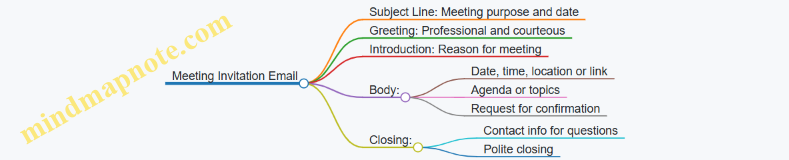
Sample Template:
Subject: Invitation to Project Kickoff Meeting – April 20
Dear Team,
You are invited to attend the Project Kickoff Meeting scheduled for April 20 at 10:00 AM in Conference Room B.
We will discuss project goals, timelines, and roles. Please review the attached agenda before the meeting.
Kindly confirm your attendance by April 15.
Best regards,
Samantha Green
Scenario 5: Apology Email
Mind Map:
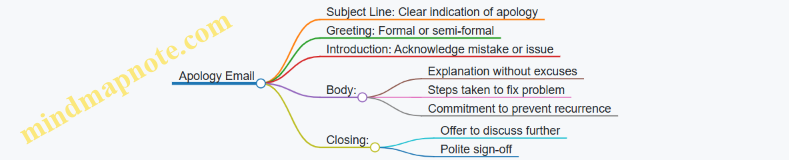
Sample Template:
Subject: Apology for Delayed Report Submission
Dear Mr. Patel,
I apologize for the delay in submitting the quarterly report. Due to unforeseen data discrepancies, the final version took longer to complete.
I have now submitted the report and implemented new checks to avoid similar delays in the future.
Please let me know if you would like to discuss this further.
Kind regards,
Nina Roberts
Scenario 6: Thank You Email After Meeting
Mind Map:
Sample Template:
Subject: Thank You for Meeting on April 10
Hi Mr. Chen,
Thank you for taking the time to meet yesterday. I appreciated the opportunity to discuss the upcoming marketing campaign.
I look forward to collaborating on the project and will send the draft plan by next week.
Please feel free to reach out if you have any questions.
Best,
Laura Kim
Scenario 7: Reminder Email
Mind Map:
Sample Template:
Subject: Friendly Reminder: Expense Reports Due May 1
Dear Team,
This is a friendly reminder that expense reports for April are due by May 1.
Please submit your reports through the company portal. If you need any help, feel free to contact me.
Thank you for your attention to this.
Regards,
Michael Davis
Use these mind maps to organize your ideas before writing. Practice adapting the templates to fit your specific context, adjusting tone and details as needed. This approach helps build confidence and clarity in professional email writing.
10. Step-by-Step Workplace Writing Exercises
10.1 Exercise 1: Writing a Clear Request Email from a Brief
When you receive a brief for a request email, your goal is to communicate clearly what you need, why you need it, and any relevant deadlines or details. A well-written request email saves time for both you and the recipient by avoiding back-and-forth clarifications.
Step 1: Understand the Brief
Before writing, identify the key points:
- What is being requested?
- Who is the recipient?
- Why is the request important?
- When is the deadline?
- Are there any specific instructions or conditions?
Step 2: Plan Your Email Structure
Use this simple mind map to organize your thoughts:
Step 3: Write the Email
Here is an example brief and how it translates into an email.
Brief:
- Request: Marketing team needs the latest sales report.
- Recipient: Sales department lead, Alex.
- Reason: To prepare for next week’s strategy meeting.
- Deadline: By Friday noon.
- Additional info: Report should include data from last quarter.
Email Example:
Subject: Request for Latest Sales Report Including Last Quarter Data
Hi Alex,
I hope you’re doing well. Could you please send me the latest sales report, including data from the last quarter? We need this information to prepare for the strategy meeting scheduled next week.
If possible, could you share the report by Friday noon? Let me know if you need any additional details.
Thanks in advance for your help.
Best regards,
[Your Name]
Step 4: Practice Mind Map for This Example
Step 5: Tips for Writing Clear Requests
- Use simple, direct language.
- Avoid vague terms like “ASAP”; specify exact deadlines.
- Include context so the recipient understands the importance.
- Keep the email concise but complete.
- Use bullet points if the request has multiple parts.
Practice Exercise
Use the following brief to write your own request email:
- Request: IT department to install new software.
- Recipient: IT manager, Jamie.
- Reason: Software needed for upcoming client project.
- Deadline: Installation by Wednesday afternoon.
- Additional info: Software license key will be provided.
Write your email following the structure and tips above. Compare your draft with this example:
Subject: Request for Installation of New Software by Wednesday
Hi Jamie,
Could you please arrange to install the new software required for the upcoming client project? We will provide the license key to your team.
It would be great if the installation could be completed by Wednesday afternoon to ensure everything is ready on time.
Please let me know if you need any further information.
Thank you for your support.
Best,
[Your Name]
10.2 Exercise 2: Responding to a Customer Complaint with Empathy
When responding to a customer complaint, empathy is the key to maintaining trust and resolving the issue effectively. Empathy means understanding the customer’s feelings and perspective, then communicating that understanding clearly. This exercise guides you through the process of crafting a professional, empathetic response.
Mind Map: Key Elements of an Empathetic Response
Step 1: Acknowledge the Issue
Start by showing you understand the customer’s problem. This helps the customer feel heard.
Example:
“Thank you for reaching out and letting us know about the issue with your recent order. I understand how frustrating it must be to receive the wrong item.”
Step 2: Apologize Sincerely
A clear apology shows you take the complaint seriously.
Example:
“I’m sorry for the inconvenience this has caused you. We strive to get every order right, and I regret that we missed the mark this time.”
Step 3: Explain the Situation (Optional)
If appropriate, briefly explain what happened without making excuses.
Example:
“It appears there was a mix-up in our packing department, which led to the wrong item being sent. We are reviewing our process to prevent this in the future.”
Step 4: Offer a Solution
Clearly state what you will do to fix the problem.
Example:
“We will send the correct item immediately and arrange for the incorrect one to be returned at no cost to you. Please let us know if you prefer a refund instead.”
Step 5: Invite Further Communication
Encourage the customer to reach out if they have more questions or concerns.
Example:
“If you have any other questions or need assistance, please don’t hesitate to contact me directly at [email protected].”
Full Sample Response
Dear Ms. Johnson,
Thank you for reaching out and letting us know about the issue with your recent order. I understand how frustrating it must be to receive the wrong item.
I’m sorry for the inconvenience this has caused you. We strive to get every order right, and I regret that we missed the mark this time.
It appears there was a mix-up in our packing department, which led to the wrong item being sent. We are reviewing our process to prevent this in the future.
We will send the correct item immediately and arrange for the incorrect one to be returned at no cost to you. Please let us know if you prefer a refund instead.
If you have any other questions or need assistance, please don’t hesitate to contact me directly at [email protected].
Best regards,
Alex Martin
Customer Service Manager
Practice Exercise
Rewrite the following complaint response to include empathy and clear solutions:
“Your order was delayed. We are sorry. We will send it soon.”
Try to acknowledge the customer’s feelings, apologize sincerely, explain briefly if possible, offer a clear solution, and invite further contact.
Summary
Responding to customer complaints with empathy involves:
- Recognizing the customer’s frustration
- Apologizing without defensiveness
- Explaining the situation briefly
- Offering a clear solution
- Keeping communication open
This approach helps turn a negative experience into a chance to build customer loyalty.
10.3 Exercise 3: Composing a Meeting Invitation with Agenda
When inviting colleagues or clients to a meeting, clarity and completeness are key. A well-crafted meeting invitation sets expectations, respects recipients’ time, and increases the chance of attendance and engagement. This exercise guides you through writing an effective meeting invitation email that includes a clear agenda.
Key Elements of a Meeting Invitation Email
- Subject Line: Concise and informative, indicating the meeting purpose.
- Greeting: Appropriate for the relationship and formality.
- Opening Line: State the purpose of the email clearly.
- Meeting Details: Date, time, location (or virtual link), and duration.
- Agenda: List of topics to be covered, ideally with time allocations.
- Call to Action: Request confirmation or RSVP.
- Closing: Polite sign-off with contact info for questions.
Mind Map: Components of a Meeting Invitation
Mind Map: Writing the Agenda Section
Example 1: Formal Meeting Invitation
Subject: Project Kickoff Meeting – March 15, 10:00 AM
Dear Team,
I would like to invite you to the project kickoff meeting scheduled for March 15 at 10:00 AM in Conference Room B. The meeting is expected to last one hour.
Agenda:
- Introduction and Objectives (10 minutes) – Project Manager
- Roles and Responsibilities (15 minutes) – Team Leads
- Timeline and Milestones (20 minutes) – Scheduler
- Questions and Next Steps (15 minutes) – All
Please confirm your attendance by replying to this email.
Best regards,
Alex Johnson
Project Manager
Example 2: Informal Virtual Meeting Invitation
Subject: Quick Sync on Marketing Campaign – Thursday 3 PM
Hi everyone,
Let’s have a quick meeting this Thursday at 3 PM via Zoom to review the marketing campaign progress.
Agenda:
- Status updates from each team member (10 minutes)
- Discuss challenges and solutions (15 minutes)
- Plan next steps (10 minutes)
Zoom link: [insert link]
Please let me know if you can make it.
Thanks,
Jamie
Practice Steps
- Identify the meeting purpose and key participants.
- Decide on date, time, and location or virtual platform.
- Draft a clear subject line that reflects the meeting topic and timing.
- Write a greeting appropriate to your audience.
- State the meeting details clearly.
- Create an agenda with topics, brief descriptions, and time slots.
- Include a call to action asking for confirmation.
- End with a polite closing and contact information.
Practice Exercise
Write a meeting invitation email for a team meeting to discuss quarterly sales results. Include the date, time, location (or virtual link), and a detailed agenda with at least three topics. Use a tone suitable for your workplace—formal or informal. After drafting, review your email to ensure clarity, completeness, and professionalism.
This exercise helps you practice organizing information logically and communicating it concisely. Including an agenda shows respect for attendees’ time and prepares them for the discussion. Clear invitations reduce confusion and improve meeting effectiveness.
10.4 Exercise 4: Crafting a Follow-up Email After a Job Interview
A follow-up email after a job interview is a polite way to express gratitude, reinforce your interest, and remind the interviewer of your qualifications. It should be concise, professional, and timely. This exercise will guide you through the key elements, structure, and tone of an effective follow-up email.
Mind Map: Components of a Follow-up Email
Step-by-Step Breakdown
-
Subject Line
- Keep it simple and direct.
- Examples:
- “Thank You – [Your Name]”
- “Following Up on Interview for [Position]”
-
Greeting
- Use the interviewer’s name to personalize.
- Example: “Dear Ms. Johnson,” or “Hello Mr. Lee,”
-
Opening Sentence
- Start by thanking the interviewer for their time.
- Mention the date or position to remind them.
- Example: “Thank you for meeting with me yesterday to discuss the Marketing Coordinator position.”
-
Body Paragraph
- Reaffirm your enthusiasm for the role.
- Briefly highlight one or two qualifications or experiences relevant to the discussion.
- Optionally, address any questions or topics that came up during the interview.
- Example: “I am excited about the opportunity to contribute my experience in digital campaigns to your team. Our conversation about your upcoming projects was particularly inspiring.”
-
Closing Sentence
- Offer to provide additional information if needed.
- Express anticipation for the next steps.
- Example: “Please let me know if you need any further information. I look forward to hearing from you.”
-
Signature
- Include your full name and contact details.
- Example:
Best regards,
Jane Smith
[email protected]
(555) 123-4567
Sample Follow-up Email
Subject: Thank You – Jane Smith

Dear Mr. Thompson,

Thank you for taking the time to interview me on Tuesday for the Sales Associate position. I appreciate the opportunity to learn more about your team and the exciting challenges ahead.

I remain very interested in the role and believe my background in customer relations and sales aligns well with your needs. Our discussion about expanding into new markets resonated with my experience managing client portfolios.

Please feel free to contact me if you require any additional information. I look forward to the possibility of working together.

Best regards,
Jane Smith
[email protected]
(555) 123-4567
Practice Exercise
Write a follow-up email based on this scenario:
- You interviewed for the position of Project Coordinator last Friday.
- The interviewer was Ms. Patel.
- During the interview, you discussed your experience with scheduling and team communication.
- You want to express thanks, reinforce your skills, and show eagerness to contribute.
Use the mind map and structure above to draft your email.
This exercise encourages clear, polite communication that keeps you memorable without being pushy. The goal is to leave a positive impression and maintain professionalism.
10.5 Exercise 5: Editing and Improving a Draft Email for Professional Tone
In this exercise, you will take a draft email and refine it to sound more professional, clear, and polite. The goal is to adjust tone, improve clarity, and ensure the message respects workplace etiquette without sounding stiff or overly formal.
Draft Email (Original)
Hi John,
I need the report ASAP. It’s really important and I don’t want any delays. Send it over by end of day.
Thanks.
Step 1: Identify Tone Issues
- The email sounds abrupt and demanding.
- Phrases like “I need” and “I don’t want any delays” can come off as pushy.
- The closing “Thanks.” feels rushed.
Step 2: Mind Map for Tone Improvement
Tone Improvement Mind Map
Step 3: Rewriting the Email
Subject: Request for Report Submission by End of Day
Hi John,
I hope you’re doing well. Could you please send me the report by the end of today? It’s important for our upcoming meeting, so having it on time would be very helpful.
Thank you for your assistance.
Best regards,
[Your Name]
Step 4: Explanation of Changes
- Added a clear subject line to set expectations.
- Included a polite greeting and a friendly opening.
- Replaced “I need” with “Could you please,” making the request less direct.
- Explained why the report is important to provide context.
- Used “Thank you for your assistance” to express appreciation.
- Added a professional closing.
Step 5: Additional Examples
Example 1: Too Casual and Abrupt
Hey Sarah,
Send me the files now.
Thanks.
Improved Version:
Subject: Request for Files
Hi Sarah,
When you have a moment, could you please send me the files? I need them to complete the project on schedule.
Thanks so much.
Best,
[Your Name]
Example 2: Overly Formal and Wordy
Dear Ms. Thompson,
I am writing to kindly request that you provide the documentation at your earliest convenience, as it is of utmost importance to the progression of our current endeavors.
Yours sincerely,
[Your Name]
Improved Version:
Subject: Request for Documentation
Hi Ms. Thompson,
Could you please send the documentation when you have a chance? It will help us move forward with the project.
Thank you,
[Your Name]
Step 6: Practice Task
Take the following draft and rewrite it to improve tone, clarity, and professionalism:
Hey Mike,
I’m waiting on the budget numbers. Need them quick so we don’t mess up the timeline.
Cheers.
Use the mind map above to guide your edits. Focus on softening commands, adding context, and choosing appropriate greetings and closings.
This exercise helps you recognize how small changes in wording and structure can make emails sound more respectful and effective in a professional setting.
10.6 Exercise 6: Writing a Thank You Email After a Business Meeting
Writing a thank you email after a business meeting is a small gesture that can leave a lasting positive impression. It shows professionalism, appreciation, and helps reinforce the points discussed. This exercise guides you through crafting a clear, concise, and polite thank you email.
Key Elements of a Thank You Email
Mind Map: Structure of a Thank You Email
Example 1: Formal Thank You Email
Subject: Thank You for Meeting on Tuesday

Dear Ms. Thompson,

Thank you for meeting with me on Tuesday to discuss the upcoming project timeline. I appreciate your insights on resource allocation and the suggestions you provided for streamlining the workflow.

As agreed, I will send the revised project plan by Friday for your review. Please let me know if there is anything else you need in the meantime.

Best regards,

James Lee
Project Coordinator
[email protected]
Example 2: Semi-Formal Thank You Email
Subject: Appreciate Your Time Yesterday

Hello Mark,

Thanks for taking the time to meet yesterday. It was helpful to go over the marketing strategy and clarify the next steps.

I’ll prepare the draft proposal and share it with you by the end of the week. Feel free to reach out if you have any questions before then.

Sincerely,

Anna Patel
Marketing Specialist
[email protected]
Practice Steps
-
Choose the tone: Decide if your email should be formal or semi-formal based on your relationship with the recipient.
-
Write the subject line: Keep it straightforward and related to the meeting.
-
Draft the greeting: Use the recipient’s name and an appropriate salutation.
-
Express thanks: Start by thanking the recipient for their time.
-
Mention specifics: Refer to one or two key points from the meeting to show attentiveness.
-
Outline next steps: Briefly state any follow-up actions.
-
Close politely: Use a professional closing and include your contact information.
Exercise
Write a thank you email following this scenario:
You met with a client named Sarah Johnson to discuss a potential partnership. During the meeting, you talked about timelines, deliverables, and budget considerations. Sarah suggested scheduling a follow-up call next week to finalize details.
Use the structure and examples above to compose your email. Aim for clarity and professionalism while keeping the tone warm and appreciative.
This exercise helps you practice writing emails that are not only polite but also purposeful, reinforcing business relationships and ensuring clear communication after meetings.
10.7 Exercise 7: Creating a Status Update Email for a Project Team
A status update email keeps everyone on the same page about a project’s progress. It should be clear, concise, and organized so recipients can quickly understand what’s done, what’s next, and any issues.
Key Elements of a Status Update Email
Mind Map: Structure of a Status Update Email
Mind Map: Content Details
Example 1: Simple Weekly Status Update
Subject: Project Phoenix: Weekly Status Update - April 12
Hi Team,
Here’s the status update for Project Phoenix this week:
Completed Tasks:
- Finalized the user interface design.
- Completed backend API integration.
Ongoing Tasks:
- Testing the payment gateway module.
- Preparing user documentation.
Upcoming Tasks:
- Begin performance optimization next Monday.
- Schedule client review meeting for April 20.
Issues:
- Encountered a delay with the testing environment setup, which may push back testing completion by two days.
Requests:
- Please review the UI design mockups by Friday.
Let me know if you have any questions.
Best,
Alex
Example 2: Detailed Status Update with Risks and Requests
Subject: Marketing Website Redesign: Status Update - April 12
Hello All,
Below is the current progress on the marketing website redesign:
Completed:
- Content audit finished.
- Wireframes approved by stakeholders.
In Progress:
- Graphic design for homepage and product pages.
- SEO keyword research.
Next Steps:
- Develop homepage HTML/CSS starting April 15.
- Begin user testing sessions in two weeks.
Risks:
- Graphic designer availability is limited next week due to other projects.
- Potential delay in user testing if wireframe revisions are requested.
Actions Needed:
- Approval of graphic design drafts by April 14.
- Confirmation of user testing participants.
Thanks,
Maria
Practice Task
Write a status update email for a project you are currently working on or imagine one. Use the structure and mind maps above as a guide. Include:
- A clear subject line
- A greeting
- Sections for completed, ongoing, and upcoming tasks
- Any issues or risks
- Requests or actions needed
- A polite closing
Focus on clarity and brevity. Avoid jargon or unnecessary detail. Use bullet points or short paragraphs to improve readability.
This exercise helps you practice organizing information logically and communicating progress clearly, which is essential for keeping teams aligned and projects on track.
10.8 Exercise 8: Apologizing for a Mistake in a Work Email
Apologizing in a professional email requires clarity, sincerity, and a focus on resolution. The goal is to acknowledge the mistake, take responsibility, and outline steps to fix or prevent the issue. This exercise guides you through crafting such emails with examples and a mind map to organize your thoughts.
Mind Map: Components of an Apology Email
Example 1: Apology for a Missed Deadline
Subject: Apology for Delay in Project Report Submission
Dear Ms. Johnson,
I am writing to apologize for not submitting the project report by the agreed deadline yesterday. I understand this delay may have caused inconvenience to the team.
The delay was due to an oversight on my part in managing the timeline. I take full responsibility and have already completed the report. I am attaching it to this email for your review.
To prevent this from happening again, I have set up additional reminders and adjusted my schedule to prioritize deadlines more effectively.
Please let me know if you would like to discuss this further or if there is anything else I can do to assist.
Thank you for your understanding.
Best regards,
Mark Lee
Example 2: Apology for Sending Incorrect Information
Subject: Correction and Apology Regarding Last Week’s Sales Data
Hi Team,
I want to apologize for the incorrect sales figures I shared in last week’s email. The numbers I provided were preliminary and did not reflect the final data.
I take full responsibility for the confusion this may have caused. Attached is the corrected report with accurate figures.
Moving forward, I will double-check all data before distribution to ensure accuracy.
Feel free to reach out if you have any questions or need further clarification.
Best,
Samantha
Example 3: Apology for a Miscommunication
Subject: Apology for Miscommunication Regarding Meeting Time
Dear Mr. Patel,
I apologize for the confusion about the meeting time scheduled for yesterday. I mistakenly sent the wrong time in my earlier email.
This was an error on my part, and I regret any inconvenience it caused.
To avoid this in the future, I will confirm meeting details with all participants before sending invitations.
Thank you for your patience. Please let me know if you would like to reschedule.
Sincerely,
Linda Chen
Practice Steps
- Identify a workplace mistake you want to apologize for.
- Use the mind map to outline your email:
- Write a clear subject line.
- Draft a greeting suitable for your recipient.
- Compose a direct apology.
- Briefly explain the situation if needed, without making excuses.
- Take responsibility.
- Describe what you are doing to fix or prevent the issue.
- Offer to discuss or assist further.
- Close politely.
- Review your draft for tone and clarity.
- Compare your draft with the examples above.
This exercise helps you practice writing apologies that are straightforward and professional, which can maintain trust and respect even when mistakes happen.
10.9 Exercise 9: Writing an Internal Announcement Email
Internal announcement emails are a common way to share important news, updates, or changes within an organization. These emails need to be clear, concise, and respectful of the recipients’ time, while also providing enough detail to avoid confusion.
Key Elements of an Internal Announcement Email
Writing the Subject Line
The subject line should immediately convey the topic and importance without being alarmist. Examples:
- “Upcoming Change to Office Hours Starting July 1”
- “New Employee Benefits Program Launch”
- “Reminder: Annual Safety Training Scheduled for Next Week”
Avoid vague subjects like “Important Update” or overly long ones that bury the main point.
Greeting and Opening
Use a general but respectful greeting such as “Dear Team,” or “Hello Everyone,”. The opening sentence should briefly state the purpose of the email.
Example:
Dear Team,
I am writing to inform you about an upcoming change to our office hours effective July 1.
Main Message
Present the information clearly and logically. Use short paragraphs or bullet points for readability. Include dates, times, and any actions required from recipients.
Example:
Starting July 1, the office will be open from 8:00 AM to 5:00 PM, Monday through Friday. This adjustment is to better align with client availability and improve work-life balance.
Please note:
- The new hours will apply to all departments.
- If you have scheduled meetings outside these hours, please reschedule.
- Contact HR if you have questions or require accommodations.
Call to Action or Next Steps
Clearly state what you expect from the recipients, if anything.
Example:
Please update your calendars accordingly and inform your teams. For any concerns, reach out to HR by June 20.
Closing
End with a polite closing that encourages open communication.
Example:
Thank you for your attention to this update.
Best regards,
Jane Smith
Operations Manager
Full Example Email
Subject: New Office Hours Starting July 1
Dear Team,
I am writing to inform you about an upcoming change to our office hours effective July 1.
Starting July 1, the office will be open from 8:00 AM to 5:00 PM, Monday through Friday. This adjustment is to better align with client availability and improve work-life balance.
Please note:
- The new hours will apply to all departments.
- If you have scheduled meetings outside these hours, please reschedule.
- Contact HR if you have questions or require accommodations.
Please update your calendars accordingly and inform your teams. For any concerns, reach out to HR by June 20.
Thank you for your attention to this update.
Best regards,
Jane Smith
Operations Manager
Practice Task
Write an internal announcement email about one of the following scenarios:
- Introducing a new software tool for project management.
- Announcing a change in the company’s remote work policy.
- Informing staff about an upcoming office maintenance schedule.
Use the structure and tone outlined above. Include a clear subject line, concise message, and any necessary calls to action.
This exercise helps you practice organizing information clearly and communicating changes efficiently within a professional setting.
10.10 Exercise 10: Drafting a Polite Reminder Email
A polite reminder email is a useful tool in professional communication. It helps nudge the recipient without sounding pushy or impatient. The goal is to prompt action while maintaining goodwill.
Key Elements of a Polite Reminder Email
- Subject line: Clear and courteous
- Greeting: Appropriate to relationship and formality
- Opening: A gentle reference to the previous communication or deadline
- Body: Brief explanation or restatement of the request
- Closing: Friendly, with an offer to assist if needed
Mind Map: Structure of a Polite Reminder Email
Mind Map: Tone and Language Choices
Example 1: Reminder for a Pending Report Submission
Subject: Friendly Reminder: Report Submission Due Tomorrow
Dear Ms. Lee,
I hope this message finds you well. I’m writing to kindly remind you that the quarterly sales report is due tomorrow, March 15th. If you need any assistance or additional information to complete it, please don’t hesitate to reach out.
Thank you for your attention to this.
Best regards,
James
Example 2: Reminder for a Meeting RSVP
Subject: Quick Reminder: RSVP for Team Meeting
Hi Alex,
Just a quick reminder to please confirm your attendance for the team meeting scheduled on Friday at 10 a.m. Your input will be valuable.
Let me know if you have any questions.
Thanks,
Samantha
Example 3: Reminder for Payment
Subject: Polite Reminder: Invoice #4567 Payment Due
Dear Mr. Patel,
I hope all is well. This is a gentle reminder that payment for invoice #4567 was due last week. Please let me know if you require any further details or if there’s anything I can assist with.
Thank you for your prompt attention.
Kind regards,
Maria
Step-by-Step Exercise Instructions
- Identify the purpose: What are you reminding the recipient about?
- Choose the tone: Formal or semi-formal, depending on your relationship.
- Write a clear subject line: Indicate it’s a reminder politely.
- Draft the greeting: Use the recipient’s name and appropriate salutation.
- Compose the opening: Reference the previous communication or deadline.
- Explain the reminder: Briefly restate the request or action needed.
- Close politely: Offer help and express appreciation.
- Review: Check for clarity, tone, and conciseness.
Practice Task
Write a polite reminder email to a colleague who has not yet submitted feedback on a project draft. Use a semi-formal tone and keep the email under 150 words.
This exercise helps you practice balancing professionalism with friendliness, ensuring your reminders are effective without causing discomfort.
11. Integrating Templates and Customization Techniques
11.1 How to Use Email Templates Effectively
Email templates are pre-written messages designed to save time and maintain consistency in professional communication. When used thoughtfully, they help you respond quickly without sacrificing clarity or tone. However, relying on templates without adaptation can make your emails feel impersonal or irrelevant. This section explains how to use templates effectively by balancing efficiency with personalization.
What Makes an Email Template Effective?
- Clarity: The template should clearly communicate the main message or purpose.
- Flexibility: It must allow easy customization for different recipients or situations.
- Professional Tone: The language should suit workplace standards.
- Brevity: Avoid unnecessary words; keep it concise.
Mind Map: Key Elements of Effective Email Templates
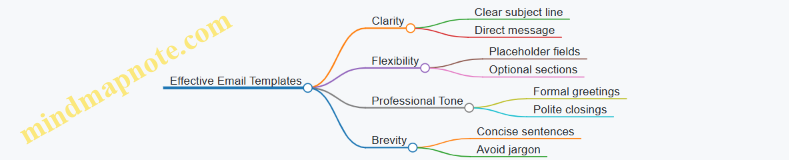
How to Use Templates Without Sounding Robotic
- Start with a solid template: Choose or create a base that fits the general purpose.
- Customize the greeting: Use the recipient’s name and adjust formality.
- Tailor the body: Modify details to reflect the specific context or request.
- Add a personal touch: Include a sentence or two that shows attention to the recipient’s situation.
- Review tone and clarity: Ensure the message sounds natural and polite.
Mind Map: Steps to Personalize a Template
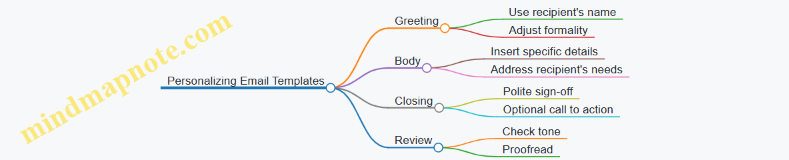
Example 1: Basic Meeting Invitation Template
Template:
Subject: Meeting Invitation: [Topic]
Dear [Name],
I would like to invite you to a meeting on [Date] at [Time] to discuss [Topic]. Please let me know if this time works for you.
Best regards,
[Your Name]
Customized Version:
Subject: Meeting Invitation: Q2 Sales Strategy
Hi Maria,
I’d like to invite you to a meeting on Tuesday, March 14th at 3 PM to discuss our Q2 sales strategy. Please let me know if this time suits your schedule.
Best,
James
Example 2: Request for Information Template
Template:
Subject: Request for Information Regarding [Subject]
Dear [Name],
Could you please provide the details about [specific information]? This will help us [reason]. Thank you in advance for your assistance.
Sincerely,
[Your Name]
Customized Version:
Subject: Request for Information Regarding Project Timeline
Hello Alex,
Could you please share the updated timeline for the Phoenix project? This will help us coordinate with the marketing team. Thanks for your help.
Regards,
Samantha
Tips for Maintaining Template Effectiveness
- Keep templates updated: Review and revise periodically to reflect changes in company policy or style.
- Use placeholders clearly: Mark fields that need customization to avoid sending generic content.
- Avoid overloading: Don’t cram too much information into one template; break complex messages into parts if needed.
- Test before sending: Read the email aloud to catch awkward phrasing or errors.
Mind Map: Maintaining and Improving Templates
Using templates effectively means treating them as starting points, not final drafts. A well-chosen template combined with thoughtful customization saves time and keeps your emails professional and approachable.
11.2 Customizing Templates for Different Recipients and Purposes
Using templates saves time, but a one-size-fits-all approach rarely works in professional emails. Customization ensures your message fits the recipient’s role, relationship, and the email’s goal. This section breaks down how to adjust templates effectively.
Understanding Your Recipient
Before customizing, consider who will read your email. Different recipients require different tones, levels of detail, and formality.
Mind Map: Recipient Considerations
Example:
Template greeting: “Dear [Name],”
- For a manager: “Dear Ms. Johnson,” (formal)
- For a peer: “Hi Tom,” (casual)
- For a client: “Hello Mr. Lee,” (professional but warm)
Adjusting Tone and Formality
Templates often use neutral language. Adjusting tone means choosing words and sentence structures that match your recipient.
- Formal tone uses full sentences, polite phrases, and avoids contractions.
- Informal tone can include contractions, simpler sentences, and a friendly approach.
Example:
Template sentence: “I would like to request your feedback on the report.”
- Formal: “I would appreciate your feedback on the report at your earliest convenience.”
- Informal: “Could you take a look at the report and let me know what you think?”
Tailoring Content to Purpose
Each email purpose demands specific content adjustments. Templates provide a skeleton; you add the muscles and skin.
Mind Map: Purpose-Based Customization
Example:
Template request: “Please review the attached document.”
- For a quick peer review: “Could you please review the attached document and share any quick thoughts by tomorrow?”
- For a client: “Kindly review the attached document at your convenience, and let me know if you have any questions or concerns.”
Incorporating Specific Details
Templates use placeholders like [Name], [Date], or [Project]. Fill these accurately and add relevant details to make your email clear and actionable.
Example:
Template: “The meeting is scheduled for [Date] at [Time].”
Customized: “The project kickoff meeting is scheduled for Tuesday, March 14, at 10:00 AM via Zoom.”
Adding details such as the meeting platform or agenda helps recipients prepare.
Mind Map: Steps to Customize a Template
Example Walkthrough
Template:
"Dear [Name],
I am writing to inform you about [Topic]. Please let me know if you have any questions.
Best regards,
[Your Name]"
Customized for a client update:
"Hello Ms. Patel,
I am writing to update you on the status of the Q2 marketing campaign. We have completed the initial design phase and are moving into content creation. Please let me know if you have any questions or need additional information.
Best regards,
James Lee"
Customized for an internal team:
"Hi Team,
Just a quick update on the Q2 marketing campaign. The design phase is done, and we’re starting content creation. Let me know if you have any questions.
Thanks,
James"
Tips for Effective Customization
- Avoid generic language that sounds like a copy-paste.
- Use the recipient’s name and role to personalize.
- Match the email length to the recipient’s likely time availability.
- Reflect any previous interactions or shared context.
- Keep the core message intact but flexible enough to suit different scenarios.
Customizing templates is about making your email feel intentional and relevant. It shows respect for the recipient’s time and improves the chance your message will get the response you want.
11.3 Avoiding Overuse of Templates: Maintaining Personalization
Using templates can save time and ensure consistency, but relying on them too heavily can make your emails feel robotic and impersonal. The key is to balance efficiency with a personal touch that respects the recipient and the context.
Why Avoid Overusing Templates?
- Loss of Individual Voice: Templates often use generic language that can mask your unique style or the specific tone needed.
- Reduced Engagement: Recipients may notice repeated phrasing or structure, which can reduce their interest or trust.
- Risk of Irrelevance: A template might not fit every situation perfectly, leading to awkward or inappropriate messages.
How to Maintain Personalization While Using Templates
Mind Map: Balancing Templates and Personalization
Practical Examples
Template Snippet:
“I hope this message finds you well. I am writing to inform you about…”
Overused Version:
“I hope this message finds you well. I am writing to inform you about the upcoming meeting scheduled for next week. Please let me know if you have any questions.”
Personalized Version:
“Hi Sarah, I hope your week is going smoothly. Just a quick note to remind you about our meeting next Wednesday at 10 a.m. Let me know if you need to adjust the time.”
Notice how the personalized version uses the recipient’s name, a casual tone, and a direct reference to the meeting, making the message feel more tailored.
Tips to Avoid Template Overuse
- Change Greetings and Closings: Swap “Dear Sir/Madam” with the recipient’s name or a friendly alternative.
- Add Specific Details: Mention recent projects, conversations, or shared interests.
- Vary Sentence Structure: Avoid repeating the same sentence openings or phrases.
- Use Active Voice: It sounds more direct and engaging than passive constructions.
- Limit Copy-Paste: Use templates as a guide, not a script.
Mind Map: Personalization Techniques
Exercise Example
Take this template sentence:
“Please find attached the report you requested. Let me know if you need any further information.”
Try personalizing it for a colleague named Mark who asked for the sales report last Friday:
“Hi Mark, I’ve attached the sales report you asked for last Friday. If you want me to dig into any specific numbers, just say the word.”
This version feels more conversational and attentive.
Summary
Templates are useful starting points but should never replace thoughtful communication. Personalization shows respect, builds rapport, and increases the chance your email will be read and acted upon. Always take a moment to tweak templates so your emails sound like they come from you, not a form letter.
11.4 Practice Exercise: Adapting a Template to Multiple Workplace Situations
Adapting an email template means taking a basic structure and tailoring it to fit different recipients, purposes, and contexts without losing clarity or professionalism. This exercise guides you through the process using a common template for a meeting invitation, showing how small changes can make it suitable for various scenarios.
Base Template: Meeting Invitation
Subject: Invitation to [Meeting Topic] on [Date]
Dear [Recipient’s Name],
I would like to invite you to a meeting regarding [Meeting Topic] scheduled for [Date] at [Time]. The meeting will take place [Location/Online Platform].
Agenda:
- [Agenda Item 1]
- [Agenda Item 2]
- [Agenda Item 3]
Please confirm your availability. Let me know if you have any additional topics to discuss.
Best regards,
[Your Name]
Mind Map: Adapting the Meeting Invitation Template
Example 1: Formal Internal Meeting Invitation
Subject: Invitation to Q2 Project Review Meeting on May 15
Dear Ms. Thompson,
I would like to invite you to a meeting regarding the Q2 Project Review scheduled for May 15 at 10:00 AM in Conference Room B.
Agenda:
- Review of Q2 milestones
- Budget assessment
- Next steps and timelines
Please confirm your availability. If you have any additional topics to discuss, feel free to share them.
Best regards,
John Smith
Example 2: Informal Team Brainstorming Session
Subject: Team Brainstorming Session – Ideas for New Campaign
Hi Team,
Let’s get together for a brainstorming session on the new marketing campaign next Wednesday at 3 PM via Zoom.
Agenda:
- Idea sharing
- Feasibility discussion
- Assigning roles
Please let me know if you can make it or suggest a better time.
Thanks,
Anna
Example 3: Client Meeting Invitation with Tentative Date
Subject: Proposed Meeting to Discuss Contract Details
Dear Mr. Lee,
I would like to propose a meeting to discuss the contract details for the upcoming project. Would you be available on either June 2 or June 3 at 2 PM? The meeting will be held via Microsoft Teams.
Agenda:
- Contract terms review
- Project timeline
- Questions and clarifications
Please confirm which date works best for you.
Best regards,
Maria Gonzalez
Exercise Instructions:
-
Choose one of the following workplace situations:
- Scheduling a performance review with your manager.
- Inviting a cross-departmental team to a product launch planning meeting.
- Organizing a quick check-in with a remote colleague.
-
Using the base template, write a meeting invitation email adapted to your chosen situation.
-
Consider the following while adapting:
- Adjust the subject line to reflect the meeting’s purpose and tone.
- Select an appropriate greeting based on your relationship with the recipient(s).
- Modify the agenda to suit the meeting’s goals.
- Choose a suitable closing.
-
Review your email for clarity, tone, and completeness.
This exercise helps you practice flexibility with templates, ensuring your emails fit different professional contexts while maintaining a clear and respectful tone.
12. Review and Mastery: Putting It All Together
12.1 Comprehensive Email Writing Checklist
Writing a professional email involves more than just typing words. It requires attention to detail, clarity, and a tone that fits the workplace. This checklist helps you review your email before hitting send, ensuring it communicates effectively and professionally.
Mind Map: Key Areas to Check in Your Email
Subject Line
- Check: Does the subject line summarize the email’s main point?
- Example: Instead of “Update,” use “Project X Timeline Update – March 15”
Greeting
- Check: Is the greeting suitable for the recipient and context?
- Example: Use “Dear Mr. Smith,” for formal contacts; “Hi Jane,” for colleagues you know well.
Body
- Check: Is the email’s purpose stated within the first two sentences?
- Check: Are paragraphs short and focused?
- Check: Are requests or questions clearly highlighted?
- Example:
- Weak: “I was wondering if you could send me the report.”
- Strong: “Could you please send me the Q1 sales report by Friday?”
Closing
- Check: Is the closing appropriate to the tone?
- Example: “Best regards,” is safe for most professional emails; “Thanks,” works for informal or familiar contacts.
Grammar and Spelling
- Check: Run a spell check and read aloud to catch errors.
- Example: “Their” vs. “there” mistakes can confuse meaning.
Formatting
- Check: Are paragraphs separated by blank lines?
- Check: Are bullet points used for lists?
- Example:
- Poor formatting: “Please review the report, update the figures, and send it back.”
- Better formatting:
- Please review the report.
- Update the figures.
- Send it back by Thursday.
Attachments and Links
- Check: Are all referenced attachments included?
- Check: Do links open correctly?
- Example: “Please find the agenda attached.” (Make sure the file is actually attached.)
Tone and Etiquette
- Check: Is the language polite and professional?
- Check: Avoid sarcasm or humor that might be misunderstood.
- Example: Instead of “You forgot to send the report,” say “I haven’t received the report yet; could you please send it?”
Final Review
- Check: Are all recipients correct?
- Check: Does the subject line match the email content?
- Check: Is the email concise but complete?
- Check: Is the call to action clear?
Mind Map: Final Review Flow
Using this checklist as a final step helps catch small errors and improves the clarity and professionalism of your emails. It also builds good habits that make writing easier over time. Remember, a well-crafted email reflects well on you and helps your message get the response you want.
12.2 Analyzing and Improving Sample Emails from Real Workplace Contexts
In this section, we will examine actual workplace email examples, identify areas for improvement, and suggest revisions. The goal is to understand how small changes can enhance clarity, tone, and professionalism.
Sample Email 1: Request for Information
Original Email:
Subject: Info needed
Hi,
Can you send me the report?
Thanks.
Analysis:
- Subject line is vague and uninformative.
- Greeting is too brief and impersonal.
- Body lacks context—recipient may not know which report is meant.
- Closing is minimal; no sign-off or name.
Improvement Mind Map:
- Subject Line
- Be specific
- Include report name or purpose
- Greeting
- Use recipient’s name or title
- Body
- Provide context
- Specify deadline if any
- Closing
- Use polite sign-off
- Include sender’s name and contact info
Revised Email:
Subject: Request for Q2 Sales Report by Friday
Dear Ms. Johnson,
Could you please send me the Q2 sales report by this Friday? I need it to prepare the monthly review.
Thank you for your help.
Best regards,
Alex Smith
Sample Email 2: Responding to a Complaint
Original Email:
Subject: Re: Issue with order
We are sorry for the inconvenience. The problem will be fixed.
Analysis:
- Subject line is acceptable but could be more empathetic.
- Body is too brief and vague.
- No explanation or timeline provided.
- No offer of further assistance.
Improvement Mind Map:
- Subject Line
- Reflect empathy
- Reference customer’s concern
- Body
- Acknowledge issue specifically
- Explain steps being taken
- Provide timeline if possible
- Offer further help
- Closing
- Polite and reassuring
Revised Email:
Subject: Apologies and Update Regarding Your Order Issue
Dear Mr. Lee,
Thank you for bringing the issue with your order to our attention. We apologize for the inconvenience caused.
Our team is currently investigating the problem and expects to resolve it within the next two business days. We will keep you updated on the progress.
Please let us know if you have any further questions or concerns.
Sincerely,
Maria Gomez
Customer Support
Sample Email 3: Meeting Invitation
Original Email:
Subject: Meeting
Let’s meet tomorrow.
Analysis:
- Subject line is too generic.
- Body lacks details: time, place, purpose.
- No greeting or closing.
Improvement Mind Map:
- Subject Line
- Specify meeting topic
- Greeting
- Use recipient’s name
- Body
- State purpose
- Include date, time, location
- Request confirmation
- Closing
- Polite sign-off
- Sender’s name
Revised Email:
Subject: Project Kickoff Meeting Invitation - March 15, 10 AM
Hi Jordan,
I would like to invite you to the project kickoff meeting scheduled for tomorrow, March 15, at 10 AM in Conference Room B. We will discuss project goals and timelines.
Please confirm if you can attend.
Best,
Emily Chen
Sample Email 4: Follow-up Email
Original Email:
Subject: Follow up
Waiting for your reply.
Analysis:
- Subject line is vague.
- Body is abrupt and may come across as impatient.
- No greeting or closing.
Improvement Mind Map:
- Subject Line
- Reference original topic
- Greeting
- Use recipient’s name
- Body
- Politely remind
- Mention previous email date
- Offer assistance
- Closing
- Polite and friendly
- Sender’s name
Revised Email:
Subject: Follow-up on Proposal Submission from March 1
Dear Mr. Patel,
I hope this message finds you well. I wanted to follow up on the proposal I sent on March 1. Please let me know if you need any additional information.
Looking forward to your response.
Kind regards,
Sarah Lee
Summary Mind Map: Key Elements for Improving Workplace Emails
By comparing original and revised emails, it becomes clear how attention to detail improves communication. Specific subject lines help recipients prioritize. Personal greetings and closings build rapport. Clear, polite body text reduces misunderstandings. These principles apply across all professional email types.
12.3 Final Practice: Writing Complete Emails from Given Scenarios
This section challenges you to apply everything you’ve learned by composing full emails based on realistic workplace situations. Each scenario includes a mind map to organize your thoughts and examples to guide your writing. Use these as templates to build your own responses.
Scenario 1: Requesting Information from a Colleague
Mind Map:
- Subject: Clear and specific
- Greeting: Professional and appropriate
- Opening: State purpose
- Body:
- Specify information needed
- Provide context or deadline
- Closing:
- Polite request
- Offer assistance
- Sign-off: Professional
Example:
Subject: Request for Q2 Sales Data by Friday
Dear Maria,
I hope this message finds you well. I am currently preparing the quarterly report and would appreciate it if you could share the finalized Q2 sales data by this Friday, June 14.
If you need any additional details from my side to facilitate this, please let me know. Thank you in advance for your help.
Best regards,
James
Scenario 2: Responding to a Meeting Invitation
Mind Map:
- Subject: Reply referencing original invitation
- Greeting: Polite and friendly
- Opening: Acknowledge invitation
- Body:
- Confirm attendance or propose alternative
- Mention any preparation needed
- Closing:
- Express appreciation
- Sign-off: Professional
Example:
Subject: Re: Invitation to Marketing Strategy Meeting
Hi Alex,
Thank you for inviting me to the marketing strategy meeting scheduled for Tuesday at 10 a.m. I will be able to attend and look forward to discussing the upcoming campaign.
Please let me know if there are any materials I should review beforehand.
Best,
Sophie
Scenario 3: Apologizing for a Missed Deadline
Mind Map:
- Subject: Clear apology and reference to task
- Greeting: Formal
- Opening: Direct apology
- Body:
- Explanation without excuses
- Steps taken to resolve
- Revised deadline
- Closing:
- Offer to discuss further
- Polite closing
- Sign-off: Professional
Example:
Subject: Apology for Delay in Project X Report Submission
Dear Mr. Chen,
I apologize for not submitting the Project X report by the agreed deadline yesterday. Unexpected data discrepancies required additional verification.
I have addressed the issues and will send the completed report by end of day tomorrow, June 12. Please let me know if you would like to discuss this further.
Thank you for your understanding.
Sincerely,
Lena
Scenario 4: Following Up After a Job Interview
Mind Map:
- Subject: Reference interview and date
- Greeting: Polite and professional
- Opening: Thank interviewer
- Body:
- Express continued interest
- Briefly highlight fit
- Request update
- Closing:
- Appreciation
- Sign-off: Professional
Example:
Subject: Follow-up on Interview for Marketing Coordinator Position – June 5
Dear Mr. Patel,
Thank you for the opportunity to interview for the Marketing Coordinator position last week. I enjoyed learning more about the team and the projects.
I remain very interested in the role and believe my experience with digital campaigns aligns well with your needs. Could you please share any updates on the hiring timeline?
I appreciate your time and consideration.
Best regards,
Emily
Scenario 5: Sending a Polite Reminder
Mind Map:
- Subject: Reminder with reference to original request
- Greeting: Friendly but professional
- Opening: Polite reminder
- Body:
- Restate request or deadline
- Offer assistance if needed
- Closing:
- Thank recipient
- Sign-off: Professional
Example:
Subject: Friendly Reminder: Feedback on Draft Proposal
Hi Jordan,
I wanted to kindly remind you about the feedback on the draft proposal I sent last week. Your input is important as we aim to finalize it by Friday.
Please let me know if you need any additional information from me.
Thanks so much!
Cheers,
Mark
Tips for Writing Your Emails
- Start by outlining your email using a mind map or bullet points to clarify your message.
- Keep subject lines concise but informative.
- Match your tone and formality to the recipient and situation.
- Use clear paragraphs and, where appropriate, bullet points to improve readability.
- End with a polite closing and your full name or signature.
Practice writing emails for these scenarios on your own, then compare your drafts to the examples. Notice how clarity, tone, and structure work together to create effective professional communication.
12.4 Continuous improvement in professional email writing is about steady, deliberate practice combined with thoughtful reflection. The goal is to write emails that are clear, polite, and effective without wasting time or causing confusion. Here are practical tips to keep your email skills sharp and growing.
Review and Reflect Regularly
After sending important emails, take a moment to review them. Ask yourself: Did the recipient respond as expected? Was the message clear? If not, consider what could be improved next time. Keeping a simple log of challenging emails and your reflections can reveal patterns and areas to focus on.
Practice Writing with Purpose
Each email should have a clear goal. Before writing, identify what you want to achieve—whether it’s requesting information, confirming a meeting, or resolving an issue. This focus helps avoid unnecessary details and keeps your message on point.
Use Templates Wisely
Templates save time but should never replace thoughtful writing. Customize each template to fit the recipient and situation. Small tweaks in tone or detail can make a big difference in how your email is received.
Read Aloud Before Sending
Reading your email aloud helps catch awkward phrasing, run-on sentences, or unclear points. It also reveals if the tone sounds too harsh or too casual.
Keep Sentences and Paragraphs Short
Short sentences reduce the chance of confusion. Paragraphs should group related ideas and be no longer than 3-4 sentences. This structure makes emails easier to scan and understand.
Focus on Politeness and Clarity
Politeness is not just about words like “please” and “thank you.” It’s about framing requests and feedback in a way that respects the recipient’s time and perspective. Clarity means avoiding jargon, ambiguous terms, and overly complex sentences.
Edit with a Checklist
Before hitting send, run through a quick checklist:
- Is the subject line clear and relevant?
- Have I addressed the recipient appropriately?
- Is the purpose stated early?
- Are requests or actions clearly specified?
- Is the tone suitable for the relationship?
- Have I checked spelling and grammar?
Learn from Feedback
If colleagues or clients comment on your emails, take note. Feedback can highlight blind spots and help you adjust your style or content.
Experiment with Different Styles
Try writing the same message in a few different ways. Compare which version feels clearer or more polite. This exercise builds flexibility and awareness.
Stay Mindful of Email Length
Long emails can overwhelm readers. If your message is complex, consider breaking it into multiple emails or using bullet points to organize content.
Mind Map: Continuous Improvement in Email Writing
Examples Illustrating Tips
Example 1: Before and After Reading Aloud
Before: “I need the report ASAP because the deadline is close and we can’t proceed without it.”
After reading aloud and editing: “Could you please send the report by Friday? We need it to meet the upcoming deadline.”
The second version sounds more polite and clearer about the deadline.
Example 2: Using a Checklist
Subject: “Meeting”
Body: “Let’s meet tomorrow.”
Checklist review:
- Subject line too vague. Better: “Project Update Meeting - Tomorrow at 10 AM”
- Greeting missing.
- Purpose unclear.
- No location or time specified clearly.
Revised email:
"Hi Sarah,
Can we meet tomorrow at 10 AM to discuss the project update? Please let me know if that works.
Best,
John"
Example 3: Customizing a Template
Template request: “Please send the documents.”
Customized for a client:
"Dear Ms. Lee,
I hope this message finds you well. Could you kindly send the signed contract at your earliest convenience? This will help us proceed with the next steps.
Thank you,
Mark"
This version adds warmth and context, making the request smoother.
By incorporating these tips into your daily email writing routine, you’ll build confidence and skill. Improvement comes from paying attention to details, reflecting on your writing, and adapting to each situation thoughtfully.