Business English Conversations for Remote Work
Chapter 1: Foundations of Business English for Remote Work
1.1 Understanding Remote Work Communication
Remote work communication differs from traditional office interactions in several key ways. Without face-to-face contact, messages rely heavily on clarity, tone, and timing. Understanding these differences helps avoid misunderstandings and keeps collaboration smooth.
Key Characteristics of Remote Communication
- Written and Verbal Balance: Remote work uses a mix of emails, chat messages, video calls, and phone conversations. Each medium has its strengths and limitations.
- Reduced Non-Verbal Cues: Body language and facial expressions are limited or absent, making word choice and tone more important.
- Asynchronous vs. Synchronous: Communication can happen in real-time (video calls, chats) or with delays (emails, messages), requiring different approaches.
- Technology Dependence: Reliable internet and tools are essential; technical issues can disrupt communication.
Mind Map: Types of Remote Communication
Mind Map: Challenges in Remote Communication
Examples Illustrating Remote Communication Nuances
-
Clarifying Intent Without Visual Cues
Email: “Let’s touch base later.”
Problem: Without tone, this can seem vague or non-committal.
Improved: “Can we schedule a 15-minute call tomorrow at 10 AM to review the report?”
-
Handling Time Zones
Chat: “Are you available now?”
Problem: The recipient may be outside working hours.
Improved: “Are you available for a quick chat between 2 and 4 PM your time?”
-
Managing Technical Issues
During a video call, if audio cuts out:
“I’m having trouble hearing you. Could you please repeat that?”
This keeps the tone polite and the conversation moving.
Best Practices Embedded in Communication
- Be Explicit: State times, dates, and actions clearly.
- Use Polite Language: Words like “please,” “could you,” and “thank you” maintain professionalism.
- Confirm Understanding: Summarize key points to avoid confusion.
- Adapt to Medium: Use video calls for complex discussions; emails for detailed instructions.
Mind Map: Best Practices for Remote Communication
Understanding these elements sets the foundation for effective remote conversations. Clear, polite, and well-timed communication reduces friction and builds trust, even when team members are miles apart.
1.2 Key Vocabulary and Phrases for Virtual Collaboration
Effective communication in remote work hinges on mastering specific vocabulary and phrases tailored to virtual collaboration. These terms help keep conversations clear, polite, and productive when face-to-face cues are missing.
Core Vocabulary Categories
Below is a mind map outlining essential vocabulary grouped by function:
Meeting Management Vocabulary Explained
- Agenda: A list of topics to be discussed during a meeting. Using this word signals structure and preparation.
- Minutes: The written record of what was discussed and decided. Mentioning minutes reminds participants that discussions are documented.
- Action Items: Tasks assigned during or after a meeting. Referring to action items clarifies responsibilities.
- Follow-up: Activities or communications after a meeting to ensure progress.
- Time Zone: Important when scheduling meetings across regions.
Communication Tools Vocabulary
- Video Call: A meeting held via video conferencing software.
- Screen Sharing: Showing your computer screen to others during a meeting.
- Chat Box: The text messaging feature within a virtual meeting platform.
- Mute/Unmute: Turning your microphone off or on.
- Breakout Room: Smaller virtual rooms for group discussions.
Interaction Phrases with Examples
-
Can you hear me?
- Used to check audio connection.
- Example: “Can you hear me? I think my microphone is on.”
-
Could you please repeat that?
- Polite way to ask for repetition.
- Example: “Sorry, I missed that. Could you please repeat that?”
-
Let me share my screen.
- Indicates intention to show your screen.
- Example: “Let me share my screen so everyone can see the report.”
-
Sorry, you’re on mute.
- A gentle reminder someone’s microphone is off.
- Example: “I think you’re on mute, Tom. We can’t hear you.”
-
I’ll take that offline.
- Means discussing a topic outside the current meeting.
- Example: “That’s an important point; I’ll take that offline with you later.”
Scheduling and Availability Phrases
-
Time slot: A specific period reserved for a meeting.
- Example: “Can we book a 30-minute time slot tomorrow afternoon?”
-
Reschedule: To change the time of a meeting.
- Example: “I need to reschedule our meeting to next week.”
-
Confirm attendance: Asking if someone will join.
- Example: “Please confirm attendance by end of day.”
-
Availability: When someone is free.
- Example: “What’s your availability for a quick call?”
-
Deadline: The date by which something must be completed.
- Example: “The deadline for submitting the report is Friday.”
Feedback and Clarification Phrases
-
Could you clarify?
- Requesting more explanation.
- Example: “Could you clarify what you meant by ‘adjust the figures’?”
-
I see your point, but…
- Polite way to disagree or add a different view.
- Example: “I see your point, but I think we should consider the budget constraints.”
-
Let’s circle back to that.
- Suggests postponing a topic.
- Example: “Let’s circle back to that after we review the data.”
-
Any questions?
- Inviting input or clarification.
- Example: “Any questions before we move on?”
-
That’s a good suggestion.
- Positive feedback on an idea.
- Example: “That’s a good suggestion; let’s explore it further.”
Mastering these words and phrases will help you navigate virtual meetings and remote collaborations with confidence. Using them naturally signals professionalism and consideration for your colleagues’ experience in a digital environment.
1.3 Clear and concise language is essential in remote work communication. It reduces misunderstandings, saves time, and helps maintain professionalism. Here are best practices to keep your language straightforward and effective.
Use Simple Words and Phrases
Avoid jargon or complicated vocabulary unless necessary. Choose words that your audience will understand easily.
Example:
- Instead of “utilize,” say “use.”
- Instead of “ascertain,” say “find out.”
Keep Sentences Short and Focused
Long sentences can confuse readers or listeners. Break complex ideas into smaller parts.
Example:
- Wordy: “Due to the fact that the project deadline has been moved forward, we will need to accelerate our work schedule accordingly.”
- Clear: “The project deadline moved up. We need to speed up our work.”
Use Active Voice
Active voice makes sentences clearer and more direct.
Example:
- Passive: “The report was completed by the team.”
- Active: “The team completed the report.”
Be Specific and Concrete
Avoid vague terms. Provide exact details when possible.
Example:
- Vague: “We will meet soon.”
- Specific: “We will meet on Tuesday at 10 a.m.”
Avoid Redundancies
Cut unnecessary words that repeat the same meaning.
Example:
- Redundant: “Each and every team member must attend.”
- Concise: “Every team member must attend.”
Organize Information Logically
Present ideas in a clear order. Use bullet points or numbered lists for clarity.
Mind Map: Best Practices for Clear and Concise Language
Use Transitional Phrases Sparingly
Transitions help flow but overusing them can clutter sentences.
Example:
- Good: “First, we review the data. Then, we discuss next steps.”
- Overused: “Firstly, at this point in time, we will begin by reviewing the data, and subsequently, we will proceed to discuss the next steps.”
Check Tone and Formality
Match your language to the audience and context. Remote work often calls for polite but straightforward language.
Proofread and Edit
Review your messages to remove unnecessary words and clarify meaning.
Example: Before and After Editing
- Before: “I am writing to inform you that the meeting which was originally scheduled for Friday has been postponed to the following Monday due to unforeseen circumstances.”
- After: “The meeting scheduled for Friday is postponed to Monday due to unforeseen circumstances.”
Mind Map: Sentence Structure Tips
Use Visual Aids When Possible
In remote meetings or emails, visuals like charts or bullet points can clarify complex information.
By applying these practices, your remote work communication will be clearer, more efficient, and easier to follow. Clear language is not about dumbing down content but about making your message accessible and actionable.
1.4 Examples: Introducing Yourself and Your Role Remotely
Introducing yourself clearly and confidently in a remote work setting helps establish your presence and sets the tone for collaboration. Since you lack physical cues, your words carry more weight. Here’s how to approach this task with practical examples and a mind map to organize your thoughts.
Mind Map: Key Elements for Remote Self-Introduction
Example 1: Brief Introduction in a Team Meeting
“Hello everyone, I’m Sarah Lee, and I’m the Marketing Coordinator here. I manage our social media campaigns and coordinate content creation with the design team. I’m usually online from 9 AM to 5 PM EST and prefer Slack for quick questions. Looking forward to working with you all!”
Why this works: It’s concise, covers essential information, and ends on a positive note.
Example 2: More Detailed Introduction for a New Project Group
“Hi, I’m David Kim, the Lead Software Engineer on the backend team. My role involves developing APIs and ensuring our systems run smoothly. I’m responsible for code reviews and mentoring junior developers. I’m based in Seoul (KST), so please keep that in mind when scheduling meetings. Outside work, I enjoy hiking and photography. Feel free to reach out anytime via email or Microsoft Teams.”
Why this works: It provides role clarity, sets expectations about availability, and adds a personal touch to build rapport.
Example 3: Introduction via Email to a New Remote Team
Subject: Introducing Myself – Emma Johnson, Customer Support Specialist
Dear Team,
I’m Emma Johnson, recently joined as a Customer Support Specialist. My focus is on resolving client issues and improving our helpdesk processes. I work closely with the product and sales teams to ensure customer satisfaction. I’m located in London (GMT) and usually available from 8 AM to 4 PM. Please don’t hesitate to contact me via email or Slack.
Best regards,
Emma
Why this works: The email format is professional and informative, with clear contact details.
Example 4: Informal Introduction in a Virtual Coffee Chat
“Hey, I’m Carlos, the UX designer on the team. I create wireframes and prototypes to improve user experience. I’m usually online in the afternoons and love discussing design trends or new tools. Outside work, I’m a big fan of cycling. Happy to connect anytime!”
Why this works: It’s casual and approachable, suitable for informal settings.
Tips for Effective Remote Introductions
- Be concise but informative: Provide enough detail to clarify your role without overwhelming listeners.
- Mention your communication preferences: This helps teammates know how and when to reach you.
- Include time zone information if relevant: It avoids confusion in scheduling.
- Add a small personal detail: It humanizes your introduction and encourages connection.
- Adjust tone to context: Formal for emails or large meetings; informal for small groups or casual chats.
By structuring your introduction around these elements and tailoring your message to the audience, you create a clear and approachable first impression in remote work environments.
1.5 Practice Dialogue: First Virtual Meeting Introductions
When starting a virtual meeting, introductions set the tone and help participants feel connected despite the physical distance. Clear, concise, and friendly introductions make it easier for everyone to engage and collaborate.
Key Elements of a Virtual Meeting Introduction
- Greeting: A polite and simple hello to start.
- Name: Clearly stating your full name.
- Role: Briefly describing your position or function.
- Location (optional): Mentioning your time zone or city can help with context.
- Purpose: A short statement about your involvement or what you hope to contribute.
Mind Map: Components of a Virtual Meeting Introduction
Example Dialogue
Host: Good morning, everyone. Let’s start with quick introductions. Please tell us your name, role, and where you’re joining from.
Anna: Hello, I’m Anna Lee, the marketing coordinator from New York. I’ll be supporting the campaign planning for this quarter.
Raj: Hi, I’m Raj Patel, senior software engineer based in Bangalore. I’m here to provide technical insights on the new platform.
Maria: Good afternoon, I’m Maria Gomez, project manager from Madrid. I’ll be overseeing the project timeline and deliverables.
Host: Thanks, everyone. That gives us a good starting point.
Best Practices for Introductions
- Keep it brief: Aim for 20-30 seconds per person to maintain meeting flow.
- Speak clearly: Virtual audio can be tricky; enunciate your name and role.
- Use simple language: Avoid jargon or acronyms that might confuse international colleagues.
- Smile and maintain eye contact: Even on video, this builds rapport.
- Include location when relevant: Helps with scheduling and understanding context.
Mind Map: Tips for Effective Introductions
Additional Examples
-
Example 1: “Hi, I’m James Carter, product designer from Toronto. I’ll be working on the user interface improvements.”
-
Example 2: “Good afternoon, my name is Li Wei. I’m the customer support lead in Shanghai, here to share feedback trends.”
-
Example 3: “Hello all, I’m Sophie Müller, finance analyst based in Berlin. I’ll provide budget updates during the meeting.”
Practice Exercise
Try writing your own introduction using this template:
“Hello, I’m [Name], [Your Role] from [Location]. I will be [Brief Purpose or Contribution].”
Example: “Hello, I’m David Kim, content strategist from Seoul. I’ll be coordinating the blog schedule.”
Clear introductions help remote teams feel more connected and set a professional tone. Practicing these simple dialogues can make your first virtual meeting smoother and more effective.
Chapter 2: Effective Virtual Meeting Conversations
2.1 Starting a Virtual Meeting: Greetings and Setting the Agenda
Starting a virtual meeting smoothly sets the tone for the entire session. It helps participants feel welcomed and focused. The two main tasks at the beginning are greeting attendees and clearly stating the agenda. Both contribute to an efficient and productive meeting.
Greetings
A greeting in a virtual meeting is more than just saying “hello.” It establishes connection and signals that the meeting is starting. Here are common greeting phrases:
- “Good morning/afternoon, everyone.”
- “Thank you all for joining today.”
- “I hope you’re all doing well.”
- “Let’s get started.”
The tone should be friendly but professional. If the group is familiar, a slightly casual tone works; if not, keep it more formal.
Setting the Agenda
After greetings, clearly stating the agenda helps participants understand the meeting’s purpose and what to expect. This keeps the discussion on track and respects everyone’s time.
Typical phrases include:
- “Today, we’ll cover three main points: project updates, budget review, and next steps.”
- “The purpose of this meeting is to finalize the marketing plan.”
- “I’ve shared the agenda in the chat; let me briefly walk you through it.”
Mentioning the agenda upfront invites participants to prepare mentally and contribute effectively.
Mind Map: Starting a Virtual Meeting
Example 1: Formal Meeting Start
Host: Good morning, everyone. Thank you for joining on time. Today, we’ll review the quarterly sales figures, discuss challenges, and plan next quarter’s strategy. I’ve shared the agenda in the chat. Let’s start with the sales figures. John, could you lead us off?
Example 2: Informal Team Meeting
Host: Hi all, hope you’re doing well. Let’s get started. We have three things to cover today: project updates, client feedback, and upcoming deadlines. I sent the agenda earlier, but I’ll quickly run through it. First, Sarah will update us on the project status.
Tips for Effective Greetings and Agenda Setting
- Use names when possible to make it personal.
- Keep the agenda brief but clear.
- Confirm if anyone wants to add topics before proceeding.
- Use chat or screen sharing to display the agenda.
- Adjust tone based on audience and company culture.
Starting a meeting with a clear greeting and agenda reduces confusion and helps participants engage from the outset.
2.2 Managing Turn-Taking and Interruptions Politely
In remote meetings, managing who speaks and when can be tricky. Unlike in-person conversations, visual cues like raised hands or subtle body language are harder to notice. This makes clear verbal signals and polite language essential to keep the conversation flowing smoothly.
Why Turn-Taking Matters
Turn-taking ensures everyone has a chance to contribute without talking over each other. It prevents confusion and helps maintain respect among participants. In remote settings, it also reduces audio clutter and technical issues caused by multiple people speaking simultaneously.
Common Challenges
- Delays in audio or video can cause people to accidentally interrupt.
- Participants may hesitate to speak up, leading to awkward silences.
- Some may dominate the conversation unintentionally.
Mind Map: Managing Turn-Taking
Mind Map: Polite Interruptions
Practical Phrases for Turn-Taking
-
To ask for a turn:
- “Can I add something here?”
- “May I share my thoughts on this?”
- “If I could just jump in for a moment…”
-
To invite others:
- “What do you think, [Name]?”
- “I’d like to hear your opinion on this.”
- “Let’s hear from those who haven’t spoken yet.”
-
To politely interrupt:
- “Sorry to interrupt, but I think…”
- “If I may, I’d like to add…”
- “Just to clarify, are you saying that…?”
-
To handle interruptions:
- “Sorry, I wasn’t finished yet.”
- “Please go ahead, I didn’t mean to cut you off.”
- “Let’s make sure everyone gets a chance to speak.”
Examples
Example 1: Asking for a Turn
Sarah: “I think we should focus on the marketing strategy first.”
Tom: “Can I add something here? I believe the budget constraints might affect that plan.”
Example 2: Polite Interruption
Maria: “Our sales numbers have increased by 10%.”
John: “Sorry to interrupt, but could you clarify if that’s year-over-year growth?”
Example 3: Inviting Quiet Participants
Team Lead: “We’ve heard from most of you. Alex, what are your thoughts on the timeline?”
Example 4: Handling Overlaps
Emma: “I think we should delay the launch.”
Liam (speaking at the same time): “But the client is expecting it next week.”
Emma: “Sorry, Liam, please go ahead.”
Liam: “Thanks. I just wanted to highlight the deadline.”
Tips for Smooth Turn-Taking
- Use the platform’s features like “raise hand” or chat to signal when you want to speak.
- Speak clearly and pause slightly to allow others to jump in.
- Acknowledge others’ points before adding your own to show active listening.
- If you accidentally interrupt, apologize briefly and let the other person continue.
- Encourage quieter team members by asking direct questions.
Managing turn-taking and interruptions politely in remote meetings helps maintain a respectful and productive environment. Using clear signals and courteous language reduces confusion and ensures everyone’s voice is heard.
2.3 Clarifying and Confirming Information During Meetings
Clear communication is essential in remote meetings, where visual and nonverbal cues are limited. Clarifying and confirming information helps avoid misunderstandings and ensures everyone is on the same page. This section breaks down practical ways to ask for clarification, confirm details, and summarize points effectively.
Why Clarify and Confirm?
- Prevents confusion and mistakes
- Builds shared understanding
- Saves time by addressing uncertainties immediately
- Demonstrates active listening and engagement
Common Situations Requiring Clarification or Confirmation
- When instructions or requests are vague
- When technical terms or jargon are used
- When deadlines or responsibilities are mentioned
- When decisions or agreements are made
Mind Map: Clarifying and Confirming Information
Asking for Clarification: Examples
- “Could you clarify what you mean by ‘streamline the process’?”
- “I’m not sure I follow the timeline you mentioned. Could you walk me through it?”
- “When you say ‘increase the budget,’ by how much are we talking?”
- “Sorry to interrupt, but could you explain that last point again?”
These phrases are polite and show genuine interest in understanding. They invite the speaker to elaborate without sounding confrontational.
Confirming Information: Examples
- “Just to confirm, the client expects the report by Monday morning, right?”
- “So, we’re all set to start the project on the 15th?”
- “If I’m correct, you’ll handle the marketing plan, and I’ll take care of the budget analysis.”
- “Let me repeat that to make sure I’m clear: the meeting is at 3 PM GMT.”
Confirming helps prevent assumptions and aligns expectations. It also signals attentiveness.
Summarizing During Meetings
Summaries help wrap up discussions and clarify decisions. They can be done periodically or at the end of agenda items.
Examples:
- “To summarize, we’ve agreed to increase the ad spend by 10% and revisit results next quarter.”
- “The key points are: finalize the design by Friday, and the development team will start next week.”
- “Before we move on, here’s what I’ve noted so far…”
Summaries reinforce shared understanding and provide a checkpoint.
Mind Map: Phrases for Clarifying and Confirming
Tips for Effective Clarification and Confirmation
- Use simple, direct language.
- Avoid interrupting; wait for a natural pause.
- Be concise to keep the meeting moving.
- Use positive and polite tone to maintain rapport.
- When in doubt, ask rather than assume.
- Follow up unclear points with written summaries if needed.
Practice Dialogue: Clarifying and Confirming
Manager: “We need to accelerate the rollout of the new software.”
Team Member: “Could you clarify what the new deadline is for the rollout?”
Manager: “We’re aiming to complete it by the end of next month.”
Team Member: “Just to confirm, that means all teams should finish testing by the 20th?”
Manager: “Exactly. Testing should wrap up by the 20th to allow time for deployment.”
Team Member: “Got it. I’ll update the schedule accordingly.”
In summary, clarifying and confirming during remote meetings reduces confusion and keeps projects on track. Using clear phrases and polite questions encourages open communication and shared understanding.
2.4 Handling Technical Difficulties with Professional Language
Technical difficulties are a common part of remote work. How you address them can influence the tone and flow of a meeting or conversation. Using clear, calm, and professional language helps maintain trust and keeps communication effective.
Key Principles When Addressing Technical Issues
- Acknowledge the issue promptly: Let others know you recognize the problem.
- Stay calm and polite: Avoid frustration or blame.
- Provide brief explanations: Share relevant details without overloading.
- Suggest solutions or alternatives: Offer ways to continue or fix the problem.
- Keep others informed: Update participants on progress or changes.
Mind Map: Handling Technical Difficulties
Common Phrases and Examples
| Situation | Example Phrase | Explanation |
|---|---|---|
| Noticing a problem | “I’m having trouble hearing you clearly.” | Politely signals an audio issue. |
| Asking for patience | “Please hold on a moment while I check my connection.” | Requests time without sounding impatient. |
| Offering a workaround | “I’ll switch to phone audio to improve the sound.” | Shows initiative to solve the problem. |
| Requesting repetition | “Could you please repeat the last point?” | Keeps communication clear despite issues. |
| Informing reconnection attempts | “I’m reconnecting now; this may take a minute.” | Keeps others updated on your actions. |
| Suggesting rescheduling | “If this continues, should we consider rescheduling?” | Proposes a solution without pressure. |
Example Dialogue: Audio Issue During a Meeting
Anna: “Can everyone hear me okay?”
Ben: “I’m having trouble hearing you clearly, Anna.”
Anna: “Thanks for letting me know, Ben. Please hold on a moment while I check my microphone settings.”
Anna: “It seems my microphone was muted. Can you hear me now?”
Ben: “Yes, that’s much better. Thanks!”
Anna: “Great, let’s continue.”
Example Dialogue: Connection Problem
Clara: “I’m experiencing some connection issues, so my video might freeze.”
David: “No problem, Clara. Take your time.”
Clara: “Thanks, I’m going to switch to phone audio to avoid further disruptions.”
David: “Sounds good. Let us know if you need to pause.”
Clara: “Will do. Appreciate your patience.”
Tips for Written Communication About Technical Problems
- Start with a clear subject line, e.g., “Audio Issues During Today’s Meeting.”
- Briefly describe the problem and any impact.
- Mention any steps taken or planned.
- Suggest next steps if needed.
- End with a polite closing.
Example Email:
Subject: Audio Issues During Today’s Meeting
Dear Team,
I experienced audio problems during our meeting earlier, which may have affected my participation. I have checked my equipment and will ensure a more stable connection next time. Please let me know if any points need clarification.
Thank you for your understanding.
Best regards,
[Your Name]
Handling technical difficulties professionally helps maintain smooth communication and shows respect for others’ time. Clear, polite language combined with timely updates reduces frustration and keeps remote work running effectively.
2.5 Leading a team meeting remotely requires clear communication, structure, and the ability to engage participants despite physical distance. This section provides a practical dialogue example for leading a virtual team meeting, accompanied by mind maps and explanations of key phrases and strategies.
Mind Map: Leading a Team Meeting
Example Dialogue: Leading a Team Meeting
Leader: Good morning, everyone. Thanks for joining on time. Today, we’ll review the progress on the Q2 marketing campaign and discuss any challenges.
Leader: First, let’s quickly go over the agenda. I’ll start with a brief update, then each of you will share your status. After that, we’ll address any roadblocks and plan next steps. Does that sound good?
Team Member 1: Sounds good to me.
Team Member 2: Yes, that works.
Leader: Great. I’ll begin. The initial design phase is complete, and we’re on track for the launch date. Now, Alex, could you update us on the social media content?
Alex: Sure. We’ve drafted posts for the first two weeks and are waiting for approval from the legal team.
Leader: Thanks, Alex. Has anyone encountered any issues so far?
Team Member 3: I’m having some delays coordinating with the external vendors.
Leader: I see. Could you specify what’s causing the delay?
Team Member 3: Mainly scheduling conflicts and unclear deadlines.
Leader: Thanks for clarifying. Let’s set a follow-up meeting with the vendors to resolve this. I’ll send a calendar invite after this call.
Leader: Before we wrap up, let’s summarize the key points. The design phase is complete, social media content is pending legal approval, and vendor coordination needs a follow-up meeting.
Leader: I’ll share the meeting notes and action items by the end of the day. Thanks for your time, everyone.
Team: Thank you.
Key Phrases and Their Functions
- “Thanks for joining on time.” — Polite acknowledgment that encourages punctuality.
- “Today, we’ll review… and discuss…” — Clear statement of meeting purpose.
- “Let’s quickly go over the agenda.” — Sets expectations and structure.
- “Does that sound good?” — Invites confirmation and engagement.
- “Could you update us on…?” — Directs the conversation and invites contributions.
- “Has anyone encountered any issues so far?” — Opens the floor for problem sharing.
- “Could you specify what’s causing the delay?” — Requests clarification without blame.
- “Let’s set a follow-up meeting…” — Proposes a solution and next step.
- “Let’s summarize the key points.” — Reinforces understanding and agreement.
- “I’ll share the meeting notes and action items.” — Ensures accountability.
Tips for Leading Remote Meetings
- Start with a clear agenda to keep the meeting focused.
- Use names to invite participation and keep attention.
- Address technical issues calmly and briefly.
- Manage time by gently steering conversations back on track.
- Summarize frequently to confirm shared understanding.
- End with clear action items and deadlines.
Additional Mind Map: Managing Participation
This practical dialogue and the accompanying mind maps provide a framework for leading effective remote team meetings. The language used is straightforward, polite, and encourages collaboration, which helps maintain professionalism while fostering a positive virtual environment.
2.6 Practice Dialogue: Participating as a Team Member
Participating effectively as a team member in virtual meetings requires clear communication, active listening, and appropriate use of polite phrases. This section provides a practical dialogue example, mind maps to organize key skills, and examples of useful expressions.
Mind Map: Key Aspects of Participating as a Team Member
Example Dialogue: Participating as a Team Member
Context: A weekly project update meeting with a remote team.
Participants: Team Leader (TL), Team Member (TM)
TL: Good morning, everyone. Let’s start with updates on the marketing campaign. Sarah, could you share your progress?
TM: Good morning. Sure, I’ve completed the draft for the social media posts and shared it in the project folder. I’d appreciate any feedback.
TL: Thanks, Sarah. Has anyone reviewed the draft yet?
TM2: I had a quick look. The tone fits well, but I think the call-to-action could be stronger.
TM: That’s a good point. Maybe we could try “Join us today” instead of “Learn more.” What do you think?
TM3: I agree with Sarah’s suggestion. It sounds more engaging.
TL: Great. Sarah, can you update the draft accordingly?
TM: Absolutely. I’ll make the change and notify the team by tomorrow.
TL: Perfect. Any questions or other updates?
TM: Just one question. Are we targeting any new demographics this quarter?
TL: Yes, we’re focusing on young professionals aged 25-35. I’ll send the detailed brief after this meeting.
TM: Thanks, that helps clarify the direction.
Useful Phrases for Team Member Participation
-
Joining and confirming presence:
- “Good morning, everyone. I’m here.”
- “Hello, I’m ready to start.”
-
Contributing ideas:
- “I’d like to add that…”
- “From my perspective…”
- “One option could be…”
-
Agreeing politely:
- “I agree with that point.”
- “That makes sense to me.”
- “I see your point, and…”
-
Disagreeing politely:
- “I understand, but I think…”
- “That’s an interesting view; however…”
- “I see it a bit differently because…”
-
Asking for clarification:
- “Could you please explain that part again?”
- “I’m not sure I understand. Could you give an example?”
- “Can you clarify what you mean by…?”
-
Responding to feedback:
- “Thank you for the suggestion. I’ll consider it.”
- “That’s helpful feedback. I’ll revise accordingly.”
- “I appreciate your input; however, I suggest…”
-
Summarizing and closing:
- “To summarize, we agreed to…”
- “I’ll follow up on this by…”
- “Thanks, everyone. Looking forward to the next steps.”
Mind Map: Polite Disagreement and Agreement
Tips for Effective Participation
- Use clear and simple language to avoid misunderstandings.
- Listen carefully and acknowledge others’ points before adding your own.
- Keep contributions concise and relevant to the topic.
- Use polite phrases to maintain a positive tone, especially when disagreeing.
- Ask questions when unclear rather than assuming.
- Summarize your points to reinforce understanding.
This approach helps maintain a collaborative atmosphere and ensures your input is valued during remote meetings.
2.7 Best Practices: Using Polite Requests and Suggestions
When working remotely, the tone of your language can make a big difference in how your requests and suggestions are received. Politeness helps maintain good relationships and smooth collaboration, especially when you can’t rely on face-to-face cues. Here are some key points and examples to keep in mind.
Mind Map: Polite Requests
Mind Map: Polite Suggestions
Using Polite Requests
Polite requests often use modal verbs and softening phrases to avoid sounding demanding. For example:
- “Could you send me the latest report by Friday?”
- “Would you mind reviewing the document when you have time?”
- “I was wondering if you could update the project plan.”
Adding a reason can make the request clearer and more persuasive:
- “Could you send me the latest report by Friday? We need it for the client meeting.”
- “Would you mind reviewing the document when you have time? It will help us finalize the proposal.”
Notice how these requests are direct but polite, respecting the other person’s schedule.
Using Polite Suggestions
Suggestions work best when they sound collaborative rather than directive. Using modal verbs and softening phrases helps:
- “Perhaps we could schedule a follow-up meeting next week.”
- “Maybe it would help to clarify the budget in the next update.”
- “What if we assign a point person for each task?”
Framing suggestions as options invites discussion:
- “One option might be to extend the deadline by two days.”
- “Another possibility is to involve the marketing team earlier.”
Inviting input encourages participation:
- “What do you think about adjusting the timeline?”
- “Would you consider adding more detail to the presentation?”
Examples in Context
Example 1: Requesting a Document
- Less polite: “Send me the report.”
- Polite: “Could you please send me the report by end of day? It will help me prepare for the meeting.”
Example 2: Suggesting a Change in Meeting Time
- Less polite: “We need to move the meeting to 3 PM.”
- Polite: “Would it be possible to move the meeting to 3 PM? That might work better for the team. What do you think?”
Example 3: Offering a Solution
- Less polite: “You should update the project plan.”
- Polite: “Perhaps updating the project plan could help us stay on track. Would you be able to take a look?”
Tips for Politeness in Remote Communication
- Use modal verbs like “could,” “would,” and “might” to soften requests and suggestions.
- Include phrases that show respect for the other person’s time, such as “when you have a moment” or “if possible.”
- Provide reasons to clarify why you are making a request or suggestion.
- Frame suggestions as options rather than commands.
- Invite feedback to encourage collaboration.
- Avoid abrupt or overly direct language, which can come across as rude without the benefit of tone or body language.
Mastering polite requests and suggestions helps keep remote interactions smooth and professional. It shows respect for colleagues’ time and opinions, which is especially important when working apart. Using these strategies consistently builds a positive communication style that supports teamwork and productivity.
2.8 Examples: Agreeing and Disagreeing Diplomatically
In remote work meetings, how you express agreement or disagreement can shape the tone and outcome of the conversation. Being diplomatic means showing respect for others’ opinions while clearly stating your own. This helps maintain collaboration and avoids misunderstandings.
Mind Map: Agreeing Diplomatically
Mind Map: Disagreeing Diplomatically
Examples of Agreeing Diplomatically
- Full Agreement
-
“I completely agree with your suggestion to streamline the reporting process. It would save us time and reduce errors.”
-
“That’s exactly how I see it; focusing on customer feedback is key to improving our product.”
- Partial Agreement
-
“I agree with most of what you said, especially the part about increasing marketing efforts. However, I think we should also consider budget constraints.”
-
“That’s a good point about remote training sessions, and I would add that we need to ensure all team members have access to the necessary technology.”
- Highlighting Benefits
-
“I think your idea to implement weekly check-ins could really help with team alignment and accountability.”
-
“That approach aligns well with our goals because it encourages transparency and timely updates.”
- Using Positive Reinforcement
-
“I appreciate your insight on the project timeline; it helps clarify the next steps.”
-
“Thanks for bringing that up; it’s important we consider potential risks early on.”
Examples of Disagreeing Diplomatically
- Softening the Disagreement
-
“I see your point about launching the product next month, but I wonder if we have enough time for thorough testing.”
-
“That’s an interesting perspective; however, I think we might face challenges with the current resource allocation.”
- Offering Alternatives
-
“Another way to look at this might be to phase the rollout, starting with a pilot program.”
-
“What if we considered outsourcing some tasks to meet the deadline?”
- Asking Clarifying Questions
-
“Could you explain a bit more about how the new software integrates with our existing tools?”
-
“How do you see this working with the current team structure?”
- Expressing Concern Without Negativity
-
“My concern is that this approach might increase costs more than expected.”
-
“I’m a bit worried about the impact on team morale if we change the schedule abruptly.”
Using these phrases and approaches helps keep remote meetings constructive. They show you are engaged, respectful, and open to collaboration even when opinions differ. Being clear but polite reduces friction and encourages honest dialogue.
Remember, tone and context matter. In remote work, where nonverbal cues are limited, your choice of words carries extra weight. Aim for balance: be assertive enough to express your views, yet gentle enough to keep the conversation positive.
Chapter 3: Writing Professional Emails for Remote Work
3.1 Structuring Business Emails: Greetings, Body, and Closings
Writing a business email for remote work boils down to three main parts: the greeting, the body, and the closing. Each part has its own role in making your message clear, polite, and effective.
Mind Map: Structure of a Business Email
Greeting
The greeting sets the tone. In remote work, you often communicate with people you may not meet face-to-face, so a clear and appropriate greeting matters.
- Formal greetings are best when writing to someone you don’t know well or in more traditional industries. Examples include “Dear Mr. Johnson,” or “Dear Dr. Lee,”.
- Semi-formal greetings work well with colleagues or clients you know but still want to keep professional, such as “Hello Sarah,” or “Hi Tom,”.
- Informal greetings fit casual teams or ongoing conversations, like “Hi all,” or “Hey team,”.
Example greetings:
- Dear Ms. Patel,
- Hello Michael,
- Hi everyone,
Avoid overly casual greetings like “Yo” or “Hey dude” unless you are absolutely sure of the culture.
Body
The body is the heart of your email. It should be clear and organized, so the reader understands your message without confusion.
- Opening sentence: State the purpose immediately. For example, “I’m writing to confirm our meeting time on Friday.”
- Main content: Provide necessary details, background, or questions. Use short paragraphs or bullet points for clarity.
- Closing sentence: Summarize or specify the next step, such as “Please let me know if this time works for you.” or “Looking forward to your feedback.”
Example body:
I hope this message finds you well. I wanted to follow up on the project timeline we discussed last week. Could you please confirm if the updated schedule is feasible for your team? If there are any concerns, feel free to share them.
Mind Map: Body Content Elements
Closing
The closing wraps up your email politely and professionally. It also reinforces your relationship with the recipient.
- Formal closings: “Sincerely,” “Best regards,” or “Yours faithfully,” are suitable for first-time contacts or formal contexts.
- Semi-formal closings: “Best,” “Regards,” or “Thank you,” work well for colleagues or clients you know.
- Informal closings: “Cheers,” “Thanks!”, or “Talk soon,” fit casual or friendly exchanges.
Always follow the closing with your name and, if appropriate, your job title and contact information.
Example closings:
- Sincerely,
- Best regards,
- Thanks,
Full Example Email
Subject: Confirmation of Friday’s Meeting

Dear Ms. Patel,

I’m writing to confirm our meeting scheduled for Friday at 2 PM. Please let me know if this time still works for you or if we need to reschedule.

Looking forward to our discussion.

Best regards,

John Smith
Project Manager
[email protected]
Tips for Structuring Emails in Remote Work
- Keep paragraphs short to improve readability on screens.
- Use bullet points for lists or multiple questions.
- Be explicit about actions needed to avoid back-and-forth.
- Match your greeting and closing to the relationship and company culture.
- Proofread to avoid typos that can confuse or reduce professionalism.
This structure helps your emails be clear, polite, and easy to respond to, which is especially important when you rely on written communication in remote work.
3.2 Common Email Phrases for Requests and Follow-ups
When working remotely, email often becomes the primary way to ask for information, support, or action. Writing clear and polite requests helps avoid confusion and speeds up responses. Follow-up emails ensure that your initial message didn’t get lost and gently remind the recipient without sounding pushy.
Below is a mind map outlining common phrases used in requests and follow-ups:
Polite Openers for Requests
Starting a request with a polite phrase sets a respectful tone. For example:
- “Could you please send the latest sales report?”
- “Would you mind sharing the project timeline?”
- “I would appreciate if you could review the attached document.”
These phrases soften the ask and acknowledge the recipient’s effort.
Direct Requests
Sometimes clarity is key, especially when deadlines loom. Use direct but courteous language:
- “Please send me the updated budget by Friday.”
- “I’m writing to request access to the client database.”
- “Could you provide feedback on the draft proposal?”
This approach leaves little room for misunderstanding.
Offering Flexibility
Acknowledging the recipient’s schedule can improve goodwill:
- “If possible, could you complete the review by next week?”
- “At your earliest convenience, please send the meeting notes.”
- “When you have a moment, could you confirm the attendance?”
This shows respect for their time.
Follow-up Phrases
Follow-ups are necessary when initial requests go unanswered. Use gentle language to avoid sounding impatient.
- “Just following up on my previous email regarding the contract.”
- “I wanted to check if you had a chance to review the proposal.”
- “As a quick reminder, the deadline for the report is approaching.”
These phrases keep communication open without pressure.
Polite Nudges
If a follow-up needs to be a bit more direct, try:
- “Could you please update me on the status of the project?”
- “I would be grateful if you could provide the requested information soon.”
Balance firmness with courtesy.
Closing with Appreciation
Always end your emails by thanking the recipient, which encourages positive responses:
- “Thank you for your attention to this matter.”
- “Looking forward to your response.”
Examples
Example 1: Requesting a Document
Subject: Request for Q2 Sales Report
Dear Maria,
Could you please send me the Q2 sales report when you have a moment? I need it to prepare for the upcoming meeting.
Thank you for your help.
Best regards,
James
Example 2: Follow-up on a Pending Request
Subject: Follow-up: Access to Marketing Materials
Hi Alex,
Just following up on my previous email about access to the marketing materials. Could you please update me on the status?
Thanks in advance.
Best,
Sophie
Example 3: Polite Nudge with Flexibility
Subject: Reminder: Feedback on Project Proposal
Hello David,
I would be grateful if you could provide your feedback on the project proposal by the end of this week. If you need more time, please let me know.
Thank you!
Kind regards,
Lena
Using these phrases and structures will help your emails come across as professional, clear, and considerate, which is especially important in remote work where tone can be harder to interpret.
3.3 Expressing Appreciation and Apologies in Emails
Expressing appreciation and apologies in emails is essential for maintaining professionalism and positive relationships in remote work. Both require clarity, sincerity, and appropriate tone. This section covers practical language, structure, and examples to help you communicate gratitude and regret effectively.
Mind Map: Expressing Appreciation in Emails
Mind Map: Expressing Apologies in Emails
Expressing Appreciation
Start by clearly stating what you are thankful for. Specificity strengthens your message and shows genuine recognition. For example:
- “Thank you for sending the report ahead of schedule.”
- “I appreciate your quick response to the client’s questions.”
Avoid vague phrases like “Thanks for everything,” which can feel insincere.
Keep the tone warm but professional. Overly casual language can reduce the impact, while too formal language may sound stiff. Balance is key.
Close by reinforcing your appreciation or indicating next steps, such as:
- “Thanks again for your support on this project.”
- “I look forward to collaborating on the next phase.”
Example 1: Appreciation Email
Subject: Thank You for Your Assistance
Hi Maria,
Thank you for your help with the budget review yesterday. Your detailed feedback made it easier to finalize the figures accurately and on time.
I appreciate your dedication and look forward to working together on the upcoming audit.
Best regards,
James
Expressing Apologies
When apologizing, be direct and sincere. Start with a clear apology phrase:
- “I apologize for the delay in responding to your email.”
- “Sorry for the confusion caused by the last update.”
If appropriate, briefly explain the reason without making excuses. Taking responsibility is important:
- “There was an unexpected system outage that delayed the process.”
- “I overlooked the deadline, which was my mistake.”
Offer a solution or next step to show commitment to resolving the issue:
- “I have now updated the document and attached it here.”
- “We are implementing new checks to prevent this from happening again.”
Close politely, thanking the recipient for their understanding or patience:
- “Thank you for your patience while we address this.”
- “I appreciate your understanding and cooperation.”
Example 2: Apology Email
Subject: Apologies for the Delay
Dear Ahmed,
I apologize for the delay in sending the meeting minutes. Due to a scheduling conflict, I was unable to finalize them yesterday.
I have attached the minutes to this email and will ensure timely delivery moving forward.
Thank you for your understanding.
Best,
Laura
Combined Phrases for Appreciation and Apologies
Sometimes emails require both appreciation and apology. Use clear transitions to separate the two:
- “Thank you for your patience while I resolved the issue. I apologize for any inconvenience caused.”
- “I appreciate your feedback and am sorry for the oversight in the report.”
Example 3: Appreciation and Apology Email
Subject: Thank You and Apologies
Hi Tom,
Thank you for bringing the error in the presentation to my attention. I apologize for the oversight and have corrected the slides accordingly.
I appreciate your support in ensuring our materials are accurate.
Best regards,
Nina
Tips for Tone and Style
- Use “I” statements to take ownership.
- Avoid overly emotional language.
- Keep sentences concise.
- Match the formality level to the recipient.
- Use positive language even when apologizing.
Mastering appreciation and apology in emails helps build trust and smooth communication in remote work environments. Clear, specific, and sincere language ensures your messages are well received.
3.4 Writing Clear Subject Lines and Calls to Action
In remote work, your email subject line is the first impression and often the deciding factor on whether your message gets opened promptly or ignored. A clear subject line sets expectations and helps recipients prioritize their inbox. Similarly, a well-crafted call to action (CTA) guides the reader on what to do next, reducing confusion and increasing the chances of a timely response.
Why Clear Subject Lines Matter
- They summarize the email’s purpose in a few words.
- They help recipients find the email later.
- They reduce back-and-forth by setting context upfront.
Characteristics of Effective Subject Lines
- Concise: Keep it under 50 characters when possible.
- Specific: Mention the topic or action required.
- Relevant: Tailor to the recipient’s role or interest.
- Urgency (when appropriate): Use sparingly to indicate deadlines.
Mind Map: Elements of a Clear Subject Line
Examples of Clear Subject Lines
- “Meeting Agenda for April 12 Team Sync”
- “Request: Review Q2 Budget Proposal by Friday”
- “Reminder: Submit Timesheets by End of Day”
- “Confirmation: Client Call Scheduled for March 3”
- “Feedback Needed: Draft Presentation Slides”
Common Pitfalls to Avoid
- Vague subjects like “Important” or “Hello”
- Overly long or complex subjects
- Using all caps or excessive punctuation
- Misleading or irrelevant information
Crafting Effective Calls to Action (CTAs)
A call to action tells the recipient exactly what you want them to do next. Without it, even a clear email can leave readers guessing. A good CTA is direct, polite, and easy to follow.
Key Features of a Good CTA
- Clarity: Use simple, direct language.
- Specificity: State exactly what is needed.
- Politeness: Use courteous phrasing.
- Deadline: Include a timeframe if applicable.
Mind Map: Components of a Call to Action
Examples of Clear CTAs
- “Please review the attached report by Wednesday.”
- “Kindly confirm your availability for the meeting.”
- “Could you provide feedback on the draft by Friday?”
- “Reply with your preferred time slot for the call.”
- “Approve the budget proposal at your earliest convenience.”
Integrating Subject Lines and CTAs
A strong subject line paired with a clear CTA makes your email efficient and actionable. For example:
- Subject: “Request: Approve Marketing Plan by June 10”
- CTA: “Please review the attached plan and approve it by June 10 to keep the project on schedule.”
This combination sets expectations and guides the recipient smoothly.
Summary Checklist for Clear Subject Lines and CTAs
- Use concise, specific subject lines that reflect the email content.
- Avoid vague or misleading subjects.
- Start CTAs with clear action verbs.
- Be polite but direct in your requests.
- Include deadlines when necessary.
- Match the tone of the subject line and CTA to the relationship and context.
By applying these principles, your remote work emails will be easier to understand and respond to, improving communication flow and reducing delays.
3.5 Examples: Scheduling Meetings via Email
Scheduling meetings by email is a common task in remote work. The goal is to be clear, polite, and efficient. Below are key components and examples to help you write effective meeting requests.
Mind Map: Key Elements of a Meeting Scheduling Email
Example 1: Simple Meeting Request
Subject: Meeting Request: Project Kickoff Discussion
Dear Sarah,
I hope you’re doing well. I would like to schedule a meeting to discuss the kickoff for the new project. Would you be available on Tuesday, March 14th, at 10:00 AM EST?
Please let me know if this time works for you or if another time would be better.
Best regards,
James
Example 2: Offering Multiple Time Options
Subject: Scheduling a Meeting: Q2 Marketing Strategy
Hi Alex,
I’m reaching out to set up a meeting to review our Q2 marketing strategy. Would any of the following times suit you?
- Wednesday, April 5th, 2:00 PM – 3:00 PM GMT
- Thursday, April 6th, 11:00 AM – 12:00 PM GMT
- Friday, April 7th, 9:00 AM – 10:00 AM GMT
Please let me know which option works best or suggest an alternative.
Thanks,
Maria
Example 3: Scheduling Across Time Zones
Subject: Coordination Meeting: Product Launch Planning
Hello Team,
To coordinate our efforts for the upcoming product launch, I’d like to arrange a meeting that works across our different time zones. Here are some options:
- Monday, May 10th, 3:00 PM CET / 9:00 AM EST
- Tuesday, May 11th, 10:00 AM CET / 4:00 AM EST (early, but possible)
- Wednesday, May 12th, 12:00 PM CET / 6:00 AM EST
Please reply with your preferred time or suggest alternatives.
Best,
Lena
Example 4: Formal Meeting Invitation with Agenda
Subject: Invitation: Quarterly Review Meeting – June 15
Dear Mr. Thompson,
I would like to invite you to our quarterly review meeting scheduled for Thursday, June 15th, at 1:00 PM PST.
Agenda:
- Review of Q2 performance
- Budget adjustments
- Upcoming project timelines
Kindly confirm your availability or propose a different time if necessary.
Sincerely,
Emily Chen
Example 5: Follow-up Email When No Response
Subject: Follow-up: Meeting Request for Team Check-In
Hi John,
I wanted to follow up on my previous email regarding scheduling a team check-in meeting. Could you please let me know if Tuesday at 3:00 PM EST works for you?
If not, I’m happy to find another time that fits your schedule.
Thanks,
Nina
Tips for Scheduling Meetings via Email
- Keep subject lines concise but informative.
- Offer at least two time options to increase the chance of agreement.
- Always specify time zones when participants are in different locations.
- Use polite language when requesting confirmation.
- Include a brief agenda when appropriate to clarify the meeting’s purpose.
- Follow up politely if you don’t receive a response within a reasonable timeframe.
By combining these elements, your meeting scheduling emails will be clear, professional, and more likely to receive timely responses.
3.6 Examples: Responding to Meeting Invitations
When you receive a meeting invitation via email or calendar app, your response sets the tone for your professionalism and helps organizers plan effectively. The key is to be clear, polite, and timely. Below are common scenarios and example responses, followed by mind maps that organize the language and structure you might use.
Accepting a Meeting Invitation
When you can attend the meeting as scheduled, your reply should confirm your availability and express appreciation for the invitation.
Example 1:
Subject: Re: Project Kickoff Meeting Invitation
Dear Sarah,
Thank you for the invitation. I confirm my attendance at the Project Kickoff Meeting on Tuesday, March 14th at 10:00 AM. Looking forward to our discussion.
Best regards,
Michael
Example 2:
Subject: Meeting Confirmation
Hi Team,
I’ll be there for the weekly sync on Friday at 3 PM. Thanks for scheduling.
Cheers,
Anna
Proposing an Alternative Time
If the suggested time conflicts with your schedule, offer a polite alternative without sounding negative.
Example 1:
Subject: Re: Marketing Strategy Meeting
Hi John,
Thanks for the invite. Unfortunately, I have a conflict on Thursday at 2 PM. Would it be possible to meet earlier that day, say at 11 AM? Please let me know if that works.
Best,
Lisa
Example 2:
Subject: Meeting Time Adjustment
Dear Team,
I appreciate the invitation. I’m unavailable at the proposed time but can join at 4 PM instead. Please advise if this fits everyone’s schedule.
Regards,
David
Declining a Meeting Invitation
Sometimes you cannot attend. Decline politely and, if appropriate, suggest an alternative way to stay informed.
Example 1:
Subject: Re: Client Review Meeting
Hi Emma,
Thank you for including me. Unfortunately, I won’t be able to attend the meeting on Friday due to prior commitments. Please share the meeting notes afterward, and I’m happy to provide input via email.
Best wishes,
Raj
Example 2:
Subject: Unable to Attend Meeting
Dear All,
I regret I cannot join the team meeting next Monday. If possible, could someone brief me on the key points afterward?
Thanks for understanding.
Regards,
Sophie
Requesting More Information Before Confirming
If the agenda or purpose is unclear, it’s okay to ask for details before committing.
Example 1:
Subject: Meeting Invitation Clarification
Hi Mark,
Thanks for the invite. Could you please share the agenda or main topics for the meeting scheduled on Wednesday? I want to ensure I’m prepared.
Best,
Nina
Example 2:
Subject: Re: Invitation to Discuss New Project
Hello,
I received the invitation but would appreciate more details about the meeting objectives before confirming my attendance.
Thank you,
Carlos
Mind Maps in
Below are mind maps to help visualize the components and options when responding to meeting invitations.
Mind Map 1: Responding to Meeting Invitations
Mind Map 2: Language Components for Responses
Tips for Writing Your Response
- Be prompt: Respond as soon as possible to help organizers plan.
- Be clear: State your availability or request clearly.
- Be polite: Use courteous language even when declining.
- Be concise: Keep your message brief but complete.
- Include details: Mention date and time to avoid confusion.
By using these examples and mind maps, you can craft responses that are professional, clear, and appropriate for various remote work situations.
3.7 Best Practices: Tone and Formality in Remote Work Emails
When writing emails in a remote work environment, tone and formality play a crucial role in how your message is received. Since you lack the visual and vocal cues of face-to-face communication, your choice of words and phrasing must clearly convey respect, professionalism, and intent.
Mind Map: Key Elements of Tone and Formality in Remote Emails
Formality Levels Explained
Formal emails are appropriate when communicating with clients, senior management, or people you don’t know well. They avoid contractions (e.g., “do not” instead of “don’t”) and use complete sentences. Greetings like “Dear Mr. Smith” and closings such as “Sincerely” or “Best regards” are common.
Semi-formal emails strike a balance. They are suitable for colleagues you know but still want to maintain professionalism with. Contractions are acceptable, and greetings like “Hi Jane” or “Hello Team” work well. Closings might be “Best” or “Thanks.”
Informal emails are reserved for close coworkers or teams with a casual culture. They may include contractions, colloquial expressions, and even emojis, but should still avoid slang or anything that could be misinterpreted.
Examples of Tone and Formality
Formal:
Subject: Request for Project Update
Dear Ms. Johnson,
I hope this message finds you well. Could you please provide an update on the current status of the marketing project? Your timely response would be greatly appreciated.
Best regards,
Michael Lee
Semi-formal:
Subject: Quick Check-In on Marketing Project
Hi Sarah,
Just wanted to check in on how the marketing project is progressing. Could you send me a brief update when you have a moment?
Thanks,
Mike
Informal:
Subject: Marketing Project?
Hey Sarah,
How’s the marketing project coming along? Let me know when you get a chance.
Cheers,
Mike
Tone Tips
- Use “please” and “thank you” to keep the tone polite without sounding stiff.
- Avoid overly negative words; instead of “You failed to send the report,” say “I noticed the report has not been received yet.”
- Be mindful of humor; what’s funny to you might confuse or offend someone else.
Mind Map: Tone Adjustments Based on Email Purpose
Examples of Polite Phrases by Purpose
- Request: “Would you be able to send the report by Friday?”
- Informing: “Please be advised that the meeting time has changed to 3 PM.”
- Apologizing: “I apologize for any inconvenience this may have caused.”
- Following up: “I wanted to check if you had a chance to review the document.”
- Declining: “Thank you for considering me; however, I must decline at this time.”
Avoiding Common Tone Pitfalls
- Overly blunt language: “Send the report now.” → Better: “Could you please send the report at your earliest convenience?”
- Excessive formality that feels cold: “I hereby request your immediate attention…” → Better: “I would appreciate your attention to this matter.”
- Ambiguous wording: “Let’s touch base soon.” → Better: “Can we schedule a meeting this week to discuss?”
In summary, matching tone and formality to your audience and purpose helps your emails come across as professional, respectful, and clear. When in doubt, err on the side of polite and straightforward language. This approach reduces misunderstandings and builds positive remote work relationships.
3.8 Practice: Revising Sample Emails for Clarity and Professionalism
Effective email communication is essential in remote work. Revising emails to improve clarity and professionalism ensures your message is understood and well received. This section provides a step-by-step approach to revising emails, supported by mind maps and examples.
Mind Map: Key Elements to Review When Revising Emails
Example 1: Original Email
Subject: Meeting
Hi,
Can we meet tomorrow? I have some things to discuss about the project. Let me know.
Thanks.
Revised Email
Subject: Request to Schedule Project Discussion Meeting Tomorrow
Dear Sarah,
I hope this message finds you well. I would like to schedule a meeting tomorrow to discuss several important aspects of the current project. Please let me know your availability.
Thank you for your time.
Best regards,
John
Explanation of Revisions
- Subject Line: Changed from vague “Meeting” to a specific and informative subject.
- Greeting: Added a personalized and polite greeting.
- Opening Sentence: Sets a positive tone and context.
- Body: Specifies the purpose clearly.
- Call to Action: Clearly asks for availability.
- Closing: Polite and professional.
Mind Map: Common Email Pitfalls and How to Fix Them
Example 2: Original Email
Subject: Update
Hey team,
I just wanted to let you know the report is done. Check it out when you can. Thanks.
Cheers,
Alex
Revised Email
Subject: Completed Project Report Available for Review
Hello Team,
I am pleased to inform you that the project report has been completed. Please review it at your earliest convenience and share any feedback.
Thank you for your attention.
Best,
Alex
Explanation of Revisions
- Subject Line: More descriptive to help recipients prioritize.
- Greeting: More formal and inclusive.
- Body: Clear statement of completion and polite request for review.
- Closing: Professional yet approachable.
Practice Exercise
Below is a sample email. Revise it using the checklist and mind maps above.
Original:
Subject: Question
Hi,
I need info about the client meeting. When is it? Also, who will attend? Thanks.
Suggested Revision:
Subject: Details Request for Upcoming Client Meeting
Dear [Recipient’s Name],
Could you please provide the date and time of the upcoming client meeting? Additionally, I would appreciate knowing who will be attending.
Thank you for your assistance.
Kind regards,
[Your Name]
Revising emails is a practical skill that improves with attention to detail and awareness of your audience. Use the mind maps as guides and apply the principles demonstrated in the examples to your own writing.
Chapter 4: Presentation Skills for Remote Work Settings
4.1 Opening a presentation in a virtual setting requires a clear, engaging start to capture attention and set the tone. Unlike in-person presentations, virtual audiences can easily get distracted, so your opening must be purposeful and well-structured.
Key Elements of an Effective Virtual Presentation Opening
- Greeting and Introduction: Start by greeting your audience warmly and introducing yourself briefly. This builds rapport and establishes your presence.
- Purpose Statement: Clearly state the goal of your presentation early on. This helps listeners understand what to expect.
- Agenda Overview: Provide a concise outline of the main points you will cover. This orients the audience and helps them follow along.
- Engagement Hook: Use a relevant question, fact, or brief story to engage interest without distracting from the main message.
- Technical Check: Confirm audio and video are working, and remind participants about muting or chat functions if necessary.
Mind Map: Opening Your Virtual Presentation
Examples
Example 1: Simple and Direct Opening
“Good morning, everyone. I’m Alex Chen from the marketing team. Today, I’ll walk you through our Q2 campaign results and discuss next steps. We’ll cover three main areas: campaign performance, customer feedback, and upcoming initiatives. Before we start, please make sure your microphones are muted to minimize background noise. If you have questions, feel free to use the chat box. Let’s begin with the campaign overview.”
Example 2: Opening with an Engagement Hook
“Hello, and thanks for joining. I’m Priya Patel, your project manager. Did you know that 70% of our clients reported improved satisfaction after our last update? Today, I’ll share how we achieved that and what’s next. We’ll look at client feedback, feature improvements, and our roadmap. Before we dive in, please check your audio and video settings. If you want to ask questions, just type them in the chat, and I’ll address them during the Q&A.”
Example 3: Friendly and Slightly Playful
“Hi everyone, I’m Jordan Lee. I hope your coffee is strong today because we have a lot to cover! I’ll be presenting our new remote work guidelines, focusing on communication, productivity, and wellbeing. We’ll keep it to about 30 minutes, with time for questions at the end. Quick reminder: please mute yourselves when not speaking to keep things smooth. Ready? Let’s get started.”
Tips for Success
- Keep your introduction brief but informative.
- Use a tone that matches your audience and company culture.
- Avoid jargon or overly complex language at the start.
- Make sure your engagement hook relates directly to your presentation topic.
- Test your technology before the meeting to avoid delays.
Opening your virtual presentation with clarity and a touch of personality helps set a positive tone and keeps your audience focused from the start.
4.2 Explaining data and visuals clearly is essential in remote presentations because your audience relies heavily on your words to interpret what they see on screen. The goal is to guide listeners through the information without overwhelming or confusing them.
Key Principles for Explaining Data and Visuals
- Start with the big picture: Begin by summarizing what the data or visual represents before diving into details.
- Use simple language: Avoid jargon or technical terms unless you define them.
- Highlight key points: Point out the most important trends, comparisons, or takeaways.
- Describe visuals step-by-step: Walk your audience through charts, graphs, or tables logically.
- Use analogies or comparisons: Relate unfamiliar data to everyday concepts when appropriate.
- Pause for questions: Encourage interaction to ensure understanding.
Mind Map: Explaining Data and Visuals Clearly
Step-by-Step Example: Explaining a Bar Chart
Imagine you have a bar chart showing sales figures for four quarters.
- Introduce the chart: “This bar chart displays our sales revenue over the past four quarters.”
- Describe the axes: “The horizontal axis lists the quarters from Q1 to Q4, and the vertical axis shows sales in thousands of dollars.”
- Highlight key data: “You can see that sales increased steadily from Q1, peaking in Q3, before a slight dip in Q4.”
- Explain significance: “The peak in Q3 aligns with our summer promotion campaign, which seems to have boosted sales.”
- Summarize: “Overall, the trend indicates growth throughout the year, with a minor setback at the end.”
Mind Map: Explaining a Bar Chart
Example Phrases for Explaining Visuals
- “This graph illustrates…”
- “As you can see from the chart…”
- “The data indicates that…”
- “Notice the upward/downward trend in…”
- “The largest/smallest value is…”
- “Compared to the previous period…”
- “This section highlights…”
Explaining a Pie Chart
When describing a pie chart, focus on proportions and relationships.
- Introduce the chart: “Here is a pie chart showing the market share of our top competitors.”
- Describe segments: “The largest segment, covering 40%, belongs to Company A.”
- Compare segments: “Company B holds 25%, while Companies C and D share the remaining 35%.”
- Explain implications: “This shows that Company A leads the market, but there is still significant competition.”
Mind Map: Explaining a Pie Chart
Tips for Remote Presentation
- Use your cursor or pointer to highlight parts of the visual as you speak.
- Speak slowly and clearly to allow time for processing.
- Repeat or rephrase complex points.
- Check in with your audience: “Does that make sense so far?”
Practice Example: Explaining a Line Graph
“This line graph tracks website traffic over six months. The horizontal axis shows months from January to June, and the vertical axis measures the number of visitors. We observe a steady increase from January through April, peaking in May. There is a slight decline in June, which may be due to seasonal factors. This upward trend suggests our recent marketing efforts are effective.”
Clear explanations help your audience grasp the meaning behind data visuals, making your remote presentations more effective and engaging.
4.3 Transitioning Between Topics Smoothly
In remote presentations, moving from one topic to another without confusion is essential. Clear transitions keep your audience engaged and help them follow your message. Abrupt or unclear shifts can cause listeners to lose track or misunderstand the flow.
Why Transitions Matter
Transitions act as signposts. They signal the end of one idea and the start of another, helping your audience mentally organize information. This is especially important in virtual settings where visual cues are limited.
Common Transition Techniques
- Summarize and Preview: Briefly recap what was just covered, then introduce the next point.
- Use Linking Words or Phrases: Words like “next,” “moving on,” “let’s now consider,” or “turning to” guide listeners.
- Ask a Rhetorical Question: This can create curiosity and smoothly lead into the next topic.
- Highlight Relationships: Show how topics connect, such as cause and effect, comparison, or contrast.
Mind Map: Transition Strategies
Examples of Transitions
- Summarize and Preview:
“We’ve seen how our sales increased last quarter. Now, let’s look at the marketing strategies that contributed to this growth.”
- Using Linking Words:
“Next, we’ll examine customer feedback to understand their experience better.”
- Rhetorical Question:
“What does this data tell us about our product’s performance? Let’s explore that now.”
- Highlighting Relationships:
“While our costs have risen, the increase in revenue has more than offset these expenses. Let’s compare the figures in detail.”
Practice: Transition Phrases to Use
- “Moving on to…”
- “Let’s now consider…”
- “This brings us to…”
- “Turning our attention to…”
- “Building on that idea…”
- “In contrast to that…”
- “Following that, we will…”
Mind Map: Sample Transition Phrases
Tips for Smooth Transitions
- Pause briefly before switching topics to give listeners time to process.
- Use a consistent transition style to create a predictable flow.
- Avoid overloading transitions with too much information.
- Match your tone to the content; keep it natural and conversational.
Example Dialogue Snippet
Presenter: “We’ve reviewed the quarterly financial results. Moving on to our customer satisfaction survey, the data reveals some interesting trends.”
Listener: (Follows the shift easily due to clear cue.)
Presenter: “Let’s now consider the feedback on our new product line.”
Listener: (Prepared for the new topic.)
Transitions are small but powerful tools. Using them well helps your audience stay connected and makes your presentation feel polished and professional.
4.4 Handling Questions and Feedback Professionally
Handling questions and feedback during remote presentations requires a balance of clarity, patience, and professionalism. This section breaks down effective strategies and language to manage this interaction smoothly.
Mind Map: Handling Questions and Feedback
Preparing for Questions
Before the presentation, think about what questions might arise. Prepare short, clear answers to common queries related to your topic. This reduces hesitation and helps maintain flow.
Example:
“I expect questions about the project timeline, so I have the key milestones ready to share.”
Listening Actively
When a question is asked, listen fully without interrupting. This shows respect and helps you understand the question accurately.
Example:
Participant: “Could you clarify the budget allocation for phase two?”
Presenter (waiting until the question finishes): “Thanks for that question. To clarify, the budget for phase two is…”
Responding Clearly
Restate the question briefly to confirm understanding and give yourself a moment to organize your thoughts.
Example:
“So you’re asking about the budget allocation for phase two, correct? The allocation is…”
Use simple language and avoid jargon unless you are sure everyone understands it. If the question is complex, break your answer into parts.
Example:
“The budget is divided into three main areas: staffing, technology, and marketing. For staffing, we have allocated…”
Managing Difficult Questions
Not all questions will be straightforward. If you don’t know the answer, it’s better to admit it than to guess.
Example:
“That’s a good question. I don’t have that information on hand, but I will find out and get back to you by tomorrow.”
If a question is off-topic or too detailed for the current setting, politely suggest addressing it later.
Example:
“That’s an important point. To keep us on track, could we discuss that in detail after the session?”
Inviting Feedback
Encourage your audience to share their thoughts. Use open and welcoming language.
Example:
“I’d appreciate any feedback or suggestions you have on this approach.”
Thank contributors to create a positive atmosphere.
Example:
“Thanks for your input, that’s very helpful.”
Responding to Feedback
Acknowledge feedback respectfully, even if it’s critical. Clarify any misunderstandings calmly.
Example:
“I see your point about the timeline. To clarify, we have built in some buffer time to handle unexpected delays.”
If feedback requires action, outline the next steps.
Example:
“Based on your feedback, we will review the resource allocation and update the plan accordingly.”
Summary Table: Sample Phrases for Handling Questions and Feedback
| Situation | Sample Phrase |
|---|---|
| Restating a question | “So you’re asking if…” |
| Clarifying a question | “Do you mean… or…?” |
| Admitting lack of info | “I don’t have that info right now, but I’ll check.” |
| Deferring a question | “Let’s discuss that after the presentation.” |
| Inviting feedback | “Please share your thoughts on this.” |
| Thanking feedback | “Thank you for that valuable insight.” |
| Responding to criticism | “I understand your concern, here’s how we’re addressing it.” |
Handling questions and feedback well builds trust and keeps remote presentations engaging. Clear listening, thoughtful responses, and polite language create a professional and collaborative environment.
4.5 Practice Script: Presenting a Project Update
When presenting a project update remotely, clarity and structure are your best friends. The goal is to inform your audience about progress, challenges, and next steps without overwhelming them. Below is a detailed practice script accompanied by mind maps and examples to guide you.
Mind Map: Structure of a Project Update Presentation
Practice Script
Introduction “Good morning, everyone. Thank you for joining today’s update on the Phoenix Project. I’ll walk you through what we’ve accomplished so far, where we stand today, and what we plan to tackle next.”
Progress Overview “Since our last meeting, we’ve completed the initial design phase and finalized the user interface mockups. The development team has also finished setting up the backend infrastructure, which means we’re on track with our planned milestones. For example, the database schema is fully implemented and tested.”
Current Status “Currently, the team is working on integrating the payment gateway and refining the user authentication process. As of today, integration is 60% complete, and initial tests show a 95% success rate for login attempts, which is promising.”
Challenges “We’ve encountered some delays due to unexpected API changes from our payment provider. This has pushed our integration timeline back by about a week. We’re actively working with their support team to resolve these issues.”
Next Steps “Looking ahead, the focus will be on completing the payment integration and starting user acceptance testing by the end of next month. We’ve adjusted our internal deadlines accordingly to accommodate the delay.”
Questions & Closing “That covers the main points of our update. I’m happy to answer any questions you might have. Thank you for your attention.”
Mind Map: Language Functions and Example Phrases
Tips for Delivery
- Speak clearly and at a moderate pace to ensure understanding.
- Use visuals like slides or shared screens to highlight key points.
- Pause briefly after each section to allow listeners to absorb information.
- Use numbers and percentages to provide concrete progress indicators.
- Acknowledge challenges honestly but focus on solutions and next steps.
- Invite questions to encourage engagement and clarify doubts.
This script and structure can be adapted to various project types and audiences. The key is to keep your update organized, factual, and concise, making it easy for remote participants to follow along.
4.6 Practice Script: Delivering a Sales Pitch Remotely
Delivering a sales pitch remotely requires clear structure, engaging language, and attention to the virtual setting. Below is a detailed practice script with integrated examples and mind maps to guide you through each step.
Mind Map: Structure of a Remote Sales Pitch
Practice Script
Introduction “Good morning, everyone. Thank you for joining today’s call. I’m Alex from BrightTech Solutions, and I’m here to introduce how our software can streamline your team’s project management remotely.”
Problem Identification “We understand that coordinating tasks across different locations can lead to missed deadlines and communication gaps. These issues often slow down project progress and increase stress for managers and team members alike.”
Solution Presentation “Our platform offers real-time task tracking, integrated messaging, and automated reminders. This means your team stays aligned without the need for constant check-ins. For example, the automated reminders help reduce overlooked deadlines by up to 30%, based on our client feedback.”
Evidence and Support “One of our clients, GreenLeaf Marketing, reported a 25% increase in on-time project completion within three months of using our software. They appreciated the ease of use and the clear visibility it provided across their remote teams.”
Call to Action “I’d be happy to schedule a personalized demo to show how this could fit your specific workflow. Do you have any questions at this point?”
Closing “Thank you for your time today. I’ll follow up with an email including my contact details and some additional resources. Looking forward to hearing your thoughts.”
Mind Map: Language Focus for Remote Sales Pitches
Examples of Useful Phrases
-
Starting the pitch:
- “Thank you for taking the time to meet today.”
- “I’d like to share how our solution can address your current challenges.”
-
Explaining benefits:
- “This feature allows your team to…”
- “What this means for you is…”
-
Presenting evidence:
- “Our recent client saw improvements in…”
- “Data from our users shows…”
-
Inviting questions:
- “Please feel free to ask any questions as we go along.”
- “I’m happy to clarify any points.”
-
Closing:
- “I appreciate your attention and look forward to your feedback.”
- “I’ll follow up shortly with more details.”
Tips for Remote Delivery
- Speak clearly and at a moderate pace to ensure understanding.
- Use screen sharing to highlight key points or visuals.
- Pause occasionally to invite questions or check for understanding.
- Maintain eye contact by looking at the camera, not just the screen.
- Use a friendly tone to keep the audience engaged without sounding overly formal.
This script and accompanying mind maps provide a practical framework to prepare and deliver a remote sales pitch that is structured, clear, and interactive.
4.7 Best Practices: Using Polite Language to Manage Time
Managing time effectively during remote presentations and meetings is crucial, and using polite language helps maintain professionalism while keeping the conversation on track. Politeness softens requests and reminders, making participants more receptive and cooperative.
Key Principles for Polite Time Management Language
- Be Clear but Courteous: State time limits or transitions clearly, but frame them as helpful or necessary rather than strict demands.
- Use Softeners: Words like “perhaps,” “maybe,” “just,” and phrases such as “if possible” or “when you have a moment” reduce bluntness.
- Express Appreciation: Thank participants for their understanding or cooperation to acknowledge their effort.
- Offer Alternatives: When asking to move on or wrap up, suggest follow-up options or invite offline discussion.
Mind Map: Polite Phrases for Managing Time
Examples of Polite Time Management Language
Starting a Meeting on Time:
- “Good morning, everyone. If we’re all set, let’s get started so we can cover all agenda items.”
Gently Steering Conversation:
- “That’s an interesting point. To make sure we have time for other topics, let’s move on.”
Reminding of Time Limits:
- “Just a quick reminder, we have about ten minutes left for this section.”
Wrapping Up a Topic:
- “To respect everyone’s time, let’s wrap up this discussion and revisit any leftover points later.”
Handling Overruns:
- “Since we’re running a bit over, perhaps we can continue this in a follow-up email or call.”
Encouraging Brief Contributions:
- “Thanks for keeping your update concise; it really helps us stay on schedule.”
Mind Map: Strategies for Polite Time Management
Sample Dialogue Extract Using Polite Time Management
Presenter: “Thanks for that insight, Maria. To keep us on schedule, let’s move on to the next agenda item. We can circle back if time allows.”
Participant: “Sure, that sounds good. Maybe we can discuss the details in a separate email?”
Presenter: “Absolutely. I’ll follow up after the meeting. Thanks for your flexibility.”
Using polite language to manage time in remote presentations helps maintain a positive atmosphere while ensuring the session runs smoothly. The choice of words can make a difference between participants feeling rushed or respected. Keep requests gentle, explanations brief, and always acknowledge cooperation.
4.8 Examples: Closing a Presentation Effectively
Closing a presentation is your final chance to leave a clear, confident impression. It’s where you summarize key points, reinforce your message, and guide your audience on what to do next. A strong close helps your listeners remember your main ideas and feel ready to act or engage.
Mind Map: Components of an Effective Presentation Closing
Summarizing Key Points
A brief recap reminds your audience of the essential information. Keep it concise—two to four sentences that hit the highlights. Avoid repeating your entire presentation; instead, focus on the core message.
Example:
“To summarize, our new software update improves user experience by speeding up load times, enhancing security, and simplifying navigation. These changes will help reduce customer support calls and increase satisfaction.”
Clear Call to Action (CTA)
Your CTA should tell the audience exactly what you want them to do next. Whether it’s scheduling a follow-up meeting, reviewing a document, or implementing a new process, clarity is key.
Example:
“Please review the attached project plan by Friday and share any feedback during our next team meeting.”
Inviting Questions
Encouraging questions signals openness and readiness to engage. Use polite, inviting language that makes the audience comfortable.
Example:
“I’m happy to answer any questions you may have. Feel free to ask now or reach out to me afterward via email.”
Expressing Gratitude
Thanking your audience acknowledges their time and attention. It’s a simple gesture that leaves a positive impression.
Example:
“Thank you all for your time and input today.”
Combined Closing Example
“To wrap up, the updated marketing strategy focuses on expanding our digital presence, targeting new demographics, and optimizing our budget allocation. I encourage you to review the detailed plan I’ve shared and send me your thoughts by next Wednesday. If you have any questions, I’m here to help now or via email later. Thank you for your attention.”
Mind Map: Phrases for Closing a Presentation
Tips for Closing Smoothly
- Avoid introducing new information in your closing.
- Keep your tone confident but approachable.
- Match your closing style to the formality of the meeting.
- Practice your closing to maintain natural flow.
Closing well ties your presentation together and helps your message stick. Use these examples and structures to craft endings that feel polished and purposeful.
Chapter 5: Negotiation and Problem-Solving Conversations
5.1 Language for Proposing Solutions and Alternatives
When working remotely, proposing solutions and alternatives clearly is essential for effective problem-solving and collaboration. The language you choose can influence how your ideas are received and whether they lead to productive discussions. This section focuses on practical phrases and structures to help you suggest ideas confidently and politely.
Key Components of Proposing Solutions
- Introducing the idea: Signal that you have a suggestion.
- Explaining the rationale: Briefly state why your idea might work.
- Offering alternatives: Present options to show flexibility.
- Inviting feedback: Encourage input to foster collaboration.
Mind Map: Proposing Solutions and Alternatives
Examples of Proposing Solutions
- Introducing an idea with rationale:
“I suggest that we shift the deadline by two days. This could help us accommodate the unexpected delay in receiving the client’s feedback.”
- Offering alternatives:
“One possible approach is to split the project into smaller phases. Alternatively, we could assign additional team members to speed up the process.”
- Inviting feedback:
“Have you considered using a shared document for real-time updates? I’d like to hear your thoughts on whether this would improve our coordination.”
Polite and Collaborative Phrases
- “Perhaps we could…”
- “It might be worth trying…”
- “Would it be possible to…”
- “How about if we…”
- “I’m open to other ideas if you have any.”
These phrases soften your proposals and show openness to discussion.
Mind Map: Common Phrases for Proposing Solutions
Example Dialogue: Proposing Solutions in a Remote Meeting
Alex: “We’re behind schedule on the report. Any ideas on how to catch up?”
Jamie: “I suggest we prioritize the key sections first. This could help us deliver a draft on time. Alternatively, we could extend the deadline by a day if the client agrees. What do you think?”
Alex: “Prioritizing sounds good. Let’s try that and keep the deadline extension as a backup.”
Tips for Clarity and Tone
- Keep your suggestions concise and focused.
- Use positive language to frame your ideas as helpful.
- Avoid sounding too forceful; present your ideas as options.
- Be ready to explain your reasoning briefly.
- Show willingness to adapt based on others’ input.
Using these structures and phrases will help you propose solutions and alternatives that encourage collaboration and clear understanding in remote work settings.
5.2 Expressing Concerns and Raising Issues Tactfully
When working remotely, raising concerns requires a balance between clarity and diplomacy. You want to communicate the issue without sounding accusatory or confrontational. This helps maintain a positive working relationship and encourages problem-solving.
Key Principles for Tactful Communication
- Be Specific: Clearly describe the issue without generalizing or exaggerating.
- Use “I” Statements: Frame concerns from your perspective to avoid blaming.
- Offer Context: Explain why the issue matters or how it affects work.
- Suggest Solutions: Propose ways to address the problem or ask for input.
- Stay Calm and Neutral: Avoid emotional language or assumptions about intent.
Mind Map: Expressing Concerns Tactfully
Common Phrases and Examples
Starting the Conversation
- “I wanted to bring up something I’ve noticed regarding…”
- “Can we discuss a challenge I’m facing with…”
- “I have some concerns about… and would like your thoughts.”
Describing the Issue
- “I’ve observed that the report deadlines have been tight, which makes it hard to review thoroughly.”
- “It seems that some updates aren’t reaching the team on time, which affects coordination.”
- “I’m finding it difficult to access the shared files consistently.”
Explaining the Impact
- “This has caused delays in completing my tasks.”
- “It’s making it challenging to keep everyone aligned.”
- “It affects my ability to prepare for meetings effectively.”
Suggesting Solutions or Seeking Input
- “Would it be possible to adjust the deadlines slightly?”
- “Could we explore a more streamlined way to share updates?”
- “Do you have any suggestions on how to improve file access?”
Example Dialogue
Alex: “Hi Jamie, I wanted to bring up something I’ve noticed regarding our weekly reports. The deadlines have been quite tight lately, and I’m finding it hard to review everything thoroughly before submission.”
Jamie: “Thanks for letting me know, Alex. How much extra time do you think would help?”
Alex: “An extra day or two would make a big difference. It would allow me to double-check the data and catch any errors.”
Jamie: “That sounds reasonable. I’ll check with the team and see if we can adjust the schedule.”
Mind Map: Structuring a Concern Conversation
Tips for Written Communication
- Start with a polite greeting and a brief context.
- Use bullet points for clarity if the issue is complex.
- Avoid all caps, exclamation points, or negative words.
- Close with an invitation for feedback or a meeting.
Email Example
Subject: Concern About Project Timeline
Dear Maria,
I hope you’re well. I wanted to share a concern regarding the current project timeline. The recent changes have shortened the review period, which makes it challenging to ensure quality.
Would it be possible to discuss options for extending the deadline or adjusting deliverables? I’m happy to collaborate on finding a workable solution.
Thank you for your understanding.
Best regards,
Sam
Expressing concerns tactfully helps keep remote work smooth and professional. Clear communication paired with respect encourages cooperation and problem-solving, even when addressing difficult topics.
5.3 Reaching agreements and confirming understandings are essential steps in any business conversation, especially in remote work where non-verbal cues are limited. Clear language helps avoid confusion and ensures all parties leave the discussion on the same page.
Key Elements of Reaching Agreements
- Summarizing Points: Briefly restate the main ideas or proposals discussed.
- Expressing Consent or Reservations: Use clear phrases to show agreement or voice concerns.
- Clarifying Details: Confirm specifics like deadlines, responsibilities, or deliverables.
- Confirming Next Steps: Agree on what happens next and who is responsible.
Mind Map: Steps to Reach an Agreement
Useful Phrases for Reaching Agreements
- “So, we are agreed that…”
- “Can we confirm that…”
- “Does everyone agree with this approach?”
- “If there are no objections, let’s proceed.”
- “To make sure we’re aligned…”
Example Dialogue: Confirming an Agreement
Anna: “Based on our discussion, we will deliver the first draft by next Wednesday. Is that correct?”
Ben: “Yes, that works for me. I’ll prepare the data analysis by then.”
Clara: “I agree, but can we also set a review meeting for Friday?”
Anna: “Good idea. Let’s schedule the review for Friday afternoon. So, to confirm, draft delivery on Wednesday and review meeting on Friday.”
Ben & Clara: “Agreed.”
Mind Map: Confirming Understandings
Best Practices
- Use simple, direct language to avoid ambiguity.
- Pause to invite questions or objections before finalizing.
- Repeat key points to reinforce shared understanding.
- Follow up with written confirmation, such as an email summary.
Example Email Summary
Subject: Summary of Agreement – Project Timeline
Dear Team,
Thank you for the productive meeting today. To confirm our agreement:
- First draft delivery: Wednesday, March 15
- Data analysis responsibility: Ben
- Review meeting: Friday, March 17, 3 PM
Please let me know if any details need adjustment.
Best regards,
Anna
This approach ensures all parties have a clear record and reduces the chance of misunderstandings. In remote work, where face-to-face cues are missing, these steps become even more important to keep collaboration smooth and effective.
5.4 Practice Dialogue: Negotiating Deadlines Remotely
Negotiating deadlines is a common challenge in remote work. It requires clear communication, respect for others’ constraints, and a willingness to find a workable solution. Below is a practical dialogue between two colleagues discussing a project deadline, followed by mind maps and examples to clarify useful language and strategies.
Dialogue:
Alex: Hi Jamie, I wanted to check in about the report due next Friday. I’m concerned about meeting that deadline given some recent changes in the project scope.
Jamie: Thanks for bringing this up, Alex. Can you tell me more about the changes and how they affect your timeline?
Alex: Sure. The client added new requirements last week, which means additional data analysis and revisions. I estimate it will take about three more days than originally planned.
Jamie: I see. Would extending the deadline to the following Wednesday work for you?
Alex: That would definitely help. It gives us enough time to ensure quality without rushing.
Jamie: Great. I’ll update the schedule and inform the team. Meanwhile, if you hit any other roadblocks, please let me know as soon as possible.
Alex: Will do. Thanks for understanding.
Mind Map 1: Key Steps in Negotiating Deadlines
Mind Map 2: Useful Phrases for Deadline Negotiation
Examples of Negotiation Language in Context
-
Requesting More Time:
- “Given the additional requirements, I estimate needing an extra three days to complete the analysis.”
- “To maintain the quality we aim for, could we consider pushing the deadline back by a few days?”
-
Offering Alternatives:
- “If extending the deadline isn’t possible, perhaps we can prioritize certain sections and deliver the rest later.”
- “Would it help if I provide a partial draft by the original deadline and the full report later?”
-
Agreeing to Adjustments:
- “Extending the deadline to next Wednesday works well. Let’s update the project plan accordingly.”
- “Thanks for the heads-up. I’ll inform the client about the new timeline.”
Tips for Effective Deadline Negotiation Remotely
- Be clear and specific about why you need more time.
- Use polite and professional language to maintain goodwill.
- Offer solutions or compromises, not just problems.
- Confirm any changes in writing to avoid misunderstandings.
- Keep communication timely; don’t wait until the last minute.
This dialogue and the accompanying tools aim to make deadline negotiation straightforward and collaborative, even when working remotely.
5.5 Practice Dialogue: Resolving Conflicts in Virtual Teams
Conflicts in virtual teams often arise from misunderstandings, miscommunication, or differing expectations. Resolving these conflicts requires clear language, active listening, and a willingness to find common ground. Below is a detailed practice dialogue illustrating a typical conflict resolution scenario, followed by mind maps and examples of useful phrases.
Scenario: Two team members, Alex and Jamie, disagree about the deadline for a project deliverable. The team leader, Morgan, facilitates the conversation.
Dialogue:
Morgan: Hi Alex and Jamie, I understand there’s some concern about the project deadline. Let’s talk through it so we can find a solution that works for everyone. Alex, could you share your perspective first?
Alex: Thanks, Morgan. I believe the deadline is tight given the current workload. I’m worried that rushing might affect the quality of our deliverable.
Morgan: I see. Jamie, what’s your take on the deadline?
Jamie: I agree the timeline is challenging, but I think with some adjustments to task priorities, we can meet it. Maybe we can redistribute some responsibilities.
Morgan: That sounds like a constructive approach. Alex, would redistributing tasks help ease your workload?
Alex: Yes, if some tasks could be shifted, I’d be more comfortable with the deadline.
Morgan: Great. Jamie, are you okay with taking on additional tasks?
Jamie: I can take on a few more, but I’d like to check with the rest of the team to ensure it’s manageable.
Morgan: Good point. Let’s agree to review task assignments together and confirm by tomorrow. Does that work?
Alex: That works for me.
Jamie: Same here.
Morgan: Excellent. Thanks for being open and collaborative. Let’s keep communication clear as we move forward.
Mind Map: Steps to Resolve Conflicts in Virtual Teams
Mind Map: Useful Language for Conflict Resolution
Examples of Conflict Resolution Phrases in Context
- Acknowledging the issue: “I realize we have different views on the deadline, and that’s okay. Let’s talk through it.”
- Inviting input: “Jamie, what are your thoughts on how we can adjust the schedule?”
- Expressing willingness to compromise: “I can take on extra tasks if that helps us meet the deadline.”
- Clarifying understanding: “Just to be clear, we’ll review task assignments and confirm by tomorrow?”
- Closing positively: “Thanks for working through this together. Keeping communication open will help us avoid similar issues.”
This dialogue and accompanying tools demonstrate how to approach conflict calmly and constructively in remote teams. The key is to maintain respectful communication, focus on solutions, and confirm agreements clearly.
5.6 Maintaining professionalism under pressure is a skill that helps keep remote work interactions productive and respectful, even when challenges arise. Pressure can come from tight deadlines, misunderstandings, technical issues, or conflicting opinions. Staying professional means managing your language, tone, and behavior to avoid escalating tension or causing confusion.
Key Areas to Focus On
Mind Map: Maintaining Professionalism Under Pressure
Examples
Example 1: Responding to a Missed Deadline
Instead of: “You missed the deadline again. This is unacceptable!”
Try: “I noticed the report wasn’t submitted by the deadline. Is there anything I can do to help meet the next one?”
This approach avoids blame and opens a door for collaboration.
Example 2: Handling a Technical Glitch in a Meeting
Instead of: “Your connection is terrible; I can’t hear you. Fix it.”
Try: “It seems there’s some audio trouble. Would you like to try reconnecting or should we pause briefly?”
This keeps the tone polite and solution-focused.
Example 3: Disagreeing with a Proposal
Instead of: “That idea won’t work at all.”
Try: “I see some challenges with that approach. Could we explore alternatives that might address those concerns?”
This invites dialogue rather than shutting it down.
Mind Map: Language Techniques to Stay Professional
Summary
Maintaining professionalism under pressure means choosing words carefully, managing emotions, and focusing on solutions. It helps keep remote conversations constructive and respectful, even when situations are difficult. Practicing these habits builds trust and smooths collaboration in virtual teams.
5.7 Using positive language to encourage collaboration is essential in remote work environments where tone and intent can easily be misunderstood. Positive language helps build trust, reduce friction, and foster a cooperative atmosphere. Below are key strategies and examples to illustrate how positive language can be employed effectively.
Mind Map: Positive Language to Encourage Collaboration
Encouragement
Encouraging language acknowledges contributions and motivates team members to participate. Simple phrases like “Great idea!” or “I appreciate your input” signal that contributions are valued.
Example:
- “That’s a great point, Sarah. It gives us a fresh angle to consider.”
- “Thanks for sharing that, Raj. It really helps clarify the issue.”
Inclusiveness
Using inclusive language invites collaboration and signals respect for others’ opinions.
Example:
- “Let’s explore this together and see what works best.”
- “How do you feel about adjusting the timeline to accommodate the new requirements?”
Constructive Framing
Framing suggestions positively rather than as criticisms encourages openness.
Example:
- Instead of “This won’t work,” say “What if we tried a different approach to address this challenge?”
- Instead of “You missed a detail,” say “One way to improve this section might be to add more data on customer feedback.”
Appreciation
Expressing gratitude reinforces positive behavior and teamwork.
Example:
- “Thanks for your hard work on the report; it made the presentation much clearer.”
- “Your perspective really helps us see the bigger picture.”
Politeness
Using polite requests rather than demands maintains respect and cooperation.
Example:
- “Could you please review the document by Friday?”
- “Would you mind sharing your thoughts on the proposal?”
Combined Example Dialogue
Manager: “Thanks for your update, Alex. I appreciate the thorough analysis. Let’s explore together how we can address the budget constraints. How do you feel about prioritizing the key features for the next release?”
Alex: “That sounds reasonable. I think focusing on the essentials will help us stay on track.”
Manager: “Great. Could you please prepare a revised plan by Wednesday? Your insights really help the team move forward.”
Summary
Positive language in remote collaboration focuses on encouragement, inclusiveness, constructive framing, appreciation, and politeness. These elements reduce misunderstandings and create a more supportive environment, making it easier for teams to work together despite physical distance.
Chapter 6: Cross-Cultural Communication in Remote Teams
6.1 Understanding Cultural Differences in Business English
When working remotely with international colleagues, understanding cultural differences in business English helps avoid misunderstandings and builds smoother communication. Culture influences not just language but also tone, directness, formality, and expectations.
Key Areas Where Culture Affects Business English
Communication Style
Some cultures prefer direct, clear statements (e.g., United States, Germany), while others use indirect language to maintain harmony (e.g., Japan, India). For example, a direct phrase like “I disagree with this approach” might be softened in indirect cultures to “Perhaps we could consider other options.”
Example:
- Direct: “The report needs revision before submission.”
- Indirect: “Maybe we could take another look at the report before sending it.”
Politeness and Courtesy
Expressions of politeness vary. In some cultures, frequent use of “please,” “thank you,” and apologies is standard, while in others, too many polite phrases might seem insincere or unnecessary.
Example:
- Frequent politeness: “Could you please send the files? Thank you so much!”
- More straightforward: “Please send the files by Friday.”
Decision-Making and Agreement
In some teams, decisions are made by consensus, requiring careful language to invite input and avoid imposing ideas. In others, decisions come from a leader, and language reflects acceptance of authority.
Example:
- Consensus: “What are your thoughts on this proposal?”
- Authority-driven: “We will proceed with this plan.”
Time Orientation
Punctuality and deadlines can be viewed differently. Some cultures treat deadlines as strict, others as flexible. Language around timing should reflect this to avoid frustration.
Example:
- Strict: “Please submit the report by 5 PM on Friday.”
- Flexible: “We aim to have the report ready by Friday, if possible.”
Hierarchy and Status
The way people address colleagues and superiors varies. Some cultures use first names quickly; others prefer titles and last names to show respect.
Example:
- Informal: “Hi John, can you review this?”
- Formal: “Dear Mr. Smith, could you please review this document?”
Mind Map: Cultural Differences in Business English
Practical Tips
- Listen carefully to how colleagues phrase requests and responses.
- Match the level of formality and directness to the cultural context.
- When unsure, err on the side of politeness and clarity.
- Use neutral language to avoid unintended offense.
- Confirm understanding by paraphrasing or asking clarifying questions.
Example Dialogue
Scenario: A US manager emailing a Japanese colleague about a deadline.
- US Manager: “Could you please send the project update by Friday?”
- Japanese Colleague (reply): “Thank you for your message. I will do my best to provide the update by Friday. If there are any difficulties, I will inform you promptly.”
This exchange shows polite, indirect language and a willingness to communicate challenges early.
Understanding these cultural nuances in business English helps remote teams communicate effectively and respectfully.
6.2 Adapting Language for International Colleagues
When working with international colleagues, adapting your language is essential to ensure clear communication and avoid misunderstandings. Differences in cultural backgrounds, language proficiency, and communication styles can affect how messages are received. Here are key points to consider:
Mind Map: Adapting Language for International Colleagues
Vocabulary
Choose words that are widely understood. For example, instead of saying “Let’s circle back on this,” say “Let’s discuss this again later.” Idioms like “hit the ground running” or “break the ice” can confuse non-native speakers. Use straightforward language such as “start quickly” or “begin with introductions.”
Sentence Structure
Keep sentences short and direct. Instead of “Given the fact that the project timeline has been extended, we might consider reallocating resources,” say “The project timeline is longer. We should think about moving resources.”
Use the active voice to make sentences clearer. “The manager approved the report” is easier to understand than “The report was approved by the manager.”
Tone and Formality
Different cultures have different expectations about formality. When in doubt, err on the side of politeness. Use phrases like “Could you please…” or “Would you mind…” rather than commands.
Avoid sarcasm and humor that rely on cultural context, as these can be misunderstood or even offend.
Clarity and Precision
Be explicit. Instead of “Please send the files soon,” specify “Please send the files by 3 PM GMT on Friday.”
Avoid vague terms like “soon,” “later,” or “ASAP.”
Confirm understanding by asking questions like “Does this deadline work for you?” or “Can you confirm you received the files?”
Listening and Feedback
Encourage colleagues to ask questions if something is unclear. Phrases like “Please let me know if you need me to explain anything further” invite dialogue.
Paraphrase what others say to confirm understanding: “So, you mean we should delay the launch by two weeks, correct?”
Use visuals such as charts or slides to support verbal communication, especially when explaining complex ideas.
Examples
Example 1: Replacing Idioms
- Original: “Let’s hit the ground running with this project.”
- Adapted: “Let’s start the project quickly and efficiently.”
Example 2: Simplifying Sentence Structure
- Original: “In light of the recent updates, it would be prudent to reassess our strategy.”
- Adapted: “Because of the recent updates, we should review our strategy.”
Example 3: Using Polite Requests
- Original: “Send me the report by tomorrow.”
- Adapted: “Could you please send me the report by tomorrow?”
Example 4: Being Explicit with Deadlines
- Original: “Please complete the task soon.”
- Adapted: “Please complete the task by 5 PM CET on Wednesday.”
Example 5: Confirming Understanding
- “To confirm, you will send the updated document by Friday at noon, correct?”
Adapting language for international colleagues is about clarity, respect, and patience. Using simple words, clear sentences, polite tone, and explicit instructions helps bridge language and cultural gaps. Encouraging feedback and confirming understanding keeps communication effective and collaborative.
6.3 Avoiding Misunderstandings and Clarifying Intent
In remote work, the absence of face-to-face cues makes it easier for messages to be misunderstood. Tone, intent, and meaning can get lost or twisted when communication relies heavily on text or voice alone. This section focuses on practical ways to reduce confusion and ensure your message is received as intended.
Why Misunderstandings Happen
- Lack of non-verbal cues (facial expressions, gestures)
- Ambiguous wording or vague language
- Cultural differences in communication styles
- Assumptions about shared knowledge
- Technical issues causing message distortion
Mind Map: Causes of Misunderstandings
Strategies to Avoid Misunderstandings
-
Use Clear and Simple Language Avoid idioms or slang that might confuse non-native speakers. Instead of “Let’s circle back,” say “Let’s discuss this again later.”
-
Be Explicit About Intent When giving feedback or making requests, clarify your purpose. For example, “I suggest we change the deadline to ensure quality,” makes your reasoning clear.
-
Confirm Understanding Ask open questions like “Does this make sense?” or “Do you have any questions about this?” to check comprehension.
-
Paraphrase and Summarize At the end of conversations, restate key points. “To summarize, we will deliver the report by Friday and schedule a follow-up meeting next week.”
-
Use Emoticons or Tone Indicators Sparingly In informal chats, a simple 🙂 or “[just kidding]” can help signal tone, but avoid overuse in formal communication.
-
Acknowledge Cultural Differences Be aware that directness or formality varies. When unsure, err on the side of politeness and clarity.
-
Provide Context Don’t assume everyone has the same background information. Briefly explain the why behind decisions or requests.
-
Use Visual Aids When Possible Screenshots, charts, or bullet points can clarify complex ideas.
Mind Map: Techniques to Clarify Intent
Examples
Example 1: Clarifying a Request in an Email
Less clear:
“Please send me the report soon.”
Improved:
“Could you please send me the sales report by Thursday afternoon? This will allow me to prepare the presentation for Friday’s meeting. Let me know if this deadline works for you.”
Example 2: Confirming Understanding in a Meeting
“Just to make sure we’re on the same page, you will update the client proposal by Tuesday, and I will review it on Wednesday. Does that sound right?”
Example 3: Avoiding Ambiguity in Feedback
Ambiguous:
“Your last update was a bit off.”
Clearer:
“In the last update, some data points were missing. Could you please include the latest sales figures in the next version?”
Example 4: Using Tone Indicators in Chat
“That sounds like a great idea! 🙂”
or
“I think we should reconsider the timeline. [serious]”
Example 5: Providing Context to Avoid Assumptions
“Since the client requested a detailed budget breakdown last time, please include that in your next report.”
By applying these techniques, you reduce the chance of confusion and build clearer, more effective remote communication. Clear intent and understanding save time and prevent frustration, making remote teamwork smoother.
6.4 Practice Dialogue: Communicating Deadlines Across Time Zones
When working with colleagues in different time zones, clear communication about deadlines is essential to avoid confusion and missed targets. This section provides a practical dialogue example, supported by mind maps and explanations, to help you navigate these conversations smoothly.
Mind Map: Key Elements in Communicating Deadlines Across Time Zones
Practice Dialogue
Context: Maria in New York (Eastern Time, ET) and Kenji in Tokyo (Japan Standard Time, JST) are coordinating a project deadline.
Maria: Hi Kenji, I wanted to confirm the deadline for the project report. We’re aiming for Friday, March 10, by 5 PM ET. Does that work on your end?
Kenji: Hello Maria, thanks for checking. Friday 5 PM ET is Saturday 7 AM JST for me. That’s a bit early in the morning. Would it be possible to have it by the end of your Friday, which is Saturday evening here?
Maria: I see. So, if we say the deadline is Friday at 11:59 PM ET, that would be Saturday 1:59 PM JST. Would that timing be better for you?
Kenji: Yes, that would give me more time to finalize everything. I appreciate the flexibility.
Maria: Great. Just to confirm, the deadline is Friday, March 10, 11:59 PM ET, which is Saturday, March 11, 1:59 PM JST. Please let me know if anything changes.
Kenji: Confirmed. Thanks for clarifying!
Explanation and Best Practices
-
Specify the deadline date and time clearly: Always mention the exact date and time, including the time zone. Avoid vague terms like “end of day” without a time zone.
-
Provide time zone conversions: If you know the other person’s time zone, convert the deadline time for them. This reduces back-and-forth and errors.
-
Confirm understanding: Ask the other party to confirm the deadline to ensure both sides agree.
-
Use polite language: Phrases like “Would it be possible…” or “I appreciate the flexibility” help maintain a cooperative tone.
-
Be flexible when possible: Deadlines that fall at inconvenient times for remote colleagues can be adjusted to accommodate their working hours.
Additional Examples of Useful Phrases
- “Just to clarify, when you say 3 PM your time, do you mean 3 PM GMT?”
- “Can we agree on a deadline of Tuesday, 10 AM CET? That would be 4 PM for me.”
- “Please confirm if the deadline of Thursday, 6 PM PST works for you.”
- “If that timing is tight, we can consider extending the deadline by a few hours.”
Mind Map: Sample Email Template for Deadline Communication
Clear and precise communication about deadlines across time zones prevents misunderstandings and keeps remote projects on track. Using the dialogue and tips above, you can confidently manage these conversations with professionalism and ease.
6.5 Practice Dialogue: Giving Constructive Feedback Respectfully
Giving constructive feedback is a key skill in remote work, where tone and intent can be harder to convey. The goal is to help a colleague improve while maintaining a positive relationship. Below is a detailed dialogue example, followed by mind maps and explanations of key elements.
Context: Maria, a project manager, is giving feedback to Tom, a remote team member, about his recent report which missed some important data points.
Dialogue:
Maria: Hi Tom, do you have a moment to discuss the latest project report?
Tom: Sure, Maria. What’s up?
Maria: First, I want to say I appreciate the effort you put into compiling the report on such short notice. It’s clear you worked hard.
Tom: Thanks, I tried to get it done quickly.
Maria: That’s great. I did notice a few data points were missing, particularly the sales figures from last quarter. Including those would give a fuller picture to the stakeholders.
Tom: Oh, I see. I thought the summary was enough.
Maria: The summary is helpful, but the detailed figures help support your conclusions and make the report stronger. Would it be possible to add those in the next version?
Tom: Yes, I can do that.
Maria: Perfect. Also, if you want, I can share a template that highlights the key data points to include. It might save you some time.
Tom: That would be helpful, thanks.
Maria: No problem. Let me know if you want to review the updated report together before sending it out.
Tom: Will do. Thanks for the feedback, Maria.
Maria: You’re welcome, Tom. Keep up the good work!
Mind Map 1: Structure of Constructive Feedback
Mind Map 2: Language Tips for Respectful Feedback
Examples of Phrases
- Starting positive: “I appreciate the effort you put into…”
- Pointing out issue: “I noticed that… was missing from the report.”
- Explaining impact: “Including this data helps us…”
- Suggesting improvement: “Would it be possible to add…”
- Offering help: “I can share a template that…”
- Encouraging: “Keep up the good work!”
Explanation
This dialogue demonstrates how to keep feedback clear and focused on the work, not the person. Maria starts by recognizing Tom’s effort, which sets a positive tone. She then points out the missing data with specific examples, explains why it matters, and requests an improvement politely. Offering a template shows support rather than just criticism. Ending with encouragement helps maintain motivation.
Using this approach reduces defensiveness and promotes collaboration, especially important in remote teams where tone can be misread. The mind maps break down the structure and language choices, making it easier to apply in your own conversations.
6.6 Inclusive language in diverse remote teams means choosing words and expressions that respect all participants’ backgrounds, identities, and experiences. It helps create an environment where everyone feels valued and understood, which improves collaboration and reduces misunderstandings.
Why Inclusive Language Matters
- It avoids alienating or offending team members unintentionally.
- It encourages participation from people with different cultural, gender, or social backgrounds.
- It reflects professionalism and respect in communication.
Key Principles of Inclusive Language
Inclusive Language Mind Map
Avoid Assumptions
Never assume gender, cultural background, or abilities based on a name, voice, or appearance. For example, instead of “Hey guys,” say “Hello everyone” or “Hi team.” Instead of “chairman,” use “chairperson” or simply “chair.”
Example:
- Non-inclusive: “Ladies and gentlemen, let’s start.”
- Inclusive: “Good morning, everyone. Let’s begin.”
Use Neutral Terms
Neutral pronouns like “they/them” can be used when you don’t know someone’s preferred pronouns. Job titles should be gender-neutral: “salesperson” instead of “salesman,” “server” instead of “waitress.”
Example:
- Non-inclusive: “Each employee should submit his report.”
- Inclusive: “Each employee should submit their report.”
Respect Preferences
If a colleague shares their preferred name or pronouns, use them consistently. This shows respect and builds trust.
Example:
- “Alex uses they/them pronouns. Please use those when referring to Alex.”
Avoid Jargon or Slang
Some idioms or slang may not translate well across cultures and can confuse or exclude team members.
Example:
- Instead of “Let’s circle back,” say “Let’s discuss this again later.”
Be Clear and Direct
Avoid ambiguous phrases that might be misunderstood. Clear communication reduces confusion, especially when language proficiency varies.
Example:
- Ambiguous: “We might need to touch base soon.”
- Clear: “Let’s schedule a meeting for next week to discuss this.”
Mind Map: Examples of Inclusive vs Non-Inclusive Language
Practical Tips for Remote Teams
- Start meetings with a quick check-in on pronouns if comfortable.
- Use inclusive language in written communication, such as emails and chat.
- Encourage team members to share their communication preferences.
- Review templates and documents regularly to update language.
Example Dialogue
Manager: “Hi everyone, before we start, does anyone want to share their pronouns? If not, no worries.”
Team Member: “I use she/her.”
Manager: “Thanks for sharing, Sarah. Let’s make sure we use the right pronouns in our communications.”
Team Member 2: “I prefer they/them.”
Manager: “Great, Alex. We’ll keep that in mind. Now, let’s begin our agenda.”
Summary
Inclusive language is about respect and clarity. It requires awareness and a willingness to adapt. Small changes in wording can make a big difference in how team members feel and engage. Keeping language neutral, clear, and respectful helps remote teams work better together.
6.7 Examples: Polite Expressions for Sensitive Topics
When discussing sensitive topics in remote work settings, choosing words carefully helps maintain respect and clarity. Politeness softens difficult messages without diluting their importance.
Mind Map: Polite Expressions for Sensitive Topics
Examples with Context and Explanation
- Delivering Negative Feedback
-
“I appreciate your effort on the report. One area we might focus on is the data accuracy to ensure our analysis is solid.”
Explanation: This phrase starts with appreciation, then gently introduces the issue, making it easier to receive.
-
“Your presentation was clear; however, adding more examples could help engage the audience further.”
Explanation: Balances positive comment with constructive suggestion.
- Addressing Mistakes
-
“It seems there was a misunderstanding regarding the project scope. Let’s review the requirements together to align our expectations.”
Explanation: Avoids blaming by framing it as a shared issue.
-
“I noticed a discrepancy in the figures. Could we double-check the calculations?”
Explanation: Uses neutral language to prompt correction.
- Discussing Delays or Missed Deadlines
-
“I wanted to check in on the timeline for the deliverable. Is there anything we can do to support you?”
Explanation: Shows concern and offers help rather than accusation.
-
“We noticed the deadline was missed. Could you update us on the status when convenient?”
Explanation: Requests information politely without pressure.
- Talking About Workload or Capacity
-
“How are you managing your current tasks? If you need support, please let me know.”
Explanation: Opens dialogue about workload without assumptions.
-
“I understand the team is busy. Would it help to prioritize certain projects?”
Explanation: Offers a solution-oriented approach.
- Raising Concerns About Behavior or Communication
-
“I’d like to discuss how we can improve our collaboration to ensure smoother communication.”
Explanation: Focuses on improvement rather than fault.
-
“It might help if we clarify expectations around response times to emails.”
Explanation: Suggests a specific area for adjustment.
- Declining Requests or Proposals
-
“Thank you for the suggestion; however, we need to consider our current priorities before moving forward.”
Explanation: Expresses gratitude and explains reasoning.
-
“At this time, we won’t be able to proceed with the proposal, but we appreciate your effort.”
Explanation: Declines politely while acknowledging the work done.
Using these expressions can ease tension and foster a respectful remote work environment. They help keep conversations constructive and focused on solutions rather than blame or discomfort.
Chapter 7: Scheduling and Time Management Conversations
7.1 Phrases for Proposing and Confirming Meeting Times
When working remotely, clear communication about scheduling meetings is essential. Time zones, busy calendars, and different working hours can complicate this simple task. Using precise and polite language helps avoid confusion and shows respect for others’ time.
Key Categories of Phrases
Here’s a mind map to organize the types of phrases you’ll need:
- Proposing Meeting Times
- Suggesting Specific Dates/Times
- Offering Multiple Options
- Asking for Availability
- Confirming Meeting Times
- Accepting a Proposed Time
- Requesting Confirmation
- Clarifying Time Zones
- Rescheduling or Adjusting
- Proposing Alternatives
- Apologizing for Conflicts
Proposing Meeting Times
When you initiate a meeting, your goal is to suggest a time that suits both parties. Here are some common ways to do this:
- “Would you be available for a meeting on Tuesday at 3 PM?”
- “I’d like to schedule a call; does Thursday morning work for you?”
- “Can we set up a meeting next week? I’m free on Wednesday or Friday afternoon.”
- “Please let me know your availability for a meeting this week.”
Offering multiple options can increase the chance of finding a suitable time:
- “Would either Monday at 10 AM or Wednesday at 2 PM work for you?”
- “I’m available on Thursday afternoon or Friday morning; please let me know which you prefer.”
Asking for availability directly is polite and efficient:
- “When would be a convenient time for you to meet?”
- “Could you share your available times for a meeting next week?”
Confirming Meeting Times
Once a time is proposed, confirmation ensures everyone is on the same page.
Accepting a proposed time:
- “Tuesday at 3 PM works perfectly. Looking forward to it.”
- “Thursday morning is good for me. Please send the invite.”
Requesting confirmation:
- “Does 10 AM on Monday suit you? Please confirm.”
- “Let me know if Friday at 2 PM is convenient.”
Clarifying time zones helps avoid misunderstandings:
- “Just to confirm, 3 PM EST on Tuesday?”
- “Are we meeting at 9 AM GMT or local time?”
Rescheduling or Adjusting
Sometimes, the proposed time doesn’t work. Here’s how to handle that:
Proposing alternatives:
- “I’m unavailable at that time. Would Wednesday at 11 AM work instead?”
- “Could we move the meeting to Thursday afternoon?”
Apologizing for conflicts:
- “Sorry, I have a conflict then. Can we find another time?”
- “Unfortunately, I’m booked at that hour. Let me know if other times are possible.”
Examples in Context
Example 1: Proposing a Meeting
Hi Sarah,
I’d like to discuss the Q2 project updates. Would you be available for a meeting on Tuesday at 3 PM? If not, I’m also free Wednesday morning.
Please let me know what works best.
Best,
John
Example 2: Confirming a Meeting
Hi John,
Tuesday at 3 PM EST works for me. I’ll send a calendar invite shortly.
Thanks,
Sarah
Example 3: Rescheduling a Meeting
Hi Sarah,
I’m sorry, but I have a conflict on Tuesday afternoon. Would Wednesday at 11 AM work instead?
Let me know.
Best,
John
Using these phrases and structures helps keep scheduling clear and professional. Remember to always consider time zones explicitly and offer options when possible. Politeness and clarity go a long way in remote work communication.
7.2 Handling Rescheduling and Cancellations Politely
Rescheduling and cancellations are common in remote work, where time zones, technical issues, and shifting priorities often affect schedules. Handling these changes with politeness and clarity helps maintain professionalism and good relationships.
Key Principles for Polite Rescheduling and Cancellations
- Be Prompt: Inform others as soon as you know about the need to reschedule or cancel.
- Be Clear: State the reason briefly but clearly.
- Be Apologetic: A simple apology shows respect for others’ time.
- Offer Alternatives: Suggest new times or ask for preferences.
- Confirm Changes: Ensure everyone agrees on the new arrangement.
Mind Map: Polite Rescheduling
Mind Map: Polite Cancellations
Examples of Rescheduling Phrases
- “I’m sorry, but I need to reschedule our meeting originally set for Thursday. Would Friday at 10 AM work for you?”
- “Due to an unexpected conflict, can we move our call to later this week? Please let me know your availability.”
- “Apologies for the change, but I have to shift our meeting. How does Wednesday afternoon look on your calendar?”
Examples of Cancellation Phrases
- “Unfortunately, I have to cancel our meeting scheduled for tomorrow due to an urgent matter. I apologize for any inconvenience.”
- “I’m sorry to cancel on short notice, but something has come up. Could we find another time next week?”
- “Due to unforeseen circumstances, I must cancel our call. Please let me know when you’re available to reschedule.”
Sample Email for Rescheduling
Subject: Request to Reschedule Meeting
Dear [Name],
I hope this message finds you well. I’m writing to inform you that I need to reschedule our meeting originally planned for [original date and time]. Due to [brief reason], I am unavailable at that time.
Would [proposed new date and time] work for you? If not, please suggest a time that suits your schedule.
Thank you for your understanding, and I apologize for any inconvenience this may cause.
Best regards,
[Your Name]
Sample Email for Cancellation
Subject: Meeting Cancellation Notice
Dear [Name],
I regret to inform you that I must cancel our meeting scheduled for [date and time] due to [brief reason]. I apologize for the short notice and any inconvenience this may cause.
Please let me know if you would like to reschedule, and we can find a suitable time.
Thank you for your understanding.
Best,
[Your Name]
Tips for Tone and Clarity
- Use simple, direct language.
- Avoid overly detailed explanations; keep reasons concise.
- Maintain a respectful and courteous tone.
- When possible, propose specific alternatives rather than leaving it open-ended.
- Follow up to confirm the new arrangement.
Handling rescheduling and cancellations politely is about respecting others’ time and maintaining clear communication. A timely, clear message with an apology and alternative options keeps remote work running smoothly and relationships intact.
7.3 Discussing Availability and Time Zone Differences
When working remotely, coordinating schedules across different time zones is a common challenge. Clear communication about availability helps avoid confusion and missed meetings. This section covers useful phrases, strategies, and examples to discuss availability and time zones effectively.
Key Concepts Mind Map
Expressing Availability
When stating your availability, be specific and clear. Mention the exact time and time zone to avoid misunderstandings. For example:
- “I am available on Tuesday from 2 PM to 4 PM CET.”
- “My schedule is open on Thursday morning, between 8 AM and 11 AM PST.”
If your availability is flexible, you can say:
- “I can make time anytime after 3 PM GMT.”
- “Let me know what works best for you within your working hours.”
Avoid vague expressions like “in the afternoon” without a time zone, as this can cause confusion.
Addressing Time Zone Differences
Always specify the time zone when proposing meeting times. Use standard abbreviations (e.g., EST, GMT, CET) or UTC offsets (e.g., UTC+1). If you’re unsure about the other person’s time zone, ask politely:
- “Could you please confirm your time zone?”
- “Just to be sure, are you on Eastern Time?”
When confirming a meeting time, restate it with both time zones:
- “Let’s meet at 10 AM EST / 3 PM GMT.”
This reduces the chance of errors.
Scheduling Strategies
Offering multiple options shows flexibility and consideration. For example:
- “I’m available Wednesday at 9 AM or Thursday at 2 PM CET. Do either of these work for you?”
Use calendar invites with automatic time zone adjustments when possible. When that’s not an option, include time zone details in your message.
Always ask for confirmation:
- “Please let me know which time suits you best.”
Polite Phrases for Discussing Availability
- “Would you be available to meet on Friday morning your time?”
- “Could we schedule a call at 4 PM UTC?”
- “I’m flexible with timing; please suggest what works for you.”
- “If that time doesn’t work, I’m happy to find an alternative.”
- “Just to confirm, 11 AM your time is 6 AM my time, correct?”
Examples
Example 1: Proposing a Meeting Time
Hi Maria,
I’d like to schedule a meeting to discuss the project updates. I’m available on Tuesday between 1 PM and 4 PM GMT. Would any of these times work for you?
Best,
John
Example 2: Confirming Time Zones
Hello John,
Thanks for your message. I’m in EST, so 1 PM GMT would be 8 AM my time. Could we push the meeting to 10 AM EST (3 PM GMT) instead? Please let me know if that works.
Regards,
Maria
Example 3: Offering Multiple Options
Dear Team,
To accommodate everyone’s schedules, I propose the following meeting times:
- Wednesday at 9 AM CET
- Thursday at 3 PM CET
Please reply with your preferred slot or suggest alternatives.
Thanks,
Alex
Example 4: Clarifying Availability and Time Zones
Hi Alex,
I’m available Thursday at 3 PM CET, which should be 9 AM EST. Just confirming this works for everyone.
Best,
Sarah
Clear communication about availability and time zones reduces scheduling conflicts and shows respect for colleagues’ time. Using explicit times, confirming zones, and offering options helps keep remote work running smoothly.
7.4 Practice Dialogue: Coordinating a Weekly Team Meeting
Coordinating a weekly team meeting remotely requires clear communication, polite scheduling, and consideration of everyone’s availability. Below is a detailed dialogue example, followed by mind maps and explanations to help understand the language and structure used.
Dialogue:
Alex: Hi team, I’d like to set up our weekly meeting to discuss project updates and upcoming deadlines. What day and time work best for everyone?
Maria: Hi Alex, I’m available most mornings except Tuesday. How about Wednesday at 10 AM?
Jin: Wednesday at 10 AM works for me too. Does that fit with everyone else?
Liam: I have a conflict on Wednesday mornings. Could we consider Thursday afternoon instead?
Alex: Thanks for the input, Liam. How about Thursday at 2 PM? Maria and Jin, would that work for you?
Maria: Thursday at 2 PM is fine for me.
Jin: That works for me as well.
Alex: Great! I’ll send out a calendar invite for Thursday at 2 PM. Please let me know if anything changes.
Liam: Thanks, Alex. Looking forward to it.
Mind Map 1: Scheduling the Meeting
Mind Map 2: Key Phrases for Scheduling
Explanation and Examples
-
Initiating the Meeting: Alex starts by stating the purpose and asking for availability. This is polite and clear. Example: “I’d like to set up our weekly meeting to discuss project updates and upcoming deadlines. What day and time work best for everyone?”
-
Expressing Availability: Maria and Jin provide specific availability and suggest a time. Using phrases like “I’m available most mornings except Tuesday” helps clarify constraints.
-
Handling Conflicts: Liam mentions a conflict and suggests an alternative. Phrases like “I have a conflict on Wednesday mornings” and “Could we consider Thursday afternoon instead?” are polite ways to raise issues.
-
Confirming the Time: Alex proposes a new time and checks with others. Confirmations like “That works for me” or “Thursday at 2 PM is fine for me” finalize the plan.
-
Closing the Scheduling: Alex commits to sending a calendar invite and asks for updates if plans change. This keeps communication open.
Additional Examples of Useful Phrases
-
Proposing a meeting:
- “Let’s schedule our regular check-in. Does Friday morning suit everyone?”
- “Can we find a time for our weekly sync?”
-
Suggesting alternatives:
- “If that time doesn’t work, I’m free Thursday afternoon.”
- “Would it be possible to move the meeting to later in the day?”
-
Confirming and closing:
- “I’ll send the invite shortly.”
- “Please confirm if you can make it.”
Summary
Effective coordination involves clear proposals, polite requests for availability, handling conflicts with alternatives, and confirming the final time. Using straightforward language and checking in with each participant ensures everyone is on the same page. This approach reduces misunderstandings and helps keep remote teams aligned.
7.5 Practice Dialogue: Requesting Extension on Deadlines
When working remotely, requesting an extension on a deadline is a common situation. The key is to communicate clearly, politely, and with a valid reason. Below is a detailed dialogue example, followed by mind maps and phrase examples to help you understand and practice this conversation.
Sample Dialogue
Employee: Hi Sarah, do you have a moment to discuss the project timeline?
Manager: Sure, Alex. What’s on your mind?
Employee: I wanted to talk about the deadline for the quarterly report. I’ve encountered some unexpected delays with data collection, and I’m concerned I won’t be able to submit it by Friday.
Manager: I see. Can you estimate how much extra time you might need?
Employee: I believe an additional three days should be sufficient to complete the analysis and finalize the report.
Manager: Thanks for letting me know early. Please send me a quick email summarizing the new timeline and any impacts on related tasks.
Employee: Will do. I appreciate your understanding.
Manager: No problem. Keep me updated if anything else comes up.
Mind Map: Key Points for Requesting Deadline Extensions
Useful Phrases and Examples
| Purpose | Phrase Example |
|---|---|
| Opening the request | “I wanted to discuss the deadline for…” |
| Explaining reason | “I’ve encountered some unexpected delays with…” |
| Proposing new deadline | “An additional three days should be sufficient.” |
| Acknowledging impact | “I understand this might affect the project timeline.” |
| Polite apology | “I apologize for any inconvenience this may cause.” |
| Expressing commitment | “I’m committed to delivering a thorough report.” |
| Closing politely | “Thank you for your understanding.” |
Practice Exercise
Try writing your own email or dialogue using the structure below:
- Greet and state the purpose.
- Explain the reason for the extension.
- Propose a new deadline.
- Acknowledge any impact.
- Apologize politely.
- Express commitment to quality.
- Thank the recipient.
Example:
"Dear [Manager],
I hope you’re well. I’m writing to request an extension on the deadline for [project/task]. Due to [reason], I need an additional [number] days to complete the work thoroughly. I understand this may affect [related tasks or team], and I apologize for any inconvenience. I remain committed to delivering high-quality results and appreciate your understanding.
Best regards,
[Your Name]"
This approach helps maintain professionalism while addressing the realities of remote work challenges. Clear communication and early notice are essential to keep projects on track and relationships positive.
7.6 Clear communication is essential to prevent scheduling conflicts in remote work environments. When team members are spread across different locations and time zones, misunderstandings about meeting times or deadlines can easily occur. To avoid this, use precise language and confirm details explicitly.
Mind Map: Key Elements for Clear Scheduling Communication
Use Specific Date and Time Formats
Avoid vague terms like “next Monday” or “later this week.” Instead, say “Monday, March 15th at 10:00 AM EST.” This reduces ambiguity and helps everyone align their calendars correctly.
Specify Time Zones Explicitly
Always include the time zone when proposing or confirming meeting times. For example:
- “Let’s meet on Thursday, 2:00 PM GMT+1.”
- “Can you confirm if 9:00 AM PST works for you?”
This practice prevents confusion, especially when participants are in different regions.
Ask for Confirmation
After proposing a time, request a clear confirmation. For example:
- “Does 3:00 PM CET on Tuesday work for you? Please confirm.”
This ensures that everyone acknowledges the schedule and reduces the chance of missed meetings.
Suggest Alternatives
If the first proposed time doesn’t work, offer options. Example:
- “If 11:00 AM EST is inconvenient, would 2:00 PM EST on the same day suit you better?”
This shows flexibility and helps find a mutually agreeable time quickly.
Send Reminders
A polite reminder a day before or the morning of the meeting helps keep everyone on track. Example:
- “Just a reminder: our meeting is scheduled for tomorrow at 4:00 PM JST. Looking forward to it!”
Confirm Changes Promptly
If a meeting time changes, communicate the update immediately and request confirmation again. Example:
- “The meeting has been moved to 1:00 PM EST on Friday. Please confirm if this works for you.”
Use Scheduling Tools
Leverage calendar applications that automatically adjust for time zones and send invites. This reduces manual errors and keeps everyone synchronized.
Examples
Example 1: Proposing a Meeting Time
"Hi Sarah,
Can we schedule the project update meeting for Wednesday, April 5th at 10:00 AM GMT? Please let me know if this time works or if you prefer another slot."
Example 2: Confirming a Meeting
"Thanks for your reply, John.
Confirming our meeting on Thursday, March 30th at 3:00 PM EST. I’ll send a calendar invite shortly."
Example 3: Rescheduling a Meeting
"Hi team,
Due to a scheduling conflict, the client call has been moved to Friday, April 7th at 9:00 AM PST. Please confirm your availability."
Summary
Clear scheduling communication involves precise timing, explicit time zone references, confirmation requests, alternative suggestions, timely reminders, and prompt updates. Using these practices consistently reduces confusion and helps remote teams stay coordinated.
7.7 Examples: Email Templates for Meeting Reminders
When working remotely, clear and polite meeting reminders help ensure everyone is prepared and punctual. Below are practical email templates and a mind map to organize your reminder emails effectively.
Mind Map: Key Components of a Meeting Reminder Email
Template 1: Simple Reminder for a Scheduled Meeting
Subject: Reminder: Team Meeting on Thursday, March 10 at 10:00 AM (EST)
Hi Team,
Just a quick reminder that our weekly team meeting is scheduled for Thursday, March 10 at 10:00 AM Eastern Time. We’ll be discussing project updates and next steps.
Please join via the Zoom link below:
[Zoom Meeting Link]
Let me know if you have any items to add to the agenda.
Best,
Alex
Template 2: Friendly Reminder with Preparation Request
Subject: Reminder: Client Presentation Prep Meeting – Friday, March 11, 2:00 PM (GMT)
Hello Everyone,
This is a reminder about our preparation meeting for the client presentation on Friday, March 11 at 2:00 PM GMT.
Please review the draft slides beforehand and be ready to discuss your sections.
Join the meeting here:
[Microsoft Teams Link]
Looking forward to your input!
Cheers,
Morgan
Template 3: Polite Reminder with RSVP Request
Subject: Reminder: Marketing Strategy Meeting – Tuesday, March 15, 9:30 AM (PST)
Dear All,
Just a reminder that our marketing strategy meeting will take place on Tuesday, March 15 at 9:30 AM Pacific Time.
Please confirm your attendance by replying to this email.
Access the meeting here:
[Google Meet Link]
Thank you,
Jamie
Template 4: Reminder for Recurring Meeting with Time Zone Clarification
Subject: Reminder: Monthly Sales Meeting – Wednesday, March 16, 4:00 PM (CET)
Hi Team,
Our monthly sales meeting is coming up on Wednesday, March 16 at 4:00 PM Central European Time.
Please check your local time to avoid confusion.
Join via the link below:
[Webex Link]
See you there,
Taylor
Template 5: Last-Minute Reminder with Agenda Highlights
Subject: Reminder: Project Kickoff Meeting Tomorrow at 11:00 AM (EST)
Hi Everyone,
A quick reminder that our project kickoff meeting is tomorrow at 11:00 AM Eastern Time.
Agenda highlights:
- Introductions
- Project goals
- Timeline overview
Please join the Zoom call here:
[Zoom Meeting Link]
If you have questions before the meeting, feel free to reach out.
Best regards,
Jordan
Tips for Writing Effective Meeting Reminder Emails
- Keep it concise: Recipients appreciate brevity; include only essential details.
- Use clear subject lines: This helps recipients prioritize and locate the email easily.
- Specify time zones: Remote teams often span multiple zones; clarity prevents confusion.
- Include access information prominently: Place links and dial-in numbers where they stand out.
- Add a call to action: Whether it’s confirming attendance or preparing materials, guide recipients on next steps.
- Maintain a polite tone: Even brief reminders benefit from courteous language.
Using these templates and guidelines will help your meeting reminders be clear, professional, and effective without sounding robotic or overly formal.
Chapter 8: Feedback and Performance Review Conversations
8.1 Language for Giving Positive and Constructive Feedback
Providing feedback is a key skill in remote work, especially when you can’t rely on body language or tone as much as in person. The goal is to be clear, respectful, and helpful, whether the feedback is positive or points to areas for improvement.
Mind Map: Components of Effective Feedback
Positive Feedback Language
Positive feedback works best when it is specific and tied to results or behaviors. General praise like “Good job” is less effective than something like “Your detailed report helped the team understand the project status clearly.”
Examples:
- “I really appreciate how you handled the client’s questions during the call; it showed great preparation.”
- “Your timely updates have made coordination much smoother for everyone.”
- “The way you structured the presentation made complex data easy to follow.”
Notice these examples focus on what was done, not just the outcome. This helps the recipient understand exactly what to continue doing.
Constructive Feedback Language
Constructive feedback should focus on observable facts, the impact of the behavior, and practical suggestions. Avoid vague criticisms or personal judgments.
Structure:
- Observation: Describe what you noticed without judgment.
- Impact: Explain how it affected the team, project, or outcome.
- Suggestion: Offer a clear, actionable way to improve.
- Invitation: Encourage a two-way conversation.
Examples:
- “I noticed the project update emails sometimes arrive late, which makes it harder for the team to plan their tasks. Could we agree on a consistent schedule for these updates? What do you think?”
- “During the last meeting, some points were a bit rushed, which made it tough to follow. Maybe slowing down a bit or sharing slides in advance could help. How does that sound?”
- “The report had a few formatting inconsistencies, which might confuse readers. Would you like me to share a template that could make this easier?”
Mind Map: Phrases for Constructive Feedback
Tone and Delivery
Even written feedback benefits from a polite and supportive tone. Use softening words like “perhaps,” “might,” and “could” to avoid sounding commanding. Balance criticism with recognition of effort or strengths.
Example of balanced feedback:
“Your analysis was thorough and insightful. One thing that might improve clarity is adding a summary at the end of each section. What do you think about trying this for the next report?”
Practice Example: Email Giving Feedback
Subject: Feedback on Last Week’s Presentation
Hi Alex,
I wanted to share some thoughts on your presentation last week. Your data visualization was clear and helped everyone grasp the key points quickly. I did notice that the Q&A session felt a bit rushed, which might have limited some valuable discussions. Perhaps allocating a few extra minutes for questions next time could help. Let me know if you’d like to brainstorm ways to adjust the timing.
Thanks for your hard work!
Best,
Jamie
This example combines positive feedback with a constructive suggestion and invites dialogue, all in a friendly tone.
Summary
- Be specific and fact-based.
- Link feedback to impact.
- Offer clear, actionable suggestions.
- Use polite, supportive language.
- Encourage open communication.
Using these principles helps feedback feel like a helpful conversation rather than criticism, which is especially important in remote work environments where tone can be harder to interpret.
8.2 Receiving Feedback Graciously and Asking Clarifying Questions
Receiving feedback, especially in a remote work environment, requires a balance of openness, professionalism, and curiosity. The goal is to show that you value the input, even if it points out areas for improvement, and to ensure you fully understand the feedback to act on it effectively.
Key Principles for Receiving Feedback Graciously
- Listen actively: Pay close attention without interrupting.
- Stay calm and open: Avoid defensive reactions.
- Acknowledge the feedback: Show appreciation for the input.
- Clarify when needed: Ask questions to understand specifics.
- Summarize your understanding: Confirm what you heard.
- Express your next steps: Indicate how you plan to use the feedback.
Mind Map: Receiving Feedback Graciously
Examples of Responses to Feedback
Example 1: Simple Acknowledgment and Clarification
Manager: “Your last report was thorough, but some sections could be clearer, especially the data analysis part.”
You: “Thank you for the feedback. Could you please specify which parts of the data analysis were unclear? That way, I can focus on improving those areas.”
Example 2: Paraphrasing and Confirming Understanding
Manager: “I’ve noticed delays in your project updates recently.”
You: “I understand that my updates have been coming later than expected. Is the main concern the timing or the level of detail in the updates?”
Example 3: Expressing Intent to Improve
Manager: “Your presentation lacked some key metrics that stakeholders expect.”
You: “I appreciate you pointing that out. I’ll review the stakeholder expectations and make sure to include those metrics in future presentations.”
Mind Map: Asking Clarifying Questions
Tips for Asking Clarifying Questions
- Use open-ended questions to encourage detailed responses.
- Avoid yes/no questions that limit explanations.
- Keep your tone neutral and curious, not defensive.
- Focus on understanding the feedback, not debating it.
- Take notes to show engagement and to remember details.
Sample Dialogue: Receiving Feedback and Asking Clarifying Questions
Manager: “Your recent client emails have been a bit too informal for our usual tone.”
You: “Thanks for letting me know. Could you give me an example of where the tone was too informal? I want to make sure I adjust appropriately.”
Manager: “Sure, in the last email, phrases like ‘Hey there’ might be too casual.”
You: “Got it. So, I should use more formal greetings like ‘Dear’ or ‘Hello’ in client communications. Is that correct?”
Manager: “Exactly. Also, keeping the language professional but friendly is ideal.”
You: “Understood. I’ll revise my templates accordingly and send you a draft for review.”
Receiving feedback well is a skill that builds trust and improves your work. By listening carefully, asking thoughtful questions, and showing willingness to act, you turn feedback into an opportunity rather than a challenge.
8.3 Discussing Goals and Development Plans Remotely
When discussing goals and development plans in a remote setting, clear communication is essential. Without face-to-face cues, the risk of misunderstandings increases, so structuring conversations carefully helps both parties stay aligned.
Key Components of the Conversation
- Setting Clear Objectives: Define what the employee aims to achieve.
- Assessing Current Performance: Review accomplishments and areas for improvement.
- Identifying Development Opportunities: Pinpoint skills or knowledge to build.
- Agreeing on Action Steps: Decide on specific tasks or training.
- Scheduling Follow-ups: Plan check-ins to monitor progress.
Mind Map: Discussing Goals and Development Plans
Structuring the Conversation
- Start with a Positive Note: Acknowledge recent successes to set a constructive tone.
- Clarify Goals: Ask open-ended questions to understand the employee’s aspirations.
- Discuss Development Needs: Highlight skills or experiences that could help reach those goals.
- Co-create a Plan: Collaborate on actionable steps with clear timelines.
- Confirm Understanding: Summarize key points to ensure both sides agree.
- Schedule Next Meeting: Establish when to revisit progress.
Example Phrases and Dialogue Snippets
-
Opening the Discussion:
- “I’d like to start by recognizing the great work you did on the last project. Let’s talk about where you want to head next.”
- “Can you share what professional goals you’re focusing on this quarter?”
-
Clarifying Goals:
- “What skills do you want to develop in the next six months?”
- “Are there any particular projects or roles you’re interested in exploring?”
-
Discussing Development:
- “Based on your recent work, I think gaining experience in client communications could be valuable. What do you think?”
- “Would you be interested in attending a workshop on project management?”
-
Agreeing on Action Steps:
- “Let’s set a goal for you to lead the next team meeting. How does that sound?”
- “I’ll send you some resources on time management, and we can review your progress in a month.”
-
Confirming and Closing:
- “To recap, you’ll focus on improving client communication skills and lead the upcoming meeting. We’ll check in again in four weeks.”
- “Does this plan feel manageable? Any adjustments you’d suggest?”
Example Dialogue
Manager: “Thanks for joining the call today. Before we dive in, I want to say your recent report was thorough and well-organized. Looking ahead, what goals do you have for your role?”
Employee: “Thanks! I’m interested in developing my leadership skills, maybe by managing smaller projects.”
Manager: “That’s a good direction. To support that, I suggest you take the lead on the upcoming client presentation. Also, there’s an online course on project management that could be helpful. Would you be open to that?”
Employee: “Absolutely, leading the presentation sounds like a great opportunity. I’d be happy to take the course as well.”
Manager: “Great. I’ll register you for the course and assign you the presentation. Let’s set a follow-up meeting in six weeks to discuss how it’s going.”
Employee: “Sounds good. Thanks for the support.”
Tips for Remote Conversations on Goals and Development
- Use video calls when possible to read facial expressions and build rapport.
- Share documents or notes during the meeting to keep track of agreed points.
- Encourage employees to prepare their thoughts beforehand to make the conversation more productive.
- Be explicit about deadlines and expectations to avoid ambiguity.
- Follow up with a summary email outlining the discussion and next steps.
Clear, structured conversations about goals and development plans help remote teams stay motivated and aligned. Keeping the dialogue open and collaborative ensures both managers and employees feel engaged and supported.
8.4 Practice Dialogue: Conducting a Virtual Performance Review
Conducting a performance review remotely requires clear communication, empathy, and structure. The dialogue below illustrates a typical virtual review between a manager (M) and an employee (E). It includes phrases for giving feedback, inviting responses, and setting goals.
M: Hi, Alex, thanks for joining the review session today. How are you?
E: Hi, I’m doing well, thanks. Looking forward to our discussion.
M: Great. Let’s start by reviewing your key achievements over the past quarter. You successfully led the client onboarding project, which improved our turnaround time by 15%. That’s a solid accomplishment.
E: Thank you. I appreciated the team’s support on that.
M: I also want to highlight your responsiveness in team communications. Your quick replies help keep projects moving smoothly.
E: I try to stay on top of messages to avoid delays.
M: Now, regarding areas for improvement, I noticed that some deadlines were missed on the marketing campaign deliverables. Can you share what challenges you faced?
E: Yes, I underestimated the time needed for content approvals, which caused delays.
M: That’s understandable. For future projects, it might help to build in extra time for approvals. How do you feel about that?
E: That sounds reasonable. I’ll adjust my timelines accordingly.
M: Excellent. Moving forward, I’d like to set a goal for you to improve time management by using project tracking tools more consistently. Would you be comfortable with that?
E: Yes, I’ve been meaning to get better at that.
M: Perfect. Lastly, do you have any feedback for me or suggestions on how I can support you better?
E: I think more frequent check-ins would help me stay aligned with priorities.
M: Noted. We can schedule brief weekly catch-ups. Thanks for your openness, Alex. Let’s summarize the key points and next steps.
E: Sounds good.
Mind Map: Key Components of a Virtual Performance Review
Examples of Useful Phrases
-
Opening:
- “Thanks for joining the review session today.”
- “Let’s start by looking at your recent achievements.”
-
Giving Positive Feedback:
- “You successfully managed…”
- “I appreciate your responsiveness in…”
-
Giving Constructive Feedback:
- “I noticed some deadlines were missed. Can you tell me more about that?”
- “It might help to build in extra time for…”
-
Inviting Employee Input:
- “How do you feel about that?”
- “Do you have any feedback for me?”
-
Setting Goals:
- “I’d like to set a goal for you to…”
- “Would you be comfortable with that?”
-
Closing:
- “Let’s summarize the key points and next steps.”
- “Thanks for your openness.”
Tips for Conducting Virtual Reviews
- Prepare an agenda and share it in advance.
- Use clear, specific language to avoid misunderstandings.
- Balance praise with constructive feedback.
- Encourage two-way communication.
- Use video when possible to maintain connection.
- Summarize key points and agreed actions at the end.
- Schedule follow-ups to track progress.
This dialogue and structure aim to make virtual performance reviews straightforward and productive, ensuring both parties feel heard and clear about expectations.
8.5 Practice Dialogue: Requesting Feedback from a Manager
Requesting feedback from a manager is a key skill in remote work environments. It shows initiative, openness to growth, and helps clarify expectations. The language used should be polite, clear, and specific to encourage constructive responses.
Mind Map: Key Components of Requesting Feedback
Example Dialogue 1: Email Requesting Feedback
Subject: Request for Feedback on Recent Project
Dear Sarah,
I hope this message finds you well. I wanted to ask if you could provide some feedback on the marketing campaign I led last month. Specifically, I’m interested in your thoughts on the strategy execution and team coordination.
Understanding your perspective will help me improve my approach in future projects. If you prefer, we could schedule a brief call to discuss this in more detail.
Thank you for your time and guidance.
Best regards,
James
Example Dialogue 2: Chat Message Requesting Feedback
Hi Maria, do you have a moment? I’d appreciate your feedback on the client presentation I delivered yesterday. I’m keen to know what worked well and where I can improve. Thanks!
Example Dialogue 3: Video Call Request
“Hi Alex, before we wrap up, could I get your feedback on the report I submitted last week? I want to make sure I’m aligned with your expectations and improve where needed.”
Best Practices for Requesting Feedback
- Be specific: Instead of a general “How am I doing?”, focus on particular tasks or skills.
- Choose the right medium: Email for detailed feedback, chat for quick questions, video calls for in-depth discussion.
- Be polite and professional: Use courteous language to invite open and honest feedback.
- Express appreciation: Acknowledge the manager’s time and effort.
- Follow up if needed: If feedback is given verbally, summarize it in writing to ensure understanding.
Additional Examples of Phrases to Use
- “Could you share your thoughts on…”
- “I would appreciate your input regarding…”
- “Do you have any suggestions for improving…”
- “Is there anything I should focus on more closely?”
- “How do you feel about my performance on…”
This approach to requesting feedback helps maintain clear communication and supports professional growth in remote work settings.
Maintaining a supportive tone during feedback and performance review conversations is essential for fostering trust and encouraging growth. A supportive tone helps the recipient feel respected and motivated rather than defensive or discouraged. Here are key aspects to consider, organized in a mind map format to clarify the components and their relationships:
Respectful Language
Start feedback by addressing the person respectfully. Instead of “You failed to meet the deadline,” say, “The deadline was missed, and I’d like to understand what challenges came up.” This shifts focus from blame to problem-solving.
Balanced Feedback
Always pair constructive criticism with positive observations. For example, “Your report was thorough and well-organized. To improve, consider adding more data analysis to support your conclusions.” This balance prevents the conversation from feeling like an attack.
Empathy and Understanding
Recognize that remote work can bring unique challenges. Saying, “I understand that coordinating across time zones can be tough,” shows you’re aware of their situation. This builds rapport and opens space for honest discussion.
Clarity and Constructiveness
Avoid vague statements like “You need to communicate better.” Instead, say, “In the last project update, some key details were missing, such as the timeline for deliverables. Including these will help the team stay aligned.” Clear examples make feedback actionable.
Encouragement and Motivation
End feedback sessions on a positive note. For instance, “You’ve made great progress on managing client communications, and I’m confident you’ll continue to grow in this area.” This encourages continued effort.
Tone and Delivery
In remote settings, tone can be harder to interpret. Use straightforward, warm language and avoid sarcasm. Phrases like “Let’s work together on this” foster collaboration.
Examples of Supportive Phrases
- “I appreciate the effort you put into this project. Let’s explore how we can address a few areas to make it even stronger.”
- “I noticed some challenges with meeting deadlines recently. What support do you think would help?”
- “Your presentation was clear and engaging. To enhance it further, adding more visuals might help.”
- “Thanks for your hard work. Let’s set some goals to build on your strengths.”
- “I understand this was a difficult period. Let’s discuss how we can adjust the workload.”
Example Dialogue Snippet
Manager: “Thanks for joining the review today. I want to start by saying your client reports have been very detailed and helpful. One thing I noticed is that sometimes the turnaround time is a bit tight. Can you share any obstacles you’re facing?”
Employee: “I’ve been juggling multiple projects, and sometimes it’s hard to prioritize.”
Manager: “That makes sense. How about we look at your workload together and see where we can adjust deadlines or redistribute tasks? I’m confident we can find a good balance.”
This approach keeps the conversation collaborative and supportive, rather than confrontational.
In summary, maintaining a supportive tone means choosing words carefully, balancing feedback, showing empathy, being clear and constructive, encouraging growth, and managing tone thoughtfully. These elements work together to make feedback a positive experience that drives improvement and strengthens remote work relationships.
8.7 Examples: Email Phrases for Follow-Up After Reviews
Following up after a performance review is a key step to ensure clarity, demonstrate professionalism, and maintain momentum on agreed actions. The tone should be polite, concise, and focused on confirming understanding or next steps.
Below is a mind map outlining the main purposes of follow-up emails after reviews, along with common phrases and examples.
Expressing Gratitude
- “Thank you for taking the time to meet with me and discuss my recent performance.”
- “I appreciate your constructive feedback and the insights you shared during our review.”
Example:
Dear [Manager’s Name],
Thank you for the detailed feedback during my performance review yesterday. I found our discussion very helpful.
Confirming Understanding
- “To confirm, my main objectives for the next quarter are…”
- “Please let me know if I have misunderstood any points from our conversation.”
- “I understand that improving [specific skill or area] is a priority.”
Example:
As discussed, I will focus on enhancing my project management skills and aim to reduce turnaround times by 10%.
Please correct me if I missed any key points.
Outlining Next Steps
- “I will start working on the action plan we outlined and update you regularly.”
- “Could you please share any resources or contacts that might help with my development in [area]?”
- “I look forward to our follow-up meeting scheduled for [date].”
Example:
I plan to complete the online course on data analysis by the end of next month, as we agreed. Please let me know if there are other training opportunities I should consider.
Requesting Further Feedback
- “I welcome any additional feedback you may have as I work on these goals.”
- “Please feel free to share suggestions or concerns at any time.”
Example:
I appreciate your support and would be grateful for ongoing feedback to ensure I stay on track.
Maintaining a Positive Tone
- “I’m committed to continuous improvement and contributing effectively to the team.”
- “Thank you again for your guidance and encouragement.”
Example:
I am motivated to apply your suggestions and look forward to making measurable progress.
Sample Full Follow-Up Email
Subject: Follow-Up on Performance Review
Dear [Manager’s Name],
Thank you for meeting with me yesterday to discuss my performance. I appreciate your thoughtful feedback and the clear goals we set together.
To summarize, I will prioritize improving my client communication skills and aim to complete the advanced training module by the end of next quarter. I will keep you updated on my progress and welcome any advice you have along the way.
Please let me know if I have missed any important points or if there are additional resources you recommend.
Thanks again for your support.
Best regards,
[Your Name]
Using these phrases and structures helps keep follow-up emails professional, clear, and constructive. They also demonstrate accountability and a proactive attitude toward professional growth.
Chapter 9: Informal and Social Conversations in Remote Work
9.1 Small Talk Phrases for Virtual Coffee Breaks
Small talk during virtual coffee breaks helps build rapport and ease the formality of remote work. It creates a relaxed environment where colleagues can connect beyond work tasks. The key is to keep conversations light, inclusive, and easy to engage with.
Mind Map: Categories of Small Talk Topics
Mind Map: Types of Small Talk Phrases
Examples of Small Talk Phrases in Use
Example 1: Starting a Virtual Coffee Break
- A: “Good morning! How’s your day shaping up?”
- B: “Morning! Pretty smooth so far. Just enjoying my coffee. How about you?”
- A: “Same here. I tried a new blend today, quite strong but good.”
Example 2: Talking About Weekend Plans
- A: “Any plans for the weekend?”
- B: “I’m thinking of going for a hike if the weather holds up. You?”
- A: “Sounds great! I’ll probably catch up on some reading.”
Example 3: Discussing Work-Life Balance
- A: “How do you usually take breaks during the day?”
- B: “I try to step outside for a quick walk. It helps clear my head.”
- A: “That’s a good idea. I’ve been meaning to do that more often.”
Example 4: Closing the Chat
- A: “I should get back to my tasks, but it was nice catching up.”
- B: “Likewise! Let’s do this again sometime.”
Tips for Effective Small Talk in Virtual Coffee Breaks
- Use open-ended questions to encourage sharing.
- Listen actively and respond with genuine interest.
- Avoid controversial or overly personal topics.
- Match the tone and energy of your conversation partner.
- Keep the conversation balanced; don’t dominate or withdraw.
- Use humor lightly to keep the mood light but professional.
Small talk in remote settings can feel awkward at first, but with simple phrases and genuine curiosity, it becomes a natural way to connect. These conversations help maintain team cohesion and make remote work less isolating.
9.2 Expressing Congratulations and Celebrations Remotely
In remote work, expressing congratulations and celebrating achievements requires clear, thoughtful communication since you lack the immediate feedback and atmosphere of in-person interactions. The goal is to acknowledge accomplishments sincerely and maintain team morale without physical presence.
Key Points to Consider
- Timeliness: Congratulate promptly to show attentiveness.
- Specificity: Mention the achievement clearly to avoid generic praise.
- Medium: Choose appropriate channels—email, chat, video calls, or virtual cards.
- Tone: Keep it professional but warm; a touch of light humor can make messages feel more personal.
- Inclusivity: Recognize team efforts as well as individual contributions.
Mind Map: Expressing Congratulations Remotely
Examples of Congratulatory Phrases
- “Congratulations on completing the project ahead of schedule! Your attention to detail really made a difference.”
- “Well done on securing the new client. Your negotiation skills were impressive.”
- “Kudos to the whole team for hitting the quarterly targets. Everyone’s hard work paid off.”
- “Great job on the presentation yesterday! The way you handled questions was spot on.”
- “Fantastic news about your promotion! Looking forward to seeing you in your new role.”
Sample Email: Congratulating a Colleague
Subject: Congratulations on Your Achievement!
Hi Sarah,
I just wanted to say congratulations on successfully launching the new website. The feedback from clients has been very positive, and it’s clear your leadership played a big part in that success.
Looking forward to collaborating on the next phase.
Best,
Mark
Sample Chat Message: Quick Congratulations
“Hey Alex, congrats on closing that deal! 🎉 Your persistence really paid off.”
Sample Video Call Acknowledgment
“Before we wrap up, I want to take a moment to congratulate Maria on her certification completion. Great job balancing that with your workload!”
Best Practices
- Use emojis sparingly to add warmth without losing professionalism.
- Tailor your message to the recipient’s personality and your relationship.
- When celebrating team achievements, mention specific contributions to avoid vague praise.
- Consider scheduling a brief virtual gathering to mark major milestones.
- Follow up with a written note or message to reinforce your congratulations.
Expressing congratulations remotely is about bridging the physical gap with thoughtful communication. Clear, specific, and timely messages help maintain connection and encourage continued effort.
9.3 Sharing Personal Updates Appropriately
In remote work environments, sharing personal updates can help build rapport and foster a sense of connection among colleagues. However, it’s important to balance openness with professionalism. Personal updates should be relevant, concise, and appropriate for the workplace context.
Why Share Personal Updates?
- To humanize interactions and reduce the sense of isolation.
- To create common ground and strengthen team bonds.
- To provide context that may explain availability or mood.
When to Share Personal Updates
- During informal virtual meetings or casual chats.
- When prompted by colleagues in social channels.
- As part of light conversation before or after formal meetings.
What to Share
- Brief mentions of hobbies or interests.
- Non-controversial life events (e.g., a pet’s new trick, a recent hike).
- General well-being updates (e.g., feeling under the weather).
What to Avoid
- Sensitive or highly personal topics (e.g., financial issues, health problems).
- Opinions on politics or religion.
- Complaints or negative comments that could affect team morale.
Mind Map: Sharing Personal Updates Appropriately
Examples of Sharing Personal Updates
Example 1: Casual Meeting Start
“Before we dive in, I just wanted to share that I finally took my dog to the park this weekend — he was thrilled! How about you, any fun plans?”
Why it works: It’s light, positive, and invites others to share without pressure.
Example 2: Explaining Limited Availability
“Just a quick note — I’m a bit slower on responses today because I’m helping my kids with remote school. I’ll catch up as soon as I can.”
Why it works: It provides context without oversharing and sets expectations.
Example 3: Sharing a Hobby in a Chat Channel
“I’ve started baking sourdough bread lately. If anyone wants tips or recipes, happy to share!”
Why it works: It’s a friendly offer that can spark informal connections.
Example 4: Brief Well-Being Update
“Feeling a bit under the weather today, so I might be quieter in meetings. Thanks for understanding.”
Why it works: It’s honest but professional, signaling a temporary change in engagement.
Tips for Sharing Personal Updates
- Keep updates brief and relevant to the conversation.
- Match the tone and formality of the group or channel.
- Use humor carefully; what’s funny to one person might confuse another.
- Avoid dominating conversations with personal stories.
- Respect others’ boundaries if they choose not to share.
Sharing personal updates in remote work is about striking a balance. When done thoughtfully, it enhances communication and builds trust without crossing professional lines.
9.4 Starting a casual chat before a remote meeting helps build rapport and eases participants into the conversation. It sets a friendly tone and can improve engagement throughout the meeting. The goal is to keep the exchange light, inclusive, and brief, avoiding topics that might cause discomfort or controversy.
Mind Map: Elements of a Casual Pre-Meeting Chat
Examples of Casual Chat Starters
Example 1: Simple and Direct
- “Hi everyone, hope you’re doing well today. Did anyone try that new coffee place nearby?”
- “Morning! Looks like it’s going to rain later. Hopefully, it doesn’t mess up your commute.”
Example 2: Light Personal Interest
- “Good afternoon! Did anyone catch the game last night?”
- “Hey, I saw some great hiking photos from the weekend. Anyone else get outside?”
Example 3: Compliment and Question
- “Nice background, Sarah! Is that a new plant?”
- “Thanks, John. Yes, it’s a peace lily. I’m trying to keep it alive. How about you, any green thumbs here?”
Tips for Effective Casual Chats Before Meetings
- Keep it brief: Aim for 1-3 minutes so the meeting starts on time.
- Be inclusive: Use topics that most participants can relate to.
- Avoid sensitive subjects: Steer clear of politics, religion, or anything potentially divisive.
- Listen actively: Show genuine interest by responding or asking follow-up questions.
- Use humor carefully: Light humor can ease tension but avoid sarcasm or jokes that might be misunderstood.
Mind Map: Do’s and Don’ts of Pre-Meeting Small Talk
Sample Dialogue: Starting a Casual Chat Before a Meeting
Anna: “Hi everyone! Hope you all had a good weekend. Did anyone try any new recipes or restaurants?”
Mark: “I did! I tried making homemade pasta. It was a bit messy but fun.”
Lina: “Sounds delicious! I mostly relaxed and caught up on reading.”
Anna: “Nice! I might need some pasta tips from you, Mark.”
Mark: “Happy to share. Ready to get started with the agenda?”
Anna: “Yes, let’s dive in. Thanks for sharing!”
This example shows how a brief, friendly exchange can create a welcoming atmosphere without delaying the meeting. It includes open questions, positive comments, and a smooth transition.
In summary, starting with casual chat before remote meetings is a small effort that can improve communication and team cohesion. Use simple, inclusive topics and keep the tone light. Practice active listening and know when to move on to the main agenda. This balance helps maintain professionalism while fostering connection.
9.5 Organizing virtual team-building activities requires clear communication and thoughtful planning to engage remote team members effectively. The dialogue below illustrates a typical conversation between a team leader and a colleague discussing the setup of a virtual event. It includes practical phrases and strategies for proposing ideas, inviting participation, and coordinating details.
Practice Dialogue: Organizing Virtual Team-Building Activities
Team Leader (TL): Hi Alex, I wanted to discuss organizing a virtual team-building activity next week. Do you have a moment?
Alex (A): Sure, I’m free now. What did you have in mind?
TL: I was thinking of something interactive but not too time-consuming. Maybe a virtual quiz or a casual game session. What do you think?
A: A quiz sounds fun. It’s easy to join, and everyone can participate without much setup.
TL: Great. I’ll draft an invitation email. Could you help me with suggesting some quiz themes?
A: Absolutely. How about themes like general knowledge, company trivia, or pop culture?
TL: Those are solid options. I’ll include them and ask the team to vote on their preference.
A: Good idea. Also, should we set a fixed time or offer multiple slots?
TL: Let’s propose a couple of time slots in the email and ask for availability. That way, we can pick the most convenient time.
A: Sounds good. Do you want me to help with the email draft?
TL: Yes, please. Also, can you suggest how to encourage participation without making it feel mandatory?
A: We could say something like, “We’d love to see you there, but no pressure if you can’t make it.” Keeps it friendly and low-key.
TL: Perfect. Thanks, Alex. I’ll send you the draft by the end of the day.
A: Looking forward to it. Let me know if you need help with the quiz questions.
Mind Map: Key Elements for Organizing Virtual Team-Building Activities
Examples of Useful Phrases
- Proposing an activity: “I was thinking of organizing a quick virtual quiz next week. Would that work for you?”
- Suggesting themes: “We could try company trivia, general knowledge, or something light like pop culture.”
- Inviting participation: “We’d love to have you join, but it’s completely optional.”
- Scheduling: “I’ll propose two time slots and see which one suits most people.”
- Encouraging feedback: “Please let me know if you have any other ideas or preferences.”
Tips Embedded in the Dialogue
- Use open questions to invite input (e.g., “What do you think?”).
- Offer options to accommodate different preferences (e.g., multiple quiz themes, time slots).
- Maintain a friendly, low-pressure tone to encourage participation.
- Collaborate on communication materials to ensure clarity and inclusiveness.
- Plan follow-up steps clearly (e.g., voting on themes, finalizing time).
This dialogue and the accompanying mind map provide a practical framework for organizing virtual team-building activities. They demonstrate how to balance structure and flexibility while keeping communication clear and inviting.
9.6 Balancing professionalism and friendliness in remote work communication is essential for maintaining effective relationships while preserving respect and clarity. This balance helps create a positive atmosphere without sacrificing the seriousness of business interactions.
Key Principles
- Respect Boundaries: Keep conversations polite and avoid overly personal topics unless invited.
- Be Approachable: Use warm language and positive tone to encourage openness.
- Maintain Clarity: Friendly language should not obscure the message or reduce formality where it matters.
- Adapt to Context: Adjust your tone depending on the situation, audience, and company culture.
Mind Map: Balancing Professionalism and Friendliness
Examples of Balancing Tone
Too Formal: “Dear Mr. Smith, I would like to request your availability for a meeting next week. Please advise.”
Balanced: “Hi John, I hope you’re doing well. Could you let me know when you’re available for a meeting next week? Thanks!”
Too Casual: “Hey John! When can we catch up next week?”
The balanced example uses a friendly greeting and polite request without losing professionalism.
Practical Tips
- Use greetings and closings that fit the relationship: “Hi” or “Hello” is usually fine; “Hey” might be too informal.
- Include polite expressions: “Please,” “Thank you,” and “I appreciate” soften requests and show respect.
- Add brief personal remarks when appropriate: “Hope you had a good weekend” can build rapport without oversharing.
- Avoid emojis or slang in formal or mixed-audience emails: They can undermine professionalism.
- Mirror the tone of your correspondent: If they are formal, respond similarly; if they are friendly, you can relax your tone.
Mind Map: Language Choices for Tone
Example Phrases
- Starting an email:
- “I hope this message finds you well.”
- “Good morning, I wanted to check in about…”
- Making requests:
- “Could you please…”
- “Would you mind…”
- Expressing thanks:
- “Thank you for your assistance.”
- “I appreciate your quick response.”
- Closing:
- “Best regards,” (professional)
- “Thanks again,” (friendly yet professional)
When to Add Friendly Touches
- When you know the person well or have regular contact.
- In less formal communications like team chats or casual check-ins.
- When you want to build rapport or ease tension.
When to Stay More Formal
- Initial contacts or with senior management.
- When discussing sensitive or serious topics.
- In official documentation or formal reports.
Mind Map: When to Adjust Tone
Summary
Balancing professionalism and friendliness means choosing language and tone that respect the business context while making communication pleasant and approachable. Use polite, clear language with occasional warm phrases. Match your tone to the audience and situation. This approach helps build trust and keeps remote work interactions effective and enjoyable.
9.7 Examples: Writing Informal Yet Polite Messages
When writing informal messages in a remote work context, the goal is to maintain professionalism while sounding approachable and friendly. Informal does not mean careless. It means using a relaxed tone without sacrificing clarity or respect.
Here is a mind map outlining key elements to consider when crafting informal yet polite messages:
Example 1: Quick Check-In Email
Subject: Quick Question About the Report
Hi Sarah,
Hope your week’s going well! I just wanted to check if you had a chance to review the draft report I sent last Friday. No rush—just want to make sure I’m on track for our deadline.
Thanks a lot!
Best,
Tom
Why it works: The greeting is friendly but professional. The opening line references timing and expresses goodwill. The body is clear and concise, with a polite tone. The closing is warm and appreciative.
Example 2: Informal Meeting Reminder
Subject: Reminder: Team Sync Tomorrow at 10 AM
Hey team,
Just a quick reminder about our sync tomorrow morning. Looking forward to catching up and hearing your updates.
Let me know if you need to reschedule.
Cheers,
Alex
Why it works: The greeting “Hey team” is casual but inclusive. The message is brief and to the point, with a friendly tone. The offer to reschedule shows consideration.
Example 3: Thank You Message After Help
Subject: Thanks for Your Help!
Hello Mia,
Thanks so much for jumping in to help with the client presentation yesterday. Your insights really made a difference.
Appreciate it!
Best,
Liam
Why it works: Polite and appreciative language, informal but respectful greeting and closing. The message is warm and personal without being overly familiar.
Example 4: Request for Information
Subject: Quick Info Request
Hi Jordan,
Could you please send me the latest figures for the Q2 sales? I’m updating the dashboard and want to make sure everything’s accurate.
Thanks in advance!
Regards,
Emily
Why it works: The request is polite and clear. The tone is friendly but professional. The closing phrase “Thanks in advance” is a courteous way to acknowledge the recipient’s effort.
Example 5: Casual Follow-Up
Subject: Following Up on Our Chat
Hi Raj,
Just following up on our conversation from last week about the new software tools. Have you had a chance to try them out?
Looking forward to your thoughts.
Thanks,
Nina
Why it works: The message references a prior interaction, keeping it conversational. The tone is polite and patient, with a clear call to action.
When writing informal messages:
- Use the recipient’s name to personalize.
- Keep sentences short and direct.
- Use contractions to sound natural.
- Avoid overly formal phrases like “I would like to inquire”; instead, say “Could you please…”
- Close with a friendly but professional sign-off.
These examples show how to balance approachability with respect, which helps maintain good relationships in remote teams.
Chapter 10: Troubleshooting and Support Conversations
10.1 Describing Technical Issues Clearly and Concisely
When working remotely, technical issues are inevitable. How you describe these problems can make a big difference in how quickly and effectively they get resolved. Clear and concise communication helps support teams understand the problem without confusion or unnecessary back-and-forth.
Key Elements to Include When Describing Technical Issues
- What is the problem? Describe the issue in simple terms.
- When did it start? Provide the time or event when the problem began.
- Where does it occur? Specify the device, software, or location.
- What have you tried? Mention any troubleshooting steps you’ve already taken.
- What is the impact? Explain how the issue affects your work.
Mind Map: Describing Technical Issues
Examples of Clear Descriptions
Example 1: Email Client Issue
“Since this morning, my Outlook email client on my laptop has been crashing every time I try to open an attachment. I have restarted the application and rebooted my computer, but the problem persists. This issue is preventing me from reviewing important documents needed for today’s meeting.”
Example 2: Video Conferencing Problem
“During yesterday’s team call on Zoom, my audio kept cutting out intermittently. This started about 10 minutes into the meeting and happened several times. I checked my microphone settings and internet connection, which seem fine. The interruptions made it hard for me to follow the discussion.”
Example 3: VPN Connectivity
“I have been unable to connect to the company VPN since 8 AM today. I receive an error message saying ‘Authentication failed.’ I have tried resetting my password and restarting my router but still cannot access internal resources, which delays my ability to work on shared files.”
Tips for Writing About Technical Issues
- Use simple, direct language avoiding jargon unless necessary.
- Include exact error messages if possible.
- Be specific about devices, software versions, and times.
- Avoid vague statements like “it’s not working.”
- Mention any recent changes that might relate to the issue.
Mind Map: Troubleshooting Communication
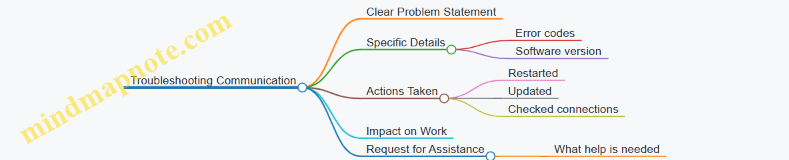
By focusing on these points, your descriptions will help support teams diagnose and fix problems faster, reducing downtime and frustration. Clear communication is a small effort that pays off in smoother remote work experiences.
10.2 Requesting Help and Offering Assistance Politely
In remote work, clear and courteous communication is essential when asking for help or offering support. The absence of physical presence means tone and phrasing carry more weight. Politeness helps maintain good relationships and encourages cooperation.
Key Principles for Requesting Help
- Be specific about what you need.
- Use polite modal verbs like “could,” “would,” or “can”.
- Acknowledge the other person’s time and effort.
- Offer context to explain why you need assistance.
- Express appreciation in advance.
Key Principles for Offering Assistance
- Use gentle, non-imposing language.
- Make your offer clear but optional.
- Show willingness without pressure.
- Provide details on how you can help.
Mind Map: Requesting Help Politely
Mind Map: Offering Assistance Politely
Examples of Requesting Help
- Email Request:
"Hi Sarah,
Could you please review the attached report when you have a moment? I’m having trouble interpreting some of the data, and your expertise would be invaluable. I appreciate your time and help.
Thanks in advance,
John"
- Chat Message:
“Hey Mike, would you mind taking a quick look at this code snippet? I’m stuck on a bug and could use a second pair of eyes. Thanks!”
- Video Call Request:
“If you have a few minutes after the meeting, could I ask for your advice on the client proposal? I want to make sure I’m covering all the key points.”
Examples of Offering Assistance
- Email Offer:
"Hi Team,
If anyone needs help with the new software rollout, I’d be happy to provide a quick walkthrough or answer questions. Just let me know what works best.
Best,
Anna"
- Chat Message:
“Hi Lisa, I noticed you’re working on the budget spreadsheet. If you want, I can help double-check the formulas. No pressure, just say the word.”
- Video Call Offer:
“Before we wrap up, I’d be glad to assist with setting up the project timeline if anyone feels it would help. Feel free to reach out anytime.”
Tips for Tone and Clarity
- Use “please” and “thank you” naturally but not excessively.
- Avoid demanding language; frame requests as questions.
- When offering help, avoid assuming the other person needs it.
- Keep messages concise but informative.
- Match formality to the relationship and company culture.
By combining clear requests with polite phrasing and thoughtful offers of assistance, remote teams can maintain smooth collaboration and mutual respect despite physical distance.
10.3 Following Up on Support Requests
Following up on support requests is a crucial part of remote work communication. It ensures that issues are resolved in a timely manner and that all parties remain informed. Effective follow-up balances politeness with clarity, avoiding frustration while keeping the process moving forward.
Key Elements of a Follow-Up Message
- Reference the original request: Remind the recipient of the issue or ticket number.
- State the purpose: Clearly indicate that this is a follow-up.
- Request an update or status: Politely ask for progress or next steps.
- Offer additional information: Provide any new details if applicable.
- Express appreciation: Thank the recipient for their time and help.
Mind Map: Components of a Follow-Up Message
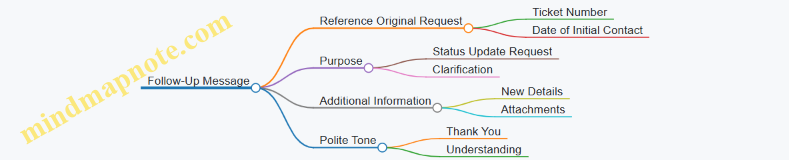
Mind Map: Follow-Up Timing and Frequency
Example 1: Email Follow-Up for a Software Issue
Subject: Follow-Up on Support Ticket #12345 – Login Problem
Dear Support Team,
I hope this message finds you well. I am writing to follow up on my support request submitted on March 10 regarding the login issue I am experiencing with the company portal (Ticket #12345).
Could you please provide an update on the status of this issue? If you need any additional information from my side to assist with troubleshooting, please let me know.
Thank you for your assistance.
Best regards,
Alex Morgan
Example 2: Chat Message Follow-Up in a Support Channel
Hi @ITSupport, just checking in on the network access request I sent yesterday afternoon. Has there been any progress? Let me know if you need more details.
Thanks!
Example 3: Polite Follow-Up After No Response
Subject: Gentle Reminder: Support Request #12345
Hello,
I wanted to kindly follow up on my previous email regarding the login issue (Ticket #12345). I understand you may be busy, but I would appreciate any updates when you have a moment.
Thank you for your time.
Regards,
Alex Morgan
Tips for Effective Follow-Up
- Be concise: Keep messages short and to the point.
- Maintain professionalism: Use polite language, even if frustrated.
- Use clear subject lines: Include keywords like “Follow-Up” and ticket numbers.
- Set expectations: If appropriate, mention when you hope to hear back.
- Avoid multiple follow-ups too quickly: Give reasonable time between messages.
Mind Map: Common Phrases for Follow-Up Messages
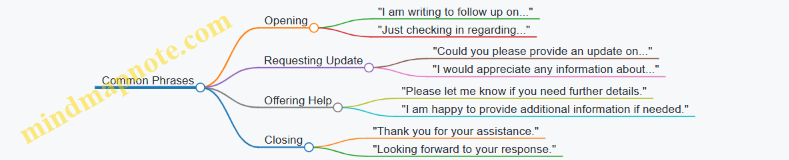
Following up on support requests is about clear, courteous communication that keeps everyone aligned. Using structured messages with polite language and timely reminders helps resolve issues efficiently without straining relationships.
10.4 Practice Dialogue: Reporting a Software Problem
When reporting a software problem in a remote work setting, clarity and precision are key. The goal is to describe the issue in a way that helps the support team understand and address it quickly. Below is a detailed example dialogue, followed by mind maps and examples illustrating useful phrases and strategies.
Dialogue Example:
Employee: Hi Alex, I’m having trouble with the project management tool. When I try to upload files, the system shows an error message and doesn’t save my changes.
Support: Thanks for letting me know, Jamie. Can you tell me what the error message says exactly?
Employee: It says, “Upload failed: Network error.” I’ve checked my internet connection, and it seems fine.
Support: Got it. Which browser and version are you using?
Employee: I’m using Chrome, version 113.0.5672.63.
Support: Thanks. Have you tried clearing your cache or using a different browser?
Employee: Not yet. I’ll try clearing the cache and let you know if that helps.
Support: Great. If that doesn’t work, please send me a screenshot of the error and any steps you took before it appeared.
Employee: Will do. Thanks for your help, Alex.
Support: You’re welcome. I’ll be here if you need anything else.
Mind Map 1: Key Elements When Reporting a Software Problem
Mind Map 2: Useful Phrases for Reporting Problems

Examples of Clear Problem Descriptions
- “When I click the ‘Submit’ button, the page reloads but my data isn’t saved.”
- “The application crashes immediately after logging in.”
- “I receive a ‘Timeout error’ after 30 seconds of inactivity.”
- “The report generation takes longer than usual and then fails with an unknown error.”
Tips for Effective Communication
- Be specific about what you were doing when the problem occurred.
- Include exact error messages rather than paraphrasing.
- Mention any recent changes to your system or software.
- Note the frequency: is it every time or intermittent?
- Offer to provide screenshots or recordings if possible.
- Keep the tone polite and cooperative.
By following these guidelines and using the example dialogue as a model, you can report software problems efficiently and professionally in a remote work environment.
10.5 Practice Dialogue: Providing Remote IT Support
Providing remote IT support requires clear communication, patience, and the ability to guide users through technical issues without being physically present. The dialogue below demonstrates a typical interaction between an IT support specialist and a remote employee experiencing a problem with their computer.
IT Support: Hello, this is Alex from IT support. I understand you’re having trouble connecting to the VPN. Can you describe what happens when you try to connect?
Employee: Hi Alex. Yes, when I try to connect, I get an error message saying “Connection timed out.”
IT Support: Thanks for that. Let’s start by checking your internet connection. Can you confirm if other websites or apps are working normally?
Employee: Yes, I can browse websites and use email without any issues.
IT Support: Good. Next, let’s verify if the VPN client is up to date. Could you please open the VPN application and tell me the version number?
Employee: Sure, it says version 3.2.1.
IT Support: That’s the latest version. Now, let’s try restarting the VPN client. Please close it completely and then reopen it.
Employee: Okay, done.
IT Support: Try connecting again and let me know what happens.
Employee: It’s still giving me the same “Connection timed out” error.
IT Support: Understood. Could you check if your firewall might be blocking the VPN? Please open your firewall settings and see if the VPN client is allowed.
Employee: I’m not sure how to check that.
IT Support: No problem. I’ll guide you through it. On Windows, click the Start menu, type “Windows Defender Firewall,” and open it. Then select “Allow an app or feature through Windows Defender Firewall.” Look for the VPN client in the list.
Employee: Okay, I see it, and it’s checked for both private and public networks.
IT Support: That means the firewall isn’t blocking it. Let’s try one more step. Please open Command Prompt and type ipconfig /flushdns, then press Enter.
Employee: Done.
IT Support: Now, try connecting to the VPN again.
Employee: It worked! I’m connected now.
IT Support: Great! Sometimes DNS cache can cause connection issues. If you run into this again, flushing the DNS is a good first step.
Employee: Thanks so much for your help, Alex.
IT Support: You’re welcome! Feel free to reach out anytime.
Mind Map: Key Steps in Remote IT Support Dialogue
Examples of Useful Phrases in Remote IT Support
-
Starting the conversation:
- “I understand you’re experiencing [issue]. Could you describe what you see when it happens?”
- “Let’s start by checking your internet connection.”
-
Guiding through steps:
- “Please open [application] and tell me what you see.”
- “Could you try restarting the program and see if that helps?”
- “I’ll walk you through the firewall settings.”
-
Clarifying and confirming:
- “Can you confirm if [action] was successful?”
- “Are you seeing any error messages? If yes, what do they say?”
-
Explaining technical terms simply:
- “Flushing the DNS is like clearing the phone book your computer uses to find websites.”
- “The firewall acts like a gatekeeper, deciding which programs can access the internet.”
-
Closing the conversation:
- “Glad we could get this sorted out.”
- “If the problem comes back, don’t hesitate to contact us again.”
This dialogue and the accompanying phrases illustrate how to maintain clarity and professionalism while ensuring the user feels supported. The key is to break down technical steps into manageable instructions and confirm understanding at each stage.
10.6 Using positive and patient language in troubleshooting and support conversations helps maintain a constructive atmosphere, even when problems arise. It encourages cooperation and reduces frustration on both sides. Here are some best practices, organized with mind maps and examples to clarify how to apply them.
Mind Map: Core Principles of Positive and Patient Language
Mind Map: Language Techniques
Examples and Explanation
1. Acknowledge the Issue Without Over-Apologizing
Instead of: “I’m so sorry this is happening, it’s terrible.”
Try: “I understand this is inconvenient, and I appreciate your patience.”
Why? It shows empathy but keeps the tone professional and focused on resolution.
2. Use Positive Framing
Instead of: “You didn’t follow the instructions correctly.”
Try: “Let’s review the steps together to make sure everything is set up properly.”
Why? It avoids blame and invites collaboration.
3. Soften Requests
Instead of: “Send me the error message.”
Try: “Could you please send me the error message when you have a moment?”
Why? It respects the recipient’s time and encourages cooperation.
4. Encourage and Reinforce Progress
“Great, you’ve completed the first step. Now let’s move on to the next one.”
Why? It motivates the user and breaks down the process into manageable parts.
5. Maintain Patience in Follow-Ups
“Take your time to try this. I’ll be here if you need any help.”
Why? It reduces pressure and builds trust.
6. Use Polite Closings
“Thank you for your cooperation. Please let me know if anything else comes up.”
Why? It leaves the conversation open and positive.
Sample Dialogue Incorporating Best Practices
User: “I’m getting an error when I try to upload the file.”
Support: “Thanks for letting me know. Could you please share the exact error message? That will help me assist you better.”
User: “It says ‘File format not supported.’”
Support: “I see. Let’s check the file type together. Could you confirm the file extension for me?”
User: “It’s .png”
Support: “Thanks. Our system currently accepts .jpg and .jpeg formats. Would you be able to convert the file to one of these formats? I can guide you through the process if you’d like.”
User: “Yes, please.”
Support: “Great! Here’s a simple way to convert your file…”
This exchange uses polite requests, clear explanations, and encouragement, keeping the tone patient and positive.
Summary
Positive and patient language in support conversations involves clear communication, empathy, polite phrasing, and encouragement. It helps users feel understood and supported, making problem-solving smoother and less stressful.
10.7 Examples: Email Templates for Support Communication
When communicating technical issues or support requests via email, clarity and politeness are key. Below are several templates tailored to common scenarios in remote work support communication. Each template is followed by a brief explanation of its structure and language choices.
Mind Map: Components of a Support Email
Template 1: Reporting a Technical Issue
Subject: Issue Accessing VPN Since This Morning
Dear IT Support Team,
I hope this message finds you well. Since this morning, I have been unable to connect to the company VPN. Each attempt results in the error message: “Connection timed out.”
Could you please assist in resolving this issue? I have already tried restarting my computer and router without success.
Thank you for your help.
Best regards,
[Your Name]
Explanation: This email starts with a clear subject line specifying the problem. The body provides context, describes the issue with an exact error message, and mentions troubleshooting steps already taken. The tone is polite and concise.
Template 2: Requesting Assistance with Software Installation
Subject: Request for Installation of Design Software
Hello [Support Team/Name],
I am preparing for a new project that requires the use of [Software Name]. Could you please assist me with the installation on my work laptop?
Please let me know if you need any additional information from my side.
Thanks in advance for your support.
Kind regards,
[Your Name]
Explanation: This email politely requests help with software installation. It offers to provide further details, which encourages clear two-way communication.
Template 3: Following Up on a Support Ticket
Subject: Follow-Up on Ticket #12345 – Printer Connectivity Issue
Dear Support Team,
I am writing to follow up on the support ticket #12345 regarding the printer connectivity issue I reported last week. Has there been any update on the resolution?
Please let me know if I can provide any further information to assist.
Thank you for your attention.
Best,
[Your Name]
Explanation: This follow-up email references the ticket number to help the support team quickly identify the issue. It maintains a polite tone and offers cooperation.
Template 4: Providing Additional Information After Initial Request
Subject: Additional Details for VPN Access Issue
Hi IT Support,
Following up on my earlier email about the VPN access problem, I wanted to add that the issue occurs both on my home Wi-Fi and mobile hotspot.
Please let me know if this helps in diagnosing the problem.
Thanks,
[Your Name]
Explanation: This email supplements previous communication with relevant new information, keeping the support team informed without overwhelming them.
Template 5: Offering Assistance to a Colleague with a Technical Problem
Subject: Assistance with Email Sync Issue
Hi [Colleague’s Name],
I heard you’re having trouble with your email syncing on the mobile app. I had a similar issue recently and found that clearing the app cache helped.
If you’d like, I can guide you through the steps or connect you with IT support.
Best,
[Your Name]
Explanation: This email is friendly and helpful, offering practical advice and further support. It balances professionalism with approachability.
Summary
Effective support emails share these qualities:
- A clear and specific subject line
- A polite greeting and closing
- A concise description of the problem or request
- Relevant details such as error messages or previous troubleshooting
- A clear statement of the desired assistance
- An invitation for further communication
Using these templates as a guide will help maintain professionalism and efficiency in remote work support communication.