The Agentic AI Digital Employee Playbook
1. Defining Digital Employees and Agentic Work
1.1 What a Digital Employee Is and How It Differs from Chatbots
A digital employee is an operational worker: it receives a defined job, uses tools and information to complete it, and produces an auditable result that can be handed off or escalated. A chatbot, by contrast, is primarily a conversation interface. It may answer questions, draft text, or guide a user, but it is not inherently responsible for finishing a workflow end-to-end.
The Core Distinction: Responsibility for Outcomes
A digital employee is designed around outcomes and constraints. For example, “process 50 refund requests” is a job with acceptance criteria, not a question to answer. The system must check required fields, apply rules, call the payment system, and record what happened.
A chatbot is designed around interaction. If you ask, “How do I process a refund?” it can explain steps or generate a checklist. Even if it can draft the refund action, it typically stops at producing text unless you explicitly connect it to an execution workflow.
Mind Map: Digital Employee vs Chatbot
How a Digital Employee Works in Practice
Think of a digital employee as a small team member with a checklist and a clipboard.
- It receives a task package. The package includes the request data, relevant policies, and the required output schema. For instance, a “vendor onboarding” task includes company name, tax ID, bank details, and the internal policy version to follow.
- It plans within boundaries. It decides which steps to run, but it must stay inside allowed actions. If the policy says “bank verification must be done by the finance tool,” the employee cannot invent an alternative.
- It executes using tools. It calls systems like CRM, ticketing, or document storage. Each call is logged with inputs and results.
- It validates before finishing. It checks that required fields are present, that totals match, and that the output conforms to the expected format.
- It reports and hands off. It returns a structured result: what it did, what it found, and what needs human review.
What Chatbots Typically Do Instead
A chatbot can still be helpful in the same scenario, but its default behavior is different.
- It might ask, “Do you want to submit the onboarding form?” and then generate a draft email.
- It might summarize missing fields: “You still need the tax ID and bank routing number.”
- It might provide a step-by-step guide, leaving the actual submission to a human.
If you want chatbot-like interaction but with employee-like responsibility, you must wrap the chatbot in a workflow system that owns the job lifecycle: inputs, tool permissions, validation, retries, and completion criteria.
Example: Ticket Triage
Digital employee approach:
- Input: a new support ticket plus customer metadata.
- Actions: classify category, check known issues, create a response draft, and assign the ticket to the correct queue.
- Validation: ensure the category is one of the allowed values and that the response includes required disclaimers.
- Output: a ticket update with an audit log and a confidence score that triggers escalation when low.
Chatbot approach:
- Input: the ticket text via chat.
- Actions: explain likely categories and draft a suggested reply.
- Validation: limited to what the model can self-check in text.
- Output: a message to the user, who still performs the ticket update.
A Useful Practical Test
Ask: “If nobody is watching, does it still finish the job correctly?”
- If the answer is yes, you’re closer to a digital employee.
- If the answer is “it can help, but a person must complete the workflow,” you’re closer to a chatbot.
Mind Map: Responsibilities and Artifacts
A digital employee is not just a smarter chat interface. It is a workflow participant with explicit duties, measurable completion, and a paper trail that survives the next shift.
1.2 Agentic Systems Roles, Tools, and Execution Loops
A useful way to think about agentic systems is as a small organization with clear job titles. The “organization” has roles that decide what to do, tools that do the doing, and execution loops that keep the work moving until it meets a defined finish line.
Roles in an Agentic System
Planner: Converts a goal into a sequence of steps. It decides what information is needed next and what “done” looks like for each step. For example, when asked to “prepare a weekly status email,” the planner breaks it into: gather updates, summarize changes, draft sections, and check for missing items.
Retriever: Finds relevant information from documents, tickets, or databases. It is not responsible for final writing; it supplies grounded facts. Example: it pulls the latest incident notes and the last three sprint updates.
Executor: Calls tools to perform actions. It turns a plan into concrete requests like “create a ticket,” “update a spreadsheet,” or “send an email draft to the reviewer queue.”
Verifier: Checks whether outputs satisfy constraints. It can validate formatting, completeness, policy rules, and whether the actions actually succeeded. Example: it confirms the email includes required sections and that the ticket was created in the correct project.
Escalation Handler: Routes work to humans when uncertainty or risk crosses thresholds. Example: if the verifier detects missing approvals for a sensitive change, it creates a review task instead of proceeding.
Tools and Their Contracts
Tools should behave like well-defined instruments, not magic boxes. Each tool needs a contract: required inputs, expected outputs, error modes, and side effects.
- Read-only tools: search, fetch, summarize. They should never change state.
- Action tools: create, update, send. They must support idempotency so retries don’t duplicate work.
- Validation tools: schema checks, policy checks, permission checks.
A practical example: a “Create Expense Report” tool should accept structured fields (date, vendor, amount, category), return a report ID, and clearly report whether it was created or already existed.
Execution Loops That Make Work Finish
Agentic execution is typically iterative: plan → act → observe → verify → repeat. The loop exists because real work has friction: missing data, tool errors, and changing context.
Loop Step 1: Interpret the request The system identifies the goal, constraints, and the target system boundaries. Example: “Update customer onboarding steps” implies a specific workflow system, not a random document.
Loop Step 2: Plan the next action The planner selects the smallest next step that reduces uncertainty. Example: instead of drafting the whole email, it first requests the latest metrics.
Loop Step 3: Retrieve or act using tools The executor calls tools and records observations. Example: it fetches metrics and notes which source timestamps were used.
Loop Step 4: Verify against acceptance criteria The verifier checks completion and correctness. Example: it ensures every metric has a source and that totals match.
Loop Step 5: Decide to continue, escalate, or stop If verification fails, the system either retries with a narrower query or escalates. If it passes, it stops and hands off the final artifact.
Mind Map: Roles, Tools, and Loops
Example: Handling a Simple Workflow End to End
Goal: “Draft a change notification for a production deployment and queue it for approval.”
- Planner creates steps: collect deployment details, draft message, run checks, queue for approval.
- Retriever pulls release notes, affected services, and the deployment window from the change management system.
- Executor drafts the notification in the required template and submits it to the approval queue.
- Verifier checks that required fields are present (services, impact level, rollback note) and that the approval submission returned a valid queue ID.
- Escalation Handler triggers if impact level is missing or if the approver role lacks permission; it then creates a task for a human to supply the missing detail.
The key integration point is that each role has a narrow responsibility, and the loop ensures outputs are repeatedly checked against concrete criteria rather than assumed correct.
1.3 Scope Boundaries for Digital Employees Across Functions
Digital employees are most useful when their responsibilities are crisp. Scope boundaries prevent two common failure modes: the agent tries to do everything, or it does too little and becomes a slow “assistant” that never finishes work. The goal is to define what the employee owns, what it may touch, and what it must escalate.
Ownership Boundaries by Function
Start by separating work into three layers: intake, execution, and outcome.
- Intake ownership means the agent can gather inputs, clarify missing details, and route requests.
- Execution ownership means the agent can perform actions in systems, draft artifacts, and run internal checks.
- Outcome ownership means the agent can finalize deliverables that others rely on.
A practical rule: if the outcome affects money, compliance, or customer commitments, outcome ownership should be narrower and often require human approval.
Example: In Accounts Payable, the digital employee can intake invoice data and validate required fields. It can execute “create a draft payment record” but should not finalize payment without approval.
Action Boundaries by Risk and Reversibility
Not all actions are equal. Classify tools and operations by risk and reversibility.
- Low risk and reversible: updating a ticket description, generating a report draft, posting a message to an internal channel.
- Medium risk: changing configuration that affects a subset of users, issuing refunds that can be reversed with effort.
- High risk and hard to reverse: deleting records, changing billing plans, sending customer-facing commitments.
Then map each category to allowed behaviors:
- For low-risk actions, the agent can act directly after validation.
- For medium-risk actions, require a confirmation step or a “review then execute” pattern.
- For high-risk actions, require human approval and a reasoned summary of what will change.
Example: In HR onboarding, the agent can draft offer letters and schedule internal tasks. It should not submit payroll changes; it escalates with a structured summary of proposed changes and the source documents used.
Data Boundaries by Purpose and Permission
Scope includes data, not just tasks. Define boundaries using two dimensions: purpose and permission.
- Purpose: what the data is allowed to be used for in the workflow.
- Permission: who or what systems can access it.
A digital employee should only retrieve data needed for the current step. If a workflow requires broader data, the agent should request it explicitly through an approved path.
Example: For a sales proposal generator, the agent may access product catalog and pricing tables. It should not retrieve customer medical or legal documents because the purpose is commercial drafting, not compliance interpretation.
Communication Boundaries Across Teams
Agents often fail socially before they fail technically. Define communication boundaries so the agent knows when to message, when to wait, and what to include.
- When to message: missing inputs, blocked actions, or detected inconsistencies.
- When to wait: when the workflow requires a human decision that the agent cannot safely infer.
- What to include: the minimal context needed to decide, plus the exact question.
Example: If a procurement request lacks a cost center, the agent sends a message containing the missing field, the attempted lookup results, and two options for next steps.
Mind Map: Scope Boundaries Across Functions
Case Example: Redesigning a Cross-Functional Workflow
Consider a workflow that starts in Support, creates a ticket, and triggers billing adjustments.
- Support intake: the digital employee can collect issue details and categorize the request.
- Ticket execution: it can create and update the ticket, attach evidence, and draft a resolution summary.
- Billing action boundary: it can prepare a billing adjustment draft, including the amount, reason, and referenced ticket evidence.
- Outcome boundary: it escalates the final billing change for approval because it is high impact and difficult to reverse.
This structure keeps the agent fast where it is safe and careful where it matters.
Practical Boundary Checklist
Before enabling a digital employee in any function, confirm:
- The workflow has explicit intake, execution, and outcome owners.
- Every tool action is tagged with risk and reversibility.
- Data retrieval is purpose-limited and permission-limited.
- Escalations include what happened, what was tried, and what decision is needed.
When these boundaries are written down, the agent stops guessing and starts operating like a dependable teammate—one with fewer opinions and better logs.
1.4 Success Criteria for Operational Use in Real Workflows
Operational success means the digital employee performs useful work inside real constraints: messy inputs, partial failures, changing priorities, and humans who still need to stay in control. The criteria below turn “it worked in a demo” into “it works on Tuesday at 3:17 p.m.”
Define Outcomes That Match the Workflow
Start by stating what “done” means in the workflow’s language. For example, a digital employee that drafts invoices is not successful because it produced text; it is successful because it created invoices that pass validation rules and reached the correct approval queue.
Use three layers of outcomes:
- Business outcome: the work’s impact, such as “fewer overdue invoices” or “faster ticket resolution.”
- Operational outcome: the measurable workflow result, such as “submitted within SLA” or “no manual rework for formatting.”
- Task outcome: the immediate deliverable, such as “correct fields populated” or “email sent to the right distribution list.”
A practical rule: if you cannot name the exact artifact the workflow consumes next, you cannot measure success.
Set Quality Targets with Clear Pass Fail Rules
Quality criteria should be testable without a philosophical debate. Break quality into categories that map to how humans review work.
- Correctness: facts and computations match source data.
- Completeness: required fields are present and non-empty.
- Format compliance: output matches schema rules, templates, and length limits.
- Policy compliance: sensitive data handling and approved wording rules are followed.
Example: For a “create customer refund” task, correctness includes the refund amount matching the approved adjustment record; completeness includes reason codes and payment method; format compliance includes the exact JSON fields required by the finance system.
Measure Reliability Under Real Conditions
Reliability is not “always works.” It is “fails in predictable, recoverable ways.” Define:
- Success rate: percentage of runs that complete the workflow to the handoff point.
- Retry behavior: how often transient errors recover without human intervention.
- Fallback behavior: what happens when the agent cannot proceed, such as escalating with a structured reason.
Example: If the digital employee cannot access the CRM due to a permissions error, success is not “it guessed.” Success is “it escalated to the right queue with the missing permission details and the attempted record identifiers.”
Establish Throughput and Latency Expectations
Operational use requires time budgets. Define targets for:
- Cycle time: time from task start to handoff.
- Queue time: time waiting for approvals, data availability, or human review.
- Batch behavior: how it handles multiple requests without collapsing into inconsistent outputs.
Example: A weekly report generator might have a 2-hour cycle time target, but a 10-minute queue time target because it should start immediately when the schedule triggers. If it waits on human review for every item, throughput will collapse.
Specify Human Effort and Review Load
Humans are part of the system, so success must include their workload. Track:
- Review rate: what fraction of tasks require human approval.
- Rework rate: how often humans must edit outputs.
- Time per review: minutes spent per approval.
Example: If a digital employee drafts support replies, success might be “90% auto-send, 10% review,” and review time should average under 2 minutes because the output includes a checklist of assumptions and citations to the ticket history.
Require Traceability for Every Decision and Action
Operational teams need to answer three questions quickly: What happened, why, and what was changed. Success criteria include:
- Source trace: which documents or records informed the output.
- Decision trace: the key checks performed, such as validation steps and policy gates.
- Action trace: what external systems were called and with what parameters.
Example: When creating a purchase order, the audit trail should show the supplier record used, the unit price source, and the validation results before the order submission call.
Mind Map: Success Criteria for Operational Use
Example: A Concrete Success Checklist
Consider a digital employee that processes expense reports.
- Quality: every line item includes category, currency, and receipt reference; totals reconcile to the submitted amounts.
- Reliability: if receipt OCR confidence is low, it escalates with the specific line items needing confirmation.
- Performance: typical cycle time under 30 minutes; no more than 5% of runs exceed 2 hours.
- Human Workload: review required for under 15% of reports; average review time under 3 minutes.
- Traceability: output includes the extracted receipt fields and the validation checks performed.
When these criteria are met together, the workflow becomes dependable rather than merely impressive. The digital employee earns its place by producing the right artifact, with the right level of confidence, at the right operational cost, and with enough evidence for humans to trust the handoff.
1.5 Documentation Artifacts for Clear Ownership and Handoffs
Digital employees run on instructions, but they also run on paperwork—just the right amount of it. The goal of documentation artifacts is simple: when work moves from one person or system to another, the next owner should know what “done” means, what inputs were used, what actions were taken, and where to look when something goes wrong.
What Ownership Documentation Must Answer
Start with four questions every artifact should make easy to answer:
- Who owns the outcome? Not who built the workflow, but who is accountable for results.
- What exactly is the deliverable? A specific output format, location, and acceptance criteria.
- What inputs were required and where did they come from? Data sources, IDs, and versions.
- What happened during execution? A trace of decisions, tool calls, and final status.
If any of these are missing, handoffs become “tribal knowledge” and debugging becomes a scavenger hunt.
The Core Artifact Set
A practical documentation set usually includes five artifacts. Together they cover planning, execution, review, and incident response.
Workflow Contract
This is the single source of truth for the workflow’s purpose and boundaries.
Include:
- Owner and backup owner for the outcome.
- Trigger and schedule (event name, polling interval, or batch window).
- Inputs with examples (e.g., “ticket_id: TCK-1842”).
- Outputs with schema or template (e.g., “approval_request.md in /approvals”).
- Acceptance criteria stated as checks (e.g., “must include risk summary and cost impact”).
- Non-goals to prevent scope creep.
Example: A “Monthly Invoice Reconciliation” contract states that the workflow produces a reconciliation report and flags mismatches for review, but it does not contact vendors.
Runbook for Operators
Operators need a playbook for normal operations and exceptions.
Include:
- How to start a run (manual button, CLI command, or queue entry).
- What “healthy” looks like (expected run duration, typical failure rate).
- Escalation rules with thresholds (e.g., “if 3 consecutive tool failures occur, pause and notify”).
- Common failure modes and exact steps to recover.
Example: If the workflow cannot fetch customer records due to an authorization error, the runbook instructs the operator to verify the service account role, then re-run with the same input IDs.
Execution Trace Template
This artifact captures what happened in a specific run.
Include:
- Run ID and correlation ID.
- Workflow version and configuration hash.
- Input snapshot (IDs, not raw sensitive payloads).
- Tool calls with timestamps, parameters (redacted where needed), and results.
- Decision log for key branches (why it chose path A vs B).
- Final outcome and links to outputs.
Example: A trace shows that the workflow attempted three retrieval queries, selected the document with the highest confidence score, and then generated a draft approval request that failed schema validation.
Data Lineage Notes
This prevents “mystery data” and supports audits.
Include:
- Source systems and dataset names.
- Refresh cadence and last known update date.
- Transformation steps at a high level (filtering, normalization, mapping).
- Versioning for critical reference data.
Example: “Policy text” is sourced from a repository snapshot dated 2026-02-18, and the lineage notes record that the workflow used that snapshot for all runs in the month.
Handoff Checklist
This is the shortest artifact that still prevents mistakes.
Include:
- What to verify before passing ownership.
- Where outputs live and how to locate them.
- What issues are known and which are resolved.
- Who to contact for each category of problem.
Example: Before moving from build team to operations, the checklist requires confirming that the workflow contract matches the deployed version and that the runbook’s escalation thresholds reflect production behavior.
Mind Map: Documentation Artifacts
How Artifacts Work Together During a Handoff
A clean handoff follows a sequence.
- Contract sets expectations. The receiving owner confirms the deliverable and boundaries.
- Lineage explains inputs. The receiving owner knows which data snapshots and transformations were used.
- Trace shows behavior. A sample run demonstrates how decisions and tool calls map to outcomes.
- Runbook enables operations. The receiving owner can handle failures without guessing.
- Checklist confirms readiness. The handoff ends only when the checklist items are verified.
This sequence turns handoffs from a conversation into a repeatable process. It also makes accountability visible: if something breaks, the next owner knows where to look, what to change, and what not to touch.
2. Selecting Use Cases and Designing for Measurable Outcomes
2.1 Use Case Selection Framework Based on Work Volume and Variability
Picking the right first digital employee is mostly arithmetic plus a little honesty. You want enough work to justify building the system, and enough structure to make the work predictable. The framework below uses two axes—work volume and work variability—to guide decisions, then adds practical filters so you don’t accidentally automate chaos.
Step 1: Define Work Volume in Operational Terms
Work volume is not “how often people talk about the task.” It’s how many units of work happen per week and how much human time each unit consumes.
Use a simple unit definition. For example:
- “Invoice processed” (one invoice per unit)
- “Customer refund request handled” (one ticket per unit)
- “Monthly report drafted” (one report per unit)
Then estimate:
- Units per week (U)
- Average human minutes per unit (M)
- Human minutes per week (H = U × M)
Example: If refunds arrive 220 times/week and each takes 6 minutes on average, H = 1,320 minutes/week. If the digital employee can reduce handling time by 60% for the first pass, you’re targeting roughly 792 minutes/week saved, before counting rework.
Step 2: Define Work Variability as Predictability of Inputs and Outcomes
Variability measures how much the task changes from case to case. High variability usually means different data formats, inconsistent customer language, frequent exceptions, or multiple decision paths.
Score variability using four dimensions, each rated 1–5:
- Input variability: Are documents and fields consistent?
- Decision variability: Do outcomes depend on many rules or judgment calls?
- Tool variability: Does the task require many different systems or steps?
- Output variability: Are the required responses structured or free-form?
Compute a rough variability score (V) as the average of the four dimensions.
Example: “Create a standardized purchase order from a form” might be V ≈ 2 (consistent inputs, limited decision paths, stable output). “Handle escalations with legal nuance” might be V ≈ 5 (messy inputs, many exception types, varied outputs).
Step 3: Place Candidate Use Cases on the Volume–Variability Map
Now combine volume and variability into a quadrant view.
- High volume + low variability: best first automation candidates.
- High volume + high variability: consider partial automation with strong review.
- Low volume + low variability: good for pilots, but ROI may be slower.
- Low volume + high variability: usually not a first build unless risk reduction is the main goal.
Mind Map: Volume and Variability Selection Logic
Step 4: Apply Practical Filters So the Math Doesn’t Lie
Even a perfect quadrant placement can fail if the system can’t reliably do the work.
-
Data Access Feasibility
Ask: can the digital employee retrieve the needed inputs and write the outputs without manual copy-paste? If the task depends on someone reading a PDF and typing by hand, you’ll need either better data capture or a different use case. -
Clear Acceptance Criteria
Define what “done” means in observable terms. Examples:
- Refund approved: correct policy applied, correct amount, correct reason code.
- Ticket resolved: required fields completed, customer notified, no missing attachments.
- Safe Action Boundaries Decide what actions are allowed without human approval. A common pattern is:
- Allowed: draft responses, propose changes, prepare summaries.
- Restricted: submit refunds, change accounts, send final communications.
- Measurable Quality Metrics Pick metrics that match the work. For structured tasks, use field-level accuracy. For language tasks, use rubric scoring plus sampling.
Step 5: Choose the Automation Mode That Matches Variability
Variability determines how much autonomy you can safely grant.
- Low variability: “Do it end-to-end” with validation checks.
- Medium variability: “Draft and verify” where the employee prepares outputs and a reviewer confirms.
- High variability: “Triage and assist” where the employee classifies, extracts, and recommends next steps.
Example: Two Candidate Use Cases
Use Case A: Categorize incoming invoices and route to the right approver
- Volume: 1,000 invoices/week
- Variability: V ≈ 2.1 (mostly consistent vendor formats)
- Mode: end-to-end with rule checks (e.g., vendor match, amount parsing confidence)
- Acceptance: correct category + correct approver + no missing required fields
Use Case B: Respond to customer complaints with policy exceptions
- Volume: 180 tickets/week
- Variability: V ≈ 4.6 (different complaint types, frequent exceptions)
- Mode: triage + draft response for review
- Acceptance: correct policy basis cited, correct next action proposed, reviewer confirms final send
Step 6: Produce a Short Decision Output
For each candidate use case, record:
- U (units/week) and M (minutes/unit)
- H = U × M
- V (variability score)
- Automation mode (end-to-end, draft-and-verify, triage-and-assist)
- Acceptance criteria and restricted actions
This turns selection into a repeatable process. You’re not choosing based on gut feel; you’re choosing based on whether the work is frequent enough and consistent enough to be worth building.
2.2 Mapping Business Goals to Task Level Requirements
Business goals tell you what “better” means; task level requirements tell you what the digital employee must actually do to get there. The trick is to translate outcomes into observable work, then translate work into constraints that prevent the agent from doing the wrong thing confidently.
Start with Outcome Definitions That Can Be Measured
Pick one business goal and write it as a measurable statement with a unit and a time window. Example: “Reduce invoice processing cycle time from 7 days to 4 days within 60 days.” If the goal is qualitative, define a proxy metric that operations can track, such as “percent of invoices requiring manual correction.”
Next, identify the decision boundary: what counts as success for the business, and what counts as failure. For cycle time, failure might be “invoice approved with wrong vendor bank details” or “invoice stuck in review due to missing fields.” This boundary becomes the basis for task requirements.
Break the Goal into Work Streams and Bottlenecks
A goal usually spans multiple work streams. For invoice processing, streams might include intake, validation, enrichment, approval routing, and posting. Then locate bottlenecks using simple evidence: where tasks wait, where rework happens, and where exceptions pile up.
A practical method is to list the top 10 reasons for manual intervention from the last month. If “missing PO number” accounts for 40% of manual touches, that requirement must show up in the task design as an explicit validation step and an escalation rule.
Convert Work Streams into Task Types
Task level requirements are not “do invoice processing.” They are “perform validation X, then produce output Y, then trigger action Z.” Define task types by input, transformation, and output.
Example task type for validation:
- Input: invoice document fields and vendor master record
- Transformation: normalize vendor name, extract PO number, check totals
- Output: a structured validation report with pass/fail flags and reasons
This structure makes it easier to test and to measure whether the agent is actually improving the business metric.
Map Each Task Type to Requirement Categories
For each task type, define requirements in four categories.
-
Inputs and Preconditions Specify what must be present before the task can run. Example: “If PO number is missing, do not attempt totals reconciliation; route to exception queue.”
-
Actions and Tool Boundaries List what the agent is allowed to do. Example: “May query vendor master and invoice ledger; may not post accounting entries without approval.”
-
Output Contracts Define the exact outputs needed by downstream systems. Example: “Return JSON with fields: vendor_id, po_id, validation_status, discrepancy_type, and recommended_next_step.”
-
Quality and Safety Constraints Define thresholds and escalation triggers. Example: “If discrepancy confidence is below 0.8, escalate to human review; if bank account mismatch is detected, require approval.”
Mind Map: From Business Goal to Task Requirements
Example: Invoice Cycle Time to Task Requirements
Business goal: reduce cycle time from 7 to 4 days.
- Work streams: intake, validation, approval routing, posting.
- Bottleneck evidence: 35% of invoices require manual correction due to mismatched totals.
Task type: totals validation.
- Inputs and Preconditions: requires extracted line items and invoice total; if extraction confidence is low, escalate.
- Actions and Tool Boundaries: may compute totals and compare to PO totals; may not update ledger.
- Output Contracts: discrepancy_type (missing_line_item, tax_mismatch, total_mismatch), computed_total, expected_total, and recommended_next_step.
- Quality and Safety Constraints: if total mismatch exceeds tolerance, escalate; if mismatch is within tolerance, mark as auto-verified.
Task type: approval routing.
- Inputs and Preconditions: requires validation_status and vendor risk tier.
- Actions and Tool Boundaries: may create approval request; may not approve.
- Output Contracts: routing_rule_id, approver_group, and rationale summary.
- Quality and Safety Constraints: if vendor risk tier is unknown, route to human to avoid wrong approver assignment.
Build the Measurement Link So Requirements Stay Honest
After mapping tasks, define task metrics that predict the business metric. For cycle time, useful task metrics include:
- percent of invoices auto-verified
- percent escalated due to missing fields
- percent of escalations resolved without rework
Then verify the mapping: if the business metric improves but escalation rate rises, you likely shifted work rather than reduced it. Requirements should align so the agent reduces manual touches without increasing downstream corrections.
Keep Requirements Testable and Bounded
Good task requirements are specific enough to test with sample cases and bounded enough to prevent “creative compliance.” If a requirement says “ensure accuracy,” it is not testable. Replace it with a threshold, a rule, and an escalation condition. That’s how business goals become work the digital employee can execute reliably.
2.3 Feasibility Checks for Data Access and System Integration
Before you build an agentic digital employee, confirm it can actually reach the right data and perform the required actions safely. Feasibility checks prevent the classic failure mode: the workflow looks great on paper, but the system boundaries make it impossible to complete tasks end to end.
What “Feasible” Means for Data Access
Feasibility is not just “we have the data.” It’s whether the agent can reliably obtain it in the needed shape, at the needed time, with the needed permissions.
Start with a data access inventory for each workflow step:
- Source systems: CRM, ticketing, ERP, document stores, spreadsheets, internal databases.
- Data types: structured fields, unstructured text, attachments, logs, images.
- Access method: API, database query, file transfer, event stream, manual export.
- Latency expectations: near-real-time vs batch windows.
- Data completeness: required fields that may be missing or inconsistent.
Then validate three practical constraints.
-
Permission fit: The agent’s service identity must have least-privilege access to every field it needs. If the workflow requires “read customer email” but the identity only has “read customer name,” you’ll need a redesign or a permission change.
-
Retrieval reliability: Confirm the access method returns results consistently. If an API occasionally returns partial records, define how the workflow detects and handles that.
-
Data normalization: Determine whether the agent receives data in a usable format. For example, a ticketing system might store dates as strings like “01/02/24,” which can be interpreted incorrectly unless you standardize.
What “Feasible” Means for System Integration
Integration feasibility is about whether the agent can execute actions without breaking invariants like idempotency, auditability, and referential integrity.
For each action step, capture:
- Target system and endpoint
- Action type: create, update, search, approve, cancel, upload
- Required identifiers: ticket ID, invoice number, account key
- Preconditions: what must be true before the action is allowed
- Postconditions: what success looks like
Next, test the action safety properties.
- Idempotency: If the agent retries after a timeout, will it create duplicates? Prefer endpoints that support idempotency keys or allow “upsert” behavior.
- Transaction boundaries: If an action spans multiple systems, decide where the workflow can safely stop and where it must roll back.
- Audit trail: Ensure every external action can be traced to a workflow run, including inputs used and outputs returned.
Mind Map: Feasibility Checks
Example: Ticket Triage Workflow
Suppose the digital employee triages incoming support tickets and assigns them to the right queue.
Data access check: The workflow needs ticket text, customer account, and past resolution notes. Verify:
- The service identity can read ticket body and customer account fields.
- The ticket API returns the full body and not a truncated preview.
- Resolution notes are available via a searchable endpoint, not only via a UI export.
Integration check: The workflow must update the ticket’s queue and add an internal comment.
- Confirm the update endpoint supports idempotent updates or that the workflow checks current queue before changing it.
- Ensure the workflow can add a comment without overwriting existing notes.
- Validate that each update is logged with a correlation ID tied to the workflow run.
Failure handling: If the ticket body is missing, the workflow should route to human review rather than guessing. If the queue update fails, it should record the failure and avoid repeated attempts that spam the system.
Example: Invoice Reconciliation Workflow
Now consider a workflow that matches invoices to purchase orders and flags mismatches.
Data access check: The agent needs invoice line items and purchase order totals. Verify:
- Currency and tax fields are present and consistently formatted.
- The system provides stable identifiers for matching, such as PO number and vendor ID.
- The workflow can access both “invoice” and “PO” datasets with the same permission model.
Integration check: The agent flags mismatches by creating a review record.
- Confirm the “create review record” endpoint enforces required fields.
- Ensure retries do not create multiple review records for the same invoice by using an idempotency key derived from invoice ID and rule version.
Evidence Checklist for Go/No-Go
Collect concrete artifacts before committing to build:
- Sample API responses for each required data element.
- A permission verification result for the service identity.
- Demonstrated test actions in a staging environment.
- A documented mapping from workflow steps to endpoints, including expected inputs and outputs.
- A list of known failure modes and the workflow behavior for each.
If any required evidence is missing, treat the workflow as not feasible until you either redesign the step or obtain the necessary access and integration guarantees.
2.4 Defining Metrics for Quality, Throughput, and Cost
Metrics are how you keep an agentic digital employee honest. The trick is to measure what matters at the right level: quality for correctness, throughput for speed and capacity, and cost for efficiency. If you measure only one, the system will optimize the wrong thing—usually the metric you forgot to define.
Quality Metrics That Prevent Silent Failures
Start with a simple quality model: the agent must produce the right output, based on the right inputs, with the right level of completeness.
1) Task Success Rate
- Definition: percent of runs that complete the task to the acceptance criteria.
- Example: For “create a customer invoice,” success means the invoice is created, totals match, and required fields are present.
2) Output Accuracy
- Definition: percent of outputs that match ground truth or SME-verified expectations.
- Example: For “summarize a support ticket,” accuracy can be scored by whether key facts (account ID, issue category, resolution steps) are present and correct.
3) Completeness and Coverage
- Definition: percent of required elements included.
- Example: For “draft a contract amendment,” completeness checks whether clause references, effective dates, and party names are included.
4) Source Faithfulness
- Definition: percent of claims supported by retrieved sources when retrieval is required.
- Example: If the agent cites a policy, the cited section must exist in the knowledge base and support the claim.
5) Constraint Violations
- Definition: count or rate of breaches of rules like formatting, approval requirements, or prohibited actions.
- Example: If the workflow requires human approval before sending an email, any “sent without approval” event is a hard violation.
A practical quality score often combines these into a single “quality gate” used for release and daily operations. Keep the gate strict for high-risk actions and more flexible for low-risk drafts.
Throughput Metrics That Reflect Real Work
Throughput is not just “tasks per hour.” It’s how much useful work you get while respecting review steps, tool latency, and retries.
1) Cycle Time
- Definition: time from task start to final accepted output.
- Example: If a request takes 2 minutes to draft but 20 minutes waiting for review, cycle time captures the real delay.
2) Lead Time and Queue Time
- Definition: time spent waiting for inputs, approvals, or human review.
- Example: A “refund approval” agent might be fast, but queue time dominates. That tells you where to fix capacity.
3) Effective Throughput
- Definition: accepted tasks per unit time, not attempted tasks.
- Example: If 100 runs produce 70 accepted results, effective throughput is 70, even if the agent “ran” 100.
4) Retry Rate and Rework Rate
- Definition: percent of tasks requiring reruns, additional tool calls, or human rework.
- Example: If “data validation” fails frequently, throughput will look fine until you account for rework.
5) Parallelism and Concurrency Limits
- Definition: how many tasks can safely run without degrading quality.
- Example: If tool rate limits cause timeouts, you’ll see throughput rise briefly and then collapse.
Cost Metrics That Tie Back to Decisions
Cost should map to the levers you can actually pull: model usage, tool calls, human review, and infrastructure overhead.
1) Compute and Model Cost Per Task
- Definition: total model spend divided by accepted tasks.
- Example: If a “policy lookup” agent uses multiple retrieval calls, cost per task captures that.
2) Tool Call Cost and Latency
- Definition: cost and time per external action.
- Example: If “create ticket” triggers multiple API calls, tool cost explains why the agent is slower than expected.
3) Human Review Cost
- Definition: reviewer minutes per accepted task.
- Example: If quality gates are too loose, reviewers spend time correcting predictable errors.
4) Failure and Escalation Cost
- Definition: cost of tasks that end in escalation, rollback, or manual handling.
- Example: If “update account status” frequently escalates due to missing fields, you pay twice: once for the failed run and again for the manual fix.
Mind Map: Metrics with Clear Ownership
Example: One Workflow, Three Metrics, One Decision
Consider a workflow: “Generate a compliance-ready response to a customer complaint.”
- Quality gate: success requires correct policy citation, required fields filled, and no prohibited commitments.
- Throughput target: cycle time under 10 minutes for 80% of tasks, including review.
- Cost budget: model + tool spend under a fixed amount per accepted response, with human review minutes capped.
If quality drops, you tighten the quality gate and reduce risky actions. If throughput is slow, you inspect queue time and retry rate. If cost spikes, you check tool call counts and whether the agent is redoing steps that should be cached or validated earlier.
Practical Metric Design Rules
- Measure at the acceptance boundary: “accepted output” is the unit that matters.
- Separate drafting from committing: quality for drafts can be looser than quality for actions.
- Track metrics by workflow step: a single average hides the step that’s causing trouble.
- Use thresholds that trigger action: a metric without a response plan is just decoration.
When you define quality, throughput, and cost together, you get a control system, not a scoreboard. The agent can still be creative, but the organization stays in charge of what “good” means.
2.5 Building a Prioritized Backlog with Acceptance Criteria
A prioritized backlog is how you turn “we should automate this” into a sequence of work that ships safely, measures value, and avoids building the wrong thing with confidence. The trick is to prioritize outcomes, not tasks, and to make acceptance criteria concrete enough that two different reviewers would likely agree.
Start with Outcome Statements
Write each candidate item as an outcome statement: what changes for the business, for the operator, or for the customer. Keep it testable. For example:
- “Reduce invoice processing time from 5 days to 2 days by automating data extraction, validation, and routing.”
- “Increase first-pass accuracy of refund decisions by 15% by standardizing evidence collection and policy checks.”
Then attach a short “why now” note tied to constraints you actually have: data availability, system integration readiness, or staffing capacity.
Break Work into Backlog Items That Can Be Finished
Each backlog item should be deliverable in a single iteration. If an item requires multiple systems, split by integration boundary. A practical rule: if you cannot demo it end-to-end with realistic inputs, it’s probably too large.
Use a simple item template:
- Trigger: what starts the work
- Inputs: what data is required
- Actions: what the agent or workflow will do
- Outputs: what artifacts are produced
- Escalations: when humans must intervene
Example backlog items for invoice processing:
- “Extract invoice fields and normalize vendor name.”
- “Validate totals against line items and flag mismatches.”
- “Route to the correct approver based on amount and cost center.”
Prioritize with a Scoring Model That Respects Reality
A scoring model prevents debates from becoming vibes. Use four dimensions and score each 1–5:
- Value: impact on the outcome statement
- Confidence: how sure you are about data quality and feasibility
- Effort: engineering and operational work required
- Risk: likelihood of harmful actions, compliance issues, or brittle integrations
Compute a simple priority score like: (Value × Confidence) ÷ (Effort + Risk). Keep it transparent so teams can challenge assumptions.
Concrete example:
- Item A: “Normalize vendor name” (Value 3, Confidence 4, Effort 2, Risk 1) → (12) ÷ (3) = 4.0
- Item B: “Auto-approve refunds” (Value 5, Confidence 2, Effort 4, Risk 5) → (10) ÷ (9) = 1.1
Even if Item B sounds tempting, the scoring says it should wait until guardrails and evidence collection are proven.
Define Acceptance Criteria as Testable Contracts
Acceptance criteria should describe observable behavior, not implementation details. Each criterion should be:
- Verifiable: you can check it with logs, outputs, or system state
- Specific: includes thresholds, formats, and required fields
- Bounded: clarifies what happens on failure
Use three layers of criteria:
- Output correctness: the produced artifacts match expected structure and content
- Workflow correctness: the right tool calls happen in the right order
- Safety correctness: escalation and refusal behavior are correct
Example acceptance criteria for “Validate totals against line items and flag mismatches”:
- Given an invoice where sum(line_items) differs from total by more than 1%, the workflow must create a “Mismatch” flag and include the computed difference.
- The workflow must not route for approval when a mismatch flag is present; it must route to “Review Needed.”
- The workflow must log the source fields used for the calculation and the tolerance value.
Add Test Scenarios That Cover the Edges
For each backlog item, list scenarios that represent real variation. Include at least:
- Happy path: expected inputs
- Data quality issues: missing fields, OCR noise, inconsistent formats
- Policy constraints: disallowed actions or restricted vendors
- Tool failures: timeouts, partial responses, authentication errors
Example scenario set for vendor normalization:
- Vendor appears as “ACME, Inc.” in one invoice and “ACME INC” in another.
- Vendor name is missing; workflow must fall back to vendor ID from the invoice header.
- OCR misreads “ACME” as “A C M E” with extra spaces; normalization should still match.
Mind Map: Backlog Prioritization and Acceptance Criteria
Put It Together in a Backlog Entry Example
Backlog Item: Validate invoice totals and route mismatches to review.
Outcome: Reduce incorrect approvals by catching arithmetic inconsistencies early.
Acceptance Criteria:
- For invoices with mismatch > 1%, output includes mismatch flag, computed difference, and tolerance used.
- Workflow routes to “Review Needed” and does not proceed to approval.
- Logs include source fields and calculation steps for audit.
Test Scenarios:
- Exact match totals.
- Mismatch just above and just below 1%.
- Missing line items.
- OCR extracts totals but line items are incomplete.
A backlog built this way stays readable under pressure: you can see what will ship, why it’s next, and how you’ll know it’s correct without arguing about what “good” means.
3. Building the Agentic Stack for Reliable Execution
3.1 Choosing Model Capabilities and Constraints for Task Types
A digital employee succeeds when the model can do the right kind of thinking and the system can reliably constrain what it does. Start by classifying the task type, then match it to model capabilities, and finally add constraints that prevent the model from improvising where it shouldn’t.
Task Types and What They Require
- Information extraction needs consistent parsing and schema adherence. The model should reliably map text to fields like invoice number, dates, and line items.
- Summarization and synthesis needs faithful coverage and controlled length. The model should avoid inventing missing facts and should cite or reference the source snippets it used.
- Classification and routing needs stable decision boundaries. The model should output one of a small set of labels and include a confidence or reason code that the workflow can use.
- Planning and multi-step execution needs tool-use discipline. The model should produce an explicit step list, then call tools in that order, validating outputs at each step.
- Generation for external communication needs tone and formatting constraints. The model should follow templates and produce structured drafts that a human can review quickly.
A practical way to think about this: extraction and routing benefit from strict structure; planning benefits from explicit intermediate checks; communication benefits from templates and style rules.
Capability Matching Without Overpromising
For each task type, define what “good” looks like in measurable terms.
- Structure reliability: Can the model consistently produce valid JSON or form fields? If not, treat it as a draft generator and require validation before actions.
- Grounding behavior: Does the model stick to provided documents or can it hallucinate? If grounding is weak, require retrieval of relevant passages and enforce “answer only from sources” rules.
- Tool competence: Can it call tools with correct parameters and handle tool outputs? If tool competence is inconsistent, reduce autonomy: require the model to propose tool calls, then have a validator approve.
- Reasoning depth: Some tasks need multi-constraint logic (e.g., eligibility rules). If the model struggles, split the task into smaller decisions with intermediate checks.
A simple example: for invoice extraction, you want high structure reliability and grounding. For email drafting, you want template compliance and controlled variation. For routing, you want stable labels and minimal drift.
Constraints That Make Behavior Predictable
Capabilities tell you what the model can do; constraints tell you what it must do.
- Output contracts: Require strict schemas for extraction and routing. For communications, require sections like subject, greeting, body, and next steps.
- Action gating: Never let the model directly execute high-impact actions. Use a two-stage flow: propose → validate → execute.
- Context limits: Provide only the necessary documents and fields. Smaller context reduces irrelevant reasoning and makes evaluation easier.
- Validation rules: Add deterministic checks for dates, totals, allowed status transitions, and required fields.
- Refusal and escalation: Define what the model should do when information is missing, conflicting, or outside policy. Escalation is not failure; it’s a controlled outcome.
Example: when classifying support tickets, constrain outputs to a fixed label set. If the model is unsure, route to “needs review” rather than guessing.
Mind Map: Model Capabilities and Constraints
Example: Matching a Model to a Real Workflow
Consider a workflow that handles “refund requests.” The task includes extraction (order ID, purchase date), classification (eligible vs ineligible), and execution (create refund ticket).
- Extraction step: Use a model configuration that emphasizes structured output. Constrain it to return order ID, purchase date, and refund amount in a schema. Validate totals and date formats before proceeding.
- Classification step: Constrain outputs to
eligible,ineligible, orneeds_review. Provide the eligibility rules as explicit conditions and require a short reason code tied to extracted fields. - Execution step: Gate the action. The model proposes the refund ticket fields; a validator checks allowed status transitions and required fields; only then does the system create the ticket.
This design prevents a common failure mode: the model “knowing” the answer without having the required fields. When fields are missing, the workflow routes to needs_review instead of forcing a guess.
Practical Checklist for Selection
- Identify the task type and list required outputs.
- Define measurable quality signals for that type.
- Add constraints that enforce structure, grounding, and safe actions.
- Ensure the workflow can handle uncertainty via escalation paths.
- Evaluate with representative examples, focusing on failure modes that matter for operations.
When you do this, model choice becomes less about raw capability and more about fit: the model can generate the right artifacts, and the system can keep those artifacts honest and safe.
3.2 Tooling Architecture for Retrieval, Actions, and Validation
A digital employee needs three dependable capabilities: it must find the right information (retrieval), it must change the right systems (actions), and it must prove the result is acceptable (validation). Tooling architecture is the part that makes those capabilities repeatable instead of improvisational.
Retrieval Tools That Produce Evidence
Retrieval tools should return more than text. They should return “evidence packets” that include source identifiers, timestamps, and confidence signals. For example, when a finance agent prepares a vendor payment summary, the retrieval layer can return: (1) the invoice record, (2) the approved purchase order, and (3) the payment terms document, each with an ID that can be logged later.
A practical retrieval design separates concerns:
- Query builder: converts a task request into a search query and filters.
- Retriever: fetches candidate documents or records.
- Reranker and selector: chooses the smallest set that covers the needed fields.
- Evidence formatter: outputs a structured bundle for downstream steps.
If retrieval returns only a blob of text, validation becomes guesswork. If it returns structured evidence, validation can check specific claims like “payment terms match PO terms” rather than “the text looks right.”
Action Tools That Are Boring on Purpose
Actions are the parts that can cause real-world effects: creating tickets, updating CRM fields, sending emails, or posting invoices. Action tools should be designed like careful operators, not like creative writers.
Key action-tool properties:
- Deterministic inputs: the tool accepts a schema with required fields.
- Least privilege: the tool account can only do what the workflow needs.
- Idempotency: repeated runs should not duplicate work.
- Transaction safety: when possible, actions should be atomic or compensatable.
Example: a workflow that “creates a support case and assigns it” should include an idempotency key such as case_request_id. If the agent retries after a timeout, the action tool can detect the key and return the existing case ID.
Validation Tools That Check Contracts
Validation is not a single step at the end. It is a set of checks that confirm each stage’s contract.
Common validation layers:
- Input validation: verify required fields exist and match expected formats.
- Evidence validation: confirm retrieved sources support the claims used in the action.
- Pre-action validation: check business rules before any write operation.
- Post-action validation: confirm the system state changed as intended.
Example: before an agent updates a customer’s subscription tier, pre-action validation checks that the requested tier is allowed for the customer segment and that the effective date is not in the past. Post-action validation then reads back the subscription record and confirms the tier and effective date match.
Mind Map: Tooling Architecture
Integrated Flow from Retrieval to Validation
A reliable workflow typically follows this order: retrieve evidence → draft an action plan → validate preconditions → execute actions → validate outcomes → record trace.
Consider a simple HR workflow: “update employee address in the HR system.”
- Retrieval finds the employee profile and the address change request.
- The action plan maps fields to the HR update schema.
- Pre-action validation checks that the request includes required address components and that the employee ID matches the request.
- The action tool updates the record using an idempotency key like
address_change_request_id. - Post-action validation reads the updated address and compares it field-by-field to the request.
- The trace log stores evidence IDs, action request IDs, and validation results.
Example: Tool Contracts in Practice
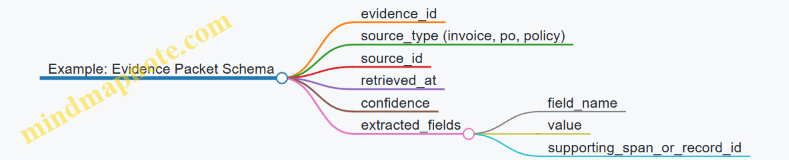
Orchestration Notes That Prevent Chaos
Orchestration should treat tools as contracts, not suggestions. Each step should declare what it needs and what it produces. Retries should be scoped: retrieval retries are safe, action retries must be idempotent, and validation retries should not re-run actions.
When tooling is built this way, the digital employee becomes easier to debug. If something goes wrong, you can point to the exact evidence packet, the exact action payload, and the exact validation rule that failed—no scavenger hunt required.
3.3 Orchestration Patterns for Multi Step Work
Multi-step work is where digital employees either become dependable or become a pile of half-finished tasks. Orchestration is the part that decides what to do next, when to stop, how to recover from errors, and how to keep results consistent. The goal is simple: every step should have a clear purpose, explicit inputs, and a measurable completion condition.
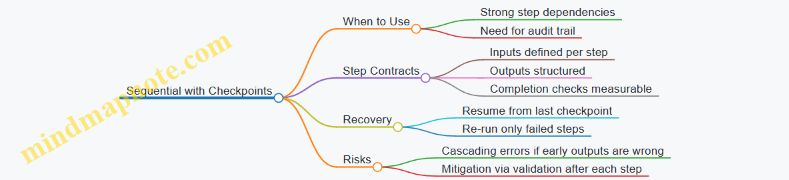
Step Contracts and Completion Conditions
Before choosing an orchestration pattern, define a “step contract.” A step contract answers three questions: What inputs does the step require? What outputs does it produce? How do we know it is done? For example, a “Draft invoice” step might require customer name, billing period, and line items; it outputs a structured invoice draft; it is complete when totals match line items and required fields are present.
A practical trick: write completion checks in the same format you will later use for evaluation. If your completion check is “looks right,” you will get inconsistent results. If it is “sum(line_items) equals invoice_total within 0.01,” you can test it.
Pattern 1: Sequential with Checkpoints
Sequential orchestration runs steps in order: Step A, then Step B, then Step C. It is best when later steps depend on earlier outputs and when you want straightforward traceability.
Example: “Process a support request.”
- Classify the request.
- Retrieve relevant policy snippets.
- Draft a response.
- Route to the correct queue.
Checkpointing means you persist outputs after each step. If drafting fails, you do not redo classification and retrieval; you resume from the last good checkpoint.
Pattern 2: Conditional Branching with Guardrails
Conditional branching chooses the next step based on intermediate results. It is best when work has known variations, like different approval paths or different data requirements.
Example: “Create a vendor onboarding packet.”
- If the vendor is new, request tax forms and bank details.
- If the vendor already exists, update only changed fields.
- If required documents are missing, escalate to a human reviewer.
Guardrails are the rules that prevent the agent from taking an action when the prerequisites are not satisfied. In practice, guardrails are simple checks: required fields present, confidence above threshold, and policy constraints satisfied.
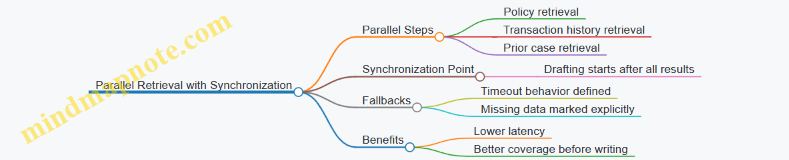
Pattern 3: Parallel Retrieval with Synchronization
Some steps can run at the same time. Retrieval is a common candidate: you can fetch policy text, product specs, and prior tickets concurrently, then synchronize before drafting.
Example: “Respond to a billing dispute.”
- Retrieve contract terms.
- Retrieve payment history.
- Retrieve prior resolutions.
Synchronization means the drafting step starts only after all retrieval results are available, or after a defined timeout with explicit fallbacks (for example, “draft with contract terms only” and mark missing items).
Pattern 4: Iterative Refinement with Stop Criteria
Iterative refinement repeats a loop: draft, verify, revise. It is best when outputs must satisfy constraints and when verification can be automated.
Example: “Generate a quarterly compliance summary.”
- Draft the summary from retrieved evidence.
- Verify that each claim cites a source and that required sections are present.
- Revise only the missing or incorrect parts.
Stop criteria prevent infinite loops. Use a maximum number of iterations and a “verification passed” condition. If verification fails after the limit, escalate with the specific failures (missing sections, mismatched totals, unsupported claims).
Choosing a Pattern: A Simple Decision Checklist
Use sequential with checkpoints when dependencies dominate. Use conditional branching when the work has distinct paths. Use parallel retrieval when multiple sources can be gathered independently. Use iterative refinement when correctness depends on verification.
In real workflows, patterns combine. A common integrated flow is: sequential orchestration for the main steps, conditional branching for routing and escalation, parallel retrieval to speed up evidence gathering, and iterative refinement to ensure the final output meets constraints.
3.4 State Management for Long Running Tasks and Retries
Long running tasks fail in predictable ways: timeouts, partial tool success, stale inputs, and “I did something but I’m not sure what” moments. State management is the discipline of recording what happened, what is safe to repeat, and what must be resumed.
Foundational Concepts for State
A digital employee needs three kinds of memory.
- Task state: the current phase of work (for example, “collect inputs”, “draft document”, “submit ticket”).
- Execution state: the concrete artifacts produced so far (for example, “ticket payload JSON”, “approval reference”).
- Safety state: what can be retried without side effects (for example, “search is repeatable”, “payment is not repeatable”).
Start by defining a state machine with explicit phases. If you can’t name the phases, you can’t reliably resume.
Designing a State Machine That Resumes Cleanly
Use a small set of phase types:
- Prepare: validate inputs, load context, compute plan.
- Act: call tools and write outputs.
- Verify: confirm results match constraints.
- Finalize: commit outputs, notify stakeholders.
- Escalate: route to a human with evidence.
Each phase transition should be triggered by a condition you can check. For example, “Act” completes only when the tool response is stored and verified fields exist.
A practical rule: store state after every tool call and after every verification step. That way, a retry restarts from the last confirmed checkpoint, not from the beginning.
Checkpointing and Idempotency
Checkpointing means persisting state frequently enough to bound rework. Idempotency means repeating an action yields the same outcome.
For tool calls, prefer one of these patterns:
- Idempotency keys: include a unique key per logical action, such as
create_ticket:requestId. The receiving system returns the existing ticket if the key was used. - Read-before-write: search for an existing resource using stable identifiers, then create only if missing.
- Write-ahead logs: record intent first, then perform the action, then record completion.
Example: a workflow that creates a support ticket should store the ticket payload and a deterministic dedupeKey before calling the ticket tool. If the tool times out, the retry can search by dedupeKey and avoid creating duplicates.
Retry Strategy with Backoff and Stop Conditions
Retries should be selective. Retry what is likely transient, stop what is not.
Define retryable categories:
- Transient: network timeouts, temporary 5xx errors, rate limits.
- Non-transient: validation failures, missing required fields, authorization errors.
Add stop conditions:
- Max attempts per phase.
- Max elapsed time for the whole task.
- Escalation thresholds when repeated failures occur.
A simple policy works well: exponential backoff with jitter for transient errors, and immediate escalation for non-transient errors.
State Schema and Evidence
Your state record should be structured so operators can answer three questions quickly: What phase are we in? What evidence do we have? What is the next safe step?
Include:
taskId,phase,attemptCountinputsHashto detect stale inputsartifactswith tool outputs and extracted fieldserrorswith categorized failure reasonsnextActioncomputed from phase and safety state
If inputs change mid-flight, do not silently continue. Compare inputsHash; if it differs, either re-run the Prepare phase or escalate with a clear mismatch report.
Mind Map: State Management for Long Running Tasks
Example: Ticket Creation with Timeout and Resume
Assume the workflow is: gather customer details → create ticket → attach summary → notify.
- Prepare: compute
inputsHashanddedupeKey = customerId + issueType + createdDate(2026-02-26). - Act: store
ticketPayloadand callcreateTicketwith idempotency keycreate_ticket:{dedupeKey}. - Timeout occurs: the tool call result is missing, but the state shows the intent and key.
- Retry: in the next run, the workflow checks for an existing ticket using
dedupeKey. - Verify: confirm the ticket exists and the summary attachment step has not completed.
- Finalize: notify the requester with the ticket reference.
The key detail is that the retry does not assume the first attempt failed; it checks evidence and resumes from the last confirmed checkpoint.
Example: Non-Retryable Authorization Failure
If a tool returns “403 forbidden”, retrying wastes time and can spam logs. Instead:
- categorize the error as non-transient,
- record it in
errorswith the failing permission scope, - move to Escalate with the evidence bundle (inputsHash, attempted action, tool response summary).
Operators can then fix access once, and the workflow can resume from the next safe phase without repeating actions that are guaranteed to fail.
3.5 Observability Requirements for Debugging and Auditability
Observability is what lets you answer three practical questions when something goes wrong: What did the agent try to do? Why did it choose that path? What actually happened in the systems it touched? For debugging, you need enough detail to reproduce the decision chain. For auditability, you need enough evidence to explain outcomes to a reviewer who was not in the room.
Core Observability Signals
Start with a simple rule: every external action must be traceable to an internal decision and a specific input. That means you log at least four categories of signals.
-
Trace context: a unique run ID, step IDs, and correlation IDs for tool calls. Without this, logs become a pile of maybes.
-
Inputs and prompts: the user request, retrieved snippets (or references to them), and the final instruction set used for each step. Store the exact text or a content hash plus the retrieval metadata.
-
Decisions and checks: the agent’s planned steps, the criteria it used to accept or reject outputs, and the results of validations. If a step was skipped, record the reason.
-
Tool outcomes: request parameters (sanitized), response status, returned identifiers, and any retries. For audit, you also need timestamps and actor identity (agent vs. human reviewer).
A useful mental model is a “paper trail”: inputs are the evidence, decisions are the reasoning, tool outcomes are the receipts.
Event Schema That Stays Useful Under Pressure
Design your log events so they remain readable during incidents. Each event should include: run_id, step_id, event_type, timestamp, actor, and a compact payload. Keep payloads structured so you can filter by tool name, validation failure, or policy rejection.
Example event types:
plan_createdretrieval_performedoutput_validatedpolicy_blockedtool_calledtool_succeededtool_failedescalated_to_human
When you standardize event types, dashboards and postmortems stop being bespoke crafts.
Mind Map: Observability Layers
Debugging Workflow from Logs to Root Cause
A good debugging sequence is deterministic.
-
Locate the run: filter by run_id or by the business identifier (like an order number). Then jump to the first failure event.
-
Reconstruct the step chain: follow step_id links from plan creation to the failing validation or tool call. If the agent escalated, confirm what it asked the human to decide.
-
Compare inputs to outputs: check whether the retrieved knowledge matched the task. A common failure mode is stale or irrelevant retrieval; observability should show what was retrieved and why it was considered relevant.
-
Inspect tool boundaries: verify whether the tool call used correct parameters and whether idempotency prevented duplicates. If a tool timed out, confirm whether the agent retried safely.
-
Summarize for humans: produce a run summary that lists the user intent, the key decisions, the validations that passed or failed, and the final outcome.
Auditability Without Leaking Sensitive Data
Audit logs must be complete, but not indiscriminate. Apply redaction rules to payloads that may contain secrets, personal data, or credentials. Keep the ability to prove what happened by logging stable identifiers instead of raw sensitive content.
For example:
- Log
customer_idanddocument_id, not the full document text. - Log
tool_request_hashand selected fields, not full request bodies when they include sensitive fields. - Store prompt text only if your policy allows it; otherwise store hashes plus retrieval references.
Example: Run Timeline for a Tool-Using Step
Example:
- 10:14:02 run_id=R-8841 step_id=S-12 event=plan_created
- planned_tools=["ticket.create","ticket.attach"]
- 10:14:05 step_id=S-13 event=retrieval_performed
- query="refund policy for subscription"
- sources=["kb/refunds_v3"]
- 10:14:09 step_id=S-14 event=output_validated
- rule="must include order_id"
- result=pass
- 10:14:11 step_id=S-15 event=tool_called tool="ticket.create"
- idempotency_key="ticketcreate:R-8841"
- params_sanitized={"order_id":"O-2219"}
- 10:14:12 step_id=S-15 event=tool_succeeded
- created_ticket_id="T-9012"
- 10:14:18 step_id=S-16 event=tool_called tool="ticket.attach"
- attachment_ref="doc:D-330"
- 10:14:19 step_id=S-16 event=tool_failed
- error_class="permission_denied"
- 10:14:20 step_id=S-16 event=escalated_to_human
- reason="attachment requires elevated access"
This timeline makes the failure legible: the agent created the ticket successfully, then hit a permission boundary when attaching evidence, and escalated with a clear reason.
Mind Map: Audit Artifacts and Access
Observability is not just logging more; it is logging the right things in the right shape. When you can trace from intent to action with evidence and without sensitive spillover, debugging becomes a method instead of a scavenger hunt.
4. Data Foundations for Digital Employee Performance
4.1 Data Inventory and Classification for Agent Use
A digital employee can only act on what you can name, locate, and trust. Data inventory is the step where you list every data source the agent might touch, then classify it so the agent knows what it is allowed to use and how to use it. Classification is not a paperwork exercise; it directly shapes retrieval quality, tool permissions, and evaluation design.
Start with the Work, Not the Data
Begin by writing a short “agent data contract” for the workflow you’re building. For each task step, specify: (1) what decision or output the agent must produce, (2) which systems contain the inputs, (3) which fields matter, and (4) what “done” looks like. Example: a billing agent that drafts invoice adjustments needs customer account status, invoice line items, and approval history. It does not need marketing campaign text.
Build a Source Inventory
Create an inventory table for every candidate source. Include the system name, owner team, access method, update cadence, and data sensitivity. Also record whether the data is structured (tables), semi-structured (JSON), or unstructured (PDFs, emails). This matters because retrieval and validation differ by type.
Example inventory entries:
- CRM accounts: structured, updated daily, contains PII.
- Support tickets: semi-structured, updated hourly, contains customer messages.
- Policy documents: unstructured, updated quarterly, contains no PII but must be versioned.
- Internal runbooks: unstructured, updated monthly, may include operational secrets.
Classify Data by Use, Not Just Sensitivity
Sensitivity alone is insufficient. Classify by two axes: purpose and risk.
-
Purpose categories:
- Reference: stable facts the agent cites (policies, product specs).
- Operational inputs: data required to complete actions (order status, account balance).
- Evidence: records used to justify outputs (audit logs, approvals).
- Context: background that improves phrasing or routing (customer segment, language preference).
-
Risk categories:
- Low: non-personal, low consequence (internal taxonomy labels).
- Medium: personal data with limited impact (support contact details).
- High: regulated or high-impact data (payment info, medical data, privileged documents).
Example: policy text is often low risk but high importance for correctness; support tickets are medium risk and high evidence value.
Define Field-Level Rules
After source-level classification, define field-level rules for what the agent may retrieve and what it may write. For each field, specify:
- Allowed operations: read, write, both, or none.
- Redaction requirements: mask or omit specific fields in outputs.
- Validation needs: format checks, referential integrity, or cross-field consistency.
Example: when drafting an adjustment request, the agent may read “account_id” but must not output it to the customer-facing email. It may write “adjustment_reason” only after it has evidence of approval.
Versioning and Provenance for Every Claim
Agent outputs should be traceable to the data version used. For reference documents, store version identifiers and effective dates. For operational data, record retrieval timestamps and source record IDs. This enables evaluation and debugging when the agent’s behavior changes due to upstream updates.
Mind Map: Inventory to Classification Flow
Practical Example: Customer Support Triage Agent
Suppose you’re building a triage agent that routes tickets and drafts a first response.
- Inventory sources: ticket system, customer profile store, knowledge base articles, and escalation policy docs.
- Classify:
- Ticket system: operational inputs (medium risk) and evidence (medium risk).
- Customer profile: context (medium risk).
- Knowledge base: reference (low risk) but correctness-critical.
- Escalation policy: reference (low risk) with versioning.
- Field rules:
- Read ticket subject, category, and conversation history.
- Redact phone numbers in drafted responses.
- Require evidence links when recommending escalation.
- Provenance:
- Store the knowledge base article version used to generate the response.
- Record the ticket record ID and retrieval time.
The result is a clean boundary: the agent can route and draft using the right data, while the system enforces what it must not expose and what it must justify.
Common Failure Modes to Prevent
- Treating “PII” as the only category, leading to incorrect routing because evidence fields were not classified.
- Inventorying sources but skipping field-level rules, causing accidental leakage in outputs.
- Ignoring versioning, which makes evaluation inconsistent and debugging painful.
- Mixing reference and operational data in the same retrieval scope, which increases irrelevant matches.
A good inventory and classification plan turns data from a pile of stuff into a set of enforceable rules the agent can follow without guessing.
4.2 Knowledge Base Construction with Source Attribution
A knowledge base is only as trustworthy as the trail behind each statement. Source attribution means every answerable claim can be traced to where it came from, when it was last verified, and what level of confidence is appropriate for its use. In practice, this turns “we think” into “we can show.”
Start with Claim Types and Evidence Requirements
Not all knowledge needs the same kind of evidence. Separate content into claim types:
- Procedural steps: “To do X, perform Y.” These require authoritative process documents or runbooks.
- Factual assertions: “System Z supports feature A.” These require vendor docs, internal specs, or tested observations.
- Policy rules: “Approvals are required for cost over $N.” These require signed policy text or ticketed decisions.
- Heuristics: “Usually, do this first.” These require SME notes and should be labeled as guidance, not fact.
For each type, define evidence rules. Example: a policy rule must cite the policy document section; a heuristic can cite an SME interview note plus a date.
Build a Source-First Ingestion Pipeline
Ingestion should begin with sources, not with answers. For each source item, capture:
- Origin: system, document, ticket, or conversation log.
- Scope: what the source covers and what it explicitly does not.
- Effective date: when the content became valid.
- Owner: who is responsible for updates.
- Permitted use: whether it can be used for automation, drafting, or only human review.
Example: a “Quarterly Billing Adjustments” spreadsheet might be valid for one quarter only. If you omit the effective date, the knowledge base will happily reuse it forever.
Convert Sources into Attributed Knowledge Units
Store knowledge as small units that can be independently cited. A knowledge unit should include:
- Statement text written in a way that can stand alone.
- Source pointer to the exact document and section, or to a ticket ID.
- Extraction method such as manual transcription, table parsing, or summarization.
- Verification status like “reviewed by SME” or “auto-extracted.”
A practical rule: if two statements come from different parts of the same document, they should become separate units with separate pointers.
Design Source Attribution Fields That Survive Editing
Attribution breaks when content is rephrased without preserving the link. Use stable fields:
- Source ID (immutable)
- Source location (document path, section heading, row/column reference)
- Snapshot timestamp (when the unit was created)
- Attribution confidence (high for direct quotes, medium for structured extraction, low for paraphrase)
Example: if you paraphrase a policy sentence, keep the original sentence as a “quoted anchor” inside the unit so reviewers can check meaning quickly.
Mind Map: Knowledge Unit with Attribution
Implement Retrieval That Returns Evidence, Not Just Text
When the agent retrieves information, it should retrieve the knowledge unit plus its attribution fields. That means your retrieval output must include:
- the statement
- the source pointer
- the effective date or snapshot timestamp
- the usage permission
Example: a workflow step asks for “how to submit a refund request.” The retrieval result should include the exact runbook section and whether the step is safe for automation or requires a human confirmation.
Add Quality Gates for Attribution Integrity
Attribution quality is measurable. Use checks before publishing units:
- Pointer validity: the referenced document section exists.
- Scope alignment: the unit does not claim coverage beyond the source.
- Date sanity: effective dates are present for time-sensitive rules.
- Permission consistency: usage permission matches the source’s intended use.
Example: if a source is marked “internal training only,” the knowledge unit should not be used for customer-facing actions.
Example: Attributed Knowledge Unit for a Workflow Step
Knowledge unit statement: “To create a refund ticket, select Refund under Case Type, then attach the invoice PDF.”
Source pointer: Runbook Billing-Refunds.md → section “Refund Ticket Creation”
Snapshot timestamp: 2026-02-26
Extraction method: manual transcription
Verification status: SME reviewed
Usage permission: automation allowed for drafting, human approval required for submission
This structure lets the agent draft the ticket fields while still routing the final submission through the approval step.
Mind Map: Attribution Governance Flow
Source attribution is not paperwork for its own sake. It is the mechanism that makes knowledge usable under real constraints: changing policies, partial system behavior, and the simple fact that humans will eventually ask, “Where did that come from?”
4.3 Retrieval Design for Precision and Coverage
Retrieval design decides what your digital employee can “see” before it writes, plans, or takes action. Precision is about fetching the right chunks; coverage is about not missing important chunks. Good retrieval is less about cleverness and more about disciplined inputs, predictable scoring, and deliberate fallbacks.
Retrieval Goals and Failure Modes
Start by naming what can go wrong.
- Precision failure happens when the agent retrieves plausible but irrelevant text, then confidently uses it. Example: a policy chunk about “refunds” is retrieved when the task is “chargebacks.”
- Coverage failure happens when the agent retrieves too little, so it answers with partial information. Example: the knowledge base has two halves of a procedure, but only one half is retrieved.
- Boundary failure happens when the retrieved chunk cuts across the exact step the agent needs. Example: the chunk ends right before the approval rule.
A retrieval plan should explicitly address all three.
Indexing Foundations That Make Retrieval Behave
Precision and coverage are shaped before any query is run.
Chunking Strategy
Chunking determines the unit of retrieval.
- Use semantic chunking: split by logical sections such as steps, clauses, or forms, not by arbitrary token counts.
- Keep step boundaries intact: if a procedure step includes “do X, then verify Y,” those should live in the same chunk.
- Add overlap sparingly: overlap helps when a step references the previous one, but too much overlap creates duplicate evidence and can skew scoring.
Example: For an incident runbook, create one chunk per numbered step, plus a short “preconditions” chunk. Avoid a single giant chunk that contains the whole runbook.
Metadata and Facets
Metadata lets you filter and rank with intent.
Store fields like:
- Document type: policy, procedure, template, FAQ
- Domain: billing, security, HR
- Audience: operator, manager, reviewer
- Effective date: when the text applies
- System: which tool or application the procedure targets
Example: When retrieving “how to approve a vendor change,” filter to procedure documents and the relevant audience, then rank within that slice.
Query Construction for Precision
A query should be a compact description of what evidence is needed.
Query Expansion with Guardrails
Expansion can improve recall, but it can also pull in noise.
- Expand with synonyms that appear in your documents, not generic language.
- Prefer entity terms: product names, ticket types, form IDs.
- Keep expansions tied to the task: if the task is “escalate,” include “escalation trigger” rather than “support.”
Example: For a task “draft a customer-facing response for a failed delivery,” include “delivery failure,” “customer notification,” and “refund eligibility” if those phrases exist in the knowledge base.
Fielded Queries and Filters
Use filters to prevent the retriever from competing across unrelated domains.
- Apply domain filters first.
- Apply document type filters next.
- Apply effective date filters when policies change.
This reduces the chance that a high-scoring irrelevant chunk wins.
Ranking and Scoring for Coverage
Once candidates are retrieved, ranking decides what the agent sees.
Multi-Stage Retrieval
A practical pattern is:
- Recall stage: retrieve a larger candidate set using embeddings or keyword matching.
- Precision stage: re-rank candidates using a stronger scoring function.
- Coverage check: ensure required evidence categories are present.
Example: For “how to handle access requests,” the agent should retrieve at least one chunk for identity verification, one for approval routing, and one for audit logging.
Evidence Category Coverage
Define evidence categories per task type.
- For a procedure task: preconditions, steps, exceptions, and verification.
- For a policy task: definition, eligibility criteria, constraints, and enforcement.
If a category is missing, trigger a targeted follow-up query.
Handling Chunk Boundaries and Missing Evidence
When the exact step is split across chunks, the agent needs a way to recover.
- Use neighbor retrieval: if a chunk is selected, also retrieve its adjacent chunks by position or step number.
- Use question-to-step mapping: convert the task into a list of step identifiers, then retrieve by step metadata.
Example: If the agent retrieves “Step 3: Notify vendor,” but the “Step 4: Confirm receipt” chunk is missing, a neighbor retrieval rule can fetch Step 4 automatically.
Mind Map: Retrieval Design for Precision and Coverage
Example: Retrieval Plan for a Procedure Task
Task: “Process a security exception request.”
- Filter to procedure documents, security domain, operator audience.
- Query for “security exception request processing steps,” plus “approval routing” and “audit logging.”
- Recall retrieve 30 candidates.
- Re-rank to select top 8.
- Coverage check requires categories: intake, approval, documentation, and audit.
- If “audit logging” is missing, run a follow-up query that includes the exact phrase “audit logging” and retrieve neighbor chunks around the selected approval chunk.
The result is not just “more text,” but evidence that matches the structure of the work the agent must perform.
4.4 Data Quality Controls for Consistency and Freshness
Consistency and freshness are the two knobs that keep a digital employee from confidently doing the wrong thing at scale. Consistency means the same concept is represented the same way across systems and time. Freshness means the employee uses information that is current enough for the decision it is making.
Foundational Concepts for Consistency
Start by defining the “canonical” representation of each key entity and attribute. For example, a customer record might have a canonical customer ID, a canonical address format, and a canonical status taxonomy (Active, Inactive, Suspended). Without a canonical model, the employee will treat near-matches as different people or different states.
Next, separate data quality into three layers:
- Schema consistency: fields exist and have expected types and formats.
- Semantic consistency: values mean the same thing (e.g., “NY” always means New York).
- Behavioral consistency: downstream outputs follow the same rules (e.g., invoices are always categorized the same way).
A practical way to enforce this is to create a “data contract” for each workflow. The contract lists required fields, allowed formats, normalization rules, and what to do when data is missing or ambiguous.
Controls for Consistency Across Systems
Use normalization rules at ingestion and at query time. Ingestion normalization fixes the data once; query-time normalization handles edge cases and legacy records.
Example: Address normalization
- Ingestion: standardize country codes to ISO-2, expand abbreviations (St → Street), and store postal codes in a consistent format.
- Query time: if postal code is missing but city and state exist, mark the record as “address incomplete” so the workflow can request a manual verification.
Then add referential checks. If an order references a customer ID, verify that the customer exists and is in a compatible state. If the workflow requires “Active” customers, treat “Suspended” as a hard stop.
Finally, control taxonomy drift. If product categories are maintained by humans, they will eventually diverge. Maintain a mapping table from legacy categories to canonical categories, and log every mapping decision so you can audit why an item was categorized a certain way.
Foundational Concepts for Freshness
Freshness is not “latest data everywhere.” It is “data fresh enough for the task.” A payroll workflow needs near-real-time salary changes; a monthly reporting workflow can tolerate slower updates.
Define freshness requirements per attribute and per workflow step. Use a simple rule: freshness window equals the maximum acceptable age of the data for the decision.
Example: Pricing updates
- Quote generation step: require price list updates within 7 days.
- Contract renewal step: require customer billing status within 1 day.
If the employee cannot meet the freshness window, it should either escalate or use a clearly labeled fallback (such as “last known price”) with a different approval path.
Freshness Controls That Actually Work
Implement freshness checks at three points:
- At retrieval: return data with timestamps and compute age.
- At decision: compare age to the workflow’s freshness window.
- At action: prevent actions that require fresh data when the window is violated.
To avoid silent failures, store “as-of” metadata alongside the retrieved facts. The workflow output should include an as-of timestamp so reviewers can see what the employee believed at the time.
Example: Inventory reservation
- Retrieval returns inventory quantity with
inventory_last_updated. - Decision requires updates within 2 hours.
- If older, the workflow switches to “manual confirm” mode before reserving.
Mind Map: Consistency and Freshness Controls
Example Workflow: Customer Support Case Triage
A digital employee triages support tickets by pulling customer status, recent orders, and account notes.
- Consistency checks: normalize customer status to the canonical taxonomy; verify customer ID exists; map legacy “Gold” tiers to canonical “Premium.”
- Freshness checks: require customer status updated within 1 day; require recent order history within 30 days.
- Behavior under violations: if status is stale, the employee drafts a response that avoids account-specific promises and routes the case to a human for confirmation.
This approach keeps the employee predictable: it either meets the data contract or it changes its behavior in a way that is visible and reviewable.
Practical Checklist for Implementation
- Define canonical representations for key entities and attributes.
- Write a data contract per workflow step with required fields and normalization rules.
- Add referential and compatibility checks for cross-system relationships.
- Define freshness windows per attribute and decision point.
- Compute data age at retrieval and gate decisions based on the window.
- Attach as-of timestamps to outputs and log fallback usage.
- Ensure violations trigger escalation or a labeled fallback, not silent continuation.
4.5 Handling Sensitive Data with Access Policies and Redaction
Sensitive data handling is mostly boring until it isn’t. The goal is to ensure that only the right people and systems can see the right data, and that any accidental exposure is reduced by design. This section builds from access fundamentals to practical redaction workflows you can implement in real task execution.
Foundations of Access Policies
Start with a clear inventory of sensitive categories: credentials, personal data, financial records, health information, internal documents, and customer communications. For each category, define three things: who may access it, what actions they may perform, and where it may appear (documents, tickets, logs, prompts, tool inputs).
Then map those rules to enforcement points. In agentic workflows, sensitive data can leak through at least four channels: retrieval results, tool inputs, generated outputs, and observability artifacts (logs, traces, error messages). A good policy covers all four.
A practical model is role-based access with least privilege. For example, a “Billing Analyst” role can view invoices but cannot view tax IDs. A “Support Agent” can view order status but not payment card details. Digital employees should inherit the minimum role needed for the task, not a broad “employee” permission.
Data Minimization Before Redaction
Redaction is not a substitute for minimization. If the agent only needs the last four digits of a card, don’t retrieve the full number. Minimization reduces both risk and downstream complexity.
Use a two-step approach:
- Pre-filtering: restrict retrieval queries and tool parameters to the minimum fields required.
- Post-processing: redact any sensitive fragments that still appear in text passed to the model or returned to users.
Example: A digital employee that drafts refund explanations should receive order ID, refund amount, and reason codes. It should not receive full payment details. If the source system returns a combined record, the workflow extracts only the allowed fields before the agent sees anything.
Redaction Rules That Don’t Break Work
Redaction must preserve utility. Replace sensitive values with stable placeholders that keep structure intact. Use consistent tokens like [SSN], [EMAIL], [CARD_LAST4], and [ACCOUNT_NUMBER]. Avoid removing entire sentences when only one field is sensitive.
Define redaction by pattern and by context.
- Pattern-based: detect emails, SSNs, card numbers, and API keys.
- Context-based: redact values that appear in specific fields like “Authorization” headers or “Patient Notes.”
Also decide how to handle partial exposure. If you redact an SSN, keep the last two digits only if policy allows it; otherwise replace the whole value. For auditability, store the original in a restricted secure location, not in logs.
Enforcement in the Workflow Lifecycle
Sensitive data control should be applied at each lifecycle stage.
- Ingestion: tag documents and fields with sensitivity labels.
- Retrieval: filter results by allowed fields and redact before the model sees text.
- Tool use: ensure tool calls pass only permitted parameters.
- Generation: prevent the agent from echoing sensitive content by using output constraints and post-redaction.
- Observability: log metadata, not raw content; redact traces and error payloads.
A simple rule: if something would be sensitive in a human email, it should be treated as sensitive in prompts, tool inputs, and logs.
Mind Map: Access Policies and Redaction Controls
Example: Support Ticket Summarization
A digital employee summarizes customer tickets and drafts a reply. The ticket body may contain emails, addresses, and order numbers.
- Policy: Support can see order status and customer name, but not full payment identifiers.
- Pre-filtering: The workflow extracts only ticket text plus order status fields; it drops payment identifiers.
- Pre-redaction: Before sending to the model, it redacts any email addresses and full addresses, replacing them with
[EMAIL]and[ADDRESS]. - Output constraints: The agent is instructed to reference only
[EMAIL]and[ADDRESS]tokens. - Post-redaction: Any accidental reappearance is removed by a final redaction pass.
- Observability: Logs store ticket ID, summary length, and redaction counts, not raw ticket text.
Result: the summary remains useful for routing and response drafting, while sensitive values never travel through the system in readable form.
Example: Tool Call Guardrails for Credentials
Suppose an agent must call an internal API. The workflow should never place raw credentials into prompts or model-visible context.
- Store secrets in a secure vault.
- Tool calls reference credentials by handle, not by value.
- If an error occurs, the error handler redacts headers and request bodies before writing traces.
This prevents the most common failure mode: a model “helpfully” repeating a token because it appeared in an error message.
Mind Map: Redaction Implementation Checklist
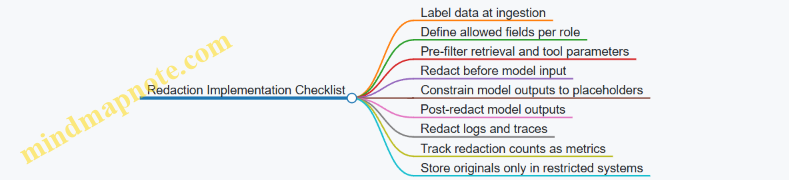
When access policies and redaction are treated as a single system rather than separate chores, sensitive data stays where it belongs: with the people and systems that truly need it, and nowhere else.
5. Workflow Redesign for Autonomous Execution
5.1 Converting Human Procedures Into Executable Task Graphs
Human procedures are usually written as “do this, then that,” with lots of implicit knowledge. Converting them into executable task graphs means making every step explicit: inputs, decisions, actions, validations, and what to do when something goes wrong. The goal is not to automate every sentence; it is to automate the work.
Start with a Procedure Inventory
Take one real procedure and list its components in plain language:
- Trigger: what starts the work (e.g., “invoice received”).
- Inputs: documents, fields, and system access needed.
- Actions: operations performed (search, calculate, draft, submit).
- Decisions: rules that branch the path (e.g., “amount over threshold”).
- Checks: validations that confirm correctness.
- Outputs: what gets produced (ticket, approval request, updated record).
- Exceptions: what happens when data is missing or conflicting.
A quick sanity check helps: if a step depends on someone’s memory (“use the usual vendor contact”), replace it with a concrete lookup rule or a defined escalation.
Turn Steps into Nodes with Contracts
A task graph is a set of nodes connected by edges. Each node should have a contract:
- Node name: short and action-oriented.
- Required inputs: fields or artifacts.
- Produced outputs: what the node writes or returns.
- Acceptance criteria: how you know it succeeded.
- Failure behavior: retry, escalate, or stop.
Example: “Review invoice for duplicates” becomes a node that takes invoice_id, queries the system, and outputs duplicate_status plus a list of matching candidates. The acceptance criteria might be “duplicate_status is one of {none, possible, confirmed} and candidates include invoice numbers.”
Identify Decisions and Make Them Deterministic
Most branching comes from decisions. Convert each decision into a rule with explicit thresholds and tie-breakers.
Example decision rules for invoice processing:
- If
vendoris in the approved list andcurrencyis supported → proceed. - If
amount>policy_limit→ route to approval. - If
invoice_dateis missing → request missing field. - If
line_itemstotal does not matchinvoice_totalwithin tolerance → flag for correction.
When a decision depends on judgment, split it into two parts: a deterministic classifier first (based on available fields), then a human review node for the remaining cases.
Build the Task Graph Using a Layered Pattern
Use a consistent structure so the graph is readable and maintainable:
- Ingest: gather inputs.
- Normalize: standardize formats.
- Plan: choose the path based on decisions.
- Execute: perform actions.
- Verify: run checks.
- Finalize: write outputs and close the loop.
This layering prevents the common failure mode where graphs become a spaghetti of ad-hoc branches.
Mind Map: Procedure to Executable Graph
Example: Invoice Intake Task Graph
Below is a compact graph for a typical intake workflow. Notice how each node has a clear success condition.
graph TD
  A[Trigger: Invoice Received] --> B[Ingest Invoice Data]
  B --> C[Normalize Fields]
  C --> D{Vendor Approved?}
  D -- No --> E[Request Vendor Info]
  D -- Yes --> F{Amount Over Policy Limit?}
  F -- No --> G[Check Duplicate Invoices]
  F -- Yes --> H[Create Approval Request]
  G --> I{Duplicate Confirmed?}
  I -- Yes --> J[Hold and Notify AP]
  I -- No --> K[Validate Totals and Line Items]
  H --> K
  K --> L{Validation Passed?}
  L -- No --> M[Request Corrections]
  L -- Yes --> N[Post to System and Close]
Validation: Make the Graph Executable in Practice
Before wiring tools, test the graph with sample cases:
- Happy path: all fields present, no duplicates.
- Missing data: invoice date absent.
- Conflicting totals: line items don’t match invoice total.
- Policy routing: amount exceeds limit.
- Duplicate edge: possible match with same vendor and close date.
For each case, confirm that the graph produces the right node sequence and that every node’s acceptance criteria can be evaluated from available data. If a node cannot be verified, it is not ready to be automated; it needs either a better check or a human review gate.
Common Pitfalls to Avoid
- Implicit inputs: if a step assumes a field exists, define what happens when it doesn’t.
- Unbounded decisions: replace “if needed” with explicit criteria.
- No failure behavior: every node must say what to do on errors.
- No audit trail: record sources, decisions, and outputs so the workflow can be explained later.
Once these are in place, converting the procedure becomes less about writing clever instructions and more about building a reliable execution map that a digital employee can follow without guessing.
5.2 Identifying Decision Points and Required Inputs
Autonomous workflows fail in predictable ways: the agent takes an action without the right context, or it waits forever because the workflow never defined what “enough information” means. This section turns those failure modes into a checklist.
Decision Points as Workflow Contracts
A decision point is a moment where the workflow must choose among alternatives based on specific evidence. Treat each decision point like a contract with three parts:
- Decision: what choice is being made.
- Inputs: what information must be present to make that choice.
- Outcome: what the workflow does next for each choice.
A useful rule of thumb: if a human would ask, “What should I do next?” then you likely have a decision point. If a human would ask, “What do I need to know first?” you likely need to define required inputs.
Classifying Decision Types
Start by categorizing decision points so you know what “good inputs” look like.
- Routing decisions choose the next path. Example: “Is this invoice valid for payment or does it require review?”
- Validation decisions confirm whether an item meets constraints. Example: “Does the extracted amount match the invoice total within tolerance?”
- Planning decisions select a strategy. Example: “Should we draft a response from the knowledge base or request missing details?”
- Exception decisions handle missing, conflicting, or risky information. Example: “Is the customer identity ambiguous enough to escalate?”
Each category implies different input requirements. Routing needs classification evidence; validation needs measurable fields; planning needs available resources and limits; exceptions need uncertainty signals and policy thresholds.
Required Inputs as Evidence Sets
Define required inputs as an evidence set, not a vague “use the data.” For each decision point, list inputs in three layers:
- Minimum inputs: the smallest set that makes the decision possible.
- Quality inputs: fields that improve correctness, such as confidence, timestamps, or source provenance.
- Policy inputs: constraints that determine whether the agent is allowed to proceed.
Example: For “Approve refund request,” minimum inputs might include order ID and refund amount. Quality inputs might include purchase date and prior refunds. Policy inputs might include refund eligibility rules and maximum allowed amount without escalation.
Mind Map: Decision Points and Inputs
A Systematic Method to Find Decision Points
Use this sequence to avoid skipping steps.
- Write the workflow in verbs: “Collect,” “Check,” “Draft,” “Submit,” “Confirm.” Every verb that has alternatives is a candidate decision point.
- Mark where a human would hesitate: hesitation usually corresponds to either routing, validation, planning, or exception decisions.
- For each candidate, list the next two actions: if you can’t name at least two plausible next steps, you may not have a decision point.
- Define the evidence needed for each next action: what fields, what checks, and what thresholds.
- Specify the “request more info” path: if inputs are missing, the workflow must say what it asks for and where it comes from.
Concrete Example: Support Ticket Triage
Suppose the workflow triages tickets and decides whether to resolve, route, or escalate.
Decision point: “Choose triage outcome.”
-
Routing decision
- Minimum inputs: ticket category, customer plan, product area.
- Quality inputs: category match score, last known device model.
- Policy inputs: which teams can handle each product area.
- Outcomes: resolve automatically, route to team, or escalate.
-
Validation decision
- Minimum inputs: error code, reproduction steps provided.
- Quality inputs: completeness score for steps, presence of logs.
- Policy inputs: whether auto-resolution is allowed without logs.
- Outcomes: proceed with troubleshooting steps or request missing logs.
-
Exception decision
- Minimum inputs: customer identity match status.
- Quality inputs: ambiguity level, conflicting account signals.
- Policy inputs: refund or access changes require human approval.
- Outcomes: escalate with a short summary of conflicts and the exact missing evidence.
The key is that each decision point ends with a clear next action for each outcome, and each outcome has a defined evidence set.
Common Input Gaps to Watch For
When teams start implementing, the usual missing pieces are:
- No explicit thresholds for validation (e.g., “amount matches” without tolerance).
- No provenance for knowledge used (e.g., which document or system field supported the decision).
- No missing-data behavior (the workflow stalls instead of requesting specific inputs).
- No policy mapping from decision outcomes to allowed actions.
If you can’t answer “What exact fields must exist before this choice is allowed?” then the decision point is not ready for automation.
5.3 Designing Guardrails for Safe Actions and Escalations
Guardrails are the rules and checks that keep a digital employee from doing the wrong thing quickly. They work best when you treat safety as a design property of the workflow, not as a last-minute “please don’t mess up” instruction.
Foundations of Safe Actions
Start by separating three categories of behavior:
- Information-only actions: reading data, summarizing, drafting text, proposing options.
- Low-risk actions: creating drafts, tagging items, updating non-critical fields.
- High-risk actions: sending emails, changing financial records, deleting data, modifying production systems.
A practical guardrail strategy assigns each task step to one of these categories and then applies different controls. For example, a workflow that drafts a customer response can be fully automated, while the step that sends the email requires confirmation.
Next, define what “safe” means in your context. Safety is not just “no harmful outcomes”; it also includes “no silent failures.” A guardrail should either prevent the action, require review, or produce a clear explanation and a recoverable state.
Guardrail Types That Cover Real Failure Modes
Use guardrails in layers so that one mistake does not become an incident.
Input and Intent Checks
Before any external action, validate:
- Required fields are present and formatted correctly.
- Intent matches the step. If the step is “create invoice draft,” the system must not interpret it as “issue invoice.”
- Entity targeting is correct. If the action is for customer A, it must not use customer B’s identifier.
Example: When generating a refund request, the workflow checks that the refund amount is positive, does not exceed the original charge, and references the correct order ID.
Tool and Policy Constraints
Constrain what tools can do:
- Use least-privilege credentials so the agent cannot access more than needed.
- Apply policy filters such as allowed departments, allowed regions, or allowed document types.
- Restrict action endpoints to approved routes. The agent should call “create ticket” rather than “send arbitrary HTTP request.”
Example: A procurement agent can request quotes but cannot directly place purchase orders.
Output Verification and Consistency Checks
After the agent proposes an action, verify it:
- Schema validation for structured outputs.
- Cross-field consistency (e.g., currency matches region; dates are within allowed windows).
- Source attribution for claims that affect decisions.
Example: If a workflow drafts a compliance statement, it must cite the policy section used. If citations are missing, the step escalates.
Idempotency and Transaction Safety
Guardrails should prevent duplicate actions:
- Use idempotency keys for create/update operations.
- Prefer draft-first patterns where possible.
- For irreversible actions, require a two-step commit: “prepare” then “confirm.”
Example: Submitting a support ticket uses an idempotency key derived from ticket subject + customer ID, so retries do not create duplicates.
Escalation Design That Is Useful, Not Annoying
Escalation should happen for the right reasons and provide the right context.
Define escalation triggers:
- Uncertainty: missing required data, conflicting sources, or low confidence in extracted fields.
- Policy violations: disallowed recipients, prohibited action categories, or restricted data access.
- Validation failures: schema errors, out-of-range values, or inconsistent totals.
- Operational issues: tool timeouts, partial failures, or downstream system rejects.
Then define escalation outcomes:
- Human review with a structured summary and proposed action.
- Human correction where the human supplies missing inputs.
- Safe stop where the workflow halts and records what it attempted.
Example: If a refund amount fails validation, the workflow stops and creates a review item containing the original order total, the proposed refund, and the exact rule that failed.
Mind Map: Guardrails for Safe Actions and Escalations
Example: Refund Workflow with Guardrails
Consider a “refund request” workflow.
- Draft stage (low-risk): the agent computes the proposed refund and generates a structured request object.
- Validation stage: rules check amount bounds, currency, and order ID match.
- Policy stage: verify the requester role is allowed to approve refunds above a threshold.
- Commit stage (high-risk): if validation and policy pass, the workflow prepares the refund in the system but does not finalize it.
- Escalation stage: if any rule fails, it creates a review item with the failing rule ID, the conflicting values, and the minimal set of missing fields.
This design ensures the agent can move quickly when it is confident, and it slows down with precision when it is not.
Implementation Checklist for This Step
- Classify each step by risk category.
- Add intent checks before tool calls.
- Enforce least-privilege tool access.
- Validate outputs with schemas and cross-field rules.
- Use idempotency keys for create/update operations.
- Define escalation triggers and structured escalation payloads.
- Record audit logs for attempted actions, validations, and escalation reasons.
5.4 Implementing Review and Approval Steps Without Bottlenecks
Review and approval are where many autonomous workflows quietly slow down. The goal is simple: keep humans focused on the decisions that truly need human judgment, while letting the agent handle everything else with evidence and guardrails.
Foundational Principle: Review Is a Decision, Not a Ritual
A workflow bottleneck usually appears when every run triggers the same review step, even when risk is low. Instead, treat review as a conditional decision based on risk, uncertainty, and impact.
Start by classifying each task outcome into three buckets:
- Auto-approve when the agent’s action is low risk and the evidence is complete.
- Human review when the action is medium risk or the evidence is incomplete but salvageable.
- Escalate when the action is high risk, ambiguous, or violates policy.
Example: A digital employee that updates customer addresses can auto-approve changes when the request matches the customer record and passes validation. It should route to review when the request changes billing country or when the customer identifier is missing.
Step 1: Define Review Triggers Using Observable Signals
Review triggers must be measurable so the workflow can decide without asking a human to interpret vague instructions.
Use signals like:
- Policy flags: action type is restricted, data category is sensitive, or destination system is high impact.
- Evidence completeness: required fields present, sources cited, and checks passed.
- Confidence proxies: missing required context, conflicting retrieved facts, or failed tool validations.
- Impact estimates: number of records affected, monetary thresholds, or irreversible operations.
Example: For invoice processing, auto-approve when the agent matches invoice totals to purchase orders within tolerance and the vendor is on the approved list. Route to review when totals differ beyond tolerance or when the vendor is new.
Step 2: Use a Two-Stage Gate to Reduce Human Load
A common pattern is a two-stage gate:
- Pre-check gate runs fast automated validations and assembles a review packet.
- Approval gate involves humans only when the pre-check gate marks the run as needing review.
This avoids the “human as a validator” problem. Humans should not re-check what the system can check.
Example: When drafting a contract amendment, the agent can pre-check clause coverage, required parties, and formatting. Only if a clause is missing or a party name is inconsistent does the workflow request human approval.
Step 3: Design Review Packets That Make Decisions Easy
A review packet should answer three questions in a consistent layout:
- What will happen if approved
- Why it should happen with evidence
- What could go wrong with known limitations
Include:
- The proposed action summary
- Key extracted facts and their sources
- Validation results (pass/fail)
- Any assumptions or missing inputs
- A clear approval recommendation (approve, request changes, or escalate)
Example: For a marketing email update, the packet should list the exact copy changes, the brand guideline checks performed, and the audience segment affected. If the agent could not verify a claim, the packet should explicitly mark that field.
Step 4: Implement Approval Paths with Clear Ownership
Bottlenecks form when approvals bounce between teams. Define ownership rules:
- Single approver per action type when possible
- Fallback approver when the primary approver is unavailable
- Time-bound escalation when approvals stall
Example: Expense reimbursements over a threshold go to Finance for approval. If Finance does not respond within the SLA, the workflow escalates to the department manager with a reduced scope request.
Step 5: Add “Review Without Rework” Loops
Humans should be able to correct the minimum necessary inputs. The workflow should support:
- Targeted edits (change one field, not the entire output)
- Re-run only the affected checks
- Preserve prior evidence when it remains valid
Example: If a reviewer flags an incorrect account number, the system should re-run account validation and regenerate only the dependent fields, leaving unrelated sections unchanged.
Mind Map: Review and Approval Without Bottlenecks
Example: Customer Support Ticket Resolution
A digital employee handles ticket triage and resolution.
- Auto-approve: classify intent, draft response, and update CRM notes when the ticket contains the customer ID and the proposed action is a standard refund policy.
- Human review: route when the ticket requests an exception to policy or when the customer ID is missing but can be inferred from multiple fields.
- Escalate: route when the agent detects potential account compromise signals or when the action would change account status.
The workflow generates a review packet with the proposed response text, the policy rule used, the CRM fields to update, and the exact reason for routing. Reviewers approve or request a specific change, and the workflow re-runs only the checks affected by that change.
Operational Checklist for Bottleneck Prevention
- Review triggers are observable and testable.
- Most runs pass through pre-checks without human involvement.
- Review packets are consistent and decision-ready.
- Ownership is explicit with fallback and escalation rules.
- Human feedback leads to targeted rework, not full regeneration.
When these pieces are in place, approvals become a controlled valve rather than a traffic jam.
5.5 Creating Runbooks for Exceptions and Edge Cases
Runbooks are the “what to do next” documents for when the normal workflow can’t proceed cleanly. A good runbook prevents two common failures: teams guessing under pressure, and agents looping on the same wrong assumption. The goal is not to cover every weird scenario; it’s to cover the scenarios that actually happen, with clear decision rules and safe fallbacks.
Core Principles for Exception Runbooks
Start by defining the boundary between “agent can handle” and “human must decide.” Use three categories:
- Recoverable: the agent can retry with a different approach (e.g., temporary API outage, missing optional field).
- Requires Clarification: the agent needs a missing input or a policy choice (e.g., ambiguous customer identity, conflicting instructions).
- Unsafe to Continue: the agent must stop before taking irreversible actions (e.g., payment changes, data deletion, compliance-sensitive exports).
Then write runbooks around signals, not feelings. A signal is a concrete condition you can detect: an error code, a validation failure, a missing required field, or a mismatch between requested and permitted scope.
Exception Taxonomy That Maps to Actions
Build a small taxonomy so every edge case has a home. A practical set is:
- Input Issues: malformed requests, missing fields, inconsistent formats.
- Knowledge Issues: missing sources, conflicting facts, outdated documents.
- Tool Issues: authentication failures, rate limits, timeouts, schema changes.
- Policy Issues: permission denied, restricted categories, audit requirements.
- Workflow Issues: step ordering problems, idempotency conflicts, partial completion.
For each category, specify the allowed response types: retry, ask, skip, rollback, or escalate.
Mind Map: Runbook Design Flow
Runbook Creation Mind Map
Runbook Template That Operators Can Follow
Use a consistent structure so people can scan quickly:
- Trigger: the exact signal(s) that activate the runbook.
- Impact: what part of the workflow is blocked and what might be partially completed.
- Decision: recoverable, clarification, or unsafe.
- Agent Behavior: what the agent should do immediately (retry, stop, request info).
- Human Checklist: the minimum questions and checks.
- Evidence Package: what to include when escalating.
- Resolution Paths: approved outcomes and how to resume.
- Closure Criteria: how to confirm the workflow is back on track.
Example: Missing Required Field in a Ticket Workflow
Scenario: A digital employee drafts a support reply, but the ticket lacks a required “product version” field.
- Trigger: validation fails for
product_version. - Impact: reply quality is likely wrong; sending would be misleading.
- Decision: clarification.
- Agent Behavior: stop before drafting the final customer message; request the missing field from the ticket system or ask the operator.
- Human Checklist:
- Confirm whether the version is present in attachments or prior messages.
- If multiple versions exist, choose the one tied to the reported error.
- Verify that the chosen version matches the knowledge base scope.
- Evidence Package:
- Ticket ID, correlation ID, validation error details, and any candidate sources.
- Resolution Paths:
- Populate
product_versionand resume at the “draft reply” step. - If version truly can’t be determined, send a template that asks a clarifying question instead of guessing.
- Populate
- Closure Criteria: the workflow resumes with a valid field and the final message passes format and policy checks.
Example: Tool Timeout During a Multi-Step Update
Scenario: The agent updates customer preferences in two systems. The first update succeeds; the second times out.
- Trigger: timeout from System B after System A success.
- Impact: partial completion; repeating blindly could cause duplicates or inconsistent state.
- Decision: recoverable with workflow safeguards.
- Agent Behavior:
- Check idempotency keys and prior attempt logs.
- Retry System B once with backoff.
- If still failing, escalate for a consistency decision.
- Human Checklist:
- Confirm whether System B actually applied the change by checking the latest state.
- Decide whether to retry, reconcile, or roll back System A.
- Evidence Package: step history, idempotency key, timestamps, and state snapshots from both systems.
- Closure Criteria: both systems reflect the same intended preference set, and audit logs show a single logical change.
Operational Details That Make Runbooks Work
Keep runbooks short enough to use mid-incident. If a runbook requires more than a few minutes to interpret, it’s not a runbook yet—it’s a document. Also, ensure every escalation includes an evidence package; “it failed” is not actionable, but “it failed at step X with signal Y and these sources were used” is.
Finally, test runbooks with realistic failures. Use past logs to replay triggers and verify that the agent stops correctly, the operator sees the right checklist, and the workflow resumes without creating duplicate actions.
6. Prompting, Instructions, and Policy Enforcement
6.1 Writing Role Based Instructions With Clear Output Contracts
Role based instructions tell an agent what it is responsible for, what it must produce, and how to behave when information is missing or risky. The goal is simple: reduce ambiguity so the agent can execute consistently, even when the task is messy.
Foundations: Role, Scope, and Non Goals
Start by naming the role in plain language. Example: “You are a procurement coordinator for software renewals.” Then define scope as a short list of what the role can touch. Include non goals to prevent accidental overreach. For instance, “You do not negotiate pricing; you only compile renewal options and draft approval notes.”
A practical rule: if a human would say “That’s not your job,” it belongs in non goals.
Output Contracts: What “Done” Looks Like
An output contract is the required structure, fields, and quality checks for the response. Without it, the agent may produce something that reads well but can’t be used.
Use three layers:
- Format contract: exact headings, JSON keys, or table columns.
- Content contract: required facts, calculations, and citations to provided inputs.
- Verification contract: checks the agent must perform before finalizing.
Example output contract for a renewal summary:
- Must include: vendor, product, current price, renewal price, term length, total cost, risk flags.
- Must state: assumptions if any inputs are missing.
- Must verify: totals match line items; dates are in ISO format.
Mind Map: Role Based Instruction Anatomy
Systematic Writing Process
Follow this order every time.
- Role and intent: one sentence.
- Scope: 3–6 bullets.
- Inputs: list what the agent will receive.
- Output contract: structure plus required fields.
- Verification: explicit checks.
- Behavior rules: how to respond to uncertainty.
- Escalation: when to ask for approval or more data.
This sequence prevents the common failure where instructions describe behavior but never define the deliverable.
Example: Renewal Email Draft with Contract
Role: You are a procurement coordinator drafting renewal approval notes.
Scope:
- Summarize renewal options using provided vendor quotes.
- Flag risks such as price increases beyond threshold.
- Ask for missing inputs instead of guessing.
Non Goals:
- Do not contact vendors.
- Do not change contract terms.
Inputs:
- Quote table with vendor, product, current price, renewal price, term, and effective date.
- Threshold for acceptable price increase.
Output Contract:
- Provide two sections: “Summary” and “Approval Recommendation.”
- Summary must include a single table with columns: Vendor, Product, Term, Current Price, Renewal Price, Total Cost.
- Approval Recommendation must include: price increase percent, risk flag, and a one sentence recommendation.
Verification Contract:
- Total Cost must equal Renewal Price multiplied by term in years.
- Price increase percent must be computed from current and renewal prices.
Behavior Rules:
- If effective date or term is missing, stop and request the missing field.
- If the quote table has conflicting values, list conflicts and request confirmation.
Example: Handling Missing Data Without Stalling
When inputs are incomplete, the agent should not produce a “best guess” that looks confident. Instead, it should separate “known” from “unknown.”
A good pattern is:
- Provide the output structure.
- Fill known fields.
- For unknown fields, use “MISSING” and include a short question.
This keeps downstream systems stable because the schema stays consistent.
Advanced Detail: Verification That Prevents Quiet Errors
Verification should be specific and mechanical. Instead of “check math,” write “recompute totals and compare to provided totals; if mismatch, report mismatch.”
Also include constraint checks:
- Dates must be ISO (YYYY-MM-DD).
- Currency must be consistent.
- Percentages must be rounded to one decimal place.
These rules reduce the chance that the agent’s output is merely plausible.
Mind Map: Verification and Escalation Rules
Quick Checklist for High-Use Instructions
- Role is one sentence.
- Scope and non goals are explicit.
- Output contract defines structure and required fields.
- Verification lists concrete checks.
- Missing data triggers questions, not guesses.
- Escalation triggers are written as conditions.
When these elements are present, the agent’s responses become predictable enough to plug into real workflows—without turning every task into a negotiation.
6.2 Prompt Patterns for Planning, Tool Use, and Verification
A reliable agent prompt usually separates three jobs: plan what to do, use tools to do it, and verify the result. When these jobs are mixed together, the model tends to “sound confident” while quietly skipping checks.
Planning Patterns for Task Decomposition
Start with a planning contract that forces the model to name steps and inputs before it touches tools.
Pattern: Goal, Constraints, Then Steps
- Goal: one sentence describing the desired output.
- Constraints: what must be true (format, sources, limits).
- Steps: numbered actions that can be executed.
- Inputs: what it needs from the user or from tools.
Example prompt (planning only):
You are preparing a weekly expense summary.
Goal: Produce a table with totals by category.
Constraints: Use only provided transactions; output valid ; round to 2 decimals.
Steps:
1) Group transactions by category.
2) Sum amounts per category.
3) Compute grand total.
4) Format as a table.
Inputs needed: transactions list.
If inputs are missing, ask targeted questions.
Pattern: Decision Points With Explicit Branches Add “if/then” branches for common workflow forks, such as missing fields or ambiguous categories.
Mind Map: Planning, Tool Use, Verification
Tool Use Patterns for Deterministic Actions
Tool use prompts should specify what the tool call must contain and what to do with the response.
Pattern: Tool Call Schema and Minimal Arguments Require the model to pass only necessary parameters and to restate them before calling.
Example prompt (planning + tool use):
Task: Create an invoice draft.
First, list the required fields and which tool provides each.
Then call tools in this order:
1) customer_lookup(customer_id)
2) line_items_fetch(invoice_context)
3) invoice_create(customer, line_items, due_date)
Safety rules: Do not create if customer_lookup returns no match.
After each tool call, summarize the returned key fields.
If a tool fails, retry once; then ask for missing info.
Pattern: Idempotency and “No Duplicate Creation” For actions like “create ticket” or “send email,” include a rule to check for an existing record first, using a stable key (order id, request id, or hash).
Verification Patterns for Trustworthy Outputs
Verification should be explicit and layered: before tools, after tools, and at the final output.
Pattern: Pre-Tool Verification Before any tool call, verify that required inputs exist and match expected formats.
Example verification checklist:
- Required identifiers present (customer_id, order_id).
- Date format correct (YYYY-MM-DD).
- Amounts are numeric and non-negative.
- Requested output format is specified (table, JSON schema).
Pattern: Post-Tool Consistency Checks After tool results, check internal consistency without redoing the whole task.
- Totals: sum(line_items) equals invoice subtotal.
- Counts: number of line items matches returned items length.
- Referential integrity: invoice references the same customer id returned by lookup.
Pattern: Output Contract Validation Force the model to validate the final response against the contract.
- “Return only table; no extra commentary.”
- “Every row must include category, count, total.”
- “Round to 2 decimals; do not use currency symbols.”
Integrated Example with Planning, Tool Use, and Verification
You draft a reimbursement report.
Goal: Output a table with columns Date, Expense, Amount.
Constraints: Use only transactions provided; Amount must be numeric with 2 decimals.
Planning:
1) Validate each transaction has date, description, amount.
2) Normalize date to YYYY-MM-DD.
3) Format the table.
Tool use: None.
Verification:
- If any transaction is missing a field, list the missing fields and stop.
- Ensure the table has one row per valid transaction.
- Ensure no duplicate rows.
This structure keeps the agent from “winging it.” Planning prevents premature tool calls, tool rules prevent accidental side effects, and verification catches format and logic errors before the output leaves the system.
6.3 Policy Layers for Compliance and Brand Consistency
Policy layers are how you turn “be careful” into something an agent can follow every time. The goal is not to restrict creativity; it’s to constrain actions, language, and decision criteria so outputs are consistent, auditable, and safe.
Foundational Concepts for Layered Policy
Start with three policy types that map to different failure modes.
- Action policies control what the agent is allowed to do. Example: “Create invoices only for approved customers.”
- Information policies control what the agent is allowed to know or reveal. Example: “Do not include account numbers in emails.”
- Communication policies control how the agent should write. Example: “Use plain language, avoid legal claims, and match the company’s tone.”
A useful mental model is: action policies prevent harmful moves, information policies prevent sensitive leakage, and communication policies prevent confusing or off-brand outputs.
Policy Architecture That Scales Beyond One Prompt
Instead of stuffing rules into a single instruction block, use layered enforcement.
- Layer 1: Static constraints are always-on rules that the agent cannot override. Examples: allowed domains, required approvals, prohibited tool calls.
- Layer 2: Dynamic constraints depend on runtime context such as user role, customer region, or risk score. Example: “If the customer is in the EU, require GDPR justification for data processing.”
- Layer 3: Output contracts define required structure and language boundaries. Example: “Summaries must include sources and must not mention internal system IDs.”
This layering prevents the classic problem where one long instruction becomes contradictory after a few workflow changes.
Mind Map: Compliance and Brand Policy Layers
Enforcement Flow That Prevents “Rule Drift”
A reliable enforcement flow has four checkpoints.
- Pre-tool validation: Before any action, validate permissions, required fields, and risk thresholds. Example: when drafting a refund, the agent must confirm the order ID exists and the refund reason is present.
- Tool result verification: After tool calls, verify the returned data matches expectations. Example: if the CRM returns a different customer name than the ticket, the agent pauses and escalates.
- Output compliance checks: Run checks on the generated message before sending. Example: ensure no sensitive fields appear and that required disclaimers are included.
- Audit trail capture: Log the policy version, inputs, decisions, and tool calls. Example: store “policy v2.1” alongside the final email so you can explain why a sentence was included or blocked.
Concrete Example: Refund Email with Layered Policies
Assume the agent handles a support ticket: “Customer requests a refund; order is delayed.”
- Action policy: Refunds require approval if the order is within 14 days of shipment.
- Information policy: Do not include the customer’s full payment method.
- Communication policy: Use a calm tone, avoid promising delivery dates, and include a short next-step line.
The agent drafts a response like this (illustrative):
- It requests approval for the refund because the shipment date is within the threshold.
- It redacts payment details, replacing them with “payment method on file.”
- It avoids delivery promises and instead says what will happen next: “We’ll confirm eligibility and process the request once approved.”
If approval is not granted, the agent routes the ticket to a human with a structured summary of what it tried to do and which policy blocked the action.
Concrete Example: Brand Consistency Through Output Contracts
Brand consistency often fails when outputs vary in structure. Use output contracts to standardize.
- Required sections: greeting, one-sentence acknowledgment, action taken or requested, next step, and sign-off.
- Prohibited content: no internal identifiers, no “guarantees,” no legal-sounding claims.
- Style constraints: maximum sentence length, consistent terminology for product names.
Example contract rule: “If the agent cannot complete the task, it must state the reason in one sentence and list exactly two options for the user.” This keeps responses predictable even when the underlying reasoning differs.
Advanced Details: Handling Exceptions Without Breaking Policies
Exceptions are where policy systems usually get messy. Treat exceptions as first-class objects.
- Define an exception category (e.g., “urgent customer escalation,” “missing data,” “tool outage”).
- Require an exception owner and a time-limited scope.
- Log the exception decision and the policy override reason.
Example: if the CRM tool is temporarily unavailable, the agent can draft a response that asks for missing info, but it must not claim it checked the CRM. The action policy blocks “refund processing,” while the communication policy still allows a helpful message.
Practical Checklist for Policy Layer Readiness
- Every tool call has a pre-check for permissions and required fields.
- Every generated message has post-checks for sensitive data and required structure.
- Policy versions are recorded with outputs for traceability.
- Exceptions are categorized, approved, and logged.
- Communication contracts define both what to include and what to avoid.
6.4 Structured Outputs for Forms, Tables, and Summaries
Structured outputs turn “whatever the model feels like writing” into predictable artifacts that downstream tools can trust. The goal is simple: every run produces the same shape of data, with fields that are either filled correctly or explicitly marked as missing.
Foundations of Structured Output Contracts
A structured output contract has three parts: a schema, a set of field rules, and a validation strategy.
- Schema defines the exact fields and their types. For example, a form submission might require
full_name,email,company, andrequest_reason. - Field rules specify constraints like allowed formats, required vs optional fields, and how to handle uncertainty.
- Validation strategy describes what happens when the output fails checks: retry, ask for clarification, or escalate to a human.
A practical rule: if a field is used for an action (creating a ticket, updating a CRM record), it must be validated before the action runs. If it’s only for display, it can be validated more loosely.
Mind Map: Output Types and Their Use
Structured Outputs Mind Map
Forms: Reliable Field Capture with Clear Rules
For forms, the output should be a single object with deterministic keys. Consider an internal “expense reimbursement” form.
Example output schema (conceptual):
employee_id(string, required)expense_date(YYYY-MM-DD, required)amount(number, required)currency(string, required)category(enum: Travel, Meals, Supplies, Other)justification(string, required)attachments(array of filenames, optional)
Easy-to-understand rules:
- If
expense_datecannot be determined from the input, set it tonulland includemissing_fields: ["expense_date"]. - If
amountis present but includes currency symbols, strip them and parse to a number. - If
categoryis not obvious, useOtherand setcategory_confidencetolow.
This prevents a common failure mode: the agent “fills” a date with today’s date because it sounds plausible. The contract forces honesty about what’s known.
Tables: Consistent Columns and Units
Tables are best treated as arrays of rows with fixed columns. Each row should include a stable identifier so updates don’t scramble data.
Example: vendor invoice extraction table
- Columns:
invoice_id,vendor_name,invoice_date,line_item_description,quantity,unit_price,line_total,currency
Validation checks that matter:
- Every row must include
currencyandline_total. quantity,unit_price, andline_totalmust parse as numbers.line_totalmust equalquantity * unit_pricewithin a small tolerance, or the row is flagged for review.
When a table is used for exports, column order and naming must match the target system exactly. A structured output contract makes that boring—and boring is good.
Summaries: Bounded, Evidence-Aware, and Actionable
Summaries should not be a free-form paragraph. Use a structured summary object with explicit sections.
Example summary schema for a support ticket:
customer_issue(string)observed_facts(array of strings)suspected_root_cause(string or null)recommended_next_steps(array of strings)open_questions(array of strings)
Rules that prevent hallucinated confidence:
- Only include items in
observed_factsthat are grounded in the provided text. - If the input lacks enough detail for a root cause, set
suspected_root_causetonulland list what’s missing inopen_questions. - Keep
recommended_next_stepsto a fixed maximum count, such as 3, so the output stays usable.
Validation and Retry Strategy That Doesn’t Waste Time
A good validation loop is short and specific.
- Schema validation first. If keys are missing or types are wrong, retry with stricter instructions.
- Semantic validation second. Check formats (dates), enums (categories), and arithmetic consistency (table totals).
- Escalation third. If the same field fails twice, stop retrying and route to a human with the
missing_fieldsorflagged_rows.
This keeps the system from endlessly generating “almost correct” outputs.
A Compact Example of Structured Output for a Form
{
  "employee_id": "E-1042",
  "expense_date": "2026-02-18",
  "amount": 42.75,
  "currency": "USD",
  "category": "Meals",
  "justification": "Team lunch during project kickoff",
  "attachments": ["receipt_2026-02-18.jpg"],
  "missing_fields": []
}
The empty missing_fields array is deliberate: it gives downstream logic a single place to look for completeness.
A Compact Example of Structured Output for a Summary
{
  "customer_issue": "App crashes when exporting reports",
  "observed_facts": [
    "Crash occurs after clicking Export",
    "Error appears on Windows 11"
  ],
  "suspected_root_cause": null,
  "recommended_next_steps": [
    "Collect crash logs",
    "Reproduce with a sample dataset",
    "Check export permissions"
  ],
  "open_questions": [
    "App version number",
    "Exact report type being exported"
  ]
}
This structure makes the summary useful even when the agent cannot fully diagnose the issue yet.
6.5 Testing Instruction Sets Against Known Scenarios
Instruction sets fail in predictable ways: they drift from the required output format, they skip required tool calls, they mis-handle edge cases, or they produce answers that look plausible but don’t match the policy constraints. Testing against known scenarios turns those failure modes into measurable checks.
Start with a Scenario Library That Mirrors Real Work
Build a small but representative set of scenarios before you write tests. Each scenario should include: (1) the input the agent will receive, (2) the expected output structure, (3) the required actions or tool calls, and (4) the acceptance rules for correctness.
A practical way to create scenarios is to reuse existing tickets, emails, or workflow logs. For example, if your agent drafts customer replies, include one scenario where the customer asks for a refund, one where they request a status update, and one where the request is missing required details. Keep the scenarios “known” by freezing the expected behavior and documenting why it’s correct.
Define Output Contracts Before You Test Content
Most instruction tests should verify structure first, meaning the agent must produce the right fields in the right order. For a workflow that creates a support ticket, the contract might require: summary, category, priority, next_steps, and citations.
Example acceptance rules:
categorymust be one of the allowed values.prioritymust map to the severity implied by the scenario.next_stepsmust include a specific action phrase (for example, “request order number”).
This prevents a common failure mode: the agent writes a good paragraph but omits the field your downstream system needs.
Test the Instruction Set, Not Just the Model
When you test, treat the instruction set as the artifact under evaluation. That means you should run the same scenario through the same tool environment while varying only the instruction text. If you change the instruction set, you should expect changes in behavior; if you change the model, you should attribute differences correctly.
A simple test matrix helps:
- Rows: scenarios
- Columns: instruction versions
- Cells: pass/fail plus structured diffs of outputs
Use a Mind Map to Cover the Full Failure Surface
Mind Map: Instruction Set Testing Coverage
Execute Tests with Deterministic Checks and Targeted Diffs
For each scenario, run checks in layers.
- Contract checks: validate JSON schema, allowed enums, and required keys.
- Behavior checks: confirm tool calls occurred and parameters match expected patterns.
- Reasoning checks: verify that the agent’s decisions align with scenario facts, not with generic assumptions.
When a test fails, produce a diff that highlights what changed. If priority flips from High to Medium, you want to know whether the agent ignored a severity cue or misread the scenario.
Include “Trap” Scenarios That Commonly Break Instructions
Trap scenarios are small inputs designed to expose specific instruction weaknesses.
Example trap set for a document summarizer:
- A scenario where the source text includes two conflicting dates; the expected behavior is to flag the conflict.
- A scenario where the user asks for a summary that includes prohibited content; the expected behavior is to refuse or redact.
- A scenario where the user requests a table, but the instruction set requires a bullet list; the expected behavior is to follow the contract.
These traps keep the instruction set honest. If the agent passes only the easy cases, you haven’t tested instructions—you’ve tested luck.
Add Human Review Sampling for the Parts Automation Can’t Prove
Automated checks can confirm structure and tool behavior, but they can’t always confirm semantic correctness. Use sampling: review a small percentage of passing outputs for each scenario category.
A lightweight rubric works well:
- Correctness to scenario facts
- Completeness of required steps
- Compliance with policy constraints
- Clarity of next actions
Track review outcomes per scenario. If one scenario category repeatedly fails, update the instruction set and rerun the full scenario library.
Example Test Case with Acceptance Criteria
Scenario: Draft an internal note for a billing dispute.
- Input: customer claims “charged twice,” provides invoice id but no second invoice id.
- Expected output contract:
summarymentions “possible duplicate charge”categoryequalsBillingnext_stepsincludes “request second invoice id”escalationisHuman Reviewbecause required details are missing
Pass criteria: all required fields exist, category is valid, next_steps contains the required request phrase, and escalation matches the missing-details rule.
This kind of test is small, but it forces the instruction set to behave consistently when the input is incomplete—exactly where real work tends to get messy.
7. Tool Integration and System Action Design
7.1 Designing Tool Interfaces With Deterministic Inputs
Deterministic inputs mean the tool receives the same structured fields for the same intent, so the agent’s output variability doesn’t leak into your systems. The goal is simple: make tool calls boring. When calls are boring, debugging becomes practical.
Start with a Stable Tool Contract
Define a tool interface as a contract with three parts: required fields, allowed values, and output shape. Required fields eliminate “creative” omissions. Allowed values prevent free-form text where a system expects an enum.
Example: a “Create Invoice” tool should not accept a single blob like invoiceText. Instead, accept:
customerId(string)currency(enum: USD, EUR, GBP)lineItems(array of{sku, description, quantity, unitPrice})dueDate(ISO date)
If the agent can’t produce dueDate confidently, it should fail fast and ask for it, rather than guessing.
Use Canonical Field Types and Formats
Determinism breaks when formats vary. Pick canonical representations and enforce them at the interface boundary.
- Dates: ISO-8601 only (e.g.,
2026-02-15) - Money: integer cents plus currency (e.g.,
amountCents: 1299) - Identifiers: exact casing rules and length checks
- Text fields: max length and trimming rules
A small but important detail: normalize before validation. For instance, trim whitespace and collapse repeated spaces in description, then validate length.
Separate Intent from Execution Parameters
Agents often mix “what to do” with “how to do it.” Keep them separate so the tool call stays consistent.
- Intent:
action: "create_invoice" - Execution parameters:
customerId,lineItems,dueDate
This separation helps you reuse the same tool across workflows. It also makes evaluation easier because you can compare parameter correctness without reinterpreting intent text.
Design for Idempotency and Safe Retries
Deterministic inputs should support safe retries. Include an idempotency key derived from stable inputs, such as requestHash or externalReference.
Example: when creating a ticket, pass externalReference like order-48392-invoice-2026-02-15. If the agent retries due to a timeout, the system can return the existing ticket instead of duplicating work.
Validate Inputs Before Side Effects
Validation must happen before any external side effect. If validation fails, return a structured error that the agent can act on.
Use error codes that map to remediation steps:
MISSING_FIELDINVALID_ENUMDATE_OUT_OF_RANGEAUTHORIZATION_DENIED
Then the agent can request only what’s missing. This prevents the agent from re-sending the entire request with slightly different mistakes.
Provide Deterministic Output Shapes
Even if inputs are deterministic, outputs should be predictable. Return a consistent schema with:
status(success/failure)result(object)warnings(array)traceId(string)
Warnings are useful for non-fatal issues, like “line item description truncated to 80 characters.” The agent can decide whether to proceed or ask for corrections.
Mind Map: Deterministic Tool Interface Design
Example: From Free-Form to Deterministic Call
Bad input pattern (hard to validate):
toolInput: "Create invoice for Acme, due next month, lines: 2x widget"
Deterministic call pattern:
customerId: "cus_1029"currency: "USD"dueDate: "2026-02-15"lineItems: [{sku:"WID-001", description:"Widget", quantity:2, unitPriceCents:2500}]idempotencyKey: "order-48392-invoice-2026-02-15"
The second form is not “nicer”; it’s easier to test. You can run the same input through the tool and expect the same behavior.
Example: Validation Error That Guides the Agent
If currency is sent as "dollars", the tool returns:
code: "INVALID_ENUM"field: "currency"allowed: ["USD","EUR","GBP"]
The agent can then map the user’s language to the allowed enum without guessing other fields.
Practical Checklist for Deterministic Interfaces
- Every tool call has required fields with strict types.
- Every enum is enumerated, not implied.
- Dates and money use canonical formats.
- Idempotency keys exist for side-effecting actions.
- Validation happens before external writes.
- Errors are structured and actionable.
- Outputs follow a consistent schema with traceability.
When these are in place, the agent’s job becomes producing correct parameters, not negotiating with your systems. That’s a win for both reliability and sanity.
7.2 Authentication, Authorization, and Least Privilege Access
A digital employee can only act safely if it can prove who it is, is allowed to do what it’s asked, and is prevented from doing anything else. Authentication answers “who are you?”, authorization answers “what can you do?”, and least privilege answers “how little should you be able to do?” Together, they turn tool access from a trust problem into a rules problem.
Authentication Foundations for Agent Tool Use
Authentication is the mechanism that establishes identity for every call the agent makes to external systems. In practice, you’ll authenticate in two places: (1) the agent’s own service identity when it calls tools, and (2) the end-user identity when actions must be attributed to a person.
A common pattern is service-to-service authentication using short-lived tokens. The agent runs under a service account, requests a token from an identity provider, and attaches it to tool calls. For user-context actions, the agent also carries a user token, but only for specific operations that require user attribution.
Example: A procurement agent creates a purchase request. If it only needs to submit the request, it uses its service token. If it must also respect the requester’s department policy, it uses a user token to select the correct approval route.
Authorization Models That Match Real Work
Authorization decides whether a given identity can perform a specific action on a specific resource. Avoid “one role fits all” designs; digital employees need fine-grained permissions aligned to workflow steps.
Use a layered approach:
- Resource-based checks: permissions depend on the target object, like a project, invoice, or customer record.
- Action-based checks: permissions depend on the operation, like read, create, update, approve.
- Context-based checks: permissions depend on conditions, like region, cost center, or data sensitivity.
Example: A finance agent may be allowed to read invoices for reporting but not to update bank details. The authorization policy distinguishes “read invoice” from “change payment method,” even if both touch the same invoice system.
Least Privilege as a Design Constraint
Least privilege means granting only the permissions required for the agent’s current responsibilities. Treat it like a budget: every extra permission increases the blast radius of mistakes, bugs, and misrouted tasks.
Start with a permission inventory per tool:
- List each tool the agent can call.
- For each tool, list the exact operations needed.
- Map operations to resources the agent touches.
- Remove everything else.
Example: A ticket triage agent might need to read ticket metadata and post a comment, but it should not have permission to close tickets. If you later add “close tickets,” you create a new permission set and update the workflow step that triggers closure.
Practical Permission Scoping for Digital Employees
To keep permissions understandable, scope them around workflow capabilities rather than around job titles. A “capability” is a small set of actions that correspond to a workflow step.
Example capability sets for an operations agent:
- Intake capability: read queue items, fetch customer account status.
- Draft capability: create a draft response, generate a proposed resolution.
- Execution capability: submit a change request, but only for whitelisted systems.
Then bind each capability to a specific identity token and policy rule. The agent can request only the capability it needs for the current step.
Mind Map: Authentication, Authorization, and Least Privilege
Implementation Checklist for Tool Boundaries
Enforce permissions at the boundary where the agent meets the system, not inside the agent logic. The agent can be correct and still be wrong; the system must refuse.
Checklist:
- Use short-lived tokens and rotate credentials.
- Require explicit scopes for each tool operation.
- Apply least privilege per workflow step.
- Log identity, action, resource, and outcome for every tool call.
- Deny by default when policies are missing.
Example: If the agent attempts to update a record without the “update” permission, the tool returns an authorization error. The workflow should treat that as a controlled failure, not as a reason to retry with broader access.
Example Policy Behavior in a Workflow Step
Consider a workflow step “post customer status update.” The agent should:
- Authenticate as its service identity.
- Request authorization for “create comment” on the specific ticket resource.
- If allowed, post the comment.
- If denied, escalate to a human reviewer with the reason captured from the authorization error.
This keeps the agent’s behavior deterministic: it either has permission to act, or it stops and routes the task to the right human—no silent workarounds, no guessing, and no extra permissions granted “just to make it work.”
7.3 Idempotency and Transaction Safety for Actions
When a digital employee performs actions—sending emails, updating CRM records, creating invoices—retries and partial failures are normal, not exceptional. Idempotency and transaction safety are the two guardrails that keep “try again” from becoming “try twice.”
Core Concepts That Prevent Duplicate Work
Idempotency means: performing the same action multiple times produces the same end state as performing it once. Transaction safety means: the system either completes the action fully or leaves behind a state that is clearly recoverable.
A practical way to think about it: idempotency controls effects; transaction safety controls consistency. If you only do one, you’ll eventually pay for the other.
Idempotency Keys for Action Calls
Use an idempotency key per logical business action. The key should be stable across retries and unique enough to avoid collisions.
Example: A digital employee creates a support ticket from a customer request. The logical action is “create ticket for request X.” The idempotency key can be ticket:create:<requestId>. If the tool call times out, the employee retries with the same key. The ticketing system returns the existing ticket instead of creating a new one.
Design rule: Generate the idempotency key before any side effects. Store it with the job record so the retry path uses the same value.
Action States and Exactly-Once Illusions
You rarely get true exactly-once delivery across distributed systems. Instead, you model action progress with explicit states.
A simple state machine for each action attempt:
- Pending: action not yet executed
- In Progress: tool call started
- Succeeded: final confirmation received
- Failed: tool call failed and is eligible for retry
- Reconciled: system checked for prior completion using the idempotency key
Example: An invoice action transitions to In Progress when the payment service is called. If the response is lost, the next retry first checks whether an invoice already exists for the idempotency key. If it does, the action becomes Succeeded without creating a second invoice.
Transaction Boundaries for Multi-Step Work
Many workflows are multi-step: validate data, reserve inventory, create order, charge payment, send confirmation. You need to decide where atomicity is required.
Common pattern: Split into steps with their own idempotency keys.
- Step 1: Reserve inventory with
reserve:<orderDraftId> - Step 2: Create order with
order:create:<orderDraftId> - Step 3: Charge payment with
charge:<orderDraftId> - Step 4: Send email with
email:send:<orderDraftId>
If step 3 fails, you can retry only the charge step without re-reserving inventory or re-creating the order.
Mind Map: Idempotency and Transaction Safety
Example: Email Sending Without Double Messages
Email systems often lack strict transactional guarantees. Treat “send email” as an idempotent action.
- Idempotency key:
email:send:<messageId> - Behavior: if the same key is seen again, the email service returns the prior send result.
If the digital employee times out after requesting the send, the retry uses the same key and receives “already sent,” so the customer doesn’t get two copies.
Example: CRM Update with Safe Retries
For CRM updates, idempotency can be achieved by using a key tied to the source event.
- Idempotency key:
crm:update:<sourceEventId> - Update payload includes a version or last-updated marker.
If the update call is retried, the CRM either applies the same change once or rejects stale updates. Either way, the action ends in a consistent state.
Operational Checklist for Implementers
- Generate idempotency keys before calling any external tool.
- Persist action state and key so retries are deterministic.
- Ensure each tool endpoint supports idempotency or implement a reconciliation lookup.
- Use step-level keys for multi-step workflows.
- Log the key and action state transition for every attempt.
A Minimal Reference Flow
1. Create job record with actionId and idempotencyKey
2. Set state to in Progress
3. Call tool with idempotencyKey
4. If success confirmation arrives
   - Set state to Succeeded
5. If timeout or ambiguous result
   - Set state to Reconciled
   - Query by idempotencyKey
   - If resource exists, set Succeeded
   - Else set Failed for retry
Idempotency keys make retries safe; transaction boundaries make partial progress recoverable. Together, they turn “network hiccup” into “boring, correct behavior,” which is exactly what you want from a digital employee.
7.4 Error Handling for Partial Failures and Retries
Partial failures happen when an agent completes some steps but not others—for example, it drafts an email, but the CRM update fails. Good error handling treats the workflow like a series of transactions with checkpoints, not like a single “all or nothing” attempt.
Foundational Concepts for Partial Failures
Start by classifying failures by where they occur:
- Tool call failures: timeouts, 401/403, malformed responses, rate limits.
- Data failures: missing fields, stale records, schema mismatches.
- Logic failures: the agent chooses an invalid action sequence or violates constraints.
- Post-action verification failures: the action succeeded, but the expected state change did not.
Then decide what “retry” means. Retrying can be safe, unsafe, or conditional:
- Safe retry: the action is idempotent or explicitly guarded (e.g., “create ticket if not exists”).
- Unsafe retry: the action can duplicate side effects (e.g., “send email” without a dedupe key).
- Conditional retry: retry only after verification shows nothing changed (e.g., “update order status” only if the current status still matches the precondition).
Mind Map: Error Handling Flow
Checkpointing and Correlation IDs
A reliable workflow stores progress after each step. Use a correlation ID for the whole run and a step ID for each action. After a tool call, persist:
- the request payload (or a redacted version)
- the tool response status
- the extracted fields needed for the next step
- a “completed” flag per step
Example: An agent prepares an invoice, then calls accounting to create it, then updates the customer record. If the customer update fails, the invoice creation step remains marked complete, so the agent does not recreate the invoice on retry.
Idempotency and Preconditions
For actions that create or mutate external state, design for idempotency:
- Idempotency key: include a deterministic key like
orderId + actionType + effectiveDate. - Preconditions: require the current state to match what the agent assumed.
Example: “Create a refund” should include refundRequestId. If the tool times out, the agent retries with the same key; the accounting system returns the existing refund instead of creating a duplicate.
Retry Strategy That Doesn’t Make Things Worse
Use a structured retry policy:
- Retry only transient failures: timeouts, 429 rate limits, temporary 5xx.
- Use exponential backoff with jitter: wait longer after repeated failures.
- Cap attempts: stop after a small number of tries.
- Switch modes after repeated failure: after N transient retries, stop retrying and escalate.
Example: If a ticketing tool returns 429, the agent retries with backoff. If it still fails after the cap, it escalates with the prepared ticket content and the last error.
Verification and Read-After-Write
A tool response can lie by omission: it might return success while the state change didn’t apply. Add verification for critical steps:
- After “update order status,” read the order and confirm the status.
- After “upload document,” list the document and confirm size or checksum.
Example: The agent updates a shipping address, then verifies by fetching the order. If verification fails, treat it as a verification failure, not a logic failure, and apply conditional retry with a precondition.
Handling Partial Success with Clear Outcomes
When a workflow fails midstream, produce a structured outcome:
- Completed steps: list step IDs that are done.
- Failed step: the step that needs attention.
- Next action: what to do if retried or escalated.
- User-facing summary: short and factual.
Example: Steps 1–2 completed (draft + validation), step 3 failed (CRM update). The agent reports: “Draft ready; CRM update failed due to 403. No changes were made to the CRM.” That statement prevents a reviewer from assuming the CRM was updated.
Mind Map: Retry Decision Rules
Minimal Pseudocode for a Safe Retry Loop
runId = newCorrelationId()
for step in workflowSteps:
  if checkpoint(step).completed: continue
  result = execute(step, runId)
  if result.ok:
    persist(checkpoint(step, completed=true, output=result.output))
  else:
    policy = classify(result.error)
    if policy == TRANSIENT and step.isSafe:
      retryWithBackoff(step, runId)
    else if policy == TRANSIENT and step.isUnsafe:
      verifyState(step)
      if stateMatchesPrecondition(): retryWithBackoff(step, runId)
      else: stopAndEscalate(step, result.error)
    else:
      stopAndEscalate(step, result.error)
Escalation That Keeps Humans Effective
Escalate with enough context to act quickly:
- the failed step ID and error category
- the correlation ID for traceability
- the prepared artifacts (drafts, computed fields)
- what was already completed
Example: If authorization fails (401/403), retrying won’t help. Escalate with the exact permission scope needed and the request target, so an operator can fix access without re-running the whole workflow.
7.5 Logging and Traceability for Every External Action
External actions are where a digital employee stops being a helpful assistant and starts affecting the real world. Logging and traceability make that impact explainable, debuggable, and auditable. The goal is simple: for any action taken, you can reconstruct what was requested, why it was chosen, what it touched, what happened, and what the agent decided next.
Foundational Logging Principles
Start with a consistent event model. Every external action should emit the same core fields: a correlation ID, the agent run ID, the action name, the target system, the input summary, the tool version, the authorization context, and the outcome. Use a correlation ID to connect the planning steps to the tool call and the follow-up decisions.
Next, log at two levels. First, log the “intent” event before calling the tool, capturing the action the agent believes it is performing. Second, log the “result” event after the tool returns, capturing status, returned identifiers, and any error details. This pair of events prevents the classic failure mode where you only store errors and lose the original reasoning context.
Finally, treat logs as structured data, not prose. Free-form text is hard to search and harder to compare across runs. Prefer key-value fields and stable message templates so you can filter by action type, system, or failure category.
Traceability from Decision to Effect
Traceability answers five questions for each external action: what was attempted, what inputs were used, what policy checks were applied, what was executed, and what changed afterward.
To make that concrete, include a “preflight” record. Preflight logs capture the checks that must pass before execution, such as authorization scope, required fields present, idempotency key availability, and safety constraints like “no destructive operations without approval.” If a check fails, you still log an action attempt, but mark it as blocked.
After execution, log the “effect” record. Effects are the observable changes: created ticket ID, updated record version, sent email message ID, or payment reference. If the tool returns nothing, log that explicitly and record the fallback behavior, such as “re-queried by external ID” or “escalated to human review.”
Mind Map: Logging and Traceability
Data Hygiene That Keeps Logs Useful
Logs often fail because they either leak sensitive data or become too sanitized to debug. Use redaction rules that preserve structure while removing secrets and sensitive values. For example, log “customer_id=***” only if the customer ID is sensitive, but keep the fact that a customer ID was present. For tokens, never log raw credentials; log only the credential reference name.
Also minimize PII. If you must store user-provided text, store a hash for correlation and keep a short, non-sensitive excerpt when allowed by policy. This lets you connect incidents to the original request without turning your log store into a data warehouse of personal information.
Example: Ticket Creation with Idempotency
Suppose the agent creates a support ticket in a helpdesk system. The intent event might record: action_name=create_ticket, target_system=Helpdesk, idempotency_key=hash(order_id+issue_type), and a short input summary like “customer request: billing dispute, priority=high.” Preflight logs would show authorization passed and required fields were present.
After the tool call, the result event records status=success and the returned ticket_id. The effect record confirms the ticket exists by storing the ticket_id and the final state returned by the API. If the tool times out, the result event records status=timeout and retry_count=1, and the next step logs whether the agent re-queries by idempotency key before deciding to escalate.
Example: Email Sending with Audit Trail
For sending an email, log the recipient list in a redacted form, the subject template identifier, and the message body hash. The effect record stores the provider message ID. If sending fails, log the provider error category and whether the agent attempted a retry with the same idempotency key. That way, you can distinguish “no email sent” from “email sent but confirmation missing.”
Advanced Details That Prevent Pain Later
Use idempotency keys for any action that can be retried. Without them, retries can create duplicates, and your logs will faithfully record chaos. Include retry metadata in the result event: attempt number, delay strategy label, and whether the agent revalidated state.
When multiple tools are involved, keep the correlation ID constant across the entire action chain. If you call a lookup tool and then an update tool, both should share the same correlation ID so you can reconstruct the full causal path.
Finally, define a stable taxonomy for outcomes. Use a small set of statuses such as success, blocked_preflight, failed_validation, tool_error, timeout, and unknown. Free-form statuses make dashboards useless and postmortems longer than they need to be.
Minimal Event Schema Example
{
  "correlation_id": "corr_9f3a",
  "run_id": "run_2025_06_14_01",
  "action_name": "create_ticket",
  "target_system": "Helpdesk",
  "tool_version": "[email protected]",
  "intent": {
    "input_summary": "billing dispute, priority=high",
    "idempotency_key": "hash_aa12"
  },
  "preflight": {
    "authz": "allowed",
    "safety": "approved",
    "required_fields": "present"
  },
  "result": {
    "status": "success",
    "ticket_id": "TCK-10492"
  }
}
This schema keeps the “why” and the “what happened” together, so an operator can trace an external action from decision to effect without guessing.
8. Quality Assurance and Evaluation for Agentic Work
8.1 Building Evaluation Sets From Historical Work and SMEs
Evaluation sets are the bridge between “it seems to work” and “it works for the cases we actually care about.” The goal is to create a set of tasks with known expected outcomes, then measure an agent against those outcomes in a repeatable way.
Start with What You Already Have
Begin with historical work artifacts: tickets, emails, chat logs, incident reports, CRM updates, ticket comments, and completed workflow runs. For each artifact, capture the inputs the agent saw and the final human-approved outputs. If the agent previously produced drafts, include both the draft and the final decision so you can evaluate correction behavior.
A practical rule: include only items where the final outcome is unambiguous. If two reviewers disagreed and the record doesn’t show a decision, treat it as “needs adjudication” rather than “ground truth.”
Define the Evaluation Unit
Decide what you are evaluating at the smallest useful level. Common units are:
- Single action: e.g., “create a change request” with required fields.
- Single decision: e.g., “approve or reject a refund” with a reason.
- End-to-end task: e.g., “triage an inbound issue and draft the response.”
For each unit, specify the expected output format. If the agent must produce a structured form, evaluate structure and content separately: field presence, field correctness, and whether the rationale matches the decision.
Build a Sampling Plan That Covers Reality
Historical data is rarely balanced. Your evaluation set should reflect the distribution of work while still covering edge cases. Use a two-layer sampling approach:
- Representative sampling for the most common patterns.
- Targeted sampling for known failure modes.
Create a simple matrix of task attributes, then sample across it. Example attributes for a support triage agent:
- Issue type (billing, access, bug, account)
- Customer sentiment (neutral, frustrated)
- Evidence quality (complete, partial, missing)
- Policy sensitivity (low, medium, high)
This prevents the classic problem where the agent performs well on “easy” tickets and faceplants on the ones that actually cost time.
Use SMEs to Convert Ambiguity into Labels
Subject matter experts (SMEs) turn messy history into evaluation-ready labels. Give SMEs a labeling guide that includes:
- What counts as correct output
- What counts as partially correct
- What counts as incorrect
- Examples of each
Have SMEs label in two passes. In pass one, they label a subset and refine the guide. In pass two, they label the full set using the finalized guide. Measure agreement on a small overlap set; if agreement is low, the guide needs tightening.
Create Ground Truth with Traceability
For each evaluation item, store:
- Input snapshot: the exact text and metadata the agent received
- Expected output: the SME-approved result
- Rationale: why that result is correct, tied to policy or business rules
- Source pointers: which policy document or internal rule was used
Traceability matters because it lets you debug failures without guessing. If the agent produces the wrong answer, you can see whether the expected output was based on a specific rule that the agent didn’t retrieve.
Define Metrics That Match the Task
Pick metrics that reflect operational impact.
- Exact match for deterministic fields (IDs, status codes)
- Schema validity for structured outputs
- Rubric scoring for explanations and rationales
- Action correctness for tool-based workflows (did it do the right thing, in the right order)
Use a rubric with 3–5 levels so SMEs can score consistently. For example, for a refund decision:
- 0: wrong decision
- 1: correct decision but missing required justification
- 2: correct decision with acceptable justification
- 3: correct decision with complete, policy-cited justification
Mind Map: Evaluation Set Construction
Example Labeling Workflow
Imagine a workflow that drafts a customer response and selects an internal category.
- You sample 200 historical tickets.
- You stratify by category and evidence quality, ensuring you include 40 tickets with missing evidence.
- SMEs label 60 tickets first, then update the guide.
- SMEs label the remaining 140 tickets.
- You compute:
- Category accuracy (exact match)
- Response completeness (rubric)
- Policy compliance (rubric with policy citations)
If category accuracy is high but compliance is low, you know the agent is choosing the right bucket but failing to apply the right rule. That diagnosis is only possible because the evaluation set stores rationale and source pointers.
Keep the Set Stable and Versioned
Once the evaluation set is created, freeze it. When you change prompts, tools, or policies, create a new version of the evaluation set only when the expected behavior changes. Otherwise, keep the same expected outputs so comparisons remain meaningful.
A simple practice: include a “golden slice” of 30 items that never change. It becomes your sanity check when everything else evolves.
Practical Output Format for Each Item
Each evaluation item should be self-contained so results can be reproduced. A typical record includes:
idinput(text + metadata)expected(structured output or decision)rubricscores or labelsrationaleandsource pointers
With that structure, you can evaluate consistently, explain failures clearly, and improve the agent without turning every test run into a guessing game.
8.2 Automated Checks for Format, Coverage, and Constraints
Automated checks keep an agentic workflow from “almost correct” work. They do this by validating three things every time: the output format matches what downstream systems expect, the content covers the required scope, and the actions stay within constraints.
Format Checks That Prevent Downstream Breakage
Format checks answer: “Can the next step parse this without human babysitting?” Start by defining an output contract for each task type. For example, if the agent produces a vendor payment request, the contract might require fields like vendor_name, invoice_number, amount, currency, due_date, and justification. Then enforce it with deterministic rules.
Use a layered approach:
- Schema validation: confirm required fields exist and types are correct (string vs number vs date).
- Normalization rules: trim whitespace, standardize date formats (e.g., ISO
YYYY-MM-DD), and enforce currency codes. - Content shape checks: ensure lists have the right granularity (e.g., line items are an array, not a single blob).
- Length and character constraints: cap fields like
justificationto avoid database truncation.
Example: If the contract requires due_date as YYYY-MM-DD, a format check should reject March 5th even if a human could interpret it. The agent can then retry with a corrected date format.
Coverage Checks That Ensure No Required Piece Is Missing
Coverage checks answer: “Did the agent address every required part of the task?” Build coverage from an explicit checklist derived from the acceptance criteria.
A practical coverage checklist has three layers:
- Section coverage: each required section is present (e.g., Summary, Risks, Recommendation).
- Entity coverage: required entities appear (e.g., all affected accounts, all referenced tickets).
- Evidence coverage: each claim is supported by a source or a computed value.
Example: For a customer support response, coverage might require: (1) acknowledgment of the issue, (2) the specific troubleshooting step taken, (3) the next step, and (4) a clear question to confirm resolution. If the agent omits the confirmation question, the coverage check fails even if the tone is fine.
Constraint Checks That Keep Actions Safe and Legal
Constraint checks answer: “Did the agent stay within allowed boundaries?” Constraints come from policy, permissions, and operational safety.
Common constraint categories:
- Tool constraints: only call certain tools for certain task types.
- Action constraints: limit side effects (e.g., “create draft invoice only,” not “submit for payment”).
- Data constraints: restrict which fields can be read or written.
- Risk constraints: require escalation when confidence is low or when the request touches regulated data.
Example: If an agent is authorized to update a CRM contact’s phone number but not to change billing status, a constraint check should block any attempt to modify billing fields. The workflow can then route to a human reviewer with the attempted change details.
Mind Map: Automated Checks for Format, Coverage, and Constraints
A Systematic Validation Flow That Works in Practice
Run checks in a predictable order to reduce wasted effort:
- Validate format first so the system can parse the output.
- Validate coverage next so missing requirements are caught early.
- Validate constraints last so you avoid blocking safe work due to formatting issues.
When a check fails, return structured failure reasons. For instance, “Missing due_date field” is more useful than “Output invalid.” Then the agent can retry only the failing parts instead of regenerating everything.
Example: One Task, Three Check Results
Suppose the agent drafts a change request for an internal system.
- Format check fails because
impact_levelisHighinstead of the allowed enumHIGH. - Coverage check fails because the request lacks “Rollback plan.”
- Constraint check fails because the agent attempted to schedule the change outside the allowed maintenance window.
A good workflow reports all three issues in one pass when possible, so the operator sees the full picture and the agent can correct precisely what matters.
Practical Guardrails for Check Design
Keep checks strict but understandable. If a check is too clever, it becomes hard to debug and operators stop trusting it. Prefer explicit rules derived from acceptance criteria and permissions. Also, ensure checks are deterministic: the same input should produce the same pass or fail, or you’ll end up with inconsistent retries that waste time.
8.3 Human Review Workflows for Sampling and Escalation
Human review is not a second brain for every task; it’s a control system that checks whether the agent’s work stays within acceptable quality. The goal is to catch systematic problems early while keeping review effort proportional to risk. The workflow below starts with fundamentals—what to sample and why—then moves into escalation mechanics, reviewer UX, and measurable closure.
Foundational Concepts for Sampling
Start by separating two kinds of review: quality sampling and risk escalation. Quality sampling verifies that the agent’s outputs match the expected standard across normal operations. Risk escalation interrupts the flow when the agent’s confidence is low, the action is sensitive, or the output violates a rule.
Sampling should be driven by three inputs:
- Task criticality: how costly it is if the agent is wrong.
- Variability: how different tasks are from one another.
- Recent performance: whether the agent has been stable or drifting.
A practical rule: review more when either criticality or variability rises, and review less when the agent has demonstrated consistent accuracy over a meaningful window.
Sampling Plan That Reviewers Can Actually Run
Define a sampling plan with explicit rates and triggers. For example, a digital employee that drafts customer emails might sample 5% of completed drafts during stable weeks, but jump to 15% when a new product policy is introduced. A procurement agent that creates purchase orders might sample 2% under normal conditions, but escalate to 100% for any order above a threshold.
Use a simple structure:
- Random sampling: catches general quality issues.
- Stratified sampling: ensures coverage across categories like region, product line, or customer tier.
- Targeted sampling: focuses on known weak spots, such as a specific form field or a recurring exception type.
To keep the process fair, avoid “review whatever looks suspicious.” Instead, let the sampling logic pick items, then let reviewers use their judgment to classify findings.
Mind Map: Sampling and Escalation Workflow
Escalation Mechanics That Prevent Silent Failures
Escalation should be deterministic. When a trigger fires, the workflow must specify what happens next, who sees it, and what information they receive.
Common escalation triggers:
- Sensitive actions: anything that changes money, access, or customer entitlements.
- Rule violations: missing mandatory fields, invalid formats, or disallowed content.
- Source conflicts: the agent cites two sources that disagree on a key fact.
- Tool anomalies: repeated tool failures, timeouts, or partial writes.
Escalation outcomes should be limited and consistent:
- Approve: the output meets criteria.
- Request changes: the agent can correct it with guidance.
- Specialist escalation: a human with domain authority must decide.
A good escalation packet includes: the agent’s final output, the key inputs used, the tool call results (success or failure), and the exact rule checks that passed or failed. Reviewers should not have to reconstruct the story from raw logs.
Example: Email Drafting with Sampling and Escalation
Imagine a digital employee that drafts refund emails. The sampling plan might review 5% of drafts randomly, plus 20% of drafts for “high-value refunds.” Reviewers use a checklist:
- Correct policy language for the refund reason
- Amount and timeline consistency
- No missing required fields
- Tone constraints (e.g., no promises that require manual approval)
Escalation triggers could include: any draft that references a policy clause not present in the knowledge base, or any draft that includes a refund amount above the automated limit. If escalation triggers fire, the workflow routes the item to a specialist queue with the cited policy excerpt and the refund record snapshot.
Example: Purchase Order Creation with Action Safety
For a procurement agent, sampling might be 2% during stable operations, stratified by vendor and category. Escalation triggers should be stricter because the action is irreversible without cost.
If the agent attempts to create a purchase order with incomplete tax fields, the workflow escalates automatically. If the agent’s tool call fails after partially validating the order, the workflow escalates and blocks the final write. Reviewers then either approve the corrected order or request a re-run with corrected inputs.
Reviewer Checklist That Reduces Back-and-Forth
Keep the reviewer checklist short but complete. Each item should map to a measurable check:
- Correctness: does the output answer the task?
- Completeness: are all required fields present?
- Consistency: do amounts, dates, and identifiers match the inputs?
- Safety: would the proposed action cause disallowed effects?
- Evidence alignment: do claims match the cited sources?
When reviewers request changes, they should specify which checklist items failed and provide the minimal correction needed. That turns review into instruction, not just judgment.
Measuring Sampling Effectiveness Without Guesswork
Track three metrics per workflow:
- Review coverage: how many items were sampled by category and criticality.
- Finding rate: how often reviewers reject or request changes.
- Closure time: how long it takes to resolve findings and update the workflow.
If finding rates spike in one category, increase targeted sampling there and update acceptance criteria for the specific failure mode. If finding rates stay low across multiple windows, reduce sampling rate carefully to preserve reviewer capacity.
A well-run human review workflow feels boring in the best way: it consistently catches the same classes of errors, routes exceptions to the right people, and turns reviewer time into concrete improvements rather than endless re-checking.
8.4 Regression Testing for Workflow Changes
Regression testing for agentic workflows is the practice of proving that a change didn’t quietly break something you didn’t think to look at. The trick is to test behavior, not just components. A workflow can still “run” while producing subtly wrong outputs, skipping a required approval, or taking an action with the right tool but the wrong parameters.
Foundational Concepts for Workflow Regression
Start by defining what “same” means. In practice, you’ll compare three layers:
- Decision behavior: Which branch the workflow takes given the same inputs.
- Action behavior: Which tools it calls, with what arguments, and in what order.
- Output behavior: The final artifacts produced for downstream systems and humans.
A useful mental model is a test case as a bundle: inputs + environment + expected trace. The expected trace includes tool calls and key intermediate outputs, not only the final message.
Building a Regression Suite That Actually Catches Breaks
A regression suite should include tests at multiple granularities.
- Golden path tests: The most common scenarios. These catch accidental changes in the “happy route.”
- Edge case tests: Missing fields, ambiguous requests, and boundary values. These catch brittle logic.
- Safety and escalation tests: Cases that must stop and request human review. These catch guardrail regressions.
- Integration contract tests: Tool interface expectations like required parameters, idempotency keys, and schema shapes.
To keep the suite maintainable, group tests by workflow responsibility: intake, planning, tool execution, validation, and handoff. When a change lands, you can quickly see which responsibility area is implicated.
Mind Map: Regression Testing Workflow Changes
Example: Trace-Based Regression for an Approval Workflow
Imagine a workflow that drafts a purchase request, checks budget, and escalates if the request exceeds a threshold.
Test input: “Order 12 laptops for project X, total estimated $18,500.”
Expected trace:
- Draft step produces a structured request with line items.
- Budget check tool is called with the project ID and estimated total.
- Because $18,500 exceeds the threshold, the workflow must:
- Create an escalation ticket.
- Avoid submitting the final purchase action.
- Include a human-review summary listing the reason.
Now suppose a developer changes the budget-check validation logic. The workflow might still escalate, but it could omit the reason field or call the wrong tool parameter name. A trace-based regression test would fail because the expected tool call arguments and required output fields don’t match.
Example: Regression Categories for Faster Debugging
When a test fails, classify it so you don’t chase ghosts.
- Branch mismatch: The workflow chose a different path.
- Tool mismatch: Wrong tool, wrong order, or wrong arguments.
- Validation mismatch: It produced output that violates schema or constraints.
- Handoff mismatch: The handoff artifact is missing or malformed.
This classification can be automated by comparing the actual trace to the expected trace and labeling the first divergence point.
Advanced Details Without Making It Complicated
- Use deterministic replays where possible: For unit-level regression, mock tools and fix any randomness so failures are attributable to logic changes.
- Prefer semantic checks for content: For summaries, compare required facts and structure rather than exact wording.
- Version expected traces: Store expected traces per workflow version so intentional changes don’t get mistaken for regressions.
- Run the suite in stages: Quick trace checks first, then heavier integration tests. This keeps feedback tight.
Practical Execution Checklist
Before merging a workflow change, ensure:
- Golden path tests still pass.
- At least one edge case test per known brittle area passes.
- Every safety and escalation trigger test passes.
- Integration contract tests confirm tool argument shapes and idempotency behavior.
Regression testing is less about proving perfection and more about preventing silent drift. When you compare traces and artifacts consistently, you catch the “it runs but it’s wrong” class of failures—usually the ones that cost the most time later.
8.5 Performance Tuning Using Measured Bottlenecks
Performance tuning starts with a simple rule: measure first, then change one thing at a time. In agentic workflows, “slow” can mean different things—waiting on tools, redoing work, generating too much text, or failing late and forcing retries. This section shows a systematic path from baseline measurement to targeted fixes, with examples you can apply to real digital employee tasks.
Establish a Baseline with Traceable Metrics
Pick a single workflow run and trace it end-to-end: inputs, planning, retrieval, tool calls, validations, and final output. Record these timing and quality signals per step:
- Latency per step: time spent in retrieval, each tool call, and validation.
- Token usage per step: prompt tokens, completion tokens, and total tokens.
- Success rate per step: whether the step met acceptance criteria.
- Retry counts: how often the workflow re-ran a step due to errors or failed checks.
- Output size: length of generated artifacts that later get parsed or stored.
Example: A “monthly invoice reconciliation” agent calls a data tool, then summarizes differences, then drafts an email. If the baseline shows retrieval is fast but validation fails 30% of the time, the bottleneck is not retrieval—it’s the validation logic or the format contract.
Identify Bottlenecks Using Step-Level Attribution
Once you have traces, compute two rankings:
- Time bottlenecks: steps with the highest average latency.
- Waste bottlenecks: steps with the highest retry rate or token overuse.
A workflow can be slow even when no single step is extremely slow. For instance, a planning step that generates a long plan may increase downstream parsing time and cause more validation failures. Treat “waste” as a first-class bottleneck.
Run Targeted Experiments That Change One Variable
After you identify the bottleneck category, run small experiments.
A. Reduce retries by fixing the failure mode If retries happen because outputs don’t match a schema, tighten the output contract and add a pre-validation step. Example: For a “create purchase order” workflow, require a structured JSON object with exact field names. Then validate locally before calling the action tool. This prevents tool calls with malformed payloads.
B. Reduce tokens by shrinking what the model must say
If token usage is high, you likely have an overly broad prompt or unnecessary verbosity. Example: Instead of asking for a full narrative justification, ask for a compact decision record: decision, key_facts, and risk_flags. Keep the text minimal but complete for downstream checks.
C. Shorten tool round trips by batching and caching If latency is dominated by tool calls, reduce the number of calls. Example: A “customer support triage” agent might fetch customer profile, order history, and open tickets separately. Batch these into one tool request, then cache stable results for the duration of the run.
D. Improve validation to fail earlier Late failures waste time. Example: If a workflow only discovers missing required fields after tool execution, move the check before the tool call. Validation should be cheap and early.
Balance Quality and Cost with Acceptance-Centered Targets
Performance tuning is not just speed. Define targets that combine quality and cost:
- Quality target: acceptance rate stays above a threshold.
- Latency target: p50 and p95 step latency improve.
- Cost target: tokens per successful run decrease.
Example: Suppose p95 end-to-end latency is 18 minutes and acceptance rate is 92%. After changes, you want p95 under 12 minutes while acceptance remains at or above 92%. If acceptance drops, you tuned the wrong lever.
Verify with Regression Checks and Controlled Rollouts
Run the same evaluation set used in quality assurance. Compare:
- Step-level latency distribution shifts.
- Retry counts distribution shifts.
- Schema validity rate.
- Action tool error rate.
Use a controlled rollout approach: enable the change for a small percentage of runs or a single team’s workflow queue. If you see anomalies, revert quickly using the trace IDs from the baseline.
Operational Guardrails for Ongoing Stability
Even well-tuned workflows drift as data changes and upstream systems behave differently. Add guardrails:
- Alert thresholds: trigger when p95 latency or retry rate exceeds a set limit.
- Fallback behavior: if retrieval confidence is low, switch to a “request clarification” path instead of continuing.
- Runbook steps: specify what to check first—traces, tool error logs, schema validation failures, and token spikes.
Example: If tool latency suddenly increases, your traces will show the tool step latency rising while model generation time stays flat. The runbook should instruct operators to confirm tool health and temporarily reduce concurrency rather than changing prompts.
A Practical Mini-Case Using Measured Bottlenecks
A “contract review” digital employee drafts a summary and flags clauses requiring legal review. Baseline shows:
- Retrieval: 2 minutes average.
- Drafting: 6 minutes average.
- Validation: 8 minutes average with 25% retries.
The bottleneck is validation, not retrieval. The team inspects validation failures and finds the agent frequently omits the clause_id field. They update the output contract to require clause_id for every flagged item and add a pre-validation check before finalizing. After the change:
- Validation retries drop to 5%.
- p95 end-to-end latency drops from 18 minutes to 11 minutes.
- Acceptance rate stays within the target band.
The workflow is faster because it stops producing outputs that are doomed to fail the schema check. That’s the core idea: measure the failure, then fix the cause.
9. Human in the Loop Operations and Escalation Design
9.1 Choosing Where Humans Review Versus Where Agents Decide
A good human-in-the-loop design starts with a simple question: which failures are tolerable, and which are not? Humans are best at handling ambiguous intent, negotiating tradeoffs, and correcting subtle context errors. Agents are best at executing repeatable steps quickly, consistently, and with traceable evidence. The trick is to place review exactly where it reduces risk without creating a queue.
Start with a Failure Map
Create a failure map for the workflow you’re redesigning. List each step the agent performs, then mark what can go wrong:
- Wrong action: the agent performs an incorrect tool call (e.g., updates the wrong record).
- Wrong interpretation: the agent misunderstands a request (e.g., treats “cancel” as “pause”).
- Wrong judgment: the agent makes a decision that needs policy or business nuance.
- Wrong completeness: the agent omits required fields or sources.
- Wrong timing: the agent acts before prerequisites are satisfied.
For each failure type, assign a review rule:
- No review when the step is deterministic, reversible, and validated by system checks.
- Automated review when the step can be verified by rules, schemas, or cross-system consistency.
- Human review when the step depends on ambiguous intent, high-impact policy, or missing context.
Use a Decision Ladder
Instead of a single “human or agent” switch, use a ladder that escalates only when needed.
- Agent decides with validation: the agent proposes an action and the system verifies constraints (schema, permissions, idempotency).
- Agent decides with evidence: the agent must attach sources and computed rationale; automated checks confirm evidence coverage.
- Human reviews the decision: a reviewer sees the proposed action, evidence, and the exact reason it was chosen.
- Human overrides or edits: the reviewer can approve, modify, or reject with a structured outcome.
This ladder prevents the common mistake of sending everything to humans “just in case.” Humans review decisions, not raw tool chatter.
Mind Map: Review Placement Logic
Concrete Example: Invoice Processing
Imagine a digital employee that processes invoices.
- Step A: Extract invoice fields from a PDF.
- Automated review: validate totals, currency, invoice number format, and required fields.
- Human review only if extraction conflicts with the vendor portal (e.g., totals differ by more than a threshold).
- Step B: Match to purchase order.
- Agent decides with evidence: the agent proposes a PO match and includes the matching keys used.
- Human review when multiple POs match and the workflow requires business judgment (e.g., cost center ambiguity).
- Step C: Submit for approval.
- No review if the action is a simple state transition allowed by permissions and already validated by prior steps.
- Human review if the invoice amount crosses a policy threshold that changes approval routing.
Notice how the human review is tied to a specific boundary: policy routing and ambiguous matching, not every step.
Concrete Example: Customer Support Triage
A digital employee triages tickets and drafts responses.
- Agent decides on routing (billing vs. technical) using keyword and account context.
- Automated review checks that the response draft includes required disclaimers and references the correct account.
- Human review triggers when the ticket includes sensitive categories (refund disputes, legal threats) or when the agent’s draft would require exceptions to standard policy.
Humans don’t need to read every draft; they need to read the ones that cross the “policy boundary” line.
Operational Rules That Keep Review Efficient
To make review sustainable, define crisp reviewer interfaces and triggers:
- Review only proposals: show the proposed action, the evidence used, and the exact rule that triggered review.
- Require structured outcomes: approve, reject, or edit with a clear reason code.
- Set escalation thresholds: review triggers should be based on missing data, conflicts, or policy boundaries—not vague uncertainty.
- Log every decision: the audit trail should capture inputs, checks performed, and who approved.
A Simple Checklist for Placement
Use this checklist per step:
- Can the system validate the action before it happens?
- Is the action reversible or safely recoverable?
- Does the step require interpreting ambiguous intent?
- Does the step cross a policy boundary or routing rule?
- Would a wrong decision cause material harm or repeated manual cleanup?
If the answer is “yes” to the last two, route to human review. If the answer is “yes” to the first two, prefer agent decision with automated validation. The workflow becomes calmer, faster, and easier to audit—like a well-run queue, not a mystery novel.
9.2 Designing Escalation Triggers for Risk and Uncertainty
Escalation triggers decide when a digital employee should stop, ask for help, or route work to a human. Good triggers reduce both avoidable delays and avoidable mistakes. The trick is to tie each trigger to a specific risk, a measurable signal, and a clear next step.
Foundational Principles for Trigger Design
Start by separating two ideas: risk and uncertainty.
- Risk is about potential harm if the action is wrong, such as sending an email to the wrong customer or booking a non-refundable flight.
- Uncertainty is about confidence in the decision, such as missing required fields or conflicting sources.
Then define three layers of escalation:
- Pre-action escalation: stop before any external change.
- Post-action escalation: allow a low-impact action, then verify.
- Continuous escalation: pause when new evidence changes the decision.
Finally, ensure every trigger has an owner (who reviews), a deadline (how long before it must be reviewed), and a handoff payload (what the human needs to decide quickly).
Signal Types That Trigger Escalation
Use signals that can be checked deterministically or with bounded judgment.
-
Missing or invalid inputs
- Example: A purchase order request lacks a vendor tax ID. Trigger escalation before creating the vendor record.
-
Policy or permission mismatches
- Example: The agent is asked to approve a refund above its allowed limit. Trigger escalation to the appropriate approver.
-
Data conflicts
- Example: Customer address differs between CRM and billing system. Trigger escalation with both values and the source timestamps.
-
Low confidence with required correctness
- Example: The agent classifies a support ticket as “billing” but confidence is low and the next step would send a billing-specific response. Escalate for classification confirmation.
-
Tool failures and partial execution
- Example: The agent creates a draft invoice but fails to attach required documentation. Escalate to complete the missing attachment.
-
Unusual patterns
- Example: A sudden spike in refund amount compared to the customer’s history. Trigger escalation for fraud or exception review.
-
Time and state hazards
- Example: A workflow depends on an expiring authorization token. If the token will expire mid-action, escalate to refresh credentials.
Mapping Triggers to Next Steps
Escalation is not just “stop.” It must specify what happens next.
- Ask a question when the human can provide a single missing fact.
- Example: “Confirm whether the customer’s preferred contact is email or SMS.”
- Request a decision when multiple options exist.
- Example: “Choose between two shipping addresses; both are valid.”
- Request a review when the agent produced a draft that needs approval.
- Example: “Review the refund rationale and approve or reject.”
To keep humans from drowning, include a short “why now” explanation in the handoff payload, such as: “Escalating because the refund exceeds the agent’s approval threshold and the policy requires manager sign-off.”
Mind Map: Escalation Triggers for Risk and Uncertainty
Example: Refund Workflow Escalation
Imagine a digital employee that processes refund requests.
- Pre-action hard stop: If refund amount exceeds $500, escalate to a manager before any refund is initiated.
- Pre-action uncertainty stop: If the agent cannot verify the purchase in the order system, escalate with the attempted order IDs and the missing verification field.
- Post-action verification: If the refund is within the agent’s limit but the reason code is new or rare, allow creation of a draft refund and escalate for review before it is finalized.
- Continuous escalation: If the customer’s account status changes to “restricted” during processing, pause and escalate with the status change timestamp.
This structure prevents the agent from guessing when it matters, while still letting routine work move.
Example: Marketing Email Drafting Escalation
For a workflow that drafts and schedules customer emails:
- Policy mismatch: If the recipient opted out, escalate before drafting.
- Data conflict: If the customer’s name or locale differs across systems, escalate with both values and the source fields.
- Low confidence: If the agent proposes a discount that doesn’t match the campaign rules, escalate for confirmation.
- Tool failure: If the email template rendering fails, escalate with the template ID and error message.
The key is that each escalation trigger points to a specific correction path, not a generic “human required.”
Practical Thresholding Without Guesswork
Use two threshold categories:
- Hard stops for conditions that should never be violated, like missing required identifiers or permission limits.
- Soft stops for conditions that may be acceptable with review, like low confidence classification or unusual but explainable patterns.
When you implement thresholds, log the exact signal that fired and the data used to evaluate it. That turns escalation from a mystery into a measurable control.
Handoff Payload That Gets Decisions Faster
A good escalation request includes:
- The action the agent was about to take
- The specific trigger that fired
- The evidence (fields, sources, timestamps)
- The agent’s recommended option and why
- The exact human choice needed
- A deadline for response
Humans respond faster when they can see the decision boundary clearly. If the payload is missing the boundary, the review becomes a scavenger hunt, and the workflow loses its purpose.
9.3 Creating Triage Queues and Assignment Rules
A triage queue is the place where work arrives, gets categorized, and is routed to the right human or digital employee. Assignment rules are the logic that decides who or what takes the next step, based on risk, effort, and required expertise. Done well, triage prevents two common failures: work that sits unclaimed and work that gets assigned to the wrong capability.
Start with a simple intake contract. Every incoming request should include a unique ID, a short description, the business owner, the target system (if any), and a “done definition” that can be checked. If you can’t state what “done” looks like, triage will turn into a guessing game.
Next, define a small set of triage dimensions. Keep them few enough to be consistent, but specific enough to drive routing. A practical set is:
- Risk level: low (read-only), medium (updates with guardrails), high (financial, legal, security).
- Required expertise: billing, HR, procurement, support, compliance.
- Action type: information gathering, drafting, approving, executing system changes.
- Urgency: SLA-based buckets like standard, fast, and critical.
- Data readiness: whether required inputs are present or must be requested.
Then map each dimension to routing outcomes. For example, a request can be “medium risk + billing + execute system changes + standard urgency + data ready.” That combination should point to a specific queue and assignment policy.
Mind Map: Triage Queue Design
Queue Types That Actually Help
Use separate queues for different operational behaviors. A single “everything” queue forces constant reclassification and increases time-to-first-action.
- Read-Only Queue: tasks that only retrieve or summarize. Digital employees can handle these with minimal review.
- Drafting Queue: tasks that produce a proposal, email, or structured response. Typically requires a human check for medium risk.
- Execution Queue: tasks that change systems. Requires stricter validation and often a human approval step for high risk.
- Exception Queue: tasks that fail checks, lack data, or hit edge cases. This queue should be small and fast to process.
A useful rule of thumb: if the work requires a different “definition of done” or a different approval pattern, it deserves its own queue.
Assignment Rules That Prevent Misrouting
Assignment rules should be deterministic where possible. Use eligibility filters first, then capacity, then SLA.
-
Eligibility filters decide whether an assignee can take the task.
- Digital employee eligibility: required expertise is supported, risk is within allowed bounds, and required inputs are present.
- Human eligibility: the request requires a specific domain sign-off or falls into high-risk categories.
-
Capacity limits prevent overload.
- Example: “Digital employee can take up to 20 concurrent execution tasks; beyond that, route to the exception queue with a note to request batching.”
-
SLA timers decide who gets priority.
- Example: “Critical urgency tasks bypass standard queues and go to the fast lane, but only if risk is not high.”
-
Conflict resolution handles ties.
- Example: if two digital employees qualify, pick the one with the lowest current queue depth and the highest recent success rate for that expertise.
Concrete Example: Billing Request Routing
A customer submits: “Update invoice address and confirm the change.” The intake contract captures: target system = billing platform, action type = execution, expertise = billing, done definition = “address updated and confirmation sent.”
Triage dimensions:
- Risk level: medium (address update)
- Data readiness: data present (new address)
- Urgency: standard
Routing outcome:
- Queue selection: Execution Queue
- Assignee type: Hybrid
- Rule: digital employee performs validation (format, account match), then generates an approval packet for a human reviewer.
If validation fails because the account ID is missing, the same request is routed to Exception Queue with a structured “missing fields” checklist. That checklist becomes the basis for a follow-up request, not a free-form message.
Concrete Example: Support Triage with Read-Only Work
A ticket arrives: “Explain why a refund was denied.” Triage dimensions:
- Risk level: low
- Expertise: support
- Action type: information gathering
- Data readiness: partial (refund ID provided, policy text not)
Routing outcome:
- Queue selection: Read-Only Queue
- Assignee type: Digital employee
- Rule: digital employee retrieves the refund record, then drafts an explanation citing the policy section used. A human review is skipped because risk is low and the done definition is “accurate explanation with cited source.”
Quality Gates for Triage
Triage is only useful if it feeds quality checks. Add two gates:
- Pre-checks: verify eligibility inputs before assignment (risk tag present, expertise recognized, required fields complete).
- Post-checks: verify completion against the done definition (system state changed, confirmation sent, or explanation includes required fields).
For medium and high risk, sample a small percentage of completed tasks for human audit. The goal is not to catch everything; it’s to detect systematic misrouting early.
Finally, record the routing decision with the reason. When someone asks “why did this go to a human,” the answer should be a short rule reference, not a story.
9.4 Feedback Loops for Improving Agent Behavior
Feedback loops turn “the agent did something” into “the agent did the right thing for the right reason.” The trick is to capture signal at the moment it matters, then route it to the right lever: instructions, tools, data, workflow, or human review rules.
Foundational Concepts for Feedback
Start with three layers of feedback.
-
Outcome feedback answers whether the work was correct. Example: a digital employee submits an expense report; finance marks it approved or rejected.
-
Process feedback answers whether the agent followed the intended method. Example: the agent used the correct policy version and cited the right invoice fields.
-
Interaction feedback answers whether the agent understood the request. Example: the agent asked clarifying questions when required instead of guessing.
A useful loop also separates who provides feedback. Humans, automated checks, and system logs can all contribute, but each has different strengths. Humans catch nuance; automated checks catch format and constraint violations; logs catch tool misuse and missing context.
Designing the Signal Pipeline
Build a pipeline that moves from evidence to action.
- Collect evidence: store the agent’s inputs, tool calls, retrieved sources, intermediate decisions, and final outputs.
- Score the evidence: use rubrics that map to your acceptance criteria. Example rubric for customer support: correct resolution, correct policy reference, no prohibited offers, and clear next steps.
- Route the score: decide which lever should change. If the agent fails because it used the wrong policy, update policy retrieval or instructions. If it fails because it formatted the output incorrectly, update the output contract and validators.
A simple rule prevents chaos: every feedback item must include a “failure type” tag and at least one concrete example of what went wrong.
Mind Map: Feedback Loop Components
Practical Example: Expense Report Agent
Imagine an expense-report digital employee.
- Automated checks flag missing receipts and currency mismatches.
- Outcome feedback comes from finance approval.
- Process feedback comes from whether the agent referenced the correct reimbursement policy.
You notice a pattern: rejections spike for meals above the per-day cap. The agent often “knows” the cap but applies it per receipt instead of per day.
Route the feedback:
- Update the workflow to compute daily totals before drafting the report.
- Add a validator that rejects drafts where meal totals exceed the cap after grouping by date.
- Adjust instructions so the agent explicitly states the grouping rule in its internal plan.
Now the loop changes behavior at the right layer: not just “be more careful,” but “use the correct aggregation step.”
Closing the Loop Without Breaking Things
Feedback loops should be incremental and testable.
-
Create a failure catalog: group issues by failure type (wrong rule, missing data, wrong tool parameter, formatting mismatch, unnecessary escalation).
-
Convert failures into test cases: each case includes the input, expected behavior, and the reason. Example: “When meal receipts include two dates, group by date before applying cap.”
-
Run regression checks: confirm the fix doesn’t cause new failures. Example: after adding daily grouping, verify that single-receipt reports still format correctly.
-
Set thresholds for human review: if confidence drops or risk increases, route to a human. Example: require human approval when the agent cannot retrieve the policy version used by the company.
Advanced Routing: When Feedback Points to Multiple Levers
Sometimes one failure has several causes. Example: the agent misapplies a policy because retrieval returned an outdated document, and the workflow didn’t force a policy version check.
Use a “primary cause” approach:
- If the agent’s output contradicts retrieved sources, prioritize retrieval and grounding.
- If the agent follows sources but still violates constraints, prioritize validators and workflow logic.
- If the agent never retrieves the needed sources, prioritize tool access and retrieval queries.
Then apply only the highest-impact change first, backed by test cases.
Mind Map: Failure Types and Levers
Operationalizing the Loop
Make feedback usable by requiring three fields for every logged issue: what failed, evidence, and proposed lever. When teams do this consistently, improvements stop being guesswork and start being engineering.
A final practical note: measure feedback effectiveness by tracking whether the same failure type reappears after the fix. If it does, the loop is collecting signal but not changing the correct lever.
9.5 Managing Workload Balancing Between Teams and Agents
Workload balancing is the practice of deciding who does what, when, and how much, so the human team stays in control without becoming a bottleneck. In a digital-employee setup, the goal is not to “hand off everything.” It’s to route work to the right executor based on risk, effort, and timing.
Start with a simple principle: balance is a scheduling problem with constraints. Constraints include access permissions, required approvals, service-level targets, and the capacity of reviewers. If you ignore constraints, you get queues that look busy but don’t finish.
Foundational Inputs for Balancing
- Work item shape: each task should have an estimated effort class (small, medium, large) and a risk class (low, medium, high). A “small, low-risk” task might be drafting a customer reply from a template; a “large, high-risk” task might be approving a refund that affects accounting.
- Executor capacity: agents have throughput limits (tool rate limits, API quotas, review slots). Humans have review and exception-handling capacity.
- Dependency graph: some tasks can run in parallel; others require outputs from earlier steps. Balancing must respect these dependencies.
- Quality gates: define which outputs can be accepted automatically and which require human review.
A practical way to make these inputs usable is to attach them to each work item as metadata. Then routing becomes deterministic: the same item type should follow the same path unless a human overrides it.
Routing Rules That Prevent Queue Chaos
Use routing rules that are explicit and testable.
- Risk-based routing: low-risk items go to agents with auto-accept; medium-risk items go to agents with sampling review; high-risk items go to humans or to agents only for drafting plus mandatory review.
- Capacity-aware throttling: if reviewer slots are full, reduce agent submissions that require review. Otherwise, you create a backlog that grows faster than it can be cleared.
- Time-to-decision routing: if a task has a deadline, prioritize items that are “ready now” over items that require missing inputs.
- Escalation symmetry: when an agent escalates, it should include the exact reason, the missing data, and a proposed next action. This reduces back-and-forth and keeps the human queue lean.
Mind Map: Workload Balancing Between Teams and Agents
Workload Balancing Mind Map
Control Mechanisms That Keep the System Stable
Balancing fails when the system has no backpressure. Add control mechanisms that slow down submissions when downstream capacity is tight.
- Separate queues: maintain distinct queues for auto-accept work, sampling review work, and mandatory review work. This prevents a single backlog from contaminating all categories.
- Submission limits: cap how many review-required items an agent can submit per reviewer per hour. Example: if a reviewer can reliably handle 20 items/hour, set a limit of 15 submissions/hour to leave room for interrupts.
- Backpressure triggers: when reviewer queue length exceeds a threshold, agents switch to drafting-only mode or pause review-required actions.
- SLA prioritization: prioritize tasks with earlier deadlines within each queue, rather than globally. Global prioritization often starves low-deadline categories.
Example: Customer Support Triage
Imagine a support team with three work types:
- Type A: “Password reset” requests
- Effort: small, Risk: low
- Routing: agent executes and auto-accepts
- Type B: “Billing question” responses
- Effort: small-medium, Risk: medium
- Routing: agent drafts; 20% sampling review
- Type C: “Refund approval”
- Effort: medium-large, Risk: high
- Routing: agent drafts; mandatory review
Now suppose reviewer capacity drops for two hours due to a meeting. Without throttling, Type C submissions keep arriving, and Type B sampling review also piles up because reviewers see everything mixed together.
With balancing controls:
- Type C submissions are limited to the remaining reviewer capacity.
- Type B sampling review continues only if the Type C queue is below its threshold.
- Type A continues unaffected because it doesn’t require review.
The result is a system that may process fewer items overall during the dip, but finishes the right items on time.
Example: Internal Operations Approvals
For an internal workflow, treat “missing information” as a first-class outcome. When an agent escalates due to missing fields, it should request a specific checklist item (for example, “cost center code” or “approval reference”). Humans then resolve the checklist quickly, and the agent resumes without redoing the entire task.
This improves balancing because it reduces human time spent on diagnosing what went wrong, not just fixing it.
Practical Checklist for Balancing
- Define effort and risk classes for each task type.
- Attach metadata to work items so routing is consistent.
- Use separate queues for auto-accept, sampling review, and mandatory review.
- Add submission limits and backpressure triggers tied to reviewer capacity.
- Require escalations to include reason, missing inputs, and a proposed next action.
- Track cycle time and rework rate per category, then adjust thresholds.
When these pieces are in place, workload balancing becomes measurable. The human team spends time on decisions that truly need judgment, while agents handle the rest with fewer interruptions and less rework.
10. Security, Privacy, and Compliance Controls
10.1 Threat Modeling for Agent Tool Use and Data Flows
Threat modeling for agent tool use starts with one simple question: what can go wrong when an agent reads data, decides, and then triggers actions through tools? The goal is not to list every scary scenario; it is to map concrete failure paths so you can place controls where they actually stop harm.
Foundations for Agent Threat Modeling
Begin by defining the agent’s boundaries and interfaces. A practical way is to write three inventories: (1) data inputs and their sensitivity, (2) tools the agent can call, and (3) outputs it can produce. For example, a “billing assistant” might read invoices (confidential), call a “create refund” tool (financial impact), and write a “refund confirmation” message (customer-facing).
Next, model the execution loop as a sequence of steps: request → reasoning → tool call → tool result → validation → final action. Each step is a place where an attacker can interfere. Tool calls are especially important because they cross trust boundaries: the agent’s intent becomes an external system action.
Data Flow Mapping for Tool Use
Create a data flow diagram that tracks where data originates, where it is stored, and where it is transformed. Include metadata, not just content. A common oversight is treating “harmless” fields like email addresses or order IDs as low risk; they often enable targeted misuse or correlation.
For each data element, record three attributes: sensitivity (what it reveals), integrity (how it could be altered), and scope (who else can see it). Then connect those attributes to tool operations. If a tool can query customer records, you need controls for both confidentiality and authorization.
Threat Categories That Actually Matter
Use a small set of threat categories and apply them consistently across steps.
- Prompt and instruction manipulation: malicious text in inputs tries to change what the agent does.
- Tool misuse: the agent calls a tool with the wrong parameters or at the wrong time.
- Authorization bypass: the agent accesses data or actions beyond its permitted scope.
- Data leakage: sensitive tool results are returned to the user or logged improperly.
- Integrity failures: tool results are incorrect, stale, or tampered with.
- Denial of service: repeated tool calls, expensive queries, or runaway loops.
A useful mental model is: “Can an attacker change inputs, change tool parameters, change tool outputs, or change what gets recorded?” If you can answer that for each step, you have coverage.
Control Placement by Failure Path
Controls should be tied to failure paths, not to generic security slogans. For tool calls, the highest leverage controls are:
- Least privilege per tool and per action: the agent role should be scoped to exactly what it needs.
- Parameter validation and allowlists: enforce schemas and restrict values (for example, refund reasons must be from a controlled set).
- Idempotency and transaction safety: prevent duplicate actions when retries occur.
- Output filtering: redact sensitive fields before returning results to users.
- Audit trails: log tool name, parameters, and justification for the action.
Example: Suppose the agent can “create invoice adjustment.” Without parameter validation, a malicious instruction could try to set a negative amount. With validation, the tool rejects amounts outside allowed ranges and returns a structured error that the agent must handle.
Mind Map: Threat Modeling
Threat Modeling Mind Map for Agent Tool Use
Example Threat Walkthrough
Consider a “support agent” that can call a “download account export” tool and then email a CSV to the requester.
- Step 1: Input intake. An attacker submits a request containing instructions to include unrelated accounts. Control: restrict export scope to the authenticated user’s account ID.
- Step 2: Tool call construction. The agent might format parameters incorrectly or omit required filters. Control: schema validation plus server-side enforcement.
- Step 3: Tool execution and results. The tool returns a CSV that includes extra columns. Control: output filtering and column allowlists.
- Step 4: Validation and final action. The agent emails the file. Control: require approval when the export size or sensitivity crosses thresholds, and log the justification.
This walkthrough shows the pattern: each threat maps to a specific step and a specific control, so you can test it.
Practical Checklist for Coverage
Before you call the model “ready,” verify you have at least one control for each of these: authorization, parameter integrity, output leakage, and action safety. Then test with inputs that try to override instructions, with tool errors that force retries, and with role changes that attempt to expand access. If those tests pass, your threat model is doing real work rather than just looking thorough.
10.2 Access Control Models for Knowledge and Actions
Access control for knowledge and actions is easiest to reason about when you treat them as two separate surfaces with different failure modes. Knowledge access is about what the agent may read and cite. Action access is about what the agent may do and how safely it can do it.
Foundational Concepts for Two Surfaces
Start by defining three sets for each digital employee: (1) identities, (2) knowledge objects, and (3) action endpoints. Identities include human operators, agent roles, and service accounts. Knowledge objects include documents, tickets, records, and extracted snippets. Action endpoints include “create invoice,” “update CRM field,” “send email,” or “delete record.”
Next, decide the policy direction for each surface. Knowledge policies usually answer “may read?” Action policies answer “may perform?” and “under what constraints?” Constraints include field-level limits, time windows, rate limits, and required approvals.
A practical rule: knowledge can be broader than actions. An agent might read a customer profile but only update certain fields after validation.
Knowledge Access Models
Knowledge access models typically use one of three patterns.
Role based access control for knowledge. Assign roles like “Support Analyst” or “Finance Processor” to the agent identity. Then map roles to document collections and record types. Example: a billing agent can read invoices and payment status, but it cannot read internal HR notes.
Attribute based access control for knowledge. Use attributes such as region, customer tier, or case category. Example: the agent may read “Order Details” only when the case region matches the agent’s assigned region attribute.
Policy by data classification. Tag knowledge objects with sensitivity levels like Public, Internal, Confidential, and Restricted. Example: the agent can retrieve Internal and Confidential, but Restricted requires a human approval step before any snippet is used in an action.
To prevent accidental leakage, retrieval should enforce the same access policy as direct reads. If the agent can’t read the underlying record, it shouldn’t be able to retrieve derived summaries either.
Action Access Models
Action access needs stricter controls because it can change systems. Use layered checks: identity, authorization scope, and action constraints.
Role based access control for actions. Map agent roles to allowed endpoints and HTTP methods or operation types. Example: the agent can “create ticket” but cannot “close ticket.”
Resource based access control for actions. Restrict actions to specific resource instances. Example: the agent may update only tickets assigned to its queue, not arbitrary tickets.
Constraint based access control for actions. Add rules that limit what the agent can do even when it can call an endpoint. Constraints include:
- Field allowlists: only update “status” and “priority,” never “billing amount.”
- Value ranges: “discount” must be between 0% and 10%.
- Temporal rules: no actions outside business hours without approval.
- Approval gates: actions above a risk threshold require a human sign-off.
A useful mental model is “authorization is necessary but not sufficient.” Even authorized actions should be validated against constraints at execution time.
Unifying Knowledge and Actions with Policy Contracts
To keep policies consistent, define a policy contract that travels with every agent run. The contract includes the agent identity, the case or resource context, and the allowed operations. When the agent proposes an action, the execution layer checks the contract against the endpoint policy.
Example: a sales support agent reads a customer’s plan tier (knowledge allowed). When it tries to apply a plan change (action), the policy contract checks that the plan change is permitted for that tier and that the discount field is within bounds.
Mind Map: Access Control for Knowledge and Actions
Example: Field Level Guardrails in Practice
Suppose an agent handles refund requests. Knowledge access allows reading the original order and refund history. Action access allows calling “create refund,” but only with constraints:
- Allowed fields: refund amount, reason code, and reference ID.
- Disallowed fields: customer email, internal account notes.
- Amount constraint: refund amount must be <= the unpaid balance.
- Approval gate: refunds above a threshold require a human review.
If the agent attempts to set a disallowed field, the execution layer rejects the request and logs the attempted payload. If it attempts an out-of-range amount, it can either ask for clarification or escalate, depending on your escalation policy.
Example: Retrieval Filtering That Matches Action Scope
Consider a procurement agent that reads vendor profiles. If the agent is only allowed to place orders for approved vendors in a specific category, retrieval should filter vendor profiles to those approved vendors. Otherwise, the agent could read details it cannot act on, then waste time or propose actions it will never be allowed to execute.
The goal is alignment: knowledge scope should be consistent with action scope, even if knowledge is slightly broader. When they diverge, the policy contract should make the divergence explicit so the agent doesn’t treat “readable” as “doable.”
10.3 Secure Prompt Handling and Secrets Management
Secure prompt handling is about controlling what the agent can see, what it can say, and what it can do with sensitive information. Secrets management is about ensuring that credentials and tokens never leak through prompts, logs, or tool outputs. Together, they prevent the two most common failures: accidental disclosure and unauthorized actions.
Foundational Concepts for Prompt Safety
A prompt is not just text; it is an input channel. Treat it like a data boundary. Anything placed into the prompt can be echoed back by the model, copied into tool calls, or recorded by observability systems. Therefore, the first rule is simple: never include secrets in prompts, even if you think they are “temporary” or “only for internal use.”
A second rule is to separate instruction content from sensitive data. Instructions describe behavior; data provides context. If you must provide sensitive data, pass it to tools through secure channels rather than embedding it in the prompt. For example, instead of pasting an API key into the prompt for a “send invoice” task, store the key in a secrets manager and let the tool authenticate independently.
Secrets Inventory and Classification
Start by listing every secret type the agent ecosystem uses: API keys, OAuth tokens, database credentials, signing keys, and webhook secrets. Classify each secret by scope and blast radius. A read-only reporting token is less risky than a token that can create refunds. This classification drives two design choices: which secrets are allowed in which environments, and which actions require human approval.
A practical check: if a secret could enable financial or identity-impacting actions, assume it must never appear in prompts or logs.
Prompt Construction Rules That Prevent Leakage
Use a consistent prompt template with explicit fields for non-sensitive context and separate fields for operational metadata. Keep the template strict so that accidental concatenation is less likely.
Key rules:
- Redact secrets before any prompt is assembled.
- Avoid including raw credentials in tool arguments that might be serialized into prompts.
- Use placeholders like
{{customer_id}}rather than embedding sensitive identifiers when not required. - Constrain the agent’s output format so it cannot “helpfully” print hidden values.
Example: A support agent receives a ticket containing an authorization header. The system strips the header, stores it in a secure vault for the tool layer, and the prompt only includes a ticket summary and a reference ID.
Secure Tool Invocation and Credential Boundaries
Tool calls are where secrets often leak. Ensure tool interfaces accept a reference to a credential, not the credential itself. The tool layer should fetch the secret at execution time.
Also enforce least privilege at the tool boundary. If the agent only needs to read customer status, the tool should use a read-only role. Even if the agent tries to escalate, the tool will refuse.
Logging, Tracing, and Redaction
Observability is useful, but it can become a disclosure channel. Decide what gets logged:
- Log prompt structure and non-sensitive metadata.
- Log tool call outcomes and error codes.
- Do not log raw prompt text if it may contain sensitive content.
Implement redaction at the logging boundary. Redact patterns such as Authorization:, token-like strings, and known key prefixes. Redaction should be deterministic so that the same secret never appears in logs under different formatting.
Mind Map: Secure Prompt Handling and Secrets Management
Example: End-to-End Flow for a Payment Status Check
- A user asks for payment status.
- The system retrieves the customer record using a tool authenticated via a vault-managed credential.
- The prompt includes only the customer ID and the retrieved status fields needed for the response.
- The tool call is logged with a reference ID and a success/failure code, not the credential.
- If the tool fails due to authorization, the agent returns a generic message and triggers escalation rather than printing any internal error details.
Example: Redaction-First Prompt Assembly
When building the prompt, apply a redaction step before any model input is created. Then store the original sensitive fields only in the secure tool layer, referenced by an ID.
Input ticket text contains: Authorization header

Step 1: Extract and remove Authorization header
Step 2: Store header securely and generate reference ID
Step 3: Build prompt with ticket summary + reference ID only
Step 4: Tool uses reference ID to authenticate
Step 5: Logs record reference ID and tool result code
Operational Checks That Keep It Working
Security controls fail quietly when they are inconsistent. Add simple checks:
- Unit tests that scan prompts for secret patterns.
- Integration tests that verify tool calls do not receive raw secrets.
- Review of redaction rules against real error logs.
If a control ever requires “trust me, it won’t leak,” it is not a control. Make the system enforce the boundary instead.
10.4 Audit Trails for Decisions, Sources, and Actions
An audit trail is the record that answers three questions after the fact: What did the system decide? Why did it decide that? What did it do with the decision? For digital employees, this is not optional paperwork. It is how you debug failures, prove compliance, and prevent “mystery outcomes” from becoming normal.
Audit Trail Foundations
Start by defining the minimum viable audit fields for every run. Each run should have a unique Run ID, a timestamp, the Digital Employee ID, and the workflow version. Then capture three categories of evidence.
- Decision evidence: the final outputs and the intermediate choices that led there.
- Source evidence: where the system’s information came from, including document IDs, retrieved passages, and query parameters.
- Action evidence: every external side effect, such as creating a ticket, sending an email, or updating a record.
A practical rule: if a human could reasonably ask “How do you know?” or “What changed?”, the audit trail must contain the answer.
Decision Logging That Stays Useful
Log decisions at the granularity that matches operational risk. For low-risk steps like drafting a summary, store the summary text and the key constraints used. For higher-risk steps like approving a refund, store the decision rationale, the policy checks performed, and the specific rule outcomes.
Example: A digital employee processes an expense report.
- Decision log includes: “Approved” or “Rejected,” the computed totals, and the rule that triggered the outcome (for example, “Receipt missing for category requiring receipt”).
- Intermediate logs include: extracted line items and any normalization performed (currency conversion rate source, rounding method).
This avoids the common failure mode where logs only show the final label, leaving reviewers unable to reconstruct the reasoning.
Source Attribution for Retrieved Knowledge
When the system uses retrieval, the audit trail must record the provenance of the retrieved content. Store:
- Document or record identifiers
- Retrieval query used
- Ranking signals if available (even simple ones like “top 5 by similarity”)
- The exact text spans or structured fields provided to the model
If the system uses multiple sources, record which ones were used for which claims. That means the audit trail can support targeted corrections, not full rework.
Example: For a customer support response, store the ticket’s customer history record IDs and the knowledge base article IDs used. If the response cites a policy, the audit trail links that citation to the exact passage.
Action Logging with Safety Semantics
Action evidence should include the “what,” “where,” and “result.” Capture:
- Action type and target system
- Request payload or a redacted version
- Idempotency key or correlation ID
- Response status and any returned identifiers
- Pre- and post-state hashes for critical updates
Redaction matters. You want enough detail to reproduce the decision and verify correctness, without leaking secrets or personal data.
Example: When updating a CRM contact, log the contact ID, the fields changed, and the CRM update response ID. Also log whether the update was skipped due to a prior idempotency key.
Mind Map: Audit Trail Coverage
Human Review Integration
If humans review outputs, the audit trail must connect human decisions to system evidence. Store reviewer identity, the decision (approve/reject), and the reason code or short note. If a reviewer requests changes, log the delta: what was modified and which source or policy it affected.
Example: A reviewer rejects a vendor onboarding draft because the system used the wrong compliance checklist. The audit trail should show the checklist source IDs and the exact policy rule that was misapplied.
Operational Controls That Prevent Audit Gaps
Audit trails fail when they are inconsistent across services. Enforce a single correlation ID across orchestration, retrieval, and tool calls. Validate that every run either has complete audit records or a clearly marked failure state explaining what could not be logged.
Also define retention and access rules. Audit logs often contain sensitive data, so restrict access to roles that need it and ensure logs are tamper-evident through append-only storage or signed entries.
Example Audit Record Template
Use a structured record so reviewers can scan it quickly.
Run ID: RE-2026-03-01-1842
Workflow Version: v3.2.1

Decision
- Outcome: Approved
- Rationale: Receipt required for category Travel
- Rule Result: Missing receipt detected

Sources
- Ticket History: TH-9912
- Policy Doc: POL-TRV-44
- Retrieved Span: "Receipts required for Travel expenses"

Actions
- Action: Create Expense Case
- Target: Case System
- Payload Redacted: yes
- Idempotency Key: EXP-7f3a
- Result: 201 Created, Case ID CS-55410
A good audit trail reads like a map of cause and effect. When something goes wrong, you should be able to answer the three core questions without guessing.
10.5 Compliance Documentation for Regulated Environments
Compliance documentation is the set of written, versioned, and reviewable records that prove your digital employees followed the rules. In regulated environments, it is not enough that the system “worked”; you must show what it was allowed to do, what data it used, how decisions were made, and who approved changes.
Foundational Artifacts and Their Purpose
Start with a small set of artifacts that cover the full lifecycle: design, build, run, and change.
- System Description: what the digital employee does, where it runs, and which tools it can call.
- Data Handling Specification: what data it may access, how it is classified, and how it is protected.
- Control Mapping: which compliance requirements are satisfied by which technical and procedural controls.
- Risk Assessment: identified risks, likelihood/impact reasoning, and mitigations.
- Operational Procedures: how operators monitor, review, and intervene.
- Evidence Logs: runtime records that demonstrate adherence (actions, approvals, and exceptions).
A practical rule: every artifact should answer one question that an auditor will ask, and every question should be answered by exactly one primary document.
Compliance Scope and Boundaries
Define scope before you write controls. Document:
- Regulatory context: list the applicable regimes and the specific obligations you must meet.
- In-scope workflows: name the workflows and the systems involved.
- Out-of-scope behavior: explicitly state what the agent must not do, such as drafting final legal text without review.
Example: A claims-processing digital employee may be allowed to extract fields and prepare a draft, but it must not submit a denial letter. The documentation should record both permissions and prohibitions, tied to the workflow steps.
Data Governance Documentation
Regulated data handling needs three layers of clarity: classification, access, and retention.
- Classification: define categories like public, internal, confidential, and regulated. Include examples of what belongs in each.
- Access: describe how access is enforced for both knowledge retrieval and tool actions. If the agent can only read certain records, record the enforcement mechanism.
- Retention and deletion: specify how long logs and intermediate outputs are kept, and how deletion is performed.
Example: If the agent summarizes customer documents, the documentation should state whether the summary is stored, where it is stored, and how it is deleted when the underlying record expires.
Control Mapping and Traceability
Control mapping connects requirements to evidence. Use a table-like structure in your documentation so reviewers can trace from a requirement to a control to a log.
- Requirement: e.g., “Only authorized personnel may approve final outcomes.”
- Control: e.g., approval gate requiring a human sign-off.
- Evidence: e.g., approval event logs with approver identity and timestamp.
A useful consistency check: if a requirement has no evidence source, it is not a control yet.
Change Management and Versioning
Compliance documentation must survive change. Record:
- Versioning rules for prompts, policies, tool schemas, and workflow graphs.
- Approval workflow for changes, including who signs off and what evidence is produced.
- Rollback procedure that restores the last approved configuration.
Example: When you update a tool schema for invoice submission, document the schema version, the migration steps, and the test evidence showing that the agent still produces valid payloads.
Runtime Evidence and Audit Readiness
Evidence logs should be structured so they can be audited without guessing. Capture:
- Action trace: tool calls, inputs metadata (not secrets), outputs metadata.
- Decision trace: why a branch was taken, referencing the policy rule or validation result.
- Human interventions: approvals, rejections, and overrides.
- Exception handling: what happened when validation failed and what the operator did.
Example: If the agent cannot verify a policy condition, it should record the failed check and the escalation path taken.
Mind Map: Compliance Documentation Coverage
Compliance Documentation Mind Map
Example: Minimal Documentation Set for a Regulated Workflow
For a regulated workflow like “prepare and route a regulated report,” your documentation set can be compact but complete:
- System Description: lists steps from data retrieval to draft generation to routing.
- Data Handling Specification: states which fields are allowed, how they are masked in logs, and retention for drafts.
- Control Mapping: links “final approval required” to the approval gate.
- Risk Assessment: identifies the risk of incorrect field mapping and mitigation via validation checks.
- Operational Procedures: explains how operators review flagged cases.
- Evidence Logs: defines the exact events to record, including approver identity.
Documentation Quality Checks
Before release, verify that documentation is usable under pressure. Check that:
- every workflow step has an owner and a documented control,
- every control has an evidence source,
- every evidence source has a retention rule,
- and every change has a version and an approval record.
If you can answer those four checks quickly, your compliance documentation is doing its job—quietly, consistently, and with fewer surprises than a surprise audit.
11. Deployment, Change Management, and Operational Runbooks
11.1 Release Strategies for Agent Updates and Workflow Changes
Releasing an agent update is not the same as deploying a web app. A digital employee can change behavior through instruction tweaks, tool wiring, retrieval content, and workflow logic. A good release strategy treats each of those as a separate variable, then controls how they change together.
Release Goals and Guardrails
Start by stating what must not break. Typical non-negotiables include: (1) the agent must keep producing outputs that downstream systems can parse, (2) it must not take actions outside its approved scope, and (3) it must preserve auditability so operators can explain what happened.
A practical guardrail is an “action contract.” For every tool call, define required inputs, allowed parameters, and the expected response shape. If the contract fails, the run stops and escalates for human review.
Versioning the Moving Parts
Use a version number that maps to the full execution bundle, not just the model. For example, a release might include: instruction set version, tool schema version, retrieval index version, and workflow graph version. When an incident happens, you want to answer one question quickly: which bundle caused it?
A simple mapping rule helps: every run logs the bundle ID plus the workflow node IDs visited. That turns “it behaved differently” into “it changed at step 4.2.”
Staged Rollouts That Match Risk
Not all changes carry the same risk. Split releases into stages based on blast radius.
- Stage 0: Shadow runs. Run the updated agent in parallel on real incoming requests, but do not execute external actions. Compare proposed outputs and tool call intents.
- Stage 1: Limited execution. Enable actions only for low-risk tasks, such as drafting internal summaries or preparing tickets without submitting them.
- Stage 2: Gradual ramp. Increase volume in small increments while watching quality and cost signals.
- Stage 3: Full enablement. Turn on for all eligible workflows after passing acceptance checks.
A release date can be recorded for traceability, such as 2026-02-26, but the operational truth comes from the bundle ID and logs.
Acceptance Criteria That Operators Can Use
Define acceptance criteria in three layers.
- Output correctness: structured fields match schema, required sections exist, and formatting rules hold.
- Workflow correctness: the agent follows the intended path, including where it should escalate.
- Action safety: tool calls respect permissions, idempotency rules, and transaction boundaries.
Example: if the workflow includes “create invoice draft” followed by “request approval,” the acceptance test verifies that the agent never attempts “submit invoice” during Stage 1.
Change Management for Workflow Graphs
Workflow changes often break assumptions. Treat workflow graphs like code.
- Use node-level diffs so reviewers can see what changed in routing, branching, or escalation triggers.
- Require a rollback plan that returns to the previous workflow graph version and instruction set bundle.
- Keep escalation behavior stable during the first rollout. If you must change escalation thresholds, do it in a separate release.
Mind Map: Release Strategy Components
Example: Safe Tool Schema Update
Suppose you update a tool schema for “customer lookup” to require country_code and to return confidence_score.
- In Stage 0, the agent must still propose the same customer record for known test cases, but it may need to infer
country_codefrom the request. - In Stage 1, allow only “draft email” actions. The agent can call the updated lookup tool, but it must not send messages.
- Acceptance checks confirm that
confidence_scoreis logged and that low-confidence results trigger escalation rather than guessing.
Operational Monitoring and Rollback Triggers
Monitoring should focus on signals that indicate broken contracts, not just “it seems fine.” Use triggers such as: schema validation failures, unexpected tool call frequency, escalation rate spikes, and increased retry counts.
Rollback should be fast and deterministic: switch the bundle ID back to the prior known-good version and resume. If the workflow graph changed, ensure the rollback also restores the previous graph version so routing logic matches the old expectations.
A release is successful when the agent behaves consistently with the action contract, operators can explain outcomes from logs, and the staged rollout prevents high-risk actions from happening before the system proves itself.
11.2 Operational Readiness Checklists for Production Launch
Operational readiness is less about “it works on my machine” and more about proving that the system behaves predictably under real constraints: messy inputs, partial failures, slow dependencies, and humans who need to trust what they see. This checklist moves from foundations to advanced controls so nothing important falls through the cracks.
Readiness Mindset and Launch Gate
Before any production switch, define a launch gate with explicit pass/fail criteria. Treat the gate like a quality checkpoint for a process, not a single test run.
Launch gate outputs
- A signed-off workflow spec with inputs, outputs, and escalation rules
- Verified tool access and data permissions
- Evaluation results for quality and safety checks
- An operational plan for monitoring, incident handling, and human review
Example: A digital employee that drafts customer replies must specify: required fields (customer name, issue summary), allowed actions (create draft only), and escalation triggers (legal risk keywords, missing order ID). If any of these are missing, the gate fails.
Mind Map: Production Launch Readiness
Workflow Contract Checklist
Start with the workflow contract because it defines what “correct” means.
Checklist
- Input schema: list required fields, acceptable formats, and validation rules
- Output schema: define exact structure (for example, subject line + body + citations list)
- Decision boundaries: specify what the agent can decide versus what must be reviewed
- Escalation triggers: enumerate conditions for human handoff (missing data, low confidence, policy conflicts)
- Exception handling: define what happens when tools fail or data is unavailable
Example: For invoice processing, the agent may classify invoice type but must escalate when totals do not reconcile to the line items. The contract should state the reconciliation method and the tolerance.
Tooling, Permissions, and Action Safety Checklist
Production failures often come from actions, not reasoning. Verify tool behavior and permissions as if you were the attacker and the accountant.
Checklist
- Least privilege access: confirm the agent role can only read or write what it needs
- Authentication and authorization: verify token lifetimes and renewal behavior
- Action idempotency: ensure repeated runs do not create duplicates
- Transaction safety: confirm rollback or compensating actions exist for partial failures
- Rate limits and timeouts: document expected latency and retry strategy
Example: If the agent creates tickets in a system, it should include an idempotency key derived from the workflow run ID. If the tool times out after creating the ticket, the retry should detect the existing ticket and avoid duplicates.
Data Readiness and Knowledge Controls Checklist
Agents are only as reliable as the data they can access and the way they handle it.
Checklist
- Knowledge sources: confirm coverage for the top scenarios in the evaluation set
- Freshness rules: specify how stale data is handled (for example, “use last 30 days for pricing”)
- Redaction: ensure sensitive fields are masked in logs and user-visible outputs when required
- Attribution: require citations or source identifiers for claims that affect decisions
Example: For HR policy questions, require the agent to cite the policy section ID. If no matching section is found, it should escalate rather than guess.
Quality and Evaluation Checklist
Quality checks should mirror production behavior, including formatting and constraint adherence.
Checklist
- Evaluation set: include realistic edge cases and common failure modes
- Automated checks: validate structure, required fields, and constraint compliance
- Human review sampling: define sample size and acceptance thresholds
- Regression plan: rerun evaluation after workflow or prompt changes
Example: A structured output validator should fail the run if the agent omits the “reasoning summary” field required for reviewer context.
Observability, Audit, and Monitoring Checklist
You need evidence for both debugging and accountability.
Checklist
- Traceability: store run IDs, tool calls, inputs used, and outputs produced
- Action audit: log what action was taken, with parameters and result status
- Metrics: track success rate, escalation rate, tool error rate, and average latency
- Alert thresholds: define when to page humans (for example, tool failure spike or sudden quality drop)
Example: If escalation rate jumps from 8% to 25% after a workflow change, the monitoring rule should trigger a review of the escalation trigger logic and tool permissions.
Human Operations Integration Checklist
Humans must be able to review work quickly and consistently.
Checklist
- Review queue design: ensure reviewers see the minimum context needed
- SLA expectations: define response time targets for approvals and escalations
- Feedback capture: record reviewer outcomes to improve future runs
- Training for operators: provide clear instructions for common failure modes
Example: When a reviewer rejects a draft, the system should capture the rejection reason category (format issue, policy conflict, missing data) so the next run can adjust.
Launch Day Execution and Rollback Checklist
Finally, operationalize the launch so you can stop safely.
Checklist
- Staged rollout: enable for a limited set of workflows or teams first
- Disable switch: provide a one-click or one-command way to halt actions
- Rollback criteria: define what triggers reverting to the previous version
- Incident ownership: assign who responds, who communicates, and who documents
Example: If tool authorization fails for a critical action, the disable switch should prevent further writes while allowing read-only diagnostics.
Mind Map: Launch Day Controls
Production Readiness Sign-Off
A production launch is ready when the workflow contract, tool safety, data handling, evaluation results, observability, and human operations are all verified. If any checklist item is “unknown,” treat it as a failure until it is measured or explicitly constrained.
11.3 Incident Response for Agent Failures and Tool Errors
When an agent fails, the goal is not to “fix the model.” The goal is to restore safe, correct work with minimal disruption. Tool errors are usually more deterministic than model mistakes, so incident response should start with evidence: what the agent tried to do, what it accessed, what it received back, and what it decided next.
Incident Response Foundations
Define the incident boundary. Treat a failure as an incident when it affects outputs, actions, or data handling. For example, a wrong email draft that never gets sent is a quality issue; an automated invoice submission that fails mid-transaction is an incident.
Classify by impact and control. Use two axes: impact (none, local, business-critical) and control (agent-only, tool-mediated, human-involved). A tool-mediated failure with partial writes is higher priority because it can leave systems in inconsistent states.
Establish a single incident timeline. Every event should be timestamped and linked: user request, agent plan, tool call, tool response, validation result, and final action. If you cannot reconstruct the sequence, you cannot prevent recurrence.
Mind Map: Incident Response Flow
Detection and Triage with Concrete Signals
Tool error patterns. Common categories include authentication failures, schema mismatches, rate limits, and downstream business rule rejections. Each category implies a different immediate response. If authentication fails, the agent cannot safely proceed; if a downstream rule rejects the action, the agent may need different inputs or a different workflow path.
Validation failures. A validation failure is not automatically a model problem. It can mean the tool returned data in an unexpected shape, or the agent produced a structured output that violates a contract. Example: the agent generates a JSON payload for “create ticket,” but the tool expects priority as an integer. The incident response should capture both the payload and the tool’s schema expectations.
Timeouts and retry exhaustion. Timeouts often create duplicate risk if retries are not idempotent. Triage should check whether the tool supports idempotency keys. If it does, the incident response should confirm the same key was reused across retries.
Containment: Stop the Bleeding Without Freezing Everything
Stop only what you must. If one workflow run fails, you may pause only that workflow and allow unrelated ones to continue. If the failure is systemic—like a broken tool endpoint—pause all runs that depend on that tool.
Disable the minimum set of capabilities. If the tool is failing due to permission changes, disable the affected action while keeping read-only retrieval available. Example: allow the agent to draft a report from knowledge sources but block “submit report” until the write permission is restored.
Quarantine artifacts. Store the agent’s final decision, intermediate tool outputs, and validation logs for the failed run. This prevents “mystery meat” debugging later.
Diagnosis: Build the Answer from Logs
Inspect the tool call boundary. Compare the agent’s tool request with the tool response. Look for mismatches in parameter names, data types, and required fields. Example: the agent sends customerId but the tool expects client_id. The incident is a contract mismatch, not a reasoning failure.
Check retrieval grounding. If the agent used retrieved documents, confirm which sources were used and whether they were current enough for the action. Example: a policy document changed last week, and the agent drafted a compliance statement using an older snippet. The incident response should update the knowledge freshness rules or retrieval filters.
Review guardrails and escalation triggers. Sometimes the system did the right thing but escalated too late. Example: the agent attempted a write action before passing a “risk check” validation. Diagnosis should confirm whether the guardrail ran and whether it was configured correctly.
Recovery: Restore Correctness and Consistency
Reconcile partial writes. If the tool supports transactions, roll back. If not, reconcile by checking the external system’s state. Example: “create invoice” succeeded but “attach PDF” timed out. Recovery should confirm the invoice exists, then re-run only the attachment step.
Route to human review when uncertainty remains. If logs show missing data or ambiguous tool responses, do not guess. Example: the tool returned an error without a clear code, and the agent cannot determine whether the action was applied. Send the run to a reviewer with the exact request and the tool’s raw response.
Learn: Turn Incidents into Preventive Design
Update runbooks with decision rules. Add explicit instructions like: “If authentication fails, disable write actions and notify the tool owner; do not retry more than once.”
Add evaluation cases. Include the exact failure mode: schema mismatch, idempotency behavior, and validation contract violations.
Improve observability. Ensure alerts include the workflow name, tool name, action type (read/write), and the validation outcome. A good alert tells you where to look without forcing you to reconstruct the timeline from scratch.
Example: Tool Error During Ticket Creation
A digital employee receives a user request to create a support ticket. It calls create_ticket with a structured payload. The tool returns 400 with message “priority must be an integer.” The incident response:
- Triage marks it as a tool-mediated contract failure with no write risk.
- Contain pauses ticket creation runs for that workflow.
- Diagnose confirms the agent mapped “High” to the string “High” instead of
3. - Recover updates the mapping rule and re-runs the workflow with the same user inputs.
- Learn adds an evaluation case where priority is provided as text and asserts the tool payload type.
The system returns to normal with a clear chain of evidence, and the next run fails less expensively—or not at all.
11.4 Monitoring Dashboards for Quality and Cost Signals
Monitoring is how you keep a digital employee useful after it leaves the lab. A good dashboard answers two questions quickly: “Is the work correct?” and “Is the work efficient?” Everything else—latency, errors, and user complaints—should ladder up to those answers.
Quality Signals That Actually Matter
Start with quality metrics that map to acceptance criteria, not vibes. If the workflow produces invoices, quality means the invoice fields match rules and the totals reconcile. If it produces summaries, quality means coverage and factual grounding against the sources you allow.
Use a layered approach:
- Task outcome rate: percent of runs that complete successfully and pass required validations.
- Validation failure reasons: counts by category such as schema mismatch, missing required fields, or tool response not usable.
- Source grounding checks: percent of outputs where cited facts are supported by retrieved documents.
- Human review findings: for sampled reviews, track error types and severity.
Example: A “Create Customer Report” employee fails validation when the “account status” field is missing. The dashboard should show a spike in that specific failure reason, not just a generic “failed” count. That single category points directly to the prompt contract or the retrieval coverage.
Cost Signals That Prevent Surprise Bills
Cost signals should be actionable at the same granularity as quality signals. If quality is measured per task type, cost should also be measured per task type.
Track:
- Cost per run: total spend divided by completed runs, broken down by model calls and tool calls.
- Cost per successful run: same idea, but only for runs that pass validations.
- Token or compute drivers: average input size, number of retrieval chunks, and number of tool calls.
- Retry rate and retry cost: retries are often where costs quietly grow.
Example: A “Generate Contract Draft” employee shows stable success rate, but cost per successful run rises. The dashboard reveals that retrieval chunk count increased after a knowledge base update, causing longer prompts and more tool calls for verification.
The Dashboard Layout That Helps Operators Move Fast
A practical dashboard has three zones: overview, drill-down, and evidence.
Overview
Show a compact set of KPIs for the last 24 hours and the last 7 days:
- Success rate and validation pass rate
- Top 5 failure reasons
- Cost per run and cost per successful run
- Average latency and p95 latency
Drill-Down
Allow filtering by:
- Digital employee or workflow
- Task type
- Customer segment or business unit
- Environment such as staging vs production
When a metric changes, the operator should be able to answer “Where?” and “What changed?” without opening logs first.
Evidence
Provide links to the exact run artifacts needed for diagnosis:
- Input payload snapshot
- Retrieved sources list
- Tool call trace with request/response summaries
- Validation results and the specific rule that failed
Evidence prevents the classic failure mode: fixing the wrong thing because you only saw the symptom.
Mind Map: Quality and Cost Monitoring
Example: Interpreting a Quality Regression
Assume the dashboard shows success rate dropping from 96% to 88% over two days for “Vendor Payment Reconciliation.” Cost per successful run stays flat.
A good dashboard makes the next step obvious:
- The top failure reason shifts from “tool timeout” to “schema mismatch.”
- Evidence shows the tool response format changed for one vendor integration.
- Validation rules are still correct, so the problem is the tool contract, not the business logic.
The operator can then coordinate a tool adapter update and confirm the fix by watching the schema mismatch category return to baseline.
Example: Interpreting a Cost Spike Without Quality Collapse
Now assume success rate remains steady, but cost per run increases 30%.
The dashboard should point to drivers:
- Retrieval chunk count increased
- Tool call count increased due to extra verification steps
- Retry rate increased for a specific tool
If retries increased, evidence should show which error codes triggered them. That enables a targeted change such as adjusting retry conditions or improving input normalization before tool calls.
Guardrails for Interpreting Metrics
Metrics can mislead if you don’t account for sampling and workload shifts. Use these guardrails:
- Compare like with like by filtering on task type and workflow version.
- Separate “attempted runs” from “successful runs” so cost doesn’t hide failure.
- Track failure reasons as a distribution, not only totals, so you see which category is growing.
A dashboard is a decision tool. When it’s designed around acceptance criteria and cost drivers, operators spend less time guessing and more time fixing the specific cause.
11.5 Training Materials for Operators and Reviewers
Operators and reviewers need training that matches how the system actually behaves: inputs arrive, tools run, outputs are produced, and humans decide what to do next. The goal is consistent judgment under time pressure, not perfect recall of every rule.
Operator Training Foundations
Start with the “day-one workflow” so operators can run tasks without guessing.
-
Understand the task contract: what the agent is supposed to produce, what format is required, and what counts as completion. Example: a procurement agent must output a purchase request summary plus a line-item table; if the table is missing, the task is not complete.
-
Know the tool boundaries: which actions are allowed, which require approval, and which are blocked. Example: the agent can draft an email but cannot submit it; submission is a human action.
-
Run with traceability: every external action should have a log entry, including inputs, outputs, and the reason it was taken. Example: when a ticket is created, the operator should see the ticket ID and the source fields used.
-
Handle partial progress: agents may complete some steps and stall on others. Example: the agent gathers vendor quotes but cannot verify tax status; the operator should review the gathered data and either provide missing info or escalate.
-
Use escalation correctly: escalation is not a failure button; it is a structured handoff. Example: if the agent cannot find a policy citation, the operator escalates with the missing requirement and the attempted sources.
A practical training exercise is a “three-pass run”: first pass checks completeness, second pass checks correctness of key fields, third pass checks whether the next human action is clear.
Reviewer Training Foundations
Reviewers focus on quality and risk. They need a repeatable checklist and a way to justify decisions.
-
Validate outputs against acceptance criteria: reviewers should compare the output to the task contract, not to their intuition. Example: for a customer refund request, verify amount, reason code, and required attachments.
-
Check source grounding: confirm that claims trace back to provided documents or tool outputs. Example: if the agent states a warranty period, the reviewer checks the exact document snippet or system field.
-
Assess action safety: review whether any proposed action could cause irreversible harm. Example: changing a subscription plan may be reversible, but deleting a record is not; the reviewer treats those differently.
-
Look for structured errors: reviewers should scan for common failure modes like swapped fields, missing units, or inconsistent totals. Example: line items sum to a different total than the header.
-
Document the decision: record what was accepted, what was corrected, and why. Example: “Approved after correcting shipping address field; source matched invoice #A1842.”
Mind Map: Operator and Reviewer Training Flow
Integrated Example: Training a Procurement Operator
Scenario: The agent drafts a purchase request for office supplies.
Operator steps:
- Confirm the output includes vendor name, item list, quantities, unit prices, and total cost.
- Verify that the agent did not submit anything; it should only draft.
- Review the log for the vendor quote tool call and ensure the quote date is present.
- If the agent cannot match an item to an approved catalog, the operator provides the catalog SKU or escalates with the missing mapping requirement.
Reviewer steps:
- Check that totals match the line items and that currency is consistent.
- Confirm that each item is supported by an approved catalog entry.
- Approve the draft only after verifying that the reason for purchase matches the category policy.
Practice Templates for Training Sessions
Use short, repeatable drills so trainees build muscle memory.
- Template A: Completeness Drill: Provide an agent output with one missing field; trainees must identify it and state the exact correction needed.
- Template B: Safety Drill: Provide two outputs—one proposes a reversible change, the other proposes deletion; trainees choose the correct approval path.
- Template C: Traceability Drill: Provide an output with an unsupported claim; trainees must point to the missing source and escalate.
Mind Map: Checklists and Decision Rules
Assessment and Calibration
Training should end with calibration, where operators and reviewers compare decisions on the same set of tasks. Start with easy cases, then mix in structured errors (missing fields, inconsistent totals) and grounding gaps (claims without sources). The scoring rubric should reward correct identification of the issue and the right next action, not just agreement with a single “correct” answer.
12. Managing the Human AI Workforce and Governance
12.1 Defining Roles for Digital Employees and Human Operators
A digital employee is a role that executes work with defined inputs, tools, and outputs. A human operator is a role that sets direction, reviews exceptions, and owns outcomes when the system cannot safely proceed. The clean way to avoid confusion is to separate “who decides” from “who performs,” then connect both through explicit handoffs.
Role Foundations That Prevent Chaos
Start with four role primitives.
- Owner: accountable for the result and the acceptance criteria. For example, the Finance Manager owns invoice processing quality.
- Operator: the person who monitors runs, resolves escalations, and approves changes to scope or rules.
- Executor: the digital employee that performs steps using tools. It never invents requirements; it follows the task contract.
- Reviewer: a human who checks outputs when risk is non-trivial, such as customer-impacting emails or refunds.
In practice, one person can wear multiple hats, but the system should still know which hat is which. If the contract says “human review required,” the workflow must route to a reviewer role, not just “someone.”
A Practical Role Matrix
Use a matrix to decide where humans are required.
- Low risk, reversible actions: digital employee executes directly. Example: drafting an internal status summary.
- Medium risk, partially reversible actions: digital employee proposes, human approves. Example: updating a CRM field that affects sales reporting.
- High risk, hard to reverse actions: human decides before execution. Example: issuing a refund or changing bank details.
This matrix becomes your default escalation policy. It also helps you avoid the common failure mode where humans review everything “just in case,” which quietly turns the digital employee into a very expensive form-filler.
Mind Map: Roles and Handoffs
Example: Invoice Processing with Clear Responsibilities
Imagine a digital employee that processes invoices.
- Digital employee: extracts invoice fields, matches line items to purchase orders, and drafts the payment recommendation.
- Reviewer: checks exceptions such as mismatched totals, missing PO numbers, or unusual vendor bank details.
- Owner: Finance owns the acceptance criteria, like “match confidence above threshold” and “no payments without PO reference.”
- Operator: monitors daily runs, approves exception resolutions, and updates the rule set when a vendor changes invoice format.
A useful detail is the exception contract. When the digital employee cannot confirm a PO match, it should return a structured “missing evidence” list, not a vague message. The operator then supplies the missing PO reference or marks the invoice as non-payable.
Example: Customer Email Drafting with Risk-Based Review
For a digital employee that drafts customer emails:
- It can draft and format messages automatically.
- It must escalate when the email includes refund amounts, account closures, or legal commitments.
- The reviewer checks tone and factual accuracy using the evidence bundle attached to the draft.
This keeps humans focused on the parts that matter. The digital employee still does the repetitive work, but it cannot “decide” on sensitive commitments.
Operational Rules That Make Roles Work
To keep roles consistent across teams, define three operational rules.
- Single throat to choke for scope: only the owner can change acceptance criteria or tool permissions.
- Explicit escalation triggers: missing data, policy violations, low confidence, or high-impact actions route to the reviewer role.
- Evidence-first outputs: every proposal includes what it used and why it believes the result is correct.
When these rules are in place, the human operator is not a backup brain. They are a decision-maker with a clear job description, and the digital employee is a dependable executor with clear boundaries.
12.2 Governance Structures for Prioritization and Oversight
Governance is what keeps a human-AI workforce from turning into a collection of clever experiments. In practice, it defines who decides what gets built, who can change it, and how work is reviewed when something goes wrong. The goal is simple: consistent priorities, predictable oversight, and clear accountability.
Foundational Principles for Prioritization
Start with a shared definition of “work value.” Teams often treat value as a feeling; governance turns it into a repeatable scoring model. A practical model uses four inputs: operational impact (how much time or risk changes), feasibility (data access and integration effort), quality tolerance (how strict the acceptable error rate is), and reversibility (how easily you can roll back). For example, a digital employee that drafts internal summaries might score high on feasibility and reversibility, while a digital employee that updates customer billing records scores high on impact but low on reversibility.
Next, define decision rights. Prioritization should not be a committee that meets when someone shouts loudest. Instead, use a tiered approach: a small steering group approves the quarterly portfolio, domain owners validate requirements, and operators confirm day-to-day usability. If a domain owner cannot explain the acceptance criteria in plain language, the item does not move forward.
Finally, align governance with workload reality. Oversight capacity is finite, so governance must decide where review happens. A common rule is to require human review for high-risk actions and for low-confidence outputs, while allowing straight-through execution for low-risk, well-specified tasks. For instance, approving a refund request might require review, but logging a completed ticket might not.
Oversight Mechanisms That Match Risk
Oversight is not one process; it is a set of controls that activate based on risk. Begin with an action taxonomy. Classify actions into tiers such as informational, transactional, and irreversible. Informational actions can be auto-executed with logging. Transactional actions require validation steps like schema checks and idempotency safeguards. Irreversible actions require explicit approval and stronger audit trails.
Then implement control points along the workflow. A typical sequence is: pre-run checks (permissions, required inputs present), run-time controls (tool call constraints, rate limits), and post-run verification (output format, reconciliation against source systems). Example: when a digital employee creates a purchase order, pre-run checks confirm vendor eligibility and budget code format; run-time controls prevent edits to line items outside allowed ranges; post-run verification compares totals to the approved quote.
Oversight also needs a feedback loop. Every exception should produce a structured record: what the agent attempted, what rule or data caused the failure, and what human decision was made. Over time, these records become the basis for improving instructions, retrieval sources, and validation logic.
Mind Map: Governance Structures for Prioritization and Oversight
Example: A Simple Portfolio Review That Works
Consider a quarterly portfolio review for three candidate digital employees: (1) triage and categorize inbound support emails, (2) generate draft responses for billing questions, and (3) update account addresses in the CRM.
The steering group scores each item using the four inputs. Email triage scores high on feasibility and reversibility, and medium on impact. Draft responses score medium on feasibility and high on impact, but quality tolerance is tighter because customers notice tone and accuracy. Address updates score high on impact but low on reversibility and high on quality tolerance.
Domain owners then confirm acceptance criteria. For email triage, acceptance might be “correct category and priority within defined labels.” For draft responses, acceptance might include “must cite the correct policy section and include required disclaimers.” For address updates, acceptance might include “must match the user-provided address exactly and confirm identity before writing.”
Finally, operators set oversight rules. Triage runs straight-through with sampling review. Draft responses require review only when confidence is low or when the email contains certain keywords. Address updates require human approval for every write action, plus reconciliation checks after the update.
Example: Oversight That Prevents Silent Failures
A common failure mode is “it mostly works,” where outputs look plausible but are wrong in a subtle way. Governance prevents this by requiring post-run verification for any output that affects downstream systems. For example, if a digital employee prepares a weekly inventory report used for purchasing, governance requires reconciliation against system-of-record counts. If the discrepancy exceeds a threshold, the run is flagged for review and the report is withheld.
This approach keeps oversight proportional. You do not review everything; you verify what matters, when it matters, with evidence that can be audited later.
12.3 Standard Operating Procedures for Continuous Improvement
Continuous improvement for digital employees is not a “nice to have.” It’s how you keep work reliable when inputs change, tools drift, and edge cases show up uninvited. The goal is simple: learn from every run, decide what to change, and verify that the change improves outcomes without breaking anything else.
Foundations for Improvement Loops
Start with a shared definition of “good.” For each digital employee, document three things: (1) the expected outputs, (2) the allowed actions and data boundaries, and (3) the quality checks that determine whether the run is acceptable. If you can’t state these clearly, you can’t measure improvement—only collect opinions.
Next, define the feedback sources. Use a mix of automatic signals and human observations:
- Automatic: tool error rates, validation failures, retry counts, latency, and cost per successful task.
- Human: reviewer notes, sampled run outcomes, and “why this was wrong” explanations.
- Operational: incident reports, escalations, and recurring exception categories.
Finally, decide the cadence. A practical rhythm is weekly triage of issues, biweekly changes to instructions or workflow logic, and monthly evaluation of whether the system still meets its acceptance criteria.
Mind Map: The Improvement System
Improvement System Mind Map
The Weekly Triage Routine
Every week, review the last seven days of runs for each digital employee. Begin with a dashboard-style summary: success rate, top failure categories, and the top three recurring exceptions. Then pick one category to investigate deeply.
Use a consistent failure taxonomy so the team doesn’t argue about labels. For example:
- Output Quality: wrong fields, wrong format, incomplete summaries.
- Action Safety: attempted forbidden actions, missing confirmations, or unsafe parameters.
- Tool Reliability: tool timeouts, authentication failures, schema mismatches.
- Workflow Logic: skipped steps, incorrect branching, missing escalation.
Example: If “missing invoice number” appears in 40% of runs, don’t immediately change prompts. First check whether the knowledge base retrieval returned the invoice record, whether the workflow extracted the correct field, and whether the validation rule expects a different format (e.g., hyphenated vs numeric-only).
Root Cause Analysis That Doesn’t Stall
Once you pick a failure category, perform a root cause analysis using a simple chain:
- What was the expected output?
- What did the system actually produce?
- Which step introduced the deviation?
- Was the deviation caused by data, instructions, workflow logic, or tool contracts?
Example: A reviewer notes that the digital employee “approved a refund without checking policy.” The chain might show the workflow branch that triggers policy verification was skipped because the input classifier labeled the request as “low risk.” The fix is likely workflow logic or classifier thresholds, not a rewritten instruction.
Change Types and When to Use Them
Not every problem needs the same kind of change.
- Instruction updates fit when the system misunderstands intent or output structure.
- Workflow redesign fits when steps are missing, branching is wrong, or escalation rules are incomplete.
- Tool interface fixes fit when schemas or parameter contracts drift.
- Data remediation fits when retrieval coverage is insufficient or sources are stale.
Example: If validation fails because a field is always returned as “N/A,” check whether the knowledge base contains that field for the relevant customer segment. If it’s missing, updating instructions won’t help; you need data coverage or a fallback rule.
Verification and Regression Checks
Before deploying changes, run a regression evaluation suite built from real historical cases plus targeted edge cases. Keep the suite small enough to run quickly, but diverse enough to catch common failure modes.
Verification should include:
- Automated checks: schema validity, required fields, and action constraints.
- Human sampling: review a fixed number of runs from the updated version.
- Safety spot checks: confirm that escalation triggers still fire for known risky patterns.
Example: After changing refund workflow logic, verify that “policy check required” cases still route to human review, even if the request text looks similar to low-risk cases.
Documentation and Traceability
Every change should update three artifacts:
- The digital employee spec: what it does and what it must not do.
- The workflow definition: steps, branching, and escalation rules.
- The evaluation suite: which cases prove the change works.
Record the change decision with a short rationale and the measured outcome. Use a consistent template and keep it in the same place as the run telemetry so future investigations don’t start from scratch.
Example
On 2026-02-26, a digital employee handling customer onboarding started failing validation for “required compliance document.” Triage showed a spike in missing fields. Root cause analysis traced the issue to a tool schema change: the document ID field name had shifted, and the extraction step mapped to the old key.
The team applied a tool interface fix, updated the workflow mapping, and added two regression cases: one for the old schema and one for the new schema. After deployment, the success rate returned to baseline and the validation failure category dropped to near zero.
Closing the Loop Without Creating Bureaucracy
Continuous improvement works when the system learns faster than it breaks. Keep the process lightweight: one triage meeting, one root cause template, one change checklist, and one verification gate. If a change doesn’t improve measured outcomes, document the result and stop repeating the same experiment. The SOP should reduce uncertainty, not add paperwork.
12.4 Vendor, Model, and Tool Governance for Accountability
Accountability starts with a simple question: when something goes wrong, who can prove what happened, why it happened, and what was authorized? This section builds a governance system that ties vendors, models, and tools to auditable decisions, measurable responsibilities, and controlled change.
Foundational Accountability Contracts
Begin by separating three responsibilities: (1) what the system is allowed to do, (2) how it decides, and (3) how it executes actions. Vendors often blur these boundaries, so your governance artifacts should be explicit.
Create a “three-layer contract” for every integration:
- Authorization layer: which actions are permitted, under what conditions, and with what approvals.
- Decision layer: which model and instruction set are used, plus the evaluation evidence that supports the chosen behavior.
- Execution layer: which tools and endpoints are called, with logging requirements and failure handling.
Example: If a digital employee can update customer addresses, the authorization layer defines allowed fields and required verification. The decision layer defines the model version and the instruction set used to interpret the request. The execution layer defines the exact API calls, idempotency rules, and the log fields required for audit.
Vendor Governance That Survives Real Operations
Vendor governance is not a procurement checklist; it is an operational control system.
- Define integration ownership: assign a named internal owner for each vendor integration, even if the vendor provides support. The owner is responsible for incident triage and evidence collection.
- Require change notifications: insist on advance notice for model upgrades, tool API changes, and policy changes that affect outputs or permissions.
- Specify evidence formats: require vendors to provide model cards, version identifiers, and known limitations in a form you can store and reference during audits.
- Set support boundaries: clarify what the vendor will and will not debug. Your team should retain the ability to reproduce failures using stored inputs, prompts, and tool call traces.
A practical control is a “repro packet” stored per run: request payload, retrieved sources identifiers, model version, tool call sequence, and final action result. If a vendor changes behavior, you can compare runs without guessing.
Model Governance with Versioned Decision Evidence
Model governance should treat model choice like a controlled dependency.
- Pin versions: record model identifiers and any system-level settings that affect generation.
- Define acceptable behavior envelopes: specify what the model must do (and must not do) for each task type, such as “summarize with citations” or “refuse when required fields are missing.”
- Maintain evaluation baselines: store test results tied to the exact model version and instruction set.
- Use staged rollout: run new model versions in shadow mode against a fixed evaluation set before enabling actions.
Example: For invoice categorization, you can require that the model output a structured category plus a confidence score. Governance then checks whether confidence correlates with historical accuracy and whether low-confidence cases trigger human review.
Tool Governance with Action Safety and Traceability
Tools are where “decisions” become irreversible effects.
- Least privilege access: each tool integration gets only the permissions it needs for its specific actions.
- Action schemas: enforce structured inputs for tool calls so the system cannot “invent” parameters.
- Idempotency and retries: define how repeated calls behave to prevent duplicate updates.
- Audit logging: log tool name, parameters (or hashes where sensitive), response codes, and correlation IDs.
Example: For ticket creation, the tool schema can require a unique external reference. If the agent retries after a timeout, the system creates at most one ticket and logs the deduplication outcome.
Accountability Mind Map
Integrated Example Workflow for Accountability
Consider a digital employee that drafts a compliance response and then submits it to a case management system.
- Authorization gate: the system checks whether submission is permitted for that case type and whether required fields are present.
- Decision evidence: the system records the model version and the retrieved policy snippets used to draft the response.
- Tool execution: the system calls the case management tool with a structured payload, using idempotency keys to avoid duplicate submissions.
- Audit trail: the run stores the repro packet, including tool responses and final status.
- Change accountability: if the vendor updates the case tool API, the integration owner runs the evaluation baseline again and updates the action schema before enabling production actions.
This structure keeps governance concrete: every change has an owner, every run has evidence, and every action has a permission trail.
12.5 Metrics Reporting for Workforce Impact and Operational Health
Metrics reporting for a human-AI workforce should answer two questions every week: “Is the work getting done correctly?” and “Is the system behaving safely and predictably?” The trick is to measure outcomes, not vibes, and to connect operational signals to workforce effects.
Core Metric Categories
Start with four metric families, each with a clear owner and a clear decision it supports.
-
Work Output and Quality: throughput, defect rate, and acceptance rate. Example: if the digital employee drafts customer replies, track “replies accepted without edits” and “replies requiring rework.”
-
Operational Health: latency, failure rate, retry counts, and tool error frequency. Example: if the agent books meetings, track “booking success rate” and “average time from request to confirmation.”
-
Workforce Impact: time saved, review load, and skill utilization. Example: if analysts review summaries, measure “minutes of review per case” and “percentage of cases that skip review.”
-
Safety and Compliance: policy violations, escalation correctness, and audit completeness. Example: if the agent accesses customer data, track “number of accesses outside allowed scopes” and “percentage of actions with complete trace logs.”
Metric Definitions That Prevent Confusion
Ambiguous metrics cause arguments, so define them precisely.
- Throughput: completed tasks per unit time, using the same task boundary every time. Example: a “case” is complete only when the final artifact is stored and labeled.
- Quality: measured against an explicit rubric. Example rubric for a report: factuality, completeness, formatting, and source traceability.
- Review Load: human minutes per 100 tasks, not just “number of reviews.” Example: two short reviews can be cheaper than one long one.
- Escalation Correctness: split into “needed escalations” and “unnecessary escalations.” Example: if the agent escalates because it cannot find a policy, that’s needed; if it escalates despite having the policy, that’s unnecessary.
Reporting Cadence and Audience
Use different views for different roles.
- Daily Ops View for operators: failures, tool errors, queue depth, and top recurring issues.
- Weekly Workforce View for managers: review minutes, acceptance rates, and workload distribution across teams.
- Monthly Governance View for compliance and leadership: safety metrics, audit completeness, and trend summaries tied to specific workflow changes.
A simple rule: if a metric cannot trigger an action within a week, it probably does not belong in the main dashboard.
Mind Map: Metrics Reporting System
Integrated Example: Customer Support Triage
Imagine a digital employee that triages inbound tickets, drafts responses, and escalates uncertain cases.
- Quality: sample 50 completed drafts per week. Score each on factuality and policy alignment. Track “accepted without edits” as the primary operational quality signal.
- Operational Health: track tool success for “order lookup” and “refund eligibility check.” If order lookup fails 8% of the time, you’ll see it in both latency and escalation volume.
- Workforce Impact: measure review minutes per 100 tickets. If review minutes drop while acceptance stays stable, the system is genuinely reducing human effort.
- Safety and Compliance: track policy violations per 1,000 actions and confirm that every escalated case includes the reason and the relevant sources.
Now connect the dots: if acceptance falls and escalation rises at the same time, the likely cause is not “the model got worse.” It’s often a workflow change, a data coverage gap, or a tool contract mismatch.
Decision-Oriented Thresholds
Metrics are useful only when they lead to a decision.
- If tool failure rate exceeds a set threshold, pause the affected action and route tasks to humans.
- If review load rises while acceptance drops, tighten the agent’s decision criteria or improve the knowledge base coverage.
- If escalation correctness declines, adjust the uncertainty triggers so the agent escalates only when it truly lacks required information.
Auditability as a Metric
Operational health includes the ability to reconstruct what happened. Track “audit completeness” as a percentage of tasks where every external action has: inputs, outputs, policy checks, and a traceable source for any factual claim. Example: if 2% of tasks lack trace logs, you can still run the business, but you cannot reliably learn from mistakes.
Minimal Reporting Template
Use a consistent weekly summary with four blocks: Output and Quality, Operational Health, Workforce Impact, Safety and Compliance. Each block should list the top three metrics, the current value, the change from last week, and the one likely driver tied to a workflow component (data, tools, instructions, or review policy). This keeps reporting grounded in cause, not just measurement.