Zero Trust Architecture for Modern Networks
Chapter 1: Introduction to Zero Trust Architecture
1.1 Understanding the Zero Trust Model
The Zero Trust model is a security framework that assumes no user, device, or network segment is inherently trustworthy. Instead of relying on perimeter defenses, it requires continuous verification of identity and context before granting access to resources. This approach shifts the focus from where a user or device is located to who they are and what they are trying to access.
At its core, Zero Trust challenges the traditional “trust but verify” mindset by adopting “never trust, always verify.” This means every access request is treated as if it originates from an untrusted network, regardless of whether it comes from inside or outside the corporate perimeter.
Mind Map: Core Concepts of Zero Trust
Example: Traditional vs. Zero Trust Access
Imagine an employee named Sarah working remotely. In a traditional network, once Sarah connects via VPN, she gains broad access to internal resources. If her device is compromised, attackers could move laterally inside the network.
In a Zero Trust setup, Sarah’s access is limited to only the applications and data she needs. Each request she makes is verified based on her identity, device health, location, and other contextual factors. If her device shows signs of compromise, access can be restricted or revoked immediately.
Mind Map: Verification Factors in Zero Trust
Example: Access Decision Based on Context
Consider a developer named Raj who usually accesses the code repository from the office between 9 AM and 6 PM. One day, Raj attempts to access the repository at 3 AM from a different country. The Zero Trust system flags this as unusual behavior and requires additional verification before granting access, reducing the risk of unauthorized entry.
Mind Map: Benefits of Zero Trust
In summary, the Zero Trust model replaces implicit trust with explicit verification. It relies on identity, device health, and contextual data to make access decisions. This model fits well with modern networks where users and devices operate across multiple locations and environments. Understanding these fundamentals sets the stage for implementing identity-driven security across hybrid environments.
1.2 The Need for Zero Trust in Modern Networks
Modern networks have grown more complex, diverse, and distributed than ever before. Traditional security models, which often rely on a strong perimeter defense and implicit trust within the network, struggle to keep pace with these changes. The Zero Trust model addresses this gap by assuming no implicit trust, regardless of where a user or device is located.
Why Traditional Models Fall Short
Historically, network security operated on the assumption that everything inside the network boundary was trustworthy. Firewalls and VPNs were the main tools, creating a clear line between trusted internal users and untrusted external actors. However, this approach has several weaknesses:
- Perimeter erosion: Cloud services, mobile devices, and remote work have blurred the traditional network boundary.
- Insider threats: Employees or compromised devices inside the network can cause damage without triggering perimeter defenses.
- Lateral movement: Once an attacker breaches the perimeter, they often move freely within the network.
Mind Map: Traditional Security Challenges
The Complexity of Hybrid Environments
Many organizations operate hybrid environments combining on-premises infrastructure with multiple cloud platforms. This setup introduces additional challenges:
- Multiple identity stores: Managing consistent access controls across different identity providers is difficult.
- Diverse network architectures: Segmentation and monitoring become more complicated.
- Varied device types: From corporate laptops to personal smartphones, device trustworthiness varies widely.
Mind Map: Hybrid Environment Challenges
Concrete Example: Remote Work and VPN Limitations
Consider a company that shifted to remote work. Employees connect via VPN to access internal resources. While the VPN secures the connection, once inside, users have broad access. If a user’s device is compromised, the attacker can move laterally, accessing sensitive systems. The VPN does not verify the user’s identity or device health continuously, creating a risk.
Why Zero Trust Helps
Zero Trust flips the old model by verifying every access request based on identity, device health, and context, regardless of location. It enforces least privilege and continuous validation.
Mind Map: Zero Trust Core Needs
Example: Identity-Driven Access Control
A user attempts to access a sensitive database from a personal laptop at a coffee shop. Zero Trust policies check the user’s identity, device compliance status, and location before granting limited access. If the device lacks required security patches, access is denied or restricted. This granular control reduces risk compared to blanket VPN access.
Summary
The need for Zero Trust arises from the erosion of traditional network boundaries, the rise of hybrid environments, and the limitations of perimeter-based security. By focusing on identity and continuous verification, Zero Trust provides a more precise and adaptive security posture suited to modern network realities.
1.3 Core Principles of Zero Trust Security
Zero Trust Security is built on a straightforward idea: never trust, always verify. This principle flips traditional network security on its head by assuming that threats can come from anywhere—inside or outside the network perimeter. The core principles guide how organizations design and operate their security posture under this model. Below, we break down these principles with clear explanations, examples, and mind maps to clarify their relationships.
Principle 1: Verify Explicitly
Every access request must be verified thoroughly before granting access. Verification is not a one-time event but continuous and context-aware. This means checking user identity, device health, location, and the sensitivity of the requested resource.
Example: When an employee tries to access a corporate database from a new device, the system requires multi-factor authentication (MFA), checks if the device has the latest security patches, and confirms the user’s role allows access to that data.
Principle 2: Use Least Privilege Access
Users and devices get only the minimum access necessary to perform their tasks. This limits the potential damage if credentials are compromised or a device is infected.
Example: A marketing team member can view customer contact lists but cannot access financial records. If they need temporary access to a report, it is granted just for the time needed and then revoked.
Principle 3: Assume Breach
Design systems with the assumption that an attacker is already inside the network. This principle encourages segmentation, continuous monitoring, and rapid response.
Example: Even after a user logs in, their activities are monitored for unusual behavior, such as accessing large volumes of data or logging in at odd hours. Alerts trigger automated responses or human review.
Principle 4: Inspect and Log All Traffic
Every packet of data, internal or external, is inspected and logged. This creates a detailed audit trail and helps detect malicious activity.
Example: A company uses encrypted tunnels for internal communication but still inspects metadata and traffic patterns to detect anomalies without decrypting sensitive content unnecessarily.
Principle 5: Apply Contextual Access Controls
Access decisions depend on multiple factors beyond identity, including device security posture, location, time, and behavior.
Example: A user accessing from a trusted office network during business hours is granted access more readily than the same user attempting access from a public Wi-Fi hotspot late at night.
Principle 6: Automate Security Responses
Automation helps enforce policies consistently and respond quickly to threats, reducing human error and response times.
Example: If a device is detected as compromised, the system automatically quarantines it from the network and revokes its access tokens.
Summary Mind Map of Core Principles
Each principle supports the others. For example, verifying explicitly feeds into least privilege by ensuring access is granted only after thorough checks. Assuming breach drives the need for continuous inspection and logging. Contextual controls refine verification, and automation ties it all together by enforcing policies without delay.
Together, these principles form a security framework that treats every access attempt as a potential threat, reducing risk in complex, hybrid environments.
1.4 Identity-Driven Security: The Foundation of Zero Trust
Identity-driven security is the core mechanism that enables Zero Trust Architecture to function effectively. At its heart, it means that every access decision is based on verifying the identity of the user, device, or service requesting access, rather than relying on network location or perimeter defenses. This approach shifts the security focus from where the request originates to who or what is making the request and under what conditions.
Why Identity Matters in Zero Trust
Traditional security models often assume that users or devices inside a network are trustworthy. This assumption breaks down in modern environments where users access resources from various locations and devices, including personal ones. Identity-driven security removes this assumption by requiring continuous verification of identity and context before granting access.
Components of Identity-Driven Security
- Authentication: Confirming the claimed identity, typically through credentials like passwords, biometrics, or tokens.
- Authorization: Determining what an authenticated identity is allowed to do.
- Continuous Validation: Reassessing identity and context during a session to detect anomalies or changes.
- Contextual Information: Incorporating factors such as device health, location, time, and behavior patterns.
Mind Map: Identity-Driven Security Components
Example: Accessing a Corporate Application
Imagine a user, Alice, trying to access a corporate finance application from her laptop. In an identity-driven security model, the system first verifies Alice’s identity using MFA. It then checks her role to confirm she has permission to access finance data. The system also evaluates the device’s security posture—checking if the laptop has up-to-date antivirus and encryption enabled. If Alice attempts access from an unusual location or at an odd hour, the system might require additional verification or deny access altogether.
Identity as a Continuous Process
Identity-driven security is not a one-time check. It requires ongoing verification throughout the user’s session. For example, if Alice’s device suddenly shows signs of compromise or her behavior deviates from normal patterns, the system can dynamically adjust her access or terminate the session.
Mind Map: Continuous Identity Verification
Example: Adaptive Access in Practice
Bob, a sales representative, logs in from his company-issued tablet. Midway through his session, the system detects that the tablet’s operating system is outdated and vulnerable. Based on this, the system prompts Bob to update his device before continuing or restricts access to sensitive data until the risk is mitigated.
Identity Beyond Users: Devices and Services
Zero Trust extends identity verification to devices and services, not just human users. Each device or service has a digital identity that must be authenticated and authorized. This prevents compromised devices or rogue services from moving laterally within the network.
Mind Map: Identity Types in Zero Trust
Example: Service Identity in Action
A microservice handling payment processing requests data from a customer profile service. Both services authenticate each other using their service identities before exchanging data. If either service fails authentication, the request is blocked, reducing the risk of unauthorized data access.
Summary
Identity-driven security replaces implicit trust with explicit verification. It uses strong authentication, fine-grained authorization, continuous validation, and contextual awareness to ensure that every access request is legitimate. By treating identity as the primary security boundary, Zero Trust Architecture can adapt to the complexities of modern hybrid environments and reduce the risk of breaches.
1.5 Overview of Hybrid Environments and Their Challenges
Hybrid environments combine on-premises infrastructure with public and private cloud resources, creating a network landscape that spans multiple locations and platforms. This setup allows organizations to balance control, cost, and flexibility by keeping sensitive workloads on-premises while leveraging cloud scalability for other applications.
What Makes Hybrid Environments Unique?
- Diverse Infrastructure: Physical data centers, private clouds, and public clouds coexist.
- Varied Management Tools: Different platforms often require distinct management and security tools.
- Multiple Identity Sources: User identities may be managed across on-premises directories and cloud identity providers.
- Complex Network Topologies: Traffic flows between environments, often crossing security boundaries.
Challenges in Hybrid Environments
Hybrid environments introduce specific challenges that complicate security and network management:
Visibility and Control
Maintaining consistent visibility across on-premises and cloud components is difficult. Monitoring tools designed for one environment may not work well in another, leading to blind spots.
Identity and Access Management Complexity
Users and devices may authenticate through different systems depending on location or application. Synchronizing identities and enforcing consistent access policies across platforms is a challenge.
Network Segmentation and Policy Enforcement
Traditional segmentation methods may not extend cleanly across cloud and on-premises boundaries. Policies must adapt to different network architectures and technologies.
Data Protection
Data moves between environments, increasing risk. Ensuring encryption, proper classification, and access controls across all locations requires careful coordination.
Latency and Performance
Hybrid setups can introduce latency due to data traveling between cloud and on-premises systems, affecting user experience and application behavior.
Compliance and Governance
Different environments may be subject to varying compliance requirements. Ensuring unified governance across them is complex.
Mind Map: Key Components and Challenges of Hybrid Environments
Example: Identity Management in a Hybrid Environment
Consider a company where employees log into internal applications hosted on-premises using Active Directory (AD), while cloud-based collaboration tools use a separate cloud identity provider. Without synchronization, users might have separate credentials, leading to password fatigue and security risks. Implementing a federated identity system or directory synchronization helps unify access, but requires careful configuration to maintain security policies consistently.
Example: Network Segmentation Across Hybrid Networks
A healthcare organization segments its on-premises network to isolate sensitive patient data systems. When moving some applications to the cloud, replicating this segmentation requires cloud-native tools that support microsegmentation. The organization must design policies that apply both on-premises firewalls and cloud security groups to ensure consistent enforcement.
Mind Map: Identity and Access Challenges in Hybrid Environments
Summary
Hybrid environments offer flexibility but bring complexity in managing infrastructure, identities, networks, and data consistently. Understanding these challenges is essential for designing a Zero Trust Architecture that can enforce identity-driven security policies effectively across all parts of the hybrid network.
1.6 Best Practices: Establishing a Zero Trust Mindset with Real-World Examples
Establishing a Zero Trust mindset starts with shifting how organizations think about security. Instead of assuming trust based on network location or device ownership, every access request is treated as potentially hostile until proven otherwise. This fundamental change requires clear principles and practical steps to embed Zero Trust thinking across teams and systems.
Core Practices for Establishing a Zero Trust Mindset
- Assume Breach: Operate on the premise that attackers may already be inside the network. This encourages continuous verification rather than one-time checks.
- Verify Explicitly: Authenticate and authorize every access request based on identity, device health, and context.
- Least Privilege Access: Limit user and device permissions to the minimum necessary for their tasks.
- Continuous Monitoring: Track activity and adjust access dynamically based on risk signals.
Mind Map: Zero Trust Mindset Foundations
Example 1: Replacing Network Perimeter Trust with Identity Verification
A mid-sized software company used to rely on a VPN to secure remote access. The VPN granted broad network access once connected, implicitly trusting users inside. Moving to Zero Trust, they implemented multi-factor authentication (MFA) combined with device posture checks before granting access to any application. This meant that even if a user was on the VPN, access to sensitive resources required explicit verification. The company saw a reduction in lateral movement risk and improved visibility into who accessed what and when.
Example 2: Applying Least Privilege in a Hybrid Environment
A healthcare provider managing both on-premises and cloud resources segmented access by roles and tasks. Instead of giving clinicians broad access to all patient records, they restricted access to only those records relevant to the clinician’s current case. Access was time-limited and required re-authentication for sensitive operations. This approach minimized exposure of sensitive data and reduced the risk of accidental or malicious data leaks.
Mind Map: Implementing Least Privilege
Example 3: Continuous Monitoring and Adaptive Access
An e-commerce company integrated user behavior analytics into their Zero Trust framework. When a user accessed the system from an unusual location or device, the system triggered additional authentication steps or temporarily restricted access. For example, a marketing employee logging in from a new country had to complete an MFA challenge and answer security questions before proceeding. This adaptive approach balanced security with user convenience.
Mind Map: Continuous Monitoring Workflow
Example 4: Embedding Zero Trust Culture Across Teams
A financial services firm held workshops to educate employees about Zero Trust principles. They emphasized that security is everyone’s responsibility and explained how identity verification and least privilege protect both the company and its customers. By involving teams early and providing clear examples, they reduced resistance and improved adherence to new security workflows.
Summary
Establishing a Zero Trust mindset is about consistent, explicit verification and minimizing trust assumptions. It requires technical controls like MFA and segmentation, but also cultural shifts that encourage vigilance and shared responsibility. Using concrete examples helps teams understand how these principles apply in everyday scenarios, making Zero Trust a practical approach rather than an abstract ideal.
Chapter 2: Identity and Access Management in Zero Trust
2.1 Defining Identity in a Zero Trust Context
Identity is the cornerstone of Zero Trust security. Unlike traditional perimeter-based models that assume trust based on network location, Zero Trust treats every access request as if it originates from an untrusted network. This shift places identity at the center of security decisions.
At its simplest, identity is the digital representation of a user, device, or service requesting access to resources. But in Zero Trust, identity is more than a username or device ID; it’s a dynamic profile that includes attributes, context, and behavior.
What Makes Up an Identity in Zero Trust?
- User Identity: The individual’s credentials, roles, and attributes.
- Device Identity: Information about the device’s type, health, and security posture.
- Service Identity: Non-human actors such as applications or APIs.
- Contextual Attributes: Location, time, network, and behavior patterns.
This broader view allows Zero Trust systems to evaluate access requests with more precision.
Mind Map: Components of Identity in Zero Trust
Why Identity Matters More in Zero Trust
In traditional models, once inside the network, users and devices often have broad access. Zero Trust flips this by requiring verification of identity and context for every access attempt. This means identity must be:
- Verifiable: Strong authentication methods like multi-factor authentication (MFA) are essential.
- Dynamic: Identity attributes can change; for example, a user’s role might shift or a device might become non-compliant.
- Context-Aware: Access decisions consider where and how the identity is being used.
Example: Access Request Evaluation
Imagine Sarah, a marketing manager, tries to access the company’s financial database from her corporate laptop at the office. The Zero Trust system checks:
- Is Sarah’s user identity valid and authenticated with MFA?
- Is her device compliant with security policies (up-to-date patches, no malware)?
- Is the access request coming from a trusted network location?
- Does Sarah’s role permit access to financial data?
If all checks pass, access is granted. Now, if Sarah tries the same access from a personal device at a coffee shop, the system might deny access or require additional verification because the device identity and network context differ.
Mind Map: Access Decision Factors Based on Identity
Practical Example: Service Identity
Consider an automated backup service that needs to access storage resources. The service has a unique identity with specific permissions. Zero Trust ensures this service identity is authenticated and authorized for each operation, preventing misuse if the service is compromised.
Summary
In Zero Trust, identity is not a static label but a rich, evolving profile that combines who or what is requesting access, the device they use, and the environment they operate within. This comprehensive view enables precise, context-aware access control, reducing risk and improving security posture across hybrid environments.
2.2 Multi-Factor Authentication (MFA) and Its Role
Multi-Factor Authentication (MFA) is a security mechanism that requires users to provide two or more verification factors to gain access to a resource such as an application, network, or database. It adds layers to the authentication process, making it harder for unauthorized users to gain access even if one factor is compromised.
Why MFA Matters in Zero Trust
Zero Trust architecture assumes no implicit trust, even for users inside the network perimeter. Identity verification becomes the gatekeeper. MFA strengthens this gatekeeper by demanding multiple proofs of identity, reducing the risk of credential theft or misuse.
Common Authentication Factors
MFA relies on at least two of the following categories:
- Something you know: Passwords, PINs, or answers to security questions.
- Something you have: Hardware tokens, smartphone apps generating one-time codes, or smart cards.
- Something you are: Biometrics like fingerprints, facial recognition, or iris scans.
Each factor independently carries risk; combining them reduces the chance of unauthorized access.
Mind Map: MFA Components
MFA Methods and Examples
-
Time-based One-Time Password (TOTP): Apps like Google Authenticator generate codes that change every 30 seconds. Example: A user logs into a corporate VPN, enters their password (something they know), then inputs the current code from their authenticator app (something they have).
-
Push Notification MFA: After entering credentials, the user receives a push notification on their registered device to approve or deny the login attempt. Example: An employee accessing a SaaS platform receives a prompt on their phone to confirm their identity.
-
Hardware Tokens: Physical devices that generate codes or use USB/NFC to authenticate. Example: A financial institution issues hardware tokens to traders for accessing sensitive trading platforms.
-
Biometric Verification: Used increasingly on mobile devices and laptops. Example: An employee unlocks their laptop with a fingerprint and then enters a password to access internal applications.
Mind Map: MFA Process Flow
Best Practices for MFA Implementation
-
Choose factors appropriate to risk: High-risk systems may require biometrics plus hardware tokens, while lower-risk systems might use passwords plus push notifications.
-
Avoid SMS-based MFA when possible: SMS can be intercepted or SIM-swapped, making it less secure.
-
Integrate MFA with Single Sign-On (SSO): This balances security with user convenience, reducing password fatigue.
-
Ensure fallback mechanisms: Provide secure recovery options for lost devices or tokens to avoid lockouts.
-
Monitor and log MFA events: Track authentication attempts to detect suspicious patterns.
Example Scenario: MFA in a Hybrid Network
Consider a company with employees working both on-premises and remotely. When accessing internal applications from the corporate network, users enter their passwords and receive a push notification on their company-issued phone. Remote users, accessing via VPN, must enter a password and a TOTP code from an authenticator app. This layered approach ensures that even if a password is stolen, unauthorized access is unlikely without the second factor.
Summary
MFA is a cornerstone of identity-driven security within Zero Trust. By requiring multiple proofs of identity, it reduces the risk of unauthorized access across hybrid environments. Selecting the right combination of factors and integrating MFA thoughtfully into workflows helps maintain security without frustrating users.
2.3 Implementing Role-Based and Attribute-Based Access Controls
Implementing Role-Based and Attribute-Based Access Controls
Access control is a cornerstone of Zero Trust security. Two common models are Role-Based Access Control (RBAC) and Attribute-Based Access Control (ABAC). Both aim to ensure that users get access only to what they need, but they do so in different ways.
Role-Based Access Control (RBAC)
RBAC assigns permissions to users based on their roles within an organization. A role represents a job function or responsibility, and each role has a set of permissions attached to it. When a user is assigned a role, they inherit those permissions.
Example: In a company, the “HR Manager” role might have access to employee records, while the “IT Support” role has access to system logs but not personnel files.
Mind Map: RBAC Structure
RBAC is straightforward and easy to manage in organizations with well-defined roles. However, it can become rigid when users need access that doesn’t fit neatly into a role or when roles proliferate excessively.
Attribute-Based Access Control (ABAC)
ABAC makes access decisions based on attributes of the user, resource, environment, and action. Attributes can include user department, clearance level, time of access, device type, or location.
Example: A user in the “Finance” department with a clearance level of “Confidential” can access financial reports only during business hours and from company-managed devices.
Mind Map: ABAC Components
ABAC offers fine-grained control and flexibility, adapting to complex scenarios. It requires a robust policy engine to evaluate attributes dynamically.
Implementing RBAC and ABAC Together
Many organizations combine RBAC and ABAC to balance simplicity and flexibility. RBAC handles broad access assignments, while ABAC refines access based on context.
Example: Assign a user the “Sales Rep” role (RBAC) but restrict access to customer data only if the user is accessing from a secure network and during working hours (ABAC).
Mind Map: Combined RBAC and ABAC
Best Practices for Implementation
-
Define Clear Roles: Start with a manageable set of roles that reflect actual job functions. Avoid role explosion by grouping permissions logically.
-
Identify Relevant Attributes: Choose attributes that matter for access decisions, such as department, location, device health, or time.
-
Use Policy Engines: Employ tools that can evaluate ABAC policies efficiently and integrate with identity providers.
-
Test Policies Thoroughly: Simulate access scenarios to ensure policies behave as expected without unintended blocks or allowances.
-
Monitor and Adjust: Regularly review roles and attributes as the organization changes to keep access appropriate.
Concrete Example: Access Control in a Hybrid Environment
Imagine a company with on-premises and cloud resources. The IT team uses RBAC to assign roles like “Cloud Admin” and “On-Prem Support.” ABAC policies add conditions such as:
- Cloud Admins can manage cloud resources only from company devices with updated antivirus.
- On-Prem Support can access servers only during scheduled maintenance windows.
This combination prevents misuse even if credentials are compromised.
Summary
RBAC offers simplicity by grouping permissions into roles, making it easy to assign and audit access. ABAC adds nuance by considering multiple attributes, enabling dynamic, context-aware decisions. Together, they form a powerful approach to access control in Zero Trust architectures, especially across hybrid environments where flexibility and precision are essential.
2.4 Continuous Authentication and Session Management
Continuous authentication and session management are crucial components of a Zero Trust Architecture. Unlike traditional models where authentication happens once at login, continuous authentication verifies user identity throughout the session. This approach reduces risk by detecting anomalies or changes in user behavior that might indicate compromised credentials or insider threats.
Continuous Authentication Explained
Continuous authentication uses multiple signals to verify identity beyond the initial login. These signals include device posture, location, user behavior, network context, and time of access. The system continuously evaluates these factors to decide whether to maintain, elevate, or revoke access.
Mind Map: Continuous Authentication Components
Session Management in Zero Trust
Session management controls how long a user can stay authenticated and what happens if suspicious activity is detected. It involves setting session timeouts, re-authentication triggers, and session termination policies. Effective session management balances security with user convenience.
Mind Map: Session Management Elements
Example 1: Detecting Anomalous Behavior
Consider an employee who logs in from their usual office location using a corporate laptop. Mid-session, the system detects a sudden change: the IP address shifts to a foreign country, and the device reports an outdated antivirus signature. Continuous authentication flags this as suspicious and triggers a re-authentication request. The employee is prompted to verify their identity via MFA before access continues. If verification fails, the session is terminated.
Example 2: Adaptive Session Timeout
A sales representative typically works between 9 AM and 6 PM. The system sets an adaptive session timeout that shortens after business hours. If the representative logs in late at night, the session expires after 15 minutes of inactivity instead of the usual 2 hours. This reduces risk without inconveniencing normal work patterns.
Best Practices for Continuous Authentication and Session Management
- Combine multiple signals for identity verification rather than relying on a single factor.
- Use behavioral biometrics like typing rhythm or mouse movement to add subtle layers of verification.
- Implement adaptive session timeouts based on user roles and typical activity patterns.
- Trigger re-authentication when there are significant changes in device posture, location, or network context.
- Ensure session tokens can be revoked promptly if a risk is detected.
- Balance security controls with user experience to avoid unnecessary friction.
Example 3: Session Token Revocation
In a hybrid environment, a contractor accesses sensitive resources via a cloud portal. Mid-session, their device is flagged for malware infection. The system immediately revokes the session token, forcing the contractor to re-authenticate. This prevents potential lateral movement or data exfiltration while maintaining strict access control.
Continuous authentication and session management form the backbone of identity-driven security in Zero Trust. They ensure that trust is never assumed and always verified, reducing the attack surface and improving overall network resilience.
2.5 Best Practices: Deploying Identity Solutions with Practical Use Cases
Deploying identity solutions in a Zero Trust environment requires a careful balance between security, usability, and operational efficiency. The goal is to ensure that every access request is verified based on the identity and context, minimizing trust assumptions. This section outlines best practices with practical examples and mind maps to clarify key concepts.
Best Practices for Deploying Identity Solutions
Start with a Clear Identity Model
Define what constitutes an identity in your environment. This includes users, devices, services, and applications. Each identity should have a unique, verifiable identifier.
- Example: In a hybrid environment, employees might authenticate with corporate credentials, while contractors use federated identities from partner organizations.
Implement Multi-Factor Authentication (MFA) Consistently
MFA adds a layer of verification beyond passwords. Deploy it for all access points, prioritizing sensitive systems.
- Example: Require MFA for VPN access and cloud management consoles, but also for accessing critical internal applications.
Use Role-Based and Attribute-Based Access Controls (RBAC and ABAC)
Assign permissions based on roles and contextual attributes like location, device health, or time of day.
- Example: A sales representative can access customer data only during business hours and from managed devices.
Enforce Continuous Authentication and Session Monitoring
Identity verification should not stop at login. Monitor sessions for anomalies and require re-authentication when risk increases.
- Example: If a user suddenly accesses resources from a new country, prompt for additional verification or block access.
Integrate Identity Providers Across Hybrid Environments
Ensure seamless identity federation between on-premises directories and cloud identity providers.
- Example: Synchronize Active Directory with Azure AD to allow single sign-on (SSO) across local and cloud apps.
Regularly Review and Update Identity Policies
Access needs change over time. Schedule periodic audits to adjust roles, permissions, and authentication requirements.
- Example: Quarterly reviews identify dormant accounts and adjust access for employees who changed roles.
Practical Use Cases
Use Case 1: Contractor Access Management
A company hires contractors who need limited access to internal systems. Instead of creating permanent accounts, the identity solution federates with the contractor’s identity provider. Access is granted based on contractor role and limited to specific applications.
- MFA is enforced for all contractor logins.
- Access expires automatically after contract end date.
- Continuous monitoring flags unusual access times.
Use Case 2: Securing Remote Workforce Devices
Employees working remotely use a mix of corporate laptops and personal devices. The identity system checks device compliance (e.g., antivirus status) before granting access.
- Devices failing health checks are blocked or given limited access.
- Access policies vary by device type and location.
- Sessions are monitored for suspicious behavior, triggering re-authentication if needed.
Use Case 3: Cloud Application Access with Conditional Policies
Users accessing cloud-based CRM systems are subject to conditional access policies.
- Access is allowed only from managed devices.
- MFA is required when users connect from new locations.
- Role-based permissions restrict data visibility within the CRM.
Summary
Deploying identity solutions in Zero Trust requires a layered approach: defining identities clearly, enforcing strong authentication, applying granular access controls, and continuously verifying sessions. Mind maps help visualize these components and their relationships. Real-world examples show how these practices translate into effective security without unnecessary friction.
2.6 Case Study: Identity-Driven Access Control in a Hybrid Cloud Environment
In this case study, we examine how a mid-sized technology company implemented identity-driven access control across its hybrid cloud environment. The company operates both on-premises data centers and public cloud services, serving internal teams and external partners. Their goal was to enforce strict access policies that adapt dynamically to user identity, device posture, and location.
Background
The company had a traditional perimeter-based security model, where network location largely dictated access. This approach became problematic as employees increasingly worked remotely and cloud services expanded. They needed a system that would verify every access request based on identity and context rather than network boundaries.
Key Components of the Implementation
-
Centralized Identity Provider (IdP): They used a cloud-based IdP supporting SAML and OAuth 2.0 to unify authentication across on-premises and cloud applications.
-
Multi-Factor Authentication (MFA): Enforced for all users accessing sensitive resources.
-
Role-Based Access Control (RBAC): Defined roles with least privilege principles.
-
Conditional Access Policies: Access decisions considered device compliance, user location, and risk scores.
-
Microsegmentation: Network segments were created to isolate workloads and enforce access policies.
-
Continuous Monitoring: User behavior analytics flagged unusual access patterns.
Mind Map: Identity-Driven Access Control Components
Implementation Steps and Examples
-
Unifying Identities: The company integrated their on-premises Active Directory with the cloud IdP using directory synchronization. This allowed users to authenticate with the same credentials regardless of resource location.
Example: An engineer logs into the cloud-based project management tool using corporate credentials, with MFA prompted due to the sensitive nature of the data.
-
Defining Access Roles: Roles were created based on job functions, such as Developer, QA, and HR. Each role had specific permissions mapped to both on-premises and cloud resources.
Example: HR personnel could access employee records stored on-premises but were blocked from accessing development servers in the cloud.
-
Conditional Access Policies: Policies were set to require compliant devices for access to critical systems. Devices had to have updated antivirus and disk encryption.
Example: A sales representative trying to access the CRM from a personal laptop without encryption was denied access.
-
Microsegmentation: The network was segmented by workload and sensitivity. Access between segments required explicit authorization tied to user identity.
Example: The finance application segment was isolated; only users with the Finance role and compliant devices could access it.
-
Continuous Monitoring: User activity was logged and analyzed. Anomalies such as access attempts from unusual locations triggered alerts and temporary access suspension.
Example: An engineer’s account showed login attempts from two countries within minutes. The system flagged this and required re-authentication.
Mind Map: Conditional Access Policy Logic
Challenges and Solutions
-
Challenge: Synchronizing identities across on-premises and cloud without creating security gaps.
Solution: Implemented strict synchronization schedules and audit logs to detect discrepancies.
-
Challenge: Balancing security with user convenience.
Solution: Used risk-based conditional access to prompt MFA only when necessary.
-
Challenge: Managing device compliance at scale.
Solution: Automated device posture checks integrated with the IdP.
Summary
This case study shows that identity-driven access control in hybrid environments requires a combination of centralized identity management, granular authorization, context-aware policies, and continuous monitoring. By focusing on identity and device posture rather than network location, the company improved security without significantly disrupting user workflows.
Chapter 3: Network Segmentation and Microsegmentation
3.1 Principles of Network Segmentation in Zero Trust
Network segmentation is a foundational element in Zero Trust Architecture. It involves dividing a network into smaller, isolated segments to limit access and reduce the attack surface. The goal is to ensure that even if one segment is compromised, the breach cannot easily spread to others. This approach aligns with Zero Trust’s core idea: never trust, always verify.
Why Segment?
Traditional networks often operate on implicit trust within their boundaries. Once inside, users or devices can move laterally with minimal restrictions. Segmentation breaks this assumption by enforcing strict boundaries and controls between segments.
Key Principles
- Least Privilege Access: Each segment should only allow access necessary for its function. Users and devices get access strictly based on their role and need.
- Microsegmentation: Instead of broad segments, networks are divided into very small zones, sometimes down to individual workloads or applications.
- Dynamic Segmentation: Access controls adapt based on context such as user identity, device health, location, and time.
- Policy-Driven Controls: Segmentation is enforced by policies that define who or what can communicate across segments.
- Visibility and Monitoring: Continuous monitoring of traffic between segments helps detect anomalies and enforce policies effectively.
Mind Map: Core Concepts of Network Segmentation in Zero Trust
Types of Segmentation
- Physical Segmentation: Using separate hardware or VLANs to isolate segments.
- Logical Segmentation: Using software-defined networking (SDN) or virtual LANs to create segments without physical separation.
- Microsegmentation: Applying segmentation at the workload or application level, often using software controls.
Example: Microsegmentation in Practice
Imagine a company with a hybrid environment hosting an internal HR application and a customer-facing web service. Instead of placing both on the same network segment, microsegmentation isolates them:
- The HR app segment only allows access from authenticated HR personnel devices.
- The web service segment allows public access but restricts backend database communication.
If an attacker compromises the web service, microsegmentation prevents them from reaching the HR app segment.
Mind Map: Segmentation Types and Examples
Best Practice: Define Clear Segmentation Boundaries Based on Function and Risk
Start by mapping your network assets and their communication patterns. Group systems by function and sensitivity. For example, finance systems should be in a separate segment from general office applications. This reduces risk and simplifies policy creation.
Example: Segmenting a Retail Network
A retail company segments its network into:
- Point-of-Sale (POS) systems segment
- Inventory management segment
- Corporate office segment
Each segment has tailored access policies. POS systems only communicate with payment processors and inventory systems but not with corporate email servers. This limits the blast radius if POS systems are compromised.
Mind Map: Segmentation Strategy
Enforcing Segmentation
Segmentation enforcement relies on firewalls, access control lists (ACLs), and software-defined controls. In Zero Trust, these controls are identity-aware and context-sensitive, meaning access decisions consider who is requesting, from which device, and under what conditions.
Example: Identity-Aware Segmentation
A user accessing a financial application from a managed corporate laptop during business hours is granted access. The same user from an unmanaged device or outside business hours is denied or given limited access. This dynamic enforcement strengthens segmentation.
Summary
Network segmentation in Zero Trust is about creating strict, manageable boundaries that limit access and movement. It combines least privilege, microsegmentation, and dynamic policy enforcement to reduce risk. Clear segmentation strategies paired with identity-driven controls help maintain security across complex, hybrid environments.
3.2 Microsegmentation Techniques and Technologies
Microsegmentation is a security technique that divides a network into smaller, isolated segments down to the workload or application level. This limits lateral movement by attackers and reduces the attack surface. Unlike traditional segmentation, which often relies on VLANs or subnets, microsegmentation applies granular policies based on identity, context, and behavior.
Core Microsegmentation Techniques
-
Host-Based Segmentation: Uses software agents installed on endpoints or workloads to enforce policies locally. This allows control over traffic between applications on the same host or across hosts.
-
Network-Based Segmentation: Employs network devices such as firewalls, switches, or routers to enforce segmentation policies. This can be physical or virtualized, often leveraging software-defined networking (SDN).
-
Hybrid Segmentation: Combines host-based and network-based methods to balance granularity and performance.
-
Policy-Driven Segmentation: Policies are defined based on identity, application, user role, or device posture rather than IP addresses alone.
Technologies Supporting Microsegmentation
-
Software-Defined Networking (SDN): Centralizes control of network flows, enabling dynamic and flexible segmentation.
-
Next-Generation Firewalls (NGFW): Provide deep packet inspection and can enforce policies at the application layer.
-
Host-Based Firewalls and Agents: Installed on workloads to enforce local policies and report telemetry.
-
Network Virtualization Platforms: Create virtual networks overlaying physical infrastructure, allowing segmentation independent of physical topology.
-
Identity and Access Management (IAM) Integration: Ties segmentation policies to user or device identity, enabling context-aware controls.
Mind Map: Microsegmentation Techniques
Mind Map: Technologies Enabling Microsegmentation
Example 1: Host-Based Microsegmentation in a Data Center
A company deploys host-based agents on all virtual machines in its data center. Each agent enforces rules allowing only necessary communication between application tiers—for example, web servers can communicate with application servers but not directly with databases. Policies are centrally managed and pushed to agents. This setup prevents an attacker who compromises a web server from easily reaching the database layer.
Example 2: Network-Based Microsegmentation Using SDN
An organization uses an SDN controller to segment its network into multiple virtual networks. Each segment corresponds to a business unit, with strict access controls between them. The SDN controller dynamically adjusts flows based on policy changes, such as isolating a segment if suspicious activity is detected. This approach reduces reliance on physical network reconfiguration.
Example 3: Policy-Driven Microsegmentation with Identity Integration
In a hybrid cloud environment, policies are defined based on user roles and device posture. For instance, only devices compliant with security standards and users with specific roles can access sensitive applications. The enforcement points check identity and device health before allowing traffic, ensuring that segmentation adapts to context rather than static IP addresses.
Microsegmentation requires careful planning to avoid complexity and performance issues. Start by identifying critical assets and communication flows. Then apply segmentation incrementally, testing policies to ensure they do not disrupt legitimate traffic. Automation and centralized management tools help maintain policies as environments evolve.
In summary, microsegmentation techniques vary from host-based to network-based approaches, often combined with identity and context to enforce granular security controls. The choice of technology depends on the environment, scale, and security requirements.
3.3 Designing Segmentation Policies Based on Identity and Context
Designing segmentation policies based on identity and context is a core practice in Zero Trust Architecture. It moves beyond traditional network segmentation, which often relies solely on IP addresses or static network zones, by incorporating who the user or device is and the circumstances of their access request. This approach ensures that access decisions are dynamic, precise, and aligned with security goals.
Understanding Identity and Context
Identity refers to the verified digital representation of a user, device, or service requesting access. Context includes factors such as location, device health, time of access, and behavior patterns. Combining these elements allows policies to be more granular and adaptive.
Key Components of Identity- and Context-Based Segmentation Policies
- User Identity: Role, department, clearance level.
- Device Identity: Device type, ownership (corporate vs. BYOD), security posture.
- Location: Network location, geographic region, VPN usage.
- Time: Access during business hours vs. off-hours.
- Behavioral Context: Anomalies in access patterns or device behavior.
Mind Map: Designing Segmentation Policies Based on Identity and Context
Step-by-Step Policy Design
-
Define Access Requirements: Identify what resources need protection and who should access them. For example, HR systems should only be accessible by HR personnel.
-
Classify Identities: Group users and devices by roles, departments, or device types. For instance, contractors might have different access than full-time employees.
-
Determine Contextual Factors: Decide which contextual elements matter. A policy might restrict access to sensitive data if the device is unmanaged or if the user is connecting from an untrusted network.
-
Create Policy Rules: Combine identity and context to form rules. Example: “Allow access to finance applications only if the user is in the Finance department, using a company-managed device, during business hours.”
-
Test and Refine: Validate policies in controlled environments to avoid unintended access blocks.
Example 1: Access to Internal CRM System
- Policy: Only sales team members can access the CRM.
- Identity: User role = Sales.
- Context: Device must be company-managed; access allowed only from corporate network or via VPN.
- Action: Deny access if device is unmanaged or location is outside trusted networks.
This policy prevents unauthorized users and risky devices from reaching sensitive customer data.
Example 2: Remote Access to Development Servers
- Policy: Developers can access servers remotely but require multi-factor authentication (MFA) and device health checks.
- Identity: User role = Developer.
- Context: Access from any location; device must pass endpoint security checks.
- Action: Allow access with MFA and verified device health; deny otherwise.
This balances flexibility for developers with security controls.
Mind Map: Example Policy for Remote Developer Access
Practical Tips
- Use identity providers that support rich attributes to feed policies.
- Incorporate device management tools to assess device health.
- Regularly review and update policies as roles and environments change.
- Log access attempts to analyze policy effectiveness and detect anomalies.
Designing segmentation policies with identity and context at the core helps organizations enforce least-privilege access dynamically. This reduces attack surfaces and limits lateral movement within networks, making security more responsive and tailored to real-world conditions.
3.4 Implementing Segmentation Across On-Premises and Cloud Networks
Implementing segmentation across on-premises and cloud networks requires a clear strategy that respects the differences and similarities between these environments. Segmentation is about dividing the network into smaller, manageable parts to limit access and reduce risk. When these parts span both physical data centers and cloud platforms, the approach must be consistent yet adaptable.
Understanding the Environment
On-premises networks typically rely on physical infrastructure such as switches, routers, and firewalls to enforce segmentation. Cloud networks, on the other hand, use virtual constructs like security groups, virtual networks, and cloud-native firewalls. The challenge is to create policies that work seamlessly across both.
Key Considerations
- Policy Consistency: Segmentation rules should be uniform to avoid gaps.
- Identity and Context: Access decisions depend on who or what is requesting, not just IP addresses.
- Visibility: Monitoring tools must provide insight across both environments.
- Automation: Dynamic environments require automated policy enforcement.
Step-by-Step Approach
- Map Assets and Workloads: Identify critical assets on-premises and in the cloud.
- Define Segmentation Zones: Group assets by function, sensitivity, or risk.
- Establish Access Controls: Use identity-driven policies to control communication between zones.
- Implement Enforcement Mechanisms: Apply controls using firewalls, virtual appliances, or cloud-native tools.
- Monitor and Adjust: Continuously observe traffic and adjust segmentation as needed.
Mind Map: Segmentation Implementation Across Hybrid Networks
Example: Financial Institution Hybrid Segmentation
A bank operates data centers and uses AWS for customer-facing applications. They segment their network into three zones: core banking systems (on-premises), web front-end (cloud), and analytics (cloud). Access between zones is controlled by strict identity policies enforced through physical firewalls on-premises and AWS Security Groups in the cloud. Traffic is logged centrally, and automated scripts update policies when new services are deployed.
Mind Map: Example Segmentation Zones in Hybrid Setup
Practical Tips
- Use a centralized policy management tool that integrates with both on-premises and cloud environments.
- Leverage identity providers that work across environments to maintain consistent access controls.
- Regularly audit segmentation rules to ensure they reflect current business needs.
- Automate segmentation updates to keep pace with dynamic cloud workloads.
Example: Retail Company Using Microsegmentation
A retail company segments its network by customer data sensitivity. On-premises, VLANs and firewalls isolate payment processing systems. In the cloud, microsegmentation is applied using software-defined networking tools that enforce policies based on workload identity. This ensures that even if a cloud workload is compromised, lateral movement is limited.
Mind Map: Retail Company Segmentation Strategy
In summary, implementing segmentation across on-premises and cloud networks demands a blend of traditional and modern tools, unified by identity-driven policies. Clear mapping, consistent enforcement, and continuous monitoring form the backbone of effective segmentation in hybrid environments.
3.5 Best Practices: Step-by-Step Microsegmentation with Example Scenarios
Microsegmentation breaks down your network into smaller, manageable zones, each with its own security controls. This limits lateral movement by attackers and tightens control over traffic flows. Here’s a clear, stepwise approach to implementing microsegmentation, paired with practical examples.
Step 1: Define the Security Zones
Start by identifying the different segments within your network based on function, sensitivity, or risk level. These zones could be grouped by application type, user roles, or data sensitivity.
Mind Map: Define Security Zones
Example: In a retail company, separate zones might include point-of-sale systems, inventory databases, employee workstations, and guest Wi-Fi.
Step 2: Map Traffic Flows and Dependencies
Understand how data moves between zones and what communication is necessary. Document which services and protocols are used.
Mind Map: Traffic Flows
Example: The finance department’s systems should only communicate with approved accounting applications and not directly with guest Wi-Fi.
Step 3: Establish Access Policies Based on Identity and Context
Use identity-driven controls to define who or what can access each segment, considering factors like user role, device health, and location.
Mind Map: Access Policies
Example: Only authenticated HR personnel on managed devices can access the HR database; guests get no access beyond internet browsing.
Step 4: Implement Enforcement Mechanisms
Choose tools like software-defined networking (SDN), next-gen firewalls, or host-based agents to enforce segmentation policies.
Example: Deploy a next-gen firewall that inspects traffic between the web servers and database servers, allowing only SQL traffic from authorized IPs.
Step 5: Monitor and Adjust Continuously
Track traffic patterns and policy effectiveness. Adjust segmentation rules as applications or user roles evolve.
Example: If a new HR application is introduced, update policies to allow access only from verified HR devices.
Example Scenario: Microsegmentation in a Financial Services Network
Context: A bank wants to isolate its customer data systems from internal employee workstations and public-facing applications.
- Define zones: Customer Data, Employee Workstations, Public Web Portal.
- Map flows: Web portal communicates with customer data via API; employees access customer data through secure apps.
- Access policies: Only authenticated employees on managed devices access customer data; web portal only accesses APIs with strict rate limits.
- Enforcement: Use SDN to create virtual segments; deploy firewall rules restricting traffic.
- Monitoring: Continuous logging of access attempts; alerts on anomalous behavior.
This approach reduces risk by ensuring that even if the web portal is compromised, attackers cannot freely move to sensitive customer data.
Summary Mind Map: Microsegmentation Process
Microsegmentation is a process, not a one-time setup. By breaking down your network thoughtfully, mapping real traffic, and enforcing identity-aware policies, you gain control over internal communications. This reduces attack surfaces and improves your network’s resilience without disrupting legitimate workflows.
3.6 Example: Microsegmentation in a Financial Services Network
Microsegmentation breaks down a network into smaller, isolated segments to reduce the attack surface and limit lateral movement. In financial services, where sensitive data and regulatory requirements are critical, microsegmentation helps enforce strict access controls and visibility.
Context and Objectives
A mid-sized bank wants to protect its internal network housing customer data, transaction processing systems, and employee workstations. The goal is to prevent unauthorized access between departments and to contain potential breaches.
Step 1: Identify Critical Assets and Workloads
- Customer databases
- Transaction processing servers
- Employee workstations
- Third-party vendor access points
Step 2: Define Segmentation Boundaries
The network is divided into segments based on function and sensitivity:
- Database Segment
- Application Segment
- User Workstation Segment
- Vendor Access Segment
Step 3: Map Communication Flows
Understanding allowed communication is essential. For example:
- Application servers can query databases.
- Workstations access application servers but not databases directly.
- Vendor access is limited to specific application servers.
Step 4: Implement Microsegmentation Policies
Using identity and context-aware controls, policies are set:
- Only authorized application servers can communicate with databases.
- Workstations must authenticate with MFA before accessing applications.
- Vendor connections are restricted by time and device posture.
Mind Map: Microsegmentation Components
Step 5: Enforce and Monitor
Firewalls and software-defined networking tools enforce segmentation. Continuous monitoring detects anomalies such as unauthorized access attempts or unusual data flows.
Example Scenario
An employee in the marketing department tries to access the customer database directly. The microsegmentation policy blocks this because their workstation segment is not authorized to communicate with the database segment. This containment prevents potential data leakage.
Mind Map: Policy Enforcement and Monitoring
Summary
Microsegmentation in this financial services network creates clear, enforceable boundaries between critical assets. By combining identity-driven policies with network controls, the bank limits risk and improves compliance. The approach is granular, manageable, and tailored to real communication needs rather than broad network zones.
Chapter 4: Device Security and Endpoint Management
4.1 Device Trustworthiness and Health Verification
In Zero Trust Architecture, devices are not automatically trusted simply because they are inside a network perimeter. Instead, each device must prove its trustworthiness before it can access resources. This process is called device trustworthiness and health verification. It ensures that only devices meeting certain security standards can connect, reducing the risk of compromised or vulnerable endpoints becoming attack vectors.
What Does Device Trustworthiness Mean?
Device trustworthiness refers to the confidence level that a device is secure, compliant, and behaving as expected. It involves verifying the device’s identity, security posture, and current health status.
Key factors include:
- Device Identity: Is this device known and registered?
- Security Configuration: Are security controls like firewalls, antivirus, and encryption enabled?
- Patch Level: Is the operating system and software up to date?
- Device Integrity: Has the device been tampered with or compromised?
- Compliance Status: Does the device meet organizational policies?
Health Verification Components
Health verification assesses the device’s current state to confirm it meets security requirements before granting access. This involves real-time checks such as:
- Antivirus and anti-malware status
- Operating system and application patch levels
- Configuration compliance (e.g., firewall enabled, disk encryption active)
- Presence of unauthorized software
- Device posture signals like running processes or open ports
Mind Map: Device Trustworthiness and Health Verification
Example: Verifying a Corporate Laptop
Imagine a corporate laptop trying to access a sensitive internal application. Before access is granted, the Zero Trust system checks:
- Is the laptop registered in the device inventory?
- Does it have the latest antivirus definitions and is the antivirus running?
- Has the latest OS security patch been applied?
- Is disk encryption enabled?
- Are there any unauthorized applications installed?
If any check fails, access is denied or limited until the device is remediated.
Example: Mobile Device Access in a BYOD Scenario
In a Bring Your Own Device (BYOD) setup, the device may not be fully managed by IT. Health verification might include:
- Confirming the device has a secure lock screen enabled.
- Checking for the presence of a mobile device management (MDM) agent.
- Verifying the device is not jailbroken or rooted.
- Ensuring compliance with minimum OS version requirements.
If the device fails these checks, it might be allowed only limited access or redirected to a remediation portal.
Why Continuous Verification Matters
Device health can change over time. A device that was secure yesterday might be compromised today. Continuous or periodic health verification ensures that trust is not permanent but conditional and revisited regularly.
Mind Map: Continuous Device Health Verification
Practical Tip: Layered Verification
Combine multiple signals rather than relying on a single indicator. For example, a device might have up-to-date patches but be missing encryption. The system should weigh all factors before deciding trust level.
Summary
Device trustworthiness and health verification form a critical gatekeeper role in Zero Trust. By verifying identity, security posture, and compliance continuously, organizations reduce risk and maintain tighter control over who and what accesses their networks.
4.2 Endpoint Detection and Response (EDR) Integration
Endpoint Detection and Response (EDR) is a critical component in a Zero Trust Architecture, especially when it comes to verifying device health and behavior continuously. EDR tools monitor endpoints—like laptops, desktops, and mobile devices—for suspicious activities, providing real-time visibility and automated response capabilities. Integrating EDR into Zero Trust means using endpoint telemetry to inform access decisions and enforce policies dynamically.
Why EDR Matters in Zero Trust
Zero Trust assumes no implicit trust for any device, even if it’s inside the network perimeter. EDR helps by:
- Detecting malware, ransomware, and other threats on endpoints.
- Tracking endpoint behavior to spot anomalies.
- Providing forensic data to understand incidents.
- Enabling automated or manual responses to contain threats.
This data feeds into identity-driven access controls, ensuring that a compromised or risky device can be restricted or quarantined immediately.
Mind Map: Core Functions of EDR in Zero Trust
How EDR Fits Into Identity-Driven Security
In a Zero Trust setup, identity and device posture are tightly linked. EDR provides the posture data by continuously assessing endpoint health. For example, if an endpoint shows signs of compromise—like unusual process execution or unexpected network connections—EDR can flag this risk.
Access management systems can then use this information to adjust permissions or block access. This dynamic feedback loop ensures that access is granted not only based on who the user is but also on how trustworthy their device currently is.
Example: Using EDR to Block Access from a Compromised Device
Imagine an employee’s laptop starts communicating with a suspicious external IP address. The EDR detects this unusual behavior and raises an alert. The Zero Trust policy engine receives this alert and marks the device as high risk. Consequently, the system automatically restricts the device’s access to sensitive applications until the issue is resolved.
This prevents potential lateral movement or data exfiltration without waiting for manual intervention.
Mind Map: EDR Response Workflow
Practical Integration Steps
-
Select an EDR solution compatible with your environment. Ensure it supports APIs or connectors for integration with identity providers and SIEM platforms.
-
Define endpoint health criteria. Decide which behaviors or indicators will trigger risk flags (e.g., malware detection, unusual login times).
-
Configure real-time alerts and automated responses. Set up workflows so that alerts from EDR can trigger immediate policy changes or endpoint isolation.
-
Integrate EDR telemetry with access control systems. Use endpoint risk scores to influence access decisions dynamically.
-
Test and refine policies. Simulate endpoint compromises to verify that the system responds correctly without disrupting legitimate users.
Example: Endpoint Isolation via EDR Integration
A company uses an EDR platform that detects ransomware encryption activity on a user’s device. The EDR automatically isolates the endpoint from the network. Simultaneously, the Zero Trust access management system revokes the user’s session tokens, preventing further access to corporate resources. This combined action limits damage and buys time for incident response.
Mind Map: Benefits of EDR Integration in Zero Trust
In summary, integrating EDR into a Zero Trust framework strengthens device trust evaluation by providing continuous, actionable endpoint intelligence. This integration ensures that access is not just identity-based but also conditioned on the real-time security posture of the device, closing gaps that static policies might leave open.
4.3 Managing Bring Your Own Device (BYOD) in Zero Trust
Managing Bring Your Own Device (BYOD) in a Zero Trust environment requires a careful balance between user convenience and organizational security. BYOD policies allow employees to use personal devices like smartphones, tablets, and laptops to access corporate resources. While this flexibility can boost productivity, it also introduces risks that Zero Trust aims to mitigate by verifying every access request regardless of device ownership.
Understanding BYOD Challenges in Zero Trust
BYOD devices vary widely in terms of operating systems, security posture, and management capabilities. Unlike corporate-owned devices, personal devices may not have consistent security controls, making it harder to trust them outright. Zero Trust treats every device as untrusted until proven otherwise, so managing BYOD means continuously assessing device health and enforcing strict access controls.
Core Components of BYOD Management in Zero Trust
Device Enrollment and Authentication
The first step is enrolling the personal device into the organization’s security framework. This typically involves multi-factor authentication (MFA) to verify the user’s identity and device registration to create a unique device profile. For example, an employee logs in using their corporate credentials and registers their smartphone via a Mobile Device Management (MDM) system, which records device details and security settings.
Device Posture Assessment
Zero Trust requires continuous verification of device health before granting or maintaining access. This includes checking if the device runs a supported operating system version, has the latest security patches, and is free of malware. For instance, if an employee’s laptop is missing critical updates, the system can restrict access to sensitive applications until the device is compliant.
Conditional Access Policies
Access decisions depend on the device’s posture, user role, location, and other contextual factors. A conditional access policy might allow a sales representative to access customer data from a personal tablet only if the device passes health checks and the connection is from a trusted network. If the device is on an untrusted network, access could be limited to less sensitive resources.
Continuous Monitoring and Behavior Analytics
Even after access is granted, Zero Trust demands ongoing monitoring. Behavioral analytics track device and user activity to detect anomalies, such as unusual login times or data downloads. For example, if a personal device suddenly attempts to access large volumes of confidential files outside normal working hours, the system flags this for review or automatically restricts access.
Remediation and Access Revocation
When a device falls out of compliance or exhibits suspicious behavior, the system can quarantine it or revoke access. Suppose an employee’s smartphone is reported lost; the organization can remotely wipe corporate data and block further access, ensuring security without needing physical control over the device.
Example Scenario: BYOD in a Marketing Team
A marketing team member uses their personal laptop to access the company’s content management system (CMS). Upon login, the system checks the device’s OS version and antivirus status. Since the laptop is up to date and secure, the user gains access to marketing materials. Later, the device’s antivirus subscription expires, triggering a policy that restricts access to sensitive client data until the antivirus is renewed and verified.
Mind Map: BYOD Management Workflow
Best Practice: Clear BYOD Policy Communication
A well-defined BYOD policy helps users understand security requirements and their responsibilities. For example, informing employees that personal devices must have device encryption and screen locks before accessing corporate email sets clear expectations. Transparency reduces resistance and encourages compliance.
Best Practice: Use of Mobile Device Management (MDM) or Enterprise Mobility Management (EMM)
MDM tools automate device posture checks, enforce security policies, and enable remote actions like wiping data. For instance, when an employee leaves the company, MDM can ensure corporate data is removed from their personal device without affecting personal files.
Example: Conditional Access Policy in Action
An employee attempts to access the company’s internal wiki from a personal tablet on a public Wi-Fi network. The Zero Trust system detects the untrusted network and requires the device to connect through a VPN and pass a security check before granting access. This layered approach reduces risk without blocking legitimate work.
Managing BYOD in a Zero Trust framework means treating every device as a potential risk and continuously validating its security posture. By combining enrollment, posture assessment, conditional access, monitoring, and remediation, organizations can safely integrate personal devices into their networks without compromising security.
4.4 Continuous Device Monitoring and Risk Assessment
Continuous device monitoring and risk assessment are essential components of a Zero Trust approach to endpoint security. They ensure that devices connecting to the network maintain an acceptable security posture throughout their session, not just at the point of initial authentication.
What is Continuous Device Monitoring?
Continuous device monitoring involves the ongoing collection and analysis of device-related data to detect changes in device health, configuration, or behavior that could indicate risk. This includes checking for software updates, security patches, antivirus status, configuration compliance, and unusual activity.
Why Continuous Monitoring Matters
A device deemed trustworthy at login can become compromised later. Malware infections, unauthorized configuration changes, or loss of encryption keys can happen anytime. Continuous monitoring allows security teams to detect these changes promptly and adjust access privileges or trigger remediation steps.
Key Elements of Continuous Device Monitoring
- Device Health Checks: Regular verification of antivirus status, patch levels, disk encryption, and firewall status.
- Configuration Compliance: Ensuring devices adhere to security policies, such as disabled USB ports or approved software lists.
- Behavioral Analysis: Monitoring device activity patterns for anomalies like unusual network connections or resource usage.
- Risk Scoring: Assigning a risk level to devices based on collected data to inform access decisions.
Mind Map: Components of Continuous Device Monitoring
Risk Assessment in Practice
Risk assessment evaluates the data gathered during monitoring to determine if a device poses a threat. This process can be automated using predefined rules or machine learning models that weigh various factors.
Example: Risk Scoring Criteria
- Missing critical security patches: +30 risk points
- Antivirus disabled: +40 risk points
- Unusual outbound network traffic: +50 risk points
- Device location outside approved geographic area: +20 risk points
A device accumulating over 70 risk points might be quarantined or have its access limited.
Mind Map: Risk Assessment Workflow
Example Scenario: Remote Worker Device
Consider a remote employee’s laptop connecting to the corporate network. Initially, the device passes health checks and is granted access. During the session, the device’s antivirus software is disabled, and unusual outbound connections are detected.
Continuous monitoring flags these changes, increasing the device’s risk score. The system responds by restricting access to sensitive resources and notifying the security team. The employee is prompted to re-enable antivirus software before full access is restored.
Implementing Continuous Monitoring
- Data Sources: Endpoint agents, network sensors, and identity providers supply device data.
- Integration: Monitoring tools should integrate with access control systems to enforce real-time policy adjustments.
- Automation: Automated alerts and remediation reduce response times and human error.
Mind Map: Implementation Steps
Best Practice Example: Layered Monitoring
A company uses endpoint agents to verify patch status and antivirus health every 15 minutes. Network sensors analyze traffic for anomalies. When a device shows signs of compromise, the access control system automatically moves it to a restricted VLAN, limiting exposure while the security team investigates.
This layered approach ensures multiple data points inform risk assessment, reducing false positives and improving security posture.
Continuous device monitoring and risk assessment form the backbone of maintaining trust in a Zero Trust environment. They provide the ongoing visibility and control necessary to adapt to changes in device security posture, keeping hybrid networks safer without relying on static trust assumptions.
4.5 Best Practices: Endpoint Security Implementation with Practical Examples
Endpoint security is a crucial pillar in Zero Trust Architecture, especially in hybrid environments where devices vary widely in type, location, and ownership. Implementing endpoint security effectively means verifying device health, controlling access, and continuously monitoring for threats. Here are best practices with practical examples and mind maps to guide implementation.
Best Practices for Endpoint Security Implementation
Establish Device Trustworthiness
Start by defining what makes a device trustworthy. This includes verifying device identity, ensuring up-to-date patches, running approved antivirus software, and confirming device configuration compliance.
Example: A company requires all laptops to have disk encryption enabled and the latest OS security patches before granting network access. Devices failing these checks are quarantined or given limited access.
Device Trustworthiness Mind Map
Use Endpoint Detection and Response (EDR) Tools
EDR solutions provide continuous monitoring and automated responses to suspicious activity on endpoints. Integrating EDR with Zero Trust policies helps detect anomalies quickly and enforce remediation.
Example: An EDR system detects unusual file access patterns on a remote employee’s laptop and triggers an automated policy to isolate the device while alerting security teams.
EDR Integration Mind Map
Manage Bring Your Own Device (BYOD) Carefully
BYOD devices introduce variability and risk. Implement strict onboarding processes, enforce minimum security standards, and separate corporate data from personal data.
Example: A company uses containerization on BYOD smartphones to isolate corporate apps and data. Access to sensitive resources requires the container to be active and compliant.
BYOD Management Mind Map
Continuous Device Monitoring and Risk Assessment
Device health is not static. Continuous monitoring for changes in device posture, such as new software installations or configuration changes, helps maintain security.
Example: A device that suddenly disables its antivirus software triggers a risk reassessment, resulting in restricted access until the issue is resolved.
Continuous Monitoring Mind Map
Enforce Least Privilege on Endpoints
Limit user and application permissions on devices to reduce attack surfaces. This includes restricting admin rights and controlling app installations.
Example: Users operate with standard accounts without admin privileges. Installation of new software requires approval via an enterprise app store.
Integrate Endpoint Security with Identity and Access Management (IAM)
Tie endpoint posture to identity verification. Access decisions should consider both who the user is and the security state of their device.
Example: A user logging in from a compliant corporate laptop gains full access, while the same user on a non-compliant device receives limited access.
Endpoint and IAM Integration Mind Map
Automate Remediation and Policy Enforcement
Automate responses to endpoint security events to reduce response time and human error. This includes patch management, device quarantine, and access revocation.
Example: When a device is detected with outdated antivirus signatures, an automated workflow pushes updates and temporarily limits network access until compliance is restored.
Practical Example Scenario: Securing Remote Workforce Devices
Context: A company supports a remote workforce using a mix of corporate laptops and BYOD devices.
- Devices must register with the endpoint management system.
- Compliance checks verify encryption, patch status, and antivirus.
- EDR monitors for suspicious activity.
- Identity and device posture determine access levels.
- Non-compliant devices are quarantined and receive remediation instructions.
This approach balances security with usability, ensuring that only trusted devices operated by verified users access sensitive resources.
Remote Workforce Endpoint Security Mind Map
Implementing endpoint security within a Zero Trust framework requires clear policies, continuous verification, and automation. These practices, supported by concrete examples and structured thinking via mind maps, help build a resilient security posture for endpoints in hybrid environments.
4.6 Example: Securing Remote Workforce Devices in a Hybrid Setup
In a hybrid network environment, securing devices used by remote workers is a critical piece of the Zero Trust puzzle. These devices often connect from outside the corporate perimeter, using various networks and locations, which increases the attack surface. The goal is to ensure that every device accessing corporate resources is verified, monitored, and managed continuously, regardless of where it connects from.
Key Challenges
- Device Diversity: Employees use laptops, tablets, smartphones, and sometimes personal devices (BYOD).
- Network Variability: Connections come from home Wi-Fi, public hotspots, or cellular networks.
- Access to Hybrid Resources: Devices may need to access both on-premises systems and cloud services.
Step-by-Step Approach to Securing Remote Devices
-
Device Enrollment and Inventory
- Register each device in a centralized management system.
- Collect device attributes such as OS version, patch level, installed security software.
-
Health and Compliance Checks
- Verify device posture before granting access (e.g., antivirus status, encryption enabled).
- Use Mobile Device Management (MDM) or Endpoint Detection and Response (EDR) tools.
-
Identity Integration
- Link device identity to user identity.
- Enforce multi-factor authentication (MFA) for access.
-
Access Control Based on Context
- Apply policies that consider device health, user role, location, and risk level.
- Limit access to sensitive resources if device posture is weak.
-
Continuous Monitoring and Reassessment
- Monitor device behavior for anomalies.
- Reassess device trust continuously, not just at login.
-
Incident Response and Remediation
- Automatically quarantine or restrict devices showing suspicious activity.
- Notify users and IT teams for follow-up.
Mind Map: Securing Remote Workforce Devices
Example Scenario
Consider a company with employees working from home and on the road. The IT team uses an MDM platform to enroll all corporate devices and enforce security policies. When an employee attempts to access the internal CRM system from a laptop, the system checks:
- Is the device registered and compliant?
- Is the user authenticated with MFA?
- Is the device connecting from a trusted network or location?
If the device lacks the latest security patches, access is restricted to a limited set of resources, and the user receives instructions to update the device. If the device is healthy and the user passes MFA, full access is granted.
Meanwhile, the security team monitors device activity for unusual patterns, such as access attempts at odd hours or from unexpected locations. If detected, the device can be automatically isolated.
Mind Map: Access Decision Flow
Practical Tips
- Use device certificates to strengthen device identity.
- Automate compliance checks to reduce user friction.
- Integrate endpoint telemetry with your SIEM for better visibility.
- Communicate clearly with users about security requirements to improve compliance.
By treating each remote device as a potential risk and continuously verifying its trustworthiness, organizations can maintain a strong security posture in hybrid environments without blocking legitimate work. This approach balances security with usability, ensuring remote workers stay productive and safe.
Chapter 5: Application Security within Zero Trust
5.1 Application-Level Access Controls and Identity Integration
Application-level access control is the practice of managing who can do what within an application, based on their identity and associated permissions. Unlike network-level controls that focus on traffic flow, application controls operate inside the application itself, enforcing rules that govern user actions, data access, and feature availability. Integrating identity into these controls is essential in a Zero Trust Architecture because it ensures that access decisions are based on verified and contextual user attributes.
Why Application-Level Access Controls Matter
Applications are often the front door to sensitive data and critical business functions. Without proper controls, unauthorized users might gain access, or legitimate users might perform actions beyond their scope. Application-level controls provide granularity and flexibility, allowing organizations to enforce least privilege and reduce risk.
Key Components of Application-Level Access Control
- Authentication: Verifying the user’s identity, typically via credentials or tokens.
- Authorization: Determining what the authenticated user is allowed to do.
- Auditing: Recording access and actions for accountability.
Identity Integration in Access Controls
Identity integration means that access decisions rely on verified user identities and their attributes, such as roles, groups, or other characteristics. This integration enables dynamic and context-aware access policies.
Mind Map: Application-Level Access Controls and Identity Integration
Common Access Control Models
-
Role-Based Access Control (RBAC): Access rights are assigned to roles, and users are assigned roles. For example, a “Manager” role might have access to approve expenses.
-
Attribute-Based Access Control (ABAC): Access is granted based on attributes of the user, resource, and environment. For example, a user can access a document only if they belong to the “Finance” department and are accessing from a corporate device.
-
Policy-Based Access Control (PBAC): Access decisions are made by evaluating policies that combine multiple factors, often using a policy engine.
Example: RBAC in a Project Management Application
Imagine a project management tool where users have roles such as “Viewer,” “Editor,” and “Admin.” Each role has specific permissions:
- Viewer: Can read project details but cannot make changes.
- Editor: Can modify tasks and update statuses.
- Admin: Can manage users and project settings.
When a user logs in, the application queries the identity provider to retrieve the user’s role and enforces permissions accordingly. If a user with the “Viewer” role attempts to edit a task, the application denies the action.
Example: ABAC in a Document Sharing Platform
Consider a document sharing platform where access depends on user attributes and context:
- User attribute: Department = “Legal”
- Device attribute: Device is corporate-managed
- Location attribute: Access from within the corporate network
A user from the Legal department using a corporate laptop inside the office can access sensitive contracts. However, if the same user tries to access from a personal device or outside the network, access is denied or restricted.
Mind Map: Identity Integration Workflow
Best Practices for Application-Level Access Controls
-
Centralize Identity Management: Use a trusted identity provider to manage authentication and user attributes. This reduces complexity and improves consistency.
-
Use Strong Authentication Methods: Implement MFA to reduce the risk of compromised credentials.
-
Apply the Principle of Least Privilege: Assign users only the permissions they need for their role or task.
-
Incorporate Contextual Information: Consider device health, location, and time when making access decisions.
-
Regularly Review and Update Access Policies: User roles and attributes change; policies should reflect current realities.
-
Audit Access and Actions: Maintain logs to detect suspicious behavior and support compliance.
Example: Integrating Identity with a Custom Web Application
A company builds a custom web app that uses OAuth 2.0 for authentication. When users sign in, the app receives an access token containing user roles and department attributes. The app checks these claims before allowing access to sensitive features. For instance, only users with the “HR” department attribute can access employee records. If a user’s token lacks this attribute, the app disables those features.
This approach ensures that access control is dynamic and tied directly to verified identity information.
Application-level access controls combined with identity integration form a critical layer in Zero Trust Architecture. They ensure that every request within an application is evaluated based on who the user is, what they are allowed to do, and the context in which they operate. This reduces risk and aligns security with business needs.
5.2 Securing APIs and Microservices
APIs and microservices form the backbone of many modern applications, especially in hybrid environments where components span on-premises and cloud systems. Securing them is essential to maintain the integrity and confidentiality of data and to enforce identity-driven access controls.
Understanding the Security Challenges
APIs expose application functionality over the network, often to external clients or other services. This exposure makes them a prime target for attacks such as injection, man-in-the-middle, and unauthorized access. Microservices, being smaller, independently deployable units, increase the attack surface because each service may have its own API endpoints and communication channels.
Key Security Principles for APIs and Microservices
- Authentication: Verify the identity of the caller, whether a user or another service.
- Authorization: Ensure the caller has permission to perform the requested action.
- Encryption: Protect data in transit between services.
- Input Validation: Prevent injection attacks by validating all incoming data.
- Rate Limiting and Throttling: Protect against denial-of-service attacks.
- Logging and Monitoring: Track API usage and detect anomalies.
Mind Map: Core Components of API and Microservice Security
Authentication and Authorization
Most modern APIs use token-based authentication. OAuth 2.0 combined with OpenID Connect is common for user authentication, while mutual TLS or service-to-service tokens secure microservice communication. Tokens like JWTs carry claims about the caller’s identity and permissions, enabling fine-grained authorization decisions.
Example: A retail application’s inventory microservice requires that only the order processing service can update stock levels. The order processing service authenticates using a client certificate (mutual TLS), and the inventory service checks the token claims to confirm the caller’s role before accepting updates.
Encryption
Transport Layer Security (TLS) is mandatory for all API calls to prevent eavesdropping and tampering. In some cases, especially when data passes through multiple microservices, end-to-end encryption ensures data remains protected even inside the network.
Example: A healthcare application encrypts patient data within the API payloads, so even if an internal microservice is compromised, the sensitive data remains unreadable without the encryption keys.
Input Validation
APIs must validate all inputs against expected schemas and sanitize data to prevent injection attacks such as SQL injection or cross-site scripting (XSS). This applies to query parameters, headers, and body content.
Example: A financial application’s payment API validates the format and range of transaction amounts and sanitizes any textual inputs to block malicious scripts.
Rate Limiting and Throttling
To prevent abuse or accidental overload, APIs enforce rate limits. This controls how many requests a client can make in a given time window.
Example: A social media platform limits API calls to 1000 requests per hour per user token, protecting backend services from overload and reducing the risk of brute-force attacks.
Logging and Monitoring
Comprehensive logging of API requests, including caller identity, request parameters, and response codes, supports auditing and incident response. Monitoring tools analyze logs to detect unusual patterns, such as spikes in failed authentications or access from unexpected locations.
Example: An enterprise monitors API logs and triggers alerts when a service account suddenly accesses APIs outside its usual scope or volume.
Mind Map: Example API Security Workflow
Practical Implementation Example
Consider a hybrid environment where a customer management system exposes APIs consumed by both internal applications and external partners. To secure these APIs:
- Use an API gateway that enforces authentication and rate limiting.
- Require OAuth 2.0 tokens issued by a centralized identity provider.
- Implement RBAC within microservices, checking token claims before data access.
- Encrypt all traffic with TLS.
- Validate all incoming data against strict schemas.
- Log all requests with identity details for audit.
This approach ensures that only authorized identities can access specific API endpoints, regardless of whether the caller is on-premises or in the cloud.
Summary
Securing APIs and microservices in a zero trust environment means treating every request as untrusted until proven otherwise. Identity-driven authentication and authorization, combined with encryption, input validation, and monitoring, form the pillars of a robust security posture. The examples and mind maps here provide a practical framework to apply these principles effectively.
5.3 Implementing Secure Application Gateways
Secure application gateways act as controlled entry points between users and applications, enforcing security policies and filtering traffic based on identity and context. They help ensure that only authorized users and devices can access specific applications, reducing the attack surface and limiting lateral movement within the network.
What is a Secure Application Gateway?
At its core, a secure application gateway is a proxy that mediates access to applications. It authenticates users, inspects requests, and applies policies before forwarding traffic to the backend application. This setup allows organizations to centralize access control and visibility, especially in hybrid environments where applications may reside on-premises, in private clouds, or public clouds.
Key Functions of Secure Application Gateways
- Authentication and Authorization: Verifies user identity and enforces access permissions.
- Traffic Inspection: Examines incoming requests for malicious content or policy violations.
- Encryption: Ensures data is encrypted in transit, often terminating TLS connections.
- Logging and Monitoring: Records access attempts and behaviors for audit and anomaly detection.
- Protocol Translation: Converts between protocols if necessary, enabling legacy applications to be accessed securely.
Mind Map: Core Components of a Secure Application Gateway
Designing Secure Application Gateways
When implementing a secure application gateway, consider the following design aspects:
- Placement: Deploy gateways close to the application or at network boundaries to control traffic effectively.
- Identity Integration: Connect gateways to identity providers (IdPs) for seamless authentication.
- Policy Granularity: Define fine-grained policies based on user roles, device posture, location, and time.
- Scalability: Ensure the gateway can handle expected traffic loads without introducing latency.
- Redundancy: Use multiple gateways or clusters to avoid single points of failure.
Example: Securing Access to a Customer Portal
Imagine a company with a customer portal hosted in a public cloud. The portal contains sensitive user data and must be protected from unauthorized access.
- The secure application gateway is placed in front of the portal.
- Users authenticate via the company’s single sign-on (SSO) system integrated with the gateway.
- The gateway enforces multi-factor authentication (MFA) for all external users.
- Access policies restrict certain features based on user roles (e.g., customers vs. support agents).
- The gateway inspects all incoming requests for SQL injection attempts and blocks suspicious traffic.
- All traffic is encrypted using TLS, with the gateway terminating TLS connections and forwarding requests securely to the backend.
This setup ensures that only verified users can access the portal, and any malicious activity is blocked before reaching the application.
Mind Map: Example Customer Portal Gateway Workflow
Best Practices for Implementation
- Integrate with Identity Providers: Use existing identity infrastructure to avoid duplicating authentication efforts.
- Apply Least Privilege: Grant users only the access they need, no more.
- Use Contextual Policies: Incorporate device health, location, and behavior into access decisions.
- Monitor and Log Everything: Maintain detailed logs to detect anomalies and support audits.
- Test Regularly: Conduct penetration tests and vulnerability scans on the gateway.
Example: Protecting a Legacy Application
A company runs a legacy HR application that only supports HTTP and lacks modern authentication. Deploying a secure application gateway allows:
- Termination of HTTP and upgrading to HTTPS for secure transport.
- Enforcement of modern authentication methods, such as OAuth, at the gateway level.
- Restriction of access to HR personnel based on role and device compliance.
- Logging of all access attempts for compliance reporting.
This approach secures the legacy app without modifying its code.
Mind Map: Legacy Application Gateway Features
In summary, secure application gateways provide a critical layer of defense by controlling and inspecting access to applications. Their integration with identity systems and enforcement of contextual policies make them essential in a zero trust architecture, especially in hybrid environments where applications and users are distributed across multiple locations.
5.4 Application Behavior Analytics for Threat Detection
Application Behavior Analytics (ABA) focuses on monitoring and analyzing how applications behave during their operation to identify unusual or potentially malicious activities. Unlike traditional security methods that rely on static rules or signatures, ABA observes patterns and deviations in real-time, making it a vital component in a Zero Trust Architecture.
Why Application Behavior Analytics Matters
Applications often serve as gateways to sensitive data and critical systems. Attackers who compromise an application can move laterally or escalate privileges without triggering traditional network defenses. ABA helps detect these subtle, abnormal behaviors before damage occurs.
Core Components of Application Behavior Analytics
- Baseline Behavior Profiling: Establishing what normal looks like for each application, including typical user interactions, data access patterns, and resource usage.
- Anomaly Detection: Identifying deviations from the baseline that could indicate threats such as unauthorized access, data exfiltration, or exploitation attempts.
- Contextual Analysis: Considering factors like user identity, device health, time of access, and location to assess risk.
- Alerting and Response: Generating actionable alerts and integrating with incident response workflows.
Mind Map: Application Behavior Analytics Overview
Example: Detecting Unusual API Usage
Consider an enterprise SaaS application that normally processes API requests from a limited set of internal services during business hours. ABA tools monitor the volume, source, and type of API calls. One day, the system detects a sudden spike in API requests originating from an external IP address at midnight, requesting sensitive data endpoints.
This behavior deviates from the established baseline. The ABA system flags this as suspicious, triggering an alert. Security teams investigate and find that an attacker exploited a compromised credential to access the API. Early detection prevented data leakage.
Mind Map: Anomaly Detection Example
Integrating ABA with Identity-Driven Security
ABA gains strength when combined with identity information. For example, if a user with limited privileges suddenly accesses high-sensitivity application functions or data, ABA can flag this as a risk. This integration supports adaptive access controls, adjusting permissions dynamically based on behavior.
Example: User Behavior Anomaly
A marketing employee typically accesses customer contact lists but suddenly attempts to export the entire customer database. ABA detects this unusual action relative to the user’s profile and triggers a step-up authentication or blocks the action pending review.
Mind Map: User Behavior Integration
Best Practices for Implementing ABA
- Start with Clear Baselines: Collect sufficient data to define normal application behavior accurately.
- Use Contextual Data: Combine application events with identity, device, and network context.
- Tune Alert Thresholds: Avoid alert fatigue by calibrating sensitivity to reduce false positives.
- Automate Responses: Where possible, automate containment actions to reduce response time.
- Regularly Update Profiles: Application behavior evolves; keep baselines current.
ABA is not a silver bullet but a powerful tool within Zero Trust. It helps security teams spot threats that bypass traditional defenses by focusing on how applications and users behave rather than just what they do.
5.5 Best Practices: Application Security with Identity-Driven Controls and Examples
Best Practices: Application Security with Identity-Driven Controls and Examples
Application security in a Zero Trust framework hinges on tightly integrating identity verification with access controls. This ensures that every request to an application is authenticated and authorized based on who the user is, what device they use, and the context of the request. Here are key practices to implement this effectively.
Enforce Strong Authentication at the Application Layer
Require multi-factor authentication (MFA) for all users accessing sensitive applications. This reduces the risk of compromised credentials being used to gain unauthorized access.
Example: A company’s internal HR portal requires employees to authenticate using a password plus a one-time code sent to their mobile device. Contractors accessing the same portal must use a hardware token for MFA, reflecting their different trust level.
Implement Role-Based and Attribute-Based Access Controls (RBAC & ABAC)
Assign permissions based on roles and user attributes (e.g., department, clearance level, location). This limits access to only what is necessary.
Example: A sales application grants read/write access to sales reps but read-only access to marketing staff. Additionally, access is restricted during non-business hours unless explicitly approved.
Use Identity Federation and Single Sign-On (SSO)
Centralize identity management by integrating applications with identity providers (IdPs) supporting SSO and federation. This simplifies user experience and strengthens security by consolidating authentication.
Example: Employees use their corporate credentials to access multiple cloud applications without repeated logins. The IdP enforces MFA and monitors login patterns.
Continuously Evaluate Session Risk
Monitor active sessions for unusual behavior such as access from new locations or devices, and require re-authentication or step-up authentication when risk thresholds are met.
Example: If a user logs in from a new country, the application prompts for additional verification before granting access.
Secure APIs with Identity-Aware Controls
Apply identity checks on API calls, ensuring that only authenticated and authorized clients or users can invoke sensitive endpoints.
Example: A financial services app requires OAuth tokens linked to user identities for API access. Tokens are scoped to limit actions, such as read-only access to account balances.
Apply the Principle of Least Privilege
Grant the minimum access necessary for users and applications to perform their functions. Regularly review and adjust permissions.
Example: Developers have access to development environments but not to production systems unless explicitly granted for deployment tasks.
Integrate Application Behavior Analytics
Use analytics to detect anomalies in application usage that may indicate compromised credentials or insider threats.
Example: An application flags a user suddenly downloading large volumes of sensitive data outside normal working hours and triggers an alert.
Encrypt Sensitive Data and Use Identity-Based Key Access
Encrypt data both at rest and in transit. Use identity-aware key management so that decryption keys are only accessible to authorized identities.
Example: A document management system encrypts files and only allows decryption when accessed by users with proper identity claims.
Mind Map: Application Security with Identity-Driven Controls
Mind Map: Example Scenario - Securing a Cloud CRM Application
Summary
Integrating identity-driven controls into application security is essential for Zero Trust. By combining strong authentication, fine-grained access controls, continuous session evaluation, and monitoring, organizations can reduce attack surfaces and respond quickly to threats. Examples grounded in everyday scenarios help clarify how these controls work in practice and why they matter.
5.6 Case Study: Protecting SaaS Applications in a Hybrid Environment
In this case study, we examine how a mid-sized company secured its SaaS applications while operating across a hybrid environment—combining on-premises infrastructure with multiple cloud services. The company faced challenges typical of hybrid setups: disparate identity sources, inconsistent access policies, and the need to maintain seamless user experience without sacrificing security.
Background
The company relied heavily on SaaS tools for collaboration, customer relationship management (CRM), and finance. Employees accessed these applications from both corporate networks and remote locations. The hybrid environment included an on-premises Active Directory (AD) and cloud-based identity providers (IdPs) such as Azure AD and Okta.
Objectives
- Enforce consistent identity-driven access control across SaaS applications.
- Implement adaptive authentication based on user context.
- Minimize risk from compromised credentials or unauthorized access.
- Maintain usability for remote and on-site users.
Mind Map: Key Components in SaaS Protection
Step 1: Unifying Identity Sources
The first step was to synchronize identities between on-premises AD and cloud IdPs. This ensured that user attributes and group memberships were consistent, enabling unified access policies. The company used Azure AD Connect to sync AD accounts to Azure AD, while Okta was configured to federate with Azure AD for SaaS app single sign-on (SSO).
Example: An employee’s role in AD automatically updated their SaaS permissions without manual intervention, reducing errors and delays.
Step 2: Defining Access Policies Based on Identity and Context
Access policies were crafted using both RBAC and ABAC principles. Roles defined baseline permissions, while attributes like device compliance, location, and risk score adjusted access dynamically.
Example: A sales manager could access CRM data from a corporate laptop on the company network without additional verification. The same user accessing from a personal device or public Wi-Fi triggered MFA and limited session duration.
Mind Map: Adaptive Access Control Flow
Step 3: Implementing Multi-Factor and Adaptive Authentication
MFA was mandatory for all SaaS applications, but the company layered adaptive policies to avoid burdening users unnecessarily. For example, trusted devices and locations bypassed MFA, while risky sign-ins prompted additional verification.
Example: An employee logging in from the office network on a managed device experienced a smooth login, while the same employee logging in from a coffee shop had to complete a second factor.
Step 4: Continuous Monitoring and Anomaly Detection
The company integrated user behavior analytics to detect unusual access patterns, such as logins at odd hours or from unexpected locations. Alerts triggered automated responses, including session termination or temporary access suspension.
Example: When an account showed simultaneous logins from two continents, the system flagged it and required re-authentication.
Step 5: Enforcing Session Controls and Data Protection
Session controls limited how long users could remain logged in and restricted actions like downloading sensitive data based on policy. Encryption of data in transit and at rest was standard.
Example: Financial reports accessed via SaaS were view-only on unmanaged devices, preventing downloads or printing.
Mind Map: SaaS Protection Workflow
Summary
This case study illustrates how integrating identity sources, applying adaptive access controls, and continuously monitoring user activity can secure SaaS applications in hybrid environments. The company balanced security and usability by tailoring policies to user context and device trustworthiness. Concrete examples show that zero trust principles can be practical and effective without overwhelming users or administrators.
Chapter 6: Data Protection and Encryption Strategies
6.1 Data Classification and Sensitivity Awareness
Data classification is the process of organizing data into categories that reflect its level of sensitivity and the impact its exposure could have on an organization. This step is essential in a Zero Trust Architecture because it informs how data should be protected, who should have access, and what controls are necessary.
Why Classify Data?
Without classification, all data is treated the same, which either leads to over-protection of low-risk data or under-protection of sensitive information. Both scenarios increase operational costs or risk exposure.
Core Data Classification Categories
A typical classification scheme includes:
- Public: Information intended for wide distribution, such as marketing materials or published reports.
- Internal: Data meant for internal use only, like company policies or internal memos.
- Confidential: Sensitive business information, including contracts, employee records, or financial data.
- Restricted: Highly sensitive data requiring strict controls, such as personally identifiable information (PII), health records, or intellectual property.
Mind Map: Data Classification Overview
Sensitivity Awareness
Sensitivity awareness means understanding the potential harm if data is accessed by unauthorized parties. This awareness guides access controls, encryption requirements, and monitoring.
For example, a customer database containing names and email addresses is confidential but may not require the same level of control as a database containing credit card numbers, which is restricted.
Mind Map: Sensitivity Awareness Factors
Practical Example: Classifying Customer Data
Imagine a company collects customer data including names, addresses, purchase history, and credit card information.
- Names and addresses might be classified as confidential.
- Purchase history could be internal or confidential depending on business sensitivity.
- Credit card information must be restricted due to compliance and risk.
Based on this classification, access to credit card data is tightly controlled, encrypted, and monitored continuously, while purchase history might have more relaxed controls.
Best Practice Example: Implementing Classification in a Hybrid Environment
A hybrid environment complicates classification because data may reside on-premises and in multiple cloud services. The best practice is to apply consistent classification labels that travel with the data regardless of location.
For instance, tagging files with metadata indicating their classification allows automated systems to enforce policies whether the data is stored locally or in the cloud.
Mind Map: Classification in Hybrid Environments
Summary
Data classification and sensitivity awareness form the backbone of effective data protection in Zero Trust. By knowing what data you have and how sensitive it is, you can apply the right controls, reduce risk, and make security manageable rather than overwhelming.
6.2 Encryption Techniques for Data at Rest and in Transit
Encryption is a fundamental tool for protecting data both when it’s stored (data at rest) and when it’s moving across networks (data in transit). The goal is to make data unreadable to anyone who doesn’t have the correct decryption key, ensuring confidentiality and integrity.
Data at Rest Encryption
Data at rest refers to information stored on physical media such as hard drives, SSDs, databases, or cloud storage. Encrypting this data protects it from unauthorized access if the storage device is lost, stolen, or improperly accessed.
Common Techniques for Data at Rest:
- Full Disk Encryption (FDE): Encrypts the entire storage device, including the operating system and all files. Example: BitLocker on Windows or FileVault on macOS.
- File-Level Encryption: Encrypts individual files or folders rather than the whole disk. This allows more granular control but requires managing encryption on a per-file basis.
- Database Encryption: Encrypts data inside databases, either at the column level (specific sensitive fields) or the entire database.
- Hardware Security Modules (HSMs): Physical devices that securely store encryption keys and perform cryptographic operations.
Example:
A company stores customer records in a cloud database. To protect sensitive fields like Social Security numbers, they use column-level encryption so only authorized applications with the right keys can decrypt those fields.
Data in Transit Encryption
Data in transit is data moving between systems, such as between a user’s device and a server, or between two servers. Encryption here prevents interception or tampering during transmission.
Common Techniques for Data in Transit:
- Transport Layer Security (TLS): The most widely used protocol for securing data sent over networks, including HTTPS for web traffic.
- IPsec (Internet Protocol Security): A suite of protocols that encrypt IP packets, often used for VPNs.
- Secure Shell (SSH): Encrypts remote command-line access and file transfers.
- Wireless Encryption Protocols: Such as WPA3 for Wi-Fi networks.
Example:
When an employee accesses a company portal over the internet, TLS encrypts the connection so login credentials and data exchanged remain private.
Mind Map: Encryption Techniques Overview
Key Considerations
- Key Management: Encryption is only as strong as how well keys are protected. Keys should be stored separately from encrypted data and rotated regularly.
- Performance Impact: Encryption can add overhead. Full disk encryption might slow boot times; TLS can add latency. Balancing security and performance is important.
- Compliance Requirements: Some regulations mandate encryption for certain data types, influencing technique choice.
Practical Example: Hybrid Environment Scenario
Imagine a hybrid environment where sensitive data is stored on-premises and accessed via cloud applications. The company uses full disk encryption on local servers to protect stored data. For cloud access, TLS secures data in transit between users and cloud services. Additionally, database column-level encryption protects sensitive fields within cloud databases. Key management is centralized using an HSM accessible to both on-premises and cloud systems.
This layered approach ensures data remains protected regardless of where it resides or how it moves.
Mind Map: Hybrid Encryption Strategy
Encryption techniques vary depending on the environment and data sensitivity. Combining multiple methods and managing keys carefully creates a robust defense against unauthorized data access.
6.3 Identity-Based Data Access Controls
Identity-based data access controls tie data permissions directly to the authenticated identity of users, devices, or services. This approach ensures that access to sensitive data is granted only when the identity requesting it meets predefined criteria, such as role, attributes, or context. It shifts the focus from network location or device to who or what is requesting access.
Why Identity Matters for Data Access
Traditional perimeter-based controls rely on network boundaries, which are less relevant in hybrid environments where data lives across clouds, on-premises, and edge devices. Identity-based controls provide a consistent way to enforce data access policies regardless of location.
By associating data permissions with identity, organizations can:
- Enforce least privilege access.
- Adapt permissions dynamically based on user context.
- Audit and track data access with clear attribution.
Core Components of Identity-Based Data Access Controls
Authentication: Verifying Identity
Access control starts with verifying who is requesting data. Multi-factor authentication (MFA) strengthens identity assurance by requiring more than one proof of identity. Single sign-on (SSO) simplifies user experience while maintaining strong authentication.
Authorization: Defining Who Can Access What
Authorization determines what an authenticated identity can do. Common models include:
- Role-Based Access Control (RBAC): Access rights are assigned based on user roles, such as “HR Manager” or “Finance Analyst.” This model is straightforward but can become rigid in complex environments.
- Attribute-Based Access Control (ABAC): Uses attributes like department, clearance level, or project membership to make access decisions. ABAC offers more granularity and flexibility.
- Policy-Based Access Control (PBAC): Policies combine roles, attributes, and contextual information to enforce dynamic access rules.
Contextual Factors: Adding Nuance to Access Decisions
Identity alone may not be enough. Contextual data such as device health, geographic location, or time of day can influence access. For example, a user accessing sensitive data from a managed corporate device during business hours might be allowed, while the same user on a personal device from an unusual location might be denied or require additional verification.
Data Classification: Matching Access to Sensitivity
Data should be classified by sensitivity so access controls can be tailored. Public data may require minimal restrictions, while restricted data demands strict identity verification and limited access.
Enforcement Points: Where Controls Apply
Identity-based access controls must be enforced at the points where data is accessed:
- Databases
- File systems
- Cloud storage platforms
- APIs
Example 1: Role-Based Access Control in a Hybrid Cloud Database
A company uses a hybrid cloud database storing customer records. The database enforces RBAC by assigning roles like “Customer Service” and “Data Analyst.” When a customer service agent logs in via SSO and MFA, their role grants read/write access to customer contact information but denies access to financial records. A data analyst can view anonymized financial data but cannot modify customer contact details. This setup ensures users see only the data relevant to their role.
Example 2: Attribute-Based Access Control for Document Sharing
An organization uses ABAC to control access to internal documents stored in a cloud repository. Access policies consider attributes such as department, project membership, and clearance level. For instance, a user in the Marketing department working on Project X with a “Confidential” clearance can access marketing plans related to Project X but not financial reports. If the same user attempts access from an unmanaged device, the system blocks access or requires additional authentication.
Example 3: Context-Aware Access to APIs
A financial services firm exposes APIs for internal applications. Access to these APIs is controlled by identity and context. Developers authenticate using certificates tied to their identity. The system checks if the request comes from a trusted network segment and during business hours. If the context matches, the API grants access; otherwise, it denies or throttles requests. This prevents unauthorized or suspicious API calls.
Best Practices
- Integrate Identity Providers: Use centralized identity providers to maintain consistent identity information across systems.
- Use Fine-Grained Policies: Combine roles, attributes, and context for precise access control.
- Regularly Review Access Rights: Periodically audit permissions to ensure they align with current roles and responsibilities.
- Enforce Least Privilege: Grant the minimum access necessary for users to perform their tasks.
- Log and Monitor Access: Keep detailed logs to detect unauthorized access and support audits.
Identity-based data access controls provide a practical way to secure data in hybrid environments by focusing on who is accessing data and under what conditions. This approach reduces risk and increases visibility, making it a key element of zero trust architecture.
6.4 Data Loss Prevention (DLP) Integration in Zero Trust
Data Loss Prevention (DLP) is a critical component when implementing Zero Trust, especially in hybrid environments where data moves across various platforms and devices. The goal of DLP in Zero Trust is to ensure that sensitive information is identified, monitored, and controlled regardless of where it resides or how it is accessed. This section explains how DLP fits into the Zero Trust framework and provides practical examples and mind maps to clarify the integration.
What is DLP in the Context of Zero Trust?
DLP refers to technologies and processes that detect potential data breaches or unauthorized data transmissions and prevent sensitive data from leaving the organization. In a Zero Trust model, DLP is not just a perimeter defense but an identity- and context-aware control that works continuously to enforce policies based on who is accessing data, what data is accessed, and from where.
Key Components of DLP Integration in Zero Trust
DLP Integration Mind Map
How DLP Works Within Zero Trust
-
Data Identification and Classification: Before enforcing any controls, DLP tools scan data repositories, endpoints, and network traffic to identify sensitive data. This includes personal information, intellectual property, financial records, or any data tagged as confidential.
-
Policy Enforcement Based on Identity and Context: Unlike traditional DLP, Zero Trust DLP ties access and data movement policies directly to user identity and contextual factors such as device health, location, and time. For example, a user accessing customer data from a managed corporate laptop during business hours might have full access, while the same user on a personal device from a public Wi-Fi could face restrictions.
-
Continuous Monitoring and Response: DLP systems continuously monitor data access and transfer attempts. Suspicious activities trigger alerts or automatic blocking, integrated with broader Zero Trust monitoring and incident response workflows.
-
Integration with Other Security Components: DLP does not operate in isolation. It connects with identity providers to verify user credentials, SIEM systems for centralized logging and analysis, and endpoint security tools to enforce controls locally.
Practical Example: Preventing Sensitive Data Exfiltration
Imagine a sales team member working remotely who tries to upload a spreadsheet containing customer credit card numbers to a personal cloud storage service. In a Zero Trust environment with integrated DLP:
- The DLP system detects the sensitive data in the file via content inspection.
- It checks the user’s identity and device posture.
- Since the device is unmanaged and the destination is unauthorized, the system blocks the upload and alerts the security team.
This example shows how DLP enforces policies dynamically, based on identity and context, not just static rules.
Example Mind Map: DLP Policy Enforcement Logic
Best Practices for DLP Integration in Zero Trust
-
Classify Data Thoroughly: Accurate classification is the foundation. Use automated tools to tag data and keep classifications up to date.
-
Tie Policies to Identity and Context: Avoid blanket rules. Use identity, device status, and environment context to tailor DLP responses.
-
Deploy Endpoint DLP Agents: These provide granular control over data on devices, especially important for BYOD and remote work scenarios.
-
Integrate with SIEM and Incident Response: Centralize alerts and automate responses to reduce reaction time.
-
Test Policies with Realistic Scenarios: Simulate data exfiltration attempts to ensure policies work as intended without disrupting legitimate workflows.
Example Scenario: Hybrid Cloud Data Protection
A company stores sensitive documents both on-premises and in a cloud service. Employees access these documents from office desktops and mobile devices. The integrated DLP system:
- Scans documents for sensitive content regardless of location.
- Applies identity-based access controls, allowing only authorized users to download or share documents.
- Monitors cloud uploads and flags attempts to share sensitive files externally.
- Enforces encryption on downloads to mobile devices and blocks sharing if the device is not compliant.
This approach ensures consistent data protection across hybrid environments.
In summary, integrating DLP into a Zero Trust architecture means shifting from static, perimeter-focused controls to dynamic, identity- and context-driven enforcement. This integration reduces the risk of data breaches while supporting flexible, hybrid work models.
6.5 Best Practices: Implementing Data Protection with Real-World Examples
Implementing data protection within a Zero Trust framework means treating every piece of data as if it could be exposed at any moment. This mindset drives the need for layered controls, identity-based access, and continuous verification. Here are best practices illustrated with clear examples and mind maps to guide practical implementation.
Mind Map: Core Components of Data Protection in Zero Trust
Classify Data Before Protecting It
Start by categorizing data according to sensitivity and business impact. Without classification, applying the right controls is guesswork. For example, a healthcare provider might label patient records as “Restricted” and marketing materials as “Public.” This classification guides encryption needs and access policies.
Example: A multinational company uses automated tools to tag files stored in cloud repositories. Files containing personally identifiable information (PII) are flagged as “Confidential” and automatically encrypted with stronger keys.
Use Encryption Consistently and Appropriately
Encryption is a cornerstone but not a silver bullet. Encrypt data both at rest and in transit. Use strong, industry-standard algorithms and manage keys securely, ideally with hardware security modules (HSMs) or cloud key management services.
Example: A financial firm encrypts customer data stored in databases and enforces TLS for all internal and external communications. When data moves between on-premises and cloud environments, encryption policies remain consistent, preventing weak links.
Mind Map: Encryption Strategy
Implement Identity-Based Access Controls
Access to data should be granted strictly on the principle of least privilege, tied to verified identities and contextual factors such as device health or location. Attribute-Based Access Control (ABAC) can add granularity by considering user attributes and environmental conditions.
Example: An enterprise restricts access to sensitive HR data only to employees in the HR department, during business hours, and from managed devices. Attempts outside these parameters trigger alerts and block access.
Deploy Data Loss Prevention (DLP) Tools
DLP solutions monitor data movement and usage to prevent unauthorized sharing or leakage. They can block or quarantine suspicious activity based on predefined policies.
Example: A software company uses DLP to scan outbound emails and cloud uploads. If source code files are detected in an email attachment to an external address, the system blocks the send and notifies security.
Mind Map: DLP Components
Monitor and Audit Access Continuously
Logging who accessed what data, when, and from where is essential. Combine logs with User and Entity Behavior Analytics (UEBA) to detect anomalies such as unusual access times or volumes.
Example: A retail chain notices a sudden spike in access to customer credit card data from a single user outside normal hours. Automated alerts prompt an investigation that uncovers compromised credentials.
Real-World Example: Protecting Customer Data Across Hybrid Clouds
A global e-commerce company operates on a hybrid cloud environment with data centers and multiple cloud providers. They classify customer data as “Confidential” and enforce encryption at rest using cloud-native encryption services and on-premises HSMs.
Access is controlled via a centralized identity provider integrating with both environments. Policies enforce multi-factor authentication and device compliance checks before granting access. DLP monitors data transfers, blocking unauthorized exports.
Continuous monitoring aggregates logs from all environments into a SIEM, where UEBA detects unusual patterns. For instance, an employee attempting to download large volumes of customer data triggers an automated workflow that temporarily suspends access pending review.
This approach ensures consistent data protection policies despite the complexity of hybrid infrastructure.
Summary
- Classify data to apply appropriate controls.
- Encrypt data at rest and in transit with strong key management.
- Tie access strictly to verified identities and contextual factors.
- Use DLP to monitor and prevent unauthorized data movement.
- Continuously audit and analyze access for anomalies.
Following these practices helps maintain control over sensitive data, reducing risk while supporting operational needs.
6.6 Example: Protecting Sensitive Customer Data Across Hybrid Clouds
Protecting sensitive customer data across hybrid cloud environments requires a clear strategy that balances security, accessibility, and compliance. Hybrid clouds combine on-premises infrastructure with public or private cloud services, creating complexity in data protection. This example illustrates how an organization can secure customer data by applying identity-driven controls, encryption, and continuous monitoring.
Understanding the Data Flow and Risks
Before implementing protections, map out where sensitive customer data resides and how it moves across environments. Typically, customer data is stored in databases on-premises and in cloud storage, accessed by applications running in both locations.
Mind Map: Sensitive Customer Data Flow in Hybrid Cloud
Risks include unauthorized access due to inconsistent identity management, data leakage during transit, and misconfigured cloud storage.
Step 1: Identity-Centric Access Controls
Start by enforcing strict identity verification for all users and services accessing customer data. Use a centralized identity provider (IdP) that supports single sign-on (SSO) and multi-factor authentication (MFA) across both on-premises and cloud environments.
Example:
- Employees access CRM and billing systems via SSO.
- Cloud applications authenticate through the same IdP.
- Service accounts accessing databases use certificate-based authentication tied to identity.
Mind Map: Identity-Driven Access Controls
Step 2: Data Encryption
Encrypt data both at rest and in transit. On-premises databases should use Transparent Data Encryption (TDE) or equivalent. Cloud storage must have server-side encryption enabled, preferably with customer-managed keys for control.
Example:
- Database files encrypted with TDE.
- S3 buckets configured with AES-256 encryption.
- TLS enforced for all data transfers between applications and storage.
Mind Map: Data Encryption Strategies
Step 3: Data Access Policies and Segmentation
Define policies that restrict data access based on identity, role, and context. Segment networks so that cloud applications accessing sensitive data operate within isolated environments.
Example:
- Finance team members have access only to billing data.
- Marketing team accesses anonymized customer data.
- Cloud apps accessing sensitive data run in dedicated VPCs with strict ingress and egress rules.
Mind Map: Data Access Policies and Network Segmentation
Step 4: Continuous Monitoring and Auditing
Implement logging and monitoring to detect unauthorized attempts or anomalies. Centralize logs from on-premises and cloud sources into a Security Information and Event Management (SIEM) system.
Example:
- Track all access to customer databases.
- Alert on unusual access times or locations.
- Audit cloud storage access logs for public exposure.
Mind Map: Monitoring and Auditing
Step 5: Backup and Recovery
Ensure backups of sensitive data are encrypted and stored securely, with access restricted by identity and role.
Example:
- Backups encrypted with separate keys.
- Backup access limited to a small group of administrators.
- Regular testing of recovery procedures.
Summary
By combining identity-driven access controls, encryption, segmentation, and monitoring, organizations can protect sensitive customer data across hybrid clouds effectively. This approach reduces the attack surface and ensures that only authorized identities can access data, regardless of where it resides.
The mind maps above provide a structured view of how these components interrelate, helping teams visualize and implement comprehensive protections.
Chapter 7: Continuous Monitoring and Analytics
7.1 Importance of Continuous Monitoring in Zero Trust
Continuous monitoring is a key pillar of Zero Trust architecture because it ensures that security decisions are based on up-to-date information rather than static assumptions. In a Zero Trust model, trust is never implicit or permanent; it must be constantly verified. This means that monitoring must be ongoing, covering users, devices, applications, and network traffic to detect any deviations from expected behavior.
At its core, continuous monitoring provides real-time visibility into the security posture of an environment. Without it, organizations risk relying on outdated data, which can lead to unauthorized access or delayed responses to threats. Monitoring feeds the feedback loop that informs access decisions, policy enforcement, and incident response.
Mind Map: Components of Continuous Monitoring in Zero Trust
Continuous monitoring is not just about collecting data but making sense of it in context. For example, a login from a known user at an unusual time or location might trigger additional verification steps. Similarly, a device that suddenly fails compliance checks should have its access restricted immediately.
Example: Detecting Suspicious Login Behavior
Imagine an employee who normally logs in from the office between 8 AM and 6 PM. Continuous monitoring systems notice a login attempt at 3 AM from a foreign country. This triggers an alert, and the system requires multi-factor authentication or temporarily blocks access until the user verifies their identity. Without continuous monitoring, this unusual behavior might go unnoticed until damage occurs.
Mind Map: Benefits of Continuous Monitoring
Continuous monitoring also supports compliance by providing audit trails and evidence that security policies are enforced consistently. It reduces the attack surface by identifying and isolating compromised components quickly.
Example: Endpoint Health Verification
A device connecting to the network is continuously checked for up-to-date patches and antivirus status. If the device falls out of compliance, access to sensitive resources is revoked automatically. This prevents potentially vulnerable devices from becoming entry points for attackers.
In summary, continuous monitoring in Zero Trust acts like a security camera that never sleeps, constantly watching for anything out of place. It feeds the system with fresh data, enabling adaptive security controls that respond to real conditions rather than assumptions made at login or initial access. This ongoing vigilance is what keeps Zero Trust effective in complex, hybrid environments.
7.2 Leveraging Security Information and Event Management (SIEM)
Security Information and Event Management (SIEM) systems are central to continuous monitoring in a Zero Trust architecture. They collect, aggregate, and analyze security data from across the network, providing visibility into activities that might indicate a breach or policy violation. In a hybrid environment, SIEM helps correlate events from both on-premises infrastructure and cloud services, making it easier to spot suspicious patterns that single-point tools might miss.
What SIEM Does in Zero Trust
- Data Aggregation: Gathers logs and events from firewalls, identity providers, endpoints, applications, and cloud platforms.
- Normalization: Converts diverse data formats into a consistent structure for analysis.
- Correlation: Links related events to identify complex attack patterns.
- Alerting: Notifies security teams about potential threats based on predefined rules or anomaly detection.
- Reporting: Provides compliance and audit reports tailored to organizational policies.
Mind Map: Core SIEM Functions
How SIEM Supports Identity-Driven Security
SIEM systems integrate tightly with identity and access management (IAM) tools to monitor authentication and authorization events. For example, a SIEM can flag multiple failed login attempts followed by a successful login from an unusual location, triggering an alert for potential credential compromise. This supports the Zero Trust principle of continuous verification.
Example: Detecting Suspicious Login Behavior
Imagine a user typically logs in from New York during business hours. The SIEM collects login events and notices a successful login from Eastern Europe at 3 AM local time, immediately followed by data access requests outside the user’s normal scope. The SIEM correlates these events and raises an alert, prompting security analysts to investigate.
Mind Map: Identity-Driven SIEM Use Cases
Practical Considerations for SIEM Deployment
- Data Sources: Ensure comprehensive coverage by integrating logs from all relevant systems, including cloud platforms, VPNs, and endpoint agents.
- Rule Tuning: Avoid alert fatigue by customizing correlation rules to the organization’s environment and risk profile.
- Contextual Enrichment: Add user roles, device health status, and location data to events for richer analysis.
- Scalability: Choose a SIEM solution that can handle the volume and velocity of data generated in hybrid networks.
Example: Rule Tuning to Reduce False Positives
A company initially receives numerous alerts for failed logins due to a legacy system that retries authentication multiple times. By adjusting the SIEM rules to account for this behavior, the security team reduces noise and focuses on genuine threats.
Mind Map: SIEM Deployment Best Practices
Integrating SIEM with Automated Response
While SIEM primarily focuses on detection, it can feed into automated response systems. For instance, when a SIEM detects a high-risk event like credential misuse, it can trigger automated workflows to isolate the affected device or require re-authentication, reinforcing Zero Trust’s adaptive security stance.
Example: Automated Isolation Triggered by SIEM
A SIEM alert about unusual data downloads from a user account triggers an automated script that quarantines the user’s endpoint and forces a password reset, limiting potential damage before human intervention.
Summary
SIEM is a backbone technology for Zero Trust monitoring, providing the visibility and correlation needed to enforce identity-driven security policies. Proper integration, tuning, and use of contextual data make SIEM a powerful tool for detecting and responding to threats in hybrid environments.
7.3 User and Entity Behavior Analytics (UEBA)
User and Entity Behavior Analytics (UEBA) is a security process that focuses on monitoring and analyzing the behavior of users and devices (entities) within a network to detect unusual or potentially malicious activities. Unlike traditional security tools that rely on static rules or signatures, UEBA builds a baseline of normal behavior and flags deviations that might indicate threats.
What UEBA Tracks
UEBA systems collect data from various sources, including authentication logs, network traffic, application usage, and endpoint activity. They analyze patterns such as login times, access locations, device usage, and data transfer volumes. By comparing current behavior against established baselines, UEBA can identify anomalies that might otherwise go unnoticed.
Why UEBA Matters in Zero Trust
Zero Trust architecture depends heavily on continuous verification, not just at the point of access but throughout a session. UEBA supports this by providing context-aware insights into whether a user or device is acting as expected. For example, if an employee suddenly accesses sensitive files at unusual hours from a foreign IP address, UEBA can trigger alerts or automated responses.
Mind Map: Core Components of UEBA
Example: Detecting Credential Compromise
Imagine an employee, Sarah, who normally logs in from the company’s New York office between 8 AM and 6 PM. One day, Sarah’s credentials are used to log in from a different continent at 3 AM. UEBA flags this as an anomaly because it deviates from Sarah’s established behavior baseline. The system alerts the security team and triggers a temporary access block pending verification. This quick detection helps prevent potential data breaches.
Mind Map: UEBA Workflow in Incident Detection
Example: Insider Threat Identification
Consider a scenario where a trusted employee, Mark, begins accessing files unrelated to his role, downloading large volumes of data late at night. UEBA detects this unusual pattern because Mark’s typical behavior involves limited access during normal business hours. The system raises an alert, prompting a review that uncovers potential data exfiltration. This example shows how UEBA helps catch insider threats that traditional access controls might miss.
Best Practices for Implementing UEBA
- Start with Quality Data: Ensure logs and telemetry come from diverse and reliable sources to build accurate behavior baselines.
- Customize Baselines: Tailor behavior models to different user roles and entity types to reduce false positives.
- Integrate with Incident Response: Connect UEBA alerts to automated workflows or security teams for timely action.
- Continuously Update Models: Behavior evolves, so regularly refresh baselines to maintain relevance.
Mind Map: UEBA Best Practices
UEBA adds a dynamic layer to Zero Trust by focusing on what users and devices actually do, not just who they say they are. This continuous behavior monitoring helps detect subtle threats and supports a security posture that adapts to real-world activity rather than static policies alone.
7.4 Automated Incident Response and Orchestration
Automated incident response and orchestration are essential components of a Zero Trust security framework. They help reduce the time between detecting a threat and taking action, which is critical in environments where threats can move laterally and escalate quickly. Automation ensures consistency, minimizes human error, and frees security teams to focus on complex investigations.
What is Automated Incident Response?
Automated incident response involves predefined workflows that trigger specific actions when certain security events occur. These actions can range from isolating a compromised device to revoking user access or launching forensic data collection.
What is Orchestration?
Orchestration connects various security tools and systems, enabling them to work together seamlessly. It coordinates alerts, enriches data, and executes response actions across multiple platforms.
Mind Map: Components of Automated Incident Response and Orchestration
How It Works in Practice
Imagine a user logs in from an unusual location and attempts to access sensitive data. A UEBA system detects this anomaly and sends an alert to the orchestration platform. The platform enriches the alert with additional context—such as the user’s role, device health, and recent activity.
Based on predefined policies, the system calculates a risk score. If the score exceeds a threshold, the orchestration engine automatically revokes the user’s access and quarantines the device. Simultaneously, it notifies the security team with all relevant information.
This sequence happens within minutes, reducing the window for potential damage.
Mind Map: Example Workflow for Suspicious Login
Example: Automated Phishing Response
A phishing email is detected by the email security gateway. The orchestration tool receives the alert and triggers a response:
- It scans the network for other users who received the same email.
- It automatically quarantines those emails.
- It forces a password reset for users who clicked the link.
- It blocks the malicious URL at the firewall.
- It notifies the security operations center with detailed logs.
This coordinated response limits the attack’s spread without waiting for manual intervention.
Best Practices for Automated Incident Response and Orchestration
- Define Clear Policies: Automate only well-understood scenarios to avoid unintended disruptions.
- Use Context-Rich Data: Enrich alerts with identity, device, and network context to improve decision accuracy.
- Implement Risk Scoring: Base automated actions on risk thresholds rather than single indicators.
- Maintain Human Oversight: Allow security analysts to review and override automated decisions when necessary.
- Test and Update Workflows: Regularly simulate incidents to validate and refine automation.
Mind Map: Best Practices Summary
Automated incident response and orchestration are not about removing humans from the loop but about making security operations faster, more reliable, and scalable. In a Zero Trust environment, where identity and context drive security decisions, automation helps enforce policies consistently across hybrid networks.
7.5 Best Practices: Setting Up Effective Monitoring with Practical Examples
Effective monitoring in a Zero Trust environment means continuously observing network activities, user behaviors, and system health to detect and respond to threats promptly. The goal is to maintain visibility without overwhelming teams with noise. Here’s a structured approach to setting up monitoring, paired with practical examples and mind maps to clarify the process.
Key Components of Effective Monitoring
Effective Monitoring Mind Map
Best Practice 1: Collect Comprehensive and Relevant Data
Monitoring starts with collecting the right data. This includes logs from firewalls, identity providers, endpoint detection tools, and cloud services. Avoid collecting everything blindly; focus on data that provides meaningful context for identity-driven access and network activity.
Example: In a hybrid environment, collect authentication logs from both on-premises Active Directory and cloud identity providers. This allows correlation of user access attempts across environments.
Best Practice 2: Use Context to Reduce Noise
Raw data can generate many false positives. Incorporate context such as user roles, device health, location, and time of access to filter alerts. This reduces noise and helps focus on genuine threats.
Example: An alert for a login from a new device is more critical if the user is accessing sensitive data outside business hours from an unusual location.
Best Practice 3: Implement Behavior Analytics
User and entity behavior analytics (UEBA) detect deviations from normal patterns. This helps spot compromised accounts or insider threats that traditional signature-based detection might miss.
Example: A user who normally accesses only HR files suddenly downloads large volumes of financial data. UEBA flags this as suspicious.
Best Practice 4: Automate Where Possible
Automate routine responses like blocking suspicious IPs or requiring step-up authentication. This speeds up reaction times and frees analysts to focus on complex incidents.
Example: If a login attempt fails multiple times from an unknown device, automatically trigger a temporary account lock and notify the security team.
Best Practice 5: Regularly Tune and Update Monitoring Rules
Threat landscapes and business environments change. Regularly review and adjust detection rules and alert thresholds to maintain effectiveness and avoid alert fatigue.
Example: After a new cloud service is adopted, update monitoring to include its logs and adjust rules to recognize its normal traffic patterns.
Practical Example: Setting Up Monitoring in a Hybrid Network
In this setup, identity logs from both environments are correlated to detect anomalies. Network traffic is monitored for unusual flows, while endpoints provide device health and threat information. Alerts are context-aware, and automated responses handle common threats.
Practical Example: Monitoring User Access to Sensitive Applications
This example focuses on detecting unusual access patterns to critical applications. It uses identity information to verify if the user’s access aligns with their role and usual behavior.
Summary
Effective monitoring in Zero Trust is about collecting the right data, applying context, detecting anomalies through behavior analytics, automating responses, and continuously refining the system. The examples show how to apply these principles practically in hybrid environments and application access scenarios. Mind maps help visualize the components and workflows, making it easier to design and communicate monitoring strategies.
7.6 Example: Detecting Anomalous Access Patterns in a Hybrid Network
In a hybrid network, detecting anomalous access patterns is crucial for maintaining security across both on-premises and cloud environments. Anomalies often indicate compromised credentials, insider threats, or misconfigurations. This example walks through how continuous monitoring and analytics can identify such anomalies using identity-driven data.
Scenario Overview
A mid-sized company operates a hybrid network with users accessing resources both on-premises and in multiple cloud services. The security team wants to detect unusual access patterns that could signal a breach or policy violation.
Step 1: Define Normal Access Behavior
Before spotting anomalies, you need a baseline of normal activity. This includes:
- Typical login times for users
- Common locations and IP addresses
- Usual devices and operating systems
- Regularly accessed applications and data
This baseline is built by collecting logs from identity providers, VPN gateways, cloud access logs, and endpoint management systems.
Step 2: Collect and Correlate Data
Data sources include:
- Authentication logs (successful and failed attempts)
- VPN and network access logs
- Cloud service access records
- Endpoint telemetry
Correlating these data points by user identity allows the system to see the full picture of each session.
Step 3: Identify Anomalies Using Behavior Analytics
Behavior analytics tools analyze deviations from the baseline. Examples of anomalies include:
- Logins from unusual geographic locations
- Access attempts outside typical working hours
- Use of new or unrecognized devices
- Sudden access to sensitive applications or data
Mind Map: Anomaly Detection Components
Step 4: Example Anomalies and Responses
Example 1: Login from an Unusual Location
- A user typically logs in from New York during business hours.
- Suddenly, a login occurs from Eastern Europe at 3 AM local time.
- The system flags this as high risk.
- Automated response: Require step-up authentication or block access pending verification.
Example 2: Access from a New Device
- A user accesses the network from a device not previously seen.
- The device lacks endpoint compliance checks.
- The system triggers a policy to restrict access to low-risk resources only.
Example 3: Unusual Application Access
- A user in marketing suddenly accesses financial databases.
- This deviates from their normal access pattern.
- Alert is sent to security analysts for review.
Mind Map: Anomalous Access Examples and Actions
Step 5: Continuous Improvement
The system learns from false positives and confirmed incidents, refining thresholds and rules. Feedback loops help reduce noise and improve detection accuracy.
Summary
Detecting anomalous access patterns in hybrid networks hinges on identity-centric data collection, establishing clear baselines, and applying behavior analytics. By correlating data across environments and enforcing policies dynamically, organizations can catch suspicious activity early and respond effectively.
This approach balances security with usability, ensuring legitimate users experience minimal friction while threats are contained promptly.
Chapter 8: Policy Enforcement and Automation
8.1 Defining and Managing Zero Trust Policies
Zero Trust policies are the rules that govern access and behavior within a Zero Trust Architecture (ZTA). They define who can access what, under which conditions, and how resources are protected. Unlike traditional perimeter-based security, Zero Trust policies assume no implicit trust, requiring explicit verification for every access request.
What Makes a Zero Trust Policy?
At its core, a Zero Trust policy answers three questions:
- Who is requesting access?
- What resource or service is being requested?
- Under what conditions should access be granted or denied?
These policies rely heavily on identity, device posture, location, and behavior context.
Key Components of Zero Trust Policies
- Identity Verification: Confirming the user or device identity using strong authentication methods.
- Access Scope: Defining the exact resources and actions allowed.
- Contextual Conditions: Including device health, network location, time of access, and risk scores.
- Continuous Evaluation: Policies are not static; they adapt based on ongoing monitoring.
Mind Map: Core Elements of Zero Trust Policies
Example: Simple Access Policy
Consider a policy for accessing a sensitive HR application:
- Who: Employees in HR department
- What: Access to HR application
- Conditions: Access allowed only from company-managed devices with up-to-date antivirus, during business hours, and requiring MFA
This policy restricts access tightly, reducing risk.
Managing Policies: Structure and Hierarchy
Zero Trust policies often follow a layered approach:
- Global Policies: Broad rules applying enterprise-wide (e.g., MFA required for all remote access).
- Group Policies: Tailored to departments or user groups (e.g., finance team gets access to financial systems).
- Resource-Specific Policies: Fine-grained controls for particular assets.
This hierarchy helps maintain clarity and scalability.
Mind Map: Policy Hierarchy
Example: Policy Hierarchy in Action
A global policy mandates MFA for all users. The finance group policy adds a requirement for device compliance checks. A resource-specific policy for the payroll system requires additional step-up authentication.
Policy Definition Languages and Tools
Policies can be expressed in formats like XACML or using vendor-specific policy engines. The key is that policies must be machine-readable and enforceable in real time.
Best Practice: Start with Clear Objectives
Define what you want to protect and why. Avoid overly broad policies that grant unnecessary access. Use the principle of least privilege.
Mind Map: Policy Definition Workflow
Example: Policy Lifecycle
A company starts by identifying critical assets (e.g., customer data). It classifies users by role, defines access conditions, writes policies, tests them in a controlled environment, deploys gradually, and monitors for compliance and anomalies.
Continuous Policy Management
Zero Trust policies are not “set and forget.” They require ongoing review to adapt to new threats, organizational changes, or technology updates. Automation can help by adjusting policies based on real-time risk assessments.
Example: Adaptive Policy
If a user logs in from an unusual location or device, the policy might automatically require additional verification or deny access until verified.
Summary
Defining and managing Zero Trust policies means creating precise, context-aware rules that govern access based on identity and conditions. Policies should be structured, clear, enforceable, and continuously updated. Using examples and mind maps helps clarify complex relationships and supports effective implementation.
8.2 Policy Enforcement Points (PEPs) and Policy Decision Points (PDPs)
In Zero Trust Architecture, the enforcement of security policies hinges on two key components: Policy Enforcement Points (PEPs) and Policy Decision Points (PDPs). Understanding their roles and interactions is essential for implementing effective, identity-driven access control.
What Are PEPs and PDPs?
-
Policy Enforcement Point (PEP): This is the gatekeeper. It intercepts access requests from users or devices and enforces the decisions made by the PDP. The PEP can be a network device, an application gateway, or any system component that controls access.
-
Policy Decision Point (PDP): This is the brain. It evaluates access requests against defined policies, considering identity, context, and risk factors, then returns an allow or deny decision to the PEP.
The separation of these roles allows for centralized policy management (PDP) while distributing enforcement (PEPs) close to resources.
How PEPs and PDPs Work Together
- A user or device requests access to a resource.
- The PEP intercepts the request and queries the PDP.
- The PDP evaluates the request based on policies, identity attributes, device posture, location, and other contextual data.
- The PDP sends a decision back to the PEP.
- The PEP enforces the decision, granting or denying access.
This interaction supports dynamic, context-aware access control, a cornerstone of Zero Trust.
Mind Map: Components and Flow of PEP and PDP Interaction
Examples of PEPs and PDPs in Practice
Example 1: Web Application Access
- PEP: A web application firewall (WAF) acting as a reverse proxy.
- PDP: A centralized identity and access management (IAM) system.
When a user tries to access the web app, the WAF intercepts the request and asks the IAM system whether the user’s identity and device posture meet the access policy. The IAM system checks the user’s role, device compliance status, and location before sending an allow or deny decision. The WAF then permits or blocks the request accordingly.
Example 2: Network Access Control
- PEP: A network access control (NAC) device at the network edge.
- PDP: A policy server that evaluates device health and user credentials.
When a device attempts to connect to the corporate network, the NAC device intercepts the attempt and queries the policy server. The server assesses whether the device has up-to-date patches and if the user is authorized. Based on this, the NAC either grants network access or quarantines the device.
Mind Map: Policy Evaluation Factors at the PDP
Best Practices for PEP and PDP Implementation
- Centralize Policy Management: Keep policies in the PDP to ensure consistency and ease of updates.
- Distribute Enforcement: Deploy PEPs close to resources to reduce latency and improve security granularity.
- Use Contextual Data: Incorporate device health, location, and behavior into PDP evaluations.
- Automate Policy Updates: Allow PDPs to adjust decisions dynamically based on real-time risk.
- Monitor and Log: Ensure PEPs log enforcement actions and PDPs log decisions for auditing and troubleshooting.
Example Scenario: Dynamic Access Control for Remote Workers
- A remote employee attempts to access a sensitive internal application.
- The PEP, an application gateway, intercepts the request.
- The PDP evaluates the employee’s identity, confirms MFA completion, checks the device’s security status, and verifies the access time.
- Because the device is compliant and the access time is within business hours, the PDP returns an allow decision.
- The PEP grants access.
If the device were out of compliance or the access request came from an unusual location, the PDP could deny access or require additional verification.
Understanding PEPs and PDPs and their interplay is fundamental to building a Zero Trust environment that adapts to context and enforces policies precisely where needed.
8.3 Automating Policy Updates Based on Risk and Context
Automating policy updates based on risk and context is a key step in maintaining an effective Zero Trust environment. Policies that remain static risk becoming outdated as user behavior, device posture, and network conditions change. Automation helps keep access controls aligned with the current security posture without requiring constant manual intervention.
Understanding Risk and Context in Policy Automation
Risk refers to the likelihood and impact of a security event occurring. Context includes factors such as user identity, device health, location, time of access, and the sensitivity of the requested resource. Combining these elements allows policies to adapt dynamically.
Why Automate Policy Updates?
Manual policy updates can be slow and error-prone. Automation ensures policies reflect real-time conditions, reducing the window of exposure. It also frees security teams to focus on more complex tasks.
Mind Map: Automating Policy Updates Based on Risk and Context
Step 1: Define Risk Thresholds and Contextual Parameters
Start by defining what constitutes low, medium, and high risk within your environment. For example, accessing sensitive data from a managed corporate device during business hours might be low risk, while the same access from an unknown device in a foreign country at midnight could be high risk.
Step 2: Integrate Real-Time Data Sources
Feed your policy engine with real-time data such as device health checks, geolocation, user behavior analytics, and threat intelligence. This data forms the basis for evaluating risk and context.
Step 3: Implement Dynamic Policy Rules
Create policy rules that adjust permissions based on evaluated risk. For instance, if a user’s device fails a security posture check, the policy can automatically restrict access or require additional authentication.
Step 4: Automate Policy Enforcement and Updates
Use automation tools to apply updated policies immediately. This might include adjusting firewall rules, modifying access control lists, or triggering multi-factor authentication prompts.
Mind Map: Dynamic Policy Rule Example
Example: Automating Policy Updates in Practice
Consider a scenario where an employee attempts to access customer data from a personal laptop outside the office network. The system detects the device is not compliant with security policies (missing patches, disabled antivirus). The automated policy engine evaluates this context and updates the access policy to require step-up authentication and restricts access to a limited dataset.
Later, if the device posture improves (e.g., patches are applied), the policy automatically relaxes restrictions without manual intervention.
Mind Map: Policy Automation Workflow
Best Practices
- Start Small: Begin automating policies for high-risk, high-impact resources before expanding.
- Use Clear Risk Metrics: Quantify risk to avoid ambiguity in policy decisions.
- Test Thoroughly: Validate automated policies in controlled environments to prevent unintended access issues.
- Maintain Audit Trails: Keep detailed logs of automated policy changes for compliance and troubleshooting.
- Enable Overrides: Allow manual overrides in exceptional cases with proper authorization.
Automating policy updates based on risk and context creates a responsive security posture that adapts to changing conditions. It reduces administrative overhead while maintaining tight control over access. The key is to build clear, measurable rules and integrate reliable data sources to inform decisions.
8.4 Integration with Identity Providers and Network Devices
Integrating identity providers (IdPs) with network devices is a key step in enforcing Zero Trust policies effectively. This integration ensures that access decisions are based on verified identities and contextual information rather than static network perimeters.
Why Integration Matters
Network devices such as firewalls, switches, VPN gateways, and access points traditionally operate on IP addresses and static rules. In a Zero Trust model, these devices need to understand who is requesting access, what their role is, and whether the device they use meets security requirements. This requires a tight connection between identity systems and network infrastructure.
Key Components of Integration
- Identity Providers (IdPs): Systems that authenticate users and devices, often supporting protocols like SAML, OAuth, OpenID Connect, and LDAP.
- Network Devices: Hardware or software that controls traffic flow and enforces security policies.
- Policy Engines: Systems that evaluate access requests based on identity, device posture, and context.
Common Integration Approaches
-
RADIUS and TACACS+ Authentication: Many network devices support RADIUS or TACACS+ protocols to communicate with IdPs or authentication servers. This allows devices to authenticate users against centralized identity stores.
-
SAML and OAuth for Web Gateways: For cloud-based or web-access scenarios, network devices or proxies can use SAML or OAuth tokens issued by IdPs to validate user identity.
-
API-Based Integration: Modern network devices and controllers often expose APIs that can be used to query identity information or push policy decisions.
-
Agent-Based Solutions: Some deployments use lightweight agents on endpoints that communicate identity and device posture to network controllers.
Mind Map: Integration Components
Example 1: Using RADIUS for Network Access Control
A company uses a RADIUS server linked to its Active Directory (AD) as the identity provider. When an employee tries to connect to the corporate Wi-Fi, the access point forwards the authentication request to the RADIUS server. The server verifies the user’s credentials and group membership in AD. Based on this, the access point assigns the user to a VLAN with appropriate access restrictions.
This setup ensures that network access is granted only to authenticated users with the right identity attributes. It also allows dynamic policy enforcement without manual configuration on each device.
Example 2: API Integration for Dynamic Firewall Policies
In a hybrid cloud environment, a firewall controller integrates with the IdP’s API to receive real-time user identity and device posture data. When a user initiates a connection, the firewall queries the policy engine, which uses identity information from the IdP and device health status to decide whether to allow or block traffic.
This approach enables fine-grained, identity-aware firewall rules that adapt to changing conditions without manual rule updates.
Mind Map: Example Workflow for API Integration
Practical Tips for Integration
- Standardize Protocols: Use widely supported protocols like RADIUS, SAML, or OAuth to ensure compatibility.
- Synchronize Identity Data: Keep identity and group information up to date between IdPs and network devices to avoid stale permissions.
- Automate Policy Updates: Use APIs or orchestration tools to push policy changes dynamically based on identity and context.
- Monitor Authentication Logs: Track authentication attempts and failures to detect anomalies.
- Test with Pilot Groups: Before full deployment, test integration with a small user group to identify issues.
Example 3: Integrating VPN Gateways with SAML
A company’s VPN gateway supports SAML authentication. When users connect, they are redirected to the corporate IdP for login. After successful authentication, the VPN gateway receives a SAML assertion confirming the user’s identity and group membership.
The gateway then applies access policies based on this information, such as restricting access to sensitive applications for non-privileged users. This setup removes the need for separate VPN credentials and leverages existing identity infrastructure.
Mind Map: VPN SAML Integration
In summary, integrating identity providers with network devices bridges the gap between who is requesting access and how the network enforces security. This connection is essential for Zero Trust to function properly, enabling policies that adapt to identity, device state, and context rather than relying on fixed network boundaries.
8.5 Best Practices: Policy Automation with Step-by-Step Examples
Policy automation in Zero Trust Architecture means defining, enforcing, and updating security policies automatically based on identity, context, and risk signals. This reduces human error, speeds response times, and ensures consistent enforcement across hybrid environments.
Why Automate Policy Enforcement?
- Manual policy management is slow and error-prone.
- Automated policies adapt quickly to changing user roles, device status, and threat levels.
- Automation supports scalability in complex hybrid networks.
Step 1: Define Clear, Modular Policies
Start by breaking down broad security goals into specific, manageable policies. Each policy should be tied to an identity attribute or contextual factor.
Example: Instead of “Block all unauthorized access,” create policies like:
- “Block access to financial systems for users without MFA enabled.”
- “Allow read-only access to HR data for contractors during business hours.”
Step 2: Map Policies to Enforcement Points
Identify where policies will be enforced—network gateways, identity providers, endpoint agents, or cloud access brokers.
Example: MFA enforcement happens at the identity provider, while network segmentation policies are enforced by software-defined networking controllers.
Step 3: Use Policy Decision Points (PDP) and Policy Enforcement Points (PEP)
Separate decision-making from enforcement. PDP evaluates access requests against policies; PEP enforces the decision.
Example: When a user requests access, the PEP queries the PDP, which checks user identity, device health, and location before granting or denying access.
Step 4: Automate Policy Updates Based on Context and Risk
Integrate real-time signals such as device posture, user behavior, and threat intelligence to adjust policies dynamically.
Example: If unusual login behavior is detected, automatically tighten access by requiring additional authentication or blocking access temporarily.
Step 5: Test and Monitor Automated Policies
Regularly test automated policies in controlled environments to ensure they behave as expected. Monitor logs and alerts to identify false positives or gaps.
Example: Simulate a compromised device trying to access sensitive data and verify that automated policies block access immediately.
Mind Map: Policy Automation Workflow
Concrete Example: Automating Access to a Financial Application
Scenario: A company wants to ensure only employees with compliant devices and MFA enabled can access its financial application.
Step-by-step:
- Define policy: “Allow access only if MFA is enabled and device is compliant.”
- Enforcement points: Identity provider enforces MFA; endpoint management system reports device compliance.
- PDP: Receives access request, verifies MFA status and device compliance.
- PEP: Grants or denies access based on PDP decision.
- Automation: If device compliance drops (e.g., antivirus disabled), policy automatically denies access until fixed.
- Monitoring: Logs show access attempts and denials; alerts trigger if multiple failed attempts occur.
Mind Map: Financial App Access Automation
Additional Example: Dynamic Access for Remote Workers
Scenario: Remote employees access corporate resources. Access level depends on location, device security posture, and time of day.
Step-by-step:
- Define policies:
- Allow full access if connecting from corporate VPN with compliant device during business hours.
- Allow limited access if outside business hours or on untrusted network.
- Enforcement points: VPN gateway, identity provider, endpoint security.
- PDP: Evaluates user location, device health, and time.
- PEP: Adjusts access permissions dynamically.
- Automation: If device becomes non-compliant mid-session, access is reduced or revoked.
- Monitoring: Continuous checks and alerts for suspicious activity.
Mind Map: Remote Worker Access Automation
Summary of Best Practices
- Keep policies modular and clear.
- Separate decision and enforcement functions.
- Use real-time context and risk signals.
- Test policies regularly.
- Monitor continuously and adjust as needed.
Automating policy enforcement in Zero Trust is about precision and responsiveness. It ensures security controls keep pace with user behavior and environmental changes without waiting for manual updates.
8.6 Case Study: Dynamic Policy Enforcement in a Multi-Cloud Environment
In this case study, we explore how a mid-sized technology company implemented dynamic policy enforcement across its multi-cloud environment. The company operates workloads on both AWS and Azure, with some legacy systems on-premises. Their goal was to apply consistent, identity-driven access policies that adapt in real time to changing risk factors.
Background
The company faced challenges managing access policies that were static and manually updated. Different cloud providers had their own native controls, causing fragmentation. Security teams struggled to enforce least privilege access consistently, especially as users moved between environments and devices.
Approach
They adopted a centralized policy engine that integrates with identity providers (IdPs) and cloud-native enforcement points. Policies are defined based on user identity, device posture, location, and session risk. The system continuously evaluates these factors and adjusts access permissions dynamically.
Key Components
- Identity Provider Integration: Centralized authentication via SAML and OIDC with Azure AD and AWS IAM roles.
- Policy Engine: A rules-based system that evaluates attributes and context to make access decisions.
- Enforcement Points: Cloud-native controls (e.g., AWS IAM policies, Azure Conditional Access) and network gateways.
- Telemetry and Analytics: Continuous monitoring feeds risk scores back to the policy engine.
Example Scenario
A developer attempts to access a sensitive database hosted in AWS from a corporate laptop on the company network. The policy engine checks:
- User identity and role
- Device compliance status (up-to-date patches, antivirus)
- Network location (corporate IP range)
- Time of access
Since all conditions meet the policy, access is granted.
Later, the same developer tries to access the database from a personal device on a public Wi-Fi. The device fails posture checks, and the network location is untrusted. The policy engine dynamically denies access or requires additional authentication steps.
Mind Map: Dynamic Policy Enforcement Workflow
Best Practices Illustrated
- Centralize Policy Management: By using a single policy engine, the company avoided inconsistent rules across clouds.
- Leverage Contextual Data: Incorporating device and network context reduced risk without blocking legitimate access.
- Automate Enforcement: Policies automatically adapt to changing conditions, reducing manual overhead.
- Integrate Telemetry: Continuous monitoring feeds back into policy decisions, enabling real-time risk assessment.
Additional Example: Temporary Elevated Access
When a system administrator needs temporary elevated access to troubleshoot an issue in Azure, the policy engine grants time-limited permissions after verifying:
- Admin identity and role
- Device compliance
- Approval from a manager via an integrated workflow
Once the time expires or the session ends, elevated access is revoked automatically.
Mind Map: Temporary Access Management
This case study demonstrates how dynamic policy enforcement can unify security controls across multiple clouds, reduce risk, and improve operational efficiency by making access decisions that reflect real-time context and identity attributes.
Chapter 9: Implementing Zero Trust in Hybrid Environments
9.1 Challenges Unique to Hybrid Networks
Hybrid networks combine on-premises infrastructure with cloud services, creating a complex environment that challenges traditional security approaches. Understanding these challenges is essential for implementing Zero Trust effectively.
Complexity of Diverse Environments
Hybrid networks involve multiple platforms, operating systems, and management tools. This diversity makes consistent policy enforcement difficult. For example, an organization might use Active Directory on-premises and Azure AD in the cloud, each with different identity management capabilities. Ensuring seamless identity verification across these systems requires careful integration.
Mind Map: Complexity of Diverse Environments
Visibility and Monitoring Gaps
Monitoring network traffic and user activity across hybrid environments is challenging. On-premises tools may not capture cloud activity effectively, and cloud-native tools might not see inside the local network. This fragmentation can create blind spots where unauthorized access or lateral movement goes unnoticed.
Mind Map: Visibility and Monitoring Gaps
Identity Federation and Synchronization
Synchronizing identities between on-premises directories and cloud identity providers can introduce delays or inconsistencies. For instance, a user disabled in the on-premises directory might still have access in the cloud if synchronization lags. This gap undermines the Zero Trust principle of continuous verification.
Mind Map: Identity Federation and Synchronization
Network Segmentation Across Boundaries
Segmenting networks within a single environment is straightforward compared to spanning segmentation policies across on-premises and cloud boundaries. Different networking models and controls complicate enforcing consistent microsegmentation based on identity and context.
Mind Map: Network Segmentation Across Boundaries
Device and Endpoint Diversity
Devices accessing hybrid networks vary widely, from corporate-managed laptops to personal smartphones. Managing device trust and health status across these platforms is harder when some endpoints connect directly to cloud services while others route through corporate networks.
Mind Map: Device and Endpoint Diversity
Policy Enforcement Fragmentation
Different environments often rely on separate policy enforcement mechanisms. On-premises firewalls and proxies differ from cloud-native access controls. Coordinating these to enforce unified Zero Trust policies requires careful design and often custom integration.
Mind Map: Policy Enforcement Fragmentation
Example: Access Control Inconsistency
Consider a user who is granted access to a cloud application based on their group membership in the cloud identity provider. If their on-premises account is disabled but synchronization is delayed, they may retain access longer than intended. This inconsistency can be exploited if not addressed.
Example: Monitoring Blind Spot
A security team uses traditional network monitoring tools on-premises but lacks visibility into cloud API calls. An attacker exploiting a compromised cloud credential could move laterally within cloud resources without triggering alerts, highlighting the need for integrated monitoring.
In summary, hybrid networks introduce challenges around complexity, visibility, identity synchronization, segmentation, device diversity, and policy enforcement. Addressing these requires deliberate integration and consistent application of Zero Trust principles across all environments.
9.2 Integrating On-Premises and Cloud Identity Systems
Integrating on-premises and cloud identity systems is a critical step in building a cohesive Zero Trust environment across hybrid networks. The goal is to create a seamless identity fabric that allows consistent authentication, authorization, and policy enforcement regardless of where users or resources reside.
Why Integration Matters
On-premises identity systems, like Active Directory (AD), have been the backbone of enterprise identity for decades. Cloud identity providers (IdPs), such as Azure AD or Okta, offer scalable, flexible identity management for cloud resources and SaaS applications. Without integration, users face fragmented experiences, and security teams struggle with inconsistent policies and visibility.
Core Challenges
- Identity Silos: Separate identity stores create duplicated accounts and inconsistent access rights.
- Authentication Gaps: Different authentication methods can confuse users and weaken security.
- Policy Fragmentation: Access policies may vary between environments, increasing risk.
Integration Approaches
Below is a mind map outlining common strategies for integrating on-premises and cloud identity systems:
Directory Synchronization
One of the most straightforward methods is synchronizing on-premises directories with cloud directories. Tools like Azure AD Connect sync user accounts, groups, and attributes from AD to Azure AD. This allows cloud services to recognize on-premises identities without duplicating account management.
-
Password Hash Sync: Hashes of user passwords are synchronized to the cloud, enabling cloud authentication without contacting the on-premises AD. This reduces latency but requires careful security controls around hash storage.
-
Pass-Through Authentication: Authentication requests are passed back to the on-premises AD in real time, ensuring password validation happens locally. This avoids storing password hashes in the cloud but requires high availability of on-premises infrastructure.
-
Federation: Using services like ADFS, authentication is redirected to on-premises identity providers. This supports complex authentication policies but adds infrastructure complexity.
Single Sign-On (SSO)
SSO improves user experience by allowing one login to access multiple systems. Integrating SSO between on-premises and cloud systems often involves protocols like SAML or OpenID Connect.
For example, a user logging into a cloud application can be redirected to the on-premises AD FS server for authentication, then granted access based on their on-premises identity.
Identity Federation
Federation enables trust relationships between distinct identity providers. It allows users authenticated in one domain to access resources in another without re-authenticating.
-
ADFS: Acts as a federation service that issues tokens accepted by cloud services.
-
Third-party Federation Services: Platforms like Okta or Ping Identity can bridge on-premises and cloud identities.
Hybrid Identity Management
Managing identities across environments requires automated provisioning and deprovisioning. Changes in on-premises AD should reflect in cloud directories to avoid orphaned accounts or unauthorized access.
Access Policy Harmonization
Policies governing access must be consistent. This involves mapping on-premises roles and attributes to cloud equivalents and applying conditional access policies that consider device health, location, and risk.
Example: Integrating AD with Azure AD for a Hybrid Workforce
A company uses on-premises AD for internal resources and Azure AD for Office 365 and other SaaS apps. They deploy Azure AD Connect with password hash synchronization to sync user accounts. Users authenticate directly against Azure AD for cloud apps, while on-premises apps continue using AD.
Conditional Access policies in Azure AD enforce MFA when users access cloud apps from outside the corporate network. Role mappings ensure that only users with specific AD group memberships gain access to sensitive cloud resources.
This setup reduces password fatigue, centralizes identity management, and maintains consistent security policies.
Mind Map: Example Integration Flow
Summary
Integrating on-premises and cloud identity systems requires selecting the right synchronization and federation methods to balance security, user experience, and infrastructure complexity. Consistent identity management enables Zero Trust principles by ensuring that access decisions rely on verified identities and unified policies across hybrid environments.
9.3 Hybrid Network Segmentation Strategies
Hybrid Network Segmentation Strategies
Hybrid networks combine on-premises infrastructure with cloud environments, creating a complex landscape for segmentation. Effective segmentation in this context means controlling traffic flows, limiting lateral movement, and enforcing security policies consistently across both environments.
Key Considerations for Hybrid Network Segmentation
- Consistent Policy Enforcement: Policies must apply uniformly whether traffic is on-premises or in the cloud.
- Visibility Across Environments: Monitoring tools should provide a unified view of segmented zones.
- Identity-Centric Segmentation: Segmentation should leverage user and device identity rather than relying solely on IP addresses.
- Dynamic Adaptation: Segmentation must adjust to changes in workload location, scaling, and network topology.
Approaches to Hybrid Network Segmentation
- Physical Segmentation: Using separate physical devices or VLANs on-premises combined with virtual network isolation in the cloud.
- Logical Segmentation: Employing software-defined networking (SDN) and microsegmentation to create flexible, identity-aware boundaries.
- Application-Centric Segmentation: Defining segments based on application roles and communication patterns.
Mind Map: Hybrid Network Segmentation Strategies
Example 1: VLANs and Virtual Networks
An enterprise uses VLANs to segment its on-premises network by department: finance, HR, and engineering. In the cloud, it creates virtual networks (VNets) with subnets mirroring these departments. Firewalls enforce rules between VLANs and VNets, restricting access based on department identity. Traffic between on-premises VLANs and cloud VNets passes through secure gateways that apply identity-based access controls.
Example 2: Microsegmentation with Identity
A company deploys a microsegmentation solution that tags workloads with identity attributes such as user role and device health. Policies allow only authenticated finance users on compliant devices to access finance applications, regardless of whether the user connects from on-premises or cloud. This segmentation adapts automatically when workloads move between data centers and cloud regions.
Mind Map: Identity-Centric Segmentation
Example 3: Application-Centric Segmentation
In a hybrid environment, an organization segments network access based on application tiers: web, application, and database servers. Each tier is isolated with strict controls on allowed communication paths. Identity-aware proxies authenticate users before granting access to the web tier, and microsegmentation enforces that only application servers can communicate with database servers. This reduces attack surfaces and limits lateral movement.
Practical Tips
- Start segmentation design by mapping data flows and dependencies across on-premises and cloud.
- Use identity and device posture as primary segmentation criteria rather than IP addresses.
- Automate policy enforcement to keep pace with dynamic hybrid environments.
- Employ centralized monitoring tools that correlate events across both environments.
- Test segmentation policies in controlled environments before full deployment.
Hybrid network segmentation is about creating clear, enforceable boundaries that respect the fluid nature of modern IT environments. By focusing on identity and context, organizations can maintain security without sacrificing flexibility.
9.4 Unified Monitoring and Policy Management Across Environments
Unified monitoring and policy management across hybrid environments is a critical piece of a Zero Trust Architecture. Hybrid environments combine on-premises infrastructure with multiple cloud platforms, each with its own monitoring tools, policy engines, and security controls. Without a unified approach, security teams face fragmented visibility and inconsistent enforcement, which can create gaps attackers might exploit.
Why Unified Monitoring Matters
Monitoring in a hybrid environment must collect and correlate data from diverse sources: network devices, cloud workloads, identity providers, endpoints, and applications. This data includes logs, alerts, configuration changes, and user activity. Unified monitoring aggregates this information into a single pane of glass, enabling faster detection of anomalies and more informed decision-making.
Key Components of Unified Monitoring
- Centralized Log Collection: Collect logs from on-premises firewalls, cloud security groups, identity management systems, and endpoint agents.
- Event Correlation: Link events across environments to identify suspicious patterns that may not be obvious when viewed in isolation.
- Real-Time Alerts: Set up alerts that trigger based on combined signals, such as a failed login followed by unusual data access.
- Dashboards and Reporting: Provide security teams with customizable views tailored to hybrid environments.
Policy Management Across Environments
Policy management involves defining, deploying, and enforcing security rules consistently across all parts of the hybrid network. This includes access controls, segmentation rules, and compliance policies.
Challenges include:
- Different policy languages and enforcement mechanisms in cloud providers versus on-premises systems.
- Synchronizing policy updates to avoid gaps or conflicts.
- Ensuring policies reflect the dynamic nature of cloud resources and identities.
Strategies for Unified Policy Management
- Policy Abstraction Layer: Use tools or platforms that translate high-level policy definitions into provider-specific configurations.
- Automation: Automate policy deployment and updates to reduce human error and speed response.
- Continuous Validation: Regularly audit policies to confirm they are enforced as intended across all environments.
Mind Map: Unified Monitoring Components
Mind Map: Policy Management Workflow
Example: Detecting Lateral Movement Across Hybrid Environments
Imagine a user logs in successfully to an on-premises system but then accesses cloud storage buckets unusually. Separate monitoring tools might not link these events. A unified monitoring system correlates the login event with the cloud access, triggering an alert for potential lateral movement. The security team can then investigate promptly, reducing risk.
Example: Consistent Access Policy Enforcement
A company uses role-based access control (RBAC) on-premises and attribute-based access control (ABAC) in the cloud. Without unified policy management, a user might have broader access in one environment than the other. By defining a central policy that maps roles to attributes and automating deployment, the company ensures consistent access restrictions regardless of location.
Practical Tips
- Start by inventorying all monitoring and policy tools in use.
- Choose or build a platform that can ingest data from all sources.
- Define policies in a way that abstracts environment-specific details.
- Automate policy deployment to reduce drift.
- Regularly review alerts and policies for relevance and accuracy.
Unified monitoring and policy management are not just technical challenges but organizational ones. Clear communication between teams managing cloud, on-premises, and security tools is essential. When done well, this unified approach strengthens the Zero Trust posture by ensuring no part of the hybrid environment operates in isolation.
9.5 Best Practices: Hybrid Zero Trust Deployment with Real-World Examples
Hybrid Zero Trust deployment requires a careful balance between on-premises infrastructure and cloud resources. The goal is to maintain consistent identity-driven security policies across environments, ensuring no gaps in access control or monitoring. Here are best practices, supported by clear examples and mind maps, to guide this process.
Best Practices for Hybrid Zero Trust Deployment
Establish a Unified Identity Fabric
Centralize identity management to provide a single source of truth for user and device identities across on-premises and cloud environments. This reduces complexity and ensures consistent authentication and authorization.
- Use identity federation protocols like SAML or OIDC to bridge legacy and cloud identity providers.
- Synchronize user attributes and roles to maintain coherent access policies.
Example: A company uses Azure Active Directory (Azure AD) as the cloud identity provider and synchronizes it with their on-premises Active Directory. This allows employees to use one set of credentials whether accessing local resources or SaaS applications.
Implement Consistent Access Policies Based on Identity and Context
Access decisions should consider user identity, device health, location, and behavior regardless of where the resource resides.
- Define policies that apply uniformly to on-premises servers and cloud workloads.
- Use conditional access to adapt permissions dynamically.
Example: An organization restricts access to sensitive financial applications to users on managed devices with up-to-date security patches, whether they connect from the office or remotely via cloud VPN.
Segment Networks with Identity-Aware Microsegmentation
Apply microsegmentation that uses identity and context rather than just IP addresses to control lateral movement.
- Extend segmentation policies to cloud workloads and containers.
- Use software-defined perimeters where possible.
Example: A healthcare provider segments its network so that only authenticated clinicians on approved devices can access patient records, whether the data is stored on-premises or in a private cloud.
Monitor Continuously Across Environments
Collect and analyze logs from both on-premises and cloud sources to detect suspicious activity.
- Use centralized SIEM or XDR platforms that ingest data from hybrid sources.
- Correlate identity events with network and endpoint telemetry.
Example: A retail company aggregates logs from its data center firewalls and cloud access gateways to spot unusual login attempts or data transfers.
Automate Policy Enforcement and Remediation
Use automation to enforce policies consistently and respond quickly to threats.
- Integrate identity providers with network and endpoint controls.
- Automate user access reviews and device compliance checks.
Example: When a device falls out of compliance, the system automatically revokes access to critical cloud applications until remediation is complete.
Real-World Example: Manufacturing Firm Hybrid Zero Trust Deployment
A manufacturing company with legacy on-premises ERP systems and cloud-based collaboration tools implemented a hybrid Zero Trust model by:
- Synchronizing identities between their on-premises Active Directory and cloud identity provider.
- Defining access policies that required MFA and device compliance for all users accessing sensitive systems.
- Segmenting their network so that IoT devices were isolated and only accessible through identity-aware gateways.
- Centralizing monitoring in a SIEM that ingested data from both environments.
- Automating access revocation for compromised or non-compliant devices.
This approach reduced unauthorized access incidents and simplified compliance reporting.
Summary
Hybrid Zero Trust deployment hinges on unifying identity management, enforcing consistent policies, segmenting networks intelligently, monitoring continuously, and automating enforcement. Each step requires coordination between on-premises and cloud teams to avoid gaps. The mind maps above illustrate the components and relationships to keep in mind during deployment.
9.6 Example: Zero Trust Implementation in a Healthcare Hybrid Network
Healthcare organizations face unique challenges when implementing Zero Trust due to sensitive patient data, regulatory requirements, and a mix of legacy and modern systems. This example outlines a practical approach to deploying Zero Trust architecture in a healthcare environment that spans on-premises data centers and multiple cloud platforms.
Context and Objectives
The healthcare provider operates several hospitals and outpatient clinics connected via a hybrid network. Their goals include:
- Protecting electronic health records (EHR) and patient data across environments.
- Enforcing strict identity verification for all users and devices.
- Segmenting the network to isolate critical systems.
- Ensuring compliance with healthcare regulations.
Step 1: Identity-Centric Access Controls
The foundation is a robust identity and access management (IAM) system. The provider integrates their on-premises Active Directory with a cloud-based identity provider (IdP) to unify user identities.
- Multi-Factor Authentication (MFA): Required for all users accessing sensitive systems.
- Role-Based Access Control (RBAC): Defined roles such as doctors, nurses, administrative staff, and IT personnel with least privilege principles.
- Conditional Access Policies: Access is granted based on device health, location, and time of day.
Example:
Dr. Smith accesses the EHR system from a hospital workstation. The system checks her identity, verifies MFA, confirms the device is compliant with security policies, and only then grants access.
Step 2: Network Segmentation and Microsegmentation
The network is divided into distinct zones:
- Clinical Systems Zone: EHR servers, medical devices.
- Administrative Zone: Billing, HR systems.
- Guest and Public Zone: Patient Wi-Fi.
Microsegmentation is applied within the clinical zone to separate different departments and restrict lateral movement.
Mind Map (Network Segmentation):
Step 3: Device Security and Endpoint Management
Devices are continuously assessed for compliance:
- Hospital-owned devices have endpoint detection and response (EDR) agents.
- Bring Your Own Device (BYOD) access is limited and sandboxed.
- Devices failing health checks are quarantined.
Example:
A nurse’s tablet attempting to access patient records is blocked because its antivirus definitions are outdated.
Step 4: Application Security
Applications are protected by identity-aware proxies and API gateways.
- Access to SaaS applications like telemedicine platforms is controlled via the same IAM system.
- APIs between systems require token-based authentication.
Mind Map (Application Security):
Step 5: Data Protection
Data classification guides encryption and access policies:
- Patient data is encrypted at rest and in transit.
- Access logs are maintained for auditing.
- Data Loss Prevention (DLP) tools monitor data movement.
Example:
An administrative user attempts to download a large set of patient records. The DLP system flags and blocks the transfer due to policy restrictions.
Step 6: Continuous Monitoring and Response
The security operations center (SOC) uses SIEM and UEBA tools to detect unusual behavior:
- Alerts trigger automated workflows to isolate compromised accounts or devices.
- Regular audits ensure policy compliance.
Mind Map (Monitoring and Response):
Summary
This healthcare hybrid network example shows how Zero Trust principles can be applied step-by-step. Identity verification, network segmentation, device health checks, application security, data protection, and continuous monitoring work together to reduce risk. Each component is tailored to healthcare’s specific needs, balancing security with usability and compliance.
The approach avoids one-size-fits-all solutions by integrating existing infrastructure with cloud services, applying policies consistently, and using automation to maintain security posture without overwhelming staff.
Chapter 10: Compliance, Governance, and Risk Management
10.1 Aligning Zero Trust with Regulatory Requirements
Aligning Zero Trust with regulatory requirements involves understanding how identity-driven security principles map onto compliance frameworks that govern data protection, privacy, and cybersecurity. Regulations like GDPR, HIPAA, PCI DSS, and others set specific mandates for controlling access, protecting sensitive data, and auditing security measures. Zero Trust architecture, with its focus on verifying every access request and limiting privileges, naturally supports many of these mandates, but alignment requires deliberate planning and documentation.
Mind Map: Regulatory Alignment with Zero Trust
Mapping Zero Trust Principles to Regulatory Requirements
-
Data Protection: Regulations often require encryption of sensitive data both at rest and in transit. Zero Trust enforces encryption as a baseline, ensuring that data access is always authenticated and authorized. For example, PCI DSS mandates encryption of cardholder data; Zero Trust architecture ensures that only verified identities can decrypt or access this data.
-
Identity and Access Management: Strong authentication methods like multi-factor authentication (MFA) are frequently required. Zero Trust’s insistence on continuous verification aligns with these requirements. HIPAA, for instance, requires access controls to prevent unauthorized viewing of protected health information (PHI). Zero Trust’s role-based and attribute-based access controls help enforce this precisely.
-
Monitoring and Auditing: Regulations demand detailed logging of access and security events. Zero Trust’s continuous monitoring and behavior analytics provide the necessary data for audits and incident investigations. GDPR requires organizations to demonstrate accountability; detailed logs from Zero Trust systems support this.
-
Policy Enforcement: Consistent enforcement of security policies is critical. Zero Trust architectures use automated policy engines to apply rules dynamically, which supports regulatory demands for consistent controls across hybrid environments.
Example: Aligning Zero Trust with GDPR
- Access Control: GDPR requires restricting personal data access to authorized personnel only. Zero Trust enforces strict identity verification and least privilege access.
- Data Minimization: Zero Trust limits data exposure by segmenting networks and applications, reducing the risk of unnecessary data access.
- Auditability: Continuous logging of access attempts and policy enforcement actions supports GDPR’s accountability principle.
Example: Aligning Zero Trust with HIPAA
- User Authentication: HIPAA mandates unique user identification and authentication. Zero Trust’s MFA and continuous authentication meet this need.
- Access Controls: Role-based access ensures users only access PHI necessary for their role.
- Incident Response: Zero Trust’s automated detection and response capabilities help meet HIPAA’s breach notification requirements.
Mind Map: Key Regulatory Controls Supported by Zero Trust
Practical Considerations
- Documentation: Maintain clear records of how Zero Trust controls map to regulatory requirements. This simplifies audits.
- Policy Consistency: Ensure policies are uniformly applied across cloud and on-premises environments to avoid compliance gaps.
- Vendor Selection: Choose identity and security tools that provide compliance reporting features.
- Training: Educate staff on how Zero Trust practices support compliance obligations.
Example Scenario
A healthcare provider implements Zero Trust by enforcing MFA for all users accessing electronic health records (EHR). Role-based access limits data visibility to only what is necessary for each clinician. Continuous monitoring detects unusual access patterns, triggering alerts and automated lockdowns. These controls directly address HIPAA requirements for access control, auditability, and breach response.
In summary, Zero Trust architecture provides a strong foundation for meeting regulatory requirements by emphasizing identity verification, least privilege, continuous monitoring, and automated policy enforcement. The key to alignment is mapping these principles explicitly to the specific controls mandated by each regulation and maintaining rigorous documentation and consistency.
10.2 Governance Frameworks Supporting Zero Trust
Governance frameworks provide the structure and rules necessary to implement and maintain Zero Trust effectively. They define roles, responsibilities, policies, and processes that ensure security controls align with organizational goals and compliance requirements. Without a solid governance framework, Zero Trust risks becoming a set of disconnected technologies rather than a cohesive security strategy.
Key Elements of Governance Frameworks Supporting Zero Trust
- Policy Management: Establishing clear, enforceable policies that define access controls, authentication requirements, and data handling procedures.
- Role Definition: Assigning responsibilities for policy creation, enforcement, monitoring, and incident response.
- Compliance Alignment: Ensuring Zero Trust controls meet regulatory and industry standards.
- Risk Management: Continuously assessing and mitigating risks related to identity, access, and network security.
- Audit and Reporting: Implementing mechanisms for tracking compliance and security posture over time.
Mind Map: Governance Framework Components
Governance Framework Models
Organizations often adapt existing governance models to fit Zero Trust needs. Three common frameworks include:
-
COBIT (Control Objectives for Information and Related Technologies): Focuses on IT governance and management, providing controls that can be tailored to enforce Zero Trust policies, especially around access and identity management.
-
NIST Cybersecurity Framework: Offers a flexible approach to managing cybersecurity risks, emphasizing identify, protect, detect, respond, and recover functions that align well with Zero Trust principles.
-
ISO/IEC 27001: Provides requirements for establishing, implementing, maintaining, and continually improving an information security management system (ISMS), which supports governance for Zero Trust by formalizing security controls.
Example: Applying NIST Framework to Zero Trust Governance
- Identify: Define assets, users, and data flows within hybrid environments.
- Protect: Develop identity-based access policies and enforce multi-factor authentication.
- Detect: Monitor user behavior and network activity for anomalies.
- Respond: Establish incident response plans tied to identity compromise.
- Recover: Implement backup and recovery processes ensuring minimal disruption.
Mind Map: NIST Framework Applied to Zero Trust
Practical Example: Governance in Action
Consider a mid-sized company implementing Zero Trust across its hybrid network. The governance team drafts policies requiring all users to authenticate with MFA before accessing any resource. They assign roles: IT security manages policy enforcement, compliance officers oversee audits, and network admins handle segmentation.
Regular risk assessments identify that some legacy applications do not support modern authentication. The governance framework mandates a phased upgrade plan, ensuring no gaps in identity verification. Audit logs are reviewed monthly to detect unauthorized access attempts, and findings feed back into policy refinement.
Mind Map: Governance Workflow Example
In summary, governance frameworks anchor Zero Trust by translating security principles into actionable policies and responsibilities. They ensure that identity-driven controls are consistently applied, monitored, and improved, which is essential for managing complex hybrid environments.
10.3 Risk Assessment and Management in Identity-Driven Security
Risk assessment in identity-driven security focuses on identifying, evaluating, and mitigating risks related to user identities, access privileges, and authentication mechanisms. Since identities are the gateway to resources, understanding the risks tied to identity misuse or compromise is crucial for maintaining a secure Zero Trust environment.
Key Components of Risk Assessment in Identity-Driven Security
- Asset Identification: Recognize critical assets and data that identities can access.
- Threat Identification: Identify threats targeting identities, such as credential theft, phishing, insider threats, and privilege escalation.
- Vulnerability Analysis: Assess weaknesses in identity management systems, authentication methods, and access controls.
- Impact Analysis: Determine the potential damage if an identity-related breach occurs.
- Likelihood Estimation: Evaluate how probable it is that a threat exploits a vulnerability.
- Risk Evaluation: Combine impact and likelihood to prioritize risks.
Mind Map: Risk Assessment Process
Practical Example: Assessing Risk for Privileged Accounts
Consider an IT administrator account with broad access to critical systems. The risk assessment would identify this account as a high-value asset. Threats include phishing or credential theft aimed at this account. Vulnerabilities might be the absence of multi-factor authentication (MFA) and infrequent password changes. The impact of compromise is severe, potentially allowing attackers to control key infrastructure. The likelihood might be moderate if phishing attempts are common in the organization. Combining these factors, the risk is high, prompting immediate mitigation steps such as enforcing MFA and monitoring privileged account activity.
Managing Risks in Identity-Driven Security
Risk management involves applying controls and processes to reduce identified risks to acceptable levels. This includes:
- Implementing Strong Authentication: Use MFA to reduce credential compromise risk.
- Least Privilege Access: Limit user permissions strictly to what is necessary.
- Continuous Monitoring: Track identity usage patterns and detect anomalies.
- Regular Access Reviews: Periodically verify that access rights remain appropriate.
- Incident Response Planning: Prepare for identity-related breaches with clear procedures.
Mind Map: Risk Management Strategies
Example: Continuous Monitoring to Manage Risk
An organization implements user behavior analytics (UBA) to monitor login patterns. When a user account suddenly accesses resources outside normal hours or from unusual locations, the system flags this as anomalous. The security team investigates and finds a compromised credential. Because of continuous monitoring, they contain the incident quickly, reducing potential damage.
Example: Least Privilege in Practice
A marketing employee previously had access to customer databases due to a role change oversight. Regular access reviews identified this overprivileged access. The employee’s permissions were adjusted to only include marketing tools, reducing the risk of accidental or malicious data exposure.
Summary
Risk assessment and management in identity-driven security require a structured approach to identify where identities pose risks, evaluate those risks, and apply controls that reduce them. Using clear processes and continuous monitoring helps keep risks manageable and supports the overall Zero Trust strategy.
10.4 Auditing and Reporting for Compliance
Auditing and reporting are essential components of maintaining compliance within a Zero Trust Architecture. They provide visibility into security posture, verify adherence to policies, and support accountability. Without thorough auditing and clear reporting, it’s difficult to prove that controls are effective or identify gaps that need attention.
The Role of Auditing in Zero Trust
Auditing involves systematically collecting and examining records of access, configuration changes, and security events. In a Zero Trust environment, where identity and context govern access, audits focus on verifying that access decisions align with policy and that no unauthorized activities occur.
Key audit targets include:
- User authentication and authorization events
- Changes to access control policies
- Device compliance status
- Network segmentation enforcement
- Data access and modification logs
Reporting: Making Audit Data Actionable
Reports translate raw audit data into understandable summaries for different audiences—security teams, compliance officers, and management. Effective reports highlight anomalies, trends, and compliance status.
Reports should be:
- Timely: Generated frequently enough to catch issues early
- Clear: Use straightforward language and visuals
- Relevant: Tailored to the audience’s needs
Mind Map: Auditing and Reporting Components
Example: Auditing User Access in a Hybrid Network
Imagine a company with both on-premises and cloud resources. The audit process tracks every user login attempt, successful or failed, across both environments. When a user accesses a sensitive cloud database, the audit log records the identity, device posture, location, and time.
If the user’s device is out of compliance (e.g., missing a recent security patch), the access should have been denied by policy. Auditing reveals whether this denial occurred or if a policy gap allowed access. Reports then summarize these events weekly, highlighting any deviations.
Mind Map: User Access Auditing Workflow
Best Practices for Auditing and Reporting
-
Centralize Log Collection: Use a unified platform to gather logs from all systems, including cloud services, endpoints, and network devices. This avoids blind spots.
-
Ensure Log Integrity: Protect logs from tampering by using write-once storage or cryptographic methods.
-
Define Clear Retention Policies: Keep logs long enough to meet compliance requirements but not so long that they become unmanageable.
-
Automate Analysis: Use tools to flag unusual patterns, such as repeated failed logins or access outside normal hours.
-
Tailor Reports: Create different report formats for technical teams and executives, focusing on actionable insights for each.
-
Regularly Review Audit Results: Schedule periodic reviews to identify trends and adjust policies accordingly.
Example: Incident Reporting After a Policy Breach
Suppose an audit detects that a contractor accessed a restricted system without proper authorization. The incident report would include:
- Who accessed the system
- When and from where
- What data or systems were involved
- How the access bypassed controls
- Recommended remediation steps
This report helps compliance teams respond quickly and document the incident for regulators.
Mind Map: Incident Reporting Structure
Summary
Auditing and reporting form the backbone of compliance verification in Zero Trust Architecture. They provide the evidence needed to prove that identity-driven controls are working as intended. By collecting comprehensive logs, analyzing them effectively, and communicating findings clearly, organizations can maintain trust with regulators and improve their security posture.
10.5 Best Practices: Maintaining Compliance with Practical Examples
Maintaining compliance within a Zero Trust framework requires a clear understanding of regulatory demands and a practical approach to embedding those requirements into daily operations. Compliance isn’t a one-time checkbox but an ongoing process that aligns security controls with legal and industry standards. Here are best practices paired with concrete examples to help keep compliance on track.
Best Practices for Maintaining Compliance
1. Map Compliance Requirements to Zero Trust Controls Start by translating regulatory requirements into specific Zero Trust policies. For example, if GDPR mandates strict data access controls, implement identity-based access management (IAM) that enforces least privilege and continuous verification.
Example: A healthcare provider mapped HIPAA’s access control rules to their Zero Trust IAM system, ensuring only authorized personnel could access patient records based on role and context.
2. Automate Policy Enforcement and Auditing Manual compliance checks are prone to error and delay. Use automation tools to enforce policies and generate audit logs automatically. This reduces human error and provides a clear trail for auditors.
Example: A financial institution automated its access reviews, triggering alerts when users accessed sensitive data outside business hours, helping maintain SOX compliance.
3. Continuous Monitoring and Real-Time Alerts Compliance requires ongoing vigilance. Implement continuous monitoring to detect deviations from policies and generate real-time alerts for suspicious activity.
Example: An enterprise used Security Information and Event Management (SIEM) integrated with Zero Trust controls to flag unusual login patterns, supporting PCI DSS requirements.
4. Regularly Update Policies to Reflect Changes Regulations evolve, and so should your policies. Schedule periodic reviews to update access controls, encryption standards, and incident response plans.
Example: After a regulatory update, a multinational company revised its data encryption policies and rolled out updated configurations across hybrid cloud environments.
5. Document Everything Clearly and Consistently Documentation is key for audits. Maintain clear records of policies, configurations, access logs, and incident responses.
Example: A government agency maintained a centralized compliance repository that linked Zero Trust policies with audit evidence, simplifying annual reviews.
6. Train Staff on Compliance and Zero Trust Principles People are often the weakest link. Regular training ensures everyone understands their role in maintaining compliance.
Example: An education network ran quarterly workshops explaining how Zero Trust access controls protect student data and meet FERPA requirements.
Mind Map: Compliance Maintenance in Zero Trust
Example Scenario: Maintaining Compliance in a Hybrid Environment
A mid-sized retail company needed to comply with PCI DSS while operating across on-premises data centers and multiple cloud providers. They began by mapping PCI DSS requirements to their Zero Trust architecture, focusing on identity verification and microsegmentation.
They automated access reviews and integrated their SIEM to monitor for unauthorized access attempts. When a cloud provider updated its encryption protocols, the company promptly revised its policies and configurations.
Documentation was centralized, linking Zero Trust controls to compliance evidence. Regular training sessions helped employees understand their responsibilities, reducing risky behaviors.
This approach ensured compliance was embedded into everyday operations rather than treated as a separate task.
Mind Map: Example Scenario Breakdown
Summary
Maintaining compliance in a Zero Trust environment is about integrating regulatory needs into identity-driven policies, automating enforcement, monitoring continuously, and keeping documentation and training up to date. Real-world examples show that compliance becomes manageable when it’s part of the security fabric rather than an afterthought.
10.6 Case Study: Zero Trust Compliance in a Financial Institution
Background
A mid-sized financial institution with a mix of on-premises data centers and cloud services needed to strengthen its security posture to meet strict regulatory requirements. The institution handled sensitive customer data, including personally identifiable information (PII) and financial transaction records. Compliance with regulations such as PCI-DSS, GDPR, and SOX was mandatory, and auditors required clear evidence of access controls, monitoring, and data protection.
The institution decided to adopt a Zero Trust Architecture (ZTA) focused on identity-driven security to address these compliance challenges.
Key Compliance Requirements
- Strong identity verification: Multi-factor authentication (MFA) for all users accessing sensitive systems.
- Least privilege access: Role-based access control (RBAC) ensuring users only access necessary data.
- Continuous monitoring: Real-time logging and anomaly detection for suspicious activities.
- Data encryption: Encryption of data at rest and in transit.
- Auditability: Detailed records of access and policy changes for audit trails.
Implementation Steps
-
Identity and Access Management (IAM) Overhaul
- Introduced MFA for all internal and external access points.
- Mapped user roles precisely to job functions, implementing RBAC.
- Applied attribute-based access control (ABAC) to add context such as device health and location.
-
Network Microsegmentation
- Segmented the network by business units and data sensitivity.
- Enforced strict access policies between segments based on verified identity and device posture.
-
Endpoint Security Integration
- Deployed endpoint detection and response (EDR) tools to verify device compliance before granting access.
- Incorporated device risk scores into access decisions.
-
Data Protection Measures
- Encrypted all sensitive data stored on-premises and in cloud environments.
- Controlled data access dynamically based on user identity and session context.
-
Continuous Monitoring and Analytics
- Implemented a SIEM system aggregating logs from identity providers, network devices, and endpoints.
- Set up user and entity behavior analytics (UEBA) to flag unusual access patterns.
-
Policy Enforcement and Automation
- Automated policy updates based on risk assessments and compliance requirements.
- Integrated policy enforcement points (PEPs) with identity providers and network gateways.
Mind Map: Compliance Components in Zero Trust Implementation
Examples of Best Practices Applied
-
MFA Enforcement Example: A financial analyst attempting to access transaction data from a personal laptop outside the corporate network is prompted for MFA. The system also checks the device’s security posture. If the device lacks recent patches, access is denied, preventing potential breaches.
-
Microsegmentation Example: The customer service team’s network segment cannot directly communicate with the payment processing systems. Access requests must go through a controlled gateway that verifies identity and session context, reducing lateral movement risk.
-
Continuous Monitoring Example: The SIEM system detects an unusual login time from a privileged user account. UEBA flags this as anomalous, triggering an automated alert and temporary access suspension pending investigation.
-
Data Encryption Example: All customer PII stored in cloud databases is encrypted with keys managed by the institution’s key management system. Access requests require identity verification and are logged for audit.
Outcomes
- The institution passed regulatory audits with no major findings related to access controls or data protection.
- Incident response times improved due to automated alerts and integrated monitoring.
- User access was more tightly controlled without significant disruption to business operations.
- The granular visibility into access patterns helped identify and remediate risky behaviors early.
This case illustrates how a financial institution can meet compliance demands through a carefully planned Zero Trust approach that centers on identity, continuous verification, and automated policy enforcement. The combination of technical controls and process improvements created a security environment aligned with regulatory expectations while supporting operational needs.
Chapter 11: Migration Strategies and Deployment Planning
11.1 Assessing Current Network and Security Posture
Assessing the current network and security posture is the first step in any Zero Trust migration. It means taking a clear, honest inventory of what you have, how it works, and where the gaps lie. This assessment forms the baseline for planning your Zero Trust implementation and helps avoid surprises later.
Understanding Your Network Landscape
Start by mapping out your entire network environment. This includes on-premises infrastructure, cloud resources, remote access points, and any hybrid connections. Knowing the scope helps identify where identity-driven controls will apply.
Network Landscape Mind Map
Inventory of Assets and Resources
List all devices, applications, and data repositories. Include servers, endpoints, mobile devices, IoT devices, and cloud workloads. This inventory should also note ownership, location, and criticality.
Example: A company might discover that several legacy servers still run critical applications but lack modern authentication controls. This insight guides prioritization.
Current Identity and Access Management (IAM) Review
Examine how identities are managed today. Identify identity providers, authentication methods, and access control policies. Note any gaps such as unmanaged accounts, weak authentication, or inconsistent policy enforcement.
IAM Components Mind Map
Network Segmentation and Traffic Flow Analysis
Analyze how the network is segmented and how traffic flows between segments. Identify flat network areas where lateral movement is easy. Understanding traffic patterns helps design microsegmentation policies.
Example: A flat network segment where all endpoints communicate freely is a red flag. Segmenting this area by department or function can reduce risk.
Security Controls and Monitoring
Catalog existing security tools such as firewalls, intrusion detection systems, endpoint protection, and logging solutions. Evaluate their coverage and integration with identity systems.
Example: If endpoint detection tools are deployed but not integrated with identity context, they may miss suspicious behavior tied to compromised accounts.
Risk and Vulnerability Assessment
Conduct vulnerability scans and risk assessments to identify weaknesses. Include both technical vulnerabilities and process gaps like weak password policies or lack of periodic access reviews.
Mind Map: Assessment Components
Practical Example: Assessing a Mid-Sized Enterprise
A mid-sized company starts by mapping its network: two data centers, cloud workloads on AWS, and remote employees using VPN. The asset inventory reveals unmanaged IoT devices in the manufacturing floor. IAM review shows inconsistent MFA enforcement and several shared accounts. Network analysis finds a flat guest Wi-Fi network that can access internal resources. Security tools include firewalls and endpoint protection but lack centralized logging.
This assessment highlights where Zero Trust controls should focus: enforcing MFA, segmenting guest Wi-Fi, managing IoT devices, and integrating monitoring.
Summary
Assessing your current posture is about gathering facts, not assumptions. Use visual tools like mind maps to organize information. Look for gaps in identity management, network segmentation, and security controls. The clearer the picture, the smoother your Zero Trust migration will be.
11.2 Phased Migration Approaches to Zero Trust
Phased Migration Approaches to Zero Trust
Migrating to a Zero Trust Architecture (ZTA) is rarely a one-step process. It involves careful planning, incremental changes, and continuous evaluation. A phased approach breaks down the migration into manageable stages, reducing risk and allowing teams to learn and adapt as they go. This section outlines common phases, supported by mind maps and examples to clarify each step.
Phase 1: Assessment and Planning
Before any technical changes, understand your current environment. Identify critical assets, existing security controls, user groups, and network architecture. The goal is to map out where identity-driven controls can have the most impact.
Example: A mid-sized company inventories its cloud and on-premises applications, noting which ones rely on legacy authentication. This helps prioritize which systems to tackle first.
Phase 2: Identity Foundation
Zero Trust hinges on strong identity management. This phase focuses on implementing or enhancing identity and access management (IAM) systems, including multi-factor authentication (MFA) and single sign-on (SSO).
Example: An organization rolls out MFA for all remote access users, starting with high-risk groups like administrators, then expanding to all employees.
Phase 3: Network Segmentation and Microsegmentation
With identity controls in place, segment the network to limit lateral movement. Microsegmentation applies fine-grained policies based on identity and context.
Example: A financial firm segments its network so that trading systems are isolated from general office networks, enforcing access only for authenticated users with specific roles.
Phase 4: Device Trust and Endpoint Security
Verify device health and compliance before granting access. This includes endpoint detection and response (EDR) and device posture assessments.
Example: A company requires devices to have up-to-date antivirus and encryption before allowing access to sensitive applications, blocking non-compliant devices automatically.
Phase 5: Application and Data Protection
Apply identity-driven controls to applications and data, including API security, encryption, and data loss prevention.
Example: A SaaS provider integrates identity-based access controls into its customer portal, enforcing MFA and restricting data downloads based on user roles.
Phase 6: Continuous Monitoring and Policy Automation
Implement ongoing monitoring to detect anomalies and automate policy enforcement based on risk.
Example: An enterprise uses behavior analytics to flag unusual login patterns and automatically tightens access policies when suspicious activity is detected.
Phase 7: Review and Optimization
Regularly review policies and controls, adjusting based on operational feedback and changing business needs.
Example: After six months, a company revises its access policies to reduce friction for frequent users without compromising security.
Summary Mind Map of Phased Migration
Practical Tips
- Start small: Pilot Zero Trust controls in a single department or application before scaling.
- Involve stakeholders early to align security goals with business needs.
- Document each phase’s outcomes to inform the next steps.
- Use automation where possible to reduce manual errors and speed up enforcement.
By following a phased migration approach, organizations can build a Zero Trust Architecture that fits their unique environment, balancing security improvements with operational continuity.
11.3 Stakeholder Engagement and Change Management
Implementing Zero Trust Architecture (ZTA) is as much about people as it is about technology. Without the right stakeholder engagement and a solid change management plan, even the best technical design can falter. This section breaks down how to involve the right people and manage the inevitable shifts in processes and culture.
Identifying Stakeholders
Start by mapping out who will be affected by the Zero Trust implementation. Stakeholders typically include:
- Executive Leadership: Sponsors who allocate budget and set strategic priorities.
- IT and Security Teams: Those who design, deploy, and maintain the architecture.
- Application Owners: Responsible for the systems that will be integrated.
- End Users: Employees, contractors, and partners who access resources.
- Compliance and Risk Officers: Ensuring regulatory requirements are met.
Understanding each group’s concerns and priorities helps tailor communication and involvement strategies.
Mind Map: Stakeholder Identification
Engaging Stakeholders
Engagement means more than informing; it means involving stakeholders in decision-making and feedback loops.
- Early Involvement: Bring key stakeholders into planning sessions to gather input and build ownership.
- Clear Communication: Use language appropriate to each group. Executives want high-level impact; users want to know how their daily work changes.
- Regular Updates: Keep stakeholders informed about progress, challenges, and successes.
- Feedback Channels: Establish ways for stakeholders to voice concerns or suggestions.
Example: In a mid-sized company, the IT team held weekly briefings with application owners to discuss how Zero Trust policies might affect application access. This early dialogue uncovered potential conflicts with legacy authentication methods, allowing adjustments before deployment.
Change Management Principles
Zero Trust changes how users access resources and how IT enforces security. Managing this change requires:
- Assessing Impact: Identify which processes and roles will change.
- Training and Support: Provide tailored training sessions and easy-to-access support materials.
- Phased Rollout: Implement Zero Trust components gradually to reduce disruption.
- Measuring Adoption: Use metrics like login success rates, helpdesk tickets, and user feedback to gauge acceptance.
Mind Map: Change Management Steps
Example: Phased Rollout with Training
A healthcare provider introduced Zero Trust in phases, starting with a pilot group in the IT department. They provided hands-on training and created quick reference guides. After successful pilot results, they expanded to clinical staff, adjusting training materials to focus on practical impacts, such as accessing patient records securely. This approach minimized resistance and helped identify unforeseen issues early.
Addressing Resistance
Resistance is natural when processes change. Common concerns include:
- Fear of increased complexity or slower workflows.
- Uncertainty about new authentication methods.
- Worries about privacy or monitoring.
Address resistance by:
- Listening to concerns without dismissing them.
- Demonstrating how Zero Trust can improve security without unnecessary burden.
- Providing clear, consistent messaging.
- Highlighting quick wins and positive outcomes.
Mind Map: Managing Resistance
Summary
Stakeholder engagement and change management are ongoing efforts that require planning, communication, and flexibility. By identifying stakeholders early, involving them meaningfully, managing change thoughtfully, and addressing resistance openly, organizations can smooth the path to a successful Zero Trust implementation.
11.4 Tools and Technologies for Deployment
Deploying a Zero Trust Architecture (ZTA) requires a suite of tools and technologies that work together to enforce identity-driven security policies across hybrid environments. This section breaks down key categories of tools, their roles, and practical examples to help you understand how to assemble your deployment toolkit.
Identity Providers (IdPs) and Access Management
Identity Providers are the backbone of Zero Trust, handling authentication and authorization. They verify user identities and issue tokens or assertions that other systems trust.
- Examples: Microsoft Azure Active Directory, Okta, Ping Identity
- Role: Centralize user identity management, support multi-factor authentication (MFA), and enable single sign-on (SSO).
Example: An organization uses Azure AD to enforce MFA and conditional access policies, ensuring only verified users can access cloud and on-premises resources.
Policy Engines and Decision Points
These components evaluate access requests based on policies that consider identity, device posture, location, and risk.
- Examples: Open Policy Agent (OPA), Cloud-native policy services (AWS IAM, Google Cloud IAM)
- Role: Make real-time decisions on whether to grant or deny access.
Example: A policy engine denies access to a sensitive application if the user’s device health check fails.
Network Segmentation and Microsegmentation Tools
Segmenting the network limits lateral movement by restricting access between network zones.
- Examples: VMware NSX, Cisco Tetration, Illumio
- Role: Enforce granular network policies tied to identity and context.
Example: Using VMware NSX, a company segments its network so that only the finance team’s devices can access accounting servers.
Endpoint Security and Device Posture Assessment
Endpoint tools verify device compliance and detect threats before granting access.
- Examples: CrowdStrike Falcon, Microsoft Defender for Endpoint, Carbon Black
- Role: Provide device health status and threat detection data to policy engines.
Example: Microsoft Defender flags a device with outdated antivirus software, triggering access restrictions.
Secure Access Service Edge (SASE) Platforms
SASE platforms combine networking and security functions delivered from the cloud, simplifying Zero Trust enforcement across locations.
- Examples: Zscaler, Palo Alto Prisma Access, Cisco Umbrella
- Role: Provide secure, identity-aware access to applications regardless of user location.
Example: Remote employees connect through a SASE platform that verifies identity and device posture before allowing access to internal apps.
Security Information and Event Management (SIEM) and Analytics
SIEM tools collect and analyze logs from various sources to detect anomalies and support incident response.
- Examples: Splunk, IBM QRadar, Microsoft Sentinel
- Role: Aggregate data for continuous monitoring and alerting.
Example: Splunk detects unusual login patterns and triggers an investigation.
Automation and Orchestration Tools
Automation platforms help enforce policies dynamically and respond to incidents faster.
- Examples: Palo Alto Cortex XSOAR, ServiceNow Security Operations
- Role: Automate policy updates, incident response, and remediation workflows.
Example: An automated playbook quarantines a compromised device and revokes its access.
Mind Map: Core Tool Categories for Zero Trust Deployment
Mind Map: Example Workflow Using Tools
Practical Example: Deploying a Zero Trust Access Flow
Imagine a company with a hybrid environment where employees access both on-premises and cloud applications. They use Okta as their IdP to authenticate users with MFA. Endpoint devices run CrowdStrike for continuous health monitoring. Access requests pass through an Open Policy Agent that checks user role, device status, and location before granting access.
Network segmentation is enforced by Cisco Tetration, isolating sensitive segments. Remote users connect via Palo Alto Prisma Access, which verifies identity and device posture. All access logs feed into Splunk for monitoring. If Splunk detects suspicious activity, Cortex XSOAR automatically triggers a response, such as revoking access or isolating the device.
This combination ensures that every access request is scrutinized based on identity and context, consistent with Zero Trust principles.
Selecting the right tools depends on your existing infrastructure, security requirements, and operational capabilities. The goal is to create a cohesive system where identity is central, policies are enforced consistently, and monitoring enables rapid response. Each tool plays a role in this ecosystem, and their integration determines the effectiveness of your Zero Trust deployment.
11.5 Best Practices: Planning and Executing Migration with Example Roadmaps
Planning and executing a migration to Zero Trust Architecture (ZTA) requires a clear roadmap that balances technical steps with organizational readiness. The goal is to move from a traditional perimeter-based security model to one where identity and context govern access continuously. This section outlines best practices to guide that journey, supported by example roadmaps and mind maps to clarify the process.
Understand Your Starting Point
Before planning, conduct a thorough assessment of your current network, identity systems, and security controls. Identify critical assets, existing trust boundaries, and gaps in visibility or control. This baseline informs priorities and helps avoid surprises during migration.
Define Clear Objectives
Set measurable goals for the migration. These might include reducing attack surface, improving access control granularity, or enabling secure remote work. Clear objectives keep the project focused and help communicate progress.
Engage Stakeholders Early
Zero Trust affects many teams: network, security, identity management, application owners, and end-users. Early involvement ensures alignment on goals, policies, and timelines, and helps manage change resistance.
Adopt a Phased Approach
Zero Trust is not a switch to flip but a journey. Break the migration into manageable phases, each delivering incremental value. Typical phases include:
- Identity and Access Management (IAM) enhancements
- Network segmentation and microsegmentation
- Device trust and endpoint security
- Application-level controls
- Continuous monitoring and analytics
Example Roadmap Mind Map
Prioritize Identity and Access Controls
Start with strengthening identity verification and access policies. Implement multi-factor authentication (MFA) and enforce least privilege access. Use real examples such as requiring MFA for VPN access or cloud console logins to reduce risk immediately.
Network Segmentation Comes Next
Segment your network based on trust zones and business functions. Use microsegmentation to limit lateral movement. For example, isolate the finance department’s systems from general user networks, applying policies that require re-authentication when crossing segments.
Device Trust and Endpoint Security
Ensure devices meet security standards before granting access. Use endpoint detection and response (EDR) tools to monitor device health. A practical example is blocking access from devices without updated antivirus or patching.
Application-Level Controls
Integrate identity with application access, securing APIs and microservices. For instance, require token-based authentication for internal APIs and monitor application behavior for anomalies.
Continuous Monitoring and Policy Automation
Deploy tools to monitor user behavior and network traffic continuously. Automate policy updates based on risk signals. An example includes automatically restricting access when unusual login patterns are detected.
Example Migration Timeline Mind Map
Manage Change and Training
Communicate changes clearly to users and administrators. Provide training on new authentication methods and access policies. Use real-world examples like step-by-step guides for MFA enrollment to ease adoption.
Measure and Adjust
Regularly review metrics such as access denials, incident rates, and user feedback. Use these insights to refine policies and controls. For example, if users frequently request access exceptions, revisit role definitions or policy granularity.
Summary
A successful Zero Trust migration is methodical and iterative. Start with identity, segment your network, secure devices and applications, then layer in monitoring and automation. Use clear roadmaps and timelines to keep the project on track. Engage stakeholders, communicate changes, and measure progress to ensure the architecture meets your security and business needs.
11.6 Example: Migrating a Global Enterprise to Zero Trust Architecture
Migrating a global enterprise to a Zero Trust Architecture (ZTA) is a complex but manageable process when broken down into clear phases and guided by practical examples. This section outlines a detailed example of such a migration, emphasizing identity-driven security, hybrid environments, and continuous validation.
Initial Assessment and Planning
The first step involves understanding the existing network, identity systems, and security posture. For a global enterprise, this means cataloging all user groups, devices, applications, and data flows across multiple regions and cloud/on-premises environments.
Example: A multinational corporation with offices in North America, Europe, and Asia performs an inventory of all Active Directory domains, cloud identity providers, VPN usage, and legacy network segmentation.
Mind Map: Initial Assessment
Defining the Zero Trust Strategy
Next, the enterprise defines its Zero Trust goals, focusing on identity as the control plane. This includes deciding on multi-factor authentication (MFA) requirements, access policies, and segmentation approaches.
Example: The enterprise decides all users must authenticate with MFA, and access to sensitive applications requires device health checks.
Mind Map: Zero Trust Strategy
Pilot Deployment
A pilot is run in a limited environment, such as a single regional office or a specific application group. This phase tests identity integrations, policy enforcement, and monitoring capabilities.
Example: The Asia-Pacific office is selected for the pilot, focusing on securing access to the internal CRM system.
Mind Map: Pilot Deployment
Scaling and Integration
After successful piloting, the enterprise scales the deployment to other regions and applications. Integration with existing security tools like SIEM and endpoint management platforms is critical.
Example: The North American and European offices are onboarded next, with additional applications such as email and file sharing included.
Mind Map: Scaling and Integration
Continuous Monitoring and Improvement
Zero Trust is not a one-time setup but an ongoing process. The enterprise establishes continuous monitoring for user behavior, device health, and network traffic, adjusting policies as needed.
Example: Anomalous login attempts trigger automated policy adjustments and alerts to security teams.
Mind Map: Continuous Monitoring
Example Walkthrough: Accessing a Sensitive Application
Consider an employee in the European office trying to access the financial reporting tool hosted in a cloud environment. The system first verifies the employee’s identity with MFA, checks the device’s compliance status, and evaluates the access request against current policies. If all checks pass, access is granted with a limited session duration.
If the device is non-compliant, access is denied or routed through a remediation workflow. All actions are logged and monitored for anomalies.
Key Takeaways from the Example
- Start small with pilots focused on critical assets.
- Use identity as the central control point.
- Enforce MFA and device compliance consistently.
- Integrate with existing security infrastructure.
- Treat Zero Trust as an evolving process with continuous feedback.
This example demonstrates that migrating a global enterprise to Zero Trust requires careful planning, phased implementation, and ongoing management. By focusing on identity-driven controls and clear policies, the enterprise can improve security without disrupting business operations.
Chapter 12: Case Studies and Practical Implementations
12.1 Case Study: Zero Trust in a Manufacturing Environment
Manufacturing environments have unique security challenges. They combine traditional IT systems with operational technology (OT) such as industrial control systems (ICS), programmable logic controllers (PLCs), and sensors. These systems often run legacy software and require high availability, making security changes complex. This case study examines how a mid-sized manufacturing company implemented Zero Trust Architecture (ZTA) to improve security without disrupting production.
Background and Challenges
The company operated multiple factories with a mix of on-premises IT infrastructure and cloud services for inventory and supply chain management. Their network was flat, allowing broad access once inside. This setup made lateral movement by attackers easy if perimeter defenses were breached. Additionally, contractors and remote engineers needed access to OT systems, raising identity and access concerns.
Key challenges included:
- Legacy OT systems that could not be easily patched or modified.
- Multiple user types: employees, contractors, vendors, each needing different access.
- Hybrid environment with on-premises and cloud resources.
- Need for continuous monitoring without impacting production uptime.
Zero Trust Implementation Approach
The company adopted a phased Zero Trust approach focused on identity-driven security and segmentation.
Step 1: Identity and Access Management (IAM) Overhaul
They centralized identity management using a single identity provider (IdP) that integrated with both IT and OT systems. Multi-factor authentication (MFA) was enforced for all users, including contractors. Access was granted based on roles and attributes, such as job function, location, and device health.
Step 2: Network Microsegmentation
The network was segmented into zones: corporate IT, OT production lines, and guest/vendor access. Microsegmentation policies restricted communication between zones to only what was necessary. For example, a contractor’s device could access the vendor portal but not the production control systems.
Step 3: Device Trust and Endpoint Security
All devices connecting to the network underwent health checks. Devices without updated antivirus or with suspicious behavior were quarantined. Endpoint Detection and Response (EDR) tools monitored for anomalies.
Step 4: Continuous Monitoring and Analytics
The company deployed a Security Information and Event Management (SIEM) system that collected logs from IT and OT devices. User and entity behavior analytics (UEBA) detected unusual access patterns, such as a user accessing systems outside their normal hours.
Step 5: Policy Enforcement Automation
Policies were codified and enforced dynamically. For example, if a user’s device failed a health check, their access was automatically reduced or revoked until remediation.
Mind Map: Zero Trust Components in Manufacturing
Example: Role-Based Access Control (RBAC) in Practice
A maintenance engineer needs access to PLCs on the production floor but not to corporate financial systems. The engineer’s identity is verified through the IdP, and their device health is checked. Access is granted only to the OT zone relevant to their work. If the engineer tries to access the corporate network, the system denies it based on policy.
Example: Microsegmentation Policy
Before Zero Trust, the network allowed broad communication between devices. After segmentation, a sensor on the production line can only communicate with the control system it supports. Attempts to reach other devices or IT systems are blocked by the segmentation firewall.
Results and Lessons Learned
- Reduced attack surface: By limiting lateral movement, breaches were contained quickly.
- Improved visibility: Continuous monitoring provided insights into user behavior and device health.
- Minimal disruption: Phased implementation allowed legacy OT systems to remain operational.
- Stronger contractor controls: Identity-driven access reduced risks from third-party users.
The company found that clear policies combined with automation reduced manual overhead and improved security posture.
Mind Map: Benefits and Outcomes
This case study shows that Zero Trust can be tailored to manufacturing environments by focusing on identity, segmentation, and continuous monitoring, all while respecting operational constraints.
12.2 Case Study: Identity-Driven Security in Education Networks
Education networks face unique challenges. They must balance open access for students and staff with protecting sensitive data and systems. Identity-driven security offers a way to manage this balance by controlling access based on verified identities and contextual factors.
Background
A mid-sized university with multiple campuses and a mix of on-premises and cloud resources needed to improve its security posture. The institution had experienced unauthorized access incidents, primarily due to shared credentials and weak access controls. They decided to implement a Zero Trust model centered on identity-driven security.
Key Objectives
- Enforce strict access controls based on user roles and device health.
- Provide seamless access to resources for students, faculty, and staff across campuses and remote locations.
- Protect sensitive data, including student records and research information.
- Simplify management of access policies across hybrid environments.
Identity-Driven Security Implementation
Identity Sources and Integration
The university integrated its existing identity providers (IdPs) including Active Directory (AD) for staff and a separate student information system (SIS) for students. Both were federated using SAML and OAuth protocols to enable single sign-on (SSO) and centralized identity management.
Access Control Model
They implemented Role-Based Access Control (RBAC) combined with Attribute-Based Access Control (ABAC). Roles were defined for faculty, staff, students, contractors, and guests. Attributes such as enrollment status, device compliance, and location were used to refine access decisions.
Multi-Factor Authentication (MFA)
MFA was mandated for all faculty and staff accessing sensitive systems. Students were required to use MFA when accessing administrative portals or research databases.
Device Trust
Devices were assessed for compliance with security policies (e.g., up-to-date antivirus, encryption enabled) before granting access. Non-compliant devices were either blocked or given limited access.
Mind Map: Identity-Driven Security Components in Education Networks
Examples of Policy Application
-
Faculty Access to Research Data: A professor accessing research databases must authenticate via MFA, use a university-managed device with up-to-date security patches, and be physically located on campus or connected via VPN. If any condition fails, access is denied.
-
Student Access to Course Materials: Students can access learning management systems (LMS) from personal devices without MFA but are restricted from accessing administrative portals unless MFA is completed.
-
Guest Access: Visiting researchers receive temporary accounts with limited access to specific resources and must use MFA.
Monitoring and Incident Response
The university deployed continuous monitoring tools that correlated identity events with network activity. Suspicious behavior, such as multiple failed logins or access attempts from unusual locations, triggered alerts and automated policy adjustments, like temporarily blocking access or requiring re-authentication.
Lessons Learned
- Centralized Identity Management Simplifies Control: Federating identity sources allowed consistent policy enforcement across diverse user groups.
- Context Matters: Incorporating device health and location into access decisions reduced risk without overly restricting users.
- User Experience Is Key: Balancing security with usability helped maintain compliance and reduced support tickets.
This case illustrates how identity-driven security can be tailored to the complex needs of education networks, providing strong protection while supporting the open and collaborative nature of academic environments.
12.3 Case Study: Zero Trust for Government Agencies
Government agencies face unique security challenges. They manage sensitive citizen data, critical infrastructure information, and operate across diverse networks that often include legacy systems alongside modern cloud services. Implementing Zero Trust Architecture (ZTA) here means focusing heavily on identity-driven security, strict access controls, and continuous verification.
Background and Context
A mid-sized government agency responsible for public records and social services sought to improve its security posture. Their network spanned multiple offices, included cloud-hosted applications, and supported remote workers. Traditional perimeter defenses were no longer sufficient due to increased insider threats and the complexity of hybrid environments.
Key Objectives
- Enforce least-privilege access based on verified identities.
- Segment the network to limit lateral movement.
- Continuously monitor user and device behavior.
- Integrate legacy systems without disrupting operations.
Implementation Steps
-
Identity Consolidation: The agency unified identity stores by integrating Active Directory with cloud identity providers. This created a single source of truth for user identities.
-
Multi-Factor Authentication (MFA): MFA was mandated for all access points, including VPNs, cloud portals, and internal applications.
-
Microsegmentation: The network was divided into smaller zones based on function and sensitivity. Access between zones required explicit authorization tied to user identity and device posture.
-
Device Health Checks: Devices had to meet security baselines (e.g., updated OS, endpoint protection) before gaining access.
-
Continuous Monitoring: A Security Information and Event Management (SIEM) system collected logs and applied User and Entity Behavior Analytics (UEBA) to detect anomalies.
-
Policy Automation: Access policies adjusted dynamically based on risk signals, such as unusual login locations or device changes.
Mind Map: Zero Trust Components in Government Agency
Example: Access Request Flow
A social worker logs in from a government-issued laptop at a remote location. The system checks:
- User identity and role via the unified identity provider.
- Device health status, confirming antivirus and OS patches are current.
- Location and time of access against typical patterns.
Because the access request fits expected parameters, the user gains access to the case management application. If any factor deviates, access is either denied or requires additional verification.
Challenges and Solutions
-
Legacy Systems: Some older applications lacked native support for modern authentication. The agency used secure application gateways to mediate access, enforcing Zero Trust policies without modifying legacy code.
-
User Experience: Initial MFA rollout caused delays. The agency implemented adaptive authentication, reducing friction for low-risk scenarios.
-
Policy Complexity: Managing granular policies across multiple zones was complex. Automation tools helped maintain consistent enforcement and reduce manual errors.
Mind Map: Challenges and Mitigations
Results
- Reduced unauthorized access incidents.
- Improved visibility into network activity.
- Streamlined compliance reporting.
This case shows how Zero Trust principles can be tailored to government environments by focusing on identity, segmentation, and continuous verification, all while balancing operational realities.
12.4 Lessons Learned and Common Pitfalls
Implementing Zero Trust Architecture (ZTA) is a journey with practical challenges and valuable lessons. Understanding common pitfalls helps avoid setbacks and keeps projects on track. Here, we break down key lessons learned from real deployments, supported by mind maps and examples.
Lesson 1: Identity is Only as Good as Its Management
Zero Trust hinges on identity, but weak identity management undermines the entire model. Poorly maintained user directories, outdated credentials, or inconsistent identity sources create gaps.
- Pitfall: Allowing stale accounts or excessive privileges.
- Example: A company reused legacy Active Directory groups without pruning, leading to users retaining access to systems they no longer needed.
Mind Map: Identity Management Challenges
Lesson 2: Overlooking Device Trust Weakens Security
Devices are entry points. Ignoring device posture or skipping health checks opens doors to compromised endpoints.
- Pitfall: Treating all devices equally without verifying security status.
- Example: A hybrid workforce allowed unmanaged personal devices access without endpoint compliance checks, resulting in malware spreading.
Mind Map: Device Trust Components
Lesson 3: Network Segmentation Without Context Leads to Complexity
Segmenting networks is vital but doing it without considering user roles, application needs, or business context creates rigid, hard-to-manage environments.
- Pitfall: Blindly segmenting by IP ranges or departments.
- Example: A company segmented by physical location, causing frequent access issues when users traveled or worked remotely.
Mind Map: Effective Network Segmentation
Lesson 4: Ignoring Continuous Monitoring Limits Detection
Zero Trust is not a set-and-forget model. Without ongoing monitoring, suspicious activity can go unnoticed.
- Pitfall: Relying solely on initial authentication without behavioral analysis.
- Example: An insider threat went undetected because no anomaly detection was in place to flag unusual access patterns.
Mind Map: Continuous Monitoring Elements
Lesson 5: Policy Complexity Can Backfire
Overly complex policies confuse users and administrators, increasing errors and workarounds.
- Pitfall: Creating too many granular rules without clear documentation.
- Example: A security team implemented dozens of overlapping policies, resulting in frequent access denials and helpdesk tickets.
Mind Map: Policy Management Best Practices
Lesson 6: Underestimating Cultural and Organizational Change
Zero Trust affects workflows and habits. Resistance or lack of training slows adoption.
- Pitfall: Deploying technical controls without involving users or explaining benefits.
- Example: Employees bypassed MFA by sharing credentials because they found it cumbersome and were not educated on risks.
Mind Map: Managing Change in Zero Trust Adoption
Lesson 7: Neglecting Hybrid Environment Nuances
Hybrid setups combine on-premises and cloud, each with unique constraints. Treating them identically can cause gaps.
- Pitfall: Applying cloud-native policies without adapting for on-premises systems.
- Example: A hybrid deployment failed to enforce consistent access controls on legacy systems, creating weak spots.
Mind Map: Hybrid Environment Considerations
Summary
The main takeaway is that Zero Trust is a system of interconnected parts. Weakness in identity management, device trust, segmentation, monitoring, policy clarity, organizational readiness, or hybrid integration can undermine the whole. Successful implementations balance technical rigor with practical usability and continuous adjustment.
Each lesson here is drawn from real-world experience and illustrates how thoughtful planning and ongoing management prevent common pitfalls. Keeping these in mind helps build a Zero Trust architecture that is both secure and sustainable.
12.5 Best Practices: Applying Lessons from Real Deployments
Applying lessons from real deployments of Zero Trust Architecture (ZTA) requires a grounded approach that balances technical rigor with practical constraints. Here are key best practices distilled from actual implementations, supported by mind maps and examples.
Start with Identity as the Anchor
Zero Trust hinges on strong identity verification. Real deployments show that investing early in robust Identity and Access Management (IAM) systems pays off.
- Example: A mid-sized healthcare provider began by integrating multi-factor authentication (MFA) for all user access. This reduced unauthorized access incidents by 40% within six months.
Mind Map: Identity-Centric Zero Trust
Segment Networks Based on Risk and Function
Microsegmentation is more effective when aligned with business functions and risk profiles rather than arbitrary technical boundaries.
- Example: A financial firm segmented its network by customer data sensitivity. Systems handling high-value transactions were isolated, limiting lateral movement during a phishing attack.
Mind Map: Network Segmentation Strategy
Automate Policy Enforcement but Validate Continuously
Automation reduces human error and speeds response, but policies must be reviewed regularly to avoid gaps or over-permissiveness.
- Example: A technology company automated access revocation for inactive accounts but discovered some critical service accounts were unintentionally disabled, prompting a refinement in policy exceptions.
Mind Map: Policy Automation Cycle
Use Contextual Data for Access Decisions
Incorporate device health, location, and behavior patterns into access decisions rather than relying solely on static credentials.
- Example: An education network implemented conditional access that blocked login attempts from unregistered devices outside campus, reducing unauthorized access attempts.
Mind Map: Contextual Access Control
Plan for Hybrid Environment Complexities
Integrating on-premises and cloud systems requires consistent identity frameworks and unified monitoring.
- Example: A government agency synchronized its on-premises Active Directory with cloud identity providers, enabling seamless policy enforcement across environments.
Mind Map: Hybrid Environment Integration
Engage Stakeholders Early and Often
Successful deployments involve IT, security teams, and business units to align security controls with operational needs.
- Example: A manufacturing company held workshops with production and IT teams to tailor access controls, avoiding disruptions to critical workflows.
Mind Map: Stakeholder Engagement
Monitor Continuously and Respond Swiftly
Continuous monitoring uncovers anomalies early. Real deployments emphasize integrating Security Information and Event Management (SIEM) with automated alerts.
- Example: A retail chain detected unusual login patterns during off-hours and blocked compromised accounts before data was accessed.
Mind Map: Continuous Monitoring
Document and Iterate
Documentation of policies, configurations, and incidents supports ongoing improvement and compliance.
- Example: An enterprise maintained a centralized policy repository that helped quickly identify and correct a misconfigured firewall rule.
Mind Map: Documentation and Iteration
Summary
Real-world Zero Trust deployments teach that success comes from clear identity focus, risk-based segmentation, automation balanced with oversight, contextual access decisions, hybrid environment integration, stakeholder collaboration, continuous monitoring, and thorough documentation. These practices, supported by concrete examples, provide a roadmap for effective implementation without unnecessary complexity.
12.6 Summary of Key Takeaways from Case Studies
The case studies in this book highlight practical lessons from diverse sectors implementing Zero Trust Architecture (ZTA). Across manufacturing, education, and government, several consistent themes emerge that clarify what works and what to watch for.
Core Takeaways Mind Map
Identity as the Security Anchor
Every case study reinforced identity as the starting point for access decisions. In the manufacturing example, continuous authentication ensured that even trusted users had to re-verify identity when accessing sensitive control systems. This reduced risk from stolen credentials. The education network used attribute-based controls to differentiate access between students, faculty, and contractors, simplifying policy management.
Network Segmentation
Microsegmentation was a common thread. The government agency segmented networks not just by department but by application sensitivity, limiting attack surface. The hybrid nature of many environments required tools that could enforce consistent segmentation policies across on-premises and cloud resources. One example showed how inconsistent segmentation led to a near breach, corrected by unified policy management.
Device and Endpoint Trust
Device health checks factored heavily into access decisions. The manufacturing site integrated endpoint detection tools to verify device compliance before granting access. BYOD policies in the education case included mandatory endpoint security software and continuous monitoring, balancing usability with security.
Policy Automation
Dynamic policy enforcement was crucial. The government agency automated policy changes based on real-time risk signals, such as unusual login locations. This reduced manual overhead and improved response times. Integration between identity providers and network devices allowed policies to adjust without user disruption.
Monitoring and Analytics
Continuous monitoring and behavior analytics surfaced as essential. In the manufacturing case, anomaly detection flagged unusual access patterns early, preventing potential sabotage. The education network used user behavior analytics to spot compromised accounts, triggering automated containment.
Compliance and Governance
Aligning Zero Trust with existing regulatory requirements eased compliance burdens. The financial institution case showed how clear governance frameworks and audit trails simplified reporting. Consistent policy enforcement across hybrid environments ensured no gaps during audits.
Example: Identity-Centric Access Control
This example illustrates how combining role, attributes, device trust, and continuous authentication creates a layered, precise access control.
Example: Microsegmentation Policy
This setup limits lateral movement and ensures only authorized users and devices access critical systems.
Summary
The case studies collectively show that Zero Trust is not a single product but a set of integrated practices centered on identity, segmentation, device trust, and continuous monitoring. Automation and governance tie these elements together, making security manageable at scale. Real-world examples demonstrate that thoughtful implementation tailored to organizational context is key. The lessons here can guide future deployments toward practical, effective Zero Trust architectures.
Chapter 13: Appendices and Reference Materials
13.1 Glossary of Zero Trust and Identity Security Terms
This glossary covers key terms used in Zero Trust Architecture and identity-driven security. Each term is explained clearly, with examples and mind maps to help visualize relationships.
Access Control The process of determining who or what is allowed to access resources in a system. Access control enforces policies that restrict or allow access based on identity, roles, or attributes.
Example: A user with the role “HR Manager” can access employee records, while a “Sales Associate” cannot.
Authentication The process of verifying the identity of a user, device, or system. It answers the question: “Are you who you say you are?”
Example: Logging in with a username and password, then confirming identity with a one-time code sent to a phone (multi-factor authentication).
Authorization The process of granting or denying access to resources based on authenticated identity and defined policies.
Example: After logging in, a user is authorized to view but not edit a document.
Identity Provider (IdP) A system or service that creates, maintains, and manages identity information and provides authentication services to other applications.
Example: An organization’s Active Directory or cloud-based IdP like Azure AD.
Multi-Factor Authentication (MFA) A security mechanism requiring two or more independent credentials to verify a user’s identity.
Example: A password plus a fingerprint scan or a password plus a time-based one-time password (TOTP).
Microsegmentation Dividing a network into very small segments to limit lateral movement of attackers and enforce granular access controls.
Example: Separating a database server from application servers so only specific services can communicate.
Zero Trust Network Access (ZTNA) A method of secure remote access that enforces strict identity verification and least privilege access, regardless of network location.
Example: A remote employee accessing a corporate app only after device health checks and identity verification.
Policy Decision Point (PDP) The system component that evaluates access requests against policies and decides whether to allow or deny access.
Example: A cloud service that checks if a user’s role permits access to a resource before granting it.
Policy Enforcement Point (PEP) The component that enforces the decisions made by the PDP, such as allowing or blocking access.
Example: A network gateway that blocks unauthorized traffic based on PDP decisions.
Continuous Authentication Ongoing verification of a user’s identity during a session, not just at login.
Example: Monitoring typing patterns or device location to detect anomalies and re-authenticate if needed.
Bring Your Own Device (BYOD) A policy allowing employees to use personal devices for work, which introduces unique security challenges.
Example: An employee accessing corporate email from a personal smartphone.
Data Loss Prevention (DLP) Technologies and policies designed to prevent unauthorized data exfiltration or leakage.
Example: Blocking emails that contain sensitive customer information from being sent outside the company.
User and Entity Behavior Analytics (UEBA) Analyzing patterns of user and device behavior to detect anomalies that may indicate security threats.
Example: Flagging a user suddenly downloading large amounts of data outside normal hours.
Hybrid Environment An IT environment combining on-premises infrastructure with cloud services.
Example: A company runs critical databases on-premises but uses cloud SaaS applications for collaboration.
Least Privilege A security principle that users and systems should have only the minimum access necessary to perform their tasks.
Example: A marketing employee can view campaign data but cannot access financial records.
Encryption The process of encoding data so that only authorized parties can read it.
Example: Encrypting files stored in the cloud to prevent unauthorized access.
Session Management Handling user sessions securely, including creation, maintenance, and termination.
Example: Automatically logging out users after periods of inactivity.
This glossary aims to clarify the language of Zero Trust and identity-driven security, helping readers build a solid foundation for understanding and applying these concepts in hybrid network environments.
13.2 Checklist for Zero Trust Implementation
Implementing Zero Trust Architecture (ZTA) requires a structured approach to ensure all critical components are addressed. This checklist breaks down the essential steps, supported by mind maps and examples, to guide your deployment.
Step 1: Define the Protect Surface
- Identify critical data, assets, applications, and services (DAAS).
- Prioritize based on business impact and sensitivity.
Example: A retail company identifies its customer database and payment processing system as the protect surface.
Step 2: Map the Transaction Flows
- Understand how users and devices interact with the protect surface.
- Document data flows between components.
Example: An organization maps that remote employees access the CRM via VPN, while on-site staff use direct network connections.
Step 3: Architect a Zero Trust Network
- Design microsegmentation based on identity and context.
- Define policy enforcement points (PEPs).
Example: A financial firm segments its network so that only the accounting department can access financial databases, enforced via identity-aware firewalls.
Step 4: Implement Strong Identity and Access Management (IAM)
- Deploy multi-factor authentication (MFA).
- Use least privilege principles.
- Enable continuous authentication.
Example: A healthcare provider requires MFA for all users accessing patient records and restricts access based on job role.
Step 5: Secure Devices and Endpoints
- Enforce device health checks before granting access.
- Integrate Endpoint Detection and Response (EDR).
Example: A company blocks access from devices that are missing critical security patches.
Step 6: Protect Applications and APIs
- Apply identity-based access controls.
- Monitor application behavior for anomalies.
Example: An enterprise uses API gateways to authenticate and authorize requests to internal services.
Step 7: Encrypt Data and Enforce Data Protection
- Classify data according to sensitivity.
- Apply encryption for data at rest and in transit.
- Implement Data Loss Prevention (DLP).
Example: Sensitive customer data is encrypted in databases and monitored for unauthorized export attempts.
Step 8: Establish Continuous Monitoring and Analytics
- Set up Security Information and Event Management (SIEM).
- Use User and Entity Behavior Analytics (UEBA).
- Automate incident response.
Example: Anomalous login attempts trigger automated alerts and temporary access suspension.
Step 9: Define and Automate Policy Enforcement
- Create clear, context-aware policies.
- Use automation to adjust policies based on risk.
Example: Access policies automatically tighten when a device is detected outside usual geographic locations.
Step 10: Plan and Execute Migration
- Assess current infrastructure.
- Develop phased rollout plans.
- Engage stakeholders and communicate changes.
Example: A multinational company pilots Zero Trust in one business unit before scaling company-wide.
Summary Table
| Step | Focus Area | Key Actions | Example Scenario |
|---|---|---|---|
| 1 | Protect Surface | Identify critical assets | Retail customer database |
| 2 | Transaction Flows | Map user/device interactions | Remote VPN access to CRM |
| 3 | Network Architecture | Design segmentation and policies | Financial network microsegmentation |
| 4 | IAM | Deploy MFA, least privilege | Healthcare patient record access |
| 5 | Device Security | Enforce device health checks | Block unpatched devices |
| 6 | Application Security | Identity-based controls | API gateway for internal services |
| 7 | Data Protection | Encrypt and classify data | Encrypt sensitive customer data |
| 8 | Monitoring & Analytics | SIEM, UEBA, automation | Automated alerts on suspicious logins |
| 9 | Policy Enforcement | Create and automate policies | Dynamic access restrictions by location |
| 10 | Migration Planning | Assess, pilot, communicate | Pilot Zero Trust in one business unit |
This checklist is a practical guide to keep your Zero Trust implementation on track. Each step builds on the previous, ensuring a comprehensive and manageable deployment.
13.3 Templates for Policy and Access Control
In Zero Trust Architecture, clear and well-structured policies are essential. They define who can access what, under which conditions, and how access is enforced. This section provides practical templates for policy and access control, along with mind maps to visualize their structure and examples to illustrate their application.
Mind Map: Basic Zero Trust Policy Structure
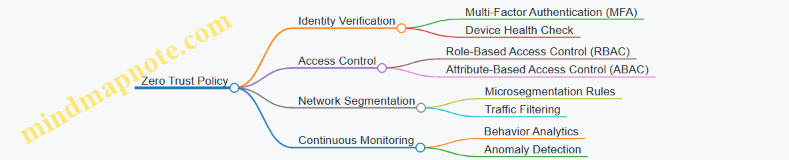
This mind map outlines the core components of a Zero Trust policy. Each branch represents an area where specific rules and controls are applied.
Template 1: Role-Based Access Control (RBAC) Policy
Policy Name: RBAC for Finance Department

Purpose: Restrict access to financial systems and data based on job roles.

Roles:
  - Finance Analyst
  - Finance Manager
  - Auditor

Resources:
  - Financial Database
  - Payroll System
  - Reporting Tools

Access Rules:
  - Finance Analyst: Read and write access to Financial Database and Reporting Tools.
  - Finance Manager: Full access to all resources.
  - Auditor: Read-only access to Financial Database and Payroll System.

Conditions:
  - Access only from corporate network or VPN.
  - MFA required for all roles.

Enforcement:
  - Access requests evaluated by Identity Provider (IdP).
  - Logs maintained for all access events.
Example: Sarah is a Finance Analyst. She can update reports but cannot modify payroll data. If she tries to access payroll, the system denies her request based on this policy.
Mind Map: Attribute-Based Access Control (ABAC) Policy Elements
This map helps visualize how ABAC considers multiple attributes and conditions before granting access.
Template 2: ABAC Policy Example
Policy Name: ABAC for Confidential Documents

Purpose: Control access to confidential documents based on multiple attributes.

Attributes:
  - Subject:
    - Department: Legal, HR
    - Clearance Level: Confidential or higher
  - Resource:
    - Sensitivity: Confidential
  - Environment:
    - Access Time: 8 AM - 6 PM
    - Device Compliance: Must pass endpoint health check

Access Rules:
  - Allow read/write if subject department is Legal or HR AND clearance level is Confidential or above.
  - Deny access outside allowed time window.
  - Deny access if device fails health check.

Enforcement:
  - Policy engine evaluates attributes at access request time.
  - Access logs include attribute evaluation details.
Example: John from HR with Confidential clearance tries to access a confidential document at 7 PM. Access is denied because it is outside the allowed time.
Template 3: Network Segmentation Policy
Policy Name: Microsegmentation for Development Environment

Purpose: Limit network traffic between development and production environments.

Segments:
  - Development Network
  - Production Network

Rules:
  - Block all inbound traffic from Development Network to Production Network.
  - Allow outbound traffic from Production Network to Development Network for monitoring.
  - Allow developer access to Development Network only after device health verification.

Enforcement:
  - Network firewall and software-defined networking (SDN) enforce segmentation.
  - Continuous monitoring for unauthorized traffic.
Example: A developer’s laptop that fails the health check cannot access the Development Network. Attempts to reach Production Network from Development are blocked.
Mind Map: Continuous Monitoring and Policy Enforcement
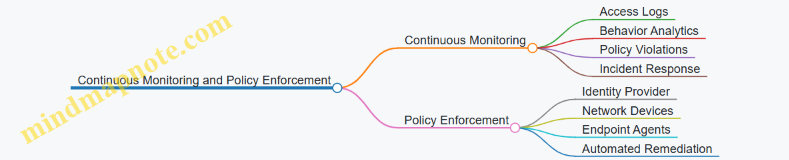
This map shows how monitoring ties back into enforcing and refining policies.
Template 4: Continuous Access Evaluation Policy
Policy Name: Dynamic Access Adjustment

Purpose: Adjust access rights based on real-time risk assessment.

Triggers:
  - Unusual login location
  - Multiple failed authentication attempts
  - Device non-compliance detected

Actions:
  - Step-up authentication required
  - Temporary access suspension
  - Alert security team

Enforcement:
  - Security Information and Event Management (SIEM) system triggers policy engine.
  - Access tokens updated dynamically.
Example: If an employee logs in from a new country, the system requires additional verification before granting access.
These templates and mind maps provide a starting point for designing policies that fit your organization’s needs. They emphasize clarity, enforceability, and integration with identity and device context. Adjust the templates to reflect your environment, and use the mind maps to keep the big picture in view while working on details.
13.4 Recommended Tools and Platforms
Zero Trust Architecture (ZTA) relies on a combination of tools and platforms that enforce identity-driven security across hybrid environments. Selecting the right mix depends on your organization’s size, existing infrastructure, and security goals. Below is a detailed overview of key categories and examples, accompanied by mind maps to clarify their roles and relationships.
Identity and Access Management (IAM) Platforms
IAM platforms form the backbone of Zero Trust by managing user identities, authentication, and access policies.
- Core Functions: User provisioning, authentication (including MFA), authorization, and lifecycle management.
- Examples: Microsoft Azure Active Directory, Okta, Ping Identity.
Mind Map: IAM Components

Example: A mid-sized company uses Okta to centralize identity management across on-premises and cloud applications, enforcing MFA and SSO to reduce password-related risks.
Network Segmentation and Microsegmentation Tools
These tools help divide the network into smaller zones to limit lateral movement of threats.
- Core Functions: Defining and enforcing segmentation policies, monitoring traffic between segments.
- Examples: VMware NSX, Cisco Tetration, Illumio.
Mind Map: Network Segmentation Elements
Example: A financial institution uses Illumio to microsegment its data center, restricting access between application tiers based on identity and device posture.
Endpoint Security and Device Management
Endpoint tools verify device health and enforce policies before granting access.
- Core Functions: Device compliance checks, endpoint detection and response (EDR), mobile device management (MDM).
- Examples: CrowdStrike Falcon, Microsoft Defender for Endpoint, VMware Workspace ONE.
Mind Map: Endpoint Security Components
Example: An enterprise deploys Microsoft Defender for Endpoint to continuously monitor device health and block access from compromised laptops.
Application Security Gateways and API Protection
These platforms control access to applications and APIs, integrating identity and context.
- Core Functions: Application-level access control, API security, threat detection.
- Examples: Apigee, F5 BIG-IP, Cloudflare Access.
Mind Map: Application Security
Example: A SaaS provider uses Cloudflare Access to enforce identity-based policies on internal applications accessed remotely.
Data Protection and Encryption Tools
Protecting data at rest and in transit is critical in Zero Trust.
- Core Functions: Encryption, data classification, data loss prevention (DLP).
- Examples: Vormetric Data Security Platform, Microsoft Azure Information Protection, Symantec DLP.
Mind Map: Data Protection
Example: A healthcare organization uses Azure Information Protection to classify and encrypt patient records, ensuring only authorized identities access sensitive data.
Monitoring, Analytics, and Incident Response
Continuous visibility and automated response are essential for Zero Trust.
- Core Functions: Security information and event management (SIEM), user and entity behavior analytics (UEBA), automated orchestration.
- Examples: Splunk, IBM QRadar, Palo Alto Networks Cortex XSOAR.
Mind Map: Monitoring and Response
Example: An enterprise integrates Palo Alto Cortex XSOAR with its SIEM to automate responses to suspicious login attempts detected by UEBA.
Policy Management and Automation Platforms
These tools help define, enforce, and automate security policies across environments.
- Core Functions: Policy creation, enforcement points, dynamic updates.
- Examples: Cisco Identity Services Engine (ISE), SailPoint, Illumio Policy Compute Engine.
Mind Map: Policy Management
Example: A multi-cloud enterprise uses Cisco ISE to dynamically enforce network access policies based on user identity and device compliance.
Selecting tools from these categories and integrating them effectively creates a robust Zero Trust environment. Each tool addresses a specific layer or function, and together they form a comprehensive security posture that adapts to hybrid network complexities.
13.5 Additional Resources and Reading
This section gathers a variety of resources and structured visual aids to help you organize your understanding of Zero Trust Architecture (ZTA) and identity-driven security. The aim is to provide clear, practical frameworks and examples that complement the concepts covered throughout the book.
Mind Map: Core Components of Zero Trust Architecture
This mind map helps visualize how each component interconnects. For example, identity verification influences network segmentation decisions, while continuous monitoring feeds into policy automation.
Mind Map: Identity Management Best Practices
This map breaks down identity management into actionable areas. For example, continuous authentication can use behavioral biometrics to detect anomalies after initial login.
Mind Map: Network Segmentation Strategies
This structure clarifies the difference between physical and logical segmentation and highlights the role of identity and context in policy-driven segmentation.
Example: Applying Microsegmentation in a Hybrid Environment
Imagine a company with both on-premises data centers and cloud workloads. They segment their network by:
- Defining segments based on application roles (e.g., web servers, databases).
- Using identity and device posture to control access between segments.
- Employing software-defined microsegmentation tools to enforce policies consistently across environments.
This approach reduces lateral movement risks and ensures that only verified identities with compliant devices can access sensitive segments.
Mind Map: Continuous Monitoring and Incident Response
This map shows the flow from data collection to response and how monitoring informs policy adjustments.
Example: Identity-Driven Policy Automation
Consider an organization that uses risk scores derived from user behavior and device health. When a user’s risk score crosses a threshold, the system automatically adjusts access policies, such as requiring additional authentication or restricting access to sensitive resources. This automation reduces response time and maintains security without constant manual intervention.
Mind Map: Data Protection in Zero Trust
This map helps organize data protection efforts, emphasizing that encryption and access controls must align with data classification.
Example: Endpoint Security for Remote Workers
A company supports remote employees by:
- Enforcing device health checks before granting access.
- Using endpoint detection and response (EDR) tools to monitor for suspicious activity.
- Applying identity-based policies to limit access depending on device compliance.
This layered approach balances usability with security in a hybrid work model.
These mind maps and examples provide a structured way to revisit key concepts and see how they fit together practically. They can be used as checklists, planning tools, or quick references when designing or evaluating Zero Trust deployments.
13.6 Index of Best Practices and Examples
This section compiles the key best practices and examples presented throughout the book, organized by topic. Each entry includes a concise summary and a mind map in format to help visualize the relationships and steps involved.
Identity and Access Management (IAM)
Best Practice: Implement Multi-Factor Authentication (MFA) combined with Role-Based Access Control (RBAC) and Attribute-Based Access Control (ABAC) for granular, identity-driven access.
Example: A hybrid cloud environment where employees access resources based on their department and device posture, requiring MFA for remote access.
Network Segmentation and Microsegmentation
Best Practice: Use microsegmentation to isolate workloads based on identity and context, reducing lateral movement risks.
Example: A financial services network segments its internal applications by business unit and enforces policies that require device compliance checks before granting access.
Device Security and Endpoint Management
Best Practice: Continuously verify device health and compliance before granting or maintaining access.
Example: A remote workforce uses endpoint detection and response (EDR) tools to monitor device integrity, blocking access from compromised devices.
Application Security
Best Practice: Integrate identity-driven access controls at the application layer, securing APIs and microservices.
Example: SaaS applications enforce OAuth2 with identity federation, allowing seamless but secure access across hybrid environments.
Data Protection and Encryption
Best Practice: Classify data and apply encryption based on sensitivity, controlling access through identity.
Example: Customer data stored in hybrid clouds is encrypted at rest and in transit, with access granted only to authenticated and authorized users.

Continuous Monitoring and Analytics
Best Practice: Use SIEM and UEBA tools to detect anomalous behavior and automate incident response.
Example: Anomalous login attempts trigger alerts and temporary access suspension until verified.
Policy Enforcement and Automation
Best Practice: Define clear policies and automate enforcement points to adapt dynamically to risk and context.
Example: A multi-cloud environment automatically adjusts access policies based on device risk scores and user location.
Hybrid Environment Implementation
Best Practice: Integrate identity systems and unify policy management across on-premises and cloud to maintain consistent Zero Trust controls.
Example: A healthcare network synchronizes on-premises Active Directory with cloud identity providers, applying unified access policies.
Compliance and Governance
Best Practice: Align Zero Trust policies with regulatory requirements and maintain audit trails.
Example: A financial institution implements role-based access controls and logs all access for audit purposes.
Migration Strategies
Best Practice: Use phased migration with clear milestones and stakeholder engagement.
Example: A global enterprise starts with identity and access management improvements before moving to network microsegmentation.
This index serves as a quick reference to the practical steps and examples that support a successful Zero Trust implementation. The mind maps provide a visual summary to help organize and recall the key components and their relationships.