Event-Driven Systems with NATS JetStream KV Bucket and Consumer Replay
1. Foundations of Event-Driven Systems for Distributed Applications
1.1 Core Concepts of Events Commands and Messages
Event-driven systems start with a simple question: what happened, what should happen next, and how do we move information between services without tightly coupling them. In practice, you’ll use three related ideas—commands, events, and messages—to keep responsibilities clear.
Commands
A command asks for an action. It is directed at a specific component (or service) that owns the behavior. Commands usually expect a response or at least an acknowledgment that the system accepted the request.
Example: “CreateOrder” is a command sent to the Order service. The Order service decides whether the order can be created, checks invariants (like valid customer status), and then persists state.
Key traits of commands:
- They represent intent, not facts. “PlaceOrder” means “please do this,” not “this is already true.”
- They are typically handled by one owner. If multiple services need the outcome, they react to events later.
- They often carry correlation identifiers so you can connect the request to downstream outcomes.
Events
An event records something that occurred. It is a statement of fact produced by the system that owns the truth. Events are broadcast so multiple consumers can react independently.
Example: after the Order service successfully creates an order, it publishes “OrderCreated.” Consumers like Billing, Shipping, and Notifications can each update their own state.
Key traits of events:
- They are immutable records. If something changes, you publish a new event rather than editing the old one.
- They are time-ordered per stream of ownership. Even if delivery is asynchronous, the producer’s sequence matters.
- They should be meaningful without requiring the consumer to know internal implementation details.
Messages
A message is the transport container that carries either a command or an event. In NATS terms, you publish payloads to subjects, and consumers receive them. The message itself is not the meaning; the payload schema and metadata provide meaning.
A practical message usually includes:
- Type: what the payload represents (e.g., OrderCreated)
- Id: a unique identifier for deduplication and traceability
- Timestamp: when the producer observed the fact or accepted the command
- CorrelationId: links related actions across services
- Payload: the business data
How They Fit Together
A common flow is: command → state change → event → reactions.
Example flow for placing an order:
- Client sends command:
PlaceOrderto Order service. - Order service validates and writes state.
- Order service publishes event:
OrderPlaced. - Inventory service consumes
OrderPlacedand reserves stock. - Notification service consumes
OrderPlacedand sends an email.
This separation prevents consumers from accidentally “deciding” business rules. They react to facts, while the owner decides.
Core Concepts Mind Map
Minimal Example Payloads
Below are example JSON payloads showing how the same transport can carry different semantics.
{
  "type": "PlaceOrder",
  "id": "cmd-9f3a",
  "correlationId": "req-1a2b",
  "timestamp": "2026-03-31T10:15:30Z",
  "payload": {
    "customerId": "c-77",
    "items": [{"sku": "sku-1", "qty": 2}]
  }
}
{
  "type": "OrderPlaced",
  "id": "evt-4c21",
  "correlationId": "req-1a2b",
  "timestamp": "2026-03-31T10:15:31Z",
  "payload": {
    "orderId": "o-1001",
    "customerId": "c-77",
    "total": 49.98
  }
}
Practical Rules That Prevent Confusion
- If a consumer should be able to act without asking “did this happen yet?”, it should listen for an event.
- If a consumer must request a change and the owner must validate it, it should send a command.
- If you can’t tell whether the payload is intent or fact, rename the type and adjust the producer logic.
When these boundaries are respected, the rest of the system—retries, replay, and state reconstruction—becomes much easier to reason about because the meaning of each message is consistent.
1.2 Delivery Semantics at Least Once at Most Once and Exactly Once
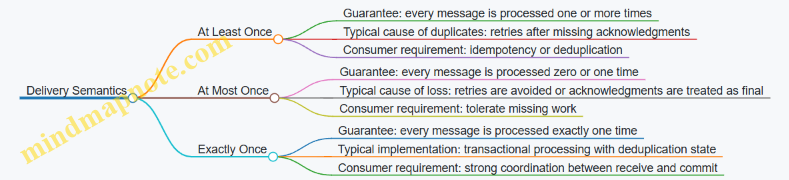
Delivery semantics describe what a system guarantees when messages are retried, consumers crash, or networks misbehave. The key tradeoff is simple: the more you prevent duplicates, the more coordination you usually need.
Mind Map: Delivery Semantics Overview
At Least Once Processing
At least once means the system may deliver duplicates, but it will not silently drop a message that was successfully accepted for delivery. In practice, duplicates happen when a consumer processes a message, but the acknowledgment is delayed or lost. The broker then retries, and the consumer sees the same message again.
A practical example: an order service consumes orders.created events and writes an “order total computed” record to a database. If the consumer crashes after updating the database but before sending the ack, the broker redelivers. Without safeguards, the database update runs twice.
Best practice: make the handler idempotent. A common pattern is to store a processed marker keyed by a message identifier (often a producer-assigned event id, not just the delivery attempt). When the handler receives the event again, it checks the marker and skips the side effect.
Event: { eventId: "evt-9f2", orderId: "o-123", type: "orders.created" }
Handler:
1) Begin transaction
2) If eventId exists in processed_events, return success
3) Compute totals and write result
4) Insert eventId marker
5) Commit
6) Ack message
This approach turns “may run twice” into “side effects run once,” even though delivery remains at least once.
At Most Once Processing
At most once means the system avoids duplicates by ensuring a message is processed no more than once, but it may drop work if failures occur at the wrong time. This can be achieved by not retrying after a consumer fails to acknowledge, or by treating acknowledgment as final even when the consumer’s processing outcome is uncertain.
Example: a metrics pipeline consumes page.view events and updates an in-memory counter. If the consumer crashes mid-update, the system may choose to stop retrying to prevent double counting. The result is undercounting rather than overcounting.
Best practice: use at most once when missing data is acceptable or when the downstream system can tolerate gaps. For instance, dashboards that show trends rather than exact totals can often handle small losses.
A useful mental model: at most once optimizes for “no duplicates,” not “no missing.” If you later need exact totals, you’ll regret this choice.
Exactly Once Processing
Exactly once is the strongest guarantee: each message’s effects appear once and only once. Achieving it requires coordination between message receipt and the commit of side effects, plus a way to detect and ignore duplicates.
A typical implementation uses two ideas:
- Deduplication state keyed by a stable message identifier.
- Atomic commit of both the side effects and the deduplication marker.
Consider a payment workflow consuming payments.authorized. The handler must create a ledger entry exactly once. If the consumer crashes after writing the ledger but before acknowledging, the broker redelivers. Exactly once behavior prevents a second ledger entry by checking the deduplication marker inside the same transaction that writes the ledger.
Transaction:
1) Check processed_events for eventId
2) If present, do nothing
3) Else write ledger entry
4) Insert eventId marker
5) Commit
Ack only after commit succeeds
The subtle point is that “exactly once” is not magic; it is a disciplined coupling of processing and commit. If you ack before commit, you can lose messages. If you commit without deduplication, you can duplicate effects.
Choosing Semantics with Clear Criteria
Start with what correctness means for your use case.
- If duplicates are harmful (ledger entries, inventory decrements), prefer at least once with idempotent handlers, or exactly once with transactional deduplication.
- If missing events are acceptable (approximate metrics, best-effort notifications), at most once can reduce complexity.
- If you need both “no duplicates” and “no loss,” exactly once requires careful design of identifiers, storage transactions, and acknowledgment timing.
A small but important rule: stable identifiers must come from the producer or be derived deterministically from message content. Relying on delivery attempt numbers alone won’t survive retries in a meaningful way.
1.3 Idempotency and Deduplication Strategies in Consumers
Event systems often deliver the same message more than once, especially when acknowledgments are delayed or a consumer restarts. Idempotency is the discipline of making processing safe to repeat, while deduplication is the mechanism that prevents repeats from doing harm. In practice, you usually combine both: deduplication reduces work, and idempotency guarantees correctness even when deduplication fails.
The Core Problem and Why It Happens
Consider a consumer that updates an order total when it receives an order.paid event. If the consumer crashes after applying the update but before sending an acknowledgment, the message can be redelivered. Without protection, the update runs twice and the total becomes wrong.
A second failure mode is concurrency: two workers may process the same event if the consumer is configured with multiple deliveries in flight. Even if your system is “mostly reliable,” these edge cases show up under load and during deployments.
Idempotency Models for Consumer Handlers
Idempotency can be achieved at different layers. Choose the layer that matches your data model and performance needs.
Idempotency by State Overwrite
If processing an event results in a deterministic state for a key, you can overwrite rather than apply increments. For example, if user.profile.updated contains the full profile, storing it by userId is naturally idempotent: the same payload produces the same stored value.
Example: a handler writes profiles[userId] = payload.profile. Reprocessing the same event simply writes the same value again.
Idempotency by Conditional Apply
If events represent transitions, use a guard condition. A common pattern is “apply only if the event sequence is newer.” Maintain lastProcessedSequence per entity and ignore events with sequence less than or equal to that value.
Example: when handling invoice.status.changed, store invoice.lastSeq. If event.seq <= lastSeq, return success without changing the invoice.
Idempotency by External Side Effects with Keys
When the handler calls an external system (like sending an email or creating a payment record), make the side effect keyed. Many systems support idempotency keys; if yours does not, you can create a local record of “side effect already done” and check it before calling the external API.
Example: before sending an email, check outbox[emailId] exists. If it does, skip sending.
Deduplication Strategies That Complement Idempotency
Deduplication is about recognizing “same event again.” The trick is choosing a stable identifier and storing enough metadata to decide what to do.
Event Identity and Stable Keys
Use a message identifier that is consistent across redeliveries. Typical choices include eventId generated by the producer, or a tuple like (entityId, sequenceNumber).
Example: producer sets eventId = uuid and consumer stores processedEvents[eventId] = timestamp.
Where to Store Deduplication State
You need a store with the right durability and access pattern.
- In-memory cache: fast but loses state on restart, so it only reduces duplicates during short outages.
- Database table: durable and queryable, but adds write load.
- KV-style state: compact and designed for key lookups, often a good fit for “processed marker” records.
A practical rule: if correctness depends on deduplication, store it durably. If it only saves work, an in-memory cache can be acceptable.
Time-to-Live and Storage Growth
Deduplication markers can grow without bounds. Use TTL when you can bound how long duplicates might arrive. For example, if your system guarantees redelivery within a known window, you can expire markers after that window.
Example: store processedEvents[eventId] with a 60-day TTL, so old markers don’t accumulate forever.
Mind Map: Idempotency and Deduplication
Idempotency and Deduplication Mind Map
Example: Sequence Guard with Deduplication Marker
Assume each event includes entityId and seq. The consumer uses two checks: a durable “last sequence” guard and an optional “processed marker” for extra safety.
Handler(event):
  key = event.entityId
  lastSeq = state.lastSeq[key]

  if event.seq <= lastSeq:
    return success  // already applied or older duplicate

  // Optional extra dedup marker
  if state.processed[event.eventId] exists:
    state.lastSeq[key] = max(lastSeq, event.seq)
    return success

  applyBusinessChange(event)
  state.lastSeq[key] = event.seq
  state.processed[event.eventId] = now
  return success
This structure prevents double-application even if the consumer crashes at awkward times. If the crash happens after applyBusinessChange but before updating lastSeq, the next delivery will still see lastSeq as old and attempt to apply again; that’s where the optional processed marker helps. If you omit the marker, you still remain correct when applyBusinessChange is itself idempotent or overwrite-based.
Practical Checklist for Consumer Implementations
- Ensure every event has a stable identity (
eventId) or a deterministic ordering key (entityId + seq). - Make the handler safe to run multiple times by using overwrite, conditional apply, or keyed side effects.
- Store deduplication state durably if correctness depends on it.
- Add TTL to processed markers to control storage growth.
- Treat “return success” as part of correctness: once the handler decides the event is already applied, it should ack to stop endless redelivery loops.
1.4 Backpressure and Flow Control in Message Driven Architectures
Message-driven systems move work by sending messages, but the real challenge is deciding what happens when the receiver can’t keep up. Backpressure is the set of techniques that slows down producers or redistributes load so queues don’t grow without bound and latency doesn’t turn into a surprise hobby.
The Problem in Plain Terms
Consider a producer that publishes 10,000 events per second. If consumers can only process 2,000 per second, the system must either:
- Buffer the difference somewhere (memory, disk, broker storage)
- Slow the producer down
- Drop or coalesce messages
- Increase consumer capacity
Flow control is the mechanism that chooses among those options in a controlled way. Without it, you get “works in testing” and “pain in production,” usually because buffering hides the mismatch until it becomes expensive.
Mind Map: Backpressure and Flow Control
Foundational Building Blocks
1) Acknowledgments define “in progress.” If a consumer acknowledges only after processing, the broker can treat unacked messages as still being worked on. That naturally limits how many messages the consumer should receive at once.
2) Concurrency is your local queue. Even if the broker delivers messages quickly, your application might process them with a fixed worker pool. A bounded pool prevents unbounded memory growth.
3) Timeouts turn waiting into decisions. When downstream calls are slow, you need timeouts so the consumer can fail fast, retry safely, or stop pulling.
Broker-Side Flow Control Patterns
Pull-based consumption. With pull consumers, you request messages in batches. If you request 100 messages and only process 100, you’ve created a simple feedback loop: request rate follows processing capacity.
Max in-flight messages. Even with push delivery, you can cap how many messages are delivered without acknowledgments. This prevents a consumer from becoming a “message hoarder.”
Ack timing as a throttle. If you delay acknowledgments until after expensive work, the broker will see more messages as unacked and will slow delivery. That’s useful when processing is the bottleneck, but it can also increase redelivery pressure if processing fails frequently.
Application-Side Flow Control Patterns
Bounded worker pools. Use a fixed number of workers and a bounded channel/queue for tasks. When the queue fills, you can stop accepting new work from the consumer loop.
Coalescing updates. For state-like events (for example, “user profile updated”), you can reduce pressure by keeping only the latest update per key. Instead of processing every intermediate change, you process the final one.
Circuit breakers for downstream dependencies. If a database call starts failing or timing out, continuing to process new messages only increases load. A circuit breaker can temporarily stop pulling or quickly fail handlers, letting the system recover.
A Concrete Example: Bounded Concurrency with Backpressure
Imagine an order service that writes to a database and emits an “order processed” event. The consumer pulls messages in batches of 50, processes them with 10 workers, and acknowledges only after the database write succeeds.
type Job struct{ MsgID string; Payload []byte }

jobs := make(chan Job, 200) // bounded local queue
workerCount := 10

for i := 0; i < workerCount; i++ {
  go func() {
    for j := range jobs {
      err := processOrder(j.Payload) // includes DB write
      if err == nil {
        ack(j.MsgID)
      } else {
        // do not ack; let retry/redelivery handle it
      }
    }
  }()
}

for {
  batch := pull(50) // broker-side pacing
  for _, m := range batch {
    jobs <- Job{MsgID: m.ID, Payload: m.Data} // blocks if full
  }
}
The key behavior is the bounded jobs channel. When workers can’t keep up, the consumer loop blocks, which slows pulling. That’s backpressure implemented with plain mechanics.
Handling Retries Without Making Things Worse
Backpressure and retries interact. If processing fails and messages are redelivered quickly, you can create a retry storm that worsens load. Two practical rules help:
- Retry with jitter so failures don’t synchronize.
- Differentiate transient vs permanent errors so permanent errors don’t keep consuming capacity.
Metrics That Tell You Whether Flow Control Works
Track these together, not separately:
- Processing rate vs publish rate to detect sustained mismatch.
- In-flight count and worker utilization to see whether the bottleneck is broker delivery or application work.
- Ack latency to understand how long messages remain unacked.
- Retry rate and error rate to spot retry storms early.
When these metrics move in the same direction, you can reason about the system. When they move in opposite directions, you likely have a hidden bottleneck, like a downstream dependency that’s stalling while the broker keeps delivering.
Practical Design Checklist
- Cap delivery with max in-flight or pull batch sizing.
- Bound local queues and worker concurrency.
- Acknowledge only after the critical side effect succeeds.
- Use timeouts and circuit breakers for downstream calls.
- Coalesce or dedupe when messages represent intermediate state.
- Monitor lag, in-flight, ack latency, and retry behavior as a set.
1.5 Designing for Observability with Correlation Identifiers and Tracing
Observability is easiest when you can answer three questions quickly: What happened? Where did it happen? Why did it happen? Correlation identifiers and tracing are the tools that make those questions answerable across producers, brokers, and consumers.
Correlation Identifiers as the Thread Through the System
A correlation identifier is a value you generate once at the start of a request or workflow and then carry through every hop. The key idea is that logs, metrics, and traces can all be filtered by the same identifier.
Use cases that benefit immediately:
- A user action triggers multiple events; you need to find all related processing.
- A consumer fails and retries; you need to group attempts under one logical operation.
- A dashboard shows an anomaly; you need to trace it back to the originating request.
A practical convention is to have two identifiers:
- trace_id: identifies the end-to-end trace.
- span_id: identifies a specific step within that trace.
If you only want one value to start, use correlation_id and keep it consistent. Later, you can map it to trace_id without changing your business logic.
Tracing Fundamentals That Match Message Systems
Tracing represents work as a tree of spans. In synchronous calls, spans naturally nest. In event-driven systems, spans often form a graph: one producer span leads to multiple consumer spans.
To keep the model consistent, treat each message handling as a span. When a consumer receives a message, it creates a new span that is a child of the producer’s span context.
A message broker doesn’t automatically know your trace context, so you must propagate it in message metadata (headers). That propagation is the difference between “we have logs” and “we can reconstruct the story.”
Propagation Rules That Prevent Confusing Data
Define rules so every service behaves the same way:
- Generate a new trace context only at the boundary where the workflow starts (for example, an HTTP request).
- Propagate trace context in message headers for every publish.
- Extract trace context in every consumer before starting the handler span.
- Create a new span per handler attempt, even if the message is redelivered.
Redelivery is where people get tripped up. If you reuse the same span_id across attempts, you’ll lose the ability to see timing differences. Keep correlation stable, but create a fresh span per attempt.
Mind Map: Observability with Correlation and Tracing
Example: Correlation Headers in a Message Workflow
Below is a minimal pattern: attach correlation and trace context to message headers when publishing, then extract them in the consumer.
// Producer
correlation_id = getOrCreateCorrelationId()
trace_ctx = startOrGetTraceContext()
headers = {
  "correlation_id": correlation_id,
  "trace_id": trace_ctx.traceId,
  "span_id": trace_ctx.parentSpanId
}
publish(subject, payload, headers)
// Consumer
headers = message.headers
correlation_id = headers["correlation_id"]
trace_ctx = extractTraceContext(headers)
span = startSpan("handle_message", parent=trace_ctx)
try {
  handle(payload)
  span.setStatus("ok")
  ack()
} catch (err) {
  span.setStatus("error", err)
  // do not ack to trigger redelivery policy
  throw err
} finally {
  span.end()
}
Notice what’s intentional: correlation_id stays the same across attempts, while each handler attempt creates a new span.
Example: Logging That Stays Useful Under Load
When you log, include the correlation_id and the message identity. A good log line answers “which message” and “which workflow.”
A simple structure:
- timestamp
- service name and version
- correlation_id
- trace_id
- stream name and sequence number (or message id)
- action (received, processed, failed)
- error summary when applicable
This makes it possible to filter by correlation_id and then sort by sequence number to see ordering and retry behavior.
Practical Failure Scenarios and What You Should See
- Consumer crashes before ack: you should see multiple handler spans with the same correlation_id and different attempt timing.
- Handler throws a deterministic error: spans should show error status consistently, and logs should group under one correlation_id.
- Fan-out to multiple consumers: you should see one producer span context leading to multiple consumer spans, all sharing correlation_id.
If those patterns don’t appear, the issue is usually missing header propagation or inconsistent correlation generation at the boundary.
A Simple Checklist for Implementation
- Correlation_id exists at the workflow boundary.
- Every publish includes correlation_id and trace context headers.
- Every consumer extracts headers before starting the handler span.
- Each handler attempt creates a new span.
- Logs include correlation_id, trace_id, and message identity.
- Errors record enough detail to classify the failure without guessing.
2. NATS Messaging Model and JetStream Architecture Essentials
2.1 NATS Subjects Wildcards and Routing Patterns
NATS routes messages by subject strings. A subject is a dot-separated path like orders.created. Producers publish to a subject, and consumers subscribe to patterns that match those subjects. The key idea is simple: subject matching happens on the server before your code runs, so good subject design reduces both wasted traffic and wasted CPU.
Subject Tokens and Matching Rules
A subject is split into tokens separated by .. Wildcards let you match multiple subjects without subscribing to each one.
*matches exactly one token.>matches one or more tokens and must appear only at the end.
Example: orders.* matches orders.created and orders.cancelled, but not orders.us.created.
Example: orders.> matches orders.created, orders.us.created, and orders.us.eu.created.
Mind Map: Subject Design and Wildcards
Designing Subject Hierarchies That Don’t Fight You
Start with a stable prefix that groups related traffic, such as app or domain. Then decide which token positions are fixed and which vary.
A common pattern for event streams is:
domain.entity.action
For example:
billing.invoice.paidbilling.invoice.voided
If you later need tenant scoping, insert it as an additional token:
billing.tenantA.invoice.paid
Now you can choose between two subscription styles:
- Fixed-depth subscriptions using
* - Hierarchical subscriptions using
>
Example: Narrow Subscriptions with *
Use * when you know the subject depth and want to match only one varying token.
// Subscribe to all invoice actions at a fixed depth
const sub = nc.subscribe('billing.invoice.*', {
  callback: (msg) => {
    console.log('subject:', msg.subject);
  }
});

// Publishes to matching subjects
nc.publish('billing.invoice.paid', Buffer.from('ok'));
nc.publish('billing.invoice.voided', Buffer.from('ok'));
This matches billing.invoice.paid and billing.invoice.voided. It does not match billing.tenantA.invoice.paid because the token depth differs.
Example: Hierarchical Subscriptions with >
Use > when you want to accept additional nesting after a prefix.
// Subscribe to all invoice events for any tenant
const sub = nc.subscribe('billing.>.invoice.>', {
  callback: (msg) => {
    console.log('subject:', msg.subject);
  }
});

nc.publish('billing.tenantA.invoice.paid', Buffer.from('ok'));
nc.publish('billing.tenantB.invoice.voided', Buffer.from('ok'));
This pattern matches subjects that start with billing., then include any tenant token(s), then invoice, then any action token(s). The > at the end is what makes it flexible; keep it at the end to avoid surprises.
Avoiding Accidental Overlaps
Overlaps happen when a broad subscription catches messages meant for a narrower consumer. For example, billing.> will match everything under billing, including admin events and internal signals. If you have separate processing paths, prefer narrower prefixes like billing.invoice.> or billing.invoice.*.
A practical rule: if two consumers both do work on the same message type, make their subscriptions intentionally overlap. If they should not overlap, make the subject prefixes different early.
Mapping Subjects to Consumer Intent
Think of each subscription as a contract between subject naming and consumer responsibility.
billing.invoice.*means “I handle invoice events at this exact structure.”billing.>.invoice.>means “I handle invoice events regardless of tenant nesting.”
When you keep that contract stable, you can reason about routing without reading logs for every test run.
Quick Checklist for Subject Patterns
- Keep token positions consistent across producers.
- Use
*for fixed-depth matching. - Use
>only at the end and only where extra nesting is expected. - Make prefixes reflect ownership boundaries, not just categories.
- Prefer narrower subscriptions for high-volume consumers.
With these rules, subject matching becomes predictable: your consumers receive exactly the messages they expect, and your system spends less time filtering and more time processing.
2.2 Publish Subscribe Versus Request Reply Patterns
Publish subscribe and request reply solve different problems even though both move messages between services. The key difference is who decides when the interaction ends.
Publish Subscribe Pattern
In publish subscribe, a producer publishes an event to a subject, and any number of consumers receive it. The producer does not wait for responses, so the interaction is naturally decoupled in time.
When it fits
- You want fan-out: multiple services react to the same fact.
- You can tolerate asynchronous processing.
- You model changes as events, not as direct answers.
How it behaves
- Consumers independently acknowledge or handle messages.
- Ordering is per subject stream semantics, not per “conversation.”
- Backlogs can build when consumers are slower than producers.
Concrete example
A checkout service publishes orders.created after persisting an order. A billing service listens to orders.created to create an invoice, and an email service listens to the same subject to send a receipt. Neither service blocks the checkout flow.
Practical best practices
- Use subject naming that reflects meaning:
orders.created,orders.cancelled, notmsg.1. - Keep payloads self-describing enough for independent consumers to act without calling back to the producer.
- Design consumers to be idempotent because redelivery can happen when processing fails.
Request Reply Pattern
In request reply, a client sends a request and expects a response. The server processes the request and replies to a return address.
When it fits
- You need a direct answer: “give me the current value,” “validate this command,” or “perform this operation.”
- You want a bounded interaction where the client controls timeouts.
- You can keep the server logic centralized.
How it behaves
- The client typically waits for a response, so latency matters.
- The server can treat each request as a unit of work.
- Retries must be handled carefully to avoid duplicate side effects.
Concrete example
A pricing service receives GetPrice requests from a cart service. It replies with the computed price for a product and region. The cart service can proceed immediately once it has the response.
Practical best practices
- Make request handlers side-effect free when possible, or require explicit idempotency keys.
- Set timeouts on the client and define what “no response” means.
- Keep request payloads small and stable; large payloads increase tail latency.
Choosing Between Them
A useful rule: if the producer’s job is to announce something that others react to, use publish subscribe. If the producer’s job is to answer a question or perform an operation for a specific caller, use request reply.
Decision checklist
- Do you need fan-out? Prefer publish subscribe.
- Does the caller need a result before continuing? Prefer request reply.
- Can the system tolerate asynchronous completion? Prefer publish subscribe.
- Is the interaction naturally a command with a single authoritative responder? Prefer request reply.
Mind Map: Pattern Tradeoffs
Example: Combining Patterns Safely
Many systems use both: request reply for the initial command, publish subscribe for the resulting events. That keeps the “answer” path simple while still letting other services react.
Scenario
1. A client sends CreateOrder via request reply to the order service.
2. The order service persists the order and replies with orderId.
3. The order service publishes orders.created so billing, inventory, and email can react.
This avoids forcing every consumer to participate in the request-response conversation. It also keeps the event payload aligned with what downstream services need.
Example: Idempotency in Both Patterns
- In publish subscribe, idempotency is usually about handling the same event more than once. For example,
orders.createdmight be delivered twice after a consumer crash; the billing consumer should detect that an invoice fororderIdalready exists. - In request reply, idempotency is about repeated requests. If a client times out and retries
CreateOrder, the order service should return the sameorderIdwhen given the same idempotency key.
Summary
Publish subscribe is for broadcasting facts to multiple independent consumers without waiting. Request reply is for direct, bounded interactions where the caller expects a response. The most reliable designs often use request reply to get a result and publish subscribe to distribute the consequences.
2.3 JetStream Concepts Streams Consumers and Durable State
JetStream is NATS’s way of turning plain message passing into something closer to a log with retention and controlled delivery. To reason about it, it helps to separate three ideas: streams store data, consumers define how clients read it, and durable state remembers where a consumer left off.
Streams as Stored Event Logs
A stream is a named container for messages. When you publish to subjects that match the stream’s configuration, JetStream stores those messages according to the stream’s retention policy. Think of a stream as the “where the bytes live” part.
Key stream concepts:
- Subject filters: the subjects that map into the stream. If you publish to
orders.created, and the stream is configured to includeorders.*, the message lands in that stream. - Retention policy: controls how long data stays. For example, a “limits by time” policy keeps recent messages, while a “limits by size” policy keeps the most recent data until storage is full.
- Storage type: determines where the data is stored on the server side.
A practical example: you create a stream for orders.* so every order-related event is captured. Later, you can rebuild a view by replaying from the stream rather than relying on the producer to still be around.
Consumers as Delivery Strategies
A consumer is the reader configuration attached to a stream. It decides how messages are delivered, how acknowledgments work, and what starting point to use.
Common consumer knobs:
- Delivery mode: push or pull. Push sends messages to your client; pull lets your client request batches.
- Acknowledgments: with acks enabled, the server tracks which messages are processed and can redeliver if they aren’t acknowledged.
- Start position: where reading begins, such as “from the beginning” or “from the last acknowledged message.”
Example: a billing service might use a push consumer with acknowledgments so it can process events continuously. A backfill tool might use a separate consumer with a different start position to reprocess older events.
Durable State as Remembered Progress
Durable state is the server-side memory of a consumer’s progress. When you create a consumer with a durable name, JetStream can resume delivery after restarts without you manually tracking offsets.
What durable state typically remembers:
- Last acknowledged sequence for the consumer.
- Redelivery behavior when messages are not acknowledged.
- Delivery configuration that affects how the server continues sending.
This is the difference between “I read some messages” and “I am a specific reader that can pause and resume.” If you run the same durable consumer again, it continues from where it left off.
Mind Map: Streams Consumers Durable State
Example: Two Consumers, One Stream
Suppose you have a stream named ORDERS that stores orders.*. You attach two consumers:
-
Live processing consumer
- Durable name:
billing-live - Start position: last acknowledged
- Ack enabled: yes
- Delivery mode: push
- Durable name:
-
Backfill consumer
- Durable name:
billing-backfill - Start position: from a specific point or from the beginning
- Ack enabled: yes
- Delivery mode: pull
- Durable name:
Because the durable names differ, each consumer maintains its own progress. The backfill can run without disturbing the live consumer’s position.
Example: Minimal Consumer Reasoning with Sequence Numbers
JetStream stores messages in a stream with an internal ordering. Consumers receive messages that correspond to those stored positions. When acknowledgments are enabled, the consumer’s durable state advances as you ack messages.
A simple mental model:
- Message arrives with a stream sequence number.
- Your handler processes it.
- You ack it.
- Durable state records that sequence as processed.
If your service crashes after receiving but before acking, the server can redeliver those messages. That behavior is controlled by the consumer’s configuration and the durable state it maintains.
Putting It Together
When you design an event-driven system with JetStream, you typically start by defining streams that capture the right subjects with the right retention. Then you define consumers that match how each service should read and acknowledge data. Finally, you choose durable state when you need reliable resume behavior without external offset tracking. This separation keeps the system understandable: storage rules live in streams, delivery rules live in consumers, and progress memory lives in durable state.
2.4 Acknowledgments Redelivery and Consumer Configuration Basics
JetStream consumers control two things that matter in practice: when a message is considered handled, and what happens when it is not. The basic loop is simple—deliver, process, acknowledge—but the configuration details decide whether your system behaves like a careful librarian or a forgetful courier.
Acknowledgments: What They Mean and Why They Exist
An acknowledgment (ack) is a signal from the consumer to JetStream that the message was processed successfully. Without an ack, JetStream assumes the consumer might have crashed, timed out, or simply failed to finish.
A concrete example: imagine an order service consumes orders.created events and writes an order record to a database. If the consumer crashes after the database write but before sending an ack, JetStream will redeliver the same event later. That is why acking is tied to “safe completion,” not “I started processing.”
In many systems, you can choose between:
- Ack after success: you only ack once the side effects are durable.
- Ack early: you ack before side effects, which reduces redeliveries but risks losing work if the process fails mid-flight.
For most real workloads, ack after success is the sane default.
Redelivery: How JetStream Recovers from Missing Acks
Redelivery is JetStream’s mechanism for re-sending messages that were not acked within a configured window. The key idea is the ack wait: a duration during which JetStream expects an ack. If it doesn’t arrive, the message becomes eligible for redelivery.
A practical scenario: a consumer processes a message, then stalls due to a slow database. If the ack wait is 30 seconds and the database call takes 45 seconds, JetStream will redeliver even though the original processing might eventually finish. This is not a bug; it’s a consequence of timeouts.
To handle this safely, your handler should be idempotent. A common pattern is to store a processed marker keyed by message sequence or event ID, so repeated deliveries do not create duplicate records.
Consumer Configuration: The Knobs That Control Behavior
Consumer configuration determines delivery mode, ack policy, and redelivery timing. The most important knobs are:
- Ack Policy: whether messages require acks. If acks are required, missing acks trigger redelivery.
- Ack Wait: how long JetStream waits for an ack before redelivering.
- Deliver Policy: where the consumer starts reading from (for example, from the beginning or only new messages).
- Replay and Start Position: how you define the initial cursor for the consumer.
- Max Ack Pending: a cap on how many unacked messages the consumer can have in flight.
A useful rule of thumb: set Max Ack Pending to match your processing capacity. If it’s too high, you’ll accumulate work you can’t finish before ack wait expires.
Mind Map: Acknowledgments and Redelivery Flow
Example: A Safe Handler with Idempotency
Suppose each event includes event_id. The consumer stores event_id in a table with a unique constraint. On each delivery, it attempts the insert; if the insert already exists, it skips side effects and still acks.
On message delivery:
1) Parse event
2) Try insert into processed_events(event_id)
3) If insert succeeds:
   - Write order record
4) If insert fails due to duplicate:
   - Skip side effects
5) Send ack
This makes redelivery harmless: even if the same message arrives twice, the database state remains correct.
Example: Tuning Ack Wait and in Flight Limits
If your handler typically finishes in 200–500 ms but sometimes hits a slow dependency, you can set ack wait to cover the worst observed latency plus a small buffer. Then set max ack pending so the consumer doesn’t start more work than it can complete before the buffer runs out.
A concrete setup might look like this:
- ack wait: 10 seconds
- max ack pending: 50
If each message takes about 1 second on average, 50 in flight means you can keep the pipeline busy without constantly timing out.
Common Configuration Pitfalls
- Ack wait too short: you’ll see frequent redeliveries and duplicate processing attempts.
- Ack policy misaligned with side effects: acking before durable writes breaks correctness.
- No idempotency: redelivery becomes data duplication.
- Max ack pending too high: you create a backlog of unacked messages that will all time out together.
A consumer that acknowledges only after durable completion, combined with idempotent handlers, turns redelivery from a threat into a predictable recovery mechanism.
2.5 Operational Setup for Local and Containerized Deployments
A good operational setup makes the rest of the book easier: you can reproduce behavior, inspect state, and run the same consumer replay logic in development and in containers. The goal is simple—start NATS with JetStream enabled, create streams and KV buckets deterministically, and run consumers with predictable configuration.
Local Setup That Mirrors Production
Start with a single NATS server for local work, but keep the configuration explicit so you can copy it into containers later.
- Use a dedicated JetStream storage directory so you can wipe state cleanly.
- Enable JetStream and set a consistent server name so logs and tooling are stable.
- Expose the client port and optionally the monitoring port.
A practical local workflow is:
- Start NATS.
- Create streams and KV buckets via a small bootstrap script.
- Run producers and consumers.
- Stop everything, wipe storage, and re-run bootstrap to confirm idempotent setup.
Example: Minimal NATS Server Configuration
# nats-server.conf
server_name: local-jetstream
jetstream: {}
store_dir: ./jetstream
max_payload: 4MB
port: 4222
Run the server with that config, then verify JetStream is reachable by checking server logs for JetStream initialization.
Containerized Setup with Deterministic Networking
In containers, the main operational differences are hostnames, persistence, and startup ordering.
- Use a stable service name like
natsfor the hostname inside the Docker network. - Persist JetStream storage with a volume so consumer replay state survives restarts.
- Add a healthcheck so your bootstrap job waits for the server.
Example: Docker Compose for NATS and Bootstrap
services:
  nats:
    image: nats:2.10
    command: ["-c", "/etc/nats/nats-server.conf"]
    ports: ["4222:4222"]
    volumes:
      - natsdata:/data
      - ./nats-server.conf:/etc/nats/nats-server.conf:ro
    healthcheck:
      test: ["CMD", "nats", "ping", "-s", "nats://localhost:4222"]
      interval: 2s
      timeout: 1s
      retries: 10

volumes:
  natsdata:
If you bootstrap streams on every container start, you should make the bootstrap idempotent by using the same stream and bucket names and by tolerating “already exists” responses.
Bootstrap Scripts for Streams and KV Buckets
Operational reliability comes from repeatable creation. Treat stream and KV definitions as code.
- Keep subject patterns and retention policies in one place.
- Use consistent naming conventions for streams and buckets.
- Set replication and storage options intentionally, even if you keep them simple locally.
Example: Idempotent Stream and KV Creation
# bootstrap.sh
set -e
nats --server nats://nats:4222 stream add EVENTS \
  --subjects 'events.*' \
  --retention limits \
  --max-age 72h || true

nats --server nats://nats:4222 kv add CONFIG \
  --history 10 || true
The || true is not a blanket permission slip; it’s a deliberate choice to allow re-runs during development.
Mind Map: Operational Setup
Verification Steps That Catch Real Mistakes
After setup, verify behavior rather than just connectivity.
- Publish a small set of test events to
events.*and confirm the stream receives them. - Create a KV entry, update it, then confirm the KV history depth matches expectations.
- Start a consumer with a durable name, process a few messages, and restart it to confirm the consumer resumes correctly.
- Run a controlled replay by resetting consumer acknowledgment state and observing that the handler sees the same sequence range.
For a concrete test dataset, use a fixed run date like 2026-03-15 in your event payloads so you can visually confirm which messages were produced during a specific run without relying on timestamps from the environment.
Common Operational Pitfalls
- Using different stream or bucket names across environments, which breaks replay assumptions.
- Forgetting persistence in containers, which makes “replay” look like “start over.”
- Letting bootstrap scripts drift from code, which causes subtle subject mismatches.
- Running consumers before streams exist, leading to confusing “no messages” behavior that is actually a setup issue.
A clean operational setup is mostly boring configuration work, but it pays off immediately when you need to debug consumer replay and KV-driven state transitions.
3. Modeling Data with JetStream KV Buckets
3.1 KV Bucket Semantics Key Value Updates and Sequence Ordering
KV buckets store state as a sequence of updates per key. Each update is assigned a monotonically increasing sequence number within the bucket, which gives you a shared timeline for reasoning about ordering and replay.
What “Key Value” Means in KV Buckets
A KV bucket is not a log of arbitrary events; it is a map from keys to the latest value. When you write to a key, you create a new version of that key’s value. Reads can ask for the latest version, or they can request a specific version by sequence number.
A practical way to think about it: the bucket is a ledger, but your application usually cares about the current entry for each key. Sequence numbers are the ledger’s page numbers.
How Updates Are Ordered
Every write to any key increments the bucket’s global sequence counter. That means:
- Updates across different keys are totally ordered by sequence number.
- Updates to the same key are also ordered, and the latest version is the one with the highest sequence number for that key.
This global ordering matters when you need to correlate state changes across keys. For example, if you store workflow progress under keys like wf:123:step and wf:123:status, the sequence numbers let you determine which update happened first even if they were written by different components.
Versioning and What You Can Read
KV buckets expose multiple read styles:
- Latest value: “Give me the current value for key
k.” - Versioned value: “Give me the value for key
kat sequences.” - Watches: “Notify me when key
kchanges, starting from sequences.”
The key point is that sequence numbers are the bridge between “what changed” and “when it changed.” Without sequence numbers, you can only guess ordering from timestamps, which are often inconsistent across machines.
Sequence Numbers as a Consistency Tool
Sequence ordering lets you build deterministic workflows even under concurrency. Consider two writers updating different keys:
- Writer A updates
cart:7:items. - Writer B updates
cart:7:status.
If you later read both keys and compare their sequence numbers, you can decide whether the status update was based on the items update. If status has a higher sequence number than items, you know the status write occurred after the items write in the bucket’s timeline.
Mind Map: KV Update Semantics and Sequence Ordering
Example: Tracking Two Related Keys
Imagine a checkout system that stores:
order:100:itemsas a JSON listorder:100:paymentas a status string
Writers update them in separate steps. Your consumer can store the last processed bucket sequence lastSeq. When it receives a change notification, it can:
- Read
order:100:itemsat the sequence it observed. - Read
order:100:paymentat the latest sequence not exceeding the observed sequence.
That second step prevents mixing a newer payment value with older items. The consumer’s logic becomes: “Use a consistent snapshot boundary defined by sequence.”
Example: Building a Simple Snapshot Boundary
Below is a minimal pattern for using a sequence boundary to read a coherent view.
lastSeq = loadCheckpoint()

onKvUpdate(event):
  boundary = event.sequence

  items = kv.getAtSequence("order:100:items", boundary)
  payment = kv.getAtSequence("order:100:payment", boundary)

  process(items, payment)

  lastSeq = boundary
  saveCheckpoint(lastSeq)
This works because sequence numbers define a single ordering for the bucket. You are not relying on wall-clock time, and you are not assuming that updates arrive in the same order they were written.
Advanced Detail: Handling Concurrent Writers Safely
When multiple writers update the same key, the bucket still provides a single sequence order. Your application should treat each new version as authoritative and avoid “merge by guessing.” If you need merges, do it at the application level using the values you read at the sequence boundary.
If you need to ensure that a multi-key update is processed atomically, KV buckets don’t magically bundle keys into one transaction. Instead, you use sequence boundaries to process a consistent set of reads, and you design your keys so that the consumer can reconstruct the intended state from those reads.
Example: Detecting Out-of-Order Assumptions
Suppose a consumer assumes that payment is updated after items. With sequence numbers, you can verify that assumption:
- If
payment’s sequence is lower thanitems’s sequence for the same order, then the consumer should not treat the payment as derived from the items update.
Rather than failing silently, you can route the case to a “wait for next update” path by keeping the checkpoint at the observed sequence and reprocessing when the bucket advances.
Summary of Key Semantics
KV bucket updates create new versions per key, and every write contributes to a global, monotonically increasing sequence. By reading values at or before a chosen sequence boundary, you can reason about ordering across keys and process state consistently even when writers run concurrently.
3.2 Choosing Key Design Patterns for Multi Tenant and Partitioned Data
Multi-tenant KV buckets work best when your key design makes ownership and partitioning obvious, stable, and cheap to query. In JetStream KV, each update is stored under a single key, so your key format becomes your primary indexing strategy. A good key pattern prevents accidental cross-tenant reads, keeps operational tooling simple, and makes replay and cleanup predictable.
Key Design Goals for Multi Tenant KV
Start with three practical goals:
- Tenant isolation by construction. If a bug publishes under the wrong tenant prefix, the key format should make it hard to overwrite or read other tenants’ state.
- Efficient retrieval by prefix. KV reads and watches typically operate by key or key prefix patterns. Even when your client fetches specific keys, prefix structure helps you reason about what exists.
- Stable evolution. Keys should remain valid across versions. If you change the payload schema, you should not need to rename keys.
A simple rule: treat the key like a URL path. If you wouldn’t want to break it in production, don’t make it fragile.
Tenant Prefix Patterns
Use a tenant prefix that is consistent and unambiguous. Common options:
- Opaque tenant ID prefix:
tenant:{tenantId}/...wheretenantIdis a stable identifier. - Human-friendly prefix:
tenant:{slug}/...whereslugis readable but must be immutable.
Prefer opaque IDs. Slugs invite the “we renamed the customer” problem, which turns into key migration work.
Example key roots:
tenant:acme/tenant:globex/
Partitioning Patterns Beyond Tenant
Once you have tenant isolation, partition the rest of the state by what you need to manage independently. Typical partition dimensions:
- Entity type:
user,session,workflow,featureFlag - Entity ID:
user:{userId} - Environment or region:
env:prod,region:us-east
A practical hierarchy is:
tenant:{tenantId}/env:{env}/entity:{entityType}/{entityId}
This keeps the “who owns it” part first, then the “where it lives,” then the “what it is,” then the “which instance.”
Versioning and Schema Compatibility
KV stores the latest value per key, so schema changes are your responsibility. Two safe approaches:
- Embed schema version in the value, not the key. The key stays stable; consumers interpret the value based on a
schemaVersionfield. - Embed schema version in the key only when you must keep multiple representations. For example, if you need to run two decoders side by side during a migration.
If you do version in the key, keep it near the value identity, not at the tenant root. That avoids multiplying tenant prefixes.
Handling Deletes and Tombstones
KV updates can represent deletion via tombstones depending on how you manage them. Your key pattern should make deletion unambiguous:
- Use the same key for the entity.
- Publish a tombstone value under that key.
Avoid inventing separate “deleted” keys like .../deleted/{id} unless you truly need historical deletion markers. Otherwise, you’ll create extra keys to clean up and extra logic to reason about.
Mind Map: Key Structure for Multi Tenant KV
Example: Session State Keys
Suppose you store session progress for a workflow. You want tenant isolation and quick lookups by session ID.
Key format:
tenant:{tenantId}/env:prod/entity:session/{sessionId}
Value fields might include:
schemaVersionworkflowIdstepupdatedAt
When you replay events to rebuild session state, you update the same key. That means the replay is idempotent at the storage layer as long as your consumer logic is consistent.
Example: Feature Flags as KV Entries
Feature flags are naturally key-value. Partition by tenant and flag name:
tenant:{tenantId}/env:prod/entity:featureFlag/{flagName}
If you need per-user overrides, add another segment:
tenant:{tenantId}/env:prod/entity:featureFlag/user:{userId}/{flagName}
This avoids mixing global and user-specific flags under the same key namespace.
Example: Partitioned Workflow State
For workflow state, you often need to separate workflow instances from their definitions.
- Definition metadata:
tenant:{tenantId}/env:prod/entity:workflowDef/{workflowType} - Instance state:
tenant:{tenantId}/env:prod/entity:workflowInst/{workflowId}
That separation keeps updates to instance state from overwriting definition metadata, even if both are produced by the same service.
Common Pitfalls to Avoid
- Putting mutable fields early. If you expect the value to change, don’t place it in the key.
- Using free-form strings without normalization. If
flagNamecan contain slashes or inconsistent casing, normalize it before building keys. - Over-partitioning. More segments can mean more keys and more complexity. Partition only along dimensions you actually query or manage independently.
A key pattern is a contract. When it’s clear and consistent, both your consumers and your operators can reason about state without guesswork.
3.3 Handling Deletes Tombstones and Versioned State
JetStream KV buckets treat every key as a small, versioned timeline. A normal update stores a new value with an increasing sequence. A delete is represented as a tombstone entry, which means “this key used to exist, but it doesn’t anymore as of this version.” The practical trick is to handle tombstones as first-class events rather than as an afterthought.
Versioned State Basics That Matter for Deletes
In a KV bucket, each key has multiple versions. When you read the latest value, you’re really asking for the most recent version that is not deleted. When you watch or iterate, you’ll see every version, including tombstones. That difference is why “latest read” and “event stream of changes” can disagree if you don’t account for deletes.
A tombstone typically carries metadata indicating deletion, while the value payload may be empty or omitted. Your application should not assume the payload is meaningful when the version indicates deletion.
Tombstones as Data, Not Errors
Treat tombstones as a normal state transition:
- Created or Updated: key exists with a value.
- Deleted: key does not exist as of that version.
- Recreated: a later update adds a new value again.
This matters for correctness. If you ignore tombstones, you can keep stale state in memory even though the bucket says the key is gone.
Designing Your In-Memory Representation
A common pattern is to maintain a map from key to a struct containing both the value and the last seen version.
- On update: replace value and record the version.
- On tombstone: remove the key from the map, or mark it as deleted with the version.
Recording the version helps when processing is concurrent or when you replay from an earlier point. It also prevents “last writer wins” bugs where an older event arrives after a newer one.
Example: Update Then Delete Then Recreate
Imagine a feature flag key: tenantA:betaCheckout.
- Version 10 stores
true. - Version 11 stores a tombstone.
- Version 12 stores
false.
If your handler removes the key on tombstone and then sets it on version 12, your in-memory state ends up correct. If you only handle updates and skip tombstones, you’ll incorrectly keep true forever.
Example: Watch Handler with Version Checks
Below is a minimal handler sketch. It assumes you receive a record that includes a deletion indicator and a version/sequence.
type State struct {
  Value   []byte
  Version uint64
}

func applyKVEvent(store map[string]State, key string, rec KVRecord) {
  if rec.IsDelete {
    delete(store, key)
    return
  }
  store[key] = State{Value: rec.Value, Version: rec.Version}
}
If you need to guard against out-of-order delivery, add a version check before applying:
func applyKVEvent(store map[string]State, key string, rec KVRecord) {
  cur, ok := store[key]
  if ok && rec.Version < cur.Version {
    return
  }
  if rec.IsDelete {
    delete(store, key)
    return
  }
  store[key] = State{Value: rec.Value, Version: rec.Version}
}
Mind Map: Tombstones and Versioned State
Advanced Details Without the Headaches
- Latest Reads vs Watches: A “get latest” call should return no value for a deleted key, but a watch will still show the tombstone. Your code should reflect the mode it’s in.
- Replay Safety: During replay, tombstones are what make the reconstructed state match the bucket. If you rebuild state from scratch, you must process deletes the same way you process updates.
- Idempotent Handlers: If your handler can be called multiple times for the same version, version checks make it safe. If it can’t, ensure your consumer configuration and ack strategy avoid duplicates, or make the handler tolerant.
Practical Checklist for Deletes
- Confirm your handler distinguishes delete records from value records.
- Remove or mark the key on tombstone.
- Store and compare versions when ordering isn’t guaranteed.
- Verify behavior with a sequence like update → delete → update.
When deletes are treated as real state transitions, versioned KV becomes predictable: the bucket’s timeline is the truth, and your application simply follows it.
3.4 Reading KV Data with Watches and Consistent Retrieval Patterns
KV buckets store the latest value per key, plus a monotonically increasing sequence number for each update. Reading “the latest” is straightforward, but reading “the latest consistently” across multiple keys requires a retrieval pattern that respects how updates move through the bucket.
The Mental Model for KV Reads
Think of a KV bucket as two layers:
- Key space:
key -> latest value. - Update timeline: each write advances a sequence number.
A watch lets you observe changes on the timeline, while a point-in-time read lets you fetch a snapshot. The consistent retrieval patterns below combine both ideas so your application doesn’t mix values from different moments.
Mind Map: KV Reads and Consistency
Pattern 1: Read-Then-Watch for Safe Startup
Use this when you need an initial state and then continuous updates.
Step A: Read initial values. Fetch the keys you care about (or a bounded set) using point reads. Record the sequence number you observed as your “starting boundary.”
Step B: Start a watch from that boundary. Begin watching updates starting at or after the recorded sequence. Apply updates in order.
Why it works: any update that happened before your boundary is already reflected in your initial reads; updates after the boundary arrive through the watch.
Example: A service maintains a local cache of feature flags stored in a KV bucket.
- At startup, it reads
flags/uiandflags/billing. - It notes the sequence number returned by the reads.
- It starts a watch from that sequence and updates the cache as changes arrive.
If an update occurs between the two steps, the watch starting boundary ensures the cache converges without needing to re-read everything.
Pattern 2: Watch-Then-Read for Fast Bootstraps
Use this when you want to start processing immediately and tolerate a short reconciliation window.
Step A: Start the watch first. Begin watching from the bucket’s current sequence (or a known boundary).
Step B: Read missing keys. As you receive watch updates, populate your cache. For keys that never appear in the watch stream during startup, perform targeted reads.
Why it works: watch updates are ordered by sequence, so your local state will reflect the timeline. Targeted reads fill gaps without forcing a full snapshot.
Example: A worker tracks active sessions in KV. It starts watching session keys and updates its in-memory map. After the watch is running, it reads only the session keys required to resume a specific workflow.
Pattern 3: Consistent Multi-Key Snapshot via Sequence Boundary
When you need values across multiple keys to represent the same moment, you must anchor reads to a shared sequence boundary.
Approach:
- Obtain a sequence boundary
S. - Read each key at version
S(or the closest version at or beforeS, depending on the API semantics). - Apply the results as one coherent snapshot.
Why it works: all keys are evaluated against the same point on the update timeline, so you avoid mixing “old” and “new” values.
Example: A pricing service reads currency/rate and discount/rules and uses them together to compute a quote. If you read them at different times, you can produce quotes that don’t match what the system intended. Anchoring both reads to the same sequence boundary keeps the computation internally consistent.
Pattern 4: Rebuild a Projection from Watch History
Sometimes you don’t just want “latest values,” you want a derived view (projection) that you can rebuild deterministically.
Method:
- Maintain a local projection store.
- Start a watch from the last processed sequence number.
- For each update, apply it to the projection using deterministic rules.
- Persist the last processed sequence number after successful application.
Example: A reporting component builds a “current inventory per SKU” projection from KV updates. If the process restarts, it resumes from the last processed sequence and re-applies updates in order, producing the same final projection.
Handling Deletes and Tombstones
KV deletes typically appear as tombstones in the watch stream. Your projection logic should treat a tombstone as “remove the key from local state,” not as “set value to null and keep it.”
Example: If user/123 is deleted, the cache should remove the user entry so downstream reads fail fast rather than returning stale data.
Practical Consistency Rules
- Single key: a point read is usually enough.
- Multiple keys: use a shared sequence boundary for snapshot consistency.
- Continuous updates: use watches anchored to a boundary and apply updates in sequence order.
- Recovery: persist the last processed sequence number and resume from there.
If you follow these rules, your KV reads behave like a controlled timeline rather than a grab bag of “whatever was latest when we asked.”
3.5 Practical KV Bucket Examples for Configuration and Feature Flags
KV buckets are a good fit when you want shared, versioned state with simple semantics: each key holds the latest value, and updates are ordered by sequence. The trick is choosing key structure and update rules so consumers can read efficiently and safely.
Mind Map: Configuration and Feature Flags with KV Buckets
Configuration Example with Prefix Watches
Suppose a billing service needs a currency setting per tenant. Store it in a KV bucket named config. Use a key format that makes prefix reads natural:
- Key:
tenantA:billing:currency - Value: JSON like
{ "value": "USD", "updatedBy": "ops", "updatedAt": "2024-03-20T10:15:00Z" }
A consumer can watch tenantA:billing: to react to any configuration change for that tenant. This avoids scanning unrelated keys and keeps the update logic straightforward.
{
  "key": "tenantA:billing:currency",
  "value": {
    "value": "USD",
    "updatedBy": "ops",
    "updatedAt": "2024-03-20T10:15:00Z"
  }
}
When updating, replace the entire value rather than patching fields. That keeps the consumer’s state model simple: “latest value wins.” If you need partial updates, encode them as separate keys so consumers can compose them deterministically.
Feature Flag Example with Deterministic Evaluation
For feature flags, store a small decision payload per flag. Use keys that separate environment and service:
- Key:
prod:checkout:flag_free_shipping - Value:
{ "enabled": true, "rollout": 100, "updatedAt": "2024-03-20T10:20:00Z" }
Here rollout is an integer from 0 to 100. Consumers can evaluate a request by hashing a stable identifier (like userId) into a 0–99 bucket and comparing it to rollout. The KV read gives you the latest policy; the hash gives you deterministic behavior without extra coordination.
{
  "key": "prod:checkout:flag_free_shipping",
  "value": {
    "enabled": true,
    "rollout": 25,
    "updatedAt": "2024-03-20T10:20:00Z"
  }
}
A practical pattern is to cache the flag value briefly in memory, but still treat KV as the source of truth. If you watch the relevant prefix (for example prod:checkout:), you can update the cache immediately on changes and avoid frequent reads.
Example: Minimal Consumer Logic for KV Reads and Watches
The following pseudocode shows the core flow: load initial values, then update on watch events. It also demonstrates how to handle missing keys without crashing.
// Pseudocode
cfgKey := tenant + ":billing:currency"
flagKey := env + ":checkout:flag_free_shipping"

currency := kv.Get(cfgKey) // latest
if currency == nil { currency = "USD" }

flag := kv.Get(flagKey)
if flag == nil { flag = {enabled:false, rollout:0} }

watchPrefix := env + ":checkout:"
for evt := range kv.Watch(watchPrefix) {
  if evt.Key == flagKey { flag = decode(evt.Value) }
}
This approach keeps the consumer deterministic: it always uses the most recently observed KV value, and it never depends on message ordering from unrelated streams.
Key Design Rules That Prevent Pain Later
- Choose prefixes that match your watch needs. If you will watch by environment and service, bake those into the key.
- Keep values self-describing. Include
updatedAtand the semantic fields you need for evaluation. - Treat deletes as meaningful. If a key is deleted, decide whether that means “use default” or “disable behavior.” Encode that decision in the consumer.
- Avoid mixing unrelated domains in one prefix. It makes watches noisy and increases the chance of accidental coupling.
Example: Handling Deletes for Feature Flags
If a flag key is deleted, a consumer should fall back to a safe default. For feature flags, the safe default is usually disabled.
{
  "onDelete": "disable",
  "default": { "enabled": false, "rollout": 0 }
}
With that rule in place, operational actions like removing a flag entry behave predictably: the system returns to a conservative baseline rather than guessing.
4. Designing Streams and Subjects for Event Driven Workflows
4.1 Mapping Domain Events to Subject Naming Conventions
Subject names are the “address” of your events. Good conventions make it easy to route messages, reason about ownership, and keep consumers from accidentally subscribing to the wrong stream. The goal is not to be clever; it’s to be consistent enough that a new teammate can predict the subject for a new event.
Start with Domain Vocabulary and Event Intent
Before choosing separators or wildcards, list the domain concepts that will appear in events: bounded context (like billing), entity (like invoice), action (like paid), and sometimes scope (like region or tenant). Then decide what the event means to consumers.
A practical rule: the subject should describe what happened, not how it was produced. For example, “invoice.paid” communicates the outcome. “invoice.payment-processed” might be accurate, but it ties the event to an internal implementation detail.
Choose a Subject Shape That Scales
A common shape is:
<domain>.<entity>.<event>- optionally extended to
<domain>.<entity>.<event>.<scope>
Keep segments stable. If you later change the meaning of a segment, you’ll either break consumers or carry compatibility baggage.
Example mapping:
- Domain:
billing - Entity:
invoice - Event:
paid - Scope:
tenant(optional)
So you get billing.invoice.paid or billing.invoice.paid.tenant.<tenantId>.
Define Naming Rules for Each Segment
Use the same casing and separators everywhere. A simple, readable convention is lowercase with dots as separators.
- Domain segment: bounded context name, like
billing,orders,identity. - Entity segment: nouns, like
invoice,order,user. - Event segment: past-tense outcomes or clear verbs, like
created,updated,paid,canceled. - Scope segment: only when you truly need routing differences.
Avoid mixing styles like invoicePaid in one place and invoice.paid in another. Consistency beats expressiveness.
Decide How Much to Put in the Subject
Subjects are for routing; payloads are for facts. Put stable routing keys in the subject, and keep variable details in the payload.
Good in subject:
- tenant routing when you need isolation:
billing.invoice.paid.tenant.<id> - entity type routing:
billing.invoice.*
Avoid in subject:
- customer email, full order IDs, or long text fields
If you include high-cardinality values in subjects, you’ll create a subscription explosion and make operational debugging harder.
Use Wildcards Intentionally
NATS supports wildcards, so you can design subjects that make safe subscriptions easy.
- Use
domain.entity.*for “all events for an entity.” - Use
domain.*.createdfor “all created events in a domain.” - Avoid patterns that are too broad, like
*.*.*, unless you’re building a generic audit consumer.
A useful practice: write down the top three consumer subscription patterns you expect, then shape subjects so those patterns are precise.
Keep Versioning Out of the Subject Unless You Must
If you need schema evolution, prefer versioning inside the payload (for example, schemaVersion) so routing stays stable. Only version the subject when you must separate incompatible semantics.
Mind Map: Subject Design Decisions
Example: From Event List to Concrete Subjects
Suppose your billing context emits these events:
- Invoice created
- Invoice paid
- Invoice canceled
Using billing.invoice.<event> you get:
billing.invoice.createdbilling.invoice.paidbilling.invoice.canceled
Now add a consumer that maintains a read model for invoices. It subscribes to billing.invoice.* and updates state based on the payload’s eventType and schemaVersion.
If you also need tenant isolation, you can route by tenant:
billing.invoice.paid.tenant.<tenantId>
Then the read model consumer subscribes to billing.invoice.*.tenant.<tenantId> for its tenant, while an admin audit consumer can subscribe to billing.invoice.* to see all tenants.
Example: Preventing Accidental Misrouting
A common mistake is using ambiguous event names like processed. Two different workflows might both emit processed, and consumers can’t tell which one they’re handling.
Prefer outcome-specific names:
billing.invoice.paidinstead ofbilling.invoice.processedorders.order.shippedinstead oforders.order.processed
When the subject communicates the outcome, consumers can write simpler logic and fewer guard checks.
Practical Checklist for Consistency
- Every event has a single, stable subject pattern.
- Subjects use lowercase and dot separators.
- Variable identifiers live in the payload, not the subject.
- Wildcard subscriptions match real consumer needs.
- Event names describe outcomes, not internal steps.
If you can explain the subject format to a teammate in one minute and they can predict the subject for a new event, you’ve chosen a naming convention that will stay usable.
4.2 Stream Configuration Retention Policies and Storage Choices
Retention policies decide what JetStream keeps and for how long; storage choices decide how it keeps it. Together they shape disk usage, replay behavior, and how quickly consumers can catch up after downtime.
Retention Policies That Control What Stays
Start by mapping your requirement to one of the retention modes.
- Limits by time: Keep messages for a fixed duration. This is a good fit for event logs where “older than X” is meaningless, such as telemetry windows or short-lived audit trails.
- Limits by count: Keep only the most recent N messages. This works well for “latest state history,” like recent status changes where you only need a bounded backlog.
- Limits by size: Keep messages until storage reaches a cap, then evict older data. This is useful when you want a hard ceiling on disk usage and can tolerate losing the oldest events.
- Work-queue style: Keep messages until they are acknowledged by consumers. This is the closest match to “process each task once,” but it requires careful consumer ack behavior to avoid stuck backlogs.
A practical way to choose is to ask: “If a consumer is down for 30 minutes, should it replay everything it missed?” If yes, pick a time-based policy with a duration that covers the outage plus some buffer. If no, pick a count or size policy that bounds replay.
Storage Choices That Control How It’s Stored
JetStream storage choices affect performance and operational behavior.
- File-based storage: Data is persisted on disk. It’s the default choice when you want durability and predictable replay. It also makes disk sizing a first-class task.
- Memory-based storage: Data lives in memory. It can reduce disk I/O and improve latency for small workloads, but it’s more sensitive to memory pressure and restarts.
A simple rule: if you need replay after restarts or you expect consumers to lag, prefer file-based storage. If you’re building a short-lived pipeline where losing old events is acceptable, memory-based storage can be reasonable.
How Retention and Storage Interact
Retention determines the eviction rule; storage determines the cost of holding data.
- With time retention, the system continuously ages out old messages, so disk usage tracks your duration and message rate.
- With count retention, disk usage tracks your N and average message size, which is often easier to reason about when payload sizes are stable.
- With size retention, disk usage is capped, but replay length becomes variable when payload sizes fluctuate.
- With ack-based retention, disk usage depends on consumer progress; a misconfigured consumer that never acks can cause unbounded growth until you intervene.
If you’re unsure, start with a conservative policy that matches your operational tolerance for consumer downtime, then validate with a small load test.
Mind Map: Retention and Storage Decision Flow
Example: Choosing Policies for Three Workloads
Example 1: Short-lived telemetry
- Requirement: Consumers need the last 10 minutes of data; older points are irrelevant.
- Choice: Time retention for 10 minutes (plus a small buffer), file storage for durability.
- Result: Replay after a brief outage covers the window you care about.
Example 2: Status updates with bounded history
- Requirement: Keep the latest 500 status changes per stream.
- Choice: Count retention of 500, file storage if you want replay after restarts.
- Result: Backlog is predictable even if message rate varies.
Example 3: Task processing queue
- Requirement: Each task must be processed; redelivery should happen until ack.
- Choice: Work-queue style retention, file storage to survive restarts.
- Result: If a worker crashes, unacked tasks remain available.
Example: A Concrete Configuration Sketch
Below is a conceptual configuration outline. The exact field names depend on your client library, but the intent is consistent.
Stream: orders-events
Retention: Time
Retention Duration: 2h
Storage: File
Max Messages: optional
Max Bytes: optional

Consumer: replayable-worker
Ack Policy: explicit
Replay: from earliest on demand
This setup keeps a two-hour event window for replayable recovery while preventing the stream from growing without bound.
Operational Checks That Prevent Surprises
Before you rely on replay, verify three things.
- Backlog expectations: Estimate message rate × retention window to confirm storage sizing.
- Consumer ack discipline: For ack-based retention, ensure consumers explicitly ack after successful processing.
- Payload size variability: If payloads can spike, prefer count or time retention over size retention when you need stable replay length.
A stream that matches your operational reality is usually better than one that matches a theoretical ideal. Retention and storage are the knobs that make that reality concrete.
4.3 Consumer Types and Their Fit for Different Workloads
JetStream gives you multiple consumer styles, and the “right” one depends on how you want to read, how you want to recover, and how much control you need over timing. The key idea is simple: a consumer is the component that decides which messages you receive, when you receive them, and how you acknowledge them.
Push Consumers for Continuous Work
A push consumer sends messages to your application as they become available. This is a good fit when you want steady processing and you can keep up with the incoming rate.
When it fits well
- You have a long-running worker service.
- You want low-latency delivery without polling.
- You can implement backpressure by limiting concurrency and acknowledging promptly.
Practical example
Imagine an order service that emits orders.created events. A push consumer can feed a fulfillment worker that updates shipment status in near real time. If the worker processes 200 messages concurrently and acks after each update, JetStream can redeliver only the ones that were not acked.
Operational nuance
If your handler sometimes takes longer than usual, push delivery can accumulate. The fix is not “make it faster”; it’s to cap concurrency, use timeouts, and ack only after the side effects are durable.
Pull Consumers for Controlled Fetching
A pull consumer requires your application to request messages. This shifts control from JetStream to your code, which is useful when you need explicit pacing.
When it fits well
- You want to batch work for efficiency.
- You have variable load and want to avoid building queues in your process.
- You need to coordinate reads with other resources like databases.
Practical example
A reporting service reads orders.* events and writes aggregates every minute. A pull consumer lets the service fetch a bounded number of messages, process them, and then sleep. This avoids a constant stream of work when the reporting job is not running.
Operational nuance
Pull consumers make it easier to implement “work permits.” For example, you can fetch only when your database connection pool has capacity.
Shared Consumers for Horizontal Scaling
Shared consumers allow multiple instances to share the same subscription workload. Each message is delivered to one member, which makes scaling straightforward.
When it fits well
- You run multiple replicas of the same worker.
- You want parallelism without duplicating work.
- You can tolerate that ordering is not guaranteed across instances.
Practical example
A fraud-check worker processes payments.* events. With a shared consumer, you can run 10 replicas and let JetStream distribute messages. If one replica is slow, others keep working.
Operational nuance
If you require strict per-entity ordering, shared consumers can still work, but you must partition by key using subject design and separate consumers per partition.
Durable Consumers for Replay and Recovery
Durable consumers remember their position. That matters when you need to restart processing without losing track, or when you want to replay from a known point.
When it fits well
- You need deterministic recovery after outages.
- You plan to reprocess events after a bug fix.
- You want consistent state rebuild behavior.
Practical example
A user-profile projection consumes users.updated events and stores the result in a KV bucket. If the projection service restarts, a durable consumer can resume from the last acknowledged sequence, preventing gaps.
Operational nuance
Durability pairs naturally with idempotent handlers. If a message is redelivered, your handler should not corrupt state.
Exclusive Consumers for Single-Writer Semantics
Exclusive consumers are intended for one active consumer group at a time. This is useful when you want a single writer to a resource.
When it fits well
- You have a single-writer database table or a non-concurrent state machine.
- You want to avoid coordination between replicas.
- You prefer correctness over throughput.
Practical example
A workflow engine updates a workflow state document and must ensure only one processor mutates it. An exclusive consumer ensures only one instance handles the stream.
Operational nuance
If you later scale, you typically move to partitioning plus shared consumers rather than trying to force exclusivity into concurrency.
Mind Map of Consumer Choice
Mind Map: Consumer Types and Workload Fit
Example Decision Flow
Putting It Together with a Concrete Scenario
Suppose you maintain a “session progress” projection keyed by sessionId. You want replay when a handler bug is fixed, and you want per-session ordering.
- Use a durable consumer so you can resume and replay.
- Use pull if you need to fetch bounded batches and coordinate with database load.
- Partition subjects by
sessionIdso each session’s events go to a consistent consumer group. - Use shared consumers within each partition for throughput, while keeping ordering per session by design.
That combination avoids the common trap of scaling first and then discovering that ordering and recovery requirements were quietly doing the heavy lifting.
4.4 Schema and Payload Conventions for Interoperable Messages
Interoperable messages work when producers and consumers agree on structure, meaning, and evolution rules. In practice, that means you standardize three layers: the envelope (how the message is wrapped), the payload (what the message contains), and the schema lifecycle (how changes stay compatible). JetStream will happily store bytes, but your system needs conventions so those bytes still make sense months later.
Message Envelope Conventions
Use a small, consistent envelope so consumers can route, validate, and debug without inspecting every payload field.
- eventType: a stable identifier like
order.created. - schemaVersion: an integer you control, not a random string from a library.
- producerId: helps trace which service emitted the event.
- correlationId: ties related actions together across services.
- eventTime: the time the producer observed the event.
- id: a unique event identifier for deduplication.
A practical rule: consumers should be able to reject unknown eventType or unsupported schemaVersion without failing the whole stream.
Payload Conventions for Clarity
Inside the payload, keep naming and typing boring and consistent.
- Use explicit field names in
lower_snake_caseorlowerCamelCaseand stick to one style. - Prefer strings for identifiers (UUIDs, account IDs) to avoid accidental numeric coercion.
- Represent money as integers plus currency (e.g.,
amount_centsandcurrency). - Use ISO-8601 timestamps as strings (e.g.,
2026-03-31T10:15:30Z). - Avoid implicit defaults. If a field matters, include it.
When you need optional fields, make the optionality explicit in the schema rather than relying on “missing means false.”
Schema Evolution Rules That Don’t Break Consumers
Schema changes are inevitable, so define compatibility rules up front.
- Backward compatible changes: adding optional fields, adding new enum values, widening numeric ranges.
- Backward incompatible changes: renaming fields without aliasing, changing a field’s type, removing required fields.
- Versioning strategy: bump
schemaVersionwhen you make a change that could affect validation or interpretation.
A simple operational pattern: consumers accept multiple versions for a limited time by mapping older payloads into a canonical internal model.
Validation Strategy and Failure Handling
Validation should be deterministic and cheap.
- Validate the envelope first (type, version, required metadata).
- Validate the payload next against the schema.
- On failure, decide whether to drop, park, or retry based on the error category.
For example, a malformed payload is usually not transient, so retrying wastes time. A missing required envelope field might indicate a producer bug, so route it to a dead-letter stream for inspection.
Mind Map: Schema and Payload Conventions
Example: Order Created Event with Versioned Payload
Below is a concrete convention you can apply consistently across event types.
{
  "eventType": "order.created",
  "schemaVersion": 2,
  "producerId": "checkout-service",
  "correlationId": "c0a80123-7b2a-4d2c-9f1a-1b2c3d4e5f60",
  "eventTime": "2026-03-31T10:15:30Z",
  "id": "9b2f6c2a-1f0a-4a2b-8d3c-7e6f5a4b3c2d",
  "payload": {
    "order_id": "ORD-10042",
    "customer_id": "CUS-7781",
    "amount_cents": 12999,
    "currency": "USD",
    "items": [
      {"sku": "SKU-1", "qty": 2, "unit_cents": 4999}
    ],
    "notes": null
  }
}
Notice how the payload uses consistent types and naming, and how notes is present but nullable, which avoids ambiguity about whether it was omitted by mistake.
Example: Consumer Mapping Across Schema Versions
When a consumer receives schemaVersion 1, it can map into the canonical shape used internally.
{
  "eventType": "order.created",
  "schemaVersion": 1,
  "payload": {
    "order_id": "ORD-10042",
    "customer_id": "CUS-7781",
    "total_cents": 12999,
    "currency": "USD"
  }
}
A consumer can map total_cents into the canonical amount_cents and set items to an empty list if that field did not exist yet. The key is that the mapping is explicit and deterministic, not inferred.
Example: Payload Rules Checklist
Use this checklist during implementation reviews.
- Envelope fields are always present and named consistently.
eventTypeis stable and not derived from internal class names.schemaVersionincrements only when compatibility could be affected.- Payload timestamps are ISO-8601 strings.
- Money uses integer cents plus currency.
- Optional fields are represented explicitly in the schema.
- Consumers validate and route invalid messages without blocking healthy traffic.
4.5 Implementing a Minimal End-to-End Event Pipeline Example
This section builds a tiny but complete pipeline: a producer publishes domain events, a JetStream consumer processes them with acknowledgments, and a KV bucket stores the latest derived state. The goal is to show the moving parts in the smallest shape that still behaves like a real system.
Minimal Scenario and Message Contract
Imagine an order service that emits order.created and order.paid. A separate projection service consumes those events and maintains a KV entry per order: { status, lastUpdatedAt }.
Use a consistent envelope so consumers can rely on fields without guessing:
eventId: unique ID for deduplicationtype: event type likeorder.createdsubject: original subjectoccurredAt: ISO timestampdata: event payload
A practical rule: keep data stable and version it when you must change meaning. If you only change formatting, you can often keep the same schema.
Mind Map: End-to-End Flow
Step 1: Define Stream and Consumer Behavior
Create a stream that retains enough history for replay. For a minimal example, keep retention based on time so you can test replay without filling storage forever.
Consumer settings matter more than people expect. A durable consumer lets you resume after restarts, and explicit acknowledgments keep the system honest: if the consumer crashes mid-update, the message becomes eligible for redelivery.
Step 2: Create a KV Bucket for Derived State
KV buckets are ideal for “latest known value” state. In this example, the projection service writes one key per order.
Key design is simple: order:{orderId}. This keeps the bucket readable and avoids collisions if you later add other entity types.
When you update the KV value, treat it as the result of processing a specific event. That means your handler should compute the new state from the event and then write it once.
Step 3: Implement the Producer
The producer publishes events to a subject that the stream captures. It should also generate eventId deterministically when possible, such as hashing the business identifiers and event type.
Example envelope (conceptual):
eventId:evt:{orderId}:{type}type:order.createddata:{ orderId, customerId, total }
Even in a minimal pipeline, deterministic IDs make replay safer because duplicates map to the same identity.
Step 4: Implement the Consumer with Idempotency
The consumer reads events, checks whether it has already processed eventId, updates KV, and then acknowledges.
For a minimal approach, store processed IDs in KV as well, or embed a “last processed eventId” inside the derived state value. The key point is that the decision to ack should happen only after the state write.
Here’s a compact pseudocode outline:
onMessage(msg):
  event = parse(msg.data)
  if alreadyProcessed(event.eventId):
    msg.ack()
    return

  state = computeNewState(event)
  kv.put(keyFor(event), stateWithEventId(event.eventId))
  msg.ack()
This order prevents a common bug: acknowledging before the KV write completes.
Step 5: Minimal End-to-End Example Code
Below is a single-process sketch that shows the relationships. It omits setup boilerplate so the logic stays readable.
type Event struct {
  EventID   string    `json:"eventId"`
  Type      string    `json:"type"`
  Subject   string    `json:"subject"`
  OccurredAt time.Time `json:"occurredAt"`
  Data      any       `json:"data"`
}

type OrderState struct {
  Status         string    `json:"status"`
  LastUpdatedAt time.Time `json:"lastUpdatedAt"`
  LastEventID   string    `json:"lastEventId"`
}
And the consumer handler logic:
func handle(msg Msg, kv KVBucket) {
  var e Event
  json.Unmarshal(msg.Data(), &e)

  orderID := extractOrderID(e.Data)
  key := fmt.Sprintf("order:%s", orderID)

  prev, _ := kv.Get(key)
  if prev != nil {
    var s OrderState
    json.Unmarshal(prev.Value(), &s)
    if s.LastEventID == e.EventID {
      msg.Ack()
      return
    }
  }

  next := computeOrderState(e)
  kv.Put(key, marshal(next))
  msg.Ack()
}
Step 6: Test Replay Without Surprises
To test replay, stop the consumer after it reads a message but before it writes KV, then restart it. With acknowledgments, the message should be redelivered. With idempotency, the KV value should not regress.
A clean test sequence:
- Publish
order.created. - Let the consumer process it and confirm KV shows
created. - Publish
order.paid. - Trigger replay from before
order.paid. - Confirm KV ends in
paidandlastEventIdmatches the latest processed event.
Mind Map: Replay Safety Checklist
This minimal pipeline is small enough to run locally, but it already demonstrates the core discipline: stable message identity, explicit acknowledgments, and derived state updates that remain correct under redelivery.
5. Consumer Replay for Deterministic Reprocessing and Recovery
5.1 What Consumer Replay Means and When It Is Needed
Consumer replay is the act of reprocessing messages that a consumer has already seen, using the consumer’s stored position and JetStream’s retention history. In practice, you configure a consumer so it starts reading from an earlier point (for example, a sequence number or a time), then you run the same handler logic again with the same or updated code.
Replay is not the same as “restarting the service.” A restart continues from the consumer’s last acknowledged position. Replay is different because it intentionally moves the read position backward (or otherwise changes the starting point) so previously delivered messages are processed again.
When Replay Is Needed
Replay is useful when the correctness of your output depends on processing history, and you need to re-run that history under controlled conditions.
1. Backfills for missing data
If a producer was down for an hour, or a consumer was misconfigured and skipped messages, replay lets you rebuild the missing portion. A common pattern is: publish events continuously, keep retention long enough for the backfill window, then replay from the start of the gap.
2. Bug fixes that affect derived state
Suppose your consumer builds a read model (like a dashboard projection) and a bug caused incorrect aggregation. You fix the handler, then replay the relevant range so the read model converges to the correct result.
3. Schema or business rule changes
When message fields change meaning, you may need to reprocess older events with new interpretation logic. Replay is the mechanism that makes “apply the new rules to old events” concrete.
4. Recovery after data loss in downstream systems
If your database was restored from an earlier snapshot, replay can rebuild the missing updates by reapplying events from the snapshot time.
5. Controlled reprocessing for verification
Replay can also be used to validate that a new consumer version produces the same outputs as the old version for a known range, without relying on luck or manual spot checks.
What Replay Actually Does Under the Hood
JetStream stores messages in a stream according to the stream’s retention policy. A consumer maintains its own progress via acknowledgments. When you request replay, you change where the consumer begins reading from, but the stream still provides the historical messages.
This leads to two important behaviors:
- Handlers may see duplicates. Replay intentionally reintroduces messages that were previously processed.
- Acknowledgment state matters. If you replay without resetting or adjusting the consumer’s acknowledgment position, you may not get the messages you expect.
A good mental model is: the stream is the archive, the consumer is the reader with a bookmark, and replay is moving the bookmark to an earlier page.
Mind Map: Replay Decisions
Consumer Replay Mind Map
Example: Backfilling a Missing Hour
Imagine an order service publishes orders.created events to a stream. Your projection service consumes them and updates a table keyed by orderId.
- The projection service was offline from 2026-03-15 10:00 to 11:00.
- The stream retention is set to at least 2 hours, so the missing events are still available.
- You configure the consumer to start from the sequence range that corresponds to 10:00.
- You run the consumer replay.
To make this safe, your handler should be idempotent. For instance, it should upsert by orderId and ignore events that have already been applied. If you do that, replay becomes a “rebuild from history” operation rather than a “create duplicates” operation.
Example: Bug Fix That Changes Aggregation
Suppose your handler computes dailyRevenue by summing lineItems. A bug caused it to treat refunds as revenue. After fixing the logic, you replay the affected date range.
The key is to ensure the replayed handler updates the same aggregation keys deterministically. If you store dailyRevenue per day and recompute from events, replay will correct the totals. If instead you only incrementally add without accounting for prior incorrect increments, replay will compound the error.
Practical Replay Checklist
- Confirm the stream retention covers the replay window.
- Choose a replay boundary that matches the problem scope.
- Ensure the consumer’s acknowledgment state won’t prevent the intended messages from being read.
- Make the handler idempotent or otherwise replay-safe.
- Verify correctness by checking a small range first, then expanding if needed.
5.2 Replay Boundaries Using Sequence Numbers and Time Windows
Replay boundaries answer one practical question: “Which messages should I reprocess, and which ones should I leave alone?” In JetStream consumer replay, you typically anchor that decision on sequence numbers (precise ordering) and time windows (human-friendly ranges). Using both together is often the cleanest approach: sequence numbers for correctness, time windows for operational convenience.
Sequence Numbers as the Ground Truth
JetStream streams assign an increasing sequence number to each message. A consumer’s replay can start from a specific sequence, which makes it deterministic even when messages arrive out of order at the network level. The key idea is that sequence numbers represent the stream’s internal ordering, not wall-clock time.
A common boundary pattern is “replay from the last processed point plus one.” That avoids reprocessing the message that already succeeded. For example, if your consumer stored that it processed up through sequence 1200, the next replay should begin at 1201.
Example: sequence-based replay boundary
- You run a payment processor consumer.
- It records the last successful stream sequence in its own durable state.
- After a bug fix, you want to reprocess only the affected range.
If the bug affected sequences 1180–1200, you set the replay start at 1180 and stop after 1200 by using an upper bound you compute from the stored “last known good” sequence. Even if the consumer had redeliveries earlier, the sequence boundary keeps the reprocessing scope stable.
Time Windows for Operational Control
Time windows let you say “replay messages published between T1 and T2.” This is useful when you know roughly when the incident happened, even if you don’t know the exact sequence numbers.
However, time is not the stream’s ordering. Two messages can share similar timestamps, and clock skew can make “published at” differ from “ingested at.” So time windows are best treated as a first filter, then tightened with sequence checks.
Example: time-window replay boundary
- A schema change was deployed at 10:15.
- You discover that messages published between 10:14:30 and 10:16 were encoded incorrectly.
- You replay that time window, then validate that the replayed set matches the expected sequence range.
If your consumer handler is idempotent, replaying a slightly larger set is usually safe. If it is not, you should convert the time window into sequence boundaries by inspecting the stream’s sequence range for that period.
Combining Both for Precision Without Guesswork
A robust workflow is:
- Use a time window to identify the approximate incident period.
- Determine the corresponding stream sequence range.
- Replay using sequence numbers for deterministic coverage.
This reduces the chance that you miss messages due to timestamp ambiguity. It also prevents replaying far more than intended when the system was busy.
Example: practical boundary workflow
- Incident window: 2026-03-20T10:14:30Z to 2026-03-20T10:16:00Z.
- You map that to stream sequences 1180–1200.
- You replay from 1180 and stop at 1200.
Now your replay is both operationally understandable and technically exact.
Mind Map: Replay Boundary Strategy
Safety Rules That Make Boundaries Actually Work
Replay boundaries only solve the “which messages” part. The “what happens when they run again” part is handled by consumer design.
- Idempotent processing: If the same message is processed twice, the final state should be the same. A typical technique is to store a deduplication key derived from the message identity.
- State updates after success: Update your “last processed” sequence only after the handler completes successfully. Otherwise, a failure can cause you to skip messages on the next replay.
- Separate boundary logic from business logic: Keep the replay selection in one place (consumer configuration and boundary computation), and keep the handler focused on applying changes.
Example: deduplication key aligned with boundaries
- Each event includes an
eventId. - The handler writes
eventIdinto a KV bucket before applying side effects. - If
eventIdalready exists, the handler returns without reapplying.
With this, even if your time window pulls in a few extra messages, the system stays correct.
A Concrete Checklist for Setting Boundaries
- Identify the incident period (time window) when you can.
- Convert that period to a sequence range when you need precision.
- Replay from the correct start sequence and ensure you have a clear stop condition.
- Confirm the handler is replay-safe using idempotency and “update after success.”
- Verify the replayed set size matches expectations before you run it against production data.
This approach keeps replays predictable: sequence numbers provide the exact cut, time windows provide the human entry point, and replay-safe handlers make the whole process resilient to the inevitable messiness of real systems.
5.3 Durable Consumers and Replay Control with Acknowledgment State
Durable consumers are JetStream consumers that keep their progress on the server. That progress is tracked through acknowledgment state, so replay control becomes a matter of choosing where the consumer should resume and how it should interpret “already processed.” The key idea is simple: if you ack messages, JetStream can safely move the consumer’s cursor forward; if you don’t, JetStream will keep offering those messages again.
Durable Consumer Fundamentals
A durable consumer is identified by a durable name. When you create it, you also choose how it should behave when it starts consuming. The most important knobs for replay control are:
- Ack policy: whether the consumer expects acknowledgments.
- Replay policy: where consumption begins relative to the stream’s stored messages.
- Ack state: the server-side record of what has been acknowledged.
A practical mental model is a “checkpoint ledger.” Each delivered message has a sequence number. When your handler successfully processes a message, you send an acknowledgment. JetStream records that sequence number as processed for that durable consumer.
Acknowledgment State as the Replay Boundary
Replay boundaries are not only about time or configuration; they are also about what the durable consumer has already acked. Consider a stream with sequences 100–200. If your durable consumer has acked up to 150, then replaying from the beginning of the stream will still skip messages that are already acked, because the ack ledger tells JetStream they are safe to treat as done.
This is why acknowledgment discipline matters. If you ack too early, you can lose work. If you never ack, you’ll reprocess everything every time the consumer restarts, which might be correct for some workflows but is usually expensive.
Replay Control Patterns That Work in Practice
Pattern 1: Resume After Restart
Use a durable consumer with explicit acknowledgments. On restart, reuse the same durable name. JetStream will continue from the last acked position.
Example scenario: a worker crashes after processing sequence 143 but before acking it. When it restarts, JetStream may redeliver 143. Your handler must therefore be idempotent (or otherwise safe to run twice). The durable consumer gives you continuity; it doesn’t magically prevent duplicates.
Pattern 2: Backfill a Known Range
When you need to reprocess a subset, you can create a new durable consumer with a different durable name and a replay start position. The new durable has a fresh ack ledger, so it will process the chosen range even if the original durable has already advanced.
Example scenario: you discover a bug affecting only events from sequence 120–140. You create a one-off durable consumer that starts at 120, processes through 140, and then you stop it. Your main consumer remains unaffected.
Pattern 3: Reprocess Everything for a Fresh Projection
If you maintain a read model (for example, a dashboard view) and want to rebuild it from scratch, you can use a new durable consumer dedicated to the projection. Because it has no prior ack state, it will replay from the configured start point.
This pattern is clean because it separates “business processing” from “projection rebuilding.” The projection consumer can be restarted or replaced without touching the primary workflow.
Mind Map: Durable Consumers and Replay Control
Example: Ack Timing and Replay Safety
Assume your handler processes an event and updates a KV bucket key. The safe sequence is: validate input, apply the update, then ack the message. If you ack before the KV update, a crash can cause the message to be considered done while the state update never happened.
A simple idempotency approach is to store the last processed sequence number per entity in the KV bucket. When a message arrives, compare its sequence number to the stored value. If it’s older or equal, skip the update and still ack the message. This turns redelivery into a harmless no-op.
Example: Two Durables for One Stream
You can run two durable consumers on the same stream:
- Primary consumer: processes commands and acks normally.
- Projection consumer: rebuilds a read model and can be recreated with a new durable name.
Because each durable has its own ack ledger, the projection can replay without disturbing the primary consumer’s progress. This separation keeps replay control predictable and reduces the chance of accidental double-processing in the wrong place.
5.4 Building Replay Safe Handlers with Idempotent Processing
Replay means the same logical event may be delivered again, sometimes after partial failures or during backfills. Your handler must therefore tolerate duplicates without corrupting state or producing inconsistent side effects. The simplest mental model is: “processing the same event twice should have the same effect as processing it once.”
Idempotency First, Side Effects Second
Start by separating pure state transitions from external effects.
- State transition: update KV or database rows so the system converges to the same result.
- External effect: send emails, call HTTP services, publish follow-up events, or write to third-party systems.
If you make the state transition idempotent, you can often gate external effects behind that state. For example, store a “processed marker” keyed by the event identity, then only perform the external effect when the marker is newly created.
Choosing an Event Identity That Survives Replay
Idempotency requires a stable key. In JetStream, you can use the stream sequence as a replay-safe identity, but it is only meaningful within that stream. A practical approach is a composite identity:
- Stream identity: stream name (or a fixed stream ID)
- Sequence identity: the message sequence number
- Optional domain identity: event ID from your payload when you need cross-stream deduplication
When you read from a consumer, you can access the message metadata (including sequence) and combine it with your payload’s event ID if present.
KV Marker Pattern for Exactly Once Effects
A common pattern uses a KV bucket to record processed identities.
- Compute
dedupeKeyfrom message metadata. - Attempt to create or set a marker in a KV bucket.
- If the marker already exists, stop early.
- Otherwise, apply the state transition and then perform external effects.
This works because KV updates are versioned, and you can treat “marker exists” as the idempotency check.
Example: Dedupe Marker with KV
function handle(msg):
  dedupeKey = "orders:" + msg.stream + ":" + msg.seq

  if kv.get(dedupeKey) != null:
    msg.ack()
    return

  // Apply state transition first
  order = parse(msg.data)
  db.upsert(order.id, order)

  // Record marker after successful transition
  kv.put(dedupeKey, { at: now() })

  // External effects gated by marker
  notify(order)

  msg.ack()
If the handler crashes after the state transition but before the marker, replay will re-run the transition. That is why the state transition must also be idempotent (for example, using upsert with deterministic fields).
Making State Transitions Idempotent
Idempotent state updates usually fall into three categories:
- Upsert by primary key: writing the same final values twice yields the same row.
- Compare-and-set with versioning: only apply if the stored version is older.
- Append with dedupe: if you must append, store a dedupe key per append item.
For workflow progress, prefer storing the latest completed step index. Replaying an event that corresponds to an already completed step should be a no-op.
Ordering Assumptions and Their Limits
Replay safety is not the same as correctness under reordering. If your handler assumes strict ordering, duplicates are only half the problem. To avoid gaps:
- Use sequence-based gating when order matters within a stream.
- Store the last processed sequence per entity in KV, then ignore older sequences.
This turns “replay” into “replay plus ordering enforcement,” which is usually what you want.
Mind Map: Idempotent Replay Safe Handler
Replay Safe Handler Mind Map
Example: Workflow Step Handler with Sequence Gating
A workflow service might receive StepCompleted events. Store lastSeqByWorkflow in KV.
- If
msg.seq <= lastSeq, ignore. - If greater, apply the step completion and update
lastSeq.
This prevents both duplicates and older replays from regressing progress.
Practical Checklist for Replay Safety
- Use a dedupe key derived from message identity you can reproduce during replay.
- Ensure state transitions are idempotent even if the marker write is delayed.
- Gate external side effects behind the same idempotency decision.
- Enforce ordering when your domain requires it by storing last processed sequence per entity.
- Acknowledge only after the handler reaches a safe completion point.
When these pieces are in place, replay becomes a controlled inconvenience rather than a correctness risk. Your system still moves forward, even when the same message shows up more than once—because it was designed to expect that.
5.5 Practical Replay Scenarios for Backfills and Bug Fixes
Consumer replay is most useful when you can explain what “correct” means for each message. In practice, that usually comes down to three things: a stable mapping from messages to state, a clear boundary for what to replay, and handlers that tolerate duplicates.
Mind Map: Replay Scenarios and Safety Checks
Backfill Scenario: Rebuilding a Read Model After Downtime
Imagine a service that writes orders to a JetStream stream and a separate projector that builds a “current order status” table. If the projector was down for a few hours, the table is stale. The backfill goal is to rebuild it without corrupting newer updates.
- Choose a boundary. Use the stream sequence range that covers the projector downtime. If you know the last sequence the projector processed, replay from that point onward. If you only know time, replay from the earliest timestamp that likely includes the gap.
- Make the projector idempotent. Each order update should include an order ID and a monotonically increasing event version (or rely on stream sequence). The projector stores the latest version it has applied. If it receives an older version during replay, it ignores it.
- Isolate side effects. During replay, write only to the read model table. Avoid sending notifications or triggering downstream actions until the replay is complete.
A concrete handler pattern looks like this: read the current stored version for the order, compare it to the incoming event version, and update only if the incoming version is newer. That single comparison prevents replay from “rewinding” state.
Bug Fix Scenario: Correcting a Faulty State Transition
Suppose the consumer previously mapped a payment event to the wrong internal status. The stream already contains the historical events, so the fix is to replay those events with corrected logic.
- Create a new consumer configuration. Keep the original consumer running if it is still needed for live traffic. For the replay, use a separate consumer name so you don’t mix old and new handler behavior.
- Version the projection logic. Store a projection version in the read model. When the handler runs, it writes the new projection version alongside the updated state. This helps you verify that the table was rebuilt using the corrected logic.
- Validate invariants after replay. For example, if “paid” orders must always have a non-empty receipt ID, scan the affected keys after replay and fail fast if the invariant doesn’t hold.
If you can’t afford a full scan, validate per message during replay and record the first violation with the message metadata (sequence, subject, and event ID). That turns debugging from guesswork into a reproducible trail.
Backfill Scenario: Schema Compatibility Without Guessing
Backfills often coincide with schema changes. The safe approach is to replay with a decoder that can handle both the old and new payload shapes.
- Use explicit fields. If the new schema adds a field, treat it as optional during replay. Do not infer missing values from unrelated fields.
- Keep mapping deterministic. The same input event should always produce the same normalized internal representation. Determinism matters because replay repeats the same sequence.
A practical example: an event originally had customerId as a string, and later it became an object { id, region }. During replay, if the payload contains the old string form, normalize it into { id: customerId, region: "unknown" } so downstream logic sees a consistent internal shape.
Bug Fix Scenario: Handling Partial Processing After Crashes
Sometimes a consumer crashes after it performs side effects but before it acknowledges the message. Replay then re-delivers the message, and the handler must not double-apply side effects.
- Use a deduplication key. Include a unique event ID in every message. Store processed event IDs in a KV bucket or in the target state record.
- Check before side effects. The handler should first check whether the event ID was already applied. If yes, it returns success without repeating the side effect.
- Acknowledge only after completion. Even with deduplication, acknowledge after the side effects and state updates are consistent.
This pattern is boring in the best way: it makes replay safe even when the system fails at the worst possible moment.
Mind Map: Replay Execution Checklist
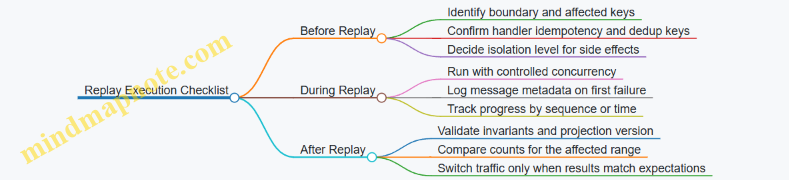
Example: A Replay Plan for One Stream and One Projection
- Replay range: from the last known processed sequence up to the stream’s current end.
- Consumer: a dedicated replay consumer with the corrected handler.
- Handler: idempotent by order ID plus event version, and it writes projection version metadata.
- Verification: after replay, check that every order with a “paid” status has a receipt ID and that the number of updated orders matches the number of distinct order IDs in the replay range.
When these steps are followed, replay becomes a controlled repair tool rather than a risky rerun. The system still does what it always does—process messages—but now it does so with guardrails that make correctness measurable.
6. Building Reliable Consumers with Acknowledgments and Redelivery
6.1 Ack Strategies and Their Impact on Throughput and Safety
Acknowledgments (acks) are the handshake between your consumer and JetStream. They tell the broker whether a message is done. The choice of ack strategy directly shapes throughput, because unacked messages can be redelivered, and it shapes safety, because premature acks can hide failures.
The Ack Contract and Why It Matters
JetStream tracks delivery state per consumer. When a message is delivered, it is considered “in flight” until it is acked or the ack policy times out. If you ack too late, you may slow down processing due to redelivery pressure. If you ack too early, you may commit work that didn’t actually finish.
A practical mental model: ack is not “I received it,” it is “I have produced the durable outcome you care about.” For example, if you write to a database and then ack, you’re saying the database write is the outcome.
Mind Map: Ack Strategy Tradeoffs
Three Common Ack Patterns
Ack After Processing Completes
This is the default “safety-first” approach: process the message fully, then ack. Throughput is limited by how long processing takes, because messages remain in flight until ack.
Example: you receive an event order.created. Your handler calculates totals, writes an orders row, and updates a order_status KV entry. Only after both writes succeed do you ack.
Why it’s safe: if the handler crashes mid-way, the message is not acked, so JetStream can redeliver. Why it’s not free: if your handler is slow, you’ll see more in-flight messages and more pressure from ack timeouts.
Ack After Validation Only
This pattern acks once you know the message is well-formed and authorized, but before you finish slow side effects. It can increase throughput, but it weakens safety because failures after the ack won’t trigger redelivery.
Example: you validate schema and required fields, then ack, and later call a third-party billing API. If the billing call fails, you must handle it elsewhere because JetStream will not replay the message.
Use this when you can guarantee compensating actions, such as writing a “pending billing” record before ack and having a separate worker reconcile it.
Ack in Batches with Care
Batching can reduce ack overhead, but it changes the failure boundary. If you ack multiple messages together, you need to ensure each message’s durable outcome is complete.
Example: you pull messages in a loop, process each, and store results in a single database transaction. After the transaction commits, you ack all messages in that batch. If the transaction fails, you don’t ack any of them.
This keeps safety intact while still reducing per-message ack cost.
Throughput Mechanics: In Flight, Ack Timeouts, and Redelivery
Throughput is affected by three knobs: processing time, concurrency, and ack timeout.
- If processing time approaches the ack timeout, you’ll get redeliveries even when everything is correct.
- If concurrency is high, you can keep the pipeline full, but you also increase the number of messages that might be redelivered.
- If ack timeout is too short, safety remains correct but throughput suffers due to duplicates.
- If ack timeout is too long, safety remains correct but recovery after failures becomes slower.
A concrete rule of thumb: set ack timeout comfortably above your typical processing time plus variance, then use idempotency so duplicates are harmless.
Safety Mechanics: Idempotency and Deduplication
Ack strategy and idempotency must work together. If you ack after durable side effects, duplicates are less likely to cause harm. Still, duplicates can happen due to timeouts, network hiccups, or consumer restarts.
Example: include a unique event_id in every message. Store event_id in a KV bucket or database table with a “processed” marker. On redelivery, the handler checks the marker and skips the side effects, then acks.
This turns “at least once delivery” into “effectively once outcome.”
Example: Choosing an Ack Strategy for a Two-Step Workflow
Suppose you handle invoice.issued by (1) writing an invoice record and (2) publishing invoice.ready.
- Write invoice record in a database transaction.
- Only after the transaction commits, publish
invoice.ready. - Ack after both steps succeed.
If publishing fails after the DB commit, you have two options: either don’t ack (so the message is retried and publishing is retried safely), or publish in a transactional outbox pattern so the publish step can be retried without duplicating side effects.
The key point: ack should align with the durable boundary you can reason about.
Practical Checklist
- Ack after the durable outcome you care about, not after partial progress.
- Use idempotency keyed by
event_idor stream sequence to tolerate redelivery. - Tune ack timeout relative to processing time and variance.
- If you ack early, ensure you have an independent mechanism to recover failures after ack.
- When batching, tie ack to a single durable commit boundary.
6.2 Error Handling Patterns for Transient and Permanent Failures
Error handling in JetStream consumers is mostly about deciding what to do with a message when your handler can’t finish the job. The key split is between transient failures (something temporary is wrong) and permanent failures (the message will never succeed as-is). The consumer’s acknowledgment behavior and retry strategy should reflect that split, otherwise you either lose data or spin your wheels.
Core Decision Model for Failures
Start by classifying failures at the point where you have enough context to judge them.
- Transient failures: network timeouts, temporary database unavailability, rate limits, temporary downstream outages, or serialization errors caused by partial writes.
- Permanent failures: invalid payload shape, missing required fields, schema incompatibility, authorization failures that will not change without a new message, or business-rule violations that the message can’t satisfy.
A practical rule: if retrying the same message without changing anything could plausibly succeed, treat it as transient. If the message itself is wrong, treat it as permanent.
Mind Map: Error Handling Flow
Transient Failure Pattern: Retry with Controlled Backoff
For transient failures, you generally want redelivery rather than immediate failure. The simplest approach is to not acknowledge the message when the handler fails, letting the consumer redeliver it. To avoid hammering a struggling dependency, add a backoff strategy in the handler.
Example: suppose you call an HTTP service to enrich an event. If the call times out, you treat it as transient.
Handler(event):
  try:
    enriched = callEnrichmentService(event)
    storeResult(enriched)
    ack()
  catch TimeoutError:
    sleep(backoffBasedOnAttempt(event))
    return without ack
This works best when the handler is idempotent. If the enrichment call succeeds but storing fails, a redelivery might repeat the enrichment call. That’s fine if the final store write is safe to repeat (for example, by using an upsert keyed by event id).
Permanent Failure Pattern: Dead Letter and Stop Redelivery
Permanent failures should not keep coming back forever. The pattern is: send the message to a dead letter stream with error details, then ack the original so the consumer doesn’t redeliver it.
Example: a message arrives with a missing userId field.
Handler(event):
  if not validPayload(event):
    publishDeadLetter(event, reason="missing userId")
    ack()
    return
  try:
    process(event)
    ack()
  catch PermanentBusinessRuleError as e:
    publishDeadLetter(event, reason=e.message)
    ack()
Dead letter payloads should include enough information to debug without guessing: original subject, message sequence or id, the validation error, and a small sanitized copy of the payload.
How to Detect Permanent vs Transient Without Guessing
Classification should be deterministic and based on error types and validation results.
- Validation errors are permanent: run schema checks before side effects.
- Authorization errors are usually permanent for that message: if the token is wrong or lacks permissions, the message won’t magically gain access on retry.
- Database connection errors are transient: retrying can succeed once the database recovers.
- Constraint violations are often permanent: if a unique constraint fails because the message duplicates an already-processed id, you may instead treat it as idempotent success rather than permanent failure.
When you’re unsure, default to transient only if your system is idempotent and you have a bounded retry plan. Otherwise, you risk creating a redelivery loop that never converges.
Handling Partial Side Effects
A common failure mode is: you wrote to a database, then crashed before ack. Redelivery will re-run the handler, so your side effects must tolerate repetition.
Two practical techniques:
- Write-first with idempotency keys: store using a unique key derived from the message id or event id.
- Transactional outbox style: if you update state and emit follow-up events, ensure the pair is committed together so retries don’t create mismatched outcomes.
Example: Unified Handler with Error Categorization
Handler(msg):
  event = parse(msg)
  if invalid(event):
    deadLetter(msg, "invalid payload")
    ack(msg)
    return

  try:
    result = doWork(event)          # idempotent write
    ack(msg)
  catch TimeoutError:
    backoff(msg)
    return                           # no ack
  catch PermanentRuleError as e:
    deadLetter(msg, e.message)
    ack(msg)
  catch UnknownError as e:
    deadLetter(msg, "unknown error")
    ack(msg)
The last branch looks strict, but it’s deliberate: unknown errors are often permanent in practice because they represent a bug in the handler or a payload mismatch. If you want to treat unknown errors as transient, do it only when you can prove idempotency and you have a clear retry limit.
Operational Checks That Keep This Reliable
Even with good patterns, reliability depends on two operational habits.
- Log with stable identifiers: include message id, subject, and retry attempt so you can correlate redeliveries to outcomes.
- Track dead letter volume: a rising dead letter count usually means either payload producers changed or validation rules are stricter than expected.
With these patterns, transient failures get another chance, permanent failures stop wasting cycles, and redelivery becomes a tool rather than a surprise.
6.3 Dead Letter Handling with Separate Streams and Policies
Dead letter handling is what you do when a consumer cannot safely process a message, even after retries. In JetStream, the clean approach is to route failed messages into a dedicated dead letter stream, using a separate consumer policy that controls how many times you try, how you detect failure, and what metadata you keep for later inspection.
Foundational Idea: Failure Is a Routing Decision
A consumer typically fails for two reasons: the message is malformed or the downstream action is not possible (for example, a database constraint violation). Retries help only when the failure is transient. When the failure is permanent, retries waste time and can block progress.
So the consumer needs a decision boundary:
- Retryable failure: transient error, timeouts, temporary unavailability.
- Non-retryable failure: schema mismatch, missing required fields, authorization errors, or business rule violations.
In practice, you implement this boundary in your handler and return an error type that your consumer wrapper maps to either “retry” or “dead letter.”
Separate Streams: Why Dead Letters Should Not Share a Stream
If you publish dead letters back into the same stream, you mix operational noise with the original event history. That makes it harder to reason about ordering, retention, and consumer lag. A separate dead letter stream keeps concerns separated:
- The main stream remains focused on successful processing.
- The dead letter stream becomes an audit trail of failures.
- You can apply different retention and replay behavior.
A typical setup uses:
- Main stream: holds the original events.
- Dead letter stream: holds failed messages plus failure context.
- Dead letter consumer: reads dead letters for triage or replay after fixes.
Policies: Controlling Attempts and Backoff
Dead letter routing depends on consumer configuration and your handler behavior. The key is to ensure that after a bounded number of failures, the message is acknowledged in the main consumer and republished into the dead letter stream.
A simple policy model:
- Main consumer uses acknowledgments.
- Handler returns errors.
- A wrapper counts attempts using message metadata or a header field.
- When attempts exceed the threshold, the wrapper publishes to the dead letter stream and then acknowledges the original message.
This avoids infinite redelivery loops. It also keeps the main consumer’s lag meaningful.
Example: Dead Letter Wrapper with Attempt Counting
Below is a minimal pattern in pseudocode. The important part is the “publish to dead letter then ack” flow.
type Failure struct{ Retryable bool; Reason string }

func handle(msg Msg) error {
  var payload Event
  if err := json.Unmarshal(msg.Data(), &payload); err != nil {
    return Failure{Retryable: false, Reason: "bad json"}
  }
  if err := applyBusiness(payload); err != nil {
    return Failure{Retryable: isTransient(err), Reason: err.Error()}
  }
  return nil
}

func onMessage(msg Msg) {
  err := handle(msg)
  if err == nil { msg.Ack(); return }

  f := err.(Failure)
  attempts := getAttempts(msg.Headers())
  if attempts >= 5 || !f.Retryable {
    publishDeadLetter(msg, f, attempts)
    msg.Ack()
    return
  }

  setAttempts(msg.Headers(), attempts+1)
  msg.Nak() // or let redelivery happen
}
The wrapper stores attempt count in headers so you can make routing decisions without external state.
Mind Map: Dead Letter Flow and Components
Dead Letter Handling Mind Map
Example: Dead Letter Message Shape
When you publish to the dead letter stream, include enough context to avoid guessing. A practical dead letter payload includes:
original_subjectoriginal_sequenceattemptsfailure_reasonfailure_retryablecorrelation_id(if present)
This lets you filter quickly and correlate failures with upstream producers.
Operational Checklist for Separate Dead Letter Streams
- Use a dedicated stream name so operators can monitor it independently.
- Set retention intentionally: keep dead letters long enough for triage, not forever by default.
- Create a dedicated consumer for dead letters with its own concurrency and rate limits.
- Ensure the main consumer acknowledges after dead letter publish to prevent duplicates.
- Verify idempotency in the dead letter handler so replay does not create new side effects.
With this structure, dead letter handling becomes predictable: failures are classified, bounded retries happen where they help, and the dead letter stream becomes a reliable place to investigate and reprocess.
6.4 Rate Limiting and Concurrency Control in Consumer Workers
Rate limiting and concurrency control solve two different problems in JetStream consumers. Rate limiting caps how fast you start work; concurrency control caps how many tasks run at the same time. In practice, you usually need both, because a consumer can be “fast” at pulling messages while your downstream system is “slow” at processing them.
Foundational Model for Worker Throughput
Think of the consumer loop as three stages: fetch, process, and acknowledge. Pulling too aggressively increases memory pressure and can worsen tail latency. Processing too concurrently can overwhelm databases, HTTP services, or CPU-heavy handlers. Acknowledging too late can increase redelivery pressure, while acknowledging too early can lose work if processing fails.
A good baseline is: pull in small batches, process with a bounded worker pool, and acknowledge only after successful completion. If you need strict ordering per key, you can combine concurrency control with per-key serialization.
Mind Map: Rate Limiting and Concurrency Control
Rate Limiting Patterns That Work in Consumers
Token bucket for start rate. Use a token bucket to limit how often you begin processing. This is useful when downstream capacity is stable but you receive bursts. For example, if your downstream can handle about 200 requests per second, set the bucket to 200 tokens/sec with a small burst (like 50) so short spikes don’t immediately overwhelm it.
Leaky bucket for smoothness. If downstream performance degrades with bursts, a leaky bucket that releases work at a constant pace can reduce latency spikes. The tradeoff is lower peak throughput.
Practical rule. Rate limiting should be applied right before starting the handler, not when pulling messages. Pulling is cheap; starting work is what stresses systems.
Concurrency Control Patterns That Prevent Overload
Bounded worker pool. Create a fixed number of workers and route messages to them. If the pool is size 20, you guarantee at most 20 in-flight tasks. This prevents memory growth from unbounded goroutine creation.
Semaphore around processing. If you want to keep the consumer loop simple, use a semaphore. Acquire a slot before calling the handler; release it after ack. This keeps concurrency bounded even if the consumer receives messages faster than they can be processed.
Per-key sharding for ordering. If messages for the same entity must be processed sequentially, shard by key. For instance, compute shard = hash(key) % 16 and maintain one worker queue per shard. Concurrency becomes 16 in-flight streams, while preserving order within each entity.
Example: Bounded Concurrency with Rate Limiting
The following pseudocode shows a typical structure: pull messages, wait for a token, acquire a semaphore slot, process, then ack.
tokens := NewTokenBucket(rate=200, burst=50)
sem := NewSemaphore(20)

for msg := range consumer.Messages() {
  if !tokens.Take(1) { continue }
  sem.Acquire()

  go func(m Msg) {
    defer sem.Release()
    err := handler(m)
    if err == nil {
      m.Ack()
    } else {
      // Let JetStream redeliver based on consumer policy
      // Optionally record error metrics here
    }
  }(msg)
}
A subtle but important detail: the token and semaphore are acquired before starting the handler, so you cap both the start rate and the in-flight work.
Example: Per-Key Serialization with Sharded Workers
If you need ordering per key, you can keep concurrency bounded while avoiding cross-entity interference.
const shards = 16
queues := make([]chan Msg, shards)
for i := 0; i < shards; i++ { queues[i] = make(chan Msg, 100) }

for msg := range consumer.Messages() {
  key := msg.Header["entity"]
  s := Hash(key) % shards
  queues[s] <- msg
}

for s := 0; s < shards; s++ {
  go func(sh int) {
    for m := range queues[sh] {
      if handler(m) == nil { m.Ack() }
    }
  }(s)
}
This approach ensures messages for the same entity land in the same shard, so they are processed in arrival order for that shard.
Operational Checks That Keep Tuning Honest
- Measure handler latency distribution, not just average time. If p95 grows, reduce concurrency or add rate limiting.
- Watch consumer lag. If lag increases while errors are low, your throughput cap is too strict or downstream is slower than expected.
- Confirm ack timing. If you ack before the handler completes, failures can silently disappear.
- Keep retry behavior consistent. If failures cause redelivery, your concurrency and rate limits must still protect downstream during retries.
With these controls in place, your consumer becomes predictable: it pulls messages at a manageable pace, runs a bounded number of tasks, and acknowledges only when work is actually done.
6.5 Testing Consumer Reliability with Controlled Fault Injection
Reliability testing for JetStream consumers is easiest when you treat failures as inputs, not surprises. The goal is to prove three things: (1) your consumer behavior under failure is predictable, (2) your ack and retry logic produces the right outcomes, and (3) your processing remains correct when messages are redelivered.
Mind Map: Fault Injection Test Plan
Step 1: Define What “Correct” Means
Start by writing down the consumer contract in plain terms. For example: “For each event with eventId, the handler must apply the change at most once, and transient failures must be retried until success or until the configured policy moves the message to a dead letter stream.” Then map each contract clause to an assertion you can check.
A practical assertion set looks like this:
- Attempt count: the message is processed N times for a transient failure scenario.
- Side effects: the state change keyed by
eventIdis applied once. - Routing: permanent failures end up in a dead letter stream (or are logged and skipped, depending on your design).
- Liveness: the consumer does not accumulate unacked messages indefinitely.
Step 2: Build a Deterministic Fault Switch
To avoid flaky tests, make failures deterministic. A common pattern is to include a fault field in the message payload and have the handler branch on it.
Example payload:
eventId: unique id for deduplicationfault: one oftransient,permanent,timeout,noAckattemptBudget: how many attempts should fail before succeeding
Your handler should also record attempt number somewhere deterministic, such as a KV entry keyed by eventId.
Step 3: Inject Faults That Exercise the Real Failure Modes
Use these fault categories to cover the reliability surface area.
- Handler Failure
- Transient: throw an error for the first
attemptBudgetattempts, then succeed. - Permanent: throw an error every time.
- Ack Failure
noAck: simulate a bug where the handler returns without acknowledging.ackAfterTimeout: delay ack beyond your test timeout so the system redelivers.
- Processing Timeout
timeout: block longer than the consumer’s processing expectations so the test can observe redelivery.
- State Inconsistency
- KV update fails: simulate a KV write error after receiving the message.
- Publish fails after KV update: simulate partial success and confirm idempotency prevents double application.
Step 4: Make Idempotency Measurable
Idempotency is not a vibe; it’s a check. A simple approach is:
- Before applying side effects, try to “claim” the
eventIdin KV using a compare-and-set style update. - If the claim already exists, ack immediately and skip side effects.
This lets your tests verify that redelivery does not duplicate effects.
Example: Minimal Fault-Driven Handler Logic
func Handle(msg Msg) error {
  var e Event
  json.Unmarshal(msg.Data(), &e)

  if alreadyProcessed(e.EventID) {
    msg.Ack()
    return nil
  }

  switch e.Fault {
  case "transient":
    if !shouldSucceed(e.EventID) { return errors.New("transient") }
  case "permanent":
    return errors.New("permanent")
  case "timeout":
    time.Sleep(testTimeout + time.Millisecond)
  case "noAck":
    return nil // bug: no ack
  }

  applySideEffects(e)
  markProcessed(e.EventID)
  msg.Ack()
  return nil
}
Step 5: Assert Outcomes for Each Scenario
Run a small matrix of scenarios and assert exact counts.
-
Transient then success
- Expect: side effects applied once, attempts equal to
attemptBudget + 1. - Expect: no dead letter entries.
- Expect: side effects applied once, attempts equal to
-
Permanent failure
- Expect: side effects applied zero times.
- Expect: message routed to dead letter after the configured retry/ack policy.
-
NoAck
- Expect: redelivery occurs because the message remains unacked.
- Expect: side effects applied once due to idempotency claim.
-
Timeout
- Expect: redelivery occurs.
- Expect: handler eventually succeeds or dead-letters based on policy.
Step 6: Verify Liveness and Cleanup
After each test, confirm the consumer is not stuck with unacked messages. A clean test run ends with:
- No growing backlog for the test subject.
- Dead letter count matching the permanent failure scenarios.
- KV “processed” markers present for successful cases.
If you see unacked buildup, the test is telling you something useful: either the handler path forgot to ack, or your fault injection created a code path that never reaches the ack call.
Step 7: Keep the Harness Boring
Use an ephemeral JetStream environment per test suite so state from one scenario cannot influence another. Generate messages with unique eventId values, and keep consumer concurrency fixed so attempt counts are stable. The point is to make failures repeatable, not merely observable.
7. Coordinating State with KV Buckets and Event Streams
7.1 Using KV Buckets as Source of Truth for Shared State
When multiple services need to agree on shared state, you want one place that is easy to reason about and hard to accidentally fork. JetStream KV buckets provide that place: each key holds the latest value (plus a monotonically increasing sequence), and updates are durable and observable. The trick is to treat the KV bucket as the authoritative record, while event streams carry the narrative of how you got there.
The Source of Truth Model
Start with a simple rule: writes go to KV, reads come from KV. Services may also publish events, but events should not be used as the only way to reconstruct state. A common pattern looks like this:
- A command arrives (for example, “start session”).
- The handler validates input and writes the new state to KV under a deterministic key.
- The handler publishes an event that describes the change.
- Other services read KV to answer queries and use events to trigger work.
This keeps state consistent even when consumers restart or process events at different speeds.
Key Design That Prevents Accidental Collisions
KV buckets are keyed, so the key format is your first line of defense. Use a stable, human-readable scheme that encodes ownership and identity. For example:
session:{sessionId}for session stateworkflow:{workflowId}for workflow progresstenant:{tenantId}:featureFlagsfor tenant configuration
If you need multiple logical values per entity, prefer separate keys over stuffing everything into one big JSON blob. Smaller values reduce update contention and make it easier to reason about partial changes.
Versioning and Sequence as Your Consistency Tool
KV updates are versioned. Each write produces a new sequence number, which you can use to detect ordering issues and to support safe replay. A practical approach:
- When processing an event, include the event’s sequence or a derived version in the handler.
- Before applying a change, compare the expected version with the current KV version.
- If the versions don’t match, treat it as a conflict and decide whether to re-read KV and retry or to ignore the stale update.
This turns “event ordering is messy” into “we have a deterministic check.”
Mind Map: KV as Shared State
Example: Session State with Idempotent Updates
Imagine a service that tracks whether a user session is active. The KV bucket stores:
- Key:
session:{sessionId} - Value:
{ "status": "active", "updatedAt": "2026-03-31T10:15:00Z" }
Handler logic:
- On “activate session,” compute the key and write the new value.
- If the same command is delivered twice, the handler should not break invariants. Because KV writes are deterministic for the same state, you can treat duplicates as harmless.
- If you need stronger guarantees, include a
versionfield in the value and only apply updates when the incoming version is newer.
Even if events are replayed later, the KV version check prevents older replays from overwriting newer state.
Example: Workflow Progress with Watches
A workflow service might update workflow:{workflowId} as steps complete. Another service can watch the KV bucket for changes to that key and react immediately when progress advances.
A watch-based reader should assume it may receive updates out of order relative to its own internal work. The fix is simple: when a watch notification arrives, re-read the KV value and act based on the current state, not the notification payload alone.
Deletes and Tombstones
If a key should be removed, represent that explicitly. KV supports deletion semantics, but your application should treat deletes as meaningful state transitions. For example, set status: "deleted" or write a tombstone value when you need auditability, then have readers interpret it consistently.
Practical Ownership Rules
To avoid “two writers, one key, endless arguments,” define ownership:
- Only one service is allowed to write a given key prefix (for example,
session:*). - Other services may write derived keys (for example,
sessionView:*) but should not overwrite authoritative keys.
This keeps the shared state model stable and makes debugging straightforward: if KV changed, you know who is responsible.
Summary
KV buckets work best when you treat them as the authoritative record for shared state, use sequence/version checks to handle ordering and replay safely, and design keys so ownership and identity are obvious. Events then become the mechanism for triggering work, not the mechanism for reconstructing truth.
7.2 Synchronizing KV Updates with Event Publication Patterns
KV buckets and event streams often represent the same real-world fact, but they update through different mechanisms. KV is great for compact shared state; streams are great for ordered history and fan-out. Synchronizing them means you decide which one is authoritative for each step, then you make the other one follow in a way that tolerates retries and partial failures.
Foundational Rule for Synchronization
Pick a single “commit point” per workflow. A common choice is: the stream event is the commit point, and the KV update is a projection. That makes replay straightforward because you can rebuild KV from the event log. If you instead treat KV as the commit point, you must handle the harder problem of reconstructing event history from state changes.
A practical compromise is to use KV as a projection but store enough metadata in KV to detect whether a projection is current. That metadata can be the stream sequence number (or event ID) that produced the KV update.
Mind Map: Synchronizing State and Events
Pattern 1: Publish Then Update KV as a Projection
In this pattern, the producer publishes an event to a stream, and a consumer updates the KV bucket after receiving the event. The producer does not write KV directly.
Why it works: if the event is the commit point, then replaying the consumer can rebuild KV deterministically. The consumer uses KV metadata to avoid reapplying duplicates.
Example:
- Stream subject:
orders.created - KV bucket:
order_state - KV value fields:
{ status, last_applied_event_id, last_applied_stream_seq }
When the consumer receives an event with event_id=evt_9f2 and stream_seq=1042, it reads order_state[order_id]. If last_applied_stream_seq is already >= 1042, it skips the update. Otherwise it writes the new status and updates the metadata.
This turns “at least once delivery” into “at most once effect” for KV.
Pattern 2: Outbox Style When Producers Must Update KV Immediately
Sometimes you want the producer to update KV right away, for example to serve reads with minimal latency. If you do that naively, you can end up with KV updated but the event missing.
The outbox pattern fixes this by writing an “intent” record first, then publishing, then marking completion. In NATS terms, the outbox intent can live in a KV bucket (or a dedicated stream), and the publisher reads it to publish events.
Example flow:
- Producer writes
outbox[order_id] = { event_payload, event_id, status: "pending" }. - A publisher worker scans pending entries and publishes
orders.createdwithevent_id. - After successful publish, it updates
outbox[order_id].status = "published". - The projection consumer updates
order_statefrom the stream.
Even if step 3 fails, the publisher can retry because event_id lets consumers deduplicate.
Pattern 3: Two-Stage Idempotency with Compare-And-Set Semantics
KV buckets provide versioning, which you can use to prevent older events from overwriting newer state. The consumer reads the current KV version, applies the update only if the stored metadata indicates the incoming event is newer.
Example invariant:
- KV stores
last_applied_stream_seq. - Consumer only writes when
incoming_seq > stored_seq.
This matters when multiple consumers or replay runs overlap. Without the check, a late replay could regress state.
Concrete Synchronization Checklist
- Store event metadata in KV:
last_applied_event_idandlast_applied_stream_seq. - Make KV updates conditional: skip if incoming is not newer.
- Use idempotent handlers: duplicates should produce the same KV result.
- Choose a commit point: stream-first projection simplifies replay.
- Test partial failures: simulate “event published but KV not updated” and confirm replay fixes it.
Mini Example: Consumer Logic for Safe KV Projection
On event {order_id, event_id, stream_seq, new_status}
  current = KV.get(order_id)
  if current exists and current.last_applied_stream_seq >= stream_seq
    ack and return
  else
    KV.put(order_id, {status: new_status,
                      last_applied_event_id: event_id,
                      last_applied_stream_seq: stream_seq})
    ack
This logic keeps KV aligned with the stream’s ordering, even when deliveries repeat. It also makes replay a normal operation rather than a special cleanup ritual.
7.3 Consistency Considerations Between KV and Stream Events
KV buckets and JetStream streams each solve a different problem: KV gives you a compact, versioned key-value state; streams give you an ordered log of events. Consistency between them is mostly about choosing which system is the “source of truth” for each question you ask, then making the handoff rules explicit.
What Consistency Means Here
Consistency is not one property; it’s a set of guarantees about what a reader can observe.
- State correctness: when a component asks “what is the current value for key X?”, KV should answer accurately.
- Event correctness: when a component asks “what happened in order?”, the stream should preserve ordering per stream/consumer.
- Cross-view alignment: when a component correlates an event with a state update, it must know whether it can see the state update immediately.
A practical rule: treat KV and stream as two views of the same domain, and define the acceptable mismatch window.
Consistency Patterns That Actually Work
There are three common patterns, each with a different tradeoff.
Pattern 1: Stream as the Timeline, KV as the Snapshot
Producers write events to a stream, and a separate consumer projects those events into KV. Readers consult KV for current state, and the stream for history.
Why it’s consistent enough: the projection consumer can apply events in order, so KV converges to the stream’s history. During projection lag, readers may see an older snapshot.
Example: An order workflow emits order.paid to a stream. A projector updates order:{id}:status in KV. If a UI reads KV immediately after payment, it might still show “pending” until the projector catches up.
Mitigation: include the stream sequence number (or event timestamp) in the KV value so the UI can display “last updated at event N” and decide whether to wait.
Pattern 2: KV as the Gate, Stream as the Audit Trail
A producer updates KV first, then emits an event describing the change. Consumers treat the stream as an audit log and may use KV for current state.
Why it’s tricky: if the producer crashes after KV update but before publishing the event, the stream misses the audit record. If it crashes after publishing but before KV update, the event exists without the matching state.
Example: A feature flag service sets flag:checkout in KV and then publishes flag.changed. If only one step happens, downstream systems disagree.
Mitigation: use a single “transaction-like” identifier and require consumers to reconcile. For instance, include a changeId in both the KV value and the event, and have consumers periodically scan KV for keys that lack corresponding events.
Pattern 3: Dual Write with Explicit Reconciliation
Both systems are written, but you accept that failures can create temporary divergence. A reconciliation process compares KV versions with stream events.
Example: A session manager stores session:{id} in KV and emits session.updated events. A reconciler checks that for each session key, the KV version corresponds to the latest processed event sequence.
This pattern is more work, but it makes the system resilient to partial failures without pretending they can’t happen.
Mind Map: Consistency Choices
Concrete Alignment Rules
To avoid “it usually works” behavior, define rules that every component follows.
- Embed correlation data: store
lastEventSeq(orchangeId) inside the KV value. When processing an event, the consumer updates KV only if the event is newer than what KV already has. - Use version checks: when updating KV, compare the expected previous version. If the version doesn’t match, re-read and decide whether to retry or skip.
- Make lag observable: expose
lastEventSeqso readers can tell whether they’re looking at a fully applied snapshot. - Handle duplicates explicitly: stream redelivery can cause the same event to be processed twice. Idempotent KV updates based on
changeIdoreventSeqprevent state from moving backward.
Example: Projection with Sequence-Aware KV Updates
A projector consumes order.paid events and writes KV. Each KV update includes the event sequence it applied.
- Event:
{ "orderId": "A1", "changeId": "c-9f2", "seq": 120 } - KV value:
{ "status": "paid", "lastEventSeq": 120, "changeId": "c-9f2" }
If the projector receives the same event again, it checks lastEventSeq and skips the update because 120 is not newer than what’s already stored.
This single rule handles duplicates, keeps KV monotonic, and makes the KV/stream relationship easy to reason about.
Summary of Consistency Decisions
Consistency between KV and stream is achieved by (1) choosing a pattern that matches your failure tolerance, (2) embedding alignment identifiers, and (3) enforcing monotonic updates so duplicates and partial failures don’t corrupt state. When you do that, the system behaves predictably even when reality does what it always does: occasionally interrupts the happy path.
7.4 Implementing Read Models with KV Watches and Event Projections
A read model is a shape of data optimized for queries, not for writes. In this section, the goal is to keep query-friendly state in sync with the event stream, using JetStream KV watches for fast local updates and event projections for correctness.
Read Model Responsibilities and Boundaries
A practical read model answers questions like “What is the current status of this workflow?” or “Which items belong to this user?” It should:
- Store only what queries need, not the full event history.
- Update deterministically from inputs so replay produces the same result.
- Separate write concerns from query concerns so consumers can scale independently.
A clean boundary helps: KV watches handle “latest value” state, while event projections handle “derived state” built from ordered events.
KV Watches as a Local State Feed
KV buckets store versioned key-value entries. A watch streams changes for keys or key ranges, letting your application react without polling.
Use KV watches when:
- You need a current snapshot (for example, latest session state).
- You want low-latency updates to in-memory caches.
- You can tolerate that KV updates represent the “source of truth” for that specific state.
Example: store workflow status in a KV bucket keyed by workflowId. Each time the command handler accepts an update, it writes the new status to KV. A query service watches the KV bucket and updates its cache.
Event Projections as Derived State Builders
Event projections build read models by consuming events and applying business logic. The projection consumer typically:
- Reads events from a JetStream stream.
- Applies a pure-ish transformation to update read model storage.
- Acknowledges after the update is durable.
Use event projections when:
- The read model is derived (for example, counts, timelines, aggregates).
- You need replay to rebuild state after a bug fix.
- Ordering matters for correctness.
A good projection treats the event stream as the input log. KV can still be used as the output store for the projection’s latest computed values.
Mind Map: KV Watches and Event Projections
Systematic Implementation Flow
-
Define read model keys and payloads
- KV key:
entity:{id}orworkflow:{id}. - KV value: a compact struct containing only query fields.
- KV key:
-
Choose the update path
- Direct state: command handler writes to KV.
- Derived state: projection consumer updates KV from events.
-
Make projection handlers idempotent
- Store the last processed stream sequence per entity in a separate KV key, or embed a processed marker in the entity value.
- If the same event is delivered again, the handler detects it and skips.
-
Wire KV watches to query caches
- On watch events, update in-memory maps.
- Handle deletes by removing keys or marking them as inactive.
-
Use replay safely
- When replaying, the projection consumer reprocesses events from a known point.
- Because handlers are idempotent and updates are deterministic, the final KV state matches the expected result.
Example: Status Snapshot with KV Watch
- KV bucket:
workflow_status - Key:
workflow:{workflowId} - Value:
{ "status": "running", "updatedAt": "2026-03-20T10:15:00Z" }
Write path: a command updates status in KV. Query path: a watch updates the cache so reads don’t hit KV for every request.
Example: Derived Read Model with Event Projection
- Stream:
workflow_events - Events:
WorkflowStarted,WorkflowStepCompleted,WorkflowFinished - Projection output KV bucket:
workflow_summary - Key:
workflow:{workflowId} - Value:
{ "status": "running", "completedSteps": 3, "lastStep": "verify" }
Projection logic:
- On
WorkflowStarted, set status and reset counters. - On
WorkflowStepCompleted, increment counters and updatelastStep. - On
WorkflowFinished, set status to finished.
Idempotency approach:
- Maintain
workflow:{id}:seqin KV. - If incoming event sequence is
<= storedSeq, skip the update and ack.
Consistency Notes That Prevent Headaches
- If KV is your query cache source, update it only after the projection consumer has committed its derived state.
- If you use both KV watches and event projections, decide which one is authoritative for each field. Mixing authorities for the same field creates “who wins?” bugs.
- Treat KV deletes as meaningful state transitions. If a delete represents “entity removed,” propagate that to caches.
Mind Map: Practical Consistency Rules
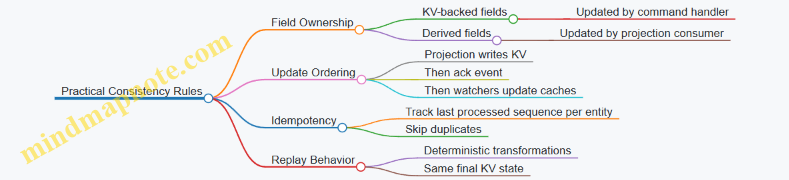
With this setup, KV watches give you immediate query responsiveness, while event projections give you correctness and replayability. The read model becomes a stable, query-shaped view built from ordered inputs—without requiring your query layer to understand event history.
7.5 Practical Example for Session State and Workflow Progress Tracking
Session state and workflow progress often look similar: both need durable storage, both must survive consumer restarts, and both must tolerate replays. A clean pattern is to treat the workflow as an event stream and the session as a KV-backed source of truth for the latest known progress.
Session State Model with KV Bucket
Use a KV bucket where each session has a stable key, such as session:{sessionId}. Store a small JSON document containing:
sessionIdworkflowVersionstatus(e.g.,created,running,completed,failed)lastStep(the last successfully applied step)updatedAt(for human debugging)dedupedata such aslastEventSeqor a set-like structure if you need it
KV updates are versioned by sequence under the hood, so you can safely apply “latest wins” logic when multiple events race. For workflow progress, “latest wins” is usually correct because each step should advance monotonically.
Workflow Events Model with Stream Consumers
Publish workflow events to a stream with subjects like workflow.session.{sessionId} or a shared subject with sessionId in the payload. Each event includes:
sessionIdeventId(unique per producer action)step(e.g.,validate,charge,notify)stepIndex(monotonic integer)producerTimeschemaVersion
Consumers read events, apply the step, then update KV to reflect progress. If the consumer crashes after side effects but before KV update, replay will re-run the handler, so the handler must be idempotent.
Idempotent Step Handler with Replay Safety
A practical idempotency rule is: only apply a step if it is newer than what KV already recorded.
- Read
session:{sessionId}from KV. - If
stepIndex <= lastStepIndex, treat the event as already applied and ack. - Otherwise, run the step, then write KV with the new
lastStepIndexandstatus.
This works well with consumer replay because the KV gate prevents duplicate side effects.
Mind Map: Session State and Workflow Progress Tracking
Example: Minimal Handler Flow
Assume a consumer receives events in order for a given session (or at least that stepIndex is monotonic). The handler flow is:
- Fetch KV session state.
- Compare
stepIndexwithlastStepIndex. - If older or equal, ack and stop.
- Execute the step logic.
- Update KV with the new
lastStepIndexandstatus. - Ack the event.
Here is a compact pseudo-implementation showing the gating logic.
function handle(event):
  s = kv.get("session:" + event.sessionId)
  last = s ? s.lastStepIndex : 0

  if event.stepIndex <= last:
    ack(event)
    return

  result = applyStep(event.step, event)
  if result.ok:
    kv.put("session:" + event.sessionId, {
      sessionId: event.sessionId,
      workflowVersion: event.schemaVersion,
      status: nextStatus(event.step),
      lastStepIndex: event.stepIndex,
      updatedAt: "2026-03-31"
    })
    ack(event)
  else:
    // do not advance KV
    // let redelivery happen
    nack(event)
Example: Step Progression with Concrete Session Timeline
Consider a session A-17 with three steps:
- Event
validatewithstepIndex=1 - Event
chargewithstepIndex=2 - Event
notifywithstepIndex=3
If the consumer processes charge successfully but crashes before writing KV, replay will re-deliver charge. The handler reads KV and sees lastStepIndex=1, so it will attempt charge again. To avoid double charging, the applyStep function should also be idempotent using eventId or a payment reference stored elsewhere. After KV is updated to lastStepIndex=2, subsequent replays will skip charge because stepIndex <= lastStepIndex.
If the crash happens after KV update but before ack, replay will re-deliver the same event. This time the KV gate will skip the step immediately, preventing repeated side effects.
Practical Notes for Keeping State Small and Useful
Store only what you need to decide whether to apply work: lastStepIndex, status, and a workflow version. Keep the event payload rich, but keep KV lean. That way, KV reads stay fast and the handler logic remains straightforward: compare, apply once, advance once, ack.
8. End-to-End Application Patterns with JetStream and KV
8.1 Command Handling With Event Emission and State Updates
Command handling is the part of your system that turns “do something” into two outcomes: (1) state changes that represent the new truth, and (2) events that tell other parts of the system what happened. With JetStream, you can keep this flow consistent by treating the command handler as the single writer of a state record, then emitting events that describe the result.
Mind Map: Command to State to Events
Command Handler Responsibilities
A practical handler usually does five steps in order.
- Validate the command: check required fields, tenant boundaries, and preconditions. If you use an expected version, reject commands that don’t match the current state version.
- Load current state: read the KV value for the entity key. If the key doesn’t exist, treat it as an initial state and set version to 0.
- Enforce idempotency: store a “last processed command ID” alongside the state (or in a separate KV key). If the same command ID arrives again, return success without changing state or emitting duplicate events.
- Update state: write the new state to the KV bucket with the next version. This is where you keep the system’s truth.
- Emit an event: publish an event to a JetStream stream subject that matches the domain action. The event should include the command ID, the new state version, and the correlation ID.
This ordering matters. If you update state first, you can safely handle retries by checking idempotency before publishing again.
Example: Place Order Command with KV State and Event Emission
Assume you model an order as a KV key like order:{orderId}. Your command is PlaceOrder with commandId, orderId, and items.
State record shape (stored in KV):
orderIdstatus(e.g.,Placed)versionlastCommandId
Event shape (published to JetStream):
type:OrderPlacedcommandIdorderIdversioncorrelationIdoccurredAt
Here’s a minimal pseudocode flow.
function handlePlaceOrder(cmd):
  stateKey = "order:" + cmd.orderId
  state = kv.get(stateKey) or defaultState(cmd.orderId)

  if state.lastCommandId == cmd.commandId:
    return { ok: true, idempotent: true }

  if cmd.expectedVersion != null and cmd.expectedVersion != state.version:
    throw VersionMismatch

  newState = {
    orderId: cmd.orderId,
    status: "Placed",
    version: state.version + 1,
    lastCommandId: cmd.commandId
  }

  kv.put(stateKey, newState)

  event = {
    type: "OrderPlaced",
    commandId: cmd.commandId,
    orderId: cmd.orderId,
    version: newState.version,
    correlationId: cmd.correlationId,
    occurredAt: now()
  }

  js.publish("orders.place", event)
  return { ok: true, idempotent: false }
Handling the “State Updated, Publish Failed” Case
If the handler crashes after the KV write but before the publish, you’ll see the command again (or a retry will occur). Idempotency prevents double state updates, but you still need to ensure the event gets emitted.
A simple approach is to store an additional flag in KV, such as lastPublishedCommandId. Then:
- If
lastCommandIdmatches butlastPublishedCommandIddiffers, publish the event using the stored state version. - After successful publish, update
lastPublishedCommandId.
This keeps the handler deterministic: every command ID maps to exactly one state version and exactly one emitted event.
Subject and Payload Conventions That Keep Consumers Calm
Use a consistent subject pattern such as domain.entity.action (for example, orders.place). Keep payloads self-describing: include type, commandId, and version. Consumers can then:
- Ignore duplicates by checking
commandId. - Apply updates in order by using
version. - Correlate logs using
correlationId.
Practical Checklist for Command Handling
- One writer per entity key: ensure only the command handler updates the KV record for that entity.
- Idempotency keys: store
lastCommandId(and optionallylastPublishedCommandId). - Versioning: increment
versionon every successful state change. - Event includes version: consumers can verify they’re applying the right state step.
- Acknowledge after processing: downstream consumers should ack only after they’ve updated their read models.
When these pieces line up, command handling becomes boring in the best way: predictable, retry-friendly, and easy to reason about when messages arrive more than once.
8.2 Event Fan Out for Multiple Independent Consumers
Fan out means one published event is processed by several consumers that do not depend on each other’s timing. In JetStream terms, you typically achieve this by using either multiple consumers on the same stream or multiple consumers on different streams that receive the same source event. The key is to keep each consumer’s contract small: it should know what it needs, acknowledge when it is done, and store its own progress.
Core Idea and Why It Works
Start with a single producer that publishes a domain event, for example order.created. Each independent consumer subscribes to the subject(s) that match that event and performs its own work: one builds a read model, another sends notifications, and a third updates workflow state.
A simple rule prevents accidental coupling: consumers must not write to each other’s state. If consumer A needs data that consumer B computes, A should either compute it itself or read it from a shared source designed for that purpose (like a KV bucket used as a state store).
Subject Design for Clean Fan Out
Use subject naming so consumers can subscribe narrowly. For example:
orders.createdfor the event itselforders.created.*if you want variants likeorders.created.uslater
When consumers subscribe, prefer the narrowest subject that still covers their responsibility. That reduces wasted deliveries and makes it easier to reason about what each consumer will process.
Consumer Setup Patterns
There are two common patterns.
- Multiple consumers on the same stream: all consumers read the same event history. This is convenient when you want consistent ordering and replay behavior across consumers.
- Multiple streams fed from the same producer event: you publish once, then route or copy into specialized streams. This is useful when retention or processing policies differ per consumer.
Either way, each consumer should have its own durable name and its own acknowledgment state. That way, a slow consumer does not block faster ones.
Mind Map: Fan Out Responsibilities and Boundaries
Example: Three Consumers for One Event
Assume the producer publishes an event with fields like eventId, correlationId, orderId, and createdAt. Each consumer uses eventId to deduplicate.
Consumer A builds a read model
- It writes a row like
orders_view[orderId] = {status: "created"}. - It only acknowledges after the write succeeds.
- If it receives the same
eventIdagain, it detects the duplicate and skips.
Consumer B sends notifications
- It writes a record
notification_outbox[eventId]before sending. - It sends only if the outbox record indicates it hasn’t been sent.
- It acknowledges after the outbox write and send attempt are complete.
Consumer C updates workflow state
- It updates a KV key like
workflow:order:{orderId}tostep=created. - It acknowledges after the KV update commits.
- On replay, it overwrites the same step deterministically.
Practical Replay Safety for Fan Out
When you replay, each consumer reprocesses from its own position. That means fan out stays independent as long as each consumer is replay-safe:
- Idempotency: use
eventIdor a derived unique key to avoid double writes. - Deterministic state updates: updates should converge to the same result when applied multiple times.
- Acknowledgment discipline: acknowledge only after the consumer’s side effects are durable.
Diagram: Fan Out Flow and Acknowledgment Points
    flowchart LR
  P[Producer publishes orders.created] --> S[JetStream Stream stores event]
  S --> A[Consumer a Read Model]
  S --> B[Consumer B Notifications]
  S --> C[Consumer C Workflow State]

  A -->|Ack after DB write| S
  B -->|Ack after outbox record and send| S
  C -->|Ack after KV update| S
Operational Checks That Prevent Surprises
- Verify subject filters: confirm each consumer subscribes to exactly what it should.
- Check durable names: durable consumers keep their own replay position.
- Measure consumer lag separately: one consumer can fall behind without affecting others.
- Test duplicate delivery: simulate redelivery and confirm idempotency holds.
With these pieces in place, fan out becomes a predictable pattern: one event, many independent processors, and clear boundaries for state and acknowledgments.
8.3 Multi Step Workflows with Correlation Identifiers
Multi step workflows are where event-driven systems either become pleasantly predictable or quietly confusing. The difference is usually correlation identifiers: a value that ties together all events and state transitions that belong to the same logical workflow instance.
At a minimum, a correlation identifier should be:
- Stable across the whole workflow instance.
- Present in every event that participates in the workflow.
- Easy to log and easy to index in your storage.
A practical pattern is to generate a workflowId at the start of the workflow, then propagate it through every command and event. If you also need to track retries or sub-steps, add a stepId and a attempt counter, but keep workflowId as the anchor.
Correlation Identifier Data Model
Use a small, consistent envelope so every handler can extract the same fields. For example, each event can include:
workflowId: the workflow instance key.step: the logical step name, likepayment.authorize.sequence: an integer step sequence or business ordering.attempt: retry attempt number.causationId: the event id that caused this event.correlationId: often the same asworkflowId, but keep the naming consistent.
A simple envelope makes debugging less guessy. When something goes wrong, you can filter by workflowId and reconstruct the story without reading every topic.
Mind Map: Correlation Flow Through Steps
Step Orchestration Pattern Using KV and Events
A reliable workflow needs two things: a way to know what step comes next, and a way to prevent duplicate transitions when events are replayed or redelivered.
A common approach is:
- Store workflow state in a KV bucket keyed by
workflowId. - Each step handler reads the workflow state, checks whether the transition is allowed, then writes the updated state.
- Emit the next event with the same
workflowId.
KV buckets are especially useful because they give you a compact “current status” view. For example, the KV value can be JSON like:
status:running,completed,failedsteps: a map from step name todoneorpendinglastSequence: the last accepted step sequence
When a consumer receives an event, it should:
- Verify the workflow exists or initialize it if this is the first step.
- Check whether the step is already marked done.
- If done, ack and stop.
- If not done, perform the side effect, update KV, then emit the next event.
This makes the workflow replay-safe because the state check turns duplicates into no-ops.
Example: Payment Then Fulfillment Workflow
Imagine a workflow with two steps: payment.authorize then order.fulfill.
Event 1: Start
- Producer emits
payment.authorize.requestwithworkflowId = W123andsequence = 1.
Consumer for Step 1
- Reads KV at key
W123. - If
steps.payment.authorizeisdone, it acks immediately. - Otherwise it calls the payment service.
- Writes KV: mark
payment.authorizeasdone, setlastSequence = 1. - Emits
order.fulfill.requestwith the sameworkflowId = W123andsequence = 2.
Consumer for Step 2
- Performs the same idempotency check for
order.fulfill. - On success, marks the workflow
completedand emitsorder.completed.
Here’s the key point: every emitted event carries workflowId, so logs and state updates line up even when steps run on different consumers.
Mind Map: Idempotency and Transition Rules
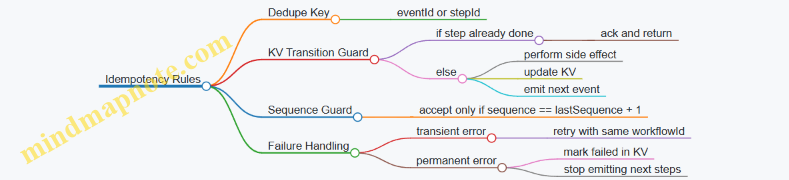
Practical Replay Behavior
When you replay from an earlier point, you’ll often re-deliver events for steps that already completed. The workflow remains correct because:
- KV state prevents re-running side effects.
- Sequence or step guards prevent out-of-order transitions.
- Correlation identifiers keep the workflow instance consistent across all replays.
If you need to re-run a step after a bug fix, you can reset only the relevant step in KV (for that workflowId) and then replay the corresponding request events. The correlation id ensures you don’t accidentally mix steps from different workflow instances.
Operational Checklist for Correlation Identifiers
- Generate
workflowIdonce at workflow start and reuse it everywhere. - Include
workflowIdin every event and command payload. - Use KV state checks before side effects.
- Make step transitions conditional on KV state and sequence.
- Log
workflowId,step, andsequencein every handler.
With these pieces in place, multi step workflows become a set of deterministic transitions rather than a pile of messages that happen to share a topic name.
8.4 Coordinating Replays with Workflow State and Versioning
Replays are easiest to reason about when workflow state is explicit, versioned, and tied to the consumer’s progress. The goal is simple: when you reprocess events, you should either (a) produce the same observable outcome as the first run, or (b) stop safely at the point where the workflow already advanced.
Workflow State as a Versioned Contract
Store workflow state in a JetStream KV bucket keyed by a stable workflow identifier, such as orderId or sessionId. Each state update should include:
workflowVersion: a monotonically increasing integer for the workflow’s logical steps.lastEventSeq: the last stream sequence number the workflow accepted.status:pending,running,completed, orfailed.idempotencyKey: a deterministic key derived from the event identity.
A practical rule: only advance workflowVersion when the handler accepts an event that is newer than what the workflow already recorded. That makes replay deterministic.
Versioning Strategy for Step Handlers
Treat each step handler as a small state machine. For example, a workflow might have steps validate, reserve, charge, ship. Each step has a required minWorkflowVersion and an expectedEventType.
When replay delivers an event, the handler checks three things:
- Workflow status allows the step to run.
- Event identity matches the recorded
idempotencyKeyfor the target step. - Version gate ensures the workflow hasn’t already moved past this step.
If any check fails, the handler returns success without side effects. That’s the “safe stop” behavior you want during replay.
Coordinating Consumer Replay with State Updates
Consumer replay is driven by JetStream sequence numbers and acknowledgment state. The workflow state should mirror what the consumer has accepted, not what it has merely seen.
A clean pattern is:
- Read KV state for
workflowId. - Decide whether the event should be applied.
- Apply side effects only if the event is new for that workflow step.
- Update KV state with the new
workflowVersion,lastEventSeq, andidempotencyKey. - Acknowledge the stream message.
If the process crashes after side effects but before KV update, the next replay will re-run the handler. The version gate and idempotency key prevent duplicate side effects.
Mind Map: Replay Coordination with KV State
Example: Order Workflow with Replay-Safe Steps
Assume events arrive on a stream with sequence numbers. Each event has:
eventId: unique per business eventtype:OrderValidated,OrderReserved, etc.workflowId: the order id
The handler computes idempotencyKey = "<type>:<eventId>".
Case: replay delivers OrderReserved twice
- First delivery: KV shows
workflowVersion=2,idempotencyKeyfor reserve step is empty. Handler applies reservation, updates KV toworkflowVersion=3, setsidempotencyKeytoOrderReserved:<eventId>, and recordslastEventSeq=1050. - Replay delivery: KV now has
workflowVersion=3and the reserve step idempotency key already set. The version gate fails for the reserve step, so the handler returns without calling the reservation side effect. The message is acknowledged.
This works even if replay starts from an earlier point, because the workflow state already contains the outcome of the first run.
Example: Version Gate Using lastEventSeq
Sometimes you want a stricter rule: never accept an event with a sequence number lower than what the workflow recorded. In that case:
- If
eventSeq <= lastEventSeq, treat it as already processed and stop. - Otherwise, run the step checks and then update
lastEventSeq.
This reduces the chance of applying an older event after a newer one, which can happen when multiple producers publish related events.
Practical Checklist for Coordinated Replay
- KV state is the workflow’s source of truth for step progress.
- Every step has a version gate and an idempotency key.
- KV updates happen before acknowledgment.
- Side effects are conditional on “apply” decisions, not on message receipt.
lastEventSeqis recorded only when the workflow accepts the event.
With these pieces aligned, replay becomes a controlled re-execution rather than a guessing game about what already happened.
8.5 Reference Implementation Walkthrough for a Real Time Dashboard
This walkthrough builds a small real-time dashboard that shows live order counts, recent order events, and a “current session state” panel. It uses JetStream streams for event history and a KV bucket for the latest state. The key idea is simple: events are append-only facts, while KV holds the current view used by the UI.
Architecture Overview
Producer publishes orders.created and orders.updated events to JetStream. A consumer processes events, updates KV session state, and also emits projection events for the dashboard. The dashboard UI subscribes to projection events and reads KV for the current snapshot.
Subject and Stream Design
Use subjects that map cleanly to domain meaning:
orders.createdorders.updateddashboard.projection.orders
Create one stream for order events with retention long enough for replay testing. For example, keep 24 hours of events so you can re-run projections after a handler change. Configure a durable consumer for the projection worker so it can resume after restarts.
Message Shape and Idempotency
Each event includes:
event_id(unique, stable)occurred_at(timestamp)schema_versionorder_idtype(created or updated)
The projection consumer stores processed event_ids in KV or derives idempotency from KV versioning. A practical approach is to write KV state keyed by event_id for dedupe, then update the session snapshot keyed by session_id. That keeps replays safe without relying on timing.
KV Bucket Layout
Create a KV bucket named dashboard.session_state.
Use keys like:
session:{session_id}for the current snapshotprocessed:{event_id}for dedupe markers
Snapshot value fields:
last_event_atorder_count_totalrecent_order_ids(bounded list)last_processed_event_id
Dedupe marker value fields:
processed_atschema_version
Consumer Replay Strategy
When you fix a projection bug, you replay the stream from a known point. In practice, you set the consumer to start from a specific sequence number or time window, then let the handler rebuild KV state.
Replay-safe rule: the handler must tolerate duplicates. If processed:{event_id} already exists, skip state mutation and just ack.
Minimal Reference Flow Example
Below is a compact pseudo-implementation showing the projection worker logic. It assumes manual ack and KV-based dedupe.
// Pseudocode for projection worker
func handle(msg JetStreamMsg) {
  evt := decode(msg.Data)
  dedupeKey := fmt.Sprintf("processed:%s", evt.EventID)

  if kv.Get(dedupeKey) != nil {
    msg.Ack()
    return
  }

  // Update snapshot
  snapKey := fmt.Sprintf("session:%s", evt.SessionID)
  snap := kv.GetOrDefault(snapKey, defaultSnap())

  snap.OrderCountTotal++
  snap.LastEventAt = evt.OccurredAt
  snap.RecentOrderIDs = appendBounded(snap.RecentOrderIDs, evt.OrderID, 20)
  snap.LastProcessedEventID = evt.EventID

  kv.Put(dedupeKey, markerValue(evt.SchemaVersion))
  kv.Put(snapKey, snap)

  msg.Ack()
}
A second consumer can publish dashboard.projection.orders events after KV updates, or the UI can read KV directly on a timer. If you want lower UI latency, emit projection events right after KV writes.
Dashboard Rendering Contract
The UI maintains two pieces:
- Snapshot from KV
session:{session_id}. - Recent events from
dashboard.projection.orders.
When a projection replay runs, snapshot updates may jump. The UI should treat snapshot as authoritative and recent events as a stream that can be re-ordered; it renders by occurred_at and truncates to the last N items.
Mind Map: Implementation Steps
Practical Example Walkthrough with Replay
Start with a stream containing 100 orders.created events for a single session. Run the projection consumer once and confirm order_count_total becomes 100. Then change the handler to include recent_order_ids ordering by occurred_at. Run a replay from the beginning; the dedupe markers will prevent double-counting, while the snapshot fields that depend on ordering will be corrected if you either version the snapshot key or allow overwriting snapshot fields during replay. The simplest safe method is to include a projection_version in the snapshot and only skip dedupe markers for the same version.
This keeps the dashboard consistent: counts remain correct, and the “recent list” reflects the latest projection logic without manual cleanup.
9. Observability and Operations for Production Readiness
9.1 Metrics to Track Consumer Lag Throughput and Error Rates
A consumer’s health is easiest to reason about when you measure three things together: how far it is behind (lag), how fast it is processing (throughput), and how often it fails (error rates). Each metric answers a different operational question, and together they explain most “why is this stuck?” incidents.
Consumer Lag Metrics
Lag is the distance between what the stream has and what the consumer has processed. In JetStream, you typically track lag using consumer state such as the last acknowledged sequence and the current stream sequence.
What to measure
- Acked Sequence vs Latest Sequence: The gap in sequence numbers indicates backlog.
- Time Behind: Convert sequence gap into an approximate time delay by using event timestamps in payloads or by sampling publish times.
- Redelivery Lag: If redeliveries happen, lag can grow even when throughput looks stable.
Practical example
Imagine a consumer that acks up to sequence 120,000 while the stream is currently at 120,900. That’s a gap of 900 messages. If your average publish rate is 300 messages per second, the backlog represents roughly 3 seconds of work. If the gap grows over 5 minutes, you likely have a processing bottleneck or an error loop.
Throughput Metrics
Throughput tells you whether the consumer can keep up with the incoming rate. Measure it at the same granularity as lag so you can correlate changes.
What to measure
- Messages Processed Per Second: Count successful handler completions that lead to an ack.
- Bytes Processed Per Second: Useful when payload sizes vary; message count alone can mislead.
- Ack Rate: Acks per second is often the most direct “work completed” signal.
- Batch or Pull Size: If you use pull consumers, record how many messages are requested per cycle.
Practical example
A consumer might process 2,000 messages per second, but if payloads are 50 KB each, that’s 100 MB/s. If lag grows while message throughput stays flat, the handler may be blocked on I/O, or it may be acking late due to retries.
Error Rate Metrics
Error rates explain why throughput drops and lag grows. Track both the frequency and the type of errors.
What to measure
- Handler Error Rate: Errors per processed message.
- Ack Failures: Cases where the handler fails to ack due to timeouts or connection issues.
- Nack or Retry Counts: If you explicitly signal failure, count how often it happens.
- Redelivery Rate: How many times the same sequence is delivered again.
- Dead Letter Rate: If you route poison messages elsewhere, measure how many end up there.
Practical example
Suppose throughput is 1,500 msg/s and lag is stable, but error rate jumps from 0.1% to 5%. You may still see stable lag briefly because the backlog is small, but redeliveries will start consuming capacity. Eventually throughput falls and lag climbs.
Mind Map: Metrics Relationships
Integrated Example: Interpreting a Real Signal
Consider a 10-minute window:
- Lag increases from 200 to 2,000 messages.
- Throughput drops from 1,800 msg/s to 900 msg/s.
- Error rate rises from 0.2% to 3.5%.
This pattern points to a capacity problem caused by failures, not just a temporary slowdown. If redelivery rate also increases, the consumer is likely spending time retrying messages that consistently fail. The next step is to inspect the error categories and correlate them with payload characteristics (for example, a missing field causing deterministic handler errors).
Metric Collection Rules That Prevent Confusion
- Use consistent time windows: compute lag, throughput, and error rate over the same interval.
- Separate “processed” from “acked”: a handler can run but fail to ack.
- Track cardinality carefully: if you break errors down by reason, keep labels bounded so dashboards don’t turn into a museum of one-off values.
- Record units: bytes vs messages, seconds vs sequence gaps. Most “mystery” incidents are unit mismatches.
When these metrics are wired together, you can usually explain consumer behavior without guessing: lag shows the backlog, throughput shows capacity, and error rates show why capacity is being consumed by failures.
9.2 Logging Conventions for Message Driven Systems
Message-driven systems fail in ways that look like “it worked yesterday.” Logging should make failures legible by connecting what happened, where it happened, and why it mattered. The goal is not to log everything; it’s to log the right fields consistently so you can reconstruct a timeline from a single request through multiple consumers.
Foundational Principles for Useful Logs
Start with a small set of fields that appear in every log line produced by producers, consumers, and handlers.
- Correlation Identifier: A stable ID that ties together producer actions and downstream processing. If you already have a request ID at the API boundary, reuse it.
- Message Metadata: Include subject, stream name, and consumer name when available. These help you distinguish “same handler, different pipeline.”
- Sequence and Delivery Details: Record JetStream sequence number and whether the message was redelivered. This is the difference between “processing failed” and “processing retried.”
- Handler Outcome: Log whether the handler succeeded, failed, or intentionally skipped work (for example, due to deduplication).
- State Changes: When you update KV buckets or other state, log the key and the version or revision you wrote.
A practical rule: if a log line can’t be grouped with other log lines by correlation ID, it should probably be a metric, not a log.
Log Levels and What They Mean
Use levels to encode intent, not emotion.
- Debug: Payload-level details that help reproduce issues. Keep them behind a feature flag or sampling strategy.
- Info: Lifecycle milestones like “message received,” “handler started,” “ack sent,” and “state updated.”
- Warn: Recoverable problems such as transient downstream errors where you will retry.
- Error: Failures that lead to negative acknowledgment, dead-letter routing, or a permanent skip.
When you log an error, include the decision: “nacked for retry,” “acked despite error,” or “sent to DLQ.” Without the decision, error logs become a mystery novel.
Field Naming and Consistency Rules
Pick one naming style and stick to it across services.
- Prefer snake_case or camelCase consistently.
- Use dot-free keys to avoid awkward parsing.
- Keep field types stable: IDs as strings, sequence numbers as integers.
Example field set for a consumer handler:
correlation_idnats_subjectjetstream_streamjetstream_consumerjetstream_sequenceredeliveredhandler_nameevent_typekv_bucketkv_keyoutcome(success, retry, dead_letter, skipped)
Systematic Logging Flow for a Consumer
A consumer handler should emit logs in a predictable order.
- Received: Include correlation ID and message metadata.
- Started: Include handler name and any preconditions.
- State Read/Write: Log KV reads and writes with key and revision.
- Decision: Log deduplication checks and replay boundaries.
- Ack/Nack Outcome: Log the final action and the reason.
This ordering makes it easy to scan logs even when you’re not filtering by fields.
Example: Handler Logs with Replay Safety
Below is a compact example of how a handler might log around deduplication and replay. The important part is not the language; it’s the consistent fields.
INFO  correlation_id=9f3a... nats_subject="orders.created" stream="ORDERS" consumer="worker-A" seq=120 redelivered=false handler="CreateOrder" event_type="OrderCreated" outcome="received"
INFO  correlation_id=9f3a... handler="CreateOrder" outcome="started" kv_bucket="order_state" kv_key="order-77" action="read"
INFO  correlation_id=9f3a... handler="CreateOrder" outcome="skipped" reason="already_processed" kv_bucket="order_state" kv_key="order-77" kv_revision=41
INFO  correlation_id=9f3a... handler="CreateOrder" outcome="success" action="ack" seq=120
If the message is redelivered, the same sequence number and redelivered=true should appear, and the handler should either skip safely or reapply idempotently.
Mind Map: Logging Fields and Decisions
Common Pitfalls and How to Avoid Them
- Logging only the error: You lose the decision trail. Always log the final action (ack/nack/DLQ).
- Inconsistent correlation IDs: If one service logs
trace_idand another logscorrelationId, your filters will miss half the story. - No state context: If you update KV, log the key and revision so you can confirm whether the system converged.
- Verbose payload dumps everywhere: Payloads are useful when debugging, but they drown the fields that drive filtering.
Minimal Checklist for Every Handler
Before shipping, verify that each handler logs: received, started, state interaction (if any), decision, and ack/nack outcome—each with correlation ID and message identity fields.
9.3 Tracing Propagation Across Producers and Consumers
Tracing is easiest when you treat it like plumbing: every hop carries the same identifiers, and every handler records what it did. In NATS JetStream systems, the tricky part is that messages can be redelivered and processed concurrently, so traces must survive retries without confusing “attempts” with “work.”
Foundations: What Must Be Propagated
A practical trace needs three values: a trace identifier, a span identifier, and a parent span identifier. Producers create a new trace for a user action, then create a span for each publish. Consumers create a span per message handler invocation and link it to the parent span from the message.
In JetStream, you typically store these values in message headers so they travel with the payload. Keep them as strings, and use a consistent header naming scheme across services.
Mind Map: Trace Data Flow
Header Conventions That Don’t Fight You
Use a small set of headers and never overload them. A common pattern is:
trace-id: stable across the whole requestspan-id: identifies the current producer span or consumer spanparent-span-id: the span that caused this messagemessage-id: unique per published message for debugging and dedup correlationattempt: optional, but useful for redelivery visibility
When a consumer receives a message, it should not reuse the producer’s span id. It should create a new span id for the handler attempt, while keeping trace-id and parent-span-id intact.
Producer Example: Publishing with Trace Headers
The producer creates a trace context, then publishes an event with headers. If you also write a KV update, include the same trace-id in the KV-related log lines so you can connect state changes to message handling.
import { connect, StringCodec } from 'nats';

const nc = await connect({ servers: 'nats://localhost:4222' });
const js = nc.jetstream();
const codec = StringCodec();

function makeHeaders(traceId, spanId, parentSpanId, messageId) {
  return {
    'trace-id': traceId,
    'span-id': spanId,
    'parent-span-id': parentSpanId,
    'message-id': messageId,
  };
}

const traceId = 'trc_01';
const spanId = 'spn_pub_01';
const parentSpanId = 'spn_req_01';
const messageId = 'msg_01';

await js.publish('orders.created', codec.encode(JSON.stringify({ id: 7 })), {
  headers: makeHeaders(traceId, spanId, parentSpanId, messageId),
});
Consumer Example: Creating a Handler Span per Attempt
A consumer should create a handler span for each delivery. If JetStream redelivers, you’ll see multiple handler spans with the same trace-id and message-id, but different span-id values. That’s correct: it shows attempts, not duplicate business outcomes.
import { connect, StringCodec } from 'nats';

const nc = await connect({ servers: 'nats://localhost:4222' });
const js = nc.jetstream();
const codec = StringCodec();

const sub = await js.subscribe('orders.created', {
  durable: 'orders-worker',
  manualAck: true,
});

for await (const m of sub) {
  const h = m.headers || {};
  const traceId = h['trace-id'];
  const parentSpanId = h['span-id'];
  const messageId = h['message-id'];

  // startSpan({ traceId, parentSpanId, name: 'handle orders.created', messageId })
  // process payload, record errors, then ack
  m.ack();
}
Redelivery Without Trace Confusion
Redelivery changes timing and concurrency, so traces must distinguish “attempt span” from “business effect.” Pair tracing with idempotency: include a message-id or domain event id in the handler, store it in KV or a database, and skip side effects if already applied. Traces then remain truthful: you can see repeated attempts while the business layer shows only one committed outcome.
Logging and Metrics: What to Tag and What to Avoid
Logs should always include trace-id and message-id so you can correlate handler steps. Metrics should avoid high-cardinality tags like span-id; instead, record trace-aware metrics only at coarse levels such as success vs failure counts per consumer.
Practical Checklist for JetStream Consumers
- Read trace headers from every message.
- Create a new span id per handler invocation.
- Keep
trace-idstable across producer and consumer. - Record ack success or failure in the handler span.
- Use
message-idfor dedup so repeated attempts don’t repeat effects.
When these rules are followed, the trace graph becomes a reliable map of causality rather than a confusing pile of retries.
9.4 Monitoring JetStream Health and Storage Utilization
JetStream health is mostly about two things: whether consumers can keep up, and whether storage is behaving as configured. The trick is to monitor symptoms that map directly to configuration choices, not just raw numbers.
What to Measure First
Start with a small set of signals that explain most incidents.
- Consumer lag: how far a consumer is behind the stream’s latest sequence. Lag that grows steadily usually means processing is slower than ingestion or acknowledgments are delayed.
- Delivery and acknowledgment behavior: track redeliveries and ack rates. If redeliveries rise while throughput stays flat, you likely have handler failures or ack timeouts.
- Stream storage growth: compare current stored bytes against retention settings. If storage grows beyond what retention allows, you may be retaining more than intended or not acknowledging in a way that permits cleanup.
- Resource pressure: watch for disk usage and memory pressure indicators. Storage-heavy workloads can degrade latency even when message counts look stable.
A practical rule: if you can explain a change in lag, you can usually explain a change in storage.
Storage Utilization Fundamentals
JetStream streams store messages according to retention policy and limits. Monitoring storage means answering three questions.
- Is storage growing when it should not? For example, a stream configured for message retention should not keep growing indefinitely if consumers acknowledge and retention is bounded.
- Is storage shrinking when it should not? If storage never decreases, check whether retention is time-based with a long window, or whether cleanup is blocked by configuration.
- Is storage growth correlated with ingestion spikes? If yes, you may need to adjust retention or consumer processing capacity rather than chase ghosts.
Mind Map: JetStream Health Signals
Example: Interpreting Lag and Storage Together
Assume a stream ingests 5,000 messages per minute. A consumer processes 4,000 per minute and acks after 30 seconds.
- Expected lag trend: lag increases by roughly 1,000 messages per minute until the consumer catches up or you scale.
- Expected storage trend: if retention is based on time or size, stored bytes will rise until the retention window or limit is reached.
Now change one variable: you introduce a bug that causes handler failures. You’ll often see:
- Lag: may jump faster because messages are redelivered.
- Storage: may grow faster than expected because messages remain unacked longer.
This pairing is useful because it points to the right layer: consumer logic versus stream retention.
Example: A Simple Monitoring Checklist
Use a checklist that maps directly to actions.
- If lag increases and ack rate drops: inspect handler errors and ack timing.
- If lag increases but ack rate is stable: processing is slower than ingestion; add concurrency or optimize work.
- If storage grows but lag is stable: retention settings may be longer than assumed, or cleanup is constrained by configuration.
- If storage grows with redeliveries: unacked messages are accumulating; fix failures and ensure acks happen after durable side effects.
Example: Pulling Metrics and Turning Them Into Decisions
The following pseudo-steps show how to structure a monitoring loop. Keep it simple: sample, compare to thresholds, then decide.
1) Sample consumer lag and ack rate every 10s.
2) Sample stream stored bytes every 30s.
3) If lag grows for 3 consecutive samples, classify as processing bottleneck.
4) If redeliveries increase while ack rate drops, classify as handler failure.
5) If stored bytes exceed expected range for the retention window, classify as retention mismatch.
6) Emit one actionable log line with the classification and the top suspected cause.
Operational Signals That Matter
When you monitor JetStream health, prefer signals that reduce ambiguity.
- Lag slope is more informative than a single lag value. A one-time spike can be normal; a steady slope usually indicates a sustained mismatch.
- Ack timing matters because delayed acks can look like “slow consumers” even when processing is fine.
- Cleanup behavior is the bridge between consumer correctness and storage utilization. If messages remain present longer than expected, storage monitoring will eventually show it.
A Concrete Incident Walkthrough
On 2026-03-28, a team notices stored bytes rising faster than usual. Consumer lag is also rising, but redeliveries are flat.
- Flat redeliveries suggests failures are not the primary cause.
- Rising lag with rising storage suggests ingestion outpaces processing.
- The next step is to compare consumer concurrency and handler duration against ingestion rate, then adjust worker count or reduce per-message work.
After scaling workers, lag slope flattens and storage growth returns to the expected retention-driven pattern.
Summary
Monitoring JetStream health and storage utilization works best when you treat them as linked systems: consumer progress influences acknowledgment state, acknowledgment state influences cleanup, and cleanup determines storage growth. Measure lag and ack behavior first, then validate that storage changes match the retention model you configured.
9.5 Operational Runbooks for Common Incidents and Mitigations
Operational runbooks should answer three questions fast: what changed, what symptom to look for, and what action to take without making things worse. The goal is not to guess; it’s to narrow the problem to a small set of causes using JetStream metrics, consumer state, and a few targeted checks.
Triage Workflow That Keeps You from Chasing Ghosts
Start with a consistent order so every incident uses the same mental model.
- Confirm scope: Which stream(s), subject(s), and consumer(s) are affected? If only one consumer is lagging, suspect handler performance or ack behavior before storage.
- Check consumer health: Look for rising delivery attempts, growing lag, and whether messages are stuck unacked.
- Identify the last meaningful change: Deploys, config changes, scaling events, or credential rotations.
- Classify failure type:
- Processing slow: lag grows, unacked grows moderately, CPU rises.
- Processing failing: delivery attempts rise quickly, unacked may spike then drop.
- Backlog pressure: lag grows while processing rate stays stable.
- Apply the smallest mitigation: throttle, scale consumers, adjust ack strategy, or pause intake.
Incident: Consumer Lag Spikes
Lag spikes usually mean the consumer can’t keep up, or it’s repeatedly redelivering.
Symptoms: consumer lag increases, throughput drops, and unacked messages remain high.
Mitigations:
- Reduce work per message: move heavy computation out of the handler and write results to a separate stream for later processing.
- Increase concurrency carefully: raise worker count only if downstream dependencies can handle it; otherwise you just move the bottleneck.
- Review ack timing: if you ack too late, unacked grows and redelivery pressure increases. If you ack too early, you risk losing failed work.
Example: A billing consumer starts lagging after a new tax rule. The handler now calls three external services. The runbook action is to cache tax tables locally and batch the external calls; then you re-check lag after one retention window.
Incident: Messages Are Stuck Unacked
Unacked messages indicate the consumer received them but didn’t ack or failed before ack.
Symptoms: unacked count grows while delivery attempts don’t explode.
Mitigations:
- Check handler timeouts: ensure the worker doesn’t block indefinitely on I/O.
- Verify idempotency: if you restart workers, the same message may be redelivered; the handler must tolerate duplicates.
- Inspect consumer configuration: confirm ack policy and redelivery settings match your processing model.
Example: A worker thread pool saturates and stops calling ack. The mitigation is to cap in-flight concurrency and add a circuit breaker so the handler fails fast and lets redelivery do its job.
Incident: Redelivery Storm After a Bug
A redelivery storm happens when a handler fails deterministically.
Symptoms: delivery attempts climb rapidly, CPU spikes, and the same messages keep reappearing.
Mitigations:
- Pause or stop the consumer to stop the loop.
- Route failures: move problematic messages to a dead-letter stream with the original payload and error metadata.
- Fix the handler and replay safely: after the fix, replay from a known sequence range and rely on idempotent processing.
Example: A schema change renamed a JSON field. The handler throws on every message. The runbook action is to stop the consumer, deploy a backward-compatible parser, then replay from the first affected sequence.
Incident: KV Bucket Watchers Miss Updates or Behave Inconsistently
KV watchers should be treated as state synchronization tools, not as a substitute for event ordering.
Symptoms: read models drift, or a service sees old config values.
Mitigations:
- Use sequence-aware logic: apply updates in order and ignore stale versions.
- Handle deletes and tombstones: treat delete events as explicit state transitions.
- Reconcile on startup: read the current KV value first, then start watching.
Example: Feature flags are stored in KV. A service restarts and starts watching immediately; it briefly uses defaults. The mitigation is to fetch the current KV value at startup before processing any requests.
Mind Map of Operational Checks and Actions
Runbook Example with Concrete Steps
On 2026-03-31, a team reports that a dashboard stream projection stopped updating.
- Check the projection consumer lag: it’s rising.
- Check unacked: it’s low, so the handler isn’t stuck.
- Check delivery attempts: they’re rising, suggesting failures.
- Pause the consumer to stop the redelivery loop.
- Inspect the last error payload and confirm a parsing failure.
- Deploy a backward-compatible parser.
- Replay from the first failed sequence and verify the projection catches up.
- Resume the consumer and confirm lag returns to baseline.
This pattern works because each step narrows the cause: lag without unacked points to failures, and failures without stuck unacked point to deterministic handler issues rather than infrastructure stalls.
10. Security and Access Control for Messaging and Storage
10.1 Authentication and Authorization for NATS and JetStream
Event-driven systems fail in predictable ways when identity is fuzzy. In NATS, authentication answers “who are you,” while authorization answers “what are you allowed to do.” JetStream adds another layer: you can authenticate to publish and subscribe, but you still need permissions for stream and consumer operations, plus safe access to KV buckets.
Authentication Foundations for NATS and JetStream
NATS supports multiple authentication methods, but the practical pattern is the same: clients present credentials during the connection handshake, and the server maps those credentials to an identity used for permission checks.
A common setup uses NKey-based credentials. You create a user identity, then issue credentials for that user. Each client connects using its own credentials, and NATS verifies the signature. Once connected, the client identity becomes the basis for authorization decisions on every publish and subscribe.
Example: a producer service connects with credentials for the “orders-writer” identity. If it tries to publish to orders.created, NATS checks whether that identity is allowed to publish on that subject. If it tries to subscribe to orders.created, NATS checks whether it is allowed to subscribe as well. Authorization is enforced at the subject level, not only at the stream level.
Authorization Model for Subjects and Operations
Authorization rules in NATS are typically expressed as permissions over subjects and operations. For JetStream, you also need to consider administrative actions such as creating streams, updating consumers, and reading KV bucket state.
A useful mental model is three permission buckets:
- Connection and basic messaging: can the client connect and use the protocol.
- Subject permissions: can the client publish or subscribe to specific subjects.
- JetStream and KV permissions: can the client perform stream/consumer actions and access bucket keys.
If you grant broad subject permissions but forget JetStream permissions, publishing may work while consumer creation fails. If you grant JetStream permissions but restrict subjects too tightly, publishing to the stream’s subjects will fail even though the stream exists.
Designing Least Privilege Subject Scopes
Least privilege works best when subject naming is consistent. Use a subject taxonomy that mirrors your domain and environment. For example:
dev.orders.*prod.orders.*dev.payments.*
Then scope permissions to the exact patterns each service needs. A writer for orders should not be able to subscribe to order events unless it truly needs to. A consumer that only reads should not be able to create or update streams.
Example: “orders-projector” subscribes to prod.orders.* and writes projections to prod.readmodels.orders.*. It should have:
- publish permission only on
prod.readmodels.orders.* - subscribe permission only on
prod.orders.* - no permission to manage streams or consumers
JetStream Consumer Permissions and Replay Safety
Consumer replay is powerful because it reprocesses history. That means authorization must prevent accidental or malicious replay across boundaries.
When a service creates or updates a consumer, it should be limited to the specific stream and consumer it owns. If you allow a service to create consumers on any stream, it can replay data it should not see.
Example: “billing-reconciler” needs replay on prod.billing.events but only for its own durable consumer name, such as billing-reconciler-v1. Restrict permissions so it can manage only that consumer identity and cannot create arbitrary consumers on other streams.
KV Bucket Authorization and Key Scope
KV buckets behave like shared state with versioned keys. Authorization should be scoped to the bucket and, where possible, to key patterns.
Example: a feature-flag service writes keys under flags.* in bucket prod.flags. A reader service only needs read access to flags.* and should not be able to delete keys.
In practice, you enforce this by granting bucket-level permissions aligned with the subject patterns used by the KV API. If your system uses separate buckets per environment, keep them separate rather than trying to multiplex environments inside one bucket.
Mind Map: Authentication and Authorization
Minimal Configuration Example for Subject Scoping
Below is a conceptual example of how you might structure permissions. Exact syntax varies by tooling, but the intent is consistent: grant only the needed publish/subscribe subjects and restrict JetStream and KV operations to the relevant resources.
Identity: orders-writer
- Connect: allowed
- Publish: prod.orders.created, prod.orders.updated
- Subscribe: none
- JetStream: allowed to publish to stream bound subjects only
- Consumer management: denied
- KV access: denied
Practical Checklist for Implementing Secure Access
- Use per-service identities rather than sharing one credential across multiple services.
- Scope subject permissions to the smallest set of patterns that match real needs.
- Separate “writer,” “reader,” and “operator” identities so replay and admin actions are not bundled with normal processing.
- Restrict consumer management to specific streams and durable consumer names.
- Scope KV access to the specific bucket and key patterns used by that service.
- Validate the failure mode: test that an unauthorized publish or subscribe fails before you rely on it in production.
10.2 Subject Level Permissions and Least Privilege Design
Subject-level permissions in NATS are where “it works” becomes “it stays working.” The goal is simple: only the producers and consumers that need a subject can publish or subscribe to it, and only with the actions they actually require. When you treat permissions as part of your design—not an afterthought—you reduce accidental data exposure and prevent confusing runtime failures.
Foundational Model for Subject Permissions
NATS permissions are evaluated against the subject a client uses. A subject is a routing string like orders.created or tenantA.billing.*. Wildcards allow patterns, but patterns are also where least privilege can quietly slip.
Start with three rules:
- Scope by subject, not by role name. A role should map to a narrow set of subjects.
- Prefer exact subjects over wildcards. Use wildcards only when the subject set is genuinely dynamic.
- Separate publish and subscribe rights. A consumer usually needs subscribe and ack, while a producer needs publish and often no subscribe.
Practical Example: Split Producer and Consumer Rights
Imagine an order service that publishes events and a billing service that consumes them.
- Order service publishes:
orders.*(or evenorders.created,orders.updatedif you can enumerate) - Billing service subscribes:
orders.created
If billing also has publish rights to orders.*, it can accidentally emit events that look legitimate but originate from the wrong component. That’s not a security issue only; it’s a correctness issue.
Designing Subject Taxonomy for Permission Boundaries
Least privilege is easier when your subject naming makes boundaries obvious. A good taxonomy makes it hard to write a broad wildcard by accident.
A common pattern is:
domain.entity.action- Optional tenant prefix:
tenant.{id}.domain.entity.action
Example subjects:
orders.createdtenant.42.orders.createdbilling.invoice.paid
When you include tenant IDs, you can grant permissions per tenant or per tenant group. If you don’t, you’ll end up granting broad access like tenant.*.orders.*, which is rarely what you want.
Permission Strategy for Wildcards
Wildcards are powerful and easy to misuse. Use them with intent.
*matches exactly one token. It’s safer than>because it limits depth.>matches multiple tokens. It’s the “big hammer,” so reserve it for cases like internal admin subjects.
Rule of Thumb
If you can list subjects explicitly, do it. If you can’t, use * at the smallest possible scope.
Mapping Permissions to JetStream Usage
JetStream adds another layer: clients interact with streams and consumers, but the permission decision still hinges on subjects.
- Publishing to a stream uses the subject you publish to.
- Consuming from a stream uses the subject(s) the consumer subscribes to.
So you should align your permissions with the subjects your JetStream configuration actually uses. If your stream is bound to orders.*, but your consumer only needs orders.created, grant subscribe rights only for orders.created.
Mind Map: Least Privilege Subject Permissions
Example: Permission Sets for Three Services
Consider three services: orders, billing, and admin.
ordersservice- Publish:
orders.created,orders.updated - Subscribe: none (unless it also reacts to other events)
- Publish:
billingservice- Subscribe:
orders.created - Publish:
billing.invoice.created(if it emits invoices)
- Subscribe:
adminservice- Subscribe and publish only for administrative subjects you explicitly define, not for business event subjects.
This separation keeps the event graph readable: you can look at permissions and infer who is allowed to create which facts.
Example: Safer Wildcard Use for Multi-Event Consumers
Suppose a reporting service needs multiple order events but not all of them.
- Unsafe: subscribe
orders.*if you only needorders.createdandorders.updated - Safer: subscribe
orders.createdandorders.updatedexplicitly
If the set grows and you truly need a family, use a constrained wildcard:
orders.*is broad across actionsorders.createdandorders.updatedare precise
When you must use wildcards, keep them narrow in both token position and token count.
Verification Checklist
Before you ship, validate permissions with the credentials that have the least rights.
- Can each service publish only the subjects it owns?
- Can each consumer subscribe only to the subjects it processes?
- Do failures show up as clear permission errors rather than silent misrouting?
- Are there any wildcard patterns that cover more subjects than the service can logically handle?
Least privilege is not about making everything complicated; it’s about making the allowed paths obvious, testable, and hard to misuse.
10.3 Protecting KV Buckets with Scoped Access and Key Policies
KV buckets are convenient because they behave like a shared, versioned key-value store. That convenience is also why access control matters: if someone can write arbitrary keys, they can corrupt shared state; if someone can read everything, they can leak secrets or tenant data. Scoped access and key policies keep the blast radius small.
Start with the Threat Model for KV Buckets
Begin by listing what you want to prevent:
- Unauthorized reads of tenant-specific keys.
- Unauthorized writes that overwrite configuration or workflow state.
- Accidental cross-environment access, like writing to production from staging.
- Overly broad permissions that make audits hard.
A practical way to map this to permissions is to treat each KV key prefix as a resource boundary. For example, tenantA/ and tenantB/ become separate scopes, and prod/ and staging/ become separate environments.
Use Scoped Key Prefixes as Your Permission Boundary
Design your key naming so that access control can be expressed cleanly. A common pattern is:
env/tenant/keyenv/service/keyenv/workflow/{workflowId}/state
Example keys:
prod/acme/featureFlags/newCheckoutprod/acme/sessions/12345staging/acme/featureFlags/newCheckout
When you align key prefixes with ownership, you can grant “read-only for this prefix” or “write for this prefix” without granting access to the entire bucket.
Apply Least Privilege with Separate Roles
Instead of one role that can do everything, create roles that match responsibilities:
- Reader role: can read specific prefixes, no writes.
- Writer role: can write specific prefixes, no reads if your design allows it.
- Admin role: can manage bucket configuration and policies.
This separation reduces the chance that a compromised service can both exfiltrate data and modify it.
Define Key Policies That Match Operations
Key policies should reflect how your application uses KV:
- If a service only updates its own state, grant write access to
env/service/…and deny other prefixes. - If a service only needs to read configuration, grant read access to
env/tenant/featureFlags/…. - If multiple services collaborate on the same workflow state, share only the workflow prefix, not the whole bucket.
A simple policy matrix helps keep it consistent:
- Rows: services
- Columns: key prefixes
- Cells: read, write, or none
Example: Prefix-Based Policy Layout
Assume one bucket named app.kv and keys structured as env/tenant/service/....
| Service | Prefix | Allowed | Why |
|---|---|---|---|
flag-service | prod/acme/featureFlags/ | Write | Owns feature updates |
api-service | prod/acme/featureFlags/ | Read | Needs flags to serve requests |
session-service | prod/acme/sessions/ | Write | Owns session state |
reporting-service | prod/acme/sessions/ | Read | Builds reports |
staging-* | staging/acme/… | Read/Write per role | Prevents cross-env writes |
Even if you later add more keys, the prefix structure keeps permissions stable.
Mind Map: Scoped Access and Key Policies
Example: Two Services with Different Permissions
Suppose api-service reads feature flags and flag-service writes them.
api-serviceis allowed to readprod/acme/featureFlags/.flag-serviceis allowed to writeprod/acme/featureFlags/.
If api-service is compromised, it can’t overwrite flags. If flag-service is compromised, it can’t read session keys because it has no read permission for prod/acme/sessions/.
Operational Discipline That Prevents Permission Drift
Scoped policies only work if the system stays consistent:
- Keep key prefixes stable across deployments.
- Use separate environments in the key name, not just separate clusters.
- Review role assignments when new services are introduced.
- Treat policy changes like code changes: version them and test them against expected access paths.
A small, concrete test is to run a service with its intended credentials and attempt one allowed operation and one denied operation. If the denied operation succeeds, you fix the policy before anything else.
Common Pitfalls to Avoid
- Overbroad prefixes: granting access to
prod/acme/instead ofprod/acme/featureFlags/. - Single all-powerful role: it makes early development easy and later audits painful.
- Inconsistent key naming: if some code writes
prod/acme/flags/while policies expectprod/acme/featureFlags/, you get either failures or accidental permission widening.
Scoped access and key policies are most effective when key naming, role boundaries, and operational checks all agree on what “belongs” to whom.
10.4 Secure Payload Handling With Encryption And Signing Practices
Secure payload handling is mostly about making two things true at the same time: only authorized parties can read or modify sensitive data, and receivers can tell whether a payload is authentic and complete. In NATS JetStream, you typically secure at the message level (payload) and at the transport and access level (NATS permissions). This section focuses on payload encryption and signing so that even if messages are stored, replayed, or routed through multiple services, the security properties remain clear.
Threat Model for Payloads in JetStream
Start by deciding what you must protect against.
- Confidentiality risks: payloads stored in JetStream are accessible to anyone with the right bucket or stream permissions. If you need secrecy beyond NATS access control, encrypt the payload.
- Integrity risks: a producer bug, misconfiguration, or unauthorized write could alter payload bytes. Signing lets consumers verify authenticity.
- Replay risks: a valid signed payload might be resent. Signing alone doesn’t stop replay; you need a replay policy using timestamps, nonces, or consumer-side sequence checks.
A practical approach is encrypt for confidentiality and sign for integrity and authenticity, then include metadata that helps consumers validate freshness and routing.
Encryption Practices That Don’t Break Operations
Choose an encryption scheme that supports your operational needs.
- Envelope encryption: encrypt the payload with a random data key (DEK), then encrypt the DEK with a long-lived key (KEK). This keeps payload encryption fast while allowing key rotation.
- Authenticated encryption: use an AEAD mode so decryption also verifies integrity. That prevents “decrypt then check” mistakes.
- Deterministic metadata, randomized ciphertext: include stable fields (like
kidandalg) in cleartext headers, but keep the actual payload ciphertext randomized.
Example: Encrypted Payload Envelope
Use a small JSON envelope so consumers can route verification steps without guessing.
{
  "alg": "A256GCM",
  "kid": "kek-2026-03",
  "dek": "<encrypted-dek-by-kek>",
  "iv": "<base64-iv>",
  "ct": "<base64-ciphertext>",
  "tag": "<base64-aead-tag>",
  "ts": "2026-03-15T10:20:30Z",
  "nonce": "<random-nonce>"
}
The ts and nonce support freshness checks. The kid lets consumers select the correct KEK.
Signing Practices for Authenticity and Integrity
Signing should cover exactly what the consumer must trust.
- Sign the canonical bytes: serialize the envelope deterministically (for example, stable JSON key ordering) before signing.
- Include critical metadata in the signature: sign
ts,nonce,stream,subject, andschemaidentifiers so a payload can’t be “swapped” across contexts. - Use key IDs and rotation: include
kidfor the signing key so consumers can verify with the right public key.
Example: Signed Envelope with Detached Signature
A detached signature keeps the payload envelope unchanged.
{
  "envelope": {"alg":"A256GCM","kid":"sig-2026-03", "ct":"...", "iv":"...", "tag":"...", "ts":"2026-03-15T10:20:30Z", "nonce":"..."},
  "sigAlg": "Ed25519",
  "sigKid": "sig-2026-03",
  "signature": "<base64-signature>"
}
Consumers verify the signature over the canonicalized envelope bytes.
Freshness and Replay Control
A signed payload can still be replayed. Decide what “too old” means.
- Time window: reject payloads with
tsoutside an allowed skew and age. - Nonce cache: store recently seen nonces per producer or per subject. This is lightweight if you scope it to a short time window.
- JetStream sequence awareness: when using consumer replay, rely on JetStream delivery sequencing and your handler idempotency keys so reprocessing doesn’t cause side effects.
Mind Map: Secure Payload Handling Flow
Integrated Example: Consumer Verification and Decryption Steps
A consumer worker should follow a strict order: verify first, then check freshness, then decrypt, then process.
- If signature verification fails, stop immediately and record the failure.
- If freshness checks fail, treat it as a security event and do not decrypt.
- If decryption fails, treat it as tampering or corruption.
- Only after successful verification and decryption should the handler run, using an idempotency key so replay doesn’t duplicate effects.
Operational Key Management That Keeps You Sane
Security fails most often due to key handling, not crypto math.
- Separate keys by purpose: encryption KEKs and signing keys should not be reused.
- Rotate with overlap: keep old keys available long enough to verify messages already in flight or stored for replay.
- Scope permissions: producers should only have signing and encryption capabilities they need; consumers should only have verification and decryption capabilities they need.
When these practices are consistent, replay becomes a controlled reprocessing operation rather than a security gamble.
10.5 Auditing Message Access and Administrative Actions
Auditing answers two practical questions: who did what, and what data was affected. In NATS with JetStream and KV buckets, “access” includes publishing, consuming, reading KV values, and performing administrative operations like creating streams or updating consumer settings. A good audit trail is specific enough to support incident review, yet consistent enough to automate checks.
Audit Goals and Event Taxonomy
Start by defining audit categories so logs stay comparable across services and environments.
- Message access: publish, subscribe/consume, fetch, and KV read operations.
- Administrative actions: create/update/delete streams, consumers, KV buckets, and permissions.
- Security-sensitive changes: token or user changes, permission updates, and subject-level policy modifications.
- Operational actions: pause/resume consumers, purge backlogs, and other state-altering operations.
A simple rule keeps teams aligned: every audit record must include an actor, an action, a target, and a correlation identifier.
Identity and Actor Attribution
Auditing is only as useful as the identity you record. Prefer a stable actor identifier over a display name.
- Actor: user ID or service account ID derived from authentication.
- Client context: client name, source IP, and connection ID when available.
- Request correlation: a request ID propagated from the application layer.
Example: if a consumer fails repeatedly, you want to know whether the actor was the expected service account and whether the consumer configuration was changed around the same time.
What to Record for Message Access
For message access, log the minimum fields that let you reconstruct impact.
- Operation: publish, consume, fetch, KV get, KV watch registration.
- Subject or bucket key: subject name for streams, bucket name and key for KV.
- Consumer identity: stream name plus consumer name, or ephemeral consumer marker.
- Outcome: success, denied, or error class.
- Timing: timestamp and duration if you can measure it.
A helpful nuance: record both the requested subject and the effective subject after any routing logic in your application.
What to Record for Administrative Actions
Administrative actions should be auditable at the level of intent and configuration.
- Operation: create/update/delete for streams, consumers, KV buckets, and permissions.
- Target: resource type plus resource name.
- Change summary: which fields changed, not the entire payload.
- Previous and new values: store only the fields that matter for safety and troubleshooting.
- Outcome: success or failure with an error code.
Example: when a consumer’s acknowledgment policy changes, the audit record should mention the policy field and the consumer identity, not just “updated consumer.”
Mind Map: Auditing Coverage and Data Flow
Practical Example: Denied Access Investigation
Suppose a service account starts receiving “permission denied” errors while trying to read KV keys.
- Filter audit logs by actor ID and operation type KV get.
- Confirm the bucket name and key pattern that were denied.
- Check whether an administrative action changed permissions shortly before the first denial.
- Verify whether the request correlation ID matches the failing application requests.
This sequence avoids guesswork: you don’t assume the consumer broke; you confirm whether access control changed.
Practical Example: Consumer Configuration Drift
A consumer starts replaying more messages than expected.
- Identify the consumer identity in audit logs.
- Look for administrative actions affecting that consumer: update, reset, or state changes.
- Compare the change summary fields, especially replay boundaries and acknowledgment behavior.
- Cross-check message access logs to see whether the new configuration took effect immediately.
The key detail is ordering: audit timestamps let you connect configuration changes to observed behavior.
Operational Guardrails for Audit Logs
Auditing fails when logs are inconsistent or too hard to query.
- Schema consistency: use the same field names across message access and admin events.
- Retention discipline: keep enough history to cover incident windows without storing everything forever.
- Log access control: restrict who can read audit logs, since they can reveal sensitive subject patterns.
- Integrity checks: ensure audit records are not silently dropped during overload.
If you treat audit logging as part of the system’s safety net, it becomes boring in the best way: reliable during normal operation and useful during investigation.
11. Performance Tuning for Low Latency and High Throughput
11.1 Throughput Bottlenecks in Producers Consumers and Storage
Throughput bottlenecks usually show up as one of three symptoms: producers can’t publish fast enough, consumers can’t acknowledge fast enough, or storage can’t keep up with the write and read patterns. The trick is to identify which layer is limiting before you tune everything at once.
Mind Map: Where Throughput Breaks
Producers Bottlenecks
Start at the publisher because it often determines the message shape and pacing. If your producer spends time serializing JSON, building large objects, or computing checksums, you’ll see CPU usage climb while publish rate stalls. A simple test is to measure time spent in “build payload” versus “send publish.” If payload construction dominates, reduce allocations, reuse buffers, or switch to a more compact encoding.
Next, look for synchronous publish patterns. If your code waits for an acknowledgment for every message, throughput becomes a function of round-trip time. Prefer batching or asynchronous publish where the client can pipeline writes. Also watch for “too many small messages.” If each event is tiny but you send thousands per second, overhead in framing, parsing, and storage metadata can outweigh the payload itself.
Finally, client-side backpressure matters. When the client buffer fills, publish calls slow down. That’s not a JetStream mystery; it’s your application telling you it can’t keep up with its own output rate.
Consumers Bottlenecks
Consumers are where throughput often collapses quietly. The most common cause is slow acknowledgments: if your handler takes 50–200 ms and you only allow a small number of in-flight messages, you cap throughput even when storage is healthy. Increase concurrency carefully, but only after you confirm the handler is the limiting factor.
A practical way to reason about it is to compute a rough ceiling:
- If handler time is T per message and you process N concurrently, the theoretical rate is about N / T messages per second.
- If acknowledgments are delayed until after downstream I/O, T includes that I/O.
So, move expensive work after the ack only if your processing model allows it. If you must ack after durable side effects, then optimize those side effects instead: batch database writes, reduce per-message queries, and avoid global locks.
Also check for contention. A shared map, a single mutex, or a single-threaded serializer inside the consumer can turn “more concurrency” into “more waiting.” If you use a worker pool, ensure each worker has its own buffers and avoids synchronized hotspots.
Storage Bottlenecks
JetStream storage can become the limiter when write volume, payload size, or retention settings increase disk work. Large payloads amplify both network transfer and disk writes. If your events carry repeated fields, consider trimming them at the source so the stored bytes are smaller.
Retention policy and replay behavior also matter. When you replay, you create a burst of reads and reprocessing that can temporarily increase load. Even without replay, heavy publish rates plus multiple consumers reading the same stream can multiply storage read activity.
Consumer fetch patterns can add friction. Pulling one message at a time increases per-message overhead. Fetching in batches reduces overhead, but too-large batches can increase memory pressure and processing latency. The goal is to keep the consumer busy without creating long queues that delay acknowledgments.
Integrated Tuning Workflow
Use a measurement-first loop:
- Measure producer publish latency and CPU time in payload creation.
- Measure consumer handler time and time-to-ack.
- Measure consumer lag and storage write/read pressure.
- Change one variable at a time: payload size, batching, concurrency, or fetch size.
When you change concurrency, watch lag and acknowledgment rate together. If lag grows while ack rate stays flat, the handler is slower than the incoming stream. If ack rate rises but lag still grows, you may be hitting downstream bottlenecks inside the handler.
Example: Diagnosing the Limiter with Simple Metrics
Observed:
- Producer publish latency increases with CPU high
- Consumer lag grows
- Consumer handler time is stable

Interpretation:
- Producer is likely blocked by client buffering or serialization
- Consumer may be fine, but it can’t drain fast enough due to producer pacing

Next steps:
- Profile producer payload building
- Reduce allocations and trim payload
- Publish asynchronously or in batches
Observed:
- Producer publish latency stable
- Consumer handler time high
- Ack rate low
- Lag increases

Interpretation:
- Handler is the bottleneck, not storage

Next steps:
- Optimize handler CPU and downstream I/O
- Increase worker concurrency if contention is low
- Batch downstream writes
Example: Batch Size and In-Flight Messages
If you fetch too small, you pay overhead per message. If you fetch too large, you may delay acknowledgments and increase memory usage. A good starting point is to align batch size with handler throughput: if a handler processes 100 messages per second comfortably, fetch enough to keep workers busy but not so much that you accumulate a long backlog before acks.
The same logic applies to in-flight messages. More in-flight can raise throughput until downstream resources saturate. When saturation happens, you’ll see handler time increase and ack rate stop improving. At that point, the bottleneck has moved from “waiting for work” to “work taking longer,” and tuning should target the handler path rather than the messaging layer.
11.2 Batch Sizes and Pull Versus Push Consumer Tradeoffs
Batching and consumer delivery mode are two knobs that strongly shape latency, throughput, and failure behavior. Batch size controls how much work you do per fetch cycle, while pull versus push controls who initiates the next delivery: your code (pull) or the server (push). Treat them as a pair, because the “best” batch size depends on how the consumer is driven.
Mind Map: Batch Sizes and Pull Versus Push Tradeoffs
Foundational Concepts That Make the Knobs Behave
A batch is a group of messages delivered together in one “delivery cycle.” With JetStream consumers, this often maps to how many messages your handler receives before it must acknowledge progress. If you acknowledge after processing the whole batch, then batch size directly affects how much work is repeated when something fails.
Pull consumers shift control to the client. Your code fetches the next batch when it has capacity, so backpressure is mostly “free”: if workers are busy, you simply stop fetching. Push consumers call your handler as messages arrive, so you must enforce capacity using concurrency limits and acknowledgment timing.
Batch Size Tradeoffs with Concrete Examples
Consider a handler that processes each message in ~5 ms and includes a 1 ms fixed overhead per delivery cycle (parsing, bookkeeping, or database round-trip setup).
- Batch size 1: 6 ms per message. Overhead is paid every time.
- Batch size 10: 1 ms overhead + 10 × 5 ms = 51 ms total, or ~5.1 ms per message.
Throughput improves because overhead is amortized. But latency changes too. With batch size 10, the first message in the batch may wait until the batch is formed and delivered, which can add a few milliseconds to time-to-first-processing.
Now add failures. Suppose 1% of messages trigger a transient error and you retry by not acknowledging until the batch completes. If batch size is 10, a single failing message can force reprocessing up to 10 messages. If batch size is 1, the blast radius is smaller.
Pull Versus Push with the Same Handler
Imagine the same processing function, but two delivery modes.
Pull approach: you maintain a bounded worker pool of 20 workers. You fetch a batch only when the pool has free slots. If processing slows down, the pool fills and fetching stops. This keeps memory stable and prevents the handler from becoming a bottleneck.
Push approach: the server delivers messages to your handler. If your handler blocks on I/O or CPU, messages accumulate in your process or in client buffers. You can mitigate this by limiting concurrency and acknowledging only when work is complete, but the system still needs careful tuning to avoid “fast sender, slow worker” buildup.
A practical rule: if you already have a natural concurrency limit in your application, pull tends to align with it. If you want simpler wiring and your handler is consistently fast, push can work well.
Systematic Tuning Steps That Avoid Guesswork
- Measure handler time distribution. Track average and tail latency for processing a single message.
- Pick an initial batch size that keeps per-cycle work short. If your 95th percentile per-message processing is 20 ms, then a batch of 10 means a cycle could be ~200 ms plus overhead, which is often too long if you care about quick recovery.
- Set concurrency first, then batch size. Concurrency determines how many messages can be processed simultaneously; batch size determines how many you pull into that pipeline at once.
- Tune for failure cost. If errors are rare but expensive, smaller batches reduce reprocessing. If errors are frequent but cheap, larger batches can still be fine.
- Validate with ack behavior. Ensure you acknowledge at the granularity you intend. If you acknowledge after the whole batch, treat batch size as the unit of retry cost.
Example: Choosing Batch Size for a Work Queue
Suppose you have a queue of “order events” and each message updates a KV entry and writes an audit log. The KV update is quick, but the audit log write can occasionally take longer.
- Start with batch size 5 and pull mode.
- Use a worker pool of 10.
- Fetch only when at least 5 workers are idle.
This setup keeps time-to-first-processing reasonable while preventing the audit log slowness from causing unbounded buffering. If you observe that CPU is underutilized and ack cycles are too frequent, increase batch size to 10. If you observe that retries reprocess too much work, drop back to 3 or 4.
Example: When Push Works Better
If your handler is mostly CPU-bound and consistently fast, push can reduce coordination overhead. Use a strict concurrency limit and acknowledge only after each message is fully processed. In that case, batch size can be larger because the handler’s per-message work is predictable, and the retry cost stays manageable.
Summary of the Tradeoffs
Smaller batches reduce retry blast radius and can improve time-to-first-processing, but they pay more overhead per message. Larger batches improve efficiency, but they increase the amount of work tied to each acknowledgment cycle. Pull consumers make backpressure explicit by controlling fetch timing, while push consumers require disciplined concurrency and acknowledgment strategy to avoid buffering surprises.
11.3 Memory Management for Large Payloads and Backlogs
Large payloads and backlogs stress memory in two different ways: payloads consume space per message, while backlogs consume space per “in-flight” unit of work (buffers, pending acks, retry queues, and application state). The goal is to keep memory proportional to what you can safely process, not proportional to what you have received.
Start with What You Actually Hold in Memory
A consumer typically holds: (1) the message payload bytes, (2) metadata for decoding and validation, (3) any deserialized objects, and (4) bookkeeping for acknowledgments and retries. If you also write to a KV bucket or a database, you may hold additional state for batching and correlation.
A practical rule: measure memory at the boundaries where you can control it. For example, if your handler reads the entire payload into a byte slice and then parses it into a full object graph, you may temporarily hold both representations. If you instead stream decode or parse only needed fields, you reduce peak usage.
Control Peak Memory with Payload Handling Patterns
Prefer “parse what you need” over “materialize everything.” For JSON, extract only required fields first, then fetch or compute the rest lazily. For binary formats, decode headers separately from bodies so you can reject oversized or invalid messages early.
When you must keep the payload, avoid copying. In Go, for example, converting between string and []byte can allocate; keep data in one representation. In general, treat payload bytes as read-only and pass references through the pipeline.
Bound Backlog Growth with Consumer Flow Settings
Backlogs grow when the consumer can’t keep up. Memory grows with them if your consumer buffers messages faster than your application drains them.
Use pull-based consumption when you want explicit control: request a limited number of messages, process them, then request more. With push-based consumption, ensure your handler concurrency and ack strategy don’t allow unbounded in-flight work.
A simple mental model: in-flight memory ≈ (max in-flight messages) × (peak per-message memory). If you cap in-flight messages, you cap memory.
Keep Acknowledgments Tight to Reduce In-Flight Retention
Unacked messages are often retained by the system and by your application’s retry logic. If you delay acks while doing long work, you increase the window where the message stays “in limbo.”
A common pattern is to ack after the durable side effect completes. If you need to do multi-step work, consider splitting the work so the durable step happens earlier, or store intermediate progress in a KV bucket keyed by message identity so retries don’t redo everything.
Use Batching Without Creating Giant Objects
Batching reduces overhead, but it can also create large arrays and large serialized buffers. Keep batch sizes bounded by both count and total bytes. For example, cap by “messages per batch” and “max bytes per batch,” then flush when either limit is reached.
Also watch for “batch amplification”: if each message expands during decoding, your batch memory can exceed your payload memory. Measure peak heap during a batch flush, not just steady-state.
Mind Map: Memory Management for Large Payloads and Backlogs
Example: Capping In-Flight Work with Pull Consumption
The following pseudocode shows the core idea: request a small batch, process, ack, then request again. The key is that the consumer never accumulates a large internal queue.
// Pseudocode: bounded in-flight processing
batchSize := 20
for {
  msgs := pullConsumer.Fetch(batchSize, timeout)
  if len(msgs) == 0 { continue }

  for _, m := range msgs {
    // Decode only needed fields
    fields := decodeHeaderOnly(m.Data)
    if fields.Size > maxAllowed { m.Ack(); continue }

    // Do durable work
    err := handle(fields, m.Data)
    if err != nil {
      // Let redelivery happen; do not ack
      continue
    }
    m.Ack()
  }
}
Example: Bounded Batching by Bytes
If you batch writes to a KV bucket or database, cap both message count and total serialized size.
// Pseudocode: flush when count or bytes exceed limits
maxCount := 100
maxBytes := 2 * 1024 * 1024
var batch []Item
var batchBytes int

for msg := range workQueue {
  item := toItem(msg)
  itemBytes := estimateBytes(item)

  if len(batch) >= maxCount || batchBytes+itemBytes > maxBytes {
    flush(batch)
    batch = batch[:0]
    batchBytes = 0
  }

  batch = append(batch, item)
  batchBytes += itemBytes
}

if len(batch) > 0 { flush(batch) }
A Quick Checklist That Prevents “Accidental Memory Leaks”
- Reject oversized payloads before full decode.
- Avoid keeping both raw payload and fully decoded objects when one suffices.
- Cap in-flight messages and handler concurrency.
- Ack promptly after durable side effects.
- Batch with both count and byte limits.
- Confirm memory drops after flush by observing heap after a controlled load test.
When these pieces are aligned, memory usage becomes predictable: it scales with your chosen caps, not with the size of the backlog you temporarily inherit.
11.4 Tuning Redelivery and Acknowledgment Timing Parameters
Redelivery and acknowledgment timing determine how quickly a consumer recovers from failures and how much duplicate work you tolerate. The goal is simple: keep throughput high while preventing “stuck” messages and avoiding excessive reprocessing.
Core Timing Concepts
Acknowledgment deadline is the window in which a consumer must ack a message. If processing takes longer, the message becomes eligible for redelivery even if the handler is still working. This is why long-running handlers should either finish within the deadline or intentionally extend work by using patterns that keep the ack deadline aligned with processing time.
Redelivery delay is the pause before a message is retried. A short delay improves recovery speed but can amplify load during outages. A longer delay reduces pressure but slows backlogs.
Backoff behavior matters when failures repeat. If your system keeps failing the same message, you want retries to stop hammering downstream dependencies. Even without complex logic, the combination of ack deadlines and redelivery delays effectively shapes retry cadence.
Mind Map: Timing Levers and Effects
A Systematic Tuning Workflow
-
Measure processing time distribution. Track handler duration percentiles (p50, p95, p99). If p95 is 800ms, an ack deadline of 1s is plausible; if p99 is 10s, a 1s deadline guarantees frequent redeliveries.
-
Set ack deadline with headroom. Choose a deadline that covers the slow path you actually expect, not the average. A practical rule is to set the deadline above your p99 processing time plus a small buffer for occasional pauses.
-
Pick redelivery delay to match failure mode. For transient failures like brief network hiccups, a small delay helps. For dependency outages, a larger delay prevents a retry storm.
-
Validate with controlled load. Run a test where you intentionally slow the handler or force failures, then confirm that redeliveries happen at the expected times and that duplicates do not break correctness.
-
Iterate using lag and redelivery metrics. If consumer lag grows while redeliveries spike, your timing is mismatched to processing time or downstream capacity.
Example: Timing for a Fast Handler
Assume a handler that updates a KV bucket and publishes an event. Typical processing is 50–150ms, with rare spikes to 500ms.
- Set acknowledgment deadline to 2s to cover spikes.
- Set redelivery delay to 200ms so transient issues recover quickly.
If a downstream call fails, the message will be retried soon, but the 2s deadline prevents premature redelivery during normal processing.
Example: Timing for a Slow Handler with Idempotency
Now imagine a handler that performs a multi-step operation and can take 8–12s under load. If the ack deadline is 5s, you will see duplicates because the message becomes eligible for redelivery before the handler finishes.
A better approach is either:
- Reduce time to ack by checkpointing progress and acknowledging earlier steps, or
- Increase ack deadline to exceed the slow path (for example, 20s), and rely on idempotent side effects.
Idempotency can be as simple as using a unique event ID stored in KV. If the same event ID arrives again, the handler returns success without repeating the side effects.
Example: Avoiding Retry Storms During Outages
Suppose a dependency is down for 2 minutes. With a 100ms redelivery delay, the consumer may generate a large burst of retries, worsening the situation.
A safer configuration uses:
- A longer redelivery delay (for example, 2s)
- An ack deadline that matches the handler’s retryable work (so messages don’t churn due to deadline expiry)
- A failure policy that stops retrying permanent errors quickly, typically by routing them to a dead letter path
Practical Guardrails
- Prefer correctness under duplicates. Timing tuning is never perfect; idempotent handlers make the system resilient to inevitable overlaps.
- Keep in-flight work bounded. Concurrency limits reduce the chance that slowdowns cascade into deadline misses.
- Watch redelivery rate, not just lag. Lag can look acceptable while duplicates quietly inflate load.
Minimal Configuration Sketch
consumer:
  ack_wait: 2s
  redelivery_delay: 200ms
  max_ack_pending: 100
  max_deliveries: 10
This sketch illustrates the relationships: ack_wait should exceed typical processing time, redelivery_delay should dampen retries, and max_ack_pending prevents too many messages from being “in flight” at once.
Quick Checklist
- Ack deadline covers p99 processing time with buffer.
- Redelivery delay is long enough to avoid retry storms.
- Handler is idempotent so duplicates are harmless.
- Concurrency limits prevent deadline churn.
- Metrics confirm redelivery counts stay reasonable while lag drains.
11.5 Benchmarking Methodology for Comparing Configurations
Benchmarking JetStream consumers and KV usage is mostly about controlling variables. If you change five knobs at once, you’ll measure the chaos, not the system. The goal is to compare configurations with repeatable workloads, consistent measurement windows, and clear success criteria.
Define the Comparison Goal and Success Metrics
Start by writing down what “better” means for your case. Typical metrics include:
- End-to-end latency: time from publish to consumer ack.
- Throughput: messages or bytes processed per second.
- Backlog behavior: consumer lag growth or stability under load.
- Failure handling: redelivery counts and time spent retrying.
- Resource cost: CPU, memory, and network usage on producer and consumer nodes.
A practical rule: pick one primary metric (often latency or throughput) and two secondary metrics (often lag and CPU). That prevents “best overall” from becoming a vague slogan.
Build a Controlled Test Harness
Use a single load generator that can replay the same message stream across runs. Keep these elements fixed unless the configuration under test changes them:
- Message size distribution and payload format.
- Subject and stream/consumer selection.
- Ack policy and handler logic.
- Consumer concurrency model and worker count.
- Test duration and warm-up period.
Warm-up matters because caches, TCP connections, and internal buffers stabilize after the first burst. A common pattern is 30–60 seconds warm-up, then 3–10 minutes measurement.
Choose Representative Workloads
A benchmark that only uses tiny messages can hide real costs. Create at least two workload profiles:
- Small event stream: frequent updates, low payload size.
- Mixed payload stream: realistic sizes with occasional larger messages.
If you use KV buckets, include a workload that reflects your access pattern:
- Write-heavy: frequent updates to a small key set.
- Read-heavy: many reads and watches.
- Update + watch: updates that trigger downstream projections.
Control Configuration Variables Systematically
Compare configurations one axis at a time. For example:
- Ack strategy: ack per message vs ack per batch.
- Consumer type: push vs pull.
- Batch size and fetch settings.
- Max in-flight messages.
- Redelivery timing and retry behavior.
- Stream retention and storage settings.
When you must change multiple settings, do it in a structured matrix and label each run clearly. Otherwise, you’ll end up with a spreadsheet full of “mystery winners.”
Measure with Consistent Time Windows
Collect metrics at the same cadence across runs. For latency, record timestamps at publish and at ack completion. For backlog, sample consumer lag periodically and compute:
- Peak lag during the measurement window.
- Lag slope (trend over time).
Lag slope is especially useful: two configurations can have the same average latency while one steadily accumulates backlog.
Use Statistical Discipline
Run each configuration multiple times. Three runs can reveal obvious issues; five runs give more confidence. Report:
- Median and p95 latency.
- Mean throughput with variance.
- CPU and memory averages plus peaks.
If results vary wildly, treat it as a signal that your harness is not stable (for example, background load on the host or inconsistent message generation).
Validate Correctness Alongside Performance
Performance tests should not silently accept broken behavior. Add checks such as:
- Exactly-once effects via idempotency keys.
- No missing updates in KV-derived projections.
- Replay runs produce the same final state.
A configuration that is “fast” but drops updates is just a faster way to fail.
Example Benchmark Plan for Consumer Replay
Use a fixed dataset and replay it under controlled conditions.
Scenario: compare two consumer configurations processing the same stream history with replay enabled.
- Configuration A: smaller max in-flight, conservative ack.
- Configuration B: larger max in-flight, batch ack.
Steps:
- Publish a deterministic set of events (e.g., 1 million messages) with stable payload sizes.
- Create a durable consumer and let it catch up once.
- Reset consumer state to a known point and run replay.
- Measure latency to ack, lag slope, and redelivery counts.
Success criteria: Configuration B should reduce p95 latency without increasing peak lag beyond a defined threshold.
Mind Map for Benchmarking Workflow
Benchmarking Methodology Mind Map
Minimal Run Template for Repeatability
Use a consistent run label and record the knobs you changed.
Run Label: replay_AckBatch_MaxInflight
Date Tag: 2026-03-31
Primary Metric: p95 ack latency
Warm-up: 45s
Measure: 5m
Workload: 1M events, 1KB avg, 5% 32KB
Consumer: durable replay from seq=500000
Config A: max_in_flight=50, ack=per_batch
Config B: max_in_flight=200, ack=per_batch
Outputs: p95 latency, throughput, peak lag, lag slope, redeliveries, CPU
A good benchmark ends with a decision you can defend: which configuration meets the success thresholds and why, based on measured behavior rather than assumptions.
12. Testing Strategies for Event Driven Systems with Replay
12.1 Unit Testing Event Handlers With Deterministic Inputs
Unit tests for event handlers should answer one question: given a known input event and known handler dependencies, what exact state transition and side effects occur? Determinism is the difference between “it worked on my machine” and “it will keep working when the input changes.”
Mind Map: Deterministic Unit Testing
Step 1: Freeze Inputs That Usually Drift
Start by constructing events as plain data objects. Include fields your handler uses for logic, such as eventId, occurredAt, subject, and sequence. If your handler reads the current time, inject a clock dependency and use a fixed instant like 2026-03-31T10:15:30Z. If it generates IDs or salts, inject an idGenerator that returns a predictable value.
A practical pattern is to keep two layers: a pure function that transforms inputs into “effects,” and a thin wrapper that performs those effects. The pure function is where determinism lives.
Step 2: Replace Dependencies with Test Doubles
Your handler likely touches three categories of dependencies:
- State store: reads and writes domain state.
- Idempotency repository: records processed
eventIdvalues. - Side-effect clients: emits outgoing events, calls external services, or updates KV buckets.
Use fakes or mocks that capture calls. For example, a fake state store can store updates in memory and expose them for assertions. A fake idempotency repository can be preloaded with a set of already-seen IDs to simulate duplicates.
Step 3: Assert Outcomes, Not Implementation
Good unit tests assert observable outcomes:
- The exact state after the handler runs.
- The exact outgoing messages (including subject and payload) that the handler requests.
- Whether the handler marks the event as processed.
- Whether the handler classifies an error as retryable or permanent.
Avoid asserting internal variables or call order unless order is part of the contract. If your handler is designed to be order-independent, tests should reflect that.
Example: Handler Core Produces Effects
Below is a small example of a deterministic handler core. The core returns effects instead of performing them.
type Event struct {
  EventID   string
  Type      string
  OccurredAt string
  Payload   map[string]any
}

type Effect struct {
  Kind    string
  Subject string
  Payload map[string]any
}

type Result struct {
  NewState map[string]any
  Effects  []Effect
  Ack      bool
}

func HandleEventCore(e Event, state map[string]any) Result {
  // deterministic logic only
  if e.Type == "OrderPlaced" {
    return Result{
      NewState: map[string]any{"lastOrder": e.Payload["orderId"]},
      Effects:  []Effect{{Kind: "publish", Subject: "orders.confirm", Payload: e.Payload}},
      Ack:      true,
    }
  }
  return Result{NewState: state, Effects: nil, Ack: true}
}
This core can be unit tested with fixed events and fixed initial state. The wrapper can later translate Effects into real NATS publishes and translate Ack into JetStream acknowledgment behavior.
Example: Testing Idempotency with Deterministic Inputs
To test duplicates, preload the idempotency repository and ensure the handler produces no side effects.
func TestDuplicateEventProducesNoEffects(t *testing.T) {
  fixedEvent := Event{EventID: "evt-1", Type: "OrderPlaced", OccurredAt: "2026-03-31T10:15:30Z", Payload: map[string]any{"orderId": "o-9"}}
  repo := NewFakeIdempotencyRepo(map[string]bool{"evt-1": true})
  state := map[string]any{}

  res, err := HandleEventWrapper(fixedEvent, state, repo)
  if err != nil { t.Fatal(err) }
  if len(res.Effects) != 0 { t.Fatalf("expected no effects") }
  if !res.Ack { t.Fatalf("expected ack") }
}
The key is that the test controls everything: the event, the repository contents, and the initial state. No timing, no randomness, no network calls.
Step 4: Cover Edge Cases Without Guesswork
Add focused tests for:
- Missing fields: verify the handler returns a permanent error classification and no state changes.
- Out-of-order sequence: if your logic depends on sequence, inject the sequence into the event and assert the correct rejection or buffering behavior.
- Handler exceptions: simulate a state store failure and assert the handler requests retry (or returns a retryable error) while leaving state unchanged.
Each test should be small enough that you can read it and predict the outcome before running it. That’s determinism doing its job.
12.2 Integration Testing With Ephemeral JetStream Environments
Integration tests should prove that producers, JetStream streams, consumers, and KV state updates work together under realistic timing and failure modes. Ephemeral environments keep tests isolated, reproducible, and fast enough to run often—without relying on shared infrastructure that might already contain data.
Mind Map: Integration Testing Workflow
Ephemeral Environment Setup That Stays Predictable
Start a dedicated NATS server per test suite or per test case. Use a unique prefix for subjects and KV bucket keys so one test cannot accidentally read another test’s data. Create the stream with retention and storage settings that match your production intent, but keep retention short to avoid slow cleanup.
For KV, create a fresh bucket and seed it only when the test needs a known starting state. If your workflow depends on a specific version, write that version explicitly before publishing events. This prevents “it passed on my machine” failures caused by leftover state.
Deterministic Inputs and Synchronization
Integration tests fail most often at the boundary between “publish” and “assert.” Instead of sleeping, synchronize on observable signals: consumer acknowledgments, KV watch events, or stream sequence progression.
A practical pattern is:
- Publish a small set of events.
- Wait until the consumer reports it has processed the expected number of messages.
- Assert KV state and stream sequence numbers.
If you use pull consumers, you can assert directly on the number of delivered messages. If you use push consumers, you can still synchronize by counting handler invocations and waiting on a channel.
Example: End-to-End Test with KV Updates and Consumer Acks
// Pseudocode style Go example
func TestOrderWorkflow(t *testing.T) {
  nc := StartEphemeralNATS(t)
  js := jetstream.New(nc)

  stream := CreateStream(js, "test.orders", "t.orders.*")
  kv := CreateKV(js, "test.kv")

  done := make(chan struct{}, 1)
  StartConsumer(js, stream, "orders-cons", func(msg Msg){
    kv.Put("order-1", []byte("paid"))
    msg.Ack()
    done <- struct{}{}
  })

  Publish(nc, "t.orders.create", []byte(`{"id":"order-1"}`))

  select {
  case <-done:
  case <-time.After(2 * time.Second):
    t.Fatal("consumer did not process")
  }

  v, _ := kv.Get("order-1")
  if string(v.Value()) != "paid" { t.Fatal("kv mismatch") }
}
This test checks three layers at once: the stream receives the event, the consumer processes it, and the KV bucket ends in the expected state. The ack is part of the contract; if the handler forgets to ack, the test should time out or observe redelivery.
Assertions That Catch Real Bugs
Use assertions that map to system behavior:
- Stream behavior: verify the consumer’s expected sequence range or that the stream has the expected message count.
- Consumer behavior: confirm acked messages do not reappear after a short wait.
- KV behavior: assert exact values for keys, and for deletes, assert tombstone presence or absence according to your KV semantics.
When you test replay, assert that the consumer processes only the intended sequence window. For example, publish events 1–5, ack through 3, then restart and replay from 4. Your assertions should confirm that KV state reflects events 4–5 exactly once.
Cleanup and Isolation That Prevents Flaky Tests
After each test, delete the stream and KV bucket, then close the NATS connection. Also ensure your subject prefix is unique per test run. Cleanup is not just hygiene; it prevents hidden coupling where a consumer might read old messages and still “pass” due to coincidental state.
A good integration test reads like a checklist: set up isolated JetStream resources, publish known inputs, synchronize on observable processing, assert stream and KV outcomes, and clean up deterministically. If any step is vague, the test will eventually become vague too.
12.3 Replay Testing for Backfills and Regression Scenarios
Replay testing answers a simple question: if you reprocess past events, do you end up with the same correct state every time? The trick is to test both the “happy path” and the messy reality of duplicates, partial failures, and changing handler logic.
Replay Testing Goals and What to Prove
Start by writing down what “correct” means for your system. For backfills and regression scenarios, you usually need three proofs:
- State convergence: after replay, the read model and KV state match the expected results.
- Safety under duplicates: if the consumer sees the same event more than once, the final state is still correct.
- Boundary correctness: events outside the replay window are not accidentally reprocessed.
A practical way to make this concrete is to define an invariant. Example: “A workflow session reaches Completed only once, and its final status never changes.” Then every test asserts that invariant after replay.
Test Data Strategy for Backfills
Backfills are easiest to test when you can reproduce the same event stream deterministically.
- Use fixed event fixtures: store a small set of events in your test code or test assets, each with a stable event id and a known sequence order.
- Include edge cases: at least one event that triggers a delete/tombstone, one that updates the same key twice, and one that causes a handler error on first attempt.
- Keep payloads minimal: include only fields your handler uses to compute state.
A good fixture set might represent a workflow: SessionCreated, StepStarted, StepFailed, StepRetried, StepCompleted. Add one duplicate of StepRetried to validate deduplication.
Mind Map: Replay Testing Workflow
Replay Window and Boundary Tests
Replay boundaries are where bugs hide. If you replay “from sequence X to Y,” you must verify that:
- events before X do not affect state,
- events after Y do not affect state,
- the consumer’s ack state doesn’t silently skip or double-apply.
A systematic approach is to run three tests with the same fixture stream:
- Replay only the middle: choose a window that excludes the first and last events.
- Replay from the beginning: confirm the system reaches the expected final state.
- Replay a single event: pick one sequence number and verify only that event changes state.
Each test should assert both KV values and any derived projections.
Idempotency Assertions with Concrete Examples
To test duplicates, include the same logical event twice in the fixture stream. Then assert that the handler’s side effects happen once.
Example invariant for a KV bucket-backed counter:
- Event:
OrderPlaced(orderId=O1, amount=10) - Duplicate: same
eventIdand sameorderId - Expected: KV counter for
O1increases by 10 only once.
Your handler should use an idempotency key (often the event id) stored either in KV or in the consumer’s processing state. The test should fail if the counter increments twice.
Regression Scenarios with Handler Changes
Regression tests simulate “the handler code changed, but the meaning of events did not.” Keep the event fixtures identical and run replay with the new handler.
To make this meaningful, include at least one scenario where the handler logic used to be wrong. For example:
- Old behavior: treat
StepFailedas terminal. - New behavior: allow retries and only mark terminal after
StepCompleted.
Your regression test asserts that replay produces the corrected final state, while still respecting idempotency and boundaries.
Example Test Flow with Pull Consumer and Replay
Below is a compact outline of a test flow. It assumes you can publish fixtures, configure a durable consumer, and run a replay loop.
1) Publish fixture events to a stream.
2) Clear KV bucket state for the test namespace.
3) Create a durable consumer with a known ack policy.
4) Set replay window to sequences [start, end].
5) Run the consumer worker with controlled concurrency.
6) Wait until the worker reports it processed the window.
7) Assert KV values and projection outputs.
8) Repeat with a different window and with duplicate events.
Assertions That Catch Real Bugs
Use assertions that are hard to “accidentally pass”:
- Exact KV value matches for keys touched by the replay.
- No unexpected keys created outside the replay window.
- Invariant checks like “completed sessions never revert.”
- Redelivery behavior checks: when you simulate a transient failure, verify the handler eventually succeeds and does not corrupt state.
Finally, run the same replay test twice in a row without resetting state. If the second run changes anything, your system is not replay-safe, and the bug is usually idempotency or boundary handling.
12.4 Contract Testing for Message Schemas and Compatibility
Contract testing checks that producers and consumers agree on what a message “means,” not just that it “arrives.” In JetStream-based systems, this matters because replay can re-run old messages against newer code, and redelivery can surface edge cases you never see in a happy-path test.
What a Message Contract Includes
A practical contract usually covers five parts:
- Subject and routing intent: which subject(s) the producer publishes to, and which consumer(s) subscribe.
- Payload shape: required fields, optional fields, and field types.
- Semantic constraints: allowed values, units, and invariants (for example,
amountmust be non-negative). - Envelope conventions: correlation IDs, causation IDs, timestamps, and version fields.
- Compatibility rules: how changes are allowed without breaking older consumers.
A good rule of thumb: if a consumer can’t safely process a message without guessing, that guess belongs in the contract.
Schema Versioning That Doesn’t Turn Into Chaos
Use an explicit schemaVersion in the message envelope. Then define compatibility policies per field:
- Backward compatible changes: adding optional fields, widening numeric ranges, and adding new enum values only when consumers treat unknown values as “not applicable.”
- Breaking changes: renaming fields without aliases, changing types, removing required fields, or changing meaning (for example, switching
amountfrom cents to dollars).
To keep tests deterministic, freeze the contract for each version and require producers to declare which version they emit.
Mind Map: Contract Testing Flow
Producer Side Contract Tests
Producer tests should fail fast before anything hits JetStream. A simple pattern is “validate before publish.”
Example message envelope:
schemaVersion:2eventId: unique stringcorrelationId: stringoccurredAt: ISO-8601 timestamppayload: event-specific data
Producer test vectors should include:
- A valid message for each schema version the producer can emit.
- Boundary cases for semantic constraints, like
amount = 0and the maximum allowed value. - A case with an unknown optional field to ensure the producer doesn’t accidentally rely on consumer behavior.
Consumer Side Contract Tests
Consumer tests should focus on safe handling. When a consumer receives a message:
- Validate against the expected schema version rules.
- Confirm required fields exist.
- Confirm semantic constraints are enforced or mapped to a safe outcome.
- Confirm unknown fields do not cause rejection unless the contract says they must.
A consumer should also test its behavior when schemaVersion is older. For example, if version 1 used customerId and version 2 uses accountId, the consumer can accept both only if the contract explicitly allows it.
Cross-Version Compatibility Tests Using Replay Fixtures
Cross-version tests are where contract testing earns its keep. Create “golden fixtures” of payloads from previous schema versions and run them through the current consumer logic.
Use a deterministic set:
- One fixture per event type per schema version.
- Include at least one fixture that exercises optional fields being absent.
- Include one fixture that exercises enum evolution, such as a value that existed in v1 but is now deprecated.
If you use a date in fixtures, pick a stable one like 2026-03-15 so tests don’t change over time.
Example: Minimal Schema Contract and Compatibility Rules
{
  "envelope": {
    "schemaVersion": "number",
    "eventId": "string",
    "correlationId": "string",
    "occurredAt": "string"
  },
  "payload": {
    "type": "object",
    "required": ["orderId", "amountCents"],
    "properties": {
      "orderId": {"type": "string"},
      "amountCents": {"type": "integer", "minimum": 0},
      "currency": {"type": "string", "optional": true}
    },
    "compatibility": {
      "v2_additions": ["currency"],
      "breaking_changes": []
    }
  }
}
Compatibility rule example: adding currency as optional is backward compatible because consumers can compute totals without it, while producers may start emitting it.
What Good Failures Look Like
When a contract test fails, the output should point to:
- Which schema version was expected.
- Which field violated the rule.
- Whether the failure is structural (missing field or wrong type) or semantic (constraint like
amountCents < 0).
This keeps debugging focused, especially when replay brings old messages into a newer deployment.
Practical Checklist for Compatibility
- Every message includes
schemaVersion. - Producers validate outgoing messages against the schema they claim.
- Consumers validate incoming messages and define how unknown fields and older versions are handled.
- Golden fixtures exist for each event type across at least two adjacent schema versions.
- Replay fixtures are used in tests, not only in manual runs.
With these pieces in place, contract testing becomes a safety net that catches mismatches early and keeps replay behavior predictable.
12.5 Verifying Correctness With Invariants and State Assertions
Correctness in event-driven systems is less about proving everything once and more about checking the right things at the right times. In this section, you’ll use invariants (statements that must always hold) and state assertions (checks against observed state) to validate consumer logic, especially when replay is involved.
Invariants That Survive Replay
Start by writing invariants that do not depend on processing order. For example, if you maintain a workflow progress record, the invariant should describe the allowed transitions, not the exact sequence of events.
Example invariant for workflow progress
- For each workflowId, progressStep is monotonic: it never decreases.
- A step can advance only if the prior step was completed.
- The final state implies all required steps were completed.
When replay happens, the consumer may see the same event again. Your invariants should still hold after duplicates, because the system should be idempotent.
State Assertions That Match Your Model
Invariants tell you what must be true; state assertions tell you how to check it. A good assertion is specific, cheap, and tied to the state you actually store.
State assertions for a KV-backed progress record
- The KV value for workflowId exists before you accept a transition that requires prior completion.
- The stored progressStep equals the computed progressStep after applying the event handler.
- If the handler rejects an event due to invalid transition, the KV value remains unchanged.
A practical rule: assertions should compare “expected state after applying this event” with “actual stored state,” not with “what you think happened historically.”
Mind Map: Correctness Checks for Replay Safe Consumers
Example: Idempotent Handler with Transition Invariants
Assume you store workflow progress in a KV bucket keyed by workflowId. Each event includes eventId, workflowId, and step.
Invariant enforcement approach
1. Compute the expected next state from the current KV value.
2. If the event is a duplicate, return the current state unchanged.
3. If the transition is invalid, reject without modifying KV.
4. After updating KV, assert that the stored state equals the expected state.
Here’s a compact pseudo-implementation showing the structure of assertions.
function handleEvent(event, kv, processedStore):
  current = kv.get(event.workflowId)
  if processedStore.contains(event.eventId):
    assert kv.get(event.workflowId) == current
    return ACK

  expected = applyTransition(current, event.step)
  if expected is INVALID:
    assert kv.get(event.workflowId) == current
    return NACK

  kv.put(event.workflowId, expected)
  processedStore.add(event.eventId)

  actual = kv.get(event.workflowId)
  assert actual == expected
  return ACK
The key detail is that assertions are placed both before and after state changes, so you catch accidental writes and “almost correct” updates.
Example: Assertions for Consumer Replay Boundaries
Replay often reprocesses a bounded range of events. To verify correctness, assert invariants at the end of the replay window, not only during processing.
Replay end assertions
- For each workflowId touched during replay, progressStep matches the result of applying all events in the replay range plus any earlier baseline.
- No workflowId regressed.
- The set of processed event IDs increased monotonically for that consumer.
This catches cases where a handler is idempotent per event but still produces inconsistent outcomes when combined with partial replays.
Practical Checklist for Writing Assertions
- Make invariants order-agnostic so duplicates and replays don’t break them.
- Assert state equality against a computed expected value after each successful update.
- Assert no-op behavior for duplicates and invalid transitions.
- Keep assertions local to the state you own (KV keys, processed IDs, and derived fields).
- Fail safely: if an assertion fails, treat it as a processing failure so the message is not acknowledged.
With these invariants and state assertions in place, correctness becomes measurable. Replay stops being a “maybe it works” feature and becomes a repeatable check: apply events, assert invariants, and ensure the stored state matches the model every time.