Lean Startup Methods and Rapid Business Experimentation
1. Foundations of Lean Startup and Experimentation
1.1 The Core Principles of Lean Startup and Customer Discovery
Lean startup is a way to reduce the cost of being wrong. Instead of treating a product idea as a one-time bet, you treat it as a set of testable assumptions. Customer discovery is the method for finding which assumptions deserve tests, and which ones should be retired immediately.
The Principle of Learning Through Evidence
The core loop is simple: you form a hypothesis, run an experiment, and use the results to decide what to do next. The key is that “learning” must be tied to evidence you can point to, not to opinions that feel confident. If you claim customers want a feature, you need a way to observe behavior that would not happen if they didn’t want it—such as signing up, paying, using, or recommending.
A practical example: a team believes busy parents will pay for a meal-planning app. They create a landing page with three pricing options and a short description of the value. If visitors browse the page but never start a trial or join a waitlist, the evidence suggests the problem or the offer is not compelling enough. If a meaningful fraction start a trial, that behavior becomes the starting point for deeper questions.
The Principle of Customer Discovery Before Building
Customer discovery prevents you from building the wrong thing with impressive craftsmanship. It starts with understanding the customer’s context: what they are trying to accomplish, what gets in the way, and how they make decisions. You are not collecting compliments; you are collecting constraints.
For instance, suppose you want to build a tool for freelance designers to manage invoices. In discovery interviews, you might ask what happens when a client delays payment. The useful output is not “they like the idea,” but details such as the current workaround (spreadsheets, reminders, or a specific invoicing platform), the emotional friction (stress, time loss), and the decision triggers (when they switch tools, what they compare, and who influences the choice).
The Principle of Assumptions as the Real Work
Most teams have a product backlog. Lean teams have an assumption backlog. An assumption is any statement that must be true for your plan to work. Some assumptions are about demand, others about usability, and others about operations.
A helpful way to frame this: write down the smallest set of assumptions that would make your idea fail. Then prioritize the ones that are both risky and uncertain. If you can’t name the assumption, you can’t test it.
Example: you assume customers will integrate your service with their existing accounting system. If you never test integration needs, you might build a beautiful interface that still fails because the accounting workflow is incompatible.
The Principle of Focus on the Most Risky Unknown
Early work should target the highest-risk unknown, not the most interesting feature. Risk often comes from two places: whether customers have the problem you think they have, and whether they will change behavior to solve it.
Consider a team building a “smart scheduling” assistant. The risky unknown is not whether the assistant can schedule meetings; it’s whether people will trust it with real calendars and whether they will use it repeatedly. Discovery questions and early experiments should therefore probe trust, control, and frequency of use.
The Principle of Clear Decision Rules
Discovery is not complete when you have notes. It’s complete when you can make a decision. Decision rules translate evidence into actions like “continue,” “change direction,” or “stop.” Without rules, teams often interpret the same data differently depending on how attached they are to the idea.
Example decision rule: “If fewer than 20% of landing page visitors start a trial after seeing pricing, we revise the offer and messaging. If 20% or more start a trial but fewer than 30% complete onboarding, we revise onboarding steps.” The numbers are placeholders, but the structure matters.
Mind Map of Core Principles
Mind Map
A Simple Integrated Workflow
Start by listing assumptions about the customer, the problem, and the proposed solution. Next, run customer discovery to validate the problem and understand constraints. Then convert the most risky assumptions into experiments that can produce measurable evidence. Finally, apply decision rules to determine the next step.
If this feels like extra work, it’s because it replaces guesswork with targeted questions and small tests. The payoff is that you spend engineering time only after you have evidence that the problem and offer are worth it.
1.2 The Experiment Mindset for Learning Through Evidence
A lean experiment is not a mini project with a hopeful outcome. It is a structured way to reduce uncertainty by collecting evidence that can change your mind. The mindset shift is simple: you are not trying to prove you are right; you are trying to learn what is true enough to make the next decision.
Evidence over Opinions
Start by separating three things that often get mixed together:
- Beliefs are what you think will happen.
- Observations are what you actually see.
- Conclusions are what you decide based on evidence.
If you skip the observation step, you end up with opinions dressed as results. For example, a team might say, “Users will want this feature,” then measure nothing and call the absence of complaints “validation.” That is not evidence; it is silence.
Learning Goals That Point Somewhere
Evidence becomes useful only when it is tied to a learning goal. A learning goal is a specific question like, “Will customers pay $30/month for an onboarding service if we promise a 2-week setup?” Notice what it does: it tells you what kind of evidence matters and what would count as a failure.
A practical way to write learning goals is to include:
- The assumption you are testing.
- The decision the evidence will inform.
- The threshold for acting.
Example: “If at least 20% of visitors book a 15-minute call after seeing the pricing page, we will proceed to a concierge pilot; otherwise we will revise the offer.”
The Experiment Loop as a Habit
The experiment mindset treats each test as a loop, not a one-off event. The loop keeps you honest about what you did and why.
- Plan: define the hypothesis, the evidence you need, and the decision rule.
- Run: execute the smallest test that can produce interpretable data.
- Measure: collect results with consistent instrumentation.
- Learn: translate results into a decision and the next hypothesis.
A team that runs the loop well can move quickly without becoming careless. Speed comes from clarity, not from skipping steps.
Mind Map: What “Learning Through Evidence” Means
Experiment Mindset Mind Map
Designing for Interpretability
Evidence is only as good as its interpretability. If your test produces messy outcomes, you cannot tell whether the hypothesis was wrong or the test was flawed.
A simple rule: make the test answer one question at a time. If you change pricing, messaging, and onboarding flow in the same week, you will not know which change mattered.
Example: Suppose you want to test whether a “weekly progress report” increases retention. Run a test where the only difference between groups is the presence of the report. Everything else stays constant: onboarding steps, email cadence, and account setup time.
Avoiding Confirmation Bias Without Becoming Cynical
Confirmation bias shows up when teams interpret evidence selectively. The antidote is procedural:
- Write the hypothesis in a way that can be falsified.
- Define the decision rule before running the test.
- Review results with someone who was not involved in designing the experiment.
A slightly playful but effective practice is to require a “steelman of the alternative.” After results, the team must explain the most reasonable reason the hypothesis could be wrong, using the data rather than vibes.
Evidence Quality Checks
Not all evidence is equally reliable. Before you trust a result, check whether the data could be distorted by execution issues.
For instance:
- Tracking gaps: If sign-up events are missing for one browser type, conversion rates will look worse or better than reality.
- Selection effects: If only the most motivated users see the offer, you may overestimate demand.
- Timing: If you run a test during a holiday week, customer behavior may shift for reasons unrelated to your product.
If you need a concrete reference point, you can anchor your analysis to a consistent window such as “from 2026-02-01 to 2026-02-14,” then compare like-for-like cohorts.
A Short Example from Start to Finish
A team believes that a “one-click import” will reduce churn. Their learning goal is: “Will users who import in one click retain longer than users who import manually?”
They plan a test with two onboarding paths, instrument the import completion time, and set a decision rule: “If the one-click group shows at least a 10% improvement in 14-day retention, we will invest in expanding import sources; otherwise we will focus on reducing manual friction.”
After running the experiment, they do not celebrate or blame. They map the observed retention difference to the decision rule, then write the next hypothesis based on what the evidence actually suggests.
The experiment mindset is not about being right. It is about making learning inevitable—through evidence that can change your next move.
1.3 Defining Learning Goals and Success Criteria Before Building
Before you write code, you need a clear answer to two questions: what you want to learn, and what evidence counts as “learned.” Learning goals keep the team focused on decisions, not outputs. Success criteria keep the team honest about what would change their mind.
A learning goal is a statement about uncertainty. For example, “We believe busy freelancers will pay $15/month for automated invoice reminders” is an uncertainty. A learning goal turns that into a testable target: “We need evidence that at least 20% of contacted freelancers will start a paid trial after seeing our reminder workflow.” Notice what’s missing: no feature list, no UI polish requirements, and no assumption that building automatically creates truth.
Success criteria are the measurable thresholds that connect evidence to decisions. If your learning goal is about willingness to pay, success criteria might be conversion to paid trial, not mere clicks. If your learning goal is about usability, success criteria might be task completion within a time window, not “users said it felt easy.” The team should be able to point to the exact metric and the exact threshold.
Mind Map: Learning Goals and Success Criteria
From Uncertainty to Learning Goal
Start with a single assumption and write it as a plain sentence. Then convert it into a learning goal by adding three pieces: who, what context, and what outcome would prove or disprove the assumption.
Example: “We believe small clinics will use a scheduling assistant.” That’s too vague. A better learning goal is: “We need evidence that clinic admins will book at least one appointment using our assistant within 7 days of onboarding, after receiving a scheduling prompt.” This specifies the actor (clinic admins), the context (after onboarding), and the outcome (booking an appointment).
If you can’t specify the outcome, you probably don’t yet know what you’re trying to decide. In that case, refine the assumption until the team can describe the decision it supports.
Choosing Success Criteria That Match the Decision
Success criteria should map to the learning goal without detours. A common mistake is using “engagement” as a proxy for “value.” Engagement can be curiosity; value is what people do when it costs them time or money.
Use a simple mapping:
- If the learning goal is demand, success criteria should include commitment signals (paid trial start, purchase, booked appointment).
- If the learning goal is comprehension, success criteria should include correct actions (completed setup steps, successful completion of a task).
- If the learning goal is retention, success criteria should include repeat behavior tied to the job (second booking, second invoice sent, recurring usage).
Example: Suppose you test a new onboarding flow for a budgeting app. The learning goal is “Users can set up categories without help.” Success criteria could be “At least 60% of new users complete category setup within 10 minutes and do not request manual assistance.” If you instead measure “they watched the tutorial video,” you might celebrate a high view rate while still failing the setup objective.
Setting Thresholds Without Guessing Forever
Thresholds should be grounded in what you can reasonably observe and what would be meaningfully different from baseline. Baseline can come from prior experiments, historical funnel data, or a small calibration run.
Example: You plan a landing page test for a B2B tool. Your success criteria might be “At least 8% of visitors request a demo after viewing pricing.” If your baseline from earlier pages is 3%, then 8% represents a clear improvement. If you have no baseline, run a calibration with a small audience to estimate current conversion, then set a threshold for the next test.
Mind Map: Decision Rules and Evidence
A Practical Template for Teams
Use one page per experiment. Include:
- Learning goal: the uncertainty and the decision it supports.
- Primary success metric: the single number that matters most.
- Threshold: the pass/fail line.
- Time window: when you measure.
- Evidence method: how you will capture the metric.
- Guardrails: what would make the result unreliable.
Example template filled in: “Learning goal: confirm that freelancers will pay for automated reminder emails. Primary success metric: paid trial starts per 1,000 landing page visitors. Threshold: at least 25 paid trials per 1,000 within 14 days. Evidence method: checkout records tied to landing page source. Guardrails: exclude visitors who never reached the pricing step.”
When learning goals and success criteria are explicit, building becomes a means to gather evidence, not a way to hope. The team can move quickly because the “done” state is defined by knowledge, not by completion of tasks.
1.4 Mapping Assumptions to Risks Across Product Market and Business Models
Lean work starts with a simple problem: you can build something and still be wrong about what matters. Mapping assumptions to risks prevents that by forcing you to name what you believe, then attach each belief to the kind of failure it could cause.
Core idea
An assumption is a statement about reality you are currently treating as true. A risk is the harm that happens if the assumption is false. The mapping step connects the two, then places them into two buckets:
- Product market risk: the market does not want the thing, or does not want it in the way you built.
- Business model risk: even if customers want it, you cannot deliver it profitably or sustainably.
A useful mental model is: product market risk answers “Will people pay and use?” while business model risk answers “Can we make money doing it repeatedly?”
Step 1: List assumptions in plain language
Write assumptions as testable statements, not as vague hopes. Examples:
- “Freelancers will pay $29/month for automated invoice reminders.”
- “A two-minute onboarding flow will lead to activation within the first week.”
- “Our support team can handle 50 tickets per week without slowing delivery.”
Keep the list short enough to act on. If you cannot test it or observe it, it probably belongs in a later iteration.
Step 2: Classify each assumption by risk type
Use a quick rule of thumb:
- If the assumption is about value, demand, adoption, or fit, it is product market risk.
- If the assumption is about cost, capacity, pricing mechanics, distribution economics, or delivery constraints, it is business model risk.
Example mapping:
- “Users will understand the value after seeing a 30-second demo” → product market risk.
- “Payment processing fees will not exceed 6% of revenue” → business model risk.
Step 3: Identify failure modes and severity
For each assumption, describe what “wrong” looks like and how bad it is. Severity should reflect impact on learning speed and decision quality.
Example failure modes:
- If the pricing assumption is wrong, you may see low conversion even with strong interest.
- If the delivery assumption is wrong, you may see churn or delays that make the product unusable.
A severity score can be simple: High means you would change direction; Medium means you would adjust; Low means you can tolerate the cost.
Step 4: Connect assumptions to evidence you can collect
Mapping is not complete until you specify what evidence would reduce uncertainty.
- For product market risk, evidence often comes from intent signals (clicks, signups, interviews) and behavior (activation, retention, repeat usage).
- For business model risk, evidence often comes from operational data (time per customer, support volume), unit economics (gross margin), and conversion through the full sales or onboarding path.
Step 5: Prioritize by risk × uncertainty
Two assumptions can both be “high risk,” but one might be easy to test and the other might be expensive to learn. Prioritize the ones that are both:
- High impact if wrong
- Hard to know without an experiment
This is how you avoid spending weeks building features that answer the wrong question.
Mind map of the mapping workflow
Worked example: a B2B onboarding tool
Assume you are building a tool that helps companies onboard new hires faster.
- Assumption: HR managers will pay for onboarding templates.
- Risk type: product market risk.
- Failure mode: signups are high but paid conversion is low.
- Evidence: landing page conversion to a paid pilot, plus interview confirmation of budget ownership.
- Assumption: Templates reduce onboarding time enough to justify the subscription.
- Risk type: product market risk.
- Failure mode: users try it but do not reach activation because the templates do not match real workflows.
- Evidence: activation within first week and qualitative feedback tied to specific workflow steps.
- Assumption: Implementation effort stays under 2 hours per company.
- Risk type: business model risk.
- Failure mode: onboarding takes longer, support load spikes, and margins shrink.
- Evidence: time logs from onboarding sessions and support ticket volume.
- Assumption: Gross margin remains above 60% after payment fees and support.
- Risk type: business model risk.
- Failure mode: unit economics fail even if customers stay.
- Evidence: early cost tracking per customer and revenue per account after pilot.
Notice how each assumption maps to a different kind of evidence. If you only measure customer behavior, you might miss the operational bottleneck. If you only measure costs, you might miss that the product never fits the job.
Practical checklist for the mapping table
Use a simple table in your notes:
- Assumption (plain statement)
- Risk type (product market or business model)
- Failure mode (what goes wrong)
- Severity (High, Medium, Low)
- Evidence to collect (what you will observe)
- Experiment type (interview, concierge, prototype test, pilot, instrumentation)
- Decision rule (what result changes your plan)
When every assumption has an evidence target and a decision rule, experimentation stops being a collection of activities and becomes a sequence of learning steps.
1.5 Choosing the Right Unit of Analysis for Experiments
A good experiment answers a specific question with evidence that can be acted on. The unit of analysis is what you measure and make decisions about. If you pick the wrong unit, you can end up with clean numbers that still lead to the wrong decision—like weighing a cake to judge whether the oven is working, instead of checking the baking temperature.
Start with the Decision You Need to Make
Before choosing a unit, write the decision statement in plain language: “Should we change X for Y?” The “Y” part usually points to the unit.
- If the decision is “Change onboarding for new users,” the unit is typically a user cohort or user session.
- If the decision is “Change the pricing page for a segment,” the unit may be a customer segment or traffic source.
- If the decision is “Choose between two sales scripts,” the unit is often a sales conversation or deal stage outcome.
A quick check: if your decision can be applied to multiple individuals, you likely need a unit that can be observed per individual or per interaction.
Common Units and When They Fit
-
Individual: One person’s behavior.
- Use when you can observe actions per user, such as sign-ups, clicks, or time-to-first-value.
- Example: Testing whether a new welcome email increases activation among recipients.
-
Session: A time-bounded interaction period.
- Use when behavior resets frequently, like browsing a catalog or using a dashboard.
- Example: Testing whether a new navigation layout improves the chance of reaching a key screen within a session.
-
Cohort: A group defined by a shared start condition.
- Use when you care about learning over time, like retention after first use.
- Example: Comparing cohorts who first used the product in different weeks.
-
Account Or Organization: A company-level unit.
- Use for B2B where outcomes depend on multiple users inside one account.
- Example: Testing whether enabling SSO increases successful first-week provisioning per account.
-
Interaction Or Touchpoint: A single event in a funnel.
- Use when the experiment changes a specific step, like a landing page view or a support ticket.
- Example: Testing two headline variants and measuring conversion from page view to trial start.
-
Deal Or Opportunity: A sales pipeline unit.
- Use when the outcome is tied to sales process stages.
- Example: Comparing win rate after using Script A vs Script B.
Avoid the Classic Mismatch
A mismatch happens when the unit you measure doesn’t match the unit you act on.
- Measuring individual clicks but deciding whether to change a company-wide policy.
- Measuring account-level activation but running the experiment by user-level permissions.
- Measuring “time spent” but deciding on “successful completion of the task.”
When you see a mismatch, either change the unit or redesign the experiment so the unit aligns with the decision.
Mind Map of Unit Selection
Unit of Analysis Mind Map
Independence and Contamination
Many analyses assume units are independent. In practice, independence can break.
- Account contamination: If users within the same organization see different variants, you may blur the effect. In that case, randomize at the account level.
- Network effects: If one user’s behavior changes another’s experience, individual-level randomization can be misleading. You may need a higher-level unit or a design that reduces cross-talk.
A practical rule: if the change can spread within the same real-world entity, randomize at the entity level.
Advanced Detail: Matching Metrics to Units
Metrics must be computed per unit, not accidentally aggregated.
- If the unit is a session, “activation rate” should mean “sessions that reach activation,” not “users who ever activated.”
- If the unit is an account, “time to value” should be measured from account start to first successful outcome within that account.
Also watch for denominator choices. Conversion is “successful interactions / total interactions” for the interaction unit, not “successful interactions / total users” unless every user contributes exactly one interaction.
Worked Example: Landing Page Testing
Suppose you test two landing page versions for a B2B product.
- You run ads to two variants and measure sign-ups.
- If your decision is “Which landing page increases trial starts per company,” the unit should be the account (or at least the company email domain), because multiple people from one company may sign up.
- If you instead measure per email address and then decide to change the page for all companies, you risk overcounting companies with multiple sign-ups.
A simple fix is to define the unit as “unique accounts that reached the trial step,” then compute conversion per account.
Worked Example: MVP Feature Rollout
You add a new feature flag for a UI component.
- If the unit is user, you can randomize per user and measure “feature usage within the first week.”
- If the feature affects shared workflows inside an organization, you should randomize per account and measure “successful workflow completion per account,” because one user’s success can change others’ outcomes.
Decision Checklist
Use this checklist to lock the unit of analysis:
- The decision statement names a target that maps to a real-world entity.
- The experiment assignment level matches that entity.
- Metrics are computed per unit with a consistent denominator.
- Independence or contamination risks are addressed by choosing a higher-level unit when needed.
When these align, your evidence stops being just data and starts being a reliable basis for action.
2. Problem Discovery and Customer Understanding
2.1 Selecting Target Customer Segments for Early Validation
Early validation fails most often for a boring reason: the team tests the wrong people. “Wrong” doesn’t mean “different from your ideal customer profile.” It means the segment you chose cannot answer the specific question you’re trying to learn.
Start with the Learning Question, Not the Persona
Pick one learning question for this phase, such as:
- Will people with this job pay for the outcome?
- Will they switch from their current workaround?
- Will they use the product after onboarding?
Then translate that question into a segment requirement. If the question is about willingness to pay, you need people who feel the cost today. If it’s about adoption, you need people who have the workflow and time to try.
A practical check: if you cannot describe what the customer does in a single sentence, you probably picked a segment too broad to validate.
Define Segment Boundaries Using Three Lenses
Use three lenses to bound your segment so you can recruit reliably and interpret results cleanly.
- Context: Where does the problem show up? (industry, team type, environment)
- Trigger: What event makes them look for a solution? (growth, compliance change, new tool rollout)
- Access: Who can actually try or buy? (budget owner, daily user, influencer)
When these lenses align, you get a segment that can produce evidence quickly.
Mind Map: Segment Boundaries
Choose the Smallest Segment That Can Prove or Disprove
Early validation is about speed, not coverage. A good target segment is narrow enough to recruit fast, but specific enough to represent the risk you’re testing.
A useful rule: select the smallest segment that still contains the riskiest assumption. If your riskiest assumption is “they will pay,” then your segment must include people who feel that payment decision.
Example: Suppose you’re building a tool for “HR teams.” That’s too vague. Instead, test “mid-market HR teams hiring 20–50 employees per year who currently manage onboarding in spreadsheets.” Now you can recruit, and you can interpret “no” as meaningful.
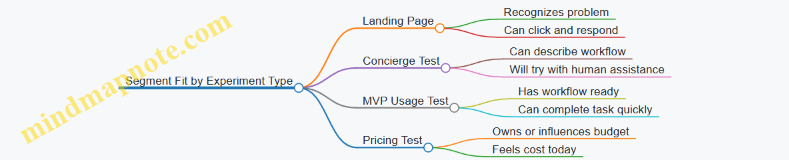
Map Segment Options to Experiment Types
Different experiments require different segment characteristics.
- Landing page tests need people who recognize the problem and can imagine taking action.
- Concierge tests need people who can describe their workflow and accept manual help.
- MVP usage tests need people who have the workflow ready and can complete a task in a short session.
If you run a usage test with people who lack the workflow, you’ll measure confusion instead of product value.
Mind Map: Segment Fit by Experiment
Use a “Recruiting Proof” Checklist
Before you finalize the segment, confirm you can actually reach them and that they can complete the test.
Checklist:
- Can you describe who they are in plain language?
- Can you name a realistic channel to contact them?
- Can you estimate how many you can recruit in one week?
- Can they answer the key question without special training?
- Can they complete the test within the time you’re offering?
If any item fails, adjust the segment boundaries rather than forcing the experiment.
Example: Segment Selection for a B2B Workflow Tool
You’re testing a workflow automation product for “operations teams.” Your learning question is: “Will operations managers pay to reduce manual reporting time?”
Start with lenses:
- Context: operations teams in logistics companies
- Trigger: new monthly reporting requirements
- Access: operations manager who owns reporting process
Then narrow:
- logistics companies with 50–200 employees
- reporting handled via spreadsheets or email
- monthly reporting due within the next 30–45 days
Now your segment can answer payment and switching questions because the trigger creates urgency, and the access role can authorize payment.
Example: Segment Selection for a Consumer Habit App
Learning question: “Will people use the app for 7 days without reminders?”
Lenses:
- Context: people trying to build a specific habit (e.g., running)
- Trigger: they just started a training plan
- Access: the person who performs the habit, not a coach
Narrow:
- beginners who started running within the last 30–60 days
- training plan includes 3–4 sessions per week
- willing to log sessions on mobile
This segment can produce usage evidence quickly because they are already in the habit-building window.
Decision Output for This Section
At the end of segment selection, you should be able to write a single paragraph that includes:
- the learning question
- the segment boundaries using context, trigger, and access
- why this segment can produce evidence in your chosen experiment type
- a recruiting proof that you can reach them and run the test on schedule
2.2 Conducting Customer Interviews with Structured Question Guides
Customer interviews work best when you treat them like a guided investigation, not a conversation that wanders until something interesting happens. A structured question guide helps you cover the same ground across participants, so you can compare answers without forcing them into the same story.
Purpose and Scope of the Interview
Start by writing one sentence that states what you need to learn. For example: “We need to understand how people decide whether to use a service like ours and what stops them.” Then define the scope: which customer type you will interview, what time period you care about (recent experiences are usually more accurate), and what you will not ask. If you skip the “not ask” list, the interview turns into a general opinion survey.
A good structure has three phases: context, decision process, and evidence. Context tells you who the person is in the situation. Decision process reveals how they choose. Evidence captures concrete artifacts like messages, screenshots, invoices, or the exact steps they took.
Mind Map of a Structured Question Guide
Mind Map: Structured Customer Interview
Building the Question Guide Step by Step
First, list your assumptions as plain statements. Example: “People want faster turnaround, but they avoid switching because onboarding is risky.” Each assumption should map to at least two questions: one to learn what happens today, and one to learn what would change their behavior.
Next, create question tiers.
- Open questions to get the story. Example: “Tell me about the last time you needed this.”
- Probes to get specifics. Example: “What did you do first, and what happened next?”
- Evidence prompts to reduce guesswork. Example: “Do you have an example message or document from that time?”
- Clarification questions to resolve ambiguity. Example: “When you say ‘easy,’ what does that mean in practice?”
Finally, add time boxes. If you plan 45 minutes, allocate roughly 10 minutes for warm-up, 25 for core questions, and 10 for evidence and wrap-up. Time boxes prevent the guide from becoming a wish list.
Example Question Guide for a Problem Discovery Interview
Use this as a template and adjust wording to match your domain.
Warm-up
- “What’s your role, and what responsibilities do you own?”
- “Think about the most recent time you faced the problem we’re investigating. Walk me through what led up to it.”
Current Process
- “How do you handle it today? Please describe the steps in order.”
- “Who is involved, and what does each person contribute?”
- “What tools or channels do you use, and why those?”
Decision Process
- “When you decide whether to solve it, what criteria matter most?”
- “What alternatives do you consider, even if you don’t choose them?”
- “What would make you switch from your current approach?”
Barriers and Failure Points
- “What usually goes wrong, or what feels risky?”
- “Tell me about a time it didn’t work. What were the signs early on?”
Evidence and Artifacts
- “Can you share an example of something you used, like a message, checklist, or report?”
- “If you remember any numbers or thresholds you care about, what are they?”
Wrap-up
- “Here’s what I think I heard. Is this accurate, or did I miss something important?”
- “If you could change one thing about the current process, what would it be?”
How to Ask Without Leading
Avoid questions that smuggle your hypothesis into the participant’s answer. Instead of “Would you pay for faster turnaround?” ask “What happens when turnaround is slow, and how do you respond?” If you need pricing later, you can ask about consequences first; it’s easier to interpret willingness to pay when you understand the pain.
When probing, use neutral follow-ups: “What makes that true for you?” “How do you decide?” “What did you try?” “What did you expect to happen?” These prompts encourage specificity without steering.
Handling Common Interview Issues
If the participant gives general statements, request a concrete example: “Can you describe a specific instance?” If they get stuck, offer a choice of two time windows: “Was the last time more recent than six months, or older?” If they answer with opinions only, ask for the last time they acted: “What did you do next after that opinion formed?”
A structured guide does not remove human nuance; it channels it. The goal is to collect comparable evidence while still letting the participant’s reality drive the details.
2.3 Identifying Jobs to Be Done and Decision Drivers
Jobs to be done describe what a person is trying to accomplish in a specific situation. Decision drivers are the factors that determine whether they choose one option over another. When you combine them, you get a practical way to write hypotheses that can be tested with real customers.
Start with the Situation, Not the Product
A job is triggered by context. “Buying accounting software” is too broad; “closing the books at month-end with messy spreadsheets and limited time” is a situation. Begin by collecting 8–12 customer stories from interviews or observation. For each story, capture:
- The moment the job starts (what happened right before)
- The constraint (time, budget, skill, tools, risk)
- The desired outcome (what “done” looks like)
- The acceptable tradeoffs (what they can tolerate)
Then convert each story into a job statement in this format: “When [situation], I want to [outcome] so that [reason it matters].” The “so that” part often reveals the real stakes, which later become decision drivers.
Separate the Job from the Method
People often confuse the job with the tool they currently use. If you ask, “Why do you use spreadsheets?” you’ll get tool talk. Instead, ask, “What were you trying to achieve when you started using spreadsheets?” and “What would make you stop?” This helps you distinguish the underlying job from the current method.
A useful check: if the customer changed tools tomorrow but kept the same outcome, the job still exists. If the outcome changes, you’ve found a different job.
Identify Decision Drivers as “Choice Criteria”
Decision drivers are not preferences in general; they are criteria that affect choice at the moment of evaluation. They usually fall into a few buckets:
- Outcome certainty: “Will it work for my case?”
- Effort: “How much time and learning does it require?”
- Risk: “What breaks if it’s wrong?”
- Compatibility: “Will it fit my existing workflow and systems?”
- Cost structure: “What does it cost in money and time?”
- Trust signals: “Who else has used it successfully?”
To uncover drivers, ask customers to compare. “What made you consider option A instead of option B?” and “What would have to be true for you to switch?” Their answers become testable criteria.
Turn Jobs into Measurable Hypotheses
Once you have job statements and decision drivers, you can write hypotheses that connect them to observable behavior. For example, if the job is “reduce time spent reconciling invoices,” a decision driver might be “fast matching with minimal manual review.” Your hypothesis could be: “If we provide automatic matching with a confidence score, customers will complete reconciliation with fewer manual steps.” The measurable part is the behavior you expect to change.
Mind Map for Jobs and Decision Drivers
Example: A Job for a Team Scheduling Tool
Imagine interviewing a small operations manager.
Job statement: “When we have last-minute staffing changes, I want to update schedules quickly so that shifts are covered without constant back-and-forth.”
Decision drivers they mention:
- “I need updates in minutes, not hours.” (effort)
- “I can’t break payroll rules.” (risk)
- “It must work with our existing time tracking.” (compatibility)
- “If it causes mistakes, I’m the one who gets blamed.” (stakes)
Integrated hypothesis: “If the tool supports rule-safe edits and exports to the existing time tracking format, managers will reduce the number of manual corrections after schedule changes.”
Notice how the drivers translate into what you can observe: fewer corrections, faster updates, and fewer rule-related issues.
Example: A Job for a Personal Finance App
A user says they “want to track spending,” but the job is sharper.
Job statement: “When I’m trying to stick to a budget, I want to know where my money went this week so I can adjust before the month ends.”
Decision drivers:
- “I need categories that match how I think.” (compatibility with mental model)
- “I need alerts that are specific, not generic.” (outcome certainty)
- “I don’t want to spend time tagging transactions.” (effort)
Integrated hypothesis: “If the app auto-suggests categories with one-tap confirmation and sends weekly summaries tied to the user’s budget plan, users will categorize transactions faster and stop missing budget checkpoints.”
Common Failure Modes to Avoid
- Listing features instead of criteria: “Has recurring reminders” is not a decision driver; “reminders that prevent missed payments” is.
- Ignoring the “why it matters”: without stakes, you’ll pick the wrong metric.
- Mixing multiple jobs: if two outcomes show up in the same story, split them into separate job statements.
When you do this work carefully, jobs and decision drivers stop being abstract theory. They become a structured way to choose what to test next, and what evidence would actually change your mind.
2.4 Observing Workflows and Pain Points in Real Contexts
You can’t validate a product idea with opinions alone. You validate it by watching how work actually gets done, where it slows down, and what people do to recover when things go wrong. The goal of this section is to help you observe without turning the session into a performance review or a guessing game.
Start with the Work, Not the Story
Begin by identifying the workflow you care about and the moment where decisions happen. A workflow is a sequence of actions that produces an outcome, not a collection of job titles. For example, in a B2B support team, the workflow might be: receive ticket → triage → reproduce issue → propose fix → confirm resolution. Pain points often appear at the transitions between steps, not inside the steps themselves.
Ask for a “walkthrough of the last real instance.” If someone describes a typical day, you’ll get averages. If they describe the last ticket, you’ll get concrete details: what they clicked, what they checked, what they waited for, and what they did when the expected path failed.
Prepare to Observe Like a Scientist
Before you meet anyone, define what you will record. Use a simple observation sheet with four columns: Step, Inputs, Decision, Friction. “Friction” can be time delays, rework, unclear ownership, missing data, or manual copy-paste. Keep the language neutral; you’re collecting evidence, not judging competence.
Bring a lightweight prompt set so you don’t improvise midstream:
- What triggered this step?
- What information did you need to proceed?
- What did you do when the information wasn’t available?
- How do you know the step is done?
- What would you change if you could remove one obstacle?
Mind Map of Workflow Observation
Workflow Observation Mind Map
Observe the Workflow in Motion
If possible, observe the person doing the work in real time. If that’s not feasible, ask them to screen-share while narrating what they do, using the last instance as the anchor. Your job is to slow down the narrative and force specificity.
A practical technique is “pause and replay.” When they say, “I usually check the logs,” pause and ask: which logs, where, what you look for first, and what happens when the logs don’t show the answer. This turns vague statements into observable behaviors.
Identify Pain Points Without Confusing Them with Preferences
People often say they want “a better tool.” That’s a preference, not a pain point. A pain point is a recurring obstacle that changes behavior or outcomes.
Use these signals to classify pain points:
- Rework loops: They redo steps because the first attempt didn’t produce the right output.
- Waiting: They wait for approvals, data, or responses that could be clarified earlier.
- Handoffs: Work moves between roles or systems with unclear responsibilities.
- Data mismatch: Inputs don’t match what downstream steps expect.
- Tool switching: They bounce between systems because one tool can’t provide what’s needed.
Example: From Observation to a Testable Problem
Imagine you’re exploring a product for onboarding new employees in a mid-size company.
During observation, you notice this workflow instance:
- HR creates an onboarding checklist.
- Managers receive it via email.
- Managers forward tasks to team members.
- Team members complete tasks in different systems.
- HR later asks for proof of completion.
Friction appears at step 3 and 5:
- Managers forward tasks but don’t know which system each task belongs to.
- Team members complete tasks, but proof is scattered across tools.
- HR spends time chasing confirmations.
A preference statement might be “HR needs a dashboard.” Evidence-based pain point: “Proof of completion is not collected in a consistent way, causing HR follow-up work.”
Now you can translate this into an assumption to test: “If tasks automatically generate standardized completion evidence, HR follow-up time decreases.”
Example: Separating Symptoms from Causes
In a sales workflow, you might hear: “We lose deals because leads are unqualified.” Observation shows reps spend time researching leads, then still need a second call to confirm fit.
The symptom is “unqualified leads.” The cause might be that qualification criteria are applied too late, or that reps lack a quick way to verify decision drivers before investing time. Your notes should capture the exact moment qualification is decided and what information is missing.
Turn Notes into a Pain Point Map
After the session, consolidate observations into a pain point map that links friction to workflow steps and likely causes.
When you do this consistently, you stop collecting stories and start collecting decision-grade evidence. That evidence becomes the raw material for hypotheses, MVP scope, and the next experiment you run.
2.5 Turning Qualitative Findings into Testable Hypotheses
Qualitative research gives you patterns, not proof. The job of this step is to convert what people said and did into hypotheses you can test with clear outcomes. A good hypothesis is specific enough to design an experiment, and humble enough to be falsified.
Start with What You Actually Know
Begin by separating three kinds of statements from your notes:
- Observed behavior: what someone did (e.g., “they compared three vendors in a spreadsheet”).
- Reported belief: what someone thinks (e.g., “they believe onboarding takes too long”).
- Inferred cause: what you suspect explains the behavior (e.g., “they churn because onboarding feels risky”).
Only the first two are directly supported by your data. Inferred causes become hypotheses, and they must be written so you can test them.
Use a Hypothesis Template That Forces Clarity
A practical template is:
- Target: who the hypothesis applies to.
- Assumption: what must be true.
- Mechanism: why it should change behavior.
- Prediction: what you expect to measure.
- Boundary: what would make the hypothesis wrong.
Example (rewritten from qualitative notes):
- Target: “Freelance designers who need client approvals fast.”
- Assumption: “They avoid a tool when they can’t see approval status.”
- Mechanism: “Uncertainty increases perceived risk, so they delay using the tool.”
- Prediction: “After adding an approval-status view, users complete the approval step within 24 hours more often.”
- Boundary: “If completion timing doesn’t improve, the status view isn’t the key driver.”
Convert Themes into Testable Claims
Qualitative analysis often produces themes like “confusing setup” or “trust issues.” Themes are useful, but they’re too broad to test. Turn each theme into a claim with a single measurable change.
A theme becomes testable when you answer two questions:
- What specific part of the experience is responsible?
- What behavior should change if the claim is correct?
If you can’t name the specific part, you likely need another round of interviews or a quick prototype test.
Mind Map for the Hypothesis Building Pipeline
Mind Map Turning Qualitative Findings into Hypotheses
Prioritize Hypotheses by Risk, Not Volume
A theme that appears in many interviews is tempting, but the highest value hypothesis is often the one tied to the riskiest assumption. Use a simple prioritization rule:
- Impact: if wrong, does it break the business model or prevent adoption?
- Uncertainty: how confident are you based on the current evidence?
- Testability: can you test it quickly and cheaply?
This keeps you from spending weeks perfecting a hypothesis that’s not the bottleneck.
Write Hypotheses with One Primary Driver
If a hypothesis includes multiple changes, you won’t know what caused the result. Qualitative findings sometimes tempt you to bundle fixes. Resist that urge.
Instead, split into separate hypotheses:
- Hypothesis A tests whether status visibility reduces delays.
- Hypothesis B tests whether clearer instructions reduce setup time.
Each hypothesis should point to one specific change and one primary metric.
Example from Interviews to a Testable Hypothesis
Qualitative finding: “People start the setup, then get stuck when they can’t tell whether the system is waiting on them or on the client.”
Theme: unclear handoff status.
Testable hypothesis:
- Target: “Teams using the approval workflow with external reviewers.”
- Assumption: “Users hesitate because they can’t determine who needs to act next.”
- Mechanism: “When next steps are ambiguous, users pause to avoid mistakes.”
- Prediction: “After adding a ‘Next action’ indicator and timestamps, the percentage of workflows reaching the approval step within the same day increases.”
- Boundary: “If workflows still stall at the same step, the issue is likely instructions or permissions, not status clarity.”
Quality Checks Before You Design the Experiment
Before you move to experiment planning, verify:
- Specificity: you can point to the exact UI, message, or process element.
- Measurability: you can define a metric that reflects the predicted behavior.
- Falsifiability: you can state what result would disconfirm the claim.
- Consistency: the hypothesis doesn’t contradict the observed behavior you already trust.
A Simple Hypothesis Worksheet You Can Reuse
Use this structure for each candidate hypothesis:
- Hypothesis statement: “If [we change X], then [Y behavior] will increase for [target] because [mechanism].”
- Primary metric: [single metric]
- Baseline: [current value or comparison]
- Decision rule: “Proceed if metric improves by at least [threshold] over [time window].”
- Notes from qualitative evidence: [2–4 concrete quotes or observations]
This worksheet turns messy notes into something your team can test without arguing about what “success” means.
3. Hypothesis Design and Experiment Planning
3.1 Writing Clear Hypotheses Using If Then Statements
A hypothesis is a testable claim about cause and effect. In Lean experiments, the goal is not to be clever; it’s to be precise enough that a result can change your mind. The if then format helps because it forces two parts to be explicit: what you will do, and what you expect to observe.
Start with the simplest structure:
- If we do X (the action or change)
- Then we will observe Y (the measurable outcome)
To make this useful in practice, add two more ingredients: who the hypothesis applies to and under what conditions it should hold. Without those, you can end up with results that are technically true but operationally useless.
The Core Parts of an if Then Hypothesis
- Action (X): The smallest change you can test. Example: “Show the pricing page with a monthly and annual toggle.”
- Target (Who): The segment you expect to respond. Example: “New visitors from the ‘template’ search query.”
- Outcome (Y): A metric or observable behavior. Example: “Start the checkout flow within 5 minutes.”
- Condition (When/How): The context that defines the test. Example: “After reading the first paragraph of the page.”
A good hypothesis reads like a contract. If the outcome doesn’t move, you know what to revisit: the action, the target, the measurement, or the condition.
Mind Map of Hypothesis Components
From Vague to Testable
Vague: “The new onboarding will improve activation.”
Testable: “If we add a 3-step onboarding checklist and ask users to complete step 1 before seeing the dashboard, then users in the trial segment will complete the ‘first project created’ event within 24 hours at a higher rate than the current flow.”
Notice what changed: the action is concrete, the target is defined, the outcome is measurable, and the time window is specified.
Choosing the Right Outcome Signal
Outcomes should be close enough to the user behavior that you can trust the measurement, but not so close that you measure noise. A useful rule is to pick an outcome that represents the learning you actually need.
- If you’re testing demand, outcomes might be clicks to pricing, waitlist signups, or purchase commitments.
- If you’re testing usability, outcomes might be completion of a key task or time-to-first-success.
- If you’re testing messaging, outcomes might be comprehension proxies like “scrolls to feature section” or “requests a demo” after a specific page.
Adding Decision Rules Without Making It Complicated
A hypothesis becomes stronger when you attach a decision rule. You don’t need statistical perfection to be clear; you need a threshold that tells the team what to do next.
Example decision rule:
- “Success means the checkout-start rate increases by at least 15% relative to the current page, with no drop in refund requests.”
This prevents the common failure mode where any improvement is treated as a win, even if it comes with hidden costs.
Example Hypotheses You Can Reuse
Example 1: Landing Page Messaging
- If we replace the hero headline with “Send invoices in 2 minutes” and add a one-sentence proof point, then visitors from accounting-related search will have a higher rate of clicking “See pricing” within the first session.
Example 2: MVP Feature Scope
- If we limit the MVP to one core workflow—create, send, and track an invoice—then trial users will complete the first invoice creation event within 24 hours at a higher rate than users who see the broader feature set.
Example 3: Pricing Experiment
- If we offer an annual plan with a clear monthly equivalent and a single “Most popular” selection, then new customers will choose the annual plan at a higher rate without increasing support tickets related to billing confusion.
Example 4: Sales Motion
- If we change the first sales email to include a short scenario relevant to the recipient’s role, then replies that request a call will increase compared to the current template.
A Practical Template
Use this structure to draft quickly and then tighten:
- If [action/change] for [target segment] under [condition/context],
- then [measurable outcome] within [time window],
- success means [threshold or decision rule].
The if then statement is the spine of the experiment. Everything else—sample size, instrumentation, and analysis—should serve the clarity of this claim. When the hypothesis is crisp, the results stop being a mystery and start being a useful answer.
3.2 Prioritizing Assumptions with Impact and Uncertainty Criteria
Early experiments fail for predictable reasons: teams test low-risk assumptions first, or they test the right thing with the wrong level of rigor. Prioritization fixes both. The goal is to rank assumptions so you spend time where learning is most valuable and evidence is most likely to change your mind.
Start with a Shared Assumption Inventory
Before scoring anything, list assumptions in plain language. Each item should be testable, not philosophical. For example, “Users want a weekly summary” is an assumption; “Users are busy” is a supporting context. Keep the list short enough to review in one sitting.
A practical format is:
- Assumption: what must be true
- Where it shows up: product, customer, or business model
- What would count as evidence: behavior, commitment, or operational signal
Example assumption set for a B2B expense tool:
- “Finance managers will approve automated categorization without manual review.”
- “Small teams will pay $12/month for receipt capture and export.”
- “Users will connect a bank account within the first week.”
Define Impact as Decision Leverage
Impact measures how much the assumption affects the next decision. Use decision leverage, not importance vibes. If the assumption is wrong, what breaks?
A simple scoring rubric:
- High impact: if false, you likely change the core approach (pivot scope, target segment, or value proposition)
- Medium impact: if false, you adjust features, messaging, or onboarding
- Low impact: if false, you can still proceed with minor tweaks
Example:
- “Finance managers approve without manual review” is high impact because it determines whether automation is viable.
- “Users connect within the first week” is medium impact because you can improve onboarding even if adoption is slower.
Define Uncertainty as Evidence Difficulty
Uncertainty measures how hard it is to know whether the assumption is true before you test it. It’s not the same as “we don’t know.” It’s “we can’t know reliably without running an experiment.”
Score uncertainty using three signals:
- Evidence availability: Do you already have relevant data from similar customers?
- Variability: Does the assumption likely differ across segments or contexts?
- Measurement clarity: Can you observe a clear outcome during a short test?
Rubric:
- High uncertainty: little direct evidence, likely varies by segment, and outcomes are hard to measure
- Medium uncertainty: some indirect evidence, moderate variability, measurable outcomes
- Low uncertainty: strong evidence exists or outcomes are obvious and stable
Example:
- “Users will connect a bank account within the first week” might be high uncertainty if you’ve never built this onboarding flow.
- “Finance managers care about audit trails” might be low uncertainty if you’ve interviewed multiple teams and seen consistent requirements.
Use an Impact–Uncertainty Matrix to Rank Work
Plot assumptions on a 2x2 grid. Then prioritize the top-right quadrant first: high impact and high uncertainty.
    flowchart TD
  A[Assumptions] --> B[Score Impact]
  A --> C[Score Uncertainty]
  B --> D[Impact–Uncertainty Matrix]
  C --> D
  D --> E[High Impact / High Uncertainty
  Test First]
  D --> F[High Impact / Low Uncertainty
  Confirm Quickly]
  D --> G[Low Impact / High Uncertainty
  Learn Efficiently]
  D --> H[Low Impact / Low Uncertainty
  Defer]
Turn Scores into Experiment Choices
Ranking is only useful if it changes what you do next. Each quadrant suggests a different experiment style.
-
High Impact / High Uncertainty: run the fastest, most decisive test.
- Example: For the automation approval assumption, do a concierge workflow where you categorize receipts and present an audit trail to finance reviewers. The evidence is approval without rework.
-
High Impact / Low Uncertainty: confirm with a lightweight check.
- Example: If you already know finance teams require exports, verify that your export format matches their workflow by running a short usability session and checking whether they can complete a reconciliation step.
-
Low Impact / High Uncertainty: test with minimal cost.
- Example: If you’re unsure about “weekly summary usage,” show two summary frequencies in a prototype and measure click-through or engagement, but keep the scope small.
-
Low Impact / Low Uncertainty: defer.
- Example: If you’re confident that users want a dark mode and it won’t affect adoption, don’t spend experiment budget here.
Avoid Common Scoring Traps
- Confusing impact with effort: effort belongs in experiment planning, not prioritization.
- Overrating uncertainty: if you can measure outcomes clearly, uncertainty may be lower than it feels.
- Mixing assumptions: “Users want X and Y” should be split so one test can’t hide the truth.
A Worked Example with Clear Decisions
Assume you have four assumptions for a consumer habit tracker:
- A: “People will pay $5/month for reminders.” (High impact, High uncertainty)
- B: “Reminders will arrive at the right time.” (Medium impact, Medium uncertainty)
- C: “Users will complete onboarding in one session.” (Medium impact, High uncertainty)
- D: “Users want a leaderboard.” (Low impact, Low uncertainty)
The matrix suggests testing A first with a commitment experiment (paid waitlist or trial with a clear cancel path), then B and C with onboarding and timing tests, and deferring D.
When you score assumptions this way, your experiment backlog becomes a learning plan with an obvious order. You’re not just busy; you’re systematically reducing the risk that matters.
3.3 Selecting Experiment Types for Different Learning Needs
Choosing an experiment type is mostly about matching the method to the learning goal. If you pick the wrong type, you either waste time building something that was never needed or collect data that can’t answer the question you actually care about.
Start by separating learning needs into three buckets: (1) what customers will do, (2) what customers will say, and (3) what your system can deliver. Many teams try to answer all three with the same experiment. That’s how you end up with “interesting feedback” and no decision.
Learning Needs and Matching Experiment Types
For behavioral learning, you want evidence from actions. For attitudinal learning, you want structured signals from responses. For feasibility learning, you want proof that the workflow works under real constraints.
A practical way to decide is to ask two questions:
- Can the customer’s behavior be observed without building the full product?
- Can the system’s performance be tested without scaling the whole operation?
If the answer to (1) is yes, you can often use low-cost demand tests. If the answer to (2) is yes, you can often use prototypes or staged rollouts.
Mind Map of Experiment Types by Learning Goal
Behavioral Evidence Experiments
Behavioral experiments are best when you need to know whether people will take the next step. A common mistake is to treat “likes” as behavior. Instead, design the experiment so the customer must do something.
Example: You’re testing whether a B2B team will pay for an onboarding checklist. A landing page experiment can show demand without building the checklist. The learning goal is not “do they find it useful,” but “do they request access or start a trial.”
Example: If the product is too complex to automate yet, use a concierge test. You offer the service, manually perform the steps behind the scenes, and measure how many customers complete the workflow and return for the next action. This gives you behavioral evidence while you learn the real friction points.
Example: For a workflow-heavy product, a Wizard of Oz test can simulate the experience. The user interacts with a UI, but a person generates outputs. The learning is whether the workflow is understandable and whether the user reaches the intended outcome.
Attitudinal Signals Experiments
Attitudinal experiments are useful when behavior is hard to observe early, but you still need to reduce uncertainty. The key is to structure the questions so you can map responses back to specific assumptions.
Example: You’re unsure whether your value proposition is clear. Run concept tests with controlled variations of the message. Measure comprehension and perceived relevance using consistent prompts. Then translate results into a revised hypothesis for a behavioral test.
Example: In interviews, avoid asking “Would you use this?” Instead, ask about the current workaround and the decision criteria they use. You’re collecting signals about why behavior might happen or fail.
A useful rule: attitudinal learning should change what you test next, not replace behavioral validation.
Feasibility and Delivery Experiments
Feasibility experiments answer whether your system can deliver the promised outcome with acceptable effort and reliability. These experiments protect you from building a product that works only in ideal conditions.
Example: Before building a full integration, run a smoke test that exercises the critical path. If the integration fails for common edge cases, you’ve learned something concrete without spending weeks on a polished UI.
Example: For a new feature, run a prototype usability test with a small set of users. The goal is not aesthetic feedback. It’s whether users can complete the task and whether the interface communicates the next step without confusion.
Example: For delivery risk, run a limited pilot with a small number of customers. Define success as operational outcomes like time to first value, error rate, and whether customers complete the workflow end-to-end.
Advanced Selection Criteria That Prevent Waste
Once you know the learning bucket, refine the choice using four criteria:
- Time-to-evidence: Prefer the experiment that produces a decision-quality signal fastest.
- Fidelity-to-risk: Use the lowest fidelity that still tests the riskiest assumption.
- Instrumentation readiness: If you can’t measure the key action, you can’t claim behavioral learning.
- Decision rule compatibility: Ensure the experiment output can be compared to a threshold you already defined.
Example: If your decision rule is “at least 20% of visitors start a trial,” a usability test won’t help. It measures comprehension, not trial initiation.
Putting It Together with a Simple Workflow
Select the experiment type by moving from learning goal to method, then to measurement.
- Write the assumption in action terms.
- Choose the experiment type that observes that action.
- Define the metric that represents success.
- Plan the smallest version that still tests the riskiest part.
Example: Assumption: “Users will pay after seeing the onboarding plan.” Choose a commitment experiment (preorder or paid trial) and measure conversion after exposure. If conversion is low, you don’t guess; you revise the plan and test again with a new message or offer structure.
3.4 Defining Metrics for Validation and Avoiding Vanity Metrics
Metrics are how you turn “we think” into “we know.” The trick is choosing measures that reflect learning, not just activity. A good validation metric answers: Did the customer behavior we care about actually happen, and did it happen because of the change we tested?
Start with the Learning Goal
Before picking numbers, restate the learning goal in plain language. Example: “We need to know whether people will pay for a 30-minute onboarding call.” That goal implies a behavior: payment or a clear commitment signal.
Then define the smallest decision the metric must support. If the decision is “continue building,” the metric should be strong enough to justify that choice. If the decision is “change messaging,” the metric should react to message differences.
Choose Metrics That Map to Assumptions
Every metric should trace back to a specific assumption. If your assumption is “customers understand the value,” measure comprehension indirectly through next-step behavior, not through survey scores alone.
A practical approach is to pair metrics by layer:
- Demand signals: commitment, purchase, paid conversion, retention after first value.
- Product learning signals: activation completion, task success, time-to-first-success.
- Operational constraints: support load per active user, fulfillment time, error rates.
This prevents the classic mistake: tracking a metric that looks good while the underlying assumption remains untested.
Use a Validation Metric with a Decision Rule
A validation metric should have a threshold and a decision rule. For example:
- If at least 20% of qualified visitors click “Book a call,” keep testing the offer.
- If fewer than 20% book, revise the value proposition or target segment.
The threshold does not need to be perfect; it needs to be explicit. Without a decision rule, metrics become decorations.
Avoid Vanity Metrics by Checking Three Failure Modes
Vanity metrics are usually “easy to move” or “not causally connected to the assumption.” Check each candidate metric for these failure modes:
-
Activity masquerading as value
- Vanity: number of sign-ups.
- Better: percentage who complete the first meaningful action within 24 hours.
-
Output without commitment
- Vanity: page views on a pricing page.
- Better: percentage who start checkout or submit payment intent.
-
Lagging indicators treated as leading indicators
- Vanity: revenue in week one for a product that requires onboarding.
- Better: activation and early retention tied to the first success moment.
A quick test: if you could increase the metric without improving the customer’s outcome, it’s probably vanity.
Separate Leading, Coincident, and Lagging Metrics
Use a small set of metrics with different timing:
- Leading: behavior that should change immediately if the hypothesis is correct.
- Coincident: behavior that occurs at the same time as the outcome.
- Lagging: outcomes that confirm durability.
Example for a subscription product:
- Leading: onboarding completion rate.
- Coincident: first-week retention of users who completed onboarding.
- Lagging: churn after the first billing cycle.
You don’t need all three for every experiment, but you should know which layer you’re measuring.
Define “Qualified” Inputs So Metrics Mean Something
Metrics get polluted when you measure everyone. Define qualification criteria so you only count users who match the hypothesis.
Example: For a B2B experiment, “qualified visitor” might mean they work in the target role and company size, verified via a short form. For a consumer experiment, it might mean they selected a relevant use case during signup.
If qualification is missing, your metric becomes a popularity contest.
Mind Map for Metric Design
Metric Design Mind Map
Build a Simple Metric Stack with Examples
A metric stack is a small bundle that answers “did it work, why, and what to do next?”
Example: Landing page test for a paid feature
- Validation metric: percentage of qualified visitors who start checkout.
- Supporting metrics: click-through rate from hero section, time on page, and which plan option they choose.
- Guardrail metrics: refund requests within 7 days (if you can measure it), or support tickets tagged to confusion.
Example: MVP onboarding experiment
- Validation metric: percentage of new users who complete the first successful task.
- Supporting metrics: drop-off step, average time-to-first-success, and error rate.
- Guardrail metrics: number of failed attempts per user and customer-reported “can’t figure it out” tags.
Notice how none of these rely on “how many people looked.” They rely on what people did.
Instrumentation and Measurement Accuracy
If you can’t trust the measurement, the metric is just a guess with a number attached. Ensure:
- Events are defined consistently across versions.
- You can reconcile counts between the product and the analytics layer.
- You track the denominator correctly (qualified users, not all visitors).
A useful habit is to run a small manual check: sample 20 sessions and verify that the recorded events match what happened.
Segment Metrics to Avoid Hidden Contradictions
A single metric can hide a split outcome. Segment by the dimensions that matter to your hypothesis.
Example: If your target includes both freelancers and small agencies, a message might work for one group and fail for the other. The overall average could look “fine,” while the validation metric for the intended segment is not.
Segmenting turns “mixed results” into actionable learning.
Keep the Metric Set Small
More metrics create more ways to be wrong. For most experiments, use:
- 1 validation metric
- 2 to 4 supporting metrics
- 1 to 2 guardrails
This keeps the team focused on the decision, not on collecting data for its own sake.
3.5 Building an Experiment Plan with Scope Constraints and Resources
A good experiment plan answers three questions before anyone writes code or schedules interviews: What exactly are we testing, what will we do if the result is clear, and what can we afford to spend to get that clarity? Scope constraints keep the plan honest; resource planning keeps it executable.
Start with the Learning Goal and Decision
Begin by restating the learning goal in one sentence: “We want evidence that [assumption] is true enough to justify [next step].” Then define the decision rule. A decision rule is not a mood; it is a threshold tied to a metric or a qualitative pattern.
Example: If the assumption is “People will pay $49/month for a scheduling tool,” the decision rule might be: “Proceed if at least 10% of qualified visitors start a paid trial or purchase within 7 days; otherwise, revise pricing or target segment.”
Constrain Scope to the Riskiest Assumption
Scope is easiest to manage when you test one risk at a time. Pick the riskiest assumption and design the smallest experiment that can falsify it.
A practical way to do this is to create a “scope boundary” list:
- In scope: the exact audience, the exact offer, the exact success metric.
- Out of scope: everything else you might want to improve later.
Example: If you’re testing willingness to pay, don’t redesign the onboarding flow in the same experiment. Onboarding improvements can wait; payment intent is the target.
Choose the Experiment Type and Minimum Evidence
Match the plan to the evidence you need.
- If you need demand evidence, use landing pages, concierge delivery, or commitment offers.
- If you need usability evidence, use prototypes with task-based observation.
- If you need operational feasibility evidence, run a small internal pilot with real constraints.
Minimum evidence means you collect enough data to make the decision rule meaningful. “Enough” depends on the metric and the variability you expect.
Define Resources with Roles and Time Boxes
Resources are not just money. They include attention, access, and coordination.
Create a simple resource map:
- Owner: accountable for execution and reporting.
- Researcher or operator: runs interviews or concierge steps.
- Analyst: defines how results are measured and summarized.
- Engineer or builder: creates the minimum artifact.
- Stakeholder: provides fast feedback and approves scope boundaries.
Then add time boxes. A common failure mode is letting experiments sprawl. If the plan says “run for two weeks,” it should stop at two weeks unless the decision rule requires more data.
Build the Plan as a Sequence of Steps
Write the experiment plan as a checklist with dependencies.
- Recruit or source participants/traffic.
- Deliver the offer or task exactly as specified.
- Capture evidence using a consistent method.
- Review results against the decision rule.
- Document learnings and the next experiment.
Each step should include an owner and a “stop condition.” For example, if you cannot reach the target number of qualified participants after a defined outreach effort, you stop and treat it as a constraint on feasibility.
Mind Map for Scope, Evidence, and Resources
Example Plan with Clear Boundaries
Assume you’re testing whether a B2B team will adopt a “weekly metrics digest.” The riskiest assumption is that the digest reduces effort enough to be worth it.
Learning goal: Determine if the target role will commit to receiving the digest for a month.
Decision rule: Proceed if at least 20% of qualified participants accept the month-long subscription after a 15-minute setup call.
Scope constraints:
- In scope: one target role, one digest format, one month subscription.
- Out of scope: adding new chart types, changing the data sources, expanding to other departments.
Resources:
- Owner: runs the process and approves the final report.
- Operator: performs setup calls and sends the first digest.
- Analyst: tracks acceptance rate and reasons for rejection.
- Builder: prepares a basic digest template and automated delivery.
Execution steps:
- Recruit 50 qualified participants over 10 days.
- Run 15-minute setup calls using a fixed script.
- Deliver the first digest within 24 hours.
- Ask for month subscription acceptance immediately after delivery.
- Review results on day 14 and decide using the threshold.
Stop condition: If fewer than 35 qualified participants are recruited, report feasibility limits and adjust recruitment criteria rather than forcing the numbers.
Reporting That Makes the Next Step Obvious
Your report should include: what you tested, what evidence you collected, how it maps to the decision rule, and what you will change in the next experiment. If the result is “inconclusive,” state exactly which part failed: not enough qualified participants, measurement ambiguity, or the offer not being delivered consistently.
A plan with scope constraints and resources is not restrictive for its own sake. It is a way to ensure the experiment produces a decision, not just a pile of observations.
4. Validating Demand with Customer Experiments
4.1 Designing Landing Pages and Value Propositions for Testing
A landing page is a controlled conversation: one page, one goal, and one chance to learn what people actually do. The value proposition is the sentence that explains why they should care, but the page is what proves whether the explanation matches their expectations.
Start with the Testing Goal
Before writing a single headline, decide what decision the page will support. Common goals include:
- Validate problem awareness: do visitors recognize the pain?
- Validate solution fit: do visitors understand what you do in under 10 seconds?
- Validate demand: do visitors take a commitment action (signup, request, preorder)?
Example: If you’re testing whether a “weekly budget for freelancers” is compelling, your goal might be “get qualified signups after a clear explanation,” not “improve brand perception.”
Build a Value Proposition from Evidence
A value proposition should connect three elements:
- Target customer: who this is for.
- Job and pain: what they’re trying to do and what makes it hard.
- Mechanism and outcome: what you do differently and what changes.
A practical template:
- For [who], who need [job/pain], [product] helps by [mechanism] so they can [outcome].
Example headline for a B2B tool: “For ops teams drowning in manual status updates, our workflow board turns scattered notes into one daily report—without spreadsheet copy-paste.”
Mind Map: Landing Page Components
Landing Page Design Mind Map
Design the Page for Fast Comprehension
Most visitors skim. Your job is to make the first screen answer four questions:
- Is this for me?
- What problem does it address?
- What exactly is the product or service?
- What should I do next?
A simple layout that works:
- Headline: target + outcome.
- Subheadline: mechanism in plain language.
- Primary CTA: one action button.
- Supporting line: what happens after clicking (e.g., “Get a 7-day trial link” or “We’ll email a short onboarding form”).
Example: “Bookkeeping that stays current for small clinics. Import bank transactions and auto-categorize expenses weekly. Start a 14-day trial.”
Add Proof Without Turning It into a Museum
Proof signals should match the claim they support. Use only what you can defend:
- If you claim speed, show a before/after time estimate.
- If you claim accuracy, show a concrete validation method.
- If you claim reliability, show uptime or response-time ranges.
Example proof block:
- “Typical setup: 20 minutes using your CSV export.”
- “We categorize 80% of transactions automatically; the rest are reviewed in one weekly batch.”
Avoid vague testimonials like “Amazing service.” Replace them with context: who used it and what changed.
Make the CTA Specific and Low-Friction
The CTA should reflect the commitment level you can realistically ask for. If your product is complex, a “request demo” can be fine, but then your form should qualify efficiently.
Two CTA patterns:
- Direct signup: best when the value is easy to understand.
- Request access: best when you need fit signals (industry, team size, current workflow).
Example form fields for a B2B pilot:
- Company size
- Primary use case
- Current tool (optional)
- Work email
Keep the number of fields small enough that the page doesn’t become a chore.
Use Sections That Reduce Confusion
A landing page should address likely misunderstandings in order:
- Problem: “What’s broken today?”
- Solution: “What do you do?”
- How it works: “What happens after I sign up?”
- Fit: “Who benefits most?”
- FAQ: “What would stop me from trying?”
Example FAQ answers that help testing:
- “Do you support X format?”
- “How long does onboarding take?”
- “Can we cancel anytime?”
Mind Map: Value Proposition Crafting
Value Proposition Mind Map
Plan Variants Like a Scientist, Not a Poet
Run small, targeted changes so you can attribute results. Good variant candidates:
- Headline wording that changes the target or outcome.
- Subheadline mechanism clarity.
- CTA text that changes commitment level.
- Proof placement (near headline vs near CTA).
Example experiment: Variant A emphasizes “weekly automation,” Variant B emphasizes “fewer errors with review workflow.” Keep everything else the same, including form fields and traffic source.
Define Metrics That Match the Goal
Choose one primary metric tied to the decision:
- Demand validation: signup rate per visitor.
- Messaging clarity: click-through to signup or form completion.
- Fit validation: completion rate among qualified segments.
Interpretation rule: if the page gets clicks but low completion, the issue may be friction in the form or mismatch between promise and next step.
Quality Checklist Before Launch
- The first screen states who it’s for and what changes.
- The CTA matches the offer described above it.
- Language on the page matches the ad or message that brought visitors.
- Proof supports claims with specific details.
- Mobile layout keeps the headline, CTA, and form readable without zooming.
When these pieces align, the landing page becomes a reliable measurement tool rather than a guess dressed as design.
4.2 Running Concierge Tests to Validate Willingness to Pay
Concierge tests validate willingness to pay (WTP) by simulating a product purchase with real humans, without building the full product. You’re not trying to “sell harder.” You’re trying to learn whether people will commit money, time, or both for a specific outcome.
What Concierge Tests Prove
A concierge test proves one thing at a time: that a defined customer segment will pay for a defined value proposition under defined conditions. If you keep those definitions tight, you can interpret results without guessing.
Start with a simple WTP ladder:
- Interest: they say they like the idea.
- Engagement: they respond to follow-ups and ask questions.
- Commitment: they pay, reserve, or sign up with payment terms.
- Repeatability: they do it again for the next cohort or month.
Concierge tests focus on the commitment step. You can still measure interest and engagement, but the decision rule should hinge on commitment.
Mind Map of Concierge Test Design
Concierge Test Mind Map
Step 1: Define the Offer Like a Contract
WTP depends on what you ask for. Write the offer as if it were a short contract.
Include:
- Outcome: what changes for the customer.
- Scope: what’s included and what’s not.
- Time horizon: when they get value.
- Price: the amount and billing cadence.
- Risk handling: refund policy or “no charge if X doesn’t happen.”
Example: “For $49, you get a 30-minute workflow review and a prioritized action plan delivered within 48 hours. If you don’t receive the plan, you get your money back.”
Notice what’s missing: no vague promises like “improve your business.” The outcome is concrete and measurable.
Step 2: Choose the Concierge Workflow
The concierge workflow should mimic the purchase experience, not the engineering effort.
A practical workflow:
- Intake: a short form collects context and eligibility.
- Qualification: you confirm they match the target segment.
- Personalized delivery: you provide the concierge version of the value.
- Payment request: you ask for payment at a consistent point in the workflow.
To avoid accidental bias, decide when payment is requested. For instance, request payment after qualification but before delivery, so you measure commitment rather than politeness.
Step 3: Use Scripts That Reduce Confusion
Your scripts should be consistent enough to compare results, but flexible enough to answer real questions.
Email script structure:
- One sentence restating the outcome.
- One sentence stating scope and timing.
- One sentence stating price and what happens after payment.
- A short list of eligibility criteria.
- A clear call to action.
Call script structure:
- Confirm their current situation.
- Confirm the problem the outcome addresses.
- Confirm the scope and timing.
- Ask one direct question: “If we deliver exactly this within 48 hours, would you be comfortable paying $49?”
- If yes, request payment immediately.
If someone hesitates, capture the reason in a single category: price, timing, trust, unclear scope, or “not a priority.” Don’t argue. You’re collecting evidence.
Step 4: Run the Test with a Decision Rule
Pick a success threshold before you start. A common approach is to set a minimum payment conversion rate for the segment.
Example decision rule:
- If at least 10% of qualified leads pay within 7 days, proceed to MVP build with the same price.
- If conversion is below 10%, adjust one variable at a time: either the offer scope, the timing, or the price.
Also track time-to-payment. A low conversion with fast payments suggests the offer is attractive but the audience is wrong. A low conversion with slow payments suggests friction or unclear value.
Step 5: Interpret Results Without Guessing
Use a simple matrix:
- High WTP conversion + few objections: keep the offer and move to MVP.
- High conversion + many objections: the price may be okay, but the scope or trust signals need tightening.
- Low conversion + price objections: test a lower price or smaller scope.
- Low conversion + trust or clarity objections: add concrete proof in the concierge delivery and tighten the contract language.
Example: Suppose you test $49 and only 4% pay. Most objections are “I’m not sure this will work for my situation.” Your next iteration should change how you qualify and how you demonstrate fit, not just lower the price.
Step 6: Keep the Concierge Version Honest
Concierge delivery must match the promise. If you say “delivered within 48 hours,” deliver within 48 hours. If you can’t, the test becomes a trust experiment instead of a WTP experiment.
A good concierge test ends with a clean dataset:
- number of leads
- number qualified
- number who paid
- reasons for non-payment
- delivery outcomes
That’s enough to decide what to build next, and what to stop building.
4.3 Measuring Conversion Funnels and Interpreting Drop Offs
Measuring Conversion Funnels and Interpreting Drop Offs
A conversion funnel is just a sequence of steps a visitor takes before reaching a goal, like “request a demo” or “start a trial.” Measuring it well means two things: you track each step consistently, and you interpret the drop-offs in a way that points to a specific fix.
Start with a Single Goal and a Clear Step Definition
Pick one primary conversion goal for the page or campaign you’re analyzing. Then define funnel steps as events with unambiguous criteria. For example, a “viewed pricing” step should mean the pricing section became visible or the pricing page loaded, not “someone scrolled near it.”
A practical funnel for a landing page might look like:
- Step 1: Landing page viewed
- Step 2: Pricing section viewed
- Step 3: Email entered
- Step 4: Form submitted
- Step 5: Confirmation page viewed
If you can’t explain what counts as each step in one sentence, the funnel will lie to you.
Use the Right Denominators for Each Step
Each step has a denominator that matches the question you’re asking.
- Step conversion rate: conversions at step N divided by visitors who reached step N-1.
- Overall conversion rate: final goal conversions divided by all visitors who entered the funnel.
Example: If 10,000 people land on the page, 2,000 view pricing, and 200 submit the form, the overall conversion is 2%. The step conversion from pricing to submit is 10% (200/2,000). Those are different questions, and mixing them leads to incorrect conclusions.
Mind Map of Funnel Measurement and Drop Off Interpretation
Interpret Drop Offs by Classifying the Failure Mode
A drop-off is not automatically “bad.” It’s evidence that something changed between steps. The trick is to classify what kind of change happened.
-
Intent mismatch If many visitors reach the landing page but few reach pricing or submit, the traffic may not match the offer. Example: You run ads for “free setup,” but the landing page emphasizes “annual contracts.” Visitors arrive expecting one thing and leave when they see the other.
-
Clarity failure If users reach the form but hesitate, the issue is often understanding. Example: The form asks for “Company size” and “Primary use case,” but the page never explains why those fields matter. Users can’t predict what happens next.
-
Friction and effort A steep drop right before submission often points to friction. Example: The form requires a phone number, but the value proposition is “email-only onboarding.” Even if the phone field is optional, the presence of it can reduce completion.
-
Technical or performance problems If drop-offs spike suddenly after a release, suspect tracking errors or page behavior. Example: A new script blocks the submit button for some browsers, causing form submissions to never complete.
-
Trust and risk If the confirmation step is low compared to form submissions, users may abandon after seeing what comes next. Example: The confirmation page reveals a “credit card required” message that wasn’t visible earlier.
Spot the Steepest Drop, Then Verify with Context
Start by finding the largest step-to-step drop in conversion rate. Then verify with supporting signals:
- Time on step: Did people linger on the pricing section before leaving?
- Error rates: Are there form validation errors or failed requests?
- Device breakdown: Does the drop happen mostly on mobile?
- Entry source: Does one channel produce worse funnel performance?
Example: Suppose Step 2 to Step 3 drops from 30% to 5%. If mobile users show the same pattern and the pricing section loads slowly on mobile, the likely culprit is performance. If only one ad source shows the drop, it’s more likely intent mismatch.
A Concrete Example with Numbers and Decisions
Imagine 5,000 landing page views.
- Pricing viewed: 1,500 (30%)
- Email entered: 600 (40% of pricing viewers)
- Form submitted: 300 (50% of email entrants)
- Confirmation viewed: 240 (80% of submissions)
The steepest drop is between landing and pricing (70% drop). That suggests the pricing section isn’t compelling or isn’t easy to reach. A reasonable first fix is to adjust the page layout so pricing appears sooner and the value tied to pricing is clearer near the first screen. After the change, you re-measure the same steps and check whether the landing-to-pricing conversion improves without harming later steps.
Mind the Common Measurement Traps
- Broken step definitions: If “form submitted” fires on button click rather than successful submission, your funnel will overstate performance.
- Inconsistent time windows: If you compare a 7-day view window for one step and a session-based window for another, the math won’t match reality.
- Session deduping mistakes: If the same user triggers events multiple times, you may inflate denominators or numerators.
A good funnel report makes it obvious whether the drop-off is a measurement artifact or a real user behavior change. When in doubt, validate the event logic with a small manual check of user journeys.
4.4 Conducting Preorder Waitlists and Commitment Experiments
Preorder waitlists and commitment experiments test demand by asking people to do something real: reserve, pay, or sign up with terms that make “maybe later” harder. The goal is not to collect emails; it’s to measure whether a specific audience will take a specific action under specific conditions.
What You Are Testing
Start by separating three layers of evidence:
- Intent: Will they raise their hand when the offer is concrete?
- Commitment: Will they follow through when there is friction or cost?
- Fit: Do they match the problem and timing you actually plan to serve?
A preorder waitlist tests intent with low friction. A commitment experiment tests intent plus seriousness. If you skip the separation, you’ll misread results—for example, a high waitlist with low conversion to payment often means the message is appealing but the offer is not yet credible.
Mind Map
Designing the Offer Without Making It Vague
Your offer should be specific enough that a customer can answer, “What am I getting, when, and what happens if it doesn’t work?” Include:
- A single deliverable: one product or one bundle, not a menu of possibilities.
- A realistic delivery window: use a date like “by June 15” rather than “soon.” If you need a reference date, pick one about two months ago, such as “April 10,” and state the delivery window relative to it.
- A clear trade-off: waitlist signup is free; preorder requires a deposit or payment; refunds follow stated rules.
- A reason to act now: scarcity should be tied to capacity or fulfillment constraints, not artificial countdowns.
Example: If you’re testing a scheduling tool for small clinics, the preorder offer might be “Reserve a seat for ClinicFlow Pro. First onboarding cohort starts June 15. Deposit covers onboarding setup. Refunds available if onboarding cannot be scheduled within 30 days.”
Choosing the Right Commitment Level
Use a ladder so you can interpret results:
- Waitlist signup: good for testing whether the problem resonates. Expect many signups that never convert.
- Deposit preorder: good for testing seriousness while keeping risk manageable. A deposit also filters out people who are curious but not ready.
- Full preorder payment: strongest signal, but it increases operational and refund complexity.
If you only run full payment, you may learn nothing except that people don’t trust delivery yet. If you only run waitlists, you may learn that people like the idea but won’t pay for it.
Running the Experiment Step by Step
-
Recruit the right people Define who qualifies. For instance, require that they currently manage appointments manually or with spreadsheets. Exclude people who already have a tool that solves the same job.
-
Use a two-step flow
- Step A: landing page with the exact offer and terms.
- Step B: commitment form (signup or payment).
Measure drop-off between steps. If most people leave after seeing terms, the issue is usually credibility, timing, or refund conditions.
-
Add one friction point For waitlists, the friction is minimal; for commitment, add a deposit checkout or a short confirmation step that requires reading the terms.
-
Collect reasons for non-commitment Add an optional question on the “not now” path: “What stopped you?” Provide a few categories like price, timing, trust, or missing feature. Keep it short so people actually answer.
-
Track time-to-commit A fast conversion after exposure suggests the offer matches an immediate need. Slow conversion suggests the message is interesting but not urgent.
Interpreting Results with Decision Rules
Use thresholds tied to your learning goal, not to hope. Example decision rules:
- Waitlist conversion to deposit is low: iterate the offer clarity or delivery window.
- Deposit conversion is high but cancellations are high: the offer may be attractive, but onboarding or fulfillment readiness is weak.
- High intent but no commitment: the audience may like the concept but not the trade-off. Adjust pricing, scope, or refund terms.
Example: From Waitlist to Deposit
Suppose your landing page gets 300 qualified visitors. You see:
- 90 waitlist signups (30%)
- 18 deposits (20% of signups)
That pattern suggests the problem resonates, but the deposit step is where trust and timing are tested. You then review the deposit page: if the delivery window is unclear or the refund policy is hard to find, you’ll often see a drop. Fixing those details is a legitimate iteration because it changes the customer’s ability to make an informed decision.
Operational Guardrails That Prevent Bad Data
- Refund policy clarity: customers should know what “commitment” means.
- Fraud prevention: limit duplicate checkouts and suspicious patterns.
- Support workflow: if people ask questions during the commitment window, respond consistently so you don’t accidentally bias results.
Preorder waitlists and commitment experiments work best when the offer is concrete, the audience is specific, and the measurement is tied to a decision. When those pieces are in place, the numbers stop being a scoreboard and start being a map of what your customers will actually do.
4.5 Using Email and Call Scripts to Test Messaging and Targeting
Email and calls are fast ways to test whether people understand your value and whether they fit your target. The goal is not to “sell harder”; it’s to learn which message and which audience produce measurable engagement.
Start with What You Are Testing
Before writing a single line, decide the smallest learning unit. For messaging, test clarity and relevance: does the recipient understand what you do and why it matters within the first few seconds? For targeting, test fit: do the right people respond, even if the message stays constant?
A practical approach is to hold everything constant except one variable. Example: keep the same offer and call-to-action, but change the audience segment from “operations managers” to “finance managers.” If response rates shift, you learned something about targeting rather than copy.
Mind Map: Script Inputs and Outputs
Build a Messaging Script That Survives Real Questions
A good script anticipates confusion. People reply when they can map your message to their world.
Email structure that works for testing
- Subject line: one specific cue, not a clever phrase. Example: “Reducing invoice exceptions for AP teams”
- Opening line: show relevance in one sentence. Example: “I’m reaching out because your team likely handles invoice exceptions across multiple vendors.”
- Two short bullets: outcomes, not features. Example: “Fewer exceptions” and “Faster approvals.”
- Proof type: one sentence that signals credibility without a novel. Example: “In a recent rollout, teams reduced exception review time by 35%.”
- Ask: one low-friction question. Example: “Would it be useful if I shared how teams track exception causes?”
Call structure that works for testing
- Permission-based opener: “Hi, I’m Sam from X. I’m calling about invoice exceptions. Is now a bad time?”
- One-sentence reason for the call: “We help AP teams reduce exception volume by improving how they classify and route issues.”
- Discovery question: “How are exceptions handled today, and what part is most time-consuming?”
- Listen for objection categories: capacity, budget, ownership, timing, or skepticism.
- Close with a single next step: “If you’re open, I can send a one-page summary and we can decide if it’s relevant.”
Mind Map: Objections and What to Change
Example: Two Email Variants for the Same Audience
Assume the audience is AP managers at mid-market firms.
Variant A (problem-led)
- Subject: “Invoice exceptions slowing approvals”
- Opening: “If your AP team reviews exceptions across vendors, you probably see delays and rework.”
- Bullets: “Lower exception volume” and “Faster approvals.”
- Ask: “Are exceptions mostly caused by missing data, mismatched terms, or something else?”
Variant B (workflow-led)
- Subject: “How AP teams reduce exception review time”
- Opening: “Some AP teams cut exception review time by standardizing classification and routing.”
- Bullets: “Less manual triage” and “Clear ownership for each exception.”
- Ask: “Would you be open to a quick comparison of how teams structure routing?”
Track reply rate and the reason for replies. If Variant A gets more “we have that problem” replies but fewer meetings, the message may be clear but the next step may be too heavy.
Example: Call Script with a Built-In Learning Loop
During calls, use the same discovery question for every prospect in the test group.
- Discovery question: “What happens after an invoice is flagged as an exception?”
- Follow-up: “Where does it get stuck—classification, routing, or approvals?”
- Learning capture: tag the dominant bottleneck category.
- Decision rule: if a message variant attracts replies but the bottleneck category doesn’t match your hypothesis, adjust targeting rather than copy.
Measure What Matters and Decide Cleanly
Use simple decision rules to avoid endless tweaking.
- If reply rate is low, the issue is usually targeting or first-line relevance.
- If reply rate is high but replies are vague, the issue is clarity or proof specificity.
- If calls connect but meetings don’t happen, the issue is the ask or the mismatch between what you claim and what they need.
Run the test long enough to see patterns, not noise. Then update one variable at a time: audience segment, message angle, or call-to-action. That discipline turns scripts into a learning system rather than a writing exercise.
5. Building MVPs That Learn Fast
5.1 Defining MVP Scope Around the Most Risky Assumption
An MVP is not the smallest product. It is the smallest experiment that can falsify the riskiest assumption. If you start with “what we can build fastest,” you’ll often learn the wrong thing quickly. Start with “what would make this idea fail,” then build only what is needed to test that failure mode.
Step 1: Identify the Riskiest Assumption
List the assumptions that must be true for the business to work. Then rank them by two factors: impact (how badly the idea breaks if it’s wrong) and uncertainty (how little evidence you have). The riskiest assumption is usually the one with high impact and high uncertainty.
A practical way to rank: give each assumption a score from 1–5 for impact and uncertainty, then multiply. If you have five assumptions, you’ll get a clear winner without endless debate.
Step 2: Translate the Assumption into a Testable Claim
Turn the assumption into a claim that can be supported or refuted. Replace vague statements like “people will like it” with something measurable.
Example claim formats:
- Behavioral: “At least 20% of contacted prospects will complete the onboarding steps within 10 minutes.”
- Commercial: “At least 10% of landing page visitors will request a demo after seeing pricing.”
- Operational: “Support tickets related to setup will be under 5% of active users in the first week.”
If you can’t measure it, you can’t scope the MVP around it.
Step 3: Define the Minimum Evidence Needed
Now decide what evidence would count as a pass or fail. This is where teams often get sloppy: they collect data but don’t define decisions.
Write a short decision rule tied to the claim. For example:
- If conversion to onboarding completion is below 20% after 30 attempts, the assumption is false.
- If conversion is above 20% but users churn within 24 hours, the assumption is partially false and the next MVP should address activation.
The MVP scope should include only what is required to observe the evidence.
Step 4: Scope the MVP to the Learning Path
The MVP should follow a learning path from “someone encounters the idea” to “we observe the claim.” Everything outside that path becomes optional.
A helpful mental model is a funnel with gates:
- Reach: can the right people find or be shown the offer?
- Comprehension: do they understand enough to proceed?
- Action: do they perform the key behavior?
- Retention Of The Evidence: do they stay long enough for measurement?
If your riskiest assumption is “people will pay,” your MVP might not need full product features. It needs a credible offer and a friction level that reveals willingness.
Step 5: Choose the Cheapest Implementation That Still Tests the Claim
You can test claims with prototypes, concierge workflows, or limited product surfaces. The rule is simple: the implementation must be realistic enough that the result reflects the assumption, not the limitations of the fake.
Example: If the claim is about pricing acceptance, you can test with a landing page plus a manual quote workflow. If the claim is about workflow time savings, you need a tool that performs the workflow steps, even if it’s narrow.
Mind Map: MVP Scope from Risk
Example: Two MVP Scopes for the Same Idea
Suppose you’re building a tool that helps small clinics schedule follow-ups.
Assumption A (Riskiest): “Clinicians will actually use it to schedule follow-ups.”
- MVP scope: A simple interface that creates follow-up appointments from a short intake form.
- Instruments: Track completion of scheduling and time from request to confirmation.
- Out of scope: Billing automation, complex rescheduling rules, multi-location support.
Assumption B (Second): “Patients will show up.”
- MVP scope changes: You’d need appointment reminders and a way to measure no-show rates.
- But you don’t start here if the clinician usage assumption is still unproven.
Example: A Scope Boundary That Prevents Waste
A team building a B2B analytics dashboard might be tempted to include 30 charts “because users will want options.” If the riskiest assumption is “users can find the one metric that matters,” the MVP should include:
- one data source connection,
- one metric definition,
- one guided view,
- and a way to measure whether users reach the metric in one session.
Everything else becomes a later experiment. The MVP exists to answer one question with evidence, not to satisfy every possible preference.
Step 6: Write the MVP Scope as a One-Page Contract
Before building, capture:
- the riskiest assumption,
- the testable claim,
- the decision rule,
- the learning path gates,
- what is in scope and out of scope,
- and what data will be collected.
This contract keeps the team honest when new ideas show up mid-sprint. If a feature doesn’t change the evidence for the riskiest assumption, it doesn’t belong in this MVP.
5.2 Choosing Build Versus Buy Versus Integrate Options
You’re choosing how to create the smallest thing that can produce reliable evidence. The decision is less about “what’s easiest” and more about “what can be tested with acceptable risk, speed, and cost.” Start by separating three concerns: the user-facing experience, the underlying capabilities, and the operational plumbing that keeps the system running.
A Simple Decision Framework
Think in terms of three questions.
- Can an existing solution meet the learning goal as-is? If yes, buying often wins because it reduces time spent on non-evidence work.
- Do you need a capability that doesn’t exist yet, or must behave differently for your experiment? If yes, building may be required.
- Can you combine existing pieces while keeping the experiment’s critical behavior under your control? If yes, integration is usually the best compromise.
A practical rule: if the experiment depends on a specific workflow, data shape, or decision logic, you want that part under your control. Everything else can often be outsourced.
Mind Map: Build Versus Buy Versus Integrate
Build When You Need Controlled Behavior
Building is the right choice when the experiment’s “truth” depends on behavior you can’t get from a vendor. Examples:
- A pricing experiment that requires a custom discount rule. If the vendor’s pricing engine can’t represent your exact rule, you’ll end up testing the vendor’s behavior, not your hypothesis.
- A workflow experiment where the sequence matters. If users must make decisions in a specific order, a generic UI may change the cognitive load and invalidate your results.
Build also helps when you need deep instrumentation. If you must measure micro-events—like which step caused drop-off—you’ll likely need to own the code path that emits those events.
A concrete approach: build only the minimum surface area that affects the hypothesis. For instance, you might build a lightweight “quote” service that calculates totals and logs every input, while using a purchased payment provider for the actual charge.
Buy When Constraints Don’t Distort the Test
Buying works best when the purchased product behaves predictably and doesn’t interfere with the learning goal.
- Email outreach and scheduling. A purchased tool can handle sending and tracking without changing the core hypothesis about whether people respond.
- Basic CRM storage. If your experiment is about lead qualification questions, the CRM can be a storage layer rather than a variable.
The key is to verify that the vendor’s constraints won’t silently change the experiment. For example, if you’re testing a messaging variant, confirm that the tool won’t rewrite templates, delay sends, or alter tracking parameters.
When buying, plan for instrumentation gaps. Some tools expose limited event data. If you can’t measure what you need, you may still buy, but you’ll add measurement at the boundaries you control—like capturing user actions before they reach the vendor.
Integrate When You Need Both Speed and Control
Integration is the “least regret” option when you want to move quickly but still control the parts that matter.
- Example: Concierge MVP for a B2B service. You might buy a scheduling tool and a ticketing system, then integrate them with a small orchestration layer. The orchestration layer decides which tasks to create based on answers from a short intake form.
- Example: MVP for an analytics feature. You can buy a data warehouse and visualization layer, then integrate a thin service that transforms raw events into the exact metrics definition you’re testing.
Integration is not free. The cost comes from mapping data models, handling authentication, and building reliable sync logic. To keep integration from becoming a second product, focus on one direction of data flow first. For instance, start with “send events to the warehouse” before adding “read back enriched results into the UI.”
A Practical Scoring Checklist
Use a quick scorecard to avoid hand-wavy decisions.
- Learning criticality: How much does the hypothesis depend on the capability’s exact behavior?
- Change tolerance: How often will you need to modify the behavior during the experiment window?
- Instrumentation feasibility: Can you capture the events needed to make a decision?
- Integration complexity: How many systems must talk to each other, and how stable are their APIs?
- Operational burden: Who will monitor failures, handle edge cases, and respond to incidents?
If learning criticality is high and change tolerance is high, lean toward build or integration. If learning criticality is low and change tolerance is low, buying is usually the fastest path.
Example Decision in One Paragraph
Suppose you’re testing whether a new onboarding checklist increases activation. If the checklist logic and step order are the hypothesis, you build the checklist engine and event tracking. If you only need a place to store user profiles, you buy a user management system. If you need to trigger onboarding tasks inside an existing ticketing workflow, you integrate your checklist completion events to create tickets, while keeping the checklist behavior under your control.
That combination lets you test the hypothesis without spending weeks on infrastructure that doesn’t affect the outcome you’re measuring.
5.3 Creating Prototype Levels From Mockups to Functional MVPs
Prototype levels are a controlled way to spend effort. You start with the cheapest artifact that can answer your riskiest question, then you increase fidelity only when the evidence justifies it. The goal is not to “make it real” quickly; it’s to make the right decisions quickly.
Mind Map: Prototype Levels and Their Purpose
Level 0 Mockups That Test Understanding
Mockups answer whether people understand the offer and can imagine using it. Keep them narrow: one primary screen set and one core journey. For example, if you’re testing a scheduling tool, mock only the “choose time” and “confirm” screens, plus the pricing or plan choice if it’s part of the decision.
Run tests with a script that forces interpretation. Ask users to explain what will happen next after each screen. If they consistently misread the next step, you don’t need more UI polish; you need clearer flow logic. Capture notes as “confusion types” (wrong actor, wrong timing, wrong outcome) so later prototypes fix specific issues.
Level 1 Interactive Prototypes That Test Flows
Interactive prototypes replace “can they understand?” with “can they complete the task?” Build only the screens needed for the riskiest flow. Add just enough state to make the journey feel coherent. For instance, a prototype for expense submission should show validation errors and a confirmation screen, even if the data never reaches a real database.
Measure task success with a simple rubric: completed, partially completed, or failed. Then record where failure happens. A common pattern is that users can navigate, but they hesitate at one decision point. That hesitation is a design signal, not a user flaw.
Level 2 Concierge MVP That Tests Delivery Reality
A concierge MVP is a functional service delivered by humans behind the scenes. It’s ideal when the product’s value depends on operations you can’t automate yet. Suppose you’re building a “report generator” for small businesses. Instead of building the full pipeline, you can manually produce the first report using the same inputs the product will collect.
The key is to keep the customer-facing experience consistent with the eventual product. Use the prototype UI as the front door, but route requests to a human workflow. Track three things: conversion to request, time to deliver, and whether the delivered output matches expectations. If delivery time is too long, you learn that the bottleneck is operational, not interface.
Level 3 Functional MVP That Tests End to End Value
A functional MVP should deliver the core outcome without manual steps for the customer. This is where you stop treating the backend as a placeholder. You implement the smallest real system that can support the core loop: input, processing, output, and a clear next action.
Example: a habit app that promises reminders and progress tracking. A functional MVP includes real user accounts, reminder scheduling, and progress updates. You can still keep features small, but you must make the loop work reliably for a real user.
Instrument the MVP so you can make decisions from behavior. Track events like “started setup,” “completed setup,” “created first item,” and “returned within 7 days.” Also track failure events: validation errors, timeouts, and abandoned steps. If you only measure success, you’ll miss the reasons people don’t reach it.
Level 4 Hardening MVP That Reduces Friction from Reality
Hardening is not adding features; it’s reducing avoidable pain. Add monitoring, basic rate limiting, and clearer error messages. If users hit an error, they should either recover or understand what to do next. For example, if a payment fails, show whether it was declined versus a network issue, and provide a retry path.
Set operational guardrails early. Define acceptable error rates and response times for the core loop. When you exceed them, you pause feature work and fix reliability.
Mind Map: Decision Rules for Moving Between Levels
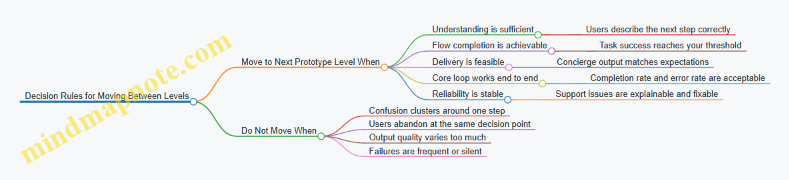
Practical Example: A Four Level Path for a Simple Product
Imagine a tool that helps freelancers create invoices from past work logs.
- Level 0 mockups: show invoice preview and “select work items” screen; test whether users understand what will be included.
- Level 1 interactive prototype: simulate selecting items and editing line items; test whether users can complete invoice creation.
- Level 2 concierge MVP: users submit logs, a human generates invoices; test conversion and whether invoices match expectations.
- Level 3 functional MVP: automate invoice generation and delivery; instrument completion and error events.
Each level answers a different question. When you keep that separation, you avoid the common trap of building a “more real” product before you’ve earned the right to do so.
5.4 Implementing Minimum Viable Features with Guardrails
A minimum viable feature is the smallest slice that can produce evidence about a specific learning goal. Guardrails are the constraints that keep the feature from turning into a mini product with hidden complexity. The trick is to design the feature so it can be used safely, measured reliably, and retired quickly.
Start with the Learning Goal, Not the Feature
Before writing any UI or code, restate the learning goal as a decision. For example: “Do users understand the value in under 30 seconds?” or “Will people complete signup when the first step takes under 2 minutes?” Then translate that goal into a single observable behavior.
A practical way to keep scope honest is to define three boundaries:
- In scope: the exact user action you must observe.
- Out of scope: everything that would distract from that action.
- Non-negotiable: the minimum data you must capture to interpret results.
Define Guardrails as Explicit Constraints
Guardrails prevent two common failures: collecting unusable data and creating a feature that can’t be safely tested.
Use guardrails in four categories:
- Experience guardrails keep the flow short and consistent.
- Data guardrails ensure events are logged with the right identifiers.
- Operational guardrails limit load, failure modes, and support burden.
- Decision guardrails specify what result means “keep,” “change,” or “stop.”
Mind Map: Guardrails for MVP Features
Build the Feature with a Single Primary Path
Design the MVP feature so users mostly do one thing. If you need multiple paths, pick one as the default and treat the others as “not for this test.”
Example: Testing onboarding comprehension.
- In scope: show one value statement, then ask for one confirmation.
- Out of scope: dashboards, settings, integrations.
- Guardrail: if the user hesitates, show a short hint and still allow completion.
This keeps the test interpretable because the measured behavior maps to the learning goal.
Instrument with Data Guardrails That Survive Reality
Instrumentation is where MVPs often lie. Users may refresh pages, lose connectivity, or abandon mid-flow. Guardrails make event capture robust.
Minimum instrumentation checklist:
- Event names: consistent and stable \( e.g.,
signup_started,signup_completed\). - Required properties:
experiment_id,variant,user_id(or anonymous id), and a timestamp. - Step identifiers: include which step the user was on when the event fired.
- Idempotency: ensure repeated clicks don’t create duplicate “completed” events.
Example: A “Create Account” button.
- Guardrail: disable the button after click and re-enable only on failure.
- Data guardrail: log
signup_completedonly when the backend confirms success.
Add Operational Guardrails So Testing Doesn’t Break Things
Operational guardrails keep the team from spending the experiment budget on firefighting.
Common guardrails:
- Rate limits: cap requests per user or per test cohort.
- Fallback behavior: if a dependency fails, show a clear message and record
dependency_failed. - Manual override: allow a tester to grant access or reset state without redeploying.
Example: Concierge-like MVP behind a form.
- If the form submission triggers a manual review, guardrail the workflow with a queue status and a “request received” confirmation.
- Record whether the request was accepted or rejected so you can separate “user didn’t submit” from “system couldn’t process.”
Use Decision Guardrails with Thresholds and Stop Rules
Guardrails should include what you do with the results. A threshold is not a vibe; it’s a rule.
Example decision rules for a signup comprehension test:
- Continue: at least 40% of users who reach the value statement complete signup.
- Change: completion is below 40% but above 25%; adjust the value statement and rerun.
- Stop: below 25%; the problem is likely messaging clarity or target fit, not a minor UI issue.
Also define stop rules for data quality:
- Stop if event tracking is missing for more than 5% of sessions.
- Stop if the primary path time exceeds a set limit due to performance issues.
Mind Map: MVP Feature Implementation Flow
Example: Guardrailed MVP Feature in Practice
Suppose the learning goal is whether users can successfully “request a demo” after seeing a new pricing explanation.
- Feature: a pricing explanation screen plus a single “Request Demo” form.
- Guardrails:
- One primary path; no navigation to other pages during the test.
- Form submit button disabled during submission.
- If the submission service fails, show “Try again” and log
demo_request_failed. - Log
pricing_viewed,demo_request_started, anddemo_request_completedwithvariant.
- Decision wiring: if completion rate is below the threshold, you change the pricing explanation; if it’s healthy but quality is low, you adjust the form questions.
This approach keeps the feature small while ensuring the evidence is clean enough to make a real decision.
5.5 Instrumenting MVPs to Capture Evidence During Use
Instrumenting an MVP means designing measurement so you can answer specific questions about how people actually use the product. The goal is not to collect everything; it is to collect the right signals with enough context to make decisions.
Start with the learning goal. If your riskiest assumption is “users will complete the core workflow,” then your instrumentation must observe the workflow’s start, each critical step, and the completion outcome. If your assumption is “users will understand the value quickly,” then you need signals tied to comprehension, such as time to first meaningful action and whether users reach the “I get it” moment.
Next, translate learning goals into events. An event is a discrete thing that happened, like signup_started, template_selected, or invoice_submitted. Keep event names consistent across experiments so you can compare results later without rewriting dashboards. For each event, define what properties you will attach, such as plan_type, source, or device_type. Properties help you segment behavior without guessing after the fact.
Then map events to a funnel and a state model. A funnel answers “how many people reach each stage?” A state model answers “what state is the user in right now?” For example, a simple onboarding state model might be invited → account_created → workspace_created → first_project_created. If users get stuck, you can see where the state stops changing.
Mind Map: Evidence Design for MVP Instrumentation
Mind Map: Event Taxonomy and Properties
Practical Example: A Scheduling MVP
Imagine an MVP that lets small teams schedule appointments. Your core workflow might be: create availability → share link → book slot. Instrument these events:
availability_createdwithtimezoneandduration_minutesshare_link_generatedwithaudience_typebooking_startedwithslot_idbooking_confirmedwithpayment_requiredandprice_shownbooking_failedwitherror_code
Now add friction events that explain why the funnel breaks. If booking_failed spikes with error_code=slot_unavailable, you know the problem is availability freshness, not user intent.
Data Quality Checks That Prevent False Conclusions
Instrumentation fails in predictable ways. First, deduplicate events. If a button triggers twice due to retries, you will overcount steps and think conversion improved when it didn’t. Use an idempotency key for actions that can be repeated, like booking_confirmed tied to a booking_id.
Second, ensure timestamps are consistent. If client clocks drift, funnel timing becomes misleading. Prefer server timestamps for event ordering, and store client time as a property only if you need it for debugging.
Third, log failures with enough detail to reproduce. A payment_failed event should include error_code, payment_provider, and whether the user reached the payment screen. Without that, you can’t separate “user didn’t try” from “user tried and failed.”
Turning Instrumentation into Decisions
Finally, connect metrics to decision rules. For the scheduling MVP, you might decide that success requires at least 20% of shared-link recipients to reach booking_confirmed within the first session window. If the funnel shows high booking_started but low booking_confirmed, you focus on checkout or confirmation logic. If both are low, you revisit the value proposition or the share-link targeting.
A good instrumentation setup makes the next experiment easier, not harder. When event definitions are stable and properties are consistent, you can compare cohorts across iterations without rebuilding your measurement story from scratch.
6. Rapid Iteration Using Build Measure Learn Loops
6.1 Establishing Experiment Cadence and Team Operating Rhythm
A good experiment cadence is less about speed and more about keeping learning continuous. When the team knows what happens each week, experiments stop being “special projects” and become a normal way of working.
Start with a Shared Rhythm
Cadence has two layers: the calendar rhythm and the decision rhythm. The calendar rhythm answers when work happens; the decision rhythm answers when you stop and decide.
A practical weekly rhythm for a small product team:
- Monday: confirm the next experiment’s learning goal, target users, and success thresholds.
- Tuesday: run the smallest possible setup step (landing page live, prototype ready, interview schedule confirmed).
- Wednesday: execute the experiment action (calls, signups, usage test, concierge delivery).
- Thursday: collect results and check data quality (did the right people participate, were metrics tracked correctly).
- Friday: hold a short review and decide the next move.
This structure reduces the “everything is urgent” problem. It also prevents the common failure mode where experiments are launched but never reviewed because the team is busy building the next thing.
Define Roles So Work Doesn’t Stall
Operating rhythm breaks when responsibilities are fuzzy. Assign three roles for each experiment:
- Experiment Owner: accountable for the learning goal, success criteria, and final decision.
- Execution Lead: ensures the experiment is run as designed and that instrumentation or scripts are ready.
- Evidence Reviewer: focuses on data quality and whether the results actually answer the question.
You can rotate roles to build shared competence, but keep the responsibilities consistent during a given experiment. If the same person owns and reviews every time, bias can creep in; if nobody owns, decisions get delayed.
Use a Two-Stage Plan
Many teams plan experiments like they plan product roadmaps: big scope, long lead time, and vague outcomes. A better approach is a two-stage plan.
- Experiment Setup Plan (1–2 days): confirm assumptions, finalize the hypothesis, and prepare the minimum materials.
- Experiment Execution Plan (2–3 days): run the action, capture evidence, and stop when the success threshold is reached or the timebox ends.
Timeboxing matters because it forces clarity. If you can’t finish within the window, the experiment is probably too large or too many variables are mixed together.
Make Decisions with Explicit Gates
A cadence without decision gates becomes a reporting ritual. Use gates that trigger specific actions.
Gate examples:
- If the experiment meets the success threshold, schedule the next build or rollout step.
- If it fails, decide whether to revise the hypothesis, change the target segment, or stop the idea.
- If results are inconclusive, identify what evidence is missing and run a narrower follow-up.
To keep decisions grounded, require the review to answer three questions:
- What did we expect to happen?
- What actually happened, and how confident are we?
- What is the next experiment or product change?
Mind Map: Experiment Cadence and Operating Rhythm
Example Weekly Flow with Concrete Artifacts
Imagine a team testing whether a new onboarding message increases activation.
- Monday: The owner writes a one-paragraph learning goal: “Users who see Message B will reach the first meaningful action more often than Message A.” The evidence reviewer confirms the activation definition and the tracking event name.
- Tuesday: Execution lead updates the onboarding variant switch and verifies analytics in a staging environment.
- Wednesday: The experiment runs for a fixed number of sessions or until a timebox ends. The team also logs any unusual events, like a broken link.
- Thursday: Evidence reviewer checks that both variants received comparable traffic sources and that the activation event fired.
- Friday: Review meeting produces a decision: either proceed to a broader rollout, revise the message, or test a different segment.
Notice what’s missing: no one debates for hours whether the experiment “felt promising.” The rhythm forces the team to compare expected and actual outcomes against the predefined thresholds.
Keep the System Lean with a Simple Backlog
Cadence works best when the team has a small, visible experiment backlog. Limit it to experiments that are ready for the next setup stage. If an item can’t be started within a day or two, it belongs in a longer planning queue, not in the active cadence.
A lightweight backlog format:
- Learning goal
- Hypothesis
- Target users
- Success threshold
- Estimated setup time
- Estimated execution time
When the backlog is tight, the weekly rhythm stays real. When it grows messy, the team starts skipping gates, and the cadence quietly collapses.
6.2 Collecting Data from Product Usage and Customer Interactions
Collecting evidence is the part where your assumptions stop being opinions and start being measurable. The goal is not to capture everything; it’s to capture the right signals with enough context to interpret them later. A useful starting point is to align data collection to the specific learning goal from the experiment plan, then decide what you need from product usage, what you need from customer interactions, and what you need from both.
Data Types That Answer Different Questions
Product usage data answers questions about behavior: what people did, in what order, and how often. Customer interaction data answers questions about meaning: why they did it, what they expected, and what confused them. When you combine them, you can distinguish “they didn’t understand” from “they understood but didn’t proceed.”
Usage data typically includes event logs (clicks, page views, button presses), session metadata (time on task, navigation paths), and outcomes (signup completed, purchase made, ticket resolved). Interaction data typically includes interview notes, support transcripts, usability test recordings, and structured feedback forms.
Mind Map for Evidence Collection
Instrumentation That Produces Interpretable Events
Before collecting, define event names and properties so you can compare results across iterations. For example, if you’re testing onboarding clarity, define an event like onboarding_step_completed with properties such as step_name, entry_source, and experiment_variant. If you only record a generic completed event, you’ll lose the ability to pinpoint where confusion happened.
A practical checklist for usage instrumentation:
- Event granularity: record key steps, not every micro-click.
- Sequence coverage: ensure you can reconstruct the path from entry to outcome.
- Outcome linkage: include a clear terminal event \( e.g.,
trial_started,order_submitted\). - Friction signals: capture errors \(
form_validation_failed\) and retries \(submit_attempted\). - Variant tagging: attach
experiment_variantto every relevant event.
Example: Suppose your MVP includes a “request access” form. You log request_access_viewed, request_access_submitted, and request_access_error with error_type. If submissions drop but error events rise, the issue is likely form validation or required fields, not customer disinterest.
Capturing Context Without Over-Collecting
Usage events become useful when you can interpret them in context. Add lightweight user context that you already have: plan type, role, device category, or account age. Avoid collecting sensitive free-text fields unless the experiment explicitly needs them and you have a clear handling plan.
A simple rule: if a property doesn’t help explain a decision, don’t store it. This keeps analysis faster and reduces the chance of misreading noise as signal.
Customer Interaction Data That Stays Structured
Customer conversations are messy by nature, so structure is what makes them comparable. Use a consistent interview guide tied to the experiment’s hypotheses. For usability tests, define tasks and success criteria, then capture both observations and participant reasoning.
A useful approach is to record three layers:
- What happened: the observable action or quote.
- What they expected: what they thought the system would do.
- What blocked them: the specific confusion or friction.
Example: During a test of a pricing page, a participant says, “I can’t tell if the monthly price includes support.” You note the exact moment they hesitated, the section they reread, and the wording that triggered uncertainty. Later, you can compare whether the same confusion appears in support tickets using similar phrasing.
Triangulation with a Decision Lens
Triangulation means you don’t treat each data source as a verdict. You use them to narrow the explanation.
- If usage shows a drop in
trial_startedand interviews mention unclear steps, you have a coherent story. - If usage shows drop but interviews report confidence, you may have a hidden constraint like payment failure or slow loading.
- If usage looks fine but support volume spikes, the problem may be misunderstanding after the first success event.
To keep this systematic, write a short “evidence-to-decision” mapping for each hypothesis: which events and which interaction themes count as confirmation, and which count as disconfirmation.
Data Quality Checks Before You Trust the Results
Common failure modes include missing events, inconsistent definitions, and biased sampling. Run a quick validation pass:
- Confirm event counts match expectations for the experiment window.
- Verify variant assignment is correctly recorded.
- Check that funnels can be reconstructed end-to-end.
- Review a small sample of raw interaction notes to ensure coding categories fit.
Example: If request_access_submitted is missing for one variant, your analysis might incorrectly conclude that the variant hurts conversion. The fix is instrumentation coverage, not a product change.
A Minimal Workflow for Collecting and Organizing Evidence
Collecting works best when it’s repeatable. Use a simple workflow:
- Define: event list and interaction guide tied to the learning goal.
- Instrument: implement tracking and variant tagging.
- Collect: gather usage data and interaction notes during the same experiment window.
- Code: label interaction themes using consistent categories.
- Triangulate: connect themes to specific funnel steps and outcomes.
- Decide: apply the prewritten decision rule using both evidence types.
When you do this, data collection stops being a scavenger hunt and becomes a controlled process that supports clear decisions.
6.3 Analyzing Results With Clear Decision Rules
After you collect data from a Build Measure Learn loop, the hard part is not analysis—it’s deciding. Clear decision rules prevent “interesting” results from turning into endless iteration. The goal is simple: translate evidence into one of a few explicit actions.
Step 1: Restate the Learning Goal and Hypothesis
Start by copying the exact learning goal and hypothesis into your analysis notes. If your hypothesis was “Users will complete onboarding within 2 minutes,” your decision rules must reference that same threshold. If the hypothesis was about messaging, your rules must reference the metric that reflects messaging performance, not a generic engagement number.
Example: You ran an experiment on a new pricing page. Hypothesis: “At least 8% of visitors will start a trial.” Your analysis should focus on trial-start rate, plus the conditions that could distort it (bot traffic, broken checkout, or a tracking change).
Step 2: Verify Data Quality Before Interpreting
Before concluding anything, check whether the experiment produced trustworthy evidence.
- Instrumentation consistency: Did the event names and tracking logic remain stable across variants?
- Exposure integrity: Did users actually see the intended variant? If you used feature flags, confirm flag assignment rates.
- Sample sufficiency: If one variant has far fewer exposures, your results may be noisy.
- Timing effects: If the experiment ran across a holiday or a site outage, segment by time window.
If data quality fails, the decision rule should say “pause and fix measurement,” not “pivot or persevere.”
Step 3: Choose the Decision Lens
Decision rules should use a lens that matches the risk.
- Go/No-Go thresholds: Use when you have a clear target metric and a binary decision.
- Guardrails: Use when you must avoid harming a secondary metric (like support tickets or churn).
- Winner selection: Use when you compare multiple variants and choose the best performer.
- Learning-first decisions: Use when the experiment is mainly to reduce uncertainty, even if the metric doesn’t move much.
A practical approach is to combine these: pick a primary metric for the decision, then add guardrails to prevent “winning” while causing damage.
Step 4: Apply Decision Rules Using a Simple Workflow
Use a consistent workflow so the team doesn’t improvise under pressure.
- Compute the primary metric for each variant.
- Compare against the threshold or against the control.
- Check guardrails for unacceptable regressions.
- Decide action using the decision rule.
- Record the reasoning so the next experiment starts from a clean baseline.
Mind Map: Decision Rules Workflow
Step 5: Use Concrete Decision Rules
Decision rules should be written as plain statements. Here are templates you can adapt.
Go/No-Go rule (primary metric):
- “If trial-start rate is ≥ 8% and the control is not harmed on guardrails, ship the change.”
- “If trial-start rate is < 8% after data quality checks pass, revert and revise the hypothesis.”
Guardrail rule (secondary metric):
- “If support tickets per 100 trials increase by more than 10%, do not ship even if trial-start improves.”
Winner selection rule (multiple variants):
- “Choose the variant with the highest primary metric among those that meet guardrails; otherwise, rerun with corrected measurement or a narrower audience.”
Example: Interpreting a Confusing Result
You test two onboarding flows. Variant A shows a higher activation rate, but the guardrail metric—time-to-first-value—gets worse.
- Primary metric: activation rate
- Guardrail: time-to-first-value
- Decision rule: ship only if activation improves and time-to-first-value does not worsen beyond a limit
Result: Variant A activation is +2 points, but time-to-first-value increases by 25%.
Action: do not ship. The analysis should conclude that the change improved one step while degrading the path to value. The next experiment should isolate the specific step causing delay, such as reducing the number of required fields or changing the order of prompts.
Step 6: Document the Decision Like a Contract
A good analysis note answers three questions without hand-waving.
- What did we observe? Include the metric values and guardrail status.
- What decision rule triggered the action? Quote the exact rule.
- What did we learn about the assumption? Tie learning back to the original hypothesis.
Mind Map: Decision Rule Statements
Clear decision rules turn analysis into momentum. You stop debating opinions and start executing based on evidence, with guardrails that keep “better numbers” from causing hidden costs.
6.4 Running Controlled Comparisons Between Variants
Controlled comparisons answer a simple question: “If we change X, does Y change in a way we can trust?” The trick is to make the comparison fair. Fair means the only systematic difference between groups is the variant itself; everything else stays as similar as possible.
What “Controlled” Means in Practice
A controlled comparison has three ingredients:
- A unit of assignment: who or what gets a variant (user, account, session, order).
- A rule for assignment: how units are split into variants (random, stratified, or matched).
- A decision rule: how you conclude which variant wins based on measured outcomes.
Example: You’re testing two onboarding screens for a B2B tool. The unit is the account (not individual clicks). If you assign variants per user inside the same account, you risk cross-contamination because teammates share context and workflows.
Choosing the Right Unit of Analysis
Start with the unit that matches how the outcome happens.
- If the outcome is account-level (trial conversion, purchase), assign at the account level.
- If the outcome is session-level (feature usage within a session), assign at the session level.
- If the outcome is event-level (button clicks), assignment can be event-level, but you must still prevent the same user from seeing multiple variants in a way that confuses interpretation.
A quick sanity check: if a unit can realistically experience both variants, your comparison is not controlled.
Variant Design That Avoids Accidental Differences
Variants should differ only where you intend.
- Keep copy length, layout density, and visual hierarchy consistent unless those are the variables.
- Freeze unrelated elements: same pricing text, same form fields, same error messages.
- Use the same instrumentation for all variants so measurement doesn’t change with the UI.
Example: Variant A uses a shorter headline and a different button label. If Variant B also changes the form order, you can’t tell whether the headline or the order caused the difference.
Assignment Rules and Randomization
Randomization reduces bias, but it must be implemented correctly.
- Simple randomization works when units are similar.
- Stratified randomization helps when you know a key factor affects outcomes (plan type, region, traffic source).
Example: You split accounts into variants, but you also stratify by “new vs returning” because returning accounts convert more often. Without stratification, one variant might accidentally get more returning accounts.
Handling Contamination and Learning Effects
Contamination happens when exposure to one variant influences behavior in another.
- Lock assignment per unit for the duration of the test.
- Avoid “preview” exposures that leak information.
- If you must reassign (rare), treat it as a separate experiment with its own rules.
Learning effects occur when users change behavior because they notice the test. You can reduce this by keeping variants subtle and ensuring the test doesn’t create obvious inconsistencies.
Measuring Outcomes and Defining Success
Pick outcomes that match the learning goal.
- Primary metric: the main decision driver (e.g., trial-to-paid conversion).
- Guardrail metrics: metrics you don’t want to worsen (e.g., support tickets, checkout failures).
Example: If onboarding Variant B increases activation but also increases form errors, you may still prefer A depending on the guardrail thresholds.
Decision Rules That Prevent “Winner by Noise”
A decision rule should specify:
- When you stop (time window or minimum sample size).
- How you compare (difference in rates, lift, or effect size).
- What counts as meaningful (a threshold for the primary metric).
Even without heavy statistics, you can avoid common mistakes:
- Don’t change the variants mid-test.
- Don’t peek repeatedly and then adjust the test based on early results.
- Report the full outcome distribution, not just the headline number.
Mind Map for Controlled Comparisons
Example: Two Onboarding Variants for Activation
You test Variant A and Variant B for a SaaS onboarding flow.
- Unit: account
- Assignment: random split, stratified by acquisition channel
- Primary metric: activation within 7 days (defined as completing the first key workflow)
- Guardrails: onboarding drop-off rate and support ticket rate
- Decision rule: run until each variant reaches the planned sample size; choose the variant with the higher activation rate and no guardrail regression beyond the agreed limit.
If Variant B shows higher activation but also a higher drop-off, you don’t “declare victory.” You compare the tradeoff using the guardrail threshold you set before the test.
Example: Controlled Comparison for Pricing Page Messaging
You test two pricing page messages.
- Unit: session for anonymous users, account for logged-in users
- Assignment: random per unit, but logged-in users keep the same variant across sessions
- Primary metric: start of checkout
- Guardrails: pricing page bounce rate and checkout error rate
This split prevents a logged-in user from seeing one message in one session and the other in the next, which would blur interpretation.
Common Failure Modes to Watch For
- Variant drift: engineers tweak one variant “just to fix a bug” during the test.
- Instrumentation mismatch: event names differ between variants.
- Unequal exposure: one variant is served more often due to caching or rollout logic.
Controlled comparisons aren’t about being rigid for its own sake. They’re about making the evidence clean enough that your next decision is about the product, not the experiment.
6.5 Documenting Learnings So Teams Reuse What Works
Teams waste time when learning stays trapped in Slack threads, meeting notes, or a single person’s memory. Documentation turns experiments into reusable decision material: what you tested, what you observed, what you concluded, and what you did next.
The Purpose of Experiment Documentation
Good documentation answers four questions quickly. First, what was the risky assumption? Second, what evidence did you collect and how did you measure it? Third, what decision did the evidence support? Fourth, what should the team do differently next time? If a reader can’t answer these in one pass, the document is mostly storytelling.
A useful rule: write for the next experiment, not for the last one. That means emphasizing decision inputs and constraints, such as sample size, time window, and the exact funnel step where drop-off occurred.
A Simple Learning Record Template
Use a consistent structure so people can scan instead of search. Keep it short enough to update after every experiment.
- Assumption and risk: One sentence describing what might be wrong.
- Hypothesis: The testable claim, including the expected direction.
- Experiment design: What changed, who was exposed, and for how long.
- Evidence: Metrics, qualitative notes, and any notable anomalies.
- Decision rule: The threshold or logic used to choose continue, iterate, or stop.
- Outcome: The decision taken and why it followed from the evidence.
- Next action: The next experiment, including what will be different.
- Artifacts: Links or filenames for the landing page, script, dashboard, or prototype.
Mind Map of What to Capture
Turning Raw Results into Reusable Insights
Raw numbers rarely travel well. Convert them into statements that other experiments can build on.
-
Name the failure mode. If conversion was low, specify where the process broke: message mismatch, unclear next step, trust gap, or friction in the form. For example, a landing page might show 40% click-through but only 2% sign-up; that pattern often points to unclear value delivery or a form that feels too heavy.
-
Separate signal from noise. If the experiment ran for two days during a holiday week, record that context. A later team can decide whether to trust the magnitude or treat it as directional.
-
Record the measurement method. If “activation” meant the first time a user completed a setup checklist, write that definition. Otherwise, future teams will compare apples to oranges.
-
Capture the “why we think so.” Keep it grounded in evidence. For instance: “Users asked about pricing before starting” is more actionable than “pricing confused them.”
Example Learning Record
Assumption and risk: People in our target role will pay for a weekly reporting email if it saves time.
Hypothesis: If the landing page emphasizes time saved with a concrete example, then sign-up conversion will be at least 5%.
Experiment design: Two landing page variants ran for 10 days. Variant A used a generic headline. Variant B used a specific scenario: “Get a weekly summary in 3 minutes.” Audience came from the same ad set.
Evidence: Variant A: 1,200 visits, 38 sign-ups (3.2%). Variant B: 1,150 visits, 69 sign-ups (6.0%). Qual notes from 12 follow-up emails: most questions in A were about “how it works,” while B triggered questions about “how to connect data.”
Decision rule: Continue if sign-up conversion reaches 5% or higher with no major data quality issues.
Outcome: Continue. The evidence supports the time-saved framing.
Next action: Build a concierge MVP that demonstrates the “connect data” step in the first interaction, then test whether that reduces follow-up questions and increases completion rate.
Artifacts: landing_A.html, landing_B.html, ad set report, follow-up email log.
Making Documentation Easy to Reuse
Documentation should be searchable and consistent. Use tags like segment, assumption type (problem, demand, usability, pricing), and experiment type (landing page, concierge, prototype). Then add a short “lessons by failure mode” section at the end of each record.
For example:
- Low conversion after click: likely value clarity or trust gap.
- High interest, low completion: likely setup friction or unclear first step.
- Good activation, weak retention: likely mismatch between early promise and ongoing value.
Mind Map of Reuse Mechanics
A Practical Cadence
Update the learning record immediately after the experiment closes, while the team still remembers what felt confusing. Then do a brief review in planning: one person reads the assumption, another reads the decision rule, and a third states the next experiment’s change. This keeps documentation from becoming a museum exhibit and turns it into a working tool.
7. Metrics for Market Validation and Product Learning
7.1 Choosing North Star Metrics and Supporting Metrics
A North Star Metric (NSM) is the single number that best represents the value customers get from your product. Supporting metrics are the smaller numbers that explain how you’re getting there. The trick is to make the NSM hard to game and easy to interpret.
Start with Customer Value, Not Activity
Your NSM should reflect a customer outcome that improves as your product improves. If your product helps users complete a task, the NSM should move when tasks are completed, not when users click around.
Example: A scheduling tool.
- Bad NSM: “Number of logins.” Logins can rise even if scheduling fails.
- Better NSM: “Completed bookings per active team.” Bookings reflect successful outcomes.
To choose well, write one sentence: “When this metric increases, customers experience more value.” If you can’t write that sentence clearly, the metric is probably measuring effort.
Define the NSM with a Decision Rule
A good NSM comes with a decision rule that tells the team what to do when it moves. Without a rule, the metric becomes a scoreboard with no coaching.
Use a simple template:
- If NSM increases by X% over Y weeks while quality doesn’t drop, continue the current direction.
- If NSM stays flat or drops, investigate the supporting metrics tied to the NSM.
Example decision rule: “If completed bookings per active team increases by 10% over 4 weeks and cancellation rate does not increase, we keep investing in onboarding improvements.”
Avoid Vanity Metrics by Checking Causality
Vanity metrics look impressive but don’t reliably connect to customer value. A quick test: can you change the metric without improving the customer outcome? If yes, it’s not a safe NSM.
Common vanity traps:
- Measuring usage instead of outcomes.
- Measuring totals instead of rates (totals grow as the user base grows).
- Measuring “time spent” without a clear link to success.
Choose Supporting Metrics as a Causal Chain
Supporting metrics should form a chain from product behavior to customer outcome. Each supporting metric should answer one question that the NSM alone cannot.
A practical approach is to split supporting metrics into three layers:
- Input signals: what users do that precedes success.
- Conversion signals: where users succeed or fail in key steps.
- Quality signals: whether the outcome is actually good.
Example: For “completed bookings per active team,” supporting metrics might include:
- Input: “Invites sent per active team.”
- Conversion: “Invite acceptance rate.”
- Quality: “Cancellation rate within 24 hours.”
If invites rise but acceptance falls, the problem is targeting or messaging. If acceptance rises but cancellations rise, the problem is scheduling reliability.
Mind Map of Metric Design
North Star and Supporting Metrics Mind Map
Build a Metric Tree from the NSM Backwards
Start with the NSM definition, then ask: “What must be true for this to increase?” Work backward until each supporting metric is actionable.
Example metric tree for a learning app where the NSM is “lessons completed per active learner”:
- NSM: Lessons completed per active learner
- Input: Lessons started per active learner
- Supporting: Lesson start rate
- Conversion: Lesson completion rate
- Supporting: Completion within first session
- Quality: Learning retention proxy
- Supporting: Correct answers on a short follow-up quiz
- Input: Lessons started per active learner
Notice the quality signal is not “more time in the app.” It’s a check that completion corresponds to understanding.
Keep Measurement Boundaries Tight
Define who is included and what counts.
- Population: “Active team” might mean teams with at least one invite sent in the last 14 days.
- Event definition: “Completed booking” might require a confirmed time slot and a non-canceled status.
- Time window: choose a window that matches the customer’s decision cycle.
If your definitions are fuzzy, teams will argue about numbers instead of improving outcomes.
Use Segments to Prevent Misleading Success
A single NSM can hide uneven progress. Supporting metrics help, but segmentation also matters.
Example: If NSM rises overall, but only because new users convert while existing users churn, the chain will show it. Segment by:
- acquisition channel
- plan tier
- onboarding cohort
- geography or language (only if it affects behavior)
The goal isn’t to create dashboards for every group. It’s to ensure the NSM increase corresponds to broad value, not a narrow slice.
Summary Checklist
- NSM reflects customer value and has a decision rule.
- Supporting metrics form a causal chain from behavior to outcome.
- Metrics are defined as rates with clear event boundaries.
- Vanity checks confirm you can’t game the NSM without improving value.
- Segments confirm the NSM increase is meaningful across key cohorts.
7.2 Defining Activation Retention and Engagement Measures
Activation, retention, and engagement are three different questions that teams often mash together. Activation asks, “Did the user reach the first meaningful moment?” Retention asks, “Do they come back and keep using it?” Engagement asks, “How do they spend their time while they’re here?” If you measure all three with the same metric, you’ll get answers that are technically true and practically useless.
Activation Measures
Start by defining the activation event as a user action that signals value has been experienced. The event should be observable, repeatable, and tied to the job the user came for.
Activation event examples
- B2B onboarding tool: A user creates their first workflow and runs it successfully.
- Meal planning app: A user completes a meal plan for at least 3 days.
- Support ticket tool: A user connects an inbox and resolves their first ticket.
Activation rate is usually calculated as:
- Activation Rate = Users who performed activation event ÷ New users (or invited users) in the same period.
To avoid misleading results, define the denominator carefully. If your “new user” includes people who never reach the product (for example, they sign up but don’t log in), your activation rate will look worse than the experience you actually control.
Guardrails for activation
- Require success, not just clicks. “Run workflow successfully” beats “clicked Run.”
- Use a time window that matches your expected time-to-value. If value typically happens within 24 hours, measure activation within 24 hours.
- Segment activation by acquisition source or persona so you can tell whether onboarding is failing or targeting is off.
Retention Measures
Retention measures whether users keep returning after activation. The most common approach is cohort retention.
Cohort retention example
- Pick a cohort: users who activated during the week of 2026-02-10.
- Measure whether each user returns in later weeks.
Weekly retention example
- Week 1 Retention = Users from the cohort with any qualifying activity in days 8–14 ÷ Total cohort users.
Qualifying activity should be defined as a meaningful action, not just “logged in.” For a scheduling app, “created or updated a schedule” is more informative than “opened the app.”
Retention types to choose from
- Behavioral retention: based on product actions.
- Outcome retention: based on achieving a result, like “resolved a ticket” or “completed a project.”
Outcome retention is harder to measure consistently, but it can be more aligned with value. If you can’t measure outcomes reliably yet, use behavioral retention and keep the outcome definition ready for later.
Engagement Measures
Engagement answers “What are they doing when they’re active?” It’s easy to over-measure here, so pick a small set of engagement metrics that map to your core use.
Engagement metric examples
- Depth: number of meaningful actions per active user (e.g., workflows created per week).
- Breadth: number of distinct features used (e.g., inboxes connected, templates used).
- Recency: time since last meaningful action.
- Stickiness: active days per week.
A practical rule: engagement metrics should be explainable in one sentence to a teammate who hasn’t seen the product. If you can’t, the metric probably measures activity rather than value.
Mind Map of Activation, Retention, and Engagement
Putting It Together with a Simple Example
Imagine a tool where users get value by creating their first “report.”
- Activation event: report created and exported successfully.
- Activation rate: users who reach that event within 48 hours.
- Retention activity: any report created or exported in the following weeks.
- Engagement: average number of exports per active user and recency of last export.
If activation is low, focus on onboarding and the path to the first successful report. If activation is fine but retention is low, users are reaching value but not finding ongoing reasons to return. If retention is fine but engagement is shallow, they may be using the tool once and not exploring the parts that support repeat use.
Common Measurement Pitfalls
- Counting “activation” too early: if the event happens before success, you’ll inflate activation while users still struggle.
- Using login as retention: it measures curiosity, not value.
- Changing definitions midstream: you’ll break comparisons and confuse decisions.
- Mixing segments without checking: a single blended metric can hide a persona that’s doing well and another that’s failing.
With clear definitions and a small set of metrics, activation, retention, and engagement become a coherent system rather than a pile of numbers. That coherence is what lets teams make decisions without guessing.
7.3 Measuring Acquisition Channels and Cost to Learn
Acquisition measurement starts with a simple question: “How many people did we reach, and what did they do next?” The trick is to measure that chain in a way that supports decisions about which channel to fund, which message to change, and which experiment to stop.
Acquisition Channels as Testable Paths
An acquisition channel is not just a source of traffic; it’s a path with steps. For example, a paid search channel typically includes: ad impression → click → landing page view → signup → activation. Each step can fail for different reasons, so you measure step-by-step rather than only totals.
A practical way to structure this is to define a funnel per channel and per experiment. If you run two landing page variants on the same channel, you keep the channel constant and compare outcomes. If you run the same landing page across two channels, you keep the landing page constant and compare acquisition behavior.
Cost to Learn as an Experiment Budget
Cost to learn is the amount of money (and time) spent to reduce uncertainty about a specific assumption. It’s not the same as customer acquisition cost, because you may stop early when the evidence is clear.
Define the learning target first, then compute cost to learn for the experiment that tests it. For instance, if the assumption is “Email outreach converts better than cold ads for a B2B pilot,” the cost to learn includes the outreach tool cost, staff time for sending and follow-ups, and any landing page costs used to capture responses.
Core Metrics That Actually Help Decisions
Use a small set of metrics that map to decisions:
- Reach and exposure: impressions, ad views, or number of contacts attempted.
- Engagement: click-through rate, open rate, reply rate.
- Conversion: signup rate, meeting booked rate, trial started rate.
- Activation proxy: the first meaningful action after signup (for example, uploading a file, connecting an integration, or completing a setup step).
- Cost: spend per click, cost per signup, and cost per activated user.
Then add cost to learn as a roll-up for the experiment. A simple formula is:
- Cost to Learn = Total Experiment Spend + Allocated Labor Cost ÷ Number of Decisions Supported
“Decisions supported” can be one per experiment if you only use the result to choose continue/stop or to pick between two variants.
Attribution Without the Headaches
Attribution is where teams accidentally measure vibes. For early-stage experiments, prefer single-touch attribution tied to the experiment ID. When someone signs up, store the channel and variant that generated the signup.
If you run a landing page experiment, include a unique parameter in the link so the signup record knows which variant they saw. If you run email experiments, tag each email batch with a variant ID.
This approach won’t perfectly explain multi-touch journeys, but it does support the decisions you’re making during experimentation.
Mind Map of Measurement Components
Mind Map Measuring Acquisition Channels and Cost to Learn
Example 1: Paid Search Experiment
Suppose you test two ad messages (A and B) that send to the same landing page. You spend $800 total across both variants.
- Variant A: 1,000 clicks, 80 signups, 20 activated users
- Variant B: 900 clicks, 90 signups, 27 activated users
Compute:
- Cost per signup: $800 ÷ (80+90) = $4.71 per signup (use per-variant splits if you track spend separately)
- Cost per activated user: $800 ÷ (20+27) = $17.39 per activated user
Now compute cost to learn for the decision “Which message improves activation?” If you treat the experiment as one decision, cost to learn is the total experiment cost (including labor) divided by 1.
The key is that you compare activation, not just signup. Signup can rise because the landing page is persuasive, while activation can stay flat if the promise doesn’t match the product.
Example 2: Outreach Channel Experiment
A team runs two outreach scripts to book demos. They contact 200 people per script.
- Script A: 30 replies, 10 demos booked, 6 demos attended
- Script B: 40 replies, 12 demos booked, 9 demos attended
If the outreach labor cost is $600 total for the experiment and tool costs are $50, total spend is $650.
Cost to learn for the decision “Which script produces attended demos?” equals $650 ÷ 1 decision. You then use attended demos as the activation proxy because it reflects real intent.
Example 3: Interpreting Results Without Overfitting
If Channel X has a lower cost per signup than Channel Y but also a lower activation proxy, you don’t declare Channel X “better.” You treat it as evidence that Channel X attracts a different audience or sets different expectations.
That’s why you keep the funnel steps. When you see where the drop happens—click to signup, signup to activation—you know whether to change the message, the landing page, or the onboarding flow.
Diagram: Funnel and Cost to Learn Flow
    flowchart TD
  A[Define Learning Target] --> B[Choose Channel and Variant]
  B --> C[Run Experiment with Tagged Attribution]
  C --> D[Measure Funnel Steps]
  D --> E[Compute Costs per Step]
  E --> F[Compute Cost to Learn]
  F --> G[Apply Decision Rule]
  G --> H[Continue, Change Variant, or Stop]
Practical Checklist for This Measurement
Before you compare channels, confirm that:
- The experiment IDs and variant tags are stored with each signup or lead.
- You measure the same activation proxy across channels.
- You compute cost to learn per experiment, not per month.
- You use decision rules tied to the learning target, not to raw volume.
When these are in place, acquisition measurement becomes less about reporting and more about making the next experiment cheaper and more informative.
7.4 Interpreting Cohorts and Segment Differences
Cohorts and segments answer different questions. A cohort groups users by a shared start condition, usually the time they first did something (signed up, activated, or made a first purchase). A segment groups users by a shared attribute (plan type, industry, acquisition channel, device, or role). You can use both together: cohorts show how behavior changes over time, while segments show where behavior differs.
Start with the simplest cohort: “week of first activation.” Suppose your product is a B2B tool and activation means the user connects an integration and creates their first workspace. You track activation-to-value within 14 days. If the cohort from last week has a 30% value rate and the cohort from two weeks ago has 22%, you’ve learned something about onboarding quality or upstream targeting. But you haven’t learned whether the improvement is universal or limited to a subset.
Next, interpret cohort curves with a decision lens. Plot the metric over time since activation (for example, day 0, day 3, day 7, day 14). A cohort that rises quickly then flattens suggests users reach value early and stop changing. A cohort that rises slowly suggests the value moment depends on later steps, like inviting teammates or completing a configuration. A cohort that drops sharply after day 3 often indicates a specific friction point, such as a permission error or missing required data.
Now bring in segment differences. Use the same cohort definition, but split by one segment at a time to avoid mixing causes. For example, split by acquisition channel: “webinar,” “partner referral,” and “cold outbound.” If the overall cohort improved but only the partner segment improved, your onboarding may be fine and your targeting changed. If every segment improved similarly, the change is more likely to be product or onboarding.
A common pitfall is comparing segments with different sizes. If one segment has 20 users and another has 2,000, the smaller segment’s swings can look meaningful when they’re mostly noise. Use a minimum sample threshold before you treat differences as real. Also check that the segment assignment is stable. If users can move between channels due to attribution rules, your segment comparison becomes a moving target.
Mind Map Cohort Interpretation Workflow
Example Interpreting Cohorts and Segments
Imagine you run an experiment on onboarding. You change the setup flow to pre-fill a template. You track “value within 14 days.” Overall, the value rate increases from 24% to 27% for the newest activation cohort.
To interpret it, split the cohort by plan tier: Free, Starter, and Business. You find:
- Free: 18% to 19% (small change)
- Starter: 26% to 31% (large change)
- Business: 35% to 36% (small change)
This pattern suggests the template helps users who already have enough context to benefit from pre-filled structure, which is more common in Starter. It also suggests the onboarding change didn’t address the biggest barrier for Free users, likely a missing “first success” step.
Next, split the same cohort by acquisition channel. Suppose Starter improved mainly in “partner referral” but not in “web search.” That points to differences in user expectations and prior knowledge. Partner referrals may bring users who understand the workflow, so the template reduces time-to-value. Web search users may still need education before the template makes sense.
Finally, validate that the cohort start event is consistent. If activation is defined as “integration connected,” but your onboarding change also increased integration success, then the cohort composition changed. The cohort might look better because more users reached activation, not because they reached value more effectively. To avoid this, compare both activation rate and value rate, and interpret them together.
Practical Rules for Reading Differences
- Compare cohorts on the same start event and the same time-since-start axis.
- Treat segment differences as hypotheses until sample size and stability are checked.
- Use supporting metrics to explain the shape of the cohort curve, not just the final number.
- When you see an improvement, ask whether it came from better conversion into the cohort, better progression within the cohort, or both.
With these habits, cohort and segment analysis stops being a dashboard exercise and becomes a structured way to locate the specific step where users succeed or stall.
7.5 Setting Thresholds for Continue Pivot or Persevere Decisions
Thresholds turn “we learned something” into “we will do something.” Without them, teams keep running experiments because stopping feels risky, not because evidence is unclear. The goal is not to demand perfect certainty; it’s to define what level of evidence is enough to choose a direction.
The Decision Framework
Start with three inputs:
- Learning goal: what must be true for the idea to work (e.g., customers will pay, users will complete onboarding, the sales motion can reach a qualified meeting).
- Risk level: how costly the wrong assumption is (e.g., wrong pricing assumption may be cheaper than wrong core problem assumption).
- Decision type: continue, pivot, or persevere. “Pivot” means changing a major component (segment, problem, channel, or value proposition), not just tweaking copy.
Then define thresholds for each learning goal. A threshold is a rule that maps observed results to a decision.
Threshold Types That Actually Work
Use thresholds that match how you collect evidence.
- Go/No-Go thresholds for demand and willingness to pay: a minimum conversion rate, sign-up-to-paid rate, or commitment rate.
- Direction thresholds for product learning: whether key funnel steps improve meaningfully after a change.
- Stability thresholds for metrics that fluctuate: require results across multiple cohorts or experiment runs.
- Cost thresholds for efficiency: cap cost per qualified outcome (e.g., cost per activated user, cost per meeting).
A common mistake is using only one metric. If you set a “go” threshold on sign-ups, you still need a threshold on activation or retention, otherwise you reward curiosity instead of value.
Mind Map for Threshold Design
Threshold Design Mind Map
Building Thresholds Step by Step
- Pick the smallest measurable outcome that represents the learning goal. For pricing, it might be “percentage of visitors who accept a paid offer.” For onboarding, it might be “percentage who complete the first meaningful action.”
- Set a baseline from prior runs or a reasonable reference. If you have no baseline, use a conservative starting point and treat the first run as calibration.
- Define the threshold relative to baseline, not in isolation. Example: “We continue if paid conversion is at least 2× the baseline and activation is not worse.”
- Add a data quality gate. If only 8 people saw the offer, you don’t have evidence; you have a story. Require a minimum sample size or minimum number of qualified sessions.
- Specify what would trigger a pivot. Pivot thresholds should be different from continue thresholds. You don’t want to pivot on noise, but you also don’t want to wait forever when the signal is consistently negative.
Concrete Example for Demand Validation
Suppose you test a B2B service with a landing page and a concierge follow-up.
- Learning goal: customers will pay for the promised outcome.
- Evidence: visitor-to-paid conversion.
- Baseline from a prior similar offer: 1% paid conversion.
Set thresholds:
- Continue if paid conversion is ≥ 2% and the sales call acceptance rate is ≥ 25%.
- Pivot if paid conversion is ≤ 1% after at least 200 qualified visitors and the acceptance rate is < 15%.
- Escalate if conversion is between 1% and 2% or if sample size is below the minimum; in that case, you run a follow-up experiment focused on the suspected bottleneck (messaging, targeting, or offer clarity).
Notice the acceptance rate guardrail. If paid conversion is low but calls are accepted, the issue is likely pricing or delivery details. If calls are not accepted, the issue is likely targeting or problem framing.
Concrete Example for Product Learning
Now consider an MVP with a key onboarding step: “create a first project.”
- Learning goal: users reach the first meaningful action.
- Evidence: activation rate.
Thresholds:
- Continue if activation improves by at least 20% relative to baseline and the drop-off between step 1 and step 2 does not worsen.
- Pivot if activation falls by more than 10% relative across two consecutive cohorts and support tickets indicate the same confusion pattern.
- Persevere if activation is stable but retention after 7 days is improving; this suggests the core value is present even if onboarding needs refinement.
Decision Hygiene That Prevents Endless Experiments
Before running an experiment, write down the thresholds and the decision rule in one place. After results, compare outcomes to thresholds without rewriting the thresholds midstream. If you need to change thresholds, treat it as a new calibration step with a new learning goal.
Finally, separate “we didn’t hit the threshold” from “we learned why.” The first triggers a decision; the second informs the next experiment. Both matter, but they serve different purposes.
8. Pricing and Packaging Experiments
8.1 Translating Value Drivers into Pricing Hypotheses
Pricing starts with value, not with a number. A pricing hypothesis is a testable statement that a specific value driver will cause a specific customer behavior at a specific price or packaging structure. If you can’t describe the value driver in plain language, you can’t measure whether pricing is working.
Step 1: Identify Value Drivers That Actually Move Decisions
Value drivers are the reasons a buyer chooses one option over another. In practice, they fall into a few buckets: time saved, cost reduced, risk lowered, revenue increased, and convenience or control gained. The key is to tie each driver to a decision point you can observe.
Example: A team building an expense-tracking tool hears “I waste time categorizing receipts.” That’s a time-saved driver. But the pricing hypothesis should connect it to a decision: “If we price per active user, customers will pay because categorization happens automatically.”
Step 2: Convert Drivers into Buyer Outcomes
A driver becomes useful when it maps to an outcome the buyer cares about. Outcomes should be measurable or at least observable through behavior.
Example: “Time saved” becomes “fewer manual steps per receipt” and “faster month-end close.” Your test can then look for reduced effort signals (usage patterns) and willingness-to-pay signals (conversion, trial-to-paid).
Step 3: Translate Outcomes into Pricing Mechanisms
Mechanisms are how you charge in a way that aligns with the outcome. Common mechanisms include per-seat, per-usage, per-transaction, tiered feature access, and volume-based pricing. Each mechanism implies a relationship between usage and value.
Example: If the outcome is “fewer manual steps,” per-seat pricing can work when each seat represents a person doing the work. If the outcome is “fewer errors,” per-transaction pricing can work when errors correlate with transaction volume.
Step 4: Write Hypotheses with Clear Variables
A strong hypothesis names: (1) the value driver, (2) the pricing mechanism, (3) the target segment, (4) the expected behavior, and (5) the decision threshold.
Template:
- Value driver: ____
- Pricing mechanism: ____
- Segment: ____
- Expected behavior: ____
- Threshold for success: ____
Example hypothesis:
- Value driver: automatic categorization reduces manual work
- Pricing mechanism: per active user with a free tier
- Segment: small teams with 5–20 employees
- Expected behavior: paid conversion rate ≥ 8% from trial
- Threshold for success: if conversion is below 8% after 200 trials, revise packaging or messaging
Step 5: Build a Mind Map of the Pricing Logic
Use this map to ensure you don’t skip from “we think it’s valuable” to “we picked a price.”
Mind Map: Pricing Hypotheses from Value Drivers
Step 6: Anticipate Confounders That Break the Test
Pricing tests fail when you measure the wrong thing or ignore friction. Common confounders include onboarding effort, unclear packaging boundaries, and mismatched billing cadence.
Example: If you test per-seat pricing but onboarding requires manual setup, low conversion may reflect onboarding friction, not weak value. To separate effects, instrument onboarding completion and compare conversion among users who finish setup.
Step 7: Choose the Smallest Experiment That Can Prove the Hypothesis
You don’t need a full billing system to test early pricing logic. Start with offer structure and commitment signals.
Example experiment flow:
- Landing page with two tiers and a clear “what you get” boundary.
- Trial signup that routes users to the matching tier based on team size.
- Measure conversion and early usage alignment with the driver.
If the value driver is “time saved,” you should see usage patterns consistent with automation before conversion. If conversion is high but usage never reflects automation, the pricing hypothesis is wrong or the driver is not the real reason for buying.
Step 8: Refine the Hypothesis Based on Evidence
When results come in, update the mapping: driver → outcome → mechanism → behavior. If conversion is low, check whether the segment understood the value outcome. If conversion is high but retention is low, the mechanism may be misaligned with how value is realized.
Example: A team tests a tier that includes advanced reporting. Conversion is strong, but churn rises after month one. That suggests the driver might be “reporting depth,” but the buyer only values it when a specific workflow is active. The next hypothesis should tie pricing to that workflow trigger, not just feature access.
8.2 Testing Pricing Models with Controlled Offers
Pricing tests work best when you treat price as a variable in an experiment, not as a guess. A controlled offer means you keep everything else steady—audience, message, landing page layout, and checkout flow—while changing only the pricing model or price points. The goal is to learn which combination produces the clearest evidence of willingness to pay and acceptable conversion.
Foundations of Controlled Offers
Start by choosing the pricing hypothesis you can actually test. For example: “Customers who need monthly reporting will pay $49/month if the plan includes automated exports.” That hypothesis implies a specific offer structure: plan cadence (monthly), price level ($49), and included value (automated exports).
Next, define the decision rule. If you don’t decide in advance what “good enough” looks like, you’ll end up rationalizing. A simple rule might be: “Proceed if at least 6% of qualified visitors start checkout and the median time to purchase is under 3 minutes.” If you can’t measure time, use a proxy like checkout start rate.
Finally, control the audience. Use the same targeting source and qualification steps for each variant. If one group is warmer, your results will reflect audience differences rather than pricing.
Designing the Experiment
A controlled offer usually has three layers: the pricing model, the offer packaging, and the purchase friction.
- Pricing model: subscription, usage-based, tiered plans, freemium-to-paid, or annual prepay.
- Packaging: what’s included, limits, and how value is framed inside the plan.
- Friction: whether users must enter payment details immediately, how many steps they must complete, and whether discounts require a code.
Keep friction identical across variants unless friction is the variable you’re testing. For instance, if you want to test monthly vs annual, don’t also change the checkout form.
Mind Map Pricing Model Variables
Choosing Metrics That Don’t Lie
Use a funnel metric set that separates “interest” from “commitment.” A common trio:
- Checkout start rate: qualified visitors who begin checkout.
- Purchase conversion: checkout starts that become paid.
- Revenue per qualified visitor: blends both conversion and price.
If you only track conversion, a higher price could look “better” because fewer people buy, but revenue per visitor might drop. If you only track revenue, a lower price could look “worse” due to fewer checkout starts even if the product is a better fit. Revenue per qualified visitor helps reconcile the two.
Example Controlled Offer Tests
Example: Tiered Plans with Feature Boundaries
You suspect customers want a “starter” plan for basic reporting and a “pro” plan for team workflows. Create two variants that differ only in tier boundaries.
- Variant A: Starter at $29/month includes single-user reports; Pro at $79/month includes team exports.
- Variant B: Starter at $39/month includes team exports; Pro at $99/month includes automated exports and priority support.
Everything else stays the same: the same landing page sections, the same audience, and the same checkout steps. After running the test, compare checkout start rate and purchase conversion for each plan. If Variant B increases checkout start rate but reduces purchase conversion, you may be attracting curiosity without matching the value users expect.
Example: Monthly vs Annual with Identical Packaging
You want to test whether annual prepay improves revenue without hurting conversion. Use the same plan features and the same price per month equivalent logic.
- Variant A: $49/month, monthly billing.
- Variant B: $490/year, annual billing.
Keep the plan description identical and show the same “what you get” bullets. The key metric is revenue per qualified visitor, plus purchase conversion. If annual increases revenue per visitor but reduces purchase conversion sharply, you may be trading commitment for discounting.
Advanced Control Details That Matter
Randomization and assignment: assign visitors to variants randomly at the session level so one user doesn’t see multiple prices.
Time window consistency: run variants over the same days and hours to avoid day-of-week effects.
Guard against discount leakage: if you test a discount, ensure the discount code is unique to the variant and not shared across audiences.
Qualify before you price: if your audience includes people who aren’t ready to buy, pricing tests will be noisy. Add a lightweight qualification step, such as selecting a use case before showing plans.
Interpreting Results and Taking Action
When results are mixed, use the funnel to locate the failure point. If checkout start rate is high but purchase conversion is low, the price may be acceptable but the offer clarity or payment friction may be the issue. If checkout start rate is low, the price or plan structure is likely misaligned with perceived value.
Once you pick a winner, keep the winning packaging stable for the next test. Changing both price model and feature boundaries in the same experiment makes it impossible to learn what caused the outcome. Controlled offers are not about being cautious; they’re about being precise.
8.3 Designing Packaging Tiers and Feature Boundaries
Packaging is where your product’s value becomes a set of choices customers can understand quickly. Tiering works best when each tier has a clear job: one tier proves demand, another reduces friction for serious users, and the top tier covers power users who need depth, not just more features.
Start with Value, Not Feature Lists
Begin by translating your value drivers into customer outcomes. If your value driver is “faster approvals,” then features like “role-based permissions” and “audit trails” are supporting mechanisms. Your tier boundaries should separate outcomes, not just UI components.
A practical way to do this is to write three outcome statements:
- Basic outcome: what a customer can accomplish with minimal setup
- Core outcome: what a customer can accomplish reliably in day-to-day use
- Advanced outcome: what a customer can accomplish when complexity and governance matter
Then map features to outcomes and mark which features are required for each outcome. If a feature doesn’t change the outcome, it probably belongs inside the same tier rather than creating a new boundary.
Define Tier Roles and Guardrails
Each tier should have a role in the learning process and a guardrail that prevents confusion.
- Entry tier role: test whether the message and basic workflow are compelling
- Core tier role: confirm that the product fits ongoing usage and recurring needs
- Advanced tier role: validate that higher willingness to pay is tied to governance, scale, or specialized workflows
Guardrails keep the tiers from collapsing into “same thing, different price.” Use two guardrails:
- Boundary guardrail: every tier boundary must be justified by a meaningful change in capability, not a cosmetic difference.
- Cost guardrail: features that are expensive to support should be placed where the tier’s price can cover the support and infrastructure load.
Mind Map for Tier Design Decisions
Choose the Right Number of Tiers
Two tiers can work when your product has a single dominant workflow and customers either need it or they don’t. Three tiers are usually the sweet spot when you have a clear progression from “trying” to “running.” Four tiers often create decision fatigue unless you have distinct personas with different outcomes.
A simple rule: if two tiers would require the same onboarding steps and the same core workflow, they should probably be one tier with add-ons.
Build Feature Boundaries That Customers Can Explain
Feature boundaries should be explainable in one sentence from the customer’s perspective. For example, instead of “Tier includes advanced analytics,” use “Tier includes reporting that supports multi-team approvals and exportable audit logs.”
Common boundary patterns:
- Workflow boundary: different steps or approvals exist only in higher tiers
- Data boundary: higher tiers include longer retention, more records, or export formats
- Governance boundary: higher tiers include roles, permissions, and audit trails
- Capacity boundary: higher tiers include higher limits on usage or concurrency
- Support boundary: higher tiers include faster response times or dedicated onboarding
Avoid boundaries that are easy to work around. If the only difference is a toggle that users can replicate with manual steps, customers will feel the restriction rather than the value.
Example Tiering for a B2B Workflow Product
Imagine a tool that helps teams manage document approvals.
Entry tier
- Outcome: a single team can submit and approve documents with basic tracking
- Boundaries: limited number of users, basic status history, no custom roles
- Feature examples: request submission, email notifications, simple approval chain
Core tier
- Outcome: multiple teams can run approvals consistently with fewer mistakes
- Boundaries: role-based permissions, configurable approval rules, longer retention
- Feature examples: custom approval chains, team-level settings, export of reports
Advanced tier
- Outcome: organizations can meet governance needs and handle scale
- Boundaries: audit logs, advanced access controls, higher limits, priority support
- Feature examples: immutable audit trail, SSO, granular permissions, admin dashboards
Notice how each boundary changes the outcome: governance and scale are not “nice-to-haves” for the entry tier; they are the reason advanced customers pay.
Validate Boundaries with Tier-Specific Evidence
Before finalizing, test whether customers understand the tiers and whether usage matches the boundary logic.
- Offer test: show tier cards with outcome statements and a small set of boundary features; measure clicks and signups per tier.
- Concierge test: ask prospects which tier they would choose after walking through a realistic workflow; record the reasons.
- Usage evidence: track activation steps by tier; if entry-tier users repeatedly hit the same missing capability, the boundary may be too strict or the entry outcome may be unclear.
- Support signals: if tickets about a boundary feature spike in a lower tier, either move the feature up or adjust the entry tier’s onboarding to set expectations.
The goal isn’t to make every feature “belong” somewhere. It’s to make each tier’s promise match what customers actually need to complete the job they came for.
8.4 Measuring Willingness to Pay with Commitments and Trials
Willingness to pay (WTP) is easiest to measure when customers make a choice that costs them something. “Commitments” create real stakes up front; “trials” create stakes through time, usage, or partial payment. The goal is not to find the perfect price in one shot, but to separate “likes the idea” from “pays for it.”
Core Concepts for Commitment and Trial Tests
A commitment is a promise to pay under stated conditions. A trial is a limited period where the customer experiences value before deciding whether to continue. Both should be designed around the same decision: will they pay at the price and terms you propose?
To keep tests honest, define three things before you run them:
- The offer: what exactly they receive, for how long, and under what rules.
- The decision point: when they must choose to pay, upgrade, or walk away.
- The measurement: what counts as evidence of WTP.
A simple rule: if you can’t explain the offer in one paragraph, you can’t measure WTP reliably.
Mind Map for Designing WTP Experiments
Commitment Tests That Create Real Stakes
Commitment tests work best when the customer can’t easily “try for free” their way out of paying. Common formats include:
- Prepaid plans: charge the first month upfront.
- Deposit with service start: take a deposit that applies to the first invoice.
- Annual or multi-month commitment: offer a discount only if they commit.
Example: Suppose you sell a compliance reporting tool to small teams. You offer three options on a checkout page: $49/month prepaid, $59/month billed monthly, and $399/year. You track how many visitors reach checkout, how many complete payment, and which plan they choose. The key is that the “prepaid” option removes the excuse of “I’ll decide later.”
To interpret results, separate two effects:
- Price sensitivity: fewer people pay at higher prices.
- Friction sensitivity: fewer people pay when checkout is slow, confusing, or requires too much information.
If conversion drops sharply between two nearly identical plans, assume friction first, then price.
Trial Tests That Measure Conversion Under Constraints
Trials measure WTP by observing whether customers keep paying after experiencing value. The most common failure mode is giving a trial that’s too generous, so conversion reflects curiosity rather than value.
Use trials with a clear conversion trigger:
- Time-based: trial ends after 14 days.
- Usage-based: trial ends after 50 reports generated.
- Feature-gated: core feature is available, advanced features require payment.
Example: For a design collaboration app, you run a 14-day trial that includes commenting and version history, but limits exports to one per day. At day 13, you show a pricing page with the exact plan that matches their usage. If they convert, you have evidence that the value they reached is worth the price.
Measuring Effective WTP with Commitments and Trials
Use at least two metrics so you don’t overfit to one behavior.
- Commitment conversion rate: paid / eligible.
- Trial-to-paid conversion rate: paid after trial / started trial.
Then compute effective WTP by weighting plan choices. For instance, if 40% choose $49/month and 60% choose $59/month, the cohort’s effective monthly WTP is 0.4×49 + 0.6×59.
Add one more layer: track drop-off reasons at the decision point. A short exit question works: “What stopped you?” with options like “price,” “missing feature,” “setup time,” and “not ready.” This turns conversion into something you can act on.
Decision Rules That Keep Teams Moving
Set rules that connect evidence to action:
- If commitment conversion is strong at a given price, keep the price and refine onboarding.
- If trial-to-paid conversion is weak, adjust the trial scope or the conversion trigger rather than immediately cutting price.
- If both are weak, revisit packaging, target segment fit, or the value claim.
Example decision: You test $49/month prepaid and a 14-day trial at the same price. Prepaid conversion is 6%, trial-to-paid is 12%. The trial conversion is higher, suggesting customers need experience to believe the value, but they still hesitate at the price. You might keep the price and change the trial to reach the “aha” moment faster, not reduce the price first.
Practical Checklist for Running the Test
- Use one offer per page to avoid choice overload.
- Keep terms consistent across cohorts except for the variable you test.
- Instrument the funnel: view → start trial or checkout → payment → first meaningful action.
- Record the exact moment customers decide, then ask why they didn’t.
- Review results by segment, not just overall totals.
When commitments and trials are designed with clear terms and measurable decision points, WTP stops being a guess and becomes a set of observable behaviors you can explain.
8.5 Handling Objections and Negotiation Signals During Tests
Objections are not noise; they are structured feedback about constraints. In pricing and packaging experiments, you’ll hear the same objection in different words, but the underlying issue usually falls into a few categories: value mismatch, timing mismatch, risk mismatch, or process mismatch. Your job is to capture the category, the intensity, and the decision rule the customer uses.
Start with a Testable Objection Model
Before running offers, write a short “objection map” that links each likely objection to a hypothesis and a measurable signal. For example, if you expect “too expensive,” your hypothesis might be “the customer’s perceived value is lower than the price.” The measurable signal could be “they request a discount or downgrade tier within the first two minutes of the call.”
Use this model during the test so you don’t treat every “no” as the same outcome. A “no” caused by procurement steps is different from a “no” caused by lack of value.
Mind Map of Objection Types and Signals
Capture Negotiation Signals Without Coaching
Negotiation signals are the customer’s attempt to change terms. They often appear as counteroffers, requests for exceptions, or alternative commitments. Record them verbatim, then tag them to the objection model.
A simple rule keeps you honest: do not argue. Instead, clarify the decision rule. For instance, if a customer says, “We can do this if it’s $49,” respond with, “What would you need to see at $49 for this to be a go?” This turns a negotiation into a measurable requirement.
Use Decision Rules to Interpret “Yes with Conditions”
Many tests produce “yes, but…” outcomes. Treat these as partial validation, not full success. Convert conditions into explicit thresholds.
Example decision rules:
- If the customer agrees only after a trial, your value hypothesis is incomplete; risk is the blocker.
- If the customer agrees only after a scope reduction, your packaging hypothesis is off; the bundle is too broad.
- If the customer agrees only after invoicing terms change, your process hypothesis is off; the offer doesn’t fit buying mechanics.
Run Controlled Offer Variants to Isolate Causes
When you change price, you also risk changing perceived value. To separate causes, vary one element at a time.
Example experiment design:
- Variant A: $99/month with full scope
- Variant B: $99/month with a smaller scope tier
- Variant C: $99/month with a 14-day trial and a clear refund policy
- Variant D: $89/month with the full scope
If Variant C converts better than A, the blocker is likely risk or uncertainty, not pure price. If Variant B converts better than A, packaging scope is the issue.
Example Scripts for Handling Objections
Value mismatch script
- Customer: “This is too expensive for what we get.”
- Response: “Which part feels least valuable: the reporting, the integrations, or the support? If we reduced that piece, what price would feel fair?”
Risk mismatch script
- Customer: “We can’t commit without seeing it work.”
- Response: “What would you need to observe during a trial to feel confident: setup time, reliability, or team adoption?”
Process mismatch script
- Customer: “We need net-30 and a security review.”
- Response: “What documents or steps are required for approval, and who owns that process? We can capture those requirements for the offer terms.”
Mind Map of Negotiation Moves
Turn Objections into Offer Adjustments
After each test round, summarize objections by category and tie them to the offer element you tested. Then adjust only what the signals justify.
Example outcomes:
- If most objections are “need proof,” add a trial with a concrete success checklist and measure trial-to-paid conversion.
- If most objections are “too much scope,” introduce a narrower tier and measure activation and retention.
- If most objections are “procurement delays,” revise the offer terms to include invoicing details and measure time-to-approval.
The goal is not to win arguments; it’s to reduce ambiguity. When you treat objections as structured inputs, your next experiment becomes smaller, faster, and more likely to teach you something useful.
9. Sales and Distribution Validation
9.1 Validating the Sales Motion with Targeted Outreach
Targeted outreach is how you test whether your sales process can reliably turn interest into a next step. In a lean setup, you’re not trying to “get more leads.” You’re trying to learn which parts of the motion work: who responds, what message earns a conversation, what offer creates commitment, and what objections block progress.
Start with a Motion You Can Measure
Before sending messages, define the smallest sales motion you can run end to end. A common early motion is: prospecting → first reply → discovery call booked → qualified opportunity. For each stage, set a decision rule tied to learning goals.
Example learning goal: “Our target buyer will agree to a 20-minute discovery call after receiving a specific problem-focused message.”
To measure that, track stage conversion rates for the same time window and similar prospect lists. If your reply rate is low, don’t blame the offer yet; the message may be missing the buyer’s context.
Build a Prospect List That Matches the Hypothesis
Your outreach list should mirror the segment you’re testing. If you’re unsure, run two small lists rather than one large “spray and pray” list.
Example: You think operations managers at mid-market logistics firms care about reducing manual exception handling. Create List A from job titles and company size that match that role. Create List B from adjacent titles like customer support leads. If List A books calls and List B doesn’t, you’ve learned something about targeting.
Write Messages That Earn a Specific Next Step
A sales message should do three jobs: identify relevance, state the reason for contact, and propose a low-friction next step. Keep it short enough to be read on a phone screen.
A practical template:
- Relevance: one sentence showing you understand their role or workflow.
- Reason: one sentence describing the problem you help with.
- Next step: one sentence offering a concrete action (reply with a yes/no, or book a 15-minute call).
Example message (email or LinkedIn):
“Hi Sam—noticed you manage exception handling across shipments. We’ve helped teams cut manual rework by standardizing how exceptions are triaged. Would you be open to a 15-minute call next week to see if this fits your workflow?”
If you get replies like “send details,” treat that as a signal. It often means the next step is too heavy or the message didn’t create enough specificity.
Run Outreach as a Controlled Experiment
Treat outreach like a test, not a campaign. Use one variable at a time: message wording, offer type, or channel.
Common variables to test early:
- Channel: email vs LinkedIn vs direct call.
- Offer: discovery call vs short questionnaire reply.
- Angle: time savings vs cost reduction vs risk reduction.
Example experiment design:
- Variant A: “15-minute call” next step.
- Variant B: “Reply with the top exception category you see most.”
If Variant B produces more replies, you’ve learned that the audience prefers answering a question over scheduling immediately.
Qualify Replies Without Turning It into a Survey
When someone responds, your job is to confirm whether they match the problem and have a path to action. Use a short qualification script with two goals: understand the current workflow and determine whether the problem is real enough to justify a next step.
A simple discovery flow:
- Confirm role and ownership of the workflow.
- Ask what happens today when the problem occurs.
- Ask how they measure success.
- Ask what triggers change (new system, audit, hiring, cost pressure).
Example qualification question: “When exceptions spike, what’s the first thing your team does, and who decides what gets fixed first?”
If they can’t describe the workflow or success measures, they may not be the right buyer. If they describe a clear process and pain, you can move to a deeper call.
Use a Decision Framework for Continue or Change
After a defined outreach window, compare results to your decision rules.
- If reply rate is low: revise relevance and reason for contact.
- If replies are high but calls are low: revise the next step and qualification friction.
- If calls happen but qualification fails: revise targeting or your problem framing.
Example decision rule:
“Continue message Variant A only if at least 20% of replies lead to a scheduled discovery call.”
Mind Map: Validating the Sales Motion with Targeted Outreach
Example End to End Run
Run a two-week test with 60 prospects per variant. Use Variant A with a call next step and Variant B with a reply-to-question next step. Keep the rest constant: same segment, same offer framing, same qualification script.
At the end, you should be able to answer three concrete questions:
- Which variant gets more replies from the target segment?
- Which variant converts replies into scheduled calls?
- During discovery, do qualified prospects describe the same problem you’re testing?
If the answers are consistent, you’ve validated the sales motion enough to invest in the next iteration. If they aren’t, you now know where to adjust: message relevance, next-step design, or qualification criteria.
9.2 Creating Sales Scripts and Discovery Call Frameworks
A sales script is not a performance. It’s a tool for consistent learning: you ask the same core questions, listen for the same evidence, and decide the next step based on what the customer actually says.
The Goal of a Discovery Call
A discovery call should produce three outputs: (1) a clear problem statement in the customer’s words, (2) a quantified impact or urgency signal, and (3) an agreed next step that matches the customer’s buying process. If you leave without those, you may have had a conversation, but you didn’t run an experiment.
Mind Map for Discovery Call Flow
Building Blocks of a Sales Script
Start with a short opening that reduces uncertainty. Then use question sequences that move from broad context to specific evidence.
1) Opening and agenda confirmation
Example opener:
- “Thanks for the time. I’ll keep us to 25 minutes. I’ll ask a few questions about how you handle [area], what’s not working, and how you evaluate options. If anything I say doesn’t match your situation, tell me and we’ll adjust.”
This works because it sets expectations and invites correction.
2) Permission to take notes
- “Is it okay if I take notes so I don’t miss details?”
It’s a small request that improves listening quality.
3) Problem exploration questions
Use a progression: current state → friction → workarounds → triggers.
Examples:
- “Walk me through the last time you had to handle [task]. Who was involved, and what steps happened?”
- “What’s the part that costs the most time or causes the most mistakes?”
- “When that problem shows up, what do you do today to cope?”
- “What usually triggers you to look for a change?”
4) Impact and urgency questions
Avoid vague “how bad is it?” questions. Ask for measurable consequences.
Examples:
- “How does this show up in numbers—hours per week, rework rate, or delays?”
- “If nothing changes for the next quarter, what do you expect will happen?”
- “Who feels the impact first, and who has to clean it up?”
5) Decision process questions
Discovery fails when you don’t understand how decisions get made.
Examples:
- “How do you typically evaluate solutions—what steps happen after the first conversation?”
- “Who besides you will weigh in, and what do they care about?”
- “What would make this a ‘yes’ versus a ‘not now’?”
- “Is there a date or event that drives timing?”
6) Summary and next step
Summarize in customer language, then propose a specific action.
Example close:
- “Here’s what I’m hearing: you’re dealing with [problem] in [process], it leads to [impact], and you’re looking for [evaluation criteria]. Next step: I’ll send a short outline of how we’d approach this, and we can schedule a 30-minute working session with [stakeholder] to confirm requirements.”
Handling Common Discovery Moments
When the customer gives a feature request
Respond by returning to evidence.
- “That makes sense. Before we talk about options, can we confirm what problem you’re trying to solve and what success looks like?”
When the customer is vague
Use anchoring questions.
- “To make this concrete, think about the last month. What’s the most common scenario where this becomes a problem?”
When you hear multiple problems
Prioritize by impact and frequency.
- “Which of these is most expensive or most frequent, and which one would you tackle first if you had to choose?”
A Practical Discovery Call Script Template
Use this as a fill-in-the-blank structure.
Opening
- Confirm agenda and time
- Ask permission to take notes
Problem Exploration - Current process walkthrough
- Pain points and workarounds
- Triggers for change
Impact and Urgency - Measurable consequences
- Who is affected and how
Decision Process - Evaluation steps and stakeholders
- Criteria for success
- Timeline and constraints
Summary and Next Step - Restate problem, impact, criteria
- Propose concrete next action
- Confirm ownership and logistics
Mind Map for Question Types

A strong script doesn’t eliminate improvisation; it channels it. You can adjust wording, but you keep the same learning targets: problem clarity, impact evidence, and a decision path you can actually follow.
9.3 Measuring Lead to Meeting Conversion and Pipeline Quality
Lead to meeting conversion tells you whether your outreach reaches the right people and whether your message earns a next step. Pipeline quality tells you whether those next steps are likely to become real opportunities, not just calendar holds. Together, they prevent a common trap: celebrating meetings while quietly losing deals.
Define the Funnel Exactly
Start by defining what counts as a “lead” and what counts as a “meeting.” A lead might be a form fill, inbound email reply, or outbound prospect who matches your target criteria. A meeting might be a scheduled call that includes a confirmed attendee and a time window of at least 20 minutes. If your definitions are fuzzy, your metrics will be too.
Use this baseline formula:
- Lead to Meeting Conversion Rate = (Number of leads that result in a confirmed meeting) / (Total number of leads in the period)
Then split the numerator into outcomes you can act on:
- Meeting held and attended
- Meeting held but no-show
- Meeting scheduled but canceled before the call
- Meeting scheduled but no decision made on the call
Each outcome points to a different fix: targeting, follow-up, scheduling friction, or qualification.
Measure Pipeline Quality with More Than Volume
Pipeline quality answers: “Are these meetings producing opportunities that match your buying criteria?” Volume alone can hide low-fit leads.
Track these pipeline quality indicators:
- Qualified Meeting Rate: meetings that meet your qualification checklist
- Opportunity Creation Rate: qualified meetings that create a sales opportunity in your CRM
- Stage Conversion Rates: percentage moving from one stage to the next
- Time in Stage: whether deals stall due to missing information or weak fit
A practical way to keep it simple is to define a single “quality gate” that must be true for a meeting to count as qualified. For example: the prospect has an active need, a defined stakeholder, and a timeline within your target range.
Mind Map of What to Measure and Why
Segment Before You Blame the Message
If conversion is low, don’t immediately rewrite copy. First segment the funnel by lead source, persona, and offer type. For instance, inbound leads might convert at 18% while outbound converts at 6%. That difference often points to targeting or list quality rather than wording.
Example: Suppose you run two outbound offers.
- Offer A: “15-minute fit check”
- Offer B: “30-minute product demo”
You find Offer A converts to meetings at 7%, while Offer B converts at 4%. However, Offer A’s qualified meeting rate is 60%, while Offer B’s is 35%. Even though Offer A has higher conversion, it also produces better pipeline. That’s a strong signal to standardize on Offer A for early-stage outreach.
Use a Qualification Checklist That Matches Your Sales Motion
A qualification checklist keeps “qualified” from becoming a vibe. Keep it short and observable. Example checklist items:
- Problem is present today
- Stakeholder is identified
- Budget range is plausible or there is a clear procurement path
- Timeline matches your sales cycle assumptions
- They agree on a next step after the meeting
During measurement, record which checklist items fail most often. If “timeline” is the most common failure, your outreach may be attracting people who are curious but not ready.
Diagnose No-Shows and Cancellations as Funnel Leaks
No-shows and cancellations are not just operational annoyances; they distort conversion and pipeline quality. Track them separately and connect them to lead behavior.
Example: If leads from a specific channel have a 25% no-show rate, you might be attracting low-intent respondents. Alternatively, your scheduling process might be too rigid. A simple fix is to offer two time windows and confirm with a short message that restates the meeting purpose.
Keep CRM Stage Definitions Consistent
Pipeline quality depends on consistent stage definitions. If one rep marks “Discovery” after a brief chat and another marks it only after a structured needs assessment, stage conversion rates become meaningless.
Set stage entry criteria. For example:
- Discovery: problem confirmed, stakeholders identified, and next-step agreed
- Proposal: requirements documented and pricing discussion initiated
Then measure stage conversion rates using those criteria, not personal interpretation.
A Worked Example with Clear Decisions
Imagine 200 leads in a week.
- 28 confirmed meetings → 14% lead to meeting conversion
- 20 attended meetings
- 12 meetings meet qualification checklist → 60% qualified meeting rate
- 9 qualified meetings create opportunities → 75% opportunity creation rate
Now you know where to focus. If conversion is low, improve targeting or initial outreach. If conversion is fine but qualification is low, tighten the offer and qualification questions. If qualification is high but opportunity creation is low, fix CRM discipline and ensure the meeting ends with a concrete next step.
The goal is not to chase a single percentage. The goal is to locate the leak with enough precision that the next experiment is obvious.
9.4 Running Pilot Programs with Clear Success Criteria
A pilot program is a time-boxed, scoped trial that answers one question: does this sales motion produce the outcomes we need, for the right customers, with acceptable effort? The trick is to define success so precisely that two people reviewing the same pilot results would make the same decision.
Start with the Pilot’s Decision
Before recruiting participants, write the decision the pilot will enable. Examples:
- “Continue building the self-serve onboarding flow if at least 35% of new accounts reach the first value event within 14 days.”
- “Switch from manual onboarding to a templated process if support tickets per active account drop below 0.6 in the pilot period.”
This prevents pilots from becoming “we tried it” exercises.
Define Success Criteria That Map to Learning
Success criteria should connect to the riskiest assumptions in the sales motion. Use three layers:
- Outcome metrics: what changes for the customer.
- Commercial metrics: what changes for the business.
- Operational metrics: what it costs in time and effort.
For instance, if the pilot tests whether a new workflow reduces customer effort, the outcome metric might be “time-to-complete drops by 25%.” The commercial metric might be “conversion from pilot to paid within 30 days.” The operational metric might be “average onboarding hours per account.”
Set Boundaries So the Pilot Stays Honest
A pilot should have explicit boundaries that keep results interpretable.
- Who is included: customer segment, company size, tech stack, or role.
- What is in scope: the exact product features or services delivered.
- What is excluded: custom integrations, premium support, or special pricing.
- What is fixed: pricing, contract terms, and the sales process steps.
If you change too many variables, you can’t tell whether the motion worked or the conditions did.
Choose a Pilot Design That Matches the Risk
Different risks require different pilot structures.
- Proof of demand: run a short pilot with a clear commitment step, such as a paid pilot or a signed pilot agreement.
- Proof of value: measure customer outcomes tied to usage, not just satisfaction.
- Proof of feasibility: track whether the team can deliver the promised onboarding and support.
A common mistake is measuring only “did they like it.” A pilot should measure “did it work under normal constraints.”
Mind Map for Pilot Success Criteria
Build Decision Rules with Thresholds and Guardrails
Success criteria need both pass thresholds and guardrails.
- Pass threshold: “At least 6 of 15 pilot accounts reach the value event by day 14.”
- Guardrail: “No more than 2 accounts receive more than 3 hours of manual assistance beyond the agreed onboarding plan.”
Guardrails prevent “success” that comes from heroic effort.
Example Pilot Plan for a B2B Workflow
Suppose you sell a workflow automation tool to operations teams.
- Pilot length: 4 weeks.
- Participants: 15 accounts that match your target segment.
- Fixed scope: one workflow template, standard onboarding, no custom integrations.
- Outcome metric: percentage of accounts that complete the workflow end-to-end at least 5 times.
- Commercial metric: conversion to paid within 30 days of pilot end.
- Operational metric: onboarding hours per account and number of escalations.
Decision rules:
- Pass: 40% or more complete the workflow end-to-end at least 5 times, and conversion to paid is at least 25%.
- Fail: fewer than 20% complete the workflow end-to-end at least 5 times.
- Mid-pilot stop: if onboarding hours exceed the planned range for 5 consecutive accounts, pause and adjust the onboarding steps.
This structure makes the pilot actionable even if results are mixed.
Measurement Cadence That Keeps Teams Aligned
Run check-ins at consistent points:
- Day 3: confirm setup completion and early usage signals.
- Day 14: assess whether the value event is trending toward the threshold.
- Day 28: finalize outcome metrics and prepare conversion steps.
Assign metric ownership so the pilot doesn’t depend on one person’s memory.
Close the Loop with a Clear Pilot Debrief
The debrief should answer three questions with evidence:
- Did we reach the outcome metric threshold?
- Did the sales motion produce the commercial metric threshold?
- Was delivery effort within operational guardrails?
If any one layer fails, the pilot still provides useful learning. The goal is not to “win” the pilot; it’s to decide what to do next with confidence.
9.5 Evaluating Channel Fit with Repeatable Acquisition Experiments
Channel fit means your acquisition channel can reliably produce qualified customers at an acceptable cost, with a process your team can repeat without reinventing everything each time. The goal here is not to find a single “winning” tactic; it’s to verify that the channel’s mechanics work for your specific offer, audience, and constraints.
Start with Channel Mechanics and Qualification
Before running experiments, write down what must be true for the channel to work.
- Mechanism: How does attention turn into contact, and contact turn into a qualified conversation? For example, a webinar turns registrants into attendees, then attendees into sales calls.
- Qualification: What counts as a qualified lead or customer? A common mistake is treating “clicked” as qualified when the real requirement is “has the problem and can buy.”
- Friction: What steps are slow or error-prone? If your team can’t respond quickly, conversion will look worse than it is.
A simple way to keep this grounded is to define a qualification checklist. Example: for a B2B tool, a qualified lead might require a relevant role, a current workflow that matches your use case, and a budget owner who can be reached.
Build a Repeatable Experiment Loop
A repeatable acquisition experiment has the same structure each time so results are comparable.
- Pick one variable: channel targeting, message angle, landing page, offer format, or outreach cadence.
- Keep everything else stable: same audience criteria, same qualification rules, same tracking.
- Run a fixed time window: for instance, 10 business days.
- Use decision thresholds: decide what “good enough” means before you start.
Example: If you test LinkedIn outreach, keep the same lead list criteria and the same call-to-action. Only change the first message angle.
Mind Map of Channel Fit Evaluation
Channel Fit Evaluation Mind Map
Measure the Right Funnel, Not Just the Top
Channel fit is usually broken in one of three places: low reach, weak conversion, or poor qualification.
Track at least these stages:
- Reach or exposure: impressions, ad views, or outreach deliverability.
- Engagement: clicks, replies, registrations, or meeting requests.
- Qualified conversations: conversations that pass your checklist.
- Customers: purchases or signed pilots.
Example funnel for a content-to-sales channel:
- 1,000 landing page visits
- 80 demo requests (8%)
- 30 qualified demos (37.5% of requests)
- 6 customers (20% of qualified demos)
If conversion is low at the demo request step, the issue is often message clarity or offer mismatch. If demo requests are fine but qualified demos are low, the targeting or qualification alignment is off.
Use Cost per Qualified Conversation as the Anchor Metric
Cost per qualified conversation is harder to game than click-through rate because it includes both marketing and sales quality. Compute it as:
- Total channel spend ÷ Number of qualified conversations
Example: If you spend $2,000 on a paid search test and get 20 qualified conversations, your cost is $100 per qualified conversation. If your sales team can only handle 10 qualified conversations per week without slowing response time, you also need a capacity check.
Diagnose Failures with Operational Checks
Sometimes the channel is fine and the process isn’t.
- Response time: If leads wait 24 hours for a reply, conversion drops. Measure median time-to-first-response.
- Sales handoff quality: If reps interpret qualification inconsistently, your “qualified” count becomes unreliable.
- Tracking integrity: If UTM parameters or lead source fields are inconsistent, you’ll misattribute results.
Example: A team runs two outreach variants. Variant A shows fewer replies, but also has slower response because the inbox is overloaded. Without response-time measurement, you might incorrectly conclude the message is worse.
Run a Structured Set of Repeatable Acquisition Experiments
A practical sequence is to test from broad to specific, while keeping one variable at a time.
- Channel baseline: confirm you can generate contacts.
- Message angle test: change the first explanation of the problem or value.
- Offer format test: switch between demo, trial, pilot, or concierge onboarding.
- Targeting test: adjust audience criteria while keeping message and offer stable.
- Conversion optimization: improve landing page or call script only after qualification is stable.
Example using email outreach:
- Baseline: same list, same offer, measure deliverability and reply rate.
- Message angle: change the opening line and the first two sentences.
- Offer format: keep the same message but swap “book a call” for “send a workflow sample.”
- Targeting: narrow to companies with a specific tool stack, keeping the best message and offer.
Decision Rules for Continue, Iterate, or Stop
Define three outcomes before you start:
- Continue: the channel meets thresholds on qualified conversation rate and cost.
- Iterate: volume is adequate but qualification or conversion is weak; improve the weakest funnel stage.
- Stop: repeated tests fail thresholds due to consistent mismatch (for example, low qualification even when engagement is strong).
A useful rule of thumb is to stop when you see the same failure mode across two tests with different variables. That pattern usually indicates a channel-audience-offer mismatch rather than a fixable execution detail.
Example: Interpreting Results Without Guessing
Suppose you run two paid social tests.
- Test A: high clicks, low qualified conversations.
- Test B: lower clicks, higher qualified conversations.
If Test B produces a better cost per qualified conversation, the channel fit is stronger even if the click metric looks worse. The right conclusion is that your targeting and message alignment are closer to the buyer’s reality, not that the channel is “better” in general.
Repeatable acquisition experiments turn channel fit into a measurable property of your funnel, not a matter of taste. When you can explain why a test succeeded or failed using funnel stages and qualification rules, you’re ready to scale the process that produced qualified conversations.
10. Business Model Assumption Testing
10.1 Identifying Revenue Streams and Cost Drivers to Test
Revenue streams and cost drivers are the two sides of the same coin: one tells you how money comes in, the other tells you how it leaks out. In early experiments, you do not need a perfect forecast. You need a map of the assumptions that most strongly determine whether the business can work.
Start with revenue streams. A revenue stream is a repeatable way you get paid for a defined value exchange. Examples include subscription fees, usage-based charges, one-time purchases, transaction fees, licensing, services, and advertising. For each stream, write down the trigger that causes payment. For instance, a subscription triggers on account activation and renewal; usage-based triggers on each unit consumed; transaction fees trigger on each completed sale.
Next, identify cost drivers. A cost driver is a variable that changes with volume or behavior. Fixed costs exist, but they rarely explain why a model works or fails in the first months. Variable costs do. Examples include hosting per active user, support hours per customer, payment processing per transaction, sales commissions per deal, onboarding labor per account, and shipping per order.
A practical way to connect the two is to model the unit economics you can measure. Pick a unit that matches your revenue trigger. If you sell per seat, the unit is a seat. If you charge per transaction, the unit is a transaction. Then list the revenue per unit and the costs per unit. If you cannot measure a cost per unit yet, estimate it from a measurable proxy, like support tickets per active account or compute hours per active session.
Mind Map for Revenue Streams and Cost Drivers
From Assumptions to Testable Variables
Once you have the map, convert it into a test plan. Choose the revenue and cost drivers with the highest uncertainty and the strongest impact. A driver is high impact if small changes would flip the model from positive to negative contribution margin. A driver is high uncertainty if you have little evidence about it.
Example: Suppose you plan a B2B subscription with a free trial. The revenue stream depends on conversion from trial to paid and on churn after the first month. The cost drivers include onboarding time, support tickets during trial, and compute costs during active usage. Your first experiment should not try to perfect pricing. It should measure trial-to-paid conversion and the average support and compute burden per trial user.
To keep the work grounded, define measurable proxies. If you cannot measure compute cost directly, measure average active usage minutes and map that to compute cost using a simple internal rate. If you cannot measure onboarding time precisely, measure the number of onboarding sessions and average duration.
A Simple Unit Economics Template
Use a table to force clarity. Keep it small enough to update weekly.
| Unit | Revenue Trigger | Revenue per Unit | Variable Costs per Unit | Notes to Measure |
|---|---|---|---|---|
| Seat | Monthly renewal | $X | Support $Y + Hosting $Z | Track churn and active seats |
| Transaction | Completed order | $X (take rate) | Processing $Y + Refund $Z | Track refunds and fraud |
| Order | Checkout | $X (AOV) | Shipping $Y + Support $Z | Track delivery time and returns |
Example: Testing a Usage-Based Model
Imagine a tool that charges $0.10 per exported report. Revenue depends on exports per active account and retention. Cost drivers include compute per export, storage per account, and support time when exports fail.
Your experiment can start with a limited rollout. Instrument export attempts, successful exports, and failure reasons. Then estimate compute cost per successful export and support cost per account by counting tickets tagged to export issues. If exports per account are low but failure rates are high, you learn that the cost driver is not the compute rate; it is the reliability problem that creates support load and reduces successful exports.
Decision Rules for What to Test Next
After each test, update the drivers you measured and keep the rest as assumptions. Then decide what to test next by asking two questions: Which driver still has the biggest uncertainty, and which driver most directly affects contribution margin? If you cannot answer, you are likely measuring the wrong thing or using a unit that does not match how you get paid.
By the end of this section, you should have a clear list of revenue streams, a clear list of cost drivers, and a short set of variables you can measure quickly. That is enough to design experiments that produce decisions rather than spreadsheets that look confident.
10.2 Validating Unit Economics with Early Data Collection
Unit economics answers a simple question: for each customer (or order, or usage event), do you make money after you pay the costs required to serve them? Early data collection is how you avoid building a spreadsheet fantasy. You collect just enough evidence to estimate contribution margin, then you refine the estimate as you learn what actually happens in the real world.
Start with the Unit of Account
Pick the unit that matches how money moves. Common choices include revenue per customer per month, gross margin per order, or contribution per active user. If your pricing is per seat per month, but your delivery cost is per project, you’ll need a mapping step. Example: a B2B tool charges $40 per seat per month, but onboarding support costs scale with projects. Your unit economics must either (a) allocate onboarding cost per seat using a measured ratio, or (b) compute economics per project and then translate to seat economics.
Define the Cost Buckets You Can Measure Early
A useful early model separates costs into three buckets.
- Direct costs: costs that scale with each unit, like payment processing fees, hosting per active user, or shipping per order.
- Variable service costs: costs that scale with demand but may not be perfectly proportional, like customer support time per ticket or fulfillment labor per order.
- Fixed costs: costs that don’t change with short-term volume, like core engineering salaries.
Early validation focuses on direct and variable service costs. Fixed costs matter for runway, but unit economics decisions usually hinge on contribution margin: revenue minus direct and variable costs.
Build a Minimal Unit Economics Model
Keep the model small enough to update weekly. A practical structure is:
- Revenue per unit: price actually collected minus refunds and discounts.
- Direct variable costs per unit: payment fees, hosting, materials.
- Variable service costs per unit: support minutes, onboarding hours, returns handling.
- Contribution margin per unit: revenue minus direct and variable costs.
Then add one operational metric that explains variability, such as average support minutes per customer per month.
Collect Early Data with Instrumentation and Process Signals
You need two kinds of evidence: what customers pay and what it costs to serve them.
Revenue evidence comes from billing logs and customer lifecycle events. Track: successful charges, refunds, churn timing, and discounts. If you run trials, record conversion and time-to-first-value because those affect service load.
Cost evidence comes from operational logs. Examples:
- Hosting: record cost per active user by pulling usage metrics and applying your provider’s pricing.
- Support: tag tickets by customer and reason, then measure average handling time.
- Onboarding: record hours spent per customer cohort and the activities performed.
A simple rule prevents messy data: define the cost events you will measure before you start collecting them. If you can’t name the event, you can’t measure it.
Use Cohorts to Avoid Misleading Averages
Early data often looks good because early customers are easier to serve. Cohorts fix that. Group customers by start date (or acquisition channel) and compute unit economics for each cohort over the same time window.
Example: you launch with a small set of design partners. Their onboarding is smooth, so support costs look low. When you later acquire customers with different needs, support costs rise. Cohort reporting shows the change without you having to guess.
Validate with Contribution Margin and Payback Logic
Unit economics is not just margin; it’s also how quickly you recover acquisition and onboarding costs.
- Contribution margin tells you whether each unit is profitable once fully served.
- Payback period tells you how long it takes to recoup variable acquisition and onboarding costs.
Example: a consumer app charges $10/month. Hosting and payment fees are $2/month, so contribution margin is $8/month. If onboarding support costs $60 per new user and acquisition costs $15 per new user, payback is (60+15)/8 = 9.4 months. If your churn is high, you’ll see payback stretch because fewer months of contribution arrive.
Mind Map
Example Walkthrough with Numbers
Assume you sell a B2B service priced at $500 per customer per month. Early data from billing shows average net revenue is $480 after discounts. Hosting and payment fees average $90 per customer per month. Support time averages 2.5 hours per customer per month, and your internal cost rate for support is $60/hour, so variable service cost is $150.
- Revenue per unit: $480
- Direct variable costs: $90
- Variable service costs: $150
- Contribution margin: $480 - $90 - $150 = $240 per customer per month
If onboarding support costs $600 total in the first month and acquisition costs $300 per customer, payback is (600+300)/240 = 3.75 months. This is the kind of calculation you can update as you collect more accurate support and onboarding data.
Common Failure Modes to Watch
- Using planned costs instead of measured costs: planned estimates hide inefficiencies.
- Ignoring refunds and churn timing: revenue isn’t revenue until it’s collected and retained.
- Averaging across cohorts: early customers can be atypical.
- Forgetting allocation rules: if costs scale differently than revenue, you must allocate using measured drivers.
When your model is small, your data is specific, and your cohorts are consistent, unit economics stops being a one-time spreadsheet exercise and becomes a repeatable learning loop.
10.3 Testing Operational Assumptions for Delivery and Support
Operational assumptions are the parts of your plan that have to work even when customers are busy, confused, or late. In this section, you test whether you can deliver the promised outcome and support customers without turning every request into a custom project.
Start with the Promised Outcome and the Delivery Path
Write the delivery path as a sequence of steps that a real team can execute. For example, a B2B onboarding might look like: receive request → verify requirements → configure environment → run first workflow → confirm success. Then list the operational assumptions behind each step, such as “we can verify requirements in one call” or “configuration takes under two hours.”
A useful test begins with a single question: if this step fails, what breaks next? If the answer is “nothing,” you may not need to test it yet. If the answer is “support tickets spike and onboarding stalls,” it’s a priority.
Mind Map of Delivery and Support Assumptions
Delivery and Support Assumptions Mind Map
Convert Assumptions into Testable Claims
Operational assumptions often sound vague because they’re about people and processes. Turn them into measurable claims.
-
Weak: “Support will be fast.”
-
Strong: “For onboarding questions, 80% of tickets get a first response within 4 business hours.”
-
Weak: “Delivery is straightforward.”
-
Strong: “Configuration completes in under 2 hours for customers with complete requirements.”
When you write the claim, also write the boundary condition. “For customers with complete requirements” matters because missing inputs are common and will change your workload.
Choose the Right Experiment for Each Step
Use different experiment types depending on what you’re testing.
- Dry runs test execution without customers. Run the delivery path end-to-end using sample data. Record time, bottlenecks, and where you need clarification.
- Concierge delivery tests real customer inputs with manual support. You learn whether customers can provide what you need and whether your team can guide them.
- Shadow support tests triage and resolution. A new support rep handles tickets while a senior rep reviews decisions, without changing the customer experience.
- Instrumented pilot tests delivery and support together. You track timestamps, outcomes, and rework, not just satisfaction.
A practical rule: if the assumption is about customer behavior, include customers. If it’s about internal execution, start with dry runs.
Define Evidence That Proves or Disproves
Operational evidence should answer three questions: Did we deliver? Did it require rework? Did we support effectively?
Track these metrics per step:
- Cycle time: time from start to “definition of done.”
- Rework rate: how often you repeat steps due to errors or missing inputs.
- Escalation frequency: how often you must involve a specialist.
- Support latency: time to first response and time to resolution.
- Repeat issue rate: tickets that come back with the same root cause.
Example: Suppose your assumption is “customers can complete setup after one guided session.” In a concierge pilot, you log whether setup completes after the first session, how many follow-ups are needed, and whether follow-ups are due to unclear instructions or missing data.
Build a Simple Decision Rule
Testing without a decision rule turns into endless data collection. Use thresholds tied to operational capacity.
Example decision rule:
- If onboarding configuration exceeds 2.5 hours for more than 20% of pilot customers, you revise the delivery path or the input requirements.
- If first-response time for onboarding tickets exceeds 6 business hours for more than 15% of tickets, you change triage rules or add self-serve guidance.
These rules should be based on what your team can handle, not on what “feels reasonable.”
Example Workflow Test with Clear Outcomes
Imagine you offer a service that requires customers to upload files and confirm settings.
- Operational assumption: “Most customers upload correct files on the first attempt.”
- Test: Run a concierge onboarding with 10 customers. Provide a short checklist and a single upload link.
- Evidence: Count first-attempt success, time spent by your team correcting issues, and whether customers need repeated guidance.
- Outcome: If first-attempt success is low, you don’t just “improve the checklist.” You also test whether the upload format is confusing, whether the required fields are too broad, or whether you should validate inputs before starting delivery.
Common Failure Modes to Watch For
- Hidden work: delivery looks quick until you measure rework and clarifications.
- Support masking: customers report “it’s fine,” but ticket volume reveals operational strain.
- Unclear ownership: tickets bounce between teams because nobody owns the decision.
- Missing definitions of done: teams stop when the tool runs, not when the customer outcome is achieved.
When you see these, adjust the process and then retest the specific assumption that failed.
Wrap the Learning into the Delivery and Support Plan
After each test, update the delivery path with the smallest set of changes that reduce measured risk. Document what inputs are required, what steps are automated versus manual, and what support rules trigger escalation. Then rerun the experiment for the next highest-risk assumption so learning compounds instead of resetting.
10.4 Validating Partnerships and Integration Assumptions
Partnerships and integrations often fail for reasons that look technical but are really operational: mismatched responsibilities, unclear data ownership, or a workflow that works only in a demo. This section helps you validate those assumptions with experiments that produce evidence you can act on.
Start with the Partnership Assumptions You Actually Have
Write down the partnership in plain terms: who provides what, who does what, and what changes for the customer. Then split your assumptions into four buckets:
- Access assumptions: Can you get the data or capability you need (APIs, exports, credentials, schedules)?
- Compatibility assumptions: Do formats, identifiers, and timing line up (schemas, auth methods, rate limits, time zones)?
- Operational assumptions: Who monitors failures, handles edge cases, and responds to incidents?
- Commercial assumptions: Are pricing, billing, and contract terms workable (usage units, minimums, dispute handling)?
A useful trick is to attach one measurable question to each bucket. For example: “Can we create and verify a customer record end-to-end within 30 minutes of setup?” or “Can we reconcile transactions when the partner sends events out of order?”
Map the Integration Flow Before You Touch Code
Before any build, sketch the end-to-end flow from your trigger to the customer-visible outcome. Include failure paths, not just happy paths.
    flowchart TD
  A[Customer action] --> B[Your system triggers integration]
  B --> C[Partner authentication]
  C --> D[Data request or event subscription]
  D --> E[Partner response or webhook]
  E --> F[Your transformation and validation]
  F --> G[Your persistence and business logic]
  G --> H[Customer-visible result]
  F -. failure .-> I[Retry and alert]
  E -. malformed .-> J[Quarantine and manual review]
  C -. auth fail .-> K[Fallback and escalation]
This diagram becomes your experiment checklist. If you cannot test a failure path, you are not validating the integration—you are hoping.
Validate Access with a Time-Boxed Credential and Sandbox Test
Start with the smallest possible proof that you can access what you need.
Experiment: Request credentials, configure a sandbox, and run a single end-to-end call that returns a real object (not a placeholder). Track:
- Time to credentials approval
- Time to first successful request
- Any required manual steps
- Whether sandbox behavior matches production behavior
Example: If your product needs invoice status from a partner, your test should fetch one invoice in the sandbox, then confirm the status field updates when you trigger a partner-side change.
Validate Compatibility with Contract-Style Data Checks
Compatibility problems show up as “it works for one record” bugs. Prevent that by validating the data contract.
Experiment: Create a small set of representative payloads and run them through your parser and validator. Include:
- Normal cases
- Missing optional fields
- Unexpected enum values
- Duplicate events
- Out-of-order timestamps
Example: For a webhook integration, include two events for the same order: one older and one newer. Your system should end with the newer state, and you should record why the older event was ignored.
Validate Operational Ownership with a Failure Drill
Partnerships break when nobody owns the failure. You can validate ownership without waiting for a real outage.
Experiment: Agree on who will respond to three simulated incidents:
- Partner webhook delivery delay
- Partner returns a malformed payload
- Your system hits a rate limit
Define the expected response time and the handoff steps. Then run a drill in a controlled environment.
Example: If the partner owns webhook delivery, they should confirm whether retries happen automatically. If your system owns validation, you should confirm whether malformed payloads are quarantined and reprocessed.
Validate Commercial Terms with a Usage Accounting Prototype
Commercial assumptions are easiest to ignore until billing arrives. Validate them with a small accounting prototype.
Experiment: For a fixed period, estimate partner usage units (API calls, seats, events, exports) and map them to the partner’s pricing model. Then compare your estimate to what you would actually bill the customer.
Example: If the partner charges per “active record,” you need to define what counts as active in your integration. Your prototype should compute active status using the same rules you will use in production.
Use a Mind Map to Keep the Whole System in View
Mind Map
Make Decisions Using Evidence, Not Comfort
At the end of each experiment, decide using explicit thresholds. For instance: “If sandbox behavior differs from production for critical fields, we redesign the mapping and add a reconciliation step.” Or: “If we cannot get credentials without manual intervention longer than two business days, we treat the integration as operationally risky.”
The goal is simple: every partnership and integration assumption should either be supported by tested evidence or be converted into a concrete change you can implement.
10.5 Building a Business Model Experiment Backlog
A business model experiment backlog is a prioritized list of tests that reduce uncertainty about how you will make money, deliver value, and operate profitably. It prevents “random acts of building” by tying every experiment to a specific assumption and a decision you can make when results arrive.
Start with Assumptions That Actually Matter
Begin by writing assumptions in plain language. Each assumption should be testable and tied to a risk. For example, “Customers will pay $49/month” is testable; “Customers will like it” is not.
Use this backlog rule: every experiment must answer one learning question that changes a decision. If it doesn’t change a decision, it belongs in a notes document, not the backlog.
Convert Assumptions into Experiment Cards
Each backlog item should include: the assumption, the riskiest part of that assumption, the experiment type, the minimum evidence needed, and the decision rule.
Example backlog card (condensed):
- Assumption: “A self-serve plan will convert at least 3% of landing visitors.”
- Risk: pricing and messaging fit.
- Experiment: landing page with two pricing tiers and a checkout flow.
- Evidence: conversion rate by segment.
- Decision rule: continue if conversion ≥ 3% for the primary segment; otherwise revise offer or target.
Prioritize with a Simple Risk Stack
You can prioritize without fancy scoring. Sort by three factors:
- Impact: how much the assumption affects revenue, costs, or delivery.
- Uncertainty: how little you know today.
- Time to Learn: how quickly you can run the test and interpret results.
A practical approach is to create three buckets: “must learn first,” “learn soon,” and “learn later.” Then order within each bucket by time to learn.
Mind Map of the Backlog Building Process
Build the Backlog in Layers
Layering keeps the backlog coherent. Start with demand and willingness to pay, then move to delivery and unit economics, then to operational and channel details.
-
Demand and willingness to pay layer
- Goal: confirm that customers want the outcome and will pay for it.
- Example: concierge delivery with a fixed quote to test whether the price is acceptable.
-
Delivery and cost layer
- Goal: confirm that you can deliver the promised outcome without costs exploding.
- Example: run a small batch of real deliveries and log time, rework, and support requests.
-
Revenue mechanics layer
- Goal: confirm that the payment and packaging model works in practice.
- Example: test annual vs monthly billing with the same feature set to isolate billing friction.
-
Channel and sales motion layer
- Goal: confirm that you can reach customers repeatedly with acceptable effort.
- Example: run two outreach scripts and compare meeting rates, not just reply rates.
Define Evidence Thresholds That Prevent Misreads
Evidence thresholds should be specific enough to avoid “we think it’s trending.” For instance:
- “At least 20 customers complete checkout” rather than “some people bought.”
- “Support tickets per 10 active users below 5” rather than “support seems manageable.”
When sample sizes are small, use segment-level evidence. If you only look at totals, you can miss that one segment converts while another churns immediately.
Add Guardrails to Keep Experiments Honest
Guardrails protect both customers and your interpretation.
- Customer guardrail: don’t promise outcomes you can’t deliver during the test.
- Data guardrail: record what changed between variants so results are attributable.
- Bias guardrail: separate “what we observed” from “what we believe” in the experiment write-up.
Example Backlog Sequence for a Subscription Product
Assume a team is unsure about pricing, onboarding effort, and retention.
- Test willingness to pay with two price points using a checkout-enabled landing page.
- If demand exists, test onboarding effort by running a guided setup for a small cohort and measuring time-to-first-value.
- If onboarding is too slow, adjust the onboarding flow and repeat the time-to-first-value test.
- Once onboarding is acceptable, test packaging by offering a limited feature tier and measuring activation and early churn.
- Finally, validate unit economics by tracking delivery time and support load per active account.
Mind Map of Experiment Card Fields
Keep Backlog Hygiene Tight
After each experiment, update the backlog card status: passed, failed, inconclusive, or redirected. Inconclusive results are not failures, but they must include what additional evidence would make the decision possible. This keeps the backlog from turning into a graveyard of half-answered questions.
11. Managing Risk with Experiment Governance
11.1 Ethical Customer Research and Consent Practices
Ethical customer research is not a paperwork exercise; it’s a design constraint. If participants feel tricked, pressured, or exposed, the data becomes unreliable and the team’s judgment gets worse. The goal is simple: collect evidence while respecting autonomy, privacy, and context.
Core Ethical Commitments
Start with three commitments that guide every decision.
- Informed consent means people understand what you’re doing, what you’ll ask, and what they can expect afterward.
- Respect for privacy means you minimize what you collect and protect what you store.
- Fair treatment means participation is voluntary, time is respected, and incentives are appropriate.
A practical way to keep these commitments from turning into vague ideals is to translate them into concrete behaviors for the research workflow.
Consent That Actually Informs
Consent has two layers: clarity and control.
- Clarity: Use plain language. Say the purpose in one sentence, the time estimate, the type of questions, and whether you will record audio or screen. If you plan to show prototypes, say so.
- Control: Offer opt-out paths. Participants should be able to skip questions, pause, or stop without penalty.
A good consent script also sets expectations about data handling. For example, if you will quote responses, explain how quotes will be used and whether names will be removed.
Data Minimization and Privacy Protection
Ethics improves when you collect less. Ask only for what you need to test the hypothesis.
- Minimize: Avoid collecting sensitive details “just in case.” If you need role and company size, don’t request personal identifiers.
- Separate: Store contact details separately from research notes. This reduces the blast radius if access is misconfigured.
- Limit access: Only the team members who need the data should be able to view it.
- Retention rules: Define how long raw recordings and transcripts are kept. If you don’t need them for analysis, delete them.
When you anonymize, do it consistently. Replace names with stable placeholders (e.g., Participant A) so you can still track themes without exposing identity.
Incentives and Power Dynamics
Incentives can be fair or coercive depending on context.
- If participation is optional and the incentive is modest, it usually supports fairness.
- If the participant is in a position where refusal could affect work outcomes, you need extra care. For example, avoid recruiting employees through a manager who can see who signed up.
Power dynamics also show up in how you run sessions. Don’t correct participants into agreement. Ask neutral questions and let them disagree with the premise.
Recruiting Without Misleading
Recruiting messages should match the session reality.
- Don’t describe the research as “testing a product” if you’re actually exploring willingness to pay or comparing alternatives.
- Don’t hide the fact that you will take notes or record.
- Don’t overpromise confidentiality. Instead, explain what you can do (e.g., anonymize quotes) and what you can’t control (e.g., limits of internal access).
If you must screen for eligibility, do it with short questions that are directly relevant. If someone is not eligible, thank them and stop.
Handling Sensitive Topics and Unexpected Disclosures
Sometimes participants share information that wasn’t requested. Your response should be calm and bounded.
- Acknowledge without interrogating. “Thanks for sharing that. We’ll move on to the next question.”
- Avoid follow-ups that increase exposure unless it’s necessary for the research purpose.
- Document carefully: Record what’s relevant to the hypothesis, not everything that was said.
If a participant requests deletion or expresses discomfort, honor it promptly. The team should have a clear internal process for honoring such requests.
Operational Controls for Reliable Ethics
Ethics becomes real through repeatable controls.
- Session checklists: Consent delivered, recording status confirmed, opt-out reiterated.
- Note templates: Capture only what you need—context, quotes, and observed behaviors.
- Decision logs: Record why you chose a method and how you handled consent and data.
- Quality review: Before analysis, verify anonymization and remove accidental identifiers.
Mind Map for Ethical Research Workflow
Example Consent Script and Data Handling
Consent script (short form): “Thanks for joining. We’re doing a short session to understand how people handle [topic] and what they would expect from a solution. It will take about 30 minutes. We’ll ask questions about your experiences and show a brief prototype. We’d like to record audio so we can review accurately. You can skip any question or stop at any time. We will remove names from notes and use only anonymized quotes in our internal write-up.”
Data handling example: After the session, the researcher saves the recording under Participant A, exports a transcript, and immediately deletes the original file that contains contact identifiers. The analysis document includes only anonymized quotes and a short context line such as “Role: operations lead, company size: 50–200.”
Practical Boundaries for Research Teams
Ethical research also includes knowing what not to do.
- Don’t pressure participants to “make it work” for your product idea.
- Don’t share raw recordings in broad channels.
- Don’t reuse personal data for unrelated studies without fresh consent.
These boundaries protect participants and improve the quality of evidence. When people trust the process, they answer with more precision, and the team gets fewer misleading signals.
11.2 Data Quality Controls for Reliable Experiment Results
Reliable experiments don’t come from perfect execution; they come from knowing what your data can and cannot support. Data quality controls are the set of checks that keep your measurements honest, your comparisons fair, and your conclusions defensible.
Start with a Data Quality Contract
Before collecting anything, define what “good” means for each metric. A data quality contract specifies the metric’s source, calculation rules, acceptable ranges, and failure modes.
Example: If “activation” means “completed onboarding step 3 within 24 hours,” your contract should state the exact event name, the timestamp source, the timezone handling, and what happens if step 3 fires twice. Without this, two analysts can compute different activation rates from the same raw events.
Control the Measurement Pipeline
Most data problems are pipeline problems: missing events, duplicated events, inconsistent identifiers, or timestamps that don’t mean what you think they mean.
Identity and Cohort Integrity
Experiments often break when users are misidentified or cohorts drift.
- Use a stable user identifier across sessions.
- Ensure experiment assignment is deterministic (same user gets the same variant).
- Log assignment metadata so you can audit later.
Example: If a user switches devices, you need a clear rule for whether they remain in the original cohort or are treated as a new user. Pick one rule and enforce it.
Event Semantics and Naming Consistency
Event names should represent meaning, not implementation details.
- Establish a naming convention.
- Version event schemas when you change payload fields.
- Validate required properties before accepting events.
Example: If “signup_started” sometimes includes a plan field and sometimes doesn’t, your downstream funnel logic may silently exclude events. A required-property check prevents that.
Timestamp and Timezone Handling
Time-based metrics are where subtle errors hide.
- Store timestamps in UTC.
- Convert to local time only for display.
- Define window boundaries precisely (inclusive vs exclusive).
Example: A 24-hour window that is inclusive on one metric and exclusive on another can shift conversion rates enough to flip a decision threshold.
Add Guardrails for Missing and Noisy Data
You can’t fix every data issue after the fact, but you can detect it early.
Completeness Checks
Track event coverage and required fields.
- Compare expected vs received event counts per variant.
- Alert when required properties are missing above a small tolerance.
Example: If “purchase_completed” events drop to near zero for one variant after a deployment, you want to know before you interpret the result.
Deduplication Rules
Duplicates happen due to retries, network issues, or client bugs.
- Define a deduplication key \( user_id + event_id, or user_id + order_id \).
- Apply deduplication consistently across all variants.
Example: If you dedupe purchases by order_id, but onboarding events by timestamp, you may bias conversion rates. Keep dedupe logic aligned with the event’s natural unique key.
Outlier Detection with Context
Outliers are not automatically wrong; they’re signals.
- Use thresholds tied to metric definitions.
- Inspect outliers by variant and segment.
Example: A sudden spike in “session duration” might be caused by a timer bug, not real user behavior. If the spike appears only in one variant, treat it as a measurement issue first.
Ensure Comparability Across Variants
Even clean data can mislead if variants aren’t comparable.
Randomization and Balance Checks
Verify that assignment produced reasonable balance.
- Compare baseline characteristics used for targeting.
- Check that pre-experiment engagement metrics are similar.
Example: If one variant has far more returning users, your conversion lift might reflect audience differences rather than the change.
Exposure Tracking
Confirm that users actually saw the treatment.
- Log “variant_shown” separately from “variant_assigned.”
- Measure exposure rate and exclude users who never received the treatment.
Example: A feature flag might prevent the UI from rendering for some users. If you analyze “assigned” instead of “shown,” you dilute the effect.
Validate Calculations with Reproducible Logic
Reliable results require reproducible computation.
- Use a single source of truth for metric definitions.
- Version metric queries and transformation logic.
- Recompute metrics from raw events for audits.
Example: If “funnel conversion” is computed by joining events, document the join keys and ordering rules. A small join mistake can produce inflated denominators.
Mind Map of Data Quality Controls
A Practical Checklist for Experiment Readiness
Use this before you trust results.
- Metric definitions are written and consistent across the team.
- Variant assignment is deterministic and logged.
- Required event properties are validated.
- Timestamps are stored in UTC and windows are defined.
- Deduplication keys are defined per event type.
- Exposure is measured and used for analysis.
- Metric computations are reproducible and versioned.
When these controls are in place, you spend less time arguing about numbers and more time deciding what the experiment actually taught you.
11.3 Preventing Confirmation Bias in Analysis and Reporting
Confirmation bias shows up when we treat early signals as proof and later evidence as noise. In experiments, it can quietly distort both analysis and reporting: you may notice what supports the hypothesis, ignore what doesn’t, and then write a conclusion that feels “obvious” only because you filtered the data.
Foundational Guardrails for Evidence
Start by separating three things that often get mixed together: the hypothesis, the evidence, and the decision rule. The hypothesis is a claim about cause and effect. The evidence is what you actually observed. The decision rule is the pre-agreed mapping from evidence to action.
A practical guardrail is to write the decision rule in plain language before you look at results. Example: “If the conversion rate from landing page to signup is at least 8% with no segment below 5%, we proceed to build; otherwise we revise messaging and rerun with a new audience.” When the rule is explicit, the analysis becomes a check, not a story.
Mind Map of Bias Sources and Fixes
Mind Map: Preventing Confirmation Bias
Analysis Practices That Reduce Distortion
-
Use a metric hierarchy. Pick one primary metric tied to the learning goal, then add supporting metrics that explain behavior. If the primary metric fails, supporting metrics should not be used to declare success. They can explain why, but they cannot override the decision rule.
-
Segment before you summarize. A common failure mode is averaging away the truth. If you tested pricing with two customer segments, the overall result might look acceptable while one segment rejects the offer completely. Segment-level reporting forces honesty about where the idea works.
-
Predefine data cleaning. If you plan to remove bot traffic, handle refunds, or deduplicate signups, document it before analysis. Otherwise, “cleaning” becomes a lever you can pull to make results align with expectations.
-
Run a disconfirming check. For every hypothesis, define what would falsify it. Example: If you believe “shorter onboarding increases activation,” the disconfirming check is “activation does not improve for users who complete onboarding within the same time window.” This turns skepticism into a concrete test.
-
Separate interpretation from evidence in the report. A clean structure is: (a) what happened, (b) what it means relative to the decision rule, (c) what you will do next. If interpretation appears before evidence, bias has room to grow.
Reporting Templates That Make Bias Harder
Use a reporting format that makes it difficult to skip uncomfortable steps.
- Evidence section: primary metric value, supporting metrics, segment breakdowns, and data cleaning notes.
- Decision section: explicit comparison to the decision rule, including pass/fail.
- Learning section: what you learned about the hypothesis, stated as a relationship between evidence and claim.
- Uncertainty section: what you could not measure reliably and how that affects confidence.
- Dissent section: one paragraph from a reviewer who disagrees with the interpretation.
A slightly playful rule that works in practice: the report must answer “What would we write if we were trying to disprove ourselves?” If the answer is missing, the report is probably too biased.
Concrete Example: Landing Page Experiment
Suppose you test two value propositions, A and B. Your hypothesis is that B increases signup conversion.
- Primary metric: conversion rate from landing page view to signup.
- Decision rule: proceed only if B beats A by at least 20% relative and the lower bound of the estimate stays above A.
During analysis, you notice B has a higher average conversion, but one segment (mobile users) performs worse. A confirmation-biased approach would highlight the overall lift and ignore the segment. A bias-resistant approach reports the segment breakdown first, then applies the decision rule. If the rule fails due to segment underperformance or uncertainty, you revise the messaging for mobile and rerun rather than declaring victory.
Mind Map of Reporting Flow
Mind Map: Bias-Resistant Reporting Flow
Operationalizing the Discipline
Bias prevention is not a one-time checklist. It becomes reliable when the team treats analysis as a repeatable process. Assign one person to write the decision rule before results, another to perform analysis without editing the narrative, and a third to review the report for evidence-first structure. When these roles are real, confirmation bias has fewer opportunities to sneak in through interpretation, selective metrics, or premature conclusions.
11.4 Coordinating Cross Functional Teams During Experiments
Cross-functional coordination is what turns “we should test this” into “we learned something reliable.” The goal is not to keep everyone busy; it’s to keep the experiment moving with clear ownership, shared definitions, and fast feedback loops.
Start with One Shared Experiment Contract
Before any work begins, align the team on a single page that answers: what we believe, what we will test, how we will measure it, and what decision it triggers. This prevents the classic mismatch where engineering ships a feature while research collects data for a different question.
A practical contract includes:
- Learning goal: the specific uncertainty the experiment reduces.
- Hypothesis: a testable statement with expected direction.
- Scope: what is included and excluded (for example, “we test onboarding messaging, not pricing”).
- Metrics and decision rules: thresholds that determine continue, iterate, or stop.
- Roles: who recruits users, who builds the prototype, who analyzes results.
- Timeline: start date, data collection window, and review meeting time.
Mind map:
Assign Roles Without Creating a Committee
Cross-functional teams work best when each function has a clear “last responsible moment.” A common setup:
- Experiment owner: ensures the contract is followed and the decision rule is ready.
- Research lead: owns participant criteria, interview scripts, and consent flow.
- Engineering lead: owns implementation scope, instrumentation, and release readiness.
- Analytics lead: owns metric definitions, data pipelines, and analysis templates.
- Ops and compliance: owns scheduling, access controls, and any required approvals.
To avoid committee paralysis, define escalation paths. For example, if instrumentation is missing by day two, engineering escalates to the owner immediately, not at the end of the week.
Create a Cadence That Matches the Experiment Type
Not every experiment needs the same rhythm. Demand tests with landing pages may need faster iteration than a multi-step onboarding flow.
A simple cadence that works across types:
- Daily async check (10–15 minutes): status, blockers, and what changed.
- Mid-experiment checkpoint: verify recruitment pace, data quality, and that the test is still measuring the intended behavior.
- End-of-experiment decision meeting: walk through results against the decision rule, not against opinions.
Example: A team testing a new sign-up message runs a landing page experiment. Research reports that the click-through rate is already low on day one. Engineering confirms the page is rendering correctly on mobile. Analytics checks that the event tracking is firing for both variants. The owner decides whether to continue data collection or stop early based on the pre-set rule.
Standardize Definitions So Everyone Measures the Same Thing
Misalignment often comes from vague metric language. “Conversion” can mean different things across teams.
Use a shared glossary inside the experiment contract:
- Define each metric precisely (events, timestamps, filters).
- Define each segment (for example, “new visitor” means no prior session in the last 30 days).
- Define what counts as success or failure for each step.
A small but effective practice is a metric dry run. Analytics provides a sample dataset and walks the team through how the metric is computed. Engineering then confirms instrumentation matches the metric logic.
Coordinate Execution with a Single Source of Truth
Keep one place where the team can see: current status, links to artifacts, and the latest analysis draft. This reduces “I thought you had it” moments.
Minimum artifacts to centralize:
- Experiment contract
- Recruitment plan and scripts
- Build checklist and instrumentation notes
- Data dictionary and event list
- Analysis template with the decision rule
Protect Data Quality During the Middle of the Work
Data integrity is easiest to maintain early. Common failure modes include duplicate tracking, inconsistent eligibility checks, or participants being exposed to the wrong variant.
Use lightweight checks:
- Eligibility check audit: confirm participants meet criteria before exposure.
- Variant exposure audit: sample sessions to ensure the correct variant was shown.
- Event completeness check: verify required events exist for each step.
Example: In a concierge MVP, research schedules calls while engineering prepares a simple intake form. If the form is updated mid-week, analytics might see mixed event schemas. The ops lead flags the change, and analytics applies a consistent mapping so results remain comparable.
Run the Decision Meeting Like a Review, Not a Debate
The end meeting should follow the decision rule. The owner facilitates a structured flow:
- Restate the learning goal and hypothesis.
- Present results with metric definitions and confidence in data quality.
- Compare results to the decision rule.
- Assign next actions with owners and dates.
If results are inconclusive, the team documents why: recruitment shortfall, instrumentation gaps, or unclear participant behavior. That documentation prevents repeating the same coordination mistakes in the next experiment.
Mind Map Summary

11.5 Creating Experiment Documentation Templates and Checklists
A good experiment record does two jobs: it captures what you decided and why, and it makes the next experiment easier to run. If your team can’t answer “What did we test, what did we learn, and what will we do next?” from the document alone, the template is too thin.
Documentation Goals and Minimum Viable Record
Start with a minimum viable record that every experiment must include. This prevents “tribal knowledge” from hiding in chat threads.
Minimum viable record
- Experiment identity: name, owner, date, version of the hypothesis.
- Learning goal: the specific uncertainty you’re reducing.
- Assumptions and risks: what must be true for the plan to work.
- Test design: what you did, for whom, and how you measured.
- Decision rule: what result triggers continue, iterate, or stop.
- Results: numbers plus a short interpretation.
- Next step: the next experiment or product change tied to the learning.
A slightly playful rule: if someone new can’t skim the record in five minutes and explain the experiment back to you, the template needs tightening.
Mind Map of the Documentation System
Template Structure That Scales from Small Tests to MVPs
Use a single template for all experiment types, then add optional sections for specific methods.
Template sections
- Header
- Experiment name
- Owner and collaborators
- Planned start and end dates
- Hypothesis ID and version
- Learning Goal
- One sentence: “We will learn whether X is true for Y users.”
- Why it matters to the business model or product direction.
- Assumptions And Risks
- List the top 3 assumptions.
- For each, state the risk if wrong (e.g., wasted build, wrong audience, broken unit economics).
- Experiment Design
- Audience: who is included or excluded.
- Intervention: what changes (message, flow, pricing, feature).
- Procedure: steps taken, including timing and tooling.
- Controls: what you compare against.
- Measurement Plan
- Primary metric and definition.
- Secondary metrics and why they exist.
- Data capture method and where it lives.
- Decision Rule
- Thresholds for continue/iterate/stop.
- What “enough data” means.
- Results
- Metric values with sample sizes.
- Notes on anomalies (tracking issues, unusual cohorts).
- Interpretation
- What the results mean relative to the hypothesis.
- Which assumption was confirmed or falsified.
- Next Step
- The next experiment or product action.
- How it reduces the next most risky assumption.
Checklists That Prevent Common Failure Modes
Use two checklists: one before launch and one after results.
Pre-Launch Checklist
- Hypothesis is written in testable form.
- Learning goal maps to a specific metric.
- Decision rule is measurable and agreed upon.
- Audience criteria are explicit.
- Tracking plan is implemented and verified with a dry run.
- Sample size or “enough data” guidance is stated.
- Any manual steps are documented so they can be repeated.
Post-Results Checklist
- Metrics match the definitions in the template.
- Sample sizes are recorded for every reported metric.
- Data quality issues are noted, not hidden.
- Interpretation ties back to the hypothesis, not a different story.
- Next step is specific and linked to the learning goal.
Example: A Filled-In Documentation Snippet
Experiment name: Concierge Signup Test for “Team Expense Alerts”
- Learning goal: Determine whether small teams will request alerts after seeing a clear workflow description.
- Assumptions and risks
- Teams feel expense alerts are urgent (risk: wrong problem).
- The proposed workflow is understandable (risk: messaging mismatch).
- They are willing to share an email for follow-up (risk: no demand).
- Test design
- Audience: 120 founders and ops leads from a targeted list.
- Intervention: landing page plus a short form; no product build.
- Procedure: run for 10 business days, one variant only.
- Measurement plan
- Primary metric: signup-to-submit conversion rate.
- Secondary metrics: click-through to landing page and form drop-off.
- Decision rule
- Continue if conversion rate exceeds 8% with at least 60 submissions.
- Iterate if below 8% but form completion is strong, suggesting messaging clarity issues.
- Stop if both click-through and completion are low.
- Results
- Conversion rate: 6.1% (n=73 submissions).
- Form drop-off: concentrated at the “team size” question.
- Interpretation
- Demand is weaker than expected; friction likely reduced completion.
- Next step
- Run a revised form removing the team size question and add a clearer example of an alert.
Quality Controls for Reliable Records
To keep documentation trustworthy, enforce three consistency checks: metric definitions, data capture locations, and decision rule alignment. If the template says “conversion rate,” the results section must show the numerator and denominator. If the experiment used a manual step, the record must describe it precisely enough to reproduce it. This is how you turn experiments into a system rather than a collection of one-off efforts.
12. Case Based Playbooks for End to End Validation
12.1 Playbook for Testing a New B2B Workflow with Concierge MVP
A concierge MVP tests a workflow by having humans perform the “product” work while you measure whether the target customer truly wants the outcome, at the right quality, speed, and cost. The goal is not to build software; it’s to learn what must be automated later.
Step 1: Choose the Workflow Boundary
Start by naming the workflow in one sentence: “From X input to Y outcome for Z customer.” Then draw a hard boundary around what the concierge will do. For example, if your workflow is “turn support emails into resolved tickets,” decide whether the concierge also drafts replies, or only routes and summarizes.
A good boundary prevents two common failures: (1) the concierge quietly does extra work that hides product gaps, and (2) the team learns nothing because the workflow is too broad to execute consistently.
Step 2: Identify the Risky Assumptions
B2B workflows usually fail because of one of three risks: demand risk (people don’t want it), feasibility risk (it can’t be done reliably), or economics risk (it’s too expensive to deliver). Pick one primary risk to test first.
Example: A team building “compliance-ready vendor onboarding” might assume customers will provide documents quickly. The concierge can test that by requesting documents with a clear checklist and measuring response time and completeness.
Step 3: Define Learning Goals and Decision Rules
Write learning goals that can be answered with evidence. Then define decision rules before you start.
Example decision rule: “If at least 60% of onboarding requests reach ‘ready for review’ within 48 hours with fewer than 2 clarification questions, we proceed to automation for document collection.” If not, you adjust the workflow steps or the intake requirements.
Step 4: Create the Concierge Operating Script
Your script is the workflow’s “source code.” It should include:
- Intake checklist and required fields
- Communication cadence and templates
- Quality bar for the output
- Escalation path when information is missing
- How you record evidence (timestamps, errors, rework)
Keep the script stable during the test. If you change it midstream, you’ll struggle to interpret results.
Step 5: Recruit Participants and Run a Small Batch
Use a small batch to reduce variance. For B2B, 5–10 participants can be enough if the workflow is narrow and the intake is consistent.
Example batch plan:
- 5 pilot customers
- 1 workflow run each
- Same intake form and same success criteria
- Record time-to-first-response, time-to-complete, and output quality
Step 6: Measure What Matters for Workflow Fit
Track metrics that reflect workflow friction and outcome quality.
Suggested metric set:
- Intake completion rate (how often required info is provided)
- Time to first action (how quickly the concierge can start)
- Cycle time (start to “ready”)
- Clarification rate (how often you need follow-up)
- Output acceptance rate (did the customer approve without rework)
- Rework causes (missing data, wrong format, unclear policy)
Avoid vanity metrics like “number of runs.” A run that fails fast can still be valuable if you capture why.
Step 7: Convert Evidence into Automation Requirements
After each run, translate findings into automation requirements. Use a simple mapping:
- If customers consistently provide field A, automate it.
- If field A is often missing, redesign intake or add a guided step.
- If rework comes from ambiguous policy interpretation, you need rules, not just UI.
Example: If most delays come from “vendor tax ID format confusion,” your automation requirement becomes “validate and normalize tax ID at intake,” not “speed up document parsing.”
Step 8: Decide Next Actions
Your next action should follow directly from the evidence.
- If outcome acceptance is high but intake completion is low, focus on intake redesign before building deeper automation.
- If intake is fine but cycle time is high, focus on automating the slowest step.
- If acceptance is low, revisit the workflow boundary or the quality bar.
Mind Map: Concierge MVP Workflow Testing
Example: Concierge MVP for Vendor Onboarding
Workflow boundary: Concierge collects documents, checks completeness, and produces a “ready for review” packet.
Intake script: Request 8 fields with examples for each format. If a field is missing, send one clarification message with a single question.
Run evidence to capture:
- Document completeness at day 1
- Number of clarification messages per run
- Time to “ready for review”
- Rework reasons after customer review
Decision rule: Proceed to automation if 6 of 10 runs reach “ready for review” within 48 hours and customers accept the packet without rework.
Mind Map: Evidence to Automation Mapping
This playbook keeps the test honest: you measure the workflow’s real friction while the concierge stands in for the missing product. Once the evidence points to which steps are reliable, slow, or fragile, you know exactly what to automate first.
12.2 Playbook for Validating Consumer Demand With Landing Page Experiments
Consumer demand is easiest to validate when you treat the landing page as a measurement device, not a brochure. Your goal is to learn whether a specific audience will take a specific action after seeing a specific message.
Mind Map for Landing Page Demand Validation
Step 1: Define the Learning Goal and the Action
Start with one sentence: “If [audience] sees [message], they will [action] because [reason].” The action must be observable and meaningful, like email signup, waitlist join, or purchase intent via a low-commitment checkout.
Example hypothesis: “If busy parents of toddlers see a one-minute meal planner that generates grocery lists, they will join the waitlist at least 8% of the time because it removes planning work.”
Choose one primary action per test. If you ask for too much, you measure your form design instead of demand.
Step 2: Select a Narrow Audience and a Realistic Traffic Source
A landing page only tells the truth if the visitors resemble your future customers. Pick a single segment and a single acquisition path for the first test.
Example traffic sources:
- Search ads for “toddler meal planner” intent keywords
- Social ads targeting a specific interest cluster
- Content-to-landing flow from a single post or email
Keep targeting consistent across variants. If you change the audience and the message at the same time, you won’t know what caused the result.
Step 3: Build the Page Around One Core Message
A consumer landing page usually has five jobs: confirm relevance, explain the problem, show the solution, reduce doubt, and provide a clear next step.
A practical layout:
- Headline that states the outcome
- Subheadline that clarifies who it’s for
- Short problem statement in plain language
- Solution explanation with 3–5 bullets
- Proof or credibility elements
- Call to action button and form
- Optional FAQ for common objections
Example copy skeleton:
- Headline: “Meal plans that fit real toddler schedules”
- Subheadline: “For parents who want fewer decisions and fewer wasted groceries”
- Bullets: “Auto grocery lists, swap-friendly recipes, and a weekly plan in under 2 minutes”
- CTA: “Join the waitlist”
Step 4: Design Variants That Test Specific Assumptions
Run A/B tests that change one variable at a time.
Common variant pairs:
- Headline outcome vs. headline pain
- “Join waitlist” vs. “Get early access”
- Proof type A vs. proof type B
Example proof elements you can test without inventing anything:
- Screenshots of the prototype UI
- A short quote from a real beta user
- A simple before/after description of time saved
Avoid adding multiple new elements per variant. If conversion changes, you need to know why.
Step 5: Reduce Friction Without Losing Signal
Form friction changes conversion rates dramatically. For early demand tests, keep the form minimal.
Recommended approach:
- Ask for email only
- Confirm the action immediately with a simple success message
- Track both clicks and completed submissions
If you use a checkout-style commitment, keep the price low and the scope clear, such as “$1 to reserve early access.” The goal is still learning, not maximizing revenue.
Step 6: Instrument the Funnel and Set Decision Rules
Track these events:
- Page view
- CTA click
- Form start
- Form submit
- Confirmation view
Define success before launch. Example decision rule:
- Proceed to MVP build if signup conversion is ≥ 8% with at least 200 visitors per variant
- If conversion is below 4%, revise message and targeting before building
You can use a simple funnel sanity check: if CTA clicks are high but submissions are low, the issue is likely form friction or trust.
Step 7: Analyze Results by Segment, Not Just Overall Averages
Overall conversion can hide mismatches. Compare performance by:
- Traffic source
- Device type
- Keyword or ad group
Example interpretation:
- Variant A converts better on mobile but not desktop
- That suggests the message is clear on mobile but the solution explanation needs tightening for longer reading
Step 8: Iterate with a Structured Backlog
After the test, convert learnings into the next experiment.
Mind map for iteration choices:
Example next experiment:
- If headline outcome underperforms, test a headline that states the time benefit
- If proof screenshots underperform, replace with a short “how it works” section and a single concrete example
Example Walkthrough with Numbers
You launch two variants for “toddler meal planner” search traffic.
- Variant A signup conversion: 6% (12 signups from 200 visitors)
- Variant B signup conversion: 9% (18 signups from 200 visitors)
CTA click-through is similar, but submissions are higher for Variant B. That points to trust or clarity in the form area. Your next step is to keep the better headline and test a revised proof block plus a shorter FAQ.
When you can explain why the result happened, you’re not just collecting data. You’re building a repeatable way to test whether people want what you’re about to build.
12.3 Playbook for Building an MVP With Instrumentation and Iteration
An MVP is not a smaller version of the final product. It is a test vehicle that produces evidence fast enough to change your next decision. This playbook walks from the minimum viable scope to the measurement plan, then to iteration rules that prevent endless tweaking.
Mind Map for MVP Instrumentation and Iteration
Step 1: Pick the Most Risky Assumption First
Start by listing assumptions in three buckets: customer problem, solution fit, and business feasibility. Choose the single assumption that would most change your direction if it were wrong. Then define the MVP scope as the smallest set of features that can falsify that assumption.
Example: You believe busy managers will pay for a weekly planning assistant. The riskiest assumption is willingness to pay, not whether the app has a perfect calendar UI. Your MVP might be a simple web form that collects scheduling preferences and then delivers a weekly plan by email, with a paid tier tested via a checkout flow.
Step 2: Define Guardrails So Data Isn’t Lying
Guardrails prevent the MVP from becoming a chaotic demo. Add constraints that keep usage comparable across users.
Practical guardrails:
- Limit the number of actions per user per day to avoid runaway costs.
- Use consistent onboarding steps so you can interpret drop-offs.
- Provide clear error messages so users don’t silently fail.
Example: If your MVP includes “create a plan,” enforce a template-based flow. If users can create arbitrary plans, your instrumentation becomes messy and your learning becomes fuzzy.
Step 3: Build an Instrumentation Plan Before Writing Full Features
Instrumentation is easiest when you know what decisions you will make. Create an event taxonomy that maps to your learning goals.
A simple event set:
onboarding_startedonboarding_completedvalue_action_startedvalue_action_completedpayment_intent_startedpayment_completedsupport_contacted
Example: For the planning assistant, the value action is “receive a weekly plan.” You can instrument the moment the plan is generated and delivered, then track whether users return to request another plan.
Step 4: Choose Metrics That Answer Specific Questions
Use one primary metric tied to the riskiest assumption, plus supporting metrics that explain why.
- Primary metric: conversion to the paid outcome \( e.g.,
payment_completedper onboarding completed \). - Supporting metrics: onboarding completion rate, value action completion rate, and time-to-value.
Avoid vanity metrics like “number of signups.” Signups are often cheap; learning is not.
Step 5: Add Data Quality Checks That Catch Broken Measurement
Before you trust results, verify that events are consistent.
Data checks:
- Ensure event counts roughly match expected user flows.
- Detect missing properties (like plan type or pricing tier).
- Confirm timestamps are in the same timezone and resolution.
Example: If value_action_completed is missing for half the users, you might be measuring a failure mode as “no interest.” Fix tracking before interpreting behavior.
Step 6: Create Decision Rules, Not Just Dashboards
A dashboard without a decision rule is a diary. Write rules that specify what you will do when results land.
Example decision rule:
- If paid conversion is below 3% of onboarding-completed users after 30 paid-intent attempts, revise pricing or messaging.
- If conversion is above 3% but value action completion is below 60%, fix delivery reliability before scaling.
Use a review date about two months ago for your first iteration checkpoint, such as 2026-02-15, so you can plan a realistic measurement window.
Step 7: Iterate with a Diagnosis-Then-Change Sequence
Iteration should follow a tight loop:
- Diagnose using funnels and cohorts.
- Identify the smallest change that addresses the diagnosed cause.
- Ship a new version with clear labeling.
- Measure again using the same event definitions.
Example: Suppose onboarding completion is high, but payment_completed is low. You might test a simpler pricing page and reduce steps in checkout. If support_contacted spikes after the change, you likely improved conversion while introducing confusion.
Step 8: Version Your MVP So Learning Stays Comparable
When you change the product, you must preserve comparability.
Minimum versioning practices:
- Tag releases with a version number.
- Keep event names stable.
- Record which pricing or onboarding variant a user saw.
Step 9: Use Stop Conditions to Prevent Infinite Tinkering
Define what “enough learning” means.
Stop conditions:
- You reached the decision rule threshold.
- You exhausted the budget for the current learning goal.
- You found a measurement issue that invalidates the dataset.
Example MVP Build Plan for the Planning Assistant
- MVP scope: onboarding + weekly plan delivery + checkout.
- Instrumentation: track onboarding, delivery completion, payment intent, payment completion, and support contacts.
- Iteration cycle: weekly review of funnel metrics, then one targeted change per cycle.
Mind Map for the Iteration Loop
A good MVP produces evidence that survives scrutiny. Instrumentation makes the evidence trustworthy, and iteration rules make the learning actionable.
12.4 Playbook for Pricing Validation with Tiered Offers and Commitments
Pricing validation is not about finding the “right” number first. It’s about testing whether customers will choose a value package at a price that still leaves you with a workable margin. This playbook moves from fundamentals to execution details, using tiered offers and commitment experiments that produce clear evidence.
Pricing Foundations That Make Experiments Work
Start by separating three things that often get mixed together:
- Value claim: what problem the offer solves and for whom.
- Price hypothesis: what customers will pay for that value.
- Commercial constraint: what you can deliver profitably.
A practical way to keep experiments grounded is to define a target customer action and a decision threshold. Example: “At least 8% of qualified visitors choose a paid tier within 14 days” is a threshold. “We hope they like it” is not.
Mind Map for Tiered Pricing Validation
Designing Tiered Offers Without Confusing People
Tiered pricing works when each tier has a distinct purpose. If tiers differ only by a small discount, customers will treat it like a coupon hunt.
Use this structure:
- Entry tier: proves willingness to pay for the core outcome.
- Mid tier: targets the most common needs and includes the “most asked for” extras.
- Top tier: supports edge cases or higher usage with clear limits.
Example: A team scheduling tool might offer:
- Starter: up to 3 seats, basic scheduling.
- Team: up to 15 seats, shared calendars, role-based permissions.
- Business: unlimited seats, audit logs, SSO.
Notice the boundaries are operational, not vague. “More features” is not a boundary; “audit logs and SSO” is.
Commitment Experiments That Produce Real Signals
Commitments reduce the gap between “interest” and “behavior.” You can test commitments with minimal engineering by using time-bound offers.
Common commitment formats:
- Prepaid month or quarter: customers pay now for access later.
- Annual plan with a simple discount: the discount is a tool, not the goal.
- Minimum seats or usage commitment: useful for B2B where forecasting matters.
Example experiment: Offer three tiers with a checkbox at checkout:
- “Pay quarterly to lock in your rate.” Measure: percentage of buyers who choose quarterly payment.
If customers buy monthly but never choose quarterly, you learn something specific: the value is there, but the commitment framing or perceived risk is not.
Metrics That Separate “Like” From “Choose”
Track metrics that map to decisions:
- Qualified visitor rate: are you showing offers to the right people?
- Tier selection rate: what fraction selects each tier.
- Commitment selection rate: among buyers, who chooses prepaid.
- Refund or cancellation rate: only if you can measure it quickly.
Avoid vanity metrics like “time on pricing page.” A customer can stare at a menu and still not order.
Experiment Plan with Clear Decision Rules
Run one experiment at a time so you can attribute outcomes.
A solid baseline test:
- Variant A: your current tier prices and boundaries.
- Variant B: same tiers, adjusted price points by a controlled amount.
Decision rule example:
- If Variant B increases tier selection rate by at least 20% without reducing gross margin below your minimum, keep it.
- If commitment selection rate drops by more than 30%, revert the commitment framing or tier value.
Execution Details That Prevent Misleading Results
Offer presentation matters. Keep the pricing page consistent with the sales or onboarding message that brought the customer there.
Use these guardrails:
- Show tier differences in a short list of concrete inclusions.
- Put the “recommended” tier near the middle, not always the cheapest.
- Keep checkout friction stable across variants.
Example: If you add a new form field only in Variant B, you might “learn” that customers dislike paperwork rather than your pricing.
Interpreting Outcomes and Choosing the Next Move
When results come in, interpret them by pattern:
- High tier selection, low commitment: customers see value but resist risk. Adjust commitment length, add clarity on what changes during the commitment, or reduce perceived lock-in.
- Low tier selection across all tiers: the value claim or target segment is off. Rework packaging or messaging before touching prices.
- Top tier selection is strong but mid tier is weak: customers may be skipping the “default” tier because boundaries feel misaligned. Rebalance what each tier includes.
Worked Example from Start to Finish
You’re testing a B2B analytics product with three tiers. You define the learning goal: “Customers will choose a paid tier and a meaningful share will commit quarterly.”
You run a two-week experiment with the same traffic source and landing page. Variant A uses monthly pricing; Variant B adds quarterly prepaid as a default option at checkout.
Results:
- Tier selection rate: 6.5% in A, 7.0% in B.
- Commitment selection among buyers: 18% in A, 31% in B.
Decision: keep the tier prices, adopt the quarterly default, and next test whether quarterly commitment increases retention or reduces churn in the first billing cycle.
Mind Map for What to Change Next
This playbook keeps pricing experiments honest: you test choices, not opinions; you use tier boundaries that customers can reason about; and you treat commitments as a measurable bridge between interest and payment.
12.5 Playbook for Converting Learning Into Decisions and Next Experiments
You end an experiment with evidence, not a verdict. The job now is to turn evidence into a decision that changes what you do next, with enough structure that the team can repeat the process under pressure.
Step 1: Consolidate Evidence into One Page
Start by collecting the experiment’s inputs and outputs in a single place: hypothesis, target segment, test method, sample size, time window, and the exact metrics used. Then add a short “what happened” summary that sticks to observable facts.
Example: A landing page test used a single CTA and measured visitor-to-waitlist conversion. The evidence summary might read: “1,240 visitors; 38 waitlist signups; conversion 3.1%. The top two messages produced similar conversion.” That’s enough to support a decision without arguing about feelings.
Step 2: Apply Decision Rules Before Interpreting
Decision rules prevent the classic failure mode: “We didn’t hit the number, but the story is promising.” Write rules that map metric outcomes to actions.
A practical rule set looks like this:
- If the primary metric clears the threshold and the leading segment matches expectations, proceed to the next build step.
- If the primary metric misses but the signal is directionally strong and consistent across segments, revise the assumption and rerun a tighter test.
- If the primary metric misses and the signal is weak or inconsistent, stop investing in that assumption and pivot to a different hypothesis.
Example: If waitlist conversion is below 2% for the target segment, you do not “try a new headline” as the next step. You either change the offer, change the audience, or test a different problem statement.
Step 3: Separate Learning from Attribution
Teams often confuse “why” with “what.” Keep them separate.
- Learning is what the data says about the hypothesis.
- Attribution is the explanation you think is true.
Example: “Conversion was low” is learning. “People didn’t understand because the copy was unclear” is attribution. You can test attribution later with a new experiment designed specifically to isolate the cause.
Step 4: Choose the Next Experiment Type
Use the learning to decide which experiment category to run next.
- If demand is unproven, run demand tests (concierge, landing page, commitment).
- If demand is proven but activation is weak, run onboarding and UX experiments.
- If activation is strong but retention is weak, run value delivery and workflow experiments.
- If unit economics are unknown, run pricing and cost-to-serve experiments.
Example: A concierge test shows strong willingness to pay, but the MVP trial churns after day three. The next experiment should focus on the first “aha” moment and the operational steps that deliver it, not on reworking the pricing page.
Step 5: Update the Assumption Map and Risk Register
After each decision, update your assumption map. Mark assumptions as validated, invalidated, or still uncertain. Then adjust the risk register so the next experiment targets the highest remaining risk.
Example: You validate the problem but not the delivery method. The risk register should move delivery feasibility to the top, even if the team is eager to add features.
Step 6: Write the Experiment Brief for Reuse
A reusable brief reduces rework and keeps the team aligned.
Include:
- Learning goal tied to a specific assumption
- Primary metric and threshold
- Segment definition
- Execution constraints (time, tooling, budget)
- Decision rule and what “success” means operationally
Mind Map: From Evidence to Decisions
Example: A Full Decision Walkthrough
Assume an MVP test targets a B2B workflow. The hypothesis is: “Operations managers will adopt the tool if it reduces weekly reporting time by 30%.”
Evidence:
- Trial signups: 22 from 60 qualified leads
- Activation: 14 completed the first reporting workflow
- Time saved self-reports: average 18% reduction
Decision rule application:
- Primary metric is “completed first workflow” for the target segment.
- Activation clears threshold, so the workflow is usable.
- The time-saved metric misses the 30% requirement.
Decision:
- Proceed to a delivery-focused experiment, not a marketing refresh.
- Revise the assumption: the workflow may be adopted, but the value depends on data setup and integration.
Next experiment:
- Run a concierge integration setup for a subset to test whether the missing time savings is caused by setup friction.
- Primary metric becomes “time saved after setup” and the decision rule changes accordingly.
Step 7: Close the Loop with a Team-Level Summary
End with a short internal summary that answers three questions: what we learned, what we decided, and what we will do next. Keep it factual and metric-driven so future experiments start from reality, not memory.
When this process is consistent, the team spends less time debating and more time testing the next most important unknown.