Financial Systems Implementation
1. Introduction to Financial Systems Implementation
1.1 Understanding Financial Systems: Definitions and Scope
What is a Financial System?
A financial system is a structured framework that facilitates the management, processing, and reporting of financial data within an organization. It encompasses the tools, processes, policies, and technologies used to collect, store, and analyze financial information to support decision-making, compliance, and operational efficiency.
Financial systems are critical for organizations to maintain accurate records, ensure regulatory compliance, and provide timely insights into financial performance.
Mind Map: Core Components of Financial Systems
Scope of Financial Systems
The scope of financial systems extends beyond simple bookkeeping. It includes:
- Transaction Processing: Recording day-to-day financial transactions such as sales, purchases, payments, and receipts.
- Financial Reporting: Generating statutory and management reports to provide insights into financial health.
- Budgeting and Forecasting: Planning future financial activities and comparing actuals against budgets.
- Compliance Management: Ensuring adherence to regulatory requirements like GAAP, IFRS, SOX, and tax laws.
- Risk Management: Identifying and mitigating financial risks through controls and audits.
- Integration: Connecting with other enterprise systems such as HR, procurement, and inventory for seamless data flow.
Mind Map: Financial System Functions and Their Scope
Example 1: Small Business Financial System
A small retail business uses a cloud-based accounting software like QuickBooks to manage invoices, track expenses, and generate monthly profit and loss statements. The system integrates with the business’s bank account to automatically import transactions, reducing manual entry errors.
Best Practice: Automate bank feeds to improve data accuracy and save time.
Example 2: Large Enterprise Financial System
A multinational corporation implements an ERP system such as SAP or Oracle Financials. This system handles complex multi-currency transactions, consolidates financial data from various subsidiaries, supports regulatory reporting across different jurisdictions, and integrates with supply chain and HR modules.
Best Practice: Leverage modular architecture to customize financial processes while maintaining a unified data source.
Why Understanding Definitions and Scope Matters
For accountants and IT project managers, a clear understanding of what constitutes a financial system and its scope is essential to:
- Define accurate project requirements.
- Align system capabilities with business needs.
- Identify integration points and potential risks.
- Ensure compliance with financial regulations.
- Facilitate effective communication between finance and IT teams.
Summary
Financial systems are comprehensive platforms that support the entire financial management lifecycle within organizations. Their scope covers transaction processing, reporting, compliance, risk management, and integration with other enterprise systems. Understanding these elements helps stakeholders implement systems that are efficient, compliant, and scalable.
1.2 Importance of Financial Systems in Modern Organizations
Financial systems are the backbone of any modern organization, enabling efficient management of financial data, compliance with regulations, and informed decision-making. Their importance transcends simple bookkeeping, impacting strategic planning, operational efficiency, and competitive advantage.
Why Financial Systems Matter
- Accuracy and Reliability: Automated financial systems reduce human error, ensuring data integrity.
- Regulatory Compliance: Systems help organizations adhere to complex financial regulations and reporting standards.
- Real-Time Reporting: Enables timely insights into financial health, supporting agile decision-making.
- Cost Efficiency: Streamlines processes, reducing manual labor and operational costs.
- Scalability: Supports growth by handling increasing transaction volumes and complexity.
Mind Map: Core Benefits of Financial Systems
Example: Real-Time Reporting in Action
A mid-sized retail company implemented a cloud-based financial system that integrated sales, inventory, and accounting data. This integration allowed the CFO to access real-time dashboards showing cash flow, profit margins, and inventory costs. As a result, the company could quickly adjust pricing strategies during peak seasons, improving profitability by 15% within six months.
Mind Map: Impact Areas of Financial Systems
Example: Enhancing Operational Efficiency
An accounting firm adopted a financial system with automated invoicing and expense tracking. Previously, accountants spent hours manually entering data and reconciling accounts. Post-implementation, the firm reduced invoice processing time by 70%, freeing up staff to focus on advisory services and client engagement.
Mind Map: Stakeholders Benefiting from Financial Systems
Example: Supporting Compliance and Audit
A multinational corporation used an integrated financial system that automatically generated audit trails and compliance reports aligned with SOX and IFRS standards. This automation reduced audit preparation time by 50% and minimized compliance risks, enabling smoother regulatory reviews.
Summary
Financial systems are essential tools that empower organizations to maintain financial accuracy, comply with regulations, improve operational efficiency, and support strategic growth. By leveraging these systems, accountants and IT project managers can collaborate to deliver robust financial management solutions that drive business success.
1.3 Key Stakeholders: Accountants, IT Project Managers, and Beyond
In any financial systems implementation, understanding and engaging key stakeholders is critical to the project’s success. Stakeholders are individuals or groups who have an interest in the project outcome, influence its progress, or are impacted by the system.
Primary Stakeholders
- Accountants: They are the end-users who rely on the financial system for accurate reporting, compliance, and daily financial operations.
- IT Project Managers: Responsible for planning, executing, and closing the implementation project, ensuring it meets scope, time, and budget constraints.
Secondary Stakeholders
- Finance Managers and Controllers: Oversee financial operations and require system insights for decision-making.
- Internal Auditors: Ensure the system meets compliance and internal control standards.
- External Auditors: Validate financial data integrity and regulatory compliance.
- Vendors and Software Providers: Deliver the financial system and provide ongoing support.
- Executive Leadership: Sponsor the project and align it with strategic goals.
Mind Map: Stakeholders in Financial Systems Implementation
Roles and Responsibilities with Examples
Accountants
- Role: Primary users of the financial system, responsible for entering transactions, generating reports, and ensuring data accuracy.
- Example: During implementation, accountants participate in User Acceptance Testing (UAT) to validate that the system correctly processes payroll and accounts payable.
IT Project Managers
- Role: Lead the project team, manage timelines, coordinate between technical and business teams, and mitigate risks.
- Example: The IT Project Manager schedules weekly status meetings, tracks milestones, and resolves issues such as integration challenges between the new financial system and existing ERP software.
Finance Managers and Controllers
- Role: Provide requirements, review system outputs, and ensure the system supports financial planning and control.
- Example: Finance managers review customized dashboards that summarize budget variances and approve configuration changes to reporting modules.
Internal and External Auditors
- Role: Validate that the system complies with internal policies and external regulations.
- Example: Internal auditors test access controls within the system to ensure segregation of duties, while external auditors verify that financial reports generated meet GAAP standards.
Vendors and Software Providers
- Role: Deliver the software, provide training, and offer technical support.
- Example: The vendor conducts training sessions for accountants on new features such as automated invoice processing.
Executive Leadership
- Role: Provide project sponsorship, allocate resources, and ensure alignment with organizational strategy.
- Example: Executives review project dashboards and approve budget increases to address unforeseen customization needs.
Mind Map: Interaction Between Stakeholders
Example Scenario: Collaborative Success
In a mid-sized finance company implementing a new cloud-based financial system, the IT Project Manager organized cross-functional workshops involving accountants, finance managers, and auditors. Accountants provided detailed input on daily transaction workflows, which helped the vendor tailor the system’s interface for ease of use. Meanwhile, auditors identified critical control points that were incorporated into the system design early on. Executive leadership regularly reviewed progress reports, enabling timely decisions on resource adjustments. This collaboration led to a smooth implementation with minimal disruption and high user adoption.
Summary
Engaging all key stakeholders—accountants, IT project managers, finance managers, auditors, vendors, and executives—is essential for a successful financial systems implementation. Clear communication, defined roles, and collaborative decision-making ensure the system meets business needs, complies with regulations, and is adopted effectively by users.
1.4 Overview of Implementation Lifecycle: From Planning to Go-Live
Implementing a financial system is a complex process that requires careful coordination between accountants, IT project managers, and other stakeholders. Understanding the implementation lifecycle is crucial to ensure a smooth transition and successful deployment. This section breaks down the lifecycle into key phases, illustrating best practices and providing easy-to-understand examples.
Implementation Lifecycle Phases
Planning Phase
Best Practice: Begin with a comprehensive needs assessment involving both finance and IT teams to align system capabilities with business goals.
Example: A mid-sized accounting firm conducted workshops with accountants and IT staff to identify pain points in their current system, such as slow reporting and lack of integration with payroll. This helped define clear objectives for the new system.
Requirements Gathering
Best Practice: Use interviews, surveys, and observation to gather detailed functional and non-functional requirements. Prioritize them to focus on critical features first.
Example: The project manager organized focus groups with senior accountants to document must-have features like multi-currency support and audit trail capabilities, ensuring these were prioritized in the system design.
Design & Customization
Best Practice: Decide early whether to configure existing system features or develop custom modules. Keep customization minimal to reduce complexity and future maintenance.
Example: A financial institution chose to configure the standard chart of accounts and reporting templates instead of building custom reports, saving time and reducing risk.
Data Migration
Best Practice: Assess data quality before migration and develop a detailed ETL (Extract, Transform, Load) plan. Validate data post-migration to ensure accuracy.
Example: Before migrating data from legacy spreadsheets, a company cleaned up duplicate entries and standardized account codes, which prevented errors during migration.
Testing
Best Practice: Conduct multiple testing stages including unit testing, integration testing, and user acceptance testing (UAT). Engage accountants in UAT to verify system meets business needs.
Example: During UAT, accountants discovered that the tax calculation module did not handle a new regulation correctly. This feedback allowed developers to fix the issue before go-live.
Training & Change Management
Best Practice: Develop role-specific training programs and communicate changes clearly to reduce resistance. Use simulations and hands-on workshops.
Example: An IT project manager created interactive training sessions for finance staff, including real-life transaction scenarios, which improved user confidence and adoption.
Deployment (Go-Live)
Best Practice: Choose a deployment strategy (big bang or phased) based on organizational readiness. Prepare infrastructure and have a go-live checklist.
Example: A company opted for a phased rollout starting with the accounts payable module, allowing the team to stabilize processes before full system deployment.
Mind Map: Go-Live Checklist
Summary
The financial systems implementation lifecycle is a structured approach that guides organizations from initial planning through to successful go-live and beyond. By following best practices and involving both accountants and IT project managers at every stage, organizations can minimize risks and maximize the benefits of their new financial system.
For accountants and IT project managers, understanding this lifecycle is the foundation for collaboration and successful project delivery.
1.5 Common Challenges and Risks in Financial Systems Implementation
Implementing a financial system is a complex endeavor that involves multiple stakeholders, intricate processes, and critical data. Understanding common challenges and risks upfront can help accountants and IT project managers mitigate issues and ensure a smoother implementation.
Key Challenges and Risks
Data Management Challenges
One of the most critical risks during implementation is related to data. Financial systems rely heavily on accurate, consistent, and complete data.
Example: A mid-sized company migrating from a legacy accounting system to a cloud-based ERP faced significant delays because the legacy data had inconsistent account codes and missing transaction histories. This required extensive data cleansing and validation before migration.
Best Practice: Conduct thorough data profiling and cleansing before migration. Use automated ETL (Extract, Transform, Load) tools to standardize data formats and validate data integrity.
Stakeholder Engagement Issues
Lack of involvement from key users, especially accountants who will use the system daily, can lead to misaligned expectations and resistance.
Example: In a financial system rollout for a multinational firm, the IT team selected features without consulting the finance department, resulting in a system that did not support essential reporting requirements. This caused frustration and delayed adoption.
Best Practice: Engage end users early and continuously through workshops, feedback sessions, and pilot testing. Communicate benefits clearly to reduce resistance.
Project Management Risks
Poor scope control, inadequate planning, and resource shortages can derail the project timeline and budget.
Example: An IT project manager underestimated the time needed for customization and integration, leading to multiple deadline extensions and budget overruns.
Best Practice: Develop a detailed project plan with realistic milestones. Use agile methodologies to manage scope and adapt to changes. Ensure resource availability and contingency planning.
Technical Issues
Integrating the new financial system with existing IT infrastructure can be complex, and performance or security issues may arise.
Example: During implementation, a bank experienced system slowdowns because the new financial software was not optimized for their existing database architecture, affecting transaction processing times.
Best Practice: Conduct thorough system compatibility assessments and performance testing. Implement robust security protocols and conduct vulnerability assessments.
Compliance and Regulatory Risks
Financial systems must comply with regulations such as SOX, GDPR, or industry-specific standards. Failure to do so can result in penalties.
Example: A company failed an audit because the new system did not maintain proper audit trails for financial transactions, violating SOX requirements.
Best Practice: Involve compliance experts during design and testing phases. Ensure the system supports audit trails, access controls, and reporting needed for regulatory compliance.
Summary Mind Map
By proactively identifying and addressing these challenges, accountants and IT project managers can significantly increase the chances of a successful financial systems implementation.
2. Planning and Preparation for Implementation
2.1 Conducting Needs Assessment: Aligning Business Goals with System Requirements
Conducting a thorough needs assessment is the foundational step in any successful financial systems implementation. This process ensures that the chosen system aligns perfectly with the organization’s strategic business goals and operational requirements. For accountants and IT project managers, understanding and executing a needs assessment effectively can save time, reduce costs, and improve system adoption.
What is a Needs Assessment?
A needs assessment is a systematic process used to determine and address gaps between the current state and desired future state of an organization’s financial systems. It involves gathering detailed information about business processes, pain points, and objectives to define clear system requirements.
Why is Needs Assessment Critical?
- Aligns Technology with Business Strategy: Ensures the system supports key financial goals.
- Identifies Stakeholder Needs: Captures input from accountants, finance teams, and IT.
- Prevents Scope Creep: Clear requirements reduce project overruns.
- Facilitates Better Vendor Selection: Helps in evaluating systems that meet actual needs.
Steps in Conducting a Needs Assessment
- Define Business Goals
- Map Current Financial Processes
- Identify Pain Points and Gaps
- Gather Stakeholder Input
- Translate Needs into System Requirements
- Prioritize Requirements
Mind Map: Needs Assessment Process
Example: Aligning Business Goals with System Requirements
Scenario: A mid-sized financial services company wants to implement a new financial system to improve reporting accuracy and reduce month-end closing time.
-
Business Goals:
- Reduce month-end close from 10 days to 5 days.
- Improve accuracy of financial reports.
- Ensure compliance with new regulatory standards.
-
Identified Pain Points:
- Manual consolidation of data from multiple sources.
- Lack of real-time reporting.
- Errors due to manual journal entries.
-
Derived System Requirements:
- Automated data consolidation from multiple ledgers.
- Real-time dashboard and reporting capabilities.
- Workflow automation for journal entry approvals.
-
Prioritization:
- Must-Have: Automated consolidation, real-time reporting.
- Nice-to-Have: Mobile access to dashboards.
- Future Enhancements: AI-driven anomaly detection.
Mind Map: Example Scenario Breakdown
Tips for Effective Needs Assessment
- Engage Cross-Functional Teams: Include accountants, finance managers, and IT early.
- Use Workshops and Interviews: Gather qualitative and quantitative data.
- Document Everything Clearly: Use diagrams, flowcharts, and mind maps.
- Validate Findings: Review requirements with stakeholders to ensure accuracy.
- Be Realistic and Prioritize: Focus on critical needs to avoid scope creep.
Summary
A well-executed needs assessment bridges the gap between business objectives and technical solutions. By methodically defining goals, mapping processes, and gathering stakeholder input, accountants and IT project managers can collaboratively craft a clear, prioritized set of system requirements. This alignment is essential for selecting and implementing a financial system that drives efficiency, accuracy, and compliance.
Further Reading
- Business Analysis for Accountants: Bridging Finance and IT by Jane Doe
- The Project Manager’s Guide to Financial Systems Implementation by John Smith
- Articles on effective requirements gathering at PMI.org
2.2 Building a Cross-Functional Implementation Team: Roles and Responsibilities
Successful financial systems implementation hinges on assembling a well-rounded, cross-functional team that brings together diverse expertise and perspectives. This team ensures that both technical and business requirements are met, risks are managed, and the project stays aligned with organizational goals.
Why a Cross-Functional Team?
- Holistic Understanding: Combines finance knowledge with IT expertise.
- Improved Communication: Bridges gaps between departments.
- Efficient Problem Solving: Diverse perspectives lead to innovative solutions.
- Ownership and Accountability: Shared responsibility increases commitment.
Core Roles and Their Responsibilities
Below is a mind map illustrating the key roles typically involved in a financial systems implementation team, along with their primary responsibilities.
Example: Building a Team for a Mid-Sized Company Financial System Implementation
Scenario: A mid-sized company is implementing a new ERP financial module. The project manager assembles the following team:
- Project Sponsor: CFO, who ensures alignment with financial strategy.
- Project Manager: IT Project Manager with experience in ERP rollouts.
- Business Analyst: Senior Accountant familiar with current workflows.
- IT Architect: Internal IT lead responsible for system integration.
- Data Specialist: Database administrator handling legacy data migration.
- QA Lead: IT tester coordinating UAT with finance staff.
- Training Manager: HR representative developing user training.
- End Users: Accounts payable and receivable clerks engaged for feedback.
This team meets weekly to discuss progress, risks, and upcoming milestones. The business analyst translates accounting needs into technical requirements, while the IT architect ensures the system fits the company’s infrastructure. The QA lead organizes testing sessions with end users to validate functionality.
Mind Map: Responsibilities Breakdown
Best Practices for Team Building
- Define Clear Roles and Responsibilities: Avoid overlap and gaps.
- Select Members with Relevant Expertise: Both technical and business knowledge.
- Foster Open Communication: Regular meetings and transparent updates.
- Encourage Collaboration: Use collaborative tools and shared documentation.
- Empower End Users: Involve them early to increase buy-in.
- Provide Leadership Support: Ensure executives are engaged and supportive.
Example: Communication Flow in a Cross-Functional Team
Summary
Building a cross-functional implementation team is critical for the success of financial systems projects. By clearly defining roles, fostering collaboration, and involving both finance and IT professionals, organizations can navigate complexities effectively and deliver systems that truly meet business needs.
2.3 Budgeting and Resource Allocation: Best Practices with Real-World Examples
Effective budgeting and resource allocation are critical to the success of any financial systems implementation. Without a clear understanding of costs and resource needs, projects risk delays, scope creep, and budget overruns. This section explores best practices for budgeting and resource allocation, supported by real-world examples and mind maps to visualize key concepts.
Best Practices for Budgeting
-
Define Clear Project Scope
- Understand all components of the financial system implementation.
- Avoid scope creep by documenting requirements and changes.
-
Identify All Cost Categories
- Software licensing and subscriptions
- Hardware and infrastructure
- Consulting and implementation services
- Training and change management
- Contingency reserves
-
Use Historical Data and Benchmarks
- Leverage data from previous implementations or industry standards.
- Adjust estimates based on organizational size and complexity.
-
Involve Cross-Functional Stakeholders
- Collaborate with finance, IT, and operations teams to capture all cost perspectives.
-
Plan for Contingencies
- Allocate 10-20% of the total budget for unforeseen expenses.
-
Regularly Review and Update Budget
- Track actual spending against budget.
- Adjust allocations as project evolves.
Best Practices for Resource Allocation
-
Identify Required Skill Sets
- Accountants for financial process expertise
- IT project managers for technical oversight
- Data migration specialists
- Trainers and change management experts
-
Assign Clear Roles and Responsibilities
- Use RACI matrices to clarify accountability.
-
Balance Internal and External Resources
- Determine which tasks require consultants vs. internal staff.
-
Optimize Resource Utilization
- Avoid overallocation to prevent burnout.
- Use resource leveling techniques.
-
Plan for Training and Knowledge Transfer
- Ensure internal teams gain skills for post-implementation support.
Mind Map: Budgeting Components for Financial Systems Implementation
Mind Map: Resource Allocation Strategy
Real-World Example 1: Mid-Sized Financial Firm Implementation
Scenario: A mid-sized financial firm planned to implement a new ERP financial module.
Budgeting Approach:
- Defined scope including core accounting, budgeting, and reporting modules.
- Estimated software licensing at $150,000 annually.
- Allocated $75,000 for consulting services.
- Set aside $25,000 for training sessions.
- Included a 15% contingency ($37,500).
Outcome:
- The firm completed implementation within 5% of budget.
- Early involvement of accountants helped identify hidden training needs, preventing costly rework.
Real-World Example 2: Large Bank’s Cloud-Based Financial System Rollout
Scenario: A large bank transitioned its financial systems to a cloud platform.
Resource Allocation:
- Created a cross-functional team with 10 IT project managers, 15 accountants, 5 data migration experts, and 3 change management specialists.
- Used a RACI matrix to assign responsibilities, ensuring no overlap.
- Balanced internal staff with external consultants for specialized cloud expertise.
- Scheduled phased training to avoid overwhelming staff.
Outcome:
- Smooth deployment with minimal downtime.
- Effective resource leveling prevented burnout during peak phases.
Summary
Budgeting and resource allocation are foundational to financial systems implementation success. By clearly defining scope, involving stakeholders, planning contingencies, and strategically assigning resources, organizations can mitigate risks and optimize outcomes. The mind maps above provide a visual framework to organize these efforts, while real-world examples demonstrate practical application.
Actionable Tips
- Start budgeting early and revisit regularly.
- Use mind maps to visualize budget and resource components.
- Engage both finance and IT teams in planning.
- Document roles clearly to avoid confusion.
- Monitor resource utilization to maintain team health.
This approach ensures that accountants and IT project managers collaborate effectively, aligning financial and technical perspectives for a successful financial systems implementation.
2.4 Selecting the Right Financial System: Criteria and Evaluation Techniques
Selecting the right financial system is a critical decision that can significantly impact an organization’s efficiency, compliance, and overall financial health. This section will guide you through essential criteria and evaluation techniques, supported by practical examples and mind maps to help visualize the decision-making process.
Key Criteria for Selecting a Financial System
When evaluating financial systems, consider the following core criteria:
- Functionality: Does the system cover all necessary financial processes such as general ledger, accounts payable/receivable, budgeting, and reporting?
- Scalability: Can the system grow with your organization’s needs?
- Integration: How well does the system integrate with existing software (e.g., ERP, CRM, payroll)?
- User Experience: Is the interface intuitive for accountants and finance professionals?
- Compliance and Security: Does it support regulatory requirements and protect sensitive financial data?
- Cost: What are the total costs including licensing, implementation, training, and maintenance?
- Vendor Support and Reputation: Is the vendor reliable with strong customer support?
Mind Map: Financial System Selection Criteria
Evaluation Techniques
Requirements Mapping
Start by mapping your organization’s specific financial needs against the features offered by potential systems. This ensures alignment and helps identify any gaps.
Example: A mid-sized company requires multi-currency support and automated tax calculations. During evaluation, they score each system on these features to shortlist options.
Request for Proposal (RFP)
Prepare an RFP detailing your requirements and send it to vendors. Evaluate responses based on how well they meet your criteria.
Example: An IT project manager drafts an RFP emphasizing integration capabilities and user training support. Vendors respond with tailored proposals, which are then scored.
Demo and Trial Periods
Arrange product demonstrations and trial periods to allow end-users (accountants) to interact with the system firsthand.
Example: Accountants test the reporting module during a 30-day trial to assess usability and reporting flexibility.
Scoring Models
Use weighted scoring models to objectively compare systems across multiple criteria.
Example: Assign weights to criteria like functionality (30%), cost (25%), integration (20%), user experience (15%), and support (10%). Each system is scored accordingly, and the highest total score indicates the best fit.
Mind Map: Evaluation Techniques
Practical Example: Selecting a Financial System for a Growing Startup
Scenario: A startup with 50 employees is looking for a financial system that supports rapid growth, multi-department budgeting, and integrates with their existing CRM.
Process:
- Requirements Gathering: The finance team lists critical features: multi-department budgeting, real-time reporting, and CRM integration.
- RFP Preparation: The IT project manager sends out an RFP emphasizing these needs.
- Demo Sessions: The team tests three shortlisted systems, focusing on ease of use and integration.
- Scoring Model: They assign weights prioritizing integration (35%) and functionality (30%).
- Decision: Based on scores and user feedback, they select a cloud-based system with strong CRM integration and scalable features.
Tips for Successful Selection
- Involve End Users Early: Accountants and finance professionals should participate in demos and trials.
- Consider Future Needs: Choose a system that can adapt as your organization evolves.
- Evaluate Vendor Stability: Long-term vendor viability ensures ongoing support.
- Balance Cost and Value: The cheapest option may not deliver the best ROI.
By following these criteria and evaluation techniques, organizations can confidently select a financial system that aligns with their operational needs and strategic goals, ensuring a smoother implementation and greater long-term success.
2.5 Developing a Detailed Project Plan: Milestones, Timelines, and Deliverables
Creating a detailed project plan is a cornerstone of successful financial systems implementation. It acts as a roadmap that guides the team through each phase, ensuring alignment, accountability, and timely delivery. This section will walk you through best practices for developing a project plan, enriched with practical examples and mind maps to visualize the process.
Why a Detailed Project Plan Matters
- Clarity: Defines what needs to be done, by whom, and when.
- Risk Mitigation: Identifies potential bottlenecks early.
- Communication: Keeps stakeholders informed and engaged.
- Resource Management: Allocates budget, personnel, and tools efficiently.
Key Components of a Project Plan
- Milestones: Significant checkpoints or achievements.
- Timelines: Scheduling of tasks and phases.
- Deliverables: Tangible outputs or results expected.
Step 1: Define Project Milestones
Milestones mark critical points in the project lifecycle. For financial systems implementation, typical milestones include:
- Project Kickoff
- Requirements Sign-Off
- System Design Completion
- Data Migration Completion
- User Acceptance Testing (UAT) Completion
- Go-Live
- Post-Implementation Review
Example Milestone Mind Map
Step 2: Establish Timelines
Timelines break down the project into manageable phases with start and end dates. Use Gantt charts or timeline tools for visualization.
Best Practice Example:
- Phase 1: Planning & Analysis – 4 weeks
- Phase 2: Design & Customization – 6 weeks
- Phase 3: Data Migration – 3 weeks
- Phase 4: Testing – 4 weeks
- Phase 5: Training & Change Management – 2 weeks
- Phase 6: Deployment & Go-Live – 1 week
- Phase 7: Post-Implementation Support – Ongoing
Timeline Mind Map
Step 3: Specify Deliverables
Deliverables are concrete outputs that demonstrate progress. Examples include:
- Requirements Specification Document
- System Design Blueprint
- Data Migration Plan
- Test Cases and Results
- Training Materials
- Deployment Checklist
Deliverables Mind Map
Integrating Milestones, Timelines, and Deliverables
To build a cohesive project plan, link milestones to timelines and deliverables. For example:
| Milestone | Timeline | Deliverable |
|---|---|---|
| Requirements Sign-Off | Weeks 1-4 | Requirements Specification |
| Design Completion | Weeks 5-10 | System Design Document |
| Data Migration Completion | Weeks 11-13 | Data Migration Plan & Reports |
| UAT Completion | Weeks 14-17 | Test Cases & UAT Sign-Off |
| Go-Live | Week 18 | Deployment Checklist |
Practical Example: Mid-Sized Finance Firm
Scenario: A mid-sized finance firm is implementing a new ERP financial module.
- Milestone: Data Migration Completion
- Timeline: Weeks 10-12
- Deliverables: Cleaned and validated data migrated to the new system, migration report.
Approach:
- Conduct data profiling in Week 10.
- Perform trial migration in Week 11.
- Validate migrated data with finance team in Week 12.
This phased approach ensures data integrity and minimizes disruption.
Tools to Support Project Planning
- Microsoft Project: For detailed Gantt charts and resource allocation.
- Trello or Jira: Agile boards for task tracking.
- MindMeister or XMind: For creating mind maps.
- Smartsheet: Combines spreadsheets with project management features.
Summary Mind Map of Developing a Detailed Project Plan
By following these structured steps and leveraging visual tools like mind maps, accountants and IT project managers can collaboratively develop a detailed, transparent, and actionable project plan that drives financial systems implementation success.
3. Requirements Gathering and Analysis
3.1 Engaging End Users: Techniques for Effective Requirement Elicitation
Effective requirement elicitation is a cornerstone of successful financial systems implementation. Engaging end users—primarily accountants and finance professionals—is essential to gather accurate, relevant, and actionable requirements. This section explores practical techniques to involve end users actively, supported by mind maps and easy-to-understand examples.
Why Engage End Users?
- Ensure the system meets actual business needs
- Increase user adoption and satisfaction
- Identify hidden requirements and pain points
- Reduce costly rework and scope creep
Techniques for Effective Requirement Elicitation
Interviews
- One-on-one or small group discussions
- Focused questions to understand workflows, pain points, and expectations
Example: An IT project manager interviews a senior accountant to understand month-end closing challenges. The accountant explains manual reconciliation steps that could be automated.
Workshops
- Collaborative sessions with multiple stakeholders
- Brainstorming, prioritization, and consensus building
Example: A workshop with accountants, auditors, and IT staff to map out the invoice processing workflow and identify bottlenecks.
Surveys and Questionnaires
- Structured data collection from a larger user base
- Quantitative and qualitative insights
Example: A survey sent to all finance department employees asking about their satisfaction with current reporting tools and desired features.
Observation and Job Shadowing
- Watching users perform their tasks in real-time
- Identifying implicit requirements and inefficiencies
Example: An IT analyst shadows an accounts payable clerk to observe manual data entry and discover opportunities for automation.
Document Analysis
- Reviewing existing process documents, reports, and system manuals
- Understanding current state and compliance requirements
Example: Analyzing the company’s financial policy documents to ensure the new system supports regulatory controls.
Prototyping
- Creating mock-ups or wireframes to gather user feedback
- Iterative refinement of requirements
Example: Presenting a dashboard prototype to accountants to validate key performance indicators (KPIs) and layout preferences.
Mind Maps
Mind Map 1: Techniques for Engaging End Users
Mind Map 2: Benefits of End User Engagement
Mind Map 3: Example Scenario - Invoice Processing Workshop
Practical Example: Interview Technique in Action
Context: A mid-sized company is implementing a new financial system. The IT project manager schedules interviews with key accounting staff.
Process:
- Prepare open-ended questions about daily tasks and challenges
- Ask about specific pain points with current systems
- Document suggestions for automation or reporting
Outcome: The interviews reveal that manual bank reconciliations take excessive time and are prone to errors. This insight leads to prioritizing automated reconciliation features in the system design.
Tips for Successful End User Engagement
- Build trust and communicate the value of their input
- Use simple language, avoiding technical jargon
- Encourage honest feedback, including negative experiences
- Schedule sessions at convenient times to maximize participation
- Follow up with summaries and confirm understanding
By applying these techniques thoughtfully, IT project managers and accountants can collaboratively define requirements that ensure the financial system truly supports business objectives and daily operations.
3.2 Documenting Functional and Non-Functional Requirements
Documenting requirements is a critical step in the financial systems implementation process. Clear, well-structured documentation ensures that all stakeholders—accountants, IT project managers, developers, and end users—have a shared understanding of what the system must do and how it should perform.
Understanding Functional vs. Non-Functional Requirements
- Functional Requirements describe what the system should do. They define specific behaviors, features, and functions.
- Non-Functional Requirements specify how the system performs those functions, including constraints and quality attributes.
Why Documenting Both Matters
- Functional requirements ensure the system meets business needs.
- Non-functional requirements ensure usability, reliability, security, and performance.
Mind Map: Overview of Requirements Documentation
Functional Requirements: Key Elements and Examples
- Business Processes
- Example: “The system shall process invoice approvals within 48 hours.”
- User Roles and Permissions
- Example: “Accountants can create and edit financial reports; auditors have read-only access.”
- Data Handling
- Example: “The system shall import bank transaction data in CSV format daily.”
- Reporting
- Example: “Generate monthly profit and loss statements automatically.”
- Workflow Automation
- Example: “Automatically route expense reports to managers for approval.”
Mind Map: Functional Requirements Breakdown
Non-Functional Requirements: Key Elements and Examples
- Performance
- Example: “The system shall handle 1,000 concurrent users without degradation.”
- Security
- Example: “All financial data must be encrypted at rest and in transit.”
- Usability
- Example: “The system shall provide an intuitive dashboard accessible to non-technical users.”
- Scalability
- Example: “The system must support a 20% annual increase in transaction volume.”
- Compliance
- Example: “The system shall comply with SOX and GDPR regulations.”
Mind Map: Non-Functional Requirements Breakdown
Best Practices for Documenting Requirements
- Use Clear, Concise Language: Avoid ambiguity.
- Involve Stakeholders: Validate requirements with accountants, IT managers, and end users.
- Use Visual Aids: Mind maps, flowcharts, and diagrams help clarify complex requirements.
- Prioritize Requirements: Identify must-haves vs. nice-to-haves.
- Maintain Traceability: Link requirements to business objectives and test cases.
Example: Documenting a Functional Requirement
| ID | FR-001 |
|---|---|
| Title | Invoice Approval Workflow |
| Description | The system shall allow accountants to submit invoices for approval and route them automatically to the relevant manager based on department. |
| Priority | High |
| Acceptance Criteria | - Invoice submitted triggers notification to manager. - Manager can approve or reject within 48 hours. - System logs all actions for audit purposes. |
Example: Documenting a Non-Functional Requirement
| ID | NFR-001 |
|---|---|
| Title | Data Encryption |
| Description | All sensitive financial data must be encrypted using AES-256 encryption both at rest and during transmission. |
| Priority | Critical |
| Acceptance Criteria | - Data stored in database is encrypted. - Data transmitted over network uses TLS 1.2 or higher. - Encryption keys are managed securely. |
Summary
Documenting both functional and non-functional requirements with clarity and precision is essential for successful financial systems implementation. Using mind maps and examples helps bridge communication between accountants and IT project managers, ensuring that the system meets business needs while maintaining performance, security, and compliance.
3.3 Prioritizing Requirements: Balancing Needs and Constraints
Prioritizing requirements is a critical step in financial systems implementation. It ensures that the most valuable features and functionalities are delivered first, while balancing time, budget, and resource constraints. Effective prioritization helps avoid scope creep, reduces risk, and aligns the project with business goals.
Why Prioritize Requirements?
- Maximize Business Value: Focus on features that deliver the highest ROI.
- Manage Constraints: Time, budget, and resource limitations require trade-offs.
- Improve Stakeholder Satisfaction: Address critical needs early to build trust.
- Reduce Risk: Early delivery of core functionality mitigates project failure.
Common Prioritization Techniques
| Technique | Description | Example Use Case |
|---|---|---|
| MoSCoW | Categorizes requirements into Must, Should, Could, Won’t have | Must: Regulatory reporting; Could: Custom dashboards |
| Kano Model | Classifies features by customer satisfaction impact | Must: Accurate ledger entries; Delighters: AI-driven insights |
| Weighted Scoring | Assigns scores based on criteria like cost, benefit, risk | Scoring features based on impact on month-end close |
| 100-Point Method | Stakeholders distribute 100 points across requirements | Team allocates points to prioritize integration features |
Mind Map: Prioritization Framework
Example: Applying MoSCoW in a Financial System Implementation
Scenario: A mid-sized company is implementing a new ERP financial module. The team must prioritize features for the first release.
-
Must Have:
- General ledger functionality
- Regulatory compliance reporting (e.g., tax filings)
- Accounts payable and receivable
-
Should Have:
- Automated bank reconciliation
- Budgeting and forecasting tools
-
Could Have:
- Customizable dashboards
- Mobile access for expense approvals
-
Won’t Have:
- Integration with legacy CRM in first phase
This clear categorization helps the team focus on delivering core financial operations first, ensuring compliance and basic functionality before adding enhancements.
Mind Map: MoSCoW Prioritization Example
Balancing Needs and Constraints: Practical Tips
- Engage Stakeholders Early: Include accountants and IT project managers to understand critical needs and technical feasibility.
- Use Data-Driven Decisions: Leverage historical data on pain points, compliance deadlines, and financial impact.
- Iterative Prioritization: Revisit priorities regularly as project progresses and new information emerges.
- Document Trade-Offs: Clearly record decisions and rationale to maintain transparency.
- Focus on Minimum Viable Product (MVP): Deliver a working system with essential features before expanding.
Example: Weighted Scoring for Month-End Close Features
| Requirement | Business Impact (1-5) | Complexity (1-5) | Compliance (1-5) | Total Score (Impact - Complexity + Compliance) |
|---|---|---|---|---|
| Automated Journal Entries | 5 | 3 | 4 | 6 |
| Real-Time Financial Reporting | 4 | 4 | 3 | 3 |
| Multi-Currency Support | 3 | 5 | 2 | 0 |
The team selects Automated Journal Entries first due to its high net score, balancing impact and complexity.
Mind Map: Weighted Scoring Approach
Summary
Prioritizing requirements in financial systems implementation is about balancing what the business needs most with what is feasible within constraints. Using structured techniques like MoSCoW, Kano, or Weighted Scoring, combined with stakeholder engagement and iterative review, ensures that the project delivers maximum value efficiently and effectively.
3.4 Using Use Cases and User Stories: Practical Examples from Finance Teams
In financial systems implementation, capturing clear and actionable requirements is crucial. Two powerful techniques to achieve this are Use Cases and User Stories. Both help translate business needs into system functionalities, ensuring that the implemented system aligns with user expectations.
What Are Use Cases?
Use cases describe interactions between users (actors) and the system to achieve a specific goal. They provide a detailed narrative that outlines the steps involved in a process.
Example Use Case:
- Title: Process Vendor Invoice Payment
- Actors: Accountant, Financial System
- Goal: Successfully record and pay vendor invoices
Basic Flow:
- Accountant logs into the financial system.
- Accountant selects ‘Invoice Payment’ module.
- Accountant enters invoice details (vendor, amount, due date).
- System validates invoice data.
- Accountant submits payment request.
- System processes payment and updates ledger.
- System generates payment confirmation.
Alternate Flow:
- If invoice data is invalid, system prompts for correction.
What Are User Stories?
User stories are short, simple descriptions of a feature told from the perspective of the end user. They focus on the ‘who’, ‘what’, and ‘why’ to keep requirements user-centric.
User Story Format:
As a [type of user], I want [an action] so that [a benefit].
Example User Stories from Finance Teams:
- As an Accountant, I want to generate monthly financial reports so that I can review company performance quickly.
- As a Finance Manager, I want to approve expense claims via mobile so that I can expedite reimbursements while on the go.
- As an Auditor, I want to access transaction logs so that I can verify compliance with regulations.
Mind Map: Use Cases vs User Stories
Practical Example: Capturing Requirements for Expense Management Module
| Requirement Type | Description | Example |
|---|---|---|
| Use Case | Detailed process of submitting and approving expenses | Accountant submits expense claim → Manager reviews → Finance processes reimbursement |
| User Story | Simple user need description | As an Accountant, I want to submit expense claims online so that I can avoid paperwork. |
Use Case Mind Map:
User Story Mind Map:
Tips for Writing Effective Use Cases and User Stories in Finance Teams
- Engage real users: Collaborate with accountants and finance managers to capture authentic workflows.
- Keep it simple: Avoid jargon; use language familiar to finance professionals.
- Prioritize requirements: Focus on high-impact features first.
- Validate regularly: Review with stakeholders to ensure accuracy.
- Use visuals: Mind maps and flowcharts help clarify complex processes.
Summary
Use cases and user stories are complementary tools that help bridge the gap between finance professionals and IT project teams. By incorporating practical examples and visual aids like mind maps, teams can ensure a shared understanding and successful financial systems implementation.
3.5 Validating Requirements with Stakeholders to Avoid Scope Creep
Validating requirements with stakeholders is a critical step in financial systems implementation to ensure the project stays on track and within scope. This process helps confirm that the documented requirements accurately reflect the needs and expectations of all parties involved, minimizing misunderstandings and preventing scope creep.
Why Validate Requirements?
- Ensures alignment between business goals and system capabilities.
- Identifies gaps or inconsistencies early.
- Builds stakeholder confidence and buy-in.
- Reduces costly changes during later phases.
Key Stakeholders to Involve
- Accountants and Finance Teams (end users)
- IT Project Managers
- Compliance Officers
- External Auditors (if applicable)
- Executive Sponsors
Best Practices for Validating Requirements
- Collaborative Workshops: Bring stakeholders together to review and discuss requirements.
- Prototyping: Use wireframes or mockups to visualize requirements.
- Requirement Reviews: Conduct formal walkthroughs and inspections.
- Use Cases and User Stories: Validate through real-world scenarios.
- Sign-off Process: Obtain formal approval to freeze requirements.
Mind Map: Validating Requirements Process
Example Scenario: Avoiding Scope Creep in a Financial Reporting Module
Context: A mid-sized company is implementing a new financial system. During requirements gathering, the finance team requests a complex, customizable reporting feature.
Validation Steps:
- The project manager organizes a workshop including finance, IT, and compliance.
- A prototype of the reporting interface is presented.
- Stakeholders discuss and realize some requested features overlap with existing tools.
- The team agrees to prioritize core reporting features for the initial release and defer advanced customization to a later phase.
- Formal sign-off is obtained on this scope.
Outcome: This validation prevented adding extensive customization that would delay the project and increase costs, effectively avoiding scope creep.
Mind Map: Example Scenario Breakdown
Tips to Maintain Validation Momentum
- Schedule regular requirement review sessions throughout the project.
- Use collaborative tools (e.g., JIRA, Confluence) to track feedback and changes.
- Encourage open communication and document all decisions.
- Educate stakeholders on the impact of scope changes.
By systematically validating requirements with all relevant stakeholders, organizations can ensure clarity, reduce misunderstandings, and keep financial systems implementation projects aligned with business objectives — ultimately avoiding costly scope creep and project delays.
4. System Design and Customization
4.1 Translating Requirements into System Architecture
Translating business and technical requirements into a coherent system architecture is a critical step in financial systems implementation. This process ensures that the final solution aligns with organizational goals, supports user needs, and integrates seamlessly with existing infrastructure.
Understanding the Requirements
Before designing the architecture, it’s essential to thoroughly understand both functional and non-functional requirements gathered from stakeholders, especially accountants and IT project managers. These include:
- Functional Requirements: Transaction processing, reporting, compliance features, multi-currency support.
- Non-Functional Requirements: Performance, scalability, security, maintainability.
Step-by-Step Approach to Translating Requirements
- Categorize Requirements: Group requirements into logical domains such as data management, user interface, integration, security, and reporting.
- Define System Components: Identify major components or modules that will fulfill these requirements.
- Establish Relationships: Map how components interact and communicate.
- Select Architectural Style: Choose between layered, microservices, event-driven, or hybrid architectures based on needs.
- Document Architecture: Use diagrams and models to represent the design clearly.
Mind Map: Translating Requirements into System Architecture
Example: Translating a Requirement for Multi-Currency Support
Requirement: The system must support transactions and reporting in multiple currencies with real-time exchange rate updates.
Translation into Architecture:
- Component: Currency Management Module within the Business Logic Layer.
- Integration: Connects to external exchange rate APIs (Integration Layer).
- Data Layer: Stores currency data and historical exchange rates.
- User Interface: Allows users to select currency preferences and view reports in chosen currencies.
- Security: Ensures secure API communication and data integrity.
Mind Map for Multi-Currency Support:
Example: Mapping Reporting Requirements to Architecture
Requirement: Generate real-time financial reports with drill-down capabilities.
Translation:
- Reporting Module: Part of the Business Logic Layer responsible for aggregating and formatting data.
- Data Warehouse: Optimized storage in the Data Layer for fast query performance.
- Presentation Layer: Interactive dashboards and report viewers.
- Integration: Connects with transactional systems for real-time data.
Mind Map for Reporting Architecture:
Best Practices
- Engage Stakeholders Continuously: Validate architectural decisions with accountants and IT project managers to ensure alignment.
- Use Visual Models: Diagrams and mind maps help clarify complex relationships.
- Prioritize Scalability and Security: Financial systems handle sensitive data and high transaction volumes.
- Iterate Architecture: Refine design as new requirements emerge or constraints change.
By systematically translating requirements into a well-defined architecture, teams can build financial systems that are robust, scalable, and user-friendly, ultimately supporting organizational success.
4.2 Customization vs. Configuration: Making Informed Decisions
When implementing a financial system, one of the critical decisions project teams face is whether to customize the software or simply configure it to meet business needs. Understanding the difference, benefits, risks, and practical implications of each approach is essential for accountants and IT project managers to ensure a successful implementation.
Definitions
- Configuration refers to adjusting the settings and options provided by the financial system out-of-the-box without altering the underlying code. It involves using built-in tools to tailor workflows, reports, user roles, and interfaces.
- Customization involves modifying or extending the software’s source code or adding new modules to create features not originally provided by the vendor.
Mind Map: Customization vs Configuration Overview
Benefits and Risks
| Aspect | Configuration | Customization |
|---|---|---|
| Flexibility | Limited to vendor-provided options | High, can meet unique requirements |
| Cost | Generally lower, no development needed | Higher, requires development and testing |
| Time to Deploy | Faster, uses existing tools | Longer, involves coding and validation |
| Maintenance | Easier, supported by vendor updates | Complex, may require rework during upgrades |
| Upgrade Impact | Minimal, vendor patches usually compatible | High risk, custom code may break with new versions |
Example 1: Configuration in Practice
Scenario: A mid-sized company needs to restrict access to sensitive financial data based on user roles.
Solution: Using the financial system’s role-based access control (RBAC) configuration, the IT project manager sets permissions for different accountant groups without any code changes.
Outcome: The system meets security requirements quickly, with minimal cost and no impact on future upgrades.
Example 2: Customization in Practice
Scenario: A multinational corporation requires a specialized currency conversion feature that accounts for real-time exchange rates and custom rounding rules.
Solution: The IT team develops a custom module integrated into the financial system to handle these unique calculations.
Outcome: While the feature perfectly fits business needs, the team must allocate additional resources for testing and future upgrades to ensure compatibility.
Mind Map: Decision Factors for Customization vs Configuration
Best Practices for Making the Decision
- Thoroughly Analyze Requirements: Engage accountants and finance teams to identify which needs can be met through configuration.
- Prioritize Configuration First: Always attempt to use configuration options before considering customization.
- Evaluate Long-Term Impact: Consider how customization will affect system upgrades and maintenance.
- Prototype and Test: If customization is necessary, develop prototypes to validate feasibility and impact.
- Document Customizations: Maintain detailed documentation to support future troubleshooting and upgrades.
Summary
Choosing between customization and configuration is a balancing act between meeting unique business needs and maintaining system stability and upgradeability. By understanding the trade-offs and applying best practices, accountants and IT project managers can make informed decisions that align with organizational goals and resources.
4.3 Designing User Interfaces for Accountants and Finance Professionals
Designing user interfaces (UI) for accountants and finance professionals requires a deep understanding of their workflows, priorities, and the complexity of financial data. A well-designed UI enhances productivity, reduces errors, and improves user satisfaction.
Key Principles for UI Design in Financial Systems
- Simplicity and Clarity: Financial data can be complex; the UI should present information clearly without overwhelming the user.
- Consistency: Use consistent layouts, colors, and terminology to reduce cognitive load.
- Accessibility: Ensure the interface is usable by all users, including those with disabilities.
- Responsiveness: The UI should perform well on different devices and screen sizes.
- Error Prevention and Handling: Provide clear feedback and prevent common input errors.
Mind Map: Core UI Design Considerations for Finance Professionals
Example 1: Dashboard Design for Quick Financial Insights
Best Practice: Use dashboards to provide accountants with a snapshot of key financial metrics such as cash flow, outstanding invoices, and budget variances.
Example:
- A dashboard with widgets showing:
- Real-time cash position
- Accounts receivable aging
- Expense trends
- Alerts for overdue payments
Why it works: This allows accountants to quickly identify issues without navigating multiple screens.
Mind Map: Dashboard Components for Accountants
Example 2: Data Entry Form Design
Best Practice: Minimize manual input and use validation rules to reduce errors.
Example:
- Auto-fill vendor details when vendor ID is entered.
- Drop-down menus for account codes to avoid typos.
- Real-time validation for date formats and amounts.
Why it works: Streamlines data entry and ensures data integrity.
Mind Map: Data Entry Form Features
Example 3: Report Generation Interface
Best Practice: Allow users to customize reports with filters and export options.
Example:
- A report interface where accountants can select date ranges, departments, and account types.
- Preview pane to view report before export.
- Export options including PDF, Excel, and CSV.
Why it works: Provides flexibility and supports diverse reporting needs.
Mind Map: Report Interface Features
Additional Tips for UI Design
- Use Familiar Terminology: Use accounting and finance terms familiar to users to reduce learning curves.
- Provide Keyboard Shortcuts: Accountants often prefer keyboard navigation for speed.
- Include Audit Trails: Display change history clearly to support compliance.
- Offer Contextual Help: Tooltips and help icons assist users without cluttering the interface.
Summary
Designing user interfaces for accountants and finance professionals is about balancing complexity with usability. By focusing on clarity, automation, and customization, financial systems can empower users to perform their tasks efficiently and accurately.
4.4 Integration with Existing IT Infrastructure: Best Practices and Pitfalls
Integrating a new financial system with an organization’s existing IT infrastructure is a critical step that can determine the overall success of the implementation. Proper integration ensures seamless data flow, reduces manual intervention, and enhances operational efficiency. However, it also presents challenges such as compatibility issues, data inconsistencies, and security risks.
Best Practices for Integration
-
Conduct a Thorough IT Infrastructure Assessment
- Understand existing hardware, software, network architecture, and security protocols.
- Identify legacy systems that need to interface with the new financial system.
-
Define Clear Integration Objectives and Scope
- Determine which systems require integration (e.g., ERP, CRM, payroll, tax software).
- Set measurable goals such as real-time data synchronization or batch processing.
-
Choose the Right Integration Approach
- Point-to-Point Integration: Direct connections between systems; simple but can become complex with scale.
- Middleware/Enterprise Service Bus (ESB): Acts as a central hub to manage communication; scalable and flexible.
- API-Based Integration: Using RESTful or SOAP APIs for modular and secure data exchange.
-
Ensure Data Consistency and Integrity
- Establish data mapping and transformation rules.
- Implement validation checks to prevent corrupt or incomplete data transfer.
-
Prioritize Security and Compliance
- Use encryption for data in transit and at rest.
- Implement role-based access controls and audit trails.
-
Test Integration Thoroughly
- Perform unit, system, and end-to-end integration testing.
- Include real-world scenarios and edge cases.
-
Plan for Scalability and Maintenance
- Design integration to accommodate future system upgrades and expansions.
- Document integration architecture and processes for ongoing support.
Common Pitfalls to Avoid
- Underestimating Complexity: Assuming integration is straightforward can lead to overlooked dependencies.
- Ignoring Legacy System Limitations: Older systems may lack modern interfaces, requiring custom adapters.
- Poor Communication Between Teams: Lack of collaboration between IT and finance teams can cause misaligned expectations.
- Inadequate Testing: Skipping thorough testing increases risk of failures post-deployment.
- Neglecting Security: Weak security measures can expose sensitive financial data.
Mind Map: Integration Planning and Execution
Mind Map: Common Pitfalls in Integration
Practical Example: Integrating a Cloud-Based Financial System with On-Premise ERP
Scenario: A mid-sized manufacturing company is implementing a cloud-based financial system that must integrate with their existing on-premise ERP system for inventory and procurement.
Approach:
- The IT team conducts a detailed assessment of the ERP system’s integration capabilities.
- They decide to use an API-based integration approach, leveraging RESTful APIs exposed by the ERP.
- Middleware is introduced to handle data transformation and orchestration between systems.
- Data mapping is established to align financial transactions with inventory movements.
- Security protocols include VPN tunnels and OAuth 2.0 for API authentication.
- Extensive testing is performed, including simulated procurement cycles.
Outcome:
- Real-time synchronization of purchase orders and invoices.
- Reduced manual data entry errors.
- Improved financial reporting accuracy.
Practical Example: Pitfall Avoidance in Integration
Scenario: An accounting firm integrates a new financial reporting tool with their legacy tax software.
Challenge: The legacy system only supports batch data exports in a proprietary format.
Solution:
- The project team develops a custom adapter to convert batch exports into a format compatible with the new system.
- They schedule nightly batch transfers to minimize disruption.
- Regular communication between IT and accounting teams ensures alignment.
- Comprehensive testing uncovers data mismatches early.
Lesson Learned: Understanding legacy system constraints upfront and fostering cross-team collaboration prevented costly delays and data errors.
By following these best practices and learning from real-world examples, accountants and IT project managers can navigate the complexities of integrating financial systems with existing IT infrastructure, ensuring a smooth, secure, and efficient implementation.
4.5 Case Study: Customizing a Financial System for a Mid-Sized Enterprise
Background
A mid-sized enterprise in the manufacturing sector, “ABC Manufacturing,” decided to implement a new financial system to replace their legacy software. Their goal was to improve financial reporting accuracy, streamline accounts payable and receivable, and integrate with their existing inventory management system.
Objectives
- Enhance financial reporting capabilities with customizable dashboards.
- Automate invoice processing to reduce manual errors.
- Integrate financial data with inventory and sales systems.
- Ensure compliance with industry-specific tax regulations.
Mind Map: Key Customization Areas
Step 1: Requirement Gathering and Analysis
The project team conducted workshops with accountants and IT staff to identify pain points and desired features.
Example: Accountants requested a dashboard showing real-time cash flow and overdue invoices to prioritize collections.
Step 2: Customizing Reporting Modules
The system’s reporting module was customized to include:
- Drag-and-drop dashboard builder.
- Pre-built widgets for cash flow, profit & loss, and balance sheets.
Example: A custom widget was created to highlight invoices overdue by more than 30 days, enabling proactive follow-up.
Mind Map: Reporting Customization Workflow
Step 3: Automating Invoice Processing
Automation was introduced to:
- Automatically capture invoice data using OCR (Optical Character Recognition).
- Route invoices for approval based on predefined thresholds.
Example: Invoices under $5,000 were auto-approved, while higher amounts required manager sign-off.
Mind Map: Invoice Automation Process
Step 4: Integration with Inventory and Sales Systems
The financial system was integrated via APIs to sync:
- Inventory valuations for accurate cost of goods sold (COGS).
- Sales data to update revenue figures in real-time.
Example: When a sale was recorded in the sales system, the financial system automatically updated revenue and adjusted inventory levels.
Step 5: Ensuring Compliance
Customization included configuring tax rules specific to the manufacturing sector and enabling audit trails for all financial transactions.
Example: The system flagged transactions that required additional documentation for tax audits.
Results and Benefits
- Reduced month-end closing time by 30% due to automated processes.
- Improved accuracy of financial reports with real-time data.
- Enhanced collaboration between finance and operations through integrated systems.
- Strengthened compliance posture with built-in audit capabilities.
Summary Mind Map: Customization Impact
This case study illustrates how thoughtful customization tailored to the specific needs of a mid-sized enterprise can significantly enhance the value derived from a financial system implementation. By involving both accountants and IT project managers throughout the process, ABC Manufacturing achieved a solution that was both technically robust and aligned with business goals.
5. Data Migration and Management
5.1 Assessing Data Quality and Readiness for Migration
Implementing a new financial system often hinges on the quality and readiness of the data being migrated. Poor data quality can lead to inaccurate financial reporting, compliance issues, and operational disruptions. Therefore, a thorough assessment of data quality and readiness is a critical first step in the migration process.
Key Dimensions of Data Quality
To assess data quality effectively, focus on the following dimensions:
- Accuracy: Is the data correct and free from errors?
- Completeness: Are all required data fields populated?
- Consistency: Does data align across different systems and datasets?
- Timeliness: Is the data up-to-date and relevant?
- Validity: Does the data conform to defined formats and business rules?
- Uniqueness: Are there duplicate records that need to be resolved?
Mind Map: Data Quality Dimensions
Steps to Assess Data Quality and Readiness
-
Data Profiling
- Use automated tools to scan datasets for anomalies, missing values, and inconsistencies.
- Example: Running SQL queries to identify null values in critical financial fields like invoice amounts or account codes.
-
Data Cleansing
- Correct or remove inaccurate, incomplete, or irrelevant data.
- Example: Standardizing date formats from MM/DD/YYYY to ISO 8601 (YYYY-MM-DD) to ensure compatibility.
-
Data Validation Against Business Rules
- Verify data adheres to financial policies and regulatory requirements.
- Example: Ensuring all transactions have valid GL account codes as per the chart of accounts.
-
Stakeholder Review
- Engage accountants and finance managers to validate data relevance and accuracy.
- Example: Cross-checking vendor master data with procurement teams to confirm active vendors.
-
Readiness Checklist
- Confirm data is complete, cleansed, and validated.
- Ensure backups and rollback plans are in place.
Mind Map: Data Quality Assessment Process
Example Scenario: Assessing Data Quality for Invoice Migration
A mid-sized company is migrating its invoice data to a new cloud-based financial system. During data profiling, the project team discovers:
- 5% of invoices have missing customer IDs.
- Several invoice dates are in the future, which is invalid.
- Duplicate invoice numbers exist due to legacy system errors.
Actions Taken:
- Missing customer IDs are flagged for manual review by the finance team.
- Future dates are corrected after verifying transaction dates with source documents.
- Duplicate invoices are consolidated or removed based on transaction history.
This process ensures that only accurate and reliable invoice data is migrated, reducing post-migration reconciliation efforts.
Tips for Accountants and IT Project Managers
- Collaborate early: Accountants provide domain knowledge essential for identifying data anomalies.
- Use specialized data profiling tools like Talend, Informatica, or open-source options.
- Document all data quality issues and resolutions to maintain transparency.
- Plan for iterative cleansing cycles; data quality improvement is rarely a one-time activity.
Summary
Assessing data quality and readiness is foundational to a successful financial systems implementation. By systematically profiling, cleansing, validating, and reviewing data, organizations can mitigate risks, ensure compliance, and enable smooth migration. Incorporating cross-functional collaboration and leveraging appropriate tools enhances the accuracy and reliability of the migrated data.
5.2 Developing a Data Migration Strategy: Step-by-Step Approach
Data migration is a critical phase in financial systems implementation, ensuring that valuable financial data moves accurately and securely from legacy systems to the new platform. A well-crafted data migration strategy minimizes risks, reduces downtime, and ensures data integrity.
Step 1: Assess and Analyze Source Data
- Inventory Data Sources: Identify all systems and databases containing financial data.
- Data Profiling: Evaluate data quality, completeness, and consistency.
- Identify Sensitive Data: Pinpoint personally identifiable information (PII) and confidential financial records.
Example: A mid-sized accounting firm discovered duplicate customer records and inconsistent invoice formats during data profiling, which informed their cleansing plan.
Step 2: Define Migration Scope and Objectives
- Determine Data to Migrate: Decide which data sets are essential for the new system.
- Set Success Criteria: Define what successful migration looks like (e.g., zero data loss, minimal downtime).
- Plan for Archival: Decide what legacy data will be archived rather than migrated.
Example: An IT project manager prioritized migrating current fiscal year transactions and archived older records to reduce system load.
Step 3: Design the Migration Approach
- Choose Migration Method: Options include Big Bang (all at once) or Phased (incremental).
- Select Tools and Technologies: ETL tools, custom scripts, or vendor-provided utilities.
- Plan for Data Transformation: Map source data formats to target system requirements.
Example: A financial institution used a phased migration approach with ETL tools to gradually move data, minimizing operational disruption.
Step 4: Develop a Detailed Migration Plan
- Create Timeline and Milestones: Schedule extraction, transformation, loading, and validation phases.
- Assign Roles and Responsibilities: Define who handles data extraction, validation, and issue resolution.
- Risk Management: Identify potential risks and mitigation strategies.
Example: The project team scheduled weekend migration windows to avoid impacting daily financial operations.
Step 5: Execute Data Migration
- Extract Data: Pull data from legacy systems.
- Transform Data: Cleanse, normalize, and format data as per target system.
- Load Data: Import data into the new financial system.
- Monitor Progress: Track migration status and log issues.
Example: During execution, the team found date format inconsistencies which were corrected during transformation to avoid errors in reporting.
Step 6: Validate and Reconcile Data
- Data Validation: Verify data completeness and accuracy.
- Reconciliation: Compare migrated data against source data.
- User Acceptance Testing: Engage accountants to confirm data usability.
Example: Accountants performed sample transaction checks post-migration, identifying and resolving minor discrepancies promptly.
Step 7: Post-Migration Support and Optimization
- Monitor System Performance: Ensure the new system handles migrated data efficiently.
- Address Issues: Quickly resolve any data-related problems.
- Continuous Improvement: Plan for ongoing data quality checks and future migrations.
Example: After migration, the IT team set up automated scripts to monitor data integrity and alert the finance team of anomalies.
Summary Mind Map
Additional Practical Example
Scenario: A multinational corporation migrating financial data from an on-premise ERP to a cloud-based system.
- Challenge: Different currency formats and tax codes across regions.
- Solution: Developed transformation rules to standardize currency to USD and map tax codes to the new system.
- Outcome: Smooth migration with minimal manual intervention and accurate financial reporting post-migration.
By following this step-by-step approach, accountants and IT project managers can collaborate effectively to ensure a successful, secure, and efficient data migration during financial systems implementation.
5.3 Tools and Techniques for Data Extraction, Transformation, and Loading (ETL)
Implementing a financial system requires meticulous handling of data to ensure accuracy, consistency, and completeness. The ETL process—Extraction, Transformation, and Loading—is the backbone of data migration and integration. This section explores essential tools and techniques for ETL, tailored for financial systems, with practical examples and mind maps to clarify concepts.
Understanding ETL in Financial Systems
- Extraction: Retrieving data from various source systems such as legacy accounting software, ERP systems, spreadsheets, or databases.
- Transformation: Cleaning, validating, and converting data into a format compatible with the new financial system.
- Loading: Importing the transformed data into the target system, ensuring integrity and performance.
Mind Map: ETL Process Overview
Tools for ETL in Financial Systems Implementation
-
Open Source Tools
- Talend Open Studio: User-friendly graphical interface, supports complex transformations.
- Pentaho Data Integration (Kettle): Robust for batch processing and real-time data integration.
-
Commercial Tools
- Informatica PowerCenter: Enterprise-grade, scalable, with strong support for financial data compliance.
- Microsoft SQL Server Integration Services (SSIS): Integrated with Microsoft environments, ideal for organizations using MS SQL databases.
-
Cloud-Based Tools
- AWS Glue: Serverless ETL service, suitable for cloud migrations.
- Azure Data Factory: Supports hybrid data environments, integrates well with Microsoft financial systems.
-
Custom Scripts and APIs
- Python scripts using libraries like Pandas for data manipulation.
- RESTful APIs to extract data from SaaS financial applications.
Techniques for Effective ETL
- Incremental Extraction: Extract only changed data to reduce load and improve efficiency.
- Data Profiling: Analyze source data to identify anomalies and inconsistencies before migration.
- Data Cleansing: Remove duplicates, correct errors, standardize formats (e.g., date formats, currency symbols).
- Data Mapping: Define clear mappings between source and target fields, including any necessary transformations.
- Error Handling: Implement logging and exception handling to track and resolve issues during ETL.
Mind Map: ETL Techniques
Practical Example: Migrating Legacy Financial Data
Scenario: A mid-sized company is migrating from a legacy accounting system to a cloud-based ERP.
- Extraction: Use SQL queries to extract transactional data and master data tables.
- Transformation: Apply business rules such as converting all currency values to USD, standardizing date formats to ISO 8601, and removing obsolete account codes.
- Loading: Use SSIS packages to load data into the new ERP’s staging tables, followed by validation scripts to verify record counts and data integrity.
Outcome: The incremental extraction technique reduced migration time by 40%, and data cleansing eliminated 5% of duplicate entries, ensuring a clean dataset for go-live.
Mind Map: Example ETL Workflow
Tips for Accountants and IT Project Managers
- Collaborate closely to define precise data requirements and transformation rules.
- Validate data at each ETL stage to catch issues early.
- Document ETL processes thoroughly to support audits and future migrations.
- Leverage automation tools to reduce manual errors and improve repeatability.
By mastering ETL tools and techniques, financial systems implementations can achieve smooth data migration, ensuring reliable and accurate financial reporting from day one.
5.4 Ensuring Data Integrity and Accuracy: Validation Methods
Ensuring data integrity and accuracy during financial systems implementation is critical to maintaining trust, compliance, and operational efficiency. Validation methods help detect errors, inconsistencies, and anomalies in data migration and ongoing data management processes.
Key Concepts in Data Integrity and Accuracy
- Data Integrity: The accuracy, consistency, and reliability of data throughout its lifecycle.
- Data Accuracy: The correctness and precision of data values.
- Validation: The process of checking data against defined rules or criteria to ensure quality.
Common Validation Methods
-
Format Validation
- Ensures data conforms to expected formats (e.g., date formats, numeric fields).
- Example: Validating that all invoice dates follow the YYYY-MM-DD format.
-
Range Checks
- Ensures numeric or date values fall within acceptable limits.
- Example: Validating that transaction amounts are greater than zero and less than a predefined maximum.
-
Consistency Checks
- Verifies that related data fields are logically consistent.
- Example: Ensuring that the payment date is not earlier than the invoice date.
-
Uniqueness Checks
- Ensures that key identifiers (e.g., account numbers, transaction IDs) are unique.
- Example: Checking for duplicate customer IDs in the migrated data.
-
Referential Integrity
- Ensures relationships between tables or datasets are maintained.
- Example: Verifying that all transactions reference valid account codes.
-
Completeness Checks
- Ensures no mandatory fields are left empty.
- Example: Confirming that every financial record has an associated cost center.
-
Cross-System Validation
- Comparing data between legacy and new systems to ensure accuracy.
- Example: Reconciling total balances before and after migration.
Mind Map: Validation Methods Overview
Practical Example: Validating Migrated Financial Data
Scenario: Migrating accounts payable data from a legacy system to a new ERP.
-
Step 1: Format Validation
- Check invoice numbers follow the pattern INV-#####.
- Validate date fields (invoice date, payment date) are in ISO format.
-
Step 2: Range Checks
- Ensure invoice amounts are positive and less than $1,000,000.
-
Step 3: Consistency Checks
- Confirm payment dates are on or after invoice dates.
-
Step 4: Uniqueness Checks
- Detect duplicate invoice numbers.
-
Step 5: Referential Integrity
- Verify each invoice references a valid vendor ID.
-
Step 6: Completeness Checks
- Ensure all invoices have a cost center assigned.
-
Step 7: Cross-System Validation
- Compare total outstanding payables in legacy vs. new system.
Mind Map: Example Validation Workflow
Tools and Techniques for Validation
- Automated Scripts: Use SQL queries or ETL tools to automate validation checks.
- Data Profiling Tools: Identify anomalies and data quality issues before migration.
- Sample Testing: Manually review samples of data to verify automated results.
- Validation Reports: Generate detailed reports highlighting errors and inconsistencies.
Best Practices
- Define validation rules early in the project.
- Involve accountants and IT teams collaboratively to understand data nuances.
- Perform iterative validation during migration, not just at the end.
- Document all validation processes and results for audit purposes.
- Use validation findings to improve data quality continuously.
By integrating these validation methods and examples into your financial systems implementation, you can significantly reduce data errors, enhance trust in financial reporting, and ensure compliance with regulatory standards.
5.5 Example Scenario: Migrating Legacy Financial Data to a Cloud-Based System
Migrating legacy financial data to a cloud-based system is a critical step in modernizing an organization’s financial infrastructure. This process involves careful planning, data cleansing, transformation, and validation to ensure data integrity and continuity of financial operations.
Scenario Overview
A mid-sized finance company, FinCorp, is transitioning from an on-premises legacy financial system to a cloud-based ERP solution to improve scalability, accessibility, and integration capabilities. The legacy system contains over 10 years of transactional data, master data, and historical financial reports.
Step 1: Assessing Data Quality and Readiness
Before migration, FinCorp performs a thorough data audit to identify:
- Duplicate records
- Incomplete or missing data fields
- Inconsistent data formats
- Obsolete or irrelevant data
Example:
| Data Issue | Example | Resolution Approach |
|---|---|---|
| Duplicate Records | Multiple entries for the same vendor | Use deduplication tools and manual review |
| Incomplete Data | Missing tax ID for some customers | Reach out to data owners for completion |
| Inconsistent Formats | Dates stored as MM/DD/YYYY and DD-MM-YYYY | Standardize date formats during ETL |
Step 2: Designing the Data Migration Strategy
FinCorp adopts a phased migration approach:
- Phase 1: Migrate master data (customers, vendors, chart of accounts)
- Phase 2: Migrate transactional data (invoices, payments, journal entries)
- Phase 3: Migrate historical reports and archives
This approach minimizes disruption and allows validation at each stage.
Step 3: Data Extraction, Transformation, and Loading (ETL)
The ETL process is critical for converting legacy data into the cloud system’s format.
Mind Map: ETL Process
Example:
- Legacy field
Cust_IDmaps to cloud system fieldCustomerNumber. - Date fields converted from
MM/DD/YYYYto ISOYYYY-MM-DDformat.
Step 4: Ensuring Data Integrity and Validation
Post-migration, FinCorp runs validation scripts to verify:
- Record counts match between legacy and cloud systems
- Financial balances reconcile correctly
- Referential integrity is maintained (e.g., invoices linked to correct customers)
Mind Map: Data Validation Checks
Example:
Trial balance before migration: $1,000,000
Trial balance after migration: $1,000,000
No discrepancies found.
Step 5: User Acceptance Testing (UAT) and Go-Live
Finance users test the migrated data within the cloud system by:
- Running standard financial reports
- Verifying transaction histories
- Checking master data accuracy
Feedback is collected and minor issues are resolved before full go-live.
Summary Mind Map: Legacy Data Migration to Cloud
Migrating legacy financial data to a cloud-based system, as demonstrated by FinCorp, requires meticulous planning, collaboration between IT and finance teams, and rigorous validation to ensure a successful transition that supports future growth and operational efficiency.
6. Testing and Quality Assurance
6.1 Creating a Comprehensive Test Plan: Types of Testing in Financial Systems
Implementing a financial system requires rigorous testing to ensure accuracy, reliability, and compliance. A comprehensive test plan acts as a blueprint guiding the testing process, defining what to test, how to test, and who will perform the tests. This section covers the essential components of a test plan and explores various types of testing tailored for financial systems, supported by practical examples and mind maps.
Components of a Comprehensive Test Plan
- Scope and Objectives: Define what parts of the financial system will be tested and the goals of testing.
- Test Strategy: Outline the approach, including manual and automated testing.
- Test Types: Specify the different testing types to be performed.
- Resources and Responsibilities: Assign roles to testers, accountants, and IT staff.
- Schedule and Milestones: Timeline for testing phases.
- Test Environment: Details about hardware, software, and network setups.
- Entry and Exit Criteria: Conditions to start and conclude testing.
- Risk Management: Identify potential risks and mitigation plans.
Mind Map: Components of a Test Plan
Types of Testing in Financial Systems
-
Unit Testing
- Tests individual components or modules.
- Example: Verifying the calculation logic of interest accrual in a loan module.
-
Integration Testing
- Ensures different modules work together.
- Example: Confirming that the accounts payable module correctly updates the general ledger.
-
System Testing
- Validates the complete and integrated system.
- Example: Running end-to-end financial closing processes.
-
User Acceptance Testing (UAT)
- Performed by accountants and end-users to validate business requirements.
- Example: Accountants testing month-end reporting accuracy.
-
Performance Testing
- Assesses system responsiveness and stability under load.
- Example: Testing transaction processing speed during peak financial periods.
-
Security Testing
- Checks for vulnerabilities and access controls.
- Example: Ensuring only authorized users can approve payments.
-
Regression Testing
- Verifies that new changes do not break existing functionality.
- Example: After a system update, confirming that tax calculations remain accurate.
-
Compliance Testing
- Ensures adherence to financial regulations and standards.
- Example: Validating SOX compliance in audit trail functionality.
Mind Map: Types of Testing in Financial Systems
Practical Example: Creating a Test Plan for a Financial Reporting Module
- Scope: Test the financial reporting module, including data accuracy, report generation, and export functions.
- Test Types: Unit, Integration, System, UAT, Regression.
- Resources: IT testers for unit/integration, accountants for UAT.
- Schedule: 4 weeks with milestones for each test phase.
- Environment: Mirror production with anonymized data.
- Entry Criteria: Completion of development and initial code review.
- Exit Criteria: All critical defects resolved, UAT sign-off obtained.
Mind Map: Test Plan Example for Financial Reporting Module
Tips for Effective Test Planning in Financial Systems
- Involve accountants early to capture real-world scenarios.
- Use automated testing for repetitive tasks like regression.
- Document all test cases clearly with expected outcomes.
- Prioritize testing of critical financial calculations and compliance features.
- Plan for contingency in case of critical defects.
By following these guidelines and leveraging the outlined types of testing, IT project managers and accountants can collaboratively ensure the financial system is robust, reliable, and ready for deployment.
6.2 User Acceptance Testing (UAT): Engaging Accountants and End Users
User Acceptance Testing (UAT) is a critical phase in financial systems implementation where the actual users—primarily accountants and finance professionals—validate that the system meets business requirements and is ready for production. Engaging these end users effectively ensures the system aligns with real-world workflows and reduces post-deployment issues.
Why Engage Accountants and End Users in UAT?
- Real-world validation: Accountants understand the nuances of financial processes better than anyone.
- Identify gaps early: Users can spot missing features or incorrect workflows.
- Increase user buy-in: Involvement fosters ownership and reduces resistance.
- Improve system usability: Feedback helps refine interfaces and reports.
Key Steps to Engage Accountants and End Users in UAT
Best Practices with Examples
Selecting Representative Users
Choose a diverse group of accountants and finance staff who cover different roles such as accounts payable, accounts receivable, payroll, and financial reporting.
Example: In a mid-sized company, the UAT team included the senior accountant, payroll specialist, and financial controller to cover all critical functions.
Defining Clear Test Objectives
Clearly outline what the UAT aims to validate, such as invoice processing accuracy, compliance with tax rules, or report generation.
Example: The objective was to verify that the system correctly calculates VAT on sales invoices and generates compliant tax reports.
Providing Training on the UAT Process
Before testing, conduct a short workshop explaining the goals, how to execute test cases, and how to document feedback.
Example: A 2-hour session was held to familiarize users with the new system interface and the UAT documentation tools.
Using Test Scripts and Realistic Scenarios
Develop test scripts that reflect actual business transactions and edge cases.
Example: The accounts payable team tested scenarios including early payment discounts and vendor credit notes.
Facilitating Hands-On Testing Sessions
Schedule dedicated time slots where users can test the system with support from IT and project managers.
Example: Over a two-week period, daily 3-hour sessions were held where users could test and immediately report issues.
Encouraging Detailed Feedback
Use structured feedback forms or digital tools to capture issues, suggestions, and user experience notes.
Example: A shared spreadsheet was used to log defects with columns for severity, description, and screenshots.
Prioritizing and Communicating Fixes
Not all issues can be fixed immediately; prioritize based on impact and communicate timelines transparently.
Example: Critical issues affecting financial compliance were fixed before go-live, while minor UI improvements were scheduled for later updates.
Recognizing User Contributions
Acknowledge the effort of participants to maintain motivation and encourage future collaboration.
Example: A thank-you email and small incentives were given to all UAT participants.
Example Mind Map: UAT Workflow for Accountants
Summary
Engaging accountants and end users in UAT is essential for a successful financial systems implementation. By carefully selecting participants, providing clear guidance, using realistic test scenarios, and fostering open communication, organizations can ensure the system meets business needs and gains user acceptance. This collaborative approach minimizes risks and lays the foundation for a smooth transition to the new financial system.
6.3 Automated vs. Manual Testing: When and How to Use Each
In the context of financial systems implementation, testing is a critical phase to ensure accuracy, reliability, and compliance. Both automated and manual testing have distinct roles, advantages, and limitations. Understanding when and how to use each can significantly improve the quality and efficiency of your testing process.
What is Manual Testing?
Manual testing involves human testers executing test cases without the use of automation tools. It is essential for exploratory, usability, and ad-hoc testing where human judgment is crucial.
Example: An accountant manually verifying that the system correctly calculates tax deductions on various transaction types.
What is Automated Testing?
Automated testing uses scripts and tools to execute predefined test cases automatically. It is ideal for repetitive, regression, and performance testing.
Example: Running a nightly batch of automated tests to verify that financial reports generate correctly after system updates.
Mind Map: Overview of Manual vs. Automated Testing
When to Use Manual Testing
- Exploratory Testing: When testers need to explore the system without predefined scripts to find unexpected issues.
- Usability Testing: To assess user experience, especially important for accountants interacting with financial dashboards.
- Ad-hoc Testing: Quick, informal tests during development or after minor changes.
- Complex Scenarios: When test cases require human intuition or subjective assessment.
Example: During the implementation of a new invoicing module, accountants manually test the workflow to ensure it aligns with real-world processes.
When to Use Automated Testing
- Regression Testing: To quickly verify that new changes do not break existing functionality.
- Performance and Load Testing: To simulate multiple users and transactions, ensuring system stability.
- Repetitive Testing: For tasks that need to be repeated frequently, such as end-of-day financial reconciliations.
- Data-Driven Testing: When testing with multiple data sets to validate calculations and reports.
Example: An IT project manager schedules automated nightly tests to validate the accuracy of financial consolidations after each system update.
Mind Map: Decision Factors for Choosing Testing Type
How to Implement Both Effectively
- Define Test Cases: Categorize test cases into those suitable for automation and those requiring manual testing.
- Automate Regression Suites: Focus automation efforts on regression and repetitive tests.
- Train Testers: Ensure accountants and IT staff understand manual testing techniques and automation basics.
- Use Automation Tools: Select tools compatible with your financial system (e.g., Selenium, TestComplete).
- Maintain Test Scripts: Regularly update automated tests to reflect system changes.
- Combine Results: Use manual testing for exploratory insights and automated testing for consistency.
Example Scenario: Hybrid Testing Approach in Financial System Rollout
- Context: Implementation of a new accounts payable system.
- Manual Testing: Accountants manually test invoice entry, approval workflows, and exception handling to ensure business logic correctness.
- Automated Testing: IT team automates regression tests for payment processing, report generation, and data export functions.
- Outcome: Faster identification of defects, improved user satisfaction, and reduced post-launch issues.
Mind Map: Hybrid Testing Workflow
Summary
- Manual testing is indispensable for scenarios requiring human insight.
- Automated testing excels in repetitive, high-volume, and performance-related tests.
- A balanced hybrid approach leverages the strengths of both methods.
- Proper planning, tool selection, and team training are key to successful implementation.
By strategically applying manual and automated testing, accountants and IT project managers can ensure a robust, reliable financial system that meets business needs and compliance requirements.
6.4 Handling Defects and Issue Tracking: Best Practices
Effective defect handling and issue tracking are critical to the success of any financial systems implementation. Proper management ensures that errors are identified, documented, prioritized, and resolved efficiently, minimizing disruption to business operations and maintaining stakeholder confidence.
Key Principles of Defect Handling
- Early Detection: Identifying defects as early as possible reduces cost and effort for fixes.
- Clear Documentation: Detailed, consistent defect reports help developers and testers understand and reproduce issues.
- Prioritization: Not all defects have the same impact. Prioritize based on severity and business impact.
- Communication: Transparent communication between IT teams, accountants, and project managers ensures alignment.
- Continuous Monitoring: Track defect trends to identify systemic issues and improve processes.
Mind Map: Defect Handling Workflow
Best Practices for Issue Tracking
-
Use a Centralized Issue Tracking Tool
- Tools like Jira, Bugzilla, or Azure DevOps provide a single source of truth.
- Example: A mid-sized finance firm used Jira to track over 300 defects during implementation, enabling real-time status updates and accountability.
-
Define Clear Defect Lifecycle States
- Typical states: New, Open, In Progress, Resolved, Verified, Closed.
- Example: An accounting software rollout team defined custom states to include “Waiting for User Feedback” to ensure user validation before closure.
-
Standardize Defect Reporting Templates
- Include fields such as summary, description, environment, severity, priority, steps to reproduce, screenshots/logs.
- Example: A project manager introduced a mandatory defect template that reduced incomplete reports by 40%, speeding up resolution.
-
Regular Defect Triage Meetings
- Cross-functional team reviews defects, reassigns priorities, and plans fixes.
- Example: Weekly triage meetings helped an IT project team reduce defect backlog by 25% within two months.
-
Link Defects to Requirements and Test Cases
- Traceability helps understand impact and coverage.
- Example: Linking defects to financial reporting requirements helped prioritize fixes affecting compliance.
-
Automate Notifications and Escalations
- Ensure timely awareness and action.
- Example: Automated alerts for high-severity defects reduced average resolution time by 15%.
Mind Map: Issue Tracking Best Practices
Example Scenario: Handling a Critical Defect in Financial Reporting Module
Context: During UAT, accountants discovered that the system was miscalculating tax amounts on certain transactions.
Steps Taken:
- Defect Logged: Tester submitted a detailed defect report in Jira including screenshots and steps to reproduce.
- Triage: The defect was classified as ‘Critical’ due to regulatory impact and assigned to the development team immediately.
- Communication: Project manager notified finance leadership and IT teams about the issue and expected resolution timeline.
- Fix Development: Developers identified a rounding error in the tax calculation algorithm and deployed a patch.
- Retesting: QA team verified the fix against multiple scenarios.
- Closure: After successful verification and sign-off from accountants, the defect was closed.
- Post-Mortem: Team reviewed root cause and updated test cases to cover similar scenarios, preventing recurrence.
Tips for Accountants and IT Project Managers
- Accountants: Provide clear, detailed feedback when reporting defects; your domain knowledge is vital for accurate prioritization.
- IT Project Managers: Facilitate communication between technical and finance teams; ensure defect resolution aligns with business priorities.
Summary
Handling defects and tracking issues effectively requires structured processes, collaborative communication, and the right tools. By applying these best practices, financial systems implementations can achieve higher quality, reduce downtime, and deliver greater value to the organization.
6.5 Real-Life Example: Successful Testing Strategies in a Financial Software Rollout
Implementing a new financial software system is a complex endeavor that requires rigorous testing to ensure accuracy, compliance, and usability. In this section, we explore a real-life example of a successful testing strategy employed by a mid-sized financial services company during their rollout of an integrated financial management system.
Background
The company aimed to replace multiple legacy systems with a unified platform to streamline accounting, budgeting, and reporting processes. Given the critical nature of financial data, the testing phase was prioritized to mitigate risks and ensure a smooth transition.
Testing Strategy Overview
The project team adopted a multi-layered testing approach combining manual and automated testing, with active involvement from both IT project managers and accountants.
Step 1: Planning and Test Case Development
- Collaborative Workshops: Accountants and IT staff held workshops to identify critical financial processes and potential risk areas.
- Test Case Documentation: Detailed test cases were created covering scenarios such as journal entries, ledger reconciliation, tax calculations, and report generation.
Example:
- Test case for verifying the accuracy of VAT calculations on different transaction types.
Step 2: Unit and Integration Testing
- Developers performed unit testing on individual modules (e.g., accounts payable, general ledger).
- Integration testing ensured that modules communicated correctly, for example, that invoice data flowed accurately from accounts payable to the general ledger.
Example:
- Automated scripts validated that payment processing correctly updated both vendor accounts and cash flow reports.
Step 3: System Testing
- The QA team executed end-to-end tests simulating real business cycles.
- Performance testing was conducted to ensure the system could handle peak loads during month-end closing.
Example:
- Simulated processing of 10,000 transactions overnight to verify system stability and data integrity.
Step 4: User Acceptance Testing (UAT)
- Accountants tested the system in a controlled environment using actual business data.
- Feedback sessions were held daily to capture issues and improvement suggestions.
Example:
- Accountants discovered a rounding discrepancy in financial reports, which was promptly fixed before go-live.
Step 5: Regression Testing
- After each bug fix, regression tests ensured that new changes did not introduce new errors.
- Automated regression suites were run overnight to maximize efficiency.
Example:
- Regression tests confirmed that fixing the VAT rounding issue did not affect tax reporting modules.
Key Success Factors
- Cross-Functional Collaboration: Regular communication between IT and finance teams ensured shared understanding and quicker issue resolution.
- Comprehensive Test Coverage: Including edge cases and compliance scenarios reduced post-deployment surprises.
- Use of Automation: Automated testing accelerated repetitive tasks and improved accuracy.
- Iterative Feedback Loops: Daily feedback sessions during UAT allowed agile responses to issues.
Summary Mind Map
This example illustrates how structured testing strategies, combined with active stakeholder engagement and automation, can lead to a successful financial software rollout. Accountants and IT project managers working in tandem ensured the system met business needs while maintaining data integrity and compliance.
7. Training and Change Management
7.1 Developing Training Programs Tailored for Finance and IT Teams
Implementing a financial system requires comprehensive training programs that address the distinct needs of both finance professionals and IT teams. Tailoring training ensures that each group gains the relevant skills and knowledge to use, support, and maintain the system effectively.
Understanding the Audience
- Finance Teams: Focus on system functionalities related to accounting, reporting, compliance, and financial analysis.
- IT Teams: Emphasize system architecture, integration points, troubleshooting, security, and maintenance.
Key Components of Tailored Training Programs
- Role-specific content
- Hands-on exercises
- Real-world scenarios
- Continuous learning and support
Mind Map: Training Program Structure
Example 1: Finance Team Training Module
Scenario: Training accountants on the new financial reporting module.
- Objective: Enable accountants to generate, customize, and interpret financial reports.
- Method: Interactive workshops with sample datasets.
- Exercise: Create a quarterly financial report using the new system.
- Outcome: Accountants confidently produce accurate reports and identify discrepancies.
Mind Map: Finance Team Training Focus Areas
Example 2: IT Team Training Module
Scenario: Training IT staff on system integration and security.
- Objective: Equip IT professionals with skills to maintain system uptime and secure financial data.
- Method: Hands-on labs simulating integration with ERP and security breach scenarios.
- Exercise: Configure API connections and respond to simulated security alerts.
- Outcome: IT team can troubleshoot integration issues and implement security protocols effectively.
Mind Map: IT Team Training Focus Areas
Best Practices for Developing Training Programs
- Conduct Training Needs Analysis: Survey both teams to identify knowledge gaps.
- Use Role-Based Learning Paths: Customize content to match job functions.
- Incorporate Real-Life Examples: Use scenarios that reflect daily tasks.
- Blend Learning Methods: Combine classroom, online, and hands-on training.
- Provide Documentation and Job Aids: Quick reference guides tailored to each role.
- Schedule Follow-Up Sessions: Reinforce learning and address emerging questions.
- Measure Training Effectiveness: Use assessments and feedback to improve programs.
Example of a Role-Based Learning Path
Summary
Developing training programs tailored for finance and IT teams is critical for the successful adoption of financial systems. By understanding the unique needs of each group, leveraging role-specific content, and incorporating interactive and practical learning methods, organizations can empower their teams to maximize the system’s benefits and ensure smooth operations.
7.2 Change Management Frameworks: ADKAR, Kotter, and Their Application
Implementing a financial system is not just a technical upgrade; it involves significant organizational change. Managing this change effectively ensures smoother adoption, reduces resistance, and maximizes the system’s benefits. Two of the most widely recognized change management frameworks are ADKAR and Kotter’s 8-Step Process. This section explores both frameworks, their practical application in financial systems implementation, and illustrative examples.
ADKAR Framework
ADKAR is an acronym representing five sequential building blocks necessary for successful change:
- Awareness of the need for change
- Desire to participate and support the change
- Knowledge on how to change
- Ability to implement required skills and behaviors
- Reinforcement to sustain the change
Mind Map: ADKAR Framework
Application Example:
Scenario: A mid-sized company is implementing a new ERP financial module.
- Awareness: Project managers hold town halls explaining how the new system will reduce manual errors and speed up month-end closing.
- Desire: Leadership shares success stories from other departments and offers recognition for teams that adopt early.
- Knowledge: Customized training sessions are conducted for accountants focusing on daily transaction processing.
- Ability: A sandbox environment allows users to practice without affecting live data.
- Reinforcement: Monthly newsletters highlight user tips and celebrate milestones.
Kotter’s 8-Step Change Model
John Kotter’s model focuses on creating urgency and building momentum through eight steps:
- Create a sense of urgency
- Build a guiding coalition
- Form a strategic vision and initiatives
- Enlist a volunteer army
- Enable action by removing barriers
- Generate short-term wins
- Sustain acceleration
- Institute change
Mind Map: Kotter’s 8-Step Model
Application Example:
Scenario: A large financial institution rolling out a new compliance reporting system.
- Create Urgency: Leadership shares regulatory penalties faced due to outdated systems.
- Build Coalition: A steering committee with finance, compliance, and IT leaders is formed.
- Vision: The vision is a fully automated, accurate, and auditable compliance reporting process.
- Enlist Volunteers: Key accountants volunteer to pilot the new system.
- Remove Barriers: IT addresses integration issues with legacy systems.
- Short-Term Wins: The pilot group successfully generates reports ahead of schedule.
- Sustain Acceleration: Training expands to all compliance teams.
- Institute Change: New reporting procedures become standard practice.
Comparing ADKAR and Kotter
| Aspect | ADKAR | Kotter’s Model |
|---|---|---|
| Focus | Individual change | Organizational change |
| Approach | Sequential building blocks | Stepwise process |
| Strength | Clear focus on individual adoption | Emphasis on leadership and culture |
| Best Use | Ensuring user adoption and behavior change | Driving large-scale organizational transformation |
Integrated Best Practice for Financial Systems Implementation
Combining both frameworks can be powerful:
- Use Kotter’s model to create organizational momentum and leadership alignment.
- Apply ADKAR to manage individual user adoption and skill development.
Example:
In a financial system rollout, start by creating urgency and building your coalition (Kotter). Simultaneously, prepare training and communication plans to build awareness and desire among end users (ADKAR). As the project progresses, enable ability through hands-on sessions and reinforce the change with ongoing support.
Summary
Effective change management is essential for successful financial systems implementation. ADKAR and Kotter’s frameworks provide structured approaches to navigate the human side of change. By understanding and applying these models with practical examples, accountants and IT project managers can collaboratively drive adoption, reduce resistance, and realize the full value of new financial systems.
7.3 Communicating Change: Strategies to Overcome Resistance
Effective communication is pivotal when implementing financial systems, especially to overcome resistance from users and stakeholders. Resistance often stems from fear of the unknown, loss of control, or perceived increased workload. To address these concerns, a well-structured communication strategy is essential.
Key Strategies for Communicating Change
Communicating Change Mind Map
Understand Resistance
Before communicating, it’s important to understand the root causes of resistance. For example, accountants may worry about learning a new system that disrupts their workflow, while IT staff might fear increased support demands.
Example: In a mid-sized finance firm, initial surveys revealed that 60% of accountants were concerned about data accuracy in the new system. Addressing this upfront helped tailor communication to focus on data validation features.
Develop Clear Messaging
Craft messages that clearly explain why the change is necessary and how it benefits the users.
Example: Instead of saying “We are upgrading the system,” say “The new financial system will reduce manual entry errors by 40%, giving you more time for analysis and strategic work.”
Messaging Components Mind Map
Engage Stakeholders Early
Involve accountants and IT project managers from the start to build ownership.
Example: Form a steering committee including senior accountants and IT leads who meet bi-weekly to discuss progress and relay feedback.
Use Multiple Communication Channels
Different people absorb information differently. Combining emails, face-to-face meetings, webinars, and visual content ensures broader reach.
Example: A financial institution used weekly newsletters, interactive Q&A sessions, and short explainer videos to keep everyone informed.
Provide Training and Support
Communicate the availability of training sessions and ongoing support clearly.
Example: “Join our hands-on workshops every Thursday at 3 PM to get comfortable with the new system. Our helpdesk is available 24/7 for any questions.”
Monitor and Address Concerns
Set up mechanisms for continuous feedback and address issues promptly.
Example: Anonymous suggestion boxes and regular pulse surveys helped identify and resolve user frustrations early.
Summary Mind Map
By integrating these strategies, organizations can reduce resistance, foster acceptance, and ensure a smoother transition during financial systems implementation.
7.4 Hands-On Training Examples: Workshops, Simulations, and eLearning
Effective training is crucial for the successful adoption of financial systems by accountants and IT project managers. Hands-on training methods such as workshops, simulations, and eLearning provide immersive learning experiences that enhance understanding and retention. Below, we explore each method with practical examples and mind maps to illustrate their structure and benefits.
Workshops
Workshops are interactive, instructor-led sessions that encourage collaboration and real-time problem-solving.
Example: A 2-day workshop for accountants on using a new financial reporting module.
- Day 1: Introduction to the module, navigation, and basic functions.
- Day 2: Hands-on exercises creating reports, troubleshooting common issues, and Q&A.
Benefits: Immediate feedback, peer learning, and tailored content.
Mind Map: Workshop Structure
Simulations
Simulations mimic real-world scenarios within the financial system, allowing users to practice without risk.
Example: Simulated month-end closing process where accountants enter transactions, reconcile accounts, and generate financial statements.
- Step 1: Data entry of sample transactions.
- Step 2: Reconciliation tasks with system prompts.
- Step 3: Generating and reviewing reports.
- Step 4: Identifying and correcting errors.
Benefits: Builds confidence, reinforces procedures, and highlights system functionality.
Mind Map: Simulation Workflow
eLearning
eLearning offers flexible, self-paced training through multimedia content, quizzes, and interactive modules.
Example: An eLearning course for IT project managers covering system configuration and troubleshooting.
- Module 1: System architecture overview (video + slides).
- Module 2: Configuration walkthrough (interactive tutorial).
- Module 3: Common issues and resolutions (scenario-based quizzes).
- Module 4: Final assessment and certification.
Benefits: Accessibility, scalability, and consistent delivery.
Mind Map: eLearning Course Design
Integrating Hands-On Training Methods
Combining workshops, simulations, and eLearning creates a comprehensive training program that addresses diverse learning styles and schedules.
Example Integration Plan:
- Pre-implementation: eLearning modules introduce system basics.
- During implementation: Workshops provide guided practice and Q&A.
- Post-implementation: Simulations reinforce skills and support ongoing learning.
Mind Map: Integrated Training Approach
Summary
Hands-on training through workshops, simulations, and eLearning empowers accountants and IT project managers to confidently adopt and utilize new financial systems. By leveraging these methods with clear objectives, structured content, and practical examples, organizations can maximize user engagement and system effectiveness.
7.5 Measuring Training Effectiveness and Continuous Support
Implementing a new financial system is only successful if end users, particularly accountants and finance professionals, are well-trained and supported continuously. Measuring training effectiveness ensures that the knowledge transfer has been successful and highlights areas needing improvement. Continuous support maintains system adoption and addresses evolving user needs.
Key Metrics to Measure Training Effectiveness
- Knowledge Retention: How well users remember and apply what they learned.
- User Confidence: Self-reported confidence levels in using the system.
- Performance Improvement: Changes in task completion time or error rates.
- Training Completion Rates: Percentage of users who completed training.
- User Satisfaction: Feedback collected via surveys or interviews.
- Business Impact: Improvements in financial reporting accuracy or processing speed.
Mind Map: Measuring Training Effectiveness
Methods to Measure Training Effectiveness
-
Quizzes and Assessments: Short tests immediately after training sessions and follow-up quizzes weeks later help measure knowledge retention.
Example: After a financial system training, accountants take a quiz on journal entry processes. A follow-up quiz after one month shows retention levels.
-
Surveys and Feedback Forms: Collect qualitative and quantitative data on user satisfaction and perceived confidence.
Example: Post-training surveys ask IT project managers and accountants to rate the clarity of training and their readiness to use the system.
-
Observation and Monitoring: Supervisors or trainers observe users performing tasks in the system to identify difficulties.
Example: An IT project manager monitors an accountant entering invoices to detect common errors or hesitations.
-
System Usage Analytics: Track login frequency, feature usage, and error rates within the financial system to infer adoption and proficiency.
Example: Analytics reveal that users rarely use the automated reconciliation feature, indicating a need for targeted training.
-
Focus Groups: Gather small groups of users to discuss challenges and suggestions for training improvements.
Example: A focus group of finance team members discusses difficulties with month-end closing processes in the new system.
Continuous Support Strategies
-
Refresher Training Sessions: Regularly scheduled to reinforce knowledge and introduce system updates.
-
Helpdesk and Support Channels: Dedicated support teams to resolve user issues quickly.
-
User Manuals and Knowledge Bases: Easily accessible documentation for self-help.
-
Peer Mentoring: Experienced users assist newer users.
-
Feedback Loops: Regularly collect user feedback to improve training and system functionality.
Mind Map: Continuous Support
Example: Measuring Training Effectiveness and Providing Continuous Support in Practice
A mid-sized finance firm implemented a new ERP financial module. After initial training, the project team:
- Conducted a quiz with a 75% average score, but follow-up assessments showed a drop to 60% after one month.
- Surveyed users, revealing 80% felt confident, but 20% struggled with reporting features.
- Used system analytics to find low usage of budgeting tools.
Based on these insights, the team:
- Organized refresher workshops focused on reporting and budgeting.
- Created quick reference guides and video tutorials.
- Established a helpdesk with extended hours during the first three months post-launch.
- Set up monthly user forums for feedback and peer support.
Six months later, follow-up assessments showed knowledge retention improved to 85%, and budgeting tool usage increased by 40%, demonstrating the effectiveness of continuous support.
Summary
Measuring training effectiveness is critical to ensure users can confidently and efficiently use new financial systems. Combining quantitative metrics with qualitative feedback provides a holistic view of training success. Continuous support mechanisms sustain adoption, address challenges, and foster ongoing improvement, ultimately maximizing the return on investment in financial systems implementation.
8. Deployment and Go-Live Strategies
8.1 Choosing the Right Deployment Approach: Big Bang vs. Phased Rollout
Implementing a financial system is a critical milestone for any organization. One of the most important decisions IT project managers and accountants face during this process is selecting the right deployment approach. The two primary strategies are Big Bang Deployment and Phased Rollout. Each has its advantages, challenges, and ideal use cases.
Big Bang Deployment
Definition: Big Bang deployment involves switching from the old financial system to the new one all at once, on a predetermined date. The entire organization transitions simultaneously.
Advantages:
- Faster transition with a clear cutover date.
- Simplifies training and communication since everyone switches at the same time.
- Eliminates the need to maintain two systems concurrently.
Challenges:
- High risk if issues arise post-launch, as the entire organization is impacted.
- Requires extensive preparation and testing to minimize surprises.
- Can be stressful for users due to sudden change.
Example: A mid-sized accounting firm decided to implement a new ERP financial module using a Big Bang approach. After 6 months of rigorous testing and training, they switched over on April 1st. The transition was smooth because the team had prepared detailed contingency plans and conducted multiple dry runs.
Phased Rollout
Definition: Phased rollout involves implementing the new financial system in stages, either by module, department, or business unit. The old system runs in parallel until all phases are complete.
Advantages:
- Lower risk as issues can be isolated and addressed in smaller segments.
- Allows users to adapt gradually to new processes.
- Easier to manage support and training for smaller groups.
Challenges:
- Maintaining two systems simultaneously can increase operational complexity.
- Longer overall implementation timeline.
- Potential data synchronization challenges between old and new systems.
Example: A multinational bank implemented a new treasury management system using a phased rollout. They started with the North American division, then Europe, followed by Asia-Pacific. This approach allowed the IT team to learn and improve processes after each phase, reducing errors and increasing user satisfaction.
Mind Map: Deployment Approaches Overview
Mind Map: Factors Influencing Deployment Choice
Best Practices for Choosing Deployment Approach
- Assess Organizational Readiness: Evaluate user skill levels, infrastructure, and support capabilities.
- Conduct Risk Analysis: Identify potential failure points and impact.
- Pilot Testing: For phased rollout, pilot in a smaller unit to gather feedback.
- Communication Plan: Ensure clear messaging tailored to deployment style.
- Training Strategy: Align training intensity and timing with deployment phases.
Additional Example: Hybrid Approach
Some organizations adopt a hybrid approach, combining elements of both strategies. For instance, they may deploy core financial modules using Big Bang while rolling out ancillary features in phases. This balances speed and risk.
Example: A technology company launched its core accounting system with a Big Bang deployment but introduced budgeting and forecasting modules over the next six months in phases, allowing users to focus on mastering critical functions first.
Summary Table
| Deployment Approach | Advantages | Challenges | Ideal For |
|---|---|---|---|
| Big Bang | Fast, simple communication | High risk, stressful transition | Small to medium organizations, simple systems |
| Phased Rollout | Lower risk, gradual adoption | Longer timeline, complexity | Large organizations, complex systems |
Choosing the right deployment approach is a strategic decision that balances risk, resources, and organizational needs. By understanding the nuances of Big Bang and Phased Rollout, accountants and IT project managers can collaborate effectively to ensure a successful financial system implementation.
8.2 Preparing the Environment: Infrastructure and Security Considerations
Preparing the environment for a financial systems implementation is a critical step that ensures the system operates smoothly, securely, and efficiently from day one. This phase involves setting up the necessary infrastructure and implementing robust security measures tailored to the unique needs of financial data and processes.
Infrastructure Considerations
A well-prepared infrastructure forms the backbone of any successful financial system implementation. Key areas to focus on include hardware, software, network, and cloud resources.
Mind Map: Infrastructure Preparation
Example: Hybrid Cloud Setup for a Financial Firm
A mid-sized financial firm decided to implement a hybrid cloud infrastructure. Core transactional data was stored on-premises to meet compliance requirements, while reporting and analytics were handled in the cloud to leverage scalability. This setup ensured data security and performance while optimizing costs.
Security Considerations
Financial systems handle sensitive data, making security paramount. The environment must be prepared to defend against internal and external threats.
Mind Map: Security Preparation
Example: Implementing Role-Based Access Control (RBAC)
In a financial system rollout, the IT project manager collaborated with accountants to define roles such as “Accounts Payable Clerk,” “Financial Analyst,” and “System Administrator.” Each role was granted access only to the necessary modules and data, minimizing the risk of unauthorized access.
Best Practices for Environment Preparation
- Conduct a thorough infrastructure assessment: Identify existing resources and gaps.
- Engage cross-functional teams: Include IT, finance, and compliance experts.
- Plan for scalability: Anticipate future growth and system demands.
- Implement layered security: Combine physical, network, and application-level protections.
- Test environment readiness: Perform stress tests and security audits before go-live.
Additional Example: Securing Remote Access for Accountants
With many accountants working remotely, the company implemented VPN access combined with MFA. This ensured that even if login credentials were compromised, unauthorized users could not access the financial system. Regular security training was also conducted to raise awareness about phishing and social engineering attacks.
Summary
Preparing the environment for financial systems implementation requires meticulous planning around infrastructure and security. By leveraging best practices and real-world examples, organizations can create a robust, secure foundation that supports operational efficiency and compliance.
8.3 Go-Live Checklist: Ensuring Readiness Across Teams
Implementing a financial system is a complex, multi-faceted process, and the Go-Live phase is critical to its success. Ensuring readiness across all teams—accounting, IT, project management, and end users—is essential to minimize disruptions and maximize adoption. This section provides a comprehensive Go-Live checklist, supported by mind maps and practical examples, to help you coordinate and execute a smooth launch.
Key Areas of Focus for Go-Live Readiness
Go-Live Readiness Mind Map
Detailed Go-Live Checklist
Technical Preparation
- Infrastructure Validation: Confirm that all servers, networks, and hardware meet the system requirements and are fully operational.
- Backup and Recovery Plans: Ensure backups of legacy systems and new system configurations are complete and tested.
- Security Checks: Verify that all security protocols, including firewalls, user permissions, and encryption, are in place.
Example: In a recent implementation at a mid-sized financial firm, the IT team ran a full disaster recovery drill two days before Go-Live, which uncovered a misconfigured backup script. Fixing this prevented potential data loss.
Data Readiness
- Final Data Migration: Perform the last data transfer from legacy systems to the new financial system.
- Data Validation: Cross-check migrated data for accuracy and completeness with accounting teams.
- Data Backup: Take a snapshot of the migrated data as a fallback.
Example: The accounting department at a global bank used automated reconciliation reports to verify that balances matched between old and new systems, catching discrepancies early.
User Readiness
- Training Completion: Confirm all end users have completed required training sessions.
- User Access Setup: Ensure all users have appropriate roles and permissions configured.
- Support Availability: Set up a dedicated support desk with clear escalation paths for Go-Live day.
Example: An IT project manager at a fintech startup organized a “Go-Live War Room” staffed with trainers and support personnel to assist users in real-time, which significantly reduced downtime.
Communication
- Stakeholder Notifications: Send reminders and updates to all stakeholders about Go-Live timing and expectations.
- Go-Live Schedule: Share a detailed timeline including cutover times and expected system downtime.
- Issue Escalation Procedures: Communicate how to report issues and who to contact for urgent problems.
Example: A multinational corporation used a centralized communication platform to broadcast Go-Live updates, ensuring all departments were synchronized.
Contingency Planning
- Rollback Plan: Prepare a clear, documented rollback procedure if critical issues arise.
- Emergency Contacts: Distribute a contact list of key personnel available during Go-Live.
- Incident Response: Define steps for incident management and resolution.
Example: During a financial system upgrade, the project team had a rollback plan ready but successfully avoided it by quickly resolving a data import error within the first hour of Go-Live.
Mind Map: Go-Live Communication Flow
Example: Go-Live Checklist in Action
Scenario: An accounting firm implementing a new ERP financial module.
| Checklist Item | Status | Notes |
|---|---|---|
| Infrastructure Validated | Completed | Servers and network tested and stable |
| Backup Completed | Completed | Full backup taken 24 hours before Go-Live |
| Security Checks | Completed | User roles reviewed and updated |
| Final Data Migration | Completed | Data migrated overnight with no errors |
| Data Validation | Completed | Sample audit reports matched legacy data |
| User Training | Completed | 95% user attendance; follow-up sessions scheduled |
| User Access Setup | Completed | Access rights assigned and tested |
| Support Desk Ready | Completed | Dedicated hotline and chat support active |
| Stakeholder Notifications | Completed | Emails and meetings held |
| Rollback Plan Documented | Completed | Plan approved by project steering committee |
This structured approach ensured the firm’s Go-Live was smooth, with minimal disruption to daily operations.
Summary
A comprehensive Go-Live checklist is vital for aligning all teams and ensuring readiness. By focusing on technical, data, user, communication, and contingency areas—and supporting these with clear communication and practical examples—organizations can significantly increase the likelihood of a successful financial system launch.
8.4 Monitoring System Performance Post-Deployment
Monitoring system performance after deployment is critical to ensure that the financial system operates efficiently, meets user expectations, and supports business objectives. Continuous monitoring helps identify issues early, optimize system usage, and maintain compliance.
Key Areas to Monitor
- System Availability & Uptime
- Transaction Processing Speed
- Error Rates and Incident Logs
- User Activity and Adoption
- Resource Utilization (CPU, Memory, Network)
- Data Accuracy and Integrity
- Security Events and Access Logs
Mind Map: System Performance Monitoring Components
Best Practices for Monitoring
-
Implement Real-Time Dashboards: Use tools like Power BI, Tableau, or custom dashboards to visualize key performance indicators (KPIs) in real-time.
-
Set Thresholds and Alerts: Define acceptable performance thresholds and configure automated alerts for anomalies or breaches.
-
Regularly Review Logs: Schedule periodic reviews of system and security logs to detect patterns or recurring issues.
-
Engage End Users: Collect feedback on system responsiveness and usability to correlate with technical metrics.
-
Conduct Performance Testing Post-Go-Live: Simulate peak loads to validate system robustness.
Example Scenario: Monitoring a Cloud-Based Financial System
Context: A mid-sized finance company recently deployed a cloud-based ERP financial system.
-
Tools Used: AWS CloudWatch for infrastructure monitoring, Splunk for log management, and a custom Power BI dashboard for business KPIs.
-
Implementation:
- Set up alerts for CPU usage exceeding 80% and transaction processing times above 3 seconds.
- Monitored user login trends to detect adoption rates.
- Weekly data integrity checks compared migrated data against source systems.
-
Outcome: Early detection of a memory leak issue allowed the IT team to patch the system before it impacted end users. User feedback combined with system metrics helped prioritize feature enhancements.
Mind Map: Post-Deployment Monitoring Workflow
Tips for Accountants and IT Project Managers
-
Accountants: Focus on data accuracy, transaction processing speed, and reporting reliability. Participate in reviewing dashboards to ensure financial data integrity.
-
IT Project Managers: Prioritize setting up automated monitoring tools and establish clear communication channels for incident reporting. Coordinate with finance teams to align technical metrics with business impact.
By integrating these monitoring practices and tools, organizations can ensure their financial systems remain reliable, secure, and efficient long after deployment, ultimately supporting ongoing business success.
8.5 Case Study: Managing a Smooth Go-Live for a Global Financial System
Overview
This case study explores the successful go-live of a global financial system implementation for a multinational corporation operating across 15 countries. The project involved complex financial processes, multiple currencies, and compliance with diverse regulatory environments. The collaboration between accountants and IT project managers was critical to ensure a seamless transition.
Key Success Factors
- Comprehensive planning and risk mitigation
- Strong cross-functional communication
- Phased deployment approach
- Robust training and support
Mind Map: Go-Live Preparation
Step 1: Infrastructure and Environment Setup
- The IT team ensured all servers were configured with redundancy and failover capabilities.
- Security audits were conducted to comply with GDPR and other regional regulations.
- Example: A dedicated VPN was established for remote offices to securely access the system.
Step 2: Data Migration and Validation
- Data from legacy systems was migrated using ETL tools with multiple validation checkpoints.
- Accountants performed reconciliation between old and new systems to confirm data integrity.
- Example: Currency exchange rates were cross-checked to prevent discrepancies in multi-currency transactions.
Mind Map: Data Validation Process
Step 3: User Training and Change Management
- Training sessions were tailored for different user groups: accountants, finance managers, and auditors.
- Interactive workshops included simulations of month-end closing and financial reporting.
- Change champions were appointed in each region to support local users.
- Example: An eLearning portal was created for ongoing reference and new hires.
Step 4: Communication and Support
- Daily status updates were shared via email and project management tools.
- A 24/7 helpdesk was established for the first two weeks post go-live.
- Regular feedback sessions helped identify and resolve issues quickly.
- Example: A dedicated Slack channel facilitated real-time communication between IT and finance teams.
Mind Map: Post Go-Live Support Structure
Step 5: Contingency and Risk Management
- A rollback plan was prepared but never needed due to thorough testing.
- Critical issues were triaged and resolved within agreed SLA timelines.
- Example: During the first week, a minor bug affecting invoice processing was fixed overnight without impacting business operations.
Lessons Learned
- Early and continuous involvement of accountants ensured the system met real-world financial requirements.
- Clear communication channels prevented misunderstandings and built trust.
- Phased rollout allowed issues to be isolated and addressed regionally.
- Investing in comprehensive training reduced user errors and increased confidence.
Summary
This case study demonstrates that a smooth go-live for a global financial system is achievable through meticulous preparation, strong collaboration between finance and IT teams, and proactive support mechanisms. By integrating best practices such as phased deployment, rigorous data validation, and tailored training, organizations can minimize disruption and maximize adoption.
For accountants and IT project managers, this example underscores the importance of shared ownership and continuous communication throughout the go-live phase.
9. Post-Implementation Support and Continuous Improvement
9.1 Establishing a Support Model: Helpdesk, Tiered Support, and Escalation Paths
Implementing a robust support model is critical to the success of any financial systems implementation. A well-structured support framework ensures that users receive timely assistance, system issues are resolved efficiently, and business continuity is maintained. This section explores the components of an effective support model, including helpdesk operations, tiered support structures, and escalation paths, illustrated with practical examples and mind maps.
Helpdesk: The Frontline of Support
The helpdesk serves as the primary point of contact for users encountering issues or needing assistance with the financial system. It is essential to establish a knowledgeable, responsive helpdesk team to handle queries, troubleshoot problems, and provide guidance.
Best Practices:
- Centralized Contact Point: All user requests funnel through a single helpdesk channel (phone, email, ticketing system).
- Knowledge Base: Maintain an up-to-date repository of FAQs, troubleshooting guides, and user manuals.
- Ticket Management: Use a ticketing system to log, track, and prioritize issues.
- Response Time SLAs: Define service level agreements to ensure timely responses.
Example:
A mid-sized finance firm implemented a helpdesk using Zendesk, integrating it with their financial system. Users could submit tickets directly from the system interface, enabling automatic capture of system context, which reduced resolution time by 30%.
Mind Map: Helpdesk Components
Tiered Support Structure: Efficient Issue Resolution
A tiered support model categorizes support personnel into levels based on expertise and responsibility. This structure optimizes resource allocation and ensures complex issues receive appropriate attention.
Typical Tiers:
- Tier 1 (Level 1): Basic support staff handling common issues, password resets, and general inquiries.
- Tier 2 (Level 2): More experienced technicians addressing configuration problems, minor bugs, and user training.
- Tier 3 (Level 3): Subject matter experts and developers resolving complex system defects, integrations, and customizations.
Best Practices:
- Define clear criteria for issue escalation between tiers.
- Empower Tier 1 with sufficient training and knowledge base access to resolve common problems.
- Maintain communication channels between tiers to facilitate knowledge transfer.
Example:
An international bank structured its support with a three-tier model. Tier 1 handled 70% of issues, escalating only 30% to Tier 2 or 3. This reduced the workload on specialists and improved user satisfaction.
Mind Map: Tiered Support Model
Escalation Paths: Ensuring Timely Resolution
Escalation paths define the process and criteria for moving unresolved issues up the support chain to ensure timely and effective resolution.
Key Elements:
- Escalation Triggers: Time-based (SLA breach), severity-based (critical system failure), or user-requested escalation.
- Defined Roles: Clear identification of who receives escalated issues at each level.
- Communication Protocols: Guidelines for notifying stakeholders during escalations.
- Documentation: Recording escalation actions and outcomes for accountability.
Example:
A financial services company implemented an escalation matrix where issues unresolved within 4 hours at Tier 1 automatically escalated to Tier 2, and critical issues escalated immediately to Tier 3 with direct notification to the IT project manager. This approach reduced downtime during peak financial reporting periods.
Mind Map: Escalation Paths
Integrated Example: Support Model in Action
Scenario: An accountant encounters an error while generating a financial report.
-
Helpdesk (Tier 1): The accountant submits a ticket via the web portal. The helpdesk agent uses the knowledge base to guide the user through clearing cache and retrying the report generation.
-
Escalation to Tier 2: The issue persists beyond the SLA response time. The ticket is escalated to Tier 2, where a technician identifies a configuration mismatch causing the error.
-
Escalation to Tier 3: The technician cannot resolve the issue due to a software bug. The ticket escalates to Tier 3 developers who deploy a patch.
-
Resolution and Feedback: The patch resolves the issue. The helpdesk follows up with the user to confirm resolution and updates the knowledge base to prevent future occurrences.
Summary
Establishing a support model with a well-defined helpdesk, tiered support, and clear escalation paths ensures that financial systems users receive efficient and effective assistance. By combining structured processes with practical tools and communication strategies, organizations can minimize downtime, enhance user satisfaction, and maintain the integrity of their financial operations.
9.2 Gathering User Feedback for System Enhancements
Gathering user feedback is a critical step in ensuring that financial systems continue to meet the evolving needs of their users and deliver maximum value. Effective feedback collection helps identify pain points, uncover new requirements, and prioritize enhancements that improve usability and functionality.
Why Gathering User Feedback Matters
- Continuous Improvement: Feedback drives iterative enhancements, ensuring the system adapts to changing business processes.
- User Adoption: Engaging users in the feedback process increases their buy-in and satisfaction.
- Risk Mitigation: Early identification of issues reduces costly fixes later.
Methods for Gathering User Feedback
Surveys
Surveys are a scalable way to collect structured feedback from a broad user base.
Example: After a quarterly financial close, an accounting department sends out a survey asking users to rate the ease of generating reports, speed of data processing, and overall satisfaction.
Best Practice: Keep surveys concise and focused; use a mix of rating scales and open-ended questions.
Interviews and Focus Groups
These allow deeper exploration of user experiences and uncover nuanced insights.
Example: IT project managers conduct focus groups with senior accountants to discuss challenges faced during month-end close processes using the new system.
Best Practice: Prepare guiding questions but allow flexibility to explore unexpected topics.
Usage Analytics
Analyzing system usage patterns can reveal which features are most used or neglected.
Example: Analytics show that the automated reconciliation feature is rarely used, prompting investigation into potential usability issues.
Best Practice: Combine quantitative data with qualitative feedback for a complete picture.
Feedback Portals and Ticketing Systems
Providing users with a dedicated channel to submit suggestions or report issues encourages ongoing communication.
Example: A cloud-based financial system includes an in-app feedback button where users can submit enhancement requests directly to the product team.
Best Practice: Regularly review and categorize feedback to identify trends.
Workshops and Interactive Sessions
Engaging users in collaborative sessions can generate innovative ideas and foster ownership.
Example: A workshop with IT and finance teams to co-design dashboard improvements based on user needs.
Best Practice: Use facilitation techniques like brainstorming and prioritization exercises.
Mind Map: Feedback Collection Workflow
Example Scenario: Implementing Feedback in a Financial System
Context: After deploying a new accounts payable module, the IT project manager collects user feedback through surveys and a feedback portal.
Findings: Users report difficulty in attaching invoices to payment requests and desire a bulk upload feature.
Action: The project team prioritizes development of a bulk upload enhancement and schedules a training session to improve invoice attachment skills.
Outcome: Subsequent feedback shows increased user satisfaction and reduced processing times.
Tips for Effective Feedback Gathering
- Engage Early and Often: Don’t wait until post-implementation; gather feedback throughout the project.
- Ensure Anonymity When Needed: Encourage honest input by allowing anonymous submissions.
- Close the Loop: Communicate how feedback has influenced changes to maintain trust.
- Use Multiple Channels: Cater to different user preferences by offering various feedback methods.
By systematically gathering and acting on user feedback, accountants and IT project managers can ensure financial systems remain aligned with business needs, driving efficiency and user satisfaction.
9.3 Performance Metrics and KPIs to Track Financial System Success
Tracking the success of a financial system implementation requires a clear understanding of the key performance indicators (KPIs) and metrics that reflect system effectiveness, user satisfaction, and business impact. These metrics help accountants and IT project managers monitor system health, identify areas for improvement, and demonstrate ROI.
Key Categories of Performance Metrics
Detailed Explanation and Examples
1. System Efficiency Metrics
- Transaction Processing Time: Measures how long it takes for the system to process financial transactions. For example, a payroll system should process salary payments within minutes rather than hours.
- System Uptime and Availability: Tracks the percentage of time the system is operational. A target might be 99.9% uptime to ensure continuous financial operations.
Example: A mid-sized company implemented a new accounts payable system and tracked that invoice processing time dropped from 3 days to 4 hours, indicating improved efficiency.
2. Data Accuracy and Integrity
- Error Rates in Financial Transactions: Percentage of transactions flagged for errors. Lower error rates indicate higher data quality.
- Reconciliation Discrepancies: Number of mismatches found during account reconciliations.
Example: After migrating to a cloud-based financial system, a firm reduced reconciliation discrepancies by 70%, signaling improved data integrity.
3. User Adoption and Satisfaction
- User Login Frequency: Measures how often users access the system, indicating adoption levels.
- Task Completion Rates: Percentage of users successfully completing key tasks like generating reports or submitting expenses.
- User Feedback Scores: Collected via surveys to assess satisfaction.
Example: An organization conducted monthly surveys post-implementation and found user satisfaction scores increased from 60% to 85% after targeted training sessions.
4. Financial Impact
- Cost Savings from Automation: Quantifies savings by reducing manual processes.
- Reduction in Manual Errors: Tracks decrease in costly mistakes.
- Time Saved in Reporting Cycles: Measures how much faster financial reports are generated.
Example: A financial system implementation automated tax calculations, saving the company $50,000 annually in penalties and labor costs.
5. Compliance and Audit
- Number of Compliance Issues Detected: Tracks compliance violations.
- Audit Trail Completeness: Measures how well transactions are logged for audits.
- Time to Resolve Audit Findings: Efficiency in addressing audit issues.
Example: Post-implementation, a bank improved audit trail completeness to 100%, facilitating smoother regulatory audits.
6. Support and Maintenance
- Number of Support Tickets: Indicates system stability and user issues.
- Average Resolution Time: Efficiency of the support team.
- System Downtime Due to Issues: Impact on business continuity.
Example: An IT project manager tracked support tickets and reduced average resolution time from 48 hours to 12 hours within 3 months.
Mind Map: Tracking Financial System Success Metrics
Best Practices for Using KPIs
- Set Clear Targets: Define realistic goals for each KPI based on industry benchmarks.
- Regular Monitoring: Use dashboards to track KPIs in real-time.
- Cross-Functional Review: Involve both finance and IT teams in reviewing metrics.
- Continuous Improvement: Use insights from KPIs to prioritize system enhancements.
By systematically tracking these performance metrics and KPIs, accountants and IT project managers can ensure the financial system delivers value, supports compliance, and drives operational excellence.
9.4 Planning for Upgrades and Scalability
Upgrading financial systems and planning for scalability are critical to ensuring that your organization’s financial infrastructure remains robust, efficient, and capable of supporting growth. This section explores best practices, strategies, and real-world examples to help accountants and IT project managers effectively plan for system upgrades and scalability.
Why Plan for Upgrades and Scalability?
- Business Growth: As organizations expand, financial systems must handle increased transaction volumes and more complex processes.
- Technology Evolution: Regular upgrades ensure compatibility with new technologies, security standards, and regulatory requirements.
- Performance Optimization: Scalability planning prevents system slowdowns and downtime, maintaining operational efficiency.
Key Considerations for Planning Upgrades and Scalability
- Assessment of Current System: Understand existing system capabilities, limitations, and bottlenecks.
- Future Business Needs: Forecast growth, new business lines, or regulatory changes.
- Budget and Resources: Allocate funds and personnel for upgrade projects.
- Risk Management: Identify potential risks and develop mitigation plans.
- Stakeholder Engagement: Include input from finance, IT, and end-users.
Mind Map: Planning for Upgrades and Scalability
Best Practices for Upgrades
- Conduct Thorough Impact Analysis: Before upgrading, analyze how changes will affect existing processes and integrations.
- Implement Phased Rollouts: Deploy upgrades in stages to minimize disruption.
- Maintain Backup and Rollback Plans: Always have contingency plans to revert changes if issues arise.
- Engage End Users Early: Involve accountants and finance professionals in testing to ensure usability.
- Document Changes: Keep detailed records of upgrades for compliance and troubleshooting.
Scalability Strategies
-
Vertical Scaling: Enhancing system capacity by adding resources (CPU, RAM) to existing servers.
-
Horizontal Scaling: Adding more servers or instances to distribute workload.
-
Cloud-Based Scalability: Leveraging cloud platforms (e.g., AWS, Azure) for flexible resource allocation.
-
Modular Architecture: Designing systems with modular components that can be independently scaled or upgraded.
Mind Map: Scalability Approaches
Example 1: Upgrading a Legacy Financial System
Scenario: A mid-sized company’s legacy financial system struggles with slow month-end closing due to increased transaction volume.
Approach:
- Conducted performance assessment revealing database bottlenecks.
- Planned a phased upgrade focusing first on database optimization.
- Migrated to a cloud-based database service enabling horizontal scaling.
- Engaged finance team for UAT to validate improvements.
- Resulted in a 40% reduction in closing time and improved system responsiveness.
Example 2: Planning Scalability for a Growing Startup
Scenario: A fintech startup anticipates rapid user growth and needs a financial system that scales efficiently.
Approach:
- Chose a cloud-native financial system with auto-scaling capabilities.
- Designed modular workflows allowing independent scaling of invoicing and reporting modules.
- Implemented monitoring tools to track system load and trigger scaling events.
- Established a budget plan accommodating variable cloud costs.
- Outcome: Seamless handling of 5x user growth within six months without performance degradation.
Summary Checklist for Planning Upgrades and Scalability
- Assess current system capabilities and limitations
- Forecast future business and regulatory needs
- Develop detailed budget and resource plan
- Identify and mitigate risks
- Engage all relevant stakeholders
- Choose appropriate scalability approach (vertical, horizontal, cloud)
- Plan phased upgrade deployment with rollback options
- Test thoroughly with end-user involvement
- Document all changes and lessons learned
By integrating these best practices and strategies, accountants and IT project managers can ensure that financial systems remain agile, reliable, and capable of supporting organizational growth and evolving business demands.
9.5 Example: Continuous Improvement Cycle in a Financial Institution
Continuous improvement is critical for financial institutions to maintain system efficiency, compliance, and user satisfaction after the initial implementation of financial systems. This section explores a detailed example of how a mid-sized financial institution applies a continuous improvement cycle to their newly implemented financial management system.
Overview of Continuous Improvement Cycle
The continuous improvement cycle typically follows the Plan-Do-Check-Act (PDCA) methodology, adapted for financial system management:
- Plan
- Identify areas for improvement
- Set measurable goals
- Develop improvement strategies
- Do
- Implement changes
- Train users on new processes
- Check
- Monitor system performance
- Gather user feedback
- Analyze metrics
- Act
- Standardize successful changes
- Plan next improvement cycle
Mind Map: Continuous Improvement Cycle
Example Scenario: Improving Invoice Processing
Context: The institution noticed that invoice processing was slower than expected, causing delays in payments and vendor dissatisfaction.
Plan:
- Identify bottlenecks via user feedback and system logs.
- Goal: Reduce invoice processing time from 5 days to 3 days.
- Strategy: Automate invoice data entry and improve approval workflows.
Do:
- Implemented Optical Character Recognition (OCR) technology to automatically capture invoice data.
- Redesigned approval workflow to enable parallel approvals instead of sequential.
- Conducted training sessions for accounting staff on new processes.
Check:
- Monitored processing times weekly.
- Collected feedback through surveys and direct interviews.
- Analyzed error rates in data capture.
Act:
- Standardized the new workflow and updated process documentation.
- Scheduled quarterly reviews to identify further improvements.
Mind Map: Invoice Processing Improvement
Additional Examples of Continuous Improvement Initiatives
-
Data Accuracy Enhancement:
- Plan: Identify frequent reconciliation errors.
- Do: Implement automated validation rules.
- Check: Track error reduction metrics.
- Act: Integrate validation into daily workflows.
-
User Experience Optimization:
- Plan: Gather user feedback on system usability.
- Do: Customize dashboards and reports.
- Check: Measure user satisfaction scores.
- Act: Roll out interface improvements organization-wide.
-
Compliance Update Adaptation:
- Plan: Monitor regulatory changes.
- Do: Update system configurations accordingly.
- Check: Conduct internal audits.
- Act: Document compliance processes and train staff.
Key Takeaways
- Continuous improvement is an ongoing, cyclical process essential for adapting financial systems to evolving business needs.
- Collaboration between accountants, IT project managers, and end-users drives effective identification and resolution of issues.
- Leveraging data-driven insights and user feedback ensures targeted and measurable improvements.
- Documenting changes and standardizing successful practices sustain long-term system performance and user satisfaction.
This example demonstrates how a financial institution can systematically enhance its financial system post-implementation, ensuring it remains efficient, compliant, and aligned with organizational goals.
10. Compliance, Security, and Risk Management
10.1 Regulatory Requirements Impacting Financial Systems Implementation
Implementing financial systems requires strict adherence to various regulatory requirements designed to ensure data integrity, transparency, and security. These regulations vary by region and industry but share a common goal: safeguarding financial information and protecting stakeholders.
Key Regulatory Frameworks to Consider
-
Sarbanes-Oxley Act (SOX)
- Focuses on financial reporting accuracy and internal controls for publicly traded companies in the U.S.
- Requires audit trails, data retention, and access controls.
-
General Data Protection Regulation (GDPR)
- Applies to organizations handling personal data of EU citizens.
- Emphasizes data privacy, consent, and breach notification.
-
Payment Card Industry Data Security Standard (PCI DSS)
- Governs the handling of credit card information.
- Requires encryption, secure network architecture, and vulnerability management.
-
International Financial Reporting Standards (IFRS)
- Provides guidelines for financial statements to ensure consistency and comparability.
-
Financial Industry Regulatory Authority (FINRA)
- Oversees brokerage firms and exchange markets in the U.S.
- Enforces record-keeping and reporting standards.
Mind Map: Regulatory Requirements Overview
Integrating Regulatory Compliance into Financial Systems
-
Access Controls and User Permissions
- Example: SOX mandates strict segregation of duties. The system should restrict who can approve transactions vs. who can enter them.
-
Audit Trails and Logging
- Example: Every change to financial data must be logged with timestamp, user ID, and nature of change to comply with SOX.
-
Data Encryption and Security
- Example: PCI DSS requires encryption of cardholder data both at rest and in transit.
-
Data Retention Policies
- Example: GDPR requires that personal data is not kept longer than necessary; financial systems must support configurable retention schedules.
-
Reporting and Disclosure
- Example: IFRS compliance requires the system to generate standardized financial reports for audits.
Mind Map: Compliance Integration in Financial Systems
Practical Example: SOX Compliance in a Financial System Implementation
Scenario: A publicly traded company is implementing a new ERP financial module.
-
Challenge: Ensuring that all financial transactions are traceable and that no single user can both initiate and approve payments.
-
Solution:
- Configure role-based access controls to separate transaction entry and approval.
- Enable detailed audit logs capturing all transaction changes.
- Implement automated alerts for unusual activities.
-
Outcome: The company passes external audits with minimal findings related to internal controls.
Practical Example: GDPR Impact on Financial Data Handling
Scenario: A multinational firm processes payroll data for EU employees.
-
Challenge: Ensuring employee financial data complies with GDPR’s data minimization and consent requirements.
-
Solution:
- Implement data classification and tagging within the financial system.
- Configure workflows to obtain and document employee consent.
- Set up automated data retention and deletion schedules.
-
Outcome: The firm avoids GDPR fines and builds employee trust through transparent data practices.
Summary
Regulatory requirements are a critical factor in financial systems implementation. Early identification and integration of these rules into system design, configuration, and processes help avoid costly compliance failures. Accountants and IT project managers must collaborate closely to ensure that the system not only meets business needs but also adheres to all relevant legal standards.
Additional Resources
- SOX Compliance Guide
- GDPR Official Site
- PCI Security Standards Council
- IFRS Foundation
10.2 Implementing Security Controls: Data Protection and Access Management
Implementing robust security controls is a critical component of any financial systems implementation. Given the sensitive nature of financial data, organizations must prioritize data protection and access management to safeguard against unauthorized access, data breaches, and compliance violations.
Key Concepts in Security Controls
- Data Protection: Measures to ensure confidentiality, integrity, and availability of financial data.
- Access Management: Processes and technologies that control who can view or use resources in a financial system.
Mind Map: Security Controls Overview
Data Protection Strategies
Encryption
- At Rest: Encrypting stored data ensures that even if physical storage is compromised, the data remains unreadable without the encryption keys.
- In Transit: Using protocols like TLS/SSL to encrypt data moving between systems prevents interception.
Example: A financial institution encrypts all customer transaction data stored in its databases using AES-256 encryption. Additionally, all communication between the financial system and client applications is secured via HTTPS.
Data Masking
- Masking sensitive data in non-production environments (e.g., testing or development) to prevent exposure.
Example: When testing the financial system, developers only see masked versions of Social Security numbers and bank account details, ensuring privacy.
Backup and Recovery
- Regular backups with secure storage and tested recovery plans protect against data loss.
Example: Nightly encrypted backups are stored offsite, and quarterly disaster recovery drills ensure data can be restored within agreed RTO (Recovery Time Objective).
Data Classification
- Categorizing data based on sensitivity to apply appropriate security controls.
Example: Financial reports are classified as “Confidential,” triggering stricter access controls compared to general ledger summaries labeled “Internal Use.”
Mind Map: Data Protection Techniques
Access Management Best Practices
Authentication
- Enforce strong password policies (minimum length, complexity, expiration).
- Implement Multi-Factor Authentication (MFA) to add an extra layer of security.
Example: Accountants accessing the financial system must enter their password and a time-based one-time password (TOTP) generated by an authenticator app.
Authorization
- Apply Role-Based Access Control (RBAC) to assign permissions based on job functions.
- Follow the Least Privilege Principle, granting users only the access necessary to perform their tasks.
Example: IT Project Managers have access to system configuration modules but cannot view sensitive payroll data, which is restricted to the HR finance team.
Access Monitoring
- Maintain detailed audit logs of user activities.
- Use anomaly detection tools to identify suspicious behavior.
Example: The system flags multiple failed login attempts from an accountant’s account and triggers an alert for the security team to investigate.
Mind Map: Access Management Components
Integrated Example: Implementing Security Controls in a Financial System
Scenario: A mid-sized financial services company is implementing a new ERP system for managing accounts payable, receivable, and payroll.
- Data Protection: All payroll data is encrypted at rest using AES-256. Data in transit between the ERP and bank interfaces uses TLS 1.3.
- Access Management: Accountants have RBAC-based access limited to accounts payable and receivable modules. Payroll access is restricted to HR finance staff.
- Authentication: All users must use MFA with a hardware token.
- Monitoring: Audit logs track all changes to financial records, with automated alerts for unusual access times or volume of transactions.
This layered approach ensures that sensitive financial data remains secure while enabling appropriate access for business operations.
Summary
Implementing security controls for data protection and access management is essential to safeguard financial systems. By combining encryption, data masking, strong authentication, RBAC, and continuous monitoring, organizations can significantly reduce risks and ensure compliance with regulatory requirements.
Accountants and IT Project Managers must collaborate closely to define appropriate access levels and security policies tailored to their organization’s needs, supported by practical examples and ongoing training.
10.3 Risk Assessment and Mitigation Strategies
Implementing financial systems involves navigating a variety of risks that can impact project success, data integrity, compliance, and overall organizational performance. Effective risk assessment and mitigation strategies are essential to anticipate, identify, and manage these risks proactively.
Understanding Risk Assessment in Financial Systems Implementation
Risk assessment is the systematic process of identifying potential risks, analyzing their likelihood and impact, and prioritizing them for mitigation. In financial systems, risks can arise from technical, operational, financial, compliance, and human factors.
Mind Map: Key Areas of Risk in Financial Systems Implementation
Step 1: Risk Identification
- Example: During a financial system rollout, the project team identifies that migrating legacy data poses a high risk of data loss or corruption.
- Best Practice: Conduct workshops with cross-functional teams including accountants and IT project managers to brainstorm potential risks.
Step 2: Risk Analysis
- Evaluate the likelihood (e.g., rare, possible, likely) and impact (e.g., low, medium, high) of each risk.
- Example: Data migration errors are rated as “likely” with a “high” impact due to potential financial misstatements.
Step 3: Risk Prioritization
- Prioritize risks based on their combined likelihood and impact scores.
- Focus resources on mitigating high-priority risks first.
Mind Map: Risk Assessment Process
Mitigation Strategies
-
Technical Risks
- Implement thorough testing phases including unit, integration, and user acceptance testing.
- Example: Use automated testing tools to detect software bugs early.
-
Operational Risks
- Develop comprehensive training programs for end users.
- Example: Conduct hands-on workshops for accountants to familiarize them with new workflows.
-
Compliance Risks
- Engage compliance experts during design and implementation.
- Example: Map system controls to SOX requirements to ensure audit readiness.
-
Security Risks
- Apply role-based access controls and encryption.
- Example: Limit financial data access to authorized personnel only.
-
Project Management Risks
- Use agile methodologies to manage scope and timelines.
- Example: Hold regular sprint reviews to adjust project scope proactively.
Mind Map: Risk Mitigation Strategies
Example Scenario: Mitigating Data Migration Risk
Context: A financial institution plans to migrate 10 years of transactional data from an on-premise system to a cloud-based platform.
Risk: Data corruption or loss during migration could lead to inaccurate financial reporting.
Mitigation Steps:
- Conduct a pilot migration with a subset of data.
- Validate data integrity by reconciling migrated data with source data.
- Implement automated ETL tools with error-checking capabilities.
- Schedule migration during low-transaction periods to minimize operational impact.
- Maintain backups of all original data before migration.
Outcome: The pilot revealed minor discrepancies that were corrected before full migration, ensuring data accuracy and compliance.
Continuous Risk Monitoring and Review
- Establish a risk register updated throughout the project lifecycle.
- Schedule regular risk review meetings with key stakeholders.
- Adjust mitigation plans based on new insights or changing project conditions.
Summary
Risk assessment and mitigation are continuous, collaborative processes critical to the success of financial systems implementation. By systematically identifying risks, analyzing their potential impact, and applying targeted mitigation strategies—with active involvement from both accountants and IT project managers—organizations can reduce disruptions, ensure compliance, and achieve smoother project outcomes.
10.4 Auditing and Reporting Capabilities: Ensuring Transparency
In financial systems implementation, auditing and reporting capabilities are critical to ensuring transparency, compliance, and trustworthiness of financial data. These capabilities enable organizations to track transactions, monitor system activities, and generate accurate reports that meet regulatory and internal requirements.
Importance of Auditing and Reporting
- Transparency: Provides clear visibility into financial activities.
- Compliance: Ensures adherence to regulations such as SOX, GDPR, and IFRS.
- Accountability: Tracks user actions and changes to data.
- Risk Management: Detects anomalies and potential fraud early.
Key Components of Auditing Capabilities
Example: User Activity Logging
A financial system records every login, logout, and data modification by users. For instance, when an accountant updates a ledger entry, the system logs the user ID, timestamp, and the exact changes made. This log can be reviewed during audits to verify data integrity.
Reporting Capabilities Overview
Effective reporting tools in financial systems allow generation of:
- Standard Financial Statements: Balance sheets, income statements, cash flow reports.
- Custom Reports: Tailored to specific business needs.
- Audit Trails: Detailed logs for auditors.
- Compliance Reports: To satisfy regulatory bodies.
Example: Generating a Compliance Report
An IT project manager configures the system to automatically generate quarterly SOX compliance reports. These reports include user access logs, change histories, and financial transaction summaries, ensuring the organization meets audit requirements without manual intervention.
Best Practices for Auditing and Reporting
- Implement Granular Logging: Capture detailed user and system activities.
- Automate Report Generation: Schedule reports to reduce manual errors.
- Ensure Data Integrity: Use checksums and validation to protect logs.
- Secure Audit Data: Restrict access to audit logs to prevent tampering.
- Regularly Review Logs: Proactively identify suspicious activities.
Example Scenario: Detecting Fraud Through Audit Logs
During a routine audit, the finance team notices multiple high-value transactions approved outside normal business hours. The audit logs reveal that a user account was accessed remotely without prior approval. This early detection allowed the company to investigate and prevent potential fraud.
Summary
Auditing and reporting capabilities form the backbone of transparency in financial systems. By implementing robust logging, access controls, and automated reporting, organizations empower accountants and IT project managers to maintain compliance, ensure accountability, and foster trust in financial data.
For further reading, consider exploring tools such as Splunk for log management, Power BI for reporting visualization, and compliance frameworks like COSO and COBIT.
10.5 Practical Example: Navigating SOX Compliance in System Implementation
Implementing financial systems in organizations subject to the Sarbanes-Oxley Act (SOX) requires meticulous planning and execution to ensure compliance with regulatory requirements. SOX compliance primarily focuses on internal controls over financial reporting (ICFR), data integrity, and auditability. Below is a detailed practical example illustrating how an organization can navigate SOX compliance during a financial system implementation.
Understanding SOX Compliance in Financial Systems
- Objective: Ensure that the new financial system supports accurate, reliable, and auditable financial reporting.
- Key SOX Sections Impacting Implementation:
- Section 302: Corporate responsibility for financial reports.
- Section 404: Management assessment of internal controls.
Step 1: Establishing SOX Compliance Requirements
- Collaborate with compliance officers, internal auditors, and IT project managers to define SOX-specific requirements.
- Examples of requirements:
- Segregation of duties (SoD) controls in system roles.
- Automated audit trails for all financial transactions.
- Access controls and user authentication.
Step 2: Designing Controls into the System
- Implement role-based access control (RBAC) to enforce SoD.
- Enable detailed logging of user activities, including data changes and approvals.
- Integrate automated alerts for unusual transactions.
Step 3: Testing SOX Controls
- Conduct control walkthroughs with auditors.
- Perform user acceptance testing (UAT) focusing on compliance scenarios.
- Example: Testing that a user with payment approval rights cannot also create vendors.
Step 4: Documentation and Evidence Collection
- Maintain detailed documentation of control design, testing results, and remediation actions.
- Use system-generated reports to provide evidence during audits.
Step 5: Training and Change Management
- Train finance and IT staff on SOX compliance requirements embedded in the system.
- Communicate the importance of compliance and consequences of violations.
Step 6: Post-Implementation Monitoring
- Set up continuous monitoring tools to detect control violations.
- Schedule periodic reviews and audits to ensure ongoing compliance.
Mind Maps
Mind Map 1: SOX Compliance Requirements in Financial Systems
Mind Map 2: Implementation Phases for SOX Compliance
Mind Map 3: Common SOX Controls in Financial Systems
Example Scenario: Implementing SOX Controls in an ERP Financial Module
Context: A mid-sized public company is implementing a new ERP financial module. The company must ensure SOX compliance throughout the implementation.
Actions Taken:
- Role Definition: Created distinct roles for Accounts Payable Clerk, Payment Approver, and Vendor Manager to enforce SoD.
- Access Controls: Configured system to restrict users to their assigned roles with multi-factor authentication.
- Audit Trails: Enabled detailed logging of all invoice entries, approvals, and payments.
- Testing: Simulated scenarios where a user attempted to approve payments without proper authorization; system blocked the action and logged the attempt.
- Documentation: Generated reports showing control configurations and testing outcomes, shared with internal auditors.
- Training: Conducted workshops for finance staff emphasizing the importance of SoD and how the system enforces it.
- Monitoring: Implemented dashboards for compliance officers to monitor access and transaction anomalies in real-time.
Outcome: The company successfully passed the SOX audit with no significant findings related to the financial system implementation.
Summary
Navigating SOX compliance during financial system implementation involves embedding regulatory controls into system design, thorough testing, comprehensive documentation, and ongoing monitoring. By following a structured approach and engaging all stakeholders, organizations can mitigate compliance risks effectively.
For accountants and IT project managers, understanding these practical steps and examples ensures smoother implementation and regulatory adherence, ultimately safeguarding the organization’s financial integrity.
11. Leveraging Emerging Technologies in Financial Systems
11.1 Cloud Computing: Benefits and Implementation Considerations
Cloud computing has revolutionized the way financial systems are implemented and managed. For accountants and IT project managers, understanding the benefits and key considerations of cloud adoption is essential to ensure a successful financial systems implementation.
Benefits of Cloud Computing in Financial Systems Implementation
- Scalability: Cloud platforms allow organizations to scale resources up or down based on demand without significant upfront investment.
- Cost Efficiency: Pay-as-you-go models reduce capital expenditure and optimize operational costs.
- Accessibility: Cloud-based financial systems enable access from anywhere, facilitating remote work and real-time collaboration.
- Disaster Recovery & Backup: Built-in redundancy and automated backups improve data security and business continuity.
- Automatic Updates: Cloud providers handle software updates and patches, reducing maintenance overhead.
- Integration Capabilities: Cloud systems often provide APIs and connectors to integrate with other business applications seamlessly.
Mind Map: Benefits of Cloud Computing
Implementation Considerations for Cloud-Based Financial Systems
-
Security and Compliance:
- Financial data is highly sensitive; ensure the cloud provider complies with regulations such as GDPR, SOX, or PCI DSS.
- Example: A multinational bank chose a cloud provider with ISO 27001 certification to meet stringent security requirements.
-
Data Residency and Sovereignty:
- Understand where data is stored geographically to comply with local laws.
- Example: A European finance firm opted for a cloud provider with data centers exclusively in the EU to comply with GDPR.
-
Vendor Lock-in Risks:
- Evaluate the ease of migrating data and applications between cloud providers.
- Example: An accounting firm used containerization and open standards to avoid dependency on a single cloud vendor.
-
Performance and Latency:
- Assess network speed and reliability to ensure smooth system operation.
- Example: An investment company deployed hybrid cloud architecture to keep latency-sensitive processes on-premises.
-
Cost Management:
- Monitor cloud usage to avoid unexpected expenses.
- Example: A finance department implemented cloud cost dashboards and alerts to track spending in real-time.
-
Change Management and Training:
- Prepare users for new workflows and interfaces.
- Example: An IT project manager organized hands-on workshops for accountants transitioning to a cloud ERP system.
Mind Map: Cloud Implementation Considerations
Practical Example: Implementing a Cloud-Based Financial System in a Mid-Sized Company
Scenario: A mid-sized accounting firm decided to migrate its legacy financial system to a cloud-based ERP to improve accessibility and reduce IT overhead.
-
Step 1: Needs Assessment
- Identified requirements for multi-user access and real-time reporting.
-
Step 2: Vendor Selection
- Chose a cloud ERP provider with strong security certifications and EU data centers.
-
Step 3: Data Migration Planning
- Developed a phased migration plan to move financial data securely.
-
Step 4: Training
- Conducted workshops and created user manuals tailored for accountants.
-
Step 5: Go-Live and Monitoring
- Launched the system with continuous monitoring of performance and user feedback.
Outcome: The firm achieved 30% reduction in IT costs, improved collaboration, and enhanced data security.
Summary
Cloud computing offers transformative benefits for financial systems implementation, including scalability, cost savings, and improved accessibility. However, successful adoption requires careful consideration of security, compliance, data residency, and change management. By leveraging best practices and real-world examples, accountants and IT project managers can navigate the complexities of cloud implementation to drive business value.
11.2 Artificial Intelligence and Automation in Financial Processes
Artificial Intelligence (AI) and automation are transforming financial processes by increasing efficiency, accuracy, and decision-making capabilities. For accountants and IT project managers, understanding how to leverage these technologies is critical for successful financial systems implementation.
What is AI and Automation in Finance?
- Artificial Intelligence (AI): The simulation of human intelligence processes by machines, especially computer systems. In finance, AI can analyze data, recognize patterns, and make predictions.
- Automation: The use of technology to perform tasks with minimal human intervention, often repetitive or rule-based tasks.
Key Financial Processes Impacted by AI and Automation
- Accounts Payable and Receivable
- Financial Reporting and Analysis
- Fraud Detection and Risk Management
- Budgeting and Forecasting
- Compliance and Audit
Mind Map: AI and Automation in Financial Processes
Examples of AI and Automation in Financial Processes
Invoice Processing with AI-Powered OCR
Best Practice: Use AI-powered Optical Character Recognition (OCR) to automatically extract data from invoices, reducing manual data entry errors and speeding up accounts payable.
Example: A mid-sized company implemented an AI OCR solution that scanned incoming invoices, extracted key fields (vendor, amount, date), and automatically matched them with purchase orders. This reduced processing time by 60% and improved accuracy.
Automated Fraud Detection
Best Practice: Deploy machine learning algorithms to monitor transactions in real-time and flag suspicious activities.
Example: A financial institution used AI models trained on historical fraud data to identify unusual transaction patterns. Alerts were generated automatically, enabling the fraud team to respond faster and reduce losses.
Robotic Process Automation (RPA) for Bank Reconciliation
Best Practice: Use RPA bots to automate the repetitive task of matching bank statements with ledger entries.
Example: An enterprise implemented RPA bots that logged into banking portals, downloaded statements, and reconciled them with internal records. This freed up accountants to focus on exception handling and analysis.
Mind Map: Implementation Steps for AI and Automation
Practical Tips for Accountants and IT Project Managers
- Collaborate early to identify automation opportunities.
- Ensure data quality to maximize AI effectiveness.
- Start with pilot projects to demonstrate value.
- Invest in user training to ease adoption.
- Monitor AI outputs regularly to detect biases or errors.
Summary
AI and automation are powerful enablers for modern financial systems, offering significant benefits such as reduced manual effort, improved accuracy, and enhanced decision-making. By understanding the technologies and applying best practices with real-world examples, accountants and IT project managers can drive successful implementations that future-proof their financial operations.
11.3 Blockchain and Its Potential Impact on Financial Systems
Blockchain technology, originally devised for Bitcoin, has evolved into a transformative tool for financial systems. Its decentralized, immutable ledger offers enhanced transparency, security, and efficiency, which are critical for modern financial operations.
What is Blockchain?
At its core, blockchain is a distributed ledger technology (DLT) that records transactions across multiple computers so that the record cannot be altered retroactively without the alteration of all subsequent blocks and the consensus of the network.
Mind Map: Core Features of Blockchain in Financial Systems
Potential Impacts on Financial Systems
-
Enhanced Security and Fraud Reduction
- Blockchain’s cryptographic security reduces risks of fraud and unauthorized access.
- Example: A bank implementing blockchain to secure transaction records, reducing reconciliation errors and fraud attempts.
-
Improved Transparency and Auditability
- Every transaction is recorded and visible to authorized participants, simplifying audits.
- Example: An accounting firm using blockchain to verify financial statements in real-time, reducing audit time.
-
Faster and Cheaper Transactions
- Eliminates intermediaries, enabling near real-time settlement.
- Example: Cross-border payments processed via blockchain networks like Ripple, cutting costs and delays.
-
Smart Contracts for Automation
- Self-executing contracts reduce manual intervention and errors.
- Example: Automated invoice payments triggered upon delivery confirmation.
-
Regulatory Compliance and Reporting
- Immutable records facilitate compliance with regulations such as SOX and GDPR.
- Example: Financial institutions using blockchain to maintain tamper-proof audit trails.
Mind Map: Blockchain Use Cases in Financial Systems
Example Scenario: Blockchain in Accounts Payable Automation
Context: A multinational corporation struggles with delayed invoice processing and payment errors across multiple subsidiaries.
Blockchain Solution:
- Implement a permissioned blockchain network where suppliers submit invoices.
- Smart contracts automatically verify invoice details against purchase orders.
- Upon approval, payments are triggered instantly.
Benefits:
- Reduced processing time from weeks to hours.
- Minimized human errors and disputes.
- Transparent audit trail for compliance teams.
Challenges and Considerations
- Scalability: Blockchain networks may face performance bottlenecks with high transaction volumes.
- Integration: Existing financial systems require careful integration with blockchain platforms.
- Regulatory Uncertainty: Laws around blockchain use in finance are still evolving.
- Data Privacy: Balancing transparency with confidentiality is critical.
Mind Map: Challenges in Blockchain Adoption
Final Thoughts
For accountants and IT project managers, understanding blockchain’s potential and limitations is essential. Pilot projects focusing on specific pain points, such as payments or audit trails, can demonstrate value before full-scale adoption. As blockchain matures, it promises to reshape financial systems by making them more secure, transparent, and efficient.
11.4 Case Example: Using RPA to Streamline Financial Reporting
Robotic Process Automation (RPA) is revolutionizing financial reporting by automating repetitive, rule-based tasks, reducing errors, and accelerating report generation. This section explores a detailed case example demonstrating how RPA was implemented to streamline financial reporting in a mid-sized finance department.
Background
A mid-sized company faced challenges with its monthly financial reporting process:
- Manual data extraction from multiple systems
- Time-consuming consolidation of reports
- High risk of human errors
- Delays in report delivery impacting decision-making
The finance team collaborated with IT project managers to implement RPA to automate these processes.
Objectives of RPA Implementation
- Automate data extraction from ERP and CRM systems
- Standardize data consolidation and validation
- Generate financial reports automatically
- Reduce report preparation time by 50%
- Improve accuracy and compliance
RPA Implementation Process Mind Map
Step-by-Step Example
-
Data Extraction Automation
- Bots log into ERP and CRM systems using secure credentials.
- Extract relevant financial data such as sales, expenses, and invoices.
- Export data into standardized Excel templates.
-
Data Consolidation and Validation
- Bots merge data from different sources.
- Apply validation rules to check for inconsistencies (e.g., missing entries, mismatched totals).
- Flag anomalies for human review.
-
Report Generation
- Bots populate pre-designed financial report templates.
- Generate PDF and Excel reports.
- Distribute reports via email to stakeholders.
Benefits Realized
- Time Savings: Report preparation time reduced from 5 days to 2 days.
- Accuracy: Error rate dropped by 90%, minimizing manual reconciliation.
- Compliance: Automated audit trails improved regulatory compliance.
- Employee Satisfaction: Finance staff shifted focus from manual tasks to analysis and strategy.
Mind Map: Benefits of RPA in Financial Reporting
Lessons Learned and Best Practices
- Start Small: Begin with automating high-volume, rule-based tasks.
- Engage Stakeholders: Involve finance and IT teams early to align expectations.
- Maintain Flexibility: Design bots to adapt to system updates and process changes.
- Monitor Continuously: Use dashboards to track bot performance and errors.
- Train Staff: Equip finance professionals with RPA knowledge for collaboration.
Additional Example: Automating Journal Entry Validation
- Bots automatically cross-check journal entries against predefined accounting rules.
- Flag entries that deviate from policy for manual review.
- Resulted in faster month-end closing and improved audit readiness.
Summary
This case example illustrates how RPA can transform financial reporting by automating tedious tasks, enhancing accuracy, and enabling finance teams to focus on strategic activities. The integration of RPA into financial systems is a best practice that aligns with digital transformation goals in finance and IT sectors.
11.5 Future Trends and Preparing for Technological Advancements
As financial systems continue to evolve, staying ahead of technological advancements is crucial for accountants and IT project managers. Embracing future trends not only enhances efficiency but also ensures competitive advantage and compliance in a rapidly changing landscape.
Key Future Trends in Financial Systems
Preparing for Technological Advancements: Best Practices and Examples
-
Continuous Learning and Skill Development
- Encourage accountants and IT teams to pursue certifications in AI, blockchain, and cloud technologies.
- Example: A mid-sized finance firm implemented quarterly training sessions on AI-driven analytics tools, resulting in a 20% improvement in forecasting accuracy.
-
Pilot Programs and Proof of Concepts (PoCs)
- Before full-scale adoption, run pilot projects to assess technology fit and ROI.
- Example: An IT project manager led a PoC integrating RPA for invoice processing, reducing processing time by 50% before company-wide rollout.
-
Cross-Functional Collaboration
- Foster collaboration between finance and IT teams to align technological capabilities with business needs.
- Example: Joint workshops helped identify blockchain use cases for audit trail improvements in a multinational corporation.
-
Investing in Scalable and Modular Systems
- Choose financial systems that can easily integrate emerging technologies.
- Example: A cloud-native ERP system allowed seamless integration of AI modules without disrupting existing workflows.
-
Robust Change Management
- Prepare stakeholders for technological shifts through communication and training.
- Example: A phased rollout of AI-powered reporting tools included hands-on training sessions, minimizing resistance and errors.
-
Security and Compliance Focus
- Prioritize cybersecurity measures and ensure new technologies comply with financial regulations.
- Example: Implementing AI-driven threat detection helped a bank proactively identify and mitigate cyber risks.
Mind Map: Preparing for Technological Advancements
Example Scenario: Adopting AI-Driven Financial Forecasting
A financial services company wanted to improve its budgeting accuracy. The IT project manager collaborated with the accounting team to pilot an AI-powered forecasting tool integrated into their existing ERP. They started with a small business unit, trained end users, and monitored results over three months. The pilot showed a 15% increase in forecast accuracy and reduced manual data entry by 30%. Following this success, the company planned a phased rollout across all departments, incorporating continuous feedback and training.
Summary
Preparing for future trends in financial systems requires proactive learning, strategic piloting, collaborative culture, scalable technology choices, effective change management, and a strong focus on security and compliance. By embedding these practices, organizations can harness emerging technologies to drive innovation and maintain financial excellence.
12. Collaboration Between Accountants and IT Project Managers
12.1 Building Effective Communication Channels
Effective communication is the backbone of any successful financial systems implementation. For accountants and IT project managers, establishing clear, consistent, and efficient communication channels ensures alignment, reduces misunderstandings, and accelerates project progress. This section explores best practices, practical examples, and mind maps to help build robust communication frameworks.
Why Effective Communication Matters
- Bridges the gap between technical and financial perspectives.
- Facilitates timely decision-making.
- Helps manage expectations and reduce resistance.
- Enables quick identification and resolution of issues.
Key Components of Effective Communication Channels
Mind Map: Components of Effective Communication Channels
Best Practices for Building Communication Channels
-
Define Clear Communication Roles and Responsibilities
- Example: Assign a communication lead from both finance and IT teams to coordinate updates.
-
Establish Regular Meeting Cadences
- Weekly status meetings with agenda focused on progress, risks, and next steps.
- Example: A 30-minute Monday morning sync between accountants and IT project managers.
-
Leverage Appropriate Communication Tools
- Use project management platforms like Jira or Asana for task tracking.
- Use Slack or Microsoft Teams for instant messaging and quick clarifications.
- Example: Creating dedicated channels for financial system queries to avoid information silos.
-
Promote Open and Transparent Communication
- Encourage team members to share concerns without fear.
- Example: Anonymous feedback forms post major milestones.
-
Implement Feedback Loops
- Regularly collect and act on feedback to improve communication.
- Example: Monthly retrospectives to discuss communication effectiveness.
-
Document and Share Information Consistently
- Maintain a centralized knowledge base accessible to all stakeholders.
- Example: Using Confluence to store meeting notes, FAQs, and training materials.
Mind Map: Communication Best Practices
Mind Map: Communication Best Practices
Examples of Effective Communication Channels in Action
-
Example 1: Weekly Cross-Functional Sync
- Accountants and IT project managers hold a weekly video call.
- Agenda includes reviewing financial data integration progress, discussing upcoming deadlines, and addressing blockers.
- Outcome: Early identification of a data format mismatch issue, resolved before impacting testing.
-
Example 2: Dedicated Instant Messaging Channel
- A Slack channel named #finance-system-implementation is created.
- Team members post quick questions, share updates, and celebrate milestones.
- Outcome: Faster response times and improved team morale.
-
Example 3: Centralized Documentation Hub
- All project documents, including requirements, test cases, and training guides, are stored in a shared Confluence space.
- Accountants update financial process changes; IT updates technical specs.
- Outcome: Reduced confusion and repeated questions.
Overcoming Common Communication Barriers
-
Barrier: Jargon and Language Differences
- Solution: Use simple, clear language; provide glossaries.
-
Barrier: Time Zone Differences
- Solution: Rotate meeting times; use asynchronous updates.
-
Barrier: Information Overload
- Solution: Summarize key points; use bulletins and dashboards.
-
Barrier: Lack of Engagement
- Solution: Interactive sessions; encourage questions and feedback.
Mind Map: Overcoming Communication Barriers
Mind Map: Overcoming Communication Barriers
Summary
Building effective communication channels requires intentional planning, the right tools, and a culture of openness. By integrating structured meetings, leveraging technology, and fostering feedback, accountants and IT project managers can collaborate seamlessly, ensuring the financial systems implementation is on track and aligned with organizational goals.
12.2 Aligning Technical and Financial Objectives
Successful financial systems implementation hinges on the seamless alignment of technical and financial objectives. This ensures that the technology deployed not only meets IT standards but also drives financial efficiency, compliance, and strategic goals.
Why Alignment Matters
- Maximizes ROI: Ensures investments in technology deliver measurable financial benefits.
- Reduces Risk: Avoids costly rework by addressing financial requirements early.
- Improves Collaboration: Bridges the gap between IT teams and finance professionals.
Key Steps to Align Objectives
Practical Example: Budgeting Software Implementation
Scenario: An organization plans to implement a budgeting and forecasting system.
- Financial Objective: Improve forecast accuracy by 15% and reduce budgeting cycle time by 30%.
- Technical Objective: Deploy a scalable, cloud-based platform with real-time data integration.
Alignment Process:
- Joint Workshops: Accountants and IT project managers collaborate to define key features like real-time dashboards and audit logs.
- Mapping Requirements: Financial KPIs (forecast accuracy, cycle time) are translated into technical metrics (system uptime, data refresh rate).
- Iterative Testing: Finance team participates in UAT to validate that the system supports financial goals.
Mind Map: Example Workflow Alignment
Tips for Effective Alignment
- Establish Common Language: Avoid jargon; ensure both teams understand each other’s terminology.
- Use Visual Tools: Mind maps, flowcharts, and dashboards help clarify objectives.
- Set Shared Metrics: Define KPIs that reflect both technical performance and financial impact.
- Encourage Continuous Dialogue: Regular check-ins prevent misalignment as the project evolves.
Additional Example: ERP Implementation
In an ERP rollout, the IT team prioritized system scalability and security, while finance focused on compliance and reporting accuracy. By aligning objectives through joint planning sessions, they:
- Integrated compliance checks into workflows.
- Customized reports to meet audit requirements.
- Ensured system scalability supported future financial growth.
This alignment resulted in a smooth implementation with high user satisfaction and regulatory compliance.
Aligning technical and financial objectives is not a one-time activity but an ongoing process that fosters collaboration, reduces risks, and drives the success of financial systems implementation.
12.3 Conflict Resolution Techniques in Cross-Functional Teams
In financial systems implementation projects, conflicts between accountants and IT project managers are common due to differing priorities, terminologies, and workflows. Effective conflict resolution is crucial to maintain collaboration, ensure project success, and foster a positive working environment.
Understanding Sources of Conflict
Conflicts often arise from:
- Misaligned goals (e.g., accountants prioritize accuracy and compliance, IT focuses on system performance and timelines)
- Communication gaps
- Resource constraints
- Differences in technical and financial knowledge
Mind Map: Common Sources of Conflict
Key Conflict Resolution Techniques
Active Listening
- Encourage team members to listen without interrupting.
- Validate concerns by paraphrasing and summarizing.
Example: During a meeting, an accountant expresses concern about data accuracy. The IT project manager repeats the concern to confirm understanding before responding.
Establishing Common Goals
- Align the team around shared objectives, such as successful system deployment and compliance.
Example: Both teams agree that the primary goal is to ensure the financial system meets regulatory requirements without compromising usability.
Facilitated Mediation
- Use a neutral third party (e.g., project sponsor or external consultant) to mediate disputes.
Example: When disagreements about timeline feasibility arise, a project sponsor facilitates a session to find a compromise.
Clear Communication Protocols
- Define how and when communication should occur.
- Use standardized terminology and documentation.
Example: Weekly cross-functional meetings with pre-shared agendas and minutes to ensure transparency.
Collaborative Problem Solving
- Encourage brainstorming sessions where all perspectives are valued.
Example: When a feature request conflicts with system limitations, accountants and IT jointly explore alternative solutions.
Conflict Resolution Training
- Provide team members with training on negotiation and conflict management skills.
Example: A workshop on emotional intelligence and effective communication tailored for finance and IT professionals.
Mind Map: Conflict Resolution Techniques
Practical Example: Resolving a Budget Conflict
Scenario: The finance team wants to allocate more budget to compliance reporting features, while IT wants to invest in system scalability.
Resolution Steps:
- Active Listening: Both sides present their rationale without interruption.
- Common Goals: Agree that the system must be compliant and scalable.
- Collaborative Problem Solving: Identify features that can address both needs cost-effectively.
- Facilitated Mediation: Project manager mediates to finalize budget allocation.
Outcome: A phased approach is agreed upon where compliance features are prioritized, and scalability enhancements are scheduled for the next release.
Tips for Sustaining Conflict Resolution
- Encourage a culture of openness and respect.
- Document agreements and action items.
- Regularly revisit and adjust conflict resolution strategies.
By integrating these conflict resolution techniques, cross-functional teams can transform disagreements into opportunities for innovation and stronger collaboration, ultimately driving the success of financial systems implementation projects.
12.4 Joint Decision-Making: Examples of Successful Collaboration
Joint decision-making between accountants and IT project managers is critical for the successful implementation of financial systems. This collaboration ensures that both technical feasibility and financial accuracy are balanced, leading to solutions that meet business needs while maintaining compliance and efficiency.
Key Principles of Joint Decision-Making
- Mutual Understanding: Both parties must understand each other’s priorities and constraints.
- Clear Communication: Transparent and continuous communication channels.
- Shared Goals: Aligning on business objectives and project outcomes.
- Collaborative Problem-Solving: Leveraging diverse expertise to overcome challenges.
Mind Map: Joint Decision-Making Framework
Example 1: Selecting a Financial Reporting Module
Scenario: The finance team requires a reporting module that complies with new regulatory standards, while IT is concerned about system integration and performance.
Collaboration Approach:
- Accountants provided detailed regulatory requirements and examples of reports needed.
- IT project managers assessed technical compatibility and proposed integration options.
- Joint workshops were held to evaluate vendor demos focusing on both compliance and technical feasibility.
Outcome: A reporting module was selected that met compliance needs and integrated seamlessly with existing systems, reducing manual reconciliation efforts by 40%.
Mind Map: Vendor Selection Collaboration
Example 2: Defining User Access Controls
Scenario: To comply with internal controls and audit requirements, the finance team needs strict access controls, but IT must ensure usability and system security.
Collaboration Approach:
- Accountants outlined required segregation of duties and audit trails.
- IT proposed role-based access control (RBAC) models and demonstrated potential system configurations.
- Together, they mapped user roles and access levels, balancing security with operational efficiency.
Outcome: Implementation of a tailored RBAC system that reduced unauthorized access risks and simplified audit processes.
Mind Map: Access Control Decision-Making
Example 3: Scheduling System Downtime for Deployment
Scenario: IT needs to schedule system downtime for deploying updates, but finance operations require minimal disruption during month-end close.
Collaboration Approach:
- Finance shared critical operational windows and peak workload times.
- IT analyzed system usage patterns and proposed multiple deployment windows.
- Both teams agreed on a phased deployment during low-impact periods with contingency plans.
Outcome: Successful deployment with zero impact on critical financial closing activities.
Mind Map: Deployment Scheduling Collaboration
Summary
Joint decision-making fosters a culture of partnership between accountants and IT project managers. By combining domain expertise with technical knowledge, organizations can make informed decisions that optimize financial system implementations. Utilizing structured frameworks and collaborative tools like mind maps helps visualize complex decisions and ensures alignment across teams.
12.5 Tools and Platforms to Enhance Teamwork and Transparency
Effective collaboration between accountants and IT project managers is crucial for the success of financial systems implementation. Leveraging the right tools and platforms can significantly improve communication, increase transparency, and streamline workflows. Below, we explore some of the most impactful tools, their features, and practical examples of how they enhance teamwork.
Project Management Tools
These tools help teams plan, track, and manage project tasks and milestones, ensuring everyone stays aligned.
- Jira: Widely used in IT project management, Jira supports agile methodologies and issue tracking. Accountants can use it to monitor financial-related tasks and approvals.
- Asana: Offers task assignments, timelines, and progress tracking with an intuitive interface suitable for cross-functional teams.
- Microsoft Project: A robust tool for detailed project planning, resource allocation, and reporting.
Example: A financial system implementation team used Asana to create a shared project timeline. Accountants added financial compliance checkpoints as tasks, while IT managers tracked development sprints. This visibility helped avoid delays caused by miscommunication.
Communication Platforms
Clear, real-time communication reduces misunderstandings and speeds up decision-making.
- Microsoft Teams: Combines chat, video conferencing, and file sharing. Integration with Office 365 allows seamless document collaboration.
- Slack: Offers channel-based messaging, direct messages, and integration with numerous apps like Jira and Google Drive.
- Zoom: Primarily for video conferencing, useful for remote team meetings and training sessions.
Example: During a financial system rollout, the IT project manager created dedicated Slack channels for “Finance Team” and “IT Development” to facilitate focused discussions. Shared channels allowed quick resolution of issues, improving transparency.
Documentation and Knowledge Sharing
Centralized documentation ensures all team members have access to the latest information.
- Confluence: A wiki-style platform for creating, organizing, and sharing project documentation.
- Google Workspace (Docs, Sheets, Slides): Enables real-time collaborative editing and commenting.
- Notion: Combines notes, databases, and task management in a flexible workspace.
Example: Accountants documented financial workflows and compliance requirements in Confluence. IT project managers referenced these during system customization, ensuring alignment with business needs.
Version Control and Code Collaboration
For IT teams developing or customizing financial systems, version control platforms are essential.
- GitHub: Hosts source code repositories with collaboration features like pull requests and issue tracking.
- GitLab: Similar to GitHub but also includes built-in CI/CD pipelines.
Example: The IT team used GitHub to manage custom scripts for financial reporting. Accountants reviewed changes via generated reports, providing feedback directly through GitHub issues.
Mind Mapping and Visualization Tools
Visual tools help teams brainstorm, plan, and understand complex processes together.
- MindMeister: Online mind mapping tool with real-time collaboration.
- Miro: A digital whiteboard platform supporting mind maps, flowcharts, and diagrams.
- XMind: Desktop and mobile mind mapping software with rich templates.
Example Mind Map: Enhancing Teamwork and Transparency Tools
Example Mind Map: Communication Workflow Between Accountants and IT PMs
Integration Platforms
Connecting different tools ensures data flows smoothly and reduces manual work.
- Zapier: Automates workflows by connecting apps like Slack, Asana, and Google Sheets.
- Microsoft Power Automate: Enables automation within the Microsoft ecosystem.
Example: A Zapier integration was set up to automatically create Jira tickets from Slack messages tagged with #issue, ensuring no critical problems reported by accountants were overlooked by IT.
Summary
By combining project management, communication, documentation, version control, visualization, and integration tools, accountants and IT project managers can foster a transparent and collaborative environment. Selecting the right mix depends on team size, project complexity, and organizational culture.
Leveraging these tools with clear processes and regular feedback loops ensures financial systems implementations are efficient, aligned with business goals, and adaptable to change.
13. Real-World Case Studies and Lessons Learned
13.1 Large Enterprise Financial System Implementation: Challenges and Solutions
Implementing a financial system in a large enterprise is a complex and multifaceted endeavor. The scale, diversity of processes, and number of stakeholders involved create unique challenges that require strategic planning, robust project management, and cross-functional collaboration. Below, we explore the common challenges faced during such implementations and practical solutions illustrated with real-world examples.
Common Challenges in Large Enterprise Financial System Implementation
Solutions and Best Practices
Example: Global Bank Financial System Overhaul
Background: A global bank with operations in 30+ countries needed to replace its fragmented financial systems with a unified platform to improve reporting accuracy and regulatory compliance.
Challenges:
- Diverse regulatory requirements across jurisdictions
- Legacy systems with inconsistent data formats
- Resistance from regional finance teams accustomed to local processes
Approach:
- Established a cross-functional steering committee including regional finance leads and IT project managers.
- Adopted a phased rollout starting with the European region as a pilot.
- Implemented a centralized data governance team to standardize data definitions and cleansing.
- Used middleware to integrate the new system with existing CRM and risk management platforms.
- Delivered role-specific training sessions and created a knowledge base for ongoing support.
Outcome:
- Successful deployment within 18 months.
- Improved financial reporting accuracy by 30%.
- Enhanced compliance with automated audit trails.
- High user adoption rates due to tailored training and change management.
Mind Map: Challenges and Solutions Overview
Mind Map: Large Enterprise Financial System Implementation
Summary
Large enterprise financial system implementations demand meticulous planning, clear communication, and adaptive strategies. By understanding the inherent challenges and applying proven solutions—such as phased rollouts, strong data governance, and stakeholder engagement—organizations can achieve successful deployments that enhance financial accuracy, compliance, and operational efficiency.
This section serves as a guide for accountants and IT project managers to navigate the complexities of large-scale implementations with confidence and practical insight.
13.2 Small to Medium Business Case: Cost-Effective Implementation Strategies
Implementing financial systems in small to medium businesses (SMBs) requires a strategic approach that balances functionality, cost, and scalability. Unlike large enterprises, SMBs often face tighter budgets and limited IT resources, making cost-effective strategies essential for success.
Key Considerations for SMB Financial Systems Implementation
- Budget Constraints: Prioritize essential features and avoid over-customization.
- Resource Availability: Leverage existing staff and consider external consultants selectively.
- Scalability: Choose systems that can grow with the business.
- User-Friendliness: Ensure the system is easy to use to reduce training costs.
Mind Map: Cost-Effective Implementation Strategies for SMBs
Strategy 1: Prioritize Cloud-Based Financial Systems
Example: A mid-sized retail company chose a cloud-based accounting system like Xero instead of a traditional on-premise ERP. This reduced upfront costs by eliminating the need for expensive hardware and IT maintenance.
Benefits:
- Lower initial investment
- Automatic updates and maintenance
- Accessibility from anywhere
Strategy 2: Modular Implementation Approach
Implement only the modules that are essential initially, then add more as the business grows.
Example: A service-based SMB started with invoicing and expense tracking modules, deferring payroll and budgeting modules until after the first year.
Benefit:
- Spreads out costs
- Allows users to adapt gradually
Strategy 3: Leverage Existing Resources for Training
Instead of expensive external training, use internal super-users to train colleagues.
Example: An SMB appointed a finance team member as a “system champion” who attended vendor webinars and then conducted in-house training sessions.
Benefit:
- Reduces training costs
- Encourages peer support
Strategy 4: Data Migration Best Practices
Clean and validate data before migration to avoid costly errors.
Example: A small manufacturing firm used automated data cleansing tools to remove duplicates and outdated records before migrating to their new system.
Benefit:
- Ensures data integrity
- Reduces post-implementation fixes
Strategy 5: Phased Deployment
Roll out the system in phases rather than a big bang approach.
Example: A consulting firm implemented the financial system first for their accounting department, then gradually extended it to project management and billing.
Benefit:
- Minimizes disruption
- Allows for iterative improvements
Mind Map: Training and Support in SMBs
Real-World Example: SMB Financial System Implementation
Company: GreenLeaf Landscaping (fictional SMB)
Scenario: GreenLeaf needed a financial system to manage invoicing, payroll, and expenses but had a limited budget and no dedicated IT team.
Approach:
- Selected a cloud-based, modular system with pay-as-you-go pricing.
- Prioritized invoicing and expense tracking modules for initial deployment.
- Designated the office manager as the system champion for training.
- Cleaned customer and vendor data using free online tools before migration.
- Rolled out the system department by department over 3 months.
Outcome:
- Implementation completed under budget.
- Minimal disruption to daily operations.
- Staff quickly adopted the system, improving invoicing accuracy by 30%.
Summary
For SMBs, cost-effective financial system implementation hinges on careful planning, selecting scalable cloud solutions, phased rollouts, leveraging internal training resources, and ensuring clean data migration. These strategies help SMBs maximize ROI while minimizing risk and disruption.
By integrating these best practices with real-world examples and clear mind maps, SMBs can confidently approach financial system implementation in a way that aligns with their unique constraints and growth ambitions.
13.3 Turnaround Story: Recovering from a Failed Implementation
Introduction
Implementing a financial system is a complex endeavor that can sometimes fail due to various reasons such as poor planning, lack of stakeholder engagement, or technical issues. However, a failed implementation does not mean the end of the road. This section explores a detailed turnaround story of a mid-sized company that successfully recovered from a failed financial system implementation, highlighting best practices, lessons learned, and practical examples.
The Initial Failure: What Went Wrong?
- Lack of Clear Requirements: The project team did not adequately capture the needs of the finance department.
- Poor Communication: IT and finance teams operated in silos, leading to misunderstandings.
- Inadequate Testing: The system was rushed to production without thorough user acceptance testing.
- Data Migration Issues: Legacy data was corrupted during migration, causing reporting errors.
Mind Map: Causes of Failure
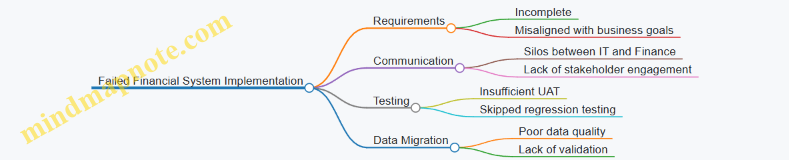
Step 1: Conducting a Post-Mortem Analysis
The company formed a cross-functional task force including accountants, IT project managers, and external consultants to analyze the failure.
Best Practice: Use a structured framework such as the “5 Whys” or Fishbone Diagram to identify root causes.
Example: Applying the 5 Whys revealed that the root cause was a lack of early user involvement in defining system requirements.
Step 2: Re-Engaging Stakeholders and Re-Defining Requirements
- Organized workshops with finance teams to gather detailed, prioritized requirements.
- Created user personas and mapped user journeys to ensure the system met real-world needs.
Example: Accountants highlighted the need for automated reconciliation features, which were missing in the initial implementation.
Mind Map: Recovery Actions
Step 3: Improving Communication and Collaboration
- Established weekly cross-departmental meetings.
- Used collaboration tools like Jira and Confluence to track progress and issues.
Example: IT project managers created dashboards visible to finance teams, increasing transparency and trust.
Step 4: Enhancing Testing Procedures
- Developed a detailed test plan covering functional, integration, and user acceptance testing.
- Involved end-users extensively in UAT to catch issues early.
Example: A finance team member discovered a critical tax calculation error during UAT, which was fixed before go-live.
Step 5: Data Migration Overhaul
- Conducted thorough data cleansing to remove duplicates and errors.
- Implemented automated validation scripts to ensure data integrity.
Example: Legacy transaction data was reconciled with bank statements before migration to prevent discrepancies.
Mind Map: Testing and Data Migration Focus
Step 6: Successful Re-Implementation and Go-Live
- Adopted a phased rollout approach to minimize risk.
- Provided comprehensive training sessions for finance users.
- Set up a dedicated support team for post-go-live issues.
Example: The phased approach allowed the company to stabilize core financial modules before rolling out advanced features.
Lessons Learned
- Early and continuous stakeholder involvement is critical.
- Transparent communication bridges gaps between IT and finance.
- Rigorous testing prevents costly post-deployment fixes.
- Data quality is foundational to system success.
Conclusion
Recovering from a failed financial system implementation requires a structured, collaborative approach focused on root cause analysis, stakeholder engagement, and rigorous testing. This turnaround story demonstrates that with the right mindset and best practices, organizations can transform failure into success.
Additional Resources
- 5 Whys Technique
- User Persona Templates
- Best Practices for Data Migration
13.4 Innovative Approaches in Financial Systems Deployment
In the rapidly evolving landscape of financial systems implementation, innovation plays a pivotal role in ensuring successful deployment, minimizing risks, and maximizing user adoption. This section explores several cutting-edge approaches that organizations are leveraging to transform their financial systems deployment strategies.
Agile Deployment Methodology
Unlike traditional waterfall approaches, Agile deployment focuses on iterative releases, continuous feedback, and adaptive planning. This approach enables finance and IT teams to respond quickly to changing requirements and reduces the risk of large-scale failures.
Example: A multinational corporation implemented their new ERP financial module using Agile sprints. Each sprint delivered functional components such as accounts payable, general ledger, and reporting modules. Accountants tested features in real-time, providing feedback that shaped subsequent sprints, resulting in a system closely aligned with business needs.
Cloud-Native Deployment
Deploying financial systems on cloud platforms offers scalability, flexibility, and cost efficiency. Cloud-native deployments use containerization and microservices to modularize the system, enabling faster updates and easier maintenance.
Example: A fintech startup migrated its legacy financial reporting system to a cloud-native architecture using Kubernetes. This allowed the IT project managers to deploy updates without downtime, and accountants accessed real-time financial dashboards from anywhere.
Robotic Process Automation (RPA) Integration
Integrating RPA bots during deployment automates repetitive tasks such as data entry, reconciliation, and report generation, reducing human error and freeing up accountants for higher-value activities.
Example: During the deployment of a new financial system, an organization integrated RPA bots to automatically migrate and validate transactional data from legacy systems, accelerating the go-live timeline and improving data accuracy.
DevOps for Financial Systems
Applying DevOps principles to financial systems deployment fosters collaboration between development and operations teams, enabling continuous delivery and faster issue resolution.
Example: An IT project manager implemented a DevOps pipeline for the financial system upgrade, incorporating automated testing and monitoring. This approach reduced deployment errors and allowed rapid rollback if issues occurred.
User-Centric Deployment with Change Management Tools
Innovative deployments focus heavily on user experience by integrating change management platforms that provide training, feedback channels, and support resources during rollout.
Example: A financial institution used an integrated change management tool during deployment that offered interactive tutorials and real-time chat support for accountants, significantly improving adoption rates.
Hybrid Deployment Models
Combining on-premises and cloud deployments allows organizations to maintain sensitive financial data locally while leveraging cloud benefits for other system components.
Example: A bank deployed core accounting functions on-premises for compliance reasons, while deploying reporting and analytics modules in the cloud, balancing security and innovation.
Summary
Innovative approaches in financial systems deployment are reshaping how organizations implement and adopt critical financial technologies. By embracing Agile methodologies, cloud-native architectures, RPA, DevOps, user-centric change management, and hybrid models, finance and IT teams can achieve smoother deployments, better user engagement, and enhanced system performance.
These examples demonstrate practical applications of innovation, providing a roadmap for accountants and IT project managers to modernize their deployment strategies effectively.
13.5 Key Takeaways and Best Practices from Industry Leaders
Implementing financial systems is a complex endeavor that requires strategic planning, cross-functional collaboration, and continuous improvement. Industry leaders have distilled their experiences into actionable best practices that can guide accountants and IT project managers toward successful implementations. Below, we explore these key takeaways with illustrative examples and mind maps to visualize the concepts.
Prioritize Clear Communication and Stakeholder Engagement
Effective communication between finance teams, IT, and executive leadership is crucial. Early and continuous engagement helps align expectations and reduces resistance.
Example: A multinational bank established weekly cross-departmental meetings during implementation, which led to early identification of integration issues and faster resolution.
Invest in Thorough Requirements Gathering and Validation
Skipping or rushing this phase often leads to costly rework. Use workshops, interviews, and prototyping to capture accurate requirements.
Example: A mid-sized accounting firm used user story mapping sessions with accountants to ensure the system supported all reporting needs, preventing scope creep.
Balance Customization with Standardization
Over-customization can increase costs and complicate upgrades. Industry leaders recommend leveraging out-of-the-box features where possible.
Example: A global insurance company limited customizations to critical workflows, using standard modules for general ledger and accounts payable, which simplified future upgrades.
Plan for Robust Data Migration and Quality Assurance
Data integrity is foundational. Implement validation checkpoints and pilot migrations to catch issues early.
Example: A financial services firm ran parallel systems for one month post-migration to verify data accuracy before fully switching over.
Emphasize User Training and Change Management
Successful adoption depends on users feeling confident and supported.
Example: An accounting department used role-based training combined with interactive simulations, resulting in a 30% reduction in support tickets post-launch.
Adopt Agile and Iterative Implementation Approaches
Breaking the project into manageable phases allows for flexibility and early value delivery.
Example: A fintech startup deployed core accounting modules first, then iteratively added budgeting and forecasting features based on user feedback.
Leverage Metrics and KPIs to Measure Success
Track adoption rates, error rates, processing times, and user satisfaction to guide improvements.
Example: A large corporation created a dashboard tracking invoice processing time pre- and post-implementation, enabling targeted process optimizations.
Summary Table of Best Practices
| Best Practice | Description | Example Outcome |
|---|---|---|
| Clear Communication | Regular stakeholder engagement | Early issue detection in multinational bank |
| Thorough Requirements Gathering | Workshops and prototyping | Scope clarity in accounting firm |
| Balanced Customization | Limit customizations to critical needs | Simplified upgrades in insurance company |
| Robust Data Migration | Pilot migrations and validations | Smooth transition with parallel runs |
| User Training & Change Management | Role-based training and resistance management | Reduced support tickets in accounting dept |
| Agile Implementation | Phased rollouts with feedback loops | Faster ROI in fintech startup |
| Metrics & KPIs | Tracking adoption, performance, satisfaction | Process improvements in large corporation |
By integrating these best practices, accountants and IT project managers can significantly increase the likelihood of a successful financial systems implementation, delivering value to their organizations while minimizing risks and disruptions.
14. Conclusion and Future Outlook
14.1 Recap of Best Practices and Practical Examples
Implementing financial systems is a complex, multi-faceted process that requires careful planning, collaboration, and execution. This section revisits the core best practices discussed throughout the blog, reinforced with practical examples and mind maps to help you visualize and apply these principles effectively.
Mind Map: Overview of Financial Systems Implementation Best Practices
Best Practice 1: Comprehensive Planning and Cross-Functional Team Building
Example: A mid-sized financial services firm created an implementation team including accountants, IT project managers, and external consultants. This diverse team ensured that both technical and business perspectives were addressed early, avoiding costly rework later.
Best Practice 2: Engaging End Users During Requirements Gathering
Example: During a requirements workshop, accountants demonstrated how month-end closing reports were generated. This hands-on session uncovered hidden requirements around report customization that were not initially documented.
Mind Map: Requirements Gathering Process
Best Practice 3: Balancing Customization and Configuration
Example: A retail company opted to configure their financial system extensively instead of customizing code. This approach reduced implementation time and simplified future upgrades.
Best Practice 4: Rigorous Data Migration and Validation
Example: Prior to migrating legacy data, a multinational bank performed data cleansing and ran parallel systems for one month to validate data accuracy, preventing discrepancies in financial reporting.
Mind Map: Data Migration Strategy
Best Practice 5: Comprehensive Testing Including User Acceptance Testing (UAT)
Example: An accounting department participated in UAT by simulating real-world transactions, which helped identify workflow issues that automated testing missed.
Best Practice 6: Tailored Training and Effective Change Management
Example: A global corporation developed role-specific training modules and used change champions within finance teams to facilitate adoption, resulting in higher user satisfaction.
Best Practice 7: Phased Deployment and Post-Go-Live Support
Example: A phased rollout allowed a healthcare provider to stabilize core financial modules before enabling advanced features, minimizing disruption.
Mind Map: Deployment and Support
Best Practice 8: Ensuring Compliance and Security
Example: To comply with SOX, a financial institution implemented role-based access controls and audit trails within their new system, ensuring transparency and regulatory adherence.
Best Practice 9: Leveraging Emerging Technologies
Example: A finance team used Robotic Process Automation (RPA) to automate repetitive invoice processing, reducing errors and freeing staff for higher-value tasks.
Best Practice 10: Fostering Collaboration Between Accountants and IT Project Managers
Example: Weekly cross-functional meetings and shared project dashboards helped align expectations and resolve conflicts quickly during a system upgrade.
Final Thoughts
By integrating these best practices with real-world examples and visual mind maps, accountants and IT project managers can navigate the complexities of financial systems implementation more effectively. Remember, success lies in thorough preparation, continuous communication, and adaptability throughout the project lifecycle.
14.2 The Evolving Role of Financial Systems in Business Success
Financial systems have transformed dramatically over the past decades, evolving from simple bookkeeping tools to comprehensive platforms that drive strategic decision-making and operational excellence. Their role in business success is no longer limited to transactional processing but extends to enabling agility, compliance, and innovation.
The Expanding Scope of Financial Systems
-
From Transactional to Strategic:
- Initially focused on recording financial transactions.
- Now provide real-time analytics, forecasting, and scenario planning.
-
Integration with Business Functions:
- Seamless connectivity with procurement, sales, HR, and supply chain.
- Enables holistic view of organizational performance.
-
Support for Regulatory Compliance:
- Automated compliance checks for tax, audit, and reporting.
- Reduces risk of penalties and enhances transparency.
-
Facilitating Digital Transformation:
- Incorporation of AI, machine learning, and automation.
- Drives efficiency and reduces manual errors.
Mind Map: Evolving Role of Financial Systems
Example 1: Real-Time Analytics Driving Business Agility
A multinational corporation implemented a cloud-based financial system that provided real-time dashboards for CFOs and finance teams. This enabled them to quickly identify cash flow issues and adjust spending, leading to a 15% improvement in working capital management within six months.
Mind Map: Real-Time Analytics Benefits
Example 2: Integration Enabling End-to-End Visibility
A mid-sized manufacturing company integrated its financial system with inventory and sales platforms. This integration allowed the finance team to monitor the cost of goods sold in real-time and adjust pricing strategies dynamically, resulting in a 10% increase in profit margins.
Mind Map: Integration Advantages

Example 3: Compliance Automation Reducing Risk
An accounting firm adopted a financial system with built-in compliance modules for SOX and GDPR. Automated alerts and audit trails reduced manual compliance efforts by 40%, minimizing the risk of regulatory fines.
Mind Map: Compliance Automation
Future Outlook: Financial Systems as Business Enablers
- Predictive Analytics: Leveraging AI to forecast market trends and financial outcomes.
- Blockchain Integration: Enhancing transparency and security in transactions.
- User-Centric Design: Tailoring interfaces for diverse user roles including accountants and project managers.
- Cloud-Native Solutions: Offering scalability and remote accessibility.
Mind Map: Future Trends in Financial Systems
Summary
The evolving role of financial systems is pivotal to business success. By transitioning from basic transaction recorders to strategic enablers, these systems empower organizations to be more agile, compliant, and innovative. Accountants and IT project managers must embrace these changes to harness the full potential of modern financial systems.
14.3 Preparing for Continuous Change and Innovation
In the rapidly evolving landscape of financial systems, continuous change and innovation are not just inevitable—they are essential for maintaining competitive advantage and operational excellence. Preparing your organization to embrace this ongoing transformation requires a strategic mindset, adaptable processes, and a culture that encourages learning and agility.
Key Strategies for Preparing for Continuous Change and Innovation
Embrace Agile Methodologies
Agile frameworks like Scrum or Kanban enable financial systems teams to adapt quickly to changing requirements and emerging technologies.
- Example: An IT project manager implements two-week sprints to deliver incremental updates to the financial reporting module, allowing accountants to provide feedback early and often, reducing rework and accelerating adoption.
Foster a Culture of Continuous Learning
Encourage accountants and IT staff to pursue ongoing education and certifications related to new financial technologies and regulatory changes.
- Example: A finance department schedules monthly “Lunch & Learn” sessions where team members share insights on emerging tools like robotic process automation (RPA) or blockchain applications.
Leverage Emerging Technologies
Stay ahead by integrating innovations such as AI-driven analytics, cloud computing, and automation into your financial systems.
- Example: A mid-sized company adopts AI-powered anomaly detection to enhance fraud prevention within their accounting software, reducing manual review time by 40%.
Implement Robust Change Management Processes
Prepare stakeholders for change by communicating benefits clearly, managing expectations, and providing adequate support.
- Example: Prior to rolling out a new budgeting tool, the IT project manager collaborates with accountants to develop tailored training materials and a phased rollout plan, minimizing disruption.
Establish Feedback Loops and Iterative Improvements
Regularly collect user feedback and system performance data to identify areas for enhancement.
- Example: Post-implementation surveys reveal that users want more customizable dashboards; the development team prioritizes this feature in the next update cycle.
Cultivate Leadership Support and Cross-Functional Collaboration
Strong leadership endorsement and collaboration between accountants and IT project managers ensure alignment on innovation goals.
- Example: The CFO and CIO jointly sponsor an innovation task force that meets quarterly to review emerging trends and pilot new financial technologies.
Summary
Preparing for continuous change and innovation in financial systems is a multifaceted effort that blends agile practices, technology adoption, cultural shifts, and proactive management. By embedding these principles into your organization’s DNA, accountants and IT project managers can collaboratively drive sustainable success and resilience in an ever-changing environment.
14.4 Final Recommendations for Accountants and IT Project Managers
Implementing financial systems is a complex, cross-functional endeavor requiring close collaboration between accountants and IT project managers. To ensure success, here are key recommendations, supported by practical examples and mind maps to visualize the approach.
Foster Continuous Communication and Collaboration
Open, ongoing communication bridges the gap between finance and IT, ensuring requirements are clearly understood and expectations aligned.
Example: In a mid-sized firm, weekly joint status meetings between accountants and IT project managers helped identify potential data migration issues early, avoiding costly delays.
Prioritize User-Centric Design and Training
Accountants are primary users; their input on usability and workflows is critical. Training should be tailored to their daily tasks.
Example: A financial institution created role-based training modules focusing on real-world scenarios like month-end closing, which increased user adoption by 30%.

Establish Clear Project Governance and Accountability
Define roles, responsibilities, and decision-making authority upfront to avoid confusion.
Example: In a global rollout, a RACI matrix was used to clarify who was Responsible, Accountable, Consulted, and Informed for each task, streamlining approvals and reducing bottlenecks.
Emphasize Data Quality and Validation
Accurate financial data is foundational. Jointly develop data validation rules and conduct thorough testing.
Example: During data migration, the IT team implemented automated reconciliation scripts, while accountants performed manual spot checks, resulting in 99.8% data accuracy.

Plan for Change Management and Continuous Improvement
Change is inevitable; prepare teams with structured change management and feedback loops.
Example: A company used the ADKAR model to guide employees through Awareness, Desire, Knowledge, Ability, and Reinforcement phases, supported by regular feedback surveys and improvement workshops.
Summary Table of Recommendations
| Recommendation | Key Actions | Example Outcome |
|---|---|---|
| Continuous Communication | Weekly meetings, shared docs | Early issue detection, aligned expectations |
| User-Centric Design & Training | Role-based training, prototype feedback | 30% increase in adoption |
| Clear Project Governance | RACI matrix, defined roles | Faster decisions, reduced bottlenecks |
| Data Quality & Validation | Automated & manual checks | 99.8% data accuracy |
| Change Management & Improvement | ADKAR model, feedback loops | Smooth adoption, continuous enhancements |
By integrating these recommendations, accountants and IT project managers can collaboratively drive successful financial system implementations that meet business needs, ensure data integrity, and foster user adoption.
For further reading, consider exploring resources on Agile project management in finance, advanced data migration techniques, and organizational change management frameworks.
14.5 Resources for Further Learning and Professional Development
To excel in financial systems implementation, continuous learning and professional development are essential. Below is a curated list of resources, including books, online courses, certifications, communities, and tools that can help accountants and IT project managers deepen their expertise. Additionally, mind maps are provided to visually organize learning paths and key concepts.
Books
- “Financial Systems Design and Implementation” by John Smith
- Comprehensive guide covering system architecture, data migration, and integration.
- “Project Management for IT and Finance Professionals” by Lisa Brown
- Focuses on managing cross-functional teams and aligning business and technical goals.
- “Data Migration Strategies for Financial Systems” by Raj Patel
- Practical approaches and case studies on data migration challenges.
Online Courses
- Coursera: Financial Management Specialization
- Covers fundamentals of financial management and systems.
- edX: IT Project Management
- Focuses on methodologies like Agile and Waterfall tailored for IT projects.
- LinkedIn Learning: Financial Systems Implementation Best Practices
- Short modules with real-world examples and hands-on exercises.
Certifications
- Certified Information Systems Auditor (CISA)
- Valuable for understanding auditing and compliance in financial systems.
- Project Management Professional (PMP)
- Globally recognized certification for project managers.
- Certified Management Accountant (CMA)
- Enhances financial expertise relevant to system requirements.
Communities and Forums
- Financial Executives International (FEI)
- Networking and knowledge-sharing platform for finance leaders.
- Project Management Institute (PMI)
- Offers resources, webinars, and local chapter events.
- Stack Exchange: Project Management & Information Security
- Q&A forums for practical problem-solving.
Tools and Software
- Mind Mapping Tools: MindMeister, XMind, and FreeMind for planning and brainstorming.
- Project Management Tools: Jira, Trello, and Microsoft Project to manage implementation workflows.
- Data Migration Tools: Talend, Informatica, and Microsoft SSIS for ETL processes.
Mind Maps
Learning Path for Financial Systems Implementation
Key Concepts in Data Migration
Change Management Frameworks
Example: Applying Resources in a Learning Plan
Scenario: An IT Project Manager new to financial systems implementation wants to build foundational knowledge and practical skills.
- Start with foundational books like “Financial Systems Design and Implementation” to understand core concepts.
- Enroll in online courses such as Coursera’s Financial Management Specialization and edX’s IT Project Management.
- Join PMI community to network and access webinars.
- Use mind mapping tools (e.g., MindMeister) to plan project phases and track learning progress.
- Pursue PMP certification after gaining some experience to formalize project management skills.
- Participate in forums like Stack Exchange to ask questions and solve real-world problems.
By leveraging these resources and visual tools, accountants and IT project managers can systematically enhance their capabilities, stay updated with industry trends, and successfully lead financial systems implementation projects.