Advanced Budgeting Techniques
1. Introduction to Advanced Budgeting
1.1 Understanding the Evolution of Budgeting Practices
Budgeting has undergone significant transformation over the decades, evolving from simple financial planning tools to sophisticated, strategic instruments that drive organizational success. Understanding this evolution is crucial for accountants and budget analysts in finance and nonprofit sectors to appreciate the context and rationale behind advanced budgeting techniques.
Historical Overview of Budgeting
-
Early Budgeting (Pre-20th Century):
- Focused primarily on cash flow management and basic expense tracking.
- Mostly reactive, with limited forecasting.
-
Traditional Budgeting (Mid 20th Century):
- Introduction of incremental budgeting, where previous budgets form the base.
- Emphasis on control and cost containment.
- Often rigid and annual, limiting flexibility.
-
Modern Budgeting (Late 20th Century to Present):
- Emergence of advanced techniques like zero-based budgeting, activity-based budgeting.
- Shift towards strategic alignment and performance measurement.
- Incorporation of technology and continuous forecasting.
Mind Map: Evolution of Budgeting Practices
Drivers Behind the Evolution
- Complexity of Organizations: As organizations grew in size and complexity, simple budgeting methods became insufficient.
- Need for Strategic Alignment: Budgets evolved from cost control tools to strategic management instruments.
- Technological Advancements: Software and data analytics enabled more dynamic and accurate budgeting.
- Changing Economic Environments: Volatility and uncertainty demanded flexible and continuous budgeting approaches.
Example: From Incremental to Zero-Based Budgeting in a Nonprofit
- Incremental Budgeting: A nonprofit allocates funds based on last year’s budget plus a small increase. This method is simple but risks perpetuating inefficiencies.
- Zero-Based Budgeting: The same nonprofit starts each budgeting cycle from zero, justifying every expense. This leads to more efficient resource allocation and cost savings.
Mind Map: Drivers of Budgeting Evolution
Practical Takeaway
For accountants and budget analysts, recognizing these evolutionary stages helps in selecting and tailoring budgeting techniques that best fit their organization’s current needs and future goals. Embracing advanced budgeting practices is not just about adopting new tools but understanding why these changes matter.
Summary
The evolution of budgeting practices reflects the growing demands on financial planning to be more strategic, flexible, and data-driven. From simple cash tracking to sophisticated forecasting and performance-based budgeting, each stage builds on the last to address emerging organizational challenges.
Next, we will explore how advanced budgeting techniques specifically benefit finance and nonprofit sectors.
1.2 The Importance of Advanced Budgeting in Finance and Nonprofit Sectors
Advanced budgeting techniques play a pivotal role in both the finance and nonprofit sectors by enabling organizations to allocate resources more effectively, anticipate risks, and align financial planning with strategic goals. Unlike traditional budgeting, which often relies on static numbers and historical data, advanced budgeting incorporates dynamic, data-driven approaches that improve decision-making and organizational agility.
Why Advanced Budgeting Matters
- Resource Optimization: Ensures every dollar is purposefully allocated to maximize impact.
- Strategic Alignment: Connects budgeting with long-term organizational goals.
- Risk Management: Incorporates scenario planning and sensitivity analysis to prepare for uncertainties.
- Transparency and Accountability: Enhances reporting and stakeholder engagement.
- Adaptability: Allows budgets to evolve with changing financial environments.
Mind Map: Importance of Advanced Budgeting
Sector-Specific Importance
| Aspect | Finance Sector Example | Nonprofit Sector Example |
|---|---|---|
| Resource Optimization | A corporate finance team uses zero-based budgeting to cut unnecessary expenses by 10%, freeing funds for innovation projects. | A nonprofit reallocates funds from low-impact programs to high-impact community initiatives using activity-based budgeting. |
| Strategic Alignment | A bank aligns its budget with its 5-year digital transformation strategy, ensuring investments in technology and talent. | A charity aligns its budget with its mission to reduce homelessness, prioritizing shelter and rehabilitation programs. |
| Risk Management | An investment firm uses scenario analysis to prepare for market downturns, adjusting budget forecasts accordingly. | A nonprofit uses sensitivity analysis to understand how funding cuts affect program delivery and plans contingencies. |
| Transparency & Accountability | A finance department implements detailed monthly variance reports to keep stakeholders informed. | A nonprofit publishes quarterly budget reports to donors, enhancing trust and funding stability. |
| Adaptability | A corporate finance team uses rolling forecasts to adjust budgets quarterly based on market trends. | A nonprofit employs flexible budgeting to respond quickly to changes in grant funding or donations. |
Example: Nonprofit Budgeting Challenge and Solution
Challenge: A nonprofit organization faced unpredictable donor funding and fluctuating program costs, making it difficult to maintain stable operations.
Solution: By adopting flexible budgeting combined with rolling forecasts, the finance team could adjust allocations monthly based on actual donations and program needs.
Outcome: This approach improved cash flow management, reduced funding shortfalls, and allowed the nonprofit to sustain critical services without interruption.
Mind Map: Benefits Realized by Nonprofits Using Advanced Budgeting
Practical Takeaway
For accountants and budget analysts in both sectors, mastering advanced budgeting techniques is essential to:
- Deliver precise, actionable budgets that reflect real-world complexities.
- Support leadership with insightful financial scenarios.
- Foster collaboration across departments for holistic financial planning.
- Ensure compliance and ethical stewardship of funds.
By integrating these practices, professionals can significantly enhance their organization’s financial health and mission success.
1.3 Key Differences Between Traditional and Advanced Budgeting Techniques
Budgeting is a critical function in both finance and nonprofit sectors, helping organizations allocate resources effectively. While traditional budgeting methods have served organizations for decades, advanced budgeting techniques offer more dynamic, precise, and strategic approaches. Understanding the key differences between these approaches enables accountants and budget analysts to select and implement the best budgeting method suited to their organizational needs.
Mind Map: Traditional vs Advanced Budgeting Techniques
Scope and Approach
Traditional Budgeting typically relies on incremental changes from previous budgets. It often uses a top-down approach where senior management sets the budget targets based on historical spending patterns. This method assumes past expenditures are a reasonable baseline, making it simple but sometimes inflexible.
Advanced Budgeting techniques, such as Zero-Based Budgeting or Activity-Based Budgeting, require building budgets from the ground up or linking costs directly to activities and outcomes. These methods promote a bottom-up approach, encouraging input from multiple departments and aligning budgets with organizational goals.
Example: A nonprofit organization using traditional budgeting might simply increase last year’s program expenses by 3% to account for inflation. In contrast, using Zero-Based Budgeting, the same nonprofit would justify every program expense from zero, potentially reallocating funds to higher-impact initiatives.
Flexibility and Responsiveness
Traditional budgets are usually fixed for the fiscal year and do not easily adapt to changes in the operating environment. This rigidity can hinder an organization’s ability to respond to unexpected funding changes or program needs.
Advanced budgeting techniques like rolling forecasts and flexible budgets allow continuous adjustments based on real-time data and changing circumstances.
Example: A finance team in a nonprofit uses a rolling forecast updated quarterly to adjust for new grant awards or unexpected expenses, whereas a traditional budget would remain static until the next fiscal year.
Mind Map: Flexibility Comparison
Alignment with Organizational Strategy
Traditional budgeting often focuses on controlling costs and maintaining financial discipline without explicitly linking budget allocations to strategic objectives.
Advanced budgeting integrates strategic planning by prioritizing funding based on organizational goals and performance metrics.
Example: Using performance-based budgeting, a nonprofit allocates more funds to programs demonstrating measurable impact aligned with its mission, rather than simply maintaining previous funding levels.
Use of Data and Analysis
Traditional budgeting relies heavily on historical financial data and simple forecasting methods.
Advanced budgeting incorporates detailed data analysis, including activity drivers, scenario planning, and sensitivity analysis, to create more accurate and insightful budgets.
Example: An accountant uses activity-based budgeting to analyze the cost drivers behind administrative expenses, identifying opportunities to reduce overhead by reallocating resources.
Mind Map: Data Utilization
Collaboration and Transparency
Traditional budgeting is often siloed, with limited involvement from departments outside finance.
Advanced budgeting encourages collaboration across departments, increasing transparency and ownership of budget decisions.
Example: A budget analyst facilitates cross-departmental workshops to gather input and build consensus on budget priorities, improving buy-in and accuracy.
Summary Table: Traditional vs Advanced Budgeting
| Aspect | Traditional Budgeting | Advanced Budgeting |
|---|---|---|
| Approach | Incremental, Top-Down | Zero-Based, Activity-Based, Bottom-Up |
| Flexibility | Fixed, Annual | Rolling, Flexible, Continuous |
| Strategic Alignment | Limited | Strong, Performance-Driven |
| Data Usage | Historical, Basic Forecasting | Detailed, Scenario & Sensitivity Analysis |
| Collaboration | Finance-Centric, Siloed | Cross-Functional, Transparent |
By understanding these differences, accountants and budget analysts can better advocate for and implement budgeting techniques that enhance financial control, strategic alignment, and organizational agility.
1.4 Overview of Best Practices with Real-World Examples
Advanced budgeting techniques require a blend of strategic thinking, detailed analysis, and practical application. This section provides an overview of best practices that accountants and budget analysts in finance and nonprofit sectors can adopt, accompanied by real-world examples and mind maps to visualize the concepts.
Best Practices Mind Map
Real-World Examples
Example 1: Aligning Budget with Strategic Goals in a Nonprofit
A mid-sized nonprofit focused on community health used strategic planning sessions to identify three primary goals: expanding outreach, improving service quality, and increasing volunteer engagement. The finance team collaborated with program managers to allocate budget resources accordingly, ensuring that each dollar spent directly supported these goals. This alignment was tracked quarterly through performance metrics, allowing adjustments to be made in real-time.
Example 2: Using Sensitivity Analysis to Manage Revenue Uncertainty
A nonprofit organization reliant on grant funding faced uncertainty due to changing government policies. The budget analysts created multiple budget scenarios reflecting different levels of grant income (optimistic, moderate, pessimistic). By modeling these scenarios, the organization identified critical cost areas to reduce if funding decreased, enabling proactive risk management.
Example 3: Implementing Rolling Forecasts in a Finance Department
A finance team in a nonprofit adopted rolling forecasts to replace their static annual budget. Every quarter, they updated projections for the next 12 months based on actual performance and new information. This practice improved responsiveness to funding changes and operational needs, resulting in more accurate cash flow management.
Example 4: Leveraging Technology for Collaborative Budgeting
An international nonprofit implemented cloud-based budgeting software that allowed program managers across different regions to input their budget requests directly. This real-time collaboration reduced errors, improved transparency, and accelerated the budget approval process.
Mind Map: Real-World Application Flow
By integrating these best practices with practical examples and visual frameworks, accountants and budget analysts can elevate their budgeting processes to be more strategic, transparent, and adaptive to change.
2. Zero-Based Budgeting (ZBB) for Precision and Efficiency
2.1 Fundamentals of Zero-Based Budgeting (ZBB)
Zero-Based Budgeting (ZBB) is a budgeting method where every expense must be justified for each new period, starting from a “zero base.” Unlike traditional budgeting, which often adjusts previous budgets incrementally, ZBB requires building the budget from scratch, ensuring that all expenditures align directly with organizational goals and priorities.
Key Principles of Zero-Based Budgeting
- Start from Zero: No expenses are automatically carried over; each must be justified.
- Focus on Needs and Benefits: Budget allocations are based on the necessity and expected outcomes of activities.
- Decision Packages: Expenses are grouped into decision packages that can be ranked and prioritized.
- Resource Allocation Efficiency: Encourages cost-effective use of resources by eliminating unnecessary spending.
Why Use Zero-Based Budgeting?
- Enhances Cost Management: Helps identify and cut redundant or low-value expenses.
- Aligns Spending with Strategy: Ensures funds are allocated to activities that support organizational objectives.
- Improves Transparency: Provides clear justification for every dollar spent.
- Encourages Accountability: Departments must justify their needs, promoting responsible budgeting.
Mind Map: Fundamentals of Zero-Based Budgeting
The ZBB Process Explained
- Identify Decision Units: Break down the organization into units or activities that require funding.
- Develop Decision Packages: For each unit, create packages that describe the activity, its cost, and the expected benefit.
- Evaluate and Rank Packages: Rank packages based on their importance, cost-benefit analysis, and alignment with strategic goals.
- Allocate Resources: Fund the highest priority packages until the budget limit is reached.
- Review and Adjust: Continuously monitor and adjust based on actual performance and changing priorities.
Example: Applying ZBB in a Nonprofit Finance Department
Scenario: A nonprofit organization wants to implement ZBB to optimize its annual budget.
-
Step 1: Identify Decision Units
- Fundraising events
- Administrative support
- Program delivery
- Marketing and outreach
-
Step 2: Develop Decision Packages
- Fundraising event A: $10,000, expected to raise $50,000
- Administrative support: $30,000, supports all programs
- Program delivery for Project X: $40,000, serves 500 beneficiaries
- Marketing campaign: $15,000, expected to increase donations by 10%
-
Step 3: Rank Packages
- Program delivery for Project X (high impact)
- Fundraising event A (high ROI)
- Administrative support (necessary but fixed)
- Marketing campaign (medium impact)
-
Step 4: Allocate Resources
- Budget limit: $80,000
- Fund top packages until funds are exhausted:
- Program delivery: $40,000
- Fundraising event A: $10,000
- Administrative support: $30,000
- Marketing campaign is deferred due to budget constraints.
-
Step 5: Review
- Monitor fundraising results and program outcomes to inform next cycle.
Additional Mind Map: ZBB Process Flow
Practical Tips for Accountants and Budget Analysts
- Collaborate closely with program managers to accurately define decision packages.
- Use historical data and benchmarks to estimate costs and benefits realistically.
- Maintain clear documentation to support justification of each expense.
- Prepare for a more time-intensive budgeting cycle initially; efficiency improves with experience.
Zero-Based Budgeting empowers finance professionals to drive strategic, transparent, and efficient budgeting processes by rigorously evaluating every expense. Through structured decision-making and prioritization, organizations can better align their financial resources with their mission and goals.
2.2 Step-by-Step Implementation of Zero-Based Budgeting (ZBB) in Nonprofit Organizations
Zero-Based Budgeting (ZBB) is a powerful budgeting approach that requires every expense to be justified from zero each budgeting cycle, rather than basing budgets on historical spending. This method is particularly effective for nonprofit organizations aiming to optimize resource allocation and ensure funds are directed toward mission-critical activities.
Step 1: Define Organizational Objectives and Priorities
Before starting ZBB, clearly outline the nonprofit’s strategic goals and priorities. This ensures that budget requests align with the mission and impact areas.
Example: A nonprofit focused on education might prioritize funding for literacy programs over administrative expenses.
Step 2: Identify Decision Units (Budget Centers)
Break down the organization into smaller decision units or budget centers. These could be departments, programs, or projects.
Example: Separate budget centers could include Fundraising, Community Outreach, Program Delivery, and Administration.
Step 3: Develop Decision Packages
For each decision unit, create decision packages that describe activities, associated costs, and expected outcomes. Each package starts from zero and must justify its necessity.
Example: For the Community Outreach unit, a decision package might be “Host 5 Community Workshops” with a detailed cost breakdown and expected impact.
Step 4: Rank and Prioritize Decision Packages
Evaluate and rank decision packages based on their alignment with organizational priorities, cost-effectiveness, and impact.
Example: The literacy program workshops might rank higher than a less impactful marketing campaign.
Step 5: Allocate Resources Based on Priority
Allocate the available budget starting with the highest-ranked decision packages until funds are exhausted.
Example: If the total budget is $500,000, allocate funds first to the top priority packages such as direct program services before administrative costs.
Step 6: Implement and Monitor
Once the budget is approved, implement the activities and continuously monitor performance against expected outcomes.
Example: Track attendance and feedback from community workshops to ensure goals are met.
Practical Example: Applying ZBB in a Nonprofit Literacy Program
Scenario: A nonprofit has $200,000 to allocate across three programs: Literacy Workshops, Digital Learning Tools, and Volunteer Training.
| Decision Package | Cost | Expected Outcome | Priority Rank |
|---|---|---|---|
| Literacy Workshops | $90,000 | Reach 500 participants with improved skills | 1 |
| Digital Learning Tools | $70,000 | Provide tablets and software to 300 users | 2 |
| Volunteer Training | $50,000 | Train 50 volunteers for program support | 3 |
Allocation: Funds are distributed in priority order. All packages are funded fully since total ($210,000) slightly exceeds budget; adjustments are made by reducing Digital Learning Tools budget by $10,000 and scaling back tablet purchases.
Summary Mind Map of ZBB Implementation Steps
By following these steps, nonprofit organizations can ensure every dollar spent is justified, aligned with their mission, and optimized for maximum impact.
2.3 Best Practices: Avoiding Common Pitfalls in Zero-Based Budgeting (ZBB)
Zero-Based Budgeting (ZBB) is a powerful budgeting technique that requires building the budget from the ground up, justifying every expense rather than relying on historical data. However, despite its benefits, many organizations encounter pitfalls that can undermine its effectiveness. This section highlights best practices to avoid these common pitfalls, supported by mind maps and practical examples.
Common Pitfalls in ZBB and How to Avoid Them
Best Practice #1: Comprehensive Training and Clear Communication
Example: A nonprofit finance team introduced ZBB but initially faced confusion among program managers unfamiliar with the approach. By organizing interactive workshops explaining the rationale and steps of ZBB, the team improved participation and quality of budget submissions.
Best Practice #2: Simplify the Process with Structured Templates
Example: An accounting department created a standardized ZBB template that required each expense to be linked to specific activities and outcomes. This reduced complexity and ensured consistency across departments.
Best Practice #3: Allocate Adequate Time and Resources
Example: A budget analyst in a mid-sized nonprofit scheduled the ZBB process over three months, allowing sufficient time for detailed reviews and revisions. This prevented rushed decisions and improved accuracy.
Best Practice #4: Engage Stakeholders Early and Address Resistance
Example: To overcome resistance, a finance director held Q&A sessions with department heads, highlighting how ZBB could help align budgets with strategic goals and improve resource allocation.
Best Practice #5: Maintain High-Quality, Up-to-Date Data
Example: A nonprofit used a centralized data repository to ensure all budget justifications were based on the latest program performance metrics, reducing errors and enhancing credibility.
Mind Map: Best Practices for Avoiding Pitfalls in ZBB
Practical Example: Avoiding the “Overwhelming Complexity” Pitfall
Scenario: A nonprofit’s initial ZBB attempt failed because managers were overwhelmed by the volume of expense categories to justify.
Solution: The finance team divided the budget into key activity clusters (e.g., outreach, administration, fundraising). Each cluster had a simplified justification form focusing on major cost drivers.
Result: Managers found the process more manageable, and the organization achieved a 10% reduction in unnecessary expenses without sacrificing program quality.
Summary
Avoiding common pitfalls in ZBB requires a combination of clear communication, structured processes, stakeholder engagement, and reliable data. By following these best practices, accountants and budget analysts can leverage ZBB to enhance budgeting accuracy, transparency, and strategic alignment.
2.4 Case Study: How a Finance Department Reduced Costs by 15% Using Zero-Based Budgeting (ZBB)
Zero-Based Budgeting (ZBB) is a powerful technique that requires every expense to be justified from scratch, rather than relying on historical budgets. This case study explores how a mid-sized nonprofit finance department successfully implemented ZBB to reduce costs by 15% while maintaining operational effectiveness.
Background
The finance department of a nonprofit organization faced increasing pressure to optimize its budget due to reduced funding and the need to demonstrate fiscal responsibility to stakeholders. Traditional incremental budgeting had led to gradual cost increases without critical evaluation of each expense.
The leadership decided to adopt Zero-Based Budgeting to identify and eliminate unnecessary costs and realign resources with strategic priorities.
Step 1: Define Decision Units and Activities
The department broke down its budget into decision units — distinct activities or functions that consume resources. Examples included:
- Payroll processing
- Financial reporting
- Grant management
- Vendor payments
- Staff training
This breakdown allowed the team to evaluate each unit independently.
Mind Map: Decision Units in Finance Department
Step 2: Identify and Justify Every Expense
Each decision unit was analyzed from zero, requiring managers to justify every expense based on necessity and value.
Example:
-
Staff Training: Instead of automatically allocating $20,000 annually, the team reviewed training needs, prioritizing only essential courses aligned with compliance and skill gaps.
-
Vendor Payments: Contracts were reviewed, and non-essential services were renegotiated or eliminated.
Mind Map: Expense Justification Process
Step 3: Develop Cost Packages
For each decision unit, cost packages were created representing different levels of service or activity. This enabled flexible budgeting and informed decision-making.
Example:
- Financial Reporting:
- Basic package: Monthly reports with standard metrics
- Enhanced package: Additional analytics and dashboarding
The team chose the basic package to reduce costs while maintaining compliance.
Mind Map: Cost Packages for Financial Reporting
Step 4: Prioritize and Allocate Resources
With all expenses justified and cost packages defined, the finance department prioritized spending based on strategic importance and impact.
Example:
- Increased allocation for grant management to improve funding acquisition
- Reduced spending on non-critical staff events
Step 5: Monitor and Adjust
After implementing the ZBB budget, the department closely monitored actual spending against the new budget, making adjustments as needed.
Results
- Cost Reduction: Achieved a 15% reduction in overall departmental costs.
- Improved Transparency: Clear justification for all expenses improved stakeholder confidence.
- Strategic Alignment: Resources were better aligned with organizational priorities.
Practical Example: Simplified ZBB Budget Table for Payroll Processing
| Expense Item | Justification | Cost Before | Cost After | Notes |
|---|---|---|---|---|
| Salaries | Essential staff | $500,000 | $500,000 | No change |
| Overtime | Reduced due to process improvements | $20,000 | $10,000 | Process automation reduced OT |
| Temporary Staff | Eliminated | $15,000 | $0 | Tasks absorbed by existing staff |
Summary Mind Map: ZBB Implementation Process
This case study demonstrates that with careful planning, stakeholder engagement, and disciplined execution, ZBB can be a transformative budgeting approach that drives significant cost savings without compromising mission-critical activities.
2.5 Practical Example: Building a Zero-Based Budget from Scratch
Zero-Based Budgeting (ZBB) requires starting from a “zero base” each budgeting cycle, justifying every expense rather than relying on historical budgets. This section walks you through building a zero-based budget step-by-step with clear examples and mind maps to visualize the process.
Step 1: Define Budget Objectives and Scope
Before starting, clarify what the budget aims to achieve and which departments or programs it covers.
Example: A nonprofit organization wants to create a zero-based operating budget for its community outreach program for the upcoming fiscal year.
Step 2: Identify Decision Units
Decision units are the smallest segments of the organization for which budgets are prepared. They could be departments, programs, or activities.
Example: For the community outreach program, decision units might be:
- Staff salaries
- Program materials
- Event costs
- Marketing and communications
- Administrative overhead
Mind Map: Decision Units Identification
Step 3: Analyze and Justify Each Expense from Zero
Each expense must be justified based on the needs and expected outcomes rather than past spending.
Example:
- Staff Salaries: Justify based on roles needed to run the program effectively.
- Program Materials: List materials required for workshops and outreach events.
- Event Costs: Estimate venue rental, refreshments, and transportation.
- Marketing: Budget for flyers, social media ads, and community announcements.
- Administrative Overhead: Allocate costs for utilities, office supplies, and support staff.
Mind Map: Expense Justification
Step 4: Assign Cost Drivers and Estimate Costs
Determine the cost drivers for each decision unit and estimate the cost based on activity levels.
Example:
- Staff Salaries: Number of full-time equivalent (FTE) employees × salary per FTE
- Program Materials: Number of workshops × cost per workshop materials
- Event Costs: Number of events × average event cost
- Marketing: Number of campaigns × cost per campaign
- Administrative Overhead: Percentage of total direct costs
Mind Map: Cost Drivers and Estimation
Step 5: Compile the Budget and Review
Aggregate all justified and estimated expenses to form the complete zero-based budget.
Example Table:
| Decision Unit | Cost Driver | Quantity | Unit Cost | Total Cost |
|---|---|---|---|---|
| Staff Salaries | FTEs | 3 | $45,000 | $135,000 |
| Program Materials | Workshops | 10 | $200 | $2,000 |
| Event Costs | Events | 5 | $500 | $2,500 |
| Marketing & Communications | Campaigns | 4 | $300 | $1,200 |
| Administrative Overhead | % of Direct Costs (10%) | - | - | $14,670 |
| Total | $155,370 |
Step 6: Monitor and Adjust
After implementation, track actual expenses against the zero-based budget and adjust as necessary for future cycles.
Summary Mind Map: Building a Zero-Based Budget
Mind Map: Zero-Based Budgeting Process
By following these steps and using the examples provided, accountants and budget analysts can confidently build zero-based budgets that promote cost efficiency and strategic resource allocation.
3. Activity-Based Budgeting (ABB) to Align Costs with Operations
3.1 Introduction to Activity-Based Budgeting (ABB)
Activity-Based Budgeting (ABB) is a sophisticated budgeting approach that focuses on the activities that incur costs within an organization. Unlike traditional budgeting methods that allocate expenses based on historical data or departmental estimates, ABB links budget allocations directly to the activities that drive costs, providing a more accurate and strategic financial plan.
Why Use Activity-Based Budgeting?
- Cost Transparency: ABB reveals the true cost of activities, enabling better cost control.
- Resource Optimization: Helps identify inefficient or non-value-adding activities.
- Improved Decision Making: Aligns budgeting with operational realities.
- Supports Strategic Goals: Ensures resources are allocated to activities that support organizational objectives.
Mind Map: Core Concepts of Activity-Based Budgeting
How ABB Differs from Traditional Budgeting
| Aspect | Traditional Budgeting | Activity-Based Budgeting |
|---|---|---|
| Basis of Allocation | Historical data, fixed percentages | Activities and cost drivers |
| Focus | Departments or cost centers | Specific activities and processes |
| Cost Visibility | Aggregated, less detailed | Detailed, activity-level costs |
| Flexibility | Less adaptive to operational changes | Highly adaptive and dynamic |
Step-by-Step Example: Applying ABB in a Nonprofit
Scenario: A nonprofit organization wants to budget for its fundraising department more effectively.
-
Identify Activities:
- Organizing events
- Donor outreach
- Grant writing
- Marketing campaigns
-
Determine Cost Drivers:
- Number of events
- Number of donor contacts
- Hours spent on grant proposals
- Marketing materials produced
-
Assign Costs to Activities:
- Staff salaries allocated based on hours spent per activity
- Venue rental costs assigned to events
- Printing costs assigned to marketing campaigns
-
Develop Budget:
- Calculate total expected costs for each activity based on projected activity levels
Example Calculation:
- Organizing events: 5 events x $2,000 per event = $10,000
- Donor outreach: 200 contacts x $10 per contact = $2,000
- Grant writing: 100 hours x $30 per hour = $3,000
- Marketing campaigns: 3 campaigns x $1,500 each = $4,500
Total Fundraising Budget: $19,500
Mind Map: ABB Implementation Process
Practical Example: Simplified ABB in Finance Department
Imagine a finance team with the following activities:
- Processing invoices
- Preparing financial reports
- Conducting audits
Cost Drivers:
- Number of invoices processed
- Number of reports generated
- Audit hours
Budgeting:
- Invoice processing: 1,000 invoices x $5 per invoice = $5,000
- Financial reports: 12 reports x $200 per report = $2,400
- Audits: 50 hours x $60 per hour = $3,000
Total Finance Budget: $10,400
Summary
Activity-Based Budgeting offers a granular, activity-focused approach to budgeting that improves accuracy and aligns spending with organizational priorities. By understanding and applying ABB, accountants and budget analysts in finance and nonprofit sectors can enhance resource allocation, improve cost management, and support strategic decision-making.
3.2 Identifying Cost Drivers and Activities
In Activity-Based Budgeting (ABB), accurately identifying cost drivers and activities is fundamental to creating a budget that truly reflects how resources are consumed within an organization. This section will guide you through the process of pinpointing these elements with clear examples and visual mind maps to enhance understanding.
What are Cost Drivers?
Cost drivers are the factors that cause costs to be incurred. They represent the underlying reasons why expenses arise and help link costs to specific activities or outputs. Identifying the right cost drivers allows organizations to allocate costs more precisely and manage budgets effectively.
What are Activities?
Activities are the tasks or processes that consume resources and incur costs. In ABB, activities are analyzed to understand how they contribute to overall expenses and how they can be optimized.
Step 1: Mapping Organizational Activities
Begin by listing all major activities performed within your department or organization. These could range from program delivery, fundraising, administrative support, to financial reporting.
Example: Nonprofit Organization Activities
- Grant Writing
- Donor Outreach
- Program Implementation
- Volunteer Coordination
- Financial Reporting
Mind Map: Organizational Activities Breakdown
Step 2: Identifying Cost Drivers for Each Activity
For each activity, determine what drives the cost. Cost drivers can be quantitative measures such as hours worked, number of events, or units produced.
Common Cost Drivers Examples:
- Labor hours
- Number of transactions
- Square footage used
- Number of clients served
- Machine hours
Example: Cost Drivers for Fundraising Activities
| Activity | Cost Driver |
|---|---|
| Event Planning | Number of events |
| Donor Communication | Number of contacts |
Mind Map: Linking Activities to Cost Drivers
Step 3: Collecting Data to Quantify Cost Drivers
Gather historical data or estimates to quantify each cost driver. This data will be used to allocate costs accurately.
Example:
- Number of fundraising events last year: 12
- Number of donor contacts made: 300
- Number of workshops facilitated: 20
- Number of clients served: 150
Step 4: Assigning Costs Based on Cost Drivers
Once cost drivers are identified and quantified, allocate the budgeted costs proportionally.
Example:
If the total fundraising budget is $60,000 and the cost drivers are:
- Event Planning (12 events)
- Donor Communication (300 contacts)
You might allocate costs based on the relative effort or historical spending patterns.
Practical Example: Activity-Based Budgeting in a Nonprofit
Scenario: A nonprofit wants to allocate its $100,000 administrative budget across activities.
| Activity | Cost Driver | Quantity | Cost Driver Weight | Allocated Cost |
|---|---|---|---|---|
| Financial Reporting | Number of reports (20) | 20 | 40% | $40,000 |
| HR Management | Number of employees (50) | 50 | 60% | $60,000 |
Note: Cost driver weights are determined based on analysis of resource consumption.
Summary Mind Map: Complete Process
By systematically identifying cost drivers and activities, accountants and budget analysts can create more accurate, transparent, and actionable budgets that reflect true resource usage, enabling better financial decision-making and resource optimization.
3.3 Best Practices: Integrating Activity-Based Budgeting (ABB) with Financial Reporting
Integrating Activity-Based Budgeting (ABB) with financial reporting is essential for creating a transparent, accurate, and actionable budgeting process. This integration ensures that the costs assigned to activities are clearly reflected in financial statements, enabling better decision-making and resource allocation.
Why Integrate ABB with Financial Reporting?
- Improved Cost Visibility: ABB breaks down costs by activities, making it easier to trace expenses to specific operations.
- Enhanced Accountability: Departments and programs can be held accountable for their resource usage.
- Better Decision-Making: Financial reports enriched with ABB data provide insights into cost drivers and efficiency.
- Compliance and Transparency: Clear cost allocation supports regulatory compliance and donor reporting in nonprofits.
Best Practices for Integration
-
Align Cost Pools with Financial Accounts
- Map ABB cost pools directly to chart of accounts to ensure consistency.
- Example: If “Program Delivery” is a cost pool, link it to relevant expense accounts like salaries, supplies, and travel.
-
Standardize Activity Definitions Across Departments
- Create a common taxonomy for activities to avoid confusion.
- Example: Define “Client Support” uniformly across all service units.
-
Use Software That Supports Both ABB and Financial Reporting
- Leverage integrated ERP or budgeting tools that allow seamless data flow.
- Example: Tools like Adaptive Insights or Oracle NetSuite.
-
Regularly Reconcile ABB Data with Financial Statements
- Schedule monthly or quarterly reconciliations to catch discrepancies early.
-
Train Finance and Program Staff Collaboratively
- Ensure both teams understand ABB principles and reporting requirements.
-
Incorporate ABB Metrics into Management Reports
- Include activity cost summaries alongside traditional financial KPIs.
-
Automate Data Collection and Allocation Processes
- Reduce manual errors and improve timeliness.
Mind Map: Integrating ABB with Financial Reporting
Example: Allocating Overhead Costs in a Nonprofit Using ABB
Scenario: A nonprofit wants to allocate its overhead costs (rent, utilities, admin salaries) to various programs based on the activities performed.
Step 1: Identify activities such as “Fundraising”, “Client Services”, and “Administration Support”.
Step 2: Assign cost drivers, e.g., square footage used, number of staff hours, or number of transactions.
Step 3: Calculate overhead allocation:
- Rent ($12,000/month) allocated based on square footage:
- Fundraising: 30% ($3,600)
- Client Services: 50% ($6,000)
- Admin Support: 20% ($2,400)
Step 4: Reflect these allocations in financial reports by linking them to the respective program expense accounts.
Outcome: Management can see the true cost of each program, improving budgeting accuracy and funding decisions.
Practical Tips
- Create a Mapping Template: Develop a spreadsheet that links each ABB activity to financial accounts.
- Use Visual Dashboards: Present ABB data alongside financial metrics for quick insights.
- Document Assumptions: Keep records of allocation bases and methodologies for audit trails.
By following these best practices, organizations can harness the full power of Activity-Based Budgeting, ensuring their financial reports tell a comprehensive story of how resources are consumed and where efficiencies can be gained.
3.4 Example: Allocating Overhead Costs in a Nonprofit Using Activity-Based Budgeting (ABB)
Activity-Based Budgeting (ABB) is a powerful technique that helps nonprofits allocate overhead costs more accurately by linking expenses to the activities that generate them. This ensures resources are used efficiently and transparently, which is crucial for nonprofits relying on donor funds and grants.
What Are Overhead Costs?
Overhead costs are indirect expenses that cannot be directly attributed to a specific program or project but are necessary for the organization’s overall operation. Examples include:
- Rent and utilities
- Administrative salaries
- Office supplies
- IT support
- Fundraising expenses
Why Use ABB for Overhead Allocation?
Traditional budgeting often allocates overhead costs based on a simple metric, such as the percentage of direct costs or staff numbers. ABB, however, assigns costs based on actual activities driving those overhead expenses, leading to more precise and fair allocation.
Step-by-Step Example: Allocating Overhead Costs Using ABB
Step 1: Identify Key Activities
List the main activities that consume overhead resources. For a nonprofit, these could be:
- Grant writing
- Program management
- Fundraising events
- Volunteer coordination
- IT maintenance
Step 2: Determine Cost Drivers for Each Activity
Cost drivers are measurable factors that cause overhead costs. Examples:
- Grant writing: Number of grant proposals submitted
- Program management: Number of programs managed
- Fundraising events: Number of events held
- Volunteer coordination: Number of volunteers managed
- IT maintenance: Number of devices supported
Step 3: Collect Data on Cost Drivers
Gather data for each cost driver over the budgeting period. For example:
| Activity | Cost Driver | Quantity |
|---|---|---|
| Grant Writing | Proposals Submitted | 20 |
| Program Management | Programs Managed | 5 |
| Fundraising Events | Events Held | 4 |
| Volunteer Coordination | Volunteers Managed | 50 |
| IT Maintenance | Devices Supported | 100 |
Step 4: Calculate Overhead Cost Rates
Assume total overhead costs are $200,000. Assign overhead costs to activities based on their relative consumption.
First, estimate the overhead cost per unit of each cost driver. For simplicity, let’s assign weights based on estimated resource intensity:
| Activity | Weight per Unit | Quantity | Weighted Cost Driver Units |
|---|---|---|---|
| Grant Writing | $500 | 20 | 10,000 |
| Program Management | $2,000 | 5 | 10,000 |
| Fundraising Events | $1,000 | 4 | 4,000 |
| Volunteer Coordination | $100 | 50 | 5,000 |
| IT Maintenance | $50 | 100 | 5,000 |
Total weighted units = 10,000 + 10,000 + 4,000 + 5,000 + 5,000 = 34,000
Calculate cost per weighted unit:
$200,000 / 34,000 = $5.88 per weighted unit
Calculate overhead allocation per activity:
| Activity | Weighted Units | Allocation ($) |
|---|---|---|
| Grant Writing | 10,000 | 10,000 x 5.88 = 58,800 |
| Program Management | 10,000 | 58,800 |
| Fundraising Events | 4,000 | 23,520 |
| Volunteer Coordination | 5,000 | 29,400 |
| IT Maintenance | 5,000 | 29,400 |
Step 5: Integrate Overhead Allocation into Program Budgets
Each program or department receives overhead costs based on the activities they consume. For example, if Program A requires intensive program management and volunteer coordination, its overhead allocation will reflect that.
Practical Example: Applying ABB in a Nonprofit
Scenario: A nonprofit runs three programs: Education, Health, and Community Outreach. Each program uses activities differently:
| Activity | Education | Health | Community Outreach |
|---|---|---|---|
| Grant Writing | 8 | 7 | 5 |
| Program Management | 2 | 2 | 1 |
| Fundraising Events | 1 | 2 | 1 |
| Volunteer Coordination | 10 | 15 | 25 |
| IT Maintenance | 30 | 40 | 30 |
Calculate overhead allocation per program by multiplying activity usage by cost per weighted unit and summing across activities.
For Education:
- Grant Writing: 8 x $500 x $5.88/$500 = 8 x 5.88 = $47.04k
- Program Management: 2 x $2,000 x 5.88/$2,000 = 2 x 5.88 = $11.76k
- Fundraising Events: 1 x $1,000 x 5.88/$1,000 = 1 x 5.88 = $5.88k
- Volunteer Coordination: 10 x $100 x 5.88/$100 = 10 x 5.88 = $58.8k
- IT Maintenance: 30 x $50 x 5.88/$50 = 30 x 5.88 = $176.4k
Sum = $47.04k + $11.76k + $5.88k + $58.8k + $176.4k = $299.88k (scaled accordingly to total overhead budget)
Note: The above is a simplified illustration. In practice, the cost per weighted unit is applied directly to quantities.
Summary
Using ABB for overhead allocation allows nonprofits to:
- Understand the true cost of activities supporting programs
- Allocate overhead fairly and transparently
- Identify opportunities for cost savings by analyzing high-cost activities
This method enhances budgeting accuracy and supports better financial decision-making.
For accountants and budget analysts in nonprofits, mastering ABB means more strategic resource allocation and stronger accountability to stakeholders.
3.5 Practical Walkthrough: Creating an Activity-Based Budget Template
Activity-Based Budgeting (ABB) focuses on budgeting based on the activities that incur costs in an organization. This approach helps align budget allocations with operational realities and improves cost management.
Step 1: Identify Key Activities
Start by listing all the major activities your department or organization performs. These activities should be the drivers of costs.
Example: For a nonprofit finance department, activities might include:
- Grant Management
- Financial Reporting
- Donor Relations
- Compliance and Audit
- Payroll Processing
Step 2: Determine Cost Drivers for Each Activity
Cost drivers are factors that cause costs to be incurred. Identifying them helps allocate expenses more accurately.
Example:
| Activity | Cost Drivers |
|---|---|
| Grant Management | Number of grants managed |
| Financial Reporting | Number of reports generated |
| Donor Relations | Number of donor interactions |
| Compliance and Audit | Number of audits conducted |
| Payroll Processing | Number of employees processed |
Step 3: Collect Historical Data and Estimate Costs
Gather past financial data related to each activity and its cost drivers. This will help estimate the cost per driver unit.
Example:
| Activity | Total Cost (Last Year) | Cost Driver Units | Cost per Unit |
|---|---|---|---|
| Grant Management | $120,000 | 30 grants | $4,000 |
| Financial Reporting | $80,000 | 20 reports | $4,000 |
| Donor Relations | $50,000 | 500 interactions | $100 |
| Compliance and Audit | $40,000 | 4 audits | $10,000 |
| Payroll Processing | $60,000 | 200 employees | $300 |
Step 4: Build the Activity-Based Budget Template
Create a spreadsheet with the following columns:
- Activity
- Cost Driver
- Cost Driver Units (Projected)
- Cost per Unit
- Total Budgeted Cost (calculated as Cost Driver Units × Cost per Unit)
Example Template (Table):
| Activity | Cost Driver | Projected Units | Cost per Unit | Total Budgeted Cost |
|---|---|---|---|---|
| Grant Management | Number of grants managed | 35 | $4,000 | $140,000 |
| Financial Reporting | Number of reports | 22 | $4,000 | $88,000 |
| Donor Relations | Number of interactions | 550 | $100 | $55,000 |
| Compliance and Audit | Number of audits | 5 | $10,000 | $50,000 |
| Payroll Processing | Number of employees | 210 | $300 | $63,000 |
Step 5: Use the Template for Budget Planning and Monitoring
- Input projected activity levels for the upcoming budget period.
- Calculate total costs automatically.
- Compare actual costs periodically to identify variances.
Example: If the number of audits increases unexpectedly, the Compliance and Audit budget line will reflect this change, allowing proactive management.
Summary Mind Map
By following this practical walkthrough, accountants and budget analysts can create a clear, actionable activity-based budget template tailored to their organization’s unique operations, improving cost visibility and resource allocation.
4. Flexible Budgeting for Dynamic Financial Environments
4.1 What is Flexible Budgeting and When to Use It
Flexible budgeting is a dynamic budgeting approach that adjusts budgeted costs and revenues based on actual levels of activity or volume. Unlike static budgets, which remain fixed regardless of changes in business conditions, flexible budgets provide a more accurate reflection of financial performance by adapting to real-time operational changes.
Key Characteristics of Flexible Budgeting:
- Activity-Based: Budgets change in response to actual activity levels (e.g., units produced, services delivered).
- Variable and Fixed Costs Separation: Helps distinguish costs that vary with activity from those that remain fixed.
- Performance Evaluation Tool: Enables more meaningful variance analysis by comparing actual results to flexible budget figures.
When to Use Flexible Budgeting:
- Organizations with Fluctuating Activity Levels: Nonprofits with variable program participation or finance teams managing seasonal funding.
- Cost Control in Dynamic Environments: When costs are closely tied to operational volume.
- Performance Management: To fairly assess departmental or project performance against realistic expectations.
Mind Map: Understanding Flexible Budgeting
Mind Map: When to Use Flexible Budgeting
Example 1: Flexible Budgeting in a Nonprofit Program
A nonprofit runs an after-school tutoring program. The budget is based on an expected 100 students, with costs including:
- Fixed costs: $2,000/month (rent, utilities)
- Variable costs: $20/student (materials, snacks)
Static Budget:
- Total = $2,000 + (100 x $20) = $4,000
Actual attendance: 120 students
Flexible Budget:
- Total = $2,000 + (120 x $20) = $4,400
Analysis:
- Comparing actual expenses to the flexible budget of $4,400 (not the static $4,000) gives a fairer view of cost management.
Example 2: Flexible Budgeting in a Finance Department
A finance department supports multiple projects with variable workload. Budgeted costs include:
- Fixed salaries: $50,000/month
- Overtime and contract staff: $100/hour
Planned workload: 200 hours overtime
Static Budget:
- $50,000 + (200 x $100) = $70,000
Actual overtime: 250 hours
Flexible Budget:
- $50,000 + (250 x $100) = $75,000
Insight:
- Comparing actual costs to $75,000 rather than $70,000 helps isolate efficiency issues from volume changes.
Summary
Flexible budgeting is essential for organizations facing variable activity levels or uncertain environments. By adjusting budgets according to actual operations, it enables more accurate financial control, better decision-making, and fairer performance assessments.
Practical Tip
Start by classifying your costs into fixed and variable components, then create formulas that adjust budgeted amounts based on actual activity data. Use spreadsheet tools to automate flexible budget calculations and facilitate ongoing analysis.
4.2 Best Practices: Adjusting Budgets Based on Activity Levels
Flexible budgeting is a powerful technique that allows organizations to adjust their budgets in response to changes in activity levels, such as sales volume, service demand, or program participation. This adaptability is especially crucial in finance and nonprofit sectors where funding and operational demands can fluctuate unpredictably.
Key Best Practices for Adjusting Budgets Based on Activity Levels
-
Identify Relevant Activity Drivers
- Determine which activities most directly impact costs and revenues.
- Examples include number of clients served, hours of service delivered, or units produced.
-
Classify Costs as Variable, Fixed, or Mixed
- Variable costs change directly with activity levels (e.g., materials, direct labor).
- Fixed costs remain constant regardless of activity (e.g., rent, salaries).
- Mixed costs have both fixed and variable components.
-
Develop Flexible Budget Formulas
- Create formulas that adjust cost estimates based on actual or projected activity levels.
- Example: Total Cost = Fixed Cost + (Variable Cost per Unit × Activity Level)
-
Regularly Update Activity Assumptions
- Use current data to revise activity forecasts frequently.
- This ensures budgets remain relevant and accurate.
-
Incorporate Scenario Analysis
- Prepare budgets for multiple activity levels (e.g., low, medium, high) to anticipate different outcomes.
-
Engage Stakeholders in the Process
- Collaborate with program managers and finance teams to validate activity assumptions and cost behaviors.
-
Use Technology and Tools
- Leverage spreadsheet models or budgeting software that support flexible budgeting.
Mind Map: Flexible Budgeting Best Practices
Example 1: Flexible Budgeting in a Nonprofit Food Bank
Context: A food bank budgets for food distribution costs based on the number of families served each month.
- Fixed Costs: Rent and utilities = $5,000/month
- Variable Cost per Family: $20 (food and packaging)
Budget Formula:
Total Monthly Cost = $5,000 + ($20 × Number of Families Served)
| Month | Families Served | Budgeted Cost Calculation | Budgeted Cost |
|---|---|---|---|
| Jan | 200 | 5,000 + (20 × 200) = 5,000 + 4,000 | $9,000 |
| Feb | 250 | 5,000 + (20 × 250) = 5,000 + 5,000 | $10,000 |
| Mar | 180 | 5,000 + (20 × 180) = 5,000 + 3,600 | $8,600 |
This flexible budget allows the food bank to adjust its spending according to actual demand, preventing over- or under-budgeting.
Example 2: Flexible Budgeting in a Finance Department
Context: A finance department supports multiple projects and budgets for overtime costs based on project workload hours.
- Fixed Costs: Base salaries = $50,000/month
- Variable Cost: Overtime pay = $40/hour
Budget Formula:
Total Cost = $50,000 + ($40 × Overtime Hours)
| Month | Overtime Hours | Budgeted Cost Calculation | Budgeted Cost |
|---|---|---|---|
| Jan | 100 | 50,000 + (40 × 100) = 50,000 + 4,000 | $54,000 |
| Feb | 150 | 50,000 + (40 × 150) = 50,000 + 6,000 | $56,000 |
| Mar | 80 | 50,000 + (40 × 80) = 50,000 + 3,200 | $53,200 |
By adjusting the budget based on actual overtime hours, the finance department can better control labor costs and allocate resources efficiently.
Practical Tips for Accountants and Budget Analysts
- Track Actual Activity Levels: Maintain accurate records of activity metrics to compare against budget assumptions.
- Communicate Changes Promptly: Inform stakeholders when activity levels shift significantly to update budgets accordingly.
- Review Historical Data: Analyze past trends to improve forecasting accuracy.
- Test Budget Models: Use sensitivity analysis to understand how changes in activity impact costs.
By following these best practices, finance and nonprofit professionals can create flexible budgets that respond dynamically to operational realities, improving financial control and organizational agility.
4.3 Example Scenario: Flexible Budgeting in Response to Funding Fluctuations
Flexible budgeting is a powerful tool for organizations, especially nonprofits and finance departments, to adapt their budgets dynamically based on changes in funding or activity levels. This section explores a detailed example scenario demonstrating how flexible budgeting can be applied effectively in response to funding fluctuations.
Scenario Overview
Imagine a nonprofit organization, “Community Health Initiative (CHI),” which relies heavily on grants and donations to fund its programs. The organization had initially planned its annual budget based on an expected funding level of $1,000,000. However, midway through the year, a major grant was reduced by 20%, causing total available funds to drop to $800,000.
CHI needs to adjust its budget quickly to accommodate this funding shortfall without compromising its core programs.
Step 1: Identify Fixed vs. Variable Costs
The first step in flexible budgeting is to classify costs:
- Fixed Costs: Expenses that remain constant regardless of funding or activity level (e.g., rent, salaried staff).
- Variable Costs: Expenses that fluctuate with activity or funding (e.g., program supplies, hourly wages).
Example:
| Cost Item | Type | Annual Budget ($) |
|---|---|---|
| Office Rent | Fixed | 120,000 |
| Salaried Staff | Fixed | 400,000 |
| Program Supplies | Variable | 300,000 |
| Event Costs | Variable | 180,000 |
| Utilities | Fixed | 60,000 |
| Total | 1,060,000 |
Note: The initial budget slightly exceeds $1,000,000 due to contingency allocations.
Step 2: Calculate Flexible Budget Adjustments
Since funding dropped by 20%, CHI decides to keep fixed costs intact but reduce variable costs proportionally.
Calculation:
- New funding: $800,000
- Fixed costs total: $580,000 (Rent + Salaried Staff + Utilities)
- Remaining funds for variable costs: $800,000 - $580,000 = $220,000
- Original variable costs: $480,000
- Reduction percentage for variable costs: $220,000 / $480,000 ≈ 45.8%
CHI must reduce variable costs by approximately 54.2% to fit the new budget.
Step 3: Adjust Variable Costs
| Cost Item | Original Budget ($) | Adjusted Budget ($) | Reduction (%) |
|---|---|---|---|
| Program Supplies | 300,000 | 136,800 | 54.4 |
| Event Costs | 180,000 | 82,200 | 54.3 |
| Total | 480,000 | 219,000 | 54.4 |
Step 4: Communicate and Implement Changes
CHI communicates the revised budget to program managers, emphasizing the need to prioritize essential activities and seek cost-saving measures.
Mind Map: Flexible Budgeting Process in Response to Funding Changes
Mind Map: Cost Classification Example
Practical Example: Applying Flexible Budgeting in a Finance Department
Context: A finance department supporting multiple nonprofit programs faces a 15% cut in funding mid-year.
Approach:
- Review fixed commitments: Salaries, lease agreements, and essential services remain unchanged.
- Identify variable expenses: Training, travel, and discretionary spending.
- Adjust variable expenses: Reduce travel budgets by 50%, postpone non-essential training, and limit discretionary spending.
- Monitor monthly: Track actual spending against the flexible budget and adjust as needed.
Outcome: The department maintains core functions while aligning expenses with reduced funding.
Summary
Flexible budgeting allows organizations like CHI to respond proactively to funding fluctuations by maintaining fixed costs and adjusting variable costs. This approach ensures financial stability and program continuity even in uncertain funding environments.
By classifying costs, calculating proportional adjustments, and communicating changes effectively, finance professionals and budget analysts can implement flexible budgets that support organizational resilience.
4.4 Practical Exercise: Developing a Flexible Budget Model for a Finance Team
Flexible budgeting allows organizations to adjust their budgets based on actual activity levels, making it an essential tool for finance teams operating in dynamic environments. This exercise will guide you through creating a flexible budget model step-by-step, complete with examples and mind maps to visualize the process.
Step 1: Understand the Components of a Flexible Budget
A flexible budget adjusts costs and revenues according to changes in activity levels. The key components are:
- Fixed Costs: Costs that remain constant regardless of activity (e.g., rent, salaries).
- Variable Costs: Costs that change in direct proportion to activity (e.g., raw materials, utilities).
- Activity Level: The measure of output or volume (e.g., number of clients served, units produced).
Mind Map: Components of Flexible Budget
Step 2: Define the Activity Base for Your Finance Team
For a finance team, activity levels could be:
- Number of financial reports generated
- Number of transactions processed
- Number of budget revisions
Choose an activity base that best reflects the workload or output.
Mind Map: Activity Bases for Finance Team
Step 3: Identify Fixed and Variable Costs
Example: A finance team has the following monthly costs:
| Cost Item | Type | Monthly Cost | Variable Rate per Activity Unit |
|---|---|---|---|
| Office Rent | Fixed | $3,000 | N/A |
| Salaries (Fixed Staff) | Fixed | $10,000 | N/A |
| Overtime Pay | Variable | N/A | $50 per report |
| Printing & Supplies | Variable | N/A | $5 per report |
| Software Licenses | Fixed | $500 | N/A |
Step 4: Create a Flexible Budget Formula
The flexible budget for total cost (TC) based on the number of reports (R) generated:
\[ TC = Fixed\ Costs + (Variable\ Cost\ per\ Report \times R) \]
Where:
- Fixed Costs = $3,000 (Rent) + $10,000 (Salaries) + $500 (Software) = $13,500
- Variable Cost per Report = $50 (Overtime) + $5 (Supplies) = $55
So,
\[ TC = 13,500 + 55 \times R \]
Step 5: Build the Flexible Budget Table
| Number of Reports (R) | Fixed Costs ($) | Variable Costs ($) | Total Cost ($) |
|---|---|---|---|
| 50 | 13,500 | 2,750 (55 x 50) | 16,250 |
| 75 | 13,500 | 4,125 (55 x 75) | 17,625 |
| 100 | 13,500 | 5,500 (55 x 100) | 19,000 |
Step 6: Visualize the Flexible Budget Model
Mind Map: Flexible Budget Model for Finance Team
Step 7: Apply the Model with a Realistic Scenario
Suppose the finance team expects to generate 80 reports next month but wants to prepare for fluctuations between 60 and 90 reports.
| Scenario | Number of Reports | Total Cost Calculation | Total Cost ($) |
|---|---|---|---|
| Low Activity | 60 | 13,500 + (55 x 60) | 16,800 |
| Expected Activity | 80 | 13,500 + (55 x 80) | 17,900 |
| High Activity | 90 | 13,500 + (55 x 90) | 18,450 |
This flexible budget allows the finance team to anticipate costs and adjust spending accordingly.
Step 8: Tips for Implementing Flexible Budgets
- Regularly update activity levels: Keep track of actual reports generated or transactions processed.
- Review variable cost assumptions: Ensure variable rates reflect current prices and labor costs.
- Use software tools: Spreadsheet programs like Excel or Google Sheets can automate calculations and scenario analysis.
- Communicate with stakeholders: Share flexible budget insights with department heads to align expectations.
Summary
By following these steps, finance teams can develop a flexible budget model that adapts to changing workloads, improves cost control, and enhances decision-making. The use of mind maps helps visualize the components and relationships, while practical examples demonstrate real-world application.
End of Exercise
5. Rolling Forecasts and Continuous Budgeting
5.1 Understanding Rolling Forecasts and Their Benefits
What is a Rolling Forecast?
A rolling forecast is a dynamic budgeting tool that continuously updates financial projections based on actual performance and changing assumptions. Unlike traditional static budgets, which are fixed for a set period (usually a fiscal year), rolling forecasts extend the forecast horizon by adding a new period (month or quarter) as the current period ends. This approach allows organizations to maintain a forward-looking perspective and adapt quickly to internal and external changes.
Key Characteristics of Rolling Forecasts
- Continuous Update: Forecasts are refreshed regularly (monthly or quarterly).
- Extended Horizon: Always projects a fixed number of future periods (e.g., next 12 months).
- Flexible Assumptions: Incorporates latest data, market conditions, and strategic changes.
- Focus on Drivers: Emphasizes key business drivers rather than fixed line items.
Benefits of Rolling Forecasts
- Improved Agility: Enables organizations to respond promptly to market fluctuations or operational changes.
- Enhanced Accuracy: Regular updates reduce reliance on outdated assumptions.
- Better Resource Allocation: Helps prioritize spending based on current and projected needs.
- Increased Collaboration: Encourages ongoing communication between finance, operations, and management.
- Risk Mitigation: Scenario planning within rolling forecasts helps identify potential risks early.
Mind Map: Core Elements of Rolling Forecasts
Mind Map: Benefits Breakdown
Example 1: Rolling Forecast in a Nonprofit Organization
Scenario: A nonprofit focused on community health programs faces fluctuating grant funding and variable program costs.
Traditional Budget Challenge: The annual static budget becomes outdated mid-year due to unexpected changes in grant awards and program demand.
Rolling Forecast Solution: The finance team implements a rolling forecast updated quarterly, projecting the next 12 months based on actual grant receipts and program participation rates.
Outcome: The nonprofit can adjust staffing levels and program budgets proactively, avoiding cash shortfalls and improving program delivery.
Example 2: Rolling Forecast in a Corporate Finance Department
Scenario: A mid-sized company operates in a volatile market with frequent shifts in customer demand.
Traditional Budget Challenge: The fixed annual budget does not reflect rapid changes, leading to overproduction or stock shortages.
Rolling Forecast Solution: The finance team adopts monthly rolling forecasts focusing on sales drivers and production costs.
Outcome: The company aligns production schedules with updated forecasts, reducing inventory costs by 10% and improving customer satisfaction.
Practical Tips for Implementing Rolling Forecasts
- Define Forecast Horizon: Typically 12 months, but can be adjusted based on industry and organizational needs.
- Identify Key Drivers: Focus on revenue streams, cost centers, and operational metrics that impact financial outcomes.
- Automate Data Collection: Use budgeting software or spreadsheets linked to actuals for timely updates.
- Engage Stakeholders: Include input from departments like sales, operations, and program management.
- Regular Review Meetings: Schedule monthly or quarterly sessions to review forecasts, assumptions, and adjust plans.
Mind Map: Steps to Implement Rolling Forecasts
Rolling forecasts represent a powerful tool for accountants and budget analysts in both finance and nonprofit sectors, enabling more responsive and informed financial planning. By embracing this approach, organizations can navigate uncertainty with greater confidence and align their resources more effectively with strategic goals.
5.2 Best Practices: Maintaining Accuracy and Relevance in Rolling Budgets
Rolling budgets are dynamic financial plans that are continuously updated, typically on a monthly or quarterly basis, to reflect the most current information. Maintaining accuracy and relevance in rolling budgets is crucial for effective financial management, especially in fast-changing environments like nonprofit and finance sectors.
Key Best Practices for Maintaining Accuracy and Relevance
Regular Data Updates
- Ensure timely incorporation of actual financial results and operational data.
- Use automated data feeds where possible to reduce manual errors.
Consistent Review Cycles
- Establish a fixed schedule for budget reviews (e.g., monthly or quarterly).
- Align review cycles with organizational reporting and decision-making timelines.
Clear Assumptions and Documentation
- Document all assumptions behind budget figures explicitly.
- Update assumptions as new information becomes available.
Cross-Functional Collaboration
- Engage relevant departments (programs, finance, operations) in the update process.
- Encourage open communication to capture qualitative changes impacting budgets.
Scenario Planning Integration
- Incorporate scenario analysis to anticipate potential changes.
- Adjust rolling budgets proactively based on different scenarios.
Use of Technology Tools
- Leverage budgeting software that supports rolling forecasts.
- Utilize dashboards for real-time tracking and variance analysis.
Training and Capacity Building
- Train budget analysts and accountants on rolling budget methodologies.
- Promote understanding of how rolling budgets improve financial agility.
Mind Maps
Mind Map 1: Components of Accurate Rolling Budgets
Mind Map 2: Maintaining Relevance in Rolling Budgets
Practical Examples
Example 1: Monthly Data Integration
A nonprofit organization updates its rolling budget monthly by integrating actual donation revenues and program expenses. By automating data imports from their accounting system, they reduce errors and ensure the budget reflects the latest financial position. This practice enables the finance team to adjust spending plans promptly when donation inflows fluctuate.
Example 2: Cross-Departmental Review Meetings
A finance department schedules quarterly budget review meetings involving program managers and finance analysts. During these sessions, assumptions about grant renewals and program costs are revisited. This collaborative approach ensures that the rolling budget remains aligned with operational realities and strategic priorities.
Example 3: Scenario Planning for Funding Uncertainty
An organization uses rolling budgets to prepare for potential funding cuts. They develop three scenarios—optimistic, realistic, and pessimistic—and update the rolling budget accordingly each quarter. This allows leadership to make informed decisions about resource allocation and contingency planning.
Summary
Maintaining accuracy and relevance in rolling budgets requires a disciplined approach combining timely data updates, clear documentation, collaboration, and the use of technology. By integrating best practices such as regular review cycles and scenario planning, organizations can ensure their rolling budgets remain a powerful tool for agile financial management.
5.3 Example: Implementing Rolling Forecasts in a Nonprofit Budget Cycle
Rolling forecasts are a dynamic budgeting tool that allows nonprofits to continuously update their financial outlook based on the most recent data and changing circumstances. Unlike traditional static budgets, rolling forecasts extend the budget horizon by adding a new period as the current period concludes, providing a forward-looking perspective that enhances decision-making.
What is a Rolling Forecast?
A rolling forecast is a financial planning process that regularly updates budget assumptions and projections, typically on a monthly or quarterly basis, extending the forecast horizon by the same period. This approach helps nonprofits adapt to funding fluctuations, program changes, and economic uncertainties.
Why Use Rolling Forecasts in Nonprofits?
- Adaptability: Nonprofits often face unpredictable funding and shifting program demands.
- Improved Accuracy: Frequent updates reduce the risk of relying on outdated assumptions.
- Enhanced Decision-Making: Real-time insights support strategic adjustments.
Step-by-Step Example: Implementing a Rolling Forecast in a Nonprofit
Imagine a nonprofit focused on community health programs with a fiscal year starting in January. They want to implement a rolling quarterly forecast to better manage their budget throughout the year.
Step 1: Define the Forecast Horizon
- The nonprofit chooses a 12-month rolling forecast updated quarterly.
- At the end of Q1 (March), the forecast will cover April of the current year through March of the next year.
Step 2: Identify Key Drivers and Assumptions
- Revenue Drivers: Grant disbursements, donations, fundraising events.
- Expense Drivers: Program costs, staff salaries, administrative expenses.
Step 3: Collect Actuals and Update Assumptions
- At the end of Q1, actual revenue and expenses are recorded.
- Adjust assumptions based on recent trends, e.g., a new grant approval or unexpected fundraising shortfall.
Step 4: Reforecast the Remaining Periods
- Using updated assumptions, the finance team revises revenue and expense projections for the next 12 months.
Step 5: Review and Communicate
- Present the updated forecast to program managers and the board.
- Discuss implications for program delivery and resource allocation.
Mind Map: Rolling Forecast Process in a Nonprofit
Practical Example: Rolling Forecast Table (Simplified)
| Month | Jan | Feb | Mar | Apr | May | Jun | Jul | Aug | Sep | Oct | Nov | Dec | Jan (Next Year) | Feb (Next Year) | Mar (Next Year) |
|---|---|---|---|---|---|---|---|---|---|---|---|---|---|---|---|
| Actual Revenue ($) | 50K | 55K | 52K | ||||||||||||
| Forecast Revenue ($) | 50K | 55K | 52K | 53K | 54K | 56K | 57K | 58K | 60K | 62K | 63K | 65K | 66K | 67K | 68K |
| Actual Expenses ($) | 40K | 42K | 41K | ||||||||||||
| Forecast Expenses ($) | 40K | 42K | 41K | 43K | 44K | 45K | 46K | 47K | 48K | 49K | 50K | 51K | 52K | 53K | 54K |
At the end of March, actuals for Jan-Mar are recorded, and the forecast for Apr-Mar (next year) is updated accordingly.
Best Practices Embedded in the Example
- Regular Updates: Quarterly updates ensure the forecast reflects the latest financial realities.
- Driver-Based Forecasting: Focusing on key revenue and expense drivers improves forecast accuracy.
- Stakeholder Engagement: Sharing forecasts with program managers and the board fosters transparency and informed decision-making.
- Scenario Planning: Incorporate potential changes, such as new grants or funding cuts, into the forecast assumptions.
Additional Mind Map: Benefits of Rolling Forecasts for Nonprofits
Summary
Implementing rolling forecasts in a nonprofit budget cycle transforms budgeting from a static annual exercise into a continuous, adaptive process. By regularly updating financial projections based on actual performance and changing assumptions, nonprofits can better manage resources, anticipate challenges, and align their budgets with mission-driven goals.
5.4 Practical Guide: Tools and Techniques for Continuous Budget Updates
Continuous budgeting and rolling forecasts require dynamic tools and adaptable techniques to keep your financial plans relevant and actionable. This guide explores essential tools and practical methods to help accountants and budget analysts maintain up-to-date budgets efficiently.
Key Tools for Continuous Budget Updates
| Tool Category | Description | Example Tools |
|---|---|---|
| Spreadsheet Software | Flexible, customizable, widely used for budgeting and forecasting | Microsoft Excel, Google Sheets |
| Budgeting Software | Specialized platforms designed for budgeting, forecasting, and reporting | Adaptive Insights, Anaplan, Prophix |
| Collaboration Tools | Facilitate real-time communication and document sharing among budget stakeholders | Microsoft Teams, Slack, Google Drive |
| Data Visualization | Help translate complex data into understandable visuals for better decision-making | Tableau, Power BI |
| Cloud Platforms | Enable access and updates from anywhere, supporting collaborative budgeting | Google Workspace, Microsoft 365 |
Techniques for Effective Continuous Budget Updates
- Rolling Forecasts: Update budget assumptions regularly (monthly or quarterly) to reflect latest data.
- Version Control: Maintain multiple versions of budgets to track changes and analyze impacts.
- Automated Data Integration: Connect budgeting tools with accounting systems for real-time data flow.
- Scenario Planning: Incorporate “what-if” analyses to anticipate possible financial outcomes.
- Stakeholder Collaboration: Engage program managers and finance teams continuously for input and validation.
Mind Map: Tools and Techniques for Continuous Budget Updates
Example 1: Using Google Sheets with Version Control for Rolling Forecasts
Scenario: A nonprofit finance team updates their budget monthly to reflect new grant funding and program expenses.
Process:
- Maintain a master budget sheet with all line items.
- Create monthly copies labeled by date (e.g., Budget_Jan2024, Budget_Feb2024).
- Use Google Sheets’ version history and comments to track changes and decisions.
- Share the sheet with program managers for real-time input.
- Use built-in formulas to automatically roll forward assumptions based on latest data.
Benefit: This approach allows transparent updates, easy rollback, and collaborative input without expensive software.
Example 2: Automating Budget Updates with Adaptive Insights
Scenario: A finance department in a growing nonprofit uses Adaptive Insights to automate data integration and rolling forecasts.
Process:
- Connect Adaptive Insights to the accounting system for automatic transaction imports.
- Set up rolling forecast models that update monthly based on actuals.
- Use scenario planning features to model different funding scenarios.
- Generate real-time dashboards for leadership review.
Benefit: Automation reduces manual errors, speeds up update cycles, and provides actionable insights.
Mind Map: Rolling Forecast Workflow
Practical Tips for Implementing Continuous Budget Updates
- Standardize Data Inputs: Use consistent formats and definitions to reduce errors.
- Set Clear Update Schedules: Define who updates what and when to maintain discipline.
- Train Stakeholders: Ensure all contributors understand the tools and processes.
- Leverage Templates: Use pre-built templates for faster updates and consistency.
- Monitor and Adjust: Regularly review the process and tools for improvements.
By integrating these tools and techniques, accountants and budget analysts can transform budgeting from a static annual event into a dynamic, ongoing process that better supports strategic decision-making and financial agility.
6. Beyond Numbers: Incorporating Qualitative Data into Budgeting
6.1 The Role of Qualitative Data in Budget Decisions
Budgeting is often viewed as a numbers-driven process, focused primarily on quantitative data such as revenues, expenses, and financial forecasts. However, integrating qualitative data into budget decisions is crucial for creating budgets that are not only financially sound but also aligned with organizational goals, stakeholder needs, and external environmental factors. Qualitative data provides context, insights, and a deeper understanding of the factors influencing financial outcomes.
Why Qualitative Data Matters in Budgeting
- Contextualizes Numbers: Qualitative insights explain the “why” behind the numbers, helping budget analysts understand trends and anomalies.
- Informs Prioritization: Stakeholder feedback, program impact narratives, and market conditions help prioritize budget allocations.
- Supports Strategic Alignment: Qualitative data ensures budgets reflect organizational mission, values, and long-term goals.
- Enhances Risk Management: Understanding external factors and internal challenges helps anticipate risks and adjust budgets accordingly.
Mind Map: Key Aspects of Qualitative Data in Budget Decisions
Examples of Qualitative Data Influencing Budget Decisions
-
Nonprofit Program Funding Adjustment: A nonprofit receives feedback from beneficiaries indicating a growing need for mental health services. Although the quantitative data shows stable funding, the qualitative input prompts the finance team to reallocate budget resources to expand these services, anticipating increased impact and donor interest.
-
Employee Feedback Leading to Training Budget Increase: During internal surveys, employees express a need for upskilling in new financial software. The budget analysts incorporate this qualitative data by increasing the training budget, which ultimately improves efficiency and reduces errors.
-
Regulatory Change Impact: New compliance requirements are announced by a regulatory body. Qualitative insights from legal and compliance teams highlight the need for additional resources to meet these standards, leading to a budget increase for compliance activities.
Mind Map: Integrating Qualitative Data into Budgeting Process
Practical Example: Using Qualitative Data to Adjust a Budget
Imagine a nonprofit organization planning its annual budget. Quantitative data shows steady funding and expenses. However, through focus groups with program managers and beneficiaries, the organization learns that a new community need has emerged related to digital literacy.
- Step 1: Collect qualitative data via interviews and surveys.
- Step 2: Analyze themes indicating a demand for digital literacy programs.
- Step 3: Reallocate part of the training budget to develop and launch digital literacy workshops.
- Step 4: Communicate changes to stakeholders, emphasizing responsiveness to community needs.
- Step 5: Monitor program uptake and adjust future budgets accordingly.
This approach ensures the budget is not just a financial document but a strategic tool reflecting real-world needs.
Summary
Incorporating qualitative data into budgeting enriches the decision-making process by adding depth and context. It bridges the gap between numbers and human factors, enabling accountants and budget analysts to create more responsive, effective, and mission-aligned budgets. Utilizing tools like stakeholder feedback, program evaluations, and environmental scanning ensures budgets support both financial health and organizational impact.
6.2 Best Practices: Balancing Quantitative and Qualitative Inputs
In advanced budgeting, relying solely on quantitative data—such as historical financials, forecasts, and numerical KPIs—can limit the accuracy and relevance of your budget. Incorporating qualitative inputs, such as stakeholder feedback, market trends, and program impact assessments, enriches the budgeting process by providing context and insight that numbers alone cannot capture.
Why Balance Both?
- Quantitative data offers measurable, objective insights.
- Qualitative data provides context, explains anomalies, and highlights emerging risks or opportunities.
Balancing these inputs ensures budgets are realistic, strategic, and responsive to organizational needs.
Best Practices for Balancing Quantitative and Qualitative Inputs
Establish Clear Data Collection Processes
- Define what quantitative and qualitative data are needed.
- Use surveys, interviews, and focus groups to gather qualitative insights.
- Leverage financial systems and analytics tools for quantitative data.
Integrate Qualitative Insights Early
- Include qualitative feedback during initial budget assumptions.
- Adjust numerical forecasts based on qualitative trends (e.g., donor sentiment, regulatory changes).
Use Cross-Functional Teams
- Engage program managers, finance staff, and external stakeholders.
- Encourage open dialogue to interpret data collectively.
Document Assumptions and Rationale
- Clearly record how qualitative inputs influenced budget decisions.
- Maintain transparency for future reviews and audits.
Continuously Update and Validate
- Regularly revisit qualitative inputs to reflect changing circumstances.
- Compare qualitative expectations with quantitative outcomes to refine future budgets.
Mind Map: Balancing Quantitative and Qualitative Inputs
Example 1: Using Stakeholder Feedback to Adjust Budget Priorities
Scenario: A nonprofit is preparing its annual budget. Quantitative data shows stable funding levels, but recent donor surveys (qualitative data) reveal growing interest in environmental programs.
Action: The budgeting team reallocates a portion of funds from less demanded programs to expand environmental initiatives, despite historical spending patterns.
Outcome: This qualitative insight helps the organization stay aligned with donor priorities, potentially increasing future funding.
Example 2: Incorporating Program Impact Assessments
Scenario: A finance team notices that a particular program’s expenses have increased by 10% year-over-year. Quantitative data alone might suggest cost overruns.
Qualitative Input: Program managers provide impact reports showing the increased expenses directly correlate with expanded services and improved outcomes.
Action: Instead of cutting the budget, the team adjusts the budget to support the program’s growth and sets performance metrics to monitor continued impact.
Mind Map: Example Workflow for Integrating Qualitative Inputs
Practical Tips
- Use qualitative data to explain unexpected quantitative results.
- Avoid over-reliance on anecdotal evidence; seek patterns and multiple sources.
- Train budgeting teams in qualitative data interpretation.
- Use software tools that allow annotation and integration of qualitative notes alongside numbers.
By thoughtfully balancing quantitative and qualitative inputs, accountants and budget analysts can create budgets that are not only accurate but also strategically aligned and adaptable to real-world complexities.
6.3 Example: Using Stakeholder Feedback to Adjust Budget Priorities
Incorporating stakeholder feedback into budgeting processes is essential for aligning financial resources with the actual needs and priorities of the organization’s community, clients, or beneficiaries. This example demonstrates how a nonprofit finance team can systematically gather, analyze, and integrate stakeholder input to refine budget priorities effectively.
Step 1: Identifying Stakeholders
Stakeholders may include program beneficiaries, donors, board members, staff, volunteers, and community partners. Understanding who the stakeholders are helps target feedback efforts appropriately.
Mind Map: Identifying Stakeholders
Step 2: Collecting Feedback
Common methods for gathering feedback include surveys, focus groups, interviews, and suggestion boxes. For example, a nonprofit might send out an online survey to beneficiaries and hold focus groups with staff to understand program needs.
Mind Map: Feedback Collection Methods
Example:
- The nonprofit sends an online survey to 500 beneficiaries asking them to rank program services by importance.
- Conducts two focus groups with frontline staff to discuss resource challenges.
Step 3: Analyzing Feedback
Once feedback is collected, categorize and quantify responses to identify trends and priority areas.
Mind Map: Feedback Analysis
Example:
- Survey results show 70% of beneficiaries prioritize educational programs over recreational activities.
- Staff focus groups highlight a need for increased training budget.
Step 4: Adjusting Budget Priorities
Based on the analysis, the budgeting team revises allocations to better reflect stakeholder priorities.
Mind Map: Adjusting Budget Priorities
Example:
- Increase educational program budget by 20%.
- Allocate an additional 10% to staff training.
- Reduce recreational activities budget by 15%.
Step 5: Communicating Changes
Transparency is key. The organization should communicate how stakeholder feedback influenced budget decisions.
Mind Map: Communication Strategy
Example:
- Publish a summary report highlighting feedback results and budget changes.
- Host a town hall meeting to discuss the new budget priorities.
Summary Example Scenario
Context: A nonprofit focused on youth development wants to optimize its budget for the upcoming fiscal year.
- Stakeholders Identified: Youth participants, parents, staff, donors.
- Feedback Collected: Online survey (youth and parents), staff focus groups.
- Analysis: Youth and parents prioritize mentorship programs; staff request more training funds.
- Budget Adjusted: Increased mentorship program funding by 25%, added 15% to staff training budget, reduced funding for less impactful events.
- Communication: Shared results via newsletter and community meeting.
This approach ensures the budget reflects the real needs and priorities of those the organization serves, enhancing impact and stakeholder satisfaction.
6.4 Practical Approach: Integrating Program Impact Assessments into Budgeting
Integrating program impact assessments into budgeting is a critical step for nonprofit and finance professionals aiming to align financial resources with measurable outcomes. This approach ensures that budgets are not only numbers on a spreadsheet but also reflect the true value and effectiveness of programs.
Why Integrate Program Impact Assessments?
- Align Resources with Outcomes: Ensures funding supports programs that deliver measurable impact.
- Improve Accountability: Demonstrates to stakeholders how funds translate into results.
- Optimize Resource Allocation: Redirects funds from low-impact activities to high-impact ones.
Step-by-Step Practical Approach
-
Define Clear Program Objectives and Outcomes
- Establish specific, measurable, achievable, relevant, and time-bound (SMART) outcomes.
- Example: A nonprofit’s literacy program aims to improve reading levels by 20% within 12 months.
-
Develop Impact Metrics and Indicators
- Identify quantitative and qualitative indicators that reflect program success.
- Example Metrics:
- Number of participants completing the program
- Improvement in test scores
- Participant satisfaction ratings
-
Collect Baseline Data
- Gather initial data before program implementation to measure progress.
- Example: Initial reading levels of participants before starting the literacy program.
-
Monitor and Evaluate Program Performance Regularly
- Schedule periodic assessments to track progress against objectives.
- Example: Quarterly reading assessments and surveys.
-
Link Impact Data to Budget Decisions
- Use impact results to inform budget allocation, prioritizing high-impact activities.
- Example: Increasing funding for tutoring sessions that show the greatest improvement.
-
Adjust Budgets Based on Impact Findings
- Reallocate resources dynamically to improve overall program effectiveness.
- Example: Reducing budget for activities with low engagement or impact.
Mind Map: Integrating Program Impact Assessments into Budgeting
Example: Literacy Program Budget Integration
| Budget Item | Initial Allocation | Impact Assessment Result | Adjusted Allocation | Rationale |
|---|---|---|---|---|
| Tutoring Sessions | $50,000 | 25% improvement in reading scores | $60,000 | High impact, increased funding to expand |
| Printed Materials | $20,000 | Low usage and engagement | $10,000 | Reduced due to low impact |
| Staff Training | $15,000 | Improved teaching methods | $18,000 | Positive impact on outcomes |
| Community Outreach | $10,000 | Moderate engagement | $12,000 | Slight increase to boost participation |
Practical Tips
- Engage Stakeholders Early: Collaborate with program managers and beneficiaries to define meaningful impact measures.
- Use Visual Tools: Mind maps and dashboards help visualize the link between impact and budgeting.
- Leverage Technology: Use budgeting software that supports integration of impact data.
- Iterate Frequently: Treat budgeting as a dynamic process, adjusting as new impact data becomes available.
By embedding program impact assessments into budgeting, accountants and budget analysts can drive more strategic, outcome-focused financial planning that maximizes the value of every dollar spent.
7. Scenario and Sensitivity Analysis for Risk Management
7.1 Introduction to Scenario Planning in Budgeting
Scenario planning is a strategic budgeting technique that helps organizations anticipate and prepare for multiple possible futures. Instead of relying on a single forecast, scenario planning involves creating several plausible budget scenarios based on different assumptions about key variables such as revenue, expenses, funding sources, or economic conditions. This approach enables finance professionals and budget analysts to identify risks, opportunities, and make more informed decisions.
Why Scenario Planning Matters in Budgeting
- Uncertainty Management: Budgets are often based on assumptions that may change due to internal or external factors. Scenario planning provides a structured way to manage this uncertainty.
- Risk Identification: By exploring different outcomes, organizations can identify potential risks early and develop contingency plans.
- Resource Allocation: Helps prioritize resources by understanding how different scenarios impact financial needs.
- Improved Communication: Facilitates discussions among stakeholders by presenting multiple possible futures.
Core Components of Scenario Planning
Step-by-Step Example: Scenario Planning for a Nonprofit Organization
Imagine a nonprofit that relies heavily on grants and donations. Due to economic uncertainty, the finance team wants to prepare for different funding outcomes.
-
Identify Key Variables:
- Grant funding levels
- Donation trends
- Program costs
-
Define Scenarios:
- Best Case: Grant funding increases by 20%, donations grow by 15%.
- Worst Case: Grant funding decreases by 30%, donations drop by 25%.
- Most Likely Case: Grant funding remains flat, donations decrease by 5%.
-
Build Budget Models:
- Create three budget versions reflecting these assumptions.
-
Analyze Impact:
- Assess how program delivery and staffing might change under each scenario.
-
Develop Contingency Plans:
- Identify cost-saving measures for worst-case scenario.
- Plan for program expansion in best-case scenario.
Mind Map: Example Scenario Planning Process
Practical Tips for Implementing Scenario Planning
- Engage Cross-Functional Teams: Include program managers, finance staff, and leadership to capture diverse perspectives.
- Use Historical Data: Base scenarios on past trends and credible forecasts.
- Keep Scenarios Manageable: Focus on 3-4 key scenarios to avoid complexity.
- Regularly Update Scenarios: Reflect changes in the environment or organizational priorities.
- Leverage Technology: Use spreadsheet models or budgeting software that supports scenario analysis.
Additional Example: Sensitivity of Revenue Streams
A budget analyst at a nonprofit creates a sensitivity analysis to understand how a 10% change in each revenue source affects the overall budget.
This helps the organization prioritize efforts to stabilize the most impactful revenue streams.
In summary, scenario planning in budgeting equips accountants and budget analysts with a powerful tool to navigate uncertainty, improve financial resilience, and align budgeting with strategic goals. By systematically exploring different futures, organizations can make proactive decisions rather than reactive adjustments.
7.2 Best Practices: Developing Multiple Budget Scenarios
Developing multiple budget scenarios is a critical technique in advanced budgeting that helps organizations anticipate uncertainties and make informed decisions. By preparing different financial outlooks based on varying assumptions, accountants and budget analysts can better manage risks and adapt to changing conditions.
Why Develop Multiple Budget Scenarios?
- Risk Management: Identifies potential financial risks and prepares mitigation strategies.
- Flexibility: Enables quick adjustments when actual conditions deviate from expectations.
- Strategic Planning: Supports long-term planning by considering various economic and operational outcomes.
Best Practices for Developing Multiple Budget Scenarios
-
Define Clear Objectives for Each Scenario
- Establish what each scenario aims to test (e.g., revenue decline, funding increase, cost inflation).
- Example: A nonprofit might create a “Conservative Scenario” assuming a 10% funding cut and an “Optimistic Scenario” with a 15% funding increase.
-
Identify Key Variables and Assumptions
- Focus on variables that significantly impact the budget such as revenue streams, grant availability, staffing costs, or program expenses.
- Example: For a finance department, key variables might include donor contributions, government grants, and operational costs.
-
Use Historical Data and Market Intelligence
- Base assumptions on past trends, economic forecasts, and sector-specific insights.
- Example: Using last year’s donation trends and current economic indicators to estimate future funding.
-
Develop at Least Three Scenarios: Base, Best-Case, and Worst-Case
- Base Case: The most likely outcome based on current information.
- Best Case: Optimistic assumptions with favorable conditions.
- Worst Case: Pessimistic assumptions considering potential challenges.
-
Quantify the Impact of Each Scenario
- Calculate the financial outcomes such as net income, cash flow, and program funding under each scenario.
- Example: Projecting how a 20% cut in government grants affects overall budget and program delivery.
-
Involve Stakeholders in Scenario Development
- Engage program managers, finance teams, and leadership to validate assumptions and implications.
- Example: Holding workshops to gather input on potential risks and opportunities.
-
Document Assumptions and Rationale Clearly
- Maintain transparency to facilitate review and updates.
-
Use Scenario Analysis Tools and Software
- Leverage spreadsheet models or budgeting software to automate calculations and visualize outcomes.
-
Review and Update Scenarios Regularly
- Adjust scenarios as new information becomes available or organizational priorities shift.
Mind Map: Developing Multiple Budget Scenarios
Example: Scenario Development for a Nonprofit Budget
Context: A nonprofit organization depends on three main funding sources: individual donations, government grants, and corporate sponsorships. The finance team wants to prepare for the upcoming fiscal year considering economic uncertainty.
| Scenario | Donations | Government Grants | Corporate Sponsorships | Total Revenue | Key Assumptions |
|---|---|---|---|---|---|
| Base Case | $500,000 | $300,000 | $200,000 | $1,000,000 | Stable economy, steady donor retention |
| Best Case | $600,000 | $350,000 | $250,000 | $1,200,000 | Economic growth, increased sponsorship |
| Worst Case | $400,000 | $250,000 | $150,000 | $800,000 | Economic downturn, reduced donations |
Steps Taken:
- Identified key revenue streams as variables.
- Used historical giving trends and economic forecasts.
- Engaged program directors to understand funding impact.
- Modeled each scenario in a spreadsheet to project cash flow and program budgets.
Mind Map: Scenario Variables and Impact
Practical Tips
- Start simple: Begin with a few key variables before expanding complexity.
- Use visual aids: Graphs and charts help communicate scenario outcomes effectively.
- Scenario naming: Use clear, descriptive names to avoid confusion.
- Sensitivity analysis: Combine with scenario planning to understand which variables have the greatest impact.
By following these best practices, accountants and budget analysts can create robust multiple budget scenarios that enhance organizational preparedness and strategic agility.
7.3 Example: Sensitivity Analysis on Revenue Streams in a Nonprofit
Sensitivity analysis is a powerful budgeting technique that helps organizations understand how different variables impact their financial outcomes. In the context of a nonprofit, revenue streams can be highly variable due to factors such as donor contributions, grants, fundraising events, and government funding. Conducting sensitivity analysis allows budget analysts and accountants to anticipate potential risks and make informed decisions.
What is Sensitivity Analysis?
Sensitivity analysis examines how the variation in input variables (e.g., revenue sources) affects the output (e.g., total revenue or budget surplus/deficit). It helps identify which revenue streams are most critical to the nonprofit’s financial health.
Step-by-Step Example: Sensitivity Analysis on Revenue Streams
Scenario: A nonprofit organization relies on three main revenue streams:
- Individual Donations
- Government Grants
- Fundraising Events
The organization wants to understand how changes in each revenue source affect the total revenue and budget stability.
Step 1: Define Base Case Revenue Estimates
| Revenue Stream | Base Estimate (USD) |
|---|---|
| Individual Donations | 500,000 |
| Government Grants | 300,000 |
| Fundraising Events | 200,000 |
| Total Revenue | 1,000,000 |
Step 2: Identify Variables and Ranges for Sensitivity
- Individual Donations: ±20%
- Government Grants: ±10%
- Fundraising Events: ±30%
Step 3: Create Mind Map of Revenue Streams and Sensitivity Factors
Step 4: Calculate Revenue Under Different Scenarios
| Scenario | Individual Donations | Government Grants | Fundraising Events | Total Revenue |
|---|---|---|---|---|
| Base Case | $500,000 | $300,000 | $200,000 | $1,000,000 |
| Donations -20%, Others Base | $400,000 | $300,000 | $200,000 | $900,000 |
| Donations +20%, Others Base | $600,000 | $300,000 | $200,000 | $1,100,000 |
| Grants -10%, Others Base | $500,000 | $270,000 | $200,000 | $970,000 |
| Grants +10%, Others Base | $500,000 | $330,000 | $200,000 | $1,030,000 |
| Events -30%, Others Base | $500,000 | $300,000 | $140,000 | $940,000 |
| Events +30%, Others Base | $500,000 | $300,000 | $260,000 | $1,060,000 |
Step 5: Visualize Sensitivity Using Mind Map
Step 6: Interpretation and Best Practices
- Focus on High-Impact Streams: Individual donations have the largest effect on total revenue. Nonprofits should prioritize donor engagement and retention strategies.
- Scenario Planning: Prepare contingency plans for scenarios where donations or grants fall below expectations.
- Diversify Revenue: Since fundraising events have high variability, consider diversifying event types or increasing frequency to smooth revenue.
- Use Software Tools: Spreadsheet models or budgeting software can automate sensitivity calculations and scenario comparisons.
Practical Example: Spreadsheet Sensitivity Model
| Revenue Stream | Base | -30% | -20% | -10% | Base | +10% | +20% | +30% |
|---|---|---|---|---|---|---|---|---|
| Individual Donations | 500k | 350k | 400k | 450k | 500k | 550k | 600k | 650k |
| Government Grants | 300k | 210k | 240k | 270k | 300k | 330k | 360k | 390k |
| Fundraising Events | 200k | 140k | 160k | 180k | 200k | 220k | 240k | 260k |
Use this matrix to quickly see how combined changes affect total revenue.
Summary
Sensitivity analysis on revenue streams equips nonprofit accountants and budget analysts with insights to manage financial risks proactively. By identifying which revenue sources have the greatest impact, organizations can allocate resources more effectively and build resilient budgets.
Remember: Sensitivity analysis is not a one-time exercise but should be revisited regularly as funding environments and organizational priorities evolve.
7.4 Practical Tutorial: Building Scenario Models Using Spreadsheet Tools
Scenario modeling is a powerful technique that allows accountants and budget analysts to anticipate different financial outcomes based on varying assumptions. Using spreadsheet tools like Microsoft Excel or Google Sheets, you can build flexible, dynamic models that help your organization prepare for uncertainty and make informed decisions.
Step 1: Define Your Base Scenario
Start by outlining your base budget or forecast. This is your most likely scenario, using the best available data.
Example:
| Category | Amount ($) |
|---|---|
| Revenue | 1,000,000 |
| Program Expenses | 600,000 |
| Administrative | 200,000 |
| Fundraising | 100,000 |
| Net Surplus | 100,000 |
Step 2: Identify Key Variables and Assumptions
Determine which variables have the most impact on your budget. Common variables include revenue streams, expense categories, or external factors like grant funding or donor contributions.
Mind Map: Key Variables for Scenario Modeling
Step 3: Create Scenario Inputs
Set up input cells in your spreadsheet where you can easily adjust assumptions. Label these clearly.
Example:
| Variable | Base Value | Scenario 1 (Optimistic) | Scenario 2 (Pessimistic) |
|---|---|---|---|
| Donations Growth Rate | 5% | 10% | -5% |
| Grant Funding | 300,000 | 350,000 | 250,000 |
| Program Expense Growth | 3% | 2% | 6% |
Step 4: Build Formulas Linking Inputs to Budget Outputs
Use formulas to dynamically calculate revenue, expenses, and net surplus based on the input variables.
Example Formula:
- Revenue = Previous Year Revenue * (1 + Donations Growth Rate) + Grant Funding + Service Fees
- Program Expenses = Previous Year Program Expenses * (1 + Program Expense Growth)
Step 5: Develop Multiple Scenario Sheets or Use Data Tables
You can either create separate sheets for each scenario or use Excel’s Data Table feature to run multiple scenarios in one place.
Mind Map: Scenario Modeling Approaches
Step 6: Analyze and Visualize Results
Create charts and summary tables to compare outcomes across scenarios.
Example:
| Scenario | Net Surplus ($) |
|---|---|
| Base | 100,000 |
| Optimistic | 150,000 |
| Pessimistic | 40,000 |
Chart:
- Bar chart showing net surplus by scenario
Step 7: Document Assumptions and Limitations
Keep a clear record of assumptions used in each scenario and any limitations of your model.
Full Example Walkthrough
Let’s build a simple scenario model for a nonprofit’s annual budget using Google Sheets or Excel.
- Set up base data:
| Item | Amount ($) |
|---|---|
| Revenue | 1,000,000 |
| Program Expenses | 600,000 |
| Administrative | 200,000 |
| Fundraising | 100,000 |
| Net Surplus | 100,000 |
- Create input cells:
| Variable | Value |
|---|---|
| Donations Growth Rate | 5% |
| Grant Funding | 300000 |
| Program Expense Growth | 3% |
- Build formulas:
- Revenue = 1,000,000 * (1 + Donations Growth Rate) + Grant Funding
- Program Expenses = 600,000 * (1 + Program Expense Growth)
- Create scenarios:
| Scenario | Donations Growth | Grant Funding | Program Expense Growth |
|---|---|---|---|
| Base | 5% | 300,000 | 3% |
| Optimistic | 10% | 350,000 | 2% |
| Pessimistic | -5% | 250,000 | 6% |
- Calculate net surplus for each scenario:
Net Surplus = Revenue - (Program Expenses + Administrative + Fundraising)
- Visualize:
Insert a bar chart comparing net surplus across scenarios.
Tips for Effective Scenario Modeling
- Use named ranges for input variables to make formulas easier to read.
- Color-code input cells for quick identification.
- Protect formula cells to prevent accidental changes.
- Regularly update assumptions based on latest data.
By following this tutorial, accountants and budget analysts can create robust scenario models that enhance decision-making and risk management in both finance and nonprofit organizations.
8. Leveraging Technology and Software in Advanced Budgeting
8.1 Overview of Budgeting Software and Tools
In today’s fast-paced finance and nonprofit sectors, leveraging budgeting software and tools is essential for enhancing accuracy, efficiency, and collaboration. Advanced budgeting software helps accountants and budget analysts streamline complex processes, reduce manual errors, and provide real-time insights.
Why Use Budgeting Software?
- Automates repetitive calculations and consolidations
- Facilitates scenario planning and forecasting
- Enables collaboration across departments and stakeholders
- Provides audit trails and compliance support
- Integrates with accounting and ERP systems
Categories of Budgeting Software
Popular Budgeting Software and Tools
| Software | Description | Best For | Example Use Case |
|---|---|---|---|
| Adaptive Insights | Cloud-based, powerful forecasting and planning tool | Mid to large organizations | Rolling forecasts for a nonprofit managing grants |
| Anaplan | Connected planning platform with scenario modeling | Complex, multi-department budgets | Scenario analysis for a finance department |
| QuickBooks | Accounting software with budgeting features | Small to medium nonprofits | Basic budget tracking and expense management |
| Sage Intacct | Cloud financial management with budgeting | Finance teams requiring integration | Automated budget consolidation and reporting |
| Centage | Budget Maestro for automated budgeting | Accountants and budget analysts | Zero-based budgeting with built-in templates |
| Flux | Budgeting and forecasting for nonprofits | Nonprofit organizations | Program-based budgeting and donor fund tracking |
Example: Using Adaptive Insights for Rolling Forecasts
Adaptive Insights allows organizations to create dynamic rolling forecasts that update automatically as new data comes in. For example, a nonprofit can adjust its budget monthly based on actual donations received and program expenses, enabling more accurate cash flow management.
Best Practices When Choosing Budgeting Software
- Assess Organizational Needs: Understand the complexity and scale of your budgeting requirements.
- Evaluate Integration Capabilities: Ensure compatibility with existing accounting and ERP systems.
- Prioritize User-Friendliness: Select tools that your team can adopt quickly.
- Consider Collaboration Features: Look for software that supports multi-user access and workflow approvals.
- Check Vendor Support and Training: Reliable customer support and training resources are critical.
Practical Example: Selecting a Budgeting Tool for a Mid-Sized Nonprofit
- Identify Needs: The nonprofit requires zero-based budgeting, donor fund tracking, and monthly reporting.
- Research Options: Compare Flux (nonprofit-specific) and Adaptive Insights (more comprehensive but pricier).
- Trial and Feedback: Conduct trials with finance and program teams.
- Decision: Choose Flux for its nonprofit focus and ease of use.
- Implementation: Train staff and integrate with existing accounting software.
By understanding the landscape of budgeting software and tools, finance professionals can make informed decisions that enhance budgeting accuracy, efficiency, and strategic alignment within their organizations.
8.2 Best Practices: Selecting the Right Technology for Your Organization
Selecting the right budgeting technology is a critical step for finance and nonprofit organizations aiming to enhance accuracy, efficiency, and collaboration in their budgeting processes. The right tool can streamline workflows, improve data visibility, and support advanced budgeting techniques such as rolling forecasts, scenario analysis, and performance-based budgeting.
Key Considerations When Choosing Budgeting Technology
Before diving into specific tools, it’s essential to evaluate your organization’s unique needs and constraints. Here are some best practices to guide your selection:
- Assess Organizational Needs: Understand the complexity of your budgeting process, number of users, integration requirements, and reporting needs.
- Scalability: Choose software that can grow with your organization and adapt to evolving budgeting techniques.
- User-Friendliness: Ensure the interface is intuitive for accountants, budget analysts, and other stakeholders.
- Integration Capabilities: The tool should seamlessly integrate with existing accounting, ERP, and CRM systems.
- Collaboration Features: Look for cloud-based solutions that enable real-time collaboration across departments.
- Customization: Ability to tailor budgeting models, reports, and workflows to your organization’s specific requirements.
- Security and Compliance: Ensure robust data security measures and compliance with relevant regulations.
- Vendor Support and Training: Reliable customer support and training resources are vital for successful adoption.
Mind Map: Selecting Budgeting Technology
Example 1: Choosing a Cloud-Based Budgeting Tool for a Mid-Sized Nonprofit
Scenario: A mid-sized nonprofit with multiple programs and funding sources needs a budgeting tool that supports rolling forecasts and collaborative input from program managers.
Approach:
- The finance team lists their requirements: multi-user access, integration with their accounting software, and flexible reporting.
- They evaluate cloud-based platforms like Adaptive Insights, Anaplan, and Vena Solutions.
- After demos and trials, they select a platform with strong collaboration features and customizable dashboards.
- The vendor provides training sessions, ensuring smooth onboarding.
Outcome: The nonprofit reduces budget cycle time by 30% and improves forecast accuracy.
Mind Map: Example 1 - Cloud-Based Tool Selection
Example 2: On-Premise vs. Cloud Solutions for a Large Finance Department
Scenario: A large finance department in a nonprofit organization is debating between an on-premise budgeting solution and a cloud-based alternative.
Approach:
- They conduct a cost-benefit analysis considering upfront costs, maintenance, security, and accessibility.
- On-premise offers more control but requires significant IT resources.
- Cloud solutions provide scalability and remote access but raise concerns about data security.
- After consulting with IT and compliance teams, they choose a hybrid approach: core financial data remains on-premise, while budgeting collaboration and forecasting are handled via a secure cloud platform.
Outcome: This approach balances control and flexibility, enabling advanced budgeting techniques while maintaining compliance.
Mind Map: Example 2 - On-Premise vs Cloud Decision
Practical Tips for Implementation
- Pilot Testing: Run a pilot with a small group of users to identify issues before full rollout.
- Training Programs: Invest in comprehensive training to maximize adoption and minimize errors.
- Feedback Loops: Establish channels for users to provide feedback and request enhancements.
- Regular Reviews: Periodically reassess the technology to ensure it continues to meet organizational needs.
By carefully evaluating your organization’s unique requirements and leveraging these best practices, you can select budgeting technology that not only supports current needs but also empowers your team to implement advanced budgeting techniques effectively.
8.3 Example: Automating Budget Consolidation and Reporting
In today’s fast-paced finance and nonprofit environments, automating budget consolidation and reporting is essential for accuracy, efficiency, and timely decision-making. This section explores how organizations can leverage automation tools to streamline these processes, reduce manual errors, and enhance transparency.
Why Automate Budget Consolidation and Reporting?
- Time Savings: Manual consolidation of multiple departmental budgets can take days or weeks.
- Accuracy: Automation reduces human errors in data entry and formula calculations.
- Real-Time Updates: Automated systems can provide up-to-date reports as budgets are updated.
- Improved Collaboration: Centralized platforms allow multiple stakeholders to contribute simultaneously.
Key Components of Automated Budget Consolidation
Example Scenario: Nonprofit Organization Budget Consolidation
Imagine a nonprofit with five program departments, each submitting their own budget spreadsheets monthly. The finance team needs to consolidate these into a master budget and generate reports for the board.
Manual Process Challenges:
- Collecting spreadsheets via email
- Manually copying data into a master workbook
- Risk of formula errors and outdated data
- Time-consuming report generation
Automated Solution:
- Use a cloud-based budgeting tool (e.g., Adaptive Insights, Anaplan, or a custom Google Sheets + Apps Script solution)
- Departments upload budgets directly into a shared platform
- Automated validation checks flag inconsistencies
- Consolidation engine aggregates data in real-time
- Dynamic dashboards update automatically
Practical Example: Automating with Google Sheets and Apps Script
Step 1: Centralized Data Collection
- Each department maintains their own Google Sheet budget template.
- A master Google Sheet uses the
IMPORTRANGEfunction to pull data from each departmental sheet.
Step 2: Data Validation and Error Checking
- Use conditional formatting and custom formulas to highlight missing or inconsistent data.
- Apps Script runs periodic checks and sends email alerts if issues are detected.
Step 3: Consolidation Logic
- Apps Script aggregates all imported data into a summary tab.
- Summaries include total expenses, revenues, and variances.
Step 4: Automated Reporting
- Create dynamic charts and pivot tables in the master sheet.
- Use Apps Script to generate PDF reports and email them to stakeholders on schedule.
Example Code Snippet: Apps Script for Email Notification on Data Errors
function checkBudgetErrors() {
  const ss = SpreadsheetApp.getActiveSpreadsheet();
  const sheet = ss.getSheetByName('Summary');
  const dataRange = sheet.getRange('A2:D100');
  const data = dataRange.getValues();
  let errorFound = false;
  let errorMessages = [];

  data.forEach((row, index) => {
    if (row[2] === '' || row[3] < 0) { // Example validation
      errorFound = true;
      errorMessages.push(`Row ${index + 2}: Missing or negative value detected.`);
    }
  });

  if (errorFound) {
    MailApp.sendEmail({
      to: '[email protected]',
      subject: 'Budget Validation Errors Detected',
      body: errorMessages.join('\n')
    });
  }
}
Benefits Realized
- Reduced consolidation time from days to hours
- Improved data accuracy and audit trail
- Faster report generation enabling proactive financial decisions
- Enhanced stakeholder confidence through transparent and timely reporting
Summary
Automating budget consolidation and reporting empowers finance and nonprofit teams to focus on analysis and strategy rather than manual data handling. By combining cloud tools, scripting, and best practices, organizations can build robust, scalable budgeting processes that support organizational goals effectively.
8.4 Practical Guide: Integrating Cloud-Based Solutions for Collaborative Budgeting
Collaborative budgeting is essential in today’s dynamic finance and nonprofit environments where multiple stakeholders contribute to the budgeting process. Cloud-based solutions offer a powerful platform to streamline collaboration, improve transparency, and enhance accuracy. This guide will walk you through the practical steps to integrate cloud-based budgeting tools effectively.
Why Cloud-Based Solutions?
- Real-time collaboration: Multiple users can work simultaneously on the same budget document.
- Accessibility: Access budgets anytime, anywhere, on any device.
- Version control: Automatic saving and tracking of changes prevent data loss and confusion.
- Integration: Seamlessly connect with other financial systems and reporting tools.
Step 1: Assess Your Organization’s Needs
- Identify key users (accountants, budget analysts, program managers).
- Determine the complexity and size of your budgeting process.
- Evaluate current pain points (e.g., version conflicts, delayed approvals).
Step 2: Choose the Right Cloud-Based Budgeting Tool
Consider the following features:
- Multi-user collaboration with role-based permissions.
- Integration capabilities with accounting and ERP systems.
- Customizable templates and workflows.
- Robust reporting and dashboard functions.
Popular Tools Examples:
- Adaptive Insights: Known for powerful forecasting and scenario planning.
- Anaplan: Offers complex modeling with collaboration features.
- Google Sheets: Lightweight, easy for small teams with real-time editing.
- Microsoft Power BI + Excel Online: Combines data visualization with cloud collaboration.
Step 3: Plan Your Implementation
- Map out the budgeting workflow and assign roles.
- Set up user permissions to control access and editing rights.
- Develop templates aligned with your budgeting categories and reporting needs.
Step 4: Train Your Team
- Conduct hands-on workshops for all users.
- Provide documentation and quick reference guides.
- Encourage feedback to identify usability issues early.
Step 5: Launch and Monitor
- Start with a pilot budget cycle.
- Monitor collaboration effectiveness and data accuracy.
- Use built-in analytics to track progress and bottlenecks.
Mind Map: Integrating Cloud-Based Solutions for Collaborative Budgeting
Example: Collaborative Budgeting Using Google Sheets
Scenario: A nonprofit finance team uses Google Sheets to collaboratively build their annual budget.
- Setup: The lead accountant creates a master budget sheet with separate tabs for each department.
- Collaboration: Department heads are given editing access to their respective tabs.
- Real-time Updates: As department heads input their projected expenses, the master sheet automatically aggregates totals.
- Version Control: Google Sheets maintains a history of changes, allowing rollback if needed.
- Comments & Communication: Team members use the comment feature to discuss line items directly within the document.
Outcome: The budgeting process is faster, more transparent, and errors from manual consolidation are eliminated.
Example: Using Adaptive Insights for Complex Budgeting
Scenario: A finance department in a large nonprofit integrates Adaptive Insights to manage a multi-year strategic budget.
- Setup: The finance team configures the tool to reflect organizational structure and budgeting categories.
- Collaboration: Multiple analysts and program managers input data simultaneously, with role-based access.
- Scenario Planning: The team creates multiple budget scenarios to anticipate funding changes.
- Reporting: Dashboards provide real-time insights into budget variances and forecasts.
Outcome: Enhanced agility in budgeting decisions and improved alignment with strategic goals.
Tips for Success
- Start small: Pilot with a single department before scaling.
- Maintain clear communication channels alongside the tool.
- Regularly update training materials as features evolve.
- Leverage integrations to reduce manual data entry.
By thoughtfully integrating cloud-based solutions, finance and nonprofit teams can transform their budgeting processes into collaborative, efficient, and transparent workflows that support better decision-making and organizational success.
9. Collaborative Budgeting: Engaging Stakeholders Effectively
9.1 Importance of Collaboration in Budget Development
Collaboration in budget development is a critical factor that can significantly enhance the accuracy, relevance, and acceptance of a budget within an organization. In both finance and nonprofit sectors, involving multiple stakeholders ensures that diverse perspectives are considered, leading to more comprehensive and realistic financial plans.
Why Collaboration Matters
- Improved Accuracy: Different departments and teams have unique insights into their operational needs and challenges. Collaborative budgeting captures these nuances, reducing the risk of underestimating or overestimating expenses and revenues.
- Enhanced Buy-In: When stakeholders participate in the budgeting process, they are more likely to support and adhere to the budget, fostering accountability and ownership.
- Better Resource Allocation: Collaboration helps identify priorities across the organization, ensuring funds are allocated to areas with the greatest impact.
- Risk Mitigation: Diverse input can highlight potential risks or unforeseen expenses early, allowing for contingency planning.
- Transparency and Trust: Open communication during budgeting builds trust among teams and leadership, promoting a culture of transparency.
Mind Map: Key Benefits of Collaboration in Budget Development
Collaborative Budgeting Process
- Initial Planning: Finance team outlines budget goals and timeline.
- Stakeholder Identification: Identify key contributors such as program managers, accountants, and budget analysts.
- Information Gathering: Departments submit their budget requests and justifications.
- Joint Review Sessions: Cross-functional meetings to discuss and reconcile budget inputs.
- Draft Budget Preparation: Finance consolidates inputs into a draft budget.
- Feedback Loop: Share draft with stakeholders for comments and adjustments.
- Final Approval: Leadership reviews and approves the final budget.
- Implementation and Monitoring: Collaborative monitoring to track performance and adjust as needed.
Mind Map: Collaborative Budgeting Workflow
Example: Collaborative Budgeting in a Nonprofit Organization
Scenario: A nonprofit focused on community health is preparing its annual budget. The finance team initiates the process by setting budget goals aligned with the organization’s strategic plan.
- Step 1: Program managers from outreach, education, and clinical services submit detailed budget requests, including staffing, materials, and event costs.
- Step 2: The finance team organizes a budget workshop where all program managers and budget analysts discuss their requests, clarify assumptions, and prioritize initiatives.
- Step 3: During the workshop, the education program identifies a need for additional training materials, but the outreach program suggests reallocating some funds due to lower expected event attendance.
- Step 4: Based on this input, the finance team adjusts the draft budget and circulates it for feedback.
- Step 5: After incorporating feedback, the final budget is approved by the executive director.
This collaborative approach ensures that the budget reflects realistic needs, encourages ownership among program managers, and aligns resources with organizational priorities.
Mind Map: Example of Collaborative Budgeting in Practice
Practical Tips for Enhancing Collaboration
- Use Collaborative Tools: Platforms like Google Sheets, Microsoft Teams, or specialized budgeting software enable real-time input and communication.
- Schedule Regular Check-Ins: Frequent meetings help maintain momentum and address issues promptly.
- Encourage Open Dialogue: Create a safe environment where stakeholders feel comfortable sharing concerns and ideas.
- Define Clear Roles: Clarify responsibilities to avoid confusion and duplication.
- Document Decisions: Keep records of discussions and agreements to ensure transparency.
By embedding collaboration into the budgeting process, accountants and budget analysts can create more effective, adaptable, and supported budgets that drive organizational success.
9.2 Best Practices: Facilitating Cross-Departmental Budget Input
Facilitating cross-departmental budget input is essential for creating a comprehensive, realistic, and effective budget that reflects the needs and priorities of the entire organization. This collaborative approach helps break down silos, improves communication, and ensures that resources are allocated efficiently across departments.
Key Best Practices for Facilitating Cross-Departmental Budget Input
-
Establish Clear Objectives and Guidelines
- Define the purpose of the budgeting process and expected outcomes.
- Provide departments with clear instructions on budget submission formats, deadlines, and priorities.
-
Create a Collaborative Culture
- Encourage open communication and trust among departments.
- Promote shared ownership of the budget to foster accountability.
-
Use Structured Budget Workshops and Meetings
- Organize regular cross-departmental meetings to discuss budget needs and constraints.
- Use facilitated sessions to gather input and resolve conflicts.
-
Leverage Technology for Collaboration
- Utilize budgeting software or cloud-based tools that allow simultaneous input and real-time updates.
- Maintain a centralized repository for budget documents accessible to all stakeholders.
-
Implement Iterative Review Cycles
- Allow departments to review consolidated budgets and provide feedback.
- Adjust budgets iteratively to reflect organizational priorities and constraints.
-
Assign Budget Liaisons or Coordinators
- Designate representatives from each department to coordinate input and communicate with the finance team.
-
Incorporate Qualitative and Quantitative Inputs
- Encourage departments to provide narrative justifications alongside numerical data.
- Use these insights to better understand the context behind budget requests.
-
Align Departmental Budgets with Strategic Goals
- Ensure each department’s budget supports the overall mission and strategic objectives.
Mind Map: Facilitating Cross-Departmental Budget Input
Example 1: Organizing a Cross-Departmental Budget Workshop
Scenario: A nonprofit organization is preparing its annual budget. To ensure all departments are heard, the finance team organizes a budget workshop.
Steps:
- Invite representatives from each department.
- Present the organization’s strategic goals and overall budget constraints.
- Each department presents their budget requests with justifications.
- Facilitate open discussion to identify overlaps, conflicts, and opportunities for resource sharing.
- Document agreed-upon adjustments and next steps.
Outcome: Departments feel engaged and understood, leading to a more balanced and realistic budget.
Example 2: Using Collaborative Budgeting Software
Scenario: A finance team implements a cloud-based budgeting tool that allows departments to input their budget requests directly.
Features:
- Real-time updates and visibility for all stakeholders.
- Commenting and discussion threads attached to budget line items.
- Automated alerts for deadlines and review cycles.
Benefits:
- Reduces email back-and-forth and version control issues.
- Enhances transparency and accountability.
- Speeds up the consolidation and review process.
Practical Tips
- Schedule budget input sessions well in advance to respect department timelines.
- Encourage departments to prioritize requests to help manage limited resources.
- Use visual aids like charts and graphs during workshops to clarify budget impacts.
- Follow up with written summaries after meetings to confirm agreements and action items.
By applying these best practices, accountants and budget analysts can foster a more inclusive budgeting process that leverages the expertise and insights of all departments, ultimately leading to stronger financial planning and organizational success.
9.3 Example: Engaging Program Managers in Budget Prioritization
Engaging program managers in budget prioritization is essential for aligning financial resources with organizational goals and operational realities. Program managers have firsthand knowledge of program needs, challenges, and opportunities, making their input invaluable for effective budgeting.
Why Engage Program Managers?
- Improved Accuracy: Program managers provide detailed insights into actual program costs and resource needs.
- Enhanced Buy-In: Inclusion in the budgeting process increases ownership and accountability.
- Better Alignment: Ensures that budget allocations reflect strategic priorities and operational demands.
Step-by-Step Example: Collaborative Budget Prioritization Workshop
Scenario: A nonprofit organization is preparing its annual budget. The finance team organizes a workshop to engage program managers in prioritizing budget items based on program impact and resource availability.
Step 1: Preparation
- Finance team prepares a draft budget outline with historical spending and preliminary projections.
- Program managers receive budget summaries and program performance data in advance.
Step 2: Setting Criteria for Prioritization
- Define clear criteria such as:
- Program impact on mission
- Cost-effectiveness
- Urgency of needs
- Compliance and funding restrictions
Step 3: Mind Mapping Program Priorities
Mind Map: Program Budget Prioritization Criteria
Step 4: Collaborative Prioritization Exercise
- Program managers list all planned activities and associated costs.
- Using the criteria, they score each activity.
- Scores are aggregated to rank budget items.
Mind Map: Activity Prioritization Process
Step 5: Example Scoring Table
| Activity | Impact (1-5) | Cost-Effectiveness (1-5) | Urgency (1-5) | Restrictions (1-5) | Total Score |
|---|---|---|---|---|---|
| Training Sessions | 5 | 4 | 3 | 5 | 17 |
| Outreach Campaigns | 4 | 3 | 5 | 4 | 16 |
| Equipment Purchase | 3 | 5 | 2 | 3 | 13 |
Step 6: Finalizing Budget Priorities
- Activities with higher scores receive priority funding.
- Program managers discuss trade-offs and adjust based on strategic considerations.
Step 7: Feedback and Iteration
- Finance team consolidates prioritized budgets.
- Follow-up meetings ensure alignment and address concerns.
Additional Mind Map: Benefits of Engaging Program Managers
Mind Map: Benefits of Program Manager Engagement
Practical Tips for Accountants and Budget Analysts
- Schedule regular budget workshops with program managers.
- Use visual tools like mind maps and scoring matrices to facilitate discussions.
- Provide training on budgeting principles to program managers.
- Encourage open dialogue to uncover potential risks and opportunities.
- Document decisions and rationale to maintain transparency.
By actively involving program managers in budget prioritization, finance teams can create more responsive, transparent, and strategically aligned budgets that drive organizational success.
9.4 Practical Tips: Running Effective Budget Review Workshops
Running effective budget review workshops is crucial for fostering collaboration, ensuring transparency, and aligning all stakeholders on financial priorities. Below are detailed tips, supported by mind maps and practical examples to help accountants and budget analysts lead productive sessions.
Preparation is Key
- Define clear objectives: Know what you want to achieve (e.g., review variances, adjust allocations, identify cost-saving opportunities).
- Gather relevant data: Prepare up-to-date financial reports, forecasts, and previous budget documents.
- Invite the right participants: Include finance team members, department heads, program managers, and key stakeholders.
- Set an agenda: Share it in advance to allow participants to prepare.
Mind Map: Workshop Preparation
Facilitate Clear Communication
- Start with a brief overview of the budget status.
- Use visuals like charts and graphs to illustrate key points.
- Encourage questions and clarifications early on.
- Summarize discussions periodically to ensure understanding.
Mind Map: Communication Strategies
Example: Use a pie chart to show the percentage of budget spent by each department, then invite department heads to explain variances.
Encourage Collaborative Problem-Solving
- Identify budget areas with significant variances.
- Brainstorm solutions collectively.
- Prioritize actions based on impact and feasibility.
- Assign responsibilities and deadlines.
Mind Map: Collaborative Problem-Solving
Example: If a program is overspending, workshop participants might suggest reallocating funds from underutilized programs or seeking additional funding.
Use Interactive Tools and Techniques
- Utilize digital collaboration platforms (e.g., Microsoft Teams, Zoom with breakout rooms).
- Apply real-time polling or voting to prioritize budget decisions.
- Use shared spreadsheets or budgeting software for live updates.
Mind Map: Interactive Tools
Example: Conduct a live poll to decide which budget cuts are most acceptable to the group.
Document Outcomes and Follow Up
- Record key decisions, action items, and responsible persons.
- Share meeting minutes promptly.
- Schedule follow-up meetings to review progress.
Mind Map: Documentation & Follow-Up
Example: After the workshop, circulate a summary email with a clear list of who is responsible for each action and deadlines.
Sample Workshop Agenda
| Time | Topic | Lead |
|---|---|---|
| 0:00 - 0:10 | Welcome & Objectives | Budget Analyst |
| 0:10 - 0:30 | Budget Overview & Variance Analysis | Finance Manager |
| 0:30 - 1:00 | Departmental Feedback & Discussion | Dept. Heads |
| 1:00 - 1:20 | Collaborative Problem-Solving | Facilitator |
| 1:20 - 1:30 | Action Items & Next Steps | Budget Analyst |
Final Practical Example
Scenario: A nonprofit’s fundraising department is overspending by 12%, while the outreach program is underspending by 8%. During the workshop:
- The fundraising manager explains unexpected event costs.
- The outreach manager suggests reallocating some funds to cover shortfalls.
- The group votes on reallocating 5% of outreach funds to fundraising.
- Action items are assigned to update the budget and monitor spending monthly.
This collaborative approach ensures transparency, accountability, and alignment with organizational goals.
By following these practical tips, accountants and budget analysts can run budget review workshops that are engaging, productive, and result in actionable outcomes that support effective financial management.
10. Performance-Based Budgeting to Drive Outcomes
10.1 Understanding Performance-Based Budgeting Concepts
Performance-Based Budgeting (PBB) is a budgeting approach that links the allocation of funds to measurable results and outcomes rather than simply inputs or historical spending. It emphasizes accountability, transparency, and the efficient use of resources by focusing on what programs achieve rather than just what they cost.
Key Components of Performance-Based Budgeting
Why Use Performance-Based Budgeting?
- Aligns resources with organizational goals: Ensures that funds are directed toward programs and activities that deliver the greatest impact.
- Improves accountability: Managers and departments are held responsible for achieving specific results.
- Facilitates better decision-making: Data-driven insights help prioritize funding and identify underperforming areas.
- Encourages continuous improvement: Regular monitoring of performance metrics promotes ongoing refinement of programs.
Example: Performance-Based Budgeting in a Nonprofit Education Program
Scenario: A nonprofit organization runs multiple education programs aimed at improving literacy rates among children.
| Program | Budget Allocation | Performance Metric | Outcome Target |
|---|---|---|---|
| After-School Tutoring | $200,000 | Number of students improving reading levels by 1 grade | 75% of participants show improvement |
| Summer Reading Camps | $150,000 | Attendance rate and literacy test scores | 85% attendance, 70% pass rate |
| Teacher Training | $100,000 | Number of teachers certified and applying new methods | 90% certification, 80% application rate |
How PBB works here:
- The budget is allocated based on expected outcomes rather than historical spending.
- Programs with clear, measurable goals receive funding proportional to their impact.
- Regular evaluation of metrics informs future budget adjustments.
Practical Mind Map: Steps to Implement Performance-Based Budgeting
Example: Simplified Performance Metric Calculation
Imagine a nonprofit allocates $100,000 to a job training program with the goal of placing 50 participants in jobs within 6 months.
- Performance Metric: Cost per successful job placement
- Calculation: $100,000 budget / 50 placements = $2,000 per placement
If after 6 months, only 40 participants are placed, the actual cost per placement is:
- $100,000 / 40 = $2,500 per placement
This insight helps the organization assess program efficiency and decide whether to adjust funding or improve program delivery.
Summary
Performance-Based Budgeting transforms traditional budgeting by focusing on outcomes and results. It requires clear goal-setting, measurable performance indicators, and ongoing evaluation to ensure resources are used effectively. By adopting PBB, finance and nonprofit professionals can enhance transparency, improve program effectiveness, and better align budgets with mission-driven objectives.
10.2 Best Practices: Linking Budget Allocations to Measurable Results
Linking budget allocations to measurable results is a cornerstone of performance-based budgeting. This approach ensures that financial resources are directly tied to outcomes, improving accountability, transparency, and strategic impact. Below are best practices, supported by mind maps and practical examples, to help you effectively connect budgets with measurable results.
Best Practice 1: Define Clear, Quantifiable Objectives
Start by establishing specific, measurable, achievable, relevant, and time-bound (SMART) objectives for each program or department. These objectives will serve as the foundation for linking budget allocations to results.
Mind Map: Defining SMART Objectives
Example: A nonprofit allocating budget to a literacy program sets an objective: “Increase adult literacy rates by 10% within 12 months in the target community.”
Best Practice 2: Identify Relevant Performance Metrics
Select KPIs that directly reflect the program’s objectives. These metrics should be quantifiable and regularly tracked.
Mind Map: Selecting KPIs
Example: For the literacy program, KPIs might include “Number of adults enrolled,” “Completion rate of literacy courses,” and “Pre- and post-program literacy assessment scores.”
Best Practice 3: Allocate Budget Based on Expected Impact
Distribute funds prioritizing activities that have the highest potential to achieve measurable results. Use historical data and forecasting to guide these decisions.
Mind Map: Budget Allocation Based on Impact
Example: If data shows that instructor training improves literacy outcomes significantly, allocate a larger portion of the budget to training rather than less impactful activities.
Best Practice 4: Establish a Monitoring and Reporting Framework
Implement regular monitoring to track progress against KPIs and budget utilization. Reporting should be transparent and timely to enable adjustments.
Mind Map: Monitoring and Reporting Framework
Example: The finance team produces quarterly reports showing budget spent versus progress on literacy improvement, enabling program managers to reallocate funds if needed.
Best Practice 5: Use Performance-Based Incentives
Incorporate incentives tied to achieving or exceeding measurable results to motivate teams and ensure focus on outcomes.
Mind Map: Performance-Based Incentives
Example: Staff involved in the literacy program receive bonuses if the program exceeds the 10% literacy improvement target.
Integrated Example: Linking Budget to Measurable Results in a Nonprofit Health Program
- Objective: Reduce incidence of diabetes by 5% in the community within 18 months.
- KPIs: Number of screenings conducted, number of educational workshops held, percentage reduction in new diabetes cases.
- Budget Allocation: Prioritize funding for community outreach and screening equipment based on past success rates.
- Monitoring: Monthly tracking of screenings and workshop attendance with quarterly health outcome reports.
- Incentives: Bonuses for teams achieving or surpassing screening targets.
This integrated approach ensures every dollar spent is linked to tangible health improvements, enhancing both accountability and impact.
By following these best practices, accountants and budget analysts can create budgets that not only control costs but also drive meaningful, measurable outcomes aligned with organizational goals.
10.3 Example: Setting Performance Metrics for a Nonprofit Program Budget
Setting performance metrics is crucial for aligning a nonprofit program’s budget with its mission and ensuring resources are effectively used to achieve desired outcomes. This section provides a detailed example of how to establish meaningful performance metrics, supported by mind maps and practical illustrations.
Step 1: Define Program Objectives
Before setting metrics, clearly outline the program’s objectives. For example, a nonprofit focused on youth education might have objectives such as:
- Increase literacy rates among participants
- Improve school attendance
- Enhance digital skills
Mind Map: Program Objectives
Step 2: Identify Key Performance Indicators (KPIs)
KPIs should be specific, measurable, achievable, relevant, and time-bound (SMART). For each objective, identify KPIs:
| Objective | KPI | Description | Target |
|---|---|---|---|
| Increase Literacy Rates | % of participants improving reading level | Percentage of youth improving by at least one grade level in reading | 75% within 1 year |
| Improve School Attendance | Average attendance rate | Average percentage of days attended by participants | 90% attendance |
| Enhance Digital Skills | Number of participants completing digital literacy course | Count of youth completing the course successfully | 100 participants |
Mind Map: KPIs for Youth Education Program
Step 3: Link KPIs to Budget Items
Each KPI should be connected to specific budget line items to ensure resources are allocated effectively.
| Budget Item | Linked KPI | Example Cost Estimate |
|---|---|---|
| Reading Materials | % Participants Improving Reading Level | $5,000 |
| Attendance Incentives | Average Attendance Rate | $2,000 |
| Digital Literacy Training | Number Completing Digital Literacy Course | $8,000 |
Mind Map: Budget Linkage to KPIs
Step 4: Establish Data Collection Methods
To track KPIs, define how data will be collected:
- Literacy assessments conducted quarterly
- Attendance tracked via sign-in sheets or digital check-ins
- Course completion recorded through certification or attendance logs
Mind Map: Data Collection Methods
Step 5: Example Calculation and Reporting
Example: If 80 out of 100 participants improve their reading level within a year, the literacy KPI is 80%, exceeding the 75% target.
Reporting Format:
| KPI | Target | Actual | Status |
|---|---|---|---|
| % Participants Improving Reading Level | 75% | 80% | Exceeded |
| Average Attendance Rate | 90% | 88% | Slightly Below |
| Number Completing Digital Literacy Course | 100 | 95 | Near Target |
Step 6: Continuous Improvement
Use the performance data to adjust budgets and program activities. For example, if attendance is below target, allocate more funds to engagement activities or incentives.
Mind Map: Continuous Improvement Cycle
Summary
By clearly defining objectives, selecting SMART KPIs, linking them to budget items, and establishing robust data collection and reporting mechanisms, nonprofits can create performance-driven budgets that optimize impact and resource use.
This example demonstrates a practical approach to embedding performance metrics within a nonprofit program budget, ensuring accountability and strategic alignment.
10.4 Practical Exercise: Designing a Performance-Based Budget Framework
Designing a performance-based budget framework involves linking financial resources directly to measurable outcomes and organizational goals. This exercise will guide you through creating a framework that aligns budgeting with performance metrics, ensuring accountability and strategic impact.
Step 1: Define Organizational Goals and Objectives
Start by clearly outlining the strategic goals your organization aims to achieve. These goals should be specific, measurable, achievable, relevant, and time-bound (SMART).
Example:
- Increase community outreach by 20% within 12 months.
- Improve donor retention rate by 15% by the end of the fiscal year.
Step 2: Identify Key Performance Indicators (KPIs)
Determine the KPIs that will measure progress toward each goal. KPIs should be quantifiable and directly linked to the objectives.
Example:
- Number of community events held per quarter.
- Percentage of donors who renew their contributions.
Step 3: Map Budget Items to Performance Metrics
Assign budget categories or line items to each KPI, ensuring that funds are allocated to activities that drive performance.
Example:
- Budget for marketing and outreach campaigns linked to community events KPI.
- Budget for donor engagement programs linked to donor retention KPI.
Step 4: Establish Targets and Benchmarks
Set realistic targets for each KPI and establish benchmarks to evaluate performance.
Example:
- Host 12 community events annually.
- Achieve a 75% donor retention rate.
Step 5: Develop Monitoring and Reporting Mechanisms
Create processes for regularly tracking performance against targets and adjusting budgets accordingly.
Example:
- Monthly performance dashboards.
- Quarterly budget review meetings.
Mind Map: Performance-Based Budget Framework Overview
Mind Map: Linking Budget Items to Performance Metrics
Example: Nonprofit Youth Program
Organizational Goal: Increase youth participation in after-school programs by 25% over the next year.
| KPI | Budget Item | Target | Notes |
|---|---|---|---|
| Number of youth enrolled | Program Staff Salaries | 200 youth enrolled | Allocate funds to hire 2 additional staff |
| Number of outreach events | Marketing & Outreach | 10 events/year | Budget for materials and advertising |
| Participant satisfaction rate | Program Supplies | 90% satisfaction | Funds for quality supplies and equipment |
Practical Exercise Template
- List your organization’s top 3 strategic goals.
- For each goal, identify 2-3 KPIs that measure success.
- Assign budget categories or line items to each KPI.
- Set realistic targets for each KPI.
- Outline how you will monitor and report on these KPIs.
Sample Completed Exercise (Finance Department Example)
| Goal | KPI | Budget Item | Target | Monitoring Method |
|---|---|---|---|---|
| Improve financial reporting accuracy | Number of reporting errors | Staff training & software | Reduce errors by 50% | Monthly audit reports |
| Optimize budget utilization | Percentage of budget spent | Departmental budgets | 95% utilization | Quarterly budget reviews |
| Enhance forecasting capabilities | Forecast accuracy rate | Forecasting tools & training | 90% accuracy | Rolling forecast comparisons |
By following this exercise, accountants and budget analysts can create a robust performance-based budgeting framework that not only allocates resources efficiently but also drives measurable organizational success.
11. Integrating Strategic Planning with Budgeting
11.1 Aligning Budgets with Organizational Strategic Goals
Aligning budgets with organizational strategic goals is a critical step in ensuring that financial resources are effectively allocated to support the mission and long-term vision of an organization. This alignment helps finance and nonprofit professionals, such as accountants and budget analysts, to prioritize spending, measure progress, and drive impactful outcomes.
Why Align Budgets with Strategic Goals?
- Ensures financial resources support key priorities.
- Facilitates transparent and accountable decision-making.
- Enables tracking of performance against strategic objectives.
- Helps identify funding gaps and opportunities.
Step-by-Step Approach to Alignment
-
Understand the Strategic Plan:
- Review the organization’s mission, vision, and strategic objectives.
- Identify key initiatives and desired outcomes.
-
Translate Strategic Goals into Financial Terms:
- Break down goals into measurable targets.
- Estimate costs and resource needs for each initiative.
-
Develop Budget Categories Aligned to Goals:
- Create budget line items that correspond to strategic priorities.
- Allocate funds based on impact and urgency.
-
Engage Stakeholders:
- Collaborate with program managers and leadership.
- Incorporate feedback to refine budget allocations.
-
Monitor and Adjust:
- Track spending and outcomes regularly.
- Adjust budget allocations as strategic priorities evolve.
Mind Map: Aligning Budgets with Strategic Goals
Example 1: Nonprofit Environmental Organization
Strategic Goal: Increase community engagement in conservation programs by 30% within 2 years.
Budget Alignment:
- Allocate funds to outreach and education programs.
- Invest in digital marketing and community events.
- Budget for training volunteers and staff.
Budget Line Items:
- Community Workshops: $50,000
- Digital Campaigns: $30,000
- Volunteer Training: $20,000
This ensures that financial resources directly support the strategic goal of increasing engagement.
Mind Map: Example 1 Budget Alignment
Example 2: Finance Department in a Nonprofit
Strategic Goal: Improve financial sustainability by diversifying revenue streams over 3 years.
Budget Alignment:
- Allocate budget for fundraising initiatives.
- Invest in donor management software.
- Fund staff training on grant writing.
Budget Line Items:
- Fundraising Events: $40,000
- Donor CRM Software: $25,000
- Grant Writing Workshops: $10,000
By aligning the budget with this goal, the finance team supports organizational sustainability.
Mind Map: Example 2 Budget Alignment
Practical Tips
- Use strategic goal categories as budget headers for clarity.
- Regularly revisit the strategic plan during budget reviews.
- Communicate how budget decisions support organizational impact.
- Use visual tools like mind maps to facilitate stakeholder understanding.
Aligning budgets with strategic goals transforms budgeting from a routine financial task into a powerful tool for organizational success and mission fulfillment.
11.2 Best Practices: Using Budgeting as a Strategic Management Tool
Budgeting is not just a financial exercise; it is a critical strategic management tool that aligns resources with organizational goals, drives decision-making, and fosters accountability. To maximize its strategic value, organizations—especially in the finance and nonprofit sectors—must adopt best practices that integrate budgeting deeply into their strategic planning and operational processes.
Best Practices Overview Mind Map
Align Budget with Strategic Goals
The foundation of using budgeting as a strategic tool is ensuring that every dollar allocated supports the organization’s key objectives.
Example: A nonprofit focused on education sets a strategic goal to increase literacy rates by 20% over three years. The budgeting team collaborates with program managers to prioritize funding for literacy programs, staff training, and community outreach, ensuring resources are directed where they will have the most strategic impact.
Mind Map:
Foster Cross-Functional Collaboration
Strategic budgeting requires input from multiple departments to create a comprehensive and realistic budget.
Example: The finance team works closely with program directors, fundraising, and operations to gather insights on upcoming projects, expected funding, and resource needs. This collaboration ensures the budget reflects organizational realities and strategic priorities.
Mind Map:
Implement Performance Metrics
Linking budgeting to measurable outcomes helps track progress and justify resource allocation.
Example: A budget allocates funds to a community health initiative with KPIs such as number of patients served, vaccination rates, and reduction in disease incidence. Monthly budget reviews include performance updates to ensure funds are driving desired results.
Mind Map:
Continuous Monitoring and Adjustment
Strategic budgeting is dynamic. Regular reviews allow organizations to respond to internal and external changes.
Example: A nonprofit experiences a sudden drop in donations mid-year. The budgeting team conducts a review, adjusts spending plans, and reallocates resources to maintain critical programs without compromising strategic goals.
Mind Map:
Leverage Technology
Modern budgeting software and strategic dashboards enhance accuracy, collaboration, and real-time insights.
Example: Using cloud-based budgeting tools, a finance team integrates budget data with strategic performance dashboards, enabling executives to visualize how spending aligns with strategic objectives and make informed decisions quickly.
Mind Map:
Summary Example: Strategic Budgeting in Action
Scenario: A nonprofit aims to expand its mental health services over the next fiscal year.
- Step 1: Leadership defines strategic goals: increase client reach by 30%, improve service quality, and enhance staff training.
- Step 2: The budgeting team collaborates with program managers to map budget needs to these goals.
- Step 3: Performance metrics such as client satisfaction scores and number of sessions delivered are established.
- Step 4: The budget is reviewed quarterly, adjusting for funding changes and program outcomes.
- Step 5: Technology tools provide dashboards that track budget utilization and strategic progress, facilitating transparent communication with the board.
This integrated approach ensures that budgeting drives strategic success rather than simply tracking expenses.
By embedding these best practices, accountants and budget analysts can transform budgeting from a routine task into a powerful strategic management tool that propels their organizations forward.
11.3 Example: Translating Strategic Priorities into Budget Allocations
Translating strategic priorities into budget allocations is a critical step in ensuring that an organization’s financial resources are aligned with its long-term goals. This process involves breaking down high-level strategic objectives into actionable budget items, enabling clear focus and accountability.
Step 1: Identify Strategic Priorities
Imagine a nonprofit organization with the following strategic priorities for the upcoming fiscal year:
- Expand community outreach programs
- Enhance digital fundraising capabilities
- Improve staff training and development
- Increase operational efficiency
Step 2: Break Down Priorities into Key Initiatives
Each priority can be broken down into specific initiatives that require funding.
Mind Map: Strategic Priorities Breakdown
Step 3: Assign Budget Categories and Estimate Costs
Next, assign budget categories and estimate the costs associated with each initiative.
Mind Map: Budget Categories and Cost Estimates
Step 4: Prioritize and Allocate Budget
Based on available funds and strategic importance, allocate the budget accordingly. For example, if the total budget is $140,000, you might allocate as follows:
| Strategic Priority | Allocated Budget | Rationale |
|---|---|---|
| Expand Community Outreach | $40,000 | High impact on mission visibility |
| Enhance Digital Fundraising | $35,000 | Critical for revenue growth |
| Improve Staff Development | $20,000 | Supports long-term capacity building |
| Increase Operational Efficiency | $25,000 | Reduces costs and improves productivity |
| Contingency/Other | $20,000 | Flexibility for unforeseen expenses |
Step 5: Develop Budget Line Items and Assign Ownership
Each initiative should have detailed line items and responsible parties.
Mind Map: Detailed Budget Line Items & Ownership
Practical Example Summary
By following this structured approach, the nonprofit ensures that every dollar spent directly supports its strategic goals. This alignment fosters transparency, accountability, and measurable impact.
Additional Tips:
- Use Visual Tools: Mind maps and flowcharts help stakeholders visualize how priorities translate into budget items.
- Engage Stakeholders: Involve department heads and program managers in the budgeting process to ensure realistic estimates and buy-in.
- Review and Adjust: Regularly revisit allocations as strategic priorities evolve or financial conditions change.
This example demonstrates how accountants and budget analysts can bridge the gap between strategy and finance, ensuring that budgeting is not just a numbers exercise but a strategic enabler.
11.4 Practical Guide: Creating a Strategic Budget Map
Creating a Strategic Budget Map is a powerful way to visually align your organization’s financial resources with its strategic goals. This guide will walk you through the process step-by-step, incorporating mind maps and practical examples to help you build a clear, actionable budget map.
What is a Strategic Budget Map?
A Strategic Budget Map is a visual representation that links your organization’s strategic objectives to specific budget allocations, initiatives, and performance metrics. It helps ensure that every dollar spent supports your overall mission and priorities.
Step 1: Define Strategic Goals
Start by clearly outlining your organization’s strategic goals. These are typically high-level objectives that guide your mission.
Example:
- Increase community outreach
- Enhance program effectiveness
- Improve operational efficiency
Mind Map:
Step 2: Identify Key Initiatives
For each strategic goal, identify the key initiatives or projects that will help achieve it.
Example:
- For “Increase Community Outreach”:
- Initiative 1: Social media campaign
- Initiative 2: Community events
Mind Map:
Step 3: Assign Budget Categories and Allocations
Break down your budget into categories aligned with each initiative. Assign estimated budget amounts based on historical data, forecasts, or zero-based budgeting.
Example:
- Social Media Campaign: $30,000
- Community Events: $20,000
- Training Material Development: $15,000
Mind Map:
Step 4: Link Performance Metrics
Attach measurable KPIs to each initiative to track success and justify budget allocation.
Example:
- Social Media Campaign: Increase followers by 25% in 12 months
- Community Events: Host 6 events with 500+ attendees each
Mind Map:
Step 5: Visualize the Strategic Budget Map
Combine the above elements into a single mind map or flowchart to visualize how budget allocations support strategic goals through initiatives and measurable outcomes.
Comprehensive Mind Map Example:
Step 6: Use Tools to Create and Share Your Map
- Digital Mind Mapping Tools: MindMeister, XMind, or Lucidchart
- Spreadsheet Integration: Link budget figures and KPIs to live data
- Collaboration: Share with stakeholders for feedback and alignment
Practical Example: Nonprofit Strategic Budget Map
Scenario: A nonprofit aims to improve its educational programs and expand donor engagement.
-
Strategic Goals:
- Enhance Educational Programs
- Expand Donor Engagement
-
Initiatives & Budgets:
- Curriculum Development: $40,000
- Teacher Training: $25,000
- Donor CRM System Upgrade: $30,000
- Fundraising Events: $20,000
-
KPIs:
- Curriculum Development: 95% satisfaction rate from students
- Teacher Training: 85% teacher certification completion
- Donor CRM System: 15% increase in donor retention
- Fundraising Events: Raise $150,000 annually
Mind Map:
Summary
Creating a Strategic Budget Map helps accountants and budget analysts visualize and communicate how financial resources are strategically allocated. This alignment fosters transparency, accountability, and better decision-making.
By following these steps and using the mind maps as templates, you can develop a tailored strategic budget map that supports your organization’s unique goals and priorities.
12. Monitoring, Reporting, and Continuous Improvement
12.1 Establishing Effective Budget Monitoring Systems
Effective budget monitoring systems are essential for ensuring that an organization’s financial resources are being used as planned and that any deviations are identified and addressed promptly. This section will explore the key components of establishing such systems, supported by practical examples and mind maps to visualize the process.
Key Components of Budget Monitoring Systems
- Clear Budget Objectives: Define what the budget aims to achieve.
- Regular Tracking and Reporting: Establish a schedule for monitoring budget performance.
- Variance Analysis: Identify and analyze differences between budgeted and actual figures.
- Accountability and Responsibility: Assign roles for monitoring and reporting.
- Use of Technology: Leverage software tools for real-time tracking.
- Feedback and Adjustment Mechanisms: Implement processes to adjust budgets based on monitoring outcomes.
Mind Map: Components of an Effective Budget Monitoring System
Step-by-Step Process to Establish a Budget Monitoring System
-
Define Budget Goals and Metrics
- Example: A nonprofit sets a goal to keep administrative costs below 15% of total expenses.
-
Assign Budget Owners
- Example: Each department head is responsible for monitoring their own budget.
-
Set Up Regular Reporting Cadence
- Example: Monthly budget reports are generated and reviewed in team meetings.
-
Implement Variance Analysis Procedures
- Example: If actual expenses exceed budget by more than 5%, a detailed variance report is required.
-
Leverage Technology for Real-Time Monitoring
- Example: Using cloud-based budgeting software that updates data automatically.
-
Create Feedback Loops for Continuous Improvement
- Example: Quarterly budget review sessions to adjust forecasts and address issues.
Mind Map: Budget Monitoring Workflow
Practical Example: Monitoring a Nonprofit Program Budget
Scenario: A nonprofit runs an education program with an annual budget of $500,000.
- Step 1: The program manager sets quarterly spending targets.
- Step 2: Monthly expense reports are submitted by the finance team.
- Step 3: Variance analysis identifies that in Q2, spending on materials was 20% over budget.
- Step 4: The program manager investigates and finds supplier price increases.
- Step 5: The team negotiates better rates and adjusts the budget forecast accordingly.
This cycle ensures the program stays financially on track while adapting to changing conditions.
Mind Map: Example of Budget Monitoring in a Nonprofit Program
Tips for Successful Budget Monitoring
- Automate Data Collection: Minimize manual errors and save time.
- Engage Stakeholders: Keep budget owners involved and informed.
- Focus on Material Variances: Prioritize significant deviations to optimize efforts.
- Document Actions: Maintain records of decisions and adjustments.
- Train Staff: Ensure everyone understands the monitoring process and tools.
By establishing a robust budget monitoring system, accountants and budget analysts can proactively manage financial performance, support strategic decision-making, and enhance organizational accountability.
12.2 Best Practices: Transparent Reporting for Accountability
Transparent reporting is a cornerstone of effective budgeting, especially within finance and nonprofit sectors where accountability to stakeholders, donors, and regulatory bodies is critical. Transparent reporting ensures that all parties have clear visibility into how resources are allocated, spent, and managed, fostering trust and enabling informed decision-making.
Key Principles of Transparent Reporting
- Clarity: Reports should be easy to understand, avoiding jargon and overly complex data presentations.
- Timeliness: Reporting should be regular and aligned with organizational cycles (monthly, quarterly, annually).
- Accuracy: Data must be verified and reflect the true financial position.
- Completeness: All relevant financial activities and variances should be included.
- Accessibility: Reports should be accessible to all relevant stakeholders.
Mind Map: Components of Transparent Reporting
Best Practices with Examples
-
Use Visual Aids to Enhance Understanding
- Example: A nonprofit finance team includes pie charts showing the percentage of budget spent by program area alongside numeric tables. This helps board members quickly grasp spending distribution without wading through dense numbers.
-
Provide Variance Analysis and Explanations
- Example: When actual expenses exceed the budget by 10%, the report includes a narrative explaining the cause, such as unexpected grant-funded project costs, and outlines corrective actions.
-
Implement Real-Time Reporting Dashboards
- Example: A finance department uses cloud-based software that updates budget vs. actual figures daily, allowing program managers to monitor spending and adjust activities proactively.
-
Tailor Reports to Audience Needs
- Example: Detailed line-item reports are provided to internal accountants, while summary reports with key highlights and impact metrics are shared with donors and board members.
-
Ensure Regular Reporting Cadence
- Example: Monthly budget reports are distributed within 10 days after month-end, ensuring timely insights for decision-making.
-
Maintain Data Integrity Through Reconciliation
- Example: Before publishing reports, finance teams reconcile budget data with general ledger entries to catch errors or omissions.
-
Encourage Stakeholder Feedback
- Example: After each quarterly report, the nonprofit invites feedback from program leads and board members to improve clarity and relevance.
Mind Map: Reporting Workflow for Transparency
Practical Example: Monthly Budget Variance Report
| Category | Budgeted Amount | Actual Amount | Variance | Explanation |
|---|---|---|---|---|
| Program A | $50,000 | $55,000 | +$5,000 | Additional training sessions funded by grant |
| Program B | $30,000 | $28,000 | -$2,000 | Delayed project start |
| Administrative | $10,000 | $12,000 | +$2,000 | Higher utility costs |
| Fundraising | $15,000 | $15,000 | $0 | On target |
Summary: Overall, the organization spent 3.3% over budget due to increased program activities supported by external grants. The finance team recommends monitoring Program A expenses closely next quarter.
Final Tips for Transparent Reporting
- Use consistent formats to build familiarity.
- Leverage storytelling to connect numbers to organizational impact.
- Train staff on the importance of transparency and how to communicate financial data effectively.
- Document assumptions and methodologies used in budgeting and reporting.
By embedding these best practices into your reporting processes, your organization can enhance accountability, build stakeholder confidence, and support better financial stewardship.
12.3 Example: Monthly Budget Variance Analysis in a Finance Department
Budget variance analysis is a critical process in financial management that helps organizations understand the differences between their planned budget and actual financial performance. This example focuses on how a finance department in a nonprofit organization conducts monthly budget variance analysis to maintain financial control and improve decision-making.
What is Budget Variance Analysis?
Budget variance analysis involves comparing actual financial results against the budgeted figures to identify discrepancies. These variances can be either favorable (actual costs less than budgeted) or unfavorable (actual costs exceeding budgeted).
Step-by-Step Monthly Budget Variance Analysis Process
- Collect Data: Gather actual financial data for the month, including revenues and expenses.
- Compare with Budget: Match actual figures against the budgeted amounts for the same period.
- Calculate Variances: Determine the difference between actual and budgeted amounts.
- Analyze Causes: Investigate reasons for significant variances.
- Report Findings: Prepare a variance report highlighting key insights.
- Take Action: Recommend corrective measures or adjustments.
Mind Map: Monthly Budget Variance Analysis Workflow
Practical Example: Monthly Budget Variance Analysis Report
| Category | Budgeted Amount | Actual Amount | Variance | Variance Type | Explanation / Action Plan |
|---|---|---|---|---|---|
| Donations | $50,000 | $45,000 | -$5,000 | Unfavorable | Lower fundraising event turnout; plan new campaign |
| Grants | $30,000 | $32,000 | +$2,000 | Favorable | Early grant disbursement |
| Program Expenses | $40,000 | $42,500 | -$2,500 | Unfavorable | Increased material costs; negotiate supplier rates |
| Administrative Costs | $15,000 | $13,000 | +$2,000 | Favorable | Reduced office supply usage |
| Total | $135,000 | $132,500 | +$2,500 | Favorable | Overall cost savings |
Mind Map: Variance Analysis Example Breakdown
Tips for Effective Monthly Budget Variance Analysis
- Set Thresholds: Define materiality thresholds to focus on significant variances.
- Use Visuals: Incorporate charts and graphs to highlight trends.
- Collaborate: Engage department heads to understand root causes.
- Document: Keep detailed notes on variance explanations for future reference.
- Continuous Improvement: Use insights to refine budgeting assumptions and processes.
Sample Visual: Variance Bar Chart (Representation)
| Category | Variance ($) |
|---|---|
| Donations | -5000 |
| Grants | +2000 |
| Program Expenses | -2500 |
| Administrative Costs | +2000 |
Bar Chart:
- Donations: ████████████████████████████ (-$5,000)
- Grants: ██████████████ (+$2,000)
- Program Expenses: ██████████████████████ (-$2,500)
- Administrative Costs: ██████████████ (+$2,000)
By regularly performing monthly budget variance analysis, finance departments can proactively manage financial performance, identify areas needing attention, and support strategic decision-making in both finance and nonprofit organizations.
12.4 Practical Tips: Using Feedback Loops to Refine Budget Processes
Incorporating feedback loops into your budgeting process is essential for continuous improvement, increased accuracy, and enhanced stakeholder engagement. Feedback loops allow organizations to monitor budget performance, identify discrepancies early, and adjust plans dynamically to meet financial goals.
What is a Feedback Loop in Budgeting?
A feedback loop is a cyclical process where budget outcomes are regularly reviewed and compared against planned targets. Insights from this review inform adjustments to future budgets or ongoing financial decisions.
Why Use Feedback Loops?
- Early Detection of Variances: Quickly identify where actual spending deviates from the budget.
- Continuous Improvement: Use insights to refine assumptions, improve forecasting, and optimize resource allocation.
- Stakeholder Engagement: Foster transparency and collaboration by involving key team members in reviews.
- Adaptive Planning: Respond effectively to changes in funding, expenses, or organizational priorities.
Practical Tips for Implementing Feedback Loops
Establish Clear Metrics and KPIs
Define measurable indicators such as budget variance percentages, cost per program unit, or revenue realization rates.
Schedule Regular Review Meetings
Set monthly or quarterly budget review sessions with finance teams and program managers to discuss performance.
Use Visual Tools for Clarity
Leverage dashboards, graphs, and mind maps to communicate budget status effectively.
Document Lessons Learned
Maintain a log of issues encountered and corrective actions taken to inform future budgeting cycles.
Encourage Open Communication
Create a culture where team members feel comfortable sharing challenges and suggestions.
Integrate Technology
Use budgeting software that supports real-time data updates and automated alerts for variances.
Mind Map: Feedback Loop Components in Budgeting
Example 1: Monthly Variance Review Meeting
Scenario: A nonprofit finance team holds monthly meetings to review budget vs. actual spending.
- Step 1: The accountant prepares a variance report highlighting areas exceeding budget by more than 5%.
- Step 2: During the meeting, program managers explain reasons for overspending (e.g., unexpected event costs).
- Step 3: The team discusses possible adjustments, such as reallocating funds or cutting discretionary expenses.
- Step 4: Action items are documented, and the budget is updated accordingly.
- Step 5: Lessons learned are recorded to improve next year’s budgeting assumptions.
Mind Map: Monthly Variance Review Meeting Workflow
Example 2: Using Stakeholder Feedback to Refine Budget Assumptions
Scenario: During a quarterly review, the finance team gathers input from program directors about upcoming changes in service demand.
- Step 1: Program directors report an anticipated 20% increase in client volume.
- Step 2: The budget analyst revises revenue projections and adjusts expense forecasts for additional staffing.
- Step 3: The updated budget is circulated for approval.
- Step 4: This proactive adjustment helps avoid mid-year budget shortfalls.
Mind Map: Incorporating Stakeholder Feedback
Final Thoughts
Integrating feedback loops into your budgeting process transforms budgeting from a static annual exercise into a dynamic, responsive system. By regularly reviewing performance, engaging stakeholders, and making data-driven adjustments, finance and nonprofit teams can improve financial stewardship and better support organizational goals.
Start small by implementing monthly variance reviews and gradually build a culture of continuous feedback and improvement around your budgeting practices.
13. Ethical Considerations and Compliance in Budgeting
13.1 Understanding Ethical Challenges in Budget Management
Budget management is a critical function within both finance and nonprofit sectors, requiring not only technical expertise but also a strong ethical foundation. Ethical challenges in budgeting can undermine trust, lead to financial mismanagement, and damage an organization’s reputation. This section explores common ethical dilemmas, their implications, and practical examples to help accountants and budget analysts navigate these challenges responsibly.
Key Ethical Challenges in Budget Management
Transparency
Transparency is foundational to ethical budgeting. It demands that all budget information be presented clearly and honestly to stakeholders.
Example: A nonprofit accountant discovers that a department has underreported expenses to appear more efficient. Ethical practice requires reporting the true figures rather than concealing the discrepancy.
Conflict of Interest
Conflicts arise when personal interests interfere with professional duties.
Example: A budget analyst is responsible for approving a vendor contract where a close relative works. Ethical budgeting requires disclosure and recusal to avoid favoritism.
Accuracy and Honesty
Budget figures must reflect reality without manipulation.
Example: An accountant is pressured to inflate projected revenues to secure additional funding. Ethical response involves resisting such pressure and reporting accurate data.
Compliance
Adhering to laws, regulations, and organizational policies is non-negotiable.
Example: A nonprofit receives a grant restricted for educational programs but uses part of it for administrative costs. This violates compliance and ethical standards.
Accountability
Taking responsibility for budget decisions and outcomes is essential.
Example: After a budget shortfall, a finance manager blames external factors without reviewing internal budgeting errors. Ethical practice requires owning mistakes and learning from them.
Pressure and Manipulation
Budget professionals may face pressure to alter figures to meet expectations.
Example: Senior management demands cost cuts that are unrealistic, pushing the budget team to understate expenses. Ethical budgeting involves transparent communication about feasibility.
Mind Map: Ethical Decision-Making Framework in Budget Management
Practical Example: Handling an Ethical Dilemma
Scenario: A budget analyst notices that a department is consistently underreporting expenses to make their performance appear better. The department head pressures the analyst to overlook these discrepancies.
Ethical Approach:
- Document the discrepancies with evidence.
- Communicate concerns to higher management or an ethics committee.
- Refuse to alter or ignore budget data.
- Advocate for transparent reporting and corrective action.
This approach maintains integrity, supports accountability, and protects the organization’s financial health.
Summary
Ethical challenges in budget management are complex and multifaceted. By understanding key issues such as transparency, conflict of interest, accuracy, compliance, accountability, and pressure, finance and nonprofit professionals can uphold ethical standards. Utilizing structured decision-making frameworks and real-world examples helps ensure responsible budgeting practices that foster trust and organizational success.
13.2 Best Practices: Ensuring Compliance with Regulatory Standards
Ensuring compliance with regulatory standards is a critical component of advanced budgeting, especially within finance and nonprofit sectors where transparency, accountability, and legal adherence are paramount. Non-compliance can lead to financial penalties, loss of funding, reputational damage, and operational disruptions.
Below are best practices to help accountants and budget analysts maintain compliance while managing complex budgets.
Best Practices for Regulatory Compliance in Budgeting
Detailed Explanation and Examples
1. Understand Applicable Regulations
Before budgeting, it is essential to identify all relevant regulations that impact financial planning. For nonprofits, this includes IRS rules for tax-exempt organizations, grant-specific restrictions, and state-level reporting requirements.
Example: A nonprofit receiving federal grants must comply with the Office of Management and Budget (OMB) Uniform Guidance, which dictates allowable costs and documentation standards. Budget analysts should review these guidelines to ensure all budgeted expenses are eligible.
2. Establish Clear Policies and Procedures
Developing and documenting budgeting policies ensures consistency and compliance. This includes defining approval hierarchies, expense categorization, and documentation standards.
Example: A finance team implements a policy requiring dual approval for any budget line item exceeding $10,000. This reduces the risk of unauthorized expenditures and ensures compliance with internal controls.
3. Regular Training and Education
Keeping the budgeting team informed about regulatory changes and compliance requirements is vital.
Example: Quarterly training sessions are held to update staff on new nonprofit accounting standards or changes in grant compliance rules.
4. Use Technology for Compliance
Budgeting software with built-in compliance features can automate checks and generate necessary reports.
Example: Using a cloud-based budgeting tool that flags budget items exceeding grant limits or automatically generates audit-ready reports.
5. Conduct Internal Audits and Reviews
Regular internal audits help detect non-compliance early and allow corrective actions.
Example: Monthly variance analysis identifies unexpected budget deviations, prompting a review that uncovers misclassified expenses violating funding restrictions.
6. Maintain Transparent Reporting
Clear and detailed reporting fosters accountability and builds trust with stakeholders.
Example: Publishing quarterly financial reports that include compliance status updates and explanations of any deviations.
7. Engage External Experts
External auditors and compliance consultants provide objective assessments and specialized knowledge.
Example: Hiring an external auditor annually to review budget compliance with nonprofit accounting standards and regulatory requirements.
8. Continuous Improvement
Feedback from audits, staff, and stakeholders should be used to refine budgeting processes.
Example: After an audit identifies gaps in documentation, the finance team updates procedures and provides additional training to prevent recurrence.
Mind Map: Compliance Workflow in Budgeting
Example Scenario: Ensuring Compliance in a Nonprofit Budget
A nonprofit organization receives multiple grants with different spending restrictions. The budget analyst creates a detailed budget that segregates expenses by grant source, ensuring that restricted funds are only allocated to allowable activities. Using budgeting software, the analyst sets up automated alerts that notify the team if any expense line exceeds the grant limits.
During quarterly internal audits, the finance team reviews the budget against actual spending and grant conditions. Any discrepancies trigger corrective actions and are reported transparently to the board and grantors.
This approach ensures compliance, reduces risk of funding clawbacks, and supports sustainable financial management.
By integrating these best practices, accountants and budget analysts can confidently navigate the complex regulatory environment, ensuring their budgeting processes are compliant, transparent, and aligned with organizational goals.
13.3 Example: Avoiding Conflicts of Interest in Budget Approvals
Conflicts of interest in budget approvals can undermine the integrity of financial management and lead to biased decision-making, misallocation of resources, or even legal issues. It is crucial for accountants and budget analysts in both finance and nonprofit sectors to recognize, manage, and avoid such conflicts to maintain transparency and trust.
Understanding Conflicts of Interest in Budget Approvals
A conflict of interest occurs when an individual involved in the budgeting process has a personal or financial interest that could improperly influence their decisions. This can happen consciously or unconsciously and may involve relationships with vendors, contractors, or internal departments.
Mind Map: Types of Conflicts of Interest in Budget Approvals
Best Practices to Avoid Conflicts of Interest
- Establish Clear Policies: Define what constitutes a conflict of interest and require disclosure.
- Segregate Duties: Separate budget request, review, and approval responsibilities.
- Implement Approval Committees: Use diverse committees rather than single approvers.
- Regular Training: Educate staff on ethics and conflict of interest scenarios.
- Transparent Documentation: Maintain detailed records of decisions and rationales.
- Anonymous Reporting Channels: Allow whistleblowing without fear of retaliation.
Example Scenario: Avoiding Conflict of Interest in a Nonprofit Budget Approval
Context: A nonprofit organization is preparing its annual budget. The finance manager, Sarah, is responsible for reviewing and approving budget requests. One of the program managers submits a budget proposal that includes hiring a consultant who happens to be Sarah’s close friend.
Potential Conflict: Sarah may be biased towards approving the consultant’s fees without adequate scrutiny.
How to Avoid Conflict:
- Sarah discloses her relationship with the consultant to the finance director.
- The finance director assigns another unbiased team member to review the consultant’s proposal.
- The approval committee evaluates the consultant’s qualifications and fees objectively.
- Documentation of the disclosure and review process is maintained.
Outcome: The consultant’s proposal is either approved or rejected based on merit, ensuring transparency and fairness.
Mind Map: Steps to Manage Conflict of Interest in Budget Approvals
Practical Tips for Accountants and Budget Analysts
- Always ask for disclosures at the start of the budgeting cycle.
- Use software tools that flag potential conflicts based on relationships or transactions.
- Encourage a culture where raising concerns is welcomed and protected.
- Rotate approval responsibilities periodically to reduce risk.
By proactively identifying and managing conflicts of interest, organizations can safeguard their budgeting process, ensuring decisions are made in the best interest of the organization and its stakeholders.
13.4 Practical Advice: Building an Ethical Budgeting Culture
Building an ethical budgeting culture is essential for maintaining trust, transparency, and accountability within finance and nonprofit organizations. An ethical budgeting culture ensures that financial resources are allocated responsibly, decisions are made with integrity, and compliance with regulations is upheld. Below is a comprehensive guide with practical advice, mind maps, and examples to help you foster this culture effectively.
Key Components of an Ethical Budgeting Culture
Promote Transparency in Budgeting
- Clear Reporting: Ensure all budget reports are easy to understand and accessible to relevant stakeholders.
- Open Communication: Encourage open dialogue about budget assumptions, constraints, and changes.
Example: A nonprofit finance team shares monthly budget summaries with program managers, explaining variances and inviting questions to foster trust.
Define Roles and Responsibilities Clearly
- Assign clear ownership for budget preparation, review, and approval.
- Implement audit trails to track who made changes and when.
Example: In a finance department, each budget line item is assigned to a specific budget owner responsible for accuracy and justification.
Uphold Integrity in Budgeting Practices
- Avoid inflating revenue projections or underestimating expenses to present a more favorable budget.
- Identify and manage conflicts of interest proactively.
Example: An accountant discloses a personal relationship with a vendor to the compliance officer to avoid biased procurement decisions reflected in the budget.
Ensure Compliance with Laws and Ethical Standards
- Stay updated on relevant financial regulations and nonprofit accounting standards.
- Develop and enforce a code of ethics related to budgeting.
Example: A nonprofit implements a policy requiring all grant-related budgets to comply with donor restrictions and government reporting requirements.
Invest in Continuous Education and Training
- Conduct regular workshops on ethical budgeting and financial integrity.
- Provide resources and case studies highlighting ethical dilemmas and resolutions.
Example: Quarterly training sessions are held for budget analysts and accountants focusing on ethical decision-making and fraud prevention.
Mind Map: Steps to Build an Ethical Budgeting Culture
Practical Tips for Implementation
- Create an Ethics Committee: Form a cross-functional team to oversee budgeting ethics and address concerns.
- Use Technology: Implement budgeting software with audit trails and access controls to prevent unauthorized changes.
- Encourage Whistleblowing: Provide anonymous channels for reporting unethical budgeting practices without fear of retaliation.
Example: A nonprofit introduces a confidential hotline for employees to report suspected budget manipulation, leading to early detection and correction.
Real-World Example: Ethical Budgeting in Action
The Community Health Initiative (CHI), a nonprofit organization, faced challenges with budget transparency and occasional misreporting. To address this, CHI implemented the following steps:
- Developed a clear budgeting code of ethics distributed to all staff.
- Held monthly budget review meetings open to program managers and finance staff.
- Adopted budgeting software with built-in compliance checks and audit logs.
- Launched quarterly ethics training sessions focusing on real scenarios encountered by staff.
As a result, CHI improved stakeholder trust, reduced budget discrepancies by 30%, and enhanced overall financial governance.
By embedding these practices into your budgeting processes, your organization can build a strong ethical budgeting culture that supports sustainable financial health and mission success.
14. Case Studies: Advanced Budgeting in Action
14.1 Case Study 1: Implementing Zero-Based Budgeting in a Large Nonprofit
Introduction
Zero-Based Budgeting (ZBB) is a powerful budgeting technique that requires every expense to be justified from zero at the beginning of each budgeting cycle. This case study explores how a large nonprofit organization successfully implemented ZBB to optimize resource allocation, improve transparency, and reduce unnecessary expenditures.
Background of the Organization
The nonprofit, “Global Health Initiative (GHI),” operates across multiple countries providing healthcare services and education. With an annual budget exceeding $50 million, GHI faced challenges in managing costs efficiently due to legacy budgeting practices that often rolled over previous budgets without rigorous justification.
Objectives for Implementing ZBB
- Eliminate budgetary slack and unnecessary expenses
- Align spending with strategic priorities and program impact
- Increase transparency and accountability across departments
- Engage managers in cost management and ownership
Implementation Process
Step 1: Preparation and Training
- Conducted workshops to educate department heads and budget analysts on ZBB principles.
- Developed standardized templates for justifying budget requests from zero.
Step 2: Identifying Decision Units
- Broke down the organization into decision units (e.g., programs, support services).
- Each unit was responsible for building its budget from the ground up.
Step 3: Defining Activities and Cost Drivers
- Mapped out key activities within each decision unit.
- Identified cost drivers that influence expenses (e.g., number of beneficiaries, events held).
Step 4: Building the Budget from Zero
- Each decision unit submitted a budget request starting at zero.
- Justifications were required for every line item, supported by data and expected outcomes.
Step 5: Review and Approval
- A cross-functional budgeting committee reviewed submissions.
- Prioritized budget items based on alignment with strategic goals and cost-effectiveness.
Step 6: Monitoring and Feedback
- Established monthly budget reviews to track adherence and make adjustments.
- Collected feedback for continuous improvement in the next cycle.
Mind Map: Zero-Based Budgeting Implementation at GHI
Example: Justifying a Program Budget Line Item
Program: Community Health Education
| Expense Item | Previous Budget | ZBB Request | Justification |
|---|---|---|---|
| Educational Materials | $150,000 | $100,000 | Reduced print materials by shifting 40% to digital formats, lowering costs. |
| Trainer Salaries | $300,000 | $310,000 | Added two specialized trainers to improve program quality and reach. |
| Venue Rentals | $50,000 | $30,000 | Negotiated partnerships with community centers for free or reduced rates. |
This example shows how each expense was re-evaluated and justified, leading to cost savings and better resource allocation.
Results and Benefits
- Cost Savings: Achieved a 12% reduction in overall budget without impacting service quality.
- Enhanced Transparency: Clear documentation of budget requests improved trust among stakeholders.
- Better Alignment: Resources were redirected to high-impact programs based on justifications.
- Empowered Managers: Increased ownership and accountability in budgeting decisions.
Lessons Learned
- Early and ongoing training is critical to overcome resistance.
- Clear communication of strategic priorities helps guide budget justifications.
- Investing time in identifying cost drivers pays off in more accurate budgeting.
- Continuous monitoring ensures the budget remains relevant and adaptable.
Conclusion
The implementation of Zero-Based Budgeting at Global Health Initiative demonstrates how large nonprofits can leverage advanced budgeting techniques to optimize financial management. By starting from zero and justifying every expense, GHI improved efficiency, transparency, and strategic alignment—key factors for sustainable growth and impact.
Additional Mind Map: Benefits and Challenges of ZBB
This case study provides a comprehensive example for accountants and budget analysts in the nonprofit sector seeking to implement Zero-Based Budgeting effectively.
14.2 Case Study 2: Using Rolling Forecasts to Navigate Economic Uncertainty
Introduction
In times of economic uncertainty, traditional static budgets often fall short in providing the agility organizations need to respond to rapid changes. This case study explores how a mid-sized nonprofit finance department successfully implemented rolling forecasts to enhance financial visibility, improve decision-making, and maintain operational stability amid fluctuating funding and economic conditions.
What is a Rolling Forecast?
A rolling forecast is a dynamic budgeting tool that continuously updates financial projections, typically extending the forecast period by one month or quarter as each period ends. Unlike fixed annual budgets, rolling forecasts allow organizations to adapt quickly to new information, making them invaluable during uncertain economic times.
Mind Map: Key Components of Rolling Forecasts
Scenario: Navigating Economic Uncertainty
The nonprofit organization, “Helping Hands,” faced significant funding volatility due to an economic downturn. Traditional annual budgeting left them ill-prepared for sudden shifts in donor contributions and government grants.
To address this, the finance team introduced rolling forecasts with the following objectives:
- Increase budget flexibility
- Improve cash flow management
- Enhance scenario planning capabilities
Implementation Steps
-
Establish Forecasting Cadence: Adopted a quarterly rolling forecast cycle extending 12 months ahead.
-
Integrate Real-Time Data: Incorporated actual financial results and updated assumptions on funding and expenses.
-
Cross-Department Collaboration: Engaged program managers and development teams to provide updated operational and fundraising insights.
-
Scenario Analysis: Developed multiple forecast scenarios based on optimistic, moderate, and pessimistic funding outlooks.
-
Technology Utilization: Leveraged cloud-based budgeting software to facilitate real-time updates and collaboration.
Mind Map: Rolling Forecast Process at Helping Hands
Example: Quarterly Rolling Forecast Update
| Quarter | Actual Revenue ($) | Forecast Revenue ($) | Variance ($) | Action Taken |
|---|---|---|---|---|
| Q1 | 1,200,000 | 1,250,000 | -50,000 | Increased fundraising efforts |
| Q2 | 1,100,000 | 1,150,000 | -50,000 | Reduced discretionary expenses |
| Q3 | 1,300,000 | 1,200,000 | +100,000 | Reinvested surplus in programs |
| Q4 | Forecast Update | 1,350,000 | N/A | Adjusted forecast based on donor commitments |
This table illustrates how the finance team tracked actuals against forecasts and adjusted strategies accordingly.
Benefits Realized
- Improved Responsiveness: The organization could pivot quickly in response to funding changes.
- Enhanced Forecast Accuracy: Continuous updates reduced forecast errors by 20% compared to previous static budgets.
- Better Stakeholder Confidence: Transparent and frequent updates increased trust among board members and donors.
Practical Tips for Accountants and Budget Analysts
- Maintain Data Discipline: Ensure timely and accurate data collection for meaningful forecasts.
- Engage Stakeholders Regularly: Collaboration improves forecast reliability and buy-in.
- Use Scenario Planning: Prepare for multiple outcomes to mitigate risks.
- Leverage Technology: Utilize tools that support real-time updates and collaboration.
Summary
Rolling forecasts empower finance professionals in nonprofits and finance sectors to navigate economic uncertainty with agility and precision. By continuously updating financial projections and involving cross-functional teams, organizations like Helping Hands can make informed decisions that sustain their mission even in volatile environments.
14.3 Case Study 3: Activity-Based Budgeting to Optimize Resource Allocation
Introduction
Activity-Based Budgeting (ABB) is a powerful budgeting approach that links costs to the activities that drive them, enabling organizations to allocate resources more efficiently and transparently. This case study explores how a mid-sized nonprofit organization successfully implemented ABB to optimize its resource allocation, improve cost visibility, and enhance program effectiveness.
Background
The nonprofit, “Community Health Advocates (CHA),” provides health education and outreach programs across multiple regions. Previously, CHA used traditional incremental budgeting, which often led to unclear cost drivers and inefficient resource use.
The leadership decided to adopt ABB to better understand the true costs of each program activity and allocate budgets accordingly.
Step 1: Identifying Activities and Cost Drivers
The finance team collaborated with program managers to list out all key activities involved in delivering services. Examples included:
- Conducting health workshops
- Developing educational materials
- Volunteer coordination
- Outreach and community engagement
- Data collection and reporting
Mind Map: Key Activities and Cost Drivers
Each activity was then linked to specific cost drivers, such as number of workshops, number of volunteers, or hours spent on data entry.
Step 2: Assigning Costs to Activities
The finance team gathered historical expense data and allocated indirect costs based on the identified cost drivers. For example:
- Venue rental costs were assigned per workshop held.
- Staff salaries were allocated based on time spent per activity.
Example Table: Cost Allocation for Health Workshops
| Cost Item | Total Cost | Cost Driver | Allocation Basis | Allocated Cost per Workshop |
|---|---|---|---|---|
| Venue Rental | $12,000 | Number of workshops | 12 workshops | $1,000 |
| Trainer Fees | $18,000 | Number of workshops | 12 workshops | $1,500 |
| Materials | $6,000 | Number of workshops | 12 workshops | $500 |
Step 3: Building the Activity-Based Budget
Using the allocated costs, CHA developed an ABB model that projected expenses based on planned activity levels for the upcoming year.
Mind Map: ABB Model Structure
This approach allowed CHA to see exactly how changes in activity levels impacted the overall budget.
Step 4: Benefits Realized
- Improved Cost Transparency: CHA could clearly see which activities consumed the most resources.
- Better Resource Allocation: Funds were reallocated from lower-impact activities to high-priority programs.
- Enhanced Decision-Making: Program managers used ABB data to justify budget requests and optimize program design.
- Cost Control: By monitoring cost drivers, CHA identified opportunities to reduce expenses, such as negotiating better venue rates.
Practical Example: Adjusting Budget Based on Activity Changes
Suppose CHA plans to increase health workshops from 15 to 18 in the next quarter.
- Cost per workshop: $3,000
- New total cost: 18 x $3,000 = $54,000
This $9,000 increase can be evaluated against expected program impact, allowing leadership to make informed funding decisions.
Conclusion
This case study demonstrates how Activity-Based Budgeting empowers nonprofits like CHA to optimize resource allocation by linking costs directly to activities. The use of mind maps and detailed examples helped stakeholders understand cost drivers and make data-driven budgeting decisions, ultimately improving organizational efficiency and program outcomes.
14.4 Lessons Learned and Key Takeaways from Each Case
In this section, we synthesize the critical insights and practical lessons derived from the three detailed case studies presented earlier. These lessons not only highlight the successes but also the challenges and solutions encountered during the implementation of advanced budgeting techniques in real-world nonprofit and finance environments.
Case Study 1: Implementing Zero-Based Budgeting in a Large Nonprofit
Key Lessons:
- Thorough Preparation is Crucial: Successful ZBB requires detailed understanding of every expense category.
- Stakeholder Engagement: Involving program managers early helps identify essential activities and justifies budget requests.
- Time Investment: ZBB is time-intensive initially but leads to significant cost savings and budget clarity.
Example: A nonprofit reduced unnecessary expenses by 15% by challenging all budget items from zero, reallocating funds to high-impact programs.
Mind Map:
Case Study 2: Using Rolling Forecasts to Navigate Economic Uncertainty
Key Lessons:
- Flexibility Enhances Responsiveness: Rolling forecasts allow organizations to adapt budgets as new information arises.
- Continuous Monitoring: Regular updates improve forecast accuracy and decision-making.
- Cross-Functional Collaboration: Involving multiple departments ensures comprehensive data and realistic assumptions.
Example: A finance team updated forecasts quarterly, enabling timely adjustments to staffing and program funding amid fluctuating donor contributions.
Mind Map:

Case Study 3: Activity-Based Budgeting to Optimize Resource Allocation
Key Lessons:
- Identify True Cost Drivers: Understanding activities that consume resources leads to more accurate budgeting.
- Align Budget with Operations: ABB links financial planning directly to operational performance.
- Data-Driven Decisions: Detailed activity analysis supports prioritization and efficiency.
Example: A nonprofit reallocated overhead costs based on program activity levels, improving cost transparency and enhancing funding proposals.
Mind Map:

Integrated Mind Map: Lessons Learned Across Cases
Practical Example: Applying Lessons to Your Organization
Imagine your nonprofit is planning to adopt advanced budgeting techniques. Here’s a step-by-step approach based on the lessons learned:
- Start with Data Collection: Gather detailed expense and activity data.
- Engage Stakeholders: Include program managers and finance staff early.
- Choose the Right Technique: Based on organizational needs, select ZBB, ABB, or rolling forecasts.
- Build Flexibility: Incorporate scenario planning to handle uncertainties.
- Monitor and Adjust: Regularly update budgets and forecasts.
- Communicate Transparently: Share budget rationale and outcomes with stakeholders.
By following these steps, your organization can harness the power of advanced budgeting to improve financial health and mission impact.
15. Future Trends in Budgeting and Financial Planning
15.1 Emerging Technologies Impacting Budgeting Practices
In the rapidly evolving landscape of finance and nonprofit sectors, emerging technologies are transforming how budgeting is approached, executed, and optimized. These technologies not only enhance accuracy and efficiency but also enable deeper insights and proactive decision-making.
Key Emerging Technologies in Budgeting
Artificial Intelligence (AI) and Machine Learning (ML)
AI and ML are at the forefront of revolutionizing budgeting by enabling predictive analytics that forecast revenues and expenses with higher accuracy. For example, an accounting team in a nonprofit can use AI-powered tools to analyze historical donation patterns and predict future funding levels, allowing for more flexible and realistic budget planning.
Example: A nonprofit finance department implemented an AI-driven forecasting tool that analyzed multi-year funding trends and external economic indicators. This allowed them to anticipate funding shortfalls three months in advance, enabling proactive budget adjustments and resource reallocation.
AI and ML in Budgeting
- Input: Historical financial data + external economic indicators
- Process: AI algorithms analyze and predict future trends
- Output: Forecasted revenue and expense projections
Benefits:
- Improved accuracy
- Early risk detection
- Dynamic budget adjustments
Cloud Computing
Cloud platforms facilitate real-time collaboration among accountants, budget analysts, and program managers, regardless of geographic location. This technology supports centralized budget data storage, enabling simultaneous updates and reducing version control issues.
Example: A finance team adopted a cloud-based budgeting software that allowed multiple stakeholders to input data and review budget drafts in real time. This reduced the budget cycle time by 25% and improved transparency across departments.
Robotic Process Automation (RPA)
RPA automates repetitive and time-consuming tasks such as data entry, consolidation of budget reports, and variance analysis. This frees up accountants and budget analysts to focus on strategic decision-making.
Example: An accounting team used RPA bots to extract financial data from multiple sources and compile monthly budget variance reports automatically. This reduced manual errors and saved approximately 15 hours per month.
Blockchain
Blockchain technology enhances transparency and security in budgeting processes. It provides an immutable ledger for recording transactions and budget approvals, which is particularly useful for compliance and audit trails.
Example: A nonprofit organization piloted blockchain to track grant disbursements and expenditures, ensuring funds were used as intended and improving donor confidence.
Internet of Things (IoT)
IoT devices can provide real-time data on operational activities, such as energy consumption or equipment usage, which can be integrated into budgeting for more accurate cost tracking.
Example: A nonprofit with multiple facilities installed IoT sensors to monitor utility usage. The data collected helped the budget analysts identify inefficiencies and adjust utility budgets accordingly.
Advanced Analytics and Visualization
Advanced analytics tools and interactive dashboards enable budget analysts to visualize complex data sets, run scenario analyses, and communicate budget insights effectively to stakeholders.
Example: Using a data visualization platform, a finance team created dashboards that displayed real-time budget performance metrics, enabling quick identification of variances and informed decision-making.
Summary Mind Map
Conclusion
Emerging technologies are reshaping budgeting practices by making them more accurate, efficient, and transparent. For accountants and budget analysts in finance and nonprofit sectors, embracing these tools can lead to better financial stewardship and strategic agility. Integrating these technologies thoughtfully with existing processes and focusing on user training will maximize their benefits.
15.2 Best Practices: Preparing for AI and Automation in Budgeting
As AI and automation technologies continue to transform financial planning and budgeting, it is crucial for accountants and budget analysts in both finance and nonprofit sectors to prepare effectively. This section outlines best practices to harness AI and automation, ensuring enhanced accuracy, efficiency, and strategic insight.
Understanding the Role of AI and Automation in Budgeting
AI and automation can streamline data collection, improve forecasting accuracy, detect anomalies, and enable real-time budget adjustments. However, successful integration requires thoughtful preparation and strategic planning.
Best Practices for Preparing Your Organization
Assess Current Budgeting Processes
- Identify repetitive, manual tasks suitable for automation.
- Evaluate data quality and availability for AI-driven analysis.
Invest in Training and Skill Development
- Upskill your team on AI tools and data analytics.
- Encourage a culture of continuous learning and adaptability.
Choose the Right Technology Solutions
- Select AI-powered budgeting software that integrates with existing systems.
- Prioritize tools with user-friendly interfaces and strong support.
Start with Pilot Projects
- Implement AI automation in a controlled environment.
- Use pilot results to refine processes and build confidence.
Ensure Data Governance and Security
- Establish protocols for data privacy and compliance.
- Maintain transparency in AI decision-making processes.
Foster Collaboration Between Finance and IT
- Align budgeting goals with technological capabilities.
- Encourage cross-functional teams to drive innovation.
Mind Map: Preparing for AI and Automation in Budgeting
Practical Examples
Example 1: Automating Expense Categorization
A nonprofit finance team was spending excessive time manually categorizing expenses. By implementing an AI-powered tool that automatically classifies transactions based on historical data, they reduced processing time by 40%, allowing analysts to focus on strategic budget analysis.
Example 2: AI-Driven Forecasting
A budget analyst in a finance department used AI algorithms to analyze historical revenue and expense patterns alongside external economic indicators. This improved forecasting accuracy by 25%, enabling more responsive budget adjustments during market fluctuations.
Mind Map: AI Use Cases in Budgeting
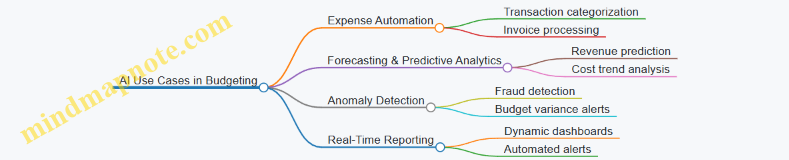
Tips for Successful Adoption
- Start small and scale gradually.
- Maintain human oversight to validate AI outputs.
- Regularly update AI models with new data.
- Communicate benefits and changes clearly to all stakeholders.
By following these best practices, finance and nonprofit professionals can confidently prepare for and leverage AI and automation to revolutionize budgeting processes, driving greater efficiency and strategic value.
15.3 Example: Predictive Analytics for Budget Forecasting
Predictive analytics is revolutionizing how organizations forecast budgets by leveraging historical data, statistical algorithms, and machine learning techniques to predict future financial outcomes. This approach enables finance and nonprofit professionals to create more accurate, data-driven budgets that adapt to changing conditions.
What is Predictive Analytics in Budget Forecasting?
Predictive analytics uses past and current data to forecast future budget needs, revenue streams, and expenses. It goes beyond traditional budgeting by incorporating trends, seasonality, and external factors to anticipate financial performance.
Mind Map: Key Components of Predictive Analytics in Budget Forecasting
Practical Example: Using Predictive Analytics to Forecast Grant Revenue
Scenario: A nonprofit organization relies heavily on grant funding, which can fluctuate based on economic conditions and donor priorities. The finance team wants to forecast grant revenue for the next fiscal year with greater accuracy.
Step 1: Data Collection
- Gather historical grant revenue data over the past 5 years.
- Collect external data such as economic indicators (GDP growth, unemployment rates).
- Include program performance metrics that may influence grant awards.
Step 2: Data Preparation
- Clean the data to remove anomalies or missing values.
- Normalize data to ensure consistency.
Step 3: Model Selection
- Use a time series forecasting model like ARIMA (AutoRegressive Integrated Moving Average) to capture trends and seasonality.
- Incorporate regression analysis to account for economic indicators.
Step 4: Model Training and Validation
- Train the model on 80% of the data.
- Validate using the remaining 20%.
- Evaluate accuracy using RMSE (Root Mean Square Error).
Step 5: Forecasting and Budget Integration
- Generate grant revenue forecasts for each quarter.
- Integrate forecasts into the overall budget to adjust expense allocations accordingly.
Mind Map: Forecasting Grant Revenue Using Predictive Analytics
Additional Example: Predictive Analytics for Expense Forecasting in a Finance Department
Scenario: A finance team wants to predict operational expenses to better manage cash flow.
- Collect monthly expense data for the last 3 years.
- Identify key drivers such as staffing levels, program expansions, and inflation rates.
- Use machine learning models like Random Forest or Gradient Boosting to capture complex relationships.
- Validate model accuracy and update forecasts monthly.
Outcome: The team can proactively adjust budgets, identify potential overspending early, and optimize resource allocation.
Mind Map: Expense Forecasting with Machine Learning
Best Practices for Implementing Predictive Analytics in Budget Forecasting
- Start with Quality Data: Ensure data is accurate, complete, and relevant.
- Choose Appropriate Models: Match modeling techniques to the nature of your data and forecasting needs.
- Validate Regularly: Continuously test model predictions against actual outcomes.
- Integrate with Existing Systems: Use budgeting software that supports predictive analytics.
- Train Your Team: Equip finance professionals with skills in data analysis and interpretation.
By incorporating predictive analytics, accountants and budget analysts can transform budgeting from a static, retrospective process into a dynamic, forward-looking strategy that enhances financial stability and mission impact.
15.4 Practical Recommendations for Staying Ahead in Budgeting Innovation
As budgeting continues to evolve with technological advancements and shifting organizational needs, staying ahead in budgeting innovation is crucial for finance professionals and nonprofit budget analysts. Below are practical recommendations, supported by mind maps and examples, to help you embrace innovation and future-proof your budgeting processes.
Embrace Continuous Learning and Skill Development
- Stay updated with the latest budgeting tools, software, and methodologies.
- Participate in webinars, workshops, and certification programs focused on advanced budgeting and financial planning.
- Encourage cross-functional learning to understand how budgeting impacts other departments.
Example: A nonprofit finance team subscribes to monthly webinars on AI-driven budgeting tools, enabling them to automate repetitive tasks and focus on strategic analysis.
Leverage Predictive Analytics and AI
- Integrate predictive analytics to forecast revenues, expenses, and cash flows more accurately.
- Use AI-powered budgeting software to identify patterns, anomalies, and optimization opportunities.
Example: A budget analyst uses AI tools to predict donor funding trends, allowing the organization to adjust program budgets proactively.
Foster a Culture of Agility and Flexibility
- Adopt rolling forecasts and flexible budgeting to respond quickly to changes.
- Encourage iterative budget reviews and updates rather than static annual budgets.
Example: A finance team implements quarterly rolling forecasts, enabling timely reallocation of resources when grant funding fluctuates.
Promote Collaboration and Transparency
- Use cloud-based budgeting platforms to facilitate real-time collaboration among stakeholders.
- Ensure transparent reporting to build trust and accountability.
Example: A nonprofit uses a shared budgeting dashboard accessible to program managers, improving alignment and reducing budget conflicts.
Integrate Strategic and Performance-Based Budgeting
- Align budgeting processes with strategic goals and performance metrics.
- Use data-driven insights to prioritize funding for high-impact programs.
Example: A budget analyst develops a performance-based budget linking funding to measurable outcomes, improving program effectiveness.
Mind Maps
Final Thoughts
Innovation in budgeting is not just about adopting new tools but also about evolving mindsets and processes. By continuously learning, leveraging technology, fostering collaboration, and aligning budgets with strategic goals, finance and nonprofit professionals can ensure their budgeting practices remain relevant, efficient, and impactful.
Start small by piloting one or two innovations and scaling as you gain confidence and results. The future of budgeting is dynamic—embrace it proactively to drive your organization’s success.
16. Conclusion and Next Steps
16.1 Recap of Advanced Budgeting Techniques and Best Practices
As we conclude our deep dive into advanced budgeting techniques, it’s essential to revisit the core concepts and best practices that empower finance and nonprofit professionals to create more accurate, flexible, and strategic budgets. This recap consolidates the key methods covered, along with practical examples and mind maps to visualize their applications.
Mind Map: Overview of Advanced Budgeting Techniques
Key Best Practices Recap with Examples
-
Zero-Based Budgeting (ZBB)
- Best Practice: Challenge every expense to eliminate waste.
- Example: A nonprofit reviewed all program expenses and identified a recurring subscription service no longer in use, saving $5,000 annually.
-
Activity-Based Budgeting (ABB)
- Best Practice: Identify and allocate costs based on actual activities rather than broad categories.
- Example: Finance team allocated administrative costs to fundraising and outreach programs based on hours spent, improving cost transparency.
-
Flexible Budgeting
- Best Practice: Prepare budgets that adjust with changes in activity or funding.
- Example: A nonprofit adjusted its budget mid-year after a 10% decrease in donations, reallocating funds to critical programs.
-
Rolling Forecasts
- Best Practice: Update forecasts regularly to reflect current data and trends.
- Example: Monthly rolling forecasts helped a finance team anticipate cash flow shortages and adjust spending proactively.
-
Scenario and Sensitivity Analysis
- Best Practice: Develop multiple budget scenarios to prepare for uncertainties.
- Example: A nonprofit modeled best-case, expected, and worst-case funding scenarios to guide contingency planning.
-
Performance-Based Budgeting
- Best Practice: Tie budget allocations to measurable program outcomes.
- Example: Funding was increased for programs demonstrating high impact on community health metrics.
-
Collaborative Budgeting
- Best Practice: Involve program managers and stakeholders early for accurate input.
- Example: Budget workshops led to better alignment between finance and program teams, reducing last-minute revisions.
-
Technology Integration
- Best Practice: Leverage budgeting software for automation and collaboration.
- Example: Implementing a cloud-based tool reduced budget consolidation time by 30%.
-
Strategic Alignment
- Best Practice: Ensure budgets reflect strategic priorities and organizational goals.
- Example: Budgeting process prioritized funding for new initiatives aligned with the nonprofit’s 5-year strategic plan.
Mind Map: Best Practices Summary
Final Practical Example: Integrating Techniques
Imagine a nonprofit preparing its annual budget:
- They start with Zero-Based Budgeting, justifying every program expense.
- Use Activity-Based Budgeting to allocate overhead based on staff hours per program.
- Develop a Flexible Budget to adjust for potential funding changes.
- Create Rolling Forecasts updated quarterly to reflect actual donations.
- Conduct Scenario Analysis to prepare for economic uncertainties.
- Tie budget allocations to program KPIs using Performance-Based Budgeting.
- Facilitate Collaborative Budgeting workshops with program managers.
- Employ a cloud budgeting platform for real-time updates.
- Ensure all budget decisions align with the nonprofit’s strategic goals.
This integrated approach enhances accuracy, accountability, and adaptability, driving better financial stewardship.
This recap serves as a foundation for applying advanced budgeting techniques effectively in your finance or nonprofit organization. By combining these methods and best practices, you can build budgets that not only control costs but also strategically support your mission and goals.
16.2 How to Implement These Techniques in Your Organization
Implementing advanced budgeting techniques requires a structured approach that aligns with your organization’s unique goals, culture, and resources. Below is a comprehensive guide to help accountants and budget analysts in finance and nonprofit sectors successfully embed these techniques into their budgeting processes.
Step 1: Assess Current Budgeting Processes
- Conduct a thorough review of existing budgeting methods.
- Identify strengths, weaknesses, and gaps.
- Engage stakeholders to understand pain points and expectations.
Example: A nonprofit finance team discovered that their traditional incremental budgeting was causing resource misallocation, prompting a shift towards zero-based budgeting.
Step 2: Prioritize Techniques Based on Organizational Needs
- Evaluate which advanced techniques (e.g., Zero-Based Budgeting, Activity-Based Budgeting, Rolling Forecasts) best address identified gaps.
- Consider resource availability and staff expertise.
Example: A finance department with fluctuating funding prioritized flexible budgeting and rolling forecasts to remain agile.
Step 3: Develop a Detailed Implementation Plan
- Define clear objectives and timelines.
- Assign roles and responsibilities.
- Plan training sessions and resource allocation.
Example: The budget analysts scheduled monthly workshops to train program managers on activity-based budgeting principles.
Step 4: Pilot the Selected Techniques
- Choose a specific department or program for a pilot.
- Apply the new budgeting technique on a smaller scale.
- Collect data and feedback.
Example: A nonprofit piloted zero-based budgeting within its community outreach program, resulting in a 10% cost reduction.
Step 5: Evaluate and Refine
- Analyze pilot outcomes against objectives.
- Identify challenges and areas for improvement.
- Refine processes before full-scale rollout.
Example: After pilot feedback, the finance team adjusted their activity cost driver identification to improve accuracy.
Step 6: Full-Scale Implementation
- Roll out the refined budgeting techniques organization-wide.
- Maintain open communication channels for ongoing support.
Example: The finance department integrated rolling forecasts into quarterly budget reviews across all programs.
Step 7: Continuous Monitoring and Improvement
- Establish KPIs to track budgeting effectiveness.
- Schedule regular reviews and updates.
- Encourage feedback loops.
Example: Monthly variance reports helped identify deviations early, allowing timely budget adjustments.
Practical Example: Implementing Zero-Based Budgeting (ZBB) in a Nonprofit
- Assessment: Identified that incremental budgeting led to unchecked spending.
- Prioritization: Selected ZBB to justify every expense.
- Planning: Set a 6-month timeline, assigned budget analysts and program managers.
- Pilot: Applied ZBB to the education program budget.
- Evaluation: Found savings in administrative costs.
- Rollout: Expanded ZBB to all departments.
- Monitoring: Tracked monthly expenses against zero-based targets.
Summary Mind Map
By following these structured steps and leveraging collaborative tools like mind maps, your organization can successfully transition to advanced budgeting techniques that drive efficiency, transparency, and strategic alignment.
16.3 Resources for Further Learning and Development
To deepen your understanding of advanced budgeting techniques and continuously improve your budgeting skills, leveraging a variety of resources is essential. Below, you’ll find curated resources including books, online courses, professional organizations, software tools, and community forums. Additionally, mind maps are provided to help you visualize how these resources interconnect and can be utilized effectively.
Books
- “Budgeting Basics and Beyond” by Jae K. Shim and Joel G. Siegel
- A comprehensive guide covering budgeting fundamentals and advanced concepts with practical examples.
- “Zero-Based Budgeting: Theory and Practice” by Peter A. Pyhrr
- Deep dive into ZBB methodology with case studies.
- “Activity-Based Cost Management” by John A. Miller
- Focuses on activity-based budgeting and cost management techniques.
Online Courses
- Coursera: Financial Planning & Budgeting
- Offers modules on flexible budgeting, forecasting, and performance measurement.
- LinkedIn Learning: Advanced Budgeting Techniques
- Practical tutorials on rolling forecasts, scenario analysis, and collaborative budgeting.
- edX: Nonprofit Financial Stewardship
- Tailored for nonprofit finance professionals focusing on budgeting and compliance.
Professional Organizations
- Association of Budgeting and Financial Professionals (ABFP)
- Provides certifications, webinars, and networking opportunities.
- American Institute of CPAs (AICPA)
- Offers resources and continuing education on budgeting and financial management.
- Nonprofit Finance Fund (NFF)
- Specialized resources for budgeting in the nonprofit sector.
Software Tools
- Adaptive Insights
- Cloud-based budgeting and forecasting platform supporting rolling forecasts.
- Anaplan
- Advanced modeling and scenario planning tool.
- QuickBooks Nonprofit
- Budgeting and financial management tailored for nonprofits.
Community Forums & Blogs
- r/Accounting on Reddit
- Active discussions on budgeting challenges and solutions.
- The Budgeting Blog by FMA (Financial Management Association)
- Articles and case studies on budgeting best practices.
- Nonprofit Quarterly
- Insights and trends in nonprofit financial management.
Mind Maps
Mind Map 1: Categories of Learning Resources
Mind Map 2: How to Use Resources Effectively
Mind Map 3: Example Learning Path for an Accountant in Nonprofit Sector
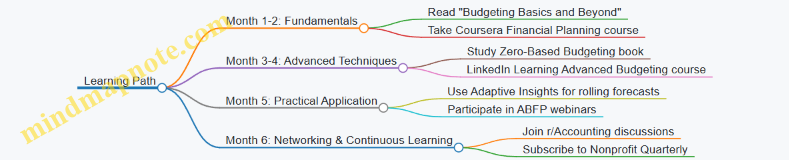
Examples of Applying Resources
Example 1: Using Online Courses and Books Together
- An accountant starts with the book “Budgeting Basics and Beyond” to build foundational knowledge.
- Simultaneously, they enroll in the Coursera Financial Planning & Budgeting course to get interactive exercises.
- They apply learnings by creating a zero-based budget for a small program and compare it with traditional budgeting.
Example 2: Leveraging Professional Organizations and Software
- A budget analyst joins ABFP to access exclusive webinars on activity-based budgeting.
- They trial Adaptive Insights software to implement rolling forecasts.
- Using insights from ABFP and hands-on software experience, they lead a workshop for their nonprofit team.
Example 3: Community Engagement for Problem Solving
- Facing challenges in flexible budgeting, an accountant posts questions on r/Accounting.
- They receive practical tips and templates from peers.
- They adapt these solutions and share results back with the community, fostering continuous learning.
By combining these resources and approaches, finance and nonprofit professionals can build a robust, up-to-date skill set in advanced budgeting techniques, enabling them to drive better financial outcomes and organizational success.
16.4 Final Practical Example: Creating Your Action Plan for Advanced Budgeting
Creating an actionable plan to implement advanced budgeting techniques is crucial for accountants and budget analysts aiming to elevate their organization’s financial management. This section guides you through a step-by-step approach, supported by mind maps and examples, to help you design a tailored action plan.
Step 1: Assess Current Budgeting Practices
Start by evaluating your existing budgeting process to identify strengths, weaknesses, and opportunities for improvement.
Example:
- Current Process: Incremental budgeting with limited flexibility
- Strengths: Clear historical data usage
- Weaknesses: Lack of alignment with strategic goals
- Improvement Areas: Incorporate rolling forecasts and performance metrics
- Stakeholder Feedback: Program managers desire more involvement
Step 2: Define Objectives and Priorities
Clarify what you want to achieve with advanced budgeting techniques. Align objectives with organizational strategy.
Example:
- Objective: Improve budget flexibility to respond to funding changes
- Priority: Increase collaboration between finance and program teams
Step 3: Select Appropriate Advanced Budgeting Techniques
Choose techniques that best fit your organization’s needs and capacity.
Example:
- Selected Techniques: Zero-Based Budgeting to optimize costs, Rolling Forecasts to improve adaptability
Step 4: Develop Implementation Timeline and Milestones
Plan realistic timelines with clear milestones to track progress.
Example:
- Phase 1 (Month 1-2): Conduct workshops on ZBB and rolling forecasts
- Phase 2 (Month 3-4): Pilot ZBB in one department
- Phase 3 (Month 5-6): Organization-wide rollout
- Phase 4 (Month 7+): Monthly review and continuous improvement
Step 5: Assign Roles and Responsibilities
Clearly define who will be responsible for each part of the budgeting process.
Example:
- Finance Team: Lead budgeting process and training
- Department Heads: Provide input and review budgets
- Budget Analysts: Perform analysis and reporting
- IT Support: Maintain budgeting software
- Executive Sponsors: Approve budgets and champion change
Step 6: Establish Monitoring and Feedback Mechanisms
Set up processes to track budget performance and gather feedback for continuous improvement.
Example:
- Monthly variance reports shared with all stakeholders
- Quarterly feedback sessions to discuss challenges and improvements
Step 7: Document and Communicate the Action Plan
Create a clear, accessible document outlining the plan and communicate it effectively across the organization.
Example:
- Develop a comprehensive action plan document including objectives, techniques, timeline, roles, and monitoring plans.
- Hold a kickoff meeting to align all stakeholders.
Summary Mind Map of the Action Plan
Final Practical Example: Sample Action Plan Outline
| Step | Description | Example Task | Timeline |
|---|---|---|---|
| 1 | Assess Current Budgeting | Conduct internal survey on budgeting satisfaction | Week 1 |
| 2 | Define Objectives | Workshop to align budgeting goals with strategy | Week 2 |
| 3 | Select Techniques | Decide on ZBB and Rolling Forecasts | Week 3 |
| 4 | Implementation Timeline | Develop detailed rollout schedule | Week 4 |
| 5 | Assign Roles | Assign budgeting champions in each department | Week 5 |
| 6 | Monitoring & Feedback | Set up monthly budget review meetings | Ongoing |
| 7 | Communication | Share plan via intranet and meetings | Week 6 |
By following this structured approach, accountants and budget analysts can confidently implement advanced budgeting techniques that drive efficiency, adaptability, and strategic alignment within their finance or nonprofit organizations.