Data Analytics for Accountants
1. Introduction to Data Analytics in Accounting
1.1 Understanding Data Analytics: Definitions and Scope
Data analytics is the science of examining raw data with the purpose of drawing conclusions about that information. It involves various processes such as data collection, cleaning, transformation, and modeling to uncover useful insights that support decision-making.
What is Data Analytics?
- Definition: Data analytics refers to the techniques and processes used to inspect, clean, transform, and model data to discover useful information, inform conclusions, and support decision-making.
- Scope: It spans descriptive, diagnostic, predictive, and prescriptive analytics.
Mind Map: Core Components of Data Analytics
Types of Data Analytics
| Type | Description | Example in Accounting |
|---|---|---|
| Descriptive | What happened? Summarizing historical data | Monthly financial reports |
| Diagnostic | Why did it happen? Analyzing causes | Investigating variance in budget vs actual |
| Predictive | What will happen? Forecasting future trends | Cash flow forecasting |
| Prescriptive | What should we do? Recommending actions | Optimizing tax strategies |
Mind Map: Types of Data Analytics
Why is Data Analytics Important for Accountants?
- Enhances accuracy in financial reporting
- Enables proactive risk management
- Improves budgeting and forecasting
- Supports compliance and fraud detection
Example: Simple Descriptive Analytics in Accounting
Imagine an accountant reviewing monthly expenses. Using data analytics, they can:
- Aggregate expenses by category (e.g., travel, office supplies)
- Identify the largest cost drivers
- Spot unusual spikes indicating potential errors or fraud
Sample Data Table:
| Month | Travel Expenses | Office Supplies | Utilities | Total Expenses | |
|---|---|---|---|---|---|
| Jan | $1,200 | $300 | $500 | $2,000 | |
| Feb | $1,500 | $250 | $520 | $2,270 | |
| Mar | $3,000 | $280 | $510 | $3,790 | <– Notice spike in Travel |
By visualizing this data, the accountant can quickly detect the March spike in travel expenses and investigate further.
Mind Map: Example Workflow for Data Analytics in Accounting
Summary
Understanding data analytics is foundational for accountants aiming to leverage data-driven insights. It covers a broad scope from gathering data to making informed decisions. By mastering these concepts, accountants can improve accuracy, efficiency, and strategic value in their roles.
1.2 The Role of Data Analytics in Modern Accounting
Data analytics has become a cornerstone in transforming the accounting profession from traditional number crunching to a strategic, insight-driven function. Modern accounting leverages data analytics to enhance accuracy, efficiency, compliance, and decision-making.
Why Data Analytics Matters in Accounting
- Improved Accuracy: Automated data analysis reduces human errors in financial reporting.
- Enhanced Efficiency: Streamlines repetitive tasks such as reconciliations and report generation.
- Better Compliance: Identifies anomalies and potential fraud, ensuring regulatory adherence.
- Strategic Insights: Provides actionable insights for budgeting, forecasting, and financial planning.
Mind Map: Core Roles of Data Analytics in Accounting
Example 1: Automating Financial Reporting
A mid-sized firm implemented data analytics tools to automate monthly financial statements. By connecting their ERP system to a dashboard, accountants could generate reports instantly with real-time data, reducing report preparation time from days to hours and minimizing errors caused by manual data entry.
Mind Map: Benefits of Automated Financial Reporting
Example 2: Fraud Detection through Data Analytics
An accounting team used anomaly detection algorithms to analyze transaction data. The system flagged unusual vendor payments and duplicate invoices, allowing the team to investigate and prevent potential fraud before it escalated.
Mind Map: Fraud Detection Workflow
Example 3: Forecasting Cash Flow Using Predictive Analytics
By analyzing historical payment and receivables data, accountants created predictive models to forecast cash flow for the next quarter. This enabled proactive management of working capital and informed strategic decisions such as timing for investments or loan repayments.
Mind Map: Cash Flow Forecasting Process
Summary
Data analytics plays a multifaceted role in modern accounting by automating routine tasks, enhancing accuracy, detecting risks, and providing strategic insights. Accountants who embrace data analytics can drive greater value for their organizations, moving beyond traditional bookkeeping to become trusted financial advisors.
1.3 Key Benefits of Integrating Analytics into Accounting Workflows
Integrating data analytics into accounting workflows offers transformative benefits that enhance accuracy, efficiency, and strategic decision-making. Below, we explore these benefits in detail, supported by mind maps and practical examples to illustrate their real-world application.
Benefit 1: Improved Accuracy and Reduced Errors
Data analytics tools help automate data validation and error detection, minimizing manual mistakes common in traditional accounting processes.
- Example: An accounting team uses automated reconciliation software that flags discrepancies between bank statements and ledger entries, reducing reconciliation errors by 30%.
Mind Map: Improved Accuracy
Benefit 2: Enhanced Efficiency and Time Savings
Analytics streamlines data processing, reporting, and analysis, freeing accountants to focus on higher-value tasks.
- Example: Using Power Query in Excel, an accountant automates monthly financial report generation, cutting preparation time from 8 hours to 2 hours.
Mind Map: Enhanced Efficiency
Benefit 3: Deeper Financial Insights and Decision Support
Analytics enables accountants to uncover trends, patterns, and anomalies that inform strategic business decisions.
- Example: By analyzing expense categories over multiple quarters, an accountant identifies rising travel costs and recommends budget adjustments.
Mind Map: Deeper Financial Insights
Benefit 4: Better Risk Management and Fraud Detection
Advanced analytics techniques help detect irregularities and potential fraud early, protecting organizations from financial loss.
- Example: A firm implements anomaly detection algorithms that flag suspicious vendor payments, preventing a potential fraud case.
Mind Map: Risk Management & Fraud Detection
Benefit 5: Improved Reporting and Communication
Data visualization and analytics tools enable accountants to create clear, interactive reports that communicate insights effectively to stakeholders.
- Example: An accountant uses Tableau to build a dynamic dashboard showing key financial KPIs, improving executive understanding and decision-making.
Mind Map: Improved Reporting
Benefit 6: Scalability and Adaptability
Analytics solutions can scale with business growth and adapt to changing regulatory and operational requirements.
- Example: A growing startup integrates cloud-based analytics platforms that easily handle increasing transaction volumes and evolving reporting standards.
Mind Map: Scalability & Adaptability
Summary
Integrating analytics into accounting workflows drives accuracy, efficiency, insight, risk management, communication, and scalability. These benefits collectively empower accountants to transition from traditional number crunchers to strategic business advisors.
By embracing analytics, accounting professionals can unlock new value for their organizations and stay competitive in an increasingly data-driven world.
1.4 Overview of Common Data Analytics Tools for Accountants
In today’s accounting landscape, leveraging the right data analytics tools is essential for improving accuracy, efficiency, and insight generation. This section will explore some of the most popular and effective tools available to accountants, highlighting their features, benefits, and practical examples of how they can be used.
Key Data Analytics Tools for Accountants
Detailed Examples and Use Cases
Microsoft Excel:
Excel remains the backbone of many accounting analytics tasks. Its Pivot Tables allow accountants to quickly summarize large datasets, such as sales transactions or expense reports.
Example: An accountant uses Pivot Tables to analyze monthly expenses by category, quickly identifying areas where costs have increased unexpectedly.
Power Query enhances Excel by enabling automated data cleaning and transformation. For example, importing bank statements from multiple formats and consolidating them into a single, clean dataset.
Power BI:
Power BI is a powerful BI tool that connects to various data sources, allowing accountants to create interactive dashboards.
Example: A finance team builds a dashboard showing real-time cash flow, accounts receivable aging, and budget vs actual comparisons, enabling faster decision-making.
Python:
Python’s libraries like Pandas and Matplotlib enable accountants to perform advanced data manipulation and visualization.
Example: Using Python, an accountant automates the reconciliation process by matching invoices with payments and flagging discrepancies.
QuickBooks with BI Integration:
QuickBooks offers built-in reports but also integrates with BI tools like Tableau or Power BI for deeper insights.
Example: A small business accountant exports QuickBooks data into Tableau to visualize customer payment patterns and identify late payers.
Mind Map: Choosing the Right Tool Based on Need
Summary
Selecting the right data analytics tool depends on the accountant’s specific needs, data volume, technical skills, and budget. Mastery of foundational tools like Excel combined with the ability to leverage BI platforms such as Power BI or Tableau can significantly enhance an accountant’s analytical capabilities. For those looking to deepen their skillset, programming languages like Python and R offer powerful options for automation and advanced analytics.
By integrating these tools into daily workflows, accountants can move beyond traditional number-crunching to become strategic advisors who provide actionable insights based on robust data analysis.
1.5 Real-World Example: How a Small Accounting Firm Transformed with Analytics
In this section, we explore how a small accounting firm leveraged data analytics to revolutionize its operations, improve client service, and increase profitability. This real-world example highlights the practical steps taken, challenges faced, and the tangible benefits realized.
Background
“BrightPath Accounting” is a small firm with 10 accountants serving local businesses. They traditionally relied on manual processes and spreadsheets, which limited their ability to provide proactive insights to clients.
Challenges Faced
- Time-consuming manual data entry and reconciliation
- Limited visibility into client financial trends
- Difficulty identifying anomalies or potential fraud
- Reactive rather than proactive client advisory
Transformation Journey
The firm decided to integrate data analytics into their workflow with the following approach:
Mind Map: Transformation Journey of BrightPath Accounting
Step 1: Automating Data Collection
BrightPath integrated APIs from popular accounting software (e.g., QuickBooks, Xero) to automatically pull client data into a centralized system. This eliminated manual data entry errors and saved hours per week.
Example:
- Before: Accountants manually exported CSV files monthly.
- After: Automated daily data sync reduced delays and improved accuracy.
Step 2: Data Cleaning and Preparation
Using Power Query in Excel, the firm standardized data formats, corrected inconsistencies, and removed duplicates.
Example:
- Invoice dates were sometimes entered in different formats; Power Query transformed all dates to a consistent YYYY-MM-DD format.
Step 3: Exploratory Data Analysis (EDA)
Accountants created dashboards to visualize client cash flows, expense categories, and revenue trends.
Mind Map: Exploratory Data Analysis Focus Areas
Example:
- A dashboard revealed a recurring spike in office supplies expenses every quarter, prompting a client to negotiate better vendor contracts.
Step 4: Predictive Analytics
BrightPath developed simple forecasting models using historical data to predict client cash flow shortages and late payments.
Example:
- Using linear regression, they forecasted a client’s monthly revenue with 85% accuracy, enabling proactive budgeting advice.
Step 5: Automation of Reporting
Monthly financial reports were automated using Power BI, reducing report generation time from days to hours.
Example:
- Reports included interactive visuals and key KPIs, automatically emailed to clients.
Step 6: Enhanced Client Communication
Clients received access to personalized dashboards, allowing them to monitor financial health in real-time.
Example:
- A client spotted an unusual vendor payment early and prevented a potential fraud.
Benefits Realized
- 40% reduction in manual processing time
- Improved accuracy and data quality
- Enhanced client satisfaction through proactive insights
- New advisory services based on data-driven recommendations
Summary
BrightPath Accounting’s transformation demonstrates how even small firms can harness data analytics to improve efficiency, accuracy, and client value. By automating data workflows, applying exploratory and predictive analytics, and enhancing communication, they created a competitive advantage and future-proofed their business.
This example sets the stage for the best practices and techniques covered in the rest of this blog, illustrating the tangible impact of data analytics in accounting.
2. Data Collection and Preparation for Accountants
2.1 Identifying Relevant Financial Data Sources
In the realm of accounting, the foundation of effective data analytics lies in identifying and gathering the right financial data sources. Without accurate and relevant data, even the most sophisticated analytical techniques will fail to deliver meaningful insights. This section explores the key financial data sources accountants should focus on, along with practical examples and mind maps to visualize the relationships and categories.
Why Identifying Relevant Data Sources Matters
- Ensures accuracy and reliability of analysis
- Helps in targeting specific business questions
- Saves time by focusing on pertinent data
- Enables comprehensive financial insights
Key Financial Data Sources for Accountants
-
General Ledger (GL)
- The central repository of all financial transactions
- Includes accounts payable, accounts receivable, assets, liabilities, equity, revenues, and expenses
-
Accounts Payable (AP) Data
- Details of money owed to suppliers and vendors
- Invoice dates, amounts, payment terms
-
Accounts Receivable (AR) Data
- Records of money owed by customers
- Payment status, aging reports
-
Bank Statements and Reconciliations
- Records of cash inflows and outflows
- Used for verifying transactions and cash position
-
Payroll Data
- Employee salary, bonuses, deductions, tax withholdings
-
Tax Records
- Tax filings, payments, and compliance documents
-
Budgets and Forecasts
- Planned financial performance data
-
Fixed Assets Register
- Details of company-owned assets, depreciation schedules
-
Inventory Data
- Stock levels, valuation, turnover rates
-
External Data Sources
- Market data, economic indicators, competitor financials
Mind Map: Financial Data Sources Overview
Mind Map: General Ledger Breakdown
Practical Example 1: Small Business Accounting Data Sources
Imagine an accountant working for a small retail business. The relevant financial data sources might include:
- Point of Sale (POS) System Data: Sales transactions, returns, discounts
- Bank Statements: Daily deposits and withdrawals
- Supplier Invoices: For accounts payable tracking
- Payroll System: Employee wages and tax deductions
- Inventory Management System: Stock levels and reorder points
By identifying these sources, the accountant can pull data to analyze sales trends, cash flow, and inventory turnover.
Practical Example 2: Corporate Accounting Data Sources
For a larger corporation, data sources can be more complex:
- Enterprise Resource Planning (ERP) System: Centralized data including GL, AP, AR, payroll, and fixed assets
- Tax Software: For compliance and reporting
- Budgeting Software: Forecasts and variance analysis
- External Market Data: Industry benchmarks and economic indicators
An accountant can integrate these sources to perform comprehensive financial analysis, risk assessment, and strategic planning.
Tips for Identifying Relevant Data Sources
- Understand the Business Context: Tailor data collection to the company’s industry and size
- Collaborate with IT and Finance Teams: To access and understand data systems
- Validate Data Quality: Ensure data is complete, accurate, and timely
- Document Data Sources: Maintain a data inventory for transparency and repeatability
Summary
Identifying relevant financial data sources is the critical first step in the data analytics journey for accountants. By mapping out internal and external data sources, understanding their contents, and contextualizing them within the business environment, accountants can ensure their analyses are built on a solid foundation. The mind maps and examples provided here serve as practical guides to help accountants systematically approach data source identification.
2.2 Best Practices for Data Extraction from Accounting Systems
Extracting data from accounting systems is a critical step in the data analytics process. The quality and completeness of the extracted data directly impact the accuracy of your analysis. Below are best practices to ensure efficient, accurate, and secure data extraction.
Best Practices Overview
Understand Your Data Requirements
Before extracting data, clearly define what data you need and why. This prevents unnecessary data overload and focuses your efforts on relevant information.
Example:
If you are analyzing accounts receivable aging, focus on invoice dates, payment terms, customer IDs, and payment status rather than extracting entire ledger data.
Identify Data Sources Within the Accounting System
Accounting systems often have multiple modules (e.g., general ledger, accounts payable, payroll). Identify which modules contain the data relevant to your analysis.
Example:
For expense analysis, extract data from the accounts payable module, including vendor details, invoice amounts, and payment dates.
Use Native Export Functions When Possible
Most accounting software provides built-in export options (CSV, Excel, XML). Using these ensures compatibility and reduces errors.
Example:
QuickBooks allows exporting reports and lists directly to Excel, which can then be cleaned and analyzed.
Leverage APIs for Automated and Scalable Extraction
APIs (Application Programming Interfaces) enable programmatic access to accounting data, allowing scheduled and automated extraction.
Example:
Using Xero’s API, you can automate daily extraction of bank transactions for reconciliation.
Direct Database Queries for Advanced Users
If you have access and SQL skills, querying the accounting system’s database directly can provide customized and granular data extraction.
Example:
Running SQL queries on an ERP database to extract all transactions above a certain threshold for fraud detection.
Validate Extracted Data Immediately
Check for completeness, accuracy, and consistency right after extraction to catch issues early.
Example:
Compare total invoice amounts extracted with the totals reported in the accounting system to ensure no data is missing.
Handle Missing or Inconsistent Data
Implement rules to manage missing values or inconsistent formats, such as imputing missing dates or standardizing currency formats.
Example:
If some payment dates are missing, flag those records for follow-up rather than ignoring them.
Ensure Data Security and Compliance
Restrict access to sensitive financial data during extraction, use encrypted channels, and maintain audit trails.
Example:
Use VPN and encrypted API connections when extracting payroll data to comply with privacy regulations.
Document the Extraction Process Thoroughly
Keep detailed logs of extraction dates, methods, filters applied, and any transformations performed.
Example:
Maintain a spreadsheet tracking each data extraction session, including who performed it and what parameters were used.
Example Scenario: Extracting Monthly Sales Data from an ERP
- Preparation: Define the need for monthly sales by region.
- Identify Sources: Sales module and customer database.
- Extraction Method: Use native export to CSV.
- Validation: Cross-check total sales with monthly financial reports.
- Security: Limit extraction rights to authorized personnel.
- Documentation: Log extraction date, filters, and file location.
Summary
By following these best practices, accountants and data analysts can ensure that the data extracted from accounting systems is accurate, relevant, and secure, forming a solid foundation for insightful analytics.
2.3 Data Cleaning Techniques: Handling Missing and Inconsistent Data
Data cleaning is a critical step in the data analytics process, especially for accountants who rely on accurate financial data to make informed decisions. Handling missing and inconsistent data ensures the integrity and reliability of your analysis.
Understanding Missing and Inconsistent Data
- Missing Data: Occurs when no value is stored for a variable in an observation.
- Inconsistent Data: Data that contains discrepancies, errors, or conflicting information.
Why Data Cleaning Matters in Accounting
- Ensures accurate financial reporting.
- Prevents errors in forecasting and budgeting.
- Improves audit quality.
Common Causes of Missing and Inconsistent Data
- Manual data entry errors.
- System integration issues.
- Data corruption or loss.
- Incomplete data extraction.
Mind Map: Overview of Data Cleaning Techniques
Handling Missing Data
Deletion Methods
-
Listwise Deletion: Remove entire records with missing values.
- Example: Removing transactions missing the invoice date.
- Best Practice: Use when missing data is minimal and random.
-
Pairwise Deletion: Use available data pairs for analysis without removing entire records.
- Example: Calculating correlation between revenue and expenses using only records where both are present.
Imputation Methods
-
Mean/Median/Mode Imputation: Replace missing values with the mean, median, or mode.
- Example: Filling missing tax rates with the average tax rate from other records.
-
Predictive Imputation: Use regression or machine learning models to predict missing values.
- Example: Predicting missing sales figures based on historical trends and other variables.
-
Forward/Backward Fill: Use previous or next available value to fill missing data.
- Example: Filling missing daily cash balances with the previous day’s balance.
Mind Map: Handling Missing Data Techniques
Handling Inconsistent Data
Standardization
-
Formatting Dates: Ensure all date fields follow a consistent format (e.g., YYYY-MM-DD).
- Example: Converting dates like “12/31/2023” and “31-Dec-2023” to “2023-12-31”.
-
Normalizing Text: Standardize text fields such as vendor names (e.g., “ABC Corp”, “ABC Corporation”, “A.B.C. Corp” all standardized to “ABC Corporation”).
Validation Rules
-
Range Checks: Verify numerical values fall within expected ranges.
- Example: Ensuring expense amounts are not negative.
-
Cross-field Validation: Check consistency between related fields.
- Example: Invoice date should not be after the payment date.
Deduplication
- Identify and remove duplicate records.
- Example: Multiple entries of the same invoice due to system errors.
Mind Map: Handling Inconsistent Data Techniques
Practical Example: Cleaning a Client’s Expense Data
Scenario: You receive an expense dataset with missing transaction dates, inconsistent vendor names, and some duplicate entries.
Step 1: Identify Missing Dates
- Use Excel filter or Power Query to find blank date fields.
- Impute missing dates using forward fill where appropriate.
Step 2: Standardize Vendor Names
- Create a mapping table to unify variations.
- Use Excel’s VLOOKUP or Power Query merge to replace inconsistent names.
Step 3: Remove Duplicates
- Use Excel’s “Remove Duplicates” feature based on invoice number and amount.
Step 4: Validate Amounts
- Check for negative or zero amounts and flag for review.
Summary
Cleaning data by effectively handling missing and inconsistent values is essential for trustworthy accounting analytics. Employ deletion or imputation techniques for missing data, and apply standardization, validation, and deduplication to inconsistent data. These practices help accountants maintain data quality, enabling accurate financial insights and decision-making.
2.4 Data Transformation and Normalization for Accurate Analysis
Data transformation and normalization are critical steps in preparing accounting data for accurate and meaningful analysis. These processes ensure that data from different sources or formats can be compared, aggregated, and analyzed without bias or distortion.
What is Data Transformation?
Data transformation involves converting data from its original format or structure into a format suitable for analysis. This can include changing data types, aggregating data, creating calculated fields, or restructuring datasets.
What is Data Normalization?
Normalization is a specific type of transformation that adjusts values measured on different scales to a common scale, often to improve comparability and reduce bias in analysis.
Why are Transformation and Normalization Important in Accounting?
- Consistency: Ensures financial data from multiple sources (e.g., ERP systems, spreadsheets, bank statements) align correctly.
- Accuracy: Prevents errors caused by incompatible data formats or scales.
- Comparability: Enables meaningful comparisons across periods, accounts, or entities.
- Improved Analytics: Facilitates advanced techniques like predictive modeling and anomaly detection.
Common Data Transformation Techniques in Accounting
- Data Type Conversion: Converting text to dates, numbers stored as text to numeric types.
- Aggregation: Summing daily transactions into monthly totals.
- Pivoting/Unpivoting: Restructuring data from wide to long format or vice versa.
- Calculated Fields: Creating new metrics like profit margin (Profit / Revenue).
- Filtering: Removing irrelevant or duplicate records.
Common Normalization Methods
- Min-Max Normalization: Rescales data to a fixed range, usually 0 to 1.
- Z-Score Normalization: Centers data around mean with standard deviation scaling.
- Decimal Scaling: Moves decimal points to normalize values.
Mind Map: Data Transformation and Normalization Overview
Example 1: Transforming and Normalizing Expense Data
Scenario: You have monthly expense data from two departments. One reports expenses in thousands (e.g., 25 means $25,000), the other in exact dollars.
Step 1: Data Type Conversion & Scaling
- Convert all values to the same unit (exact dollars).
- Multiply department A’s values by 1,000.
Step 2: Aggregation
- Sum daily expenses into monthly totals.
Step 3: Normalization (Min-Max)
- Normalize expenses to a 0-1 scale to compare spending patterns across departments regardless of scale.
-
Original Data
- Dept A: [25, 30, 28] (in thousands)
- Dept B: [26000, 31000, 29000] (in dollars)
-
After Conversion
- Dept A: [25000, 30000, 28000]
-
Aggregated Monthly Totals
- Dept A: 83000
- Dept B: 86000
-
Min-Max Normalization Formula:
- normalized_value = (value - min) / (max - min)
-
Normalized Values
- Dept A: (83000 - 83000) / (86000 - 83000) = 0
- Dept B: (86000 - 83000) / (86000 - 83000) = 1
This allows direct comparison of expense trends despite different original scales.
Mind Map: Example 1 Workflow
Example 2: Normalizing Revenue Data Using Z-Score
Scenario: You want to analyze quarterly revenue data across multiple business units with vastly different revenue sizes.
Step 1: Calculate Mean and Standard Deviation
- Compute mean (μ) and standard deviation (σ) for each unit’s revenue.
Step 2: Apply Z-Score Normalization
- Formula: z = (x - μ) / σ
Step 3: Use normalized scores to identify units performing above or below average.
-
Business Unit Revenues (in $ millions):
- Unit A: [100, 120, 110, 130]
- Unit B: [10, 12, 11, 13]
-
Unit A Mean (μ): 115
-
Unit A Std Dev (σ): 12.91
-
Unit B Mean (μ): 11.5
-
Unit B Std Dev (σ): 1.29
-
Normalize Q1 Revenue:
- Unit A: (100 - 115) / 12.91 = -1.16
- Unit B: (10 - 11.5) / 1.29 = -1.16
Both units have the same relative performance despite different absolute values.
Mind Map: Example 2 Z-Score Normalization
Tools and Tips for Transformation & Normalization
- Excel / Power Query: Use built-in functions for data type conversion, pivot/unpivot, and calculated columns.
- Python (Pandas): Use
.astype(),.groupby(), andsklearn.preprocessingfor normalization. - Power BI: Use DAX functions and Power Query for transformation and normalization.
Summary
Data transformation and normalization are foundational to accurate accounting analytics. By converting data into consistent formats and scales, accountants can ensure reliable insights and better decision-making. Applying these techniques with practical tools and examples empowers accounting professionals to harness the full potential of their data.
2.5 Example: Preparing a Client’s Financial Data for Analysis Using Excel and Power Query
In this section, we will walk through a practical example of preparing a client’s financial data for analysis using Excel and Power Query. This process includes importing data, cleaning it, transforming it, and loading it into a structured format ready for analysis.
Step 1: Importing Data into Power Query
- Open Excel and go to the Data tab.
- Click Get Data > From File > From Workbook/CSV/Text depending on your source.
- Select the client’s financial data file (e.g., a CSV export of transactions).
- Power Query Editor will open showing a preview of the data.
Mind Map: Importing Data
Step 2: Understanding the Raw Data
Typical raw financial data might include columns like:
- Date
- Transaction Description
- Account Number
- Debit Amount
- Credit Amount
- Balance
Example snippet:
| Date | Description | Account | Debit | Credit | Balance |
|---|---|---|---|---|---|
| 2024-01-01 | Office Supplies | 5001 | 150.00 | 4850.00 | |
| 2024-01-02 | Client Payment | 4002 | 2000.00 | 6850.00 |
Step 3: Cleaning the Data
Common cleaning tasks:
- Remove empty rows or columns
- Correct data types (e.g., dates as Date, amounts as Decimal)
- Trim whitespace from text fields
- Handle missing values (e.g., replace blanks with 0 in Debit/Credit)
Power Query Actions:
- Use Remove Rows > Remove Blank Rows
- Select columns and set Data Type
- Use Transform > Format > Trim
- Use Replace Values to fill blanks with 0
Mind Map: Data Cleaning
Step 4: Transforming the Data
Transformations to prepare data for analysis:
- Create a new column for Net Amount = Credit - Debit
- Extract Month and Year from the Date for time-based analysis
- Categorize transactions based on Description keywords (e.g., “Office Supplies”, “Client Payment”)
Example formulas in Power Query:
- Add Custom Column:
=[Credit] - [Debit] - Add Column > Date > Month
- Add Column > Date > Year
- Conditional Column for Category:
- If Description contains “Office” then “Office Supplies”
- Else if Description contains “Client” then “Client Payment”
- Else “Other”
Mind Map: Data Transformation
Step 5: Loading the Cleaned Data
- After transformations, click Close & Load to load the data into a new Excel worksheet or data model.
- The data is now structured and ready for pivot tables, charts, or further analysis.
Practical Example Summary
| Step | Action Taken | Purpose |
|---|---|---|
| Import Data | Loaded CSV file into Power Query | Bring raw data into Excel for processing |
| Clean Data | Removed blanks, set data types, replaced nulls | Ensure data consistency and accuracy |
| Transform Data | Created Net Amount, extracted Month/Year, categorized transactions | Prepare data for meaningful analysis |
| Load Data | Loaded cleaned data into Excel worksheet | Ready for analysis and reporting |
Final Notes
- Power Query automates repetitive cleaning and transformation tasks, saving time.
- Always validate data after each step to ensure accuracy.
- Use this prepared data as a foundation for advanced analytics, dashboards, or reporting.
This example illustrates best practices in data preparation: start with raw data, clean it systematically, transform it to add analytical value, and load it into a usable format. Accountants can leverage these steps to enhance data quality and gain deeper financial insights efficiently.
3. Exploratory Data Analysis (EDA) for Financial Insights
3.1 Introduction to EDA Concepts and Importance
Exploratory Data Analysis (EDA) is a fundamental step in the data analytics process, especially for accountants who want to derive meaningful insights from financial data. EDA involves summarizing the main characteristics of a dataset, often using visual methods, to understand patterns, spot anomalies, test hypotheses, and check assumptions before applying more complex modeling techniques.
Why is EDA Important for Accountants?
- Data Quality Check: Ensures the financial data is accurate, complete, and consistent.
- Insight Discovery: Helps uncover trends, relationships, and outliers that might impact financial decisions.
- Hypothesis Generation: Provides a basis for forming questions or hypotheses about financial performance.
- Risk Identification: Detects unusual transactions or patterns that could indicate errors or fraud.
Key Concepts of EDA
- Data Summarization: Using descriptive statistics like mean, median, mode, variance, and standard deviation.
- Data Visualization: Employing charts, histograms, box plots, scatter plots, and heatmaps.
- Outlier Detection: Identifying data points that deviate significantly from others.
- Pattern Recognition: Finding trends or seasonal effects in financial data.
Mind Map: Core Components of EDA
Example 1: Summarizing Expense Data
Imagine an accountant analyzing monthly expenses for a client. Using EDA, they calculate:
- Average monthly expenses = $12,000
- Median monthly expenses = $11,500
- Standard deviation = $2,000
This summary reveals that while the average expense is $12,000, some months vary significantly, prompting a deeper look into months with unusually high expenses.
Example 2: Visualizing Revenue Trends
Using a line chart, an accountant plots monthly revenue over the past two years. The visualization reveals:
- A steady upward trend
- Seasonal dips every December
This insight helps in budgeting and forecasting future revenues more accurately.
Mind Map: EDA Workflow for Accountants
Best Practices for Accountants Performing EDA
- Always start with a clear understanding of the business context.
- Use a combination of statistical summaries and visualizations.
- Look for data quality issues early.
- Document findings and questions that arise during EDA.
- Use EDA results to guide deeper analysis or predictive modeling.
By mastering EDA, accountants can transform raw financial data into actionable insights, improving decision-making and adding strategic value to their roles.
3.2 Visualizing Financial Data: Charts, Graphs, and Dashboards
Visualizing financial data is a critical skill for accountants and data analysts alike. It transforms raw numbers into meaningful insights, making it easier to identify trends, spot anomalies, and communicate findings effectively to stakeholders. In this section, we will explore the best practices for visualizing financial data using charts, graphs, and dashboards, supported by mind maps and practical examples.
Why Visualize Financial Data?
- Simplifies complex datasets
- Enhances pattern recognition
- Facilitates faster decision-making
- Improves communication with non-technical stakeholders
Common Visualization Types for Financial Data
Mind Map: Visualization Types for Financial Data
Best Practices for Financial Data Visualization
- Choose the Right Chart Type: Match the visualization to the data story you want to tell.
- Keep it Simple: Avoid clutter; use clear labels and legends.
- Use Consistent Scales: Ensure comparability across charts.
- Highlight Key Data Points: Use colors or annotations to draw attention.
- Interactive Dashboards: Allow users to drill down into data.
Example 1: Visualizing Monthly Revenue with a Line Chart
Scenario: An accountant wants to analyze the revenue trend over the past 12 months.
- Data: Monthly revenue figures
- Visualization: Line chart showing revenue on the Y-axis and months on the X-axis
Insight: The line chart reveals seasonal spikes in revenue during holiday months.
Mind Map: Monthly Revenue Line Chart
Example 2: Comparing Expense Categories with a Bar Chart
Scenario: A data analyst needs to present the breakdown of company expenses by category.
- Data: Expense amounts for categories like Salaries, Marketing, Rent, Utilities
- Visualization: Horizontal bar chart for easy comparison
Insight: Marketing expenses are higher than expected, prompting a review.
Mind Map: Expense Category Bar Chart
Example 3: Building a Financial Dashboard
Scenario: An accounting team wants a dashboard to monitor key financial KPIs in real-time.
- Components:
- Revenue trend line chart
- Expense category bar chart
- Profit margin gauge
- Accounts receivable aging heatmap
Tools: Power BI, Tableau, or Excel
Benefits: Enables quick assessment of financial health and supports proactive decision-making.
Mind Map: Financial Dashboard Components
Tips for Creating Effective Dashboards
- Focus on KPIs relevant to your audience
- Use color coding to indicate performance (e.g., red for issues)
- Provide context with benchmarks or targets
- Ensure data is refreshed regularly
Summary
Visualizing financial data through charts, graphs, and dashboards empowers accountants and data analysts to uncover insights that drive business value. By selecting appropriate visualization types and following best practices, you can make financial data more accessible and actionable for all stakeholders.
3.3 Detecting Anomalies and Outliers in Accounting Data
Detecting anomalies and outliers is a critical step in accounting data analytics. Anomalies can indicate errors, fraud, or unusual transactions that require further investigation. Outliers are data points that deviate significantly from the norm and can distort analysis if not properly handled.
Why Detect Anomalies and Outliers?
- Error Identification: Spot data entry mistakes or system glitches.
- Fraud Detection: Uncover suspicious transactions or activities.
- Improved Accuracy: Ensure financial reports reflect true business conditions.
- Risk Management: Identify potential financial risks early.
Common Types of Anomalies in Accounting Data
- Point Anomalies: Single transaction or data point that is unusual.
- Contextual Anomalies: Data points that are anomalous in a specific context (e.g., high expense during a normally low-spend period).
- Collective Anomalies: A group of transactions that together indicate an anomaly (e.g., multiple small refunds in a short period).
Mind Map: Detecting Anomalies and Outliers in Accounting Data
Statistical Techniques for Anomaly Detection
-
Z-Score Method
- Measures how many standard deviations a data point is from the mean.
- Data points with a Z-score above a threshold (commonly 3 or -3) are considered outliers.
Example:
- Monthly expense data has a mean of $10,000 and a standard deviation of $2,000.
- A transaction of $18,000 has a Z-score of (18,000 - 10,000) / 2,000 = 4, which is an outlier.
-
Interquartile Range (IQR) Method
- Calculates the range between the 25th percentile (Q1) and 75th percentile (Q3).
- Outliers are points below Q1 - 1.5IQR or above Q3 + 1.5IQR.
Example:
- Expense data quartiles: Q1 = $8,000, Q3 = $12,000, IQR = $4,000.
- Any expense below $8,000 - 1.54,000 = $2,000 or above $12,000 + 1.54,000 = $18,000 is an outlier.
Visualization Techniques
- Box Plots: Visualize distribution and highlight outliers.
- Scatter Plots: Show relationships and identify unusual clusters or points.
Example:
- Plotting monthly revenue data on a box plot reveals a few months with unusually high revenue, prompting review.
Machine Learning Approaches
- Isolation Forest: Efficiently isolates anomalies by randomly partitioning data.
- DBSCAN Clustering: Identifies clusters and labels points outside clusters as anomalies.
Example:
- Using Isolation Forest on expense transactions flagged a set of unusually high vendor payments for review.
Practical Example: Detecting Anomalies in Expense Data Using Z-Score
- Collect monthly expense data for a department over 12 months.
- Calculate mean and standard deviation.
- Compute Z-score for each month.
- Flag months with Z-score > 3 or < -3.
| Month | Expense ($) | Z-Score | Anomaly Flag |
|---|---|---|---|
| Jan | 9,500 | -0.25 | No |
| Feb | 10,200 | 0.10 | No |
| Mar | 18,000 | 3.75 | Yes |
| Apr | 9,800 | -0.10 | No |
The March expense is an outlier and should be investigated.
Best Practices
- Always combine statistical methods with domain knowledge.
- Use multiple techniques to cross-validate anomalies.
- Document and investigate flagged anomalies promptly.
- Automate anomaly detection for continuous monitoring.
By integrating these techniques, accountants and data analysts can enhance the accuracy and reliability of financial data, uncover hidden risks, and support better decision-making.
3.4 Using Statistical Summaries to Understand Financial Trends
Statistical summaries are essential tools in data analytics that help accountants quickly grasp the underlying patterns and trends in financial data. By condensing large datasets into meaningful metrics, accountants can make informed decisions, identify anomalies, and forecast future performance.
What Are Statistical Summaries?
Statistical summaries refer to a set of descriptive statistics that provide insights into the distribution, central tendency, and variability of data. Common statistical summaries include:
- Mean (Average): The sum of values divided by the number of observations.
- Median: The middle value when data is ordered.
- Mode: The most frequently occurring value.
- Range: Difference between the maximum and minimum values.
- Variance: Measure of data dispersion around the mean.
- Standard Deviation: The square root of variance, indicating how spread out the data is.
- Percentiles and Quartiles: Values dividing data into segments (e.g., 25th percentile, 50th percentile).
Why Use Statistical Summaries in Accounting?
- Simplify complex financial data for quick interpretation.
- Identify trends and patterns such as seasonal variations or growth.
- Detect outliers or anomalies that may indicate errors or fraud.
- Support forecasting and budgeting by understanding historical variability.
Mind Map: Key Statistical Summaries for Financial Data
Example 1: Summarizing Monthly Sales Data
Suppose an accountant has monthly sales revenue data for a year:
| Month | Sales (in $1000) |
|---|---|
| Jan | 120 |
| Feb | 130 |
| Mar | 125 |
| Apr | 140 |
| May | 150 |
| Jun | 160 |
| Jul | 155 |
| Aug | 165 |
| Sep | 170 |
| Oct | 175 |
| Nov | 180 |
| Dec | 190 |
Calculations:
- Mean sales = (Sum of all months) / 12 = (1860) / 12 = 155
- Median sales = Average of 6th and 7th month values = (160 + 155) / 2 = 157.5
- Range = 190 - 120 = 70
- Standard Deviation (calculated using Excel or software) ≈ 22.5
Interpretation:
- The average monthly sales is $155,000.
- Median close to mean indicates a relatively symmetric distribution.
- The range and standard deviation show moderate variability, suggesting steady growth.
Mind Map: Interpreting Statistical Summaries
Example 2: Detecting Anomalies in Expense Data
An accountant reviews monthly office expenses (in $):
| Month | Expense |
|---|---|
| Jan | 5,000 |
| Feb | 4,800 |
| Mar | 5,100 |
| Apr | 20,000 |
| May | 5,200 |
| Jun | 5,000 |
Statistical Summary:
- Mean = (5,000 + 4,800 + 5,100 + 20,000 + 5,200 + 5,000) / 6 = 7,350
- Median = 5,100
- Standard Deviation is high due to April’s spike
Insight:
- April’s expense is an outlier, likely requiring investigation.
How to Generate Statistical Summaries Using Excel
- Select your data range.
- Use functions like
=AVERAGE(range),=MEDIAN(range),=MODE.SNGL(range),=STDEV.P(range). - Use the Data Analysis Toolpak for detailed descriptive statistics.
Best Practices
- Always visualize data alongside summaries for better context.
- Use median alongside mean to detect skewed data.
- Regularly update summaries to monitor trends over time.
- Combine statistical summaries with domain knowledge for accurate interpretation.
By mastering statistical summaries, accountants can unlock deeper financial insights, enabling smarter decision-making and proactive trend management.
3.5 Example: Analyzing Expense Patterns to Identify Cost-Saving Opportunities
In this section, we will walk through a practical example of how accountants can analyze expense patterns to uncover potential cost-saving opportunities. This example will use simple yet powerful data analytics techniques combined with visualization and mind mapping to make the process clear and actionable.
Step 1: Collect and Organize Expense Data
Start by gathering expense data from your accounting system or ERP. Typical data fields include:
- Date of expense
- Expense category (e.g., travel, office supplies, utilities)
- Vendor or payee
- Amount
- Department or cost center
Example dataset snippet:
| Date | Category | Vendor | Amount | Department |
|---|---|---|---|---|
| 2024-01-05 | Travel | Airline Co. | 1200.00 | Sales |
| 2024-01-10 | Office Supplies | Stationery Inc. | 300.00 | Admin |
| 2024-01-15 | Utilities | Power Corp. | 450.00 | Operations |
Step 2: Visualize Expense Distribution
Creating visualizations helps identify which categories or departments consume the most resources.
Mind Map: Expense Distribution Overview
Example visualization: Pie chart showing % of total expenses by category.
Step 3: Identify High-Cost Categories and Trends
Analyze trends over time to spot increasing expenses or seasonal spikes.
Mind Map: Trend Analysis
Example: Line chart showing monthly travel expenses increasing steadily over 6 months.
Step 4: Drill Down into Specific Expense Patterns
Focus on categories or vendors with high or rising costs.
Mind Map: Deep Dive into Travel Expenses
Example: Table showing Airline Co. expenses doubled in Q1 compared to last year.
Step 5: Identify Cost-Saving Opportunities
Look for:
- Vendors with unusually high charges
- Departments with rising expenses without clear justification
- Expense categories with potential for negotiation or reduction
Mind Map: Cost-Saving Strategies
Example: Negotiating a bulk discount with Airline Co. after noticing increased airfare expenses.
Step 6: Implement and Monitor
Set up dashboards or reports to continuously monitor expenses and track savings.
Example: Power BI dashboard with monthly expense KPIs and alerts for unusual spikes.
Summary
By systematically analyzing expense data through categorization, trend analysis, and vendor deep dives, accountants can uncover actionable insights to reduce costs. Visual mind maps help structure the analysis process, making it easier to communicate findings and plan interventions.
This approach not only improves financial control but also supports strategic decision-making for sustainable cost management.
4. Advanced Analytical Techniques for Accountants
4.1 Predictive Analytics: Forecasting Revenue and Expenses
Predictive analytics is a powerful subset of data analytics that uses historical data, statistical algorithms, and machine learning techniques to forecast future outcomes. For accountants, mastering predictive analytics can significantly improve budgeting accuracy, financial planning, and decision-making by anticipating revenue trends and expense fluctuations.
Why Predictive Analytics Matters in Accounting
- Improved Forecast Accuracy: Helps reduce guesswork by relying on data-driven models.
- Proactive Financial Management: Enables early identification of potential shortfalls or surpluses.
- Optimized Resource Allocation: Aligns spending with expected revenue, minimizing waste.
- Enhanced Strategic Planning: Supports scenario analysis and long-term financial goals.
Core Components of Predictive Analytics in Forecasting
Predictive Analytics Mind Map
Step-by-Step Example: Forecasting Monthly Revenue Using Linear Regression
Scenario: An accounting team wants to forecast next quarter’s monthly revenue based on the past 12 months of data.
- Data Collection: Gather monthly revenue figures for the past year.
- Data Preparation: Check for missing values and outliers; normalize if necessary.
- Feature Selection: Use time (month number) as the independent variable.
- Modeling: Apply simple linear regression to model revenue as a function of time.
- Validation: Calculate Mean Absolute Error (MAE) to assess model accuracy.
- Forecasting: Predict revenue for the next three months.
Linear Regression Forecast Mind Map
Example Data (Simplified):
| Month | Revenue ($) |
|---|---|
| 1 | 50,000 |
| 2 | 52,000 |
| 3 | 53,500 |
| … | … |
| 12 | 60,000 |
Forecast:
- Month 13: $61,500
- Month 14: $63,000
- Month 15: $64,500
Incorporating Seasonality with Time Series Forecasting
Many businesses experience seasonal fluctuations affecting revenue and expenses. Time series models like ARIMA (AutoRegressive Integrated Moving Average) help capture these patterns.
Time Series Forecasting Mind Map
Example: Retail accounting team uses ARIMA to forecast holiday season sales spikes, adjusting expense budgets accordingly.
Best Practices for Predictive Analytics in Accounting
- Use Quality Data: Garbage in, garbage out. Ensure data accuracy and completeness.
- Understand Business Context: Incorporate domain knowledge to select relevant variables.
- Validate Models Thoroughly: Use multiple metrics and test on unseen data.
- Iterate and Update: Regularly refine models with new data.
- Communicate Results Clearly: Use visualizations and simple language for stakeholders.
Practical Tool Example: Forecasting with Excel’s Forecast Sheet
Excel offers built-in forecasting tools that accountants can leverage without advanced coding skills.
Steps:
- Organize historical revenue data in two columns: Date and Revenue.
- Select the data and navigate to
Data>Forecast Sheet. - Choose forecast end date and confidence interval.
- Generate forecast chart and summary statistics.
This approach provides quick, visual forecasts with confidence bounds, ideal for small to medium-sized datasets.
Summary
Predictive analytics empowers accountants to move beyond reactive reporting to proactive financial management. By leveraging regression, time series, and other modeling techniques, accountants can forecast revenue and expenses with greater confidence, enabling smarter budgeting and strategic planning.
4.2 Regression Analysis to Understand Financial Drivers
Regression analysis is a powerful statistical method used to examine the relationship between a dependent variable and one or more independent variables. In accounting and finance, regression helps identify key financial drivers that influence outcomes such as revenue, expenses, or profitability.
What is Regression Analysis?
- Dependent Variable (Target): The financial metric you want to understand or predict (e.g., net profit, sales revenue).
- Independent Variables (Predictors): Factors that might influence the dependent variable (e.g., marketing spend, number of clients, operational costs).
Regression quantifies how changes in predictors impact the target, enabling accountants to make data-driven decisions.
Types of Regression Commonly Used in Accounting
- Simple Linear Regression: One independent variable predicts the dependent variable.
- Multiple Linear Regression: Multiple independent variables predict the dependent variable.
- Logistic Regression: Used when the dependent variable is categorical (e.g., fraud detected: yes/no).
Mind Map: Core Concepts of Regression Analysis
Step-by-Step Example: Using Multiple Linear Regression to Understand Revenue Drivers
Scenario: An accounting team wants to understand which factors most influence monthly sales revenue.
Data Collected:
- Marketing Spend ($)
- Number of Sales Calls
- Customer Discounts Offered (%)
- Economic Index (a composite score)
- Monthly Sales Revenue ($) [Dependent Variable]
Step 1: Data Preparation
- Collect data for each variable over the past 12 months.
- Clean data to handle missing values and outliers.
Step 2: Build the Regression Model
- Use Excel’s Data Analysis Toolpak, R, Python (statsmodels or scikit-learn), or any analytics software.
- Model: Revenue = β0 + β1(Marketing Spend) + β2(Sales Calls) + β3(Discounts) + β4(Economic Index) + ε
Step 3: Interpret Results
- Coefficients (β): Indicate the expected change in revenue for a one-unit increase in the predictor, holding others constant.
- R-squared: Measures how well the model explains revenue variability.
- P-values: Test the significance of each predictor.
Example Output:
| Predictor | Coefficient (β) | P-value | Interpretation |
|---|---|---|---|
| Marketing Spend | 2.5 | 0.01 | Each additional $1k in marketing adds $2.5k revenue |
| Sales Calls | 1.2 | 0.05 | Each additional sales call adds $1.2k revenue |
| Discounts | -3.0 | 0.03 | Each 1% increase in discounts reduces revenue by $3k |
| Economic Index | 4.0 | 0.001 | Higher economic index strongly increases revenue |
Step 4: Actionable Insights
- Increase marketing spend and sales calls to boost revenue.
- Monitor discount strategies as they negatively impact revenue.
- Track economic indicators for forecasting.
Mind Map: Regression Workflow for Accountants
Additional Example: Predicting Operating Expenses
An accountant wants to predict monthly operating expenses based on:
- Number of Employees
- Office Rent
- Utilities Cost
- Number of Projects
Using multiple linear regression, the accountant finds:
- Number of Employees has the strongest positive impact.
- Utilities cost is less significant.
This insight helps optimize headcount and project allocation to control expenses.
Best Practices for Regression Analysis in Accounting
- Ensure Data Quality: Accurate, complete, and relevant data is critical.
- Check Assumptions: Linearity, independence, homoscedasticity, and normality of residuals.
- Avoid Multicollinearity: Highly correlated predictors can distort results.
- Use Domain Knowledge: Combine statistical results with accounting expertise.
- Validate Models: Use holdout samples or cross-validation to test model robustness.
Summary
Regression analysis empowers accountants to uncover the financial drivers behind key metrics. By applying regression techniques, accountants can forecast outcomes, optimize resource allocation, and support strategic decisions with quantitative evidence.
Further Reading and Tools
- Excel Data Analysis Toolpak
- Python libraries: statsmodels, scikit-learn
- R packages: lm(), caret
- Books: “Applied Regression Analysis and Generalized Linear Models” by John Fox
This section equips accountants and data analysts with both conceptual understanding and practical examples to confidently apply regression analysis in their financial workflows.
4.3 Time Series Analysis for Budgeting and Cash Flow Management
Time series analysis is a powerful statistical technique that accountants and financial analysts use to analyze data points collected or recorded at specific time intervals. This method is particularly useful for budgeting and cash flow management, where understanding trends, seasonality, and cyclical patterns can significantly improve financial planning and decision-making.
What is Time Series Analysis?
Time series analysis involves examining data points ordered in time to identify underlying patterns such as trends, seasonal variations, and irregular fluctuations. By modeling these patterns, accountants can forecast future financial outcomes more accurately.
Why Use Time Series Analysis in Accounting?
- Budgeting: Helps predict future revenues and expenses based on historical data.
- Cash Flow Management: Enables anticipation of cash inflows and outflows to maintain liquidity.
- Trend Identification: Detects upward or downward financial trends.
- Seasonality Detection: Recognizes recurring patterns (e.g., quarterly sales spikes).
Key Components of Time Series Data
Common Time Series Models Used in Accounting
- Moving Averages: Smooth out short-term fluctuations to highlight trends.
- Exponential Smoothing: Weights recent observations more heavily for forecasting.
- ARIMA (AutoRegressive Integrated Moving Average): Captures various time series patterns for complex forecasting.
Step-by-Step Example: Using Time Series Analysis for Cash Flow Forecasting
Scenario: An accountant wants to forecast monthly cash inflows and outflows for the next 6 months to ensure sufficient liquidity.
-
Data Collection: Gather monthly cash inflow and outflow data for the past 24 months.
-
Data Visualization: Plot the data to observe trends and seasonality.
-
Decompose the Time Series: Separate the data into trend, seasonal, and residual components using tools like Excel, R, or Python.
-
Model Selection: Choose an appropriate forecasting model (e.g., Holt-Winters exponential smoothing) that accounts for trend and seasonality.
-
Forecasting: Generate forecasts for the next 6 months.
-
Validation: Compare forecasted values with actuals (once available) to refine the model.
Practical Example in Excel: Holt-Winters Exponential Smoothing
- Use Excel’s built-in FORECAST.ETS function to predict future cash flows.
- Example formula:
=FORECAST.ETS(target_date, values_range, timeline_range)
Steps:
- Organize your historical cash flow data with dates and amounts.
- Select the target date for forecasting.
- Apply the
FORECAST.ETSfunction to generate predictions.
Best Practices for Accountants Using Time Series Analysis
Example: Budgeting with Time Series Analysis
A tech startup uses time series analysis to forecast quarterly expenses. By identifying a seasonal increase in marketing spend every Q4, the finance team adjusts the budget proactively, preventing cash shortages and optimizing resource allocation.
Summary
Time series analysis equips accountants with the ability to anticipate financial trends and manage cash flow effectively. By leveraging historical data and appropriate forecasting models, budgeting becomes more accurate, enabling better strategic decisions.
Additional Resources
- Excel FORECAST.ETS documentation
- Python libraries: statsmodels, Prophet
- R packages: forecast, tseries
Incorporating time series analysis into your accounting toolkit can transform how you approach budgeting and cash flow management, turning raw data into actionable financial insights.
4.4 Cluster Analysis for Customer Segmentation and Risk Assessment
Cluster analysis is an unsupervised machine learning technique used to group similar data points into clusters based on their characteristics. For accountants, cluster analysis can be a powerful tool to segment customers, identify risk profiles, and tailor financial strategies accordingly.
What is Cluster Analysis?
Cluster analysis groups data points so that those within the same cluster are more similar to each other than to those in other clusters. It helps uncover hidden patterns without prior knowledge of group labels.
Why Use Cluster Analysis in Accounting?
- Customer Segmentation: Group customers based on payment behavior, credit risk, or transaction patterns.
- Risk Assessment: Identify clusters of accounts or transactions that exhibit high risk or potential fraud.
- Resource Allocation: Tailor collection efforts or financial products to specific customer segments.
Common Clustering Methods
- K-Means Clustering: Partitions data into K clusters by minimizing variance within clusters.
- Hierarchical Clustering: Builds a tree of clusters based on distance metrics.
- DBSCAN: Density-based clustering useful for detecting outliers.
Mind Map: Cluster Analysis Overview
Step-by-Step Example: Customer Segmentation Using K-Means
Scenario: An accounting team wants to segment customers based on payment timeliness and invoice amounts to prioritize collection efforts.
Data Features:
- Average days late on payments
- Average invoice amount
Step 1: Data Preparation
- Collect payment history and invoice data.
- Normalize data to ensure equal weighting.
Step 2: Choose Number of Clusters (K)
- Use the elbow method to determine optimal K (e.g., K=3).
Step 3: Apply K-Means Clustering
- Run the algorithm to assign customers to clusters.
Step 4: Interpret Clusters
- Cluster 1: Customers who pay on time with low invoice amounts.
- Cluster 2: Customers who pay late with high invoice amounts.
- Cluster 3: Customers with moderate payment delays and invoice sizes.
Step 5: Actionable Insights
- Prioritize collection calls for Cluster 2.
- Offer early payment discounts to Cluster 3.
Mind Map: Customer Segmentation Example
Example: Risk Assessment Using Hierarchical Clustering
Scenario: An accounting department wants to identify potentially risky vendors based on transaction frequency, average transaction value, and dispute history.
Steps:
- Gather vendor transaction data.
- Calculate features: transaction frequency, average value, number of disputes.
- Use hierarchical clustering to group vendors.
- Analyze clusters to identify high-risk vendors (e.g., high disputes, irregular transactions).
Outcome:
- Cluster A: Reliable vendors with frequent, low-dispute transactions.
- Cluster B: Vendors with infrequent but high-value transactions.
- Cluster C: Vendors with frequent disputes and irregular patterns — flagged for review.
Mind Map: Risk Assessment with Clustering
Best Practices for Accountants Using Cluster Analysis
- Feature Selection: Choose relevant financial metrics that reflect behavior or risk.
- Data Quality: Ensure data is clean and normalized to avoid skewed clusters.
- Interpretability: Combine clustering results with domain knowledge for actionable insights.
- Validation: Use silhouette scores or other metrics to validate cluster quality.
- Visualization: Plot clusters using scatter plots or dendrograms to aid understanding.
Visualization Example
Using a scatter plot with clusters colored differently can help visualize customer segments based on payment timeliness and invoice amount.
Payment Timeliness (Days Late) |
| * Cluster 2 (Late, High Amount)
| *
| *
| *
| *
| *
| * * Cluster 1 (On-time, Low Amount)
|_____________________________
Invoice Amount
Summary
Cluster analysis empowers accountants to extract meaningful segments from complex financial data, enabling targeted strategies for customer management and risk mitigation. By integrating clustering techniques with accounting expertise, professionals can enhance decision-making and optimize financial outcomes.
4.5 Example: Using Predictive Models to Improve Accounts Receivable Collections
In this section, we explore how predictive analytics can be leveraged by accountants to optimize accounts receivable (AR) collections. Predictive models help forecast which customers are likely to delay payments, enabling proactive collection strategies that improve cash flow and reduce bad debts.
Understanding the Problem
Accounts receivable management is crucial for maintaining healthy cash flow. Traditional methods often rely on manual follow-ups or static aging reports, which may not effectively prioritize collection efforts. Predictive analytics introduces a data-driven approach to identify high-risk accounts early.
Step 1: Data Collection
Key data points to collect for building a predictive model include:
- Customer payment history (on-time, late, partial payments)
- Invoice amounts and frequency
- Customer credit scores or ratings
- Industry and company size
- Payment terms agreed upon
- Communication logs (reminder calls, emails)
Step 2: Feature Engineering
Transform raw data into meaningful features:
- Days Past Due (DPD) averages
- Number of late payments in last 6 months
- Average payment delay per customer
- Ratio of disputed invoices
- Seasonality effects (e.g., end-of-quarter delays)
Step 3: Building the Predictive Model
Common algorithms used:
- Logistic Regression (for binary classification: likely to pay late or not)
- Decision Trees and Random Forests (to capture complex patterns)
- Gradient Boosting Machines (for improved accuracy)
Example: Using Logistic Regression to predict late payment probability.
Step 4: Model Evaluation
Evaluate model performance using metrics such as:
- Accuracy
- Precision and Recall
- ROC-AUC Curve
Example: A model with 85% accuracy and 75% recall on late payment prediction.
Step 5: Implementation and Action
Use model outputs to:
- Prioritize collection calls to high-risk customers
- Tailor payment reminders based on risk level
- Offer early payment discounts to borderline cases
Mind Map: Predictive Analytics for AR Collections
Practical Example: Step-by-Step Walkthrough Using Excel and Python
Scenario: A mid-sized company wants to reduce overdue invoices by predicting which customers will pay late.
Data Sample:
| Customer ID | Invoice Amount | Invoice Date | Due Date | Payment Date | Payment Status |
|---|---|---|---|---|---|
| C001 | 5000 | 2024-01-01 | 2024-01-31 | 2024-02-10 | Late |
| C002 | 3000 | 2024-01-15 | 2024-02-14 | 2024-02-13 | On Time |
| C003 | 4500 | 2024-01-20 | 2024-02-19 | 2024-02-25 | Late |
Step 1: Calculate Days Past Due (DPD) = Payment Date - Due Date.
Step 2: Create a binary target variable: 1 if Late, 0 if On Time.
Step 3: Use Python’s scikit-learn to train a logistic regression model:
import pandas as pd
from sklearn.model_selection import train_test_split
from sklearn.linear_model import LogisticRegression
from sklearn.metrics import classification_report

# Load data
data = pd.read_csv('ar_data.csv')

# Feature engineering
 data['DPD'] = (pd.to_datetime(data['Payment Date']) - pd.to_datetime(data['Due Date'])).dt.days
 data['Late'] = data['Payment Status'].apply(lambda x: 1 if x == 'Late' else 0)

# Features and target
X = data[['Invoice Amount', 'DPD']]
y = data['Late']

# Split data
X_train, X_test, y_train, y_test = train_test_split(X, y, test_size=0.3, random_state=42)

# Train model
model = LogisticRegression()
model.fit(X_train, y_train)

# Predict
predictions = model.predict(X_test)

# Evaluate
print(classification_report(y_test, predictions))
Step 4: Use model probabilities to rank customers by risk and focus collection efforts accordingly.
Best Practices
- Continuously update models with new payment data to improve accuracy.
- Combine predictive analytics with domain knowledge for better decision-making.
- Use visualization tools (e.g., Power BI) to communicate risk scores to collection teams.
- Ensure data privacy and compliance when handling customer payment information.
By integrating predictive models into AR management, accountants can shift from reactive to proactive collections, improving cash flow and reducing financial risk.
5. Automation and Data Analytics Integration
5.1 Automating Data Collection and Reporting Processes
Automation in data collection and reporting is a game-changer for accountants, enabling them to save time, reduce errors, and focus on higher-value analysis rather than manual data handling. This section explores best practices, tools, and practical examples to help accountants implement automation effectively.
Why Automate Data Collection and Reporting?
- Efficiency: Automate repetitive tasks to free up time.
- Accuracy: Minimize human errors in data entry and consolidation.
- Timeliness: Generate reports faster for real-time decision-making.
- Consistency: Standardize data formats and reporting templates.
Key Components of Automation in Accounting
Best Practices for Automating Data Collection
-
Identify Reliable Data Sources:
- Connect directly to ERP systems or accounting software APIs to pull data.
- Use bank feeds for automatic transaction imports.
-
Leverage ETL Tools:
- Use Power Query in Excel or dedicated ETL tools to extract, transform, and load data.
-
Standardize Data Formats:
- Ensure data from multiple sources is normalized for consistency.
-
Schedule Automated Data Refreshes:
- Set up daily or weekly refresh schedules to keep data up-to-date.
-
Implement Validation Rules:
- Automate checks for missing or inconsistent data during collection.
Automating Reporting Processes
- Template-Based Reporting: Use standardized templates that auto-populate with fresh data.
- Dynamic Dashboards: Build interactive dashboards that update automatically.
- Scheduled Report Distribution: Automate emailing or sharing of reports to stakeholders.
Example 1: Automating Monthly Expense Report Using Excel and Power Query
Scenario: An accountant needs to compile monthly expense data from multiple departments stored in separate Excel files.
Steps:
- Use Power Query to connect to each department’s Excel file.
- Append all data into a single consolidated table.
- Clean data by removing duplicates and correcting formatting.
- Create PivotTables and charts linked to the consolidated data.
- Refresh the Power Query connection monthly to update the report automatically.
Outcome: The accountant saves hours each month and reduces manual errors.
Example 2: Automating Financial Reporting with Power BI
Scenario: A finance team wants real-time visibility into revenue and expenses.
Steps:
- Connect Power BI directly to the company’s ERP system via API.
- Build dashboards showing key financial metrics.
- Set up scheduled data refreshes every hour.
- Share dashboards with executives via Power BI service.
Outcome: Executives receive up-to-date insights without waiting for manual reports.
Tips for Successful Automation
- Start small: Automate one process at a time.
- Document workflows to ensure clarity.
- Train team members on new tools and processes.
- Monitor automated processes regularly to catch issues early.
- Combine automation with manual review for critical reports.
By embracing automation in data collection and reporting, accountants can enhance productivity, accuracy, and the overall value they deliver to their organizations.
5.2 Integrating Analytics with ERP and Accounting Software
Integrating data analytics with ERP (Enterprise Resource Planning) and accounting software is a critical step for accountants aiming to leverage real-time insights, automate reporting, and improve decision-making accuracy. This integration enables seamless data flow, reduces manual errors, and provides a unified platform for comprehensive financial analysis.
Why Integration Matters
- Centralized Data Access: ERP systems consolidate data from various business functions. Integrating analytics tools allows accountants to access and analyze this data without switching platforms.
- Real-Time Insights: Automated data syncing ensures that analytics reflect the most current financial status.
- Improved Accuracy: Reduces manual data entry errors and inconsistencies.
- Enhanced Reporting: Enables dynamic, customizable reports and dashboards.
Key Integration Approaches
Common ERP and Accounting Software with Analytics Integration
| Software | Integration Capability | Example Analytics Tools |
|---|---|---|
| SAP ERP | APIs, Embedded Analytics | SAP Analytics Cloud, Power BI |
| Oracle NetSuite | SuiteAnalytics, REST APIs | Tableau, Power BI |
| QuickBooks | Third-party connectors, APIs | Fathom, Spotlight Reporting |
| Microsoft Dynamics | Power BI integration, APIs | Power BI, Azure Synapse |
Step-by-Step Example: Integrating Power BI with Microsoft Dynamics 365
-
Connect Power BI to Dynamics 365:
- Use the built-in Dynamics 365 connector in Power BI Desktop.
- Authenticate with your Microsoft credentials.
-
Select Financial Data Entities:
- Choose relevant tables such as General Ledger, Accounts Payable, and Sales Orders.
-
Data Transformation:
- Use Power Query to clean and shape data (e.g., filter by date, remove duplicates).
-
Build Visualizations:
- Create charts for revenue trends, expense breakdowns, and cash flow forecasts.
-
Publish and Share:
- Publish reports to Power BI Service.
- Share dashboards with accounting teams and management.
Best Practices for Integration
Example Scenario: Automating Monthly Financial Reporting
A mid-sized tech company uses Oracle NetSuite for accounting and Tableau for analytics. Previously, the finance team manually exported data each month, leading to delays and errors.
Integration Solution:
- Implemented an ETL process using a middleware platform (e.g., Dell Boomi) to extract NetSuite data daily.
- Data is transformed and loaded into a cloud data warehouse.
- Tableau dashboards are connected directly to the warehouse, refreshing automatically.
Outcome:
- Monthly financial reports are generated automatically within minutes.
- The finance team spends more time on analysis rather than data preparation.
- Management receives up-to-date financial insights for faster decision-making.
Summary
Integrating analytics with ERP and accounting software empowers accountants to harness the full potential of their financial data. By choosing the right integration approach, following best practices, and leveraging real-world tools like Power BI or Tableau, accounting professionals can enhance accuracy, efficiency, and strategic value in their roles.
5.3 Using Macros and Scripts to Streamline Repetitive Tasks
In the accounting profession, repetitive tasks such as data entry, formatting reports, and consolidating financial data can consume a significant amount of time. Macros and scripts offer powerful automation capabilities that help accountants reduce manual effort, minimize errors, and increase efficiency.
What Are Macros and Scripts?
- Macros are recorded sequences of actions in software like Microsoft Excel that can be replayed to automate repetitive tasks.
- Scripts are written in programming languages (e.g., VBA, Python) to perform more complex or customized automation beyond simple macro recording.
Benefits of Using Macros and Scripts in Accounting
- Save time by automating routine tasks.
- Ensure consistency and reduce human errors.
- Enable complex data manipulations that would be tedious manually.
- Facilitate standardized reporting and data processing.
Mind Map: Key Uses of Macros and Scripts in Accounting
Example 1: Automating Monthly Expense Report Formatting with Excel Macros
Scenario: Every month, an accountant receives raw expense data that needs to be formatted into a standardized report with specific fonts, colors, and column widths.
Solution: Record a macro in Excel that:
- Applies header formatting (bold, background color).
- Adjusts column widths.
- Applies number formatting to currency columns.
- Inserts formulas for totals.
Steps:
- Open the raw expense data file.
- Start macro recorder.
- Format headers (e.g., bold, fill color).
- Adjust column widths.
- Format currency columns.
- Insert SUM formulas.
- Stop macro recorder.
Result: The macro can be run each month to instantly format new data, saving 15-20 minutes per report.
Example 2: Using VBA Script to Consolidate Multiple Client Files
Scenario: An accounting team needs to consolidate financial data from multiple Excel files provided by different clients into a single master workbook.
Solution: Use a VBA script to:
- Loop through a folder containing client files.
- Open each file and copy relevant data.
- Paste data into the master workbook in a structured format.
- Save and close each file automatically.
Sample VBA snippet:
Sub ConsolidateClientData()
    Dim wbMaster As Workbook
    Dim wbClient As Workbook
    Dim FolderPath As String
    Dim FileName As String
    Dim LastRow As Long

    FolderPath = "C:\ClientFiles\"
    Set wbMaster = ThisWorkbook
    FileName = Dir(FolderPath & "*.xlsx")

    Do While FileName <> ""
        Set wbClient = Workbooks.Open(FolderPath & FileName)
        LastRow = wbMaster.Sheets("Data").Cells(Rows.Count, 1).End(xlUp).Row + 1
        wbClient.Sheets(1).Range("A2:D100").Copy
        wbMaster.Sheets("Data").Cells(LastRow, 1).PasteSpecial xlPasteValues
        wbClient.Close False
        FileName = Dir()
    Loop

    MsgBox "Consolidation Complete!"
End Sub
Mind Map: Steps to Create a Macro or Script
Best Practices When Using Macros and Scripts
- Always back up data before running automation.
- Use descriptive names for macros and variables.
- Comment your code for clarity.
- Test scripts on sample data before full deployment.
- Limit macro security risks by enabling macros only from trusted sources.
- Regularly update scripts to accommodate changes in data structure or reporting requirements.
Example 3: Python Script for Automating CSV Data Cleaning
Scenario: An accountant receives large CSV files with inconsistent date formats and missing values.
Solution: Use a Python script with pandas library to:
- Standardize date formats.
- Fill missing values with zeros or averages.
- Export cleaned data for further analysis.
Sample Python code:
import pandas as pd

# Load CSV
file_path = 'financial_data.csv'
df = pd.read_csv(file_path)

# Standardize date format
 df['Date'] = pd.to_datetime(df['Date'], errors='coerce').dt.strftime('%Y-%m-%d')

# Fill missing values
 df.fillna({'Amount': 0, 'Category': 'Unknown'}, inplace=True)

# Save cleaned data
 df.to_csv('cleaned_financial_data.csv', index=False)

print('Data cleaning complete!')
By leveraging macros and scripts, accountants can transform tedious, error-prone tasks into streamlined, automated processes. This not only improves productivity but also allows accounting professionals to focus on higher-value analytical and strategic activities.
5.4 Best Practices for Maintaining Data Integrity in Automated Systems
Maintaining data integrity in automated accounting systems is crucial to ensure accuracy, reliability, and trustworthiness of financial information. Automated processes can significantly reduce manual errors, but they also introduce risks if not properly managed. This section explores best practices to safeguard data integrity, supported by practical examples and mind maps to visualize key concepts.
What is Data Integrity?
Data integrity refers to the accuracy, consistency, and reliability of data throughout its lifecycle. In automated systems, it means that data remains unaltered, complete, and trustworthy from input to output.
Best Practices for Maintaining Data Integrity
Implement Robust Data Validation Rules
- Description: Ensure that data entered into the system meets predefined criteria before processing.
- Example: Use validation scripts in Excel or ERP systems to reject invoices with missing fields or incorrect formats.
Use Audit Trails and Logging
- Description: Keep detailed logs of all data changes, including who made the change, when, and what was modified.
- Example: An accounting software automatically logs every modification to journal entries, enabling traceability.
Regular Data Reconciliation
- Description: Periodically compare data from automated systems against source documents or external records to detect discrepancies.
- Example: Monthly reconciliation of bank statements with automated cash flow reports to identify mismatches.
Access Controls and Permissions
- Description: Restrict system access based on roles to prevent unauthorized data changes.
- Example: Only senior accountants can approve automated adjustments in the general ledger.
Backup and Recovery Procedures
- Description: Maintain regular backups and have clear recovery plans to restore data in case of corruption or loss.
- Example: Daily backups of accounting databases stored securely offsite.
Automated Error Detection and Alerts
- Description: Configure systems to detect anomalies or errors automatically and notify responsible personnel.
- Example: Automated alerts triggered when expense reports exceed predefined thresholds.
Data Standardization and Consistency
- Description: Use consistent data formats and coding standards across systems to avoid misinterpretation.
- Example: Standardizing vendor codes across procurement and accounting systems.
Continuous Monitoring and Auditing
- Description: Employ ongoing monitoring tools to ensure data integrity is maintained over time.
- Example: Using Power BI dashboards to track key data quality metrics daily.
Mind Maps
Mind Map 1: Core Components of Data Integrity in Automated Systems
Mind Map 2: Best Practices for Data Integrity
Mind Map 3: Example Workflow for Maintaining Data Integrity
Practical Example: Automating Invoice Processing with Data Integrity Controls
Scenario: An accounting team automates invoice processing using an ERP system integrated with optical character recognition (OCR) for data capture.
Implementation of Best Practices:
- Data Validation: The system checks that invoice numbers are unique, dates are valid, and amounts are positive before approval.
- Audit Trails: Every invoice processed is logged with timestamps and user IDs.
- Access Control: Only authorized personnel can approve invoices exceeding a certain amount.
- Reconciliation: Weekly automated reports compare invoices against purchase orders.
- Error Alerts: If an invoice amount exceeds budgeted limits, the system sends an alert to the finance manager.
- Backup: Daily backups of invoice data are performed.
Outcome: This approach minimizes errors, prevents duplicate payments, and ensures transparency.
Summary
Maintaining data integrity in automated accounting systems requires a combination of technical controls, process discipline, and continuous oversight. By implementing validation, logging, access controls, reconciliation, and monitoring, accountants can trust the data driving their financial decisions.
References & Tools
- Excel Data Validation Features
- ERP System Audit Logs
- Power BI for Monitoring
- Backup Solutions like Veeam or Azure Backup
By embedding these best practices into your automated accounting workflows, you ensure that data remains accurate, reliable, and secure, ultimately enhancing the quality and credibility of your financial reporting.
5.5 Example: Automating Monthly Financial Reporting with Power BI and Excel
In this section, we will explore a practical example of how accountants can automate their monthly financial reporting process by leveraging the combined power of Excel and Power BI. This approach not only saves time but also improves accuracy and provides dynamic, interactive reports for stakeholders.
Step 1: Data Preparation in Excel
Excel remains a staple tool for accountants due to its flexibility and familiarity. The first step involves consolidating raw financial data into a structured Excel workbook.
- Data Sources: Export trial balance, general ledger, and expense reports from your accounting system.
- Data Cleaning: Use Excel functions like
TRIM(),CLEAN(), andIFERROR()to sanitize data. - Data Structuring: Organize data into tables with clear headers (e.g., Date, Account, Amount, Department).
Example:
| Date | Account | Amount | Department |
|---|---|---|---|
| 2024-05-01 | Sales Revenue | 15000 | Sales |
| 2024-05-01 | Office Supplies | -500 | Admin |
Step 2: Creating a Data Model in Power BI
Power BI allows you to connect directly to Excel workbooks and build a robust data model.
- Import Data: Connect Power BI Desktop to the Excel file using “Get Data > Excel Workbook”.
- Data Relationships: Define relationships between tables if multiple sheets are imported (e.g., linking Accounts to Departments).
- Data Transformation: Use Power Query Editor to filter, pivot, or aggregate data as needed.
Step 3: Designing Interactive Reports and Dashboards
Power BI’s drag-and-drop interface enables creation of insightful visuals.
-
Key Visuals:
- Bar charts for monthly revenue and expenses
- Pie charts for department-wise expense distribution
- Line charts for trend analysis over multiple months
- Cards for KPIs like Total Revenue, Net Profit, and Expense Ratios
-
Filters and Slicers: Allow users to filter by date ranges, departments, or account types.
Mind Map: Report Components
Step 4: Automating Data Refresh
Automation ensures reports are always up-to-date without manual intervention.
- Excel Data Updates: Set up scheduled exports or direct connections from accounting software to update Excel files.
- Power BI Scheduled Refresh: Configure Power BI Service to refresh datasets daily or monthly.
Example:
- Upload the Excel file to OneDrive or SharePoint Online.
- Connect Power BI to the cloud-hosted Excel file.
- Enable scheduled refresh in Power BI Service to update the report automatically every morning.
Step 5: Sharing and Collaboration
- Publish reports to Power BI Service.
- Share dashboards with finance teams and executives.
- Embed reports in Microsoft Teams or SharePoint for easy access.
Summary Mind Map: Automating Monthly Financial Reporting Workflow
Additional Tips and Best Practices
- Use Named Ranges and Tables in Excel: This makes it easier for Power BI to recognize and import data.
- Document Your Data Model: Keep notes on relationships and transformations for maintenance.
- Validate Data Regularly: Use Power BI’s data profiling tools to catch anomalies early.
- Leverage Power BI Templates: Create reusable report templates to speed up future reporting.
By following this example, accountants can significantly reduce manual effort, increase report accuracy, and provide stakeholders with timely, insightful financial information. This automation also frees up time to focus on deeper financial analysis and strategic decision-making.
6. Risk Management and Fraud Detection Using Data Analytics
6.1 Identifying Financial Risks Through Data Patterns
Financial risk identification is a critical aspect of accounting that can be greatly enhanced through data analytics. By analyzing data patterns, accountants can proactively detect potential risks, enabling timely interventions and informed decision-making.
Understanding Financial Risks
Financial risks refer to the possibility of losing money or facing financial instability due to various internal or external factors. Common types include credit risk, liquidity risk, market risk, operational risk, and compliance risk.
Role of Data Patterns in Risk Identification
Data patterns are recurring trends or anomalies in financial data that can signal underlying risks. Recognizing these patterns allows accountants to pinpoint areas of concern early.
Mind Map: Financial Risk Identification Through Data Patterns
Common Data Patterns Indicating Financial Risks
-
Sudden Spikes or Drops in Financial Metrics
- Example: An unexpected surge in supplier payments may indicate fraud or billing errors.
-
Increasing Number of Overdue Receivables
- Example: A steady rise in overdue invoices from a particular client could signal credit risk.
-
Unusual Transaction Timing or Frequency
- Example: Multiple transactions just below approval thresholds might suggest attempts to bypass controls.
-
Inconsistent Data Entries or Missing Data
- Example: Missing invoice numbers or duplicate entries can point to operational risks.
-
Correlations Between Disparate Data Points
- Example: A correlation between declining sales and increased customer complaints may highlight market or operational risks.
Example: Detecting Credit Risk Using Data Patterns
Scenario: An accounting team notices an increasing trend of overdue payments from a major client.
Data Pattern Observed: Over the past six months, the client’s invoices have been paid later than the agreed terms, with the average delay increasing from 5 to 20 days.
Action: Using data analytics tools, the team visualizes the payment delays and flags the client for a credit review.
Outcome: The company adjusts the credit terms and implements stricter monitoring, reducing potential bad debt exposure.
Mind Map: Analytical Workflow for Financial Risk Identification
Best Practices for Identifying Financial Risks Through Data Patterns
- Regular Monitoring: Continuously analyze financial data to detect emerging risks early.
- Use Automated Tools: Leverage software with built-in anomaly detection and predictive analytics.
- Cross-Functional Collaboration: Work with audit, compliance, and operations teams to validate findings.
- Maintain Data Quality: Ensure accuracy and completeness of financial data for reliable analysis.
Example: Using Excel to Identify Expense Anomalies
- Import monthly expense data into Excel.
- Use conditional formatting to highlight expenses exceeding a threshold.
- Create pivot tables to summarize expenses by category and vendor.
- Identify vendors with sudden increases in billing amounts.
This simple approach helps accountants quickly spot unusual spending patterns that may indicate financial risks.
By integrating data pattern analysis into everyday accounting processes, accountants can transform raw financial data into actionable insights, significantly improving risk management and safeguarding organizational assets.
6.2 Techniques for Fraud Detection in Accounting Data
Fraud detection in accounting data is critical to maintaining the integrity and trustworthiness of financial information. Accountants and data analysts use a variety of techniques to identify suspicious activities, anomalies, and potential fraud. This section explores key techniques, supported by practical examples and mind maps to help visualize the concepts.
Key Techniques for Fraud Detection
Anomaly Detection
- Identifies data points that deviate significantly from the norm.
- Useful for spotting unusual transactions, such as unexpected large payments or duplicate invoices.
Benford’s Law Analysis
- Uses the expected distribution of leading digits in naturally occurring datasets.
- Deviations from Benford’s distribution can indicate fabricated or manipulated data.
Ratio Analysis
- Examines financial ratios over time or between entities to detect inconsistencies.
- Examples include sudden changes in expense ratios or revenue margins.
Trend and Pattern Analysis
- Looks for irregular patterns or sudden changes in transaction volumes or amounts.
- Helps identify unusual spikes or drops that may signal fraud.
Duplicate Transaction Detection
- Detects repeated invoices, payments, or journal entries.
- Can indicate attempts to double-bill or launder money.
Data Visualization Techniques
- Use heatmaps, scatter plots, and dashboards to highlight anomalies visually.
- Makes it easier to spot suspicious clusters or outliers.
Machine Learning Models
- Employ supervised or unsupervised learning to classify transactions as fraudulent or legitimate.
- Examples include decision trees, clustering, and neural networks.
Mind Map: Fraud Detection Techniques Overview
Practical Examples
Example 1: Using Anomaly Detection to Spot Suspicious Expenses
A company noticed an unusual spike in travel expenses in a particular month. By applying anomaly detection techniques using Z-score calculations in Excel, the accountant identified several transactions that were three standard deviations above the mean monthly expense.
- Step 1: Calculate mean and standard deviation of monthly travel expenses.
- Step 2: Compute Z-scores for each transaction.
- Step 3: Flag transactions with Z-score > 3 as anomalies.
This led to uncovering an employee submitting inflated travel claims.
Example 2: Applying Benford’s Law to Accounts Payable Data
An auditor applied Benford’s Law to the leading digits of invoice amounts in the accounts payable ledger. The expected distribution was compared to the actual distribution:
| Digit | Expected % (Benford) | Actual % | Deviation |
|---|---|---|---|
| 1 | 30.1% | 15.2% | -14.9% |
| 2 | 17.6% | 25.3% | +7.7% |
| … | … | … | … |
Significant deviations suggested possible manipulation of invoice amounts, prompting a deeper investigation.
Example 3: Detecting Duplicate Payments Using Pivot Tables
By creating a pivot table in Excel summarizing payments by vendor and invoice number, duplicate payments were quickly identified:
| Vendor | Invoice Number | Count of Payments |
|---|---|---|
| ABC Co | INV-123 | 2 |
| XYZ Ltd | INV-456 | 1 |
Duplicates were flagged for review, preventing financial loss.
Mind Map: Example Workflow for Fraud Detection
Best Practices for Fraud Detection
- Regular Monitoring: Implement continuous analytics rather than one-time checks.
- Cross-Validation: Use multiple techniques to confirm suspicious findings.
- Data Quality: Ensure data is accurate and complete before analysis.
- Collaboration: Work with auditors, compliance officers, and IT for comprehensive fraud detection.
By integrating these techniques into their workflows, accountants and data analysts can proactively detect and mitigate fraud risks, safeguarding organizational assets and maintaining financial integrity.
6.3 Leveraging Anomaly Detection Algorithms for Early Warning
Anomaly detection algorithms are powerful tools that help accountants identify unusual patterns or transactions in financial data that could indicate errors, fraud, or operational risks. By integrating these algorithms into accounting workflows, professionals can receive early warnings and take proactive measures to mitigate potential issues.
What is Anomaly Detection?
Anomaly detection refers to the process of identifying data points, events, or observations that deviate significantly from the majority of the data. In accounting, anomalies might include unexpected spikes in expenses, unusual vendor payments, or irregular transaction timings.
Why Use Anomaly Detection in Accounting?
- Early Fraud Detection: Spot suspicious transactions before they escalate.
- Error Identification: Detect data entry mistakes or system glitches.
- Risk Management: Monitor financial health and compliance continuously.
- Operational Efficiency: Automate review processes and reduce manual audits.
Common Anomaly Detection Algorithms
Mind Map: Anomaly Detection Algorithms
How Anomaly Detection Works: Step-by-Step
Mind Map: Anomaly Detection Process
Example 1: Detecting Unusual Vendor Payments Using Isolation Forest
Scenario: An accounting team wants to detect unusual vendor payments that could indicate fraud or billing errors.
Approach:
- Collect transaction data including payment amount, frequency, and vendor ID.
- Use the Isolation Forest algorithm, which isolates anomalies by randomly partitioning data.
- Transactions with high anomaly scores are flagged for review.
Outcome:
- The algorithm identifies a vendor with a sudden spike in payment amounts.
- Upon investigation, duplicate invoices were found, preventing potential financial loss.
Example 2: Using Z-Score Analysis to Spot Expense Outliers
Scenario: An accountant wants to monitor monthly expense reports to identify unusually high costs.
Approach:
- Calculate the mean and standard deviation of monthly expenses.
- Compute the Z-score for each expense entry.
- Flag expenses with Z-scores above 3 (indicating they are 3 standard deviations away from the mean).
Outcome:
- An unusually high travel expense is flagged.
- The expense was approved but later found to be mistakenly charged to the wrong department.
Best Practices for Implementing Anomaly Detection
Mind Map: Best Practices
Tools and Platforms Supporting Anomaly Detection
- Python Libraries: scikit-learn (Isolation Forest, One-Class SVM), PyOD
- BI Tools: Power BI with R/Python integration, Tableau with extensions
- Cloud Services: AWS Fraud Detector, Azure Anomaly Detector
Summary
Leveraging anomaly detection algorithms equips accountants with a proactive approach to identifying irregularities in financial data. By combining statistical and machine learning techniques with domain expertise, accounting teams can enhance fraud detection, improve data accuracy, and strengthen overall financial governance.
6.4 Case Study: Detecting Payroll Fraud Using Analytical Techniques
Payroll fraud is a significant risk for organizations, often leading to substantial financial losses and reputational damage. Detecting payroll fraud early requires a combination of data analytics techniques, domain knowledge, and systematic investigation. This case study explores how analytical techniques can be applied to uncover payroll fraud effectively.
Understanding Payroll Fraud
Payroll fraud typically involves unauthorized payments, ghost employees, inflated hours, or falsified bonuses. Common types include:
- Ghost Employees: Payments made to non-existent employees.
- Falsified Hours: Employees or managers inflating work hours.
- Unauthorized Bonuses: Bonuses given without approval.
- Duplicate Payments: Paying the same employee multiple times.
Step 1: Data Collection and Preparation
To detect payroll fraud, the first step is gathering comprehensive payroll data including:
- Employee master data (ID, department, role)
- Time and attendance records
- Payroll payment records
- Approval workflows
Example: Extract payroll data from the HRIS and payroll system into a consolidated dataset.
Step 2: Exploratory Data Analysis (EDA)
Perform initial analysis to identify unusual patterns or outliers.
- Visualizing Payment Distribution: Plot payment amounts by employee.
- Checking for Duplicate Records: Identify duplicate employee IDs or payments.
- Analyzing Work Hours: Compare reported hours against department averages.
Example: Using Excel pivot tables or Power BI to visualize total payments by employee and highlight outliers.
Step 3: Analytical Techniques for Fraud Detection
Mind Map: Analytical Techniques for Payroll Fraud Detection
Anomaly Detection
Use statistical methods to detect payments or hours that deviate significantly from norms.
- Z-Score Analysis: Calculate how many standard deviations a payment is from the mean.
Example: An employee receiving a payment 5 standard deviations above the department average could be flagged for review.
Duplicate Detection
Identify duplicate entries in employee IDs, bank accounts, or payment transactions.
Example: Two employees sharing the same bank account number might indicate ghost employees.
Benford’s Law Analysis
Benford’s Law predicts the frequency distribution of leading digits in naturally occurring datasets. Deviations can indicate manipulation.
Example: Analyzing the leading digits of payroll amounts to detect unnatural distributions.
Predictive Modeling
Build machine learning models to classify transactions as normal or potentially fraudulent based on historical labeled data.
Example: Using logistic regression or decision trees trained on past fraud cases to score current payroll transactions.
Step 4: Case Study Walkthrough
Scenario: A mid-sized company suspects payroll fraud after noticing budget overruns.
Actions Taken:
- Data Consolidation: Combined payroll, attendance, and employee data.
- Outlier Detection: Identified employees with unusually high payments.
- Duplicate Checks: Found multiple employees linked to the same bank account.
- Benford’s Law Application: Detected anomalies in payment amount distributions.
- Risk Scoring: Applied a simple predictive model to prioritize investigations.
Findings:
- Two ghost employees were receiving salaries.
- Several employees had inflated hours approved by a rogue manager.
Outcome:
- Immediate suspension of fraudulent payments.
- Strengthened approval workflows.
- Implementation of continuous monitoring dashboards.
Step 5: Tools and Implementation
- Excel: For initial data cleaning and pivot table analysis.
- Power BI/Tableau: For interactive dashboards and anomaly visualization.
- Python/R: For advanced statistical analysis and predictive modeling.
Example: Using Python’s pandas and scikit-learn libraries to automate anomaly detection and risk scoring.
Summary
Detecting payroll fraud requires a systematic approach combining data collection, exploratory analysis, and advanced analytical techniques. By leveraging anomaly detection, duplicate identification, statistical laws, and predictive models, accountants and data analysts can uncover fraudulent activities early and protect organizational assets.
Additional Mind Map: Payroll Fraud Detection Workflow
This integrated approach ensures that payroll fraud is detected efficiently and mitigated effectively.
6.5 Best Practices for Continuous Monitoring and Risk Mitigation
Continuous monitoring and risk mitigation are critical components in maintaining the integrity and reliability of financial data. For accountants, leveraging data analytics to implement these practices ensures early detection of potential risks and timely interventions. Below is a detailed guide on best practices, supported by mind maps and practical examples.
Best Practices for Continuous Monitoring and Risk Mitigation
Establish Clear Monitoring Objectives
- Define what risks need to be monitored (e.g., fraud, compliance breaches, financial anomalies).
- Align monitoring objectives with organizational goals and regulatory requirements.
Develop Automated Alerts and Thresholds
- Use data analytics tools to set thresholds for key financial metrics.
- Configure automated alerts to notify relevant personnel when anomalies occur.
Implement Real-Time Data Analytics
- Utilize real-time data feeds from accounting systems to continuously analyze transactions.
- Detect suspicious activities as they happen, enabling immediate response.
Regularly Update Risk Models
- Continuously refine risk detection algorithms based on new data and emerging threats.
- Incorporate feedback from audits and incident reports to improve accuracy.
Maintain Comprehensive Audit Trails
- Ensure all data changes and access are logged for transparency.
- Use audit trails to investigate and validate flagged risks.
Foster Cross-Functional Collaboration
- Engage finance, IT, compliance, and audit teams in monitoring efforts.
- Share insights and coordinate responses to identified risks.
Conduct Periodic Reviews and Testing
- Schedule regular reviews of monitoring systems and controls.
- Perform simulated fraud detection tests to evaluate system effectiveness.
Train Staff on Risk Awareness and Analytics Tools
- Provide ongoing training on interpreting analytics outputs.
- Encourage a culture of vigilance and proactive risk management.
Mind Map: Continuous Monitoring and Risk Mitigation Framework
Example 1: Automated Alert System for Expense Anomalies
Scenario: An accounting team wants to monitor expense reports to detect unusual spending patterns that may indicate fraud or errors.
Implementation:
- Set a threshold where any expense exceeding 150% of the average monthly expense for a category triggers an alert.
- Use Power BI to create a dashboard that highlights flagged transactions.
- Configure email notifications to the finance manager when alerts are triggered.
Outcome: Early identification of a vendor invoice that was mistakenly duplicated, saving the company from overpayment.
Example 2: Real-Time Payroll Fraud Detection
Scenario: A company wants to prevent payroll fraud by continuously monitoring payroll transactions.
Implementation:
- Integrate payroll system data with an analytics platform like Tableau.
- Use anomaly detection algorithms to flag payments to inactive employees or duplicate payments.
- Set up real-time dashboards accessible to the internal audit team.
Outcome: Detection of a ghost employee payment within hours, allowing immediate corrective action.
Mind Map: Risk Mitigation Workflow
Example 3: Periodic Review and Testing
Scenario: An accounting department schedules quarterly reviews of their continuous monitoring system.
Implementation:
- Conduct simulated fraud scenarios to test alert accuracy.
- Review false positives and adjust thresholds accordingly.
- Update training materials based on findings.
Outcome: Improved precision of monitoring tools, reducing unnecessary investigations and focusing resources on genuine risks.
Summary
Continuous monitoring and risk mitigation require a structured approach combining technology, processes, and people. By establishing clear objectives, automating alerts, leveraging real-time analytics, and fostering collaboration, accountants can proactively manage risks. Regular reviews and staff training ensure the system evolves with changing threats, maintaining robust financial controls.
Embracing these best practices empowers accounting professionals to safeguard organizational assets and uphold financial integrity effectively.
7. Data Visualization for Accountants
7.1 Principles of Effective Financial Data Visualization
Financial data visualization is a critical skill for accountants aiming to communicate complex financial information clearly and efficiently. Effective visualizations help stakeholders quickly grasp key insights, identify trends, and make informed decisions. Below are the core principles of effective financial data visualization, supported by mind maps and practical examples.
Principle 1: Clarity and Simplicity
- Avoid clutter and unnecessary decorations.
- Use clean, straightforward charts that focus on the data.
- Highlight key figures or trends without overwhelming the viewer.
Clarity and Simplicity Mind Map
Example: A bar chart showing quarterly revenue with clear labels and a single accent color to highlight the highest quarter.
Principle 2: Choose the Right Chart Type
- Match the chart type to the data and the message.
- Use line charts for trends over time.
- Use bar charts for comparisons.
- Use pie charts sparingly, only for showing parts of a whole.
Chart Type Selection Mind Map
Example: Using a line chart to display monthly cash flow trends over a year rather than a pie chart, which would be less effective.
Principle 3: Use Color Thoughtfully
- Use colors to differentiate data series but avoid overwhelming palettes.
- Use color to draw attention to important data points.
- Maintain accessibility by considering color blindness (e.g., avoid red-green combinations).
Color Usage Mind Map
Example: Highlighting a sudden drop in expenses with a red accent on a line chart, while keeping other lines in neutral blue and gray.
Principle 4: Provide Context and Labels
- Include clear titles, axis labels, and legends.
- Use annotations to explain unusual data points or trends.
- Provide units of measurement and time frames.
Context and Labels Mind Map
Example: A line chart showing net profit with annotations explaining a dip due to a one-time expense.
Principle 5: Maintain Consistency
- Use consistent scales and formats across related charts.
- Keep font styles and sizes uniform.
- Use consistent color schemes for similar data types.
Consistency Mind Map
Example: Monthly revenue charts for different regions use the same Y-axis scale and color coding for easy comparison.
Principle 6: Interactivity (When Applicable)
- Use interactive dashboards to allow users to filter and drill down into data.
- Enable tooltips for detailed data points.
Interactivity Mind Map
Example: A Power BI dashboard where users can select a specific month to see detailed expense breakdowns.
Summary Example: Applying Principles in Practice
Imagine an accountant preparing a dashboard to present quarterly financial performance:
- Clarity: Uses a clean layout with minimal gridlines.
- Chart Type: Line charts for revenue trends; bar charts for expense categories.
- Color: Blue tones for revenue, orange for expenses, red to highlight overspending.
- Context: Titles clearly state “Q1 2024 Financial Overview,” axes labeled with USD and months.
- Consistency: Same font and color scheme across all charts.
- Interactivity: Filters allow executives to view data by department.
This approach ensures the financial story is clear, actionable, and accessible to all stakeholders.
By following these principles, accountants can transform raw financial data into compelling visual stories that enhance understanding and support better decision-making.
7.2 Choosing the Right Visualization Types for Accounting Data
Selecting the appropriate visualization type is crucial for effectively communicating accounting data insights. Different types of financial data and analysis objectives require tailored visual representations to ensure clarity, accuracy, and impact. This section explores common visualization types used in accounting, their best use cases, and practical examples to help accountants make informed choices.
Key Visualization Types for Accounting Data
Bar Charts
Use Case: Comparing discrete categories such as expenses, revenues, or departmental costs.
Example: Visualizing quarterly marketing expenses by channel (e.g., digital, print, events).
Best Practice: Use horizontal bars for long category labels and keep the number of categories manageable to avoid clutter.
Line Charts
Use Case: Tracking financial metrics over time, such as revenue, profit margins, or cash flow.
Example: Plotting monthly sales revenue over the past year to identify seasonal trends.
Best Practice: Use multiple lines to compare related metrics (e.g., actual vs. budgeted revenue) and clearly label axes.
Pie Charts
Use Case: Showing the composition of a whole, such as budget distribution or expense breakdown.
Example: Displaying the percentage of total expenses allocated to salaries, rent, utilities, and supplies.
Best Practice: Limit slices to 5-7 categories for readability; consider alternatives like bar charts if many categories exist.
Area Charts
Use Case: Visualizing cumulative data or stacked values over time.
Example: Demonstrating cumulative cash inflows and outflows throughout a fiscal year.
Best Practice: Use transparency or distinct colors for stacked areas to maintain clarity.
Scatter Plots
Use Case: Exploring relationships or correlations between two financial variables.
Example: Analyzing the relationship between advertising spend and sales revenue across different regions.
Best Practice: Add trend lines or regression curves to highlight correlations.
Heatmaps
Use Case: Highlighting intensity, frequency, or magnitude across two dimensions.
Example: Visualizing monthly expense amounts by category with color gradients indicating higher or lower spending.
Best Practice: Use intuitive color scales (e.g., green for low, red for high) and include legends.
Waterfall Charts
Use Case: Illustrating how individual positive and negative values contribute to a final total.
Example: Breaking down net income starting from gross revenue, subtracting costs, taxes, and other expenses.
Best Practice: Clearly differentiate increases and decreases with color coding (e.g., green for positive, red for negative).
Tables with Conditional Formatting
Use Case: Presenting detailed numeric data enhanced with visual cues.
Example: Aging report of accounts receivable with cells colored based on overdue days.
Best Practice: Use subtle color gradients to avoid overwhelming the reader and ensure accessibility.
Dashboards
Use Case: Providing a comprehensive view by combining multiple visualizations.
Example: A CFO dashboard showing revenue trends, expense breakdowns, cash flow status, and key ratios.
Best Practice: Prioritize key metrics, maintain consistent color schemes, and enable interactivity for deeper exploration.
Mind Map: Matching Visualization Types to Accounting Objectives
Practical Example: Selecting Visualizations for a Monthly Financial Report
| Data Type | Visualization Type | Reasoning |
|---|---|---|
| Revenue by product line | Bar Chart | Easy comparison across products |
| Monthly revenue trend | Line Chart | Shows growth or decline over time |
| Expense category breakdown | Pie Chart | Illustrates proportion of total expenses |
| Cash flow changes | Waterfall Chart | Displays incremental impacts on cash position |
| Accounts receivable aging | Table with formatting | Detailed data with overdue highlights |
Summary
Choosing the right visualization type depends on the nature of the accounting data, the story you want to tell, and the audience’s needs. By applying best practices and leveraging appropriate chart types, accountants can transform raw data into clear, actionable insights that drive better financial decision-making.
7.3 Building Interactive Dashboards for Stakeholder Reporting
Interactive dashboards are powerful tools that enable accountants to present complex financial data in an accessible and engaging way. They allow stakeholders to explore data dynamically, uncover insights, and make informed decisions without needing deep technical expertise.
Why Interactive Dashboards Matter for Stakeholders
- Real-time insights: Stakeholders can see up-to-date financial metrics.
- Customization: Users can filter and drill down into data relevant to their interests.
- Improved communication: Visual and interactive elements help clarify complex data.
- Efficiency: Reduces the need for repetitive report generation and manual data extraction.
Key Components of an Interactive Dashboard
Interactive Dashboard Components Mind Map
Best Practices for Building Interactive Dashboards
-
Define the Audience and Purpose
- Understand what stakeholders need to know.
- Tailor metrics and visuals accordingly.
-
Choose Relevant KPIs
- Focus on metrics that drive decisions (e.g., revenue growth, expense ratios).
-
Use Clear and Intuitive Visualizations
- Avoid clutter; use charts that best represent the data.
-
Enable User Control
- Provide filters and drill-down options to explore data.
-
Maintain Data Accuracy and Timeliness
- Ensure data sources are reliable and refresh schedules are appropriate.
-
Test with Stakeholders
- Gather feedback and iterate to improve usability.
Example: Building a Dynamic Profit & Loss Dashboard Using Tableau
Step 1: Connect Data Source
- Import monthly financial data from accounting software or Excel.
Step 2: Create Key Metrics
- Total Revenue
- Total Expenses
- Net Profit
- Profit Margin (%)
Step 3: Design Visual Elements
- Line chart showing revenue and expenses over time.
- Bar chart breaking down expenses by category.
- KPI tiles displaying current month’s net profit and margin.
Step 4: Add Interactivity
- Date range filter to select specific periods.
- Dropdown filter for business units or departments.
- Drill-down from total expenses to individual expense transactions.
Step 5: Publish and Share
- Deploy dashboard to Tableau Server or Tableau Online.
- Set up scheduled data refresh to keep data current.
Mind Map: Interactive Dashboard Workflow
Dashboard Workflow Mind Map
Additional Example: Using Microsoft Power BI to Build an Interactive Financial Dashboard
- Import financial data from Excel or cloud accounting platforms.
- Create measures using DAX (Data Analysis Expressions) for dynamic calculations.
- Use slicers for filtering by time periods, cost centers, or project codes.
- Incorporate cards for displaying KPIs like EBITDA and cash flow.
- Add bookmarks and buttons to switch between different views (e.g., monthly vs. quarterly).
- Publish to Power BI Service and configure automatic refresh.
Tips for Effective Stakeholder Reporting via Dashboards
- Keep the interface simple and uncluttered.
- Use consistent color schemes aligned with company branding.
- Highlight key insights using annotations or callouts.
- Provide export options (PDF, Excel) for offline review.
- Train stakeholders on dashboard navigation to maximize value.
Interactive dashboards transform raw accounting data into actionable insights, empowering stakeholders to make data-driven decisions confidently. By following these best practices and leveraging tools like Tableau and Power BI, accountants can elevate their reporting and foster a culture of transparency and collaboration.
7.4 Tools and Software for Financial Data Visualization
In the realm of accounting and finance, data visualization tools empower accountants and data analysts to transform complex financial data into clear, actionable insights. Selecting the right tool depends on factors such as the complexity of data, integration capabilities, ease of use, and reporting requirements. Below, we explore some of the most popular and effective tools for financial data visualization, accompanied by mind maps to help you understand their features and use cases.
Popular Financial Data Visualization Tools
Mind Map: Overview of Financial Data Visualization Tools
Tool Deep-Dives with Examples
Microsoft Excel
- Best for accountants familiar with spreadsheets.
- Example: Creating a Profit & Loss chart using PivotTables and conditional formatting to highlight trends.
Power BI
- Ideal for interactive and real-time dashboards.
- Example: Building a dashboard that tracks monthly expenses by category, with drill-down capabilities.
Tableau
- Suitable for complex data exploration and storytelling.
- Example: Visualizing cash flow trends over multiple years with forecasting and scenario analysis.
Qlik Sense
- Great for associative data exploration.
- Example: Analyzing vendor payment patterns and identifying late payments through smart visualizations.
Google Data Studio
- Perfect for teams using Google Workspace.
- Example: Sharing a dynamic dashboard with clients showing tax filing status and deadlines.
Mind Map: Example Workflow Using Power BI for Financial Visualization
Best Practices When Choosing Visualization Tools
- Assess your data complexity and volume.
- Consider integration with existing accounting software.
- Evaluate ease of use and learning curve.
- Prioritize tools with strong security and compliance features.
- Leverage free trials and community resources before committing.
By leveraging these tools effectively, accountants can enhance their analytical capabilities, communicate insights more clearly, and support better financial decision-making.
7.5 Example: Creating a Dynamic Profit & Loss Dashboard Using Tableau
In this section, we will walk through the process of creating a dynamic Profit & Loss (P&L) dashboard using Tableau. This dashboard will help accountants visualize income, expenses, and net profit trends over time, enabling better financial decision-making.
Step 1: Preparing Your Data
Before importing data into Tableau, ensure your financial data is well-structured. A typical P&L dataset should include:
- Date (e.g., transaction date, month, or quarter)
- Account Category (e.g., Revenue, Cost of Goods Sold, Operating Expenses)
- Subcategory (e.g., Sales, Marketing, Payroll)
- Amount (positive for income, negative for expenses)
Example Data Sample:
| Date | Account Category | Subcategory | Amount |
|---|---|---|---|
| 2024-01-01 | Revenue | Product Sales | 15000 |
| 2024-01-01 | Operating Expenses | Payroll | -5000 |
| 2024-01-01 | Cost of Goods Sold | Raw Materials | -3000 |
Step 2: Connecting Data to Tableau
- Open Tableau and connect to your data source (Excel, CSV, or database).
- Verify the data types are correct (Date as date, Amount as number).
- Drag the data into the workspace to start building visualizations.
Step 3: Building Key Visualizations
a) Total Revenue, Expenses, and Net Profit Over Time
- Create a Line Chart with
Dateon the Columns shelf. - Drag
Amountto Rows. - Use
Account Categoryas a color dimension to differentiate Revenue, Expenses, and Profit. - To calculate Net Profit, create a calculated field:
Net Profit = SUM(IF [Account Category] = 'Revenue' THEN [Amount]
ELSEIF [Account Category] IN ('Cost of Goods Sold', 'Operating Expenses') THEN [Amount]
ELSE 0 END)
- Add this calculated field as a separate line or combined view.
b) Breakdown of Expenses by Subcategory
- Use a Bar Chart or Treemap.
- Place
Subcategoryon Rows. - Place SUM of
Amounton Columns. - Filter to show only expense categories (negative amounts).
c) Profit Margin Over Time
- Create a calculated field for Profit Margin:
Profit Margin = SUM(IF [Account Category] = 'Revenue' THEN [Amount] ELSE 0 END) /
ABS(SUM([Amount]))
- Plot this as a line chart over time.
Step 4: Adding Interactivity
- Add Date Filters (e.g., by month, quarter, year) to allow users to select time periods.
- Use Parameter Controls to switch between views (e.g., show revenue vs. expenses).
- Add Hover Tooltips with detailed information for each data point.
Step 5: Designing the Dashboard
- Combine the charts into a single dashboard.
- Arrange charts logically: time series on top, breakdowns below.
- Add titles, legends, and explanatory text.
- Use consistent color schemes (e.g., green for revenue, red for expenses).
Mind Map: Components of a Dynamic P&L Dashboard
Example Scenario
Imagine you are an accountant at a mid-sized tech company. You want to present the last 12 months’ financial performance to the CFO. Using Tableau, you:
- Import monthly P&L data.
- Create a line chart showing revenue, expenses, and net profit trends.
- Add a bar chart breaking down operating expenses by department.
- Include a profit margin trend line.
- Add filters so the CFO can view data by quarter or year.
This dashboard enables quick insights into where costs are rising and how profitability is evolving.
Best Practices
- Keep it simple: Avoid clutter; focus on key metrics.
- Use color meaningfully: Green for positive, red for negative.
- Ensure data accuracy: Validate calculations and data sources.
- Provide context: Add annotations or comments to explain trends.
- Test interactivity: Make sure filters and parameters work smoothly.
By following these steps and principles, accountants can leverage Tableau to create powerful, dynamic P&L dashboards that enhance financial analysis and communication.
8. Communicating Analytical Findings to Non-Technical Stakeholders
8.1 Translating Complex Data Insights into Clear Messages
In the world of accounting and finance, data analytics often produces complex insights that can be difficult for non-technical stakeholders to understand. Translating these insights into clear, actionable messages is critical to ensure informed decision-making and foster trust in data-driven recommendations.
Why Clear Communication Matters
- Bridges the gap between data experts and business leaders
- Facilitates faster decision-making by removing ambiguity
- Increases stakeholder buy-in for analytics-driven initiatives
- Reduces risk of misinterpretation or incorrect conclusions
Key Principles for Translating Complex Data Insights
- Simplicity: Avoid jargon and technical terms. Use plain language.
- Relevance: Focus on insights that matter to the audience’s goals.
- Context: Provide background and explain why the insight is important.
- Visualization: Use charts and graphs to illustrate key points visually.
- Storytelling: Frame insights within a narrative to make them memorable.
- Actionability: Clearly state what actions should be taken based on the data.
Step-by-Step Approach to Translate Insights
Example 1: Translating a Revenue Forecast
Complex Insight: “Our time series model predicts a 12% increase in revenue over the next quarter, driven primarily by a 20% growth in the subscription segment, offset partially by a 5% decline in one-time sales.”
Clear Message: “Next quarter, we expect our revenue to grow by about 12%, mainly because more customers are subscribing to our services. However, some one-time purchases might drop slightly. This means focusing on subscription growth could maximize our profits.”
Visualization:
Example 2: Explaining Expense Anomalies
Complex Insight: “Anomaly detection algorithms flagged an unusual spike in office supply expenses during March, which is 35% higher than the average monthly spend over the past year.”
Clear Message: “In March, our office supply expenses were unusually high—about 35% more than usual. This could indicate an unexpected purchase or error that we should investigate.”
Visualization:
Tips for Accountants and Data Analysts
- Use analogies: “Think of our cash flow like a household budget—if expenses suddenly spike, it’s like an unexpected bill that needs attention.”
- Limit data points: Focus on 2-3 key metrics per presentation slide or report section.
- Practice empathy: Anticipate questions and confusion points your audience might have.
- Iterate and get feedback: Test your message with a colleague unfamiliar with the data.
By following these best practices and using clear examples and visual mind maps, accountants can effectively translate complex data analytics into clear, actionable messages that resonate with stakeholders and drive better business outcomes.
8.2 Storytelling Techniques for Financial Data Presentations
Storytelling in financial data presentations is a powerful technique that transforms raw numbers into compelling narratives, making complex information accessible and engaging for non-technical stakeholders. Effective storytelling helps accountants communicate insights clearly, drive decision-making, and build trust.
Key Elements of Storytelling in Financial Presentations
- Context: Set the stage by explaining the background and why the data matters.
- Characters: Introduce key entities such as departments, clients, or financial metrics.
- Conflict: Highlight challenges or risks revealed by the data.
- Resolution: Show how insights lead to solutions or opportunities.
- Call to Action: End with recommendations or next steps.
Mind Map: Storytelling Framework for Financial Data
Techniques to Enhance Storytelling
- Start with a Hook: Begin with a surprising fact or question to grab attention.
- Use a Narrative Arc: Follow a clear beginning, middle, and end.
- Simplify Complex Data: Use analogies or relatable examples.
- Leverage Visuals: Incorporate charts, infographics, and dashboards.
- Highlight Trends and Patterns: Emphasize what the data reveals over time.
- Incorporate Real-Life Examples: Connect data to actual business scenarios.
- Engage Emotionally: Show the impact on people or business outcomes.
Mind Map: Techniques for Effective Financial Storytelling
Example 1: Presenting Quarterly Revenue Decline
Context: “In Q1, our revenue dropped by 12% compared to the previous quarter, which is unusual given our historical growth.”
Characters: “The sales and marketing departments are key players in driving revenue.”
Conflict: “The decline is primarily due to reduced sales in the North American region and delayed product launches.”
Resolution: “By reallocating marketing budgets and accelerating product development, we can target a 10% rebound next quarter.”
Call to Action: “I recommend approving the revised budget and setting up a task force to monitor progress weekly.”
Visual aids: line chart showing revenue trends, bar chart comparing regional sales.
Example 2: Explaining Expense Overruns
Context: “Our operational expenses exceeded the budget by 8% this fiscal year.”
Characters: “The logistics and procurement teams have contributed significantly to this increase.”
Conflict: “Unexpected supplier price hikes and inefficient inventory management caused the overruns.”
Resolution: “Negotiating new contracts and implementing just-in-time inventory can reduce costs.”
Call to Action: “Let’s initiate supplier renegotiations and invest in inventory software.”
Visual aids: pie chart of expense categories, trend line of monthly expenses.
Practical Tips for Accountants
- Practice your narrative to ensure clarity and confidence.
- Tailor your story to the audience’s interests and knowledge level.
- Use consistent terminology and avoid jargon.
- Incorporate pauses and invite questions to keep engagement.
By weaving storytelling techniques into financial data presentations, accountants can transform numbers into narratives that resonate, inform, and inspire action.
8.3 Using Visual Aids to Enhance Understanding
Visual aids are powerful tools that help accountants communicate complex data insights clearly and effectively to non-technical stakeholders. They transform raw numbers into intuitive, engaging, and memorable formats that facilitate better decision-making. In this section, we explore various types of visual aids, best practices for their use, and practical examples including mind maps to organize ideas and data.
Why Use Visual Aids?
- Simplify complex financial information
- Highlight key trends and anomalies
- Engage stakeholders and maintain attention
- Support storytelling with data
- Facilitate quicker comprehension and retention
Common Types of Visual Aids in Accounting
- Charts and Graphs: Bar charts, line graphs, pie charts, waterfall charts
- Dashboards: Interactive summaries combining multiple visuals
- Tables: Structured data presentation with conditional formatting
- Infographics: Visual storytelling combining icons, text, and data
- Mind Maps: Visual organization of ideas and relationships
Best Practices for Using Visual Aids
- Keep it Simple: Avoid clutter; focus on key messages.
- Use Consistent Colors: Align colors with company branding or data categories.
- Label Clearly: Titles, axis labels, and legends should be easy to understand.
- Highlight Important Data: Use color or size to emphasize critical points.
- Choose the Right Visual: Match the chart type to the data story.
- Use Interactive Elements: Where possible, allow users to explore data.
Mind Maps for Organizing Financial Presentations
Mind maps are excellent for visually structuring the flow of a presentation or breaking down complex financial topics into digestible parts. Below are examples of mind maps in format that accountants can use to plan and communicate their analysis.
Example 1: Mind Map for Quarterly Financial Review Presentation
Example 2: Mind Map for Audit Findings Communication
Example 3: Mind Map for Budget Planning Session
Practical Examples of Visual Aids
Example 1: Using a Waterfall Chart to Explain Profit Changes
- A waterfall chart can visually break down how different factors contributed to the change in net profit from one quarter to the next.
- It clearly shows positive and negative impacts, making it easier for stakeholders to understand the drivers behind profit fluctuations.
Example 2: Infographic Summarizing Tax Savings Strategies
- Combine icons, brief text, and data points to summarize complex tax strategies.
- Makes the information more engaging and easier to recall during discussions.
Example 3: Interactive Dashboard for Expense Monitoring
- Use tools like Power BI or Tableau to create dashboards where users can filter expenses by category, department, or time period.
- Enhances stakeholder engagement and allows deeper exploration of data.
Summary
Using visual aids effectively bridges the gap between complex accounting data and stakeholder understanding. Mind maps help organize thoughts and structure presentations, while charts, dashboards, and infographics bring data stories to life. By applying best practices and tailoring visuals to the audience, accountants can significantly improve communication and influence better financial decisions.
8.4 Handling Questions and Feedback Effectively
Handling questions and feedback effectively is a crucial skill for accountants presenting data analytics findings to non-technical stakeholders. It ensures clarity, builds trust, and fosters productive dialogue. This section explores strategies, mind maps, and practical examples to help you navigate this process with confidence.
Key Strategies for Handling Questions and Feedback
- Active Listening: Fully concentrate on the question or feedback without interrupting.
- Clarification: Ask follow-up questions to ensure you understand the concern.
- Stay Calm and Professional: Maintain composure, even if questions are challenging.
- Provide Clear, Concise Answers: Avoid jargon and tailor explanations to the audience’s knowledge level.
- Admit When You Don’t Know: Offer to follow up if you don’t have an immediate answer.
- Encourage Dialogue: Invite further questions or feedback to foster engagement.
Mind Map: Handling Questions and Feedback
Mind Map: Types of Questions and How to Respond
Practical Examples
Example 1: Clarification Question
Stakeholder: “Can you explain what you mean by ‘variance analysis’ in this context?”
Response: “Certainly! Variance analysis is the process of comparing actual financial results to budgeted or forecasted figures to understand why there are differences. For example, if our actual expenses are higher than expected, variance analysis helps us identify which cost categories caused the increase.”
Example 2: Technical Question
Stakeholder: “What statistical method did you use to forecast next quarter’s revenue?”
Response: “We used a time series forecasting method called exponential smoothing. In simple terms, it looks at past revenue trends and gives more weight to recent data to predict future values. If you’d like, I can provide a more detailed explanation after the session.”
Example 3: Challenging Question
Stakeholder: “Your model assumes a steady growth rate, but market conditions are volatile. How do you account for that?”
Response: “That’s a great point. Our current model uses historical data under stable conditions, but we recognize market volatility can impact forecasts. We are exploring incorporating scenario analysis to better capture different market conditions. I’d be happy to discuss this further with you.”
Example 4: Off-topic Question
Stakeholder: “How does this relate to our marketing strategy?”
Response: “That’s an interesting question. While today’s focus is on financial analytics, I’d be glad to connect with the marketing team to explore how these insights could support their strategy. Let’s set up a separate meeting for that.”
Tips for Encouraging Constructive Feedback
- Create a safe environment where questions are welcomed.
- Use open-ended questions like “What are your thoughts on this analysis?”
- Acknowledge all feedback positively, even if critical.
- Summarize feedback to confirm understanding.
- Follow up on feedback with action or additional information.
Mind Map: Encouraging and Managing Feedback
By mastering these approaches, accountants can ensure their data analytics presentations are not only informative but also interactive and responsive to stakeholder needs, ultimately driving better financial decision-making.
8.5 Example: Presenting Quarterly Financial Analysis to Executive Teams
Presenting quarterly financial analysis to executive teams is a critical skill for accountants and data analysts. The goal is to communicate complex financial data clearly and persuasively, enabling informed decision-making. This section provides a detailed example, including mind maps and practical tips, to help you master this process.
Step 1: Understand Your Audience
Executives typically focus on high-level insights rather than granular details. Tailor your presentation to emphasize key performance indicators (KPIs), trends, risks, and opportunities.
Mind Map: Understanding Executive Audience Needs
Step 2: Structure Your Presentation
Organize your content logically to maintain flow and clarity.
Mind Map: Presentation Structure
Step 3: Prepare Visual Aids
Visuals help executives grasp complex data quickly. Use charts, graphs, and dashboards.
Examples of Effective Visuals:
- Revenue Trend Line Chart: Shows quarterly revenue growth or decline.
- Profit Margin Bar Chart: Compares profit margins across quarters.
- Budget vs Actual Variance Table: Highlights areas of overspending or savings.
- Cash Flow Waterfall Chart: Illustrates inflows and outflows.
Mind Map: Visual Aids for Financial Presentation
Step 4: Craft Clear and Concise Messaging
Use simple language and focus on insights rather than raw numbers.
Example Messaging:
- “Revenue increased by 8% this quarter, driven primarily by a 12% growth in product sales.”
- “Operating expenses exceeded budget by 5%, mainly due to higher marketing spend.”
- “Cash flow remains strong, with a positive net inflow of $1.2 million.”
Step 5: Practice Storytelling Techniques
Frame your data as a story to engage your audience.
Mind Map: Storytelling Framework
Example Story:
“This quarter, we saw promising revenue growth, but increased marketing expenses impacted our margins. By optimizing marketing spend and focusing on high-performing product lines, we can improve profitability next quarter.”
Step 6: Engage with Interactive Q&A
Prepare to answer questions with supporting data and be ready to drill down into details if requested.
Tips:
- Have backup slides with detailed data.
- Use live dashboards to explore data dynamically.
- Clarify any jargon or technical terms.
Complete Example Presentation Outline with Sample Content
Quarterly Financial Analysis - Q1 2024
Introduction
- Objective: Provide a clear overview of financial performance and strategic insights.
- Agenda: Highlights, Variance Analysis, Risks, Recommendations.
Financial Highlights
- Revenue: $15M, up 8% QoQ.
- Expenses: $10M, 5% above budget.
- Net Profit: $4.5M, margin at 30%.
Variance Analysis
| Category | Budget ($M) | Actual ($M) | Variance ($M) | % Variance |
|---|---|---|---|---|
| Revenue | 13.9 | 15.0 | +1.1 | +7.9% |
| Operating Exp. | 9.5 | 10.0 | +0.5 | +5.3% |
Key Drivers
- Increased product sales due to new marketing campaigns.
- Higher marketing expenses aimed at customer acquisition.
Risks and Opportunities
- Risk: Rising marketing costs impacting margins.
- Opportunity: Expand high-margin product lines.
Recommendations
- Review marketing spend efficiency.
- Focus on cost control in non-core areas.
Q&A
Summary
Presenting quarterly financial analysis effectively requires understanding your audience, structuring your content clearly, using impactful visuals, crafting concise messages, telling a compelling story, and engaging interactively. By following these best practices and using the examples and mind maps provided, accountants and data analysts can confidently communicate financial insights to executive teams, driving better business decisions.
9. Ethical Considerations and Data Governance in Accounting Analytics
9.1 Understanding Data Privacy and Confidentiality Requirements
Data privacy and confidentiality are foundational pillars in accounting analytics. Accountants handle sensitive financial information, personal data, and proprietary business details that must be protected to maintain trust, comply with regulations, and avoid legal repercussions.
Why Data Privacy and Confidentiality Matter in Accounting
- Protecting Client Information: Financial statements, tax records, and payroll data contain personally identifiable information (PII) and sensitive financial details.
- Legal Compliance: Regulations such as GDPR, CCPA, and industry-specific standards mandate strict controls over data handling.
- Maintaining Professional Ethics: Confidentiality is a core principle in accounting ethics, ensuring that data is not misused or disclosed improperly.
Key Concepts in Data Privacy and Confidentiality
Regulations Impacting Accounting Data Privacy
- GDPR (General Data Protection Regulation): Applies primarily to EU citizens’ data but influences global practices. Requires explicit consent, data minimization, and rights to access or erase personal data.
- CCPA (California Consumer Privacy Act): Grants California residents rights over their personal data, including disclosure and deletion rights.
- SOX (Sarbanes-Oxley Act): Focuses on financial data accuracy and internal controls, indirectly affecting data privacy.
- HIPAA (Health Insurance Portability and Accountability Act): Relevant if accountants handle health-related financial data.
Example: A multinational accounting firm processes payroll data for employees in the EU and California. They must ensure GDPR and CCPA compliance by implementing consent protocols and data access controls.
Best Practices for Ensuring Data Privacy and Confidentiality
Example: An accounting team uses role-based access control (RBAC) so that junior accountants can view only anonymized client data, while senior accountants have access to full records. Additionally, all data transmitted between the accounting software and cloud storage is encrypted using TLS protocols.
Practical Example: Handling Client Financial Data Confidentially
Imagine an accountant preparing a financial report for a client. The data includes:
- Client’s bank account numbers
- Employee salaries
- Tax identification numbers
Steps to ensure privacy and confidentiality:
- Data Collection: Only collect data necessary for the report.
- Data Storage: Store data in encrypted databases with restricted access.
- Data Sharing: Share reports via secure channels, avoiding email when possible.
- Data Disposal: After project completion, securely delete or archive data according to retention policies.
Mind Map: Data Privacy Lifecycle in Accounting
Summary
Understanding data privacy and confidentiality requirements is essential for accountants leveraging data analytics. By adhering to relevant regulations, implementing best practices like encryption and access controls, and fostering a culture of privacy awareness, accounting professionals can protect sensitive information while extracting valuable insights.
This balance ensures compliance, builds client trust, and supports ethical financial decision-making.
9.2 Establishing Data Governance Frameworks for Accounting Data
Data governance is critical for accountants to ensure the accuracy, security, and compliance of financial data. Establishing a robust data governance framework helps organizations manage their accounting data effectively, reduce risks, and maintain trust with stakeholders.
What is Data Governance?
Data governance refers to the set of policies, procedures, and standards that control how data is collected, stored, accessed, and used within an organization. For accounting data, this ensures data integrity, confidentiality, and compliance with regulations.
Key Components of a Data Governance Framework for Accounting Data
Step-by-Step Guide to Establishing a Data Governance Framework
-
Define Clear Policies and Standards
- Establish data quality standards (e.g., accuracy, completeness, timeliness).
- Set access controls to restrict sensitive financial data to authorized personnel.
- Ensure compliance with legal regulations such as SOX, GDPR, or industry-specific standards.
-
Assign Roles and Responsibilities
- Data Owners: Usually senior accountants or finance managers responsible for data accuracy.
- Data Stewards: Individuals who maintain and monitor data quality daily.
- IT Support: Provides technical infrastructure and security.
-
Develop Data Management Processes
- Standardize data collection methods to reduce errors.
- Implement validation checks to detect anomalies early.
- Schedule regular data audits to ensure ongoing compliance.
-
Leverage Technology
- Use accounting software with built-in governance features.
- Deploy encryption and access management tools.
- Utilize monitoring systems to track data changes and access.
-
Document Everything
- Maintain data dictionaries that define data elements and formats.
- Keep audit trails for accountability.
- Provide training materials to educate staff on governance policies.
Mind Map: Roles and Responsibilities in Accounting Data Governance
Example: Implementing a Data Governance Framework in a Mid-Sized Accounting Firm
Scenario: A mid-sized accounting firm faced issues with inconsistent client financial data and unauthorized access to sensitive reports.
Actions Taken:
- Defined a data quality policy requiring all client data to be double-checked before entry.
- Restricted access to financial reports to senior accountants only, using role-based permissions in their ERP system.
- Assigned a data steward in each department responsible for daily data validation.
- Implemented audit logs to track data changes.
- Conducted quarterly training sessions on data governance best practices.
Outcome:
- Reduced data entry errors by 40% within six months.
- Improved client trust due to enhanced data security.
- Simplified compliance audits with clear documentation and audit trails.
Mind Map: Data Governance Processes for Accounting Data
Best Practices Summary
- Start Small: Begin with critical data elements and expand governance gradually.
- Engage Stakeholders: Include accountants, IT, compliance, and management in governance planning.
- Continuous Improvement: Regularly review and update policies as business needs evolve.
- Use Technology Wisely: Automate where possible but maintain human oversight.
Establishing a strong data governance framework empowers accountants to maintain high-quality, secure, and compliant financial data, ultimately driving better decision-making and organizational trust.
9.3 Ethical Use of Data Analytics in Financial Decision-Making
In the realm of accounting and finance, the ethical use of data analytics is paramount. Accountants and data analysts hold a position of trust, responsible for handling sensitive financial information and making decisions that can significantly impact businesses, stakeholders, and the broader economy. Ethical considerations ensure that data analytics practices promote transparency, fairness, and accountability.
Key Principles of Ethical Data Analytics in Finance
- Transparency: Clearly communicate how data is collected, analyzed, and used.
- Accuracy: Ensure data integrity and avoid manipulation or misrepresentation.
- Confidentiality: Protect sensitive financial data from unauthorized access.
- Fairness: Avoid bias in data interpretation and decision-making.
- Accountability: Take responsibility for the outcomes of analytics-driven decisions.
Mind Map: Ethical Use of Data Analytics in Financial Decision-Making
Detailed Explanation and Examples
Transparency
Being transparent means openly sharing how data is sourced and analyzed. For example, when preparing a financial forecast, an accountant should document assumptions, data sources, and methodologies used. This transparency builds trust with stakeholders and allows for informed decision-making.
Example: An accounting team uses predictive analytics to forecast quarterly revenue. They provide stakeholders with a summary report detailing the historical data used, the forecasting model applied, and any assumptions about market conditions.
Accuracy
Ensuring data accuracy is critical. Analysts must validate data before use, cross-check figures, and avoid any manipulation that could distort results.
Example: Before finalizing a financial report, an accountant runs reconciliation checks between the general ledger and subsidiary ledgers to confirm data consistency, preventing errors that could mislead management.
Confidentiality
Financial data is often sensitive. Ethical analytics requires implementing strict access controls and data encryption to protect client or company information.
Example: A firm uses role-based access controls in their accounting software so that only authorized personnel can view payroll data, reducing the risk of data breaches.
Fairness
Data analytics should be free from bias. This means selecting inclusive datasets and using algorithms that do not unfairly disadvantage any group.
Example: When assessing credit risk, an analyst ensures the model does not discriminate based on gender, ethnicity, or age by reviewing input variables and testing for bias.
Accountability
Analysts and accountants must be accountable for their work. Maintaining audit trails and documenting decisions helps ensure responsibility and enables review if issues arise.
Example: An accountant documents every step of a fraud detection analysis, including data sources, tools used, and findings, so that the process can be audited and verified by internal compliance teams.
Mind Map: Practical Steps to Ensure Ethical Analytics
Summary
Ethical use of data analytics in financial decision-making is not just about compliance but about fostering trust and integrity in the accounting profession. By adhering to principles of transparency, accuracy, confidentiality, fairness, and accountability, accountants and data analysts can leverage analytics responsibly to drive sound financial decisions.
Additional Example: Ethical Dilemma and Resolution
Scenario: An analyst discovers a data anomaly that could indicate financial misstatement. The pressure from management is to overlook it to meet targets.
Ethical Approach: The analyst documents the anomaly, reports it to the audit committee, and recommends further investigation, prioritizing integrity over short-term gains.
This example highlights the importance of ethical courage and adherence to professional standards in data analytics.
9.4 Compliance with Legal and Regulatory Standards
In the realm of accounting data analytics, compliance with legal and regulatory standards is paramount. Accountants must ensure that all data handling, analysis, and reporting activities adhere strictly to the applicable laws and regulations to avoid penalties, protect client confidentiality, and maintain the integrity of financial information.
Key Legal and Regulatory Frameworks Relevant to Accounting Analytics
- Sarbanes-Oxley Act (SOX): Ensures accuracy and reliability of corporate disclosures.
- General Data Protection Regulation (GDPR): Governs data privacy and protection for individuals within the EU.
- Financial Accounting Standards Board (FASB): Sets accounting standards in the U.S.
- International Financial Reporting Standards (IFRS): Provides global accounting standards.
- Health Insurance Portability and Accountability Act (HIPAA): Relevant when handling healthcare-related financial data.
- Anti-Money Laundering (AML) Regulations: Requires monitoring and reporting suspicious financial activities.
Mind Map: Overview of Compliance Areas in Accounting Analytics
Best Practices for Ensuring Compliance
- Understand Applicable Regulations: Stay updated on laws relevant to your jurisdiction and industry.
- Implement Strong Data Governance: Define policies for data access, usage, and retention.
- Maintain Audit Trails: Keep detailed logs of data analytics processes and changes.
- Secure Sensitive Data: Use encryption, anonymization, and role-based access controls.
- Regular Training: Educate accounting and analytics teams on compliance requirements.
- Use Compliant Tools: Select analytics software that supports compliance features.
Example 1: GDPR Compliance in Financial Data Analytics
An accounting firm analyzing EU client data must ensure that personal data is processed lawfully. This includes:
- Obtaining explicit consent before data collection.
- Anonymizing personal identifiers during analysis.
- Allowing clients to request data deletion.
- Documenting data processing activities.
Failure to comply can result in hefty fines and reputational damage.
Mind Map: GDPR Compliance Steps for Accountants
Example 2: Sarbanes-Oxley (SOX) Compliance in Analytics
A publicly traded company uses data analytics to generate financial reports. To comply with SOX:
- Analytics processes must be documented and auditable.
- Controls must be in place to prevent unauthorized data manipulation.
- Reports generated must be accurate and traceable to source data.
This ensures transparency and accountability in financial reporting.
Mind Map: SOX Compliance Components for Data Analytics
Practical Tips for Accountants
- Document Everything: From data sources to transformation steps, maintain clear records.
- Use Role-Based Access: Limit data access to authorized personnel only.
- Schedule Regular Audits: Perform internal checks to ensure compliance adherence.
- Stay Informed: Subscribe to updates from regulatory bodies.
Summary
Compliance with legal and regulatory standards is a critical pillar in accounting data analytics. By understanding the relevant frameworks, implementing robust governance, and applying best practices, accountants can leverage analytics confidently while safeguarding against legal risks.
For further reading, consider exploring official regulatory websites and compliance toolkits tailored for accounting professionals.
9.5 Example: Implementing GDPR-Compliant Data Practices in Accounting Analytics
Implementing GDPR-compliant data practices is essential for accountants handling personal and financial data within the European Union or dealing with EU citizens’ data. This example will guide you through practical steps, best practices, and mind maps to help ensure your accounting analytics processes respect GDPR requirements.
Understanding GDPR in the Context of Accounting Analytics
The General Data Protection Regulation (GDPR) mandates strict controls on how personal data is collected, processed, stored, and shared. For accountants, this means that any financial data linked to individuals must be handled with transparency, security, and accountability.
Key GDPR Principles Relevant to Accounting Analytics:
- Lawfulness, fairness, and transparency: Data must be processed legally and transparently.
- Purpose limitation: Data should be collected for specified, explicit purposes.
- Data minimization: Only data necessary for the purpose should be collected.
- Accuracy: Data must be accurate and kept up to date.
- Storage limitation: Data should not be kept longer than necessary.
- Integrity and confidentiality: Data must be securely processed.
Mind Map: GDPR Compliance Framework for Accounting Analytics
Step-by-Step Example: Applying GDPR-Compliant Practices in an Accounting Analytics Scenario
Scenario: Your accounting team is analyzing payroll data that includes employee names, bank details, and salary information to identify cost-saving opportunities.
-
Data Collection & Consent
- Ensure employees have consented to their data being used for analytics.
- Clearly document the purpose: “Payroll cost optimization analysis.”
-
Data Minimization & Anonymization
- Remove or mask direct identifiers such as names and bank account numbers.
- Use employee IDs or pseudonyms instead.
-
Data Storage Security
- Store payroll data in an encrypted database.
- Limit access to the analytics team only.
-
Data Processing & Analysis
- Use aggregated data where possible (e.g., average salary by department).
- Avoid exporting raw personal data unless absolutely necessary.
-
Data Retention & Deletion
- Define retention period (e.g., 1 year after analysis completion).
- Schedule automatic deletion or archival according to policy.
-
Documentation & Accountability
- Keep records of data processing activities.
- Document consent forms and data handling procedures.
Mind Map: Payroll Data Analytics with GDPR Compliance
Practical Example: Using Excel and Power Query for GDPR-Compliant Payroll Analysis
- Step 1: Import payroll data into Power Query.
- Step 2: Remove columns containing direct identifiers (e.g., employee names, bank details).
- Step 3: Replace employee names with unique employee IDs.
- Step 4: Aggregate salary data by department or role.
- Step 5: Load the transformed data into Excel for visualization.
This approach ensures that personal data is pseudonymized and only aggregated insights are used for decision-making.
Additional Best Practices
- Regular Training: Educate accounting and analytics teams on GDPR requirements.
- Data Protection Impact Assessment (DPIA): Conduct DPIAs for high-risk data processing activities.
- Incident Response: Establish procedures for data breach notifications.
- Third-Party Management: Ensure vendors comply with GDPR through Data Processing Agreements.
Summary
Implementing GDPR-compliant data practices in accounting analytics requires a combination of technical controls, process adjustments, and ongoing governance. By following the outlined framework and examples, accountants can leverage data analytics effectively while respecting privacy and legal obligations.
10. Building a Data-Driven Culture in Accounting Teams
10.1 Encouraging Analytical Thinking Among Accountants
Analytical thinking is a critical skill for accountants aiming to leverage data analytics effectively. It involves the ability to systematically break down complex financial information, identify patterns, and make data-driven decisions. Encouraging this mindset within accounting teams can significantly enhance accuracy, efficiency, and strategic insight.
Why Analytical Thinking Matters for Accountants
- Improves problem-solving capabilities
- Enhances the ability to detect anomalies and risks
- Supports proactive decision-making rather than reactive responses
- Facilitates better communication of financial insights to stakeholders
Strategies to Encourage Analytical Thinking
Mind Map: Encouraging Analytical Thinking Among Accountants
Example 1: Encouraging Curiosity Through “Why” Questions
An accounting team was reviewing monthly expense reports and noticed a spike in travel costs. Instead of accepting the numbers at face value, the team asked:
- Why did travel expenses increase this month?
- How do these costs compare to previous months and budgets?
- Are there any unusual patterns or vendors involved?
By digging deeper, they discovered an unapproved vendor was being used, leading to higher costs. This analytical approach prevented potential budget overruns.
Example 2: Collaborative Problem Solving with Data
A company’s finance and sales departments collaborated to analyze declining profit margins. Using shared dashboards, they identified that discounts offered by sales were not aligned with cost structures tracked by finance. Through joint analysis, they developed a pricing strategy that improved margins without sacrificing sales volume.
Mind Map: Analytical Thinking Process for Accountants
Example 3: Hands-On Exercise to Build Analytical Thinking
Provide accountants with a dataset containing several months of sales, expenses, and cash flow data. Ask them to:
- Identify any irregularities or trends
- Formulate hypotheses about causes
- Suggest actionable recommendations
This exercise helps accountants practice breaking down data, asking critical questions, and deriving insights.
Tools to Support Analytical Thinking
- Excel with pivot tables and formulas
- Power BI or Tableau for visualization
- SQL for querying databases
- Python or R for advanced analytics
Summary
Encouraging analytical thinking among accountants requires a combination of fostering curiosity, providing learning opportunities, promoting collaboration, and offering practical exercises. By embedding these practices into daily workflows, accounting teams can transform raw data into valuable insights that drive better financial decisions.
10.2 Training and Upskilling for Data Analytics Competency
In today’s rapidly evolving finance and tech landscape, accountants must continuously enhance their data analytics skills to remain competitive and add greater value to their organizations. Training and upskilling are essential for building competency in data analytics, enabling accountants to interpret complex datasets, automate routine tasks, and provide actionable insights.
Why Training and Upskilling Matter for Accountants
- Bridging the Skills Gap: Many accountants have strong financial knowledge but limited exposure to advanced analytics tools and techniques.
- Increasing Efficiency: Analytics skills help automate data processing, reducing manual errors and saving time.
- Enhancing Decision-Making: Data-driven insights empower accountants to support strategic business decisions.
- Future-Proofing Careers: As technology advances, continuous learning ensures accountants stay relevant.
Core Competencies to Develop
Structured Training Approaches
-
Formal Courses and Certifications
- Examples:
- Certified Analytics Professional (CAP)
- Microsoft Certified: Data Analyst Associate
- Coursera’s Data Science Specializations
- Benefits: Comprehensive curriculum, recognized credentials
- Examples:
-
Workshops and Bootcamps
- Short, intensive sessions focused on practical skills
- Example: A 3-day Power BI bootcamp tailored for finance professionals
-
On-the-Job Training and Mentorship
- Learning through real projects with guidance from analytics experts
- Example: Pairing junior accountants with data analysts for collaborative projects
-
Self-Paced Learning
- Online tutorials, videos, and interactive platforms
- Example: Using Khan Academy or LinkedIn Learning to master SQL queries
Example: Designing an Internal Upskilling Program
Practical Example: Upskilling Using Excel and Power BI
- Step 1: Begin with mastering Excel functions like VLOOKUP, PivotTables, and Power Query.
- Step 2: Introduce Power BI basics: connecting data sources, creating visualizations.
- Step 3: Assign a project to build a dynamic financial dashboard combining Excel data and Power BI visuals.
- Outcome: Accountants learn to automate reporting and generate insights efficiently.
Tips for Successful Upskilling
- Set clear learning objectives aligned with business goals.
- Encourage a culture of curiosity and experimentation.
- Provide access to resources and time for learning.
- Recognize and reward progress and achievements.
- Foster collaboration between accounting and data analytics teams.
Summary
Training and upskilling in data analytics empower accountants to leverage technology effectively, improve accuracy, and contribute strategic insights. By combining structured learning, practical application, and continuous development, accounting teams can build robust analytics competencies that drive organizational success.
10.3 Collaborating Across Departments to Leverage Data Insights
In today’s data-driven business environment, collaboration across departments is essential for maximizing the value of data analytics. Accountants, while experts in financial data, can unlock deeper insights and drive better decision-making by working closely with other teams such as sales, marketing, operations, and IT.
Why Cross-Department Collaboration Matters
- Holistic View: Combining financial data with operational or customer data provides a comprehensive picture of business performance.
- Improved Accuracy: Different departments can validate data and assumptions, reducing errors.
- Innovative Insights: Diverse perspectives foster creative problem-solving and uncover hidden opportunities.
- Faster Decision-Making: Streamlined communication accelerates the analytics process and implementation.
Key Best Practices for Effective Collaboration
- Establish Clear Objectives: Define what you want to achieve together, e.g., reducing costs, improving cash flow, or enhancing customer profitability.
- Create Cross-Functional Teams: Include representatives from finance, sales, marketing, IT, and operations.
- Standardize Data Definitions: Agree on common terminology and metrics to avoid confusion.
- Leverage Collaborative Tools: Use platforms like Microsoft Teams, Slack, or shared dashboards to facilitate communication.
- Schedule Regular Check-Ins: Maintain momentum and address challenges promptly.
Mind Map: Cross-Department Collaboration Framework
Example 1: Improving Cash Flow Forecasting with Sales and Operations
Scenario: The accounting team notices discrepancies in cash flow forecasts that don’t align with actual inflows.
Collaboration: Accountants partner with sales and operations to integrate sales pipeline data and production schedules into the forecasting model.
Outcome: By combining financial records with real-time sales orders and inventory data, the forecast becomes more accurate, enabling better working capital management.
Mind Map: Cash Flow Forecasting Collaboration
Example 2: Enhancing Customer Profitability Analysis with Marketing Insights
Scenario: The finance team wants to identify the most profitable customer segments but lacks detailed customer behavior data.
Collaboration: Marketing shares campaign response data, customer demographics, and engagement metrics.
Outcome: Combining marketing and financial data helps identify high-value customer segments, enabling targeted strategies that improve profitability.
Mind Map: Customer Profitability Collaboration
Tips for Overcoming Collaboration Challenges
- Data Silos: Encourage open data sharing policies and use centralized data warehouses.
- Communication Gaps: Promote a culture of transparency and regular updates.
- Different Priorities: Align goals by focusing on shared business outcomes.
- Technical Barriers: Invest in compatible tools and provide training.
Summary
Collaborating across departments empowers accountants to leverage diverse data sources and expertise, resulting in richer insights and more effective financial strategies. By fostering open communication, standardizing data practices, and using collaborative tools, accounting teams can become integral partners in driving organizational success.
10.4 Measuring the Impact of Analytics on Accounting Performance
Measuring the impact of data analytics on accounting performance is crucial to justify investments, optimize processes, and continuously improve decision-making. This section explores key metrics, frameworks, and practical examples to help accountants evaluate how analytics transforms their work.
Key Performance Indicators (KPIs) for Analytics Impact
To effectively measure impact, accountants should define and track relevant KPIs that reflect improvements in efficiency, accuracy, and strategic value.
-
Efficiency Metrics:
- Time saved on data processing and reporting
- Reduction in manual errors
- Automation rate of routine tasks
-
Accuracy Metrics:
- Decrease in reconciliation discrepancies
- Improved audit trail completeness
- Reduction in financial restatements
-
Strategic Metrics:
- Improved forecasting accuracy
- Increased identification of cost-saving opportunities
- Enhanced compliance and risk mitigation
Mind Map: Measuring Analytics Impact on Accounting Performance
Framework for Measuring Impact
-
Baseline Assessment:
- Document current accounting processes and performance metrics before analytics implementation.
-
Define Objectives:
- Set clear goals such as reducing month-end close time by 30% or improving forecast accuracy by 15%.
-
Implement Analytics Solutions:
- Deploy tools and workflows integrating data analytics.
-
Continuous Monitoring:
- Track KPIs regularly using dashboards and reports.
-
Analyze Results:
- Compare post-implementation metrics against baseline.
-
Iterate and Improve:
- Adjust analytics models and processes based on findings.
Example 1: Reducing Month-End Close Time
Scenario: An accounting team used to spend 10 days closing books each month.
Analytics Intervention: Automated data extraction and validation using Power Query and Power BI dashboards.
Measurement:
- Baseline close time: 10 days
- Post-analytics close time: 6 days
- Time saved: 40%
Additional Metrics:
- Error rate in reconciliations dropped from 5% to 1%
- User satisfaction survey showed 85% positive feedback on new processes
Mind Map: Month-End Close Improvement
Example 2: Enhancing Forecast Accuracy
Scenario: A finance department struggled with inconsistent revenue forecasts.
Analytics Intervention: Implemented predictive analytics models using historical sales data and seasonality adjustments.
Measurement:
- Baseline forecast accuracy: 70%
- Post-analytics forecast accuracy: 85%
- Resulted in better inventory management and budgeting
Mind Map: Forecast Accuracy Enhancement
Collecting Stakeholder Feedback
Beyond quantitative metrics, qualitative feedback from accounting staff and business leaders provides insights into the real-world impact of analytics.
- Conduct surveys and interviews to gauge satisfaction and confidence in analytics-driven processes.
- Use feedback to identify pain points and areas for further improvement.
Summary
Measuring the impact of data analytics on accounting performance requires a combination of quantitative KPIs, structured frameworks, and qualitative feedback. By systematically tracking improvements in efficiency, accuracy, and strategic value, accounting teams can demonstrate the tangible benefits of analytics and foster a culture of continuous improvement.
Remember: The goal is not just to implement analytics but to ensure it drives measurable business value and empowers accountants to make smarter, faster decisions.
10.5 Example: Developing an Internal Analytics Training Program for Accountants
Developing an internal analytics training program tailored specifically for accountants is a strategic approach to build data literacy, improve decision-making, and foster a data-driven culture within the finance team. Below is a detailed guide on how to design and implement such a program, complete with mind maps and practical examples.
Step 1: Assess Current Skill Levels and Needs
- Conduct surveys or interviews to understand the existing analytics skills among accountants.
- Identify key gaps in knowledge, such as data visualization, statistical analysis, or software proficiency.
- Define clear learning objectives aligned with organizational goals.
Mind Map: Assessing Skills and Needs
Step 2: Design the Curriculum
Structure the training program into modules that progressively build skills:
- Module 1: Introduction to Data Analytics for Accountants
- Module 2: Data Collection and Cleaning Best Practices
- Module 3: Exploratory Data Analysis and Visualization
- Module 4: Advanced Analytics Techniques (Predictive, Time Series)
- Module 5: Automation and Integration with Accounting Software
- Module 6: Risk Management and Fraud Detection Analytics
- Module 7: Communicating Data Insights Effectively
Each module should include theory, hands-on exercises, and real-world examples.
Mind Map: Curriculum Design
Step 3: Select Tools and Resources
Choose user-friendly and widely adopted tools that accountants can easily learn and apply:
- Microsoft Excel (Power Query, Power Pivot)
- Power BI or Tableau for visualization
- Python or R basics for advanced analytics (optional)
- ERP/accounting software integration capabilities
Provide curated learning materials such as tutorials, videos, and templates.
Step 4: Implement Hands-On Workshops
Hands-on practice is crucial for skill retention. Examples include:
- Exercise: Cleaning a messy dataset extracted from accounting software using Power Query.
- Exercise: Creating a dynamic dashboard showing monthly expenses and revenues in Power BI.
- Exercise: Building a simple cash flow forecasting model in Excel using historical data.
Mind Map: Hands-On Workshop Examples
Step 5: Foster Continuous Learning and Support
- Establish a mentorship or buddy system pairing experienced analysts with accountants.
- Create a dedicated channel (e.g., Slack, Teams) for questions and sharing insights.
- Schedule regular refresher sessions and advanced topic workshops.
Step 6: Measure Impact and Iterate
- Use quizzes, project assessments, and feedback surveys to evaluate learning outcomes.
- Track improvements in accounting processes, such as reduced errors or faster reporting.
- Continuously update the curriculum based on emerging tools and business needs.
Practical Example: Sample Training Session Outline
| Time | Topic | Activity | Tools |
|---|---|---|---|
| 0-15m | Introduction to Data Analytics | Presentation and discussion | PowerPoint |
| 15-45m | Data Cleaning Techniques | Hands-on exercise with sample data | Excel Power Query |
| 45-75m | Creating Visualizations | Build a dashboard | Power BI |
| 75-90m | Q&A and Wrap-up | Open discussion | - |
Summary
Developing an internal analytics training program for accountants involves assessing current skills, designing a structured curriculum, selecting appropriate tools, conducting hands-on workshops, fostering continuous learning, and measuring impact. By following these steps, organizations can empower their accounting teams to leverage data analytics effectively, leading to improved financial insights and decision-making.
This approach not only enhances individual capabilities but also drives a culture of data-driven excellence within the finance function.
11. Future Trends in Data Analytics for Accountants
11.1 The Rise of Artificial Intelligence and Machine Learning in Accounting
Artificial Intelligence (AI) and Machine Learning (ML) are revolutionizing the accounting profession by automating routine tasks, enhancing decision-making, and uncovering insights from vast amounts of financial data. This section explores how AI and ML are being integrated into accounting workflows, best practices for adoption, and practical examples to illustrate their impact.
What is AI and ML in Accounting?
- Artificial Intelligence (AI): The simulation of human intelligence processes by machines, especially computer systems.
- Machine Learning (ML): A subset of AI that enables systems to learn and improve from experience without being explicitly programmed.
Mind Map: AI and ML Applications in Accounting
Best Practices for Integrating AI and ML in Accounting
- Start Small with Pilot Projects: Begin with automating simple, repetitive tasks such as data entry or invoice processing.
- Ensure Data Quality: High-quality, clean data is essential for effective AI/ML models.
- Collaborate with Data Scientists: Accountants should work closely with data experts to develop relevant models.
- Maintain Transparency: Understand how AI models make decisions to ensure compliance and trust.
- Continuous Learning: Regularly update models with new data to improve accuracy.
Example 1: Automating Invoice Processing Using ML
Scenario: An accounting team receives hundreds of invoices monthly, requiring manual data entry.
Solution: Implement an ML-powered Optical Character Recognition (OCR) system that extracts invoice details automatically.
Outcome:
- Reduced manual entry errors by 90%
- Saved 20 hours per week in processing time
- Faster invoice approvals and payments
Mind Map: Invoice Processing Automation Workflow
Example 2: Fraud Detection with Anomaly Detection Algorithms
Scenario: A company wants to detect fraudulent transactions in real-time.
Solution: Deploy ML models trained on historical transaction data to identify unusual patterns.
Outcome:
- Early detection of suspicious activities
- Reduced financial losses
- Enhanced compliance with regulatory requirements
Mind Map: Fraud Detection Process
Example 3: Predictive Analytics for Cash Flow Forecasting
Scenario: An accountant needs to forecast cash flow to advise management on liquidity.
Solution: Use ML models that analyze historical cash inflows and outflows along with external factors.
Outcome:
- More accurate cash flow predictions
- Better financial planning
- Proactive management of working capital
Summary
AI and ML are transforming accounting by automating mundane tasks, improving accuracy, and providing deeper insights. Accountants who embrace these technologies can enhance efficiency, reduce errors, and add strategic value to their organizations.
Additional Resources
- Introduction to AI in Accounting - AICPA
- Machine Learning for Finance - Coursera
- Power BI AI Capabilities
11.2 Blockchain and Its Impact on Data Transparency and Analytics
Blockchain technology is revolutionizing the way data is stored, shared, and analyzed in the accounting and finance sectors. Its decentralized, immutable, and transparent nature offers unique opportunities for accountants and data analysts to enhance data integrity, improve auditability, and unlock new insights.
What is Blockchain?
Blockchain is a distributed ledger technology where transactions are recorded in a chain of blocks, each cryptographically linked to the previous one. This ensures data cannot be altered retroactively without consensus from the network.
Key Features of Blockchain Relevant to Accounting
- Decentralization: No single entity controls the data, reducing risks of manipulation.
- Immutability: Once recorded, data cannot be changed, ensuring audit trails are tamper-proof.
- Transparency: Transactions are visible to authorized participants, enhancing trust.
- Smart Contracts: Automated contracts that execute when predefined conditions are met, reducing manual intervention.
Mind Map: Blockchain Core Concepts for Accountants
Impact on Data Transparency
Blockchain’s transparency means that financial transactions are recorded in a way that all authorized parties can verify independently. This reduces reconciliation efforts and increases trust between stakeholders.
Example:
A multinational corporation uses blockchain to record intercompany transactions. Each subsidiary can view and verify transactions in real-time, reducing disputes and speeding up the consolidation process.
Impact on Data Analytics
-
Improved Data Quality: Since blockchain data is immutable and verified by consensus, analysts can trust the accuracy and completeness of the data.
-
Real-Time Analytics: Blockchain enables near real-time access to transaction data, allowing faster and more dynamic financial analysis.
-
Audit Trail Automation: Every transaction is timestamped and linked, enabling automated audit trails that simplify compliance and fraud detection.
-
Enhanced Fraud Detection: Anomaly detection algorithms can leverage blockchain’s transparent data to identify suspicious patterns more effectively.
Mind Map: Blockchain Impact on Data Analytics
Practical Example: Using Blockchain for Expense Reporting
Scenario:
An accounting team implements a blockchain-based expense reporting system where each expense claim is recorded as a transaction on the blockchain.
Benefits:
- Each claim is timestamped and immutable.
- Approvals via smart contracts automate validation steps.
- Data analysts can run queries on the blockchain ledger to identify patterns such as frequent high-value claims or unusual expense categories.
Outcome:
The company reduces fraudulent claims by 30% and cuts processing time by 40%.
Mind Map: Blockchain Use Case - Expense Reporting
Challenges and Considerations
- Data Privacy: Public blockchains expose data openly; permissioned blockchains are preferred for sensitive financial data.
- Integration Complexity: Integrating blockchain with existing accounting systems requires careful planning.
- Regulatory Environment: Compliance with local regulations and standards must be ensured.
Summary
Blockchain technology enhances data transparency and integrity, providing accountants and data analysts with reliable, real-time data for deeper insights and improved decision-making. By leveraging blockchain, organizations can streamline audits, detect fraud more effectively, and foster greater trust among stakeholders.
Further Reading & Tools
- Hyperledger Fabric for permissioned blockchain solutions
- Ethereum smart contracts for automating accounting processes
- Case studies on blockchain adoption in finance
11.3 Cloud-Based Analytics Solutions for Scalable Accounting
Cloud-based analytics solutions have revolutionized how accounting professionals manage, analyze, and scale their financial data operations. By leveraging cloud infrastructure, accountants can access powerful analytics tools without the need for heavy on-premises hardware investments, enabling flexibility, collaboration, and real-time insights.
Why Cloud-Based Analytics Matter for Accounting
- Scalability: Easily scale storage and computing power as data volume grows.
- Accessibility: Access data and analytics tools anytime, anywhere, from any device.
- Cost Efficiency: Pay-as-you-go pricing models reduce upfront costs.
- Collaboration: Multiple users can work simultaneously on shared datasets and reports.
- Integration: Seamlessly connect with various accounting software, ERP systems, and data sources.
Key Features of Cloud-Based Analytics Solutions
- Data Storage & Management: Secure, centralized repositories for financial data.
- Real-Time Analytics: Instant processing and visualization of up-to-date financial metrics.
- Automated Reporting: Scheduled and triggered report generation.
- Advanced Analytics: Built-in AI/ML capabilities for forecasting, anomaly detection, and trend analysis.
- User-Friendly Interfaces: Drag-and-drop dashboards and customizable visualizations.
Mind Map: Benefits and Components of Cloud-Based Analytics in Accounting
Example 1: Scaling Financial Reporting with Microsoft Power BI in the Cloud
A mid-sized accounting firm transitioned from desktop-based Excel reports to Microsoft Power BI’s cloud service. This shift enabled them to:
- Handle increasing data volumes from multiple clients without performance lag.
- Share interactive dashboards with clients and internal teams in real-time.
- Automate monthly financial report generation, reducing manual effort by 40%.
By leveraging Power BI’s cloud scalability, the firm improved turnaround times and enhanced client satisfaction.
Mind Map: Power BI Cloud Implementation Workflow
Example 2: Using Google BigQuery for Large-Scale Accounting Data Analysis
A global tech company’s accounting team uses Google BigQuery to analyze terabytes of transactional data:
- They run complex SQL queries to identify spending patterns and vendor anomalies.
- BigQuery’s serverless architecture allows them to scale query processing without managing infrastructure.
- Integration with Google Data Studio provides intuitive dashboards for executives.
This cloud-based approach enables near real-time insights and supports strategic financial decisions.
Best Practices for Implementing Cloud-Based Analytics in Accounting
- Assess Data Security and Compliance: Ensure the cloud provider complies with financial data regulations (e.g., GDPR, SOX).
- Start Small and Scale: Begin with pilot projects before full-scale migration.
- Train Accounting Teams: Upskill staff on cloud analytics tools and data governance.
- Integrate Seamlessly: Connect cloud analytics with existing accounting and ERP systems.
- Automate Data Pipelines: Use ETL/ELT tools to streamline data ingestion and transformation.
Mind Map: Best Practices for Cloud Analytics Adoption
Summary
Cloud-based analytics solutions empower accountants to handle growing data demands efficiently while providing deeper insights through advanced analytics and real-time reporting. By adopting cloud platforms like Microsoft Power BI, Google BigQuery, and AWS QuickSight, accounting teams can scale their analytics capabilities, enhance collaboration, and drive better financial decision-making.
11.4 The Growing Importance of Real-Time Data Analytics
In today’s fast-paced financial environment, real-time data analytics has become a critical component for accountants aiming to make timely, informed decisions. Unlike traditional batch processing, real-time analytics allows accountants to access, analyze, and act upon financial data as it is generated, enabling proactive management and enhanced accuracy.
What is Real-Time Data Analytics?
Real-time data analytics refers to the continuous input, processing, and analysis of data immediately after it is collected. This enables instant insights and rapid response to financial events.
Why Real-Time Analytics Matters for Accountants
- Faster Decision-Making: Immediate access to financial data helps accountants identify issues or opportunities without delay.
- Improved Cash Flow Management: Real-time tracking of receivables and payables allows for better liquidity planning.
- Enhanced Fraud Detection: Instant anomaly detection can flag suspicious transactions as they occur.
- Regulatory Compliance: Timely reporting helps meet compliance deadlines and reduces risk of penalties.
Mind Map: Benefits of Real-Time Data Analytics for Accountants
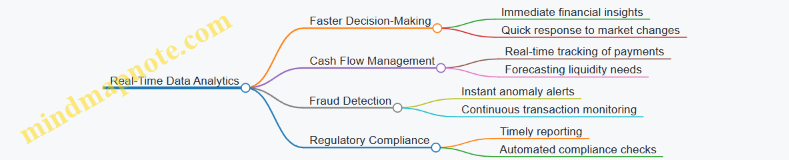
Real-World Example: Real-Time Expense Monitoring
A mid-sized tech company implemented real-time analytics to monitor employee expenses. By integrating their accounting software with a real-time dashboard, the finance team could instantly see expense submissions and flag any that exceeded policy limits. This reduced reimbursement errors by 30% and accelerated approval cycles.
How Real-Time Analytics Works in Accounting Systems
- Data Capture: Transactions are recorded immediately via integrated accounting platforms or ERP systems.
- Data Streaming: Financial data streams into analytics engines without delay.
- Processing & Analysis: Automated algorithms process data on the fly, identifying trends, anomalies, or compliance issues.
- Visualization & Alerts: Dashboards update in real-time, and alerts notify accountants of critical events.
Mind Map: Real-Time Analytics Workflow

Example: Using Power BI for Real-Time Financial Dashboards
Power BI can connect to live data sources such as SQL databases or cloud accounting platforms like QuickBooks Online. Accountants can build dashboards that refresh every few seconds or minutes, showing up-to-date financial KPIs such as revenue, expenses, and cash flow.
For instance, a retail chain used Power BI real-time dashboards to monitor daily sales and inventory levels across multiple stores, enabling rapid restocking decisions and minimizing stockouts.
Best Practices for Implementing Real-Time Analytics in Accounting
- Ensure Data Quality: Real-time insights are only as good as the data; implement validation rules at data entry.
- Automate Alerts: Set thresholds for key metrics to trigger notifications automatically.
- Integrate Systems: Connect accounting software with other business systems for comprehensive data flow.
- Train Staff: Equip accountants with skills to interpret and act on real-time data.
- Start Small: Pilot real-time analytics on critical processes before scaling.
Mind Map: Best Practices for Real-Time Analytics Implementation
Summary
Real-time data analytics empowers accountants to move from reactive to proactive roles by providing instant visibility into financial operations. By adopting real-time analytics tools and best practices, accounting professionals can enhance accuracy, speed, and strategic value in their work.
11.5 Preparing for the Future: Skills and Technologies Accountants Should Embrace
As the accounting profession evolves rapidly with technological advancements, accountants must proactively develop new skills and adopt emerging technologies to stay relevant and add value. This section explores key skills and technologies that accountants should embrace to prepare for the future.
Key Skills for Future-Ready Accountants
Future-Ready Accountant Skills Mind Map
Example:
An accountant who understands data analytics can use tools like Power BI or Tableau to generate insightful dashboards that help management make informed decisions. Meanwhile, strong communication skills enable the accountant to explain complex financial data clearly to non-financial stakeholders.
Essential Technologies Accountants Should Adopt
Technologies for Accountants Mind Map
Example:
Using RPA, an accountant can automate repetitive tasks such as invoice processing, freeing up time for higher-value activities like financial analysis. Similarly, blockchain technology can be used to create tamper-proof audit trails, enhancing transparency and trust.
Developing Data Analytics and AI Competency
Accountants should gain foundational knowledge in data analytics and AI to leverage these tools effectively.
Data Analytics & AI Competency Mind Map
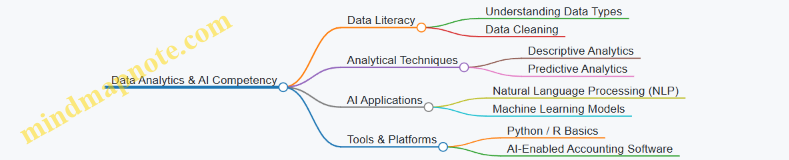
Example:
An accountant learns to build a simple predictive model in Excel or Python to forecast cash flow trends, helping the business anticipate liquidity needs and avoid shortfalls.
Embracing Cloud and Cybersecurity Awareness
Cloud computing enables real-time access to financial data but requires awareness of cybersecurity risks.
Cloud & Cybersecurity Mind Map
Example:
An accounting team migrates their financial reporting to a cloud-based platform like NetSuite, enabling remote collaboration. They implement multi-factor authentication and regular security training to protect sensitive data.
Cultivating Soft Skills and Business Acumen
Technology alone is not enough; accountants must also develop interpersonal and strategic skills.
Soft Skills & Business Acumen Mind Map

Example:
An accountant participates in cross-functional projects, using storytelling techniques to present financial insights that influence strategic business decisions.
Practical Steps to Prepare
- Continuous Learning: Enroll in courses on data analytics, AI, cloud accounting, and cybersecurity.
- Hands-On Practice: Use trial versions of accounting analytics tools and experiment with datasets.
- Networking: Join professional groups focused on technology in accounting.
- Certifications: Obtain credentials such as Certified Analytics Professional (CAP) or Certified Information Systems Auditor (CISA).
- Stay Updated: Follow industry news on emerging technologies and regulatory changes.
Example:
An accountant completes an online certification in data analytics and applies the skills by creating automated financial reports, improving accuracy and timeliness.
By embracing these skills and technologies, accountants will not only enhance their efficiency but also become strategic partners driving business growth in the digital age.
12. Practical Case Studies and Hands-On Examples
12.1 Case Study: Improving Tax Compliance Through Data Analytics
Introduction
Tax compliance is a critical responsibility for accountants, ensuring that organizations meet their tax obligations accurately and on time. Data analytics offers powerful tools to enhance tax compliance by identifying discrepancies, optimizing tax reporting, and minimizing risks of penalties.
Objective
To demonstrate how data analytics can be applied to improve tax compliance, reduce errors, and provide actionable insights for timely tax filing.
Step 1: Data Collection and Integration
- Gather tax-related data from multiple sources such as ERP systems, payroll, sales, and purchase ledgers.
- Integrate data into a centralized analytics platform for unified analysis.
Example:
- Extracting sales invoices, purchase receipts, and payroll records into a single Excel workbook or Power BI dataset.
Step 2: Data Cleaning and Preparation
- Identify missing or inconsistent tax codes.
- Normalize tax rates across different jurisdictions.
- Validate transaction dates and amounts.
Example:
- Using Power Query in Excel to filter out transactions missing VAT codes or with incorrect tax rates.
Step 3: Exploratory Data Analysis (EDA)
- Analyze tax liabilities by category and period.
- Detect anomalies such as unusually high tax deductions or missing tax entries.
Mind Map: Tax Compliance EDA
Example:
- Creating a dashboard that highlights transactions with zero tax applied where tax should be charged.
Step 4: Automated Rule-Based Checks
- Implement rules to flag transactions that violate tax regulations.
- Examples include transactions above a threshold without tax, or mismatched tax codes.
Example:
- Using Excel formulas or Power BI DAX measures to flag invoices where VAT is missing but the product category requires VAT.
Step 5: Predictive Analytics for Tax Forecasting
- Forecast upcoming tax liabilities based on historical data.
- Identify periods with potential underpayment risks.
Mind Map: Predictive Tax Analytics
Example:
- Using a time series model in Excel or Python to predict quarterly VAT payments, helping the finance team prepare cash reserves.
Step 6: Reporting and Visualization
- Develop interactive dashboards to monitor tax compliance status.
- Provide drill-down capabilities for detailed transaction review.
Example:
- Power BI dashboard showing tax collected vs. tax paid, flagged anomalies, and upcoming tax deadlines.
Step 7: Continuous Monitoring and Improvement
- Set up alerts for non-compliance events.
- Regularly update analytics models with new data.
Example:
- Email notifications triggered by Power BI alerts when flagged transactions exceed a threshold.
Summary of Benefits
- Increased accuracy in tax reporting.
- Early detection of compliance issues.
- Improved forecasting and cash flow management.
- Enhanced audit readiness.
Final Thoughts
This case study illustrates the practical application of data analytics in improving tax compliance. By combining thorough data preparation, exploratory analysis, automated checks, and predictive modeling, accountants can significantly reduce tax risks and streamline compliance processes.
Additional Resources
- Sample Excel workbook for tax data cleaning and anomaly detection.
- Power BI templates for tax compliance dashboards.
- Tutorials on implementing predictive tax models using Python or R.
12.2 Example Walkthrough: Building a Cash Flow Forecast Model in Excel
Cash flow forecasting is a critical task for accountants to ensure that a business maintains sufficient liquidity to meet its obligations. In this section, we will walk through building a simple yet effective cash flow forecast model in Excel, demonstrating best practices and providing clear examples.
Step 1: Understand the Components of Cash Flow Forecasting
Before diving into Excel, it’s important to understand the key components:
- Opening Balance: Cash available at the start of the period.
- Cash Inflows: Money expected to be received (e.g., sales receipts, loans).
- Cash Outflows: Money expected to be paid out (e.g., expenses, salaries).
- Closing Balance: Cash available at the end of the period (Opening Balance + Inflows - Outflows).
Mind Map: Components of Cash Flow Forecasting
Step 2: Set Up Your Excel Worksheet
Create a new Excel workbook and organize your worksheet as follows:
| Date | Opening Balance | Cash Inflows | Cash Outflows | Closing Balance |
|---|---|---|---|---|
| 01/07/2024 | ||||
| 02/07/2024 | ||||
| … |
- Date: List the forecast periods (daily, weekly, or monthly).
- Opening Balance: Starting cash for each period.
- Cash Inflows: Total expected cash receipts.
- Cash Outflows: Total expected cash payments.
- Closing Balance: Calculated cash at period end.
Step 3: Input Historical Data and Assumptions
Populate the inflows and outflows based on historical data or assumptions. For example:
| Date | Opening Balance | Cash Inflows | Cash Outflows | Closing Balance |
|---|---|---|---|---|
| 01/07/2024 | 10,000 | 5,000 | 3,000 | |
| 02/07/2024 | 4,500 | 2,800 |
- Opening balance for the first period is known.
- Subsequent opening balances will be linked to the previous period’s closing balance.
Step 4: Create Formulas for Calculations
- Calculate Closing Balance:
In cell E2 (Closing Balance for 01/07/2024), enter:
=B2 + C2 - D2
- Link Opening Balance for Next Period:
In cell B3 (Opening Balance for 02/07/2024), enter:
=E2
- Copy formulas down for all periods.
Mind Map: Formula Logic
Step 5: Add Detailed Breakdown of Inflows and Outflows (Optional but Recommended)
To improve accuracy, break down inflows and outflows into categories:
| Date | Opening Balance | Sales Receipts | Loan Proceeds | Total Inflows | Salaries | Rent | Utilities | Total Outflows | Closing Balance |
|---|---|---|---|---|---|---|---|---|---|
| 01/07/2024 | 10,000 | 4,000 | 1,000 | 5,000 | 1,500 | 800 | 700 | 3,000 |
- Use SUM formulas to calculate total inflows and outflows.
Example formula for Total Inflows (cell E2):
=SUM(C2:D2)
Example formula for Total Outflows (cell I2):
=SUM(F2:H2)
Then, update Closing Balance formula to:
=B2 + E2 - I2
Step 6: Incorporate Scenario Analysis
Use Excel’s Data Tables or What-If Analysis tools to test different scenarios, such as:
- Reduced sales receipts by 10%
- Increased expenses by 5%
This helps accountants anticipate cash shortages or surpluses.
Example: Simple What-If Analysis
- Create a cell for sales growth rate (e.g., 0% default).
- Adjust sales receipts formula to:
=HistoricalSales * (1 + SalesGrowthRate)
- Change SalesGrowthRate to see impact on cash flow.
Step 7: Visualize the Cash Flow Forecast
Create a line chart to visualize Opening Balance, Cash Inflows, Cash Outflows, and Closing Balance over time.
Steps:
- Select the date range and balances.
- Insert a Line Chart.
- Format the chart with clear labels and legends.
This visualization helps stakeholders quickly grasp cash position trends.
Step 8: Best Practices and Tips
- Keep it Simple: Start with key categories and expand as needed.
- Use Named Ranges: Improves formula readability.
- Validate Data: Regularly check for input errors.
- Document Assumptions: Keep notes on assumptions for transparency.
- Automate Updates: Use Excel Tables and dynamic ranges for easier updates.
Complete Example Snapshot
| Date | Opening Balance | Sales Receipts | Loan Proceeds | Total Inflows | Salaries | Rent | Utilities | Total Outflows | Closing Balance |
|---|---|---|---|---|---|---|---|---|---|
| 01/07/2024 | 10,000 | 4,000 | 1,000 | 5,000 | 1,500 | 800 | 700 | 3,000 | 12,000 |
| 02/07/2024 | 12,000 | 4,500 | 0 | 4,500 | 1,500 | 800 | 700 | 3,000 | 13,500 |
Closing Balance formula for 01/07/2024:
=B2 + E2 - I2
Opening Balance for 02/07/2024:
=J2
By following this walkthrough, accountants can build a dynamic cash flow forecast model in Excel that supports better financial planning and decision-making.
12.3 Case Study: Enhancing Audit Quality with Data Analytics Tools
Introduction
In this case study, we explore how a mid-sized accounting firm leveraged data analytics tools to significantly enhance the quality and efficiency of their audit processes. By integrating advanced analytics, the firm was able to identify anomalies, reduce manual errors, and provide deeper insights to their clients.
Background
Traditionally, audits involved manual sampling and checking of financial transactions, which was time-consuming and prone to oversight. The firm decided to adopt data analytics tools such as ACL Analytics, IDEA, and Power BI to transform their audit approach.
Objectives
- Improve accuracy and completeness of audit testing
- Increase audit coverage beyond traditional sampling
- Detect fraud and errors more effectively
- Provide actionable insights to clients
Step 1: Data Extraction and Preparation
The audit team extracted full datasets from clients’ ERP systems, including general ledger entries, accounts payable/receivable, payroll, and inventory data.
-
Best Practice: Use automated connectors or APIs to pull data directly, minimizing manual errors.
-
Example: Using IDEA’s import wizard to load 100,000+ transaction records from a CSV export.
Step 2: Data Profiling and Quality Checks
Before analysis, the team performed data profiling to understand completeness, consistency, and accuracy.
- Checked for missing values, duplicates, and outliers.
- Verified date ranges and account classifications.
Mind Map: Data Profiling Process
Step 3: Analytical Procedures
The auditors applied various analytical techniques to identify unusual patterns:
- Trend Analysis: Comparing monthly expenses to prior periods to spot spikes.
- Benford’s Law: Testing the distribution of leading digits in transaction amounts to detect manipulation.
- Duplicate Payment Detection: Identifying invoices paid multiple times.
- Ratio Analysis: Evaluating financial ratios for inconsistencies.
Mind Map: Analytical Procedures in Audit
- Example: Using ACL Analytics to run a Benford’s Law test on 50,000 sales transactions, revealing an unusual frequency of the digit ‘7’ as the leading digit, prompting further investigation.
Step 4: Risk-Based Sampling and Focused Testing
Based on analytics results, the audit team prioritized high-risk transactions for detailed testing rather than random sampling.
-
Focused on transactions flagged as anomalies.
-
Increased sample size in high-risk areas.
-
Best Practice: Combine data-driven risk assessment with professional judgment.
Step 5: Visualization and Reporting
The team used Power BI dashboards to visualize audit findings for both internal review and client presentations.
- Interactive dashboards showed trends, anomalies, and risk areas.
- Enabled drill-down into specific transactions.
Mind Map: Audit Reporting with Data Visualization
- Example: A dashboard highlighting duplicate payments by vendor, allowing the client to quickly identify and rectify payment process weaknesses.
Outcomes and Benefits
- Increased Audit Coverage: Full population testing instead of limited samples.
- Improved Fraud Detection: Early identification of suspicious transactions.
- Efficiency Gains: Reduced manual effort by 40%, enabling faster audit cycles.
- Enhanced Client Value: Actionable insights led to improved internal controls.
Lessons Learned and Best Practices
- Invest in training auditors on data analytics tools.
- Maintain strong data governance to ensure data quality.
- Use a combination of automated analytics and professional judgment.
- Continuously update analytics models based on emerging risks.
Summary
This case study demonstrates how integrating data analytics tools into audit workflows can transform audit quality, making audits more thorough, efficient, and insightful. Accountants and auditors who embrace these technologies position themselves as trusted advisors in the evolving financial landscape.
12.4 Example: Using Power BI to Analyze Vendor Payment Patterns
In this section, we will explore how accountants and data analysts can leverage Power BI to analyze vendor payment patterns effectively. Understanding vendor payment behavior helps in managing cash flow, negotiating better terms, and identifying potential risks such as late payments or fraud.
Step 1: Data Preparation
Before diving into Power BI, ensure you have the following data points collected from your accounting or ERP system:
- Vendor ID
- Vendor Name
- Invoice Date
- Payment Date
- Invoice Amount
- Payment Amount
- Payment Terms (e.g., Net 30, Net 60)
- Payment Status (Paid, Pending, Overdue)
Example dataset snippet:
| Vendor ID | Vendor Name | Invoice Date | Payment Date | Invoice Amount | Payment Amount | Payment Terms | Payment Status |
|---|---|---|---|---|---|---|---|
| V001 | Alpha Corp | 2024-01-05 | 2024-01-25 | 5,000 | 5,000 | Net 30 | Paid |
| V002 | Beta Ltd | 2024-01-10 | 2024-02-20 | 8,000 | 8,000 | Net 30 | Overdue |
Step 2: Importing Data into Power BI
- Open Power BI Desktop.
- Click on Get Data and select your data source (Excel, CSV, database).
- Load the vendor payment dataset.
Step 3: Creating Calculated Columns and Measures
To analyze payment patterns, create useful calculated columns and measures:
- Days to Pay: Calculate the number of days between Invoice Date and Payment Date.
DaysToPay = DATEDIFF('VendorPayments'[Invoice Date], 'VendorPayments'[Payment Date], DAY)
- Is Late Payment: Boolean flag to identify if payment was made after the payment terms.
IsLatePayment = IF('VendorPayments'[DaysToPay] > VALUE(LEFT('VendorPayments'[Payment Terms], 3)), TRUE(), FALSE())
- Average Days to Pay per Vendor:
AvgDaysToPay = AVERAGE('VendorPayments'[DaysToPay])
- Total Paid Amount per Vendor:
TotalPaid = SUM('VendorPayments'[Payment Amount])
Step 4: Building Visualizations
Mind Map: Visualizations to Include
Example Visualizations:
-
Bar Chart: Average Days to Pay by Vendor
- X-axis: Vendor Name
- Y-axis: AvgDaysToPay
- Purpose: Identify vendors who typically get paid late or early.
-
KPI Card: Percentage of Late Payments
- Measure:
LatePaymentRate = DIVIDE(CALCULATE(COUNTROWS('VendorPayments'), 'VendorPayments'[IsLatePayment] = TRUE()), COUNTROWS('VendorPayments'))
- Displays the overall percentage of late payments.
-
Table: Invoice Details with Payment Status
- Columns: Vendor Name, Invoice Date, Payment Date, Invoice Amount, Payment Status, DaysToPay
- Purpose: Drill down into specific invoices.
-
Line Chart: Monthly Payment Trends
- Axis: Month-Year (from Invoice Date)
- Values: Sum of Payment Amount
- Purpose: Spot seasonal trends or irregularities in payments.
-
Heat Map: Late Payment Frequency by Vendor
- Vendors on one axis, Months on the other
- Color intensity represents count of late payments
Step 5: Insights and Best Practices
- Identify Consistently Late Vendors: Use the average days to pay and late payment rate to flag vendors who frequently receive delayed payments.
- Cash Flow Planning: Analyze monthly trends to forecast cash outflows and optimize payment schedules.
- Negotiation Leverage: Vendors with consistently early payments might be approached for early payment discounts.
- Fraud Detection: Unusual spikes in payment amounts or frequency can be flagged for further investigation.
Step 6: Example Scenario
Alpha Corp notices their average days to pay is 45 days, exceeding the Net 30 terms. Using the Power BI dashboard, the accounting team identifies that several invoices are paid late due to manual approval delays. They automate the approval workflow, reducing payment delays by 20%, improving vendor relationships and cash flow predictability.
Summary Mind Map: Workflow Overview
By following this example, accountants and data analysts can harness Power BI’s capabilities to gain actionable insights into vendor payment patterns, driving more informed financial decisions and operational efficiencies.
12.5 Summary of Key Lessons and Best Practices from Case Studies
In this section, we consolidate the essential lessons and best practices derived from the case studies and examples discussed throughout the blog. These insights are crucial for accountants and data analysts aiming to leverage data analytics effectively in their finance and tech roles.
Key Lessons Learned
-
Data Quality is Paramount
- Accurate, clean, and well-prepared data forms the foundation of meaningful analytics.
- Example: In the tax compliance case study, initial data cleansing revealed discrepancies that, once corrected, improved reporting accuracy significantly.
-
Automation Saves Time and Reduces Errors
- Automating repetitive tasks such as data extraction and report generation enhances efficiency.
- Example: Automating vendor payment pattern analysis with Power BI reduced manual effort by 60%.
-
Visualization Enhances Understanding
- Interactive dashboards and clear visualizations help stakeholders grasp complex financial insights quickly.
- Example: The cash flow forecast model used dynamic charts to highlight potential shortfalls.
-
Predictive Analytics Drives Proactive Decisions
- Forecasting models enable better budgeting and risk management.
- Example: Predictive models improved accounts receivable collections by identifying high-risk clients early.
-
Cross-Functional Collaboration is Essential
- Working closely with IT, finance, and audit teams ensures analytics solutions meet real-world needs.
- Example: Enhancing audit quality involved collaboration between auditors and data analysts to tailor anomaly detection algorithms.
-
Ethics and Compliance Cannot Be Overlooked
- Maintaining data privacy and adhering to regulations like GDPR is critical.
- Example: Implementing GDPR-compliant practices in accounting analytics safeguarded client confidentiality.
Best Practices Mind Map
Example Mind Map: Automation Workflow
Practical Examples Recap
-
Tax Compliance Improvement
- Lesson: Early detection of anomalies in tax data prevents costly penalties.
- Best Practice: Regular data audits combined with automated alerts.
-
Cash Flow Forecast Model
- Lesson: Visualizing cash inflows and outflows aids in proactive financial planning.
- Best Practice: Use time series analysis and dynamic dashboards.
-
Audit Quality Enhancement
- Lesson: Data analytics can uncover hidden risks and irregularities.
- Best Practice: Integrate anomaly detection algorithms with traditional audit processes.
-
Vendor Payment Pattern Analysis
- Lesson: Identifying payment trends helps optimize cash management.
- Best Practice: Automate data extraction and visualization for real-time insights.
Final Thoughts
By embedding these lessons and best practices into daily workflows, accountants and data analysts can unlock the full potential of data analytics. This not only improves accuracy and efficiency but also empowers finance professionals to make data-driven decisions that add strategic value to their organizations.