Budgeting for Nonprofit Organizations
1. Introduction to Nonprofit Budgeting
1.1 Understanding the Unique Financial Landscape of Nonprofits
Nonprofit organizations operate within a financial landscape that differs significantly from for-profit businesses. Understanding these unique characteristics is essential for accountants and nonprofit managers to create effective budgets that support the organization’s mission and ensure sustainability.
Key Characteristics of Nonprofit Financial Landscape
- Mission-Driven Focus: Unlike for-profit entities that prioritize profit maximization, nonprofits prioritize achieving their social, educational, or charitable missions.
- Multiple Revenue Streams: Nonprofits often rely on a combination of donations, grants, fundraising events, membership fees, and sometimes earned income.
- Restricted vs. Unrestricted Funds: Many nonprofits receive funds that are restricted by donors for specific purposes, requiring careful tracking and budgeting.
- Accountability and Transparency: Nonprofits must maintain high standards of financial transparency to satisfy donors, grantors, and regulatory bodies.
- Budget Constraints and Uncertainty: Revenue can be unpredictable, making flexible and conservative budgeting practices important.
Mind Map: Unique Financial Characteristics of Nonprofits
Example 1: Mission-Driven Budgeting
A local food bank’s primary mission is to provide meals to underserved populations. Unlike a business that measures success by profit, the food bank measures success by the number of meals served. This means their budgeting focuses heavily on program expenses such as food procurement and distribution rather than generating surplus revenue.
Example 2: Managing Restricted Funds
A nonprofit receives a $50,000 grant restricted for youth education programs. Even if the organization has other urgent needs, this money cannot be used elsewhere. The budget must reflect this restriction by allocating the funds specifically to youth education expenses and tracking spending accordingly.
Mind Map: Revenue Streams and Restrictions
Example 3: Accountability and Transparency
A nonprofit arts organization publishes an annual financial report detailing how funds were used, including program expenses, administrative costs, and fundraising expenses. This transparency builds trust with donors and helps secure future funding.
Summary
Understanding the unique financial landscape of nonprofits is the foundation for effective budgeting. Recognizing the mission-driven nature, diverse revenue streams, fund restrictions, and the need for transparency helps nonprofit managers and accountants develop budgets that are realistic, compliant, and aligned with organizational goals.
1.2 The Importance of Budgeting for Nonprofit Sustainability
Budgeting is a cornerstone for the sustainability and long-term success of any nonprofit organization. It serves as a financial roadmap that guides decision-making, resource allocation, and strategic planning. Without a well-constructed budget, nonprofits risk overspending, underfunding critical programs, or failing to meet their mission effectively.
Why Budgeting Matters for Nonprofits
- Ensures Financial Stability: Budgeting helps nonprofits anticipate income and expenses, avoiding cash flow crises.
- Supports Strategic Planning: Aligns financial resources with organizational goals and mission.
- Enhances Accountability: Provides transparency to stakeholders such as donors, board members, and grantors.
- Facilitates Resource Allocation: Helps prioritize programs and administrative costs effectively.
- Enables Risk Management: Identifies potential financial shortfalls and allows for contingency planning.
Mind Map: Importance of Budgeting for Nonprofit Sustainability
Example: Community Food Bank Budgeting for Sustainability
The Community Food Bank relies on donations, grants, and fundraising events. By creating a detailed budget, they forecast expected donations and plan expenses accordingly. For instance, they allocate 70% of their budget to food procurement and distribution programs, 20% to administrative costs, and 10% to fundraising efforts.
This budgeting approach helps them:
- Avoid overspending on administrative costs, ensuring more funds reach beneficiaries.
- Plan fundraising events with clear financial targets.
- Maintain a reserve fund for unexpected expenses, such as a sudden increase in demand.
Mind Map: Community Food Bank Budgeting Example
Additional Example: Youth Education Nonprofit
A youth education nonprofit uses budgeting to ensure that their after-school programs continue without interruption. By forecasting expenses such as staff salaries, materials, and facility costs, and matching them against expected grant income and donations, they can identify funding gaps early.
This allows them to:
- Adjust program scale or seek additional funding proactively.
- Communicate transparently with stakeholders about financial needs.
- Avoid program cuts that could negatively impact beneficiaries.
Summary
Budgeting is not just about numbers; it is a strategic tool that empowers nonprofits to fulfill their mission sustainably. By understanding and implementing sound budgeting practices, nonprofit managers and accountants can ensure their organizations remain financially healthy, accountable, and impactful over the long term.
1.3 Key Differences Between Nonprofit and For-Profit Budgeting
Budgeting in nonprofit organizations differs significantly from budgeting in for-profit businesses due to their fundamentally different goals, revenue sources, and stakeholder expectations. Understanding these differences is crucial for nonprofit accountants and managers to create effective budgets that support mission-driven work.
Core Differences Overview
Purpose and Focus
- Nonprofit: The primary purpose is to advance a social cause or mission. Budgets are designed to allocate resources to programs and services that maximize social impact rather than financial gain.
- For-Profit: The main goal is to generate profit for owners or shareholders. Budgets focus on maximizing revenue and minimizing costs to increase profitability.
Example: A nonprofit budget might prioritize funding a free community health clinic, even if it operates at a loss, because it aligns with the mission. A for-profit healthcare provider would focus on profitable services.
Revenue Sources
- Nonprofit: Revenue comes from donations, grants, fundraising events, membership fees, and sometimes earned income. Many funds are restricted by donors for specific uses.
- For-Profit: Revenue primarily comes from sales of goods or services, with fewer restrictions on how income is used.
Example: A nonprofit receives a $50,000 grant restricted for youth education programs. The budget must reflect this restriction, ensuring funds are not used elsewhere. A for-profit company selling products can allocate revenue freely.
Expense Allocation
- Nonprofit: Expenses are categorized into program services, management and general, and fundraising. There is a strong emphasis on maximizing program spending to demonstrate impact.
- For-Profit: Expenses are typically categorized as cost of goods sold, operating expenses, and administrative costs, with a focus on cost efficiency.
Example: A nonprofit might allocate 75% of its budget to direct program costs and only 10% to administration, whereas a for-profit might focus on optimizing production costs to improve margins.
Budget Flexibility and Restrictions
- Nonprofit: Budgets often include restricted funds that must be used for specific purposes, limiting flexibility.
- For-Profit: Budgets generally have more flexibility in reallocating funds to different departments or projects.
Example: If a nonprofit receives a grant specifically for environmental education, those funds cannot be diverted to marketing. A for-profit company can shift marketing funds to product development if needed.
Stakeholder Accountability
- Nonprofit: Accountability is to donors, grantors, boards, and the public. Transparency and reporting on how funds are used to fulfill the mission are critical.
- For-Profit: Accountability is primarily to shareholders and investors, focusing on financial returns.
Example: A nonprofit must prepare detailed financial reports for grantors showing how funds were spent, while a for-profit reports earnings and financial performance to shareholders.
Performance Metrics
- Nonprofit: Success is measured by mission impact, service delivery, and community outcomes.
- For-Profit: Success is measured by profitability, market share, and return on investment.
Example: A nonprofit tracks the number of individuals served or improvements in community health, while a for-profit tracks revenue growth and profit margins.
Summary Table
| Aspect | Nonprofit Budgeting | For-Profit Budgeting |
|---|---|---|
| Purpose | Mission-driven, social impact | Profit-driven, financial gain |
| Revenue Sources | Donations, grants, fundraising, earned income | Sales, services, investments |
| Expense Allocation | Program, fundraising, administration | Cost of goods sold, operating expenses |
| Fund Restrictions | Often restricted by donors/grants | Generally unrestricted |
| Stakeholder Accountability | Donors, grantors, board, public | Shareholders, investors |
| Performance Metrics | Mission outcomes, service impact | Profitability, ROI |
By recognizing these key differences, nonprofit accountants and managers can tailor their budgeting approach to ensure financial stewardship aligns with their organization’s mission and stakeholder expectations.
1.4 Overview of Common Budgeting Terminology with Examples
Budgeting for nonprofit organizations involves understanding a variety of financial terms that help in planning, managing, and communicating the organization’s financial health. Below is an overview of common budgeting terminology, explained with easy-to-understand examples and mind maps to visualize the concepts.
Key Budgeting Terms
- Revenue: The total income generated by the organization from various sources.
- Expenses: The costs incurred to run the organization and its programs.
- Operating Budget: A detailed projection of all expected income and expenses over a specific period, usually one fiscal year.
- Capital Budget: Funds allocated for purchasing or maintaining fixed assets like buildings or equipment.
- Restricted Funds: Donations or grants that must be used for a specific purpose.
- Unrestricted Funds: Funds that can be used at the organization’s discretion.
- Surplus: When revenue exceeds expenses.
- Deficit: When expenses exceed revenue.
- Line-Item Budget: A budget format that lists each income and expense category separately.
- Cash Flow: The movement of money in and out of the organization.
- Variance: The difference between budgeted and actual figures.
Mind Map: Core Budgeting Terminology
Examples of Budgeting Terms in Context
-
Revenue
- Example: A nonprofit receives $50,000 from a government grant, $30,000 from individual donations, and $20,000 from fundraising events. The total revenue is $100,000.
-
Expenses
- Example: The organization spends $40,000 on program activities, $15,000 on administrative salaries, and $10,000 on fundraising events. Total expenses are $65,000.
-
Operating Budget
- Example: The nonprofit creates an operating budget projecting $100,000 in revenue and $90,000 in expenses for the upcoming year, aiming for a $10,000 surplus.
-
Restricted vs. Unrestricted Funds
- Example: A donor gives $10,000 specifically for a youth education program (restricted), while another donor gives $5,000 with no restrictions (unrestricted).
-
Surplus and Deficit
- Example: If the nonprofit’s actual revenue is $95,000 but expenses are $100,000, it runs a $5,000 deficit.
-
Line-Item Budget
- Example: The budget lists each expense separately, such as $20,000 for supplies, $10,000 for rent, and $5,000 for utilities, allowing detailed tracking.
-
Cash Flow
- Example: Even if the nonprofit has $100,000 in revenue for the year, if most donations come at year-end, it may face cash flow challenges earlier in the year.
-
Variance
- Example: The budget estimated $10,000 for fundraising expenses, but actual expenses were $12,000, resulting in a $2,000 unfavorable variance.
Mind Map: Budgeting Process with Terminology Integration
Understanding these terms and how they interrelate is crucial for nonprofit managers and accountants to create realistic budgets, monitor financial health, and communicate effectively with stakeholders. Using visual tools like mind maps can help teams grasp complex budgeting concepts and foster collaboration.
Tip: Consider creating your own mind maps tailored to your organization’s specific budgeting categories to enhance clarity and team engagement.
2. Setting Budgeting Goals and Objectives
2.1 Aligning Budget Goals with Organizational Mission
Aligning budget goals with your nonprofit’s organizational mission is a foundational step in ensuring that every dollar spent advances the core purpose of your organization. When budgeting is mission-driven, resources are allocated efficiently and effectively, maximizing impact and fostering stakeholder trust.
Why Align Budget Goals with the Mission?
- Focus on Impact: Ensures funds support programs that directly contribute to the mission.
- Accountability: Demonstrates responsible stewardship to donors, grantors, and the community.
- Strategic Resource Allocation: Prevents wasteful spending on activities that don’t advance mission objectives.
Step-by-Step Process to Align Budget Goals with Mission
- Clarify the Mission Statement: Revisit and understand the nonprofit’s mission.
- Identify Strategic Priorities: Break down the mission into actionable priorities.
- Translate Priorities into Budget Goals: Define specific financial goals that support each priority.
- Allocate Resources Accordingly: Assign budget lines that reflect these goals.
- Review and Adjust: Continuously monitor to ensure alignment remains intact.
Mind Map: Aligning Budget Goals with Organizational Mission
Example 1: Community Health Nonprofit
Mission: To improve access to healthcare services for underserved populations.
Budget Goal Alignment:
- Strategic Priority: Expand mobile clinic services.
- Budget Goal: Allocate $50,000 to purchase and operate a mobile clinic vehicle.
- Action: Redirect funds from less mission-critical administrative expenses to support this priority.
Result: The budget directly supports expanding healthcare access, fulfilling the mission.
Example 2: Environmental Education Organization
Mission: To educate youth about environmental conservation.
Budget Goal Alignment:
- Strategic Priority: Develop new educational workshops.
- Budget Goal: Dedicate $20,000 for curriculum development and training facilitators.
- Action: Increase fundraising efforts specifically earmarked for education programs.
Result: Budget goals are tied to mission-driven program growth.
Additional Mind Map: Translating Mission into Budget Goals
Tips for Accountants and Nonprofit Managers
- Engage program managers early to understand mission-driven needs.
- Use mission alignment as a filter when evaluating budget requests.
- Communicate how budget decisions support the mission to all stakeholders.
- Document the rationale behind budget allocations to maintain transparency.
By embedding the organizational mission into every budget goal, nonprofits can ensure that financial planning is not just about numbers but about advancing meaningful change.
2.2 Establishing Financial Priorities: Program vs. Administrative Costs
In nonprofit budgeting, one of the most critical decisions is how to allocate funds between program costs and administrative costs. Establishing clear financial priorities ensures that the organization maximizes its impact while maintaining operational efficiency and sustainability.
Understanding Program Costs vs. Administrative Costs
- Program Costs: These are expenses directly related to delivering the nonprofit’s mission and services. Examples include materials for workshops, salaries of program staff, and costs of events.
- Administrative Costs: These cover the general overhead needed to run the organization, such as accounting, human resources, office rent, and utilities.
Why Prioritize Program Costs?
Donors and grantors often scrutinize the percentage of funds spent on programs versus administration. A higher program cost ratio typically signals that more resources are going directly to the cause, which can increase trust and funding opportunities.
However, underfunding administrative costs can harm organizational effectiveness, leading to poor management and compliance risks.
Mind Map: Financial Priorities in Nonprofit Budgeting
Best Practices for Establishing Financial Priorities
- Define Clear Categories: Clearly distinguish program, administrative, and fundraising costs in your budget.
- Set Target Ratios: While there is no one-size-fits-all, many nonprofits aim for at least 65-75% of expenses on programs.
- Communicate Transparently: Explain the necessity of administrative costs to stakeholders.
- Review Regularly: Adjust priorities based on organizational growth and external factors.
Example 1: Community Health Nonprofit Budget Allocation
- Total Annual Budget: $500,000
- Program Costs: $375,000 (75%)
- Health workshops, medical supplies, community outreach
- Administrative Costs: $75,000 (15%)
- Office rent, staff salaries, IT support
- Fundraising Costs: $50,000 (10%)
- Events, marketing materials
This nonprofit prioritizes program delivery while maintaining sufficient administrative support to ensure smooth operations.
Mind Map: Example Budget Allocation Breakdown
Example 2: Small Arts Nonprofit Facing Administrative Cost Challenges
A small arts nonprofit has a $100,000 budget. Initially, only 5% was allocated to administrative costs, but this led to:
- Delays in grant reporting
- Staff burnout
- Inefficient donor management
After reassessing, they increased administrative costs to 15%, which improved compliance and fundraising effectiveness, ultimately increasing program funding through better grant acquisition.
Tips for Accountants and Nonprofit Managers
- Use historical data to identify realistic administrative costs.
- Educate board members and donors about the importance of administrative spending.
- Consider phased increases in administrative budgets to support growth.
Summary
Balancing program and administrative costs is essential for nonprofit success. Prioritizing program costs demonstrates mission focus, but adequate administrative funding is necessary for sustainability and impact. Using clear budgeting categories, transparent communication, and regular reviews helps maintain this balance effectively.
2.3 Using SMART Goals for Budget Planning
Budget planning in nonprofit organizations can be complex due to limited resources and diverse stakeholder expectations. Using SMART goals—Specific, Measurable, Achievable, Relevant, and Time-bound—provides a structured framework that helps ensure budgeting efforts are focused, realistic, and aligned with the organization’s mission.
What Are SMART Goals?
- Specific: Clearly define what you want to accomplish.
- Measurable: Quantify the goal to track progress.
- Achievable: Ensure the goal is realistic given available resources.
- Relevant: Align the goal with the nonprofit’s mission and priorities.
- Time-bound: Set a deadline for goal completion.
Why Use SMART Goals in Budget Planning?
- Provides clarity and focus on financial priorities.
- Helps allocate resources efficiently.
- Facilitates monitoring and evaluation.
- Enhances communication with stakeholders.
Mind Map: SMART Goals in Budget Planning
Example: Applying SMART Goals to a Fundraising Budget
Scenario: A nonprofit wants to increase funds raised for its youth education program.
- Specific: Increase funds raised specifically for the youth education program.
- Measurable: Raise an additional $50,000 compared to last year.
- Achievable: Based on last year’s $200,000 fundraising and current donor trends, a 25% increase is realistic.
- Relevant: Youth education is a core mission area.
- Time-bound: Achieve this goal by the end of the fiscal year.
Budget Planning Implications:
- Allocate $10,000 for marketing and outreach.
- Plan fundraising events targeting youth education donors.
- Forecast monthly fundraising targets to monitor progress.
Mind Map: Fundraising Budget SMART Goal Example
Tips for Setting SMART Budget Goals
- Engage stakeholders: Include program managers and finance staff to ensure goals are realistic and aligned.
- Use historical data: Ground your goals in actual past performance.
- Be flexible: Adjust goals as new information or circumstances arise.
- Document assumptions: Clearly state the basis for your goals to aid transparency.
Additional Example: Budgeting for Volunteer Training
- Specific: Allocate funds to train 30 new volunteers.
- Measurable: Budget $3,000 for training materials and sessions.
- Achievable: Based on past training costs and volunteer recruitment plans.
- Relevant: Volunteer capacity building supports program delivery.
- Time-bound: Complete training within the next 6 months.
This SMART goal helps the nonprofit plan and justify the training budget, ensuring resources are targeted effectively.
By integrating SMART goals into your nonprofit budgeting process, you create a clear, actionable roadmap that improves financial planning, accountability, and program impact.
2.4 Example: Creating a Budget Goal for a Community Outreach Program
Creating a clear and actionable budget goal is essential for the success of any nonprofit program. Let’s walk through an example of setting a budget goal for a community outreach program aimed at increasing local engagement and support.
Step 1: Define the Program Objective
Objective: Increase community participation in local health workshops by 30% over the next year.
Step 2: Identify Key Budget Components
- Program materials (flyers, educational pamphlets)
- Venue rental for workshops
- Staff and volunteer stipends
- Marketing and outreach (social media ads, local newspaper)
- Transportation costs
- Miscellaneous expenses (refreshments, supplies)
Step 3: Set a SMART Budget Goal
Specific: Allocate $15,000 to cover all costs related to the community outreach program.
Measurable: Track expenses monthly and compare against the $15,000 budget.
Achievable: Based on past program costs and anticipated growth, $15,000 is realistic.
Relevant: Budget supports the goal of increasing participation by funding necessary outreach activities.
Time-bound: Budget applies to the fiscal year 2024.
Step 4: Visualize the Budget Goal with a Mind Map
Step 5: Example Budget Breakdown
| Category | Estimated Cost | Notes |
|---|---|---|
| Program Materials | $2,000 | Printing flyers and pamphlets |
| Venue Rental | $3,000 | Renting community centers for workshops |
| Staff & Volunteer Stipends | $4,000 | Part-time coordinators and volunteers |
| Marketing & Outreach | $3,500 | Social media ads, newspaper ads |
| Transportation | $1,000 | Travel for staff and materials |
| Miscellaneous | $1,500 | Refreshments, supplies |
| Total | $15,000 |
Step 6: Monitoring and Adjusting the Goal
- Monthly Reviews: Track actual spending against the budget to ensure no overspending.
- Adjustments: If marketing costs are lower than expected, reallocate funds to additional workshops or materials.
- Outcome Tracking: Measure participation rates quarterly to evaluate if the budget is effectively supporting the program’s objective.
Summary
By setting a clear, SMART budget goal and breaking down expenses with realistic estimates, nonprofit managers and accountants can ensure that the community outreach program is financially supported to meet its participation targets. Using mind maps helps visualize the budget components and their relationships, making it easier to communicate and manage the budget effectively.
3. Gathering Financial Data and Historical Analysis
3.1 Collecting Past Financial Statements and Reports
Collecting past financial statements and reports is a foundational step in nonprofit budgeting. These documents provide critical insights into the organization’s financial health, revenue trends, expense patterns, and overall fiscal management. By thoroughly reviewing historical financial data, nonprofit managers and accountants can make informed projections, identify areas for improvement, and set realistic budget targets.
Why Collect Past Financial Statements?
- Understand Financial Performance: Analyze how funds were generated and spent.
- Identify Trends: Spot recurring revenue sources and expense spikes.
- Ensure Accuracy: Use real data to avoid guesswork in budgeting.
- Support Transparency: Provide documentation for stakeholders and auditors.
Key Financial Statements to Collect
- Statement of Financial Position (Balance Sheet): Snapshot of assets, liabilities, and net assets.
- Statement of Activities (Income Statement): Records revenues and expenses over a period.
- Cash Flow Statement: Tracks cash inflows and outflows.
- Budget vs. Actual Reports: Compare planned budgets against actual results.
- Grant and Fund Reports: Details on restricted and unrestricted funds.
Mind Map: Types of Financial Statements to Collect
Steps to Collect Past Financial Statements
- Identify the Time Frame: Typically collect data from the past 2-3 fiscal years.
- Gather Documents: Request reports from the finance department or accounting software.
- Verify Completeness: Ensure all months/quarters are covered.
- Check for Accuracy: Reconcile reports with bank statements and audit findings.
- Organize Data: Store documents in a centralized, accessible location.
Example: Collecting Financial Statements for a Community Arts Nonprofit
- The nonprofit requests the last three years of financial statements from their accounting system.
- They receive:
- Annual Statements of Financial Position and Activities.
- Quarterly Budget vs. Actual reports.
- Cash Flow Statements for each fiscal year.
- The finance team cross-checks these with bank statements and grant reports to ensure accuracy.
- All documents are saved in a shared cloud folder labeled “Financial History 2021-2023” for easy access during budgeting.
Mind Map: Process of Collecting Past Financial Data
Tips for Effective Collection
- Use Digital Tools: Leverage accounting software exports (e.g., QuickBooks, Sage Intacct).
- Maintain Consistency: Use the same format and categories across years for easier comparison.
- Engage Stakeholders: Collaborate with program managers to understand context behind numbers.
- Document Assumptions: Note any irregularities or one-time expenses for future reference.
Example: Using Collected Data to Identify Expense Patterns
After collecting three years of financial statements, a nonprofit notices that fundraising expenses spike every November and December. This insight helps them plan for these predictable costs in the upcoming budget, ensuring adequate cash flow and resource allocation.
In summary, collecting past financial statements and reports is an essential practice that equips nonprofit accountants and managers with the data needed to build accurate, realistic, and strategic budgets. This process lays the groundwork for all subsequent budgeting activities and supports the organization’s financial transparency and accountability.
3.2 Analyzing Revenue Streams and Expense Patterns
Analyzing revenue streams and expense patterns is a critical step in nonprofit budgeting. It allows organizations to understand where their money is coming from and where it is going, enabling better financial planning and decision-making.
Understanding Revenue Streams
Nonprofits typically have multiple revenue sources, each with its own characteristics and reliability. Common revenue streams include:
- Grants: Often restricted to specific programs or projects.
- Donations: Can be unrestricted or restricted; may come from individuals, corporations, or foundations.
- Fundraising Events: Income generated from special events.
- Earned Income: Revenue from services or products provided.
- In-Kind Donations: Non-cash contributions like goods or services.
Mind Map: Revenue Streams
Example:
A local animal shelter receives:
- $50,000 in government grants restricted for animal care.
- $30,000 in individual donations (unrestricted).
- $10,000 from fundraising events.
- $5,000 from merchandise sales.
Understanding these streams helps the shelter plan how to allocate funds effectively.
Examining Expense Patterns
Expenses in nonprofits are generally categorized as:
- Program Expenses: Direct costs related to delivering services.
- Administrative Expenses: Overhead costs such as salaries, rent, and utilities.
- Fundraising Expenses: Costs incurred to raise funds.
Mind Map: Expense Categories
Example:
Using the animal shelter example, expenses might be:
- $60,000 on animal food, medical supplies, and care staff (program).
- $15,000 on office rent and administrative salaries.
- $10,000 on organizing fundraising events.
Analyzing these patterns helps identify if the majority of funds are going toward mission-critical activities.
Steps to Analyze Revenue and Expenses
- Collect Data: Gather financial statements, donation records, grant agreements, and expense reports.
- Categorize: Break down revenues and expenses into meaningful categories.
- Calculate Ratios: For example, program expense ratio = (Program Expenses / Total Expenses) × 100.
- Identify Trends: Look for increases or decreases in specific revenue streams or expenses over time.
- Assess Reliability: Evaluate which revenue sources are stable and which are volatile.
Mind Map: Analysis Process
Example:
If the shelter notices that donations dropped by 20% last year but grants remained steady, they might decide to focus more on grant applications or diversify fundraising efforts.
Practical Example: Monthly Revenue and Expense Analysis
| Month | Grants ($) | Donations ($) | Fundraising ($) | Earned Income ($) | Program Expenses ($) | Admin Expenses ($) | Fundraising Expenses ($) |
|---|---|---|---|---|---|---|---|
| January | 5,000 | 3,000 | 1,000 | 500 | 6,000 | 1,500 | 500 |
| February | 4,500 | 2,500 | 1,200 | 600 | 5,500 | 1,400 | 600 |
| March | 5,200 | 3,200 | 1,100 | 550 | 6,200 | 1,600 | 550 |
By analyzing this table, the nonprofit can observe:
- Consistent grant income.
- Slight fluctuations in donations and fundraising income.
- Program expenses closely aligned with revenue.
Tips for Effective Analysis
- Use visualization tools like pie charts or bar graphs to represent revenue and expense breakdowns.
- Regularly update analysis to capture seasonal or event-driven changes.
- Involve program managers to understand the context behind expense changes.
Mind Map: Tips for Analysis
In summary, analyzing revenue streams and expense patterns equips nonprofit managers and accountants with the insights needed to create realistic budgets, allocate resources efficiently, and ensure financial sustainability.
3.3 Using Historical Data to Forecast Future Budgets
Forecasting future budgets using historical data is a critical step in nonprofit financial planning. It allows organizations to make informed estimates about revenues and expenses based on past performance, helping to anticipate challenges and allocate resources effectively.
Why Use Historical Data?
- Provides a realistic baseline for budgeting
- Identifies trends and seasonal patterns
- Highlights areas of overspending or underspending
- Supports data-driven decision making
Steps to Use Historical Data for Budget Forecasting:
-
Collect Relevant Historical Data
- Gather financial statements, expense reports, and revenue records from previous years.
- Include at least 2-3 years of data for better trend analysis.
-
Analyze Revenue Streams
- Break down revenue by source: grants, donations, fundraising events, earned income.
- Identify consistent sources and one-time or irregular inflows.
-
Analyze Expenses
- Categorize expenses into fixed (rent, salaries) and variable (event costs, supplies).
- Look for recurring costs and any anomalies.
-
Identify Trends and Patterns
- Use charts or graphs to visualize increases, decreases, or seasonal fluctuations.
-
Adjust for External Factors
- Consider changes in funding environment, economic conditions, or organizational growth.
-
Create Forecast Assumptions
- Based on analysis, set realistic assumptions for each revenue and expense category.
-
Build the Forecasted Budget
- Apply assumptions to project revenues and expenses for the upcoming budget period.
Mind Map: Using Historical Data to Forecast Budgets
Example: Forecasting Budget for a Community Arts Nonprofit
Background:
- The nonprofit has 3 years of financial data.
- Revenue sources: grants (50%), donations (30%), fundraising events (20%).
- Expenses: fixed costs (rent, salaries), variable costs (event supplies, marketing).
Step 1: Analyze Revenue Trends
- Grants have increased by 5% annually.
- Donations have remained steady.
- Fundraising event income fluctuates seasonally but averages a 3% increase.
Step 2: Analyze Expenses
- Fixed costs increased by 2% annually due to inflation.
- Variable costs vary with event frequency.
Step 3: Set Assumptions
- Grants will grow by 5% next year.
- Donations will remain flat.
- Fundraising income will increase by 3%.
- Fixed expenses will increase by 2%.
- Variable expenses will increase by 3%.
Step 4: Build Forecast
| Category | Last Year Actual | Assumed Growth | Forecasted Amount |
|---|---|---|---|
| Grants | $500,000 | +5% | $525,000 |
| Donations | $300,000 | 0% | $300,000 |
| Fundraising Events | $200,000 | +3% | $206,000 |
| Total Revenue | $1,000,000 | $1,031,000 |
| Expense Category | Last Year Actual | Assumed Growth | Forecasted Amount |
|---|---|---|---|
| Fixed Expenses | $400,000 | +2% | $408,000 |
| Variable Expenses | $150,000 | +3% | $154,500 |
| Total Expenses | $550,000 | $562,500 |
Result:
- Projected surplus: $1,031,000 - $562,500 = $468,500
- This surplus can be allocated to program expansion or reserves.
Tips for Effective Use of Historical Data
- Always verify data accuracy before analysis.
- Use multiple years to smooth out anomalies.
- Combine quantitative data with qualitative insights from program managers.
- Regularly update forecasts as new data becomes available.
By leveraging historical data thoughtfully, nonprofit managers and accountants can create more accurate and realistic budgets that support their mission and ensure financial health.
3.4 Example: Reviewing Last Year’s Fundraising Campaign Budget
Reviewing the previous year’s fundraising campaign budget is a critical step in understanding how well your nonprofit managed its resources and identifying areas for improvement. This example will walk you through a detailed review process, incorporating mind maps and practical examples to make the process clear and actionable.
Step 1: Gather All Relevant Financial Documents
- Income statements
- Expense reports
- Fundraising event summaries
- Grant and donation records
Step 2: Create a Mind Map to Visualize Budget Components
This mind map helps categorize the budget into revenue streams, expenses, and outcomes, providing a clear framework for review.
Step 3: Analyze Revenue Streams with Examples
| Revenue Source | Budgeted Amount | Actual Amount | Variance | Notes |
|---|---|---|---|---|
| Individual Donations | $50,000 | $45,000 | -$5,000 | Slightly underperformed due to outreach |
| Corporate Sponsorships | $30,000 | $35,000 | +$5,000 | Secured an unexpected major sponsor |
| Grants | $20,000 | $20,000 | $0 | Met expectations |
| Event Ticket Sales | $15,000 | $12,000 | -$3,000 | Lower attendance than projected |
| Merchandise Sales | $5,000 | $6,000 | +$1,000 | Strong volunteer sales effort |
Example Insight: While individual donations were slightly below target, corporate sponsorships exceeded expectations, balancing the overall revenue.
Step 4: Break Down Expenses with Examples
| Expense Category | Budgeted Amount | Actual Amount | Variance | Notes |
|---|---|---|---|---|
| Marketing & Promotion | $20,000 | $22,000 | +$2,000 | Additional social media ads purchased |
| Event Costs | $25,000 | $23,000 | -$2,000 | Negotiated better vendor contracts |
| Staff Salaries | $30,000 | $30,000 | $0 | Salaries as planned |
| Administrative Costs | $10,000 | $12,000 | +$2,000 | Unexpected software subscription fees |
| Technology & Tools | $5,000 | $4,500 | -$500 | Efficient use of existing tools |
Example Insight: Marketing expenses slightly exceeded budget, but event costs were lower, resulting in a balanced expense profile.
Step 5: Calculate Key Metrics
- Total Revenue: $118,000 (Budgeted $120,000)
- Total Expenses: $91,500 (Budgeted $90,000)
- Net Funds Raised: $26,500 (Budgeted $30,000)
- Cost per Dollar Raised: $91,500 / $118,000 ≈ $0.78
Example Interpretation: For every dollar raised, the nonprofit spent approximately 78 cents, which may indicate room for improving fundraising efficiency.
Step 6: Visualize Outcomes and Insights with a Mind Map
Step 7: Recommendations for Next Year’s Budget
- Increase budget for individual donor engagement to address underperformance.
- Maintain or expand corporate sponsorship efforts given their success.
- Review marketing channels to optimize ad spend and improve ROI.
- Plan for contingencies in event attendance to avoid revenue shortfalls.
Summary
Reviewing last year’s fundraising campaign budget through structured analysis and visualization helps nonprofit managers and accountants identify strengths, weaknesses, and actionable improvements. Using mind maps clarifies complex budget components, while concrete examples provide relatable context to guide future budgeting decisions.
4. Identifying and Categorizing Revenue Sources
4.1 Types of Revenue: Grants, Donations, Fundraising, and Earned Income
Nonprofit organizations rely on a variety of revenue sources to sustain their operations and fulfill their missions. Understanding these revenue types is crucial for effective budgeting and financial planning. Below, we explore the primary types of nonprofit revenue with clear examples and mind maps to visualize their components.
Grants
Grants are funds provided by government agencies, foundations, or corporations to support specific projects or general operations. They often come with reporting requirements and restrictions on how the money can be used.
Example: A nonprofit focused on environmental conservation receives a $50,000 grant from a foundation to run a tree-planting program.
Mind Map: Grants
Donations
Donations are voluntary gifts from individuals, businesses, or other entities. They can be one-time or recurring and may be unrestricted or designated for specific purposes.
Example: An individual donor gives $500 to support a nonprofit’s educational programs.
Mind Map: Donations
Fundraising
Fundraising encompasses activities designed to generate revenue, often involving events, campaigns, or sales. It is an active process that engages supporters and raises awareness.
Example: A nonprofit hosts an annual gala dinner that raises $100,000 through ticket sales, auctions, and sponsorships.
Mind Map: Fundraising
Earned Income
Earned income is revenue generated from services or products provided by the nonprofit. This can include fees for programs, membership dues, or sales related to the mission.
Example: A nonprofit art center charges admission fees and sells artwork created by participants, generating $30,000 annually.
Mind Map: Earned Income
Summary Table of Revenue Types with Examples
| Revenue Type | Description | Example |
|---|---|---|
| Grants | Funds from agencies/foundations with conditions | $50,000 grant for tree-planting program |
| Donations | Voluntary gifts from individuals or corporations | $500 individual gift for education |
| Fundraising | Revenue from events and campaigns | $100,000 gala dinner proceeds |
| Earned Income | Revenue from services/products | $30,000 from art center admissions |
By diversifying revenue streams across these types, nonprofits can build a more resilient financial foundation and better plan their budgets. Each revenue type has unique characteristics and implications for budgeting, which will be further explored in subsequent sections.
4.2 Best Practices for Estimating Revenue Realistically
Estimating revenue realistically is a critical step in nonprofit budgeting. Overestimating revenue can lead to overspending and financial shortfalls, while underestimating can result in missed opportunities for growth and impact. Below are best practices to help nonprofit managers and accountants develop accurate and reliable revenue projections.
Analyze Historical Revenue Data
- Review past financial statements to identify trends and seasonal variations.
- Use multi-year data to smooth out anomalies caused by one-time events.
Example: If a nonprofit consistently raises $50,000 from annual fundraising events with a 5% growth trend, projecting $52,500 for the next year is realistic rather than assuming a sudden 30% increase.
Segment Revenue Sources
- Break down revenue into categories such as grants, donations, earned income, and fundraising events.
- Estimate each segment separately to improve accuracy.
Example:
- Grants: $100,000 (based on confirmed grants and pending applications with historical success rate)
- Donations: $40,000 (based on donor retention and new donor acquisition rates)
- Earned Income: $20,000 (from program fees)
Use Conservative Assumptions
- Base projections on conservative estimates rather than optimistic ones.
- Factor in potential delays or reductions in funding.
Example: If a grant application has a 70% success rate historically, only include 70% of the requested amount in the budget.
Incorporate External Factors
- Consider economic conditions, donor trends, and regulatory changes that may impact revenue.
Example: During economic downturns, individual donations may decline by 10-15%, so adjust projections accordingly.
Engage Stakeholders for Input
- Consult program managers, development officers, and board members to validate assumptions.
Example: Development staff may provide insights on upcoming fundraising campaigns or grant opportunities.
Monitor and Update Regularly
- Treat revenue estimates as living figures that require periodic review and adjustment.
Example: Quarterly reviews may reveal that a major donor has withdrawn support, prompting a revision of revenue projections.
Mind Map: Best Practices for Estimating Revenue Realistically
Example Scenario: Estimating Revenue for a Local Food Bank
Step 1: Historical Data Review
- Last year’s total revenue: $500,000
- Grants: $300,000 (with a 90% renewal rate)
- Donations: $150,000 (steady with slight 3% growth)
- Fundraising Events: $50,000 (variable, dependent on event success)
Step 2: Segment and Estimate
- Grants: $300,000 * 90% = $270,000
- Donations: $150,000 * 1.03 = $154,500
- Fundraising Events: Estimate conservatively at $45,000
Step 3: Adjust for External Factors
- Economic downturn expected to reduce donations by 5% instead of growth
- Adjusted Donations: $150,000 * 0.95 = $142,500
Step 4: Final Revenue Projection
- Grants: $270,000
- Donations: $142,500
- Fundraising Events: $45,000
- Total Estimated Revenue: $457,500
This realistic estimate helps the food bank avoid overcommitting resources and plan for contingencies.
By following these best practices and continuously refining revenue estimates, nonprofit organizations can create budgets that are both ambitious and achievable, ensuring financial health and mission success.
4.3 Diversifying Revenue Streams to Reduce Risk
Diversifying revenue streams is a critical best practice for nonprofit organizations to ensure financial stability and reduce dependency on a single source of income. Relying heavily on one type of funding, such as grants or donations, can leave an organization vulnerable if that source diminishes or disappears. By cultivating multiple revenue streams, nonprofits can better withstand economic fluctuations, changes in donor priorities, or funding cuts.
Why Diversify Revenue Streams?
- Risk Mitigation: Reduces the impact of losing one revenue source.
- Financial Stability: Creates a more predictable and steady cash flow.
- Growth Opportunities: Opens doors to new partnerships and funding avenues.
- Mission Sustainability: Ensures ongoing support for programs and services.
Common Revenue Streams for Nonprofits
Strategies for Diversification
-
Combine Grants with Individual Giving:
- Example: A nonprofit secures a foundation grant for program expansion while launching a monthly donor campaign to build a reliable income base.
-
Develop Earned Income Opportunities:
- Example: An arts nonprofit sells tickets to performances and offers paid workshops, supplementing donations.
-
Host Varied Fundraising Events:
- Example: Organizing both a formal gala and a community fun run to engage different donor segments.
-
Leverage Corporate Partnerships:
- Example: Partnering with local businesses for sponsorships, cause marketing, or employee giving programs.
-
Utilize In-Kind Donations:
- Example: Receiving donated office supplies or professional services to reduce expenses.
Mind Map: Diversification Strategy Example
Example Scenario: Community Health Nonprofit
Current Situation: Relies 80% on a single government grant.
Diversification Plan:
- Launch a monthly donor program targeting local community members.
- Host an annual health fair with sponsorship opportunities.
- Introduce a small fee for specialized health workshops.
- Apply for foundation grants focused on health education.
Outcome: Within two years, the nonprofit reduced reliance on the government grant to 40%, increasing overall financial resilience.
Tips for Successful Diversification
- Assess Organizational Capacity: Ensure you have resources to manage multiple revenue streams.
- Understand Donor Preferences: Tailor approaches to different supporter segments.
- Monitor and Evaluate: Regularly review the performance of each revenue source.
- Communicate Impact: Show donors and partners how their contributions make a difference.
Diversifying revenue streams is not just about adding more income sources but strategically balancing them to support your nonprofit’s mission sustainably and resiliently.
4.4 Example: Budgeting for a Multi-Source Revenue Model
Nonprofit organizations often rely on multiple revenue streams to ensure financial stability and reduce dependency on a single source. Budgeting for a multi-source revenue model involves carefully estimating each income type and planning for variability and restrictions associated with each.
Understanding Revenue Streams
A typical nonprofit might have revenue sources such as:
- Grants (government, foundation)
- Individual donations
- Corporate sponsorships
- Fundraising events
- Earned income (program fees, merchandise sales)
- In-kind donations
Each source has unique characteristics, timing, and restrictions that must be reflected in the budget.
Mind Map: Multi-Source Revenue Model Overview
Step 1: Listing Revenue Sources and Historical Data
Start by listing all revenue sources and gathering historical data for each. For example:
| Revenue Source | Last Year Actual | Notes |
|---|---|---|
| Government Grants | $150,000 | Restricted to program A |
| Foundation Grants | $80,000 | Some unrestricted, some restricted |
| Individual Donations | $60,000 | Includes monthly donors |
| Corporate Sponsors | $40,000 | Annual sponsorship agreements |
| Fundraising Events | $30,000 | Annual gala and community runs |
| Earned Income | $20,000 | Program fees and merchandise |
| In-Kind Donations | $10,000 (estimated) | Volunteer hours and supplies |
Step 2: Estimating Revenue for the Upcoming Year
Use historical trends, current commitments, and realistic assumptions to estimate each source.
- Government Grants: Confirmed $160,000, with $10,000 expected to be delayed.
- Foundation Grants: Anticipate $90,000 based on pending applications.
- Individual Donations: Project $65,000, factoring in donor growth.
- Corporate Sponsors: Expect $45,000 with a new sponsor onboard.
- Fundraising Events: Budget $35,000, including a new event.
- Earned Income: Estimate $25,000, with a new merchandise line.
- In-Kind Donations: Maintain $10,000 estimate.
Mind Map: Revenue Estimation Factors
Step 3: Incorporating Revenue Restrictions and Timing
Some revenue sources come with restrictions or timing considerations:
- Restricted Funds: Grants may only be used for specific programs.
- Timing: Some grants are received quarterly; fundraising events generate revenue seasonally.
Example:
| Revenue Source | Restriction | Timing |
|---|---|---|
| Government Grants | Program A only | Quarterly |
| Foundation Grants | Mixed | Bi-annual |
| Fundraising Events | Unrestricted | Annual (Q3) |
Budgeting must reflect when funds are expected and how they can be used.
Step 4: Building the Revenue Budget Table
| Revenue Source | Estimated Amount | Restrictions | Timing |
|---|---|---|---|
| Government Grants | $160,000 | Program A only | Quarterly |
| Foundation Grants | $90,000 | Mixed | Bi-annual |
| Individual Donations | $65,000 | Unrestricted | Monthly/Annual |
| Corporate Sponsors | $45,000 | Unrestricted | Annual |
| Fundraising Events | $35,000 | Unrestricted | Q3 |
| Earned Income | $25,000 | Unrestricted | Ongoing |
| In-Kind Donations | $10,000 | Non-cash | Ongoing |
| Total Revenue | $430,000 |
Step 5: Example Scenario
Imagine a nonprofit focused on youth education planning its budget. They have:
- A government grant restricted to STEM programs.
- Foundation grants partially restricted to arts programs.
- Individual donations unrestricted.
- Corporate sponsorships supporting general operations.
- Fundraising events planned for fall.
- Earned income from after-school program fees.
By mapping these sources, the nonprofit can allocate funds appropriately and plan cash flow to ensure programs are funded when needed.
Mind Map: Example Nonprofit Revenue Allocation
Key Takeaways
- Break down revenue into distinct sources.
- Use historical data and realistic assumptions.
- Account for restrictions and timing.
- Diversify revenue to reduce risk.
- Regularly review and update revenue estimates.
This structured approach helps nonprofit managers and accountants create a robust, transparent, and realistic budget that supports organizational goals while managing financial risks effectively.
5. Estimating and Controlling Expenses
5.1 Fixed vs. Variable Expenses in Nonprofits
Understanding the distinction between fixed and variable expenses is crucial for nonprofit organizations to create accurate and flexible budgets. This section will break down these two expense types, provide clear examples, and illustrate how nonprofits can manage them effectively.
What Are Fixed Expenses?
Fixed expenses are costs that remain constant over a specific period, regardless of the organization’s level of activity or output. These expenses are predictable and usually contractual or recurring.
Examples of Fixed Expenses in Nonprofits:
- Rent or mortgage payments for office or program space
- Salaries of full-time staff (not including overtime or bonuses)
- Insurance premiums
- Software subscriptions
- Loan repayments
Example: A nonprofit rents an office space for $2,000 per month. Regardless of how many programs they run or how many clients they serve, this rent remains the same.
What Are Variable Expenses?
Variable expenses fluctuate based on the level of activity or service delivery. These costs increase or decrease depending on how much the nonprofit operates.
Examples of Variable Expenses in Nonprofits:
- Program supplies and materials
- Utilities (electricity, water) that vary with usage
- Event costs (catering, venue rental for fundraising events)
- Travel expenses for staff or volunteers
- Printing and postage for outreach campaigns
Example: If a nonprofit runs a community workshop, the cost of materials like handouts and refreshments will vary depending on the number of attendees.
Mind Map: Fixed vs. Variable Expenses
Why Differentiating Matters
- Budget Accuracy: Knowing which costs are fixed and which vary helps in forecasting and adjusting budgets realistically.
- Cash Flow Management: Fixed expenses require guaranteed funding, while variable expenses can be scaled based on available resources.
- Decision Making: Helps nonprofit managers decide where to cut costs or invest more depending on financial health.
Practical Example: Budgeting for a Food Assistance Program
- Fixed Expenses: Rent for the distribution center ($1,500/month), salaries for program coordinators ($4,000/month), insurance ($300/month).
- Variable Expenses: Food supplies ($2 per meal served), transportation costs (fuel and vehicle maintenance depending on delivery routes), packaging materials.
If the program expects to serve 1,000 meals one month and 1,500 the next, variable expenses will increase accordingly, while fixed expenses remain unchanged.
Tips for Managing Fixed and Variable Expenses
- Negotiate Fixed Costs: Try to negotiate rent or service contracts to reduce fixed expenses.
- Monitor Variable Costs Closely: Track program activity levels to forecast variable expenses accurately.
- Build Flexibility: Maintain a reserve fund to cover fixed costs during periods of low revenue.
- Use Tiered Budgeting: Create budget scenarios (best case, expected, worst case) to plan for variable expense fluctuations.
Mind Map: Managing Expenses
By clearly identifying and managing fixed and variable expenses, nonprofit accountants and managers can create more resilient budgets that support organizational goals and adapt to changing circumstances.
5.2 Allocating Costs to Programs, Fundraising, and Administration
Effective cost allocation is a cornerstone of nonprofit budgeting. It ensures transparency, helps meet regulatory requirements, and provides stakeholders with a clear understanding of how funds are used. Nonprofits typically categorize expenses into three main areas:
- Program Costs: Expenses directly related to delivering the nonprofit’s mission and services.
- Fundraising Costs: Expenses incurred to raise funds, including events, campaigns, and donor communications.
- Administrative Costs: Overhead expenses necessary to support the organization’s operations, such as finance, HR, and office management.
Why Proper Allocation Matters
- Transparency: Donors and grantors want to see their contributions used effectively.
- Compliance: Many grants require detailed reporting on expense categories.
- Decision-Making: Helps leadership identify areas for cost control or investment.
Mind Map: Cost Allocation Overview
Step-by-Step Approach to Allocating Costs
- Identify Direct Costs: These are expenses that can be directly attributed to a specific program or activity.
- Determine Shared Costs: Some expenses benefit multiple areas (e.g., office rent) and need to be allocated proportionally.
- Choose an Allocation Method: Common methods include:
- Time-based allocation: Based on staff time spent on activities.
- Square footage: For rent and utilities based on space used.
- Headcount: Number of employees in each department.
- Document Assumptions: Keep clear records of how allocations were made for audit and reporting purposes.
Mind Map: Allocation Methods
Example 1: Allocating Shared Office Rent
- Total monthly rent: $6,000
- Office space usage:
- Programs: 60%
- Fundraising: 25%
- Administration: 15%
Allocation:
- Program Costs: $3,600
- Fundraising Costs: $1,500
- Administrative Costs: $900
This allocation can be justified by measuring the square footage each department occupies.
Example 2: Allocating Staff Salaries Using Time-Based Method
- Staff member: Program Manager
- Total salary: $50,000/year
- Time spent:
- Program activities: 70%
- Fundraising support: 20%
- Administrative tasks: 10%
Allocation:
- Program Costs: $35,000
- Fundraising Costs: $10,000
- Administrative Costs: $5,000
This requires accurate timesheet tracking to ensure fair allocation.
Mind Map: Example Allocation for a Staff Member
Best Practices for Cost Allocation
- Use Consistent Methods: Apply the same allocation methods year over year for comparability.
- Engage Program Managers: Collaborate with program staff to understand resource use.
- Review Regularly: Adjust allocations as organizational activities evolve.
- Be Transparent: Clearly communicate allocation methods in financial reports.
Example 3: Allocating Marketing Costs
Marketing expenses often support both fundraising and program awareness.
- Total marketing budget: $12,000
- Estimated split:
- Fundraising campaigns: 70%
- Program outreach: 30%
Allocation:
- Fundraising Costs: $8,400
- Program Costs: $3,600
This split can be based on campaign objectives and content analysis.
Summary
Allocating costs accurately between programs, fundraising, and administration is essential for nonprofit accountability and strategic planning. By using clear methods such as time tracking, square footage, and headcount, nonprofits can ensure their budgets reflect true resource use and build trust with stakeholders.
5.3 Implementing Cost Control Measures Without Sacrificing Impact
Controlling costs is essential for nonprofits to maintain financial health, but it must be done thoughtfully to ensure that the organization’s mission and impact are not compromised. This section explores practical strategies to implement cost control measures while preserving program effectiveness.
Key Principles for Cost Control in Nonprofits
- Prioritize Mission-Critical Activities: Focus spending on activities that directly contribute to your mission.
- Increase Efficiency: Streamline processes to reduce waste and redundancy.
- Leverage Partnerships: Collaborate with other organizations to share resources.
- Use Data-Driven Decisions: Base cost-cutting choices on financial and program performance data.
Mind Map: Cost Control Strategies Without Sacrificing Impact
Strategy 1: Prioritize Spending on Mission-Critical Activities
Focus your budget on programs and services that have the highest impact. Conduct a program evaluation to identify which activities deliver the most value.
Example: A nonprofit focused on youth education reviewed its programs and found that after-school tutoring had a higher success rate than weekend workshops. They redirected funds from workshops to expand tutoring, reducing overall costs while increasing impact.
Strategy 2: Improve Operational Efficiency
Streamline administrative processes to reduce overhead costs without affecting program delivery.
- Automate routine tasks such as donor acknowledgments or scheduling.
- Use shared services for accounting or HR functions.
Example: A small nonprofit implemented a donor management system that automated thank-you emails and tracking, saving staff time and reducing errors.
Mind Map: Operational Efficiency Tactics
Strategy 3: Collaborate and Share Resources
Partner with other nonprofits or community organizations to share costs such as office space, technology, or training.
Example: Three local nonprofits formed a coalition to share a single office space and jointly purchase software licenses, reducing rent and software expenses by 40%.
Strategy 4: Use Data to Make Informed Decisions
Regularly review financial reports and program metrics to identify areas where costs can be trimmed without harming outcomes.
Example: A health-focused nonprofit tracked the cost per beneficiary for each program. They found that one outreach program was more expensive but less effective, leading to a decision to reallocate funds to a more cost-effective initiative.
Strategy 5: Engage Volunteers to Offset Costs
Increase volunteer involvement in administrative and program roles to reduce staffing costs.
Example: A nonprofit expanded its volunteer base to include grant writing and event planning, reducing the need for contracted services.
Mind Map: Volunteer Engagement for Cost Control
Summary
Implementing cost control measures in nonprofits requires a balanced approach that safeguards the mission and impact. By prioritizing spending, improving efficiency, collaborating, using data, and engaging volunteers, nonprofits can reduce expenses without sacrificing the quality and reach of their programs.
For further reading, consider exploring budgeting tools and case studies that demonstrate successful cost control in action.
5.4 Example: Budgeting for a New Program Launch with Cost Controls
Launching a new program within a nonprofit organization requires careful budgeting to ensure resources are allocated efficiently without compromising the program’s impact. Implementing cost controls from the outset helps maintain financial health and supports sustainability.
Step 1: Define the Program Scope and Objectives
Before budgeting, clearly outline the program goals, target audience, timeline, and expected outcomes. This clarity helps identify necessary resources and avoid unnecessary expenses.
Step 2: Identify Cost Categories
Typical cost categories for a new program include:
- Personnel (salaries, benefits)
- Program materials and supplies
- Marketing and outreach
- Training and capacity building
- Administrative overhead
- Equipment and technology
Step 3: Estimate Costs with Cost Control Measures
Use historical data and vendor quotes to estimate costs realistically. Incorporate cost control strategies such as:
- Negotiating vendor contracts
- Utilizing volunteers or interns
- Leveraging in-kind donations
- Prioritizing essential expenses
Mind Map: Budgeting Components for New Program Launch
Step 4: Build a Line-Item Budget Example
| Category | Estimated Cost | Cost Control Strategy |
|---|---|---|
| Personnel | $40,000 | Hire part-time staff; use volunteers |
| Materials & Supplies | $5,000 | Bulk purchase discounts |
| Marketing & Outreach | $3,000 | Focus on low-cost digital marketing |
| Training | $2,000 | Use internal trainers |
| Administrative Overhead | $5,000 | Allocate proportional rent/utilities |
| Equipment & Technology | $5,000 | Use existing equipment; open-source software |
| Total | $60,000 |
Step 5: Monitor and Adjust
Set up monthly budget reviews to track actual spending versus estimates. Adjust allocations as needed to stay within budget while maintaining program quality.
Real-World Example:
A local nonprofit launching a youth mentorship program estimated personnel costs at $50,000. To control costs, they hired one full-time coordinator and supplemented with trained volunteers, reducing personnel expenses by 20%. Marketing efforts focused on social media and partnerships with schools, cutting outreach costs by 40%. By negotiating bulk purchases for program materials, they saved an additional 15% on supplies.
Mind Map: Cost Control Strategies
By integrating these cost control practices into the budgeting process, nonprofits can launch new programs effectively while safeguarding financial resources for long-term success.
6. Creating the Budget Document
6.1 Choosing the Right Budget Format for Your Organization
Selecting the appropriate budget format is a critical step in nonprofit budgeting. The right format not only clarifies financial planning but also enhances communication with stakeholders such as board members, program managers, and donors. Different formats serve different purposes, and understanding these can help your organization choose the best fit.
Common Budget Formats for Nonprofits
-
Line-Item Budget
- Breaks down expenses and revenues by detailed categories.
- Easy to understand and widely used.
- Ideal for organizations needing granular tracking.
-
Program Budget
- Organizes income and expenses by specific programs or projects.
- Helps evaluate program efficiency and impact.
- Useful for program managers and grant reporting.
-
Cash Flow Budget
- Focuses on timing of cash inflows and outflows.
- Essential for managing liquidity and avoiding cash shortages.
-
Zero-Based Budget
- Starts from zero each period; every expense must be justified.
- Encourages cost control and prioritization.
-
Incremental Budget
- Uses previous budget as a base, adjusting for changes.
- Simple but may perpetuate inefficiencies.
Mind Map: Overview of Budget Formats
Factors to Consider When Choosing a Format
-
Organization Size and Complexity
- Smaller nonprofits may prefer simpler line-item budgets.
- Larger organizations with multiple programs benefit from program budgeting.
-
Stakeholder Needs
- Funders may require program-specific budgets.
- Board members might prefer high-level summaries.
-
Financial Management Capacity
- Consider staff expertise and software capabilities.
-
Reporting Requirements
- Some grants require cash flow projections.
- Transparency needs may dictate more detailed formats.
Mind Map: Factors Influencing Budget Format Choice
Example 1: Small Local Food Bank Using a Line-Item Budget
The local food bank has limited programs and a small team. They use a line-item budget that lists all expected income sources (donations, grants) and expenses (food purchases, rent, utilities, salaries). This format helps them track each expense category clearly and report to their board in an understandable way.
Example 2: Multi-Program Environmental Nonprofit Using a Program Budget
An environmental nonprofit runs three main programs: conservation, education, and advocacy. They prepare a program budget that allocates revenues and expenses to each program. This allows program managers to monitor their budgets independently and helps the organization demonstrate impact to funders by linking spending directly to outcomes.
Example 3: Arts Organization Managing Cash Flow
An arts nonprofit experiences seasonal fluctuations in donations and ticket sales. They use a cash flow budget to plan for months with lower income, ensuring they have enough liquidity to cover fixed costs like rent and salaries. This format helps prevent cash shortages and supports strategic fundraising timing.
Tips for Selecting Your Budget Format
- Start simple and evolve your budget format as your organization grows.
- Consult with your accountant or financial advisor.
- Use budgeting software that supports your chosen format.
- Ensure the format aligns with your reporting and operational needs.
By carefully choosing the right budget format, your nonprofit can improve financial clarity, enhance stakeholder communication, and better support your mission-driven work.
6.2 Step-by-Step Guide to Building a Line-Item Budget
Building a line-item budget is a fundamental skill for nonprofit managers and accountants. It provides a clear, detailed breakdown of every expected income and expense, allowing for precise tracking and accountability.
What is a Line-Item Budget?
A line-item budget lists all individual revenue and expense categories (line items) separately, with estimated amounts for each. This granular approach helps organizations monitor financial performance closely and make informed decisions.
Step 1: Define Budget Categories
Start by identifying the major categories for your budget. These typically include:
- Revenue: Grants, donations, fundraising events, earned income, investment income.
- Expenses: Program costs, administrative expenses, fundraising expenses.
Mind Map: Budget Categories
Step 2: List Specific Line Items Under Each Category
Break down each category into specific line items. For example, under Program Costs, you might have:
- Staff salaries
- Supplies
- Travel
- Training
Mind Map: Program Expenses Breakdown
Example:
For a literacy program:
- Staff Salaries: $50,000
- Supplies (books, materials): $5,000
- Travel (to schools): $2,000
- Training (workshops): $1,500
Step 3: Gather Historical Data and Estimates
Use past financial reports, invoices, and contracts to estimate costs and revenues. When historical data is unavailable, consult with program managers or vendors for realistic estimates.
Example:
If last year’s fundraising event generated $20,000 but costs were $5,000, you might estimate:
- Fundraising Revenue: $22,000 (anticipating growth)
- Fundraising Expenses: $6,000 (accounting for inflation)
Step 4: Assign Dollar Amounts to Each Line Item
Input your estimated amounts next to each line item. Be as detailed and realistic as possible to avoid budget shortfalls.
Mind Map: Sample Line-Item Budget Snapshot
Step 5: Review and Adjust
Review your budget with key stakeholders such as program managers and finance staff. Adjust line items based on feedback, ensuring alignment with organizational goals.
Example:
If the training budget is too low to cover a new workshop, increase it from $1,500 to $3,000, and adjust other line items accordingly.
Step 6: Finalize and Document Assumptions
Once finalized, document any assumptions made (e.g., expected grant approval, inflation rates) to provide context for future reviews.
Example:
- Assumption: Grant funding of $100,000 is contingent on approval expected in Q1.
- Assumption: A 3% increase in office rent is anticipated.
Step 7: Use the Line-Item Budget for Monitoring
Track actual income and expenses against the budgeted line items monthly or quarterly to identify variances early and make informed decisions.
Summary Table Example: Sample Line-Item Budget
| Category | Line Item | Budgeted Amount ($) |
|---|---|---|
| Revenue | Grants | 100,000 |
| Donations | 50,000 | |
| Fundraising Events | 22,000 | |
| Expenses | Program Staff | 50,000 |
| Supplies | 5,000 | |
| Travel | 2,000 | |
| Training | 1,500 | |
| Office Rent | 12,000 | |
| Utilities | 3,000 | |
| Fundraising Costs | 6,000 |
By following these steps and using detailed line items, nonprofit organizations can create transparent, manageable budgets that support their mission and enhance financial accountability.
6.3 Incorporating Cash Flow Projections
Cash flow projections are a critical component of nonprofit budgeting because they help organizations anticipate the timing of cash inflows and outflows, ensuring that they have enough liquidity to meet their obligations and avoid financial shortfalls. Unlike a simple budget that focuses on revenues and expenses over a period, cash flow projections focus on when cash actually enters and leaves the organization.
Why Cash Flow Projections Matter for Nonprofits
- Timing of Revenue: Many nonprofits receive funding through grants, donations, or fundraising events that occur irregularly throughout the year.
- Expense Management: Fixed costs like rent and salaries must be paid monthly, regardless of when revenue arrives.
- Avoiding Cash Shortages: Even if the annual budget is balanced, poor cash flow timing can lead to temporary shortages.
Key Components of Cash Flow Projections
- Opening Cash Balance: The amount of cash available at the start of the period.
- Cash Inflows: Actual cash received during the period (e.g., donations, grants, program fees).
- Cash Outflows: Actual cash paid out during the period (e.g., salaries, rent, supplies).
- Closing Cash Balance: The cash remaining at the end of the period, calculated as Opening Balance + Inflows - Outflows.
Mind Map: Elements of Cash Flow Projection
Step-by-Step Guide to Incorporate Cash Flow Projections
- Gather Historical Data: Review past cash inflows and outflows to identify patterns.
- List Expected Cash Inflows: Include timing and amounts of grants, pledges, fundraising events, and other revenue.
- List Expected Cash Outflows: Include fixed and variable expenses with their due dates.
- Create a Monthly Projection Table: Map inflows and outflows month-by-month.
- Calculate Monthly Closing Balances: Ensure the organization maintains a positive cash balance.
- Identify Potential Shortfalls: Plan for bridging strategies such as short-term loans or adjusting expenses.
Example: Monthly Cash Flow Projection for a Small Nonprofit
| Month | Opening Cash | Cash Inflows | Cash Outflows | Closing Cash |
|---|---|---|---|---|
| January | $10,000 | $15,000 | $18,000 | $7,000 |
| February | $7,000 | $5,000 | $12,000 | $0 |
| March | $0 | $20,000 | $15,000 | $5,000 |
- Scenario Explanation: The nonprofit starts January with $10,000. They receive a large grant in January but also have high expenses, reducing cash to $7,000. February shows a cash shortage at month-end, signaling the need for careful expense management or additional funding.
Mind Map: Cash Flow Projection Process
Best Practices for Cash Flow Projections
- Be Conservative with Revenue Estimates: Avoid overestimating donations or grant timings.
- Include All Cash Movements: Even small or irregular expenses can impact cash flow.
- Update Regularly: Revise projections monthly or quarterly as actuals come in.
- Use Software Tools: Excel templates or nonprofit financial software can automate calculations.
Example: Using Cash Flow Projections to Manage a Fundraising Event
- Event Date: June 15
- Expected Revenue: $30,000 from ticket sales and sponsorships, mostly received in June.
- Expenses: $10,000 paid in May for venue and marketing.
Cash Flow Insight: The nonprofit needs sufficient cash in May to cover event expenses before revenue arrives. The projection helps identify this timing gap and plan accordingly, such as securing a short-term loan or reallocating funds.
Incorporating cash flow projections into your nonprofit’s budgeting process ensures that you not only plan for what you expect to earn and spend but also when the cash will actually move. This foresight helps maintain financial health and supports informed decision-making throughout the year.
6.4 Example: Sample Budget Template for a Small Nonprofit
Creating a clear and practical budget template is essential for small nonprofits to manage their finances effectively. Below is a detailed example of a budget template tailored for a small nonprofit organization, followed by mind maps to visualize the budgeting components.
Sample Budget Template Overview
| Category | Description | Annual Budget ($) | Notes |
|---|---|---|---|
| Revenue | |||
| Donations | Individual and corporate donations | 50,000 | Includes recurring and one-time gifts |
| Grants | Government and foundation grants | 30,000 | Restricted and unrestricted grants |
| Fundraising Events | Income from events | 10,000 | Net proceeds after expenses |
| Earned Income | Program fees or sales | 5,000 | Workshop fees, merchandise sales |
| Total Revenue | 95,000 |
| Category | Description | Annual Budget ($) | Notes |
|---|---|---|---|
| Expenses | |||
| Program Expenses | Direct costs for programs | 60,000 | Staff salaries, materials, travel |
| Fundraising Expenses | Costs to raise funds | 10,000 | Event costs, marketing |
| Administrative Expenses | Office rent, utilities, admin staff | 15,000 | Includes accounting and legal fees |
| Contingency Fund | Reserve for unexpected costs | 5,000 | Typically 5-10% of total expenses |
| Total Expenses | 90,000 | ||
| Net Surplus/Deficit | 5,000 | Positive surplus supports reserves |
Mind Map: Budget Components for a Small Nonprofit
Mind Map: Revenue Breakdown Example
Mind Map: Expense Allocation Example
Practical Example: Using the Template
Imagine a small nonprofit focused on youth education. They expect $95,000 in revenue, primarily from donations and grants. Their largest expense is program delivery, including salaries for educators and materials for workshops.
By using this budget template, the nonprofit can:
- Track if fundraising events meet their targets.
- Ensure administrative costs stay within reasonable limits (typically under 20% of total expenses).
- Allocate a contingency fund to manage unexpected costs without disrupting programs.
This structured approach helps the nonprofit maintain financial health and communicate clearly with stakeholders.
Tips for Customizing Your Budget Template
- Adjust categories to reflect your organization’s specific revenue streams and expense types.
- Use historical data to set realistic amounts.
- Review and update the budget regularly to reflect changes in funding or program needs.
- Involve program managers to ensure accuracy in program expense estimates.
By integrating this sample budget template and mind maps into your budgeting process, small nonprofits can create transparent, manageable, and effective financial plans that support their mission and growth.
7. Involving Stakeholders in the Budgeting Process
7.1 Engaging Board Members and Leadership
Engaging board members and leadership in the budgeting process is crucial for ensuring alignment with the nonprofit’s mission, securing buy-in, and fostering accountability. Their involvement helps provide strategic guidance, oversight, and resource mobilization, which are essential for a successful budget.
Why Engage Board Members and Leadership?
- Strategic Alignment: Board members help ensure the budget supports the organization’s mission and long-term goals.
- Accountability: Leadership involvement promotes transparency and responsibility in financial management.
- Resource Support: Board members can leverage their networks for fundraising and resource acquisition.
- Risk Management: Leadership can identify potential financial risks and advise on mitigation strategies.
Best Practices for Engagement
- Early Involvement: Include board members early in the budgeting cycle to gather input and set expectations.
- Clear Communication: Use simple, jargon-free language and visuals to explain budget components.
- Regular Updates: Provide ongoing financial reports and budget status updates.
- Training and Education: Offer workshops or briefings on nonprofit financial management.
- Collaborative Review Sessions: Facilitate interactive meetings to discuss budget drafts and adjustments.
Mind Map: Engaging Board Members and Leadership in Budgeting
Example 1: Early Involvement Through a Budget Kickoff Meeting
A mid-sized nonprofit focused on youth education organized a kickoff meeting at the start of the fiscal year. The CFO presented the previous year’s financial outcomes and invited board members to share their program priorities and fundraising ideas. This early engagement helped shape a budget that reflected both financial realities and strategic ambitions.
Example 2: Using Visual Aids to Simplify Budget Discussions
During a quarterly board meeting, the finance team presented the budget using pie charts to show expense allocations and bar graphs to compare revenue streams over time. This visual approach helped board members quickly grasp complex financial data and facilitated more productive discussions.
Example 3: Training Session on Nonprofit Budgeting Basics
A nonprofit invited an external financial consultant to conduct a workshop for board members and leadership. The session covered budgeting terminology, the importance of restricted vs. unrestricted funds, and how to interpret financial statements. Post-training, board members reported increased confidence in participating in budget reviews.
Tips for Successful Engagement
- Schedule budgeting discussions well in advance to ensure availability.
- Tailor communication to the financial literacy level of board members.
- Encourage questions and foster an open environment for dialogue.
- Recognize and utilize board members’ expertise and networks.
By actively engaging board members and leadership throughout the budgeting process, nonprofits can build stronger financial stewardship, enhance strategic decision-making, and ultimately increase their impact.
7.2 Collaborating with Program Managers and Accountants
Effective collaboration between program managers and accountants is critical to creating a realistic, transparent, and actionable nonprofit budget. This partnership ensures that financial planning aligns with programmatic goals and that resources are allocated efficiently.
Why Collaboration Matters
- Bridging the Gap: Program managers understand the operational needs and goals, while accountants bring financial expertise.
- Accurate Budgeting: Combining insights leads to more precise revenue forecasts and expense estimates.
- Accountability: Shared ownership of the budget fosters responsibility and transparency.
Key Collaboration Practices
- Early Involvement: Include program managers in the budgeting process from the start to gather realistic program needs.
- Regular Communication: Schedule periodic meetings to discuss budget progress, challenges, and adjustments.
- Clear Role Definition: Define responsibilities—program managers provide programmatic input, accountants handle financial structuring.
- Use Shared Tools: Utilize collaborative budgeting software or spreadsheets accessible to both parties.
- Training and Education: Provide basic financial training for program managers and program overview sessions for accountants.
Mind Map: Collaboration Workflow
Example: Collaborative Budgeting for a Youth Education Program
Scenario: A nonprofit plans to launch a new youth education program. The program manager estimates needing $50,000 for materials, $30,000 for staffing, and $10,000 for outreach.
Step 1: Program Manager Input
- Provides detailed descriptions of each cost category.
- Explains the rationale behind staffing needs and outreach plans.
Step 2: Accountant Review
- Analyzes past program budgets for similar initiatives.
- Checks for potential cost-saving opportunities.
- Ensures compliance with funding restrictions.
Step 3: Joint Meeting
- Discuss discrepancies (e.g., outreach budget seems high).
- Agree to adjust outreach to $8,000 and reallocate $2,000 to contingency.
Step 4: Finalizing Budget
- Accountant incorporates changes into the financial system.
- Program manager reviews and approves the final numbers.
Mind Map: Roles & Responsibilities
Tips for Successful Collaboration
- Establish Trust: Encourage openness about challenges and constraints.
- Use Visual Aids: Charts and graphs help non-financial staff understand budget impacts.
- Document Agreements: Keep records of decisions to avoid misunderstandings.
- Celebrate Successes: Recognize joint achievements to strengthen teamwork.
Additional Example: Monthly Budget Review Meeting
- Purpose: To track spending against budget and address variances.
- Participants: Program managers, accountants, and finance director.
- Agenda:
- Review actual vs. budgeted expenses
- Discuss unexpected costs or savings
- Plan adjustments if necessary
Outcome: Program managers gain financial awareness; accountants understand program challenges, enabling proactive budget management.
By fostering a collaborative environment between program managers and accountants, nonprofits can develop more accurate budgets that truly reflect program needs and financial realities, ultimately enhancing organizational effectiveness and mission impact.
7.3 Communicating Budget Assumptions and Constraints
Effective communication of budget assumptions and constraints is critical in nonprofit budgeting to ensure transparency, alignment, and informed decision-making among all stakeholders. This section explores how to clearly articulate these elements, why they matter, and practical examples to illustrate the concepts.
What Are Budget Assumptions?
Budget assumptions are the underlying estimates and expectations that form the foundation of your budget. They include predictions about revenue, expenses, economic conditions, program participation, and funding availability.
What Are Budget Constraints?
Constraints are the limitations or restrictions that impact the budgeting process, such as funding restrictions, regulatory requirements, staffing limitations, or resource availability.
Why Communicate Assumptions and Constraints?
- Build Trust: Transparency fosters confidence among board members, donors, and staff.
- Align Expectations: Ensures everyone understands the basis of financial decisions.
- Facilitate Adaptability: Helps stakeholders anticipate changes if assumptions shift.
- Support Accountability: Clarifies boundaries within which the organization operates.
Mind Map: Communicating Budget Assumptions and Constraints
How to Communicate Budget Assumptions and Constraints Effectively
Use Clear, Non-Technical Language
Avoid jargon to ensure all stakeholders, regardless of financial expertise, understand the assumptions and constraints.
Provide Context and Rationale
Explain why certain assumptions were made (e.g., “We assume a 5% increase in donations based on last year’s trend and current economic outlook.”) and what constraints exist (e.g., “Grant funds are restricted to program A only.”).
Use Visual Aids and Mind Maps
Visual tools help simplify complex information and highlight relationships between assumptions and constraints.
Incorporate Real-Life Examples
Examples help stakeholders relate to abstract concepts and see practical implications.
Encourage Questions and Feedback
Open dialogue ensures understanding and uncovers potential overlooked issues.
Update Assumptions and Constraints Regularly
Communicate any changes promptly to maintain alignment.
Example 1: Communicating Revenue Assumptions
“For the upcoming fiscal year, we assume a 10% increase in individual donations based on our recent donor engagement campaign and positive economic indicators. However, this is constrained by the uncertainty of grant renewals, as several grants are pending approval. We have therefore budgeted conservatively by including only confirmed grants in our revenue projections.”
Example 2: Explaining Expense Constraints
“Our staffing budget is constrained by a hiring freeze imposed due to current cash flow limitations. This means we will not be able to fill two vacant program coordinator positions this year, which may impact program delivery timelines. We have adjusted program expenses accordingly to reflect this constraint.”
Mind Map: Example Communication Flow
Summary
Communicating budget assumptions and constraints clearly and regularly is essential for nonprofit organizations to maintain transparency, foster trust, and enable effective financial management. Using clear language, visual tools like mind maps, and practical examples helps ensure all stakeholders are aligned and prepared to support the organization’s financial goals.
7.4 Example: Facilitating a Budget Review Meeting
Facilitating a budget review meeting is a critical step in ensuring transparency, accountability, and collaborative decision-making within a nonprofit organization. This example will walk you through the process of organizing and conducting an effective budget review meeting, including preparation, stakeholder engagement, discussion points, and follow-up actions.
Step 1: Preparation Before the Meeting
-
Gather Relevant Documents:
- Current budget vs. actuals report
- Financial statements
- Program performance reports
- Previous meeting minutes
-
Set Clear Objectives:
- Review budget performance
- Identify variances and causes
- Discuss necessary adjustments
- Align budget with program goals
-
Invite Key Stakeholders:
- Board members
- Finance team / Accountants
- Program managers
- Executive leadership
Step 2: Agenda Setting
Create a clear agenda to keep the meeting focused and efficient.
Step 3: Conducting the Meeting
Welcome and Objectives Overview
- Briefly state the purpose and importance of the budget review.
Review of Current Budget Status
- Present a summary of budget vs. actuals.
Mind Map: Budget Review Focus Areas
Discussion of Revenue and Expense Variances
- Highlight significant over- or under-spending.
- Discuss reasons (e.g., delayed grant disbursement, unexpected expenses).
Example:
“The fundraising event revenue is 15% below budget due to lower ticket sales. We need to explore additional fundraising opportunities or cost reductions.”
Program Updates and Financial Implications
- Program managers share updates impacting budget needs.
Proposed Budget Adjustments
- Suggest reallocations or contingency plans.
Questions and Open Discussion
- Encourage input from all participants.
Step 4: Documenting and Following Up
- Summarize key decisions and action items.
- Assign responsibilities and deadlines.
- Schedule the next budget review meeting.
Mind Map: Post-Meeting Follow-Up
Additional Tips for Effective Facilitation
- Use visuals like charts and graphs to illustrate budget data.
- Keep discussions focused on facts and solutions.
- Foster an open environment where stakeholders feel comfortable sharing concerns.
- Use a collaborative tone to build consensus.
Summary Example Scenario
Organization: Community Health Initiative (CHI)
Context: Quarterly budget review meeting with board and program managers.
Key Points:
- Revenue from grants is on target.
- Donation revenue is 10% below projections due to seasonal trends.
- Program expenses are 5% over budget because of increased outreach activities.
- Proposed adjustment: Reduce administrative expenses by 3% to offset program overspend.
Outcome: Agreement to implement cost-saving measures and launch a mid-quarter fundraising campaign.
By following this structured approach and using clear visuals and examples, nonprofit managers and accountants can facilitate productive budget review meetings that enhance financial stewardship and organizational effectiveness.
8. Budget Approval and Implementation
8.1 Navigating the Budget Approval Process
Navigating the budget approval process is a critical step for nonprofit organizations to ensure that their financial plans align with strategic goals and receive the necessary authorization for implementation. This process involves multiple stakeholders, clear communication, and structured review stages to foster transparency and accountability.
Key Steps in the Budget Approval Process
Detailed Breakdown
-
Preparation
- The finance team drafts the initial budget based on historical data, projected revenues, and planned expenses.
- Collaboration with program managers ensures realistic cost estimates and alignment with program goals.
- Example: A community health nonprofit collects last year’s program expenses and fundraising results to draft a preliminary budget.
-
Review
- Program managers and department heads review the draft to provide feedback on feasibility and priorities.
- The leadership team evaluates the budget for strategic alignment and financial sustainability.
- The board’s finance committee conducts a detailed review, focusing on compliance, risk, and resource allocation.
- Example: The fundraising director suggests increasing the marketing budget to boost donor engagement, prompting a review of discretionary expenses.
-
Revision
- Based on feedback, the finance team revises the budget to address concerns and optimize resource distribution.
- This iterative process may involve multiple rounds of adjustments.
- Example: After feedback, the nonprofit reduces administrative costs slightly to accommodate the increased marketing budget.
-
Approval
- The finalized budget is presented at a board meeting.
- Board members discuss and vote to approve the budget, ensuring it meets organizational goals and fiduciary responsibilities.
- Approval is formally documented for transparency and record-keeping.
- Example: The board unanimously approves the budget after a Q&A session clarifying contingency plans.
-
Implementation
- The approved budget is communicated to all relevant departments.
- Ongoing monitoring ensures adherence and allows for timely adjustments.
Example Scenario: Budget Approval for a New Educational Program
In this example, the program director works closely with the finance team to draft a budget that includes all necessary expenses and potential funding sources. After several review cycles and adjustments, the budget is approved by the board, enabling the nonprofit to launch the program with financial clarity and confidence.
Best Practices for a Smooth Approval Process
- Early Engagement: Involve key stakeholders early to gather input and reduce surprises.
- Clear Documentation: Maintain detailed records of assumptions, changes, and approvals.
- Transparent Communication: Regularly update all parties on progress and decisions.
- Use Visual Aids: Mind maps, charts, and summaries help clarify complex budget elements.
- Set Deadlines: Establish clear timelines for each stage to keep the process on track.
By following these steps and best practices, nonprofit accountants and managers can effectively navigate the budget approval process, ensuring that financial plans are realistic, aligned with mission objectives, and supported by leadership and the board.
8.2 Establishing Accountability and Responsibility
In nonprofit budgeting, establishing clear accountability and responsibility is crucial to ensure that financial resources are managed effectively and aligned with the organization’s mission. Without defined roles and ownership, budgets can become mismanaged, leading to overspending, missed opportunities, or compliance issues.
Why Accountability Matters in Nonprofit Budgeting
- Ensures funds are used as intended by donors and grantors.
- Promotes transparency and trust within the organization and with external stakeholders.
- Helps identify and address financial discrepancies early.
- Encourages responsible decision-making and resource allocation.
Key Roles and Responsibilities
| Role | Responsibility in Budgeting Process | Example Scenario |
|---|---|---|
| Executive Director | Oversees overall budget approval and ensures alignment with mission. | Reviews and approves final budget before board presentation. |
| Finance Manager | Prepares budget drafts, monitors expenses, and reports variances. | Tracks monthly spending against budget and alerts deviations. |
| Program Managers | Provide input on program needs and manage allocated budgets. | Adjusts program activities to stay within budget limits. |
| Board of Directors | Reviews and approves the budget; ensures fiduciary oversight. | Questions budget assumptions during board meetings. |
| Accountants | Maintain accurate financial records and compliance with regulations. | Reconciles accounts and prepares financial statements. |
Mind Map: Accountability Structure in Nonprofit Budgeting
Best Practices for Establishing Accountability
- Define Clear Roles Early: Document who is responsible for each part of the budgeting process.
- Set Expectations: Communicate deadlines, reporting requirements, and decision-making authority.
- Use Written Agreements: For example, Memorandums of Understanding (MOUs) between departments on budget responsibilities.
- Implement Regular Check-Ins: Schedule monthly or quarterly budget review meetings.
- Leverage Technology: Use budgeting software with role-based access and audit trails.
- Provide Training: Ensure all stakeholders understand budgeting basics and their responsibilities.
Example: Accountability in Action at “Helping Hands” Nonprofit
Helping Hands, a nonprofit focused on youth education, implemented the following accountability measures:
- The Executive Director reviews and approves the annual budget draft prepared by the Finance Manager.
- Program Managers submit quarterly budget reports detailing expenditures and justifications.
- The Finance Manager consolidates reports and presents variance analyses to the Board.
- The Board holds quarterly financial oversight meetings to discuss budget adherence.
This structure helped Helping Hands reduce overspending by 15% within the first year and improved donor confidence.
Mind Map: Example Accountability Workflow at Helping Hands
Tips for Holding Individuals Accountable
- Establish measurable budget goals for each responsible party.
- Use performance reviews to include budget management effectiveness.
- Encourage open communication about challenges and constraints.
- Recognize and reward responsible budget stewardship.
By embedding accountability and responsibility into the budgeting process, nonprofit organizations can better safeguard their financial health, ensure compliance, and ultimately maximize their impact.
8.3 Tools and Software for Budget Tracking
Effective budget tracking is essential for nonprofit organizations to maintain financial health, ensure accountability, and make informed decisions. Leveraging the right tools and software can simplify this process, reduce errors, and provide real-time insights.
Why Use Budget Tracking Tools?
- Accuracy: Automated calculations reduce human errors.
- Efficiency: Saves time on manual data entry and reconciliation.
- Transparency: Easy to share and report financial data with stakeholders.
- Real-Time Monitoring: Immediate access to budget vs. actuals.
- Customization: Tailor reports and dashboards to organizational needs.
Key Features to Look for in Budget Tracking Software
Popular Budget Tracking Tools for Nonprofits
-
QuickBooks Online
- Widely used accounting software with budgeting modules.
- Integrates with bank accounts for automatic transaction imports.
- Example: A nonprofit uses QuickBooks to track monthly expenses against budgeted amounts and generate variance reports for board meetings.
-
Sage Intacct
- Cloud-based financial management system designed for nonprofits.
- Offers advanced budgeting, forecasting, and reporting features.
- Example: A mid-sized nonprofit leverages Sage Intacct to manage multiple program budgets and produce consolidated financial statements.
-
Aplos
- Specifically tailored for nonprofits and churches.
- Includes fund accounting, budgeting, and donor management.
- Example: A small charity uses Aplos to create program-specific budgets and track restricted vs. unrestricted funds.
-
Microsoft Excel / Google Sheets
- Flexible and customizable spreadsheet tools.
- Many nonprofits start here due to low cost and familiarity.
- Example: A startup nonprofit builds a line-item budget template with built-in formulas to monitor spending.
-
Adaptive Insights
- Enterprise-level budgeting and forecasting tool.
- Supports scenario planning and multi-year budgets.
- Example: A large nonprofit uses Adaptive Insights to model different fundraising scenarios and adjust budgets accordingly.
Example: Using Google Sheets for Budget Tracking
Google Sheets can be a powerful, low-cost tool for nonprofits starting out with budget tracking. Here’s a simple mind map outlining a budget tracking sheet structure:
Example Formula:
- To calculate variance:
=Actual Amount - Budgeted Amount - Conditional formatting to highlight overspending (variance > 0)
Best Practices When Using Budget Tracking Tools
- Regular Updates: Enter actual expenses and revenues promptly.
- User Training: Ensure staff understand how to use the software effectively.
- Data Backup: Maintain backups or use cloud solutions to prevent data loss.
- Integration: Connect budgeting tools with accounting and fundraising platforms.
- Review & Adjust: Use reports to identify trends and adjust budgets as needed.
Summary Mind Map: Budget Tracking Essentials
By selecting the right tools and following best practices, nonprofit accountants and managers can maintain tight control over their budgets, enabling their organizations to maximize impact and maintain donor confidence.
8.4 Example: Implementing a Budget with Monthly Monitoring
Implementing a budget effectively requires not only the initial approval but also continuous monitoring to ensure the organization stays on track financially. Monthly monitoring is a best practice that allows nonprofit managers and accountants to detect variances early, make informed decisions, and maintain financial health.
Why Monthly Monitoring Matters
- Early Detection of Issues: Identifies overspending or revenue shortfalls quickly.
- Improved Cash Flow Management: Helps manage timing differences between income and expenses.
- Informed Decision-Making: Provides data to adjust programs or fundraising strategies.
- Accountability: Encourages responsible spending and transparency.
Step-by-Step Example: Monthly Budget Monitoring Process
-
Prepare the Monthly Financial Report
- Collect actual revenue and expense data.
- Compare actuals against budgeted amounts.
-
Analyze Variances
- Calculate variance = Actual - Budget.
- Identify significant positive or negative variances.
-
Investigate Causes
- Discuss with program managers or finance team.
- Determine if variances are one-time or recurring.
-
Adjust Forecasts and Plans
- Update projections for the remaining months.
- Recommend corrective actions if needed.
-
Report to Stakeholders
- Share findings with leadership and board.
- Use visuals to communicate clearly.
Mind Map: Monthly Budget Monitoring Workflow
Practical Example: Community Health Initiative Budget
| Category | Budgeted Amount | Actual Amount | Variance | Notes |
|---|---|---|---|---|
| Grants | $50,000 | $48,000 | -$2,000 | Slight delay in grant disbursement |
| Donations | $20,000 | $25,000 | +$5,000 | Successful fundraising event |
| Program Expenses | $40,000 | $42,500 | -$2,500 | Higher medical supply costs |
| Administrative | $10,000 | $9,000 | +$1,000 | Cost savings in office supplies |
Analysis:
- Revenue is slightly below budget due to delayed grant but offset by higher donations.
- Program expenses are over budget; investigate if this is a one-time spike or trend.
- Administrative costs are under budget, providing some flexibility.
Actions:
- Follow up with grant provider on disbursement schedule.
- Review medical supply procurement to identify cost-saving opportunities.
- Adjust remaining months’ program expense budget to reflect actual trends.
Mind Map: Variance Analysis Example
Tips for Effective Monthly Monitoring
- Use Budgeting Software: Automate data collection and variance calculations.
- Set Thresholds: Define material variance thresholds (e.g., 5%) to focus efforts.
- Engage Teams: Involve program managers in reviewing budget performance.
- Document Findings: Keep records of variance explanations and decisions.
- Schedule Regular Meetings: Monthly budget review meetings build accountability.
Summary
Implementing a budget with monthly monitoring transforms budgeting from a static plan into a dynamic management tool. By systematically reviewing actual performance against the budget, nonprofits can adapt quickly, optimize resource use, and enhance transparency with stakeholders.
This example demonstrates how a nonprofit can track its financial health monthly, analyze variances, and take corrective actions to ensure mission success and financial sustainability.
9. Monitoring and Adjusting the Budget
9.1 Setting Up Regular Financial Reviews and Reports
Regular financial reviews and reports are essential for nonprofit organizations to maintain transparency, ensure financial health, and make informed decisions. Establishing a consistent schedule and clear process for these reviews helps identify potential issues early and keeps all stakeholders aligned.
Why Regular Financial Reviews Matter
- Early Detection of Issues: Spot budget variances, cash flow problems, or unexpected expenses before they escalate.
- Accountability: Ensures program managers and finance teams are responsible for their budgets.
- Informed Decision-Making: Provides data-driven insights to adjust strategies or reallocate resources.
- Transparency: Builds trust with board members, donors, and other stakeholders.
Key Components of Financial Reviews
- Budget vs. Actual Analysis: Compare planned budget amounts against actual income and expenses.
- Cash Flow Statements: Monitor liquidity to ensure the organization can meet its obligations.
- Variance Explanations: Document reasons for significant deviations.
- Forecast Updates: Adjust projections based on current trends.
Recommended Frequency for Reviews
- Monthly: Ideal for active monitoring, especially for organizations with multiple programs or complex funding.
- Quarterly: Suitable for smaller nonprofits or those with stable finances.
- Annual: Comprehensive review aligned with fiscal year-end reporting.
Mind Map: Setting Up Financial Review Process
Example: Monthly Financial Review Meeting Agenda
- Opening and Objectives (5 minutes)
- Review of Income and Expenses (15 minutes)
- Present budget vs. actual results
- Highlight significant variances
- Cash Flow Status (10 minutes)
- Current liquidity position
- Upcoming cash needs
- Program Financial Updates (15 minutes)
- Program managers report on budget adherence
- Forecast Adjustments (10 minutes)
- Update projections based on recent trends
- Action Items and Next Steps (5 minutes)
Example: Budget vs. Actual Snapshot (Simplified)
| Category | Budgeted Amount | Actual Amount | Variance | Explanation |
|---|---|---|---|---|
| Donations | $50,000 | $45,000 | -$5,000 | Lower fundraising event turnout |
| Program Expenses | $30,000 | $32,000 | +$2,000 | Unexpected supply cost increase |
| Administrative | $10,000 | $9,500 | -$500 | Cost savings on office supplies |
Tips for Effective Financial Reviews
- Use visual aids like charts and graphs to simplify data.
- Encourage open discussion about variances without assigning blame.
- Document decisions and follow up on action items.
- Leverage financial software to automate report generation.
By embedding regular financial reviews into your nonprofit’s routine, you create a proactive culture that supports fiscal responsibility and mission success.
9.2 Identifying Variances and Their Causes
In nonprofit budgeting, identifying variances is crucial for maintaining financial health and ensuring that resources are used effectively to fulfill the organization’s mission. A variance occurs when there is a difference between the budgeted amount and the actual amount spent or received. Understanding these variances and their root causes allows nonprofit managers and accountants to make informed decisions, adjust plans, and improve future budgeting accuracy.
What is a Variance?
- Positive Variance (Favorable): Actual revenue is higher than budgeted, or actual expenses are lower than budgeted.
- Negative Variance (Unfavorable): Actual revenue is lower than budgeted, or actual expenses are higher than budgeted.
Why Identifying Variances Matters
- Helps detect financial risks early
- Improves resource allocation
- Supports transparency and accountability
- Enables proactive management and course correction
Mind Map: Types of Variances and Causes
Step-by-Step Process to Identify Variances
- Collect Actual Financial Data: Gather the latest financial statements, expense reports, and revenue records.
- Compare Against Budget: Line-item comparison of actual figures versus budgeted amounts.
- Calculate Variance Amount and Percentage:
- Variance Amount = Actual - Budgeted
- Variance Percentage = (Variance Amount / Budgeted) × 100
- Categorize Variances: Separate into revenue and expense variances, and further by program or department.
- Analyze Causes: Investigate internal and external reasons behind significant variances.
- Document Findings: Maintain clear records for transparency and future reference.
Example 1: Identifying a Revenue Variance
Scenario: A nonprofit budgeted $50,000 for donations in Q1 but only received $40,000.
- Variance Amount = $40,000 - $50,000 = -$10,000 (Unfavorable)
- Variance Percentage = (-$10,000 / $50,000) × 100 = -20%
Possible Causes:
- Seasonal donor fatigue after a large year-end campaign
- Economic downturn affecting donor capacity
- Ineffective donor engagement strategies
Action: Review donor communications and plan targeted outreach to boost donations.
Example 2: Identifying an Expense Variance
Scenario: The budget allocated $15,000 for program supplies, but actual expenses were $18,000.
- Variance Amount = $18,000 - $15,000 = $3,000 (Unfavorable)
- Variance Percentage = ($3,000 / $15,000) × 100 = 20%
Possible Causes:
- Price increases from suppliers
- Additional program activities requiring more materials
- Inefficient inventory management
Action: Negotiate with suppliers for better rates and review program plans to optimize supply usage.
Mind Map: Investigating Variance Causes
Tips for Effective Variance Analysis
- Prioritize variances above a certain threshold (e.g., 5-10%) to focus efforts.
- Use variance analysis as a learning tool, not just a fault-finding exercise.
- Involve cross-functional teams for comprehensive insights.
- Regularly update budgets based on variance trends to improve accuracy.
By systematically identifying variances and understanding their causes, nonprofit organizations can enhance financial stewardship, adapt to changing circumstances, and better serve their communities.
9.3 Making Informed Adjustments to Stay on Track
Maintaining a nonprofit’s budget requires ongoing vigilance and flexibility. Even the most carefully planned budgets may need adjustments due to unforeseen circumstances, changes in funding, or shifts in program priorities. Making informed adjustments ensures that your organization remains financially healthy while continuing to fulfill its mission effectively.
Key Steps to Making Informed Budget Adjustments
Analyze Financial Data Thoroughly
Start by reviewing your latest financial reports, including income statements, cash flow statements, and budget-to-actual comparisons. Identify where actual figures diverge from the budgeted amounts.
Example: Your nonprofit budgeted $50,000 for a fundraising event but actual expenses reached $65,000 due to higher venue costs. Recognizing this variance early helps you decide whether to adjust other line items or seek additional funding.
Understand the Root Causes of Variances
Not all variances require the same response. Determine if the variance is due to seasonal fluctuations, one-time expenses, or ongoing trends.
Example: A drop in donation revenue may be seasonal or linked to a specific campaign’s performance. If it’s seasonal, you might adjust cash flow expectations; if campaign-related, consider revising fundraising strategies.
Communicate with Stakeholders
Engage your leadership team, program managers, and board members early. Transparent communication fosters collaboration and shared ownership of budget decisions.
Example: After identifying a funding shortfall, you hold a meeting with program managers to discuss potential cost-saving measures without compromising service quality.
Prioritize Programs and Expenses
Not all programs have equal impact or urgency. Use your mission and strategic goals to guide which areas can absorb cuts or require additional investment.
Example: If a community education program is critical to your mission but a marketing campaign is less urgent, you might reduce marketing expenses temporarily.
Implement Adjustment Strategies
Common strategies include:
- Reallocating Funds: Shift budgeted amounts from lower-priority areas to cover overruns.
- Cutting Non-Essential Expenses: Postpone discretionary spending like travel or office upgrades.
- Increasing Revenue Efforts: Launch targeted fundraising campaigns or apply for emergency grants.
Example: To cover unexpected program costs, your nonprofit reduces administrative travel expenses and reallocates those funds to program delivery.
Monitor and Document Changes
Set new financial benchmarks and schedule regular reviews to track the impact of adjustments. Document all changes for transparency and future reference.
Example: After adjusting the budget mid-year, you schedule quarterly reviews to ensure expenses remain aligned with revised projections.
Additional Mind Map: Adjustment Decision Flow
Summary Example Scenario
Scenario: Your nonprofit’s quarterly financial review reveals a 15% shortfall in grant revenue due to delayed payments. Expenses for program supplies remain steady.
Adjustment Process:
- Analyze cash flow to identify immediate funding gaps.
- Communicate with program managers and board to discuss impact.
- Prioritize essential program expenses and postpone non-critical purchases.
- Increase short-term fundraising efforts targeting individual donors.
- Document all changes and schedule monthly budget reviews.
By following these steps, your nonprofit can navigate financial challenges proactively, ensuring mission continuity and financial stability.
9.4 Example: Mid-Year Budget Reforecast for a Nonprofit
Mid-year budget reforecasting is a critical practice for nonprofit organizations to ensure financial health and program effectiveness throughout the fiscal year. It involves revisiting the original budget, comparing it against actual performance, and adjusting projections for the remaining months.
Why Reforecast Mid-Year?
- Adapt to Changes: Funding sources, program needs, or external factors may change.
- Improve Accuracy: Incorporate actual financial data to refine estimates.
- Enhance Decision-Making: Provide leadership with updated financial insights.
- Maintain Accountability: Ensure resources are aligned with organizational goals.
Step-by-Step Mid-Year Reforecast Process
Example Scenario: Community Health Initiative
Original Budget Overview (Jan - Dec):
| Category | Budgeted Amount | Notes |
|---|---|---|
| Grants | $150,000 | Expected from government grant |
| Donations | $50,000 | Individual donors |
| Fundraising Events | $30,000 | Planned two events |
| Program Expenses | $180,000 | Staff, supplies, outreach |
| Admin Expenses | $50,000 | Office, utilities |
Mid-Year Actuals (Jan - Jun):
| Category | Actual Amount | Variance |
|---|---|---|
| Grants | $90,000 | On track |
| Donations | $20,000 | Below budget by $5,000 |
| Fundraising Events | $10,000 | One event held, lower income |
| Program Expenses | $100,000 | Slightly over by $5,000 |
| Admin Expenses | $25,000 | On budget |
Reforecasting Adjustments
-
Revenue Adjustments:
- Donations expected to remain lower; reduce forecast to $35,000 from $50,000.
- Fundraising events income revised to $20,000 due to cancellation of one event.
-
Expense Adjustments:
- Program expenses increased to $190,000 to accommodate expanded outreach.
- Admin expenses remain steady.
-
Revised Budget Summary:
| Category | Revised Budget | Change from Original |
|---|---|---|
| Grants | $150,000 | No change |
| Donations | $35,000 | -$15,000 |
| Fundraising Events | $20,000 | -$10,000 |
| Program Expenses | $190,000 | +$10,000 |
| Admin Expenses | $50,000 | No change |
Visual Mind Map of Reforecast Adjustments
Best Practices Highlighted in This Example
- Timely Data Collection: Using actuals from the first half-year to inform realistic projections.
- Collaborative Review: Engaging program managers to understand why expenses increased.
- Transparent Communication: Sharing revised forecasts with the board and stakeholders.
- Proactive Problem-Solving: Recognizing a budget gap early and planning corrective actions.
Tips for Accountants and Nonprofit Managers
- Schedule mid-year reforecasting as a standard practice.
- Use budgeting software to compare actuals vs. budget easily.
- Document assumptions and reasons for changes clearly.
- Monitor cash flow closely after reforecast to avoid surprises.
Mid-year budget reforecasting is not just a financial exercise but a strategic tool that helps nonprofits stay mission-focused while adapting to real-world conditions. By following a structured approach and using clear examples like the Community Health Initiative, organizations can enhance their financial resilience and program impact.
10. Best Practices for Budget Transparency and Reporting
10.1 Reporting to Donors, Grantors, and the Public
Effective financial reporting is critical for maintaining trust and transparency with donors, grantors, and the public. Nonprofits must communicate how funds are used, demonstrate impact, and comply with reporting requirements. This section explores best practices for clear, accurate, and engaging financial reporting.
Key Objectives of Financial Reporting
- Build and maintain trust
- Demonstrate accountability and stewardship
- Comply with legal and grant requirements
- Support fundraising and engagement efforts
Mind Map: Stakeholders and Their Reporting Needs
Best Practices for Reporting
-
Tailor Reports to Audience:
- Donors often prefer concise impact summaries with financial highlights.
- Grantors require detailed budgets, expense breakdowns, and progress reports.
- The public benefits from accessible, visually appealing annual reports.
-
Use Clear and Simple Language: Avoid jargon; explain financial terms.
-
Incorporate Visuals: Charts, graphs, and infographics help illustrate data.
-
Highlight Program Impact: Connect financial data to outcomes.
-
Ensure Timeliness: Deliver reports promptly according to agreements or fiscal calendars.
-
Maintain Accuracy and Transparency: Disclose both successes and challenges.
Mind Map: Components of an Effective Donor Report
Example: Donor Report Excerpt
Thank You!
Thanks to your generous support, we raised $150,000 this year, enabling us to provide 500 meals weekly to families in need. Your donation helped us expand our community kitchen and launch a nutrition education program.
Financial Summary:
- Total Donations: $150,000
- Program Expenses: $120,000 (80%)
- Administrative Costs: $20,000 (13%)
- Fundraising Expenses: $10,000 (7%)
Impact:
- 500 families served weekly
- 200 participants in nutrition classes
Mind Map: Reporting Formats and Channels
Example: Grantor Financial Report Structure
- Cover Letter
- Executive Summary
- Detailed Financial Statements
- Income statement
- Balance sheet
- Cash flow statement
- Budget vs. Actual Analysis
- Narrative on Program Progress
- Challenges and Adjustments
- Supporting Documentation
Tips for Enhancing Transparency
- Publish audited financial statements on your website.
- Use third-party platforms like GuideStar or Charity Navigator.
- Share stories that show how funds translate into real-world impact.
By adopting these practices, nonprofits can build stronger relationships with their supporters and the wider community, ensuring continued trust and support for their mission.
10.2 Using Visuals and Dashboards for Clear Communication
Effective communication of nonprofit budgets is essential for transparency, stakeholder engagement, and informed decision-making. Visuals and dashboards transform complex financial data into clear, accessible insights that resonate with board members, donors, program managers, and other stakeholders.
Why Use Visuals and Dashboards?
- Simplify complex data: Visuals break down numbers into understandable formats.
- Enhance engagement: Interactive dashboards keep stakeholders interested and involved.
- Improve decision-making: Quick access to key metrics helps leaders act promptly.
- Increase transparency: Clear visuals build trust with donors and the public.
Common Types of Visuals in Nonprofit Budgeting
- Pie Charts: Show proportionate distribution of expenses or revenue sources.
- Bar Graphs: Compare budgeted vs. actual expenses over time or across programs.
- Line Charts: Track financial trends such as cash flow or fundraising progress.
- Heat Maps: Highlight areas of budget surplus or deficit.
- Tables with Conditional Formatting: Display detailed numbers with color-coded alerts.
Building an Effective Budget Dashboard
A well-designed dashboard should include:
- Key Performance Indicators (KPIs): Total revenue, total expenses, program spending %, fundraising efficiency.
- Real-Time Data Updates: Ensure the dashboard reflects the latest financial information.
- Interactive Filters: Allow users to view data by program, time period, or funding source.
- Visual Alerts: Highlight variances or budget overruns.
Example Mind Map: Components of a Nonprofit Budget Dashboard
Example Mind Map: Benefits of Using Visuals in Budget Reporting
Practical Example: Visualizing a Program Budget
Imagine a nonprofit running a youth education program with the following budget allocation:
- Personnel: $50,000 (50%)
- Materials: $20,000 (20%)
- Events: $15,000 (15%)
- Administration: $15,000 (15%)
Pie Chart Example:
This pie chart quickly communicates where the majority of funds are allocated, making it easier for stakeholders to understand priorities.
Bar Graph Example: Comparing Budgeted vs. Actual Expenses
| Category | Budgeted ($) | Actual ($) |
|---|---|---|
| Personnel | 50,000 | 48,000 |
| Materials | 20,000 | 22,000 |
| Events | 15,000 | 15,500 |
| Administration | 15,000 | 14,000 |
A bar graph based on this table can highlight areas where spending exceeded or stayed under budget.
Tools to Create Visuals and Dashboards
- Microsoft Excel / Google Sheets: Easy to create charts and conditional formatting.
- Tableau / Power BI: Advanced interactive dashboards.
- Nonprofit-Specific Software: Platforms like Bloomerang or QuickBooks Nonprofit offer built-in reporting visuals.
Tips for Clear Visual Communication
- Use consistent colors to represent categories.
- Avoid clutter; focus on key data points.
- Provide brief explanations or legends.
- Tailor visuals to the audience’s financial literacy.
By integrating visuals and dashboards into your nonprofit budgeting process, you empower your team and stakeholders with clarity and confidence, ultimately supporting better financial stewardship and mission success.
10.3 Maintaining Compliance with Regulatory Requirements
Maintaining compliance with regulatory requirements is a critical aspect of nonprofit budgeting. Nonprofits must adhere to various local, state, and federal regulations to ensure transparency, accountability, and continued eligibility for funding. Failure to comply can result in penalties, loss of tax-exempt status, or diminished donor trust.
Key Regulatory Areas Affecting Nonprofit Budgets
- Tax-Exempt Status Compliance
- Grant and Fund Reporting Requirements
- Financial Reporting and Audits
- Fundraising Regulations
- Employment and Payroll Laws
Mind Map: Regulatory Compliance Components
Best Practices for Maintaining Compliance
-
Understand Applicable Laws and Regulations
- Stay updated with IRS guidelines, state charity laws, and grantor requirements.
- Example: A nonprofit manager subscribes to newsletters from the IRS and state charity officials to receive updates on filing deadlines and changes.
-
Integrate Compliance into Budget Planning
- Allocate resources for audit fees, compliance training, and legal consultations.
- Example: When preparing the annual budget, the finance team includes a line item for an external audit and compliance software subscriptions.
-
Maintain Detailed Documentation
- Keep thorough records of all income, expenses, and grant-related activities.
- Example: An accountant implements a digital filing system that tags all receipts and contracts by funding source.
-
Implement Strong Internal Controls
- Segregate duties, conduct regular financial reviews, and establish approval processes.
- Example: The nonprofit requires two signatures for expenditures over $1,000 and performs monthly budget-to-actual comparisons.
-
Train Staff and Board Members
- Provide training on compliance responsibilities and ethical financial practices.
- Example: Quarterly workshops are held to educate program managers on allowable grant expenses.
-
Use Technology to Track Compliance
- Employ budgeting and accounting software with compliance features.
- Example: A cloud-based system automatically flags expenses that exceed grant restrictions.
Example Scenario: Budgeting for Compliance in a Grant-Funded Program
Context: A nonprofit receives a federal grant with strict guidelines on allowable expenses and quarterly reporting.
Budgeting Steps:
- Review grant terms to identify restricted and unrestricted costs.
- Allocate budget lines specifically for grant compliance activities such as reporting and audits.
- Set aside contingency funds to cover unexpected compliance-related costs.
- Schedule internal reviews aligned with grant reporting deadlines.
Outcome: The nonprofit successfully meets all grant requirements, avoids penalties, and builds a strong relationship with the funder.
Mind Map: Compliance Budgeting Workflow
Summary
Maintaining compliance with regulatory requirements is not just a legal obligation but a cornerstone of nonprofit financial integrity. By embedding compliance considerations into the budgeting process, nonprofits can safeguard their mission, maintain donor confidence, and ensure long-term sustainability.
10.4 Example: Creating an Annual Budget Report for Stakeholders
Creating an annual budget report for stakeholders is a critical practice for nonprofit organizations to maintain transparency, build trust, and demonstrate financial stewardship. This section will guide you through the process of crafting a clear, comprehensive, and engaging budget report, complete with practical examples and mind maps to visualize the structure.
Why Annual Budget Reports Matter
- Transparency: Shows how funds are allocated and spent.
- Accountability: Demonstrates responsible management of donor and grantor funds.
- Engagement: Keeps stakeholders informed and involved in the organization’s financial health.
Key Components of an Annual Budget Report
Annual Budget Report Mind Map
Step-by-Step Guide to Creating the Report
-
Gather Financial Data:
- Collect actual income and expense data for the year.
- Retrieve budgeted figures for comparison.
-
Create Clear Visuals:
- Use charts and graphs to illustrate revenue and expense breakdowns.
- Example: Pie chart showing percentage of revenue sources.
-
Write an Executive Summary:
- Summarize financial highlights and key takeaways.
-
Detail Revenue and Expenses:
- Provide tables with budgeted vs. actual amounts.
- Include explanations for major variances.
-
Discuss Future Financial Plans:
- Outline anticipated changes and strategic priorities.
-
Review and Edit:
- Ensure clarity and accuracy.
- Tailor language for your audience (board members, donors, staff).
Example: Annual Budget Report Excerpt
Executive Summary:
In the fiscal year 2023, our nonprofit generated a total revenue of $1.2 million, exceeding our budgeted revenue by 8%. This was primarily driven by a successful new fundraising campaign. Total expenses were $1.1 million, 5% under budget, due to cost-saving measures in administrative operations.
Revenue Summary:
| Source | Budgeted | Actual | Variance |
|---|---|---|---|
| Grants | $500,000 | $520,000 | +$20,000 |
| Donations | $400,000 | $430,000 | +$30,000 |
| Fundraising | $200,000 | $220,000 | +$20,000 |
| Earned Income | $50,000 | $30,000 | -$20,000 |
| Total Revenue | $1,150,000 | $1,200,000 | +$50,000 |
Expense Summary:
| Category | Budgeted | Actual | Variance |
|---|---|---|---|
| Program Services | $700,000 | $710,000 | +$10,000 |
| Administration | $250,000 | $230,000 | -$20,000 |
| Fundraising | $150,000 | $160,000 | +$10,000 |
| Total Expenses | $1,100,000 | $1,100,000 | $0 |
Variance Analysis:
- The increase in donations and grants was due to a targeted outreach effort.
- Earned income was lower than expected because of delayed program launches.
- Administrative expenses were reduced by renegotiating vendor contracts.
Future Outlook:
For 2024, we plan to expand our fundraising events and invest in technology upgrades to improve operational efficiency. The projected budget anticipates a 10% increase in revenue and a 7% increase in expenses.
Visual Mind Map for Report Structure
Tips for Effective Reporting
- Use simple language avoiding jargon.
- Incorporate visual aids like bar charts, pie charts, and tables.
- Highlight impact stories linked to budget items to connect finances with mission.
- Provide contact information for stakeholders to ask questions.
By following this example and structure, nonprofit managers and accountants can create annual budget reports that not only fulfill compliance requirements but also foster trust and enthusiasm among stakeholders.
11. Integrating Strategic Planning and Budgeting
11.1 Linking Budgeting to Long-Term Strategic Goals
Linking budgeting to long-term strategic goals is essential for nonprofit organizations to ensure that their financial resources are allocated in a way that supports their mission and drives sustainable growth. This integration helps nonprofits prioritize initiatives, measure progress, and adapt to changing circumstances while maintaining financial health.
Why Link Budgeting to Strategic Goals?
- Alignment: Ensures every dollar spent advances the organization’s mission.
- Prioritization: Helps focus resources on high-impact programs.
- Accountability: Facilitates tracking progress against strategic objectives.
- Sustainability: Supports long-term financial planning and risk management.
Steps to Link Budgeting with Strategic Goals
- Clarify Strategic Goals: Clearly define the organization’s long-term goals (3-5 years).
- Break Down Goals into Objectives: Translate broad goals into specific, measurable objectives.
- Identify Financial Implications: Determine what resources are needed to achieve each objective.
- Develop Program Budgets: Allocate funds to programs and initiatives aligned with objectives.
- Create a Multi-Year Budget Plan: Project revenues and expenses over several years to support strategic initiatives.
- Monitor and Adjust: Regularly review budget performance in relation to strategic milestones.
Mind Map: Linking Budgeting to Strategic Goals
Example: Community Health Nonprofit
Strategic Goal: Expand community health services to underserved neighborhoods over the next 5 years.
- Objective 1: Open 3 new health clinics within 3 years.
- Objective 2: Increase outreach programs by 50%.
- Objective 3: Enhance staff training and retention.
Budgeting Link:
- Allocate capital expenditure for clinic facilities in years 1-3.
- Increase program budget for outreach activities annually.
- Budget for staff development and competitive salaries.
Multi-Year Budget Snapshot:
| Year | Capital Expenses | Program Expenses | Staff Expenses | Total Budget |
|---|---|---|---|---|
| 1 | $500,000 | $200,000 | $300,000 | $1,000,000 |
| 2 | $400,000 | $250,000 | $320,000 | $970,000 |
| 3 | $300,000 | $300,000 | $350,000 | $950,000 |
| 4 | $0 | $350,000 | $370,000 | $720,000 |
| 5 | $0 | $400,000 | $400,000 | $800,000 |
This budgeting approach ensures that financial planning directly supports the strategic expansion and operational goals.
Mind Map: Multi-Year Budget Planning Example
Tips for Accountants and Nonprofit Managers
- Collaborate Early: Engage strategic planners when developing budgets.
- Use Scenario Planning: Prepare budgets for different strategic outcomes.
- Communicate Clearly: Ensure all stakeholders understand how budgets support goals.
- Leverage Technology: Use budgeting software that supports multi-year planning and goal tracking.
By embedding strategic goals into the budgeting process, nonprofits can better ensure that their financial decisions are purposeful, transparent, and aligned with their mission-driven objectives.
11.2 Scenario Planning and Contingency Budgets
Scenario planning and contingency budgeting are essential tools for nonprofit organizations to prepare for uncertainties and ensure financial resilience. By anticipating various possible futures and creating flexible budget plans, nonprofits can adapt quickly to changing circumstances without compromising their mission.
What is Scenario Planning?
Scenario planning involves envisioning different plausible future situations that could impact your nonprofit’s finances. These scenarios help organizations test how their budget would perform under various conditions, such as economic downturns, funding cuts, or unexpected program expansions.
What is a Contingency Budget?
A contingency budget is a reserved portion of your overall budget set aside to address unforeseen expenses or revenue shortfalls. It acts as a financial safety net, allowing your nonprofit to respond effectively to emergencies or changes without disrupting core operations.
Why Scenario Planning and Contingency Budgets Matter
- Risk Management: Helps identify potential financial risks early.
- Flexibility: Enables quick budget adjustments.
- Stakeholder Confidence: Demonstrates prudent financial stewardship to donors and board members.
Mind Map: Key Components of Scenario Planning
Mind Map: Elements of a Contingency Budget
Step-by-Step Example: Implementing Scenario Planning and Contingency Budgets
Context: A nonprofit focused on youth education is preparing its annual budget amid uncertain grant renewals and potential economic challenges.
-
Identify Possible Scenarios:
- Best Case: All grants renewed, increased donations.
- Most Likely: Partial grant renewal, stable donations.
- Worst Case: Major grant lost, decreased donations.
-
Estimate Financial Impact:
- Calculate revenue and expense projections for each scenario.
-
Develop Contingency Budget:
- Set aside 10% of the total budget as contingency funds.
- Prioritize flexible expenses that can be reduced if needed.
-
Create Action Plans:
- For worst case: Delay new program launches, increase fundraising efforts.
- For most likely: Monitor monthly financials closely.
-
Communicate with Stakeholders:
- Share scenario plans with board and key staff.
Example Budget Table for Scenario Planning
| Scenario | Revenue Projection | Expense Projection | Contingency Actions |
|---|---|---|---|
| Best Case | $1,200,000 | $1,000,000 | Expand programs, hire staff |
| Most Likely | $1,000,000 | $950,000 | Maintain current operations |
| Worst Case | $800,000 | $900,000 | Activate contingency budget, cut discretionary spending |
Tips for Effective Scenario Planning and Contingency Budgeting
- Use Realistic Assumptions: Base scenarios on credible data and trends.
- Involve Multiple Stakeholders: Gain insights from program managers, finance teams, and board members.
- Regularly Update Plans: Revisit scenarios quarterly or when significant changes occur.
- Document Decisions: Keep records of assumptions, decisions, and contingency triggers.
By integrating scenario planning and contingency budgeting into your nonprofit’s financial management, you build a proactive culture that can withstand uncertainties and continue delivering impact effectively.
11.3 Using Budgeting to Drive Organizational Growth
Budgeting is not just a financial exercise; it is a strategic tool that can actively drive the growth of a nonprofit organization. By aligning budgeting processes with growth objectives, nonprofits can allocate resources effectively, identify opportunities for expansion, and manage risks associated with scaling.
Key Ways Budgeting Drives Organizational Growth
- Resource Allocation for Growth Initiatives: Budgeting helps prioritize funding for new programs, technology upgrades, or staff expansion that support growth.
- Forecasting and Planning: Through budgeting, nonprofits can forecast financial needs and plan for sustainable growth without overextending resources.
- Performance Measurement: Budgets set financial targets that can be tracked to measure progress toward growth goals.
- Risk Management: Budgeting allows organizations to build contingencies and prepare for financial uncertainties during growth phases.
Mind Map: Budgeting as a Growth Driver
Example 1: Budgeting to Launch a New Program
A nonprofit focused on youth education plans to launch a digital literacy program. Using budgeting to drive growth, they:
- Allocate funds for curriculum development, technology purchases, and staff training.
- Forecast additional revenue from new grants targeted at technology education.
- Set quarterly financial goals to monitor program expenses and revenue.
- Include a contingency line item for unexpected costs.
This budgeting approach ensures the program is financially viable and aligned with the organization’s growth strategy.
Mind Map: Budgeting for New Program Launch
Example 2: Scaling Operations Through Budgeting
A nonprofit providing community health services aims to expand to two new locations. Their budgeting process includes:
- Detailed cost estimates for new facility leases, equipment, and hiring.
- Revenue forecasts based on increased service capacity and expected grants.
- Scenario planning with best-case and worst-case financial outcomes.
- Monthly budget reviews to adjust spending and ensure sustainability.
By embedding growth considerations into the budget, the nonprofit manages expansion risks and maximizes impact.
Mind Map: Budgeting for Scaling Operations
Best Practices for Using Budgeting to Drive Growth
- Integrate Strategic Goals: Ensure budgets reflect the organization’s growth priorities.
- Be Realistic but Ambitious: Forecast revenues and expenses conservatively but aim to fund growth initiatives adequately.
- Regularly Review and Adjust: Use budget monitoring to respond quickly to financial changes.
- Engage Stakeholders: Involve leadership and funders in budgeting discussions to secure buy-in.
- Use Technology: Leverage budgeting software to model growth scenarios and track progress.
By thoughtfully using budgeting as a growth tool, nonprofit organizations can confidently pursue expansion opportunities while maintaining financial health and mission focus.
11.4 Example: Aligning a Five-Year Strategic Plan with Annual Budgets
Aligning a five-year strategic plan with annual budgets is essential for nonprofits to ensure that their long-term goals are financially feasible and systematically pursued. This process helps organizations allocate resources effectively, track progress, and adapt to changing circumstances while staying mission-focused.
Step 1: Break Down the Five-Year Strategic Plan into Key Goals and Initiatives
A typical five-year strategic plan includes broad goals, specific initiatives, and measurable objectives. For example, a nonprofit focused on education might have goals like expanding program reach, improving quality, and increasing fundraising capacity.
Mind Map: Five-Year Strategic Plan Breakdown
Step 2: Translate Strategic Goals into Annual Objectives
Each year, the nonprofit should identify specific objectives that contribute to the five-year goals. For example, in Year 1, the focus might be on launching one new community center and developing the donor database.
Mind Map: Year 1 Annual Objectives
Step 3: Develop the Annual Budget Based on Objectives
The annual budget should allocate funds to each objective, ensuring resources are available to meet targets. This includes estimating costs for facilities, staff, materials, marketing, and fundraising activities.
Example Budget Allocation for Year 1:
| Budget Category | Amount (USD) | Notes |
|---|---|---|
| New Community Center Setup | $150,000 | Rent, utilities, equipment |
| Program Materials | $20,000 | Curriculum development, participant kits |
| Staff Training | $15,000 | Workshops, trainers’ fees |
| Fundraising Development | $10,000 | Donor database software, outreach materials |
| Fundraising Event | $25,000 | Venue, catering, promotion |
| Total | $220,000 |
Step 4: Monitor Progress and Adjust Budgets Annually
Regular monitoring allows the nonprofit to compare actual spending and outcomes against the budget and objectives. Adjustments can be made in subsequent years to reflect successes, challenges, or changes in the external environment.
Mind Map: Annual Monitoring and Adjustment Cycle
Step 5: Example of Multi-Year Alignment
| Year | Strategic Goal Focus | Key Annual Objectives | Budget Focus Areas |
|---|---|---|---|
| 1 | Launch new community center | Open 1 center, build donor database | Facilities, fundraising infrastructure |
| 2 | Increase enrollment | Enroll additional 300 participants, staff training | Program delivery, training |
| 3 | Improve curriculum | Finalize curriculum, expand staff training | Curriculum development, HR |
| 4 | Expand fundraising events | Host 2 events, increase donor engagement | Event costs, marketing |
| 5 | Evaluate and scale programs | Assess impact, plan for replication | Evaluation, strategic planning |
Summary
By systematically breaking down the five-year strategic plan into annual objectives and aligning budgets accordingly, nonprofits can ensure financial discipline and strategic focus. This approach fosters transparency, accountability, and adaptability, ultimately supporting mission success.
For nonprofit managers and accountants, integrating strategic planning with budgeting is not just a best practice — it is a critical pathway to sustainable impact.
12. Special Considerations for Nonprofit Budgeting
12.1 Budgeting for Restricted vs. Unrestricted Funds
Nonprofit organizations often manage two primary types of funds: restricted and unrestricted. Understanding how to budget for each is critical to maintaining compliance, ensuring financial health, and achieving organizational goals.
What Are Restricted and Unrestricted Funds?
- Restricted Funds: These are funds donated or granted with specific conditions or purposes defined by the donor or grantor. The nonprofit must use these funds only for the designated activities.
- Unrestricted Funds: These funds have no donor-imposed restrictions and can be used at the nonprofit’s discretion to support general operations or any program.
Why is Differentiating Important?
Budgeting without distinguishing these funds can lead to misallocation, legal issues, and loss of donor trust. Proper budgeting ensures transparency and accountability.
Mind Map: Overview of Restricted vs. Unrestricted Funds
Budgeting Best Practices for Restricted Funds
- Track Separately: Maintain separate accounts or ledger codes for each restricted fund.
- Align Budget Line Items: Budget expenses strictly according to the restrictions.
- Regular Reporting: Prepare periodic reports to donors/grantors showing compliance.
- Plan for Timing: Consider when funds are received and when expenses will occur.
Example:
A nonprofit receives a $50,000 grant restricted to a youth literacy program for the upcoming fiscal year. The budget must allocate these funds only to program materials, instructor salaries, and outreach activities related to youth literacy. Administrative costs cannot be charged to this grant unless explicitly allowed.
Mind Map: Budgeting Process for Restricted Funds
Budgeting Best Practices for Unrestricted Funds
- Prioritize Core Operations: Use unrestricted funds to cover essential administrative and operational costs.
- Build Reserves: Allocate a portion for emergency or contingency reserves.
- Support Strategic Initiatives: Fund new programs or capacity-building efforts.
- Flexibility: Maintain flexibility to respond to unexpected needs.
Example:
Unrestricted donations totaling $100,000 are budgeted to cover rent, utilities, staff salaries, and a contingency reserve. Additionally, $10,000 is allocated to pilot a new community engagement initiative.
Mind Map: Budgeting Process for Unrestricted Funds
Integrated Example: Managing Both Fund Types in One Budget
A nonprofit’s annual budget totals $500,000, consisting of:
- $300,000 in restricted funds (grants for specific programs)
- $200,000 in unrestricted funds (general donations and fundraising)
Budgeting Approach:
- Restricted funds are allocated line-by-line to their respective programs with strict adherence to donor restrictions.
- Unrestricted funds cover overhead, administrative costs, and a reserve fund.
- Monthly financial reports separate these funds to ensure transparency.
This approach allows the nonprofit to meet donor expectations while maintaining operational stability.
Summary
Budgeting for restricted vs. unrestricted funds requires clear separation, adherence to donor intent, and strategic use of flexible resources. Employing best practices and maintaining transparent reporting builds trust and supports sustainable nonprofit management.
12.2 Handling In-Kind Donations and Volunteer Contributions
Nonprofit organizations often rely heavily on in-kind donations and volunteer contributions to fulfill their mission. Properly accounting for and budgeting these resources is essential to reflect the true value of your organization’s operations and to maintain transparency with stakeholders.
Understanding In-Kind Donations
In-kind donations are non-cash gifts of goods or services. Examples include donated office supplies, professional services, event space, or equipment.
Why they matter:
- They reduce cash expenses by providing resources at no cost.
- They represent real value that supports programs and operations.
- They must be tracked and reported for accurate financial statements and grant compliance.
Understanding Volunteer Contributions
Volunteers provide time and skills without monetary compensation. Their contributions can be:
- Direct service delivery (e.g., tutoring, counseling)
- Administrative support (e.g., data entry, event planning)
- Professional expertise (e.g., legal advice, marketing)
Though volunteer time is not recorded as revenue, estimating its value helps demonstrate organizational capacity and community support.
Mind Map: Handling In-Kind Donations
Mind Map: Handling Volunteer Contributions
Best Practices for Handling In-Kind Donations
- Establish Clear Policies: Define what qualifies as an in-kind donation and how it will be valued.
- Obtain Documentation: Always get a written description and estimated value from the donor.
- Use Fair Market Value: Assign a realistic value based on current market prices.
- Record Promptly: Enter donations into your accounting system as soon as received.
- Communicate Impact: Highlight in-kind donations in reports to show community support.
Example: A nonprofit receives a donated laptop for program use. The donor estimates its value at $800. The nonprofit verifies this against retail prices and records the donation at $800 as both revenue and an asset. This reduces the need to purchase equipment, freeing cash for other expenses.
Best Practices for Handling Volunteer Contributions
- Track Volunteer Hours Accurately: Use sign-in sheets, digital tracking tools, or volunteer management software.
- Assign Appropriate Hourly Rates: Use published rates from reputable sources like the Independent Sector.
- Recognize Specialized Skills: For professional services, use the standard billing rate for that profession.
- Acknowledge Volunteers: Provide letters or certificates to recognize contributions.
- Incorporate Volunteer Value in Reporting: Use estimated volunteer hours and rates to demonstrate organizational capacity.
Example: A nonprofit has 10 volunteers who each contribute 5 hours per week organizing community events. Using an estimated rate of $25/hour for general volunteer work, the organization calculates a $5,000 weekly contribution in volunteer time (10 volunteers x 5 hours x $25). This figure is included in grant applications to illustrate resource leverage.
Integrated Example: Budgeting with In-Kind and Volunteer Contributions
Scenario: A nonprofit plans a community health fair. The budget includes:
- Venue donated by a local community center valued at $1,500.
- Catering services donated by a restaurant worth $2,000.
- 20 volunteers contributing a total of 200 hours at $20/hour.
Budget Impact:
- The in-kind donations reduce cash outlays by $3,500.
- Volunteer contributions valued at $4,000 demonstrate significant human resource investment.
Budget Entry:
- Record $3,500 as in-kind revenue and corresponding expense savings.
- Track volunteer hours internally to report organizational capacity but do not record as revenue.
This integrated approach ensures the nonprofit’s budget reflects the full scope of resources supporting the event, aiding transparency and strategic planning.
Summary
Properly handling in-kind donations and volunteer contributions requires clear policies, accurate valuation, thorough documentation, and transparent reporting. By integrating these non-cash resources into budgeting and financial management, nonprofits can better demonstrate their true operational capacity and maintain trust with donors, grantors, and stakeholders.
12.3 Managing Budgeting Challenges in Economic Downturns
Economic downturns present significant challenges for nonprofit organizations, impacting revenue streams, increasing demand for services, and tightening budgets. Effective management during these periods requires strategic planning, flexibility, and clear communication.
Key Challenges Faced During Economic Downturns
Best Practices for Managing Budgets in Economic Downturns
-
Prioritize Core Programs and Services
- Focus resources on mission-critical activities.
- Example: A food bank reallocates funds from administrative upgrades to increase food distribution capacity.
-
Reforecast Regularly
- Update budgets monthly or quarterly to reflect changing realities.
- Example: A youth education nonprofit revises its budget quarterly to adjust for fluctuating grant disbursements.
-
Implement Cost Controls and Efficiency Measures
- Identify non-essential expenses to reduce or eliminate.
- Negotiate with vendors for better terms.
- Example: A community health organization renegotiates its lease and reduces travel expenses.
-
Diversify Revenue Streams
- Explore new fundraising channels such as online campaigns or earned income.
- Example: A cultural nonprofit launches virtual events to supplement lost ticket sales.
-
Maintain Transparent Communication
- Keep stakeholders informed about financial status and adjustments.
- Example: A homeless shelter sends monthly updates to donors explaining budget impacts and needs.
-
Build or Maintain Reserves
- If possible, preserve cash reserves to buffer against revenue shocks.
- Example: A nonprofit delays non-urgent capital purchases to conserve cash.
Mind Map: Strategies for Budget Management During Economic Downturns
Example Scenario: Managing a Budget During an Economic Downturn
Organization: Community Arts Center
Situation: Due to an economic recession, donations dropped by 30%, and in-person events were canceled, eliminating ticket revenue.
Actions Taken:
- Prioritized virtual programming to maintain community engagement.
- Reduced administrative expenses by 15% through staff furloughs and renegotiated contracts.
- Launched an online crowdfunding campaign targeting new donors.
- Provided monthly financial updates to the board and major donors.
- Delayed planned facility renovations to conserve cash.
Outcome: Despite revenue challenges, the organization maintained core services and stabilized finances by the end of the fiscal year.
Additional Tips
- Use scenario-based budgeting to prepare for best, moderate, and worst-case financial situations.
- Engage your board and finance committee early to leverage their expertise and networks.
- Monitor cash flow closely to avoid surprises.
By proactively managing budgeting challenges during economic downturns, nonprofits can sustain their mission impact and emerge stronger when conditions improve.
12.4 Example: Budgeting for Emergency Relief Efforts
Budgeting for emergency relief efforts requires a flexible yet detailed approach to ensure that funds are allocated efficiently and transparently during times of crisis. Unlike regular budgeting, emergency relief budgeting often involves rapid response, unpredictable expenses, and the need to manage restricted funds.
Key Considerations in Emergency Relief Budgeting
- Urgency and Speed: Budgets must be prepared quickly but accurately.
- Unpredictable Costs: Expenses may fluctuate based on the evolving situation.
- Restricted Funding: Many donations or grants may be earmarked for specific uses.
- Coordination: Collaboration with multiple stakeholders and agencies.
- Transparency: Clear reporting to donors and regulatory bodies.
Mind Map: Components of Emergency Relief Budgeting
Step-by-Step Example: Creating an Emergency Relief Budget for a Flood Response
Step 1: Define the Scope and Timeframe
- Responding to severe flooding in a region for 3 months.
- Focus on providing food, clean water, temporary shelter, and medical aid.
Step 2: Identify Revenue Sources
| Source | Amount (USD) | Notes |
|---|---|---|
| Emergency Grant A | 100,000 | Restricted to food and water |
| Public Donations | 50,000 | Unrestricted |
| Government Aid | 30,000 | Restricted to medical supplies |
| In-Kind Donations | Valued at 20,000 | Shelter materials and clothing |
Step 3: Estimate Expenses
| Category | Estimated Cost (USD) | Notes |
|---|---|---|
| Food Supplies | 80,000 | Includes transport and storage |
| Water Purification | 20,000 | Filters, bottles, and distribution |
| Shelter Materials | 25,000 | Tents, blankets (partly covered by in-kind) |
| Medical Supplies | 30,000 | Medicines, first aid kits |
| Personnel | 30,000 | Salaries and stipends for field staff |
| Logistics | 15,000 | Transportation, warehousing |
| Administration | 10,000 | Communication, reporting |
| Contingency Fund | 10,000 | For unexpected expenses |
Step 4: Align Expenses with Revenue Restrictions
- Use Emergency Grant A funds strictly for food and water.
- Government Aid funds allocated solely to medical supplies.
- Public donations and in-kind contributions cover shelter, personnel, logistics, and administration.
Step 5: Create a Budget Summary
| Item | Amount (USD) | Funding Source |
|---|---|---|
| Food Supplies | 80,000 | Emergency Grant A |
| Water Purification | 20,000 | Emergency Grant A |
| Shelter Materials | 25,000 | Public Donations/In-Kind |
| Medical Supplies | 30,000 | Government Aid |
| Personnel | 30,000 | Public Donations |
| Logistics | 15,000 | Public Donations |
| Administration | 10,000 | Public Donations |
| Contingency Fund | 10,000 | Public Donations |
Mind Map: Budget Alignment with Funding Restrictions
Best Practices Illustrated by This Example
- Segregate funds based on donor restrictions: Ensures compliance and trust.
- Include a contingency fund: Prepares the organization for unforeseen costs.
- Use in-kind donations effectively: Assign a monetary value and incorporate them into the budget.
- Regularly update the budget: Emergency situations evolve rapidly; budgets should be flexible.
- Transparent reporting: Keep stakeholders informed with clear, categorized financial reports.
Additional Example: Quick Budget Adjustment Scenario
Suppose an unexpected rise in transportation costs occurs due to fuel price hikes. The organization can:
- Utilize the contingency fund to cover the increased logistics expenses.
- Reallocate some administrative funds temporarily if the contingency fund is insufficient.
- Communicate changes promptly to the board and donors.
This flexibility is critical in emergency relief budgeting.
Summary
Budgeting for emergency relief efforts demands a structured yet adaptable approach. By clearly categorizing revenue and expenses, respecting funding restrictions, and preparing for uncertainties, nonprofits can maximize their impact during crises. Using mind maps and examples like the flood response scenario helps nonprofit managers and accountants visualize and implement effective budgeting strategies under pressure.
13. Leveraging Technology in Nonprofit Budgeting
13.1 Overview of Budgeting Software Options for Nonprofits
Budgeting software can significantly streamline the financial planning process for nonprofit organizations, helping accountants and nonprofit managers create, monitor, and adjust budgets with greater accuracy and efficiency. Selecting the right tool depends on the organization’s size, complexity, and specific needs.
Why Use Budgeting Software?
- Automates calculations and reduces human error
- Facilitates collaboration among team members
- Provides real-time budget tracking and reporting
- Integrates with accounting and donor management systems
- Enhances transparency and accountability
Key Features to Look for in Nonprofit Budgeting Software
Popular Budgeting Software Options for Nonprofits
-
QuickBooks Nonprofit
- Widely used accounting software with budgeting modules tailored for nonprofits.
- Example: A small local charity uses QuickBooks to track restricted and unrestricted funds, generating monthly budget vs. actual reports.
-
Sage Intacct
- Cloud-based financial management system with advanced budgeting and forecasting.
- Example: A mid-sized nonprofit leverages Sage Intacct’s multi-dimensional budgeting to allocate costs across programs and grants.
-
Adaptive Insights (Workday Adaptive Planning)
- Robust planning tool offering scenario modeling and collaborative budgeting.
- Example: A large nonprofit uses Adaptive Insights to create rolling forecasts and align budgets with strategic goals.
-
Aplos
- Designed specifically for nonprofits and churches, combining accounting and budgeting.
- Example: A faith-based organization uses Aplos to manage fund accounting and build program budgets with ease.
-
Float
- Cash flow forecasting tool that integrates with accounting software.
- Example: A nonprofit uses Float to visualize cash flow and adjust spending plans proactively.
-
Excel with Nonprofit Budget Templates
- While not software per se, Excel remains a flexible and cost-effective option.
- Example: A startup nonprofit uses customized Excel templates with built-in formulas for budgeting and scenario analysis.
Mind Map: Comparing Budgeting Software Options
Example Scenario: Choosing the Right Software
Organization: Community Health Initiative (CHI), a mid-sized nonprofit with multiple programs and diverse funding sources.
Needs:
- Multi-program budgeting
- Grant tracking
- Collaborative input from program managers
- Integration with existing accounting software
Decision Process:
- Evaluated QuickBooks for ease of use but found forecasting limited.
- Tested Sage Intacct for advanced budgeting and integration capabilities.
- Considered Adaptive Insights for scenario planning but cost was a concern.
- Chose Sage Intacct due to its balance of features and scalability.
Outcome:
- CHI improved budget accuracy and transparency.
- Program managers actively participate in budget updates.
- Monthly reports help identify variances early.
Tips for Implementing Budgeting Software
- Involve key stakeholders early to understand needs.
- Provide training sessions to ensure adoption.
- Start with a pilot budget before full rollout.
- Regularly review software performance and update as needed.
In summary, budgeting software for nonprofits ranges from simple spreadsheet templates to sophisticated cloud-based platforms. By carefully assessing organizational needs and weighing features, nonprofits can select tools that enhance budgeting accuracy, collaboration, and strategic financial management.
13.2 Automating Data Collection and Reporting
Automation in data collection and reporting is a game-changer for nonprofit organizations aiming to streamline budgeting processes, reduce errors, and save valuable time. By leveraging technology, nonprofits can ensure timely, accurate, and comprehensive financial data flows seamlessly from various sources into their budgeting systems.
Why Automate Data Collection and Reporting?
- Efficiency: Automation reduces manual data entry, freeing staff to focus on strategic tasks.
- Accuracy: Minimizes human errors common in manual processes.
- Real-Time Insights: Enables up-to-date financial reporting for better decision-making.
- Consistency: Standardizes data formats and reporting structures.
Key Components of Automation in Nonprofit Budgeting
Step-by-Step Example: Automating Donation Data Collection
-
Current Challenge: Manually exporting donation data from an online fundraising platform and entering it into the budgeting spreadsheet weekly.
-
Automation Solution: Use an integration tool like Zapier to automatically transfer donation records to a Google Sheet or directly into budgeting software.
-
Process:
- Connect the fundraising platform (e.g., Donorbox) to Zapier.
- Set up a “Zap” that triggers when a new donation is received.
- Map donation fields (donor name, amount, date, campaign) to the spreadsheet columns.
- Schedule the Zap to run in real-time or at set intervals.
-
Outcome: The budgeting team receives up-to-date donation data without manual intervention, enabling faster reconciliation and budget adjustments.
Mind Map: Automating Reporting Workflows
Example: Automating Monthly Financial Reports
A mid-sized nonprofit uses QuickBooks integrated with Power BI:
- Setup: QuickBooks automatically syncs financial transactions.
- Automation: Power BI pulls data daily via API, updating dashboards.
- Reporting: On the first of each month, an automated email with a PDF report is sent to the board and program managers.
- Impact: This automation reduces report preparation time from days to hours and improves transparency.
Tips for Successful Automation
- Start Small: Automate one data source or report at a time.
- Validate Data: Regularly check automated data for accuracy.
- Train Staff: Ensure team members understand the automation workflows.
- Maintain Security: Protect sensitive financial data during transfers.
Summary
Automating data collection and reporting empowers nonprofit accountants and managers to maintain accurate, timely budgets with less manual effort. By integrating systems and leveraging tools, nonprofits can focus more on mission-driven activities while ensuring financial health and transparency.
13.3 Integrating Budgeting Tools with Accounting Systems
Integrating budgeting tools with accounting systems is a critical step for nonprofit organizations aiming to streamline financial management, improve accuracy, and enhance real-time decision-making. This integration ensures that budgeting data flows seamlessly into accounting records, reducing manual entry errors and providing a holistic view of the organization’s financial health.
Why Integration Matters
- Improved Accuracy: Automated data transfer minimizes human errors.
- Real-Time Updates: Budget changes reflect immediately in accounting reports.
- Time Efficiency: Reduces duplicate work and manual reconciliation.
- Better Financial Insights: Combines budgeting forecasts with actual financial data.
Key Components of Integration
Common Integration Methods
-
API-Based Integration
- Modern budgeting and accounting software often provide APIs (Application Programming Interfaces) that allow real-time data exchange.
- Example: A nonprofit uses QuickBooks for accounting and Adaptive Insights for budgeting. Through API integration, budget forecasts automatically update QuickBooks budget modules.
-
File-Based Import/Export
- Budget data is exported as CSV or Excel files and imported into the accounting system.
- Example: Monthly budget revisions are exported from a budgeting tool and imported into Sage Intacct for updated financial reporting.
-
Built-In Integrations
- Some software suites offer native integration between budgeting and accounting modules.
- Example: Blackbaud Financial Edge NXT combines budgeting and accounting in one platform, enabling seamless data flow.
Example Scenario: Integrating Budgeting Tool with Accounting Software
Organization: Community Health Nonprofit
Tools:
- Budgeting: Prophix
- Accounting: Xero
Integration Approach: API-based sync
Process:
- Monthly budget updates in Prophix automatically push to Xero’s budgeting module.
- Actual expenses recorded in Xero feed back into Prophix for variance analysis.
- Automated alerts notify finance managers when actuals exceed budget thresholds.
Benefits:
- Reduced manual data entry by 80%.
- Faster monthly financial close.
- Enhanced ability to adjust budgets dynamically based on real-time data.
Best Practices for Successful Integration
Tips for Accountants and Nonprofit Managers
- Collaborate Early: Involve IT, finance, and program managers in planning integration.
- Document Processes: Maintain clear documentation of data flows and integration settings.
- Schedule Regular Reviews: Periodically review integration performance and update as needed.
- Leverage Vendor Support: Utilize support resources from software providers for smooth implementation.
Integrating budgeting tools with accounting systems empowers nonprofit organizations to maintain financial discipline, improve transparency, and make data-driven decisions that align with their mission and goals.
13.4 Example: Using Cloud-Based Software to Streamline Budget Updates
In the modern nonprofit landscape, cloud-based budgeting software has become an essential tool for streamlining budget updates, enhancing collaboration, and improving accuracy. This example will walk through how a mid-sized nonprofit organization, “GreenFuture Initiative,” leverages cloud-based software to efficiently manage their budgeting process.
Why Cloud-Based Budgeting?
- Real-time Collaboration: Multiple team members can access and update the budget simultaneously from different locations.
- Automatic Version Control: Changes are tracked, and previous versions are saved without manual intervention.
- Accessibility: Budget data is accessible 24/7 on any device with internet access.
- Integration: Seamlessly connects with accounting software and fundraising platforms.
Step-by-Step Example: GreenFuture Initiative’s Budget Update Process
-
Initial Setup:
- The finance team uploads the current fiscal year budget template into the cloud-based software.
- Program managers are assigned access with permission levels.
-
Data Entry and Updates:
- Program managers enter their projected expenses and anticipated revenue for their respective programs.
- The software automatically consolidates data into the master budget.
-
Automated Alerts and Notifications:
- The system sends reminders to managers for pending updates or approvals.
-
Review and Approval:
- The finance director reviews changes in real-time, adding comments or requesting revisions.
-
Reporting:
- Customized reports and dashboards are generated automatically for board meetings.
Mind Map: Cloud-Based Budget Update Workflow
Example Scenario: Mid-Year Budget Adjustment
GreenFuture Initiative faced unexpected funding cuts mid-year. Using their cloud-based budgeting software, they quickly:
- Identified impacted programs via real-time dashboards.
- Collaborated with program managers to reallocate resources.
- Updated the budget instantly, with all stakeholders notified.
- Generated updated financial reports for the board within hours.
This rapid response would have been difficult with traditional spreadsheet-based budgeting.
Mind Map: Mid-Year Budget Adjustment Process
Additional Best Practices for Using Cloud-Based Budgeting Software
- Regular Training: Ensure all users are comfortable with the software features.
- Data Security: Use platforms with strong encryption and access controls.
- Backup Plans: Regularly export budget data for offline backup.
- Integration: Connect budgeting software with grant management and donor databases for seamless updates.
Summary
By adopting cloud-based budgeting software, nonprofits like GreenFuture Initiative can streamline budget updates, foster collaboration, and respond agilely to financial changes. This approach not only saves time but also enhances transparency and accountability across the organization.
14. Case Studies: Successful Nonprofit Budgeting in Action
14.1 Case Study 1: Small Local Charity Achieves Financial Stability
Background
Sunrise Community Helpers (SCH) is a small local charity based in a mid-sized town, focused on providing food and basic necessities to low-income families. Despite a passionate team and strong community support, SCH struggled with financial instability, often facing cash flow shortages and unpredictable funding.
Challenges Faced
- Unpredictable Revenue Streams: Heavy reliance on sporadic donations and occasional grants.
- Lack of Formal Budgeting Process: Budgets were informal and reactive.
- Limited Financial Oversight: Few tools or processes to monitor expenses and revenues.
- Difficulty Planning for Growth: Unable to forecast or allocate resources for new programs.
Step 1: Establishing a Clear Budgeting Framework
SCH’s leadership decided to implement a formal budgeting process to gain control over finances.
Mind Map: Budgeting Framework Setup
Example:
SCH set their budget period to a fiscal year from July to June, with quarterly check-ins to adjust for any variances.
Step 2: Gathering Historical Financial Data
They collected data from the past three years including:
- Donation patterns
- Grant awards
- Expense reports
This helped them identify trends and seasonal fluctuations.
Mind Map: Historical Data Analysis
Example:
They noticed donations spiked during the holiday season but dipped significantly in summer, which previously caused cash shortages.
Step 3: Creating a Realistic and Balanced Budget
Using the data, SCH developed a line-item budget that:
- Estimated conservative revenue based on historical averages
- Allocated funds prioritizing core programs
- Set aside contingency reserves for lean months
Mind Map: Budget Creation
Example:
SCH budgeted $70,000 for food and supply purchases, ensuring their core mission was fully funded.
Step 4: Implementing Monitoring and Reporting
To maintain financial stability, SCH introduced monthly budget reviews involving key staff.
- Reviewed actual vs. budgeted figures
- Discussed variances and corrective actions
- Updated forecasts as needed
Mind Map: Monitoring Process
Example:
In one review, they found fundraising costs were 15% over budget due to an unplanned event, prompting a reallocation of administrative expenses to cover the difference.
Step 5: Outcomes and Lessons Learned
- Financial Stability Achieved: SCH maintained positive cash flow throughout the year.
- Improved Decision-Making: Data-driven budgeting allowed for better program planning.
- Enhanced Stakeholder Confidence: Transparent reporting increased donor trust.
Mind Map: Key Outcomes
Example:
With a stable budget, SCH was able to launch a new weekend food distribution program, funded through careful budgeting and contingency reserves.
Summary
This case study illustrates how even small nonprofits can achieve financial stability by adopting structured budgeting practices:
- Use historical data to inform realistic revenue and expense estimates.
- Prioritize core mission activities in budget allocation.
- Implement regular monitoring and adjust budgets proactively.
- Engage key stakeholders in the budgeting process for transparency and accountability.
By following these steps, small charities like SCH can build a sustainable financial foundation to better serve their communities.
14.2 Case Study 2: Large Nonprofit Implements Zero-Based Budgeting
Introduction
Zero-Based Budgeting (ZBB) is a budgeting method where every expense must be justified for each new period, starting from a “zero base.” Unlike traditional budgeting, which often adjusts previous budgets incrementally, ZBB requires a fresh review of all expenses, promoting cost efficiency and alignment with organizational goals.
This case study explores how a large nonprofit organization successfully implemented Zero-Based Budgeting to improve financial discipline, optimize resource allocation, and enhance program effectiveness.
Background of the Organization
- Organization: Global Health Initiative (GHI)
- Size: Annual budget of $50 million
- Scope: Operates in 15 countries, focusing on healthcare access and education
- Challenge: Incremental budgeting led to unchecked cost growth and misaligned spending
Why Zero-Based Budgeting?
GHI faced challenges common to large nonprofits:
- Budget creep without clear justification
- Difficulty in reallocating funds to emerging priorities
- Limited visibility into program-level cost drivers
ZBB was chosen to:
- Enhance transparency and accountability
- Encourage critical evaluation of all expenses
- Align spending tightly with strategic objectives
Implementation Process
Step 1: Training and Stakeholder Engagement
- Conducted workshops for finance teams and program managers
- Created cross-departmental budgeting teams
- Communicated goals and expectations clearly
Step 2: Defining Decision Units
- Broke down the organization into decision units (e.g., each program, administrative function)
- Each unit responsible for justifying its budget from zero
Step 3: Developing Decision Packages
- Each decision unit prepared “decision packages” outlining:
- Activities and objectives
- Required resources
- Cost-benefit analysis
- Impact on organizational goals
Step 4: Ranking and Prioritization
- Decision packages were ranked based on strategic importance and cost-effectiveness
- Senior leadership reviewed and approved budgets accordingly
Step 5: Finalizing and Monitoring
- Approved budgets were consolidated
- Monthly reviews were established to monitor adherence and adjust as necessary
Mind Map: Zero-Based Budgeting Implementation at GHI
Example: Decision Package for a Health Education Program
| Component | Description |
|---|---|
| Activity Description | Conduct community workshops on disease prevention |
| Resource Needs | $150,000 for materials, staff, venue rentals |
| Cost-Benefit Analysis | Expected to reach 10,000 individuals, reducing disease incidence by 15% |
| Strategic Alignment | Supports GHI’s goal of improving public health education |
This package was ranked highly due to its direct impact and cost efficiency.
Outcomes and Benefits
- Cost Savings: GHI reduced unnecessary expenses by 12% in the first year.
- Improved Resource Allocation: Funds were redirected to high-impact programs.
- Enhanced Accountability: Program managers became more responsible for justifying expenses.
- Cultural Shift: Fostered a mindset of continuous evaluation and efficiency.
Lessons Learned
- Early and ongoing communication is critical to manage change.
- Involving program managers increases buy-in and accuracy.
- ZBB requires more time upfront but leads to better long-term financial health.
Conclusion
The Global Health Initiative’s adoption of Zero-Based Budgeting demonstrates how large nonprofits can overcome budgeting inefficiencies and better align their financial resources with mission-driven goals. By starting from zero and justifying every expense, GHI achieved greater transparency, cost control, and strategic focus.
Additional Mind Map: Benefits of Zero-Based Budgeting
14.3 Case Study 3: Collaborative Budgeting Across Multiple Programs
Collaborative budgeting is a powerful approach for nonprofit organizations that manage multiple programs simultaneously. It ensures that resources are allocated efficiently, promotes transparency, and fosters teamwork among program managers and finance teams. This case study explores how a mid-sized nonprofit successfully implemented collaborative budgeting across its three main programs: Education, Health, and Community Outreach.
Background
The nonprofit, “Helping Hands Foundation,” runs three distinct programs:
- Education Program: Provides after-school tutoring and scholarships.
- Health Program: Offers free health screenings and wellness workshops.
- Community Outreach Program: Coordinates volunteer activities and local events.
Previously, each program created its budget independently, leading to overlapping expenses, inefficient resource use, and communication gaps.
Objective
To develop a unified budgeting process that encourages collaboration, optimizes resource allocation, and aligns all programs with the organization’s overall mission and financial goals.
Steps Taken
-
Establishing a Budget Committee:
- Included program managers, finance staff, and executive leadership.
- Met monthly to discuss budget needs and constraints.
-
Creating a Shared Budget Framework:
- Developed a common budget template with standardized categories.
- Included sections for shared expenses (e.g., office rent, administrative costs).
-
Conducting Joint Budget Planning Sessions:
- Program managers presented their needs and priorities.
- Identified overlapping costs and opportunities for cost-sharing.
-
Implementing a Collaborative Budgeting Tool:
- Adopted cloud-based software allowing real-time updates and comments.
-
Review and Approval:
- The committee reviewed the consolidated budget.
- Adjustments made to balance program needs with overall financial health.
Mind Map: Collaborative Budgeting Process
Example: Shared Expense Allocation
| Expense Category | Total Cost | Education Program | Health Program | Community Outreach |
|---|---|---|---|---|
| Office Rent | $12,000 | $4,000 | $4,000 | $4,000 |
| Administrative Staff | $30,000 | $10,000 | $10,000 | $10,000 |
| Marketing Materials | $6,000 | $2,000 | $2,000 | $2,000 |
By sharing these expenses proportionally, the organization avoids duplication and ensures fair cost distribution.
Benefits Realized
- Improved Resource Utilization: Identified overlapping needs and consolidated purchases (e.g., bulk printing).
- Enhanced Communication: Regular meetings fostered understanding and cooperation among programs.
- Greater Financial Transparency: Shared budgeting tool allowed all stakeholders to track changes and rationales.
- Aligned Strategic Goals: Budgets reflected organizational priorities rather than isolated program goals.
Lessons Learned
- Early involvement of all stakeholders is critical to buy-in.
- Clear guidelines on shared vs. program-specific expenses prevent confusion.
- Technology facilitates collaboration but requires training and commitment.
- Flexibility is needed to adjust budgets as programs evolve.
Mind Map: Key Takeaways from Collaborative Budgeting

Final Thoughts
Collaborative budgeting across multiple programs can transform how nonprofits manage their finances. By fostering a culture of transparency, cooperation, and strategic alignment, organizations like Helping Hands Foundation can maximize their impact while maintaining financial health. Accountants and nonprofit managers should consider adopting similar approaches tailored to their unique organizational structures and needs.
14.4 Lessons Learned and Key Takeaways from Each Case
In this section, we synthesize the critical lessons and actionable insights derived from the three case studies presented earlier. These lessons provide practical guidance for nonprofit managers and accountants aiming to enhance their budgeting processes.
Case Study 1: Small Local Charity Achieves Financial Stability
Key Lessons:
- Start Simple and Build Up: Begin with a straightforward budget that reflects core activities before adding complexity.
- Focus on Cash Flow Management: Prioritize tracking cash inflows and outflows to avoid liquidity issues.
- Engage the Team Early: Involve program managers and board members in budgeting to ensure buy-in and realistic assumptions.
Example: The charity used a basic line-item budget and monthly cash flow reports to monitor expenses closely, avoiding overspending.
Mind Map:
Case Study 2: Large Nonprofit Implements Zero-Based Budgeting
Key Lessons:
- Question Every Expense: Zero-based budgeting forces justification for all costs, promoting efficiency.
- Align Spending with Strategic Priorities: Resources are allocated based on current goals, not historical spending.
- Require Detailed Documentation: Thorough documentation supports transparency and accountability.
Example: The nonprofit reallocated funds from underperforming programs to emerging initiatives by rigorously reviewing each budget line.
Mind Map:
Case Study 3: Collaborative Budgeting Across Multiple Programs
Key Lessons:
- Foster Cross-Department Communication: Collaboration ensures budgets reflect program needs and organizational capacity.
- Use Shared Tools and Templates: Standardized formats improve consistency and comparability.
- Implement Regular Review Cycles: Periodic check-ins allow adjustments and maintain alignment.
Example: Multiple program managers used a shared cloud-based budgeting tool to submit and revise their budgets, facilitating a consolidated organizational budget.
Mind Map:
Summary Mind Map: Lessons Learned from Nonprofit Budgeting Cases
Final Takeaways:
-
Tailor Budgeting Approach to Organizational Size and Complexity: Smaller nonprofits benefit from simplicity and cash flow focus, while larger organizations may require more rigorous methods like zero-based budgeting.
-
Engage Stakeholders Throughout the Process: Inclusive budgeting leads to more accurate and supported budgets.
-
Maintain Flexibility and Regular Monitoring: Budgets should be living documents, adjusted as circumstances evolve.
-
Leverage Technology to Enhance Collaboration and Transparency: Shared tools and cloud-based platforms streamline budgeting and reporting.
By integrating these lessons, nonprofit managers and accountants can build robust, transparent, and mission-aligned budgets that support organizational success.
15. Conclusion and Next Steps
15.1 Recap of Key Budgeting Best Practices
Budgeting is the backbone of financial sustainability for nonprofit organizations. To ensure your budgeting process is effective and aligned with your mission, here’s a comprehensive recap of the key best practices, illustrated with mind maps and practical examples.
Align Budget with Mission and Strategic Goals
- Ensure every dollar allocated supports your nonprofit’s core mission.
- Use strategic goals as a guide to prioritize funding.
Example: A nonprofit focused on youth education prioritizes funding for after-school programs over administrative luxuries.
Use Historical Data to Inform Forecasts
- Analyze past revenue and expenses to create realistic projections.
- Identify trends and seasonality in funding and spending.
Example: Reviewing last year’s fundraising campaign showed a spike in donations during the holiday season, so the budget allocates more marketing resources in Q4.
Diversify Revenue Streams
- Avoid over-reliance on a single funding source.
- Include grants, donations, earned income, and fundraising events.
Example: A nonprofit adds a social enterprise selling branded merchandise to supplement grant income.
Categorize Expenses Clearly
- Separate fixed and variable costs.
- Allocate expenses to programs, fundraising, and administration for transparency.
Example: Rent and utilities are fixed costs, while event catering is variable and tied to fundraising activities.
Engage Stakeholders Throughout the Process
- Collaborate with board members, program managers, and accountants.
- Communicate assumptions and constraints clearly.
Example: Hosting a budget review meeting with program leads to ensure their needs are reflected and understood.
Monitor and Adjust Regularly
- Set up monthly or quarterly budget reviews.
- Identify variances early and adjust plans accordingly.
Example: Mid-year reforecasting showed lower-than-expected grant income, prompting a temporary freeze on non-essential spending.
Maintain Transparency and Compliance
- Provide clear reports to donors and regulators.
- Use visuals and dashboards to enhance understanding.
Example: An annual budget report with charts showing how funds were allocated and spent, shared publicly.
Leverage Technology
- Use budgeting software to automate data collection and reporting.
- Integrate budgeting tools with accounting systems for accuracy.
Example: A cloud-based platform allows real-time budget updates accessible to remote team members.
Summary Mind Map of Key Budgeting Best Practices

By consistently applying these best practices, nonprofit organizations can create robust budgets that not only support their mission but also build trust with stakeholders and ensure long-term financial health.
15.2 Building a Culture of Financial Responsibility
Building a culture of financial responsibility within a nonprofit organization is essential for long-term sustainability and trust among stakeholders. It ensures that every team member, from leadership to program staff, understands the importance of prudent financial management and actively contributes to maintaining fiscal health.
Key Components of a Financially Responsible Culture
Leadership: Setting the Tone at the Top
Leaders must champion financial responsibility by setting clear expectations and modeling behavior. For example, the Executive Director can share quarterly budget performance updates during all-staff meetings, demonstrating transparency and accountability.
Example: A nonprofit’s leadership team holds monthly financial review sessions where they openly discuss budget variances and collaboratively decide on corrective actions. This openness encourages staff to feel comfortable raising financial concerns early.
Communication: Keeping Everyone Informed
Regular, clear communication about the organization’s financial status helps demystify budgeting and fosters collective ownership.
Example: A nonprofit sends out a monthly newsletter that includes a simple infographic showing current spending versus budgeted amounts for key programs. This visual approach makes financial data accessible to non-finance staff.
Training & Education: Empowering Staff
Providing ongoing financial education tailored to different roles ensures everyone understands how their work impacts the budget.
Example: Program managers participate in quarterly workshops on budget management, where they learn how to forecast expenses and identify cost-saving opportunities relevant to their programs.
Accountability: Defining Roles and Monitoring
Clear assignment of financial responsibilities and regular monitoring help prevent overspending and mismanagement.
Example: Each department has a designated budget owner responsible for tracking expenditures and reporting discrepancies. If overspending occurs, the owner works with finance to develop a corrective plan.
Collaboration: Breaking Down Silos
Encouraging cross-department collaboration in budgeting promotes a holistic view of organizational finances.
Example: During annual budget planning, program staff, finance, and fundraising teams hold joint sessions to align priorities and share insights, resulting in a more realistic and integrated budget.
Recognition: Reinforcing Positive Behavior
Acknowledging and rewarding financial stewardship motivates staff to maintain responsible practices.
Example: A nonprofit recognizes teams that come in under budget without compromising program quality during the annual staff meeting, fostering a positive competitive spirit.
Mind Map: Steps to Build Financial Responsibility
Summary
Building a culture of financial responsibility is a continuous process that involves leadership commitment, transparent communication, education, accountability, collaboration, and recognition. By embedding these elements into daily operations, nonprofits can safeguard their resources and enhance their impact.
Practical Tip: Start small by introducing monthly budget check-ins with your team and gradually expand training and communication efforts to foster a financially responsible culture organization-wide.
15.3 Resources for Further Learning and Support
To strengthen your nonprofit budgeting skills and ensure ongoing financial health, leveraging diverse resources is essential. Below are curated resources including books, online courses, software tools, professional organizations, and community forums. Each resource is accompanied by examples and mind maps to help you visualize and organize your learning journey.
Books and Publications
-
“Nonprofit Budgeting and Financial Management” by Lynne A. Weikart
- Offers comprehensive guidance on budgeting techniques tailored for nonprofits.
- Example: How to create a flexible budget that adapts to funding changes.
-
“Financial Management for Nonprofit Organizations” by Jo Ann Hankin et al.
- Covers budgeting, financial reporting, and internal controls.
- Example: Case studies on budgeting for program expansion.
-
Mind Map: Key Topics in Nonprofit Financial Management
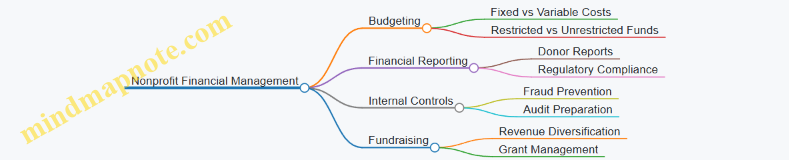
Online Courses and Webinars
-
Coursera: Financial Management for Nonprofits
- Interactive modules on budgeting, forecasting, and financial analysis.
- Example: Budget scenario exercises to practice adjusting for revenue shortfalls.
-
Nonprofitready.org: Budgeting Basics
- Free course focusing on practical budgeting skills.
-
Mind Map: Learning Path for Nonprofit Budgeting
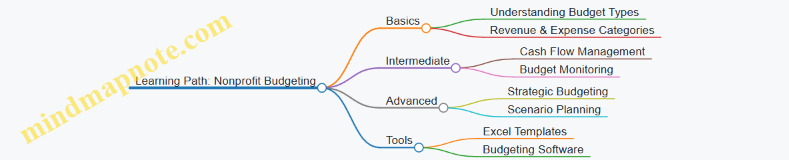
Budgeting Software and Tools
-
QuickBooks Nonprofit Edition
- Tailored accounting software with budgeting features.
- Example: Using QuickBooks to track restricted fund budgets.
-
Aplos
- Cloud-based software designed for nonprofit financial management.
- Example: Automating monthly budget variance reports.
-
Google Sheets Budget Templates
- Free, customizable templates for small nonprofits.
-
Mind Map: Choosing the Right Budgeting Tool
Professional Organizations and Networks
-
National Council of Nonprofits
- Offers resources, webinars, and policy updates.
- Example: Access to budgeting best practice guides.
-
Association of Fundraising Professionals (AFP)
- Provides training on financial stewardship and donor reporting.
-
Mind Map: Professional Support Networks
Community Forums and Peer Groups
-
Reddit: r/nonprofit
- Active community discussing budgeting challenges and solutions.
- Example: Threads on managing budget cuts.
-
LinkedIn Groups: Nonprofit Finance and Accounting
- Networking and sharing best practices.
-
Mind Map: Engaging with Peer Communities
Summary Example: How to Use These Resources
Imagine you are a nonprofit manager tasked with revising your organization’s budget mid-year due to unexpected funding changes. You could:
- Consult “Nonprofit Budgeting and Financial Management” for strategies on flexible budgeting.
- Take the Coursera course module on budget adjustments.
- Use QuickBooks Nonprofit Edition to update your budget and generate variance reports.
- Reach out to the National Council of Nonprofits for updated best practices.
- Post your challenge in r/nonprofit to get peer advice.
This integrated approach ensures you have both theoretical knowledge and practical support.
By continuously engaging with these resources, nonprofit accountants and managers can enhance their budgeting expertise, leading to stronger financial stewardship and greater organizational impact.
15.4 Encouragement for Continuous Improvement in Budgeting
Continuous improvement in budgeting is essential for nonprofit organizations to remain financially healthy, responsive to changing circumstances, and aligned with their mission. Budgeting is not a one-time event but an ongoing process that requires reflection, learning, and adaptation. Here, we explore practical ways to foster a culture of continuous improvement, supported by mind maps and real-world examples.
Why Continuous Improvement Matters
- Enhances financial accuracy and accountability
- Helps anticipate and respond to unexpected changes
- Builds trust with stakeholders through transparency
- Supports strategic decision-making and long-term sustainability
Mind Map: Continuous Improvement Cycle in Nonprofit Budgeting
Best Practices to Encourage Continuous Improvement
-
Regular Budget Reviews and Updates
- Schedule monthly or quarterly budget meetings.
- Use variance analysis to identify areas needing adjustment.
- Example: A nonprofit hosting monthly financial check-ins found that early detection of overspending on program supplies allowed timely reallocation of funds, preventing deficits.
-
Foster Open Communication and Feedback Loops
- Encourage program managers and accountants to share insights.
- Create anonymous feedback channels for budget-related concerns.
- Example: An organization implemented a shared digital dashboard where team members could comment on budget items, leading to improved forecasting accuracy.
-
Invest in Training and Capacity Building
- Provide budgeting workshops for staff and board members.
- Share case studies and lessons learned from past budgeting cycles.
- Example: After training sessions, a nonprofit’s program managers became more proactive in identifying cost-saving opportunities.
-
Leverage Technology for Real-Time Monitoring
- Adopt budgeting software with real-time data updates.
- Automate alerts for budget variances.
- Example: Using cloud-based tools, a nonprofit reduced manual errors and improved responsiveness to financial changes.
-
Document and Share Lessons Learned
- Keep a budgeting journal or repository of adjustments and rationale.
- Share success stories and challenges with the team.
- Example: A nonprofit created an internal wiki documenting budgeting challenges during a grant cycle, which informed better planning the following year.
Mind Map: Tools and Techniques for Continuous Budget Improvement
Example Scenario: Continuous Improvement in Action
Background: A mid-sized nonprofit noticed recurring budget shortfalls in its youth education program.
Step 1: Review and Analyze
- Monthly budget reviews revealed underestimated supply costs.
Step 2: Engage Stakeholders
- Program managers and finance staff discussed challenges openly.
Step 3: Implement Changes
- Adjusted supply cost estimates based on recent invoices.
- Adopted a new budgeting software with real-time tracking.
Step 4: Monitor and Learn
- After three months, budget adherence improved by 15%.
- Documented the process and shared with other departments.
This example highlights how continuous improvement can lead to better financial control and organizational learning.
Final Thoughts
Continuous improvement in budgeting empowers nonprofit organizations to be agile, transparent, and mission-focused. By embedding regular review cycles, fostering open communication, investing in training, leveraging technology, and documenting lessons, nonprofits can enhance their financial stewardship and maximize their impact.
Remember, budgeting is a journey, not a destination—embrace the process, learn from each cycle, and keep evolving.