Audit Preparation and Techniques
1. Introduction to Audit Preparation
1.1 Understanding the Purpose and Scope of an Audit
Introduction
An audit is a systematic and independent examination of financial statements, records, operations, or processes of an organization to ensure accuracy, compliance, and reliability. Understanding the purpose and scope of an audit is fundamental for accountants and auditors to conduct effective and efficient audits.
Purpose of an Audit
The primary purposes of an audit include:
- Assurance: Providing stakeholders with confidence that financial statements are free from material misstatement.
- Compliance: Ensuring adherence to laws, regulations, and internal policies.
- Improvement: Identifying areas for operational or control improvements.
- Fraud Detection: Detecting and deterring fraudulent activities.
Mind Map: Purpose of an Audit
Example:
A manufacturing company undergoes an annual financial audit. The auditor’s purpose is to assure investors that the financial reports accurately reflect the company’s financial position, ensure compliance with tax laws, and identify any weaknesses in inventory controls that could lead to losses.
Scope of an Audit
The scope defines the boundaries and extent of the audit work. It includes:
- Areas Covered: Financial statements, internal controls, compliance areas, specific transactions.
- Time Period: The fiscal year or specific dates under review.
- Depth of Testing: Extent of substantive testing and control evaluation.
- Limitations: Any restrictions or exclusions agreed upon.
Mind Map: Scope of an Audit
Example:
An auditor is engaged to audit the financial statements of a retail chain for the calendar year 2023. The scope includes verifying sales revenue, inventory valuation, and compliance with sales tax regulations. The auditor is not responsible for auditing the company’s IT systems beyond controls related to financial reporting.
Integrating Purpose and Scope
Understanding both purpose and scope helps auditors plan and execute audits effectively. For instance, if the purpose emphasizes fraud detection, the scope might expand to include detailed transaction testing and forensic procedures.
Mind Map: Integrating Purpose and Scope
Example:
A financial institution requests an audit focused on compliance with anti-money laundering (AML) regulations (purpose). The scope is defined to include transaction monitoring systems and customer due diligence files for the past 12 months. This focus guides auditors to apply specialized testing techniques in these areas.
Summary
- The purpose of an audit clarifies why the audit is conducted.
- The scope specifies what the audit will cover and to what extent.
- Clear understanding of both ensures audits are relevant, focused, and efficient.
Quick Reference Mind Map
By mastering the purpose and scope, auditors can better meet client expectations and regulatory requirements while delivering valuable insights.
1.2 Key Roles and Responsibilities in the Audit Process
Understanding the key roles and responsibilities in the audit process is essential for ensuring a smooth, efficient, and compliant audit. Each participant plays a critical part in achieving the audit objectives, maintaining professional standards, and delivering value to stakeholders.
Overview of Key Roles
- Audit Partner / Engagement Partner: Overall responsibility for the audit engagement, ensuring compliance with standards, and final approval of audit reports.
- Audit Manager: Plans and supervises the audit, manages resources, reviews workpapers, and liaises with client management.
- Senior Auditor: Leads audit teams on-site, performs complex audit procedures, and mentors junior staff.
- Staff Auditor / Junior Auditor: Executes audit tests, collects evidence, and documents findings.
- Internal Audit Team (if applicable): Provides ongoing risk assessment and control evaluation within the organization.
- Client Management: Provides information, access, and explanations to auditors; responsible for internal controls and financial statements.
Mind Map: Key Audit Roles and Their Responsibilities
Detailed Responsibilities with Examples
Audit Partner / Engagement Partner
-
Responsibilities:
- Approves audit strategy and scope.
- Ensures compliance with auditing standards (e.g., ISA, PCAOB).
- Reviews significant audit findings and communicates with the board or audit committee.
-
Example: During a year-end audit of a multinational corporation, the Audit Partner identified a potential impairment issue in goodwill. They coordinated with valuation experts and ensured the issue was properly addressed in the audit report.
Audit Manager
-
Responsibilities:
- Develops detailed audit plans.
- Assigns tasks to team members based on skill sets.
- Reviews audit documentation for completeness and accuracy.
- Manages deadlines and client communications.
-
Example: In an audit of a manufacturing client, the Audit Manager scheduled inventory observation procedures and assigned senior auditors to oversee the physical count, ensuring proper coverage and timing.
Senior Auditor
-
Responsibilities:
- Leads day-to-day audit fieldwork.
- Performs complex audit tests such as revenue recognition or lease accounting.
- Guides junior auditors and reviews their work.
-
Example: While auditing revenue, the Senior Auditor identified unusual contract terms and performed additional substantive testing to verify revenue cut-off accuracy.
Staff Auditor / Junior Auditor
-
Responsibilities:
- Executes assigned audit procedures.
- Collects and verifies audit evidence.
- Prepares workpapers documenting findings.
-
Example: A junior auditor tested a sample of accounts payable invoices for proper authorization and recorded exceptions found during testing.
Internal Audit Team
-
Responsibilities:
- Provides ongoing evaluation of internal controls.
- Shares insights and prior findings with external auditors.
-
Example: The internal audit team identified weaknesses in IT access controls, which the external audit team incorporated into their risk assessment.
Client Management
-
Responsibilities:
- Maintains accurate financial records and internal controls.
- Provides timely access to documents and personnel.
- Responds to auditor inquiries and implements recommendations.
-
Example: Management promptly provided bank reconciliations and explanations for unusual transactions, facilitating efficient audit testing.
Mind Map: Interaction Between Audit Roles
Best Practices for Role Clarity
- Clear Communication: Regular status meetings and updates to ensure alignment.
- Defined Responsibilities: Written role descriptions and task assignments.
- Training and Mentoring: Senior staff mentoring juniors to build competencies.
- Documentation: Proper documentation of work and findings to support accountability.
Summary
A well-structured audit team with clearly defined roles and responsibilities is fundamental to a successful audit. Understanding each role’s duties and how they interrelate helps prevent gaps, duplication, and misunderstandings, ultimately leading to a more efficient and effective audit process.
1.3 Overview of Audit Standards and Regulatory Requirements
Auditing is governed by a framework of standards and regulatory requirements designed to ensure consistency, reliability, and transparency in the audit process. Understanding these standards is crucial for accountants and auditors to perform their duties effectively and maintain professional integrity.
Key Audit Standards
- International Standards on Auditing (ISA): Issued by the International Auditing and Assurance Standards Board (IAASB), these standards provide globally recognized guidelines for auditing financial statements.
- Generally Accepted Auditing Standards (GAAS): Primarily used in the United States, GAAS is established by the Auditing Standards Board (ASB) of the AICPA.
- Public Company Accounting Oversight Board (PCAOB) Standards: Applicable to audits of public companies in the U.S., PCAOB standards are more stringent and focus on investor protection.
- Government Auditing Standards (Yellow Book): Issued by the U.S. Government Accountability Office (GAO), these apply to audits of government organizations and programs.
Regulatory Requirements
- Sarbanes-Oxley Act (SOX): Enacted in 2002 to enhance corporate governance and strengthen internal controls over financial reporting for public companies.
- Securities and Exchange Commission (SEC) Regulations: SEC oversees public company disclosures and enforces compliance with financial reporting and auditing standards.
- Local Regulatory Bodies: Depending on jurisdiction, auditors must comply with national laws and regulations, such as the Financial Reporting Council (FRC) in the UK or the Institute of Chartered Accountants in India (ICAI).
Mind Map: Audit Standards and Regulatory Requirements
Example 1: Applying ISA in an Audit Engagement
An auditor working with a multinational client follows ISA 315 (Identifying and Assessing the Risks of Material Misstatement) to perform a thorough risk assessment. By adhering to ISA, the auditor systematically identifies areas with higher risk, such as revenue recognition and inventory valuation, and plans targeted audit procedures accordingly.
Example 2: SOX Compliance in a Public Company Audit
A U.S.-based public company auditor ensures compliance with SOX Section 404 by testing the effectiveness of internal controls over financial reporting. The auditor documents control testing results and reports any material weaknesses to management and the audit committee, helping the company maintain investor confidence.
Practical Tips for Navigating Standards and Regulations
- Stay Updated: Audit standards and regulations evolve; subscribe to updates from standard-setting bodies.
- Use Checklists: Employ audit program checklists aligned with relevant standards to ensure coverage.
- Training and Certification: Regularly participate in training sessions and maintain certifications to stay compliant.
Mind Map: Practical Approach to Standards Compliance
Understanding and integrating audit standards and regulatory requirements into your audit preparation ensures a robust, compliant, and high-quality audit process that withstands scrutiny and adds value to your clients.
1.4 Importance of Early and Thorough Audit Preparation
Early and thorough audit preparation is a cornerstone of a successful audit engagement. It sets the stage for efficiency, accuracy, and effective communication throughout the audit process. Preparing well in advance helps auditors identify potential risks, allocate resources appropriately, and avoid last-minute surprises that could jeopardize the audit timeline or quality.
Why Early and Thorough Preparation Matters
- Risk Mitigation: Early preparation allows auditors to identify high-risk areas and plan focused procedures.
- Resource Optimization: Proper scheduling and team assignment prevent bottlenecks and overwork.
- Improved Client Relations: Clear expectations and timely requests reduce client stress and foster cooperation.
- Higher Quality Audit Evidence: Organized documentation and pre-audit reviews enhance evidence reliability.
- Compliance Assurance: Ensures adherence to auditing standards and regulatory deadlines.
Mind Map: Benefits of Early Audit Preparation
Example: Avoiding Last-Minute Documentation Issues
Imagine an audit team that waits until the week before fieldwork to request financial statements and internal control documentation. The client struggles to gather all required documents on short notice, causing delays and rushed testing. In contrast, a team that starts preparation two months in advance sends detailed document requests early, allowing the client ample time to organize files. This results in smoother fieldwork and more reliable audit outcomes.
Mind Map: Steps in Early Audit Preparation
Example: Enhancing Risk Assessment Through Early Preparation
A corporate audit team begins by reviewing last year’s audit findings and current industry risks well before the audit start date. They identify a new revenue recognition policy that could increase risk. Early awareness enables them to design targeted tests and allocate senior auditors to this area, reducing the chance of oversight.
Best Practices for Early and Thorough Audit Preparation
- Start Early: Begin planning and information gathering at least 6-8 weeks before fieldwork.
- Use Checklists: Employ detailed document and task checklists to track progress.
- Engage the Client: Maintain open communication to clarify expectations and deadlines.
- Leverage Technology: Utilize audit management software to organize schedules and documentation.
- Conduct Preliminary Reviews: Perform initial analytical procedures to guide audit focus.
Mind Map: Best Practices Summary
Final Thought
Early and thorough audit preparation is not just about ticking boxes; it is about building a foundation that supports a high-quality, efficient, and insightful audit. By investing time upfront, auditors can deliver greater value to their clients and uphold the integrity of the audit process.
1.5 Case Study: How Proper Preparation Prevented Audit Delays
Introduction
In this case study, we explore how a mid-sized manufacturing company successfully avoided common audit delays through meticulous preparation. The audit team and client collaborated closely, applying best practices that ensured a smooth and timely audit process.
Background
- Company: ABC Manufacturing Ltd.
- Industry: Manufacturing
- Audit Type: Annual Financial Statement Audit
- Audit Team: 4 auditors
- Audit Period: Fiscal Year 2023
Challenges Faced Before Preparation
- Complex inventory management system
- Multiple locations with decentralized record-keeping
- Previous audit delays due to missing documents and unclear communication
Preparation Steps Taken
Mind Map: Audit Preparation Key Areas
Detailed Examples of Preparation Practices
-
Document Collection Checklist
- The audit team provided ABC Manufacturing with a detailed checklist two months before fieldwork.
- Example: The checklist included specific inventory reports by location and reconciliations.
- Result: Client gathered and organized documents in advance, reducing waiting times.
-
Kickoff Meeting and Communication Plan
- A kickoff meeting was held to align expectations and clarify roles.
- Example: The audit manager set weekly update calls to track progress.
- Result: Early identification of potential bottlenecks, enabling proactive resolution.
-
Risk Assessment Workshop
- Joint session between auditors and client finance team to identify high-risk accounts.
- Example: Focus was placed on inventory valuation due to complex costing methods.
- Result: Audit procedures were tailored, optimizing resource use.
-
Internal Controls Walkthroughs
- Conducted prior to fieldwork to understand and document control environment.
- Example: Verified segregation of duties in procurement and inventory management.
- Result: Reduced substantive testing scope where controls were strong.
-
Audit Timeline and Resource Planning
- Developed a detailed timeline with milestones and responsibilities.
- Example: Scheduled inventory observation visits during low production periods.
- Result: Minimized disruption and ensured availability of key personnel.
Mind Map: Benefits of Proper Preparation
Outcome
- Audit completed 10 days ahead of schedule.
- No significant delays caused by missing information or unclear instructions.
- Positive feedback from client on audit process transparency.
- Identification of minor control improvements, adding value beyond compliance.
Key Takeaways
- Early and clear communication is critical.
- Providing detailed document checklists empowers clients.
- Joint risk assessment aligns audit focus with client realities.
- Understanding internal controls upfront reduces unnecessary testing.
- Thoughtful scheduling respects client operations and resource availability.
This case study exemplifies how audit preparation, when executed with diligence and collaboration, can significantly reduce delays and enhance the quality of the audit engagement.
2. Planning the Audit Engagement
2.1 Defining Audit Objectives and Criteria
Defining clear audit objectives and criteria is a foundational step in the audit planning process. It sets the direction for the entire audit engagement, ensuring that the audit team focuses on relevant areas and measures performance against appropriate benchmarks.
What are Audit Objectives?
Audit objectives specify what the audit intends to achieve. They guide auditors on what to examine and help in designing audit procedures that effectively address risks and compliance requirements.
Key Characteristics of Good Audit Objectives:
- Specific: Clearly state what is to be achieved.
- Measurable: Able to assess whether the objective is met.
- Relevant: Aligned with the audit scope and stakeholder expectations.
What are Audit Criteria?
Audit criteria are the standards, policies, procedures, or benchmarks against which the audit evidence is compared. They provide the basis for evaluating the subject matter.
Common Sources of Audit Criteria:
- Regulatory requirements (e.g., GAAP, IFRS, SOX)
- Internal policies and procedures
- Industry best practices
- Contractual obligations
Mind Map: Defining Audit Objectives and Criteria
Practical Example 1: Financial Statement Audit
Objective: To verify that the financial statements present a true and fair view of the company’s financial position as of December 31, 2023.
Criteria:
- Compliance with Generally Accepted Accounting Principles (GAAP)
- Company’s accounting policies
- Relevant financial reporting regulations
This objective guides auditors to focus on accuracy, completeness, and presentation of financial data, while the criteria provide the benchmarks for evaluation.
Practical Example 2: Internal Controls Audit
Objective: To assess the effectiveness of internal controls over cash disbursements.
Criteria:
- Company’s internal control manual
- COSO Internal Control Framework
- Industry best practices
Here, the audit aims to identify control weaknesses and recommend improvements, using established frameworks as criteria.
Steps to Define Audit Objectives and Criteria
- Understand the Audit Scope: Clarify what areas or processes are to be audited.
- Engage Stakeholders: Discuss expectations with management and audit committee.
- Review Relevant Standards and Policies: Identify applicable regulations and internal guidelines.
- Draft Objectives: Formulate clear, concise objectives aligned with scope and stakeholder needs.
- Select Criteria: Choose appropriate benchmarks for evaluating audit evidence.
- Validate Objectives and Criteria: Confirm understanding and agreement with stakeholders.
Mind Map: Steps to Define Audit Objectives and Criteria
Tips and Best Practices
- Be Specific: Avoid vague objectives like “review financials”; instead, specify “verify revenue recognition compliance.”
- Align with Risks: Focus objectives on areas with higher risk or materiality.
- Use SMART Criteria: Objectives should be Specific, Measurable, Achievable, Relevant, and Time-bound.
- Document Clearly: Record objectives and criteria in the audit plan for transparency.
Summary
Defining audit objectives and criteria is critical to ensure that the audit is focused, efficient, and effective. Clear objectives guide the audit procedures, while well-chosen criteria provide the standards for evaluation. Incorporating examples and structured steps helps auditors and stakeholders align their expectations and achieve meaningful audit outcomes.
2.2 Risk Assessment and Materiality Determination
Effective risk assessment and materiality determination are foundational steps in audit planning. They help auditors focus their efforts on areas with the highest potential for material misstatements, ensuring efficient and effective audits.
Understanding Risk Assessment
Risk assessment involves identifying and evaluating risks that could cause material misstatements in the financial statements. These risks can be broadly categorized into:
- Inherent Risk: The susceptibility of an assertion to a misstatement before considering controls.
- Control Risk: The risk that a misstatement could occur and not be prevented or detected by internal controls.
- Detection Risk: The risk that audit procedures will not detect a material misstatement.
Mind Map: Components of Audit Risk
Steps in Risk Assessment
- Gather Preliminary Information: Understand the client’s business, industry, and environment.
- Identify Significant Accounts and Disclosures: Focus on areas with higher risk.
- Evaluate Internal Controls: Assess design and implementation.
- Perform Analytical Procedures: Identify unusual trends or variances.
- Document Risks: Clearly note identified risks and their potential impact.
Example: Risk Assessment in a Retail Company
A retail company experiences seasonal sales spikes during holidays. The auditor identifies the revenue recognition around this period as a high inherent risk due to the volume and complexity of transactions. The control risk is assessed by reviewing the company’s point-of-sale controls and inventory management systems.
Materiality Determination
Materiality is the threshold above which misstatements could influence the economic decisions of users. It guides auditors in planning the nature, timing, and extent of audit procedures.
Factors Influencing Materiality
- Size and nature of the item or error
- Users’ needs and expectations
- Qualitative factors such as fraud risk or regulatory compliance
Mind Map: Determining Materiality
Calculating Materiality: An Example
Suppose a company has:
- Net Income: $5,000,000
- Total Assets: $50,000,000
- Revenue: $30,000,000
A common benchmark is 5% of net income for materiality.
- Materiality = 5% x $5,000,000 = $250,000
Performance materiality might be set at 75% of this, i.e., $187,500, to reduce the risk of undetected misstatements.
Integrating Risk Assessment and Materiality
The auditor uses risk assessment results to adjust materiality and tailor audit procedures:
- Higher risk areas may require lower materiality thresholds.
- More extensive testing is planned for high-risk accounts.
Mind Map: Linking Risk and Materiality
Practical Example: Applying Risk and Materiality
An auditor is examining a technology startup with volatile earnings and significant intangible assets. Due to the high inherent risk in valuing intangibles, the auditor sets a lower materiality threshold for this account and plans detailed substantive procedures, including third-party valuations.
Meanwhile, cash balances, considered low risk with strong controls, have a higher materiality threshold and require less extensive testing.
Summary Best Practices
- Always tailor risk assessment to the client’s specific environment.
- Use multiple benchmarks to determine materiality.
- Document all judgments clearly.
- Reassess risks and materiality as new information emerges during the audit.
By thoroughly assessing risks and carefully determining materiality, auditors can focus their efforts effectively, improving audit quality and efficiency.
2.3 Developing an Audit Plan and Timeline
Developing a comprehensive audit plan and timeline is a critical step in ensuring the audit process is efficient, thorough, and meets all regulatory and client expectations. The audit plan serves as a roadmap, outlining the scope, objectives, resources, and schedule for the audit engagement.
Key Components of an Audit Plan
- Audit Objectives: Clear goals that define what the audit intends to achieve.
- Scope of the Audit: Specifies the areas, accounts, or processes to be audited.
- Risk Assessment: Identification of high-risk areas that require more focus.
- Resources and Team Assignments: Allocation of auditors based on expertise and availability.
- Audit Procedures: Specific tests and techniques to be applied.
- Timeline and Milestones: Schedule for each phase of the audit.
Mind Map: Developing an Audit Plan
Creating a Timeline
A well-structured timeline helps keep the audit on track and ensures timely delivery of results. Consider the following phases:
- Planning Phase (1-2 weeks): Risk assessment, defining scope, resource allocation.
- Fieldwork (3-4 weeks): Data collection, testing, interviews.
- Review and Reporting (1-2 weeks): Drafting reports, management review, finalization.
Mind Map: Audit Timeline Breakdown
Example: Audit Plan and Timeline for a Mid-Sized Retail Company
Scenario: The audit team is preparing for a financial audit focusing on revenue recognition and inventory management.
- Objectives: Verify accuracy of revenue and inventory balances.
- Scope: Sales department, inventory warehouses, and related financial accounts.
- Risk Areas: High volume of transactions, seasonal inventory fluctuations.
- Team: 1 senior auditor, 2 junior auditors.
- Procedures: Sampling sales invoices, observing inventory counts, testing internal controls.
- Timeline:
- Planning: 10 days
- Fieldwork: 20 days
- Reporting: 7 days
This plan allows flexibility for unexpected findings and ensures coverage of critical areas.
Best Practices
- Engage Stakeholders Early: Collaborate with client management to align expectations.
- Be Realistic with Timelines: Account for potential delays and resource constraints.
- Document Everything: Maintain clear records of planning decisions and timelines.
- Use Project Management Tools: Leverage software to track progress and deadlines.
By carefully developing an audit plan and timeline, auditors can enhance efficiency, reduce risks, and deliver high-quality audit outcomes that support organizational goals.
2.4 Selecting the Audit Team and Assigning Roles
Selecting the right audit team and clearly assigning roles is a critical step in ensuring a smooth and effective audit process. The composition of the team should reflect the complexity of the audit, the industry knowledge required, and the specific skills needed to address identified risks.
Key Considerations When Selecting the Audit Team
- Expertise and Experience: Choose team members with relevant experience in the client’s industry and the type of audit being conducted.
- Size of the Team: Balance between having enough resources to cover all audit areas and maintaining efficiency.
- Specialized Skills: Include members with skills in IT auditing, data analytics, or regulatory compliance if needed.
- Availability and Workload: Ensure team members have sufficient availability to meet audit deadlines.
- Independence and Objectivity: Avoid conflicts of interest to maintain audit integrity.
Assigning Roles and Responsibilities
Clear role assignment helps avoid duplication of effort and ensures accountability. Typical roles include:
- Engagement Partner: Overall responsibility for the audit engagement, client communication, and final audit opinion.
- Audit Manager: Oversees day-to-day audit activities, manages the team, and ensures adherence to the audit plan.
- Senior Auditor: Leads specific audit areas, mentors junior staff, and reviews workpapers.
- Staff Auditors: Perform detailed testing, gather evidence, and document findings.
- IT Auditor: Focuses on IT controls, cybersecurity, and data integrity.
Mind Map: Factors Influencing Team Selection
Mind Map: Audit Team Roles and Responsibilities
Example: Selecting an Audit Team for a Mid-Sized Manufacturing Client
Scenario: A mid-sized manufacturing company requires a financial statement audit with a focus on inventory valuation and IT system controls.
Team Composition:
- Engagement Partner: Experienced in manufacturing audits.
- Audit Manager: Skilled in inventory auditing.
- Senior Auditor: Background in cost accounting.
- Staff Auditors (2): To perform detailed testing.
- IT Auditor: To assess ERP system controls.
Role Assignment:
- Engagement Partner oversees the entire engagement and communicates with client executives.
- Audit Manager coordinates audit procedures related to inventory and financial reporting.
- Senior Auditor leads inventory valuation testing and supervises staff auditors.
- Staff Auditors execute substantive tests on inventory transactions.
- IT Auditor evaluates the ERP system’s access controls and data integrity.
This structured approach ensures that each critical audit area is covered by personnel with the appropriate expertise, facilitating an efficient and thorough audit.
Best Practices
- Conduct a skills inventory of available auditors before team selection.
- Match team members’ strengths to audit risks and complexity.
- Clearly document roles and responsibilities in the audit plan.
- Communicate role assignments to the entire team early in the process.
- Provide training or resources for specialized audit areas if needed.
By thoughtfully selecting the audit team and assigning clear roles, auditors can enhance collaboration, improve audit quality, and meet deadlines effectively.
2.5 Example: Risk-Based Audit Planning in a Manufacturing Firm
Risk-based audit planning is a strategic approach that focuses audit efforts on areas with the highest risk of material misstatement or operational inefficiency. This ensures optimal use of resources and enhances audit effectiveness. Below is a detailed example of how a manufacturing firm can implement risk-based audit planning.
Step 1: Understand the Manufacturing Firm’s Environment
- Industry Characteristics: Capital intensive, complex supply chains, inventory management challenges.
- Key Processes: Procurement, production, quality control, inventory management, sales.
- Regulatory Environment: Compliance with safety, environmental, and financial reporting standards.
Step 2: Identify and Assess Risks
Using a risk assessment mind map helps visualize and categorize risks.
Risk Assessment Mind Map
Step 3: Prioritize Risks Based on Impact and Likelihood
| Risk | Likelihood | Impact | Priority |
|---|---|---|---|
| Inventory valuation errors | High | High | 1 |
| Revenue recognition errors | Medium | High | 2 |
| Equipment failure | Medium | Medium | 3 |
| Supply chain disruptions | High | Medium | 4 |
| Cybersecurity breaches | Low | High | 5 |
Step 4: Develop Audit Plan Focusing on High Priority Risks
-
Inventory Valuation:
- Perform detailed testing of inventory counts.
- Review costing methods (FIFO, LIFO, weighted average).
- Test for obsolete or slow-moving inventory.
-
Revenue Recognition:
- Analyze sales contracts and terms.
- Test cutoff procedures at period-end.
- Verify completeness and accuracy of recorded sales.
-
Equipment Failure:
- Review maintenance schedules and records.
- Assess impact on production and financials.
Step 5: Example Mind Map of Audit Focus Areas
Audit Focus Areas Mind Map
Step 6: Illustrative Example of Applying Risk-Based Audit Planning
Scenario: During planning, auditors identify that the firm recently changed its inventory valuation method from FIFO to weighted average.
Audit Response:
- Investigate the rationale and accounting policy documentation.
- Test the accuracy of the new valuation method.
- Compare inventory balances before and after the change for unusual variances.
- Evaluate disclosure adequacy in financial statements.
Outcome: This targeted approach uncovers a misapplication of the new method, leading to corrected financial reporting and improved internal controls.
Summary
Risk-based audit planning in a manufacturing firm involves understanding the unique risks associated with manufacturing operations, prioritizing these risks, and tailoring audit procedures accordingly. Using mind maps and examples helps auditors visualize risks and focus their efforts effectively, ensuring a thorough and efficient audit process.
3. Gathering and Organizing Preliminary Information
3.1 Collecting Background Information on the Client
Collecting comprehensive background information on the client is a foundational step in audit preparation. It enables auditors to understand the client’s business environment, identify potential risk areas, and tailor audit procedures accordingly. This section explores best practices for gathering client background information, supported by clear examples and mind maps to visualize the process.
Why Collect Background Information?
- Understand the client’s industry and market position
- Identify key business processes and controls
- Assess inherent risks and areas requiring focused audit attention
- Establish context for interpreting financial data and transactions
Key Areas to Explore When Collecting Background Information
Client Background Information Mind Map
Best Practices for Collecting Background Information
-
Review Publicly Available Information:
- Annual reports, press releases, and company websites
- Industry publications and market research reports
-
Interview Key Client Personnel:
- CFO, Controller, Internal Audit Head
- Department heads related to finance, operations, compliance
-
Examine Prior Audit Documentation:
- Previous audit reports
- Management letters and responses
-
Use Questionnaires and Checklists:
- Structured tools to ensure completeness
-
Leverage Technology:
- Data aggregation tools to collect and analyze client data
Example: Collecting Background Information for a Mid-Sized Manufacturing Client
Step 1: Company Overview
- Gathered company history showing 25 years in the automotive parts industry.
- Identified ownership as a family-owned business transitioning to professional management.
Step 2: Industry and Market
- Researched industry trends indicating increased demand for electric vehicle components.
- Noted regulatory changes impacting manufacturing emissions.
Step 3: Financial Overview
- Reviewed last three years’ financial statements showing steady revenue growth but declining margins.
Step 4: Operational Aspects
- Documented multiple production facilities across three states.
- Identified reliance on legacy ERP systems.
Step 5: Internal Controls
- Reviewed prior audit reports highlighting weaknesses in inventory controls.
Step 6: Legal and Compliance
- Confirmed no significant pending litigations but noted new environmental compliance requirements.
Mind Map: Example Client Background Information Collection
Summary
Collecting detailed background information on the client is essential for effective audit planning. By systematically gathering data across multiple dimensions — from company history to regulatory environment — auditors can gain a holistic understanding that informs risk assessment and audit scope. Utilizing mind maps and structured examples helps clarify this process and ensures no critical area is overlooked.
3.2 Reviewing Prior Audit Reports and Management Letters
Reviewing prior audit reports and management letters is a critical step in audit preparation. This process helps auditors understand historical issues, assess the effectiveness of previous recommendations, and identify areas that may require special attention in the current audit.
Why Review Prior Audit Reports and Management Letters?
- Identify recurring issues: Helps detect patterns or persistent weaknesses.
- Evaluate management responsiveness: Determines if past recommendations were implemented.
- Focus audit efforts: Directs attention to high-risk areas based on historical findings.
- Enhance risk assessment: Provides context for current audit planning.
Key Components to Analyze
- Findings and Recommendations: What issues were raised? Were they resolved?
- Management Responses: How did management address the concerns?
- Audit Scope and Limitations: Any restrictions or scope changes previously noted?
- Follow-up Actions: Evidence of corrective measures taken.
Mind Map: Reviewing Prior Audit Reports and Management Letters
Step-by-Step Process
- Collect Prior Reports and Letters: Obtain all relevant documents from previous audits.
- Summarize Key Findings: Extract major issues, recommendations, and management responses.
- Assess Implementation: Verify if management has addressed prior concerns through evidence or discussions.
- Compare with Current Risk Assessment: Align historical issues with current audit risks.
- Document Insights: Record observations to guide audit planning and testing.
Example: Retail Company Audit
Scenario: During the current year’s audit planning, the auditor reviews last year’s audit report and management letter for a retail client.
- Prior Finding: Inventory valuation discrepancies due to inconsistent stock counts.
- Management Response: Implemented monthly cycle counts and updated inventory software.
- Follow-up: Auditor verifies cycle count reports and tests inventory valuation.
Outcome: The auditor focuses additional substantive testing on inventory controls and valuation, ensuring prior issues have been adequately addressed.
Mind Map: Example Application in Retail Audit
Best Practices
- Maintain a centralized repository for prior audit documentation.
- Engage with client management to discuss prior findings and corrective actions.
- Use prior reports to tailor audit procedures and allocate resources efficiently.
- Document all insights and link them to audit risk assessments.
By thoroughly reviewing prior audit reports and management letters, auditors can enhance the quality and efficiency of their audits, reduce surprises during fieldwork, and foster a proactive approach to risk management.
3.3 Understanding the Client’s Internal Controls
Understanding a client’s internal controls is a critical step in the audit process. It helps auditors assess the reliability of financial reporting, compliance with laws and regulations, and the effectiveness and efficiency of operations. This section will guide you through the key concepts, techniques, and practical examples to grasp internal controls thoroughly.
What Are Internal Controls?
Internal controls are processes and procedures implemented by an organization to ensure the achievement of objectives in the following areas:
- Reliability of financial reporting
- Compliance with applicable laws and regulations
- Effectiveness and efficiency of operations
Key Components of Internal Controls (COSO Framework)
The Committee of Sponsoring Organizations (COSO) framework identifies five interrelated components of internal control:
Mind Map: Understanding Internal Controls
Techniques to Understand Internal Controls
-
Inquiry: Interview key personnel to understand control processes.
-
Observation: Watch processes in action, such as cash handling or inventory counts.
-
Inspection: Review documents, policies, and reports related to controls.
-
Walkthroughs: Trace a transaction from initiation through recording to reporting to verify control effectiveness.
Example: Walkthrough of Accounts Payable Process
Scenario: You are auditing a mid-sized company’s accounts payable (AP) process.
- Step 1: Inquiry — Ask the AP manager to describe the process for approving and recording invoices.
- Step 2: Observation — Watch how invoices are received, matched with purchase orders, and approved.
- Step 3: Inspection — Review sample invoices, purchase orders, and payment approvals.
- Step 4: Walkthrough — Select a recent invoice and trace it through the system to ensure controls like three-way matching and segregation of duties are functioning.
This approach helps identify control strengths and weaknesses, such as whether unauthorized payments could occur.
Mind Map: Walkthrough Process
Documenting Internal Controls
Effective documentation is essential for audit evidence and future reference. Common documentation methods include:
-
Flowcharts: Visual diagrams showing control processes and decision points.
-
Narratives: Written descriptions of controls and procedures.
-
Checklists: Lists of controls to verify their presence and operation.
Example: Flowchart for Cash Receipts Process
Start –> Customer Payment Received –> Cashier Records Payment –> Deposit Prepared –> Deposit Verified by Supervisor –> Deposit Sent to Bank –> Accounting Records Payment
This flowchart helps auditors quickly understand control points and identify where errors or fraud might occur.
Best Practices for Understanding Internal Controls
- Engage with multiple levels of staff to get a comprehensive view.
- Use a combination of inquiry, observation, inspection, and walkthroughs.
- Document controls clearly and consistently.
- Remain alert to red flags such as lack of segregation of duties or missing approvals.
Summary
Understanding the client’s internal controls is foundational for effective audit planning and risk assessment. By using structured techniques and documenting findings clearly, auditors can evaluate control effectiveness and design appropriate audit procedures.
3.4 Preparing Documentation Checklists
Preparing documentation checklists is a critical step in audit preparation that helps auditors systematically gather, organize, and verify all necessary documents. Checklists ensure completeness, improve efficiency, and reduce the risk of overlooking important evidence.
Why Use Documentation Checklists?
- Consistency: Standardizes the documentation process across different audits and teams.
- Efficiency: Saves time by clearly outlining required documents upfront.
- Completeness: Helps ensure no key documents are missed.
- Audit Trail: Provides evidence of what was requested and reviewed.
Key Components of a Documentation Checklist
- Document Name: Clear identification of the document.
- Description/Purpose: Brief explanation of why the document is needed.
- Source: Where or from whom the document should be obtained.
- Date/Period Covered: Relevant timeframe for the document.
- Status: To track if the document is received, pending, or incomplete.
- Notes: Space for additional comments or observations.
Mind Map: Components of a Documentation Checklist
Steps to Prepare Effective Documentation Checklists
-
Understand the Audit Scope and Objectives
- Identify key areas and risks.
- Determine which documents are essential to address these areas.
-
Review Prior Audit Documentation
- Use previous checklists as a baseline.
- Update based on changes in regulations, client operations, or audit focus.
-
Categorize Documents by Audit Area
- Financial statements
- Internal controls
- Compliance
- Transactions
-
Specify Document Details Clearly
- Avoid vague descriptions.
- Include examples or formats if necessary.
-
Incorporate Client Input
- Collaborate with client personnel to identify document locations and formats.
-
Test and Refine the Checklist
- Pilot the checklist on a small sample.
- Adjust based on feedback and practical challenges.
Mind Map: Steps to Prepare Documentation Checklists
Example: Documentation Checklist for Revenue Audit
| Document Name | Description | Source | Date/Period Covered | Status | Notes |
|---|---|---|---|---|---|
| Sales Invoices | Evidence of sales transactions | Sales Dept | Jan - Dec 2023 | Pending | Request from sales system |
| Customer Contracts | Terms and conditions of sales | Legal Dept | Current contracts | Received | Verify contract dates |
| Revenue Recognition Policy | Company policy on revenue recognition | Finance Dept | Latest version | Received | Check for compliance |
| Credit Notes Issued | Adjustments to sales | Sales Dept | Jan - Dec 2023 | Pending | Cross-check with invoices |
Practical Tips
- Use spreadsheet software or audit management tools to create dynamic checklists.
- Color-code statuses (e.g., green for received, yellow for pending, red for missing).
- Include hyperlinks to electronic documents when possible.
- Regularly update the checklist as documents are received or issues arise.
Example: Using a Documentation Checklist to Streamline Audit
During an audit of a mid-sized retail company, the audit team prepared a detailed checklist for inventory documentation. By categorizing documents into purchase orders, receiving reports, inventory count sheets, and valuation reports, the team was able to quickly identify missing documents and follow up promptly. This proactive approach reduced fieldwork time by 20% and improved the accuracy of audit evidence.
Summary
Documentation checklists are indispensable tools that bring structure and clarity to the audit preparation process. By carefully designing and utilizing these checklists, auditors can enhance their efficiency, ensure thoroughness, and maintain a clear audit trail that supports their findings.
3.5 Practical Example: Using Checklists to Streamline Document Collection
Efficient document collection is a cornerstone of successful audit preparation. One of the best practices to ensure completeness and organization is the use of detailed checklists. Checklists help auditors systematically gather all necessary documents, reduce the risk of missing critical information, and improve communication with clients.
Why Use Checklists?
- Consistency: Ensures every audit follows the same thorough process.
- Clarity: Provides clear expectations to both auditors and clients.
- Efficiency: Saves time by avoiding repeated requests.
- Accountability: Tracks document status and outstanding items.
Example Scenario: Audit of a Mid-Sized Retail Company
The audit team needs to collect documents related to revenue, expenses, inventory, and internal controls. To streamline this, they develop a checklist categorized by audit areas.
Sample Document Collection Checklist (Mind Map)
How to Use This Checklist Effectively
- Customize the Checklist: Tailor the checklist to the specific client and audit scope.
- Assign Responsibility: Designate team members to request and follow up on specific document categories.
- Set Deadlines: Establish clear timelines for document submission.
- Track Progress: Use a shared spreadsheet or audit software to monitor received and outstanding documents.
- Communicate Clearly: Provide the checklist to the client upfront to clarify expectations.
Example: Tracking Document Collection Status
Real-World Benefit
In a recent audit, the team used a checklist approach and realized that early identification of missing vendor invoices allowed them to promptly escalate the issue. This proactive approach prevented delays in audit procedures and ensured a smooth audit timeline.
Tips for Creating Effective Checklists
- Be Comprehensive but Concise: Include all necessary documents without overwhelming detail.
- Use Clear Language: Avoid jargon to ensure client understanding.
- Incorporate Examples: Provide sample document names or formats.
- Update Regularly: Revise checklists based on lessons learned from previous audits.
By integrating checklists into your audit preparation process, you can significantly enhance efficiency, reduce errors, and foster better collaboration with your clients.
4. Conducting Preliminary Analytical Procedures
4.1 Purpose and Types of Analytical Procedures
Analytical procedures are essential tools in the audit process that help auditors understand the client’s business, identify areas of potential risk, and gather evidence to support audit conclusions. These procedures involve evaluating financial information through analysis of plausible relationships among both financial and non-financial data.
Purpose of Analytical Procedures
- Risk Assessment: Analytical procedures help auditors identify unusual transactions or events, trends, and ratios that may indicate areas of higher risk.
- Planning the Audit: They assist in determining the nature, timing, and extent of other audit procedures.
- Substantive Testing: Analytical procedures can be used as substantive tests to obtain audit evidence.
- Overall Review: At the conclusion of the audit, they help assess the overall financial statement presentation.
Mind Map: Purpose of Analytical Procedures
Types of Analytical Procedures
Analytical procedures can be broadly categorized into the following types:
-
Trend Analysis: Examining changes in account balances or ratios over time to identify patterns or anomalies.
- Example: Comparing quarterly sales revenue over the past three years to detect unexpected spikes or declines.
-
Ratio Analysis: Using financial ratios to evaluate relationships between different accounts.
- Example: Calculating the current ratio (current assets/current liabilities) to assess liquidity.
-
Reasonableness Tests: Estimating expected account balances based on independent data or assumptions.
- Example: Estimating depreciation expense based on asset cost, useful life, and depreciation method.
-
Regression Analysis: Statistical technique to predict one variable based on others.
- Example: Predicting sales based on advertising spend and market trends.
-
Comparative Analysis: Comparing financial data against industry benchmarks or competitor data.
- Example: Comparing gross profit margin with industry averages to identify discrepancies.
Mind Map: Types of Analytical Procedures
Practical Example: Applying Analytical Procedures
Consider an auditor reviewing the sales account of a retail company:
-
Trend Analysis: The auditor notices that sales for Q2 increased by 40% compared to Q1, while historically the increase is around 10%. This prompts further investigation.
-
Ratio Analysis: The auditor calculates the gross profit margin and finds it dropped from 35% to 28%, which is unusual given stable cost structures.
-
Reasonableness Test: Based on foot traffic data and average transaction value, the auditor estimates expected sales and compares it to recorded sales.
-
Comparative Analysis: Comparing the client’s sales growth to industry averages reveals the client outperformed competitors significantly, warranting a review of revenue recognition policies.
Through these analytical procedures, the auditor identifies potential risks related to revenue recognition and plans targeted substantive testing accordingly.
In summary, analytical procedures are versatile and powerful techniques that enhance audit effectiveness by providing insights into financial data patterns and anomalies. Incorporating these procedures early and throughout the audit process ensures a focused and efficient audit approach.
4.2 Techniques for Trend and Ratio Analysis
Trend and ratio analysis are fundamental analytical procedures used by auditors to identify patterns, fluctuations, and potential anomalies in financial data over time. These techniques help auditors gain insights into the financial health of an organization and pinpoint areas that may require further investigation.
What is Trend Analysis?
Trend analysis involves comparing financial data over multiple periods to detect consistent movements or unexpected changes. It helps auditors understand whether key financial metrics are improving, deteriorating, or remaining stable.
What is Ratio Analysis?
Ratio analysis involves calculating relationships between different financial statement items to evaluate liquidity, profitability, efficiency, and solvency. Ratios provide standardized measures that facilitate comparisons across periods or with industry benchmarks.
Mind Map: Overview of Trend and Ratio Analysis Techniques
Techniques for Trend Analysis
Horizontal Analysis
- Compares financial statement line items across multiple periods.
- Expresses changes as percentages or absolute values.
Example: A company’s revenue increased from $1,000,000 in 2022 to $1,200,000 in 2023.
Calculation: \[ \text{Percentage Change} = \frac{1,200,000 - 1,000,000}{1,000,000} \times 100 = 20\% \]
This 20% increase may indicate growth or require validation if inconsistent with industry trends.
Vertical Analysis
- Expresses each financial statement item as a percentage of a base figure within the same period.
- Useful for analyzing cost structure or expense distribution.
Example: If total sales are $1,000,000 and cost of goods sold (COGS) is $600,000, then:
\[ \text{COGS as \% of Sales} = \frac{600,000}{1,000,000} \times 100 = 60\% \]
Auditors can compare this percentage across periods to detect unusual cost fluctuations.
Moving Averages
- Smooths out short-term fluctuations to highlight longer-term trends.
- Useful for seasonal businesses.
Example: A 3-month moving average of sales helps identify if a dip in one month is an anomaly or part of a downward trend.
Techniques for Ratio Analysis
Liquidity Ratios
- Measure the company’s ability to meet short-term obligations.
Current Ratio Example: Current Assets = $500,000 Current Liabilities = $250,000
\[ \text{Current Ratio} = \frac{500,000}{250,000} = 2.0 \]
A ratio above 1 indicates good short-term financial health.
Profitability Ratios
- Assess the company’s ability to generate profit relative to sales, assets, or equity.
Gross Profit Margin Example: Gross Profit = $400,000 Sales = $1,000,000
\[ \text{Gross Profit Margin} = \frac{400,000}{1,000,000} \times 100 = 40\% \]
A declining margin over time may signal rising costs or pricing pressure.
Efficiency Ratios
- Evaluate how effectively the company uses its assets.
Inventory Turnover Example: COGS = $600,000 Average Inventory = $150,000
\[ \text{Inventory Turnover} = \frac{600,000}{150,000} = 4 \]
This means inventory is sold and replaced 4 times a year.
Solvency Ratios
- Indicate the company’s long-term financial stability.
Debt to Equity Ratio Example: Total Debt = $400,000 Total Equity = $600,000
\[ \text{Debt to Equity} = \frac{400,000}{600,000} = 0.67 \]
A lower ratio suggests less reliance on debt financing.
Mind Map: Example Application of Ratio Analysis
Best Practices for Using Trend and Ratio Analysis
- Always compare ratios and trends against industry benchmarks and prior periods.
- Investigate significant deviations or unexpected patterns.
- Use a combination of ratios to get a comprehensive view.
- Document assumptions and data sources clearly.
Summary
Trend and ratio analysis are powerful tools that help auditors identify risks and focus their efforts. By applying these techniques with clear examples and mind maps, auditors can enhance their understanding of the client’s financial position and detect potential issues early in the audit process.
4.3 Identifying Unusual Transactions and Variances
Identifying unusual transactions and variances is a critical step in the audit process. These anomalies often signal potential errors, fraud, or areas requiring deeper investigation. This section will guide you through practical techniques, supported by mind maps and examples, to effectively spot and analyze these irregularities.
Understanding Unusual Transactions and Variances
- Unusual Transactions: These are transactions that deviate from the normal business activities in terms of size, timing, nature, or frequency.
- Variances: Differences between actual figures and expected or budgeted amounts, which may indicate misstatements or operational issues.
Mind Map: Key Indicators of Unusual Transactions
Techniques to Identify Unusual Transactions and Variances
-
Trend Analysis
- Compare current period data with prior periods to spot unexpected changes.
- Example: A sudden 50% increase in sales returns in March compared to February.
-
Ratio Analysis
- Use financial ratios (e.g., gross margin, expense ratios) to detect abnormalities.
- Example: A gross margin dropping from 40% to 20% without operational changes.
-
Threshold Testing
- Set materiality thresholds to flag transactions exceeding certain limits.
- Example: Flagging all payments above $50,000 for review.
-
Exception Reporting
- Generate reports highlighting transactions that deviate from predefined rules.
- Example: Invoices dated after the fiscal year-end but recorded in the current year.
-
Data Analytics Tools
- Use software to scan large datasets for patterns, duplicates, or anomalies.
- Example: Identifying duplicate vendor payments using data analytics.
Mind Map: Analytical Techniques for Variance Identification
Practical Example 1: Detecting Unusual Transactions in Accounts Payable
Scenario: During an audit of a retail company, the auditor notices a cluster of payments made to a new vendor in the last week of the fiscal year.
Steps Taken:
- Reviewed vendor master data and found the vendor was recently added.
- Analyzed payment dates and amounts, noting multiple large payments just before year-end.
- Cross-checked supporting invoices and delivery receipts.
Findings:
- Several invoices were dated after the fiscal year-end but recorded in the current year.
- Some payments lacked proper authorization.
Conclusion:
- These unusual transactions were flagged for further investigation as potential cut-off errors or misstatements.
Practical Example 2: Variance Analysis in Expense Accounts
Scenario: An auditor reviews the marketing expenses and observes a 70% increase compared to the previous quarter.
Steps Taken:
- Compared detailed expense reports.
- Identified a one-time large advertising campaign.
- Verified approval and budget adjustments.
Outcome:
- The variance was justified and properly documented.
- No further action required.
Best Practices
- Always corroborate unusual findings with supporting documentation.
- Maintain professional skepticism and consider the possibility of fraud.
- Use a combination of techniques rather than relying on a single method.
- Document findings clearly, linking anomalies to audit objectives.
By systematically applying these techniques and leveraging analytical tools, auditors can efficiently identify unusual transactions and variances, ensuring a thorough and effective audit process.
4.4 Integrating Analytical Findings into Audit Planning
Integrating analytical findings into audit planning is a critical step that helps auditors focus their efforts on areas of higher risk and potential misstatement. Analytical procedures performed during the preliminary phase provide valuable insights that shape the audit strategy, resource allocation, and testing approach.
Why Integrate Analytical Findings?
- Risk Identification: Pinpoint unusual trends or variances that may indicate risk.
- Efficient Resource Allocation: Direct audit resources to high-risk areas.
- Tailored Audit Procedures: Customize testing based on identified risks.
- Improved Audit Quality: Focused efforts increase the likelihood of detecting material misstatements.
Steps to Integrate Analytical Findings into Audit Planning
-
Review Analytical Results Thoroughly
- Examine ratios, trends, and variances.
- Identify significant fluctuations or unexpected patterns.
-
Assess Risk Implications
- Determine if findings suggest increased inherent or control risk.
- Consider external factors (market conditions, regulatory changes).
-
Adjust Materiality and Risk Thresholds
- Refine materiality levels based on findings.
- Set lower thresholds for areas with unusual activity.
-
Modify Audit Procedures
- Increase substantive testing in high-risk areas.
- Plan additional control testing if internal controls appear weak.
-
Document Decisions and Rationale
- Record how analytical findings influenced planning.
- Ensure transparency and support for audit approach.
Mind Map: Integrating Analytical Findings into Audit Planning
Example: Detecting Revenue Anomalies and Adjusting Audit Plan
Scenario: During preliminary analytical procedures, an auditor notices that a client’s revenue growth rate for Q4 is 30% higher than the average growth rate for the previous three quarters. This spike is unusual given the stable market conditions.
Integration Steps:
- Review: The auditor drills down into revenue by product line and region.
- Risk Assessment: The spike is concentrated in a new product line with limited historical data, increasing inherent risk.
- Adjust Materiality: The auditor lowers the materiality threshold for revenue-related accounts.
- Modify Procedures: Plans additional substantive testing on sales transactions and cut-off procedures for Q4.
- Documentation: Records the rationale for increased testing and materiality adjustment.
Mind Map: Example - Revenue Anomaly Integration
Practical Tips for Auditors
- Use visualization tools (charts, graphs) to better interpret analytical data.
- Collaborate with the audit team to brainstorm potential causes of anomalies.
- Keep communication open with client management to understand business context.
- Continuously revisit analytical findings as new information emerges during the audit.
By thoughtfully integrating analytical findings into audit planning, auditors can enhance the effectiveness and efficiency of their engagements, ensuring that audit resources are focused where they are needed most.
4.5 Example: Detecting Revenue Anomalies through Ratio Analysis
Revenue is a critical account in financial statements and often a focal point during audits due to its susceptibility to manipulation or error. Ratio analysis provides auditors with a powerful tool to identify unusual patterns or anomalies that warrant further investigation.
What is Ratio Analysis in Audit?
Ratio analysis involves comparing financial data points to identify trends, relationships, and inconsistencies. When applied to revenue, it helps auditors detect deviations from expected performance or industry norms.
Common Ratios Used to Analyze Revenue
- Gross Profit Margin = (Gross Profit / Revenue) × 100
- Revenue Growth Rate = ((Current Period Revenue - Prior Period Revenue) / Prior Period Revenue) × 100
- Accounts Receivable Turnover = Revenue / Average Accounts Receivable
- Days Sales Outstanding (DSO) = (Average Accounts Receivable / Revenue) × Number of Days
Mind Map: Key Revenue Ratios and Their Audit Implications
Revenue Ratio Analysis Mind Map
Practical Example: Detecting Revenue Anomalies
Scenario: An auditor is reviewing the revenue of XYZ Corporation for the current fiscal year. The auditor calculates the following:
| Metric | Prior Year | Current Year | Change (%) |
|---|---|---|---|
| Revenue | $10,000,000 | $15,000,000 | +50% |
| Gross Profit Margin | 40% | 25% | -15 pts |
| Accounts Receivable Turnover | 10 | 5 | -50% |
| Days Sales Outstanding | 36.5 days | 73 days | +100% |
Analysis:
- Revenue increased by 50%, which is significant.
- Gross profit margin dropped from 40% to 25%, suggesting either increased costs or potential revenue inflation.
- Accounts receivable turnover halved, indicating slower collection.
- DSO doubled, meaning customers are taking longer to pay.
These combined ratios raise a red flag about the quality and recognition of revenue. The auditor should investigate further for possible revenue overstatement or fictitious sales.
Mind Map: Investigative Steps After Detecting Anomalies
Investigative Steps Mind Map
Additional Example: Ratio Analysis in Seasonal Business
Scenario: A retail company shows a 30% revenue increase in Q4 compared to Q3. However, the gross profit margin remains flat, and DSO decreases.
Interpretation:
- The revenue increase aligns with expected seasonal trends.
- Stable gross profit margin suggests consistent pricing and cost control.
- Decreased DSO indicates efficient collections.
Conclusion: No immediate revenue anomaly is detected. The auditor documents these findings and focuses on other risk areas.
Summary
Ratio analysis is an effective technique to detect revenue anomalies by highlighting unusual changes in profitability, growth, and receivables management. When ratios deviate significantly from historical trends or industry benchmarks, auditors should perform targeted substantive procedures to confirm the accuracy and completeness of revenue.
By integrating ratio analysis with professional judgment and corroborative evidence, auditors can enhance the effectiveness and efficiency of their audit procedures.
5. Assessing Internal Controls
5.1 Understanding Control Environment and Control Activities
The control environment and control activities form the backbone of an organization’s internal control system. Understanding these components is essential for auditors to evaluate the effectiveness of controls and to design appropriate audit procedures.
Control Environment
The control environment sets the tone of an organization, influencing the control consciousness of its people. It is the foundation for all other components of internal control, providing discipline and structure.
Key Elements of Control Environment:
- Integrity and ethical values
- Commitment to competence
- Management’s philosophy and operating style
- Organizational structure
- Assignment of authority and responsibility
- Human resource policies and practices
Mind Map: Control Environment
Example:
A company with a strong control environment will have a well-communicated code of ethics, regular employee training on compliance, and clear organizational charts showing reporting lines. For instance, a financial services firm might require all employees to complete annual ethics training and have a dedicated compliance officer overseeing adherence to policies.
Control Activities
Control activities are the policies and procedures that help ensure management directives are carried out. They help mitigate risks and achieve the organization’s objectives.
Types of Control Activities:
- Preventive Controls: Designed to prevent errors or fraud (e.g., authorization requirements).
- Detective Controls: Designed to identify errors or irregularities after they occur (e.g., reconciliations).
- Corrective Controls: Designed to correct identified issues (e.g., disciplinary actions).
Common Control Activities Include:
- Authorization and approval processes
- Segregation of duties
- Physical controls over assets
- Reconciliations and verifications
- Information processing controls
Mind Map: Control Activities
Example:
In a retail company, control activities might include requiring manager approval for all purchases above a certain threshold, segregating duties so that the person who authorizes payments is different from the one who processes them, and conducting monthly inventory counts reconciled against system records.
Integrated Example: Evaluating Control Environment and Activities
Imagine auditing a mid-sized manufacturing company. The auditor begins by assessing the control environment through interviews and reviewing policies, noting that management emphasizes ethical behavior and has a clear organizational structure. Then, the auditor tests control activities such as verifying that purchase orders require dual approval and that inventory is physically secured and counted regularly.
This integrated understanding helps the auditor determine the level of reliance on controls and tailor substantive testing accordingly.
Summary
- The control environment influences the overall effectiveness of internal controls.
- Control activities are the specific actions taken to mitigate risks.
- Both elements must be understood and evaluated to design an effective audit approach.
- Practical examples and mind maps aid in visualizing and applying these concepts during audits.
5.2 Techniques for Testing Controls Effectiveness
Testing the effectiveness of internal controls is a critical step in the audit process. It helps auditors determine whether controls are operating as intended and can be relied upon to prevent or detect material misstatements. Below, we explore various techniques for testing controls effectiveness, supported by mind maps and practical examples.
Key Techniques for Testing Controls Effectiveness
Inquiry
Inquiry involves asking personnel about the controls they perform. This technique helps auditors understand how controls are designed and operated.
Example: An auditor interviews the accounts payable clerk to understand the process for invoice approval. The clerk explains that all invoices over $5,000 require manager approval before payment.
Best Practice: Combine inquiry with other techniques to verify responses, as inquiry alone cannot provide sufficient evidence.
Observation
Observation entails watching employees perform control activities to verify that controls are executed as described.
Example: During a surprise visit, the auditor observes the inventory count process to ensure that the physical count matches the documented procedures.
Best Practice: Schedule observations at different times to capture consistent control performance.
Inspection
Inspection involves examining documents, records, or reports to verify control execution.
Example: The auditor reviews a sample of purchase orders to confirm they have proper authorization signatures before payment.
Best Practice: Use checklists to ensure all relevant documents are reviewed systematically.
Reperformance
Reperformance means independently executing the control procedure to verify accuracy.
Example: The auditor recalculates the bank reconciliation prepared by the client to confirm it was done correctly and on time.
Best Practice: Select controls critical to financial reporting for reperformance to gain strong evidence.
Walkthroughs
Walkthroughs trace a transaction from initiation through processing to final recording, confirming control points and documentation.
Walkthrough Process Mind Map
Example: The auditor selects a sales transaction and follows it from order receipt, credit approval, shipment, invoicing, to revenue recognition, confirming controls at each stage.
Best Practice: Perform walkthroughs early in the audit to identify control weaknesses.
Integrated Example: Testing Controls in Payroll Processing
Payroll Controls Testing Mind Map
Scenario: An auditor tests payroll controls by interviewing the payroll manager to understand approval requirements, observing the payroll processing on payday, inspecting timesheets for proper authorization, reperformance of deduction calculations, and walking through a sample payroll transaction.
This integrated approach provides comprehensive evidence of control effectiveness.
Summary Table of Techniques with Examples
| Technique | Description | Example | Best Practice |
|---|---|---|---|
| Inquiry | Asking personnel about controls | Interviewing accounts payable clerk | Combine with other techniques |
| Observation | Watching control activities | Observing physical inventory count | Perform at varied times |
| Inspection | Reviewing documents and records | Checking authorization on purchase orders | Use systematic checklists |
| Reperformance | Independently executing control procedures | Recalculating bank reconciliations | Focus on critical controls |
| Walkthrough | Tracing transactions through processes | Following a sales transaction end-to-end | Conduct early in audit |
By applying these techniques thoughtfully and combining them as appropriate, auditors can obtain sufficient and appropriate evidence to assess the effectiveness of internal controls reliably.
5.3 Documenting Control Deficiencies and Recommendations
Documenting control deficiencies accurately and effectively is a critical step in the audit process. It ensures that management understands the issues, their potential impact, and the necessary corrective actions. This section covers best practices for documenting deficiencies, how to frame recommendations constructively, and provides practical examples and mind maps to clarify the process.
What is a Control Deficiency?
A control deficiency exists when a control is missing, not designed properly, or not operating effectively, which could lead to a material misstatement or operational inefficiency.
Best Practices for Documenting Control Deficiencies
- Clear Description: Describe the deficiency in simple, precise language.
- Impact Assessment: Explain the potential risks or consequences.
- Cause Identification: Identify why the deficiency occurred.
- Evidence Support: Provide examples or documentation supporting the finding.
- Recommendation: Suggest practical, actionable steps to remediate the deficiency.
- Priority Level: Assign a severity or priority level to help management focus.
Mind Map: Documenting Control Deficiencies
Example 1: Control Deficiency Documentation
Deficiency: The company’s purchase order system does not require managerial approval for purchases exceeding $10,000.
Impact: This increases the risk of unauthorized or fraudulent purchases, potentially leading to financial losses.
Cause: The control was not designed to include approval thresholds.
Evidence: Review of purchase orders from the last quarter showed 15 transactions over $10,000 without documented approvals.
Recommendation: Implement an automated approval workflow requiring managerial sign-off for purchases above $10,000.
Priority: High
Mind Map: Structuring Recommendations
Example 2: Recommendation Documentation
Recommendation: To mitigate the risk of unauthorized purchases, the procurement team should configure the purchase order system to require electronic approval from a manager for any purchase exceeding $10,000. This control should be implemented within the next 30 days and monitored monthly by the internal audit team.
Tips for Effective Documentation
- Use objective language avoiding blame.
- Link deficiencies to specific risks or audit objectives.
- Include quantitative data where possible.
- Keep documentation organized and easy to navigate.
- Use visuals like flowcharts or mind maps to illustrate complex issues.
Summary Mind Map: Control Deficiency Documentation Process
By following these structured approaches and using clear examples, auditors can ensure their documentation of control deficiencies and recommendations is comprehensive, understandable, and actionable, ultimately supporting stronger internal controls and organizational governance.
5.4 Best Practices for Control Walkthroughs
Control walkthroughs are a fundamental part of assessing the design and implementation of internal controls. They help auditors understand how controls operate in practice and identify potential weaknesses early in the audit process. Below are best practices to ensure effective and efficient control walkthroughs.
Best Practices for Control Walkthroughs
Example: Walkthrough of the Accounts Payable Process
Scenario: Auditing the accounts payable (AP) process to verify controls over invoice approval and payment.
- Preparation: Auditor reviews AP policies and prior audit notes.
- Conducting Walkthrough: Auditor meets with AP clerk and observes the invoice receipt, approval, and payment process.
- Verification: Auditor traces a sample invoice from receipt through approval and payment.
- Documentation: Auditor creates a flowchart showing the invoice flow and notes that approvals are consistently documented.
- Follow-up: Auditor identifies a lack of segregation between invoice approval and payment processing and recommends management to separate duties.
Mind Map: Control Walkthrough Process
Mind Map: Key Focus Areas During Walkthroughs
Additional Example: Walkthrough of Payroll Process Controls
- Auditor reviews payroll policy and prior findings.
- Interviews HR and payroll staff to understand the process.
- Observes the approval of timesheets and payroll runs.
- Traces a payroll transaction from timesheet submission to payment.
- Documents that approvals are electronic but notices no periodic review of user access.
- Recommends implementing periodic access reviews to strengthen controls.
By following these best practices, auditors can conduct thorough control walkthroughs that provide valuable insights into the effectiveness of internal controls, enabling more focused and risk-based audit testing.
5.5 Case Example: Evaluating Segregation of Duties in a Retail Company
Segregation of Duties (SoD) is a fundamental internal control designed to prevent fraud and errors by ensuring that no single individual has control over all aspects of any critical financial transaction. In a retail company, where numerous transactions occur daily, evaluating SoD is crucial to maintaining financial integrity.
Understanding Segregation of Duties in Retail
In a retail environment, key functions typically include:
- Authorization: Approving transactions such as purchases or refunds.
- Custody: Handling cash, inventory, or assets.
- Recording: Entering transactions into accounting systems.
- Reconciliation: Comparing records with actual assets.
Effective SoD ensures these functions are distributed among different employees.
Mind Map: Core Functions and Segregation Points
Step 1: Identify Key Processes and Roles
In our retail client, the audit team mapped the following roles:
| Role | Responsibilities |
|---|---|
| Store Manager | Approves refunds and discounts |
| Cashier | Handles cash and records sales |
| Inventory Clerk | Manages stock and updates inventory |
| Accountant | Records transactions and reconciles |
Step 2: Evaluate Potential SoD Conflicts
The audit team looked for overlaps where one person might control multiple functions. For example:
- The Cashier both handles cash and records sales.
- The Store Manager approves refunds but also has access to inventory.
Mind Map: Potential SoD Conflicts
Step 3: Testing Controls and Examples
Example 1: Cash Handling and Sales Recording
- The audit team reviewed CCTV footage and POS system logs to verify that cashiers did not override sales entries.
- They tested a sample of sales transactions to confirm recorded amounts matched cash collected.
Example 2: Refund Approval and Inventory Access
- The team examined refund requests and approvals, ensuring the store manager’s approvals were documented.
- They verified that inventory adjustments related to refunds were independently reviewed by the accountant.
Step 4: Recommendations and Best Practices
- Separate Cash Handling and Recording: Assign a different employee to record sales or reconcile cash.
- Implement Dual Authorization: Require two approvals for refunds above a certain threshold.
- Regular Reconciliations: Schedule frequent independent reconciliations of cash and inventory.
- Access Controls: Restrict system access so that no single user can both approve transactions and adjust inventory.
Mind Map: Recommendations for Strengthening SoD
Summary
This case example demonstrates how auditors evaluate segregation of duties by:
- Mapping roles and responsibilities
- Identifying overlaps and risks
- Testing controls with real transaction evidence
- Providing actionable recommendations
By applying these techniques, auditors help retail companies mitigate risks of fraud and errors, ensuring more reliable financial reporting.
6. Designing Audit Procedures
6.1 Differentiating Between Tests of Controls and Substantive Procedures
In the audit process, understanding the distinction between Tests of Controls and Substantive Procedures is fundamental to designing an effective audit strategy. Both types of procedures serve different purposes but are complementary in providing sufficient and appropriate audit evidence.
What are Tests of Controls?
Tests of Controls are audit procedures performed to evaluate the operating effectiveness of controls in preventing, or detecting and correcting, material misstatements at the assertion level.
- Purpose: To assess whether internal controls are functioning as intended.
- Focus: Controls such as approvals, authorizations, verifications, reconciliations, and segregation of duties.
Example: An auditor checks whether purchase orders are properly authorized before payment is made.
What are Substantive Procedures?
Substantive Procedures are audit tests designed to detect material misstatements in account balances and transactions.
- Purpose: To obtain direct evidence about the completeness, accuracy, and validity of data.
- Types: Substantive analytical procedures and tests of details.
Example: An auditor confirms accounts receivable balances directly with customers.
Mind Map: Overview of Audit Procedures
When to Use Each Procedure?
- If controls are assessed as effective, auditors may reduce substantive testing.
- If controls are weak or absent, auditors increase substantive procedures.
Example: In a company with strong IT controls over payroll processing, the auditor may rely more on tests of controls and perform limited substantive testing on payroll expenses.
Mind Map: Decision Flow for Audit Procedures
Integrated Example: Purchase Cycle Audit
| Step | Test of Controls Example | Substantive Procedure Example |
|---|---|---|
| Authorization of purchases | Verify purchase orders have management approval | Inspect purchase invoices and match to orders |
| Receipt of goods | Observe receiving department procedures | Count inventory and reconcile with records |
| Payment processing | Review segregation of duties between ordering and payment | Confirm payment amounts and bank statements |
Best Practices
- Always document the rationale for relying on tests of controls or substantive procedures.
- Use a combination of both to obtain sufficient evidence.
- Tailor procedures based on risk assessment.
Summary
| Aspect | Tests of Controls | Substantive Procedures |
|---|---|---|
| Objective | Evaluate operating effectiveness of controls | Detect material misstatements |
| Nature | Inquiry, observation, inspection, reperformance | Inspection, confirmation, recalculation, analytical procedures |
| Timing | Often performed throughout the period | Usually at period-end or substantive testing phase |
| Reliance | Can reduce substantive testing if controls are effective | Provides direct evidence on account balances and transactions |
Understanding these differences enables auditors to efficiently allocate resources and design audit procedures that effectively address identified risks.
6.2 Selecting Appropriate Sampling Methods
Selecting the right sampling method is crucial for auditors to obtain sufficient and appropriate evidence while optimizing resources. Sampling helps auditors draw conclusions about an entire population by examining a subset, making the audit process more efficient without compromising quality.
Types of Sampling Methods
There are two main categories of sampling methods used in auditing:
- Statistical Sampling: Uses probability theory to select and evaluate samples. It allows quantification of sampling risk.
- Non-Statistical Sampling: Relies on auditor judgment without formal probability calculations.
Common Sampling Methods
Random Sampling
- Every item in the population has an equal chance of selection.
- Minimizes bias and is often used in statistical sampling.
Systematic Sampling
- Selects items at regular intervals from a sorted population.
- Example: Selecting every 10th invoice.
Haphazard Sampling
- Auditor selects items without a structured technique but tries to avoid bias.
- Common in non-statistical sampling.
Judgmental Sampling
- Auditor uses professional judgment to select items considered most relevant or risky.
Stratified Sampling
- Population is divided into subgroups (strata) based on characteristics, then samples are drawn from each stratum.
- Useful when population is heterogeneous.
Mind Map: Overview of Sampling Methods
Factors Influencing Sampling Method Selection
- Audit Objective: Whether testing controls or substantive testing.
- Population Characteristics: Size, homogeneity, and distribution.
- Risk Assessment: Higher risk areas may require more rigorous sampling.
- Available Resources: Time and budget constraints.
- Materiality Threshold: Determines sample size and selection rigor.
Example 1: Using Systematic Sampling for Accounts Payable
An auditor needs to test the accuracy of accounts payable transactions for a client with 1,000 invoices in a year. To efficiently select samples, the auditor decides to use systematic sampling by:
- Sorting invoices by date.
- Selecting every 20th invoice starting from a randomly chosen number between 1 and 20.
This method ensures coverage across the entire year and reduces selection bias.
Mind Map: Systematic Sampling Process
Example 2: Stratified Sampling in Inventory Audit
A retail company has inventory divided into three categories: electronics, clothing, and groceries. The auditor suspects different risk levels and value distributions across categories.
- The auditor divides the inventory into these strata.
- Samples are selected proportionally from each category.
- This approach ensures that high-value electronics and fast-moving groceries are adequately tested.
Mind Map: Stratified Sampling Steps
Practical Tips for Auditors
- Always document the rationale for the chosen sampling method.
- Consider combining methods when appropriate (e.g., stratified random sampling).
- Use audit software tools that support statistical sampling to enhance accuracy.
- Be mindful of sampling risk and plan for additional testing if needed.
Summary
Selecting the appropriate sampling method depends on audit objectives, population characteristics, and risk assessment. Understanding the strengths and limitations of each method enables auditors to gather reliable evidence efficiently.
By integrating these techniques with practical examples and visual mind maps, auditors can better grasp the nuances of sampling and apply them effectively in their audit engagements.
6.3 Developing Detailed Testing Programs
Developing detailed testing programs is a critical step in the audit process that ensures audit procedures are well-structured, targeted, and effective in gathering sufficient and appropriate evidence. A testing program outlines the specific tests auditors will perform to evaluate controls and substantiate account balances or transactions.
Key Components of a Detailed Testing Program
- Objective: Clearly define what the test aims to achieve (e.g., verify accuracy of revenue recognition).
- Scope: Specify the population or sample size to be tested.
- Procedure: Describe the step-by-step actions to be performed.
- Criteria: Define the benchmarks or standards against which results will be evaluated.
- Documentation: Outline how evidence will be recorded and linked to findings.
Mind Map: Components of a Testing Program
Step-by-Step Guide to Developing Testing Programs
-
Identify Audit Objectives: Start by understanding what the audit area requires. For example, if auditing accounts receivable, the objective may be to confirm the existence and valuation of receivables.
-
Determine the Scope: Define the population (e.g., all invoices issued in Q1) and decide on sampling techniques (statistical or judgmental sampling).
-
Design Procedures: Develop detailed steps such as selecting sample invoices, confirming balances with customers, and recalculating aging schedules.
-
Set Criteria: Establish what constitutes a pass or fail for each test, referencing applicable accounting standards or company policies.
-
Plan Documentation: Decide how to record evidence, including screenshots, confirmations, or recalculation worksheets.
Mind Map: Step-by-Step Testing Program Development
Example 1: Testing Program for Inventory Count
- Objective: Verify existence and condition of inventory.
- Scope: Sample 50 inventory items from warehouse stock.
- Procedure:
- Attend physical inventory count.
- Select sample items.
- Observe condition and count accuracy.
- Reconcile counts to inventory records.
- Criteria: Inventory records must match physical count within a 2% variance.
- Documentation: Record count sheets, photos of inventory, and reconciliation notes.
Example 2: Testing Program for Payroll Expense
- Objective: Confirm completeness and accuracy of payroll expenses.
- Scope: Payroll transactions for the last quarter.
- Procedure:
- Select a sample of employee payroll records.
- Verify hours worked against timesheets.
- Recalculate gross pay and deductions.
- Compare payroll register totals to general ledger.
- Criteria: Payroll calculations must comply with company policy and tax regulations.
- Documentation: Payroll registers, timesheets, recalculation worksheets.
Tips for Effective Testing Programs
- Use flowcharts or process maps to visualize audit procedures.
- Incorporate technology such as audit software to automate repetitive tests.
- Tailor testing programs based on risk assessment results.
- Continuously update programs based on prior audit findings and emerging risks.
Mind Map: Tips for Effective Testing Programs
Developing detailed testing programs with clear objectives, well-defined scope, and systematic procedures not only enhances audit quality but also improves efficiency and client communication. By integrating examples and visual mind maps, auditors can better understand and implement these programs in practice.
6.4 Incorporating Technology in Audit Testing
Incorporating technology into audit testing has become essential for auditors aiming to increase efficiency, accuracy, and depth of their audit procedures. Leveraging modern tools and software can help auditors analyze large volumes of data, identify anomalies, and automate repetitive tasks, allowing more focus on judgment and risk assessment.
Benefits of Technology in Audit Testing
- Efficiency: Automates data collection and analysis, reducing manual effort.
- Accuracy: Minimizes human error through automated calculations and validations.
- Depth: Enables analysis of entire data populations instead of samples.
- Insight: Advanced analytics uncover patterns and anomalies not easily visible.
Common Technologies Used in Audit Testing
Mind Map: Technologies in Audit Testing
Practical Examples of Technology in Audit Testing
-
Data Extraction and Cleansing with IDEA:
- Auditors can import entire transaction datasets from ERP systems.
- Use IDEA’s built-in functions to identify duplicates, missing values, or outliers.
- Example: An auditor extracts 100,000 sales transactions and filters out incomplete records before testing.
-
Automated Sampling with ACL Analytics:
- Instead of manual random sampling, ACL can generate statistically valid samples.
- This ensures representative testing and reduces bias.
- Example: Selecting a sample of vendor payments for substantive testing based on risk factors.
-
Trend Analysis Using Power BI:
- Visual dashboards help auditors quickly spot unusual trends or spikes.
- Example: Visualizing monthly expense trends to detect unexpected increases.
-
Robotic Process Automation (RPA) for Repetitive Tasks:
- RPA bots can automate data gathering from multiple systems.
- Example: Automatically downloading bank statements daily for reconciliation.
-
AI-Powered Anomaly Detection:
- Machine learning models can flag transactions that deviate from normal patterns.
- Example: Detecting potentially fraudulent journal entries based on unusual timing or amounts.
How to Integrate Technology into Your Audit Testing Workflow
Mind Map: Integrating Technology into Audit Testing
Best Practices for Using Technology in Audit Testing
- Ensure Data Security: Always protect sensitive client data when using cloud or third-party tools.
- Validate Tools: Test and understand the limitations of audit software before relying on results.
- Maintain Documentation: Record how technology was used and the rationale for audit conclusions.
- Combine Technology with Professional Judgment: Use technology as a support tool, not a replacement for auditor expertise.
Example Scenario: Using Technology to Audit Accounts Payable
- Step 1: Extract full accounts payable ledger from the ERP system into ACL.
- Step 2: Use ACL to identify duplicate invoices and payments.
- Step 3: Apply automated sampling to select high-risk transactions for detailed testing.
- Step 4: Use Power BI dashboards to visualize payment timing and vendor concentration.
- Step 5: Document findings and anomalies detected through technology-assisted testing.
This approach not only speeds up the audit but also increases the likelihood of detecting errors or fraud.
In summary, incorporating technology into audit testing empowers auditors to perform more thorough and insightful audits. By combining the strengths of modern tools with professional skepticism and judgment, auditors can enhance audit quality and deliver greater value to their clients.
6.5 Example: Using Statistical Sampling for Inventory Verification
Statistical sampling is a powerful technique auditors use to verify inventory balances efficiently and effectively without examining every single item. This method helps auditors draw conclusions about the entire inventory based on a representative subset, reducing time and cost while maintaining audit quality.
What is Statistical Sampling?
Statistical sampling involves selecting a sample from a population using randomization and probability theory to ensure that the sample represents the whole. It allows auditors to quantify sampling risk and make objective conclusions.
Why Use Statistical Sampling for Inventory Verification?
- Inventory can be vast and diverse, making 100% verification impractical.
- Helps identify material misstatements or errors.
- Provides a defensible basis for audit conclusions.
Step-by-Step Example: Applying Statistical Sampling to Inventory Verification
Scenario:
A retail company has an inventory of 10,000 items. The auditor needs to verify the existence and valuation of inventory as part of the year-end audit.
Step 1: Define the Population
- Entire inventory items listed in the inventory ledger.
Step 2: Determine the Sampling Method
- Use Random Sampling to give each item an equal chance of selection.
Step 3: Choose the Sample Size
- Based on desired confidence level (e.g., 95%) and tolerable misstatement.
- For example, auditor decides to sample 100 items.
Step 4: Select the Sample
- Use a random number generator or audit software to pick 100 inventory items.
Step 5: Perform Verification Procedures
- Physically inspect the selected items.
- Confirm quantities and condition.
- Verify valuation against purchase invoices or market prices.
Step 6: Analyze Results
- If discrepancies are found, extrapolate errors to the entire population.
- Evaluate if misstatements are within acceptable limits.
Step 7: Conclude and Document
- If errors are minimal, conclude inventory is fairly stated.
- If errors exceed thresholds, expand sample or perform additional procedures.
Mind Map: Statistical Sampling Process for Inventory Verification
Practical Example: Detecting Inventory Overstatement
During the sample verification, the auditor finds that 5 out of 100 items are overstated by an average of $50 each.
- Total error in sample = 5 x $50 = $250
- Extrapolated error for population = (250 / 100) x 10,000 = $25,000
If the company’s materiality threshold is $20,000, this indicates a material misstatement.
Action: Auditor expands sample size or performs substantive procedures to understand the cause and extent of overstatement.
Best Practices When Using Statistical Sampling for Inventory Verification
- Clearly define population and sampling frame to avoid bias.
- Use reliable randomization tools or audit software.
- Document sampling rationale, method, and results thoroughly.
- Consider stratified sampling if inventory items vary significantly in value or risk.
- Combine sampling results with other audit evidence for robust conclusions.
Mind Map: Best Practices for Statistical Sampling
Summary
Statistical sampling is an essential audit technique for inventory verification that balances efficiency and audit quality. By applying a structured approach and leveraging examples like the one above, auditors can confidently assess inventory accuracy and valuation while managing audit risks effectively.
7. Executing Fieldwork Effectively
7.1 Organizing Fieldwork Logistics and Scheduling
Organizing fieldwork logistics and scheduling is a critical step in ensuring that the audit process runs smoothly and efficiently. Proper planning minimizes disruptions, optimizes resource allocation, and helps maintain clear communication with the client. This section covers best practices, practical examples, and mind maps to help auditors effectively manage fieldwork logistics.
Key Components of Fieldwork Logistics and Scheduling
- Resource Allocation: Assigning the right team members with appropriate skills.
- Timeline Development: Setting realistic start and end dates for fieldwork.
- Client Coordination: Scheduling meetings and access to documents.
- Travel and Accommodation: Arranging logistics for on-site audits.
- Contingency Planning: Preparing for unexpected delays or issues.
Mind Map: Organizing Fieldwork Logistics
Step 1: Resource Allocation
Assign auditors based on their expertise and availability. For example, if the audit involves complex IT systems, include team members with IT audit experience.
Example:
A corporate audit team includes:
- Senior auditor with industry experience
- IT auditor for system controls
- Junior auditors for document review
Assigning roles early ensures everyone knows their responsibilities.
Step 2: Timeline Development
Create a detailed schedule that outlines key milestones such as:
- Kickoff meeting
- Completion of preliminary testing
- Draft report submission
Example:
For a two-week fieldwork period:
- Day 1: Kickoff and initial walkthrough
- Days 2-7: Testing controls and substantive procedures
- Days 8-10: Follow-up on exceptions
- Days 11-14: Finalizing documentation and exit meeting
Mind Map: Fieldwork Scheduling Timeline
Step 3: Client Coordination
Engage with client personnel early to arrange access to documents, systems, and key staff.
Example:
Schedule weekly check-ins with the client’s finance manager to discuss progress and resolve issues promptly.
Step 4: Travel and Accommodation
For audits requiring travel, plan transportation and lodging well in advance to avoid last-minute issues.
Example:
An audit team traveling to a remote site books flights and hotels two weeks prior, ensuring proximity to the client’s office.
Step 5: Contingency Planning
Prepare for potential disruptions such as:
- Client unavailability
- Delays in document delivery
- Technical issues
Example:
Have backup team members on call and establish remote access protocols to continue work if on-site access is restricted.
Practical Example: Organizing Fieldwork for a Retail Chain Audit
- Resource Allocation: Assign auditors with retail and inventory experience.
- Timeline: Plan a 3-week fieldwork period with milestones for store visits and head office testing.
- Client Coordination: Schedule meetings with store managers and finance team.
- Travel: Arrange transportation between multiple store locations.
- Contingency: Prepare for possible store closures or restricted access by having remote audit procedures ready.
By thoroughly organizing fieldwork logistics and scheduling, auditors can reduce risks, improve efficiency, and foster positive client relationships, ultimately contributing to a successful audit engagement.
7.2 Conducting Interviews and Observations
Conducting interviews and observations is a critical part of audit fieldwork. These techniques help auditors gather qualitative and quantitative evidence about the client’s processes, controls, and operations. When done effectively, interviews and observations provide insights that documents alone cannot reveal.
Objectives of Interviews and Observations
- Understand processes and controls from the personnel involved
- Identify potential risks and control weaknesses
- Validate information obtained from documents and data
- Gain a clearer picture of the operational environment
Best Practices for Conducting Interviews
-
Preparation:
- Review relevant documentation beforehand
- Prepare open-ended questions tailored to the interviewee’s role
- Set clear objectives for the interview
-
During the Interview:
- Build rapport to encourage open communication
- Use active listening and take detailed notes
- Clarify ambiguous responses immediately
- Avoid leading questions to maintain objectivity
-
After the Interview:
- Summarize key points and confirm understanding
- Document findings clearly and link to audit objectives
Best Practices for Conducting Observations
- Observe processes in real-time to verify compliance with documented procedures
- Note discrepancies between what is documented and what is practiced
- Be unobtrusive to avoid influencing behavior
- Use checklists to ensure consistency and completeness
Mind Map: Interview Preparation and Execution
Mind Map: Observation Techniques
Example 1: Interviewing the Accounts Payable Clerk
Context: During an audit of a corporate finance department, the auditor needs to understand the controls over invoice processing.
Approach:
- Prepare questions about invoice receipt, approval, and payment processes.
- Ask the clerk to describe the workflow step-by-step.
- Clarify how segregation of duties is maintained.
- Note any manual overrides or exceptions.
Outcome: The interview reveals that invoice approvals are sometimes bypassed during high-volume periods, highlighting a control weakness. This insight directs the auditor to perform additional substantive testing.
Example 2: Observing Inventory Count Procedures
Context: To verify inventory existence and condition, the auditor observes the client’s year-end physical inventory count.
Approach:
- Use a checklist to track counting procedures.
- Observe if counters follow instructions and if supervisors perform independent checks.
- Note any deviations or irregularities.
Outcome: The auditor notices that some inventory locations were counted after hours without supervision, increasing the risk of misstatements. This observation leads to recommendations for improved controls.
Tips for Effective Interviews and Observations
- Schedule interviews in advance to ensure availability and preparedness.
- Be culturally sensitive and professional to build trust.
- Record interviews when permitted, or take thorough notes.
- Cross-verify information obtained through interviews with documents and observations.
- Use observations to validate or challenge the information gathered from interviews.
By integrating interviews and observations thoughtfully into audit fieldwork, auditors can enhance the quality and reliability of their evidence, leading to more insightful and impactful audit outcomes.
7.3 Collecting and Verifying Audit Evidence
Collecting and verifying audit evidence is a critical phase in the audit process. Evidence forms the foundation upon which auditors base their conclusions and opinions. The quality, relevance, and sufficiency of evidence directly impact the reliability of the audit.
Key Concepts in Collecting and Verifying Audit Evidence
- Types of Audit Evidence: Physical, documentary, analytical, testimonial, and electronic.
- Sufficiency and Appropriateness: Quantity and quality of evidence.
- Methods of Collection: Inspection, observation, inquiry, confirmation, recalculation, reperformance, and analytical procedures.
- Verification Techniques: Cross-checking, corroboration, and validation.
Mind Map: Overview of Audit Evidence Collection and Verification
Step 1: Planning Evidence Collection
Before collecting evidence, auditors should plan what evidence is needed based on risk assessment and audit objectives. For example, if verifying cash balances, physical inspection and bank confirmations are essential.
Step 2: Collecting Evidence
Methods and Examples:
-
Inspection: Examining tangible assets or documents.
- Example: Inspecting inventory items in a warehouse to verify existence.
-
Observation: Watching processes or procedures being performed.
- Example: Observing the client’s inventory count to ensure proper procedures.
-
Inquiry: Asking management or staff for explanations.
- Example: Inquiring about unusual transactions or adjustments.
-
Confirmation: Obtaining direct verification from third parties.
- Example: Sending bank confirmation letters to verify cash balances.
-
Recalculation: Checking mathematical accuracy.
- Example: Recalculating depreciation expense based on asset life and cost.
-
Reperformance: Independently executing procedures originally performed by client.
- Example: Reperforming a bank reconciliation.
-
Analytical Procedures: Comparing financial data to expectations.
- Example: Analyzing trends in sales revenue over multiple periods.
Mind Map: Methods of Collecting Audit Evidence
Step 3: Verifying Evidence
Verification ensures evidence is reliable and relevant.
-
Cross-Checking: Comparing evidence from different sources.
- Example: Matching supplier invoices with purchase orders and receiving reports.
-
Corroboration: Seeking additional evidence to support findings.
- Example: Confirming accounts receivable balances with customer confirmations and subsequent cash receipts.
-
Validation: Assessing the authenticity and accuracy of documents.
- Example: Verifying that electronic records have proper audit trails and timestamps.
Example Scenario: Verifying Accounts Receivable
-
Collect Evidence:
- Obtain aged accounts receivable listing.
- Send confirmation requests to customers.
- Inspect subsequent cash receipts.
- Review credit memos and write-offs.
-
Verify Evidence:
- Cross-check customer confirmations against the aged trial balance.
- Corroborate confirmations with cash receipts.
- Validate credit memos with supporting documentation.
-
Conclusion:
- If discrepancies arise, perform additional procedures such as examining sales contracts or investigating disputed balances.
Best Practices
- Document all evidence collected with clear references.
- Use technology tools to organize and analyze evidence efficiently.
- Maintain professional skepticism throughout the process.
- Ensure evidence is timely and relevant to the audit period.
By following these structured steps and applying appropriate techniques, auditors can confidently collect and verify audit evidence that supports their audit opinions and enhances the overall audit quality.
7.4 Managing Communication with Client Personnel
Effective communication with client personnel is a cornerstone of successful audit fieldwork. It ensures smooth information flow, builds trust, and helps resolve issues promptly. This section explores best practices, common challenges, and practical examples to help auditors manage communication efficiently.
Key Principles of Communication with Client Personnel
- Clarity: Be clear and concise in requests and explanations.
- Respect: Maintain professionalism and respect client roles and time.
- Transparency: Share audit objectives and timelines openly.
- Active Listening: Understand client concerns and feedback.
- Documentation: Keep records of key communications.
Mind Map: Effective Communication Strategies
Best Practices with Examples
-
Identify and Engage Key Contacts Early
Example: Before starting fieldwork at a manufacturing client, the audit team requested an organizational chart and identified the finance manager and IT lead as primary contacts. This helped streamline requests and avoid miscommunication.
-
Set Clear Expectations and Timelines
Example: At the kickoff meeting, auditors shared a detailed timeline for document submissions and interviews, allowing client personnel to allocate time effectively and avoid last-minute rushes.
-
Use Structured Communication Templates
Example: To request supporting documents, auditors used standardized email templates listing specific files needed, deadlines, and contact information for queries. This reduced back-and-forth emails and confusion.
-
Active Listening and Empathy
Example: When a client expressed concerns about the audit’s impact on daily operations, the auditor acknowledged these concerns and adjusted the schedule to minimize disruption, strengthening cooperation.
-
Regular Status Updates
Example: Weekly update emails summarizing completed tasks, pending items, and next steps kept client personnel informed and engaged throughout the audit.
-
Managing Difficult Conversations
Example: When discrepancies were found in inventory records, auditors approached the conversation factually and collaboratively, avoiding blame and focusing on resolution. This maintained a positive working relationship.
Mind Map: Handling Communication Challenges
Practical Example: Managing Communication in a Complex Audit
During an audit of a multinational corporation, the audit team faced challenges coordinating with client personnel across multiple time zones and departments. To manage this:
- They established a shared communication platform (e.g., Microsoft Teams) for real-time messaging and file sharing.
- Scheduled meetings at mutually convenient times, rotating to accommodate different regions.
- Created a centralized Q&A document accessible to all client contacts to avoid duplicate questions.
- Designated liaison officers in each department to streamline communication.
This approach minimized delays, improved clarity, and fostered collaboration.
Summary Checklist for Managing Communication with Client Personnel
- Identify key client contacts and their roles
- Communicate audit objectives and timelines clearly
- Use structured templates for requests
- Practice active listening and empathy
- Provide regular status updates
- Address challenges proactively
- Document important communications
By adopting these communication management techniques, auditors can enhance cooperation, reduce misunderstandings, and ensure a more efficient and effective audit fieldwork phase.
7.5 Real-World Example: Handling Unexpected Issues During Fieldwork
During audit fieldwork, unexpected issues can arise that challenge the auditor’s ability to gather evidence and maintain the audit timeline. Effective handling of these situations requires adaptability, clear communication, and problem-solving skills. This section explores a real-world scenario illustrating how auditors can navigate unforeseen complications.
Scenario Overview
An audit team was conducting fieldwork at a mid-sized manufacturing company. Midway through the inventory verification process, the team discovered that a significant portion of inventory records did not match the physical counts due to a recent system migration error. This discrepancy threatened to delay the audit and raised concerns about data integrity.
Mind Map: Handling Unexpected Issues During Fieldwork
Step-by-Step Handling
-
Identification: The audit team noticed inconsistencies during physical inventory counts compared to the client’s system records. Early detection was crucial.
-
Communication: The team immediately informed the audit manager and client’s finance and IT departments to ensure transparency and gather support.
-
Investigation: The auditors reviewed the recent system migration logs and interviewed IT personnel to understand the cause of discrepancies.
-
Adaptation: Given the higher risk of misstatements, the audit team expanded their substantive testing, including detailed sample counts and reconciliation procedures.
-
Documentation: All findings, communications, and modified procedures were thoroughly documented in the workpapers to maintain audit trail integrity.
-
Resolution: The client corrected the system errors, and the audit team verified the accuracy of updated inventory records.
-
Follow-up: The auditors included recommendations for improved controls around system migrations and planned to monitor remediation in subsequent audits.
Practical Examples of Adaptations
-
Increased Sample Size: Originally planned to test 5% of inventory items, the team increased to 15% to gain more assurance.
-
Use of Technology: Employed barcode scanners during physical counts to reduce human error and speed up verification.
-
Additional Interviews: Conducted in-depth discussions with warehouse supervisors to understand inventory handling post-migration.
Mind Map: Communication Flow During Unexpected Issues
Key Takeaways
- Proactive Detection: Early identification of issues prevents escalation.
- Clear Communication: Transparent dialogue with all stakeholders facilitates swift resolution.
- Flexible Audit Approach: Being ready to modify procedures ensures audit objectives are met despite challenges.
- Thorough Documentation: Maintaining detailed records supports audit quality and compliance.
By integrating these practices, auditors can effectively manage unexpected issues during fieldwork, ensuring audit integrity and client trust remain intact.
8. Documenting Audit Findings
8.1 Best Practices for Clear and Concise Documentation
Clear and concise documentation is the backbone of a successful audit. It ensures that audit findings are understandable, verifiable, and useful for all stakeholders involved. Proper documentation supports audit conclusions, facilitates review processes, and provides a reliable audit trail.
Key Principles of Clear and Concise Documentation
- Clarity: Use simple, straightforward language avoiding jargon where possible.
- Brevity: Include only relevant information; avoid unnecessary details.
- Accuracy: Ensure facts, figures, and references are correct and verifiable.
- Completeness: Document all significant procedures, evidence, and conclusions.
- Consistency: Use uniform formats, terminology, and structure throughout.
Mind Map: Best Practices for Clear and Concise Documentation
Practical Tips for Effective Documentation
-
Use Standardized Templates: Templates help maintain consistency and ensure all necessary sections are covered.
-
Write in Active Voice: Active voice makes statements clearer and more direct. For example, “We tested 50 invoices” instead of “50 invoices were tested.”
-
Include Context: Briefly explain the purpose of each procedure or finding to provide context.
-
Reference Supporting Evidence: Link findings to specific documents, data, or observations.
-
Use Visual Aids: Tables, charts, and bullet points improve readability.
-
Avoid Ambiguity: Be precise with terminology and avoid vague statements.
-
Summarize Key Points: Begin sections with a summary of the main conclusions.
Example 1: Poor vs. Good Documentation
Poor Documentation:
“Checked invoices. Found errors.”
Good Documentation:
“Reviewed a sample of 50 vendor invoices dated between Jan-Mar 2024. Identified 3 invoices with incorrect tax calculations, resulting in an overpayment of $450. Refer to Invoice Nos. 1023, 1045, and 1078 in Appendix A for details.”
Example 2: Using Bullet Points for Clarity
Before:
“The inventory count was performed on March 15, 2024. Several discrepancies were noted between the physical count and the ledger. These discrepancies were investigated and adjustments were made.”
After:
- Inventory count date: March 15, 2024
- Discrepancies noted: 5 items
- Investigation conducted on March 16, 2024
- Adjustments made to ledger to reflect accurate quantities
Mind Map: Documentation Workflow
Summary
Clear and concise documentation is essential for audit quality and credibility. By following best practices such as using standardized templates, writing clearly, referencing evidence, and reviewing documentation thoroughly, auditors can produce workpapers that withstand scrutiny and add value to the audit process.
8.2 Using Audit Software for Efficient Record-Keeping
Efficient record-keeping is a cornerstone of a successful audit. With the increasing complexity of audits and the volume of data involved, manual documentation can be time-consuming, error-prone, and difficult to manage. Audit software solutions have revolutionized this aspect by providing tools that streamline the documentation process, improve accuracy, and enhance collaboration.
Benefits of Using Audit Software for Record-Keeping
- Centralized Documentation: All audit workpapers, evidence, and notes are stored in a single, secure location.
- Improved Accuracy: Automated checks reduce human errors in data entry and calculations.
- Version Control: Track changes and maintain historical versions of documents.
- Enhanced Collaboration: Multiple team members can work simultaneously with real-time updates.
- Audit Trail: Comprehensive logs of who accessed or modified documents and when.
- Integration: Seamlessly connect with other financial and ERP systems.
Key Features to Look for in Audit Software
Popular Audit Software Examples
| Software | Key Strengths | Example Use Case |
|---|---|---|
| CaseWare | Robust documentation, data analytics | Large-scale financial audits with complex data |
| TeamMate | Workflow management, risk assessment integration | Multi-location audits requiring coordination |
| IDEA | Powerful data analytics and sampling | Detecting anomalies and fraud through data mining |
| AuditBoard | Cloud-based, real-time collaboration | Continuous auditing and SOX compliance |
Practical Example: Streamlining Documentation with CaseWare
Scenario: An audit team is conducting a year-end financial audit for a mid-sized manufacturing company. Traditionally, the team used spreadsheets and paper documents, leading to delays and version confusion.
Implementation: The team adopts CaseWare to manage all audit documentation.
- Step 1: Import the client’s trial balance and prior year data into CaseWare.
- Step 2: Create workpapers linked directly to the imported data.
- Step 3: Use built-in templates to document tests of controls and substantive procedures.
- Step 4: Assign tasks within the software, allowing team members to update progress.
- Step 5: Generate real-time reports summarizing findings and outstanding issues.
Outcome: Documentation is consistent, easily accessible, and audit evidence is clearly linked to audit objectives, reducing review time by 30%.
Mind Map: Workflow of Using Audit Software for Record-Keeping
Best Practices for Using Audit Software
- Standardize Templates: Use consistent formats for workpapers to improve readability and comparability.
- Regular Backups: Ensure data is backed up frequently to avoid loss.
- Training: Provide comprehensive training to audit staff to maximize software benefits.
- Security: Implement role-based access controls to protect sensitive information.
- Continuous Updates: Keep software updated to leverage new features and security patches.
Example: Using IDEA for Data Analytics and Record-Keeping
IDEA allows auditors to import large datasets and perform automated tests such as duplicate payments or unusual transaction patterns. The software automatically documents the steps taken and results found, which can be exported as part of the audit evidence.
- Step 1: Import accounts payable data.
- Step 2: Run duplicate payment detection scripts.
- Step 3: Generate exception reports.
- Step 4: Attach reports directly to the audit file within IDEA.
This integration of testing and documentation saves time and enhances the reliability of audit evidence.
In conclusion, leveraging audit software for record-keeping not only increases efficiency but also strengthens the quality and reliability of audit documentation. By integrating best practices and choosing the right tools, auditors can significantly improve their workflow and audit outcomes.
8.3 Linking Evidence to Audit Objectives
Linking audit evidence to audit objectives is a critical step in ensuring that the audit findings are relevant, reliable, and sufficient to support the auditor’s conclusions. This process helps auditors maintain focus on the purpose of each test and ensures that every piece of evidence collected contributes directly to assessing the areas under review.
Why Linking Evidence to Objectives Matters
- Ensures relevance: Evidence must directly relate to the specific audit objective it is intended to support.
- Improves audit efficiency: Prevents collection of unnecessary data.
- Strengthens audit conclusions: Clear linkage provides a solid foundation for the auditor’s opinion.
- Facilitates review and supervision: Easy to trace evidence back to objectives for quality control.
Steps to Link Evidence to Audit Objectives
- Define Clear Audit Objectives
- Example: Verify the accuracy of accounts receivable balances.
- Identify Required Evidence Types
- Documentation, confirmations, observations, recalculations.
- Map Evidence to Specific Objectives
- Use a structured approach such as a matrix or mind map.
- Evaluate Sufficiency and Appropriateness
- Ensure evidence quantity and quality meet audit standards.
- Document the Linkage Clearly in Workpapers
Mind Map: Linking Evidence to Audit Objectives
Example: Linking Evidence in Practice
Audit Objective: Confirm existence and valuation of inventory.
| Evidence Collected | Link to Objective | Example Explanation |
|---|---|---|
| Physical Inventory Count | Confirms existence of inventory | Observed and counted inventory at warehouse |
| Inventory Valuation Reports | Supports valuation accuracy | Reviewed costing methods and price updates |
| Purchase Invoices | Validates recorded inventory purchases | Matched invoices to inventory additions |
| Obsolete Inventory Analysis | Identifies valuation adjustments needed | Reviewed slow-moving items for write-down necessity |
Best Practices for Linking Evidence
- Use audit programs that explicitly connect each procedure to objectives.
- Maintain cross-references in workpapers between evidence and objectives.
- Regularly review and update evidence-objective mappings as audit progresses.
- Employ visual tools like mind maps or flowcharts to clarify relationships.
Mind Map: Best Practices for Linking Evidence
By systematically linking evidence to audit objectives, auditors can enhance the clarity, effectiveness, and defensibility of their audit work, ultimately leading to more reliable audit outcomes.
8.4 Preparing Workpapers that Withstand Review
Workpapers are the backbone of any audit engagement. They serve as the documented evidence supporting the auditor’s conclusions and provide a clear trail for reviewers and regulators. Preparing workpapers that withstand review requires attention to detail, clarity, and adherence to professional standards.
Key Principles for Effective Workpapers
- Clarity and Completeness: Each workpaper should clearly state its purpose, the procedures performed, and the conclusions reached.
- Organization: Logical structuring and indexing help reviewers navigate the documentation easily.
- Accuracy: Data and calculations must be precise and verifiable.
- Cross-referencing: Linking related documents and evidence enhances traceability.
- Timeliness: Workpapers should be prepared contemporaneously with audit procedures.
Mind Map: Components of a Quality Workpaper
Example: Structuring a Workpaper for Revenue Testing
| Section | Content Example |
|---|---|
| Title | Revenue Testing - Q4 2023 |
| Objective | To verify the accuracy and completeness of recorded revenue for the quarter. |
| Procedures Performed | Tested a sample of 50 sales invoices against shipping documents and customer payments. |
| Evidence Collected | Copies of invoices, shipping logs, bank statements, and reconciliation schedules. |
| Conclusion | No discrepancies found; revenue recognized in accordance with accounting standards. |
| Reviewer Notes | Reviewed by Senior Auditor on 2024-06-10; no issues noted. |
Mind Map: Best Practices for Workpaper Review Readiness
Practical Tips
- Use Standardized Templates: Templates ensure uniformity and reduce the risk of omitting critical information.
- Be Concise but Comprehensive: Avoid unnecessary verbosity but include all relevant details.
- Highlight Key Findings: Use summaries or bullet points to emphasize important conclusions.
- Maintain a Clear Audit Trail: Ensure every figure or statement can be traced back to supporting evidence.
- Leverage Technology: Utilize audit software to organize, link, and secure workpapers efficiently.
Example: Documenting a Control Deficiency
- Title: Segregation of Duties Deficiency - Payroll Process
- Objective: Assess adequacy of controls over payroll authorization and processing.
- Procedures: Interviewed payroll staff, reviewed access logs, and tested a sample of payroll transactions.
- Findings: Same individual responsible for both payroll setup and approval, increasing risk of error or fraud.
- Evidence: Access control reports, interview notes.
- Conclusion: Control deficiency noted; recommendation to separate duties implemented.
- Reviewer Comments: Agreed with findings; follow-up scheduled for next audit cycle.
By integrating these practices and examples, auditors can prepare workpapers that not only support their audit conclusions but also facilitate efficient and effective review processes.
8.5 Example: Documenting a Control Deficiency with Supporting Evidence
Documenting a control deficiency effectively is crucial to ensure that the issue is clearly understood, properly assessed, and addressed by management. This section provides a detailed example of how to document a control deficiency, supported by evidence, and includes mind maps to visualize the process.
What is a Control Deficiency?
A control deficiency exists when the design or operation of a control does not allow management or employees, in the normal course of performing their assigned functions, to prevent or detect and correct misstatements on a timely basis.
Step-by-Step Documentation Process
-
Identify the Deficiency
- Clearly describe the control that is deficient.
- Specify whether it is a design deficiency or an operating deficiency.
-
Describe the Impact
- Explain the potential effect on financial reporting or operations.
-
Gather Supporting Evidence
- Include documents, observations, test results, or interviews that demonstrate the deficiency.
-
Assess the Severity
- Determine if the deficiency is a significant deficiency or a material weakness.
-
Recommend Remediation
- Suggest corrective actions to address the deficiency.
Mind Map: Control Deficiency Documentation Process
Practical Example
Scenario: During an audit of a retail company, the auditor identified a control deficiency related to the segregation of duties in the cash receipts process. The same employee was responsible for receiving cash, recording transactions, and reconciling the bank statements.
Documentation Example:
-
Control Deficiency Identified: The cash receipts process lacks adequate segregation of duties. One employee performs cash receipt, recording, and bank reconciliation functions.
-
Impact: This increases the risk of misappropriation of cash and errors in financial reporting.
-
Supporting Evidence:
- Observation notes from walkthrough of cash receipts process.
- Interview transcripts with the employee confirming responsibilities.
- Copies of bank reconciliation reports prepared by the same employee.
- Test results showing no independent review of reconciliations.
-
Severity Assessment: Classified as a significant deficiency due to increased risk exposure but no evidence of misstatement found.
-
Recommendation: Implement segregation of duties by assigning bank reconciliation to an independent employee and establish supervisory review procedures.
Mind Map: Example Documentation for Cash Receipts Control Deficiency
Tips for Effective Documentation
- Use clear, concise language avoiding jargon.
- Link evidence directly to the deficiency described.
- Include dates, names, and references to documents.
- Maintain an objective tone.
- Use tables or bullet points for clarity.
By following this structured approach and using supporting evidence, auditors can ensure that control deficiencies are documented comprehensively, facilitating effective communication with management and supporting timely remediation.
9. Communicating Audit Results
9.1 Structuring the Audit Report
An audit report is the formal document that communicates the auditor’s findings, conclusions, and recommendations to stakeholders. Structuring the audit report clearly and logically is essential to ensure the message is understood and actionable.
Key Components of an Audit Report
Introduction
- Purpose: Explain why the audit was conducted.
- Scope: Define the boundaries of the audit (time period, departments, processes).
- Audit Standards: Mention the professional standards followed (e.g., ISA, GAAS).
Example: “This audit was performed to evaluate the effectiveness of internal controls over financial reporting for the fiscal year ending 2023, in accordance with International Standards on Auditing (ISA).”
Executive Summary
- Summarize the most critical findings and the overall audit opinion.
- Keep it concise but informative for quick understanding by senior management.
Example: “The audit identified significant control weaknesses in inventory management that could lead to misstatements. Overall, the financial statements present a true and fair view, except for the noted exceptions.”
Detailed Findings
- Present each finding with:
- Observation: What was found.
- Evidence: Supporting data or documents.
- Impact: Potential risks or consequences.
Example:
- Observation: Inventory counts were not performed monthly as required.
- Evidence: Inventory logs showed only quarterly counts.
- Impact: Risk of stock discrepancies and financial misstatements.
Recommendations
- Provide actionable steps to address each finding.
- Prioritize recommendations by risk level.
Example: “Implement monthly inventory counts and assign independent personnel to perform reconciliations to strengthen control over stock accuracy.”
Management Response
- Include management’s comments on findings and recommendations.
- Document agreed action plans or disagreements with justifications.
Example: “Management agrees with the recommendation and plans to hire an additional inventory controller by Q4 2024.”
Conclusion
- Summarize the overall audit results.
- Include auditor’s signature and date.
Example: “Based on the audit procedures performed, except for the noted exceptions, the controls over financial reporting are adequate.”
Additional Mind Map: Flow of Audit Report Writing
Practical Example: Structuring a Sample Audit Report Section
Finding: Lack of formal approval for vendor payments.
- Observation: Payments to vendors exceeding $10,000 were processed without documented approval.
- Evidence: Reviewed payment vouchers and approval logs for Q2 2024.
- Impact: Increased risk of unauthorized payments and potential financial loss.
Recommendation: Establish a mandatory approval workflow for all vendor payments above $5,000, with electronic sign-offs.
Management Response: Agreed. The finance department will implement an automated approval system by September 2024.
By following this structured approach, auditors can produce clear, comprehensive, and professional reports that facilitate understanding and drive improvements.
9.2 Presenting Findings to Management and Stakeholders
Presenting audit findings effectively to management and stakeholders is a critical step in the audit process. It ensures that the insights gained during the audit are clearly communicated, understood, and acted upon. This section covers best practices, communication techniques, and examples to help auditors deliver impactful presentations.
Key Objectives When Presenting Findings
- Clearly convey the audit results and their implications.
- Highlight risks, control weaknesses, and areas of improvement.
- Provide actionable recommendations.
- Foster open dialogue and address concerns.
Mind Map: Components of an Effective Audit Findings Presentation
Best Practices for Presenting Findings
-
Know Your Audience: Tailor the presentation to the knowledge level and interests of management and stakeholders.
-
Use Clear and Concise Language: Avoid jargon; use straightforward terms to explain complex issues.
-
Visual Aids: Incorporate charts, graphs, and tables to illustrate key points.
-
Prioritize Findings: Focus on high-risk and high-impact issues first.
-
Provide Context: Explain why findings matter and their potential consequences.
-
Be Objective and Balanced: Present both strengths and weaknesses to maintain credibility.
-
Encourage Interaction: Allow time for questions and discussions to ensure understanding.
Mind Map: Communication Techniques
Example: Presenting a Control Deficiency Finding
Scenario: During an audit of a retail company, it was found that segregation of duties was not properly enforced in the cash handling process, increasing the risk of fraud.
Presentation Excerpt:
"Our audit identified a significant control deficiency in the cash handling process. Currently, the same employee is responsible for receiving cash, recording transactions, and reconciling cash balances. This lack of segregation increases the risk of misappropriation of funds.
Impact: This control weakness could lead to undetected errors or fraud, potentially resulting in financial losses and reputational damage.
Recommendation: We recommend implementing segregation of duties by assigning different employees to handle cash receipt, recording, and reconciliation. Additionally, periodic independent reviews should be conducted to monitor cash handling activities.
Implementing these controls will strengthen the internal control environment and reduce the risk of financial misstatements."
Mind Map: Example Presentation Flow for Control Deficiency
Tips for Handling Difficult Questions
- Listen carefully and acknowledge the question.
- Provide clear, honest, and concise answers.
- If unsure, commit to follow up after the presentation.
- Use examples or data to support your responses.
Summary
Presenting audit findings is more than just reporting issues; it’s about engaging stakeholders to understand risks and collaborate on solutions. Using structured presentations, clear communication, and practical examples will enhance the effectiveness of your audit reporting and drive meaningful improvements.
9.3 Handling Disagreements and Clarifications
In the audit process, disagreements and the need for clarifications between auditors and client management or stakeholders are common. Effectively managing these situations is crucial to maintain professional relationships, ensure audit quality, and achieve a clear understanding of findings.
Key Strategies for Handling Disagreements and Clarifications
Handling Disagreements and Clarifications Mind Map
Example 1: Disagreement Over Revenue Recognition
Scenario: During an audit of a software company, the auditor identifies that some revenue was recognized before the delivery of services, which conflicts with accounting standards.
Handling:
- The auditor presents the relevant revenue recognition criteria from IFRS/GAAP.
- Management argues that the contract terms allow for early recognition.
- The auditor requests supporting documentation such as signed contracts and delivery confirmations.
- After reviewing evidence, the auditor and management agree that some revenue was prematurely recognized.
- The auditor documents the finding and recommends an adjustment.
Example 2: Clarification on Internal Control Procedures
Scenario: The auditor notes a control deficiency related to segregation of duties but management claims the process is adequate.
Handling:
- The auditor asks for detailed process flowcharts and role descriptions.
- Through discussion, it becomes clear that some employees have overlapping responsibilities.
- The auditor explains the risks associated with the overlap using examples.
- Management agrees to implement compensating controls.
- The auditor documents the clarification and agreed-upon actions.
Tips for Effective Communication During Disagreements
Effective Communication Tips Mind Map
Summary
Handling disagreements and clarifications is an integral part of the audit communication process. By identifying root causes, maintaining professionalism, backing arguments with evidence, engaging in open dialogue, and documenting outcomes, auditors can resolve conflicts effectively while preserving trust and ensuring audit integrity.
9.4 Incorporating Recommendations and Action Plans
Incorporating recommendations and action plans effectively is a critical step in ensuring that audit findings lead to meaningful improvements. This process bridges the gap between identifying issues and implementing solutions, fostering accountability and continuous enhancement within the organization.
Key Steps to Incorporate Recommendations and Action Plans
- Clear Communication: Present recommendations in a clear, concise, and actionable manner.
- Prioritization: Rank recommendations based on risk, impact, and feasibility.
- Collaboration: Engage management and relevant stakeholders in developing action plans.
- SMART Objectives: Ensure action plans are Specific, Measurable, Achievable, Relevant, and Time-bound.
- Monitoring and Follow-up: Establish mechanisms to track progress and verify implementation.
Mind Map: Incorporating Recommendations and Action Plans
Example 1: Clear and Actionable Recommendation
Audit Finding: The company’s expense reimbursement process lacks adequate documentation controls, leading to potential unauthorized payments.
Recommendation: Implement a standardized expense reimbursement form requiring itemized receipts and managerial approval before processing payments.
Action Plan:
- Develop and roll out a standardized reimbursement form by Q3.
- Train all employees and managers on the new process by Q4.
- Conduct monthly reviews of reimbursement submissions starting Q1 next year.
This example shows how a recommendation is translated into a concrete action plan with deadlines and responsibilities.
Mind Map: Example 1 Action Plan Breakdown
Example 2: Prioritizing Recommendations
Context: An audit of IT security revealed multiple vulnerabilities, including outdated software, weak password policies, and lack of employee cybersecurity training.
Prioritization Approach:
| Recommendation | Risk Level | Impact | Feasibility | Priority |
|---|---|---|---|---|
| Update software and patches | High | Critical | High | 1 (Top) |
| Implement stronger password policy | Medium | High | Medium | 2 |
| Launch cybersecurity training | Low | Moderate | High | 3 |
By prioritizing, the organization can focus resources on the most critical issues first.
Mind Map: Prioritization Framework
Best Practices for Developing Action Plans
- Assign Responsibility: Clearly designate owners for each action item.
- Set Realistic Deadlines: Consider resource availability and organizational constraints.
- Include Milestones: Break down actions into manageable steps.
- Document Progress: Maintain records for accountability and future audits.
Example 3: Collaborative Action Plan Development
During an audit of inventory management, auditors found discrepancies in stock records. Instead of prescribing solutions unilaterally, auditors facilitated a workshop with warehouse managers, finance, and IT to co-create an action plan:
- Implement barcode scanning system (IT lead, 6 months)
- Conduct monthly physical inventory counts (Warehouse lead, ongoing)
- Integrate inventory system with ERP (Finance and IT, 9 months)
This collaborative approach ensures buy-in and practical solutions.
Mind Map: Collaborative Action Plan
Monitoring and Follow-up
- Schedule regular status meetings.
- Use dashboards or tracking tools to visualize progress.
- Update audit committee or senior management periodically.
- Plan follow-up audits to verify implementation and effectiveness.
Example 4: Monitoring Progress Using a Dashboard
A finance department used a simple project management tool to track the implementation of audit recommendations. Each action item had:
- Assigned owner
- Due date
- Status (Not started, In progress, Completed)
- Comments section for updates
This transparency helped maintain momentum and allowed early identification of delays.
Summary
Incorporating recommendations and action plans is not just about listing what needs to be done but ensuring that these steps are actionable, prioritized, collaboratively developed, and monitored effectively. Using clear communication, SMART objectives, and continuous follow-up transforms audit findings into organizational improvements that add real value.
9.5 Case Study: Effective Communication Leading to Process Improvements
Effective communication during and after an audit is crucial in ensuring that audit findings are not only understood but also acted upon to improve organizational processes. This case study illustrates how clear, structured communication of audit results led to significant process improvements in a mid-sized manufacturing company.
Background
The audit team was engaged to assess the company’s inventory management and procurement processes. During fieldwork, several control weaknesses and inefficiencies were identified, including inconsistent documentation, delayed approvals, and lack of real-time inventory tracking.
Communication Approach
The audit team adopted a multi-step communication strategy to ensure findings were effectively conveyed and understood by management and relevant stakeholders:
- Preliminary Discussion: Early informal meetings with department heads to share initial observations and gather feedback.
- Clear Documentation: Preparing detailed, yet concise, audit reports with actionable recommendations.
- Presentation of Findings: Conducting a formal presentation with visual aids to highlight key issues and their potential impact.
- Collaborative Workshops: Facilitating sessions with cross-functional teams to brainstorm solutions.
- Follow-up Communication: Regular updates on implementation progress and challenges.
Mind Map: Communication Flow for Audit Findings
Example: Visual Aid Used in Presentation
| Issue Identified | Impact | Recommendation |
|---|---|---|
| Delayed purchase approvals | Production delays | Implement automated approval workflow |
| Inconsistent inventory records | Stockouts and overstocking | Deploy real-time inventory tracking system |
| Lack of documentation standards | Audit trail gaps | Standardize documentation templates |
Outcome
Following the audit communication and collaborative workshops, the company implemented several process improvements:
- Automated purchase approval system reduced delays by 40%.
- Real-time inventory tracking minimized stock discrepancies by 30%.
- Standardized documentation improved audit trail completeness and reduced errors.
Management credited the audit team’s effective communication for fostering a cooperative environment that encouraged ownership and swift action.
Mind Map: Process Improvements Post-Audit
Key Takeaways
- Early and ongoing communication builds trust and openness.
- Using clear, jargon-free language and visual aids enhances understanding.
- Collaborative workshops empower stakeholders to contribute to solutions.
- Follow-up communications ensure accountability and track progress.
This case study exemplifies how effective communication of audit results can transform findings into tangible process improvements, ultimately adding value beyond compliance.
10. Post-Audit Activities and Continuous Improvement
10.1 Conducting Post-Audit Reviews and Lessons Learned
Post-audit reviews are a critical phase in the audit lifecycle that help organizations and audit teams reflect on the audit process, identify strengths and weaknesses, and implement improvements for future engagements. This section explores best practices for conducting effective post-audit reviews and extracting valuable lessons learned, illustrated with practical examples and mind maps.
Why Conduct Post-Audit Reviews?
- Continuous Improvement: Enhances audit quality by identifying process gaps.
- Knowledge Sharing: Facilitates team learning and development.
- Risk Mitigation: Helps prevent recurring issues in future audits.
- Stakeholder Confidence: Demonstrates commitment to excellence and accountability.
Key Components of a Post-Audit Review
-
Review of Audit Objectives and Scope
- Were the objectives met?
- Was the scope adequate and well-defined?
-
Assessment of Audit Planning and Execution
- Effectiveness of risk assessment.
- Adequacy of audit procedures and sampling.
-
Evaluation of Communication and Coordination
- Interaction with client personnel.
- Team collaboration and information flow.
-
Examination of Documentation and Reporting
- Completeness and clarity of workpapers.
- Timeliness and quality of audit reports.
-
Identification of Challenges and Obstacles
- Unexpected issues encountered.
- Resource constraints or time pressures.
-
Recommendations and Action Plans
- Specific steps to improve future audits.
Mind Map: Post-Audit Review Process
Step-by-Step Guide to Conducting a Post-Audit Review
-
Schedule a Review Meeting:
- Include all audit team members and key stakeholders.
- Set a constructive and open tone.
-
Gather Feedback:
- Use surveys or questionnaires to collect individual insights.
- Encourage honest and specific comments.
-
Analyze Audit Performance:
- Compare planned vs. actual timelines.
- Review quality of findings and evidence.
-
Document Lessons Learned:
- Highlight what worked well.
- Identify areas needing improvement.
-
Develop an Improvement Plan:
- Assign responsibilities.
- Set deadlines for implementation.
-
Follow-Up:
- Monitor progress on action items.
- Integrate lessons into audit methodology.
Example: Post-Audit Review in a Financial Services Audit
Scenario: After completing an audit of a mid-sized financial services firm, the audit team conducted a post-audit review to evaluate their performance.
-
Findings:
- Risk assessment was thorough but took longer than planned.
- Communication with client’s IT department was delayed, impacting evidence collection.
- Documentation was comprehensive but some workpapers lacked cross-references.
-
Lessons Learned:
- Allocate more time for complex risk assessments.
- Establish earlier contact with specialized client teams.
- Implement standardized templates for documentation.
-
Action Plan:
- Update audit planning checklist to include early IT engagement.
- Schedule training on documentation standards.
- Review timelines for risk assessment phases.
Mind Map: Lessons Learned and Action Plan
Tips for Maximizing the Value of Post-Audit Reviews
- Foster a blame-free environment to encourage open dialogue.
- Use technology (e.g., collaborative platforms) to document and share lessons.
- Incorporate client feedback to gain an external perspective.
- Regularly revisit past lessons to ensure continuous improvement.
By systematically conducting post-audit reviews and embedding lessons learned into future audits, accounting and auditing professionals can significantly enhance audit quality, efficiency, and stakeholder satisfaction.
10.2 Monitoring Implementation of Recommendations
Monitoring the implementation of audit recommendations is a critical step to ensure that identified issues are addressed effectively and that organizational controls and processes improve over time. Without proper follow-up, even the most insightful audit findings can fail to translate into meaningful change.
Importance of Monitoring Implementation
- Ensures accountability and ownership of corrective actions.
- Validates that risks identified during the audit are mitigated.
- Provides feedback on the effectiveness of audit recommendations.
- Supports continuous improvement and compliance.
Key Steps in Monitoring Implementation
Best Practices for Effective Monitoring
- Establish Clear Responsibilities: Assign specific individuals or teams to own each recommendation.
- Set Realistic Deadlines: Collaborate with management to agree on achievable timelines.
- Use a Centralized Tracking System: Tools like audit management software or spreadsheets help monitor progress.
- Regular Communication: Schedule periodic meetings or updates to discuss status and challenges.
- Document Evidence of Completion: Collect supporting documents such as revised policies, training records, or system screenshots.
- Perform Follow-Up Audits: Conduct targeted reviews to verify the effectiveness of implemented actions.
Example: Monitoring Implementation in a Corporate Finance Audit
Scenario: During an audit of the accounts payable process, the auditor recommended implementing a dual-approval system for invoice payments to reduce fraud risk.
Implementation Monitoring:
- Planning: The finance manager was assigned responsibility, with a 3-month deadline.
- Tracking: A shared spreadsheet was created to track progress, updated weekly.
- Verification: After 3 months, the auditor reviewed system logs and interviewed staff to confirm the dual-approval process was active.
- Reporting: A status report was submitted to senior management highlighting successful implementation and areas needing minor adjustments.
Mind Map: Example Workflow for Monitoring a Single Recommendation
Tools and Techniques
- Audit Management Software: Platforms like TeamMate, AuditBoard, or MetricStream enable automated tracking and reminders.
- Spreadsheets: Customizable and accessible for smaller teams.
- Dashboards: Visualize status and trends for quick management review.
Common Challenges and Solutions
| Challenge | Solution | Example |
|---|---|---|
| Lack of ownership | Clearly assign responsibilities | Assigning a named manager for each action |
| Missed deadlines | Set reminders and escalate delays | Automated email alerts before due dates |
| Insufficient evidence of action | Define evidence requirements upfront | Request screenshots or signed policy updates |
| Resistance to change | Engage stakeholders early and communicate benefits | Workshops explaining fraud risks reduction |
Summary
Monitoring the implementation of audit recommendations bridges the gap between identifying issues and achieving real improvements. By applying structured processes, leveraging tools, and maintaining open communication, auditors and management can ensure that corrective actions are completed effectively and sustainably.
10.3 Updating Audit Methodologies Based on Feedback
Updating audit methodologies is a critical step in ensuring that audit processes remain effective, efficient, and aligned with evolving standards and client needs. Feedback collected from post-audit reviews, client interactions, and team reflections provides valuable insights that can drive continuous improvement.
Why Update Audit Methodologies?
- Adapt to Regulatory Changes: Audit standards and regulations evolve, requiring updates to methodologies.
- Incorporate Lessons Learned: Feedback highlights what worked well and what didn’t.
- Enhance Efficiency: Streamlining processes based on practical experience saves time and resources.
- Improve Risk Coverage: Adjusting focus areas to emerging risks ensures thorough audits.
Sources of Feedback
- Post-audit review meetings
- Client feedback and satisfaction surveys
- Internal audit team debriefs
- Quality control and peer reviews
- Technology and tool performance reports
Steps to Update Audit Methodologies
Example: Incorporating Feedback to Improve Sampling Techniques
Scenario: During a recent audit, the team found that the statistical sampling method used for inventory verification was too complex and time-consuming, causing delays.
Feedback: Team members suggested adopting a risk-based sampling approach to focus on high-risk inventory items.
Action Taken:
- Revised the sampling methodology to combine risk assessment with statistical techniques.
- Updated audit manuals and checklists to reflect the new approach.
- Conducted training sessions for auditors on the updated sampling method.
Outcome: The new methodology reduced audit time by 20% while maintaining audit quality.
Mind Map: Example Process for Updating Sampling Methodology
Best Practices for Updating Methodologies
- Document Changes Clearly: Maintain version control and detailed change logs.
- Engage Stakeholders: Include audit teams, clients, and regulators when appropriate.
- Pilot New Approaches: Test updates on smaller audits before full implementation.
- Provide Training: Ensure all auditors understand and can apply new methods.
- Use Technology: Leverage audit management software to integrate changes seamlessly.
Additional Example: Enhancing Documentation Practices
Issue: Feedback indicated that audit documentation was inconsistent, making reviews difficult.
Response:
- Standardized workpaper templates were introduced.
- Clear guidelines on documentation content and format were developed.
- Auditors received training on effective documentation.
Result: Improved clarity and consistency reduced review times and increased audit reliability.
In conclusion, updating audit methodologies based on feedback is an ongoing process that strengthens audit quality and responsiveness. By systematically collecting, analyzing, and implementing feedback, audit teams can adapt to changing environments and deliver greater value.
10.4 Leveraging Technology for Future Audits
In today’s fast-evolving corporate landscape, technology plays a pivotal role in enhancing the efficiency, accuracy, and scope of audits. Leveraging technology for future audits not only streamlines processes but also enables auditors to uncover insights that traditional methods might miss. This section explores key technologies, their applications, and practical examples to help auditors prepare for the future.
Key Technologies Transforming Audits
Data Analytics: Unlocking Deeper Insights
Data analytics tools allow auditors to analyze large volumes of data quickly and accurately.
Example: An auditor uses data analytics software to perform a trend analysis on a client’s sales data over the past three years. By identifying seasonal fluctuations and unusual spikes, the auditor detects a pattern of revenue recognition inconsistencies that warrant further investigation.
Best Practice: Integrate data analytics early in the audit planning phase to identify high-risk areas and tailor audit procedures accordingly.
Automation: Enhancing Efficiency and Consistency
Automation reduces manual effort and human error by automating repetitive audit tasks.
Example: Using automated testing scripts, an auditor validates thousands of transactions against predefined criteria in minutes, rather than days.
Best Practice: Implement workflow automation tools to manage audit schedules, reminders, and documentation reviews, ensuring timely completion and consistent quality.
Artificial Intelligence (AI): Augmenting Auditor Judgment
AI technologies like machine learning and natural language processing help identify patterns and anomalies beyond human capability.
Example: An AI-powered tool scans through contract documents to flag unusual clauses or potential compliance risks, enabling auditors to focus on critical issues.
Best Practice: Use AI as a complementary tool to enhance professional skepticism, not replace it.
Cloud Computing: Facilitating Remote and Collaborative Audits
Cloud platforms enable auditors to access data and collaborate with clients and team members securely from anywhere.
Example: During a remote audit, the audit team uses cloud-based document management systems to review client files in real-time, reducing delays caused by physical document transfers.
Best Practice: Ensure robust cybersecurity measures and data privacy compliance when using cloud services.
Blockchain: Revolutionizing Audit Trails
Blockchain technology offers immutable and transparent transaction records, which can simplify verification processes.
Example: An auditor verifies a client’s supply chain transactions recorded on a blockchain ledger, reducing the need for extensive sampling and confirmation procedures.
Best Practice: Stay informed about blockchain applications relevant to your industry and consider pilot projects to understand its audit implications.
Integrated Example: Leveraging Multiple Technologies
In a recent audit of a financial services firm, the audit team combined data analytics to identify high-risk accounts, automated testing to validate thousands of transactions, and AI tools to review contract compliance. Cloud platforms enabled seamless communication with the client’s remote offices, while blockchain technology was used to verify transaction authenticity.
Final Thoughts
Embracing technology in audit processes is no longer optional but essential for staying relevant and effective. By integrating these tools thoughtfully and continuously updating skills, auditors can deliver higher quality audits with greater assurance and efficiency.
Remember: Technology is an enabler, but the auditor’s professional judgment remains paramount.
10.5 Example: Using Post-Audit Feedback to Enhance Risk Assessment
Post-audit feedback is a critical component in refining and strengthening the audit process, particularly in enhancing risk assessment for future audits. By systematically reviewing what went well and what challenges were encountered, auditors can identify gaps in their risk identification and evaluation methods, leading to more targeted and effective audits.
Understanding Post-Audit Feedback
Post-audit feedback involves collecting insights from the audit team, client personnel, and stakeholders after the completion of an audit. This feedback helps in:
- Identifying overlooked risks
- Assessing the adequacy of risk responses
- Improving audit procedures
- Enhancing communication and coordination
Mind Map: Post-Audit Feedback Process
Practical Example: Enhancing Risk Assessment Using Post-Audit Feedback
Scenario: A corporate finance audit identified several control weaknesses related to revenue recognition. However, during the audit, the team realized that certain emerging risks related to new sales channels were not adequately considered in the initial risk assessment.
Post-Audit Feedback Actions:
-
Audit Team Debrief: The team discussed the oversight and recognized that the risk assessment did not fully incorporate recent changes in the client’s sales strategy.
-
Client Feedback: The client confirmed that new online sales platforms had introduced unique risks, such as increased fraud potential and system integration issues.
-
Risk Assessment Update: The audit team updated their risk assessment framework to include specific risks related to digital sales channels.
-
Procedure Adjustment: New audit procedures were designed to test controls over online transactions and data integrity.
-
Training: The audit team received training on emerging digital risks and relevant audit techniques.
Mind Map: Enhancing Risk Assessment from Feedback
Example of Improved Risk Assessment Framework Post-Feedback
| Risk Category | Description | Risk Level Before | Risk Level After | Audit Procedures Added |
|---|---|---|---|---|
| Revenue Recognition | Risks from new online sales channels | Medium | High | Testing online transaction controls, fraud detection analytics |
| IT Systems | Integration risks with new sales platforms | Low | Medium | System access reviews, data integrity checks |
| Regulatory Compliance | Compliance with e-commerce regulations | Low | Medium | Review of compliance documentation and policies |
Summary
Using post-audit feedback to enhance risk assessment ensures that audits remain relevant and responsive to evolving business environments. It fosters a culture of continuous improvement, helping auditors anticipate risks more accurately and design more effective audit procedures.
By integrating feedback loops, audit teams can transform lessons learned into actionable improvements, ultimately increasing audit quality and client trust.
11. Specialized Audit Techniques and Emerging Trends
11.1 Auditing in a Digital Environment: Cybersecurity Considerations
In today’s increasingly digital world, auditors must adapt their techniques to effectively assess cybersecurity risks and controls. Cybersecurity considerations are critical because cyber threats can lead to significant financial losses, reputational damage, and regulatory penalties. This section explores key aspects of auditing in a digital environment with a focus on cybersecurity, integrating best practices and real-world examples.
Understanding Cybersecurity in Audit Context
Cybersecurity refers to the protection of systems, networks, and data from digital attacks. For auditors, this means evaluating the effectiveness of controls designed to safeguard information assets.
Key Areas to Audit:
- Network Security
- Access Controls
- Data Protection and Encryption
- Incident Response and Recovery
- Security Policies and Awareness
Mind Map: Core Cybersecurity Audit Areas
Best Practices for Cybersecurity Audit Preparation
-
Gain Understanding of the IT Environment:
- Review network architecture diagrams.
- Identify critical systems and data flows.
-
Evaluate Cybersecurity Frameworks and Policies:
- Assess alignment with frameworks like NIST, ISO 27001.
- Review policy documentation and enforcement.
-
Use Specialized Tools:
- Employ vulnerability scanners and penetration testing reports.
- Analyze logs from security information and event management (SIEM) systems.
-
Engage IT and Security Experts:
- Collaborate with cybersecurity specialists for technical insights.
Example: Auditing Access Controls in a Financial Institution
A financial institution implemented multi-factor authentication (MFA) for all remote access. During the audit, the auditor:
- Verified the MFA system configuration.
- Tested user access rights to ensure least privilege.
- Reviewed logs for unauthorized access attempts.
Outcome: The auditor identified a gap where some privileged accounts were not enrolled in MFA, leading to a recommendation to enforce MFA universally.
Mind Map: Cybersecurity Audit Workflow
Techniques for Testing Cybersecurity Controls
- Penetration Testing: Simulate cyberattacks to identify exploitable vulnerabilities.
- Configuration Reviews: Check firewall rules, access permissions, and patch levels.
- Log Analysis: Examine security logs for anomalies or breach indicators.
- User Access Reviews: Validate that user privileges align with job responsibilities.
Example: Incident Response Audit in a Tech Company
The auditor reviewed the incident response plan and tested its effectiveness by:
- Interviewing the incident response team.
- Reviewing documentation of recent security incidents.
- Assessing the timeliness and adequacy of responses.
Result: The audit revealed delays in incident reporting, prompting recommendations to improve detection systems and communication protocols.
Challenges and Considerations
- Rapidly evolving cyber threats require continuous auditor education.
- Complexity of IT environments can obscure risk areas.
- Balancing technical depth with audit scope and resources.
Summary
Auditing cybersecurity in a digital environment demands a comprehensive approach that combines technical knowledge, risk assessment, and collaboration with IT experts. By integrating best practices such as thorough planning, use of specialized tools, and detailed testing, auditors can provide valuable assurance on an organization’s cybersecurity posture.
Additional Resources
- NIST Cybersecurity Framework: https://www.nist.gov/cyberframework
- ISO/IEC 27001 Information Security Management
- SANS Institute Cybersecurity Audit Guidelines
11.2 Data Analytics and Automated Testing Tools
Introduction
Data analytics and automated testing tools have revolutionized the audit process by enabling auditors to analyze large volumes of data quickly, identify anomalies, and increase audit accuracy. These technologies help auditors focus on high-risk areas and improve efficiency.
What is Data Analytics in Auditing?
Data analytics involves examining data sets to uncover patterns, correlations, and anomalies that may indicate risks or errors. In auditing, it supports evidence gathering, risk assessment, and substantive testing.
Automated Testing Tools
Automated testing tools are software applications designed to perform audit tests automatically, such as transaction matching, exception reporting, and control testing.
Mind Map: Overview of Data Analytics and Automated Testing Tools
Benefits of Using Data Analytics and Automated Tools in Auditing
- Increased Efficiency: Automates repetitive tasks, freeing auditors to focus on complex issues.
- Improved Accuracy: Reduces human error in data analysis.
- Enhanced Risk Identification: Detects anomalies and patterns that may be missed manually.
- Better Coverage: Analyzes entire data populations rather than samples.
Practical Examples
Example 1: Detecting Duplicate Payments
Using automated testing tools, auditors can run scripts that scan the entire accounts payable ledger for duplicate invoice numbers, amounts, or vendor names.
-
Process:
- Extract payment data from ERP system.
- Use automated tool to flag duplicate transactions.
- Investigate flagged items for potential fraud or error.
-
Outcome:
- Identified 15 duplicate payments totaling $25,000.
- Recommended process improvements to prevent recurrence.
Example 2: Revenue Trend Analysis Using Data Analytics
Auditors use descriptive analytics to analyze monthly revenue data over the past two years.
-
Process:
- Import revenue data into analytics software.
- Generate trend lines and seasonal patterns.
- Identify unusual spikes or drops.
-
Outcome:
- Detected an unexplained revenue spike in Q3.
- Followed up with client to verify transactions.
- Found a data entry error that was corrected.
Mind Map: Steps to Implement Data Analytics in Audit
Popular Data Analytics and Automated Testing Tools for Auditors
- ACL Analytics: Enables data extraction, analysis, and visualization.
- IDEA: Powerful for data interrogation and fraud detection.
- Tableau / Power BI: Visualization tools to create dashboards.
- CaseWare Analytics: Integrates with audit workflows.
- Python / R: Programming languages for customized analytics.
Best Practices
- Understand the Data: Know the source, format, and limitations.
- Start Small: Pilot analytics on a subset before full deployment.
- Collaborate with IT: Ensure data access and security.
- Document Procedures: Maintain transparency and reproducibility.
- Train Audit Teams: Build analytics skills within the team.
Conclusion
Incorporating data analytics and automated testing tools into audit processes enhances the auditor’s ability to detect risks, improve efficiency, and deliver higher quality audits. By leveraging these technologies with proper planning and expertise, auditors can transform traditional audit approaches into data-driven, insightful engagements.
11.3 Environmental, Social, and Governance (ESG) Audits
Environmental, Social, and Governance (ESG) audits have become an essential part of modern corporate auditing, reflecting the growing importance of sustainability, ethical practices, and corporate responsibility. ESG audits assess how well an organization manages risks and opportunities related to environmental impact, social responsibility, and governance structures.
Understanding ESG Audits
ESG audits evaluate three core pillars:
- Environmental: Impact on natural resources, pollution, waste management, carbon footprint.
- Social: Labor practices, community engagement, diversity and inclusion, human rights.
- Governance: Board structure, ethics policies, transparency, compliance.
Mind Map: Core Components of ESG Audits
Best Practices in ESG Auditing
-
Establish Clear ESG Criteria: Use recognized frameworks such as GRI (Global Reporting Initiative), SASB (Sustainability Accounting Standards Board), or TCFD (Task Force on Climate-related Financial Disclosures).
-
Integrate ESG into Risk Assessment: Identify ESG risks that could impact financial performance or reputation.
-
Collect Quantitative and Qualitative Data: Combine measurable indicators (e.g., emissions data) with narrative disclosures (e.g., community engagement programs).
-
Engage Stakeholders: Include perspectives from employees, suppliers, customers, and community representatives.
-
Use Technology and Data Analytics: Leverage software tools to analyze ESG data and identify trends or anomalies.
Mind Map: ESG Audit Best Practices
Example: ESG Audit in a Manufacturing Company
Scenario: A manufacturing company wants to assess its ESG performance ahead of a sustainability report.
-
Environmental: Auditor reviews energy consumption records, waste disposal logs, and emission reports. Finds that the company reduced carbon emissions by 15% year-over-year by upgrading machinery.
-
Social: Auditor interviews HR and reviews policies on worker safety and diversity. Confirms implementation of new safety training programs and a 10% increase in workforce diversity.
-
Governance: Auditor examines board meeting minutes and ethics policies. Identifies strong anti-corruption measures but recommends enhanced transparency in executive compensation disclosures.
This audit helps the company identify strengths and areas for improvement, supporting credible ESG reporting.
Mind Map: ESG Audit Example - Manufacturing Company
Challenges in ESG Auditing
- Data Availability and Quality: ESG data can be inconsistent or incomplete.
- Lack of Standardization: Different frameworks and metrics complicate comparisons.
- Evolving Regulations: ESG regulations are rapidly changing.
- Subjectivity: Some ESG aspects are qualitative and require professional judgment.
Overcoming Challenges
- Develop robust data collection processes.
- Stay updated on regulatory changes.
- Use multidisciplinary audit teams including sustainability experts.
Final Thoughts
ESG audits are critical for organizations aiming to demonstrate accountability and long-term value creation. By integrating ESG considerations into audit practices, accountants and auditors can provide deeper insights and help organizations navigate the complexities of sustainability and governance.
11.4 Remote Auditing Best Practices
Remote auditing has become an essential practice in the modern audit landscape, especially with the rise of digital transformation and global disruptions such as the COVID-19 pandemic. Conducting audits remotely requires adapting traditional audit techniques to virtual environments while maintaining audit quality, security, and effective communication.
Key Components of Remote Auditing
Remote Auditing Best Practices Mind Map
Preparation
Technology Setup:
- Ensure all audit team members and client personnel have access to secure VPNs to protect data transmission.
- Confirm reliable internet connections to avoid interruptions during meetings or data transfers.
- Use trusted video conferencing tools (e.g., Zoom, Microsoft Teams) that support screen sharing and recording.
Documentation:
- Request all necessary documents in advance through secure portals or encrypted email.
- Use digital document management systems (e.g., SharePoint, Google Drive) to organize and share files.
Example: A multinational corporation scheduled its annual audit remotely. The audit team sent a checklist of required documents two weeks prior and set up a secure SharePoint folder for document uploads. This preparation reduced delays and improved document accessibility.
Communication
- Schedule regular virtual check-ins to discuss progress, clarify doubts, and adjust plans.
- Set clear expectations about response times, document formats, and communication channels.
- Use video calls for interviews and walkthroughs to maintain personal interaction and observe non-verbal cues.
Example: During a remote audit of a financial services firm, the audit manager held daily 15-minute video stand-ups with the client’s finance team to address questions and ensure alignment.
Audit Execution
- Collect digital evidence such as scanned invoices, electronic logs, and system screenshots.
- Conduct remote interviews via video calls, ensuring all relevant personnel are available.
- Use screen sharing to observe system processes, controls, and workflows in real-time.
Example: An auditor remotely verified inventory controls by having the warehouse manager share live video of stock counts and using screen sharing to review inventory management software.
Security
- Encrypt all data transmissions and storage to prevent unauthorized access.
- Implement strict access controls limiting document and system access to authorized personnel only.
- Have all participants sign confidentiality agreements tailored for remote collaboration.
Example: A public accounting firm used encrypted cloud storage with multi-factor authentication and required all client employees involved in the audit to sign updated confidentiality agreements reflecting remote work conditions.
Reporting
- Maintain digital workpapers using audit software (e.g., CaseWare, TeamMate) that supports remote collaboration.
- Use collaborative platforms to allow real-time review and comments by audit team members.
- Provide timely feedback and draft reports through secure channels.
Example: The audit team used a cloud-based audit management system to compile findings, enabling simultaneous editing and review, which accelerated the report finalization process.
Additional Mind Map: Challenges and Solutions in Remote Auditing
Summary
Remote auditing demands a strategic approach that leverages technology, fosters clear communication, and prioritizes security. By following these best practices, auditors can effectively perform high-quality audits without being physically present, ensuring compliance and delivering value to clients.
For accountants and auditors navigating remote audits, embracing these techniques will not only enhance efficiency but also build client trust in an increasingly digital world.
11.5 Example: Applying Data Analytics to Detect Fraud Patterns
Data analytics has become an indispensable tool in modern auditing, especially when it comes to detecting fraud. By analyzing large volumes of transactional data, auditors can identify unusual patterns and anomalies that may indicate fraudulent activities. This section explores practical ways to apply data analytics in fraud detection, supported by illustrative mind maps and examples.
Understanding Fraud Patterns Through Data Analytics
Fraud often leaves behind subtle traces in data. Common fraud patterns include:
- Duplicate payments
- Unusual transaction timing
- Round-dollar transactions
- Transactions just below approval thresholds
- Vendor or employee conflicts of interest
Using data analytics, auditors can systematically scan for these patterns.
Mind Map: Key Fraud Patterns Detectable by Data Analytics
Example Scenario: Detecting Duplicate Payments
Context: An auditor is reviewing accounts payable data for a mid-sized manufacturing company. The goal is to identify duplicate payments which could indicate fraud or errors.
Step 1: Data Extraction
- Extract all payment transactions including invoice number, vendor ID, payment date, and amount.
Step 2: Data Analytics Technique
- Use clustering or grouping functions to find transactions with identical invoice numbers and amounts paid more than once.
Step 3: Results and Interpretation
- The analysis identifies 15 instances where the same invoice was paid twice within a short timeframe.
- Further investigation reveals one vendor had a system glitch causing duplicate invoices.
Mind Map: Duplicate Payment Detection Process
Example Scenario: Identifying Transactions Just Below Approval Thresholds
Context: A company has an approval limit of $10,000 for purchase orders. Fraudsters may attempt to split transactions to avoid higher scrutiny.
Step 1: Data Extraction
- Extract purchase orders and payment data.
Step 2: Data Analytics Technique
- Filter transactions with amounts between $9,000 and $10,000.
- Analyze frequency and vendor patterns.
Step 3: Results and Interpretation
- Several vendors have multiple transactions just under $10,000 within short periods.
- This pattern suggests possible intentional splitting.
Mind Map: Threshold Testing for Fraud Detection
Best Practices for Applying Data Analytics in Fraud Detection
- Integrate Multiple Data Sources: Combine financial, operational, and external data for a holistic view.
- Use Visualization Tools: Dashboards and heat maps help quickly identify anomalies.
- Automate Routine Tests: Set up automated scripts to flag suspicious transactions continuously.
- Collaborate with IT and Forensics: Work closely with technical teams for deeper analysis.
- Document Findings Thoroughly: Maintain clear records linking analytics results to audit conclusions.
Summary
Applying data analytics to detect fraud patterns empowers auditors to uncover hidden risks efficiently. By systematically analyzing transactional data for known fraud indicators such as duplicates, timing anomalies, and threshold breaches, auditors can prioritize investigations and strengthen overall audit quality.
For accountants and auditors, mastering these techniques is essential in today’s data-driven environment, helping safeguard organizations against financial misconduct.
12. Ethical Considerations and Professional Skepticism
12.1 Understanding Auditor Independence and Objectivity
Auditor independence and objectivity are foundational principles that uphold the credibility, reliability, and trustworthiness of the audit process. Without these principles, the audit outcomes could be biased, misleading, or compromised, ultimately affecting stakeholders’ confidence.
What is Auditor Independence?
Auditor independence refers to the auditor’s ability to perform an audit without being influenced by relationships or interests that could compromise professional judgment.
- Types of Independence:
- Independence in Fact: The auditor’s actual state of mind and impartiality.
- Independence in Appearance: How the auditor is perceived by others, ensuring no suspicion of bias.
What is Objectivity?
Objectivity is the auditor’s mental attitude to remain impartial, unbiased, and free from conflicts of interest throughout the audit engagement.
Mind Map: Auditor Independence and Objectivity
Common Threats to Auditor Independence
- Self-Interest Threat: When auditors have a financial interest in the client.
- Self-Review Threat: When auditors audit their own work or work performed by their firm.
- Advocacy Threat: When auditors promote a client’s position or opinion.
- Familiarity Threat: When auditors have a close relationship with client personnel.
- Intimidation Threat: When auditors feel pressured by client management.
Example: Independence in Practice
Scenario: An auditor is assigned to audit a company where their sibling works as a senior manager.
- Risk: The auditor may be perceived as biased (lack of independence in appearance).
- Best Practice: The auditor should disclose the relationship to their firm and possibly be reassigned to avoid any conflict.
Maintaining Objectivity: Practical Tips
- Always approach audit evidence with professional skepticism.
- Avoid accepting gifts or favors from clients.
- Keep a clear separation between audit and non-audit services.
- Document all judgments and decisions thoroughly.
Mind Map: Maintaining Objectivity
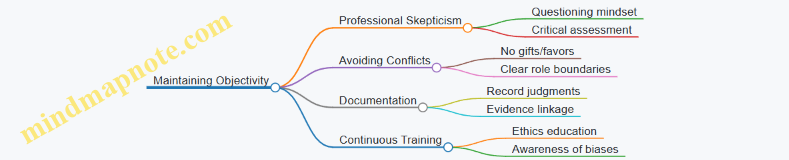
Example: Objectivity in Action
Scenario: During an audit, the client’s CFO offers the auditor tickets to a major sporting event.
- Risk: The auditor may feel obligated or influenced.
- Best Practice: Politely decline the offer and report the incident to the audit manager.
Summary
Maintaining auditor independence and objectivity is critical to delivering a fair and unbiased audit opinion. Auditors must be vigilant about potential threats and apply safeguards consistently. By fostering a culture of integrity and transparency, auditors protect both their professional reputation and the interests of stakeholders.
Additional Resources
- International Ethics Standards Board for Accountants (IESBA) Code of Ethics
- AICPA Code of Professional Conduct
- Case studies on auditor independence violations
12.2 Recognizing and Addressing Conflicts of Interest
Conflicts of interest arise when an auditor’s personal, financial, or other interests could potentially influence—or appear to influence—their professional judgment and objectivity. Recognizing and effectively addressing these conflicts is crucial to maintaining the integrity and credibility of the audit process.
What is a Conflict of Interest?
A conflict of interest occurs when an auditor has competing interests or loyalties that could impair their impartiality. This can be actual, perceived, or potential.
- Actual Conflict: A real and existing conflict that affects the auditor’s objectivity.
- Perceived Conflict: When others believe a conflict exists, even if it does not.
- Potential Conflict: Situations that could develop into a conflict in the future.
Common Sources of Conflicts of Interest in Auditing
Example 1: Family Member in Client Company
An auditor discovers that their sibling holds a senior management position at the client company. This relationship could bias the auditor’s judgment or create an appearance of bias.
Best Practice: The auditor should disclose this relationship to their firm’s ethics committee and, if necessary, be reassigned to avoid involvement in that audit engagement.
Identifying Conflicts of Interest: A Step-by-Step Approach

Example 2: Auditor Holding Shares in Client
An auditor owns shares in a company they are auditing. Even if the shareholding is minor, it can create a conflict of interest.
Best Practice: The auditor should either divest the shares before the audit or recuse themselves from the engagement. Transparency through disclosure is essential.
Addressing Conflicts of Interest
- Disclosure: Promptly disclose any potential or actual conflicts to the appropriate authority within the audit firm.
- Evaluation: The firm’s ethics committee or leadership evaluates the significance and impact of the conflict.
- Mitigation: Implement safeguards such as reassigning the auditor, increasing supervision, or limiting access to sensitive information.
- Documentation: Maintain thorough documentation of the conflict, decisions made, and actions taken.
Example 3: Auditor Previously Employed by Client
An auditor was employed by the client company within the last year and is now assigned to audit that company.
Best Practice: Due to familiarity threats, the auditor should be removed from the engagement or subject to additional review procedures to ensure independence.
Mind Map: Addressing Conflicts of Interest
Practical Tips for Auditors
- Regularly update personal and financial interest declarations.
- Maintain an open dialogue with supervisors about potential conflicts.
- Avoid accepting gifts or hospitality that could impair independence.
- Stay informed about the firm’s policies on conflicts of interest.
Summary
Recognizing and addressing conflicts of interest is vital to uphold audit quality and professional ethics. Through timely disclosure, careful evaluation, and appropriate mitigation, auditors can maintain their objectivity and the trust of stakeholders.
For further reading, auditors can refer to the International Ethics Standards Board for Accountants (IESBA) Code of Ethics, which provides detailed guidance on conflicts of interest and auditor independence.
12.3 Applying Professional Skepticism Throughout the Audit
Professional skepticism is a critical mindset auditors must maintain throughout the audit process to ensure the accuracy and reliability of financial statements. It involves a questioning mind, a critical assessment of audit evidence, and an awareness of conditions that may indicate possible misstatement due to error or fraud.
What is Professional Skepticism?
- Maintaining an attitude that includes a questioning mind.
- Being alert to conditions that may indicate possible misstatement.
- Critically assessing audit evidence.
Mind Map: Core Elements of Professional Skepticism
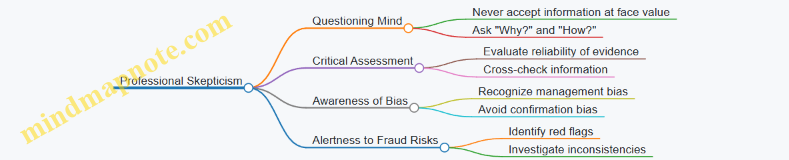
Why is Professional Skepticism Important?
- Prevents complacency.
- Helps detect errors and fraud.
- Enhances audit quality and credibility.
Mind Map: Benefits of Professional Skepticism
Practical Examples of Applying Professional Skepticism
-
Example: Questioning Unusual Transactions
- Scenario: During an audit of a retail company, the auditor notices a large, unusual sales transaction recorded at the end of the fiscal year.
- Skeptical Approach: Instead of accepting the explanation at face value, the auditor requests supporting documentation, verifies the transaction with the customer, and reviews subsequent cash receipts.
- Outcome: The auditor discovers the transaction was recorded prematurely to inflate sales figures.
-
Example: Challenging Management Estimates
- Scenario: Management provides an estimate for allowance for doubtful accounts that seems low compared to historical trends.
- Skeptical Approach: The auditor analyzes past write-offs, compares industry benchmarks, and tests the assumptions used in the estimate.
- Outcome: The auditor recommends adjusting the allowance to better reflect potential credit losses.
-
Example: Verifying Third-Party Confirmations
- Scenario: The client provides bank confirmation letters that appear altered.
- Skeptical Approach: The auditor directly contacts the bank using independently sourced contact information to confirm balances.
- Outcome: The auditor identifies discrepancies indicating potential fraud.
Mind Map: Steps to Maintain Professional Skepticism During Audit
Tips for Auditors to Enhance Professional Skepticism
- Always ask probing questions.
- Avoid over-reliance on management representations.
- Use corroborative evidence from independent sources.
- Be mindful of cognitive biases.
- Stay updated on common fraud schemes and red flags.
Summary
Applying professional skepticism is not a one-time task but a continuous attitude throughout the audit. It requires auditors to remain vigilant, question assumptions, and critically evaluate all evidence to deliver a high-quality audit that stakeholders can trust.
12.4 Handling Ethical Dilemmas with Practical Examples
Ethical dilemmas are situations where auditors face conflicting moral principles or professional standards, making decision-making complex. Handling these dilemmas effectively is crucial to maintain integrity, independence, and public trust in the audit process.
Understanding Ethical Dilemmas in Auditing
An ethical dilemma often arises when:
- There is pressure to overlook discrepancies.
- Conflicts of interest exist.
- Confidential information is at risk.
- Professional skepticism is challenged.
Mind Map: Common Ethical Dilemmas in Auditing
Practical Example 1: Pressure to Alter Audit Findings
Scenario: An auditor discovers a material misstatement in the financial statements. The client’s CFO pressures the auditor to minimize the issue to avoid negative publicity.
Handling Approach:
- Reaffirm professional standards and auditor independence.
- Document all communications and findings meticulously.
- Escalate the issue within the audit firm’s hierarchy.
- If unresolved, consider withdrawing from the engagement.
Mind Map: Steps to Handle Pressure from Management
Practical Example 2: Conflict of Interest Due to Personal Relationship
Scenario: An auditor is assigned to audit a company where a close family member holds a senior management position.
Handling Approach:
- Disclose the relationship to the audit firm and client.
- Recuse oneself from the engagement if independence is compromised.
- Assign an independent auditor to the engagement.
Mind Map: Managing Conflict of Interest
Practical Example 3: Confidentiality Breach Risk
Scenario: An auditor receives a request from a third party for sensitive client information.
Handling Approach:
- Verify the legitimacy of the request.
- Consult client consent and legal requirements.
- Refuse unauthorized disclosure.
- Maintain strict confidentiality protocols.
Mind Map: Protecting Confidentiality
Practical Example 4: Overcoming Challenges to Professional Skepticism
Scenario: An auditor is inclined to accept management explanations without sufficient evidence due to time constraints.
Handling Approach:
- Remind oneself of the importance of professional skepticism.
- Allocate adequate time for verification.
- Seek corroborative evidence.
- Discuss concerns with audit team and supervisors.
Mind Map: Maintaining Professional Skepticism
Summary Best Practices for Handling Ethical Dilemmas
- Always adhere to the professional code of ethics (e.g., IESBA Code).
- Maintain clear and transparent communication.
- Document all decisions and rationale thoroughly.
- Seek guidance from ethics committees or legal counsel when in doubt.
- Prioritize auditor independence and objectivity above all.
By integrating these approaches and examples into daily audit practice, auditors can confidently navigate ethical dilemmas, uphold professional integrity, and contribute to trustworthy financial reporting.
12.5 Case Study: Navigating Ethical Challenges in Client Relationships
Introduction
Ethical challenges are an inevitable part of the auditor-client relationship. Maintaining integrity, objectivity, and professional skepticism is crucial to uphold the reputation of the auditing profession and ensure reliable financial reporting. This case study explores common ethical dilemmas auditors face and demonstrates practical approaches to navigate them effectively.
Scenario Overview
An auditor, Jane, is assigned to audit a mid-sized manufacturing company. During the audit, she discovers that the client’s CFO is pressuring the audit team to overlook certain revenue recognition issues to meet quarterly targets. Jane must decide how to handle this situation while maintaining professional ethics.
Ethical Challenges Identified
Ethical Challenges Mind Map
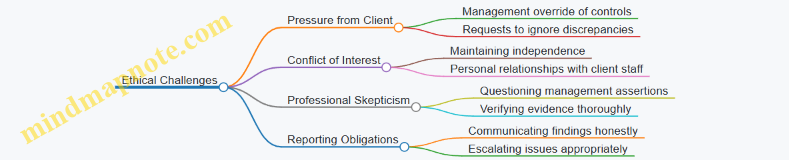
Step-by-Step Approach to Navigate the Challenges
-
Recognize the Ethical Issue
- Jane identifies that management is attempting to influence audit outcomes unethically.
-
Consult Professional Standards and Code of Ethics
- Refer to the International Ethics Standards Board for Accountants (IESBA) Code of Ethics.
-
Document the Pressure and Findings
- Maintain detailed records of all communications and evidence related to the issue.
-
Communicate with Senior Audit Team Members
- Discuss the issue internally to determine the best course of action.
-
Engage with Client’s Audit Committee or Equivalent
- Raise concerns with those charged with governance to seek resolution.
-
Maintain Professional Skepticism
- Perform additional audit procedures to verify the accuracy of revenue recognition.
-
Evaluate Impact on Audit Opinion
- If unresolved, consider the implications for the audit report.
-
Escalate if Necessary
- Follow firm policies for whistleblowing or regulatory reporting if the issue persists.
Practical Example: Handling Management Pressure
Mind Map: Decision-Making Framework for Ethical Dilemmas
Lessons Learned
- Always maintain independence and objectivity, regardless of client pressure.
- Early documentation and communication are key to resolving ethical issues.
- Professional skepticism helps uncover potential misstatements.
- Escalation protocols protect auditors and ensure compliance.
- Building strong relationships with audit committees facilitates ethical resolutions.
Conclusion
Navigating ethical challenges requires a structured approach grounded in professional standards, clear communication, and unwavering commitment to integrity. By applying these principles, auditors like Jane can uphold the trust placed in them by stakeholders and contribute to transparent financial reporting.